SNOWFLAKE
By Ishan Bhawantha
20th May 2021
Introduction
• Snowflake is a true SaaS offering.
• No Hardware to select
• No Software to install, configure or manage.
• Ongoing maintenance, management, upgrades and tuning is handles by SF.
• No private cloud deployment. ( AWS + Azure + GCP )
• Not a relational database. ( No PK / FK constrains)
• Insert, Update, Delete, Views, Materialized Views, ACID Transections.
• Analytical Aggregation, Windowing and Hierarchical Queries.
• Query Language -> SnowSQL
• DDL/DML
• SQL Functions
• UDF / Stored Procedure (JS)
Integration Support
• Data Integration (Informatica, Talend)
• Self-service BI Tools (Tableau, QlikView)
• Big Data Tools (Kafka, Spark, Databricks etc.)
• JDBC/ODBC Drivers
• Native Language Connectors (Python/Go/Node Js)
• SQL Interface & Client
• Snowflake Web Interface
• Snowflake CLI +DBeaver
Snowflake Architecture
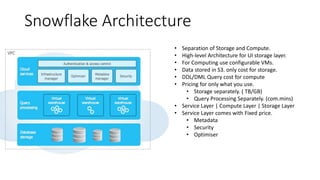
• Separation of Storage and Compute.
• High-level Architecture for UI storage layer.
• For Computing use configurable VMs.
• Data stored in S3. only cost for storage.
• DDL/DML Query cost for compute
• Pricing for only what you use.
• Storage separately. ( TB/GB)
• Query Processing Separately. (com.mins)
• Service Layer | Compute Layer | Storage Layer
• Service Layer comes with Fixed price.
• Metadata
• Security
• Optimiser
What SF makes unique ?
• Scalability (Storage and Compute)
• Few nobs to tune the database.
• No need Indexing
• No Performance Tuning
• No Partitioning
• No Physical Storage Design.
• Security, Data Governance and Protection.
• Simplification and Automation
• Balance and Scale.
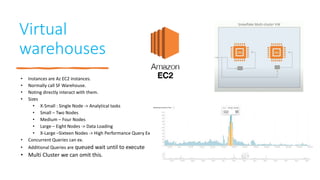
Virtual
warehouses
• Instances are Az EC2 instances.
• Normally call SF Warehouse.
• Noting directly interact with them.
• Sizes
• X-Small : Single Node -> Analytical tasks
• Small – Two Nodes
• Medium – Four Nodes
• Large – Eight Nodes -> Data Loading
• X-Large –Sixteen Nodes -> High Performance Query Ex
• Concurrent Queries can ex.
• Additional Queries are queued wait until to execute
• Multi Cluster we can omit this.
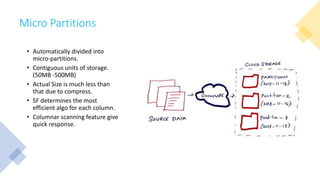
Micro Partitions
• Automatically divided into
micro-partitions.
• Contiguous units of storage.
(50MB -500MB)
• Actual Size is much less than
that due to compress.
• SF determines the most
efficient algo for each column.
• Columnar scanning feature give
quick response.
How Micro Partitioning ?
• FROM S3
• High Availability and Durability of S3 used here.
• API to read parts.
• Break into Small Partitions (Micro Partitions)
• Re organize the data make it columnar. (Column values of partitions
are compressed together.)
• Compress the only the column values individually.
• Add header to metadata of the micro partition. (column offset)
• Micro partitions are stored in S3 as files.
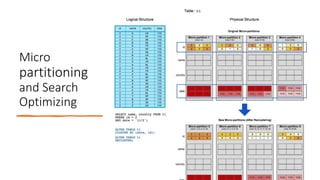
Micro
partitioning
and Search
Optimizing
Data Loading
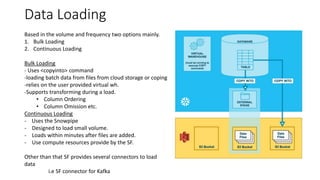
Based in the volume and frequency two options mainly.
1. Bulk Loading
2. Continuous Loading
Bulk Loading
- Uses <copyinto> command
-loading batch data from files from cloud storage or coping
-relies on the user provided virtual wh.
-Supports transforming during a load.
• Column Ordering
• Column Omission etc.
Continuous Loading
- Uses the Snowpipe
- Designed to load small volume.
- Loads within minutes after files are added.
- Use compute resources provide by the SF.
Other than that SF provides several connectors to load
data
i.e SF connector for Kafka
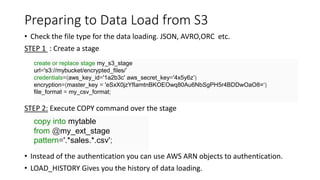
Preparing to Data Load from S3
• Check the file type for the data loading. JSON, AVRO,ORC etc.
STEP 1 : Create a stage
STEP 2: Execute COPY command over the stage
• Instead of the authentication you can use AWS ARN objects to authentication.
• LOAD_HISTORY Gives you the history of data loading.
create or replace stage my_s3_stage
url='s3://mybucket/encrypted_files/’
credentials=(aws_key_id='1a2b3c' aws_secret_key='4x5y6z’)
encryption=(master_key = 'eSxX0jzYfIamtnBKOEOwq80Au6NbSgPH5r4BDDwOaO8=‘)
file_format = my_csv_format;
copy into mytable
from @my_ext_stage
pattern='.*sales.*.csv';
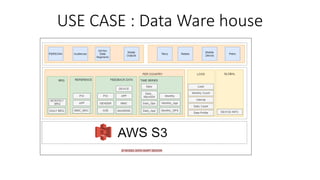
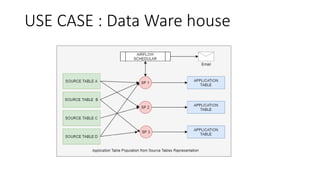
USE CASE : Data Ware house
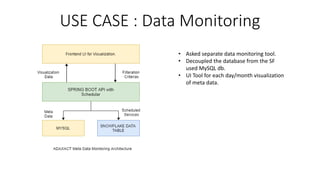
USE CASE : Data Monitoring
• Asked separate data monitoring tool.
• Decoupled the database from the SF
used MySQL db.
• UI Tool for each day/month visualization
of meta data.
USE CASE : Data Ware house
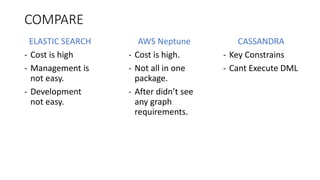
COMPARE
ELASTIC SEARCH
- Cost is high
- Management is
not easy.
- Development
not easy.
AWS Neptune
- Cost is high.
- Not all in one
package.
- After didn’t see
any graph
requirements.
CASSANDRA
- Key Constrains
- Cant Execute DML

Snowflake Datawarehouse Architecturing

  • 1.
  • 2.
    Introduction • Snowflake isa true SaaS offering. • No Hardware to select • No Software to install, configure or manage. • Ongoing maintenance, management, upgrades and tuning is handles by SF. • No private cloud deployment. ( AWS + Azure + GCP ) • Not a relational database. ( No PK / FK constrains) • Insert, Update, Delete, Views, Materialized Views, ACID Transections. • Analytical Aggregation, Windowing and Hierarchical Queries. • Query Language -> SnowSQL • DDL/DML • SQL Functions • UDF / Stored Procedure (JS)
  • 3.
    Integration Support • DataIntegration (Informatica, Talend) • Self-service BI Tools (Tableau, QlikView) • Big Data Tools (Kafka, Spark, Databricks etc.) • JDBC/ODBC Drivers • Native Language Connectors (Python/Go/Node Js) • SQL Interface & Client • Snowflake Web Interface • Snowflake CLI +DBeaver
  • 4.
    Snowflake Architecture • Separationof Storage and Compute. • High-level Architecture for UI storage layer. • For Computing use configurable VMs. • Data stored in S3. only cost for storage. • DDL/DML Query cost for compute • Pricing for only what you use. • Storage separately. ( TB/GB) • Query Processing Separately. (com.mins) • Service Layer | Compute Layer | Storage Layer • Service Layer comes with Fixed price. • Metadata • Security • Optimiser
  • 5.
    What SF makesunique ? • Scalability (Storage and Compute) • Few nobs to tune the database. • No need Indexing • No Performance Tuning • No Partitioning • No Physical Storage Design. • Security, Data Governance and Protection. • Simplification and Automation • Balance and Scale.
  • 6.
    Virtual warehouses • Instances areAz EC2 instances. • Normally call SF Warehouse. • Noting directly interact with them. • Sizes • X-Small : Single Node -> Analytical tasks • Small – Two Nodes • Medium – Four Nodes • Large – Eight Nodes -> Data Loading • X-Large –Sixteen Nodes -> High Performance Query Ex • Concurrent Queries can ex. • Additional Queries are queued wait until to execute • Multi Cluster we can omit this.
  • 7.
    Micro Partitions • Automaticallydivided into micro-partitions. • Contiguous units of storage. (50MB -500MB) • Actual Size is much less than that due to compress. • SF determines the most efficient algo for each column. • Columnar scanning feature give quick response.
  • 8.
    How Micro Partitioning? • FROM S3 • High Availability and Durability of S3 used here. • API to read parts. • Break into Small Partitions (Micro Partitions) • Re organize the data make it columnar. (Column values of partitions are compressed together.) • Compress the only the column values individually. • Add header to metadata of the micro partition. (column offset) • Micro partitions are stored in S3 as files.
  • 9.
  • 10.
    Data Loading Based inthe volume and frequency two options mainly. 1. Bulk Loading 2. Continuous Loading Bulk Loading - Uses <copyinto> command -loading batch data from files from cloud storage or coping -relies on the user provided virtual wh. -Supports transforming during a load. • Column Ordering • Column Omission etc. Continuous Loading - Uses the Snowpipe - Designed to load small volume. - Loads within minutes after files are added. - Use compute resources provide by the SF. Other than that SF provides several connectors to load data i.e SF connector for Kafka
  • 11.
    Preparing to DataLoad from S3 • Check the file type for the data loading. JSON, AVRO,ORC etc. STEP 1 : Create a stage STEP 2: Execute COPY command over the stage • Instead of the authentication you can use AWS ARN objects to authentication. • LOAD_HISTORY Gives you the history of data loading. create or replace stage my_s3_stage url='s3://mybucket/encrypted_files/’ credentials=(aws_key_id='1a2b3c' aws_secret_key='4x5y6z’) encryption=(master_key = 'eSxX0jzYfIamtnBKOEOwq80Au6NbSgPH5r4BDDwOaO8=‘) file_format = my_csv_format; copy into mytable from @my_ext_stage pattern='.*sales.*.csv';
  • 12.
    USE CASE :Data Ware house
  • 13.
    USE CASE :Data Monitoring • Asked separate data monitoring tool. • Decoupled the database from the SF used MySQL db. • UI Tool for each day/month visualization of meta data.
  • 14.
    USE CASE :Data Ware house
  • 15.
    COMPARE ELASTIC SEARCH - Costis high - Management is not easy. - Development not easy. AWS Neptune - Cost is high. - Not all in one package. - After didn’t see any graph requirements. CASSANDRA - Key Constrains - Cant Execute DML