Data Loading
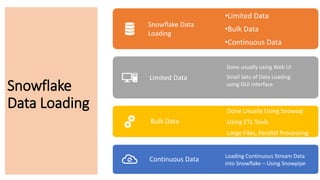
Snowflake Data
Loading
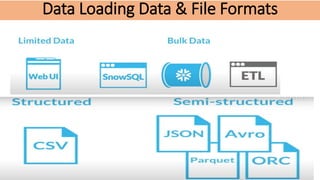
•Limited Data
•Bulk Data
•Continuous Data
Limited Data
Done usually using Web UI
Small Sets of Data Loading
using GUI Interface
Bulk Data
Done Usually Using Snowsql
Using ETL Tools
Large Files, Parallel Processing
Continuous Data Loading Continuous Stream Data
into Snowflake – Using Snowpipe
Snowflake
Data Loading
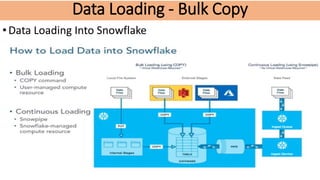
Data Loading - Bulk Copy
•Data Loading Into Snowflake
Data Loading - Bulk Copy
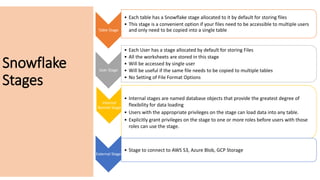
Table Stage
• Each table has a Snowflake stage allocated to it by default for storing files
• This stage is a convenient option if your files need to be accessible to multiple users
and only need to be copied into a single table
User Stage
• Each User has a stage allocated by default for storing Files
• All the worksheets are stored in this stage
• Will be accessed by single user
• Will be useful if the same file needs to be copied to multiple tables
• No Setting of File Format Options
Internal
Named Stage
• Internal stages are named database objects that provide the greatest degree of
flexibility for data loading
• Users with the appropriate privileges on the stage can load data into any table.
• Explicitly grant privileges on the stage to one or more roles before users with those
roles can use the stage.
External Stage
• Stage to connect to AWS S3, Azure Blob, GCP Storage
Snowflake
Stages
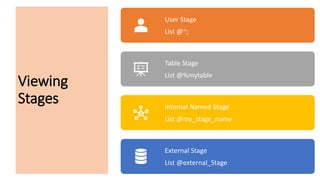
Viewing
Stages
User Stage
List @~;
Table Stage
List @%mytable
Internal Named Stage
List @my_stage_name
External Stage
List @external_Stage
Data Loading Data & File Formats
92-4, Ground Floor, beside Biryani Zone, Marathahalli, Bengaluru, Karnataka 560037
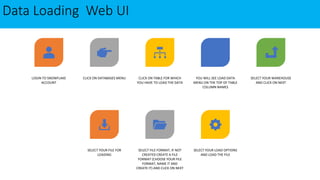
Data Loading Web UI
LOGIN TO SNOWFLAKE
ACCOUNT
CLICK ON DATABASES MENU CLICK ON TABLE FOR WHICH
YOU HAVE TO LOAD THE DATA
YOU WILL SEE LOAD DATA
MENU ON THE TOP OF TABLE
COLUMN NAMES
SELECT YOUR WAREHOUSE
AND CLICK ON NEXT
SELECT YOUR FILE FOR
LOADING
SELECT FILE FORMAT, IF NOT
CREATED CREATE A FILE
FORMAT (CHOOSE YOUR FILE
FORMAT, NAME IT AND
CREATE IT) AND CLICK ON NEXT
SELECT YOUR LOAD OPTIONS
AND LOAD THE FILE
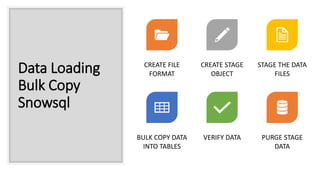
Data Loading
Bulk Copy
Snowsql
CREATE FILE
FORMAT
CREATE STAGE
OBJECT
STAGE THE DATA
FILES
BULK COPY DATA
INTO TABLES
VERIFY DATA PURGE STAGE
DATA
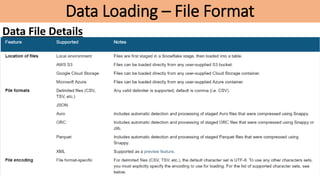
Data Loading – File Format
Data File Details
File Formats
Uploading
Files To Stage
Put file
://c:windowsemp.csv
@~/myfolder Windows
Put
file:///userstempemp.csv
@~/mystage -- Linux
Querying From
Stage
User Stage :
Select (j.$1) from @~/mystage;
Table Stage :
Select ($1) from @%mytable;
Internal Named Stage :
Select t.$1,t.$2 from @my_stage_name t;
Temporary Stage :
Select t.$1 from @my_temp_stage_name t;
92-4, Ground Floor, beside Biryani Zone, Marathahalli, Bengaluru, Karnataka 560037
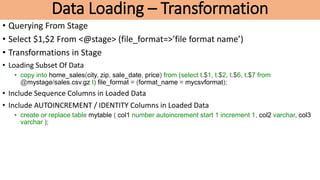
Data Loading – Transformation
• Querying From Stage
• Select $1,$2 From <@stage> (file_format=>’file format name’)
• Transformations in Stage
• Loading Subset Of Data
• copy into home_sales(city, zip, sale_date, price) from (select t.$1, t.$2, t.$6, t.$7 from
@mystage/sales.csv.gz t) file_format = (format_name = mycsvformat);
• Include Sequence Columns in Loaded Data
• Include AUTOINCREMENT / IDENTITY Columns in Loaded Data
• create or replace table mytable ( col1 number autoincrement start 1 increment 1, col2 varchar, col3
varchar );
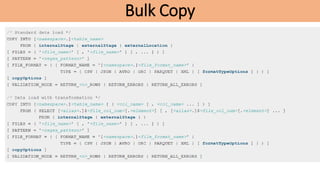
Bulk Copy
Bulk Copy..
Bulk Copy
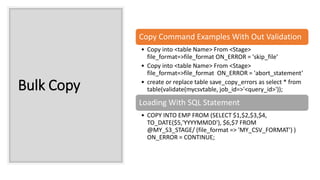
Copy Command Examples With Out Validation
• Copy into <table Name> From <Stage>
file_format=>file_format ON_ERROR = 'skip_file’
• Copy into <table Name> From <Stage>
file_format=>file_format ON_ERROR = 'abort_statement’
• create or replace table save_copy_errors as select * from
table(validate(mycsvtable, job_id=>'<query_id>'));
Loading With SQL Statement
• COPY INTO EMP FROM (SELECT $1,$2,$3,$4,
TO_DATE($5,'YYYYMMDD'), $6,$7 FROM
@MY_S3_STAGE/ (file_format => 'MY_CSV_FORMAT') )
ON_ERROR = CONTINUE;
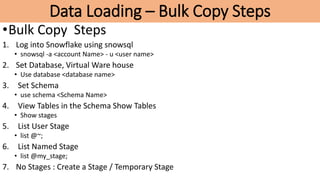
Data Loading – Bulk Copy Steps
•Bulk Copy Steps
1. Log into Snowflake using snowsql
• snowsql -a <account Name> - u <user name>
2. Set Database, Virtual Ware house
• Use database <database name>
3. Set Schema
• use schema <Schema Name>
4. View Tables in the Schema Show Tables
• Show stages
5. List User Stage
• list @~;
6. List Named Stage
• list @my_stage;
7. No Stages : Create a Stage / Temporary Stage
Data Loading – Bulk Copy Steps
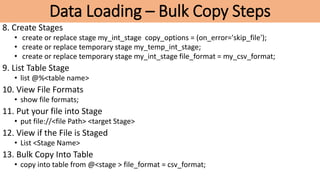
8. Create Stages
• create or replace stage my_int_stage copy_options = (on_error='skip_file');
• create or replace temporary stage my_temp_int_stage;
• create or replace temporary stage my_int_stage file_format = my_csv_format;
9. List Table Stage
• list @%<table name>
10. View File Formats
• show file formats;
11. Put your file into Stage
• put file://<file Path> <target Stage>
12. View if the File is Staged
• List <Stage Name>
13. Bulk Copy Into Table
• copy into table from @<stage > file_format = csv_format;
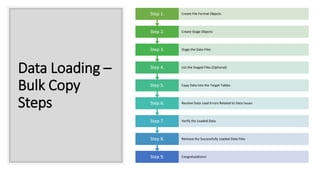
Data Loading –
Bulk Copy
Steps
Step 9. Congratulations!
Step 8. Remove the Successfully Loaded Data Files
Step 7. Verify the Loaded Data
Step 6. Resolve Data Load Errors Related to Data Issues
Step 5. Copy Data into the Target Tables
Step 4. List the Staged Files (Optional)
Step 3. Stage the Data Files
Step 2. Create Stage Objects
Step 1. Create File Format Objects

Snowflake Data Loading.pptx

  • 1.
    Data Loading Snowflake Data Loading •LimitedData •Bulk Data •Continuous Data Limited Data Done usually using Web UI Small Sets of Data Loading using GUI Interface Bulk Data Done Usually Using Snowsql Using ETL Tools Large Files, Parallel Processing Continuous Data Loading Continuous Stream Data into Snowflake – Using Snowpipe Snowflake Data Loading
  • 2.
    Data Loading -Bulk Copy •Data Loading Into Snowflake
  • 3.
    Data Loading -Bulk Copy
  • 4.
    Table Stage • Eachtable has a Snowflake stage allocated to it by default for storing files • This stage is a convenient option if your files need to be accessible to multiple users and only need to be copied into a single table User Stage • Each User has a stage allocated by default for storing Files • All the worksheets are stored in this stage • Will be accessed by single user • Will be useful if the same file needs to be copied to multiple tables • No Setting of File Format Options Internal Named Stage • Internal stages are named database objects that provide the greatest degree of flexibility for data loading • Users with the appropriate privileges on the stage can load data into any table. • Explicitly grant privileges on the stage to one or more roles before users with those roles can use the stage. External Stage • Stage to connect to AWS S3, Azure Blob, GCP Storage Snowflake Stages
  • 5.
    Viewing Stages User Stage List @~; TableStage List @%mytable Internal Named Stage List @my_stage_name External Stage List @external_Stage
  • 6.
    Data Loading Data& File Formats 92-4, Ground Floor, beside Biryani Zone, Marathahalli, Bengaluru, Karnataka 560037
  • 7.
    Data Loading WebUI LOGIN TO SNOWFLAKE ACCOUNT CLICK ON DATABASES MENU CLICK ON TABLE FOR WHICH YOU HAVE TO LOAD THE DATA YOU WILL SEE LOAD DATA MENU ON THE TOP OF TABLE COLUMN NAMES SELECT YOUR WAREHOUSE AND CLICK ON NEXT SELECT YOUR FILE FOR LOADING SELECT FILE FORMAT, IF NOT CREATED CREATE A FILE FORMAT (CHOOSE YOUR FILE FORMAT, NAME IT AND CREATE IT) AND CLICK ON NEXT SELECT YOUR LOAD OPTIONS AND LOAD THE FILE
  • 8.
    Data Loading Bulk Copy Snowsql CREATEFILE FORMAT CREATE STAGE OBJECT STAGE THE DATA FILES BULK COPY DATA INTO TABLES VERIFY DATA PURGE STAGE DATA
  • 9.
    Data Loading –File Format Data File Details
  • 10.
  • 11.
    Uploading Files To Stage Putfile ://c:windowsemp.csv @~/myfolder Windows Put file:///userstempemp.csv @~/mystage -- Linux
  • 12.
    Querying From Stage User Stage: Select (j.$1) from @~/mystage; Table Stage : Select ($1) from @%mytable; Internal Named Stage : Select t.$1,t.$2 from @my_stage_name t; Temporary Stage : Select t.$1 from @my_temp_stage_name t; 92-4, Ground Floor, beside Biryani Zone, Marathahalli, Bengaluru, Karnataka 560037
  • 13.
    Data Loading –Transformation • Querying From Stage • Select $1,$2 From <@stage> (file_format=>’file format name’) • Transformations in Stage • Loading Subset Of Data • copy into home_sales(city, zip, sale_date, price) from (select t.$1, t.$2, t.$6, t.$7 from @mystage/sales.csv.gz t) file_format = (format_name = mycsvformat); • Include Sequence Columns in Loaded Data • Include AUTOINCREMENT / IDENTITY Columns in Loaded Data • create or replace table mytable ( col1 number autoincrement start 1 increment 1, col2 varchar, col3 varchar );
  • 14.
  • 15.
  • 16.
    Bulk Copy Copy CommandExamples With Out Validation • Copy into <table Name> From <Stage> file_format=>file_format ON_ERROR = 'skip_file’ • Copy into <table Name> From <Stage> file_format=>file_format ON_ERROR = 'abort_statement’ • create or replace table save_copy_errors as select * from table(validate(mycsvtable, job_id=>'<query_id>')); Loading With SQL Statement • COPY INTO EMP FROM (SELECT $1,$2,$3,$4, TO_DATE($5,'YYYYMMDD'), $6,$7 FROM @MY_S3_STAGE/ (file_format => 'MY_CSV_FORMAT') ) ON_ERROR = CONTINUE;
  • 17.
    Data Loading –Bulk Copy Steps •Bulk Copy Steps 1. Log into Snowflake using snowsql • snowsql -a <account Name> - u <user name> 2. Set Database, Virtual Ware house • Use database <database name> 3. Set Schema • use schema <Schema Name> 4. View Tables in the Schema Show Tables • Show stages 5. List User Stage • list @~; 6. List Named Stage • list @my_stage; 7. No Stages : Create a Stage / Temporary Stage
  • 18.
    Data Loading –Bulk Copy Steps 8. Create Stages • create or replace stage my_int_stage copy_options = (on_error='skip_file'); • create or replace temporary stage my_temp_int_stage; • create or replace temporary stage my_int_stage file_format = my_csv_format; 9. List Table Stage • list @%<table name> 10. View File Formats • show file formats; 11. Put your file into Stage • put file://<file Path> <target Stage> 12. View if the File is Staged • List <Stage Name> 13. Bulk Copy Into Table • copy into table from @<stage > file_format = csv_format;
  • 19.
    Data Loading – BulkCopy Steps Step 9. Congratulations! Step 8. Remove the Successfully Loaded Data Files Step 7. Verify the Loaded Data Step 6. Resolve Data Load Errors Related to Data Issues Step 5. Copy Data into the Target Tables Step 4. List the Staged Files (Optional) Step 3. Stage the Data Files Step 2. Create Stage Objects Step 1. Create File Format Objects