< Network layer >
< NETWORK MANAGEMENT >
<SIMPLE NETWORK MANAGEMENT PROTOCOL>
Gouasmia Zakaria Gouasmia.zakaria1@gmail.com
OUTLINE
• WHAT IS NETWORK MANAGEMENT ?
• NETWORK MANAGEMENT VOCABULARY
WHAT IS NETWORK MANAGEMENT ?
• In the early years , network was small and local .
• Network manager’s job includes
– Installation : attach PCs , printers , etc.. To LAN
– Configuration : NICs , protocol stack , user app’s shared
printers ….so more
– Testing : ping was sufficient to “manage” network
– More devices :bridge router
– Job was manageable
• Above only deals with configuration
• Ongoing maintenance issues
– How to optimize performance ?
– How to handle failures and network changes ?
– How to extend network capacity ?
– How to account for network usages ?
– How to solve network security issues ?
– In the past , the network manager might take all the
responsibilities
– Today the task has divided into specialties :
• Server admin
• System admin
• Network admin
• Security specialist
• Different certifications for these ….. Cisco , novel , Microsoft
– today , networks are larger and more complicated , so more
demands on network manager
– How to monitor and control the network effectively and timely ?
• Management tools are needed
– Network –based management tools :use the network to
manage the network (remotely)
• To control
– Simple Network management protocol (SNMP)
– Management information base (MIB)
– Network management system (NMS)
• TO monitor
– Remote monitor (RMON1)
Network management
– Network management includes the deployment , integration and
coordination of the hardware , software , and human elements to :
• monitor
• test
• poll
• configure
• analyze
• evaluate and control the network and element resources to meet the real-time ,
operational performance and quality of service requirements at a reasonable cost .
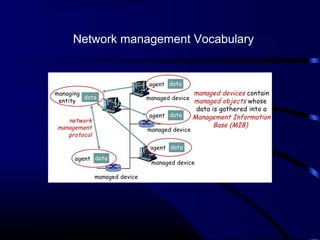
Network management Vocabulary
• Managed Device
– Devices to be monitored/ controlled
– A managed device may have several managed objects to be managed
– A software (agent ) is installed to provide access to information
/parameters (data) about the device , which is called Management
Information Base (Mib)
• Managing Entity
– Used by the manager / admin to do network management
– Pc , netbook , terminal .. Installed with a software called Network
Management System (NMS)
– NMS display / analyzes data from management agents
Network management
Vocabulary
• Network Manager protocol
– Runs between the managing entity and the managed
devices
– The managing entity can query the status of the managed
devices and take actions at the devices via its agents .
– Agents can use the protocol to inform the managing
entity of exceptional events
– E.g .. SNMP : simple Network management protocol
• Managing agents located at managed devices are
periodically queried by the managing entity through a
network management protocol .
SNMP
Simple Network Management Protocol
What is SNMP?
• SNMP is a tool (protocol) that allows for remote
and local management of items on the network
including servers, workstations, routers, switches
and other managed devices.
• Comprised of agents and managers
•Agent - process running on each managed node collecting
information about the device it is running on.
•Manager - process running on a management workstation that
requests information about devices on the network.
Versions
•Two major versions SNMPv1, SNMPv2
•SNMPv1 is the recommended standard
•SNMPv2 has become split into:
•SNMPv2u - SNMPv2u with user-based security
•SNMPv2* - SNMPv2 with user-based security and additional features
•SNMPv2c - SNMPv2 without security
Versions
• SNMPv3
Add security and remote configuration
Each SNMP entity has an identifier- snmpEengineID
• Communication for USM- user based Security mode
– NoAuthNoPriv
– authNoPriv
– AuthPriv
– Privacy protocols –CBC _DES, CFB_AES_129
Advantages of using SNMP
• Standard
• universally supported
• extendible
• portable
• allows distributed management access
• Light weight protocol
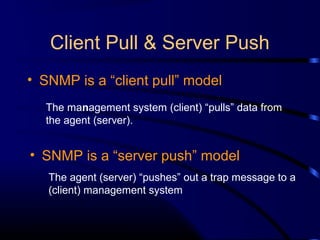
Client Pull & Server Push
• SNMP is a “client pull” model
• SNMP is a “server push” model
The management system (client) “pulls” data from
the agent (server).
The agent (server) “pushes” out a trap message to a
(client) management system
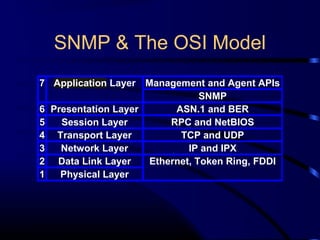
SNMP & The OSI Model
7 Application Layer Management and Agent APIs
SNMP
6 Presentation Layer ASN.1 and BER
5 Session Layer RPC and NetBIOS
4 Transport Layer TCP and UDP
3 Network Layer IP and IPX
2 Data Link Layer Ethernet, Token Ring, FDDI
1 Physical Layer
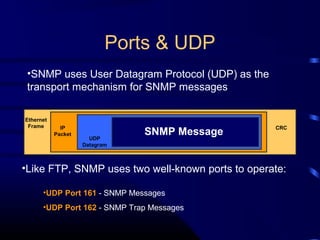
Ports & UDP
•SNMP uses User Datagram Protocol (UDP) as the
transport mechanism for SNMP messages
•UDP Port 161 - SNMP Messages
•UDP Port 162 - SNMP Trap Messages
•Like FTP, SNMP uses two well-known ports to operate:
Ethernet
Frame IP
Packet
UDP
Datagram
SNMP Message
CRC
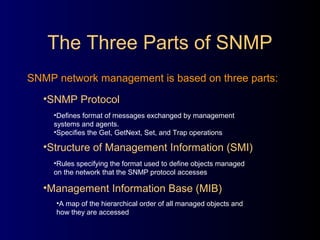
SNMP network management is based on three parts:
The Three Parts of SNMP
•Structure of Management Information (SMI)
•Rules specifying the format used to define objects managed
on the network that the SNMP protocol accesses
•Management Information Base (MIB)
•A map of the hierarchical order of all managed objects and
how they are accessed
•SNMP Protocol
•Defines format of messages exchanged by management
systems and agents.
•Specifies the Get, GetNext, Set, and Trap operations
Nodes
Items in an SNMP Network are called nodes. There are
different types of nodes.
•Managed nodes
•Management nodes
•Nodes that are not manageable by SNMP
Typically runs an agent process that services requests from a management node
Typically a workstation running some network management & monitoring software
A node may not support SNMP, but may be manageable by SNMP through a proxy
agent running on another machine
Nodes can be both managed nodes and a management node at the same time
(typically this is the case, since you want to be able to manage the workstation that your management application is
running on.)
SNMP Agents
Two basic designs of agents
•Extendible Agents
•Monolithic Agents
•not extendible
•optimized for specific hardware platform and OS
•this optimization results in less overhead (memory and system resources)
and quicker execution
•Open, modular design allows for adaptations to new
management data and operational requirements
Proxy & Gateway Agents
Proxy & Gateway Agents extend the capabilities of SNMP by allowing it to:
•Manage a device that cannot support an SNMP agent
•Manage a device that supports a non-SNMP management agent
•Allow a non-SNMP management system to access an SNMP agent
•Provide firewall-type security to other SNMP agents (UDP packet filtering)
•Translate between different formats of SNMP messages (v1 and v2)
•Consolidate multiple managed nodes into a single network address (also to
provide a single trap destination)
Four Basic Operations
•Get
•GetNext
•Set
•Trap
Retrieves the value of a MIB variable stored on the agent machine
(integer, string, or address of another MIB variable)
Retrieves the next value of the next lexical MIB variable
Changes the value of a MIB variable
An unsolicited notification sent by an agent to a management
application (typically a notification of something unexpected, like an error)
Traps
•Traps are unrequested event reports that are sent to a management system by an
SNMP agent process
•When a trappable event occurs, a trap message is generated by the agent and is
sent to a trap destination (a specific, configured network address)
•Many events can be configured to signal a trap, like a network cable fault, failing
NIC or Hard Drive, a “General Protection Fault”, or a power supply failure
•Traps can also be throttled -- You can limit the number of traps sent per second
from the agent
•Traps have a priority associated with them -- Critical, Major, Minor, Warning,
Marginal, Informational, Normal, Unknown
Trap Receivers
•Traps are received by a management application.
•Management applications can handle the trap in a few ways:
•Poll the agent that sent the trap for more information about the event, and the
status of the rest of the machine.
•Log the reception of the trap.
•Completely ignore the trap.
•Management applications can be set up to send off an e-mail, call a voice mail and
leave a message, or send an alpha-numeric page to the network administrator’s
pager that says:
Your PDC just Blue-Screened at 03:46AM. Have a nice day. :)
Languages of SNMP
•Structure of Management Information (SMI)
•Abstract Syntax Notation One (ASN.1)
•Basic Encoding Rules (BER)
specifies the format used for defining managed objects that are
accessed via the SNMP protocol
used to define the format of SNMP messages and managed
objects (MIB modules) using an unambiguous data description
format
used to encode the SNMP messages into a format suitable for
transmission across a network
SMIv1
Structure of Management Information
SMIv1 is described in RFCs 1155, 1212, 1215
These RFCs describe:
•How MIB modules are defined with CCITT X.208 ASN.1 data description
language
•The subset of the ASN.1 language that is used in MIBs
•The addition of the APPLICATION data type to ASN.1, specifically for use
with SNMP MIBs
•All ASN.1 constructs are serialized using the CCITT X.209 BER for
transmission across the wire
•definition of the high-level structure of the Internet branch
(iso(1).org(3).dod(6).internet(1)) of the MIB naming tree
•the definition and description of an SNMP managed object
SMIv2
Structure of Management Information
SMIv2 is described in RFCs 1442, 1443, 1444
These RFCs describe:
•SMIv2 is a backward compatible update to SMIv1
•The only exception is the Counter64 type defined by SMIv2
•Counter64 cannot be created in SMIv2
•RFC 2089 defines how bilingual (SMIv1 & SMIv2) agents handle the
Counter64 data type
•IETF requires that new and revised RFCs specify MIB modules using SMIv2
ASN.1
Abstract Syntax Notation One
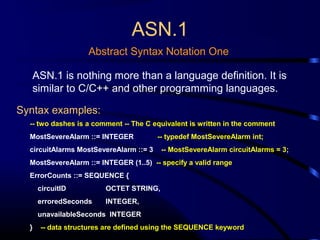
ASN.1 is nothing more than a language definition. It is
similar to C/C++ and other programming languages.
Syntax examples:
-- two dashes is a comment -- The C equivalent is written in the comment
MostSevereAlarm ::= INTEGER -- typedef MostSevereAlarm int;
circuitAlarms MostSevereAlarm ::= 3 -- MostSevereAlarm circuitAlarms = 3;
MostSevereAlarm ::= INTEGER (1..5) -- specify a valid range
ErrorCounts ::= SEQUENCE {
circuitID OCTET STRING,
erroredSeconds INTEGER,
unavailableSeconds INTEGER
} -- data structures are defined using the SEQUENCE keyword
BER
Basic Encoding Rules
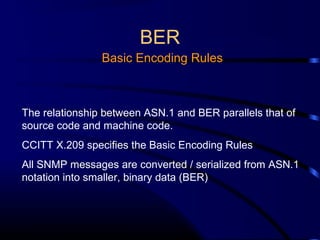
The relationship between ASN.1 and BER parallels that of
source code and machine code.
CCITT X.209 specifies the Basic Encoding Rules
All SNMP messages are converted / serialized from ASN.1
notation into smaller, binary data (BER)
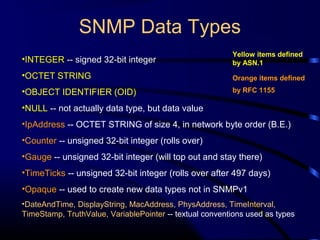
•INTEGER -- signed 32-bit integer
•OCTET STRING
•OBJECT IDENTIFIER (OID)
•NULL -- not actually data type, but data value
•IpAddress -- OCTET STRING of size 4, in network byte order (B.E.)
•Counter -- unsigned 32-bit integer (rolls over)
•Gauge -- unsigned 32-bit integer (will top out and stay there)
•TimeTicks -- unsigned 32-bit integer (rolls over after 497 days)
•Opaque -- used to create new data types not in SNMPv1
•DateAndTime, DisplayString, MacAddress, PhysAddress, TimeInterval,
TimeStamp, TruthValue, VariablePointer -- textual conventions used as types
SNMP Data Types
Yellow items defined
by ASN.1
Orange items defined
by RFC 1155
Managed “Objects” & MIBs
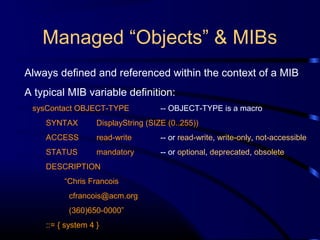
Always defined and referenced within the context of a MIB
A typical MIB variable definition:
sysContact OBJECT-TYPE -- OBJECT-TYPE is a macro
SYNTAX DisplayString (SIZE (0..255))
ACCESS read-write -- or read-write, write-only, not-accessible
STATUS mandatory -- or optional, deprecated, obsolete
DESCRIPTION
“Chris Francois
cfrancois@acm.org
(360)650-0000”
::= { system 4 }
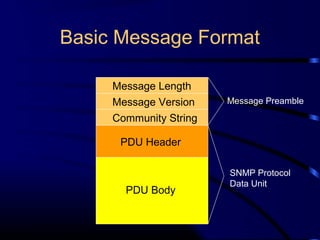
Basic Message Format
Message Length
Message Version
Community String
PDU Header
PDU Body
Message Preamble
SNMP Protocol
Data Unit
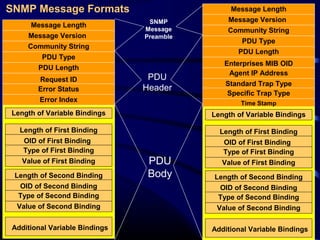
Message Length
Message Version
Community String
PDU Type
PDU Length
Request ID
Error Status
Error Index
Length of Variable Bindings
Length of First Binding
Additional Variable Bindings
OID of First Binding
Type of First Binding
Value of First Binding
Length of Second Binding
OID of Second Binding
Type of Second Binding
Value of Second Binding
Message Length
Message Version
Community String
PDU Type
PDU Length
Enterprises MIB OID
Agent IP Address
Standard Trap Type
Length of Variable Bindings
Length of First Binding
Additional Variable Bindings
OID of First Binding
Type of First Binding
Value of First Binding
Length of Second Binding
OID of Second Binding
Type of Second Binding
Value of Second Binding
Specific Trap Type
Time Stamp
PDU
Body
SNMP
Message
Preamble
PDU
Header
SNMP Message Formats
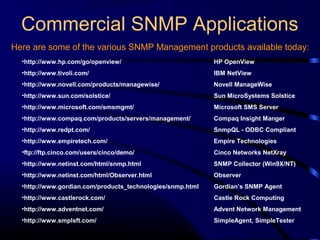
Commercial SNMP Applications
Here are some of the various SNMP Management products available today:
•http://www.hp.com/go/openview/ HP OpenView
•http://www.tivoli.com/ IBM NetView
•http://www.novell.com/products/managewise/ Novell ManageWise
•http://www.sun.com/solstice/ Sun MicroSystems Solstice
•http://www.microsoft.com/smsmgmt/ Microsoft SMS Server
•http://www.compaq.com/products/servers/management/ Compaq Insight Manger
•http://www.redpt.com/ SnmpQL - ODBC Compliant
•http://www.empiretech.com/ Empire Technologies
•ftp://ftp.cinco.com/users/cinco/demo/ Cinco Networks NetXray
•http://www.netinst.com/html/snmp.html SNMP Collector (Win9X/NT)
•http://www.netinst.com/html/Observer.html Observer
•http://www.gordian.com/products_technologies/snmp.html Gordian’s SNMP Agent
•http://www.castlerock.com/ Castle Rock Computing
•http://www.adventnet.com/ Advent Network Management
•http://www.smplsft.com/ SimpleAgent, SimpleTester

(Snmp) simple network management protocol

  • 1.
    < Network layer> < NETWORK MANAGEMENT > <SIMPLE NETWORK MANAGEMENT PROTOCOL> Gouasmia Zakaria Gouasmia.zakaria1@gmail.com
  • 2.
    OUTLINE • WHAT ISNETWORK MANAGEMENT ? • NETWORK MANAGEMENT VOCABULARY
  • 3.
    WHAT IS NETWORKMANAGEMENT ? • In the early years , network was small and local . • Network manager’s job includes – Installation : attach PCs , printers , etc.. To LAN – Configuration : NICs , protocol stack , user app’s shared printers ….so more – Testing : ping was sufficient to “manage” network – More devices :bridge router – Job was manageable
  • 4.
    • Above onlydeals with configuration • Ongoing maintenance issues – How to optimize performance ? – How to handle failures and network changes ? – How to extend network capacity ? – How to account for network usages ? – How to solve network security issues ?
  • 5.
    – In thepast , the network manager might take all the responsibilities – Today the task has divided into specialties : • Server admin • System admin • Network admin • Security specialist • Different certifications for these ….. Cisco , novel , Microsoft
  • 6.
    – today ,networks are larger and more complicated , so more demands on network manager – How to monitor and control the network effectively and timely ? • Management tools are needed
  • 7.
    – Network –basedmanagement tools :use the network to manage the network (remotely) • To control – Simple Network management protocol (SNMP) – Management information base (MIB) – Network management system (NMS) • TO monitor – Remote monitor (RMON1)
  • 8.
    Network management – Networkmanagement includes the deployment , integration and coordination of the hardware , software , and human elements to : • monitor • test • poll • configure • analyze • evaluate and control the network and element resources to meet the real-time , operational performance and quality of service requirements at a reasonable cost .
  • 9.
  • 10.
    Network management Vocabulary •Managed Device – Devices to be monitored/ controlled – A managed device may have several managed objects to be managed – A software (agent ) is installed to provide access to information /parameters (data) about the device , which is called Management Information Base (Mib) • Managing Entity – Used by the manager / admin to do network management – Pc , netbook , terminal .. Installed with a software called Network Management System (NMS) – NMS display / analyzes data from management agents
  • 11.
    Network management Vocabulary • NetworkManager protocol – Runs between the managing entity and the managed devices – The managing entity can query the status of the managed devices and take actions at the devices via its agents . – Agents can use the protocol to inform the managing entity of exceptional events – E.g .. SNMP : simple Network management protocol • Managing agents located at managed devices are periodically queried by the managing entity through a network management protocol .
  • 12.
  • 13.
    What is SNMP? •SNMP is a tool (protocol) that allows for remote and local management of items on the network including servers, workstations, routers, switches and other managed devices. • Comprised of agents and managers •Agent - process running on each managed node collecting information about the device it is running on. •Manager - process running on a management workstation that requests information about devices on the network.
  • 14.
    Versions •Two major versionsSNMPv1, SNMPv2 •SNMPv1 is the recommended standard •SNMPv2 has become split into: •SNMPv2u - SNMPv2u with user-based security •SNMPv2* - SNMPv2 with user-based security and additional features •SNMPv2c - SNMPv2 without security
  • 15.
    Versions • SNMPv3 Add securityand remote configuration Each SNMP entity has an identifier- snmpEengineID • Communication for USM- user based Security mode – NoAuthNoPriv – authNoPriv – AuthPriv – Privacy protocols –CBC _DES, CFB_AES_129
  • 16.
    Advantages of usingSNMP • Standard • universally supported • extendible • portable • allows distributed management access • Light weight protocol
  • 17.
    Client Pull &Server Push • SNMP is a “client pull” model • SNMP is a “server push” model The management system (client) “pulls” data from the agent (server). The agent (server) “pushes” out a trap message to a (client) management system
  • 18.
    SNMP & TheOSI Model 7 Application Layer Management and Agent APIs SNMP 6 Presentation Layer ASN.1 and BER 5 Session Layer RPC and NetBIOS 4 Transport Layer TCP and UDP 3 Network Layer IP and IPX 2 Data Link Layer Ethernet, Token Ring, FDDI 1 Physical Layer
  • 19.
    Ports & UDP •SNMPuses User Datagram Protocol (UDP) as the transport mechanism for SNMP messages •UDP Port 161 - SNMP Messages •UDP Port 162 - SNMP Trap Messages •Like FTP, SNMP uses two well-known ports to operate: Ethernet Frame IP Packet UDP Datagram SNMP Message CRC
  • 20.
    SNMP network managementis based on three parts: The Three Parts of SNMP •Structure of Management Information (SMI) •Rules specifying the format used to define objects managed on the network that the SNMP protocol accesses •Management Information Base (MIB) •A map of the hierarchical order of all managed objects and how they are accessed •SNMP Protocol •Defines format of messages exchanged by management systems and agents. •Specifies the Get, GetNext, Set, and Trap operations
  • 21.
    Nodes Items in anSNMP Network are called nodes. There are different types of nodes. •Managed nodes •Management nodes •Nodes that are not manageable by SNMP Typically runs an agent process that services requests from a management node Typically a workstation running some network management & monitoring software A node may not support SNMP, but may be manageable by SNMP through a proxy agent running on another machine Nodes can be both managed nodes and a management node at the same time (typically this is the case, since you want to be able to manage the workstation that your management application is running on.)
  • 22.
    SNMP Agents Two basicdesigns of agents •Extendible Agents •Monolithic Agents •not extendible •optimized for specific hardware platform and OS •this optimization results in less overhead (memory and system resources) and quicker execution •Open, modular design allows for adaptations to new management data and operational requirements
  • 23.
    Proxy & GatewayAgents Proxy & Gateway Agents extend the capabilities of SNMP by allowing it to: •Manage a device that cannot support an SNMP agent •Manage a device that supports a non-SNMP management agent •Allow a non-SNMP management system to access an SNMP agent •Provide firewall-type security to other SNMP agents (UDP packet filtering) •Translate between different formats of SNMP messages (v1 and v2) •Consolidate multiple managed nodes into a single network address (also to provide a single trap destination)
  • 24.
    Four Basic Operations •Get •GetNext •Set •Trap Retrievesthe value of a MIB variable stored on the agent machine (integer, string, or address of another MIB variable) Retrieves the next value of the next lexical MIB variable Changes the value of a MIB variable An unsolicited notification sent by an agent to a management application (typically a notification of something unexpected, like an error)
  • 25.
    Traps •Traps are unrequestedevent reports that are sent to a management system by an SNMP agent process •When a trappable event occurs, a trap message is generated by the agent and is sent to a trap destination (a specific, configured network address) •Many events can be configured to signal a trap, like a network cable fault, failing NIC or Hard Drive, a “General Protection Fault”, or a power supply failure •Traps can also be throttled -- You can limit the number of traps sent per second from the agent •Traps have a priority associated with them -- Critical, Major, Minor, Warning, Marginal, Informational, Normal, Unknown
  • 26.
    Trap Receivers •Traps arereceived by a management application. •Management applications can handle the trap in a few ways: •Poll the agent that sent the trap for more information about the event, and the status of the rest of the machine. •Log the reception of the trap. •Completely ignore the trap. •Management applications can be set up to send off an e-mail, call a voice mail and leave a message, or send an alpha-numeric page to the network administrator’s pager that says: Your PDC just Blue-Screened at 03:46AM. Have a nice day. :)
  • 27.
    Languages of SNMP •Structureof Management Information (SMI) •Abstract Syntax Notation One (ASN.1) •Basic Encoding Rules (BER) specifies the format used for defining managed objects that are accessed via the SNMP protocol used to define the format of SNMP messages and managed objects (MIB modules) using an unambiguous data description format used to encode the SNMP messages into a format suitable for transmission across a network
  • 28.
    SMIv1 Structure of ManagementInformation SMIv1 is described in RFCs 1155, 1212, 1215 These RFCs describe: •How MIB modules are defined with CCITT X.208 ASN.1 data description language •The subset of the ASN.1 language that is used in MIBs •The addition of the APPLICATION data type to ASN.1, specifically for use with SNMP MIBs •All ASN.1 constructs are serialized using the CCITT X.209 BER for transmission across the wire •definition of the high-level structure of the Internet branch (iso(1).org(3).dod(6).internet(1)) of the MIB naming tree •the definition and description of an SNMP managed object
  • 29.
    SMIv2 Structure of ManagementInformation SMIv2 is described in RFCs 1442, 1443, 1444 These RFCs describe: •SMIv2 is a backward compatible update to SMIv1 •The only exception is the Counter64 type defined by SMIv2 •Counter64 cannot be created in SMIv2 •RFC 2089 defines how bilingual (SMIv1 & SMIv2) agents handle the Counter64 data type •IETF requires that new and revised RFCs specify MIB modules using SMIv2
  • 30.
    ASN.1 Abstract Syntax NotationOne ASN.1 is nothing more than a language definition. It is similar to C/C++ and other programming languages. Syntax examples: -- two dashes is a comment -- The C equivalent is written in the comment MostSevereAlarm ::= INTEGER -- typedef MostSevereAlarm int; circuitAlarms MostSevereAlarm ::= 3 -- MostSevereAlarm circuitAlarms = 3; MostSevereAlarm ::= INTEGER (1..5) -- specify a valid range ErrorCounts ::= SEQUENCE { circuitID OCTET STRING, erroredSeconds INTEGER, unavailableSeconds INTEGER } -- data structures are defined using the SEQUENCE keyword
  • 31.
    BER Basic Encoding Rules Therelationship between ASN.1 and BER parallels that of source code and machine code. CCITT X.209 specifies the Basic Encoding Rules All SNMP messages are converted / serialized from ASN.1 notation into smaller, binary data (BER)
  • 32.
    •INTEGER -- signed32-bit integer •OCTET STRING •OBJECT IDENTIFIER (OID) •NULL -- not actually data type, but data value •IpAddress -- OCTET STRING of size 4, in network byte order (B.E.) •Counter -- unsigned 32-bit integer (rolls over) •Gauge -- unsigned 32-bit integer (will top out and stay there) •TimeTicks -- unsigned 32-bit integer (rolls over after 497 days) •Opaque -- used to create new data types not in SNMPv1 •DateAndTime, DisplayString, MacAddress, PhysAddress, TimeInterval, TimeStamp, TruthValue, VariablePointer -- textual conventions used as types SNMP Data Types Yellow items defined by ASN.1 Orange items defined by RFC 1155
  • 33.
    Managed “Objects” &MIBs Always defined and referenced within the context of a MIB A typical MIB variable definition: sysContact OBJECT-TYPE -- OBJECT-TYPE is a macro SYNTAX DisplayString (SIZE (0..255)) ACCESS read-write -- or read-write, write-only, not-accessible STATUS mandatory -- or optional, deprecated, obsolete DESCRIPTION “Chris Francois cfrancois@acm.org (360)650-0000” ::= { system 4 }
  • 34.
    Basic Message Format MessageLength Message Version Community String PDU Header PDU Body Message Preamble SNMP Protocol Data Unit
  • 35.
    Message Length Message Version CommunityString PDU Type PDU Length Request ID Error Status Error Index Length of Variable Bindings Length of First Binding Additional Variable Bindings OID of First Binding Type of First Binding Value of First Binding Length of Second Binding OID of Second Binding Type of Second Binding Value of Second Binding Message Length Message Version Community String PDU Type PDU Length Enterprises MIB OID Agent IP Address Standard Trap Type Length of Variable Bindings Length of First Binding Additional Variable Bindings OID of First Binding Type of First Binding Value of First Binding Length of Second Binding OID of Second Binding Type of Second Binding Value of Second Binding Specific Trap Type Time Stamp PDU Body SNMP Message Preamble PDU Header SNMP Message Formats
  • 36.
    Commercial SNMP Applications Hereare some of the various SNMP Management products available today: •http://www.hp.com/go/openview/ HP OpenView •http://www.tivoli.com/ IBM NetView •http://www.novell.com/products/managewise/ Novell ManageWise •http://www.sun.com/solstice/ Sun MicroSystems Solstice •http://www.microsoft.com/smsmgmt/ Microsoft SMS Server •http://www.compaq.com/products/servers/management/ Compaq Insight Manger •http://www.redpt.com/ SnmpQL - ODBC Compliant •http://www.empiretech.com/ Empire Technologies •ftp://ftp.cinco.com/users/cinco/demo/ Cinco Networks NetXray •http://www.netinst.com/html/snmp.html SNMP Collector (Win9X/NT) •http://www.netinst.com/html/Observer.html Observer •http://www.gordian.com/products_technologies/snmp.html Gordian’s SNMP Agent •http://www.castlerock.com/ Castle Rock Computing •http://www.adventnet.com/ Advent Network Management •http://www.smplsft.com/ SimpleAgent, SimpleTester