SMART SCHOOL


    Group A_ICT_P2
Noor Atika
                       binti Ahmad       Husnil
           inti
     n ie b                  D       Khatimah binti
  rha med
Ma oha
                       20101037449       Hussin
                4
   M       3 744                           D
      010                             20101037452
 D 201


                    Group A_ICT_P2
Introduction
   one of the seven flagship of the Multimedia
    Super Corridor (MSC)

   learning institution that was built on 1996 in
    order to prepared children for Information Age

   teaching and learning based on creative
    thinking

   is a place where all student can learn within
    conducive learning environment

                         Group A_ICT_P2
Group A_ICT_P2
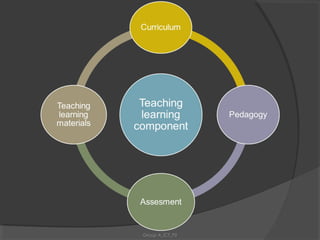
Curriculum

   designed to help student achieve overall
    and balanced development

   Student also have an integration of
    knowledge, skills and values


                      Group A_ICT_P2
Pedagogy
   involves specific learning goals like active
    learning process

   The classroom atmosphere is compatible
    with different teaching-learning strategies

   teachers include a variety of different types
    of lessons and learning experience and
    students’ learning styles

                        Group A_ICT_P2
Assessment
   covers achievement, readiness,
    progress and aptitude

   assessment in the form of on-line
    means that the items for smart
    assessment will be stored in a
    computerized item bank and be made
    available to users


                     Group A_ICT_P2
Teaching Learning Materials
   The software that were provided act as the
    tools for teachers giving knowledge to
    student and no need only to refer on
    textbook

   The widely use of LCD projectors and
    overhead projectors

   Promote cognitive challenging, attractive,
    motivates students to learn and
    encourages active participation


                       Group A_ICT_P2
The use of Technology
      as Enabler
in Smart School project


        Group A_ICT_P2
Technology:

   is used as an enabler for Smart School
    practices in teaching-learning, management,
    and communications with external
    constituencies.


                     Group A_ICT_P2
The Technology Infrastructure shall form
the platform for the:

Teaching and Learning
Assessment
 School Management System


                    Group A_ICT_P2
Teaching-Learning applications:
Self Exploration Learning
Students shall have access to the latest
educational materials available locally, as well as
to external resources

Collaborative Learning
Tools that facilitate group work within and across
classes


                      Group A_ICT_P2
Distance Learning
Communication with outside constituencies
using technology such as;
- Video Conferencing, e-mail, video-on-
demand and broadcast

Experimential Learning
Simulation software and virtual reality to
stimulate learning


                    Group A_ICT_P2
Research, Reference, and Data Collection
Tools to search, collect, and collate information

Drill and Practice
Software or courseware that allows students to
practice on their own or with peers


                      Group A_ICT_P2
Smart Assessment Applications

Comprehensive Item Bank.
- is a database containing a large number of
potential assessment items that can be used
for assessment.
- operates on the premise that the assessment
items, for both centralized and school-based
assessment, can be retrieved on-demand.


                   Group A_ICT_P2
Test Generation System.
- is a system that allows users to create and
print tests from the sets of items stored in the
Item Bank.
- also allow a quick and easy way to write test
items, edit them, assemble the items in
accordance to test specifications and print
multiple versions of tests.

On-line Test Administration.
- refers to a system of administering tests over
a network.

                     Group A_ICT_P2
Scoring and Analysis System.
- refers to an automatic method of scoring test-
taker’s responses, as well as analyzing the scores
to be exported to test taker’s entry in the Life-Time
Database.

Life-Time Database (LTDB).
- The Ministry of Education intends to monitor
student’s progress toward achieving their learning
objectives as well as to identify their strengths and
weaknesses in learning areas.
- To do this, the Technology Infrastructure will
need a database capable of accommodating
changes in students’ data and storing students’
profiles.

                       Group A_ICT_P2
School Management
  Functions and
  Applications
School Governance
Using computers to link the school to the Ministry
of Education for communication and policy
implementation.

Facility Management
Using computers to plan facility scheduling,
maintenance and inventory.

Financial Management
Using computers to facilitate budgeting,
accounting and reporting

                        Group A_ICT_P2
Human Resources Management
Using computer communication to link the
schools to the agencies in the education
system for management of human resources

External Resource Management
Using computer communication to link the
school to external constituencies like network
resources, i.e., Internet, libraries and museums
for research, reference and data collection.


                     Group A_ICT_P2
Technology Management
Using computers for centralized IT support for the school.

Security Management
Using computers for security management

Educational Resource Management
Using computer communication to link the school’s
databases to central resources databases to regulate and
organize educational resources

Students Affairs Management
Using computers and databases to maintain student
profiles.
                          Group A_ICT_P2
External Constituencies
   Linkages and Applications
Other Schools
Optimal sharing of information and resources to encourage
collaborative learning on a subject among and within schools.

Homes / Parents
Distance learning to enable students to keep abreast of
assignments even when not physically in school. Parents can also
access the school for feedback on their children’s progress.

Community
The Smart School as a community center to enable community
involvement in school activities. The community can also use the
Smart School as an on-going learning center.


                             Group A_ICT_P2
Libraries
Research, reference, and data collection
resources available on-line

Universities / Colleges
Distance learning on various topics by experts in
the field, the provision of mentor / tutor programs
and research data.

Companies / Industries
Access to information on industries, and career
opportunities, practical training and sponsorship
programs offered by these industries.
                       Group A_ICT_P2
Museums / Archives / Science Centres
- Research, reference, and data collection -
resource available on-line.
Possible access to virtual experiences.

Local Authorities
On-line information about local social and
cultural events to enable school participation.


                     Group A_ICT_P2
establishment of the Smart School is one
of the flagship applications that are part of
   Malaysia’s Multimedia Super Corridor
                  (MSC)


                  Group A_ICT_P2
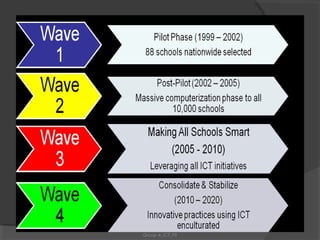
The four waves of the Smart
School implementation plan are:
 1. Wave 1 – The Pilot (1999-2002)
 2. Wave 2 – The Post-Pilot (2002-2005)
 3. Wave 3 – Making All Schools Smart

        (2005-2010)
 4. Wave 4 – Consolidate and Stabilise

            (2010-2020)


                   Group A_ICT_P2
Group A_ICT_P2
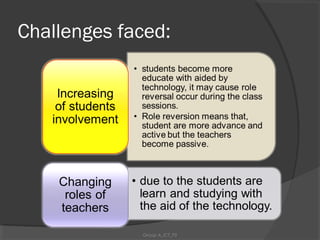
Challenges faced:


             Group A_ICT_P2
Group A_ICT_P2
~end~


 Group A_ICT_P2

Smart school group a ict_p2

  • 1.
    SMART SCHOOL Group A_ICT_P2
  • 2.
    Noor Atika binti Ahmad Husnil inti n ie b D Khatimah binti rha med Ma oha 20101037449 Hussin 4 M 3 744 D 010 20101037452 D 201 Group A_ICT_P2
  • 3.
    Introduction  one of the seven flagship of the Multimedia Super Corridor (MSC)  learning institution that was built on 1996 in order to prepared children for Information Age  teaching and learning based on creative thinking  is a place where all student can learn within conducive learning environment Group A_ICT_P2
  • 4.
  • 5.
    Curriculum  designed to help student achieve overall and balanced development  Student also have an integration of knowledge, skills and values Group A_ICT_P2
  • 6.
    Pedagogy  involves specific learning goals like active learning process  The classroom atmosphere is compatible with different teaching-learning strategies  teachers include a variety of different types of lessons and learning experience and students’ learning styles Group A_ICT_P2
  • 7.
    Assessment  covers achievement, readiness, progress and aptitude  assessment in the form of on-line means that the items for smart assessment will be stored in a computerized item bank and be made available to users Group A_ICT_P2
  • 8.
    Teaching Learning Materials  The software that were provided act as the tools for teachers giving knowledge to student and no need only to refer on textbook  The widely use of LCD projectors and overhead projectors  Promote cognitive challenging, attractive, motivates students to learn and encourages active participation Group A_ICT_P2
  • 9.
    The use ofTechnology as Enabler in Smart School project Group A_ICT_P2
  • 10.
    Technology:  is used as an enabler for Smart School practices in teaching-learning, management, and communications with external constituencies. Group A_ICT_P2
  • 11.
    The Technology Infrastructureshall form the platform for the: Teaching and Learning Assessment  School Management System Group A_ICT_P2
  • 12.
    Teaching-Learning applications: Self ExplorationLearning Students shall have access to the latest educational materials available locally, as well as to external resources Collaborative Learning Tools that facilitate group work within and across classes Group A_ICT_P2
  • 13.
    Distance Learning Communication withoutside constituencies using technology such as; - Video Conferencing, e-mail, video-on- demand and broadcast Experimential Learning Simulation software and virtual reality to stimulate learning Group A_ICT_P2
  • 14.
    Research, Reference, andData Collection Tools to search, collect, and collate information Drill and Practice Software or courseware that allows students to practice on their own or with peers Group A_ICT_P2
  • 15.
    Smart Assessment Applications ComprehensiveItem Bank. - is a database containing a large number of potential assessment items that can be used for assessment. - operates on the premise that the assessment items, for both centralized and school-based assessment, can be retrieved on-demand. Group A_ICT_P2
  • 16.
    Test Generation System. -is a system that allows users to create and print tests from the sets of items stored in the Item Bank. - also allow a quick and easy way to write test items, edit them, assemble the items in accordance to test specifications and print multiple versions of tests. On-line Test Administration. - refers to a system of administering tests over a network. Group A_ICT_P2
  • 17.
    Scoring and AnalysisSystem. - refers to an automatic method of scoring test- taker’s responses, as well as analyzing the scores to be exported to test taker’s entry in the Life-Time Database. Life-Time Database (LTDB). - The Ministry of Education intends to monitor student’s progress toward achieving their learning objectives as well as to identify their strengths and weaknesses in learning areas. - To do this, the Technology Infrastructure will need a database capable of accommodating changes in students’ data and storing students’ profiles. Group A_ICT_P2
  • 18.
    School Management Functions and Applications School Governance Using computers to link the school to the Ministry of Education for communication and policy implementation. Facility Management Using computers to plan facility scheduling, maintenance and inventory. Financial Management Using computers to facilitate budgeting, accounting and reporting Group A_ICT_P2
  • 19.
    Human Resources Management Usingcomputer communication to link the schools to the agencies in the education system for management of human resources External Resource Management Using computer communication to link the school to external constituencies like network resources, i.e., Internet, libraries and museums for research, reference and data collection. Group A_ICT_P2
  • 20.
    Technology Management Using computersfor centralized IT support for the school. Security Management Using computers for security management Educational Resource Management Using computer communication to link the school’s databases to central resources databases to regulate and organize educational resources Students Affairs Management Using computers and databases to maintain student profiles. Group A_ICT_P2
  • 21.
    External Constituencies Linkages and Applications Other Schools Optimal sharing of information and resources to encourage collaborative learning on a subject among and within schools. Homes / Parents Distance learning to enable students to keep abreast of assignments even when not physically in school. Parents can also access the school for feedback on their children’s progress. Community The Smart School as a community center to enable community involvement in school activities. The community can also use the Smart School as an on-going learning center. Group A_ICT_P2
  • 22.
    Libraries Research, reference, anddata collection resources available on-line Universities / Colleges Distance learning on various topics by experts in the field, the provision of mentor / tutor programs and research data. Companies / Industries Access to information on industries, and career opportunities, practical training and sponsorship programs offered by these industries. Group A_ICT_P2
  • 23.
    Museums / Archives/ Science Centres - Research, reference, and data collection - resource available on-line. Possible access to virtual experiences. Local Authorities On-line information about local social and cultural events to enable school participation. Group A_ICT_P2
  • 24.
    establishment of theSmart School is one of the flagship applications that are part of Malaysia’s Multimedia Super Corridor (MSC) Group A_ICT_P2
  • 25.
    The four wavesof the Smart School implementation plan are:  1. Wave 1 – The Pilot (1999-2002)  2. Wave 2 – The Post-Pilot (2002-2005)  3. Wave 3 – Making All Schools Smart (2005-2010)  4. Wave 4 – Consolidate and Stabilise (2010-2020) Group A_ICT_P2
  • 26.
  • 27.
    Challenges faced: Group A_ICT_P2
  • 28.
  • 29.