SIXTH SENSE
TECHNOLOGY

Presented by:
RAKESH KUMAR
 II SEMESTER- EE
IIT KANPUR
PHYSICAL WORLD
 Objects ~ Gestures
 Gestures ~ Interaction


 INTERACTIVE
 TECHNOLOGIES
SOME OF
INTERACTIVE TECHNOLOGIES
• Multi touch Systems
• Flexible screens
• Multi touch IWB (Interactive White Boards)
• Smart interactive Tables & multi touch
  desks
• Microsoft Surface
• SIXTH SENSE TECHNOLOGY
INTRODUCTION
• SixthSense is a wearable gestural interface that
  augments the physical world around us with digital
  information.

• Technology that plays with Human gestures to
  make the world more interactive and workflow
  much easier.

• Pranav Mistry, of Indian origin, a PhD student in
  the Fluid Interfaces Group at the MIT Media Lab is
  the mastermind behind the sixth sense technology.
EARLIER
EXPLORATIONS
• Gesture interface device

• Sticky notes

• Pen that can draw in 3-D

• Google Maps in a physical world
SO WHY SIXTH SENSE??
• Hereby Physical world is painted with the
  digital information.

• You can carry your digital world with you
  wherever you go.
• You can start with any wall or any surface
  as an interface even your palm.
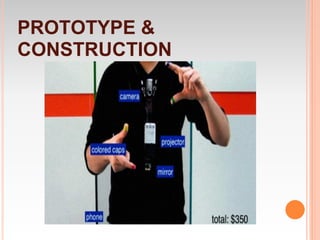
PROTOTYPE &
CONSTRUCTION
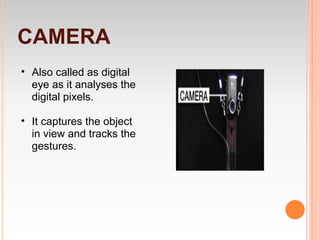
CAMERA
• Also called as digital
  eye as it analyses the
  digital pixels.

• It captures the object
  in view and tracks the
  gestures.
PROJECTOR
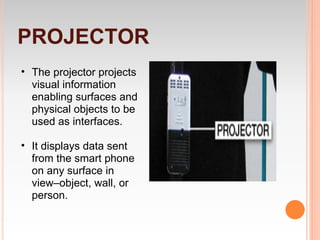
• The projector projects
  visual information
  enabling surfaces and
  physical objects to be
  used as interfaces.

• It displays data sent
  from the smart phone
  on any surface in
  view–object, wall, or
  person.
SMART PHONE
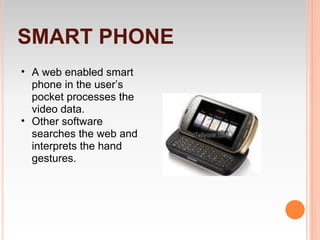
• A web enabled smart
  phone in the user’s
  pocket processes the
  video data.
• Other software
  searches the web and
  interprets the hand
  gestures.
COLOR MARKERS
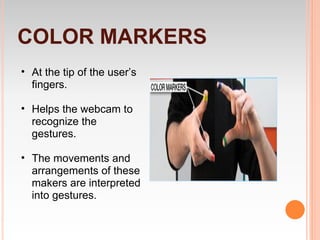
• At the tip of the user’s
  fingers.

• Helps the webcam to
  recognize the
  gestures.

• The movements and
  arrangements of these
  makers are interpreted
  into gestures.
WORKING?
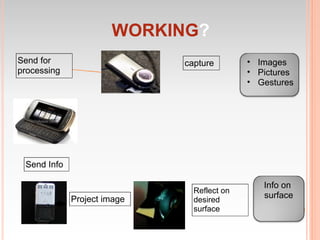
Send for                     capture        • Images
processing                                  • Pictures
                                            • Gestures


 Send Info

                                               Info on
                               Reflect on
             Project image     desired
                                               surface
                               surface
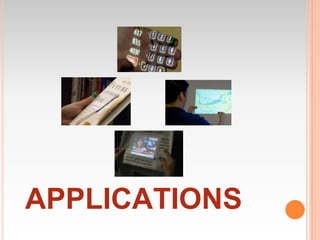
APPLICATIONS
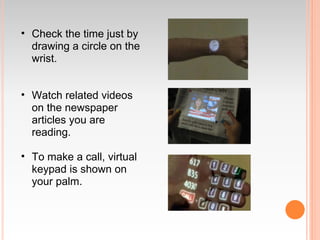
• Check the time just by
  drawing a circle on the
  wrist.


• Watch related videos
  on the newspaper
  articles you are
  reading.

• To make a call, virtual
  keypad is shown on
  your palm.
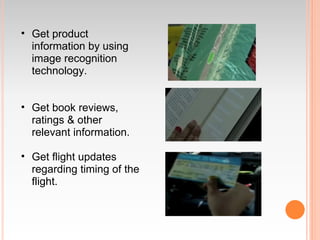
• Get product
  information by using
  image recognition
  technology.


• Get book reviews,
  ratings & other
  relevant information.

• Get flight updates
  regarding timing of the
  flight.
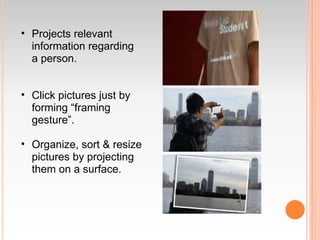
• Projects relevant
  information regarding
  a person.


• Click pictures just by
  forming “framing
  gesture”.

• Organize, sort & resize
  pictures by projecting
  them on a surface.
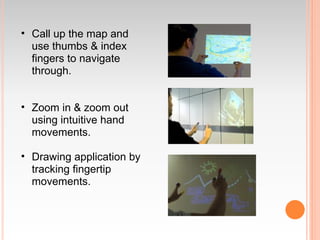
• Call up the map and
  use thumbs & index
  fingers to navigate
  through.


• Zoom in & zoom out
  using intuitive hand
  movements.

• Drawing application by
  tracking fingertip
  movements.
CONCLUSION
• Integrating information to everyday objects
  will not only help us to get rid of the digital
  divide, but will also help us in some way to
  stay human, to be more connected to our
  physical world.

• IT WILL NOT END UP IN MAKING US
  MACHINES SITTING IN FRONT OF
  OTHER MACHINES!!
THANKS!!

Sixth sense technology_ppt1

  • 1.
    SIXTH SENSE TECHNOLOGY Presented by: RAKESHKUMAR II SEMESTER- EE IIT KANPUR
  • 2.
    PHYSICAL WORLD Objects~ Gestures Gestures ~ Interaction INTERACTIVE TECHNOLOGIES
  • 3.
    SOME OF INTERACTIVE TECHNOLOGIES •Multi touch Systems • Flexible screens • Multi touch IWB (Interactive White Boards) • Smart interactive Tables & multi touch desks • Microsoft Surface • SIXTH SENSE TECHNOLOGY
  • 4.
    INTRODUCTION • SixthSense isa wearable gestural interface that augments the physical world around us with digital information. • Technology that plays with Human gestures to make the world more interactive and workflow much easier. • Pranav Mistry, of Indian origin, a PhD student in the Fluid Interfaces Group at the MIT Media Lab is the mastermind behind the sixth sense technology.
  • 5.
    EARLIER EXPLORATIONS • Gesture interfacedevice • Sticky notes • Pen that can draw in 3-D • Google Maps in a physical world
  • 6.
    SO WHY SIXTHSENSE?? • Hereby Physical world is painted with the digital information. • You can carry your digital world with you wherever you go. • You can start with any wall or any surface as an interface even your palm.
  • 7.
  • 8.
    CAMERA • Also calledas digital eye as it analyses the digital pixels. • It captures the object in view and tracks the gestures.
  • 9.
    PROJECTOR • The projectorprojects visual information enabling surfaces and physical objects to be used as interfaces. • It displays data sent from the smart phone on any surface in view–object, wall, or person.
  • 10.
    SMART PHONE • Aweb enabled smart phone in the user’s pocket processes the video data. • Other software searches the web and interprets the hand gestures.
  • 11.
    COLOR MARKERS • Atthe tip of the user’s fingers. • Helps the webcam to recognize the gestures. • The movements and arrangements of these makers are interpreted into gestures.
  • 12.
    WORKING? Send for capture • Images processing • Pictures • Gestures Send Info Info on Reflect on Project image desired surface surface
  • 13.
  • 14.
    • Check thetime just by drawing a circle on the wrist. • Watch related videos on the newspaper articles you are reading. • To make a call, virtual keypad is shown on your palm.
  • 15.
    • Get product information by using image recognition technology. • Get book reviews, ratings & other relevant information. • Get flight updates regarding timing of the flight.
  • 16.
    • Projects relevant information regarding a person. • Click pictures just by forming “framing gesture”. • Organize, sort & resize pictures by projecting them on a surface.
  • 17.
    • Call upthe map and use thumbs & index fingers to navigate through. • Zoom in & zoom out using intuitive hand movements. • Drawing application by tracking fingertip movements.
  • 18.
    CONCLUSION • Integrating informationto everyday objects will not only help us to get rid of the digital divide, but will also help us in some way to stay human, to be more connected to our physical world. • IT WILL NOT END UP IN MAKING US MACHINES SITTING IN FRONT OF OTHER MACHINES!!
  • 19.