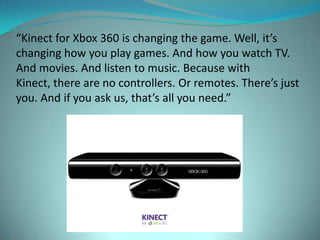

“Kinect for Xbox 360 is changing the game. Well, it’s
changing how you play games. And how you watch TV.
And movies. And listen to music. Because with
Kinect, there are no controllers. Or remotes. There’s just
you. And if you ask us, that’s all you need.”
Description of Technology
 Motion-sensing input device by Microsoft
 Kinect builds on software technology and on range
  camera technology
 Runs on a system that can interpret specific
  gestures, making completely hands-free control of
  electronic devices possible
 Uses an infrared projector and camera and a special
  microchip to track the movement of objects and
  individuals in three dimension
Description of Technology
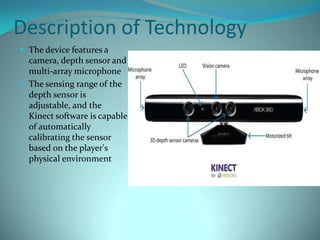
 The device features a
  camera, depth sensor and
  multi-array microphone
 The sensing range of the
  depth sensor is
  adjustable, and the
  Kinect software is capable
  of automatically
  calibrating the sensor
  based on the player's
  physical environment
Kinect uses a motion sensor that tracks your entire body. So when
you play, it’s not only about your hands and wrists. It’s about all of
            you. Arms, legs, knees, waist, hips and so on.
As you play, Kinect creates a digital skeleton of you based
  on depth data. So when you move left or right or jump
around, the sensor will capture it and put you in the game.
Kinect ID remembers who you are by collecting physical data that’s
stored in your profile. So when you want to play again, Kinect will
   know it’s you, making it easy to jump in whenever you want.
Kinect uses four strategically placed microphones within the
 sensor to recognize and separate your voice from the other
noises in the room, so you can control movies and more with
                          your voice.
History
Objectives:
 History of the technology
 Development
 State of Kinect at its release
 Current state of Kinect
Kinect’s Tech History
 The technology behind Kinect was developed in 2005
  by Zeev Zalesky, Alexander Shpunt, Aviad Maizels and
  Javier Garcia
 Kinect’s technology categorized under the field of
  optics
Development
 Announced June 1, 2009 under code name “Project
 Natal”


 Initial demonstration could recognize 4 people and 48
  skeletal points per person
 Official name Kinect announced June 13, 2010
Development (cont.)
 Official Kinect for Xbox 360 released on November
  4, 2010
 February 1, 2012: Kinect hardware and software
  designed for PC, released.
State of Kinect at Release
 From production to launch, Kinect cost Microsoft $500
    million
   Received average reviews from renowned game
    reviewers like IGN
   Cost and space required for use as main problems
   Games were developed that mostly tracked hand and
    leg movements
   Geared toward casual gamers, focused on getting
    people active
Current State of Kinect
 Fun Labs: finger tracking, 3D painting, scanning in
  yourself and real word objects
 Use of similar technology in PCs
Uses
Objectives:
 Explain current uses
 Explain technology being developed to expand the
  uses
 Explore 3rd Party Development
Current Uses
 Gaming: full body movement, family fun
 Voice commands and facial recognition
 PC: Very limited and almost brand new
 Item scanning, more expensive version
 Detects more intricate hand movements, focused on
 education and robotics companies.
Future Uses
 Expanding functionality with computers similar to MS
 Surface
Future Uses (cont.)
 Hands on educational demonstrations similar to MS
  Surface but more cost-effective
 Focus on work that requires gloved hands and
  simultaneous PC use to make work more efficient and
  streamlined
 Military uses: One to One movement makes robotic
  soldiers a not so distant possibility
 Medical field: Not just for use by collaborating doctors
  but also for patients.
3rd   Party Development
The hardware is being improved; the real areas that are
 being focused on by 3rd party developers are the
 software used in conjunction with Kinect
No controllers or remotes
                 Fitness (uses full body)
     Something for everyone! (all ages)
                      Voice Recognition
Medical: helps children with autism and
    patients who have suffered strokes
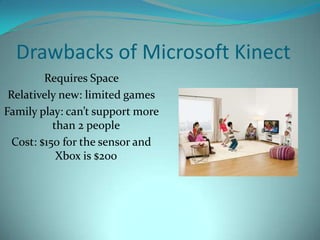
Drawbacks of Microsoft Kinect
         Requires Space
 Relatively new: limited games
Family play: can’t support more
           than 2 people
  Cost: $150 for the sensor and
            Xbox is $200
Discussion!!!
 With all of the potential future uses, is there one
  particular area (i.e, Education, Military) that you see
  benefitting the most from Kinect?
 Is there any way you see a bad effect for society with
  the use of Kinect?
 Do you feel uncomfortable that when you use
  Kinect, your room is filled with invisible infrared dots?

SIT - Microsoft Kinect

  • 1.
    “Kinect for Xbox360 is changing the game. Well, it’s changing how you play games. And how you watch TV. And movies. And listen to music. Because with Kinect, there are no controllers. Or remotes. There’s just you. And if you ask us, that’s all you need.”
  • 2.
    Description of Technology Motion-sensing input device by Microsoft  Kinect builds on software technology and on range camera technology  Runs on a system that can interpret specific gestures, making completely hands-free control of electronic devices possible  Uses an infrared projector and camera and a special microchip to track the movement of objects and individuals in three dimension
  • 4.
    Description of Technology The device features a camera, depth sensor and multi-array microphone  The sensing range of the depth sensor is adjustable, and the Kinect software is capable of automatically calibrating the sensor based on the player's physical environment
  • 5.
    Kinect uses amotion sensor that tracks your entire body. So when you play, it’s not only about your hands and wrists. It’s about all of you. Arms, legs, knees, waist, hips and so on.
  • 6.
    As you play,Kinect creates a digital skeleton of you based on depth data. So when you move left or right or jump around, the sensor will capture it and put you in the game.
  • 7.
    Kinect ID rememberswho you are by collecting physical data that’s stored in your profile. So when you want to play again, Kinect will know it’s you, making it easy to jump in whenever you want.
  • 8.
    Kinect uses fourstrategically placed microphones within the sensor to recognize and separate your voice from the other noises in the room, so you can control movies and more with your voice.
  • 9.
  • 10.
    Objectives:  History ofthe technology  Development  State of Kinect at its release  Current state of Kinect
  • 11.
    Kinect’s Tech History The technology behind Kinect was developed in 2005 by Zeev Zalesky, Alexander Shpunt, Aviad Maizels and Javier Garcia  Kinect’s technology categorized under the field of optics
  • 12.
    Development  Announced June1, 2009 under code name “Project Natal”  Initial demonstration could recognize 4 people and 48 skeletal points per person  Official name Kinect announced June 13, 2010
  • 13.
    Development (cont.)  OfficialKinect for Xbox 360 released on November 4, 2010  February 1, 2012: Kinect hardware and software designed for PC, released.
  • 14.
    State of Kinectat Release  From production to launch, Kinect cost Microsoft $500 million  Received average reviews from renowned game reviewers like IGN  Cost and space required for use as main problems  Games were developed that mostly tracked hand and leg movements  Geared toward casual gamers, focused on getting people active
  • 15.
    Current State ofKinect  Fun Labs: finger tracking, 3D painting, scanning in yourself and real word objects  Use of similar technology in PCs
  • 16.
  • 17.
    Objectives:  Explain currentuses  Explain technology being developed to expand the uses  Explore 3rd Party Development
  • 18.
    Current Uses  Gaming:full body movement, family fun  Voice commands and facial recognition  PC: Very limited and almost brand new  Item scanning, more expensive version  Detects more intricate hand movements, focused on education and robotics companies.
  • 19.
    Future Uses  Expandingfunctionality with computers similar to MS Surface
  • 20.
    Future Uses (cont.) Hands on educational demonstrations similar to MS Surface but more cost-effective  Focus on work that requires gloved hands and simultaneous PC use to make work more efficient and streamlined  Military uses: One to One movement makes robotic soldiers a not so distant possibility  Medical field: Not just for use by collaborating doctors but also for patients.
  • 21.
    3rd Party Development The hardware is being improved; the real areas that are being focused on by 3rd party developers are the software used in conjunction with Kinect
  • 22.
    No controllers orremotes Fitness (uses full body) Something for everyone! (all ages) Voice Recognition Medical: helps children with autism and patients who have suffered strokes
  • 23.
    Drawbacks of MicrosoftKinect Requires Space Relatively new: limited games Family play: can’t support more than 2 people Cost: $150 for the sensor and Xbox is $200
  • 24.
    Discussion!!!  With allof the potential future uses, is there one particular area (i.e, Education, Military) that you see benefitting the most from Kinect?  Is there any way you see a bad effect for society with the use of Kinect?  Do you feel uncomfortable that when you use Kinect, your room is filled with invisible infrared dots?