SIMULATIONS LCC RESONANT CIRCUIT

      564: POWER ELECTRONICS III

     COLORADO STATE UNIVERSITY


By Electrical and Computer Engineering student

            Minh Anh Thi Nguyen


                   Page 1 of 18
PURPOSE: The purpose of this lab is to simulate the LCC circuit using
MATLAB® to better familiarize the student with some of its operating
characteristics. This lab will explore some of the following aspects of the buck
converter:


      Input impedance
      Output impedance
      Zero frequency
      Output power
      Output current
      Output voltage
      Zero poles
      Phase of transfer function
      Stable circuit
      Unstable circuit


NOTE: The simulations that follow are intended to be completed with MATLAB®.
It is assumed that the student has a fundamental understanding of the operation
of MATLAB®. MATLAB® provides tutorials for users that are not experienced with
its functions.


PROCEDURE:
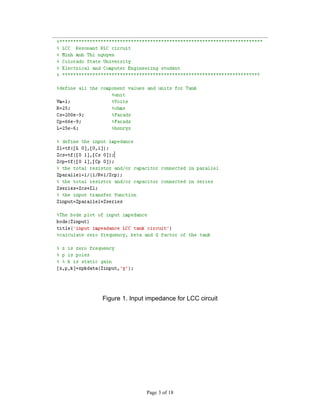
Part 1: write an m file shown in Figure 1.
Vm is a variable voltage. Set to 1 volts
L is a variable inductor. Set to 25µH.
R is a variable ideal resistor. Set to 25Ω.
Cp is a variable ideal capacitor. Change the value to 66nF.
Cs is a variable ideal capacitor. Change the value to 200nF.


                                     Page 2 of 18
Figure 1. Input impedance for LCC circuit


               Page 3 of 18
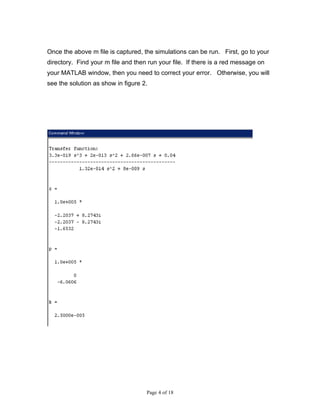
Once the above m file is captured, the simulations can be run. First, go to your
directory. Find your m file and then run your file. If there is a red message on
your MATLAB window, then you need to correct your error. Otherwise, you will
see the solution as show in figure 2.


                                    Page 4 of 18
Figure 2. The output of Zinput_LCC m file.


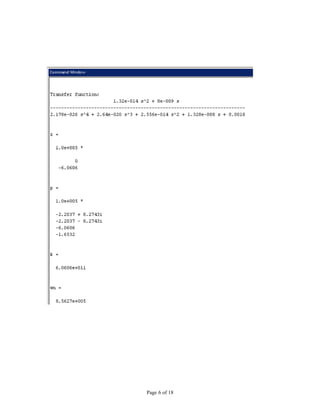
Next, plot the output voltage of the LCC circuit. By adding the output voltage
equation to the LCC m file. Then rerun the LCC m file.


                                    Page 5 of 18
Page 6 of 18
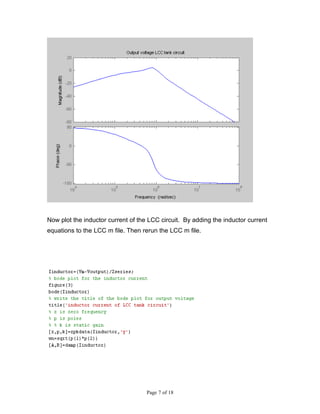
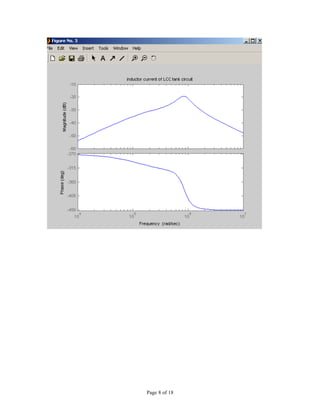
Now plot the inductor current of the LCC circuit. By adding the inductor current
equations to the LCC m file. Then rerun the LCC m file.


                                    Page 7 of 18
Page 8 of 18
Page 9 of 18
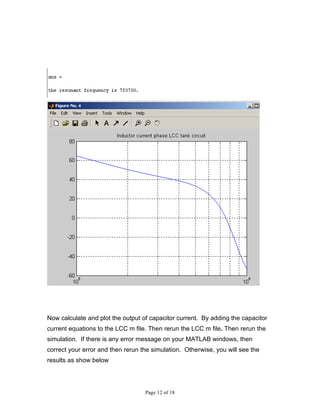
Now find the zero crossing of phase of inductor current. First define the input
impedance as a vector. Write a loop function to do the zero crossing of the
phase. Then rerun the simulation. If there is any error message on your
MATLAB windows, then correct your error and then rerun the simulation.
Otherwise, you will see the result as show below


                                   Page 10 of 18
Page 11 of 18
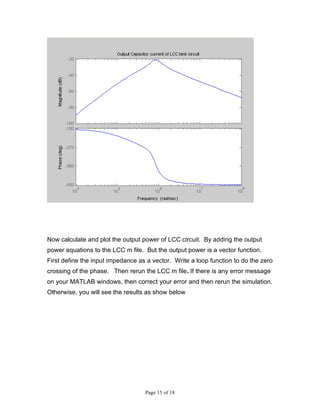
Now calculate and plot the output of capacitor current. By adding the capacitor
current equations to the LCC m file. Then rerun the LCC m file. Then rerun the
simulation. If there is any error message on your MATLAB windows, then
correct your error and then rerun the simulation. Otherwise, you will see the
results as show below


                                   Page 12 of 18
Page 13 of 18
Page 14 of 18
Now calculate and plot the output power of LCC circuit. By adding the output
power equations to the LCC m file. But the output power is a vector function.
First define the input impedance as a vector. Write a loop function to do the zero
crossing of the phase. Then rerun the LCC m file. If there is any error message
on your MATLAB windows, then correct your error and then rerun the simulation.
Otherwise, you will see the results as show below


                                   Page 15 of 18
Page 16 of 18
ans =


  0.1769


           Page 17 of 18
Page 18 of 18

SIMULATIONS LCC RESONANT CIRCUIT using MATLAB

  • 1.
    SIMULATIONS LCC RESONANTCIRCUIT 564: POWER ELECTRONICS III COLORADO STATE UNIVERSITY By Electrical and Computer Engineering student Minh Anh Thi Nguyen Page 1 of 18
  • 2.
    PURPOSE: The purposeof this lab is to simulate the LCC circuit using MATLAB® to better familiarize the student with some of its operating characteristics. This lab will explore some of the following aspects of the buck converter:  Input impedance  Output impedance  Zero frequency  Output power  Output current  Output voltage  Zero poles  Phase of transfer function  Stable circuit  Unstable circuit NOTE: The simulations that follow are intended to be completed with MATLAB®. It is assumed that the student has a fundamental understanding of the operation of MATLAB®. MATLAB® provides tutorials for users that are not experienced with its functions. PROCEDURE: Part 1: write an m file shown in Figure 1. Vm is a variable voltage. Set to 1 volts L is a variable inductor. Set to 25µH. R is a variable ideal resistor. Set to 25Ω. Cp is a variable ideal capacitor. Change the value to 66nF. Cs is a variable ideal capacitor. Change the value to 200nF. Page 2 of 18
  • 3.
    Figure 1. Inputimpedance for LCC circuit Page 3 of 18
  • 4.
    Once the abovem file is captured, the simulations can be run. First, go to your directory. Find your m file and then run your file. If there is a red message on your MATLAB window, then you need to correct your error. Otherwise, you will see the solution as show in figure 2. Page 4 of 18
  • 5.
    Figure 2. Theoutput of Zinput_LCC m file. Next, plot the output voltage of the LCC circuit. By adding the output voltage equation to the LCC m file. Then rerun the LCC m file. Page 5 of 18
  • 6.
  • 7.
    Now plot theinductor current of the LCC circuit. By adding the inductor current equations to the LCC m file. Then rerun the LCC m file. Page 7 of 18
  • 8.
  • 9.
  • 10.
    Now find thezero crossing of phase of inductor current. First define the input impedance as a vector. Write a loop function to do the zero crossing of the phase. Then rerun the simulation. If there is any error message on your MATLAB windows, then correct your error and then rerun the simulation. Otherwise, you will see the result as show below Page 10 of 18
  • 11.
  • 12.
    Now calculate andplot the output of capacitor current. By adding the capacitor current equations to the LCC m file. Then rerun the LCC m file. Then rerun the simulation. If there is any error message on your MATLAB windows, then correct your error and then rerun the simulation. Otherwise, you will see the results as show below Page 12 of 18
  • 13.
  • 14.
  • 15.
    Now calculate andplot the output power of LCC circuit. By adding the output power equations to the LCC m file. But the output power is a vector function. First define the input impedance as a vector. Write a loop function to do the zero crossing of the phase. Then rerun the LCC m file. If there is any error message on your MATLAB windows, then correct your error and then rerun the simulation. Otherwise, you will see the results as show below Page 15 of 18
  • 16.
  • 17.
    ans = 0.1769 Page 17 of 18
  • 18.