SimpleHR
Employee and Position Management
Business Process Management Solution for HR process
A Web-Based Workflow-Enabled
User-Friendly Front End to SAP HR
By TEKYOGI, LLC.
Prasad Mavuduri
TEKYOGI, LLC. 2
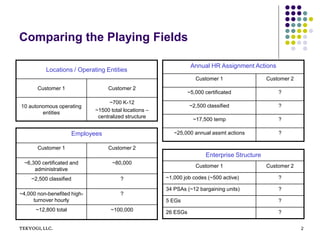
Comparing the Playing Fields
Locations / Operating Entities
Customer 1 Customer 2
10 autonomous operating
entities
~700 K-12
~1500 total locations –
centralized structure
Employees
Customer 1 Customer 2
~6,300 certificated and
administrative
~80,000
~2,500 classified ?
~4,000 non-benefited high-
turnover hourly
?
~12,800 total ~100,000
Annual HR Assignment Actions
Customer 1 Customer 2
~5,000 certificated ?
~2,500 classified ?
~17,500 temp ?
~25,000 annual assmt actions ?
Enterprise Structure
Customer 1 Customer 2
~1,000 job codes (~500 active) ?
34 PSAs (~12 bargaining units) ?
5 EGs ?
26 ESGs ?
TEKYOGI LLC. 3
Simple HR
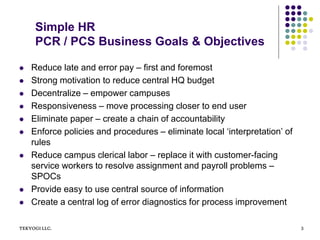
PCR / PCS Business Goals & Objectives
 Reduce late and error pay – first and foremost
 Strong motivation to reduce central HQ budget
 Decentralize – empower campuses
 Responsiveness – move processing closer to end user
 Eliminate paper – create a chain of accountability
 Enforce policies and procedures – eliminate local ‘interpretation’ of
rules
 Reduce campus clerical labor – replace it with customer-facing
service workers to resolve assignment and payroll problems –
SPOCs
 Provide easy to use central source of information
 Create a central log of error diagnostics for process improvement
TEKYOGI, LLC. 4
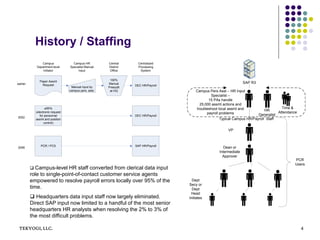
History / Staffing
Dept
Secy or
Dept
Head
Initiates
Dean or
Intermediate
Approver
VP
Campus Pers Asst – HR Input
Specialist –
15 PAs handle
25,000 assmt actions and
troubleshoot local assmt and
payroll problems
SAP R3
Time &
Attendance
HR
Generalist
Typical Campus HR/Payroll Staff
PCR
Users
DEC HR/Payroll
SAP HR/Payroll
DEC HR/Payroll
Paper Assmt
Request
eRPA
(electronic request
for personnel
assmt and position
control)
PCR / PCS
Manual input by
campus pers. asst.
Campus
Department-level
Initiator
Campus HR
Specialist Manual
Input
Centralized
Processing
System
2006
2002
earlier
100%
Manual
Preaudit
at HQ
Central
District
Office
 Campus-level HR staff converted from clerical data input
role to single-point-of-contact customer service agents
empowered to resolve payroll errors locally over 95% of the
time.
 Headquarters data input staff now largely eliminated.
Direct SAP input now limited to a handful of the most senior
headquarters HR analysts when resolving the 2% to 3% of
the most difficult problems.
TEKYOGI LLC. 5
EasyHR - PCR / PCS Modules & Technical
Architecture
Z-PCR (holding for
in-process actions)
Portal
SAP WAS / BSP Engine
PCR Web User Interface
Workflow Engine
Email
notice
Production R3 data
Changes in the
Z table
trigger workflow
SAP R3
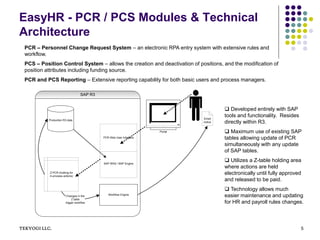
 Developed entirely with SAP
tools and functionality. Resides
directly within R3.
 Maximum use of existing SAP
tables allowing update of PCR
simultaneously with any update
of SAP tables.
 Utilizes a Z-table holding area
where actions are held
electronically until fully approved
and released to be paid.
 Technology allows much
easier maintenance and updating
for HR and payroll rules changes.
PCR – Personnel Change Request System – an electronic RPA entry system with extensive rules and
workflow.
PCS – Position Control System – allows the creation and deactivation of positions, and the modification of
position attributes including funding source.
PCR and PCS Reporting – Extensive reporting capability for both basic users and process managers.
TEKYOGI, LLC. 6
Reduce Errors Made by Both Professional HR
Specialists and Occasional Users – Dramatically
Reduce Complexity
2.0 Assign
Employee
3.0 Change
Existing
Assignment
4.0 Separate
5.0 Leave of
Absence
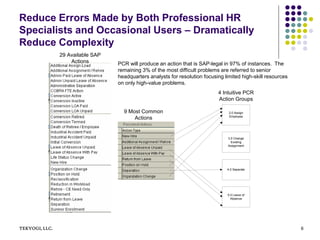
29 Available SAP
Actions
9 Most Common
Actions
4 Intuitive PCR
Action Groups
PCR will produce an action that is SAP-legal in 97% of instances. The
remaining 3% of the most difficult problems are referred to senior
headquarters analysts for resolution focusing limited high-skill resources
on only high-value problems.
TEKYOGILLC. 7
Control Data Access and Actions – Gather Sufficient
Data to Get Assignments Paid Accurately and
Quickly
0.1 Select Campus
0.2 Select
Department
1.1 Select “To” or
“Impacted”
Position
1.2 Select Action
2.0 Assign
Employee
3.0 Change
Existing
Assignment
4.0 Separate
5.0 Leave of
Absence
Seen only by
users with
district-wide
authority
Seen only by
users with
campus-wide or
multi-department
authority
Seen by all users
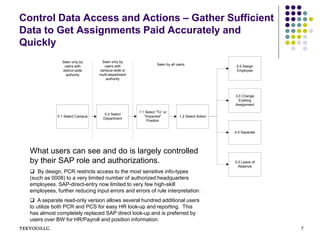
What users can see and do is largely controlled
by their SAP role and authorizations.
 By design, PCR restricts access to the most sensitive info-types
(such as 0008) to a very limited number of authorized headquarters
employees. SAP-direct-entry now limited to very few high-skill
employees, further reducing input errors and errors of rule interpretation.
 A separate read-only version allows several hundred additional users
to utilize both PCR and PCS for easy HR look-up and reporting. This
has almost completely replaced SAP direct look-up and is preferred by
users over BW for HR/Payroll and position information.
EB5C, LLC. 8
Simple Enough For An Occasional User With Only
Fundamental Knowledge Of District HR Rules
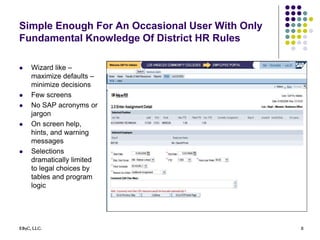
 Wizard like –
maximize defaults –
minimize decisions
 Few screens
 No SAP acronyms or
jargon
 On screen help,
hints, and warning
messages
 Selections
dramatically limited
to legal choices by
tables and program
logic
TEKYOGI LLC. 9
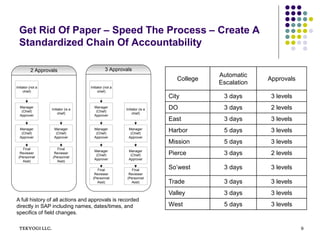
Get Rid Of Paper – Speed The Process – Create A
Standardized Chain Of Accountability
Initiator (not a
chief)
Manager
(Chief)
Approver
Manager
(Chief)
Approver
Final
Reviewer
(Personnel
Asst)
Initiator (is a
chief)
Manager
(Chief)
Approver
Final
Reviewer
(Personnel
Asst)
Initiator (not a
chief)
Manager
(Chief)
Approver
Manager
(Chief)
Approver
Final
Reviewer
(Personnel
Asst)
Initiator (is a
chief)
Manager
(Chief)
Approver
Final
Reviewer
(Personnel
Asst)
Manager
(Chief)
Approver
Manager
(Chief)
Approver
2 Approvals 3 Approvals
College
Automatic
Escalation
Approvals
City 3 days 3 levels
DO 3 days 2 levels
East 3 days 3 levels
Harbor 5 days 3 levels
Mission 5 days 3 levels
Pierce 3 days 2 levels
So’west 3 days 3 levels
Trade 3 days 3 levels
Valley 3 days 3 levels
West 5 days 3 levels
A full history of all actions and approvals is recorded
directly in SAP including names, dates/times, and
specifics of field changes.
TEKYOGI LLC. 10
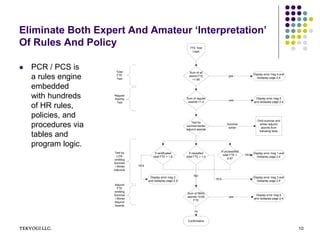
Eliminate Both Expert And Amateur ‘Interpretation’
Of Rules And Policy
 PCR / PCS is
a rules engine
embedded
with hundreds
of HR rules,
policies, and
procedures via
tables and
program logic.
If classified
total FTE > 1.0
If certificated
total FTE > 1.6
If unclassified
total FTE >
0.87
NO
Display error msg 1 and
redisplay page 2.4
Display error msg 2
and redisplay page 2.4
Display error msg 3 and
redisplay page 2.4
YES
YES
YES
FTE Test
Logic
Sum of all
assmt FTE
>1.85
Display error msg 4 and
redisplay page 2.4
yes
Confirmation
Sum of 08XX
assmts >0.60
FTE
no
Display error msg 6
and redisplay page 2.4
yes
Sum of regular
assmts >1.0
Display error msg 5
and redisplay page 2.4
yes
Test for
summer/winter
adjunct assmts
Omit summer and
winter adjunct
assmts from
following tests
Summer
winter
Total
FTE
Test
Regular
Assmts
Test
Test by
LOS
omitting
Summer
/ Winter
Adjuncts
Adjunct
FTE
omitting
Summer
/ Winter
Adjunct
Assmts
TEKYOGI LLC. 11
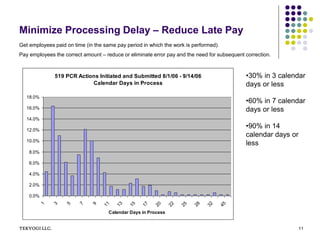
Minimize Processing Delay – Reduce Late Pay
519 PCR Actions Initiated and Submitted 8/1/06 - 9/14/06
Calendar Days in Process
0.0%
2.0%
4.0%
6.0%
8.0%
10.0%
12.0%
14.0%
16.0%
18.0%
1 3 5 7 9 11 13 15 17 20 22 25 28 32 45
Calendar Days in Process
•30% in 3 calendar
days or less
•60% in 7 calendar
days or less
•90% in 14
calendar days or
less
Get employees paid on time (in the same pay period in which the work is performed).
Pay employees the correct amount – reduce or eliminate error pay and the need for subsequent correction.
TEKYOGI, LLC. 12
Contact Information
Prasad Mavuduri, President
TEKYOGI, LLC.
prasad@tekyogi.com
408.828.9909

SimpleHR - BPM Solution - TEKYOGI

  • 1.
    SimpleHR Employee and PositionManagement Business Process Management Solution for HR process A Web-Based Workflow-Enabled User-Friendly Front End to SAP HR By TEKYOGI, LLC. Prasad Mavuduri
  • 2.
    TEKYOGI, LLC. 2 Comparingthe Playing Fields Locations / Operating Entities Customer 1 Customer 2 10 autonomous operating entities ~700 K-12 ~1500 total locations – centralized structure Employees Customer 1 Customer 2 ~6,300 certificated and administrative ~80,000 ~2,500 classified ? ~4,000 non-benefited high- turnover hourly ? ~12,800 total ~100,000 Annual HR Assignment Actions Customer 1 Customer 2 ~5,000 certificated ? ~2,500 classified ? ~17,500 temp ? ~25,000 annual assmt actions ? Enterprise Structure Customer 1 Customer 2 ~1,000 job codes (~500 active) ? 34 PSAs (~12 bargaining units) ? 5 EGs ? 26 ESGs ?
  • 3.
    TEKYOGI LLC. 3 SimpleHR PCR / PCS Business Goals & Objectives  Reduce late and error pay – first and foremost  Strong motivation to reduce central HQ budget  Decentralize – empower campuses  Responsiveness – move processing closer to end user  Eliminate paper – create a chain of accountability  Enforce policies and procedures – eliminate local ‘interpretation’ of rules  Reduce campus clerical labor – replace it with customer-facing service workers to resolve assignment and payroll problems – SPOCs  Provide easy to use central source of information  Create a central log of error diagnostics for process improvement
  • 4.
    TEKYOGI, LLC. 4 History/ Staffing Dept Secy or Dept Head Initiates Dean or Intermediate Approver VP Campus Pers Asst – HR Input Specialist – 15 PAs handle 25,000 assmt actions and troubleshoot local assmt and payroll problems SAP R3 Time & Attendance HR Generalist Typical Campus HR/Payroll Staff PCR Users DEC HR/Payroll SAP HR/Payroll DEC HR/Payroll Paper Assmt Request eRPA (electronic request for personnel assmt and position control) PCR / PCS Manual input by campus pers. asst. Campus Department-level Initiator Campus HR Specialist Manual Input Centralized Processing System 2006 2002 earlier 100% Manual Preaudit at HQ Central District Office  Campus-level HR staff converted from clerical data input role to single-point-of-contact customer service agents empowered to resolve payroll errors locally over 95% of the time.  Headquarters data input staff now largely eliminated. Direct SAP input now limited to a handful of the most senior headquarters HR analysts when resolving the 2% to 3% of the most difficult problems.
  • 5.
    TEKYOGI LLC. 5 EasyHR- PCR / PCS Modules & Technical Architecture Z-PCR (holding for in-process actions) Portal SAP WAS / BSP Engine PCR Web User Interface Workflow Engine Email notice Production R3 data Changes in the Z table trigger workflow SAP R3  Developed entirely with SAP tools and functionality. Resides directly within R3.  Maximum use of existing SAP tables allowing update of PCR simultaneously with any update of SAP tables.  Utilizes a Z-table holding area where actions are held electronically until fully approved and released to be paid.  Technology allows much easier maintenance and updating for HR and payroll rules changes. PCR – Personnel Change Request System – an electronic RPA entry system with extensive rules and workflow. PCS – Position Control System – allows the creation and deactivation of positions, and the modification of position attributes including funding source. PCR and PCS Reporting – Extensive reporting capability for both basic users and process managers.
  • 6.
    TEKYOGI, LLC. 6 ReduceErrors Made by Both Professional HR Specialists and Occasional Users – Dramatically Reduce Complexity 2.0 Assign Employee 3.0 Change Existing Assignment 4.0 Separate 5.0 Leave of Absence 29 Available SAP Actions 9 Most Common Actions 4 Intuitive PCR Action Groups PCR will produce an action that is SAP-legal in 97% of instances. The remaining 3% of the most difficult problems are referred to senior headquarters analysts for resolution focusing limited high-skill resources on only high-value problems.
  • 7.
    TEKYOGILLC. 7 Control DataAccess and Actions – Gather Sufficient Data to Get Assignments Paid Accurately and Quickly 0.1 Select Campus 0.2 Select Department 1.1 Select “To” or “Impacted” Position 1.2 Select Action 2.0 Assign Employee 3.0 Change Existing Assignment 4.0 Separate 5.0 Leave of Absence Seen only by users with district-wide authority Seen only by users with campus-wide or multi-department authority Seen by all users What users can see and do is largely controlled by their SAP role and authorizations.  By design, PCR restricts access to the most sensitive info-types (such as 0008) to a very limited number of authorized headquarters employees. SAP-direct-entry now limited to very few high-skill employees, further reducing input errors and errors of rule interpretation.  A separate read-only version allows several hundred additional users to utilize both PCR and PCS for easy HR look-up and reporting. This has almost completely replaced SAP direct look-up and is preferred by users over BW for HR/Payroll and position information.
  • 8.
    EB5C, LLC. 8 SimpleEnough For An Occasional User With Only Fundamental Knowledge Of District HR Rules  Wizard like – maximize defaults – minimize decisions  Few screens  No SAP acronyms or jargon  On screen help, hints, and warning messages  Selections dramatically limited to legal choices by tables and program logic
  • 9.
    TEKYOGI LLC. 9 GetRid Of Paper – Speed The Process – Create A Standardized Chain Of Accountability Initiator (not a chief) Manager (Chief) Approver Manager (Chief) Approver Final Reviewer (Personnel Asst) Initiator (is a chief) Manager (Chief) Approver Final Reviewer (Personnel Asst) Initiator (not a chief) Manager (Chief) Approver Manager (Chief) Approver Final Reviewer (Personnel Asst) Initiator (is a chief) Manager (Chief) Approver Final Reviewer (Personnel Asst) Manager (Chief) Approver Manager (Chief) Approver 2 Approvals 3 Approvals College Automatic Escalation Approvals City 3 days 3 levels DO 3 days 2 levels East 3 days 3 levels Harbor 5 days 3 levels Mission 5 days 3 levels Pierce 3 days 2 levels So’west 3 days 3 levels Trade 3 days 3 levels Valley 3 days 3 levels West 5 days 3 levels A full history of all actions and approvals is recorded directly in SAP including names, dates/times, and specifics of field changes.
  • 10.
    TEKYOGI LLC. 10 EliminateBoth Expert And Amateur ‘Interpretation’ Of Rules And Policy  PCR / PCS is a rules engine embedded with hundreds of HR rules, policies, and procedures via tables and program logic. If classified total FTE > 1.0 If certificated total FTE > 1.6 If unclassified total FTE > 0.87 NO Display error msg 1 and redisplay page 2.4 Display error msg 2 and redisplay page 2.4 Display error msg 3 and redisplay page 2.4 YES YES YES FTE Test Logic Sum of all assmt FTE >1.85 Display error msg 4 and redisplay page 2.4 yes Confirmation Sum of 08XX assmts >0.60 FTE no Display error msg 6 and redisplay page 2.4 yes Sum of regular assmts >1.0 Display error msg 5 and redisplay page 2.4 yes Test for summer/winter adjunct assmts Omit summer and winter adjunct assmts from following tests Summer winter Total FTE Test Regular Assmts Test Test by LOS omitting Summer / Winter Adjuncts Adjunct FTE omitting Summer / Winter Adjunct Assmts
  • 11.
    TEKYOGI LLC. 11 MinimizeProcessing Delay – Reduce Late Pay 519 PCR Actions Initiated and Submitted 8/1/06 - 9/14/06 Calendar Days in Process 0.0% 2.0% 4.0% 6.0% 8.0% 10.0% 12.0% 14.0% 16.0% 18.0% 1 3 5 7 9 11 13 15 17 20 22 25 28 32 45 Calendar Days in Process •30% in 3 calendar days or less •60% in 7 calendar days or less •90% in 14 calendar days or less Get employees paid on time (in the same pay period in which the work is performed). Pay employees the correct amount – reduce or eliminate error pay and the need for subsequent correction.
  • 12.
    TEKYOGI, LLC. 12 ContactInformation Prasad Mavuduri, President TEKYOGI, LLC. prasad@tekyogi.com 408.828.9909