CUSTOMER
Sebastian Schmitt, SAP
2017
Sizing Methods & Tools
– An Introduction
2
CUSTOMER
© 2017 SAP SE or an SAP affiliate company. All rights reserved. ǀ
Agenda
Introduction to Sizing Methods
Sizing Tools
Factors that influence Sizing
Sizing on www.sap.com/sizing
Conclusion
3
CUSTOMER
© 2017 SAP SE or an SAP affiliate company. All rights reserved. ǀ
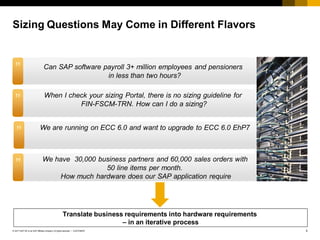
Translate business requirements into hardware requirements
– in an iterative process
Sizing Questions May Come in Different Flavors
Can SAP software payroll 3+ million employees and pensioners
in less than two hours?
”
When I check your sizing Portal, there is no sizing guideline for
FIN-FSCM-TRN. How can I do a sizing?
”
We are running on ECC 6.0 and want to upgrade to ECC 6.0 EhP7
”
We have 30,000 business partners and 60,000 sales orders with
50 line items per month.
How much hardware does our SAP application require
”
4
CUSTOMER
© 2017 SAP SE or an SAP affiliate company. All rights reserved. ǀ
Sizing-Relevant KPIs (Key Performance Indicators)
 Data that resides on the database
 File read and write activity to storage
 Cost factors: Backup/recovery depends on size of database
Disk size
Disk I/O
 Allocated to a user or background process
 Garbage collection, acceleration, planning capabilities, buffers, caches
 Cost factor: Physical memory slots
Memory
 Processing times of business transactions or tasks
 Cost factor: Number and processing power of servers
CPU
 Transferred amount of data
 Network time and roundtrips
 Cost factor: Leasing bandwidth
Front-end
Network
Load
5
CUSTOMER
© 2017 SAP SE or an SAP affiliate company. All rights reserved. ǀ
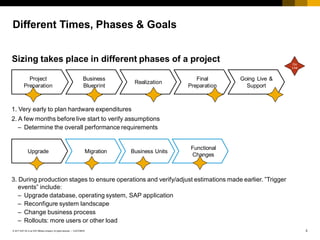
Different Times, Phases & Goals
1. Very early to plan hardware expenditures
2. A few months before live start to verify assumptions
– Determine the overall performance requirements
3. During production stages to ensure operations and verify/adjust estimations made earlier. ”Trigger
events” include:
– Upgrade database, operating system, SAP application
– Reconfigure system landscape
– Change business process
– Rollouts: more users or other load
Project
Preparation
Business
Blueprint
Realization
Final
Preparation
Going Live &
Support
Upgrade Migration Business Units
Functional
Changes
Go
Live
Sizing takes place in different phases of a project
6
CUSTOMER
© 2017 SAP SE or an SAP affiliate company. All rights reserved. ǀ
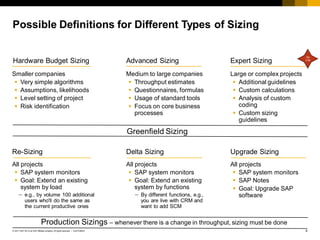
Possible Definitions for Different Types of Sizing
Expert Sizing
Large or complex projects
 Additional guidelines
 Custom calculations
 Analysis of custom
coding
 Custom sizing
guidelines
Hardware Budget Sizing
Smaller companies
 Very simple algorithms
 Assumptions, likelihoods
 Level setting of project
 Risk identification
Advanced Sizing
Medium to large companies
 Throughput estimates
 Questionnaires, formulas
 Usage of standard tools
 Focus on core business
processes
Upgrade Sizing
All projects
 SAP system monitors
 SAP Notes
 Goal: Upgrade SAP
software
Re-Sizing
All projects
 SAP system monitors
 Goal: Extend an existing
system by load
 e.g., by volume 100 additional
users who'll do the same as
the current productive ones
Delta Sizing
All projects
 SAP system monitors
 Goal: Extend an existing
system by functions
 By different functions, e.g.,
you are live with CRM and
want to add SCM
Greenfield Sizing
Production Sizings – whenever there is a change in throughput, sizing must be done
Go
Live
7
CUSTOMER
© 2017 SAP SE or an SAP affiliate company. All rights reserved. ǀ
Agenda
Introduction to Sizing Methods
Sizing Tools
Factors that influence Sizing
Sizing on www.sap.com/sizing
Conclusion
8
CUSTOMER
© 2017 SAP SE or an SAP affiliate company. All rights reserved. ǀ
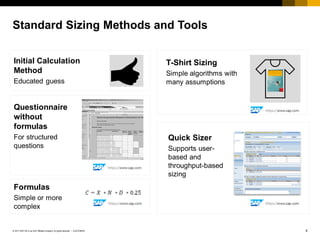
Initial Calculation
Method
Educated guess
Questionnaire
without
formulas
For structured
questions
T-Shirt Sizing
Simple algorithms with
many assumptions
Formulas
Simple or more
complex
Standard Sizing Methods and Tools
Quick Sizer
Supports user-
based and
throughput-based
sizing
9
CUSTOMER
© 2017 SAP SE or an SAP affiliate company. All rights reserved. ǀ
Disadvantages
 Must include many assumptions
 ”Educated” guess
Sizing Approach: Initial Calculation Method
1 Initial Calculation Method
Advantages
 Quick & easy
 Delivers ballpark estimate
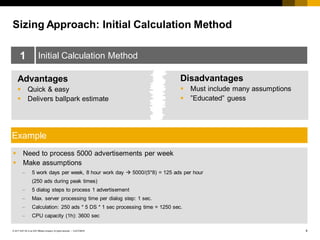
Example
 Need to process 5000 advertisements per week
 Make assumptions
 5 work days per week, 8 hour work day  5000/(5*8) = 125 ads per hour
(250 ads during peak times)
 5 dialog steps to process 1 advertisement
 Max. server processing time per dialog step: 1 sec.
 Calculation: 250 ads * 5 DS * 1 sec processing time = 1250 sec.
 CPU capacity (1h): 3600 sec
10
CUSTOMER
© 2017 SAP SE or an SAP affiliate company. All rights reserved. ǀ
Disadvantages
 Must include many assumptions
 Usually does not reflect customer
reality
Sizing Approach: T-Shirt
2 T-Shirt
Advantages
 Quick & easy to understand
 Functional & architectural
information
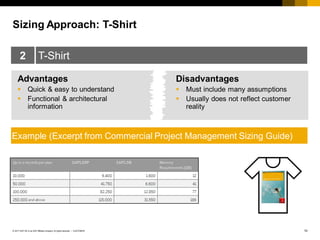
Example (Excerpt from Commercial Project Management Sizing Guide)
11
CUSTOMER
© 2017 SAP SE or an SAP affiliate company. All rights reserved. ǀ
Disadvantages
 Suggests an accuracy that sizing
cannot deliver
 Can easily be misunderstood by
inexperienced readers
Sizing Approach: Formula
3 Formula
Advantages
 Is closer to customer reality
 Allows for more variables
 Relatively transparent approach
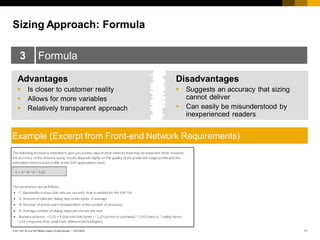
Example (Excerpt from Front-end Network Requirements)
12
CUSTOMER
© 2017 SAP SE or an SAP affiliate company. All rights reserved. ǀ
Disadvantages
 SAP must be contacted for a result
 Versioning
Sizing Approach: Offline Questionnaire
4 Offline Questionnaire
Advantages
 Detailed customer information
for a proper sizing
 Relatively transparent approach
 More detailed level
Example (Excerpt from SEM Banking Questionnaire)
13
CUSTOMER
© 2017 SAP SE or an SAP affiliate company. All rights reserved. ǀ
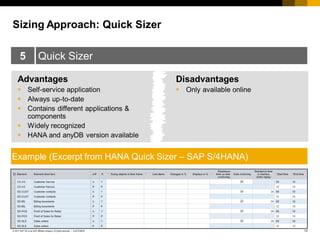
Disadvantages
 Only available online
Sizing Approach: Quick Sizer
5 Quick Sizer
Advantages
 Self-service application
 Always up-to-date
 Contains different applications &
components
 Widely recognized
 HANA and anyDB version available
Example (Excerpt from HANA Quick Sizer – SAP S/4HANA)
14
CUSTOMER
© 2017 SAP SE or an SAP affiliate company. All rights reserved. ǀ
4
3
2
1
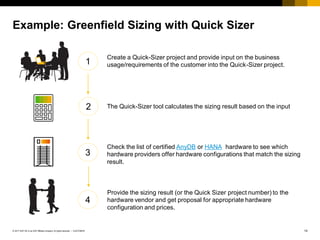
Example: Greenfield Sizing with Quick Sizer
Check the list of certified AnyDB or HANA hardware to see which
hardware providers offer hardware configurations that match the sizing
result.
Provide the sizing result (or the Quick Sizer project number) to the
hardware vendor and get proposal for appropriate hardware
configuration and prices.
The Quick-Sizer tool calculates the sizing result based on the input
Create a Quick-Sizer project and provide input on the business
usage/requirements of the customer into the Quick-Sizer project.
15
CUSTOMER
© 2017 SAP SE or an SAP affiliate company. All rights reserved. ǀ
 Text
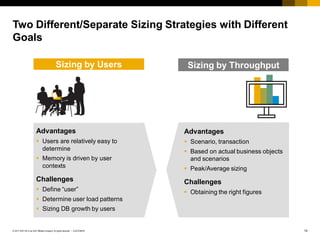
Two Different/Separate Sizing Strategies with Different
Goals
Advantages
 Users are relatively easy to
determine
 Memory is driven by user
contexts
Challenges
 Define “user”
 Determine user load patterns
 Sizing DB growth by users
Sizing by Users Sizing by Throughput
Advantages
 Scenario, transaction
 Based on actual business objects
and scenarios
 Peak/Average sizing
Challenges
 Obtaining the right figures
User-based Sizing
18
CUSTOMER
© 2017 SAP SE or an SAP affiliate company. All rights reserved. ǀ
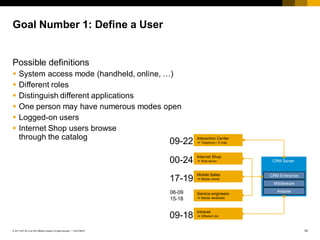
Goal Number 1: Define a User
Possible definitions
 System access mode (handheld, online, …)
 Different roles
 Distinguish different applications
 One person may have numerous modes open
 Logged-on users
 Internet Shop users browse
through the catalog
00-24
17-19
06-09
15-18
09-18
CRM Server
CRM Enterprise
Middleware
Adapter
Interaction Center
 Telephony / E-mail
Internet Shop
 Web server
Service engineers
 Mobile handhelds
Mobile Sales
 Mobile clients
Intranet
 Different UIs
09-22
19
CUSTOMER
© 2017 SAP SE or an SAP affiliate company. All rights reserved. ǀ
Goal Number 2: Find Out the Usage Patterns That Most
Affect Sizing
User sizing volume drivers are a combination of
 User activity in terms of think time
 Application type including complexity of business
process design
 Access type to application
20
CUSTOMER
© 2017 SAP SE or an SAP affiliate company. All rights reserved. ǀ
Examples of User Sizing in the Quick Sizer
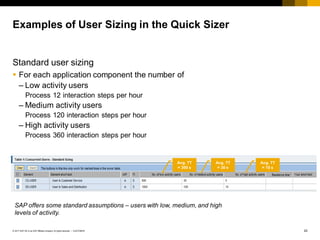
Standard user sizing
 For each application component the number of
– Low activity users
Process 12 interaction steps per hour
– Medium activity users
Process 120 interaction steps per hour
– High activity users
Process 360 interaction steps per hour
Avg. TT
= 300 s
Avg. TT
= 30 s
Avg. TT
= 10 s
SAP offers some standard assumptions – users with low, medium, and high
levels of activity.
21
CUSTOMER
© 2017 SAP SE or an SAP affiliate company. All rights reserved. ǀ
How to Obtain the Number of Users
Often, customers suppose a higher activity
then there really is
 Coffee breaks are not included
 Think time refers to interaction steps with the application
server, not necessarily the screen changes
 Users may not only use SAP systems
User sizing – tips
 Take concurrently active users per application
 If you do not know how active they will be, take medium
activity
 To be on the safe side, take the maximum number of
users at any one time (snap shot)
 There is no ratio between named and concurrent users
Throughput-based Sizing
23
CUSTOMER
© 2017 SAP SE or an SAP affiliate company. All rights reserved. ǀ
CPU Sizing of Throughput Data
Assumptions
A business process/scenario creates one or more
business objects
 For example: Creating a customer order may contain
– Customer order
– Delivery
– Material movement
– Goods issue
– Billing document
– FI document
– CO document
24
CUSTOMER
© 2017 SAP SE or an SAP affiliate company. All rights reserved. ǀ
Basic Calculation Algorithms – CPU
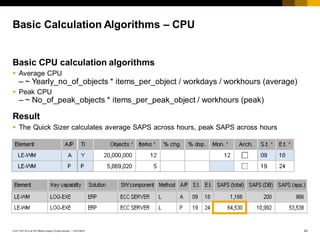
Basic CPU calculation algorithms
 Average CPU
– ~ Yearly_no_of_objects * items_per_object / workdays / workhours (average)
 Peak CPU
– ~ No_of_peak_objects * items_per_peak_object / workhours (peak)
Result
 The Quick Sizer calculates average SAPS across hours, peak SAPS across hours
25
CUSTOMER
© 2017 SAP SE or an SAP affiliate company. All rights reserved. ǀ
Disk Sizing Based on Throughput Numbers
Assumptions
 Processed objects evoke entries in certain tables (header & line items)
 Net size of these tables and indexes are known
 Space is occupied until the data is archived and deleted from database
 Data can be removed from DB after retention period
Neglected
 Minor tables which are either small or rarely used
 Database-dependent table compression
 Customer tables and indexes
 Queue-like tables (spool, IDOC,…)
 Master data (exception e.g.: Utilities)
 Automatically deleted data
 UTF-8; UTF-16
26
CUSTOMER
© 2017 SAP SE or an SAP affiliate company. All rights reserved. ǀ
Basic Calculation Algorithms
Basic disk calculation algorithms
 Disk size
– ~ Yearly_no_of_objects * items_per_object * residence_months
Result
 Disk size according to residence time
…
27
CUSTOMER
© 2017 SAP SE or an SAP affiliate company. All rights reserved. ǀ
Agenda
Introduction to Sizing Methods
Sizing Tools
User- and Throughput-Based Sizing
Factors that influence Sizing
Sizing on www.sap.com/sizing
Conclusion
28
CUSTOMER
© 2017 SAP SE or an SAP affiliate company. All rights reserved. ǀ
Some Factors That Influence Sizing
HW Platform
 Processor
technology
 Disk technology
 Network
technology
 System
infrastructure
SAP Software
 Release
 OLTP or OLAP
 Industry solutions
Customizing
 Set up of business
processes
 Organizational
structures
 Business process
design
Customer Profile
Customer Profile
System Settings
 Parameterization
 Interfaces
 Security settings
 Unicode
 A2A, B2B
scenario
Customer Coding,
3rd Party
 Performance impact
 Scalability
 Business process
design
Data Volume
 Time for volume
processing
 Background
processing,
parallel jobs
 Reporting
User Behavior
 Concurrency
 LAN/WAN
 Internet/intranet
 Activity, e.g.
 *-Search
 Efficient navigation
Disk Growth
 Avoiding data
 Archiving
strategies
 Information
Lifecycle
Management
Responsibility of: Technology Partner | SAP | Customer
29
CUSTOMER
© 2017 SAP SE or an SAP affiliate company. All rights reserved. ǀ
Three-Party Collaboration Model
Contributions
 Certified benchmarks 
scalable hardware
 Different configurations
together with technology
partners
 Service level agreements
 Final responsibilityfor
sizing at customersite
Expectations from
benchmarking and
sizing
 Optimal performance
 Suggestion for HW config.
Contributions
 Response time
requirements
 Throughput requirements
 Provides business input
Contributions
 Development and provision
of benchmark toolkits
 Regression testing for new
releases
 Standard sizing guidelines
 Sizing verification
processes
Hardware Vendors Customer
SAP
Sizing Recommendation
 CPU (SAPS)
 Memory (GB)
 Database space (GB)
 Disk I/O operations per sec
 Frontend bandwidth mbps
Sizing is the joint responsibility of
customer (LoB), SAP and HW Vendor.
But:
The main responsibility have the HW
Vendor. They have to make sure that
the SAP software runs smoothly at
customer site and that customers
don’t run into performance or TCO
issues due to under-sized or over-
sized HW
Examples:
 Custom coding
 Different businesses require different
sizings
 Different applications need different
amounts of CPUs
 Additional needs might come from
additional not sized usages
30
CUSTOMER
© 2017 SAP SE or an SAP affiliate company. All rights reserved. ǀ
Risks in a Sizing Project
 The challenge in any sizing project is to obtain
sufficient usage information
 Often caused by communication issues
 When there is not sufficient data available,
assumptions must be made – and documented
INCOMPLETE
INPUT DATA
 While it is perfectly ok to work on assumptions you
must ensure that a verification process is included
in the project plan
ASSUMPTIONS
ARE NOT
VERIFIED
 Are very hard to predict: Make sure there is a
verification
 process
 Make sizing measurements, if required
CUSTOM CODING
&
SPECIAL DATA
CONSTELLATIONS
Risks
in
a
Sizing
Project
31
CUSTOMER
© 2017 SAP SE or an SAP affiliate company. All rights reserved. ǀ
Agenda
Introduction to Sizing Methods
Sizing Tools
User- and Throughput-Based Sizing
Factors that influence Sizing
Sizing on www.sap.com/sizing
Conclusion
Where to find information about Sizing?
33
CUSTOMER
© 2017 SAP SE or an SAP affiliate company. All rights reserved. ǀ
General Available Sizing Page (www.sap.com/sizing)
Guidelines
 Access Sizing Guidelines
 Access Sizing-related Materials
Tools
 Access Quick Sizer *
 Sizing Decision tree
 Others
Training opportunities
FAQs
* Requires login credentials
34
CUSTOMER
© 2017 SAP SE or an SAP affiliate company. All rights reserved. ǀ
Agenda
Introduction to Sizing Methods
Sizing Tools
User- and Throughput-Based Sizing
Factors that influence Sizing
Sizing on the Service Marketplace
Conclusion
35
CUSTOMER
© 2017 SAP SE or an SAP affiliate company. All rights reserved. ǀ
Summary
 Sizing means translating business requirements into hardware
requirements
 The sizing process (and thus the sizing result) is closely tied to
the lifecycle of the software
 And therefore an iterative exercise
 The success of the sizing exercise almost entirely depends on
the quality of the data
–"Garbage-in, garbage out"
 Sizing involves very different people and teams within an
organization
 Expert sizing is recommended for custom development
36
CUSTOMER
© 2017 SAP SE or an SAP affiliate company. All rights reserved. ǀ
Sources of Information
http://www.sap.com/sizing
– Sizing methodology
– Access Quick Sizer
– Access Sizing Guidelines
http://www.sap.com/benchmark
– Certified benchmark results
– Descriptions of the available benchmarks
http://www.sap.com/performance
– Tips for performance improvements
Contact information:
Sebastian Schmitt
sebastian.schmitt@sap.com
+49 6227 7 50189
+49 151 18874932
Thank you.

Sizing methods

  • 1.
    CUSTOMER Sebastian Schmitt, SAP 2017 SizingMethods & Tools – An Introduction
  • 2.
    2 CUSTOMER © 2017 SAPSE or an SAP affiliate company. All rights reserved. ǀ Agenda Introduction to Sizing Methods Sizing Tools Factors that influence Sizing Sizing on www.sap.com/sizing Conclusion
  • 3.
    3 CUSTOMER © 2017 SAPSE or an SAP affiliate company. All rights reserved. ǀ Translate business requirements into hardware requirements – in an iterative process Sizing Questions May Come in Different Flavors Can SAP software payroll 3+ million employees and pensioners in less than two hours? ” When I check your sizing Portal, there is no sizing guideline for FIN-FSCM-TRN. How can I do a sizing? ” We are running on ECC 6.0 and want to upgrade to ECC 6.0 EhP7 ” We have 30,000 business partners and 60,000 sales orders with 50 line items per month. How much hardware does our SAP application require ”
  • 4.
    4 CUSTOMER © 2017 SAPSE or an SAP affiliate company. All rights reserved. ǀ Sizing-Relevant KPIs (Key Performance Indicators)  Data that resides on the database  File read and write activity to storage  Cost factors: Backup/recovery depends on size of database Disk size Disk I/O  Allocated to a user or background process  Garbage collection, acceleration, planning capabilities, buffers, caches  Cost factor: Physical memory slots Memory  Processing times of business transactions or tasks  Cost factor: Number and processing power of servers CPU  Transferred amount of data  Network time and roundtrips  Cost factor: Leasing bandwidth Front-end Network Load
  • 5.
    5 CUSTOMER © 2017 SAPSE or an SAP affiliate company. All rights reserved. ǀ Different Times, Phases & Goals 1. Very early to plan hardware expenditures 2. A few months before live start to verify assumptions – Determine the overall performance requirements 3. During production stages to ensure operations and verify/adjust estimations made earlier. ”Trigger events” include: – Upgrade database, operating system, SAP application – Reconfigure system landscape – Change business process – Rollouts: more users or other load Project Preparation Business Blueprint Realization Final Preparation Going Live & Support Upgrade Migration Business Units Functional Changes Go Live Sizing takes place in different phases of a project
  • 6.
    6 CUSTOMER © 2017 SAPSE or an SAP affiliate company. All rights reserved. ǀ Possible Definitions for Different Types of Sizing Expert Sizing Large or complex projects  Additional guidelines  Custom calculations  Analysis of custom coding  Custom sizing guidelines Hardware Budget Sizing Smaller companies  Very simple algorithms  Assumptions, likelihoods  Level setting of project  Risk identification Advanced Sizing Medium to large companies  Throughput estimates  Questionnaires, formulas  Usage of standard tools  Focus on core business processes Upgrade Sizing All projects  SAP system monitors  SAP Notes  Goal: Upgrade SAP software Re-Sizing All projects  SAP system monitors  Goal: Extend an existing system by load  e.g., by volume 100 additional users who'll do the same as the current productive ones Delta Sizing All projects  SAP system monitors  Goal: Extend an existing system by functions  By different functions, e.g., you are live with CRM and want to add SCM Greenfield Sizing Production Sizings – whenever there is a change in throughput, sizing must be done Go Live
  • 7.
    7 CUSTOMER © 2017 SAPSE or an SAP affiliate company. All rights reserved. ǀ Agenda Introduction to Sizing Methods Sizing Tools Factors that influence Sizing Sizing on www.sap.com/sizing Conclusion
  • 8.
    8 CUSTOMER © 2017 SAPSE or an SAP affiliate company. All rights reserved. ǀ Initial Calculation Method Educated guess Questionnaire without formulas For structured questions T-Shirt Sizing Simple algorithms with many assumptions Formulas Simple or more complex Standard Sizing Methods and Tools Quick Sizer Supports user- based and throughput-based sizing
  • 9.
    9 CUSTOMER © 2017 SAPSE or an SAP affiliate company. All rights reserved. ǀ Disadvantages  Must include many assumptions  ”Educated” guess Sizing Approach: Initial Calculation Method 1 Initial Calculation Method Advantages  Quick & easy  Delivers ballpark estimate Example  Need to process 5000 advertisements per week  Make assumptions  5 work days per week, 8 hour work day  5000/(5*8) = 125 ads per hour (250 ads during peak times)  5 dialog steps to process 1 advertisement  Max. server processing time per dialog step: 1 sec.  Calculation: 250 ads * 5 DS * 1 sec processing time = 1250 sec.  CPU capacity (1h): 3600 sec
  • 10.
    10 CUSTOMER © 2017 SAPSE or an SAP affiliate company. All rights reserved. ǀ Disadvantages  Must include many assumptions  Usually does not reflect customer reality Sizing Approach: T-Shirt 2 T-Shirt Advantages  Quick & easy to understand  Functional & architectural information Example (Excerpt from Commercial Project Management Sizing Guide)
  • 11.
    11 CUSTOMER © 2017 SAPSE or an SAP affiliate company. All rights reserved. ǀ Disadvantages  Suggests an accuracy that sizing cannot deliver  Can easily be misunderstood by inexperienced readers Sizing Approach: Formula 3 Formula Advantages  Is closer to customer reality  Allows for more variables  Relatively transparent approach Example (Excerpt from Front-end Network Requirements)
  • 12.
    12 CUSTOMER © 2017 SAPSE or an SAP affiliate company. All rights reserved. ǀ Disadvantages  SAP must be contacted for a result  Versioning Sizing Approach: Offline Questionnaire 4 Offline Questionnaire Advantages  Detailed customer information for a proper sizing  Relatively transparent approach  More detailed level Example (Excerpt from SEM Banking Questionnaire)
  • 13.
    13 CUSTOMER © 2017 SAPSE or an SAP affiliate company. All rights reserved. ǀ Disadvantages  Only available online Sizing Approach: Quick Sizer 5 Quick Sizer Advantages  Self-service application  Always up-to-date  Contains different applications & components  Widely recognized  HANA and anyDB version available Example (Excerpt from HANA Quick Sizer – SAP S/4HANA)
  • 14.
    14 CUSTOMER © 2017 SAPSE or an SAP affiliate company. All rights reserved. ǀ 4 3 2 1 Example: Greenfield Sizing with Quick Sizer Check the list of certified AnyDB or HANA hardware to see which hardware providers offer hardware configurations that match the sizing result. Provide the sizing result (or the Quick Sizer project number) to the hardware vendor and get proposal for appropriate hardware configuration and prices. The Quick-Sizer tool calculates the sizing result based on the input Create a Quick-Sizer project and provide input on the business usage/requirements of the customer into the Quick-Sizer project.
  • 15.
    15 CUSTOMER © 2017 SAPSE or an SAP affiliate company. All rights reserved. ǀ  Text Two Different/Separate Sizing Strategies with Different Goals Advantages  Users are relatively easy to determine  Memory is driven by user contexts Challenges  Define “user”  Determine user load patterns  Sizing DB growth by users Sizing by Users Sizing by Throughput Advantages  Scenario, transaction  Based on actual business objects and scenarios  Peak/Average sizing Challenges  Obtaining the right figures
  • 16.
  • 17.
    18 CUSTOMER © 2017 SAPSE or an SAP affiliate company. All rights reserved. ǀ Goal Number 1: Define a User Possible definitions  System access mode (handheld, online, …)  Different roles  Distinguish different applications  One person may have numerous modes open  Logged-on users  Internet Shop users browse through the catalog 00-24 17-19 06-09 15-18 09-18 CRM Server CRM Enterprise Middleware Adapter Interaction Center  Telephony / E-mail Internet Shop  Web server Service engineers  Mobile handhelds Mobile Sales  Mobile clients Intranet  Different UIs 09-22
  • 18.
    19 CUSTOMER © 2017 SAPSE or an SAP affiliate company. All rights reserved. ǀ Goal Number 2: Find Out the Usage Patterns That Most Affect Sizing User sizing volume drivers are a combination of  User activity in terms of think time  Application type including complexity of business process design  Access type to application
  • 19.
    20 CUSTOMER © 2017 SAPSE or an SAP affiliate company. All rights reserved. ǀ Examples of User Sizing in the Quick Sizer Standard user sizing  For each application component the number of – Low activity users Process 12 interaction steps per hour – Medium activity users Process 120 interaction steps per hour – High activity users Process 360 interaction steps per hour Avg. TT = 300 s Avg. TT = 30 s Avg. TT = 10 s SAP offers some standard assumptions – users with low, medium, and high levels of activity.
  • 20.
    21 CUSTOMER © 2017 SAPSE or an SAP affiliate company. All rights reserved. ǀ How to Obtain the Number of Users Often, customers suppose a higher activity then there really is  Coffee breaks are not included  Think time refers to interaction steps with the application server, not necessarily the screen changes  Users may not only use SAP systems User sizing – tips  Take concurrently active users per application  If you do not know how active they will be, take medium activity  To be on the safe side, take the maximum number of users at any one time (snap shot)  There is no ratio between named and concurrent users
  • 21.
  • 22.
    23 CUSTOMER © 2017 SAPSE or an SAP affiliate company. All rights reserved. ǀ CPU Sizing of Throughput Data Assumptions A business process/scenario creates one or more business objects  For example: Creating a customer order may contain – Customer order – Delivery – Material movement – Goods issue – Billing document – FI document – CO document
  • 23.
    24 CUSTOMER © 2017 SAPSE or an SAP affiliate company. All rights reserved. ǀ Basic Calculation Algorithms – CPU Basic CPU calculation algorithms  Average CPU – ~ Yearly_no_of_objects * items_per_object / workdays / workhours (average)  Peak CPU – ~ No_of_peak_objects * items_per_peak_object / workhours (peak) Result  The Quick Sizer calculates average SAPS across hours, peak SAPS across hours
  • 24.
    25 CUSTOMER © 2017 SAPSE or an SAP affiliate company. All rights reserved. ǀ Disk Sizing Based on Throughput Numbers Assumptions  Processed objects evoke entries in certain tables (header & line items)  Net size of these tables and indexes are known  Space is occupied until the data is archived and deleted from database  Data can be removed from DB after retention period Neglected  Minor tables which are either small or rarely used  Database-dependent table compression  Customer tables and indexes  Queue-like tables (spool, IDOC,…)  Master data (exception e.g.: Utilities)  Automatically deleted data  UTF-8; UTF-16
  • 25.
    26 CUSTOMER © 2017 SAPSE or an SAP affiliate company. All rights reserved. ǀ Basic Calculation Algorithms Basic disk calculation algorithms  Disk size – ~ Yearly_no_of_objects * items_per_object * residence_months Result  Disk size according to residence time …
  • 26.
    27 CUSTOMER © 2017 SAPSE or an SAP affiliate company. All rights reserved. ǀ Agenda Introduction to Sizing Methods Sizing Tools User- and Throughput-Based Sizing Factors that influence Sizing Sizing on www.sap.com/sizing Conclusion
  • 27.
    28 CUSTOMER © 2017 SAPSE or an SAP affiliate company. All rights reserved. ǀ Some Factors That Influence Sizing HW Platform  Processor technology  Disk technology  Network technology  System infrastructure SAP Software  Release  OLTP or OLAP  Industry solutions Customizing  Set up of business processes  Organizational structures  Business process design Customer Profile Customer Profile System Settings  Parameterization  Interfaces  Security settings  Unicode  A2A, B2B scenario Customer Coding, 3rd Party  Performance impact  Scalability  Business process design Data Volume  Time for volume processing  Background processing, parallel jobs  Reporting User Behavior  Concurrency  LAN/WAN  Internet/intranet  Activity, e.g.  *-Search  Efficient navigation Disk Growth  Avoiding data  Archiving strategies  Information Lifecycle Management Responsibility of: Technology Partner | SAP | Customer
  • 28.
    29 CUSTOMER © 2017 SAPSE or an SAP affiliate company. All rights reserved. ǀ Three-Party Collaboration Model Contributions  Certified benchmarks  scalable hardware  Different configurations together with technology partners  Service level agreements  Final responsibilityfor sizing at customersite Expectations from benchmarking and sizing  Optimal performance  Suggestion for HW config. Contributions  Response time requirements  Throughput requirements  Provides business input Contributions  Development and provision of benchmark toolkits  Regression testing for new releases  Standard sizing guidelines  Sizing verification processes Hardware Vendors Customer SAP Sizing Recommendation  CPU (SAPS)  Memory (GB)  Database space (GB)  Disk I/O operations per sec  Frontend bandwidth mbps Sizing is the joint responsibility of customer (LoB), SAP and HW Vendor. But: The main responsibility have the HW Vendor. They have to make sure that the SAP software runs smoothly at customer site and that customers don’t run into performance or TCO issues due to under-sized or over- sized HW Examples:  Custom coding  Different businesses require different sizings  Different applications need different amounts of CPUs  Additional needs might come from additional not sized usages
  • 29.
    30 CUSTOMER © 2017 SAPSE or an SAP affiliate company. All rights reserved. ǀ Risks in a Sizing Project  The challenge in any sizing project is to obtain sufficient usage information  Often caused by communication issues  When there is not sufficient data available, assumptions must be made – and documented INCOMPLETE INPUT DATA  While it is perfectly ok to work on assumptions you must ensure that a verification process is included in the project plan ASSUMPTIONS ARE NOT VERIFIED  Are very hard to predict: Make sure there is a verification  process  Make sizing measurements, if required CUSTOM CODING & SPECIAL DATA CONSTELLATIONS Risks in a Sizing Project
  • 30.
    31 CUSTOMER © 2017 SAPSE or an SAP affiliate company. All rights reserved. ǀ Agenda Introduction to Sizing Methods Sizing Tools User- and Throughput-Based Sizing Factors that influence Sizing Sizing on www.sap.com/sizing Conclusion
  • 31.
    Where to findinformation about Sizing?
  • 32.
    33 CUSTOMER © 2017 SAPSE or an SAP affiliate company. All rights reserved. ǀ General Available Sizing Page (www.sap.com/sizing) Guidelines  Access Sizing Guidelines  Access Sizing-related Materials Tools  Access Quick Sizer *  Sizing Decision tree  Others Training opportunities FAQs * Requires login credentials
  • 33.
    34 CUSTOMER © 2017 SAPSE or an SAP affiliate company. All rights reserved. ǀ Agenda Introduction to Sizing Methods Sizing Tools User- and Throughput-Based Sizing Factors that influence Sizing Sizing on the Service Marketplace Conclusion
  • 34.
    35 CUSTOMER © 2017 SAPSE or an SAP affiliate company. All rights reserved. ǀ Summary  Sizing means translating business requirements into hardware requirements  The sizing process (and thus the sizing result) is closely tied to the lifecycle of the software  And therefore an iterative exercise  The success of the sizing exercise almost entirely depends on the quality of the data –"Garbage-in, garbage out"  Sizing involves very different people and teams within an organization  Expert sizing is recommended for custom development
  • 35.
    36 CUSTOMER © 2017 SAPSE or an SAP affiliate company. All rights reserved. ǀ Sources of Information http://www.sap.com/sizing – Sizing methodology – Access Quick Sizer – Access Sizing Guidelines http://www.sap.com/benchmark – Certified benchmark results – Descriptions of the available benchmarks http://www.sap.com/performance – Tips for performance improvements
  • 36.