

Working with the
SharePoint Object
Models


Rob Windsor
rwindsor@portalsolutions.net
@robwindsor
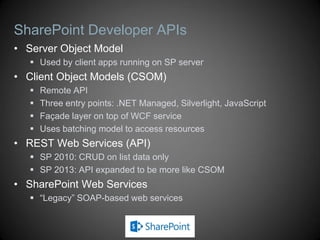
SharePoint Developer APIs
• Server Object Model
    Used by client apps running on SP server
• Client Object Models (CSOM)
      Remote API
      Three entry points: .NET Managed, Silverlight, JavaScript
      Façade layer on top of WCF service
      Uses batching model to access resources
• REST Web Services (API)
    SP 2010: CRUD on list data only
    SP 2013: API expanded to be more like CSOM
• SharePoint Web Services
    “Legacy” SOAP-based web services
Server Object Model
• Can be used when “in the context” of SharePoint
   Code-behind, event handlers, timer jobs
   ASP.NET applications running in same app. pool
   Client applications that run on SharePoint servers
• API implemented in Microsoft.SharePoint.dll
• Core types map to main SharePoint components
   SPSite, SPWeb, SPList, SPDocumentLibrary,
    SPListItem
   SPContext gives access to current context
Server Object Model
• The SharePoint version of “Hello, World”
     Show the root site of a collection and it’s lists


using (var site = new SPSite("http://localhost/sites/demo/"))
{
    var web = site.RootWeb;

    ListBox1.Items.Add(web.Title);

    foreach (SPList list in web.Lists)
    {
        ListBox1.Items.Add("t" + list.Title);
    }
}
Resource Usage
• SPSite and SPWeb objects use unmanaged resources
    Vital that you release resources with Dispose
• General rules:
    If you create the object, you should Dispose
        var site = new SPSite(“http://localhost”);
        var web = site.OpenWeb();
    If you get a reference from a property, don’t Dispose
        var web = site.RootWeb
    There are exceptions to these rules
• Use SPDisposeCheck to analyze code
DEMO
Hello World with Server OM
Event Handlers
• Override methods on known receiver types
   SPFeatureReceiver
   SPListEventReceiver
   SPItemEventReceiver
• Register receiver as handler for entity
   Use CAML or code
• Synchronous and asynchronous events
   ItemAdding
   ItemAdded
Sample Feature Receiver
public class Feature1EventReceiver : SPFeatureReceiver
{
    public override void FeatureActivated(SPFeatureReceiverProperties properties)
    {
        var web = properties.Feature.Parent as SPWeb;
        if (web == null) return;
        web.Properties["OldTitle"] = web.Title;
        web.Properties.Update();
        web.Title = "Feature activated at " + DateTime.Now.ToLongTimeString();
        web.Update();
    }

    public override void FeatureDeactivating(SPFeatureReceiverProperties properties)
    {
        var web = properties.Feature.Parent as SPWeb;
        if (web == null) return;
        web.Title = web.Properties["OldTitle"];
        web.Update();
    }
}
DEMO
Event Handlers
Client Object Model
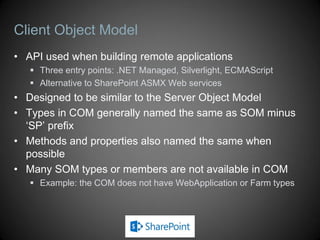
• API used when building remote applications
    Three entry points: .NET Managed, Silverlight, ECMAScript
    Alternative to SharePoint ASMX Web services
• Designed to be similar to the Server Object Model
• Types in COM generally named the same as SOM minus
  ‘SP’ prefix
• Methods and properties also named the same when
  possible
• Many SOM types or members are not available in COM
    Example: the COM does not have WebApplication or Farm types
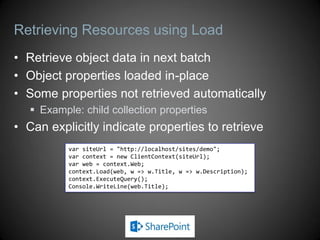
Retrieving Resources using Load
• Retrieve object data in next batch
• Object properties loaded in-place
• Some properties not retrieved automatically
    Example: child collection properties
• Can explicitly indicate properties to retrieve
           var siteUrl = "http://localhost/sites/demo";
           var context = new ClientContext(siteUrl);
           var web = context.Web;
           context.Load(web, w => w.Title, w => w.Description);
           context.ExecuteQuery();
           Console.WriteLine(web.Title);
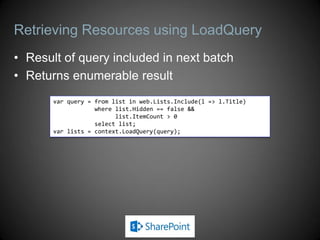
Retrieving Resources using LoadQuery
• Result of query included in next batch
• Returns enumerable result
       var query = from list in web.Lists.Include(l => l.Title)
                   where list.Hidden == false &&
                         list.ItemCount > 0
                   select list;
       var lists = context.LoadQuery(query);
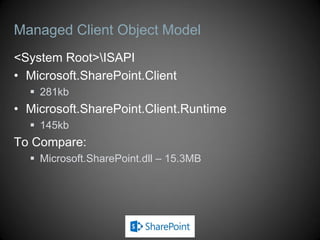
Managed Client Object Model
<System Root>ISAPI
• Microsoft.SharePoint.Client
   281kb
• Microsoft.SharePoint.Client.Runtime
   145kb
To Compare:
   Microsoft.SharePoint.dll – 15.3MB
DEMO
Managed Client OM
Silverlight Client Object Model
• Very similar to the .NET managed implementation
• Silverlight controls can be hosted inside or outside
  SharePoint
    Affects how ClientContext is accessed
    In SharePoint Web Parts, site pages, and application pages
       Use ClientContext.Current
    In pages external to the SharePoint Web application
       Create new ClientContext
• Service calls must be made asynchronously
    ExecuteQueryAsync(succeededCallback, failedCallback)
Silverlight Client Object Model
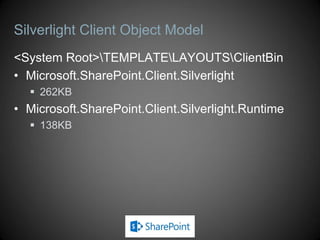
<System Root>TEMPLATELAYOUTSClientBin
• Microsoft.SharePoint.Client.Silverlight
   262KB
• Microsoft.SharePoint.Client.Silverlight.Runtime
   138KB
Silverlight Client Object Model
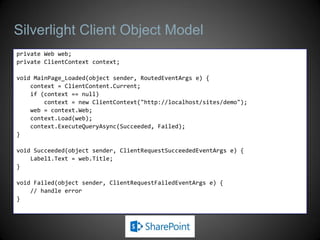
private Web web;
private ClientContext context;

void MainPage_Loaded(object sender, RoutedEventArgs e) {
    context = ClientContent.Current;
    if (context == null)
        context = new ClientContext("http://localhost/sites/demo");
    web = context.Web;
    context.Load(web);
    context.ExecuteQueryAsync(Succeeded, Failed);
}

void Succeeded(object sender, ClientRequestSucceededEventArgs e) {
    Label1.Text = web.Title;
}

void Failed(object sender, ClientRequestFailedEventArgs e) {
    // handle error
}
JavaScript Client Object Model
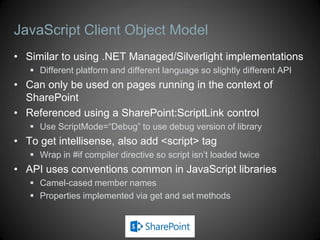
• Similar to using .NET Managed/Silverlight implementations
    Different platform and different language so slightly different API
• Can only be used on pages running in the context of
  SharePoint
• Referenced using a SharePoint:ScriptLink control
    Use ScriptMode=“Debug” to use debug version of library
• To get intellisense, also add <script> tag
    Wrap in #if compiler directive so script isn’t loaded twice
• API uses conventions common in JavaScript libraries
    Camel-cased member names
    Properties implemented via get and set methods
JavaScript Client Object Model

• <System Root>TEMPLATELAYOUTS
• SP.js (SP.debug.js)
   380KB (559KB)
• SP.Core.js (SP.Core.debug.js)
   13KB (20KB)
• SP.Runtime.js (SP.Runtime.debug.js)
   68KB (108KB)
• Add using <SharePoint:ScriptLink>
JavaScript Client Object Model
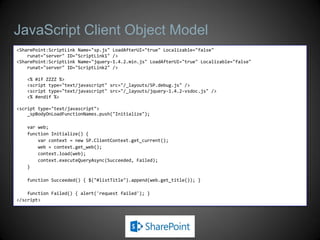
<SharePoint:ScriptLink Name="sp.js" LoadAfterUI="true" Localizable="false"
    runat="server" ID="ScriptLink1" />
<SharePoint:ScriptLink Name="jquery-1.4.2.min.js" LoadAfterUI="true" Localizable="false"
    runat="server" ID="ScriptLink2" />

   <% #if ZZZZ %>
   <script type="text/javascript" src="/_layouts/SP.debug.js" />
   <script type="text/javascript" src="/_layouts/jquery-1.4.2-vsdoc.js" />
   <% #endif %>

<script type="text/javascript">
    _spBodyOnLoadFunctionNames.push("Initialize");

   var web;
   function Initialize() {
       var context = new SP.ClientContext.get_current();
       web = context.get_web();
       context.load(web);
       context.executeQueryAsync(Succeeded, Failed);
   }

   function Succeeded() { $("#listTitle").append(web.get_title()); }

    function Failed() { alert('request failed'); }
</script>
DEMO
JavaScript Client OM

Tutorial, Part 2: SharePoint 101: Jump-Starting the Developer by Rob Windsor - SPTec…

  • 1.
    Working with the SharePointObject Models Rob Windsor rwindsor@portalsolutions.net @robwindsor
  • 2.
    SharePoint Developer APIs •Server Object Model  Used by client apps running on SP server • Client Object Models (CSOM)  Remote API  Three entry points: .NET Managed, Silverlight, JavaScript  Façade layer on top of WCF service  Uses batching model to access resources • REST Web Services (API)  SP 2010: CRUD on list data only  SP 2013: API expanded to be more like CSOM • SharePoint Web Services  “Legacy” SOAP-based web services
  • 3.
    Server Object Model •Can be used when “in the context” of SharePoint  Code-behind, event handlers, timer jobs  ASP.NET applications running in same app. pool  Client applications that run on SharePoint servers • API implemented in Microsoft.SharePoint.dll • Core types map to main SharePoint components  SPSite, SPWeb, SPList, SPDocumentLibrary, SPListItem  SPContext gives access to current context
  • 4.
    Server Object Model •The SharePoint version of “Hello, World”  Show the root site of a collection and it’s lists using (var site = new SPSite("http://localhost/sites/demo/")) { var web = site.RootWeb; ListBox1.Items.Add(web.Title); foreach (SPList list in web.Lists) { ListBox1.Items.Add("t" + list.Title); } }
  • 5.
    Resource Usage • SPSiteand SPWeb objects use unmanaged resources  Vital that you release resources with Dispose • General rules:  If you create the object, you should Dispose  var site = new SPSite(“http://localhost”);  var web = site.OpenWeb();  If you get a reference from a property, don’t Dispose  var web = site.RootWeb  There are exceptions to these rules • Use SPDisposeCheck to analyze code
  • 6.
  • 7.
    Event Handlers • Overridemethods on known receiver types  SPFeatureReceiver  SPListEventReceiver  SPItemEventReceiver • Register receiver as handler for entity  Use CAML or code • Synchronous and asynchronous events  ItemAdding  ItemAdded
  • 8.
    Sample Feature Receiver publicclass Feature1EventReceiver : SPFeatureReceiver { public override void FeatureActivated(SPFeatureReceiverProperties properties) { var web = properties.Feature.Parent as SPWeb; if (web == null) return; web.Properties["OldTitle"] = web.Title; web.Properties.Update(); web.Title = "Feature activated at " + DateTime.Now.ToLongTimeString(); web.Update(); } public override void FeatureDeactivating(SPFeatureReceiverProperties properties) { var web = properties.Feature.Parent as SPWeb; if (web == null) return; web.Title = web.Properties["OldTitle"]; web.Update(); } }
  • 9.
  • 10.
    Client Object Model •API used when building remote applications  Three entry points: .NET Managed, Silverlight, ECMAScript  Alternative to SharePoint ASMX Web services • Designed to be similar to the Server Object Model • Types in COM generally named the same as SOM minus ‘SP’ prefix • Methods and properties also named the same when possible • Many SOM types or members are not available in COM  Example: the COM does not have WebApplication or Farm types
  • 11.
    Retrieving Resources usingLoad • Retrieve object data in next batch • Object properties loaded in-place • Some properties not retrieved automatically  Example: child collection properties • Can explicitly indicate properties to retrieve var siteUrl = "http://localhost/sites/demo"; var context = new ClientContext(siteUrl); var web = context.Web; context.Load(web, w => w.Title, w => w.Description); context.ExecuteQuery(); Console.WriteLine(web.Title);
  • 12.
    Retrieving Resources usingLoadQuery • Result of query included in next batch • Returns enumerable result var query = from list in web.Lists.Include(l => l.Title) where list.Hidden == false && list.ItemCount > 0 select list; var lists = context.LoadQuery(query);
  • 13.
    Managed Client ObjectModel <System Root>ISAPI • Microsoft.SharePoint.Client  281kb • Microsoft.SharePoint.Client.Runtime  145kb To Compare:  Microsoft.SharePoint.dll – 15.3MB
  • 14.
  • 15.
    Silverlight Client ObjectModel • Very similar to the .NET managed implementation • Silverlight controls can be hosted inside or outside SharePoint  Affects how ClientContext is accessed  In SharePoint Web Parts, site pages, and application pages  Use ClientContext.Current  In pages external to the SharePoint Web application  Create new ClientContext • Service calls must be made asynchronously  ExecuteQueryAsync(succeededCallback, failedCallback)
  • 16.
    Silverlight Client ObjectModel <System Root>TEMPLATELAYOUTSClientBin • Microsoft.SharePoint.Client.Silverlight  262KB • Microsoft.SharePoint.Client.Silverlight.Runtime  138KB
  • 17.
    Silverlight Client ObjectModel private Web web; private ClientContext context; void MainPage_Loaded(object sender, RoutedEventArgs e) { context = ClientContent.Current; if (context == null) context = new ClientContext("http://localhost/sites/demo"); web = context.Web; context.Load(web); context.ExecuteQueryAsync(Succeeded, Failed); } void Succeeded(object sender, ClientRequestSucceededEventArgs e) { Label1.Text = web.Title; } void Failed(object sender, ClientRequestFailedEventArgs e) { // handle error }
  • 18.
    JavaScript Client ObjectModel • Similar to using .NET Managed/Silverlight implementations  Different platform and different language so slightly different API • Can only be used on pages running in the context of SharePoint • Referenced using a SharePoint:ScriptLink control  Use ScriptMode=“Debug” to use debug version of library • To get intellisense, also add <script> tag  Wrap in #if compiler directive so script isn’t loaded twice • API uses conventions common in JavaScript libraries  Camel-cased member names  Properties implemented via get and set methods
  • 19.
    JavaScript Client ObjectModel • <System Root>TEMPLATELAYOUTS • SP.js (SP.debug.js)  380KB (559KB) • SP.Core.js (SP.Core.debug.js)  13KB (20KB) • SP.Runtime.js (SP.Runtime.debug.js)  68KB (108KB) • Add using <SharePoint:ScriptLink>
  • 20.
    JavaScript Client ObjectModel <SharePoint:ScriptLink Name="sp.js" LoadAfterUI="true" Localizable="false" runat="server" ID="ScriptLink1" /> <SharePoint:ScriptLink Name="jquery-1.4.2.min.js" LoadAfterUI="true" Localizable="false" runat="server" ID="ScriptLink2" /> <% #if ZZZZ %> <script type="text/javascript" src="/_layouts/SP.debug.js" /> <script type="text/javascript" src="/_layouts/jquery-1.4.2-vsdoc.js" /> <% #endif %> <script type="text/javascript"> _spBodyOnLoadFunctionNames.push("Initialize"); var web; function Initialize() { var context = new SP.ClientContext.get_current(); web = context.get_web(); context.load(web); context.executeQueryAsync(Succeeded, Failed); } function Succeeded() { $("#listTitle").append(web.get_title()); } function Failed() { alert('request failed'); } </script>
  • 21.