

WelcomeSharePoint 2010 Development for  ASP.NET Developers
Welcome to SharePoint Saturday HoustonThank you for being a part of the 2nd Annual SharePoint Saturday HoustonPlease turn off all electronic devices or set them to vibrate.If you must take a phone call, please do so in the hall so as not to disturb others.Thanks to our Platinum Sponsors:
InformationSpeaker presentation slides will be available at SharePointSaturday.org/Houston within a weekKeep checking website for future eventsThe Houston SharePoint User Group at www.h-spug.org, will be having it’s May meeting this Wednesday on May 11th.  Please be sure to join us!Have a great day!
SharePoint 2010 Development for  ASP.NET DevelopersCorey RothBlog: www.dotnetmafia.comTwitter: @coreyroth
Corey RothSharePoint Solutions Architect for StonebridgeMicrosoft SharePoint MVPSpecializing in ECM and SearchPassed all SharePoint 2010 certification examsMicrosoft Solutions AdvocateE-mail: coreyroth@gmail.comTwitter: @coreyrothBlog: www.dotnetmafia.comLaptop: Dell E6510 i5 2.4 GHz 8GBOracle VirtualBox 3.2.8 – 4GB on VM
What’s new?Visual Studio 2010!
3-Minute Web Part DemoDemo
Getting StartedWhat do I need?
You need…RAM!
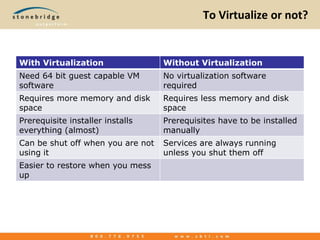
To Virtualize or not?
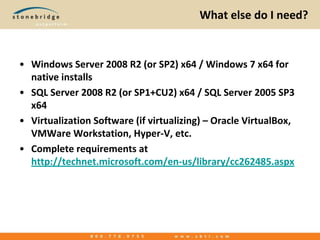
What else do I need?Windows Server 2008 R2 (or SP2) x64 / Windows 7 x64 for native installsSQL Server 2008 R2 (or SP1+CU2) x64 / SQL Server 2005 SP3 x64Virtualization Software (if virtualizing) – Oracle VirtualBox, VMWareWorkstation, Hyper-V, etc.Complete requirements at http://technet.microsoft.com/en-us/library/cc262485.aspx
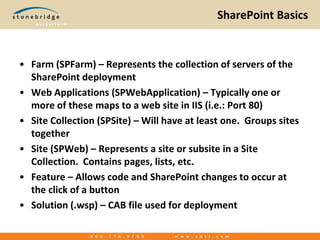
SharePoint BasicsFarm (SPFarm) – Represents the collection of servers of the SharePoint deploymentWeb Applications (SPWebApplication) – Typically one or more of these maps to a web site in IIS (i.e.: Port 80)Site Collection (SPSite) – Will have at least one.  Groups sites togetherSite (SPWeb) – Represents a site or subsite in a Site Collection.  Contains pages, lists, etc.Feature – Allows code and SharePoint changes to occur at the click of a buttonSolution (.wsp) – CAB file used for deployment
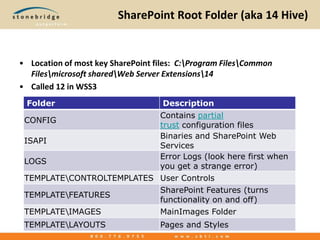
SharePoint Root Folder (aka 14 Hive)Location of most key SharePoint files:  C:\Program Files\Common Files\microsoft shared\Web Server Extensions\14Called 12 in WSS3
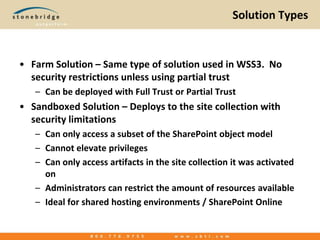
Solution TypesFarm Solution – Same type of solution used in WSS3.  No security restrictions unless using partial trustCan be deployed with Full Trust or Partial TrustSandboxed Solution – Deploys to the site collection with security limitationsCan only access a subset of the SharePoint object modelCannot elevate privilegesCan only access artifacts in the site collection it was activated onAdministrators can restrict the amount of resources availableIdeal for shared hosting environments / SharePoint Online
Visual Web PartA glorified ASP.NET User Control with a Web Part wrapperBuilt with a designerPreviously only available in Farm SolutionsSandbox compatible version available with Visual Studio 2010 SharePoint Power Tools
Visual Web Part DemoDemo
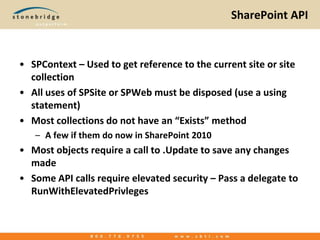
SharePoint APISPContext – Used to get reference to the current site or site collectionAll uses of SPSite or SPWeb must be disposed (use a using statement)Most collections do not have an “Exists” methodA few if them do now in SharePoint 2010Most objects require a call to .Update to save any changes madeSome API calls require elevated security – Pass a delegate to RunWithElevatedPrivleges
DemoDemo
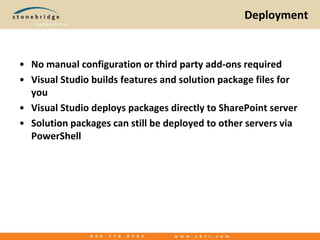
DeploymentNo manual configuration or third party add-ons requiredVisual Studio builds features and solution package files for youVisual Studio deploys packages directly to SharePoint serverSolution packages can still be deployed to other servers via PowerShell
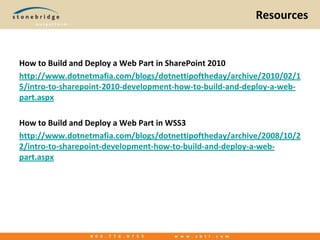
ResourcesHow to Build and Deploy a Web Part in SharePoint 2010http://www.dotnetmafia.com/blogs/dotnettipoftheday/archive/2010/02/15/intro-to-sharepoint-2010-development-how-to-build-and-deploy-a-web-part.aspxHow to Build and Deploy a Web Part in WSS3http://www.dotnetmafia.com/blogs/dotnettipoftheday/archive/2008/10/22/intro-to-sharepoint-development-how-to-build-and-deploy-a-web-part.aspx
Questions?Corey RothBlog: www.dotnetmafia.comTwitter: @coreyroth
Thanks to our Sponsors

SharePoint 2010 Development for ASP.NET Developers - SharePoint Saturday Houston 2011

  • 1.
  • 2.
    Welcome to SharePointSaturday HoustonThank you for being a part of the 2nd Annual SharePoint Saturday HoustonPlease turn off all electronic devices or set them to vibrate.If you must take a phone call, please do so in the hall so as not to disturb others.Thanks to our Platinum Sponsors:
  • 3.
    InformationSpeaker presentation slideswill be available at SharePointSaturday.org/Houston within a weekKeep checking website for future eventsThe Houston SharePoint User Group at www.h-spug.org, will be having it’s May meeting this Wednesday on May 11th. Please be sure to join us!Have a great day!
  • 4.
    SharePoint 2010 Developmentfor ASP.NET DevelopersCorey RothBlog: www.dotnetmafia.comTwitter: @coreyroth
  • 5.
    Corey RothSharePoint SolutionsArchitect for StonebridgeMicrosoft SharePoint MVPSpecializing in ECM and SearchPassed all SharePoint 2010 certification examsMicrosoft Solutions AdvocateE-mail: coreyroth@gmail.comTwitter: @coreyrothBlog: www.dotnetmafia.comLaptop: Dell E6510 i5 2.4 GHz 8GBOracle VirtualBox 3.2.8 – 4GB on VM
  • 6.
  • 7.
  • 8.
  • 9.
  • 10.
  • 11.
    What else doI need?Windows Server 2008 R2 (or SP2) x64 / Windows 7 x64 for native installsSQL Server 2008 R2 (or SP1+CU2) x64 / SQL Server 2005 SP3 x64Virtualization Software (if virtualizing) – Oracle VirtualBox, VMWareWorkstation, Hyper-V, etc.Complete requirements at http://technet.microsoft.com/en-us/library/cc262485.aspx
  • 12.
    SharePoint BasicsFarm (SPFarm)– Represents the collection of servers of the SharePoint deploymentWeb Applications (SPWebApplication) – Typically one or more of these maps to a web site in IIS (i.e.: Port 80)Site Collection (SPSite) – Will have at least one. Groups sites togetherSite (SPWeb) – Represents a site or subsite in a Site Collection. Contains pages, lists, etc.Feature – Allows code and SharePoint changes to occur at the click of a buttonSolution (.wsp) – CAB file used for deployment
  • 13.
    SharePoint Root Folder(aka 14 Hive)Location of most key SharePoint files: C:\Program Files\Common Files\microsoft shared\Web Server Extensions\14Called 12 in WSS3
  • 14.
    Solution TypesFarm Solution– Same type of solution used in WSS3. No security restrictions unless using partial trustCan be deployed with Full Trust or Partial TrustSandboxed Solution – Deploys to the site collection with security limitationsCan only access a subset of the SharePoint object modelCannot elevate privilegesCan only access artifacts in the site collection it was activated onAdministrators can restrict the amount of resources availableIdeal for shared hosting environments / SharePoint Online
  • 15.
    Visual Web PartAglorified ASP.NET User Control with a Web Part wrapperBuilt with a designerPreviously only available in Farm SolutionsSandbox compatible version available with Visual Studio 2010 SharePoint Power Tools
  • 16.
  • 17.
    SharePoint APISPContext –Used to get reference to the current site or site collectionAll uses of SPSite or SPWeb must be disposed (use a using statement)Most collections do not have an “Exists” methodA few if them do now in SharePoint 2010Most objects require a call to .Update to save any changes madeSome API calls require elevated security – Pass a delegate to RunWithElevatedPrivleges
  • 18.
  • 19.
    DeploymentNo manual configurationor third party add-ons requiredVisual Studio builds features and solution package files for youVisual Studio deploys packages directly to SharePoint serverSolution packages can still be deployed to other servers via PowerShell
  • 20.
    ResourcesHow to Buildand Deploy a Web Part in SharePoint 2010http://www.dotnetmafia.com/blogs/dotnettipoftheday/archive/2010/02/15/intro-to-sharepoint-2010-development-how-to-build-and-deploy-a-web-part.aspxHow to Build and Deploy a Web Part in WSS3http://www.dotnetmafia.com/blogs/dotnettipoftheday/archive/2008/10/22/intro-to-sharepoint-development-how-to-build-and-deploy-a-web-part.aspx
  • 21.
  • 22.

Editor's Notes

  • #8 Demo building and deploying a web part in under three minutes.
  • #9 Demo building and deploying a web part in under two minutes.
  • #17 Demo the Visual Web Part
  • #19 Update the Visual Web Part to make some API calls.Demo Features and Solution editor in Visual StudioShow other SPIs