Front cover

Software Configuration Management
A Clear Case for IBM Rational
ClearCase and ClearQuest UCM
Implementing ClearCase


Implementing ClearQuest for
UCM

ClearCase and ClearQuest
MultiSite


                                                 Ueli Wahli
                                             Jennie Brown
                                            Matti Teinonen
                                              Leif Trulsson


ibm.com/redbooks
International Technical Support Organization

Software Configuration Management
A Clear Case for IBM Rational
ClearCase and ClearQuest UCM

December 2004


                                               SG24-6399-00
Note: Before using this information and the product it supports, read the information in
 “Notices” on page xvii.


First Edition (December 2004)

This edition applies to IBM Rational ClearCase and MultiSite Version 2003.06.00 and IBM
Rational ClearQuest and MultiSite Version 2003.06.00. Some information about Version 06.13 is
included.


© Copyright International Business Machines Corporation 2004. All rights reserved.
Note to U.S. Government Users Restricted Rights -- Use, duplication or disclosure restricted by GSA ADP
Schedule Contract with IBM Corp.
Contents

                      Notices . . . . . . . . . . . . . . . . . . . . . . . . . . . . . . . . . . . . . . . . . . . . . . . . . . . . . xvii
                      Trademarks . . . . . . . . . . . . . . . . . . . . . . . . . . . . . . . . . . . . . . . . . . . . . . . . . . xviii

                      Preface . . . . . . . . . . . . . . . . . . . . . . . . . . . . . . . . . . . . . . . . . . . . . . . . . . . . . . xix
                      The team that wrote this redbook. . . . . . . . . . . . . . . . . . . . . . . . . . . . . . . . . . . xxi
                      Become a published author . . . . . . . . . . . . . . . . . . . . . . . . . . . . . . . . . . . . . . xxiii
                      Comments welcome. . . . . . . . . . . . . . . . . . . . . . . . . . . . . . . . . . . . . . . . . . . . xxiii

Part 1. Introduction to SCM . . . . . . . . . . . . . . . . . . . . . . . . . . . . . . . . . . . . . . . . . . . . . . . . . . . 1

                      Chapter 1. The quest for software lifecycle management . . . . . . . . . . . . . . 3
                      Stories from the wild. . . . . . . . . . . . . . . . . . . . . . . . . . . . . . . . . . . . . . . . . . . . . . 4
                      Software asset management . . . . . . . . . . . . . . . . . . . . . . . . . . . . . . . . . . . . . . . 5
                      Better software configuration management means better business . . . . . . . . . 6
                      Seven keys to improving business value . . . . . . . . . . . . . . . . . . . . . . . . . . . . . . 7
                         Safety . . . . . . . . . . . . . . . . . . . . . . . . . . . . . . . . . . . . . . . . . . . . . . . . . . . . . . 7
                         Stability . . . . . . . . . . . . . . . . . . . . . . . . . . . . . . . . . . . . . . . . . . . . . . . . . . . . . 8
                         Control. . . . . . . . . . . . . . . . . . . . . . . . . . . . . . . . . . . . . . . . . . . . . . . . . . . . . . 8
                         Auditability . . . . . . . . . . . . . . . . . . . . . . . . . . . . . . . . . . . . . . . . . . . . . . . . . . . 9
                         Reproducibility. . . . . . . . . . . . . . . . . . . . . . . . . . . . . . . . . . . . . . . . . . . . . . . 10
                         Traceability . . . . . . . . . . . . . . . . . . . . . . . . . . . . . . . . . . . . . . . . . . . . . . . . . 11
                         Scalability . . . . . . . . . . . . . . . . . . . . . . . . . . . . . . . . . . . . . . . . . . . . . . . . . . 12
                      Good SCM is good business . . . . . . . . . . . . . . . . . . . . . . . . . . . . . . . . . . . . . . 13

                      Chapter 2. Choosing the right SCM strategy . . . . . . . . . . . . . . . . . . . . . . . 15
                      The questions . . . . . . . . . . . . . . . . . . . . . . . . . . . . . . . . . . . . . . . . . . . . . . . . . . 16
                      A version control strategy. . . . . . . . . . . . . . . . . . . . . . . . . . . . . . . . . . . . . . . . . 17
                         Delta versioning . . . . . . . . . . . . . . . . . . . . . . . . . . . . . . . . . . . . . . . . . . . . . 17
                      A configuration control strategy . . . . . . . . . . . . . . . . . . . . . . . . . . . . . . . . . . . . 19
                      A process management strategy . . . . . . . . . . . . . . . . . . . . . . . . . . . . . . . . . . . 21
                      A problem tracking strategy . . . . . . . . . . . . . . . . . . . . . . . . . . . . . . . . . . . . . . . 23

                      Chapter 3. Why ClearCase and ClearQuest . . . . . . . . . . . . . . . . . . . . . . . . 25
                      Introduction. . . . . . . . . . . . . . . . . . . . . . . . . . . . . . . . . . . . . . . . . . . . . . . . . . . . 26
                      IBM Rational Team Unifying Platform . . . . . . . . . . . . . . . . . . . . . . . . . . . . . . . 28
                          IBM Rational ClearCase . . . . . . . . . . . . . . . . . . . . . . . . . . . . . . . . . . . . . . . 28
                             ClearCase LT. . . . . . . . . . . . . . . . . . . . . . . . . . . . . . . . . . . . . . . . . . . . . 29
                             ClearCase . . . . . . . . . . . . . . . . . . . . . . . . . . . . . . . . . . . . . . . . . . . . . . . 29
                             ClearCase MultiSite . . . . . . . . . . . . . . . . . . . . . . . . . . . . . . . . . . . . . . . . 29


© Copyright IBM Corp. 2004. All rights reserved.                                                                                           iii
Unified Change Management . . . . . . . . . . . . . . . . . . . . . . . . . . . . . . . . . . . 31
                   IBM Rational ClearQuest . . . . . . . . . . . . . . . . . . . . . . . . . . . . . . . . . . . . . . 31

               Chapter 4. Mapping and terminology of the IBM Rational product set . . 33
               Mapping of the IBM Rational product set to SCM areas . . . . . . . . . . . . . . . . . 34
                     Base ClearCase . . . . . . . . . . . . . . . . . . . . . . . . . . . . . . . . . . . . . . . . . . . 34
                     ClearQuest . . . . . . . . . . . . . . . . . . . . . . . . . . . . . . . . . . . . . . . . . . . . . . . 34
                     ClearCase UCM . . . . . . . . . . . . . . . . . . . . . . . . . . . . . . . . . . . . . . . . . . . 35
                     ClearCase UCM + ClearQuest. . . . . . . . . . . . . . . . . . . . . . . . . . . . . . . . 35
               Terminology . . . . . . . . . . . . . . . . . . . . . . . . . . . . . . . . . . . . . . . . . . . . . . . . . . . 35
                  Basic terminology . . . . . . . . . . . . . . . . . . . . . . . . . . . . . . . . . . . . . . . . . . . . 35
                     Element . . . . . . . . . . . . . . . . . . . . . . . . . . . . . . . . . . . . . . . . . . . . . . . . . 35
                     Version . . . . . . . . . . . . . . . . . . . . . . . . . . . . . . . . . . . . . . . . . . . . . . . . . . 36
                     Versioned object base . . . . . . . . . . . . . . . . . . . . . . . . . . . . . . . . . . . . . . 36
                     Views . . . . . . . . . . . . . . . . . . . . . . . . . . . . . . . . . . . . . . . . . . . . . . . . . . . 37
                     Checkout model . . . . . . . . . . . . . . . . . . . . . . . . . . . . . . . . . . . . . . . . . . . 38
                  Base ClearCase terminology . . . . . . . . . . . . . . . . . . . . . . . . . . . . . . . . . . . 40
                     Branch . . . . . . . . . . . . . . . . . . . . . . . . . . . . . . . . . . . . . . . . . . . . . . . . . . 40
                     Version label . . . . . . . . . . . . . . . . . . . . . . . . . . . . . . . . . . . . . . . . . . . . . 41
                     Configuration specification . . . . . . . . . . . . . . . . . . . . . . . . . . . . . . . . . . . 42
                  UCM terminology . . . . . . . . . . . . . . . . . . . . . . . . . . . . . . . . . . . . . . . . . . . . 44
                     Project . . . . . . . . . . . . . . . . . . . . . . . . . . . . . . . . . . . . . . . . . . . . . . . . . . 44
                     Component . . . . . . . . . . . . . . . . . . . . . . . . . . . . . . . . . . . . . . . . . . . . . . 44
                     Activity . . . . . . . . . . . . . . . . . . . . . . . . . . . . . . . . . . . . . . . . . . . . . . . . . . 45
                     Work areas and streams . . . . . . . . . . . . . . . . . . . . . . . . . . . . . . . . . . . . 45
                     Baselines . . . . . . . . . . . . . . . . . . . . . . . . . . . . . . . . . . . . . . . . . . . . . . . . 47
                  ClearQuest terminology . . . . . . . . . . . . . . . . . . . . . . . . . . . . . . . . . . . . . . . 48
                     Schemas . . . . . . . . . . . . . . . . . . . . . . . . . . . . . . . . . . . . . . . . . . . . . . . . 49
                     Schema repositories . . . . . . . . . . . . . . . . . . . . . . . . . . . . . . . . . . . . . . . 49
                     User databases . . . . . . . . . . . . . . . . . . . . . . . . . . . . . . . . . . . . . . . . . . . 50
                     Database sets and connections. . . . . . . . . . . . . . . . . . . . . . . . . . . . . . . 50
                     State transition model . . . . . . . . . . . . . . . . . . . . . . . . . . . . . . . . . . . . . . 51

               Chapter 5. Planning for software configuration management . . . . . . . . . 53
               Planning for ClearCase and ClearQuest . . . . . . . . . . . . . . . . . . . . . . . . . . . . . 54
               Writing an SCM plan . . . . . . . . . . . . . . . . . . . . . . . . . . . . . . . . . . . . . . . . . . . . 55
                  Introduction . . . . . . . . . . . . . . . . . . . . . . . . . . . . . . . . . . . . . . . . . . . . . . . . . 55
                      Purpose . . . . . . . . . . . . . . . . . . . . . . . . . . . . . . . . . . . . . . . . . . . . . . . . . 55
                      Scope. . . . . . . . . . . . . . . . . . . . . . . . . . . . . . . . . . . . . . . . . . . . . . . . . . . 55
                      Definitions, acronyms, and abbreviations . . . . . . . . . . . . . . . . . . . . . . . 55
                      References. . . . . . . . . . . . . . . . . . . . . . . . . . . . . . . . . . . . . . . . . . . . . . . 56
                      Overview . . . . . . . . . . . . . . . . . . . . . . . . . . . . . . . . . . . . . . . . . . . . . . . . 56
                  The SCM framework . . . . . . . . . . . . . . . . . . . . . . . . . . . . . . . . . . . . . . . . . . 56
                      Organization, responsibilities, and interfaces . . . . . . . . . . . . . . . . . . . . 56
                      Tools, environment, and infrastructure . . . . . . . . . . . . . . . . . . . . . . . . . 56


iv   Software Configuration Management with IBM Rational ClearCase and ClearQuest UCM
Administration and maintenance . . . . . . . . . . . . . . . . . . . . . . . . . . . . . . 56
                        The SCM process . . . . . . . . . . . . . . . . . . . . . . . . . . . . . . . . . . . . . . . . . . . . 57
                           Configuration identification. . . . . . . . . . . . . . . . . . . . . . . . . . . . . . . . . . . 57
                           Configuration and change control . . . . . . . . . . . . . . . . . . . . . . . . . . . . . 57
                           Configuration status accounting. . . . . . . . . . . . . . . . . . . . . . . . . . . . . . . 58
                        Milestones . . . . . . . . . . . . . . . . . . . . . . . . . . . . . . . . . . . . . . . . . . . . . . . . . . 58
                        Training and resources . . . . . . . . . . . . . . . . . . . . . . . . . . . . . . . . . . . . . . . . 58
                        Subcontractor and vendor software control . . . . . . . . . . . . . . . . . . . . . . . . 59
                     Rules for the road . . . . . . . . . . . . . . . . . . . . . . . . . . . . . . . . . . . . . . . . . . . . . . . 59
                        Why projects fail and succeed . . . . . . . . . . . . . . . . . . . . . . . . . . . . . . . . . . 59
                     Roadmap . . . . . . . . . . . . . . . . . . . . . . . . . . . . . . . . . . . . . . . . . . . . . . . . . . . . . 61
                        Where are we? . . . . . . . . . . . . . . . . . . . . . . . . . . . . . . . . . . . . . . . . . . . . . . 61
                           Step 1: Establish the current state of your SCM systems . . . . . . . . . . . 61
                        Where are we going? . . . . . . . . . . . . . . . . . . . . . . . . . . . . . . . . . . . . . . . . . 62
                           Step 2: Develop high-level future SCM goals . . . . . . . . . . . . . . . . . . . . 62
                           Step 3: Decide upon Base ClearCase or UCM . . . . . . . . . . . . . . . . . . . 62
                           Step 4: Understand the terminology . . . . . . . . . . . . . . . . . . . . . . . . . . . 62
                           Step 5: Do the deployment planning . . . . . . . . . . . . . . . . . . . . . . . . . . . 62
                        How do we get there? . . . . . . . . . . . . . . . . . . . . . . . . . . . . . . . . . . . . . . . . . 63
                           Step 6: Set up the environment . . . . . . . . . . . . . . . . . . . . . . . . . . . . . . . 63
                           Step 7: Define roles, responsibilities, and policies . . . . . . . . . . . . . . . . . 63
                           Step 8: Install and configure . . . . . . . . . . . . . . . . . . . . . . . . . . . . . . . . . 63
                           Step 9: Rollout to end-users . . . . . . . . . . . . . . . . . . . . . . . . . . . . . . . . . 63
                           Step 10: Integrate with other development environments . . . . . . . . . . . 63
                           Step 11: Be prepared for change . . . . . . . . . . . . . . . . . . . . . . . . . . . . . . 63
                     Strategies for getting started . . . . . . . . . . . . . . . . . . . . . . . . . . . . . . . . . . . . . . 64
                        Start now . . . . . . . . . . . . . . . . . . . . . . . . . . . . . . . . . . . . . . . . . . . . . . . . . . . 64
                        Manage expectations . . . . . . . . . . . . . . . . . . . . . . . . . . . . . . . . . . . . . . . . . 64
                        Involve the end users and other stake holders early. . . . . . . . . . . . . . . . . . 64
                        Start small but keep an eye on what is next . . . . . . . . . . . . . . . . . . . . . . . . 65
                        Expect to iterate . . . . . . . . . . . . . . . . . . . . . . . . . . . . . . . . . . . . . . . . . . . . . 66
                        Start now (again) . . . . . . . . . . . . . . . . . . . . . . . . . . . . . . . . . . . . . . . . . . . . . 66

Part 2. Implementing ClearCase . . . . . . . . . . . . . . . . . . . . . . . . . . . . . . . . . . . . . . . . . . . . . . 67

                     Chapter 6. Planning for ClearCase . . . . . . . . . . . . . . . . . . . . . . . . . . . . . . . 69
                     Roles and responsibilities. . . . . . . . . . . . . . . . . . . . . . . . . . . . . . . . . . . . . . . . . 70
                        Education and training . . . . . . . . . . . . . . . . . . . . . . . . . . . . . . . . . . . . . . . . 71
                     ClearCase environment overview . . . . . . . . . . . . . . . . . . . . . . . . . . . . . . . . . . 71
                        Networkwide release host . . . . . . . . . . . . . . . . . . . . . . . . . . . . . . . . . . . . . . 72
                        ClearCase LT hosts . . . . . . . . . . . . . . . . . . . . . . . . . . . . . . . . . . . . . . . . . . 72
                        ClearCase hosts . . . . . . . . . . . . . . . . . . . . . . . . . . . . . . . . . . . . . . . . . . . . . 72
                     Define your SCM infrastructure . . . . . . . . . . . . . . . . . . . . . . . . . . . . . . . . . . . . 73
                        Right sizing your network . . . . . . . . . . . . . . . . . . . . . . . . . . . . . . . . . . . . . . 74


                                                                                                                       Contents         v
Right sizing your servers . . . . . . . . . . . . . . . . . . . . . . . . . . . . . . . . . . . . . . . 75
                 Supported architectures . . . . . . . . . . . . . . . . . . . . . . . . . . . . . . . . . . . . . . . 76
                    Supported platforms for ClearCase Web servers and interface . . . . . . 76
                    Platform requirements for ClearCase mainframe connectors . . . . . . . . 77
                 Supported file systems . . . . . . . . . . . . . . . . . . . . . . . . . . . . . . . . . . . . . . . . 77
                 VOB server . . . . . . . . . . . . . . . . . . . . . . . . . . . . . . . . . . . . . . . . . . . . . . . . . 77
                    Processor capacity. . . . . . . . . . . . . . . . . . . . . . . . . . . . . . . . . . . . . . . . . 78
                    Physical memory . . . . . . . . . . . . . . . . . . . . . . . . . . . . . . . . . . . . . . . . . . 78
                    Disk capacity . . . . . . . . . . . . . . . . . . . . . . . . . . . . . . . . . . . . . . . . . . . . . 78
                    Network interface . . . . . . . . . . . . . . . . . . . . . . . . . . . . . . . . . . . . . . . . . . 79
                    Improving VOB server performance . . . . . . . . . . . . . . . . . . . . . . . . . . . 79
                 View server . . . . . . . . . . . . . . . . . . . . . . . . . . . . . . . . . . . . . . . . . . . . . . . . . 80
                 Build server . . . . . . . . . . . . . . . . . . . . . . . . . . . . . . . . . . . . . . . . . . . . . . . . . 81
                 Client hosts . . . . . . . . . . . . . . . . . . . . . . . . . . . . . . . . . . . . . . . . . . . . . . . . . 81
                 Some words on RAID levels . . . . . . . . . . . . . . . . . . . . . . . . . . . . . . . . . . . . 82
                 Review security policies . . . . . . . . . . . . . . . . . . . . . . . . . . . . . . . . . . . . . . . 83
               Administration and maintenance . . . . . . . . . . . . . . . . . . . . . . . . . . . . . . . . . . . 84
                 Backup strategies . . . . . . . . . . . . . . . . . . . . . . . . . . . . . . . . . . . . . . . . . . . . 84
                    VOB and view backup tools requirements . . . . . . . . . . . . . . . . . . . . . . . 84
                    VOB backup strategies . . . . . . . . . . . . . . . . . . . . . . . . . . . . . . . . . . . . . 85
                    View backup strategies . . . . . . . . . . . . . . . . . . . . . . . . . . . . . . . . . . . . . 85
                    Registry backup strategies. . . . . . . . . . . . . . . . . . . . . . . . . . . . . . . . . . . 86
                 Software planning . . . . . . . . . . . . . . . . . . . . . . . . . . . . . . . . . . . . . . . . . . . . 86
                    License management. . . . . . . . . . . . . . . . . . . . . . . . . . . . . . . . . . . . . . . 87
                    Base ClearCase or ClearCase UCM . . . . . . . . . . . . . . . . . . . . . . . . . . . 87
                    Basic software requirements . . . . . . . . . . . . . . . . . . . . . . . . . . . . . . . . . 88
                    Required operating system patches . . . . . . . . . . . . . . . . . . . . . . . . . . . 88
                    Additional software tools . . . . . . . . . . . . . . . . . . . . . . . . . . . . . . . . . . . . 88
               Sources of information . . . . . . . . . . . . . . . . . . . . . . . . . . . . . . . . . . . . . . . . . . . 89

               Chapter 7. Setting up ClearCase . . . . . . . . . . . . . . . . . . . . . . . . . . . . . . . . . 91
               Start now . . . . . . . . . . . . . . . . . . . . . . . . . . . . . . . . . . . . . . . . . . . . . . . . . . . . . 92
               Setting up a playground environment. . . . . . . . . . . . . . . . . . . . . . . . . . . . . . . . 92
                  The playground . . . . . . . . . . . . . . . . . . . . . . . . . . . . . . . . . . . . . . . . . . . . . . 92
                  Moving on to a serious test environment . . . . . . . . . . . . . . . . . . . . . . . . . . 93
                      Minimal test environment . . . . . . . . . . . . . . . . . . . . . . . . . . . . . . . . . . . . 94
               Setting up your environment . . . . . . . . . . . . . . . . . . . . . . . . . . . . . . . . . . . . . . 94
                  Network infrastructure . . . . . . . . . . . . . . . . . . . . . . . . . . . . . . . . . . . . . . . . . 94
               Setting up ClearCase . . . . . . . . . . . . . . . . . . . . . . . . . . . . . . . . . . . . . . . . . . . . 96
               Servers first . . . . . . . . . . . . . . . . . . . . . . . . . . . . . . . . . . . . . . . . . . . . . . . . . . . 96
                  Server connections . . . . . . . . . . . . . . . . . . . . . . . . . . . . . . . . . . . . . . . . . . . 97
                  Registry server . . . . . . . . . . . . . . . . . . . . . . . . . . . . . . . . . . . . . . . . . . . . . . 98
                      ClearCase registry . . . . . . . . . . . . . . . . . . . . . . . . . . . . . . . . . . . . . . . . . 98
                      ClearCase region . . . . . . . . . . . . . . . . . . . . . . . . . . . . . . . . . . . . . . . . . . 98


vi   Software Configuration Management with IBM Rational ClearCase and ClearQuest UCM
Accessing VOBs or views from another region . . . . . . . . . . . . . . . . . . . 99
                          ClearCase registry services in a nutshell . . . . . . . . . . . . . . . . . . . . . . . . 99
                      License server . . . . . . . . . . . . . . . . . . . . . . . . . . . . . . . . . . . . . . . . . . . . . . 100
                      VOB and view servers. . . . . . . . . . . . . . . . . . . . . . . . . . . . . . . . . . . . . . . . 101
                      About sizing of a server. . . . . . . . . . . . . . . . . . . . . . . . . . . . . . . . . . . . . . . 102
                      Prepare for change . . . . . . . . . . . . . . . . . . . . . . . . . . . . . . . . . . . . . . . . . . 104
                          Changing the license server . . . . . . . . . . . . . . . . . . . . . . . . . . . . . . . . 104
                          Changing the registry server . . . . . . . . . . . . . . . . . . . . . . . . . . . . . . . . 104
                          Moving a VOB to another server . . . . . . . . . . . . . . . . . . . . . . . . . . . . . 104
                          Moving a view to another server . . . . . . . . . . . . . . . . . . . . . . . . . . . . . 105
                          Relocating the release area . . . . . . . . . . . . . . . . . . . . . . . . . . . . . . . . . 105
                      UNIX servers and Windows clients . . . . . . . . . . . . . . . . . . . . . . . . . . . . . . 105
                          SMB (CIFS) on the UNIX server . . . . . . . . . . . . . . . . . . . . . . . . . . . . . 105
                          NFS in the clients . . . . . . . . . . . . . . . . . . . . . . . . . . . . . . . . . . . . . . . . . 105
                          NAS or SAN for storage areas . . . . . . . . . . . . . . . . . . . . . . . . . . . . . . . 106
                          Use of snapshot views . . . . . . . . . . . . . . . . . . . . . . . . . . . . . . . . . . . . . 106
                   Clients . . . . . . . . . . . . . . . . . . . . . . . . . . . . . . . . . . . . . . . . . . . . . . . . . . . . . . 107
                          Client for Samba or TAS specials . . . . . . . . . . . . . . . . . . . . . . . . . . . . 108
                          Handling the 04:30am storm . . . . . . . . . . . . . . . . . . . . . . . . . . . . . . . . 108
                   Backup and recovery . . . . . . . . . . . . . . . . . . . . . . . . . . . . . . . . . . . . . . . . . . . 108
                      VOBs. . . . . . . . . . . . . . . . . . . . . . . . . . . . . . . . . . . . . . . . . . . . . . . . . . . . . 108
                      Views. . . . . . . . . . . . . . . . . . . . . . . . . . . . . . . . . . . . . . . . . . . . . . . . . . . . . 110
                      Registry . . . . . . . . . . . . . . . . . . . . . . . . . . . . . . . . . . . . . . . . . . . . . . . . . . . 110
                      License and var . . . . . . . . . . . . . . . . . . . . . . . . . . . . . . . . . . . . . . . . . . . . . 111
                      Release area. . . . . . . . . . . . . . . . . . . . . . . . . . . . . . . . . . . . . . . . . . . . . . . 111
                      Restore . . . . . . . . . . . . . . . . . . . . . . . . . . . . . . . . . . . . . . . . . . . . . . . . . . . 112
                      MultiSite as backup . . . . . . . . . . . . . . . . . . . . . . . . . . . . . . . . . . . . . . . . . . 112
                      Standard maintenance . . . . . . . . . . . . . . . . . . . . . . . . . . . . . . . . . . . . . . . 114
                      Disaster recovery for ClearCase . . . . . . . . . . . . . . . . . . . . . . . . . . . . . . . . 114
                   Migrating code into ClearCase . . . . . . . . . . . . . . . . . . . . . . . . . . . . . . . . . . . . 115
                      Rollout to users . . . . . . . . . . . . . . . . . . . . . . . . . . . . . . . . . . . . . . . . . . . . . 116
                          Training . . . . . . . . . . . . . . . . . . . . . . . . . . . . . . . . . . . . . . . . . . . . . . . . 116
                          Hands-on . . . . . . . . . . . . . . . . . . . . . . . . . . . . . . . . . . . . . . . . . . . . . . . 116
                          Staging . . . . . . . . . . . . . . . . . . . . . . . . . . . . . . . . . . . . . . . . . . . . . . . . . 116
                          Successful rollout . . . . . . . . . . . . . . . . . . . . . . . . . . . . . . . . . . . . . . . . . 116
                   Get help . . . . . . . . . . . . . . . . . . . . . . . . . . . . . . . . . . . . . . . . . . . . . . . . . . . . . 118

Part 3. Implementing ClearQuest for UCM . . . . . . . . . . . . . . . . . . . . . . . . . . . . . . . . . . . . . 119

                   Chapter 8. Planning for ClearQuest. . . . . . . . . . . . . . . . . . . . . . . . . . . . . . 121
                   Background . . . . . . . . . . . . . . . . . . . . . . . . . . . . . . . . . . . . . . . . . . . . . . . . . . 122
                     What is ClearQuest? . . . . . . . . . . . . . . . . . . . . . . . . . . . . . . . . . . . . . . . . . 122
                     Schemas, repositories, databases, and other terms . . . . . . . . . . . . . . . . . 123
                     How ClearQuest works . . . . . . . . . . . . . . . . . . . . . . . . . . . . . . . . . . . . . . . 124


                                                                                                                     Contents         vii
Roles and responsibilities in ClearQuest . . . . . . . . . . . . . . . . . . . . . . . . . . . . 125
                   ClearQuest administrator . . . . . . . . . . . . . . . . . . . . . . . . . . . . . . . . . . . . . 125
                   Schema designer . . . . . . . . . . . . . . . . . . . . . . . . . . . . . . . . . . . . . . . . . . . 126
                   Database administrator . . . . . . . . . . . . . . . . . . . . . . . . . . . . . . . . . . . . . . . 126
                   Architect or project manager . . . . . . . . . . . . . . . . . . . . . . . . . . . . . . . . . . . 126
                   Designer or engineer. . . . . . . . . . . . . . . . . . . . . . . . . . . . . . . . . . . . . . . . . 126
                   Tester . . . . . . . . . . . . . . . . . . . . . . . . . . . . . . . . . . . . . . . . . . . . . . . . . . . . 127
                   Change control board . . . . . . . . . . . . . . . . . . . . . . . . . . . . . . . . . . . . . . . . 127
                   Requester . . . . . . . . . . . . . . . . . . . . . . . . . . . . . . . . . . . . . . . . . . . . . . . . . 127
                   User. . . . . . . . . . . . . . . . . . . . . . . . . . . . . . . . . . . . . . . . . . . . . . . . . . . . . . 128
                   Submitter . . . . . . . . . . . . . . . . . . . . . . . . . . . . . . . . . . . . . . . . . . . . . . . . . . 128
                   Project lead . . . . . . . . . . . . . . . . . . . . . . . . . . . . . . . . . . . . . . . . . . . . . . . . 128
                ClearQuest infrastructure . . . . . . . . . . . . . . . . . . . . . . . . . . . . . . . . . . . . . . . . 128
                   General issues and the code page . . . . . . . . . . . . . . . . . . . . . . . . . . . . . . 128
                   License server . . . . . . . . . . . . . . . . . . . . . . . . . . . . . . . . . . . . . . . . . . . . . . 130
                   ClearQuest database server (vendor database server) . . . . . . . . . . . . . . 130
                   ClearQuest MultiSite shipping server . . . . . . . . . . . . . . . . . . . . . . . . . . . . 131
                   Administration client . . . . . . . . . . . . . . . . . . . . . . . . . . . . . . . . . . . . . . . . . 131
                   ClearQuest Web server. . . . . . . . . . . . . . . . . . . . . . . . . . . . . . . . . . . . . . . 132
                   ClearQuest server . . . . . . . . . . . . . . . . . . . . . . . . . . . . . . . . . . . . . . . . . . . 132
                   ClearQuest (native) clients . . . . . . . . . . . . . . . . . . . . . . . . . . . . . . . . . . . . 133
                   ClearQuest Web client . . . . . . . . . . . . . . . . . . . . . . . . . . . . . . . . . . . . . . . 133
                   ClearQuest mail . . . . . . . . . . . . . . . . . . . . . . . . . . . . . . . . . . . . . . . . . . . . 133
                   Disk space provider. . . . . . . . . . . . . . . . . . . . . . . . . . . . . . . . . . . . . . . . . . 134
                Planning the infrastructure . . . . . . . . . . . . . . . . . . . . . . . . . . . . . . . . . . . . . . . 134
                Planning the process . . . . . . . . . . . . . . . . . . . . . . . . . . . . . . . . . . . . . . . . . . . 136
                Planning the installation . . . . . . . . . . . . . . . . . . . . . . . . . . . . . . . . . . . . . . . . . 137
                   Estimating storage for installation . . . . . . . . . . . . . . . . . . . . . . . . . . . . . . . 137
                   Estimating database size . . . . . . . . . . . . . . . . . . . . . . . . . . . . . . . . . . . . . 138
                Sources of information . . . . . . . . . . . . . . . . . . . . . . . . . . . . . . . . . . . . . . . . . . 138

                Chapter 9. Setting up ClearQuest . . . . . . . . . . . . . . . . . . . . . . . . . . . . . . . 139
                Plan your environment . . . . . . . . . . . . . . . . . . . . . . . . . . . . . . . . . . . . . . . . . . 140
                Have a test environment . . . . . . . . . . . . . . . . . . . . . . . . . . . . . . . . . . . . . . . . 140
                   Reasons to have a test environment. . . . . . . . . . . . . . . . . . . . . . . . . . . . . 140
                   Start it now . . . . . . . . . . . . . . . . . . . . . . . . . . . . . . . . . . . . . . . . . . . . . . . . 141
                Database server . . . . . . . . . . . . . . . . . . . . . . . . . . . . . . . . . . . . . . . . . . . . . . . 141
                   Set up the database server . . . . . . . . . . . . . . . . . . . . . . . . . . . . . . . . . . . . 142
                   Set up and test backup and recovery routines . . . . . . . . . . . . . . . . . . . . . 142
                   Standard maintenance . . . . . . . . . . . . . . . . . . . . . . . . . . . . . . . . . . . . . . . 142
                   Disaster recovery for ClearQuest . . . . . . . . . . . . . . . . . . . . . . . . . . . . . . . 143
                Installation . . . . . . . . . . . . . . . . . . . . . . . . . . . . . . . . . . . . . . . . . . . . . . . . . . . 143
                Rollout to users . . . . . . . . . . . . . . . . . . . . . . . . . . . . . . . . . . . . . . . . . . . . . . . 143


viii   Software Configuration Management with IBM Rational ClearCase and ClearQuest UCM
Who will take part . . . . . . . . . . . . . . . . . . . . . . . . . . . . . . . . . . . . . . . . . . . 144
                    Training . . . . . . . . . . . . . . . . . . . . . . . . . . . . . . . . . . . . . . . . . . . . . . . . . . . 145
                    Train for change . . . . . . . . . . . . . . . . . . . . . . . . . . . . . . . . . . . . . . . . . . . . 146
                  Successful rollouts . . . . . . . . . . . . . . . . . . . . . . . . . . . . . . . . . . . . . . . . . . . . . 147
                    Example 1: The big bang . . . . . . . . . . . . . . . . . . . . . . . . . . . . . . . . . . . . . 147
                    Example 2: Step by step . . . . . . . . . . . . . . . . . . . . . . . . . . . . . . . . . . . . . . 150

Part 4. Implementing Unified Change Management . . . . . . . . . . . . . . . . . . . . . . . . . . . . . 155

                  Chapter 10. Implementing UCM . . . . . . . . . . . . . . . . . . . . . . . . . . . . . . . . . 157
                  UCM background . . . . . . . . . . . . . . . . . . . . . . . . . . . . . . . . . . . . . . . . . . . . . . 158
                      UCM objects . . . . . . . . . . . . . . . . . . . . . . . . . . . . . . . . . . . . . . . . . . . . . . . 158
                      UCM lifecycle . . . . . . . . . . . . . . . . . . . . . . . . . . . . . . . . . . . . . . . . . . . . . . 159
                      UCM policies . . . . . . . . . . . . . . . . . . . . . . . . . . . . . . . . . . . . . . . . . . . . . . . 161
                      UCM ClearQuest integration . . . . . . . . . . . . . . . . . . . . . . . . . . . . . . . . . . . 162
                          UCM schemas . . . . . . . . . . . . . . . . . . . . . . . . . . . . . . . . . . . . . . . . . . . 162
                          Enabling ClearQuest integration . . . . . . . . . . . . . . . . . . . . . . . . . . . . . 163
                          UCM change request workflow . . . . . . . . . . . . . . . . . . . . . . . . . . . . . . 164
                          UCM process policies . . . . . . . . . . . . . . . . . . . . . . . . . . . . . . . . . . . . . 165
                  UCM design overview . . . . . . . . . . . . . . . . . . . . . . . . . . . . . . . . . . . . . . . . . . 166
                  UCM configuration component design . . . . . . . . . . . . . . . . . . . . . . . . . . . . . . 166
                      Defining component scope . . . . . . . . . . . . . . . . . . . . . . . . . . . . . . . . . . . . 167
                      Managing component sets and hierarchies . . . . . . . . . . . . . . . . . . . . . . . 167
                      Managing component reuse . . . . . . . . . . . . . . . . . . . . . . . . . . . . . . . . . . . 169
                      Implementing components . . . . . . . . . . . . . . . . . . . . . . . . . . . . . . . . . . . . 170
                      Component design constraints . . . . . . . . . . . . . . . . . . . . . . . . . . . . . . . . . 170
                  UCM project design . . . . . . . . . . . . . . . . . . . . . . . . . . . . . . . . . . . . . . . . . . . . 171
                      Project organization . . . . . . . . . . . . . . . . . . . . . . . . . . . . . . . . . . . . . . . . . 171
                      Project design constraints . . . . . . . . . . . . . . . . . . . . . . . . . . . . . . . . . . . . . 172
                  UCM stream design . . . . . . . . . . . . . . . . . . . . . . . . . . . . . . . . . . . . . . . . . . . . 173
                      Private development streams . . . . . . . . . . . . . . . . . . . . . . . . . . . . . . . . . . 174
                      Single-stream projects . . . . . . . . . . . . . . . . . . . . . . . . . . . . . . . . . . . . . . . 175
                      Shared-stream projects . . . . . . . . . . . . . . . . . . . . . . . . . . . . . . . . . . . . . . . 176
                      Stream hierarchies . . . . . . . . . . . . . . . . . . . . . . . . . . . . . . . . . . . . . . . . . . 177
                      Projects versus streams . . . . . . . . . . . . . . . . . . . . . . . . . . . . . . . . . . . . . . 178
                      Special-purpose streams . . . . . . . . . . . . . . . . . . . . . . . . . . . . . . . . . . . . . 179
                      Slightly-parallel development . . . . . . . . . . . . . . . . . . . . . . . . . . . . . . . . . . 180
                  Physical VOB definition . . . . . . . . . . . . . . . . . . . . . . . . . . . . . . . . . . . . . . . . . 181
                  Baseline naming conventions. . . . . . . . . . . . . . . . . . . . . . . . . . . . . . . . . . . . . 181
                  Integrating ClearQuest with UCM. . . . . . . . . . . . . . . . . . . . . . . . . . . . . . . . . . 182
                      UCM with and without ClearQuest . . . . . . . . . . . . . . . . . . . . . . . . . . . . . . 183
                      Customizing the change management lifecycle . . . . . . . . . . . . . . . . . . . . 184
                      ClearQuest UCM policy customization . . . . . . . . . . . . . . . . . . . . . . . . . . . 184
                      Defining parent-child activities . . . . . . . . . . . . . . . . . . . . . . . . . . . . . . . . . 185


                                                                                                                   Contents        ix
ClearQuest security control . . . . . . . . . . . . . . . . . . . . . . . . . . . . . . . . . . . . 186
                 Multiple user databases . . . . . . . . . . . . . . . . . . . . . . . . . . . . . . . . . . . . . . 186
                 ClearQuest design constraints . . . . . . . . . . . . . . . . . . . . . . . . . . . . . . . . . 187
               UCM watch list of common design problems . . . . . . . . . . . . . . . . . . . . . . . . . 188
                 Moving to private streams too early . . . . . . . . . . . . . . . . . . . . . . . . . . . . . 188
                 Moving to private streams too late . . . . . . . . . . . . . . . . . . . . . . . . . . . . . . 188
                 Too many UCM projects . . . . . . . . . . . . . . . . . . . . . . . . . . . . . . . . . . . . . . 189
                 Letting streams go stale . . . . . . . . . . . . . . . . . . . . . . . . . . . . . . . . . . . . . . 189
                 Over-complicated state models. . . . . . . . . . . . . . . . . . . . . . . . . . . . . . . . . 190
                 Using substreams or new projects . . . . . . . . . . . . . . . . . . . . . . . . . . . . . . 190
               UCM infrastructure . . . . . . . . . . . . . . . . . . . . . . . . . . . . . . . . . . . . . . . . . . . . . 191
               Administrative considerations for UCM . . . . . . . . . . . . . . . . . . . . . . . . . . . . . 193
                 Managing UCM datasets. . . . . . . . . . . . . . . . . . . . . . . . . . . . . . . . . . . . . . 193
                 Manage old views . . . . . . . . . . . . . . . . . . . . . . . . . . . . . . . . . . . . . . . . . . . 193
                 Project creation process . . . . . . . . . . . . . . . . . . . . . . . . . . . . . . . . . . . . . . 194
                 Managing old objects . . . . . . . . . . . . . . . . . . . . . . . . . . . . . . . . . . . . . . . . 194
               Getting started: setting up a UCM playground . . . . . . . . . . . . . . . . . . . . . . . . 194
                 Playground overview. . . . . . . . . . . . . . . . . . . . . . . . . . . . . . . . . . . . . . . . . 195
                 Step 1—Infrastructure setup . . . . . . . . . . . . . . . . . . . . . . . . . . . . . . . . . . . 195
                      Set up an account on developerWorks . . . . . . . . . . . . . . . . . . . . . . . . 195
                      Collect installation prerequisites . . . . . . . . . . . . . . . . . . . . . . . . . . . . . 195
                      Download the latest ClearCase software . . . . . . . . . . . . . . . . . . . . . . . 195
                      Turn off any virus scanning software . . . . . . . . . . . . . . . . . . . . . . . . . . 196
                      Install the Microsoft Loopback Adapter . . . . . . . . . . . . . . . . . . . . . . . . 196
                      Install ClearCase . . . . . . . . . . . . . . . . . . . . . . . . . . . . . . . . . . . . . . . . . 196
                 Step 2—Establish UCM repositories and components . . . . . . . . . . . . . . . 198
                      Create storage locations for VOBs and views . . . . . . . . . . . . . . . . . . . 198
                      Create a VOB, view, and a couple of components . . . . . . . . . . . . . . . 199
                 Step 3—Create a UCM project . . . . . . . . . . . . . . . . . . . . . . . . . . . . . . . . . 201
                 Step 4—Walk through the standard UCM development lifecycle . . . . . . . 204
                 Step 5—Install ClearQuest and create a data set . . . . . . . . . . . . . . . . . . . 205
                      Fetch ClearQuest software and license . . . . . . . . . . . . . . . . . . . . . . . . 205
                      Install the Rational license server and ClearQuest . . . . . . . . . . . . . . . 206
                      Create a ClearQuest data set . . . . . . . . . . . . . . . . . . . . . . . . . . . . . . . 206
                      Set the code page for the data set. . . . . . . . . . . . . . . . . . . . . . . . . . . . 207
                      Document the ClearQuest database definitions . . . . . . . . . . . . . . . . . 207
                 Step 6—Integrate the UCM project with ClearQuest . . . . . . . . . . . . . . . . 207
                      Converting activity records to UCM . . . . . . . . . . . . . . . . . . . . . . . . . . . 208
                      Creating activities in a ClearQuest-enabled project . . . . . . . . . . . . . . . 208
                 Next steps . . . . . . . . . . . . . . . . . . . . . . . . . . . . . . . . . . . . . . . . . . . . . . . . . 209
               Additional information. . . . . . . . . . . . . . . . . . . . . . . . . . . . . . . . . . . . . . . . . . . 210

               Chapter 11. Managing complexity . . . . . . . . . . . . . . . . . . . . . . . . . . . . . . . 211
               Building software is not like building bridges . . . . . . . . . . . . . . . . . . . . . . . . . 212


x   Software Configuration Management with IBM Rational ClearCase and ClearQuest UCM
Changing requirements . . . . . . . . . . . . . . . . . . . . . . . . . . . . . . . . . . . . 213
                        Unrealistic expectations . . . . . . . . . . . . . . . . . . . . . . . . . . . . . . . . . . . . 213
                        Changing development tools . . . . . . . . . . . . . . . . . . . . . . . . . . . . . . . . 213
                        Changing technology . . . . . . . . . . . . . . . . . . . . . . . . . . . . . . . . . . . . . . 214
                        Complexity . . . . . . . . . . . . . . . . . . . . . . . . . . . . . . . . . . . . . . . . . . . . . . 214
                  Using components to manage complexity . . . . . . . . . . . . . . . . . . . . . . . . . . . 216
                     Component . . . . . . . . . . . . . . . . . . . . . . . . . . . . . . . . . . . . . . . . . . . . . . . . 216
                     Rootless components . . . . . . . . . . . . . . . . . . . . . . . . . . . . . . . . . . . . . . . . 217
                     Baseline . . . . . . . . . . . . . . . . . . . . . . . . . . . . . . . . . . . . . . . . . . . . . . . . . . 218
                     Stream. . . . . . . . . . . . . . . . . . . . . . . . . . . . . . . . . . . . . . . . . . . . . . . . . . . . 220
                     Project . . . . . . . . . . . . . . . . . . . . . . . . . . . . . . . . . . . . . . . . . . . . . . . . . . . . 220
                        Release-oriented projects . . . . . . . . . . . . . . . . . . . . . . . . . . . . . . . . . . 221
                        Component-oriented projects. . . . . . . . . . . . . . . . . . . . . . . . . . . . . . . . 223
                        Mixing project strategies . . . . . . . . . . . . . . . . . . . . . . . . . . . . . . . . . . . 225
                     Managing projects with many components . . . . . . . . . . . . . . . . . . . . . . . . 225
                     What is a composite baseline? . . . . . . . . . . . . . . . . . . . . . . . . . . . . . . . . . 226
                        Why use a composite baseline? . . . . . . . . . . . . . . . . . . . . . . . . . . . . . 227
                        Composite baseline conflicts . . . . . . . . . . . . . . . . . . . . . . . . . . . . . . . . 228
                     Rootless components to the rescue . . . . . . . . . . . . . . . . . . . . . . . . . . . . . 230
                        Use rootless components for composite baselines . . . . . . . . . . . . . . . 230
                        Migrating to rootless components . . . . . . . . . . . . . . . . . . . . . . . . . . . . 230
                     Conclusion . . . . . . . . . . . . . . . . . . . . . . . . . . . . . . . . . . . . . . . . . . . . . . . . 231

Part 5. Implementing distributed UCM with MultiSite . . . . . . . . . . . . . . . . . . . . . . . . . . . . 233

                  Chapter 12. Planning for distributed development using MultiSite . . . . 235
                  MultiSite background . . . . . . . . . . . . . . . . . . . . . . . . . . . . . . . . . . . . . . . . . . . 236
                     ClearCase MultiSite . . . . . . . . . . . . . . . . . . . . . . . . . . . . . . . . . . . . . . . . . 237
                     ClearQuest MultiSite . . . . . . . . . . . . . . . . . . . . . . . . . . . . . . . . . . . . . . . . . 237
                     Why not just use central servers? . . . . . . . . . . . . . . . . . . . . . . . . . . . . . . . 238
                     Managing distributed concurrency control . . . . . . . . . . . . . . . . . . . . . . . . 238
                     Impact of MultiSite on UCM users. . . . . . . . . . . . . . . . . . . . . . . . . . . . . . . 240
                        Impact of MultiSite on developers . . . . . . . . . . . . . . . . . . . . . . . . . . . . 241
                        Impact of MultiSite on software integrators . . . . . . . . . . . . . . . . . . . . . 241
                        Impact of MultiSite on CM administrators . . . . . . . . . . . . . . . . . . . . . . 241
                  MultiSite infrastructure overview . . . . . . . . . . . . . . . . . . . . . . . . . . . . . . . . . . 241
                  Hardware requirements for MultiSite . . . . . . . . . . . . . . . . . . . . . . . . . . . . . . . 242
                     Upgrading the local environment to support MultiSite. . . . . . . . . . . . . . . . 242
                        MultiSite shipping server . . . . . . . . . . . . . . . . . . . . . . . . . . . . . . . . . . . 243
                        MultiSite shipping bays . . . . . . . . . . . . . . . . . . . . . . . . . . . . . . . . . . . . 243
                     Establishing the remote CM site . . . . . . . . . . . . . . . . . . . . . . . . . . . . . . . . 243
                        Size each site according to local needs . . . . . . . . . . . . . . . . . . . . . . . . 244
                        Supporting heterogeneous environments . . . . . . . . . . . . . . . . . . . . . . 244
                  Software upgrade requirements . . . . . . . . . . . . . . . . . . . . . . . . . . . . . . . . . . . 244


                                                                                                                    Contents         xi
Software upgrades for the local environment . . . . . . . . . . . . . . . . . . . . . . 245
                      ClearCase VOB server . . . . . . . . . . . . . . . . . . . . . . . . . . . . . . . . . . . . 245
                      ClearQuest database server . . . . . . . . . . . . . . . . . . . . . . . . . . . . . . . . 245
                      ClearCase shipping server. . . . . . . . . . . . . . . . . . . . . . . . . . . . . . . . . . 245
                      ClearQuest shipping server . . . . . . . . . . . . . . . . . . . . . . . . . . . . . . . . . 245
                      Gateway shipping server . . . . . . . . . . . . . . . . . . . . . . . . . . . . . . . . . . . 246
                  Software considerations for the remote site . . . . . . . . . . . . . . . . . . . . . . . 246
                      ClearCase and ClearQuest . . . . . . . . . . . . . . . . . . . . . . . . . . . . . . . . . 246
                      System software . . . . . . . . . . . . . . . . . . . . . . . . . . . . . . . . . . . . . . . . . 246
                      Triggers and scripts . . . . . . . . . . . . . . . . . . . . . . . . . . . . . . . . . . . . . . . 246
               Software licensing requirements . . . . . . . . . . . . . . . . . . . . . . . . . . . . . . . . . . 247
                  How many MultiSite licenses do you need? . . . . . . . . . . . . . . . . . . . . . . . 247
                  Providing licenses to distributed development partners . . . . . . . . . . . . . . 248
               Establishing connectivity between sites . . . . . . . . . . . . . . . . . . . . . . . . . . . . . 248
                  Transport across a direct IP connection . . . . . . . . . . . . . . . . . . . . . . . . . . 248
                  Transport through firewalls . . . . . . . . . . . . . . . . . . . . . . . . . . . . . . . . . . . . 248
                      Secure file transport protocol (sftp) . . . . . . . . . . . . . . . . . . . . . . . . . . . 249
                      Third-party transport software . . . . . . . . . . . . . . . . . . . . . . . . . . . . . . . 249
                      ClearCase shipping server. . . . . . . . . . . . . . . . . . . . . . . . . . . . . . . . . . 249
                  Configuring packets . . . . . . . . . . . . . . . . . . . . . . . . . . . . . . . . . . . . . . . . . 252
               Automating replication . . . . . . . . . . . . . . . . . . . . . . . . . . . . . . . . . . . . . . . . . . 252
                  Replication tasks . . . . . . . . . . . . . . . . . . . . . . . . . . . . . . . . . . . . . . . . . . . . 253
                      Packet creation . . . . . . . . . . . . . . . . . . . . . . . . . . . . . . . . . . . . . . . . . . 253
                      Packet transport . . . . . . . . . . . . . . . . . . . . . . . . . . . . . . . . . . . . . . . . . . 253
                      Packet import . . . . . . . . . . . . . . . . . . . . . . . . . . . . . . . . . . . . . . . . . . . . 253
                      Auditing shipping bays . . . . . . . . . . . . . . . . . . . . . . . . . . . . . . . . . . . . . 254
                      Scrubbing ClearCase MultiSite logs . . . . . . . . . . . . . . . . . . . . . . . . . . 254
               Extending the CM organization . . . . . . . . . . . . . . . . . . . . . . . . . . . . . . . . . . . 254
                      Central-services model . . . . . . . . . . . . . . . . . . . . . . . . . . . . . . . . . . . . 254
                      Distributed-services model. . . . . . . . . . . . . . . . . . . . . . . . . . . . . . . . . . 254
               Using MultiSite for disaster recovery . . . . . . . . . . . . . . . . . . . . . . . . . . . . . . . 255
                  Using a dedicated disaster recovery site (DR site) . . . . . . . . . . . . . . . . . . 256
               MultiSite planning . . . . . . . . . . . . . . . . . . . . . . . . . . . . . . . . . . . . . . . . . . . . . . 257
               Profile and qualify the remote site . . . . . . . . . . . . . . . . . . . . . . . . . . . . . . . . . 257
                  Profile the remote site . . . . . . . . . . . . . . . . . . . . . . . . . . . . . . . . . . . . . . . . 257
                  Qualify the remote site for distributed development . . . . . . . . . . . . . . . . . 258
                  Pick the first project . . . . . . . . . . . . . . . . . . . . . . . . . . . . . . . . . . . . . . . . . . 259
               Detailed planning and infrastructure acquisition. . . . . . . . . . . . . . . . . . . . . . . 259
                  MultiSite playground . . . . . . . . . . . . . . . . . . . . . . . . . . . . . . . . . . . . . . . . . 259
                  MultiSite implementation plan . . . . . . . . . . . . . . . . . . . . . . . . . . . . . . . . . . 260
                  Distributed CM plan. . . . . . . . . . . . . . . . . . . . . . . . . . . . . . . . . . . . . . . . . . 261
               MultiSite rollout plan . . . . . . . . . . . . . . . . . . . . . . . . . . . . . . . . . . . . . . . . . . . . 261
                  Defining roles and responsibilities. . . . . . . . . . . . . . . . . . . . . . . . . . . . . . . 261
                  Training plan . . . . . . . . . . . . . . . . . . . . . . . . . . . . . . . . . . . . . . . . . . . . . . . 262


xii   Software Configuration Management with IBM Rational ClearCase and ClearQuest UCM
Readiness review . . . . . . . . . . . . . . . . . . . . . . . . . . . . . . . . . . . . . . . . . . . 263
Information references . . . . . . . . . . . . . . . . . . . . . . . . . . . . . . . . . . . . . . . . . . 263

Chapter 13. Setting up the distributed development environment. . . . . 265
Set up the MultiSite test environment. . . . . . . . . . . . . . . . . . . . . . . . . . . . . . . 266
Establish MultiSite administration processes . . . . . . . . . . . . . . . . . . . . . . . . . 266
   Replication process . . . . . . . . . . . . . . . . . . . . . . . . . . . . . . . . . . . . . . . . . . 266
       Creation of a new replica . . . . . . . . . . . . . . . . . . . . . . . . . . . . . . . . . . . 266
       Synchronization process . . . . . . . . . . . . . . . . . . . . . . . . . . . . . . . . . . . 267
       Monitoring synchronization . . . . . . . . . . . . . . . . . . . . . . . . . . . . . . . . . 267
       Recovering from a lost packet . . . . . . . . . . . . . . . . . . . . . . . . . . . . . . . 267
   Backup and recovery process . . . . . . . . . . . . . . . . . . . . . . . . . . . . . . . . . . 267
       Nightly backups . . . . . . . . . . . . . . . . . . . . . . . . . . . . . . . . . . . . . . . . . . 267
       Restorereplica process . . . . . . . . . . . . . . . . . . . . . . . . . . . . . . . . . . . . 267
   Schema upgrade. . . . . . . . . . . . . . . . . . . . . . . . . . . . . . . . . . . . . . . . . . . . 268
   ClearQuest user management . . . . . . . . . . . . . . . . . . . . . . . . . . . . . . . . . 268
   Software upgrade . . . . . . . . . . . . . . . . . . . . . . . . . . . . . . . . . . . . . . . . . . . 268
Practice . . . . . . . . . . . . . . . . . . . . . . . . . . . . . . . . . . . . . . . . . . . . . . . . . . . . . 268
Set up the production environment . . . . . . . . . . . . . . . . . . . . . . . . . . . . . . . . 269
   Upgrading the local environment to support MultiSite. . . . . . . . . . . . . . . . 269
       Upgrade VOB servers: software . . . . . . . . . . . . . . . . . . . . . . . . . . . . . 269
       Upgrade VOB servers: configure shipping bays . . . . . . . . . . . . . . . . . 269
       Configure ClearQuest shipping server . . . . . . . . . . . . . . . . . . . . . . . . . 269
       Configure a ClearCase shipping server (optional) . . . . . . . . . . . . . . . . 270
   Verify connectivity to the remote sites. . . . . . . . . . . . . . . . . . . . . . . . . . . . 270
   Set up a working ClearCase environment at the remote site . . . . . . . . . . 270
       VOB server installation . . . . . . . . . . . . . . . . . . . . . . . . . . . . . . . . . . . . 270
       View server installation (optional) . . . . . . . . . . . . . . . . . . . . . . . . . . . . 271
       ClearQuest license server . . . . . . . . . . . . . . . . . . . . . . . . . . . . . . . . . . 271
       ClearQuest database server . . . . . . . . . . . . . . . . . . . . . . . . . . . . . . . . 271
       Manage user accounts in an interoperability environment. . . . . . . . . . 272
       Client install . . . . . . . . . . . . . . . . . . . . . . . . . . . . . . . . . . . . . . . . . . . . . 272
   Verify MultiSite environment . . . . . . . . . . . . . . . . . . . . . . . . . . . . . . . . . . . 273
Rollout process. . . . . . . . . . . . . . . . . . . . . . . . . . . . . . . . . . . . . . . . . . . . . . . . 274
   Infrastructure in place . . . . . . . . . . . . . . . . . . . . . . . . . . . . . . . . . . . . . . . . 274
       Finalize rollout schedule . . . . . . . . . . . . . . . . . . . . . . . . . . . . . . . . . . . 274
   Rollout minus two weeks. . . . . . . . . . . . . . . . . . . . . . . . . . . . . . . . . . . . . . 274
       Begin replication . . . . . . . . . . . . . . . . . . . . . . . . . . . . . . . . . . . . . . . . . 274
   Rollout minus one week . . . . . . . . . . . . . . . . . . . . . . . . . . . . . . . . . . . . . . 274
       Sign off on cross-site lifecycle . . . . . . . . . . . . . . . . . . . . . . . . . . . . . . . 274
       Install desktops . . . . . . . . . . . . . . . . . . . . . . . . . . . . . . . . . . . . . . . . . . 275
   Day of rollout . . . . . . . . . . . . . . . . . . . . . . . . . . . . . . . . . . . . . . . . . . . . . . . 275
       Perform user training . . . . . . . . . . . . . . . . . . . . . . . . . . . . . . . . . . . . . . 275
   Rollout plus one and two days . . . . . . . . . . . . . . . . . . . . . . . . . . . . . . . . . 275


                                                                                                 Contents         xiii
Walk-around mentoring . . . . . . . . . . . . . . . . . . . . . . . . . . . . . . . . . . . . 275
                  Rollout plus one month . . . . . . . . . . . . . . . . . . . . . . . . . . . . . . . . . . . . . . . 276
               A successful rollout story . . . . . . . . . . . . . . . . . . . . . . . . . . . . . . . . . . . . . . . . 276

               Chapter 14. Implementing MultiSite . . . . . . . . . . . . . . . . . . . . . . . . . . . . . 279
               MultiSite design overview. . . . . . . . . . . . . . . . . . . . . . . . . . . . . . . . . . . . . . . . 280
               Physical repository design . . . . . . . . . . . . . . . . . . . . . . . . . . . . . . . . . . . . . . . 280
                 Access control . . . . . . . . . . . . . . . . . . . . . . . . . . . . . . . . . . . . . . . . . . . . . . 280
                 MultiSite licensing . . . . . . . . . . . . . . . . . . . . . . . . . . . . . . . . . . . . . . . . . . . 280
               Managing replication . . . . . . . . . . . . . . . . . . . . . . . . . . . . . . . . . . . . . . . . . . . 280
                 Defining a replication topology . . . . . . . . . . . . . . . . . . . . . . . . . . . . . . . . . 280
                 Defining packet size . . . . . . . . . . . . . . . . . . . . . . . . . . . . . . . . . . . . . . . . . 282
                 Defining packet frequency. . . . . . . . . . . . . . . . . . . . . . . . . . . . . . . . . . . . . 282
               Managing mastership in UCM/ClearCase . . . . . . . . . . . . . . . . . . . . . . . . . . . 283
                     The posted-delivery process . . . . . . . . . . . . . . . . . . . . . . . . . . . . . . . . 283
               Usage models for distributed development . . . . . . . . . . . . . . . . . . . . . . . . . . 283
                 Producer-consumer model . . . . . . . . . . . . . . . . . . . . . . . . . . . . . . . . . . . . 284
                 Local integration stream . . . . . . . . . . . . . . . . . . . . . . . . . . . . . . . . . . . . . . 285
                 Managing serial development across sites . . . . . . . . . . . . . . . . . . . . . . . . 285
                     Managing mastership of stream instances . . . . . . . . . . . . . . . . . . . . . 286
                     Using request for mastership (RFM) . . . . . . . . . . . . . . . . . . . . . . . . . . 287
               Managing mastership in ClearQuest . . . . . . . . . . . . . . . . . . . . . . . . . . . . . . . 288
                 Local mastership model . . . . . . . . . . . . . . . . . . . . . . . . . . . . . . . . . . . . . . 288
                 Manual change of mastership . . . . . . . . . . . . . . . . . . . . . . . . . . . . . . . . . . 288
                 Avoiding change of mastership . . . . . . . . . . . . . . . . . . . . . . . . . . . . . . . . . 289
                 State-based mastership . . . . . . . . . . . . . . . . . . . . . . . . . . . . . . . . . . . . . . 289
               Getting started: Setting up a MultiSite playground . . . . . . . . . . . . . . . . . . . . . 291
                 Playground overview. . . . . . . . . . . . . . . . . . . . . . . . . . . . . . . . . . . . . . . . . 292
                 Infrastructure setup . . . . . . . . . . . . . . . . . . . . . . . . . . . . . . . . . . . . . . . . . . 292
                     Obtain and install MultiSite licenses . . . . . . . . . . . . . . . . . . . . . . . . . . 292
                     Verify connectivity between machines . . . . . . . . . . . . . . . . . . . . . . . . . 292
                     Verify that MultiSite software is installed . . . . . . . . . . . . . . . . . . . . . . . 293
                     Turn PCs into standalone VOB and view server servers . . . . . . . . . . . 293
                     Configure shipping bays . . . . . . . . . . . . . . . . . . . . . . . . . . . . . . . . . . . 294
                     Create a UCM repository . . . . . . . . . . . . . . . . . . . . . . . . . . . . . . . . . . . 295
                     Create a ClearQuest data set . . . . . . . . . . . . . . . . . . . . . . . . . . . . . . . 295
                     Summary of playground servers . . . . . . . . . . . . . . . . . . . . . . . . . . . . . 296
                 Step 1—ClearCase MultiSite replication . . . . . . . . . . . . . . . . . . . . . . . . . . 296
                     Disconnect ClearQuest . . . . . . . . . . . . . . . . . . . . . . . . . . . . . . . . . . . . 296
                     Rename the replica name . . . . . . . . . . . . . . . . . . . . . . . . . . . . . . . . . . 296
                     Replicate the UCM repository . . . . . . . . . . . . . . . . . . . . . . . . . . . . . . . 297
                     Create a development stream at the remote site . . . . . . . . . . . . . . . . . 299
                     Synchronize changes between sites . . . . . . . . . . . . . . . . . . . . . . . . . . 299
                     Managing a posted delivery . . . . . . . . . . . . . . . . . . . . . . . . . . . . . . . . . 300


xiv   Software Configuration Management with IBM Rational ClearCase and ClearQuest UCM
Step 2—ClearQuest MultiSite replication . . . . . . . . . . . . . . . . . . . . . . . . . 301
                             Define naming conventions . . . . . . . . . . . . . . . . . . . . . . . . . . . . . . . . . 301
                             Activate the clan. . . . . . . . . . . . . . . . . . . . . . . . . . . . . . . . . . . . . . . . . . 302
                             Replicate database . . . . . . . . . . . . . . . . . . . . . . . . . . . . . . . . . . . . . . . 303
                             Add remote users. . . . . . . . . . . . . . . . . . . . . . . . . . . . . . . . . . . . . . . . . 305
                             Synchronize changes. . . . . . . . . . . . . . . . . . . . . . . . . . . . . . . . . . . . . . 306
                          Step 3—Integrated UCM MultiSite replication. . . . . . . . . . . . . . . . . . . . . . 307
                             Reenable the UCM project. . . . . . . . . . . . . . . . . . . . . . . . . . . . . . . . . . 307
                             Add a file into ClearCase . . . . . . . . . . . . . . . . . . . . . . . . . . . . . . . . . . . 308
                          Next steps . . . . . . . . . . . . . . . . . . . . . . . . . . . . . . . . . . . . . . . . . . . . . . . . . 308
                      Information references . . . . . . . . . . . . . . . . . . . . . . . . . . . . . . . . . . . . . . . . . . 309

Part 6. Appendixes . . . . . . . . . . . . . . . . . . . . . . . . . . . . . . . . . . . . . . . . . . . . . . . . . . . . . . . . 311

                      Appendix A. Sample SCM plan template . . . . . . . . . . . . . . . . . . . . . . . . . 313
                      Software configuration management plan . . . . . . . . . . . . . . . . . . . . . . . . . . . 314
                         Template . . . . . . . . . . . . . . . . . . . . . . . . . . . . . . . . . . . . . . . . . . . . . . . . . . 314

                      Appendix B. Base ClearCase quick guide . . . . . . . . . . . . . . . . . . . . . . . . 319
                      Base ClearCase quick guide . . . . . . . . . . . . . . . . . . . . . . . . . . . . . . . . . . . . . 320
                        Views. . . . . . . . . . . . . . . . . . . . . . . . . . . . . . . . . . . . . . . . . . . . . . . . . . . . . 320
                           How many views do I need? . . . . . . . . . . . . . . . . . . . . . . . . . . . . . . . . 320
                           How to create a view . . . . . . . . . . . . . . . . . . . . . . . . . . . . . . . . . . . . . . 320
                           How to delete a view . . . . . . . . . . . . . . . . . . . . . . . . . . . . . . . . . . . . . . 320
                        Modifying files . . . . . . . . . . . . . . . . . . . . . . . . . . . . . . . . . . . . . . . . . . . . . . 320
                           Checkout . . . . . . . . . . . . . . . . . . . . . . . . . . . . . . . . . . . . . . . . . . . . . . . 320
                           Checkin . . . . . . . . . . . . . . . . . . . . . . . . . . . . . . . . . . . . . . . . . . . . . . . . 321
                           Uncheckout . . . . . . . . . . . . . . . . . . . . . . . . . . . . . . . . . . . . . . . . . . . . . 321
                        Creating new files . . . . . . . . . . . . . . . . . . . . . . . . . . . . . . . . . . . . . . . . . . . 321
                           Creation . . . . . . . . . . . . . . . . . . . . . . . . . . . . . . . . . . . . . . . . . . . . . . . . 321
                           Putting a file under version control. . . . . . . . . . . . . . . . . . . . . . . . . . . . 321
                        Removing elements . . . . . . . . . . . . . . . . . . . . . . . . . . . . . . . . . . . . . . . . . 322
                        Renaming (moving) elements . . . . . . . . . . . . . . . . . . . . . . . . . . . . . . . . . . 322
                        Copying elements . . . . . . . . . . . . . . . . . . . . . . . . . . . . . . . . . . . . . . . . . . . 322
                        Displaying information. . . . . . . . . . . . . . . . . . . . . . . . . . . . . . . . . . . . . . . . 323
                           Display the current view . . . . . . . . . . . . . . . . . . . . . . . . . . . . . . . . . . . . 323
                           Display the config-spec . . . . . . . . . . . . . . . . . . . . . . . . . . . . . . . . . . . . 323
                           Changing the config-spec . . . . . . . . . . . . . . . . . . . . . . . . . . . . . . . . . . 323
                        Displaying file and directory information . . . . . . . . . . . . . . . . . . . . . . . . . . 324
                           Display what is checked-out and to whom . . . . . . . . . . . . . . . . . . . . . . 324
                           Display the change history of file/directory . . . . . . . . . . . . . . . . . . . . . 325
                           Display the versions of file/directory . . . . . . . . . . . . . . . . . . . . . . . . . . 325
                           Display the differences between specific versions. . . . . . . . . . . . . . . . 325
                           Display the version tree of file/directory . . . . . . . . . . . . . . . . . . . . . . . . 326
                           Display detailed information about a specific element . . . . . . . . . . . . . 326


                                                                                                                      Contents         xv
Appendix C. ClearCase administration directory files . . . . . . . . . . . . . . 327
               Introduction and disclaimer . . . . . . . . . . . . . . . . . . . . . . . . . . . . . . . . . . . . . . 328
               Special files . . . . . . . . . . . . . . . . . . . . . . . . . . . . . . . . . . . . . . . . . . . . . . . . . . 329
                   Registry server . . . . . . . . . . . . . . . . . . . . . . . . . . . . . . . . . . . . . . . . . . . . . 329
                   License server . . . . . . . . . . . . . . . . . . . . . . . . . . . . . . . . . . . . . . . . . . . . . . 329
                   Several host names . . . . . . . . . . . . . . . . . . . . . . . . . . . . . . . . . . . . . . . . . 329
                   No MVFS. . . . . . . . . . . . . . . . . . . . . . . . . . . . . . . . . . . . . . . . . . . . . . . . . . 330
                   MultiSite . . . . . . . . . . . . . . . . . . . . . . . . . . . . . . . . . . . . . . . . . . . . . . . . . . 330
               Administrative files by directory . . . . . . . . . . . . . . . . . . . . . . . . . . . . . . . . . . . 330
                   Description of the files . . . . . . . . . . . . . . . . . . . . . . . . . . . . . . . . . . . . . . . . 331
                   Usage . . . . . . . . . . . . . . . . . . . . . . . . . . . . . . . . . . . . . . . . . . . . . . . . . . . . 335

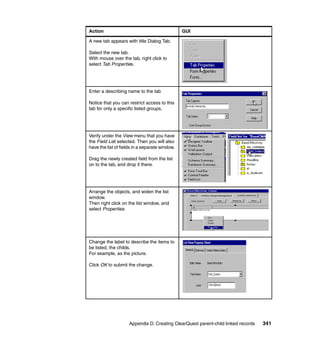
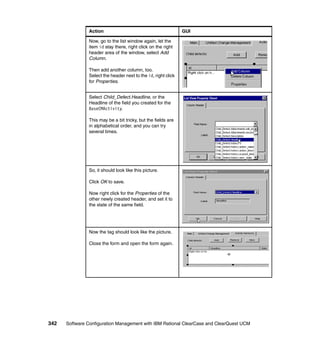
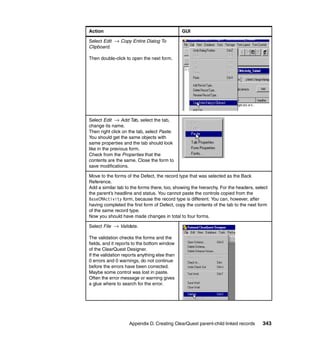
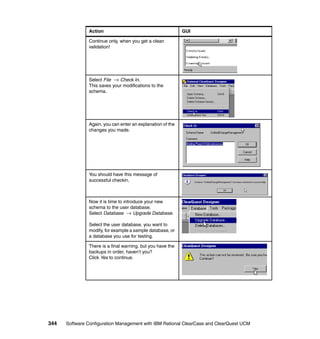
               Appendix D. Creating ClearQuest parent-child linked records. . . . . . . . 337
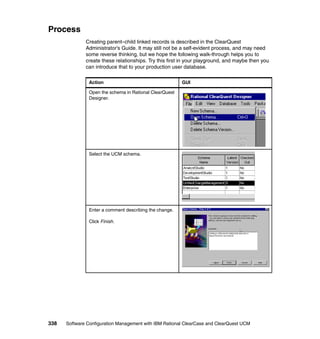
               Process . . . . . . . . . . . . . . . . . . . . . . . . . . . . . . . . . . . . . . . . . . . . . . . . . . . . . 338

               Appendix E. WebSphere Studio and Eclipse integration best practices 347
               Best practices for using ClearCase and ClearQuest with Studio or Eclipse . 348
                 Isolate subsystems or architectural layers into separate components . . . 348
                 Only version control necessary files . . . . . . . . . . . . . . . . . . . . . . . . . . . . . 348
                 Use a separate WebSphere Studio workspace for each ClearCase view 348
                 Create a standardized development environment . . . . . . . . . . . . . . . . . . 349
                 Use team project sets to define consistent lineups of Studio projects . . . 349
                 Add third-party libraries to source control . . . . . . . . . . . . . . . . . . . . . . . . . 349

               Appendix F. Additional material. . . . . . . . . . . . . . . . . . . . . . . . . . . . . . . . . 351
               Locating the Web material . . . . . . . . . . . . . . . . . . . . . . . . . . . . . . . . . . . . . . . 351
               Using the Web material . . . . . . . . . . . . . . . . . . . . . . . . . . . . . . . . . . . . . . . . . 352
                  How to use the Web material . . . . . . . . . . . . . . . . . . . . . . . . . . . . . . . . . . 352

               Abbreviations and acronyms . . . . . . . . . . . . . . . . . . . . . . . . . . . . . . . . . . . 353

               Related publications . . . . . . . . . . . . . . . . . . . . . . . . . . . . . . . . . . . . . . . . . . 355
               IBM Redbooks . . . . . . . . . . . . . . . . . . . . . . . . . . . . . . . . . . . . . . . . . . . . . . . . 355
               Other publications . . . . . . . . . . . . . . . . . . . . . . . . . . . . . . . . . . . . . . . . . . . . . 355
               Online resources . . . . . . . . . . . . . . . . . . . . . . . . . . . . . . . . . . . . . . . . . . . . . . 356
               How to get IBM Redbooks . . . . . . . . . . . . . . . . . . . . . . . . . . . . . . . . . . . . . . . 357
               Help from IBM . . . . . . . . . . . . . . . . . . . . . . . . . . . . . . . . . . . . . . . . . . . . . . . . 358

               Index . . . . . . . . . . . . . . . . . . . . . . . . . . . . . . . . . . . . . . . . . . . . . . . . . . . . . . . 359


xvi   Software Configuration Management with IBM Rational ClearCase and ClearQuest UCM
Notices

This information was developed for products and services offered in the U.S.A.

IBM may not offer the products, services, or features discussed in this document in other countries. Consult
your local IBM representative for information on the products and services currently available in your area.
Any reference to an IBM product, program, or service is not intended to state or imply that only that IBM
product, program, or service may be used. Any functionally equivalent product, program, or service that
does not infringe any IBM intellectual property right may be used instead. However, it is the user's
responsibility to evaluate and verify the operation of any non-IBM product, program, or service.

IBM may have patents or pending patent applications covering subject matter described in this document.
The furnishing of this document does not give you any license to these patents. You can send license
inquiries, in writing, to:
IBM Director of Licensing, IBM Corporation, North Castle Drive Armonk, NY 10504-1785 U.S.A.

The following paragraph does not apply to the United Kingdom or any other country where such provisions
are inconsistent with local law: INTERNATIONAL BUSINESS MACHINES CORPORATION PROVIDES
THIS PUBLICATION "AS IS" WITHOUT WARRANTY OF ANY KIND, EITHER EXPRESS OR IMPLIED,
INCLUDING, BUT NOT LIMITED TO, THE IMPLIED WARRANTIES OF NON-INFRINGEMENT,
MERCHANTABILITY OR FITNESS FOR A PARTICULAR PURPOSE. Some states do not allow disclaimer
of express or implied warranties in certain transactions, therefore, this statement may not apply to you.

This information could include technical inaccuracies or typographical errors. Changes are periodically made
to the information herein; these changes will be incorporated in new editions of the publication. IBM may
make improvements and/or changes in the product(s) and/or the program(s) described in this publication at
any time without notice.

Any references in this information to non-IBM Web sites are provided for convenience only and do not in any
manner serve as an endorsement of those Web sites. The materials at those Web sites are not part of the
materials for this IBM product and use of those Web sites is at your own risk.

IBM may use or distribute any of the information you supply in any way it believes appropriate without
incurring any obligation to you.

Information concerning non-IBM products was obtained from the suppliers of those products, their published
announcements or other publicly available sources. IBM has not tested those products and cannot confirm
the accuracy of performance, compatibility or any other claims related to non-IBM products. Questions on
the capabilities of non-IBM products should be addressed to the suppliers of those products.

This information contains examples of data and reports used in daily business operations. To illustrate them
as completely as possible, the examples include the names of individuals, companies, brands, and products.
All of these names are fictitious and any similarity to the names and addresses used by an actual business
enterprise is entirely coincidental.

COPYRIGHT LICENSE:
This information contains sample application programs in source language, which illustrates programming
techniques on various operating platforms. You may copy, modify, and distribute these sample programs in
any form without payment to IBM, for the purposes of developing, using, marketing or distributing application
programs conforming to the application programming interface for the operating platform for which the
sample programs are written. These examples have not been thoroughly tested under all conditions. IBM,
therefore, cannot guarantee or imply reliability, serviceability, or function of these programs. You may copy,
modify, and distribute these sample programs in any form without payment to IBM for the purposes of
developing, using, marketing, or distributing application programs conforming to IBM's application
programming interfaces.


© Copyright IBM Corp. 2004. All rights reserved.                                                          xvii
Trademarks
The following terms are trademarks of the International Business Machines Corporation in the United States,
other countries, or both:


  AIX®                                  ibm.com®                             S/390®
  ClearCase MultiSite®                  IBM®                                 System/390®
  ClearCase®                            Maestro™                             Team Unifying Platform™
  ClearQuest®                           OS/390®                              Tivoli®
  DB2®                                  pSeries®                             WebSphere®
  developerWorks®                       Redbooks™                            XDE™
  e(logo)server®                        Redbooks (logo)       ™              z/OS®
  Eserver®                              Requisite®                           zSeries®
  Eserver®                              RS/6000®
  Hummingbird®                          RUP®


The following terms are trademarks of International Business Machines Corporation and Rational Software
Corporation, in the United States, other countries or both:

  Rational®                             Rational Suite®
  Rational Rose®                        Rational Unified Process®

The following terms are trademarks of other companies:

Java and all Java-based trademarks and logos are trademarks or registered trademarks of Sun
Microsystems, Inc. in the United States, other countries, or both.

Microsoft, Windows, Windows NT, and the Windows logo are trademarks of Microsoft Corporation in the
United States, other countries, or both.

Intel and Intel Inside (logos) are trademarks of Intel Corporation in the United States, other countries, or
both.

UNIX is a registered trademark of The Open Group in the United States and other countries.

Linux is a trademark of Linus Torvalds in the United States, other countries, or both.

Other trademarks:

Macrovision, Globetrotter, FLEXlm, and FLEXnet are trademarks of Macrovision Corporation

Crystal Reports and Business Objects are trademarks of Business Objects S.A.

TotalNet Advanced Server and Engenio are trademarks of LSI Logic Corporation.

Hummingbird is a trademark of HUMMINGBIRD in Canada and other countries.

DiskShare and AccessNFS are trademarks of Shaffer Solutions

VMware is a trademark of VMware, Inc. an EMC Corporation.

Other company, product, and service names may be trademarks or service marks of others.


xviii    Software Configuration Management with IBM Rational ClearCase and ClearQuest UCM
Preface

                 This IBM Redbook describes configuration management in general and how it is
                 implemented in the Rational® products ClearCase® and ClearQuest®.

                 The target audience for this redbook is anyone considering a software
                 configuration management (SCM) solution, and in particular, project managers
                 and configuration management leaders, responsible for medium and large UCM
                 deployments.

                 In Part 1 we introduce the general concept of software configuration
                 management (SCM), and why software asset management and software
                 lifecycle management is good business. Then we describe an SCM strategy that
                 leads to the use of ClearCase and ClearQuest UCM products.

                 In Part 2 we provide the details for planning and implementing SCM using a
                 ClearCase environment, with focus on test environment, network, servers, and
                 clients.

                 In Part 3 we introduce ClearQuest, its terminology, the roles and responsibilities
                 of the different types of users, and the infrastructure required for a UCM
                 environment. We also provide the details for planning and implementing
                 ClearQuest.

                 In Part 4 we introduce unified change management (UCM) using ClearCase
                 UCM and ClearQuest, including design considerations for an effective UCM
                 implementation, and how UCM is used to manage complexity by raising the level
                 of abstraction.

                 In Part 5 we describe how to do parallel development in multiple geographical
                 locations using ClearCase and ClearQuest MultiSite, including detailed
                 procedures for planning and implementing MultiSite for a UCM environment.

                 In the Appendix we provide an SCM plan template, details about ClearCase and
                 ClearQuest administration, a Base ClearCase quick guide, a walkthrough on how
                 to create ClearQuest parent-child linked records, and six areas of best practices
                 for using Rational ClearCase and Rational ClearQuest with WebSphere® Studio
                 or Eclipse.

                 This redbook does not cover customization of ClearQuest, use of ClearQuest
                 outside of UCM context, and detailed how-to information for developers.


© Copyright IBM Corp. 2004. All rights reserved.                                                xix
The outline of the book is shown in Figure 1, progressing from theory to the
              ClearCase and ClearQuest products, then on to unified change management,
              and finally to complex multi-site operation.


                                                                                                                                                                                                                                                                                                                                                   MultiSite
                                                                                                                                                                                                                                                                                                                                                  Design &
                                                                                                                                                           Defects and Change Requests
                                                                                                                                                                        open
                                                                                                                                                                                                                                                                                                                                                Implementation
                                                                                                                                                           canceled    returned       design

                                                                                                                                                                                     size

                                                                                                                                                                                    review
                                                                                                                                                                                  DSR


                                                                                                                                                                                                                                                                                                                                    MultiSite
                                                                                                                                                                                      working
                                                                                                                                                                                                                                    The Development
                                                                                                                                                                                                                                                                                           Dept.
                                                                                                                                                                        verify                                                      Organization Model
                                                                                                                                                       Verify
                                                                                                                                                       Subprocess                                                                                                 SectionA                                       SectionB
                                                                                                                                                                       closed


                                                                                                                                                                                                                                                                                                                                    Planning
                                                                                                                                                                                                                                       Vendor                    teamA                   teamB


                                                                                                                                                                                                                             ve ndo rXX         ven dorN N              projA              pro jB                 projC


                                                                                                                                                                                                                                           applB
                                                                                                                                                                                  The Sof tware
                                                                                                                                                                                                              teamA
                                                                                                                                                                                  Architecture Model


                                                                                                                                                                                                projA                       projB


                                                                                                                                                                                                                                                                                                           The Platform
                                                                                                                                                                                                                                                                                 Devel
                                                                                                                                                                                      a A
                                                                                                                                                                                       pp l             GUI           database                  applB                                                      Model


                                                                                                                                                                                                                                                             Window s                                    Linux


                                                                                                                                                                                                                                                   applA                 applB                   applC                      applD


                                                                                                                                                                            Unified Change
                                                                                                                                                                             Management
                                                                                                                                                                              Design &
                                                                                                                                                                            Implementation
                                                                                                                                               ClearCase
                                                                                                                                              ClearQuest
                                                                                                                                               Planning
                                                                                 Phases
              Process W orkflows                  Inception      Elaboration          Construction           Transition


                                                                                                                                Software
                            Business Modeling

                                   Requirements

                             Analysis & Design


                                                                                                                              Configuration
                               Implementation
                                          Test
                                    Deployment

              Supporting W orkflows
                         Confi guration Mgmt
                               M anagement
                               Environment
                                                                                                                               Management
                                                                                                                                 Theory
                                                  Preliminary    Iter.   Iter.     Iter.    Iter.    Iter.   Iter.    Iter.
                                                  Iteration(s)    #1     #2        #n      #n+1     #n+2     #m      #m+1

                                                                             Iterations


                               Why Software
                                Lifecycle
                               Management


              Figure 1 Redbook roadmap


xx   Software Configuration Management with IBM Rational ClearCase and ClearQuest UCM
The team that wrote this redbook
         This redbook was produced by a team of specialists from around the world
         working at the International Technical Support Organization, Raleigh Center.


                                                 Ueli


                     Matti                                     Leif
                                        Jennie


         Ueli Wahli is a Consultant IT Specialist at the IBM International Technical
         Support Organization in San Jose, California. Before joining the ITSO 19 years
         ago, Ueli worked in technical support at IBM Switzerland. He writes extensively
         and teaches IBM classes worldwide on application development, object
         technology, WebSphere Application Server, and lately WebSphere Studio
         products. In his ITSO career, Ueli has produced over 30 IBM Redbooks™. Ueli
         holds a degree in Mathematics from the Swiss Federal Institute of Technology.

         Jennie Brown is a Senior IT Specialist at IBM Rational Brand Services in
         Lexington, Massachusetts, where she helps customers deploy enterprise UCM
         solutions. She has 20 years experience in software engineering, the last seven in
         SCM. Jennie began her career at Bell Laboratories working on production of the
         UNIX® operating system and has worked on various aspects of software
         production ever since. She holds a Masters degree in Computer Science from
         the University of Florida.


                                                                            Preface     xxi
Matti Teinonen is a Software Engineering Specialist at IBM Finland, where he
               helps customers to implement, deploy, and manage ClearCase and ClearQuest
               in various combinations with other Rational tools. He has over 10 years of
               experience in configuration management with ClearCase. He has worked at IBM
               for four years.

               Leif Trulsson is the president and owner of Tuxito AB, an independent
               consulting company and IBM business partner in Sweden, focusing on strategic
               information management. Leif has 27 years of professional software
               development experience, and more than 19 years with IBM. He has held a
               number of specialist positions within IBM, and is a former project manager and
               software configuration management (SCM) product lead at the IBM International
               Technical Support Organization in San Jose, California. Leif has 12 years of
               SCM experience and has published four IBM Redbooks on the subject. After
               leaving IBM in 1997, Leif became the first head of IT at the Malaco Group in
               Scandinavia, and in 1999 he became Director IT for MalacoLeaf Scandinavia.

               Thanks
               Thanks to the following people for their contributions to this project:
                  Martin Levesque, IBM Rational, for technical direction

               Thanks to the following people for reviewing the draft and providing detailed
               feedback:
                  Thomas Friel, IBM Los Angeles
                  Majid Irani, IBM Cupertino
                  Stuart Poulin, IBM Redmond
                  Kent Seith, IBM Lexington
                  John Viehweg, IBM Austin

                  Kartik Kanakasabesan, IBM Canada

                  Kevin Lee, IBM UK
                  Alan Murphy, IBM UK
                  Sola Otudeko, IBM UK

                  Arne Bister, IBM Germany
                  Henning Sternkicker, IBM Germany

                  Vincent Lim, IBM Singapore


xxii   Software Configuration Management with IBM Rational ClearCase and ClearQuest UCM
Become a published author
        Join us for a two- to six-week residency program! Help write an IBM Redbook
        dealing with specific products or solutions, while getting hands-on experience
        with leading-edge technologies. You'll team with IBM technical professionals,
        Business Partners and/or customers.

        Your efforts will help increase product acceptance and customer satisfaction. As
        a bonus, you'll develop a network of contacts in IBM development labs, and
        increase your productivity and marketability.

        Find out more about the residency program, browse the residency index, and
        apply online at:
              ibm.com/redbooks/residencies.html


Comments welcome
        Your comments are important to us!

        We want our Redbooks to be as helpful as possible. Send us your comments
        about this or other Redbooks in one of the following ways:
           Use the online Contact us review redbook form found at:
              ibm.com/redbooks
           Send your comments in an e-mail to:
              redbook@us.ibm.com
           Mail your comments to:
              IBM® Corporation, International Technical Support Organization
              Dept. HZ8 Building 662
              P.O. Box 12195
              Research Triangle Park, NC 27709-2195


                                                                          Preface   xxiii
xxiv   Software Configuration Management with IBM Rational ClearCase and ClearQuest UCM
Part 1


Part       1     Introduction to SCM
                 In Part 1 we introduce you to the general concept of software configuration
                 management (SCM), and why software asset management and software
                 lifecycle management is good business.

                 We also talk about choosing the right SCM strategy and why you should consider
                 ClearCase and ClearQuest UCM.

                 Finally, we map the ClearCase and ClearQuest UCM products to the general
                 SCM picture, we introduce you to some IBM Rational product set terminology,
                 and we provide you with some advice regarding SCM planning.


© Copyright IBM Corp. 2004. All rights reserved.                                               1
2   Software Configuration Management with IBM Rational ClearCase and ClearQuest UCM
1


    Chapter 1.   The quest for software
                 lifecycle management
                 “To change and to change for the better are two different things.”
                 - German proverb

                 This chapter discusses the importance of software asset management (SAM),
                 and the importance of managing it over the whole lifecycle1.

                 We also discuss why you need a software configuration management (SCM) tool
                 and process to handle your software assets.


                 1   Lifecycle of the assets, includes the software development lifecycle


© Copyright IBM Corp. 2004. All rights reserved.                                                3
Stories from the wild
               Many years ago, a well known automotive company was migrating one of their
               planning systems at a particular plant. The system was used in a workshop to
               plan all steps and operations, and the utilization of all machines in the workshop.
               The system used network calculations to do forward and backward calculations
               to find the possible start and end times for the different steps and operations for
               the different configurations that were used in the workshop.

               The migration effort involved porting the system from one hardware platform with
               its specific operating system, and the application written in a language specific
               for that environment, to an IBM hardware and operating system platform, and a
               completely different language. One of the requirements was that it should be a
               one-to-one conversion—which meant that the migrated system’s function points
               should correspond to the original system as much as possible. It also meant that
               the interfaces to the system, reports, and user interface, should be as close to
               the original system as possible. The task at hand was daunting, and it became
               even more daunting because of a couple of factors, one being that the estimated
               effort was seriously underestimated, and another being an over-confidence in
               existing system documentation from the customer’s system development
               department.

               After one and a half years, everybody involved thought the project was close to
               the finish line. There were only some minor fixes to be made, and then the
               system would be ready for prime time. How wrong they were. They were not
               even close, it turned out. The project used the waterfall methodology, and when
               entering the test phase it became apparent that something was wrong. Seriously
               wrong! The one-to-one conversion had not been achieved, but more seriously, it
               was discovered that the system documentation and the production code were
               not matching. In fact, there were major discrepancies between the two.

               A decision was made to do some reverse engineering and rewrite the code from
               scratch. This was achieved by creating new flowcharts by going through the
               original production code, and rewriting the new code with the help of the new
               system documentation. In the end, the project was successful and the customer
               was very pleased with their new system. But it did cost IBM a lot of time, money,
               and effort.

               A more recent example involves a software company that for several years
               developed a fairly complex application with very limited software asset
               management and control. In fact, the company used no change management or
               version control whatsoever. This resulted in very poor software quality, which in
               turn impacted on the maintenance and support of the application, which in turn
               had an impact on customer satisfaction.


4   Software Configuration Management with IBM Rational ClearCase and ClearQuest UCM
The company was advised to implement a configuration/change management
        and version control system, as a first step towards taking care of the quality
        issues, but also in an effort to better manage their software assets and
        development efforts, both in-house and third party development. Another reason
        was to implement a more controlled change management process for both fixes
        and change requests.

        Two separate systems were acquired, one for change management, and one for
        version control—not a perfect solution, but still a step in the right direction.
        Unfortunately, there was a lack of experience and knowledge on how to
        implement a version control system in general, the chosen system in particular,
        and a strategy that supported multiple releases and concurrent development.
        This led to a situation where they had a “source safe”, but the system did not
        solve any of the problems it was supposed to address.

        Instead of enabling parallel development, and the possibility to maintain several
        releases at the same time, the company was stuck with the old way of doing
        development, and nothing was achieved. Even if they achieved a little better
        control of their code base, they could not take advantage of the possibility of
        maintaining multiple releases. This meant that fixes made could only be
        implemented in a specific release, and not merged into other releases that
        required the fix.


Software asset management
        What the previous examples try to illustrate is the importance of software asset
        management (SAM), and the importance of managing it over the whole
        lifecycle. In fact, software lifecycle management (SLM) has become so crucial
        for any organization, whether they are developing systems and applications
        themselves, or they are purchasing systems and applications from software
        vendors.

        Today we rely so heavily on our software systems and applications that any
        disruption in service can have devastating effects on the business, and millions of
        dollars can be lost in a couple of hours. Many are the organizations that have
        received a so-called hot fix, applied it, and then paid the price. The fix was hot
        but not in the sense the receiving organization expected. Therefore we have to
        value and manage our software assets like any other assets. And managing our
        software assets is good business.


                                  Chapter 1. The quest for software lifecycle management   5
Better software configuration management means
better business
               “Software configuration management is the unsung hero of software
               development” – Tom Milligan2

               To manage our software assets, we need the right process and the right tools.
               Just like you need an order entry system to handle your customer orders, or a
               general ledger system to handle the financial transactions and bookkeeping of
               your company, you need a software configuration management (SCM) tool
               and process to handle your software assets.

               Control—Is the goal of SCM, with dominion over:
                     Source file versions
                     Configuration and delivery
                     Process management
                     Problem tracking

               Version control—Versioning is the making of copies of data at some meaningful
               point in order to return to that point at a later date, if necessary.

               Configuration control—Implies a higher level of abstraction than version
               control. The SCM tool must have some knowledge of which versions from a set
               of components comprise a specific build.

               Process management—Deals with the grouping and manipulation of versions
               of software assets as they progress through the software development lifecycle.
               This typically involves change management, approval levels, and production
               control.

               Problem tracking—Entails recording enhancement/change requests or defect
               reports and correlating these with the resolution of the request. These reports
               may include a listing of the sources involved in the change. These change sets
               can then create released products containing only the feature and fixes desired.

               In the following section we provide an extract from Tom Milligan’s white paper,
               Seven Keys to Improving Business Value. You can find the paper at:
                     http://www3.software.ibm.com/ibmdl/pub/software/rational/web/datasheets/
                     2003/wp7keys.pdf


               2   Tom Milligan is a consultant at IBM Rational Software.


6   Software Configuration Management with IBM Rational ClearCase and ClearQuest UCM
Seven keys to improving business value
         Given the complexity of development these days, there are a myriad of ways to
         enhance your development efforts and software asset management through
         SCM. Here are the seven attributes that a good SCM system should possess:
            Safety
            Stability
            Control
            Auditability
            Reproducibility
            Traceability
            Scalability

         Once understood and managed properly, these seven attributes can greatly
         impact your bottom line.


Safety
         The primary purpose of any SCM system is to keep software assets (design
         models, source code, test cases, documentation, and so forth) safe from
         corruption, unintentional damage, unauthorized access, or even a disaster. This
         requires two things:
            Secure access—Those who can view or change software assets must be
            only those persons explicitly authorized to do so.
            Reliable recovery—The ability to recover work lost in the event of an
            authorized user's mistake, such as the accidental deletion or overwriting of
            source code files.

         You cannot underestimate the business value of SCM safety features. Safety
         features are the basis for key areas of risk mitigation in the software development
         process. If work is not secure from deliberate or accidental loss, an unacceptable
         level of risk to code and other critical project assets is ever-present. This potential
         loss can temporarily cripple a project and, at worst, derail a project for months or
         kill it altogether.

         As an example of this, many SCM systems do not provide an easy way to
         rematerialize a past configuration. This forces diligent development teams to rely
         on other methods for achieving this capability, such as writing specific
         configurations to tape or other backup media at critical project milestones.

         This, however, does not protect a project from someone accidentally restoring a
         past configuration over the top of existing work. And it certainly does not allow for
         rematerializing configurations aside from the archived critical project milestones.


                                    Chapter 1. The quest for software lifecycle management     7
Business value
               Creating safety in your development environment means having the ability keep
               unauthorized users out and being able to quickly restore code that gets corrupted
               or overwritten. In short, it is the protection of key business assets. There is time
               saved when you do not have to manually recreate specific configurations of your
               software system and can pull it directly from a repository.


Stability
               A stable development environment, both for the team and for individual
               developers, is indispensable. True stability has two essential elements:
                  Guaranteed stable work areas—SCM systems can destabilize individual
                  work areas when others check in new code. Developers should be able to
                  leave work and return the next day—or at any future point—knowing that the
                  data on their desktops has not been altered without their consent.
                  Individual control over when and what new code (which may not be the
                  most stable) is introduced into a work area—For example, a developer
                  who has been working on their own for several weeks should first have
                  enough control over their environment to decide when they are ready to
                  introduce new code (and potential instability) into their environment as well as
                  the team’s environment.

               Beyond that, the developer should also have the option to update their
               environment gradually—to evaluate stability levels. The alternative is to do it all
               at once and potentially introduce widespread instability into the developer’s
               workspace and the project. This level of control—the ability to select when and
               what to introduce to individual workspaces—significantly reduces project risk.

               Business value
               When you introduce instability into a developer’s environment, it can cause a
               downward spiral, whereby developer and team productivity dramatically suffer.

               This will have a negative impact on morale, cause schedule delays and quality
               problems. Maintaining a stable environment negates these problems and adds
               value across the board.


Control
               A major role of any SCM system is to help manage change throughout the
               development lifecycle. The system must strike a balance between enforcing
               appropriate controls on the overall workflow of a project without imposing
               bothersome constraints on individual team members.


8   Software Configuration Management with IBM Rational ClearCase and ClearQuest UCM
Today developers are often working from different offices, in different countries,
               and in different time zones. Trying to integrate contributions from many diverse
               development teams requires a system that can control:
                    Who works on a change request
                    How changes flow from development to integration
                    Who can work on a particular development stream

               On the flip side, your SCM solution has to be flexible enough to allow a whole
               team to work on a common branch3 of code, or allow individual members of the
               team to work on private branches. In the case where private branches are
               desired, then the system requires the ability to control the flow of changes
               between those private branches and the projects integration area.

               Today software reuse is important when it comes to reducing costs. Therefore, it
               is invaluable to have the ability to enforce a food chain approach to development.
               This approach is taken when a team produces deliverables that are meant to be
               consumed by another team on the project. Such components should be
               modifiable only by the team that produces them.

               Properly understood and implemented, these features create a controlled
               environment for development, which results in more productive developers and
               more predictable project schedules.

               Business value
               Software reuse is essential to reducing costs, and you have to set policy to
               achieve this and other goals. Control in this context is about planning how you
               want to work and establishing appropriate enforcement of those rules. Consider
               how many great accomplishments just happen without a plan, a process, or a
               roadmap for success. Not many.

               Control may appear to be slowing progress, but it is really just creating order to
               better achieve a specified result. It is analogous to deciding to walk on the
               sidewalk. If we all agree to walk on the sidewalk and let trucks drive on the street,
               then in return we do not get hit by the trucks. This kind of planning and control is
               good business.


Auditability
               Developing software is an iterative, complex process that requires a keen eye to
               understand all that is happening. It is similar to our perception of a grandfather
               clock. On the outside, the hands move, chimes gong, and it keeps track of time.
               But on the inside there is constant motion. Gears interlock, churning at different
               rates. Special cogs are calibrated to the millisecond interlocking with others.
               3   Branch—a line of development of a software element (see “Branch” on page 40)


                                               Chapter 1. The quest for software lifecycle management   9
All the parts are balanced and aligned to achieve absolute precision—a harmony
              that looks so simple from the outside.

              Software presents the same paradigm with one exception—it is exponentially
              more complex when you look under the hood. And amid all the activity, you
              sometimes have to ask whodunit and why.

              This is where auditability comes in. Auditability refers to the ability to answer the
              who, what, when, and where questions about a specific version or configuration
              of the software release at any time. It also must be able to highlight the
              differences between releases. Build engineers, managers, and developers must
              have ready answers to common queries such as:
                  Did component foo.y get modified according to the latest requirement?
                  Who made a change to line 10249 of version 3.2.4?
                  Were all the top priority bugs fixed for the patch release, and who checked
                  them in?

              The answers are critical for smoothly resolving familiar occurrences such as
              errors in build scripts or include files. Finding the information manually consumes
              valuable time. Indeed, developers frustrated by an inability to interrogate the
              SCM system for this critical information may simply let build and testing teams
              sort things out—wasting even more time and greatly diminishing project
              efficiency.

              Business value
              Auditability requires that an SCM system track and record metadata (data about
              data) about changes. Just as important, it also allows you to query the database
              to find your answers easily. Auditablity can reduce the time looking for answers
              from days to seconds. Multiply that by a half dozen questions per day, and you
              will realize a heap of business value!


Reproducibility
              Among the many changes made over the course of a project, not all are for the
              better. Sometimes, previous versions are superior to the latest. You must be able
              to quickly reproduce that previous configuration to get the project back on track.

              Reproducibility is like an aerial snapshot. It represents a distinct time and a
              detailed, broad view of the project.


10   Software Configuration Management with IBM Rational ClearCase and ClearQuest UCM
Reproducibility in the context of software development requires:
                  The ability to reproduce the configuration of the entire development
                  environment, including tools, tests and documentation at any point in the
                  project lifecycle. This is crucial, yet few products deliver fully in this regard.
                  The ability to automatically recreate not only the files used in a build, but also
                  the directory structure and the entire name space.

               Very often the directory structure of an earlier release is reorganized—file or
               subdirectory names change, large directories are subdivided into smaller ones,
               and files are moved around. The ability to recreate the prior release directory
               structure is called name space versioning. And SCM must provide a mechanism
               for name space versioning, not just file versioning.

               For example, it may be useful to roll back the code base to a point in time that
               was not particularly notable, but which embodied a better version of code.
               Rollback requires reproducibility. And depending on the scope of the rollback, it
               may require a tremendous amount of detail that only name space versioning can
               provide.

               Business value
               Reproducibility in terms of rolling a project back to a milestone or an arbitrary
               point in time may only yield periodic value. But when used routinely to ensure
               that what is being built also has been tested, its risk reduction value is
               incalculable.

               Reproducibility is like version control on steroids—permitting you to reproduce
               exact file versions and configurations of every file in a build. What might take a
               team days or weeks to reconstruct can happen in seconds.


Traceability
               Many SCM systems offer some degree of traceability. A comprehensive definition
               of traceability involves the ability to:
                  Identify the version of a released product deployed (at a customer site), in a
                  way that makes it possible for the SCM system to easily re-create the
                  development environment (code, documentation, use cases) required to
                  rebuild, test, and/or run that version.
                  Trace backward from a specific software version to the change request and/or
                  requirements that were implemented to realize that version. Incidentally, this
                  capability is now mandated on projects involving government agencies, such
                  as the Food and Drug Administration (FDA), Federal Aviation Administration
                  (FAA), or Department of Defense (DoD), all of which build strict traceability
                  requirements into their bid requests.


                                         Chapter 1. The quest for software lifecycle management        11
Armed with traceability features, support engineers have all the information they
              require to recreate the exact configuration of any customer system, and to
              answer the question “Why does the software work that way?"

              Business value
              Similar to auditability, traceability is a way of finding out how you arrived at where
              you are in a project. Given the intricate complexities of software development and
              the high risks involved, traceability is essential. Like auditability, traceability saves
              time, recording metadata that would otherwise have to be done manually or
              probably not at all.


Scalability
              As the foundation for the entire development platform, the SCM system must
              support projects of any scope. That is, it must scale to support large teams from
              start to finish, but it must not impose a burden on small teams.

              A scalable SCM system should be:
                  Configurable and functional when few controls are necessary. Team members
                  will otherwise spend undue time wrestling with an overly complex SCM
                  process without benefit. Small projects cannot afford burdensome
                  administration.
                  Versatile to manage growth. SCM scalability is of increasing importance when
                  small projects are successful. Small projects often spawn large projects,
                  requiring advance functionality like parallel development. An SCM solution
                  needs to be able to manage this growth.
                  Able to support geographically distributed teams, telecommuters, and/or
                  outsourced team members. The presence of off-site contributors adds
                  significant stress to the SCM environment, because of the need to coordinate
                  and manage distributed collaboration, whether centrally or via replication.
                  Scalability also implies that reasonable performance standards should be
                  achieved. Increasing demands on an SCM system should not compromise
                  reliability or impede basic operations.

              Business value
              Imagine having to move your business to larger quarters every time you hired
              another employee. Now imagine having to buy a new SCM solution every time
              you started a bigger project. It would consume time and money, and cause a fair
              amount of aggravation and discomfort. Your SCM solution impacts too many
              people for it not to be scalable.


12   Software Configuration Management with IBM Rational ClearCase and ClearQuest UCM
Good SCM is good business
        A robust SCM system creates a secure and predictable environment for working
        with project assets. It makes it easy for individual team members to adhere to
        established processes and “do the right things,” while making it hard to do the
        wrong things.

        Effective SCM will:
           Provide development management with key status information and data.
           Automate everyday build and versioning tasks, and provide quick access to
           file and version information.
           Support end-to-end tracking of defects and enhancements against previous
           file versions.
           Be agile and robust enough to easily adapt controls to changing project
           conditions.
           Make it is easy to do the right things and hard to do the wrong things.

        The sum of all these benefits amounts to more effective software project
        management—reducing bottom line costs and enhancing business value.

        Once you understand how an SCM solution can help your software development
        (the seven SCM attributes), you should be able to implement a plan to improve
        productivity. No two plans are alike, because no two businesses are alike.

        Yet these seven attributes serve as a context for conversation about SCM
        practices. Once leveraged, these best practices will transform the way your team
        builds software and positively impact your overall productivity.

        The business value of SCM is proven–anecdotally and empirically. Good SCM
        can make a great difference. You can bank on it!

        Tom Milligan says, “Today SCM is the unsung hero of software development. But
        before long, as more and more project managers and CIOs sing its praises, it will
        soon be the MVP (most valuable product).”


                                Chapter 1. The quest for software lifecycle management   13
14   Software Configuration Management with IBM Rational ClearCase and ClearQuest UCM
2


    Chapter 2.   Choosing the right SCM
                 strategy
                 “Strategy: A careful plan or method; the art of devising or employing plans or
                 stratagems towards goals” – Webster’s Third New International Dictionary

                 As we showed in Chapter 1, “The quest for software lifecycle management” on
                 page 3, choosing any SCM strategy is not enough when deploying an
                 SCM-solution, but selecting the right strategy is what matters.

                 We have to consider things like what data that is processed, who does what,
                 where everything is, and why everything is done—that is, the who, what, why,
                 when, where, and how of the process needed to achieve our goals.


© Copyright IBM Corp. 2004. All rights reserved.                                                  15
The questions
              The questions we have to consider are:
                  Why are we doing this, what is the purpose, what is it that we want to
                  achieve?
                  Who does what and who will be affected by the strategy?
                  Where is everything, where will things be located, in what direction(s) do we
                  have to go to reach specific goals?
                  How are we going to reach the goal? What do we need to get to the goal?
                  When do we need it?

              Devising a strategy is very much like deciding upon a direction, but also
              answering the question why we should do it in a certain way and what it is that we
              are trying to achieve by doing it the way we are doing. But before we can
              establish a general direction, we also have to know where we are, and where we
              want to go. As anyone with sailing experience knows, reaching the goal is very
              seldom a straight line. You often have to do a series of tacks, both up wind and
              down wind, to be able to reach your destination. And the same can be said about
              most strategies, it is a series of tacks where you are crisscrossing in a general
              direction in order to reach the goal.

              Just like sailing, we need a crew or team to sail our ship. So who is going to be on
              board the ship is important. Each and every member of the team has to have
              certain roles with certain skill sets and experience. On a sailing ship, we need a
              captain, a helmsman, a navigator, a cook, and so on. The same goes for an SCM
              implementation. We have to carefully consider and decide what roles we need
              with respect to the various tasks that need to be performed, and what skill and
              experience we need for these roles.

              We also have to decide how we are going to reach our goal. This includes
              deciding what tools, infrastructure, equipment, and other resources we need, and
              when we need them. Devising the detailed plans in other words. Deciding on how
              also includes deciding on what rules and/or policies we have to enforce, when to
              enforce those rules/policies, and who they include.

              Answering the who, what, why, when, where, and how questions are very
              important in our effort to select the right SCM strategy. In the sections that follow
              we take a closer look at the various strategies we have to consider in our effort to
              devise an overall, successful strategy. We will look at strategies for:
                  Version control
                  Configuration control
                  Process management
                  Problem tracking


16   Software Configuration Management with IBM Rational ClearCase and ClearQuest UCM
A version control strategy
           Version control and versioning (Figure 2-1) is the making of copies of data at
           some meaningful point in order to return to that point at a later date, if necessary.
           And if the goal is to protect the software assets through the whole lifecycle, then
           we should version control all our business critical software assets. The key is to
           store any artifact1 that is not easily rebuilt from other artifacts.


                           Versioned objects
                           Application versioning

                                                                                 srcA.c


                                                 delta


           Figure 2-1 Versioning

           Versioning can be implemented in various ways, depending on the specific tool
           chosen. Some tools use a full-copy versioning model, which means that they
           store a complete copy of the new version of the artifact being versioned. Other
           tools, however, use some form of delta versioning, which means that they only
           store the difference between succeeding versions of the artifact.


Delta versioning
           Delta versioning can be done either as forward delta versioning, as reverse delta
           versioning, or both:
                 Forward delta versioning means that the original copy of the artifact being
                 versioned is stored as a complete copy, and for all other versions of the
                 artifact, only the deltas are stored.

           1   Artifact: a piece of information that is produced, modified, or used by a process.


                                                          Chapter 2. Choosing the right SCM strategy   17
Reverse delta versioning, on the other hand, only stores the latest version
                  as a full copy, and all other preceding versions as deltas.

              From a checkout point of view, reverse delta versioning is always faster than a
              forward delta versioning, and because of this it is always wise to apply reverse
              delta versioning on binary artifacts such as object files and executables.

              Some tools also use a combination of the two, depending on what type of
              artifacts are being versioned, and how coarse grained the versioning model is.
              For example, some tools apply the versioning model on a work area level, which
              means that several artifacts can be changed in one unit of work (UOW).

              ClearCase uses interleaved deltas, where all deltas are written to a single
              structured file.

              Another important aspect of the versioning model, is the ability to apply clear
              separation of concern on various levels of the versioning. The most common
              method to apply separation of concern is through a branching model
              (Figure 2-2).


                                                   srcA.c

               0.1
                 0.2         srcA.c
                   0.3                              /main
                     0.4
                       0.5
                                                      0
                                                                  Chgreq_ c212

                                                                       0


                                                                       1
                                                                                    Fix_f313

                                                                                        0

                                                                       2

                                                                                        1

                                                                       3

                                                                                        2

              Figure 2-2 Versioning models


18   Software Configuration Management with IBM Rational ClearCase and ClearQuest UCM
As we show in “A configuration control strategy” on page 19, it is also important
         to be able to apply branching on various levels of abstraction (Figure 2-4 on
         page 20).

         Things you might consider storing in your source code control system are
         intellectual properties such as:
            Requirements documentation
            Design documents/models
            Source code
            Icons, bitmaps, and other graphics
            License files
            Readme files
            Informal development notes
            Documentation
            Help files
            Build scripts
            Database build scripts
            Test scripts
            Install programs
            Executables

         Storing any artifact that is not easily rebuilt from other artifacts in one place
         makes it much easier to support and maintain the product. If and when you have
         to address a defect or change request, or just have to create a new CD with a
         specific version of the product, this is much easier done from a common
         repository than trying to assemble the product from disparate locations and
         versions of every artifact of the product.

         However, once you store something in the system, you also have to manage it
         through the system. This means that developers (or anyone else) should not be
         allowed to copy or extract things to a private work area not controlled by the
         system. Even if their intent is to check in the artifact again, once an artifact
         escapes from source code control, you lose track of the artifact and the ability to
         easily recreate the state of your product at a certain point in time.


A configuration control strategy
         Configuration control, as said earlier, implies a higher level of abstraction than
         version control. The SCM tool must have some knowledge of which versions
         from a set of artifacts comprise a specific build.

         In Figure 2-3 we see a typical product configuration. Product A consists of
         several folders, and each folder contains several versions of several files.


                                              Chapter 2. Choosing the right SCM strategy      19
Product
                                                                                         A


                                           Source                                          Doc                              DB-script


                  srcA.c           srcB.c                 hdrX.h                Intro.doc            user.doc             Crtdb.sql     Crttbl.sql
                                               ...
               1.1              1.1                   1.1                       1.1                  1.1                  1.1           1.1
                 1.2              1.2                   1.2                       1.2                  1.2                  1.2           1.2
                   1.3              1.3                   1.3                       1.3                  1.3                                1.3
                     1.4              1.4
                       1.5


              Figure 2-3 Product configuration

              A release is a specific configuration of a product, that is, specified versions of all
              the artifacts that comprise this configuration. A release is a logical organization,
              or mapping, of all managed artifacts that are related to an application or a
              product. A release does not affect the physical location of a managed artifact;
              instead, it provides a logical view of the managed artifacts that must be built,
              tested, and distributed together (Figure 2-4). Also, a specific artifact can be in
              multiple releases.

              Each time a development cycle begins for the next major version of a product, a
              separate release is defined. Each subsequent release of a product references
              many of the same managed artifacts.


               Release_A_v1


                                                                                                  Product
                                                                                                     A
                             Release_A_v2


                                                     Source                                        Doc                        DB-script


                                srcA.c          srcB.c                  hdrX.h            Intro.doc            user.doc     Crtdb.sql     Crttbl.sql
                                                                ...
                             1.1              1.1                     1.1                 1.1                  1.1        1.1           1.1
                               1.2              1.2                     1.2                 1.2                  1.2        1.2           1.2
                                 1.3              1.3                     1.3                                      1.3                      1.3
                                   1.4              1.4
                                     1.5


              Figure 2-4 Release configurations


20   Software Configuration Management with IBM Rational ClearCase and ClearQuest UCM
A process management strategy
        Process management deals with the grouping and manipulation of versions of
        software assets as they progress through the software life cycle. This typically
        involves change management, approval levels, and production control.

        A process enforces a specific level of control on the various product
        configurations and releases. Early in a product’s lifecycle we might want to apply
        loose control, so that versions of artifacts may be created without any approval or
        test process being applied. But later in the development process, we want to
        apply a more stringent process to ensure the quality of the product. And when
        the product enters the maintenance phase, we apply the most stringent process
        control available, so as to assure that we do not introduce any unwanted bugs or
        uncontrolled changes to the product (Figure 2-5).


                                                                             Phases
        Process Workflows            Inception      Elaboration        Construction            Transition       Maintenance


               Business Modeling

                    Requirements

                Analysis & Design

                   Implementation
                             Test
                      Deployment

        Level of Control
            Configuration Mgmt


                                     Preliminary    Iter.   Iter.   Iter.     Iter.    Iter.   Iter.    Iter.   Iter.   Iter.
                                     Iteration(s)    #1      #2      #n      #n+1     #n+2     #m      #m+1      #l     #l+1


                                                                            Iterations
        Figure 2-5 Level of control during the product lifecycle

        Process management also involves who can do what, when, and where. In
        other words, we have to be able to control and define the correlations between
        roles, rules, and tasks.

        A good SCM-tool should be able to reflect the needs of an organization and the
        different roles within the organization, by allowing the definition of various
        authority groups (Figure 2-6).


                                                    Chapter 2. Choosing the right SCM strategy                              21
User
                                          has                   has


                             Org. Role                                Task Role
                                                      WHO
                Access
                Domain      has                                             has      Authority
                                                                                      Domain
                             Org. Rule                WHY             Task Rule

                          define                                            define

                                                     link
                WHERE        Work Area                                  Tasks         WHEN

                                                    acce
                          access                           ss               uses
                                                                                        Operations

                WHAT         Contents                                   Tools           HOW
                                                    modify
              Figure 2-6 Relations between roles, rules, and tasks

              To be able to apply the right level of control, we also have to define the required
              states in the process workflow. A specific state determines what action can be
              performed on the specific object, and what state transitions can be done from
              there (Figure 2-7).

              Defining the right level of control, depending on the various states in the process
              workflow, is key to a successful process management strategy. We want the
              SCM tool to support our development and support efforts, not to hamper them.


22   Software Configuration Management with IBM Rational ClearCase and ClearQuest UCM
Defects and Change Requests                         Legend:
                                                                                 state transitions for
                              open                                               all changes

                                                                                 state transitions for
                                                                                 tracked changes
               canceled     returned     design
                                                                                 state transitions without
                                                                                 subprocesses
                                         size
                                                                     Tracked Subprocesses
                                         review
                                       Request                    approve
                                                                                Approval
                                                                                Subprocess
                                        working
                             verify
             Verify
             Subprocess
                            closed

                                                                                    working
                                                            fix
                                  Fix
                                  Subprocess
                                                         integrate                 integrate


                                                          commit                     commit


                                  Test                     test                    complete
                                  Subprocess                                    Integration
                                                         complete               Subprocess


         Figure 2-7 Example SCM process state transitions


A problem tracking strategy
         Problem tracking entails recording enhancement/change requests or defect
         reports and correlating these with the resolution of the request. These reports
         may include a listing of the sources involved in the change. These change sets
         can then create released products containing only the features and fixes desired.

         Problem tracking and change control enables you to manage and control the
         development process (Figure 2-7). SCM tools with integrated problem tracking
         allow you to track reported problems and design changes and retain information
         about the lifecycle of each. A defect track record is used to record each reported
         problem. A change request track record is used to record each proposed design
         change. The information recorded about defects and change requests enables
         you to report on the who, what, when, why, and where of modifications, as well
         as where a particular defect or change request is in the development cycle, and
         where the release is in the development cycle.


                                                Chapter 2. Choosing the right SCM strategy               23
For instance, you can use the defect and change request information to answer
              questions such as:
                  How many features have been implemented or still have to be implemented?
                  How many defects are open?
                  How many change requests are still in test? (Do I have to move resources to
                  test?)
                  How many defects have been opened against each managed object? (Where
                  are my code quality problems?)


24   Software Configuration Management with IBM Rational ClearCase and ClearQuest UCM
3


    Chapter 3.   Why ClearCase and
                 ClearQuest
                 “The most important tools the team can own are a versioning and configuration
                 management system and a printing whiteboard” – Alistair Cockburn1

                 In the previous chapter we showed you that Better software configuration
                 management means better business. In this chapter we show you the benefits of
                 using IBM’s Rational ClearCase and ClearQuest products as your SCM tools of
                 choice.


                 1
                   Alistair Cockburn is one of the leading advocates of the Agile movement, and is recognized by
                 some as the king of use cases.


© Copyright IBM Corp. 2004. All rights reserved.                                                                   25
Introduction
              Change management solutions help you implement a managed approach to
              change that also guards against corruption of assets. Such tools should also
              provide support for team collaboration and parallel development, making them
              more productive, and leveraging geographical boundaries.

              Software configuration management (SCM) enables development teams to
              capture, control, and securely manage software changes and assets through the
              whole lifecycle (Figure 3-1).


                                                                                  Phases
               Process Workflows          Inception      Elaboration        Construction            Transition       Maintenance


                     Business Modeling

                          Requirements

                      Analysis & Design

                        Implementation
                                  Test
                            Deployment

               Level of Control
                  Configuration Mgmt


                                          Preliminary    Iter.   Iter.   Iter.     Iter.    Iter.   Iter.    Iter.   Iter.   Iter.
                                          Iteration(s)    #1      #2      #n      #n+1     #n+2     #m      #m+1      #l     #l+1


                                                                                 Iterations
              Figure 3-1 Software development process

              SCM solutions address key business challenges by:
                  Supporting local and distributed teams where assets and changes must be
                  seamlessly coordinated across local and dispersed development projects
                  Addressing key compliance issues arising from regulatory, quality, and
                  engineering process requirements
                  Ensuring, as teams, resources, and applications change, that change
                  management processes can quickly scale

              Software configuration management (SCM) is a key capability in modern
              software development practice. It allows teams to carefully trace requirements
              over the project lifecycle, during which numerous changes—including changes to
              the requirements themselves—occur.


26   Software Configuration Management with IBM Rational ClearCase and ClearQuest UCM
Change and asset management (Figure 3-2) offer the following key advantages
for on demand software development.


                                              Software
                                            Configuration
                                            Management ...           Metrics
                                                                    Dashboard


    Manage change                            Requirements
                                               Models
    Manage assets                               Code
                                               Tests ...
    Measure progress and quality

                     Adapt quickly               Create            Are reliable,
   Business          to changing               strategic           scalable &
  applications      business needs             advantage           manageable


    Manage            Enable virtual              Protect             Deploy
    change          teams & parallel        critical strategic         with
 & assets to ...      development                 assets            confidence

Figure 3-2 Manage change and assets

   Enables virtual teams and parallel development—Advanced SCM
   systems allow multiple, sometimes overlapping, branches of a project to be
   worked on by different development teams simultaneously, so more work can
   be accomplished faster, on demand, without sacrificing quality.
   Protects critical assets—A company’s software development assets
   (requirements documents, design models, source code, automated test
   suites, and so forth) are unique, strategic resources that cannot be purchased
   or recreated from outside sources. Just as valuable as a corporation’s
   business assets, these software development artifacts must be managed and
   protected. Effective change management systems ensure that no unit of code
   or component under development is ever lost or over-written. This affords an
   important safeguard against the threat of security breaches or disaster.
   Allows confidence in software deployment—Change and asset
   management ensures that teams who are building and maintaining complex
   systems remain in sync as they combine multiple versions and various pieces
   of software code. Change management systems also allow all requirements
   to be traced throughout the project lifecycle, so that the high-level architecture
   translates to a software system focused on user expectations.


                                       Chapter 3. Why ClearCase and ClearQuest     27
IBM Rational Team Unifying Platform
              The IBM Rational Team Unifying Platform™ (Figure 3-3) is a scalable SCM
              solution that allows organizations to start small with a simple SCM solution that
              enables them to grow without incurring the cost, effort, and disruption entailed in
              migrating to an enterprise SCM solution.


                                                                                          IBM Rational ClearCase
                   IBM Rational ClearCase LT          IBM Rational ClearCase
                                                                                        Change Management Solution
                    IBM Rational ClearQuest         Change Management Solution
                                                                                             Enterprise Edition


                  Version Control                    Software Asset Management           Software Asset Management
                                                      Version control                     Version control
                  Defect and Change Tracking          Advanced Build Management           Advanced Build Management
                                                      Dynamic Views                       Dynamic Views

                                                     Defect and Change Tracking          Defect and Change Tracking

                                                                                         Multiple Site Support


                        Single Server                    Distributed Servers                 Replicated Servers


                   Individual Workgroups               Medium-Large Teams                       Global Teams


                                    IBM Rational Team Unifying Platform
              Figure 3-3 IBM Rational Team Unifying Platform

              Scalable SCM allows application development groups to evolve and grow as the
              business changes, starting with basic SCM functions to support a small project
              team. As the development group expands, they can seamlessly migrate to an
              enterprise version that supports large-scale development, parallel development,
              and geographically dispersed teams. And they can do so while preserving all
              development elements: source code, Web components, binaries, executables,
              documentation, test scripts, directories, and their development process.

IBM Rational ClearCase
              IBM Rational Software delivers a scalable SCM solution that begins with
              ClearCase LT, but allows for a seamless transition to enterprise-scale ClearCase
              and ClearCase MultiSite®. It also integrates with IBM Rational Software's full
              suite of development productivity tools, including IBM Rational ClearQuest—a
              change and defect tracking tool—and Unified Change Management (UCM), IBM
              Rational's activity2-based process for change management.
              2   Activity: new function or bug fix recording a set of related files (see “Activity” on page 45)


28   Software Configuration Management with IBM Rational ClearCase and ClearQuest UCM
ClearCase LT
ClearCase LT is the entry-level version of ClearCase. It supports basic SCM
functions and processes in an easy-to-use manner and can be deployed right out
of the box. Running on a single server, ClearCase LT versions every element in
the software development lifecycle. It tracks changes and maintains histories and
enforces the organization's development process through scripted rules. Using
ClearCase LT, developers can quickly roll back to previous builds, baselines, or
configurations.

Unlike other basic SCM tools, ClearCase LT supports parallel development
through automatic branching, which enables multiple developers to design, code,
and test software from a common code base. It also includes ClearCase's
patented diff/merge technology to automatically merge parallel branches.

Finally, ClearCase LT is the only entry-level SCM tool to support project
workgroups with an out-of-the-box process for controlling workflow, IBM
Rational's Unified Change Management.

ClearCase
ClearCase is a leading enterprise SCM solution. It simplifies the process of
change in large development environments as it helps software teams control
requirements, models, source code, documentation, and test scripts. It handles
version control, parallel development, workspace management, process
configurability, and build management. It also provides advanced build auditing
and a Web interface for universal data access. Through the use of scripted rules,
ClearCase manages and enforces the organization's development process.

ClearCase MultiSite
ClearCase MultiSite enables parallel development across geographically
distributed teams. It provides automated, error-free replication of project
databases and transparent access to all software elements and artifacts. It
facilitates distributed development across both networked and non-networked
sites with update mechanisms to support both network and tape transfers.

ClearCase MultiSite is highly reliable; it automatically resends information during
network failures and recovers repositories in the event of system failure.

IBM Rational's scalable SCM solution covers the entire range of capabilities
(Table 3-1).


                                    Chapter 3. Why ClearCase and ClearQuest     29
Table 3-1 ClearCase capabilities
                Capability                                ClearCase   ClearCase    ClearCase
                                                              LT                   MultiSite

                Low initial cost                             P
                Little training required                     P
                Easy to deploy                               P
                Support parallel development                 P            P             P
                Support Unified Change Management            P            P             P
                Enforce policies and procedures through      P            P             P
                rules

                Rich functionality                           P            P             P
                Customizable                                 P            P             P
                Flexible                                     P            P             P
                Protect code integrity                       P            P             P
                Manageable                                   P            P             P
                Rich feature set                             P            P             P
                Enforces development process                 P            P             P
                Enterprise data storage support                           P             P
                Accelerated build management                              P             P
                Highly scalable                                           P             P
                Support geographically dispersed teams                                  P

              ClearCase LT is based on the same fundamental architecture as the ClearCase
              family of products.

              As a result, when the development effort grows large in terms of the number of
              developers or amount of code or artifacts, the organization can easily turn to
              ClearCase without retraining developers, recreating the code base, or rewriting
              rules and policies.

              ClearCase LT allows the organization to transition to ClearCase without incurring
              the increased costs, delays, disruption, and reduced productivity that
              organizations otherwise experience when changing SCM solutions.


30   Software Configuration Management with IBM Rational ClearCase and ClearQuest UCM
Unified Change Management
          Unified Change Management (UCM) is IBM Rational’s “best practices” process
          for managing change from requirements to release. UCM defines a consistent,
          activity-based change management process that can be applied right away. UCM
          structures the efforts of your software development team into a defined,
          repeatable process.

          UCM is enabled by ClearCase (all versions) and ClearQuest, and simplifies
          development by raising the level of abstraction to manage changes in terms of
          activities, rather than manually tracking individual files. This enables every
          member of the development team to easily identify activities included in each
          build and baseline. With UCM, an activity is automatically associated with its
          change set, which encapsulates all project artifact versions used to implement
          the activity. This ensures that all code and content changes are delivered and
          promoted accurately.

          UCM enables structured parallel development with consistent policies and
          practices and can be implemented in ClearCase with or without ClearQuest.

          With UCM, workgroups can automate and accelerate the steps required to:
             Create and maintain developer work areas
             Associate activities or components with specific software change sets
             Integrate project changes
             Create and manage component baselines
             Use metrics to stay abreast of project status

           Note: The terminology is covered in Chapter 4, “Mapping and terminology of
           the IBM Rational product set” on page 33.

          UCM helps managers reduce risk by coordinating and prioritizing the activities of
          developers and by ensuring that the developers work with the right sets of
          assets. Extending across the lifecycle to accommodate all project domain
          information requirements, visual models, code, and test artifacts, UCM helps
          development teams effectively baseline requirements together with code and test
          assets. This results in accelerated team development in which quality standards
          are met or exceeded on time and on budget.


IBM Rational ClearQuest
          The ClearQuest product provides activity-based change and defect tracking. It
          can manage all types of change requests, including defects, enhancements,
          issues, and documentation changes with a flexible workflow process, which can
          be tailored to the organization’s specific needs and the various phases of the
          development process.


                                             Chapter 3. Why ClearCase and ClearQuest    31
ClearQuest enables easy customization of defect and change request fields,
              processes, user interface, queries, charts, and reports. It comes with
              out-of-the-box predefined configurations and automatic e-mail notification and
              submission. Together with ClearCase, it provides a complete SCM solution that
              covers all four areas of the SCM scope as outlined in Chapter 2, “Choosing the
              right SCM strategy” on page 15.

              ClearQuest also provides you with design once, deploy anywhere capabilities
              that automatically can propagate changes to any client interface (Windows®,
              Linux®, UNIX, and Web). With deep integration with IBM WebSphere Studio,
              Eclipse, and Microsoft.NET integrated development environments (IDEs), it
              allows for instant access to change information.

              ClearQuest supports the Unified Change Management process, which provides
              for a proven change management process. It also scales easily to support
              projects regardless of team size, location, or platform.


32   Software Configuration Management with IBM Rational ClearCase and ClearQuest UCM
4


    Chapter 4.   Mapping and terminology of
                 the IBM Rational product set
                 In this chapter we take a look at the IBM Rational product set and how it maps to
                 the SCM areas as outlined in Chapter 2, “Choosing the right SCM strategy” on
                 page 15.

                 We also take you through the basic terminology of ClearCase and ClearQuest.


© Copyright IBM Corp. 2004. All rights reserved.                                               33
Mapping of the IBM Rational product set to SCM areas
              In this section we take a look at how the IBM Rational product set maps to the
              specific areas of the SCM domain, as shown in Figure 4-1.


                             Base ClearCase

                                                                     ClearQuest

                                     ClearCase UCM

                                     ClearCase UCM + ClearQuest

                   Version Control   Configuration Control Process Management   Problem Tracking

              Figure 4-1 Mapping of the IBM Rational product set to SCM areas


              Base ClearCase
              Base ClearCase covers the version control, configuration control, and part of the
              process management areas of the SCM domain, without UCM. Base ClearCase
              can be viewed as a toolkit, that apart from providing version control, also allows
              you to tailor configuration control and to some extent process management
              according to your requirements. Base ClearCase allow a very high degree of
              flexibility, but it also means that more efforts has to be put into the design of the
              configuration control and the design of process workflows.

              The level of administrative requirement in Base ClearCase is related to factors,
              such as the level of complexity of the configuration control design, the level of
              complexity of the process management design, how many products are being
              managed in the ClearCase repository, how many development teams are using
              ClearCase, and in how many development sites ClearCase has been deployed.

              ClearQuest
              ClearQuest covers the process management and problem tracking areas of the
              SCM domain. ClearQuest can be used either as a stand-alone change
              management and problem tracking tool or, together with ClearCase, to provide a
              complete SCM solution that covers all four areas of the SCM domain. It provides
              activity-based change and defect tracking, and can manage all types of change
              requests, including defects, enhancements, issues, and documentation changes
              with a flexible workflow process, which can be tailored to the organization’s
              specific needs and the various phases of the development process.


34   Software Configuration Management with IBM Rational ClearCase and ClearQuest UCM
ClearCase UCM
          ClearCase UCM covers the version control, configuration control, and process
          management areas of the SCM domain. UCM raises the level of abstraction to
          manage changes in terms of activities (see “Activity” on page 45), rather than
          manually tracking individual files. UCM automatically associates an activity with
          its change set, which encapsulates all project artifact versions used to implement
          the activity. This enables you to easily identify activities included in each build
          and baseline.

          ClearCase UCM + ClearQuest
          The combination of ClearCase and ClearQuest covers all areas of the SCM
          domain and provides full integration of activity-based development with process
          management and problem tracking.


Terminology
          For the first-time user of ClearCase and ClearQuest, the product terminology can
          sometimes be a bit overwhelming. But do not be intimidated by it. For every tool
          there is a learning curve, some steeper than others. ClearQuest and ClearCase
          have a fairly steep learning curve, not because they are difficult-to-learn
          products, but because they can do so much. So how can we make it easier for
          you? We start with terminology and jargon used in ClearCase and ClearQuest.

Basic terminology
          To be able to understand the important features of ClearCase, you must
          understand the following terms:
             Element
             Version
             Versioned object base (VOB)
             View
             Checkout model

          Element
          Elements are control objects that include a version tree. ClearCase distinguishes
          between two types of elements:
             A file element is any file that can be stored in a file system, for example,
             software source code, design documents, HTML code, or XML code.
             A directory element contains file elements and other directory elements.


                       Chapter 4. Mapping and terminology of the IBM Rational product set   35
Version
              A version is a specific revision of an element. By versioning, we make copies of
              the data at some meaningful point in order to be able to return to that point at a
              later stage, if necessary (Figure 4-2).


               srcA.c           hdrX.h       msg.cat       libA.c       Element

                     0            0            0             0
                                                                        Version tree of element
                     1            1            1             1
                                                                        Specific version
                     2                         2             2

                     3                          3            3

                                                             4

              Figure 4-2 Elements and their versions


              Versioned object base
              A versioned object base (VOB) is a repository that stores versions of file
              elements, directory elements, derived objects, and metadata associated with
              these objects (Figure 4-3). With ClearCase MultiSite, a VOB can have multiple
              replicas1, at different sites.


                         srcA.c       hdrX.h msg.cat libA.c

                            0            0             0            0

                            1            1             1            1

                            2                          2            2

                            3                          3            3

                                                                    4


              Figure 4-3 Versioned object base


              1   Replica: a copy or close reproduction (Webster)


36   Software Configuration Management with IBM Rational ClearCase and ClearQuest UCM
A VOB database is the part of a VOB storage directory in which ClearCase
metadata and VOB objects are stored. This area is managed by the database
management software embedded in ClearCase. The actual file system data is
stored in VOB storage pools.

A Project VOB (PVOB) is a special type of VOB that is used when UCM is
implemented as the software configuration management process. Every UCM
project belongs to a PVOB and multiple UCM projects can share a PVOB.

A VOB family (ClearCase MultiSite) is the set of all replicas of a particular VOB.

VOBs support the notion of triggers, which are attached to elements and specify
one or more standard programs or built-in actions to be executed whenever a
certain ClearCase operation is performed on the element.

Views
A view, which is represented as a directory, provides access to a specific version
of one or more elements in a VOB. With a simple rule-based approach, a view
selects a set of versions of elements without having to specify the versions
explicitly (Figure 4-4).


                                                   Product A


                       Source                           Doc


     srcA.c       srcB.c             hdrX.h   Intro.doc
                             ...
                                                                       Source
  1.1           1.1                1.1        1.1
    1.2           1.2                1.2        1.2
      1.3           1.3                1.3        1.3
        1.4           1.4
          1.5
                                                        srcA.c   srcB.c          hdrX.h
                                                                           ...

                                                                                 1.2
                                                         1.3     1.3


Figure 4-4 Through the view you access specific versions of elements


                            Chapter 4. Mapping and terminology of the IBM Rational product set   37
A view provides a workspace in which you can work on assignments in isolation
              from other developers. For example, as you work on a version of a Web page, no
              one can see the changes you make until you check in your work to the VOB.

              ClearCase offers two view concepts:
                  A snapshot view is a workspace created on your local computer. The
                  snapshot view is created by copying versions of elements from VOBs to your
                  computer. When working in snapshot views, you have to update your view
                  periodically to be able to see the latest versions of elements. An update
                  operation copies the latest versions of elements from the VOB to your local
                  snapshot view.
                  A dynamic view provides immediate, transparent access to data stored in
                  VOBs, based on configuration specification selection rules. When you work in
                  a dynamic view, you do not have to copy data from VOBs to your view; you
                  can see the latest versions of elements. This also means that you have to be
                  aware of the impact that changes made to other elements might have on your
                  work. Dynamic views are not available in ClearCase LT.
                  Dynamic views are accessed using the multiversion file system (MVFS), a
                  ClearCase provided file system driver.

              Checkout model
              A checkout model enables you to get a private and editable copy of a specific
              element (Figure 4-5), and manage changes to your projects. When you check out
              an element, ClearCase creates an editable copy in your view. When you check in
              an element, a new version of it is added to the VOB.


                               srcA.c
                                        checkout
               T1
                         1.3


               T2                                  edit


               T3                       checkin
                         1.4

               Time Version
              Figure 4-5 Serial development checkout model


38   Software Configuration Management with IBM Rational ClearCase and ClearQuest UCM
Some versioning tools use a checkout model where the checked out element is
locked during the checkout: this is known as a reserved checkout model. This
kind of model works fine in serial development, where the likelihood of more than
one person checking out a specific element at the same time is very small.
However, when doing concurrent or parallel development, this kind of checkout
model does not work, and we need something else.

In concurrent development, as supported by ClearCase, we need a checkout
model that allows for more than one person to check out a specific element at the
same time (Figure 4-6). Such models can be either optimistic or non-optimistic
checkout models.

Non-optimistic
In a non-optimistic model, the order of checkout determines the order of checkin.
Whoever checked out the specific element first, gets a reservation for first
checkin. In Figure 4-6, developer Adam was the first to check out the libA.c
element version 1.3, and thus was granted a reservation for first checkin. This
means that even if Joe would try a checkin before Adam, he would not be able to
do so, and he would have to wait until Adam had completed his checkin.

                  libA.c
                           checkout
T1
            1.3

                                        edit by
                                        Adam
T2
            1.3


                                                           edit by
T3                         checkin
                                                           Joe
            1.4

                                         checkin

                            collision
T4
            1.4


                            reconciliation         merge

T5
            1.5


Time     Version

Figure 4-6 Parallel development checkout model


             Chapter 4. Mapping and terminology of the IBM Rational product set   39
When Adam’s checkin is complete (version 1.4), Joe can go ahead with his
              checkin attempt. But because the same checked out version of the element has
              already been checked in by Adam, the tool will detect a collision situation and will
              force Joe to perform a reconciliation (of his edited version 1.3 and Adam’s
              version 1.4). If the checked out element is a textual file, the reconciliation can
              probably be performed with the help of a merge tool. But for binary files, a
              decision has probably to be made as to which file will finally be checked in.

              Optimistic
              In an optimistic model, a first-come-first-served policy is used, and the order of
              checkout is irrelevant. So even if Adam did the first checkout, as in our previous
              example, Joe could still perform a checkin before Adam. But as for our previous
              example, when the second checkin attempt is made, a collision is detected, and
              a reconciliation through a merge or a deliberate choice has to be made.

              ClearCase provides non-optimistic checkout by default, but can be configured to
              be optimistic per file or by default.


Base ClearCase terminology
              With Base ClearCase we mean using the ClearCase product without UCM.

              Branch
              A branch is an object that specifies a sequence of versions of an element.
              Every element has one main branch, which represents the principal line of
              development, and may have multiple subbranches, each of which represents a
              separate line of development (Figure 4-7).


                 srcA.c

                  /main

                    0
                                  /proda_r1

                    1                 0

                                      1           /my_proda_r1

                                      2                 0

                                                        1

              Figure 4-7 Element branches


40   Software Configuration Management with IBM Rational ClearCase and ClearQuest UCM
The concept of branches and branching is central in ClearCase. Branching is
done in order to provide work areas for development. It is not uncommon to have
dozens of branches active at a time. The ClearCase naming convention for
branches is to use lower case alphabetic names.

Because branching is done on a very low level, it also becomes very important to
find a branching strategy that works from all level of perspectives and
abstractions. There are some general rules that applies for ClearCase:
   The main branch should not be used for development work, but should be
   reserved for major milestones or released versions.
   All major development is done on branches.

You can use ClearCase branches non-exclusively for various purposes:
   Physical—for components and subsystems
   Functional—for patches, fixes, releases, enhancements, and features
   Environmental—for different operating systems, platforms, and tools
   Organizational—for teams, programs, projects, work activities, and roles
   Procedural—for processes, policies, and states

Each branch in ClearCase is an instance of a branch type object. This allows
you to attach attributes to the branch types, which can then be used to mark the
purpose of the specific branch, and thus enables you to ensure that the right type
of branches are being used.

Version label
A version label can be attached to any version of an element to identify that
version in an easy to remember way. A single version of an element can have
several different labels. Labels are usually applied to a set of elements to mark
important project milestones or the starting point of a branch (Figure 4-8).

A label type is an object that defines a version label for use within a VOB. Labels
can be easily queried, and are very useful in tracking which version of an
element goes with versions of other elements.


             Chapter 4. Mapping and terminology of the IBM Rational product set   41
/main
                                   R1.0                    /r1.1-dev          branch

                 /r2.0-dev

                                   R1.1                                       label


                                                         r1.2-dev

                                    R1.2


              Figure 4-8 Version labels

              Labels can only be attached to an element version, and by default, only one
              instance of a label type may be attached to any version of an element tree.
              However, you can define a label type so that one instance of a label type can
              appear once on each branch of a tree. But this is definitely not recommended
              and there are drawbacks to using the same version label several times in the
              same element tree, for example:
                  It is potentially confusing.
                  In a version-extended pathname, you must always include a full branch
                  pathname along with the version label, which overrides the whole purpose of
                  using a label in the first place.

              Labels work best as a snapshot of your system; for example, marking specific
              release versions, or specific builds. Labels should be more or less static in nature
              and, once attached to a particular object, they should not be moved.

              Configuration specification
              A configuration specification, or config spec, contains the rules used by a view
              to select versions of elements. The rules are very flexible, and you can use
              various specifiers to indicate which versions to select. A view has exactly one
              config spec.


42   Software Configuration Management with IBM Rational ClearCase and ClearQuest UCM
For example, a config spec for a view used in ongoing development would
contain rules that select the latest version in the my_r1 development branch
(Figure 4-9):
   Element * .../my_r1/LATEST


            view                               /main/my_r1 branch of each element

                  srcA.c             hdrX.h            msg.cat             lib (directory)

                     0                     0               0                     0

                                           1   R1.0
                                               R1.0        1
                     1                                                           1
                                                                    R1.0
                                                                    R1.0
                     2                     2               2                     2
                                                                                         R1.0
                                                                                         R1.0
           R1.0
           R1.0      3                                     3                     3
                                 latest version
                     4                                     4                     4


Figure 4-9 Configuration specification: selecting latest versions

To examine the versions that were included in a particular release, you would use
a config spec that uses a label rule to select the versions that were labeled for
that release (Figure 4-10):
   Element * R1.0


            view                                          a branch of each element

                  srcA.c             hdrX.h            msg.cat             lib (directory)

                     0                  0                  0                    0

                                        1      R1.0
                                               R1.0        1
                     1                                                           1
                                                                    R1.0
                                                                    R1.0
                     2                     2               2                     2
                                                                                        R1.0
                                                                                        R1.0
           R1.0
           R1.0      3     release label                   3                     3

                     4                                     4                     4


Figure 4-10 Configuration specification: selecting a specific release


              Chapter 4. Mapping and terminology of the IBM Rational product set               43
UCM terminology
              UCM simplifies development by raising the level of abstraction to manage
              changes in terms of activities, rather than manually tracking individual files. Let
              us start with the UCM terminology.

              Project
              A UCM project is a logical unit that is mapped to the development structure of an
              application or system. A project contains the configuration information (for
              example, components, activities, policies) needed to manage and track the work
              on a specific product of a development effort, such as an auction Web site or an
              order fulfillment process for an e-business. A basic UCM project in ClearCase
              consists of one shared work area and many private work areas (one for each
              developer).

              Component
              A component is a group of file and directory elements (source code and other
              relevant files, such as a a customer GUI) that are versioned together. The team
              develops, integrates, and releases a component as a unit. Components
              constitute parts of a project, and projects often share components. Components
              provide separation of concern and organize elements into well defined entities.

              A VOB can host one or more components, but a component without any
              elements does not have to be in a VOB.

              Figure 4-11 shows the illustration convention used in ClearCase to represent a
              component.


                           Element


              Version


                                   Component
              Figure 4-11 ClearCase component


44   Software Configuration Management with IBM Rational ClearCase and ClearQuest UCM
Activity
An activity is an object that records the set of files (change set) that a developer
creates or modifies to complete and deliver a development task, such as a bug fix
(Figure 4-12). Examples of other activities include an update to a help file or the
addition of a menu item to a GUI component. The activity title usually indicates
the cause of the change (or is a link to ClearQuest).


         Fix 2004
  Creator: leif

   srcA.c Version 4
   hdrX.h Version 3
Figure 4-12 Activity


Work areas and streams
A work area is a development area associated with a change (Figure 4-13). In
Base ClearCase, a view is a directory tree that shows a single version of each file
in your project, and the view is your work area. In UCM however, a work area
consists of a view and a stream.


              My work area                                 Your work area
Figure 4-13 Work areas

A stream is a ClearCase object that maintains a list of activities and baselines
and determines which versions of elements appear in your view. In UCM,
streams are layered over branches, so that you do not have to manipulate the
branches directly. Figure 4-14 shows the ClearCase convention of representing
streams.


              Chapter 4. Mapping and terminology of the IBM Rational product set   45
View


                                              Fix 2004
                                           srcA.c Version 4
               Activity                    hdrX.h Version 3


                                                                          Branch


                                             Baseline
                                                                                             Stream
              Figure 4-14 Stream

              A project contains one main project integration stream that records the
              project’s baselines2 and enables access to the shared elements at the UCM
              project level. The integration stream and a corresponding integration view
              represent the project’s primary shared work area.

              In most projects, each developer on a project has a private work area, which
              consists of a development stream and a corresponding development view. The
              development stream maintains a list of the developer’s activities and determines
              which versions of elements appear in the developer’s view.

              Development streams can be created from the project integration stream
              recursively and hierarchically. This partitioning can be for functional,
              organizational, or procedural reasons.


              2   Baseline: a line serving as a base (Webster), see “Baselines” on page 47


46   Software Configuration Management with IBM Rational ClearCase and ClearQuest UCM
Although the integration stream is the project’s primary shared work area, project
managers can designate a development stream to be a shared work area for
several developers who are working on the same feature.

The terminal (lowest level) development streams are typically used by developers
as a private work area. The changes and activities flow from terminal
development streams to the next higher level to form a shared work area.

Baselines
A baseline identifies one version of each element in a component that
represents the integrated or merged work of team members (Figure 4-15). It
represents a version of a component at a particular stage in project development,
such as the first design, a beta release, or a final product release. Throughout
the project cycle, the project manager creates and recommends baselines and
changes their attributes to reflect project milestones.

A baseline is the means of communication between team members, allowing
them to share new changes developed in the development streams.


            Element


Version


 Baseline
                   Component
Figure 4-15 Baseline

When developers join the project, they populate their work areas with the
versions of directory and file elements represented by the project’s
recommended baselines.

Alternatively, developers can join the project at a feature-specific development
stream level, in which case they populate their work areas with the development
stream’s recommended baselines. This practice ensures that all members of the
project team start with the same set of files.

Composite baselines
If your project team works on multiple components, you may want to use a
composite baseline. A composite baseline is a baseline that selects baselines


             Chapter 4. Mapping and terminology of the IBM Rational product set   47
in other components. In Figure 4-16, the ProjBL1 composite baseline selects
              baselines BL1 and BL2 of components A and B, respectively.

              The Proj component does not contain any elements of its own. Its sole purpose
              is to contain the composite baseline that selects the recommended baselines of
              the project’s components. By using a composite baseline in this manner, you can
              identify one baseline to represent the entire project. A new composite baseline is
              created whenever a new contained baseline is created.


                                                          Component A


                                          Baseline BL1


               Component Proj


                     ProjBL1
                                                          Component B


                Composite
                                           Baseline BL2
                 Baseline

              Figure 4-16 Composite baseline


ClearQuest terminology
              The ClearQuest product provides activity-based change and defect tracking, that
              can manage all types of change requests, including defects, enhancements,
              issues and documentation changes with a flexible workflow process. The
              process can be tailored to the organizations specific needs and the various
              phases of the development process.

              When you use ClearQuest, you work with a variety of objects, including:
                  ClearQuest databases
                  Schemas
                  Schema repositories


48   Software Configuration Management with IBM Rational ClearCase and ClearQuest UCM
Database sets
   Connections

The following sections define these components and explain how they work
together as part of a change management system.

Schemas
A ClearQuest schema is a complete description of the process models for all the
components of a user database. This includes a description of the states and
actions of the model, the structure of the data that can be stored about the
individual component, hook code or scripts that can be used to implement
business rules, and the forms and reports used to view and input information
about the component. ClearQuest provides out-of-the-box schemas that can be
customized for a client installation.

A schema is a pattern or blueprint for ClearQuest user databases. When you
create a database to hold records, the database follows the blueprint defined in a
schema. However, a schema is not a database itself: it does not hold any records
about change requests, and it does not change when users add or modify
records in the user databases.

Schema repositories
ClearQuest stores schemas in a special type of database called a schema
repository, which is also sometimes referred to as a master repository or a
master database.

A schema repository can store multiple schemas, for example, one schema for
defect change requests and another schema for feature enhancement change
requests.

In Figure 4-17, the schema repository stores both Schema A and Schema B. The
schema repository can also include multiple versions of the same schema. A
new version is created each time changes are made to a schema, for example,
by changing an action or adding a new report definition. In Figure 4-17, the
schema repository stores three versions of Schema A and two versions of
Schema B.


             Chapter 4. Mapping and terminology of the IBM Rational product set   49
Schema Repository                           User Database


                                                                                User Database

                         Schema A


                                                                        User Database


                                     Schema B


              Figure 4-17 Schema repository and schemas

              User databases
              A user database in ClearQuest is a collection of user data for one process
              model. You associate each user database with a specific version of a specific
              schema. For example, in Figure 4-17 each user database uses a version of a
              schema stored in the schema repository. The schema defines the way the data is
              stored and changed in that database (that is, the database is an instance of a
              version of a schema). Users change data in the databases when they add or
              modify information about change requests, but these changes have no effect on
              the schema.

              Databases contain a record for each change request. As the change request
              moves through its lifecycle, the data stored in this record changes accordingly.

              You can create and associate multiple databases with a single schema. For
              example, if you have three projects that use the same process model for
              correcting defects, you could create one database for each project and associate
              all three with the same schema. In Figure 4-17 two user databases use the latest
              version of Schema A.

              Database sets and connections
              A database set (dbset) is one specific schema repository and all of its
              associated user databases (Figure 4-17). A connection is the set of credentials
              that allow access to the database set.


50   Software Configuration Management with IBM Rational ClearCase and ClearQuest UCM
Typically, all of the schemas and databases for one project are included in one
database set. However, one database set can support multiple projects, or one
project can have multiple database sets.

State transition model
A state transition model, is a systematic representation of the possible steps in
one change request lifecycle. The state transition model represents a change
management process model. The model defines the change request lifecycle in
terms of the states that the change request passes through, the actions that are
taken to move between the states, and the rules that define when and how the
actions can be taken.

The state of a change request is its current status. Typical states include
submitted, assigned, opened, postponed, duplicated, resolved, and closed.

An action is an activity that moves a change request from one state to another (a
state transition). Typical actions include assign, reject, open, postpone, duplicate,
validate, resolve, and close.

Rules define when and how an action can be taken. For example, the ability to
use a validate action to move a change request from a resolved state to a closed
state might be restricted to quality assurance engineers.

A process model can be illustrated in a diagram, as shown in Figure 4-18. In this
diagram states are shown as ovals and actions are represented by arrows.


                                   Submitted
                                    assign
            postpone                                        duplicate

                                    Assigned
               postpone
                          assign             open

                                                    duplicate
  Postponed          postpone       Opened                              Duplicate
                                                       unduplicate

                                reject       resolve

                                    Resolved
             close
                                                             duplicate
                                 validate


                                     Closed

Figure 4-18 A state transition model


              Chapter 4. Mapping and terminology of the IBM Rational product set    51
52   Software Configuration Management with IBM Rational ClearCase and ClearQuest UCM
5


    Chapter 5.   Planning for software
                 configuration management
                 Your CTO walks into your office and drops a signed purchase order for 250
                 licenses of ClearCase, ClearQuest, and the associated MultiSite products onto
                 your desk. “Here, I’ve solved your CM problem,” he says. He smiles and walks
                 out.

                 With luck, this is not the first you have heard of these products, but it is a scenario
                 we have seen. In the chapters that follow we help guide you through the rest of
                 the story—the details of planning and implementing a Rational CM rollout.


© Copyright IBM Corp. 2004. All rights reserved.                                                     53
Planning for ClearCase and ClearQuest
              “Good planning is the key to success and half the effort.”

              Some might even say: “Planning is everything”. The key to creating an optimum
              SCM environment with Rational ClearCase and ClearQuest is the old adage,
              “Plan the work, then work the plan.” Companies can get the most from these
              tools by doing some pre-implementation planning, focusing on how and what
              developers, business analysts, testers, and managers require to do their work.

              The planning process should include:
                  Understanding and documenting current software development organization,
                  processes, and procedures.
                  Performing process reengineering to eliminate problems.
                  Establishing clearly defined roles and responsibilities.
                  Establishing policies that govern the ways in which each development
                  environment will function.
                  Identifying how IBM Rational and other products will help in the software
                  development lifecycle.
                  Creating an SCM plan. Software teams should not attempt to implement the
                  ClearCase architecture and design within the production development
                  environment until an SCM plan, policies, and procedures are in place.

              The clear vision that results from this planning process allows organizations to
              architect and design the following items:
                  Hardware and software requirements
                  ClearCase and ClearQuest integration with other development tools
                  An SCM environment using either Base ClearCase or Unified Change
                  Management (UCM)
                  ClearCase objects (VOBs, projects, promotion levels, and so forth)
                  Individual or shared environment areas
                  A plan for populating the ClearCase SCM environment
                  Client and server patch level updates
                  A production baseline and a baseline naming convention
                  An employee training plan
                  An implementation plan for development tools (WebSphere Studio, Rational
                  XDE™, or Eclipse) that can carry development efforts through to production
                  (these tools allow managers to control when and what code is moved into
                  production).


54   Software Configuration Management with IBM Rational ClearCase and ClearQuest UCM
A plan for how developers will use a team repository versus a local repository.

           When defining the development organization, you also have to determine
           whether your development will be done in one or several locations, as this will
           affect your infrastructure.

           In the following sections we will give you some advice on how to write an SCM
           plan. This you can use as a starting point for your own SCM planning. Specific
           planning efforts for the individual products will be covered in later chapters.


Writing an SCM plan
           As we said in the previous section about pre-implementation planning, you
           should not attempt to implement the ClearCase architecture and design, or any
           other SCM tool for that matter, within the production development environment,
           until an SCM plan, policies, and procedures are in place. To just go out and buy
           any product and throw at the development organization is a recipe for failure.

           In the sections that follow, we give you an example template for the layout of such
           a plan. Use it as an aid in creating your SCM plan. You decide the level of details
           that you want to put into the plan.

           Appendix A, “Sample SCM plan template” on page 313 contains a template for
           an SCM plan.


Introduction
           The introduction of the Software Configuration Management Plan provides an
           overview of the entire document. It includes the purpose, scope, definitions,
           acronyms, abbreviations, references, and overview of this Software Configuration
           Management Plan.

           Purpose
           Here you specify the purpose of this Software Configuration Management Plan.

           Scope
           This subsection provides a brief description of the scope of this Software
           Configuration Management Plan; what model it is associated with, and anything
           else that is affected by or influenced by this document.

           Definitions, acronyms, and abbreviations
           This subsection provides the definitions of all terms, acronyms, and
           abbreviations required to properly interpret the Software Configuration


                                Chapter 5. Planning for software configuration management    55
Management Plan. This information may be provided by reference to the
              project's glossary.

              References
              This subsection provides a complete list of all documents referenced elsewhere
              in the Software Configuration Management Plan. Identify each document by title,
              report number if applicable, date, and publishing organization. Specify the
              sources from which the references can be obtained. This information may be
              provided by reference to an appendix or to another document.

              Overview
              This subsection describes what the rest of the Software Configuration
              Management Plan contains and explains how the document is organized.


The SCM framework
              The SCM framework is defined in three sections.

              Organization, responsibilities, and interfaces
              Describe who is going to be responsible for performing the various SCM activities
              described in the SCM process workflow.

              Tools, environment, and infrastructure
              Describe the computing environment and software tools to be used in fulfilling
              the CM functions throughout the project or product lifecycle.

              Describe the tools and procedures required used to version control the
              configuration items generated throughout the project or product lifecycle.

              Issues involved in setting up the CM environment include:
                  Anticipated size of product data
                  Distribution of the product team
                  Physical location of servers and client machines.

              Administration and maintenance
              Describe the backup and recovery strategies for the SCM implementation.

              Describe miscellaneous tasks and procedures to be used for the administration
              and maintenance of your SCM installation, including license management and
              installation/upgrade processes.


56   Software Configuration Management with IBM Rational ClearCase and ClearQuest UCM
The SCM process
         The SCM process is defined in three sections.

         Configuration identification
         Configuration identification includes:
             Identification methods and naming convention—Describe how project or
             product artifacts are to be named, marked, and numbered. The identification
             scheme needs to cover hardware, system software, commercial-off-the-shelf
             (COTS) products, and all application development artifacts listed in the
             product directory structure; for example, plans, models, components, test
             software, results and data, executables, and so forth.
             Workspace management—The workspace is where developers edit source
             files, build the software components they are working on, and test and debug
             what they have built. We can say that the workspace is a development area
             associated with a change.
             Describe view and/or work area policies, types, naming conventions, and
             storage locations.
             Project baselines and branching strategies—Baselines provide an official
             standard on which subsequent work is based and to which only authorized
             changes are made.
             Describe at what points during the project or product lifecycle baselines are to
             be established. The most common baselines would be at the end of each of
             the Inception, Elaboration, Construction, and Transition phases.1 Baselines
             could also be generated at the end of iterations within the various phases or
             even more frequently.
             Describe who authorizes a baseline and what goes into it.
             Promotion model—The promotion model provides guidelines for when
             development work should be promoted into release or integration branches
             once development is completed. It also provides guidelines for when and how
             developers should synchronize their work with the recommended baseline.

         Configuration and change control
         Configuration and change control includes:
             Change request processing and approval—Describe the process by which
             problems and changes are submitted, reviewed, and dispositioned. This
             should include the workflow diagrams for the different workflows used for the
             different development phases.

         1
           These phases are part of the IBM Rational Unified Process® (RUP). For more information on RUP,
         go to http://www.ibm.com/software/awdtools/rup/


                                 Chapter 5. Planning for software configuration management            57
Change control board (CCB)—Describe the membership and procedures
                  for processing change requests and approvals to be followed by the CCB.

              Configuration status accounting
              Configuration status accounting includes:
                  Project media storage and release process—Describe retention policies,
                  and the back-up, disaster, and recovery plans. Also describe how the media is
                  to be retained—online, offline, media type, and format.
                  The release process should describe what is in the release, who it is for, and
                  whether there are any known problems and any installation instructions.
                  Reports and audits—Describe the content, format, and purpose of the
                  requested reports and configuration audits.
                  Reports are used to assess the “quality of the product” at any given time of
                  the project or product lifecycle.
                  Reporting on defects based on change requests may provide some useful
                  quality indicators and, thereby, alert management and developers to
                  particularly critical areas of development. Defects are often classified by
                  criticality (high, medium, and low) and could be reported on the following
                  basis:
                  – Aging (time-based reports): How long have defects of the various kinds
                    been open? What is the lag time of when in the lifecycle defects are found
                    versus when they are fixed?
                  – Distribution (count-based reports): How many defects are there in the
                    various categories by owner, priority, or state of fix?
                  – Trend (time-based and count-based reports): What is the cumulative
                    number of defects found and fixed over time? What is the rate of defect
                    discovery and fix? What is the “quality gap” in terms of open versus closed
                    defects? What is the average defect resolution time?


Milestones
              Identify the internal and customer milestones related to the project or product
              SCM effort. This section should include details on when the SCM Plan itself is to
              be updated.


Training and resources
              Describe the software tools, personnel, and training required to implement the
              specified SCM activities.


58   Software Configuration Management with IBM Rational ClearCase and ClearQuest UCM
Subcontractor and vendor software control
           Describe how software developed outside of the project environment will be
           incorporated.


Rules for the road
           So you are off to the promised land of controlling and managing your software
           assets through the whole lifecycle. Implementing a full fledged SCM tool is not a
           task for the faint hearted. A lot of things can go wrong in the process, but if you
           know and are aware of the pitfalls that lie ahead, you will stand a much better
           chance of achieving your goals.

           In this section we provide you with some general rules for the road advice and
           best practices for software projects.


Why projects fail and succeed
           Knowing why projects fail is a good starting point for avoiding some of the pitfalls
           along the road. These are some of the most common reasons why projects fail:
              Lack of end-user input/involvement
              Changing requirements and specifications
              Technology incompetences/illiteracy
              Unrealistic expectations
              Lack of resources
              Incomplete requirements and specifications

           In fact, the above mentioned reasons account for more than 75% of project
           challenged and impaired factors, according to the Standish 2000 Chaos Report.

           So what are the critical success factors you might ask? Next we list the five most
           important critical success factors, according to the Standish Group:
              http://www.standishgroup.com/sample_research/unfinished_voyages_1.php
              User involvement—It happens over and over again, the end users do not get
              involved early enough in projects. So even if a project is delivered on time and
              budget, a project can fail if it does not meet the end users needs.
              Executive management support—Executive support influences the process
              and progress of a project and lack of executive input can put a project at risk.
              Make sure the project gets the attention it deserves.
              Experienced project manager—Ninety-seven percent of successful projects
              have an experienced project manager at the helm. Do we have to say more?


                                Chapter 5. Planning for software configuration management   59
Clear business objectives—Knowing the purpose and the goal of a project
                  is very obvious. But make sure everybody involved knows it.
                  Minimized scope—Scope impacts projects duration. Time is the enemy of all
                  projects, and by minimizing scope, time is reduced. Larger projects should be
                  broken down into smaller entities with limited scope. By doing so, you not only
                  increase the chance for success, you limit the risk and impact to other parts.

              Successful project completion depends on a few refined ingredients. Here is a
              recipe for success that works:
                  Reduce the requirements to the bare minimum—no paralysis through
                  analysis.
                  Provide constant communication systems and couple those with a standard
                  infrastructure.
                  Mix it with:
                  –   Good stakeholders
                  –   An iterative development process
                  –   Project management tools
                  –   Adherence to key roles

              And you are cooking. With the right mix of these ingredients, you are well off to
              success. But remember, too many cooks can spoil the stew. In fact, reducing the
              resources can increase your success rate. The fewer features, the greater the
              yield, and the ideal size of a project team is four people, for no longer than four
              months. Waste not, want not.

              Less is more!

              With the right ingredients and the right mix as our baseline starting point, we can
              now make this into a successful, unified, and repeatable process (Figure 5-1).


60   Software Configuration Management with IBM Rational ClearCase and ClearQuest UCM
Success

             Base Line
                                Design


            Deploy            ITERATIVE         Develop


                                Test

          Figure 5-1 The recipe for success


Roadmap
          You know the rules and you are ready to go, but you need a map to take you
          through the maze of pitfalls and swamps. The following sections offer a roadmap
          for deploying your ClearCase/ClearQuest SCM solution.


Where are we?
          Step 1: Establish the current state of your SCM systems
          One thing that all serious software methodologies, from eXtreme Programming
          (XP) to Rational Unified Process (RUP®) to Capability Maturity Model (CMM),
          agree on is that version control and configuration/change management are
          essential to the success of any development team. The first thing you have to do
          is an assessment of your current organization, system/processes, and
          infrastructure. You do this by interviewing developers and other stakeholders in
          your organization, and you try to find the answer to questions like:
             Where are you and your organization today?
             How are change managed and tracked today?
             Where are you in terms of version control, configuration management,
             process management (change control), and problem/change tracking?
             What tools are you using?
             What build, test, and release strategies are you using today?


                               Chapter 5. Planning for software configuration management   61
Where are we going?
              Step 2: Develop high-level future SCM goals
              Develop a high level picture or “story” of your future goals and how SCM fits into
              this picture. These are the high-level strategic goals that should serve as a
              direction and base for later planning.

              To get the best use out of ClearCase, you also have to understand what your
              team will need in the way of version control and configuration management to be
              effective. Understand the four main areas of the SCM domain and how
              ClearCase and ClearQuest maps to these areas.

              Step 3: Decide upon Base ClearCase or UCM
              One of the most important decisions you have to make is whether or not to use
              Rational Unified Change Management (UCM) capabilities. For many teams,
              UCM will provide a set of standard procedures for controlling your software
              development procedures without having to design and build them from scratch.
              Understand how UCM can simplify the day-to-day development by defining a
              consistent, activity-based change management process that can be applied right
              away. Also, understand how UCM can help you to structure the efforts of your
              software development team into a defined, repeatable process, and how you can
              effectively baseline requirements together with code and test assets.

              Step 4: Understand the terminology
              Get a basic understanding of the ClearCase and ClearQuest concepts and
              terminology. Learn how to isolate your work from other people on your team, as
              well as the strategies suggested by IBM Rational for handling the integration of
              your work with the rest of the team. Design the “rules of the road” for using
              ClearCase and ClearQuest in your development organization and on your
              development team.

              Step 5: Do the deployment planning
              As we have said before, “Planning is the key to success.” So plan the work and
              work the plan. Use the SCM Plan template as an aid in your planning process
              and think ahead. Even if you start small, you should still plan for an open-ended
              solution that permits future growth.

              Understand that ClearCase and ClearQuest is not just for developers. It can be
              used by the entire team and for all of the assets in the software development
              lifecycle. That includes tests, requirements, and models, as well as source code.


62   Software Configuration Management with IBM Rational ClearCase and ClearQuest UCM
How do we get there?
          Step 6: Set up the environment
          Set up and deploy the required server environments. Ensure that clients meet
          required hardware and software requirements. Verify that no network congestion
          exists.

          Step 7: Define roles, responsibilities, and policies
          Define effective configuration/change management policies and practices for
          your development organization, including branching/baseline strategies,
          workflows, change control approvals, and release and testing strategies. Define
          roles and responsibilities for configuration and change management.

          Step 8: Install and configure
          The first step in using ClearCase is to install the product on your computer. Your
          administrator will be setting up a release area for you to install ClearCase and/or
          ClearQuest from, and this release area will be customized for your software
          development team.

          Step 9: Rollout to end-users
          End-users have to be trained and educated. A good practice is to have so-called
          super users; users who have more in-depth training and who can support other
          users regarding how to use ClearCase and ClearQuest in the day-to-day work.
          The end-users also have to be introduced to the usage models and policies that
          are to be used. Create an isolated test environment (playground) and start
          practicing.

          Step 10: Integrate with other development environments
          Understand how ClearCase and ClearQuest can be implemented and used
          together with your favorite integrated development environment (IDE). Make
          sure that you can use ClearCase/ClearQuest from within your development
          environment. Your organization might also have decided to use a common
          development platform throughout the organization, which might require some
          additional retraining.

          Step 11: Be prepared for change
          To be prepared means to be prepared for everything. This includes a knowledge
          of why things can go wrong. If we take into account that things can go wrong, we
          will also be more adept at handling any potential problems. To be prepared also
          implies that we should be prepared for change. This means that we have to treat
          it like any other project, and we have to track the progress.


                               Chapter 5. Planning for software configuration management   63
Entering the support phase does not mean that we have reached the end of the
              line. On the contrary! New projects will be deployed, new policies will be
              implemented, and new goals will be set. This means that the state affairs will be
              in constant change.

              And remember, to communicate is as essential as breathing. Continuous
              communication and collaboration is a key success factor.


Strategies for getting started
              You are now through with the request for funding and the acquisition phase. You
              have the road map and the rules for the road in your hand, and you are ready to
              go. Next we offer some advice for getting started.


Start now
              It is easy to get caught up in the enormity of the task and spin in endless planning
              sessions. Begin the practice of moving forward physically as the project is being
              mapped out:
                  Set up an SCM test environment.
                  Experiment continuously, but be aware of over experimenting.
                  If time and resources permit, try to iterate usage models with frequent
                  demonstrations.


Manage expectations
              Depending on the extent of process change being introduced, a rollout can take
              months or even a few years to make its way across a large organization.
              Frequent communication with management will be needed to secure their
              continuos support, and sell them on an effective CM rollout process. You may
              find that, as for the CTO that began this chapter, CM is not a well understood
              discipline.


Involve the end users and other stake holders early
              A common mistake is for the CM group to close the door and plan out the
              implementation by themselves. Not only will you miss critical user requirements,
              but you can count on schedule-impacting surprises from the infrastructure team.
              For example:
                  Security has a problem with the administration accounts.
                  None of the Windows and UNIX user IDs match.
                  The selected usage model is entirely inappropriate for your software project.


64   Software Configuration Management with IBM Rational ClearCase and ClearQuest UCM
Start small but keep an eye on what is next
           Determine the smallest useful implementation and start there. See Figure 5-2 for
           a sample staged rollout. The actual length of time between stages will depend on
           strength, experience, and size of the CM and infrastructure team.


           ClearCase                                ClearQuest                              MultiSite
               ClearCase
                                                    ClearCase
                Planning                                                                   MultiSite
                                                     Planning
                                                                                          Look-ahead

                                Infrastructure
               ClearCase    training and Process
               for Group          Definition                           ClearQuest
                   A                                                 Playground and
                                                                     experimentaton


               ClearCase
               for Groups
                   B, C

                                                    ClearQuest                             MultiSite
                                                     Planning                             Look-ahead
                                                                                                              MultiSite
                                                                                                           Playground and
                            System hardening                                                               experimentaton
                                                                       Infrastructure
                General
                Geneal                               ClearQuest    training and Process
               ClearCase                              for Group          Definition
                 rollout                                  AA


                                                     ClearQuest
                                                      ClearCase
                                                     for groups
                                                      for Groups
                                                       BB, CC
                                                          B, C


                                                                   System hardening

                                                      General
                                                     ClearQuest                             ClearCase
                                                                                             MultiSite
                                                       rollout                               Planning


                                                                                            ClearCase
                                                                                             MultiSite       Infrastructure
                                                                                                         training and Process
                                                                                            for Group          Definition
                                                                                                A'
                                                                                                A


                                                                                            ClearCase
                                                                                             MultiSite
                                                                                            for Groups
                                                                                                groups
                                                                                               B', C'
                                                                                                B, C


                                                                                                         System hardening

                                                                                             General
                                                                                             Geneal
                                                                                            ClearCase
                                                                                             MultiSite
                                                                                              rollout


           Figure 5-2 Sample CM rollout


                                             Chapter 5. Planning for software configuration management                      65
Expect to iterate
              This is an important corollary to starting small. The principles of iterative
              development apply to processes as well as code. You will probably have to
              fine-tune both workflows and change management policies as you go along.


Start now (again)

                An experienced developer and teacher once said: “No one ever complained
                to me that they deployed ClearCase too early!”


66   Software Configuration Management with IBM Rational ClearCase and ClearQuest UCM
Part 2


Part       2     Implementing
                 ClearCase
                 In Part 2 we describe how to plan for a ClearCase implementation and give
                 specific planning advice regarding ClearCase. We also take a look at roles and
                 responsibilities, the ClearCase environment, how to define the SCM
                 infrastructure, and administrating and maintaining the ClearCase environment.

                 Then we take you through setting up ClearCase and the importance of having a
                 proper test environment. We describe how to set up your ClearCase environment
                 and what you have to think about in terms of network, servers, and clients.

                 Finally, we describe backup and recovery, and how to import existing data into
                 ClearCase.


© Copyright IBM Corp. 2004. All rights reserved.                                                  67
68   Software Configuration Management with IBM Rational ClearCase and ClearQuest UCM
6


    Chapter 6.   Planning for ClearCase
                 In the previous chapter we took you through the general SCM planning efforts,
                 and we showed you an example of an SCM plan outline.

                 In this chapter we give you specific planning advice regarding ClearCase. We will
                 take a look at:
                     Roles and responsibilities
                     The ClearCase environment
                     How to define your SCM infrastructure
                     Administration and maintenance


© Copyright IBM Corp. 2004. All rights reserved.                                               69
Roles and responsibilities
              In this section we take a look at the various roles and responsibilities needed to
              perform the various SCM activities as described in the SCM process workflow
              (which by now you have written, of course).

              In Table 6-1 we describe some of the roles and responsibilities that you could
              assign to your development and CM organization.

              Table 6-1 Example ClearCase roles and responsibilities
                SCM Role              Who             Responsibilities

                Development           John               Define development subsystems
                Manager                                  Define access control
                                                         Define general policies
                                                         Define integration milestones

                CM Administrator      Pat (primary)      Create CM repositories
                                      Alex (backup)      Perform ClearCase backups and recovery
                                                         Perform ClearCase maintenance
                                                         Perform ClearCase user management

                Project Integrator/   Chris              Identify build candidates
                Release Lead                             Establish product baselines
                                                         Establish external releases
                                                         Integrate with external projects
                                                         Select location for release artifacts

                Developer             Alex, Brian,       Create development views
                                      Sandy, Dale,       Work with configuration items
                                      Morgan, Jan        Promote changes

                Builder               Jan                Perform build of build candidates
                                                         Create release media

                Tester                Tracy              Perform integration tests
                                                         Perform system tests on build candidates

              You should map the roles and responsibilities according to the size and needs of
              your organization. Individuals can have several roles and it is good practice to
              have backup persons for key SCM roles, such as the CM administrator.

              The key role from a SCM perspective in our example is the CM administrator.
              The size of your SCM organization will also be influenced by these factors:
                  The size of your over-all development organization
                  The number of development projects
                  The geographical distribution of your development teams


70   Software Configuration Management with IBM Rational ClearCase and ClearQuest UCM
If some of the development efforts are out sourced to a third party
              The policies for new product development.

           These are some examples of SCM team size, depending on the overall size of
           the development organization:
              Small development organization—A developer serves as the part-time CM
              administrator.
              Medium development organization—A separate SCM team is established,
              the SCM team may also be responsible for builds and quality assurance.
              Large development organization—The SCM team is expanded to include
              an SCM process group and a separate SCM tools group.


Education and training
           When planning for a ClearCase roll-out, you should also plan for education and
           training. You have to identify and answer the questions related to who, what, how,
           and when in terms of education and training.


ClearCase environment overview
           ClearCase is a distributed application with a client/server architecture. ClearCase
           LT enforces a strict client/server separation and limits a community to a single
           server host. ClearCase supports multiple servers and provides greater flexibility
           in client and server configuration. In both ClearCase and ClearCase LT, many
           operations involve programs and data on more than one host. This section
           describes the types of hosts you may have in your ClearCase community and
           provides information on how each type of host is used.

           Figure 6-1 shows the hosts in a ClearCase environment.


                 VOB           View         Web         Registry          NAS
                server        server       server        server          device


                                                                       UNIX/
               Client            License            Release
                                                                       Linux
               host               server             server
                                                                       host

           Figure 6-1 ClearCase hosts


                                                        Chapter 6. Planning for ClearCase   71
Networkwide release host
              In both ClearCase and ClearCase LT, one computer in the network acts as the
              networkwide release host. A directory on this host, known as a networkwide
              release area, stores an entire product release which has been extracted from
              distribution media or downloaded from Rational. When necessary, patches and
              service releases can be applied to update a release area with the latest
              enhancements and defect fixes.

              ClearCase can then be reinstalled from the release area to deploy these updates
              to individual hosts. Certain installation options allow ClearCase hosts running
              UNIX to access many ClearCase executables and libraries through symbolic
              links to the release area instead of installing them locally. ClearCase hosts
              running Windows do not access the networkwide release host after installation is
              complete. The networkwide release host does not have to run ClearCase.


ClearCase LT hosts
              A ClearCase LT network includes only two types of hosts:
                  ClearCase LT client—Each ClearCase LT user works at a client host,
                  running ClearCase LT command line programs and graphical user interfaces,
                  as well as other software (for example, development tools, a Rational Suite®,
                  and operating system utilities).
                  ClearCase LT server—Every ClearCase LT client requires the services of a
                  ClearCase LT server host. A ClearCase LT client host can access only one
                  ClearCase LT server. A ClearCase LT server host can support multiple data
                  repositories and can serve many ClearCase LT clients.


ClearCase hosts
              Every host in a ClearCase network plays one or more of the following roles:
                  Client host—Each ClearCase user works at a client host, running ClearCase
                  command line programs and graphical user interfaces, as well as other
                  software (for example, development tools and operating system utilities). A
                  ClearCase client installation can include the multiversion file system (MVFS),
                  which extends the host’s native operating system to provide file system
                  support for dynamic views.
                  Server host—Any host on which a ClearCase data repository can be created
                  is a server host. Typical ClearCase server hosts are:
                  – VOB server—manages ClearCase repositories
                  – View server—manages ClearCase views


72   Software Configuration Management with IBM Rational ClearCase and ClearQuest UCM
License server host—Every ClearCase community must have a license
            server host, which is normally designated during site preparation. The
            ClearCase license server supplies licenses that allow ClearCase commands
            to run. Each client or server host in the community is initially associated with a
            license server during ClearCase installation.
            Registry server host—Every ClearCase community must have a registry
            server host, which is normally designated during site preparation. The
            ClearCase registry provides a way for members of the community to locate
            shared resources, such as data repositories. Each client or server host in the
            community is initially associated with a registry server during ClearCase
            installation.
            Rational Web Platform server host—At least one host in the network acts
            as the Rational Web Platform (RWP) server host. RWP provides application
            support for the ClearCase Web interface.
            Network-attached storage (NAS) devices—Certain NAS devices are
            certified for use with ClearCase. These devices can be used to store any
            ClearCase programs or data. NAS devices do not run ClearCase; they
            provide storage that ClearCase hosts access over a local area network.
            Non-ClearCase UNIX/Linux hosts—UNIX/Linux hosts that cannot run
            ClearCase can still access ClearCase data, with limitations, through standard
            UNIX network file system facilities.


Define your SCM infrastructure
         “No chain is stronger than its weakest link.” — Proverb

         Defining and sizing your SCM infrastructure is very important to successful
         ClearCase deployment. When trying to right size your infrastructure, this is the
         one area where you should not try to achieve savings on your investment
         budget. In this section we will provide you with some advice on how to:
            Right size your network
            Right size your servers
            Review security policies
            Select software

         Here are some of the questions you might ponder when trying to estimate your
         hardware requirements:
            What type of workstations will you be supporting?
            What is the size of your development projects?
            – Lines of code


                                                      Chapter 6. Planning for ClearCase    73
– Number of developers/users
                  – Team locations
                  – Expected growth rate?
                  What hardware is your IT shop currently supporting and will the shop have to
                  retrain support staff?
                  Is ClearCase already implemented in your company?
                  What configurations are supported for ClearCase?


Right sizing your network
              ClearCase is a distributed application with a client/server architecture. This
              means that ClearCase is very sensitive to network performance. Right sizing
              your network is one of the key success factors in achieving network and overall
              ClearCase performance.

              Here are some causes behind degradation in ClearCase performance:
                  Overburdened network—If users generally notice slow performance on the
                  network, you will likely see a problem with ClearCase as well.
                  Multiple hops between client and server—A fast network can provide bad
                  performance if there are multiple routers between the client and host. To
                  check how close your clients really are, use a trace route program:
                  – Windows: tracert hostname
                  – UNIX: traceroute hostname
                  ClearCase over a WAN—Other applications may work fine across the
                  country over your 1GB WAN; ClearCase will not. Under the covers,
                  ClearCase uses many remote procedure calls (RPC) to manage most
                  operations. These RPC calls are fast across a well-behaved LAN, but very
                  sensitive to latency. This is bandwidth-independent, which means that
                  regional performance over a WAN may be fine.

              Review the state of your network with your network administrator to define the
              best network configuration for your infrastructure.

                Tip: Get a network switch! Your VOB and view servers should be connected
                to the fastest network you can afford. The easiest and most affordable way to
                do this, is to connect these servers to a network switch that is connected to
                your backbone. Also, the switch should NOT be configured to auto-negotiate
                network bandwidth. And do not forget to configure your servers with
                high-speed network interfaces. You get the most out of your configuration,
                when the settings are set to the fastest that both your network switch and the
                network interfaces in your servers can handle.


74   Software Configuration Management with IBM Rational ClearCase and ClearQuest UCM
Right sizing your servers
           ClearCase runs on a multitude of hardware and OS configurations, and some
           configurations show better performance than others. Generally, we advise you
           that this is an area where you should not try to take short cuts. Just as network
           bandwidth is a key success factor in the overall ClearCase implementation, so is
           ClearCase server performance.

           In light of the tremendous increase in hardware performance and drop in prices
           that we have seen in the last 35 years, saving a few dollars here or there is like
           “Straining gnats and swallowing camels.”
           Figure 6-2 shows a typical ClearCase infrastructure.


                                                Becomes
                                                  your                             Locked
                 ClearCase                       backup                         environment,
                Only, Lots of                     VOB                            local views
                Memory, Fast                     server
                  0+1 Disk


                    VOB Server                View Server                 Build Servers
                                                             At least 100Mb

                       LAN


                        Get rid of
                        your 256M
                          boxes


                          Mix of UNIX, LINUX, and Windows clients
           Figure 6-2 A typical ClearCase infrastructure

           ClearCase with multiple sites and a ClearCase shipping server is covered in
           Part 5, “Implementing distributed UCM with MultiSite” on page 233.


                                                           Chapter 6. Planning for ClearCase   75
Supported architectures
              ClearCase Version 2003.06.00 is supported on the platforms listed in Table 6-2.

              Table 6-2 Supported platforms for ClearCase Version 2003.06.00
                Hardware platform          Operating system

                Intel® x86                 Windows 2000, WIndows Server 2003, Windows XP Pro,
                                           Windows NT® 4 SP6a

                Solaris SPARC              Solaris 2.6,7,8, and 9
                                           (2.6 32-bit only, others 32- and 64- bit)

                HP 9000 Series 700 and     HP-UX 11.0, 11.0 ACE and 11.11 (11i version 1.0).
                Series 800                 Supported HP-UX ACE release is November 1999 ACE.

                HP IPF                     HP-UX 11.22

                SGI MIPSa                  IRIX 6.5.12 through 6.5.19 (64-bit only)

                IBM pSeries®,              AIX® 4.3.3, 5.1, 5.2
                RS/6000®

                IBM PC-compatibles         Red Hat Linux 7.2b, 7.3, 8.0, 9
                                           Red Hat Enterprise Linux 2.1, 3
                                           SuSE Linux Standard Server 8
                                           SuSE Linux Enterprise Server 8

                IBM S/390® and             SuSE Linux Enterprise Server 7, 8
                zSeries®c
                  a. The mainframe connectors remote build feature is not supported on this
                  platform.
                  b. It supports only kernels 2.4.9 and higher.
                  c. The notation zSeries, as used in these release notes, refers to Linux for S/390
                  running on the IBM zSeries hardware in the 32-bit run-time environment. Running
                  ClearCase on Linux for zSeries in a 64-bit runtime environment is not supported.

              Version 2003.06.00 of ClearCase does not include support for the following
              architectures or versions:
                  IRIX 6.5.7 through 6.5.14
                  Red Hat Linux 7.0 and 7.1
                  Caldera UnixWare
                  Sun Solaris Intel

              Supported platforms for ClearCase Web servers and interface
              The following platforms support the ClearCase Web server:
                  Solaris SPARC
                  HP-UX


76   Software Configuration Management with IBM Rational ClearCase and ClearQuest UCM
HP-UX/IPF
                AIX
                Linux for x86
                Linux for IBM S/390 and zSeries

             Platform requirements for ClearCase mainframe connectors
             If you plan to install the ClearCase Mainframe Connectors Remote Build feature,
             see the platform requirements for the client (Table 6-2) and server (Table 6-3).

             Table 6-3 Server requirements for ClearCase mainframe connectors
              Hardware platform     Operating system

              IBM System/390®       OS/390® 2.10, including UNIX System Services (USS)

              IBM zSeries           OS/390 2.10, including USS
                                    z/OS® 1.3 and 1.4, including USS


Supported file systems
             Table 6-4 lists the file systems that ClearCase supports for view and VOB
             storage.

             Table 6-4 Supported file systems by platform
              Platform                              Supported file system

              Windows NT                            FAT, NTFS, LANMAN, NFS

              Windows 2000, 2000 Server, XP         FAT, FAT32, NTFS, LANMAN

              Solaris SPARC                         UFS, VxFS (Veritas)

              HP-UX                                 JFS, UFS, HFS, VxFS

              HP-UX/IPF                             JFS, UFS, HFS, VxFS

              SGI IRIX                              EPS, XPS

              IBM AIX                               JFS

              Linux for x86                         ext2, ext3, reiserfs

              Linux for IBM S/390 and zSeries       ext2, ext3, reiserfs


VOB server
             A VOB server runs a number of server processes for each VOB it supports.
             Because an active VOB host may have to support dozens, or even hundreds, of
             such processes, and support network access from many clients, we recommend


                                                            Chapter 6. Planning for ClearCase   77
that you follow the guidelines in this section when specifying the hosts’s physical
              processor, memory, storage, and network interface hardware.

              Processor capacity
              A VOB server must have adequate CPU capacity. The definition of adequate in
              this context varies from one hardware architecture to another. With ClearCase
              and similar enterprise applications, server CPU capacity is a critical factor
              governing performance of client operations. Make the most of the available
              server CPU cycles by keeping nonessential processes—including ClearCase
              client tools and views—off the VOB host.

              Physical memory
              The minimum recommended main memory size is 128 MB or half the size of all
              the VOB databases the host will support, whichever is greater. To this amount,
              add:
                  7 MB of memory per VOB, regardless of VOB database size
                  1 MB of memory for any view_server process that will run on the VOB host

              Adequate physical memory is the most important factor in VOB performance;
              increasing the size of a VOB host’s main memory is the easiest (and most
              cost-effective) way to make VOB access faster and to increase the number of
              concurrent users without degrading performance.

                Note: We do not recommend running any view_server processes on a VOB
                host (see “Minimize process overhead” on page 79).


              Disk capacity
              A VOB database (and, on Windows, the entire VOB storage directory) must fit in
              a single disk partition.1 VOB databases tend to grow significantly as development
              proceeds and projects mature.

              We recommend a high-performance disk subsystem, one with high rotational
              speed, low seek times, and a high mean time between failures. If possible, use a
              Redundant Array of Independent Disks (RAID) or similar system that takes
              advantage of disk striping and mirroring. Mirrors are useful for backups, although
              there is a slight performance degradation associated with their use. However,
              striping helps overall performance and more than makes up for any degradation
              caused by mirroring. For more information on RAID, see “Some words on RAID
              levels” on page 82.


              1
                True for Windows. On other systems, it is possible to split a VOB database using RAID; however,
              the best practice is not to split a VOB database.


78   Software Configuration Management with IBM Rational ClearCase and ClearQuest UCM
Network interface
Nearly every access to a VOB places a load on the VOB server’s network
interface. It is important to use a high-bandwidth (100 MB/second or greater)
network connection to the VOB host. Multiple network interfaces to a VOB host
can further improve its network accessibility, but some operating systems require
that each such connection have a separate host name, which in turn requires the
use of multiple regions in the ClearCase registry.

Improving VOB server performance
Nearly all ClearCase operations involve access to data in a VOB. Good VOB host
performance ensures that VOB access does not become a bottleneck. This
section presents techniques for improving the performance of VOB hosts.

The work of a VOB host involves both read and write access to the VOB
database as well as periods of significant computation. VOB access patterns can
greatly influence the number of concurrent users that a VOB host can support at
a given level of performance. For example, many more users can read from a
VOB than can write to it with the same level of performance.

Minimize process overhead
Some of the most effective measures for ensuring good performance from VOB
hosts are also the easiest to implement:
   Keep nonessential processes off the VOB host. This means that you should
   not use the VOB host as a server host for other resource-intensive
   applications such as database management systems or as a Web server.
   Neither should you use the VOB server for critical network service such as an
   NIS server on UNIX or a primary domain controller on Windows.
   Keep all ClearCase client processes off the VOB host. Do not use the VOB
   server host as an active ClearCase client (for example, as a developer’s
   desktop system).
   Keep view_server processes off the VOB host. Although you may create
   shared views on VOB server hosts, the practice can be detrimental to both
   VOB and view performance. Avoid it where practical.

Maximize disk performance
Here are some recommendations for obtaining the best I/O performance on VOB
hosts:
   Use disks with fast seek times and high rotational speeds.
   Where practical, dedicate a disk spindle for each VOB.
   For very busy VOBs on UNIX hosts, dedicate two disk spindles per VOB: one
   for the database and source pools, and one for the cleartext and DO pools.


                                           Chapter 6. Planning for ClearCase   79
Use stripe technology (RAID 0) for improved performance.
                  Use mirroring (RAID 1) if high availability is desired.
                  Avoid RAID 5, unless your benchmarks show equal performance to RAID
                  (0+1).
                  Place VOB storage on a certified NAS device.

              In “Some words on RAID levels” on page 82 we explain some of the different
              RAID levels and how striping and mirroring is used. For more detailed
              information concerning striping and mirroring, please consult your system
              documentation.

              Add memory for disk caching on Windows
              Windows has a dynamic disk buffer cache. As much main memory as possible is
              used to cache blocks of data files that have been updated by user processes.
              Periodically, the buffer cache is written to disk. The cache size increases when
              you add more memory to the host.

              This feature speeds up disk I/O significantly; making full use of it is an important
              factor in good VOB host performance. An inadequate disk buffer cache can
              degrade ClearCase performance significantly and produce symptoms like these:
                  Extended periods required for scrubber and vob_scrubber execution
                  Very slow omake or clearmake builds
                  Clients experiencing RPC time-out errors

              Tune block buffer caches on UNIX
              Most of the UNIX platforms that ClearCase supports have a dynamic block buffer
              cache. As much main memory as possible is used to cache file blocks that have
              been updated by user processes. Periodically, this cache is written to disk. On
              most UNIX variants, the cache size increases when you add more main memory
              to the host.

                A word on clustering: Clustering is not officially supported by Rational,
                though it is used by some customers for managing system redundancy.
                Although some customers run this without error, we have some difficulty in
                recommending an unsupported disaster recovery. See “Backup strategies” on
                page 84 for more discussion on disaster recovery.


View server
              Performance is optimized by having views closest to your users, which means
              local to their client hosts or build servers. Standalone view servers are used if
              clients are undersized or to manage nightly backups of views.


80   Software Configuration Management with IBM Rational ClearCase and ClearQuest UCM
Build server
           Separate build servers, whose content can be locked down to provide a
           controlled environment for reproducible builds, is a cornerstone in good SCM
           practice. If your applications are build intensive, you may have several build
           servers. Otherwise, a build servers can be shared among a community of
           developers.

           Besides optimizing for your application build, you can optimize build performance
           through the following ClearCase tuning:
               Optimize network—If builds are non-trivial this will be the most important
               host next to the VOB server on the network. If you have a 100Mb backbone
               and 10Mb to the build host, it is worth including it in the backbone.
               Local views—Use local views here even if your standard policy is using a
               central view server
               Large view cache—Enlarge the view cache until it no longer helps:
               – Time the build in a controlled environment.
               – Enlarge the viewcache per Figure 6-1 on page 71.


Client hosts
           ClearCase will be installed on all developer desktops and workstations that have
           to access the code set. In addition, any triggers will run locally on the clients.

           ClearCase client software makes demands on host memory, CPU, and storage
           subsystems that are comparable to the demands made by similar workstation
           applications. Any computer configured to support such applications will deliver
           good performance on the majority of ClearCase client tasks.

           Because ClearCase is a distributed application, it also requires good
           performance from the client host’s network interface and the network to which it
           is connected. Poor network performance has a negative impact on the
           responsiveness of even a well-configured ClearCase client host.

           Additional memory may be appropriate for some client hosts. For example, a
           client host that is expected to do additional work, such as hosting distributed
           builds or shared views, needs additional memory and perhaps a larger,
           high-performance disk subsystem. And any client that must run other workstation
           applications while it is also running ClearCase may have to adjust its resources
           to adequately support simultaneous use of both.


                                                       Chapter 6. Planning for ClearCase    81
Some words on RAID levels
              Redundant Array of Independent Disks (RAID), is a category of disk drives that
              employ two or more drives in combination for fault tolerance and performance.
              RAID disk drives are mainly used on servers, and RAID comes in a variety of
              levels and flavors, for which we now give you a brief overview.

              RAID level 0—Striped disk array without fault tolerance: Data is striped
              across all drives, and read and write operations take place in parallel across all
              drives. This improves performance but does not deliver fault tolerance. If one
              drive fails, then all data in the array is lost.

              RAID level 1—Mirroring and duplexing: This provides disk mirroring. Level 1
              provides twice the read transaction rate of single disks and the same write
              transaction rate as single disks.

              RAID level 2—Correcting coding: This is rarely used. Level 2 stripes data at
              the bit level rather than the block level.

              RAID level 3—Bit-interleaved parity: This provides byte-level striping with a
              dedicated parity disk. Level 3 cannot service simultaneous multiple requests, and
              is rarely used.

              RAID level 4—Dedicated parity drive: This is a commonly used implementation
              of RAID. Level 4 provides block-level striping (like Level 0) with a parity disk. If
              one data disk fails, the parity data is used to create a replacement disk. A
              disadvantage with level 4 is that the parity disk can create write bottlenecks.

              RAID Level 5—Block interleaved distributed parity: This provides data
              striping at the byte level and also stripe error correction information. This results
              in excellent performance and good fault tolerance. Level 5 is one of the most
              popular and common implementations of RAID.

              RAID Level 6—Independent data disks with double parity: This provides
              block-level striping with parity data distributed across all disks.

              RAID Level 0+1—A mirror of stripes: This is not one of the original RAID
              levels, and combines striping with duplication which gives very high transfers
              combined with fast seeks as well as redundancy. The disadvantage is high disk
              consumption.

              RAID Level 10—A stripe of mirrors: This is not one of the original RAID levels;
              multiple RAID 1 mirrors are created, and a RAID 0 stripe is created over these
              mirrors.


82   Software Configuration Management with IBM Rational ClearCase and ClearQuest UCM
Review security policies
           Review the following security rules with security administrator early in the
           process:
              ClearCase authentication—ClearCase does not manage its own
              authentication scheme but instead uses the native OS authentication defined
              by users and groups.
              VOB ownership—ClearCase repositories are owned by a named
              administrative account, usually vobadm. If you have multiple domains using the
              account, track usage by forcing the use of sudo or a similar logging command:
                 sudo -u vobadm cleartool mkvob -tag /vobs/tools -public -stgloc vobstore
              UNIX—In a UNIX environment, all user/group name relations and all uid/gid
              relations must be identical for all UNIX clients and servers.
              Special considerations for a UNIX and Windows mixed environment:
              – Users must have both UNIX and Windows accounts.
              – If you are using Samba, we recommend that you use the same passwords
                consistently.
              – A special run-as-server domain account, typically named clearcase_albd,
                is used by the albd_server on Windows for credential mapping on UNIX.
              – Name mapping—User and groups must match exactly between UNIX and
                Windows. Exception: the Windows clearcase_albd account can be
                mapped to a ClearCase administrative account such as vobadm.
              ClearCase service—On every ClearCase host, the albd_server is network
              information center (NIC) registered to port 371. The albd_server manages
              communications among ClearCase services.
              Access to ClearCase servers—The VOB and view servers should be locked
              down to allow only members of the CM group log on privileges. Others only
              have to be able to authenticate to the servers. On a UNIX system running
              without NIS, it is as simple as replacing the shell specification in the
              /etc/passwd file with /bin/false:
                 stade1:!:303:200::/home/stade1:/bin/false


                                                        Chapter 6. Planning for ClearCase   83
Administration and maintenance
              When planning for ClearCase, you also have to plan for the administration and
              maintenance of your ClearCase environment. This includes:
                  Backup strategies
                  Software planning:
                  – License management
                  – Installation and upgrade processes


Backup strategies
              Ensuring frequent, reliable backups of essential data is a critical task for any
              ClearCase administrator. Like all databases, VOBs and views have special
              backup and restore requirements.

              Because data in multiple repositories is often related, it is important to implement
              a backup routine that preserves those relationships.

              VOB and view backup tools requirements
              VOB and view data is stored in ordinary files and directories. This data can be
              backed up with any tool that is appropriate for file system backups as long as the
              tool captures all the necessary data and you follow the procedures in this
              chapter. When selecting a VOB or view backup tool, consider these requirements
              and recommendations:
                  The backup tool must preserve NTFS ACLs. On Windows platforms where
                  VOB or view storage is located on an NTFS file system, the NTFS ACLs on
                  the VOB or view storage directory are important. Unless your VOB and view
                  storage is on a FAT file system (not recommended), any Windows backup tool
                  you use must be able to back up and restore NTFS ACLs.
                  The backup tool should back up files even if they are open for writing. On
                  Windows and UNIX, VOB server processes keep VOB database files open for
                  writing even when the VOB has been locked for backup. Unless you lock the
                  VOB and stop ClearCase on the VOB host during VOB backup, the program
                  you use to back up VOBs must be able to back up files that are open for
                  writing. Many common Windows backup tools, as well as file system copy
                  utilities such as copy and xcopy, do not have this capability and will skip files
                  that are open for writing, which renders the backup useless.
                  The backup tool should preserve file access times. On some UNIX platforms,
                  the tar utility, which is often used for backups, resets file access times. This
                  can disrupt derived objects (DO) and cleartext storage pool scrubbing
                  patterns and may prevent these pools from ever being scrubbed. The UNIX
                  cpio utility may be a better choice for VOB backup.


84   Software Configuration Management with IBM Rational ClearCase and ClearQuest UCM
Tip: If you locate a VOB storage directory on a NAS device that has been
 certified for use with ClearCase, you may be able to take advantage of
 device-specific backup utilities that can dramatically reduce VOB lock time.


VOB backup strategies
When planning a VOB backup strategy, there are a number of things that you
have to consider, such as these:
   The backup tool must capture all of the necessary data.
   The VOB must be locked during the backup. A locked VOB can defer or
   disrupt many development activities. If backups cannot be scheduled for off
   hours, your backup strategy may have to focus on reducing the duration of
   each VOB lock to a practical minimum.
   A VOB may be part of a group of VOBs that are connected by hyperlinks and
   should be backed up and restored together.
   If UCM and Rational ClearQuest are in use, a PVOB and a ClearQuest
   database are likely to hold references to each other. These references may
   become invalid when the PVOB or the ClearQuest database is restored.

When choosing backup tools and strategies for VOBs, it is also helpful to
understand the file system layout of the VOB storage directory.

View backup strategies
Unlike VOBs, views can usually be reconstructed quite easily. With the exception
of changes to checked-out versions and other view-private files, the contents of a
view can be recovered by recreating the view. However, regular backups of views
can still be important, especially if users are not regularly checking in their work.
Backing up a view is similar to backing up a VOB, but simpler:
   Views do not have multiple storage pools. A dynamic view has a single private
   storage area, its .s subdirectory. Unless the view storage is on a UNIX host,
   where it may be implemented as a symbolic link to a remote host, or on a
   NAS device, this directory must be local to the host where the view server
   runs. Element versions loaded into a snapshot or Web view reside in a single
   directory and its subdirectories (there is no .s directory).
   It is not recommend to make partial backups of a view storage directories or
   snapshot view directories. All the data in these directories is important,
   especially modified checked-out files and other view-private files, which are
   not recorded in the VOB.


                                              Chapter 6. Planning for ClearCase   85
Important: Your backup tool must be able to back up files that are open for
                writing. View database files are typically held open for write while ClearCase is
                running, even if the view is inactive or read-only. A backup that skips these
                files has no value. Unless your backup software is able to capture files that are
                open for write access (something many Windows utilities cannot do), you must
                stop ClearCase on the view host before performing the backup.


              Registry backup strategies
              In addition to normal backup from the ClearCase administration file area, it is
              good to have a registry backup that you can have online immediately.

              Detailed information about backup and recovery will be presented in “Backup and
              recovery” on page 108.


Software planning
              In “Supported architectures” on page 76 we provided an overview of the
              supported hardware and software platforms. Figure 6-3 shows a typical software
              configuration.


                     ClearCase Server
                      License Server
                     Registry Server        ClearCase Server
                    UNIX Release Area        Backup registry       ClearCase
                                                                                   Windows
                    Trigger Repository           server               host
                      SAMBA Server
                                                                                   Release
                                             SAMBA Server
                                                                                     Area


                    VOB Server           View Server           Build Server       File Server

               LAN
                                         ClearCase clients

                                            ClearCase
                                               host


              Figure 6-3 Typical software configuration


86   Software Configuration Management with IBM Rational ClearCase and ClearQuest UCM
When planning for your ClearCase installations, you also have to decide and plan
for:
   License management
   Installation and upgrade processes:
   –   Which ClearCase version to install
   –   What other basic software requirements are needed
   –   Which operating system patches are required
   –   What additional software tools should be installed.

License management
ClearCase implements an active-user floating-license scheme. This means that
a specific license is issued when you run the ClearCase program or issue a
ClearCase command. If you do not use ClearCase for a certain period, the
license is reclaimed by the license server, and may by taken by another
ClearCase user.

Before you request a license authorization code, you should consider how many
authorization codes you need. For example, you have to decide how many
license servers to use and how the licenses are to be allocated between the
license servers. The following two examples show how this can be done for 25
licenses:
   You decide to use a single license server host. In this case, you request a
   single license authorization code for 25 licenses. You create a single license
   database file that incorporates this code.
   A drawback to this solution is that it creates a single point of failure. If your
   network’s sole license server host becomes unavailable, no one will be able to
   use ClearCase.
   You decide to use two license server hosts. In this case, you request two
   license authorization codes, one for 15 licenses and another for 10 licenses.
   You create two license database files that incorporate these codes on two
   different hosts.
   This strategy provides for more robustness. If the 15-license server goes
   down, developers can still use ClearCase—but only a maximum of 10
   concurrent users. You also have to repoint all clients from the failing server to
   the working license server.

Base ClearCase or ClearCase UCM
The ClearCase installation covers both Base ClearCase and ClearCase UCM.
It is an implementation decision if you want to use UCM or not. This decision will
affect your branching and baseline strategies.


                                             Chapter 6. Planning for ClearCase   87
The decision between Base ClearCase and UCM is also a long term decision. If
              you envision a steady increase in development efforts, number of projects, and
              increased level of complexity, you might consider deploying UCM from the start.

              In “Building software is not like building bridges” on page 212 we discuss a little
              bit more in details about managing complexity.

                Tip: We recommend that a new version of ClearCase is deployed within 12
                months of availability; otherwise patches and upgrades become more painful.


              Basic software requirements
              If you are planning on running ClearCase on HP-UX and Solaris systems and
              you do not want to be limited to the command-line user interface, you install
              Netscape 7. You must also install the Sun 1.4.2 Java™ Virtual Machine (JVM) or
              the HP 1.4.1.01 JVM. Be sure to check that there are no mismatched versions of
              the Java Python Interface (JPI) and Java Runtime Environment (JRE), as this
              can cause problems with the ClearCase Web interface.

              On systems running AIX, HP-UX/IPF, SGI IRIX, and Linux for x86, Mozilla 1.4 is
              required.

              To be able to read the online manuals in PDF format, you also have to install
              Adobe Acrobat Reader, version 4.0 or later.

              Required operating system patches
              To achieve correct ClearCase operations, you have to install the required or
              recommended operating system patches, as outlined in the ClearCase release
              notes.

              Patches are available from respective hardware vendor. The operating system
              patches are cumulative, which means that if you install a more recent patch, it will
              include the right set of patches required for ClearCase.

              Be sure to check and obtain the correct patches for your host platforms and
              intended ClearCase version.

              Additional software tools
              When you deploy ClearCase in an existing environment, you will probably have
              to take into consideration existing network and system monitoring and
              management tools. You will also have to plan for how existing and additional
              software tools should be used and deployed.


88   Software Configuration Management with IBM Rational ClearCase and ClearQuest UCM
If, for example, you are running Windows clients against a ClearCase VOB server
         on UNIX or Linux, you have to plan for what file system access solution to use.
         For example, you might decide to use the open source Samba solution.

         Other software tools to be included in your planning are:
            Virus protection tools
            Software development tools:
            –   Integrated development environments
            –   Build tools, for example Ant
            –   Testing tools
            –   Modelling tools
            –   Requirements gathering tools
            Software distribution tools
            Collaboration tools


Sources of information
         For information sources on ClearCase, see “Online resources” on page 356.


                                                     Chapter 6. Planning for ClearCase   89
90   Software Configuration Management with IBM Rational ClearCase and ClearQuest UCM
7


    Chapter 7.   Setting up ClearCase
                 We start this chapter by talking about the importance of having a proper test
                 environment. We also give you some advice about how to set up your ClearCase
                 environment and what you have to think about in terms of network, servers, and
                 clients.

                 In this chapter we also talk about backup and recovery, and how to import
                 already existing data into ClearCase.


© Copyright IBM Corp. 2004. All rights reserved.                                             91
Start now
              ClearCase supports iterative design and development, and so should you. It is
              good practice to start with planning what to do and when to do it, but you also
              gain experience by doing. So iterate, do your first small setup, study it, document
              it, and continue improving your setup.

              When you are confident enough with your setup, you will also have a good plan
              for the larger rollout. But remember, there will always be a need for tuning and
              improvement as you continue your iterations.


Setting up a playground environment
              It is really a good practice to be able to test new tools and new versions, in a
              separate environment that is isolated from the production environment. You will
              sleep better at night if you know that your testing efforts are not going to break
              the production environment if you should happen to run into serious problems
              while testing.

              Setting up such a playground also benefits in that it gives you the opportunity to
              familiarize yourself with the ClearCase environment, and your super users can
              get a first-hand experience with ClearCase. In this test environment, you can test
              various features, you can study how different processes work, and you can tailor
              the environment and processes to your needs without disturbing the production
              environment.


The playground
              Start light! Dedicate a host for your testing environment and install everything you
              need on it. If you are setting up a UNIX environment, and you plan to have
              ClearQuest, too, you also require a Windows PC for ClearQuest administration.
              For a pure Windows environment, though, you might start with just a single
              Windows server.

              With the playground in place, you can then make yourself familiar with the
              programs and the integration between the programs.

              If your single host has enough power, memory, and disk space, you might even
              use several operating systems, including Linux on that single host, by using a
              product such as the VMware1 Workstation from EMC Corporation.


              1
                VMware was originally developed by VMware Inc., and VMware was acquired by EMC Corporation
              in 2004.


92   Software Configuration Management with IBM Rational ClearCase and ClearQuest UCM
The VMware software allows you to have multiple operating systems on one
           machine acting as virtual hosts, and create a virtual network between them. In a
           setup like this, you can even experiment and test different solutions for a
           ClearCase MultiSite solution.


Moving on to a serious test environment
           Even though you should start with a playground for testing functionality and
           ideas, and your playground machine might have plenty of CPU power and
           memory, you still have to establish a serious testing environment that more fully
           resembles your final production environment. For example, there might be
           changes in the environment that you may not be able to test in your limited
           playground, you may have production operating systems that you are not able to
           create or use in your playground, and you might have a production network that
           you are not able to reproduce in your playground environment.

           It is time to move on to a serious test environment! The test environment is the
           place where you can test new working models and see whether they affect your
           processes and/or other tools, and it is also the place to test your new ClearQuest
           schemas, for example.

           A serious test environment, that is, a carbon copy of your production
           environment, also enables you to test any changes and modifications before
           applying these changes or modifications in your production environment. For
           example, you will be able to catch serious flaws in system fixes that could
           otherwise destabilize your production environment. More than one IT shop has
           experienced the agony of applying a recommended service pack, just to find out
           that the so-called fix broke their production environment. You just do not want to
           have that same experience. Another benefit of setting up a carbon copy test
           environment is that it can be used for backup purposes, reducing system down
           time due to backups or other system down reasons.

           If you do not have the funding or resources to establish a full-fledged testing
           environment at once, you can always let your test environment evolve over a
           period of time, step by step. So in the end you have an environment that as
           closely as possible resembles your production environment. The key here is to
           have the same type of servers, the same type of operating system, with the same
           patches, service packs, and fixes as your production environment. You should
           also have the same type of clients as in your production environment.

           Another benefit of having a test environment, is that it can be used for education
           and training. The test environment is also the place where you can test pending
           changes, inter-operation between ClearCase/ClearQuest and other software
           products, integration to new tools, and new upgrades or versions of ClearCase
           and ClearQuest before they are applied in the production environment. For


                                                         Chapter 7. Setting up ClearCase   93
example, you might want to test that a new version of a compiler produces the
              expected output, or that ClearCase/ClearQuest can be integrated with your new
              development environment.

              Minimal test environment
              When setting up your test environment and depending on your final setup, we
              recommend the following minimum setup:
                  One ClearCase server.
                  One ClearQuest database server. At least, you need user and schema
                  databases separate from the production databases, but you might not want to
                  load the production database server, either.
                  One or more clients with your normal configuration.
                  Additionally, for a MultiSite environment, you need:
                  – ClearQuest MultiSite shipping servers for two sites
                  – An additional server to act as the ClearCase server and ClearQuest
                    database server for the other site

              You can start with one host, and use it for everything. However, this setup might
              not be able to scale and behave the same way as your production environment.
              And remember, when your production environment grows, so should your test
              environment.


Setting up your environment
              In “Define your SCM infrastructure” on page 73 we started out by saying that
              “No chain is stronger than its weakest link.” Defining and sizing your ClearCase
              infrastructure is very important to successful ClearCase deployment. In
              Chapter 7, “Setting up ClearCase” on page 91, we also gave you some general
              advice on how to right size your network and servers. In the sections that follow,
              we take it a step further.


Network infrastructure
              Right sizing your network is one of the key success factors in achieving network
              and over-all ClearCase performance. It is vital that your network environment
              meets the specific ClearCase requirements.


94   Software Configuration Management with IBM Rational ClearCase and ClearQuest UCM
Apart from the need for speed, these are some of the issues that you have to
address:
    Domain Name Service (DNS)—It is important that your DNS service can
    resolve hosts by both name and IP address.
    If you only have a few UNIX/Linux hosts and you do not have a DNS service,
    then we highly recommend that you set up such a service. To handle name
    and address resolution in individual HOSTS files is error prone and inflexible.
    The benefits of having centralized control and administration of network wide
    resources cannot be overstated.
    Network user/group accounts—ClearCase relies on information provided
    by services like the Windows Active Directory or the UNIX/Linux Network
    Information Service (NIS) to grant access and to allow change to ClearCase
    objects.

You use the network user/group accounts to assign the various roles within
ClearCase. For example, you create a separate user account for the VOB
administrator, but the group is the same as for regular ClearCase users.

In a Windows environment, the ClearCase_albd2 process uses a special global
user and group accounts in the Active Directory domain. The group should not be
shared by anyone else except the VOB administrator.

In a mixed Windows-UNIX/Linux environment, you have to take into account that
UNIX/Linux limits user and group names to eight characters. So it is good
practice to implement a platform independent naming scheme for your
network domains.

All ClearCase hosts use the above mentioned services actively to find out which
host runs what ClearCase service, and to resolve access rights in views and
VOBs. If your production environment already has UNIX/Linux hosts, you
probably also have working DNS and NIS services, and setting up ClearCase
should not be a problem.

If you have just a few UNIX/Linux hosts, and you do not have any NIS or DNS
services, then we highly recommend that you set up such services. The benefits
of having centralized control and administration of network wide resources can
not be overstated.

If you are running a predominant Windows environment, you will probably
already have one or more domain controllers in place. Then setting up
ClearCase is fairly straightforward.

2
  albd stands for Atria Location Broker Daemon, written in UNIX style with downcase letters; in
Windows it is a service. Atria was the original developer of ClearCase, merged with Pure to become
Pure-Atria, which was acquired by Rational Software, which in turn was acquired by IBM in 2003.


                                                       Chapter 7. Setting up ClearCase         95
However, if you do not have an existing domain, and cannot have one, you may
              have to explore other supported alternatives for user authentication (local
              non-sharable VOB/view storage, terminal emulation into the Windows host, UNIX
              host as VOB server with interop).


Setting up ClearCase
              The procedure for installing ClearCase is fairly easy and straightforward. A good
              starting point is to read through the ClearCase Installation Guide and to check
              any release notes for additional information pertinent to the installation. You
              should also check that all applicable service packs and patches are applied
              before starting the installation.

              As described in “Networkwide release host” on page 72, ClearCase uses a
              network wide release host. The release host contains the so-called release area
              where the ClearCase product release is stored. Updated patches and service
              releases can be applied to the release area, and individual hosts can then be
              updated from the release area. The network wide release host does not have to
              run ClearCase.

              The installation of ClearCase is a staged process. First you prepare the site-wide
              release area with your general client and server settings for each host
              architecture. These settings include the name of the license server and registry
              server and the name of the default region.

              When the release area is prepared, installation of each individual host can be
              performed from the release host.

              The Installation Guide is part of the ClearCase documentation set which is
              installed on each host, and the documentation can also be downloaded in
              several formats from the ClearCase support site:
                  http://www.ibm.com/software/awdtools/clearcase/support


Servers first
              There are several ClearCase server host roles, and the order of installing
              ClearCase hosts is important. Most of the roles can be combined to one server,
              but consider separating at least VOB and view servers (see Figure 6-1 on
              page 71 and Figure 7-1 here).


96   Software Configuration Management with IBM Rational ClearCase and ClearQuest UCM
LIC          VIEW


                           L
                        RE
                                  Y
                               RG


                                VOB


          Figure 7-1 ClearCase server roles

          If you decide to start with one server only, you can use DNS alias names for each
          ClearCase role. Then, when time comes to separate the services, you can
          change the aliases in the DNS to point to the new hosts.

          However, if you are using this approach, notice that ClearCase caches effectively,
          and it takes some time to flush the caches. You may end up restarting ClearCase
          services on clients to refresh the caches, therefore schedule the change outside
          of office hours, if possible.

          Also, if a host running ClearCase is known by several names, each alias has to
          be introduced to ClearCase. For further information on this subject, please refer
          to alternate_hostnames in the ClearCase Administrator’s Guide.


Server connections
          When the general environment is ready for ClearCase installation, check the
          connectivity to the respective server. As the administrator, you must have
          immediate access to the server(s). The administration can be done in most
          cases from the command line, but a graphical interface when administrating the
          server(s) makes it easier to perform the various tasks at hand.

          On UNIX or Linux servers you could, for example, install the free Virtual Network
          Computing (VNC)3 application that enables you to access your UNIX and/or
          Linux machines from any client running a VNC viewer. On many Linux
          distributions the VNC application is part of the distribution package. On a
          Windows workstation you have to install the application separately to be able to
          connect to the UNIX or Linux server.

          3   http://www.realvnc.com/


                                                        Chapter 7. Setting up ClearCase   97
In a UNIX/Linux environment you should also avoid using the root account for
              normal ClearCase tasks. Instead you should use the VOB administrator account.
              However, for some tasks, like changing the registry password, you must have
              root access.

              In a pure Windows environment you can use the remote desktop feature to log in
              to the server using your VOB administrator account (which should belong to the
              ClearCase users group, the ClearCase albd process group, and to the local
              administrator group).

              Before commencing, do a final status check:
                  Have you verified the administrator access permission?
                  Have all user and group accounts been created?
                  Do user accounts belong to the correct groups?


Registry server
              The cornerstone of a ClearCase environment is the ClearCase registry server.
              It holds the information of ClearCase resources, such as which regions are
              available, which VOB are served by which hosts, and where the storage
              directories are, and which views are available. The ClearCase registry server
              communicates this information by using remote procedure calls (RPCs) with
              other ClearCase hosts.

              ClearCase registry
              Each ClearCase hosts knows only one registry server, which in turn, provides the
              only known ClearCase registry.

              The following information exists in the ClearCase registry:
                  Information about the regions in this registry
                  Server, access path, and universal unique identifier (UUID) of VOBs in this
                  registry (VOB objects)
                  Server, access path, and UUID information of views in this registry (view
                  objects)
                  List of hosts that have contact to this registry

              ClearCase region
              A ClearCase region is a subset of views and VOBs introduced in the ClearCase
              registry of the registry server. If the registry has the information of the view or
              VOB object, the view or VOB can have a tag in any of the regions listed in this
              registry. If a tag exists for a VOB or view, the VOB or view can be accessed.


98   Software Configuration Management with IBM Rational ClearCase and ClearQuest UCM
Each ClearCase host belongs to only one ClearCase region, which provides the
following information:
   VOB tag, access path, and UUID information for each VOB running on a
   ClearCase server in this region
   View tag, access path, and UUID information for each view running on a
   ClearCase server in this region
   Storage locations in this region for views and VOBs

The registry server belongs to one of these regions, however, not all the VOBs
and views have to be introduced in the registry server’s region.

The clients that use this registry server can use the ClearCase regions listed in
the registry.

Accessing VOBs or views from another region
You use the commands cleartool lsvob or cleartool lsview to list the VOBs or
views. To list items from another region under the same registry, use the switch
-region added by the region name from where you want the list.

To add a VOB from another region to the current region in this registry:
   Create VOB tag with the command cleartool mktag -vob -region -tag...
   or using ClearCase Administration Console in Windows.

To get a VOB from another registry to current region:
   Either use ClearCase Administration Console in Windows to introduce the
   VOB in the current region, or use command cleartool register -vob to
   introduce the VOB object and then use the cleartool mktag -vob
   -region... -tag... to create tag for the VOB in the region.

ClearCase registry services in a nutshell
Here is some detailed information about the registry. This information may be
overkill, but we think it may clear up how the registry works:
   Each ClearCase host knows only one registry server, and belongs to one of
   the registry regions this registry server provides. So, in a ClearCase
   environment, there is at least one registry server, which provides at least one
   ClearCase registry region.
   The registry can be spread over multiple registry servers, but each server
   must host at least one region.
   A registry server holds the information of the ClearCase regions in this
   registry, and the information about VOB and view objects. These objects are
   mainly identification and storage location of the VOBs and views. The registry


                                              Chapter 7. Setting up ClearCase   99
collects host names of the list of clients when a client host connects to the
                 registry host to ask for registry data.
                 Any ClearCase host belongs to one registry region, and only the VOBs and
                 views having tags in the this region are easily accessible. Any VOB or view
                 having a tag in another region in the same registry can be made visible by
                 adding a tag for it into the current region.
                 The tag of a VOB or a view may be the same in the different regions, but it
                 does not have to be. Please document the situation well, if you have the need
                 for different tags for one VOB or view in different regions.
                 In the region information you may also have storage locations, which are used
                 as default storage path patterns for new VOBs and views.
                 You may be forced to have several regions. If, for example, some of your
                 hosts access the VOBs using a different path than the other hosts, these
                 hosts using different paths must have a region of their own. The VOB and
                 view tags and access paths are introduced to this region using the paths the
                 clients can access. A classic example of this is having a mixed UNIX or Linux
                 and Windows environment. In this case you need a region for the UNIX hosts
                 and another for the Windows hosts.
                 Introducing VOB and view tags from a UNIX region to a Windows region has
                 been made easy. There is a special tool, ClearCase Region Synchronizer, to
                 assist with this.
                 VOB and view servers belong to only one region of the only known registry
                 server. All VOBs or views stored in the server must have a tag in the server’s
                 region to get the server processes up and running. If you have several
                 regions, you have to create tags to the other regions for VOBs and views
                 needed in those regions.
                 A VOB or a view cannot be tagged in any of the regions if the object
                 information has not been introduced to the registry.
                 Thus, by having two separate registry servers, for example, you can have two
                 isolated environments. You can, however, at your will, introduce any item
                 from one registry to the other, and then make a tag for it in any region in that
                 registry.


License server
              Before you can access data in ClearCase repositories, you need a license.
              ClearCase license server provides the licenses for anyone asking for them. The
              licenses are floating user-based licenses, so a user might use several computers
              while taking just one license.


100   Software Configuration Management with IBM Rational ClearCase and ClearQuest UCM
The system tries to reserve the license for someone who really needs it. When a
          user starts working with ClearCase, the license is reserved for him. Thereafter,
          the ClearCase client host he is working on checks for license availability every 15
          to 20 minutes. If the user is accessing VOBs and the license is in use, the license
          will be held reserved, unless a more privileged user requires the license.

          If, on the other hand, no access is made to the VOBs, the license time-out period
          is started and the license is released after the time-out for others to use. When
          the user accesses VOBs during this time-out period, the license is refreshed and
          a new time-out period starts to run.

          Typically there are periods when a designer does not actively access the VOBs,
          but afterwards wants to perform a check-in, for which a license is needed again.
          To avoid unnecessary license requests and possible license unavailability
          situations, and to make the use of ClearCase as smooth as possible, the license
          is kept reserved by default for one hour.

          After the one hour time-out, the license becomes available for others, if the user
          does not need it any more. You can make the time-out period shorter, down to 30
          minutes, but it may then affect your work.

          Thus, a short time-out period combined to a too tightly optimized amount of
          licenses may lead to a situation where a user does not get a license after a
          time-out, if there are no free licenses. Without a license, he cannot access the
          VOBs.

          Install the license server next to the registry server to have a working
          environment for the VOB and view servers, which should be installed next.


VOB and view servers
          You might consider starting with one server for all the ClearCase server roles
          (Figure 7-2). However, Rational recommends not installing a combined VOB and
          view server, and with a good reason.


                                         L
                                    RE


            VIEW                     LIC


            VOB                     RGY


          Figure 7-2 All-in-one server


                                                       Chapter 7. Setting up ClearCase   101
The different VOB and view server processes will eventually—when your
              ClearCase environment is running in full power—load the single server to a point
              where ClearCase actions start to take a noticeable amount of time. You may still
              not see too much processor load, nor network congestion, but some actions just
              seem to be slower than before.

              In a small environment, an all-in-one server works at the beginning, but the
              ClearCase workload tends to build up, and finally you will have performance
              problems, which may be quite tough to resolve.

              So, to be on the safe side, separate the view services from the VOB server. If
              you can handle backing up parts of local disk of the workstations, use local
              views. When using local dynamic views, most views will be created using the
              workstation’s disk space as storage. Also, the view server process for each view
              will run on the workstation. There will be less network traffic and the system will
              feel to be more responsive using local views.

              VOB server hosts run several server processes for each VOB defined for that
              server. Additionally there is a process in each VOB server taking care of VOB
              database locking. This lock manager process manages the write and read
              access requests for all VOBs in the server. The lock manager has different
              capabilities on different architectures.

              By default, a Windows server can support up to 18 VOBs and a UNIX or Linux
              server will support 36 VOBs. However, this can be tuned. The tuning is described
              in the ClearCase Administrator’s Guide.


About sizing of a server
              Then how many VOBs can you have in one server? This is a tough question, and
              not so good an answer, is: It depends. ClearCase processes are typically small
              and they are not threaded. Still, if you have several processors in the server,
              ClearCase processes divide nicely between the processors. And if you have
              enough memory, the processing itself goes smoothly.

              Windows servers, which have several VOBs, and possibly views, may stop
              processes mysteriously after 90 processes running because of a too small
              non-interactive desktop heap size. You might consider raising the heap to 2 MB
              as explained in the technotes, reference numbers 1142584 and 1131345,
              available at the ClearCase support site:
                 http://www-306.ibm.com/software/awdtools/clearcase/support/

              UNIX servers have a typically higher default number of processes and open file
              descriptors to start with. Familiarize yourself with how these can be raised, if
              needed.


102   Software Configuration Management with IBM Rational ClearCase and ClearQuest UCM
Typically, in VOB servers, the number of processors is not the most important or
the only thing affecting the server performance. If you are having performance
problems, check that there is nothing else running on the ClearCase VOB server.
Dedicate the VOB server to be purely a VOB server. Then check for memory.
There should be enough memory to hold more than half of the DB directories of
the VOBs on the server.

The processor power and memory are not the only factors in ClearCase server
performance. The network and disk system I/O have a vital effect on the total
performance. The more active your developers are and the more traffic they
generate to the server, the more the network interface and disk system will be
loaded.

When your ClearCase environment grows and becomes more active and you
have to upgrade the servers, consider a server with a high-performance network
interface, and a decent disk subsystem or a dedicated NAS to carry the file load,
or you can split the load between several servers.

It is relatively easy to add another VOB server—or another view server—to an
existing environment; it is even a manageable job to move VOBs or views from a
server to another. No change is required in the clients, because the client hosts
get the information from the registry server, and you will have updated the
registry information when the change is done.

So start now, and keep in mind that your requirements and your environment will
change with time. Be prepared!

You might start with a combined registry, license, and VOB server (Figure 7-3).
When your environment grows, you might then consider separating the registry
server. In a large active environment, the RPC load to the registry server could
grow so high that other services might start to suffer. Or, perhaps more probably,
you will have several VOB servers to carry the load.


            REL
                      VIEW


                            Y
                          RG

   VO B
                           LIC


Figure 7-3 Vob server running the key roles, separate view server


                                               Chapter 7. Setting up ClearCase   103
Prepare for change
              The changes in your change management system have to be planned and
              documented, too. A change, such as having a new registry server, affects every
              ClearCase host in the environment. Plan for the future from the start. Details on
              changing parts of the ClearCase environment are documented in the ClearCase
              Administrator’s Guide, and the changes do affect the environment.

              Changing the license server
              The name of the license server is registered in every client and server during the
              installation process, and has to be changed in each host. In UNIX or Linux the
              information is in the file /var/adm/rational/clearcase/config/license_host,
              and in Windows the information is in the Windows registry, but in most cases it is
              easiest to change the information using the ClearCase Control Panel applet. In
              UNIX, root privileges are needed, and in Windows, local administrator rights.

              Changing the registry server
              Also registry server information is stored in each server and client host. For
              Windows hosts use again the Control Panel applet to change the Windows
              registry entry of the ClearCase registry server—and possibly ClearCase registry
              region—using local administrator rights. In UNIX, as root, go to the directory
              /var/adm/rational/clearcase/rgy and edit the contents of the rgy_host.conf to
              change the registry host and the contents of rgy_region.conf to change the
              ClearCase region.

              You might, however, try another approach by using ClearCase registry backup
              feature to create a fresh backup of the registry and then run the command
              rgy_switchover. The hosts, that cannot be reached, have to be handled
              separately.

              If you did not use a DNS alias for a registry server, remember to upgrade the site
              defaults in the release area.

              Sometimes you might consider reinstalling the clients, to have the latest
              accepted patches or service releases.

              Moving a VOB to another server
              This affects the clients, as the VOB has to be locked for the move. No work can
              be done until the VOB is unlocked. Because you update the ClearCase registry
              information, no change in the client workstations is needed. Just take care to
              announce to your community to check in whatever they have checked out in that
              VOB.


104   Software Configuration Management with IBM Rational ClearCase and ClearQuest UCM
Moving a view to another server
          If you do this between dedicated view servers and not between workstations, all
          the work is done outside the workstations. Remember to shut down the view
          server process before the move and remove the tag, so the view cannot be used,
          move the storage directory, upgrade view storage location information, the view
          object, and retag the view. No change in the clients is needed, check-in before
          any major change in environment is a good procedure.

          Relocating the release area
          Relocation of the release area has no effect on the Windows ClearCase hosts. If
          you install UNIX hosts using the full copy method, this has no effect either.

          For UNIX hosts, if you use another installation type, the relocation of the release
          area has vital effects. In practice, it is best to reinstall ClearCase in these hosts.


UNIX servers and Windows clients
          If you are using Windows clients and a UNIX server, you need an interoperative
          solution to provide access to the VOB (and maybe view) storage areas.
          Basically, there are four different approaches you might take.

          SMB (CIFS) on the UNIX server
          To provide access for Windows clients, you can use Samba or TAS4, which
          support the Server Message Block (SMB) protocol. The advantage of this kind of
          solution is that you can do all the modifications in one place. The clients see the
          server as a normal Windows server; no additional software is needed in the
          clients.

          The supported version of Samba fully supports the current Active Directory. If
          you use Samba on Solaris, build Samba as a 64-bit application for best
          ClearCase performance.

          Common Internet File System (CIFS) is the latest incarnation of the SMB
          protocol.

          NFS in the clients
          With this solution no additional software is needed on the server, but every client
          must have NFS software installed. In some environments the NFS solution may
          have somewhat better performance in certain situations.


          4
            TAS, or TotalNET Advanced Server, is a product of Engenio Information Technologies, Inc.,
          formerly LSI Logic Storage Systems, Inc., subsidiary of LSI Logic Corporation, who acquired Syntax
          in 2000.


                                                               Chapter 7. Setting up ClearCase          105
NAS or SAN for storage areas
              Network-attached storage (NAS) is a computer with a very tuned up operating
              system providing disk space and access. It cannot be used for other purposes.
              NAS provides relatively high input/output rates and has built-in disk management
              often with a high level of data availability.

              No additional software is needed for either the servers or for the clients,
              regardless of their architecture. The servers should have ClearCase installed in
              local disk space for stability, but view and VOB storage locations can be located
              on NAS disk space.

              To fully utilize the speed of NAS, dedicate the NAS system solely to ClearCase
              VOBs or views. Other uses of the same NAS box can affect ClearCase
              performance.

              A storage area network (SAN) is a high-speed network that allows the
              establishment of direct connections between storage devices and processors
              (servers) within the distance supported by fibre channels.

              SAN can be viewed as an extension to the storage bus concept, which enables
              storage devices and servers to be interconnected using similar elements as in
              local area networks (LAN) and wide area networks (WAN): routers, hubs,
              switches, directors, and gateways. A SAN can be shared between servers and/or
              dedicated to one server. It can be local, or can be extended over geographical
              distances.

              Use of snapshot views
              When you use snapshot views, you do not need an additional interoperative tool;
              ClearCase File System (CCFS) running on the server handles this function. The
              use of snapshot views is the only supported way to have a Windows VOB server
              and UNIX or Linux clients.

              The snapshot views provide a selected local copy out of the VOB or VOBs used
              in the design as well as giving an organized way to update both the snapshot and
              the VOB.

              CCFS is installed in UNIX hosts by default and started when ClearCase is
              started. You can select not to start it. Refer to Appendix C, “ClearCase
              administration directory files” on page 327.

              Server based solutions, other than the CCFS, that are used for interoperative
              access will need planning, installation, and testing phases.


106   Software Configuration Management with IBM Rational ClearCase and ClearQuest UCM
Clients
          In ClearCase the terms client and server are a bit mixed when it comes to host
          functionality. Most ClearCase clients act as servers when they provide storage
          for views, and processor time and memory for the view server processes. On the
          other hand you can, in most cases, use any ClearCase server to access and
          even to modify the data in VOBs and views using normal ClearCase interfaces:
             If a ClearCase client can provide local views, it could provide local VOBs, too,
             and any other ClearCase client in the registry could access them.
             The servers can act as clients; for example, a VOB server is a client to the
             registry server.

          Most often the server hosts for VOB, license, and registry services are dedicated
          to provide only the services. The users use ClearCase clients (hosts where
          ClearCase is installed) and run ClearCase processes and possibly view server
          processes.

          So, for this book, let us use server to refer to a host dedicated to act as a service
          provider for VOB, license, registry, or view server services. The client, then, will
          be a host used by one or several users to access data in ClearCase VOBs. The
          client host can be running view server processes for local views.

          When you have the server roles operational, it is time to test the first client setup
          from the release area. Start with a freshly installed operating system with correct
          patches or service packs, add additional communications software (for example,
          NFS) and use the site default settings you defined for ClearCase. Verify after
          installation that the client is in the correct ClearCase region and uses the correct
          license server.

          If the client install does not go as planned, go to the release area and run site
          preparation again to create new site settings for the clients, and install the client
          again using the new settings.

          Try the basic functions from the client. Create a local dynamic view with default
          settings, create a test VOB to the server, and create different element types and
          some versions of them just to verify that the basic functionality works. When
          using Windows clients and a UNIX server, the VOB has to be created in UNIX,
          and you may use the ClearCase Region Synchronizer to get the VOB in the
          region of the Windows clients.

          When you are satisfied, it is time to have more clients. Now the installation should
          be relatively easy, as you have made most selections beforehand. Depending on
          your environment and client architecture, you might consider the silent
          installation for Windows hosts and remote installation for UNIX or Linux hosts, or
          even doing the installation by a script.


                                                        Chapter 7. Setting up ClearCase    107
Client for Samba or TAS specials
              If your Windows client accesses VOBs through Samba, tune down the maximum
              numbers of mnodes. You can find the setting in the ClearCase applet in the
              Control Panel, on the MVFS Performance tab. Set the both maximum mnodes to
              800, overriding the scaling factor. This setting can be done in the site installation
              phase, too, if you want it to be the default setting for all Windows clients.

              This setting affects the maximum number of file handles you can have open at a
              time. You might want to check the current recommendation at the ClearCase
              support site.

              Handling the 04:30am storm
              Every ClearCase host, by default, executes cleanup routines at 04:30 in the
              morning. Although running the routines in each host does not consume a lot of
              memory or processor resources, and in hosts that do not serve VOBs most of the
              routines just start and die, they still generate some traffic to the registry and VOB
              server. If you have a lot of clients, this may become a problem.

              You might consider tuning the daily routines to be executed at different time, or
              even disable some of the routines. For example, if you do not have VOBs in your
              clients, you do not have to run the VOB scrubber. Check the other tasks, too.


Backup and recovery
              We hope that you are not the next client who calls in and asks for help when your
              VOBs are gone. To save you from such misfortune, we want to emphasize the
              importance of having a good backup process.

              This will take some work, but it is not that difficult, either. It is just professional
              administration. And it’s up to you.


VOBs
              The ClearCase Administrator’s Guide lists clear steps for making a backup in
              several ways, and how to restore from the backup. Please read this part of the
              Administrator’s Guide before setting up backup, it will guide you to the start.

              Often, however, when the amount of the data in ClearCase repositories grows,
              there is not enough time to take backup the normal way. Additionally, when using
              ClearCase with ClearQuest, the ClearQuest databases should be backed up at
              the same time as the UCM VOBs.


108   Software Configuration Management with IBM Rational ClearCase and ClearQuest UCM
There are several ways to shorten the time used to back up—or what is still more
important—to shorten the time the ClearCase repositories, VOBs, are locked for
backup, or in a Windows environment, to shorten the time that ClearCase is shut
down. All of these use disk space to hold the backup.

In the ClearCase Administrator’s Guide, the snapshot backup is introduced as
an alternative way to back up VOB data. When using snapshot backup, the VOB
is locked while the VOB database is copied to another disk area. At a later time,
the snapshot copy of the database and the live storage area of the VOB are
backed up. This method has the advantage of locking VOBs only for a short time,
as copying data from disk space to another disk area is typically fast. But check
the restore process before relying on snapshot backups.

Another way is to do disk-to-disk backups. In this case you lock the VOBs, make
the backup to a different disk area, unlock the VOBs, and preferably check the
backup before it is copied onto tape or other media. The copy of a VOB can be
checked with the checkvob command, and the backup has to be writable for
checkvob to run. The checkvob command reports any inconsistencies it finds
between the VOB database and the VOB storage pools, and it may be used to
correct the inconsistencies, too. The checkvob command is documented in the
Administrator’s Guide with sample runs.

If you use a disk system or NAS system that is capable of taking periodic
snapshots, investigate whether you can have this kind of snapshot taken after
VOBs are locked and whether the snapshot can be in writable mode for checkvob
to scan for errors before the backup is taken from the snapshot. There is no point
in backing up faulty copies, and running checkvob regularly also reveals
problems with VOBs as early as possible.

In UNIX VOB servers you just have to lock the VOBs for backup. The locking
must be absolute, so no users can be excluded. Naturally it is good practice to
study the locking status of the VOBs before locking them, so that you can restore
the VOB lock status afterwards.

When backup is done from a Windows VOB server, often the ClearCase
processes have to be stopped. Although VOBs may be locked, some ClearCase
processes still hold VOB database files open for write. And very few backup
programs can really read files that are open for write for another program.

Shutting down ClearCase processes for backup means that during that period
the scheduler is not running, so no scheduled activities will be started, like the
daily cleanup routines, or MultiSite replication.


                                              Chapter 7. Setting up ClearCase   109
Do not take incremental backup of ClearCase storage areas. Due to the way
              ClearCase stores the data in the storage structure, the incremental backups are
              often almost as large as the full backups. And restoring from an incremental
              backup takes longer than from full backup, and with full backup you can restore
              storage directories which match the database with them.


Views
              There is no locking functionality for views. There is only one server process for
              each view, so you might run the command cleartool stopview -server for each
              view. As views are created and hopefully also removed by demand, and if the
              views are created locally in each client, this might be too much overhead.

              If the views are created on a dedicated view server, backing up the storage areas
              is a relatively easy job. If you run the view server on Windows, just stop the
              ClearCase processes for backup. In UNIX there is no need to stop ClearCase
              processes.

              On the other hand, there is a philosophy that the views should be considered as
              a temporary working area; everything that is important should be in the VOB; the
              view should have just the latest modifications that the user has not checked in.
              So, is there a real need to back up the view storage areas?

              For your own sake, take backups from the view storage areas, and be prepared
              to restore also. It is easiest to back up a dedicated server, but disk space of
              individual workstations can be backed up, too. So that is no excuse to have a
              dedicated view server host.


Registry
              In addition to normal backup from the ClearCase administration file area, it is
              good to have a registry backup that you can have online immediately. ClearCase
              has a functionality called a backup registry server. The backup registry server
              periodically copies the registry information from the registry server, and it can be
              used as the registry server, if the original becomes unavailable. When the
              backup registry server is promoted to registry server, the process also connects
              to known clients informing them about the change.

              Creating a backup registry host, taking a registry backup, and changing your
              ClearCase community to use the registry backup host instead of the original
              registry host is described in the ClearCase Administrator’s Guide. You might also
              use the backup registry server when changing the registry host.


110   Software Configuration Management with IBM Rational ClearCase and ClearQuest UCM
License and var
           The license strings are tied to the hostid of the server used as the license
           server, and the licenses do not work in any other server. If your license server
           dies, you have to acquire new license strings for the new server, and you may
           ask for temporary licenses for the meantime.

           In UNIX server the license strings are in one file among the other ClearCase
           administration files, and it is good practice to back up the whole
           /var/adm/rational/clearcase directory, as it contains tuning and setup files,
           too. This way you will get the logs, too, and some day you will find use for them.

           In Windows the license is hidden in the Windows registry, and there is no point in
           backing up the license part separately. The var directory, in the ClearCase
           installation, typically C:Program FilesRationalClearCasevar, is worth
           backing up because of logs, registry, and scheduler data.

           As the ClearCase license is information that can get changed in a couple of days,
           it may be worthwhile to have the license strings stored also somewhere else than
           in the server’s backup tape.


Release area
           You can always re-create the release area from the original media that you have
           in a secure place. Why then back up the release area? If you have the original
           media or downloaded set of files stored somewhere and you have the patches
           and service packs you have applied to your environment also available so that
           you have immediate access to them, then maybe there is no reason to back up
           the release area.

           On the other hand, perhaps you have tried to recover the release area and you
           relied on downloading the program files, only to discover this was the night their
           server was under maintenance. Or, perhaps you have learned that the set of
           patches you had is no longer available, as these patches have been superseded
           by newer patches, which you have not yet accepted to your environment. If you
           have experienced such situations, you know the importance of having a backup.

           Because the release area is not constantly changing, you should have it backed
           up at least after each change, for example, whenever you change the site setup,
           or when you install a patch or service release. Still, it might be a good practice to
           store also the original downloaded packages in a safe place to have them
           available when you need them.


                                                         Chapter 7. Setting up ClearCase    111
Restore
              If you cannot restore the data, why back up? You do not know whether you can
              restore the data unless you restore it every now and then. This is again a
              situation where the test environment comes handy. You can restore the server
              from the backup, you can restore VOBs and views, and try, or let your user try,
              whether or not the backup was successful and the data valid.

              For VOB restores, you can use the checkvob utility to check the completeness of
              the VOB, but let your users check that they can use the VOB data to build the
              product successfully. This gives also them the assurance that their data is safe,
              and you have been working hard for them.

              Also, learn to restore a VOB aside of the original; sometimes it may be needed to
              dig out a removed element, for example. You probably know that it is bad
              configuration management to remove anything from an SCM system, but things
              happen.

              Prepare to restore a view aside of the original so that the user can copy the
              important files that were missed from the restored view to a more proper place.
              But generally, the view backups should be considered to exist mainly to recover
              from a major disaster.

              How long are backups valid?
              This is an interesting question that you have to consider with your data owners.
              The answer also depends on what you back up, whether you validate the file set
              before it is stored to archive, how you are prepared to handle virus attacks, disk
              corruption, and so forth. How far back can your company afford to go to recover
              from a major disaster? How do you restore an element that a fellow designer
              decided to remove six months ago? If you are using MultiSite, how long you have
              to be able to send a synchronization recovery packet for a replica, until you have
              to recreate the replica?

              We cannot give the answers to these questions. Discuss them with your backup
              operator, with the data owners and other stakeholders, start with a valid guess,
              document it, and be prepared to change your strategy.


MultiSite as backup
              When MultiSite actually copies a VOB to another site—and takes care that all
              sites are kept current—it is quite natural to think of MultiSite also as a way to do
              the backup.


112   Software Configuration Management with IBM Rational ClearCase and ClearQuest UCM
MultiSite does not, however, replicate everything, but if you know that and take it
into account, the MultiSite is indeed a nice way to back up VOBs; at least you
can recover up to the latest successful synchronization.

If there are just two sites, then they act as the backup for each other, but at least
one site should still do traditional backup, just in case.

When you have grown to three sites, and you aim to use MultiSite as part of the
backup solution, and when there might be new sites on the horizon, consider
revising the MultiSite topology to have a hub. Using a MultiSite hub helps to
maintain low traffic level between sites, helps to maintain the sites and the
replication, but requires configuration at the sites so that they send replication to
the hub only.

With a hub, if you lose one site, you can easily regenerate it, or you can create a
new fresh replica for the VOBs. If the VOBs are large, replica creation packets
are large as well, and need vast disk spaces when creating a new replica from
them. And large amounts of data can affect the site’s connection.

Over time, VOBs tend to gather information and grow. Depending on the types of
files you store in a VOB, a two year old VOB can take 10 GB. Think about
transferring tens of those through your office connection, and there will be some
noticeable delays somewhere.

In creation of a VOB replica packet, and in the receiving site when the packet is
used to create a VOB, disk space is needed generally three times the packet or
the VOB size. You can compress the packet, of course, but to do that, some disk
space is needed for the work, not perhaps double the packet size, but be aware.

This amount of traffic and the time needed to restore from scratch using MultiSite
speaks for having proper normal backups, too. It is often faster to recover from
the backup, and then use the MultiSite to call the other sites for updates to the
restored VOB. This is where the hub comes handy again. You can let the
MultiSite inform the hub that your VOB is recovering, and when you have
replicated to the hub only, there is no need to get recovery packets from
elsewhere. You get the recovery packets faster, and from one source only.
Thereafter you can release the VOB to production.

When you plan to use MultiSite as the backup system, or even as a part of it,
remember to plan to handle the items ClearCase MultiSite does not replicate
between sites. Some objects are considered site specific, such as non-obsolete
locks and derived objects, and it might be OK for you. But then plan how to
replicate the triggers and scripts used to apply the triggers. Do you have them in
a VOB already?


                                              Chapter 7. Setting up ClearCase    113
Standard maintenance
              Regions, registry servers, protections, ClearCase logs, host logs, adding VOBs,
              taking VOBs out of service, MultiSite maintenance, patching/service releases,
              new versions of software and OS—they all have maintenance activity.

              ClearCase administrators normal daily routines are varied, from creating VOBs
              to troubleshooting, from user guidance to reporting, depending on the site.

              The ClearCase administrator often sets up the environment needed for the
              project, sets up the VOBs, creates a maintenance view, imports data to the
              VOBs, sets up ClearQuest connections, and helps the project lead to set up the
              UCM environment.

              If you have a large number of VOBs, and a project needs just a small subset of
              them, you might create a ClearCase region for the project and introduce just the
              VOBs needed to the new region. Then, the workstations of the users taking part
              in this project have to be turned to the new region.


Disaster recovery for ClearCase
              Disaster recovery is perhaps not the most popular subject. It is just more cost if
              nothing happens, in that sense it is similar to the backups. Backups, on the other
              hand, are more widely understood and accepted for cost, because—even
              today—disk accidents happen fairly often. Disasters, luckily, happen seldom.

              Talk to your management, to determine how you should prepare for a disaster.
              Check how the backup media is handled; is a set of a backup stored on another
              location? What kind of deals you have with hardware vendors?

              Define a disaster. You can often restore your environment from the backups, if
              you have machinery to restore to. Will that be sufficient in case of fire, flooding,
              landslide, avalanche, earthquake?

              Ask the management to tell you how a long time the company can afford for the
              design environment to be inaccessible, what is the cost of a day, what can be
              fixed in a day. Question what has been done for disaster avoidance. Will a fire in
              your server room cause total flooding?

              Ask how data is kept clean, how possible intruders are detected. How long will it
              take to clean up after a virus attack?

              There may even be a security manager in your company who can answer some
              of these questions. Ask him also.


114   Software Configuration Management with IBM Rational ClearCase and ClearQuest UCM
Ask for documentation. Planning for disaster recovery is mostly a matter of
         preparing for something that you hope will never happen. Still, the procedures
         should be documented and periodically tested. Sometimes you just need to have
         spare equipment in stock; you might want to utilize it in the test environment.

         In summary, we can say: Plan for disaster recovery, and try the recovery in your
         test environment.


Migrating code into ClearCase
         Often there is some data already in existence when ClearCase is introduced into
         the design process. Whether the data is lying around in some disk space, or is
         organized into a lighter version control system, it is important to get the data into
         ClearCase, intact.

         Discuss with the stakeholders what data is really needed—do you need all the
         versions, do you already have the released versions you must have, and so on.
         Discuss with the architects whether the data is correctly organized, and plan the
         VOB structure with them to support your component model. Keep in mind that
         VOB data can be replicated on a VOB basis, likewise, you can restrict access to
         data per VOB only.

         Often what is really needed is the latest release and the latest versions after that.
         ClearCase has tools to help to import data from several other version control
         systems, and from directory structures outside ClearCase. The use of these is
         documented in the manual pages and in the ClearCase Administrator’s Guide.

         In Windows there is also an undocumented tool, cleardlg, that you can play
         with. The only documentation of cleardlg is displayed when you enter the
         command cleardlg -?. This is the only command with which you can build a
         directory structure in your view and take it under source control in one instance.
         Although it is undocumented and said to be possibly changed in the next version
         of ClearCase, it is used by Rational Rose® when taking a model structure under
         source control. You can give it a chance.

         And please prepare for an iterative process. Check—or even better—let your
         data owners check that the data is correct in ClearCase. Afterwards, make the
         old systems read-only, take a proper backup, and hide the resources.

         When the situation has “cooled down” the hidden resources may not be needed
         any more, but for your sake, be prepared to be able to bring them up again, if a
         need arises to dig for a forgotten file from the old system.


                                                       Chapter 7. Setting up ClearCase    115
Rollout to users
              Plan the rollout and schedule the rollout with your design line management. Of
              course, according to them, there is no time for training, nor for anything else than
              hard work, but make it clear that the training is to make the designers more
              productive. This investment is required, without it the payback will take longer.

              Training
              Training of the users is essential. ClearCase, and especially UCM, introduces
              new terms and a new working model, or process, and without training your users
              will be lost. Training makes the adoption faster, and lets your users be productive
              sooner.

              Think twice whether to use in-house training or not. If you have an experienced
              trainer in house and if you can isolate the trainees from work during the session,
              it might be OK to train users in-house.

              In any case, check that the contents of the training session are in line with your
              environment and process plan.

              Hands-on
              Training without hands-on experience is theoretical—and boring. Let the users
              get supported hands-on experience as soon as possible after the training—if
              possible, with their data in a non-production environment.

              Staging
              Start with one team. A complete rollout to all users at once is hard to achieve.

              Successful rollout
              Plan to succeed with the ClearCase rollout. Plan with the users what they need,
              and agree on the schedule with their manager.

              In several occasions a key to successful rollout has been a sequence of
              rollout-rollback-rollout. First introduce the general idea, terms and process model
              of ClearCase UCM to the users. Let the idea rest for a while, then give short
              training session with real data, and let them play with their data for a while, then
              clean the environment, import the data again, and let the process continue.

              Prepare the training environment using copies of the data you have imported, so
              you can easily have the original VOBs back.


116   Software Configuration Management with IBM Rational ClearCase and ClearQuest UCM
A week or so before the rollout, have a full day general training concerning the
terms, ideas, and processes with ClearCase and UCM. Then, the day before the
great rollout, possibly on the Monday following the general training, have a
special morning workshop for the team leaders and project managers (maybe
architects and integrators) with hands-on experience. Explain the process and
the terms, present their data and the working model, and let them try it out.

Training is the proper time to install ClearCase in the users’ workstations, so they
can play with the data when they return from the workshop. It is vital that they
know how to do the work, and that they can function the next day as experienced
users for assistance.

The next day, schedule workshops for the designers and in the meantime, get
their workstations installed. Take a team at a time to the workshop (with their
team lead), explain the process, answer any questions, and let the team lead
show the basic procedures. Then let them loose to practice on their own. And
take the next team through the process.

Be prepared to have floor support for the teams. Let the team lead, or others who
are trained in the process, wander around to be available whenever a user meets
a situation that needs help. There may be features that require working out the
process, and this is a good place to find them.

Often in this phase, you may notice that there is a requirement to revise the data.
Either the component structure does not match, some data is missing, or
something else. Document what changes are needed, and prepare a changed
environment for the next day.

After a day or two, the need for floor support diminishes, and it is the time to start
working for real. So let users copy from the views whatever they feel is worth
having, clean up the environment, and start from fresh. Create the VOBs,
components, and projects needed.

The next morning let the users join in the projects again and start working in the
projects that they have rehearsed. Have the floor support still at hand, it will be
needed again at least for a few hours.

Thereafter, the design is for real, any change should be made by the process,
and the process should evolve over time as it is learned.


                                               Chapter 7. Setting up ClearCase    117
Get help
              ClearCase comes with exhaustive documentation. Additionally, there are several
              books available that may be of help. Refer to “Related publications” on page 355
              for a list of information sources for ClearCase and accompanied programs.

              If you feel that the sources are not enough for you, please turn to the nearest IBM
              Rational representative. Rational not only sells licenses, it also has technical
              experts who are available to implement the Rational tools. Additionally, Rational
              provides the training for the tools. You might also query for availability of quick
              start packets, which have included start-up support and training for the
              administrators and for a classroom of users in one packet.

              If you have a question or a problem, you can submit the question or trouble report
              from the ClearCase support site.


118   Software Configuration Management with IBM Rational ClearCase and ClearQuest UCM
Part 3


Part       3     Implementing
                 ClearQuest for UCM
                 In Part 3 we introduce ClearQuest, its terminology, the roles and responsibilities
                 of the different types of users, and the infrastructure required for a UCM
                 environment. Then we describe the planning for a ClearQuest installation and the
                 rollout to users.

                 We provide details about setting up ClearQuest in a UCM environment, why
                 planning for and implementing a ClearQuest test environment is good practice,
                 we give advice concerning the setup and installation of your database and
                 database server(s). Finally we wrap it up by talking about rolling out ClearQuest
                 to your users.


© Copyright IBM Corp. 2004. All rights reserved.                                               119
120   Software Configuration Management with IBM Rational ClearCase and ClearQuest UCM
8


    Chapter 8.   Planning for ClearQuest
                 This chapter introduces ClearQuest, its terminology, the roles and responsibilities
                 of the different types of users, and the infrastructure required for a UCM
                 environment.

                 The chapter concludes with the planning for ClearQuest installation and the
                 rollout to users.


© Copyright IBM Corp. 2004. All rights reserved.                                                121
Background
              There are basically two kinds of changes in any software project: new work and
              rework. New work is done to meet requirements that have not yet been
              implemented. Rework is mainly correcting bugs, changing already implemented
              features to meet—perhaps changed—requirements.

              With reason, it has been said that changing software is easy. It is so easy that
              keeping in touch with what has been changed, when, by whom, and why, is a
              challenge. IBM Rational ClearQuest is designed to manage the change, and is
              integrated with ClearCase to do that in a way that controls the change in the
              code and documents the changes, too.


What is ClearQuest?
              IBM Rational ClearQuest is a flexible change management and defect tracking
              system. It can be easily adopted out of the box, but it can also be configured to
              suit your needs.

              In this book we handle ClearQuest in terms of the software configuration
              management concept, and specifically as part of the Unified Change
              Management (UCM) solution.

              ClearQuest brings the process model with different states to SCM, and it controls
              all the changes to the underlying elements. For example, to make a change in
              the design of an application, an engineer needs a reason for the change. The
              reason comes from a change request stored in ClearQuest, and it can be new
              work (a feature) or rework (a bug to be fixed).

              The change request is linked to the versions in ClearCase which were created to
              fulfill the change request, and when developers have finished their part of the
              work, they change the status of the change request accordingly. In UCM the
              change of the status can be done automatically in delivery.

              Using ClearQuest, we can see which elements were changed and which
              versions were created for the change request, and from ClearCase we can see
              why the changes were made. We can open ClearQuest from ClearCase to see
              the reason and possibly also the requirement that caused this change request.

              ClearQuest also helps the project manager to manage workload. It is easy to see
              if the workflow has been jammed, and whether all the developers have a
              constant workflow. The project manager can also learn to estimate how much
              time certain types of changes will take.


122   Software Configuration Management with IBM Rational ClearCase and ClearQuest UCM
Schemas, repositories, databases, and other terms
           Let us first revisit the ClearQuest terminology:
              Vendor database—This is used in ClearQuest documentation to point to the
              selected commercial database, that the company has to support the database
              and its tools. Such vendor databases are IBM DB2® UDB, Microsoft SQL
              Server, Sybase SQL Anywhere, and Oracle DBMS. Microsoft Access can be
              used as a vendor database during development of the schema, but would not
              be deployed for a live database.
              Empty database—This is needed for each ClearQuest database, whether it
              is a user, schema, sample, or test database. You can create empty
              databases for Microsoft Access using ClearQuest tools, but for the other
              vendor databases, an empty database has to be created using vendor
              database management tools.
              Record—This is a ClearQuest record in a user database. A record can be
              stateless or it may have defined states and transition between the states. A
              record contains fields. Some fields may be mandatory before a transition from
              a certain state to another can happen. The data in the record is stored in the
              user database, and the description and logic of the record type is stored in the
              schema, which is stored in schema repository. An example of a record is a
              change request.
              Schema—This contains the information of the record types available, the
              states, and the transition between the states of the record types. The fields in
              each record type and which of the fields are mandatory in each state are
              defined in the schema.
              Basically, the schema is the description of your change management process
              for the records stored in the user database.
              Schema database—This is the database for storing schemas, another name
              for schema repository.
              Schema repository—This is the same as schema database. A vendor
              database is needed for a schema repository.
              User database—This is the database that contains the records of the type(s)
              defined in the schema. For example, any change request you initiate with
              ClearQuest is stored in the user database, together with the changes you
              make. A user database is created in one vendor database, and a user
              database is always associated with a schema repository where the schema
              for this user database is stored.
              Database set—This contains all the user databases and the schema
              repository to which these user databases are associated. A user database is
              associated with one schema repository, and several user databases can be
              associated to the same one schema database.


                                                      Chapter 8. Planning for ClearQuest   123
Connection—This is the set of credentials that allow access to the database
                 set. A connection is created using the ClearQuest Maintenance Tool. The
                 administrator exports a connection profile and ClearQuest client users can
                 import it to have the predefined connection.
                 Alias—This is needed for Oracle and IBM DB2 database server hosts. An
                 alias can be used for several schema databases.
                 Sample database—This is a user database, which has sample defect
                 records, queries, and reports. You can use the sample database for testing
                 and experimenting when creating your first schemas.
                 Hooks—Are defined in the schema and provide automation that the schema
                 design requires. They are Perl or VisualBasic scripts that provide additional
                 functionality, such as filling required fields using information available in
                 environmental variables. Often the hooks are used to enforce policies. Hooks
                 are run in the native clients, or when using the ClearQuest Web interface in
                 the ClearQuest servers. Therefore, if you have UNIX clients or a UNIX
                 ClearQuest server, create pure Perl hooks.


How ClearQuest works
              Simply put, ClearQuest is the user interface to the databases, where the change
              requests and the logic is stored. ClearQuest users submit change requests and
              access the requests using either native client or a Web browser.

              The native client has a graphical user interface (GUI) where you can make
              queries, and supply and modify the information (Figure 8-1).

              In addition to the native client, you can set up a ClearQuest Web server. This
              might be helpful for users who do not have to use ClearCase integration or work
              with the code, that is, users who just submit change requests. For example, if
              your product is tested on a non-supported platform, your testers might still be
              able to point their Web browser to the ClearQuest Web server to get a form to
              submit a request for change.

              The administrator has additional tools to manage users, design the schema, and
              create connections to databases.


124   Software Configuration Management with IBM Rational ClearCase and ClearQuest UCM
Query
                           editor and
                            results


                        Your queries


                         Ready-made
                           queries


                        Detailed
                     information of
                      the selected
                    change request
           Figure 8-1 ClearQuest user interface in Windows


Roles and responsibilities in ClearQuest
           There are several roles for people using ClearQuest, some are common to most
           change management systems, and you can also define your own roles. Often the
           roles listed here are introduced with change management with ClearQuest. Note
           that one individual may act in several roles.


ClearQuest administrator
           The ClearQuest administrator sets up—or lets the database administrator set
           up—some databases and then creates a ClearQuest connection to these
           databases using the ClearCase Maintenance Tool.


                                                      Chapter 8. Planning for ClearQuest   125
Schema designer
              Once there is the connection to the database, the ClearQuest administrator or
              the schema designer can modify the schema used in the user database.
              These are some of things that the schema designer defines in the schema:
                 The record types to be used. Each record type can have a specific state
                 model and its own fields.
                 Which fields are mandatory in which state. One record is one change request.
                 There can be information fields, which are required for a state, while other
                 fields may be locked.
                 The public queries available for searching change reports or for reporting.
                 The default reports available.

              The schema designer does not have to build all this from scratch; there are ready
              made schemas to use as the starting point. It is good practice to use change
              management also when you change the change management tool properties, for
              example, the schema.

              The ClearQuest and ClearCase administrators then associate the UCM project
              to the proper ClearQuest database, and the ClearQuest administrator manages
              the users and their groups in ClearQuest.


Database administrator
              The database administrator installs the database software, creates databases
              as needed and prepares the backup routines and maintains the databases.


Architect or project manager
              The architect or project manager controls the recording of the requirements in
              ClearQuest. For new work based on requirements, use another record type than
              for defects. You might also consider using parent/child records, and have the
              requirements written to major activities, which then are worked out to real
              activities.

              In the early phases, the elaboration can be done by the designers or engineers,
              but later perhaps, the project lead may want more control of this.


Designer or engineer
              The designer or engineer or anyone who modifies the code in ClearCase needs
              permission to change the code by having an activity to work on.


126   Software Configuration Management with IBM Rational ClearCase and ClearQuest UCM
If you as a designer have not yet joined the project, it is easy to select the project
            in ClearCase Explorer and click Join Project to create your work area, the
            stream.

            Then you browse the activities that have been assigned to you, select the most
            critical ones, and use that activity to modify the code to provide the functionality
            described in the activity or to fix the defect. When you have tested your work, you
            deliver the activity and with it the changes made, test the integration, and when it
            works as intended, you complete the delivery.

            Thereafter, you may refresh the stream, and search for the next activity.

            The workflow makes it easy for you, as the designer, to concentrate on coding.


Tester
            The tester, or anyone else who finds out a defect, submits the defect using
            ClearQuest.

            However, if there is a functionality, or feature, that has been found to be nice to
            have, it should be submitted using another record type than defect.


Change control board
            The change control board (CCB) is the official authority to verify the schedule
            and resources for changes, and to ensure that there are real requirements as a
            base for the changes.

            The CCB checks the submitted change requests, and possibly also the defects,
            and decides the next state of the request. The board also sets the priority and
            other required values.

            The work of the CCB is essential for the success of the project. Their work can
            be made more effective by using a video projector to present ClearQuest data
            online at the meeting and changing the state for each request immediately when
            a decision has been made. Any notes can also be written immediately to the
            change request.

            The CCB should keep the project scope clear, and target to supply the product to
            meet the requirements that are agreed on for the project in schedule.


Requester
            The requester can be anyone taking part in the design process, whether it is the
            client, tester, a designer, or someone else who can make a change request.


                                                        Chapter 8. Planning for ClearQuest    127
User
               The user is any stakeholder who can also act based on the change requests.
               Depending on the role the user has, the user can add information to the change
               request, can add comments, or can make changes in the code under ClearCase
               control, and use the change request as part of the documentation for the change.


Submitter
               The submitter (designer, architect, tester, user) uses ClearQuest to submit
               change requests, to verify changes made, to add information to change
               requests, and so forth.


Project lead
               The project lead or project manager can use ClearQuest to see the status of the
               project, the workload of the designers, and can clear any bottlenecks, and so on.
               Anyone taking part in a project can act in several roles.


ClearQuest infrastructure
               Generally speaking, implementing ClearQuest is not hard, but as is often the cae
               with programs that depend on third party software, you should be careful when
               making selections. With ClearQuest, the database vendor, the host architecture
               and operating system of the client and server machines, and the support of
               ClearQuest for the client, database client, and database server are the main
               variables. You should create a matrix for your environment to collect the
               information regarding which operating systems on which platforms can be used
               for database servers, so that all your clients are supported.

               ClearQuest does not need a huge infrastructure besides the database server,
               but you can add functionality by having separate hosts serving specific functions.
               Do not let this chapter make you think this is complicated; it is not difficult once
               you start using it. However, it is nice to know that there are possibilities, such as
               the Web access or e-mailing, which you can implement when there is the need
               for that (and you need a change request to implement the new function).


General issues and the code page
               ClearQuest states relatively strict requirements for your computer environment.
               The architecture of your client hosts may dictate the code page you have to use
               in the whole environment—including the possible replicated sites.


128    Software Configuration Management with IBM Rational ClearCase and ClearQuest UCM
The code page determines how the characters are presented on your screen,
and which characters are valid. The database management system (the software
managing the actual databases in the database servers) protects the database
from having characters other than those listed in the code page. Thus, to ensure
data integrity, the code page of every client host operating system must match
the codepage of the database server.

If you will have UNIX or Linux ClearQuest clients, the code page is 20127, the
basic ASCII code page. This is very easy to select, there is no other choice.

If you use database vendor clients, the client code page must match the code
page of the server. This ensures that the data written to database will be intact.

If, on the other hand, you have a homogenous pure Windows client environment,
you can use in your whole ClearQuest environment—possible other sites
included—any one of these code pages: 932 (Japanese), 936 (simplified
Chinese), 1252 (Latin-1), or the pure ASCII 20127. Consult the ClearQuest
Administrator’s Guide for more information.

Keep in mind that this selection will affect your work probably several years
ahead. If you ever are going to enlarge the system and to replicate your
databases to other sites using the ClearQuest MultiSite, you dictate the code
page these sites can use, too.

If you can, keep the system simple and use the ASCII code page. But sometimes
this is not acceptable, and you have to live with it.

In practice, you cannot go back and forth changing a client host operating system
codepage every now and then. Do not wait for the one occasion when you forget
to use the correct code page with ClearQuest and you have corrupted your data.
Therefore, fix the code page setting now, forever (well, at least until a change
request is done and accepted by the change control board).

The code page restrictions are effective starting with ClearQuest release
20003.06.00. So first study the release notes of the version of ClearQuest you
are going to use, and make a matrix of your possibilities. Then read the
installation guides and after that, study the ClearQuest support site, and
complete your matrix.

If you are still unsure, ask the Rational support person to check whether your
selections are correct, and whether there are additional steps required to
complete the setup.

When you have created your database connections—and for any new schema
repositories later—run the installutil lscodepage and the setdbcodepage
commands as described in the Administrator’s Guide.


                                           Chapter 8. Planning for ClearQuest   129
License server
              ClearQuest uses floating license served by Macromedia’s FLEXlm license
              managing software. It is widely used in licensing professional software, so it is
              possible you already have a FLEXlm license server running.

              If you already have software managed by FLEXlm, you can add the ClearQuest
              licenses to the server. If you do not yet have a FLEXlm server, now it is time to
              install one. The license management software comes with ClearQuest, and a
              license server is installed as a separate step.

               Note: You might have heard the license manager called Globetrotter’s
               FLEXlm. Globetrotter was acquired by Macromedia in September 2000, and
               the current version of the license manager is called FLEXnet Manager.

              Setting up the license server is straightforward and fairly well documented. Use
              any reliable dedicated UNIX or Windows host as the license server, acquire
              licenses to it, and set up the license server.

              When you have the system up and running, then it might be time to study
              redundant Flex license servers, and other additional features, but start with a
              simple setup.


ClearQuest database server (vendor database server)
              The database vendor selection goes hand in hand with selecting the database
              server architecture.

              Selecting the database vendor may be the hardest selection in introducing
              ClearQuest to your environment. If your company already uses one of the
              databases supported for the type of clients you want to use, the selection is easy
              and clear. Just make sure you have a supported configuration. If you are lucky,
              there is a database administrator, who eagerly creates some empty databases
              just for you.

              If it is you who selects the database vendor and the platform, and only for
              ClearQuest use, you are fortunate, since you may select the best for the
              purpose. Finding a supported database vendor for your server platform is easy,
              but check that native client support exists for your client architecture.

              The ClearQuest documentation helps in the selection. Consider these sources:
                 Release Notes of ClearQuest 2003.06.12
                 Installation Guide (UNIX) and the Server Products Installation Guide
                 (Windows) of ClearQuest 2003.06.00 and 2003.06.12


130   Software Configuration Management with IBM Rational ClearCase and ClearQuest UCM
Release Notes for the Oracle 9i support fixes for UNIX and Windows
              Documentation for the New ClearQuest Web Installation Guide, Release
              Notes and Administrator’s Guide
              Rational support site (search for supported platforms and databases)

           When you have any doubt whether the selection you are going to make is a
           supported solution, please involve your local Rational team or Rational support
           to check the situation.

           For performance reasons, it is good to dedicate the database server to run only
           the database processes. Consult the database vendor for requirements for the
           database, add memory, disk space, and processor power to your specifications,
           and plan the configuration so that you have the possibility to upgrade.

           If you start with SQL Anywhere included in the ClearQuest distribution media,
           and plan to set up an enterprise class database when your needs grow, you can
           do that. The ClearQuest administrator can move databases, but remember to
           back up before any change.


ClearQuest MultiSite shipping server
           The selection for the architecture of the ClearQuest MultiSite shipping server is
           given; in version 2003.06.12 you must have a Windows host to do the replication.

           The host has to be as reliable as possible (no unplanned reboots) so that the
           replication is not disturbed. In a small environment you might consider combining
           the MultiSite shipping server and the ClearQuest Web server.


Administration client
           The administration client is a Windows host even in an otherwise pure UNIX
           environment. It is good practice to have a separate dedicated workstation for
           ClearQuest administration, schema design, and maintenance work.

           Because this is the database administration client, it might help if the
           administrator also has the possibility to use the remote desktop of the Windows
           database server or an X-window client for the UNIX database server.

           Therefore, plan to have a dedicated ClearQuest administration client. Then also
           install the ClearQuest MultiSite administration tools to this same host.


                                                     Chapter 8. Planning for ClearQuest    131
ClearQuest Web server
              Do you need ClearQuest Web server, for example, for beta version users to
              report bugs? Although the UCM integration is not supported with the Web
              interface, ClearQuest can be used independently to submit change requests, to
              get reports, and to assign activities, for example. Therefore, decide if are you
              going to have a ClearQuest Web server, and on which platform.

              The Web feature included in the ClearQuest releases 2003.06.00 and
              2003.06.12 used Microsoft Internet Information Server (IIS) on the Windows
              platform, and it is now called ClearQuest Web ASP. It has been announced to be
              phased away in future releases.

              The New ClearQuest Web, introduced as a separate downloadable patch in
              February 2004, uses the Rational Web Platform (RWP), a modified Apache
              Tomcat application server, and a separate ClearQuest server to provide the
              transaction platform. Although RWP is used also with other Rational tools to
              provide Web client functionality, ClearQuest requires its own dedicated Web
              server host. Note that ClearCase-ClearQuest-UCM integration is not yet
              available for Web clients. This restriction has been lifted in the 6.13 release.

              If you have specific architectural desires, please check the documentation, and
              when in doubt, ask the Rational support. For release 2003.06.xx, Windows and
              Solaris platforms were supported in the New ClearQuest Web feature. Compare
              the information in the release notes to that in the installation guide.

              A ClearQuest Web server can use several ClearQuest servers, either on the
              Windows platform or on the UNIX platform. independent of the platform of the
              Web server.


ClearQuest server
              Without a ClearQuest Web server, there is no ClearQuest server as such, and
              earlier this term was sometimes used to refer to the database server. The new
              ClearQuest Web server that came out in February 2004 introduced a ClearQuest
              server component.

              The ClearQuest server serves the ClearQuest Web server by providing a
              platform to execute the transactions the user wants through the new ClearQuest
              Web server. A ClearQuest Web server can use several ClearQuest servers,
              balancing the load between available ClearQuest servers.

              If you need reporting with Crystal Reports, you need at least one ClearQuest
              server on the Windows platform. You install the Crystal Reports in that host and
              run the reports there. Note that in version 6.13 the Crystal Reports engine is


132   Software Configuration Management with IBM Rational ClearCase and ClearQuest UCM
shipped with ClearQuest, and clients can run reports. Installation of Crystal
           Reports is only required to author report formats.

           You can start with having a dedicated combined ClearQuest Web and
           ClearQuest server. If the load in your environment grows, you can add
           ClearQuest servers to supply the transaction power needed.


ClearQuest (native) clients
           The workstations that have the ClearQuest software installed, are called
           ClearQuest native clients. The ClearQuest data is accessed using the
           ClearQuest graphical user interface instead of a Web browser.

           if you are using UCM, you also have ClearCase installed, in addition to the
           ClearQuest client, And, depending on the database vendor, you also require the
           database vendor client software.

           All database clients have to be installed as 32-bit applications, because
           ClearQuest is a 32-bit application that cannot use 64-bit database clients. In case
           of DB2, the database server itself can be installed as a 64-bit version.


ClearQuest Web client
           If you have a ClearQuest Web server, you can access the change requests
           without installing any vendor database client or ClearQuest client software to the
           clients.

           Just install a supported Web browser on the Web client machines and point the
           browser to use the ClearQuest Web server.

           UCM integration is not supported using a Web client, but the Web interface is
           quite manageable for submitting change requests and running queries, and for
           reporting.


ClearQuest mail
           You can set up ClearQuest to e-mail to designers, or for the users to submit
           defects by e-mail. The e-mail handling is a nice feature, but consider tuning it
           when you have a working environment.

           For e-mailing to work, you do not need a specific client, your normal mail server
           should do, whether it is using the Simple Mail Transfer Protocol (SMTP) or the
           Messaging Application Programming Interface (MAPI), but you have to configure
           the clients.


                                                      Chapter 8. Planning for ClearQuest   133
Disk space provider
              For the installation of the ClearQuest clients, you need generally available disk
              space. You create the site-wide default settings that are stored with the program
              files on this disk space, from where the clients are then installed.

              If you support several client architectures, then you will have several site
              installation disk areas.


Planning the infrastructure
              So, now the infrastructure required for a ClearQuest implementation should be
              familiar. Planning should be fairly straightforward, but selling the plan to
              management, and implementing the plan, may complicate matters.

              Communicate with your architects, designers, project leads, and engineers. Ask
              how well they feel the environment is doing now, what artifacts they think are
              valuable, what they see that is prohibiting them from working more effectively.
              Involve them in changing the working model.

              You know the vendor database to use, you probably know what kind of server
              hardware is needed for that database, and you should know your clients.

              Here are some planning activities you might consider:
                 Plan the server backup process:
                  – Why back up? You should always target to a fast recovery, but should you
                    also take care of possible disaster recovery?
                  – What should you back up and what is the schedule? The database server
                    is your main target, of course. In native clients there is no data to back up;
                    you can always install the client again. There is no important data in the
                    ClearQuest Web server or in the ClearQuest servers, except for the logs,
                    of course. But should you back up the configuration; can you restore faster
                    from a backup?
                  – Which backup devices are needed, which media will be used, how will the
                    media be handled?
                  – How will the database server be backed up? Are there database vendor
                    tools that can be used? Can you use a database snapshot; can you
                    restore a database from a snapshot?
                  – How can you restore a database, or several databases; either aside the
                    original databases (for example just to collect data that was destroyed) or
                    to replace existing databases? Who will do that, on which schedule?


134   Software Configuration Management with IBM Rational ClearCase and ClearQuest UCM
– How can you use ClearQuest MultiSite to help you keep your data?
  ClearQuest MultiSite replicates the databases and tries to keep the
  databases on different locations in sync. If you use MultiSite, also consider
  using it to recover the latest changes.
– Who will manage the backups? Who and how will they follow up the
  success of backups?
– How can you synchronize the backup of ClearQuest databases and the
  backup of the ClearCase UCM VOBs?
– How often is the backup verified by restoring in a separate server? How
  can you do that? Is there a spare host you can use to restore databases
  and to verify that the data is intact? What to do in case the database
  server hardware dies?
– Plan how to disconnect a ClearCase project from a database, and how to
  reconnect.
Plan the client architecture—If you do not need native clients on other
platforms than Windows, consider whether the use of the ClearQuest Web is
sufficient.
Plan to have change management—Have a documented request for any
change. And test the change outside the production environment before
introducing it to production. Document the starting point, too.
Plan to administrate the servers in ClearQuest—How and by whom are
the server logs and statistics from the database server, Web server, and
ClearQuest servers collected and used? What alarms are needed, what are
the limits to trigger alarms?
Plan to administrate ClearQuest—How will you manage the users, are you
having separate groups to manage access levels? Will it be you who updates
schemas according to your change management model? If you use the
ClearQuest MultiSite, how is the replication followed up?
Plan for upgrade—How can you import patches and service releases? How
can you upgrade to the next release of ClearQuest, the database, the
operating system? Is there a verification process or a test environment you
can use to check that the changes will not harm your design environment?
Plan to upgrade, so that you get started, now—Start with a simple
environment, and plan to upgrade when needed. Notice that part of the
documentation handling upgrading ClearQuest and database parts in the
Windows environment is delivered with Rational Suite in the Rational Suite
Upgrade Guide.
Plan to have a backup for yourself—Of course you have documented your
processes, and changes are made according to the change management
process, but for humans, that is not always possible. A lone change


                                       Chapter 8. Planning for ClearQuest   135
management administrator—perhaps the only administrator there is for the
                 whole change management system for both ClearQuest and ClearCase—
                 could be a disaster waiting to happen. Plan to have a backup person, and get
                 one. Teach them the system and the process, ask them to run the restore,
                 make them perform the procedures according to your documentation, let
                 them challenge your decisions, and sometimes, make change requests and
                 then change.
                 A good companion to the ClearQuest administrator might be the ClearCase
                 administrator. Learning to back up each other also helps you to see a wider
                 picture, and makes it possible to take a vacation.
                 Plan to play—Even before you install the database server, install ClearQuest
                 for yourself in a workstation. Plan to have time to play with it. Use the
                 Microsoft Access databases, make yourself familiar to the interface and the
                 tools. It is far easier to plan, when you have the playground available.

              The last point is important. You can plan everything else after that. Start
              implementing from your workstation. Now. Then start planning for change.


Planning the process
              The change management process is described in the schema. The record types,
              the states, the transitions, the fields—they are all in the schema.

              Check the ready made schemas; is there a suitable schema for you—or at least
              a schema so close, that you can start with it? With UCM you could consider
              either of the schemas Unified Change Management or Enterprise.

              The Enterprise schema is intended to be used with most Rational tools, the
              UnifiedChangeManagement schema is mainly for the UCM integration. Check
              from the ClearQuest Administrator’s Guide the contents of the schemas, and play
              with the state model, and transition matrix.

               Tip: You probably want to create a schema with a different name, based on
               either the Enterprise or UnifiedChangeManagement schema, so that
               exporting and importing of the schema between environments is possible.

              As you can see from Figure 8-2, playing with states is both fun and easy. Just
              remember to let the users start with an easy system.


136   Software Configuration Management with IBM Rational ClearCase and ClearQuest UCM
Figure 8-2 ClearQuest Designer, UCM BaseCMActivity states


Planning the installation
            Like ClearCase, also ClearQuest installation differs from ordinary Windows
            programs. The installation uses the same process in Windows and UNIX
            environment. To make the installation as smooth as possible it is good to plan it,
            and also plan to change the plan, if your environment gives additional
            possibilities.


Estimating storage for installation
            Installation is a two-phase project. First you set up a generally site-wide available
            installation with your default settings, the release area, then you install the
            clients from there. If you have several native client architectures, they all need
            their own site installation.

            On some architectures you have the possibility to select between different
            installation models. If you have the possibility to make a full installation, so that
            clients are independent of the site installation area, select it. Having clients that
            are independent of the site installation area helps you to upgrade the site
            installation when you are ready, for patches, service releases, or other changes.


                                                        Chapter 8. Planning for ClearQuest   137
Plan the disk space for the release area. In the ClearQuest documentation there
              is a good starting point, but remember to be able to have some releases. And the
              new releases tend to be larger that the previous ones. The service releases have
              had the tendency not been smaller than the original version.

              Installing the bare ClearQuest client is not enough; plan how to spread out the
              vendor database client, if needed, and other parts. They all may need space
              from your network disk.


Estimating database size
              The simple question is: How much disk space do I need for the ClearQuest
              databases? The rather ambiguous answer is: It depends.

              It depends, for example, on whether you will have attachments, what kind of
              attachments, how large and how often, and it depends on how many change
              requests you expect to have.

              The number of change requests tend to grow rapidly; expect the number to grow
              to thousands in first few months, and the growth will get faster, the more projects
              you introduce into UCM. If a fair amount of the requests have a half megabyte
              attachment of documentation, you get the picture. A better answer might be:
              Have enough disk space for the foreseeable future, and plan for growth as well.

               Tip: One way to keep the size of databases small for those installations that
               expect to become very large is to keep the attachments outside the database.
               Implementing a hook to check the size is one way to control this. The
               attachments can then be stored on a network share and noted in the record.
               One advantage of this is that nightly backup and restore will be much faster.


Sources of information
              The information needed to create a working ClearQuest environment exists with
              the tools. In the help feature of ClearQuest, there are also links outside of
              ClearQuest installation, for example, concerning integration. Still, sometimes it is
              nice to get more information on a subject, or see how a specific problem can be
              solved. The Internet offers wide possibilities to get the information; you just have
              to select what to look for and validate the information given.

              For more information sources, see “Online resources” on page 356.


138   Software Configuration Management with IBM Rational ClearCase and ClearQuest UCM
9


    Chapter 9.   Setting up ClearQuest

                 In this chapter we describe setting up ClearQuest in a UCM environment.

                 We also talk about why planning for and implementing a ClearQuest test
                 environment is good practice.

                 Finally, we give advice concerning the setup and installation of your database
                 and database server(s).


© Copyright IBM Corp. 2004. All rights reserved.                                              139
Plan your environment
              Before you even build a test bed as proposed in the ClearQuest documentation,
              collect the information needed for planning the installation. And, of course, keep
              change in mind.

              Installing ClearQuest is easy, the tricky part is the vendor database—first,
              choosing the correct one for the job; then, installing and administrating it.

              Administrating ClearQuest is not hard, sometimes you just need to work at it, and
              sometimes a bit of foresight is needed. There are several tools you can use, and
              that part of the work is documented in the Administrator’s Guide.


Have a test environment
              Before you are going to do a major ClearQuest rollout, you had better test the
              different features you are going to introduce, find out how to modify the schema,
              and to just try out the system. For this you need a playground.

              As ClearQuest has nice export and import capability, you can start with a very
              basic database, and when you have created and tested your process model, you
              can export it from your playground and import it to your production database.

              Actually you need the test environment to verify any change in your environment.
              You should be able to test whether any patch, service release, fix, upgrade, new
              release, or any other new code change in your environment—or change in your
              schema, for that matter—will cause trouble.

              Often you have to involve others in the test. You may be able to set up the test
              environment, but it is useful to let the real users try their work in the test
              environment. This will familiarize the users with the upcoming changes, and they
              will probably be quick to point out what that means to their work, and point out
              the possible faults, too.

              No change should have unexpected effects in your production environment; that
              is one of the reasons to have a change management system, anyway.


Reasons to have a test environment
              If you need some excuses to have an isolated test environment, here are some
              reasons. To get more, put your pessimist hat on, and imagine what can happen if
              you do not manage the change in your computing environment properly. That
              should give some more reasons. Then put your optimistic hat on, and dream
              about how nice it would be to have a proper functional environment.


140   Software Configuration Management with IBM Rational ClearCase and ClearQuest UCM
Then also, you may reason that the test environment can act as a source of
               on-site spare parts for your production environment (well, you can put that on
               your list too, but never let it become necessary!) Here is what you need to do:
                  Test before you let your users suffer. Catch the problems before they hit the
                  production environment.
                  Investigate problems in the production environment. Not all problems can be
                  replicated in your test environment, and then it might be easier to find the
                  cause. But if you can replicate the problem, it really may be a problem you
                  have to act on.
                  Verify whether operating system changes, such as service releases or
                  patches, fixes, or a totally new release, have unwanted effects.
                  Verify the same with database vendor code changes.
                  Verify the same with ClearQuest and ClearCase code changes.
                  Verify the same with any other integrations (WebSphere, Word, etc.).
                  Other tool changes might have an effect, too.
                  Consider training. Generally, training in a test environment might not be what
                  you want, because it will affect the testing, and the test environment may
                  have its effects on the training, too, but there may be times when it may come
                  handy. For example, when you have a new version in your test system, or
                  when you are planning a rollout which might affect the process, you might let
                  a selected group of users try it out first.


Start it now
               Start now, start small, and start easy. Install ClearQuest with the needed
               additions, such as ClearCase, to a Windows workstation. Start with using the
               Microsoft Access database, and use the tools, play with them, and become
               familiar with them.

               In your little environment you can try out schemas, hooks, triggers, and so forth,
               and you can show the process to others, and let them try it out.

               When you are ready to introduce the process and the tools to a wider audience,
               you can prepare for the installations and the training.


Database server
               Strive to get a database server that you can live with some years. Have room for
               more processors and memory, and a disk system that is intended for database
               work, and one which can be expanded, too.


                                                           Chapter 9. Setting up ClearQuest   141
Set up the database server
              If there is a supported database already in the company, you might have no
              trouble in getting the few databases available. If it is you who installs everything
              from scratch, you might need some database administration training. But if you
              can install the operating system, the database vendor documentation helps to
              install the database, and ClearQuest documentation guides you in creating the
              databases and getting the ClearQuest databases available.

              Use the sample database to play with at this phase. When you have your
              schema accepted, then it is time to import data, from another change
              management system, if you have one. Sometimes it happens that this phase
              needs more manual work, but ClearQuest has quite a nice capability to import
              data. But remember, have your schema accepted first.


Set up and test backup and recovery routines
              All ClearQuest data is in the database server. Consult the database vendor
              documentation about how the backup can be done in your environment. When
              using UCM, you should take backup from the ClearCase VOBs and from the
              ClearQuest databases synchronously.

              If you can use a database snapshot type backup for ClearQuest data and disk
              snapshot type backup for ClearCase VOBs, this synchronous backup can be
              achieved.

              And, of course, rehearse the restore. If you have a complete test environment,
              with separate servers, you might restore to the test environment and let the users
              validate that the restored data is complete and that it can be used.


Standard maintenance
              Some database management systems have excessive monitoring systems;
              sometimes you have to build your own. The database management system may
              produce logs. You should periodically (quite often at first) scan through the logs
              to learn to detect what is normal behavior, and which messages need action.

              It is very much the same with the operating system logs. Some server hardware
              can foresee certain failure types, and if you detect these notices you may have
              time to have spare parts in hand before real failure.

              One of the most important standard procedures is to ensure that the backup
              routines go well. Occasionally, verify the backup by restoring some databases to
              another location. Then try to access these restored databases and walk through
              the defined states with some change requests to see that the system works.


142   Software Configuration Management with IBM Rational ClearCase and ClearQuest UCM
Disaster recovery for ClearQuest
           Disaster recovery for ClearQuest is the same as for ClearCase. Please refer to
           “Disaster recovery for ClearCase” on page 114.


Installation
           The most challenging part of installation is, in most cases, to install the database.
           If you have any of the supported databases in use already, it should be easy to
           get the database manager to create the databases you need.

           If you get the chance to install the vendor database by yourself, the ClearQuest
           documentation offers step-by-step guidance for that. You can do this, of course,
           but you could also consider purchasing the setup from the vendor.

           ClearQuest is not installed to the database server, only to the clients.

           Installation of ClearQuest itself is a two-step process. You first create a site
           installation area to a disk space that is available network wide. During the
           creation, the site default settings are created.

           Using the default settings, it easy to install ClearQuest clients, and it might be
           done silently.

           In addition to the ClearQuest client, the database vendor’s client software may be
           required in each client host to connect to the database server—refer to
           “ClearQuest database server (vendor database server)” on page 130.

           Start the installation from the administration client, then proceed to the other
           clients.


Rollout to users
           When you have your database server up and running, and tested, your
           administration client set up, and the connection profile exported, and tested, then
           it is time to plan the rollout.

           Check if you have ClearCase installed in the user workstations already, if not,
           plan to install it first. If you will have users who say they do not require integration
           with ClearCase (or other products such as MS Project, Requisite® Pro, and
           Testmanager), guide them to use the Web client when you make the Web server
           available.


                                                          Chapter 9. Setting up ClearQuest     143
Plan with your production group if you will you roll out the use of UCM in one big
              bang, or if you will you start with one project to learn what you can achieve with
              UCM. You cannot do it by yourself, the project management must be involved,
              and it is good to introduce the idea behind UCM to the users well before anything
              will be done. A couple of workshops to collect data of the current change
              management system, or how it is understood, another session to show the data,
              a possible wish list, and so forth— these all help to introduce the change.

              Agree with the user organization as to when the installations can be done, and
              whether the users can do it themselves, or must it be done by administration.
              Plan not to let the users modify anything before they know what they are doing.

              Allocate some time with the user organization to agree on the usage model.
              Now, again, it is good to remember that it will be the starting point. It will be
              changed over time, several times. You will learn, the organization will learn, and
              the users will learn; when a certain process has been learned, it may be easier to
              see how to make it better.

              Invite a a small group to a special hands-on workshop, just to let them tell you
              how they feel about your process. It may happen that you have to come back
              with changes, but when your test group and you have positive feelings, it is time
              to continue.

              Agree on the schedule of the training with the production, when it can be done,
              will it be done in several phases, who will be trained, and when—and of course,
              what will be included, and who will give the training.

              Arrange extensive support for a short period of time from the start of the use.
              Plan not to take part in that, you may be needed in administration. Instead, other
              suitable prominent persons should be trained for this. Good targets are project
              leads, architects, and testers, because the success of the correct process will
              directly help them in their work.

              Have an internal Web page available with questions and answers, or use another
              way to collect experience.

              Last but not least, plan how to handle change.


Who will take part
              ClearQuest uses its own list of users who are allowed to see, modify, and submit
              change requests. This allows you to have separate user names in ClearQuest
              than in your environment otherwise, and it allows you to have outsiders, such as
              a beta tester, in the process. Each user has their privileges, is assigned to a
              ClearQuest group, and subscribed to one or more user databases. Users cannot
              be deleted in ClearQuest once defined, but they can be deactivated.


144   Software Configuration Management with IBM Rational ClearCase and ClearQuest UCM
With user groups, you can control who can perform an action, for example, move
           an activity from a certain state to another.

           The user names, groups, and passwords are used solely for ClearQuest. You
           can use the UCM policy in ClearCase to verify a user’s assignment before an
           action is allowed in a project, even if ClearCase uses the user identity from the
           environment, and mapping between the normal identity and the ClearQuest
           identity is done at the client.

           You can import user names in a batch run, and the User Administration tool can
           import user and group lists. In the ClearQuest area of IBM’s developerWorks®
           there is a user provided script to import users from a Windows domain.

           For the implementation to go smoothly, query the users beforehand, and prepare
           the user IDs and groups with proper permissions. As always, prepare for change.

           When you are ready to roll out the ClearQuest to users, take some of them, play
           together with your setup, and check whether there are any major problems on
           your way.

           Also take notes on how they react to your process, what seems to be hard to
           swallow, and what should be smoothed out in training.


Training
           Every ClearQuest user needs some basic training. Every user does not need the
           ClearQuest Administrator course from Rational, but see that every user gets
           trained, so that the basic process flow is known.

           You can easily teach basic ClearQuest use in a workshop, where users can have
           hands-on experience with it. Or get someone other than yourself to train the
           users, if you are not comfortable with giving training.

           When you do a major UCM rollout, the training is essential to the success of the
           new change management process. Have the architects, project leads, testers
           and other prominent people trained first and let them try out your system.

           Then have the rest of the users trained, see whether a revisit to your process
           practices is needed, install the tools, and let your users start using them. As they
           start, make sure there is a helping hand available to deal with any issues; use the
           previously trained experts to guide in practical problems on-site, near-by.

           On some occasions you might consider having a full-scale playground available
           with real data. Have the real environment waiting there, just use a copy of it. Let
           the users play as if they were doing their daily work, and have the helpers ready.


                                                        Chapter 9. Setting up ClearQuest   145
When the biggest problems have been solved, and the situation is cooling down,
              usually in few days, show them a method to copy out of the system any valuable
              modifications they have done. Then run down the training environment and start
              the production environment for real.

              The few days spent with playing around often pay back in increased productivity,
              when the users have tried out your system, made their greatest mistakes, and
              possibly caused some changes documented in change requests.


Train for change
              In modern fast development cycles it may not be possible to have a major change
              in one step. It may just be too much change to handle at one time. It takes some
              time to learn new habits, new tools, and new methods. And you have to be
              prepared for change.

              Prepare for the change, challenge old methods and processes, study other
              possibilities, collect experiences, present new ideas, get trained, and get the
              stakeholders trained, all of them, do not leave anyone out. Changing is a team
              sport.

              Allow the project to have the time to search the working methods, to learn by
              doing. Have the infrastructure ready to support your project, and make it ready to
              support change.

              In a project it helps, if there are users who have experience on using new tools,
              but it still takes time to spread the information.

              To make the learning time shorter, it is necessary to have common terms and
              common methods, common processes, and some hands-on experience before
              the project is really alive. The different stakeholders have different needs, too.
              The project administration team, architects, integrators, testers, and project lead
              need more project scope training, although they have to be familiar with the
              design workflow, too. Train the project administration team in the first phase; they
              can assist on getting the rest of the project team into the process.

              Just before the project is going to start is a good time to have the second training
              phase for the designers. If the UCM is familiar to the team, it is good to show the
              changes that have been made lately to the process, and an opportunity to
              refresh the knowledge of the process in this project. After that everything is fresh
              in the mind, the workflow has been experienced, and it is easy to start.


146   Software Configuration Management with IBM Rational ClearCase and ClearQuest UCM
Successful rollouts
          Here are a couple of examples from UCM roll-outs in different environments.
          Having seen some client experience with new tools and methods going from
          struggling with a messy disaster to shiny victory, it is our experience that you
          should not start without training.

          Training the administrators is vital. When the administrators know what to do and
          why, they get it done. And having more than one administrator is good for the
          company; additionally, they can plan together, and get a wider view.

          Train the leading users, architects, tester, project leaders, and perhaps some
          opinion leaders, too, in the first phase. Let them gain some experience in a
          non-production environment, so that they can discuss with the administrators
          about the process.

          Finally, train the users. It is essential to know the terms and workflows, and your
          process, too. Let them also rehearse in an environment where they can safely
          gain experience on the new process.

          Unified Change Management is a computing infrastructure. It allows software
          teams to work together, creating real teamwork. It is a new process for your
          company. At the start there will be some overhead, but thereafter it will help you
          to keep your schedules and budget.

          So, plan for the rollout, and plan for change.


Example 1: The big bang
          Company A had used Concurrent Versions System (CVS) as their code
          repository, and Excel sheets to manage changes. The company had around 50
          architects, designers, testers, etc., not counting management, and the company
          was constantly hiring new staff.

          So you could say, it was time of growth, but to succeed in tough competition, it
          was vital to deliver announced features of their product on schedule. The
          company management saw some challenges with their change management; it
          was not able to predict whether they would meet their schedule and whether all
          the features would be in the release, or not.

          In the production department, everybody seemed to be quite happy with the
          situation. They had a very informal development process. Everyone was busy
          creating code and testing, and the project lead had some worries that were
          considered normal.


                                                       Chapter 9. Setting up ClearQuest      147
So in this company it was the management who decided to make a change, and
              naturally it was the production department who objected. To calm things down,
              several hands-on workshops were held to let the users experience some
              different usage models.

              Based on these lunch-time workshops, the newly hired change manager—poor
              man, what a title—created a model for the company. This was, however, made in
              cooperation with project managers, architects, testers, and yes, with the coders,
              too. It was not a smooth process, it demanded a lot of discussion, a bit of new
              thinking, perseverance, discipline, and some of the voice of the management.

              So the process was defined, it was time to get into action, and it was felt that this
              was not the right time to introduce new tools and methods, in the middle of the
              most hectic design phase. Still, as a new schedule was considered, it was found
              that there would actually never be time for this kind of an adventure. Eventually
              the change manager got one week to stop the production, but after this delay, the
              new process then had better be so productive that they could keep the schedule.

              The workshops also helped the architects to define the component structure to
              be used in UCM. Not every unit is a component, not every component needs a
              VOB, and so forth.

              One week was needed—a long time to interrupt the design and testing, as well
              as all productive work.

              So the change manager agreed that he would use the week, but not totally all
              days in a row. The infrastructure, the servers, databases, and ah, yes, a small
              testing environment, too. He had rehearsed the data input to ClearCase several
              times, and agreed with the production department what was the level of versions
              needed from the previous system.

              It was agreed with the product lead, that the users would get some days for
              rehearsal with their real data, and that project managers, architects, and testers
              would have a separate training session.

              One week before the major change, the whole gang was collected in an
              auditorium out of the company, where the products, terms, their process was
              introduced. This session was done in co-operation with local Rational team. It
              was a place to ask questions, challenge the process model, and which was also
              important get company paid food.

              On the same week, the project managers, architects, and testers had a hands-on
              workshop in small groups. In the workshop their new process was used, their
              real data was shown in a UCM environment, and they were instructed to install
              both ClearCase and ClearQuest and to play in that environment, produce phony
              or real change requests, and have their opportunity to raise the stop-show flag.


148   Software Configuration Management with IBM Rational ClearCase and ClearQuest UCM
They had almost all of Friday to play with the tools, during which they created
over one hundred trouble reports, with some 30 BasicCMActivities to fill gaps
between requirements and the code. And they revealed some quirks, which were
solved before Monday.

The weekend was a busy one for the IT support group, when they installed
ClearCase and ClearQuest, and tested that the system worked. The benefits of a
heterogeneous environment—which they did not have before—were apparent,
and the IT guys had to work some extra hours for that.

The old environment was put in read-only mode, so no real development could
be done there any more. In this case it was agreed to have the old system
available for some time, in read-only mode, so that it would have been possible to
turn back. So it was agreed that in this case there was no need to collect
anything other than the latest versions to ClearCase. The import to the VOBs
was also done during the weekend.

Monday was the time for the teams to get their hands on UCM and their process.
The project leads, architects, and testers were used to show the road, with
support of the change manager and the Rational team. A short workshop was
held, a walk-through of the designers workflow in UCM, and again with hands-on.
The workshop raised a lot of good questions, part of which could not be
answered immediately.

However, the answers, and the questions, too, were later presented in their
internal Web site fro anyone to see and comment upon.

After the workshop, the users were instructed to start using the UCM and told
that they could just ask for help if any problems arose. The project leads, the
architects, the change manager himself, the IT support staff, and the Rational
team were all walking around, looking over the users’ shoulders, answering any
questions, and advising.

It was found out that this help was really needed. There appeared to be some
workstations where the installations had gone wrong, a couple of workstations
were without the tools, and a lot of other infrastructure questions were found.

And, of course, some tips for the use of the tools were created, and some false
tips were circulated, too. The false information was promptly corrected.

The need for this kind of floor support seemed to fade away in the second day,
and it was time to let the designers leave early. They were instructed to collect
whatever they felt was valuable from what they had created in the two days
outside the UCM environment, to roll it back to the Monday morning situation.


                                            Chapter 9. Setting up ClearQuest   149
Using the real data as the playground also helped to see the errors in the
              selected components. With the selected component structure, the design could
              have lived, but when it was the intention to roll back anyway, there was the
              possibility to smooth some quirks, too.

              Again the data was imported to ClearCase to a new VOB structure, the rehearsal
              VOBs were kept, but moved to another ClearCase region, the rehearsal
              database was kept, and copied to a new user database.

              On Thursday morning the users arriving early found out that the environment had
              been changed, and it was locked, so they could not make any changes.
              Everyone was invited to morning coffee, where the changes were introduced,
              and the environment was unlocked.

              The floor support was continued for a couple of days in a lighter form, and when
              the next week started, it was work as usual, for everyone. Only now the project
              leads had some visibility into the features and could prioritize the essential ones,
              the testers could see better where to concentrate their efforts, and the coders no
              longer needed to guess what was the next most essential feature to code in.

              Also, during the week, the CCB started to get its form. A small team, an architect,
              tester, and a couple of project leads formed the CCB. They soon found out where
              to place more effort, discovering what essential features were missing. They still
              had time to act.

              The story has a happy ending. No one walked out of the house because of the
              new process, actually the company has been very successful in keeping the
              workforce, and they were able to deliver the release in time, about in budget, and
              with the essential features. Some minor features were left to the next release,
              which was again a success, this time in budget, before schedule, and with all the
              announced features.


Example 2: Step by step
              Company B decided to get a new process for their design. The designers had
              used ClearCase for years as a configuration management tool, and the company
              had invested in its own process, which had been successful. The process used
              ClearCase triggers to maintain change information and project Web sites. The
              project Web site provided build information, status information of project
              requirements, and so forth.

              The scripts around ClearCase had evolved along time and were in ClearCase
              version control, but the documentation of the tools varied. And when there had
              been some changes in personnel, too, there were few that had the knowledge to
              change the scripts, and their current positions allowed no time for that, either.


150   Software Configuration Management with IBM Rational ClearCase and ClearQuest UCM
Although the company had invested heavily in its own process, and the tools
surrounding it, they felt that it was not the core business of the company to
maintain this set of tools, which had become hard to change. Also, it was seen
that configuration management without proper change management was not
enough to get the company on route to CMMi levels.

A “big bang” effort was not considered suitable for the company, because there
were several projects going on, and the company did not want affect projects that
were already budgeted and staffed. It was also seen that some tailoring to
ready-made processes might be needed, but the changes would have an effect
on the start. So it was decided that one project could start with UCM; the project
was scheduled to include the training and some potential learning time.

It was also seen that UCM without ClearQuest would not bring substantial
change to the existing process, so ClearQuest was included. The tools were
considered to belong to the infrastructure, just like operating systems, compilers,
etc., so the project did not bear the extra cost of new tools.

The project was scheduled to start after few months, so there was time to check
the hardware and software—and the knowledge in the house. The company
used an enterprise size database management system for other purposes, and
there was no problem in getting the few new databases for ClearQuest. In fact,
the database administrator enjoyed playing with ClearQuest so much she
volunteered to have the training for ClearQuest and for ClearCase.

The old ClearCase administrators were also sent to get trained to UCM, and a
couple of project leaders went to get the UCM basics and project management
courses. As this was going to be the first project using UCM, it was also agreed
that the team would also get the basic training. Later, after their course, the
project leaders suggested that architects and testers should be considered to
have the project managing course, too.

Time seemed plentiful, but it flew all too quickly. The administrators barely had
time from their other tasks to play with the UCM, but the environment had been
there available for the architect to play. He had gotten a vision of the component
model to be used, and that was used to start the project.

The project leader, architect, and tester formed a team to put the requirements
for the project in priority order—which was the most difficult, which was essential
for the release, which features would be nice to have, and then the rest, if time
permitted. The order was also discussed with the management, and the list was
accepted with minor changes.

It was time for the architect to start building the model and the tester to start
thinking how the system could be tested, and time to plan new VOB structure for
the project. The administrator was involved to import the code base from old


                                            Chapter 9. Setting up ClearQuest   151
VOBs. Breaking up the old VOB structure raised questions of traceability and
              maintaining history, but it was also felt that it was the prime time to arrange the
              old code base anyway, and get the VOBs to reflect the real module structure.
              Also, this was considered a precaution in case of major project failure.

              With these points of view acknowledged, it still was a challenge to the
              administrative team to collect the code base for the components. The project had
              a couple of modifiable components, and one read-only component, which was
              being developed in another project using the old process based on the base
              ClearCase.

              From the start, it was agreed that the project would use personal development
              streams, going just by the book. The designers were to integrate their activities,
              and with their changes to the project integration stream. The tester would create
              baselines, and use a specific testing stream not to block the integration stream
              for too long.

              This entry gave the project a quick start; the tester soon got code to test and the
              project was running. At first there was a mental block about touching files that
              were created or modified earlier by others, but quite soon it was understood that
              the change requests, mostly the defect types, were assigned to whomever had
              the lowest work queue. It was most important to get the changes done.

              The common code also challenged the team to agree on the coding style, and on
              the documentation style used in the code. At first it was felt that this lessened the
              freedom of coding, but quite soon it was also noted that, with the agreement, the
              code was easier to modify and debug.

              Experience soon showed that the project needed baselines run more often than
              the planned weekly baselines, and it was not a huge task to create them. Soon
              the tester created baselines daily or even a couple of baselines in a day, and at
              first the baselines that were recommended were far from perfect; mainly, they
              could be compiled without major errors. But on the other hand, testing these
              baselines produced several good defect change requests, which were corrected
              for the next baseline.

              Occasionally the architect, tester, and project lead experienced a challenge
              when they imported a new version from the read-only component. Naturally this
              caused new defect reports for the read-only component, and for the components
              the project was modifying.

              It soon appeared that it was necessary for the other project to handle the defects
              created in ClearQuest by using ClearQuest themselves. This led the other
              project to take, in the middle of the project, ClearQuest as the project’s defect
              handling tool, without integration to ClearCase.


152   Software Configuration Management with IBM Rational ClearCase and ClearQuest UCM
The first week was the time for learning—learning to deliver an activity at a time,
learning to rebase before delivery, and learning to work together more tightly
than before. If some activity took too long to solve, the project lead was soon
asking whether additional help was needed, or he arranged a meeting over a
coffee break together with the architect and the designer to discuss the subject,
and often create another change request to correct a misinterpreted requirement
or to split a change request to smaller activities.

The change control board was also formed, the project leader invited the
architect and tester to have a look at the change requests, and to determine a
priority for them. In this project they also decided to handle the defect reports,
just to be able to maintain the schedule.

In the beginning of the third week, the project could use baselines, which were
quite extensively tested, and it was mainly the newly added functionality that
caused defect reports. Then the tester created daily baselines, used them for
nightly test runs, and recommended them only if they were found good enough.
Also, the CCB had stabilized their work to weekly meetings, but in a small project
it could be easy to call a meeting, when needed.

The project seemed to be in control, so it was decided to schedule the next
project to use what was learned in the first project. The second project would
involve the architect from the first project, and some designers of the first team.
The intention was to have in-house training tor the project. And it was planned to
modify the basic ClearQuest UCM schema to introduce parent-child linking. This
would help to link the activities needed to comply a requirement.

The first project team had learned to play together, and the team could release
the product on schedule. The project had affected the components designed on
another project to be delivered on schedule, and the team used the change
management system to change the change management process, too.

One project at a time, sharing the knowledge, and training the teams, the
company was converted to UCM. However, every project learned from the
previous one; changes were made to the process; also steps back were taken.
In a year, the company had a documented change management process in use,
a changing process, with documented changes. And it was learned that the
process changes need the CCB handling, too, to control the schedule and
resources, and the steps needed for a required change.


                                             Chapter 9. Setting up ClearQuest   153
154   Software Configuration Management with IBM Rational ClearCase and ClearQuest UCM
Part 4


Part       4     Implementing
                 Unified Change
                 Management
                 In Part 4 we introduce you to unified change management (UCM) using
                 ClearCase UCM and ClearQuest. We take a look at some design considerations
                 for effective UCM implementations, and we also include instructions for setting up
                 your first UCM playground.

                 Finally, we discuss why building software is not like building bridges, and how to
                 manage ever increasing complexity by raising the level of abstraction.


© Copyright IBM Corp. 2004. All rights reserved.                                                155
156   Software Configuration Management with IBM Rational ClearCase and ClearQuest UCM
10


   Chapter 10.   Implementing UCM
                 “Things should be made as simple as possible, but no simpler.” A. Einstein


                 In this chapter we review some design considerations for an effective UCM
                 implementation:
                     Designing UCM components, streams, and projects
                     Integrating ClearQuest
                     A watch list of common pitfalls during a UCM implementation

                 And, in support of our start now mantra, we also include instructions for setting
                 up your first UCM playground.


© Copyright IBM Corp. 2004. All rights reserved.                                               157
UCM background
              In Chapter 8, “Planning for ClearQuest” on page 121 we reviewed how UCM
              provides an abstraction layer to manage configuration management objects. In
              this chapter we look at the design considerations for creating and implementing
              UCM projects. First we take a closer look at UCM objects, workflow, policies, and
              the integration with ClearQuest.


UCM objects
              Figure 10-1 shows the UCM Project Explorer displaying basic UCM objects.
              Each is discussed briefly below.


                                                             Project Explorer


               Project VOB


                                                                        UCM components
               UCM project
               UCM stream


              Figure 10-1 UCM Project Explorer

                 ClearCase Project Explorer—This is the GUI interface to the UCM
                 metadata. The look and feel of Project Explorer is the same on UNIX and
                 Windows, though Windows provides some additional functionality
                 (a component browser and some drag-and-drop features).
                 UCM Project VOB (PVOB)—This is a physical repository for UCM metadata.
                 A site will manage one or more PVOBs.
                 UCM component—This organizes ClearCase elements into a higher-level
                 configuration object for reuse, management, and deployment. A UCM
                 component must be physically defined at the VOB or sub-VOB level;


158   Software Configuration Management with IBM Rational ClearCase and ClearQuest UCM
for some applications, this may better model a subsystem than a software
                engineering component.
                UCM baseline (not shown)—This defines a specific version of a component.
                Customizable quality levels, also called promotion levels, can be attached to
                baselines as they progress through a validation lifecycle (for example, built,
                tested, released).
                UCM activity (not shown)—This defines the atomic unit of change within a
                UCM project. An activity minimally consists of a description and the set of files
                modified under that activity. A UCM activity can be extended into a full
                change management lifecycle object through an integration with ClearQuest.
                UCM stream—This defines a working configuration for development,
                integration, build, test, or deployment. A stream is defined by specific
                versions (baselines) of a set of components and any work (activities) done
                within that environment.
                UCM project—This defines and manages integration and work streams in
                support of a development effort.


UCM lifecycle
           How these UCM objects work together is defined by the UCM workflow
           (Figure 10-2 and Table 10-1) and project policies. We will not dwell too much on
           process workflow in this chapter, except as it relates to stream and project
           design.


                           assign                work-on
                          activities                                unit
                                                                    test
             join
             project                                  development
                                                        lifecycle
                                       deliver                             rebase


                                                 baseline      smoke
                                                                test


                release                                deployment
                                                        lifecycle          recommend


                                        test
                                                            stage

           Figure 10-2 Standard UCM lifecycle


                                                             Chapter 10. Implementing UCM    159
Table 10-1 UCM lifecycle definitions
               Operation      Role          Description

               join project   developer     A GUI wizard helps set up a working environment for
                                            participating in the UCM project.

               assign         project       Assign work items (activities). Without ClearQuest the
               activities     manager       project manager has to find other ways to assign work to
                                            developers.

               work on        developer     Make changes within the private development
                                            environment; every change is mapped to an activity.

               unit test      developer     Verify changes before integrating with the rest of the
                                            project

               rebase         developer     Synchronize working environment with the latest-best
                                            integrated configuration (recommended baseline)
                                            through a rebase operation.

               deliver        developer     Commit changes to the shared project stream
                                            (integration stream) through the delivery of specific
                                            activities.

                                            By performing a rebase before delivery, the developer
                                            reduces surprises at delivery time, which improves the
                                            stability of the integration environment.

               baseline       integrator    Select delivered activities and create the next integrated
                                            configuration (baseline).

               smoke test     integration   Verify that the baseline meets quality standards required
                              engineer      to become the project’s recommended baseline.

               recommend      integration   Define the baseline as the latest-best integration
               baseline       engineer      configuration (recommended baseline).

                                            A baseline that does not pass the project’s smoke tests is
                                            rejected.

               stage          release       Deploy software to test environments.
                              engineer

               test           test          Qualify configuration and submit change requests on
                              engineer      failures.

               release        release       Deploy software to production environment
                              engineer


160   Software Configuration Management with IBM Rational ClearCase and ClearQuest UCM
MultiSite look-ahead: The workflow changes slightly in a multi-site
           environment. Remote sites require staged deliveries—initiated by the remote
           site and completed by the integration site.


UCM policies
          UCM policies define configuration and operational rules for a project. There are
          three basic mechanisms for defining policies:
               UCM project policies and properties—Provide a set of tunable project
               rules:
               – How streams and projects interact
               – The integration and configuration of ClearQuest (described below)
               – Access control over projects and streams
               Policy and procedure tuning can be done from the Project Explorer interface.
               ClearCase triggers—Allow customer-specific customization of the process
               model. Pre- and post-operation triggers can be attached to many ClearCase
               and UCM operations. For a good introduction on using triggers, see the
               chapter “Using Triggers to Enforce Development Policies” in Managing
               Software Projects.

           Just because you can does not mean you should. Make sure you have
           good business reasons for adding triggers to your system. It is not uncommon
           to find an overuse of triggers, thus causing performance degradation.

               Project practices—Policy definitions and triggers enforce process rules in
               your environment. Additionally there will be set of less formal rules
               (rules-of-the-road) which you define for your project team and document in
               the CM plan. For example:
               – Synchronize your development stream with the project integration stream
                 at least weekly.
               – Deliver activities as soon as they have passed unit testing.
               – Check in work in progress (checkpoint code) on a nightly basis.


                                                        Chapter 10. Implementing UCM   161
UCM ClearQuest integration
              ClearQuest integration brings full-function change management and a finer-grain
              control over project policies to UCM. Figure 10-3 shows an example of how a
              fully integrated UCM works within a development environment.


                                        Data accessed                         Available UCM
                                      directly from UCM                        Commands
                                             View


                              <<TODO -- add               Integrated access

                             defect record from             to ClearQuest
                                                               change

                            LTs machine here>>               management


              Figure 10-3 UCM as part of WebSphere Application Developer environment

              ClearQuest integration with UCM is set on a project-by-project basis and can be
              turned on at any time during a project.

              UCM schemas
              ClearQuest ships with a number of out-of-box schemas for change management,
              including two for UCM:
                 Unified Change Management schema—Ready-to-use, customizable
                 schema for activity management.
                 Enterprise schema—Extends the UCM schema to include integrations with
                 other Rational products, including TestManager and Requisite Pro.


162   Software Configuration Management with IBM Rational ClearCase and ClearQuest UCM
A custom schema can also be extended to integrate with UCM by adding the
UnifiedChangeManagement Package to the schema. Instructions are provided
in the Managing Software Projects guide.

Enabling ClearQuest integration
A UCM project is ClearQuest enabled by selecting a UCM-enabled ClearQuest
user database, either through a toggle on the project’s property page in Project
Explorer or through the command line (Figure 10-4).


                                              Command line:
                                                  cleartool chproject
                                                     -crmenable HARV
                                                     wh_magic_1.0@harvest_pvob


Figure 10-4 ClearQuest integration from the UCM project properties page

To use the ClearQuest integration, there a few other requirements:
   The developer must be running both the ClearCase and ClearQuest clients.
   UNIX users have to set two environment variables, as shown in Table 10-2.
   If there are more than one DBset connections established on your client, or
   the dbset is not named after the current release (2003.06.00), you have to set
   the environment variable $SQUID_DBSET to the dbset name.

Table 10-2 Environment variables to run integrated UCM on UNIX clients
 Environment variable         Setting

 $CQ_HOME                     <CQ-install-dir>/releases/ClearquestClient

 $LD_LIBRARY_PATH             <CQ-install-dir>/shlib:<CQ-install-dir>/releases/
 (on HP-UX: $SHLIB_PATH)      ClearquestClient/<architecture>/shlib


                                               Chapter 10. Implementing UCM   163
UCM change request workflow
              As discussed in Chapter 8, “Planning for ClearQuest” on page 121, ClearQuest
              supports the implementation of customizable workflows—a set of states and
              rules for transitioning between them. Figure 10-5 shows the states and
              operations to transition between them in a default defect record.


              Figure 10-5 Default UCM state transition matrix in ClearQuest

              The end user sees the state-transition matrix in a much simpler form, as a list of
              possible and allowed actions at any given state in the record’s lifecycle
              (Figure 10-6.)


                                                  The Actions menu is based
                                                    on user access rights.


              Figure 10-6 What a ClearQuest state transition looks like to the end user


164   Software Configuration Management with IBM Rational ClearCase and ClearQuest UCM
UCM process policies
Within the integration there are a number of tunable parameters, outlined in
Table 10-3. This table is extracted from Managing Software Projects.

Table 10-3 ClearQuest Policy Definitions
 Policy                      Default action

 Perform ClearQuest          Verify user is activity owner before allowed to use activity;
 Action Before Work On       can be customized

 Perform ClearQuest          Does nothing—a placeholder for customization.
 Action Before Delivery      Example—insert an approval process before delivery.

 Transfer ClearQuest         Transfers mastership of record to site mastering target
 Mastership Before           stream to allow the ‘Transition to Complete after Delivery’
 Delivery                    policy to work; cannot be customized.

 Perform ClearQuest          Does nothing—a placeholder for customization.
 Action After Delivery       Example—send e-mail notification of delivery.

 Transition to Complete      Automatically transitions the record to complete state,
 after Delivery              which prevents additional changes from being made
                             against the activity; cannot be customized.

 Transfer ClearQuest         Transfers mastership of record back to the originating site
 Mastership After Delivery   after the delivery is complete; cannot be customized.

 Perform ClearQuest          Does nothing—a placeholder for customization which is
 Action Before Changing      run before a Finish Activity operation.
 Activity                    Example—insert an approval process before finish
                             allowed.

 Perform ClearQuest          On integration stream—placeholder for customization.
 Action After Changing       On development stream—checks in all files that belong to
 Activity                    the activities change set.

 Transition to Complete      Transitions activity record to complete after Finish Activity
 After Changing Activity     operation; cannot be customized.


                                                 Chapter 10. Implementing UCM          165
UCM design overview
              Now that we understand the basic UCM objects, there are more questions:
                 What is the best way to put the objects together into a usage model?
                 How many components should I use and at what level should they be
                 defined?
                 How many projects should I have?

              We can answer these questions quickly and all at once: it depends.

              In this section we break down the variables that factor into UCM design decisions
              by taking a closer look at the objects that most determine your usage model:
                 Components—Decomposing an application into configuration objects
                 Projects—Organizing the development and release efforts
                 Streams—Organizing the workflow within a project

              Components, project, and streams define the structure of the configuration and
              how, at a high level, the team works together during development. We will also
              look at the underlying change management system, implemented in UCM
              through the ClearQuest integration, which begins to define how the project team
              controls changes throughout the project lifecycle.

               Keep it as simple as possible: In the sections that follow, we break down
               components, projects, and streams into multiple types and strategies. It can
               get fairly complicated without some discipline. Know that you can get a lot of
               mileage by starting with very simple configuration models—a project per
               release, a couple of components.


UCM configuration component design

               Involve your product architect: Get your product architect involved up front
               to help define the configuration components for your applications.

              In this section, summarized in Table 10-4, we consider scope, function, and
              implementation when defining a component. In addition, we review a couple of
              restrictions in the current (2003.06) product implementation that constrains a
              component design.


166   Software Configuration Management with IBM Rational ClearCase and ClearQuest UCM
Table 10-4 Configuration component design
           Characteristic       Decision

           Scope                What is the appropriate level of abstraction?
                                Does a higher or lower level of abstraction help from a
                                configuration management perspective?

           Relationship         How does the component relate to other components?
                                It is intended for re-use in other applications?

           Implementation       What content does the component hold?
                                Are there security issues to consider?


Defining component scope
          The Unified Modeling Language (UML) specification defines a component as:
             “A modular, deployable, and replaceable part of a system that encapsulates
             implementation and exposes a set of interfaces.”

          Our objective with UCM configuration components is to decompose an
          application into a set of objects —probably smaller than a project but definitely
          larger than an activity—which helps promote:
             Reuse across applications—Share components with other applications in a
             very controlled manner through component baselines.
             Control within the application development process—For example, to
             stage the completion and freezing of subsystems during development.
             Identification of release configurations—Use a special-purpose
             component to define a set of components and their baselines for release.

          Think about these objectives when defining the scope of your components.
          Although some UCM customers work effectively with 50+ configuration
          components within an application, our experience is that most users work best
          with a higher level of abstraction—something closer to a UML sub-system. As
          Brian White suggests in Software Configuration Management Strategies and
          Rational ClearCase, think an order of ten, not a hundred, when defining
          configuration components.


Managing component sets and hierarchies
          Decomposing a project into a number of configuration components gives you
          additional insight into the current state of a project. For example, Table 10-5
          shows a project, wheat_magic_1.0, ready for system test. The recommended
          baseline is made up of four components. Just by looking at the baselines we get
          a quick and accurate snapshot of what has changed since the last release.


                                                          Chapter 10. Implementing UCM    167
Specifically, we see that there are no changes to either wheat_type_mgt or the
              husk_mgt systems since BL1.

              Table 10-5 Sample project with multiple components
               Component                Recommended baseline

               WH_wheat_type_mgt        wheat_magic_1.0_BL1_08_01_2004

               WH_wheat_calc            wheat_magic_1.0_BL3_08_15_2004

               WH_wheat_deploy          wheat_magic_1.0_BL3_08_15_2004

               HV_husk_mgt              husk_mgt_BL09_06_01_2003

              Notice that we now have a new configuration to manage—a list of components
              and their associated baselines. A special purpose component, called a rootless
              component, is available to manage component sets (composites).

              It is called rootless because it hold only metadata (component names and
              baselines) and has no corresponding content in the data VOB. Baselines against
              the rootless component are called composite baselines. Figure 10-7 shows the
              creation of the composite relationship in Project Explorer.


                                                                             composite

                                                                             dependents


              Figure 10-7 Using a rootless component to define a composite


168   Software Configuration Management with IBM Rational ClearCase and ClearQuest UCM
The composite (WH_wheat_magic_rls) serves as an alias for the project
          configuration (Table 10-6.)

          Table 10-6 Using rootless component and composite baseline
           Component                      Recommended baseline

           WH_wheat_magic_rls             wheat_magic_1.0_BL3_08_15_2004

               WH_wheat_type_mgt               wheat_magic_1.0_BL1_08_01_2004

               WH_wheat_calc                   wheat_magic_1.0_BL3_08_15_2004

               WH_wheat_deploy                 wheat_magic_1.0_BL3_08_15_2004

               HV_husk_mgt                     husk_mgt_BL09_06_01_2003

          The default UCM baselining process creates baselines only if there has been a
          change in the component. If any dependent components change, the parent
          component is also picks up a new baseline.

          Read more on the use of rootless components and composite baselines in Jim
          Tykal’s Best Practices for Using Composite Baselines in UCM, available on
          developerWorks:
             http://www-136.ibm.com/developerworks/rational/library/5134.html


Managing component reuse
          Another important use of decomposing a project into configuration components
          is to support component reuse. One group develops and maintains the
          component; other applications use the code.

          Within a specific UCM project, a component has an attribute of writable or
          read-only. A read-only specification enforces a strict definition of reuse. To
          change to a read-only component within the project perform these steps:
             Raise a change request against the read-only component.
             Have the team responsible for the component make the change, test it, and
             release a baseline.
             Pick up the new baseline in the project through a project-level rebase
             operation.

          The same component could be defined as writable in that project, which would
          let me make the change within the project context. This has much shorter latency
          than the above approach, but can quickly lead to multiple variants of the same
          components.


                                                        Chapter 10. Implementing UCM       169
Implementing components
              The final decision to make during component design is where to house the
              component source. A configuration component is implemented as a set of
              meta-data in a PVOB and, except for rootless components, a directory tree in a
              data VOB.

              Here are the practices that we have found most useful:
                 Keep related components together as sub-VOB components in a VOB.
                 Isolate security-sensitive components in separate VOBs and PVOBs.
                 Keep deployment components in different VOBS than source components to
                 help manage VOB size.
                 Choose sub-VOB components over VOB-level components. Even if you
                 manage one component in the VOB, using sub-VOB components gives you
                 the flexibility of adding additional components to the VOB at a later date.

               MultiSite look-ahead: The unit of replication and licensing is a VOB. If you do
               not have enterprise licensing, which includes MultiSite, or have to minimize
               exposure to what the other site sees, manage both data and PVOBs in smaller
               units.


Component design constraints
              In the current release, 2003.06, there are a few implementation constraints that
              further restrict component design:
                 Components must be defined as directories trees at the VOB or
                 sub-VOB level—This constraint is another argument for encouraging
                 modeling of configuration components into larger chunks.
                 Component refactoring is difficult—There currently are no mechanisms
                 within UCM to move files between components or to redefine components at
                 higher or lower levels. This plays a bit of havoc both on our start-now and
                 iterative development philosophies. Trying to guess too far ahead often ends
                 up in over-complicated and unworkable models. Instead, lean toward
                 simplicity and expect that you may have to do a manual component
                 refactoring down the road.

               Component refactoring: On a project boundary, reseed the final baseline of
               the components by taking a copy of the configuration, creating new ClearCase
               elements and then creating new UCM components. This is one way of
               refactoring with current ClearCase UCM.


170   Software Configuration Management with IBM Rational ClearCase and ClearQuest UCM
Writable components are not free—In earlier releases we noticed signs of
              performance degradation when using over ten writable components within a
              single project. (Read-only components were not an issue.) The current
              release (V2003.06.00) is proving pretty resilient to scaling (20-30 writable
              components seems fine), but take caution that managing a very large number
              of writable components uses additional resources.


UCM project design
           UCM projects provide work configurations for asset development. There are two
           basic designs:
              Release-based projects—Align with a product release cycle. Release-based
              projects are used when parallel development—the need to simultaneously
              support (bug-fix, develop) multiple versions of a code set—is required.
              Component-based projects—Align with configuration components or
              component sets. Component-based projects are commonly used when
              groups are organized around function. A component-based structure provides
              the best organization for supporting strong component reuse.


Project organization
           It is common to mix component and release-based projects in a development
           effort. Figure 10-8 shows an example of using both for the cosmos project.


                                                                       component-based
                                                                       projects

                                                                       release-based
                                                                       projects
                                                                       mainline project


           Figure 10-8 UCM projects


                                                      Chapter 10. Implementing UCM    171
Release-based project cosmos_1.0 becomes the consumer of the
                 components produced by component-based projects cosmos_web and
                 framework.
                 The components cosmos_web and fmwk are read-only in the release project.
                 Changes required to these components cannot be made directly in the
                 cosmos_1.0 project. Change requests are filed against the components, fixed
                 and tested by the feature group in the component project. The cosmos_1.0
                 project then updates the project configuration to include the new component
                 baseline.


Project design constraints
              Here are some known constraints with the current release, 2003.06, to keep in
              mind when defining projects:
                 Build-up of baselines can drag performance—We have found that active
                 projects that are long-lived and build up many baselines (and by many we
                 mean more than hundreds) on an integration stream begin to show some
                 performance drag in deliver/rebase/diffbl operations. Periodically migrating to
                 a new project will improve performance. Obsoleting old baselines and
                 creating full baselines periodically is good practice.
                 Avoid ever-cascading integration streams—When a new project is created
                 you have the opportunity to seed it from an existing project—for example,
                 cosmos_2.0 can be based on cosmos_1.0. The follow-on project inherits all the
                 policies and properties of the seed project; effectively, just a new version of
                 the same project. Under the covers this also spawns the new integration
                 stream from the old stream, which looks like subdirectories from the
                 command line.
                 Cascading streams prevent element creation in a MultiSite environment,
                 unless all cascaded branch types are mastered at your site. And cascading
                 branches/streams clutter version and component baseline trees. Also,
                 exceeding the Windows maximum path length (MAX_PATH) of 260 characters
                 (increased to 1024 characters in latest release) will disrupt both deliver and
                 rebase operations.
                 Avoid this problem by delivering completed project baselines to a mainline
                 project, which exists only to hold completed project configurations. Use the
                 mainline project to seed new releases (Figure 10-9).

               MultiSite look-ahead: You cannot deliver between projects that are at
               different sites. User inter-project rebase instead. In general, we much prefer
               inter-project rebase over deliver anyway—it provides much better
               documentation and keeps control of the project definition with the project.


172   Software Configuration Management with IBM Rational ClearCase and ClearQuest UCM
REM seeding a project using ever-cascading projects
         >cleartool ls -s readme.txt
         readme.txt@@maindazed_01_integrationdazed_01.1_Integration
                    dazed_02_Integrationdazed_03_Integrationdazed_04_Integration1

         REM same file, seeded from a mainline project
         >cleartool ls -s readme.txt
         readme.txt@@maindazed_main_Integration4

        Figure 10-9 Ever-cascading project streams


UCM stream design
        In this section we look at how stream design impacts the CM usage model for a
        project team. We start by looking at the fundamental differences between private
        and shared streams, then extend the discussion to look at some common
        permutations.

        Let us begin by looking at three common UCM models:
           Private stream—Developers work on independent streams and deliver to a
           shared integration stream. This is the classic UCM model.
           Single stream project—All developers work in the shared integration
           stream. there are no development streams.
           Shared stream—Developers work in one or more shared functional streams
           and deliver to a shared integration stream. It is common to mix private and
           shared streams within a project.

        Which model best fits your project depends on a number of factors:
           Number of developers—How likely are you to step on each others work?
           Stage of development—How quickly do to you have to share changes?
           Stability of development—How disruptive are the changes being made?
           Type of work being done—How important is it to enforce serial
           development?

        Table 10-7 summaries the major differences between each approach; the rest of
        this section provides more detail.


                                                     Chapter 10. Implementing UCM   173
Table 10-7 Comparing usage models
                               Private stream       Single stream       Shared development
                                                    project             stream
                               (Figure 10-10)       (Figure 10-11)      (Figure 10-12)

               Working         Recommended          LATEST in project   Recommended project
               configuration   project baseline     stream              baseline, plus LATEST in
                               plus your work in                        shared stream
                               progress

               Serial versus   Concurrent           Serial              Serial within group;
               concurrent                                               concurrent with rest of
               development                                              project

               Commit          Deliver activities   Check in files to   With group: check in files
               process         to project stream    project stream      With project: delivers
                                                                        activities to project stream

               Sharing         Deliver-baseline-    Check in files      With group: check in files
               changes         rebase                                   With project:
                                                                        deliver-baseline-rebase

               Update          Rebase from          Always up to date   With group: always up to
               process         recommended                              date
                               project baseline                         With project:
                                                                        rebase from
                                                                        recommended project
                                                                        baseline, then sync views


               As simple as possible. when designing your CM model, always question why
               a simpler model is not as effective and make sure you can articulate the
               answer.


Private development streams
              The classic UCM stream model (Figure 10-10) has each developer on the project
              working in a private stream, delivering changes to the shared integration
              streaming and synchronizing up (rebasing) from the integration stream to catch
              up with the latest best (recommended) version of the application under
              development.

              The significant advantage of private streams is that it provides a mechanism for
              for individual developers to control the constant tension between stability and
              currency:
                 Stability—Work in isolation so you do not spend the day figuring out that it is
                 not your code that is broken, but someone else’s typo in a header file.


174   Software Configuration Management with IBM Rational ClearCase and ClearQuest UCM
Currency—Keep up-to-date with the latest, best code set to minimize rework
              when structural changes are made and to manage integration in small doses.


                                                      shared integration
                  = view                                   stream


                                     cosmos_01_integration


                                                             psmith_cosmos_01_int


                                                             agore_cosmos_01_int


                                                                           private development
                                                                            streams -- one per
               agore_cosmos_01                                                  developer


                          agore_cosmos_01             psmith_cosmos_01


                                                                   psmith_cosmos_01

           Figure 10-10 UCM Classic stream structure—private development streams


Single-stream projects
           A great strength of ClearCase is its ability to manage concurrent and parallel
           development. A common mistake is to try to force every project into this pattern.

           The single stream model (Figure 10-11) provides a simple (checkout/checkin)
           serial development model. This works well for a number of scenarios:
              Small projects with one to three developers
              Documentation groups
              Architecture design projects where serial development is useful
              Simple version control of third party tools

           The strength of this model for small software teams is that it is very simple and
           changes are seen immediately. Seeing changes immediately is also the model’s
           weakness—a developer change may quickly destabilize the work of others.


                                                        Chapter 10. Implementing UCM             175
Single stream development is highly recommended for Visual Basic
              development.


                 fmwk_doc_integration

                             agore_fmwk_doc
                                   ...
                             psmith_fmwk_doc

              Figure 10-11 Single-stream projects


               A sort of concurrent development can occur on models and documents that
               you do not want to branch by breaking up the objects into smaller physical
               units. For example, split Rose models into a set of controlled units; split large
               documents into chapters, to reduce the contention of serial development.


Shared-stream projects
              A shared development stream (Figure 10-12) is just a named development
              stream on which multiple users have attached development views.

              Members of the workgroup interact with each other using a simple serial
              development model. Changes from the rest of the project are controlled through
              the delivery and rebase operation. Typically a single user, such as the workgroup
              lead, handles the deliver/rebase operation for the group, keeping the
              environment simple for the rest of the team.

              An advantage of this model is that private streams can be added as the need
              arises, in situations such as these:
                 Developers begin to get in each others way.
                 A developer wants to checkpoint new development that is not yet ready for
                 integration.


176   Software Configuration Management with IBM Rational ClearCase and ClearQuest UCM
framewk_integration


                        spoke_framewk           wheel_framewk

                                                                 agore_wheel_framewk
             zhao_spoke_framewk
                  ...                                                 ...
                                                                 psmith_wheel_framewk
            htom_spoke_framewk

           Figure 10-12 Shared development streams


Stream hierarchies
           Figure 10-13 shows a usage model where the shared development stream
           serves as a workgroup integration stream. It is common in this type of model for
           developers to sync daily with the group integration stream, and less often,
           perhaps weekly, with the project integration stream.


                                                       Chapter 10. Implementing UCM     177
wh_magic_1.1_integration

                      sub-project
                      integration
                        stream


                              calc_wh_magic_1.1            type_mgt_wh_magic_1.0
                                                                            agore_typemgt_wh_magic_1.0

                                                                           psmith_typemgt_wh_magic_1.0

                                             ...
                   zhao_calc_wh_magic_1.1
                                                htom_calc_wh_magic_1.1
                                                             htom_calc_wh_magic_1.1
                 zhao_calc_wh_magic_1.1

              Figure 10-13 Using stream hierarchies with mix of private and shared streams


Projects versus streams
              Hierarchal streams can also be modelled as related projects. The above
              sub-project integration stream could also be implemented as a separate project
              (Figure 10-14), which created baselines for use by the Wheat Magic project. This
              project relationship—one project creating baselines, the other using them—is
              known as a producer-consumer relationship.

              The primary consideration on whether a work effort is best modelled as a project
              or sub-project stream is the level of binding between the work effort and the rest
              of the project:
                 How much interdependency is there between the development efforts of the
                 group and the rest of the project? Are you delivering/rebasing with the rest of
                 the project on a daily/weekly basis or is it relatively static (monthly)? How
                 much time can you tolerate between needing a change and getting one?
                 Does delivering individual activities to the project add value or would a
                 baseline provide more information?


178   Software Configuration Management with IBM Rational ClearCase and ClearQuest UCM
component
                                 component                              consumer
                                 producer


                  huskmgt_int                             wh_magic_1.0_int

                                             rebase
                 huskmgt_BL1_031015

                                                       wh_magic_1.0_INITIAL_040120


                        ...
                 huskmgt_BL2_040210
                                             rebase


                                                        wh_magic_1.0_BL1_040120
                 huskmgt_BL3_040605


               Husk Mgt project                       Wheat Magic 1.0 project

          Figure 10-14 Producer-consumer model


Special-purpose streams
          A stream defines a specific working configuration. Although we tend to think of
          streams for development or integration, a stream is useful under any condition
          where you need access to a specific configuration.

          Here are three examples (Figure 10-15):
             Build stream—It may not always be realistic to lock the integration stream for
             the duration of the build and smoke test process. Instead, consider creating a
             baseline of the build candidate, and rebase the configuration to a stream used
             only for build and stabilizing an integration.
             Test stream—The test group is likely working on an earlier baseline than
             development. Creating a separate read-only test stream is a good way to
             stage out the test configuration. The configuration definition also provides
             good documentation on exactly what is currently under test.
             Deploy stream—Similar to the test scenario above, a read-only deploy
             stream can be used to stage configurations ready for deployment.


                                                                   Chapter 10. Implementing UCM   179
Figure 10-15 Using special-purpose streams


               Define stream naming standards: Define naming conventions for
               special-purpose streams to aid in communication and simplify scripting. Keep
               with the default of <login>_<project> for private streams.


Slightly-parallel development
              Streams can be used to model occasional parallel development efforts. Note that
              both of these cases can also be implemented through the creation of new
              projects:
                 Case 1—Project cosmos_1.0 is using a older version of a read-only
                 framework component. The cosmos project needs an emergency fix to the
                 framework, but cannot pick up the latest version of the framework component.
                  – A emergency fix stream (EFIX_01_framework) is created in the framework
                    project.
                  – The stream is rebased to the old baseline that cosmos_1.0 is using.
                  – The fix is created, built, and tested in the EFIX stream.
                  – A baseline is applied to the EFIX stream.
                  – The cosmos_1.0 project rebases to the new EFIX baseline.
                  – The EFIX baseline is delivered to the framework integration stream and
                    the EFIX stream is locked.
                 Case 2—Two of the developer’s on the framework project are ready to begin
                 on the audio framework, but it is not scheduled until a later iteration. A new
                 child stream is created (AUDIO_framework) for the developers to work on.


180   Software Configuration Management with IBM Rational ClearCase and ClearQuest UCM
The developers keep up with the latest changes, through rebasing, but do not
            deliver any changes from that stream until the project is ready to incorporate
            the new functionality in an iteration.


Physical VOB definition
         ClearCase repositories can be broken up into numerous stand-alone VOBs are
         kept together in larger ones. Table 10-8 lists some of the considerations for
         breaking up VOBS.

         Table 10-8 Trade-off between large and small VOBs
          More VOBs                                     Fewer VOBs

             Simpler access control                       Simpler access for developers
             Easier to split across servers on growth     Easier administration
             Less data on VOB restore
             Finer-grain licensing for MultiSite

         A few common practices:
            Components that are closely related are kept in the same VOB.
            Components that need high security are kept separate (both data VOB and
            project VOB).
            Components containing checked-in binaries are kept separate from source.

         Typically project VOBs are separated from the data VOBs. It is acceptable to
         combine the project VOB and data VOB for convenience in some small
         environments and for play VOBs.


Baseline naming conventions
         In earlier releases, a baseline name took the default form of <project>_<date>
         and allowed the creator to change it at creation time. Now you can codify a
         baseline naming standard for a project using the baseline name template:
            cleartool chproject -blname_template <options> <project>

         For example, to create a baseline naming template that allows the integrator to
         add a build identifier:
            cleartool chproject -blname project,basename,date wh_magic_1.0@hm_pvob


                                                         Chapter 10. Implementing UCM     181
Figure 10-16 shows an example of how the template is used during baseline
              creation. See the chproject manual page for the list of available options.


              Figure 10-16 Creating a UCM baseline with baseline templates


Integrating ClearQuest with UCM
              Software projects are mostly efforts to change software code to comply the
              requirements set for the project. The changing code is easy, managing the
              change may not be that easy. In a project you have to know what has been done,
              what will be done.

              ClearQuest brings the defined change management process that often is needed
              to let the project team concentrate on making the changes needed to complete
              the project. ClearQuest makes it easier to have activities of different priority,
              which makes it easier to work on the most important activities.

              ClearQuest brings also finer-grain control to change request, automates
              documentation of changes in ClearCase, stores change request in a database,
              helps to get reports and the status of the project.


182   Software Configuration Management with IBM Rational ClearCase and ClearQuest UCM
UCM with and without ClearQuest
          A UCM activity in a project that is not ClearQuest enabled provides a very
          lightweight, stateless change request that binds a one-line description with the
          list of the files/versions changed. This is fine for some small, simple projects; this
          may also be fine for the early stages of some larger, more formal projects.
          ClearQuest-enabled UCM provides a much richer change request object, as
          shown in Table 10-9.

          Table 10-9 UCM activities with and without ClearQuest
           UCM activity functionality                                 Without         With
                                                                      ClearQuest      ClearQuest

           Headline (one line description)                            Yes             Yes

           Change set (list of associated files)                      Yes             Yes

           Define baselines based on activities                       Yes             Yes

           Report on activities                                       Limited         Yes

           Assign activities                                          Limited         Yes

           Add additional information (description, attachments)      No*             Yes

           Monitor project status                                     Limited         Yes

           Define and manage change request states (open,             No*             Yes
           pending, closed)

           Manage workflow (approval required before                  No*             Yes
           implementation)

             * OK, technically you could implement some of this functionality with triggers and
             attributes, but not without considerable effort.

          Determining whether to start your UCM implementation with ClearQuest enabled
          depends on:
             The importance the project places on fine-grain activity control
             Where your organization is on the tool adoption curve

          It is common for organizations to start with ClearCase or ClearQuest and add the
          other functionality as the organization has a chance to absorb the change.


                                                           Chapter 10. Implementing UCM           183
Customizing the change management lifecycle
              Your company probably already has a defined process for managing change
              requests— some sort of approval, assignment, and validation process. Actually,
              if you are like many of the organizations we have worked with, you may have
              several processes—different projects, different standards, different tools.

              ClearQuest can help codify and standardize your change control process. The
              hard work is hammering out the requirements for common processes among all
              the stakeholders. Use ClearQuest to prototype workflows during the discussion.

              If you are starting with UCM already in place, look to go ahead and start with a
              basic UCM schema and evolve stepwise into your new change management
              standards as you and the development gain experience with the toolset.

               Change management of change management: Consider creating a
               ClearQuest project to track change requests to your ClearQuest project. It is a
               great way to gain end-user experience, and you should be using a tool for this
               anyway, right?


ClearQuest UCM policy customization
              A common practice in UCM is begin a project with fairly open controls. Here is an
              example of a project that starts wide open and uses customized UCM policies to
              tighten down controls as the project progresses:
                 First, changes are documented—Developers work out what changes to be
                 done with their team leads. All changes are documented through activity
                 records. The Change Control Board (CCB) meets weekly to review a
                 standard activity report to discuss progress and issues. The UCM project is
                 ClearQuest enabled, but no policies are enabled.
                 Next, changes are approved—Changes require CCB approval. Perform
                 ClearQuest Action Before Work On is enabled and customized to require a
                 member of the project’s CCB group to check off approval before work can
                 begin.
                 Last, deliveries are approved—As time closes in to a major milestone,
                 Perform ClearQuest Action Before Delivery is turned on, customized to
                 require CCB approval, perhaps restricted to the CCB lead and their proxy.
                 The CCB is now meeting daily or twice daily and the group looks at each
                 request.
                 This last gate, requiring deliveries to be approved, can be turned off again as
                 a new iteration begins.


184   Software Configuration Management with IBM Rational ClearCase and ClearQuest UCM
Defining parent-child activities
            An activity is defined as a single record that applies to a single stream—a
            low-level work item. Change requests though, come in at all sizes, simple
            changes and complex multi-developer efforts.

            A common customization is to update the Defect and BaseCMActivity record
            types to include the ClearQuest built-in parent-child construct as shown in
            Figure 10-17. A change request can then be deconstructed during assignment
            into a set of child activities.


            Figure 10-17 ClearQuest UCM customization—parent-child activities

            See Appendix D, “Creating ClearQuest parent-child linked records” on page 337
            for a walk through on setting up parent-child activities.

             Tip: When you define a parent-child relationship in ClearQuest, start from the
             parent. Go to the fields of the parent record type, add new field of type
             REFERENCE_LIST, and define the back reference, too, to point to the child record
             type.

             Now, in the Forms of the record types involved, take care which fields to show,
             and use describing labels for the objects.

             This way, you end up having the buttons Add, Remove, and New to create
             new child records for the parent. If you want to create parents for a child, then
             start from the child.


                                                          Chapter 10. Implementing UCM     185
ClearQuest security control
              The default behavior for the UCM schemas is to allow fairly open access to all
              records for the users subscribed to that database:
                 Field control—Access to fields can be finely tuned, who can modify fields
                 and under what conditions. One of the early customizations you may want in
                 your environment is to enforce an approval process before work is started on
                 an activity. A common implementation of this control is:
                  – Create a check box on the ClearQuest activity records.
                  – Restrict write access to the field to a ClearQuest user group defined for
                    this purpose, such as a CCB group.
                  – Update the ClearQuest UCM policy Perform ClearQuest Action Before
                    WorksOn to verify whether the field is checked and fail with a message if it
                    is not.
                 Record control—You can also access who can and cannot see records,
                 again, based on groups. For example you may want to allow beta customers
                 to access your ClearQuest database through a Web interface, but see only
                 those records that they have filed. See Chapter 9 of The ClearQuest
                 Administrator’s Guide for details on implementing this example using a
                 security context field.
                 Database control—Finally, you can control which users access which
                 databases through a subscription list managed by the ClearQuest
                 administrator. Users are authenticated at the ClearQuest database level. If
                 the user is not on the database subscription list, he or she is not allowed to
                 login.


Multiple user databases
              Should you have one database per project, one database per site, or something
              in between?

              The case for fewer databases:
                 You have many projects; developers often work on more than one project.
                 Multiple databases require them to login to each database individually.
                 Cross-project reporting is much easier. Reporting across multiple databases
                 requires scripting or access to a tool such as IBM Rational Project Console.
                 Data management is easier with fewer databases to manage.


186   Software Configuration Management with IBM Rational ClearCase and ClearQuest UCM
The case for more databases:
              Projects are large and there are few points of overlap between projects.
              Performance will be better on smaller databases.
              Projects with requirements for physical separation of data.
              MultiSite look-ahead: Separate databases provides the simplest security
              control. If projects, or project-clusters can be segregated out, you can
              minimize the amount of irrelevant data that is replicated.
              The catch, a project that is not relevant today may be relevant tomorrow.

           Our experience has been a tendency for fewer databases. As databases get
           large:
              Have your database administrator tune for performance.
              Consider adding some restrictions, for example, limiting the size of
              attachments.
              A single schema and user database across a company may be desirable, but
              is not practical for a large company. For a large company, use one database
              per department or area.


ClearQuest design constraints
           Here is a list of current ClearQuest design constraints:
              No UCM Web support—In the current release, 2003.06, the significant
              ClearQuest design constraint is that integrated UCM is not supported through
              the Web client.
              Users or customers can access the ClearQuest Web to edit and submit
              activities. Users cannot, however, use the Web for modified ClearCase
              artifacts.
              UCM integration limitation—These are two constraints to keep in mind:
              – You can have multiple databases, but only one dataset (connection) per
                Project VOB.
              – If you are using multiple database sets, you must set the SQUID_DBSET
                variable.


                                                         Chapter 10. Implementing UCM     187
UCM watch list of common design problems
              In this section we list some common design problems that you should keep in
              mind.


Moving to private streams too early
              A common mistake is to move to a private stream environment when your
              project, or the current state of the project, is better suited for serial development.
              New (greenfield) development, for example, may require a period during early
              development where currency is more valuable than stability.

              If you find yourself in a model that is not working, change it. It is generally easier
              to make changes at project boundaries, but here is how to morph a private
              stream project into a shared stream project in the middle of a project:
                 Create a shared stream—this is just a development stream with a
                 well-defined name.
                 Have developers finish up their work-in-progress and deliver their activities.
                 Baseline, qualify, and recommend the delivered code.
                 Rebase the new shared stream to the recommended baseline.
                 Have developers create new development views off of the shared stream.
                 Once they are convinced that their changes are included in the latest
                 baseline, have them remove their old development views to avoid confusion.


Moving to private streams too late
              The following common things may keep the teams in a shared stream model
              even when private streams would allow the team to proceed faster and in a more
              stable development environment:
                 Fear of merge—You may have to merge in rebase and delivery. Other tools
                 may not assist in this, but ClearCase makes it easy to merge text based files,
                 like the source code for normal computer languages, and some other file
                 types. The team will also develop a common style which further helps in the
                 merge process.
                 Fear of checkin—In some other tools, checkin may be a sign for others that
                 you are ready with your code. In UCM, you provide the code to the others in
                 the project when you deliver your activity, and the changes with it. Your
                 changes will then be part of the next baseline, which—if recommended— will
                 be for the others to use.


188   Software Configuration Management with IBM Rational ClearCase and ClearQuest UCM
Separation or desire to work privately—This just what UCM with private
              streams is: working in private, with own assigned activities, creating great
              code. UCM just helps to break the change requests to maintainable pieces,
              so that you can provide your changes to the project more often. The smaller
              pieces the activities are, the easier they are to deliver, and the more changes
              can be tested as early as possible.


Too many UCM projects
           The number of active UCM projects should be in the same order of magnitude as
           the number of managed software projects. If you have twenty developers
           working on four projects and you find yourself with one hundred UCM projects,
           you have a problem. Two common design problems are:
              Defining components at too-low a level, then defining a project per
              component.
              Defining projects where streams are sufficient—for example, creating a
              project for each lifecycle in a deployment (SYS, UAT, PROD).

           Here is another sanity test: does a developer need more that three or four active
           development views?


Letting streams go stale
           A successful development process balances the requirements of stability and
           currency. Leaning too far in either direction can cause problems.

           Watch out for the new UCM user who avoids keeping reasonably in sync with the
           project:
              Work is not based on a reasonably recent recommended baseline.
              This person works for long periods of time in isolation, then attempts to
              deliver many different activities at once.

           There may be good reasons for the extended isolation, but verify that it is not just
           a desire to avoid rebase and deliver operations. Synchronization is much easier
           if done in smaller steps.

           The Windows installation of ClearCase includes a Reporter Builder, which
           contains a couple of useful audits for the project lead. Look at the UCM Project’s
           report Streams not rebased to audit which streams are up to date with the latest
           recommended baseline, as shown in Figure 10-18. The Report Builder is
           accessed from the Windows Start menu:
              Start>Program Files>Rational Software>
                       Rational ClearCase>Administration>Report Builder


                                                         Chapter 10. Implementing UCM      189
select
                                                                      report,
                                                                      select
                                                                     options,
                                                                     then run
                                                                      report


              Figure 10-18 ClearCase Report Builder


Over-complicated state models
              Over-complicated change management processes are hard to use, hard to
              maintain, and often suffer from poor performance. Here is a good design check:
              Does the state change transition the record to a new role?

              If you have three state changes in a row that each transition to a developer, your
              system is likely too complicated. Look to replace some of those transitions with
              additional fields on the record. For example, make code review complete a check
              box rather than a state transition.


Using substreams or new projects
              There is a trade-off between using substreams or new projects. For example,
              with substreams it is harder to change, add, or delete components and
              foundation baselines, whereas with new projects, this is easy. On the other hand,
              when the work is short lived, it is better to use a substream and deliver the work
              with the originating project.

              In general, try to separate the effort into the smallest manageable entities. In
              other words, rather than having one super project with many substreams, divide
              the super project into many, well defined projects. The most natural separation is
              between the UI, business logic, and persistent store. These can probably be
              divided into smaller subprojects.


190   Software Configuration Management with IBM Rational ClearCase and ClearQuest UCM
A natural divider is also how we assemble (build) the finished application. If we
        can develop, build, test, and deliver a subsystem as one component, then that is
        probably a good candidate for a project of its own. Refer to “Projects versus
        streams” on page 178 for more insight.


UCM infrastructure
        The complete ClearCase-ClearQuest UCM implementation might look like
        Figure 10-19.

        Notice that we include the MultiSite shipping servers, which will be discussed in
        Part 5, “Implementing distributed UCM with MultiSite” on page 233.


                       database
                     server for CQ
                    (Windows/Unix)                           Unix
                                                            clients
                                                                             Windows
                                                           CC + CQ
                                                                              clients
                                                                             CC + CQ                   internal firewall
                    CQ server(s)
                   (Windows/Unix)
                                                                                                       exernal firewall
                                     CQ web client
                                                                                                        remote
                                                                                                         client
                                                                                      CQ/MS
                                                                                                        (email,
                                                                                     shipping
                                                                                                        web for
                                                                                      server
                                CQ                                                                       CQ)
                                                      [CC/MS                        (Windows)
                           administration
                                                     shipping
                               client
                                                      server]
                             (Windows)
                                                       (Unix)                                   remote client
                                                                                                    (UCM:
                                                                                                 connected /
                     CC/MS server                                                               disconnected)
                    (Windows/Unix)

                                                                                                 external
         license                                                 CQ WEB server                    change
          server             mail                                                                 request
                                                                (Windows/Solaris)
                            server                                                              submitter
                                                                                                 (email or
                                                       CC WEB server                                web)
                                                      (Windows/Solaris)


        Figure 10-19 UCM infrastructure

        Notice that the site installation disk space provider for neither ClearCase nor
        ClearQuest is shown in Figure 10-19.


                                                                       Chapter 10. Implementing UCM                   191
Previous ClearCase users might miss the ClearCase Web server. It does exist
              and it is very useful for some purposes, but it does not yet support UCM with
              ClearQuest in another Web server. Other missing parts are, for example, the
              build servers, and it is assumed that the ClearCase/MultiSite servers also handle
              licensing for ClearCase and registry services.

              The ClearQuest Web clients can access the ClearQuest Web server as intranet
              users. Users doing work in a UCM project have both ClearCase and ClearQuest
              installed in their computers, using native clients.

              If UCM users work outside the company network, they can use the snapshot
              views in ClearCase for their streams. Then they have to connect to the company
              network to do ClearCase operations, for example, to check out work, to update
              their streams, and to make deliveries and rebase operations, but otherwise they
              can work in disconnected mode.

              Although the mail server is not part of UCM infrastructure, you need it if you plan
              to use the ClearQuest mailing capability. And you, as the administrator, need
              access to the mail the systems send when there is something to study. In other
              words, you need the mail server anyway.

              Perhaps the most important servers affecting the UCM environment that are
              missing from the picture, are the servers providing Internet name and address
              services and the server providing user authentication for ClearCase. They should
              already exist in your network infrastructure.

               Look-ahead to MultiSite: There are a number of options for MultiSite
               shipping servers:
                   A pure ClearCase MultiSite shipping server exists only as a UNIX server
                   installation, but if you need a Windows-based shipping server, you can
                   install the whole ClearCase and MultiSite software and use it only as the
                   shipping server.
                   The ClearCase MultiSite server itself is a shipping server, and does not
                   need a separate server, but your firewall configuration may force you to
                   have a shipping server. In this case you can use the ClearQuest shipping
                   server for shipping the ClearCase packets:
                   – Install ClearCase with MultiSite and ClearQuest to that machine—in
                     this order—to get the full functionality.
                   – Remember to route the ClearCase replication through the ClearQuest
                     shipping server.
                   – If you ever have to remove either program or the MultiSite, uninstall all
                     of the programs, and reinstall afterwards what is needed.


192   Software Configuration Management with IBM Rational ClearCase and ClearQuest UCM
Administrative considerations for UCM
          In this section we look at a number of administrative considerations for using
          UCM.


Managing UCM datasets
          The ClearQuest database, the collection of ClearCase VOBs, and the ClearCase
          Project VOB contain cross-references to each other. For example, activities exist
          in both the Project VOB and ClearQuest database and depend on a change set
          defined in a data VOB.

          Back up the dataset in reasonably close proximity to minimize skew problems if a
          restore is required. Backing up the Project VOB last in the series will simplify the
          skew correction process.

          New tool options released in 2003.06 (checkvob -ucm) simplify the process of
          fixing skew problems and make the restore of a single repository practical.

          Set up test cases and practice fixing skew problems. Perform a recovery drill on
          a quarterly basis to refresh your training and ensure that backups are still being
          done correctly.

           Look-ahead to MultiSite: MultiSite is a replicated database scheme, which
           means, in a multisite environment, that most of the data you just lost in the
           system is sitting safely at another site. If you are using MultiSite, make it an
           explicit part of your backup and restore.


Manage old views
          If you are currently managing a UCM environment, take a quick audit:
             cleartool lsview -properties -age

          If you are a typical site, you will find a large number of views that have not been
          accessed in six months. Views should be considered temporary workspaces for
          the duration of project. It is common, however, for developers to never remove
          views on their own accord.

          Part of the CM rules of the road should involve cleaning up old views when a
          project is completed. To enforce this practice, the ClearCase administrator has to
          run audits, and remove or unregister views after the agreed upon period plus a
          grace period—for example, warn at six months, remove at seven.


                                                        Chapter 10. Implementing UCM       193
Project creation process
              This task is often done by the ClearCase administrator. The most successful
              projects have a working team—administrator, with project lead, architect and
              tester—defining components, structure, and content for a new project.

              Once the project design is in place, the ClearCase administrator generally
              performs the data import.


Managing old objects
              Lock old streams and projects as they become superseded by new work. The
              lock obsolete option in UCM locks the object and hides it from the GUI interface.
              Hiding the old information simplifies the environment for the user. It can also
              greatly improve the time it takes to render UCM projects in Project Explorer or to
              draw a related version tree.


Getting started: setting up a UCM playground
              If you are just getting started with ClearCase in your shop, you do not yet have
              an existing ClearCase server. A spare PC with a reasonably current OS and at
              least 512MB of memory can serve as your first playground (Figure 10-20). Note
              that you require licenses before you start.


                                                                albd service
                                               local            and group
                                             accounts


                                             ClearCase
                                          license server


                                             ClearCase          ClearQuest
                 UCM micro system             registry        license server
                                               server

                                                               ClearQuest
                                             VOB/view
                                                                database
                                              server

              Figure 10-20 Stand-alone UCM playground


194   Software Configuration Management with IBM Rational ClearCase and ClearQuest UCM
Playground overview
           This section takes you through the setup of a UCM playground—from installation
           of ClearCase to integration with ClearQuest:
              Install ClearCase on a spare Windows PC.
              Create a project and data VOB.
              UCM project and walk through a typical developer lifecycle.
              Install ClearQuest and create a data set.
              Integrate the UCM project with ClearQuest.


Step 1—Infrastructure setup
           To prepare the infrastructure, perform these steps.

           Set up an account on developerWorks
           Use developerWorks for software downloads, troubleshooting tips, and
           up-to-date information on current releases and supported platforms. Anyone can
           register:
              Go to:
                 http://www-136.ibm.com/developerworks/rational
              Select Sign in or register in the upper right corner.
              Follow registration instructions.

           Collect installation prerequisites
              A PC with 512 MB memory, 500 MB free disk, running a supported platform.
              To fetch a current list of supported platforms:
              – On developerWorks, select Rational → Support.
              – Search for “Supported ClearCase Family Releases”.
              Make sure you have administration rights to the PC.
              Obtain a ClearCase license.

            Temporary licenses can be obtained from your Rational representative. If
            you do not know your representative, call the IBM Rational Software sales
            department for help 1-800-728-1212.


           Download the latest ClearCase software
           From developerWorks:
              Select Rational → Downloads.


                                                         Chapter 10. Implementing UCM   195
Select Product upgrades and updates (not Product Evaluations)
                 Logon with your developerWorks ID.
                 From the Rational Download and Licensing Center page:
                  – Select Downloads → Full Product Versions.
                 Select ClearCase as the requested product.
                 Select the latest appropriate release for your country.
                 Read and accept the license agreement to start the download process.
                 Rename the zip file something easier to recognize than the generated name
                 file; something like cc_win_2003.zip.

              Turn off any virus scanning software
              Virus scanning software causes problems in the installation process.

              Install the Microsoft Loopback Adapter
              The Loopback Adapter allows you to run client/server application detached from
              the network. (This is not necessary on Windows XP.)

              Installation instructions can be found on developerWorks:
                 Select Rational → Support.
                 Search for “Configure Windows loopback interface”.

                   Playground-only shortcuts: These install instructions differ from a
                   standard install for a test or production environment in several important
                   ways. These shortcuts are fine for a playground, but do not scrimp on the
                   test or production install:
                      ClearCase service account is being created locally rather than on the
                      domain.
                      The installation is happening directly on the machine rather than first
                      creating a release area and installing from the release area.
                      The playground setup is not installing patches.


              Install ClearCase
              Follow these instructions to install a self-contained version of ClearCase
              2003.06.00 on the targeted PC:
                 Close down any open applications—you will reboot at the end of the install.
                 Unzip the ClearCase software download.
                 Run the setup.exe to begin the install process.
                 Follow the process outlines in Table 10-10.


196   Software Configuration Management with IBM Rational ClearCase and ClearQuest UCM
Table 10-10 ClearCase installation
 Screen                                      Selection/Entry

 Welcome to the Setup Wizard                 Click Next.

 Deployment Method                           Select Desktop installation from CD
                                             image.

                                             Click Next.

 Client/Server                               Select Install server and client software.
                                             Click Next.

 Welcome to the Setup Wizard                 Click Next.

 Product Warnings                            Make sure you have closed all other
                                             applications and stop virus protection.
                                             Click Next.

 License Agreement                           Select I accept, click Next.

 Destination Folder                          Accept default, click Next.

 Custom Setup                                Click Next.

 Configure Rational ClearCase                Select Service Account from left-hand
                                             pane.

 Service Account      Field                  Selection/Entry

                      Account Domain         None (Local Workstation)

                      Server Process         clearcase_albd

                      Password               <type in a password>

                      Confirm password       <re-enter password>

                      ClearCase              clearcase
                      Administration Group

                                             Select Registry and Mail from left-hand
                                             pane.

 Message “Specifying no domain will mean     Click Yes.
 that you can only use ClearCase on this
 one workstation [...]
 Are you sure this is what you want to do?


                                               Chapter 10. Implementing UCM            197
Screen                                         Selection/Entry

               Registry and Mail    Field                     Selection/Entry

                                    Registry server host      Verify this is the host name of the PC
                                                              being installed.

                                    Windows registry          windows
                                    region

                                    SMTP Mail server          leave blank.

                                                              Select License Server from left-hand
                                                              pane.

               License Server                                 Select On my local host.
                                                              Enter the ClearCase license key.
                                                              Click Done.

               Ready to Install the Program                   Click Install.

               Setup Complete                                 Deselect options, click Finish.

               Message “You must restart your system for      Click Yes.
               the configuration changes made to              The system is rebooted.
               Rational ClearCase to take effect. Click Yes
               to restart now ...”

               ClearCase Server Storage Configuration         Select No, I will set up the configuration.
               Wizard                                         Click OK.

               ClearCase Doctor                               Select Don’t start ClearCase Doctor on
                                                              subsequent logons.
                                                              Click Exit.


Step 2—Establish UCM repositories and components
              As the ClearCase administrator, create the repositories needed to hold the
              project—a project VOB (PVOB) and a data VOB.

              Create storage locations for VOBs and views
              Storage locations define aliases for where repositories and view data is
              physically store:
                 Create a directory called ccstore and share it out on your machine as
                 ccstore.
                 Create storage locations as shown in Figure 10-21. In this example the server
                 is KCHV5H.


198   Software Configuration Management with IBM Rational ClearCase and ClearQuest UCM
REM from DOS command line
 hostname
 cleartool mkstgloc -vob vobstore KCHV5Hccstorevobstore
 cleartool mkstgloc -view viewstore KCHV5Hccstorevobstore

Figure 10-21 Creating VOB and view storage locations


 Note: The ClearCase Server Storage wizard may run automatically during
 installation (see second last row in Table 10-10). Be careful or you end up with
 multiple storage locations.


Create a VOB, view, and a couple of components
Most ClearCase administrative operations can be performed from both the GUI
and the command line.

Administrative console
Start the Administration Console by selecting Programs Rational → Support
Rational Software → Rational ClearCase Administrator → Administration
Console). You can create the repositories through a GUI as shown in
Figure 10-22.


Figure 10-22 ClearCase Administration Console (Windows)

Command line
The command listing in Figure 10-23 creates a project VOB, a data VOB, a basic
view, and three components. The rest of the setup will be done using Project
Explorer.


                                              Chapter 10. Implementing UCM    199
Note: The code fragments from this book can be found on the Web. See
               Appendix F, “Additional material” on page 351 for access instructions.


               REM create PVOB (msplay_pvob) and data VOB (msplay_data)
               REM mkucm.bat
               cleartool mkvob -tag msplay_pvob -c "UCM playground project vob"
                      -ucm -stgloc vobstore
               cleartool mkvob -tag msplay_data -c "UCM playground data vob"
                       -stgloc vobstore

               REM create and activate a base clearcase view
               cleartool mkview -tag admin -stgloc viewstore
               cleartool startview admin

               REM activate the data VOB and cd into the VOB through view context
               cleartool mount msplay_data
               cd /d M:adminmsplay_data

               REM create empty configuration components
               REM note how the data and pvob are bound during component creation
               cd msplay_data
               cleartool co -nc .
               cleartool mkdir -nc thing1 thing2
               cleartool ci -nc thing1 thing2 .
               cleartool mkcomp -root thing1 thing1@msplay_pvob
               cleartool mkcomp -root thing2 thing2@msplay_pvob
               cleartool mkcomp -nroot gizmo_rls@msplay_pvob

              Figure 10-23 Creating a UCM project VOB

              Project Explorer
              Bring up the Project Explorer using Programs → Rational Software → Rational
              ClearCase → Project Explorer to take a look (Figure 10-24).


              Figure 10-24 Initial PVOB definition


200   Software Configuration Management with IBM Rational ClearCase and ClearQuest UCM
Step 3—Create a UCM project
          The next step is to create a UCM project.

          As the ClearCase Administrator, or possibly the project lead, follow the steps in
          Table 10-11 to create your first UCM project, gizmo_1.0.

          Table 10-11 Creating a UCM project through Project Explorer
           Step                       Description

           Start ClearCase Project    Start → Program Files → Rational Software → Rational
           Explorer                   ClearCase → Project Explorer

           Create a projects folder   Select File → New → Folder and name the folder
                                      Projects.

           Create a UCM project       Select the newly created Projects folder.
                                      Select Projects → New → Project.
           New Project—Step 1
                                      Name the project gizmo_1.0


                                      Click Next.

           New Project—Step 2         Question Would you like to seed this project [...] ?
                                      Select No.
                                      Click Next.


                                                          Chapter 10. Implementing UCM       201
Step                       Description

               New Project—Step 3         Add component thing1:
                                            Click Add.
                                            Select Component name.
                                            On the From Stream line, click Change.
                                            Select All Streams.
                                            Select the baseline that appears.
                                            Click OK.


                                          Now add the components thing2 and gizmo_rls.
                                          Click Next when complete.

               New Project—Step 4         Make all three components writable by clicking in the
                                          empty box to the left of the component.
                                          Click Next.

               New Project—Step 5         Question Should this project be ClearQuest-enabled?
                                          Select No (we will do this later).
                                          Select Finish.

               New                        Read the project specification.
               Project—Confirmation       Click OK.


                                          Your project has been created


202   Software Configuration Management with IBM Rational ClearCase and ClearQuest UCM
Step                       Description

Define the component       Open up the gizmo_1.0 project by clicking on the plus sign.
relationship—make          Select the project integration stream and from the context
thing1 and thing2          menu select Edit Baseline Dependency.
dependents of gizmo_rls.

Note: gizmo_rls is a
rootless component used
to manage the component
set thing1 and thing2 by
creating composite
baselines.


                           Edit the dependency by dragging thing1 and thing2
                           under gizmo_rls.


                           Click OK.
                           An initial baseline for gizmo_rls will be created.
                           Click OK.


                                               Chapter 10. Implementing UCM        203
Step                       Description

               Recommend baseline         Select the project integration stream and from the context
                                          menu select Recommend Baselines.


                                          Click Seed List to pick up most recent baselines.
                                          Click OK.


Step 4—Walk through the standard UCM development lifecycle
              Now the project is setup and ready for work. As a developer, join the project and
              add some files. An outline is given here. Use the help facilities in the toolset to
              walk through the lifecycle process.

              Project Explorer—This tool is mostly for use by the project lead and integrator,
              but developers use the Project Explorer to initially join a project. Joining a
              standard UCM project creates a private development stream, a development
              views, and integration view. To start the Project Explorer select Programs →
              Rational Software → Rational ClearCase → Project Explorer.

              ClearCase Explorer—This is a Windows Explorer-like interface (Figure 10-25)
              for accessing the content of the ClearCase repositories through views defined by
              joining the UCM project. To start the ClearCase Explorer select Programs →
              Rational Software → Rational ClearCase → ClearCase Explorer.

              Some UCM users will use this interface; others will work directly out of their
              development IDE.


204   Software Configuration Management with IBM Rational ClearCase and ClearQuest UCM
place cursor in
                                                       white space,
                                                     right mouse and
                                                       select new to
                                                     create a new file


           Figure 10-25 ClearCase Explorer

              Using the Project Explorer, join the gizmo_1.0 project. Select dynamic views.
              (Alternatively you can join the project in ClearCase Explorer under Windows,
              or using the UNIX clearjoinproj command.)
              Using the ClearCase Explorer:
              – Select View → Refresh view shortcuts. A gizmo_1.0 tab now appears
                under Views in the left hand pane.
              – Select your development view and create a new file under the thing1
                directory.
              – Add the file to source control.
              – Deliver the change to integration.
              Using the Project Explorer, as the integrator, create and recommend a new
              baseline.
              Using the ClearCase Explorer (as developer). rebase the environment to the
              newly recommended baseline.


Step 5—Install ClearQuest and create a data set
           Follow these instructions to prepare ClearQuest.

           Fetch ClearQuest software and license
           Use the same procedures defined in “Step 1—Infrastructure setup” on page 195
           to pull down the ClearQuest software and obtain a ClearQuest license.


                                                       Chapter 10. Implementing UCM    205
Install the Rational license server and ClearQuest
              Follow these instructions to install a self-contained version of ClearQuest
              2003.06.00 on the targeted PC:
                 Close down any open applications and turn off any Virus protection software.
                 Unzip the ClearQuest software download.
                 Run the setup.exe to begin the install process.
                 Install the Rational License Server first. Select the default choices except for
                 Deployment Method. For deployment select Desktop installation from CD
                 image.
                 When prompted, add the license keys and restart the license server process.
                 Rerun the setup.exe to install ClearQuest. Select the default choices except
                 for the deployment method. For deployment select Desktop installation from
                 CD image.

              Create a ClearQuest data set
              For a UCM playground in Windows, Microsoft Access is a fine database. Do not
              use Access in production or in your official test environment (which should match
              production).

               For production databases, table spaces are created first. This is one spot
               that Access differs in process from a production database setup.

                 First, create a local storage location:
                 mkdir C:ccstoredatastore
                 Using the ClearQuest Maintenance Tool (Programs → Rational Software →
                 Rational ClearQuest → ClearQuest Maintenance Tool), create a new data
                 set following the steps outlined in Table 10-12.

              Table 10-12 Creating a new ClearQuest data set
               Step                     Description

               Rational ClearQuest      From the toolbar, select Schema Repository → Create.
               Maintenance Tool
                                        This will create a new connection called 2003.06.00
                                        For the vendor select MS_ACCESS.

               2003.06.00 definition    For the vendor select MS_ACCESS.

                                        Enter the UNC address to database schema:
                                            <host>ccstoredatastoremsplay_master.mdb
                                        Click Next.


206   Software Configuration Management with IBM Rational ClearCase and ClearQuest UCM
Step                     Description

            Select sample data       Select the schema to use: UnifiedChangeManagement
                                     Name the database: PLAY
                                     Click Next.

            User database            For the vendor select MS_ACCESS.
            definition               Enter the UNC address to user database:
                                         <host>ccstoredatastoremsplay_user.mdb
                                     Click Finish.

            Message: “The            Click OK.
            ClearQuest data code     Click Done.
            page for the             Click Exit.
            2003.06.00 repository
            is not set....”


           Set the code page for the data set
           For a Windows-only environment, ASCII, Latin-1, GBK (simplified Chinese), and
           Shift-JIS (Japanese) are supported. For our playground, set the code page to be
           the same as the operating system using the command:
              installutil setdbcodepagetoplatformcodepage -dbset 2003.06.00
                              admin_userid admin_password


           Document the ClearQuest database definitions
           Document the ClearQuest data set—called 2003.06.00—for later use
           (Table 10-13).

           Table 10-13 ClearQuest database definition
            Data set     Logical     Physical location
            definition   name

            schema       MASTR       KLCHV5Hccstoredatastoremsplay_master.mdb
            user data    PLAY        KLCHV5Hccstoredatastoremsplay_user.mdb


Step 6—Integrate the UCM project with ClearQuest
           Using the Project Explorer (Figure 10-26)
              Select the gizmo_1.0 project.
              Click the Properties icon in toolbar.
              Select the ClearQuest tab.
              Select Project is ClearQuest-enabled.
              Click OK.


                                                         Chapter 10. Implementing UCM    207
Figure 10-26 Enabling a UCM project to use ClearQuest


              Converting activity records to UCM
              Because the project has already been in use, the existing UCM activities will get
              automatically converted to ClearQuest records when the project is enabled
              (Figure 10-27).


              Figure 10-27 Converting activity records to UCM


              Creating activities in a ClearQuest-enabled project
              Now check out a file. When prompted, create a new defect. Instead of the
              light-weight, UCM-only activity, the integration brings up a ClearQuest record
              (Figure 10-28).


208   Software Configuration Management with IBM Rational ClearCase and ClearQuest UCM
Figure 10-28 Creating an activity in a ClearQuest-enabled UCM project


Next steps
             The examples in the previous steps were intended to give you a taste of the
             setup and workflow in UCM environment. If you have not already done so, go
             back and read through the appropriate manuals for a better understanding of
             what these commands are doing:
                Managing Software Projects
                Developing Software: Working in UCM

             In the chapters that follow, we add distributed development to the UCM
             environment using ClearCase and ClearQuest MultiSite.


                                                            Chapter 10. Implementing UCM   209
Additional information
              The following three documents are available from any full-install ClearCase client
              via online help:
                 ClearCase Tutorial—A formal hands-on walkthrough of UCM functionality
                 Managing Software Projects—For project managers and project leads
                 Developing Software: Working in UCM—For project leads and developers

              For additional information, see “Related publications” on page 355.


210   Software Configuration Management with IBM Rational ClearCase and ClearQuest UCM
11


   Chapter 11.   Managing complexity
                 “The challenge over the next twenty years will not be speed or cost or
                 performance; it will be a question of complexity.” — Bill Raduchel, Chief Strategy
                 Officer, Sun Microsystems.

                 Through the years efforts have been made to mimic traditional engineering
                 processes. Attempts have been made to view software development in terms of
                 traditional engineering terms. But building software is not like building bridges or
                 houses.

                 In this chapter we discuss why this is the case, and explain how you can manage
                 increased complexity by raising the level of abstraction.


© Copyright IBM Corp. 2004. All rights reserved.                                                 211
Building software is not like building bridges
              We started this chapter be claiming that building software is not like building
              bridges or houses. Many attempts have been made to view software
              development in terms of traditional engineering terms. Through the years, efforts
              have been made to mimic traditional engineering processes, but these efforts
              have just failed in delivering on promise.

              In traditional engineering, you would develop a detailed plan of activities, track
              that plan's execution, and adjust for variances between planned performance
              and actual performance. The plan’s quality was considered to be in direct relation
              to its level of detail. Loads and tensions follow the laws of physics, and you would
              know before the bridge was finished what level of environmental forces the
              bridge would be able to withstand.

              The tools and equipment used to build the bridge would be the same through out
              the building process. Also, the properties of materials and maturity of building
              codes and practices would not change during the project. So the success of the
              project would more depend on proper resource management and proper
              execution of the plan.

              It is very tempting to compare software construction to the building of a bridge.
              Both projects involve requirements management, design, construction,
              scheduling, special teams, and inspections.

              But in software development, these traditional methods just do not work.
              In fact, they are the reason why many software-development projects fail or are
              challenged. Traditional sequential, activity-based construction approaches
              (following what we call the waterfall model) just do not deliver. The success rate
              (meeting the time frame and budget) for software projects following the waterfall
              model is about one in ten.

              Software development faces many challenges and forces (Figure 11-1) through
              the various phases:
                 Changing requirements
                 Unrealistic expectations
                 Changing development tools
                 Changing technology
                 Complexity


212   Software Configuration Management with IBM Rational ClearCase and ClearQuest UCM
Functionality
                               Cost                                Compatibility

                Capacity                                             Fail safe


      Availability                                                        Fault tolerance


           Performance                                                Throughput

                  Technology churn                           Resilience
The challenge over the next 20 years will not be speed or cost or performance;
it will be a question of complexity.
Bill Raduchel, Chief Strategy Officer, Sun Microsystems

Our enemy is complexity, and it’s our goal to kill it.
Jan Baan

Figure 11-1 Forces in software (borrowed from a presentation by Grady Booch)


Changing requirements
As we mentioned in “Rules for the road” on page 59, one of the common reasons
why projects fail are changing requirements and specifications. This is particular
true when combined with the traditional waterfall model. Changing requirements
late in a project is estimated to be 100 times more difficult to accomplish than
early in the project. Though using an iterative process, minimize the risk and
impact of changing requirements and specifications.

Unrealistic expectations
This is another of the top six reasons why projects fail. For example, reasons
behind unrealistic expectations could include a lack of understanding of efforts
required to achieve a certain goal, or the scope of the project. Another reason
could be the inability to model and portray the final product in a way that can be
understood and comprehended by the buyer/requester and/or end-user.

Changing development tools
When building a bridge, the tools that you use to build the bridge will not change
during the construction of the bridge. Tools used during construction are factored
in already during the planning. In software development however, changing
development tools are almost as sure as tomorrow comes after today. During the
last ten years we have seen a tremendous advancement in development tools
and integrated development environments (IDE).


                                                                     Chapter 11. Managing complexity   213
Changing technology
              Changing technology in part goes hand in hand with changing tools. Since the
              early nineties, we have seen the emerge of the Linux operating system, the Web
              browsers, the Java language, grid technology, and the .NET framework, for
              example. Changing technology also affects us in two dimensions: both hardware
              and software.

              Complexity
              We started this chapter by quoting Bill Raduchel, Chief Strategy Officer, Sun
              Microsystems saying — “The challenge over the next 20 years will not be speed
              or cost or performance; it will be a question of complexity.” Advancement in
              technology has allowed us to devise more and more complex software systems
              (Figure 11-2). Software today plays an important role in almost everything in our
              daily life. The modern car, for example, has more software and computing power
              than a mainframe computer thirty years ago.


                                           Higher technical complexity
                                               - Embedded, real-time, distributed, fault tolerant
                                               - Custom, unprecedented, architecture reengineering
                                               - High performance
                An average software project:
                 - 5-10 people                                                                         Defense
                - 10-15 month duration                                                Telecom       Weapon System
                - 3-5 external interfaces                                              Switch
                - Some unknowns & risks                                                                      National Air Traffic
                                                               Commercial                                     Control System
                                                    Embedded Compiler
                                                    Automotive
                                                     Software                          Large-Scale
                Lower                                          CASE Tool            Organization/Entity           Higher
                                                                                       Simulation
                management                                                                                        management
                complexity                      Small Scientific                                                  complexity
                 - Small scale                    Simulation                                                        - Large scale
                 - Informal                               IS Application
                                                                                                 Defense
                                                                                                                    - Contractual
                                                       Distributed Objects   Enterprise IS
                 - Single stakeholder                                        (Family of IS      MIS System          - Many stake holders
                                                           (Order Entry)
                 - “Products”                                                Applications)                          - “Projects”
                                                          IS Application
                                                             GUI/RDB
                                                           (Order Entry)
                                         Business
                                        Spreadsheet

                                                 Lower technical complexity
                                                  - Mostly 4GL, or component based
                                                                              -
                                                  - Application reengineering
                                                  - Interactive performance

              Figure 11-2 Dimensions of software complexity (by Walker Royce, IBM Rational)

              Pervasiveness has added another dimension to the complexity equation. Today,
              we see connectivity between disparate devices that some twenty or thirty years
              ago we could not even imagine. Your cellular phone talks to your home-alarm
              system, which in turn talks to your refrigerator or your personal entertainment
              center via your wireless home network.


214   Software Configuration Management with IBM Rational ClearCase and ClearQuest UCM
We also see how passive devices makes their way into the information space
through technologies such as radio frequency identification devices (RFID).
Wal-Mart, the worlds largest retailer, has commissioned its major suppliers to be
RFID compliant on a shipping container level by 2005. This means that shipping
containers should by provided with RFID tags. Today shipment containers are
equipped with barcode labels that are manually scanned at various points in the
logistics chain. By applying RFID-technology, the system will always know where
a certain container is at a specific moment in time, and also the system will be
able to retrieve the status of the container.

All in all, we are creating ever more complex and intertwined systems, that are
harder to maintain and manage. To manage change, particular the change of our
software assets, we have concluded that we need SCM-tools like ClearCase and
ClearQuest.
To be able to manage the ever increasing complexity and change, we also have
to be able to raise and separate the levels of abstraction just like an architect
would separate the various plans for a house (Figure 11-3).


Space plan


   Services
                                                                  Stuff
  Structure

        Skin

         Site
Figure 11-3 Shearing layers of complexity and change

Separation of concern and the ability to raise the level of abstraction is essential
in managing complexity. For example, when you drive your car, you do not have
to think about how the explosions in the combustion chambers are transformed
to forward motion of your car. You achieve the forward or backward motion
through layers of abstraction and clear separation of concerns. By pressing the
gas pedal, the engine will increase its revolutions, and by putting the
transmission into gear, you achieve a forward or backward trust. But this is all
transparent to you, and you do not have to know how it is done.


                                             Chapter 11. Managing complexity    215
Within ClearCase, unified change management (UCM) is the abstraction layer
              used to raise the level of abstraction in terms of configuration management and
              the complexity of managing change in larger systems. In the sections that follow
              we show you how to use components to achieve separation of concern and raise
              the level of abstraction when the level of complexity raises.


Using components to manage complexity
              In “Terminology” on page 35 we introduced you to components, baselines, and
              composite baselines. In this section we will show you how you can fully exploit
              the advantage of using components, rootless components, and composite
              baselines in ClearCase UCM to manage and reduce overall complexity.


Component
              In software engineering a component is a set of related elements that are
              developed, built, and released together. This might be a library, DLL, JAR, an
              executable, or any set of assets that are released as a unit.

              Within ClearCase UCM, a component is a set of elements that are related by
              being located in a specific directory tree. This concept is more restrictive than the
              general definition of a component, and we will refer to a UCM component object
              as a configuration management component or CM component (Figure 11-4).


                                            CompA


                                                                 libB
                            libA                inc


                   srcA.c          srcB.c      incA.h   incB.h


                                                                 srcN.c


              Figure 11-4 CM component


216   Software Configuration Management with IBM Rational ClearCase and ClearQuest UCM
CM components have a limited scope and meaning; the intent is to identify a set
          of elements within ClearCase. A CM component is represented by a single
          directory tree of elements in a VOB. The root of the directory tree is called the
          component root directory element. The root directory may be the root of a
          VOB (in which case the component includes all of the elements in a VOB), or it
          may be a directory one level down from the VOB root (which allows several
          sub-VOB components to be contained in a VOB).

          By using components we can reduce the complexity of configuration
          management, because source code can be managed in logical units consisting
          of many elements—rather than on an element-by-element basis. Using
          components also promotes code sharing and reuse because they track the set of
          elements that depend upon each other. Figure 11-5 shows how components can
          be used to achieve logical separation of concern.


                                                         The Development                                Dept.
                                                         Organization
                                                         Model           SectionA                                       SectionB


                                                           Vendor                teamA              teamB


                                                 vendorXX           vendorNN        projA               projB            projC


             The Software                                     applB
             Architecture
                                   teamA
             Model

                     projA                       projB
                                                                                                                   The
                                                                                                                   Platform
                                                                                                Devel
             applA           GUI           database             applB                                              Model

                                                                              Windows                           Linux


                                                                    applA               applB              applC                   applD


          Figure 11-5 Using components to achieve logical separation of concern


Rootless components
          Rootless components were introduced in ClearCase v2002 UCM. A rootless
          component is a component that does not have any associated elements. Since a
          rootless component is just an object in an UCM PVOB, there is no component
          root directory element (Figure 11-6).


                                                                            Chapter 11. Managing complexity                            217
Figure 11-6 Rootless component

              We will later see how rootless components can be used to reduce configuration
              management complexity even more and when used with composite baselines
              can achieve other benefits too.


Baseline
              Just as a component represents a collection of elements, a baseline represents a
              collection of versions within a component. A baseline identifies exactly one
              version of each element in a single component (Figure 11-7).


                           srcA.c   incA.h   srcB.c   incB.h


                             0        0        0        0
                                                               Baseline
                             1        1        1        1

                                               2


              Figure 11-7 UCM baseline

              A baseline is a snapshot of a component at a particular moment in time. It
              comprises the set of versions that are selected in the stream at that time. When a
              new stream is configured, baselines are used to specify which versions will be
              selected in that stream.


218   Software Configuration Management with IBM Rational ClearCase and ClearQuest UCM
Baselines are immutable, so that:
   A particular configuration can be reproduced as needed.
   Streams using the same set of baselines are guaranteed to have the same
   configuration.

Therefore, the set of versions included in a baseline cannot be modified.

Baselines created in the same stream are in an ordered relationship to each
other. Within a single stream, for example, an old baseline is referred to as an
ancestor of a newer baseline, and the new baseline is called a descendant of the
old baseline. The closest ancestor of a baseline is its predecessor. The
foundation baseline of this stream, created in a different stream, is the
predecessor of the first baseline created in this stream (Figure 11-8).


                srcA.c         incA.h        srcB.c         incB.h


                  0               0            0              0

BL1               1               1             1             1

BL2               2               2             2             2

                   3                            3              3

BL3                4                            4              4
Figure 11-8 Baseline predecessors and descendents

Baselines have three purposes in UCM ClearCase:
   Record work done and store milestones; each new baseline incorporates the
   changes made since the previous one
   Define stream configurations
   Provide access to delivered work

The relationship between a baseline and a component is very similar to the
relationship between a version and an element. Baselines exist in streams while
versions exist on branches, and both baselines and versions have predecessors.


                                           Chapter 11. Managing complexity   219
Stream
              Baselines and streams have a mutual relationship: baselines are produced by
              streams, and streams use baselines for their configuration. A stream is
              configured with a set of baselines, called its foundation, which defines which
              versions are selected in that stream. Views attached to the stream see the
              versions of elements that are selected by the foundation baselines, plus any
              changes that have been made in the stream (Figure 11-9).


                                   IntStream
                                                         Foundation
                Baselines           IP_BL3
                created in
                the Stream
                                                            srcA.c    incA.h   srcB.c   incB.h


                                                              0         0        0        0

                                                   BL1        1         1        1        1

                                                   BL2        2         2        2        2

                                                              3                  3        3

                                                   BL3        4                  4        4


              Figure 11-9 UCM stream


               Note: The foundation of a stream must include a baseline from every
               component (both modifiable and non-modifiable) that it has to access.


Project
              In ClearCase UCM, a project contains the configuration information needed to
              manage a significant development effort. A project consists of a set of
              development policies and a set of streams, which together provide the context for
              development.

              Every UCM project has a single integration stream, which configures views to
              select the latest versions of the project's shared elements. A traditional project
              also includes multiple development streams that allow developers a private work


220   Software Configuration Management with IBM Rational ClearCase and ClearQuest UCM
area to develop and test their changes, without worrying about disruptive
changes from the rest of the project team (as illustrated by Figure 11-10). An
integration stream is connected to the project, but development streams are
spawned from another stream, in a parent-child relationship. Therefore,
integration streams may have child streams but no parents, and development
streams have parent streams and may or may not have child streams.


           my work area

                                                    your work area

           defect stream

                                                  enhancement stream


                             integration stream

Figure 11-10 Integration stream, development streams, and individual work areas

Generally, ClearCase UCM project organization falls into one of two categories:
   Release-oriented
   Component-oriented

Release-oriented projects
A very common way of thinking of development work is in the terms of product
releases. First, the development work starts with Release 1 of the product. When
the requirements and enhancements list has grown to a point where product and
development management decide that it is time to start work on Release 2, a
branch is made from Release 1 and new development work starts in the Release
2 stream. Likewise, when Release 3 work is ready to begin, it will branch off
Release 2, and so on.


                                             Chapter 11. Managing complexity      221
After Release 1 ships, defects are reported and a requirement for a patch arises.
              Developing the patch for the release might be done in a separate project that
              branches off of Release 1, but delivers its work to Release 2, so that the
              bug-fixes can be incorporated into the new release (Figure 11-11).


                   /main

                                                                                Rel_1_patch

                                                                                   R1_Final
                 Dev_start               Rel_1.0

                                         Dev_start


                                       R1_Beta1


                                       R1_Final                   Rel_2.0

                                                                  R1_Final


                                                                 R2_Beta1


                                                                 R2_Final


              Figure 11-11 Cascading release-oriented project

              The cascade of branches that results from this project organization can cause
              some difficulty, so a slightly different project layout is generally recommended for
              release-oriented projects.

              In this layout, each project delivers its release back to a main project. The
              projects can then be branched off of the Main_Proj integration branch instead of
              cascading from the previous release (Figure 11-12).

              A release-oriented project must have modifiable access to all of the components
              that compose the final product. Developers working on one component of the
              project have to coordinate their work consistently and frequently with developers
              working on other components.


222   Software Configuration Management with IBM Rational ClearCase and ClearQuest UCM
/main


                            Main_Proj
  Dev_start
                             Dev_start

                                                   Rel_1.0
                           Main Start
                                                  Main Start


                                                  R1_Beta1

                            R1_Final
               Rel_2.0                            R1_Final          Rel_1_patch

               R1_Final                                               R1_Final


              R2_Beta1


              R2_Final


Figure 11-12 Improved release-oriented project


Component-oriented projects
Another way of organizing the work is by reusable assets. When you organize the
work by reusable assets, you use projects to create components (which may be
composed of several CM components). Low-level or core components are used
to construct mid-level components or subsystems, and so on, until the highest
level components are integrated into a product.

The key attribute in configuration management is that all the code of a
subsystem is released together. The important factor for the development team,
is that the subsystem represents assets that can be easily reused. Designing a
product or a family of products based on subsystems makes it easier to divide
the development effort into relatively independent sub-efforts. This division can
help simplify planning, risk management, and reduces complexity.

The key aspect of component orientation is that each project has access to two
classes of components:
   Custom components
   Shared components


                                             Chapter 11. Managing complexity      223
Project work is done on the custom components, and the project owning the
              custom components is the only project allowed to modify these components. The
              shared components, on the other hand, are used in a read-only or
              non-modifiable fashion, and are only use to enable complete builds. If a project
              declares a component as shared, it can not modify any elements under the
              control of this component, as this would break the sharing model.

              The goal of a project is to produce a set of baselines that represents the
              integration of the shared components into a subsystem.

              In Figure 11-13 we show you a component-oriented project. In this example,
              project ProjA uses CM components subsysA and database to produce a set of
              baselines that define the ProjA subsystem, while project ProjB uses CM
              components GUI, database, and subsysB to implement the ProjB subsystem.
              Project CLib uses the subsystems created by the ProjA and ProjB projects,
              represented by the baselines these projects produce, and additionally does
              custom work in CM component subsysC.


                   subsysA           GUI           database        subsysB          subsysC


                    ProjA

                   INITIAL                                                     ProjB

                                                                               INITIAL


                                                 CLib

                                               ProjA+ProjB


              Figure 11-13 Component-oriented project

              The sub-teams in a development group with this type of project organization are
              restricted as to which components they may modify. Because the lower-level
              components might be shared, the changes have to be made in a central,
              compatible manner, in the project dedicated to that component. If the CLib
              project needs new functionality in the ProjA component, that work has to be done
              within the ProjA project.


224   Software Configuration Management with IBM Rational ClearCase and ClearQuest UCM
Mixing project strategies
          The strategy for project organization is usually dictated by the organization and
          philosophy of the development team. UCM supports both release-oriented and
          component-oriented projects; it is also possible to mix the two strategies. Some
          projects can be dedicated to producing certain components, and other projects
          can be dedicated to integrate components into a release.

          Of the two, UCM's support of component-oriented projects is more complex,
          because additional constraints are placed on the use of composite baselines and
          more burden rests on the project leaders. But this complexity can be reduced,
          and we discuss how this can be done in the following sections.


Managing projects with many components
          In any project, a set of baselines have to be maintained and recommended by
          the project's integration stream. This means that you have to create baselines
          regularly, test the baselined code (possibly in a build stream), and make baseline
          recommendations. You also have to ensure that each recommended set of
          baselines from the various components is compatible with the other baselines.
          Furthermore, you have to maintain a history of the recommended baseline sets,
          in case the project encounters a situation where it has to return to an earlier set
          of baselines.

          To help track which baselines have reached certain levels of certification, UCM
          provides promotion levels. A baseline can be marked built, tested, rejected,
          released, and so forth; the list of promotion levels is customizable. You can use
          baseline-naming schemes to help keep track of which baselines work together
          (baseline naming was made much more flexible in ClearCase v2003).

          As the number of components in a project increases, the cost of managing
          baselines grows significantly. Additionally, larger development efforts often divide
          their work into components, that is, large components consisting of more than
          one CM component. The status of a large component, or subsystem, is
          expressed as a set of baselines on CM components, increasing the number of
          consistent baseline sets that you have to keep track of. Furthermore, if
          subsystems are built from other subsystems, the problem becomes
          progressively more difficult to manage.

          The challenge of managing sets of baselines is met through the use of
          composite baselines.


                                                       Chapter 11. Managing complexity    225
What is a composite baseline?
              A composite baseline is a mechanism for grouping baselines into a manageable
              collection. One baseline is designated as the composite, and other baselines
              become members of the composite.

              In Figure 11-14, the baselines subsysA_1 and database_2 are members of the
              composite baseline ProjA_1.


                               ProjA_1


                  susbsysA_1
                                         database_2


              Figure 11-14 Composite baseline

              The member relationship implies that the versions recorded in susbsysA_1 must
              be released with the versions in ProjA_1, together with the versions represented
              by baseline database_2.

              Membership implies a code dependency, so a member baseline is said to be
              dependent on the composite baseline. Member baselines may themselves be
              composite baselines, so the chain of dependencies forms an acyclic directed
              graph, with no limit on the depth of the member relationship (Figure 11-15).


                                                          CLib_1


                               ProjA_1


                                                                                    subsysC_2

                  susbsysA_1
                                         database_2
                                                                   ProjB_2


                                             susbsysB_2
                                                                      GUI_3
                                                                                    database_2


              Figure 11-15 A composite baseline that includes composite baselines


226   Software Configuration Management with IBM Rational ClearCase and ClearQuest UCM
Why use a composite baseline?
Using composite baselines greatly simplifies baseline management, because
only one baseline has to be specified for an entire set of baselines. The
composite baseline represents the closure of all member baselines.

For example, an integration stream can build a composite baseline from all the
members of the current baselines of all the components in that stream. You only
have to recommend that single composite baseline, not all of them. In addition,
the development streams descending from this composite baseline stream can
rebase from this single baseline to get all current baselines. For example,
including the ProjA_1 baseline (shown in Figure 11-15) in a stream's foundation
set means that the stream will select versions from the subsysA component
based on the member baseline subsysA_1, and versions from the database
component based on member baseline database_2.

In this way, composite baselines can be used to model components or
subsystems that are made up of more than one CM component. Composite
baselines can also represent subsystems, and allow projects to combine
lower-level subsystems into higher-level subsystems. At the lowest level, CM
components are included into a composite baseline, then higher-level
components are represented by composite baselines composed of a
combination of composite baselines and baselines of CM components
(Figure 11-16).


                                            CLib_1


                 ProjA_1


                                                                      subsysC_2
    susbsysA_1
                           database_2


                                                     ProjB_2


                               susbsysB_2
                                                        GUI_3
                                                                       database_2


Figure 11-16 Composite baselines representing component hierarchy


                                                 Chapter 11. Managing complexity    227
In Figure 11-16, we illustrate how the CLib_1 composite baseline subsystem is
              composed of the ProjA subsystem, the ProjB subsystem, and the CM
              component susbsysC.

              Notice that Figure 11-16 represents the dependency tree for the CLib_1 baseline:
              all of the objects are baselines, so the diagram must be understood in the context
              of a stream. This example illustrates a component-oriented project. The CLib_1
              baseline is the product of the integration stream of the CLib project. Other
              projects in this example produce the other components—the ProjA and the ProjB
              baselines.

              Composite baseline conflicts
              So composite baselines promote component reuse by making it easier to include
              large components and subsystems in a project. This looks like a very promising
              method for managing the increased complexity created by both larger and ever
              increasing systems and projects. But, as the number of shared components
              rises, the potential increases that different subsystems will have a baseline
              conflict.

              If a composite baseline contains only baselines of independent components
              explicitly named as members, there cannot be any baseline conflicts. However,
              higher-level projects that use subsystems are likely to include in their foundation
              sets composite baselines that have members in the same component. Conflicts
              arise when the members are not the same baseline for a particular component.

              For example, suppose ProjA_1 and ProjB_2 are both composite baselines that
              include a baseline of the database component. Figure 11-17 illustrates this
              example with baseline database_2, a member of ProjA_1 and baseline
              database_1, a member of ProjB_2.


                              ProjA_1


                 susbsysA_1
                                        database_2
                                                          ProjB_2


                                            susbsysB_2
                                                             GUI_3
                                                                            database_1


              Figure 11-17 Example of conflicting composite baselines


228   Software Configuration Management with IBM Rational ClearCase and ClearQuest UCM
When ProjA_1 and ProjB_2 are put together in the CLib project, as illustrated in
Figure 11-18, ClearCase cannot tell which of the database baselines to use.


                                           CLib_1


                ProjA_1


                                                                       subsysC_2

   susbsysA_1
                          database_2
                                                    ProjB_2


                              susbsysB_2
                                                       GUI_3
                                                                       database_1


Figure 11-18 Baseline conflicts when using composite baselines

It is a basic axiom of ClearCase that a view must have an unambiguous rule for
selecting versions of an element. In UCM, the unambiguous rule means that a
stream can only use one specific baseline to select the versions in a component.
ClearCase will block rebase operations (and baseline recommendations) that
would result in conflicts.

In order to resolve the conflict, the baseline conflict will trigger ClearCase to force
you to explicitly specify a specific baseline for the component in question—in this
case, the database component. The chosen baseline is said to override the
members of the composite baselines in conflict. A baseline explicitly included in
the foundation set of a stream—whether it resolves a conflict or not—will override
any baseline of that component that is implied by a composite baseline.

 Note: It is easier to avoid conflicts in release-oriented projects than in
 component-oriented ones. In the former, the baselines of all the components
 are typically selected (by a task stream or development stream) from the same
 stream (for instance, the integration stream). The highest-level composite
 baseline of that stream will be self-consistent, by the very definition of
 composite baselines. In other words, all the member baselines of the
 composite baseline stream must be consistent—only one version of any
 element in any component will be selected at any time.


                                                     Chapter 11. Managing complexity   229
Rootless components to the rescue
              Composite baselines fulfills multiple roles:
                 Identifying a set of versions in its component
                 Collecting the set of member baselines
                 Collecting the changes in member components

              As we showed in the previous section, there are situations where conflicts can
              arise. Also, in the terms of performance it can be expensive to determine which
              reason caused the creation of a specific baseline.

              However, to circumvent these problems you can use rootless components. A
              rootless component does not have an associated root directory and thus
              contains no elements. Therefore, a rootless component is not concerned with the
              role of identifying a set of versions: a new composite baseline created on a
              rootless component can only indicate changes in the baseline membership. A
              composite baseline on a rootless component, sometimes called a pure
              composite, is simply an aggregation of baselines.

              When baselines are coupled through a rootless component, this is called a pure
              composite baseline. When coupled through a pure composite baseline, no
              information is implied about the direction of dependency between coupled
              components. The dependency only expresses that the coupled baselines have
              been used together at the same time in the same stream.

              Use rootless components for composite baselines
              When you use a rootless component to create a pure composite baseline, a new
              composite baseline has only one meaning: there has been a change in the
              baseline dependency graph. This allows ClearCase to provide greater
              configuration flexibility with pure composites than with a composite baseline
              based on a regular component. For this reason, it is recommended that you use
              pure composite baselines whenever possible.

              You use rootless components to represent your subsystems logically. Rootless
              components allows you to logically construct your subsystems so that they can
              be assembled together into larger components, and thus enables you to raise the
              level of abstraction, and at the same time decreases the complexity and efforts
              needed to manage your systems.

              Migrating to rootless components
              If a project has already created a composite baseline with regular components, it
              is not difficult to change the project to use pure composite baselines.


230   Software Configuration Management with IBM Rational ClearCase and ClearQuest UCM
You can create a rootless component as a place-holder for every component that
             has a composite baseline. In our previous examples, these rootless components
             could be ProjA_top_x, ProjB_top_x, and CLib_top_x. Then new composite
             baselines can be made based on the rootless components, and include the
             original component as a member, as shown in Figure 11-19.


                             ProjA_1


                susbsysA_1             database_2                 ProjA_top_x


                                                    ProjA_1           subsysA_1
                                                                                      database_2


             Figure 11-19 Changing a composite baseline to a rootless component


Conclusion
             Composite baselines provide the capability to represent complex subsystems
             using a single identifier, and retain the flexibility and control of managing the
             lower-level components and subsystems independently. Composite baselines
             enhance the reusability of components and subsystems by making it easy to
             identify and include specific versions of those components in higher-level
             systems.

             However, as the size and complexity of the systems increases, so do the
             possibilities of conflicts between subsystems using different baselines from
             shared components. Using rootless components enables you to circumvent the
             limitations of using composite baselines. Rootless components allows you to
             logically construct your subsystems so that they can be assembled together into
             larger components, and thus enables you to raise the level of abstraction, and at
             the same time decreases the complexity and efforts needed to manage your
             systems.

             Being aware of the restrictions and taking them into consideration when planning
             your project hierarchy and baseline strategies will greatly enhance your
             development team's ability to reap the benefits that composite baselines provide.
             Reusability and simplified project administration will minimize the additional effort
             required to overcome baseline conflicts.


                                                              Chapter 11. Managing complexity      231
232   Software Configuration Management with IBM Rational ClearCase and ClearQuest UCM
Part 5


Part       5     Implementing
                 distributed UCM
                 with MultiSite
                 In Part 5 we describe how to do parallel development in multiple geographical
                 locations using ClearCase and ClearQuest MultiSite. We outline procedures for
                 planning and implementing MultiSite for your UCM environment, and we provide
                 an overview of the MultiSite technology, a walkthrough of the infrastructure
                 requirements, and an outline of a recommended planning process.

                 Finally we take a look at design considerations for a MultiSite implementation
                 and provide instructions for setting up a MultiSite playground.


© Copyright IBM Corp. 2004. All rights reserved.                                              233
234   Software Configuration Management with IBM Rational ClearCase and ClearQuest UCM
12


   Chapter 12.   Planning for distributed
                 development using MultiSite
                 Configuration management using ClearCase and ClearQuest is now well
                 integrated into your software development lifecycle. It is time for more change.
                 Your director of development is splitting up work on the next release of your
                 product with a new acquisition half way around the world—time for MultiSite.

                 MultiSite is an add-on feature set for both ClearCase and ClearQuest providing
                 distributed development support. In the following chapters we outline procedures
                 for planning and implementing MultiSite for your UCM environment.

                 This chapter provides an overview of the MultiSite technology, a walkthrough of
                 the infrastructure requirements, and an outline of a recommended planning
                 process.


© Copyright IBM Corp. 2004. All rights reserved.                                               235
MultiSite background
              The MultiSite add-on products provide a mechanism for distributed development
              in a UCM environment. MultiSite implements a replicated repository
              environment—each site ends up with local repositories, called replicas, for local
              client access. The replicas are synchronized on a regular basis through
              automated processes. The basic replication process (export → transport →
              import) is described here and summarized in Figure 12-1:
                 Export—The repository is first dumped into an architecture/database
                 independent format, called a packet. When the replication process is initiated
                 (replica creation) the whole repository is exported. Subsequent exports
                 (replica sync) create packets with only the incremental changes since the
                 last replication.
                 Transport—Packets are shipped to the remote server over whatever
                 connection is available. Although there is a built-in tool available (a shipping
                 server), MultiSite is transport independent—it does not care how you get the
                 packets between the sites.
                 Import—The packets are imported on the receiving server. During the replica
                 creation process, empty database tables are populated for ClearQuest and
                 new VOBs are created for ClearCase. During synchronization, the
                 repositories are updated. If the shipping server is used, a receipt handler
                 can be configured to import sync packets as soon as they are received.


                  local server                     remote server

                                       transport
                    packet                                packet
                    packet                                packet

                              export                              import


                   data                                data
                  VOBs project                        VOBs project
                        VOB                                 VOB

                       import                                    export
                     packet
                                       transport
                                                        packet
                         packet                             packet
                                                                             local
                                                                           access to
                                                                             data


              Figure 12-1 Distributed repository management with MultiSite


236   Software Configuration Management with IBM Rational ClearCase and ClearQuest UCM
Once the replication is complete, each site has local access to both the data and
           metadata contained in the repositories. The replicas are independent—if one
           server, or the network, goes down, the other site is not affected. In addition, if a
           replica at a site is damaged (for example, due to a hardware failure), it can be
           restored from one of its replicas, current to the last synchronization.


ClearCase MultiSite
           To implement the replication functionality, ClearCase MultiSite adds two more
           components to our CM environment, a shipping server and a synchronization
           service. The synchronization service manages packet export and import
           process.

           The shipping server, also known as the store-and-forward server, is a general,
           TCP/IP-based, file transfer service that manages the transport of packets among
           servers. The shipping server can be configured to provide these capabilities:
              Packet size management—Manage export packet size.
              Packet routing—Set up routing topologies.
              Multiple storage classes—Define different transport profiles for different use
              cases.
              Receipt handler—Run a script on receipt of a sync packet.
              Network failure management—Manage delivery failures.


ClearQuest MultiSite
           ClearQuest MultiSite is based on the same constructs as ClearCase MultiSite.
           ClearQuest databases and schema repositories are replicated across sites
           through an architecture and database-independent export/import mechanism.

           ClearQuest MultiSite introduces a few new terms, defined here and shown in
           Figure 12-2. These definitions are extracted from the Rational ClearQuest
           MultiSite Administrator’s Guide:
              Replica—An active copy of a ClearQuest database or its associated schema
              repository.
              Clan—A group of replicas that share the same schema repository.
              Family—Within a clan, all the replicas of a specific database. The family
              name is the five-character logical database name of the original ClearQuest
              database. Schema repositories are automatically named MASTR.
              Working master—The single schema repository within a clan that is used to
              propagate schema changes and to introduce new user databases.


                           Chapter 12. Planning for distributed development using MultiSite   237
Site—A collection of replicas at the same physical location. More than one
                 clan can reside at a site.
                 Host—The host name or IP address of the site’s shipping server.


                                    clan: commerce

                              host: KLCHV5H
                                                      working
                                                      master

                                          MASTR


                                     CMDOC       CMDEV

                                                       site: boston
                replica                                                replicas
                 family:
                CMDEV          host: KLCHV2M


                                              MASTR


                                                  CMDEV


                                                         site: tokyo


              Figure 12-2 ClearQuest MultiSite terminology


Why not just use central servers?
              The ClearCase (and ClearQuest) architecture is designed for use in a local area
              network (LAN) environment. In particular, ClearCase is quite remote procedure
              call (RPC) intensive—there may be hundreds of RPC calls during an operation.
              RPC is sensitive to latency—the minimum time it takes to send data between two
              specific hosts on a specific network. This is sometimes referred to as the speed
              of light problem.


Managing distributed concurrency control
              An issue with any distributed repository scheme is how to manage concurrency
              control across sites—how to deal with two developers at different sites trying to
              modify the same code or change the same record at the same time.


238   Software Configuration Management with IBM Rational ClearCase and ClearQuest UCM
To deal with distributed concurrency control, MultiSite uses a concept called
mastership—an exclusive right for a site to modify an object. If my site masters
an object, such as a ClearQuest record, no other sites can modify the record
(Figure 12-3).


                                                                        records
                                                                       mastered in
                                                                     Boston can be
                                                                      read, but not
                                                                       modified, in
                                                                         Tokyo


Figure 12-3 Managing concurrency control in ClearQuest

By default, an object is mastered by the site in which it was created. Mastership
can be given away, or in some cases, taken, but only one site masters a specific
object at a time.

From a usage-model perspective, mastership has the greatest impact on UCM
streams and ClearQuest records:
   UCM streams—Each site will master one or more development streams. A
   single site will master the integration stream. Since delivering activities to the
   integration stream modifies the integration stream, a new process (posted
   delivery) is needed for deliveries to integration from remote sites. In a posted
   delivery the remote site starts the delivery and the local site (which masters
   the integration stream), completes it. See “Usage models for distributed
   development” on page 283 for a discussion on how this impacts UCM usages
   models.
   ClearQuest records—Initially each site masters the records that they create.
   (see Figure 12-3.) To the extent that the activity lifecycle happens within a
   site, this has no impact on ClearQuest usage. Once the lifecycle expands
   across sites—for example, all sites submit defects, one site does triage (risk
   assessment before implementation), another does test—we have to deal with


               Chapter 12. Planning for distributed development using MultiSite   239
mechanisms to pass mastership around. See “Managing mastership in
                 ClearQuest” on page 288 for a discussion on automating change of
                 mastership in ClearQuest.


Impact of MultiSite on UCM users
              The primary driver in establishing and maintaining a replicated development
              environment is to optimize data access and content for the development team.
              As shown in Figure 12-4, users in a replicated environment have:
                 Local access to data repositories—These allow use of rich-client
                 development environments.
                 Complete access to information—Users can see all the data and its metadata
                 (what changes were made, when and why) as well as previous code versions
                 for comparison.
                 Access to current data—Repositories are kept current automatically behind
                 the scenes.


                  local                                  local
                 access                                 access                            complete
                                                                                           history


                                           10,000+ km
                ClearCase                                                                   ClearCase


                ClearQuest    Boston, MA                                 Beijing, China
                                                                                            ClearQuest

                                                           automatic
                                                           replication


              Figure 12-4 Replicated development environment

              The replicated environment has a lot of advantages for a development project;
              however, what changes does a distributed UCM environment cause for the
              organization? We consider the possible impacts in the following sections.


240   Software Configuration Management with IBM Rational ClearCase and ClearQuest UCM
Impact of MultiSite on developers
         Developers are impacted by mastership (cross-site concurrency control) in two
         cases:
            Delivering directly to the project integration stream if they are at a remote site
            Sharing artifacts with other sites that require serial development

         See “Managing mastership in UCM/ClearCase” on page 283 for some models
         that help mitigate mastership constraints during development.

         Impact of MultiSite on software integrators
         Software integrators take on the additional role of completing deliveries from
         remote sites. It becomes extra important to enforce a rebase before deliver policy
         in this environment. Developers, rather than integrators, should be making
         code-merge decisions.

         Impact of MultiSite on CM administrators
         The CM administrators, and the infrastructure support team (system, network,
         and database administrators) are the most impacted by a move to a distributed
         development environment. The effort breaks down into three areas:
            Establishing new CM sites
            Supporting remote sites
            Maintaining the MultiSite infrastructure

         Our experience is that, once automated replication is in place, the on-going effort
         is not so much dealing with replication issues as with just managing a larger,
         distributed development site. An example would be helping to troubleshoot UCM
         issues remotely or coordinating upgrades across multiple sites.


MultiSite infrastructure overview
         In the sections that follow we take a closer look at the infrastructure requirements
         for MultiSite:
            Hardware—What additional hardware is required to support this effort?
            Software—What software upgrades are needed to support MultiSite?
            Licensing—What new licenses are required?
            Connectivity—What transport methods can be used?
            Automation—How do you automate the synchronization process?
            Organization—What resources are required to support CM across multiple
            sites?


                         Chapter 12. Planning for distributed development using MultiSite   241
Watch for long lead times. Procuring hardware and establishing secure
               network connectivity between sites can take longer than you might guess,
               particular when working with another country. Also, be careful to understand
               import and licensing rules that may impact the setup of the remote
               configuration.


Hardware requirements for MultiSite
              There are two hardware considerations for a new MultiSite environment:
                 Upgrading the local environment to support MultiSite
                 Establishing a new, MultiSite-ready, CM environment at the remote site

              Figure 12-5 shows a single site extended to two sites, connected over a wide
              area network (WAN).


                                                                                                             ...but do not try
                                                             You do not always                                  to put other
                                                              need a separate                                applications on
                 additional disk space
                 needed for replication                      ClearCase shipping                             the VOB server
                                                                   server


                                               shipping                               shipping   VOB/View
                                  VOB server    server            WAN                  server     server
                                                                 or VPN
                        unchanged

                                                                                                                CQ databases
                                                                                                                can share an
                                               shipping                               shipping   database        existing DB
                                    database    server                                 server     server
                                     server                                                                        server
                                                          For small sites, shipping
                                                          server can share space
                               existing site               with license and Web             new remote site
                                                                    server
                                new

              Figure 12-5 Extending the ClearCase/ClearQuest environment for MultiSite


Upgrading the local environment to support MultiSite
              Support of the packet creation and synchronization adds some additional
              resource requirements to your local environment:
                 Shipping server for managing the store-and-forward process
                 Shipping bays, with extra space for packets, on your participating VOB
                 servers


242   Software Configuration Management with IBM Rational ClearCase and ClearQuest UCM
MultiSite shipping server
           The shipping server is the utility provided with MultiSite to manage transport of
           packets between servers. Each VOB server with replicated VOBs will include a
           shipping server function. The ClearQuest shipping server is a standalone
           client—in the current release, 2003.06, it must be a Windows box. In the latest
           release, it can also be a UNIX box.

           On fast, well-behaved networks, the shipping service does not usually add much
           of a burden to the server, at least while you are only replicating to a couple of
           sites. It is common for the ClearCase shipping server to initially be co-located
           with the VOB server, and for the ClearQuest shipping server to sit on the
           ClearQuest license or Web server.

           Move to a dedicated shipping servers when the shipping service begins to use
           noticeable resources, for example:
              The network is slow and you are frequency pushing large (>100MB) packets.
              The network is flaky and causes the shipping server to spend a lot of time
              resending packets.
              You are doing direct shipments to more than a handful of sites.

           MultiSite shipping bays
           The replication packets are stored in named shipping bays (directories) on the
           shipping servers. Shipping bays minimally have to be large enough to hold the
           largest collection of packets you might have on the server at any one time. If you
           are routing packets, this may mean multiple copies of a replica packet—one for
           here and one for another site. It is common to use conservative estimates and
           configuring the storage bays with as much space as the vobstore or data set
           storage.

            Configure separate disk partitions for shipping bays to protect the server
            in case the storage bays overflow their allocated space. We have seen this
            happen when packets stack up waiting for a missing packet and the MultiSite
            administrator is not paying attention to the storage bays.

            On UNIX, replace the default shipping bay (/var/adm/atria/shipping) with a
            link to the new location.


Establishing the remote CM site
           Since MultiSite supports fully replicated environments, you have to establish a
           CM infrastructure at each site.


                          Chapter 12. Planning for distributed development using MultiSite   243
Size each site according to local needs
              Look at your eighteen-month plan to determine the hardware required for your
              sites. It is common for an enterprise to support both sites of 10 users and other
              sites of 100 users; the hardware specifications will look quite different for each.

              Supporting heterogeneous environments
              MultiSite supports heterogeneous environments (different hardware, OS,
              databases), but keep the infrastructures homogeneous across sites if possible.
              Maintaining a homogeneous environment simplifies the interactions between the
              environments and improves your ability to help troubleshoot a problem at
              another site.

               Stick to homogeneous ClearQuest databases. A number of users have run
               into issues with case sensitivity when trying to mix and match databases for
               ClearQuest.

               OK, you might want to support UNIX and Windows sites. One exception to
               the homogeneity rule—if you are running UNIX servers and the remote site—
               is a Windows-only site; let the remote site use only a Windows environment.
               Asking the remote site to pick up UNIX administration as part of the CM effort
               is probably asking too much.

              If you have to support a heterogeneous environment, set up a permanent test
              configuration which includes a small version of the mixed configuration.

               CM appliances anyone? If the remote site is has no previous experience with
               ClearCase or ClearQuest, consider installing the servers locally and
               performing the initial replications. Then ship the ready to use boxes to the
               remote site and the infrastructure is close to complete.

               One caution—if the remote site is in another country, make sure that you have
               the rights to ship in hardware.


Software upgrade requirements
              MultiSite is just a configuration option for both the ClearCase and ClearQuest
              installation. MultiSite adds a small footprint to the installation, so it is common to
              include MultiSite in your standard installation (rather than maintain two
              installations). MultiSite has no impact on non-replicated repositories.

              MultiSite is enabled for a repository when its first replica is created. Separate
              MultiSite licenses are required for both ClearCase and ClearQuest.


244   Software Configuration Management with IBM Rational ClearCase and ClearQuest UCM
Software upgrades for the local environment
           This section reviews the software upgrades required for your current UCM
           environment. You will likely upgrade your VOB server and install one or two new
           small servers to act as shipping servers.

           ClearCase VOB server
           If MultiSite was not enabled during the site preparation or installation, a reinstall
           of ClearCase will be required on the VOB servers participating in replication.

           Synchronization services (export/import) will always run on the VOB server. The
           primary shipping service may be off-loaded to a separate shipping server for
           performance, but, minimally, you will use a shipping server to push and fetch
           packets from the standalone shipping server.

           ClearQuest database server
           No changes are required for the ClearQuest database server. The database
           server is just hosting the ClearQuest tables and does not have to know about
           ClearQuest or MultiSite. Remember, MultiSite replication is database
           independent—it is managed by the ClearQuest application, not the database.

           To prevent data corruption, the code page (or character set) of your vendor
           databases should match the data code page of your database set. For more
           information about code pages and the data code page value, refer to the
           ClearQuest Administrator’s Guide.

           ClearCase shipping server
           A standard ClearCase shipping server is just a ClearCase client with enough
           space to manage packet transfers and the CPUs to keep up with the process.

           ClearQuest shipping server
           Unlike ClearCase, both the synchronization and shipping services happen on the
           the shipping server for ClearQuest. In the current release, 2003.06, ClearQuest
           shipping servers must be on Windows, in the next release it can also be a UNIX
           box.

            Use the ClearCase shipping server for ClearQuest MultiSite. We prefer to
            use ClearCase shipping servers everywhere in a UCM environment. When
            setting up the ClearQuest shipping server:
               First, install ClearCase, then ClearQuest.
               Do not install the ClearQuest shipping server.


                           Chapter 12. Planning for distributed development using MultiSite   245
Gateway shipping server
              The most secure implementation for using the shipping server through the
              firewall is to install a shipping-server-only configuration on a UNIX client. This
              special configuration includes only enough software to run the shipping server
              functionality.

              By leaving off the other ClearCase processes, you eliminate the small risk of an
              application being able to spoof the ClearCase process into accessing data. The
              gateway server is configured with a receipt handler to pass packets across
              firewalls to similarly configured gateway servers at each site.

              If this configuration is used, you still have a ClearQuest shipping server, running
              on Windows, but you route your ClearQuest packets through the firewall
              gateway.


Software considerations for the remote site
              Your first remote site is probably not yet running ClearCase, so this will be a new
              installation of a MultiSite-ready environment.

              ClearCase and ClearQuest
              Each site requires their own release area, configured using enterprise standards,
              but specific to their installation.

              System software
              Match up OS and database patch levels between the sites. Also, what other
              software (such as monitoring tools) are you running on your servers? Do they
              also belong at the remote site? If not, figure out how you going to implement
              those functions.

              Triggers and scripts
              ClearCase triggers are considered site-specific and are not replicated by
              MultiSite. Manage a replicated CM-tools VOB for triggers and other
              administrative scripts, such as:
                 All custom ClearCase/ClearQuest scripts
                 Management reports
                 CM plan and any custom documentation

               Important: Refer to the installation guide if your sites run different MultiSite
               releases. There are compatibility restrictions for replicas!


246   Software Configuration Management with IBM Rational ClearCase and ClearQuest UCM
Software licensing requirements
          There are three licensing considerations for MultiSite (Figure 12-6):
             ClearCase and ClearQuest both require MultiSite licenses for access to all
             MultiSite-enabled repositories (replicas).
             The remote site requires ClearCase, ClearQuest, and MultiSite licenses for
             the local users.
             If the servers are new, the remote site may requires licensing for system
             infrastructure—OS, databases, and system utilities.


                                                                           Local users must have their
                                                                          own ClearCase and ClearQuest
                      Add
             ClearCase MultiSite
                                                 existing                         licenses plus
                                                                             ClearCase MultiSite and
             ClearQuest MultiSite                    site                     ClearQuest MultiSite
                   licenses

                                    CC license
                                     server

                                                                  CQ license
                                                                   server                 CC license
                                                                                           server

                            database                                                         If the servers are new,
                                                                     ?
                             server                                                ?         do not forget licenses
                                       CQ license
                                                                                              for database, OS, and
                                        server
                                                                                system           system software
                                                               database        software
                                                                server


                                                                          new site

          Figure 12-6 License considerations for a new MultiSite installation


How many MultiSite licenses do you need?
          A repository becomes MultiSite enabled when the first replica is created for that
          repository. For ClearQuest this is defined at the user database, but for ClearCase
          under UCM, this is defined through access to the project VOB. If you have a
          single project VOB for your site, you need as many ClearCase MultiSite licenses
          as you have ClearCase licenses.

          You may already be using a license scheme that provides MultiSite licenses for
          every ClearQuest and ClearCase license. This is ideal:
             Minimizing MultiSite license use does not become a CM architecture
             consideration


                                Chapter 12. Planning for distributed development using MultiSite                  247
You can use MultiSite as part of your disaster recovery plan as described in
                 “Using MultiSite for disaster recovery” on page 255.

              If you are buying MultiSite licenses separately, cluster your project VOBs and
              user databases around a smaller set of projects to minimize the MultiSite
              licenses required for projects without distributed development.


Providing licenses to distributed development partners
              If the remote site is an outsourcing project and uses the IBM software
              environment solely in support of your project, you may be able to obtain a third
              party access agreement to effectively loan some of your licenses to your partner
              company for the duration of the project. Check with your IBM account manager to
              see if you qualify.

              And, here is a caution—each software vendor has its own rules for third party
              access. Be sure to read the licensing agreement of any software you consider
              sharing with a third party.


Establishing connectivity between sites
              The network connection between the sites is an important player in the MultiSite
              infrastructure. Security and stability are the important characteristics of the
              intranet. Since synchronization happens in the background through incremental
              updates, network performance is not as critical, though you do not want to send
              additional traffic to a network that is already over-burdened.

              The following sections describe establishing MultiSite in network environments
              with and without firewalls.


Transport across a direct IP connection
              The default transport method, as shown in Figure 12-5 on page 242, is defined
              across a direct connection—effectively, for intra-site use within a company. If you
              have direct connectivity to the remote host, either across a WAN or tunneling
              through a virtual private network (VPN), use the -fship option on replica creation
              and synchronization to push the packets immediately.


Transport through firewalls
              If you are working with other companies, such as in a development outsourcing
              arrangement, you probably do not have a direct, open connection between sites.
              Instead you likely have one or more firewalls between the servers.


248   Software Configuration Management with IBM Rational ClearCase and ClearQuest UCM
Remember, MultiSite is transport independent. Any secure method of getting
files through the firewall will work. Three popular techniques are described here.
Which is best suited for your site depends on what facilities you may currently
have and what techniques your organization is familiar with.

 Involve your security administrator when establishing a transport through
 firewalls. Your company may have special security requirements, such as
 encryption specifications, which you have to implement. You may also find
 that your organization already has a trusted method to ship files through a
 firewall.


Secure file transport protocol (sftp)
This is a well-known protocol which requires only port 22 to be open on the
firewall between the servers. Custom scripts have to be written to manage the
transport activities.

Third-party transport software
There is commercial software available just for pushing files around. Your IT
administrator may already be using something, so you can take advantage of the
transport infrastructure already in place. Tivoli® Data Moving Service, part of
Tivoli Configuration Manager, is an example of a transport service that pushes
data through a set of firewalls. Again, packets are just files, so any reliable and
secure transport service will work.

ClearCase shipping server
You can configure the shipping server to work through firewalls. The default
mechanism is to install a shipping-server-only configuration directly on the
firewall. In practice, we have never seen this implemented.

Instead, we see a configuration similar to Figure 12-7:
   A shipping-server-only installation (gateway shipping server) is installed on
   small UNIX servers on either side of the firewall.
   The firewalls are opened point-to-point between the gateway shipping servers
   for a specified set of ports.
   The VOB server and ClearQuest shipping server route deliveries to the
   remote site through the gateway servers.

The advantage of using the shipping server is that once set up, you can use the
standard scripts and procedures for automated synchronization.


               Chapter 12. Planning for distributed development using MultiSite   249
Site 1                                              Site 2

                                                        open port 371 plus                           route
                                    store-and-          10 ports on firewall                        packets
                                     forward             between gateway                            through
                                                         shipping servers                           gateway
                                   service only
                                                                                                    shipping
               VOB server                                                                            server
                                                                                     VOB server

                                          Gateway
                                          shipping   firewall            Gateway
                                                                         shipping
                                           server
                                                                          server
                                                                                    ClearQuest    Database
               Database     ClearQuest
                                                                                     shipping      Server
                Server       shipping
                                                                                       server
                               server


              Figure 12-7 Using a stand-alone shipping server to get through firewalls

              Next we provide a little more detail on implementing this configuration.

              Firewalls
              The firewall administrator opens the firewalls between the gateway servers on
              the following ports:
                 Port 371 UDP/TCP bi-directional—for shipping server communication. Port
                 371 is NIC-registered for the ClearCase albd service.
                 There are 4-10 ports from the dynamic and private port range (between ports
                 49152 and 65534), also opened for UDP/TCP bi-directional—for packet
                 transport.

              Gateway shipping server
              This is a special-purpose server used to only handle packet transfers through the
              firewall:
                 The shipping service is configured to use the range of 4-10 high-order ports
                 opened on the firewall for this purpose. Our experience has been that if we
                 can convince the security administrator to open four ports, they are willing to
                 open all ten ports. Ten ports allows the shipping server to maximize parallel
                 push of packets.
                 The gateway server uses a stripped down version of a ClearCase installation:
                 the shipping-server-only configuration. The shipping-server-only installation
                 is currently only available on UNIX. This installation includes only the
                 processes required to manage the shipping server functionality. Stripping
                 down the functionality minimizes any small chance of an outside process
                 spoofing the ClearCase service into running an operation to access data.


250   Software Configuration Management with IBM Rational ClearCase and ClearQuest UCM
Configuring the Gateway shipping server
The shipping server is configured through the shipping configuration file:
   /var/admin/rational/clearcase/config/shipping.conf
   Ports for transport are restricted to the ports opened on the firewall:
   CLEARCASE_MIN_PORT 49152
   CLERCASE_MAX_PORT 49161

 Do not constrain ports on a VOB server. ClearCase services will attempt to
 use ports outside of this range, and ClearCase operations will fail as soon as a
 number of users attempt to access the server. Never run a shipping server in
 a VOB server if you intend to constrain the IP ports.

   Packets are routed to the remote site through the peer gateway server:
   ROUTE tokyo_gateway tokyo_vob tokyo_cq
   A receipt handler is installed to pass packets on receipt.
   RECEIPT_HANDLER
   /opt/rational/clearcase/config/scheduler/tasks/sync_export_list
   Finally, an option is added to tell the receipt handler to look for any packets
   that did not get pushed on the previous run. This option is provided in:
   /var/adm/rational/clearcase/config/MSimport_export.config
   Create the config file if it does not exist on your system:
   #MSimport_export.config
   proactive_receipt_handler=1

VOB server
Configure the VOB server to route packets through the gateway server. On a
UNIX server, edit the shipping configuration file:
   /var/adm/rational/clearcase/config/shipping.conf:
   ROUTE boston_gateway tokyo_vob tokyo_cq

This specifies to route packets destined for VOB server tokyo_vob through
boston_gateway. Notice that the VOB server does not have to know about
tokyo_gateway—that is handled by the boston_gateway service.

ClearQuest shipping server
As with the VOB server, configure the service to route packets through the
gateway server. On Windows boxes, the shipping configuration is done through
the MultiSite control panel (Figure 12-8).


               Chapter 12. Planning for distributed development using MultiSite   251
Figure 12-8 MultiSite control panel: establishing routing


Configuring packets
              Once the infrastructure is in place, there are some additional design decisions to
              be made about packets:
                 Topology—How are packets routed if there are more than two sites?
                 Size—What size restrictions are useful to “play nice” on the network?
                 Frequency—How often are updates sent between sites?

              See “Managing replication” on page 280 for this discussion.


Automating replication
              The initial creation and transport of a replica is done manually, probably in off
              hours. The subsequent synchronization process is automated to run as a fairly
              continuous background process. It is typical to replicate every 15-30 minutes
              between sites.


252   Software Configuration Management with IBM Rational ClearCase and ClearQuest UCM
The MultiSite administration commands are done from a command line interface.
            To set up automated replication, create or use existing scripts that run from a
            scheduler. ClearCase includes a scheduler but any scheduling mechanism is
            fine. For example, the UNIX cron scheduler is still commonly used.

Replication tasks
            In this section we describe the processes that you have to automate.

            The ClearCase scheduler includes Perl scripts for many of these operations in
            the task library config/scheduler/tasks. They are preconfigured but disabled in
            the scheduler. ClearQuest does not yet bundle automation scripts, but some
            samples can be found on developerWorks.

             Tip: You can find documentation on the MultiSite automation scripts by using
             the help option. For example, from Windows:
                cd C:Program FilesRationalClearCaseRationalconfigschedulertasks
                sync_export_list -help


            Packet creation
            This is the syncreplica -export command, which creates a packet with the
            changes from the last export and a shipping order describing where to send the
            packet. If there are no changes, an empty packet is created and thrown away.
            The ClearCase task library (config/scheduler/tasks) includes a Perl script
            called sync_export_list to be used for this purpose.

            Packet transport
            If you are using the shipping server, transport is managed through the -fship
            option (ship me now). If you are using some other transport mechanism, you
            have to automate the push process.

            Also include a polling script to push any packets that got left behind; either the
            server was not reachable or a packet came in that has to be pushed to another
            site. Shipping server polling is done through the command shipping_server
            -poll. Polling is included as an option in the sync_export_list command.

            Packet import
            This is the syncreplica -import command. The task library includes a Perl script
            called sync_receive to handle ClearCase imports. If you using the shipping
            server, enable the receipt handler to run this script. The receipt handler is run
            when any packet is received by the shipping server.


                            Chapter 12. Planning for distributed development using MultiSite   253
Auditing shipping bays
              If a server or network goes down, or a packet is lost on the network, packets can
              accumulate in the shipping bays. This is one of the most important maintenance
              activities for MultiSite. Accumulating packets means that the sites are falling out
              of sync.

              When you are first starting with MultiSite, you will manually inspect the shipping
              bays on a daily basis. Automate this inspection to run every few hours and send
              mail if there are more than the expected packets in the shipping bays.

              Scrubbing ClearCase MultiSite logs
              MultiSite creates the synchronization packets by managing an operation log and
              keeping sync_export records of shipping history. The default is to keep this
              information forever. The logs are used for recovery of remote sites, so scrub
              these logs very conservatively. See the MultiSite Administrator’s Guide for
              details on setting up the proper scrubbing of the operation logs.


Extending the CM organization
              It is easy to remember that new hardware is required; it easy to forget that there
              are additional support requirements as well.

              Both central and distributed services models work well. Part of the updated CM
              plan should articulate how the remote site will be supported.

              Central-services model
              In the central-services model, the initiating organization manages the CM
              infrastructure remotely—purchasing and installing, and maintaining hardware,
              software, and licenses. The remote site designates a CM lead to serve as the
              onsite contact.

              Distributed-services model
              In this peer-based model, sites coordinate efforts to ensure that standards are
              enforced and appropriate, but each site manages their own infrastructure and
              users.

              You may end up with a mix of service models—providing CM administration
              directly for small sites and working in a peer relationship with the larger sites.

              If the distributed site is not currently using ClearCase and ClearQuest, at least
              plan to perform the role of CM mentor while the team comes up to speed. If
              possible, a site visit at production cutover is very useful.


254   Software Configuration Management with IBM Rational ClearCase and ClearQuest UCM
Using MultiSite for disaster recovery
         Consider the regional CM configuration defined in Figure 12-9. The circles
         represent individual sites, the triangles represent project sets—defined programs
         that may span multiple projects and multiple VOB/dbsets:
            Sites share some project work with one or more sites, but there is also a good
            bit of work that is local to the site.
            In addition, site s4 is working on a number of programs with China and Japan.
            Replication among sites is done every 15 to 30 minutes.


                                                         A
                                                             B
                                    s1

                                                                         A
                                                                             B
           s5                   I
                                    J
                                                     s2                 C
                                                                             D

                                                                                     C
                                                                                         D
                                                 C
                                                     D              s3
                          s4                                                                 K
                                                E
                                                     H
                 project
            X    sets                                               [to asia]
         Figure 12-9 Sample regional CM sites with some MultiSite


                         Chapter 12. Planning for distributed development using MultiSite    255
What happens if the database for project set C is lost at s2 due to a hardware
              failure? The hardware is repaired and data is restored from backup (which may
              be up to 24 hours old.)

              Then a special MultiSite replication mode, called restorereplica, is invoked. The
              restorereplica function queries the replica family for up-to-date information. Data
              is recovered to its last replication. If data is replicated every 15 minutes, only 15
              minutes of data is at risk for loss.

              This is a great feature. What about project set K? It is not replicated, so the latest
              backup is the best restore that occurred. It may be worth replicating it to another
              site just to get the recover option that MultiSite provides.


Using a dedicated disaster recovery site (DR site)
              Figure 12-10 shows an example of defining a site just for disaster recovery
              purposes. All sites replicate to the DR site at whatever rate your recover
              tolerance is set at. Every fifteen minutes is common; some sites replicate every
              five minutes.


                                                   A   ...    J


                             Database
                                          CQ                                            A
                     VOB                Shipping
                    Server    Server                                                        B
                                         Server
                                                                           s1
                        DR Site
                                                                                                  A
                                                                                                      B
                                                       s5              I
                                                                           J
                                                                                    s2            C
                                                                                                      D

                                                                                                            C
                                                                                                                D
                                                                                C
                                                                                    D           s3
                                                                  s4                                                K
                                                                                E
                                                                                    H
                                                             project
                                                       X     sets                               [to asia]
              Figure 12-10 Establishing a regional disaster recovery site using MultiSite


256   Software Configuration Management with IBM Rational ClearCase and ClearQuest UCM
Establishing a DR site has a number of advantages:
               It establishes a stable, well-defined structure for recovery.
               Local sites do not have to be burdened (disk space and processor time) with
               replication only for DR purposes.
               Recovery can always happen from the DR site, rather than querying other
               sites for updates.


MultiSite planning
            A new group has been assigned to help with the next release. Excellent! The
            only catch is that the new group is in Tokyo and you are in Boston. The following
            sections outline planning steps for bringing a new distributed development site
            online:
               Profile and qualify the remote site
               Detailed planning and infrastructure acquisition
               Infrastructure testing
               Staged rollout

             It gets easier. The first rollout will be the hardest. You are new to the
             technology and defining a remote site for the first time. As you implement your
             first rollout, think what document and standards will help for the second one.


Profile and qualify the remote site
            The MultiSite implementation—both infrastructure and usage model—for the
            remote site depends on the size and function of that site. And, before you get too
            far down the planning road, make sure that the site is a good candidate for
            distributed development.


Profile the remote site
            The first step in planning for the new remote site is to understand the scope of
            the work proposed at the new site:
               What work will the site be responsible for?
               What roles will the site perform? Development? Test? Integration?
               Deployment?
               How big is the group and what other work is done at that site?


                           Chapter 12. Planning for distributed development using MultiSite   257
Partner with the project manager during planning for distributed CM. There
               is a large overlap in issues and concerns between the CM focus and the more
               general software engineering focus of project planning.

               Ask three times. When profiling a site, ask each question three times—now,
               nine months from now, and eighteen months for now. An eighteen-month
               planning horizon is reasonable for infrastructure planning; now and nine
               months from now help define how the rollout happens.


Qualify the remote site for distributed development
              MultiSite is a great solution, but it is not the best fit in every scenario. Here is a
              quick audit to begin your planning:
                 Security—How secure is the working environment at the remote site? Can
                 the site sufficiently restrict access to the project infrastructure to only team
                 members? Are they using firewall and virus protection software to protect the
                 code from external sources?
                 Infrastructure—Is the server/network environment sufficient, or can it be
                 upgraded, to support a ClearCase environment?
                 Critical mass—How many developers are at the site, now and nine months
                 from now? A site with just a handful of developers is probably undersized for
                 a MultiSite solution.
                 Permanence—Is this a long-term relationship or is the site being brought in
                 for just a couple of months?

              If you determine that the site is not well suited for supporting a replicated
              development environment, consider a hosted application server as an
              alternative.

               Alternatives to MultiSite: Both CITRIX Metaframe (http://www.citrix.com)
               and Windows Terminal Services (http://www.microsoft.com) support both
               ClearCase and ClearQuest. Set up a hosted application server at the home
               site and let the remote developers login.

               A mix of CITRIX and MultiSite is sometimes used. CITRIX is used for:
                   Sites that do not qualify for distributed development
                   To get the development leads started at qualified sites while the
                   infrastructure is being established

               Note that you have to install all the development tools on the server. This may
               only be feasible for small installations.


258   Software Configuration Management with IBM Rational ClearCase and ClearQuest UCM
Pick the first project
            Pick a project that can get immediate value out of toolset and is in an early
            enough phase of development to absorb the tool and process change into their
            schedule. Consider this project the first iteration of your rollout process. Use this
            project to tune your design and processes.


Detailed planning and infrastructure acquisition
            You have qualified the remote site and are ready to figure out the infrastructure:
               Establish a playground to master the technology.
               Plan production and test infrastructure; order any equipment needed.
               Plan usage, administration, and support processes.
               Plan rollout.


MultiSite playground
            A playground is a trivial test environment that you can set up right now using
            existing equipment to help you better understand the product functionality as you
            work through planning.

            Refer to “Getting started: Setting up a MultiSite playground” on page 291 for a
            walk-through of a playground setup. Figure 12-11 shows the progression from
            playground to test to production environments. Once a formal test environment is
            in place, you can give up the playground.


                Playground
                                         Test
                                                             Production


            Figure 12-11 Establish MultiSite working environments


                             Chapter 12. Planning for distributed development using MultiSite   259
MultiSite implementation plan
              Start with an implementation plan, outlined in Table 12-1. Your schedule will be
              driven largely by:
                 Getting test and production infrastructure in place.
                 Coordination with the first project to be rolled out.

              If the hardware and network is not already in place, you will have a hard time
              forecasting the exact rollout schedule. Wait at least until the infrastructure is
              online before committing hard dates for the rollout.

              And, as with any new process, you do not want to introduce MultiSite three
              weeks before a major milestone. A common time for a rollout is the Monday after
              the week after a major milestone.

              Table 12-1 MultiSite implementation plan outline
                       MultiSite implementation plan

                       Establish a MultiSite playground

                       Define roles and responsibilities

                       Train the rollout team

                       Secure any additional test and production equipment

                       Define usage models for distributed development

                       Define naming conventions across sites

                       Update CM requirements and the CM plan

                       Establish a test environment

                       Validate infrastructure and usage models

                       Practice MultiSite workflow

                       Implement production infrastructure

                       Implement the first MultiSite project (pathfinder project)

                       Rollout MultiSite for production use

                       Iterate requirements and define next steps


260   Software Configuration Management with IBM Rational ClearCase and ClearQuest UCM
Distributed CM plan
           The distributed CM plan documents the changes in your environment to support
           MultiSite. Make sure to include the following topics:
              Infrastructure definition—Start with the remote site audit to determine the
              proper infrastructure requirements for remote site hardware, connectivity
              between the sites, and the local test configuration.
              Support plan—Determine how this infrastructure is going to be supported.
              See “Extending the CM organization” on page 254 for a discussion of some of
              the options.
              Usage model—Work with the project team to determine the appropriate
              usage model between sites. See “Usage models for distributed development”
              on page 283 for a description of several models that we have found effective.
              Administration plan—Define backup, restore, and disaster recovery
              procedures, and maintenance. See “Establish MultiSite administration
              processes” on page 266 for an outline of administration procedures.
              Rollout plan—Work with the project team on this as well. Determine the first
              project, how training happens, and when the rollout will occur. See “MultiSite
              rollout plan” on page 261 for more information on planning a rollout.


MultiSite rollout plan
           The rollout actually begins when you begin upgrading the infrastructure at the
           remote site.


Defining roles and responsibilities
           You have to put names to roles during the planning process. Tactically, it will
           come down to a list of work items:
              Upgrade servers
              Open firewalls
              Synchronize logins
              Create databases
              Install client software
              Provide CM support for developers

           Even in the smallest site, you have to designate someone for the last role, what
           we call the CM lead. This person is the first point of contact when a developer
           has a question or problem. The CM lead will grow into a subject matter expert.


                           Chapter 12. Planning for distributed development using MultiSite   261
Training plan
              Most of the work of MultiSite is just establishing additional UCM sites that are
              comfortable enough with the software and processes to take advantage of them.

              There are three groups that need training at the remote site: CM administrators,
              CM leads, and developers. Training will be a combination of formal courses and
              mentoring from the central site and/or Rational services. Table 12-2 shows a
              suggested training plan for a remote site that plans to grow to support 50-100
              users.

              Table 12-2 CM Training for remote sites
               Role             Class                       Timing

               CM               2-day UCM class             Before ClearCase Administration
               Administrator
                                ClearCase Administration    Soon before CM infrastructure setup

                                ClearCase MultiSite         Mentoring from remote site.
                                ClearQuest MultiSite        Formal training is needed only if the site
                                                            is targeted to become a peer site: 3-6
                                                            months after site has gone live.

                                ClearQuest Administration   Mentoring from remote site.
                                                            Formal training is needed only if site is
                                                            expected to do any schema
                                                            customization: 3-6 months after site
                                                            has gone live.

               CM Lead          2-day UCM class             You want each site to have a few power
                                                            users. Best timing is after a playground
                                                            is in place. CM lead(s) will grow into
                                                            subject matter experts and help mentor
                                                            the development team.

               Developers       A one-day version of the    Right before go-live. Users should be
                                UCM class including hands   able to go back to their desks and play
                                on practice and a walk      with the CM environment. CM leads
                                through of the              should serve as class proctors.
                                project-specific usage
                                model. Introduce the
                                concept of mastership in
                                the class.


262   Software Configuration Management with IBM Rational ClearCase and ClearQuest UCM
Readiness review
          Final scheduling of the rollout can happen after the remote infrastructure,
          including connectivity between sites, is in place. Review readiness (Table 12-3)
          as part of the software project meetings as the rollout day approaches.

          Table 12-3 MultiSite readiness review
                   MultiSite acceptance criteria

                   Remote CM infrastructure in place, including local release areas

                   Windows and UNIX logins in place

                   CM support plan in place

                   Replication in place (silent mode)

                   Local backups in place

                   Lifecycle test complete

                   Desktop installations complete

                   Developer training complete


Information references
          Consult these source for more information:
             ClearCase MultiSite Administration Guide
             ClearQuest MultiSite Administration Guide
             Planning, Testing, and Deploying an IBM Rational ClearQuest MultiSite
             Environment, M. Delargy, Rational User Conference 2004
             Tivoli Configuration Manager:
             http://ww-136.ibm.com/developerworks/tivoli


                          Chapter 12. Planning for distributed development using MultiSite   263
264   Software Configuration Management with IBM Rational ClearCase and ClearQuest UCM
13


   Chapter 13.   Setting up the distributed
                 development environment
                 The previous chapter reviewed the basic MultiSite constructs and the
                 infrastructure required to support it. In this chapter we outline procedures for
                 setting up the MultiSite environment:
                     Upgrading your local servers
                     Setting up a remote site
                     Establishing connectivity
                     Verifying the environment
                     Defining administrative procedures
                     Rollout process


© Copyright IBM Corp. 2004. All rights reserved.                                                    265
Set up the MultiSite test environment
              The test system is a small version of your replicated development environment.
              Use this to train your CM staff, validate your target production environment,
              practice the implementation, and test upgrades. The test environment is a
              permanent part of your infrastructure. Refer to “Set up the production
              environment” on page 269 for an outline on setting up a new environment.

               Think skills transfer as you install your test environment. This test
               environment is a pretty good dry run of the setup process for the first remote
               site. Capture the high-level process, any naming conventions, and any trouble
               spots. Keep some discipline in updating the documentation as you go, and the
               documentation will evolve into a useful CM site installation pattern.


Establish MultiSite administration processes
              Once the test environment is in place, define, document and automate the
              MultiSite administrative processes. Processes are outlined here and described
              more fully in the MultiSite Administration documentation.


Replication process
              Here are the steps for setting up the replication process.

              Creation of a new replica
              Make sure you have a good backup before performing a replication. Although this
              process is always manual, put the command in a script file to at least give you a
              template.

              The initial creation packet is going to be as large as the database or VOB. It may
              take dozens of hours to get to a remote site. Work with the network administrator
              to determine the best time for the initial push. Also, size the packets (500 MB is
              probably fine) so that you do not clog the network for other traffic.

               Take advantage of some of the shipping server functionality even if you
               are using an alternative shipping mechanism. Use the -ship option to create
               the packets, and the shipping server will create unique packet names and
               manage the packet size.


266   Software Configuration Management with IBM Rational ClearCase and ClearQuest UCM
Synchronization process
          As described in “Replication tasks” on page 253, you have to set up automation
          processes to:
             Create replica packets
             Push them to the remote sites (if not using the shipping server)
             Import replica packets
             Perform a push cleanup (shipping_server -poll)

          Monitoring synchronization
          Create a script that runs every few hours to audit the packets in the shipping bay.
          Have the script send an alert if there is an unusual number of packets in the
          shipping bay. Too many packets in the incoming bay means that import is not
          happening correctly. Too many packets in the outgoing bay means there is a
          connectivity problem.

          Recovering from a lost packet
          The network can drop a packet in transit. If that happens, MultiSite import will
          recognize missing information and refuse to complete the import until the missing
          packet is recovered.

          To practice lost packet recovery, turn off import automation and delete an
          incoming packet


Backup and recovery process
          Here are the steps for setting up backup and recovery.

          Nightly backups
          Each site should perform nightly full backups. Technically, you can use the
          restorereplica command to restore a site from a Day-1 backup, but that can
          quickly entail sending a huge amount of data over the network. The best practice
          is to do local backups and use the restorereplica facility to recover from the last
          backup. Make sure that you have a valid backup after replication.

          Restorereplica process
          The restorereplica process is a special-purpose syncreplica operation that
          sends out a query to all other replicas in the family. For example, the query asks,
          “I have up to operation 641 before I crashed, do you have anything from me that
          is more current?” It then waits for all replicas to reply, either with updates, or a
          confirmation that it has no more current updates.


                          Chapter 13. Setting up the distributed development environment   267
If you can guarantee that a single site has the most current information in the
              family, restricting the restore to the single site is a good way to streamline the
              restore process.


Schema upgrade
              This is the process of propagating ClearQuest schema changes to other sites.
              The upgrade needs to happen manually and with users off the system.


ClearQuest user management
              There are two issues with user management:
                 Preventing duplicate entries
                 Allowing users to update their password and e-mail address information

              It is common for sites to have central management of user accounts, but give
              mastership away during the creation process. Mature sites have also set up a
              Web site which include an account request service to facilitate the process for
              ongoing new accounts.


Software upgrade
              As with the schema upgrade, you have to take remote sites into consideration
              when planning upgrades for ClearCase and ClearQuest. Carefully read the
              installation and release notes to see if there are any incompatibilities between
              releases.

              Typically the software is designed to allow you to do a software upgrade over a
              short period of time. The general practice is to upgrade a site, allow for a soak
              period to make sure there were no bad side-effects of the upgrade, and then
              schedule the other sites.


Practice
              In every talk we have attended on case studies of a MultiSite implementation,
              the speaker has emphasized the importance of practice. MultiSite is not at all
              complicated, but you do not want to be fighting with syntax or miss a step during
              a recovery process.

              As part of your infrastructure setup, practice all of the above administrative
              procedures. Put the restorereplica on your list of exercises to practice
              quarterly.


268   Software Configuration Management with IBM Rational ClearCase and ClearQuest UCM
Set up the production environment
           There are three parts to setting up the production environment:
              Upgrading your local environment
              Upgrading or installing the remote site
              Establishing connectivity between sites


Upgrading the local environment to support MultiSite
           These upgrade procedures apply to any existing ClearCase/ClearQuest site.

           Upgrade VOB servers: software
           Update the software on the VOB server:
              Review the latest ClearCase and MultiSite patches and decide whether a
              software upgrade should be scheduled. We recommend moving to at least
              the 2003 environment, particularly for ClearQuest.

            ClearCase MultiSite patches can ship separately. Make sure to include a
            search for multisite when you are picking up patches.

              Obtain ClearCase MultiSite licenses.
              Verify that your current environment includes the MultiSite option.
              An easy way to check is try running a MultiSite command from your
              ClearCase Server, for example, multitool man mkreplica.
              If MultiSite is not installed, rerun the site prep routine and update the release
              area to include MultiSite.
              Schedule and upgrade ClearCase software on VOB server as needed.

           Upgrade VOB servers: configure shipping bays
           Configure the shipping bays on the VOB servers:
              Define shipping bay directories. Partition disk so that a shipping bay overflow
              cannot bring down the server.
              Define storage classes using the MultiSite applet on Windows or the
              configuration file (/var/adm/rational/clearcase/config/shipping.conf) on
              UNIX.

           Configure ClearQuest shipping server
           The ClearQuest shipping server is a ClearQuest client with ClearCase and a
           defined set of shipping bays:


                           Chapter 13. Setting up the distributed development environment   269
Install ClearCase with MultiSite option.
                 Install any required client database software.
                 Install ClearQuest with MultiSite option. Do not install the ClearQuest
                 shipping server. To verify that MultiSite is included, try the following from the
                 DOS prompt: multiutil man.
                 Create shipping bay directories.
                 Create storage classes through the MultiSite control panel.

              Configure a ClearCase shipping server (optional)
              The ClearCase shipping server is used to off-load the VOB server under heavy
              traffic or to ship packets through firewalls:
                 Install ClearCase with MultiSite (shipping server only if for use through
                 firewalls).
                 Create shipping bays.
                 Create shipping classes.


Verify connectivity to the remote sites
              Verify that you can login to the all the remote CM server through VNC or telnet. If
              you have direct connect to the site, make sure all the designated shipping
              servers can ping their peer server at the other site.


Set up a working ClearCase environment at the remote site
              These procedures apply to the new remote ClearCase/ClearQuest site.

              VOB server installation
              Installation of the VOB server includes:
                 Create file systems and network shares.
                 Create shipping bays.
                 Check release notes to verify OS patches are sufficient for ClearCase.
                 Establish a site-local release area for ClearCase servers and clients.
                 Obtain machine-specific ClearCase and MultiSite licenses.
                 ClearCase licenses are based on the MAC address of the host, so you must
                 have the servers in place before obtaining permanent licenses. Temporary
                 licenses are not host-specific.


270   Software Configuration Management with IBM Rational ClearCase and ClearQuest UCM
Install ClearCase with MultiSite option.
   Create a ClearCase administration account, typically, vobadm.
   Optionally, create a ClearCase user group, typically, ccusers.
   If all your users already belong to a specific group, you can use the existing
   group instead. ClearCase permissions are largely managed through groups.
   Configure shipping classes.
   Smoke test your installation by creating a VOB, a view, and adding a file to
   source control.
   Establish automated nightly backups of all VOBs on the server.
   Install SAMBA or other interoperability software if this is a UNIX server that is
   supporting Windows clients.

View server installation (optional)
You may not have a view server if all views are managed locally on clients.
   Create file systems and network shares.
   Verify that OS patches are sufficient for ClearCase.
   Install ClearCase from the release area.
   Smoke test the installation by creating a view and accessing a VOB.

ClearQuest license server
Install a ClearQuest license server and install host-specific ClearQuest and
ClearQuest MultiSite licenses.

ClearQuest database server
This is just a database server that is hosting ClearQuest tables. The ClearQuest
client is not installed here:
   Make sure that the version of database software supports ClearQuest.
   Perform a standard server database setup if this is a new server.
   If you are running Oracle on UNIX, you have to install the OpenLink Request
   Broker. The OpenLink software is included with the ClearQuest/UNIX
   distribution. This requirement may be removed in the latest updates.
   Have the DBA create empty table spaces for a local test schema and user
   database. These can be re-initialized for use by the test replica after the local
   environment has been validated.
   Once testing is complete, have the DBA create tables for the arriving replica.


                Chapter 13. Setting up the distributed development environment   271
Manage user accounts in an interoperability environment
              Users must be able to access the VOB server:
                 Verify that all users have login rights to access data from the VOB server and
                 belong to the security groups you have defined for ClearCase use.
                 Verify that logins and groups match between Windows and UNIX.
                 Establish administrative accounts in the Windows domain.

              Client install
              First, create release areas for ClearCase and ClearQuest clients. Release areas
              can be hosted on any easily accessible file system. For Windows environments,
              it is common to host the release areas on the license server.

              Second, install a test client first and validate by running the UCM smoke test
              (Table 13-1).

              Table 13-1 UCM smoke test
               P     UCM Test

                     Create a test UCM project without ClearQuest.
                     Join the project from a typical client as a regular user.

                     Check out and modify a file.

                     Add a new file to source control.
                     Deliver the changes to the integration stream.
                     Create a baseline and recommend it.
                     Create a test ClearQuest database.
                     Log in as a regular user and create a new defect.

                     ClearQuest enable the project.
                     Rebase the stream from the recommended baseline.
                     Modify a file using an existing activity.
                     Add a new file creating a new defect.
                     Deliver the changes to the integration stream.


272   Software Configuration Management with IBM Rational ClearCase and ClearQuest UCM
Finally, install the rest of the clients:
              Verify that user has a ClearQuest login, belongs to the appropriate user
              groups for ClearCase security, and, if using an interoperability solution, has
              matching logins on UNIX and windows.
              Install the ClearCase client from the release area.
              Install the database client.
              Install the ClearQuest client from the release area.

           For each client, perform a mini smoke-test to verify the installation and confirm
           logins are correctly established:
              Join the test project.
              Modify an existing file.
              Create a new file.


Verify MultiSite environment
           Once each MultiSite-ready environment is in place, verify MultiSite between the
           sites by running the smoke tests outlined in Table 13-2.

           Table 13-2 MultiSite smoke test
            ClearCase      ClearQuest      Smoke test

                                           Create a replica.

                                           Transport packet to remote site.

                                           Import replica creation packet.

                                           Modify data at the remote site.

                                           Sync replica back to originating site.

                                           Import sync packet at originating site.

                                           ClearQuest enable project, modify data, and repeat sync.

           The replica creation process will always be manual. Perform the synchronization
           process first by hand and then through automation.

            Debugging MultiSite environments. Step back and take MultiSite out of the
            picture. For example, if you have trouble with the ClearQuest mkreplica failing,
            make sure you can access the database through the ClearQuest client—the
            problem may be in your database setup.


                             Chapter 13. Setting up the distributed development environment     273
Rollout process
              The previous chapter outlines the planning process for a rollout. Here we look at
              rollout events against a time line.


Infrastructure in place
              Finalize rollout schedule
              Having the basic infrastructure in place—hardware installed and on the network
              and connectivity between sites—is the point at which you can commit the final
              rollout schedule.

              Work with the project team to finalize the schedule, which includes some time out
              for developer training.


Rollout minus two weeks
              Begin replication
              Make sure the repositories are backed up and perform the replication. This gives
              you a chance to shake out any issues with the replication process before the
              more visible day-1 rollout. Run the replication in silent mode during this
              period—repositories are being replicated to the remote site, but no changes are
              being made remotely.

              Two weeks are specified here, but you can start this as soon as the infrastructure
              is in place.


Rollout minus one week
              Sign off on cross-site lifecycle
              Have the remote CM lead, who has already been through training, participate in
              this cross-site lifecycle test (Table 13-3.) Use automated replication to push
              packets back and forth.

              Table 13-3 MultiSite UCM—lifecycle test
               Step    Remote Site                            Local Site

               1       Join project

               2       Make a trivial modification to data

               3       Add a file to source control

               4       Post a delivery


274   Software Configuration Management with IBM Rational ClearCase and ClearQuest UCM
Step      Remote Site                             Local Site

             5                                                 Complete the delivery

             6                                                 Create and recommend a new
                                                               baseline

             7         Rebase to new baseline


            Install desktops
            This is either done through someone walking around or through instructions
            posted on a Web site. Remember that a user must have administrative rights to
            the client in order to install ClearCase or ClearQuest. To validate the installation,
            have users:
                 Join a test project.
                 Modify a file.
                 Add a new file.

            The most common problems we find with installations are incorrect user
            permissions or invalid installation of the client database software.


Day of rollout
            Perform user training
            The most effective training we have seen is one day (or two half days) on UCM
            that includes hands-on exercises and some slight customization:
                 Walk through your specific usage model.
                 If you are using UCM from an integrated development environment (IDE), at
                 least demonstrate the UCM lifecycle within the context of the IDE.

            The CM leads should act as class proctors and help students with exercises. This
            helps cement their roles as subject matter experts (SMEs).

            When users get back from training, they are ready to start using the new
            environment. A handout that walks through the lifecycle is very helpful.


Rollout plus one and two days
            Walk-around mentoring
            Have the CM leads and a more seasoned SME available for the first two days
            after the rollout to make sure everyone is operational and understands the
            basics. This experienced SME can be someone from the central site or someone
            contracted through Rational services.


                              Chapter 13. Setting up the distributed development environment   275
Rollout plus one month
              Check back with the project team after they have been actively working for about
              a month. See if any course adjustments should be made:
                 Are they using the correct usage model?
                 Is there any additional spot training that is needed to make the team more
                 comfortable?
                 With some hindsight, what could have been done to make the rollout
                 smoother?


A successful rollout story
              A company decided that their first foray into distributed development with
              MultiSite would be between the United States and a close development partner
              in China. The site in China had a team of expert developers, understood
              databases, but had no ClearCase or ClearQuest expertise. The pathfinder
              project has 10 developers, but the target over the next 18 months was to grow to
              more than 100.

              A MultiSite workshop was held with the pathfinder project that was scheduled to
              be the first project. The workshop introduced the MultiSite concepts and began
              the conversation needed to qualify the site. During the ongoing discussion it was
              discovered that the leased line was actually targeted for an office across town
              from the vendor, and that the connectivity to the development site was an
              unreliable 56K hookup. It was early enough in the planning cycle to re-route the
              line directly into the development shop.

              While hardware was being purchased locally in China and the leased lines were
              being set up between the sites, the US team extended their test environment to
              include a server to match the new VOB server that was scheduled for China.
              This was a good thing—they discovered that patches and OS tuning were
              required for the VOB server to work correctly. While waiting on hardware, the CM
              administrator and the CM backup attended ClearCase training. Since the China
              team was not going to be doing any ClearQuest customization and were getting
              help with the setup, ClearQuest administrator training was scheduled for later in
              the year.

              Part of the network setup was to provide VNC access to all the CM servers. This
              allowed the home site to help configure and troubleshoot any CM issues. The
              home site in the United States was already using Tivoli Configuration Manager,
              so they set up Tivoli Data Mover to manage secure transport through the
              firewalls between the sites. For information on Tivoli Data Mover, go to:
                 http://www-136.ibm.com/developerworks/tivoli


276   Software Configuration Management with IBM Rational ClearCase and ClearQuest UCM
And, to tap into the service processes already in place with network operations
control (NOC) for trouble alerting, they elected to use their enterprise-standard
Autosys software to manage the automated scheduling. For information on
AutoSys, go to:
   http://www3.ca.com

As soon as the network and hardware were in place, a test replication set was
pushed to China, first ClearCase, then ClearQuest, then integrated together. The
replication validated that the right ports had been opened on the firewalls,
provided some early timing information on how long it took to send data half-way
around the world, and verified the setup in China.

Two weeks before the go-live date, the team replicated the ClearCase VOBs and
ClearQuest data sets. ClearCase went fine, but the export of the ClearQuest
database ran into a data-specific problem which required help from technical
support to fix. However, since they started early, there was still plenty of time to
let the replication soak in silent mode—no changes back from China, just regular
updates from the US.

A week before go-live, a team of developers from the US site visited the team in
China, who had recently gone through hands-on UCM training, and walked
through the UCM development lifecycle using the project’s codeset.

The final sign-off on cutover day was to perform a mini-lifecycle with a selected
set of developers:
   The China team modified code and posted a delivery.
   The US team completed the posted delivery, made some additional changes,
   rebuilt the software, and created a new baseline.
   The China team rebased to the new baseline.

The development team is off to a good start. It is expected that the CM team in
the US will continue to do hands-on coaching, through VNC and e-mail, but are
now operating as a second-tier rather than front-line support.


                Chapter 13. Setting up the distributed development environment   277
278   Software Configuration Management with IBM Rational ClearCase and ClearQuest UCM
14


   Chapter 14.   Implementing MultiSite
                 This chapter drills down one additional level to look at design considerations for a
                 MultiSite implementation and provides instructions for setting up a MultiSite
                 playground.


© Copyright IBM Corp. 2004. All rights reserved.                                                 279
MultiSite design overview
              In the following sections we take a look at some design issues concerned with
              defining a UCM MultiSite environment.


Physical repository design
              Physical design relates to where code is put—how many repositories or
              databases are defined. There are two issues related to MultiSite in physical
              design:
                 Access control for remote sites
                 Licensing considerations


Access control
              The unit of replication is a repository or user database. If stricter control is
              required than that available through application-level access control, cluster
              the projects into subsets. Each subset will consist of a project VOB, one or more
              data VOBs, a user database, and it’s corresponding schema database. The
              schema database is likely shareable across subsets.


MultiSite licensing
              The unit of licensing is also a repository or user database. As discussed in
              “Software licensing requirements” on page 247, a license is required for every
              user that accesses a replicated repository or user database. If you do not have
              enterprise MultiSite licensing, create smaller data clusters to limit the MultiSite
              licenses used by projects that are not replicated.


Managing replication
              In this section we describe replication topologies and packet considerations.


Defining a replication topology
              When your configuration grows beyond two sites, you have to look at the
              replication topology. Which method is best for your organization depends on:
                 Project organization—Where are the sites located and what is their role with
                 other sites? Replications can be single or bi-directional depending on roles. A
                 site that is doing testing, for example, may be bi-directional for ClearQuest
                 replication, but only uni-directional for ClearCase replication.


280   Software Configuration Management with IBM Rational ClearCase and ClearQuest UCM
Network stability—Do you have to build in some redundancy?
   Latency requirements—How quick are updates needed between sites?

Figure 14-1 shows three common topologies. MultiSite can use all topologies at
the same time for different projects.


                                                        modified
 hub-and-spoke             peer-to-peer               hub-and-spoke
Figure 14-1 Sample MultiSite replication topologies

   Hub-and-spoke—Each site replicates with a central server:
   – This method minimizes the work at the remote sites.
   – There is a lag time for remote sites in seeing updates from other remote
     sites—if we replicate every 15 minutes, the other remote sites do not see
     the update for 30 minutes.
   – If the central server goes down, you have to re-route your topology. It is not
     difficult to re-define a replication pattern, but it does require manual
     intervention.
   Peer-to-peer—Each site replicates to all other sites that share its
   repositories. This method provides the quickest updates between sites, and is
   the most resilient to network trouble, but is also the most work for each server.
   Modified hub-and-spoke—There are several hubs. For example, there may
   a hub in the USA, Europe, and Asia, with sites synchronizing to their regional
   hub.

 Consider a regional DR-only site in your replication. At each region,
 designate a server that keeps a current replica of all data. For true DR, the site
 should be a physically separate site. Replication to the DR site is
 uni-directional. See “Using MultiSite for disaster recovery” on page 255 for
 more information.


                                            Chapter 14. Implementing MultiSite   281
Defining packet size
              The shipping server can be defined—through shipping.conf on UNIX and the
              MultiSite control panel on Windows—to keep packet sizes below a designated
              high-water mark.

              The default packet size, shown in Figure 14-2, is to keep packets to 2 MB. In
              general, we see much larger defaults—250 MB for example—for stable networks
              that are not unduly stressed. Make packets smaller if the network is unstable or if
              the network is traffic bound and 250 MB would impact performance for other
              activities.


              Figure 14-2 MultiSite control panel—defining packet size


Defining packet frequency
              How often should you synchronize? If you are working with a site across the
              world, you could update once a day and be perfectly in sync. We prefer quite
              frequent replication—every 15-30 minutes—even for very remote sites, because
              doing so allows you to:
                 Create smaller update packets
                 Maximize the currency of the sites in case of a network failure
                 Provide disaster recovery coverage for the shipping site


282   Software Configuration Management with IBM Rational ClearCase and ClearQuest UCM
Managing mastership in UCM/ClearCase
        This section examines the constraints mastership imposes on the UCM usage
        model. First, let us look at some low-level details involving the remote deliver
        operation, then consider how this impacts our UCM usage models.

        The posted-delivery process
        Work is completed in Tokyo and ready for delivery to the integration stream that
        is mastered in Boston. How does this work?

        Under the covers, the UCM deliver operation is checking out files on the
        integration stream, merging files, and checking them back in again. Standard
        UCM deliveries do not work with our mastership model—remote sites do not
        have rights to modify the integration stream. Instead they perform a posted
        delivery. A posted delivery sets a flag that a set of activities are ready for
        delivery to integration. Once the request has been synchronized to the
        integration site, the local integrator can then complete the delivery.

         Posted delivery constraint. A stream can only have one active posted
         delivery at a time, just like in standard, single-site deliveries. The difference is
         that I need the integration site to complete the delivery for me. After I have
         posted a delivery, I cannot post another until:
            The integration site completes the delivery, and
            The completed delivery is synchronized back to my site.

         If your integration site is half-way around the world, this effectively limits you to
         a single delivery per day.

        Cross-project deliveries are also constrained in MultiSite. Instead of using a
        push model, where one site delivers changes to another, use a pull model,
        where the receiving site picks up changes through a rebase operation.


Usage models for distributed development
        Which usage models work best under MultiSite? As with the single-site models,
        described in “Chapter 10, “Implementing UCM” on page 157”, the best usage
        model depends on a number of factors:
           Group organization—Is the remote group organized by release or
           component?
           Latency requirement—How closely do the groups have to work together?


                                                     Chapter 14. Implementing MultiSite    283
Content—Are you working on models or other data types that should adhere
                 to a strict serial development model?

              Three models we like for distributed management are presented here:
                 Producer-consumer model—for independent, but related development
                 Local-integration model—where more control is useful at the remote site
                 Serial development model—if you have to enforce serial development


Producer-consumer model
              The producer-consumer model (Figure 14-3) performs well if work is organized
              by component and there is not a lot of code sharing required on a daily basis to
              get the job done. Actually, this is the best model for remote development in
              general, if you can get away with it.

              The main attraction of the producer-consumer model is its simplicity. The two
              groups work independently on their own projects, but still have a formal
              mechanism for code sharing.


                                                                                 component
                                                                                  consumer
                                      component                                  and project
                                      producer                                    integrator


                       huskmgt_tky_int                             wh_magic_1.0_int

                                                  rebase only
                     huskmgt_tky_BL1_031015


                                                                wh_magic_1.0_INITIAL_040120


                                                  rebase only
                      huskmgt_tky_BL2_040210


                                                                 wh_magic_1.0_BL1_040120
                     huskmgt_tky_BL3_040605


                   Husk Mgt project, Tokyo                  Wheat Magic 1.0 project, Boston

              Figure 14-3 Using producer-consumer model for distributed development


284   Software Configuration Management with IBM Rational ClearCase and ClearQuest UCM
Local integration stream
           Using stream hierarchies (Figure 14-4) is similar to the producer-component
           model, but works better for cases where there need to be regular refreshes of
           code between the groups. It also works in organizations where work may not be
           strictly assigned by component.


                                                                                                 wh_magic_1.1_integration


                                           less frequent, probably
                                       scheduled, interations with rest
                                                  of project


                                                                                                                     type_mgt_wh_magic_1.0
              frequent interations among local                     ...
               team (deliver-baseline-rebase)
                                                            calc_wh_magic_tky_1.1


                                      lwei_calc_wh_magic_tky_1.1
                                                                            agore_calc_wh_magic_tky_1.1


           Figure 14-4 Sub-project integration streams for distributed development

           The benefit of the sub-project integration model over the standard UCM stream
           model is that the remote site has the capability for local integrations.


Managing serial development across sites
           If you have a setup with very clear separation of responsibility, and no
           overlapping work, then serial development is fine. Serial development is useful in
           small teams, where developers have multiple roles (both development and
           maintenance), or if the code is divided into such small files that it is unlikely that
           two developers work on the same file.

           In “UCM stream design” on page 173 we recommend a single-stream project.
           How can that work in a MultiSite environment? The section that follows describes
           how to make mastership changes within a single stream.


                                                                            Chapter 14. Implementing MultiSite                           285
Managing mastership of stream instances
              ClearCase differentiates between object types and object instances. An
              instance of a stream is the physical stream associated with a specific element.

              The cleartool lsvtree command shows the version tree of a specific file. The
              stream associated with that file is a stream instance.
                 REM set into view context then show version tree
                 cd /d M:stade1_cc_cook_intmsplay_datacccbk
                 cleartool lsvtree audit.fm
                    audit.fm@@main
                    audit.fm@@main0
                    audit.fm@@maincc_cookbook_Integration #stream instance
                    audit.fm@@maincc_cookbook_Integration1

              When a user creates a new development stream while joining a UCM project, a
              new stream type is created. When that user checks out a file, the first stream
              instance is created. The default mastership rule is that a stream instance inherits
              the mastership of the type. So, generally, we do not have to be concerned about
              this distinction between types and objects.

              You can manage distributed development against a single stream by giving away
              mastership of a file’s stream instance. Here is an example from the command
              line:
                 REM set into view context, then give away mastership
                 cd /d M:stade1_cc_cook_intmsplay_datacccbk
                 multitool chmaster tokyo audit.fm@@maincc_cookbook_Integration

              Now Tokyo can modify the audit.fm file directly on the integration stream.

              Change of mastership can also be done from the GUI, from the file’s version tree
              (Figure 14-5).


286   Software Configuration Management with IBM Rational ClearCase and ClearQuest UCM
Figure 14-5 ClearCase MultiSite—manual change mastership

Using request for mastership (RFM)
If your sites are directly connected—you can ping the other site—you can also
set up a feature called request for mastership (RFM) to handle serial
development. When RFM is enabled, users can request mastership of objects
mastered elsewhere. The RFM operation sends an rpc command to the remote
site and does a chmaster on the object to the requesting site. On the next
synchronization cycle, the requesting site masters the object.

Request for mastership is off by default, and is turned on site at a time. A
Windows-style access control list determines who has rights to take mastership
of what objects.

This feature is of great help when serial development is required. However, do
not use this model to replace other streaming strategies. Overused, RFM can
result in mastership constantly in transit from one site to the other.


                                         Chapter 14. Implementing MultiSite   287
Managing mastership in ClearQuest
              This section looks at the issues around mastership in ClearQuest.


Local mastership model
              The out-of-box behavior is for the originating site to master the records it creates.
              If your change management process is at the stage where you are just recording
              changes, or where the approval process is done locally, the defaults work fine.

Manual change of mastership
              Just as with ClearCase, you can give mastership away of a record mastered by
              your site. From the command line, as an ClearQuest administrator:
                 multiutil chmaster -fam PLAY -user admin "" tokyo Defect:PLAY00000001

              To allow users to give away mastership, modify the schema to expose the
              mastership field ratl_mastership as shown in Figure 14-6:


                                                                 ClearQuest
                                                                  designer


                                                    ClearQuest
                                                   user interface


              Figure 14-6 Adding a mastership field to UCM activity records


288   Software Configuration Management with IBM Rational ClearCase and ClearQuest UCM
In ClearQuest Designer, check out the UCM schema you are using for your
              databases.
              Add the ratl_mastership field to all activity forms in ClearQuest Designer.
              Run validation and test the change in a test database.
              Check in the schema change.
              At a scheduled time, update the user databases (with users out of system).
              Replicate to the other sites.
              Import the replica packet—this will pick up the schema changes.
              Update the remote database using ClearQuest Designer.
              Reimport the same replica packet to pick up the user database changes.

           The exposed ratl_mastership field is better than asking the administrator to
           make the change for you, but it is not a good solution for any systemic
           requirement for change of mastership. Read on.

Avoiding change of mastership
           If the site uses a ClearQuest Web site and you have access to it, you can just
           access the record directly over the Web. From the ClearQuest database
           perspective, you are logging in locally. This is a fairly common practice and is
           very useful for those cases where you just want to add some additional
           information to the record.

State-based mastership
           What if testers are not co-located with developers? What if the project decides
           that all activities will be triaged in Boston before being assigned? Now you
           definitely need an automated way to pass mastership around. Here is an
           example implementation described by Ryan Sappenfield in Rational ClearQuest
           MultiSite Tips & Tricks and available from developerWorks.

           Mastership rule (pseudo-code):
              If (State=Submitted,Postponed,Resolved,Duplicate, or Closed)
                  Mastership=Boston
              If (State=Assigned, or Closed)
                  Mastership=Replica of Owner

           Implement this through a Base Validation Action hook, called set_mastership,
           as shown in Figure 14-7 with Perl code shown in Figure 14-8.


                                                     Chapter 14. Implementing MultiSite   289
add BASE
                                                                      action hook
                                                                          here


              Figure 14-7 ClearQuest-MultiSite—automating state-based change of mastership

              Follow the procedures described in ““Manual change of mastership” on
              page 288” to update the schema.


               sub Defect_Validation {
               my($actionname, $actiontype) = @_;
               my $result;
                   $sessionObj = $entity->GetSession();
                   $state       = $entity->GetFieldValue("State")->GetValue();
                   $owner       = $entity->GetFieldValue("Owner")->GetValue();
                   $site        = $entity->GetFieldValue("ratl_mastership")->GetValue();
                   # check state value
                   if ($state eq "Submitted" | "Postponed" | "Resolved" |
                            "Duplicate" | "Closed") {
                         #set mastership to Boston
                         $entity->SetFieldValue("ratl_mastership", "BOSTON");
                   }elsif ($state eq "Assigned" | "Opened") {
                         #get mastership of the current record owner
                         my $userObj        = $sessionObj->GetEntity("users",$owner);
                         my $userMastership =
                               $userObj->GetFieldValue("ratl_mastership")->GetValue();
                         #set mastership of record to match current owner
                          $entity->SetFieldValue("ratl_mastership",$userMastership);
                    }
               return $result;

              Figure 14-8 ClearQuest MultiSite—State-based mastership hook


290   Software Configuration Management with IBM Rational ClearCase and ClearQuest UCM
Getting started: Setting up a MultiSite playground
         The intent of this playground is to begin experimenting with and understanding
         the MultiSite functionality. Figure 14-9 shows a sample environment that should
         be easy to put together:


              ClearCase      ClearQuest
               license         license
                server          server


                                                     CM Test Environment


              use licenses
               from test
              environment

                                                 use
                                              shipping
                                              server for
                    CC                        transport
                                                                               CC
                  registry
                                                                             registry
                   CQ DB                                                     CQ DB
                  (Access)                                                  (Access)
                  shipping                                                  shipping
                    bays                                                      bays
                  fake Boston site
                                                                    fake Tokyo site


         Figure 14-9 MultiSite playground

         This environment presumes that you have a working ClearCase and ClearQuest
         test system and have administrator rights to the workstations. You have to obtain
         MultiSite license keys before getting started.


                                                   Chapter 14. Implementing MultiSite   291
Establish X-Windows access to all CM servers:
               VNC (http://www.realvnc.com) and cygwin (http://www.cygwin.com) are
               popular tools offered under GNU General Public License to provide X login to
               other systems.

               If you are working outside of your trusted environment, take a look at setting
               up SSH port forwarding to secure the pipe between client and server.
               OpenSSH is also available from cygwin.

               To see an example setup on LINUX:
                   Go to http://www.redbooks.ibm.com®
                   Search for “Securing VNC”


Playground overview
              Set up two PCs as micro servers. Each PC is set up as a standalone VOB,
              view, registry, database, and shipping server. Point to the test environment to
              pick up licenses (if you do not have a test environment, put licenses on these
              servers as well). Now you have a working MultiSite environment.:
                 Step 1—Create a UCM project in “Boston” and replicate it to “Tokyo”; make a
                 change and sync it back.
                 Step 2—Create a ClearQuest database in Microsoft Access in Boston and
                 replicate it to Tokyo; make a change and sync it back.
                 Step 3—Enable the UCM project with the ClearQuest database. Make a
                 change in Boston and synchronize both the database and VOB.


Infrastructure setup
              Perform the following infrastructure setup on each machine.

              Obtain and install MultiSite licenses
              See “Collect installation prerequisites” on page 195 for tips on obtaining
              temporary licenses if needed.

              Verify connectivity between machines
              Make sure each system can access the other by name. For example:
                 ping KLCHV4L

              An “Unknown host KLCHV4L” means the Domain Name Service (DNS) server
              does not recognize the name; try pinging the IP address instead.


292   Software Configuration Management with IBM Rational ClearCase and ClearQuest UCM
A “Request timed out” message means that the machine is not currently
reachable from your desktop.

Verify that MultiSite software is installed
An easy way to verify that MultiSite software has been installed on a client is to
run MultiSite commands, as shown in Figure 14-10.


 REM use multiutil <subcommand> to execute ClearQuest MultiSite commands
 REM here - pull up the online help for ClearQuest MultiSite
 > multiutil man

 REM use multitool <subcommand> to execute ClearCase MultiSite commands
 REM here - list out the default replica name for the play VOB created in XXX
 > multitool lsreplica -invob msplay_ucm

Figure 14-10 Verifying MultiSite software is installed


Turn PCs into standalone VOB and view server servers
For each micro server, login as a user with administrative rights and reconfigure
ClearCase to act as a local registry and VOB server (Table 14-1).

Table 14-1 Create PC as stand-alone registry server
 Step            Operation

 Restart all     From DOS prompt:
 ClearCase         net stop albd
 processes         net start albd

 Define local    Open the ClearCase
 machine as      Control Panel:
 the registry
 server          Start → Control Panel →
                 ClearCase

                 Under registry tab,
                 select Use Local Host as the
                 Registry Server.


                                                Chapter 14. Implementing MultiSite   293
Step            Operation

               Restart all     From a DOS prompt:
               ClearCase          net stop albd
               processes          net start albd

               Create local    From the DOS prompt:
               storage            cleartool mkstgloc -vob vobstore
               locations                       KCHV5Hccstorevobstore
                                  cleartool mkstgloc -view viewstore
                                                KCHV5Hccstoreviewstore
                                  cleartool lsstgloc


              Configure shipping bays
              First, create the physical shipping bays by executing these commands:
                 mkdir C:shippingccase
                 mkdir C:shippingcquest

              Next, create shipping classes. Open the MultiSite Control Panel (Start → Control
              Panel → MultiSite) and create a shipping class for ClearCase and ClearQuest
              as shown in Figure 14-11 and Table 14-2.


              Figure 14-11 Defining shipping classes in MultiSite Control Panel


294   Software Configuration Management with IBM Rational ClearCase and ClearQuest UCM
Table 14-2 Shipping class definitions
 Shipping class       Shipping Bay Path             Shipping Return Path

 ccase_play           C:shippingccasems_ship     C:shippingccasems_rtn

 cquest_play          C:shippingcquestms_ship    C:shippingcquestms_rtn


Create a UCM repository
Follow the instructions defined in “Step 2—Establish UCM repositories and
components” on page 198 to create a UCM project that contains some data. Use
the VOBS shown in Table 14-3.

Table 14-3 Boston VOBs
 VOB tag          Storage Location                                Note

 msplay_pvob     KLCHV5Hccstorevobstoremsplay_pvob.vbs      Project VOB

 msplay_data     KLCHV5Hccstorevobstoremsplay_data.vbs      Data VOB


 Use naming conventions. Get in the habit of tagging your objects with
 enough information to have a chance of understanding their purpose a month
 from now. Once you are in a shared environment, formalize your naming
 conventions, even for test objects. Or... wait until someone cleans up your data
 set that you have been working on for two weeks and then get together and
 define some naming conventions.


Create a ClearQuest data set
Follow the instructions defined in “Create a ClearQuest data set” on page 206 to
create a pair of ClearQuest tables. For this exercise, name them msplay_master
and msplay_user (Table 14-4).

 Use Microsoft Access for UCM playgrounds. Although Microsoft Access is
 not a supported ClearQuest database, it works perfectly fine for prototyping
 and discovery work when you are setting up a ClearQuest or ClearQuest
 MultiSite implementation.

Table 14-4 Boston dataset
 Table Name       Access Tables                                          Note

 MASTR            KLCHV5Hccstoredatastoremsplay_master.mdb          schema

 PLAY             KLCHV5Hccstoredatastoremsplay_user.mdb            user


                                          Chapter 14. Implementing MultiSite      295
Summary of playground servers
              Table 14-5 summarizes the clients participating in the MultiSite playground.

              Table 14-5 Playground server environment
               Site        Server      IP           OS                       Role

               Boston      KLCHV5H     9.1.38.79    WIN2000 SP4              primary site

               Tokyo       KLCHV4L     9.1.38.104   WIN2000 Server SP4       contributing site


Step 1—ClearCase MultiSite replication
              This first exercise replicates ClearCase from fake-Boston to fake-Tokyo
              environments. The commands are not described in any detail. Please refer to the
              administration and manual pages for information:
                 ClearCase MultiSite Administration Guide
                 MultiSite manual pages (multitool man <subcommand>)

              Disconnect ClearQuest
              If you have the UCM project integrated with ClearQuest, turn off the integration
              for this first exercise. From the Project Explorer:
                 Select the gizmo_1.0 project.
                 Select the project properties.
                 From ClearQuest tab, deselect Project is ClearQuest-enabled.
                 Click OK (you get a message out activities unlinked).

              Rename the replica name
              All VOBs have an initial internal name of original. Before replicating the VOBs,
              rename the VOB replicas to boston (Figure 14-12).


               REM all commands are from DOS prompt
               multitool lsreplica -invob msplay_data

               multitool rename replica:original@msplay_pvob boston
               multitool rename replica:original@msplay_data boston

               multitool lsreplica -invob msplay_data

              Figure 14-12 ClearCase MultiSite—renaming replica


296   Software Configuration Management with IBM Rational ClearCase and ClearQuest UCM
Sometimes typing is the hard part. Create simple shell scripts for the
MultiSite command. This keeps an audit, gives you a template for the next
replication, and gives you an easy way to correct typing mistakes.


Replicate the UCM repository
Follow the steps in Figure 14-13 to replicate the VOBs from the Boston to the
Tokyo site:
   Remember, you have to replicated both the PVOB and data VOB.
   Name the replicas after the site rather than the VOB for easier scripting.
   Pay attention to the order or replication; packets are named with a
   timestamp—you will use this information to identify the replicas on the remote
   site.


 REM   multisite mkreplica export
 REM   cc_mkrep_exp.bat
 set   HOST=KLCHV4L
 set   PVOB=tokyo@msplay_pvob
 set   DVOB=tokyo@msplay_data
 set   COM_PVOB="%PVOB%"
 set   COM_DVOB="%DVOB%"
 set   SCLASS=ccase_play

 multitool mkreplica -export -workdir c:tempms_temp -sclass %SCLASS% -c
 %COM_PVOB% -fship %HOST%:%PVOB%

 multitool mkreplica -export -workdir c:tempms_temp -sclass %SCLASS% -c
 %COM_DVOB% -fship %HOST%:%DVOB%

Figure 14-13 ClearCase MultiSite—replicating VOBs to remote site

The -fship options tell the shipping server to ship the packets immediately.

On the Tokyo site, the packets appear in the corresponding shipping bay, as
shown in Figure 14-14.


                                           Chapter 14. Implementing MultiSite   297
msplay_pvob


                                                                                   msplay_data


              Figure 14-14 ClearCase MultiSite—mkreplica packets

              To create VOBs at the Tokyo site, execute the mkreplica -import commands as
              shown in Figure 14-15. Note that the mkreplica command contains the
              information needed to create the VOBs on the remote site.

               Keep names the same across sites for sane management.


               REM multisite mkreplica -import
               REM Note: run this command from shipping bay or full path to packets
               REM cc_mkrep_imp.bat

               set   HOST=KLCHV4L
               set   PVOB=msplay_pvob
               set   DVOB=msplay_data
               set   PCOM="%PVOB% Replica originating in Boston"
               set   DCOM="%DVOB% Replica originating in Boston"

               set PPKT=repl_boston_30-Aug-04.09.01.15_2692_1
               set DPKT=repl_boston_30-Aug-04.09.01.17_668_1


               multitool mkreplica -import -workdir c:tempms_temp -tag %PVOB% -c %PCOM%
               -stgloc vobstore -npreserve %PPKT%
               REM multitool mkreplica -import -workdir c:tempms_temp -tag %DVOB% -c
               %DCOM% -stgloc vobstore -npreserve %DPKT%

              Figure 14-15 ClearCase MultiSite—importing replica packets at the remote site


298   Software Configuration Management with IBM Rational ClearCase and ClearQuest UCM
Create a development stream at the remote site
At the Tokyo site, from the Project Explorer (Figure 14-16):
   Click Join Project to create a new development stream and view.
   Modify the stream name to include a site postfix.


                                             change stream
                                             name to include
                                               site postfix


Figure 14-16 ClearCase MultiSite—naming remote streams


Synchronize changes between sites
Synchronize the change made in Tokyo back to Boston.
   From Tokyo—Now that you have made a change at the remote site,
   synchronize back to Boston by following the steps defined in Figure 14-17
   (top). Notice that there were no changes to the data VOB, so the export
   command creates, then throws away an empty packet.
   From Boston—Import the synchronization packet by running the command
   defined in Figure 14-17 (bottom). This command says to find and import all
   packets targeted for this machine.


 REM ccase multisite syncreplica -export                               TOKYO
 REM cc_sync_exp_to_bos.bat

 set PVOB=boston@msplay_pvob
 set DVOB=boston@msplay_data
 multitool syncreplica -export -fship %PVOB%
 multitool syncreplica -export -fship %DVOB%

 ============================================================================
 EM multisite syncreplica import                                    BOSTON
 REM cc_sync_imp.bat
 multitool syncreplica -import -receive

Figure 14-17 ClearCase MultiSite—sync export and import


                                           Chapter 14. Implementing MultiSite   299
Managing a posted delivery
              Make a change in Tokyo, deliver it to integration, synchronize the change and
              complete the delivery in Boston.

              Make a change in Tokyo
              Back in Tokyo, set into the development view and add a text file. Now, do a
              standard delivery. The developer is notified (Figure 14-18) that the delivery has
              been started.


              Figure 14-18 ClearCase MultiSite—posted delivery

              Synchronize the changes back to Boston
              Refer to the instructions in Figure 14-17 to export the change from Tokyo and
              import it into Boston. In a production environment, the synchronization process
              would be automated and happen behind the scenes.

              Complete the delivery in Boston
              Once the change has been imported back in Boston, complete the delivery, per
              Figure 14-19.

              From Boston, using the Project Explorer:
                 Select the gizmo_1.0 project.
                 From the toolbar, select Tools → Find Posted Deliveries.
                 Select the stream with deliveries to complete, then click Deliver.
                 Make sure Resume the delivery is selected, then click OK.

              It is particularly important during distributed development for the project to
              adhere to a rebase-before-deliver policy. In this example, the integrator in
              Boston is not likely to have much insight into the code being developed in Tokyo.
              You want the Tokyo site to make merge decisions here, not the integrator.


300   Software Configuration Management with IBM Rational ClearCase and ClearQuest UCM
Figure 14-19 ClearCase MultiSite—completing a posted delivery


Step 2—ClearQuest MultiSite replication
           Follow the directions defined in “Step 5—Install ClearQuest and create a data
           set” on page 205 to create a ClearQuest database with a Unified Change
           Management schema. Be sure to define the codepage as part of the data set
           setup.

           Define naming conventions
           Clan, family, site, replica—a lot of names to keep straight. See Figure 12-2 on
           page 238 for a refresher. Decide on names up front and write down a reference
           tables such as Table 14-6.

           Table 14-6 ClearQuest MultiSite—name definitions
            Object   Name          Description

            clan     COMMERCE      schema+all user data at all sites

            dbset    2003.06.00    database set name—system default for this release


                                                      Chapter 14. Implementing MultiSite   301
Object      Name          Description

               site        boston        master site

                           tokyo         contributing site

               family      MASTR         schema: KLCHV5Hccstoredatastoremsplay_master.mdb

                           PLAY          user data: KLCHV5Hccstoredatastoremsplay_user.mdb


              Activate the clan
              The first step in ClearQuest replication is to bind the clan, site, and host names in
              the originating site through the activate command as shown in Figure 14-20:


               REM define clan and site
               REM activate.bat

               REM Note, PLAY is the Family name for the user database--defined at
               table-creation time

               set    CLAN=COMMERCE
               set    SITE=BOSTON
               set    HOST=KLCHV5H
               set    DBSET=2003.06.00

               multiutil activate -dbset %DBSET% -u admin "" -clan %CLAN% -site %SITE%
               -host %HOST%

               multiutil lsreplica -fam PLAY -u admin "" -long

              Figure 14-20 ClearQuest MultiSite—activating a new clan

              During activation you get a warning that Microsoft Access is not supported. It is
              not supported—never consider using Access for production use. It is fine and
              useful, however, for playing with basic functionality.

              Also notice that the database set name automatically changes to
              CQMS.<CLAN>.<SITE> (Figure 14-21).


302   Software Configuration Management with IBM Rational ClearCase and ClearQuest UCM
Figure 14-21 ClearQuest MultiSite—database set name after activation


 Using a ClearQuest shipping server as a UCM client. The UCM integration
 expects a dbset name of 2003.06.00 (in the current implementation). After the
 data set is activated, it will no longer find that dbset. To continue using the box
 as a client, set SQUID_DBSET to the newly defined dbset name as described in
 “Reenable the UCM project” on page 307.


Replicate database
Now you are ready to replicate the database set to your Tokyo site. Follow the
commands in Figure 14-22 (export) and Figure 14-23 (import).


                                            Chapter 14. Implementing MultiSite   303
REM clearquest multisite mkreplica export
               REM cq_mkrep_exp.bat

               REM   database: ACCESS
               REM   run multiutil active first
               REM   FAMILY refers to user table, MASTR is replicated automatically
               REM   host the receiving shipping server, not the database server

               set   CLAN=COMMERCE
               set   SITE=BOSTON
               set   FAMILY=PLAY
               set   COMMENT="CQ replica for TOKYO"
               set   WORK=C:tempcqtemp
               set   SCLASS=cquest_play

               set HOST=KLCHV4L
               set REPLICA=tokyo

               multiutil mkreplica -export -clan %CLAN% -site %SITE% -family %FAMILY%
                    -u admin "" -c %COMMENT% -fship -workdir %WORK% -sclass %SCLASS%
                    %HOST%:%REPLICA%

              Figure 14-22 ClearQuest MultiSite—mkreplica export


               REM   CQ mkreplica import
               REM   cq_mkrep_imp.bat
               REM   run from shipping bay or give full address to packet
               REM   NOTE: Production DBMS require *empty* MASTR and USER tables to exit

               set   SITE=TOKYO
               set   FAMILY=PLAY
               set   VENDOR=MS_ACCESS
               set   REPO=KLCHV4Lccstoredatastoremsplay_master.mdb
               set   DATA=KLCHV4Lccstoredatastoremsplay_user.mdb

               set PKT=mk_BOSTON_30-August-04_14-13-04.xml

               multiutil mkreplica -import -site %SITE% -repo %REPO% -vendor %VENDOR% -data
               %DATA% -vend MS_ACCESS %PKT%

              Figure 14-23 ClearQuest MultiSite—mkreplica import


304   Software Configuration Management with IBM Rational ClearCase and ClearQuest UCM
Add remote users
Users can be added at either site, but many customers prefer to keep this service
centralized to avoid name conflicts.
From the Boston site, add a remote user:
   Select Programs → Rational Software → Rational ClearQuest →
   ClearQuest User Administration.
   Login as admin, no password.
   Add new user stade5:
   – Click User Action, then select Add User. In the Add User dialog, add the
     user per Figure 14-24:
      •   User stade5.
      •   Subscribed to user database PLAY.
      •   Change mastership to TOKYO.
      •   Close the dialog.


Figure 14-24 ClearQuest MultiSite—adding remote users

   Upgrade the local user database (click DB Action, select Subscribe, click OK).


                                           Chapter 14. Implementing MultiSite   305
Having the user account mastered in Tokyo means that the Tokyo user or
              administrator has rights to update that account—for example, change the
              password or e-mail address.

              Synchronize changes
              Synchronize the changes by exporting from Boston and importing in Tokyo.

              Export changes from Boston
              Synchronize your latest changes back to Tokyo as shown in Figure 14-25. Notice
              that we synchronize the user database; changes to MASTR are carried along
              automatically, just as in the mkreplica step.


               REM ClearQuest MultiSite syncreplica export
               REM cq_sync_export.bat

               set   FAMILY=PLAY
               set   WORK=C:tempcqtemp
               set   SCLASS=cquest_play
               set   REPLICA=TOKYO

               multiutil syncreplica -export -family %FAMILY% -u admin "" -fship
                        -workdir %WORK% -sclass %SCLASS% %REPLICA%

              Figure 14-25 ClearQuest MultiSite—sync export

              Import changes into Tokyo
              The standard import procedure is shown in Figure 14-26.


               REM ClearQuest MultiSite syncreplica import
               REM cq_sync_import.bat

               set   FAMILY=PLAY
               set   WORK=C:tempcqtemp
               set   REPLICA=TOKYO
               set   SCLASS=cquest_play

               multiutil syncreplica -import -family %FAMILY% -u admin ""
                          -sclass %SCLASS% -receive

              Figure 14-26 ClearQuest MultiSite—sync import

              However, since we are dealing with user administration, an extra step is needed.
              User replicas are upgraded independently—this is true for both user
              administration information and schema changes. So, before the new user is able
              to login in Tokyo, the administrator must upgrade the local PLAY database.


306   Software Configuration Management with IBM Rational ClearCase and ClearQuest UCM
Using the procedures defined above in Add remote users, upgrade the local
           PLAY database. Also notice while you are in the User Administration tool that you
           have rights to edit the tokyo-mastered stade5 account, but not the
           boston-mastered stade1 account.


Step 3—Integrated UCM MultiSite replication
           The last exercise is to tie together ClearCase and ClearQuest MultiSite. Use this
           same procedure—test the functionality separately, then together—as you move
           to your formal test environment.

           Reenable the UCM project
           There is one problem with using this all-in-one playground configuration—the
           database set name has been switched to CQMS.COMMERCE.BOSTON and the UCM
           project is looking to reconnect to the default 2003.06.00 data set.

           Attempting to reconnect the database as-is using the procedures defined in
           “Step 3—Integrated UCM MultiSite replication” on page 307 results in the
           following error message:
              IDispatch error #13224
              The database “MASTR” belonging to master database “2003.06.00” is an
              invalid name. Enter the correct name of the ClearQuest user database.

           Here is the work around—set the environment variable SQUID_DBSET to the new
           connection name:
              Use either a command before invoking the Project Explorer:
              set SQUID_DBSET=CQMS.COMMERCE.BOSTON
              clearprojexp&
              Alternatively, set the variable as a system property as shown in Figure 14-27.
              Remember to make this change on both your change on both the Boston and
              Tokyo server. In Tokyo, set SQUID_DB to CQMS.COMMERCE.TOKYO.

           You are now able to reconnect, or establish, the ClearQuest integration with your
           project without error.


                                                     Chapter 14. Implementing MultiSite   307
Figure 14-27 Over-riding default connection name using SQUID_DBSET


              Add a file into ClearCase
              As a last example, add a file to ClearCase and synchronize it to the remote site.
                 From Boston, add a new file to the integration stream of the project.
                 Synchronize both ClearCase and ClearQuest repositories to Tokyo.
                 From Tokyo, to a sync import of both ClearCase and ClearQuest.

              What repositories got updated? Are you surprised?

              In an integrated environment, a file change now impacts three repositories:
                 The data VOB, with the new file addition
                 The project VOB, with the activity update
                 The ClearQuest user database, with the activity record update


Next steps
              This section was intended to give you a taste of the inner operations of MultiSite
              in a UCM context. If you have not already done so, go back and read through the
              appropriate manuals to better understand of what these commands are doing:
                 ClearCase MultiSite Administration Guide
                 ClearQuest MultiSite Administration Guide


308   Software Configuration Management with IBM Rational ClearCase and ClearQuest UCM
The next step for your playground environment is to automate the
         synchronization process. The ClearCase scheduler, documented in the
         ClearCase Administration Guide, can be used for the synchronization.


Information references
         Use these reference for more information:
            IBM Redbook Technote, Securing VNC Network Traffic Using SSH Port
            Forwarding, May 2004
            Rational ClearQuest MultiSite Tips and Tricks, R. Sappenfield, Rational Users
            Conference, 2002
            UCM Stream Strategies and Best Practices, Bellagio, D. and Giordano, A.
            Rational Users Conference, 2004
            ClearQuest MultiSite project management and integration hooks
            – Available from developerWorks at:
               http://www-106.ibm.com/developerworks/rational
            – Select Products → ClearQuest, scroll down to Downloads and sample
              code, select IBM Rational ClearQuest hooks index.


                                                  Chapter 14. Implementing MultiSite   309
310   Software Configuration Management with IBM Rational ClearCase and ClearQuest UCM
Part 6


Part       6     Appendixes
                 In this part of the book we provide the following supplementary information:
                     Appendix A, “Sample SCM plan template” on page 313
                     Appendix B, “Base ClearCase quick guide” on page 319
                     Appendix C, “ClearCase administration directory files” on page 327
                     Appendix D, “Creating ClearQuest parent-child linked records” on page 337
                     Appendix E, “WebSphere Studio and Eclipse integration best practices” on
                     page 347
                     Appendix F, “Additional material” on page 351


© Copyright IBM Corp. 2004. All rights reserved.                                                311
312   Software Configuration Management with IBM Rational ClearCase and ClearQuest UCM
A


  Appendix A.    Sample SCM plan template
                 In this appendix we provide a sample SCM plan template to use in your SCM
                 planning. Use it as is or make your own modifications to the outline. The template
                 is based on a modified Rational Unified Process (RUP) and ISO/IEC 12207
                 outline.


© Copyright IBM Corp. 2004. All rights reserved.                                               313
Software configuration management plan
              Before you go into the details, you might want to add a front page and some
              revision history.

              Remember, the following is an example template for the layout of an SCM plan.
              Use it as an aid in creating your SCM plan and as you see fit. You decide the
              level of detail that you want to put into the plan.


Template
              1. Introduction
                 The introduction of the Software Configuration Management Plan provides an
                 overview of the entire document. It includes the purpose, scope, definitions,
                 acronyms, abbreviations, references, and overview of this Software
                 Configuration Management Plan.
                 1.1 Purpose
                     Here you specify the purpose of this Software Configuration Management
                     Plan.
                 1.2 Scope
                     This subsection provides a brief description of the scope of this Software
                     Configuration Management Plan; what model it is associated with, and
                     anything else that is affected by or influenced by this document.
                 1.3 Definitions, Acronyms, and Abbreviations
                     This subsection provides the definitions of all terms, acronyms, and
                     abbreviations required to properly interpret the Software Configuration
                     Management Plan. This information may be provided by reference to the
                     project's Glossary.
                 1.4 References
                     This subsection provides a complete list of all documents referenced
                     elsewhere in the Software Configuration Management Plan. Identify each
                     document by title, report number if applicable, date, and publishing
                     organization. Specify the sources from which the references can be
                     obtained. This information may be provided by reference to an appendix
                     or to another document.
                 1.5 Overview
                     This subsection describes what the rest of the Software Configuration
                     Management Plan contains and explains how the document is organized.


314   Software Configuration Management with IBM Rational ClearCase and ClearQuest UCM
2. The SCM framework
  2.1 Organization, Responsibilities, and Interfaces
     Describe who is going to be responsible for performing the various
     Software Configuration Management (SCM) activities described in the
     SCM Process Workflow.
  2.2 Tools, Environment, and Infrastructure
     Describe the computing environment and software tools to be used in
     fulfilling the CM functions throughout the project or product lifecycle.
     Describe the tools and procedures required used to version control
     configuration items generated throughout the project or product lifecycle.
     Issues involved in setting up the CM environment include:
     •   Anticipated size of product data
     •   Distribution of the product team
     •   Physical location of servers and client machines.
  2.3 Administration and maintenance
     Describe the backup and recovery strategies for the SCM implementation.
     Describe miscellaneous tasks and procedures to be used for the
     administration and maintenance of your SCM installation, including license
     management and installation/upgrade processes.

3. The SCM process
  3.1 Configuration Identification
     3.1.1 Identification Methods and Naming Convention
         Describe how project or product artifacts are to be named, marked, and
         numbered. The identification scheme needs to cover hardware, system
         software, Commercial-Off-The-Shelf (COTS) products, and all
         application development artifacts listed in the product directory
         structure; for example, plans, models, components, test software,
         results and data, executables, and so on.
     3.1.2 Workspace Management
         The workspace is where developers edit source files, build the
         software components they are working on, and test and debug what
         they have built. We can say that the workspace is a development area
         associated with a change.
         Describe view and/or work area policies, types, naming conventions,
         and storage locations.


                                     Appendix A. Sample SCM plan template       315
3.1.3 Project Baselines And Branching Strategies
                        Baselines provide an official standard on which subsequent work is
                        based and to which only authorized changes are made.
                        Describe at what points during the project or product lifecycle baselines
                        are to be established. The most common baselines would be at the
                        end of each of the Inception, Elaboration, Construction, and Transition
                        phases. Baselines could also be generated at the end of iterations
                        within the various phases or even more frequently.
                        Describe who authorizes a baseline and what goes into it.
                     3.1.4 Promotion Model
                        The promotion model provides guidelines for when development work
                        should be promoted into release or integration branches once
                        development is completed. It also provides guidelines for when and
                        how developers should synchronize their work with the recommended
                        baseline.
                 3.2 Configuration and Change Control
                     3.2.1 Change Request Processing and Approval
                        Describe the process by which problems and changes are submitted,
                        reviewed, and dispositioned. This should include the workflow
                        diagrams for the different workflows used for the different development
                        phases.
                     3.2.2 Change Control Board (CCB)
                        Describe the membership and procedures for processing change
                        requests and approvals to be followed by the CCB.
                 3.3 Configuration Status Accounting
                     3.3.1 Project Media Storage and Release Process
                        Describe retention policies, and the back-up, disaster, and recovery
                        plans. Also describe how the media is to be retained—online, offline,
                        media type, and format.
                        The release process should describe what is in the release, who it is
                        for, and whether there are any known problems and any installation
                        instructions.
                     3.3.2 Reports and Audits
                        Describe the content, format, and purpose of the requested reports and
                        configuration audits.
                        Reports are used to assess the “quality of the product” at any given
                        time of the project or product lifecycle.


316   Software Configuration Management with IBM Rational ClearCase and ClearQuest UCM
Reporting on defects based on change requests may provide some
        useful quality indicators and, thereby, alert management and
        developers to particularly critical areas of development. Defects are
        often classified by criticality (high, medium, and low) and could be
        reported on the following basis:
        Aging (Time-based Reports): How long have defects of the various
        kinds been open? What is the lag time of when in the lifecycle defects
        are found versus when they are fixed?
        Distribution (Count Based Reports): How many defects are there in the
        various categories by owner, priority or state of fix?
        Trend (Time-related and Count-related Reports): What is the
        cumulative number of defects found and fixed over time? What is the
        rate of defect discovery and fix? What is the “quality gap” in terms of
        open versus closed defects? What is the average defect resolution
        time?

4. Milestones
  Identify the internal and customer milestones related to the project or product
  SCM effort. This section should include details on when the SCM Plan itself is
  to be updated.

5. Training and Resources
  Describe the software tools, personnel, and training required to implement the
  specified SCM activities.

6. Subcontractor and Vendor Software Control
  Describe how software developed outside of the project environment will be
  incorporated.


                                    Appendix A. Sample SCM plan template     317
318   Software Configuration Management with IBM Rational ClearCase and ClearQuest UCM
B


  Appendix B.    Base ClearCase quick guide
                 In this appendix we provide you with a Base ClearCase quick guide. Use this
                 guide as a quick reference and practical aid to efficient use of Base ClearCase.


© Copyright IBM Corp. 2004. All rights reserved.                                              319
Base ClearCase quick guide
              In the following sections we show you some useful commands for common tasks
              in Base ClearCase.


Views
              How many views do I need?
              Generally, one per discrete task is a good idea, though this is not a requirement.
              Views should be regarded as cheap entities that are easily created and
              destroyed. Create one for each task you have to do and when that task is done,
              delete the view.

              How to create a view

               cleartool mkview -tag thistag    storage-location


              Where thistag is the view-tag (the name of the view which should be a mnemonic
              name that you can easily remember) and storage-location is the location of a
              place on a disk where the view can store information.

              How to delete a view

               cleartool rmview -tag thistag    storage-location


              Where thistag is the view-tag of the view you want to remove.


Modifying files
              Checkout
              To modify an element, you have to check it out. Do this with the following
              command:

               cleartool checkout thiselement


              Where thiselement is the name of the file or directory you want to check out.


320   Software Configuration Management with IBM Rational ClearCase and ClearQuest UCM
Checkin
          When you are done with your modifications, you can check it in with the following
          command:

           cleartool checkin thiselement


          Where thiselement is the name of the file or directory you want to check in. Once
          you check in an element, the changes you made to that element are usable by
          everyone on your project.

          Uncheckout
          If you want to cancel a checkout, you can do so with the following command:

           cleartool uncheckout thiselement


          Where thiselement is the name of the file or directory you want to check in.


Creating new files
          Creation
          To create a new file, you can use any editor or command you would normally use
          to create the file. The new file will be a view-private entity until you take the next
          step to put it under ClearCase control.

          Putting a file under version control
          To put a file under ClearCase control, you must do the following steps:
             Check out the directory that will be containing the file.
             Issue the command to tell ClearCase to put the file under version control.
             Checkin the directory containing the new file.

          Here are the commands to perform these steps:

           cleartool checkout thisdirectory
           cleartool mkelem thisfile
           cleartool checkin thisdirectory


          After this sequence is performed, the file thisfile is still checked-out and can be
          modified further before you check it in.


                                                Appendix B. Base ClearCase quick guide      321
Removing elements
              To remove an element you should use the cleartool rmname command. This
              command removes the name of the specified element from the directory in which
              it is contained. To remove an element, you have to do the following steps:
                 Check out the directory containing the element to be removed
                 Do a cleartool rmname of the element
                 Check in the new version of the directory.

              Here are the commands to perform these steps:

               cleartool checkout thisdirectory
               cleartool rmname thiselement
               cleartool checkin thisdirectory


              After this sequence, thiselement is no longer listed in subsequent versions of
              thisdirectory. However, it is still listed in previous versions of the directory. If, at a
              later date, you want to re-add thiselement to a new version of thisdirectory (or
              any other directory), then this can easily be done.


Renaming (moving) elements
              Renaming an element is really a move to another directory. First you check out
              the old directory containing the element, and you also check out the new
              directory to which the element is to be moved. Then you use the cleartool mv
              command to perform the move operation. Be sure to check in the old and new
              directories when you are done.

               cleartool   checkout .
               cleartool   checkout newdirectory
               cleartool   mv thiselement newdirectory
               cleartool   checkin .
               cleartool   checkin newdirectory


Copying elements
              Copying an element is also accomplished using the cleartool mv command,
              except that the old directory and the new directory are the same.

               cleartool checkout .
               cleartool mv thiselement thenewname
               cleartool checkin .


322   Software Configuration Management with IBM Rational ClearCase and ClearQuest UCM
In subsequent versions of the directory, the name thiselement will not appear,
           having been replaced by thenewname but the name thiselement will still appear
           in prior versions of the directory. Both the names thenewname and thiselement
           will still refer to the same element; only the name associated with the element in
           the directory will have changed.


Displaying information
           Display the current view
           At any given time you can tell what view you are in by issuing the following
           command:

            cleartool pwv


           Here, pwv means print working view in the tradition of the UNIX command pwd for
           print working directory.

           Display the config-spec
           A configuration specification (config-spec) is the set of rules that tells ClearCase
           what configuration of elements you want to work with. You can see what set of
           rules is used by issuing the following command:

            cleartool   catcs


           Changing the config-spec
           You can edit your config-spec by issuing the following command:

            cleartool edcs


           The editor of your choice, as specified by the environment variable WINEDITOR
           (first choice), VISUAL (second choice), or EDITOR (third choice) will be invoked
           for the editing operation. If none of these environment variables is set, then vi will
           be invoked for the editing operation on UNIX systems, and Notepad will be
           invoked for the editing operation on Windows systems.


                                                 Appendix B. Base ClearCase quick guide      323
Displaying file and directory information
              Display what is checked-out and to whom
              Displaying who has checked-out what, you can use the cleartool lsco
              command. This command has a number of possible arguments to use depending
              on the specific information you want. Here are some common ones:

               cleartool lscheckout


              Lists all elements that are checked out in the current directory.

               cleartool lscheckout thiselement


              Lists checkout information for the element thiselement.

               cleartool lscheckout -recurse


              Lists all elements that are checked out in the current directory and all
              subdirectories.

               cleartool lscheckout -cview


              Lists all elements that are checked out in the current view and directory.

               cleartool lsco -cview -recurse


              Lists all elements that are checked out from the current directory and below in
              the current view.

               cleartool lscheckout -me


              Lists all checked out elements in the current directory that the current user has
              checked out.

               cleartool lscheckout -user adam


              Lists all checked out elements in the current directory that the user with login ID
              adam has checked out.


324   Software Configuration Management with IBM Rational ClearCase and ClearQuest UCM
Display the change history of file/directory
If you want to display the change history associated with a particular element,
you can use the cleartool lsh command.

 cleartool lshistory thiselement


Where thiselement is the name of the element under ClearCase control

Display the versions of file/directory
To display what versions of elements are shown in your view and why, you can use
the cleartool ls command.

 cleartool ls


List objects in a dynamic view's private storage area

 cleartool lsprivate


List private files in a snapshot view

 cleartool ls -r -view_only


Display the differences between specific versions
To display the differences between the versions of an element visible in your view
and another version of the element, you can use the cleartool diff command.

 cleartool diff -g -pred thiselement


This graphically presents the differences between the version of thiselement
selected by your view and it's immediate predecessor version.

 cleartool diff -g thiselement thiselement@@/main/6


This will graphically present the differences between the version of thiselement
selected by your view and version 6 on the main branch of thiselement.

If you would rather like to have the information presented to you in text format,
you use the same command but without the -g option.


                                     Appendix B. Base ClearCase quick guide    325
Display the version tree of file/directory
              To display a graphical view of the version tree associated with an element, you
              use the lsvtree command with the -g option.

               cleartool lsvtree –g thiselement


              To display a textual representation of the version tree associated with an
              element, you use the cleartool lsvtree command without the -g option.

               cleartool lsvtree thiselement


              Display detailed information about a specific element
              To display more detailed information for a specific element, you use the
              cleartool describe command.

               cleartool describe thiselement


              This displays information about thiselement such as the version selected by your
              view, who created it and when, the comment associated with the version, the
              element type, and the predecessor version.

              The commands presented in this appendix, are just some of the useful
              commands available. For more details about these commands and other useful
              commands, please refer to the ClearCase Reference Manual.


326   Software Configuration Management with IBM Rational ClearCase and ClearQuest UCM
C


  Appendix C.    ClearCase administration
                 directory files
                 This appendix describes the ClearCase administration files based on the UNIX
                 version of ClearCase v2003.06.00 (also known as v6.0) and RedHat Linux.

                 This is probably something you already knew before; no trade secrets are
                 presented here. All the information is available on public sources, either from
                 ClearCase manuals or from the ClearCase support site. But still we missed
                 concise information on what the ClearCase files in the ClearCase administration
                 directory were, what they were used for, and why they are not always there.

                 Refer to the cleartool man config_ccase command for an authoritative
                 explanation of some of these files.


© Copyright IBM Corp. 2004. All rights reserved.                                            327
Introduction and disclaimer
              Here is some information on the administration files:
                 In UNIX/Linux systems, the files are in:
                 /var/adm/rational/clearcase
                 In Windows systems, the files are in:
                 c:Program FilesRationalClearCasevar

              Note that we use the UNIX/Linux notation in this appendix.

              Most of the information is valid for earlier versions, too, when the directory was
              named /var/adm/atria. Actually in v6.0 the /var/adm/atria points to the actual
              directory, so your old scripts may work even for this version.

               Warning: Touching or modifying of the files not meant to be modified can
               break your ClearCase installation and cause severe damage to your data. If
               you modify, you have to use your own wit to resolve what is reasonable and
               safe.

              The current version (2003.06.xx) is not supposed to modify your ClearCase
              configuration files, and hopefully the future versions do not do that either. Still,
              with these precious tuning files, it is better to be safe than sorry. Please have a
              current backup copy of the administrative directory available before you do
              anything major, such as install new patches—which is actually a re-install—or
              install a new version of ClearCase. You will not regret that you had a copy.

              And while we have tried to be as careful as possible, we may have
              misunderstood, misread, or mis-typed something; so please check for yourself
              before you change anything. And do not hold us responsible if something breaks,
              and you lose your data.

              If you want to comment, or if you find an error, please send us e-mail at
              redbook@us.ibm.com.

              Although some files are listed here, they are not all modifiable; as a matter of
              fact, only very few are. We have tried to point out the modifiable files, but please
              check for yourself, and recheck before doing anything. And beware of typos, too!

              Last, always back up properly before doing any changes!


328   Software Configuration Management with IBM Rational ClearCase and ClearQuest UCM
Special files
           First, here are server role specific files in each directory, they are listed here by
           the server role type or the speciality they are used for.


Registry server
           The following files determine that the current host is a registry server:
              /var/adm/rational/clearcase/rgy/rgy_svr.conf
              /var/adm/rational/clearacse/rgy/rgy_host.conf
              /var/adm/rational/clearcase/rgy/rgy_region.conf

           The rgy_svr.conf file has one line master, if the host is registry server. If the host
           is a backup registry server, the text is backup. The file should not exist, if the host
           is not a registry server.

           The rgy_host.conf file lists the host running as the registry server. This is a
           different host if this host is not the registry server. The host name has to be in a
           form known by the DNS. In the backup registry server, the name of the backup
           registry server is in the second line.

           The rgy_region.conf file states the registry region the current host is a member
           of. Any host can be a member of one and only one ClearCase region. This region
           may be different when this host is running as registry server.


License server
           The following files determine that the current host is a license server:
              /var/adm/rational/clearcase/license.db
              /var/adm/rational/clearcase/config/license_host

           The license.db file is a text file having the license keys and possibly other
           licensing parameters. There can be several license keys. Use the clearlicense
           command to present the licenses.

           The license_host file is one-line file having the license server host name in a
           form known by the DNS.


Several host names
           The following file determines that a ClearCase host can be referenced by several
           names:
              /var/adm/rational/clearcase/config/alternate_hostnames


                                       Appendix C. ClearCase administration directory files   329
This file has all the names known for this server host, just the names, one by line,
              nothing else. This file is used when there are several network interfaces and the
              host is known by different names for the interfaces, or when there is the need to
              use several names for a server, such as in clusters.


No MVFS
              Have you ever wanted to test a normal ClearCase server without loading the
              MVFS? As you can guess, we did. Remember, no dynamic views can be used
              on the host either!

              The following file can be used to not to start MVFS. If the file exists, the MVFS
              will not be loaded.
                 /var/adm/rational/clearcase/no_mvfs_tag

              See /opt/rational/clearcase/etc/clearcase (the startup file, atria_start in
              older versions) for details.


MultiSite
              Refer to the MultiSite documentation for these files:
                 /var/adm/rational/clearcase/config/MSimport-export.conf
                     •   Run the multitool man sync_export_list command.
                 /var/adm/rational/clearcase/config/shipping.conf
                     •   Run the multitool man shipping.conf command.


Administrative files by directory
              Here is a list of the administration directories (most of them). For the scheduler
              please refer to the Administrator's Guide and the cleartool man page of
              schedule.

              Main directory: /var/adm/rational/clearcase
                 /var/adm/rational/clearcase/.albd_well_known_port
                 /var/adm/rational/clearcase/almd
                 /var/adm/rational/clearcase/clearcase_adm.readme
                 /var/adm/rational/clearcase/client_list.db
                 /var/adm/rational/clearcase/host.dat
                 /var/adm/rational/clearcase/license.db
                 /var/adm/rational/clearcase/no_mvfs_tag


330   Software Configuration Management with IBM Rational ClearCase and ClearQuest UCM
Subdirectories
               /var/adm/rational/clearcase/cache
               /var/adm/rational/clearcase/config
               /var/adm/rational/clearcase/log
               /var/adm/rational/clearcase/mvfsconfig
               /var/adm/rational/clearcase/rgy
               /var/adm/rational/clearcase/scheduler
               /var/adm/rational/clearcase/shipping


Description of the files
            Table C-1 describes the administrative files by subdirectory.

            Table C-1 ClearCase administrative files
             Directory/File            Description

             /var/adm/rational/clearcase
             .albd_well_known_port     The socket for VOB lock manager daemon, do not modify!
                                       This is on some platforms a socket, on platforms having the
                                       shared memory lockmgr, it is the shared memory file.
                                       Run the command ps -axw | grep almd | grep -v grep
                                       on a Linux system (ps may vary from system to system).
                                       For the shared memory lock manager, refer to the TechNote
                                       Ref#1128775. There should be a symlink in /tmp/.A
                                       pointing to this file, too, see TechNote Ref# 1118873.

             almd                      The size of this file shows how much memory the shared
                                       memory lockmgr uses (see Administrator’s Guide).

             clearcase_adm.readme      This is the Readme file.

             client_list.db            The information of clients contacted this host is collected
                                       here. Use the cleartool lsclients command to present
                                       the data, possibly with -host <hostname>.

             host.dat                  This file has the current host data, which is used with the
                                       hostinfo and lsclients commands.

             license.db                This is the license file, having license keys and license
                                       parameters, if any. This file exists only in a license server.

             no_mvfs_tag               If this file exists, the MVFS will not be loaded, even if the
                                       MVFS is installed. No content needed, just existence.

             /var/adm/rational/clearcase/cache
             This is the ClearCase cache directory.


                                        Appendix C. ClearCase administration directory files           331
Directory/File             Description

               /var/adm/rational/clearcase/config
               This is the configuration directory. Some templates for the files can be found in the
               ClearCase installation directory: /opt/rational/clearcase/config/services/

               MSimport-export.conf       The MultiSite shipping configuration. By default it does not
                                          exist. Refer to the multitool man sync_export_list
                                          command for reference.

               admin.conf                 This file defines whether this host can be managed remotely
                                          from the Windows Administration Console. Manage means
                                          in the ClearCase context, not proper host administration.
                                          This file has documentation in itself. The file should be
                                          read-only.

               albd.conf                  This is a self-documented albd_server process tuning file.

               ccfs.conf                  By default CCFS is started in UNIX hosts. To turn off the
                                          CCFS on the server add a line to the file:
                                              CcfsServer=no
                                          To turn off CCFS for a VOB add this line in the
                                          vob_server.conf file for the VOB in the VOB's main storage
                                          directory:
                                              CcfsServer=no

               db.conf                    This is an optional db_server configuration file. If needed,
                                          you can tune the VOB database dbvista.tjf file maximum
                                          size within this file. Please see the support documentation
                                          for this; the reference number is 1122794.

               license_host               The file states the host providing ClearCase licenses, the
                                          license server:

               lockmgr.conf               Here you can modify lock manager starting parameters, and
                                          keep them even if you apply patches to the server. Finally it
                                          is nice!

               mode                       If there is ELCCC in this file, the host is a ClearCase LT client.
                                          ClearCase LT had the project work name Entry Level
                                          ClearCase, apparently thus ELCC, the third C is perhaps
                                          from client.

               rfm_shipping.conf          This is the configuration file for request for mastership in a
                                          MultiSite environment.

               shipping.conf              This is the MultiSite shipping configuration file.

               snapshot.conf              This is the VOB snapshot configuration file. Please do not
                                          use VOB snapshots! (Very personal opinion.) Refer to the
                                          Administrator's Guide about VOB backups.


332   Software Configuration Management with IBM Rational ClearCase and ClearQuest UCM
Directory/File             Description

vob_scrubber_params        Do you want to have all events in the VOBs forever?
                           Probably not. Here you can tune what to have, what to
                           loose. The documentation is in the file itself.

ccweb/ccweb.conf           ClearCase Web interface configuration file. For example,
                           you can change the Web view directory on the RWP host:
                              -view_storage pathname
                           The default is: var/adm/rational/clearcase/ccweb

/var/adm/rational/clearcase/log
This is the ClearCase log directory.

/var/adm/rational/clearcase/mvfsconfig
This is the ClearCase multiversion file system directory.

/var/adm/rational/clearcase/rgy
This is the ClearCase registry directory. ClearCase creates most of these files for you
and you should not edit them. There are three rgy_* files, that can be edited.

bbase_object               These files define the basic UUID for objects created on this
bbase_tag                  server.

ct_servers                 This file adds the UUID for this server.

dct_dbs                    We do not know the meaning of this UUID file.

domains                    This file contains the UUID for the domain.

regions                    This file lists the regions known on this registry server.

rgy_hosts.conf             This file states the server this host is using as the registry
                           server. The file exists in all ClearCase hosts, even in a client.
                           This file can be edited manually.
                           The name of the registry server is in line 1 in this file. In the
                           backup registry server there is the name of the backup
                           registry server in the second line. For any ClearCase host
                           there can only be one registry server.
                           The registry server should announce to clients the changes
                           in registry backup servers, and the change should be
                           reflected to this file, too. See cleartool man rgy_backup.
                           If you want to get a registry snapshot, define the host where
                           you want to have it to be on the second line and you can run
                           rgy_backup successfully no matter of whether the server
                           has master or backup in the rgy_svr.conf file or does not
                           have it at all.


                            Appendix C. ClearCase administration directory files         333
Directory/File             Description

               rgy_region.conf            This file states the ClearCase registry region, which the host
                                          is a member of. The file exists in all ClearCase hosts, even
                                          in a client. This file can be edited manually. For a ClearCase
                                          host there can be only one ClearCase registry region.

               rgy_svr.conf               This file states that this host is either master or backup
                                          registry server, one line, either master or backup. Only
                                          available on primary and backup registry servers. If you
                                          cannot get your host to act as the registry server, please
                                          check that this file exists and contains proper text. This file
                                          can be edited manually.

               site_config                Site configuration here, UUIDs.

               storage_path               To define storage locations.

               view_object                View storage paths in object and view tags in the tag file.
               view_tag

               vob_object                 VOB storage paths in object and tags in the tag file.
               vob_tag

               vob_tag.sec                Registry password information, encrypted. You can change
                                          the password as root in the registry server using
                                          /opt/rational/clearcase/etc/rgy_passwd. No need to
                                          know the previous password.

               backup/                    This subdirectory contains the backup of the ClearCase
                                          registry on a backup registry server. Elsewhere it should be
                                          empty. There are symbolic links to the latest data files, which
                                          is nice. You can also use older data files, if needed.

               /var/adm/rational/clearcase/scheduler
               This is the ClearCase scheduler database and tasks directory.

               db/                        The db subdirectory is for the scheduler. Use cleartool
                                          schedule to modify the jobs.

               tasks/                     The tasks subdirectory is for the task repository:
                                             tasks/ccase_local_day.sh*
                                             tasks/ccase_local_wk.sh*
                                             tasks/task_registry
                                          Refer to the Administrator's Guide and the cleartool man
                                          schedule command for the use of these files and to how add
                                          new tasks to ClearCase scheduler.

               /var/adm/rational/clearcase/shipping
               This is the MultiSite shipping area, probably linked to somewhere else.


334   Software Configuration Management with IBM Rational ClearCase and ClearQuest UCM
Usage
        Now, then, what can you do with this information? Nothing, usually, it is just nice
        to know. Then occasionally you may have to do some tricks, then it is good to
        know.

        Please, verify beforehand what you are doing. It is better to be safe than sorry.

        Example
        What is needed to make a client host a full-functional ClearCase server, serving
        licenses, registry, and VOBs and views?
        1. Run /etc/rc.d/init.d/clearcase stop. The location is in RedHat Linux also
           linked to /etc/init.d/clearcase so that it is consistent with other UNIX
           machines.
           This will stop ClearCase processes and unmount VOBs and unload MVFS.
        2. Create a save location with subdirectories:
           /var/adm/rational/clearcase/safe
           /var/adm/rational/clearcase/safe/rgy
           /var/adm/rational/clearcase/safe/config
        3. Move the registry files to the save folder:
           mv /var/adm/rational/clearcase/rgy/rgy_svr.conf
                        /var/adm/rational/clearcase/safe/rgy
           mv /var/adm/rational/clearacse/rgy/rgy_host.conf
                        /var/adm/rational/clearcase/safe/rgy
           mv /var/adm/rational/clearcase/rgy/rgy_region.conf
                        /var/adm/rational/clearcase/safe/rgy
        4. Move the licensing information to save:
           mv /var/adm/rational/clearcase/license.db /var/adm/rational/clearcase/safe
           mv /var/adm/rational/clearcase/config/license_host
                        /var/adm/rational/clearcase/safe/config
        5. Create new registry files using the name of this host, or in case of a HA
           cluster the name of the cluster. You create the rgy_* files, the rest will be
           created for you as you make or register and tag VOBs and views.
        6. Insert a new license database with running keys, and the name of the host or
           the name of the cluster in the license_host.
        7. Start the ClearCase processes with /etc/rc.d/init.d/clearcase start.


                                   Appendix C. ClearCase administration directory files    335
336   Software Configuration Management with IBM Rational ClearCase and ClearQuest UCM
D


  Appendix D.    Creating ClearQuest
                 parent-child linked records
                 This appendix contains a walkthrough on how to create ClearQuest parent-child
                 linked records.


© Copyright IBM Corp. 2004. All rights reserved.                                           337
Process
              Creating parent–child linked records is described in the ClearQuest
              Administrator’s Guide. It may still not be a self-evident process, and may need
              some reverse thinking, but we hope the following walk-through helps you to
              create these relationships. Try this first in your playground, and maybe then you
              can introduce that to your production user database.

               Action                                   GUI

               Open the schema in Rational ClearQuest
               Designer.


               Select the UCM schema.


               Enter a comment describing the change.

               Click Finish.


338   Software Configuration Management with IBM Rational ClearCase and ClearQuest UCM
Action                                        GUI

In the left panel, expand Record Types
and BaseCMActivity to see the structure.

Double click on Fields, scroll down the
fields to the end, select a free line by
clicking the square left to the line, right
click, and select Add Field.


Fill in the name for this field, select
REFERENCE_LIST from Type.
The name you selected will be used also
for the field DB Column Name.

Then select from the Reference To list the
Defect type.


                     Appendix D. Creating ClearQuest parent-child linked records   339
Action                                           GUI

               Enter a name for the field Back Reference.
               A field with this name will be added to the
               list of fields of the record type selected, in
               this case to the fields of Defect.

               Close the dialog.

               Now you can check that the fields were
               created in BaseCMActivity and Defect.


               Expand Forms from the BaseCMActivity,
               open the BaseCMActivity_Submit (the
               upper one).


               Now add a new tab to the form.

               Select from the top menu Edit → Add
               Tab.


340   Software Configuration Management with IBM Rational ClearCase and ClearQuest UCM
Action                                          GUI

A new tab appears with title Dialog Tab.

Select the new tab.
With mouse over the tab, right click to
select Tab Properties.


Enter a describing name to the tab

Notice that you can restrict access to this
tab for only a specific listed groups.


Verify under the View menu that you have
the Field List selected. Then you will also
have the list of fields in a separate window.

Drag the newly created field from the list
on to the tab, and drop it there.


Arrange the objects, and widen the list
window.
Then right click on the list window, and
select Properties.


Change the label to describe the items to
be listed, the childs.
For example, as the picture.

Click OK to submit the change.


                     Appendix D. Creating ClearQuest parent-child linked records   341
Action                                          GUI

               Now, go to the list window again, let the
               item id stay there, right click on the right
               header area of the window, select Add
               Column.

               Then add another column, too.
               Select the header next to the id, right click
               for Properties.


               Select Child_Defect.Headline, or the
               Headline of the field you created for the
               BaseCMActivity.

               This may be a bit tricky, but the fields are
               in alphabetical order, and you can try
               several times.


               So, it should look like this picture.

               Click OK to save.

               Now right click for the Properties of the
               other newly created header, and set it to
               the state of the same field.


               Now the tag should look like the picture.

               Close the form and open the form again.


342   Software Configuration Management with IBM Rational ClearCase and ClearQuest UCM
Action                                         GUI

Select Edit → Copy Entire Dialog To
Clipboard.

Then double-click to open the next form.


Select Edit → Add Tab, select the tab,
change its name.
Then right click on the tab, select Paste.
You should get the same objects with
same properties and the tab should look
like in the previous form.
Check from the Properties that the
contents are the same. Close the form to
save modifications.

Move to the forms of the Defect, the record type that was selected as the Back
Reference.
Add a similar tab to the forms there, too, showing the hierarchy. For the headers, select
the parent’s headline and status. You cannot paste the controls copied from the
BaseCMActivity form, because the record type is different. You can, however, after
having completed the first form of Defect, copy the contents of the tab to the next form
of the same record type.
Now you should have made changes in total to four forms.

Select File → Validate.

The validation checks the forms and the
fields, and it reports to the bottom window
of the ClearQuest Designer.
If the validation reports anything else than
0 errors and 0 warnings, do not continue
before the errors have been corrected.
Maybe some control was lost in paste.
Often the error message or warning gives
a glue where to search for the error.


                    Appendix D. Creating ClearQuest parent-child linked records       343
Action                                       GUI

               Continue only, when you get a clean
               validation!


               Select File → Check In.
               This saves your modifications to the
               schema.


               Again, you can enter an explanation of the
               changes you made.


               You should have this message of
               successful checkin.


               Now it is time to introduce your new
               schema to the user database.
               Select Database → Upgrade Database.

               Select the user database, you want to
               modify, for example a sample database, or
               a database you use for testing.

               There is a final warning, but you have the
               backups in order, haven’t you?
               Click Yes to continue.


344   Software Configuration Management with IBM Rational ClearCase and ClearQuest UCM
Action                                          GUI

After successful upgrade you can start a
Rational ClearQuest client to verify your
changes.


Log in to ClearQuest, select to create a
new BaseCMActivity.


Create the activity, fill in required fields,
give description, and when ready, click on
the hierarchy tab.


You can add now a new defect by clicking
New.


Fill in fields needed for defect, and when
ready, click OK.


                     Appendix D. Creating ClearQuest parent-child linked records   345
Action                                         GUI

               After submitting a new defect it will appear
               on the BaseCMActivity’s child list, and the
               defect will have the parent on its hierarchy
               tab.

               You can also connect an existing defect to
               the BaseCMActivity by clicking Add.
               It helps if you have done personal queries
               to present the project’s defects and the
               BaseCMactivities for the project. You can
               use the ready made queries when
               selecting the defects.


               Now you have completed creation of a parent—child relationship. You can add child
               defects from the parent, you can adopt already made defects to the parent, but you
               cannot add parents from a child.

               The parent and the child can also be of same record type.


346   Software Configuration Management with IBM Rational ClearCase and ClearQuest UCM
E


  Appendix E.    WebSphere Studio and
                 Eclipse integration best
                 practices
                 In this appendix we discuss six areas of best practices for using Rational
                 ClearCase and Rational ClearQuest with WebSphere Studio or Eclipse.


© Copyright IBM Corp. 2004. All rights reserved.                                              347
Best practices for using ClearCase and ClearQuest with
Studio or Eclipse
              In the following sections, we identify six areas of best practices for using Rational
              ClearCase and Rational ClearQuest with WebSphere Studio or Eclipse. These
              best practices are derived from vast experience working with these products, and
              can help you to enable more efficient development.


Isolate subsystems or architectural layers into separate components
              A component-based architecture helps to promote software reuse and sharing
              among applications. In a Java or J2EE application, a good candidate for a
              component is any logical grouping of files that have to be versioned and released
              independently, or are shared by multiple applications.

              For example, a WebSphere Studio project that produces a Java archive (JAR) file
              that shared among many applications may be a good candidate for a component.
              With UCM, these components can be baselined independently and shared
              among multiple UCM projects.


Only version control necessary files
              Source files are generally versioned and shared with other project team
              members, while build files are typically private and not shared. Users must
              ensure that the right files are versioned, that is, a user may not want to version
              and share build files and build settings, but may wish to version and share source
              files.

              WebSphere Studio provides an option for ignoring specific file types that you do
              not wish to add to source control. The Rational ClearCase integration adds a
              default list of file types to this list of Ignored Resources. Refer to the WebSphere
              Studio help on Ignored Resources for more information.


Use a separate WebSphere Studio workspace for each ClearCase
view
              Often, developers work with multiple Rational ClearCase views of the same
              WebSphere Studio project, and these views must be accessible from the
              WebSphere Studio workspace. We recommend that you associate one Rational
              ClearCase view with a unique WebSphere Studio workspace.


348   Software Configuration Management with IBM Rational ClearCase and ClearQuest UCM
For example, if you want to work in a parallel-development environment where
            you have a development View A for bug fixes to release A, and another
            development View B for release B, you would have two different WebSphere
            Studio workspaces: one for View A and one for View B.

            This makes it easier to switch among different versions of the same WebSphere
            Studio project by simply opening another workspace associated with the
            necessary Rational ClearCase view.


Create a standardized development environment
            It is important that all project team members share a common development
            environment to ensure consistency and reduce integration problems typically
            related to inconsistent build settings or other configuration problems.

            One way to help avoid these problems is by sharing common configuration
            information with simple projects. Simple projects can be used to store common
            project artifacts, such as getting-started instructions, build instructions and
            guidelines for team preference settings. Doing so can save developers time by
            providing a consistent workspace, build settings, and other environment settings.


Use team project sets to define consistent lineups of Studio projects
            Team project sets specify a list of WebSphere Studio projects that are under
            version control, which can then be quickly imported all at once. This saves time
            for developers, because they do not have to import individual projects and they
            are also free from having to understand project dependencies.


Add third-party libraries to source control
            To help eliminate dependencies on local build environments, as well as
            incompatibilities between JAR versions, third-party JAR libraries should be
            placed under version control. WebSphere Studio projects can then reference
            these third-party libraries as external JARs. This can also allow team members to
            have a common class path, because the JAR files are stored in a single,
            common location under version control.


                      Appendix E. WebSphere Studio and Eclipse integration best practices   349
350   Software Configuration Management with IBM Rational ClearCase and ClearQuest UCM
F


  Appendix F.    Additional material
                 This redbook refers to additional material that can be downloaded from the
                 Internet as described below.


Locating the Web material
                 The Web material associated with this redbook is available in softcopy on the
                 Internet from the IBM Redbooks Web server. Point your Web browser to:
                     ftp://www.redbooks.ibm.com/redbooks/SG246399

                 Alternatively, you can go to the IBM Redbooks Web site at:
                     ibm.com/redbooks

                 Select the Additional materials and open the directory that corresponds with
                 the redbook form number, SG246399.


© Copyright IBM Corp. 2004. All rights reserved.                                              351
Using the Web material
              The additional Web material that accompanies this redbook includes the
              following files:
              File name               Description
              sg246399code.zip        ZIP file with code samples
              corections.txt          Corrections to the redbook


How to use the Web material
              Unzip the contents of the Web material zip file. This creates a folder named
              sg246399sampcode, with these folders:
                 cc_implement            ClearCase implementation
                     ucm_playground      Command files to implement a UCM playground
                 ms_implement            MultiSite implementation
                     ms_playground       Command files to implement a MultiSite playground


352   Software Configuration Management with IBM Rational ClearCase and ClearQuest UCM
Abbreviations and acronyms
CCB                  change control board           PVOB   project versioned object base
CCFS                 ClearCase File System          RAID   Redundant Array of
CIFS                 Common Internet File System           Independent Disks

CM                   configuration management       RFID   radio frequency identification
                                                           device
CMM                  Capability Maturity Model
                                                    RFM    request for mastership
CVS                  Concurrent Versions System
                                                    RPC    remote procedure call
DLL                  dynamic link library
                                                    RUP    Rational Unified process
DNS                  Domain Name System
                                                    RWP    Rational Web Platform
DO                   derived object
                                                    SAM    software asset management
DoD                  Department of Defense
                                                    SAN    storage area network
FAA                  Federal Aviation
                     Administration                 SCM    software configuration
                                                           management
FDA                  Food and Drug Administration
                                                    SLM    software lifecycle
GUI                  graphical user interface              management
IBM                  International Business         SMB    Server Message Block
                     Machines Corporation
                                                    SME    subject matter expert
IDE                  integrated development
                     environment                    SMTP   Simple Mail Transfer Protocol

ITSO                 International Technical        TAS    TotalNET Advanced Server
                     Support Organization           UCM    Unified Change Management
JAR                  Java archive                   UML    Unified Modeling Language
JPI                  Java Python Interface          UOW    unit of work
JRE                  Java Runtime Environment       USS    UNIX System Services
JVM                  Java Virtual Machine           VNC    Virtual Network Computing
LAN                  local area network             VOB    versioned object base
MAPI                 Messaging Application          VPN    virtual private network
                     Programming Interface          WAN    wide area network
MVFS                 multiversion file system       XP     eXtreme Programming
NAS                  network attached storage
NFS                  network file system
NIC                  network information center
NIS                  Network Information Service
NOC                  network operations control


© Copyright IBM Corp. 2004. All rights reserved.                                      353
354   Software Configuration Management with IBM Rational ClearCase and ClearQuest UCM
Related publications

                 The publications listed in this section are considered particularly suitable for a
                 more detailed discussion of the topics covered in this redbook.


IBM Redbooks
                 For information on ordering these publications, see “How to get IBM Redbooks”
                 on page 357. Note that some of the documents referenced here may be available
                 in softcopy only.
                     WebSphere Studio 5.1.2 JavaServer Faces and Service Data Objects,
                     SG24-6361
                     WebSphere Version 5.1 Application Developer 5.1.1 Web Services
                     Handbook, SG24-6891
                     WebSphere Version 5 Application Development Handbook, SG24-6993
                     WebSphere Studio Application Developer Version 5 Programming Guide,
                     SG24-6957
                     EJB 2.0 Development with WebSphere Studio Application Developer,
                     SG24-6819
                     IBM WebSphere Application Server V5.1 System Management and
                     Configuration WebSphere Handbook Series, SG24-6195
                     WebSphere Studio Application Developer Programming Guide, SG24-6585
                     IBM Redbook Technote, Securing VNC Network Traffic Using SSH Port
                     Forwarding, May 2004


Other publications
                 These publications are also relevant as further information sources:
                     UCM Stream Strategies and Best Practices, Bellagio, D. and Giordano, A.,
                     Rational User’s Conference, 2004
                     Software Configuration Management Patterns, Berczuk, S. and Appleton, B.,
                     Addison-Wesley, 2003
                     OMG Unified Modeling Language Specification, OMG Group, Inc., Version
                     1.5, March 2003


© Copyright IBM Corp. 2004. All rights reserved.                                                  355
Software Configuration Management Strategies and Rational ClearCase,
                 White, B., Addison-Wesley, 2000
                 Best Practices for using composite baselines in UCM, Tykal, J., 2004,
                 available from IBM developerWorks:
                 http://www-106-ibm.com/developerworks
                 Planning, Testing, and Deploying an IBM Rational ClearQuest MultiSite
                 Environment, M. Delargy, Rational User Conference 2004
                 Rational ClearQuest MultiSite Tips and Tricks, R. Sappenfield, Rational Users
                 Conference, 2002


Online resources
              These Web sites and URLs are also relevant as further information sources:
                 IBM Rational Software product information:
                 http://www-306.ibm.com/software/rational/
                 Rational Software support site:
                 http://www-306.ibm.com/software/awdtools/support/
                 ClearCase Support site:
                 http://www-306.ibm.com/software/awdtools/clearcase/support/
                 http://www.ibm.com/software/awdtools/changemgmt/support/index.html
                 ClearCase MultiSite support site:
                 http://www.ibm.com/software/awdtools/clearcase/multisite/support/index.html
                 http://www.ibm.com/software/awdtools/clearcase/multisite-ext/support/
                 ClearQuest support site:
                 http://www-306.ibm.com/software/awdtools/clearquest/support/
                 ClearQuest MultiSite support site:
                 http://www.ibm.com/software/awdtools/clearquest/multisite/support/index.htm
                 l
                 http://www.ibm.com/software/awdtools/clearquest/multisite-ext/support/index
                 .html
                 ClearQuest community, sample hooks, articles:
                 http://www-136.ibm.com/developerworks/rational/products/clearquest/
                 Tivoli Configuration Manager:
                 http://ww-136.ibm.com/developerworks/tivoli


356   Software Configuration Management with IBM Rational ClearCase and ClearQuest UCM
DeveloperWorks:
           http://www-136.ibm.com/developerworks/rational/
           TAS:
           http://64.78.237.115/products/tas.html
           (http://www.engenio-it.com/products/tas.html)
           NFS
           Hummingbird® Maestro™ NFS:
           http://www.hummingbird.com/products/nc/nfs/index.html
           Shaffer Solutions Corp:
           http://www.ssc-corp.com/nfs/DiskAccess.asp
           Samba:
           http://www.samba.org
           VMware:
           http://www.vmware.com/
           http://www.vmware.com/products/desktop/ws_features.html
           FLEXlm licence manager, vendor home page:
           http://www.macrovision.com/
           The FLEXlm end user guide:
           http://www.macrovision.com/services/support/flexlm/enduser.pdf
           Support for Crystal Reports, the reporting program can be found from the
           vendor Business objects S.A. home page:
           http://www.businessobjects.com/
           Apache Software Foundation, the home of among others, Tomcat:
           http://www.apache.org/
           Apache Jakarta Tomcat is an application server supporting Java servlets and
           JavaServer Pages (JSP):
           http://jakarta.apache.org/tomcat/index.html


How to get IBM Redbooks
        You can search for, view, or download Redbooks, Redpapers, Hints and Tips,
        draft publications and Additional Materials, as well as order hardcopy Redbooks
        or CD-ROMs, at this Web site:
           ibm.com/redbooks


                                                              Related publications    357
Help from IBM
              IBM Support and downloads
                 ibm.com/support

              IBM Global Services
                 ibm.com/services


358   Software Configuration Management with IBM Rational ClearCase and ClearQuest UCM
Index
                                                       release area 111
Symbols                                                strategy
.albd_well_known_port 331
                                                           SCM plan 56
                                                       tools 84
A                                                      var 111
Access 123, 141, 206, 292, 295, 302                    view 110
access                                                 VOB 108
     control 280                                   Base ClearCase 34
     secure 7                                          terminology 40
acronyms                                           baseline 47, 160, 218
     SCM plan 55                                       composite 47, 226
action 51                                              conflict 228
Active Directory 95                                    naming conventions 181
activity 45                                            SCM plan 57
admin.conf 332                                     bbase_object 333
administration                                     bbase_tag 333
     client 131                                    benefits 13
     process 266                                   block buffer cache 80
     UCM 193                                       board 127
administrative console 199                         branch 9, 40
AIX 76, 88                                             type 41
albd.conf 332                                      branching
alias 124                                              model 18
almd 331                                               strategy 41, 57
architect 126                                      build
artifact 17                                            server 81
asset management 3, 5                                  stream 179
auditability 9                                     builder 70
audits                                             business
     SCM plan 58                                       challenge 26
authentication 83                                      objectives 60
authority groups 21                                    value 7
authorization code 87
automated test suites 27
automation 13
                                                   C
                                                   cache
                                                       view 81
B                                                  capabilities 30
backup 108                                         Capability Maturity Model 61
   ClearCase 84                                    cascading stream 172
   ClearQuest 142                                  ccfs.conf 332
   license 111                                     change
   process 134, 267                                    control 57, 127
   registry 110                                           board 58


© Copyright IBM Corp. 2004. All rights reserved.                                  359
history 325                                      trigger 161
    management 26                                    UCM 35
         process 136                                 view server 101
    request 11, 23                                   VOB server 101
         processing 57                           ClearCase LT 28–29
         workflow 164                                client 72
change management lifecycle 184                      server 72
checkin 321                                      clearcase_adm.readme 331
checkout 320                                     ClearCase_albd 95
    model 38                                     clearcase_albd 83
CITRIX Metaframe 258                             cleardlg 115
clan 237, 302                                    clearjoinproj 205
ClearCase 28–29                                  ClearQuest 31, 34
    administration 84                                administration client 131
    Administration Console 99                        administrator 125
    administration files 327                         backup 142
    authentication 83                                client 133
    backup 84                                        create activities 208
    base 34                                          data set 206, 295
    capabilities 30                                  database server 271
    client 81, 107                                   design constraints 187
    component 44                                     GUI 124
    environment 71                                   infrastructure 128
    Explorer 204                                     installation 137, 143, 205
    File System 106                                  license server 130, 271
    file systems 77                                  mail 133
    help 118                                         MultiSite 237
    hosts 71–72                                          replication 301
    infrastructure 75                                native client 133
    installation 87, 196                             planning 54, 121
         server 96                                   process model 122
    license server 100                               record 123, 239
    migration 115                                    roles 125
    MultiSite 28–29, 237                             security control 186
         replication 296                             server 132
    performance 80                                   setup 139
    planning 54, 69                                  shipping server 251, 269
    platforms 76                                     terminology 48, 123
    playground 92                                    test environment 140
    Project Explorer 158                             UCM integration 182
    quick guide 319                                  user management 268
    region 98                                        Web client 133
    registry 98                                      Web server 124, 132
         server 98                               cleartool 99, 286, 327
    roles and responsibilities 70                client
    setup 96                                         architecture 135
    shipping server 249, 270                         hosts 81
    stream 45                                    client_list.db 331
    test environment 92                          clustering 80


360    Software Configuration Management with IBM Rational ClearCase and ClearQuest UCM
CM                                    empty 123
     administrator 70                 replication 303
     rollout 65                       schema 123
Cockburn, Alistair 25                 server 130, 141
code page 128, 207                    set 50, 123
Common Internet File System 105       size 138
complexity 211                        user 49
component 44                          vendor 123
     complexity 216               db.conf 332
     design 166                   dbset 50
     design constraints 170       dct_dbs 333
     hierarchies 167              defect 13, 23
     implementation 170               track record 23
     refactoring 170              delivery 6
     reuse 169                    delta versioning 17
     rootless 168, 217            deploy
     scope 167                        anywhere 32
     sets 167                         stream 179
     UCM 158                      deployment
composite baseline 47, 168, 226       planning 62
concurrent development 176        design
Concurrent Versions System 147        change 23
confidence 27                         constraints 170
config spec 42                        models 27
configuration 6                       problems 188
     control 6, 57                design once, deploy anywhere 32
         strategy 19              developer 70
     identification 57            developerWorks 195
     management 3, 6              development
         component 216                concurrent 176
     product 19                       distributed 235
     release 20                       lifecycle 8
     specification 42                 manager 70
         display 323                  organization 55
     status accounting 58             parallel 27, 39, 180
conflict 228                          process 21
connection 50, 124                    serial 38
control 8                             stream 9, 46, 174
corruption 7                          tools 213
critical asset 27                 differences 325
Crystal Reports 132               directory
ct_servers 333                        display 324
currency 175                          element 35
                                  disaster recovery 114, 143, 255
                                      site 256
D                                 disk array 82
database
                                  distributed
   administrator 126
                                      CM plan 261
   control 186
                                      concurrency control 238


                                                                    Index   361
development 235, 258                           firewall 248, 250
   parity 82                                      FLEXlm 130
   repository 238                                 floating-license 87
   team 12
   UCM environment 240
Domain Name Service 95
                                                  G
                                                  gateway shipping server 246, 250
domains 333
                                                  growth 12
duplexing 82
dynamic view 38, 107
                                                  H
                                                  hands-on 116
E                                                 hardware
Eclipse 32, 54, 347
                                                     requirements 54
education
                                                  heap size 102
    ClearCase 71
                                                  help 118
element 35
                                                  heterogeneous environment 244
    checked out 324
                                                  hook 124
    copy 322
                                                  host.dat 331
    display 326
                                                  HP-UX 76, 88
    remove 322
                                                  hub-and-spoke 281
    rename 322
end-to-end tracking 13
engineer 126                                      I
Enterprise schema 136, 162                        import 115, 236
environment 63                                    infrastructure 16, 73
    SCM plan 56                                       ClearQuest 128
equipment 16                                          MultiSite 241
expectations 59, 213                                  planning 134
export 236                                            playground 292
eXtreme Programming 61                                SCM plan 56
                                                      setup 195
                                                      UCM 191
F                                                 installation
family 237
                                                      prerequisites 195
fault tolerance 82
                                                  integration 9, 63
field control 186
                                                      stream 46, 172, 285
file
                                                  interfaces
     change history 325
                                                      SCM plan 56
     checkin 321
                                                  interleaved deltas 18
     checkout 320
                                                  IRIX 76, 88
     create 321
     display 324
     element 35                                   L
     systems                                      label type 41
         ClearCase 77                             latency 238, 283
     uncheckout 321                               latest version 43
     version 6                                    license
         control 321                                  backup 111
         tree 326                                     management 87
     versions 325                                     server 73, 100, 130, 206, 329


362     Software Configuration Management with IBM Rational ClearCase and ClearQuest UCM
change 104                   implementation plan 260
license.db 329, 331                   infrastructure 241
license_host 329, 332                 licensing 247, 280
licensing                             log 254
     MultiSite 247                    planning 257
lifecycle                             playground 259, 291
     asset 5                          production environment 269
     management 5                     readiness review 263
     software development 5           rollout 274
local integration stream 285          rollout plan 261
local view 81                         security 258
lockmgr.conf 332                      shipping bays 243
                                      shipping server 131, 192, 243
                                      software 244
M                                     software integrator 241
maintenance 114, 142
                                      test environment 266
management support 59
                                      training 262
mastership 239, 241, 283
                                      UCM replication 307
    change 289
                                      view server 271
    request 287
                                      VOB server 245, 270
    state-based 289
                                   multitool 269
memory 78
                                   multiversion file system 38
Microsoft Access
    see Access
Microsoft Loopback Adapter 196     N
milestone 7, 47                    name space
    SCM plan 58                       versioning 11
Milligan, Tom 6                    naming convention 54, 57, 181, 301
minimal test environment 94        network
mirroring 82                          attached storage 73, 106
mixed environment 83                  infrastructure 94
mkreplica 298                         right-sizing 74
mode 332                              switch 74
MSimport-export.conf 330, 332      networkwide
MultiSite 235                         release area 72
    administration processes 266      release host 72
    auditing 254                   no_mvfs_tag 330–331
    background 236                 non-optimistic checkout model 39
    backup 112
    ClearCase replication 296
    ClearQuest replication 301
                                   O
                                   optimistic checkout model 39–40
    CM administrator 241
                                   organization
    connectivity 248
                                       SCM plan 56
    database server 245
    debugging 273
    design 280                     P
    disaster recovery 255          packet 236
    firewall 248                      configuration 252
    hardware 242                      creation 253


                                                                        Index   363
frequency 282                                   failures 59
    routing 237                                     integration stream 46
    size 282                                        integrator 70
parallel development 27, 39, 180                    lead 128
parent-child                                        management
    activities 185                                       tools 60
    linked records 337                              manager 59, 126
parity 82                                           milestone 7, 47
peer-to-peer 281                                    organization 171
performance 79                                      practices 161
planning 54                                         release-based 172
    ClearCase 69                                    release-oriented 221
    ClearQuest 121                                  strategy 225
    deployment 62                                   UCM 44, 159, 220
    infrastructure 134                              VOB 37
    MultiSite 257                                Project Explorer 200
    process 136                                  promotion model 57
    software 86                                  purpose
playground 92, 194                                  SCM plan 55
    infrastructure 292                           PVOB 37, 158
    MultiSite 259
policies 16, 54, 63, 161
    security 83
                                                 R
                                                 RAID 78, 82
posted delivery 239, 300
                                                 Rational
practice 26
                                                     ClearCase 28
private development streams 174
                                                     ClearQuest 31
problem
                                                     Team Unifying Platform 28
    tracking 6
                                                     Unified Process 61, 313
         strategy 23
                                                     Web Platform 132
process 21
                                                     XDE 54
    management 6
                                                 readiness 263
         strategy 21
                                                 rebase 160
    model 49, 122
                                                 receipt handler 236
    planning 136
                                                 recommended baseline 160
    policies 165
                                                 record 123
    reengineering 54
                                                     ClearQuest 239
    state transition 23
                                                     control 186
    workflow 22
                                                     type 126
producer-consumer model 284
                                                 recovery 7, 108
product
                                                     disaster 114
    configuration 19
                                                     process 267
    lifecycle 21
                                                     strategy
project
                                                         SCM plan 56
    baseline 57
                                                 Red Hat Linux 76
    component-based 172
                                                 Redbooks Web site 357
    component-oriented 223
                                                     Contact us xxiii
    creation 194
                                                 reengineering 54
    design 171
                                                 refactoring 170
         constraints 172


364    Software Configuration Management with IBM Rational ClearCase and ClearQuest UCM
references                     risk mitigation 7
    SCM plan 56                roadmap 61
region 98                      roles 16, 21, 63
regions 333                        ClearCase 70
registry                       rollback 11
    backup 86, 110             rollout 63, 116, 143
    server 73, 98, 329             MultiSiite 274
        change 104             rootless component 168, 217, 230
    services 99                RPC 74
release 20                     rules 21, 51
    area 72, 96, 137               for the road 59
        backup 111
        change 105
    lead 70
                               S
                               safety 7
    process 58
                               Samba 105, 108
reliable recovery 7
                               scalability 12
remote user 305
                               scalable 28
replica 36, 237
                               schema 49, 123
    create 266
                                  database 123
replicated repository 236
                                  designer 126
replication 252–253
                                  repository 49, 123
    process 236, 266
                                  upgrade 268
    topology 280
                               SCM
reports
                                  benefits 13
    SCM plan 58
                                  domain 34
repository
                                  framework 56
    design 280
                                  goals 62
    schema 49
                                  good business 13
reproducibility 10
                                  infrastructure 73
request for mastership 287
                                  plan 54–55
requester 127
                                       template 313
requirements 11, 26, 213
                                  practice 26
    documents 27
                                  process 57
    hardware and software 54
                                  process workflow 56
Requisite Pro 162
                                  seven attributes 13
reservation 39
                                  strategy 15
reserved checkout 39
                                  team 71
responsibilities 63
                                  test environment 64
    ClearCase 70
                               scope
    SCM plan 56
                                  SCM plan 55
restore
                               secure
    VOB 112
                                  access 7
restorereplica 256, 267
                                  file transport protocol 249
revision 36
                               security
rfm_shipping.conf 332
                                  administrator 249
rgy_host.conf 329
                                  ClearQuest 186
rgy_hosts.conf 333
                                  context field 186
rgy_region.conf 329, 334
                                  policies 83
rgy_svr.conf 329, 334


                                                                  Index   365
separation of concern 217                        storage_path 334
serial development 38, 285                       store-and-forward server 237
server                                           strategy 15
    backup process 134                               branching 41
    build 81                                         configuration control 19
    connections 97                                   getting started 64
    right-sizing 75                                  problem tracking 23
    sizing 102                                       process management 21
    view 80                                          questions 16
    VOB 77                                           version control 17
Server Message Block protocol 105                stream 45, 159, 220
Seven Keys to Improving Business Value 6             build 179
shared development stream 176                        cascading 172
shipping                                             deploy 179
    bay 243                                          design 173
         configuration 269, 294                      development 46
    server 131, 236–237, 243, 245                    hierarchies 177, 285
shipping.conf 330, 332                               integration 46
shipping_server 253                                  naming standards 180
site_config 334                                      private 173
snapshot 10                                          shared 173, 176
    backup 109                                       single 175
    view 38, 106                                     special purpose 179
snapshot.conf 332                                    stale 189
software                                             test 179
    asset management 3, 5                        structured parallel development 31
    configuration management 3, 6                submitter 128
    lifecycle management 5                       SuSE Linux 76
    planning 86                                  sync_export_list 253
    requirements 54, 88                          synchronization 236
software configuration management                    process 267
    see SCM                                          service 237
Solaris 76                                       synchronize 306
source code control system 19                    syncreplica 253, 267
stability 8, 174
staging 116
Standish Group 59
                                                 T
                                                 TAS 105, 108
state 22, 51
                                                 tasks 21
    models 190
                                                 team project sets 349
    transition 23
                                                 technology 214
         matrix 164
                                                 template 313
         model 51
                                                 terminology 33, 62
status information 13
                                                     Base ClearCase 40
storage
                                                     basic 35
    area network 106
                                                     ClearQuest 48, 123
    class 237
                                                     UCM 44
    directory 37
                                                 test environment 92, 140
    location 198
                                                     MultiSite 266
    pool 37


366    Software Configuration Management with IBM Rational ClearCase and ClearQuest UCM
test stream 179                     schema 162
tester 70, 127                      stream 159
TestManager 162                         design 173
tools 213                               model 174
    SCM plan 56                     terminology 44
TotalNET Advanced Server 105     unauthorized access 7
traceability 11                  uncheckout 321
traceroute 74                    Unified Change Management
tracert 74                          see UCM
track record 23                  Unified Change Management schema 136, 162
training 54, 116, 145            Unified Modeling Language 167
    ClearCase 71                 UNIX
    SCM plan 58                     block buffer 80
transport 253                    user 128
trigger 37                          accounts 95, 272
                                    database 49–50, 123, 186
                                    involvement 59
U                                   management 268
UCM 31, 62
                                    training 275
  activity 159, 183
  administration 193
  background 158                 V
  baseline 159                   var
  change request workflow 164        backup 111
  ClearQuest                     vendor database 123, 130
       integration 162           version 36
  component 158                      control 6
  configuration components 167           strategy 17
  create project 201                 label 41
  datasets 193                       latest 43
  design 166                         tree 36, 326
  design problems 188            versioned object base
  development lifecycle 204          see VOB
  infrastructure 191             versioning 17
  lifecycle 159                  view 37
  MultiSite                          backup 85, 110
       replication 307               cache 81
  objects 158                        create 320
  playground 157, 194                delete 320
  policies 161                       display 323
  policy customization 184           dynamic 107
  process policies 165               local 81
  project 44, 159, 189, 220          server 72, 80, 101
       design 171                        change 105
       integration 207               snapshot 106
  Project Explorer 158           view_object 334
  Project VOB 158                view_tag 334
  repository 198, 295            Virtual Network Computing 97
       replication 297           virtual private network 248


                                                                Index   367
virtual team 27
VMware 92
VNC 97
VOB
    backup 85, 108
    database 37, 78
    definition 181
    family 37
    ownership 83
    replica packet 113
    restore 112
    server 72, 77, 101
         change 104
         performance 79
    storage directory 37
    storage pools 37, 109
vob_object 334
vob_scrubber_params 333
vob_tag 334
vob_tag.sec 334
vobadm 83


W
Web Platform
   server 73
WebSphere Studio 32, 347
work area 8, 45
workflow 8, 164
   process 22
working master 237
workspace
   management 57


368    Software Configuration Management with IBM Rational ClearCase and ClearQuest UCM
Software Configuration Management: A Clear Case
for IBM Rational ClearCase and ClearQuest UCM
                                                     (0.5” spine)
                                                   0.475”<->0.875”
                                                  250 <-> 459 pages
Back cover                                                 ®


Software Configuration Management
A Clear Case for IBM Rational
ClearCase and ClearQuest UCM

Implementing           This IBM Redbook describes configuration management in general
ClearCase              and how it is implemented in the Rational products ClearCase and       INTERNATIONAL
                       ClearQuest. The target audience for this redbook is anyone             TECHNICAL
Implementing           considering a software configuration management (SCM) solution,        SUPPORT
ClearQuest for UCM     and in particular, project managers and configuration management       ORGANIZATION
                       leaders responsible for medium and large UCM deployments.
ClearCase and             In Part 1 we introduce the general concept of software
ClearQuest MultiSite      configuration management (SCM), and why software asset and
                                                                                              BUILDING TECHNICAL
                          lifecycle management is good business. We describe an SCM           INFORMATION BASED ON
                          strategy that leads to the ClearCase and ClearQuest products.       PRACTICAL EXPERIENCE
                          In Part 2 we provide the details for planning and implementing
                          SCM using a ClearCase environment, focusing on the test
                          environment, network, servers, and clients.                         IBM Redbooks are developed by
                                                                                              the IBM International Technical
                          In Part 3 we introduce ClearQuest, its terminology, the roles and   Support Organization. Experts
                          responsibilities of the different types of users, and the           from IBM, Customers and
                          infrastructure required for a UCM environment. We also provide      Partners from around the world
                                                                                              create timely technical
                          the details for planning and implementing ClearQuest.               information based on realistic
                          In Part 4 we introduce unified change management (UCM) using        scenarios. Specific
                          ClearCase UCM and ClearQuest, including design considerations       recommendations are provided
                          for an effective UCM implementation, and how UCM is used to         to help you implement IT
                                                                                              solutions more effectively in
                          manage complexity by raising the level of abstraction.              your environment.
                          In Part 5 we describe how to do parallel development in multiple
                          geographical locations using ClearCase and ClearQuest
                          MultiSite, including detailed procedures for planning and
                          implementing MultiSite for a UCM environment.                       For more information:
                                                                                              ibm.com/redbooks

                         SG24-6399-00                  ISBN 0738491594

Sg246399

  • 1.
    Front cover Software ConfigurationManagement A Clear Case for IBM Rational ClearCase and ClearQuest UCM Implementing ClearCase Implementing ClearQuest for UCM ClearCase and ClearQuest MultiSite Ueli Wahli Jennie Brown Matti Teinonen Leif Trulsson ibm.com/redbooks
  • 3.
    International Technical SupportOrganization Software Configuration Management A Clear Case for IBM Rational ClearCase and ClearQuest UCM December 2004 SG24-6399-00
  • 4.
    Note: Before usingthis information and the product it supports, read the information in “Notices” on page xvii. First Edition (December 2004) This edition applies to IBM Rational ClearCase and MultiSite Version 2003.06.00 and IBM Rational ClearQuest and MultiSite Version 2003.06.00. Some information about Version 06.13 is included. © Copyright International Business Machines Corporation 2004. All rights reserved. Note to U.S. Government Users Restricted Rights -- Use, duplication or disclosure restricted by GSA ADP Schedule Contract with IBM Corp.
  • 5.
    Contents Notices . . . . . . . . . . . . . . . . . . . . . . . . . . . . . . . . . . . . . . . . . . . . . . . . . . . . . xvii Trademarks . . . . . . . . . . . . . . . . . . . . . . . . . . . . . . . . . . . . . . . . . . . . . . . . . . xviii Preface . . . . . . . . . . . . . . . . . . . . . . . . . . . . . . . . . . . . . . . . . . . . . . . . . . . . . . xix The team that wrote this redbook. . . . . . . . . . . . . . . . . . . . . . . . . . . . . . . . . . . xxi Become a published author . . . . . . . . . . . . . . . . . . . . . . . . . . . . . . . . . . . . . . xxiii Comments welcome. . . . . . . . . . . . . . . . . . . . . . . . . . . . . . . . . . . . . . . . . . . . xxiii Part 1. Introduction to SCM . . . . . . . . . . . . . . . . . . . . . . . . . . . . . . . . . . . . . . . . . . . . . . . . . . . 1 Chapter 1. The quest for software lifecycle management . . . . . . . . . . . . . . 3 Stories from the wild. . . . . . . . . . . . . . . . . . . . . . . . . . . . . . . . . . . . . . . . . . . . . . 4 Software asset management . . . . . . . . . . . . . . . . . . . . . . . . . . . . . . . . . . . . . . . 5 Better software configuration management means better business . . . . . . . . . 6 Seven keys to improving business value . . . . . . . . . . . . . . . . . . . . . . . . . . . . . . 7 Safety . . . . . . . . . . . . . . . . . . . . . . . . . . . . . . . . . . . . . . . . . . . . . . . . . . . . . . 7 Stability . . . . . . . . . . . . . . . . . . . . . . . . . . . . . . . . . . . . . . . . . . . . . . . . . . . . . 8 Control. . . . . . . . . . . . . . . . . . . . . . . . . . . . . . . . . . . . . . . . . . . . . . . . . . . . . . 8 Auditability . . . . . . . . . . . . . . . . . . . . . . . . . . . . . . . . . . . . . . . . . . . . . . . . . . . 9 Reproducibility. . . . . . . . . . . . . . . . . . . . . . . . . . . . . . . . . . . . . . . . . . . . . . . 10 Traceability . . . . . . . . . . . . . . . . . . . . . . . . . . . . . . . . . . . . . . . . . . . . . . . . . 11 Scalability . . . . . . . . . . . . . . . . . . . . . . . . . . . . . . . . . . . . . . . . . . . . . . . . . . 12 Good SCM is good business . . . . . . . . . . . . . . . . . . . . . . . . . . . . . . . . . . . . . . 13 Chapter 2. Choosing the right SCM strategy . . . . . . . . . . . . . . . . . . . . . . . 15 The questions . . . . . . . . . . . . . . . . . . . . . . . . . . . . . . . . . . . . . . . . . . . . . . . . . . 16 A version control strategy. . . . . . . . . . . . . . . . . . . . . . . . . . . . . . . . . . . . . . . . . 17 Delta versioning . . . . . . . . . . . . . . . . . . . . . . . . . . . . . . . . . . . . . . . . . . . . . 17 A configuration control strategy . . . . . . . . . . . . . . . . . . . . . . . . . . . . . . . . . . . . 19 A process management strategy . . . . . . . . . . . . . . . . . . . . . . . . . . . . . . . . . . . 21 A problem tracking strategy . . . . . . . . . . . . . . . . . . . . . . . . . . . . . . . . . . . . . . . 23 Chapter 3. Why ClearCase and ClearQuest . . . . . . . . . . . . . . . . . . . . . . . . 25 Introduction. . . . . . . . . . . . . . . . . . . . . . . . . . . . . . . . . . . . . . . . . . . . . . . . . . . . 26 IBM Rational Team Unifying Platform . . . . . . . . . . . . . . . . . . . . . . . . . . . . . . . 28 IBM Rational ClearCase . . . . . . . . . . . . . . . . . . . . . . . . . . . . . . . . . . . . . . . 28 ClearCase LT. . . . . . . . . . . . . . . . . . . . . . . . . . . . . . . . . . . . . . . . . . . . . 29 ClearCase . . . . . . . . . . . . . . . . . . . . . . . . . . . . . . . . . . . . . . . . . . . . . . . 29 ClearCase MultiSite . . . . . . . . . . . . . . . . . . . . . . . . . . . . . . . . . . . . . . . . 29 © Copyright IBM Corp. 2004. All rights reserved. iii
  • 6.
    Unified Change Management. . . . . . . . . . . . . . . . . . . . . . . . . . . . . . . . . . . 31 IBM Rational ClearQuest . . . . . . . . . . . . . . . . . . . . . . . . . . . . . . . . . . . . . . 31 Chapter 4. Mapping and terminology of the IBM Rational product set . . 33 Mapping of the IBM Rational product set to SCM areas . . . . . . . . . . . . . . . . . 34 Base ClearCase . . . . . . . . . . . . . . . . . . . . . . . . . . . . . . . . . . . . . . . . . . . 34 ClearQuest . . . . . . . . . . . . . . . . . . . . . . . . . . . . . . . . . . . . . . . . . . . . . . . 34 ClearCase UCM . . . . . . . . . . . . . . . . . . . . . . . . . . . . . . . . . . . . . . . . . . . 35 ClearCase UCM + ClearQuest. . . . . . . . . . . . . . . . . . . . . . . . . . . . . . . . 35 Terminology . . . . . . . . . . . . . . . . . . . . . . . . . . . . . . . . . . . . . . . . . . . . . . . . . . . 35 Basic terminology . . . . . . . . . . . . . . . . . . . . . . . . . . . . . . . . . . . . . . . . . . . . 35 Element . . . . . . . . . . . . . . . . . . . . . . . . . . . . . . . . . . . . . . . . . . . . . . . . . 35 Version . . . . . . . . . . . . . . . . . . . . . . . . . . . . . . . . . . . . . . . . . . . . . . . . . . 36 Versioned object base . . . . . . . . . . . . . . . . . . . . . . . . . . . . . . . . . . . . . . 36 Views . . . . . . . . . . . . . . . . . . . . . . . . . . . . . . . . . . . . . . . . . . . . . . . . . . . 37 Checkout model . . . . . . . . . . . . . . . . . . . . . . . . . . . . . . . . . . . . . . . . . . . 38 Base ClearCase terminology . . . . . . . . . . . . . . . . . . . . . . . . . . . . . . . . . . . 40 Branch . . . . . . . . . . . . . . . . . . . . . . . . . . . . . . . . . . . . . . . . . . . . . . . . . . 40 Version label . . . . . . . . . . . . . . . . . . . . . . . . . . . . . . . . . . . . . . . . . . . . . 41 Configuration specification . . . . . . . . . . . . . . . . . . . . . . . . . . . . . . . . . . . 42 UCM terminology . . . . . . . . . . . . . . . . . . . . . . . . . . . . . . . . . . . . . . . . . . . . 44 Project . . . . . . . . . . . . . . . . . . . . . . . . . . . . . . . . . . . . . . . . . . . . . . . . . . 44 Component . . . . . . . . . . . . . . . . . . . . . . . . . . . . . . . . . . . . . . . . . . . . . . 44 Activity . . . . . . . . . . . . . . . . . . . . . . . . . . . . . . . . . . . . . . . . . . . . . . . . . . 45 Work areas and streams . . . . . . . . . . . . . . . . . . . . . . . . . . . . . . . . . . . . 45 Baselines . . . . . . . . . . . . . . . . . . . . . . . . . . . . . . . . . . . . . . . . . . . . . . . . 47 ClearQuest terminology . . . . . . . . . . . . . . . . . . . . . . . . . . . . . . . . . . . . . . . 48 Schemas . . . . . . . . . . . . . . . . . . . . . . . . . . . . . . . . . . . . . . . . . . . . . . . . 49 Schema repositories . . . . . . . . . . . . . . . . . . . . . . . . . . . . . . . . . . . . . . . 49 User databases . . . . . . . . . . . . . . . . . . . . . . . . . . . . . . . . . . . . . . . . . . . 50 Database sets and connections. . . . . . . . . . . . . . . . . . . . . . . . . . . . . . . 50 State transition model . . . . . . . . . . . . . . . . . . . . . . . . . . . . . . . . . . . . . . 51 Chapter 5. Planning for software configuration management . . . . . . . . . 53 Planning for ClearCase and ClearQuest . . . . . . . . . . . . . . . . . . . . . . . . . . . . . 54 Writing an SCM plan . . . . . . . . . . . . . . . . . . . . . . . . . . . . . . . . . . . . . . . . . . . . 55 Introduction . . . . . . . . . . . . . . . . . . . . . . . . . . . . . . . . . . . . . . . . . . . . . . . . . 55 Purpose . . . . . . . . . . . . . . . . . . . . . . . . . . . . . . . . . . . . . . . . . . . . . . . . . 55 Scope. . . . . . . . . . . . . . . . . . . . . . . . . . . . . . . . . . . . . . . . . . . . . . . . . . . 55 Definitions, acronyms, and abbreviations . . . . . . . . . . . . . . . . . . . . . . . 55 References. . . . . . . . . . . . . . . . . . . . . . . . . . . . . . . . . . . . . . . . . . . . . . . 56 Overview . . . . . . . . . . . . . . . . . . . . . . . . . . . . . . . . . . . . . . . . . . . . . . . . 56 The SCM framework . . . . . . . . . . . . . . . . . . . . . . . . . . . . . . . . . . . . . . . . . . 56 Organization, responsibilities, and interfaces . . . . . . . . . . . . . . . . . . . . 56 Tools, environment, and infrastructure . . . . . . . . . . . . . . . . . . . . . . . . . 56 iv Software Configuration Management with IBM Rational ClearCase and ClearQuest UCM
  • 7.
    Administration and maintenance. . . . . . . . . . . . . . . . . . . . . . . . . . . . . . 56 The SCM process . . . . . . . . . . . . . . . . . . . . . . . . . . . . . . . . . . . . . . . . . . . . 57 Configuration identification. . . . . . . . . . . . . . . . . . . . . . . . . . . . . . . . . . . 57 Configuration and change control . . . . . . . . . . . . . . . . . . . . . . . . . . . . . 57 Configuration status accounting. . . . . . . . . . . . . . . . . . . . . . . . . . . . . . . 58 Milestones . . . . . . . . . . . . . . . . . . . . . . . . . . . . . . . . . . . . . . . . . . . . . . . . . . 58 Training and resources . . . . . . . . . . . . . . . . . . . . . . . . . . . . . . . . . . . . . . . . 58 Subcontractor and vendor software control . . . . . . . . . . . . . . . . . . . . . . . . 59 Rules for the road . . . . . . . . . . . . . . . . . . . . . . . . . . . . . . . . . . . . . . . . . . . . . . . 59 Why projects fail and succeed . . . . . . . . . . . . . . . . . . . . . . . . . . . . . . . . . . 59 Roadmap . . . . . . . . . . . . . . . . . . . . . . . . . . . . . . . . . . . . . . . . . . . . . . . . . . . . . 61 Where are we? . . . . . . . . . . . . . . . . . . . . . . . . . . . . . . . . . . . . . . . . . . . . . . 61 Step 1: Establish the current state of your SCM systems . . . . . . . . . . . 61 Where are we going? . . . . . . . . . . . . . . . . . . . . . . . . . . . . . . . . . . . . . . . . . 62 Step 2: Develop high-level future SCM goals . . . . . . . . . . . . . . . . . . . . 62 Step 3: Decide upon Base ClearCase or UCM . . . . . . . . . . . . . . . . . . . 62 Step 4: Understand the terminology . . . . . . . . . . . . . . . . . . . . . . . . . . . 62 Step 5: Do the deployment planning . . . . . . . . . . . . . . . . . . . . . . . . . . . 62 How do we get there? . . . . . . . . . . . . . . . . . . . . . . . . . . . . . . . . . . . . . . . . . 63 Step 6: Set up the environment . . . . . . . . . . . . . . . . . . . . . . . . . . . . . . . 63 Step 7: Define roles, responsibilities, and policies . . . . . . . . . . . . . . . . . 63 Step 8: Install and configure . . . . . . . . . . . . . . . . . . . . . . . . . . . . . . . . . 63 Step 9: Rollout to end-users . . . . . . . . . . . . . . . . . . . . . . . . . . . . . . . . . 63 Step 10: Integrate with other development environments . . . . . . . . . . . 63 Step 11: Be prepared for change . . . . . . . . . . . . . . . . . . . . . . . . . . . . . . 63 Strategies for getting started . . . . . . . . . . . . . . . . . . . . . . . . . . . . . . . . . . . . . . 64 Start now . . . . . . . . . . . . . . . . . . . . . . . . . . . . . . . . . . . . . . . . . . . . . . . . . . . 64 Manage expectations . . . . . . . . . . . . . . . . . . . . . . . . . . . . . . . . . . . . . . . . . 64 Involve the end users and other stake holders early. . . . . . . . . . . . . . . . . . 64 Start small but keep an eye on what is next . . . . . . . . . . . . . . . . . . . . . . . . 65 Expect to iterate . . . . . . . . . . . . . . . . . . . . . . . . . . . . . . . . . . . . . . . . . . . . . 66 Start now (again) . . . . . . . . . . . . . . . . . . . . . . . . . . . . . . . . . . . . . . . . . . . . . 66 Part 2. Implementing ClearCase . . . . . . . . . . . . . . . . . . . . . . . . . . . . . . . . . . . . . . . . . . . . . . 67 Chapter 6. Planning for ClearCase . . . . . . . . . . . . . . . . . . . . . . . . . . . . . . . 69 Roles and responsibilities. . . . . . . . . . . . . . . . . . . . . . . . . . . . . . . . . . . . . . . . . 70 Education and training . . . . . . . . . . . . . . . . . . . . . . . . . . . . . . . . . . . . . . . . 71 ClearCase environment overview . . . . . . . . . . . . . . . . . . . . . . . . . . . . . . . . . . 71 Networkwide release host . . . . . . . . . . . . . . . . . . . . . . . . . . . . . . . . . . . . . . 72 ClearCase LT hosts . . . . . . . . . . . . . . . . . . . . . . . . . . . . . . . . . . . . . . . . . . 72 ClearCase hosts . . . . . . . . . . . . . . . . . . . . . . . . . . . . . . . . . . . . . . . . . . . . . 72 Define your SCM infrastructure . . . . . . . . . . . . . . . . . . . . . . . . . . . . . . . . . . . . 73 Right sizing your network . . . . . . . . . . . . . . . . . . . . . . . . . . . . . . . . . . . . . . 74 Contents v
  • 8.
    Right sizing yourservers . . . . . . . . . . . . . . . . . . . . . . . . . . . . . . . . . . . . . . . 75 Supported architectures . . . . . . . . . . . . . . . . . . . . . . . . . . . . . . . . . . . . . . . 76 Supported platforms for ClearCase Web servers and interface . . . . . . 76 Platform requirements for ClearCase mainframe connectors . . . . . . . . 77 Supported file systems . . . . . . . . . . . . . . . . . . . . . . . . . . . . . . . . . . . . . . . . 77 VOB server . . . . . . . . . . . . . . . . . . . . . . . . . . . . . . . . . . . . . . . . . . . . . . . . . 77 Processor capacity. . . . . . . . . . . . . . . . . . . . . . . . . . . . . . . . . . . . . . . . . 78 Physical memory . . . . . . . . . . . . . . . . . . . . . . . . . . . . . . . . . . . . . . . . . . 78 Disk capacity . . . . . . . . . . . . . . . . . . . . . . . . . . . . . . . . . . . . . . . . . . . . . 78 Network interface . . . . . . . . . . . . . . . . . . . . . . . . . . . . . . . . . . . . . . . . . . 79 Improving VOB server performance . . . . . . . . . . . . . . . . . . . . . . . . . . . 79 View server . . . . . . . . . . . . . . . . . . . . . . . . . . . . . . . . . . . . . . . . . . . . . . . . . 80 Build server . . . . . . . . . . . . . . . . . . . . . . . . . . . . . . . . . . . . . . . . . . . . . . . . . 81 Client hosts . . . . . . . . . . . . . . . . . . . . . . . . . . . . . . . . . . . . . . . . . . . . . . . . . 81 Some words on RAID levels . . . . . . . . . . . . . . . . . . . . . . . . . . . . . . . . . . . . 82 Review security policies . . . . . . . . . . . . . . . . . . . . . . . . . . . . . . . . . . . . . . . 83 Administration and maintenance . . . . . . . . . . . . . . . . . . . . . . . . . . . . . . . . . . . 84 Backup strategies . . . . . . . . . . . . . . . . . . . . . . . . . . . . . . . . . . . . . . . . . . . . 84 VOB and view backup tools requirements . . . . . . . . . . . . . . . . . . . . . . . 84 VOB backup strategies . . . . . . . . . . . . . . . . . . . . . . . . . . . . . . . . . . . . . 85 View backup strategies . . . . . . . . . . . . . . . . . . . . . . . . . . . . . . . . . . . . . 85 Registry backup strategies. . . . . . . . . . . . . . . . . . . . . . . . . . . . . . . . . . . 86 Software planning . . . . . . . . . . . . . . . . . . . . . . . . . . . . . . . . . . . . . . . . . . . . 86 License management. . . . . . . . . . . . . . . . . . . . . . . . . . . . . . . . . . . . . . . 87 Base ClearCase or ClearCase UCM . . . . . . . . . . . . . . . . . . . . . . . . . . . 87 Basic software requirements . . . . . . . . . . . . . . . . . . . . . . . . . . . . . . . . . 88 Required operating system patches . . . . . . . . . . . . . . . . . . . . . . . . . . . 88 Additional software tools . . . . . . . . . . . . . . . . . . . . . . . . . . . . . . . . . . . . 88 Sources of information . . . . . . . . . . . . . . . . . . . . . . . . . . . . . . . . . . . . . . . . . . . 89 Chapter 7. Setting up ClearCase . . . . . . . . . . . . . . . . . . . . . . . . . . . . . . . . . 91 Start now . . . . . . . . . . . . . . . . . . . . . . . . . . . . . . . . . . . . . . . . . . . . . . . . . . . . . 92 Setting up a playground environment. . . . . . . . . . . . . . . . . . . . . . . . . . . . . . . . 92 The playground . . . . . . . . . . . . . . . . . . . . . . . . . . . . . . . . . . . . . . . . . . . . . . 92 Moving on to a serious test environment . . . . . . . . . . . . . . . . . . . . . . . . . . 93 Minimal test environment . . . . . . . . . . . . . . . . . . . . . . . . . . . . . . . . . . . . 94 Setting up your environment . . . . . . . . . . . . . . . . . . . . . . . . . . . . . . . . . . . . . . 94 Network infrastructure . . . . . . . . . . . . . . . . . . . . . . . . . . . . . . . . . . . . . . . . . 94 Setting up ClearCase . . . . . . . . . . . . . . . . . . . . . . . . . . . . . . . . . . . . . . . . . . . . 96 Servers first . . . . . . . . . . . . . . . . . . . . . . . . . . . . . . . . . . . . . . . . . . . . . . . . . . . 96 Server connections . . . . . . . . . . . . . . . . . . . . . . . . . . . . . . . . . . . . . . . . . . . 97 Registry server . . . . . . . . . . . . . . . . . . . . . . . . . . . . . . . . . . . . . . . . . . . . . . 98 ClearCase registry . . . . . . . . . . . . . . . . . . . . . . . . . . . . . . . . . . . . . . . . . 98 ClearCase region . . . . . . . . . . . . . . . . . . . . . . . . . . . . . . . . . . . . . . . . . . 98 vi Software Configuration Management with IBM Rational ClearCase and ClearQuest UCM
  • 9.
    Accessing VOBs orviews from another region . . . . . . . . . . . . . . . . . . . 99 ClearCase registry services in a nutshell . . . . . . . . . . . . . . . . . . . . . . . . 99 License server . . . . . . . . . . . . . . . . . . . . . . . . . . . . . . . . . . . . . . . . . . . . . . 100 VOB and view servers. . . . . . . . . . . . . . . . . . . . . . . . . . . . . . . . . . . . . . . . 101 About sizing of a server. . . . . . . . . . . . . . . . . . . . . . . . . . . . . . . . . . . . . . . 102 Prepare for change . . . . . . . . . . . . . . . . . . . . . . . . . . . . . . . . . . . . . . . . . . 104 Changing the license server . . . . . . . . . . . . . . . . . . . . . . . . . . . . . . . . 104 Changing the registry server . . . . . . . . . . . . . . . . . . . . . . . . . . . . . . . . 104 Moving a VOB to another server . . . . . . . . . . . . . . . . . . . . . . . . . . . . . 104 Moving a view to another server . . . . . . . . . . . . . . . . . . . . . . . . . . . . . 105 Relocating the release area . . . . . . . . . . . . . . . . . . . . . . . . . . . . . . . . . 105 UNIX servers and Windows clients . . . . . . . . . . . . . . . . . . . . . . . . . . . . . . 105 SMB (CIFS) on the UNIX server . . . . . . . . . . . . . . . . . . . . . . . . . . . . . 105 NFS in the clients . . . . . . . . . . . . . . . . . . . . . . . . . . . . . . . . . . . . . . . . . 105 NAS or SAN for storage areas . . . . . . . . . . . . . . . . . . . . . . . . . . . . . . . 106 Use of snapshot views . . . . . . . . . . . . . . . . . . . . . . . . . . . . . . . . . . . . . 106 Clients . . . . . . . . . . . . . . . . . . . . . . . . . . . . . . . . . . . . . . . . . . . . . . . . . . . . . . 107 Client for Samba or TAS specials . . . . . . . . . . . . . . . . . . . . . . . . . . . . 108 Handling the 04:30am storm . . . . . . . . . . . . . . . . . . . . . . . . . . . . . . . . 108 Backup and recovery . . . . . . . . . . . . . . . . . . . . . . . . . . . . . . . . . . . . . . . . . . . 108 VOBs. . . . . . . . . . . . . . . . . . . . . . . . . . . . . . . . . . . . . . . . . . . . . . . . . . . . . 108 Views. . . . . . . . . . . . . . . . . . . . . . . . . . . . . . . . . . . . . . . . . . . . . . . . . . . . . 110 Registry . . . . . . . . . . . . . . . . . . . . . . . . . . . . . . . . . . . . . . . . . . . . . . . . . . . 110 License and var . . . . . . . . . . . . . . . . . . . . . . . . . . . . . . . . . . . . . . . . . . . . . 111 Release area. . . . . . . . . . . . . . . . . . . . . . . . . . . . . . . . . . . . . . . . . . . . . . . 111 Restore . . . . . . . . . . . . . . . . . . . . . . . . . . . . . . . . . . . . . . . . . . . . . . . . . . . 112 MultiSite as backup . . . . . . . . . . . . . . . . . . . . . . . . . . . . . . . . . . . . . . . . . . 112 Standard maintenance . . . . . . . . . . . . . . . . . . . . . . . . . . . . . . . . . . . . . . . 114 Disaster recovery for ClearCase . . . . . . . . . . . . . . . . . . . . . . . . . . . . . . . . 114 Migrating code into ClearCase . . . . . . . . . . . . . . . . . . . . . . . . . . . . . . . . . . . . 115 Rollout to users . . . . . . . . . . . . . . . . . . . . . . . . . . . . . . . . . . . . . . . . . . . . . 116 Training . . . . . . . . . . . . . . . . . . . . . . . . . . . . . . . . . . . . . . . . . . . . . . . . 116 Hands-on . . . . . . . . . . . . . . . . . . . . . . . . . . . . . . . . . . . . . . . . . . . . . . . 116 Staging . . . . . . . . . . . . . . . . . . . . . . . . . . . . . . . . . . . . . . . . . . . . . . . . . 116 Successful rollout . . . . . . . . . . . . . . . . . . . . . . . . . . . . . . . . . . . . . . . . . 116 Get help . . . . . . . . . . . . . . . . . . . . . . . . . . . . . . . . . . . . . . . . . . . . . . . . . . . . . 118 Part 3. Implementing ClearQuest for UCM . . . . . . . . . . . . . . . . . . . . . . . . . . . . . . . . . . . . . 119 Chapter 8. Planning for ClearQuest. . . . . . . . . . . . . . . . . . . . . . . . . . . . . . 121 Background . . . . . . . . . . . . . . . . . . . . . . . . . . . . . . . . . . . . . . . . . . . . . . . . . . 122 What is ClearQuest? . . . . . . . . . . . . . . . . . . . . . . . . . . . . . . . . . . . . . . . . . 122 Schemas, repositories, databases, and other terms . . . . . . . . . . . . . . . . . 123 How ClearQuest works . . . . . . . . . . . . . . . . . . . . . . . . . . . . . . . . . . . . . . . 124 Contents vii
  • 10.
    Roles and responsibilitiesin ClearQuest . . . . . . . . . . . . . . . . . . . . . . . . . . . . 125 ClearQuest administrator . . . . . . . . . . . . . . . . . . . . . . . . . . . . . . . . . . . . . 125 Schema designer . . . . . . . . . . . . . . . . . . . . . . . . . . . . . . . . . . . . . . . . . . . 126 Database administrator . . . . . . . . . . . . . . . . . . . . . . . . . . . . . . . . . . . . . . . 126 Architect or project manager . . . . . . . . . . . . . . . . . . . . . . . . . . . . . . . . . . . 126 Designer or engineer. . . . . . . . . . . . . . . . . . . . . . . . . . . . . . . . . . . . . . . . . 126 Tester . . . . . . . . . . . . . . . . . . . . . . . . . . . . . . . . . . . . . . . . . . . . . . . . . . . . 127 Change control board . . . . . . . . . . . . . . . . . . . . . . . . . . . . . . . . . . . . . . . . 127 Requester . . . . . . . . . . . . . . . . . . . . . . . . . . . . . . . . . . . . . . . . . . . . . . . . . 127 User. . . . . . . . . . . . . . . . . . . . . . . . . . . . . . . . . . . . . . . . . . . . . . . . . . . . . . 128 Submitter . . . . . . . . . . . . . . . . . . . . . . . . . . . . . . . . . . . . . . . . . . . . . . . . . . 128 Project lead . . . . . . . . . . . . . . . . . . . . . . . . . . . . . . . . . . . . . . . . . . . . . . . . 128 ClearQuest infrastructure . . . . . . . . . . . . . . . . . . . . . . . . . . . . . . . . . . . . . . . . 128 General issues and the code page . . . . . . . . . . . . . . . . . . . . . . . . . . . . . . 128 License server . . . . . . . . . . . . . . . . . . . . . . . . . . . . . . . . . . . . . . . . . . . . . . 130 ClearQuest database server (vendor database server) . . . . . . . . . . . . . . 130 ClearQuest MultiSite shipping server . . . . . . . . . . . . . . . . . . . . . . . . . . . . 131 Administration client . . . . . . . . . . . . . . . . . . . . . . . . . . . . . . . . . . . . . . . . . 131 ClearQuest Web server. . . . . . . . . . . . . . . . . . . . . . . . . . . . . . . . . . . . . . . 132 ClearQuest server . . . . . . . . . . . . . . . . . . . . . . . . . . . . . . . . . . . . . . . . . . . 132 ClearQuest (native) clients . . . . . . . . . . . . . . . . . . . . . . . . . . . . . . . . . . . . 133 ClearQuest Web client . . . . . . . . . . . . . . . . . . . . . . . . . . . . . . . . . . . . . . . 133 ClearQuest mail . . . . . . . . . . . . . . . . . . . . . . . . . . . . . . . . . . . . . . . . . . . . 133 Disk space provider. . . . . . . . . . . . . . . . . . . . . . . . . . . . . . . . . . . . . . . . . . 134 Planning the infrastructure . . . . . . . . . . . . . . . . . . . . . . . . . . . . . . . . . . . . . . . 134 Planning the process . . . . . . . . . . . . . . . . . . . . . . . . . . . . . . . . . . . . . . . . . . . 136 Planning the installation . . . . . . . . . . . . . . . . . . . . . . . . . . . . . . . . . . . . . . . . . 137 Estimating storage for installation . . . . . . . . . . . . . . . . . . . . . . . . . . . . . . . 137 Estimating database size . . . . . . . . . . . . . . . . . . . . . . . . . . . . . . . . . . . . . 138 Sources of information . . . . . . . . . . . . . . . . . . . . . . . . . . . . . . . . . . . . . . . . . . 138 Chapter 9. Setting up ClearQuest . . . . . . . . . . . . . . . . . . . . . . . . . . . . . . . 139 Plan your environment . . . . . . . . . . . . . . . . . . . . . . . . . . . . . . . . . . . . . . . . . . 140 Have a test environment . . . . . . . . . . . . . . . . . . . . . . . . . . . . . . . . . . . . . . . . 140 Reasons to have a test environment. . . . . . . . . . . . . . . . . . . . . . . . . . . . . 140 Start it now . . . . . . . . . . . . . . . . . . . . . . . . . . . . . . . . . . . . . . . . . . . . . . . . 141 Database server . . . . . . . . . . . . . . . . . . . . . . . . . . . . . . . . . . . . . . . . . . . . . . . 141 Set up the database server . . . . . . . . . . . . . . . . . . . . . . . . . . . . . . . . . . . . 142 Set up and test backup and recovery routines . . . . . . . . . . . . . . . . . . . . . 142 Standard maintenance . . . . . . . . . . . . . . . . . . . . . . . . . . . . . . . . . . . . . . . 142 Disaster recovery for ClearQuest . . . . . . . . . . . . . . . . . . . . . . . . . . . . . . . 143 Installation . . . . . . . . . . . . . . . . . . . . . . . . . . . . . . . . . . . . . . . . . . . . . . . . . . . 143 Rollout to users . . . . . . . . . . . . . . . . . . . . . . . . . . . . . . . . . . . . . . . . . . . . . . . 143 viii Software Configuration Management with IBM Rational ClearCase and ClearQuest UCM
  • 11.
    Who will takepart . . . . . . . . . . . . . . . . . . . . . . . . . . . . . . . . . . . . . . . . . . . 144 Training . . . . . . . . . . . . . . . . . . . . . . . . . . . . . . . . . . . . . . . . . . . . . . . . . . . 145 Train for change . . . . . . . . . . . . . . . . . . . . . . . . . . . . . . . . . . . . . . . . . . . . 146 Successful rollouts . . . . . . . . . . . . . . . . . . . . . . . . . . . . . . . . . . . . . . . . . . . . . 147 Example 1: The big bang . . . . . . . . . . . . . . . . . . . . . . . . . . . . . . . . . . . . . 147 Example 2: Step by step . . . . . . . . . . . . . . . . . . . . . . . . . . . . . . . . . . . . . . 150 Part 4. Implementing Unified Change Management . . . . . . . . . . . . . . . . . . . . . . . . . . . . . 155 Chapter 10. Implementing UCM . . . . . . . . . . . . . . . . . . . . . . . . . . . . . . . . . 157 UCM background . . . . . . . . . . . . . . . . . . . . . . . . . . . . . . . . . . . . . . . . . . . . . . 158 UCM objects . . . . . . . . . . . . . . . . . . . . . . . . . . . . . . . . . . . . . . . . . . . . . . . 158 UCM lifecycle . . . . . . . . . . . . . . . . . . . . . . . . . . . . . . . . . . . . . . . . . . . . . . 159 UCM policies . . . . . . . . . . . . . . . . . . . . . . . . . . . . . . . . . . . . . . . . . . . . . . . 161 UCM ClearQuest integration . . . . . . . . . . . . . . . . . . . . . . . . . . . . . . . . . . . 162 UCM schemas . . . . . . . . . . . . . . . . . . . . . . . . . . . . . . . . . . . . . . . . . . . 162 Enabling ClearQuest integration . . . . . . . . . . . . . . . . . . . . . . . . . . . . . 163 UCM change request workflow . . . . . . . . . . . . . . . . . . . . . . . . . . . . . . 164 UCM process policies . . . . . . . . . . . . . . . . . . . . . . . . . . . . . . . . . . . . . 165 UCM design overview . . . . . . . . . . . . . . . . . . . . . . . . . . . . . . . . . . . . . . . . . . 166 UCM configuration component design . . . . . . . . . . . . . . . . . . . . . . . . . . . . . . 166 Defining component scope . . . . . . . . . . . . . . . . . . . . . . . . . . . . . . . . . . . . 167 Managing component sets and hierarchies . . . . . . . . . . . . . . . . . . . . . . . 167 Managing component reuse . . . . . . . . . . . . . . . . . . . . . . . . . . . . . . . . . . . 169 Implementing components . . . . . . . . . . . . . . . . . . . . . . . . . . . . . . . . . . . . 170 Component design constraints . . . . . . . . . . . . . . . . . . . . . . . . . . . . . . . . . 170 UCM project design . . . . . . . . . . . . . . . . . . . . . . . . . . . . . . . . . . . . . . . . . . . . 171 Project organization . . . . . . . . . . . . . . . . . . . . . . . . . . . . . . . . . . . . . . . . . 171 Project design constraints . . . . . . . . . . . . . . . . . . . . . . . . . . . . . . . . . . . . . 172 UCM stream design . . . . . . . . . . . . . . . . . . . . . . . . . . . . . . . . . . . . . . . . . . . . 173 Private development streams . . . . . . . . . . . . . . . . . . . . . . . . . . . . . . . . . . 174 Single-stream projects . . . . . . . . . . . . . . . . . . . . . . . . . . . . . . . . . . . . . . . 175 Shared-stream projects . . . . . . . . . . . . . . . . . . . . . . . . . . . . . . . . . . . . . . . 176 Stream hierarchies . . . . . . . . . . . . . . . . . . . . . . . . . . . . . . . . . . . . . . . . . . 177 Projects versus streams . . . . . . . . . . . . . . . . . . . . . . . . . . . . . . . . . . . . . . 178 Special-purpose streams . . . . . . . . . . . . . . . . . . . . . . . . . . . . . . . . . . . . . 179 Slightly-parallel development . . . . . . . . . . . . . . . . . . . . . . . . . . . . . . . . . . 180 Physical VOB definition . . . . . . . . . . . . . . . . . . . . . . . . . . . . . . . . . . . . . . . . . 181 Baseline naming conventions. . . . . . . . . . . . . . . . . . . . . . . . . . . . . . . . . . . . . 181 Integrating ClearQuest with UCM. . . . . . . . . . . . . . . . . . . . . . . . . . . . . . . . . . 182 UCM with and without ClearQuest . . . . . . . . . . . . . . . . . . . . . . . . . . . . . . 183 Customizing the change management lifecycle . . . . . . . . . . . . . . . . . . . . 184 ClearQuest UCM policy customization . . . . . . . . . . . . . . . . . . . . . . . . . . . 184 Defining parent-child activities . . . . . . . . . . . . . . . . . . . . . . . . . . . . . . . . . 185 Contents ix
  • 12.
    ClearQuest security control. . . . . . . . . . . . . . . . . . . . . . . . . . . . . . . . . . . . 186 Multiple user databases . . . . . . . . . . . . . . . . . . . . . . . . . . . . . . . . . . . . . . 186 ClearQuest design constraints . . . . . . . . . . . . . . . . . . . . . . . . . . . . . . . . . 187 UCM watch list of common design problems . . . . . . . . . . . . . . . . . . . . . . . . . 188 Moving to private streams too early . . . . . . . . . . . . . . . . . . . . . . . . . . . . . 188 Moving to private streams too late . . . . . . . . . . . . . . . . . . . . . . . . . . . . . . 188 Too many UCM projects . . . . . . . . . . . . . . . . . . . . . . . . . . . . . . . . . . . . . . 189 Letting streams go stale . . . . . . . . . . . . . . . . . . . . . . . . . . . . . . . . . . . . . . 189 Over-complicated state models. . . . . . . . . . . . . . . . . . . . . . . . . . . . . . . . . 190 Using substreams or new projects . . . . . . . . . . . . . . . . . . . . . . . . . . . . . . 190 UCM infrastructure . . . . . . . . . . . . . . . . . . . . . . . . . . . . . . . . . . . . . . . . . . . . . 191 Administrative considerations for UCM . . . . . . . . . . . . . . . . . . . . . . . . . . . . . 193 Managing UCM datasets. . . . . . . . . . . . . . . . . . . . . . . . . . . . . . . . . . . . . . 193 Manage old views . . . . . . . . . . . . . . . . . . . . . . . . . . . . . . . . . . . . . . . . . . . 193 Project creation process . . . . . . . . . . . . . . . . . . . . . . . . . . . . . . . . . . . . . . 194 Managing old objects . . . . . . . . . . . . . . . . . . . . . . . . . . . . . . . . . . . . . . . . 194 Getting started: setting up a UCM playground . . . . . . . . . . . . . . . . . . . . . . . . 194 Playground overview. . . . . . . . . . . . . . . . . . . . . . . . . . . . . . . . . . . . . . . . . 195 Step 1—Infrastructure setup . . . . . . . . . . . . . . . . . . . . . . . . . . . . . . . . . . . 195 Set up an account on developerWorks . . . . . . . . . . . . . . . . . . . . . . . . 195 Collect installation prerequisites . . . . . . . . . . . . . . . . . . . . . . . . . . . . . 195 Download the latest ClearCase software . . . . . . . . . . . . . . . . . . . . . . . 195 Turn off any virus scanning software . . . . . . . . . . . . . . . . . . . . . . . . . . 196 Install the Microsoft Loopback Adapter . . . . . . . . . . . . . . . . . . . . . . . . 196 Install ClearCase . . . . . . . . . . . . . . . . . . . . . . . . . . . . . . . . . . . . . . . . . 196 Step 2—Establish UCM repositories and components . . . . . . . . . . . . . . . 198 Create storage locations for VOBs and views . . . . . . . . . . . . . . . . . . . 198 Create a VOB, view, and a couple of components . . . . . . . . . . . . . . . 199 Step 3—Create a UCM project . . . . . . . . . . . . . . . . . . . . . . . . . . . . . . . . . 201 Step 4—Walk through the standard UCM development lifecycle . . . . . . . 204 Step 5—Install ClearQuest and create a data set . . . . . . . . . . . . . . . . . . . 205 Fetch ClearQuest software and license . . . . . . . . . . . . . . . . . . . . . . . . 205 Install the Rational license server and ClearQuest . . . . . . . . . . . . . . . 206 Create a ClearQuest data set . . . . . . . . . . . . . . . . . . . . . . . . . . . . . . . 206 Set the code page for the data set. . . . . . . . . . . . . . . . . . . . . . . . . . . . 207 Document the ClearQuest database definitions . . . . . . . . . . . . . . . . . 207 Step 6—Integrate the UCM project with ClearQuest . . . . . . . . . . . . . . . . 207 Converting activity records to UCM . . . . . . . . . . . . . . . . . . . . . . . . . . . 208 Creating activities in a ClearQuest-enabled project . . . . . . . . . . . . . . . 208 Next steps . . . . . . . . . . . . . . . . . . . . . . . . . . . . . . . . . . . . . . . . . . . . . . . . . 209 Additional information. . . . . . . . . . . . . . . . . . . . . . . . . . . . . . . . . . . . . . . . . . . 210 Chapter 11. Managing complexity . . . . . . . . . . . . . . . . . . . . . . . . . . . . . . . 211 Building software is not like building bridges . . . . . . . . . . . . . . . . . . . . . . . . . 212 x Software Configuration Management with IBM Rational ClearCase and ClearQuest UCM
  • 13.
    Changing requirements .. . . . . . . . . . . . . . . . . . . . . . . . . . . . . . . . . . . 213 Unrealistic expectations . . . . . . . . . . . . . . . . . . . . . . . . . . . . . . . . . . . . 213 Changing development tools . . . . . . . . . . . . . . . . . . . . . . . . . . . . . . . . 213 Changing technology . . . . . . . . . . . . . . . . . . . . . . . . . . . . . . . . . . . . . . 214 Complexity . . . . . . . . . . . . . . . . . . . . . . . . . . . . . . . . . . . . . . . . . . . . . . 214 Using components to manage complexity . . . . . . . . . . . . . . . . . . . . . . . . . . . 216 Component . . . . . . . . . . . . . . . . . . . . . . . . . . . . . . . . . . . . . . . . . . . . . . . . 216 Rootless components . . . . . . . . . . . . . . . . . . . . . . . . . . . . . . . . . . . . . . . . 217 Baseline . . . . . . . . . . . . . . . . . . . . . . . . . . . . . . . . . . . . . . . . . . . . . . . . . . 218 Stream. . . . . . . . . . . . . . . . . . . . . . . . . . . . . . . . . . . . . . . . . . . . . . . . . . . . 220 Project . . . . . . . . . . . . . . . . . . . . . . . . . . . . . . . . . . . . . . . . . . . . . . . . . . . . 220 Release-oriented projects . . . . . . . . . . . . . . . . . . . . . . . . . . . . . . . . . . 221 Component-oriented projects. . . . . . . . . . . . . . . . . . . . . . . . . . . . . . . . 223 Mixing project strategies . . . . . . . . . . . . . . . . . . . . . . . . . . . . . . . . . . . 225 Managing projects with many components . . . . . . . . . . . . . . . . . . . . . . . . 225 What is a composite baseline? . . . . . . . . . . . . . . . . . . . . . . . . . . . . . . . . . 226 Why use a composite baseline? . . . . . . . . . . . . . . . . . . . . . . . . . . . . . 227 Composite baseline conflicts . . . . . . . . . . . . . . . . . . . . . . . . . . . . . . . . 228 Rootless components to the rescue . . . . . . . . . . . . . . . . . . . . . . . . . . . . . 230 Use rootless components for composite baselines . . . . . . . . . . . . . . . 230 Migrating to rootless components . . . . . . . . . . . . . . . . . . . . . . . . . . . . 230 Conclusion . . . . . . . . . . . . . . . . . . . . . . . . . . . . . . . . . . . . . . . . . . . . . . . . 231 Part 5. Implementing distributed UCM with MultiSite . . . . . . . . . . . . . . . . . . . . . . . . . . . . 233 Chapter 12. Planning for distributed development using MultiSite . . . . 235 MultiSite background . . . . . . . . . . . . . . . . . . . . . . . . . . . . . . . . . . . . . . . . . . . 236 ClearCase MultiSite . . . . . . . . . . . . . . . . . . . . . . . . . . . . . . . . . . . . . . . . . 237 ClearQuest MultiSite . . . . . . . . . . . . . . . . . . . . . . . . . . . . . . . . . . . . . . . . . 237 Why not just use central servers? . . . . . . . . . . . . . . . . . . . . . . . . . . . . . . . 238 Managing distributed concurrency control . . . . . . . . . . . . . . . . . . . . . . . . 238 Impact of MultiSite on UCM users. . . . . . . . . . . . . . . . . . . . . . . . . . . . . . . 240 Impact of MultiSite on developers . . . . . . . . . . . . . . . . . . . . . . . . . . . . 241 Impact of MultiSite on software integrators . . . . . . . . . . . . . . . . . . . . . 241 Impact of MultiSite on CM administrators . . . . . . . . . . . . . . . . . . . . . . 241 MultiSite infrastructure overview . . . . . . . . . . . . . . . . . . . . . . . . . . . . . . . . . . 241 Hardware requirements for MultiSite . . . . . . . . . . . . . . . . . . . . . . . . . . . . . . . 242 Upgrading the local environment to support MultiSite. . . . . . . . . . . . . . . . 242 MultiSite shipping server . . . . . . . . . . . . . . . . . . . . . . . . . . . . . . . . . . . 243 MultiSite shipping bays . . . . . . . . . . . . . . . . . . . . . . . . . . . . . . . . . . . . 243 Establishing the remote CM site . . . . . . . . . . . . . . . . . . . . . . . . . . . . . . . . 243 Size each site according to local needs . . . . . . . . . . . . . . . . . . . . . . . . 244 Supporting heterogeneous environments . . . . . . . . . . . . . . . . . . . . . . 244 Software upgrade requirements . . . . . . . . . . . . . . . . . . . . . . . . . . . . . . . . . . . 244 Contents xi
  • 14.
    Software upgrades forthe local environment . . . . . . . . . . . . . . . . . . . . . . 245 ClearCase VOB server . . . . . . . . . . . . . . . . . . . . . . . . . . . . . . . . . . . . 245 ClearQuest database server . . . . . . . . . . . . . . . . . . . . . . . . . . . . . . . . 245 ClearCase shipping server. . . . . . . . . . . . . . . . . . . . . . . . . . . . . . . . . . 245 ClearQuest shipping server . . . . . . . . . . . . . . . . . . . . . . . . . . . . . . . . . 245 Gateway shipping server . . . . . . . . . . . . . . . . . . . . . . . . . . . . . . . . . . . 246 Software considerations for the remote site . . . . . . . . . . . . . . . . . . . . . . . 246 ClearCase and ClearQuest . . . . . . . . . . . . . . . . . . . . . . . . . . . . . . . . . 246 System software . . . . . . . . . . . . . . . . . . . . . . . . . . . . . . . . . . . . . . . . . 246 Triggers and scripts . . . . . . . . . . . . . . . . . . . . . . . . . . . . . . . . . . . . . . . 246 Software licensing requirements . . . . . . . . . . . . . . . . . . . . . . . . . . . . . . . . . . 247 How many MultiSite licenses do you need? . . . . . . . . . . . . . . . . . . . . . . . 247 Providing licenses to distributed development partners . . . . . . . . . . . . . . 248 Establishing connectivity between sites . . . . . . . . . . . . . . . . . . . . . . . . . . . . . 248 Transport across a direct IP connection . . . . . . . . . . . . . . . . . . . . . . . . . . 248 Transport through firewalls . . . . . . . . . . . . . . . . . . . . . . . . . . . . . . . . . . . . 248 Secure file transport protocol (sftp) . . . . . . . . . . . . . . . . . . . . . . . . . . . 249 Third-party transport software . . . . . . . . . . . . . . . . . . . . . . . . . . . . . . . 249 ClearCase shipping server. . . . . . . . . . . . . . . . . . . . . . . . . . . . . . . . . . 249 Configuring packets . . . . . . . . . . . . . . . . . . . . . . . . . . . . . . . . . . . . . . . . . 252 Automating replication . . . . . . . . . . . . . . . . . . . . . . . . . . . . . . . . . . . . . . . . . . 252 Replication tasks . . . . . . . . . . . . . . . . . . . . . . . . . . . . . . . . . . . . . . . . . . . . 253 Packet creation . . . . . . . . . . . . . . . . . . . . . . . . . . . . . . . . . . . . . . . . . . 253 Packet transport . . . . . . . . . . . . . . . . . . . . . . . . . . . . . . . . . . . . . . . . . . 253 Packet import . . . . . . . . . . . . . . . . . . . . . . . . . . . . . . . . . . . . . . . . . . . . 253 Auditing shipping bays . . . . . . . . . . . . . . . . . . . . . . . . . . . . . . . . . . . . . 254 Scrubbing ClearCase MultiSite logs . . . . . . . . . . . . . . . . . . . . . . . . . . 254 Extending the CM organization . . . . . . . . . . . . . . . . . . . . . . . . . . . . . . . . . . . 254 Central-services model . . . . . . . . . . . . . . . . . . . . . . . . . . . . . . . . . . . . 254 Distributed-services model. . . . . . . . . . . . . . . . . . . . . . . . . . . . . . . . . . 254 Using MultiSite for disaster recovery . . . . . . . . . . . . . . . . . . . . . . . . . . . . . . . 255 Using a dedicated disaster recovery site (DR site) . . . . . . . . . . . . . . . . . . 256 MultiSite planning . . . . . . . . . . . . . . . . . . . . . . . . . . . . . . . . . . . . . . . . . . . . . . 257 Profile and qualify the remote site . . . . . . . . . . . . . . . . . . . . . . . . . . . . . . . . . 257 Profile the remote site . . . . . . . . . . . . . . . . . . . . . . . . . . . . . . . . . . . . . . . . 257 Qualify the remote site for distributed development . . . . . . . . . . . . . . . . . 258 Pick the first project . . . . . . . . . . . . . . . . . . . . . . . . . . . . . . . . . . . . . . . . . . 259 Detailed planning and infrastructure acquisition. . . . . . . . . . . . . . . . . . . . . . . 259 MultiSite playground . . . . . . . . . . . . . . . . . . . . . . . . . . . . . . . . . . . . . . . . . 259 MultiSite implementation plan . . . . . . . . . . . . . . . . . . . . . . . . . . . . . . . . . . 260 Distributed CM plan. . . . . . . . . . . . . . . . . . . . . . . . . . . . . . . . . . . . . . . . . . 261 MultiSite rollout plan . . . . . . . . . . . . . . . . . . . . . . . . . . . . . . . . . . . . . . . . . . . . 261 Defining roles and responsibilities. . . . . . . . . . . . . . . . . . . . . . . . . . . . . . . 261 Training plan . . . . . . . . . . . . . . . . . . . . . . . . . . . . . . . . . . . . . . . . . . . . . . . 262 xii Software Configuration Management with IBM Rational ClearCase and ClearQuest UCM
  • 15.
    Readiness review .. . . . . . . . . . . . . . . . . . . . . . . . . . . . . . . . . . . . . . . . . . 263 Information references . . . . . . . . . . . . . . . . . . . . . . . . . . . . . . . . . . . . . . . . . . 263 Chapter 13. Setting up the distributed development environment. . . . . 265 Set up the MultiSite test environment. . . . . . . . . . . . . . . . . . . . . . . . . . . . . . . 266 Establish MultiSite administration processes . . . . . . . . . . . . . . . . . . . . . . . . . 266 Replication process . . . . . . . . . . . . . . . . . . . . . . . . . . . . . . . . . . . . . . . . . . 266 Creation of a new replica . . . . . . . . . . . . . . . . . . . . . . . . . . . . . . . . . . . 266 Synchronization process . . . . . . . . . . . . . . . . . . . . . . . . . . . . . . . . . . . 267 Monitoring synchronization . . . . . . . . . . . . . . . . . . . . . . . . . . . . . . . . . 267 Recovering from a lost packet . . . . . . . . . . . . . . . . . . . . . . . . . . . . . . . 267 Backup and recovery process . . . . . . . . . . . . . . . . . . . . . . . . . . . . . . . . . . 267 Nightly backups . . . . . . . . . . . . . . . . . . . . . . . . . . . . . . . . . . . . . . . . . . 267 Restorereplica process . . . . . . . . . . . . . . . . . . . . . . . . . . . . . . . . . . . . 267 Schema upgrade. . . . . . . . . . . . . . . . . . . . . . . . . . . . . . . . . . . . . . . . . . . . 268 ClearQuest user management . . . . . . . . . . . . . . . . . . . . . . . . . . . . . . . . . 268 Software upgrade . . . . . . . . . . . . . . . . . . . . . . . . . . . . . . . . . . . . . . . . . . . 268 Practice . . . . . . . . . . . . . . . . . . . . . . . . . . . . . . . . . . . . . . . . . . . . . . . . . . . . . 268 Set up the production environment . . . . . . . . . . . . . . . . . . . . . . . . . . . . . . . . 269 Upgrading the local environment to support MultiSite. . . . . . . . . . . . . . . . 269 Upgrade VOB servers: software . . . . . . . . . . . . . . . . . . . . . . . . . . . . . 269 Upgrade VOB servers: configure shipping bays . . . . . . . . . . . . . . . . . 269 Configure ClearQuest shipping server . . . . . . . . . . . . . . . . . . . . . . . . . 269 Configure a ClearCase shipping server (optional) . . . . . . . . . . . . . . . . 270 Verify connectivity to the remote sites. . . . . . . . . . . . . . . . . . . . . . . . . . . . 270 Set up a working ClearCase environment at the remote site . . . . . . . . . . 270 VOB server installation . . . . . . . . . . . . . . . . . . . . . . . . . . . . . . . . . . . . 270 View server installation (optional) . . . . . . . . . . . . . . . . . . . . . . . . . . . . 271 ClearQuest license server . . . . . . . . . . . . . . . . . . . . . . . . . . . . . . . . . . 271 ClearQuest database server . . . . . . . . . . . . . . . . . . . . . . . . . . . . . . . . 271 Manage user accounts in an interoperability environment. . . . . . . . . . 272 Client install . . . . . . . . . . . . . . . . . . . . . . . . . . . . . . . . . . . . . . . . . . . . . 272 Verify MultiSite environment . . . . . . . . . . . . . . . . . . . . . . . . . . . . . . . . . . . 273 Rollout process. . . . . . . . . . . . . . . . . . . . . . . . . . . . . . . . . . . . . . . . . . . . . . . . 274 Infrastructure in place . . . . . . . . . . . . . . . . . . . . . . . . . . . . . . . . . . . . . . . . 274 Finalize rollout schedule . . . . . . . . . . . . . . . . . . . . . . . . . . . . . . . . . . . 274 Rollout minus two weeks. . . . . . . . . . . . . . . . . . . . . . . . . . . . . . . . . . . . . . 274 Begin replication . . . . . . . . . . . . . . . . . . . . . . . . . . . . . . . . . . . . . . . . . 274 Rollout minus one week . . . . . . . . . . . . . . . . . . . . . . . . . . . . . . . . . . . . . . 274 Sign off on cross-site lifecycle . . . . . . . . . . . . . . . . . . . . . . . . . . . . . . . 274 Install desktops . . . . . . . . . . . . . . . . . . . . . . . . . . . . . . . . . . . . . . . . . . 275 Day of rollout . . . . . . . . . . . . . . . . . . . . . . . . . . . . . . . . . . . . . . . . . . . . . . . 275 Perform user training . . . . . . . . . . . . . . . . . . . . . . . . . . . . . . . . . . . . . . 275 Rollout plus one and two days . . . . . . . . . . . . . . . . . . . . . . . . . . . . . . . . . 275 Contents xiii
  • 16.
    Walk-around mentoring .. . . . . . . . . . . . . . . . . . . . . . . . . . . . . . . . . . . 275 Rollout plus one month . . . . . . . . . . . . . . . . . . . . . . . . . . . . . . . . . . . . . . . 276 A successful rollout story . . . . . . . . . . . . . . . . . . . . . . . . . . . . . . . . . . . . . . . . 276 Chapter 14. Implementing MultiSite . . . . . . . . . . . . . . . . . . . . . . . . . . . . . 279 MultiSite design overview. . . . . . . . . . . . . . . . . . . . . . . . . . . . . . . . . . . . . . . . 280 Physical repository design . . . . . . . . . . . . . . . . . . . . . . . . . . . . . . . . . . . . . . . 280 Access control . . . . . . . . . . . . . . . . . . . . . . . . . . . . . . . . . . . . . . . . . . . . . . 280 MultiSite licensing . . . . . . . . . . . . . . . . . . . . . . . . . . . . . . . . . . . . . . . . . . . 280 Managing replication . . . . . . . . . . . . . . . . . . . . . . . . . . . . . . . . . . . . . . . . . . . 280 Defining a replication topology . . . . . . . . . . . . . . . . . . . . . . . . . . . . . . . . . 280 Defining packet size . . . . . . . . . . . . . . . . . . . . . . . . . . . . . . . . . . . . . . . . . 282 Defining packet frequency. . . . . . . . . . . . . . . . . . . . . . . . . . . . . . . . . . . . . 282 Managing mastership in UCM/ClearCase . . . . . . . . . . . . . . . . . . . . . . . . . . . 283 The posted-delivery process . . . . . . . . . . . . . . . . . . . . . . . . . . . . . . . . 283 Usage models for distributed development . . . . . . . . . . . . . . . . . . . . . . . . . . 283 Producer-consumer model . . . . . . . . . . . . . . . . . . . . . . . . . . . . . . . . . . . . 284 Local integration stream . . . . . . . . . . . . . . . . . . . . . . . . . . . . . . . . . . . . . . 285 Managing serial development across sites . . . . . . . . . . . . . . . . . . . . . . . . 285 Managing mastership of stream instances . . . . . . . . . . . . . . . . . . . . . 286 Using request for mastership (RFM) . . . . . . . . . . . . . . . . . . . . . . . . . . 287 Managing mastership in ClearQuest . . . . . . . . . . . . . . . . . . . . . . . . . . . . . . . 288 Local mastership model . . . . . . . . . . . . . . . . . . . . . . . . . . . . . . . . . . . . . . 288 Manual change of mastership . . . . . . . . . . . . . . . . . . . . . . . . . . . . . . . . . . 288 Avoiding change of mastership . . . . . . . . . . . . . . . . . . . . . . . . . . . . . . . . . 289 State-based mastership . . . . . . . . . . . . . . . . . . . . . . . . . . . . . . . . . . . . . . 289 Getting started: Setting up a MultiSite playground . . . . . . . . . . . . . . . . . . . . . 291 Playground overview. . . . . . . . . . . . . . . . . . . . . . . . . . . . . . . . . . . . . . . . . 292 Infrastructure setup . . . . . . . . . . . . . . . . . . . . . . . . . . . . . . . . . . . . . . . . . . 292 Obtain and install MultiSite licenses . . . . . . . . . . . . . . . . . . . . . . . . . . 292 Verify connectivity between machines . . . . . . . . . . . . . . . . . . . . . . . . . 292 Verify that MultiSite software is installed . . . . . . . . . . . . . . . . . . . . . . . 293 Turn PCs into standalone VOB and view server servers . . . . . . . . . . . 293 Configure shipping bays . . . . . . . . . . . . . . . . . . . . . . . . . . . . . . . . . . . 294 Create a UCM repository . . . . . . . . . . . . . . . . . . . . . . . . . . . . . . . . . . . 295 Create a ClearQuest data set . . . . . . . . . . . . . . . . . . . . . . . . . . . . . . . 295 Summary of playground servers . . . . . . . . . . . . . . . . . . . . . . . . . . . . . 296 Step 1—ClearCase MultiSite replication . . . . . . . . . . . . . . . . . . . . . . . . . . 296 Disconnect ClearQuest . . . . . . . . . . . . . . . . . . . . . . . . . . . . . . . . . . . . 296 Rename the replica name . . . . . . . . . . . . . . . . . . . . . . . . . . . . . . . . . . 296 Replicate the UCM repository . . . . . . . . . . . . . . . . . . . . . . . . . . . . . . . 297 Create a development stream at the remote site . . . . . . . . . . . . . . . . . 299 Synchronize changes between sites . . . . . . . . . . . . . . . . . . . . . . . . . . 299 Managing a posted delivery . . . . . . . . . . . . . . . . . . . . . . . . . . . . . . . . . 300 xiv Software Configuration Management with IBM Rational ClearCase and ClearQuest UCM
  • 17.
    Step 2—ClearQuest MultiSitereplication . . . . . . . . . . . . . . . . . . . . . . . . . 301 Define naming conventions . . . . . . . . . . . . . . . . . . . . . . . . . . . . . . . . . 301 Activate the clan. . . . . . . . . . . . . . . . . . . . . . . . . . . . . . . . . . . . . . . . . . 302 Replicate database . . . . . . . . . . . . . . . . . . . . . . . . . . . . . . . . . . . . . . . 303 Add remote users. . . . . . . . . . . . . . . . . . . . . . . . . . . . . . . . . . . . . . . . . 305 Synchronize changes. . . . . . . . . . . . . . . . . . . . . . . . . . . . . . . . . . . . . . 306 Step 3—Integrated UCM MultiSite replication. . . . . . . . . . . . . . . . . . . . . . 307 Reenable the UCM project. . . . . . . . . . . . . . . . . . . . . . . . . . . . . . . . . . 307 Add a file into ClearCase . . . . . . . . . . . . . . . . . . . . . . . . . . . . . . . . . . . 308 Next steps . . . . . . . . . . . . . . . . . . . . . . . . . . . . . . . . . . . . . . . . . . . . . . . . . 308 Information references . . . . . . . . . . . . . . . . . . . . . . . . . . . . . . . . . . . . . . . . . . 309 Part 6. Appendixes . . . . . . . . . . . . . . . . . . . . . . . . . . . . . . . . . . . . . . . . . . . . . . . . . . . . . . . . 311 Appendix A. Sample SCM plan template . . . . . . . . . . . . . . . . . . . . . . . . . 313 Software configuration management plan . . . . . . . . . . . . . . . . . . . . . . . . . . . 314 Template . . . . . . . . . . . . . . . . . . . . . . . . . . . . . . . . . . . . . . . . . . . . . . . . . . 314 Appendix B. Base ClearCase quick guide . . . . . . . . . . . . . . . . . . . . . . . . 319 Base ClearCase quick guide . . . . . . . . . . . . . . . . . . . . . . . . . . . . . . . . . . . . . 320 Views. . . . . . . . . . . . . . . . . . . . . . . . . . . . . . . . . . . . . . . . . . . . . . . . . . . . . 320 How many views do I need? . . . . . . . . . . . . . . . . . . . . . . . . . . . . . . . . 320 How to create a view . . . . . . . . . . . . . . . . . . . . . . . . . . . . . . . . . . . . . . 320 How to delete a view . . . . . . . . . . . . . . . . . . . . . . . . . . . . . . . . . . . . . . 320 Modifying files . . . . . . . . . . . . . . . . . . . . . . . . . . . . . . . . . . . . . . . . . . . . . . 320 Checkout . . . . . . . . . . . . . . . . . . . . . . . . . . . . . . . . . . . . . . . . . . . . . . . 320 Checkin . . . . . . . . . . . . . . . . . . . . . . . . . . . . . . . . . . . . . . . . . . . . . . . . 321 Uncheckout . . . . . . . . . . . . . . . . . . . . . . . . . . . . . . . . . . . . . . . . . . . . . 321 Creating new files . . . . . . . . . . . . . . . . . . . . . . . . . . . . . . . . . . . . . . . . . . . 321 Creation . . . . . . . . . . . . . . . . . . . . . . . . . . . . . . . . . . . . . . . . . . . . . . . . 321 Putting a file under version control. . . . . . . . . . . . . . . . . . . . . . . . . . . . 321 Removing elements . . . . . . . . . . . . . . . . . . . . . . . . . . . . . . . . . . . . . . . . . 322 Renaming (moving) elements . . . . . . . . . . . . . . . . . . . . . . . . . . . . . . . . . . 322 Copying elements . . . . . . . . . . . . . . . . . . . . . . . . . . . . . . . . . . . . . . . . . . . 322 Displaying information. . . . . . . . . . . . . . . . . . . . . . . . . . . . . . . . . . . . . . . . 323 Display the current view . . . . . . . . . . . . . . . . . . . . . . . . . . . . . . . . . . . . 323 Display the config-spec . . . . . . . . . . . . . . . . . . . . . . . . . . . . . . . . . . . . 323 Changing the config-spec . . . . . . . . . . . . . . . . . . . . . . . . . . . . . . . . . . 323 Displaying file and directory information . . . . . . . . . . . . . . . . . . . . . . . . . . 324 Display what is checked-out and to whom . . . . . . . . . . . . . . . . . . . . . . 324 Display the change history of file/directory . . . . . . . . . . . . . . . . . . . . . 325 Display the versions of file/directory . . . . . . . . . . . . . . . . . . . . . . . . . . 325 Display the differences between specific versions. . . . . . . . . . . . . . . . 325 Display the version tree of file/directory . . . . . . . . . . . . . . . . . . . . . . . . 326 Display detailed information about a specific element . . . . . . . . . . . . . 326 Contents xv
  • 18.
    Appendix C. ClearCaseadministration directory files . . . . . . . . . . . . . . 327 Introduction and disclaimer . . . . . . . . . . . . . . . . . . . . . . . . . . . . . . . . . . . . . . 328 Special files . . . . . . . . . . . . . . . . . . . . . . . . . . . . . . . . . . . . . . . . . . . . . . . . . . 329 Registry server . . . . . . . . . . . . . . . . . . . . . . . . . . . . . . . . . . . . . . . . . . . . . 329 License server . . . . . . . . . . . . . . . . . . . . . . . . . . . . . . . . . . . . . . . . . . . . . . 329 Several host names . . . . . . . . . . . . . . . . . . . . . . . . . . . . . . . . . . . . . . . . . 329 No MVFS. . . . . . . . . . . . . . . . . . . . . . . . . . . . . . . . . . . . . . . . . . . . . . . . . . 330 MultiSite . . . . . . . . . . . . . . . . . . . . . . . . . . . . . . . . . . . . . . . . . . . . . . . . . . 330 Administrative files by directory . . . . . . . . . . . . . . . . . . . . . . . . . . . . . . . . . . . 330 Description of the files . . . . . . . . . . . . . . . . . . . . . . . . . . . . . . . . . . . . . . . . 331 Usage . . . . . . . . . . . . . . . . . . . . . . . . . . . . . . . . . . . . . . . . . . . . . . . . . . . . 335 Appendix D. Creating ClearQuest parent-child linked records. . . . . . . . 337 Process . . . . . . . . . . . . . . . . . . . . . . . . . . . . . . . . . . . . . . . . . . . . . . . . . . . . . 338 Appendix E. WebSphere Studio and Eclipse integration best practices 347 Best practices for using ClearCase and ClearQuest with Studio or Eclipse . 348 Isolate subsystems or architectural layers into separate components . . . 348 Only version control necessary files . . . . . . . . . . . . . . . . . . . . . . . . . . . . . 348 Use a separate WebSphere Studio workspace for each ClearCase view 348 Create a standardized development environment . . . . . . . . . . . . . . . . . . 349 Use team project sets to define consistent lineups of Studio projects . . . 349 Add third-party libraries to source control . . . . . . . . . . . . . . . . . . . . . . . . . 349 Appendix F. Additional material. . . . . . . . . . . . . . . . . . . . . . . . . . . . . . . . . 351 Locating the Web material . . . . . . . . . . . . . . . . . . . . . . . . . . . . . . . . . . . . . . . 351 Using the Web material . . . . . . . . . . . . . . . . . . . . . . . . . . . . . . . . . . . . . . . . . 352 How to use the Web material . . . . . . . . . . . . . . . . . . . . . . . . . . . . . . . . . . 352 Abbreviations and acronyms . . . . . . . . . . . . . . . . . . . . . . . . . . . . . . . . . . . 353 Related publications . . . . . . . . . . . . . . . . . . . . . . . . . . . . . . . . . . . . . . . . . . 355 IBM Redbooks . . . . . . . . . . . . . . . . . . . . . . . . . . . . . . . . . . . . . . . . . . . . . . . . 355 Other publications . . . . . . . . . . . . . . . . . . . . . . . . . . . . . . . . . . . . . . . . . . . . . 355 Online resources . . . . . . . . . . . . . . . . . . . . . . . . . . . . . . . . . . . . . . . . . . . . . . 356 How to get IBM Redbooks . . . . . . . . . . . . . . . . . . . . . . . . . . . . . . . . . . . . . . . 357 Help from IBM . . . . . . . . . . . . . . . . . . . . . . . . . . . . . . . . . . . . . . . . . . . . . . . . 358 Index . . . . . . . . . . . . . . . . . . . . . . . . . . . . . . . . . . . . . . . . . . . . . . . . . . . . . . . 359 xvi Software Configuration Management with IBM Rational ClearCase and ClearQuest UCM
  • 19.
    Notices This information wasdeveloped for products and services offered in the U.S.A. IBM may not offer the products, services, or features discussed in this document in other countries. Consult your local IBM representative for information on the products and services currently available in your area. Any reference to an IBM product, program, or service is not intended to state or imply that only that IBM product, program, or service may be used. Any functionally equivalent product, program, or service that does not infringe any IBM intellectual property right may be used instead. However, it is the user's responsibility to evaluate and verify the operation of any non-IBM product, program, or service. IBM may have patents or pending patent applications covering subject matter described in this document. The furnishing of this document does not give you any license to these patents. You can send license inquiries, in writing, to: IBM Director of Licensing, IBM Corporation, North Castle Drive Armonk, NY 10504-1785 U.S.A. The following paragraph does not apply to the United Kingdom or any other country where such provisions are inconsistent with local law: INTERNATIONAL BUSINESS MACHINES CORPORATION PROVIDES THIS PUBLICATION "AS IS" WITHOUT WARRANTY OF ANY KIND, EITHER EXPRESS OR IMPLIED, INCLUDING, BUT NOT LIMITED TO, THE IMPLIED WARRANTIES OF NON-INFRINGEMENT, MERCHANTABILITY OR FITNESS FOR A PARTICULAR PURPOSE. Some states do not allow disclaimer of express or implied warranties in certain transactions, therefore, this statement may not apply to you. This information could include technical inaccuracies or typographical errors. Changes are periodically made to the information herein; these changes will be incorporated in new editions of the publication. IBM may make improvements and/or changes in the product(s) and/or the program(s) described in this publication at any time without notice. Any references in this information to non-IBM Web sites are provided for convenience only and do not in any manner serve as an endorsement of those Web sites. The materials at those Web sites are not part of the materials for this IBM product and use of those Web sites is at your own risk. IBM may use or distribute any of the information you supply in any way it believes appropriate without incurring any obligation to you. Information concerning non-IBM products was obtained from the suppliers of those products, their published announcements or other publicly available sources. IBM has not tested those products and cannot confirm the accuracy of performance, compatibility or any other claims related to non-IBM products. Questions on the capabilities of non-IBM products should be addressed to the suppliers of those products. This information contains examples of data and reports used in daily business operations. To illustrate them as completely as possible, the examples include the names of individuals, companies, brands, and products. All of these names are fictitious and any similarity to the names and addresses used by an actual business enterprise is entirely coincidental. COPYRIGHT LICENSE: This information contains sample application programs in source language, which illustrates programming techniques on various operating platforms. You may copy, modify, and distribute these sample programs in any form without payment to IBM, for the purposes of developing, using, marketing or distributing application programs conforming to the application programming interface for the operating platform for which the sample programs are written. These examples have not been thoroughly tested under all conditions. IBM, therefore, cannot guarantee or imply reliability, serviceability, or function of these programs. You may copy, modify, and distribute these sample programs in any form without payment to IBM for the purposes of developing, using, marketing, or distributing application programs conforming to IBM's application programming interfaces. © Copyright IBM Corp. 2004. All rights reserved. xvii
  • 20.
    Trademarks The following termsare trademarks of the International Business Machines Corporation in the United States, other countries, or both: AIX® ibm.com® S/390® ClearCase MultiSite® IBM® System/390® ClearCase® Maestro™ Team Unifying Platform™ ClearQuest® OS/390® Tivoli® DB2® pSeries® WebSphere® developerWorks® Redbooks™ XDE™ e(logo)server® Redbooks (logo) ™ z/OS® Eserver® Requisite® zSeries® Eserver® RS/6000® Hummingbird® RUP® The following terms are trademarks of International Business Machines Corporation and Rational Software Corporation, in the United States, other countries or both: Rational® Rational Suite® Rational Rose® Rational Unified Process® The following terms are trademarks of other companies: Java and all Java-based trademarks and logos are trademarks or registered trademarks of Sun Microsystems, Inc. in the United States, other countries, or both. Microsoft, Windows, Windows NT, and the Windows logo are trademarks of Microsoft Corporation in the United States, other countries, or both. Intel and Intel Inside (logos) are trademarks of Intel Corporation in the United States, other countries, or both. UNIX is a registered trademark of The Open Group in the United States and other countries. Linux is a trademark of Linus Torvalds in the United States, other countries, or both. Other trademarks: Macrovision, Globetrotter, FLEXlm, and FLEXnet are trademarks of Macrovision Corporation Crystal Reports and Business Objects are trademarks of Business Objects S.A. TotalNet Advanced Server and Engenio are trademarks of LSI Logic Corporation. Hummingbird is a trademark of HUMMINGBIRD in Canada and other countries. DiskShare and AccessNFS are trademarks of Shaffer Solutions VMware is a trademark of VMware, Inc. an EMC Corporation. Other company, product, and service names may be trademarks or service marks of others. xviii Software Configuration Management with IBM Rational ClearCase and ClearQuest UCM
  • 21.
    Preface This IBM Redbook describes configuration management in general and how it is implemented in the Rational® products ClearCase® and ClearQuest®. The target audience for this redbook is anyone considering a software configuration management (SCM) solution, and in particular, project managers and configuration management leaders, responsible for medium and large UCM deployments. In Part 1 we introduce the general concept of software configuration management (SCM), and why software asset management and software lifecycle management is good business. Then we describe an SCM strategy that leads to the use of ClearCase and ClearQuest UCM products. In Part 2 we provide the details for planning and implementing SCM using a ClearCase environment, with focus on test environment, network, servers, and clients. In Part 3 we introduce ClearQuest, its terminology, the roles and responsibilities of the different types of users, and the infrastructure required for a UCM environment. We also provide the details for planning and implementing ClearQuest. In Part 4 we introduce unified change management (UCM) using ClearCase UCM and ClearQuest, including design considerations for an effective UCM implementation, and how UCM is used to manage complexity by raising the level of abstraction. In Part 5 we describe how to do parallel development in multiple geographical locations using ClearCase and ClearQuest MultiSite, including detailed procedures for planning and implementing MultiSite for a UCM environment. In the Appendix we provide an SCM plan template, details about ClearCase and ClearQuest administration, a Base ClearCase quick guide, a walkthrough on how to create ClearQuest parent-child linked records, and six areas of best practices for using Rational ClearCase and Rational ClearQuest with WebSphere® Studio or Eclipse. This redbook does not cover customization of ClearQuest, use of ClearQuest outside of UCM context, and detailed how-to information for developers. © Copyright IBM Corp. 2004. All rights reserved. xix
  • 22.
    The outline ofthe book is shown in Figure 1, progressing from theory to the ClearCase and ClearQuest products, then on to unified change management, and finally to complex multi-site operation. MultiSite Design & Defects and Change Requests open Implementation canceled returned design size review DSR MultiSite working The Development Dept. verify Organization Model Verify Subprocess SectionA SectionB closed Planning Vendor teamA teamB ve ndo rXX ven dorN N projA pro jB projC applB The Sof tware teamA Architecture Model projA projB The Platform Devel a A pp l GUI database applB Model Window s Linux applA applB applC applD Unified Change Management Design & Implementation ClearCase ClearQuest Planning Phases Process W orkflows Inception Elaboration Construction Transition Software Business Modeling Requirements Analysis & Design Configuration Implementation Test Deployment Supporting W orkflows Confi guration Mgmt M anagement Environment Management Theory Preliminary Iter. Iter. Iter. Iter. Iter. Iter. Iter. Iteration(s) #1 #2 #n #n+1 #n+2 #m #m+1 Iterations Why Software Lifecycle Management Figure 1 Redbook roadmap xx Software Configuration Management with IBM Rational ClearCase and ClearQuest UCM
  • 23.
    The team thatwrote this redbook This redbook was produced by a team of specialists from around the world working at the International Technical Support Organization, Raleigh Center. Ueli Matti Leif Jennie Ueli Wahli is a Consultant IT Specialist at the IBM International Technical Support Organization in San Jose, California. Before joining the ITSO 19 years ago, Ueli worked in technical support at IBM Switzerland. He writes extensively and teaches IBM classes worldwide on application development, object technology, WebSphere Application Server, and lately WebSphere Studio products. In his ITSO career, Ueli has produced over 30 IBM Redbooks™. Ueli holds a degree in Mathematics from the Swiss Federal Institute of Technology. Jennie Brown is a Senior IT Specialist at IBM Rational Brand Services in Lexington, Massachusetts, where she helps customers deploy enterprise UCM solutions. She has 20 years experience in software engineering, the last seven in SCM. Jennie began her career at Bell Laboratories working on production of the UNIX® operating system and has worked on various aspects of software production ever since. She holds a Masters degree in Computer Science from the University of Florida. Preface xxi
  • 24.
    Matti Teinonen isa Software Engineering Specialist at IBM Finland, where he helps customers to implement, deploy, and manage ClearCase and ClearQuest in various combinations with other Rational tools. He has over 10 years of experience in configuration management with ClearCase. He has worked at IBM for four years. Leif Trulsson is the president and owner of Tuxito AB, an independent consulting company and IBM business partner in Sweden, focusing on strategic information management. Leif has 27 years of professional software development experience, and more than 19 years with IBM. He has held a number of specialist positions within IBM, and is a former project manager and software configuration management (SCM) product lead at the IBM International Technical Support Organization in San Jose, California. Leif has 12 years of SCM experience and has published four IBM Redbooks on the subject. After leaving IBM in 1997, Leif became the first head of IT at the Malaco Group in Scandinavia, and in 1999 he became Director IT for MalacoLeaf Scandinavia. Thanks Thanks to the following people for their contributions to this project: Martin Levesque, IBM Rational, for technical direction Thanks to the following people for reviewing the draft and providing detailed feedback: Thomas Friel, IBM Los Angeles Majid Irani, IBM Cupertino Stuart Poulin, IBM Redmond Kent Seith, IBM Lexington John Viehweg, IBM Austin Kartik Kanakasabesan, IBM Canada Kevin Lee, IBM UK Alan Murphy, IBM UK Sola Otudeko, IBM UK Arne Bister, IBM Germany Henning Sternkicker, IBM Germany Vincent Lim, IBM Singapore xxii Software Configuration Management with IBM Rational ClearCase and ClearQuest UCM
  • 25.
    Become a publishedauthor Join us for a two- to six-week residency program! Help write an IBM Redbook dealing with specific products or solutions, while getting hands-on experience with leading-edge technologies. You'll team with IBM technical professionals, Business Partners and/or customers. Your efforts will help increase product acceptance and customer satisfaction. As a bonus, you'll develop a network of contacts in IBM development labs, and increase your productivity and marketability. Find out more about the residency program, browse the residency index, and apply online at: ibm.com/redbooks/residencies.html Comments welcome Your comments are important to us! We want our Redbooks to be as helpful as possible. Send us your comments about this or other Redbooks in one of the following ways: Use the online Contact us review redbook form found at: ibm.com/redbooks Send your comments in an e-mail to: redbook@us.ibm.com Mail your comments to: IBM® Corporation, International Technical Support Organization Dept. HZ8 Building 662 P.O. Box 12195 Research Triangle Park, NC 27709-2195 Preface xxiii
  • 26.
    xxiv Software Configuration Management with IBM Rational ClearCase and ClearQuest UCM
  • 27.
    Part 1 Part 1 Introduction to SCM In Part 1 we introduce you to the general concept of software configuration management (SCM), and why software asset management and software lifecycle management is good business. We also talk about choosing the right SCM strategy and why you should consider ClearCase and ClearQuest UCM. Finally, we map the ClearCase and ClearQuest UCM products to the general SCM picture, we introduce you to some IBM Rational product set terminology, and we provide you with some advice regarding SCM planning. © Copyright IBM Corp. 2004. All rights reserved. 1
  • 28.
    2 Software Configuration Management with IBM Rational ClearCase and ClearQuest UCM
  • 29.
    1 Chapter 1. The quest for software lifecycle management “To change and to change for the better are two different things.” - German proverb This chapter discusses the importance of software asset management (SAM), and the importance of managing it over the whole lifecycle1. We also discuss why you need a software configuration management (SCM) tool and process to handle your software assets. 1 Lifecycle of the assets, includes the software development lifecycle © Copyright IBM Corp. 2004. All rights reserved. 3
  • 30.
    Stories from thewild Many years ago, a well known automotive company was migrating one of their planning systems at a particular plant. The system was used in a workshop to plan all steps and operations, and the utilization of all machines in the workshop. The system used network calculations to do forward and backward calculations to find the possible start and end times for the different steps and operations for the different configurations that were used in the workshop. The migration effort involved porting the system from one hardware platform with its specific operating system, and the application written in a language specific for that environment, to an IBM hardware and operating system platform, and a completely different language. One of the requirements was that it should be a one-to-one conversion—which meant that the migrated system’s function points should correspond to the original system as much as possible. It also meant that the interfaces to the system, reports, and user interface, should be as close to the original system as possible. The task at hand was daunting, and it became even more daunting because of a couple of factors, one being that the estimated effort was seriously underestimated, and another being an over-confidence in existing system documentation from the customer’s system development department. After one and a half years, everybody involved thought the project was close to the finish line. There were only some minor fixes to be made, and then the system would be ready for prime time. How wrong they were. They were not even close, it turned out. The project used the waterfall methodology, and when entering the test phase it became apparent that something was wrong. Seriously wrong! The one-to-one conversion had not been achieved, but more seriously, it was discovered that the system documentation and the production code were not matching. In fact, there were major discrepancies between the two. A decision was made to do some reverse engineering and rewrite the code from scratch. This was achieved by creating new flowcharts by going through the original production code, and rewriting the new code with the help of the new system documentation. In the end, the project was successful and the customer was very pleased with their new system. But it did cost IBM a lot of time, money, and effort. A more recent example involves a software company that for several years developed a fairly complex application with very limited software asset management and control. In fact, the company used no change management or version control whatsoever. This resulted in very poor software quality, which in turn impacted on the maintenance and support of the application, which in turn had an impact on customer satisfaction. 4 Software Configuration Management with IBM Rational ClearCase and ClearQuest UCM
  • 31.
    The company wasadvised to implement a configuration/change management and version control system, as a first step towards taking care of the quality issues, but also in an effort to better manage their software assets and development efforts, both in-house and third party development. Another reason was to implement a more controlled change management process for both fixes and change requests. Two separate systems were acquired, one for change management, and one for version control—not a perfect solution, but still a step in the right direction. Unfortunately, there was a lack of experience and knowledge on how to implement a version control system in general, the chosen system in particular, and a strategy that supported multiple releases and concurrent development. This led to a situation where they had a “source safe”, but the system did not solve any of the problems it was supposed to address. Instead of enabling parallel development, and the possibility to maintain several releases at the same time, the company was stuck with the old way of doing development, and nothing was achieved. Even if they achieved a little better control of their code base, they could not take advantage of the possibility of maintaining multiple releases. This meant that fixes made could only be implemented in a specific release, and not merged into other releases that required the fix. Software asset management What the previous examples try to illustrate is the importance of software asset management (SAM), and the importance of managing it over the whole lifecycle. In fact, software lifecycle management (SLM) has become so crucial for any organization, whether they are developing systems and applications themselves, or they are purchasing systems and applications from software vendors. Today we rely so heavily on our software systems and applications that any disruption in service can have devastating effects on the business, and millions of dollars can be lost in a couple of hours. Many are the organizations that have received a so-called hot fix, applied it, and then paid the price. The fix was hot but not in the sense the receiving organization expected. Therefore we have to value and manage our software assets like any other assets. And managing our software assets is good business. Chapter 1. The quest for software lifecycle management 5
  • 32.
    Better software configurationmanagement means better business “Software configuration management is the unsung hero of software development” – Tom Milligan2 To manage our software assets, we need the right process and the right tools. Just like you need an order entry system to handle your customer orders, or a general ledger system to handle the financial transactions and bookkeeping of your company, you need a software configuration management (SCM) tool and process to handle your software assets. Control—Is the goal of SCM, with dominion over: Source file versions Configuration and delivery Process management Problem tracking Version control—Versioning is the making of copies of data at some meaningful point in order to return to that point at a later date, if necessary. Configuration control—Implies a higher level of abstraction than version control. The SCM tool must have some knowledge of which versions from a set of components comprise a specific build. Process management—Deals with the grouping and manipulation of versions of software assets as they progress through the software development lifecycle. This typically involves change management, approval levels, and production control. Problem tracking—Entails recording enhancement/change requests or defect reports and correlating these with the resolution of the request. These reports may include a listing of the sources involved in the change. These change sets can then create released products containing only the feature and fixes desired. In the following section we provide an extract from Tom Milligan’s white paper, Seven Keys to Improving Business Value. You can find the paper at: http://www3.software.ibm.com/ibmdl/pub/software/rational/web/datasheets/ 2003/wp7keys.pdf 2 Tom Milligan is a consultant at IBM Rational Software. 6 Software Configuration Management with IBM Rational ClearCase and ClearQuest UCM
  • 33.
    Seven keys toimproving business value Given the complexity of development these days, there are a myriad of ways to enhance your development efforts and software asset management through SCM. Here are the seven attributes that a good SCM system should possess: Safety Stability Control Auditability Reproducibility Traceability Scalability Once understood and managed properly, these seven attributes can greatly impact your bottom line. Safety The primary purpose of any SCM system is to keep software assets (design models, source code, test cases, documentation, and so forth) safe from corruption, unintentional damage, unauthorized access, or even a disaster. This requires two things: Secure access—Those who can view or change software assets must be only those persons explicitly authorized to do so. Reliable recovery—The ability to recover work lost in the event of an authorized user's mistake, such as the accidental deletion or overwriting of source code files. You cannot underestimate the business value of SCM safety features. Safety features are the basis for key areas of risk mitigation in the software development process. If work is not secure from deliberate or accidental loss, an unacceptable level of risk to code and other critical project assets is ever-present. This potential loss can temporarily cripple a project and, at worst, derail a project for months or kill it altogether. As an example of this, many SCM systems do not provide an easy way to rematerialize a past configuration. This forces diligent development teams to rely on other methods for achieving this capability, such as writing specific configurations to tape or other backup media at critical project milestones. This, however, does not protect a project from someone accidentally restoring a past configuration over the top of existing work. And it certainly does not allow for rematerializing configurations aside from the archived critical project milestones. Chapter 1. The quest for software lifecycle management 7
  • 34.
    Business value Creating safety in your development environment means having the ability keep unauthorized users out and being able to quickly restore code that gets corrupted or overwritten. In short, it is the protection of key business assets. There is time saved when you do not have to manually recreate specific configurations of your software system and can pull it directly from a repository. Stability A stable development environment, both for the team and for individual developers, is indispensable. True stability has two essential elements: Guaranteed stable work areas—SCM systems can destabilize individual work areas when others check in new code. Developers should be able to leave work and return the next day—or at any future point—knowing that the data on their desktops has not been altered without their consent. Individual control over when and what new code (which may not be the most stable) is introduced into a work area—For example, a developer who has been working on their own for several weeks should first have enough control over their environment to decide when they are ready to introduce new code (and potential instability) into their environment as well as the team’s environment. Beyond that, the developer should also have the option to update their environment gradually—to evaluate stability levels. The alternative is to do it all at once and potentially introduce widespread instability into the developer’s workspace and the project. This level of control—the ability to select when and what to introduce to individual workspaces—significantly reduces project risk. Business value When you introduce instability into a developer’s environment, it can cause a downward spiral, whereby developer and team productivity dramatically suffer. This will have a negative impact on morale, cause schedule delays and quality problems. Maintaining a stable environment negates these problems and adds value across the board. Control A major role of any SCM system is to help manage change throughout the development lifecycle. The system must strike a balance between enforcing appropriate controls on the overall workflow of a project without imposing bothersome constraints on individual team members. 8 Software Configuration Management with IBM Rational ClearCase and ClearQuest UCM
  • 35.
    Today developers areoften working from different offices, in different countries, and in different time zones. Trying to integrate contributions from many diverse development teams requires a system that can control: Who works on a change request How changes flow from development to integration Who can work on a particular development stream On the flip side, your SCM solution has to be flexible enough to allow a whole team to work on a common branch3 of code, or allow individual members of the team to work on private branches. In the case where private branches are desired, then the system requires the ability to control the flow of changes between those private branches and the projects integration area. Today software reuse is important when it comes to reducing costs. Therefore, it is invaluable to have the ability to enforce a food chain approach to development. This approach is taken when a team produces deliverables that are meant to be consumed by another team on the project. Such components should be modifiable only by the team that produces them. Properly understood and implemented, these features create a controlled environment for development, which results in more productive developers and more predictable project schedules. Business value Software reuse is essential to reducing costs, and you have to set policy to achieve this and other goals. Control in this context is about planning how you want to work and establishing appropriate enforcement of those rules. Consider how many great accomplishments just happen without a plan, a process, or a roadmap for success. Not many. Control may appear to be slowing progress, but it is really just creating order to better achieve a specified result. It is analogous to deciding to walk on the sidewalk. If we all agree to walk on the sidewalk and let trucks drive on the street, then in return we do not get hit by the trucks. This kind of planning and control is good business. Auditability Developing software is an iterative, complex process that requires a keen eye to understand all that is happening. It is similar to our perception of a grandfather clock. On the outside, the hands move, chimes gong, and it keeps track of time. But on the inside there is constant motion. Gears interlock, churning at different rates. Special cogs are calibrated to the millisecond interlocking with others. 3 Branch—a line of development of a software element (see “Branch” on page 40) Chapter 1. The quest for software lifecycle management 9
  • 36.
    All the partsare balanced and aligned to achieve absolute precision—a harmony that looks so simple from the outside. Software presents the same paradigm with one exception—it is exponentially more complex when you look under the hood. And amid all the activity, you sometimes have to ask whodunit and why. This is where auditability comes in. Auditability refers to the ability to answer the who, what, when, and where questions about a specific version or configuration of the software release at any time. It also must be able to highlight the differences between releases. Build engineers, managers, and developers must have ready answers to common queries such as: Did component foo.y get modified according to the latest requirement? Who made a change to line 10249 of version 3.2.4? Were all the top priority bugs fixed for the patch release, and who checked them in? The answers are critical for smoothly resolving familiar occurrences such as errors in build scripts or include files. Finding the information manually consumes valuable time. Indeed, developers frustrated by an inability to interrogate the SCM system for this critical information may simply let build and testing teams sort things out—wasting even more time and greatly diminishing project efficiency. Business value Auditability requires that an SCM system track and record metadata (data about data) about changes. Just as important, it also allows you to query the database to find your answers easily. Auditablity can reduce the time looking for answers from days to seconds. Multiply that by a half dozen questions per day, and you will realize a heap of business value! Reproducibility Among the many changes made over the course of a project, not all are for the better. Sometimes, previous versions are superior to the latest. You must be able to quickly reproduce that previous configuration to get the project back on track. Reproducibility is like an aerial snapshot. It represents a distinct time and a detailed, broad view of the project. 10 Software Configuration Management with IBM Rational ClearCase and ClearQuest UCM
  • 37.
    Reproducibility in thecontext of software development requires: The ability to reproduce the configuration of the entire development environment, including tools, tests and documentation at any point in the project lifecycle. This is crucial, yet few products deliver fully in this regard. The ability to automatically recreate not only the files used in a build, but also the directory structure and the entire name space. Very often the directory structure of an earlier release is reorganized—file or subdirectory names change, large directories are subdivided into smaller ones, and files are moved around. The ability to recreate the prior release directory structure is called name space versioning. And SCM must provide a mechanism for name space versioning, not just file versioning. For example, it may be useful to roll back the code base to a point in time that was not particularly notable, but which embodied a better version of code. Rollback requires reproducibility. And depending on the scope of the rollback, it may require a tremendous amount of detail that only name space versioning can provide. Business value Reproducibility in terms of rolling a project back to a milestone or an arbitrary point in time may only yield periodic value. But when used routinely to ensure that what is being built also has been tested, its risk reduction value is incalculable. Reproducibility is like version control on steroids—permitting you to reproduce exact file versions and configurations of every file in a build. What might take a team days or weeks to reconstruct can happen in seconds. Traceability Many SCM systems offer some degree of traceability. A comprehensive definition of traceability involves the ability to: Identify the version of a released product deployed (at a customer site), in a way that makes it possible for the SCM system to easily re-create the development environment (code, documentation, use cases) required to rebuild, test, and/or run that version. Trace backward from a specific software version to the change request and/or requirements that were implemented to realize that version. Incidentally, this capability is now mandated on projects involving government agencies, such as the Food and Drug Administration (FDA), Federal Aviation Administration (FAA), or Department of Defense (DoD), all of which build strict traceability requirements into their bid requests. Chapter 1. The quest for software lifecycle management 11
  • 38.
    Armed with traceabilityfeatures, support engineers have all the information they require to recreate the exact configuration of any customer system, and to answer the question “Why does the software work that way?" Business value Similar to auditability, traceability is a way of finding out how you arrived at where you are in a project. Given the intricate complexities of software development and the high risks involved, traceability is essential. Like auditability, traceability saves time, recording metadata that would otherwise have to be done manually or probably not at all. Scalability As the foundation for the entire development platform, the SCM system must support projects of any scope. That is, it must scale to support large teams from start to finish, but it must not impose a burden on small teams. A scalable SCM system should be: Configurable and functional when few controls are necessary. Team members will otherwise spend undue time wrestling with an overly complex SCM process without benefit. Small projects cannot afford burdensome administration. Versatile to manage growth. SCM scalability is of increasing importance when small projects are successful. Small projects often spawn large projects, requiring advance functionality like parallel development. An SCM solution needs to be able to manage this growth. Able to support geographically distributed teams, telecommuters, and/or outsourced team members. The presence of off-site contributors adds significant stress to the SCM environment, because of the need to coordinate and manage distributed collaboration, whether centrally or via replication. Scalability also implies that reasonable performance standards should be achieved. Increasing demands on an SCM system should not compromise reliability or impede basic operations. Business value Imagine having to move your business to larger quarters every time you hired another employee. Now imagine having to buy a new SCM solution every time you started a bigger project. It would consume time and money, and cause a fair amount of aggravation and discomfort. Your SCM solution impacts too many people for it not to be scalable. 12 Software Configuration Management with IBM Rational ClearCase and ClearQuest UCM
  • 39.
    Good SCM isgood business A robust SCM system creates a secure and predictable environment for working with project assets. It makes it easy for individual team members to adhere to established processes and “do the right things,” while making it hard to do the wrong things. Effective SCM will: Provide development management with key status information and data. Automate everyday build and versioning tasks, and provide quick access to file and version information. Support end-to-end tracking of defects and enhancements against previous file versions. Be agile and robust enough to easily adapt controls to changing project conditions. Make it is easy to do the right things and hard to do the wrong things. The sum of all these benefits amounts to more effective software project management—reducing bottom line costs and enhancing business value. Once you understand how an SCM solution can help your software development (the seven SCM attributes), you should be able to implement a plan to improve productivity. No two plans are alike, because no two businesses are alike. Yet these seven attributes serve as a context for conversation about SCM practices. Once leveraged, these best practices will transform the way your team builds software and positively impact your overall productivity. The business value of SCM is proven–anecdotally and empirically. Good SCM can make a great difference. You can bank on it! Tom Milligan says, “Today SCM is the unsung hero of software development. But before long, as more and more project managers and CIOs sing its praises, it will soon be the MVP (most valuable product).” Chapter 1. The quest for software lifecycle management 13
  • 40.
    14 Software Configuration Management with IBM Rational ClearCase and ClearQuest UCM
  • 41.
    2 Chapter 2. Choosing the right SCM strategy “Strategy: A careful plan or method; the art of devising or employing plans or stratagems towards goals” – Webster’s Third New International Dictionary As we showed in Chapter 1, “The quest for software lifecycle management” on page 3, choosing any SCM strategy is not enough when deploying an SCM-solution, but selecting the right strategy is what matters. We have to consider things like what data that is processed, who does what, where everything is, and why everything is done—that is, the who, what, why, when, where, and how of the process needed to achieve our goals. © Copyright IBM Corp. 2004. All rights reserved. 15
  • 42.
    The questions The questions we have to consider are: Why are we doing this, what is the purpose, what is it that we want to achieve? Who does what and who will be affected by the strategy? Where is everything, where will things be located, in what direction(s) do we have to go to reach specific goals? How are we going to reach the goal? What do we need to get to the goal? When do we need it? Devising a strategy is very much like deciding upon a direction, but also answering the question why we should do it in a certain way and what it is that we are trying to achieve by doing it the way we are doing. But before we can establish a general direction, we also have to know where we are, and where we want to go. As anyone with sailing experience knows, reaching the goal is very seldom a straight line. You often have to do a series of tacks, both up wind and down wind, to be able to reach your destination. And the same can be said about most strategies, it is a series of tacks where you are crisscrossing in a general direction in order to reach the goal. Just like sailing, we need a crew or team to sail our ship. So who is going to be on board the ship is important. Each and every member of the team has to have certain roles with certain skill sets and experience. On a sailing ship, we need a captain, a helmsman, a navigator, a cook, and so on. The same goes for an SCM implementation. We have to carefully consider and decide what roles we need with respect to the various tasks that need to be performed, and what skill and experience we need for these roles. We also have to decide how we are going to reach our goal. This includes deciding what tools, infrastructure, equipment, and other resources we need, and when we need them. Devising the detailed plans in other words. Deciding on how also includes deciding on what rules and/or policies we have to enforce, when to enforce those rules/policies, and who they include. Answering the who, what, why, when, where, and how questions are very important in our effort to select the right SCM strategy. In the sections that follow we take a closer look at the various strategies we have to consider in our effort to devise an overall, successful strategy. We will look at strategies for: Version control Configuration control Process management Problem tracking 16 Software Configuration Management with IBM Rational ClearCase and ClearQuest UCM
  • 43.
    A version controlstrategy Version control and versioning (Figure 2-1) is the making of copies of data at some meaningful point in order to return to that point at a later date, if necessary. And if the goal is to protect the software assets through the whole lifecycle, then we should version control all our business critical software assets. The key is to store any artifact1 that is not easily rebuilt from other artifacts. Versioned objects Application versioning srcA.c delta Figure 2-1 Versioning Versioning can be implemented in various ways, depending on the specific tool chosen. Some tools use a full-copy versioning model, which means that they store a complete copy of the new version of the artifact being versioned. Other tools, however, use some form of delta versioning, which means that they only store the difference between succeeding versions of the artifact. Delta versioning Delta versioning can be done either as forward delta versioning, as reverse delta versioning, or both: Forward delta versioning means that the original copy of the artifact being versioned is stored as a complete copy, and for all other versions of the artifact, only the deltas are stored. 1 Artifact: a piece of information that is produced, modified, or used by a process. Chapter 2. Choosing the right SCM strategy 17
  • 44.
    Reverse delta versioning,on the other hand, only stores the latest version as a full copy, and all other preceding versions as deltas. From a checkout point of view, reverse delta versioning is always faster than a forward delta versioning, and because of this it is always wise to apply reverse delta versioning on binary artifacts such as object files and executables. Some tools also use a combination of the two, depending on what type of artifacts are being versioned, and how coarse grained the versioning model is. For example, some tools apply the versioning model on a work area level, which means that several artifacts can be changed in one unit of work (UOW). ClearCase uses interleaved deltas, where all deltas are written to a single structured file. Another important aspect of the versioning model, is the ability to apply clear separation of concern on various levels of the versioning. The most common method to apply separation of concern is through a branching model (Figure 2-2). srcA.c 0.1 0.2 srcA.c 0.3 /main 0.4 0.5 0 Chgreq_ c212 0 1 Fix_f313 0 2 1 3 2 Figure 2-2 Versioning models 18 Software Configuration Management with IBM Rational ClearCase and ClearQuest UCM
  • 45.
    As we showin “A configuration control strategy” on page 19, it is also important to be able to apply branching on various levels of abstraction (Figure 2-4 on page 20). Things you might consider storing in your source code control system are intellectual properties such as: Requirements documentation Design documents/models Source code Icons, bitmaps, and other graphics License files Readme files Informal development notes Documentation Help files Build scripts Database build scripts Test scripts Install programs Executables Storing any artifact that is not easily rebuilt from other artifacts in one place makes it much easier to support and maintain the product. If and when you have to address a defect or change request, or just have to create a new CD with a specific version of the product, this is much easier done from a common repository than trying to assemble the product from disparate locations and versions of every artifact of the product. However, once you store something in the system, you also have to manage it through the system. This means that developers (or anyone else) should not be allowed to copy or extract things to a private work area not controlled by the system. Even if their intent is to check in the artifact again, once an artifact escapes from source code control, you lose track of the artifact and the ability to easily recreate the state of your product at a certain point in time. A configuration control strategy Configuration control, as said earlier, implies a higher level of abstraction than version control. The SCM tool must have some knowledge of which versions from a set of artifacts comprise a specific build. In Figure 2-3 we see a typical product configuration. Product A consists of several folders, and each folder contains several versions of several files. Chapter 2. Choosing the right SCM strategy 19
  • 46.
    Product A Source Doc DB-script srcA.c srcB.c hdrX.h Intro.doc user.doc Crtdb.sql Crttbl.sql ... 1.1 1.1 1.1 1.1 1.1 1.1 1.1 1.2 1.2 1.2 1.2 1.2 1.2 1.2 1.3 1.3 1.3 1.3 1.3 1.3 1.4 1.4 1.5 Figure 2-3 Product configuration A release is a specific configuration of a product, that is, specified versions of all the artifacts that comprise this configuration. A release is a logical organization, or mapping, of all managed artifacts that are related to an application or a product. A release does not affect the physical location of a managed artifact; instead, it provides a logical view of the managed artifacts that must be built, tested, and distributed together (Figure 2-4). Also, a specific artifact can be in multiple releases. Each time a development cycle begins for the next major version of a product, a separate release is defined. Each subsequent release of a product references many of the same managed artifacts. Release_A_v1 Product A Release_A_v2 Source Doc DB-script srcA.c srcB.c hdrX.h Intro.doc user.doc Crtdb.sql Crttbl.sql ... 1.1 1.1 1.1 1.1 1.1 1.1 1.1 1.2 1.2 1.2 1.2 1.2 1.2 1.2 1.3 1.3 1.3 1.3 1.3 1.4 1.4 1.5 Figure 2-4 Release configurations 20 Software Configuration Management with IBM Rational ClearCase and ClearQuest UCM
  • 47.
    A process managementstrategy Process management deals with the grouping and manipulation of versions of software assets as they progress through the software life cycle. This typically involves change management, approval levels, and production control. A process enforces a specific level of control on the various product configurations and releases. Early in a product’s lifecycle we might want to apply loose control, so that versions of artifacts may be created without any approval or test process being applied. But later in the development process, we want to apply a more stringent process to ensure the quality of the product. And when the product enters the maintenance phase, we apply the most stringent process control available, so as to assure that we do not introduce any unwanted bugs or uncontrolled changes to the product (Figure 2-5). Phases Process Workflows Inception Elaboration Construction Transition Maintenance Business Modeling Requirements Analysis & Design Implementation Test Deployment Level of Control Configuration Mgmt Preliminary Iter. Iter. Iter. Iter. Iter. Iter. Iter. Iter. Iter. Iteration(s) #1 #2 #n #n+1 #n+2 #m #m+1 #l #l+1 Iterations Figure 2-5 Level of control during the product lifecycle Process management also involves who can do what, when, and where. In other words, we have to be able to control and define the correlations between roles, rules, and tasks. A good SCM-tool should be able to reflect the needs of an organization and the different roles within the organization, by allowing the definition of various authority groups (Figure 2-6). Chapter 2. Choosing the right SCM strategy 21
  • 48.
    User has has Org. Role Task Role WHO Access Domain has has Authority Domain Org. Rule WHY Task Rule define define link WHERE Work Area Tasks WHEN acce access ss uses Operations WHAT Contents Tools HOW modify Figure 2-6 Relations between roles, rules, and tasks To be able to apply the right level of control, we also have to define the required states in the process workflow. A specific state determines what action can be performed on the specific object, and what state transitions can be done from there (Figure 2-7). Defining the right level of control, depending on the various states in the process workflow, is key to a successful process management strategy. We want the SCM tool to support our development and support efforts, not to hamper them. 22 Software Configuration Management with IBM Rational ClearCase and ClearQuest UCM
  • 49.
    Defects and ChangeRequests Legend: state transitions for open all changes state transitions for tracked changes canceled returned design state transitions without subprocesses size Tracked Subprocesses review Request approve Approval Subprocess working verify Verify Subprocess closed working fix Fix Subprocess integrate integrate commit commit Test test complete Subprocess Integration complete Subprocess Figure 2-7 Example SCM process state transitions A problem tracking strategy Problem tracking entails recording enhancement/change requests or defect reports and correlating these with the resolution of the request. These reports may include a listing of the sources involved in the change. These change sets can then create released products containing only the features and fixes desired. Problem tracking and change control enables you to manage and control the development process (Figure 2-7). SCM tools with integrated problem tracking allow you to track reported problems and design changes and retain information about the lifecycle of each. A defect track record is used to record each reported problem. A change request track record is used to record each proposed design change. The information recorded about defects and change requests enables you to report on the who, what, when, why, and where of modifications, as well as where a particular defect or change request is in the development cycle, and where the release is in the development cycle. Chapter 2. Choosing the right SCM strategy 23
  • 50.
    For instance, youcan use the defect and change request information to answer questions such as: How many features have been implemented or still have to be implemented? How many defects are open? How many change requests are still in test? (Do I have to move resources to test?) How many defects have been opened against each managed object? (Where are my code quality problems?) 24 Software Configuration Management with IBM Rational ClearCase and ClearQuest UCM
  • 51.
    3 Chapter 3. Why ClearCase and ClearQuest “The most important tools the team can own are a versioning and configuration management system and a printing whiteboard” – Alistair Cockburn1 In the previous chapter we showed you that Better software configuration management means better business. In this chapter we show you the benefits of using IBM’s Rational ClearCase and ClearQuest products as your SCM tools of choice. 1 Alistair Cockburn is one of the leading advocates of the Agile movement, and is recognized by some as the king of use cases. © Copyright IBM Corp. 2004. All rights reserved. 25
  • 52.
    Introduction Change management solutions help you implement a managed approach to change that also guards against corruption of assets. Such tools should also provide support for team collaboration and parallel development, making them more productive, and leveraging geographical boundaries. Software configuration management (SCM) enables development teams to capture, control, and securely manage software changes and assets through the whole lifecycle (Figure 3-1). Phases Process Workflows Inception Elaboration Construction Transition Maintenance Business Modeling Requirements Analysis & Design Implementation Test Deployment Level of Control Configuration Mgmt Preliminary Iter. Iter. Iter. Iter. Iter. Iter. Iter. Iter. Iter. Iteration(s) #1 #2 #n #n+1 #n+2 #m #m+1 #l #l+1 Iterations Figure 3-1 Software development process SCM solutions address key business challenges by: Supporting local and distributed teams where assets and changes must be seamlessly coordinated across local and dispersed development projects Addressing key compliance issues arising from regulatory, quality, and engineering process requirements Ensuring, as teams, resources, and applications change, that change management processes can quickly scale Software configuration management (SCM) is a key capability in modern software development practice. It allows teams to carefully trace requirements over the project lifecycle, during which numerous changes—including changes to the requirements themselves—occur. 26 Software Configuration Management with IBM Rational ClearCase and ClearQuest UCM
  • 53.
    Change and assetmanagement (Figure 3-2) offer the following key advantages for on demand software development. Software Configuration Management ... Metrics Dashboard Manage change Requirements Models Manage assets Code Tests ... Measure progress and quality Adapt quickly Create Are reliable, Business to changing strategic scalable & applications business needs advantage manageable Manage Enable virtual Protect Deploy change teams & parallel critical strategic with & assets to ... development assets confidence Figure 3-2 Manage change and assets Enables virtual teams and parallel development—Advanced SCM systems allow multiple, sometimes overlapping, branches of a project to be worked on by different development teams simultaneously, so more work can be accomplished faster, on demand, without sacrificing quality. Protects critical assets—A company’s software development assets (requirements documents, design models, source code, automated test suites, and so forth) are unique, strategic resources that cannot be purchased or recreated from outside sources. Just as valuable as a corporation’s business assets, these software development artifacts must be managed and protected. Effective change management systems ensure that no unit of code or component under development is ever lost or over-written. This affords an important safeguard against the threat of security breaches or disaster. Allows confidence in software deployment—Change and asset management ensures that teams who are building and maintaining complex systems remain in sync as they combine multiple versions and various pieces of software code. Change management systems also allow all requirements to be traced throughout the project lifecycle, so that the high-level architecture translates to a software system focused on user expectations. Chapter 3. Why ClearCase and ClearQuest 27
  • 54.
    IBM Rational TeamUnifying Platform The IBM Rational Team Unifying Platform™ (Figure 3-3) is a scalable SCM solution that allows organizations to start small with a simple SCM solution that enables them to grow without incurring the cost, effort, and disruption entailed in migrating to an enterprise SCM solution. IBM Rational ClearCase IBM Rational ClearCase LT IBM Rational ClearCase Change Management Solution IBM Rational ClearQuest Change Management Solution Enterprise Edition Version Control Software Asset Management Software Asset Management Version control Version control Defect and Change Tracking Advanced Build Management Advanced Build Management Dynamic Views Dynamic Views Defect and Change Tracking Defect and Change Tracking Multiple Site Support Single Server Distributed Servers Replicated Servers Individual Workgroups Medium-Large Teams Global Teams IBM Rational Team Unifying Platform Figure 3-3 IBM Rational Team Unifying Platform Scalable SCM allows application development groups to evolve and grow as the business changes, starting with basic SCM functions to support a small project team. As the development group expands, they can seamlessly migrate to an enterprise version that supports large-scale development, parallel development, and geographically dispersed teams. And they can do so while preserving all development elements: source code, Web components, binaries, executables, documentation, test scripts, directories, and their development process. IBM Rational ClearCase IBM Rational Software delivers a scalable SCM solution that begins with ClearCase LT, but allows for a seamless transition to enterprise-scale ClearCase and ClearCase MultiSite®. It also integrates with IBM Rational Software's full suite of development productivity tools, including IBM Rational ClearQuest—a change and defect tracking tool—and Unified Change Management (UCM), IBM Rational's activity2-based process for change management. 2 Activity: new function or bug fix recording a set of related files (see “Activity” on page 45) 28 Software Configuration Management with IBM Rational ClearCase and ClearQuest UCM
  • 55.
    ClearCase LT ClearCase LTis the entry-level version of ClearCase. It supports basic SCM functions and processes in an easy-to-use manner and can be deployed right out of the box. Running on a single server, ClearCase LT versions every element in the software development lifecycle. It tracks changes and maintains histories and enforces the organization's development process through scripted rules. Using ClearCase LT, developers can quickly roll back to previous builds, baselines, or configurations. Unlike other basic SCM tools, ClearCase LT supports parallel development through automatic branching, which enables multiple developers to design, code, and test software from a common code base. It also includes ClearCase's patented diff/merge technology to automatically merge parallel branches. Finally, ClearCase LT is the only entry-level SCM tool to support project workgroups with an out-of-the-box process for controlling workflow, IBM Rational's Unified Change Management. ClearCase ClearCase is a leading enterprise SCM solution. It simplifies the process of change in large development environments as it helps software teams control requirements, models, source code, documentation, and test scripts. It handles version control, parallel development, workspace management, process configurability, and build management. It also provides advanced build auditing and a Web interface for universal data access. Through the use of scripted rules, ClearCase manages and enforces the organization's development process. ClearCase MultiSite ClearCase MultiSite enables parallel development across geographically distributed teams. It provides automated, error-free replication of project databases and transparent access to all software elements and artifacts. It facilitates distributed development across both networked and non-networked sites with update mechanisms to support both network and tape transfers. ClearCase MultiSite is highly reliable; it automatically resends information during network failures and recovers repositories in the event of system failure. IBM Rational's scalable SCM solution covers the entire range of capabilities (Table 3-1). Chapter 3. Why ClearCase and ClearQuest 29
  • 56.
    Table 3-1 ClearCasecapabilities Capability ClearCase ClearCase ClearCase LT MultiSite Low initial cost P Little training required P Easy to deploy P Support parallel development P P P Support Unified Change Management P P P Enforce policies and procedures through P P P rules Rich functionality P P P Customizable P P P Flexible P P P Protect code integrity P P P Manageable P P P Rich feature set P P P Enforces development process P P P Enterprise data storage support P P Accelerated build management P P Highly scalable P P Support geographically dispersed teams P ClearCase LT is based on the same fundamental architecture as the ClearCase family of products. As a result, when the development effort grows large in terms of the number of developers or amount of code or artifacts, the organization can easily turn to ClearCase without retraining developers, recreating the code base, or rewriting rules and policies. ClearCase LT allows the organization to transition to ClearCase without incurring the increased costs, delays, disruption, and reduced productivity that organizations otherwise experience when changing SCM solutions. 30 Software Configuration Management with IBM Rational ClearCase and ClearQuest UCM
  • 57.
    Unified Change Management Unified Change Management (UCM) is IBM Rational’s “best practices” process for managing change from requirements to release. UCM defines a consistent, activity-based change management process that can be applied right away. UCM structures the efforts of your software development team into a defined, repeatable process. UCM is enabled by ClearCase (all versions) and ClearQuest, and simplifies development by raising the level of abstraction to manage changes in terms of activities, rather than manually tracking individual files. This enables every member of the development team to easily identify activities included in each build and baseline. With UCM, an activity is automatically associated with its change set, which encapsulates all project artifact versions used to implement the activity. This ensures that all code and content changes are delivered and promoted accurately. UCM enables structured parallel development with consistent policies and practices and can be implemented in ClearCase with or without ClearQuest. With UCM, workgroups can automate and accelerate the steps required to: Create and maintain developer work areas Associate activities or components with specific software change sets Integrate project changes Create and manage component baselines Use metrics to stay abreast of project status Note: The terminology is covered in Chapter 4, “Mapping and terminology of the IBM Rational product set” on page 33. UCM helps managers reduce risk by coordinating and prioritizing the activities of developers and by ensuring that the developers work with the right sets of assets. Extending across the lifecycle to accommodate all project domain information requirements, visual models, code, and test artifacts, UCM helps development teams effectively baseline requirements together with code and test assets. This results in accelerated team development in which quality standards are met or exceeded on time and on budget. IBM Rational ClearQuest The ClearQuest product provides activity-based change and defect tracking. It can manage all types of change requests, including defects, enhancements, issues, and documentation changes with a flexible workflow process, which can be tailored to the organization’s specific needs and the various phases of the development process. Chapter 3. Why ClearCase and ClearQuest 31
  • 58.
    ClearQuest enables easycustomization of defect and change request fields, processes, user interface, queries, charts, and reports. It comes with out-of-the-box predefined configurations and automatic e-mail notification and submission. Together with ClearCase, it provides a complete SCM solution that covers all four areas of the SCM scope as outlined in Chapter 2, “Choosing the right SCM strategy” on page 15. ClearQuest also provides you with design once, deploy anywhere capabilities that automatically can propagate changes to any client interface (Windows®, Linux®, UNIX, and Web). With deep integration with IBM WebSphere Studio, Eclipse, and Microsoft.NET integrated development environments (IDEs), it allows for instant access to change information. ClearQuest supports the Unified Change Management process, which provides for a proven change management process. It also scales easily to support projects regardless of team size, location, or platform. 32 Software Configuration Management with IBM Rational ClearCase and ClearQuest UCM
  • 59.
    4 Chapter 4. Mapping and terminology of the IBM Rational product set In this chapter we take a look at the IBM Rational product set and how it maps to the SCM areas as outlined in Chapter 2, “Choosing the right SCM strategy” on page 15. We also take you through the basic terminology of ClearCase and ClearQuest. © Copyright IBM Corp. 2004. All rights reserved. 33
  • 60.
    Mapping of theIBM Rational product set to SCM areas In this section we take a look at how the IBM Rational product set maps to the specific areas of the SCM domain, as shown in Figure 4-1. Base ClearCase ClearQuest ClearCase UCM ClearCase UCM + ClearQuest Version Control Configuration Control Process Management Problem Tracking Figure 4-1 Mapping of the IBM Rational product set to SCM areas Base ClearCase Base ClearCase covers the version control, configuration control, and part of the process management areas of the SCM domain, without UCM. Base ClearCase can be viewed as a toolkit, that apart from providing version control, also allows you to tailor configuration control and to some extent process management according to your requirements. Base ClearCase allow a very high degree of flexibility, but it also means that more efforts has to be put into the design of the configuration control and the design of process workflows. The level of administrative requirement in Base ClearCase is related to factors, such as the level of complexity of the configuration control design, the level of complexity of the process management design, how many products are being managed in the ClearCase repository, how many development teams are using ClearCase, and in how many development sites ClearCase has been deployed. ClearQuest ClearQuest covers the process management and problem tracking areas of the SCM domain. ClearQuest can be used either as a stand-alone change management and problem tracking tool or, together with ClearCase, to provide a complete SCM solution that covers all four areas of the SCM domain. It provides activity-based change and defect tracking, and can manage all types of change requests, including defects, enhancements, issues, and documentation changes with a flexible workflow process, which can be tailored to the organization’s specific needs and the various phases of the development process. 34 Software Configuration Management with IBM Rational ClearCase and ClearQuest UCM
  • 61.
    ClearCase UCM ClearCase UCM covers the version control, configuration control, and process management areas of the SCM domain. UCM raises the level of abstraction to manage changes in terms of activities (see “Activity” on page 45), rather than manually tracking individual files. UCM automatically associates an activity with its change set, which encapsulates all project artifact versions used to implement the activity. This enables you to easily identify activities included in each build and baseline. ClearCase UCM + ClearQuest The combination of ClearCase and ClearQuest covers all areas of the SCM domain and provides full integration of activity-based development with process management and problem tracking. Terminology For the first-time user of ClearCase and ClearQuest, the product terminology can sometimes be a bit overwhelming. But do not be intimidated by it. For every tool there is a learning curve, some steeper than others. ClearQuest and ClearCase have a fairly steep learning curve, not because they are difficult-to-learn products, but because they can do so much. So how can we make it easier for you? We start with terminology and jargon used in ClearCase and ClearQuest. Basic terminology To be able to understand the important features of ClearCase, you must understand the following terms: Element Version Versioned object base (VOB) View Checkout model Element Elements are control objects that include a version tree. ClearCase distinguishes between two types of elements: A file element is any file that can be stored in a file system, for example, software source code, design documents, HTML code, or XML code. A directory element contains file elements and other directory elements. Chapter 4. Mapping and terminology of the IBM Rational product set 35
  • 62.
    Version A version is a specific revision of an element. By versioning, we make copies of the data at some meaningful point in order to be able to return to that point at a later stage, if necessary (Figure 4-2). srcA.c hdrX.h msg.cat libA.c Element 0 0 0 0 Version tree of element 1 1 1 1 Specific version 2 2 2 3 3 3 4 Figure 4-2 Elements and their versions Versioned object base A versioned object base (VOB) is a repository that stores versions of file elements, directory elements, derived objects, and metadata associated with these objects (Figure 4-3). With ClearCase MultiSite, a VOB can have multiple replicas1, at different sites. srcA.c hdrX.h msg.cat libA.c 0 0 0 0 1 1 1 1 2 2 2 3 3 3 4 Figure 4-3 Versioned object base 1 Replica: a copy or close reproduction (Webster) 36 Software Configuration Management with IBM Rational ClearCase and ClearQuest UCM
  • 63.
    A VOB databaseis the part of a VOB storage directory in which ClearCase metadata and VOB objects are stored. This area is managed by the database management software embedded in ClearCase. The actual file system data is stored in VOB storage pools. A Project VOB (PVOB) is a special type of VOB that is used when UCM is implemented as the software configuration management process. Every UCM project belongs to a PVOB and multiple UCM projects can share a PVOB. A VOB family (ClearCase MultiSite) is the set of all replicas of a particular VOB. VOBs support the notion of triggers, which are attached to elements and specify one or more standard programs or built-in actions to be executed whenever a certain ClearCase operation is performed on the element. Views A view, which is represented as a directory, provides access to a specific version of one or more elements in a VOB. With a simple rule-based approach, a view selects a set of versions of elements without having to specify the versions explicitly (Figure 4-4). Product A Source Doc srcA.c srcB.c hdrX.h Intro.doc ... Source 1.1 1.1 1.1 1.1 1.2 1.2 1.2 1.2 1.3 1.3 1.3 1.3 1.4 1.4 1.5 srcA.c srcB.c hdrX.h ... 1.2 1.3 1.3 Figure 4-4 Through the view you access specific versions of elements Chapter 4. Mapping and terminology of the IBM Rational product set 37
  • 64.
    A view providesa workspace in which you can work on assignments in isolation from other developers. For example, as you work on a version of a Web page, no one can see the changes you make until you check in your work to the VOB. ClearCase offers two view concepts: A snapshot view is a workspace created on your local computer. The snapshot view is created by copying versions of elements from VOBs to your computer. When working in snapshot views, you have to update your view periodically to be able to see the latest versions of elements. An update operation copies the latest versions of elements from the VOB to your local snapshot view. A dynamic view provides immediate, transparent access to data stored in VOBs, based on configuration specification selection rules. When you work in a dynamic view, you do not have to copy data from VOBs to your view; you can see the latest versions of elements. This also means that you have to be aware of the impact that changes made to other elements might have on your work. Dynamic views are not available in ClearCase LT. Dynamic views are accessed using the multiversion file system (MVFS), a ClearCase provided file system driver. Checkout model A checkout model enables you to get a private and editable copy of a specific element (Figure 4-5), and manage changes to your projects. When you check out an element, ClearCase creates an editable copy in your view. When you check in an element, a new version of it is added to the VOB. srcA.c checkout T1 1.3 T2 edit T3 checkin 1.4 Time Version Figure 4-5 Serial development checkout model 38 Software Configuration Management with IBM Rational ClearCase and ClearQuest UCM
  • 65.
    Some versioning toolsuse a checkout model where the checked out element is locked during the checkout: this is known as a reserved checkout model. This kind of model works fine in serial development, where the likelihood of more than one person checking out a specific element at the same time is very small. However, when doing concurrent or parallel development, this kind of checkout model does not work, and we need something else. In concurrent development, as supported by ClearCase, we need a checkout model that allows for more than one person to check out a specific element at the same time (Figure 4-6). Such models can be either optimistic or non-optimistic checkout models. Non-optimistic In a non-optimistic model, the order of checkout determines the order of checkin. Whoever checked out the specific element first, gets a reservation for first checkin. In Figure 4-6, developer Adam was the first to check out the libA.c element version 1.3, and thus was granted a reservation for first checkin. This means that even if Joe would try a checkin before Adam, he would not be able to do so, and he would have to wait until Adam had completed his checkin. libA.c checkout T1 1.3 edit by Adam T2 1.3 edit by T3 checkin Joe 1.4 checkin collision T4 1.4 reconciliation merge T5 1.5 Time Version Figure 4-6 Parallel development checkout model Chapter 4. Mapping and terminology of the IBM Rational product set 39
  • 66.
    When Adam’s checkinis complete (version 1.4), Joe can go ahead with his checkin attempt. But because the same checked out version of the element has already been checked in by Adam, the tool will detect a collision situation and will force Joe to perform a reconciliation (of his edited version 1.3 and Adam’s version 1.4). If the checked out element is a textual file, the reconciliation can probably be performed with the help of a merge tool. But for binary files, a decision has probably to be made as to which file will finally be checked in. Optimistic In an optimistic model, a first-come-first-served policy is used, and the order of checkout is irrelevant. So even if Adam did the first checkout, as in our previous example, Joe could still perform a checkin before Adam. But as for our previous example, when the second checkin attempt is made, a collision is detected, and a reconciliation through a merge or a deliberate choice has to be made. ClearCase provides non-optimistic checkout by default, but can be configured to be optimistic per file or by default. Base ClearCase terminology With Base ClearCase we mean using the ClearCase product without UCM. Branch A branch is an object that specifies a sequence of versions of an element. Every element has one main branch, which represents the principal line of development, and may have multiple subbranches, each of which represents a separate line of development (Figure 4-7). srcA.c /main 0 /proda_r1 1 0 1 /my_proda_r1 2 0 1 Figure 4-7 Element branches 40 Software Configuration Management with IBM Rational ClearCase and ClearQuest UCM
  • 67.
    The concept ofbranches and branching is central in ClearCase. Branching is done in order to provide work areas for development. It is not uncommon to have dozens of branches active at a time. The ClearCase naming convention for branches is to use lower case alphabetic names. Because branching is done on a very low level, it also becomes very important to find a branching strategy that works from all level of perspectives and abstractions. There are some general rules that applies for ClearCase: The main branch should not be used for development work, but should be reserved for major milestones or released versions. All major development is done on branches. You can use ClearCase branches non-exclusively for various purposes: Physical—for components and subsystems Functional—for patches, fixes, releases, enhancements, and features Environmental—for different operating systems, platforms, and tools Organizational—for teams, programs, projects, work activities, and roles Procedural—for processes, policies, and states Each branch in ClearCase is an instance of a branch type object. This allows you to attach attributes to the branch types, which can then be used to mark the purpose of the specific branch, and thus enables you to ensure that the right type of branches are being used. Version label A version label can be attached to any version of an element to identify that version in an easy to remember way. A single version of an element can have several different labels. Labels are usually applied to a set of elements to mark important project milestones or the starting point of a branch (Figure 4-8). A label type is an object that defines a version label for use within a VOB. Labels can be easily queried, and are very useful in tracking which version of an element goes with versions of other elements. Chapter 4. Mapping and terminology of the IBM Rational product set 41
  • 68.
    /main R1.0 /r1.1-dev branch /r2.0-dev R1.1 label r1.2-dev R1.2 Figure 4-8 Version labels Labels can only be attached to an element version, and by default, only one instance of a label type may be attached to any version of an element tree. However, you can define a label type so that one instance of a label type can appear once on each branch of a tree. But this is definitely not recommended and there are drawbacks to using the same version label several times in the same element tree, for example: It is potentially confusing. In a version-extended pathname, you must always include a full branch pathname along with the version label, which overrides the whole purpose of using a label in the first place. Labels work best as a snapshot of your system; for example, marking specific release versions, or specific builds. Labels should be more or less static in nature and, once attached to a particular object, they should not be moved. Configuration specification A configuration specification, or config spec, contains the rules used by a view to select versions of elements. The rules are very flexible, and you can use various specifiers to indicate which versions to select. A view has exactly one config spec. 42 Software Configuration Management with IBM Rational ClearCase and ClearQuest UCM
  • 69.
    For example, aconfig spec for a view used in ongoing development would contain rules that select the latest version in the my_r1 development branch (Figure 4-9): Element * .../my_r1/LATEST view /main/my_r1 branch of each element srcA.c hdrX.h msg.cat lib (directory) 0 0 0 0 1 R1.0 R1.0 1 1 1 R1.0 R1.0 2 2 2 2 R1.0 R1.0 R1.0 R1.0 3 3 3 latest version 4 4 4 Figure 4-9 Configuration specification: selecting latest versions To examine the versions that were included in a particular release, you would use a config spec that uses a label rule to select the versions that were labeled for that release (Figure 4-10): Element * R1.0 view a branch of each element srcA.c hdrX.h msg.cat lib (directory) 0 0 0 0 1 R1.0 R1.0 1 1 1 R1.0 R1.0 2 2 2 2 R1.0 R1.0 R1.0 R1.0 3 release label 3 3 4 4 4 Figure 4-10 Configuration specification: selecting a specific release Chapter 4. Mapping and terminology of the IBM Rational product set 43
  • 70.
    UCM terminology UCM simplifies development by raising the level of abstraction to manage changes in terms of activities, rather than manually tracking individual files. Let us start with the UCM terminology. Project A UCM project is a logical unit that is mapped to the development structure of an application or system. A project contains the configuration information (for example, components, activities, policies) needed to manage and track the work on a specific product of a development effort, such as an auction Web site or an order fulfillment process for an e-business. A basic UCM project in ClearCase consists of one shared work area and many private work areas (one for each developer). Component A component is a group of file and directory elements (source code and other relevant files, such as a a customer GUI) that are versioned together. The team develops, integrates, and releases a component as a unit. Components constitute parts of a project, and projects often share components. Components provide separation of concern and organize elements into well defined entities. A VOB can host one or more components, but a component without any elements does not have to be in a VOB. Figure 4-11 shows the illustration convention used in ClearCase to represent a component. Element Version Component Figure 4-11 ClearCase component 44 Software Configuration Management with IBM Rational ClearCase and ClearQuest UCM
  • 71.
    Activity An activity isan object that records the set of files (change set) that a developer creates or modifies to complete and deliver a development task, such as a bug fix (Figure 4-12). Examples of other activities include an update to a help file or the addition of a menu item to a GUI component. The activity title usually indicates the cause of the change (or is a link to ClearQuest). Fix 2004 Creator: leif srcA.c Version 4 hdrX.h Version 3 Figure 4-12 Activity Work areas and streams A work area is a development area associated with a change (Figure 4-13). In Base ClearCase, a view is a directory tree that shows a single version of each file in your project, and the view is your work area. In UCM however, a work area consists of a view and a stream. My work area Your work area Figure 4-13 Work areas A stream is a ClearCase object that maintains a list of activities and baselines and determines which versions of elements appear in your view. In UCM, streams are layered over branches, so that you do not have to manipulate the branches directly. Figure 4-14 shows the ClearCase convention of representing streams. Chapter 4. Mapping and terminology of the IBM Rational product set 45
  • 72.
    View Fix 2004 srcA.c Version 4 Activity hdrX.h Version 3 Branch Baseline Stream Figure 4-14 Stream A project contains one main project integration stream that records the project’s baselines2 and enables access to the shared elements at the UCM project level. The integration stream and a corresponding integration view represent the project’s primary shared work area. In most projects, each developer on a project has a private work area, which consists of a development stream and a corresponding development view. The development stream maintains a list of the developer’s activities and determines which versions of elements appear in the developer’s view. Development streams can be created from the project integration stream recursively and hierarchically. This partitioning can be for functional, organizational, or procedural reasons. 2 Baseline: a line serving as a base (Webster), see “Baselines” on page 47 46 Software Configuration Management with IBM Rational ClearCase and ClearQuest UCM
  • 73.
    Although the integrationstream is the project’s primary shared work area, project managers can designate a development stream to be a shared work area for several developers who are working on the same feature. The terminal (lowest level) development streams are typically used by developers as a private work area. The changes and activities flow from terminal development streams to the next higher level to form a shared work area. Baselines A baseline identifies one version of each element in a component that represents the integrated or merged work of team members (Figure 4-15). It represents a version of a component at a particular stage in project development, such as the first design, a beta release, or a final product release. Throughout the project cycle, the project manager creates and recommends baselines and changes their attributes to reflect project milestones. A baseline is the means of communication between team members, allowing them to share new changes developed in the development streams. Element Version Baseline Component Figure 4-15 Baseline When developers join the project, they populate their work areas with the versions of directory and file elements represented by the project’s recommended baselines. Alternatively, developers can join the project at a feature-specific development stream level, in which case they populate their work areas with the development stream’s recommended baselines. This practice ensures that all members of the project team start with the same set of files. Composite baselines If your project team works on multiple components, you may want to use a composite baseline. A composite baseline is a baseline that selects baselines Chapter 4. Mapping and terminology of the IBM Rational product set 47
  • 74.
    in other components.In Figure 4-16, the ProjBL1 composite baseline selects baselines BL1 and BL2 of components A and B, respectively. The Proj component does not contain any elements of its own. Its sole purpose is to contain the composite baseline that selects the recommended baselines of the project’s components. By using a composite baseline in this manner, you can identify one baseline to represent the entire project. A new composite baseline is created whenever a new contained baseline is created. Component A Baseline BL1 Component Proj ProjBL1 Component B Composite Baseline BL2 Baseline Figure 4-16 Composite baseline ClearQuest terminology The ClearQuest product provides activity-based change and defect tracking, that can manage all types of change requests, including defects, enhancements, issues and documentation changes with a flexible workflow process. The process can be tailored to the organizations specific needs and the various phases of the development process. When you use ClearQuest, you work with a variety of objects, including: ClearQuest databases Schemas Schema repositories 48 Software Configuration Management with IBM Rational ClearCase and ClearQuest UCM
  • 75.
    Database sets Connections The following sections define these components and explain how they work together as part of a change management system. Schemas A ClearQuest schema is a complete description of the process models for all the components of a user database. This includes a description of the states and actions of the model, the structure of the data that can be stored about the individual component, hook code or scripts that can be used to implement business rules, and the forms and reports used to view and input information about the component. ClearQuest provides out-of-the-box schemas that can be customized for a client installation. A schema is a pattern or blueprint for ClearQuest user databases. When you create a database to hold records, the database follows the blueprint defined in a schema. However, a schema is not a database itself: it does not hold any records about change requests, and it does not change when users add or modify records in the user databases. Schema repositories ClearQuest stores schemas in a special type of database called a schema repository, which is also sometimes referred to as a master repository or a master database. A schema repository can store multiple schemas, for example, one schema for defect change requests and another schema for feature enhancement change requests. In Figure 4-17, the schema repository stores both Schema A and Schema B. The schema repository can also include multiple versions of the same schema. A new version is created each time changes are made to a schema, for example, by changing an action or adding a new report definition. In Figure 4-17, the schema repository stores three versions of Schema A and two versions of Schema B. Chapter 4. Mapping and terminology of the IBM Rational product set 49
  • 76.
    Schema Repository User Database User Database Schema A User Database Schema B Figure 4-17 Schema repository and schemas User databases A user database in ClearQuest is a collection of user data for one process model. You associate each user database with a specific version of a specific schema. For example, in Figure 4-17 each user database uses a version of a schema stored in the schema repository. The schema defines the way the data is stored and changed in that database (that is, the database is an instance of a version of a schema). Users change data in the databases when they add or modify information about change requests, but these changes have no effect on the schema. Databases contain a record for each change request. As the change request moves through its lifecycle, the data stored in this record changes accordingly. You can create and associate multiple databases with a single schema. For example, if you have three projects that use the same process model for correcting defects, you could create one database for each project and associate all three with the same schema. In Figure 4-17 two user databases use the latest version of Schema A. Database sets and connections A database set (dbset) is one specific schema repository and all of its associated user databases (Figure 4-17). A connection is the set of credentials that allow access to the database set. 50 Software Configuration Management with IBM Rational ClearCase and ClearQuest UCM
  • 77.
    Typically, all ofthe schemas and databases for one project are included in one database set. However, one database set can support multiple projects, or one project can have multiple database sets. State transition model A state transition model, is a systematic representation of the possible steps in one change request lifecycle. The state transition model represents a change management process model. The model defines the change request lifecycle in terms of the states that the change request passes through, the actions that are taken to move between the states, and the rules that define when and how the actions can be taken. The state of a change request is its current status. Typical states include submitted, assigned, opened, postponed, duplicated, resolved, and closed. An action is an activity that moves a change request from one state to another (a state transition). Typical actions include assign, reject, open, postpone, duplicate, validate, resolve, and close. Rules define when and how an action can be taken. For example, the ability to use a validate action to move a change request from a resolved state to a closed state might be restricted to quality assurance engineers. A process model can be illustrated in a diagram, as shown in Figure 4-18. In this diagram states are shown as ovals and actions are represented by arrows. Submitted assign postpone duplicate Assigned postpone assign open duplicate Postponed postpone Opened Duplicate unduplicate reject resolve Resolved close duplicate validate Closed Figure 4-18 A state transition model Chapter 4. Mapping and terminology of the IBM Rational product set 51
  • 78.
    52 Software Configuration Management with IBM Rational ClearCase and ClearQuest UCM
  • 79.
    5 Chapter 5. Planning for software configuration management Your CTO walks into your office and drops a signed purchase order for 250 licenses of ClearCase, ClearQuest, and the associated MultiSite products onto your desk. “Here, I’ve solved your CM problem,” he says. He smiles and walks out. With luck, this is not the first you have heard of these products, but it is a scenario we have seen. In the chapters that follow we help guide you through the rest of the story—the details of planning and implementing a Rational CM rollout. © Copyright IBM Corp. 2004. All rights reserved. 53
  • 80.
    Planning for ClearCaseand ClearQuest “Good planning is the key to success and half the effort.” Some might even say: “Planning is everything”. The key to creating an optimum SCM environment with Rational ClearCase and ClearQuest is the old adage, “Plan the work, then work the plan.” Companies can get the most from these tools by doing some pre-implementation planning, focusing on how and what developers, business analysts, testers, and managers require to do their work. The planning process should include: Understanding and documenting current software development organization, processes, and procedures. Performing process reengineering to eliminate problems. Establishing clearly defined roles and responsibilities. Establishing policies that govern the ways in which each development environment will function. Identifying how IBM Rational and other products will help in the software development lifecycle. Creating an SCM plan. Software teams should not attempt to implement the ClearCase architecture and design within the production development environment until an SCM plan, policies, and procedures are in place. The clear vision that results from this planning process allows organizations to architect and design the following items: Hardware and software requirements ClearCase and ClearQuest integration with other development tools An SCM environment using either Base ClearCase or Unified Change Management (UCM) ClearCase objects (VOBs, projects, promotion levels, and so forth) Individual or shared environment areas A plan for populating the ClearCase SCM environment Client and server patch level updates A production baseline and a baseline naming convention An employee training plan An implementation plan for development tools (WebSphere Studio, Rational XDE™, or Eclipse) that can carry development efforts through to production (these tools allow managers to control when and what code is moved into production). 54 Software Configuration Management with IBM Rational ClearCase and ClearQuest UCM
  • 81.
    A plan forhow developers will use a team repository versus a local repository. When defining the development organization, you also have to determine whether your development will be done in one or several locations, as this will affect your infrastructure. In the following sections we will give you some advice on how to write an SCM plan. This you can use as a starting point for your own SCM planning. Specific planning efforts for the individual products will be covered in later chapters. Writing an SCM plan As we said in the previous section about pre-implementation planning, you should not attempt to implement the ClearCase architecture and design, or any other SCM tool for that matter, within the production development environment, until an SCM plan, policies, and procedures are in place. To just go out and buy any product and throw at the development organization is a recipe for failure. In the sections that follow, we give you an example template for the layout of such a plan. Use it as an aid in creating your SCM plan. You decide the level of details that you want to put into the plan. Appendix A, “Sample SCM plan template” on page 313 contains a template for an SCM plan. Introduction The introduction of the Software Configuration Management Plan provides an overview of the entire document. It includes the purpose, scope, definitions, acronyms, abbreviations, references, and overview of this Software Configuration Management Plan. Purpose Here you specify the purpose of this Software Configuration Management Plan. Scope This subsection provides a brief description of the scope of this Software Configuration Management Plan; what model it is associated with, and anything else that is affected by or influenced by this document. Definitions, acronyms, and abbreviations This subsection provides the definitions of all terms, acronyms, and abbreviations required to properly interpret the Software Configuration Chapter 5. Planning for software configuration management 55
  • 82.
    Management Plan. Thisinformation may be provided by reference to the project's glossary. References This subsection provides a complete list of all documents referenced elsewhere in the Software Configuration Management Plan. Identify each document by title, report number if applicable, date, and publishing organization. Specify the sources from which the references can be obtained. This information may be provided by reference to an appendix or to another document. Overview This subsection describes what the rest of the Software Configuration Management Plan contains and explains how the document is organized. The SCM framework The SCM framework is defined in three sections. Organization, responsibilities, and interfaces Describe who is going to be responsible for performing the various SCM activities described in the SCM process workflow. Tools, environment, and infrastructure Describe the computing environment and software tools to be used in fulfilling the CM functions throughout the project or product lifecycle. Describe the tools and procedures required used to version control the configuration items generated throughout the project or product lifecycle. Issues involved in setting up the CM environment include: Anticipated size of product data Distribution of the product team Physical location of servers and client machines. Administration and maintenance Describe the backup and recovery strategies for the SCM implementation. Describe miscellaneous tasks and procedures to be used for the administration and maintenance of your SCM installation, including license management and installation/upgrade processes. 56 Software Configuration Management with IBM Rational ClearCase and ClearQuest UCM
  • 83.
    The SCM process The SCM process is defined in three sections. Configuration identification Configuration identification includes: Identification methods and naming convention—Describe how project or product artifacts are to be named, marked, and numbered. The identification scheme needs to cover hardware, system software, commercial-off-the-shelf (COTS) products, and all application development artifacts listed in the product directory structure; for example, plans, models, components, test software, results and data, executables, and so forth. Workspace management—The workspace is where developers edit source files, build the software components they are working on, and test and debug what they have built. We can say that the workspace is a development area associated with a change. Describe view and/or work area policies, types, naming conventions, and storage locations. Project baselines and branching strategies—Baselines provide an official standard on which subsequent work is based and to which only authorized changes are made. Describe at what points during the project or product lifecycle baselines are to be established. The most common baselines would be at the end of each of the Inception, Elaboration, Construction, and Transition phases.1 Baselines could also be generated at the end of iterations within the various phases or even more frequently. Describe who authorizes a baseline and what goes into it. Promotion model—The promotion model provides guidelines for when development work should be promoted into release or integration branches once development is completed. It also provides guidelines for when and how developers should synchronize their work with the recommended baseline. Configuration and change control Configuration and change control includes: Change request processing and approval—Describe the process by which problems and changes are submitted, reviewed, and dispositioned. This should include the workflow diagrams for the different workflows used for the different development phases. 1 These phases are part of the IBM Rational Unified Process® (RUP). For more information on RUP, go to http://www.ibm.com/software/awdtools/rup/ Chapter 5. Planning for software configuration management 57
  • 84.
    Change control board(CCB)—Describe the membership and procedures for processing change requests and approvals to be followed by the CCB. Configuration status accounting Configuration status accounting includes: Project media storage and release process—Describe retention policies, and the back-up, disaster, and recovery plans. Also describe how the media is to be retained—online, offline, media type, and format. The release process should describe what is in the release, who it is for, and whether there are any known problems and any installation instructions. Reports and audits—Describe the content, format, and purpose of the requested reports and configuration audits. Reports are used to assess the “quality of the product” at any given time of the project or product lifecycle. Reporting on defects based on change requests may provide some useful quality indicators and, thereby, alert management and developers to particularly critical areas of development. Defects are often classified by criticality (high, medium, and low) and could be reported on the following basis: – Aging (time-based reports): How long have defects of the various kinds been open? What is the lag time of when in the lifecycle defects are found versus when they are fixed? – Distribution (count-based reports): How many defects are there in the various categories by owner, priority, or state of fix? – Trend (time-based and count-based reports): What is the cumulative number of defects found and fixed over time? What is the rate of defect discovery and fix? What is the “quality gap” in terms of open versus closed defects? What is the average defect resolution time? Milestones Identify the internal and customer milestones related to the project or product SCM effort. This section should include details on when the SCM Plan itself is to be updated. Training and resources Describe the software tools, personnel, and training required to implement the specified SCM activities. 58 Software Configuration Management with IBM Rational ClearCase and ClearQuest UCM
  • 85.
    Subcontractor and vendorsoftware control Describe how software developed outside of the project environment will be incorporated. Rules for the road So you are off to the promised land of controlling and managing your software assets through the whole lifecycle. Implementing a full fledged SCM tool is not a task for the faint hearted. A lot of things can go wrong in the process, but if you know and are aware of the pitfalls that lie ahead, you will stand a much better chance of achieving your goals. In this section we provide you with some general rules for the road advice and best practices for software projects. Why projects fail and succeed Knowing why projects fail is a good starting point for avoiding some of the pitfalls along the road. These are some of the most common reasons why projects fail: Lack of end-user input/involvement Changing requirements and specifications Technology incompetences/illiteracy Unrealistic expectations Lack of resources Incomplete requirements and specifications In fact, the above mentioned reasons account for more than 75% of project challenged and impaired factors, according to the Standish 2000 Chaos Report. So what are the critical success factors you might ask? Next we list the five most important critical success factors, according to the Standish Group: http://www.standishgroup.com/sample_research/unfinished_voyages_1.php User involvement—It happens over and over again, the end users do not get involved early enough in projects. So even if a project is delivered on time and budget, a project can fail if it does not meet the end users needs. Executive management support—Executive support influences the process and progress of a project and lack of executive input can put a project at risk. Make sure the project gets the attention it deserves. Experienced project manager—Ninety-seven percent of successful projects have an experienced project manager at the helm. Do we have to say more? Chapter 5. Planning for software configuration management 59
  • 86.
    Clear business objectives—Knowingthe purpose and the goal of a project is very obvious. But make sure everybody involved knows it. Minimized scope—Scope impacts projects duration. Time is the enemy of all projects, and by minimizing scope, time is reduced. Larger projects should be broken down into smaller entities with limited scope. By doing so, you not only increase the chance for success, you limit the risk and impact to other parts. Successful project completion depends on a few refined ingredients. Here is a recipe for success that works: Reduce the requirements to the bare minimum—no paralysis through analysis. Provide constant communication systems and couple those with a standard infrastructure. Mix it with: – Good stakeholders – An iterative development process – Project management tools – Adherence to key roles And you are cooking. With the right mix of these ingredients, you are well off to success. But remember, too many cooks can spoil the stew. In fact, reducing the resources can increase your success rate. The fewer features, the greater the yield, and the ideal size of a project team is four people, for no longer than four months. Waste not, want not. Less is more! With the right ingredients and the right mix as our baseline starting point, we can now make this into a successful, unified, and repeatable process (Figure 5-1). 60 Software Configuration Management with IBM Rational ClearCase and ClearQuest UCM
  • 87.
    Success Base Line Design Deploy ITERATIVE Develop Test Figure 5-1 The recipe for success Roadmap You know the rules and you are ready to go, but you need a map to take you through the maze of pitfalls and swamps. The following sections offer a roadmap for deploying your ClearCase/ClearQuest SCM solution. Where are we? Step 1: Establish the current state of your SCM systems One thing that all serious software methodologies, from eXtreme Programming (XP) to Rational Unified Process (RUP®) to Capability Maturity Model (CMM), agree on is that version control and configuration/change management are essential to the success of any development team. The first thing you have to do is an assessment of your current organization, system/processes, and infrastructure. You do this by interviewing developers and other stakeholders in your organization, and you try to find the answer to questions like: Where are you and your organization today? How are change managed and tracked today? Where are you in terms of version control, configuration management, process management (change control), and problem/change tracking? What tools are you using? What build, test, and release strategies are you using today? Chapter 5. Planning for software configuration management 61
  • 88.
    Where are wegoing? Step 2: Develop high-level future SCM goals Develop a high level picture or “story” of your future goals and how SCM fits into this picture. These are the high-level strategic goals that should serve as a direction and base for later planning. To get the best use out of ClearCase, you also have to understand what your team will need in the way of version control and configuration management to be effective. Understand the four main areas of the SCM domain and how ClearCase and ClearQuest maps to these areas. Step 3: Decide upon Base ClearCase or UCM One of the most important decisions you have to make is whether or not to use Rational Unified Change Management (UCM) capabilities. For many teams, UCM will provide a set of standard procedures for controlling your software development procedures without having to design and build them from scratch. Understand how UCM can simplify the day-to-day development by defining a consistent, activity-based change management process that can be applied right away. Also, understand how UCM can help you to structure the efforts of your software development team into a defined, repeatable process, and how you can effectively baseline requirements together with code and test assets. Step 4: Understand the terminology Get a basic understanding of the ClearCase and ClearQuest concepts and terminology. Learn how to isolate your work from other people on your team, as well as the strategies suggested by IBM Rational for handling the integration of your work with the rest of the team. Design the “rules of the road” for using ClearCase and ClearQuest in your development organization and on your development team. Step 5: Do the deployment planning As we have said before, “Planning is the key to success.” So plan the work and work the plan. Use the SCM Plan template as an aid in your planning process and think ahead. Even if you start small, you should still plan for an open-ended solution that permits future growth. Understand that ClearCase and ClearQuest is not just for developers. It can be used by the entire team and for all of the assets in the software development lifecycle. That includes tests, requirements, and models, as well as source code. 62 Software Configuration Management with IBM Rational ClearCase and ClearQuest UCM
  • 89.
    How do weget there? Step 6: Set up the environment Set up and deploy the required server environments. Ensure that clients meet required hardware and software requirements. Verify that no network congestion exists. Step 7: Define roles, responsibilities, and policies Define effective configuration/change management policies and practices for your development organization, including branching/baseline strategies, workflows, change control approvals, and release and testing strategies. Define roles and responsibilities for configuration and change management. Step 8: Install and configure The first step in using ClearCase is to install the product on your computer. Your administrator will be setting up a release area for you to install ClearCase and/or ClearQuest from, and this release area will be customized for your software development team. Step 9: Rollout to end-users End-users have to be trained and educated. A good practice is to have so-called super users; users who have more in-depth training and who can support other users regarding how to use ClearCase and ClearQuest in the day-to-day work. The end-users also have to be introduced to the usage models and policies that are to be used. Create an isolated test environment (playground) and start practicing. Step 10: Integrate with other development environments Understand how ClearCase and ClearQuest can be implemented and used together with your favorite integrated development environment (IDE). Make sure that you can use ClearCase/ClearQuest from within your development environment. Your organization might also have decided to use a common development platform throughout the organization, which might require some additional retraining. Step 11: Be prepared for change To be prepared means to be prepared for everything. This includes a knowledge of why things can go wrong. If we take into account that things can go wrong, we will also be more adept at handling any potential problems. To be prepared also implies that we should be prepared for change. This means that we have to treat it like any other project, and we have to track the progress. Chapter 5. Planning for software configuration management 63
  • 90.
    Entering the supportphase does not mean that we have reached the end of the line. On the contrary! New projects will be deployed, new policies will be implemented, and new goals will be set. This means that the state affairs will be in constant change. And remember, to communicate is as essential as breathing. Continuous communication and collaboration is a key success factor. Strategies for getting started You are now through with the request for funding and the acquisition phase. You have the road map and the rules for the road in your hand, and you are ready to go. Next we offer some advice for getting started. Start now It is easy to get caught up in the enormity of the task and spin in endless planning sessions. Begin the practice of moving forward physically as the project is being mapped out: Set up an SCM test environment. Experiment continuously, but be aware of over experimenting. If time and resources permit, try to iterate usage models with frequent demonstrations. Manage expectations Depending on the extent of process change being introduced, a rollout can take months or even a few years to make its way across a large organization. Frequent communication with management will be needed to secure their continuos support, and sell them on an effective CM rollout process. You may find that, as for the CTO that began this chapter, CM is not a well understood discipline. Involve the end users and other stake holders early A common mistake is for the CM group to close the door and plan out the implementation by themselves. Not only will you miss critical user requirements, but you can count on schedule-impacting surprises from the infrastructure team. For example: Security has a problem with the administration accounts. None of the Windows and UNIX user IDs match. The selected usage model is entirely inappropriate for your software project. 64 Software Configuration Management with IBM Rational ClearCase and ClearQuest UCM
  • 91.
    Start small butkeep an eye on what is next Determine the smallest useful implementation and start there. See Figure 5-2 for a sample staged rollout. The actual length of time between stages will depend on strength, experience, and size of the CM and infrastructure team. ClearCase ClearQuest MultiSite ClearCase ClearCase Planning MultiSite Planning Look-ahead Infrastructure ClearCase training and Process for Group Definition ClearQuest A Playground and experimentaton ClearCase for Groups B, C ClearQuest MultiSite Planning Look-ahead MultiSite Playground and System hardening experimentaton Infrastructure General Geneal ClearQuest training and Process ClearCase for Group Definition rollout AA ClearQuest ClearCase for groups for Groups BB, CC B, C System hardening General ClearQuest ClearCase MultiSite rollout Planning ClearCase MultiSite Infrastructure training and Process for Group Definition A' A ClearCase MultiSite for Groups groups B', C' B, C System hardening General Geneal ClearCase MultiSite rollout Figure 5-2 Sample CM rollout Chapter 5. Planning for software configuration management 65
  • 92.
    Expect to iterate This is an important corollary to starting small. The principles of iterative development apply to processes as well as code. You will probably have to fine-tune both workflows and change management policies as you go along. Start now (again) An experienced developer and teacher once said: “No one ever complained to me that they deployed ClearCase too early!” 66 Software Configuration Management with IBM Rational ClearCase and ClearQuest UCM
  • 93.
    Part 2 Part 2 Implementing ClearCase In Part 2 we describe how to plan for a ClearCase implementation and give specific planning advice regarding ClearCase. We also take a look at roles and responsibilities, the ClearCase environment, how to define the SCM infrastructure, and administrating and maintaining the ClearCase environment. Then we take you through setting up ClearCase and the importance of having a proper test environment. We describe how to set up your ClearCase environment and what you have to think about in terms of network, servers, and clients. Finally, we describe backup and recovery, and how to import existing data into ClearCase. © Copyright IBM Corp. 2004. All rights reserved. 67
  • 94.
    68 Software Configuration Management with IBM Rational ClearCase and ClearQuest UCM
  • 95.
    6 Chapter 6. Planning for ClearCase In the previous chapter we took you through the general SCM planning efforts, and we showed you an example of an SCM plan outline. In this chapter we give you specific planning advice regarding ClearCase. We will take a look at: Roles and responsibilities The ClearCase environment How to define your SCM infrastructure Administration and maintenance © Copyright IBM Corp. 2004. All rights reserved. 69
  • 96.
    Roles and responsibilities In this section we take a look at the various roles and responsibilities needed to perform the various SCM activities as described in the SCM process workflow (which by now you have written, of course). In Table 6-1 we describe some of the roles and responsibilities that you could assign to your development and CM organization. Table 6-1 Example ClearCase roles and responsibilities SCM Role Who Responsibilities Development John Define development subsystems Manager Define access control Define general policies Define integration milestones CM Administrator Pat (primary) Create CM repositories Alex (backup) Perform ClearCase backups and recovery Perform ClearCase maintenance Perform ClearCase user management Project Integrator/ Chris Identify build candidates Release Lead Establish product baselines Establish external releases Integrate with external projects Select location for release artifacts Developer Alex, Brian, Create development views Sandy, Dale, Work with configuration items Morgan, Jan Promote changes Builder Jan Perform build of build candidates Create release media Tester Tracy Perform integration tests Perform system tests on build candidates You should map the roles and responsibilities according to the size and needs of your organization. Individuals can have several roles and it is good practice to have backup persons for key SCM roles, such as the CM administrator. The key role from a SCM perspective in our example is the CM administrator. The size of your SCM organization will also be influenced by these factors: The size of your over-all development organization The number of development projects The geographical distribution of your development teams 70 Software Configuration Management with IBM Rational ClearCase and ClearQuest UCM
  • 97.
    If some ofthe development efforts are out sourced to a third party The policies for new product development. These are some examples of SCM team size, depending on the overall size of the development organization: Small development organization—A developer serves as the part-time CM administrator. Medium development organization—A separate SCM team is established, the SCM team may also be responsible for builds and quality assurance. Large development organization—The SCM team is expanded to include an SCM process group and a separate SCM tools group. Education and training When planning for a ClearCase roll-out, you should also plan for education and training. You have to identify and answer the questions related to who, what, how, and when in terms of education and training. ClearCase environment overview ClearCase is a distributed application with a client/server architecture. ClearCase LT enforces a strict client/server separation and limits a community to a single server host. ClearCase supports multiple servers and provides greater flexibility in client and server configuration. In both ClearCase and ClearCase LT, many operations involve programs and data on more than one host. This section describes the types of hosts you may have in your ClearCase community and provides information on how each type of host is used. Figure 6-1 shows the hosts in a ClearCase environment. VOB View Web Registry NAS server server server server device UNIX/ Client License Release Linux host server server host Figure 6-1 ClearCase hosts Chapter 6. Planning for ClearCase 71
  • 98.
    Networkwide release host In both ClearCase and ClearCase LT, one computer in the network acts as the networkwide release host. A directory on this host, known as a networkwide release area, stores an entire product release which has been extracted from distribution media or downloaded from Rational. When necessary, patches and service releases can be applied to update a release area with the latest enhancements and defect fixes. ClearCase can then be reinstalled from the release area to deploy these updates to individual hosts. Certain installation options allow ClearCase hosts running UNIX to access many ClearCase executables and libraries through symbolic links to the release area instead of installing them locally. ClearCase hosts running Windows do not access the networkwide release host after installation is complete. The networkwide release host does not have to run ClearCase. ClearCase LT hosts A ClearCase LT network includes only two types of hosts: ClearCase LT client—Each ClearCase LT user works at a client host, running ClearCase LT command line programs and graphical user interfaces, as well as other software (for example, development tools, a Rational Suite®, and operating system utilities). ClearCase LT server—Every ClearCase LT client requires the services of a ClearCase LT server host. A ClearCase LT client host can access only one ClearCase LT server. A ClearCase LT server host can support multiple data repositories and can serve many ClearCase LT clients. ClearCase hosts Every host in a ClearCase network plays one or more of the following roles: Client host—Each ClearCase user works at a client host, running ClearCase command line programs and graphical user interfaces, as well as other software (for example, development tools and operating system utilities). A ClearCase client installation can include the multiversion file system (MVFS), which extends the host’s native operating system to provide file system support for dynamic views. Server host—Any host on which a ClearCase data repository can be created is a server host. Typical ClearCase server hosts are: – VOB server—manages ClearCase repositories – View server—manages ClearCase views 72 Software Configuration Management with IBM Rational ClearCase and ClearQuest UCM
  • 99.
    License server host—EveryClearCase community must have a license server host, which is normally designated during site preparation. The ClearCase license server supplies licenses that allow ClearCase commands to run. Each client or server host in the community is initially associated with a license server during ClearCase installation. Registry server host—Every ClearCase community must have a registry server host, which is normally designated during site preparation. The ClearCase registry provides a way for members of the community to locate shared resources, such as data repositories. Each client or server host in the community is initially associated with a registry server during ClearCase installation. Rational Web Platform server host—At least one host in the network acts as the Rational Web Platform (RWP) server host. RWP provides application support for the ClearCase Web interface. Network-attached storage (NAS) devices—Certain NAS devices are certified for use with ClearCase. These devices can be used to store any ClearCase programs or data. NAS devices do not run ClearCase; they provide storage that ClearCase hosts access over a local area network. Non-ClearCase UNIX/Linux hosts—UNIX/Linux hosts that cannot run ClearCase can still access ClearCase data, with limitations, through standard UNIX network file system facilities. Define your SCM infrastructure “No chain is stronger than its weakest link.” — Proverb Defining and sizing your SCM infrastructure is very important to successful ClearCase deployment. When trying to right size your infrastructure, this is the one area where you should not try to achieve savings on your investment budget. In this section we will provide you with some advice on how to: Right size your network Right size your servers Review security policies Select software Here are some of the questions you might ponder when trying to estimate your hardware requirements: What type of workstations will you be supporting? What is the size of your development projects? – Lines of code Chapter 6. Planning for ClearCase 73
  • 100.
    – Number ofdevelopers/users – Team locations – Expected growth rate? What hardware is your IT shop currently supporting and will the shop have to retrain support staff? Is ClearCase already implemented in your company? What configurations are supported for ClearCase? Right sizing your network ClearCase is a distributed application with a client/server architecture. This means that ClearCase is very sensitive to network performance. Right sizing your network is one of the key success factors in achieving network and overall ClearCase performance. Here are some causes behind degradation in ClearCase performance: Overburdened network—If users generally notice slow performance on the network, you will likely see a problem with ClearCase as well. Multiple hops between client and server—A fast network can provide bad performance if there are multiple routers between the client and host. To check how close your clients really are, use a trace route program: – Windows: tracert hostname – UNIX: traceroute hostname ClearCase over a WAN—Other applications may work fine across the country over your 1GB WAN; ClearCase will not. Under the covers, ClearCase uses many remote procedure calls (RPC) to manage most operations. These RPC calls are fast across a well-behaved LAN, but very sensitive to latency. This is bandwidth-independent, which means that regional performance over a WAN may be fine. Review the state of your network with your network administrator to define the best network configuration for your infrastructure. Tip: Get a network switch! Your VOB and view servers should be connected to the fastest network you can afford. The easiest and most affordable way to do this, is to connect these servers to a network switch that is connected to your backbone. Also, the switch should NOT be configured to auto-negotiate network bandwidth. And do not forget to configure your servers with high-speed network interfaces. You get the most out of your configuration, when the settings are set to the fastest that both your network switch and the network interfaces in your servers can handle. 74 Software Configuration Management with IBM Rational ClearCase and ClearQuest UCM
  • 101.
    Right sizing yourservers ClearCase runs on a multitude of hardware and OS configurations, and some configurations show better performance than others. Generally, we advise you that this is an area where you should not try to take short cuts. Just as network bandwidth is a key success factor in the overall ClearCase implementation, so is ClearCase server performance. In light of the tremendous increase in hardware performance and drop in prices that we have seen in the last 35 years, saving a few dollars here or there is like “Straining gnats and swallowing camels.” Figure 6-2 shows a typical ClearCase infrastructure. Becomes your Locked ClearCase backup environment, Only, Lots of VOB local views Memory, Fast server 0+1 Disk VOB Server View Server Build Servers At least 100Mb LAN Get rid of your 256M boxes Mix of UNIX, LINUX, and Windows clients Figure 6-2 A typical ClearCase infrastructure ClearCase with multiple sites and a ClearCase shipping server is covered in Part 5, “Implementing distributed UCM with MultiSite” on page 233. Chapter 6. Planning for ClearCase 75
  • 102.
    Supported architectures ClearCase Version 2003.06.00 is supported on the platforms listed in Table 6-2. Table 6-2 Supported platforms for ClearCase Version 2003.06.00 Hardware platform Operating system Intel® x86 Windows 2000, WIndows Server 2003, Windows XP Pro, Windows NT® 4 SP6a Solaris SPARC Solaris 2.6,7,8, and 9 (2.6 32-bit only, others 32- and 64- bit) HP 9000 Series 700 and HP-UX 11.0, 11.0 ACE and 11.11 (11i version 1.0). Series 800 Supported HP-UX ACE release is November 1999 ACE. HP IPF HP-UX 11.22 SGI MIPSa IRIX 6.5.12 through 6.5.19 (64-bit only) IBM pSeries®, AIX® 4.3.3, 5.1, 5.2 RS/6000® IBM PC-compatibles Red Hat Linux 7.2b, 7.3, 8.0, 9 Red Hat Enterprise Linux 2.1, 3 SuSE Linux Standard Server 8 SuSE Linux Enterprise Server 8 IBM S/390® and SuSE Linux Enterprise Server 7, 8 zSeries®c a. The mainframe connectors remote build feature is not supported on this platform. b. It supports only kernels 2.4.9 and higher. c. The notation zSeries, as used in these release notes, refers to Linux for S/390 running on the IBM zSeries hardware in the 32-bit run-time environment. Running ClearCase on Linux for zSeries in a 64-bit runtime environment is not supported. Version 2003.06.00 of ClearCase does not include support for the following architectures or versions: IRIX 6.5.7 through 6.5.14 Red Hat Linux 7.0 and 7.1 Caldera UnixWare Sun Solaris Intel Supported platforms for ClearCase Web servers and interface The following platforms support the ClearCase Web server: Solaris SPARC HP-UX 76 Software Configuration Management with IBM Rational ClearCase and ClearQuest UCM
  • 103.
    HP-UX/IPF AIX Linux for x86 Linux for IBM S/390 and zSeries Platform requirements for ClearCase mainframe connectors If you plan to install the ClearCase Mainframe Connectors Remote Build feature, see the platform requirements for the client (Table 6-2) and server (Table 6-3). Table 6-3 Server requirements for ClearCase mainframe connectors Hardware platform Operating system IBM System/390® OS/390® 2.10, including UNIX System Services (USS) IBM zSeries OS/390 2.10, including USS z/OS® 1.3 and 1.4, including USS Supported file systems Table 6-4 lists the file systems that ClearCase supports for view and VOB storage. Table 6-4 Supported file systems by platform Platform Supported file system Windows NT FAT, NTFS, LANMAN, NFS Windows 2000, 2000 Server, XP FAT, FAT32, NTFS, LANMAN Solaris SPARC UFS, VxFS (Veritas) HP-UX JFS, UFS, HFS, VxFS HP-UX/IPF JFS, UFS, HFS, VxFS SGI IRIX EPS, XPS IBM AIX JFS Linux for x86 ext2, ext3, reiserfs Linux for IBM S/390 and zSeries ext2, ext3, reiserfs VOB server A VOB server runs a number of server processes for each VOB it supports. Because an active VOB host may have to support dozens, or even hundreds, of such processes, and support network access from many clients, we recommend Chapter 6. Planning for ClearCase 77
  • 104.
    that you followthe guidelines in this section when specifying the hosts’s physical processor, memory, storage, and network interface hardware. Processor capacity A VOB server must have adequate CPU capacity. The definition of adequate in this context varies from one hardware architecture to another. With ClearCase and similar enterprise applications, server CPU capacity is a critical factor governing performance of client operations. Make the most of the available server CPU cycles by keeping nonessential processes—including ClearCase client tools and views—off the VOB host. Physical memory The minimum recommended main memory size is 128 MB or half the size of all the VOB databases the host will support, whichever is greater. To this amount, add: 7 MB of memory per VOB, regardless of VOB database size 1 MB of memory for any view_server process that will run on the VOB host Adequate physical memory is the most important factor in VOB performance; increasing the size of a VOB host’s main memory is the easiest (and most cost-effective) way to make VOB access faster and to increase the number of concurrent users without degrading performance. Note: We do not recommend running any view_server processes on a VOB host (see “Minimize process overhead” on page 79). Disk capacity A VOB database (and, on Windows, the entire VOB storage directory) must fit in a single disk partition.1 VOB databases tend to grow significantly as development proceeds and projects mature. We recommend a high-performance disk subsystem, one with high rotational speed, low seek times, and a high mean time between failures. If possible, use a Redundant Array of Independent Disks (RAID) or similar system that takes advantage of disk striping and mirroring. Mirrors are useful for backups, although there is a slight performance degradation associated with their use. However, striping helps overall performance and more than makes up for any degradation caused by mirroring. For more information on RAID, see “Some words on RAID levels” on page 82. 1 True for Windows. On other systems, it is possible to split a VOB database using RAID; however, the best practice is not to split a VOB database. 78 Software Configuration Management with IBM Rational ClearCase and ClearQuest UCM
  • 105.
    Network interface Nearly everyaccess to a VOB places a load on the VOB server’s network interface. It is important to use a high-bandwidth (100 MB/second or greater) network connection to the VOB host. Multiple network interfaces to a VOB host can further improve its network accessibility, but some operating systems require that each such connection have a separate host name, which in turn requires the use of multiple regions in the ClearCase registry. Improving VOB server performance Nearly all ClearCase operations involve access to data in a VOB. Good VOB host performance ensures that VOB access does not become a bottleneck. This section presents techniques for improving the performance of VOB hosts. The work of a VOB host involves both read and write access to the VOB database as well as periods of significant computation. VOB access patterns can greatly influence the number of concurrent users that a VOB host can support at a given level of performance. For example, many more users can read from a VOB than can write to it with the same level of performance. Minimize process overhead Some of the most effective measures for ensuring good performance from VOB hosts are also the easiest to implement: Keep nonessential processes off the VOB host. This means that you should not use the VOB host as a server host for other resource-intensive applications such as database management systems or as a Web server. Neither should you use the VOB server for critical network service such as an NIS server on UNIX or a primary domain controller on Windows. Keep all ClearCase client processes off the VOB host. Do not use the VOB server host as an active ClearCase client (for example, as a developer’s desktop system). Keep view_server processes off the VOB host. Although you may create shared views on VOB server hosts, the practice can be detrimental to both VOB and view performance. Avoid it where practical. Maximize disk performance Here are some recommendations for obtaining the best I/O performance on VOB hosts: Use disks with fast seek times and high rotational speeds. Where practical, dedicate a disk spindle for each VOB. For very busy VOBs on UNIX hosts, dedicate two disk spindles per VOB: one for the database and source pools, and one for the cleartext and DO pools. Chapter 6. Planning for ClearCase 79
  • 106.
    Use stripe technology(RAID 0) for improved performance. Use mirroring (RAID 1) if high availability is desired. Avoid RAID 5, unless your benchmarks show equal performance to RAID (0+1). Place VOB storage on a certified NAS device. In “Some words on RAID levels” on page 82 we explain some of the different RAID levels and how striping and mirroring is used. For more detailed information concerning striping and mirroring, please consult your system documentation. Add memory for disk caching on Windows Windows has a dynamic disk buffer cache. As much main memory as possible is used to cache blocks of data files that have been updated by user processes. Periodically, the buffer cache is written to disk. The cache size increases when you add more memory to the host. This feature speeds up disk I/O significantly; making full use of it is an important factor in good VOB host performance. An inadequate disk buffer cache can degrade ClearCase performance significantly and produce symptoms like these: Extended periods required for scrubber and vob_scrubber execution Very slow omake or clearmake builds Clients experiencing RPC time-out errors Tune block buffer caches on UNIX Most of the UNIX platforms that ClearCase supports have a dynamic block buffer cache. As much main memory as possible is used to cache file blocks that have been updated by user processes. Periodically, this cache is written to disk. On most UNIX variants, the cache size increases when you add more main memory to the host. A word on clustering: Clustering is not officially supported by Rational, though it is used by some customers for managing system redundancy. Although some customers run this without error, we have some difficulty in recommending an unsupported disaster recovery. See “Backup strategies” on page 84 for more discussion on disaster recovery. View server Performance is optimized by having views closest to your users, which means local to their client hosts or build servers. Standalone view servers are used if clients are undersized or to manage nightly backups of views. 80 Software Configuration Management with IBM Rational ClearCase and ClearQuest UCM
  • 107.
    Build server Separate build servers, whose content can be locked down to provide a controlled environment for reproducible builds, is a cornerstone in good SCM practice. If your applications are build intensive, you may have several build servers. Otherwise, a build servers can be shared among a community of developers. Besides optimizing for your application build, you can optimize build performance through the following ClearCase tuning: Optimize network—If builds are non-trivial this will be the most important host next to the VOB server on the network. If you have a 100Mb backbone and 10Mb to the build host, it is worth including it in the backbone. Local views—Use local views here even if your standard policy is using a central view server Large view cache—Enlarge the view cache until it no longer helps: – Time the build in a controlled environment. – Enlarge the viewcache per Figure 6-1 on page 71. Client hosts ClearCase will be installed on all developer desktops and workstations that have to access the code set. In addition, any triggers will run locally on the clients. ClearCase client software makes demands on host memory, CPU, and storage subsystems that are comparable to the demands made by similar workstation applications. Any computer configured to support such applications will deliver good performance on the majority of ClearCase client tasks. Because ClearCase is a distributed application, it also requires good performance from the client host’s network interface and the network to which it is connected. Poor network performance has a negative impact on the responsiveness of even a well-configured ClearCase client host. Additional memory may be appropriate for some client hosts. For example, a client host that is expected to do additional work, such as hosting distributed builds or shared views, needs additional memory and perhaps a larger, high-performance disk subsystem. And any client that must run other workstation applications while it is also running ClearCase may have to adjust its resources to adequately support simultaneous use of both. Chapter 6. Planning for ClearCase 81
  • 108.
    Some words onRAID levels Redundant Array of Independent Disks (RAID), is a category of disk drives that employ two or more drives in combination for fault tolerance and performance. RAID disk drives are mainly used on servers, and RAID comes in a variety of levels and flavors, for which we now give you a brief overview. RAID level 0—Striped disk array without fault tolerance: Data is striped across all drives, and read and write operations take place in parallel across all drives. This improves performance but does not deliver fault tolerance. If one drive fails, then all data in the array is lost. RAID level 1—Mirroring and duplexing: This provides disk mirroring. Level 1 provides twice the read transaction rate of single disks and the same write transaction rate as single disks. RAID level 2—Correcting coding: This is rarely used. Level 2 stripes data at the bit level rather than the block level. RAID level 3—Bit-interleaved parity: This provides byte-level striping with a dedicated parity disk. Level 3 cannot service simultaneous multiple requests, and is rarely used. RAID level 4—Dedicated parity drive: This is a commonly used implementation of RAID. Level 4 provides block-level striping (like Level 0) with a parity disk. If one data disk fails, the parity data is used to create a replacement disk. A disadvantage with level 4 is that the parity disk can create write bottlenecks. RAID Level 5—Block interleaved distributed parity: This provides data striping at the byte level and also stripe error correction information. This results in excellent performance and good fault tolerance. Level 5 is one of the most popular and common implementations of RAID. RAID Level 6—Independent data disks with double parity: This provides block-level striping with parity data distributed across all disks. RAID Level 0+1—A mirror of stripes: This is not one of the original RAID levels, and combines striping with duplication which gives very high transfers combined with fast seeks as well as redundancy. The disadvantage is high disk consumption. RAID Level 10—A stripe of mirrors: This is not one of the original RAID levels; multiple RAID 1 mirrors are created, and a RAID 0 stripe is created over these mirrors. 82 Software Configuration Management with IBM Rational ClearCase and ClearQuest UCM
  • 109.
    Review security policies Review the following security rules with security administrator early in the process: ClearCase authentication—ClearCase does not manage its own authentication scheme but instead uses the native OS authentication defined by users and groups. VOB ownership—ClearCase repositories are owned by a named administrative account, usually vobadm. If you have multiple domains using the account, track usage by forcing the use of sudo or a similar logging command: sudo -u vobadm cleartool mkvob -tag /vobs/tools -public -stgloc vobstore UNIX—In a UNIX environment, all user/group name relations and all uid/gid relations must be identical for all UNIX clients and servers. Special considerations for a UNIX and Windows mixed environment: – Users must have both UNIX and Windows accounts. – If you are using Samba, we recommend that you use the same passwords consistently. – A special run-as-server domain account, typically named clearcase_albd, is used by the albd_server on Windows for credential mapping on UNIX. – Name mapping—User and groups must match exactly between UNIX and Windows. Exception: the Windows clearcase_albd account can be mapped to a ClearCase administrative account such as vobadm. ClearCase service—On every ClearCase host, the albd_server is network information center (NIC) registered to port 371. The albd_server manages communications among ClearCase services. Access to ClearCase servers—The VOB and view servers should be locked down to allow only members of the CM group log on privileges. Others only have to be able to authenticate to the servers. On a UNIX system running without NIS, it is as simple as replacing the shell specification in the /etc/passwd file with /bin/false: stade1:!:303:200::/home/stade1:/bin/false Chapter 6. Planning for ClearCase 83
  • 110.
    Administration and maintenance When planning for ClearCase, you also have to plan for the administration and maintenance of your ClearCase environment. This includes: Backup strategies Software planning: – License management – Installation and upgrade processes Backup strategies Ensuring frequent, reliable backups of essential data is a critical task for any ClearCase administrator. Like all databases, VOBs and views have special backup and restore requirements. Because data in multiple repositories is often related, it is important to implement a backup routine that preserves those relationships. VOB and view backup tools requirements VOB and view data is stored in ordinary files and directories. This data can be backed up with any tool that is appropriate for file system backups as long as the tool captures all the necessary data and you follow the procedures in this chapter. When selecting a VOB or view backup tool, consider these requirements and recommendations: The backup tool must preserve NTFS ACLs. On Windows platforms where VOB or view storage is located on an NTFS file system, the NTFS ACLs on the VOB or view storage directory are important. Unless your VOB and view storage is on a FAT file system (not recommended), any Windows backup tool you use must be able to back up and restore NTFS ACLs. The backup tool should back up files even if they are open for writing. On Windows and UNIX, VOB server processes keep VOB database files open for writing even when the VOB has been locked for backup. Unless you lock the VOB and stop ClearCase on the VOB host during VOB backup, the program you use to back up VOBs must be able to back up files that are open for writing. Many common Windows backup tools, as well as file system copy utilities such as copy and xcopy, do not have this capability and will skip files that are open for writing, which renders the backup useless. The backup tool should preserve file access times. On some UNIX platforms, the tar utility, which is often used for backups, resets file access times. This can disrupt derived objects (DO) and cleartext storage pool scrubbing patterns and may prevent these pools from ever being scrubbed. The UNIX cpio utility may be a better choice for VOB backup. 84 Software Configuration Management with IBM Rational ClearCase and ClearQuest UCM
  • 111.
    Tip: If youlocate a VOB storage directory on a NAS device that has been certified for use with ClearCase, you may be able to take advantage of device-specific backup utilities that can dramatically reduce VOB lock time. VOB backup strategies When planning a VOB backup strategy, there are a number of things that you have to consider, such as these: The backup tool must capture all of the necessary data. The VOB must be locked during the backup. A locked VOB can defer or disrupt many development activities. If backups cannot be scheduled for off hours, your backup strategy may have to focus on reducing the duration of each VOB lock to a practical minimum. A VOB may be part of a group of VOBs that are connected by hyperlinks and should be backed up and restored together. If UCM and Rational ClearQuest are in use, a PVOB and a ClearQuest database are likely to hold references to each other. These references may become invalid when the PVOB or the ClearQuest database is restored. When choosing backup tools and strategies for VOBs, it is also helpful to understand the file system layout of the VOB storage directory. View backup strategies Unlike VOBs, views can usually be reconstructed quite easily. With the exception of changes to checked-out versions and other view-private files, the contents of a view can be recovered by recreating the view. However, regular backups of views can still be important, especially if users are not regularly checking in their work. Backing up a view is similar to backing up a VOB, but simpler: Views do not have multiple storage pools. A dynamic view has a single private storage area, its .s subdirectory. Unless the view storage is on a UNIX host, where it may be implemented as a symbolic link to a remote host, or on a NAS device, this directory must be local to the host where the view server runs. Element versions loaded into a snapshot or Web view reside in a single directory and its subdirectories (there is no .s directory). It is not recommend to make partial backups of a view storage directories or snapshot view directories. All the data in these directories is important, especially modified checked-out files and other view-private files, which are not recorded in the VOB. Chapter 6. Planning for ClearCase 85
  • 112.
    Important: Your backuptool must be able to back up files that are open for writing. View database files are typically held open for write while ClearCase is running, even if the view is inactive or read-only. A backup that skips these files has no value. Unless your backup software is able to capture files that are open for write access (something many Windows utilities cannot do), you must stop ClearCase on the view host before performing the backup. Registry backup strategies In addition to normal backup from the ClearCase administration file area, it is good to have a registry backup that you can have online immediately. Detailed information about backup and recovery will be presented in “Backup and recovery” on page 108. Software planning In “Supported architectures” on page 76 we provided an overview of the supported hardware and software platforms. Figure 6-3 shows a typical software configuration. ClearCase Server License Server Registry Server ClearCase Server UNIX Release Area Backup registry ClearCase Windows Trigger Repository server host SAMBA Server Release SAMBA Server Area VOB Server View Server Build Server File Server LAN ClearCase clients ClearCase host Figure 6-3 Typical software configuration 86 Software Configuration Management with IBM Rational ClearCase and ClearQuest UCM
  • 113.
    When planning foryour ClearCase installations, you also have to decide and plan for: License management Installation and upgrade processes: – Which ClearCase version to install – What other basic software requirements are needed – Which operating system patches are required – What additional software tools should be installed. License management ClearCase implements an active-user floating-license scheme. This means that a specific license is issued when you run the ClearCase program or issue a ClearCase command. If you do not use ClearCase for a certain period, the license is reclaimed by the license server, and may by taken by another ClearCase user. Before you request a license authorization code, you should consider how many authorization codes you need. For example, you have to decide how many license servers to use and how the licenses are to be allocated between the license servers. The following two examples show how this can be done for 25 licenses: You decide to use a single license server host. In this case, you request a single license authorization code for 25 licenses. You create a single license database file that incorporates this code. A drawback to this solution is that it creates a single point of failure. If your network’s sole license server host becomes unavailable, no one will be able to use ClearCase. You decide to use two license server hosts. In this case, you request two license authorization codes, one for 15 licenses and another for 10 licenses. You create two license database files that incorporate these codes on two different hosts. This strategy provides for more robustness. If the 15-license server goes down, developers can still use ClearCase—but only a maximum of 10 concurrent users. You also have to repoint all clients from the failing server to the working license server. Base ClearCase or ClearCase UCM The ClearCase installation covers both Base ClearCase and ClearCase UCM. It is an implementation decision if you want to use UCM or not. This decision will affect your branching and baseline strategies. Chapter 6. Planning for ClearCase 87
  • 114.
    The decision betweenBase ClearCase and UCM is also a long term decision. If you envision a steady increase in development efforts, number of projects, and increased level of complexity, you might consider deploying UCM from the start. In “Building software is not like building bridges” on page 212 we discuss a little bit more in details about managing complexity. Tip: We recommend that a new version of ClearCase is deployed within 12 months of availability; otherwise patches and upgrades become more painful. Basic software requirements If you are planning on running ClearCase on HP-UX and Solaris systems and you do not want to be limited to the command-line user interface, you install Netscape 7. You must also install the Sun 1.4.2 Java™ Virtual Machine (JVM) or the HP 1.4.1.01 JVM. Be sure to check that there are no mismatched versions of the Java Python Interface (JPI) and Java Runtime Environment (JRE), as this can cause problems with the ClearCase Web interface. On systems running AIX, HP-UX/IPF, SGI IRIX, and Linux for x86, Mozilla 1.4 is required. To be able to read the online manuals in PDF format, you also have to install Adobe Acrobat Reader, version 4.0 or later. Required operating system patches To achieve correct ClearCase operations, you have to install the required or recommended operating system patches, as outlined in the ClearCase release notes. Patches are available from respective hardware vendor. The operating system patches are cumulative, which means that if you install a more recent patch, it will include the right set of patches required for ClearCase. Be sure to check and obtain the correct patches for your host platforms and intended ClearCase version. Additional software tools When you deploy ClearCase in an existing environment, you will probably have to take into consideration existing network and system monitoring and management tools. You will also have to plan for how existing and additional software tools should be used and deployed. 88 Software Configuration Management with IBM Rational ClearCase and ClearQuest UCM
  • 115.
    If, for example,you are running Windows clients against a ClearCase VOB server on UNIX or Linux, you have to plan for what file system access solution to use. For example, you might decide to use the open source Samba solution. Other software tools to be included in your planning are: Virus protection tools Software development tools: – Integrated development environments – Build tools, for example Ant – Testing tools – Modelling tools – Requirements gathering tools Software distribution tools Collaboration tools Sources of information For information sources on ClearCase, see “Online resources” on page 356. Chapter 6. Planning for ClearCase 89
  • 116.
    90 Software Configuration Management with IBM Rational ClearCase and ClearQuest UCM
  • 117.
    7 Chapter 7. Setting up ClearCase We start this chapter by talking about the importance of having a proper test environment. We also give you some advice about how to set up your ClearCase environment and what you have to think about in terms of network, servers, and clients. In this chapter we also talk about backup and recovery, and how to import already existing data into ClearCase. © Copyright IBM Corp. 2004. All rights reserved. 91
  • 118.
    Start now ClearCase supports iterative design and development, and so should you. It is good practice to start with planning what to do and when to do it, but you also gain experience by doing. So iterate, do your first small setup, study it, document it, and continue improving your setup. When you are confident enough with your setup, you will also have a good plan for the larger rollout. But remember, there will always be a need for tuning and improvement as you continue your iterations. Setting up a playground environment It is really a good practice to be able to test new tools and new versions, in a separate environment that is isolated from the production environment. You will sleep better at night if you know that your testing efforts are not going to break the production environment if you should happen to run into serious problems while testing. Setting up such a playground also benefits in that it gives you the opportunity to familiarize yourself with the ClearCase environment, and your super users can get a first-hand experience with ClearCase. In this test environment, you can test various features, you can study how different processes work, and you can tailor the environment and processes to your needs without disturbing the production environment. The playground Start light! Dedicate a host for your testing environment and install everything you need on it. If you are setting up a UNIX environment, and you plan to have ClearQuest, too, you also require a Windows PC for ClearQuest administration. For a pure Windows environment, though, you might start with just a single Windows server. With the playground in place, you can then make yourself familiar with the programs and the integration between the programs. If your single host has enough power, memory, and disk space, you might even use several operating systems, including Linux on that single host, by using a product such as the VMware1 Workstation from EMC Corporation. 1 VMware was originally developed by VMware Inc., and VMware was acquired by EMC Corporation in 2004. 92 Software Configuration Management with IBM Rational ClearCase and ClearQuest UCM
  • 119.
    The VMware softwareallows you to have multiple operating systems on one machine acting as virtual hosts, and create a virtual network between them. In a setup like this, you can even experiment and test different solutions for a ClearCase MultiSite solution. Moving on to a serious test environment Even though you should start with a playground for testing functionality and ideas, and your playground machine might have plenty of CPU power and memory, you still have to establish a serious testing environment that more fully resembles your final production environment. For example, there might be changes in the environment that you may not be able to test in your limited playground, you may have production operating systems that you are not able to create or use in your playground, and you might have a production network that you are not able to reproduce in your playground environment. It is time to move on to a serious test environment! The test environment is the place where you can test new working models and see whether they affect your processes and/or other tools, and it is also the place to test your new ClearQuest schemas, for example. A serious test environment, that is, a carbon copy of your production environment, also enables you to test any changes and modifications before applying these changes or modifications in your production environment. For example, you will be able to catch serious flaws in system fixes that could otherwise destabilize your production environment. More than one IT shop has experienced the agony of applying a recommended service pack, just to find out that the so-called fix broke their production environment. You just do not want to have that same experience. Another benefit of setting up a carbon copy test environment is that it can be used for backup purposes, reducing system down time due to backups or other system down reasons. If you do not have the funding or resources to establish a full-fledged testing environment at once, you can always let your test environment evolve over a period of time, step by step. So in the end you have an environment that as closely as possible resembles your production environment. The key here is to have the same type of servers, the same type of operating system, with the same patches, service packs, and fixes as your production environment. You should also have the same type of clients as in your production environment. Another benefit of having a test environment, is that it can be used for education and training. The test environment is also the place where you can test pending changes, inter-operation between ClearCase/ClearQuest and other software products, integration to new tools, and new upgrades or versions of ClearCase and ClearQuest before they are applied in the production environment. For Chapter 7. Setting up ClearCase 93
  • 120.
    example, you mightwant to test that a new version of a compiler produces the expected output, or that ClearCase/ClearQuest can be integrated with your new development environment. Minimal test environment When setting up your test environment and depending on your final setup, we recommend the following minimum setup: One ClearCase server. One ClearQuest database server. At least, you need user and schema databases separate from the production databases, but you might not want to load the production database server, either. One or more clients with your normal configuration. Additionally, for a MultiSite environment, you need: – ClearQuest MultiSite shipping servers for two sites – An additional server to act as the ClearCase server and ClearQuest database server for the other site You can start with one host, and use it for everything. However, this setup might not be able to scale and behave the same way as your production environment. And remember, when your production environment grows, so should your test environment. Setting up your environment In “Define your SCM infrastructure” on page 73 we started out by saying that “No chain is stronger than its weakest link.” Defining and sizing your ClearCase infrastructure is very important to successful ClearCase deployment. In Chapter 7, “Setting up ClearCase” on page 91, we also gave you some general advice on how to right size your network and servers. In the sections that follow, we take it a step further. Network infrastructure Right sizing your network is one of the key success factors in achieving network and over-all ClearCase performance. It is vital that your network environment meets the specific ClearCase requirements. 94 Software Configuration Management with IBM Rational ClearCase and ClearQuest UCM
  • 121.
    Apart from theneed for speed, these are some of the issues that you have to address: Domain Name Service (DNS)—It is important that your DNS service can resolve hosts by both name and IP address. If you only have a few UNIX/Linux hosts and you do not have a DNS service, then we highly recommend that you set up such a service. To handle name and address resolution in individual HOSTS files is error prone and inflexible. The benefits of having centralized control and administration of network wide resources cannot be overstated. Network user/group accounts—ClearCase relies on information provided by services like the Windows Active Directory or the UNIX/Linux Network Information Service (NIS) to grant access and to allow change to ClearCase objects. You use the network user/group accounts to assign the various roles within ClearCase. For example, you create a separate user account for the VOB administrator, but the group is the same as for regular ClearCase users. In a Windows environment, the ClearCase_albd2 process uses a special global user and group accounts in the Active Directory domain. The group should not be shared by anyone else except the VOB administrator. In a mixed Windows-UNIX/Linux environment, you have to take into account that UNIX/Linux limits user and group names to eight characters. So it is good practice to implement a platform independent naming scheme for your network domains. All ClearCase hosts use the above mentioned services actively to find out which host runs what ClearCase service, and to resolve access rights in views and VOBs. If your production environment already has UNIX/Linux hosts, you probably also have working DNS and NIS services, and setting up ClearCase should not be a problem. If you have just a few UNIX/Linux hosts, and you do not have any NIS or DNS services, then we highly recommend that you set up such services. The benefits of having centralized control and administration of network wide resources can not be overstated. If you are running a predominant Windows environment, you will probably already have one or more domain controllers in place. Then setting up ClearCase is fairly straightforward. 2 albd stands for Atria Location Broker Daemon, written in UNIX style with downcase letters; in Windows it is a service. Atria was the original developer of ClearCase, merged with Pure to become Pure-Atria, which was acquired by Rational Software, which in turn was acquired by IBM in 2003. Chapter 7. Setting up ClearCase 95
  • 122.
    However, if youdo not have an existing domain, and cannot have one, you may have to explore other supported alternatives for user authentication (local non-sharable VOB/view storage, terminal emulation into the Windows host, UNIX host as VOB server with interop). Setting up ClearCase The procedure for installing ClearCase is fairly easy and straightforward. A good starting point is to read through the ClearCase Installation Guide and to check any release notes for additional information pertinent to the installation. You should also check that all applicable service packs and patches are applied before starting the installation. As described in “Networkwide release host” on page 72, ClearCase uses a network wide release host. The release host contains the so-called release area where the ClearCase product release is stored. Updated patches and service releases can be applied to the release area, and individual hosts can then be updated from the release area. The network wide release host does not have to run ClearCase. The installation of ClearCase is a staged process. First you prepare the site-wide release area with your general client and server settings for each host architecture. These settings include the name of the license server and registry server and the name of the default region. When the release area is prepared, installation of each individual host can be performed from the release host. The Installation Guide is part of the ClearCase documentation set which is installed on each host, and the documentation can also be downloaded in several formats from the ClearCase support site: http://www.ibm.com/software/awdtools/clearcase/support Servers first There are several ClearCase server host roles, and the order of installing ClearCase hosts is important. Most of the roles can be combined to one server, but consider separating at least VOB and view servers (see Figure 6-1 on page 71 and Figure 7-1 here). 96 Software Configuration Management with IBM Rational ClearCase and ClearQuest UCM
  • 123.
    LIC VIEW L RE Y RG VOB Figure 7-1 ClearCase server roles If you decide to start with one server only, you can use DNS alias names for each ClearCase role. Then, when time comes to separate the services, you can change the aliases in the DNS to point to the new hosts. However, if you are using this approach, notice that ClearCase caches effectively, and it takes some time to flush the caches. You may end up restarting ClearCase services on clients to refresh the caches, therefore schedule the change outside of office hours, if possible. Also, if a host running ClearCase is known by several names, each alias has to be introduced to ClearCase. For further information on this subject, please refer to alternate_hostnames in the ClearCase Administrator’s Guide. Server connections When the general environment is ready for ClearCase installation, check the connectivity to the respective server. As the administrator, you must have immediate access to the server(s). The administration can be done in most cases from the command line, but a graphical interface when administrating the server(s) makes it easier to perform the various tasks at hand. On UNIX or Linux servers you could, for example, install the free Virtual Network Computing (VNC)3 application that enables you to access your UNIX and/or Linux machines from any client running a VNC viewer. On many Linux distributions the VNC application is part of the distribution package. On a Windows workstation you have to install the application separately to be able to connect to the UNIX or Linux server. 3 http://www.realvnc.com/ Chapter 7. Setting up ClearCase 97
  • 124.
    In a UNIX/Linuxenvironment you should also avoid using the root account for normal ClearCase tasks. Instead you should use the VOB administrator account. However, for some tasks, like changing the registry password, you must have root access. In a pure Windows environment you can use the remote desktop feature to log in to the server using your VOB administrator account (which should belong to the ClearCase users group, the ClearCase albd process group, and to the local administrator group). Before commencing, do a final status check: Have you verified the administrator access permission? Have all user and group accounts been created? Do user accounts belong to the correct groups? Registry server The cornerstone of a ClearCase environment is the ClearCase registry server. It holds the information of ClearCase resources, such as which regions are available, which VOB are served by which hosts, and where the storage directories are, and which views are available. The ClearCase registry server communicates this information by using remote procedure calls (RPCs) with other ClearCase hosts. ClearCase registry Each ClearCase hosts knows only one registry server, which in turn, provides the only known ClearCase registry. The following information exists in the ClearCase registry: Information about the regions in this registry Server, access path, and universal unique identifier (UUID) of VOBs in this registry (VOB objects) Server, access path, and UUID information of views in this registry (view objects) List of hosts that have contact to this registry ClearCase region A ClearCase region is a subset of views and VOBs introduced in the ClearCase registry of the registry server. If the registry has the information of the view or VOB object, the view or VOB can have a tag in any of the regions listed in this registry. If a tag exists for a VOB or view, the VOB or view can be accessed. 98 Software Configuration Management with IBM Rational ClearCase and ClearQuest UCM
  • 125.
    Each ClearCase hostbelongs to only one ClearCase region, which provides the following information: VOB tag, access path, and UUID information for each VOB running on a ClearCase server in this region View tag, access path, and UUID information for each view running on a ClearCase server in this region Storage locations in this region for views and VOBs The registry server belongs to one of these regions, however, not all the VOBs and views have to be introduced in the registry server’s region. The clients that use this registry server can use the ClearCase regions listed in the registry. Accessing VOBs or views from another region You use the commands cleartool lsvob or cleartool lsview to list the VOBs or views. To list items from another region under the same registry, use the switch -region added by the region name from where you want the list. To add a VOB from another region to the current region in this registry: Create VOB tag with the command cleartool mktag -vob -region -tag... or using ClearCase Administration Console in Windows. To get a VOB from another registry to current region: Either use ClearCase Administration Console in Windows to introduce the VOB in the current region, or use command cleartool register -vob to introduce the VOB object and then use the cleartool mktag -vob -region... -tag... to create tag for the VOB in the region. ClearCase registry services in a nutshell Here is some detailed information about the registry. This information may be overkill, but we think it may clear up how the registry works: Each ClearCase host knows only one registry server, and belongs to one of the registry regions this registry server provides. So, in a ClearCase environment, there is at least one registry server, which provides at least one ClearCase registry region. The registry can be spread over multiple registry servers, but each server must host at least one region. A registry server holds the information of the ClearCase regions in this registry, and the information about VOB and view objects. These objects are mainly identification and storage location of the VOBs and views. The registry Chapter 7. Setting up ClearCase 99
  • 126.
    collects host namesof the list of clients when a client host connects to the registry host to ask for registry data. Any ClearCase host belongs to one registry region, and only the VOBs and views having tags in the this region are easily accessible. Any VOB or view having a tag in another region in the same registry can be made visible by adding a tag for it into the current region. The tag of a VOB or a view may be the same in the different regions, but it does not have to be. Please document the situation well, if you have the need for different tags for one VOB or view in different regions. In the region information you may also have storage locations, which are used as default storage path patterns for new VOBs and views. You may be forced to have several regions. If, for example, some of your hosts access the VOBs using a different path than the other hosts, these hosts using different paths must have a region of their own. The VOB and view tags and access paths are introduced to this region using the paths the clients can access. A classic example of this is having a mixed UNIX or Linux and Windows environment. In this case you need a region for the UNIX hosts and another for the Windows hosts. Introducing VOB and view tags from a UNIX region to a Windows region has been made easy. There is a special tool, ClearCase Region Synchronizer, to assist with this. VOB and view servers belong to only one region of the only known registry server. All VOBs or views stored in the server must have a tag in the server’s region to get the server processes up and running. If you have several regions, you have to create tags to the other regions for VOBs and views needed in those regions. A VOB or a view cannot be tagged in any of the regions if the object information has not been introduced to the registry. Thus, by having two separate registry servers, for example, you can have two isolated environments. You can, however, at your will, introduce any item from one registry to the other, and then make a tag for it in any region in that registry. License server Before you can access data in ClearCase repositories, you need a license. ClearCase license server provides the licenses for anyone asking for them. The licenses are floating user-based licenses, so a user might use several computers while taking just one license. 100 Software Configuration Management with IBM Rational ClearCase and ClearQuest UCM
  • 127.
    The system triesto reserve the license for someone who really needs it. When a user starts working with ClearCase, the license is reserved for him. Thereafter, the ClearCase client host he is working on checks for license availability every 15 to 20 minutes. If the user is accessing VOBs and the license is in use, the license will be held reserved, unless a more privileged user requires the license. If, on the other hand, no access is made to the VOBs, the license time-out period is started and the license is released after the time-out for others to use. When the user accesses VOBs during this time-out period, the license is refreshed and a new time-out period starts to run. Typically there are periods when a designer does not actively access the VOBs, but afterwards wants to perform a check-in, for which a license is needed again. To avoid unnecessary license requests and possible license unavailability situations, and to make the use of ClearCase as smooth as possible, the license is kept reserved by default for one hour. After the one hour time-out, the license becomes available for others, if the user does not need it any more. You can make the time-out period shorter, down to 30 minutes, but it may then affect your work. Thus, a short time-out period combined to a too tightly optimized amount of licenses may lead to a situation where a user does not get a license after a time-out, if there are no free licenses. Without a license, he cannot access the VOBs. Install the license server next to the registry server to have a working environment for the VOB and view servers, which should be installed next. VOB and view servers You might consider starting with one server for all the ClearCase server roles (Figure 7-2). However, Rational recommends not installing a combined VOB and view server, and with a good reason. L RE VIEW LIC VOB RGY Figure 7-2 All-in-one server Chapter 7. Setting up ClearCase 101
  • 128.
    The different VOBand view server processes will eventually—when your ClearCase environment is running in full power—load the single server to a point where ClearCase actions start to take a noticeable amount of time. You may still not see too much processor load, nor network congestion, but some actions just seem to be slower than before. In a small environment, an all-in-one server works at the beginning, but the ClearCase workload tends to build up, and finally you will have performance problems, which may be quite tough to resolve. So, to be on the safe side, separate the view services from the VOB server. If you can handle backing up parts of local disk of the workstations, use local views. When using local dynamic views, most views will be created using the workstation’s disk space as storage. Also, the view server process for each view will run on the workstation. There will be less network traffic and the system will feel to be more responsive using local views. VOB server hosts run several server processes for each VOB defined for that server. Additionally there is a process in each VOB server taking care of VOB database locking. This lock manager process manages the write and read access requests for all VOBs in the server. The lock manager has different capabilities on different architectures. By default, a Windows server can support up to 18 VOBs and a UNIX or Linux server will support 36 VOBs. However, this can be tuned. The tuning is described in the ClearCase Administrator’s Guide. About sizing of a server Then how many VOBs can you have in one server? This is a tough question, and not so good an answer, is: It depends. ClearCase processes are typically small and they are not threaded. Still, if you have several processors in the server, ClearCase processes divide nicely between the processors. And if you have enough memory, the processing itself goes smoothly. Windows servers, which have several VOBs, and possibly views, may stop processes mysteriously after 90 processes running because of a too small non-interactive desktop heap size. You might consider raising the heap to 2 MB as explained in the technotes, reference numbers 1142584 and 1131345, available at the ClearCase support site: http://www-306.ibm.com/software/awdtools/clearcase/support/ UNIX servers have a typically higher default number of processes and open file descriptors to start with. Familiarize yourself with how these can be raised, if needed. 102 Software Configuration Management with IBM Rational ClearCase and ClearQuest UCM
  • 129.
    Typically, in VOBservers, the number of processors is not the most important or the only thing affecting the server performance. If you are having performance problems, check that there is nothing else running on the ClearCase VOB server. Dedicate the VOB server to be purely a VOB server. Then check for memory. There should be enough memory to hold more than half of the DB directories of the VOBs on the server. The processor power and memory are not the only factors in ClearCase server performance. The network and disk system I/O have a vital effect on the total performance. The more active your developers are and the more traffic they generate to the server, the more the network interface and disk system will be loaded. When your ClearCase environment grows and becomes more active and you have to upgrade the servers, consider a server with a high-performance network interface, and a decent disk subsystem or a dedicated NAS to carry the file load, or you can split the load between several servers. It is relatively easy to add another VOB server—or another view server—to an existing environment; it is even a manageable job to move VOBs or views from a server to another. No change is required in the clients, because the client hosts get the information from the registry server, and you will have updated the registry information when the change is done. So start now, and keep in mind that your requirements and your environment will change with time. Be prepared! You might start with a combined registry, license, and VOB server (Figure 7-3). When your environment grows, you might then consider separating the registry server. In a large active environment, the RPC load to the registry server could grow so high that other services might start to suffer. Or, perhaps more probably, you will have several VOB servers to carry the load. REL VIEW Y RG VO B LIC Figure 7-3 Vob server running the key roles, separate view server Chapter 7. Setting up ClearCase 103
  • 130.
    Prepare for change The changes in your change management system have to be planned and documented, too. A change, such as having a new registry server, affects every ClearCase host in the environment. Plan for the future from the start. Details on changing parts of the ClearCase environment are documented in the ClearCase Administrator’s Guide, and the changes do affect the environment. Changing the license server The name of the license server is registered in every client and server during the installation process, and has to be changed in each host. In UNIX or Linux the information is in the file /var/adm/rational/clearcase/config/license_host, and in Windows the information is in the Windows registry, but in most cases it is easiest to change the information using the ClearCase Control Panel applet. In UNIX, root privileges are needed, and in Windows, local administrator rights. Changing the registry server Also registry server information is stored in each server and client host. For Windows hosts use again the Control Panel applet to change the Windows registry entry of the ClearCase registry server—and possibly ClearCase registry region—using local administrator rights. In UNIX, as root, go to the directory /var/adm/rational/clearcase/rgy and edit the contents of the rgy_host.conf to change the registry host and the contents of rgy_region.conf to change the ClearCase region. You might, however, try another approach by using ClearCase registry backup feature to create a fresh backup of the registry and then run the command rgy_switchover. The hosts, that cannot be reached, have to be handled separately. If you did not use a DNS alias for a registry server, remember to upgrade the site defaults in the release area. Sometimes you might consider reinstalling the clients, to have the latest accepted patches or service releases. Moving a VOB to another server This affects the clients, as the VOB has to be locked for the move. No work can be done until the VOB is unlocked. Because you update the ClearCase registry information, no change in the client workstations is needed. Just take care to announce to your community to check in whatever they have checked out in that VOB. 104 Software Configuration Management with IBM Rational ClearCase and ClearQuest UCM
  • 131.
    Moving a viewto another server If you do this between dedicated view servers and not between workstations, all the work is done outside the workstations. Remember to shut down the view server process before the move and remove the tag, so the view cannot be used, move the storage directory, upgrade view storage location information, the view object, and retag the view. No change in the clients is needed, check-in before any major change in environment is a good procedure. Relocating the release area Relocation of the release area has no effect on the Windows ClearCase hosts. If you install UNIX hosts using the full copy method, this has no effect either. For UNIX hosts, if you use another installation type, the relocation of the release area has vital effects. In practice, it is best to reinstall ClearCase in these hosts. UNIX servers and Windows clients If you are using Windows clients and a UNIX server, you need an interoperative solution to provide access to the VOB (and maybe view) storage areas. Basically, there are four different approaches you might take. SMB (CIFS) on the UNIX server To provide access for Windows clients, you can use Samba or TAS4, which support the Server Message Block (SMB) protocol. The advantage of this kind of solution is that you can do all the modifications in one place. The clients see the server as a normal Windows server; no additional software is needed in the clients. The supported version of Samba fully supports the current Active Directory. If you use Samba on Solaris, build Samba as a 64-bit application for best ClearCase performance. Common Internet File System (CIFS) is the latest incarnation of the SMB protocol. NFS in the clients With this solution no additional software is needed on the server, but every client must have NFS software installed. In some environments the NFS solution may have somewhat better performance in certain situations. 4 TAS, or TotalNET Advanced Server, is a product of Engenio Information Technologies, Inc., formerly LSI Logic Storage Systems, Inc., subsidiary of LSI Logic Corporation, who acquired Syntax in 2000. Chapter 7. Setting up ClearCase 105
  • 132.
    NAS or SANfor storage areas Network-attached storage (NAS) is a computer with a very tuned up operating system providing disk space and access. It cannot be used for other purposes. NAS provides relatively high input/output rates and has built-in disk management often with a high level of data availability. No additional software is needed for either the servers or for the clients, regardless of their architecture. The servers should have ClearCase installed in local disk space for stability, but view and VOB storage locations can be located on NAS disk space. To fully utilize the speed of NAS, dedicate the NAS system solely to ClearCase VOBs or views. Other uses of the same NAS box can affect ClearCase performance. A storage area network (SAN) is a high-speed network that allows the establishment of direct connections between storage devices and processors (servers) within the distance supported by fibre channels. SAN can be viewed as an extension to the storage bus concept, which enables storage devices and servers to be interconnected using similar elements as in local area networks (LAN) and wide area networks (WAN): routers, hubs, switches, directors, and gateways. A SAN can be shared between servers and/or dedicated to one server. It can be local, or can be extended over geographical distances. Use of snapshot views When you use snapshot views, you do not need an additional interoperative tool; ClearCase File System (CCFS) running on the server handles this function. The use of snapshot views is the only supported way to have a Windows VOB server and UNIX or Linux clients. The snapshot views provide a selected local copy out of the VOB or VOBs used in the design as well as giving an organized way to update both the snapshot and the VOB. CCFS is installed in UNIX hosts by default and started when ClearCase is started. You can select not to start it. Refer to Appendix C, “ClearCase administration directory files” on page 327. Server based solutions, other than the CCFS, that are used for interoperative access will need planning, installation, and testing phases. 106 Software Configuration Management with IBM Rational ClearCase and ClearQuest UCM
  • 133.
    Clients In ClearCase the terms client and server are a bit mixed when it comes to host functionality. Most ClearCase clients act as servers when they provide storage for views, and processor time and memory for the view server processes. On the other hand you can, in most cases, use any ClearCase server to access and even to modify the data in VOBs and views using normal ClearCase interfaces: If a ClearCase client can provide local views, it could provide local VOBs, too, and any other ClearCase client in the registry could access them. The servers can act as clients; for example, a VOB server is a client to the registry server. Most often the server hosts for VOB, license, and registry services are dedicated to provide only the services. The users use ClearCase clients (hosts where ClearCase is installed) and run ClearCase processes and possibly view server processes. So, for this book, let us use server to refer to a host dedicated to act as a service provider for VOB, license, registry, or view server services. The client, then, will be a host used by one or several users to access data in ClearCase VOBs. The client host can be running view server processes for local views. When you have the server roles operational, it is time to test the first client setup from the release area. Start with a freshly installed operating system with correct patches or service packs, add additional communications software (for example, NFS) and use the site default settings you defined for ClearCase. Verify after installation that the client is in the correct ClearCase region and uses the correct license server. If the client install does not go as planned, go to the release area and run site preparation again to create new site settings for the clients, and install the client again using the new settings. Try the basic functions from the client. Create a local dynamic view with default settings, create a test VOB to the server, and create different element types and some versions of them just to verify that the basic functionality works. When using Windows clients and a UNIX server, the VOB has to be created in UNIX, and you may use the ClearCase Region Synchronizer to get the VOB in the region of the Windows clients. When you are satisfied, it is time to have more clients. Now the installation should be relatively easy, as you have made most selections beforehand. Depending on your environment and client architecture, you might consider the silent installation for Windows hosts and remote installation for UNIX or Linux hosts, or even doing the installation by a script. Chapter 7. Setting up ClearCase 107
  • 134.
    Client for Sambaor TAS specials If your Windows client accesses VOBs through Samba, tune down the maximum numbers of mnodes. You can find the setting in the ClearCase applet in the Control Panel, on the MVFS Performance tab. Set the both maximum mnodes to 800, overriding the scaling factor. This setting can be done in the site installation phase, too, if you want it to be the default setting for all Windows clients. This setting affects the maximum number of file handles you can have open at a time. You might want to check the current recommendation at the ClearCase support site. Handling the 04:30am storm Every ClearCase host, by default, executes cleanup routines at 04:30 in the morning. Although running the routines in each host does not consume a lot of memory or processor resources, and in hosts that do not serve VOBs most of the routines just start and die, they still generate some traffic to the registry and VOB server. If you have a lot of clients, this may become a problem. You might consider tuning the daily routines to be executed at different time, or even disable some of the routines. For example, if you do not have VOBs in your clients, you do not have to run the VOB scrubber. Check the other tasks, too. Backup and recovery We hope that you are not the next client who calls in and asks for help when your VOBs are gone. To save you from such misfortune, we want to emphasize the importance of having a good backup process. This will take some work, but it is not that difficult, either. It is just professional administration. And it’s up to you. VOBs The ClearCase Administrator’s Guide lists clear steps for making a backup in several ways, and how to restore from the backup. Please read this part of the Administrator’s Guide before setting up backup, it will guide you to the start. Often, however, when the amount of the data in ClearCase repositories grows, there is not enough time to take backup the normal way. Additionally, when using ClearCase with ClearQuest, the ClearQuest databases should be backed up at the same time as the UCM VOBs. 108 Software Configuration Management with IBM Rational ClearCase and ClearQuest UCM
  • 135.
    There are severalways to shorten the time used to back up—or what is still more important—to shorten the time the ClearCase repositories, VOBs, are locked for backup, or in a Windows environment, to shorten the time that ClearCase is shut down. All of these use disk space to hold the backup. In the ClearCase Administrator’s Guide, the snapshot backup is introduced as an alternative way to back up VOB data. When using snapshot backup, the VOB is locked while the VOB database is copied to another disk area. At a later time, the snapshot copy of the database and the live storage area of the VOB are backed up. This method has the advantage of locking VOBs only for a short time, as copying data from disk space to another disk area is typically fast. But check the restore process before relying on snapshot backups. Another way is to do disk-to-disk backups. In this case you lock the VOBs, make the backup to a different disk area, unlock the VOBs, and preferably check the backup before it is copied onto tape or other media. The copy of a VOB can be checked with the checkvob command, and the backup has to be writable for checkvob to run. The checkvob command reports any inconsistencies it finds between the VOB database and the VOB storage pools, and it may be used to correct the inconsistencies, too. The checkvob command is documented in the Administrator’s Guide with sample runs. If you use a disk system or NAS system that is capable of taking periodic snapshots, investigate whether you can have this kind of snapshot taken after VOBs are locked and whether the snapshot can be in writable mode for checkvob to scan for errors before the backup is taken from the snapshot. There is no point in backing up faulty copies, and running checkvob regularly also reveals problems with VOBs as early as possible. In UNIX VOB servers you just have to lock the VOBs for backup. The locking must be absolute, so no users can be excluded. Naturally it is good practice to study the locking status of the VOBs before locking them, so that you can restore the VOB lock status afterwards. When backup is done from a Windows VOB server, often the ClearCase processes have to be stopped. Although VOBs may be locked, some ClearCase processes still hold VOB database files open for write. And very few backup programs can really read files that are open for write for another program. Shutting down ClearCase processes for backup means that during that period the scheduler is not running, so no scheduled activities will be started, like the daily cleanup routines, or MultiSite replication. Chapter 7. Setting up ClearCase 109
  • 136.
    Do not takeincremental backup of ClearCase storage areas. Due to the way ClearCase stores the data in the storage structure, the incremental backups are often almost as large as the full backups. And restoring from an incremental backup takes longer than from full backup, and with full backup you can restore storage directories which match the database with them. Views There is no locking functionality for views. There is only one server process for each view, so you might run the command cleartool stopview -server for each view. As views are created and hopefully also removed by demand, and if the views are created locally in each client, this might be too much overhead. If the views are created on a dedicated view server, backing up the storage areas is a relatively easy job. If you run the view server on Windows, just stop the ClearCase processes for backup. In UNIX there is no need to stop ClearCase processes. On the other hand, there is a philosophy that the views should be considered as a temporary working area; everything that is important should be in the VOB; the view should have just the latest modifications that the user has not checked in. So, is there a real need to back up the view storage areas? For your own sake, take backups from the view storage areas, and be prepared to restore also. It is easiest to back up a dedicated server, but disk space of individual workstations can be backed up, too. So that is no excuse to have a dedicated view server host. Registry In addition to normal backup from the ClearCase administration file area, it is good to have a registry backup that you can have online immediately. ClearCase has a functionality called a backup registry server. The backup registry server periodically copies the registry information from the registry server, and it can be used as the registry server, if the original becomes unavailable. When the backup registry server is promoted to registry server, the process also connects to known clients informing them about the change. Creating a backup registry host, taking a registry backup, and changing your ClearCase community to use the registry backup host instead of the original registry host is described in the ClearCase Administrator’s Guide. You might also use the backup registry server when changing the registry host. 110 Software Configuration Management with IBM Rational ClearCase and ClearQuest UCM
  • 137.
    License and var The license strings are tied to the hostid of the server used as the license server, and the licenses do not work in any other server. If your license server dies, you have to acquire new license strings for the new server, and you may ask for temporary licenses for the meantime. In UNIX server the license strings are in one file among the other ClearCase administration files, and it is good practice to back up the whole /var/adm/rational/clearcase directory, as it contains tuning and setup files, too. This way you will get the logs, too, and some day you will find use for them. In Windows the license is hidden in the Windows registry, and there is no point in backing up the license part separately. The var directory, in the ClearCase installation, typically C:Program FilesRationalClearCasevar, is worth backing up because of logs, registry, and scheduler data. As the ClearCase license is information that can get changed in a couple of days, it may be worthwhile to have the license strings stored also somewhere else than in the server’s backup tape. Release area You can always re-create the release area from the original media that you have in a secure place. Why then back up the release area? If you have the original media or downloaded set of files stored somewhere and you have the patches and service packs you have applied to your environment also available so that you have immediate access to them, then maybe there is no reason to back up the release area. On the other hand, perhaps you have tried to recover the release area and you relied on downloading the program files, only to discover this was the night their server was under maintenance. Or, perhaps you have learned that the set of patches you had is no longer available, as these patches have been superseded by newer patches, which you have not yet accepted to your environment. If you have experienced such situations, you know the importance of having a backup. Because the release area is not constantly changing, you should have it backed up at least after each change, for example, whenever you change the site setup, or when you install a patch or service release. Still, it might be a good practice to store also the original downloaded packages in a safe place to have them available when you need them. Chapter 7. Setting up ClearCase 111
  • 138.
    Restore If you cannot restore the data, why back up? You do not know whether you can restore the data unless you restore it every now and then. This is again a situation where the test environment comes handy. You can restore the server from the backup, you can restore VOBs and views, and try, or let your user try, whether or not the backup was successful and the data valid. For VOB restores, you can use the checkvob utility to check the completeness of the VOB, but let your users check that they can use the VOB data to build the product successfully. This gives also them the assurance that their data is safe, and you have been working hard for them. Also, learn to restore a VOB aside of the original; sometimes it may be needed to dig out a removed element, for example. You probably know that it is bad configuration management to remove anything from an SCM system, but things happen. Prepare to restore a view aside of the original so that the user can copy the important files that were missed from the restored view to a more proper place. But generally, the view backups should be considered to exist mainly to recover from a major disaster. How long are backups valid? This is an interesting question that you have to consider with your data owners. The answer also depends on what you back up, whether you validate the file set before it is stored to archive, how you are prepared to handle virus attacks, disk corruption, and so forth. How far back can your company afford to go to recover from a major disaster? How do you restore an element that a fellow designer decided to remove six months ago? If you are using MultiSite, how long you have to be able to send a synchronization recovery packet for a replica, until you have to recreate the replica? We cannot give the answers to these questions. Discuss them with your backup operator, with the data owners and other stakeholders, start with a valid guess, document it, and be prepared to change your strategy. MultiSite as backup When MultiSite actually copies a VOB to another site—and takes care that all sites are kept current—it is quite natural to think of MultiSite also as a way to do the backup. 112 Software Configuration Management with IBM Rational ClearCase and ClearQuest UCM
  • 139.
    MultiSite does not,however, replicate everything, but if you know that and take it into account, the MultiSite is indeed a nice way to back up VOBs; at least you can recover up to the latest successful synchronization. If there are just two sites, then they act as the backup for each other, but at least one site should still do traditional backup, just in case. When you have grown to three sites, and you aim to use MultiSite as part of the backup solution, and when there might be new sites on the horizon, consider revising the MultiSite topology to have a hub. Using a MultiSite hub helps to maintain low traffic level between sites, helps to maintain the sites and the replication, but requires configuration at the sites so that they send replication to the hub only. With a hub, if you lose one site, you can easily regenerate it, or you can create a new fresh replica for the VOBs. If the VOBs are large, replica creation packets are large as well, and need vast disk spaces when creating a new replica from them. And large amounts of data can affect the site’s connection. Over time, VOBs tend to gather information and grow. Depending on the types of files you store in a VOB, a two year old VOB can take 10 GB. Think about transferring tens of those through your office connection, and there will be some noticeable delays somewhere. In creation of a VOB replica packet, and in the receiving site when the packet is used to create a VOB, disk space is needed generally three times the packet or the VOB size. You can compress the packet, of course, but to do that, some disk space is needed for the work, not perhaps double the packet size, but be aware. This amount of traffic and the time needed to restore from scratch using MultiSite speaks for having proper normal backups, too. It is often faster to recover from the backup, and then use the MultiSite to call the other sites for updates to the restored VOB. This is where the hub comes handy again. You can let the MultiSite inform the hub that your VOB is recovering, and when you have replicated to the hub only, there is no need to get recovery packets from elsewhere. You get the recovery packets faster, and from one source only. Thereafter you can release the VOB to production. When you plan to use MultiSite as the backup system, or even as a part of it, remember to plan to handle the items ClearCase MultiSite does not replicate between sites. Some objects are considered site specific, such as non-obsolete locks and derived objects, and it might be OK for you. But then plan how to replicate the triggers and scripts used to apply the triggers. Do you have them in a VOB already? Chapter 7. Setting up ClearCase 113
  • 140.
    Standard maintenance Regions, registry servers, protections, ClearCase logs, host logs, adding VOBs, taking VOBs out of service, MultiSite maintenance, patching/service releases, new versions of software and OS—they all have maintenance activity. ClearCase administrators normal daily routines are varied, from creating VOBs to troubleshooting, from user guidance to reporting, depending on the site. The ClearCase administrator often sets up the environment needed for the project, sets up the VOBs, creates a maintenance view, imports data to the VOBs, sets up ClearQuest connections, and helps the project lead to set up the UCM environment. If you have a large number of VOBs, and a project needs just a small subset of them, you might create a ClearCase region for the project and introduce just the VOBs needed to the new region. Then, the workstations of the users taking part in this project have to be turned to the new region. Disaster recovery for ClearCase Disaster recovery is perhaps not the most popular subject. It is just more cost if nothing happens, in that sense it is similar to the backups. Backups, on the other hand, are more widely understood and accepted for cost, because—even today—disk accidents happen fairly often. Disasters, luckily, happen seldom. Talk to your management, to determine how you should prepare for a disaster. Check how the backup media is handled; is a set of a backup stored on another location? What kind of deals you have with hardware vendors? Define a disaster. You can often restore your environment from the backups, if you have machinery to restore to. Will that be sufficient in case of fire, flooding, landslide, avalanche, earthquake? Ask the management to tell you how a long time the company can afford for the design environment to be inaccessible, what is the cost of a day, what can be fixed in a day. Question what has been done for disaster avoidance. Will a fire in your server room cause total flooding? Ask how data is kept clean, how possible intruders are detected. How long will it take to clean up after a virus attack? There may even be a security manager in your company who can answer some of these questions. Ask him also. 114 Software Configuration Management with IBM Rational ClearCase and ClearQuest UCM
  • 141.
    Ask for documentation.Planning for disaster recovery is mostly a matter of preparing for something that you hope will never happen. Still, the procedures should be documented and periodically tested. Sometimes you just need to have spare equipment in stock; you might want to utilize it in the test environment. In summary, we can say: Plan for disaster recovery, and try the recovery in your test environment. Migrating code into ClearCase Often there is some data already in existence when ClearCase is introduced into the design process. Whether the data is lying around in some disk space, or is organized into a lighter version control system, it is important to get the data into ClearCase, intact. Discuss with the stakeholders what data is really needed—do you need all the versions, do you already have the released versions you must have, and so on. Discuss with the architects whether the data is correctly organized, and plan the VOB structure with them to support your component model. Keep in mind that VOB data can be replicated on a VOB basis, likewise, you can restrict access to data per VOB only. Often what is really needed is the latest release and the latest versions after that. ClearCase has tools to help to import data from several other version control systems, and from directory structures outside ClearCase. The use of these is documented in the manual pages and in the ClearCase Administrator’s Guide. In Windows there is also an undocumented tool, cleardlg, that you can play with. The only documentation of cleardlg is displayed when you enter the command cleardlg -?. This is the only command with which you can build a directory structure in your view and take it under source control in one instance. Although it is undocumented and said to be possibly changed in the next version of ClearCase, it is used by Rational Rose® when taking a model structure under source control. You can give it a chance. And please prepare for an iterative process. Check—or even better—let your data owners check that the data is correct in ClearCase. Afterwards, make the old systems read-only, take a proper backup, and hide the resources. When the situation has “cooled down” the hidden resources may not be needed any more, but for your sake, be prepared to be able to bring them up again, if a need arises to dig for a forgotten file from the old system. Chapter 7. Setting up ClearCase 115
  • 142.
    Rollout to users Plan the rollout and schedule the rollout with your design line management. Of course, according to them, there is no time for training, nor for anything else than hard work, but make it clear that the training is to make the designers more productive. This investment is required, without it the payback will take longer. Training Training of the users is essential. ClearCase, and especially UCM, introduces new terms and a new working model, or process, and without training your users will be lost. Training makes the adoption faster, and lets your users be productive sooner. Think twice whether to use in-house training or not. If you have an experienced trainer in house and if you can isolate the trainees from work during the session, it might be OK to train users in-house. In any case, check that the contents of the training session are in line with your environment and process plan. Hands-on Training without hands-on experience is theoretical—and boring. Let the users get supported hands-on experience as soon as possible after the training—if possible, with their data in a non-production environment. Staging Start with one team. A complete rollout to all users at once is hard to achieve. Successful rollout Plan to succeed with the ClearCase rollout. Plan with the users what they need, and agree on the schedule with their manager. In several occasions a key to successful rollout has been a sequence of rollout-rollback-rollout. First introduce the general idea, terms and process model of ClearCase UCM to the users. Let the idea rest for a while, then give short training session with real data, and let them play with their data for a while, then clean the environment, import the data again, and let the process continue. Prepare the training environment using copies of the data you have imported, so you can easily have the original VOBs back. 116 Software Configuration Management with IBM Rational ClearCase and ClearQuest UCM
  • 143.
    A week orso before the rollout, have a full day general training concerning the terms, ideas, and processes with ClearCase and UCM. Then, the day before the great rollout, possibly on the Monday following the general training, have a special morning workshop for the team leaders and project managers (maybe architects and integrators) with hands-on experience. Explain the process and the terms, present their data and the working model, and let them try it out. Training is the proper time to install ClearCase in the users’ workstations, so they can play with the data when they return from the workshop. It is vital that they know how to do the work, and that they can function the next day as experienced users for assistance. The next day, schedule workshops for the designers and in the meantime, get their workstations installed. Take a team at a time to the workshop (with their team lead), explain the process, answer any questions, and let the team lead show the basic procedures. Then let them loose to practice on their own. And take the next team through the process. Be prepared to have floor support for the teams. Let the team lead, or others who are trained in the process, wander around to be available whenever a user meets a situation that needs help. There may be features that require working out the process, and this is a good place to find them. Often in this phase, you may notice that there is a requirement to revise the data. Either the component structure does not match, some data is missing, or something else. Document what changes are needed, and prepare a changed environment for the next day. After a day or two, the need for floor support diminishes, and it is the time to start working for real. So let users copy from the views whatever they feel is worth having, clean up the environment, and start from fresh. Create the VOBs, components, and projects needed. The next morning let the users join in the projects again and start working in the projects that they have rehearsed. Have the floor support still at hand, it will be needed again at least for a few hours. Thereafter, the design is for real, any change should be made by the process, and the process should evolve over time as it is learned. Chapter 7. Setting up ClearCase 117
  • 144.
    Get help ClearCase comes with exhaustive documentation. Additionally, there are several books available that may be of help. Refer to “Related publications” on page 355 for a list of information sources for ClearCase and accompanied programs. If you feel that the sources are not enough for you, please turn to the nearest IBM Rational representative. Rational not only sells licenses, it also has technical experts who are available to implement the Rational tools. Additionally, Rational provides the training for the tools. You might also query for availability of quick start packets, which have included start-up support and training for the administrators and for a classroom of users in one packet. If you have a question or a problem, you can submit the question or trouble report from the ClearCase support site. 118 Software Configuration Management with IBM Rational ClearCase and ClearQuest UCM
  • 145.
    Part 3 Part 3 Implementing ClearQuest for UCM In Part 3 we introduce ClearQuest, its terminology, the roles and responsibilities of the different types of users, and the infrastructure required for a UCM environment. Then we describe the planning for a ClearQuest installation and the rollout to users. We provide details about setting up ClearQuest in a UCM environment, why planning for and implementing a ClearQuest test environment is good practice, we give advice concerning the setup and installation of your database and database server(s). Finally we wrap it up by talking about rolling out ClearQuest to your users. © Copyright IBM Corp. 2004. All rights reserved. 119
  • 146.
    120 Software Configuration Management with IBM Rational ClearCase and ClearQuest UCM
  • 147.
    8 Chapter 8. Planning for ClearQuest This chapter introduces ClearQuest, its terminology, the roles and responsibilities of the different types of users, and the infrastructure required for a UCM environment. The chapter concludes with the planning for ClearQuest installation and the rollout to users. © Copyright IBM Corp. 2004. All rights reserved. 121
  • 148.
    Background There are basically two kinds of changes in any software project: new work and rework. New work is done to meet requirements that have not yet been implemented. Rework is mainly correcting bugs, changing already implemented features to meet—perhaps changed—requirements. With reason, it has been said that changing software is easy. It is so easy that keeping in touch with what has been changed, when, by whom, and why, is a challenge. IBM Rational ClearQuest is designed to manage the change, and is integrated with ClearCase to do that in a way that controls the change in the code and documents the changes, too. What is ClearQuest? IBM Rational ClearQuest is a flexible change management and defect tracking system. It can be easily adopted out of the box, but it can also be configured to suit your needs. In this book we handle ClearQuest in terms of the software configuration management concept, and specifically as part of the Unified Change Management (UCM) solution. ClearQuest brings the process model with different states to SCM, and it controls all the changes to the underlying elements. For example, to make a change in the design of an application, an engineer needs a reason for the change. The reason comes from a change request stored in ClearQuest, and it can be new work (a feature) or rework (a bug to be fixed). The change request is linked to the versions in ClearCase which were created to fulfill the change request, and when developers have finished their part of the work, they change the status of the change request accordingly. In UCM the change of the status can be done automatically in delivery. Using ClearQuest, we can see which elements were changed and which versions were created for the change request, and from ClearCase we can see why the changes were made. We can open ClearQuest from ClearCase to see the reason and possibly also the requirement that caused this change request. ClearQuest also helps the project manager to manage workload. It is easy to see if the workflow has been jammed, and whether all the developers have a constant workflow. The project manager can also learn to estimate how much time certain types of changes will take. 122 Software Configuration Management with IBM Rational ClearCase and ClearQuest UCM
  • 149.
    Schemas, repositories, databases,and other terms Let us first revisit the ClearQuest terminology: Vendor database—This is used in ClearQuest documentation to point to the selected commercial database, that the company has to support the database and its tools. Such vendor databases are IBM DB2® UDB, Microsoft SQL Server, Sybase SQL Anywhere, and Oracle DBMS. Microsoft Access can be used as a vendor database during development of the schema, but would not be deployed for a live database. Empty database—This is needed for each ClearQuest database, whether it is a user, schema, sample, or test database. You can create empty databases for Microsoft Access using ClearQuest tools, but for the other vendor databases, an empty database has to be created using vendor database management tools. Record—This is a ClearQuest record in a user database. A record can be stateless or it may have defined states and transition between the states. A record contains fields. Some fields may be mandatory before a transition from a certain state to another can happen. The data in the record is stored in the user database, and the description and logic of the record type is stored in the schema, which is stored in schema repository. An example of a record is a change request. Schema—This contains the information of the record types available, the states, and the transition between the states of the record types. The fields in each record type and which of the fields are mandatory in each state are defined in the schema. Basically, the schema is the description of your change management process for the records stored in the user database. Schema database—This is the database for storing schemas, another name for schema repository. Schema repository—This is the same as schema database. A vendor database is needed for a schema repository. User database—This is the database that contains the records of the type(s) defined in the schema. For example, any change request you initiate with ClearQuest is stored in the user database, together with the changes you make. A user database is created in one vendor database, and a user database is always associated with a schema repository where the schema for this user database is stored. Database set—This contains all the user databases and the schema repository to which these user databases are associated. A user database is associated with one schema repository, and several user databases can be associated to the same one schema database. Chapter 8. Planning for ClearQuest 123
  • 150.
    Connection—This is theset of credentials that allow access to the database set. A connection is created using the ClearQuest Maintenance Tool. The administrator exports a connection profile and ClearQuest client users can import it to have the predefined connection. Alias—This is needed for Oracle and IBM DB2 database server hosts. An alias can be used for several schema databases. Sample database—This is a user database, which has sample defect records, queries, and reports. You can use the sample database for testing and experimenting when creating your first schemas. Hooks—Are defined in the schema and provide automation that the schema design requires. They are Perl or VisualBasic scripts that provide additional functionality, such as filling required fields using information available in environmental variables. Often the hooks are used to enforce policies. Hooks are run in the native clients, or when using the ClearQuest Web interface in the ClearQuest servers. Therefore, if you have UNIX clients or a UNIX ClearQuest server, create pure Perl hooks. How ClearQuest works Simply put, ClearQuest is the user interface to the databases, where the change requests and the logic is stored. ClearQuest users submit change requests and access the requests using either native client or a Web browser. The native client has a graphical user interface (GUI) where you can make queries, and supply and modify the information (Figure 8-1). In addition to the native client, you can set up a ClearQuest Web server. This might be helpful for users who do not have to use ClearCase integration or work with the code, that is, users who just submit change requests. For example, if your product is tested on a non-supported platform, your testers might still be able to point their Web browser to the ClearQuest Web server to get a form to submit a request for change. The administrator has additional tools to manage users, design the schema, and create connections to databases. 124 Software Configuration Management with IBM Rational ClearCase and ClearQuest UCM
  • 151.
    Query editor and results Your queries Ready-made queries Detailed information of the selected change request Figure 8-1 ClearQuest user interface in Windows Roles and responsibilities in ClearQuest There are several roles for people using ClearQuest, some are common to most change management systems, and you can also define your own roles. Often the roles listed here are introduced with change management with ClearQuest. Note that one individual may act in several roles. ClearQuest administrator The ClearQuest administrator sets up—or lets the database administrator set up—some databases and then creates a ClearQuest connection to these databases using the ClearCase Maintenance Tool. Chapter 8. Planning for ClearQuest 125
  • 152.
    Schema designer Once there is the connection to the database, the ClearQuest administrator or the schema designer can modify the schema used in the user database. These are some of things that the schema designer defines in the schema: The record types to be used. Each record type can have a specific state model and its own fields. Which fields are mandatory in which state. One record is one change request. There can be information fields, which are required for a state, while other fields may be locked. The public queries available for searching change reports or for reporting. The default reports available. The schema designer does not have to build all this from scratch; there are ready made schemas to use as the starting point. It is good practice to use change management also when you change the change management tool properties, for example, the schema. The ClearQuest and ClearCase administrators then associate the UCM project to the proper ClearQuest database, and the ClearQuest administrator manages the users and their groups in ClearQuest. Database administrator The database administrator installs the database software, creates databases as needed and prepares the backup routines and maintains the databases. Architect or project manager The architect or project manager controls the recording of the requirements in ClearQuest. For new work based on requirements, use another record type than for defects. You might also consider using parent/child records, and have the requirements written to major activities, which then are worked out to real activities. In the early phases, the elaboration can be done by the designers or engineers, but later perhaps, the project lead may want more control of this. Designer or engineer The designer or engineer or anyone who modifies the code in ClearCase needs permission to change the code by having an activity to work on. 126 Software Configuration Management with IBM Rational ClearCase and ClearQuest UCM
  • 153.
    If you asa designer have not yet joined the project, it is easy to select the project in ClearCase Explorer and click Join Project to create your work area, the stream. Then you browse the activities that have been assigned to you, select the most critical ones, and use that activity to modify the code to provide the functionality described in the activity or to fix the defect. When you have tested your work, you deliver the activity and with it the changes made, test the integration, and when it works as intended, you complete the delivery. Thereafter, you may refresh the stream, and search for the next activity. The workflow makes it easy for you, as the designer, to concentrate on coding. Tester The tester, or anyone else who finds out a defect, submits the defect using ClearQuest. However, if there is a functionality, or feature, that has been found to be nice to have, it should be submitted using another record type than defect. Change control board The change control board (CCB) is the official authority to verify the schedule and resources for changes, and to ensure that there are real requirements as a base for the changes. The CCB checks the submitted change requests, and possibly also the defects, and decides the next state of the request. The board also sets the priority and other required values. The work of the CCB is essential for the success of the project. Their work can be made more effective by using a video projector to present ClearQuest data online at the meeting and changing the state for each request immediately when a decision has been made. Any notes can also be written immediately to the change request. The CCB should keep the project scope clear, and target to supply the product to meet the requirements that are agreed on for the project in schedule. Requester The requester can be anyone taking part in the design process, whether it is the client, tester, a designer, or someone else who can make a change request. Chapter 8. Planning for ClearQuest 127
  • 154.
    User The user is any stakeholder who can also act based on the change requests. Depending on the role the user has, the user can add information to the change request, can add comments, or can make changes in the code under ClearCase control, and use the change request as part of the documentation for the change. Submitter The submitter (designer, architect, tester, user) uses ClearQuest to submit change requests, to verify changes made, to add information to change requests, and so forth. Project lead The project lead or project manager can use ClearQuest to see the status of the project, the workload of the designers, and can clear any bottlenecks, and so on. Anyone taking part in a project can act in several roles. ClearQuest infrastructure Generally speaking, implementing ClearQuest is not hard, but as is often the cae with programs that depend on third party software, you should be careful when making selections. With ClearQuest, the database vendor, the host architecture and operating system of the client and server machines, and the support of ClearQuest for the client, database client, and database server are the main variables. You should create a matrix for your environment to collect the information regarding which operating systems on which platforms can be used for database servers, so that all your clients are supported. ClearQuest does not need a huge infrastructure besides the database server, but you can add functionality by having separate hosts serving specific functions. Do not let this chapter make you think this is complicated; it is not difficult once you start using it. However, it is nice to know that there are possibilities, such as the Web access or e-mailing, which you can implement when there is the need for that (and you need a change request to implement the new function). General issues and the code page ClearQuest states relatively strict requirements for your computer environment. The architecture of your client hosts may dictate the code page you have to use in the whole environment—including the possible replicated sites. 128 Software Configuration Management with IBM Rational ClearCase and ClearQuest UCM
  • 155.
    The code pagedetermines how the characters are presented on your screen, and which characters are valid. The database management system (the software managing the actual databases in the database servers) protects the database from having characters other than those listed in the code page. Thus, to ensure data integrity, the code page of every client host operating system must match the codepage of the database server. If you will have UNIX or Linux ClearQuest clients, the code page is 20127, the basic ASCII code page. This is very easy to select, there is no other choice. If you use database vendor clients, the client code page must match the code page of the server. This ensures that the data written to database will be intact. If, on the other hand, you have a homogenous pure Windows client environment, you can use in your whole ClearQuest environment—possible other sites included—any one of these code pages: 932 (Japanese), 936 (simplified Chinese), 1252 (Latin-1), or the pure ASCII 20127. Consult the ClearQuest Administrator’s Guide for more information. Keep in mind that this selection will affect your work probably several years ahead. If you ever are going to enlarge the system and to replicate your databases to other sites using the ClearQuest MultiSite, you dictate the code page these sites can use, too. If you can, keep the system simple and use the ASCII code page. But sometimes this is not acceptable, and you have to live with it. In practice, you cannot go back and forth changing a client host operating system codepage every now and then. Do not wait for the one occasion when you forget to use the correct code page with ClearQuest and you have corrupted your data. Therefore, fix the code page setting now, forever (well, at least until a change request is done and accepted by the change control board). The code page restrictions are effective starting with ClearQuest release 20003.06.00. So first study the release notes of the version of ClearQuest you are going to use, and make a matrix of your possibilities. Then read the installation guides and after that, study the ClearQuest support site, and complete your matrix. If you are still unsure, ask the Rational support person to check whether your selections are correct, and whether there are additional steps required to complete the setup. When you have created your database connections—and for any new schema repositories later—run the installutil lscodepage and the setdbcodepage commands as described in the Administrator’s Guide. Chapter 8. Planning for ClearQuest 129
  • 156.
    License server ClearQuest uses floating license served by Macromedia’s FLEXlm license managing software. It is widely used in licensing professional software, so it is possible you already have a FLEXlm license server running. If you already have software managed by FLEXlm, you can add the ClearQuest licenses to the server. If you do not yet have a FLEXlm server, now it is time to install one. The license management software comes with ClearQuest, and a license server is installed as a separate step. Note: You might have heard the license manager called Globetrotter’s FLEXlm. Globetrotter was acquired by Macromedia in September 2000, and the current version of the license manager is called FLEXnet Manager. Setting up the license server is straightforward and fairly well documented. Use any reliable dedicated UNIX or Windows host as the license server, acquire licenses to it, and set up the license server. When you have the system up and running, then it might be time to study redundant Flex license servers, and other additional features, but start with a simple setup. ClearQuest database server (vendor database server) The database vendor selection goes hand in hand with selecting the database server architecture. Selecting the database vendor may be the hardest selection in introducing ClearQuest to your environment. If your company already uses one of the databases supported for the type of clients you want to use, the selection is easy and clear. Just make sure you have a supported configuration. If you are lucky, there is a database administrator, who eagerly creates some empty databases just for you. If it is you who selects the database vendor and the platform, and only for ClearQuest use, you are fortunate, since you may select the best for the purpose. Finding a supported database vendor for your server platform is easy, but check that native client support exists for your client architecture. The ClearQuest documentation helps in the selection. Consider these sources: Release Notes of ClearQuest 2003.06.12 Installation Guide (UNIX) and the Server Products Installation Guide (Windows) of ClearQuest 2003.06.00 and 2003.06.12 130 Software Configuration Management with IBM Rational ClearCase and ClearQuest UCM
  • 157.
    Release Notes forthe Oracle 9i support fixes for UNIX and Windows Documentation for the New ClearQuest Web Installation Guide, Release Notes and Administrator’s Guide Rational support site (search for supported platforms and databases) When you have any doubt whether the selection you are going to make is a supported solution, please involve your local Rational team or Rational support to check the situation. For performance reasons, it is good to dedicate the database server to run only the database processes. Consult the database vendor for requirements for the database, add memory, disk space, and processor power to your specifications, and plan the configuration so that you have the possibility to upgrade. If you start with SQL Anywhere included in the ClearQuest distribution media, and plan to set up an enterprise class database when your needs grow, you can do that. The ClearQuest administrator can move databases, but remember to back up before any change. ClearQuest MultiSite shipping server The selection for the architecture of the ClearQuest MultiSite shipping server is given; in version 2003.06.12 you must have a Windows host to do the replication. The host has to be as reliable as possible (no unplanned reboots) so that the replication is not disturbed. In a small environment you might consider combining the MultiSite shipping server and the ClearQuest Web server. Administration client The administration client is a Windows host even in an otherwise pure UNIX environment. It is good practice to have a separate dedicated workstation for ClearQuest administration, schema design, and maintenance work. Because this is the database administration client, it might help if the administrator also has the possibility to use the remote desktop of the Windows database server or an X-window client for the UNIX database server. Therefore, plan to have a dedicated ClearQuest administration client. Then also install the ClearQuest MultiSite administration tools to this same host. Chapter 8. Planning for ClearQuest 131
  • 158.
    ClearQuest Web server Do you need ClearQuest Web server, for example, for beta version users to report bugs? Although the UCM integration is not supported with the Web interface, ClearQuest can be used independently to submit change requests, to get reports, and to assign activities, for example. Therefore, decide if are you going to have a ClearQuest Web server, and on which platform. The Web feature included in the ClearQuest releases 2003.06.00 and 2003.06.12 used Microsoft Internet Information Server (IIS) on the Windows platform, and it is now called ClearQuest Web ASP. It has been announced to be phased away in future releases. The New ClearQuest Web, introduced as a separate downloadable patch in February 2004, uses the Rational Web Platform (RWP), a modified Apache Tomcat application server, and a separate ClearQuest server to provide the transaction platform. Although RWP is used also with other Rational tools to provide Web client functionality, ClearQuest requires its own dedicated Web server host. Note that ClearCase-ClearQuest-UCM integration is not yet available for Web clients. This restriction has been lifted in the 6.13 release. If you have specific architectural desires, please check the documentation, and when in doubt, ask the Rational support. For release 2003.06.xx, Windows and Solaris platforms were supported in the New ClearQuest Web feature. Compare the information in the release notes to that in the installation guide. A ClearQuest Web server can use several ClearQuest servers, either on the Windows platform or on the UNIX platform. independent of the platform of the Web server. ClearQuest server Without a ClearQuest Web server, there is no ClearQuest server as such, and earlier this term was sometimes used to refer to the database server. The new ClearQuest Web server that came out in February 2004 introduced a ClearQuest server component. The ClearQuest server serves the ClearQuest Web server by providing a platform to execute the transactions the user wants through the new ClearQuest Web server. A ClearQuest Web server can use several ClearQuest servers, balancing the load between available ClearQuest servers. If you need reporting with Crystal Reports, you need at least one ClearQuest server on the Windows platform. You install the Crystal Reports in that host and run the reports there. Note that in version 6.13 the Crystal Reports engine is 132 Software Configuration Management with IBM Rational ClearCase and ClearQuest UCM
  • 159.
    shipped with ClearQuest,and clients can run reports. Installation of Crystal Reports is only required to author report formats. You can start with having a dedicated combined ClearQuest Web and ClearQuest server. If the load in your environment grows, you can add ClearQuest servers to supply the transaction power needed. ClearQuest (native) clients The workstations that have the ClearQuest software installed, are called ClearQuest native clients. The ClearQuest data is accessed using the ClearQuest graphical user interface instead of a Web browser. if you are using UCM, you also have ClearCase installed, in addition to the ClearQuest client, And, depending on the database vendor, you also require the database vendor client software. All database clients have to be installed as 32-bit applications, because ClearQuest is a 32-bit application that cannot use 64-bit database clients. In case of DB2, the database server itself can be installed as a 64-bit version. ClearQuest Web client If you have a ClearQuest Web server, you can access the change requests without installing any vendor database client or ClearQuest client software to the clients. Just install a supported Web browser on the Web client machines and point the browser to use the ClearQuest Web server. UCM integration is not supported using a Web client, but the Web interface is quite manageable for submitting change requests and running queries, and for reporting. ClearQuest mail You can set up ClearQuest to e-mail to designers, or for the users to submit defects by e-mail. The e-mail handling is a nice feature, but consider tuning it when you have a working environment. For e-mailing to work, you do not need a specific client, your normal mail server should do, whether it is using the Simple Mail Transfer Protocol (SMTP) or the Messaging Application Programming Interface (MAPI), but you have to configure the clients. Chapter 8. Planning for ClearQuest 133
  • 160.
    Disk space provider For the installation of the ClearQuest clients, you need generally available disk space. You create the site-wide default settings that are stored with the program files on this disk space, from where the clients are then installed. If you support several client architectures, then you will have several site installation disk areas. Planning the infrastructure So, now the infrastructure required for a ClearQuest implementation should be familiar. Planning should be fairly straightforward, but selling the plan to management, and implementing the plan, may complicate matters. Communicate with your architects, designers, project leads, and engineers. Ask how well they feel the environment is doing now, what artifacts they think are valuable, what they see that is prohibiting them from working more effectively. Involve them in changing the working model. You know the vendor database to use, you probably know what kind of server hardware is needed for that database, and you should know your clients. Here are some planning activities you might consider: Plan the server backup process: – Why back up? You should always target to a fast recovery, but should you also take care of possible disaster recovery? – What should you back up and what is the schedule? The database server is your main target, of course. In native clients there is no data to back up; you can always install the client again. There is no important data in the ClearQuest Web server or in the ClearQuest servers, except for the logs, of course. But should you back up the configuration; can you restore faster from a backup? – Which backup devices are needed, which media will be used, how will the media be handled? – How will the database server be backed up? Are there database vendor tools that can be used? Can you use a database snapshot; can you restore a database from a snapshot? – How can you restore a database, or several databases; either aside the original databases (for example just to collect data that was destroyed) or to replace existing databases? Who will do that, on which schedule? 134 Software Configuration Management with IBM Rational ClearCase and ClearQuest UCM
  • 161.
    – How canyou use ClearQuest MultiSite to help you keep your data? ClearQuest MultiSite replicates the databases and tries to keep the databases on different locations in sync. If you use MultiSite, also consider using it to recover the latest changes. – Who will manage the backups? Who and how will they follow up the success of backups? – How can you synchronize the backup of ClearQuest databases and the backup of the ClearCase UCM VOBs? – How often is the backup verified by restoring in a separate server? How can you do that? Is there a spare host you can use to restore databases and to verify that the data is intact? What to do in case the database server hardware dies? – Plan how to disconnect a ClearCase project from a database, and how to reconnect. Plan the client architecture—If you do not need native clients on other platforms than Windows, consider whether the use of the ClearQuest Web is sufficient. Plan to have change management—Have a documented request for any change. And test the change outside the production environment before introducing it to production. Document the starting point, too. Plan to administrate the servers in ClearQuest—How and by whom are the server logs and statistics from the database server, Web server, and ClearQuest servers collected and used? What alarms are needed, what are the limits to trigger alarms? Plan to administrate ClearQuest—How will you manage the users, are you having separate groups to manage access levels? Will it be you who updates schemas according to your change management model? If you use the ClearQuest MultiSite, how is the replication followed up? Plan for upgrade—How can you import patches and service releases? How can you upgrade to the next release of ClearQuest, the database, the operating system? Is there a verification process or a test environment you can use to check that the changes will not harm your design environment? Plan to upgrade, so that you get started, now—Start with a simple environment, and plan to upgrade when needed. Notice that part of the documentation handling upgrading ClearQuest and database parts in the Windows environment is delivered with Rational Suite in the Rational Suite Upgrade Guide. Plan to have a backup for yourself—Of course you have documented your processes, and changes are made according to the change management process, but for humans, that is not always possible. A lone change Chapter 8. Planning for ClearQuest 135
  • 162.
    management administrator—perhaps theonly administrator there is for the whole change management system for both ClearQuest and ClearCase— could be a disaster waiting to happen. Plan to have a backup person, and get one. Teach them the system and the process, ask them to run the restore, make them perform the procedures according to your documentation, let them challenge your decisions, and sometimes, make change requests and then change. A good companion to the ClearQuest administrator might be the ClearCase administrator. Learning to back up each other also helps you to see a wider picture, and makes it possible to take a vacation. Plan to play—Even before you install the database server, install ClearQuest for yourself in a workstation. Plan to have time to play with it. Use the Microsoft Access databases, make yourself familiar to the interface and the tools. It is far easier to plan, when you have the playground available. The last point is important. You can plan everything else after that. Start implementing from your workstation. Now. Then start planning for change. Planning the process The change management process is described in the schema. The record types, the states, the transitions, the fields—they are all in the schema. Check the ready made schemas; is there a suitable schema for you—or at least a schema so close, that you can start with it? With UCM you could consider either of the schemas Unified Change Management or Enterprise. The Enterprise schema is intended to be used with most Rational tools, the UnifiedChangeManagement schema is mainly for the UCM integration. Check from the ClearQuest Administrator’s Guide the contents of the schemas, and play with the state model, and transition matrix. Tip: You probably want to create a schema with a different name, based on either the Enterprise or UnifiedChangeManagement schema, so that exporting and importing of the schema between environments is possible. As you can see from Figure 8-2, playing with states is both fun and easy. Just remember to let the users start with an easy system. 136 Software Configuration Management with IBM Rational ClearCase and ClearQuest UCM
  • 163.
    Figure 8-2 ClearQuestDesigner, UCM BaseCMActivity states Planning the installation Like ClearCase, also ClearQuest installation differs from ordinary Windows programs. The installation uses the same process in Windows and UNIX environment. To make the installation as smooth as possible it is good to plan it, and also plan to change the plan, if your environment gives additional possibilities. Estimating storage for installation Installation is a two-phase project. First you set up a generally site-wide available installation with your default settings, the release area, then you install the clients from there. If you have several native client architectures, they all need their own site installation. On some architectures you have the possibility to select between different installation models. If you have the possibility to make a full installation, so that clients are independent of the site installation area, select it. Having clients that are independent of the site installation area helps you to upgrade the site installation when you are ready, for patches, service releases, or other changes. Chapter 8. Planning for ClearQuest 137
  • 164.
    Plan the diskspace for the release area. In the ClearQuest documentation there is a good starting point, but remember to be able to have some releases. And the new releases tend to be larger that the previous ones. The service releases have had the tendency not been smaller than the original version. Installing the bare ClearQuest client is not enough; plan how to spread out the vendor database client, if needed, and other parts. They all may need space from your network disk. Estimating database size The simple question is: How much disk space do I need for the ClearQuest databases? The rather ambiguous answer is: It depends. It depends, for example, on whether you will have attachments, what kind of attachments, how large and how often, and it depends on how many change requests you expect to have. The number of change requests tend to grow rapidly; expect the number to grow to thousands in first few months, and the growth will get faster, the more projects you introduce into UCM. If a fair amount of the requests have a half megabyte attachment of documentation, you get the picture. A better answer might be: Have enough disk space for the foreseeable future, and plan for growth as well. Tip: One way to keep the size of databases small for those installations that expect to become very large is to keep the attachments outside the database. Implementing a hook to check the size is one way to control this. The attachments can then be stored on a network share and noted in the record. One advantage of this is that nightly backup and restore will be much faster. Sources of information The information needed to create a working ClearQuest environment exists with the tools. In the help feature of ClearQuest, there are also links outside of ClearQuest installation, for example, concerning integration. Still, sometimes it is nice to get more information on a subject, or see how a specific problem can be solved. The Internet offers wide possibilities to get the information; you just have to select what to look for and validate the information given. For more information sources, see “Online resources” on page 356. 138 Software Configuration Management with IBM Rational ClearCase and ClearQuest UCM
  • 165.
    9 Chapter 9. Setting up ClearQuest In this chapter we describe setting up ClearQuest in a UCM environment. We also talk about why planning for and implementing a ClearQuest test environment is good practice. Finally, we give advice concerning the setup and installation of your database and database server(s). © Copyright IBM Corp. 2004. All rights reserved. 139
  • 166.
    Plan your environment Before you even build a test bed as proposed in the ClearQuest documentation, collect the information needed for planning the installation. And, of course, keep change in mind. Installing ClearQuest is easy, the tricky part is the vendor database—first, choosing the correct one for the job; then, installing and administrating it. Administrating ClearQuest is not hard, sometimes you just need to work at it, and sometimes a bit of foresight is needed. There are several tools you can use, and that part of the work is documented in the Administrator’s Guide. Have a test environment Before you are going to do a major ClearQuest rollout, you had better test the different features you are going to introduce, find out how to modify the schema, and to just try out the system. For this you need a playground. As ClearQuest has nice export and import capability, you can start with a very basic database, and when you have created and tested your process model, you can export it from your playground and import it to your production database. Actually you need the test environment to verify any change in your environment. You should be able to test whether any patch, service release, fix, upgrade, new release, or any other new code change in your environment—or change in your schema, for that matter—will cause trouble. Often you have to involve others in the test. You may be able to set up the test environment, but it is useful to let the real users try their work in the test environment. This will familiarize the users with the upcoming changes, and they will probably be quick to point out what that means to their work, and point out the possible faults, too. No change should have unexpected effects in your production environment; that is one of the reasons to have a change management system, anyway. Reasons to have a test environment If you need some excuses to have an isolated test environment, here are some reasons. To get more, put your pessimist hat on, and imagine what can happen if you do not manage the change in your computing environment properly. That should give some more reasons. Then put your optimistic hat on, and dream about how nice it would be to have a proper functional environment. 140 Software Configuration Management with IBM Rational ClearCase and ClearQuest UCM
  • 167.
    Then also, youmay reason that the test environment can act as a source of on-site spare parts for your production environment (well, you can put that on your list too, but never let it become necessary!) Here is what you need to do: Test before you let your users suffer. Catch the problems before they hit the production environment. Investigate problems in the production environment. Not all problems can be replicated in your test environment, and then it might be easier to find the cause. But if you can replicate the problem, it really may be a problem you have to act on. Verify whether operating system changes, such as service releases or patches, fixes, or a totally new release, have unwanted effects. Verify the same with database vendor code changes. Verify the same with ClearQuest and ClearCase code changes. Verify the same with any other integrations (WebSphere, Word, etc.). Other tool changes might have an effect, too. Consider training. Generally, training in a test environment might not be what you want, because it will affect the testing, and the test environment may have its effects on the training, too, but there may be times when it may come handy. For example, when you have a new version in your test system, or when you are planning a rollout which might affect the process, you might let a selected group of users try it out first. Start it now Start now, start small, and start easy. Install ClearQuest with the needed additions, such as ClearCase, to a Windows workstation. Start with using the Microsoft Access database, and use the tools, play with them, and become familiar with them. In your little environment you can try out schemas, hooks, triggers, and so forth, and you can show the process to others, and let them try it out. When you are ready to introduce the process and the tools to a wider audience, you can prepare for the installations and the training. Database server Strive to get a database server that you can live with some years. Have room for more processors and memory, and a disk system that is intended for database work, and one which can be expanded, too. Chapter 9. Setting up ClearQuest 141
  • 168.
    Set up thedatabase server If there is a supported database already in the company, you might have no trouble in getting the few databases available. If it is you who installs everything from scratch, you might need some database administration training. But if you can install the operating system, the database vendor documentation helps to install the database, and ClearQuest documentation guides you in creating the databases and getting the ClearQuest databases available. Use the sample database to play with at this phase. When you have your schema accepted, then it is time to import data, from another change management system, if you have one. Sometimes it happens that this phase needs more manual work, but ClearQuest has quite a nice capability to import data. But remember, have your schema accepted first. Set up and test backup and recovery routines All ClearQuest data is in the database server. Consult the database vendor documentation about how the backup can be done in your environment. When using UCM, you should take backup from the ClearCase VOBs and from the ClearQuest databases synchronously. If you can use a database snapshot type backup for ClearQuest data and disk snapshot type backup for ClearCase VOBs, this synchronous backup can be achieved. And, of course, rehearse the restore. If you have a complete test environment, with separate servers, you might restore to the test environment and let the users validate that the restored data is complete and that it can be used. Standard maintenance Some database management systems have excessive monitoring systems; sometimes you have to build your own. The database management system may produce logs. You should periodically (quite often at first) scan through the logs to learn to detect what is normal behavior, and which messages need action. It is very much the same with the operating system logs. Some server hardware can foresee certain failure types, and if you detect these notices you may have time to have spare parts in hand before real failure. One of the most important standard procedures is to ensure that the backup routines go well. Occasionally, verify the backup by restoring some databases to another location. Then try to access these restored databases and walk through the defined states with some change requests to see that the system works. 142 Software Configuration Management with IBM Rational ClearCase and ClearQuest UCM
  • 169.
    Disaster recovery forClearQuest Disaster recovery for ClearQuest is the same as for ClearCase. Please refer to “Disaster recovery for ClearCase” on page 114. Installation The most challenging part of installation is, in most cases, to install the database. If you have any of the supported databases in use already, it should be easy to get the database manager to create the databases you need. If you get the chance to install the vendor database by yourself, the ClearQuest documentation offers step-by-step guidance for that. You can do this, of course, but you could also consider purchasing the setup from the vendor. ClearQuest is not installed to the database server, only to the clients. Installation of ClearQuest itself is a two-step process. You first create a site installation area to a disk space that is available network wide. During the creation, the site default settings are created. Using the default settings, it easy to install ClearQuest clients, and it might be done silently. In addition to the ClearQuest client, the database vendor’s client software may be required in each client host to connect to the database server—refer to “ClearQuest database server (vendor database server)” on page 130. Start the installation from the administration client, then proceed to the other clients. Rollout to users When you have your database server up and running, and tested, your administration client set up, and the connection profile exported, and tested, then it is time to plan the rollout. Check if you have ClearCase installed in the user workstations already, if not, plan to install it first. If you will have users who say they do not require integration with ClearCase (or other products such as MS Project, Requisite® Pro, and Testmanager), guide them to use the Web client when you make the Web server available. Chapter 9. Setting up ClearQuest 143
  • 170.
    Plan with yourproduction group if you will you roll out the use of UCM in one big bang, or if you will you start with one project to learn what you can achieve with UCM. You cannot do it by yourself, the project management must be involved, and it is good to introduce the idea behind UCM to the users well before anything will be done. A couple of workshops to collect data of the current change management system, or how it is understood, another session to show the data, a possible wish list, and so forth— these all help to introduce the change. Agree with the user organization as to when the installations can be done, and whether the users can do it themselves, or must it be done by administration. Plan not to let the users modify anything before they know what they are doing. Allocate some time with the user organization to agree on the usage model. Now, again, it is good to remember that it will be the starting point. It will be changed over time, several times. You will learn, the organization will learn, and the users will learn; when a certain process has been learned, it may be easier to see how to make it better. Invite a a small group to a special hands-on workshop, just to let them tell you how they feel about your process. It may happen that you have to come back with changes, but when your test group and you have positive feelings, it is time to continue. Agree on the schedule of the training with the production, when it can be done, will it be done in several phases, who will be trained, and when—and of course, what will be included, and who will give the training. Arrange extensive support for a short period of time from the start of the use. Plan not to take part in that, you may be needed in administration. Instead, other suitable prominent persons should be trained for this. Good targets are project leads, architects, and testers, because the success of the correct process will directly help them in their work. Have an internal Web page available with questions and answers, or use another way to collect experience. Last but not least, plan how to handle change. Who will take part ClearQuest uses its own list of users who are allowed to see, modify, and submit change requests. This allows you to have separate user names in ClearQuest than in your environment otherwise, and it allows you to have outsiders, such as a beta tester, in the process. Each user has their privileges, is assigned to a ClearQuest group, and subscribed to one or more user databases. Users cannot be deleted in ClearQuest once defined, but they can be deactivated. 144 Software Configuration Management with IBM Rational ClearCase and ClearQuest UCM
  • 171.
    With user groups,you can control who can perform an action, for example, move an activity from a certain state to another. The user names, groups, and passwords are used solely for ClearQuest. You can use the UCM policy in ClearCase to verify a user’s assignment before an action is allowed in a project, even if ClearCase uses the user identity from the environment, and mapping between the normal identity and the ClearQuest identity is done at the client. You can import user names in a batch run, and the User Administration tool can import user and group lists. In the ClearQuest area of IBM’s developerWorks® there is a user provided script to import users from a Windows domain. For the implementation to go smoothly, query the users beforehand, and prepare the user IDs and groups with proper permissions. As always, prepare for change. When you are ready to roll out the ClearQuest to users, take some of them, play together with your setup, and check whether there are any major problems on your way. Also take notes on how they react to your process, what seems to be hard to swallow, and what should be smoothed out in training. Training Every ClearQuest user needs some basic training. Every user does not need the ClearQuest Administrator course from Rational, but see that every user gets trained, so that the basic process flow is known. You can easily teach basic ClearQuest use in a workshop, where users can have hands-on experience with it. Or get someone other than yourself to train the users, if you are not comfortable with giving training. When you do a major UCM rollout, the training is essential to the success of the new change management process. Have the architects, project leads, testers and other prominent people trained first and let them try out your system. Then have the rest of the users trained, see whether a revisit to your process practices is needed, install the tools, and let your users start using them. As they start, make sure there is a helping hand available to deal with any issues; use the previously trained experts to guide in practical problems on-site, near-by. On some occasions you might consider having a full-scale playground available with real data. Have the real environment waiting there, just use a copy of it. Let the users play as if they were doing their daily work, and have the helpers ready. Chapter 9. Setting up ClearQuest 145
  • 172.
    When the biggestproblems have been solved, and the situation is cooling down, usually in few days, show them a method to copy out of the system any valuable modifications they have done. Then run down the training environment and start the production environment for real. The few days spent with playing around often pay back in increased productivity, when the users have tried out your system, made their greatest mistakes, and possibly caused some changes documented in change requests. Train for change In modern fast development cycles it may not be possible to have a major change in one step. It may just be too much change to handle at one time. It takes some time to learn new habits, new tools, and new methods. And you have to be prepared for change. Prepare for the change, challenge old methods and processes, study other possibilities, collect experiences, present new ideas, get trained, and get the stakeholders trained, all of them, do not leave anyone out. Changing is a team sport. Allow the project to have the time to search the working methods, to learn by doing. Have the infrastructure ready to support your project, and make it ready to support change. In a project it helps, if there are users who have experience on using new tools, but it still takes time to spread the information. To make the learning time shorter, it is necessary to have common terms and common methods, common processes, and some hands-on experience before the project is really alive. The different stakeholders have different needs, too. The project administration team, architects, integrators, testers, and project lead need more project scope training, although they have to be familiar with the design workflow, too. Train the project administration team in the first phase; they can assist on getting the rest of the project team into the process. Just before the project is going to start is a good time to have the second training phase for the designers. If the UCM is familiar to the team, it is good to show the changes that have been made lately to the process, and an opportunity to refresh the knowledge of the process in this project. After that everything is fresh in the mind, the workflow has been experienced, and it is easy to start. 146 Software Configuration Management with IBM Rational ClearCase and ClearQuest UCM
  • 173.
    Successful rollouts Here are a couple of examples from UCM roll-outs in different environments. Having seen some client experience with new tools and methods going from struggling with a messy disaster to shiny victory, it is our experience that you should not start without training. Training the administrators is vital. When the administrators know what to do and why, they get it done. And having more than one administrator is good for the company; additionally, they can plan together, and get a wider view. Train the leading users, architects, tester, project leaders, and perhaps some opinion leaders, too, in the first phase. Let them gain some experience in a non-production environment, so that they can discuss with the administrators about the process. Finally, train the users. It is essential to know the terms and workflows, and your process, too. Let them also rehearse in an environment where they can safely gain experience on the new process. Unified Change Management is a computing infrastructure. It allows software teams to work together, creating real teamwork. It is a new process for your company. At the start there will be some overhead, but thereafter it will help you to keep your schedules and budget. So, plan for the rollout, and plan for change. Example 1: The big bang Company A had used Concurrent Versions System (CVS) as their code repository, and Excel sheets to manage changes. The company had around 50 architects, designers, testers, etc., not counting management, and the company was constantly hiring new staff. So you could say, it was time of growth, but to succeed in tough competition, it was vital to deliver announced features of their product on schedule. The company management saw some challenges with their change management; it was not able to predict whether they would meet their schedule and whether all the features would be in the release, or not. In the production department, everybody seemed to be quite happy with the situation. They had a very informal development process. Everyone was busy creating code and testing, and the project lead had some worries that were considered normal. Chapter 9. Setting up ClearQuest 147
  • 174.
    So in thiscompany it was the management who decided to make a change, and naturally it was the production department who objected. To calm things down, several hands-on workshops were held to let the users experience some different usage models. Based on these lunch-time workshops, the newly hired change manager—poor man, what a title—created a model for the company. This was, however, made in cooperation with project managers, architects, testers, and yes, with the coders, too. It was not a smooth process, it demanded a lot of discussion, a bit of new thinking, perseverance, discipline, and some of the voice of the management. So the process was defined, it was time to get into action, and it was felt that this was not the right time to introduce new tools and methods, in the middle of the most hectic design phase. Still, as a new schedule was considered, it was found that there would actually never be time for this kind of an adventure. Eventually the change manager got one week to stop the production, but after this delay, the new process then had better be so productive that they could keep the schedule. The workshops also helped the architects to define the component structure to be used in UCM. Not every unit is a component, not every component needs a VOB, and so forth. One week was needed—a long time to interrupt the design and testing, as well as all productive work. So the change manager agreed that he would use the week, but not totally all days in a row. The infrastructure, the servers, databases, and ah, yes, a small testing environment, too. He had rehearsed the data input to ClearCase several times, and agreed with the production department what was the level of versions needed from the previous system. It was agreed with the product lead, that the users would get some days for rehearsal with their real data, and that project managers, architects, and testers would have a separate training session. One week before the major change, the whole gang was collected in an auditorium out of the company, where the products, terms, their process was introduced. This session was done in co-operation with local Rational team. It was a place to ask questions, challenge the process model, and which was also important get company paid food. On the same week, the project managers, architects, and testers had a hands-on workshop in small groups. In the workshop their new process was used, their real data was shown in a UCM environment, and they were instructed to install both ClearCase and ClearQuest and to play in that environment, produce phony or real change requests, and have their opportunity to raise the stop-show flag. 148 Software Configuration Management with IBM Rational ClearCase and ClearQuest UCM
  • 175.
    They had almostall of Friday to play with the tools, during which they created over one hundred trouble reports, with some 30 BasicCMActivities to fill gaps between requirements and the code. And they revealed some quirks, which were solved before Monday. The weekend was a busy one for the IT support group, when they installed ClearCase and ClearQuest, and tested that the system worked. The benefits of a heterogeneous environment—which they did not have before—were apparent, and the IT guys had to work some extra hours for that. The old environment was put in read-only mode, so no real development could be done there any more. In this case it was agreed to have the old system available for some time, in read-only mode, so that it would have been possible to turn back. So it was agreed that in this case there was no need to collect anything other than the latest versions to ClearCase. The import to the VOBs was also done during the weekend. Monday was the time for the teams to get their hands on UCM and their process. The project leads, architects, and testers were used to show the road, with support of the change manager and the Rational team. A short workshop was held, a walk-through of the designers workflow in UCM, and again with hands-on. The workshop raised a lot of good questions, part of which could not be answered immediately. However, the answers, and the questions, too, were later presented in their internal Web site fro anyone to see and comment upon. After the workshop, the users were instructed to start using the UCM and told that they could just ask for help if any problems arose. The project leads, the architects, the change manager himself, the IT support staff, and the Rational team were all walking around, looking over the users’ shoulders, answering any questions, and advising. It was found out that this help was really needed. There appeared to be some workstations where the installations had gone wrong, a couple of workstations were without the tools, and a lot of other infrastructure questions were found. And, of course, some tips for the use of the tools were created, and some false tips were circulated, too. The false information was promptly corrected. The need for this kind of floor support seemed to fade away in the second day, and it was time to let the designers leave early. They were instructed to collect whatever they felt was valuable from what they had created in the two days outside the UCM environment, to roll it back to the Monday morning situation. Chapter 9. Setting up ClearQuest 149
  • 176.
    Using the realdata as the playground also helped to see the errors in the selected components. With the selected component structure, the design could have lived, but when it was the intention to roll back anyway, there was the possibility to smooth some quirks, too. Again the data was imported to ClearCase to a new VOB structure, the rehearsal VOBs were kept, but moved to another ClearCase region, the rehearsal database was kept, and copied to a new user database. On Thursday morning the users arriving early found out that the environment had been changed, and it was locked, so they could not make any changes. Everyone was invited to morning coffee, where the changes were introduced, and the environment was unlocked. The floor support was continued for a couple of days in a lighter form, and when the next week started, it was work as usual, for everyone. Only now the project leads had some visibility into the features and could prioritize the essential ones, the testers could see better where to concentrate their efforts, and the coders no longer needed to guess what was the next most essential feature to code in. Also, during the week, the CCB started to get its form. A small team, an architect, tester, and a couple of project leads formed the CCB. They soon found out where to place more effort, discovering what essential features were missing. They still had time to act. The story has a happy ending. No one walked out of the house because of the new process, actually the company has been very successful in keeping the workforce, and they were able to deliver the release in time, about in budget, and with the essential features. Some minor features were left to the next release, which was again a success, this time in budget, before schedule, and with all the announced features. Example 2: Step by step Company B decided to get a new process for their design. The designers had used ClearCase for years as a configuration management tool, and the company had invested in its own process, which had been successful. The process used ClearCase triggers to maintain change information and project Web sites. The project Web site provided build information, status information of project requirements, and so forth. The scripts around ClearCase had evolved along time and were in ClearCase version control, but the documentation of the tools varied. And when there had been some changes in personnel, too, there were few that had the knowledge to change the scripts, and their current positions allowed no time for that, either. 150 Software Configuration Management with IBM Rational ClearCase and ClearQuest UCM
  • 177.
    Although the companyhad invested heavily in its own process, and the tools surrounding it, they felt that it was not the core business of the company to maintain this set of tools, which had become hard to change. Also, it was seen that configuration management without proper change management was not enough to get the company on route to CMMi levels. A “big bang” effort was not considered suitable for the company, because there were several projects going on, and the company did not want affect projects that were already budgeted and staffed. It was also seen that some tailoring to ready-made processes might be needed, but the changes would have an effect on the start. So it was decided that one project could start with UCM; the project was scheduled to include the training and some potential learning time. It was also seen that UCM without ClearQuest would not bring substantial change to the existing process, so ClearQuest was included. The tools were considered to belong to the infrastructure, just like operating systems, compilers, etc., so the project did not bear the extra cost of new tools. The project was scheduled to start after few months, so there was time to check the hardware and software—and the knowledge in the house. The company used an enterprise size database management system for other purposes, and there was no problem in getting the few new databases for ClearQuest. In fact, the database administrator enjoyed playing with ClearQuest so much she volunteered to have the training for ClearQuest and for ClearCase. The old ClearCase administrators were also sent to get trained to UCM, and a couple of project leaders went to get the UCM basics and project management courses. As this was going to be the first project using UCM, it was also agreed that the team would also get the basic training. Later, after their course, the project leaders suggested that architects and testers should be considered to have the project managing course, too. Time seemed plentiful, but it flew all too quickly. The administrators barely had time from their other tasks to play with the UCM, but the environment had been there available for the architect to play. He had gotten a vision of the component model to be used, and that was used to start the project. The project leader, architect, and tester formed a team to put the requirements for the project in priority order—which was the most difficult, which was essential for the release, which features would be nice to have, and then the rest, if time permitted. The order was also discussed with the management, and the list was accepted with minor changes. It was time for the architect to start building the model and the tester to start thinking how the system could be tested, and time to plan new VOB structure for the project. The administrator was involved to import the code base from old Chapter 9. Setting up ClearQuest 151
  • 178.
    VOBs. Breaking upthe old VOB structure raised questions of traceability and maintaining history, but it was also felt that it was the prime time to arrange the old code base anyway, and get the VOBs to reflect the real module structure. Also, this was considered a precaution in case of major project failure. With these points of view acknowledged, it still was a challenge to the administrative team to collect the code base for the components. The project had a couple of modifiable components, and one read-only component, which was being developed in another project using the old process based on the base ClearCase. From the start, it was agreed that the project would use personal development streams, going just by the book. The designers were to integrate their activities, and with their changes to the project integration stream. The tester would create baselines, and use a specific testing stream not to block the integration stream for too long. This entry gave the project a quick start; the tester soon got code to test and the project was running. At first there was a mental block about touching files that were created or modified earlier by others, but quite soon it was understood that the change requests, mostly the defect types, were assigned to whomever had the lowest work queue. It was most important to get the changes done. The common code also challenged the team to agree on the coding style, and on the documentation style used in the code. At first it was felt that this lessened the freedom of coding, but quite soon it was also noted that, with the agreement, the code was easier to modify and debug. Experience soon showed that the project needed baselines run more often than the planned weekly baselines, and it was not a huge task to create them. Soon the tester created baselines daily or even a couple of baselines in a day, and at first the baselines that were recommended were far from perfect; mainly, they could be compiled without major errors. But on the other hand, testing these baselines produced several good defect change requests, which were corrected for the next baseline. Occasionally the architect, tester, and project lead experienced a challenge when they imported a new version from the read-only component. Naturally this caused new defect reports for the read-only component, and for the components the project was modifying. It soon appeared that it was necessary for the other project to handle the defects created in ClearQuest by using ClearQuest themselves. This led the other project to take, in the middle of the project, ClearQuest as the project’s defect handling tool, without integration to ClearCase. 152 Software Configuration Management with IBM Rational ClearCase and ClearQuest UCM
  • 179.
    The first weekwas the time for learning—learning to deliver an activity at a time, learning to rebase before delivery, and learning to work together more tightly than before. If some activity took too long to solve, the project lead was soon asking whether additional help was needed, or he arranged a meeting over a coffee break together with the architect and the designer to discuss the subject, and often create another change request to correct a misinterpreted requirement or to split a change request to smaller activities. The change control board was also formed, the project leader invited the architect and tester to have a look at the change requests, and to determine a priority for them. In this project they also decided to handle the defect reports, just to be able to maintain the schedule. In the beginning of the third week, the project could use baselines, which were quite extensively tested, and it was mainly the newly added functionality that caused defect reports. Then the tester created daily baselines, used them for nightly test runs, and recommended them only if they were found good enough. Also, the CCB had stabilized their work to weekly meetings, but in a small project it could be easy to call a meeting, when needed. The project seemed to be in control, so it was decided to schedule the next project to use what was learned in the first project. The second project would involve the architect from the first project, and some designers of the first team. The intention was to have in-house training tor the project. And it was planned to modify the basic ClearQuest UCM schema to introduce parent-child linking. This would help to link the activities needed to comply a requirement. The first project team had learned to play together, and the team could release the product on schedule. The project had affected the components designed on another project to be delivered on schedule, and the team used the change management system to change the change management process, too. One project at a time, sharing the knowledge, and training the teams, the company was converted to UCM. However, every project learned from the previous one; changes were made to the process; also steps back were taken. In a year, the company had a documented change management process in use, a changing process, with documented changes. And it was learned that the process changes need the CCB handling, too, to control the schedule and resources, and the steps needed for a required change. Chapter 9. Setting up ClearQuest 153
  • 180.
    154 Software Configuration Management with IBM Rational ClearCase and ClearQuest UCM
  • 181.
    Part 4 Part 4 Implementing Unified Change Management In Part 4 we introduce you to unified change management (UCM) using ClearCase UCM and ClearQuest. We take a look at some design considerations for effective UCM implementations, and we also include instructions for setting up your first UCM playground. Finally, we discuss why building software is not like building bridges, and how to manage ever increasing complexity by raising the level of abstraction. © Copyright IBM Corp. 2004. All rights reserved. 155
  • 182.
    156 Software Configuration Management with IBM Rational ClearCase and ClearQuest UCM
  • 183.
    10 Chapter 10. Implementing UCM “Things should be made as simple as possible, but no simpler.” A. Einstein In this chapter we review some design considerations for an effective UCM implementation: Designing UCM components, streams, and projects Integrating ClearQuest A watch list of common pitfalls during a UCM implementation And, in support of our start now mantra, we also include instructions for setting up your first UCM playground. © Copyright IBM Corp. 2004. All rights reserved. 157
  • 184.
    UCM background In Chapter 8, “Planning for ClearQuest” on page 121 we reviewed how UCM provides an abstraction layer to manage configuration management objects. In this chapter we look at the design considerations for creating and implementing UCM projects. First we take a closer look at UCM objects, workflow, policies, and the integration with ClearQuest. UCM objects Figure 10-1 shows the UCM Project Explorer displaying basic UCM objects. Each is discussed briefly below. Project Explorer Project VOB UCM components UCM project UCM stream Figure 10-1 UCM Project Explorer ClearCase Project Explorer—This is the GUI interface to the UCM metadata. The look and feel of Project Explorer is the same on UNIX and Windows, though Windows provides some additional functionality (a component browser and some drag-and-drop features). UCM Project VOB (PVOB)—This is a physical repository for UCM metadata. A site will manage one or more PVOBs. UCM component—This organizes ClearCase elements into a higher-level configuration object for reuse, management, and deployment. A UCM component must be physically defined at the VOB or sub-VOB level; 158 Software Configuration Management with IBM Rational ClearCase and ClearQuest UCM
  • 185.
    for some applications,this may better model a subsystem than a software engineering component. UCM baseline (not shown)—This defines a specific version of a component. Customizable quality levels, also called promotion levels, can be attached to baselines as they progress through a validation lifecycle (for example, built, tested, released). UCM activity (not shown)—This defines the atomic unit of change within a UCM project. An activity minimally consists of a description and the set of files modified under that activity. A UCM activity can be extended into a full change management lifecycle object through an integration with ClearQuest. UCM stream—This defines a working configuration for development, integration, build, test, or deployment. A stream is defined by specific versions (baselines) of a set of components and any work (activities) done within that environment. UCM project—This defines and manages integration and work streams in support of a development effort. UCM lifecycle How these UCM objects work together is defined by the UCM workflow (Figure 10-2 and Table 10-1) and project policies. We will not dwell too much on process workflow in this chapter, except as it relates to stream and project design. assign work-on activities unit test join project development lifecycle deliver rebase baseline smoke test release deployment lifecycle recommend test stage Figure 10-2 Standard UCM lifecycle Chapter 10. Implementing UCM 159
  • 186.
    Table 10-1 UCMlifecycle definitions Operation Role Description join project developer A GUI wizard helps set up a working environment for participating in the UCM project. assign project Assign work items (activities). Without ClearQuest the activities manager project manager has to find other ways to assign work to developers. work on developer Make changes within the private development environment; every change is mapped to an activity. unit test developer Verify changes before integrating with the rest of the project rebase developer Synchronize working environment with the latest-best integrated configuration (recommended baseline) through a rebase operation. deliver developer Commit changes to the shared project stream (integration stream) through the delivery of specific activities. By performing a rebase before delivery, the developer reduces surprises at delivery time, which improves the stability of the integration environment. baseline integrator Select delivered activities and create the next integrated configuration (baseline). smoke test integration Verify that the baseline meets quality standards required engineer to become the project’s recommended baseline. recommend integration Define the baseline as the latest-best integration baseline engineer configuration (recommended baseline). A baseline that does not pass the project’s smoke tests is rejected. stage release Deploy software to test environments. engineer test test Qualify configuration and submit change requests on engineer failures. release release Deploy software to production environment engineer 160 Software Configuration Management with IBM Rational ClearCase and ClearQuest UCM
  • 187.
    MultiSite look-ahead: Theworkflow changes slightly in a multi-site environment. Remote sites require staged deliveries—initiated by the remote site and completed by the integration site. UCM policies UCM policies define configuration and operational rules for a project. There are three basic mechanisms for defining policies: UCM project policies and properties—Provide a set of tunable project rules: – How streams and projects interact – The integration and configuration of ClearQuest (described below) – Access control over projects and streams Policy and procedure tuning can be done from the Project Explorer interface. ClearCase triggers—Allow customer-specific customization of the process model. Pre- and post-operation triggers can be attached to many ClearCase and UCM operations. For a good introduction on using triggers, see the chapter “Using Triggers to Enforce Development Policies” in Managing Software Projects. Just because you can does not mean you should. Make sure you have good business reasons for adding triggers to your system. It is not uncommon to find an overuse of triggers, thus causing performance degradation. Project practices—Policy definitions and triggers enforce process rules in your environment. Additionally there will be set of less formal rules (rules-of-the-road) which you define for your project team and document in the CM plan. For example: – Synchronize your development stream with the project integration stream at least weekly. – Deliver activities as soon as they have passed unit testing. – Check in work in progress (checkpoint code) on a nightly basis. Chapter 10. Implementing UCM 161
  • 188.
    UCM ClearQuest integration ClearQuest integration brings full-function change management and a finer-grain control over project policies to UCM. Figure 10-3 shows an example of how a fully integrated UCM works within a development environment. Data accessed Available UCM directly from UCM Commands View <<TODO -- add Integrated access defect record from to ClearQuest change LTs machine here>> management Figure 10-3 UCM as part of WebSphere Application Developer environment ClearQuest integration with UCM is set on a project-by-project basis and can be turned on at any time during a project. UCM schemas ClearQuest ships with a number of out-of-box schemas for change management, including two for UCM: Unified Change Management schema—Ready-to-use, customizable schema for activity management. Enterprise schema—Extends the UCM schema to include integrations with other Rational products, including TestManager and Requisite Pro. 162 Software Configuration Management with IBM Rational ClearCase and ClearQuest UCM
  • 189.
    A custom schemacan also be extended to integrate with UCM by adding the UnifiedChangeManagement Package to the schema. Instructions are provided in the Managing Software Projects guide. Enabling ClearQuest integration A UCM project is ClearQuest enabled by selecting a UCM-enabled ClearQuest user database, either through a toggle on the project’s property page in Project Explorer or through the command line (Figure 10-4). Command line: cleartool chproject -crmenable HARV wh_magic_1.0@harvest_pvob Figure 10-4 ClearQuest integration from the UCM project properties page To use the ClearQuest integration, there a few other requirements: The developer must be running both the ClearCase and ClearQuest clients. UNIX users have to set two environment variables, as shown in Table 10-2. If there are more than one DBset connections established on your client, or the dbset is not named after the current release (2003.06.00), you have to set the environment variable $SQUID_DBSET to the dbset name. Table 10-2 Environment variables to run integrated UCM on UNIX clients Environment variable Setting $CQ_HOME <CQ-install-dir>/releases/ClearquestClient $LD_LIBRARY_PATH <CQ-install-dir>/shlib:<CQ-install-dir>/releases/ (on HP-UX: $SHLIB_PATH) ClearquestClient/<architecture>/shlib Chapter 10. Implementing UCM 163
  • 190.
    UCM change requestworkflow As discussed in Chapter 8, “Planning for ClearQuest” on page 121, ClearQuest supports the implementation of customizable workflows—a set of states and rules for transitioning between them. Figure 10-5 shows the states and operations to transition between them in a default defect record. Figure 10-5 Default UCM state transition matrix in ClearQuest The end user sees the state-transition matrix in a much simpler form, as a list of possible and allowed actions at any given state in the record’s lifecycle (Figure 10-6.) The Actions menu is based on user access rights. Figure 10-6 What a ClearQuest state transition looks like to the end user 164 Software Configuration Management with IBM Rational ClearCase and ClearQuest UCM
  • 191.
    UCM process policies Withinthe integration there are a number of tunable parameters, outlined in Table 10-3. This table is extracted from Managing Software Projects. Table 10-3 ClearQuest Policy Definitions Policy Default action Perform ClearQuest Verify user is activity owner before allowed to use activity; Action Before Work On can be customized Perform ClearQuest Does nothing—a placeholder for customization. Action Before Delivery Example—insert an approval process before delivery. Transfer ClearQuest Transfers mastership of record to site mastering target Mastership Before stream to allow the ‘Transition to Complete after Delivery’ Delivery policy to work; cannot be customized. Perform ClearQuest Does nothing—a placeholder for customization. Action After Delivery Example—send e-mail notification of delivery. Transition to Complete Automatically transitions the record to complete state, after Delivery which prevents additional changes from being made against the activity; cannot be customized. Transfer ClearQuest Transfers mastership of record back to the originating site Mastership After Delivery after the delivery is complete; cannot be customized. Perform ClearQuest Does nothing—a placeholder for customization which is Action Before Changing run before a Finish Activity operation. Activity Example—insert an approval process before finish allowed. Perform ClearQuest On integration stream—placeholder for customization. Action After Changing On development stream—checks in all files that belong to Activity the activities change set. Transition to Complete Transitions activity record to complete after Finish Activity After Changing Activity operation; cannot be customized. Chapter 10. Implementing UCM 165
  • 192.
    UCM design overview Now that we understand the basic UCM objects, there are more questions: What is the best way to put the objects together into a usage model? How many components should I use and at what level should they be defined? How many projects should I have? We can answer these questions quickly and all at once: it depends. In this section we break down the variables that factor into UCM design decisions by taking a closer look at the objects that most determine your usage model: Components—Decomposing an application into configuration objects Projects—Organizing the development and release efforts Streams—Organizing the workflow within a project Components, project, and streams define the structure of the configuration and how, at a high level, the team works together during development. We will also look at the underlying change management system, implemented in UCM through the ClearQuest integration, which begins to define how the project team controls changes throughout the project lifecycle. Keep it as simple as possible: In the sections that follow, we break down components, projects, and streams into multiple types and strategies. It can get fairly complicated without some discipline. Know that you can get a lot of mileage by starting with very simple configuration models—a project per release, a couple of components. UCM configuration component design Involve your product architect: Get your product architect involved up front to help define the configuration components for your applications. In this section, summarized in Table 10-4, we consider scope, function, and implementation when defining a component. In addition, we review a couple of restrictions in the current (2003.06) product implementation that constrains a component design. 166 Software Configuration Management with IBM Rational ClearCase and ClearQuest UCM
  • 193.
    Table 10-4 Configurationcomponent design Characteristic Decision Scope What is the appropriate level of abstraction? Does a higher or lower level of abstraction help from a configuration management perspective? Relationship How does the component relate to other components? It is intended for re-use in other applications? Implementation What content does the component hold? Are there security issues to consider? Defining component scope The Unified Modeling Language (UML) specification defines a component as: “A modular, deployable, and replaceable part of a system that encapsulates implementation and exposes a set of interfaces.” Our objective with UCM configuration components is to decompose an application into a set of objects —probably smaller than a project but definitely larger than an activity—which helps promote: Reuse across applications—Share components with other applications in a very controlled manner through component baselines. Control within the application development process—For example, to stage the completion and freezing of subsystems during development. Identification of release configurations—Use a special-purpose component to define a set of components and their baselines for release. Think about these objectives when defining the scope of your components. Although some UCM customers work effectively with 50+ configuration components within an application, our experience is that most users work best with a higher level of abstraction—something closer to a UML sub-system. As Brian White suggests in Software Configuration Management Strategies and Rational ClearCase, think an order of ten, not a hundred, when defining configuration components. Managing component sets and hierarchies Decomposing a project into a number of configuration components gives you additional insight into the current state of a project. For example, Table 10-5 shows a project, wheat_magic_1.0, ready for system test. The recommended baseline is made up of four components. Just by looking at the baselines we get a quick and accurate snapshot of what has changed since the last release. Chapter 10. Implementing UCM 167
  • 194.
    Specifically, we seethat there are no changes to either wheat_type_mgt or the husk_mgt systems since BL1. Table 10-5 Sample project with multiple components Component Recommended baseline WH_wheat_type_mgt wheat_magic_1.0_BL1_08_01_2004 WH_wheat_calc wheat_magic_1.0_BL3_08_15_2004 WH_wheat_deploy wheat_magic_1.0_BL3_08_15_2004 HV_husk_mgt husk_mgt_BL09_06_01_2003 Notice that we now have a new configuration to manage—a list of components and their associated baselines. A special purpose component, called a rootless component, is available to manage component sets (composites). It is called rootless because it hold only metadata (component names and baselines) and has no corresponding content in the data VOB. Baselines against the rootless component are called composite baselines. Figure 10-7 shows the creation of the composite relationship in Project Explorer. composite dependents Figure 10-7 Using a rootless component to define a composite 168 Software Configuration Management with IBM Rational ClearCase and ClearQuest UCM
  • 195.
    The composite (WH_wheat_magic_rls)serves as an alias for the project configuration (Table 10-6.) Table 10-6 Using rootless component and composite baseline Component Recommended baseline WH_wheat_magic_rls wheat_magic_1.0_BL3_08_15_2004 WH_wheat_type_mgt wheat_magic_1.0_BL1_08_01_2004 WH_wheat_calc wheat_magic_1.0_BL3_08_15_2004 WH_wheat_deploy wheat_magic_1.0_BL3_08_15_2004 HV_husk_mgt husk_mgt_BL09_06_01_2003 The default UCM baselining process creates baselines only if there has been a change in the component. If any dependent components change, the parent component is also picks up a new baseline. Read more on the use of rootless components and composite baselines in Jim Tykal’s Best Practices for Using Composite Baselines in UCM, available on developerWorks: http://www-136.ibm.com/developerworks/rational/library/5134.html Managing component reuse Another important use of decomposing a project into configuration components is to support component reuse. One group develops and maintains the component; other applications use the code. Within a specific UCM project, a component has an attribute of writable or read-only. A read-only specification enforces a strict definition of reuse. To change to a read-only component within the project perform these steps: Raise a change request against the read-only component. Have the team responsible for the component make the change, test it, and release a baseline. Pick up the new baseline in the project through a project-level rebase operation. The same component could be defined as writable in that project, which would let me make the change within the project context. This has much shorter latency than the above approach, but can quickly lead to multiple variants of the same components. Chapter 10. Implementing UCM 169
  • 196.
    Implementing components The final decision to make during component design is where to house the component source. A configuration component is implemented as a set of meta-data in a PVOB and, except for rootless components, a directory tree in a data VOB. Here are the practices that we have found most useful: Keep related components together as sub-VOB components in a VOB. Isolate security-sensitive components in separate VOBs and PVOBs. Keep deployment components in different VOBS than source components to help manage VOB size. Choose sub-VOB components over VOB-level components. Even if you manage one component in the VOB, using sub-VOB components gives you the flexibility of adding additional components to the VOB at a later date. MultiSite look-ahead: The unit of replication and licensing is a VOB. If you do not have enterprise licensing, which includes MultiSite, or have to minimize exposure to what the other site sees, manage both data and PVOBs in smaller units. Component design constraints In the current release, 2003.06, there are a few implementation constraints that further restrict component design: Components must be defined as directories trees at the VOB or sub-VOB level—This constraint is another argument for encouraging modeling of configuration components into larger chunks. Component refactoring is difficult—There currently are no mechanisms within UCM to move files between components or to redefine components at higher or lower levels. This plays a bit of havoc both on our start-now and iterative development philosophies. Trying to guess too far ahead often ends up in over-complicated and unworkable models. Instead, lean toward simplicity and expect that you may have to do a manual component refactoring down the road. Component refactoring: On a project boundary, reseed the final baseline of the components by taking a copy of the configuration, creating new ClearCase elements and then creating new UCM components. This is one way of refactoring with current ClearCase UCM. 170 Software Configuration Management with IBM Rational ClearCase and ClearQuest UCM
  • 197.
    Writable components arenot free—In earlier releases we noticed signs of performance degradation when using over ten writable components within a single project. (Read-only components were not an issue.) The current release (V2003.06.00) is proving pretty resilient to scaling (20-30 writable components seems fine), but take caution that managing a very large number of writable components uses additional resources. UCM project design UCM projects provide work configurations for asset development. There are two basic designs: Release-based projects—Align with a product release cycle. Release-based projects are used when parallel development—the need to simultaneously support (bug-fix, develop) multiple versions of a code set—is required. Component-based projects—Align with configuration components or component sets. Component-based projects are commonly used when groups are organized around function. A component-based structure provides the best organization for supporting strong component reuse. Project organization It is common to mix component and release-based projects in a development effort. Figure 10-8 shows an example of using both for the cosmos project. component-based projects release-based projects mainline project Figure 10-8 UCM projects Chapter 10. Implementing UCM 171
  • 198.
    Release-based project cosmos_1.0becomes the consumer of the components produced by component-based projects cosmos_web and framework. The components cosmos_web and fmwk are read-only in the release project. Changes required to these components cannot be made directly in the cosmos_1.0 project. Change requests are filed against the components, fixed and tested by the feature group in the component project. The cosmos_1.0 project then updates the project configuration to include the new component baseline. Project design constraints Here are some known constraints with the current release, 2003.06, to keep in mind when defining projects: Build-up of baselines can drag performance—We have found that active projects that are long-lived and build up many baselines (and by many we mean more than hundreds) on an integration stream begin to show some performance drag in deliver/rebase/diffbl operations. Periodically migrating to a new project will improve performance. Obsoleting old baselines and creating full baselines periodically is good practice. Avoid ever-cascading integration streams—When a new project is created you have the opportunity to seed it from an existing project—for example, cosmos_2.0 can be based on cosmos_1.0. The follow-on project inherits all the policies and properties of the seed project; effectively, just a new version of the same project. Under the covers this also spawns the new integration stream from the old stream, which looks like subdirectories from the command line. Cascading streams prevent element creation in a MultiSite environment, unless all cascaded branch types are mastered at your site. And cascading branches/streams clutter version and component baseline trees. Also, exceeding the Windows maximum path length (MAX_PATH) of 260 characters (increased to 1024 characters in latest release) will disrupt both deliver and rebase operations. Avoid this problem by delivering completed project baselines to a mainline project, which exists only to hold completed project configurations. Use the mainline project to seed new releases (Figure 10-9). MultiSite look-ahead: You cannot deliver between projects that are at different sites. User inter-project rebase instead. In general, we much prefer inter-project rebase over deliver anyway—it provides much better documentation and keeps control of the project definition with the project. 172 Software Configuration Management with IBM Rational ClearCase and ClearQuest UCM
  • 199.
    REM seeding aproject using ever-cascading projects >cleartool ls -s readme.txt readme.txt@@maindazed_01_integrationdazed_01.1_Integration dazed_02_Integrationdazed_03_Integrationdazed_04_Integration1 REM same file, seeded from a mainline project >cleartool ls -s readme.txt readme.txt@@maindazed_main_Integration4 Figure 10-9 Ever-cascading project streams UCM stream design In this section we look at how stream design impacts the CM usage model for a project team. We start by looking at the fundamental differences between private and shared streams, then extend the discussion to look at some common permutations. Let us begin by looking at three common UCM models: Private stream—Developers work on independent streams and deliver to a shared integration stream. This is the classic UCM model. Single stream project—All developers work in the shared integration stream. there are no development streams. Shared stream—Developers work in one or more shared functional streams and deliver to a shared integration stream. It is common to mix private and shared streams within a project. Which model best fits your project depends on a number of factors: Number of developers—How likely are you to step on each others work? Stage of development—How quickly do to you have to share changes? Stability of development—How disruptive are the changes being made? Type of work being done—How important is it to enforce serial development? Table 10-7 summaries the major differences between each approach; the rest of this section provides more detail. Chapter 10. Implementing UCM 173
  • 200.
    Table 10-7 Comparingusage models Private stream Single stream Shared development project stream (Figure 10-10) (Figure 10-11) (Figure 10-12) Working Recommended LATEST in project Recommended project configuration project baseline stream baseline, plus LATEST in plus your work in shared stream progress Serial versus Concurrent Serial Serial within group; concurrent concurrent with rest of development project Commit Deliver activities Check in files to With group: check in files process to project stream project stream With project: delivers activities to project stream Sharing Deliver-baseline- Check in files With group: check in files changes rebase With project: deliver-baseline-rebase Update Rebase from Always up to date With group: always up to process recommended date project baseline With project: rebase from recommended project baseline, then sync views As simple as possible. when designing your CM model, always question why a simpler model is not as effective and make sure you can articulate the answer. Private development streams The classic UCM stream model (Figure 10-10) has each developer on the project working in a private stream, delivering changes to the shared integration streaming and synchronizing up (rebasing) from the integration stream to catch up with the latest best (recommended) version of the application under development. The significant advantage of private streams is that it provides a mechanism for for individual developers to control the constant tension between stability and currency: Stability—Work in isolation so you do not spend the day figuring out that it is not your code that is broken, but someone else’s typo in a header file. 174 Software Configuration Management with IBM Rational ClearCase and ClearQuest UCM
  • 201.
    Currency—Keep up-to-date withthe latest, best code set to minimize rework when structural changes are made and to manage integration in small doses. shared integration = view stream cosmos_01_integration psmith_cosmos_01_int agore_cosmos_01_int private development streams -- one per agore_cosmos_01 developer agore_cosmos_01 psmith_cosmos_01 psmith_cosmos_01 Figure 10-10 UCM Classic stream structure—private development streams Single-stream projects A great strength of ClearCase is its ability to manage concurrent and parallel development. A common mistake is to try to force every project into this pattern. The single stream model (Figure 10-11) provides a simple (checkout/checkin) serial development model. This works well for a number of scenarios: Small projects with one to three developers Documentation groups Architecture design projects where serial development is useful Simple version control of third party tools The strength of this model for small software teams is that it is very simple and changes are seen immediately. Seeing changes immediately is also the model’s weakness—a developer change may quickly destabilize the work of others. Chapter 10. Implementing UCM 175
  • 202.
    Single stream developmentis highly recommended for Visual Basic development. fmwk_doc_integration agore_fmwk_doc ... psmith_fmwk_doc Figure 10-11 Single-stream projects A sort of concurrent development can occur on models and documents that you do not want to branch by breaking up the objects into smaller physical units. For example, split Rose models into a set of controlled units; split large documents into chapters, to reduce the contention of serial development. Shared-stream projects A shared development stream (Figure 10-12) is just a named development stream on which multiple users have attached development views. Members of the workgroup interact with each other using a simple serial development model. Changes from the rest of the project are controlled through the delivery and rebase operation. Typically a single user, such as the workgroup lead, handles the deliver/rebase operation for the group, keeping the environment simple for the rest of the team. An advantage of this model is that private streams can be added as the need arises, in situations such as these: Developers begin to get in each others way. A developer wants to checkpoint new development that is not yet ready for integration. 176 Software Configuration Management with IBM Rational ClearCase and ClearQuest UCM
  • 203.
    framewk_integration spoke_framewk wheel_framewk agore_wheel_framewk zhao_spoke_framewk ... ... psmith_wheel_framewk htom_spoke_framewk Figure 10-12 Shared development streams Stream hierarchies Figure 10-13 shows a usage model where the shared development stream serves as a workgroup integration stream. It is common in this type of model for developers to sync daily with the group integration stream, and less often, perhaps weekly, with the project integration stream. Chapter 10. Implementing UCM 177
  • 204.
    wh_magic_1.1_integration sub-project integration stream calc_wh_magic_1.1 type_mgt_wh_magic_1.0 agore_typemgt_wh_magic_1.0 psmith_typemgt_wh_magic_1.0 ... zhao_calc_wh_magic_1.1 htom_calc_wh_magic_1.1 htom_calc_wh_magic_1.1 zhao_calc_wh_magic_1.1 Figure 10-13 Using stream hierarchies with mix of private and shared streams Projects versus streams Hierarchal streams can also be modelled as related projects. The above sub-project integration stream could also be implemented as a separate project (Figure 10-14), which created baselines for use by the Wheat Magic project. This project relationship—one project creating baselines, the other using them—is known as a producer-consumer relationship. The primary consideration on whether a work effort is best modelled as a project or sub-project stream is the level of binding between the work effort and the rest of the project: How much interdependency is there between the development efforts of the group and the rest of the project? Are you delivering/rebasing with the rest of the project on a daily/weekly basis or is it relatively static (monthly)? How much time can you tolerate between needing a change and getting one? Does delivering individual activities to the project add value or would a baseline provide more information? 178 Software Configuration Management with IBM Rational ClearCase and ClearQuest UCM
  • 205.
    component component consumer producer huskmgt_int wh_magic_1.0_int rebase huskmgt_BL1_031015 wh_magic_1.0_INITIAL_040120 ... huskmgt_BL2_040210 rebase wh_magic_1.0_BL1_040120 huskmgt_BL3_040605 Husk Mgt project Wheat Magic 1.0 project Figure 10-14 Producer-consumer model Special-purpose streams A stream defines a specific working configuration. Although we tend to think of streams for development or integration, a stream is useful under any condition where you need access to a specific configuration. Here are three examples (Figure 10-15): Build stream—It may not always be realistic to lock the integration stream for the duration of the build and smoke test process. Instead, consider creating a baseline of the build candidate, and rebase the configuration to a stream used only for build and stabilizing an integration. Test stream—The test group is likely working on an earlier baseline than development. Creating a separate read-only test stream is a good way to stage out the test configuration. The configuration definition also provides good documentation on exactly what is currently under test. Deploy stream—Similar to the test scenario above, a read-only deploy stream can be used to stage configurations ready for deployment. Chapter 10. Implementing UCM 179
  • 206.
    Figure 10-15 Usingspecial-purpose streams Define stream naming standards: Define naming conventions for special-purpose streams to aid in communication and simplify scripting. Keep with the default of <login>_<project> for private streams. Slightly-parallel development Streams can be used to model occasional parallel development efforts. Note that both of these cases can also be implemented through the creation of new projects: Case 1—Project cosmos_1.0 is using a older version of a read-only framework component. The cosmos project needs an emergency fix to the framework, but cannot pick up the latest version of the framework component. – A emergency fix stream (EFIX_01_framework) is created in the framework project. – The stream is rebased to the old baseline that cosmos_1.0 is using. – The fix is created, built, and tested in the EFIX stream. – A baseline is applied to the EFIX stream. – The cosmos_1.0 project rebases to the new EFIX baseline. – The EFIX baseline is delivered to the framework integration stream and the EFIX stream is locked. Case 2—Two of the developer’s on the framework project are ready to begin on the audio framework, but it is not scheduled until a later iteration. A new child stream is created (AUDIO_framework) for the developers to work on. 180 Software Configuration Management with IBM Rational ClearCase and ClearQuest UCM
  • 207.
    The developers keepup with the latest changes, through rebasing, but do not deliver any changes from that stream until the project is ready to incorporate the new functionality in an iteration. Physical VOB definition ClearCase repositories can be broken up into numerous stand-alone VOBs are kept together in larger ones. Table 10-8 lists some of the considerations for breaking up VOBS. Table 10-8 Trade-off between large and small VOBs More VOBs Fewer VOBs Simpler access control Simpler access for developers Easier to split across servers on growth Easier administration Less data on VOB restore Finer-grain licensing for MultiSite A few common practices: Components that are closely related are kept in the same VOB. Components that need high security are kept separate (both data VOB and project VOB). Components containing checked-in binaries are kept separate from source. Typically project VOBs are separated from the data VOBs. It is acceptable to combine the project VOB and data VOB for convenience in some small environments and for play VOBs. Baseline naming conventions In earlier releases, a baseline name took the default form of <project>_<date> and allowed the creator to change it at creation time. Now you can codify a baseline naming standard for a project using the baseline name template: cleartool chproject -blname_template <options> <project> For example, to create a baseline naming template that allows the integrator to add a build identifier: cleartool chproject -blname project,basename,date wh_magic_1.0@hm_pvob Chapter 10. Implementing UCM 181
  • 208.
    Figure 10-16 showsan example of how the template is used during baseline creation. See the chproject manual page for the list of available options. Figure 10-16 Creating a UCM baseline with baseline templates Integrating ClearQuest with UCM Software projects are mostly efforts to change software code to comply the requirements set for the project. The changing code is easy, managing the change may not be that easy. In a project you have to know what has been done, what will be done. ClearQuest brings the defined change management process that often is needed to let the project team concentrate on making the changes needed to complete the project. ClearQuest makes it easier to have activities of different priority, which makes it easier to work on the most important activities. ClearQuest brings also finer-grain control to change request, automates documentation of changes in ClearCase, stores change request in a database, helps to get reports and the status of the project. 182 Software Configuration Management with IBM Rational ClearCase and ClearQuest UCM
  • 209.
    UCM with andwithout ClearQuest A UCM activity in a project that is not ClearQuest enabled provides a very lightweight, stateless change request that binds a one-line description with the list of the files/versions changed. This is fine for some small, simple projects; this may also be fine for the early stages of some larger, more formal projects. ClearQuest-enabled UCM provides a much richer change request object, as shown in Table 10-9. Table 10-9 UCM activities with and without ClearQuest UCM activity functionality Without With ClearQuest ClearQuest Headline (one line description) Yes Yes Change set (list of associated files) Yes Yes Define baselines based on activities Yes Yes Report on activities Limited Yes Assign activities Limited Yes Add additional information (description, attachments) No* Yes Monitor project status Limited Yes Define and manage change request states (open, No* Yes pending, closed) Manage workflow (approval required before No* Yes implementation) * OK, technically you could implement some of this functionality with triggers and attributes, but not without considerable effort. Determining whether to start your UCM implementation with ClearQuest enabled depends on: The importance the project places on fine-grain activity control Where your organization is on the tool adoption curve It is common for organizations to start with ClearCase or ClearQuest and add the other functionality as the organization has a chance to absorb the change. Chapter 10. Implementing UCM 183
  • 210.
    Customizing the changemanagement lifecycle Your company probably already has a defined process for managing change requests— some sort of approval, assignment, and validation process. Actually, if you are like many of the organizations we have worked with, you may have several processes—different projects, different standards, different tools. ClearQuest can help codify and standardize your change control process. The hard work is hammering out the requirements for common processes among all the stakeholders. Use ClearQuest to prototype workflows during the discussion. If you are starting with UCM already in place, look to go ahead and start with a basic UCM schema and evolve stepwise into your new change management standards as you and the development gain experience with the toolset. Change management of change management: Consider creating a ClearQuest project to track change requests to your ClearQuest project. It is a great way to gain end-user experience, and you should be using a tool for this anyway, right? ClearQuest UCM policy customization A common practice in UCM is begin a project with fairly open controls. Here is an example of a project that starts wide open and uses customized UCM policies to tighten down controls as the project progresses: First, changes are documented—Developers work out what changes to be done with their team leads. All changes are documented through activity records. The Change Control Board (CCB) meets weekly to review a standard activity report to discuss progress and issues. The UCM project is ClearQuest enabled, but no policies are enabled. Next, changes are approved—Changes require CCB approval. Perform ClearQuest Action Before Work On is enabled and customized to require a member of the project’s CCB group to check off approval before work can begin. Last, deliveries are approved—As time closes in to a major milestone, Perform ClearQuest Action Before Delivery is turned on, customized to require CCB approval, perhaps restricted to the CCB lead and their proxy. The CCB is now meeting daily or twice daily and the group looks at each request. This last gate, requiring deliveries to be approved, can be turned off again as a new iteration begins. 184 Software Configuration Management with IBM Rational ClearCase and ClearQuest UCM
  • 211.
    Defining parent-child activities An activity is defined as a single record that applies to a single stream—a low-level work item. Change requests though, come in at all sizes, simple changes and complex multi-developer efforts. A common customization is to update the Defect and BaseCMActivity record types to include the ClearQuest built-in parent-child construct as shown in Figure 10-17. A change request can then be deconstructed during assignment into a set of child activities. Figure 10-17 ClearQuest UCM customization—parent-child activities See Appendix D, “Creating ClearQuest parent-child linked records” on page 337 for a walk through on setting up parent-child activities. Tip: When you define a parent-child relationship in ClearQuest, start from the parent. Go to the fields of the parent record type, add new field of type REFERENCE_LIST, and define the back reference, too, to point to the child record type. Now, in the Forms of the record types involved, take care which fields to show, and use describing labels for the objects. This way, you end up having the buttons Add, Remove, and New to create new child records for the parent. If you want to create parents for a child, then start from the child. Chapter 10. Implementing UCM 185
  • 212.
    ClearQuest security control The default behavior for the UCM schemas is to allow fairly open access to all records for the users subscribed to that database: Field control—Access to fields can be finely tuned, who can modify fields and under what conditions. One of the early customizations you may want in your environment is to enforce an approval process before work is started on an activity. A common implementation of this control is: – Create a check box on the ClearQuest activity records. – Restrict write access to the field to a ClearQuest user group defined for this purpose, such as a CCB group. – Update the ClearQuest UCM policy Perform ClearQuest Action Before WorksOn to verify whether the field is checked and fail with a message if it is not. Record control—You can also access who can and cannot see records, again, based on groups. For example you may want to allow beta customers to access your ClearQuest database through a Web interface, but see only those records that they have filed. See Chapter 9 of The ClearQuest Administrator’s Guide for details on implementing this example using a security context field. Database control—Finally, you can control which users access which databases through a subscription list managed by the ClearQuest administrator. Users are authenticated at the ClearQuest database level. If the user is not on the database subscription list, he or she is not allowed to login. Multiple user databases Should you have one database per project, one database per site, or something in between? The case for fewer databases: You have many projects; developers often work on more than one project. Multiple databases require them to login to each database individually. Cross-project reporting is much easier. Reporting across multiple databases requires scripting or access to a tool such as IBM Rational Project Console. Data management is easier with fewer databases to manage. 186 Software Configuration Management with IBM Rational ClearCase and ClearQuest UCM
  • 213.
    The case formore databases: Projects are large and there are few points of overlap between projects. Performance will be better on smaller databases. Projects with requirements for physical separation of data. MultiSite look-ahead: Separate databases provides the simplest security control. If projects, or project-clusters can be segregated out, you can minimize the amount of irrelevant data that is replicated. The catch, a project that is not relevant today may be relevant tomorrow. Our experience has been a tendency for fewer databases. As databases get large: Have your database administrator tune for performance. Consider adding some restrictions, for example, limiting the size of attachments. A single schema and user database across a company may be desirable, but is not practical for a large company. For a large company, use one database per department or area. ClearQuest design constraints Here is a list of current ClearQuest design constraints: No UCM Web support—In the current release, 2003.06, the significant ClearQuest design constraint is that integrated UCM is not supported through the Web client. Users or customers can access the ClearQuest Web to edit and submit activities. Users cannot, however, use the Web for modified ClearCase artifacts. UCM integration limitation—These are two constraints to keep in mind: – You can have multiple databases, but only one dataset (connection) per Project VOB. – If you are using multiple database sets, you must set the SQUID_DBSET variable. Chapter 10. Implementing UCM 187
  • 214.
    UCM watch listof common design problems In this section we list some common design problems that you should keep in mind. Moving to private streams too early A common mistake is to move to a private stream environment when your project, or the current state of the project, is better suited for serial development. New (greenfield) development, for example, may require a period during early development where currency is more valuable than stability. If you find yourself in a model that is not working, change it. It is generally easier to make changes at project boundaries, but here is how to morph a private stream project into a shared stream project in the middle of a project: Create a shared stream—this is just a development stream with a well-defined name. Have developers finish up their work-in-progress and deliver their activities. Baseline, qualify, and recommend the delivered code. Rebase the new shared stream to the recommended baseline. Have developers create new development views off of the shared stream. Once they are convinced that their changes are included in the latest baseline, have them remove their old development views to avoid confusion. Moving to private streams too late The following common things may keep the teams in a shared stream model even when private streams would allow the team to proceed faster and in a more stable development environment: Fear of merge—You may have to merge in rebase and delivery. Other tools may not assist in this, but ClearCase makes it easy to merge text based files, like the source code for normal computer languages, and some other file types. The team will also develop a common style which further helps in the merge process. Fear of checkin—In some other tools, checkin may be a sign for others that you are ready with your code. In UCM, you provide the code to the others in the project when you deliver your activity, and the changes with it. Your changes will then be part of the next baseline, which—if recommended— will be for the others to use. 188 Software Configuration Management with IBM Rational ClearCase and ClearQuest UCM
  • 215.
    Separation or desireto work privately—This just what UCM with private streams is: working in private, with own assigned activities, creating great code. UCM just helps to break the change requests to maintainable pieces, so that you can provide your changes to the project more often. The smaller pieces the activities are, the easier they are to deliver, and the more changes can be tested as early as possible. Too many UCM projects The number of active UCM projects should be in the same order of magnitude as the number of managed software projects. If you have twenty developers working on four projects and you find yourself with one hundred UCM projects, you have a problem. Two common design problems are: Defining components at too-low a level, then defining a project per component. Defining projects where streams are sufficient—for example, creating a project for each lifecycle in a deployment (SYS, UAT, PROD). Here is another sanity test: does a developer need more that three or four active development views? Letting streams go stale A successful development process balances the requirements of stability and currency. Leaning too far in either direction can cause problems. Watch out for the new UCM user who avoids keeping reasonably in sync with the project: Work is not based on a reasonably recent recommended baseline. This person works for long periods of time in isolation, then attempts to deliver many different activities at once. There may be good reasons for the extended isolation, but verify that it is not just a desire to avoid rebase and deliver operations. Synchronization is much easier if done in smaller steps. The Windows installation of ClearCase includes a Reporter Builder, which contains a couple of useful audits for the project lead. Look at the UCM Project’s report Streams not rebased to audit which streams are up to date with the latest recommended baseline, as shown in Figure 10-18. The Report Builder is accessed from the Windows Start menu: Start>Program Files>Rational Software> Rational ClearCase>Administration>Report Builder Chapter 10. Implementing UCM 189
  • 216.
    select report, select options, then run report Figure 10-18 ClearCase Report Builder Over-complicated state models Over-complicated change management processes are hard to use, hard to maintain, and often suffer from poor performance. Here is a good design check: Does the state change transition the record to a new role? If you have three state changes in a row that each transition to a developer, your system is likely too complicated. Look to replace some of those transitions with additional fields on the record. For example, make code review complete a check box rather than a state transition. Using substreams or new projects There is a trade-off between using substreams or new projects. For example, with substreams it is harder to change, add, or delete components and foundation baselines, whereas with new projects, this is easy. On the other hand, when the work is short lived, it is better to use a substream and deliver the work with the originating project. In general, try to separate the effort into the smallest manageable entities. In other words, rather than having one super project with many substreams, divide the super project into many, well defined projects. The most natural separation is between the UI, business logic, and persistent store. These can probably be divided into smaller subprojects. 190 Software Configuration Management with IBM Rational ClearCase and ClearQuest UCM
  • 217.
    A natural divideris also how we assemble (build) the finished application. If we can develop, build, test, and deliver a subsystem as one component, then that is probably a good candidate for a project of its own. Refer to “Projects versus streams” on page 178 for more insight. UCM infrastructure The complete ClearCase-ClearQuest UCM implementation might look like Figure 10-19. Notice that we include the MultiSite shipping servers, which will be discussed in Part 5, “Implementing distributed UCM with MultiSite” on page 233. database server for CQ (Windows/Unix) Unix clients Windows CC + CQ clients CC + CQ internal firewall CQ server(s) (Windows/Unix) exernal firewall CQ web client remote client CQ/MS (email, shipping web for server CQ CQ) [CC/MS (Windows) administration shipping client server] (Windows) (Unix) remote client (UCM: connected / CC/MS server disconnected) (Windows/Unix) external license CQ WEB server change server mail request (Windows/Solaris) server submitter (email or CC WEB server web) (Windows/Solaris) Figure 10-19 UCM infrastructure Notice that the site installation disk space provider for neither ClearCase nor ClearQuest is shown in Figure 10-19. Chapter 10. Implementing UCM 191
  • 218.
    Previous ClearCase usersmight miss the ClearCase Web server. It does exist and it is very useful for some purposes, but it does not yet support UCM with ClearQuest in another Web server. Other missing parts are, for example, the build servers, and it is assumed that the ClearCase/MultiSite servers also handle licensing for ClearCase and registry services. The ClearQuest Web clients can access the ClearQuest Web server as intranet users. Users doing work in a UCM project have both ClearCase and ClearQuest installed in their computers, using native clients. If UCM users work outside the company network, they can use the snapshot views in ClearCase for their streams. Then they have to connect to the company network to do ClearCase operations, for example, to check out work, to update their streams, and to make deliveries and rebase operations, but otherwise they can work in disconnected mode. Although the mail server is not part of UCM infrastructure, you need it if you plan to use the ClearQuest mailing capability. And you, as the administrator, need access to the mail the systems send when there is something to study. In other words, you need the mail server anyway. Perhaps the most important servers affecting the UCM environment that are missing from the picture, are the servers providing Internet name and address services and the server providing user authentication for ClearCase. They should already exist in your network infrastructure. Look-ahead to MultiSite: There are a number of options for MultiSite shipping servers: A pure ClearCase MultiSite shipping server exists only as a UNIX server installation, but if you need a Windows-based shipping server, you can install the whole ClearCase and MultiSite software and use it only as the shipping server. The ClearCase MultiSite server itself is a shipping server, and does not need a separate server, but your firewall configuration may force you to have a shipping server. In this case you can use the ClearQuest shipping server for shipping the ClearCase packets: – Install ClearCase with MultiSite and ClearQuest to that machine—in this order—to get the full functionality. – Remember to route the ClearCase replication through the ClearQuest shipping server. – If you ever have to remove either program or the MultiSite, uninstall all of the programs, and reinstall afterwards what is needed. 192 Software Configuration Management with IBM Rational ClearCase and ClearQuest UCM
  • 219.
    Administrative considerations forUCM In this section we look at a number of administrative considerations for using UCM. Managing UCM datasets The ClearQuest database, the collection of ClearCase VOBs, and the ClearCase Project VOB contain cross-references to each other. For example, activities exist in both the Project VOB and ClearQuest database and depend on a change set defined in a data VOB. Back up the dataset in reasonably close proximity to minimize skew problems if a restore is required. Backing up the Project VOB last in the series will simplify the skew correction process. New tool options released in 2003.06 (checkvob -ucm) simplify the process of fixing skew problems and make the restore of a single repository practical. Set up test cases and practice fixing skew problems. Perform a recovery drill on a quarterly basis to refresh your training and ensure that backups are still being done correctly. Look-ahead to MultiSite: MultiSite is a replicated database scheme, which means, in a multisite environment, that most of the data you just lost in the system is sitting safely at another site. If you are using MultiSite, make it an explicit part of your backup and restore. Manage old views If you are currently managing a UCM environment, take a quick audit: cleartool lsview -properties -age If you are a typical site, you will find a large number of views that have not been accessed in six months. Views should be considered temporary workspaces for the duration of project. It is common, however, for developers to never remove views on their own accord. Part of the CM rules of the road should involve cleaning up old views when a project is completed. To enforce this practice, the ClearCase administrator has to run audits, and remove or unregister views after the agreed upon period plus a grace period—for example, warn at six months, remove at seven. Chapter 10. Implementing UCM 193
  • 220.
    Project creation process This task is often done by the ClearCase administrator. The most successful projects have a working team—administrator, with project lead, architect and tester—defining components, structure, and content for a new project. Once the project design is in place, the ClearCase administrator generally performs the data import. Managing old objects Lock old streams and projects as they become superseded by new work. The lock obsolete option in UCM locks the object and hides it from the GUI interface. Hiding the old information simplifies the environment for the user. It can also greatly improve the time it takes to render UCM projects in Project Explorer or to draw a related version tree. Getting started: setting up a UCM playground If you are just getting started with ClearCase in your shop, you do not yet have an existing ClearCase server. A spare PC with a reasonably current OS and at least 512MB of memory can serve as your first playground (Figure 10-20). Note that you require licenses before you start. albd service local and group accounts ClearCase license server ClearCase ClearQuest UCM micro system registry license server server ClearQuest VOB/view database server Figure 10-20 Stand-alone UCM playground 194 Software Configuration Management with IBM Rational ClearCase and ClearQuest UCM
  • 221.
    Playground overview This section takes you through the setup of a UCM playground—from installation of ClearCase to integration with ClearQuest: Install ClearCase on a spare Windows PC. Create a project and data VOB. UCM project and walk through a typical developer lifecycle. Install ClearQuest and create a data set. Integrate the UCM project with ClearQuest. Step 1—Infrastructure setup To prepare the infrastructure, perform these steps. Set up an account on developerWorks Use developerWorks for software downloads, troubleshooting tips, and up-to-date information on current releases and supported platforms. Anyone can register: Go to: http://www-136.ibm.com/developerworks/rational Select Sign in or register in the upper right corner. Follow registration instructions. Collect installation prerequisites A PC with 512 MB memory, 500 MB free disk, running a supported platform. To fetch a current list of supported platforms: – On developerWorks, select Rational → Support. – Search for “Supported ClearCase Family Releases”. Make sure you have administration rights to the PC. Obtain a ClearCase license. Temporary licenses can be obtained from your Rational representative. If you do not know your representative, call the IBM Rational Software sales department for help 1-800-728-1212. Download the latest ClearCase software From developerWorks: Select Rational → Downloads. Chapter 10. Implementing UCM 195
  • 222.
    Select Product upgradesand updates (not Product Evaluations) Logon with your developerWorks ID. From the Rational Download and Licensing Center page: – Select Downloads → Full Product Versions. Select ClearCase as the requested product. Select the latest appropriate release for your country. Read and accept the license agreement to start the download process. Rename the zip file something easier to recognize than the generated name file; something like cc_win_2003.zip. Turn off any virus scanning software Virus scanning software causes problems in the installation process. Install the Microsoft Loopback Adapter The Loopback Adapter allows you to run client/server application detached from the network. (This is not necessary on Windows XP.) Installation instructions can be found on developerWorks: Select Rational → Support. Search for “Configure Windows loopback interface”. Playground-only shortcuts: These install instructions differ from a standard install for a test or production environment in several important ways. These shortcuts are fine for a playground, but do not scrimp on the test or production install: ClearCase service account is being created locally rather than on the domain. The installation is happening directly on the machine rather than first creating a release area and installing from the release area. The playground setup is not installing patches. Install ClearCase Follow these instructions to install a self-contained version of ClearCase 2003.06.00 on the targeted PC: Close down any open applications—you will reboot at the end of the install. Unzip the ClearCase software download. Run the setup.exe to begin the install process. Follow the process outlines in Table 10-10. 196 Software Configuration Management with IBM Rational ClearCase and ClearQuest UCM
  • 223.
    Table 10-10 ClearCaseinstallation Screen Selection/Entry Welcome to the Setup Wizard Click Next. Deployment Method Select Desktop installation from CD image. Click Next. Client/Server Select Install server and client software. Click Next. Welcome to the Setup Wizard Click Next. Product Warnings Make sure you have closed all other applications and stop virus protection. Click Next. License Agreement Select I accept, click Next. Destination Folder Accept default, click Next. Custom Setup Click Next. Configure Rational ClearCase Select Service Account from left-hand pane. Service Account Field Selection/Entry Account Domain None (Local Workstation) Server Process clearcase_albd Password <type in a password> Confirm password <re-enter password> ClearCase clearcase Administration Group Select Registry and Mail from left-hand pane. Message “Specifying no domain will mean Click Yes. that you can only use ClearCase on this one workstation [...] Are you sure this is what you want to do? Chapter 10. Implementing UCM 197
  • 224.
    Screen Selection/Entry Registry and Mail Field Selection/Entry Registry server host Verify this is the host name of the PC being installed. Windows registry windows region SMTP Mail server leave blank. Select License Server from left-hand pane. License Server Select On my local host. Enter the ClearCase license key. Click Done. Ready to Install the Program Click Install. Setup Complete Deselect options, click Finish. Message “You must restart your system for Click Yes. the configuration changes made to The system is rebooted. Rational ClearCase to take effect. Click Yes to restart now ...” ClearCase Server Storage Configuration Select No, I will set up the configuration. Wizard Click OK. ClearCase Doctor Select Don’t start ClearCase Doctor on subsequent logons. Click Exit. Step 2—Establish UCM repositories and components As the ClearCase administrator, create the repositories needed to hold the project—a project VOB (PVOB) and a data VOB. Create storage locations for VOBs and views Storage locations define aliases for where repositories and view data is physically store: Create a directory called ccstore and share it out on your machine as ccstore. Create storage locations as shown in Figure 10-21. In this example the server is KCHV5H. 198 Software Configuration Management with IBM Rational ClearCase and ClearQuest UCM
  • 225.
    REM from DOScommand line hostname cleartool mkstgloc -vob vobstore KCHV5Hccstorevobstore cleartool mkstgloc -view viewstore KCHV5Hccstorevobstore Figure 10-21 Creating VOB and view storage locations Note: The ClearCase Server Storage wizard may run automatically during installation (see second last row in Table 10-10). Be careful or you end up with multiple storage locations. Create a VOB, view, and a couple of components Most ClearCase administrative operations can be performed from both the GUI and the command line. Administrative console Start the Administration Console by selecting Programs Rational → Support Rational Software → Rational ClearCase Administrator → Administration Console). You can create the repositories through a GUI as shown in Figure 10-22. Figure 10-22 ClearCase Administration Console (Windows) Command line The command listing in Figure 10-23 creates a project VOB, a data VOB, a basic view, and three components. The rest of the setup will be done using Project Explorer. Chapter 10. Implementing UCM 199
  • 226.
    Note: The codefragments from this book can be found on the Web. See Appendix F, “Additional material” on page 351 for access instructions. REM create PVOB (msplay_pvob) and data VOB (msplay_data) REM mkucm.bat cleartool mkvob -tag msplay_pvob -c "UCM playground project vob" -ucm -stgloc vobstore cleartool mkvob -tag msplay_data -c "UCM playground data vob" -stgloc vobstore REM create and activate a base clearcase view cleartool mkview -tag admin -stgloc viewstore cleartool startview admin REM activate the data VOB and cd into the VOB through view context cleartool mount msplay_data cd /d M:adminmsplay_data REM create empty configuration components REM note how the data and pvob are bound during component creation cd msplay_data cleartool co -nc . cleartool mkdir -nc thing1 thing2 cleartool ci -nc thing1 thing2 . cleartool mkcomp -root thing1 thing1@msplay_pvob cleartool mkcomp -root thing2 thing2@msplay_pvob cleartool mkcomp -nroot gizmo_rls@msplay_pvob Figure 10-23 Creating a UCM project VOB Project Explorer Bring up the Project Explorer using Programs → Rational Software → Rational ClearCase → Project Explorer to take a look (Figure 10-24). Figure 10-24 Initial PVOB definition 200 Software Configuration Management with IBM Rational ClearCase and ClearQuest UCM
  • 227.
    Step 3—Create aUCM project The next step is to create a UCM project. As the ClearCase Administrator, or possibly the project lead, follow the steps in Table 10-11 to create your first UCM project, gizmo_1.0. Table 10-11 Creating a UCM project through Project Explorer Step Description Start ClearCase Project Start → Program Files → Rational Software → Rational Explorer ClearCase → Project Explorer Create a projects folder Select File → New → Folder and name the folder Projects. Create a UCM project Select the newly created Projects folder. Select Projects → New → Project. New Project—Step 1 Name the project gizmo_1.0 Click Next. New Project—Step 2 Question Would you like to seed this project [...] ? Select No. Click Next. Chapter 10. Implementing UCM 201
  • 228.
    Step Description New Project—Step 3 Add component thing1: Click Add. Select Component name. On the From Stream line, click Change. Select All Streams. Select the baseline that appears. Click OK. Now add the components thing2 and gizmo_rls. Click Next when complete. New Project—Step 4 Make all three components writable by clicking in the empty box to the left of the component. Click Next. New Project—Step 5 Question Should this project be ClearQuest-enabled? Select No (we will do this later). Select Finish. New Read the project specification. Project—Confirmation Click OK. Your project has been created 202 Software Configuration Management with IBM Rational ClearCase and ClearQuest UCM
  • 229.
    Step Description Define the component Open up the gizmo_1.0 project by clicking on the plus sign. relationship—make Select the project integration stream and from the context thing1 and thing2 menu select Edit Baseline Dependency. dependents of gizmo_rls. Note: gizmo_rls is a rootless component used to manage the component set thing1 and thing2 by creating composite baselines. Edit the dependency by dragging thing1 and thing2 under gizmo_rls. Click OK. An initial baseline for gizmo_rls will be created. Click OK. Chapter 10. Implementing UCM 203
  • 230.
    Step Description Recommend baseline Select the project integration stream and from the context menu select Recommend Baselines. Click Seed List to pick up most recent baselines. Click OK. Step 4—Walk through the standard UCM development lifecycle Now the project is setup and ready for work. As a developer, join the project and add some files. An outline is given here. Use the help facilities in the toolset to walk through the lifecycle process. Project Explorer—This tool is mostly for use by the project lead and integrator, but developers use the Project Explorer to initially join a project. Joining a standard UCM project creates a private development stream, a development views, and integration view. To start the Project Explorer select Programs → Rational Software → Rational ClearCase → Project Explorer. ClearCase Explorer—This is a Windows Explorer-like interface (Figure 10-25) for accessing the content of the ClearCase repositories through views defined by joining the UCM project. To start the ClearCase Explorer select Programs → Rational Software → Rational ClearCase → ClearCase Explorer. Some UCM users will use this interface; others will work directly out of their development IDE. 204 Software Configuration Management with IBM Rational ClearCase and ClearQuest UCM
  • 231.
    place cursor in white space, right mouse and select new to create a new file Figure 10-25 ClearCase Explorer Using the Project Explorer, join the gizmo_1.0 project. Select dynamic views. (Alternatively you can join the project in ClearCase Explorer under Windows, or using the UNIX clearjoinproj command.) Using the ClearCase Explorer: – Select View → Refresh view shortcuts. A gizmo_1.0 tab now appears under Views in the left hand pane. – Select your development view and create a new file under the thing1 directory. – Add the file to source control. – Deliver the change to integration. Using the Project Explorer, as the integrator, create and recommend a new baseline. Using the ClearCase Explorer (as developer). rebase the environment to the newly recommended baseline. Step 5—Install ClearQuest and create a data set Follow these instructions to prepare ClearQuest. Fetch ClearQuest software and license Use the same procedures defined in “Step 1—Infrastructure setup” on page 195 to pull down the ClearQuest software and obtain a ClearQuest license. Chapter 10. Implementing UCM 205
  • 232.
    Install the Rationallicense server and ClearQuest Follow these instructions to install a self-contained version of ClearQuest 2003.06.00 on the targeted PC: Close down any open applications and turn off any Virus protection software. Unzip the ClearQuest software download. Run the setup.exe to begin the install process. Install the Rational License Server first. Select the default choices except for Deployment Method. For deployment select Desktop installation from CD image. When prompted, add the license keys and restart the license server process. Rerun the setup.exe to install ClearQuest. Select the default choices except for the deployment method. For deployment select Desktop installation from CD image. Create a ClearQuest data set For a UCM playground in Windows, Microsoft Access is a fine database. Do not use Access in production or in your official test environment (which should match production). For production databases, table spaces are created first. This is one spot that Access differs in process from a production database setup. First, create a local storage location: mkdir C:ccstoredatastore Using the ClearQuest Maintenance Tool (Programs → Rational Software → Rational ClearQuest → ClearQuest Maintenance Tool), create a new data set following the steps outlined in Table 10-12. Table 10-12 Creating a new ClearQuest data set Step Description Rational ClearQuest From the toolbar, select Schema Repository → Create. Maintenance Tool This will create a new connection called 2003.06.00 For the vendor select MS_ACCESS. 2003.06.00 definition For the vendor select MS_ACCESS. Enter the UNC address to database schema: <host>ccstoredatastoremsplay_master.mdb Click Next. 206 Software Configuration Management with IBM Rational ClearCase and ClearQuest UCM
  • 233.
    Step Description Select sample data Select the schema to use: UnifiedChangeManagement Name the database: PLAY Click Next. User database For the vendor select MS_ACCESS. definition Enter the UNC address to user database: <host>ccstoredatastoremsplay_user.mdb Click Finish. Message: “The Click OK. ClearQuest data code Click Done. page for the Click Exit. 2003.06.00 repository is not set....” Set the code page for the data set For a Windows-only environment, ASCII, Latin-1, GBK (simplified Chinese), and Shift-JIS (Japanese) are supported. For our playground, set the code page to be the same as the operating system using the command: installutil setdbcodepagetoplatformcodepage -dbset 2003.06.00 admin_userid admin_password Document the ClearQuest database definitions Document the ClearQuest data set—called 2003.06.00—for later use (Table 10-13). Table 10-13 ClearQuest database definition Data set Logical Physical location definition name schema MASTR KLCHV5Hccstoredatastoremsplay_master.mdb user data PLAY KLCHV5Hccstoredatastoremsplay_user.mdb Step 6—Integrate the UCM project with ClearQuest Using the Project Explorer (Figure 10-26) Select the gizmo_1.0 project. Click the Properties icon in toolbar. Select the ClearQuest tab. Select Project is ClearQuest-enabled. Click OK. Chapter 10. Implementing UCM 207
  • 234.
    Figure 10-26 Enablinga UCM project to use ClearQuest Converting activity records to UCM Because the project has already been in use, the existing UCM activities will get automatically converted to ClearQuest records when the project is enabled (Figure 10-27). Figure 10-27 Converting activity records to UCM Creating activities in a ClearQuest-enabled project Now check out a file. When prompted, create a new defect. Instead of the light-weight, UCM-only activity, the integration brings up a ClearQuest record (Figure 10-28). 208 Software Configuration Management with IBM Rational ClearCase and ClearQuest UCM
  • 235.
    Figure 10-28 Creatingan activity in a ClearQuest-enabled UCM project Next steps The examples in the previous steps were intended to give you a taste of the setup and workflow in UCM environment. If you have not already done so, go back and read through the appropriate manuals for a better understanding of what these commands are doing: Managing Software Projects Developing Software: Working in UCM In the chapters that follow, we add distributed development to the UCM environment using ClearCase and ClearQuest MultiSite. Chapter 10. Implementing UCM 209
  • 236.
    Additional information The following three documents are available from any full-install ClearCase client via online help: ClearCase Tutorial—A formal hands-on walkthrough of UCM functionality Managing Software Projects—For project managers and project leads Developing Software: Working in UCM—For project leads and developers For additional information, see “Related publications” on page 355. 210 Software Configuration Management with IBM Rational ClearCase and ClearQuest UCM
  • 237.
    11 Chapter 11. Managing complexity “The challenge over the next twenty years will not be speed or cost or performance; it will be a question of complexity.” — Bill Raduchel, Chief Strategy Officer, Sun Microsystems. Through the years efforts have been made to mimic traditional engineering processes. Attempts have been made to view software development in terms of traditional engineering terms. But building software is not like building bridges or houses. In this chapter we discuss why this is the case, and explain how you can manage increased complexity by raising the level of abstraction. © Copyright IBM Corp. 2004. All rights reserved. 211
  • 238.
    Building software isnot like building bridges We started this chapter be claiming that building software is not like building bridges or houses. Many attempts have been made to view software development in terms of traditional engineering terms. Through the years, efforts have been made to mimic traditional engineering processes, but these efforts have just failed in delivering on promise. In traditional engineering, you would develop a detailed plan of activities, track that plan's execution, and adjust for variances between planned performance and actual performance. The plan’s quality was considered to be in direct relation to its level of detail. Loads and tensions follow the laws of physics, and you would know before the bridge was finished what level of environmental forces the bridge would be able to withstand. The tools and equipment used to build the bridge would be the same through out the building process. Also, the properties of materials and maturity of building codes and practices would not change during the project. So the success of the project would more depend on proper resource management and proper execution of the plan. It is very tempting to compare software construction to the building of a bridge. Both projects involve requirements management, design, construction, scheduling, special teams, and inspections. But in software development, these traditional methods just do not work. In fact, they are the reason why many software-development projects fail or are challenged. Traditional sequential, activity-based construction approaches (following what we call the waterfall model) just do not deliver. The success rate (meeting the time frame and budget) for software projects following the waterfall model is about one in ten. Software development faces many challenges and forces (Figure 11-1) through the various phases: Changing requirements Unrealistic expectations Changing development tools Changing technology Complexity 212 Software Configuration Management with IBM Rational ClearCase and ClearQuest UCM
  • 239.
    Functionality Cost Compatibility Capacity Fail safe Availability Fault tolerance Performance Throughput Technology churn Resilience The challenge over the next 20 years will not be speed or cost or performance; it will be a question of complexity. Bill Raduchel, Chief Strategy Officer, Sun Microsystems Our enemy is complexity, and it’s our goal to kill it. Jan Baan Figure 11-1 Forces in software (borrowed from a presentation by Grady Booch) Changing requirements As we mentioned in “Rules for the road” on page 59, one of the common reasons why projects fail are changing requirements and specifications. This is particular true when combined with the traditional waterfall model. Changing requirements late in a project is estimated to be 100 times more difficult to accomplish than early in the project. Though using an iterative process, minimize the risk and impact of changing requirements and specifications. Unrealistic expectations This is another of the top six reasons why projects fail. For example, reasons behind unrealistic expectations could include a lack of understanding of efforts required to achieve a certain goal, or the scope of the project. Another reason could be the inability to model and portray the final product in a way that can be understood and comprehended by the buyer/requester and/or end-user. Changing development tools When building a bridge, the tools that you use to build the bridge will not change during the construction of the bridge. Tools used during construction are factored in already during the planning. In software development however, changing development tools are almost as sure as tomorrow comes after today. During the last ten years we have seen a tremendous advancement in development tools and integrated development environments (IDE). Chapter 11. Managing complexity 213
  • 240.
    Changing technology Changing technology in part goes hand in hand with changing tools. Since the early nineties, we have seen the emerge of the Linux operating system, the Web browsers, the Java language, grid technology, and the .NET framework, for example. Changing technology also affects us in two dimensions: both hardware and software. Complexity We started this chapter by quoting Bill Raduchel, Chief Strategy Officer, Sun Microsystems saying — “The challenge over the next 20 years will not be speed or cost or performance; it will be a question of complexity.” Advancement in technology has allowed us to devise more and more complex software systems (Figure 11-2). Software today plays an important role in almost everything in our daily life. The modern car, for example, has more software and computing power than a mainframe computer thirty years ago. Higher technical complexity - Embedded, real-time, distributed, fault tolerant - Custom, unprecedented, architecture reengineering - High performance An average software project: - 5-10 people Defense - 10-15 month duration Telecom Weapon System - 3-5 external interfaces Switch - Some unknowns & risks National Air Traffic Commercial Control System Embedded Compiler Automotive Software Large-Scale Lower CASE Tool Organization/Entity Higher Simulation management management complexity Small Scientific complexity - Small scale Simulation - Large scale - Informal IS Application Defense - Contractual Distributed Objects Enterprise IS - Single stakeholder (Family of IS MIS System - Many stake holders (Order Entry) - “Products” Applications) - “Projects” IS Application GUI/RDB (Order Entry) Business Spreadsheet Lower technical complexity - Mostly 4GL, or component based - - Application reengineering - Interactive performance Figure 11-2 Dimensions of software complexity (by Walker Royce, IBM Rational) Pervasiveness has added another dimension to the complexity equation. Today, we see connectivity between disparate devices that some twenty or thirty years ago we could not even imagine. Your cellular phone talks to your home-alarm system, which in turn talks to your refrigerator or your personal entertainment center via your wireless home network. 214 Software Configuration Management with IBM Rational ClearCase and ClearQuest UCM
  • 241.
    We also seehow passive devices makes their way into the information space through technologies such as radio frequency identification devices (RFID). Wal-Mart, the worlds largest retailer, has commissioned its major suppliers to be RFID compliant on a shipping container level by 2005. This means that shipping containers should by provided with RFID tags. Today shipment containers are equipped with barcode labels that are manually scanned at various points in the logistics chain. By applying RFID-technology, the system will always know where a certain container is at a specific moment in time, and also the system will be able to retrieve the status of the container. All in all, we are creating ever more complex and intertwined systems, that are harder to maintain and manage. To manage change, particular the change of our software assets, we have concluded that we need SCM-tools like ClearCase and ClearQuest. To be able to manage the ever increasing complexity and change, we also have to be able to raise and separate the levels of abstraction just like an architect would separate the various plans for a house (Figure 11-3). Space plan Services Stuff Structure Skin Site Figure 11-3 Shearing layers of complexity and change Separation of concern and the ability to raise the level of abstraction is essential in managing complexity. For example, when you drive your car, you do not have to think about how the explosions in the combustion chambers are transformed to forward motion of your car. You achieve the forward or backward motion through layers of abstraction and clear separation of concerns. By pressing the gas pedal, the engine will increase its revolutions, and by putting the transmission into gear, you achieve a forward or backward trust. But this is all transparent to you, and you do not have to know how it is done. Chapter 11. Managing complexity 215
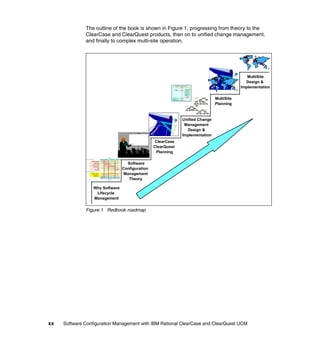
  • 242.
    Within ClearCase, unifiedchange management (UCM) is the abstraction layer used to raise the level of abstraction in terms of configuration management and the complexity of managing change in larger systems. In the sections that follow we show you how to use components to achieve separation of concern and raise the level of abstraction when the level of complexity raises. Using components to manage complexity In “Terminology” on page 35 we introduced you to components, baselines, and composite baselines. In this section we will show you how you can fully exploit the advantage of using components, rootless components, and composite baselines in ClearCase UCM to manage and reduce overall complexity. Component In software engineering a component is a set of related elements that are developed, built, and released together. This might be a library, DLL, JAR, an executable, or any set of assets that are released as a unit. Within ClearCase UCM, a component is a set of elements that are related by being located in a specific directory tree. This concept is more restrictive than the general definition of a component, and we will refer to a UCM component object as a configuration management component or CM component (Figure 11-4). CompA libB libA inc srcA.c srcB.c incA.h incB.h srcN.c Figure 11-4 CM component 216 Software Configuration Management with IBM Rational ClearCase and ClearQuest UCM
  • 243.
    CM components havea limited scope and meaning; the intent is to identify a set of elements within ClearCase. A CM component is represented by a single directory tree of elements in a VOB. The root of the directory tree is called the component root directory element. The root directory may be the root of a VOB (in which case the component includes all of the elements in a VOB), or it may be a directory one level down from the VOB root (which allows several sub-VOB components to be contained in a VOB). By using components we can reduce the complexity of configuration management, because source code can be managed in logical units consisting of many elements—rather than on an element-by-element basis. Using components also promotes code sharing and reuse because they track the set of elements that depend upon each other. Figure 11-5 shows how components can be used to achieve logical separation of concern. The Development Dept. Organization Model SectionA SectionB Vendor teamA teamB vendorXX vendorNN projA projB projC The Software applB Architecture teamA Model projA projB The Platform Devel applA GUI database applB Model Windows Linux applA applB applC applD Figure 11-5 Using components to achieve logical separation of concern Rootless components Rootless components were introduced in ClearCase v2002 UCM. A rootless component is a component that does not have any associated elements. Since a rootless component is just an object in an UCM PVOB, there is no component root directory element (Figure 11-6). Chapter 11. Managing complexity 217
  • 244.
    Figure 11-6 Rootlesscomponent We will later see how rootless components can be used to reduce configuration management complexity even more and when used with composite baselines can achieve other benefits too. Baseline Just as a component represents a collection of elements, a baseline represents a collection of versions within a component. A baseline identifies exactly one version of each element in a single component (Figure 11-7). srcA.c incA.h srcB.c incB.h 0 0 0 0 Baseline 1 1 1 1 2 Figure 11-7 UCM baseline A baseline is a snapshot of a component at a particular moment in time. It comprises the set of versions that are selected in the stream at that time. When a new stream is configured, baselines are used to specify which versions will be selected in that stream. 218 Software Configuration Management with IBM Rational ClearCase and ClearQuest UCM
  • 245.
    Baselines are immutable,so that: A particular configuration can be reproduced as needed. Streams using the same set of baselines are guaranteed to have the same configuration. Therefore, the set of versions included in a baseline cannot be modified. Baselines created in the same stream are in an ordered relationship to each other. Within a single stream, for example, an old baseline is referred to as an ancestor of a newer baseline, and the new baseline is called a descendant of the old baseline. The closest ancestor of a baseline is its predecessor. The foundation baseline of this stream, created in a different stream, is the predecessor of the first baseline created in this stream (Figure 11-8). srcA.c incA.h srcB.c incB.h 0 0 0 0 BL1 1 1 1 1 BL2 2 2 2 2 3 3 3 BL3 4 4 4 Figure 11-8 Baseline predecessors and descendents Baselines have three purposes in UCM ClearCase: Record work done and store milestones; each new baseline incorporates the changes made since the previous one Define stream configurations Provide access to delivered work The relationship between a baseline and a component is very similar to the relationship between a version and an element. Baselines exist in streams while versions exist on branches, and both baselines and versions have predecessors. Chapter 11. Managing complexity 219
  • 246.
    Stream Baselines and streams have a mutual relationship: baselines are produced by streams, and streams use baselines for their configuration. A stream is configured with a set of baselines, called its foundation, which defines which versions are selected in that stream. Views attached to the stream see the versions of elements that are selected by the foundation baselines, plus any changes that have been made in the stream (Figure 11-9). IntStream Foundation Baselines IP_BL3 created in the Stream srcA.c incA.h srcB.c incB.h 0 0 0 0 BL1 1 1 1 1 BL2 2 2 2 2 3 3 3 BL3 4 4 4 Figure 11-9 UCM stream Note: The foundation of a stream must include a baseline from every component (both modifiable and non-modifiable) that it has to access. Project In ClearCase UCM, a project contains the configuration information needed to manage a significant development effort. A project consists of a set of development policies and a set of streams, which together provide the context for development. Every UCM project has a single integration stream, which configures views to select the latest versions of the project's shared elements. A traditional project also includes multiple development streams that allow developers a private work 220 Software Configuration Management with IBM Rational ClearCase and ClearQuest UCM
  • 247.
    area to developand test their changes, without worrying about disruptive changes from the rest of the project team (as illustrated by Figure 11-10). An integration stream is connected to the project, but development streams are spawned from another stream, in a parent-child relationship. Therefore, integration streams may have child streams but no parents, and development streams have parent streams and may or may not have child streams. my work area your work area defect stream enhancement stream integration stream Figure 11-10 Integration stream, development streams, and individual work areas Generally, ClearCase UCM project organization falls into one of two categories: Release-oriented Component-oriented Release-oriented projects A very common way of thinking of development work is in the terms of product releases. First, the development work starts with Release 1 of the product. When the requirements and enhancements list has grown to a point where product and development management decide that it is time to start work on Release 2, a branch is made from Release 1 and new development work starts in the Release 2 stream. Likewise, when Release 3 work is ready to begin, it will branch off Release 2, and so on. Chapter 11. Managing complexity 221
  • 248.
    After Release 1ships, defects are reported and a requirement for a patch arises. Developing the patch for the release might be done in a separate project that branches off of Release 1, but delivers its work to Release 2, so that the bug-fixes can be incorporated into the new release (Figure 11-11). /main Rel_1_patch R1_Final Dev_start Rel_1.0 Dev_start R1_Beta1 R1_Final Rel_2.0 R1_Final R2_Beta1 R2_Final Figure 11-11 Cascading release-oriented project The cascade of branches that results from this project organization can cause some difficulty, so a slightly different project layout is generally recommended for release-oriented projects. In this layout, each project delivers its release back to a main project. The projects can then be branched off of the Main_Proj integration branch instead of cascading from the previous release (Figure 11-12). A release-oriented project must have modifiable access to all of the components that compose the final product. Developers working on one component of the project have to coordinate their work consistently and frequently with developers working on other components. 222 Software Configuration Management with IBM Rational ClearCase and ClearQuest UCM
  • 249.
    /main Main_Proj Dev_start Dev_start Rel_1.0 Main Start Main Start R1_Beta1 R1_Final Rel_2.0 R1_Final Rel_1_patch R1_Final R1_Final R2_Beta1 R2_Final Figure 11-12 Improved release-oriented project Component-oriented projects Another way of organizing the work is by reusable assets. When you organize the work by reusable assets, you use projects to create components (which may be composed of several CM components). Low-level or core components are used to construct mid-level components or subsystems, and so on, until the highest level components are integrated into a product. The key attribute in configuration management is that all the code of a subsystem is released together. The important factor for the development team, is that the subsystem represents assets that can be easily reused. Designing a product or a family of products based on subsystems makes it easier to divide the development effort into relatively independent sub-efforts. This division can help simplify planning, risk management, and reduces complexity. The key aspect of component orientation is that each project has access to two classes of components: Custom components Shared components Chapter 11. Managing complexity 223
  • 250.
    Project work isdone on the custom components, and the project owning the custom components is the only project allowed to modify these components. The shared components, on the other hand, are used in a read-only or non-modifiable fashion, and are only use to enable complete builds. If a project declares a component as shared, it can not modify any elements under the control of this component, as this would break the sharing model. The goal of a project is to produce a set of baselines that represents the integration of the shared components into a subsystem. In Figure 11-13 we show you a component-oriented project. In this example, project ProjA uses CM components subsysA and database to produce a set of baselines that define the ProjA subsystem, while project ProjB uses CM components GUI, database, and subsysB to implement the ProjB subsystem. Project CLib uses the subsystems created by the ProjA and ProjB projects, represented by the baselines these projects produce, and additionally does custom work in CM component subsysC. subsysA GUI database subsysB subsysC ProjA INITIAL ProjB INITIAL CLib ProjA+ProjB Figure 11-13 Component-oriented project The sub-teams in a development group with this type of project organization are restricted as to which components they may modify. Because the lower-level components might be shared, the changes have to be made in a central, compatible manner, in the project dedicated to that component. If the CLib project needs new functionality in the ProjA component, that work has to be done within the ProjA project. 224 Software Configuration Management with IBM Rational ClearCase and ClearQuest UCM
  • 251.
    Mixing project strategies The strategy for project organization is usually dictated by the organization and philosophy of the development team. UCM supports both release-oriented and component-oriented projects; it is also possible to mix the two strategies. Some projects can be dedicated to producing certain components, and other projects can be dedicated to integrate components into a release. Of the two, UCM's support of component-oriented projects is more complex, because additional constraints are placed on the use of composite baselines and more burden rests on the project leaders. But this complexity can be reduced, and we discuss how this can be done in the following sections. Managing projects with many components In any project, a set of baselines have to be maintained and recommended by the project's integration stream. This means that you have to create baselines regularly, test the baselined code (possibly in a build stream), and make baseline recommendations. You also have to ensure that each recommended set of baselines from the various components is compatible with the other baselines. Furthermore, you have to maintain a history of the recommended baseline sets, in case the project encounters a situation where it has to return to an earlier set of baselines. To help track which baselines have reached certain levels of certification, UCM provides promotion levels. A baseline can be marked built, tested, rejected, released, and so forth; the list of promotion levels is customizable. You can use baseline-naming schemes to help keep track of which baselines work together (baseline naming was made much more flexible in ClearCase v2003). As the number of components in a project increases, the cost of managing baselines grows significantly. Additionally, larger development efforts often divide their work into components, that is, large components consisting of more than one CM component. The status of a large component, or subsystem, is expressed as a set of baselines on CM components, increasing the number of consistent baseline sets that you have to keep track of. Furthermore, if subsystems are built from other subsystems, the problem becomes progressively more difficult to manage. The challenge of managing sets of baselines is met through the use of composite baselines. Chapter 11. Managing complexity 225
  • 252.
    What is acomposite baseline? A composite baseline is a mechanism for grouping baselines into a manageable collection. One baseline is designated as the composite, and other baselines become members of the composite. In Figure 11-14, the baselines subsysA_1 and database_2 are members of the composite baseline ProjA_1. ProjA_1 susbsysA_1 database_2 Figure 11-14 Composite baseline The member relationship implies that the versions recorded in susbsysA_1 must be released with the versions in ProjA_1, together with the versions represented by baseline database_2. Membership implies a code dependency, so a member baseline is said to be dependent on the composite baseline. Member baselines may themselves be composite baselines, so the chain of dependencies forms an acyclic directed graph, with no limit on the depth of the member relationship (Figure 11-15). CLib_1 ProjA_1 subsysC_2 susbsysA_1 database_2 ProjB_2 susbsysB_2 GUI_3 database_2 Figure 11-15 A composite baseline that includes composite baselines 226 Software Configuration Management with IBM Rational ClearCase and ClearQuest UCM
  • 253.
    Why use acomposite baseline? Using composite baselines greatly simplifies baseline management, because only one baseline has to be specified for an entire set of baselines. The composite baseline represents the closure of all member baselines. For example, an integration stream can build a composite baseline from all the members of the current baselines of all the components in that stream. You only have to recommend that single composite baseline, not all of them. In addition, the development streams descending from this composite baseline stream can rebase from this single baseline to get all current baselines. For example, including the ProjA_1 baseline (shown in Figure 11-15) in a stream's foundation set means that the stream will select versions from the subsysA component based on the member baseline subsysA_1, and versions from the database component based on member baseline database_2. In this way, composite baselines can be used to model components or subsystems that are made up of more than one CM component. Composite baselines can also represent subsystems, and allow projects to combine lower-level subsystems into higher-level subsystems. At the lowest level, CM components are included into a composite baseline, then higher-level components are represented by composite baselines composed of a combination of composite baselines and baselines of CM components (Figure 11-16). CLib_1 ProjA_1 subsysC_2 susbsysA_1 database_2 ProjB_2 susbsysB_2 GUI_3 database_2 Figure 11-16 Composite baselines representing component hierarchy Chapter 11. Managing complexity 227
  • 254.
    In Figure 11-16,we illustrate how the CLib_1 composite baseline subsystem is composed of the ProjA subsystem, the ProjB subsystem, and the CM component susbsysC. Notice that Figure 11-16 represents the dependency tree for the CLib_1 baseline: all of the objects are baselines, so the diagram must be understood in the context of a stream. This example illustrates a component-oriented project. The CLib_1 baseline is the product of the integration stream of the CLib project. Other projects in this example produce the other components—the ProjA and the ProjB baselines. Composite baseline conflicts So composite baselines promote component reuse by making it easier to include large components and subsystems in a project. This looks like a very promising method for managing the increased complexity created by both larger and ever increasing systems and projects. But, as the number of shared components rises, the potential increases that different subsystems will have a baseline conflict. If a composite baseline contains only baselines of independent components explicitly named as members, there cannot be any baseline conflicts. However, higher-level projects that use subsystems are likely to include in their foundation sets composite baselines that have members in the same component. Conflicts arise when the members are not the same baseline for a particular component. For example, suppose ProjA_1 and ProjB_2 are both composite baselines that include a baseline of the database component. Figure 11-17 illustrates this example with baseline database_2, a member of ProjA_1 and baseline database_1, a member of ProjB_2. ProjA_1 susbsysA_1 database_2 ProjB_2 susbsysB_2 GUI_3 database_1 Figure 11-17 Example of conflicting composite baselines 228 Software Configuration Management with IBM Rational ClearCase and ClearQuest UCM
  • 255.
    When ProjA_1 andProjB_2 are put together in the CLib project, as illustrated in Figure 11-18, ClearCase cannot tell which of the database baselines to use. CLib_1 ProjA_1 subsysC_2 susbsysA_1 database_2 ProjB_2 susbsysB_2 GUI_3 database_1 Figure 11-18 Baseline conflicts when using composite baselines It is a basic axiom of ClearCase that a view must have an unambiguous rule for selecting versions of an element. In UCM, the unambiguous rule means that a stream can only use one specific baseline to select the versions in a component. ClearCase will block rebase operations (and baseline recommendations) that would result in conflicts. In order to resolve the conflict, the baseline conflict will trigger ClearCase to force you to explicitly specify a specific baseline for the component in question—in this case, the database component. The chosen baseline is said to override the members of the composite baselines in conflict. A baseline explicitly included in the foundation set of a stream—whether it resolves a conflict or not—will override any baseline of that component that is implied by a composite baseline. Note: It is easier to avoid conflicts in release-oriented projects than in component-oriented ones. In the former, the baselines of all the components are typically selected (by a task stream or development stream) from the same stream (for instance, the integration stream). The highest-level composite baseline of that stream will be self-consistent, by the very definition of composite baselines. In other words, all the member baselines of the composite baseline stream must be consistent—only one version of any element in any component will be selected at any time. Chapter 11. Managing complexity 229
  • 256.
    Rootless components tothe rescue Composite baselines fulfills multiple roles: Identifying a set of versions in its component Collecting the set of member baselines Collecting the changes in member components As we showed in the previous section, there are situations where conflicts can arise. Also, in the terms of performance it can be expensive to determine which reason caused the creation of a specific baseline. However, to circumvent these problems you can use rootless components. A rootless component does not have an associated root directory and thus contains no elements. Therefore, a rootless component is not concerned with the role of identifying a set of versions: a new composite baseline created on a rootless component can only indicate changes in the baseline membership. A composite baseline on a rootless component, sometimes called a pure composite, is simply an aggregation of baselines. When baselines are coupled through a rootless component, this is called a pure composite baseline. When coupled through a pure composite baseline, no information is implied about the direction of dependency between coupled components. The dependency only expresses that the coupled baselines have been used together at the same time in the same stream. Use rootless components for composite baselines When you use a rootless component to create a pure composite baseline, a new composite baseline has only one meaning: there has been a change in the baseline dependency graph. This allows ClearCase to provide greater configuration flexibility with pure composites than with a composite baseline based on a regular component. For this reason, it is recommended that you use pure composite baselines whenever possible. You use rootless components to represent your subsystems logically. Rootless components allows you to logically construct your subsystems so that they can be assembled together into larger components, and thus enables you to raise the level of abstraction, and at the same time decreases the complexity and efforts needed to manage your systems. Migrating to rootless components If a project has already created a composite baseline with regular components, it is not difficult to change the project to use pure composite baselines. 230 Software Configuration Management with IBM Rational ClearCase and ClearQuest UCM
  • 257.
    You can createa rootless component as a place-holder for every component that has a composite baseline. In our previous examples, these rootless components could be ProjA_top_x, ProjB_top_x, and CLib_top_x. Then new composite baselines can be made based on the rootless components, and include the original component as a member, as shown in Figure 11-19. ProjA_1 susbsysA_1 database_2 ProjA_top_x ProjA_1 subsysA_1 database_2 Figure 11-19 Changing a composite baseline to a rootless component Conclusion Composite baselines provide the capability to represent complex subsystems using a single identifier, and retain the flexibility and control of managing the lower-level components and subsystems independently. Composite baselines enhance the reusability of components and subsystems by making it easy to identify and include specific versions of those components in higher-level systems. However, as the size and complexity of the systems increases, so do the possibilities of conflicts between subsystems using different baselines from shared components. Using rootless components enables you to circumvent the limitations of using composite baselines. Rootless components allows you to logically construct your subsystems so that they can be assembled together into larger components, and thus enables you to raise the level of abstraction, and at the same time decreases the complexity and efforts needed to manage your systems. Being aware of the restrictions and taking them into consideration when planning your project hierarchy and baseline strategies will greatly enhance your development team's ability to reap the benefits that composite baselines provide. Reusability and simplified project administration will minimize the additional effort required to overcome baseline conflicts. Chapter 11. Managing complexity 231
  • 258.
    232 Software Configuration Management with IBM Rational ClearCase and ClearQuest UCM
  • 259.
    Part 5 Part 5 Implementing distributed UCM with MultiSite In Part 5 we describe how to do parallel development in multiple geographical locations using ClearCase and ClearQuest MultiSite. We outline procedures for planning and implementing MultiSite for your UCM environment, and we provide an overview of the MultiSite technology, a walkthrough of the infrastructure requirements, and an outline of a recommended planning process. Finally we take a look at design considerations for a MultiSite implementation and provide instructions for setting up a MultiSite playground. © Copyright IBM Corp. 2004. All rights reserved. 233
  • 260.
    234 Software Configuration Management with IBM Rational ClearCase and ClearQuest UCM
  • 261.
    12 Chapter 12. Planning for distributed development using MultiSite Configuration management using ClearCase and ClearQuest is now well integrated into your software development lifecycle. It is time for more change. Your director of development is splitting up work on the next release of your product with a new acquisition half way around the world—time for MultiSite. MultiSite is an add-on feature set for both ClearCase and ClearQuest providing distributed development support. In the following chapters we outline procedures for planning and implementing MultiSite for your UCM environment. This chapter provides an overview of the MultiSite technology, a walkthrough of the infrastructure requirements, and an outline of a recommended planning process. © Copyright IBM Corp. 2004. All rights reserved. 235
  • 262.
    MultiSite background The MultiSite add-on products provide a mechanism for distributed development in a UCM environment. MultiSite implements a replicated repository environment—each site ends up with local repositories, called replicas, for local client access. The replicas are synchronized on a regular basis through automated processes. The basic replication process (export → transport → import) is described here and summarized in Figure 12-1: Export—The repository is first dumped into an architecture/database independent format, called a packet. When the replication process is initiated (replica creation) the whole repository is exported. Subsequent exports (replica sync) create packets with only the incremental changes since the last replication. Transport—Packets are shipped to the remote server over whatever connection is available. Although there is a built-in tool available (a shipping server), MultiSite is transport independent—it does not care how you get the packets between the sites. Import—The packets are imported on the receiving server. During the replica creation process, empty database tables are populated for ClearQuest and new VOBs are created for ClearCase. During synchronization, the repositories are updated. If the shipping server is used, a receipt handler can be configured to import sync packets as soon as they are received. local server remote server transport packet packet packet packet export import data data VOBs project VOBs project VOB VOB import export packet transport packet packet packet local access to data Figure 12-1 Distributed repository management with MultiSite 236 Software Configuration Management with IBM Rational ClearCase and ClearQuest UCM
  • 263.
    Once the replicationis complete, each site has local access to both the data and metadata contained in the repositories. The replicas are independent—if one server, or the network, goes down, the other site is not affected. In addition, if a replica at a site is damaged (for example, due to a hardware failure), it can be restored from one of its replicas, current to the last synchronization. ClearCase MultiSite To implement the replication functionality, ClearCase MultiSite adds two more components to our CM environment, a shipping server and a synchronization service. The synchronization service manages packet export and import process. The shipping server, also known as the store-and-forward server, is a general, TCP/IP-based, file transfer service that manages the transport of packets among servers. The shipping server can be configured to provide these capabilities: Packet size management—Manage export packet size. Packet routing—Set up routing topologies. Multiple storage classes—Define different transport profiles for different use cases. Receipt handler—Run a script on receipt of a sync packet. Network failure management—Manage delivery failures. ClearQuest MultiSite ClearQuest MultiSite is based on the same constructs as ClearCase MultiSite. ClearQuest databases and schema repositories are replicated across sites through an architecture and database-independent export/import mechanism. ClearQuest MultiSite introduces a few new terms, defined here and shown in Figure 12-2. These definitions are extracted from the Rational ClearQuest MultiSite Administrator’s Guide: Replica—An active copy of a ClearQuest database or its associated schema repository. Clan—A group of replicas that share the same schema repository. Family—Within a clan, all the replicas of a specific database. The family name is the five-character logical database name of the original ClearQuest database. Schema repositories are automatically named MASTR. Working master—The single schema repository within a clan that is used to propagate schema changes and to introduce new user databases. Chapter 12. Planning for distributed development using MultiSite 237
  • 264.
    Site—A collection ofreplicas at the same physical location. More than one clan can reside at a site. Host—The host name or IP address of the site’s shipping server. clan: commerce host: KLCHV5H working master MASTR CMDOC CMDEV site: boston replica replicas family: CMDEV host: KLCHV2M MASTR CMDEV site: tokyo Figure 12-2 ClearQuest MultiSite terminology Why not just use central servers? The ClearCase (and ClearQuest) architecture is designed for use in a local area network (LAN) environment. In particular, ClearCase is quite remote procedure call (RPC) intensive—there may be hundreds of RPC calls during an operation. RPC is sensitive to latency—the minimum time it takes to send data between two specific hosts on a specific network. This is sometimes referred to as the speed of light problem. Managing distributed concurrency control An issue with any distributed repository scheme is how to manage concurrency control across sites—how to deal with two developers at different sites trying to modify the same code or change the same record at the same time. 238 Software Configuration Management with IBM Rational ClearCase and ClearQuest UCM
  • 265.
    To deal withdistributed concurrency control, MultiSite uses a concept called mastership—an exclusive right for a site to modify an object. If my site masters an object, such as a ClearQuest record, no other sites can modify the record (Figure 12-3). records mastered in Boston can be read, but not modified, in Tokyo Figure 12-3 Managing concurrency control in ClearQuest By default, an object is mastered by the site in which it was created. Mastership can be given away, or in some cases, taken, but only one site masters a specific object at a time. From a usage-model perspective, mastership has the greatest impact on UCM streams and ClearQuest records: UCM streams—Each site will master one or more development streams. A single site will master the integration stream. Since delivering activities to the integration stream modifies the integration stream, a new process (posted delivery) is needed for deliveries to integration from remote sites. In a posted delivery the remote site starts the delivery and the local site (which masters the integration stream), completes it. See “Usage models for distributed development” on page 283 for a discussion on how this impacts UCM usages models. ClearQuest records—Initially each site masters the records that they create. (see Figure 12-3.) To the extent that the activity lifecycle happens within a site, this has no impact on ClearQuest usage. Once the lifecycle expands across sites—for example, all sites submit defects, one site does triage (risk assessment before implementation), another does test—we have to deal with Chapter 12. Planning for distributed development using MultiSite 239
  • 266.
    mechanisms to passmastership around. See “Managing mastership in ClearQuest” on page 288 for a discussion on automating change of mastership in ClearQuest. Impact of MultiSite on UCM users The primary driver in establishing and maintaining a replicated development environment is to optimize data access and content for the development team. As shown in Figure 12-4, users in a replicated environment have: Local access to data repositories—These allow use of rich-client development environments. Complete access to information—Users can see all the data and its metadata (what changes were made, when and why) as well as previous code versions for comparison. Access to current data—Repositories are kept current automatically behind the scenes. local local access access complete history 10,000+ km ClearCase ClearCase ClearQuest Boston, MA Beijing, China ClearQuest automatic replication Figure 12-4 Replicated development environment The replicated environment has a lot of advantages for a development project; however, what changes does a distributed UCM environment cause for the organization? We consider the possible impacts in the following sections. 240 Software Configuration Management with IBM Rational ClearCase and ClearQuest UCM
  • 267.
    Impact of MultiSiteon developers Developers are impacted by mastership (cross-site concurrency control) in two cases: Delivering directly to the project integration stream if they are at a remote site Sharing artifacts with other sites that require serial development See “Managing mastership in UCM/ClearCase” on page 283 for some models that help mitigate mastership constraints during development. Impact of MultiSite on software integrators Software integrators take on the additional role of completing deliveries from remote sites. It becomes extra important to enforce a rebase before deliver policy in this environment. Developers, rather than integrators, should be making code-merge decisions. Impact of MultiSite on CM administrators The CM administrators, and the infrastructure support team (system, network, and database administrators) are the most impacted by a move to a distributed development environment. The effort breaks down into three areas: Establishing new CM sites Supporting remote sites Maintaining the MultiSite infrastructure Our experience is that, once automated replication is in place, the on-going effort is not so much dealing with replication issues as with just managing a larger, distributed development site. An example would be helping to troubleshoot UCM issues remotely or coordinating upgrades across multiple sites. MultiSite infrastructure overview In the sections that follow we take a closer look at the infrastructure requirements for MultiSite: Hardware—What additional hardware is required to support this effort? Software—What software upgrades are needed to support MultiSite? Licensing—What new licenses are required? Connectivity—What transport methods can be used? Automation—How do you automate the synchronization process? Organization—What resources are required to support CM across multiple sites? Chapter 12. Planning for distributed development using MultiSite 241
  • 268.
    Watch for longlead times. Procuring hardware and establishing secure network connectivity between sites can take longer than you might guess, particular when working with another country. Also, be careful to understand import and licensing rules that may impact the setup of the remote configuration. Hardware requirements for MultiSite There are two hardware considerations for a new MultiSite environment: Upgrading the local environment to support MultiSite Establishing a new, MultiSite-ready, CM environment at the remote site Figure 12-5 shows a single site extended to two sites, connected over a wide area network (WAN). ...but do not try You do not always to put other need a separate applications on additional disk space needed for replication ClearCase shipping the VOB server server shipping shipping VOB/View VOB server server WAN server server or VPN unchanged CQ databases can share an shipping shipping database existing DB database server server server server server For small sites, shipping server can share space existing site with license and Web new remote site server new Figure 12-5 Extending the ClearCase/ClearQuest environment for MultiSite Upgrading the local environment to support MultiSite Support of the packet creation and synchronization adds some additional resource requirements to your local environment: Shipping server for managing the store-and-forward process Shipping bays, with extra space for packets, on your participating VOB servers 242 Software Configuration Management with IBM Rational ClearCase and ClearQuest UCM
  • 269.
    MultiSite shipping server The shipping server is the utility provided with MultiSite to manage transport of packets between servers. Each VOB server with replicated VOBs will include a shipping server function. The ClearQuest shipping server is a standalone client—in the current release, 2003.06, it must be a Windows box. In the latest release, it can also be a UNIX box. On fast, well-behaved networks, the shipping service does not usually add much of a burden to the server, at least while you are only replicating to a couple of sites. It is common for the ClearCase shipping server to initially be co-located with the VOB server, and for the ClearQuest shipping server to sit on the ClearQuest license or Web server. Move to a dedicated shipping servers when the shipping service begins to use noticeable resources, for example: The network is slow and you are frequency pushing large (>100MB) packets. The network is flaky and causes the shipping server to spend a lot of time resending packets. You are doing direct shipments to more than a handful of sites. MultiSite shipping bays The replication packets are stored in named shipping bays (directories) on the shipping servers. Shipping bays minimally have to be large enough to hold the largest collection of packets you might have on the server at any one time. If you are routing packets, this may mean multiple copies of a replica packet—one for here and one for another site. It is common to use conservative estimates and configuring the storage bays with as much space as the vobstore or data set storage. Configure separate disk partitions for shipping bays to protect the server in case the storage bays overflow their allocated space. We have seen this happen when packets stack up waiting for a missing packet and the MultiSite administrator is not paying attention to the storage bays. On UNIX, replace the default shipping bay (/var/adm/atria/shipping) with a link to the new location. Establishing the remote CM site Since MultiSite supports fully replicated environments, you have to establish a CM infrastructure at each site. Chapter 12. Planning for distributed development using MultiSite 243
  • 270.
    Size each siteaccording to local needs Look at your eighteen-month plan to determine the hardware required for your sites. It is common for an enterprise to support both sites of 10 users and other sites of 100 users; the hardware specifications will look quite different for each. Supporting heterogeneous environments MultiSite supports heterogeneous environments (different hardware, OS, databases), but keep the infrastructures homogeneous across sites if possible. Maintaining a homogeneous environment simplifies the interactions between the environments and improves your ability to help troubleshoot a problem at another site. Stick to homogeneous ClearQuest databases. A number of users have run into issues with case sensitivity when trying to mix and match databases for ClearQuest. OK, you might want to support UNIX and Windows sites. One exception to the homogeneity rule—if you are running UNIX servers and the remote site— is a Windows-only site; let the remote site use only a Windows environment. Asking the remote site to pick up UNIX administration as part of the CM effort is probably asking too much. If you have to support a heterogeneous environment, set up a permanent test configuration which includes a small version of the mixed configuration. CM appliances anyone? If the remote site is has no previous experience with ClearCase or ClearQuest, consider installing the servers locally and performing the initial replications. Then ship the ready to use boxes to the remote site and the infrastructure is close to complete. One caution—if the remote site is in another country, make sure that you have the rights to ship in hardware. Software upgrade requirements MultiSite is just a configuration option for both the ClearCase and ClearQuest installation. MultiSite adds a small footprint to the installation, so it is common to include MultiSite in your standard installation (rather than maintain two installations). MultiSite has no impact on non-replicated repositories. MultiSite is enabled for a repository when its first replica is created. Separate MultiSite licenses are required for both ClearCase and ClearQuest. 244 Software Configuration Management with IBM Rational ClearCase and ClearQuest UCM
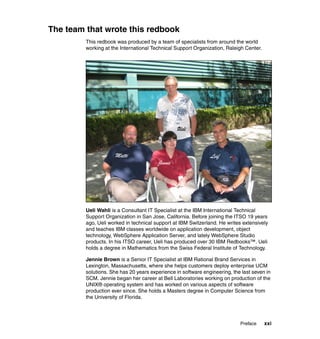
  • 271.
    Software upgrades forthe local environment This section reviews the software upgrades required for your current UCM environment. You will likely upgrade your VOB server and install one or two new small servers to act as shipping servers. ClearCase VOB server If MultiSite was not enabled during the site preparation or installation, a reinstall of ClearCase will be required on the VOB servers participating in replication. Synchronization services (export/import) will always run on the VOB server. The primary shipping service may be off-loaded to a separate shipping server for performance, but, minimally, you will use a shipping server to push and fetch packets from the standalone shipping server. ClearQuest database server No changes are required for the ClearQuest database server. The database server is just hosting the ClearQuest tables and does not have to know about ClearQuest or MultiSite. Remember, MultiSite replication is database independent—it is managed by the ClearQuest application, not the database. To prevent data corruption, the code page (or character set) of your vendor databases should match the data code page of your database set. For more information about code pages and the data code page value, refer to the ClearQuest Administrator’s Guide. ClearCase shipping server A standard ClearCase shipping server is just a ClearCase client with enough space to manage packet transfers and the CPUs to keep up with the process. ClearQuest shipping server Unlike ClearCase, both the synchronization and shipping services happen on the the shipping server for ClearQuest. In the current release, 2003.06, ClearQuest shipping servers must be on Windows, in the next release it can also be a UNIX box. Use the ClearCase shipping server for ClearQuest MultiSite. We prefer to use ClearCase shipping servers everywhere in a UCM environment. When setting up the ClearQuest shipping server: First, install ClearCase, then ClearQuest. Do not install the ClearQuest shipping server. Chapter 12. Planning for distributed development using MultiSite 245
  • 272.
    Gateway shipping server The most secure implementation for using the shipping server through the firewall is to install a shipping-server-only configuration on a UNIX client. This special configuration includes only enough software to run the shipping server functionality. By leaving off the other ClearCase processes, you eliminate the small risk of an application being able to spoof the ClearCase process into accessing data. The gateway server is configured with a receipt handler to pass packets across firewalls to similarly configured gateway servers at each site. If this configuration is used, you still have a ClearQuest shipping server, running on Windows, but you route your ClearQuest packets through the firewall gateway. Software considerations for the remote site Your first remote site is probably not yet running ClearCase, so this will be a new installation of a MultiSite-ready environment. ClearCase and ClearQuest Each site requires their own release area, configured using enterprise standards, but specific to their installation. System software Match up OS and database patch levels between the sites. Also, what other software (such as monitoring tools) are you running on your servers? Do they also belong at the remote site? If not, figure out how you going to implement those functions. Triggers and scripts ClearCase triggers are considered site-specific and are not replicated by MultiSite. Manage a replicated CM-tools VOB for triggers and other administrative scripts, such as: All custom ClearCase/ClearQuest scripts Management reports CM plan and any custom documentation Important: Refer to the installation guide if your sites run different MultiSite releases. There are compatibility restrictions for replicas! 246 Software Configuration Management with IBM Rational ClearCase and ClearQuest UCM
  • 273.
    Software licensing requirements There are three licensing considerations for MultiSite (Figure 12-6): ClearCase and ClearQuest both require MultiSite licenses for access to all MultiSite-enabled repositories (replicas). The remote site requires ClearCase, ClearQuest, and MultiSite licenses for the local users. If the servers are new, the remote site may requires licensing for system infrastructure—OS, databases, and system utilities. Local users must have their own ClearCase and ClearQuest Add ClearCase MultiSite existing licenses plus ClearCase MultiSite and ClearQuest MultiSite site ClearQuest MultiSite licenses CC license server CQ license server CC license server database If the servers are new, ? server ? do not forget licenses CQ license for database, OS, and server system system software database software server new site Figure 12-6 License considerations for a new MultiSite installation How many MultiSite licenses do you need? A repository becomes MultiSite enabled when the first replica is created for that repository. For ClearQuest this is defined at the user database, but for ClearCase under UCM, this is defined through access to the project VOB. If you have a single project VOB for your site, you need as many ClearCase MultiSite licenses as you have ClearCase licenses. You may already be using a license scheme that provides MultiSite licenses for every ClearQuest and ClearCase license. This is ideal: Minimizing MultiSite license use does not become a CM architecture consideration Chapter 12. Planning for distributed development using MultiSite 247
  • 274.
    You can useMultiSite as part of your disaster recovery plan as described in “Using MultiSite for disaster recovery” on page 255. If you are buying MultiSite licenses separately, cluster your project VOBs and user databases around a smaller set of projects to minimize the MultiSite licenses required for projects without distributed development. Providing licenses to distributed development partners If the remote site is an outsourcing project and uses the IBM software environment solely in support of your project, you may be able to obtain a third party access agreement to effectively loan some of your licenses to your partner company for the duration of the project. Check with your IBM account manager to see if you qualify. And, here is a caution—each software vendor has its own rules for third party access. Be sure to read the licensing agreement of any software you consider sharing with a third party. Establishing connectivity between sites The network connection between the sites is an important player in the MultiSite infrastructure. Security and stability are the important characteristics of the intranet. Since synchronization happens in the background through incremental updates, network performance is not as critical, though you do not want to send additional traffic to a network that is already over-burdened. The following sections describe establishing MultiSite in network environments with and without firewalls. Transport across a direct IP connection The default transport method, as shown in Figure 12-5 on page 242, is defined across a direct connection—effectively, for intra-site use within a company. If you have direct connectivity to the remote host, either across a WAN or tunneling through a virtual private network (VPN), use the -fship option on replica creation and synchronization to push the packets immediately. Transport through firewalls If you are working with other companies, such as in a development outsourcing arrangement, you probably do not have a direct, open connection between sites. Instead you likely have one or more firewalls between the servers. 248 Software Configuration Management with IBM Rational ClearCase and ClearQuest UCM
  • 275.
    Remember, MultiSite istransport independent. Any secure method of getting files through the firewall will work. Three popular techniques are described here. Which is best suited for your site depends on what facilities you may currently have and what techniques your organization is familiar with. Involve your security administrator when establishing a transport through firewalls. Your company may have special security requirements, such as encryption specifications, which you have to implement. You may also find that your organization already has a trusted method to ship files through a firewall. Secure file transport protocol (sftp) This is a well-known protocol which requires only port 22 to be open on the firewall between the servers. Custom scripts have to be written to manage the transport activities. Third-party transport software There is commercial software available just for pushing files around. Your IT administrator may already be using something, so you can take advantage of the transport infrastructure already in place. Tivoli® Data Moving Service, part of Tivoli Configuration Manager, is an example of a transport service that pushes data through a set of firewalls. Again, packets are just files, so any reliable and secure transport service will work. ClearCase shipping server You can configure the shipping server to work through firewalls. The default mechanism is to install a shipping-server-only configuration directly on the firewall. In practice, we have never seen this implemented. Instead, we see a configuration similar to Figure 12-7: A shipping-server-only installation (gateway shipping server) is installed on small UNIX servers on either side of the firewall. The firewalls are opened point-to-point between the gateway shipping servers for a specified set of ports. The VOB server and ClearQuest shipping server route deliveries to the remote site through the gateway servers. The advantage of using the shipping server is that once set up, you can use the standard scripts and procedures for automated synchronization. Chapter 12. Planning for distributed development using MultiSite 249
  • 276.
    Site 1 Site 2 open port 371 plus route store-and- 10 ports on firewall packets forward between gateway through shipping servers gateway service only shipping VOB server server VOB server Gateway shipping firewall Gateway shipping server server ClearQuest Database Database ClearQuest shipping Server Server shipping server server Figure 12-7 Using a stand-alone shipping server to get through firewalls Next we provide a little more detail on implementing this configuration. Firewalls The firewall administrator opens the firewalls between the gateway servers on the following ports: Port 371 UDP/TCP bi-directional—for shipping server communication. Port 371 is NIC-registered for the ClearCase albd service. There are 4-10 ports from the dynamic and private port range (between ports 49152 and 65534), also opened for UDP/TCP bi-directional—for packet transport. Gateway shipping server This is a special-purpose server used to only handle packet transfers through the firewall: The shipping service is configured to use the range of 4-10 high-order ports opened on the firewall for this purpose. Our experience has been that if we can convince the security administrator to open four ports, they are willing to open all ten ports. Ten ports allows the shipping server to maximize parallel push of packets. The gateway server uses a stripped down version of a ClearCase installation: the shipping-server-only configuration. The shipping-server-only installation is currently only available on UNIX. This installation includes only the processes required to manage the shipping server functionality. Stripping down the functionality minimizes any small chance of an outside process spoofing the ClearCase service into running an operation to access data. 250 Software Configuration Management with IBM Rational ClearCase and ClearQuest UCM
  • 277.
    Configuring the Gatewayshipping server The shipping server is configured through the shipping configuration file: /var/admin/rational/clearcase/config/shipping.conf Ports for transport are restricted to the ports opened on the firewall: CLEARCASE_MIN_PORT 49152 CLERCASE_MAX_PORT 49161 Do not constrain ports on a VOB server. ClearCase services will attempt to use ports outside of this range, and ClearCase operations will fail as soon as a number of users attempt to access the server. Never run a shipping server in a VOB server if you intend to constrain the IP ports. Packets are routed to the remote site through the peer gateway server: ROUTE tokyo_gateway tokyo_vob tokyo_cq A receipt handler is installed to pass packets on receipt. RECEIPT_HANDLER /opt/rational/clearcase/config/scheduler/tasks/sync_export_list Finally, an option is added to tell the receipt handler to look for any packets that did not get pushed on the previous run. This option is provided in: /var/adm/rational/clearcase/config/MSimport_export.config Create the config file if it does not exist on your system: #MSimport_export.config proactive_receipt_handler=1 VOB server Configure the VOB server to route packets through the gateway server. On a UNIX server, edit the shipping configuration file: /var/adm/rational/clearcase/config/shipping.conf: ROUTE boston_gateway tokyo_vob tokyo_cq This specifies to route packets destined for VOB server tokyo_vob through boston_gateway. Notice that the VOB server does not have to know about tokyo_gateway—that is handled by the boston_gateway service. ClearQuest shipping server As with the VOB server, configure the service to route packets through the gateway server. On Windows boxes, the shipping configuration is done through the MultiSite control panel (Figure 12-8). Chapter 12. Planning for distributed development using MultiSite 251
  • 278.
    Figure 12-8 MultiSitecontrol panel: establishing routing Configuring packets Once the infrastructure is in place, there are some additional design decisions to be made about packets: Topology—How are packets routed if there are more than two sites? Size—What size restrictions are useful to “play nice” on the network? Frequency—How often are updates sent between sites? See “Managing replication” on page 280 for this discussion. Automating replication The initial creation and transport of a replica is done manually, probably in off hours. The subsequent synchronization process is automated to run as a fairly continuous background process. It is typical to replicate every 15-30 minutes between sites. 252 Software Configuration Management with IBM Rational ClearCase and ClearQuest UCM
  • 279.
    The MultiSite administrationcommands are done from a command line interface. To set up automated replication, create or use existing scripts that run from a scheduler. ClearCase includes a scheduler but any scheduling mechanism is fine. For example, the UNIX cron scheduler is still commonly used. Replication tasks In this section we describe the processes that you have to automate. The ClearCase scheduler includes Perl scripts for many of these operations in the task library config/scheduler/tasks. They are preconfigured but disabled in the scheduler. ClearQuest does not yet bundle automation scripts, but some samples can be found on developerWorks. Tip: You can find documentation on the MultiSite automation scripts by using the help option. For example, from Windows: cd C:Program FilesRationalClearCaseRationalconfigschedulertasks sync_export_list -help Packet creation This is the syncreplica -export command, which creates a packet with the changes from the last export and a shipping order describing where to send the packet. If there are no changes, an empty packet is created and thrown away. The ClearCase task library (config/scheduler/tasks) includes a Perl script called sync_export_list to be used for this purpose. Packet transport If you are using the shipping server, transport is managed through the -fship option (ship me now). If you are using some other transport mechanism, you have to automate the push process. Also include a polling script to push any packets that got left behind; either the server was not reachable or a packet came in that has to be pushed to another site. Shipping server polling is done through the command shipping_server -poll. Polling is included as an option in the sync_export_list command. Packet import This is the syncreplica -import command. The task library includes a Perl script called sync_receive to handle ClearCase imports. If you using the shipping server, enable the receipt handler to run this script. The receipt handler is run when any packet is received by the shipping server. Chapter 12. Planning for distributed development using MultiSite 253
  • 280.
    Auditing shipping bays If a server or network goes down, or a packet is lost on the network, packets can accumulate in the shipping bays. This is one of the most important maintenance activities for MultiSite. Accumulating packets means that the sites are falling out of sync. When you are first starting with MultiSite, you will manually inspect the shipping bays on a daily basis. Automate this inspection to run every few hours and send mail if there are more than the expected packets in the shipping bays. Scrubbing ClearCase MultiSite logs MultiSite creates the synchronization packets by managing an operation log and keeping sync_export records of shipping history. The default is to keep this information forever. The logs are used for recovery of remote sites, so scrub these logs very conservatively. See the MultiSite Administrator’s Guide for details on setting up the proper scrubbing of the operation logs. Extending the CM organization It is easy to remember that new hardware is required; it easy to forget that there are additional support requirements as well. Both central and distributed services models work well. Part of the updated CM plan should articulate how the remote site will be supported. Central-services model In the central-services model, the initiating organization manages the CM infrastructure remotely—purchasing and installing, and maintaining hardware, software, and licenses. The remote site designates a CM lead to serve as the onsite contact. Distributed-services model In this peer-based model, sites coordinate efforts to ensure that standards are enforced and appropriate, but each site manages their own infrastructure and users. You may end up with a mix of service models—providing CM administration directly for small sites and working in a peer relationship with the larger sites. If the distributed site is not currently using ClearCase and ClearQuest, at least plan to perform the role of CM mentor while the team comes up to speed. If possible, a site visit at production cutover is very useful. 254 Software Configuration Management with IBM Rational ClearCase and ClearQuest UCM
  • 281.
    Using MultiSite fordisaster recovery Consider the regional CM configuration defined in Figure 12-9. The circles represent individual sites, the triangles represent project sets—defined programs that may span multiple projects and multiple VOB/dbsets: Sites share some project work with one or more sites, but there is also a good bit of work that is local to the site. In addition, site s4 is working on a number of programs with China and Japan. Replication among sites is done every 15 to 30 minutes. A B s1 A B s5 I J s2 C D C D C D s3 s4 K E H project X sets [to asia] Figure 12-9 Sample regional CM sites with some MultiSite Chapter 12. Planning for distributed development using MultiSite 255
  • 282.
    What happens ifthe database for project set C is lost at s2 due to a hardware failure? The hardware is repaired and data is restored from backup (which may be up to 24 hours old.) Then a special MultiSite replication mode, called restorereplica, is invoked. The restorereplica function queries the replica family for up-to-date information. Data is recovered to its last replication. If data is replicated every 15 minutes, only 15 minutes of data is at risk for loss. This is a great feature. What about project set K? It is not replicated, so the latest backup is the best restore that occurred. It may be worth replicating it to another site just to get the recover option that MultiSite provides. Using a dedicated disaster recovery site (DR site) Figure 12-10 shows an example of defining a site just for disaster recovery purposes. All sites replicate to the DR site at whatever rate your recover tolerance is set at. Every fifteen minutes is common; some sites replicate every five minutes. A ... J Database CQ A VOB Shipping Server Server B Server s1 DR Site A B s5 I J s2 C D C D C D s3 s4 K E H project X sets [to asia] Figure 12-10 Establishing a regional disaster recovery site using MultiSite 256 Software Configuration Management with IBM Rational ClearCase and ClearQuest UCM
  • 283.
    Establishing a DRsite has a number of advantages: It establishes a stable, well-defined structure for recovery. Local sites do not have to be burdened (disk space and processor time) with replication only for DR purposes. Recovery can always happen from the DR site, rather than querying other sites for updates. MultiSite planning A new group has been assigned to help with the next release. Excellent! The only catch is that the new group is in Tokyo and you are in Boston. The following sections outline planning steps for bringing a new distributed development site online: Profile and qualify the remote site Detailed planning and infrastructure acquisition Infrastructure testing Staged rollout It gets easier. The first rollout will be the hardest. You are new to the technology and defining a remote site for the first time. As you implement your first rollout, think what document and standards will help for the second one. Profile and qualify the remote site The MultiSite implementation—both infrastructure and usage model—for the remote site depends on the size and function of that site. And, before you get too far down the planning road, make sure that the site is a good candidate for distributed development. Profile the remote site The first step in planning for the new remote site is to understand the scope of the work proposed at the new site: What work will the site be responsible for? What roles will the site perform? Development? Test? Integration? Deployment? How big is the group and what other work is done at that site? Chapter 12. Planning for distributed development using MultiSite 257
  • 284.
    Partner with theproject manager during planning for distributed CM. There is a large overlap in issues and concerns between the CM focus and the more general software engineering focus of project planning. Ask three times. When profiling a site, ask each question three times—now, nine months from now, and eighteen months for now. An eighteen-month planning horizon is reasonable for infrastructure planning; now and nine months from now help define how the rollout happens. Qualify the remote site for distributed development MultiSite is a great solution, but it is not the best fit in every scenario. Here is a quick audit to begin your planning: Security—How secure is the working environment at the remote site? Can the site sufficiently restrict access to the project infrastructure to only team members? Are they using firewall and virus protection software to protect the code from external sources? Infrastructure—Is the server/network environment sufficient, or can it be upgraded, to support a ClearCase environment? Critical mass—How many developers are at the site, now and nine months from now? A site with just a handful of developers is probably undersized for a MultiSite solution. Permanence—Is this a long-term relationship or is the site being brought in for just a couple of months? If you determine that the site is not well suited for supporting a replicated development environment, consider a hosted application server as an alternative. Alternatives to MultiSite: Both CITRIX Metaframe (http://www.citrix.com) and Windows Terminal Services (http://www.microsoft.com) support both ClearCase and ClearQuest. Set up a hosted application server at the home site and let the remote developers login. A mix of CITRIX and MultiSite is sometimes used. CITRIX is used for: Sites that do not qualify for distributed development To get the development leads started at qualified sites while the infrastructure is being established Note that you have to install all the development tools on the server. This may only be feasible for small installations. 258 Software Configuration Management with IBM Rational ClearCase and ClearQuest UCM
  • 285.
    Pick the firstproject Pick a project that can get immediate value out of toolset and is in an early enough phase of development to absorb the tool and process change into their schedule. Consider this project the first iteration of your rollout process. Use this project to tune your design and processes. Detailed planning and infrastructure acquisition You have qualified the remote site and are ready to figure out the infrastructure: Establish a playground to master the technology. Plan production and test infrastructure; order any equipment needed. Plan usage, administration, and support processes. Plan rollout. MultiSite playground A playground is a trivial test environment that you can set up right now using existing equipment to help you better understand the product functionality as you work through planning. Refer to “Getting started: Setting up a MultiSite playground” on page 291 for a walk-through of a playground setup. Figure 12-11 shows the progression from playground to test to production environments. Once a formal test environment is in place, you can give up the playground. Playground Test Production Figure 12-11 Establish MultiSite working environments Chapter 12. Planning for distributed development using MultiSite 259
  • 286.
    MultiSite implementation plan Start with an implementation plan, outlined in Table 12-1. Your schedule will be driven largely by: Getting test and production infrastructure in place. Coordination with the first project to be rolled out. If the hardware and network is not already in place, you will have a hard time forecasting the exact rollout schedule. Wait at least until the infrastructure is online before committing hard dates for the rollout. And, as with any new process, you do not want to introduce MultiSite three weeks before a major milestone. A common time for a rollout is the Monday after the week after a major milestone. Table 12-1 MultiSite implementation plan outline MultiSite implementation plan Establish a MultiSite playground Define roles and responsibilities Train the rollout team Secure any additional test and production equipment Define usage models for distributed development Define naming conventions across sites Update CM requirements and the CM plan Establish a test environment Validate infrastructure and usage models Practice MultiSite workflow Implement production infrastructure Implement the first MultiSite project (pathfinder project) Rollout MultiSite for production use Iterate requirements and define next steps 260 Software Configuration Management with IBM Rational ClearCase and ClearQuest UCM
  • 287.
    Distributed CM plan The distributed CM plan documents the changes in your environment to support MultiSite. Make sure to include the following topics: Infrastructure definition—Start with the remote site audit to determine the proper infrastructure requirements for remote site hardware, connectivity between the sites, and the local test configuration. Support plan—Determine how this infrastructure is going to be supported. See “Extending the CM organization” on page 254 for a discussion of some of the options. Usage model—Work with the project team to determine the appropriate usage model between sites. See “Usage models for distributed development” on page 283 for a description of several models that we have found effective. Administration plan—Define backup, restore, and disaster recovery procedures, and maintenance. See “Establish MultiSite administration processes” on page 266 for an outline of administration procedures. Rollout plan—Work with the project team on this as well. Determine the first project, how training happens, and when the rollout will occur. See “MultiSite rollout plan” on page 261 for more information on planning a rollout. MultiSite rollout plan The rollout actually begins when you begin upgrading the infrastructure at the remote site. Defining roles and responsibilities You have to put names to roles during the planning process. Tactically, it will come down to a list of work items: Upgrade servers Open firewalls Synchronize logins Create databases Install client software Provide CM support for developers Even in the smallest site, you have to designate someone for the last role, what we call the CM lead. This person is the first point of contact when a developer has a question or problem. The CM lead will grow into a subject matter expert. Chapter 12. Planning for distributed development using MultiSite 261
  • 288.
    Training plan Most of the work of MultiSite is just establishing additional UCM sites that are comfortable enough with the software and processes to take advantage of them. There are three groups that need training at the remote site: CM administrators, CM leads, and developers. Training will be a combination of formal courses and mentoring from the central site and/or Rational services. Table 12-2 shows a suggested training plan for a remote site that plans to grow to support 50-100 users. Table 12-2 CM Training for remote sites Role Class Timing CM 2-day UCM class Before ClearCase Administration Administrator ClearCase Administration Soon before CM infrastructure setup ClearCase MultiSite Mentoring from remote site. ClearQuest MultiSite Formal training is needed only if the site is targeted to become a peer site: 3-6 months after site has gone live. ClearQuest Administration Mentoring from remote site. Formal training is needed only if site is expected to do any schema customization: 3-6 months after site has gone live. CM Lead 2-day UCM class You want each site to have a few power users. Best timing is after a playground is in place. CM lead(s) will grow into subject matter experts and help mentor the development team. Developers A one-day version of the Right before go-live. Users should be UCM class including hands able to go back to their desks and play on practice and a walk with the CM environment. CM leads through of the should serve as class proctors. project-specific usage model. Introduce the concept of mastership in the class. 262 Software Configuration Management with IBM Rational ClearCase and ClearQuest UCM
  • 289.
    Readiness review Final scheduling of the rollout can happen after the remote infrastructure, including connectivity between sites, is in place. Review readiness (Table 12-3) as part of the software project meetings as the rollout day approaches. Table 12-3 MultiSite readiness review MultiSite acceptance criteria Remote CM infrastructure in place, including local release areas Windows and UNIX logins in place CM support plan in place Replication in place (silent mode) Local backups in place Lifecycle test complete Desktop installations complete Developer training complete Information references Consult these source for more information: ClearCase MultiSite Administration Guide ClearQuest MultiSite Administration Guide Planning, Testing, and Deploying an IBM Rational ClearQuest MultiSite Environment, M. Delargy, Rational User Conference 2004 Tivoli Configuration Manager: http://ww-136.ibm.com/developerworks/tivoli Chapter 12. Planning for distributed development using MultiSite 263
  • 290.
    264 Software Configuration Management with IBM Rational ClearCase and ClearQuest UCM
  • 291.
    13 Chapter 13. Setting up the distributed development environment The previous chapter reviewed the basic MultiSite constructs and the infrastructure required to support it. In this chapter we outline procedures for setting up the MultiSite environment: Upgrading your local servers Setting up a remote site Establishing connectivity Verifying the environment Defining administrative procedures Rollout process © Copyright IBM Corp. 2004. All rights reserved. 265
  • 292.
    Set up theMultiSite test environment The test system is a small version of your replicated development environment. Use this to train your CM staff, validate your target production environment, practice the implementation, and test upgrades. The test environment is a permanent part of your infrastructure. Refer to “Set up the production environment” on page 269 for an outline on setting up a new environment. Think skills transfer as you install your test environment. This test environment is a pretty good dry run of the setup process for the first remote site. Capture the high-level process, any naming conventions, and any trouble spots. Keep some discipline in updating the documentation as you go, and the documentation will evolve into a useful CM site installation pattern. Establish MultiSite administration processes Once the test environment is in place, define, document and automate the MultiSite administrative processes. Processes are outlined here and described more fully in the MultiSite Administration documentation. Replication process Here are the steps for setting up the replication process. Creation of a new replica Make sure you have a good backup before performing a replication. Although this process is always manual, put the command in a script file to at least give you a template. The initial creation packet is going to be as large as the database or VOB. It may take dozens of hours to get to a remote site. Work with the network administrator to determine the best time for the initial push. Also, size the packets (500 MB is probably fine) so that you do not clog the network for other traffic. Take advantage of some of the shipping server functionality even if you are using an alternative shipping mechanism. Use the -ship option to create the packets, and the shipping server will create unique packet names and manage the packet size. 266 Software Configuration Management with IBM Rational ClearCase and ClearQuest UCM
  • 293.
    Synchronization process As described in “Replication tasks” on page 253, you have to set up automation processes to: Create replica packets Push them to the remote sites (if not using the shipping server) Import replica packets Perform a push cleanup (shipping_server -poll) Monitoring synchronization Create a script that runs every few hours to audit the packets in the shipping bay. Have the script send an alert if there is an unusual number of packets in the shipping bay. Too many packets in the incoming bay means that import is not happening correctly. Too many packets in the outgoing bay means there is a connectivity problem. Recovering from a lost packet The network can drop a packet in transit. If that happens, MultiSite import will recognize missing information and refuse to complete the import until the missing packet is recovered. To practice lost packet recovery, turn off import automation and delete an incoming packet Backup and recovery process Here are the steps for setting up backup and recovery. Nightly backups Each site should perform nightly full backups. Technically, you can use the restorereplica command to restore a site from a Day-1 backup, but that can quickly entail sending a huge amount of data over the network. The best practice is to do local backups and use the restorereplica facility to recover from the last backup. Make sure that you have a valid backup after replication. Restorereplica process The restorereplica process is a special-purpose syncreplica operation that sends out a query to all other replicas in the family. For example, the query asks, “I have up to operation 641 before I crashed, do you have anything from me that is more current?” It then waits for all replicas to reply, either with updates, or a confirmation that it has no more current updates. Chapter 13. Setting up the distributed development environment 267
  • 294.
    If you canguarantee that a single site has the most current information in the family, restricting the restore to the single site is a good way to streamline the restore process. Schema upgrade This is the process of propagating ClearQuest schema changes to other sites. The upgrade needs to happen manually and with users off the system. ClearQuest user management There are two issues with user management: Preventing duplicate entries Allowing users to update their password and e-mail address information It is common for sites to have central management of user accounts, but give mastership away during the creation process. Mature sites have also set up a Web site which include an account request service to facilitate the process for ongoing new accounts. Software upgrade As with the schema upgrade, you have to take remote sites into consideration when planning upgrades for ClearCase and ClearQuest. Carefully read the installation and release notes to see if there are any incompatibilities between releases. Typically the software is designed to allow you to do a software upgrade over a short period of time. The general practice is to upgrade a site, allow for a soak period to make sure there were no bad side-effects of the upgrade, and then schedule the other sites. Practice In every talk we have attended on case studies of a MultiSite implementation, the speaker has emphasized the importance of practice. MultiSite is not at all complicated, but you do not want to be fighting with syntax or miss a step during a recovery process. As part of your infrastructure setup, practice all of the above administrative procedures. Put the restorereplica on your list of exercises to practice quarterly. 268 Software Configuration Management with IBM Rational ClearCase and ClearQuest UCM
  • 295.
    Set up theproduction environment There are three parts to setting up the production environment: Upgrading your local environment Upgrading or installing the remote site Establishing connectivity between sites Upgrading the local environment to support MultiSite These upgrade procedures apply to any existing ClearCase/ClearQuest site. Upgrade VOB servers: software Update the software on the VOB server: Review the latest ClearCase and MultiSite patches and decide whether a software upgrade should be scheduled. We recommend moving to at least the 2003 environment, particularly for ClearQuest. ClearCase MultiSite patches can ship separately. Make sure to include a search for multisite when you are picking up patches. Obtain ClearCase MultiSite licenses. Verify that your current environment includes the MultiSite option. An easy way to check is try running a MultiSite command from your ClearCase Server, for example, multitool man mkreplica. If MultiSite is not installed, rerun the site prep routine and update the release area to include MultiSite. Schedule and upgrade ClearCase software on VOB server as needed. Upgrade VOB servers: configure shipping bays Configure the shipping bays on the VOB servers: Define shipping bay directories. Partition disk so that a shipping bay overflow cannot bring down the server. Define storage classes using the MultiSite applet on Windows or the configuration file (/var/adm/rational/clearcase/config/shipping.conf) on UNIX. Configure ClearQuest shipping server The ClearQuest shipping server is a ClearQuest client with ClearCase and a defined set of shipping bays: Chapter 13. Setting up the distributed development environment 269
  • 296.
    Install ClearCase withMultiSite option. Install any required client database software. Install ClearQuest with MultiSite option. Do not install the ClearQuest shipping server. To verify that MultiSite is included, try the following from the DOS prompt: multiutil man. Create shipping bay directories. Create storage classes through the MultiSite control panel. Configure a ClearCase shipping server (optional) The ClearCase shipping server is used to off-load the VOB server under heavy traffic or to ship packets through firewalls: Install ClearCase with MultiSite (shipping server only if for use through firewalls). Create shipping bays. Create shipping classes. Verify connectivity to the remote sites Verify that you can login to the all the remote CM server through VNC or telnet. If you have direct connect to the site, make sure all the designated shipping servers can ping their peer server at the other site. Set up a working ClearCase environment at the remote site These procedures apply to the new remote ClearCase/ClearQuest site. VOB server installation Installation of the VOB server includes: Create file systems and network shares. Create shipping bays. Check release notes to verify OS patches are sufficient for ClearCase. Establish a site-local release area for ClearCase servers and clients. Obtain machine-specific ClearCase and MultiSite licenses. ClearCase licenses are based on the MAC address of the host, so you must have the servers in place before obtaining permanent licenses. Temporary licenses are not host-specific. 270 Software Configuration Management with IBM Rational ClearCase and ClearQuest UCM
  • 297.
    Install ClearCase withMultiSite option. Create a ClearCase administration account, typically, vobadm. Optionally, create a ClearCase user group, typically, ccusers. If all your users already belong to a specific group, you can use the existing group instead. ClearCase permissions are largely managed through groups. Configure shipping classes. Smoke test your installation by creating a VOB, a view, and adding a file to source control. Establish automated nightly backups of all VOBs on the server. Install SAMBA or other interoperability software if this is a UNIX server that is supporting Windows clients. View server installation (optional) You may not have a view server if all views are managed locally on clients. Create file systems and network shares. Verify that OS patches are sufficient for ClearCase. Install ClearCase from the release area. Smoke test the installation by creating a view and accessing a VOB. ClearQuest license server Install a ClearQuest license server and install host-specific ClearQuest and ClearQuest MultiSite licenses. ClearQuest database server This is just a database server that is hosting ClearQuest tables. The ClearQuest client is not installed here: Make sure that the version of database software supports ClearQuest. Perform a standard server database setup if this is a new server. If you are running Oracle on UNIX, you have to install the OpenLink Request Broker. The OpenLink software is included with the ClearQuest/UNIX distribution. This requirement may be removed in the latest updates. Have the DBA create empty table spaces for a local test schema and user database. These can be re-initialized for use by the test replica after the local environment has been validated. Once testing is complete, have the DBA create tables for the arriving replica. Chapter 13. Setting up the distributed development environment 271
  • 298.
    Manage user accountsin an interoperability environment Users must be able to access the VOB server: Verify that all users have login rights to access data from the VOB server and belong to the security groups you have defined for ClearCase use. Verify that logins and groups match between Windows and UNIX. Establish administrative accounts in the Windows domain. Client install First, create release areas for ClearCase and ClearQuest clients. Release areas can be hosted on any easily accessible file system. For Windows environments, it is common to host the release areas on the license server. Second, install a test client first and validate by running the UCM smoke test (Table 13-1). Table 13-1 UCM smoke test P UCM Test Create a test UCM project without ClearQuest. Join the project from a typical client as a regular user. Check out and modify a file. Add a new file to source control. Deliver the changes to the integration stream. Create a baseline and recommend it. Create a test ClearQuest database. Log in as a regular user and create a new defect. ClearQuest enable the project. Rebase the stream from the recommended baseline. Modify a file using an existing activity. Add a new file creating a new defect. Deliver the changes to the integration stream. 272 Software Configuration Management with IBM Rational ClearCase and ClearQuest UCM
  • 299.
    Finally, install therest of the clients: Verify that user has a ClearQuest login, belongs to the appropriate user groups for ClearCase security, and, if using an interoperability solution, has matching logins on UNIX and windows. Install the ClearCase client from the release area. Install the database client. Install the ClearQuest client from the release area. For each client, perform a mini smoke-test to verify the installation and confirm logins are correctly established: Join the test project. Modify an existing file. Create a new file. Verify MultiSite environment Once each MultiSite-ready environment is in place, verify MultiSite between the sites by running the smoke tests outlined in Table 13-2. Table 13-2 MultiSite smoke test ClearCase ClearQuest Smoke test Create a replica. Transport packet to remote site. Import replica creation packet. Modify data at the remote site. Sync replica back to originating site. Import sync packet at originating site. ClearQuest enable project, modify data, and repeat sync. The replica creation process will always be manual. Perform the synchronization process first by hand and then through automation. Debugging MultiSite environments. Step back and take MultiSite out of the picture. For example, if you have trouble with the ClearQuest mkreplica failing, make sure you can access the database through the ClearQuest client—the problem may be in your database setup. Chapter 13. Setting up the distributed development environment 273
  • 300.
    Rollout process The previous chapter outlines the planning process for a rollout. Here we look at rollout events against a time line. Infrastructure in place Finalize rollout schedule Having the basic infrastructure in place—hardware installed and on the network and connectivity between sites—is the point at which you can commit the final rollout schedule. Work with the project team to finalize the schedule, which includes some time out for developer training. Rollout minus two weeks Begin replication Make sure the repositories are backed up and perform the replication. This gives you a chance to shake out any issues with the replication process before the more visible day-1 rollout. Run the replication in silent mode during this period—repositories are being replicated to the remote site, but no changes are being made remotely. Two weeks are specified here, but you can start this as soon as the infrastructure is in place. Rollout minus one week Sign off on cross-site lifecycle Have the remote CM lead, who has already been through training, participate in this cross-site lifecycle test (Table 13-3.) Use automated replication to push packets back and forth. Table 13-3 MultiSite UCM—lifecycle test Step Remote Site Local Site 1 Join project 2 Make a trivial modification to data 3 Add a file to source control 4 Post a delivery 274 Software Configuration Management with IBM Rational ClearCase and ClearQuest UCM
  • 301.
    Step Remote Site Local Site 5 Complete the delivery 6 Create and recommend a new baseline 7 Rebase to new baseline Install desktops This is either done through someone walking around or through instructions posted on a Web site. Remember that a user must have administrative rights to the client in order to install ClearCase or ClearQuest. To validate the installation, have users: Join a test project. Modify a file. Add a new file. The most common problems we find with installations are incorrect user permissions or invalid installation of the client database software. Day of rollout Perform user training The most effective training we have seen is one day (or two half days) on UCM that includes hands-on exercises and some slight customization: Walk through your specific usage model. If you are using UCM from an integrated development environment (IDE), at least demonstrate the UCM lifecycle within the context of the IDE. The CM leads should act as class proctors and help students with exercises. This helps cement their roles as subject matter experts (SMEs). When users get back from training, they are ready to start using the new environment. A handout that walks through the lifecycle is very helpful. Rollout plus one and two days Walk-around mentoring Have the CM leads and a more seasoned SME available for the first two days after the rollout to make sure everyone is operational and understands the basics. This experienced SME can be someone from the central site or someone contracted through Rational services. Chapter 13. Setting up the distributed development environment 275
  • 302.
    Rollout plus onemonth Check back with the project team after they have been actively working for about a month. See if any course adjustments should be made: Are they using the correct usage model? Is there any additional spot training that is needed to make the team more comfortable? With some hindsight, what could have been done to make the rollout smoother? A successful rollout story A company decided that their first foray into distributed development with MultiSite would be between the United States and a close development partner in China. The site in China had a team of expert developers, understood databases, but had no ClearCase or ClearQuest expertise. The pathfinder project has 10 developers, but the target over the next 18 months was to grow to more than 100. A MultiSite workshop was held with the pathfinder project that was scheduled to be the first project. The workshop introduced the MultiSite concepts and began the conversation needed to qualify the site. During the ongoing discussion it was discovered that the leased line was actually targeted for an office across town from the vendor, and that the connectivity to the development site was an unreliable 56K hookup. It was early enough in the planning cycle to re-route the line directly into the development shop. While hardware was being purchased locally in China and the leased lines were being set up between the sites, the US team extended their test environment to include a server to match the new VOB server that was scheduled for China. This was a good thing—they discovered that patches and OS tuning were required for the VOB server to work correctly. While waiting on hardware, the CM administrator and the CM backup attended ClearCase training. Since the China team was not going to be doing any ClearQuest customization and were getting help with the setup, ClearQuest administrator training was scheduled for later in the year. Part of the network setup was to provide VNC access to all the CM servers. This allowed the home site to help configure and troubleshoot any CM issues. The home site in the United States was already using Tivoli Configuration Manager, so they set up Tivoli Data Mover to manage secure transport through the firewalls between the sites. For information on Tivoli Data Mover, go to: http://www-136.ibm.com/developerworks/tivoli 276 Software Configuration Management with IBM Rational ClearCase and ClearQuest UCM
  • 303.
    And, to tapinto the service processes already in place with network operations control (NOC) for trouble alerting, they elected to use their enterprise-standard Autosys software to manage the automated scheduling. For information on AutoSys, go to: http://www3.ca.com As soon as the network and hardware were in place, a test replication set was pushed to China, first ClearCase, then ClearQuest, then integrated together. The replication validated that the right ports had been opened on the firewalls, provided some early timing information on how long it took to send data half-way around the world, and verified the setup in China. Two weeks before the go-live date, the team replicated the ClearCase VOBs and ClearQuest data sets. ClearCase went fine, but the export of the ClearQuest database ran into a data-specific problem which required help from technical support to fix. However, since they started early, there was still plenty of time to let the replication soak in silent mode—no changes back from China, just regular updates from the US. A week before go-live, a team of developers from the US site visited the team in China, who had recently gone through hands-on UCM training, and walked through the UCM development lifecycle using the project’s codeset. The final sign-off on cutover day was to perform a mini-lifecycle with a selected set of developers: The China team modified code and posted a delivery. The US team completed the posted delivery, made some additional changes, rebuilt the software, and created a new baseline. The China team rebased to the new baseline. The development team is off to a good start. It is expected that the CM team in the US will continue to do hands-on coaching, through VNC and e-mail, but are now operating as a second-tier rather than front-line support. Chapter 13. Setting up the distributed development environment 277
  • 304.
    278 Software Configuration Management with IBM Rational ClearCase and ClearQuest UCM
  • 305.
    14 Chapter 14. Implementing MultiSite This chapter drills down one additional level to look at design considerations for a MultiSite implementation and provides instructions for setting up a MultiSite playground. © Copyright IBM Corp. 2004. All rights reserved. 279
  • 306.
    MultiSite design overview In the following sections we take a look at some design issues concerned with defining a UCM MultiSite environment. Physical repository design Physical design relates to where code is put—how many repositories or databases are defined. There are two issues related to MultiSite in physical design: Access control for remote sites Licensing considerations Access control The unit of replication is a repository or user database. If stricter control is required than that available through application-level access control, cluster the projects into subsets. Each subset will consist of a project VOB, one or more data VOBs, a user database, and it’s corresponding schema database. The schema database is likely shareable across subsets. MultiSite licensing The unit of licensing is also a repository or user database. As discussed in “Software licensing requirements” on page 247, a license is required for every user that accesses a replicated repository or user database. If you do not have enterprise MultiSite licensing, create smaller data clusters to limit the MultiSite licenses used by projects that are not replicated. Managing replication In this section we describe replication topologies and packet considerations. Defining a replication topology When your configuration grows beyond two sites, you have to look at the replication topology. Which method is best for your organization depends on: Project organization—Where are the sites located and what is their role with other sites? Replications can be single or bi-directional depending on roles. A site that is doing testing, for example, may be bi-directional for ClearQuest replication, but only uni-directional for ClearCase replication. 280 Software Configuration Management with IBM Rational ClearCase and ClearQuest UCM
  • 307.
    Network stability—Do youhave to build in some redundancy? Latency requirements—How quick are updates needed between sites? Figure 14-1 shows three common topologies. MultiSite can use all topologies at the same time for different projects. modified hub-and-spoke peer-to-peer hub-and-spoke Figure 14-1 Sample MultiSite replication topologies Hub-and-spoke—Each site replicates with a central server: – This method minimizes the work at the remote sites. – There is a lag time for remote sites in seeing updates from other remote sites—if we replicate every 15 minutes, the other remote sites do not see the update for 30 minutes. – If the central server goes down, you have to re-route your topology. It is not difficult to re-define a replication pattern, but it does require manual intervention. Peer-to-peer—Each site replicates to all other sites that share its repositories. This method provides the quickest updates between sites, and is the most resilient to network trouble, but is also the most work for each server. Modified hub-and-spoke—There are several hubs. For example, there may a hub in the USA, Europe, and Asia, with sites synchronizing to their regional hub. Consider a regional DR-only site in your replication. At each region, designate a server that keeps a current replica of all data. For true DR, the site should be a physically separate site. Replication to the DR site is uni-directional. See “Using MultiSite for disaster recovery” on page 255 for more information. Chapter 14. Implementing MultiSite 281
  • 308.
    Defining packet size The shipping server can be defined—through shipping.conf on UNIX and the MultiSite control panel on Windows—to keep packet sizes below a designated high-water mark. The default packet size, shown in Figure 14-2, is to keep packets to 2 MB. In general, we see much larger defaults—250 MB for example—for stable networks that are not unduly stressed. Make packets smaller if the network is unstable or if the network is traffic bound and 250 MB would impact performance for other activities. Figure 14-2 MultiSite control panel—defining packet size Defining packet frequency How often should you synchronize? If you are working with a site across the world, you could update once a day and be perfectly in sync. We prefer quite frequent replication—every 15-30 minutes—even for very remote sites, because doing so allows you to: Create smaller update packets Maximize the currency of the sites in case of a network failure Provide disaster recovery coverage for the shipping site 282 Software Configuration Management with IBM Rational ClearCase and ClearQuest UCM
  • 309.
    Managing mastership inUCM/ClearCase This section examines the constraints mastership imposes on the UCM usage model. First, let us look at some low-level details involving the remote deliver operation, then consider how this impacts our UCM usage models. The posted-delivery process Work is completed in Tokyo and ready for delivery to the integration stream that is mastered in Boston. How does this work? Under the covers, the UCM deliver operation is checking out files on the integration stream, merging files, and checking them back in again. Standard UCM deliveries do not work with our mastership model—remote sites do not have rights to modify the integration stream. Instead they perform a posted delivery. A posted delivery sets a flag that a set of activities are ready for delivery to integration. Once the request has been synchronized to the integration site, the local integrator can then complete the delivery. Posted delivery constraint. A stream can only have one active posted delivery at a time, just like in standard, single-site deliveries. The difference is that I need the integration site to complete the delivery for me. After I have posted a delivery, I cannot post another until: The integration site completes the delivery, and The completed delivery is synchronized back to my site. If your integration site is half-way around the world, this effectively limits you to a single delivery per day. Cross-project deliveries are also constrained in MultiSite. Instead of using a push model, where one site delivers changes to another, use a pull model, where the receiving site picks up changes through a rebase operation. Usage models for distributed development Which usage models work best under MultiSite? As with the single-site models, described in “Chapter 10, “Implementing UCM” on page 157”, the best usage model depends on a number of factors: Group organization—Is the remote group organized by release or component? Latency requirement—How closely do the groups have to work together? Chapter 14. Implementing MultiSite 283
  • 310.
    Content—Are you workingon models or other data types that should adhere to a strict serial development model? Three models we like for distributed management are presented here: Producer-consumer model—for independent, but related development Local-integration model—where more control is useful at the remote site Serial development model—if you have to enforce serial development Producer-consumer model The producer-consumer model (Figure 14-3) performs well if work is organized by component and there is not a lot of code sharing required on a daily basis to get the job done. Actually, this is the best model for remote development in general, if you can get away with it. The main attraction of the producer-consumer model is its simplicity. The two groups work independently on their own projects, but still have a formal mechanism for code sharing. component consumer component and project producer integrator huskmgt_tky_int wh_magic_1.0_int rebase only huskmgt_tky_BL1_031015 wh_magic_1.0_INITIAL_040120 rebase only huskmgt_tky_BL2_040210 wh_magic_1.0_BL1_040120 huskmgt_tky_BL3_040605 Husk Mgt project, Tokyo Wheat Magic 1.0 project, Boston Figure 14-3 Using producer-consumer model for distributed development 284 Software Configuration Management with IBM Rational ClearCase and ClearQuest UCM
  • 311.
    Local integration stream Using stream hierarchies (Figure 14-4) is similar to the producer-component model, but works better for cases where there need to be regular refreshes of code between the groups. It also works in organizations where work may not be strictly assigned by component. wh_magic_1.1_integration less frequent, probably scheduled, interations with rest of project type_mgt_wh_magic_1.0 frequent interations among local ... team (deliver-baseline-rebase) calc_wh_magic_tky_1.1 lwei_calc_wh_magic_tky_1.1 agore_calc_wh_magic_tky_1.1 Figure 14-4 Sub-project integration streams for distributed development The benefit of the sub-project integration model over the standard UCM stream model is that the remote site has the capability for local integrations. Managing serial development across sites If you have a setup with very clear separation of responsibility, and no overlapping work, then serial development is fine. Serial development is useful in small teams, where developers have multiple roles (both development and maintenance), or if the code is divided into such small files that it is unlikely that two developers work on the same file. In “UCM stream design” on page 173 we recommend a single-stream project. How can that work in a MultiSite environment? The section that follows describes how to make mastership changes within a single stream. Chapter 14. Implementing MultiSite 285
  • 312.
    Managing mastership ofstream instances ClearCase differentiates between object types and object instances. An instance of a stream is the physical stream associated with a specific element. The cleartool lsvtree command shows the version tree of a specific file. The stream associated with that file is a stream instance. REM set into view context then show version tree cd /d M:stade1_cc_cook_intmsplay_datacccbk cleartool lsvtree audit.fm audit.fm@@main audit.fm@@main0 audit.fm@@maincc_cookbook_Integration #stream instance audit.fm@@maincc_cookbook_Integration1 When a user creates a new development stream while joining a UCM project, a new stream type is created. When that user checks out a file, the first stream instance is created. The default mastership rule is that a stream instance inherits the mastership of the type. So, generally, we do not have to be concerned about this distinction between types and objects. You can manage distributed development against a single stream by giving away mastership of a file’s stream instance. Here is an example from the command line: REM set into view context, then give away mastership cd /d M:stade1_cc_cook_intmsplay_datacccbk multitool chmaster tokyo audit.fm@@maincc_cookbook_Integration Now Tokyo can modify the audit.fm file directly on the integration stream. Change of mastership can also be done from the GUI, from the file’s version tree (Figure 14-5). 286 Software Configuration Management with IBM Rational ClearCase and ClearQuest UCM
  • 313.
    Figure 14-5 ClearCaseMultiSite—manual change mastership Using request for mastership (RFM) If your sites are directly connected—you can ping the other site—you can also set up a feature called request for mastership (RFM) to handle serial development. When RFM is enabled, users can request mastership of objects mastered elsewhere. The RFM operation sends an rpc command to the remote site and does a chmaster on the object to the requesting site. On the next synchronization cycle, the requesting site masters the object. Request for mastership is off by default, and is turned on site at a time. A Windows-style access control list determines who has rights to take mastership of what objects. This feature is of great help when serial development is required. However, do not use this model to replace other streaming strategies. Overused, RFM can result in mastership constantly in transit from one site to the other. Chapter 14. Implementing MultiSite 287
  • 314.
    Managing mastership inClearQuest This section looks at the issues around mastership in ClearQuest. Local mastership model The out-of-box behavior is for the originating site to master the records it creates. If your change management process is at the stage where you are just recording changes, or where the approval process is done locally, the defaults work fine. Manual change of mastership Just as with ClearCase, you can give mastership away of a record mastered by your site. From the command line, as an ClearQuest administrator: multiutil chmaster -fam PLAY -user admin "" tokyo Defect:PLAY00000001 To allow users to give away mastership, modify the schema to expose the mastership field ratl_mastership as shown in Figure 14-6: ClearQuest designer ClearQuest user interface Figure 14-6 Adding a mastership field to UCM activity records 288 Software Configuration Management with IBM Rational ClearCase and ClearQuest UCM
  • 315.
    In ClearQuest Designer,check out the UCM schema you are using for your databases. Add the ratl_mastership field to all activity forms in ClearQuest Designer. Run validation and test the change in a test database. Check in the schema change. At a scheduled time, update the user databases (with users out of system). Replicate to the other sites. Import the replica packet—this will pick up the schema changes. Update the remote database using ClearQuest Designer. Reimport the same replica packet to pick up the user database changes. The exposed ratl_mastership field is better than asking the administrator to make the change for you, but it is not a good solution for any systemic requirement for change of mastership. Read on. Avoiding change of mastership If the site uses a ClearQuest Web site and you have access to it, you can just access the record directly over the Web. From the ClearQuest database perspective, you are logging in locally. This is a fairly common practice and is very useful for those cases where you just want to add some additional information to the record. State-based mastership What if testers are not co-located with developers? What if the project decides that all activities will be triaged in Boston before being assigned? Now you definitely need an automated way to pass mastership around. Here is an example implementation described by Ryan Sappenfield in Rational ClearQuest MultiSite Tips & Tricks and available from developerWorks. Mastership rule (pseudo-code): If (State=Submitted,Postponed,Resolved,Duplicate, or Closed) Mastership=Boston If (State=Assigned, or Closed) Mastership=Replica of Owner Implement this through a Base Validation Action hook, called set_mastership, as shown in Figure 14-7 with Perl code shown in Figure 14-8. Chapter 14. Implementing MultiSite 289
  • 316.
    add BASE action hook here Figure 14-7 ClearQuest-MultiSite—automating state-based change of mastership Follow the procedures described in ““Manual change of mastership” on page 288” to update the schema. sub Defect_Validation { my($actionname, $actiontype) = @_; my $result; $sessionObj = $entity->GetSession(); $state = $entity->GetFieldValue("State")->GetValue(); $owner = $entity->GetFieldValue("Owner")->GetValue(); $site = $entity->GetFieldValue("ratl_mastership")->GetValue(); # check state value if ($state eq "Submitted" | "Postponed" | "Resolved" | "Duplicate" | "Closed") { #set mastership to Boston $entity->SetFieldValue("ratl_mastership", "BOSTON"); }elsif ($state eq "Assigned" | "Opened") { #get mastership of the current record owner my $userObj = $sessionObj->GetEntity("users",$owner); my $userMastership = $userObj->GetFieldValue("ratl_mastership")->GetValue(); #set mastership of record to match current owner $entity->SetFieldValue("ratl_mastership",$userMastership); } return $result; Figure 14-8 ClearQuest MultiSite—State-based mastership hook 290 Software Configuration Management with IBM Rational ClearCase and ClearQuest UCM
  • 317.
    Getting started: Settingup a MultiSite playground The intent of this playground is to begin experimenting with and understanding the MultiSite functionality. Figure 14-9 shows a sample environment that should be easy to put together: ClearCase ClearQuest license license server server CM Test Environment use licenses from test environment use shipping server for CC transport CC registry registry CQ DB CQ DB (Access) (Access) shipping shipping bays bays fake Boston site fake Tokyo site Figure 14-9 MultiSite playground This environment presumes that you have a working ClearCase and ClearQuest test system and have administrator rights to the workstations. You have to obtain MultiSite license keys before getting started. Chapter 14. Implementing MultiSite 291
  • 318.
    Establish X-Windows accessto all CM servers: VNC (http://www.realvnc.com) and cygwin (http://www.cygwin.com) are popular tools offered under GNU General Public License to provide X login to other systems. If you are working outside of your trusted environment, take a look at setting up SSH port forwarding to secure the pipe between client and server. OpenSSH is also available from cygwin. To see an example setup on LINUX: Go to http://www.redbooks.ibm.com® Search for “Securing VNC” Playground overview Set up two PCs as micro servers. Each PC is set up as a standalone VOB, view, registry, database, and shipping server. Point to the test environment to pick up licenses (if you do not have a test environment, put licenses on these servers as well). Now you have a working MultiSite environment.: Step 1—Create a UCM project in “Boston” and replicate it to “Tokyo”; make a change and sync it back. Step 2—Create a ClearQuest database in Microsoft Access in Boston and replicate it to Tokyo; make a change and sync it back. Step 3—Enable the UCM project with the ClearQuest database. Make a change in Boston and synchronize both the database and VOB. Infrastructure setup Perform the following infrastructure setup on each machine. Obtain and install MultiSite licenses See “Collect installation prerequisites” on page 195 for tips on obtaining temporary licenses if needed. Verify connectivity between machines Make sure each system can access the other by name. For example: ping KLCHV4L An “Unknown host KLCHV4L” means the Domain Name Service (DNS) server does not recognize the name; try pinging the IP address instead. 292 Software Configuration Management with IBM Rational ClearCase and ClearQuest UCM
  • 319.
    A “Request timedout” message means that the machine is not currently reachable from your desktop. Verify that MultiSite software is installed An easy way to verify that MultiSite software has been installed on a client is to run MultiSite commands, as shown in Figure 14-10. REM use multiutil <subcommand> to execute ClearQuest MultiSite commands REM here - pull up the online help for ClearQuest MultiSite > multiutil man REM use multitool <subcommand> to execute ClearCase MultiSite commands REM here - list out the default replica name for the play VOB created in XXX > multitool lsreplica -invob msplay_ucm Figure 14-10 Verifying MultiSite software is installed Turn PCs into standalone VOB and view server servers For each micro server, login as a user with administrative rights and reconfigure ClearCase to act as a local registry and VOB server (Table 14-1). Table 14-1 Create PC as stand-alone registry server Step Operation Restart all From DOS prompt: ClearCase net stop albd processes net start albd Define local Open the ClearCase machine as Control Panel: the registry server Start → Control Panel → ClearCase Under registry tab, select Use Local Host as the Registry Server. Chapter 14. Implementing MultiSite 293
  • 320.
    Step Operation Restart all From a DOS prompt: ClearCase net stop albd processes net start albd Create local From the DOS prompt: storage cleartool mkstgloc -vob vobstore locations KCHV5Hccstorevobstore cleartool mkstgloc -view viewstore KCHV5Hccstoreviewstore cleartool lsstgloc Configure shipping bays First, create the physical shipping bays by executing these commands: mkdir C:shippingccase mkdir C:shippingcquest Next, create shipping classes. Open the MultiSite Control Panel (Start → Control Panel → MultiSite) and create a shipping class for ClearCase and ClearQuest as shown in Figure 14-11 and Table 14-2. Figure 14-11 Defining shipping classes in MultiSite Control Panel 294 Software Configuration Management with IBM Rational ClearCase and ClearQuest UCM
  • 321.
    Table 14-2 Shippingclass definitions Shipping class Shipping Bay Path Shipping Return Path ccase_play C:shippingccasems_ship C:shippingccasems_rtn cquest_play C:shippingcquestms_ship C:shippingcquestms_rtn Create a UCM repository Follow the instructions defined in “Step 2—Establish UCM repositories and components” on page 198 to create a UCM project that contains some data. Use the VOBS shown in Table 14-3. Table 14-3 Boston VOBs VOB tag Storage Location Note msplay_pvob KLCHV5Hccstorevobstoremsplay_pvob.vbs Project VOB msplay_data KLCHV5Hccstorevobstoremsplay_data.vbs Data VOB Use naming conventions. Get in the habit of tagging your objects with enough information to have a chance of understanding their purpose a month from now. Once you are in a shared environment, formalize your naming conventions, even for test objects. Or... wait until someone cleans up your data set that you have been working on for two weeks and then get together and define some naming conventions. Create a ClearQuest data set Follow the instructions defined in “Create a ClearQuest data set” on page 206 to create a pair of ClearQuest tables. For this exercise, name them msplay_master and msplay_user (Table 14-4). Use Microsoft Access for UCM playgrounds. Although Microsoft Access is not a supported ClearQuest database, it works perfectly fine for prototyping and discovery work when you are setting up a ClearQuest or ClearQuest MultiSite implementation. Table 14-4 Boston dataset Table Name Access Tables Note MASTR KLCHV5Hccstoredatastoremsplay_master.mdb schema PLAY KLCHV5Hccstoredatastoremsplay_user.mdb user Chapter 14. Implementing MultiSite 295
  • 322.
    Summary of playgroundservers Table 14-5 summarizes the clients participating in the MultiSite playground. Table 14-5 Playground server environment Site Server IP OS Role Boston KLCHV5H 9.1.38.79 WIN2000 SP4 primary site Tokyo KLCHV4L 9.1.38.104 WIN2000 Server SP4 contributing site Step 1—ClearCase MultiSite replication This first exercise replicates ClearCase from fake-Boston to fake-Tokyo environments. The commands are not described in any detail. Please refer to the administration and manual pages for information: ClearCase MultiSite Administration Guide MultiSite manual pages (multitool man <subcommand>) Disconnect ClearQuest If you have the UCM project integrated with ClearQuest, turn off the integration for this first exercise. From the Project Explorer: Select the gizmo_1.0 project. Select the project properties. From ClearQuest tab, deselect Project is ClearQuest-enabled. Click OK (you get a message out activities unlinked). Rename the replica name All VOBs have an initial internal name of original. Before replicating the VOBs, rename the VOB replicas to boston (Figure 14-12). REM all commands are from DOS prompt multitool lsreplica -invob msplay_data multitool rename replica:original@msplay_pvob boston multitool rename replica:original@msplay_data boston multitool lsreplica -invob msplay_data Figure 14-12 ClearCase MultiSite—renaming replica 296 Software Configuration Management with IBM Rational ClearCase and ClearQuest UCM
  • 323.
    Sometimes typing isthe hard part. Create simple shell scripts for the MultiSite command. This keeps an audit, gives you a template for the next replication, and gives you an easy way to correct typing mistakes. Replicate the UCM repository Follow the steps in Figure 14-13 to replicate the VOBs from the Boston to the Tokyo site: Remember, you have to replicated both the PVOB and data VOB. Name the replicas after the site rather than the VOB for easier scripting. Pay attention to the order or replication; packets are named with a timestamp—you will use this information to identify the replicas on the remote site. REM multisite mkreplica export REM cc_mkrep_exp.bat set HOST=KLCHV4L set PVOB=tokyo@msplay_pvob set DVOB=tokyo@msplay_data set COM_PVOB="%PVOB%" set COM_DVOB="%DVOB%" set SCLASS=ccase_play multitool mkreplica -export -workdir c:tempms_temp -sclass %SCLASS% -c %COM_PVOB% -fship %HOST%:%PVOB% multitool mkreplica -export -workdir c:tempms_temp -sclass %SCLASS% -c %COM_DVOB% -fship %HOST%:%DVOB% Figure 14-13 ClearCase MultiSite—replicating VOBs to remote site The -fship options tell the shipping server to ship the packets immediately. On the Tokyo site, the packets appear in the corresponding shipping bay, as shown in Figure 14-14. Chapter 14. Implementing MultiSite 297
  • 324.
    msplay_pvob msplay_data Figure 14-14 ClearCase MultiSite—mkreplica packets To create VOBs at the Tokyo site, execute the mkreplica -import commands as shown in Figure 14-15. Note that the mkreplica command contains the information needed to create the VOBs on the remote site. Keep names the same across sites for sane management. REM multisite mkreplica -import REM Note: run this command from shipping bay or full path to packets REM cc_mkrep_imp.bat set HOST=KLCHV4L set PVOB=msplay_pvob set DVOB=msplay_data set PCOM="%PVOB% Replica originating in Boston" set DCOM="%DVOB% Replica originating in Boston" set PPKT=repl_boston_30-Aug-04.09.01.15_2692_1 set DPKT=repl_boston_30-Aug-04.09.01.17_668_1 multitool mkreplica -import -workdir c:tempms_temp -tag %PVOB% -c %PCOM% -stgloc vobstore -npreserve %PPKT% REM multitool mkreplica -import -workdir c:tempms_temp -tag %DVOB% -c %DCOM% -stgloc vobstore -npreserve %DPKT% Figure 14-15 ClearCase MultiSite—importing replica packets at the remote site 298 Software Configuration Management with IBM Rational ClearCase and ClearQuest UCM
  • 325.
    Create a developmentstream at the remote site At the Tokyo site, from the Project Explorer (Figure 14-16): Click Join Project to create a new development stream and view. Modify the stream name to include a site postfix. change stream name to include site postfix Figure 14-16 ClearCase MultiSite—naming remote streams Synchronize changes between sites Synchronize the change made in Tokyo back to Boston. From Tokyo—Now that you have made a change at the remote site, synchronize back to Boston by following the steps defined in Figure 14-17 (top). Notice that there were no changes to the data VOB, so the export command creates, then throws away an empty packet. From Boston—Import the synchronization packet by running the command defined in Figure 14-17 (bottom). This command says to find and import all packets targeted for this machine. REM ccase multisite syncreplica -export TOKYO REM cc_sync_exp_to_bos.bat set PVOB=boston@msplay_pvob set DVOB=boston@msplay_data multitool syncreplica -export -fship %PVOB% multitool syncreplica -export -fship %DVOB% ============================================================================ EM multisite syncreplica import BOSTON REM cc_sync_imp.bat multitool syncreplica -import -receive Figure 14-17 ClearCase MultiSite—sync export and import Chapter 14. Implementing MultiSite 299
  • 326.
    Managing a posteddelivery Make a change in Tokyo, deliver it to integration, synchronize the change and complete the delivery in Boston. Make a change in Tokyo Back in Tokyo, set into the development view and add a text file. Now, do a standard delivery. The developer is notified (Figure 14-18) that the delivery has been started. Figure 14-18 ClearCase MultiSite—posted delivery Synchronize the changes back to Boston Refer to the instructions in Figure 14-17 to export the change from Tokyo and import it into Boston. In a production environment, the synchronization process would be automated and happen behind the scenes. Complete the delivery in Boston Once the change has been imported back in Boston, complete the delivery, per Figure 14-19. From Boston, using the Project Explorer: Select the gizmo_1.0 project. From the toolbar, select Tools → Find Posted Deliveries. Select the stream with deliveries to complete, then click Deliver. Make sure Resume the delivery is selected, then click OK. It is particularly important during distributed development for the project to adhere to a rebase-before-deliver policy. In this example, the integrator in Boston is not likely to have much insight into the code being developed in Tokyo. You want the Tokyo site to make merge decisions here, not the integrator. 300 Software Configuration Management with IBM Rational ClearCase and ClearQuest UCM
  • 327.
    Figure 14-19 ClearCaseMultiSite—completing a posted delivery Step 2—ClearQuest MultiSite replication Follow the directions defined in “Step 5—Install ClearQuest and create a data set” on page 205 to create a ClearQuest database with a Unified Change Management schema. Be sure to define the codepage as part of the data set setup. Define naming conventions Clan, family, site, replica—a lot of names to keep straight. See Figure 12-2 on page 238 for a refresher. Decide on names up front and write down a reference tables such as Table 14-6. Table 14-6 ClearQuest MultiSite—name definitions Object Name Description clan COMMERCE schema+all user data at all sites dbset 2003.06.00 database set name—system default for this release Chapter 14. Implementing MultiSite 301
  • 328.
    Object Name Description site boston master site tokyo contributing site family MASTR schema: KLCHV5Hccstoredatastoremsplay_master.mdb PLAY user data: KLCHV5Hccstoredatastoremsplay_user.mdb Activate the clan The first step in ClearQuest replication is to bind the clan, site, and host names in the originating site through the activate command as shown in Figure 14-20: REM define clan and site REM activate.bat REM Note, PLAY is the Family name for the user database--defined at table-creation time set CLAN=COMMERCE set SITE=BOSTON set HOST=KLCHV5H set DBSET=2003.06.00 multiutil activate -dbset %DBSET% -u admin "" -clan %CLAN% -site %SITE% -host %HOST% multiutil lsreplica -fam PLAY -u admin "" -long Figure 14-20 ClearQuest MultiSite—activating a new clan During activation you get a warning that Microsoft Access is not supported. It is not supported—never consider using Access for production use. It is fine and useful, however, for playing with basic functionality. Also notice that the database set name automatically changes to CQMS.<CLAN>.<SITE> (Figure 14-21). 302 Software Configuration Management with IBM Rational ClearCase and ClearQuest UCM
  • 329.
    Figure 14-21 ClearQuestMultiSite—database set name after activation Using a ClearQuest shipping server as a UCM client. The UCM integration expects a dbset name of 2003.06.00 (in the current implementation). After the data set is activated, it will no longer find that dbset. To continue using the box as a client, set SQUID_DBSET to the newly defined dbset name as described in “Reenable the UCM project” on page 307. Replicate database Now you are ready to replicate the database set to your Tokyo site. Follow the commands in Figure 14-22 (export) and Figure 14-23 (import). Chapter 14. Implementing MultiSite 303
  • 330.
    REM clearquest multisitemkreplica export REM cq_mkrep_exp.bat REM database: ACCESS REM run multiutil active first REM FAMILY refers to user table, MASTR is replicated automatically REM host the receiving shipping server, not the database server set CLAN=COMMERCE set SITE=BOSTON set FAMILY=PLAY set COMMENT="CQ replica for TOKYO" set WORK=C:tempcqtemp set SCLASS=cquest_play set HOST=KLCHV4L set REPLICA=tokyo multiutil mkreplica -export -clan %CLAN% -site %SITE% -family %FAMILY% -u admin "" -c %COMMENT% -fship -workdir %WORK% -sclass %SCLASS% %HOST%:%REPLICA% Figure 14-22 ClearQuest MultiSite—mkreplica export REM CQ mkreplica import REM cq_mkrep_imp.bat REM run from shipping bay or give full address to packet REM NOTE: Production DBMS require *empty* MASTR and USER tables to exit set SITE=TOKYO set FAMILY=PLAY set VENDOR=MS_ACCESS set REPO=KLCHV4Lccstoredatastoremsplay_master.mdb set DATA=KLCHV4Lccstoredatastoremsplay_user.mdb set PKT=mk_BOSTON_30-August-04_14-13-04.xml multiutil mkreplica -import -site %SITE% -repo %REPO% -vendor %VENDOR% -data %DATA% -vend MS_ACCESS %PKT% Figure 14-23 ClearQuest MultiSite—mkreplica import 304 Software Configuration Management with IBM Rational ClearCase and ClearQuest UCM
  • 331.
    Add remote users Userscan be added at either site, but many customers prefer to keep this service centralized to avoid name conflicts. From the Boston site, add a remote user: Select Programs → Rational Software → Rational ClearQuest → ClearQuest User Administration. Login as admin, no password. Add new user stade5: – Click User Action, then select Add User. In the Add User dialog, add the user per Figure 14-24: • User stade5. • Subscribed to user database PLAY. • Change mastership to TOKYO. • Close the dialog. Figure 14-24 ClearQuest MultiSite—adding remote users Upgrade the local user database (click DB Action, select Subscribe, click OK). Chapter 14. Implementing MultiSite 305
  • 332.
    Having the useraccount mastered in Tokyo means that the Tokyo user or administrator has rights to update that account—for example, change the password or e-mail address. Synchronize changes Synchronize the changes by exporting from Boston and importing in Tokyo. Export changes from Boston Synchronize your latest changes back to Tokyo as shown in Figure 14-25. Notice that we synchronize the user database; changes to MASTR are carried along automatically, just as in the mkreplica step. REM ClearQuest MultiSite syncreplica export REM cq_sync_export.bat set FAMILY=PLAY set WORK=C:tempcqtemp set SCLASS=cquest_play set REPLICA=TOKYO multiutil syncreplica -export -family %FAMILY% -u admin "" -fship -workdir %WORK% -sclass %SCLASS% %REPLICA% Figure 14-25 ClearQuest MultiSite—sync export Import changes into Tokyo The standard import procedure is shown in Figure 14-26. REM ClearQuest MultiSite syncreplica import REM cq_sync_import.bat set FAMILY=PLAY set WORK=C:tempcqtemp set REPLICA=TOKYO set SCLASS=cquest_play multiutil syncreplica -import -family %FAMILY% -u admin "" -sclass %SCLASS% -receive Figure 14-26 ClearQuest MultiSite—sync import However, since we are dealing with user administration, an extra step is needed. User replicas are upgraded independently—this is true for both user administration information and schema changes. So, before the new user is able to login in Tokyo, the administrator must upgrade the local PLAY database. 306 Software Configuration Management with IBM Rational ClearCase and ClearQuest UCM
  • 333.
    Using the proceduresdefined above in Add remote users, upgrade the local PLAY database. Also notice while you are in the User Administration tool that you have rights to edit the tokyo-mastered stade5 account, but not the boston-mastered stade1 account. Step 3—Integrated UCM MultiSite replication The last exercise is to tie together ClearCase and ClearQuest MultiSite. Use this same procedure—test the functionality separately, then together—as you move to your formal test environment. Reenable the UCM project There is one problem with using this all-in-one playground configuration—the database set name has been switched to CQMS.COMMERCE.BOSTON and the UCM project is looking to reconnect to the default 2003.06.00 data set. Attempting to reconnect the database as-is using the procedures defined in “Step 3—Integrated UCM MultiSite replication” on page 307 results in the following error message: IDispatch error #13224 The database “MASTR” belonging to master database “2003.06.00” is an invalid name. Enter the correct name of the ClearQuest user database. Here is the work around—set the environment variable SQUID_DBSET to the new connection name: Use either a command before invoking the Project Explorer: set SQUID_DBSET=CQMS.COMMERCE.BOSTON clearprojexp& Alternatively, set the variable as a system property as shown in Figure 14-27. Remember to make this change on both your change on both the Boston and Tokyo server. In Tokyo, set SQUID_DB to CQMS.COMMERCE.TOKYO. You are now able to reconnect, or establish, the ClearQuest integration with your project without error. Chapter 14. Implementing MultiSite 307
  • 334.
    Figure 14-27 Over-ridingdefault connection name using SQUID_DBSET Add a file into ClearCase As a last example, add a file to ClearCase and synchronize it to the remote site. From Boston, add a new file to the integration stream of the project. Synchronize both ClearCase and ClearQuest repositories to Tokyo. From Tokyo, to a sync import of both ClearCase and ClearQuest. What repositories got updated? Are you surprised? In an integrated environment, a file change now impacts three repositories: The data VOB, with the new file addition The project VOB, with the activity update The ClearQuest user database, with the activity record update Next steps This section was intended to give you a taste of the inner operations of MultiSite in a UCM context. If you have not already done so, go back and read through the appropriate manuals to better understand of what these commands are doing: ClearCase MultiSite Administration Guide ClearQuest MultiSite Administration Guide 308 Software Configuration Management with IBM Rational ClearCase and ClearQuest UCM

  • 335.
    The next stepfor your playground environment is to automate the synchronization process. The ClearCase scheduler, documented in the ClearCase Administration Guide, can be used for the synchronization. Information references Use these reference for more information: IBM Redbook Technote, Securing VNC Network Traffic Using SSH Port Forwarding, May 2004 Rational ClearQuest MultiSite Tips and Tricks, R. Sappenfield, Rational Users Conference, 2002 UCM Stream Strategies and Best Practices, Bellagio, D. and Giordano, A. Rational Users Conference, 2004 ClearQuest MultiSite project management and integration hooks – Available from developerWorks at: http://www-106.ibm.com/developerworks/rational – Select Products → ClearQuest, scroll down to Downloads and sample code, select IBM Rational ClearQuest hooks index. Chapter 14. Implementing MultiSite 309
  • 336.
    310 Software Configuration Management with IBM Rational ClearCase and ClearQuest UCM
  • 337.
    Part 6 Part 6 Appendixes In this part of the book we provide the following supplementary information: Appendix A, “Sample SCM plan template” on page 313 Appendix B, “Base ClearCase quick guide” on page 319 Appendix C, “ClearCase administration directory files” on page 327 Appendix D, “Creating ClearQuest parent-child linked records” on page 337 Appendix E, “WebSphere Studio and Eclipse integration best practices” on page 347 Appendix F, “Additional material” on page 351 © Copyright IBM Corp. 2004. All rights reserved. 311
  • 338.
    312 Software Configuration Management with IBM Rational ClearCase and ClearQuest UCM
  • 339.
    A AppendixA. Sample SCM plan template In this appendix we provide a sample SCM plan template to use in your SCM planning. Use it as is or make your own modifications to the outline. The template is based on a modified Rational Unified Process (RUP) and ISO/IEC 12207 outline. © Copyright IBM Corp. 2004. All rights reserved. 313
  • 340.
    Software configuration managementplan Before you go into the details, you might want to add a front page and some revision history. Remember, the following is an example template for the layout of an SCM plan. Use it as an aid in creating your SCM plan and as you see fit. You decide the level of detail that you want to put into the plan. Template 1. Introduction The introduction of the Software Configuration Management Plan provides an overview of the entire document. It includes the purpose, scope, definitions, acronyms, abbreviations, references, and overview of this Software Configuration Management Plan. 1.1 Purpose Here you specify the purpose of this Software Configuration Management Plan. 1.2 Scope This subsection provides a brief description of the scope of this Software Configuration Management Plan; what model it is associated with, and anything else that is affected by or influenced by this document. 1.3 Definitions, Acronyms, and Abbreviations This subsection provides the definitions of all terms, acronyms, and abbreviations required to properly interpret the Software Configuration Management Plan. This information may be provided by reference to the project's Glossary. 1.4 References This subsection provides a complete list of all documents referenced elsewhere in the Software Configuration Management Plan. Identify each document by title, report number if applicable, date, and publishing organization. Specify the sources from which the references can be obtained. This information may be provided by reference to an appendix or to another document. 1.5 Overview This subsection describes what the rest of the Software Configuration Management Plan contains and explains how the document is organized. 314 Software Configuration Management with IBM Rational ClearCase and ClearQuest UCM
  • 341.
    2. The SCMframework 2.1 Organization, Responsibilities, and Interfaces Describe who is going to be responsible for performing the various Software Configuration Management (SCM) activities described in the SCM Process Workflow. 2.2 Tools, Environment, and Infrastructure Describe the computing environment and software tools to be used in fulfilling the CM functions throughout the project or product lifecycle. Describe the tools and procedures required used to version control configuration items generated throughout the project or product lifecycle. Issues involved in setting up the CM environment include: • Anticipated size of product data • Distribution of the product team • Physical location of servers and client machines. 2.3 Administration and maintenance Describe the backup and recovery strategies for the SCM implementation. Describe miscellaneous tasks and procedures to be used for the administration and maintenance of your SCM installation, including license management and installation/upgrade processes. 3. The SCM process 3.1 Configuration Identification 3.1.1 Identification Methods and Naming Convention Describe how project or product artifacts are to be named, marked, and numbered. The identification scheme needs to cover hardware, system software, Commercial-Off-The-Shelf (COTS) products, and all application development artifacts listed in the product directory structure; for example, plans, models, components, test software, results and data, executables, and so on. 3.1.2 Workspace Management The workspace is where developers edit source files, build the software components they are working on, and test and debug what they have built. We can say that the workspace is a development area associated with a change. Describe view and/or work area policies, types, naming conventions, and storage locations. Appendix A. Sample SCM plan template 315
  • 342.
    3.1.3 Project BaselinesAnd Branching Strategies Baselines provide an official standard on which subsequent work is based and to which only authorized changes are made. Describe at what points during the project or product lifecycle baselines are to be established. The most common baselines would be at the end of each of the Inception, Elaboration, Construction, and Transition phases. Baselines could also be generated at the end of iterations within the various phases or even more frequently. Describe who authorizes a baseline and what goes into it. 3.1.4 Promotion Model The promotion model provides guidelines for when development work should be promoted into release or integration branches once development is completed. It also provides guidelines for when and how developers should synchronize their work with the recommended baseline. 3.2 Configuration and Change Control 3.2.1 Change Request Processing and Approval Describe the process by which problems and changes are submitted, reviewed, and dispositioned. This should include the workflow diagrams for the different workflows used for the different development phases. 3.2.2 Change Control Board (CCB) Describe the membership and procedures for processing change requests and approvals to be followed by the CCB. 3.3 Configuration Status Accounting 3.3.1 Project Media Storage and Release Process Describe retention policies, and the back-up, disaster, and recovery plans. Also describe how the media is to be retained—online, offline, media type, and format. The release process should describe what is in the release, who it is for, and whether there are any known problems and any installation instructions. 3.3.2 Reports and Audits Describe the content, format, and purpose of the requested reports and configuration audits. Reports are used to assess the “quality of the product” at any given time of the project or product lifecycle. 316 Software Configuration Management with IBM Rational ClearCase and ClearQuest UCM
  • 343.
    Reporting on defectsbased on change requests may provide some useful quality indicators and, thereby, alert management and developers to particularly critical areas of development. Defects are often classified by criticality (high, medium, and low) and could be reported on the following basis: Aging (Time-based Reports): How long have defects of the various kinds been open? What is the lag time of when in the lifecycle defects are found versus when they are fixed? Distribution (Count Based Reports): How many defects are there in the various categories by owner, priority or state of fix? Trend (Time-related and Count-related Reports): What is the cumulative number of defects found and fixed over time? What is the rate of defect discovery and fix? What is the “quality gap” in terms of open versus closed defects? What is the average defect resolution time? 4. Milestones Identify the internal and customer milestones related to the project or product SCM effort. This section should include details on when the SCM Plan itself is to be updated. 5. Training and Resources Describe the software tools, personnel, and training required to implement the specified SCM activities. 6. Subcontractor and Vendor Software Control Describe how software developed outside of the project environment will be incorporated. Appendix A. Sample SCM plan template 317
  • 344.
    318 Software Configuration Management with IBM Rational ClearCase and ClearQuest UCM
  • 345.
    B AppendixB. Base ClearCase quick guide In this appendix we provide you with a Base ClearCase quick guide. Use this guide as a quick reference and practical aid to efficient use of Base ClearCase. © Copyright IBM Corp. 2004. All rights reserved. 319
  • 346.
    Base ClearCase quickguide In the following sections we show you some useful commands for common tasks in Base ClearCase. Views How many views do I need? Generally, one per discrete task is a good idea, though this is not a requirement. Views should be regarded as cheap entities that are easily created and destroyed. Create one for each task you have to do and when that task is done, delete the view. How to create a view cleartool mkview -tag thistag storage-location Where thistag is the view-tag (the name of the view which should be a mnemonic name that you can easily remember) and storage-location is the location of a place on a disk where the view can store information. How to delete a view cleartool rmview -tag thistag storage-location Where thistag is the view-tag of the view you want to remove. Modifying files Checkout To modify an element, you have to check it out. Do this with the following command: cleartool checkout thiselement Where thiselement is the name of the file or directory you want to check out. 320 Software Configuration Management with IBM Rational ClearCase and ClearQuest UCM
  • 347.
    Checkin When you are done with your modifications, you can check it in with the following command: cleartool checkin thiselement Where thiselement is the name of the file or directory you want to check in. Once you check in an element, the changes you made to that element are usable by everyone on your project. Uncheckout If you want to cancel a checkout, you can do so with the following command: cleartool uncheckout thiselement Where thiselement is the name of the file or directory you want to check in. Creating new files Creation To create a new file, you can use any editor or command you would normally use to create the file. The new file will be a view-private entity until you take the next step to put it under ClearCase control. Putting a file under version control To put a file under ClearCase control, you must do the following steps: Check out the directory that will be containing the file. Issue the command to tell ClearCase to put the file under version control. Checkin the directory containing the new file. Here are the commands to perform these steps: cleartool checkout thisdirectory cleartool mkelem thisfile cleartool checkin thisdirectory After this sequence is performed, the file thisfile is still checked-out and can be modified further before you check it in. Appendix B. Base ClearCase quick guide 321
  • 348.
    Removing elements To remove an element you should use the cleartool rmname command. This command removes the name of the specified element from the directory in which it is contained. To remove an element, you have to do the following steps: Check out the directory containing the element to be removed Do a cleartool rmname of the element Check in the new version of the directory. Here are the commands to perform these steps: cleartool checkout thisdirectory cleartool rmname thiselement cleartool checkin thisdirectory After this sequence, thiselement is no longer listed in subsequent versions of thisdirectory. However, it is still listed in previous versions of the directory. If, at a later date, you want to re-add thiselement to a new version of thisdirectory (or any other directory), then this can easily be done. Renaming (moving) elements Renaming an element is really a move to another directory. First you check out the old directory containing the element, and you also check out the new directory to which the element is to be moved. Then you use the cleartool mv command to perform the move operation. Be sure to check in the old and new directories when you are done. cleartool checkout . cleartool checkout newdirectory cleartool mv thiselement newdirectory cleartool checkin . cleartool checkin newdirectory Copying elements Copying an element is also accomplished using the cleartool mv command, except that the old directory and the new directory are the same. cleartool checkout . cleartool mv thiselement thenewname cleartool checkin . 322 Software Configuration Management with IBM Rational ClearCase and ClearQuest UCM
  • 349.
    In subsequent versionsof the directory, the name thiselement will not appear, having been replaced by thenewname but the name thiselement will still appear in prior versions of the directory. Both the names thenewname and thiselement will still refer to the same element; only the name associated with the element in the directory will have changed. Displaying information Display the current view At any given time you can tell what view you are in by issuing the following command: cleartool pwv Here, pwv means print working view in the tradition of the UNIX command pwd for print working directory. Display the config-spec A configuration specification (config-spec) is the set of rules that tells ClearCase what configuration of elements you want to work with. You can see what set of rules is used by issuing the following command: cleartool catcs Changing the config-spec You can edit your config-spec by issuing the following command: cleartool edcs The editor of your choice, as specified by the environment variable WINEDITOR (first choice), VISUAL (second choice), or EDITOR (third choice) will be invoked for the editing operation. If none of these environment variables is set, then vi will be invoked for the editing operation on UNIX systems, and Notepad will be invoked for the editing operation on Windows systems. Appendix B. Base ClearCase quick guide 323
  • 350.
    Displaying file anddirectory information Display what is checked-out and to whom Displaying who has checked-out what, you can use the cleartool lsco command. This command has a number of possible arguments to use depending on the specific information you want. Here are some common ones: cleartool lscheckout Lists all elements that are checked out in the current directory. cleartool lscheckout thiselement Lists checkout information for the element thiselement. cleartool lscheckout -recurse Lists all elements that are checked out in the current directory and all subdirectories. cleartool lscheckout -cview Lists all elements that are checked out in the current view and directory. cleartool lsco -cview -recurse Lists all elements that are checked out from the current directory and below in the current view. cleartool lscheckout -me Lists all checked out elements in the current directory that the current user has checked out. cleartool lscheckout -user adam Lists all checked out elements in the current directory that the user with login ID adam has checked out. 324 Software Configuration Management with IBM Rational ClearCase and ClearQuest UCM
  • 351.
    Display the changehistory of file/directory If you want to display the change history associated with a particular element, you can use the cleartool lsh command. cleartool lshistory thiselement Where thiselement is the name of the element under ClearCase control Display the versions of file/directory To display what versions of elements are shown in your view and why, you can use the cleartool ls command. cleartool ls List objects in a dynamic view's private storage area cleartool lsprivate List private files in a snapshot view cleartool ls -r -view_only Display the differences between specific versions To display the differences between the versions of an element visible in your view and another version of the element, you can use the cleartool diff command. cleartool diff -g -pred thiselement This graphically presents the differences between the version of thiselement selected by your view and it's immediate predecessor version. cleartool diff -g thiselement thiselement@@/main/6 This will graphically present the differences between the version of thiselement selected by your view and version 6 on the main branch of thiselement. If you would rather like to have the information presented to you in text format, you use the same command but without the -g option. Appendix B. Base ClearCase quick guide 325
  • 352.
    Display the versiontree of file/directory To display a graphical view of the version tree associated with an element, you use the lsvtree command with the -g option. cleartool lsvtree –g thiselement To display a textual representation of the version tree associated with an element, you use the cleartool lsvtree command without the -g option. cleartool lsvtree thiselement Display detailed information about a specific element To display more detailed information for a specific element, you use the cleartool describe command. cleartool describe thiselement This displays information about thiselement such as the version selected by your view, who created it and when, the comment associated with the version, the element type, and the predecessor version. The commands presented in this appendix, are just some of the useful commands available. For more details about these commands and other useful commands, please refer to the ClearCase Reference Manual. 326 Software Configuration Management with IBM Rational ClearCase and ClearQuest UCM
  • 353.
    C AppendixC. ClearCase administration directory files This appendix describes the ClearCase administration files based on the UNIX version of ClearCase v2003.06.00 (also known as v6.0) and RedHat Linux. This is probably something you already knew before; no trade secrets are presented here. All the information is available on public sources, either from ClearCase manuals or from the ClearCase support site. But still we missed concise information on what the ClearCase files in the ClearCase administration directory were, what they were used for, and why they are not always there. Refer to the cleartool man config_ccase command for an authoritative explanation of some of these files. © Copyright IBM Corp. 2004. All rights reserved. 327
  • 354.
    Introduction and disclaimer Here is some information on the administration files: In UNIX/Linux systems, the files are in: /var/adm/rational/clearcase In Windows systems, the files are in: c:Program FilesRationalClearCasevar Note that we use the UNIX/Linux notation in this appendix. Most of the information is valid for earlier versions, too, when the directory was named /var/adm/atria. Actually in v6.0 the /var/adm/atria points to the actual directory, so your old scripts may work even for this version. Warning: Touching or modifying of the files not meant to be modified can break your ClearCase installation and cause severe damage to your data. If you modify, you have to use your own wit to resolve what is reasonable and safe. The current version (2003.06.xx) is not supposed to modify your ClearCase configuration files, and hopefully the future versions do not do that either. Still, with these precious tuning files, it is better to be safe than sorry. Please have a current backup copy of the administrative directory available before you do anything major, such as install new patches—which is actually a re-install—or install a new version of ClearCase. You will not regret that you had a copy. And while we have tried to be as careful as possible, we may have misunderstood, misread, or mis-typed something; so please check for yourself before you change anything. And do not hold us responsible if something breaks, and you lose your data. If you want to comment, or if you find an error, please send us e-mail at redbook@us.ibm.com. Although some files are listed here, they are not all modifiable; as a matter of fact, only very few are. We have tried to point out the modifiable files, but please check for yourself, and recheck before doing anything. And beware of typos, too! Last, always back up properly before doing any changes! 328 Software Configuration Management with IBM Rational ClearCase and ClearQuest UCM
  • 355.
    Special files First, here are server role specific files in each directory, they are listed here by the server role type or the speciality they are used for. Registry server The following files determine that the current host is a registry server: /var/adm/rational/clearcase/rgy/rgy_svr.conf /var/adm/rational/clearacse/rgy/rgy_host.conf /var/adm/rational/clearcase/rgy/rgy_region.conf The rgy_svr.conf file has one line master, if the host is registry server. If the host is a backup registry server, the text is backup. The file should not exist, if the host is not a registry server. The rgy_host.conf file lists the host running as the registry server. This is a different host if this host is not the registry server. The host name has to be in a form known by the DNS. In the backup registry server, the name of the backup registry server is in the second line. The rgy_region.conf file states the registry region the current host is a member of. Any host can be a member of one and only one ClearCase region. This region may be different when this host is running as registry server. License server The following files determine that the current host is a license server: /var/adm/rational/clearcase/license.db /var/adm/rational/clearcase/config/license_host The license.db file is a text file having the license keys and possibly other licensing parameters. There can be several license keys. Use the clearlicense command to present the licenses. The license_host file is one-line file having the license server host name in a form known by the DNS. Several host names The following file determines that a ClearCase host can be referenced by several names: /var/adm/rational/clearcase/config/alternate_hostnames Appendix C. ClearCase administration directory files 329
  • 356.
    This file hasall the names known for this server host, just the names, one by line, nothing else. This file is used when there are several network interfaces and the host is known by different names for the interfaces, or when there is the need to use several names for a server, such as in clusters. No MVFS Have you ever wanted to test a normal ClearCase server without loading the MVFS? As you can guess, we did. Remember, no dynamic views can be used on the host either! The following file can be used to not to start MVFS. If the file exists, the MVFS will not be loaded. /var/adm/rational/clearcase/no_mvfs_tag See /opt/rational/clearcase/etc/clearcase (the startup file, atria_start in older versions) for details. MultiSite Refer to the MultiSite documentation for these files: /var/adm/rational/clearcase/config/MSimport-export.conf • Run the multitool man sync_export_list command. /var/adm/rational/clearcase/config/shipping.conf • Run the multitool man shipping.conf command. Administrative files by directory Here is a list of the administration directories (most of them). For the scheduler please refer to the Administrator's Guide and the cleartool man page of schedule. Main directory: /var/adm/rational/clearcase /var/adm/rational/clearcase/.albd_well_known_port /var/adm/rational/clearcase/almd /var/adm/rational/clearcase/clearcase_adm.readme /var/adm/rational/clearcase/client_list.db /var/adm/rational/clearcase/host.dat /var/adm/rational/clearcase/license.db /var/adm/rational/clearcase/no_mvfs_tag 330 Software Configuration Management with IBM Rational ClearCase and ClearQuest UCM
  • 357.
    Subdirectories /var/adm/rational/clearcase/cache /var/adm/rational/clearcase/config /var/adm/rational/clearcase/log /var/adm/rational/clearcase/mvfsconfig /var/adm/rational/clearcase/rgy /var/adm/rational/clearcase/scheduler /var/adm/rational/clearcase/shipping Description of the files Table C-1 describes the administrative files by subdirectory. Table C-1 ClearCase administrative files Directory/File Description /var/adm/rational/clearcase .albd_well_known_port The socket for VOB lock manager daemon, do not modify! This is on some platforms a socket, on platforms having the shared memory lockmgr, it is the shared memory file. Run the command ps -axw | grep almd | grep -v grep on a Linux system (ps may vary from system to system). For the shared memory lock manager, refer to the TechNote Ref#1128775. There should be a symlink in /tmp/.A pointing to this file, too, see TechNote Ref# 1118873. almd The size of this file shows how much memory the shared memory lockmgr uses (see Administrator’s Guide). clearcase_adm.readme This is the Readme file. client_list.db The information of clients contacted this host is collected here. Use the cleartool lsclients command to present the data, possibly with -host <hostname>. host.dat This file has the current host data, which is used with the hostinfo and lsclients commands. license.db This is the license file, having license keys and license parameters, if any. This file exists only in a license server. no_mvfs_tag If this file exists, the MVFS will not be loaded, even if the MVFS is installed. No content needed, just existence. /var/adm/rational/clearcase/cache This is the ClearCase cache directory. Appendix C. ClearCase administration directory files 331
  • 358.
    Directory/File Description /var/adm/rational/clearcase/config This is the configuration directory. Some templates for the files can be found in the ClearCase installation directory: /opt/rational/clearcase/config/services/ MSimport-export.conf The MultiSite shipping configuration. By default it does not exist. Refer to the multitool man sync_export_list command for reference. admin.conf This file defines whether this host can be managed remotely from the Windows Administration Console. Manage means in the ClearCase context, not proper host administration. This file has documentation in itself. The file should be read-only. albd.conf This is a self-documented albd_server process tuning file. ccfs.conf By default CCFS is started in UNIX hosts. To turn off the CCFS on the server add a line to the file: CcfsServer=no To turn off CCFS for a VOB add this line in the vob_server.conf file for the VOB in the VOB's main storage directory: CcfsServer=no db.conf This is an optional db_server configuration file. If needed, you can tune the VOB database dbvista.tjf file maximum size within this file. Please see the support documentation for this; the reference number is 1122794. license_host The file states the host providing ClearCase licenses, the license server: lockmgr.conf Here you can modify lock manager starting parameters, and keep them even if you apply patches to the server. Finally it is nice! mode If there is ELCCC in this file, the host is a ClearCase LT client. ClearCase LT had the project work name Entry Level ClearCase, apparently thus ELCC, the third C is perhaps from client. rfm_shipping.conf This is the configuration file for request for mastership in a MultiSite environment. shipping.conf This is the MultiSite shipping configuration file. snapshot.conf This is the VOB snapshot configuration file. Please do not use VOB snapshots! (Very personal opinion.) Refer to the Administrator's Guide about VOB backups. 332 Software Configuration Management with IBM Rational ClearCase and ClearQuest UCM
  • 359.
    Directory/File Description vob_scrubber_params Do you want to have all events in the VOBs forever? Probably not. Here you can tune what to have, what to loose. The documentation is in the file itself. ccweb/ccweb.conf ClearCase Web interface configuration file. For example, you can change the Web view directory on the RWP host: -view_storage pathname The default is: var/adm/rational/clearcase/ccweb /var/adm/rational/clearcase/log This is the ClearCase log directory. /var/adm/rational/clearcase/mvfsconfig This is the ClearCase multiversion file system directory. /var/adm/rational/clearcase/rgy This is the ClearCase registry directory. ClearCase creates most of these files for you and you should not edit them. There are three rgy_* files, that can be edited. bbase_object These files define the basic UUID for objects created on this bbase_tag server. ct_servers This file adds the UUID for this server. dct_dbs We do not know the meaning of this UUID file. domains This file contains the UUID for the domain. regions This file lists the regions known on this registry server. rgy_hosts.conf This file states the server this host is using as the registry server. The file exists in all ClearCase hosts, even in a client. This file can be edited manually. The name of the registry server is in line 1 in this file. In the backup registry server there is the name of the backup registry server in the second line. For any ClearCase host there can only be one registry server. The registry server should announce to clients the changes in registry backup servers, and the change should be reflected to this file, too. See cleartool man rgy_backup. If you want to get a registry snapshot, define the host where you want to have it to be on the second line and you can run rgy_backup successfully no matter of whether the server has master or backup in the rgy_svr.conf file or does not have it at all. Appendix C. ClearCase administration directory files 333
  • 360.
    Directory/File Description rgy_region.conf This file states the ClearCase registry region, which the host is a member of. The file exists in all ClearCase hosts, even in a client. This file can be edited manually. For a ClearCase host there can be only one ClearCase registry region. rgy_svr.conf This file states that this host is either master or backup registry server, one line, either master or backup. Only available on primary and backup registry servers. If you cannot get your host to act as the registry server, please check that this file exists and contains proper text. This file can be edited manually. site_config Site configuration here, UUIDs. storage_path To define storage locations. view_object View storage paths in object and view tags in the tag file. view_tag vob_object VOB storage paths in object and tags in the tag file. vob_tag vob_tag.sec Registry password information, encrypted. You can change the password as root in the registry server using /opt/rational/clearcase/etc/rgy_passwd. No need to know the previous password. backup/ This subdirectory contains the backup of the ClearCase registry on a backup registry server. Elsewhere it should be empty. There are symbolic links to the latest data files, which is nice. You can also use older data files, if needed. /var/adm/rational/clearcase/scheduler This is the ClearCase scheduler database and tasks directory. db/ The db subdirectory is for the scheduler. Use cleartool schedule to modify the jobs. tasks/ The tasks subdirectory is for the task repository: tasks/ccase_local_day.sh* tasks/ccase_local_wk.sh* tasks/task_registry Refer to the Administrator's Guide and the cleartool man schedule command for the use of these files and to how add new tasks to ClearCase scheduler. /var/adm/rational/clearcase/shipping This is the MultiSite shipping area, probably linked to somewhere else. 334 Software Configuration Management with IBM Rational ClearCase and ClearQuest UCM
  • 361.
    Usage Now, then, what can you do with this information? Nothing, usually, it is just nice to know. Then occasionally you may have to do some tricks, then it is good to know. Please, verify beforehand what you are doing. It is better to be safe than sorry. Example What is needed to make a client host a full-functional ClearCase server, serving licenses, registry, and VOBs and views? 1. Run /etc/rc.d/init.d/clearcase stop. The location is in RedHat Linux also linked to /etc/init.d/clearcase so that it is consistent with other UNIX machines. This will stop ClearCase processes and unmount VOBs and unload MVFS. 2. Create a save location with subdirectories: /var/adm/rational/clearcase/safe /var/adm/rational/clearcase/safe/rgy /var/adm/rational/clearcase/safe/config 3. Move the registry files to the save folder: mv /var/adm/rational/clearcase/rgy/rgy_svr.conf /var/adm/rational/clearcase/safe/rgy mv /var/adm/rational/clearacse/rgy/rgy_host.conf /var/adm/rational/clearcase/safe/rgy mv /var/adm/rational/clearcase/rgy/rgy_region.conf /var/adm/rational/clearcase/safe/rgy 4. Move the licensing information to save: mv /var/adm/rational/clearcase/license.db /var/adm/rational/clearcase/safe mv /var/adm/rational/clearcase/config/license_host /var/adm/rational/clearcase/safe/config 5. Create new registry files using the name of this host, or in case of a HA cluster the name of the cluster. You create the rgy_* files, the rest will be created for you as you make or register and tag VOBs and views. 6. Insert a new license database with running keys, and the name of the host or the name of the cluster in the license_host. 7. Start the ClearCase processes with /etc/rc.d/init.d/clearcase start. Appendix C. ClearCase administration directory files 335
  • 362.
    336 Software Configuration Management with IBM Rational ClearCase and ClearQuest UCM
  • 363.
    D AppendixD. Creating ClearQuest parent-child linked records This appendix contains a walkthrough on how to create ClearQuest parent-child linked records. © Copyright IBM Corp. 2004. All rights reserved. 337
  • 364.
    Process Creating parent–child linked records is described in the ClearQuest Administrator’s Guide. It may still not be a self-evident process, and may need some reverse thinking, but we hope the following walk-through helps you to create these relationships. Try this first in your playground, and maybe then you can introduce that to your production user database. Action GUI Open the schema in Rational ClearQuest Designer. Select the UCM schema. Enter a comment describing the change. Click Finish. 338 Software Configuration Management with IBM Rational ClearCase and ClearQuest UCM
  • 365.
    Action GUI In the left panel, expand Record Types and BaseCMActivity to see the structure. Double click on Fields, scroll down the fields to the end, select a free line by clicking the square left to the line, right click, and select Add Field. Fill in the name for this field, select REFERENCE_LIST from Type. The name you selected will be used also for the field DB Column Name. Then select from the Reference To list the Defect type. Appendix D. Creating ClearQuest parent-child linked records 339
  • 366.
    Action GUI Enter a name for the field Back Reference. A field with this name will be added to the list of fields of the record type selected, in this case to the fields of Defect. Close the dialog. Now you can check that the fields were created in BaseCMActivity and Defect. Expand Forms from the BaseCMActivity, open the BaseCMActivity_Submit (the upper one). Now add a new tab to the form. Select from the top menu Edit → Add Tab. 340 Software Configuration Management with IBM Rational ClearCase and ClearQuest UCM
  • 367.
    Action GUI A new tab appears with title Dialog Tab. Select the new tab. With mouse over the tab, right click to select Tab Properties. Enter a describing name to the tab Notice that you can restrict access to this tab for only a specific listed groups. Verify under the View menu that you have the Field List selected. Then you will also have the list of fields in a separate window. Drag the newly created field from the list on to the tab, and drop it there. Arrange the objects, and widen the list window. Then right click on the list window, and select Properties. Change the label to describe the items to be listed, the childs. For example, as the picture. Click OK to submit the change. Appendix D. Creating ClearQuest parent-child linked records 341
  • 368.
    Action GUI Now, go to the list window again, let the item id stay there, right click on the right header area of the window, select Add Column. Then add another column, too. Select the header next to the id, right click for Properties. Select Child_Defect.Headline, or the Headline of the field you created for the BaseCMActivity. This may be a bit tricky, but the fields are in alphabetical order, and you can try several times. So, it should look like this picture. Click OK to save. Now right click for the Properties of the other newly created header, and set it to the state of the same field. Now the tag should look like the picture. Close the form and open the form again. 342 Software Configuration Management with IBM Rational ClearCase and ClearQuest UCM
  • 369.
    Action GUI Select Edit → Copy Entire Dialog To Clipboard. Then double-click to open the next form. Select Edit → Add Tab, select the tab, change its name. Then right click on the tab, select Paste. You should get the same objects with same properties and the tab should look like in the previous form. Check from the Properties that the contents are the same. Close the form to save modifications. Move to the forms of the Defect, the record type that was selected as the Back Reference. Add a similar tab to the forms there, too, showing the hierarchy. For the headers, select the parent’s headline and status. You cannot paste the controls copied from the BaseCMActivity form, because the record type is different. You can, however, after having completed the first form of Defect, copy the contents of the tab to the next form of the same record type. Now you should have made changes in total to four forms. Select File → Validate. The validation checks the forms and the fields, and it reports to the bottom window of the ClearQuest Designer. If the validation reports anything else than 0 errors and 0 warnings, do not continue before the errors have been corrected. Maybe some control was lost in paste. Often the error message or warning gives a glue where to search for the error. Appendix D. Creating ClearQuest parent-child linked records 343
  • 370.
    Action GUI Continue only, when you get a clean validation! Select File → Check In. This saves your modifications to the schema. Again, you can enter an explanation of the changes you made. You should have this message of successful checkin. Now it is time to introduce your new schema to the user database. Select Database → Upgrade Database. Select the user database, you want to modify, for example a sample database, or a database you use for testing. There is a final warning, but you have the backups in order, haven’t you? Click Yes to continue. 344 Software Configuration Management with IBM Rational ClearCase and ClearQuest UCM
  • 371.
    Action GUI After successful upgrade you can start a Rational ClearQuest client to verify your changes. Log in to ClearQuest, select to create a new BaseCMActivity. Create the activity, fill in required fields, give description, and when ready, click on the hierarchy tab. You can add now a new defect by clicking New. Fill in fields needed for defect, and when ready, click OK. Appendix D. Creating ClearQuest parent-child linked records 345
  • 372.
    Action GUI After submitting a new defect it will appear on the BaseCMActivity’s child list, and the defect will have the parent on its hierarchy tab. You can also connect an existing defect to the BaseCMActivity by clicking Add. It helps if you have done personal queries to present the project’s defects and the BaseCMactivities for the project. You can use the ready made queries when selecting the defects. Now you have completed creation of a parent—child relationship. You can add child defects from the parent, you can adopt already made defects to the parent, but you cannot add parents from a child. The parent and the child can also be of same record type. 346 Software Configuration Management with IBM Rational ClearCase and ClearQuest UCM
  • 373.
    E AppendixE. WebSphere Studio and Eclipse integration best practices In this appendix we discuss six areas of best practices for using Rational ClearCase and Rational ClearQuest with WebSphere Studio or Eclipse. © Copyright IBM Corp. 2004. All rights reserved. 347
  • 374.
    Best practices forusing ClearCase and ClearQuest with Studio or Eclipse In the following sections, we identify six areas of best practices for using Rational ClearCase and Rational ClearQuest with WebSphere Studio or Eclipse. These best practices are derived from vast experience working with these products, and can help you to enable more efficient development. Isolate subsystems or architectural layers into separate components A component-based architecture helps to promote software reuse and sharing among applications. In a Java or J2EE application, a good candidate for a component is any logical grouping of files that have to be versioned and released independently, or are shared by multiple applications. For example, a WebSphere Studio project that produces a Java archive (JAR) file that shared among many applications may be a good candidate for a component. With UCM, these components can be baselined independently and shared among multiple UCM projects. Only version control necessary files Source files are generally versioned and shared with other project team members, while build files are typically private and not shared. Users must ensure that the right files are versioned, that is, a user may not want to version and share build files and build settings, but may wish to version and share source files. WebSphere Studio provides an option for ignoring specific file types that you do not wish to add to source control. The Rational ClearCase integration adds a default list of file types to this list of Ignored Resources. Refer to the WebSphere Studio help on Ignored Resources for more information. Use a separate WebSphere Studio workspace for each ClearCase view Often, developers work with multiple Rational ClearCase views of the same WebSphere Studio project, and these views must be accessible from the WebSphere Studio workspace. We recommend that you associate one Rational ClearCase view with a unique WebSphere Studio workspace. 348 Software Configuration Management with IBM Rational ClearCase and ClearQuest UCM
  • 375.
    For example, ifyou want to work in a parallel-development environment where you have a development View A for bug fixes to release A, and another development View B for release B, you would have two different WebSphere Studio workspaces: one for View A and one for View B. This makes it easier to switch among different versions of the same WebSphere Studio project by simply opening another workspace associated with the necessary Rational ClearCase view. Create a standardized development environment It is important that all project team members share a common development environment to ensure consistency and reduce integration problems typically related to inconsistent build settings or other configuration problems. One way to help avoid these problems is by sharing common configuration information with simple projects. Simple projects can be used to store common project artifacts, such as getting-started instructions, build instructions and guidelines for team preference settings. Doing so can save developers time by providing a consistent workspace, build settings, and other environment settings. Use team project sets to define consistent lineups of Studio projects Team project sets specify a list of WebSphere Studio projects that are under version control, which can then be quickly imported all at once. This saves time for developers, because they do not have to import individual projects and they are also free from having to understand project dependencies. Add third-party libraries to source control To help eliminate dependencies on local build environments, as well as incompatibilities between JAR versions, third-party JAR libraries should be placed under version control. WebSphere Studio projects can then reference these third-party libraries as external JARs. This can also allow team members to have a common class path, because the JAR files are stored in a single, common location under version control. Appendix E. WebSphere Studio and Eclipse integration best practices 349
  • 376.
    350 Software Configuration Management with IBM Rational ClearCase and ClearQuest UCM
  • 377.
    F AppendixF. Additional material This redbook refers to additional material that can be downloaded from the Internet as described below. Locating the Web material The Web material associated with this redbook is available in softcopy on the Internet from the IBM Redbooks Web server. Point your Web browser to: ftp://www.redbooks.ibm.com/redbooks/SG246399 Alternatively, you can go to the IBM Redbooks Web site at: ibm.com/redbooks Select the Additional materials and open the directory that corresponds with the redbook form number, SG246399. © Copyright IBM Corp. 2004. All rights reserved. 351
  • 378.
    Using the Webmaterial The additional Web material that accompanies this redbook includes the following files: File name Description sg246399code.zip ZIP file with code samples corections.txt Corrections to the redbook How to use the Web material Unzip the contents of the Web material zip file. This creates a folder named sg246399sampcode, with these folders: cc_implement ClearCase implementation ucm_playground Command files to implement a UCM playground ms_implement MultiSite implementation ms_playground Command files to implement a MultiSite playground 352 Software Configuration Management with IBM Rational ClearCase and ClearQuest UCM
  • 379.
    Abbreviations and acronyms CCB change control board PVOB project versioned object base CCFS ClearCase File System RAID Redundant Array of CIFS Common Internet File System Independent Disks CM configuration management RFID radio frequency identification device CMM Capability Maturity Model RFM request for mastership CVS Concurrent Versions System RPC remote procedure call DLL dynamic link library RUP Rational Unified process DNS Domain Name System RWP Rational Web Platform DO derived object SAM software asset management DoD Department of Defense SAN storage area network FAA Federal Aviation Administration SCM software configuration management FDA Food and Drug Administration SLM software lifecycle GUI graphical user interface management IBM International Business SMB Server Message Block Machines Corporation SME subject matter expert IDE integrated development environment SMTP Simple Mail Transfer Protocol ITSO International Technical TAS TotalNET Advanced Server Support Organization UCM Unified Change Management JAR Java archive UML Unified Modeling Language JPI Java Python Interface UOW unit of work JRE Java Runtime Environment USS UNIX System Services JVM Java Virtual Machine VNC Virtual Network Computing LAN local area network VOB versioned object base MAPI Messaging Application VPN virtual private network Programming Interface WAN wide area network MVFS multiversion file system XP eXtreme Programming NAS network attached storage NFS network file system NIC network information center NIS Network Information Service NOC network operations control © Copyright IBM Corp. 2004. All rights reserved. 353
  • 380.
    354 Software Configuration Management with IBM Rational ClearCase and ClearQuest UCM
  • 381.
    Related publications The publications listed in this section are considered particularly suitable for a more detailed discussion of the topics covered in this redbook. IBM Redbooks For information on ordering these publications, see “How to get IBM Redbooks” on page 357. Note that some of the documents referenced here may be available in softcopy only. WebSphere Studio 5.1.2 JavaServer Faces and Service Data Objects, SG24-6361 WebSphere Version 5.1 Application Developer 5.1.1 Web Services Handbook, SG24-6891 WebSphere Version 5 Application Development Handbook, SG24-6993 WebSphere Studio Application Developer Version 5 Programming Guide, SG24-6957 EJB 2.0 Development with WebSphere Studio Application Developer, SG24-6819 IBM WebSphere Application Server V5.1 System Management and Configuration WebSphere Handbook Series, SG24-6195 WebSphere Studio Application Developer Programming Guide, SG24-6585 IBM Redbook Technote, Securing VNC Network Traffic Using SSH Port Forwarding, May 2004 Other publications These publications are also relevant as further information sources: UCM Stream Strategies and Best Practices, Bellagio, D. and Giordano, A., Rational User’s Conference, 2004 Software Configuration Management Patterns, Berczuk, S. and Appleton, B., Addison-Wesley, 2003 OMG Unified Modeling Language Specification, OMG Group, Inc., Version 1.5, March 2003 © Copyright IBM Corp. 2004. All rights reserved. 355
  • 382.
    Software Configuration ManagementStrategies and Rational ClearCase, White, B., Addison-Wesley, 2000 Best Practices for using composite baselines in UCM, Tykal, J., 2004, available from IBM developerWorks: http://www-106-ibm.com/developerworks Planning, Testing, and Deploying an IBM Rational ClearQuest MultiSite Environment, M. Delargy, Rational User Conference 2004 Rational ClearQuest MultiSite Tips and Tricks, R. Sappenfield, Rational Users Conference, 2002 Online resources These Web sites and URLs are also relevant as further information sources: IBM Rational Software product information: http://www-306.ibm.com/software/rational/ Rational Software support site: http://www-306.ibm.com/software/awdtools/support/ ClearCase Support site: http://www-306.ibm.com/software/awdtools/clearcase/support/ http://www.ibm.com/software/awdtools/changemgmt/support/index.html ClearCase MultiSite support site: http://www.ibm.com/software/awdtools/clearcase/multisite/support/index.html http://www.ibm.com/software/awdtools/clearcase/multisite-ext/support/ ClearQuest support site: http://www-306.ibm.com/software/awdtools/clearquest/support/ ClearQuest MultiSite support site: http://www.ibm.com/software/awdtools/clearquest/multisite/support/index.htm l http://www.ibm.com/software/awdtools/clearquest/multisite-ext/support/index .html ClearQuest community, sample hooks, articles: http://www-136.ibm.com/developerworks/rational/products/clearquest/ Tivoli Configuration Manager: http://ww-136.ibm.com/developerworks/tivoli 356 Software Configuration Management with IBM Rational ClearCase and ClearQuest UCM
  • 383.
    DeveloperWorks: http://www-136.ibm.com/developerworks/rational/ TAS: http://64.78.237.115/products/tas.html (http://www.engenio-it.com/products/tas.html) NFS Hummingbird® Maestro™ NFS: http://www.hummingbird.com/products/nc/nfs/index.html Shaffer Solutions Corp: http://www.ssc-corp.com/nfs/DiskAccess.asp Samba: http://www.samba.org VMware: http://www.vmware.com/ http://www.vmware.com/products/desktop/ws_features.html FLEXlm licence manager, vendor home page: http://www.macrovision.com/ The FLEXlm end user guide: http://www.macrovision.com/services/support/flexlm/enduser.pdf Support for Crystal Reports, the reporting program can be found from the vendor Business objects S.A. home page: http://www.businessobjects.com/ Apache Software Foundation, the home of among others, Tomcat: http://www.apache.org/ Apache Jakarta Tomcat is an application server supporting Java servlets and JavaServer Pages (JSP): http://jakarta.apache.org/tomcat/index.html How to get IBM Redbooks You can search for, view, or download Redbooks, Redpapers, Hints and Tips, draft publications and Additional Materials, as well as order hardcopy Redbooks or CD-ROMs, at this Web site: ibm.com/redbooks Related publications 357
  • 384.
    Help from IBM IBM Support and downloads ibm.com/support IBM Global Services ibm.com/services 358 Software Configuration Management with IBM Rational ClearCase and ClearQuest UCM
  • 385.
    Index release area 111 Symbols strategy .albd_well_known_port 331 SCM plan 56 tools 84 A var 111 Access 123, 141, 206, 292, 295, 302 view 110 access VOB 108 control 280 Base ClearCase 34 secure 7 terminology 40 acronyms baseline 47, 160, 218 SCM plan 55 composite 47, 226 action 51 conflict 228 Active Directory 95 naming conventions 181 activity 45 SCM plan 57 admin.conf 332 bbase_object 333 administration bbase_tag 333 client 131 benefits 13 process 266 block buffer cache 80 UCM 193 board 127 administrative console 199 branch 9, 40 AIX 76, 88 type 41 albd.conf 332 branching alias 124 model 18 almd 331 strategy 41, 57 architect 126 build artifact 17 server 81 asset management 3, 5 stream 179 auditability 9 builder 70 audits business SCM plan 58 challenge 26 authentication 83 objectives 60 authority groups 21 value 7 authorization code 87 automated test suites 27 automation 13 C cache view 81 B capabilities 30 backup 108 Capability Maturity Model 61 ClearCase 84 cascading stream 172 ClearQuest 142 ccfs.conf 332 license 111 change process 134, 267 control 57, 127 registry 110 board 58 © Copyright IBM Corp. 2004. All rights reserved. 359
  • 386.
    history 325 trigger 161 management 26 UCM 35 process 136 view server 101 request 11, 23 VOB server 101 processing 57 ClearCase LT 28–29 workflow 164 client 72 change management lifecycle 184 server 72 checkin 321 clearcase_adm.readme 331 checkout 320 ClearCase_albd 95 model 38 clearcase_albd 83 CITRIX Metaframe 258 cleardlg 115 clan 237, 302 clearjoinproj 205 ClearCase 28–29 ClearQuest 31, 34 administration 84 administration client 131 Administration Console 99 administrator 125 administration files 327 backup 142 authentication 83 client 133 backup 84 create activities 208 base 34 data set 206, 295 capabilities 30 database server 271 client 81, 107 design constraints 187 component 44 GUI 124 environment 71 infrastructure 128 Explorer 204 installation 137, 143, 205 File System 106 license server 130, 271 file systems 77 mail 133 help 118 MultiSite 237 hosts 71–72 replication 301 infrastructure 75 native client 133 installation 87, 196 planning 54, 121 server 96 process model 122 license server 100 record 123, 239 migration 115 roles 125 MultiSite 28–29, 237 security control 186 replication 296 server 132 performance 80 setup 139 planning 54, 69 shipping server 251, 269 platforms 76 terminology 48, 123 playground 92 test environment 140 Project Explorer 158 UCM integration 182 quick guide 319 user management 268 region 98 Web client 133 registry 98 Web server 124, 132 server 98 cleartool 99, 286, 327 roles and responsibilities 70 client setup 96 architecture 135 shipping server 249, 270 hosts 81 stream 45 client_list.db 331 test environment 92 clustering 80 360 Software Configuration Management with IBM Rational ClearCase and ClearQuest UCM
  • 387.
    CM empty 123 administrator 70 replication 303 rollout 65 schema 123 Cockburn, Alistair 25 server 130, 141 code page 128, 207 set 50, 123 Common Internet File System 105 size 138 complexity 211 user 49 component 44 vendor 123 complexity 216 db.conf 332 design 166 dbset 50 design constraints 170 dct_dbs 333 hierarchies 167 defect 13, 23 implementation 170 track record 23 refactoring 170 delivery 6 reuse 169 delta versioning 17 rootless 168, 217 deploy scope 167 anywhere 32 sets 167 stream 179 UCM 158 deployment composite baseline 47, 168, 226 planning 62 concurrent development 176 design Concurrent Versions System 147 change 23 confidence 27 constraints 170 config spec 42 models 27 configuration 6 problems 188 control 6, 57 design once, deploy anywhere 32 strategy 19 developer 70 identification 57 developerWorks 195 management 3, 6 development component 216 concurrent 176 product 19 distributed 235 release 20 lifecycle 8 specification 42 manager 70 display 323 organization 55 status accounting 58 parallel 27, 39, 180 conflict 228 process 21 connection 50, 124 serial 38 control 8 stream 9, 46, 174 corruption 7 tools 213 critical asset 27 differences 325 Crystal Reports 132 directory ct_servers 333 display 324 currency 175 element 35 disaster recovery 114, 143, 255 site 256 D disk array 82 database distributed administrator 126 CM plan 261 control 186 concurrency control 238 Index 361
  • 388.
    development 235, 258 firewall 248, 250 parity 82 FLEXlm 130 repository 238 floating-license 87 team 12 UCM environment 240 Domain Name Service 95 G gateway shipping server 246, 250 domains 333 growth 12 duplexing 82 dynamic view 38, 107 H hands-on 116 E hardware Eclipse 32, 54, 347 requirements 54 education heap size 102 ClearCase 71 help 118 element 35 heterogeneous environment 244 checked out 324 hook 124 copy 322 host.dat 331 display 326 HP-UX 76, 88 remove 322 hub-and-spoke 281 rename 322 end-to-end tracking 13 engineer 126 I Enterprise schema 136, 162 import 115, 236 environment 63 infrastructure 16, 73 SCM plan 56 ClearQuest 128 equipment 16 MultiSite 241 expectations 59, 213 planning 134 export 236 playground 292 eXtreme Programming 61 SCM plan 56 setup 195 UCM 191 F installation family 237 prerequisites 195 fault tolerance 82 integration 9, 63 field control 186 stream 46, 172, 285 file interfaces change history 325 SCM plan 56 checkin 321 interleaved deltas 18 checkout 320 IRIX 76, 88 create 321 display 324 element 35 L systems label type 41 ClearCase 77 latency 238, 283 uncheckout 321 latest version 43 version 6 license control 321 backup 111 tree 326 management 87 versions 325 server 73, 100, 130, 206, 329 362 Software Configuration Management with IBM Rational ClearCase and ClearQuest UCM
  • 389.
    change 104 implementation plan 260 license.db 329, 331 infrastructure 241 license_host 329, 332 licensing 247, 280 licensing log 254 MultiSite 247 planning 257 lifecycle playground 259, 291 asset 5 production environment 269 management 5 readiness review 263 software development 5 rollout 274 local integration stream 285 rollout plan 261 local view 81 security 258 lockmgr.conf 332 shipping bays 243 shipping server 131, 192, 243 software 244 M software integrator 241 maintenance 114, 142 test environment 266 management support 59 training 262 mastership 239, 241, 283 UCM replication 307 change 289 view server 271 request 287 VOB server 245, 270 state-based 289 multitool 269 memory 78 multiversion file system 38 Microsoft Access see Access Microsoft Loopback Adapter 196 N milestone 7, 47 name space SCM plan 58 versioning 11 Milligan, Tom 6 naming convention 54, 57, 181, 301 minimal test environment 94 network mirroring 82 attached storage 73, 106 mixed environment 83 infrastructure 94 mkreplica 298 right-sizing 74 mode 332 switch 74 MSimport-export.conf 330, 332 networkwide MultiSite 235 release area 72 administration processes 266 release host 72 auditing 254 no_mvfs_tag 330–331 background 236 non-optimistic checkout model 39 backup 112 ClearCase replication 296 ClearQuest replication 301 O optimistic checkout model 39–40 CM administrator 241 organization connectivity 248 SCM plan 56 database server 245 debugging 273 design 280 P disaster recovery 255 packet 236 firewall 248 configuration 252 hardware 242 creation 253 Index 363
  • 390.
    frequency 282 failures 59 routing 237 integration stream 46 size 282 integrator 70 parallel development 27, 39, 180 lead 128 parent-child management activities 185 tools 60 linked records 337 manager 59, 126 parity 82 milestone 7, 47 peer-to-peer 281 organization 171 performance 79 practices 161 planning 54 release-based 172 ClearCase 69 release-oriented 221 ClearQuest 121 strategy 225 deployment 62 UCM 44, 159, 220 infrastructure 134 VOB 37 MultiSite 257 Project Explorer 200 process 136 promotion model 57 software 86 purpose playground 92, 194 SCM plan 55 infrastructure 292 PVOB 37, 158 MultiSite 259 policies 16, 54, 63, 161 security 83 R RAID 78, 82 posted delivery 239, 300 Rational practice 26 ClearCase 28 private development streams 174 ClearQuest 31 problem Team Unifying Platform 28 tracking 6 Unified Process 61, 313 strategy 23 Web Platform 132 process 21 XDE 54 management 6 readiness 263 strategy 21 rebase 160 model 49, 122 receipt handler 236 planning 136 recommended baseline 160 policies 165 record 123 reengineering 54 ClearQuest 239 state transition 23 control 186 workflow 22 type 126 producer-consumer model 284 recovery 7, 108 product disaster 114 configuration 19 process 267 lifecycle 21 strategy project SCM plan 56 baseline 57 Red Hat Linux 76 component-based 172 Redbooks Web site 357 component-oriented 223 Contact us xxiii creation 194 reengineering 54 design 171 refactoring 170 constraints 172 364 Software Configuration Management with IBM Rational ClearCase and ClearQuest UCM
  • 391.
    references risk mitigation 7 SCM plan 56 roadmap 61 region 98 roles 16, 21, 63 regions 333 ClearCase 70 registry rollback 11 backup 86, 110 rollout 63, 116, 143 server 73, 98, 329 MultiSiite 274 change 104 rootless component 168, 217, 230 services 99 RPC 74 release 20 rules 21, 51 area 72, 96, 137 for the road 59 backup 111 change 105 lead 70 S safety 7 process 58 Samba 105, 108 reliable recovery 7 scalability 12 remote user 305 scalable 28 replica 36, 237 schema 49, 123 create 266 database 123 replicated repository 236 designer 126 replication 252–253 repository 49, 123 process 236, 266 upgrade 268 topology 280 SCM reports benefits 13 SCM plan 58 domain 34 repository framework 56 design 280 goals 62 schema 49 good business 13 reproducibility 10 infrastructure 73 request for mastership 287 plan 54–55 requester 127 template 313 requirements 11, 26, 213 practice 26 documents 27 process 57 hardware and software 54 process workflow 56 Requisite Pro 162 seven attributes 13 reservation 39 strategy 15 reserved checkout 39 team 71 responsibilities 63 test environment 64 ClearCase 70 scope SCM plan 56 SCM plan 55 restore secure VOB 112 access 7 restorereplica 256, 267 file transport protocol 249 revision 36 security rfm_shipping.conf 332 administrator 249 rgy_host.conf 329 ClearQuest 186 rgy_hosts.conf 333 context field 186 rgy_region.conf 329, 334 policies 83 rgy_svr.conf 329, 334 Index 365
  • 392.
    separation of concern217 storage_path 334 serial development 38, 285 store-and-forward server 237 server strategy 15 backup process 134 branching 41 build 81 configuration control 19 connections 97 getting started 64 right-sizing 75 problem tracking 23 sizing 102 process management 21 view 80 questions 16 VOB 77 version control 17 Server Message Block protocol 105 stream 45, 159, 220 Seven Keys to Improving Business Value 6 build 179 shared development stream 176 cascading 172 shipping deploy 179 bay 243 design 173 configuration 269, 294 development 46 server 131, 236–237, 243, 245 hierarchies 177, 285 shipping.conf 330, 332 integration 46 shipping_server 253 naming standards 180 site_config 334 private 173 snapshot 10 shared 173, 176 backup 109 single 175 view 38, 106 special purpose 179 snapshot.conf 332 stale 189 software test 179 asset management 3, 5 structured parallel development 31 configuration management 3, 6 submitter 128 lifecycle management 5 SuSE Linux 76 planning 86 sync_export_list 253 requirements 54, 88 synchronization 236 software configuration management process 267 see SCM service 237 Solaris 76 synchronize 306 source code control system 19 syncreplica 253, 267 stability 8, 174 staging 116 Standish Group 59 T TAS 105, 108 state 22, 51 tasks 21 models 190 team project sets 349 transition 23 technology 214 matrix 164 template 313 model 51 terminology 33, 62 status information 13 Base ClearCase 40 storage basic 35 area network 106 ClearQuest 48, 123 class 237 UCM 44 directory 37 test environment 92, 140 location 198 MultiSite 266 pool 37 366 Software Configuration Management with IBM Rational ClearCase and ClearQuest UCM
  • 393.
    test stream 179 schema 162 tester 70, 127 stream 159 TestManager 162 design 173 tools 213 model 174 SCM plan 56 terminology 44 TotalNET Advanced Server 105 unauthorized access 7 traceability 11 uncheckout 321 traceroute 74 Unified Change Management tracert 74 see UCM track record 23 Unified Change Management schema 136, 162 training 54, 116, 145 Unified Modeling Language 167 ClearCase 71 UNIX SCM plan 58 block buffer 80 transport 253 user 128 trigger 37 accounts 95, 272 database 49–50, 123, 186 involvement 59 U management 268 UCM 31, 62 training 275 activity 159, 183 administration 193 background 158 V baseline 159 var change request workflow 164 backup 111 ClearQuest vendor database 123, 130 integration 162 version 36 component 158 control 6 configuration components 167 strategy 17 create project 201 label 41 datasets 193 latest 43 design 166 tree 36, 326 design problems 188 versioned object base development lifecycle 204 see VOB infrastructure 191 versioning 17 lifecycle 159 view 37 MultiSite backup 85, 110 replication 307 cache 81 objects 158 create 320 playground 157, 194 delete 320 policies 161 display 323 policy customization 184 dynamic 107 process policies 165 local 81 project 44, 159, 189, 220 server 72, 80, 101 design 171 change 105 integration 207 snapshot 106 Project Explorer 158 view_object 334 Project VOB 158 view_tag 334 repository 198, 295 Virtual Network Computing 97 replication 297 virtual private network 248 Index 367
  • 394.
    virtual team 27 VMware92 VNC 97 VOB backup 85, 108 database 37, 78 definition 181 family 37 ownership 83 replica packet 113 restore 112 server 72, 77, 101 change 104 performance 79 storage directory 37 storage pools 37, 109 vob_object 334 vob_scrubber_params 333 vob_tag 334 vob_tag.sec 334 vobadm 83 W Web Platform server 73 WebSphere Studio 32, 347 work area 8, 45 workflow 8, 164 process 22 working master 237 workspace management 57 368 Software Configuration Management with IBM Rational ClearCase and ClearQuest UCM
  • 395.
    Software Configuration Management:A Clear Case for IBM Rational ClearCase and ClearQuest UCM (0.5” spine) 0.475”<->0.875” 250 <-> 459 pages
  • 398.
    Back cover ® Software Configuration Management A Clear Case for IBM Rational ClearCase and ClearQuest UCM Implementing This IBM Redbook describes configuration management in general ClearCase and how it is implemented in the Rational products ClearCase and INTERNATIONAL ClearQuest. The target audience for this redbook is anyone TECHNICAL Implementing considering a software configuration management (SCM) solution, SUPPORT ClearQuest for UCM and in particular, project managers and configuration management ORGANIZATION leaders responsible for medium and large UCM deployments. ClearCase and In Part 1 we introduce the general concept of software ClearQuest MultiSite configuration management (SCM), and why software asset and BUILDING TECHNICAL lifecycle management is good business. We describe an SCM INFORMATION BASED ON strategy that leads to the ClearCase and ClearQuest products. PRACTICAL EXPERIENCE In Part 2 we provide the details for planning and implementing SCM using a ClearCase environment, focusing on the test environment, network, servers, and clients. IBM Redbooks are developed by the IBM International Technical In Part 3 we introduce ClearQuest, its terminology, the roles and Support Organization. Experts responsibilities of the different types of users, and the from IBM, Customers and infrastructure required for a UCM environment. We also provide Partners from around the world create timely technical the details for planning and implementing ClearQuest. information based on realistic In Part 4 we introduce unified change management (UCM) using scenarios. Specific ClearCase UCM and ClearQuest, including design considerations recommendations are provided for an effective UCM implementation, and how UCM is used to to help you implement IT solutions more effectively in manage complexity by raising the level of abstraction. your environment. In Part 5 we describe how to do parallel development in multiple geographical locations using ClearCase and ClearQuest MultiSite, including detailed procedures for planning and implementing MultiSite for a UCM environment. For more information: ibm.com/redbooks SG24-6399-00 ISBN 0738491594