





















Front cover

Deployment Guide Series:
IBM Tivoli
Identity Manager 5.0
Full coverage of planning your identity
management project

Complete hands-on installation
and configuration guide

Based on best practices


                                                        Axel Buecker
                                                          Walter Karl
                                                         Jani Perttilä


ibm.com/redbooks
International Technical Support Organization

Deployment Guide Series: IBM Tivoli Identity
Manager 5.0

December 2008


                                               SG24-6477-02
Note: Before using this information and the product it supports, read the information in
 “Notices” on page ix.


Third Edition (December 2008)
This edition applies to IBM Tivoli Identity Manager 5.0.


© Copyright International Business Machines Corporation 2008. All rights reserved.
Note to U.S. Government Users Restricted Rights -- Use, duplication or disclosure restricted by GSA ADP
Schedule Contract with IBM Corp.
Contents

                     Notices . . . . . . . . . . . . . . . . . . . . . . . . . . . . . . . . . . . . . . . . . . . . . . . . . . . . . . . ix
                     Trademarks . . . . . . . . . . . . . . . . . . . . . . . . . . . . . . . . . . . . . . . . . . . . . . . . . . . . x

                     Summary of changes . . . . . . . . . . . . . . . . . . . . . . . . . . . . . . . . . . . . . . . . . . . . xi
                     December 2008, Third Edition . . . . . . . . . . . . . . . . . . . . . . . . . . . . . . . . . . . . . . xi

                     Preface . . . . . . . . . . . . . . . . . . . . . . . . . . . . . . . . . . . . . . . . . . . . . . . . . . . . . . xiii
                     The team that wrote this book . . . . . . . . . . . . . . . . . . . . . . . . . . . . . . . . . . . . . xiii
                     Become a published author . . . . . . . . . . . . . . . . . . . . . . . . . . . . . . . . . . . . . . . xiv
                     Comments welcome. . . . . . . . . . . . . . . . . . . . . . . . . . . . . . . . . . . . . . . . . . . . . xv

Part 1. Planning and deploying . . . . . . . . . . . . . . . . . . . . . . . . . . . . . . . . . . . . . . . . . . . . . . . . 1

                     Chapter 1. Business context for Identity and Credential Management . . . 3
                     1.1 Security policies, risk, due care, and due diligence. . . . . . . . . . . . . . . . . . . 6
                     1.2 Centralized user management . . . . . . . . . . . . . . . . . . . . . . . . . . . . . . . . . . 7
                        1.2.1 Single interface . . . . . . . . . . . . . . . . . . . . . . . . . . . . . . . . . . . . . . . . . . 7
                        1.2.2 Security policy enforcement . . . . . . . . . . . . . . . . . . . . . . . . . . . . . . . . 8
                        1.2.3 Central password management . . . . . . . . . . . . . . . . . . . . . . . . . . . . . 8
                        1.2.4 Delegation of administration . . . . . . . . . . . . . . . . . . . . . . . . . . . . . . . . 9
                        1.2.5 User self-care . . . . . . . . . . . . . . . . . . . . . . . . . . . . . . . . . . . . . . . . . . . 9
                        1.2.6 Multiple repository support . . . . . . . . . . . . . . . . . . . . . . . . . . . . . . . . . 9
                        1.2.7 Workflow . . . . . . . . . . . . . . . . . . . . . . . . . . . . . . . . . . . . . . . . . . . . . . 10
                        1.2.8 Centralized auditing and reporting . . . . . . . . . . . . . . . . . . . . . . . . . . 10
                     1.3 Simplify user management . . . . . . . . . . . . . . . . . . . . . . . . . . . . . . . . . . . . 12
                        1.3.1 Automation of business processes . . . . . . . . . . . . . . . . . . . . . . . . . . 12
                        1.3.2 Automated default and validation policies . . . . . . . . . . . . . . . . . . . . . 13
                        1.3.3 Single access control models . . . . . . . . . . . . . . . . . . . . . . . . . . . . . . 13
                        1.3.4 Ubiquitous management interfaces. . . . . . . . . . . . . . . . . . . . . . . . . . 13
                        1.3.5 Integration of other management architectures . . . . . . . . . . . . . . . . 14
                     1.4 Life cycle management . . . . . . . . . . . . . . . . . . . . . . . . . . . . . . . . . . . . . . . 14
                     1.5 Access control models . . . . . . . . . . . . . . . . . . . . . . . . . . . . . . . . . . . . . . . 16
                        1.5.1 The Role Based Access Control model . . . . . . . . . . . . . . . . . . . . . . 17
                        1.5.2 Other access control models. . . . . . . . . . . . . . . . . . . . . . . . . . . . . . . 18
                        1.5.3 Which model . . . . . . . . . . . . . . . . . . . . . . . . . . . . . . . . . . . . . . . . . . . 18
                        1.5.4 Selection process . . . . . . . . . . . . . . . . . . . . . . . . . . . . . . . . . . . . . . . 21
                        1.5.5 Roles as opposed to groups . . . . . . . . . . . . . . . . . . . . . . . . . . . . . . . 25
                        1.5.6 Designs . . . . . . . . . . . . . . . . . . . . . . . . . . . . . . . . . . . . . . . . . . . . . . . 26
                        1.5.7 Observations . . . . . . . . . . . . . . . . . . . . . . . . . . . . . . . . . . . . . . . . . . . 31


© Copyright IBM Corp. 2008. All rights reserved.                                                                                          iii
1.6 Identity management compared to Meta Directory . . . . . . . . . . . . . . . . . . 31
                      1.7 Conclusion. . . . . . . . . . . . . . . . . . . . . . . . . . . . . . . . . . . . . . . . . . . . . . . . . 40

                      Chapter 2. Planning for the client engagement . . . . . . . . . . . . . . . . . . . . . 43
                      2.1 Services engagement preparation . . . . . . . . . . . . . . . . . . . . . . . . . . . . . . 44
                         2.1.1 Implementation skills. . . . . . . . . . . . . . . . . . . . . . . . . . . . . . . . . . . . . 44
                         2.1.2 Available resources . . . . . . . . . . . . . . . . . . . . . . . . . . . . . . . . . . . . . . 44
                      2.2 Services engagement overview . . . . . . . . . . . . . . . . . . . . . . . . . . . . . . . . 45
                         2.2.1 Executive Assessment . . . . . . . . . . . . . . . . . . . . . . . . . . . . . . . . . . . 45
                         2.2.2 Medium-sized engagement. . . . . . . . . . . . . . . . . . . . . . . . . . . . . . . . 46
                         2.2.3 Smaller engagements . . . . . . . . . . . . . . . . . . . . . . . . . . . . . . . . . . . . 50
                         2.2.4 Analyzing solution tasks . . . . . . . . . . . . . . . . . . . . . . . . . . . . . . . . . . 50
                         2.2.5 Creating a contract or statement of work . . . . . . . . . . . . . . . . . . . . . 50
                      2.3 Defining solution tasks . . . . . . . . . . . . . . . . . . . . . . . . . . . . . . . . . . . . . . . 52
                         2.3.1 Deployment tasks . . . . . . . . . . . . . . . . . . . . . . . . . . . . . . . . . . . . . . . 53
                      2.4 Conclusion. . . . . . . . . . . . . . . . . . . . . . . . . . . . . . . . . . . . . . . . . . . . . . . . . 54

Part 2. Client environment . . . . . . . . . . . . . . . . . . . . . . . . . . . . . . . . . . . . . . . . . . . . . . . . . . . 55

                      Chapter 3. Company profile . . . . . . . . . . . . . . . . . . . . . . . . . . . . . . . . . . . . . 57
                      3.1 Current architecture. . . . . . . . . . . . . . . . . . . . . . . . . . . . . . . . . . . . . . . . . . 60
                         3.1.1 Organization . . . . . . . . . . . . . . . . . . . . . . . . . . . . . . . . . . . . . . . . . . . 60
                         3.1.2 IT architecture . . . . . . . . . . . . . . . . . . . . . . . . . . . . . . . . . . . . . . . . . . 60

                      Chapter 4. Solution design. . . . . . . . . . . . . . . . . . . . . . . . . . . . . . . . . . . . . . 63
                      4.1 Organizational structure . . . . . . . . . . . . . . . . . . . . . . . . . . . . . . . . . . . . . . 64
                         4.1.1 Identity Manager organizational tree . . . . . . . . . . . . . . . . . . . . . . . . . 65
                         4.1.2 Organizational roles . . . . . . . . . . . . . . . . . . . . . . . . . . . . . . . . . . . . . 66
                      4.2 Managed resources. . . . . . . . . . . . . . . . . . . . . . . . . . . . . . . . . . . . . . . . . . 68
                      4.3 Policies . . . . . . . . . . . . . . . . . . . . . . . . . . . . . . . . . . . . . . . . . . . . . . . . . . . 69
                         4.3.1 Provisioning policies . . . . . . . . . . . . . . . . . . . . . . . . . . . . . . . . . . . . . 69
                         4.3.2 Access Entitlements . . . . . . . . . . . . . . . . . . . . . . . . . . . . . . . . . . . . . 71
                         4.3.3 Recertification policies . . . . . . . . . . . . . . . . . . . . . . . . . . . . . . . . . . . 72
                         4.3.4 Password policies . . . . . . . . . . . . . . . . . . . . . . . . . . . . . . . . . . . . . . . 72
                         4.3.5 Identity policies . . . . . . . . . . . . . . . . . . . . . . . . . . . . . . . . . . . . . . . . . 72
                      4.4 Human Resources feed. . . . . . . . . . . . . . . . . . . . . . . . . . . . . . . . . . . . . . . 72
                      4.5 Reconciliation . . . . . . . . . . . . . . . . . . . . . . . . . . . . . . . . . . . . . . . . . . . . . . 73
                      4.6 Adoption rule . . . . . . . . . . . . . . . . . . . . . . . . . . . . . . . . . . . . . . . . . . . . . . . 73
                      4.7 Administration . . . . . . . . . . . . . . . . . . . . . . . . . . . . . . . . . . . . . . . . . . . . . . 73
                         4.7.1 Delegation . . . . . . . . . . . . . . . . . . . . . . . . . . . . . . . . . . . . . . . . . . . . . 74
                         4.7.2 Self-care . . . . . . . . . . . . . . . . . . . . . . . . . . . . . . . . . . . . . . . . . . . . . . 74
                      4.8 Existing installation . . . . . . . . . . . . . . . . . . . . . . . . . . . . . . . . . . . . . . . . . . 74
                         4.8.1 Current architecture . . . . . . . . . . . . . . . . . . . . . . . . . . . . . . . . . . . . . 74
                         4.8.2 Planning . . . . . . . . . . . . . . . . . . . . . . . . . . . . . . . . . . . . . . . . . . . . . . 76


iv      Deployment Guide Series: IBM Tivoli Identity Manager 5.0
Chapter 5. Installing the components . . . . . . . . . . . . . . . . . . . . . . . . . . . . . 79
5.1 Identity Manager server installation. . . . . . . . . . . . . . . . . . . . . . . . . . . . . . 80
   5.1.1 Installing DB2 . . . . . . . . . . . . . . . . . . . . . . . . . . . . . . . . . . . . . . . . . . 80
   5.1.2 Installing WebSphere Application Server . . . . . . . . . . . . . . . . . . . . . 88
   5.1.3 Installing the WebSphere Update Installer . . . . . . . . . . . . . . . . . . . . 92
   5.1.4 Installing Tivoli Directory Server . . . . . . . . . . . . . . . . . . . . . . . . . . . . 98
   5.1.5 Configuring middleware . . . . . . . . . . . . . . . . . . . . . . . . . . . . . . . . . 101
   5.1.6 IBM Tivoli Directory Integrator Installation . . . . . . . . . . . . . . . . . . . 105
   5.1.7 IBM Tivoli Identity Manager installation. . . . . . . . . . . . . . . . . . . . . . 106
   5.1.8 Identity Manager initial login . . . . . . . . . . . . . . . . . . . . . . . . . . . . . . 119
5.2 Identity Manager Adapter installation . . . . . . . . . . . . . . . . . . . . . . . . . . . 120
   5.2.1 Installing the Active Directory Adapter . . . . . . . . . . . . . . . . . . . . . . 120
   5.2.2 Installing the Tivoli Access Manager Combo Adapter. . . . . . . . . . . 123
   5.2.3 Installing the Identity Manager Domino Adapter . . . . . . . . . . . . . . . 129
5.3 Identity Manager fix pack installation . . . . . . . . . . . . . . . . . . . . . . . . . . . 143
   5.3.1 WebSphere Update Installer . . . . . . . . . . . . . . . . . . . . . . . . . . . . . . 143
   5.3.2 Identity Manager Fix Pack 1 . . . . . . . . . . . . . . . . . . . . . . . . . . . . . . 144
5.4 Identity Manager Information Center installation . . . . . . . . . . . . . . . . . . . 153

Chapter 6. Configuring Identity Manager . . . . . . . . . . . . . . . . . . . . . . . . . 157
6.1 Creating the locations . . . . . . . . . . . . . . . . . . . . . . . . . . . . . . . . . . . . . . . 158
6.2 Changing the person form. . . . . . . . . . . . . . . . . . . . . . . . . . . . . . . . . . . . 159
6.3 Modifying the global adoption policy . . . . . . . . . . . . . . . . . . . . . . . . . . . . 160
6.4 Modifying the identity policy . . . . . . . . . . . . . . . . . . . . . . . . . . . . . . . . . . 162
6.5 Creating the services. . . . . . . . . . . . . . . . . . . . . . . . . . . . . . . . . . . . . . . . 165
   6.5.1 Creating the HR import service . . . . . . . . . . . . . . . . . . . . . . . . . . . . 166
   6.5.2 Creating the Active Directory service . . . . . . . . . . . . . . . . . . . . . . . 168
   6.5.3 Creating the Access Manager service . . . . . . . . . . . . . . . . . . . . . . 173
   6.5.4 Creating the Whitepages service . . . . . . . . . . . . . . . . . . . . . . . . . . 178
6.6 Creating the organizational roles. . . . . . . . . . . . . . . . . . . . . . . . . . . . . . . 181
6.7 Creating the provisioning policies . . . . . . . . . . . . . . . . . . . . . . . . . . . . . . 183
   6.7.1 Provisioning policy for Sales . . . . . . . . . . . . . . . . . . . . . . . . . . . . . . 183
   6.7.2 Provisioning policy for Manufacturing . . . . . . . . . . . . . . . . . . . . . . . 189
   6.7.3 Provisioning policy for Executives . . . . . . . . . . . . . . . . . . . . . . . . . . 189
   6.7.4 Provisioning policy for Accounting . . . . . . . . . . . . . . . . . . . . . . . . . 189
   6.7.5 Provisioning policy for IT . . . . . . . . . . . . . . . . . . . . . . . . . . . . . . . . . 190
6.8 Managing access entitlements . . . . . . . . . . . . . . . . . . . . . . . . . . . . . . . . 190
   6.8.1 Creating the access request workflow . . . . . . . . . . . . . . . . . . . . . . 191
   6.8.2 Creating the accesses. . . . . . . . . . . . . . . . . . . . . . . . . . . . . . . . . . . 193
   6.8.3 Creating the recertification policy . . . . . . . . . . . . . . . . . . . . . . . . . . 196
6.9 Setting the Access Manager service defaults . . . . . . . . . . . . . . . . . . . . . 200
6.10 Modifying the default provisioning policies . . . . . . . . . . . . . . . . . . . . . . 205
   6.10.1 Changing the Active Directory Default Provisioning Policy . . . . . . 206


                                                                                             Contents       v
6.10.2 Changing the Whitepages Default Provisioning Policy . . . . . . . . . 212
                         6.10.3 Changing the Access Manager Default Provisioning Policy . . . . . 213
                      6.11 Creating a default password policy . . . . . . . . . . . . . . . . . . . . . . . . . . . . 214

                      Chapter 7. Identifying initial tasks . . . . . . . . . . . . . . . . . . . . . . . . . . . . . . . 219
                      7.1 Identity Manager prerequisites . . . . . . . . . . . . . . . . . . . . . . . . . . . . . . . . 220
                      7.2 Running reconciliation . . . . . . . . . . . . . . . . . . . . . . . . . . . . . . . . . . . . . . . 220
                      7.3 Activating the provisioning policies . . . . . . . . . . . . . . . . . . . . . . . . . . . . . 221
                      7.4 Setting the global policy enforcement . . . . . . . . . . . . . . . . . . . . . . . . . . . 222
                      7.5 Setting policy enforcement for services. . . . . . . . . . . . . . . . . . . . . . . . . . 223
                      7.6 Changing passwords. . . . . . . . . . . . . . . . . . . . . . . . . . . . . . . . . . . . . . . . 224
                      7.7 Conclusion. . . . . . . . . . . . . . . . . . . . . . . . . . . . . . . . . . . . . . . . . . . . . . . . 226

Part 3. Appendixes . . . . . . . . . . . . . . . . . . . . . . . . . . . . . . . . . . . . . . . . . . . . . . . . . . . . . . . . 227

                      Appendix A. Troubleshooting . . . . . . . . . . . . . . . . . . . . . . . . . . . . . . . . . . 229
                      Unable to access Identity Manager . . . . . . . . . . . . . . . . . . . . . . . . . . . . . . . . 230
                      Login to Identity Manager fails . . . . . . . . . . . . . . . . . . . . . . . . . . . . . . . . . . . . 230
                      People or accounts do not show up in Identity Manager . . . . . . . . . . . . . . . . 231
                      Access Manager reconciliation does not find all users. . . . . . . . . . . . . . . . . . 232
                      Logs . . . . . . . . . . . . . . . . . . . . . . . . . . . . . . . . . . . . . . . . . . . . . . . . . . . . . . . . 232
                      Workflow changes are not working . . . . . . . . . . . . . . . . . . . . . . . . . . . . . . . . 232
                      Identity Manager online log . . . . . . . . . . . . . . . . . . . . . . . . . . . . . . . . . . . . . . 232
                      Viewing more objects simultaneously . . . . . . . . . . . . . . . . . . . . . . . . . . . . . . 233
                      Common problems caused by database failure . . . . . . . . . . . . . . . . . . . . . . . 233
                      Common ports . . . . . . . . . . . . . . . . . . . . . . . . . . . . . . . . . . . . . . . . . . . . . . . . 234
                      Conclusion . . . . . . . . . . . . . . . . . . . . . . . . . . . . . . . . . . . . . . . . . . . . . . . . . . . 234

                      Appendix B. Rapid Installer Option . . . . . . . . . . . . . . . . . . . . . . . . . . . . . . 237
                      Tivoli Identity Manager Rapid Install Option. . . . . . . . . . . . . . . . . . . . . . . . . . 238

                      Appendix C. Import/export . . . . . . . . . . . . . . . . . . . . . . . . . . . . . . . . . . . . . 257
                      Exporting data . . . . . . . . . . . . . . . . . . . . . . . . . . . . . . . . . . . . . . . . . . . . . . . . 258
                      Downloading the exported data . . . . . . . . . . . . . . . . . . . . . . . . . . . . . . . . . . . 259
                      Importing data . . . . . . . . . . . . . . . . . . . . . . . . . . . . . . . . . . . . . . . . . . . . . . . . 260
                         Updates and conflicts . . . . . . . . . . . . . . . . . . . . . . . . . . . . . . . . . . . . . . . . 260

                      Appendix D. Self-service . . . . . . . . . . . . . . . . . . . . . . . . . . . . . . . . . . . . . . 263
                      Requesting access . . . . . . . . . . . . . . . . . . . . . . . . . . . . . . . . . . . . . . . . . . . . . 264
                      Processing access requests. . . . . . . . . . . . . . . . . . . . . . . . . . . . . . . . . . . . . . 267

                      Appendix E. Statement of work . . . . . . . . . . . . . . . . . . . . . . . . . . . . . . . . . 269
                      Building a security infrastructure solution. . . . . . . . . . . . . . . . . . . . . . . . . . . . 270
                      Executive summary . . . . . . . . . . . . . . . . . . . . . . . . . . . . . . . . . . . . . . . . . . . . 270
                      Project scope . . . . . . . . . . . . . . . . . . . . . . . . . . . . . . . . . . . . . . . . . . . . . . . . . 271


vi      Deployment Guide Series: IBM Tivoli Identity Manager 5.0
Assumptions. . . . . . . . . . . . . . . . . . . . . . . . . . . . . . . . . . . . . . . . . . . . . . . . . . 272
   IBM Business Partner responsibilities . . . . . . . . . . . . . . . . . . . . . . . . . . . . 273
   Customer responsibilities . . . . . . . . . . . . . . . . . . . . . . . . . . . . . . . . . . . . . 275
   Deliverable materials. . . . . . . . . . . . . . . . . . . . . . . . . . . . . . . . . . . . . . . . . 276
   Completion criteria . . . . . . . . . . . . . . . . . . . . . . . . . . . . . . . . . . . . . . . . . . 277
   Estimated schedule . . . . . . . . . . . . . . . . . . . . . . . . . . . . . . . . . . . . . . . . . . 277
   Charges. . . . . . . . . . . . . . . . . . . . . . . . . . . . . . . . . . . . . . . . . . . . . . . . . . . 278

Related publications . . . . . . . . . . . . . . . . . . . . . . . . . . . . . . . . . . . . . . . . . . 279
IBM Redbooks publications . . . . . . . . . . . . . . . . . . . . . . . . . . . . . . . . . . . . . . 279
Other publications . . . . . . . . . . . . . . . . . . . . . . . . . . . . . . . . . . . . . . . . . . . . . 279
Online resources . . . . . . . . . . . . . . . . . . . . . . . . . . . . . . . . . . . . . . . . . . . . . . 280
How to get IBM Redbooks publications . . . . . . . . . . . . . . . . . . . . . . . . . . . . . 280
Help from IBM . . . . . . . . . . . . . . . . . . . . . . . . . . . . . . . . . . . . . . . . . . . . . . . . 280

Index . . . . . . . . . . . . . . . . . . . . . . . . . . . . . . . . . . . . . . . . . . . . . . . . . . . . . . . 281


                                                                                                  Contents          vii
viii   Deployment Guide Series: IBM Tivoli Identity Manager 5.0
Notices

This information was developed for products and services offered in the U.S.A.

IBM may not offer the products, services, or features discussed in this document in other countries. Consult
your local IBM representative for information on the products and services currently available in your area.
Any reference to an IBM product, program, or service is not intended to state or imply that only that IBM
product, program, or service may be used. Any functionally equivalent product, program, or service that
does not infringe any IBM intellectual property right may be used instead. However, it is the user's
responsibility to evaluate and verify the operation of any non-IBM product, program, or service.

IBM may have patents or pending patent applications covering subject matter described in this document.
The furnishing of this document does not give you any license to these patents. You can send license
inquiries, in writing, to:
IBM Director of Licensing, IBM Corporation, North Castle Drive Armonk, NY 10504-1785 U.S.A.

The following paragraph does not apply to the United Kingdom or any other country where such provisions
are inconsistent with local law: INTERNATIONAL BUSINESS MACHINES CORPORATION PROVIDES
THIS PUBLICATION "AS IS" WITHOUT WARRANTY OF ANY KIND, EITHER EXPRESS OR IMPLIED,
INCLUDING, BUT NOT LIMITED TO, THE IMPLIED WARRANTIES OF NON-INFRINGEMENT,
MERCHANTABILITY OR FITNESS FOR A PARTICULAR PURPOSE. Some states do not allow disclaimer
of express or implied warranties in certain transactions, therefore, this statement may not apply to you.

This information could include technical inaccuracies or typographical errors. Changes are periodically made
to the information herein; these changes will be incorporated in new editions of the publication. IBM may
make improvements and/or changes in the product(s) and/or the program(s) described in this publication at
any time without notice.

Any references in this information to non-IBM Web sites are provided for convenience only and do not in any
manner serve as an endorsement of those Web sites. The materials at those Web sites are not part of the
materials for this IBM product and use of those Web sites is at your own risk.

IBM may use or distribute any of the information you supply in any way it believes appropriate without
incurring any obligation to you.

Information concerning non-IBM products was obtained from the suppliers of those products, their published
announcements or other publicly available sources. IBM has not tested those products and cannot confirm
the accuracy of performance, compatibility or any other claims related to non-IBM products. Questions on
the capabilities of non-IBM products should be addressed to the suppliers of those products.

This information contains examples of data and reports used in daily business operations. To illustrate them
as completely as possible, the examples include the names of individuals, companies, brands, and products.
All of these names are fictitious and any similarity to the names and addresses used by an actual business
enterprise is entirely coincidental.

COPYRIGHT LICENSE:
This information contains sample application programs in source language, which illustrates programming
techniques on various operating platforms. You may copy, modify, and distribute these sample programs in
any form without payment to IBM, for the purposes of developing, using, marketing or distributing application
programs conforming to the application programming interface for the operating platform for which the
sample programs are written. These examples have not been thoroughly tested under all conditions. IBM,
therefore, cannot guarantee or imply reliability, serviceability, or function of these programs. You may copy,
modify, and distribute these sample programs in any form without payment to IBM for the purposes of
developing, using, marketing, or distributing application programs conforming to IBM application
programming interfaces.


© Copyright IBM Corp. 2008. All rights reserved.                                                            ix
Trademarks
IBM, the IBM logo, and ibm.com are trademarks or registered trademarks of International Business
Machines Corporation in the United States, other countries, or both. These and other IBM trademarked
terms are marked on their first occurrence in this information with the appropriate symbol (® or ™),
indicating US registered or common law trademarks owned by IBM at the time this information was
published. Such trademarks may also be registered or common law trademarks in other countries. A current
list of IBM trademarks is available on the Web at: http://www.ibm.com/legal/copytrade.shtml

The following terms are trademarks of the International Business Machines Corporation in the United States,
other countries, or both:

    Redbooks (logo)    ™              DB2®                                Notes®
    iNotes™                           IBM®                                Redbooks™
    AS/400®                           Lotus Notes®                        Tivoli®
    Domino®                           Lotus®                              WebSphere®

The following terms are trademarks of other companies:

Java, JavaScript, and all Java-based trademarks are trademarks of Sun Microsystems, Inc. in the United
States, other countries, or both.

Active Directory, Microsoft, Windows, and the Windows logo are trademarks of Microsoft Corporation in the
United States, other countries, or both.

Other company, product, or service names may be trademarks or service marks of others.


x     Deployment Guide Series: IBM Tivoli Identity Manager 5.0
Summary of changes

                 This section describes the technical changes made in this edition of the book and
                 in previous editions. This edition might also include minor corrections and
                 editorial changes that are not identified.

                 Summary of Changes
                 for SG24-6477-02
                 for Deployment Guide Series: IBM Tivoli Identity Manager 5.0
                 as created or updated on December 10, 2008.


December 2008, Third Edition
                 This revision reflects the addition, deletion, or modification of new and changed
                 information pertaining to IBM Tivoli Identity Manager Version 5.0. Changes will
                 appear in all portions of this book wherever we made use of the new
                 functionalities.


© Copyright IBM Corp. 2008. All rights reserved.                                                 xi
xii   Deployment Guide Series: IBM Tivoli Identity Manager 5.0
Preface

                 Deploying an identity management solution for a medium size business begins
                 with a thorough analysis of the existing business and IT environment. After we
                 fully understand the organization, its deployed infrastructure, and the application
                 framework, we can define an applicable representation of these assets within an
                 identity management implementation.

                 This IBM Redbooks publication takes a step-by-step approach to implementing
                 an identity management solution based on IBM Tivoli Identity Manager. Part 1
                 discusses the general business context and the planning approach for an identity
                 management solution. Part 2 takes you through an example company profile with
                 existing business policies and guidelines and builds an identity management
                 solution design for this particular environment. We describe how the components
                 can be integrated into the existing environment. Then, we focus on the detailed
                 configuration of identity management integration tasks that must be implemented
                 in order to create a fully functional end-to-end solution.

                 This book does not introduce any general identity management concepts, nor
                 does it systematically explain all of Tivoli Identity Manager’s components and
                 capabilities; instead, those details are thoroughly discussed in Identity
                 Management Design Guide with IBM Tivoli Identity Manager, SG24-6996-00,
                 and Enterprise Security Architecture Using IBM Tivoli Security Solutions,
                 SG24-6014.


The team that wrote this book
                 This book was produced by a team of specialists from around the world working
                 at the International Technical Support Organization, Poughkeepsie Center.

                 Axel Buecker is a Certified Consulting Software IT Specialist at the International
                 Technical Support Organization, Austin Center. He writes extensively and
                 teaches IBM classes worldwide on areas of Software Security Architecture and
                 Network Computing Technologies. He holds a degree in Computer Science from
                 the University of Bremen, Germany. He has 22 years of experience in a variety of
                 areas related to Workstation and Systems Management, Network Computing,
                 and e-business Solutions. Before joining the ITSO in March 2000, Axel worked
                 for IBM in Germany as a Senior IT Specialist in Software Security Architecture.

                 Walter Karl is an IBM IT Architect in IT Service Management with IBM in
                 Germany. He is currently in charge of support and enablement for IBM Business


© Copyright IBM Corp. 2008. All rights reserved.                                                 xiii
Partners who are focused on the IBM Tivoli portfolio. He holds a degree in
               Information Technology from Fachhochschule Munich/Germany and has over 16
               years experience in IT Service Management. In the last seven years, he became
               a specialist in the Identity and Compliance Management area. Besides
               supporting and enabling IBM Business Partners, he successfully developed and
               taught workshops for various Tivoli solutions.

               Jani Perttila is a Security Team Leader with Open Logic Solutions, a U.K.-based
               IBM Business Partner. He is MCSE-certified and PSE-certified and previously
               worked with Microsoft® software and IBM hardware. He moved to the Tivoli field
               about seven years ago, focusing on Tivoli IT Director. In February 2000, he was
               part of a team writing the IBM Redbooks publication Managing AS/400 with Tivoli
               IT Director, SG24-6003, in Austin. He returned to Austin several times to write
               IBm Redbooks publications and workshop materials for Tivoli security products.
               For the past six years, he has worked with various security products from the
               Tivoli family, including Tivoli Access Manager, Identity Manager, and Directory
               Integrator. While doing this work, he gained experience with Lightweight
               Directory Access Protocol (LDAP), IT Security, and various other fields that
               relate to these products.

               Thanks to the following people for their contributions to this project:

               Andrew Annas, David Cavanaugh, Bassam Hassoun, Leanne Chen, and
               Ann-Louise Blair
               IBM US


Become a published author
               Join us for a two-week to six-week residency program. Help write an IBM
               Redbooks publication dealing with specific products or solutions, while getting
               hands-on experience with leading-edge technologies. You will team with IBM
               technical professionals, IBM Business Partners, or clients.

               Your efforts will help increase product acceptance and client satisfaction. As a
               bonus, you will develop a network of contacts in IBM development labs and
               increase your productivity and marketability.

               Find out more about the residency program, browse the residency index, and
               apply online at:
               ibm.com/redbooks/residencies.html


xiv   Deployment Guide Series: IBM Tivoli Identity Manager 5.0
Comments welcome
       Your comments are important to us.

       We want our IBM Redbooks publications to be as helpful as possible. Send us
       your comments about this or other IBM Redbooks publications in one of the
       following ways:
          Use the online Contact us review IBM Redbooks publication form found at:
             ibm.com/redbooks
          Send your comments in an e-mail to:
             redbook@us.ibm.com
          Mail your comments to:
             IBM Corporation, International Technical Support Organization
             Dept. HYTD Mail Station P099
             2455 South Road
             Poughkeepsie, NY 12601-5400


                                                                        Preface   xv
xvi   Deployment Guide Series: IBM Tivoli Identity Manager 5.0
Part 1


Part       1     Planning and
                 deploying
                 In this part, we discuss the business context of an IBM Tivoli Identity Manager
                 solution. We then describe how to plan for the overall solution to be deployed in
                 an existing client environment.


© Copyright IBM Corp. 2008. All rights reserved.                                                 1
2   Deployment Guide Series: IBM Tivoli Identity Manager 5.0
1


    Chapter 1.   Business context for Identity
                 and Credential Management
                 As the world of e-business gains global acceptance and access to these systems
                 becomes mission critical, the traditional processes of corporate user
                 administration are no longer able to cope with the demands for increased scale,
                 scope, and availability that are expected from them. Identity Management is a
                 super set of older user provisioning systems that allows for the management of
                 identity and credential information for clients, partners, suppliers, automated
                 processes, corporate users, and others. New functional capabilities provide
                 businesses with an opportunity to re-engineer their procedures for managing
                 access to their IT resources based on their business policies, which in turn drive
                 their IT security policies and their IT security procedures.

                 Unfortunately as more businesses establish their presence on the Internet, these
                 IT assets attract the attention of people who want to use them for illicit purposes.
                 Legislation is being enacted worldwide to insure the integrity of a corporation’s IT
                 assets, especially those assets that determine the corporation’s financial results.
                 New audit and compliance reporting rules are the result.

                 For example in June of 2004, central bank governors and bank supervisory
                 authorities for members of the Group of Ten (G10) countries endorsed the
                 publication of the “International Convergence of Capital Measurement and
                 Capital Standards: a revised framework” commonly called Basel II1. This product
                 provided financial incentives for banks worldwide to upgrade and improve their


© Copyright IBM Corp. 2008. All rights reserved.                                                    3
business models, their risk management systems, and their public disclosure
               information to provide greater transparency of their operations. Banks must
               manage their capital resources efficiently, because capital not only affects their
               profitability, it also provides the foundation for growth and the cushion against an
               unexpected loss. Basel II implementation began in 2006.

               In the United States, the Sarbanes-Oxley Act2 of 2002 requires all publicly held
               corporations with more than three hundred shareholders, which are being traded
               on the United States stock exchanges, to provide information about the accuracy
               of their financial records and the internal controls to the financial data. This
               legislation has created a ripple effect in the international community, because the
               Sarbanes-Oxley requirements can exceed legislation in the countries where
               these international companies have their headquarters. In certain cases, the
               Sarbanes-Oxley requirements might conflict with the local legislation.

               Companies that are implementing accounting and audit procedures to comply
               with the Sarbanes-Oxley legislation are stating that the core problem is
               identifying who has access to the financial information and the business reasons
               that they have been given this access. Fundamentally, it is an identity
               management and provisioning challenge.

               The Gramm-Leach-Bliley Act3 of 1999 established regulations for the protection
               and privacy of an individual’s financial information that is maintained by private
               organizations. Compliance was mandated by July 2001.

               Revisions to existing legislation and new legislation are under consideration to
               control access to personal information contained in these IT assets, such as an
               individual’s health information or financial data. For example in the United States,
               the Health Insurance Privacy and Accountability Act of 1996 created national
               standards to protect an individual’s medical records and other health information.
               It gives patients more control over their health records and limits the use of
               information contained in these records.

               Today, health care providers and the health insurance companies are looking to
               reduce costs while improving the quality of health care. They are studying the
               creation of electronic health records whose contents must be secured. New
               applications based on Radio Frequency Identification (RFID) and
               point-of-presence technology are becoming available, and they will require
               access to secured personal data.


               1
                 More information about the Basel II framework can be found at:
               http://www.bis.org/publ/bcbsca.htm
               2
                 More information about the Sarbanes-Oxley Act can be found at http://www.sarbanes-oxley.com/
               3
                 More information about the Gramm-Leach-Bliley Act can be found at
               http://www.ftc.gov/privacy/glbact/


4   Deployment Guide Series: IBM Tivoli Identity Manager 5.0
Organizations must be able to demonstrate due care, due diligence, improved
security, and compliance with legislation in all countries where they operate.
Unauthorized access has become so pervasive that Data Governance groups
are being formed around the world by business consortiums, IT vendors, and
telecommunications providers. All these groups share a common goal to develop
standards and best practices for securing the data stored on their IT assets.

In this chapter, we talk specifically about the business goals that drive the need
for Identity Management solutions. In addition, we also examine several of the
concepts surrounding identity management and how they impact costs and
business risk mitigation. Life cycle management concepts and the Role Based
Access Control Model (RBAC) are examined in greater depth, because they help
create both a valid Return On Investment (ROI) and drive better control over the
assets of an organization.


              Chapter 1. Business context for Identity and Credential Management   5
1.1 Security policies, risk, due care, and due diligence
               The senior management team of an organization has to show due care in all their
               dealings, including security-related matters. Showing due care helps to create a
               professionally managed organization, which in turn helps to maintain
               shareholder value. Due care can also be an important step toward avoiding
               claims of negligence resulting from security breaches and reported by the media.
               From a security perspective, showing due care can be achieved by having well
               thought-out security policies.

               Security policies have to balance a number of conflicting interests. It is easy to
               write security policies that deny access or make access controls so onerous that
               either no business gain can be achieved or the security policies are ignored in
               order to make reasonable business gains. In certain cases, security polices are
               developed, but they are not enforced. Therefore, securities must be monitored,
               measured, and reported by the IT department according to a schedule that the
               business defines is commensurate with the importance of the data. Security
               policies must be audited frequently by a separate organization.

               Security policies must set a sensible level of control that takes into account not
               only the culture and experience of the organization, but an appreciation of the
               risks involved.

               Risk assessment is an important topic in its own right, but it is outside the scope
               of this book. Briefly, risk is usually assessed either formally or informally using
               quantitative or qualitative methods. This assessment can be as structured as a
               full external risk assessment or simply based on the intuition of members of an
               organization who know and understand how their business is constructed and
               the risks involved.

               Risk can be dealt with in one of four ways:
               Transfer risk            The most common way of transferring risk is through
                                        insurance. In the current economic environment, the
                                        availability and cost of insurance is variable. Currently,
                                        this method is more volatile than in the past.
               Mitigate risk            Mitigation of risk can be achieved by identifying and
                                        implementing the means to reduce the exposure to risk,
                                        which includes the deployment of technologies that
                                        improve the security cover within an organization.
                                        Deploying an Identity Management tool mitigates the
                                        security risks associated with poor identity management.
               Accept risk              An organization can choose to accept that the impact of
                                        the risk is bearable without transferring the risk or
                                        mitigating the risk. This approach is often taken where the


6   Deployment Guide Series: IBM Tivoli Identity Manager 5.0
risk or its impact is small, or when the cost of mitigation is
                                  high.
           Ignore risk            Often confused with risk acceptance, ignoring risk is all
                                  too common. The main difference between accepting risk
                                  and ignoring risk is that risk assessment is an implicit part
                                  of risk acceptance. Not assessing risk at all raises a
                                  warning flag. This flag points toward the dangerous path
                                  of ignoring risk.

           Understanding the risks that exist allows us to write appropriate security policies.
           Having security policies shows the exercise of due care, but unless the policies
           are implemented, due diligence cannot be shown. Many organizations write good
           security policies only to fail at the implementation stage, because implementation
           represents a difficult or costly challenge. In the next section, we show how a
           centralized identity management solution can be used to enforce security
           policies relating to identity management, which gives us demonstrable due
           diligence with respect to identity management.


1.2 Centralized user management
           The benefits of centralizing the control over user management, while still
           allowing for decentralized administration, impacts these four business areas:
              The cost for user management can be significantly reduced.
              The amount of lost productivity while users wait for their accounts to be
              created or to have their passwords reset can be reduced.
              The risks of former employees having access to IT resources after they
              separate from the business can be reduced.
              Security policies can be automatically enforced.

           Let us take a closer look at the capabilities of centralized user management that
           help realize these benefits.


1.2.1 Single interface
           Most large IT systems today are extremely complex. They consist of many
           heterogeneous resources (operating systems, databases, Web application
           servers, and so on). Individual user accounts exist in every database or user
           identity repository, which means that an administrator has to master a different
           interface on each platform or resource type in order to manage the user identity
           repository. This situation can be compounded by having specialized
           administrators focusing on specific platforms.


                         Chapter 1. Business context for Identity and Credential Management    7
As the number and complexity of operations increases, the result is often an
               increase in errors due to mistakes, time delays, or coordination problems. This
               situation can be resolved through the centralization of identity management and
               by implementing role-based access control over the administration of users.

               The centralization of the cross-environment management provides a common
               interface for administration of user identity information, thus reducing education
               and maintenance costs.


1.2.2 Security policy enforcement
               Identity management policies must be implemented as part of the standards and
               procedures that are derived from the corporate security policy. Implementing
               identity management policies that comply with the corporate security policy is a
               key factor for a successful Identity and Credential Management system. Central
               control makes it possible to accommodate the business and security policies,
               enabling security administrators to implement them in an efficient and
               enforceable way.

               Without centralized identity management and the use of life cycle rules, it is
               almost impossible to enforce the corporate policy in a complex environment
               dealing with a variety of target platforms, different system specifications, and
               different administrators.


1.2.3 Central password management
               A user typically has multiple accounts and passwords. The ability to synchronize
               passwords across platforms and applications provides ease of use for the user. It
               can also improve the security of the environment, because each user does not
               have to remember multiple passwords and is therefore less likely to write them
               down. Password strength policy can also be applied consistently across the
               enterprise.

               Centralized password resets enable a user or administrator to reset one or all
               account passwords from a central interface that prevents lost productivity due to
               the inability to access critical systems.

               If a user’s password changes on the target resource directly, it might be useful to
               update the central system in certain environments if the password conforms to
               the password policy or the password change is not allowed. If password
               synchronization is used, other accounts can be synchronized to maintain
               consistency.


8   Deployment Guide Series: IBM Tivoli Identity Manager 5.0
1.2.4 Delegation of administration
           As the number and type of users within the scope of an organization’s identity
           management system changes, there will be increasing burdens on the system.
           Any centralized system run by an IT department can face the burden of having to
           manage users who are in other business units or even in other partner
           organizations.

           A key feature of any centralized system is therefore the ability to delegate the
           day-to-day management of users to nominated leaders in other business units or
           partner organizations.

           The extreme example of delegation is delegation to an individual to manage
           features of their own identity, for example, changing location details or the
           password self-reset.


1.2.5 User self-care
           The most frequent reason that users call the help desk is because they have
           forgotten their password and they have locked their account while entering
           incorrect passwords.

           A robust identity management solution provides users with an automated tool for
           resetting their passwords based on their supplying correct responses to one or
           more password challenge questions. Depending on the risks or the classification
           of data on the server, this tool can send the new password to the user’s e-mail
           address of record or present the user with a Web page to enter a new password
           dynamically. The tool can also generate audit records and notifications to IT or
           administrative personnel monitoring user self-care activities.


1.2.6 Multiple repository support
           When we talk about repository support, we look at two types of repositories:
              User repositories
              Endpoint repositories

           User repositories
           User repositories contain data about people, and most companies have many
           user repositories and will continue to add new ones due to new and custom
           applications. These user repositories can be:
              Human resources systems
              Applications
              Lightweight Directory Access Protocol (LDAP) and other directories
              Meta directories


                         Chapter 1. Business context for Identity and Credential Management   9
Endpoint repositories
               Endpoint repositories contain data about privileges and accounts, and most
               companies have a great variety of these repositories implemented throughout
               their environment. Some of these are:
                   Operating systems, such as Windows®, AIX®, or Linux
                   SecureID
                   Tivoli Access Manager
                   Network devices
                   Resource Access Control Facility (RACF)

               It is important, therefore, when considering centralized identity management
               systems to be sure that the coverage of the system takes both types of
               repositories into full account.


1.2.7 Workflow
               Managing identity-related and account-related data involves a great deal of
               approvals and dependencies. It takes a lot of time and effort to collect the
               necessary approvals and check for all sorts of dependencies between related
               components.

               To reduce these often manually conducted chores, the identity management
               system must have an automated workflow capability that allows the system to:
                   Gather approvals
                   Reduce administrative workload
                   Reduce turn-on or activation time for new managed identities (account
                   generation, provisioning, and so on)
                   Enforce completeness (do not do this task before everything else is gathered)

               The workflow component is one of the core value points within an identity
               management solution.


1.2.8 Centralized auditing and reporting
               Traditionally, many organizations have treated audit logs on each of the
               corporate repositories as places to look for the cause of a security breach after
               the fact. Increasingly, this approach will be seen as an inadequate use of the
               information available to an organization, which can exhibit better due diligence if
               it monitors and reacts to logged breaches in as near to real time as possible.

               This requirement can only be met using centralized threat management tools,
               but an important step toward meeting this goal is to be part of an identity
               management solution. Centralized auditing and logging of all additions, changes,


10   Deployment Guide Series: IBM Tivoli Identity Manager 5.0
and deletions made on target repositories must be part of any centralized identity
management solution (summarized in Table 1-1 on page 11).

Table 1-1 Summary of centralized identity management benefits
 Centralized management        Cost reduction impact         Security impact
 feature

 Single interface              Lower skill set is required   Single interface leads to
                               to add, modify, and delete    less human interaction and
                               users.                        error.

 Security policy               Because the policy is         Security risks are reduced,
 enforcement                   enforced centrally, less      because corporate
                               time and cost are spent on    security policies are
                               enforcement and auditing.     controlled at the center.

 Central password              Users spend less time         Password strength is
 management                    managing multiple             uniformly applied across
                               passwords, and                the enterprise.
                               productivity gains are
                               therefore realized.

 Delegated administration      This feature allows the       Changes made to
                               organization to off-load      accounts by delegated
                               part of the day-to-day        administrators still have to
                               workload and therefore        conform to the security
                               costs.                        policies in force.

 Multiple repository support   Including all user            Including all user and
                               repositories in the           account repositories in the
                               coverage of identity          coverage of identity
                               management solutions          management solutions
                               reduces the cost of           allows policy to be applied
                               specialist administrators.    uniformly.

 Workflow                      This feature reduces          Workflow provides
                               turn-on time and manual       approval enforcement.
                               administrative operations.

 Centralized auditing and      This feature reduces time     Centralized auditing
 reporting                     spent on audit trails on      makes the tracing of
                               disparate systems.            events more realistic and
                                                             therefore much more
                                                             secure.


Considerations
An enterprise identity management solution must provide standard
(pre-formatted) reports, plus the ability to prepare custom (dynamic) reports that
are designed to address special circumstances. Custom reports can include the


              Chapter 1. Business context for Identity and Credential Management         11
modification of a standard report or the creation of a unique report using the audit
               and log data.

               The enterprise identity management solution must have its own client reporting
               tool, plus it must provide an interface to a third-party report creation tool, such as
               Crystal Reports. We highly recommend that all reports are available in more than
               one format (for example, Adobe PDF and HTML).

               For large enterprises (those enterprises in excess of 10 000 accounts), the client
               reporting tools must have the ability to filter the amount of data reported so that
               the report can be useful to the person reading it.

               Suggested report groups are:
                   Individual Reports
                   Access Reports
                   Service Reports
                   Workflow Reports
                   Custom Reports


1.3 Simplify user management
               This section describes how to simplify the user management process, which is
               largely achieved by having a clear security policy, a well organized
               implementation of the policy, and sensible automation of the necessary
               processes in place.


1.3.1 Automation of business processes
               All user accounts have a life cycle: They are created, modified, and deleted. It
               can take a long time to get a new user online, because administrators are often
               forced to manually obtain approvals, provision resources, and issue passwords.

               Generally, with manual work, there is the opportunity for human error and
               management by mood. Self-service interfaces enable users to perform many of
               these operations on their own information, such as password resets and
               personal information updates.

               Automating part of the business processes related to the user account life cycle
               reduces the chance for error and simplifies operations.

               Any centralized identity management solution must provide the means to
               emulate the manual processes involved in provisioning requests, an approvals
               workflow, and an audit trail, in addition to the normal provisioning tools.


12   Deployment Guide Series: IBM Tivoli Identity Manager 5.0
1.3.2 Automated default and validation policies
           When creating user account information, many characteristics are common to all
           or a subset of users based on the context. Default policies, which fill in data entry
           fields with pre-set values automatically if not specified, reduce the effort to fill out
           those values for every account.

           A validation policy ensures that information about an object complies with the
           rules defined for that object in the enterprise, for example, the field user name
           must be eight characters and start with a letter. Another validation policy might
           be that every user must have at least one active group membership.


1.3.3 Single access control models
           Defining an access control model for each type of resource (e-business,
           enterprise and existing platforms, and applications) in an organization can be
           complex and costly. A single access control model provides a consistent way to
           grant users access to the resources and control what access the user has for
           that resource or across a set of resources.

           For many organizations, a Role Based Access Control (RBAC) model is a good
           thing to aim for, because it reduces cost and improves the security of identity
           management. We discuss access control models in 1.5, “Access control models”
           on page 16.


1.3.4 Ubiquitous management interfaces
           Work styles are changing and not everyone is office bound. Many people work in
           a different business location every day, or other people work from a home office.
           Identity management interfaces must be ubiquitous to adjust to our work styles. It
           might be necessary for users in partner organizations or clients to self-manage
           part of their account data, which means that the software on the access device
           might not be under the control of the parent organization. It makes sense that
           any identity management solution interface must be Web-based, because a Web
           browser interface is a pervasive interface that is available on most devices.

           In order for administrators to perform their work tasks anytime from anywhere
           with a network connection, the identity management solution must be
           Web-enabled and capable of being integrated with Internet-facing access control
           systems.


                         Chapter 1. Business context for Identity and Credential Management     13
1.3.5 Integration of other management architectures
               Identity management is one part of an overall security architecture. Many
               organizations are experiencing the benefits of automating and centralizing
               security administration. Integrating identity management with access control
               solutions and threat management architecture can help an organization to deploy
               applications faster and pursue new business initiatives, while enforcing policy
               compliance across the organization. Security management also needs to
               integrate with systems management so that potential threats to an organization
               can be detected and resolved. For example, if the threat management detects an
               unpatched application server, operating system, and so on, the systems
               management tools must automatically distribute the required patch.

               Within the field of identity management, the use of automated provisioning can
               trigger workflows. Distributing software or updating the configuration of the user’s
               workstation using the software distribution functionality that is found in the
               systems management architecture is one example of the type of functionality
               required from an identity management solution.


1.4 Life cycle management
               Life cycle management introduces the concept that a person’s use of an IT asset
               from the time that the account is created until the time that the account is deleted
               will change over time due to external events, such as transfers, promotions,
               leaves of absence, temporary assignments, or management assignments. There
               might also be a need to routinely verify that the account is compliant with security
               policies.

               A life cycle is a term to describe how accounts for a person are created,
               managed, and terminated based on certain events or a time-based paradigm.

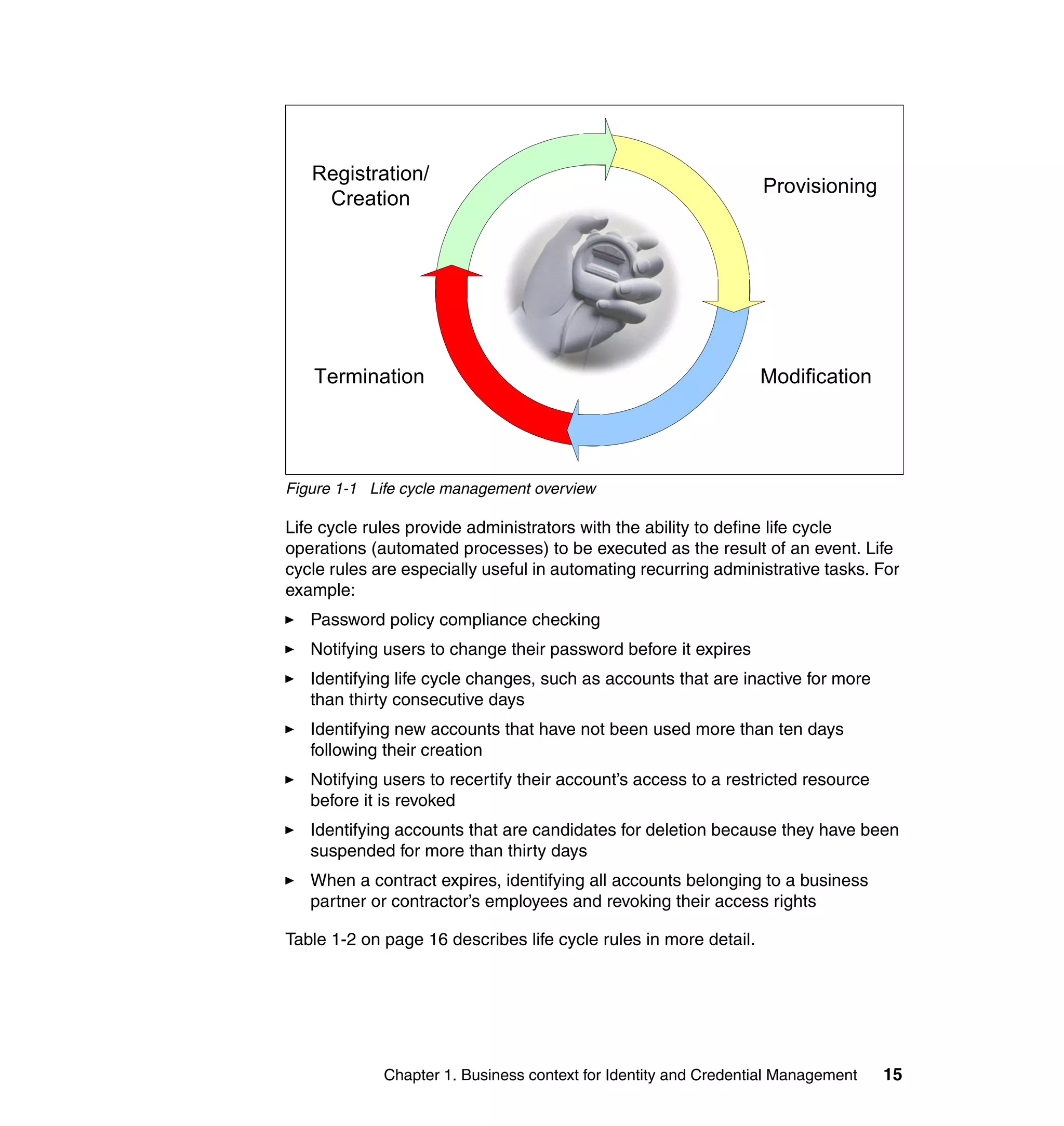
               Figure 1-1 on page 15 represents a closed loop process where a person is
               registered to use an IT asset, an account is created, and access provisioning
               occurs to give this person’s account access to system resources. Over time,
               modifications occur where access to certain resources is granted while access to
               other resources might be revoked. The cycle ends when the person separates
               from the business and the terminate process removes access to resources,
               suspends all accounts, and eventually deletes the accounts and the person from
               the systems.


14   Deployment Guide Series: IBM Tivoli Identity Manager 5.0
Registration/
                                                                  Provisioning
    Creation


   Termination                                                    Modification


Figure 1-1 Life cycle management overview

Life cycle rules provide administrators with the ability to define life cycle
operations (automated processes) to be executed as the result of an event. Life
cycle rules are especially useful in automating recurring administrative tasks. For
example:
   Password policy compliance checking
   Notifying users to change their password before it expires
   Identifying life cycle changes, such as accounts that are inactive for more
   than thirty consecutive days
   Identifying new accounts that have not been used more than ten days
   following their creation
   Notifying users to recertify their account’s access to a restricted resource
   before it is revoked
   Identifying accounts that are candidates for deletion because they have been
   suspended for more than thirty days
   When a contract expires, identifying all accounts belonging to a business
   partner or contractor’s employees and revoking their access rights

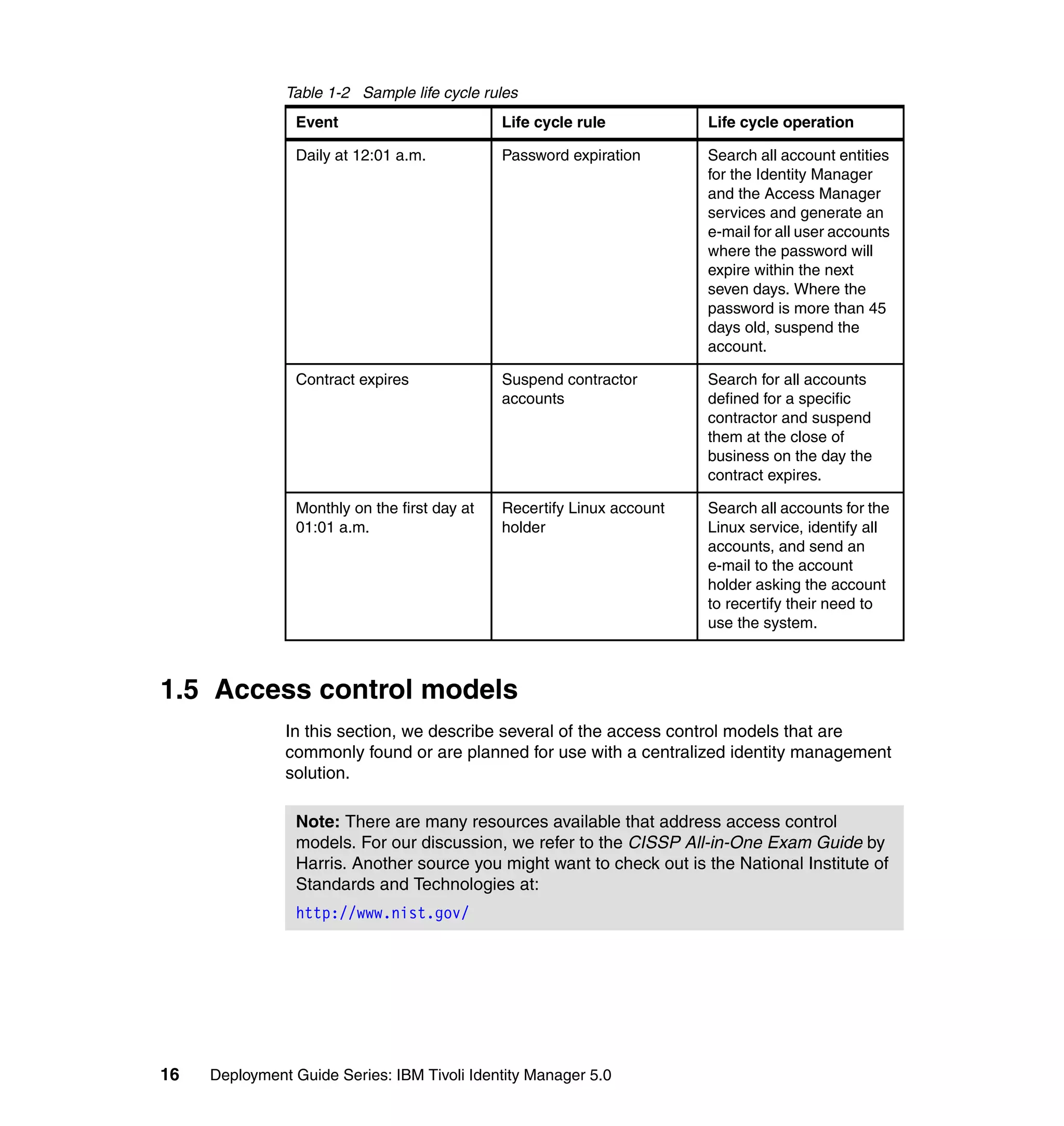
Table 1-2 on page 16 describes life cycle rules in more detail.


             Chapter 1. Business context for Identity and Credential Management   15
Table 1-2 Sample life cycle rules
                Event                         Life cycle rule           Life cycle operation

                Daily at 12:01 a.m.           Password expiration       Search all account entities
                                                                        for the Identity Manager
                                                                        and the Access Manager
                                                                        services and generate an
                                                                        e-mail for all user accounts
                                                                        where the password will
                                                                        expire within the next
                                                                        seven days. Where the
                                                                        password is more than 45
                                                                        days old, suspend the
                                                                        account.

                Contract expires              Suspend contractor        Search for all accounts
                                              accounts                  defined for a specific
                                                                        contractor and suspend
                                                                        them at the close of
                                                                        business on the day the
                                                                        contract expires.

                Monthly on the first day at   Recertify Linux account   Search all accounts for the
                01:01 a.m.                    holder                    Linux service, identify all
                                                                        accounts, and send an
                                                                        e-mail to the account
                                                                        holder asking the account
                                                                        to recertify their need to
                                                                        use the system.


1.5 Access control models
               In this section, we describe several of the access control models that are
               commonly found or are planned for use with a centralized identity management
               solution.

                Note: There are many resources available that address access control
                models. For our discussion, we refer to the CISSP All-in-One Exam Guide by
                Harris. Another source you might want to check out is the National Institute of
                Standards and Technologies at:
                http://www.nist.gov/


16   Deployment Guide Series: IBM Tivoli Identity Manager 5.0
1.5.1 The Role Based Access Control model
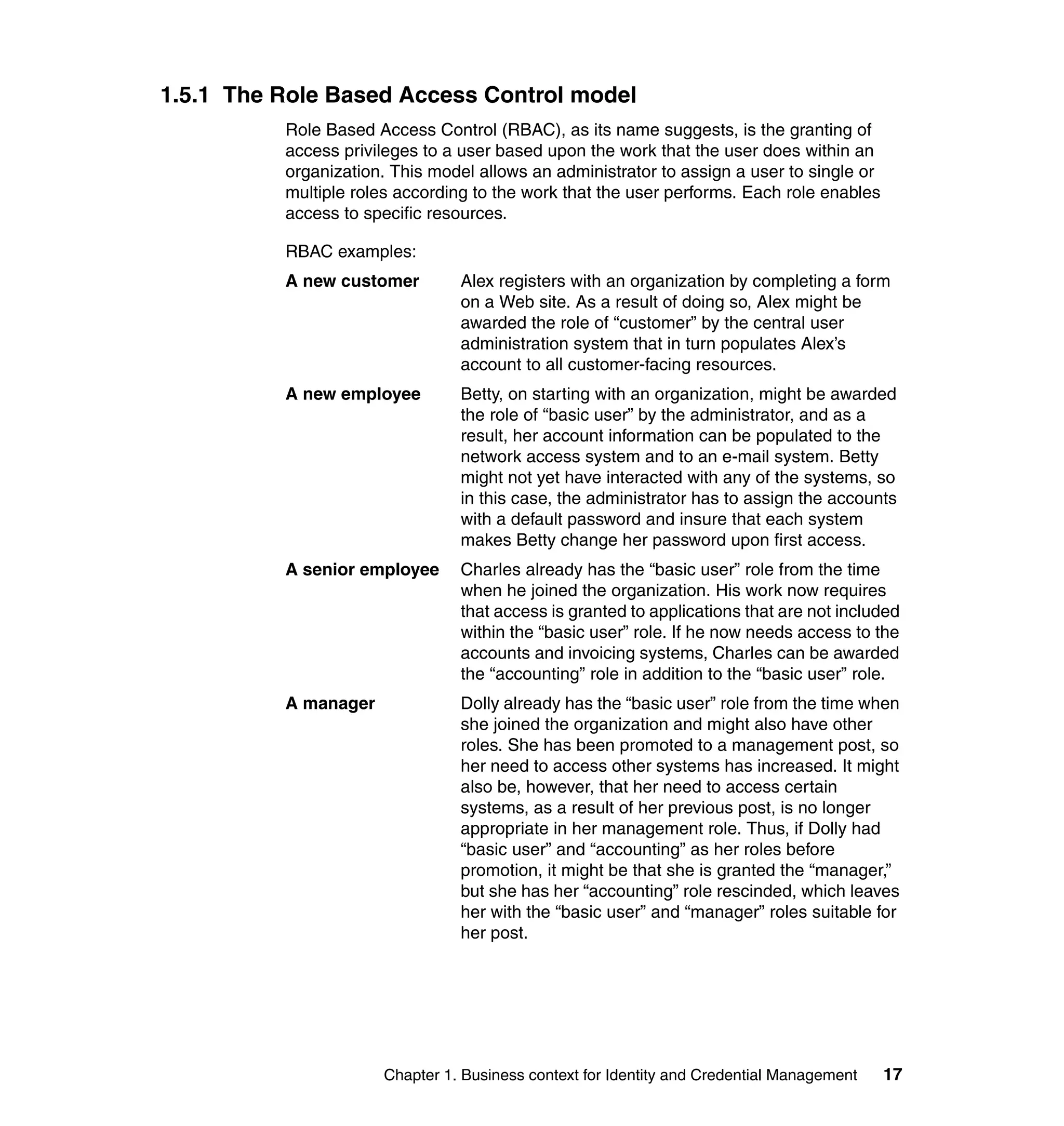
          Role Based Access Control (RBAC), as its name suggests, is the granting of
          access privileges to a user based upon the work that the user does within an
          organization. This model allows an administrator to assign a user to single or
          multiple roles according to the work that the user performs. Each role enables
          access to specific resources.

          RBAC examples:
          A new customer        Alex registers with an organization by completing a form
                                on a Web site. As a result of doing so, Alex might be
                                awarded the role of “customer” by the central user
                                administration system that in turn populates Alex’s
                                account to all customer-facing resources.
          A new employee        Betty, on starting with an organization, might be awarded
                                the role of “basic user” by the administrator, and as a
                                result, her account information can be populated to the
                                network access system and to an e-mail system. Betty
                                might not yet have interacted with any of the systems, so
                                in this case, the administrator has to assign the accounts
                                with a default password and insure that each system
                                makes Betty change her password upon first access.
          A senior employee     Charles already has the “basic user” role from the time
                                when he joined the organization. His work now requires
                                that access is granted to applications that are not included
                                within the “basic user” role. If he now needs access to the
                                accounts and invoicing systems, Charles can be awarded
                                the “accounting” role in addition to the “basic user” role.
          A manager             Dolly already has the “basic user” role from the time when
                                she joined the organization and might also have other
                                roles. She has been promoted to a management post, so
                                her need to access other systems has increased. It might
                                also be, however, that her need to access certain
                                systems, as a result of her previous post, is no longer
                                appropriate in her management role. Thus, if Dolly had
                                “basic user” and “accounting” as her roles before
                                promotion, it might be that she is granted the “manager,”
                                but she has her “accounting” role rescinded, which leaves
                                her with the “basic user” and “manager” roles suitable for
                                her post.


                      Chapter 1. Business context for Identity and Credential Management   17
1.5.2 Other access control models
               There are two other access control models that are often found in use: the
               Discretionary Access Control (DAC) model and the Mandatory Access Control
               (MAC) model.

               DAC
               The DAC model is when the owner of a resource decides whether to allow a
               specific person access to their resource. This system is common in distributed
               environments that have evolved from smaller operations into larger ones. When
               it is well managed, it can provide adequate access control, but it is very
               dependent upon the resource owner understanding how to implement the
               security policies of the organization, and of all the models, it is most likely to be
               subject to “management by mood.” Ensuring that authorized people have access
               to the correct resource requires a good system for tracking users leaving, users
               joining the organization, and users changing jobs. Tracking requests for change
               is often paper driven, error-prone, and can be costly to maintain and audit.

               MAC
               The MAC model is where the resources are grouped and marked according to a
               sensitivity model. This model is most commonly found in military or government
               environments. One example is the markings of Unclassified, Restricted,
               Confidential, Secret, and Top Secret. A user’s privileges to view certain
               resources will depend upon that individual’s clearance level.


1.5.3 Which model
               All three models just discussed have advantages and disadvantages associated
               with them. Which model an organization uses will depend upon a number of
               factors, including, but not limited to, externally mandated policies, the maturity of
               existing identity management processes, the range of identity management
               target systems, future requirements, the number of users managed, and risk
               assessment and return on investment statistics.

               MAC
               The key to this kind of system is the ability to use background security checking
               of personnel to a greater level than that which is normally carried out in a
               business or non-governmental environment. It is also key for data of different
               levels of sensitivity to be kept segregated.


18   Deployment Guide Series: IBM Tivoli Identity Manager 5.0
For example, a user must not be able to cut and paste information between
documents of differing sensitivities. This segregation has traditionally been
achieved by keeping data physically separate. In this environment, therefore, a
user might have a number of different workstations; one workstation for restricted
work, one workstation for secret work, and so on, each workstation running on
completely different and separate architectures.

Conducting identity management across multiple sensitivity classifications or
silos with one central identity management system raises a number of issues.
The central system itself must be classified at the highest level, because it holds
user rights to all sensitivity silos. Normally in this environment, various security
certifications and accreditation processes have been completed, and also any
cryptographic keys are in hardware storage.

As the Web portal approach matures, this kind of multiple silo approach might
change, but in the short term, a software only solution is not possible.

One further approach is to treat each sensitivity silo as a discrete identity
management problem, which means that there is a distinct solution for each silo
and that the best access control model can be chosen from the other two
models. For example, at the lowest sensitivity silo, there are likely to be many
more users that best fit an RBAC solution, while at the top level, there are fewer
users and other (physical, procedural, personnel, and technical) more rigorous
controls, so a DAC solution might be more appropriate.

Despite its limitations, this type of access control model will continue to be used
in military and government environments, because it provides the solid
foundation for segregation of information based upon sensitivity. Identity
management solutions for this space are probably best focused on the lower
sensitivity silo, unless approvals can be gained to connect all silos with a highly
secure management layer that includes identity management.

DAC
Discretionary Access Control is the model that is most likely to be used as a
default or evolved decentralized access control solution. Organizations are
familiar with the concept of each application administrator or owner being
responsible for granting access to the application or system owned or
administered by them. Key features of a centralized identity management system
that allows this model to continue are the ability to specify over-arching corporate
security policies, combined with the ability to delegate responsibility for account
management to individual systems. A centralized identity management system
with these features allows for a reduction in the amount of “management by
mood,” but it ensures that corporate security policies can be applied, while
allowing a degree of actual and real political ownership of the target resource.


             Chapter 1. Business context for Identity and Credential Management   19
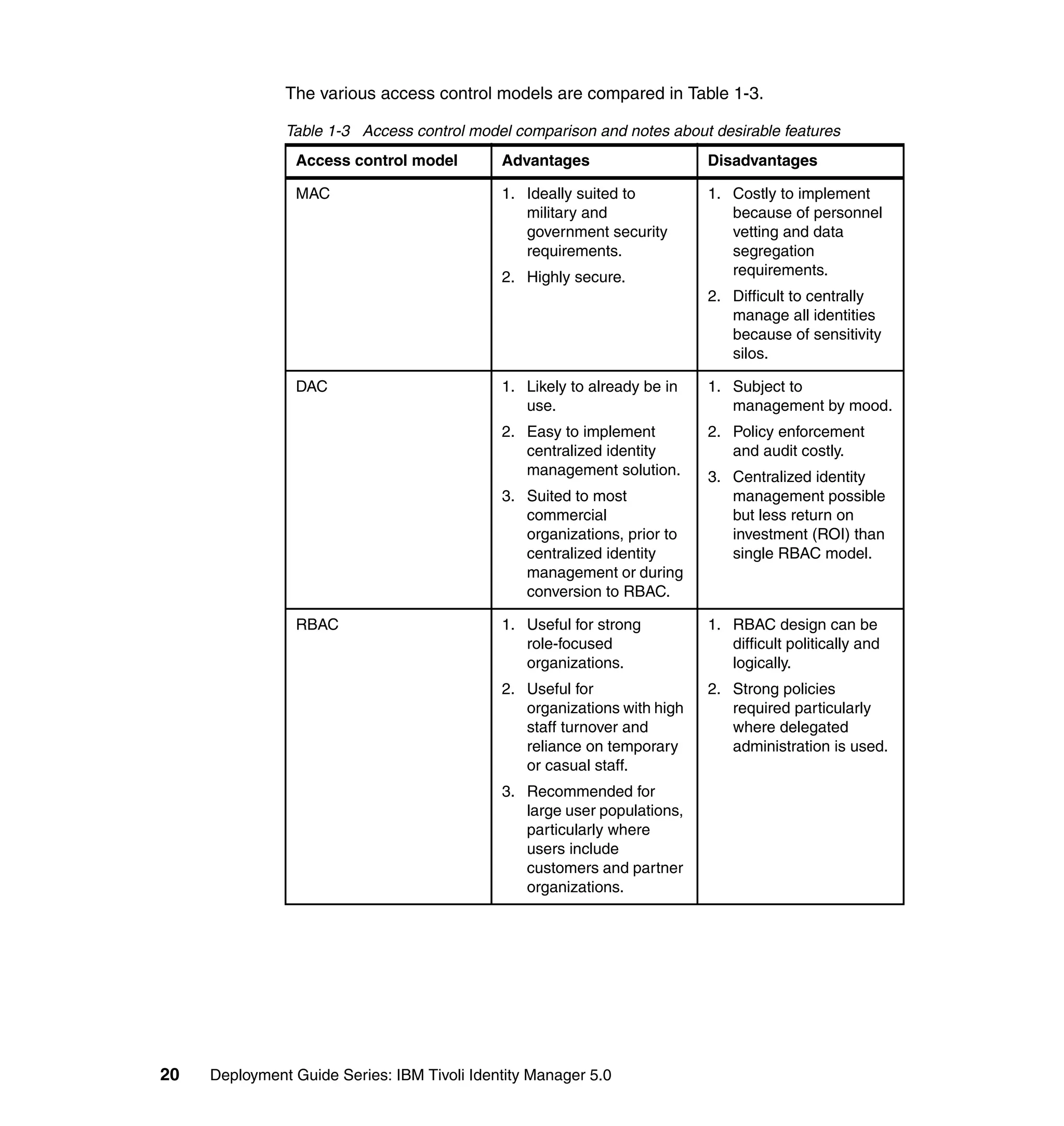
The various access control models are compared in Table 1-3.

               Table 1-3 Access control model comparison and notes about desirable features
                Access control model         Advantages                   Disadvantages

                MAC                          1. Ideally suited to         1. Costly to implement
                                                military and                 because of personnel
                                                government security          vetting and data
                                                requirements.                segregation
                                             2. Highly secure.               requirements.
                                                                          2. Difficult to centrally
                                                                             manage all identities
                                                                             because of sensitivity
                                                                             silos.

                DAC                          1. Likely to already be in   1. Subject to
                                                use.                         management by mood.
                                             2. Easy to implement         2. Policy enforcement
                                                centralized identity         and audit costly.
                                                management solution.      3. Centralized identity
                                             3. Suited to most               management possible
                                                commercial                   but less return on
                                                organizations, prior to      investment (ROI) than
                                                centralized identity         single RBAC model.
                                                management or during
                                                conversion to RBAC.

                RBAC                         1. Useful for strong         1. RBAC design can be
                                                role-focused                 difficult politically and
                                                organizations.               logically.
                                             2. Useful for                2. Strong policies
                                                organizations with high      required particularly
                                                staff turnover and           where delegated
                                                reliance on temporary        administration is used.
                                                or casual staff.
                                             3. Recommended for
                                                large user populations,
                                                particularly where
                                                users include
                                                customers and partner
                                                organizations.


20   Deployment Guide Series: IBM Tivoli Identity Manager 5.0
1.5.4 Selection process
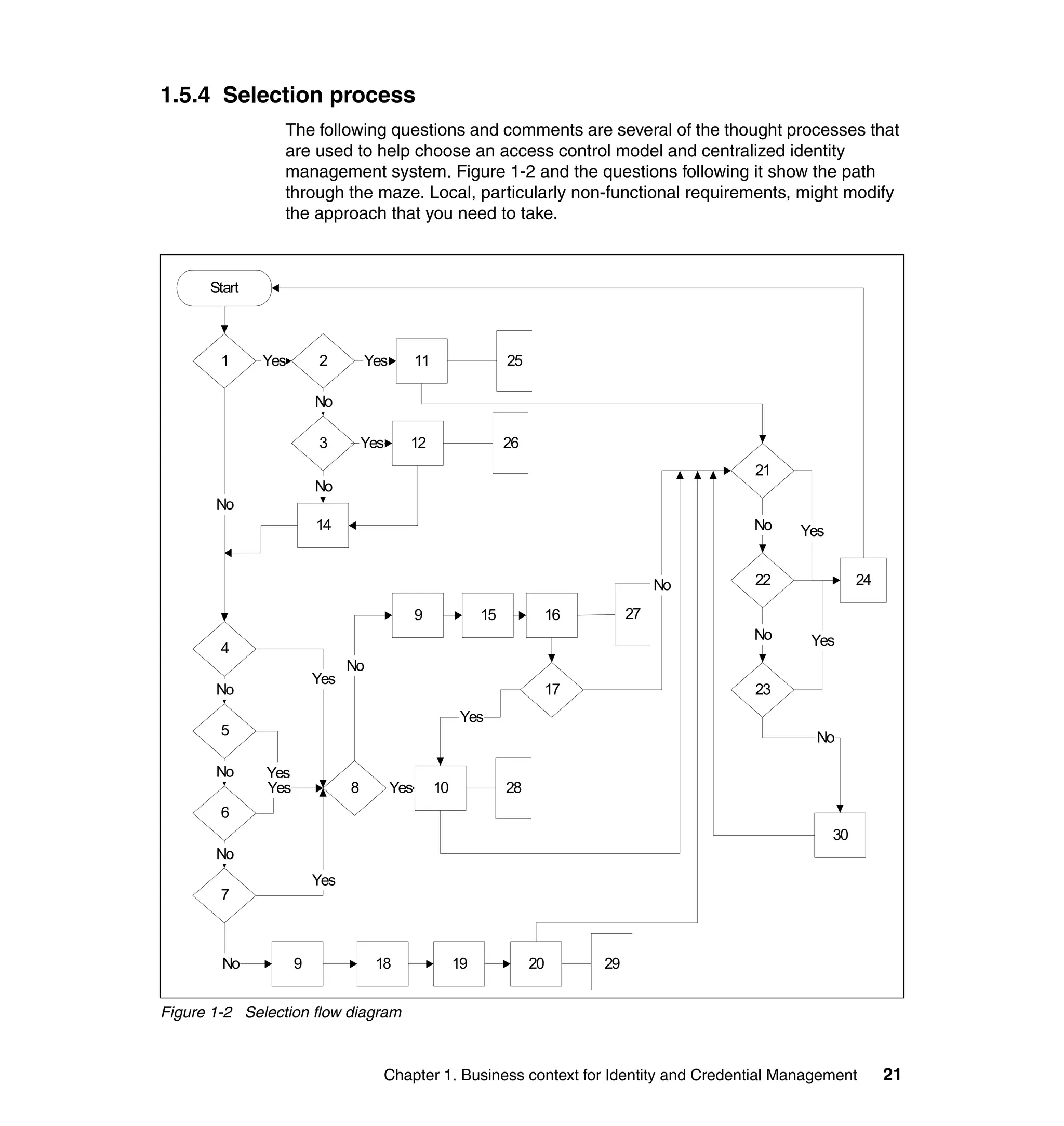
                 The following questions and comments are several of the thought processes that
                 are used to help choose an access control model and centralized identity
                 management system. Figure 1-2 and the questions following it show the path
                 through the maze. Local, particularly non-functional requirements, might modify
                 the approach that you need to take.


      Start


        1     Yes       2         Yes         11                  25

                        No

                        3         Yes     12                      26
                                                                                            21
                        No
       No
                        14                                                                  No   Yes


                                                                                       No   22              24

                                              9              15         16        27
                                                                                            No    Yes
        4
                              No
                        Yes
       No                                                               17                  23
                                                         Yes
        5                                                                                          No

       No     Yes
              Yes             8         Yes        10             28
        6
                                                                                                       30
       No
                        Yes
        7


        No          9              18                   19             20    29


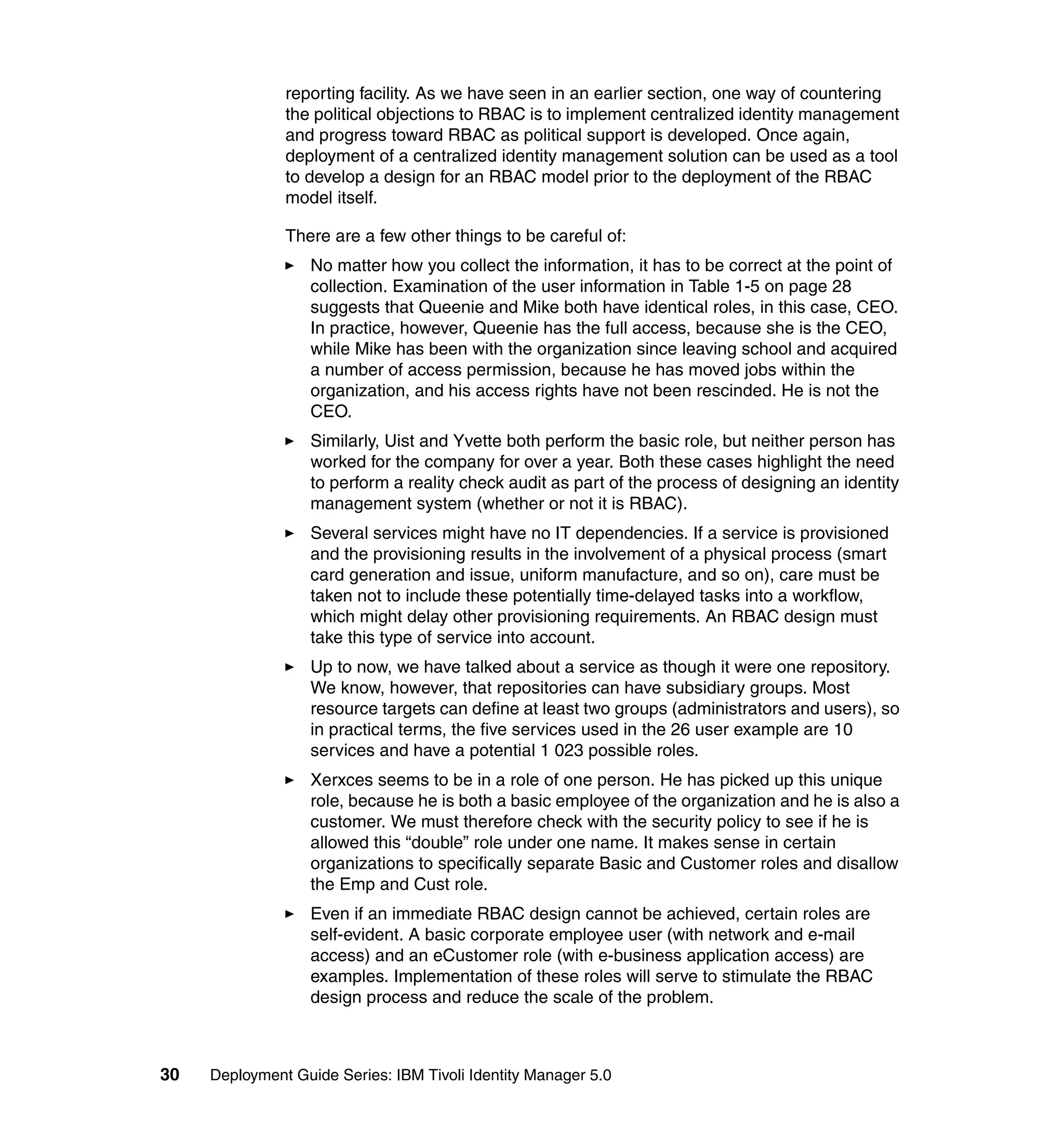
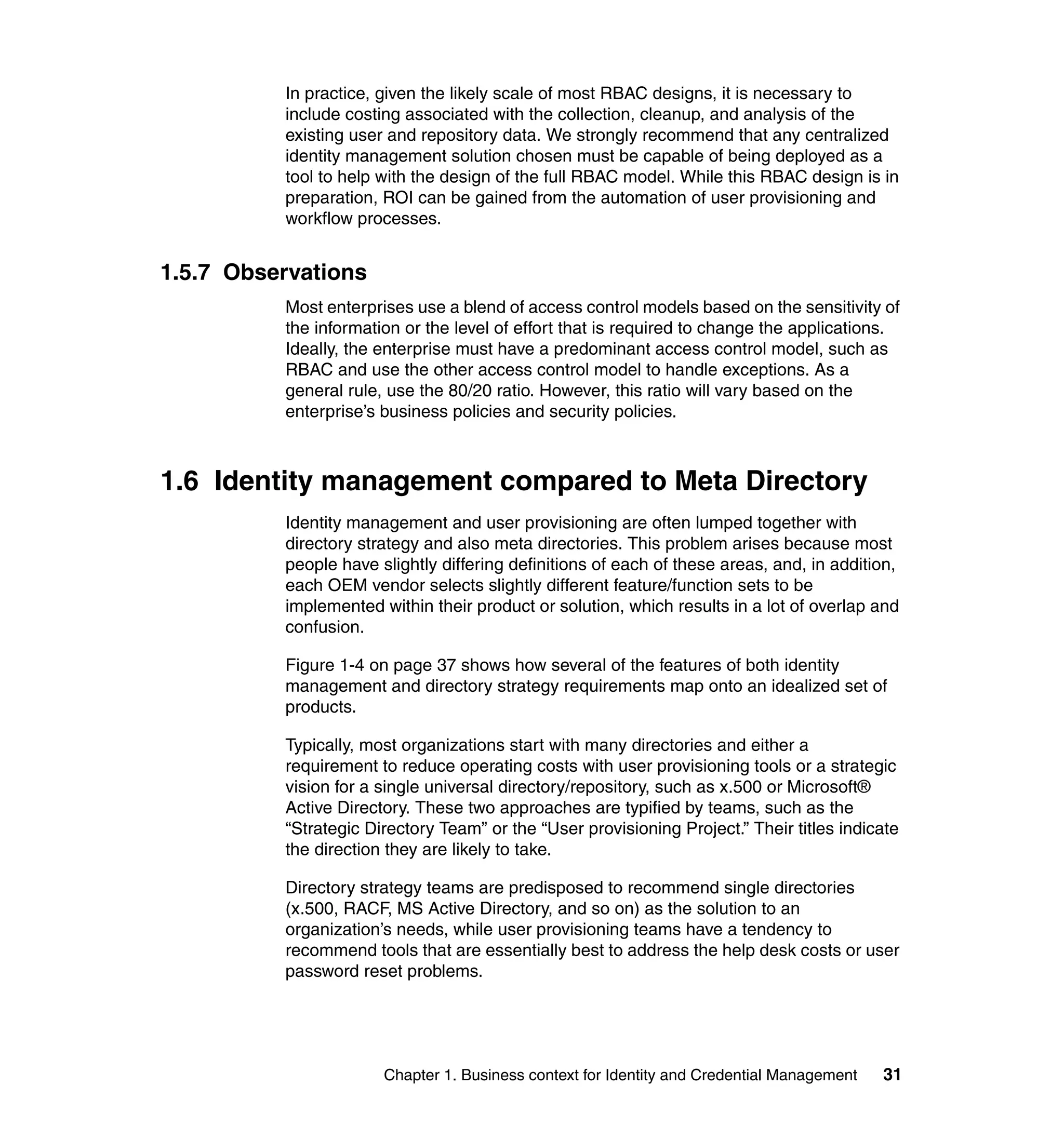
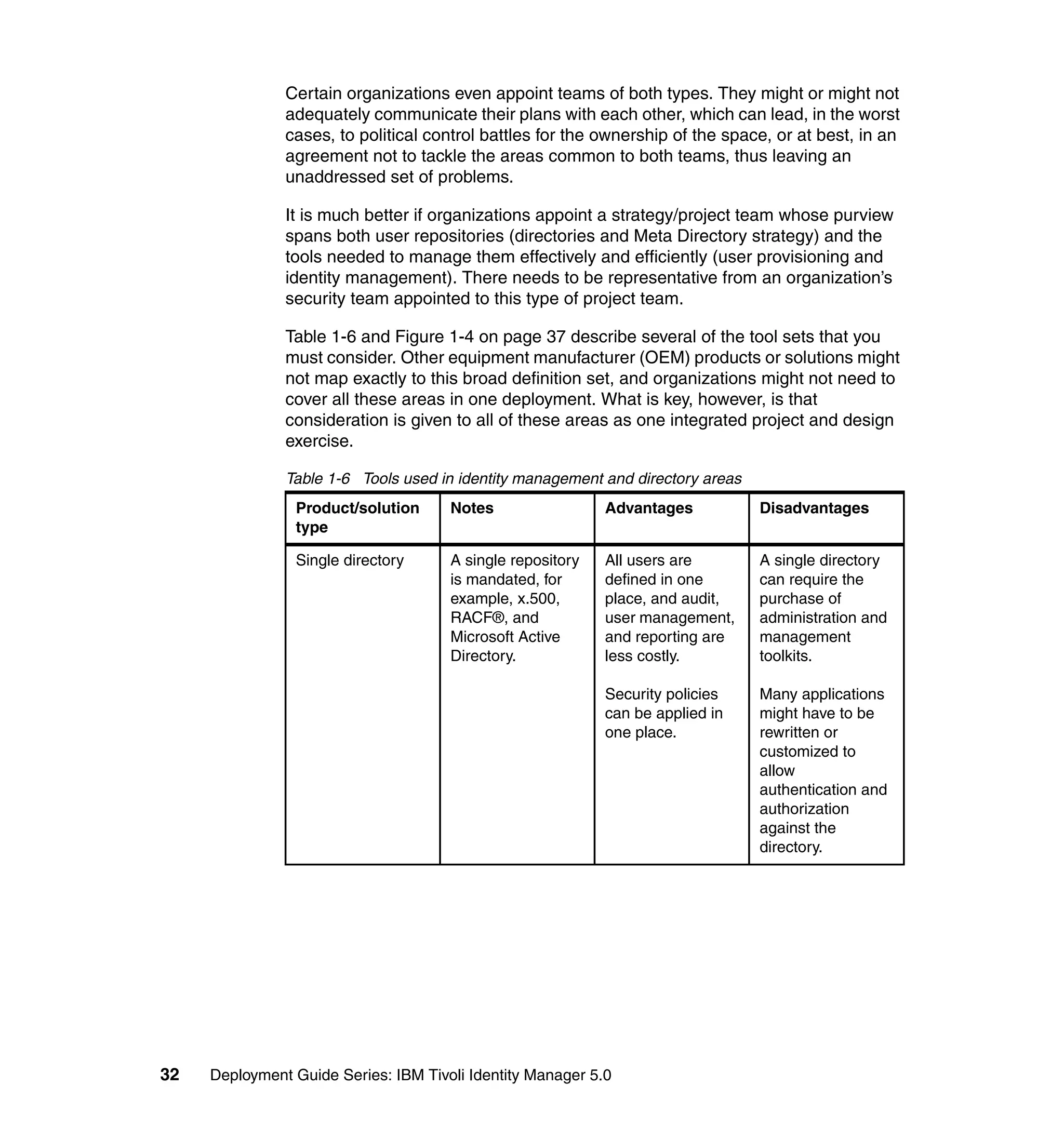
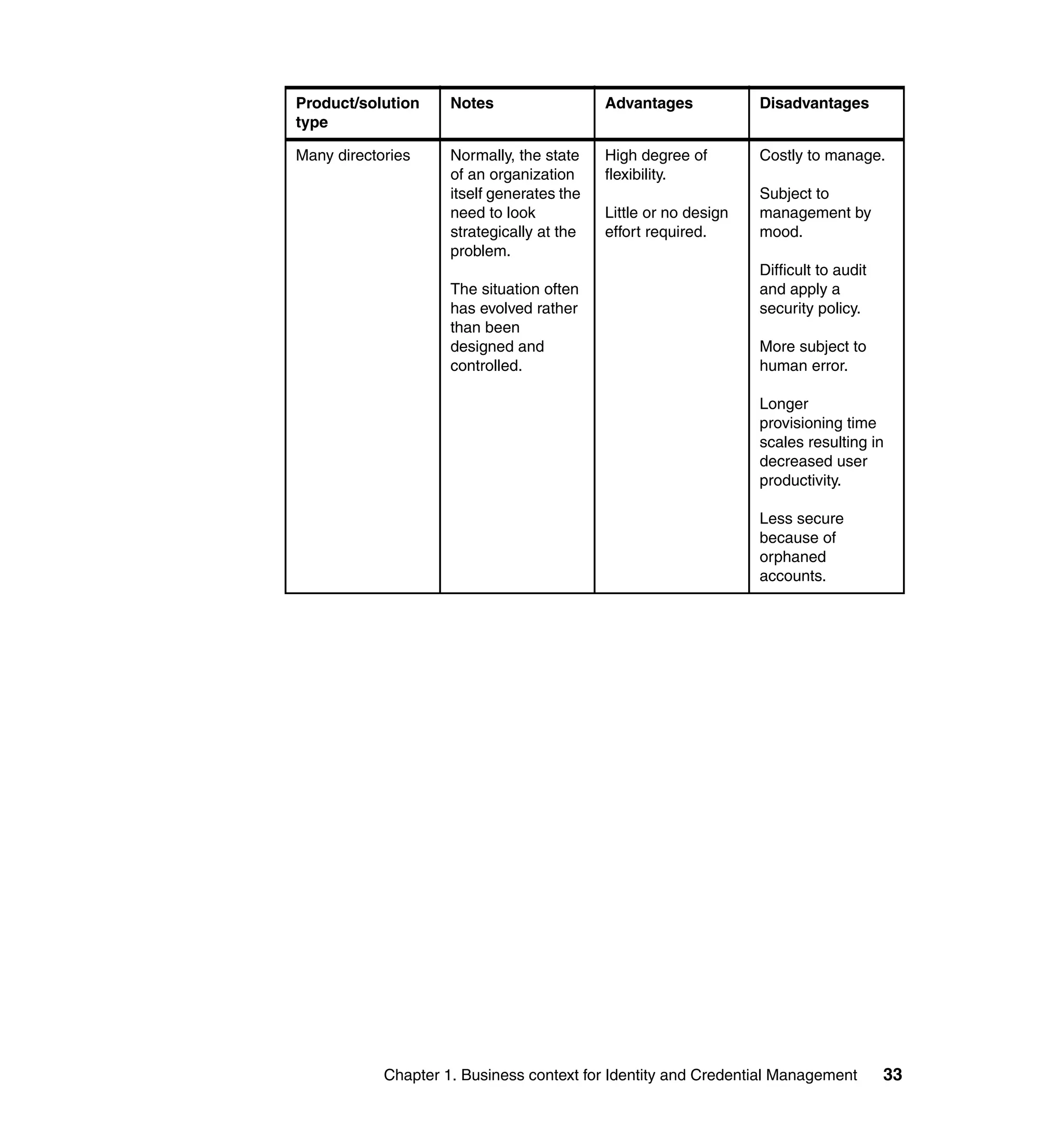
Figure 1-2 Selection flow diagram


                                    Chapter 1. Business context for Identity and Credential Management           21
Key questions and comments:
               1. Does your organization mandate the use of sensitivity silos (confidential,
                  secret, top secret, and so on)?
               2. Your organization mandates the use of the sensitivity silos; does it approve
                  the use of one centralized identity management solution bridging all of the
                  sensitivity silos?
               3. If you cannot bridge the sensitivity silos with one solution, the only option is to
                  treat each silo as a separate organization. Will your organization change its
                  policy on the single centralized identity management system to allow bridging
                  in the future?
               4. Does your organization have a high staff turnover or have a large number of
                  contractors or outsourced staff?
               5. Is your organization large or does it have multiple geographies that are
                  self-managing?
               6. Does your organization already have a centralized or metadirectory in place
                  or is it planning one?
               7. If your organization is already using the DAC model with resource owners and
                  administrators managing the identities of users, you can use a centralized
                  solution to imitate this system or you can move to an RBAC solution. Do you
                  want to see greater ROI and increased security?
               8. If you choose to a fully implement an RBAC model, will the political and
                  business structures within your organization fully support the design work
                  involved?
               9. DAC Design selected.
               10.RBAC Design selected.
               11.Implement a single centralized identity management system with users
                  assigned access rights based upon their approval to access one or many
                  sensitivity silos, which is a simple form of RBAC with one role per sensitivity
                  silo. You can make the silo model more granular, but this approach might
                  detract from the essentially simple nature of the implementation. Note that a
                  user with access to one silo will gain access to all information within that silo,
                  and therefore, in its purest form, this architecture does not address the issues
                  of Privacy or “Need to Know” management.
               12.You can implement an identity management solution in each sensitivity silo,
                  but if your organization’s policy changes, you will be able to place a master
                  Identity Manager over the existing silo Identity Managers to gain maximum
                  ROI. Therefore, select a centralized management solution that is capable of
                  supporting a hierarchy of identity management systems.


22   Deployment Guide Series: IBM Tivoli Identity Manager 5.0
13.If you have reached this point on the flowchart, it is probably time for a cup of
   coffee or a break. There is no step 13 on the flowchart.
14.Treat each sensitivity silo as a discrete problem and analyze the RBAC/DAC
   requirements for each silo.
15.This selection is DAC. You will need to make sure that the centralized identity
   management tool that you selected has the capability to securely delegate
   the administration of users to the resource owner through an interface that
   does not require onerous training nor does it need a thick client to be
   distributed. Administration of the users must be delegated to the owners of
   the resources. Delegated resource control must be in line with corporate
   policies. Centralized audit for non-compliance reports must be submitted to
   the resources owner regularly for their action.
16.When deployed, assistance must be given to those business units that want
   to develop an RBAC model within their “Owned” space. In addition, you must
   maintain up-to-date business cases and continue to try to win greater political
   influence for the RBAC model.
17.Has sufficient political ground been gained to implement an RBAC model?
18.Your organization has chosen to use DAC, which will not allow for part of the
   ROI traditionally associated with RBAC. Other product features also show
   savings, however, and you must favor products with good feature and
   function coverage in these areas.
19.Workflow processing. The automation of the business processes for new
   hires and so on must be seen as a priority. Reducing the waiting time for
   provisioning new users will reduce productivity losses.
20.Even though DAC is the organizational model, it might still be possible to
   save money by using limited or default roles. For example, every new user
   automatically gets LAN and e-mail accounts set up, while other systems
   remain within the purview of the resource owners.
21.Has a period of more than 12 months passed since you last checked the
   identity management system design?
22.Have any major infrastucture changes within your organization’s operational
   systems taken place?
23.Has the nature of the external threat you face as an organization changed
   significantly?
24.A change has occurred within your operating environment or a long period of
   time has passed since you last validated your identity management system
   decisions. Run through the algorithm again to check on your design and
   amend it, if appropriate.


             Chapter 1. Business context for Identity and Credential Management   23
25.You have selected a very simple type of RBAC to map onto the MAC model in
                  place within your organization, which means that you will also be placing
                  increased reliance upon the nature of your personnel and the vetting
                  processes applied to them. It is possible to improve the silo granularity, but it
                  will take time to design this granularity. Other software and hardware involved
                  with privacy management and networking, for example, might already be in
                  use within your organization, which must be factored into any design and
                  planning for the solution.
               26.The selection flowchart seems to suggest that you will be treating each of the
                  sensitivity silos as a discrete identity management problem, but that you
                  might in the future get approval to bridge the silos. The suggested method is
                  to use a hierarchy, but if budgets and operational requirements allow, you can
                  also scrap the existing system and replace it with a single central identity
                  management model.
               27.Reaching this point in the flowchart has meant that owing to political
                  limitations within your organization, you have been forced to use the DAC
                  model rather than the RBAC model, which you might naturally have selected.
                  Using DAC, however, can be seen as a stepping stone toward RBAC. In
                  simple terms, allowing the business owners to use the system might enable
                  them to create roles for their own systems. It might be possible to consolidate
                  these local roles into larger ones as time passes.
               28.As you move into the real design and planning work involved in an RBAC
                  scenario, many of the “customer” business units will be asked for their input
                  into the role design problem. It might only be at this point, that “customer”
                  business units realize exactly the impact of what you are proposing upon their
                  “rights” to manage their own systems in their own way, regardless of the
                  organization’s security policies or of the costs involved. If this situation
                  happens, return to question 8 and answer that question no.
               29.The DAC has been selected and the focus has been on methods (other than
                  RBAC) of saving costs. Do not lose sight of the fact that having a central tool
                  also brings centralized audit capabilities that will improve the security of an
                  organization. This risk mitigation, while difficult to quantify, still improves the
                  viability of a business.
               30.Wait one month before continuing, which insures a revalidation of your
                  identity management strategy every month. The length of time chosen must
                  be less than one year, but it is at the discretion of your organization, taking
                  into account all of the threat, risk, and resource issues that you face.


24   Deployment Guide Series: IBM Tivoli Identity Manager 5.0
1.5.5 Roles as opposed to groups
          One of the difficulties that identity management system designers face is the way
          in which the terms groups and roles are used, often interchangeably or without a
          true understanding of their significance.

          They are defined as follows:
          Roles           A role is specifically a description of a type of user that must be
                          provisioned to one or more services or resources.
          Groups          A group is specific to a target resource. It contains a subset of
                          the users provisioned to that resource and grants access rights
                          to a part of the resource.
          Figure 1-3 shows the relationships between users, roles, services, and groups.


                                                              A user is assigned to a
                                                              role (or more than one
                                                              role).


                                                              A role contains the policy
                                                              for provisioning users to
                                                              a service (or more than
                                                              one service).


                                                              A service (or resource) is
                                                              the user repository that is
                                                              under the umbrella of the
                                                              identity management
                                                              system.


                           Groups
                                                                        A group is a subset of users
                           Groups
                                                                        who have been provisioned
                                                                        to the service or resource. A
                                                     Groups             group confers access control
                                                                        rights to those users for
                                    Groups                              specific parts of the service.

                                    Groups

                                    Groups


          Figure 1-3 User/Role/Service/Group relationships


                       Chapter 1. Business context for Identity and Credential Management           25
Many identity management systems allow the users to be assigned to roles and
               hence provisioned to services. In addition, they can also provision users directly
               to services complete with group membership.

               You can therefore use these systems to merely provision users directly to
               services, which is done in the absence of a valid RBAC design or in the case of
               the use of pure DAC.

               You can also design the RBAC system so that one service is represented by one
               role. If each role represents only a single application, OS, database, and so on, it
               is technically still an RBAC system, but it is functionally closer to a DAC system.
               This model is sometimes found within organizations that have not been able to
               successfully overcome the underlying politics. They can therefore claim to have
               upset no one and to have implemented a full RBAC system. The downside to this
               approach is that you have spent the time and resources on implementing an
               RBAC system that will not deliver the expected ROI. This model is therefore
               pointless and not recommended unless political considerations are more
               important than cost concerns.


1.5.6 Designs
               The process of designing an RBAC system is fairly straight forward.

               If we had only two services to access (Service A and Service B), users can be
               placed into one of three roles: Role 1 (Service A only), Role 2 (Service B only),
               and Role 3 (Service A and B).

               In summary:

               To access two services, the number of possible roles is three:
                   One role containing two services
                   Two roles containing one service

               Similarly, to access three services, the number of possible roles is seven:
                   One role containing three services
                   Three roles containing two services
                   Three roles containing one service

               To access four services, the number of possible roles is 15:
                   One role containing four services
                   Four roles containing three services
                   Six roles containing two services
                   Four roles containing one service


26   Deployment Guide Series: IBM Tivoli Identity Manager 5.0
As the number of services increases, so do the potential number of roles. By the
time twenty services are required (a lot less than the average number of services
in a standard organization), there are 1 048 575 possible roles. It is clearly not
practical to create all the possible roles and populate them. We must reduce the
number of roles to those roles that are required rather than to all those roles that
are possible.

It seems that a common sense approach is to list all the user repositories and
then to list all the users along with their account requirements. An example of this
kind of approach is shown in Table 1-4.

Table 1-4 User to repository mapping
 User          Repositories

               Windows        Internet       SAP           E-mail        UNIX®
               NT             customer
                              application

 Alwena        Yes            No             Yes           Yes           No

 Brian         Yes            No             No            Yes           Yes

 Claudette     No             Yes            No            No            No

 Daphne        No             Yes            No            No            No

 Elizabeth     Yes            No             No            Yes           No

 Francesca     Yes            No             No            Yes           No

 Geoff         No             Yes            No            No            No

 Helen         Yes            No             No            Yes           No

 Ian           Yes            No             No            Yes           No

 Jolina        Yes            No             Yes           Yes           No

 Katya         Yes            No             No            Yes           Yes

 Lupe          No             Yes            No            No            No

 Mike          Yes            Yes            Yes           Yes           Yes

 Neil          Yes            No             Yes           Yes           No

 Ondine        No             Yes            No            No            No

 Peter         No             Yes            No            No            No

 Queenie       Yes            Yes            Yes           Yes           Yes


             Chapter 1. Business context for Identity and Credential Management   27
User            Repositories

                                   Windows        Internet         SAP        E-mail       UNIX®
                                   NT             customer
                                                  application

                   Ray             Yes            No               Yes        Yes          No

                   Sarah           No             Yes              No         No           No

                   Thomas          Yes            No               No         Yes          Yes

                   Uist            Yes            No               No         Yes          No

                   Vera            No             Yes              No         No           No

                   William         Yes            No               No         Yes          Yes

                   Xerxces         Yes            Yes              No         Yes          No

                   Yvette          Yes            No               No         Yes          No

                   Zach            Yes            No               No         Yes          Yes

                  Grouping these roles into similar access requirements reveals that there are six
                  logical roles. So, in this example, five services provide six roles instead of all 31
                  possible roles, as shown in Table 1-5.

Table 1-5 User to repository mapping with roles
 User           Role          Repositories

                              Windows        Internet              SAP        E-mail       UNIX
                              NT             customer
                                             application

 Elizabeth      Basic         Yes            No                    No        Yes           No

 Francesca      Basic         Yes            No                    No         Yes          No

 Helen          Basic         Yes            No                    No        Yes           No

 Ian            Basic         Yes            No                    No        Yes           No

 Uist           Basic         Yes            No                    No        Yes           No

 Yvette         Basic         Yes            No                    No         Yes          No

 Mike           CEO           Yes            Yes                   Yes       Yes           Yes

 Queenie        CEO           Yes            Yes                   Yes       Yes           Yes

 Claudette      Customer      No             Yes                   No         No           No


28      Deployment Guide Series: IBM Tivoli Identity Manager 5.0
User      Role        Repositories

                      Windows        Internet           SAP           E-mail        UNIX
                      NT             customer
                                     application

Daphne    Customer    No             Yes                No            No            No

Geoff     Customer    No             Yes               No             No            No

Lupe      Customer    No             Yes               No             No            No

Ondine    Customer    No             Yes                No            No            No

Peter     Customer    No             Yes                No            No            No

Sarah     Customer    No             Yes                No            No            No

Vera      Customer    No             Yes                No            No            No

Xerxces   Emp and     Yes            Yes                No            Yes           No
          Cust

Alwena    HR          Yes            No                 Yes           Yes           No

Jolina    HR          Yes            No                 Yes           Yes           No

Neil      HR          Yes            No                 Yes           Yes           No

Ray       HR          Yes            No                 Yes           Yes           No

Brian     System      Yes            No                 No            Yes           Yes
          Admin

Katya     System      Yes            No                 No            Yes           Yes
          Admin

Thomas    System      Yes            No                 No            Yes           Yes
          Admin

William   System      Yes            No                 No            Yes           Yes
          Admin

Zach      System      Yes            No                 No            Yes           Yes
          Admin

           This approach is fine for 26 users and five services, but the next problem that
           emerges is one of scale. The mere collection task involved for 1 000 users and a
           larger range of services becomes costly and, in larger cases, unrealistic. What is
           needed is a single data source that is collected automatically and contains all
           user/service information, which can be used for reporting and analysis. Many
           centralized identity management solutions provide this kind of collection and


                        Chapter 1. Business context for Identity and Credential Management   29
reporting facility. As we have seen in an earlier section, one way of countering
               the political objections to RBAC is to implement centralized identity management
               and progress toward RBAC as political support is developed. Once again,
               deployment of a centralized identity management solution can be used as a tool
               to develop a design for an RBAC model prior to the deployment of the RBAC
               model itself.

               There are a few other things to be careful of:
                   No matter how you collect the information, it has to be correct at the point of
                   collection. Examination of the user information in Table 1-5 on page 28
                   suggests that Queenie and Mike both have identical roles, in this case, CEO.
                   In practice, however, Queenie has the full access, because she is the CEO,
                   while Mike has been with the organization since leaving school and acquired
                   a number of access permission, because he has moved jobs within the
                   organization, and his access rights have not been rescinded. He is not the
                   CEO.
                   Similarly, Uist and Yvette both perform the basic role, but neither person has
                   worked for the company for over a year. Both these cases highlight the need
                   to perform a reality check audit as part of the process of designing an identity
                   management system (whether or not it is RBAC).
                   Several services might have no IT dependencies. If a service is provisioned
                   and the provisioning results in the involvement of a physical process (smart
                   card generation and issue, uniform manufacture, and so on), care must be
                   taken not to include these potentially time-delayed tasks into a workflow,
                   which might delay other provisioning requirements. An RBAC design must
                   take this type of service into account.
                   Up to now, we have talked about a service as though it were one repository.
                   We know, however, that repositories can have subsidiary groups. Most
                   resource targets can define at least two groups (administrators and users), so
                   in practical terms, the five services used in the 26 user example are 10
                   services and have a potential 1 023 possible roles.
                   Xerxces seems to be in a role of one person. He has picked up this unique
                   role, because he is both a basic employee of the organization and he is also a
                   customer. We must therefore check with the security policy to see if he is
                   allowed this “double” role under one name. It makes sense in certain
                   organizations to specifically separate Basic and Customer roles and disallow
                   the Emp and Cust role.
                   Even if an immediate RBAC design cannot be achieved, certain roles are
                   self-evident. A basic corporate employee user (with network and e-mail
                   access) and an eCustomer role (with e-business application access) are
                   examples. Implementation of these roles will serve to stimulate the RBAC
                   design process and reduce the scale of the problem.


30   Deployment Guide Series: IBM Tivoli Identity Manager 5.0
In practice, given the likely scale of most RBAC designs, it is necessary to
          include costing associated with the collection, cleanup, and analysis of the
          existing user and repository data. We strongly recommend that any centralized
          identity management solution chosen must be capable of being deployed as a
          tool to help with the design of the full RBAC model. While this RBAC design is in
          preparation, ROI can be gained from the automation of user provisioning and
          workflow processes.


1.5.7 Observations
          Most enterprises use a blend of access control models based on the sensitivity of
          the information or the level of effort that is required to change the applications.
          Ideally, the enterprise must have a predominant access control model, such as
          RBAC and use the other access control model to handle exceptions. As a
          general rule, use the 80/20 ratio. However, this ratio will vary based on the
          enterprise’s business policies and security policies.


1.6 Identity management compared to Meta Directory
          Identity management and user provisioning are often lumped together with
          directory strategy and also meta directories. This problem arises because most
          people have slightly differing definitions of each of these areas, and, in addition,
          each OEM vendor selects slightly different feature/function sets to be
          implemented within their product or solution, which results in a lot of overlap and
          confusion.

          Figure 1-4 on page 37 shows how several of the features of both identity
          management and directory strategy requirements map onto an idealized set of
          products.

          Typically, most organizations start with many directories and either a
          requirement to reduce operating costs with user provisioning tools or a strategic
          vision for a single universal directory/repository, such as x.500 or Microsoft®
          Active Directory. These two approaches are typified by teams, such as the
          “Strategic Directory Team” or the “User provisioning Project.” Their titles indicate
          the direction they are likely to take.

          Directory strategy teams are predisposed to recommend single directories
          (x.500, RACF, MS Active Directory, and so on) as the solution to an
          organization’s needs, while user provisioning teams have a tendency to
          recommend tools that are essentially best to address the help desk costs or user
          password reset problems.


                       Chapter 1. Business context for Identity and Credential Management   31
Certain organizations even appoint teams of both types. They might or might not
               adequately communicate their plans with each other, which can lead, in the worst
               cases, to political control battles for the ownership of the space, or at best, in an
               agreement not to tackle the areas common to both teams, thus leaving an
               unaddressed set of problems.

               It is much better if organizations appoint a strategy/project team whose purview
               spans both user repositories (directories and Meta Directory strategy) and the
               tools needed to manage them effectively and efficiently (user provisioning and
               identity management). There needs to be representative from an organization’s
               security team appointed to this type of project team.

               Table 1-6 and Figure 1-4 on page 37 describe several of the tool sets that you
               must consider. Other equipment manufacturer (OEM) products or solutions might
               not map exactly to this broad definition set, and organizations might not need to
               cover all these areas in one deployment. What is key, however, is that
               consideration is given to all of these areas as one integrated project and design
               exercise.

               Table 1-6 Tools used in identity management and directory areas
                Product/solution      Notes                 Advantages           Disadvantages
                type

                Single directory      A single repository   All users are        A single directory
                                      is mandated, for      defined in one       can require the
                                      example, x.500,       place, and audit,    purchase of
                                      RACF®, and            user management,     administration and
                                      Microsoft Active      and reporting are    management
                                      Directory.            less costly.         toolkits.

                                                            Security policies    Many applications
                                                            can be applied in    might have to be
                                                            one place.           rewritten or
                                                                                 customized to
                                                                                 allow
                                                                                 authentication and
                                                                                 authorization
                                                                                 against the
                                                                                 directory.


32   Deployment Guide Series: IBM Tivoli Identity Manager 5.0
Product/solution     Notes                  Advantages            Disadvantages
type

Many directories     Normally, the state    High degree of        Costly to manage.
                     of an organization     flexibility.
                     itself generates the                         Subject to
                     need to look           Little or no design   management by
                     strategically at the   effort required.      mood.
                     problem.
                                                                  Difficult to audit
                     The situation often                          and apply a
                     has evolved rather                           security policy.
                     than been
                     designed and                                 More subject to
                     controlled.                                  human error.

                                                                  Longer
                                                                  provisioning time
                                                                  scales resulting in
                                                                  decreased user
                                                                  productivity.

                                                                  Less secure
                                                                  because of
                                                                  orphaned
                                                                  accounts.


            Chapter 1. Business context for Identity and Credential Management         33
Product/solution      Notes                  Advantages             Disadvantages
                type

                Meta Directory        A true Meta            This tool allows for   Still has multiple
                                      Directory is           the creation of a      points of
                                      effectively a          single user            administration, so
                                      complete copy of       directory from the     costs are not
                                      all the user           one already in         reduced.
                                      repositories within    existence.
                                      an organization                               The central
                                      held in one place.     It allows              directory schema
                                      The copy is created    applications written   definition and
                                      using a set of rules   to use a different     creation of rule sets
                                      contained within a     repository to          can be complex
                                      join engine.           continue to do so.     and therefore
                                                                                    costly.
                                                             It allows business
                                                             units to manage        Implementation
                                                             users with the         time scales and
                                                             existing tools and     future flexibility can
                                                             allows the Meta        be unacceptable.
                                                             Directory to cope
                                                             with the creation of   Can result in a
                                                             a central directory.   large,
                                                                                    non-performing
                                                                                    centralized
                                                                                    directory.

                Virtual Meta          The Virtual Meta       Has all the benefits   Still requires the
                Directory             Directory is similar   of a true Meta         definition of a rule
                                      to a Meta Directory,   Directory without      set.
                                      but it does not        any of the same
                                      create a complete      performance            User management
                                      copy of the multiple   limitations.           tools might be
                                      user repositories;                            limited.
                                      rather, it relies      Will be able to cope
                                      upon its join engine   with future            Might not have real
                                      to perform             deployment of a        integration points
                                      organization-wide      single directory.      with identity
                                      distributions of                              management tools.
                                      changes detected
                                      in the directories                            Might still require a
                                      under its control.                            specialist to
                                                                                    maintain and
                                                                                    manage.


34   Deployment Guide Series: IBM Tivoli Identity Manager 5.0
Product/solution      Notes                  Advantages              Disadvantages
type

User administration   User provisioning      These kinds of          Usually based
                      tools can be           tools have been         upon a proprietary
                      thought of as a tool   around longer than      framework that
                      to perform a           many of the others.     might need to be
                      one-way                The amount of user      deployed.
                      automated push of      experience is
                      users held in a        therefore greater.      GUIs are often
                      central repository                             thick client
                      (often LDAP) out to    Many of the other       applications.
                      target systems.        tools, by definition,
                      Certain                have user               Old technology that
                      implementations        provisioning built      is being supplanted
                      have the ability to    in. There might be      by more functional
                      manually retrieve      no need, therefore,     Identity
                      users, but this        to consider this        Management
                      ability is usually     type of product.        solutions.
                      limited.
                                                                     Integration points
                                                                     to the other parts of
                                                                     the solution stack
                                                                     are often limited.

                                                                     Might not be able to
                                                                     cope with the
                                                                     requirement for
                                                                     Internet user
                                                                     registration in
                                                                     terms of scale.


            Chapter 1. Business context for Identity and Credential Management          35
Product/solution      Notes                   Advantages              Disadvantages
                type

                Identity              Can be thought of       Widest range of         Many solutions
                Management            as user                 features based          (particularly those
                                      provisioning plus.      upon modern             in the user
                                      The use of generic      non-proprietary         provisioning space)
                                      protocols (http,        standards.              use this title for
                                      https, and so on), in                           their products.
                                      addition to better      This solution allows
                                      integration with        better integration      Coverage of target
                                      other products,         with other tools (for   platforms must be
                                      makes this solution     example, Virtual        checked,
                                      the most fully          Meta Directories)       particularly where
                                      functional.             and other pieces of     no integration point
                                                              the security            with Virtual Meta
                                                              architecture (for       Directories exists.
                                                              example,
                                                              centralized
                                                              authentication and
                                                              authorization
                                                              systems).

                                                              The GUI interface
                                                              is Web-based,
                                                              which requires a
                                                              lower skill set user
                                                              for all interactions.

                                                              Self-service and
                                                              delegated user
                                                              management
                                                              allows partners,
                                                              users, and
                                                              suppliers to
                                                              self-manage their
                                                              information.

                                                              Approval workflow
                                                              engine to authorize
                                                              data changes.


36   Deployment Guide Series: IBM Tivoli Identity Manager 5.0
”


                                                                  Many directories
                                                          x.500
            Centralized Directory


                                                                                     Meta Directory
             Mulitple Directories


                                                                                                      Virtual Meta Directory
                 Join Engine


              Virtual Directories


                                                                                                                               User Administration
              User Provisioning


          Policy Based Provisioning


                                                                                                                                                     Identity Management
               Security Policy


                Enforcement


             Process Workflows


       Delegated Identity management


        Self Service User management


Figure 1-4 Identity management features (blocks) mapped against solution types (arrows)

                   The section “WEM Shipyards” on page 38 gives a (fictitious) example of an
                   organization and three potential approaches to these problems to help clarify the
                   approaches to this problem set.


                                      Chapter 1. Business context for Identity and Credential Management                                                                   37
WEM Shipyards
               WEM Shipyards is a small but growing ship builder. In recent years, new
               management has bought more technology to the organization, which has
               resulted in increased efficiency and more orders. WEM Shipyards is currently
               working on three vessels with orders for seven more vessels. Those vessels are:
                   Naval Craft - HMS Nonesuch: A new Mine Counter Measures vessel that will
                   also have a patrol boat role. WEM Shipyards is the lead contractor for this
                   vessel, but much of the technology, sensors, and weapons systems are
                   designed and fitted by subcontractors who need access to the WEM
                   Shipyards IT systems.
                   Americas Cup Yachts - Project Doris: A pair of 12 meter racing yachts
                   designed for competition in the next Vuitton Cup and the Americas Cup. The
                   customer requirements include a high level of secrecy surrounding the
                   design, particularly the hull below the waterline.
                   Traditional Gaff Cutter - Elizabeth Anne: A new yacht built, along the
                   traditional lines of a Bristol Pilot Cutter, but with modern electronic navigation,
                   communications, and control systems. Designed for safe long distance
                   cruising for two or three people. If successful, WEM Shipyards hopes to
                   market the design.

               WEM Shipyards has noted that they need to continue to modernize their
               technology and keep the cost of ownership to a minimum if they are to continue
               to win orders. One part of this approach is to address the cost associated with IT
               provisioning; in particular, user management is becoming a cost burden.

               They tried using a directory strategy approach and then a user provisioning
               approach. Both approaches revealed weaknesses and several of those
               weaknesses are:
               Directory strategy       Having defined the IT requirement for a single directory,
                                        WEM Shipyards addressed a number of non-functional
                                        requirements and found that the team building the
                                        Elizabeth Anne had specialized sail-making software that
                                        cannot easily (and therefore without cost) be configured
                                        to use the designated single directory.
                                        The same team also wanted to continue publishing
                                        information and progress reports on the build on the Web,
                                        but they had plans to create an application to ask users to
                                        register for access, which they will use to help market
                                        future builds of this class. The potential for the number of
                                        registered users from this Internet-facing application was
                                        thought to be large and management of these users must
                                        be an IT function, because the build team did not have the
                                        skills or resources. But IT was not comfortable allowing


38   Deployment Guide Series: IBM Tivoli Identity Manager 5.0
Internet users direct access to their central directory for
                     authentication and authorization.
                     The team working on project Doris said that their
                     customer was uncomfortable with the use of a single user
                     repository particularly when several of the subcontractors
                     working upon HMS Nonesuch were also working on other
                     yachts competing for the next Americas Cup. They
                     required that the specialized hull design software and
                     therefore its data be treated separately from the single
                     directory approach.
                     The subcontractors assisting in the build of HMS
                     Nonesuch were happy with the idea of a single directory,
                     because it appeared to give them a more efficient working
                     interface with WEM Shipyards, while the management
                     overhead is entirely funded by WEM Shipyards.
                     WEM Shipyards realized that they cannot implement a
                     single central directory. At best, they can manage a
                     central directory with three other directories: the Sail
                     Design application repository, Internet LDAP directory,
                     and the Hull design repository for Doris. They concluded
                     that in any single directory implementation, there are
                     always external requirements that mandated multiple
                     directories, and it is, therefore, at best, an 80%/20%
                     solution.
User Provisioning    This approach found that although there were
                     improvements over the existing system of user
                     management, there were a number of issues that stalled
                     the project.
                     The costs associated with managing subcontractors
                     defined within the system still remained with WEM
                     Shipyards. More importantly, the customer for HMS
                     Nonesuch was concerned that there was no
                     workflow/approval process to register a user on the
                     system and that the only requirement was a request from
                     a subcontractor. Under the old system, a manual process
                     had been in place, but because of the automation, it was
                     easier for a user to be provisioned and bypass that
                     process.


           Chapter 1. Business context for Identity and Credential Management   39
User provisioning was one-way only, which meant that
                                       the administrators of the target platforms, who might still
                                       change user details locally, might corrupt the system
                                       integrity, because there was no detection or
                                       synchronization method within the solution set.
               Holistic approach       WEM Shipyards came to the conclusion that this issue
                                       was too large to address all at once. As a result, they
                                       have chosen to address each issue one at a time. By
                                       selecting two or possibly three solution set products and
                                       implementing them over time, they are able to gain
                                       maximum commercial advantage. The steps to
                                       addressing these issues is:
                                       Step 1: Implement an Identity Management solution
                                       (which shows the greatest ROI), because this solution
                                       allows them to control their overhead.
                                       Step 2: Integrate the system with a Virtual Meta Directory
                                       as a second project, which allows WEB Shipyards to
                                       extend the scope of the solution.
                                       Step 3: Consolidation toward a single user repository.
                                       This latter step was not seen as being needed internally,
                                       but it is likely that this project might start as a result of
                                       external pressures, such as a customer requirement,
                                       general changes to the global IT environment, or, more
                                       realistically, as a result of a successful merger or takeover
                                       bid.

               Reaching this conclusion was only possible because they took the holistic
               approach and examined critically all the options. The selection of products will
               have to be done on the basis that full integration, while not an immediate
               requirement, is definitely mandated.


1.7 Conclusion
               Let us finally take a look at the general goals of using a centralized Identity and
               Credential Management infrastructure:
                   Easing compliance with security audits
                   Providing standard and custom reporting
                   Consolidating control of the user management processes
                   Eliminating inconsistencies from human error and “management by mood”
                   Reducing training costs and education requirements


40   Deployment Guide Series: IBM Tivoli Identity Manager 5.0
Reducing help desk and overall administrative costs
   Involving fewer people in day-to-day management and redeploying them to
   higher value assignments
   Dividing work along organizational and departmental structures
   Improving response to user changes
   Leveraging user information in all business processes

Table 1-7 summarizes the business benefits of an Identity and Credential
Management solution.

Table 1-7 Identity Manager benefits
 Features                     Advantages                   Benefits

 Centralized Web (HTML)       Provide ubiquitous           Reduce the education and
 administration interfaces    management interfaces        training costs and
                              and centralize the           complexity associated with
                              definition of users and      managing from multiple
                              provisioning of user         native interfaces, while
                              services                     leveraging the
                                                           consolidated repository of
                                                           user information

 Role-based delegated         Enables delegation of        Accommodates political or
 administration               administrative privileges    distributed management
                              along organizational and     needs
                              geographical boundaries

 Self-service interfaces      Enable users to perform      Help reduce help desk
                              password resets,             costs and ease the burden
                              password synchronization,    of daily administration on
                              and modifications to         help desk and IT staff
                              personal information
                              without administrative
                              intervention

 Embedded workflow            Automates the submission     Helps decrease the
 engine                       and approval processes       potential errors and
                              for access requests and      inconsistency common to
                              changes to user              manual business
                              information                  processes

 Life cycle rules             Automate administrative      Consistent policy
                              tasks based on an event or   enforcement plus the
                              time                         timely removal of incorrect
                                                           entitlements and inactive
                                                           accounts


              Chapter 1. Business context for Identity and Credential Management     41
Features                      Advantages                   Benefits

                Standard reporting            Monitors entities as close   Demonstrates compliance
                                              to the time of updating as   with security policies while
                                              possible                     providing an audit trail

                Embedded provisioning         Automate the                 Help increase potential
                engine and application        implementation of            productivity and reduce
                management toolkit            administrative requests on   administrative overhead,
                                              the environment and          while supporting new
                                              provide a mechanism for      business initiatives as the
                                              extending the                company grows
                                              management model to
                                              support new and custom
                                              environments

                Delegated administration      Allows the organization to   Changes made to
                                              off load part of the         accounts by delegated
                                              day-to-day workload and,     administrators still have to
                                              therefore, costs             conform to the security
                                                                           policies in force.

                Multiple repository support   Including all user           Including all user
                                              repositories in the          repositories in the
                                              coverage of identity         coverage of identity
                                              management solutions         management solutions
                                              reduces the cost of          allows policy to be applied
                                              specialist administrators.   uniformly.

                Centralized auditing and      Time spent on following      Centralized auditing
                reporting                     audit trails on disparate    makes the tracing of
                                              systems is reduced.          events more realistic and
                                                                           therefore much more
                                                                           secure.


42   Deployment Guide Series: IBM Tivoli Identity Manager 5.0
2


    Chapter 2.   Planning for the client
                 engagement
                 In this chapter, we discuss the service engagement for Tivoli Identity Manager in
                 general. This chapter is directed toward IBM Global Business Service agents
                 and IBM Business Partners who assist clients in deploying Tivoli Identity
                 Manager.


© Copyright IBM Corp. 2008. All rights reserved.                                               43
2.1 Services engagement preparation
               This section describes resources that are available to help you deliver a solution
               successfully.


2.1.1 Implementation skills
               To successfully develop and deploy a Tivoli Identity Manager solution requires
               the following specialized skills:
                   General skills:
                   – Operating system administration skills on the platform where Tivoli Identity
                     Manager, the Lightweight Directory Access Protocol (LDAP) Directory
                     Server, and database are being installed
                   – Skills in each of the systems where Identity Manager will manage users
                   – Skills in the HR system from where user data originates
                   – High availability skills, in case this environment will be implemented
                   Lightweight Directory Access Protocol (LDAP) skills
                   Skills to install, configure, and troubleshoot LDAP
                   DB2 skills
                   Skills to install, configure, and troubleshoot DB2
                   WebSphere Application Server skills
                   Skills to install, configure, and troubleshoot WebSphere Application Server
                   Tivoli Identity Manager skills:
                   – Tivoli Identity Manager solution design and architecture
                   – Tivoli Identity Manager deployment
                   – Tivoli Identity Manager customization

               Depending on the target environment, you might need additional skills to
               understand the whole application environment. You might be able to acquire
               these skills from the resources that we list in the next section.


2.1.2 Available resources
               The prerequisite skills that we list in the previous section are those skills needed
               to customize or develop the solution. For each of these skills, there are a variety
               of resources available to help acquire the necessary skill level.


44   Deployment Guide Series: IBM Tivoli Identity Manager 5.0
The educational resources available are:
             Online help
             Tivoli Identity Manager provides online help and product manuals at the
             following Web site:
             http://publib.boulder.ibm.com/infocenter/tivihelp/v2r1/index.jsp?top
             ic=/com.ibm.itim.doc/welcome.htm
             Classroom training
             IBM PartnerWorld® provides current information about available classes,
             their dates, locations, and registration.
             Additionally, check the Partner Education Web site, which serves as a single
             point of contact for all IBM Business Partner education and training.
             IBM Technical Education Services (ITES)
             ITES offers a variety of classes at all knowledge levels to help you achieve
             any of the offering’s prerequisite skills.
             IBM Redbooks publications
             You can access various practical and architectural information regarding IBM
             hardware and software platform from IBM Redbooks publications. You can
             download PDFs of IBM Redbooks publications from the following Web site:
             http://ibm.com/redbooks


2.2 Services engagement overview
          You need to define the scope of the solution, which can vary from a small-scale
          proof-of-concept to an identity management solution for a global company. In this
          section, we discuss a medium-sized engagement (typically, 5 000 - 20 000
          users).

          For any engagement, consider performing an Executive Assessment prior to
          estimating the services involved.


2.2.1 Executive Assessment
          The Executive Assessment is a billable service that you can offer to your
          prospective clients. It offers a process designed to help you evaluate the
          business needs of a company that is planning to deploy a solution for
          e-business. It was created for IBM Business Partners to help you close a higher
          percentage of opportunities. It has been field-tested in markets all over North
          America and Europe and has received enthusiastic feedback.


                                           Chapter 2. Planning for the client engagement    45
The benefits of using the Executive Assessment in your sales process include:
                   Earning additional service fees
                   More effectively qualifying prospective clients
                   Shortening the sales cycle
                   Streamlining the development process
                   Closing a much higher ratio of potential engagements

               This toolset helps you ask the right people the right questions so that you get the
               information that you need to propose the appropriate solution. This assessment
               then helps you create a compelling business case that will persuade your
               prospect to buy the required hardware, software, and services from you in the
               shortest possible amount of time.

               This is a business-case assessment, not a technical assessment, so your
               audience must be business owners, line-of-business executives, marketing and
               sales managers, and finally, the IT manager. The business owner or
               line-of-business executive is likely to be the decision maker.

               For their initial investment, your clients get:
                   A business assessment prepared by a professional (you)
                   A competitive analysis
                   A prototype solution for their review
                   A strategic and tactical proposal for justifying and implementing their solution
                   for e-business

               Over the course of the Executive Assessment, you determine who will be
               involved in the project, what they want to accomplish, when they plan to deploy,
               what plays a mission-critical role in their business, and how the project will be
               funded. Armed with this information, a competitive analysis, and a prototype
               solution, you will be able to justify their investment, build perceived value,
               present your recommendations in a way that is almost irresistible, and
               successfully close the contract.

               Having the ability to recommend the correct course of action to your client has
               tremendous value. In a market where it is difficult for companies to find qualified
               Business Intelligence consultants, the Executive Assessment and resulting
               presentation give you a chance to prove conclusively that you have the right
               technology and the right people to do the job.


2.2.2 Medium-sized engagement
               In each engagement, you must use your skills and previous experience as a
               guide to determine which steps are necessary.


46   Deployment Guide Series: IBM Tivoli Identity Manager 5.0
But usually, the following steps are necessary in any engagement of this size:
   Gathering requirements
   Performing a demonstration or proof-of-concept
   Analyzing solution tasks
   Creating a contract, more commonly known as a statement of work (SOW)

Gathering requirements
Requirements gathering can take many different forms, depending on the
technological knowledge of the client.

If the client is knowledgeable of identity management technologies, they might
already have a list of requirements, which can be easily translated into a
statement of work. A proof-of-concept is not usually needed in these cases.

 Note: Be cautious about blindly accepting requirements from a client. No
 matter how technologically savvy, the technical requirements must be
 carefully reviewed against the actual real-life needs of the client, in order to
 give the client not just the best possible solution, but also the most
 cost-effective one.

In most cases, the client will rely on the consultant to propose a solution. In this
case, instead of gathering requirements, the consultant must identify any
problems that the client has with IT, but especially in the area of identity
management, for example:
   Regulatory compliance
   SOX compliance, and so on.
   Overextended or expensive help desk
   The help desk might be flooded with requests for access, password reset
   requests, and so on, which can result in help desk response times being slow
   or help desk costs rising.
   Administrators performing help desk tasks
   Often, if the help desk becomes overtaxed, or in smaller companies where
   the administrators are the help desk, skilled system administrators might have
   to spend a significant portion of their time complying with help desk type
   requests. This situation can result in degradation of performance and
   availability of many critical systems.
   User pains:
   – Slow turnaround on helpdesk requests.
   – User names and passwords are different for each system.


                                   Chapter 2. Planning for the client engagement    47
In addition, the following information is needed:
                     Organizational structure
                     Estimated times when the system is likely to be in use:
                     – If the system is in use 24/7, which might be the case in global businesses,
                       redundancy must be built-in.
                     – If the system is in use during the day only, creating a stand-alone system
                       might prove to be a good way to save costs.
                     Numbers of how many people are in the company and how many accounts
                     exist in the various systems
                     Estimates of what these numbers will be in the future
                     Contacts:
                     – Project sponsor.
                     – Technical contacts, preferably at least one for each system involved in the
                       project.
                     Monetary issues
                     In each project, you need to obtain a feel for the size and scale of the project
                     to which the client is willing and able to commit.
                     Requirement priorities
                     If the scale of the requirements exceeds the client’s budget, certain
                     requirements might have to be postponed to a later phase. A list of priorities
                     will help in this process.

                   Important: If it becomes apparent that role-based provisioning will be needed,
                   try to obtain a list of roles and their corresponding accesses from the client. If
                   no such list exists, its creation must be a top priority of any project, with plenty
                   of calendar time allotted for it.


               Performing a demonstration or proof-of-concept
               A demonstration system is typically set up in advance to show your clients the
               attributes of the solution. The demonstration system must be set up with a limited
               number of machines that are separate from the system that will be used in
               production.

               Usually, you can set up Tivoli Identity Manager on a VMware1 image that can be
               run on a notebook computer or in a client VMware environment, which is a quick
               and cost-effective way of demonstrating the capabilities of the software.


               1
                   To obtain more information about how to use VMware, visit: http://www.vmware.com/


48   Deployment Guide Series: IBM Tivoli Identity Manager 5.0
However in certain cases, the client requirements might be too complex for a
notebook VMware demonstration, in which case a real environment must be
built. As a cost-saving method, this environment can later be used as a
development environment.

If you choose to create a VMware environment for demonstration purposes,
configure as many features as possible. However, practice has shown that, at a
minimum, include the following features to avoid too much on-site customization:
   Organizational structure
   Different levels of access (Using Access Control Item (ACI) or pre-created
   groups)
   Password synchronization plug-in (the Active Directory one, for example)
   Password policies
   Identity policies
   HR feed
   Role-based, automated provisioning
   At least two back ends (Combining Active Directory and Tivoli Access
   Manager is a good idea if the demonstration is running on a Windows
   platform, because it minimizes the memory footprint)
   Self-service (might not be necessary if password synchronization and
   role-based provisioning are enabled)
   Recertification
   A “plot” for the demonstration. For example:
   – User is entered into an HR feed and appears in Identity Manager
   – Accounts are automatically created (using a set initial password, or
     randomizing one and sending it to the user’s manager)
   – User logs in and is forced to change the password in Active Directory (at
     which point the password synchronization plug-in intercepts the password
     and sends it to Identity Manager, which in turn sends it to all the other
     back ends).
   – User logs in with the new password into another back end
   – The user is recertified by the user’s manager after a simulated six months
     have passed
   – The user leaves the company, and the next HR feed suspends the user
     and all the user’s accounts


                                 Chapter 2. Planning for the client engagement   49
2.2.3 Smaller engagements
               In theory, a small engagement is handled exactly the same as a larger
               engagement. However, in this section we discuss cost-saving methods that can
               be considered in smaller engagements. Note that the methods listed are not the
               best practice methods and only consider them as cost-saving compromises:
                   Using a single environment for everything
                   Instead of just building a proof-of-concept or demonstration environment and
                   making that a development environment, turn the development environment
                   into a production environment when it reaches “maturity.”
                   Rely on virtual environments
                   Instead of using real hardware, use VMware to host multiple servers on a
                   single machine, which is only done when the number of users is so low that
                   the machines can function with limited resources.
                   Build the” quick wins” first
                   Instead of trying to complete the entire identity management project at one
                   time, identify which functionality produces the greatest benefit and implement
                   that functionality. Implement the rest of the functions later if needed.


2.2.4 Analyzing solution tasks
               After the client agrees to use the solution in their environment, you next decide
               which effort you must perform to implement it. These estimates are then
               collected and implemented into a contract or statement of work. We discuss
               these tasks in detail in 2.3, “Defining solution tasks” on page 52.

               The tasks that we list are a suggested list only, with a suggested order. You
               might complete the tasks in a different order or omit or add tasks depending on
               the environment on which you implement the solution. The overall success of the
               tasks and the required time to implement can be influenced by the amount of skill
               and experience that you or your team have on the solution.

               For the detailed task breakdown, refer to 2.3, “Defining solution tasks” on
               page 52.


2.2.5 Creating a contract or statement of work
               A contract or statement of work is a binding contractual agreement between your
               client and you that defines the service engagement that you must perform and
               the result that the client can expect from the engagement. The contract must
               leave nothing in doubt.


50   Deployment Guide Series: IBM Tivoli Identity Manager 5.0
This section will give you help with putting the SOW together. You can refer to an
example of a possible statement of work in Appendix E, “Statement of work” on
page 269.

A statement of work must include the following information:
   Executive summary of the solution is typically a short (less than a page)
   summary of the solution and its benefit. The executive summary describes
   the goals and intentions of the work scoped. This executive summary can
   include a high-level overview of the project and the services necessary to
   meet the business requirements. Typically, the proof-of-concept as well as
   the production deployment are highlighted as deliverables in the executive
   summary. The executive summary is also a good place to introduce the
   methodologies that will be leveraged throughout the duration of the project.
   For instance, IBM Global Services Method (GS Method) is the center point in
   the IBM Global Service project development approach. Use of the GS Method
   allows for a formally structured engagement with defined tasks, work
   products, and deliverables.You must specify any major restriction of the
   implementation, such as:
   – The solution will not be highly available
   – The solution will be implemented in phases
   Project scope includes the major components and solution building blocks
   that will be implemented. It covers conceptual architecture of the solution and
   solution scope in general. This description is aimed for technical personnel to
   understand the implementation scope.
   Assumptions list all the assumptions that are used to prepare the contract and
   provide task estimation. Any deviation to the assumptions that are used will
   definitely impact the scope of engagement and must be managed using the
   change management procedure. Typical changes include cost changes or
   scope changes.
   IBM Business Partner responsibilities list all the responsibilities or major tasks
   that will be performed by you or your team to implement the solution.
   Client responsibilities list all the responsibilities or items that the client must
   provide for you or your team to perform the engagement. If you cannot obtain
   any item in the client responsibilities, a change management procedure can
   be invoked.
   Staffing estimates list the estimated personnel that must implement the
   solution.
   Project schedule and milestones show the major steps, schedule, and
   achievement calendar that can be used to check the project progress.
   Testing methodology lists the test cases to insure that the project
   implementation is successful.


                                   Chapter 2. Planning for the client engagement   51
Deliverables provide tangible items that the client will get at the end of the
                   service engagement, including:
                   – Machine installation
                   – Documentation
                   – Training
                   Completion criteria lists the items that when provided to the client indicate that
                   the engagement is successfully completed. For most services engagements,
                   this list is probably the most difficult to define. Completion criteria can be too
                   general so that you will be tied up to provide the client ongoing support
                   forever. Alternatively, an inadequate completion criteria is often rejected by
                   the client, who fears that you might back away and leave the engagement in
                   an incomplete state.


2.3 Defining solution tasks
               The key to a profitable service engagement is to identify the tasks that you must
               perform correctly and to allocate the necessary time to perform them. This
               section guides you through the tasks that you might need to perform for a Tivoli
               Identity Manager solution implementation.

               Your estimates for timing will not only depend on feature selection driven by the
               business requirements but also will largely depend on the following factors:
                   Is the solution highly available?
                   Tivoli Identity Manager installation can be stand-alone, which is quick to
                   implement, or clustered, which is highly available but takes longer to
                   implement.
                   Will the deployment span multiple geographies?
                   The complexity of developing a security solution greatly increases when
                   defining cross-geographic flows, bandwidth requirements, failover
                   requirements, networking requirements, and so forth.
                   Is the hardware that is available up to the job?
                   If the current hardware is not capable of handling the number of users in the
                   system, configuration, development, and initial deployment might take longer
                   than estimated.

               The next section provides a description of the necessary tasks required for a
               Tivoli Identity Manager deployment. Before we describe the tasks, however, we
               make the following general assumptions:
                   You have a dedicated customer engineer, who is available for the duration of
                   the project.


52   Deployment Guide Series: IBM Tivoli Identity Manager 5.0
You have identified the pilot environment and defined the test criteria for the
             solution. In addition, the client has signed off on the pilot environment and test
             criteria.
             You have set up user IDs and physical access for consultants prior to the
             kickoff meeting.
             If role-based provisioning is used, a list of role-to-access entitlements is
             available.
             All supporting hardware and software are available (such as a mail server for
             notifications)
             Documentation for the solution will be created off-site.


2.3.1 Deployment tasks
          This section lists the required tasks for a Tivoli Identity Manager deployment.
          You can use these tasks when creating a statement of work. Not all of the tasks
          are included in all projects:
             Identify the authoritative HR source.
             Interview the personnel responsible for the back-end systems.
             Interview help desk personnel.
             Detail requirements.
             Detail design of the Tivoli Identity Manager configuration, including:
             – Organizational structure
             – Services
             – Adoption policies
             – Identity policies
             – Password policies
             – Schema modifications
             – Form modifications
             – Notifications
             – Recertifications
             – Roles
             – Provisioning policies
             – Policy enforcement settings
             – Identity Manager group creation
             – Access Control Item creation and modification


                                            Chapter 2. Planning for the client engagement   53
– Custom report creation
                   – Reconciliation scheduling
                   Determine backup scheduling.
                   Design test plan and test cases.
                   Manage deployment and communication.
                   Document the project.
                   Facilitate knowledge transfer and client acceptance testing.
                   Set up optional, hands-on, administrative training.
                   Set up optional, hands-on, help desk training.


2.4 Conclusion
               In this chapter, we discussed a generic engagement. In the next part of the book,
               we discuss a more specific scenario.


54   Deployment Guide Series: IBM Tivoli Identity Manager 5.0
Part 2


Part       2     Client
                 environment
                 In this part, we describe the company profile of Tamminen, Auramo, Mäkinen &
                 Co and talk about their current IT challenges. Then, we discuss the necessary
                 steps for deploying the Identity Manager-based solution into our existing
                 real-world environment. We take you through a step-by-step guide of installing
                 the individual components and show you how to configure all the details we
                 discussed in the previous chapters.

                 Finally, we take you through important initial steps, such as automating the
                 Human Resources (HR) feed process and reconciliations, after the deployment.
                 We finish this part with touching on audit and reporting.


© Copyright IBM Corp. 2008. All rights reserved.                                              55
56   Deployment Guide Series: IBM Tivoli Identity Manager 5.0
3


    Chapter 3.   Company profile
                 Established in 1967, Tamminen, Auramo, Mäkinen & Co (TAMCO) is currently
                 one of the leading producers of sauna equipment in the EU. During the first
                 decades of its existence, the company operated solely in Finland with only
                 occasional exports delivered to other countries.

                 However in 1995, when Finland joined the EU, the opening markets offered new
                 possibilities for expansion that were quickly exploited by the current CEO, Tommi
                 Mäkinen, who is the grandson of one of the founders of the company, Uolevi
                 Mäkinen.

                 The company started branches in Germany (1995) and in the United Kingdom
                 (U.K.) (1997). And as export figures soared, each of these branches started
                 smaller sales offices in neighboring countries. Soon, sales representatives from
                 Germany were delivering goods to Austria, Switzerland, France, Belgium,
                 Holland, and the Czech republic. The U.K. office handled Ireland and the growing
                 exports to Canada and Australia. The Finnish branches were responsible for the
                 Nordic countries and Russia.

                 By 1999, the company had grown from a small warehouse firm, run by two
                 carpenters and a smith, into a multinational company with revenue in the tens of
                 millions of euros and hundreds of employees. But the growth had not come
                 without problems. As Y2K neared, it became apparent that none of the branch
                 offices had followed a standard when building up their IT departments. Sales
                 systems were in several cases customized applications, in others, they were


© Copyright IBM Corp. 2008. All rights reserved.                                               57
poorly secured Web applications. The same trend was apparent in other
               departments as well.

               After all cost assessments were in from Y2K fixes and modifications, TAMCO
               decided that something needed to be done. In early 2000, Tommi Mäkinen’s “We
               must have a unified system that provides customized services” was a phrase that
               started the largest IT project in the company’s history. In the first phase, all the
               applications were moved to standardized application servers. The second phase
               brought in IBM WebSphere® Portal and IBM Tivoli Access Manager. Access
               Manager controlled access to the portal, and the portal offered content based on
               the users’ group assignments.

                Note: More information about the Access Manager deployment at TAMCO is
                available in the IBM Redbooks publication, Deployment Guide Series: IBM
                Tivoli Access Manager for e-business V6.0, SG24-7207.

               This portal proved such a success that in 2005 TAMCO decided that all of the
               users in the company must have access to the portal. Granting access to
               customers also entered the discussion as a possibility. Also, as the portal and
               Web browser combination became a more important tool for the business, the
               leadership of TAMCO set strict requirements for any solution: It must be
               extendable in every direction, customers entering the portal, the company
               growing to new market areas and setting up new hub offices, or simply moving
               wholesale business entirely to the Web.

               The head of the IT department, Mr. Perttilä, said “while this is technically
               possible, the administration requirements for such numbers of people will extend
               beyond the resources at my department’s disposal.” The IT department was
               advised to come up with a solution without hiring additional resources.

               Two months later, a possible solution was presented, the IBM Tivoli Identity
               Manager, which is software designed to automate and centralize the process of
               user-management in various systems. A proper implementation grants all users
               access to the portal and to e-mail but still reduces the administrative load,
               especially among the overworked Active Directory® administrators. With
               automated processes and user self-care, most of the tasks that the
               administrators faced were entrusted to users.

               Mr. Mäkinen accepted the proposal with the following conditions: “Everyone of
               our employees, from executives to the people sweeping the factory floors, must
               have access to the company portal, and in the near future, our customers must be
               able to browse through inventory and place orders. Also, our coming expansion
               into the new countries joining the EU in 2004 must be taken into account.”


58   Deployment Guide Series: IBM Tivoli Identity Manager 5.0
Given his orders, Mr. Perttilä contacted IBM and gave them the business
requirements laid down by the CEO.

This is where we enter the picture.

 Note: All names and references for company and other business institutions
 used in this chapter are fictional. Any match with a real company or institution
 is coincidental.


                                                   Chapter 3. Company profile   59
3.1 Current architecture
               The first action that we took was to analyze the current IT architecture and
               organizational structure, because these components are the building blocks for
               designing a proper identity management solution.


3.1.1 Organization
               The major TAMCO offices are located in three countries: Finland, Germany, and
               the U.K. The structure of the company is organized into four departments:
                   Sales
                   Manufacturing
                   Accounting
                   IT

               With the exception of sales, all departments are in Finland. The manufacturing
               department, where all sauna equipment is produced, operates in Finland only, as
               does IT management and accounting. Sales, however, must go where the
               customers are and therefore is the only department operating in other countries.


3.1.2 IT architecture
               The current IT solution consists of four major components:
                   A Lotus® Domino® mail system
                   This system is centrally managed from Finland, but replicated to all countries:
                   – Because TAMCO is an international company, the policy is for the Domino
                     users to use English alphabet characters only in their names.
                   – Access to the mail environment is implemented through the WebSphere
                     portal using the iNotes™ portlet. This way, everybody can access their
                     e-mail through a regular Web browser without needing a fat client.
                   Three Tivoli Access Manager domains
                   There is one domain for each “hub” country. The Access Manager
                   environment controls access to the WebSphere Portal servers.
                   Three WebSphere Portal servers and the application servers behind them.
                   Of these three components, the WebSphere Portal servers and application
                   servers do not require any administration from the user management
                   point-of-view, because the Access Manager centrally controls them.
                   Active Directory for managing the workstation users:
                   – Centrally managed from Finland, but replicated to all countries


60   Deployment Guide Series: IBM Tivoli Identity Manager 5.0
– Controls access to workstations

                   Figure 3-1 shows the IT system components in each country.


                                                    Finland

                                                Domino - Master


             UK                                                                    Germany
                                               Access Manager


      Domino - Replica                                                         Domino - Replica
                                              WebSphere Portal /
                                              application servers

      Access Manager                                                           Access Manager
                                               Active Directory -
                                                    Master
     WebSphere Portal /                                                       WebSphere Portal /
     application servers                                                      application servers


      Active Directory -                                                       Active Directory -
           Replica                                                                  Replica


Figure 3-1 Components by country

                   All enterprise users are members of Access Manager groups. They are granted
                   access to the various parts of the portal based on those user groups.

                   The following groups of people have unique types of access to the portal:
                       Marketing
                       Finance
                       Sales
                       Sales personnel have access to their own part of the portal and to the
                       marketing part.
                       Executives
                       Executives from every department have access to the executive application in
                       the portal.
                       Employees
                       All employees have basic access to read company news and to access their
                       e-mail.

                   As discussed earlier, each of these access types is represented by an Access
                   Manager group. The existing Access Manager groups are shown in Figure 3-2.


                                                                     Chapter 3. Company profile     61
Access Manager
                                   groups


                                  Marketing


                                  Employee


                                    Sales


                                   Finance


                                  Executive

               Figure 3-2 Existing Access Manager groups

               Currently, the users are added to the groups manually by Access Manager
               administrators, based on requests from the user’s manager. However, to reduce
               human errors and delays, TAMCO expressed a desire to have users assigned
               their access rights according to HR data.

               Because all group-based information is stored in the portal, the Active Directory
               controlled workstation domain-only host users’ home directories and certain
               public resource directories. Currently, there is no need to categorize Active
               Directory users by group. As with Access Manager and Notes, Active Directory
               users are currently being managed manually.

               After we had a clear picture of the current architecture and the business
               requirements, we moved to the planning phase.


62   Deployment Guide Series: IBM Tivoli Identity Manager 5.0
4


    Chapter 4.   Solution design
                 This chapter deals with designing the best Identity Manager implementation to
                 suit the organizational structure and requirements for Tamminen, Auramo,
                 Mäkinen & Co (TAMCO).


© Copyright IBM Corp. 2008. All rights reserved.                                             63
4.1 Organizational structure
               This section looks at the current TAMCO organizational structure, which is
               comprised of four departments:
                   Sales
                   Accounting
                   IT
                   Manufacturing

               All departments, except Sales, exist in Finland only. The Sales department exists
               in Finland, Germany, and the U.K. This organizational structure is illustrated in
               Figure 4-1.


                       TAMCO


                                Finland
                                              Manufacturing
                                                   IT
                                                 Sales
                                               Accounting


                              Germany
                                                 Sales


                                   UK
                                                 Sales


               Figure 4-1 TAMCO organizational structure

               Additionally, all departments have executives who have access to resources to
               which regular employees are not allowed, which is not shown on the
               organizational chart.


64   Deployment Guide Series: IBM Tivoli Identity Manager 5.0
4.1.1 Identity Manager organizational tree
           While TAMCO’s organizational structure is not very diverse, creating a
           one-for-one representation of the structure into an organizational tree
           representation within Identity Manager requires a lot of unnecessary work,
           especially while maintaining the information in a running environment. Therefore,
           it is necessary to “prune the tree.” The following best practices guideline will help.

            Best practice: Keep the tree as shallow and simple as possible. It is not
            meant to be browsed.

           We decided to design the tree by locations only, which effectively reduces the
           number of entries in the organizational tree.

           Because TAMCO has major branches in only three countries, we decided to
           represent the organization with locations (one for each country) instead of using
           departments. The following three locations are created beneath the top level
           TAMCO entry:
              Finland
              Germany
              U.K.

           The resulting Identity Manager organizational structure is illustrated in
           Figure 4-2.


                   TAMCO


                             Finland


                            Germany


                                UK

           Figure 4-2 TAMCO organizational tree in Identity Manager

           As new market areas open, new countries can be added to the tree.


                                                                Chapter 4. Solution design    65
In order to represent departments and other functional affiliation information, we
               use Identity Manager organizational roles. We discuss these roles further in
               section 4.1.2, “Organizational roles” on page 66.

               For a more detailed discussion about organizational structure in Tivoli Identity
               Manager, refer to Organization Chart Design for IBM Tivoli Identity Manager,
               REDP-3920.


4.1.2 Organizational roles
               Because the decision was made to create the organizational tree using locations
               instead of departments, we decided that it was best to represent the departments
               by roles.

               There are two kinds of roles in Identity Manager:
                   Static roles
                   Users are added to these roles manually.
                   Dynamic roles
                   Users are automatically added to dynamic roles based on their attributes
                   (Lightweight Directory Access Protocol (LDAP) search filters). You cannot
                   manually add users. In this engagement, we will be using dynamic roles.

               The parts of the original organizational structure are:
                   Accounting
                   Sales
                   Manufacturing
                   IT

               In addition, each department has executives who are entitled to access specific
               executive resources.

               Additionally, the IT department has requested that help desk users receive
               limited administration access to their own country in addition to the IT
               department’s administrative access. Identity Manager provides a group definition
               to allow customized access rights. This group is used to address the help desk
               users.

               We created the following Identity Manager roles:
                   Executives
                   All executives, regardless of department, belong to this role. It provisions
                   access to the executive resources in Access Manager and Active Directory.


66   Deployment Guide Series: IBM Tivoli Identity Manager 5.0
Sales
                    Only Sales people belong to this role. It provisions access to the Sales group
                    in Access Manager and Active Directory.
                    Accounting
                    Only Accounting people belong to this role. It provisions access to the group
                    in Access Manager and Active Directory.
                    Manufacturing
                    Only Manufacturing people belong to this role. It provisions access to the
                    Manufacturing group in Access Manager and Active Directory.
                    IT
                    Only IT people belong to this role. It provisions access to the IT group in
                    Access Manager and Active Directory. Additionally, people in this Role are
                    provisioned into a Helpdesk group in Identity Manager.

                 All the roles are placed on the highest level of the organizational tree, as shown
                 in Figure 4-3.

                  Best practice: In general, it is a best practice to place as many components
                  as possible (scripts, polices, roles, and so on) at the top level of the
                  organizational tree, which simplifies maintenance and scalability.

                  The applicable components use a scope setting, which in our examples is set
                  to subtree, so that the applicable components apply to the whole
                  organizational tree.


     TAMCO                         Manufacturing    Sales      Accounting       IT        Executives


                      Finland


                     Germany


                         UK

Figure 4-3 Roles and organizational tree


                                                                     Chapter 4. Solution design    67
Now that the organizational tree and roles are defined, let us take a closer look at
               the managed resources, which are discussed in 4.2, “Managed resources” on
               page 68.

                Best practice: This setup automatically assigns roles, but in certain cases, it
                might be necessary to be able to add role memberships manually. For
                example, an accounting person might need access to sales data.

                If you want to prepare for these cases, create a static role for each dynamic
                role. Give the static roles distinctive names, such as Manual-Marketing,
                Manual-Sales, and so on. Next, add them to the applicable provisioning
                policies, just like their dynamic counterparts. We discuss provisioning policies
                in 4.3.1, “Provisioning policies” on page 69.


4.2 Managed resources
               Managed resources are the IT components that are managed by Identity
               Manager. Account information is centrally provisioned to these resources,
               including the creation, ongoing maintenance, and suspension or deletion of
               accounts, so that manual administration can be eliminated. The managed
               resources in our TAMCO environment consist of the following components:
                   Active Directory domain
                   This domain is centrally managed through the domain controller in Finland.
                   Access Manager secure domain
                   It is not necessary to explicitly define any WebSphere Portal resources,
                   because all access to WebSphere Portal is managed by Access Manager. All
                   user accounts are maintained within an LDAP directory that is primarily
                   owned by Access Manager and shared with WebSphere Portal.
                   Whitepages:
                   – An LDAP repository, which contains contact information for all employees
                     of TAMCO.
                   – Because this resource is new in TAMCO, its user base is populated
                     entirely by Identity Manager, unlike Active Directory and Access Manager,
                     which both have an existing user base.


68   Deployment Guide Series: IBM Tivoli Identity Manager 5.0
Tivoli Identity Manager provides an adapter for LDAP, which is the repository for
           Whitepages, and an installable adapter for both Active Directory and Tivoli
           Access Manager; therefore, we created the following managed resources:
              Active Directory
              Access Manager
              Whitepages

           In Identity Manager, these resources are also known as services. We discuss
           how users get assigned to services and receive appropriate access rights in 4.3,
           “Policies” on page 69.


4.3 Policies
           Identity Manager policies can define many components: user IDs, passwords,
           group memberships, and so on. This section discusses the policies that are
           needed to implement the solution.


4.3.1 Provisioning policies
           Provisioning policies define how a user gets provisioned to a service. Multiple
           provisioning policies must be created, because the requirements state that
           different groups get different access to services.

           Identity Manager default policy
           The provisioning policy for Identity Manager is a default policy that grants every
           user access to the Identity Manager environment, which is important in order for
           everyone to be able to maintain their personal information or reset their account
           passwords. The actions that an individuals can perform depend on the
           individuals’ roles. Refer to 4.7, “Administration” on page 73.

           Active Directory default policy
           The default provisioning policy for Active Directory sets the provisioning options
           for name and contact details, for example. It does not grant any specific group
           memberships, which will be granted by provisioning policies linked to specific
           roles.

           Access Manager default policy
           The default provisioning policy for Access Manager sets the provisioning options
           for name and contact details, for example. It does not grant any specific group
           memberships, these will be granted by provisioning policies linked to specific
           roles.


                                                               Chapter 4. Solution design   69
Role-based provisioning policies
               Because most of the roles require a unique type of access to the portal, they
               must have a unique provisioning policy.

               This is a list of the policies that we defined, to whom they apply, and the rights
               granted by them:
                   Sales policy:
                   – Everyone belonging to the Sales role is provisioned using this policy and
                     the default policy.
                   – This policy adds the user to the Sales group in Access Manager and
                     Active Directory.
                   – The access rights granted by both policies are joined to form a super-set.
                   Accounting policy:
                   – Everyone belonging to the Accounting role is provisioned using this policy
                     and the default policy.
                   – This policy adds the user to the Accounting group in Access Manager and
                     Active Directory.
                   – The access rights granted by both policies are joined to form a super-set.
                   Manufacturing policy
                   – Everyone belonging to the Manufacturing role is provisioned using this
                     policy and the Employee policy.
                   – This policy adds the user to the Manufacturing group in Access Manager
                     and Active Directory.
                   – The access rights granted by both policies are joined to form a super-set.
                   Executive policy
                   – Everyone belonging to the Executive role is provisioned using this policy,
                     the policy of their department (if they are Manufacturing, Sales, or IT
                     executives), and the default policy.
                   – This policy adds the user to the Executive group in Access Manager and
                     Active Directory.
                   – The access rights granted by all policies are joined to form a super-set.

               Figure 4-4 on page 71 is illustrates the connections between roles and Access
               Manager groups.


70   Deployment Guide Series: IBM Tivoli Identity Manager 5.0
Identity Manager                                         Access Manager
                      roles                                                 groups


                 Accounting                                                Accounting


                     IT                                                         IT


                   Sales                                                      Sales


               Manufacturing                                             Manufacturing


                 Executive                                                  Executive

           Figure 4-4 Role to group mappings

           In addition to role to group mappings, there are two Active Directory groups to
           which no role grants access: Orders and Customer Data. To gain access to
           these groups, access must be requested and specifically granted by the service
           owner. To implement this requirement, a featured called Access Entitlements is
           used. We discuss this feature in the next section.


4.3.2 Access Entitlements
           When dealing with groups to which no one has automatic access, we decided to
           implement them as accesses, which are resources that have an approval
           workflow attached to them. There are two Active Directory groups that are
           implemented as accesses:
              Orders
              Customer Data

           The users can then request the accesses themselves, but these requests have
           to be approved by the service owner of the Active Directory service as specified
           by the AD Access Requests workflow that we created. This workflow will ask the
           Active Directory service owner to approved or reject the request. If it is not
           answered in seven days, the request will be escalated to a system administrator.


                                                             Chapter 4. Solution design   71
4.3.3 Recertification policies
               In addition to having to request access to Orders and Customer Data, each user
               who has either access has to have that access recertified every six months.

               We created a recertification policy, which asks the Active Directory service
               owner to recertify the user. If this recertification is not done in 14 days, the
               access will be deprovisioned automatically.


4.3.4 Password policies
               Identity Manager allows you to set a large range of restrictions on passwords and
               even to create your own password if you do not find suitable passwords in the
               default options. Base the password policy on a corporate policy. Not only will you
               then have a unified policy, but if you implement the existing policy in Identity
               Manager, there will not be an adjustment period for users.

               In this case, the specifications stated that the password must be at least eight
               characters long and contain at least one number and one alphabetic character,
               and it cannot contain the user’s name or login ID. In our case, a single password
               policy must be created and applied to all services.


4.3.5 Identity policies
               An identity policy defines how a user ID gets generated by Identity Manager
               when provisioned to the respective services.

               As with password policies, identity policies must be based on existing corporate
               policy whenever possible. TAMCO corporate policy for user IDs states that the
               user’s first name and last name, separated by a period, form the login ID. If a
               duplicate is found, a consecutive number needs to be added to the end.


4.4 Human Resources feed
               The company requires that their HR application remain the authoritative data
               source for any employee information, which requires that we synchronize Identity
               Manager with HR data and keep it up-to-date.

               The HR administrators are unwilling to grant outside access to their application,
               but they will export the personnel data nightly into a comma-separated value
               (CSV) text file that we can use to import the information into Identity Manager.
               This file contains the pertinent data about the employee, for example: name, title,
               department, phone, e-mail, and so on.


72   Deployment Guide Series: IBM Tivoli Identity Manager 5.0
This data must be fed to Identity Manager and used to place the employee into
         the Identity Manager organizational tree and appropriate roles. Also, the contact
         data for the employee must be populated from the file.

         A placement rule is used to put people into the correct locations, while their
         departmental information and title (in the case of executives) is used to place
         them into the correct roles.


4.5 Reconciliation
         In a perfect world, we can create all the users according to our own identity and
         provisioning policies. But in this case, as in many other cases, a user population
         already exists on the back-end systems. When creating Identity Manager users,
         new accounts must not be created for each new person. Instead, people are
         created in Identity Manager, and any existing accounts on managed resources
         are assigned to them. Only then is the account creation be turned on for new
         people.

         This approach is accomplished by creating the provisioning policies disabled and
         enabling them after existing accounts have been reconciled with an adoption rule
         in place.


4.6 Adoption rule
         When reconciling, an adoption rule will look at the account data and try to match
         it to a user according to the specifications given in the rule. Our rule will take the
         first name and last name of each person, separated by a period (for example,
         john.doe) and compare that with the account login ID.

         This method will usually cover most of the users, but if there are users that have
         not been created using the corporate identity policy, these users will be left as
         orphans and will have to be manually assigned owners.


4.7 Administration
         In this section, we discuss how the delegation of administration tasks is handled
         in the Identity Manager implementation. We explain the difference between
         system administrators and help desk personnel, and we talk about user account
         self-care.


                                                               Chapter 4. Solution design   73
4.7.1 Delegation
               In addition to the system administrators, whose role is built into the system, there
               are also help desk personnel. A help desk group is created in Tivoli Identity
               Manager during installation, as well as suitable access rights for it. Every person
               belonging to the IT department will have this group assigned to them.

               The group allows viewing user data in all locations and resetting users’
               passwords. In case of a forgotten password, the administrators do not need to be
               bothered; instead, the matter is handled entirely at the help desk level.


4.7.2 Self-care
               The basic requirements state that you remove as much workload as possible
               from the help desk personnel.

               Much of the help desk workload is caused by password resets and accounts
               locked out by expired passwords.

               Identity Manager provides a self-care GUI, which allows users to log in and
               perform changes on their profile, such as requesting additional access and
               changing passwords.

               We also discussed the ability to reset forgotten passwords, but decided, because
               of the challenge and the response that it required, to implement this feature in the
               next phase of the project, which helps to keep the project as small and
               manageable as possible. It is always a wise concept to keep the initial project
               small, or failing that, break it into smaller pieces.


4.8 Existing installation
               We discuss the current architecture and design choices for the new architecture
               in this section.


4.8.1 Current architecture
               Currently, the TAMCO portal architecture consists of a server called TAMCO that
               contains the following server software:
                   Access Manager Policy Server V6.0
                   Active Directory (Windows Server 2003)
                   WebSphere Portal V6.0
                   IBM Directory Server V6.0
                   IBM DB2® V9.1


74   Deployment Guide Series: IBM Tivoli Identity Manager 5.0
It is flanked by two demilitarized zones (DMZs) on which two Access Manager
                WebSEAL servers control and authenticate incoming Web-based traffic from the
                Internet and from the intranet. Authentication to the Internet WebSEAL is done
                with a smartcard, while authentication to the intranet WebSEAL is done with the
                employee ID badge.

                Figure 4-5 depicts the current architecture.

                  Note: Our demonstration environment is completely configured onto a single
                  system. Be aware that this configuration is not suitable and can hardly be
                  found anywhere for a real-life deployment. But this image is a suitable way of
                  describing our Identity Manager installation. For a more detailed infrastructure
                  discussion, refer to Identity Management Design Guide with IBM Tivoli Identity
                  Manager, SG24-6996, and Identity Management Advanced Design for IBM
                  Tivoli Identity Manager, SG24-7242.


                                                    TAMCO SERVERS


                                       Notes Server


                                            Portal &          Access
                                           Application       Manager
                                            Servers        Policy Server


    WebSEAL                                                                                      WebSEAL


                                                              Active
                                             LDAP
                                                             Directory


                                              DB2


   Internet                                                                                     Intranet
     DMZ                                        Production Zone                                   DMZ

Figure 4-5 Current architecture of TAMCO

                The production zone contains many other machines, but they are not shown
                because they are not related to the portal architecture.


                                                                           Chapter 4. Solution design      75
4.8.2 Planning
               In order to plan the integration of Identity Manager into the TAMCO environment,
               we must first decide which of the existing components can be used and which
               components need to be installed.

               Our minimum component requirements are:
                   LDAP (for example, an IBM Directory Server 6.1)
                   Database (for example, IBM DB2 9.1 Fix Pack 2 or later)
                   Application Server (for example, WebSphere Application Server)

               Of these components, several exist in the TAMCO environment, but they are not
               of the required level. Therefore, it was decided to install dedicated servers for
               Tivoli Identity Manager use.

               When you install a small Identity Manager environment with the ability to expand
               as a future option, the smart course is to place unique components onto separate
               servers, which allows you to implement the components that might need to be
               duplicated onto another server. In TAMCO’s case, we placed the database and
               LDAP on one server and installed Identity Manager on another server.

               Figure 4-6 on page 77 shows the new TAMCO portal architecture.

                Note: While we used a single machine for all components for the hands-on
                demonstration, the installation instructions are not different (except for the
                host names) if you place components on other machines, even if they are
                running on other operating systems.


76   Deployment Guide Series: IBM Tivoli Identity Manager 5.0
SERVER TAMCOITIM

                                                   Active                                               Application Server
                                  Active
                                 Directory
                                                  Directory          4
                                                  Adapter
                                                                                                             Identity
                                                                               Users                         Manager
                 Application
                   Server
                                Notes Server    Notes Adapter        4                                        Server

                                                                                         Directory
                                                                                        Integrator                   Personnel data
                                  Access          Access
                Portal Server     Manager         Manager            5     Users
   WebSEAL                      Policy Server     Adapter                                                                    1        WebSEAL


                                                                                Users
                                                                                                                            CSV
                                                   LDAP              5                      Configuration and data          File
                                                (Whitepages)

                                                                         LDAP           3
                                                                                                           Audit data
                                                                                                         and active event
                                                                         DB2            2

   Internet                                                                                                                           Intranet
     DMZ                                                  Production Zone                                                               DMZ

Figure 4-6 New TAMCO portal architecture

                Figure 4-6 shows the new architecture and the data flows of Identity Manager.
                Short explanations for the four different data flows are (the numbers correspond
                to the numbers in Figure 4-6):
                1. The CSV HR Feed comes from HR as an exported CSV file. It creates people
                   in Identity Manager.
                2. All new Identity Manager processes are created in DB2, maintained while
                   open, and stored for auditing when completed.
                3. All person, account, and Identity Manager configuration data is stored in
                   LDAP.
                4. Active Directory and Domino users go from Tivoli Identity Manager server to
                   their respective adapters, which, in turn, create the users.
                5. Active Directory and LDAP/Whitepages users are created when Tivoli Identity
                   Manager invokes a Remote Method Invocation (RMI)-based adapter on Tivoli
                   Directory Integrator, which, in turn, creates the users.


                                                                                                     Chapter 4. Solution design                  77
78   Deployment Guide Series: IBM Tivoli Identity Manager 5.0
5


    Chapter 5.   Installing the components
                 In this chapter, we demonstrate the installation and configuration of required
                 components in the TAMCO environment. In addition to the existing servers, we
                 install a server called TAMCOITIM, which contains the Tivoli Identity Manager
                 components. As stated in the previous chapter, installing all components on a
                 single server is not the best practice and is done for the purpose of this hands-on
                 demonstration only. However, the installation instructions shown here do not
                 need to be altered, except for host names, when installing the components onto
                 more than one server.


© Copyright IBM Corp. 2008. All rights reserved.                                                 79
5.1 Identity Manager server installation
               On the Identity Manager server, we install and configure the following
               components:
                   Windows 2003 Server R2 as the operating system
                   IBM DB2 client V9.1 Fix Pack 2
                   IBM WebSphere Application Server Base V6.1 and Cumulative Fix 13
                   IBM Directory Server 6.1
                   IBM Tivoli Identity Manager v5
                   Tivoli Directory Integrator 6.1
                   With the Tivoli Access Manager Combo Adapter and the other Remote
                   Method Invocation (RMI)-based adapters (which are also known as Agentless
                   Adapters) that come with Tivoli Identity Manager installation
                   IBM Common Install Engine for WebSphere Software (which is also known as
                   Update Installer) V6.1.0.13

               We recommend that you perform the installations in the order shown in this book,
               because changing the order of the installation can affect the installation
               instructions.

               First, we install the DB2 server.


5.1.1 Installing DB2
               In this section, we describe the necessary steps for installing DB2:
               1. Begin the installation by starting the DB2 Setup Launchpad (setup.exe).
               2. Select Install a Product in the first window.
               3. In the DB2 Enterprise Server Edition section, click Install New as shown in
                  Figure 5-1.


80   Deployment Guide Series: IBM Tivoli Identity Manager 5.0
Figure 5-1 DB2 Setup Launchpad

4. In the Welcome window, click Next.
5. In the License Agreement window, accept the terms in the license agreement,
   and click Next.
6. Select Typical as the installation type, and click Next.
7. In the response file creation window, select Install DB2 Enterprise Server
   Edition on this computer and save my settings in a response file and
   enter the response file path and name. We used
   c:tempdb2responsefile.rsp as shown in Figure 5-2. You are not required
   to a create a response file, but it can prove helpful in the future. Continue by
   clicking Next.


                                           Chapter 5. Installing the components   81
Figure 5-2 How to set the installation response file

               8. In the installation folder window, you select the folder in which DB2 will be
                  installed (we used the default of c:program filesibmsqllib) and click
                  Next, as shown in Figure 5-3 on page 83.


82   Deployment Guide Series: IBM Tivoli Identity Manager 5.0
Figure 5-3 Select the installation folder

9. In the next window, enter the information for the DB2 administrative user. As
   depicted in Figure 5-4 on page 84, we used:
   – Domain: None - use local user account
   – User name: db2admin
   – Password: passw0rd
   – Confirm password: passw0rd
   Check Use the same user name and password for the remaining DB2
   services, and click Next.


                                               Chapter 5. Installing the components   83
Figure 5-4 Set user information for the DB2 Administration Server

               10.In the Configure DB2 instances window, click Configure.
               11.This action brings up the DB2 instance configuration window. Select the
                  TCP/IP tab.
               12.On the TCP/IP tab, select Do not Configure at this time and click OK, as
                  shown in Figure 5-5 on page 85.


84   Deployment Guide Series: IBM Tivoli Identity Manager 5.0
Figure 5-5 DB2 instance configuration window

13.This action returns you to the Configure DB2 instances window, where you
   click Next to proceed.
14.In the DB2 catalog window, do not set any catalogs (default), and click Next.
15.As shown in Figure 5-6 on page 86, check Set up your DB2 to send
   notifications and enter the Simple Mail Transfer Protocol (SMTP) server. If
   you do not have an SMTP server available that accepts anonymous
   messages, clear this box.
   We used mail.tamco.com as our SMTP server. Under the Administration
   Contact list location heading, select Local - Create a contact list on this
   computer, and click Next.


                                          Chapter 5. Installing the components   85
Figure 5-6 Set up notifications

               16.Set the name and e-mail address of a DB2 administrator, as shown in
                  Figure 5-7 on page 87. If you did not specify an SMTP server in the previous
                  window, select Defer this task until installation is complete. Then, click
                  Next.


86   Deployment Guide Series: IBM Tivoli Identity Manager 5.0
Figure 5-7 Specify a contact for health monitor notification

17.As shown in Figure 5-8 on page 88, select Enable operating system
   security and set the DB2 groups as specified and click Next:
   – DB2 Administrators Group: DB2ADMNS
   – DB2 Users groups: DB2USERS


                                              Chapter 5. Installing the components   87
Figure 5-8 Enable operating system security for DB2 objects

               18.Check that your settings are correct in the review window and click Finish.
               19.After the installation, click Finish in the Setup is complete window.

               The DB2 Enterprise Server Edition is now installed.

               The next step for our DB2 installation is to install a proper license. Run the
               following command:
               db2licm -a %DB2_Install_Media%ESEDB2licensedb2ese.lic

                Note: The license file name might be different, but it will always have a .lic
                suffix.


5.1.2 Installing WebSphere Application Server
               In this section, we describe the steps necessary to install the WebSphere
               Application Server:
               1. Start the installation by executing launchpad.exe.
               2. In the first window, which is shown in Figure 5-9 on page 89, select Launch
                  the installation wizard for WebSphere Application Server.


88   Deployment Guide Series: IBM Tivoli Identity Manager 5.0
Figure 5-9 WebSphere Application Server install launchpad

3. In the installation Welcome window, click Next.
4. In the License agreement window, accept the license, and click Next.
5. Click Next at the prerequisites check window (unless the window states that
   you do not meet the prerequisites, in which case, select Cancel to end the
   installation, and fulfill the prerequisites before starting again).
6. In the Install Sample applications window, leave the “Install the sample
   applications” box unchecked (default), and click Next.
7. In the Installation directory window, enter the desired directory (we used the
   default C:Program FilesIBMWebSphereAppServer) as shown in
   Figure 5-10 on page 90, and click Next.


                                          Chapter 5. Installing the components   89
Figure 5-10 Specifying the Installation Directory

               8. In the Enable Administrative Security window, enter a user name and
                  password (we used wasadmin/passw0rd, as shown in Figure 5-11 on
                  page 91), and click Next.


90   Deployment Guide Series: IBM Tivoli Identity Manager 5.0
Figure 5-11 Enable Administrative Security window

9. Click Next at the Installation Summary window to begin the installation.
10.Click Finish at the Installation Results window.
11.Next, the First steps window opens. While not required, it is a good practice to
   test that the installation was successful by clicking Installation verification
   as shown in Figure 5-12 on page 92, which displays the status of your
   installation.


                                          Chapter 5. Installing the components   91
Figure 5-12 First steps window

               In the next phase, we install the WebSphere Update Installer, which is necessary
               to process any product updates.


5.1.3 Installing the WebSphere Update Installer
               This section describes the steps needed to install the WebSphere Update
               Installer, which can be used to update both WebSphere and Identity Manager:
               1. Start the installation by executing %mediaroot%install.exe.
               2. In the first window, click Next to continue.
               3. In the License agreement window, accept the license, and click Next.
               4. Click Next at the prerequisites check window (unless the window states that
                  you do not meet the prerequisites, in which case, Cancel out of the
                  installation and fulfill the prerequisites before starting again).


92   Deployment Guide Series: IBM Tivoli Identity Manager 5.0
5. In the Installation Directory window, enter the desired directory path (we used
   the default C:Program FilesIBMWebSphereUpdateInstaller), as shown in
   Figure 5-13, and click Next.


   Figure 5-13 Installation Directory window

6. Click Next at the Installation Summary window to begin the installation.
7. At the Installation Complete window, clear the Launch IBM Update Installer
   for WebSphere Software on exit box, as shown in Figure 5-14 on page 94,
   and click Finish.


                                               Chapter 5. Installing the components   93
Figure 5-14 Installation Complete window

               In the following section, we put the Update Installer into action by applying a
               WebSphere Application Server fix pack.

               Updating WebSphere Application Server
               This section describes the necessary steps to update WebSphere Application
               Server with a fix pack.

                Note: On Windows platforms, it is important to insure that all
                WebSphere-related programs are shut down before proceeding with the
                update. You can read more information about this task in Chapter 9, “Installing
                maintenance packages”, of the WebSphere Application Server for Distributed
                Platforms, Version 6.1 Installing your application serving environment manual,
                which you can get from:
                ftp://ftp.software.ibm.com/software/webserver/appserv/library/v61/wa
                sv610base_gs.pdf

                A best practices approach to accomplish this step is by using the operating
                system’s Services console to set the IBM WebSphere Application Server V6.1
                - tamcoitim1Node01 service to Manual and rebooting the machine. This action
                ensures that no WebSphere Application Server-related services are running
                before you install your fix pack.


94   Deployment Guide Series: IBM Tivoli Identity Manager 5.0
To update WebSphere Application Server with a fix pack:
1. Start the update from Start → All Programs → IBM WebSphere →
   Update Installer for WebSphere V6.1 Software → Update Installer.
2. In the Welcome window, click Next.
3. In the Product Selection window, select the directory path of your WebSphere
   Application Server installation (we used C:Program
   FilesIBMWebSphereAppServer), as shown in Figure 5-15, and click Next.


   Figure 5-15 Product Selection window

4. In the Maintenance Operation Selection window, select Install maintenance
   package and click Next, as shown in Figure 5-16 on page 96.


                                          Chapter 5. Installing the components   95
Figure 5-16 Maintenance Operation Selection window

               5. In the Maintenance Package Directory Selection window, select the directory
                  path where your WebSphere fix pack is stored (we used c:itim5wasfp13)
                  and click Next, as shown in Figure 5-17 on page 97.


96   Deployment Guide Series: IBM Tivoli Identity Manager 5.0
Figure 5-17 Maintenance Package Directory Selection window

6. In the Available Maintenance Package to Install window, leave the
   WebSphere fix pack selected, deselect others (if any), and click Next, as
   shown in Figure 5-18 on page 98.


                                         Chapter 5. Installing the components   97
Figure 5-18 Available Maintenance Package to Install window

                   a. Click Next at the Installation summary.
               7. After the installation has completed, click Finish.

               At this point, our application server installation is completed. In the next section,
               we install our directory server.


5.1.4 Installing Tivoli Directory Server
               In this section, we describe the necessary steps to install Tivoli Directory Server:
               1. To install Tivoli Directory Server, start the installation with
                  <tds-media-path>TDSV6.1tdsinstall_tds.bat.
               2. In the language selection, select your preferred installation language and click
                  OK. We used the default (English).
               3. In the Installer Welcome window, click Next.
               4. In the License Agreement window, accept the license, and click Next.
               5. The next window shows the applications that are already installed on your
                  system. Click Next in this window.


98   Deployment Guide Series: IBM Tivoli Identity Manager 5.0
6. In the installation directory selection window, type the directory in which you
   want Tivoli Directory Server to be installed (we used the default of C:Program
   FilesIBMLDAPV6.1) and click Next, as shown in Figure 5-19.


   Figure 5-19 Specify the Tivoli Directory Server installation path

7. In the next window, select Custom as the installation type, and click Next.
8. In the next window, deselect DB2, Embedded WebSphere Application
   Server, and Tivoli Directory Integrator, and click Next, as shown in
   Figure 5-20 on page 100.


                                              Chapter 5. Installing the components   99
Figure 5-20 Specify the Tivoli Directory Server components to install

               9. Next, specify the WebSphere Application Server instance where the Web
                  Administration Tool (the Web-based Tivoli Directory Server GUI) is to be
                  deployed. Select the default detected instance and click Next, as shown in
                  Figure 5-21 on page 101.


100   Deployment Guide Series: IBM Tivoli Identity Manager 5.0
Figure 5-21 Selecting where to deploy the Web Administration Tool

          10.In the summary window, click Install.
          11.When the installation completes, the Instance Administration Tool opens. Do
             not create an instance yet, just click Close → Yes to exit the tool and then
             click Finish to close the installation wizard.

          The Tivoli Directory Server is now installed. In the next section, we configure our
          middleware stack for the coming Tivoli Identity Manager installation.


5.1.5 Configuring middleware
          In this section, we describe how to utilize the Identity Manager Middleware
          Configuration Wizard to configure your Database and Lightweight Directory
          Access Protocol (LDAP). You can also configure the components manually if you
          want (for performance tuning and so on), but the Middleware Configuration
          Wizard is faster and easier and suits most installations:
          1. Start the configuration wizard by executing %mediaroot%cfg_itim_mw.exe.
          2. Select the language (we used the default, which is English) and click OK.


                                                    Chapter 5. Installing the components   101
3. Next, select both Configure IBM DB2 Universal Database and Configure
                  IBM Tivoli Directory Server, and click Next, as shown in Figure 5-22 on
                  page 102.


                  Figure 5-22 Choosing which products to configure

               4. In the Database configuration options window, which is shown in Figure 5-23
                  on page 103, enter the following settings, and click Next:
                  – DB2 Administrator ID: db2admin
                  – Password: passw0rd
                  – Password confirmation: passw0rd
                  – DB2 server database home: c:
                  – DB2 database name: itimdb
                  – ITIM Database User ID: itimuser
                  – Password for ITIM Database User ID: passw0rd
                  – Password confirmation: passw0rd


102   Deployment Guide Series: IBM Tivoli Identity Manager 5.0
Figure 5-23 DB2 Configuration Options

5. You will get a warning about the DB2INSTANCE system environment variable
   changing. Accept this warning by clicking Yes, as shown in Figure 5-24.


   Figure 5-24 Instance name change warning

6. In the Tivoli Directory Server configuration options, enter the following
   settings, as shown in Figure 5-25 on page 104, and click Next:
   – Directory Server administration ID / instance name: itimldap
   – Directory server administrator password: passw0rd
   – Password confirmation: passw0rd
   – Directory server database home: c:
   – Directory server database name: itimdb


                                         Chapter 5. Installing the components   103
– Encryption seed: q1w2e3r4t5y6


                      Figure 5-25 Tivoli Directory Server configuration options

               7. In the next window, which is shown in Figure 5-26 on page 105, you have to
                  provide more Tivoli Directory Server configuration options. Enter the following
                  settings, and click Next:
                  – Administrator DN: cn=root
                  – Administrator DN password: passw0rd
                  – Password confirmation: passw0rd
                  – User defined suffix: dc=com
                  – Non-Secure Sockets Layer (SSL) port: 389


104   Deployment Guide Series: IBM Tivoli Identity Manager 5.0
Figure 5-26 Tivoli Directory Server Configuration options, continued

            8. In the summary window, click Next.
            9. After the configuration has completed, click Finish to exit the wizard.

            Now, we are ready to install Tivoli Directory Integrator.


5.1.6 IBM Tivoli Directory Integrator Installation
            In this section, we describe the installation of IBM Tivoli Directory Integrator:
            1. Start the installation by executing %mediaroot%launchpad.exe.
            2. In the Launchpad, select Install IBM Tivoli Directory Integrator → IBM
               Tivoli Directory Integrator 6.1.1 Installer.
            3. In the Welcome window, click Next.
            4. In the License agreement window, accept the license, and click Next.
            5. In the next window, select Typical as installation type, and click Next.
            6. Then, set the installation destination path (we used the default, c:program
               filesibmtdiv6.1.1) and click Next, as shown in Figure 5-27 on page 106.


                                                      Chapter 5. Installing the components      105
Figure 5-27 Setting the ITDI Installation path

               7. Enter the directory path in which Directory Integrator solution files will be
                  stored by selecting Use Install Directory (though for the purposes of this
                  installation, it does not matter which directory you select), and click Next.
               8. In the summary window, click Install.
               9. After the installation is complete, click Finish and close the Launchpad.

               At this time, we are ready to install Tivoli Identity Manager (finally).


5.1.7 IBM Tivoli Identity Manager installation
               In this section, we describe the necessary steps to install Identity Manager:
               1. First, make sure that you have started all the required middleware
                  applications: DB2 - DB2ADMIN instance, LDAP (Tivoli Directory Server), and
                  WebSphere Application Server.
               2. Start the Identity Manager installation by executing
                  %mediaroot%instwin.exe.
               3. In the language selection window, select your preferred language for the
                  installation (we used English) and click OK.
               4. In the Software License Agreement window, accept the license, and click
                  Next.


106   Deployment Guide Series: IBM Tivoli Identity Manager 5.0
5. In the Installation Directory window, enter the installation directory path (we
   used the default of c:program filesibmitim) and click Next, as shown in
   Figure 5-28.


   Figure 5-28 IBM Tivoli Identity Manager Installation Directory window

6. In the Installation Type window, select Single WebSphere Application
   Server and click Next, as shown in Figure 5-29 on page 108.


                                           Chapter 5. Installing the components   107
Figure 5-29 Installation Type window

               7. In the Database Type window, select IBM DB2 Universal Database and click
                  Next, as shown in Figure 5-30 on page 109.


108   Deployment Guide Series: IBM Tivoli Identity Manager 5.0
Figure 5-30 Database Type window

8. You might encounter a warning about supported Directory Server versions,
   as shown in Figure 5-31 on page 110. You can ignore it and click Continue.


                                       Chapter 5. Installing the components   109
Figure 5-31 Directory Server type warning window

               9. In the Installation Directory of WebSphere Application Server window, set the
                  path to your WebSphere installation path (we used the default of c:program
                  filesibmwebsphereappserver), and click Next.
               10.In the WebSphere Profile Selection window, set the WebSphere profile name
                  to the default of AppSrv01, and click Next, as shown in Figure 5-32 on
                  page 111.


110   Deployment Guide Series: IBM Tivoli Identity Manager 5.0
Figure 5-32 WebSphere Profile Selection window

11.In the WebSphere Application Server Data window, enter:
   – Application Server name: server1
   – Host Name: tamcoitim1
   Then, click Next, as shown in Figure 5-33 on page 112.


                                        Chapter 5. Installing the components   111
Figure 5-33 WebSphere Application Server Data window

               12.In the WebSphere Application Server Administrator Credentials window,
                  enter:
                  – Administrator userid: wasadmin
                  – Administrator password: passw0rd
                  Then, click Next, as shown in Figure 5-34 on page 113.


112   Deployment Guide Series: IBM Tivoli Identity Manager 5.0
Figure 5-34 WebSphere Application Server Administrator Credentials window

13.In the Keystore Password window, enter a keystore password (we used
   q1w2e3r4t5y6), and click Next, as shown in Figure 5-35 on page 114.


                                         Chapter 5. Installing the components   113
Figure 5-35 Keystore Password window

               14.In the next window, select Install Agentless Adapters on IBM Tivoli
                  Directory Integrator, and click Next.
               15.In the Location of IBM Tivoli Directory Integrator window, set the path where
                  Tivoli Directory Integrator was installed (with the default, C:Program
                  FilesIBMTDIV6.1.1), and click Next, as shown in Figure 5-36 on
                  page 115.


114   Deployment Guide Series: IBM Tivoli Identity Manager 5.0
Figure 5-36 Location of IBM Tivoli Directory Integrator

16.In the Tivoli Common Directory window, set the path to the default of
   C:Program Filesibmtivolicommon and click Next, as shown in
   Figure 5-37 on page 116.


                                           Chapter 5. Installing the components   115
Figure 5-37 Tivoli Common Directory

               17.In the Summary window, click Install.
               18.In the IBM Tivoli Identity Manager Database Configuration window, enter the
                  following information:
                  – Host Name: tamcoitim1
                  – Port number: 50000
                  – Database name: itimdb
                  – Admin ID: itimuser
                  – Admin Password: passw0rd
                  Click Test, as shown in Figure 5-38 on page 117.


116   Deployment Guide Series: IBM Tivoli Identity Manager 5.0
Figure 5-38 IBM Tivoli Identity Manager Database Configuration window

   If all of the information has been entered correctly, you get a pop-up window
   to that effect. Exit it by clicking OK.
19.Still in the Database Configuration window, under the Identity Manager User
   Information heading, set the user information as follows:
   – User ID: itimuser
   – User Password: passw0rd
   Click Continue.
20.In the IBM Tivoli Identity Manager Directory Configuration window, enter:
   – Principal DN: cn=root
   – Password: passw0rd
   – Host name: tamcoitim1
   – Port: 389
   Click Test.
   If all of the information has been entered correctly, you get a pop-up window
   to that effect. Exit it by clicking OK.
21.Still in the Directory Configuration window, under the Identity Manager
   Directory Information heading, enter:
   – Number of hash buckets: 1
   – Name of your Organization: Tamco


                                         Chapter 5. Installing the components   117
– Default Org Short Name: Tamco
                  – Identity Manager DN location: cn=root
                  Click Continue, as shown in Figure 5-39.


                  Figure 5-39 IBM Tivoli Identity Manager Directory Configuration window

               22.Next, in the System Configuration window, in the Mail tab, enter:
                  – Identity Manager Server Base URL: http://<ipaddr/host name>:9080
                  – Mail from: itim@tamco.com
                  – Mail Server Name: mail.tamco.com
                  This window is shown in Figure 5-40 on page 119.


118   Deployment Guide Series: IBM Tivoli Identity Manager 5.0
Figure 5-40 System Configuration window

               Now, click Apply, wait for the process to finish (this process is indicated by
               the mouse cursor being an hourglass, and it might take more than 10
               minutes), then click OK.

                Note: If you do not have a Simple Mail Transfer Protocol (SMTP) server
                capable of receiving and sending anonymous SMTP messages, do not
                configure the mail server name, or use a placeholder, such as
                null@null.com. The latter option allows you to create configurations in
                Identity Manager that send out e-mail, then check the Identity Manager
                logs to see it is indeed trying to send them, because the e-mail send error
                message mentions the server name.

            23.After the installer is finished, click Done.

            IBM Tivoli Identity Manager is now installed.


5.1.8 Identity Manager initial login
            To log in to Identify Manager:
            1. Open a browser on the Identity Manager server, and enter in the address
               field:
               http://localhost/enrole
               If this action does not work, restart the IBM HTTP Server service.


                                                       Chapter 5. Installing the components   119
2. Log in with the username/password: itim manager/secret.
                  After the first login, you are notified that your password is expired and must be
                  changed.
               3. Enter the old password (the default after a fresh installation is always secret),
                  and enter the new password twice.
               4. Click Submit.
               5. A pop-up window appears saying that you have successfully changed the
                  password. Click OK to acknowledge this message.


5.2 Identity Manager Adapter installation
               You are required to install the following components in order to support
               provisioning to Active Directory and Domino:
                  Identity Manager Adapter for Active Directory
                  Identity Manager Access Manager Combo Adapter
                  Identity Manager Adapter for Domino


5.2.1 Installing the Active Directory Adapter
               The steps needed to install the Active Directory Adapter are:
               1. Start the installation by executing %mediaroot%setup.exe.
               2. In the Welcome window, click Next.
               3. In the License agreement window, accept the license, and click Next.
               4. In the next window, when asked to specify installation type, select Full
                  Installation, and click Next, as shown in Figure 5-41 on page 121.


120   Deployment Guide Series: IBM Tivoli Identity Manager 5.0
Figure 5-41 Selecting the installation type

5. When asked for an installation path, leave the default of
   c:tivoliagentsADAgent and click Next, as shown in Figure 5-42 on
   page 122.


                                              Chapter 5. Installing the components   121
Figure 5-42 Specifying the installation path

               6. In the summary window, click Install.
               7. After installation is complete, click Finish.

               The Active Directory Adapter installation is now complete.

               Changing the Adapter connection password
               The adapter uses a username/password combination to verify the authenticity of
               incoming requests. The defaults are agent/agent, but you must change these
               defaults. Here, we describe how to change the password.

               Open a command line window and perform the following steps:
               1. Enter the command: cd tivoliagentsADAgentbin.
               2. Enter the command: agentcfg -agent adagent.
               3. When prompted for a password, enter agent.
               4. This action will open a menu. Select B to start Protocol Configuration.
               5. Then, select C to Configure Protocol and A to specify DAML as the protocol
                  to configure.
               6. In the DAML Protocol Properties menu, select B to change the password. We
                  used the value passw0rd.


122   Deployment Guide Series: IBM Tivoli Identity Manager 5.0
7. Exit the configuration program by pressing the X key until you are back in the
              command prompt.
           8. Go to the operating system’s Services console and restart the Tivoli Active
              Directory Agent service.

           Next, we install the Tivoli Access Manager Adapter.


5.2.2 Installing the Tivoli Access Manager Combo Adapter
           The Access Manager Combo Adapter is a Directory Integrator-based Remote
           Method Invocation (RMI) adapter, so instead of being installed on the target
           system, it is installed on the Tivoli Directory Integrator server, which we installed
           in 5.1.6, “IBM Tivoli Directory Integrator Installation” on page 105. These
           installation instructions assume that Access Manager 6.0 is being used.

           The installation consists of four stages:
              Install the Java 1.42 Runtime.
              Install the Access Manager Java Runtime.
              Configure the Access Manager Java Runtime.
              Install the Dispatcher.

           In this section, we show the steps that are required to install the Tivoli Access
           Manager Combo Adapter.

           Installing Java 1.42 Runtime
           Before the Access Manager Java Runtime can be installed, Java 1.42 must be
           installed on the system, if it does not already exist. These are the steps needed:
           1. Start the Java installation by running the command
              %mediaroot%windowsJDKibm-java2-sdk-142.exe from the Tivoli Access
              Manager installation media.

               Note: Use the Tivoli Access Manager Base media, not the Adapter media.

           2. In the language selection window, select the preferred language (we used
              English), and click OK.
           3. In the Welcome window, click Next.
           4. In the License agreement window. click Yes to accept the license terms and
              proceed.
           5. In the Choose Destination Location window, set the installation target path
              (we used the default of c:program fileibmjava142), and click Next.


                                                       Chapter 5. Installing the components   123
6. In the Setup Type window, select Typical as the setup type, and click Next.
               7. Next, a pop-up menu will ask if you want to install this Java Runtime
                  Environment as the System JVM. Select No to proceed.
               8. In the summary window, click Next.
               9. After the installation completes, click Finish.

               Java 1.42 Runtime is now installed. Next, we install the Tivoli Access Manager
               Java Runtime.

               Installing the Access Manager Java Runtime
               Complete the following steps to install the Runtime:
               1. Start the Access Manager Java Runtime installation with the command
                  %mediaroot%am_jrte_setup.exe.
               2. In the language selection window, select the preferred language (we used
                  English) and click OK.
               3. In the Welcome window, click Next.
               4. In the License agreement window, accept the license terms, and click Next.
               5. In the next window, specify the installation directory for the Runtime (we used
                  the default of c:program filestivolipolicy director) and click Next, as
                  shown in Figure 5-43 on page 125.


124   Deployment Guide Series: IBM Tivoli Identity Manager 5.0
Figure 5-43 Specifying the Runtime installation path

6. In the Tivoli Common Directory Information window, select Enable Tivoli
   Common Directory for logging and specify the path for the common
   directory (we used the default of c:/program files/ibm/tivoli/common), as
   shown in Figure 5-44 on page 126. Then, click Next.


                                           Chapter 5. Installing the components   125
Figure 5-44 Tivoli Common Directory Information window

               7. In the next window, specify the Runtime configuration information:
                  – Policy server host name: tamcoitam1
                  – Policy server SSL port: 7135
                  – Java Runtime Environment (JRE) directory: C:Program
                    FilesIBMTDIV6.1.1jvmjre
               8. Then, click Next to proceed, as shown in Figure 5-45 on page 127.


126   Deployment Guide Series: IBM Tivoli Identity Manager 5.0
Figure 5-45 Specifying Runtime configuration information

9. In the diskspace check window, verify that you have enough diskspace for the
   installation, and click Next.
10.In the summary window, click Next.
11.When the installation is complete, click Finish.

The Tivoli Access Manager Java Runtime is now installed. Next, we configure it.

Configuring the Access Manager Java Runtime
Before the Tivoli Directory Integrator can talk to the Tivoli Access Manager
secure domain, the Java Runtime must configured and an application must be
created inside the Tivoli Access Manager domain.

To configure the Tivoli Directory Integrator Application into the Access Manager
domain, run the following command, which is shown in Example 5-1 on
page 128.


                                          Chapter 5. Installing the components   127
Example 5-1 Command to configure the Tivoli Directory Integrator Application
               C:progra~1IBMTDIV6.1.1jvmjrebinjava -cp
               C:progra~1tivolipolicy~1javaexportpdjrtePD.jar
               com.tivoli.pd.jcfg.SvrSslCfg -action config -admin_id sec_master -admin_pwd
               passw0rd -appsvr_id itdi_tam -port 1234 -mode remote -policysvr
               tamcoitam1:7135:1 -authzsvr tamcoitam1:7136:1 -cfg_file
               C:progra~1IBMTDIV6.1.1timsolPDCfgFile.conf -key_file
               C:progra~1IBMTDIV6.1.1timsolPDKeyFile.ks


                Note: The previous command is based on the default settings that were used
                in this installation. For explanations of each of the switches, refer to the IBM
                Tivoli Identity Manager Tivoli Access Manager Combo Adapter Installation
                and Configuration Guide Version 5.0, GC23-8805.

               The Access Manager Java Runtime is now configured. Next, we install the
               Dispatcher.

               Installing the Dispatcher
               If you did not install the Agentless Adapters during Identity Manager installation,
               you must now install a Remote Method Invocation (RMI) Dispatcher. However,
               even if you did install the Agentless Adapters, it is a good idea to run the
               Dispatcher installation, because it will perform upgrades, if needed.

               Perform the following steps to install the Dispatcher:
               1. Start the installation with the command
                  %mediaroot%DispatcherInstall_win.exe.
               2. In the Welcome window, click Next.
               3. In the License agreement window. accept the license terms, and click Next.
               4. The next window notifies you of any upgrades that will be performed. Click
                  Next.
               5. In the Summary window, click Install.
               6. After the installation, click Finish.

               The Dispatcher is now installed and, if necessary, updated.


128   Deployment Guide Series: IBM Tivoli Identity Manager 5.0
5.2.3 Installing the Identity Manager Domino Adapter
           In this section, we show the Identity Manager Adapter for Lotus Domino
           installation step-by-step.

           The Identity Manager Domino Adapter needs to be installed on a system where a
           Notes Client is available.

           The steps to install the Identity Manager Domino Adapter are:
           1. Locate the setup.exe for the Lotus Domino Adapter installation and execute
              it.
           2. Proceed by selecting Next on the Welcome window.


              Figure 5-46 Welcome window

           3. Accept the Software License Agreement terms, and select Next.


                                                  Chapter 5. Installing the components   129
Figure 5-47 IBM Software License Agreement

               4. In the next window, choose Full Installation. Or, if you already have a Lotus
                  Domino Adapter installed and want to update it, select Update Installation.
                  Click Next to proceed.


130   Deployment Guide Series: IBM Tivoli Identity Manager 5.0
Figure 5-48 Select installation type

5. Next, define a unique adapter name to be used for the Lotus Domino adapter
   that represents the Lotus Domino server to be managed as shown in
   Figure 5-49 on page 132. Click Next.


                                          Chapter 5. Installing the components   131
Figure 5-49 Define the name of the Lotus Domino adapter

               6. If necessary, change the adapter installation path (directory name) in the next
                  window (Figure 5-50), and choose Next.


                  Figure 5-50 Define the installation path of the Lotus Domino adapter


132   Deployment Guide Series: IBM Tivoli Identity Manager 5.0
7. In the next window, which is depicted in Figure 5-51, select the Lotus Domino
   server version and define the Lotus Domino server name. The format is
   <cn=server name>/<o=organisation name>. If the Lotus Domino server’s
   address book file name is different than the default (names.nsf), type it also.


   Figure 5-51 Adapter configuration settings for Domino version, server name, and
   book file name

8. Define the ID file and password for the Domino administrator with which the
   Identity Manager Adapter will log in as shown in Figure 5-52 on page 134.
   Click Next when done.


                                          Chapter 5. Installing the components   133
Figure 5-52 Adapter configuration for Workstation ID file and password

               9. In the next window (Figure 5-53 on page 135), define the name of the group
                  to which suspended users will be added. The default value is SuspendGroup.
                  Also, type the name of the group to which suspended users will be added for
                  HTTP access. The default value is HTTPSuspendGroup. Click Next when done.


134   Deployment Guide Series: IBM Tivoli Identity Manager 5.0
Figure 5-53 Adapter configuration for suspended users and denied Internet/HTTP
   access

10.Type the name for the Delete User group as shown in Figure 5-54 on
   page 136. When users are deleted, they are added to this group. Next, define
   the name of the Deny Access Log database. The database holds the
   documents of deleted or suspended users. Click Next when done.


                                         Chapter 5. Installing the components   135
Figure 5-54 Adapter configuration of Delete Group Name and Deny Access Log
                  Name

               11.In the Attribute to be Reconciled field, which is shown in Figure 5-55 on
                  page 137, specify a list of attributes to include in the reconciliation process.
                  Separate the attributes with a semi-colon if you list more than one attribute,
                  for example, Certificate;$UpdatedBy;$Revisions. If you leave the Attribute
                  to be Reconciled field blank, all attributes except the ones specified in the Not
                  Reconciled Attributes field will be returned during reconciliation.
                  With the Not Reconciled Attributes field, specify a list of attributes to exclude
                  from the reconciliation process. Separate the attributes with a semi-colon if
                  you list more than one attribute, for example,
                  Certificate;$UpdatedBy;$Revisions.
                  If the HTTP password will be synchronized with the user password, select
                  Yes. Click Next when done.


136   Deployment Guide Series: IBM Tivoli Identity Manager 5.0
Figure 5-55 Adapter configuration of reconciliation information

12.Next, choose whether to use short names for the UserID and addresses,
   which is shown in Figure 5-56 on page 138. The default settings are No. Click
   Next when done.


                                           Chapter 5. Installing the components   137
Figure 5-56 Adapter configuration short names for UserID and Internet address

               13.In the next window, which is shown in Figure 5-57 on page 139, define the
                  name of the database file used to store the ID file and the password
                  information for newly created users in Tivoli Identity Manager, for example,
                  NoteIDsAddressBook.nsf. Also, choose whether the mail database file of a
                  deleted user account will be deleted. The default setting is Yes. Click Next
                  when done.


138   Deployment Guide Series: IBM Tivoli Identity Manager 5.0
Figure 5-57 Adapter configuration Notes IDs Address book and account deletion

14.As shown in Figure 5-58 on page 140, specify whether only the HTTP
   password is changed in the password change operation from Tivoli Identity
   Manager. Select Yes if only the HTTP password is to be changed in the
   password change operation. The default value is No.
   Specify how to store the HTTP password during a change operation. Select
   Yes if you want to change the HTTP password first before changing the user
   password. The default value is No.
   Specify whether you want to store the ERUID or User ID attribute in the Full
   Name field in the person document. Select Yes if you want to store the
   attribute in the Full Name field. The default value is Yes.
   Specify whether you want to include all suspended groups in the Not Access
   Server field of the server document. Select Yes to include all suspended
   groups in the Not Access Server field. The default value is No.
   Click Next when done.


                                         Chapter 5. Installing the components      139
Figure 5-58 Adapter configuration for HTTP password, Eruid, and server document

               15.It is optional to specify the file path for the certifier ID file, as shown in
                  Figure 5-59 on page 141. The certifier ID file is the default file used for add
                  operations. If the file path for the certifier file is not specified when you add a
                  user, the file path from this field is used to add the user. If you specify the path
                  for the certifier file when you add a user, the file path in this field is ignored, for
                  example, C:LotusDominocert.id.
                  Set the password for the certifier ID file that is provided in the Certifier ID File
                  Path field. If a file path is not provided, a password is not needed. Click Next
                  when done.


140   Deployment Guide Series: IBM Tivoli Identity Manager 5.0
Figure 5-59 Adapter configuration of Certifier ID file path and Certifier password

16.As shown in Figure 5-60 on page 142, define the server name for mail
   template files to be used by the adapter. If a value is not specified for this
   registry key, the adapter uses the mail template files from the Domino
   Registration Server.
   Select whether the AdminP operation is used to deprovision a user. Select
   Yes to use the AdminP operation when deprovisioning a user. The default
   value is No. Click Next when done.


                                            Chapter 5. Installing the components        141
Figure 5-60 Adapter configuration of Mail Template Server and Execute AdminP
                  Operation

               17.Next, the installation summary window is displayed. Select Next to proceed.
               18.Now, the installation of the Domino Notes Adapter is finished. Click Finish to
                  exit as depicted in Figure 5-61 on page 143.


142   Deployment Guide Series: IBM Tivoli Identity Manager 5.0
Figure 5-61 Installation of Domino Notes Adapter successfully finished


5.3 Identity Manager fix pack installation
           From time to time, fixes to Tivoli Identity Manager are provided by IBM support.
           These updates for Tivoli Identity Manager are called fix packs and are available
           on the IBM support Web site for download:
           http://www.ibm.com/support/docview.wss?rs=180&uid=swg24012718

           The following section describes how to install Fix Pack 1 to Identity Manager.


5.3.1 WebSphere Update Installer
           As a prerequisite for installing fix packs, you must first install IBM WebSphere
           Application Server Update Installer. You can download IBM WebSphere Update
           Installer and obtain more information about the WebSphere Update Installer at
           this Web site:
           http://www.ibm.com/support/docview.wss?rs=180&uid=swg24012718


                                                      Chapter 5. Installing the components   143
Figure 5-62 shows you the WebSphere Update package.


               Figure 5-62 The WebSphere Update package

               After downloading the software package, you unpackage it (Figure 5-63).


               Figure 5-63 WebSphere Update Installer installation executable

               Now, begin the WebSphere Update Installer installation by executing
               install.exe, which is found in the directory UpdateInstaller of the path to which
               the package was unpacked (Figure 5-63).


5.3.2 Identity Manager Fix Pack 1
               Before starting the Identity Manager update, the downloaded fix pack or
               maintenance package has to be unpacked (Figure 5-64 on page 145).


144   Deployment Guide Series: IBM Tivoli Identity Manager 5.0
Figure 5-64 Unpacked Fix Pack 1

                Also, WebSphere Application Server needs to be stopped as seen in
                Figure 5-65.


Figure 5-65 Stopping WebSphere Application Server


                 Note: On slower systems, the deployment of fix packs might take longer than
                 usual, and therefore, the update SOAP request might run into a timeout and
                 terminate the installation process. For this reason, we recommend that you
                 change the WebSphere SOAP Request Timeout parameter from 180 to 900 or
                 higher. To change the parameter:
                     Locate the configuration file in the following directory:
                     <WAS-HOME>profiles<PROFILE_NAME>propertiessoap.client.props
                     Change the parameter com.ibm.SOAP.requestTimeout to 900 or higher and
                     save the modification.

                To install the update:
                1. After the WebSphere Application Server is stopped, start the WebSphere
                   Update Installer as shown in Figure 5-66 on page 146.


                                                           Chapter 5. Installing the components   145
Figure 5-66 WebSphere Update Installer

               2. The Welcome window is presented (Figure 5-67). Click Next to continue.


                  Figure 5-67 WebSphere Update Installer window

               3. On the Product Selection window, provide the Identity Manager home
                  directory as shown in Figure 5-68 on page 147.


146   Deployment Guide Series: IBM Tivoli Identity Manager 5.0
Figure 5-68 Identity Manager home directory

4. On the Maintenance Operation Selection window, select Install
   maintenance package, and click Next to continue (Figure 5-69 on
   page 148).


                                         Chapter 5. Installing the components   147
Figure 5-69 Select mode of operation

               5. Next, enter the location directory path of the Identity Manager maintenance
                  package (fix pack) as depicted in Figure 5-70 on page 149, and click Next to
                  continue.


148   Deployment Guide Series: IBM Tivoli Identity Manager 5.0
Figure 5-70 Directory of the fix pack

6. The next window (Figure 5-71 on page 150) allows you to select or deselect
   maintenance packages (fix packs) if there are multiple available fix packs to
   be installed. Click Next to continue.


                                           Chapter 5. Installing the components   149
Figure 5-71 Verification of fix packs

               7. The Installation Summary window displays (Figure 5-72 on page 151). Click
                  Next to continue.


150   Deployment Guide Series: IBM Tivoli Identity Manager 5.0
Figure 5-72 Installation Summary window

8. The Identity Manager Fix Pack installation is now starting, which can take
   several minutes. During this time, an installation progress window is
   displayed (Figure 5-73 on page 152).


                                        Chapter 5. Installing the components    151
Figure 5-73 Installation progress

               After the installation is complete, a final window displays (Figure 5-74 on
               page 153). Click Finish to complete the process.


152   Deployment Guide Series: IBM Tivoli Identity Manager 5.0
Figure 5-74 Installation Complete window


5.4 Identity Manager Information Center installation
         In this section, we show you how to install the Identity Manager Information
         Center so that you can browse the manuals online:
         1. Download the Identity Manager Information Center package from the
            following link:
            http://publib.boulder.ibm.com/infocenter/tivihelp/v2r1/topic/com.ibm
            .itim.doc/im500_infoctr.zip
         2. Unpack the downloaded file im500_infoctr.zip to:
            <WAS_HOME>profile<profilename>installedApps<cellname>ITIM.eari
            tim-iehs_help.warWEB-INFlibeclipseplugins
         3. Insure that the plugins directory contains the additional directory (Figure 5-75
            on page 154):
            com.ibm.itim.doc


                                                  Chapter 5. Installing the components   153
Figure 5-75 Location to copy Information Center data

                 4. Stop and restart Identity Manager (Figure 5-76).


Figure 5-76 Restart Identity Manager

                 5. Log in to Identity Manager as a system administrator, such as itim manager,
                    and in the Address field of the browser, type the following address:
                    http://<hostname>:9080/itim/concepthelp/topic/com.ibm.itim.doc/welco
                    me.htm
                    After the Identity Manager Information Center opens in a browser window
                    (Figure 5-77 on page 155), bookmark it for future use.


154     Deployment Guide Series: IBM Tivoli Identity Manager 5.0
Figure 5-77 Identity Manager Information Center

                 You have now completed all of the tasks that are necessary to install and set up
                 a basic Identity Manager system.


                                                         Chapter 5. Installing the components   155
156   Deployment Guide Series: IBM Tivoli Identity Manager 5.0
6


    Chapter 6.   Configuring Identity
                 Manager
                 In this chapter, we show how to configure Identity Manager to suit the needs of
                 the TAMCO environment.


© Copyright IBM Corp. 2008. All rights reserved.                                              157
6.1 Creating the locations
               In this section, we create a location for each country in TAMCO. Use the
               following steps:
               1. Go to Manage Organization Structure.
               2. Click the + icon to expand the Root of the Organizational Tree, as shown in
                  Figure 6-1 on page 158.


                  Figure 6-1 Manage Organization Structure window

               3. Select Tamco → Create Location, as shown in Figure 6-2.


                  Figure 6-2 Manage Organization Structure window, continued

               4. Enter the name of the country in the Location name field (Finland, Germany,
                  or UK) and click OK, as shown in Figure 6-3.


158   Deployment Guide Series: IBM Tivoli Identity Manager 5.0
Figure 6-3 Location Details window

        Repeat steps 3-4 until you have created a location for each country.


6.2 Changing the person form
        To show the department and locale of the user in the person information form,
        the form needs to be modified.

         Note: Before you start, you must have Sun Microsystems Java Runtime
         Environment (JRE) Version 1.5 (more commonly known as Sun Java Runtime
         1.5) or higher installed on the machine where your Web browser is located.

        The steps to modify the person form are:
        1. Go to Configure System → Design Forms.
        2. When the Form designer window opens, select Person → Person →
           $corporate.
        3. Then, from the Attribute List box, select erlocale and departmentnumber by
           double-clicking them. When both of them appear under the Person form’s
           $corporate tab, select Form → Save Form Template, as shown in
           Figure 6-4.


                                                Chapter 6. Configuring Identity Manager   159
Figure 6-4 Form designer window

               The person form has now been changed to include the erlocale and
               departmentnumber attributes.


6.3 Modifying the global adoption policy
               In order to assign existing accounts to people you import into Tivoli Identity
               Manager, you must modify your existing global adoption policy. Complete the
               following steps:
               1. Go to Configure System → Global Adoption Policies → Default adoption
                  policy for ITIM → Rule.
               2. In the Rule window, select Defining Matches, as shown in Figure 6-5.


160   Deployment Guide Series: IBM Tivoli Identity Manager 5.0
Figure 6-5 Global Adoption Policies Rule window

3. A warning about losing the existing script appears, as shown in Figure 6-6.
   Click OK to proceed.


   Figure 6-6 Adoption Policy warning

4. Next, click Add a match field.
5. Next, select the following from the drop-down lists:
   – Account attribute matches: User ID (eruid)
   – User attribute: First name period Last name (firstname.lastname)
   Then, proceed by clicking OK → Close.

The global adoption policy has now been changed to match people’s
firstname.lastname to account IDs and to assign account ownership according to
the matches found.


                                        Chapter 6. Configuring Identity Manager   161
6.4 Modifying the identity policy
               In order to create all new accounts with the desired scheme of
               Firstname.Lastname, you must change the default identity policy:
               1. Go to Manage Policies → Manage Identity Policies.
               2. In the Search information box, enter * and click Search.
               3. From the search results, select Default identity policy for ITIM (Person), as
                  shown in Figure 6-7.


                  Figure 6-7 Work With Identity Policies window

               4. In the window that opens, select Rule.
               5. Insert the script that is shown in Example 6-1.

                  Example 6-1 Identity policy script
                  function createIdentity() {
                    var EXISTING_CASE = 0;
                    var UPPER_CASE = 1;
                    var LOWER_CASE = 2;
                    var tf = false;
                    var identity = "";
                    var baseidentity = "";
                    var counter = 0;
                    var locale = subject.getProperty("erlocale");
                    var fAttrKey = "givenname";
                    var sAttrKey = "sn";
                    var idx1 = 0;


162   Deployment Guide Series: IBM Tivoli Identity Manager 5.0
var idx2 = 0;
  var fCase = 2;
  var sCase = 2;
  if ((locale != null) && (locale.length > 0)) {
    locale = locale[0];
  }
  if (locale == null || locale.length == 0)
    locale = "";
  var firstAttribute = "";
  var secondAttribute = "";
  if (((fAttrKey != null) && (fAttrKey.length > 0)) || ((sAttrkey != null)
&& (sAttrkey.length > 0))) {
    if ((fAttrKey != null) && (fAttrKey.length > 0)) {
      firstAttribute = subject.getProperty(fAttrKey);
      if (((firstAttribute != null) && (firstAttribute.length > 0)))
        firstAttribute = firstAttribute[0];
      if (firstAttribute == null || firstAttribute.length == 0)
        firstAttribute = "";
      else {
        firstAttribute = IdentityPolicy.resolveAttribute(fAttrKey,
firstAttribute);
        if ((idx1 > firstAttribute.length) || (idx1 == 0))
          idx1 = firstAttribute.length;
        firstAttribute = firstAttribute.substring(0, idx1);
      }
      if (fCase == UPPER_CASE)
        firstAttribute = firstAttribute.toUpperCase(locale);
      else if (fCase == LOWER_CASE)
        firstAttribute = firstAttribute.toLowerCase(locale);
    }
    if ((sAttrKey != null) && (sAttrKey.length > 0)) {
      secondAttribute = subject.getProperty(sAttrKey);
      if (((secondAttribute != null) && (secondAttribute.length > 0)))
        secondAttribute = secondAttribute[0];
      if (secondAttribute == null || secondAttribute.length == 0)
        secondAttribute = "";
      else {
        secondAttribute = IdentityPolicy.resolveAttribute(sAttrKey,
secondAttribute);
        if ((idx2 > secondAttribute.length) || (idx2 == 0))
          idx2 = secondAttribute.length;
        secondAttribute = secondAttribute.substring(0, idx2);
      }
      if (sCase == UPPER_CASE)
        secondAttribute = secondAttribute.toUpperCase(locale);
      else if (sCase == LOWER_CASE)
        secondAttribute = secondAttribute.toLowerCase(locale);
    }
    baseidentity = firstAttribute + "." + secondAttribute;


                                 Chapter 6. Configuring Identity Manager   163
}
                    if ((baseidentity == null) || (baseidentity.length == 0)) {
                      var givenname = subject.getProperty("givenname");
                      if (((givenname != null) && (givenname.length > 0)))
                        givenname = givenname[0];
                      if (givenname == null || givenname.length == 0)
                        givenname = "";
                      else
                        givenname = givenname.substring(0, 1);
                      baseidentity = givenname + "." + subject.getProperty("sn")[0];
                    }
                    tf = IdentityPolicy.userIDExists(baseidentity, false, false);
                    if (!tf) {
                      return baseidentity;
                    }
                    while (tf) {
                      counter+=1;
                      identity = baseidentity + counter;
                      tf = IdentityPolicy.userIDExists(identity, false, false);
                    }
                    return identity;
                  }
                  return createIdentity();

                  And then, in the Rule window, click OK, as shown in Figure 6-8 on page 165.


164   Deployment Guide Series: IBM Tivoli Identity Manager 5.0
Figure 6-8 Rule window

         6. Click Close at the success window.

         The identity policy has now been changed.

          Tip: The script in Example 6-1 on page 162 was autogenerated by the Simple
          - define rule selection and then slightly modified. For any identity policy
          changes that cannot be accomplished by the Simple definitions, it is still best
          to create a simple definition that is as close as possible to the desired rule (this
          action will create the body of the script), and then, use the Advanced view to
          edit the script with the finishing touches.


6.5 Creating the services
         In this section, we create the following services:
            HR import service
            Tivoli Access Manager service
            Active Directory service
            Whitepages service


                                                Chapter 6. Configuring Identity Manager    165
6.5.1 Creating the HR import service
               You need to create a service to import users from the HR output file, which you
               can accomplish by performing the following steps:
               1. Go to Manage Services → Create.
               2. Select Comma Separated File (CSV) identity feed, and click Next.
               3. As shown in Figure 6-9, enter or select the following values in the Service
                  Information window:
                  – Service name: HR Import
                  – Description: Imports users from HR system output file
                  – File Name: c:temphroutput.txt
                  – Use workflow: unchecked (default)
                  – Person profile name: Person
                  – Name attribute: employeeNumber
                  – Placement rule: return "l =" + entry.erlocale


                  Figure 6-9 Creating the HR import service

               4. Then, click Finish → Close.


166   Deployment Guide Series: IBM Tivoli Identity Manager 5.0
Running HR reconciliation
You must run a reconciliation on the HR import service to bring people into
Identity Manager, which requires a CSV formatted file with the HR output file
available in the path specified in 6.5.1, “Creating the HR import service” on
page 166 (we used c:temphroutput.txt). An example of our output file is
depicted in Example 6-2.

Example 6-2 HR output file
cn, sn, givenname, employeenumber ,departmentnumber, mail, erlocale, title,
erpersonstatus, telephonenumber
Tommi Makinen, Makinen, Tommi, 101, Manufacturing, tommi.makinen@tamco.com,
Finland, CEO, 0, 5551111
Pekka Tamminen, Tamminen, Pekka, 102, Sales, pekka.tamminen@tamco.com, Finland,
VP, 0, 5551112
Kalle Auramo, Auramo, Kalle, 103, Accounting, jouko.helminen@tamco.com,
Finland, VP, 0, 5551113
Tommi Kinnunen, Kinnunen, Tommi, 10001, Manufacturing,
tommi.kinnunen@tamco.com, Finland,,0, 5551114
Elli Salminen, Salminen, Elli, 10002, Accounting, elli.salminen@tamco.com,
Finland,,0, 5551115
Jouko Helminen, Helminen, Jouko, 10003, Sales, jouko.helminen@tamco.com,
Finland,,0, 5551116
John Stanston, Stanston, John, 10004, Sales, john.stanston@tamco.com, UK,,0,
5551117
Kurt Weiger, Weiger, Kurt, 10005, Sales, kurt.weiger@tamco.com, Germany,,0,
5551118
Kalle Nieminen, Nieminen, Kalle, 10006, IT, kalle.nieminen@tamco.com,
Finland,,, 55511110


All the entries in the file must be compliant with the Identity Manager Person
schema. For a schema reference, refer to IBM Tivoli Identity Manager Database
and Schema Reference Version 5.0, SC23-9011.

 Tip: Another quick way to reference the available schema for Person objects
 is to go to Configure System → Design Forms → Person → Person. The
 names of the fields in the Person form and in the Attribute List selection box
 next to it are valid attributes (be aware that the $ is not a part of the attribute
 name).

After the file is in place, complete the following steps:
1. Go to Manage Services, enter HR* into the Search information box and click
   Search, as shown in Figure 6-10 on page 168.


                                       Chapter 6. Configuring Identity Manager    167
Figure 6-10 Select a Service window

               2. In the search result box, select HR Import → Reconcile Now.
               3. Click Close to close the success window.

               The results of this reconciliation are now searchable under Manage Users.


6.5.2 Creating the Active Directory service
               In order to create the Active Directory service, the profile needs to be installed on
               the IBM Tivoli Identity Manager server first. This section describes the steps
               needed to install both the profile and the service.

               Importing the Active Directory profile
               This section describes the steps needed to import the Active Directory profile.
               Before you begin, make sure that your Active Directory agent media is available
               on the same machine as your Web browser. Then, complete these steps:
               1. Go to Configure System → Manage Service Types → Import.
               2. Browse for the service definition file that came with your Active Directory
                  agent media (we used the path c:tempADprofile.jar), and click OK, as
                  shown in Figure 6-11 on page 169.


168   Deployment Guide Series: IBM Tivoli Identity Manager 5.0
Figure 6-11 Import service definition file

3. Click Close after the task is complete.

The service profile has now been imported.

Create the Active Directory service
In this section, we install the Active Directory service. To install, perform the
following steps:
1. Go to Manage Services → Create.
2. In the Select the Type of Service window, select Active Directory Profile, as
   shown in Figure 6-12 on page 170.


                                         Chapter 6. Configuring Identity Manager    169
Figure 6-12 Select the Type of Service window

               3. In the Service Information window, enter the following information:
                  – Service Name: Active Directory
                  – URL: http://timfive:45580
                  – User: IDagent
                  – Password: passw0rd
                  – Base Point DN: dc=demo,dc=ibm,dc=com
                  – Administration User Account: administrator
                  – Administration User Password: passw0rd

               Then, click Search to begin the process of setting the Service Owner, as shown
               in Figure 6-13 on page 171.


170   Deployment Guide Series: IBM Tivoli Identity Manager 5.0
Figure 6-13 Service Information window

4. In the search box, enter the search parameter value to find the Person who is
   to be the service owner (we used kalle*), and click Search, as shown in
   Figure 6-14.


   Figure 6-14 Select People window: searching for people

5. Select the service owner (we assigned this service to Kalle Nieminen), and
   click OK, as shown in Figure 6-15 on page 172.


                                      Chapter 6. Configuring Identity Manager   171
Figure 6-15 Select People window: selecting the service owner

               6. In the Configure Policy window, select Yes, create a policy to automatically
                  create accounts and later enable the policy, and then, click Next, as
                  shown in Figure 6-16.


               Figure 6-16 Configure Policy window

               7. In the Reconcile Supporting Data window, check Perform a supporting data
                  reconciliation now, and create a schedule for daily reconciliation. As shown
                  in Figure 6-17 on page 173, we set the daily reconciliation to happen at
                  12:30 AM.


172   Deployment Guide Series: IBM Tivoli Identity Manager 5.0
Figure 6-17 Reconcile Supporting Data window

           Then, click Finish to submit. At the Success window, click Close.


6.5.3 Creating the Access Manager service
           In order to create the Access Manager service, you need to install the profile on
           the Identity Manager server first. This section describes the steps needed to
           install both the profile and the service.

           Importing the Access Manager profile
           Import the profile with the following steps:
           1. Go to Configure System → Manage Service Types → Import.
           2. Browse for the Service definition file, which came with your Access Manager
              agent media (we used the path c:tempitamprofile.jar), and click OK, as
              shown in Figure 6-18.


              Figure 6-18 Import Service Type window


                                                  Chapter 6. Configuring Identity Manager   173
Click Close after the task is complete.

               Creating the Access Manager service
               Perform the following steps to create the Access Manager service:
               1. Select Manage Services → Create.
               2. In the Select the Type of Service window, select TAM Combo Profile, and
                  click Next, as shown in Figure 6-19.


                  Figure 6-19 Select the Type of Service

               3. In the Service Setup window, enter the following data (Figure 6-20 on
                  page 175):
                  – Service Name: Access Manager
                  – Tivoli Directory Integrator location:
                    rmi://localhost:16231/ITDIDispatcher


174   Deployment Guide Series: IBM Tivoli Identity Manager 5.0
Figure 6-20 Service Setup window

4. In the TAM Setup window, enter or select these values:
   – TAM Admin User: sec_master
   – TAM Admin User Password: passw0rd
   – TAM Config File:
     C:Program FilesIBMTDIV6.1.1timsolPDCfgFile.conf
   – Add account: Import or Create user entry
   – Delete user entry from registry: checked
   Then, click Next, as shown in Figure 6-21 on page 176.


                                    Chapter 6. Configuring Identity Manager   175
Figure 6-21 TAM Setup window

               5. In the LDAP Setup window, enter these values:
                  – TAM LDAP Admin ID: cn=root
                  – TAM LDAP Admin Password: passw0rd
                  – TAM LDAP URL: ldap://tamcoitam1:389
                  Then, click Next, as shown in Figure 6-22.


                  Figure 6-22 LDAP Setup window


176   Deployment Guide Series: IBM Tivoli Identity Manager 5.0
6. In the Configure Policy window, select Yes, create a policy to automatically
   create accounts, and later enable the policy, and click Next, as shown in
   Figure 6-23.


   Figure 6-23 Configure Policy window

7. In the Reconcile Supporting Data window, check Perform a supporting data
   reconciliation now, and create a schedule for daily reconciliation. As shown
   in Figure 6-24, we set the daily reconciliation to happen at 1:00 AM.


   Figure 6-24 Reconcile Supporting Data window


                                     Chapter 6. Configuring Identity Manager   177
8. Then, click Finish to submit. At the Success window, click Close.

               The Access Manager service has now been created.


6.5.4 Creating the Whitepages service
               The Whitepages service uses the built-in agentless adapter for Lightweight
               Directory Access Protocol (LDAP). The profile for the built-in agentless adapter
               for LDAP is imported during the Tivoli Identity Manager installation, so you do not
               have to install it here.

               The steps to configure the service are:
               1. Go to Manage Services → Create.
               2. In the Select the Type of Service window, select LDAP Profile, and click Next,
                  as shown in Figure 6-25.


                  Figure 6-25 Select the Type of Service window

               3. In the Service Information window, enter or select the following information:
                  – Service name: Whitepages
                  – Tivoli Directory Integrator location:
                    rmi://localhost:16231/ITDIDispatcher
                  – User base DN: dc=whitepages,dc=com


178   Deployment Guide Series: IBM Tivoli Identity Manager 5.0
– Group base DN: dc=whitepages,dc=com
   – Directory server location: ldap://tamcoitam1:389
   – Administrator name: cn=root
   – Password: passw0rd
   – RDN Attribute: UID
   – Directory server name: IBM Directory Server
   Then, click Next, as shown in Figure 6-26.


   Figure 6-26 Service Information window

4. In the Configure Policy window, select Yes, create a policy to automatically
   create accounts, and later enable the policy, and then, click Next, as
   shown in Figure 6-27 on page 180.


                                     Chapter 6. Configuring Identity Manager   179
Figure 6-27 Configure Policy window

               5. In the Reconcile Supporting Data window, check Perform a supporting data
                  reconciliation now, and create a schedule for daily reconciliation. As shown
                  in Figure 6-28, we set the daily reconciliation to happen at 1:30 AM.


                  Figure 6-28 Reconcile Supporting Data window

               6. Then, click Finish to submit. Click Close at the Success window.

               The Whitepages service has now been created.


180   Deployment Guide Series: IBM Tivoli Identity Manager 5.0
6.6 Creating the organizational roles
         In this section, we create the organizational roles into which people will be added
         as they are imported from HR.

         We will create the following roles:
            Executives
            Sales
            Manufacturing
            Accounting
            IT

         To create the roles, perform the following steps for each of the roles, except for
         the Executives role, which will have a slightly different implementation:
         1. Go to Manage Roles → Create.
         2. In the General Information window, select Dynamic as the Role Type, and in
            the Role Name field, enter Sales. Then, click Next, as shown in Figure 6-29.


            Figure 6-29 Create Role: General Information window

         3. In the Definition (Rule) window, enter (departmentnumber=Sales) as the
            Definition, as shown in Figure 6-30.


                                               Chapter 6. Configuring Identity Manager   181
Figure 6-30 Create Role: Definition (Rule) window


                    Note: If creating the Executives role, enter ((title=vp)(title=ceo)) as
                    the Definition.

               4. In the Schedule window, choose Immediate in order to create the role right
                  away, and click Finish, as shown in Figure 6-31 on page 182.


                  Figure 6-31 Create Role: Schedule window


182   Deployment Guide Series: IBM Tivoli Identity Manager 5.0
5. At the Success window, choose Create another role, and create the rest of
              the roles following the same steps.


6.7 Creating the provisioning policies
           A provisioning policy must be created for each role in order to provision each role
           with the correct access in each system.


6.7.1 Provisioning policy for Sales
           To create the policy, complete the following steps:
           1. Go to Manage Policies → Manage Provisioning Policies → Create.
           2. In the General window, enter:
              – Policy Name: Provisioning Policy for Sales
              – Make policy available to services in:
                This business unit and its subunits
              – Policy Status: Disable
              – Priority: 1
              – Business Unit: Tamco
              Then, click Members, as shown in Figure 6-32 on page 184.


                                                 Chapter 6. Configuring Identity Manager   183
Figure 6-32 Manage Provisioning Policies: General window

               3. In the Members window, click Roles specified below → Add.
               4. In the Organizational Role search, type Sales in the Search information box,
                  and click Search.
               5. From the search results, check the box to the left of Sales, and click OK, as
                  shown in Figure 6-33.


                  Figure 6-33 Organizational Role search window

               6. When back in the Members window, select Entitlements.


184   Deployment Guide Series: IBM Tivoli Identity Manager 5.0
7. In the Entitlements window, select Create.
8. In the Account Entitlement window, under the Provisioning options, select
   Automatic, select Specific Service for Target Type, and then click Search,
   as shown in Figure 6-34.


   Figure 6-34 Account Entitlement window

9. In the Select a Service window, click Search to display all services.
10.From the results found, select the radio button to the left of Access Manager,
   and click OK, as shown in Figure 6-35.


   Figure 6-35 Select a Service window

11.Back in the Entitlements window, check the box to the left of Access
   Manager, and click Parameters, as shown in Figure 6-36 on page 186.


                                     Chapter 6. Configuring Identity Manager   185
Figure 6-36 Entitlements window: Selecting Parameters

               12.Select Create in the Entitlement Parameter window.
               13.In the Manage Provisioning Policies window to add a new parameter, select
                  Group Membership, and click Continue, as shown in Figure 6-37 on
                  page 187.


186   Deployment Guide Series: IBM Tivoli Identity Manager 5.0
Figure 6-37 Add New Parameter window

14.In the Define Constant window, leave the Parameter Type as Constant Value
   (Default) and select Mandatory as Enforcement Type. Then, click Search.
15.In the Group Membership window, select sales and click OK, as shown in
   Figure 6-38 on page 188.


                                   Chapter 6. Configuring Identity Manager   187
Figure 6-38 Manage Provisioning Policies: Group Membership window

               16.Back in the Define Constant window, click Continue, as shown in
                  Figure 6-39.


                  Figure 6-39 Define Constant window


188   Deployment Guide Series: IBM Tivoli Identity Manager 5.0
17.This action brings you back to the Entitlement Parameter window, where you
              click Continue.
           18.To create the Sales entitlement for Active Directory, repeat steps 7-17 with
              the following exceptions:
              – In step 10, select Active Directory instead of Access Manager.
              – In step 13, select Group instead of Group Membership.
           19.When the Active Directory entitlement has also been created, and you are
              back in the Entitlements window, click Submit → Submit → Close.

           The provisioning policy for Sales has now been created. Next, we create the
           other provisioning policies.


6.7.2 Provisioning policy for Manufacturing
           To create the provisioning policy for Manufacturing, follow the steps in 6.7.1,
           “Provisioning policy for Sales” on page 183 with the following exceptions:
              In step 2, enter the Policy name of Provisioning Policy for Manufacturing.
              In steps 4-5, select Manufacturing as the Organizational Role, instead of
              Sales.
              In step 15, select Manufacturing, instead of Sales.


6.7.3 Provisioning policy for Executives
           To create the provisioning policy for Executives, follow the steps in 6.7.1,
           “Provisioning policy for Sales” on page 183 with the following exceptions:
              In step 2, enter the Policy name of Provisioning Policy for Executives.
              In steps 4-5, select Executives as the Organizational Role, instead of Sales.
              In step 15, select Executives, instead of Sales.


6.7.4 Provisioning policy for Accounting
           To create the provisioning policy for Accounting, follow the steps in 6.7.1,
           “Provisioning policy for Sales” on page 183 with the following exceptions:
              In step 2, enter the Policy name of Provisioning Policy for Accounting.
              In steps 4-5, select Accounting as the Organizational Role, instead of Sales.
              In step 15, select Accounting, instead of Sales.


                                                 Chapter 6. Configuring Identity Manager     189
6.7.5 Provisioning policy for IT
               To create the provisioning policy for IT, follow the steps in 6.7.1, “Provisioning
               policy for Sales” on page 183 with the following exceptions:
                  In step 2, enter the Policy name of Provisioning Policy for IT.
                  In steps 4-5, select IT as the Organizational Role, instead of Sales.
                  When performing step 15 for Active Directory, select Helpdesk, instead of
                  Sales.
                  When performing step 15 for Access Manager, select IT, instead of Sales.

               Additionally, an entitlement must be created for Identity Manager in order to allow
               IT personnel access to the help desk group. Again, follow steps 7 to 17 with the
               following exceptions:
                  In step 10, select ITIM Service instead of Access Manager.
                  In step 13, select ITIM Group(s) instead of Group Membership.
                  In step 15, select Help Desk Assistant.

               You have now created all of the required provisioning policies.


6.8 Managing access entitlements
               Certain Active Directory resources (Customer records and Orders folders) are
               not accessible to any role by default. These resources have their accesses
               controlled by two Active Directory groups (Customer data and Orders) to which
               access must be requested separately from the Active Directory service owner.
               Access to the Customer data and Orders Active Directory groups must be
               recertified every six months.

               In order to implement recertification of the access to the Customer data and
               Orders Active Directory groups, you must:
                  Create and configure an access request workflow that asks the Active
                  Directory service owner to approve each request for access.
                  Configure the Active Directory groups as accesses so that users can request
                  them.
                  Create and configure a recertification workflow that recertifies access every
                  six months.


190   Deployment Guide Series: IBM Tivoli Identity Manager 5.0
6.8.1 Creating the access request workflow
           To create the Access Request Workflow, follow these steps:
           1. Go to Design Workflows → Manage Access Request Workflows →
              Create.
           2. In the General window, enter or select:
              – Name: AD Access Requests
              – Business unit: Tamco
              – Service type: Active Directory profile
              Then, on the left of the window, click Activities, as shown in Figure 6-40.


              Figure 6-40 Manage Access Request Workflows: General window

           3. In the Activities window, click Go, as shown in Figure 6-41.


                                                Chapter 6. Configuring Identity Manager     191
Figure 6-41 Manage Access Request Workflows: Activities window

               4. In the Approval Activity window, enter or select these values:
                  – Activity name: AD Access Requests Workflow
                  – Approver type: Service owner
                  – Escalation time in days: 7
                  – Escalation participant type: Administrator
                  Then, click OK, as shown in Figure 6-42.


                  Figure 6-42 Manage Access Request Workflows: Approval Activity window

               5. Back in the Activities window, click OK, and then, click Close at the Success
                  window.


192   Deployment Guide Series: IBM Tivoli Identity Manager 5.0
The Access Request Workflow has now been created.


6.8.2 Creating the accesses
           To create the two accesses, complete the following steps:
           1. Go to Manage Services and click Search.
           2. Select Active Directory → Manage Groups and Access, as shown in
              Figure 6-43 on page 193.


              Figure 6-43 Select a Service window

           3. In the Manage Groups on Service window, click Search.
           4. From the results found, select Customerdata and click Define an Access,
              as shown in Figure 6-44 on page 194.


                                                Chapter 6. Configuring Identity Manager   193
Figure 6-44 Manage Groups on Service window

               5. In the Access information window, enter or select these values:
                  – Access Name: Customer data
                  – Access Type: Shared Folder
                  – Description: Grants access to the customer data folder
                  Select both Display in Access list and Display in Common Access list.
                  Then, on the left side of the window, click Provisioning options, as shown in
                  Figure 6-45 on page 195.


194   Deployment Guide Series: IBM Tivoli Identity Manager 5.0
Figure 6-45 Access Information window

6. In the Provisioning Options window, set the Approval workflow to AD Access
   Requests and check both Notify users when access is provisioned and
   available for use and Notify users when access is de-provisioned. Then,
   click OK, as shown in Figure 6-46.


   Figure 6-46 Provisioning Options window

7. Click Close at the Success window.


                                     Chapter 6. Configuring Identity Manager   195
8. Repeat steps 1-7 to create the Orders group, but with the following
                  exceptions:
                  In step 5, replace the fields with the following values:
                  – Access name: Orders
                  – Description: Grants access to the outstanding orders folder

               The accesses have now been created, but you will still need to set them as
               allowed values in the default Active Directory provisioning policy, which we
               discuss in “Allowing Access Entitlements” on page 212.

               Next, we create the recertification policy.


6.8.3 Creating the recertification policy
               In order to create the recertification policy, which recertifies access to Customer
               data and Orders every six months, complete the following steps:
               1. Go to Manage Policies → Manage Recertification Policies → Create.
               2. In the General window, enter or select these values:
                  – Name: AD Access Recertification
                  – Description: Recertify access to Active Directory Access
                    Entitlements
                  – Policy status: Enabled
                  Then, click Next, as shown in Figure 6-47.


                  Figure 6-47 General window


196   Deployment Guide Series: IBM Tivoli Identity Manager 5.0
3. In the Target Type window, under Policy recertifies, select Access and click
   Next, as shown in Figure 6-48.


   Figure 6-48 Target Type window

4. In the Access Target window, click Add.
5. In the Accesses window, click Search to bring up a list of all accesses.
6. From the results found, select both Customer data and Orders, and click
   OK, as shown in Figure 6-49.


   Figure 6-49 Accesses window


                                     Chapter 6. Configuring Identity Manager   197
7. Back in the Access Target window, click Next, as shown in Figure 6-50 on
                  page 198.


                  Figure 6-50 Access Target window

               8. In the Schedule window, set:
                  – Evaluation frequency: Semi-Annually
                  – On this day: 1
                  – At this time: 3:00 AM
                  Then, click Next, as shown in Figure 6-51.


198   Deployment Guide Series: IBM Tivoli Identity Manager 5.0
Figure 6-51 Schedule window

9. In the Policy window, set:
   – Configuration mode: Simple
   – Who approves recertification: Service owner
   – Action when recertification is rejected: Remove Access
   – Send rejection email to: Account Owner
   – Participant response timeout (days): 14
   – Timeout action: Reject
   – User type: All
   Then, click Finish, as shown in Figure 6-52.


                                    Chapter 6. Configuring Identity Manager   199
Figure 6-52 Policy window

               10.Click Close at the Success window.

               The Recertification Policy creation is complete.


6.9 Setting the Access Manager service defaults
               For automatic provisioning to occur, there must be a default value for all of the
               required attributes of an account. You can set this default value either in
               Provisioning Policies or in Service Defaults. For the Access Manager Service, we
               set three defaults:
                  Last name
                  Distinguished Name
                  Full name

               In this section, we show the steps needed to set all three default values:
               1. Go to Manage Services.
               2. Click Search to display a list of all services.
               3. From the results found, under Access Manager, select Account Defaults
                  from the drop-down list, as shown in Figure 6-53.


200   Deployment Guide Series: IBM Tivoli Identity Manager 5.0
Figure 6-53 Select a Service window

4. In the Select an Account Attribute window, click Add.
5. In the Manage Account Defaults window, when selecting an attribute default,
   select Last name, and click Add, as shown in Figure 6-54 on page 202.


                                     Chapter 6. Configuring Identity Manager   201
Figure 6-54 Manage Account Defaults window

               6. In the Last name window, click Search.
               7. In the Manage Account Defaults window, when selecting a User Attribute,
                  select Last name and click OK, as shown in Figure 6-55 on page 203.


202   Deployment Guide Series: IBM Tivoli Identity Manager 5.0
Figure 6-55 Manage Account Defaults

8. Back in the Last name window, click OK, as shown in Figure 6-56 on
   page 204.


                                    Chapter 6. Configuring Identity Manager   203
Figure 6-56 Last name window

               9. To add the Distinguished Name attribute default:
                  Repeat steps 4-8, with the following exceptions:
                  – In step 5: Select Distinguished Name instead of Last name.
                  – In step 7: Select Employee number instead of Last name.
                  – In step 8: Enter the following values before clicking OK:
                    • Prepend text: cn=
                    • Append text: ,dc=tam,dc=com
                         Figure 6-57 shows these values.


                  Figure 6-57 Distinguished Name window

               10.To add the Full name attribute default:
                  Repeat steps 4-8, with the following exceptions:
                  – In step 5: Select Full name instead of Last name
                  – In step 7: Select Full name instead of Last name


204   Deployment Guide Series: IBM Tivoli Identity Manager 5.0
When all three attribute defaults have been created, click OK in the Select an
            Account Attribute window, as shown in Figure 6-58.


            Figure 6-58 Select an Account Attribute window

         11.Click Close at the Success window.

         The Access Manager Service Defaults have now been set.


6.10 Modifying the default provisioning policies
         For automatic provisioning to occur, there must be a default value for all of the
         required attributes of an account. Also, whenever the Person data changes
         (name, phone number, location, and so on), those changes must be reflected in
         the Active Directory and Whitepages. These changes can be made by changing
         the Provisioning Policies to autogenerate the data and by forcing them to refresh
         the data whenever it is changed. The latter part is done by specifying as
         Mandatory any attributes that must be kept up-to-date and making sure that the
         Services enforce these policies.

         We also limit the people using this Provisioning Policy to the people in the
         following roles:
            Sales
            IT
            Executives
            Manufacturing
            Accounting


                                               Chapter 6. Configuring Identity Manager   205
6.10.1 Changing the Active Directory Default Provisioning Policy
               In this section, we describe the steps needed to modify the Active Directory
               Default Provisioning Policy to set the default values for E-mail address, First
               name, Full name, and Last name attributes, as well as to keep these attributes
               updated if there is any change in corresponding attributes on the Person entry.
               Follow these steps:
               1. Go to Manage Policies → Manage Provisioning Policies, and click Search.
               2. Then, click Default Provisioning Policy for service Active Directory →
                  Members → Add, as shown in Figure 6-59.


                  Figure 6-59 Members window

               3. In the Organizational Role window, click Search.
               4. From the results, select Accounting, Executives, IT, Manufacturing, and
                  Sales, and click OK, as shown in Figure 6-60 on page 207.


206   Deployment Guide Series: IBM Tivoli Identity Manager 5.0
Figure 6-60 Organizational Role window


    Tip: Even easier than adding all of the roles to the Provisioning Policy is
    creating a single dynamic role that contains all of the people in Identity
    Manager, except administrators, and assigning that role as the only role in
    the Provisioning Policy Memberships.

    The filter for this type of a role is:
    (&(objectclass=erpersonitem)(!(cn=system administrator)))

5. Select Entitlements to move to the Entitlements window.
6. In the Entitlements window, select the box to the left of Active Directory, and
   click Parameters, as shown in Figure 6-61 on page 208.


                                         Chapter 6. Configuring Identity Manager   207
Figure 6-61 Entitlements window

               7. In the Entitlement Parameter window, click Create.
               8. In the Add New Parameter window, select E-mail address, First name, Full
                  name, and Last name, and click Continue, as shown in Figure 6-62 on
                  page 209.


208   Deployment Guide Series: IBM Tivoli Identity Manager 5.0
Figure 6-62 Add New Parameter window


                                Chapter 6. Configuring Identity Manager   209
Note: You will have to change pages to select all of these parameters. The
                    page change arrows are located near the bottom left area of the window.

               9. For each of the selected parameters, you get a Define Constant window. In
                  this window, the first two parameters are the same for each Attribute, with the
                  third parameter depending on which attribute is being defined:
                  – Parameter Type: Javascript
                  – Enforcement Type: Mandatory
                  – Value (for Last name): {subject.getProperty("sn")[0];}
                  – Value (for E-mail address): {subject.getProperty("mail")[0];}
                  – Value (for Full name): {subject.getProperty("cn")[0];}
                  – Value (for First name): {subject.getProperty("givenname")[0];}
                  For each attribute, set the three available values, and click OK, as shown in
                  Figure 6-63 on page 211.


210   Deployment Guide Series: IBM Tivoli Identity Manager 5.0
Figure 6-63 Define constant window

10.Back in the Entitlement Parameter window, click Continue, as shown in
   Figure 6-64 on page 212.


                                        Chapter 6. Configuring Identity Manager   211
Figure 6-64 Entitlement Parameter window

               11.Then, click Submit → Submit → Close.

               The provisioning policy for Active Directory has now been altered.

               Allowing Access Entitlements
               Because we are using automated provisioning, all Access Entitlements must be
               set as allowed values in the Active Directory provisioning policy. To set these
               values, repeat steps 1-11 with the following exceptions:
                  In step 8, select only Group.
                  In step 9, set the following values:
                  – Parameter Type: Constant Value
                  – Enforcement Type: Allowed
                  – Value: Customer data, Orders
                  Use Search to open a selection window where you can select the two groups
                  for the Value attribute.


6.10.2 Changing the Whitepages Default Provisioning Policy
               In this section, we describe the steps needed to modify the Whitepages Default
               Provisioning Policy to set the default values for E-mail address, First name, Full
               name, Department number, Location name, and Last name attributes, as well as
               keep these attributes updated if there is any change in corresponding attributes
               on the Person entry.


212   Deployment Guide Series: IBM Tivoli Identity Manager 5.0
We also limit the people using this Provisioning Policy to the people in the
           following roles:
              Sales
              IT
              Executives
              Manufacturing
              Accounting

           To change the Whitepages Default Provisioning Policy, follow the steps outlined
           in 6.10.1, “Changing the Active Directory Default Provisioning Policy” on
           page 206, with the following exceptions:
              In step 2, select Default Provisioning Policy for service Active Directory.
              In step 6, select Whitepages instead of Active Directory.
              In step 8, select Full name, Last name, Department number, E-mail
              address, First name, Location name, and Telephone number.
              In step 9, set the following Javascript values for the attributes:
              – Value (for Last name): {subject.getProperty("sn")[0];}
              – Value (for Department number):
                {subject.getProperty("departmentnumber")[0];}
              – Value (for E-mail address): {subject.getProperty("mail")[0];}
              – Value (for Full Name): {subject.getProperty("cn")[0];}
              – Value (for First Name): {subject.getProperty("givenname")[0];}
              – Value (for Location name): {subject.getProperty("erlocale")[0];}
              – Value (for Telephone number):
                {subject.getProperty("telephonenumber")[0];}

           The Whitepages Default Provisioning Policy has now been changed.


6.10.3 Changing the Access Manager Default Provisioning Policy
           In this section, we show how to limit the people using this Provisioning Policy to
           the people in the following roles:
              Sales
              IT
              Executives
              Manufacturing
              Accounting

           Unlike Active Directory and Whitepages Provisioning Policies, we will not set any
           mandatory attributes for Access Manager.


                                                  Chapter 6. Configuring Identity Manager   213
To change the Access Manager Default Provisioning Policy, follow the steps
               outlined in 6.10.1, “Changing the Active Directory Default Provisioning Policy” on
               page 206, with the following exceptions:
                  In step 2, select Default Provisioning Policy for service Access Manager.
                  Ignore steps 5-10.


6.11 Creating a default password policy
               In this section, we show how to create a password policy, which will affect all
               services and will make all passwords comply with the following requirements:
                  Must be a minimum of eight characters
                  Must include alphabetic and numeric characters
                  Cannot include the login ID or the user’s name

               To create a password policy, follow these steps:
               1. Go to Manage Policies → Manage Password Policies → Create.
               2. In the General window, enter or select these values:
                  – Name: Default Password Policy
                  – Description: Default Password Policy that applies to all accounts
                  – Business Unit: Tamco
                  – Make policy available to services in:
                    This business unit and its subunits
                  – Status: Enabled
                  Then, click Targets (on the upper left side of the window), as shown in
                  Figure 6-65 on page 215.


214   Deployment Guide Series: IBM Tivoli Identity Manager 5.0
Figure 6-65 Manage Password Policies: General window

3. In the Targets window, select All service types and click Rules (on the
   upper left side of the window), as shown in Figure 6-66.


   Figure 6-66 Manage Password Policies: Target window


                                     Chapter 6. Configuring Identity Manager   215
4. In the Manage Password Policies Rules window, enter these values:
                  – Minimum length: 8
                  – Minimum alphabetic characters: 1
                  – Minimum numeric characters: 1
                  Check:
                  – Disallow user name
                  – Disallow user name (with Case-Insensitivity)
                  – Disallow user ID
                  – Disallow user ID (with Case-Insensitivity)
                  And, click OK, as shown in Figure 6-67.


                  Figure 6-67 Manage Password Policies: Rules window


216   Deployment Guide Series: IBM Tivoli Identity Manager 5.0
5. At the Success window, click Close.

The Password Policy has now been created. Any future password changes will
have to comply with this policy.


                                   Chapter 6. Configuring Identity Manager   217
218   Deployment Guide Series: IBM Tivoli Identity Manager 5.0
7


    Chapter 7.   Identifying initial tasks
                 In this chapter, we identify and walk through several of the initial tasks and
                 prerequisites that are needed to start your Identity Manager project.

                   Important: Perform the tasks that are listed here in order.


© Copyright IBM Corp. 2008. All rights reserved.                                                  219
7.1 Identity Manager prerequisites
               Before Tivoli Identity Manager can be started, the following services must be up
               and running:
                  DB2 - DB2COPY1 - DB2ADMIN
                  DB2 - DB2COPY1 - ITIMLDAP
                  IBM Tivoli Directory Server Instance V6.1 - itimldap
                  IBM Tivoli Identity Manager Adapter
                  Tivoli Active Directory Agent
                  All back-end services:
                  – Access Manager
                  – Active Directory
                  – Whitepages (Lightweight Directory Access Protocol) LDAP

               If any of these services are not up when Identity Manager initial operations are
               started, the results can be complete failure or partial failure, depending on which
               service is not running.


7.2 Running reconciliation
               Before activating provisioning policies, the existing accounts must be brought
               into Identity Manager (reconciled), which prevents Identity Manager from trying
               to create duplicates. To run a reconciliation, perform the following steps:
               1. To import people, go to Manage Services and click Search.
               2. In the search result box, select Active Directory → Reconcile Now.
               3. In the Select Query window, select None and click Submit, as shown in
                  Figure 7-1.


                  Figure 7-1 Select Query window


220   Deployment Guide Series: IBM Tivoli Identity Manager 5.0
4. Click Close to close the result window.

         The results of this reconciliation are now searchable in the Manage Users
         window.

         Repeat these steps for Access Manager, and you are ready to enable the
         provisioning policies in the TAMCO environment.


7.3 Activating the provisioning policies
         Activating the provisioning policies will enable Identity Manager to automatically
         create accounts for each new user. To activate the provisioning policies:
         1. Go to Manage Policies → Manage Provisioning Policies, and click
            Search.
         2. Select Provisioning Policy for Accounting.
         3. Select Enable, and click Submit, as shown in Figure 7-2 on page 221.


            Figure 7-2 Manage Provisioning Policies General window

         4. In the Schedule window, select Enforce changed only (default), and click
            Submit.


                                                      Chapter 7. Identifying initial tasks   221
At the Success window, click Manage other provisioning policies and repeat
               the same steps for the following provisioning policies:
                  Provisioning Policy for Executives
                  Provisioning Policy for IT
                  Provisioning Policy for Manufacturing
                  Provisioning Policy for Sales
                  Default Provisioning Policy for service Access Manager
                  Default Provisioning Policy for service Active Directory
                  Default Provisioning Policy for service Whitepages


7.4 Setting the global policy enforcement
               In this section, we describe the steps needed to change the global policy
               enforcement to Correct. If an attribute is out of sync between the Person entry
               and an Account and when the provisioning policy has that attribute set as
               Mandatory (see 6.10, “Modifying the default provisioning policies” on page 205),
               the attribute on the account will be modified if the policy enforcement is set to
               Correct. To change the global policy enforcement to correct:
               1. Go to Configure System → Configure Global Policy Enforcement.
               2. In the Select Action window, select Correct, and click Submit, as shown in
                  Figure 7-3.


                  Figure 7-3 Global Policy Enforcement: Select Action window

               3. Then, click Submit → Close.

               The global policy enforcement is now complete. Next, we modify the services to
               use it.


222   Deployment Guide Series: IBM Tivoli Identity Manager 5.0
7.5 Setting policy enforcement for services
         Each policy has its own policy enforcement setting. By default, it is Mark, which
         will mark any accounts that are not compliant with provisioning policies. Because
         we have already changed the global policy enforcement to Correct, which will
         correct any noncompliance with provisioning policies, we will now set the Active
         Directory and Whitepages services to use the global setting:
         1. Select Manage Services → Active Directory → Configure Policy
            Enforcement, as shown in Figure 7-4 on page 223.


            Figure 7-4 Select a Service window

         2. Select Use Global Enforcement Action: Correct, and click Submit, as
            shown in Figure 7-5.


                                                    Chapter 7. Identifying initial tasks   223
Figure 7-5 Select Action window

               3. Click Submit → Close.
               4. Repeat steps 1-3 for Whitepages, with the following exception:
                  In step 2, select Manage Services → Whitepages → Configure Policy
                  Enforcement.


7.6 Changing passwords
               Because no passwords have been preset for the new users, only an automatic
               password has been generated for each account. Therefore the password must
               be changed in order to use any of the accounts created. This task can be done
               by anyone with Administrator or Helpdesk privileges.

               To change the password for a user, complete the following steps:
               1. Go to Change Passwords.
               2. Click Search to bring up a list of users.
               3. Select Elli Salminen (or any other user whose password you want to
                  change), and click Continue, as shown in Figure 7-6.


224   Deployment Guide Series: IBM Tivoli Identity Manager 5.0
Figure 7-6 Select a User window

4. In the Change Passwords window, select Allow me to type a password.
5. Enter a password (we used passw0rd), and click Submit, as shown in
   Figure 7-7 on page 226.


                                         Chapter 7. Identifying initial tasks   225
Figure 7-7 Change Passwords window

               6. Click Close at the Success window.

               The password has now been changed for Elli Salminen. Repeat this process on
               as many other passwords as you choose. In order to work through Appendix D,
               “Self-service” on page 263, you must also set the password for Kalle Nieminen,
               because you will need access to Kalle Nieminen’s accounts.


7.7 Conclusion
               You must perform or check these initial tasks in order to bring your Tivoli Identity
               Manager environment to life. From now on, it is mostly about maintenance and
               adding new services as required.


226   Deployment Guide Series: IBM Tivoli Identity Manager 5.0
Part 3


Part       3     Appendixes


© Copyright IBM Corp. 2008. All rights reserved.        227
228   Deployment Guide Series: IBM Tivoli Identity Manager 5.0
A


  Appendix A.    Troubleshooting
                 In this appendix, we discuss basic troubleshooting methods and provide tips to
                 help you better operate and improve your Identity Manager installation. Also, go
                 to Product Overview → Release Information in the Tivoli Identity Manager
                 Information Center1. This section describes the latest known limitations,
                 problems, and work-arounds. The IBM Tivoli Identity Manager Problem
                 Determination Guide Version 5, SC32-1561, offers more detailed descriptions
                 about how to tackle problematic situations.

                 Here are several common challenges and their resolutions.


                 1
                   The Tivoli Identity Manager Information Center can be accessed at:
                 http://publib.boulder.ibm.com/infocenter/tivihelp/v2r1/index.jsp?topic=/com.ibm.itim.doc
                 /welcome.htm


© Copyright IBM Corp. 2008. All rights reserved.                                                     229
Unable to access Identity Manager
               You might be unable to access Identity Manager due to several reasons.
               Perhaps, WebSphere Application Server has not been started or the Enrole
               (Identity Manager) application in WebSphere has not been started.

               Use this Web address for the WebSphere Administration Console, which is not
               available if WebSphere has not been started:
               http://<websphereserver>:9090/admin/

               At this Web site, you can view the state of various WebSphere components,
               including the Enrole application.

               There might also be a problem with your HTTP server configuration, which can
               prevent access through the default port, which is port 80. Try connecting to
               Identity Manager using port 9080 to see if it is running. If you cannot connect via
               that port either, verify that WebSphere and the Enrole application were started.

               If you cannot connect through port 9080 or port 80, restart the IBM HTTP Server
               service and try again.

                Tip: It is always a good idea to remember that normally access to Identity
                Manager is routed through an IBM HTTP Server and the default ports are 80
                for TCP and port 443 for Secure Sockets Layer (SSL). However, direct access
                is also possible at port 9080 for TCP and port 9443 for SSL.


Login to Identity Manager fails
               A login failure can happen for a variety of reasons. The least of which is a
               misspelled password or a password entered in the wrong case. The username is
               case-insensitive.

               However, if the username and password are correct, there are several reasons
               why a login might fail. The only reasons that are easy to fix, without restarting
               Identity Manager, are directory failure or database failure.

               These situations can be solved by restarting your Lightweight Directory Access
               Protocol (LDAP) directory server or your database.

               A common directory failure error message that you might see is “Directory
               Server Unavailable.”


230   Deployment Guide Series: IBM Tivoli Identity Manager 5.0
Use the following command to determine if your LDAP directory server and
         database are down:
         telnet <ldaphost> 389

         If a connection can be established, LDAP is up and running.

         If the Directory Server and database restarts do not help, restart Identity
         Manager.

          Tip: If it is uncertain whether the problem lies in your LDAP or database, and if
          these components are being used in a production environment by other
          applications, we recommend that you restart Identity Manager first to see if
          that solves the problem.

          A short outage of Identity Manager services does not affect other systems.


People or accounts do not show up in Identity Manager
         The most likely cause of people or accounts not showing up in Identity Manager
         lies in the default limit for returned objects in an LDAP search, which is usually
         set at 500 or 1000. The method to change this default limit depends on which
         LDAP software you use. The following steps show how you increase the values
         on IBM Directory Server V5.2:
         1. Go to <LDAP home>etcibmslapd.conf.
         2. Find the line entry ibmslapdSizeLimit.
         3. Set the entry value to exceed the number of users that you have. If you have
            3500 users, set the entry to 5000.
         4. Save the changes.
         5. Restart the Directory Server.

         This value is also controlled in Identity Manager; the default is set at 1000. Follow
         these steps to change it:
         1. Go to <itimhome>dataui.properties.
         2. Find the line entry enrole.ui.maxSearchResults.
         3. Change it to the same value as the LDAP search size limit.
         4. Save the changes.
         5. Restart Identity Manager.


                                                           Appendix A. Troubleshooting    231
Best practices: While changing this value allows you to get a complete listing
                of users, it might be wise to consider using the Search option instead of
                wading through hundreds of users to find the user that you want.


Access Manager reconciliation does not find all users
               This problem occurs because of the same issue of LDAP returning only a limited
               number of hits as described in “People or accounts do not show up in Identity
               Manager” on page 231. Use the same steps to resolve this issue.


Logs
               The log for Identity Manager is located in the Common log directory, which by
               default is: C:Program FilesIBMtivolicommonCTGIMlogs.

               WebSphere logs can also be useful in debugging certain situations. For
               example, you can examine logs about WebSphere server start and stop
               procedures in the following logfiles:
                  <WebSphere home>logsserver1startServer.log
                  <WebSphere home>logsserver1stopServer.log


Workflow changes are not working
               Workflow is read from a cache with a default timeout of 10 minutes. Any changes
               are reflected after the timeout period. A Stop/Start of Identity Manager (the
               Enrole application in WebSphere) resets the cache, which also affects life cycle
               management.


Identity Manager online log
               You can examine and monitor most Identity Manager activities by using the
               graphical user interface:
                  Basic information about completed events can be read from
                  Home → View Completed Requests.
                  Information for events in progress can be viewed at
                  Home → View Pending Requests.


232   Deployment Guide Series: IBM Tivoli Identity Manager 5.0
Viewing more objects simultaneously
        If you have to browse through lists of people or accounts regularly, you can
        adjust the number of objects displayed simultaneously with the following steps:
        1. Open the ui.properties file.
        2. Change enrole.ui.pageSize to whatever you think is a suitable number of
           entries to be shown on one page.
        3. Save the file.
        4. Restart the Identity Manager Server.


Common problems caused by database failure
        Failure of the database or failure to connect to the Identity Manager database
        can result in a myriad of errors. If using DB2 as the database, most of the error
        messages contain DB2 or SQL in them. The first way to resolve the issue is to try
        to stop and restart the database service.

        In the unlikely event of database corruption, going to a backup is the best option;
        however, if you are dealing with testing or development environments with no
        need to maintain audit information, there is another way.

        Because Identity Manager only stores audit data and data from running
        operations in its database, a complete drop of the database followed by a
        database configuration with Identity Manager tools is a quick way to restore
        functionality without any loss of configuration data.

        After dropping the database and creating a new database, the database
        configuration can be achieved by running the <Identity Manager
        home>bindbconfig.exe.

         Note: Do not use this shortcut in a production environment, because it results
         in the loss of all audit data.


                                                         Appendix A. Troubleshooting   233
Common ports
               Here is a short list of default ports that are used in an Identity Manager
               environment. The simplest way to test to see if an application is listening is to
               ping the port, which can be done with a ping tool that can ping a port or by
               telnetting to a port. The following example shows telnetting to an LDAP port to
               see if the route is open:
               telnet <ldaphost> 389

               If a connection is made, the LDAP server is listening.

               Table A-1 Identity Manager port usage
                   Port           Explanation

                   80             Identity Manager TCP port (via HTTP Server)

                   443            Identity Manager Secure Sockets Layer (SSL) port
                                  (via HTTP Server)

                   9080           Identity Manager TCP port (direct connection)

                   9443           Identity Manager SSL port (direct connection)

                   386            LDAP TCP Port

                   45580          Adapter default port

                   50000          DB2 database default port (only if database was
                                  configured to accept remote connections)

                   9090           WebSphere administration port (not available in
                                  root, suffix host name with /admin to access
                                  administration application)


Conclusion
               These notes about troubleshooting or optimizing your Tivoli Identity Manager
               environment only reflect a subset of the topics about Tivoli Identity Manager. For
               more information, go to Product Overview → Release Information in the Tivoli
               Identity Manager Information Center2, which describes the latest known
               limitations, problems, and work-arounds or IBM Tivoli Identity Manager Problem
               Determination Guide Version 5, SC32-1561, which offers more detailed
               descriptions about how to tackle problematic situations.

               2
                 The Tivoli Identity Manager Information Center can be accessed at:
               http://publib.boulder.ibm.com/infocenter/tivihelp/v2r1/index.jsp?topic=/com.ibm.itim.doc
               /welcome.htm


234   Deployment Guide Series: IBM Tivoli Identity Manager 5.0
Appendix A. Troubleshooting   235
236   Deployment Guide Series: IBM Tivoli Identity Manager 5.0
B


  Appendix B.    Rapid Installer Option
                 The Rapid Installer Option helps you to install all of the required components
                 before installing the Tivoli Identity Manager 5.0 application and adapters in a
                 single server environment. The Rapid Installer Option installs the following
                 components:
                     WebSphere Application Server
                     DB2 Universal Database
                     Tivoli Directory Server
                     Tivoli Directory Integrator
                     Tivoli Identity Manager Server
                     Tivoli Identity Manager Adapters
                     Tivoli Identity Manager Middleware Configuration Utility

                 For more information about how to use these middleware products, refer to the
                 IBM Tivoli Identity Manager Rapid Install Option Installation and Configuration
                 Guide Version 5, SC23-9470.


© Copyright IBM Corp. 2008. All rights reserved.                                               237
Tivoli Identity Manager Rapid Install Option
               The Tivoli Identity Manager Rapid Install Option (RIO) supports a single-server
               configuration only. A single-server configuration includes the WebSphere
               Application Server product and other required applications on one computer.

               Tivoli Identity Manager 5.0 Rapid Install Option is packaged as two separate
               packages: one package for Windows 2003 Servers and one package for Linux
               servers.

               Follow these steps to use the Tivoli Identity Manager Rapid Install Option:
               1. Navigate to the directory where the RIO disks are located. Start the
                  launchpad by clicking launchpad.exe as shown in Figure B-1.


                  Figure B-1 Find and start launchpad.exe

               2. Select the menu item to Install IBM Tivoli Identity Manager. Then, click the
                  link Click here to install to begin the installation as shown in Figure B-2 on
                  page 239. Note that you need 10 GB of free space to install Tivoli Identity
                  Manager. It takes several moments before the next window appears.


238   Deployment Guide Series: IBM Tivoli Identity Manager 5.0
Figure B-2 Introduction window of Identity Manager


    Note: You need at least 10 GB of free disk space for the installed product
    as well as for the temporary data (temp directory).

    If there is a need to set up an alternative temporary directory, run
    launchpad.exe from a command line, for example:
    launchpad.exe -is: tempdir temp_directory

3. The next window that appears will be the Software License Agreement.
   Accept the agreement by selecting I accept both the IBM and non-IBM
   terms as shown in Figure B-3 on page 240. Click Next to continue.


                                            Appendix B. Rapid Installer Option   239
Figure B-3 License agreement

               4. If any of the prerequisite products is already installed or was previously
                  uninstalled but left information back in the Windows registry, RIO will bring up
                  an error window as you see in Figure B-4. This behavior can vary on Linux.


                  Figure B-4 Cancellation window about previously installed products

               5. Temporary files are installed as indicated in the Welcome window, which is
                  depicted in Figure B-5 on page 241. This window shows the space needed
                  and what products will be installed by RIO. Click Next to continue.


240   Deployment Guide Series: IBM Tivoli Identity Manager 5.0
Figure B-5 Products to be installed and required disk space

6. Now, the deployment tasks are displayed as shown in Figure B-6 on
   page 242.


                                             Appendix B. Rapid Installer Option   241
Figure B-6 Deployment tasks

                  The next steps guide you through the definition of the installation parameters
                  of the products.
               7. Choose the installation directory of the Identity Manager installer or accept
                  the default setting (Figure B-7).


                  Figure B-7 Installation directory of the Identity Manager uninstaller

               8. In the next window, the DB2 installation parameters are requested (Figure B-8
                  on page 243).


242   Deployment Guide Series: IBM Tivoli Identity Manager 5.0
Modify the installation path or accept the default setting. Provide the
   passwords for the DB2 admin users db2admin and dasusr1.


   Figure B-8 DB2 installation parameters

9. On the Advanced tab, you can set the DB2 Instance Name and the
   languages as shown in Figure B-9 on page 244. We recommend that you
   deselect all languages that you do not want installed. Click Next to continue.


                                            Appendix B. Rapid Installer Option   243
Figure B-9 DB2 instance and National Language Support

               10.In the next window, the WebSphere Application Server installation
                  parameters are shown (Figure B-10 on page 245):
                  – Modify the installation path or accept the default setting.
                  – Provide the password for the WAS admin user wasadmin.
                  – Choose the startup method of the WAS service.
                  Click Next to continue.


244   Deployment Guide Series: IBM Tivoli Identity Manager 5.0
Figure B-10 WebSphere Application Server installation parameters

11.The next window displays the Tivoli Director Server installation parameters
   (Figure B-11 on page 246):
   – Modify the installation path or accept the default setting.
   – Set the password for the admin user cn=root.
   – Change the suffix to your needs or accept the default.
   Click Next to continue.


                                           Appendix B. Rapid Installer Option   245
Figure B-11 Tivoli Director Server installation parameters

               12.Now, the Tivoli Directory Integrator settings window appears (Figure B-12).
                  Change the installation directory to your needs or accept the default directory.


                  Figure B-12 Tivoli Directory Integrator settings


246   Deployment Guide Series: IBM Tivoli Identity Manager 5.0
13.The Tivoli Identity Manager 5.0 Installer Configure Parameters - Middleware
   Configuration Utility for IBM DB2 Universal Database and IBM Tivoli Directory
   Server Configuration settings window appears next (Figure B-13 on
   page 247).
   On the Typical tab, you have to set:
   – The password for the DB2 user itimuser. This user is used to access data
     in the itimdb database from Identity Manager itself.
   – The password for the DB2 user itimldap. This user is used to access
     Identity Manager data on the directory server.
   Accept the default settings for the DB2 users and the Secure Sockets Layer
   (SSL) port, unless you need to change them.


   Figure B-13 Identity Manager DB2 and LDAP server settings

   On the Advanced tab, which is shown in Figure B-14 on page 248, you can
   modify or accept the default settings.
   Click Next to continue.


                                          Appendix B. Rapid Installer Option   247
Figure B-14 DB2 database settings

               14.Next, the configuration window for Identity Manager appears (Figure B-15).


                  Figure B-15 Identity Manager configuration settings


248   Deployment Guide Series: IBM Tivoli Identity Manager 5.0
Perform the following steps on the Typical tab, which is shown in Figure B-15
   on page 248:
   – Modify or accept the default settings for the Identity Manager installation
     path.
   – Set the Keystore encryption password.
   – Set an administrative E-mail account.
   – Set the SMTP Mail server host name.
   On the Advanced tab (Figure B-16):
   – Modify or accept the default settings for the Tivoli common directory.
   Click Next to continue.


   Figure B-16 Tivoli common directory setting

15.The next window shows the summary of the installation steps for Identity
   Manager (Figure B-17 on page 250).


                                            Appendix B. Rapid Installer Option   249
Figure B-17 Installation summary

                  Click Deploy all to start the Identity Manager installation, which can last
                  about 50-60 minutes.
               16.During the process, the Preparing files for deployment window is displayed
                  first (Figure B-18).


                  Figure B-18 Preparing the installation

               17.After the successful preparation of the installation files, the Deployment status
                  window, depicted in Figure B-19 on page 251, appears. Here, you can
                  monitor the progress of the overall installation.


250   Deployment Guide Series: IBM Tivoli Identity Manager 5.0
Figure B-19 Deployment status window

18.After a successful installation of Identity Manager, you see the following final
   status window (Figure B-20 on page 252).


                                            Appendix B. Rapid Installer Option   251
Figure B-20 Window that shows after successful installation of Identity Manager

                  Click Close to finish the installation.
               19.In the next window, which is shown in Figure B-21, you can save your
                  changes to the configuration for future use.


                  Figure B-21 Save installation parameters

               20.After exiting from the installation wizard, you return to the introduction
                  window, which is shown in Figure B-22 on page 253.


252   Deployment Guide Series: IBM Tivoli Identity Manager 5.0
Figure B-22 Introduction window of Identity Manager

21.Now, Identity Manager is ready. Start the administrative login window, as
   shown in Figure B-23, by selecting Programs → IBM Tivoli Identity
   Manager.


   Figure B-23 Start Identity Manager login window


                                            Appendix B. Rapid Installer Option   253
22.After a short time, you are prompted to log in (Figure B-24).


                  Figure B-24 Identity Manager login

                  The default login parameters after installation are:
                  – User ID: itim manager
                  – Password: secret
                  Click Log In.
               23.Next, you have to change the password, as shown in Figure B-25 on
                  page 255.


254   Deployment Guide Series: IBM Tivoli Identity Manager 5.0
Figure B-25 Change initial password

24.After changing the password, you are logged in and ready to work with
   Identity Manager (Figure B-26).


   Figure B-26 Initial Identity Manager window

   When you are ready to exit Identity Manager, click Logoff in the upper right
   corner.


                                            Appendix B. Rapid Installer Option   255
256   Deployment Guide Series: IBM Tivoli Identity Manager 5.0
C


  Appendix C.    Import/export
                 In this appendix, we discuss a new method of transferring data between Identity
                 Manager environments.

                 Earlier, any transfer of information between test or development installations and
                 production installations of Identity Manager had to occur via LDAP Directory
                 Interchange Format (LDIF) file transfer from one system to another. However,
                 the drawback with this approach was that it required knowledge of the workings
                 of the Identity Manager directory.

                 However, the import/export functionality now allows users to more easily
                 transport data from one environment to another environment.

                 In this appendix, we demonstrate how to first export Identity Manager
                 configuration data and then import it.


© Copyright IBM Corp. 2008. All rights reserved.                                               257
Exporting data
                 As an example of export, we export the adoption rules for Active Directory,
                 Notes, and Access Manager. Follow these steps:
                 1. Select Configuration → Import/Export → Export.
                 2. From the Select a type drop-down list box, select Adoption Rule.
                 3. Click Search.
                 4. Select the following adoption rules for export, as shown in Figure C-1:
                    – Adoption policy for ADprofile profile
                    – Adoption policy for notesprofile profile
                    – Adoption policy for TAM4Profile profile


Figure C-1 Selecting the components to be exported

                 5. After all the components to be exported are selected, click Continue.
                    Identity Manager automatically adds any dependencies to the list of objects to
                    be exported, which is shown in Figure C-2 on page 259.


258     Deployment Guide Series: IBM Tivoli Identity Manager 5.0
Figure C-2 View of selected components and their dependencies

                6. Review the list, and click Export.
                7. After the export completes, click Continue to return to the Import/Export
                   menu.

                  Note: While the Identity Manager export functionality exports all
                  dependencies, that does not mean that it exports everything that you might
                  need.

                  For example, in this appendix, we export the adoption policies for three
                  profiles, so Identity Manager includes those profiles in the export file.
                  However, it does not include the services that are used in these policies.

                  Here is a similar example. While exporting a provisioning policy, Identity
                  Manager exports the service that the provisioning policy is using, but loosely
                  related items, such as the identity or password policies, are not automatically
                  included.


Downloading the exported data
                After the data is exported, it can be downloaded as a .jar file from the Identity
                Manager server with the following steps:
                1. Navigate to Configuration → Import/Export.
                2. In the Export tab, click List of completed exports.


                                                                    Appendix C. Import/export   259
3. Choose the export that you want to download.
                 4. Click Download, which opens your browser’s default download interface.


Importing data
                 Importing data is handled in a similar manner to installing the profile of an
                 adapter. To import data:
                 1. Go to Configuration → Import/Export → Import.
                 2. Click Browse, and locate the export file.
                 3. Click Import data into Identity Manager.
                 4. After the import, click Continue.


Updates and conflicts
                 If you are not importing new configuration data, but updating older pre-existing
                 configuration data, there will be a conflict that Identity Manager asks you to
                 resolve manually.

                 You are prompted to specify whether to use the existing configuration or the new,
                 imported configuration. This specification can be done on a component by
                 component basis, as shown in Figure C-3.


Figure C-3 Selecting components that will overwrite existing components


260     Deployment Guide Series: IBM Tivoli Identity Manager 5.0
1. As shown in Figure C-3, select New for all of the components, and click
   Continue.
2. After the import finishes, click Continue in the summary window.

We have completed our description of Identity Manager’s import/export function.


                                                 Appendix C. Import/export   261
262   Deployment Guide Series: IBM Tivoli Identity Manager 5.0
D


  Appendix D.    Self-service
                 Tivoli Identity Manager provides a self-service user interface that allows users to
                 perform basic functions, such as password changes and access requests. In this
                 appendix, we take you through an example of requesting and processing a new
                 resource access.


© Copyright IBM Corp. 2008. All rights reserved.                                                263
Requesting access
               In order to request a new resource access, perform the following steps:
               1. Point your browser to: http://tamcoitim1:9080/itim/self/Login/Logon.do
               2. Log in as elli.salminen, with the password specified in 7.6, “Changing
                  passwords” on page 224, as shown in Figure D-1 on page 264.


                  Figure D-1 Self-service user interface login

               3. To begin requesting an access, click Request Access, as shown in
                  Figure D-2 on page 265.


264   Deployment Guide Series: IBM Tivoli Identity Manager 5.0
Figure D-2 Self-service user interface

                 4. In the Request Access confirmation window, select Orders, as shown in
                    Figure D-3 on page 266.


                                                                 Appendix D. Self-service   265
Figure D-3 Request Access window

               5. In the Request Access: Orders window, click Request Access, as shown in
                  Figure D-4.


                  Figure D-4 Request Access confirmation

               Access to the Active Directory group named Orders has been requested and the
               user can log off.

               Next, we show how the service owner can approve the request.


266   Deployment Guide Series: IBM Tivoli Identity Manager 5.0
Processing access requests
        After access has been requested, it must be approved by the service owner,
        Kalle Nieminen. Follow these steps:
        1. Log in to the self-service console with kalle.nieminen/passw0rd.
        2. After you have logged in, select AD Access Request Workflow from the
           Action Needed box, as shown in Figure D-5.


           Figure D-5 Self-service user interface

        3. In the Review Request window, select Approve and click OK, as shown in
           Figure D-6 on page 268.


                                                         Appendix D. Self-service    267
Figure D-6 Review Request window

               The request is now approved, and the user can be logged off. Elli Salminen will
               now be automatically provisioned with access to the Orders group.


268   Deployment Guide Series: IBM Tivoli Identity Manager 5.0
E


  Appendix E.    Statement of work
                 This appendix provides a sample of what you might want to include in your
                 statement of work (SOW) contract. We have italicized the places in the text
                 where you can substitute your company name and the customer’s company
                 name.


© Copyright IBM Corp. 2008. All rights reserved.                                               269
Building a security infrastructure solution
               The content of the statement of work must include activities to:
                  Assist the customer in researching role mapping (if they have not done this
                  research already, it must be done as a matter of priority).
                  Assist in the design and implementation of workflows and provisioning based
                  on IBM Tivoli Identity Manager.
                  Install and configure IBM Tivoli Identity Manager in development and pilot
                  environments.
                  Install a set of adapters to manage back-end applications with IBM Tivoli
                  Identity Manager to the extent necessary to demonstrate product
                  functionality.


Executive summary
               This statement of work describes the services to assist the customer with
               installing and configuring IBM Tivoli Identity Manager in a development
               environment and demonstrating its functionality through a pilot release.

               The IBM Business Partner proposes to leverage IBM Global Services Method as
               the center point of the project development approach. The method uses work
               products to define “what” are the project artifacts produced during the project
               lifetime. The method also uses processes to define “how” the work products are
               produced in a timely manner, and “how” phases, activities, and tasks of the
               project are performed.

               The activities defined in the SOW, as well as the project estimates, are based
               upon information that is currently available regarding the customer’s business
               needs and goals for this project. Progressive elaboration of the details of these
               business needs and goals is inherent to this type of project and might result in a
               need to modify estimated task durations and costs and add new tasks in
               accordance with defined project change control procedures.

               The IBM Business Partner is pleased to present the attached statement of work
               to assist the customer in this endeavor. Based on our understanding of the
               customer’s needs, the IBM Business Partner is confident that its approach,
               qualifications, and experience will help you address your concerns.


270   Deployment Guide Series: IBM Tivoli Identity Manager 5.0
Project scope
        The customer has expressed a desire to implement IBM Tivoli Identity Manager.
        Due to the importance and sensitivity of the data handled by the Identity
        Manager application, the customer has requested assistance in installing and
        configuring this new solution. Therefore, the IBM Business Partner proposes a
        plan to complete the product installation and configuration, along with a solution
        design, which will provide the customer with a design for utilizing Identity
        Manager in provisioning identities to the various corporate systems.

        This statement of work describes the services to assist the customer with
        installing and configuring Identity Manager first in a development environment in
        order to demonstrate its functionality, and then through a pilot release in a
        production environment. This statement of work also covers the provisioning to
        two back-end systems.

        This document seeks to provide a view of the solution vision, which is common
        and agreed to by all of the above. It does not address detailed requirements,
        solution architecture/designs, or deployment plans, other than at a high-level.
        Such specifics will be discussed within other documents, as appropriate.

        At the customer's request, the project scope has been divided into four phases (A
        through D). The phases are:
        A. Planning
        B. Design: Architecture and Documentation
        C. Development & Pilot Deployment
        D. Production Deployment

        We take a team approach to delivering our services. The team will be comprised
        of both the customer and the IBM Business Partner personnel. During the
        process, we will keep you informed of the progress of our work through frequent
        status meetings and continuous interaction with the customer.

        At the conclusion of each phase, the IBM Business Partner will complete a Value
        Assessment. The Value Assessment will consist of a review of the Phase
        Deliverables between the IBM Business Partner and the customer Project
        Manager for acceptance and concurrence to proceed with the next Phase.

        Other considerations for inclusion in the Project Scope are:
           Assess the customer’s computing environment to prepare for the
           implementation of Identity Manager.


                                                      Appendix E. Statement of work   271
Assist the customer with the definition and creation of the role and entitlement
                  mappings, as well as password and identity policies (if these mappings and
                  policies have not already been created by the customer).
                  Provide (remote) guidance to the customer project team during intermediate
                  deployment.
                  Provide product training.
                  Add here whatever else is offered to the customer.

               Additionally, include a description of the different phases of the implementation
               project if applicable.


Assumptions
               The statement of work must also include all assumptions. A few key assumptions
               you might want to consider for an Identity Manager deployment are:
               1. The customer will make personnel available for facilitated sessions and
                  meetings as required.
               2. The customer personnel who will be assigned to this project will have the
                  technical skills necessary to participate in this project.
               3. Information Technology (IT) and user personnel will be available as described
                  in the customer responsibilities.
               4. IBM Tivoli Identity Manager <Current Release> will be used. Identity Manager
                  server and its prerequisite components will be implemented on Linux <or
                  platform chosen>, where applicable.
               5. IBM Tivoli Identity Manager will be deployed using the bundled components
                  using IBM Directory Server, Tivoli Directory Integrator, IBM WebSphere, IBM
                  DB2, and Tivoli-supplied adapters.
               6. The customer will supply all required hardware for the Tivoli Identity Manager
                  installation and configuration.
               7. The customer will supply all the required software for the Tivoli Identity
                  Manager installation and configuration.
               8. The customer will supply the role to entitlement mappings to be used in Tivoli
                  Identity Manager.
               9. The customer will supply the Human resources (HR) feed data in an XML file.
               10.The identity management system will be accessed by only employees.
                  Customers, business partners, and other user types are out of scope during
                  this engagement.


272   Deployment Guide Series: IBM Tivoli Identity Manager 5.0
11. The customer is required to provide Secure Sockets Layer (SSL) server
               certificates, as required, within the environment.
           12.Tivoli Identity Manager installation will initially take place in a development
              environment in order to demonstrate functionality through a pilot release.
           13.The security infrastructure deployed in a development environment does not
              require formal change management procedures.
           14.In the development environment, Tivoli Identity Manager will be installed in
              single server environments and will not require high availability.
           15.The Tivoli Identity Manager system will be configured to initially manage
              users in Active Directory and Tivoli Access Manager.
           16.Tivoli Access Manager single sign-on integration with Tivoli Identity Manager
              will be implemented.
           17.Role based access control of the selected back-end applications in the
              production environment will be limited to 10 roles initially. Additional roles will
              be added by the customer, or the Business Partner will add them at extra cost.
           18.HR data will be integrated to Tivoli Identity Manager from an XML-based
              export file, the syntax of which will be specified in detailed design.
           19.Work will be performed at the customer’s facility and part of the work might be
              performed at the Business Partner’s location.
           20. The customer will provide services under this statement of work during normal
               business hours, Monday through Friday, excluding holidays.

           In addition to the above assumptions that affect the entire project, assumptions
           specific to each activity/phase of the project must be included within the section
           of this statement of work describing each activity.

            Note: Insert any additional assumptions about specific security issues that the
            customer has here.


IBM Business Partner responsibilities
           The IBM Business Partner responsibilities can be broken down into two or more
           sections. Project Management and Solution Implementation recommended tasks
           are listed here. In addition, the IBM Business Partner might also be responsible
           for tasks, such as purchasing software and hardware, general consulting, and
           negotiating financing options with the customer.


                                                           Appendix E. Statement of work    273
Project management
               The IBM Business Partner will provide project management for the IBM Business
               Partner responsibilities in this statement of work. The objective is to establish a
               framework for project communications, reporting, and procedural and contractual
               activity. The IBM Business Partner Project Manager will be responsible for this
               task.

               The following subtasks will be performed:
                  Be the primary IBM Business Partner liaison with the customer Project
                  Manager.
                  Prepare a project plan, which identifies and assigns tasks to both IBM
                  Business Partner and customer project participants, identifies major
                  milestones for the efforts of the project team, identifies estimated dates on
                  which they occur, and indicates critical path.
                  Review the statement of work, project plan, and the contractual
                  responsibilities of both parties with customer Project Manager and project
                  team.
                  Review areas of risk and containment plans with the customer Project
                  Manager.
                  Maintain regular project communications with the designated customer
                  Project Manager.
                  Measure and evaluate progress against the Project Plan.
                  Resolve deviations from the Project Plan.
                  Implement the Change Control Procedure in conjunction with customer
                  Project Manager.
                  Coordinate and manage the technical activities of IBM Business Partner
                  project personnel.

               Solution Implementation
               The IBM Business Partner has the following solution implementation
               responsibilities:
                  Install and configure IBM Tivoli Identity Manager V5 servers including all
                  prerequisite software and the networking environment.
                  Install and configure additional components according to the Project Plan.
                  Configure Tivoli Identity Manager to accept HR feeds and use role based
                  access control to manage users in the specified back-end systems.
                  Provide solution documentation.


274   Deployment Guide Series: IBM Tivoli Identity Manager 5.0
Perform testing, if necessary (best practice is to have the customer or a
              third-party person perform testing).


Customer responsibilities
           The successful completion of the implementation also depends on the
           customer’s participation and full commitment. This section therefore must include
           the customer responsibilities as precisely as possible.

           A successful implementation project is predicated upon the following customer
           responsibilities.

           Project Management
           Prior to the start of a statement of work, a designated person from the customer
           must be assigned. This designated representative or Project Manager will be the
           focal point for all communication with the IBM Business Partner relative to this
           project and is the individual who will have the authority to act on the customer's
           behalf in matters regarding this project. This person’s responsibilities include:
              Managing the customer’s personnel and responsibilities for the project.
              Serving as the interface between the IBM Business Partner and all customer
              departments participating in the project.
              Participating in project status meetings.
              Obtaining and providing information, data, and decisions.
              Resolving deviations from the estimated schedule, project plan, or statement
              of work.
              Helping to resolve project issues and escalating issues within the customer’s
              organization as necessary.

           Other responsibilities
           Within this section of the statement of work, you must also document that the
           customer’s staff is available at the agreed upon time. Also, the customer needs to
           insure that the staff has the appropriate skills and experience.

           Accurate information is key for these projects. It must be agreed that all
           information disclosed to the IBM Business Partner will be true, accurate, and not
           misleading in any material respect.

           It also has to be the customer’s responsibility to make the final selection of the
           solution and technical architecture. Given this, all prerequisite hardware and
           software to be used during the project must be supplied by the customer.


                                                          Appendix E. Statement of work    275
Specific responsibilities can include:
                  Retaining overall responsibility and ownership of the IBM Tivoli Identity
                  Manager Implementation.
                  Designating skilled operations personnel to work with the IBM Business
                  Partner as appropriate in the installation and testing of Identity Manager.
                  Providing the hardware and software prerequisites for setting up Identity
                  Manager development and production environments.
                  Providing network connections between Identity Manager and back-end
                  applications, as well as Tivoli Access Manager WebSEAL and Tivoli Identity
                  Manager (for single sign-on (SSO)).
                  Appointing technical personnel to participate in Identity Manager education
                  sessions as needed.
                  Providing all data and information required for implementation, such as
                  organizational structure model, role mappings, ID policies, and password
                  policies.
                  Providing suitable workspace with telephone access for the IBM Business
                  Partner team while working on customer premises.
                  Providing user IDs, passwords, and IP addresses as required in order to
                  enable the IBM Business Partner to perform the service.
                  Providing information to allow estimates on current and future system
                  workload and performance expectations.

               Laws, regulations, and statutes
               The customer is responsible for the identification of, interpretation of, and
               compliance with any applicable laws, regulations, and statutes that affect the
               customer’s applications or business.

               Data file content and security
               The customer must be responsible for the actual content of any data file,
               selection, and implementation of controls on its access and use and the security
               of the stored data.


Deliverable materials
               The following items will be delivered to the customer under this statement of
               work.
                  Project Plan
                  Biweekly Status Reports


276   Deployment Guide Series: IBM Tivoli Identity Manager 5.0
Customer Tivoli Identity Manager Micro Solution Design
              Customer Tivoli Identity Manager Solution Test Manual
              Customer Tivoli Identity Manager Installation Manual
              Customer Tivoli Identity Manager System Administration Guide
              Customer Tivoli Identity Manager Stress Test Results (if applicable)

Completion criteria
           You need to list the completion criteria here. You have to engage with the
           customer to get a proper sign-off of the project with an appropriate completion
           criteria.

           The IBM Business Partner will have fulfilled its obligations under this statement
           of work when any of the following actions occurs:
              The IBM Business Partner accomplishes the tasks described in the section
              “IBM Business Partner responsibilities,” including delivery of the materials
              listed in “Deliverable materials.”
              The IBM Business Partner provides the number of hours specified in this
              statement of work or in any subsequent Change Authorization.
              The customer or IBM Business Partner terminates the Project in accordance
              with the provisions of the IBM Business Partner Customer Agreement.

           You can also include specific issues and resolutions explicitly in the completion
           criteria. You have to be aware of these additional completion criteria for your
           customer.


Estimated schedule
           The services to be performed in this statement of work are estimated to complete
           within <NWEEKS> weeks from the start of this statement of work, requiring a
           minimum of <number> full-time IBM Business Partner consultants. Figure E-1
           shows a sample project schedule.


                                                         Appendix E. Statement of work   277
Jun 18 2006                       Jun 25 2006                           Jul 2 2006
  ID           Task Name              Start       Finish     Duration
                                                                         19     20    21   22   23   24    25     26    27   28   29   30   1     2      3   4   5


  1    Perform customer interviews   6/19/2006   6/21/2006      3d

  2    Prepare/execute demo          6/22/2006   6/29/2006      6d

  3    Write up recommendation       6/30/2006   7/3/2006       2d

  4    Close the engagement          7/4/2006    7/5/2006       2d


Figure E-1 Project schedule (sample)


Charges
                           This engagement will be conducted on a time and materials basis.

                           The IBM Business Partner will provide up to a total number of <NHOURS> hours
                           for this Service at an hourly rate of $XXX.

                           The estimated professional services charges for this statement of work are $XXX
                           and are exclusive of any travel and living expenses and any applicable taxes.
                           This price does not include any hardware or software costs associated with the
                           purchase of the customer’s selected identity management solution.

                           The customer will be billed actual travel and living costs.

                           The hours specified above are the IBM Business Partner estimate based upon
                           the information available at this time. The IBM Business Partner will notify the
                           customer as soon as practical of any changes in its estimates.


278         Deployment Guide Series: IBM Tivoli Identity Manager 5.0
Related publications

                 The publications listed in this section are considered particularly suitable for a
                 more detailed discussion of the topics covered in this IBM Redbooks publication.


IBM Redbooks publications
                 For information about ordering these publications, see “How to get IBM
                 Redbooks publications” on page 280. Note that many of the documents
                 referenced here might be available in softcopy only:
                     Enterprise Security Architecture Using IBM Tivoli Security Solutions,
                     SG24-6014
                     Identity Management Design Guide with IBM Tivoli Identity Manager,
                     SG24-6996
                     Identity Management Advanced Design for IBM Tivoli Identity Manager,
                     SG24-7242
                     Deployment Guide Series: IBM Tivoli Access Manager for e-business v6.0,
                     SG24-7207


Other publications
                 These publications are also relevant as further information sources:
                     IBM Tivoli Identity Manager Problem Determination Guide Version 5.0,
                     SC32-1561
                     IBM Tivoli Identity Manager Database and Schema Reference Version 5.0,
                     SC23-9011
                     IBM Tivoli Identity Manager Tivoli Access Manager Combo Adapter
                     Installation and Configuration Guide Version 5.0, GC23-8805
                     IBM Tivoli Identity Manager Rapid Install Option Installation and Configuration
                     Guide Version 5, SC23-9470


© Copyright IBM Corp. 2008. All rights reserved.                                                279
Online resources
              These Web sites and URLs are also relevant as further information sources:
                  The official IBM Tivoli Identity Manager product documentation can be
                  accessed here at the Tivoli Identity Manager Information Center.
                  http://publib.boulder.ibm.com/infocenter/tivihelp/v2r1/index.jsp?top
                  ic=/com.ibm.itim.doc/welcome.htm


How to get IBM Redbooks publications
              You can search for, view, or download IBM Redbooks publications, IBM
              Redpaper publications, Hints and Tips, draft publications, and Additional
              materials, as well as order hardcopy IBM Redbooks publications or CD-ROMs, at
              this Web site:
                  ibm.com/redbooks


Help from IBM
              IBM Support and downloads
                  ibm.com/support

              IBM Global Services
                  ibm.com/services


280   Deployment Guide Series: IBM Tivoli Identity Manager 5.0
Index
                                                   automatic provisioning 200, 205
A                                                  automation
access 71
                                                      business process 12
    entitlement configuration 190
                                                   availability planning 48
    entitlements 212
    recertification workflow 190
    request workflow 190                           B
access control                                     Basel II 3
    model 13, 16                                   business process
Access Manager 58, 60                                 automation 12
    adapter installation 123
    group memberships 61
    managed resource 68
                                                   C
                                                   challenge/response 74
    provisioning policy 213                        compliance 3, 47
    reconciliation 232                             configuration
    reconciliation problem 232                        access 190
    service                                           DB2 102
        configuration 173                             Directory Server 103
    service defaults 200                              middleware 101
account 77                                         contract 50
Active Directory 31, 60                            Crystal Reports 12
    access configuration 190, 193                  CSV file 77
    access entitlements 212
    adapter installation 120
    default provisioning policy 206                D
    managed resource 68                            database troubleshooting 233
    service configuration 168                      DB2
administration                                         configuration 102
    delegation 73                                      installation 80
administrative access 66                               license setup 88
administrator                                      default password policy 214
    burdens 47                                     default policy 13, 69
adoption                                           delegation
    policy                                             ... of administration 9, 41, 73
        configuration 160                          demonstration system 48
adoption rule 73                                   deployment
agentless adapter 128, 178                             tasks 53
approval 10                                        Directory Integrator
    workflow 71                                        installation 105
assumptions 51                                     Directory Server
    statement of work 272                              configuration 103
audit 3, 6, 10                                         installation 98
    data 233                                           search limits 231
authoritative data source 72                       directory strategy 31


© Copyright IBM Corp. 2008. All rights reserved.                                         281
Discretionary Access Control 18                      IBM WebSphere Portal
dispatcher 128                                            see WebSphere Portal
Domino                                               identity
    adapter installation 129                              management 36
dynamic role 207                                               solution 60
                                                          policy 72
                                                               configuration 162
E                                                    Identity Manager 58
educational resources 45
                                                          installation 106
engagement
                                                     implementation skills 44
    medium size 46
                                                     import/export 257
    small size 50
                                                     Information Center
entitlement 207
                                                          installation 153
executive
                                                     initial login 119
    assessment 45
                                                     initial tasks 219
    summary 51, 270
                                                     iNotes 60
                                                     installation
F                                                         Access Manager adapter 123
Fix Pack                                                  Active Directory adapter 120
    installation 143                                      DB2 80
                                                          Directory Integrator 105
                                                          Directory Server 98
G
global adoption policy 160                                Domino adapter 129
global policy enforcement 222                             Fix Pack 143
government environment 18                                 Identity Manager 106
Gramm-Leach-Bliley 4                                      Information Center 153
group 25                                                  initial login 119
                                                          server 80
                                                          WebSphere Application Server 88
H                                                    IT architecture 60
Health Insurance Privacy and Accountabiity Act 4
Health Insurance Privacy and Accountability Act 4
helpdesk 74                                          L
   costs 47                                          LDAP
   user 66                                                agentless adapter 178
HIPAA 4                                                   search limits 231
HR                                                   life cycle
   import service 166                                     management 5, 14, 232
   reconciliation 167                                     rule 15, 41
HR feed 72, 77                                       location
                                                          configuration 158
                                                     logging 232
I                                                    login
IBM Global Services Method 51                             failure 230
IBM Tivoli Access Manager
   see Access Manager
IBM Tivoli Identity Manager                          M
   see Identity Manager                              managed resource 68
IBM WebSphere Application Server                     Mandatory Access Control 18
   see WebSphere Application Server                  Meta Directory 31, 34


282     Deployment Guide Series: IBM Tivoli Identity Manager 5.0
middleware                         Rapid Intaller Option 237
    configuration 101              RBAC 5, 13, 17, 22
military environment 18                 role design 26
                                        system design 26
                                   recertification
O                                       policy 72
organizational
                                             configuration 196
   role 66, 206
                                        workflow 190
       configuration 181
                                   reconciliation 73
   structure 48, 60, 64
                                        Access Manager 232
   tree 65, 73
                                        before activating provisioning policy 220
orphan 73
                                        HR import service 167
                                   Redbooks Web site
P                                       Contact us xv
password                           regulatory compliance 47
    changes 224                    relationship
    default policy 214                  role-group 25
    management 8                   reporting 10, 42
    policy 15, 72                  responsibilities 51
person 77                          return on investment 5
    form configuration 159         RFID 4
placement rule 73                  risk
policy 69                               assessment 6
    default 13                          mitigation 5
    default password 214           RMI
    enforcement for service 223         dispatcher 128
    global enforcement 222         role 25, 66, 73
    identity 72                         ... to group mapping 71
    password 72                         best practice 68
    provisioning 69                     dynamic 207
        activation 221                  mapping 270
    recertification 72, 196        Role Based Access Control
    validation 13                       see RBAC
port usage 234                     runtime prerequisites 220
project
    schedule 51
    scope 51, 271                  S
                                   Sarbanes-Oxley 4
provisioning 205
                                   scope 51, 67
    default values 200
                                   search limits 231
    engine 42
                                   security
    policy 68–69
                                       policy 6
        activation 221
                                   self-care 9, 74
        Active Directory 206
                                   self-service
        creation 183
                                       interfaces 41
        reconciliation 220
                                       user interface 263
                                   sensitivity silo 22
R                                  server installation 80
Radio Frequency Identification 4   service 69


                                                                         Index      283
configuration 165                                  service configuration 178
         Access Manager 173                          workflow 10
         Active Directory 168                           access 71, 190
         HR import 166                                  engine 41
         Whitepages 178                                 troubleshooting 232
     defaults for Access Manager 200
     engagement 43, 52
services
                                                     X
                                                     X.500 31
     policy enforcement 223
skills 44
solution
     scope 45
     tasks 52
staffing 51
statement of work 50, 269
static role
     best practice 68
subtree 67
system availability 48


T
tasks 52
testing methodology 51
Tivoli Access Manager
    see Access Manager
troubleshooting 229


U
Update Installer 94, 143
user
   management 12
   provisioning 31, 35


V
validation policy 13
value assessment 271
Virtual Meta Directory 34


W
WebSphere
  Update Installer 92, 143
WebSphere Application Server
  fixpack installation 94
  installation 88
WebSphere Portal 58
  managed resource 68
Whitepages


284     Deployment Guide Series: IBM Tivoli Identity Manager 5.0
Deployment Guide Series: IBM Tivoli Identity Manager 5.0
                                                              (0.5” spine)
                                                            0.475”<->0.875”
                                                           250 <-> 459 pages
Back cover                                                  ®


Deployment Guide Series:
IBM Tivoli
Identity Manager 5.0                                                                                                        ®


Full coverage of      Deploying an identity management solution for a medium size
planning your         business begins with a thorough analysis of the existing business        INTERNATIONAL
identity              and IT environment. After we fully understand the organization, their    TECHNICAL
management project    deployed infrastructure, and the application framework, we can           SUPPORT
                      define an applicable representation of these assets within an identity   ORGANIZATION
                      management implementation.
Complete hands-on
installation and
                      This IBM Redbooks publication, intended for IBM Business Partners,
configuration guide   takes a step-by-step approach to implementing an identity                BUILDING TECHNICAL
                      management solution based on IBM Tivoli Identity Manager. Part 1         INFORMATION BASED ON
Based on best                                                                                  PRACTICAL EXPERIENCE
                      discusses the general business context and the planning approach
practices             for an identity management solution. Part 2 takes you through an
                      example company profile with existing business policies and              IBM Redbooks are developed by
                      guidelines and builds an identity management solution design for this    the IBM International Technical
                      particular environment. We describe how the components can be            Support Organization. Experts
                      integrated into the existing environment. Then, we focus on the          from IBM, Customers and
                                                                                               Partners from around the world
                      detailed configuration of identity management integration tasks that     create timely technical
                      must be implemented in order to create a fully functional end-to-end     information based on realistic
                      solution. This IBM Redbooks publication does not introduce any           scenarios. Specific
                      general identity management concepts, nor does it systematically         recommendations are provided
                      explain all of Tivoli Identity Manager’s components and capabilities;    to help you implement IT
                                                                                               solutions more effectively in
                      instead, those details are thoroughly discussed in the IBM Redbooks      your environment.
                      publications: Identity Management Design Guide with IBM Tivoli
                      Identity Manager, SG24-6996, and Enterprise Security Architecture
                      Using IBM Tivoli Security Solutions, SG24-6014.
                                                                                               For more information:
                                                                                               ibm.com/redbooks

                        SG24-6477-02                    ISBN 0738432067

Deployment guide series ibm tivoli identity manager 5.0 sg246477

  • 1.
    Front cover Deployment GuideSeries: IBM Tivoli Identity Manager 5.0 Full coverage of planning your identity management project Complete hands-on installation and configuration guide Based on best practices Axel Buecker Walter Karl Jani Perttilä ibm.com/redbooks
  • 3.
    International Technical SupportOrganization Deployment Guide Series: IBM Tivoli Identity Manager 5.0 December 2008 SG24-6477-02
  • 4.
    Note: Before usingthis information and the product it supports, read the information in “Notices” on page ix. Third Edition (December 2008) This edition applies to IBM Tivoli Identity Manager 5.0. © Copyright International Business Machines Corporation 2008. All rights reserved. Note to U.S. Government Users Restricted Rights -- Use, duplication or disclosure restricted by GSA ADP Schedule Contract with IBM Corp.
  • 5.
    Contents Notices . . . . . . . . . . . . . . . . . . . . . . . . . . . . . . . . . . . . . . . . . . . . . . . . . . . . . . . ix Trademarks . . . . . . . . . . . . . . . . . . . . . . . . . . . . . . . . . . . . . . . . . . . . . . . . . . . . x Summary of changes . . . . . . . . . . . . . . . . . . . . . . . . . . . . . . . . . . . . . . . . . . . . xi December 2008, Third Edition . . . . . . . . . . . . . . . . . . . . . . . . . . . . . . . . . . . . . . xi Preface . . . . . . . . . . . . . . . . . . . . . . . . . . . . . . . . . . . . . . . . . . . . . . . . . . . . . . xiii The team that wrote this book . . . . . . . . . . . . . . . . . . . . . . . . . . . . . . . . . . . . . xiii Become a published author . . . . . . . . . . . . . . . . . . . . . . . . . . . . . . . . . . . . . . . xiv Comments welcome. . . . . . . . . . . . . . . . . . . . . . . . . . . . . . . . . . . . . . . . . . . . . xv Part 1. Planning and deploying . . . . . . . . . . . . . . . . . . . . . . . . . . . . . . . . . . . . . . . . . . . . . . . . 1 Chapter 1. Business context for Identity and Credential Management . . . 3 1.1 Security policies, risk, due care, and due diligence. . . . . . . . . . . . . . . . . . . 6 1.2 Centralized user management . . . . . . . . . . . . . . . . . . . . . . . . . . . . . . . . . . 7 1.2.1 Single interface . . . . . . . . . . . . . . . . . . . . . . . . . . . . . . . . . . . . . . . . . . 7 1.2.2 Security policy enforcement . . . . . . . . . . . . . . . . . . . . . . . . . . . . . . . . 8 1.2.3 Central password management . . . . . . . . . . . . . . . . . . . . . . . . . . . . . 8 1.2.4 Delegation of administration . . . . . . . . . . . . . . . . . . . . . . . . . . . . . . . . 9 1.2.5 User self-care . . . . . . . . . . . . . . . . . . . . . . . . . . . . . . . . . . . . . . . . . . . 9 1.2.6 Multiple repository support . . . . . . . . . . . . . . . . . . . . . . . . . . . . . . . . . 9 1.2.7 Workflow . . . . . . . . . . . . . . . . . . . . . . . . . . . . . . . . . . . . . . . . . . . . . . 10 1.2.8 Centralized auditing and reporting . . . . . . . . . . . . . . . . . . . . . . . . . . 10 1.3 Simplify user management . . . . . . . . . . . . . . . . . . . . . . . . . . . . . . . . . . . . 12 1.3.1 Automation of business processes . . . . . . . . . . . . . . . . . . . . . . . . . . 12 1.3.2 Automated default and validation policies . . . . . . . . . . . . . . . . . . . . . 13 1.3.3 Single access control models . . . . . . . . . . . . . . . . . . . . . . . . . . . . . . 13 1.3.4 Ubiquitous management interfaces. . . . . . . . . . . . . . . . . . . . . . . . . . 13 1.3.5 Integration of other management architectures . . . . . . . . . . . . . . . . 14 1.4 Life cycle management . . . . . . . . . . . . . . . . . . . . . . . . . . . . . . . . . . . . . . . 14 1.5 Access control models . . . . . . . . . . . . . . . . . . . . . . . . . . . . . . . . . . . . . . . 16 1.5.1 The Role Based Access Control model . . . . . . . . . . . . . . . . . . . . . . 17 1.5.2 Other access control models. . . . . . . . . . . . . . . . . . . . . . . . . . . . . . . 18 1.5.3 Which model . . . . . . . . . . . . . . . . . . . . . . . . . . . . . . . . . . . . . . . . . . . 18 1.5.4 Selection process . . . . . . . . . . . . . . . . . . . . . . . . . . . . . . . . . . . . . . . 21 1.5.5 Roles as opposed to groups . . . . . . . . . . . . . . . . . . . . . . . . . . . . . . . 25 1.5.6 Designs . . . . . . . . . . . . . . . . . . . . . . . . . . . . . . . . . . . . . . . . . . . . . . . 26 1.5.7 Observations . . . . . . . . . . . . . . . . . . . . . . . . . . . . . . . . . . . . . . . . . . . 31 © Copyright IBM Corp. 2008. All rights reserved. iii
  • 6.
    1.6 Identity managementcompared to Meta Directory . . . . . . . . . . . . . . . . . . 31 1.7 Conclusion. . . . . . . . . . . . . . . . . . . . . . . . . . . . . . . . . . . . . . . . . . . . . . . . . 40 Chapter 2. Planning for the client engagement . . . . . . . . . . . . . . . . . . . . . 43 2.1 Services engagement preparation . . . . . . . . . . . . . . . . . . . . . . . . . . . . . . 44 2.1.1 Implementation skills. . . . . . . . . . . . . . . . . . . . . . . . . . . . . . . . . . . . . 44 2.1.2 Available resources . . . . . . . . . . . . . . . . . . . . . . . . . . . . . . . . . . . . . . 44 2.2 Services engagement overview . . . . . . . . . . . . . . . . . . . . . . . . . . . . . . . . 45 2.2.1 Executive Assessment . . . . . . . . . . . . . . . . . . . . . . . . . . . . . . . . . . . 45 2.2.2 Medium-sized engagement. . . . . . . . . . . . . . . . . . . . . . . . . . . . . . . . 46 2.2.3 Smaller engagements . . . . . . . . . . . . . . . . . . . . . . . . . . . . . . . . . . . . 50 2.2.4 Analyzing solution tasks . . . . . . . . . . . . . . . . . . . . . . . . . . . . . . . . . . 50 2.2.5 Creating a contract or statement of work . . . . . . . . . . . . . . . . . . . . . 50 2.3 Defining solution tasks . . . . . . . . . . . . . . . . . . . . . . . . . . . . . . . . . . . . . . . 52 2.3.1 Deployment tasks . . . . . . . . . . . . . . . . . . . . . . . . . . . . . . . . . . . . . . . 53 2.4 Conclusion. . . . . . . . . . . . . . . . . . . . . . . . . . . . . . . . . . . . . . . . . . . . . . . . . 54 Part 2. Client environment . . . . . . . . . . . . . . . . . . . . . . . . . . . . . . . . . . . . . . . . . . . . . . . . . . . 55 Chapter 3. Company profile . . . . . . . . . . . . . . . . . . . . . . . . . . . . . . . . . . . . . 57 3.1 Current architecture. . . . . . . . . . . . . . . . . . . . . . . . . . . . . . . . . . . . . . . . . . 60 3.1.1 Organization . . . . . . . . . . . . . . . . . . . . . . . . . . . . . . . . . . . . . . . . . . . 60 3.1.2 IT architecture . . . . . . . . . . . . . . . . . . . . . . . . . . . . . . . . . . . . . . . . . . 60 Chapter 4. Solution design. . . . . . . . . . . . . . . . . . . . . . . . . . . . . . . . . . . . . . 63 4.1 Organizational structure . . . . . . . . . . . . . . . . . . . . . . . . . . . . . . . . . . . . . . 64 4.1.1 Identity Manager organizational tree . . . . . . . . . . . . . . . . . . . . . . . . . 65 4.1.2 Organizational roles . . . . . . . . . . . . . . . . . . . . . . . . . . . . . . . . . . . . . 66 4.2 Managed resources. . . . . . . . . . . . . . . . . . . . . . . . . . . . . . . . . . . . . . . . . . 68 4.3 Policies . . . . . . . . . . . . . . . . . . . . . . . . . . . . . . . . . . . . . . . . . . . . . . . . . . . 69 4.3.1 Provisioning policies . . . . . . . . . . . . . . . . . . . . . . . . . . . . . . . . . . . . . 69 4.3.2 Access Entitlements . . . . . . . . . . . . . . . . . . . . . . . . . . . . . . . . . . . . . 71 4.3.3 Recertification policies . . . . . . . . . . . . . . . . . . . . . . . . . . . . . . . . . . . 72 4.3.4 Password policies . . . . . . . . . . . . . . . . . . . . . . . . . . . . . . . . . . . . . . . 72 4.3.5 Identity policies . . . . . . . . . . . . . . . . . . . . . . . . . . . . . . . . . . . . . . . . . 72 4.4 Human Resources feed. . . . . . . . . . . . . . . . . . . . . . . . . . . . . . . . . . . . . . . 72 4.5 Reconciliation . . . . . . . . . . . . . . . . . . . . . . . . . . . . . . . . . . . . . . . . . . . . . . 73 4.6 Adoption rule . . . . . . . . . . . . . . . . . . . . . . . . . . . . . . . . . . . . . . . . . . . . . . . 73 4.7 Administration . . . . . . . . . . . . . . . . . . . . . . . . . . . . . . . . . . . . . . . . . . . . . . 73 4.7.1 Delegation . . . . . . . . . . . . . . . . . . . . . . . . . . . . . . . . . . . . . . . . . . . . . 74 4.7.2 Self-care . . . . . . . . . . . . . . . . . . . . . . . . . . . . . . . . . . . . . . . . . . . . . . 74 4.8 Existing installation . . . . . . . . . . . . . . . . . . . . . . . . . . . . . . . . . . . . . . . . . . 74 4.8.1 Current architecture . . . . . . . . . . . . . . . . . . . . . . . . . . . . . . . . . . . . . 74 4.8.2 Planning . . . . . . . . . . . . . . . . . . . . . . . . . . . . . . . . . . . . . . . . . . . . . . 76 iv Deployment Guide Series: IBM Tivoli Identity Manager 5.0
  • 7.
    Chapter 5. Installingthe components . . . . . . . . . . . . . . . . . . . . . . . . . . . . . 79 5.1 Identity Manager server installation. . . . . . . . . . . . . . . . . . . . . . . . . . . . . . 80 5.1.1 Installing DB2 . . . . . . . . . . . . . . . . . . . . . . . . . . . . . . . . . . . . . . . . . . 80 5.1.2 Installing WebSphere Application Server . . . . . . . . . . . . . . . . . . . . . 88 5.1.3 Installing the WebSphere Update Installer . . . . . . . . . . . . . . . . . . . . 92 5.1.4 Installing Tivoli Directory Server . . . . . . . . . . . . . . . . . . . . . . . . . . . . 98 5.1.5 Configuring middleware . . . . . . . . . . . . . . . . . . . . . . . . . . . . . . . . . 101 5.1.6 IBM Tivoli Directory Integrator Installation . . . . . . . . . . . . . . . . . . . 105 5.1.7 IBM Tivoli Identity Manager installation. . . . . . . . . . . . . . . . . . . . . . 106 5.1.8 Identity Manager initial login . . . . . . . . . . . . . . . . . . . . . . . . . . . . . . 119 5.2 Identity Manager Adapter installation . . . . . . . . . . . . . . . . . . . . . . . . . . . 120 5.2.1 Installing the Active Directory Adapter . . . . . . . . . . . . . . . . . . . . . . 120 5.2.2 Installing the Tivoli Access Manager Combo Adapter. . . . . . . . . . . 123 5.2.3 Installing the Identity Manager Domino Adapter . . . . . . . . . . . . . . . 129 5.3 Identity Manager fix pack installation . . . . . . . . . . . . . . . . . . . . . . . . . . . 143 5.3.1 WebSphere Update Installer . . . . . . . . . . . . . . . . . . . . . . . . . . . . . . 143 5.3.2 Identity Manager Fix Pack 1 . . . . . . . . . . . . . . . . . . . . . . . . . . . . . . 144 5.4 Identity Manager Information Center installation . . . . . . . . . . . . . . . . . . . 153 Chapter 6. Configuring Identity Manager . . . . . . . . . . . . . . . . . . . . . . . . . 157 6.1 Creating the locations . . . . . . . . . . . . . . . . . . . . . . . . . . . . . . . . . . . . . . . 158 6.2 Changing the person form. . . . . . . . . . . . . . . . . . . . . . . . . . . . . . . . . . . . 159 6.3 Modifying the global adoption policy . . . . . . . . . . . . . . . . . . . . . . . . . . . . 160 6.4 Modifying the identity policy . . . . . . . . . . . . . . . . . . . . . . . . . . . . . . . . . . 162 6.5 Creating the services. . . . . . . . . . . . . . . . . . . . . . . . . . . . . . . . . . . . . . . . 165 6.5.1 Creating the HR import service . . . . . . . . . . . . . . . . . . . . . . . . . . . . 166 6.5.2 Creating the Active Directory service . . . . . . . . . . . . . . . . . . . . . . . 168 6.5.3 Creating the Access Manager service . . . . . . . . . . . . . . . . . . . . . . 173 6.5.4 Creating the Whitepages service . . . . . . . . . . . . . . . . . . . . . . . . . . 178 6.6 Creating the organizational roles. . . . . . . . . . . . . . . . . . . . . . . . . . . . . . . 181 6.7 Creating the provisioning policies . . . . . . . . . . . . . . . . . . . . . . . . . . . . . . 183 6.7.1 Provisioning policy for Sales . . . . . . . . . . . . . . . . . . . . . . . . . . . . . . 183 6.7.2 Provisioning policy for Manufacturing . . . . . . . . . . . . . . . . . . . . . . . 189 6.7.3 Provisioning policy for Executives . . . . . . . . . . . . . . . . . . . . . . . . . . 189 6.7.4 Provisioning policy for Accounting . . . . . . . . . . . . . . . . . . . . . . . . . 189 6.7.5 Provisioning policy for IT . . . . . . . . . . . . . . . . . . . . . . . . . . . . . . . . . 190 6.8 Managing access entitlements . . . . . . . . . . . . . . . . . . . . . . . . . . . . . . . . 190 6.8.1 Creating the access request workflow . . . . . . . . . . . . . . . . . . . . . . 191 6.8.2 Creating the accesses. . . . . . . . . . . . . . . . . . . . . . . . . . . . . . . . . . . 193 6.8.3 Creating the recertification policy . . . . . . . . . . . . . . . . . . . . . . . . . . 196 6.9 Setting the Access Manager service defaults . . . . . . . . . . . . . . . . . . . . . 200 6.10 Modifying the default provisioning policies . . . . . . . . . . . . . . . . . . . . . . 205 6.10.1 Changing the Active Directory Default Provisioning Policy . . . . . . 206 Contents v
  • 8.
    6.10.2 Changing theWhitepages Default Provisioning Policy . . . . . . . . . 212 6.10.3 Changing the Access Manager Default Provisioning Policy . . . . . 213 6.11 Creating a default password policy . . . . . . . . . . . . . . . . . . . . . . . . . . . . 214 Chapter 7. Identifying initial tasks . . . . . . . . . . . . . . . . . . . . . . . . . . . . . . . 219 7.1 Identity Manager prerequisites . . . . . . . . . . . . . . . . . . . . . . . . . . . . . . . . 220 7.2 Running reconciliation . . . . . . . . . . . . . . . . . . . . . . . . . . . . . . . . . . . . . . . 220 7.3 Activating the provisioning policies . . . . . . . . . . . . . . . . . . . . . . . . . . . . . 221 7.4 Setting the global policy enforcement . . . . . . . . . . . . . . . . . . . . . . . . . . . 222 7.5 Setting policy enforcement for services. . . . . . . . . . . . . . . . . . . . . . . . . . 223 7.6 Changing passwords. . . . . . . . . . . . . . . . . . . . . . . . . . . . . . . . . . . . . . . . 224 7.7 Conclusion. . . . . . . . . . . . . . . . . . . . . . . . . . . . . . . . . . . . . . . . . . . . . . . . 226 Part 3. Appendixes . . . . . . . . . . . . . . . . . . . . . . . . . . . . . . . . . . . . . . . . . . . . . . . . . . . . . . . . 227 Appendix A. Troubleshooting . . . . . . . . . . . . . . . . . . . . . . . . . . . . . . . . . . 229 Unable to access Identity Manager . . . . . . . . . . . . . . . . . . . . . . . . . . . . . . . . 230 Login to Identity Manager fails . . . . . . . . . . . . . . . . . . . . . . . . . . . . . . . . . . . . 230 People or accounts do not show up in Identity Manager . . . . . . . . . . . . . . . . 231 Access Manager reconciliation does not find all users. . . . . . . . . . . . . . . . . . 232 Logs . . . . . . . . . . . . . . . . . . . . . . . . . . . . . . . . . . . . . . . . . . . . . . . . . . . . . . . . 232 Workflow changes are not working . . . . . . . . . . . . . . . . . . . . . . . . . . . . . . . . 232 Identity Manager online log . . . . . . . . . . . . . . . . . . . . . . . . . . . . . . . . . . . . . . 232 Viewing more objects simultaneously . . . . . . . . . . . . . . . . . . . . . . . . . . . . . . 233 Common problems caused by database failure . . . . . . . . . . . . . . . . . . . . . . . 233 Common ports . . . . . . . . . . . . . . . . . . . . . . . . . . . . . . . . . . . . . . . . . . . . . . . . 234 Conclusion . . . . . . . . . . . . . . . . . . . . . . . . . . . . . . . . . . . . . . . . . . . . . . . . . . . 234 Appendix B. Rapid Installer Option . . . . . . . . . . . . . . . . . . . . . . . . . . . . . . 237 Tivoli Identity Manager Rapid Install Option. . . . . . . . . . . . . . . . . . . . . . . . . . 238 Appendix C. Import/export . . . . . . . . . . . . . . . . . . . . . . . . . . . . . . . . . . . . . 257 Exporting data . . . . . . . . . . . . . . . . . . . . . . . . . . . . . . . . . . . . . . . . . . . . . . . . 258 Downloading the exported data . . . . . . . . . . . . . . . . . . . . . . . . . . . . . . . . . . . 259 Importing data . . . . . . . . . . . . . . . . . . . . . . . . . . . . . . . . . . . . . . . . . . . . . . . . 260 Updates and conflicts . . . . . . . . . . . . . . . . . . . . . . . . . . . . . . . . . . . . . . . . 260 Appendix D. Self-service . . . . . . . . . . . . . . . . . . . . . . . . . . . . . . . . . . . . . . 263 Requesting access . . . . . . . . . . . . . . . . . . . . . . . . . . . . . . . . . . . . . . . . . . . . . 264 Processing access requests. . . . . . . . . . . . . . . . . . . . . . . . . . . . . . . . . . . . . . 267 Appendix E. Statement of work . . . . . . . . . . . . . . . . . . . . . . . . . . . . . . . . . 269 Building a security infrastructure solution. . . . . . . . . . . . . . . . . . . . . . . . . . . . 270 Executive summary . . . . . . . . . . . . . . . . . . . . . . . . . . . . . . . . . . . . . . . . . . . . 270 Project scope . . . . . . . . . . . . . . . . . . . . . . . . . . . . . . . . . . . . . . . . . . . . . . . . . 271 vi Deployment Guide Series: IBM Tivoli Identity Manager 5.0
  • 9.
    Assumptions. . .. . . . . . . . . . . . . . . . . . . . . . . . . . . . . . . . . . . . . . . . . . . . . . . 272 IBM Business Partner responsibilities . . . . . . . . . . . . . . . . . . . . . . . . . . . . 273 Customer responsibilities . . . . . . . . . . . . . . . . . . . . . . . . . . . . . . . . . . . . . 275 Deliverable materials. . . . . . . . . . . . . . . . . . . . . . . . . . . . . . . . . . . . . . . . . 276 Completion criteria . . . . . . . . . . . . . . . . . . . . . . . . . . . . . . . . . . . . . . . . . . 277 Estimated schedule . . . . . . . . . . . . . . . . . . . . . . . . . . . . . . . . . . . . . . . . . . 277 Charges. . . . . . . . . . . . . . . . . . . . . . . . . . . . . . . . . . . . . . . . . . . . . . . . . . . 278 Related publications . . . . . . . . . . . . . . . . . . . . . . . . . . . . . . . . . . . . . . . . . . 279 IBM Redbooks publications . . . . . . . . . . . . . . . . . . . . . . . . . . . . . . . . . . . . . . 279 Other publications . . . . . . . . . . . . . . . . . . . . . . . . . . . . . . . . . . . . . . . . . . . . . 279 Online resources . . . . . . . . . . . . . . . . . . . . . . . . . . . . . . . . . . . . . . . . . . . . . . 280 How to get IBM Redbooks publications . . . . . . . . . . . . . . . . . . . . . . . . . . . . . 280 Help from IBM . . . . . . . . . . . . . . . . . . . . . . . . . . . . . . . . . . . . . . . . . . . . . . . . 280 Index . . . . . . . . . . . . . . . . . . . . . . . . . . . . . . . . . . . . . . . . . . . . . . . . . . . . . . . 281 Contents vii
  • 10.
    viii Deployment Guide Series: IBM Tivoli Identity Manager 5.0
  • 11.
    Notices This information wasdeveloped for products and services offered in the U.S.A. IBM may not offer the products, services, or features discussed in this document in other countries. Consult your local IBM representative for information on the products and services currently available in your area. Any reference to an IBM product, program, or service is not intended to state or imply that only that IBM product, program, or service may be used. Any functionally equivalent product, program, or service that does not infringe any IBM intellectual property right may be used instead. However, it is the user's responsibility to evaluate and verify the operation of any non-IBM product, program, or service. IBM may have patents or pending patent applications covering subject matter described in this document. The furnishing of this document does not give you any license to these patents. You can send license inquiries, in writing, to: IBM Director of Licensing, IBM Corporation, North Castle Drive Armonk, NY 10504-1785 U.S.A. The following paragraph does not apply to the United Kingdom or any other country where such provisions are inconsistent with local law: INTERNATIONAL BUSINESS MACHINES CORPORATION PROVIDES THIS PUBLICATION "AS IS" WITHOUT WARRANTY OF ANY KIND, EITHER EXPRESS OR IMPLIED, INCLUDING, BUT NOT LIMITED TO, THE IMPLIED WARRANTIES OF NON-INFRINGEMENT, MERCHANTABILITY OR FITNESS FOR A PARTICULAR PURPOSE. Some states do not allow disclaimer of express or implied warranties in certain transactions, therefore, this statement may not apply to you. This information could include technical inaccuracies or typographical errors. Changes are periodically made to the information herein; these changes will be incorporated in new editions of the publication. IBM may make improvements and/or changes in the product(s) and/or the program(s) described in this publication at any time without notice. Any references in this information to non-IBM Web sites are provided for convenience only and do not in any manner serve as an endorsement of those Web sites. The materials at those Web sites are not part of the materials for this IBM product and use of those Web sites is at your own risk. IBM may use or distribute any of the information you supply in any way it believes appropriate without incurring any obligation to you. Information concerning non-IBM products was obtained from the suppliers of those products, their published announcements or other publicly available sources. IBM has not tested those products and cannot confirm the accuracy of performance, compatibility or any other claims related to non-IBM products. Questions on the capabilities of non-IBM products should be addressed to the suppliers of those products. This information contains examples of data and reports used in daily business operations. To illustrate them as completely as possible, the examples include the names of individuals, companies, brands, and products. All of these names are fictitious and any similarity to the names and addresses used by an actual business enterprise is entirely coincidental. COPYRIGHT LICENSE: This information contains sample application programs in source language, which illustrates programming techniques on various operating platforms. You may copy, modify, and distribute these sample programs in any form without payment to IBM, for the purposes of developing, using, marketing or distributing application programs conforming to the application programming interface for the operating platform for which the sample programs are written. These examples have not been thoroughly tested under all conditions. IBM, therefore, cannot guarantee or imply reliability, serviceability, or function of these programs. You may copy, modify, and distribute these sample programs in any form without payment to IBM for the purposes of developing, using, marketing, or distributing application programs conforming to IBM application programming interfaces. © Copyright IBM Corp. 2008. All rights reserved. ix
  • 12.
    Trademarks IBM, the IBMlogo, and ibm.com are trademarks or registered trademarks of International Business Machines Corporation in the United States, other countries, or both. These and other IBM trademarked terms are marked on their first occurrence in this information with the appropriate symbol (® or ™), indicating US registered or common law trademarks owned by IBM at the time this information was published. Such trademarks may also be registered or common law trademarks in other countries. A current list of IBM trademarks is available on the Web at: http://www.ibm.com/legal/copytrade.shtml The following terms are trademarks of the International Business Machines Corporation in the United States, other countries, or both: Redbooks (logo) ™ DB2® Notes® iNotes™ IBM® Redbooks™ AS/400® Lotus Notes® Tivoli® Domino® Lotus® WebSphere® The following terms are trademarks of other companies: Java, JavaScript, and all Java-based trademarks are trademarks of Sun Microsystems, Inc. in the United States, other countries, or both. Active Directory, Microsoft, Windows, and the Windows logo are trademarks of Microsoft Corporation in the United States, other countries, or both. Other company, product, or service names may be trademarks or service marks of others. x Deployment Guide Series: IBM Tivoli Identity Manager 5.0
  • 13.
    Summary of changes This section describes the technical changes made in this edition of the book and in previous editions. This edition might also include minor corrections and editorial changes that are not identified. Summary of Changes for SG24-6477-02 for Deployment Guide Series: IBM Tivoli Identity Manager 5.0 as created or updated on December 10, 2008. December 2008, Third Edition This revision reflects the addition, deletion, or modification of new and changed information pertaining to IBM Tivoli Identity Manager Version 5.0. Changes will appear in all portions of this book wherever we made use of the new functionalities. © Copyright IBM Corp. 2008. All rights reserved. xi
  • 14.
    xii Deployment Guide Series: IBM Tivoli Identity Manager 5.0
  • 15.
    Preface Deploying an identity management solution for a medium size business begins with a thorough analysis of the existing business and IT environment. After we fully understand the organization, its deployed infrastructure, and the application framework, we can define an applicable representation of these assets within an identity management implementation. This IBM Redbooks publication takes a step-by-step approach to implementing an identity management solution based on IBM Tivoli Identity Manager. Part 1 discusses the general business context and the planning approach for an identity management solution. Part 2 takes you through an example company profile with existing business policies and guidelines and builds an identity management solution design for this particular environment. We describe how the components can be integrated into the existing environment. Then, we focus on the detailed configuration of identity management integration tasks that must be implemented in order to create a fully functional end-to-end solution. This book does not introduce any general identity management concepts, nor does it systematically explain all of Tivoli Identity Manager’s components and capabilities; instead, those details are thoroughly discussed in Identity Management Design Guide with IBM Tivoli Identity Manager, SG24-6996-00, and Enterprise Security Architecture Using IBM Tivoli Security Solutions, SG24-6014. The team that wrote this book This book was produced by a team of specialists from around the world working at the International Technical Support Organization, Poughkeepsie Center. Axel Buecker is a Certified Consulting Software IT Specialist at the International Technical Support Organization, Austin Center. He writes extensively and teaches IBM classes worldwide on areas of Software Security Architecture and Network Computing Technologies. He holds a degree in Computer Science from the University of Bremen, Germany. He has 22 years of experience in a variety of areas related to Workstation and Systems Management, Network Computing, and e-business Solutions. Before joining the ITSO in March 2000, Axel worked for IBM in Germany as a Senior IT Specialist in Software Security Architecture. Walter Karl is an IBM IT Architect in IT Service Management with IBM in Germany. He is currently in charge of support and enablement for IBM Business © Copyright IBM Corp. 2008. All rights reserved. xiii
  • 16.
    Partners who arefocused on the IBM Tivoli portfolio. He holds a degree in Information Technology from Fachhochschule Munich/Germany and has over 16 years experience in IT Service Management. In the last seven years, he became a specialist in the Identity and Compliance Management area. Besides supporting and enabling IBM Business Partners, he successfully developed and taught workshops for various Tivoli solutions. Jani Perttila is a Security Team Leader with Open Logic Solutions, a U.K.-based IBM Business Partner. He is MCSE-certified and PSE-certified and previously worked with Microsoft® software and IBM hardware. He moved to the Tivoli field about seven years ago, focusing on Tivoli IT Director. In February 2000, he was part of a team writing the IBM Redbooks publication Managing AS/400 with Tivoli IT Director, SG24-6003, in Austin. He returned to Austin several times to write IBm Redbooks publications and workshop materials for Tivoli security products. For the past six years, he has worked with various security products from the Tivoli family, including Tivoli Access Manager, Identity Manager, and Directory Integrator. While doing this work, he gained experience with Lightweight Directory Access Protocol (LDAP), IT Security, and various other fields that relate to these products. Thanks to the following people for their contributions to this project: Andrew Annas, David Cavanaugh, Bassam Hassoun, Leanne Chen, and Ann-Louise Blair IBM US Become a published author Join us for a two-week to six-week residency program. Help write an IBM Redbooks publication dealing with specific products or solutions, while getting hands-on experience with leading-edge technologies. You will team with IBM technical professionals, IBM Business Partners, or clients. Your efforts will help increase product acceptance and client satisfaction. As a bonus, you will develop a network of contacts in IBM development labs and increase your productivity and marketability. Find out more about the residency program, browse the residency index, and apply online at: ibm.com/redbooks/residencies.html xiv Deployment Guide Series: IBM Tivoli Identity Manager 5.0
  • 17.
    Comments welcome Your comments are important to us. We want our IBM Redbooks publications to be as helpful as possible. Send us your comments about this or other IBM Redbooks publications in one of the following ways: Use the online Contact us review IBM Redbooks publication form found at: ibm.com/redbooks Send your comments in an e-mail to: redbook@us.ibm.com Mail your comments to: IBM Corporation, International Technical Support Organization Dept. HYTD Mail Station P099 2455 South Road Poughkeepsie, NY 12601-5400 Preface xv
  • 18.
    xvi Deployment Guide Series: IBM Tivoli Identity Manager 5.0
  • 19.
    Part 1 Part 1 Planning and deploying In this part, we discuss the business context of an IBM Tivoli Identity Manager solution. We then describe how to plan for the overall solution to be deployed in an existing client environment. © Copyright IBM Corp. 2008. All rights reserved. 1
  • 20.
    2 Deployment Guide Series: IBM Tivoli Identity Manager 5.0
  • 21.
    1 Chapter 1. Business context for Identity and Credential Management As the world of e-business gains global acceptance and access to these systems becomes mission critical, the traditional processes of corporate user administration are no longer able to cope with the demands for increased scale, scope, and availability that are expected from them. Identity Management is a super set of older user provisioning systems that allows for the management of identity and credential information for clients, partners, suppliers, automated processes, corporate users, and others. New functional capabilities provide businesses with an opportunity to re-engineer their procedures for managing access to their IT resources based on their business policies, which in turn drive their IT security policies and their IT security procedures. Unfortunately as more businesses establish their presence on the Internet, these IT assets attract the attention of people who want to use them for illicit purposes. Legislation is being enacted worldwide to insure the integrity of a corporation’s IT assets, especially those assets that determine the corporation’s financial results. New audit and compliance reporting rules are the result. For example in June of 2004, central bank governors and bank supervisory authorities for members of the Group of Ten (G10) countries endorsed the publication of the “International Convergence of Capital Measurement and Capital Standards: a revised framework” commonly called Basel II1. This product provided financial incentives for banks worldwide to upgrade and improve their © Copyright IBM Corp. 2008. All rights reserved. 3
  • 22.
    business models, theirrisk management systems, and their public disclosure information to provide greater transparency of their operations. Banks must manage their capital resources efficiently, because capital not only affects their profitability, it also provides the foundation for growth and the cushion against an unexpected loss. Basel II implementation began in 2006. In the United States, the Sarbanes-Oxley Act2 of 2002 requires all publicly held corporations with more than three hundred shareholders, which are being traded on the United States stock exchanges, to provide information about the accuracy of their financial records and the internal controls to the financial data. This legislation has created a ripple effect in the international community, because the Sarbanes-Oxley requirements can exceed legislation in the countries where these international companies have their headquarters. In certain cases, the Sarbanes-Oxley requirements might conflict with the local legislation. Companies that are implementing accounting and audit procedures to comply with the Sarbanes-Oxley legislation are stating that the core problem is identifying who has access to the financial information and the business reasons that they have been given this access. Fundamentally, it is an identity management and provisioning challenge. The Gramm-Leach-Bliley Act3 of 1999 established regulations for the protection and privacy of an individual’s financial information that is maintained by private organizations. Compliance was mandated by July 2001. Revisions to existing legislation and new legislation are under consideration to control access to personal information contained in these IT assets, such as an individual’s health information or financial data. For example in the United States, the Health Insurance Privacy and Accountability Act of 1996 created national standards to protect an individual’s medical records and other health information. It gives patients more control over their health records and limits the use of information contained in these records. Today, health care providers and the health insurance companies are looking to reduce costs while improving the quality of health care. They are studying the creation of electronic health records whose contents must be secured. New applications based on Radio Frequency Identification (RFID) and point-of-presence technology are becoming available, and they will require access to secured personal data. 1 More information about the Basel II framework can be found at: http://www.bis.org/publ/bcbsca.htm 2 More information about the Sarbanes-Oxley Act can be found at http://www.sarbanes-oxley.com/ 3 More information about the Gramm-Leach-Bliley Act can be found at http://www.ftc.gov/privacy/glbact/ 4 Deployment Guide Series: IBM Tivoli Identity Manager 5.0
  • 23.
    Organizations must beable to demonstrate due care, due diligence, improved security, and compliance with legislation in all countries where they operate. Unauthorized access has become so pervasive that Data Governance groups are being formed around the world by business consortiums, IT vendors, and telecommunications providers. All these groups share a common goal to develop standards and best practices for securing the data stored on their IT assets. In this chapter, we talk specifically about the business goals that drive the need for Identity Management solutions. In addition, we also examine several of the concepts surrounding identity management and how they impact costs and business risk mitigation. Life cycle management concepts and the Role Based Access Control Model (RBAC) are examined in greater depth, because they help create both a valid Return On Investment (ROI) and drive better control over the assets of an organization. Chapter 1. Business context for Identity and Credential Management 5
  • 24.
    1.1 Security policies,risk, due care, and due diligence The senior management team of an organization has to show due care in all their dealings, including security-related matters. Showing due care helps to create a professionally managed organization, which in turn helps to maintain shareholder value. Due care can also be an important step toward avoiding claims of negligence resulting from security breaches and reported by the media. From a security perspective, showing due care can be achieved by having well thought-out security policies. Security policies have to balance a number of conflicting interests. It is easy to write security policies that deny access or make access controls so onerous that either no business gain can be achieved or the security policies are ignored in order to make reasonable business gains. In certain cases, security polices are developed, but they are not enforced. Therefore, securities must be monitored, measured, and reported by the IT department according to a schedule that the business defines is commensurate with the importance of the data. Security policies must be audited frequently by a separate organization. Security policies must set a sensible level of control that takes into account not only the culture and experience of the organization, but an appreciation of the risks involved. Risk assessment is an important topic in its own right, but it is outside the scope of this book. Briefly, risk is usually assessed either formally or informally using quantitative or qualitative methods. This assessment can be as structured as a full external risk assessment or simply based on the intuition of members of an organization who know and understand how their business is constructed and the risks involved. Risk can be dealt with in one of four ways: Transfer risk The most common way of transferring risk is through insurance. In the current economic environment, the availability and cost of insurance is variable. Currently, this method is more volatile than in the past. Mitigate risk Mitigation of risk can be achieved by identifying and implementing the means to reduce the exposure to risk, which includes the deployment of technologies that improve the security cover within an organization. Deploying an Identity Management tool mitigates the security risks associated with poor identity management. Accept risk An organization can choose to accept that the impact of the risk is bearable without transferring the risk or mitigating the risk. This approach is often taken where the 6 Deployment Guide Series: IBM Tivoli Identity Manager 5.0
  • 25.
    risk or itsimpact is small, or when the cost of mitigation is high. Ignore risk Often confused with risk acceptance, ignoring risk is all too common. The main difference between accepting risk and ignoring risk is that risk assessment is an implicit part of risk acceptance. Not assessing risk at all raises a warning flag. This flag points toward the dangerous path of ignoring risk. Understanding the risks that exist allows us to write appropriate security policies. Having security policies shows the exercise of due care, but unless the policies are implemented, due diligence cannot be shown. Many organizations write good security policies only to fail at the implementation stage, because implementation represents a difficult or costly challenge. In the next section, we show how a centralized identity management solution can be used to enforce security policies relating to identity management, which gives us demonstrable due diligence with respect to identity management. 1.2 Centralized user management The benefits of centralizing the control over user management, while still allowing for decentralized administration, impacts these four business areas: The cost for user management can be significantly reduced. The amount of lost productivity while users wait for their accounts to be created or to have their passwords reset can be reduced. The risks of former employees having access to IT resources after they separate from the business can be reduced. Security policies can be automatically enforced. Let us take a closer look at the capabilities of centralized user management that help realize these benefits. 1.2.1 Single interface Most large IT systems today are extremely complex. They consist of many heterogeneous resources (operating systems, databases, Web application servers, and so on). Individual user accounts exist in every database or user identity repository, which means that an administrator has to master a different interface on each platform or resource type in order to manage the user identity repository. This situation can be compounded by having specialized administrators focusing on specific platforms. Chapter 1. Business context for Identity and Credential Management 7
  • 26.
    As the numberand complexity of operations increases, the result is often an increase in errors due to mistakes, time delays, or coordination problems. This situation can be resolved through the centralization of identity management and by implementing role-based access control over the administration of users. The centralization of the cross-environment management provides a common interface for administration of user identity information, thus reducing education and maintenance costs. 1.2.2 Security policy enforcement Identity management policies must be implemented as part of the standards and procedures that are derived from the corporate security policy. Implementing identity management policies that comply with the corporate security policy is a key factor for a successful Identity and Credential Management system. Central control makes it possible to accommodate the business and security policies, enabling security administrators to implement them in an efficient and enforceable way. Without centralized identity management and the use of life cycle rules, it is almost impossible to enforce the corporate policy in a complex environment dealing with a variety of target platforms, different system specifications, and different administrators. 1.2.3 Central password management A user typically has multiple accounts and passwords. The ability to synchronize passwords across platforms and applications provides ease of use for the user. It can also improve the security of the environment, because each user does not have to remember multiple passwords and is therefore less likely to write them down. Password strength policy can also be applied consistently across the enterprise. Centralized password resets enable a user or administrator to reset one or all account passwords from a central interface that prevents lost productivity due to the inability to access critical systems. If a user’s password changes on the target resource directly, it might be useful to update the central system in certain environments if the password conforms to the password policy or the password change is not allowed. If password synchronization is used, other accounts can be synchronized to maintain consistency. 8 Deployment Guide Series: IBM Tivoli Identity Manager 5.0
  • 27.
    1.2.4 Delegation ofadministration As the number and type of users within the scope of an organization’s identity management system changes, there will be increasing burdens on the system. Any centralized system run by an IT department can face the burden of having to manage users who are in other business units or even in other partner organizations. A key feature of any centralized system is therefore the ability to delegate the day-to-day management of users to nominated leaders in other business units or partner organizations. The extreme example of delegation is delegation to an individual to manage features of their own identity, for example, changing location details or the password self-reset. 1.2.5 User self-care The most frequent reason that users call the help desk is because they have forgotten their password and they have locked their account while entering incorrect passwords. A robust identity management solution provides users with an automated tool for resetting their passwords based on their supplying correct responses to one or more password challenge questions. Depending on the risks or the classification of data on the server, this tool can send the new password to the user’s e-mail address of record or present the user with a Web page to enter a new password dynamically. The tool can also generate audit records and notifications to IT or administrative personnel monitoring user self-care activities. 1.2.6 Multiple repository support When we talk about repository support, we look at two types of repositories: User repositories Endpoint repositories User repositories User repositories contain data about people, and most companies have many user repositories and will continue to add new ones due to new and custom applications. These user repositories can be: Human resources systems Applications Lightweight Directory Access Protocol (LDAP) and other directories Meta directories Chapter 1. Business context for Identity and Credential Management 9
  • 28.
    Endpoint repositories Endpoint repositories contain data about privileges and accounts, and most companies have a great variety of these repositories implemented throughout their environment. Some of these are: Operating systems, such as Windows®, AIX®, or Linux SecureID Tivoli Access Manager Network devices Resource Access Control Facility (RACF) It is important, therefore, when considering centralized identity management systems to be sure that the coverage of the system takes both types of repositories into full account. 1.2.7 Workflow Managing identity-related and account-related data involves a great deal of approvals and dependencies. It takes a lot of time and effort to collect the necessary approvals and check for all sorts of dependencies between related components. To reduce these often manually conducted chores, the identity management system must have an automated workflow capability that allows the system to: Gather approvals Reduce administrative workload Reduce turn-on or activation time for new managed identities (account generation, provisioning, and so on) Enforce completeness (do not do this task before everything else is gathered) The workflow component is one of the core value points within an identity management solution. 1.2.8 Centralized auditing and reporting Traditionally, many organizations have treated audit logs on each of the corporate repositories as places to look for the cause of a security breach after the fact. Increasingly, this approach will be seen as an inadequate use of the information available to an organization, which can exhibit better due diligence if it monitors and reacts to logged breaches in as near to real time as possible. This requirement can only be met using centralized threat management tools, but an important step toward meeting this goal is to be part of an identity management solution. Centralized auditing and logging of all additions, changes, 10 Deployment Guide Series: IBM Tivoli Identity Manager 5.0
  • 29.
    and deletions madeon target repositories must be part of any centralized identity management solution (summarized in Table 1-1 on page 11). Table 1-1 Summary of centralized identity management benefits Centralized management Cost reduction impact Security impact feature Single interface Lower skill set is required Single interface leads to to add, modify, and delete less human interaction and users. error. Security policy Because the policy is Security risks are reduced, enforcement enforced centrally, less because corporate time and cost are spent on security policies are enforcement and auditing. controlled at the center. Central password Users spend less time Password strength is management managing multiple uniformly applied across passwords, and the enterprise. productivity gains are therefore realized. Delegated administration This feature allows the Changes made to organization to off-load accounts by delegated part of the day-to-day administrators still have to workload and therefore conform to the security costs. policies in force. Multiple repository support Including all user Including all user and repositories in the account repositories in the coverage of identity coverage of identity management solutions management solutions reduces the cost of allows policy to be applied specialist administrators. uniformly. Workflow This feature reduces Workflow provides turn-on time and manual approval enforcement. administrative operations. Centralized auditing and This feature reduces time Centralized auditing reporting spent on audit trails on makes the tracing of disparate systems. events more realistic and therefore much more secure. Considerations An enterprise identity management solution must provide standard (pre-formatted) reports, plus the ability to prepare custom (dynamic) reports that are designed to address special circumstances. Custom reports can include the Chapter 1. Business context for Identity and Credential Management 11
  • 30.
    modification of astandard report or the creation of a unique report using the audit and log data. The enterprise identity management solution must have its own client reporting tool, plus it must provide an interface to a third-party report creation tool, such as Crystal Reports. We highly recommend that all reports are available in more than one format (for example, Adobe PDF and HTML). For large enterprises (those enterprises in excess of 10 000 accounts), the client reporting tools must have the ability to filter the amount of data reported so that the report can be useful to the person reading it. Suggested report groups are: Individual Reports Access Reports Service Reports Workflow Reports Custom Reports 1.3 Simplify user management This section describes how to simplify the user management process, which is largely achieved by having a clear security policy, a well organized implementation of the policy, and sensible automation of the necessary processes in place. 1.3.1 Automation of business processes All user accounts have a life cycle: They are created, modified, and deleted. It can take a long time to get a new user online, because administrators are often forced to manually obtain approvals, provision resources, and issue passwords. Generally, with manual work, there is the opportunity for human error and management by mood. Self-service interfaces enable users to perform many of these operations on their own information, such as password resets and personal information updates. Automating part of the business processes related to the user account life cycle reduces the chance for error and simplifies operations. Any centralized identity management solution must provide the means to emulate the manual processes involved in provisioning requests, an approvals workflow, and an audit trail, in addition to the normal provisioning tools. 12 Deployment Guide Series: IBM Tivoli Identity Manager 5.0
  • 31.
    1.3.2 Automated defaultand validation policies When creating user account information, many characteristics are common to all or a subset of users based on the context. Default policies, which fill in data entry fields with pre-set values automatically if not specified, reduce the effort to fill out those values for every account. A validation policy ensures that information about an object complies with the rules defined for that object in the enterprise, for example, the field user name must be eight characters and start with a letter. Another validation policy might be that every user must have at least one active group membership. 1.3.3 Single access control models Defining an access control model for each type of resource (e-business, enterprise and existing platforms, and applications) in an organization can be complex and costly. A single access control model provides a consistent way to grant users access to the resources and control what access the user has for that resource or across a set of resources. For many organizations, a Role Based Access Control (RBAC) model is a good thing to aim for, because it reduces cost and improves the security of identity management. We discuss access control models in 1.5, “Access control models” on page 16. 1.3.4 Ubiquitous management interfaces Work styles are changing and not everyone is office bound. Many people work in a different business location every day, or other people work from a home office. Identity management interfaces must be ubiquitous to adjust to our work styles. It might be necessary for users in partner organizations or clients to self-manage part of their account data, which means that the software on the access device might not be under the control of the parent organization. It makes sense that any identity management solution interface must be Web-based, because a Web browser interface is a pervasive interface that is available on most devices. In order for administrators to perform their work tasks anytime from anywhere with a network connection, the identity management solution must be Web-enabled and capable of being integrated with Internet-facing access control systems. Chapter 1. Business context for Identity and Credential Management 13
  • 32.
    1.3.5 Integration ofother management architectures Identity management is one part of an overall security architecture. Many organizations are experiencing the benefits of automating and centralizing security administration. Integrating identity management with access control solutions and threat management architecture can help an organization to deploy applications faster and pursue new business initiatives, while enforcing policy compliance across the organization. Security management also needs to integrate with systems management so that potential threats to an organization can be detected and resolved. For example, if the threat management detects an unpatched application server, operating system, and so on, the systems management tools must automatically distribute the required patch. Within the field of identity management, the use of automated provisioning can trigger workflows. Distributing software or updating the configuration of the user’s workstation using the software distribution functionality that is found in the systems management architecture is one example of the type of functionality required from an identity management solution. 1.4 Life cycle management Life cycle management introduces the concept that a person’s use of an IT asset from the time that the account is created until the time that the account is deleted will change over time due to external events, such as transfers, promotions, leaves of absence, temporary assignments, or management assignments. There might also be a need to routinely verify that the account is compliant with security policies. A life cycle is a term to describe how accounts for a person are created, managed, and terminated based on certain events or a time-based paradigm. Figure 1-1 on page 15 represents a closed loop process where a person is registered to use an IT asset, an account is created, and access provisioning occurs to give this person’s account access to system resources. Over time, modifications occur where access to certain resources is granted while access to other resources might be revoked. The cycle ends when the person separates from the business and the terminate process removes access to resources, suspends all accounts, and eventually deletes the accounts and the person from the systems. 14 Deployment Guide Series: IBM Tivoli Identity Manager 5.0
  • 33.
    Registration/ Provisioning Creation Termination Modification Figure 1-1 Life cycle management overview Life cycle rules provide administrators with the ability to define life cycle operations (automated processes) to be executed as the result of an event. Life cycle rules are especially useful in automating recurring administrative tasks. For example: Password policy compliance checking Notifying users to change their password before it expires Identifying life cycle changes, such as accounts that are inactive for more than thirty consecutive days Identifying new accounts that have not been used more than ten days following their creation Notifying users to recertify their account’s access to a restricted resource before it is revoked Identifying accounts that are candidates for deletion because they have been suspended for more than thirty days When a contract expires, identifying all accounts belonging to a business partner or contractor’s employees and revoking their access rights Table 1-2 on page 16 describes life cycle rules in more detail. Chapter 1. Business context for Identity and Credential Management 15
  • 34.
    Table 1-2 Samplelife cycle rules Event Life cycle rule Life cycle operation Daily at 12:01 a.m. Password expiration Search all account entities for the Identity Manager and the Access Manager services and generate an e-mail for all user accounts where the password will expire within the next seven days. Where the password is more than 45 days old, suspend the account. Contract expires Suspend contractor Search for all accounts accounts defined for a specific contractor and suspend them at the close of business on the day the contract expires. Monthly on the first day at Recertify Linux account Search all accounts for the 01:01 a.m. holder Linux service, identify all accounts, and send an e-mail to the account holder asking the account to recertify their need to use the system. 1.5 Access control models In this section, we describe several of the access control models that are commonly found or are planned for use with a centralized identity management solution. Note: There are many resources available that address access control models. For our discussion, we refer to the CISSP All-in-One Exam Guide by Harris. Another source you might want to check out is the National Institute of Standards and Technologies at: http://www.nist.gov/ 16 Deployment Guide Series: IBM Tivoli Identity Manager 5.0
  • 35.
    1.5.1 The RoleBased Access Control model Role Based Access Control (RBAC), as its name suggests, is the granting of access privileges to a user based upon the work that the user does within an organization. This model allows an administrator to assign a user to single or multiple roles according to the work that the user performs. Each role enables access to specific resources. RBAC examples: A new customer Alex registers with an organization by completing a form on a Web site. As a result of doing so, Alex might be awarded the role of “customer” by the central user administration system that in turn populates Alex’s account to all customer-facing resources. A new employee Betty, on starting with an organization, might be awarded the role of “basic user” by the administrator, and as a result, her account information can be populated to the network access system and to an e-mail system. Betty might not yet have interacted with any of the systems, so in this case, the administrator has to assign the accounts with a default password and insure that each system makes Betty change her password upon first access. A senior employee Charles already has the “basic user” role from the time when he joined the organization. His work now requires that access is granted to applications that are not included within the “basic user” role. If he now needs access to the accounts and invoicing systems, Charles can be awarded the “accounting” role in addition to the “basic user” role. A manager Dolly already has the “basic user” role from the time when she joined the organization and might also have other roles. She has been promoted to a management post, so her need to access other systems has increased. It might also be, however, that her need to access certain systems, as a result of her previous post, is no longer appropriate in her management role. Thus, if Dolly had “basic user” and “accounting” as her roles before promotion, it might be that she is granted the “manager,” but she has her “accounting” role rescinded, which leaves her with the “basic user” and “manager” roles suitable for her post. Chapter 1. Business context for Identity and Credential Management 17
  • 36.
    1.5.2 Other accesscontrol models There are two other access control models that are often found in use: the Discretionary Access Control (DAC) model and the Mandatory Access Control (MAC) model. DAC The DAC model is when the owner of a resource decides whether to allow a specific person access to their resource. This system is common in distributed environments that have evolved from smaller operations into larger ones. When it is well managed, it can provide adequate access control, but it is very dependent upon the resource owner understanding how to implement the security policies of the organization, and of all the models, it is most likely to be subject to “management by mood.” Ensuring that authorized people have access to the correct resource requires a good system for tracking users leaving, users joining the organization, and users changing jobs. Tracking requests for change is often paper driven, error-prone, and can be costly to maintain and audit. MAC The MAC model is where the resources are grouped and marked according to a sensitivity model. This model is most commonly found in military or government environments. One example is the markings of Unclassified, Restricted, Confidential, Secret, and Top Secret. A user’s privileges to view certain resources will depend upon that individual’s clearance level. 1.5.3 Which model All three models just discussed have advantages and disadvantages associated with them. Which model an organization uses will depend upon a number of factors, including, but not limited to, externally mandated policies, the maturity of existing identity management processes, the range of identity management target systems, future requirements, the number of users managed, and risk assessment and return on investment statistics. MAC The key to this kind of system is the ability to use background security checking of personnel to a greater level than that which is normally carried out in a business or non-governmental environment. It is also key for data of different levels of sensitivity to be kept segregated. 18 Deployment Guide Series: IBM Tivoli Identity Manager 5.0
  • 37.
    For example, auser must not be able to cut and paste information between documents of differing sensitivities. This segregation has traditionally been achieved by keeping data physically separate. In this environment, therefore, a user might have a number of different workstations; one workstation for restricted work, one workstation for secret work, and so on, each workstation running on completely different and separate architectures. Conducting identity management across multiple sensitivity classifications or silos with one central identity management system raises a number of issues. The central system itself must be classified at the highest level, because it holds user rights to all sensitivity silos. Normally in this environment, various security certifications and accreditation processes have been completed, and also any cryptographic keys are in hardware storage. As the Web portal approach matures, this kind of multiple silo approach might change, but in the short term, a software only solution is not possible. One further approach is to treat each sensitivity silo as a discrete identity management problem, which means that there is a distinct solution for each silo and that the best access control model can be chosen from the other two models. For example, at the lowest sensitivity silo, there are likely to be many more users that best fit an RBAC solution, while at the top level, there are fewer users and other (physical, procedural, personnel, and technical) more rigorous controls, so a DAC solution might be more appropriate. Despite its limitations, this type of access control model will continue to be used in military and government environments, because it provides the solid foundation for segregation of information based upon sensitivity. Identity management solutions for this space are probably best focused on the lower sensitivity silo, unless approvals can be gained to connect all silos with a highly secure management layer that includes identity management. DAC Discretionary Access Control is the model that is most likely to be used as a default or evolved decentralized access control solution. Organizations are familiar with the concept of each application administrator or owner being responsible for granting access to the application or system owned or administered by them. Key features of a centralized identity management system that allows this model to continue are the ability to specify over-arching corporate security policies, combined with the ability to delegate responsibility for account management to individual systems. A centralized identity management system with these features allows for a reduction in the amount of “management by mood,” but it ensures that corporate security policies can be applied, while allowing a degree of actual and real political ownership of the target resource. Chapter 1. Business context for Identity and Credential Management 19
  • 38.
    The various accesscontrol models are compared in Table 1-3. Table 1-3 Access control model comparison and notes about desirable features Access control model Advantages Disadvantages MAC 1. Ideally suited to 1. Costly to implement military and because of personnel government security vetting and data requirements. segregation 2. Highly secure. requirements. 2. Difficult to centrally manage all identities because of sensitivity silos. DAC 1. Likely to already be in 1. Subject to use. management by mood. 2. Easy to implement 2. Policy enforcement centralized identity and audit costly. management solution. 3. Centralized identity 3. Suited to most management possible commercial but less return on organizations, prior to investment (ROI) than centralized identity single RBAC model. management or during conversion to RBAC. RBAC 1. Useful for strong 1. RBAC design can be role-focused difficult politically and organizations. logically. 2. Useful for 2. Strong policies organizations with high required particularly staff turnover and where delegated reliance on temporary administration is used. or casual staff. 3. Recommended for large user populations, particularly where users include customers and partner organizations. 20 Deployment Guide Series: IBM Tivoli Identity Manager 5.0
  • 39.
    1.5.4 Selection process The following questions and comments are several of the thought processes that are used to help choose an access control model and centralized identity management system. Figure 1-2 and the questions following it show the path through the maze. Local, particularly non-functional requirements, might modify the approach that you need to take. Start 1 Yes 2 Yes 11 25 No 3 Yes 12 26 21 No No 14 No Yes No 22 24 9 15 16 27 No Yes 4 No Yes No 17 23 Yes 5 No No Yes Yes 8 Yes 10 28 6 30 No Yes 7 No 9 18 19 20 29 Figure 1-2 Selection flow diagram Chapter 1. Business context for Identity and Credential Management 21
  • 40.
    Key questions andcomments: 1. Does your organization mandate the use of sensitivity silos (confidential, secret, top secret, and so on)? 2. Your organization mandates the use of the sensitivity silos; does it approve the use of one centralized identity management solution bridging all of the sensitivity silos? 3. If you cannot bridge the sensitivity silos with one solution, the only option is to treat each silo as a separate organization. Will your organization change its policy on the single centralized identity management system to allow bridging in the future? 4. Does your organization have a high staff turnover or have a large number of contractors or outsourced staff? 5. Is your organization large or does it have multiple geographies that are self-managing? 6. Does your organization already have a centralized or metadirectory in place or is it planning one? 7. If your organization is already using the DAC model with resource owners and administrators managing the identities of users, you can use a centralized solution to imitate this system or you can move to an RBAC solution. Do you want to see greater ROI and increased security? 8. If you choose to a fully implement an RBAC model, will the political and business structures within your organization fully support the design work involved? 9. DAC Design selected. 10.RBAC Design selected. 11.Implement a single centralized identity management system with users assigned access rights based upon their approval to access one or many sensitivity silos, which is a simple form of RBAC with one role per sensitivity silo. You can make the silo model more granular, but this approach might detract from the essentially simple nature of the implementation. Note that a user with access to one silo will gain access to all information within that silo, and therefore, in its purest form, this architecture does not address the issues of Privacy or “Need to Know” management. 12.You can implement an identity management solution in each sensitivity silo, but if your organization’s policy changes, you will be able to place a master Identity Manager over the existing silo Identity Managers to gain maximum ROI. Therefore, select a centralized management solution that is capable of supporting a hierarchy of identity management systems. 22 Deployment Guide Series: IBM Tivoli Identity Manager 5.0
  • 41.
    13.If you havereached this point on the flowchart, it is probably time for a cup of coffee or a break. There is no step 13 on the flowchart. 14.Treat each sensitivity silo as a discrete problem and analyze the RBAC/DAC requirements for each silo. 15.This selection is DAC. You will need to make sure that the centralized identity management tool that you selected has the capability to securely delegate the administration of users to the resource owner through an interface that does not require onerous training nor does it need a thick client to be distributed. Administration of the users must be delegated to the owners of the resources. Delegated resource control must be in line with corporate policies. Centralized audit for non-compliance reports must be submitted to the resources owner regularly for their action. 16.When deployed, assistance must be given to those business units that want to develop an RBAC model within their “Owned” space. In addition, you must maintain up-to-date business cases and continue to try to win greater political influence for the RBAC model. 17.Has sufficient political ground been gained to implement an RBAC model? 18.Your organization has chosen to use DAC, which will not allow for part of the ROI traditionally associated with RBAC. Other product features also show savings, however, and you must favor products with good feature and function coverage in these areas. 19.Workflow processing. The automation of the business processes for new hires and so on must be seen as a priority. Reducing the waiting time for provisioning new users will reduce productivity losses. 20.Even though DAC is the organizational model, it might still be possible to save money by using limited or default roles. For example, every new user automatically gets LAN and e-mail accounts set up, while other systems remain within the purview of the resource owners. 21.Has a period of more than 12 months passed since you last checked the identity management system design? 22.Have any major infrastucture changes within your organization’s operational systems taken place? 23.Has the nature of the external threat you face as an organization changed significantly? 24.A change has occurred within your operating environment or a long period of time has passed since you last validated your identity management system decisions. Run through the algorithm again to check on your design and amend it, if appropriate. Chapter 1. Business context for Identity and Credential Management 23
  • 42.
    25.You have selecteda very simple type of RBAC to map onto the MAC model in place within your organization, which means that you will also be placing increased reliance upon the nature of your personnel and the vetting processes applied to them. It is possible to improve the silo granularity, but it will take time to design this granularity. Other software and hardware involved with privacy management and networking, for example, might already be in use within your organization, which must be factored into any design and planning for the solution. 26.The selection flowchart seems to suggest that you will be treating each of the sensitivity silos as a discrete identity management problem, but that you might in the future get approval to bridge the silos. The suggested method is to use a hierarchy, but if budgets and operational requirements allow, you can also scrap the existing system and replace it with a single central identity management model. 27.Reaching this point in the flowchart has meant that owing to political limitations within your organization, you have been forced to use the DAC model rather than the RBAC model, which you might naturally have selected. Using DAC, however, can be seen as a stepping stone toward RBAC. In simple terms, allowing the business owners to use the system might enable them to create roles for their own systems. It might be possible to consolidate these local roles into larger ones as time passes. 28.As you move into the real design and planning work involved in an RBAC scenario, many of the “customer” business units will be asked for their input into the role design problem. It might only be at this point, that “customer” business units realize exactly the impact of what you are proposing upon their “rights” to manage their own systems in their own way, regardless of the organization’s security policies or of the costs involved. If this situation happens, return to question 8 and answer that question no. 29.The DAC has been selected and the focus has been on methods (other than RBAC) of saving costs. Do not lose sight of the fact that having a central tool also brings centralized audit capabilities that will improve the security of an organization. This risk mitigation, while difficult to quantify, still improves the viability of a business. 30.Wait one month before continuing, which insures a revalidation of your identity management strategy every month. The length of time chosen must be less than one year, but it is at the discretion of your organization, taking into account all of the threat, risk, and resource issues that you face. 24 Deployment Guide Series: IBM Tivoli Identity Manager 5.0
  • 43.
    1.5.5 Roles asopposed to groups One of the difficulties that identity management system designers face is the way in which the terms groups and roles are used, often interchangeably or without a true understanding of their significance. They are defined as follows: Roles A role is specifically a description of a type of user that must be provisioned to one or more services or resources. Groups A group is specific to a target resource. It contains a subset of the users provisioned to that resource and grants access rights to a part of the resource. Figure 1-3 shows the relationships between users, roles, services, and groups. A user is assigned to a role (or more than one role). A role contains the policy for provisioning users to a service (or more than one service). A service (or resource) is the user repository that is under the umbrella of the identity management system. Groups A group is a subset of users Groups who have been provisioned to the service or resource. A Groups group confers access control rights to those users for Groups specific parts of the service. Groups Groups Figure 1-3 User/Role/Service/Group relationships Chapter 1. Business context for Identity and Credential Management 25
  • 44.
    Many identity managementsystems allow the users to be assigned to roles and hence provisioned to services. In addition, they can also provision users directly to services complete with group membership. You can therefore use these systems to merely provision users directly to services, which is done in the absence of a valid RBAC design or in the case of the use of pure DAC. You can also design the RBAC system so that one service is represented by one role. If each role represents only a single application, OS, database, and so on, it is technically still an RBAC system, but it is functionally closer to a DAC system. This model is sometimes found within organizations that have not been able to successfully overcome the underlying politics. They can therefore claim to have upset no one and to have implemented a full RBAC system. The downside to this approach is that you have spent the time and resources on implementing an RBAC system that will not deliver the expected ROI. This model is therefore pointless and not recommended unless political considerations are more important than cost concerns. 1.5.6 Designs The process of designing an RBAC system is fairly straight forward. If we had only two services to access (Service A and Service B), users can be placed into one of three roles: Role 1 (Service A only), Role 2 (Service B only), and Role 3 (Service A and B). In summary: To access two services, the number of possible roles is three: One role containing two services Two roles containing one service Similarly, to access three services, the number of possible roles is seven: One role containing three services Three roles containing two services Three roles containing one service To access four services, the number of possible roles is 15: One role containing four services Four roles containing three services Six roles containing two services Four roles containing one service 26 Deployment Guide Series: IBM Tivoli Identity Manager 5.0
  • 45.
    As the numberof services increases, so do the potential number of roles. By the time twenty services are required (a lot less than the average number of services in a standard organization), there are 1 048 575 possible roles. It is clearly not practical to create all the possible roles and populate them. We must reduce the number of roles to those roles that are required rather than to all those roles that are possible. It seems that a common sense approach is to list all the user repositories and then to list all the users along with their account requirements. An example of this kind of approach is shown in Table 1-4. Table 1-4 User to repository mapping User Repositories Windows Internet SAP E-mail UNIX® NT customer application Alwena Yes No Yes Yes No Brian Yes No No Yes Yes Claudette No Yes No No No Daphne No Yes No No No Elizabeth Yes No No Yes No Francesca Yes No No Yes No Geoff No Yes No No No Helen Yes No No Yes No Ian Yes No No Yes No Jolina Yes No Yes Yes No Katya Yes No No Yes Yes Lupe No Yes No No No Mike Yes Yes Yes Yes Yes Neil Yes No Yes Yes No Ondine No Yes No No No Peter No Yes No No No Queenie Yes Yes Yes Yes Yes Chapter 1. Business context for Identity and Credential Management 27
  • 46.
    User Repositories Windows Internet SAP E-mail UNIX® NT customer application Ray Yes No Yes Yes No Sarah No Yes No No No Thomas Yes No No Yes Yes Uist Yes No No Yes No Vera No Yes No No No William Yes No No Yes Yes Xerxces Yes Yes No Yes No Yvette Yes No No Yes No Zach Yes No No Yes Yes Grouping these roles into similar access requirements reveals that there are six logical roles. So, in this example, five services provide six roles instead of all 31 possible roles, as shown in Table 1-5. Table 1-5 User to repository mapping with roles User Role Repositories Windows Internet SAP E-mail UNIX NT customer application Elizabeth Basic Yes No No Yes No Francesca Basic Yes No No Yes No Helen Basic Yes No No Yes No Ian Basic Yes No No Yes No Uist Basic Yes No No Yes No Yvette Basic Yes No No Yes No Mike CEO Yes Yes Yes Yes Yes Queenie CEO Yes Yes Yes Yes Yes Claudette Customer No Yes No No No 28 Deployment Guide Series: IBM Tivoli Identity Manager 5.0
  • 47.
    User Role Repositories Windows Internet SAP E-mail UNIX NT customer application Daphne Customer No Yes No No No Geoff Customer No Yes No No No Lupe Customer No Yes No No No Ondine Customer No Yes No No No Peter Customer No Yes No No No Sarah Customer No Yes No No No Vera Customer No Yes No No No Xerxces Emp and Yes Yes No Yes No Cust Alwena HR Yes No Yes Yes No Jolina HR Yes No Yes Yes No Neil HR Yes No Yes Yes No Ray HR Yes No Yes Yes No Brian System Yes No No Yes Yes Admin Katya System Yes No No Yes Yes Admin Thomas System Yes No No Yes Yes Admin William System Yes No No Yes Yes Admin Zach System Yes No No Yes Yes Admin This approach is fine for 26 users and five services, but the next problem that emerges is one of scale. The mere collection task involved for 1 000 users and a larger range of services becomes costly and, in larger cases, unrealistic. What is needed is a single data source that is collected automatically and contains all user/service information, which can be used for reporting and analysis. Many centralized identity management solutions provide this kind of collection and Chapter 1. Business context for Identity and Credential Management 29
  • 48.
    reporting facility. Aswe have seen in an earlier section, one way of countering the political objections to RBAC is to implement centralized identity management and progress toward RBAC as political support is developed. Once again, deployment of a centralized identity management solution can be used as a tool to develop a design for an RBAC model prior to the deployment of the RBAC model itself. There are a few other things to be careful of: No matter how you collect the information, it has to be correct at the point of collection. Examination of the user information in Table 1-5 on page 28 suggests that Queenie and Mike both have identical roles, in this case, CEO. In practice, however, Queenie has the full access, because she is the CEO, while Mike has been with the organization since leaving school and acquired a number of access permission, because he has moved jobs within the organization, and his access rights have not been rescinded. He is not the CEO. Similarly, Uist and Yvette both perform the basic role, but neither person has worked for the company for over a year. Both these cases highlight the need to perform a reality check audit as part of the process of designing an identity management system (whether or not it is RBAC). Several services might have no IT dependencies. If a service is provisioned and the provisioning results in the involvement of a physical process (smart card generation and issue, uniform manufacture, and so on), care must be taken not to include these potentially time-delayed tasks into a workflow, which might delay other provisioning requirements. An RBAC design must take this type of service into account. Up to now, we have talked about a service as though it were one repository. We know, however, that repositories can have subsidiary groups. Most resource targets can define at least two groups (administrators and users), so in practical terms, the five services used in the 26 user example are 10 services and have a potential 1 023 possible roles. Xerxces seems to be in a role of one person. He has picked up this unique role, because he is both a basic employee of the organization and he is also a customer. We must therefore check with the security policy to see if he is allowed this “double” role under one name. It makes sense in certain organizations to specifically separate Basic and Customer roles and disallow the Emp and Cust role. Even if an immediate RBAC design cannot be achieved, certain roles are self-evident. A basic corporate employee user (with network and e-mail access) and an eCustomer role (with e-business application access) are examples. Implementation of these roles will serve to stimulate the RBAC design process and reduce the scale of the problem. 30 Deployment Guide Series: IBM Tivoli Identity Manager 5.0
  • 49.
    In practice, giventhe likely scale of most RBAC designs, it is necessary to include costing associated with the collection, cleanup, and analysis of the existing user and repository data. We strongly recommend that any centralized identity management solution chosen must be capable of being deployed as a tool to help with the design of the full RBAC model. While this RBAC design is in preparation, ROI can be gained from the automation of user provisioning and workflow processes. 1.5.7 Observations Most enterprises use a blend of access control models based on the sensitivity of the information or the level of effort that is required to change the applications. Ideally, the enterprise must have a predominant access control model, such as RBAC and use the other access control model to handle exceptions. As a general rule, use the 80/20 ratio. However, this ratio will vary based on the enterprise’s business policies and security policies. 1.6 Identity management compared to Meta Directory Identity management and user provisioning are often lumped together with directory strategy and also meta directories. This problem arises because most people have slightly differing definitions of each of these areas, and, in addition, each OEM vendor selects slightly different feature/function sets to be implemented within their product or solution, which results in a lot of overlap and confusion. Figure 1-4 on page 37 shows how several of the features of both identity management and directory strategy requirements map onto an idealized set of products. Typically, most organizations start with many directories and either a requirement to reduce operating costs with user provisioning tools or a strategic vision for a single universal directory/repository, such as x.500 or Microsoft® Active Directory. These two approaches are typified by teams, such as the “Strategic Directory Team” or the “User provisioning Project.” Their titles indicate the direction they are likely to take. Directory strategy teams are predisposed to recommend single directories (x.500, RACF, MS Active Directory, and so on) as the solution to an organization’s needs, while user provisioning teams have a tendency to recommend tools that are essentially best to address the help desk costs or user password reset problems. Chapter 1. Business context for Identity and Credential Management 31
  • 50.
    Certain organizations evenappoint teams of both types. They might or might not adequately communicate their plans with each other, which can lead, in the worst cases, to political control battles for the ownership of the space, or at best, in an agreement not to tackle the areas common to both teams, thus leaving an unaddressed set of problems. It is much better if organizations appoint a strategy/project team whose purview spans both user repositories (directories and Meta Directory strategy) and the tools needed to manage them effectively and efficiently (user provisioning and identity management). There needs to be representative from an organization’s security team appointed to this type of project team. Table 1-6 and Figure 1-4 on page 37 describe several of the tool sets that you must consider. Other equipment manufacturer (OEM) products or solutions might not map exactly to this broad definition set, and organizations might not need to cover all these areas in one deployment. What is key, however, is that consideration is given to all of these areas as one integrated project and design exercise. Table 1-6 Tools used in identity management and directory areas Product/solution Notes Advantages Disadvantages type Single directory A single repository All users are A single directory is mandated, for defined in one can require the example, x.500, place, and audit, purchase of RACF®, and user management, administration and Microsoft Active and reporting are management Directory. less costly. toolkits. Security policies Many applications can be applied in might have to be one place. rewritten or customized to allow authentication and authorization against the directory. 32 Deployment Guide Series: IBM Tivoli Identity Manager 5.0
  • 51.
    Product/solution Notes Advantages Disadvantages type Many directories Normally, the state High degree of Costly to manage. of an organization flexibility. itself generates the Subject to need to look Little or no design management by strategically at the effort required. mood. problem. Difficult to audit The situation often and apply a has evolved rather security policy. than been designed and More subject to controlled. human error. Longer provisioning time scales resulting in decreased user productivity. Less secure because of orphaned accounts. Chapter 1. Business context for Identity and Credential Management 33
  • 52.
    Product/solution Notes Advantages Disadvantages type Meta Directory A true Meta This tool allows for Still has multiple Directory is the creation of a points of effectively a single user administration, so complete copy of directory from the costs are not all the user one already in reduced. repositories within existence. an organization The central held in one place. It allows directory schema The copy is created applications written definition and using a set of rules to use a different creation of rule sets contained within a repository to can be complex join engine. continue to do so. and therefore costly. It allows business units to manage Implementation users with the time scales and existing tools and future flexibility can allows the Meta be unacceptable. Directory to cope with the creation of Can result in a a central directory. large, non-performing centralized directory. Virtual Meta The Virtual Meta Has all the benefits Still requires the Directory Directory is similar of a true Meta definition of a rule to a Meta Directory, Directory without set. but it does not any of the same create a complete performance User management copy of the multiple limitations. tools might be user repositories; limited. rather, it relies Will be able to cope upon its join engine with future Might not have real to perform deployment of a integration points organization-wide single directory. with identity distributions of management tools. changes detected in the directories Might still require a under its control. specialist to maintain and manage. 34 Deployment Guide Series: IBM Tivoli Identity Manager 5.0
  • 53.
    Product/solution Notes Advantages Disadvantages type User administration User provisioning These kinds of Usually based tools can be tools have been upon a proprietary thought of as a tool around longer than framework that to perform a many of the others. might need to be one-way The amount of user deployed. automated push of experience is users held in a therefore greater. GUIs are often central repository thick client (often LDAP) out to Many of the other applications. target systems. tools, by definition, Certain have user Old technology that implementations provisioning built is being supplanted have the ability to in. There might be by more functional manually retrieve no need, therefore, Identity users, but this to consider this Management ability is usually type of product. solutions. limited. Integration points to the other parts of the solution stack are often limited. Might not be able to cope with the requirement for Internet user registration in terms of scale. Chapter 1. Business context for Identity and Credential Management 35
  • 54.
    Product/solution Notes Advantages Disadvantages type Identity Can be thought of Widest range of Many solutions Management as user features based (particularly those provisioning plus. upon modern in the user The use of generic non-proprietary provisioning space) protocols (http, standards. use this title for https, and so on), in their products. addition to better This solution allows integration with better integration Coverage of target other products, with other tools (for platforms must be makes this solution example, Virtual checked, the most fully Meta Directories) particularly where functional. and other pieces of no integration point the security with Virtual Meta architecture (for Directories exists. example, centralized authentication and authorization systems). The GUI interface is Web-based, which requires a lower skill set user for all interactions. Self-service and delegated user management allows partners, users, and suppliers to self-manage their information. Approval workflow engine to authorize data changes. 36 Deployment Guide Series: IBM Tivoli Identity Manager 5.0
  • 55.
    Many directories x.500 Centralized Directory Meta Directory Mulitple Directories Virtual Meta Directory Join Engine Virtual Directories User Administration User Provisioning Policy Based Provisioning Identity Management Security Policy Enforcement Process Workflows Delegated Identity management Self Service User management Figure 1-4 Identity management features (blocks) mapped against solution types (arrows) The section “WEM Shipyards” on page 38 gives a (fictitious) example of an organization and three potential approaches to these problems to help clarify the approaches to this problem set. Chapter 1. Business context for Identity and Credential Management 37
  • 56.
    WEM Shipyards WEM Shipyards is a small but growing ship builder. In recent years, new management has bought more technology to the organization, which has resulted in increased efficiency and more orders. WEM Shipyards is currently working on three vessels with orders for seven more vessels. Those vessels are: Naval Craft - HMS Nonesuch: A new Mine Counter Measures vessel that will also have a patrol boat role. WEM Shipyards is the lead contractor for this vessel, but much of the technology, sensors, and weapons systems are designed and fitted by subcontractors who need access to the WEM Shipyards IT systems. Americas Cup Yachts - Project Doris: A pair of 12 meter racing yachts designed for competition in the next Vuitton Cup and the Americas Cup. The customer requirements include a high level of secrecy surrounding the design, particularly the hull below the waterline. Traditional Gaff Cutter - Elizabeth Anne: A new yacht built, along the traditional lines of a Bristol Pilot Cutter, but with modern electronic navigation, communications, and control systems. Designed for safe long distance cruising for two or three people. If successful, WEM Shipyards hopes to market the design. WEM Shipyards has noted that they need to continue to modernize their technology and keep the cost of ownership to a minimum if they are to continue to win orders. One part of this approach is to address the cost associated with IT provisioning; in particular, user management is becoming a cost burden. They tried using a directory strategy approach and then a user provisioning approach. Both approaches revealed weaknesses and several of those weaknesses are: Directory strategy Having defined the IT requirement for a single directory, WEM Shipyards addressed a number of non-functional requirements and found that the team building the Elizabeth Anne had specialized sail-making software that cannot easily (and therefore without cost) be configured to use the designated single directory. The same team also wanted to continue publishing information and progress reports on the build on the Web, but they had plans to create an application to ask users to register for access, which they will use to help market future builds of this class. The potential for the number of registered users from this Internet-facing application was thought to be large and management of these users must be an IT function, because the build team did not have the skills or resources. But IT was not comfortable allowing 38 Deployment Guide Series: IBM Tivoli Identity Manager 5.0
  • 57.
    Internet users directaccess to their central directory for authentication and authorization. The team working on project Doris said that their customer was uncomfortable with the use of a single user repository particularly when several of the subcontractors working upon HMS Nonesuch were also working on other yachts competing for the next Americas Cup. They required that the specialized hull design software and therefore its data be treated separately from the single directory approach. The subcontractors assisting in the build of HMS Nonesuch were happy with the idea of a single directory, because it appeared to give them a more efficient working interface with WEM Shipyards, while the management overhead is entirely funded by WEM Shipyards. WEM Shipyards realized that they cannot implement a single central directory. At best, they can manage a central directory with three other directories: the Sail Design application repository, Internet LDAP directory, and the Hull design repository for Doris. They concluded that in any single directory implementation, there are always external requirements that mandated multiple directories, and it is, therefore, at best, an 80%/20% solution. User Provisioning This approach found that although there were improvements over the existing system of user management, there were a number of issues that stalled the project. The costs associated with managing subcontractors defined within the system still remained with WEM Shipyards. More importantly, the customer for HMS Nonesuch was concerned that there was no workflow/approval process to register a user on the system and that the only requirement was a request from a subcontractor. Under the old system, a manual process had been in place, but because of the automation, it was easier for a user to be provisioned and bypass that process. Chapter 1. Business context for Identity and Credential Management 39
  • 58.
    User provisioning wasone-way only, which meant that the administrators of the target platforms, who might still change user details locally, might corrupt the system integrity, because there was no detection or synchronization method within the solution set. Holistic approach WEM Shipyards came to the conclusion that this issue was too large to address all at once. As a result, they have chosen to address each issue one at a time. By selecting two or possibly three solution set products and implementing them over time, they are able to gain maximum commercial advantage. The steps to addressing these issues is: Step 1: Implement an Identity Management solution (which shows the greatest ROI), because this solution allows them to control their overhead. Step 2: Integrate the system with a Virtual Meta Directory as a second project, which allows WEB Shipyards to extend the scope of the solution. Step 3: Consolidation toward a single user repository. This latter step was not seen as being needed internally, but it is likely that this project might start as a result of external pressures, such as a customer requirement, general changes to the global IT environment, or, more realistically, as a result of a successful merger or takeover bid. Reaching this conclusion was only possible because they took the holistic approach and examined critically all the options. The selection of products will have to be done on the basis that full integration, while not an immediate requirement, is definitely mandated. 1.7 Conclusion Let us finally take a look at the general goals of using a centralized Identity and Credential Management infrastructure: Easing compliance with security audits Providing standard and custom reporting Consolidating control of the user management processes Eliminating inconsistencies from human error and “management by mood” Reducing training costs and education requirements 40 Deployment Guide Series: IBM Tivoli Identity Manager 5.0
  • 59.
    Reducing help deskand overall administrative costs Involving fewer people in day-to-day management and redeploying them to higher value assignments Dividing work along organizational and departmental structures Improving response to user changes Leveraging user information in all business processes Table 1-7 summarizes the business benefits of an Identity and Credential Management solution. Table 1-7 Identity Manager benefits Features Advantages Benefits Centralized Web (HTML) Provide ubiquitous Reduce the education and administration interfaces management interfaces training costs and and centralize the complexity associated with definition of users and managing from multiple provisioning of user native interfaces, while services leveraging the consolidated repository of user information Role-based delegated Enables delegation of Accommodates political or administration administrative privileges distributed management along organizational and needs geographical boundaries Self-service interfaces Enable users to perform Help reduce help desk password resets, costs and ease the burden password synchronization, of daily administration on and modifications to help desk and IT staff personal information without administrative intervention Embedded workflow Automates the submission Helps decrease the engine and approval processes potential errors and for access requests and inconsistency common to changes to user manual business information processes Life cycle rules Automate administrative Consistent policy tasks based on an event or enforcement plus the time timely removal of incorrect entitlements and inactive accounts Chapter 1. Business context for Identity and Credential Management 41
  • 60.
    Features Advantages Benefits Standard reporting Monitors entities as close Demonstrates compliance to the time of updating as with security policies while possible providing an audit trail Embedded provisioning Automate the Help increase potential engine and application implementation of productivity and reduce management toolkit administrative requests on administrative overhead, the environment and while supporting new provide a mechanism for business initiatives as the extending the company grows management model to support new and custom environments Delegated administration Allows the organization to Changes made to off load part of the accounts by delegated day-to-day workload and, administrators still have to therefore, costs conform to the security policies in force. Multiple repository support Including all user Including all user repositories in the repositories in the coverage of identity coverage of identity management solutions management solutions reduces the cost of allows policy to be applied specialist administrators. uniformly. Centralized auditing and Time spent on following Centralized auditing reporting audit trails on disparate makes the tracing of systems is reduced. events more realistic and therefore much more secure. 42 Deployment Guide Series: IBM Tivoli Identity Manager 5.0
  • 61.
    2 Chapter 2. Planning for the client engagement In this chapter, we discuss the service engagement for Tivoli Identity Manager in general. This chapter is directed toward IBM Global Business Service agents and IBM Business Partners who assist clients in deploying Tivoli Identity Manager. © Copyright IBM Corp. 2008. All rights reserved. 43
  • 62.
    2.1 Services engagementpreparation This section describes resources that are available to help you deliver a solution successfully. 2.1.1 Implementation skills To successfully develop and deploy a Tivoli Identity Manager solution requires the following specialized skills: General skills: – Operating system administration skills on the platform where Tivoli Identity Manager, the Lightweight Directory Access Protocol (LDAP) Directory Server, and database are being installed – Skills in each of the systems where Identity Manager will manage users – Skills in the HR system from where user data originates – High availability skills, in case this environment will be implemented Lightweight Directory Access Protocol (LDAP) skills Skills to install, configure, and troubleshoot LDAP DB2 skills Skills to install, configure, and troubleshoot DB2 WebSphere Application Server skills Skills to install, configure, and troubleshoot WebSphere Application Server Tivoli Identity Manager skills: – Tivoli Identity Manager solution design and architecture – Tivoli Identity Manager deployment – Tivoli Identity Manager customization Depending on the target environment, you might need additional skills to understand the whole application environment. You might be able to acquire these skills from the resources that we list in the next section. 2.1.2 Available resources The prerequisite skills that we list in the previous section are those skills needed to customize or develop the solution. For each of these skills, there are a variety of resources available to help acquire the necessary skill level. 44 Deployment Guide Series: IBM Tivoli Identity Manager 5.0
  • 63.
    The educational resourcesavailable are: Online help Tivoli Identity Manager provides online help and product manuals at the following Web site: http://publib.boulder.ibm.com/infocenter/tivihelp/v2r1/index.jsp?top ic=/com.ibm.itim.doc/welcome.htm Classroom training IBM PartnerWorld® provides current information about available classes, their dates, locations, and registration. Additionally, check the Partner Education Web site, which serves as a single point of contact for all IBM Business Partner education and training. IBM Technical Education Services (ITES) ITES offers a variety of classes at all knowledge levels to help you achieve any of the offering’s prerequisite skills. IBM Redbooks publications You can access various practical and architectural information regarding IBM hardware and software platform from IBM Redbooks publications. You can download PDFs of IBM Redbooks publications from the following Web site: http://ibm.com/redbooks 2.2 Services engagement overview You need to define the scope of the solution, which can vary from a small-scale proof-of-concept to an identity management solution for a global company. In this section, we discuss a medium-sized engagement (typically, 5 000 - 20 000 users). For any engagement, consider performing an Executive Assessment prior to estimating the services involved. 2.2.1 Executive Assessment The Executive Assessment is a billable service that you can offer to your prospective clients. It offers a process designed to help you evaluate the business needs of a company that is planning to deploy a solution for e-business. It was created for IBM Business Partners to help you close a higher percentage of opportunities. It has been field-tested in markets all over North America and Europe and has received enthusiastic feedback. Chapter 2. Planning for the client engagement 45
  • 64.
    The benefits ofusing the Executive Assessment in your sales process include: Earning additional service fees More effectively qualifying prospective clients Shortening the sales cycle Streamlining the development process Closing a much higher ratio of potential engagements This toolset helps you ask the right people the right questions so that you get the information that you need to propose the appropriate solution. This assessment then helps you create a compelling business case that will persuade your prospect to buy the required hardware, software, and services from you in the shortest possible amount of time. This is a business-case assessment, not a technical assessment, so your audience must be business owners, line-of-business executives, marketing and sales managers, and finally, the IT manager. The business owner or line-of-business executive is likely to be the decision maker. For their initial investment, your clients get: A business assessment prepared by a professional (you) A competitive analysis A prototype solution for their review A strategic and tactical proposal for justifying and implementing their solution for e-business Over the course of the Executive Assessment, you determine who will be involved in the project, what they want to accomplish, when they plan to deploy, what plays a mission-critical role in their business, and how the project will be funded. Armed with this information, a competitive analysis, and a prototype solution, you will be able to justify their investment, build perceived value, present your recommendations in a way that is almost irresistible, and successfully close the contract. Having the ability to recommend the correct course of action to your client has tremendous value. In a market where it is difficult for companies to find qualified Business Intelligence consultants, the Executive Assessment and resulting presentation give you a chance to prove conclusively that you have the right technology and the right people to do the job. 2.2.2 Medium-sized engagement In each engagement, you must use your skills and previous experience as a guide to determine which steps are necessary. 46 Deployment Guide Series: IBM Tivoli Identity Manager 5.0
  • 65.
    But usually, thefollowing steps are necessary in any engagement of this size: Gathering requirements Performing a demonstration or proof-of-concept Analyzing solution tasks Creating a contract, more commonly known as a statement of work (SOW) Gathering requirements Requirements gathering can take many different forms, depending on the technological knowledge of the client. If the client is knowledgeable of identity management technologies, they might already have a list of requirements, which can be easily translated into a statement of work. A proof-of-concept is not usually needed in these cases. Note: Be cautious about blindly accepting requirements from a client. No matter how technologically savvy, the technical requirements must be carefully reviewed against the actual real-life needs of the client, in order to give the client not just the best possible solution, but also the most cost-effective one. In most cases, the client will rely on the consultant to propose a solution. In this case, instead of gathering requirements, the consultant must identify any problems that the client has with IT, but especially in the area of identity management, for example: Regulatory compliance SOX compliance, and so on. Overextended or expensive help desk The help desk might be flooded with requests for access, password reset requests, and so on, which can result in help desk response times being slow or help desk costs rising. Administrators performing help desk tasks Often, if the help desk becomes overtaxed, or in smaller companies where the administrators are the help desk, skilled system administrators might have to spend a significant portion of their time complying with help desk type requests. This situation can result in degradation of performance and availability of many critical systems. User pains: – Slow turnaround on helpdesk requests. – User names and passwords are different for each system. Chapter 2. Planning for the client engagement 47
  • 66.
    In addition, thefollowing information is needed: Organizational structure Estimated times when the system is likely to be in use: – If the system is in use 24/7, which might be the case in global businesses, redundancy must be built-in. – If the system is in use during the day only, creating a stand-alone system might prove to be a good way to save costs. Numbers of how many people are in the company and how many accounts exist in the various systems Estimates of what these numbers will be in the future Contacts: – Project sponsor. – Technical contacts, preferably at least one for each system involved in the project. Monetary issues In each project, you need to obtain a feel for the size and scale of the project to which the client is willing and able to commit. Requirement priorities If the scale of the requirements exceeds the client’s budget, certain requirements might have to be postponed to a later phase. A list of priorities will help in this process. Important: If it becomes apparent that role-based provisioning will be needed, try to obtain a list of roles and their corresponding accesses from the client. If no such list exists, its creation must be a top priority of any project, with plenty of calendar time allotted for it. Performing a demonstration or proof-of-concept A demonstration system is typically set up in advance to show your clients the attributes of the solution. The demonstration system must be set up with a limited number of machines that are separate from the system that will be used in production. Usually, you can set up Tivoli Identity Manager on a VMware1 image that can be run on a notebook computer or in a client VMware environment, which is a quick and cost-effective way of demonstrating the capabilities of the software. 1 To obtain more information about how to use VMware, visit: http://www.vmware.com/ 48 Deployment Guide Series: IBM Tivoli Identity Manager 5.0
  • 67.
    However in certaincases, the client requirements might be too complex for a notebook VMware demonstration, in which case a real environment must be built. As a cost-saving method, this environment can later be used as a development environment. If you choose to create a VMware environment for demonstration purposes, configure as many features as possible. However, practice has shown that, at a minimum, include the following features to avoid too much on-site customization: Organizational structure Different levels of access (Using Access Control Item (ACI) or pre-created groups) Password synchronization plug-in (the Active Directory one, for example) Password policies Identity policies HR feed Role-based, automated provisioning At least two back ends (Combining Active Directory and Tivoli Access Manager is a good idea if the demonstration is running on a Windows platform, because it minimizes the memory footprint) Self-service (might not be necessary if password synchronization and role-based provisioning are enabled) Recertification A “plot” for the demonstration. For example: – User is entered into an HR feed and appears in Identity Manager – Accounts are automatically created (using a set initial password, or randomizing one and sending it to the user’s manager) – User logs in and is forced to change the password in Active Directory (at which point the password synchronization plug-in intercepts the password and sends it to Identity Manager, which in turn sends it to all the other back ends). – User logs in with the new password into another back end – The user is recertified by the user’s manager after a simulated six months have passed – The user leaves the company, and the next HR feed suspends the user and all the user’s accounts Chapter 2. Planning for the client engagement 49
  • 68.
    2.2.3 Smaller engagements In theory, a small engagement is handled exactly the same as a larger engagement. However, in this section we discuss cost-saving methods that can be considered in smaller engagements. Note that the methods listed are not the best practice methods and only consider them as cost-saving compromises: Using a single environment for everything Instead of just building a proof-of-concept or demonstration environment and making that a development environment, turn the development environment into a production environment when it reaches “maturity.” Rely on virtual environments Instead of using real hardware, use VMware to host multiple servers on a single machine, which is only done when the number of users is so low that the machines can function with limited resources. Build the” quick wins” first Instead of trying to complete the entire identity management project at one time, identify which functionality produces the greatest benefit and implement that functionality. Implement the rest of the functions later if needed. 2.2.4 Analyzing solution tasks After the client agrees to use the solution in their environment, you next decide which effort you must perform to implement it. These estimates are then collected and implemented into a contract or statement of work. We discuss these tasks in detail in 2.3, “Defining solution tasks” on page 52. The tasks that we list are a suggested list only, with a suggested order. You might complete the tasks in a different order or omit or add tasks depending on the environment on which you implement the solution. The overall success of the tasks and the required time to implement can be influenced by the amount of skill and experience that you or your team have on the solution. For the detailed task breakdown, refer to 2.3, “Defining solution tasks” on page 52. 2.2.5 Creating a contract or statement of work A contract or statement of work is a binding contractual agreement between your client and you that defines the service engagement that you must perform and the result that the client can expect from the engagement. The contract must leave nothing in doubt. 50 Deployment Guide Series: IBM Tivoli Identity Manager 5.0
  • 69.
    This section willgive you help with putting the SOW together. You can refer to an example of a possible statement of work in Appendix E, “Statement of work” on page 269. A statement of work must include the following information: Executive summary of the solution is typically a short (less than a page) summary of the solution and its benefit. The executive summary describes the goals and intentions of the work scoped. This executive summary can include a high-level overview of the project and the services necessary to meet the business requirements. Typically, the proof-of-concept as well as the production deployment are highlighted as deliverables in the executive summary. The executive summary is also a good place to introduce the methodologies that will be leveraged throughout the duration of the project. For instance, IBM Global Services Method (GS Method) is the center point in the IBM Global Service project development approach. Use of the GS Method allows for a formally structured engagement with defined tasks, work products, and deliverables.You must specify any major restriction of the implementation, such as: – The solution will not be highly available – The solution will be implemented in phases Project scope includes the major components and solution building blocks that will be implemented. It covers conceptual architecture of the solution and solution scope in general. This description is aimed for technical personnel to understand the implementation scope. Assumptions list all the assumptions that are used to prepare the contract and provide task estimation. Any deviation to the assumptions that are used will definitely impact the scope of engagement and must be managed using the change management procedure. Typical changes include cost changes or scope changes. IBM Business Partner responsibilities list all the responsibilities or major tasks that will be performed by you or your team to implement the solution. Client responsibilities list all the responsibilities or items that the client must provide for you or your team to perform the engagement. If you cannot obtain any item in the client responsibilities, a change management procedure can be invoked. Staffing estimates list the estimated personnel that must implement the solution. Project schedule and milestones show the major steps, schedule, and achievement calendar that can be used to check the project progress. Testing methodology lists the test cases to insure that the project implementation is successful. Chapter 2. Planning for the client engagement 51
  • 70.
    Deliverables provide tangibleitems that the client will get at the end of the service engagement, including: – Machine installation – Documentation – Training Completion criteria lists the items that when provided to the client indicate that the engagement is successfully completed. For most services engagements, this list is probably the most difficult to define. Completion criteria can be too general so that you will be tied up to provide the client ongoing support forever. Alternatively, an inadequate completion criteria is often rejected by the client, who fears that you might back away and leave the engagement in an incomplete state. 2.3 Defining solution tasks The key to a profitable service engagement is to identify the tasks that you must perform correctly and to allocate the necessary time to perform them. This section guides you through the tasks that you might need to perform for a Tivoli Identity Manager solution implementation. Your estimates for timing will not only depend on feature selection driven by the business requirements but also will largely depend on the following factors: Is the solution highly available? Tivoli Identity Manager installation can be stand-alone, which is quick to implement, or clustered, which is highly available but takes longer to implement. Will the deployment span multiple geographies? The complexity of developing a security solution greatly increases when defining cross-geographic flows, bandwidth requirements, failover requirements, networking requirements, and so forth. Is the hardware that is available up to the job? If the current hardware is not capable of handling the number of users in the system, configuration, development, and initial deployment might take longer than estimated. The next section provides a description of the necessary tasks required for a Tivoli Identity Manager deployment. Before we describe the tasks, however, we make the following general assumptions: You have a dedicated customer engineer, who is available for the duration of the project. 52 Deployment Guide Series: IBM Tivoli Identity Manager 5.0
  • 71.
    You have identifiedthe pilot environment and defined the test criteria for the solution. In addition, the client has signed off on the pilot environment and test criteria. You have set up user IDs and physical access for consultants prior to the kickoff meeting. If role-based provisioning is used, a list of role-to-access entitlements is available. All supporting hardware and software are available (such as a mail server for notifications) Documentation for the solution will be created off-site. 2.3.1 Deployment tasks This section lists the required tasks for a Tivoli Identity Manager deployment. You can use these tasks when creating a statement of work. Not all of the tasks are included in all projects: Identify the authoritative HR source. Interview the personnel responsible for the back-end systems. Interview help desk personnel. Detail requirements. Detail design of the Tivoli Identity Manager configuration, including: – Organizational structure – Services – Adoption policies – Identity policies – Password policies – Schema modifications – Form modifications – Notifications – Recertifications – Roles – Provisioning policies – Policy enforcement settings – Identity Manager group creation – Access Control Item creation and modification Chapter 2. Planning for the client engagement 53
  • 72.
    – Custom reportcreation – Reconciliation scheduling Determine backup scheduling. Design test plan and test cases. Manage deployment and communication. Document the project. Facilitate knowledge transfer and client acceptance testing. Set up optional, hands-on, administrative training. Set up optional, hands-on, help desk training. 2.4 Conclusion In this chapter, we discussed a generic engagement. In the next part of the book, we discuss a more specific scenario. 54 Deployment Guide Series: IBM Tivoli Identity Manager 5.0
  • 73.
    Part 2 Part 2 Client environment In this part, we describe the company profile of Tamminen, Auramo, Mäkinen & Co and talk about their current IT challenges. Then, we discuss the necessary steps for deploying the Identity Manager-based solution into our existing real-world environment. We take you through a step-by-step guide of installing the individual components and show you how to configure all the details we discussed in the previous chapters. Finally, we take you through important initial steps, such as automating the Human Resources (HR) feed process and reconciliations, after the deployment. We finish this part with touching on audit and reporting. © Copyright IBM Corp. 2008. All rights reserved. 55
  • 74.
    56 Deployment Guide Series: IBM Tivoli Identity Manager 5.0
  • 75.
    3 Chapter 3. Company profile Established in 1967, Tamminen, Auramo, Mäkinen & Co (TAMCO) is currently one of the leading producers of sauna equipment in the EU. During the first decades of its existence, the company operated solely in Finland with only occasional exports delivered to other countries. However in 1995, when Finland joined the EU, the opening markets offered new possibilities for expansion that were quickly exploited by the current CEO, Tommi Mäkinen, who is the grandson of one of the founders of the company, Uolevi Mäkinen. The company started branches in Germany (1995) and in the United Kingdom (U.K.) (1997). And as export figures soared, each of these branches started smaller sales offices in neighboring countries. Soon, sales representatives from Germany were delivering goods to Austria, Switzerland, France, Belgium, Holland, and the Czech republic. The U.K. office handled Ireland and the growing exports to Canada and Australia. The Finnish branches were responsible for the Nordic countries and Russia. By 1999, the company had grown from a small warehouse firm, run by two carpenters and a smith, into a multinational company with revenue in the tens of millions of euros and hundreds of employees. But the growth had not come without problems. As Y2K neared, it became apparent that none of the branch offices had followed a standard when building up their IT departments. Sales systems were in several cases customized applications, in others, they were © Copyright IBM Corp. 2008. All rights reserved. 57
  • 76.
    poorly secured Webapplications. The same trend was apparent in other departments as well. After all cost assessments were in from Y2K fixes and modifications, TAMCO decided that something needed to be done. In early 2000, Tommi Mäkinen’s “We must have a unified system that provides customized services” was a phrase that started the largest IT project in the company’s history. In the first phase, all the applications were moved to standardized application servers. The second phase brought in IBM WebSphere® Portal and IBM Tivoli Access Manager. Access Manager controlled access to the portal, and the portal offered content based on the users’ group assignments. Note: More information about the Access Manager deployment at TAMCO is available in the IBM Redbooks publication, Deployment Guide Series: IBM Tivoli Access Manager for e-business V6.0, SG24-7207. This portal proved such a success that in 2005 TAMCO decided that all of the users in the company must have access to the portal. Granting access to customers also entered the discussion as a possibility. Also, as the portal and Web browser combination became a more important tool for the business, the leadership of TAMCO set strict requirements for any solution: It must be extendable in every direction, customers entering the portal, the company growing to new market areas and setting up new hub offices, or simply moving wholesale business entirely to the Web. The head of the IT department, Mr. Perttilä, said “while this is technically possible, the administration requirements for such numbers of people will extend beyond the resources at my department’s disposal.” The IT department was advised to come up with a solution without hiring additional resources. Two months later, a possible solution was presented, the IBM Tivoli Identity Manager, which is software designed to automate and centralize the process of user-management in various systems. A proper implementation grants all users access to the portal and to e-mail but still reduces the administrative load, especially among the overworked Active Directory® administrators. With automated processes and user self-care, most of the tasks that the administrators faced were entrusted to users. Mr. Mäkinen accepted the proposal with the following conditions: “Everyone of our employees, from executives to the people sweeping the factory floors, must have access to the company portal, and in the near future, our customers must be able to browse through inventory and place orders. Also, our coming expansion into the new countries joining the EU in 2004 must be taken into account.” 58 Deployment Guide Series: IBM Tivoli Identity Manager 5.0
  • 77.
    Given his orders,Mr. Perttilä contacted IBM and gave them the business requirements laid down by the CEO. This is where we enter the picture. Note: All names and references for company and other business institutions used in this chapter are fictional. Any match with a real company or institution is coincidental. Chapter 3. Company profile 59
  • 78.
    3.1 Current architecture The first action that we took was to analyze the current IT architecture and organizational structure, because these components are the building blocks for designing a proper identity management solution. 3.1.1 Organization The major TAMCO offices are located in three countries: Finland, Germany, and the U.K. The structure of the company is organized into four departments: Sales Manufacturing Accounting IT With the exception of sales, all departments are in Finland. The manufacturing department, where all sauna equipment is produced, operates in Finland only, as does IT management and accounting. Sales, however, must go where the customers are and therefore is the only department operating in other countries. 3.1.2 IT architecture The current IT solution consists of four major components: A Lotus® Domino® mail system This system is centrally managed from Finland, but replicated to all countries: – Because TAMCO is an international company, the policy is for the Domino users to use English alphabet characters only in their names. – Access to the mail environment is implemented through the WebSphere portal using the iNotes™ portlet. This way, everybody can access their e-mail through a regular Web browser without needing a fat client. Three Tivoli Access Manager domains There is one domain for each “hub” country. The Access Manager environment controls access to the WebSphere Portal servers. Three WebSphere Portal servers and the application servers behind them. Of these three components, the WebSphere Portal servers and application servers do not require any administration from the user management point-of-view, because the Access Manager centrally controls them. Active Directory for managing the workstation users: – Centrally managed from Finland, but replicated to all countries 60 Deployment Guide Series: IBM Tivoli Identity Manager 5.0
  • 79.
    – Controls accessto workstations Figure 3-1 shows the IT system components in each country. Finland Domino - Master UK Germany Access Manager Domino - Replica Domino - Replica WebSphere Portal / application servers Access Manager Access Manager Active Directory - Master WebSphere Portal / WebSphere Portal / application servers application servers Active Directory - Active Directory - Replica Replica Figure 3-1 Components by country All enterprise users are members of Access Manager groups. They are granted access to the various parts of the portal based on those user groups. The following groups of people have unique types of access to the portal: Marketing Finance Sales Sales personnel have access to their own part of the portal and to the marketing part. Executives Executives from every department have access to the executive application in the portal. Employees All employees have basic access to read company news and to access their e-mail. As discussed earlier, each of these access types is represented by an Access Manager group. The existing Access Manager groups are shown in Figure 3-2. Chapter 3. Company profile 61
  • 80.
    Access Manager groups Marketing Employee Sales Finance Executive Figure 3-2 Existing Access Manager groups Currently, the users are added to the groups manually by Access Manager administrators, based on requests from the user’s manager. However, to reduce human errors and delays, TAMCO expressed a desire to have users assigned their access rights according to HR data. Because all group-based information is stored in the portal, the Active Directory controlled workstation domain-only host users’ home directories and certain public resource directories. Currently, there is no need to categorize Active Directory users by group. As with Access Manager and Notes, Active Directory users are currently being managed manually. After we had a clear picture of the current architecture and the business requirements, we moved to the planning phase. 62 Deployment Guide Series: IBM Tivoli Identity Manager 5.0
  • 81.
    4 Chapter 4. Solution design This chapter deals with designing the best Identity Manager implementation to suit the organizational structure and requirements for Tamminen, Auramo, Mäkinen & Co (TAMCO). © Copyright IBM Corp. 2008. All rights reserved. 63
  • 82.
    4.1 Organizational structure This section looks at the current TAMCO organizational structure, which is comprised of four departments: Sales Accounting IT Manufacturing All departments, except Sales, exist in Finland only. The Sales department exists in Finland, Germany, and the U.K. This organizational structure is illustrated in Figure 4-1. TAMCO Finland Manufacturing IT Sales Accounting Germany Sales UK Sales Figure 4-1 TAMCO organizational structure Additionally, all departments have executives who have access to resources to which regular employees are not allowed, which is not shown on the organizational chart. 64 Deployment Guide Series: IBM Tivoli Identity Manager 5.0
  • 83.
    4.1.1 Identity Managerorganizational tree While TAMCO’s organizational structure is not very diverse, creating a one-for-one representation of the structure into an organizational tree representation within Identity Manager requires a lot of unnecessary work, especially while maintaining the information in a running environment. Therefore, it is necessary to “prune the tree.” The following best practices guideline will help. Best practice: Keep the tree as shallow and simple as possible. It is not meant to be browsed. We decided to design the tree by locations only, which effectively reduces the number of entries in the organizational tree. Because TAMCO has major branches in only three countries, we decided to represent the organization with locations (one for each country) instead of using departments. The following three locations are created beneath the top level TAMCO entry: Finland Germany U.K. The resulting Identity Manager organizational structure is illustrated in Figure 4-2. TAMCO Finland Germany UK Figure 4-2 TAMCO organizational tree in Identity Manager As new market areas open, new countries can be added to the tree. Chapter 4. Solution design 65
  • 84.
    In order torepresent departments and other functional affiliation information, we use Identity Manager organizational roles. We discuss these roles further in section 4.1.2, “Organizational roles” on page 66. For a more detailed discussion about organizational structure in Tivoli Identity Manager, refer to Organization Chart Design for IBM Tivoli Identity Manager, REDP-3920. 4.1.2 Organizational roles Because the decision was made to create the organizational tree using locations instead of departments, we decided that it was best to represent the departments by roles. There are two kinds of roles in Identity Manager: Static roles Users are added to these roles manually. Dynamic roles Users are automatically added to dynamic roles based on their attributes (Lightweight Directory Access Protocol (LDAP) search filters). You cannot manually add users. In this engagement, we will be using dynamic roles. The parts of the original organizational structure are: Accounting Sales Manufacturing IT In addition, each department has executives who are entitled to access specific executive resources. Additionally, the IT department has requested that help desk users receive limited administration access to their own country in addition to the IT department’s administrative access. Identity Manager provides a group definition to allow customized access rights. This group is used to address the help desk users. We created the following Identity Manager roles: Executives All executives, regardless of department, belong to this role. It provisions access to the executive resources in Access Manager and Active Directory. 66 Deployment Guide Series: IBM Tivoli Identity Manager 5.0
  • 85.
    Sales Only Sales people belong to this role. It provisions access to the Sales group in Access Manager and Active Directory. Accounting Only Accounting people belong to this role. It provisions access to the group in Access Manager and Active Directory. Manufacturing Only Manufacturing people belong to this role. It provisions access to the Manufacturing group in Access Manager and Active Directory. IT Only IT people belong to this role. It provisions access to the IT group in Access Manager and Active Directory. Additionally, people in this Role are provisioned into a Helpdesk group in Identity Manager. All the roles are placed on the highest level of the organizational tree, as shown in Figure 4-3. Best practice: In general, it is a best practice to place as many components as possible (scripts, polices, roles, and so on) at the top level of the organizational tree, which simplifies maintenance and scalability. The applicable components use a scope setting, which in our examples is set to subtree, so that the applicable components apply to the whole organizational tree. TAMCO Manufacturing Sales Accounting IT Executives Finland Germany UK Figure 4-3 Roles and organizational tree Chapter 4. Solution design 67
  • 86.
    Now that theorganizational tree and roles are defined, let us take a closer look at the managed resources, which are discussed in 4.2, “Managed resources” on page 68. Best practice: This setup automatically assigns roles, but in certain cases, it might be necessary to be able to add role memberships manually. For example, an accounting person might need access to sales data. If you want to prepare for these cases, create a static role for each dynamic role. Give the static roles distinctive names, such as Manual-Marketing, Manual-Sales, and so on. Next, add them to the applicable provisioning policies, just like their dynamic counterparts. We discuss provisioning policies in 4.3.1, “Provisioning policies” on page 69. 4.2 Managed resources Managed resources are the IT components that are managed by Identity Manager. Account information is centrally provisioned to these resources, including the creation, ongoing maintenance, and suspension or deletion of accounts, so that manual administration can be eliminated. The managed resources in our TAMCO environment consist of the following components: Active Directory domain This domain is centrally managed through the domain controller in Finland. Access Manager secure domain It is not necessary to explicitly define any WebSphere Portal resources, because all access to WebSphere Portal is managed by Access Manager. All user accounts are maintained within an LDAP directory that is primarily owned by Access Manager and shared with WebSphere Portal. Whitepages: – An LDAP repository, which contains contact information for all employees of TAMCO. – Because this resource is new in TAMCO, its user base is populated entirely by Identity Manager, unlike Active Directory and Access Manager, which both have an existing user base. 68 Deployment Guide Series: IBM Tivoli Identity Manager 5.0
  • 87.
    Tivoli Identity Managerprovides an adapter for LDAP, which is the repository for Whitepages, and an installable adapter for both Active Directory and Tivoli Access Manager; therefore, we created the following managed resources: Active Directory Access Manager Whitepages In Identity Manager, these resources are also known as services. We discuss how users get assigned to services and receive appropriate access rights in 4.3, “Policies” on page 69. 4.3 Policies Identity Manager policies can define many components: user IDs, passwords, group memberships, and so on. This section discusses the policies that are needed to implement the solution. 4.3.1 Provisioning policies Provisioning policies define how a user gets provisioned to a service. Multiple provisioning policies must be created, because the requirements state that different groups get different access to services. Identity Manager default policy The provisioning policy for Identity Manager is a default policy that grants every user access to the Identity Manager environment, which is important in order for everyone to be able to maintain their personal information or reset their account passwords. The actions that an individuals can perform depend on the individuals’ roles. Refer to 4.7, “Administration” on page 73. Active Directory default policy The default provisioning policy for Active Directory sets the provisioning options for name and contact details, for example. It does not grant any specific group memberships, which will be granted by provisioning policies linked to specific roles. Access Manager default policy The default provisioning policy for Access Manager sets the provisioning options for name and contact details, for example. It does not grant any specific group memberships, these will be granted by provisioning policies linked to specific roles. Chapter 4. Solution design 69
  • 88.
    Role-based provisioning policies Because most of the roles require a unique type of access to the portal, they must have a unique provisioning policy. This is a list of the policies that we defined, to whom they apply, and the rights granted by them: Sales policy: – Everyone belonging to the Sales role is provisioned using this policy and the default policy. – This policy adds the user to the Sales group in Access Manager and Active Directory. – The access rights granted by both policies are joined to form a super-set. Accounting policy: – Everyone belonging to the Accounting role is provisioned using this policy and the default policy. – This policy adds the user to the Accounting group in Access Manager and Active Directory. – The access rights granted by both policies are joined to form a super-set. Manufacturing policy – Everyone belonging to the Manufacturing role is provisioned using this policy and the Employee policy. – This policy adds the user to the Manufacturing group in Access Manager and Active Directory. – The access rights granted by both policies are joined to form a super-set. Executive policy – Everyone belonging to the Executive role is provisioned using this policy, the policy of their department (if they are Manufacturing, Sales, or IT executives), and the default policy. – This policy adds the user to the Executive group in Access Manager and Active Directory. – The access rights granted by all policies are joined to form a super-set. Figure 4-4 on page 71 is illustrates the connections between roles and Access Manager groups. 70 Deployment Guide Series: IBM Tivoli Identity Manager 5.0
  • 89.
    Identity Manager Access Manager roles groups Accounting Accounting IT IT Sales Sales Manufacturing Manufacturing Executive Executive Figure 4-4 Role to group mappings In addition to role to group mappings, there are two Active Directory groups to which no role grants access: Orders and Customer Data. To gain access to these groups, access must be requested and specifically granted by the service owner. To implement this requirement, a featured called Access Entitlements is used. We discuss this feature in the next section. 4.3.2 Access Entitlements When dealing with groups to which no one has automatic access, we decided to implement them as accesses, which are resources that have an approval workflow attached to them. There are two Active Directory groups that are implemented as accesses: Orders Customer Data The users can then request the accesses themselves, but these requests have to be approved by the service owner of the Active Directory service as specified by the AD Access Requests workflow that we created. This workflow will ask the Active Directory service owner to approved or reject the request. If it is not answered in seven days, the request will be escalated to a system administrator. Chapter 4. Solution design 71
  • 90.
    4.3.3 Recertification policies In addition to having to request access to Orders and Customer Data, each user who has either access has to have that access recertified every six months. We created a recertification policy, which asks the Active Directory service owner to recertify the user. If this recertification is not done in 14 days, the access will be deprovisioned automatically. 4.3.4 Password policies Identity Manager allows you to set a large range of restrictions on passwords and even to create your own password if you do not find suitable passwords in the default options. Base the password policy on a corporate policy. Not only will you then have a unified policy, but if you implement the existing policy in Identity Manager, there will not be an adjustment period for users. In this case, the specifications stated that the password must be at least eight characters long and contain at least one number and one alphabetic character, and it cannot contain the user’s name or login ID. In our case, a single password policy must be created and applied to all services. 4.3.5 Identity policies An identity policy defines how a user ID gets generated by Identity Manager when provisioned to the respective services. As with password policies, identity policies must be based on existing corporate policy whenever possible. TAMCO corporate policy for user IDs states that the user’s first name and last name, separated by a period, form the login ID. If a duplicate is found, a consecutive number needs to be added to the end. 4.4 Human Resources feed The company requires that their HR application remain the authoritative data source for any employee information, which requires that we synchronize Identity Manager with HR data and keep it up-to-date. The HR administrators are unwilling to grant outside access to their application, but they will export the personnel data nightly into a comma-separated value (CSV) text file that we can use to import the information into Identity Manager. This file contains the pertinent data about the employee, for example: name, title, department, phone, e-mail, and so on. 72 Deployment Guide Series: IBM Tivoli Identity Manager 5.0
  • 91.
    This data mustbe fed to Identity Manager and used to place the employee into the Identity Manager organizational tree and appropriate roles. Also, the contact data for the employee must be populated from the file. A placement rule is used to put people into the correct locations, while their departmental information and title (in the case of executives) is used to place them into the correct roles. 4.5 Reconciliation In a perfect world, we can create all the users according to our own identity and provisioning policies. But in this case, as in many other cases, a user population already exists on the back-end systems. When creating Identity Manager users, new accounts must not be created for each new person. Instead, people are created in Identity Manager, and any existing accounts on managed resources are assigned to them. Only then is the account creation be turned on for new people. This approach is accomplished by creating the provisioning policies disabled and enabling them after existing accounts have been reconciled with an adoption rule in place. 4.6 Adoption rule When reconciling, an adoption rule will look at the account data and try to match it to a user according to the specifications given in the rule. Our rule will take the first name and last name of each person, separated by a period (for example, john.doe) and compare that with the account login ID. This method will usually cover most of the users, but if there are users that have not been created using the corporate identity policy, these users will be left as orphans and will have to be manually assigned owners. 4.7 Administration In this section, we discuss how the delegation of administration tasks is handled in the Identity Manager implementation. We explain the difference between system administrators and help desk personnel, and we talk about user account self-care. Chapter 4. Solution design 73
  • 92.
    4.7.1 Delegation In addition to the system administrators, whose role is built into the system, there are also help desk personnel. A help desk group is created in Tivoli Identity Manager during installation, as well as suitable access rights for it. Every person belonging to the IT department will have this group assigned to them. The group allows viewing user data in all locations and resetting users’ passwords. In case of a forgotten password, the administrators do not need to be bothered; instead, the matter is handled entirely at the help desk level. 4.7.2 Self-care The basic requirements state that you remove as much workload as possible from the help desk personnel. Much of the help desk workload is caused by password resets and accounts locked out by expired passwords. Identity Manager provides a self-care GUI, which allows users to log in and perform changes on their profile, such as requesting additional access and changing passwords. We also discussed the ability to reset forgotten passwords, but decided, because of the challenge and the response that it required, to implement this feature in the next phase of the project, which helps to keep the project as small and manageable as possible. It is always a wise concept to keep the initial project small, or failing that, break it into smaller pieces. 4.8 Existing installation We discuss the current architecture and design choices for the new architecture in this section. 4.8.1 Current architecture Currently, the TAMCO portal architecture consists of a server called TAMCO that contains the following server software: Access Manager Policy Server V6.0 Active Directory (Windows Server 2003) WebSphere Portal V6.0 IBM Directory Server V6.0 IBM DB2® V9.1 74 Deployment Guide Series: IBM Tivoli Identity Manager 5.0
  • 93.
    It is flankedby two demilitarized zones (DMZs) on which two Access Manager WebSEAL servers control and authenticate incoming Web-based traffic from the Internet and from the intranet. Authentication to the Internet WebSEAL is done with a smartcard, while authentication to the intranet WebSEAL is done with the employee ID badge. Figure 4-5 depicts the current architecture. Note: Our demonstration environment is completely configured onto a single system. Be aware that this configuration is not suitable and can hardly be found anywhere for a real-life deployment. But this image is a suitable way of describing our Identity Manager installation. For a more detailed infrastructure discussion, refer to Identity Management Design Guide with IBM Tivoli Identity Manager, SG24-6996, and Identity Management Advanced Design for IBM Tivoli Identity Manager, SG24-7242. TAMCO SERVERS Notes Server Portal & Access Application Manager Servers Policy Server WebSEAL WebSEAL Active LDAP Directory DB2 Internet Intranet DMZ Production Zone DMZ Figure 4-5 Current architecture of TAMCO The production zone contains many other machines, but they are not shown because they are not related to the portal architecture. Chapter 4. Solution design 75
  • 94.
    4.8.2 Planning In order to plan the integration of Identity Manager into the TAMCO environment, we must first decide which of the existing components can be used and which components need to be installed. Our minimum component requirements are: LDAP (for example, an IBM Directory Server 6.1) Database (for example, IBM DB2 9.1 Fix Pack 2 or later) Application Server (for example, WebSphere Application Server) Of these components, several exist in the TAMCO environment, but they are not of the required level. Therefore, it was decided to install dedicated servers for Tivoli Identity Manager use. When you install a small Identity Manager environment with the ability to expand as a future option, the smart course is to place unique components onto separate servers, which allows you to implement the components that might need to be duplicated onto another server. In TAMCO’s case, we placed the database and LDAP on one server and installed Identity Manager on another server. Figure 4-6 on page 77 shows the new TAMCO portal architecture. Note: While we used a single machine for all components for the hands-on demonstration, the installation instructions are not different (except for the host names) if you place components on other machines, even if they are running on other operating systems. 76 Deployment Guide Series: IBM Tivoli Identity Manager 5.0
  • 95.
    SERVER TAMCOITIM Active Application Server Active Directory Directory 4 Adapter Identity Users Manager Application Server Notes Server Notes Adapter 4 Server Directory Integrator Personnel data Access Access Portal Server Manager Manager 5 Users WebSEAL Policy Server Adapter 1 WebSEAL Users CSV LDAP 5 Configuration and data File (Whitepages) LDAP 3 Audit data and active event DB2 2 Internet Intranet DMZ Production Zone DMZ Figure 4-6 New TAMCO portal architecture Figure 4-6 shows the new architecture and the data flows of Identity Manager. Short explanations for the four different data flows are (the numbers correspond to the numbers in Figure 4-6): 1. The CSV HR Feed comes from HR as an exported CSV file. It creates people in Identity Manager. 2. All new Identity Manager processes are created in DB2, maintained while open, and stored for auditing when completed. 3. All person, account, and Identity Manager configuration data is stored in LDAP. 4. Active Directory and Domino users go from Tivoli Identity Manager server to their respective adapters, which, in turn, create the users. 5. Active Directory and LDAP/Whitepages users are created when Tivoli Identity Manager invokes a Remote Method Invocation (RMI)-based adapter on Tivoli Directory Integrator, which, in turn, creates the users. Chapter 4. Solution design 77
  • 96.
    78 Deployment Guide Series: IBM Tivoli Identity Manager 5.0
  • 97.
    5 Chapter 5. Installing the components In this chapter, we demonstrate the installation and configuration of required components in the TAMCO environment. In addition to the existing servers, we install a server called TAMCOITIM, which contains the Tivoli Identity Manager components. As stated in the previous chapter, installing all components on a single server is not the best practice and is done for the purpose of this hands-on demonstration only. However, the installation instructions shown here do not need to be altered, except for host names, when installing the components onto more than one server. © Copyright IBM Corp. 2008. All rights reserved. 79
  • 98.
    5.1 Identity Managerserver installation On the Identity Manager server, we install and configure the following components: Windows 2003 Server R2 as the operating system IBM DB2 client V9.1 Fix Pack 2 IBM WebSphere Application Server Base V6.1 and Cumulative Fix 13 IBM Directory Server 6.1 IBM Tivoli Identity Manager v5 Tivoli Directory Integrator 6.1 With the Tivoli Access Manager Combo Adapter and the other Remote Method Invocation (RMI)-based adapters (which are also known as Agentless Adapters) that come with Tivoli Identity Manager installation IBM Common Install Engine for WebSphere Software (which is also known as Update Installer) V6.1.0.13 We recommend that you perform the installations in the order shown in this book, because changing the order of the installation can affect the installation instructions. First, we install the DB2 server. 5.1.1 Installing DB2 In this section, we describe the necessary steps for installing DB2: 1. Begin the installation by starting the DB2 Setup Launchpad (setup.exe). 2. Select Install a Product in the first window. 3. In the DB2 Enterprise Server Edition section, click Install New as shown in Figure 5-1. 80 Deployment Guide Series: IBM Tivoli Identity Manager 5.0
  • 99.
    Figure 5-1 DB2Setup Launchpad 4. In the Welcome window, click Next. 5. In the License Agreement window, accept the terms in the license agreement, and click Next. 6. Select Typical as the installation type, and click Next. 7. In the response file creation window, select Install DB2 Enterprise Server Edition on this computer and save my settings in a response file and enter the response file path and name. We used c:tempdb2responsefile.rsp as shown in Figure 5-2. You are not required to a create a response file, but it can prove helpful in the future. Continue by clicking Next. Chapter 5. Installing the components 81
  • 100.
    Figure 5-2 Howto set the installation response file 8. In the installation folder window, you select the folder in which DB2 will be installed (we used the default of c:program filesibmsqllib) and click Next, as shown in Figure 5-3 on page 83. 82 Deployment Guide Series: IBM Tivoli Identity Manager 5.0
  • 101.
    Figure 5-3 Selectthe installation folder 9. In the next window, enter the information for the DB2 administrative user. As depicted in Figure 5-4 on page 84, we used: – Domain: None - use local user account – User name: db2admin – Password: passw0rd – Confirm password: passw0rd Check Use the same user name and password for the remaining DB2 services, and click Next. Chapter 5. Installing the components 83
  • 102.
    Figure 5-4 Setuser information for the DB2 Administration Server 10.In the Configure DB2 instances window, click Configure. 11.This action brings up the DB2 instance configuration window. Select the TCP/IP tab. 12.On the TCP/IP tab, select Do not Configure at this time and click OK, as shown in Figure 5-5 on page 85. 84 Deployment Guide Series: IBM Tivoli Identity Manager 5.0
  • 103.
    Figure 5-5 DB2instance configuration window 13.This action returns you to the Configure DB2 instances window, where you click Next to proceed. 14.In the DB2 catalog window, do not set any catalogs (default), and click Next. 15.As shown in Figure 5-6 on page 86, check Set up your DB2 to send notifications and enter the Simple Mail Transfer Protocol (SMTP) server. If you do not have an SMTP server available that accepts anonymous messages, clear this box. We used mail.tamco.com as our SMTP server. Under the Administration Contact list location heading, select Local - Create a contact list on this computer, and click Next. Chapter 5. Installing the components 85
  • 104.
    Figure 5-6 Setup notifications 16.Set the name and e-mail address of a DB2 administrator, as shown in Figure 5-7 on page 87. If you did not specify an SMTP server in the previous window, select Defer this task until installation is complete. Then, click Next. 86 Deployment Guide Series: IBM Tivoli Identity Manager 5.0
  • 105.
    Figure 5-7 Specifya contact for health monitor notification 17.As shown in Figure 5-8 on page 88, select Enable operating system security and set the DB2 groups as specified and click Next: – DB2 Administrators Group: DB2ADMNS – DB2 Users groups: DB2USERS Chapter 5. Installing the components 87
  • 106.
    Figure 5-8 Enableoperating system security for DB2 objects 18.Check that your settings are correct in the review window and click Finish. 19.After the installation, click Finish in the Setup is complete window. The DB2 Enterprise Server Edition is now installed. The next step for our DB2 installation is to install a proper license. Run the following command: db2licm -a %DB2_Install_Media%ESEDB2licensedb2ese.lic Note: The license file name might be different, but it will always have a .lic suffix. 5.1.2 Installing WebSphere Application Server In this section, we describe the steps necessary to install the WebSphere Application Server: 1. Start the installation by executing launchpad.exe. 2. In the first window, which is shown in Figure 5-9 on page 89, select Launch the installation wizard for WebSphere Application Server. 88 Deployment Guide Series: IBM Tivoli Identity Manager 5.0
  • 107.
    Figure 5-9 WebSphereApplication Server install launchpad 3. In the installation Welcome window, click Next. 4. In the License agreement window, accept the license, and click Next. 5. Click Next at the prerequisites check window (unless the window states that you do not meet the prerequisites, in which case, select Cancel to end the installation, and fulfill the prerequisites before starting again). 6. In the Install Sample applications window, leave the “Install the sample applications” box unchecked (default), and click Next. 7. In the Installation directory window, enter the desired directory (we used the default C:Program FilesIBMWebSphereAppServer) as shown in Figure 5-10 on page 90, and click Next. Chapter 5. Installing the components 89
  • 108.
    Figure 5-10 Specifyingthe Installation Directory 8. In the Enable Administrative Security window, enter a user name and password (we used wasadmin/passw0rd, as shown in Figure 5-11 on page 91), and click Next. 90 Deployment Guide Series: IBM Tivoli Identity Manager 5.0
  • 109.
    Figure 5-11 EnableAdministrative Security window 9. Click Next at the Installation Summary window to begin the installation. 10.Click Finish at the Installation Results window. 11.Next, the First steps window opens. While not required, it is a good practice to test that the installation was successful by clicking Installation verification as shown in Figure 5-12 on page 92, which displays the status of your installation. Chapter 5. Installing the components 91
  • 110.
    Figure 5-12 Firststeps window In the next phase, we install the WebSphere Update Installer, which is necessary to process any product updates. 5.1.3 Installing the WebSphere Update Installer This section describes the steps needed to install the WebSphere Update Installer, which can be used to update both WebSphere and Identity Manager: 1. Start the installation by executing %mediaroot%install.exe. 2. In the first window, click Next to continue. 3. In the License agreement window, accept the license, and click Next. 4. Click Next at the prerequisites check window (unless the window states that you do not meet the prerequisites, in which case, Cancel out of the installation and fulfill the prerequisites before starting again). 92 Deployment Guide Series: IBM Tivoli Identity Manager 5.0
  • 111.
    5. In theInstallation Directory window, enter the desired directory path (we used the default C:Program FilesIBMWebSphereUpdateInstaller), as shown in Figure 5-13, and click Next. Figure 5-13 Installation Directory window 6. Click Next at the Installation Summary window to begin the installation. 7. At the Installation Complete window, clear the Launch IBM Update Installer for WebSphere Software on exit box, as shown in Figure 5-14 on page 94, and click Finish. Chapter 5. Installing the components 93
  • 112.
    Figure 5-14 InstallationComplete window In the following section, we put the Update Installer into action by applying a WebSphere Application Server fix pack. Updating WebSphere Application Server This section describes the necessary steps to update WebSphere Application Server with a fix pack. Note: On Windows platforms, it is important to insure that all WebSphere-related programs are shut down before proceeding with the update. You can read more information about this task in Chapter 9, “Installing maintenance packages”, of the WebSphere Application Server for Distributed Platforms, Version 6.1 Installing your application serving environment manual, which you can get from: ftp://ftp.software.ibm.com/software/webserver/appserv/library/v61/wa sv610base_gs.pdf A best practices approach to accomplish this step is by using the operating system’s Services console to set the IBM WebSphere Application Server V6.1 - tamcoitim1Node01 service to Manual and rebooting the machine. This action ensures that no WebSphere Application Server-related services are running before you install your fix pack. 94 Deployment Guide Series: IBM Tivoli Identity Manager 5.0
  • 113.
    To update WebSphereApplication Server with a fix pack: 1. Start the update from Start → All Programs → IBM WebSphere → Update Installer for WebSphere V6.1 Software → Update Installer. 2. In the Welcome window, click Next. 3. In the Product Selection window, select the directory path of your WebSphere Application Server installation (we used C:Program FilesIBMWebSphereAppServer), as shown in Figure 5-15, and click Next. Figure 5-15 Product Selection window 4. In the Maintenance Operation Selection window, select Install maintenance package and click Next, as shown in Figure 5-16 on page 96. Chapter 5. Installing the components 95
  • 114.
    Figure 5-16 MaintenanceOperation Selection window 5. In the Maintenance Package Directory Selection window, select the directory path where your WebSphere fix pack is stored (we used c:itim5wasfp13) and click Next, as shown in Figure 5-17 on page 97. 96 Deployment Guide Series: IBM Tivoli Identity Manager 5.0
  • 115.
    Figure 5-17 MaintenancePackage Directory Selection window 6. In the Available Maintenance Package to Install window, leave the WebSphere fix pack selected, deselect others (if any), and click Next, as shown in Figure 5-18 on page 98. Chapter 5. Installing the components 97
  • 116.
    Figure 5-18 AvailableMaintenance Package to Install window a. Click Next at the Installation summary. 7. After the installation has completed, click Finish. At this point, our application server installation is completed. In the next section, we install our directory server. 5.1.4 Installing Tivoli Directory Server In this section, we describe the necessary steps to install Tivoli Directory Server: 1. To install Tivoli Directory Server, start the installation with <tds-media-path>TDSV6.1tdsinstall_tds.bat. 2. In the language selection, select your preferred installation language and click OK. We used the default (English). 3. In the Installer Welcome window, click Next. 4. In the License Agreement window, accept the license, and click Next. 5. The next window shows the applications that are already installed on your system. Click Next in this window. 98 Deployment Guide Series: IBM Tivoli Identity Manager 5.0
  • 117.
    6. In theinstallation directory selection window, type the directory in which you want Tivoli Directory Server to be installed (we used the default of C:Program FilesIBMLDAPV6.1) and click Next, as shown in Figure 5-19. Figure 5-19 Specify the Tivoli Directory Server installation path 7. In the next window, select Custom as the installation type, and click Next. 8. In the next window, deselect DB2, Embedded WebSphere Application Server, and Tivoli Directory Integrator, and click Next, as shown in Figure 5-20 on page 100. Chapter 5. Installing the components 99
  • 118.
    Figure 5-20 Specifythe Tivoli Directory Server components to install 9. Next, specify the WebSphere Application Server instance where the Web Administration Tool (the Web-based Tivoli Directory Server GUI) is to be deployed. Select the default detected instance and click Next, as shown in Figure 5-21 on page 101. 100 Deployment Guide Series: IBM Tivoli Identity Manager 5.0
  • 119.
    Figure 5-21 Selectingwhere to deploy the Web Administration Tool 10.In the summary window, click Install. 11.When the installation completes, the Instance Administration Tool opens. Do not create an instance yet, just click Close → Yes to exit the tool and then click Finish to close the installation wizard. The Tivoli Directory Server is now installed. In the next section, we configure our middleware stack for the coming Tivoli Identity Manager installation. 5.1.5 Configuring middleware In this section, we describe how to utilize the Identity Manager Middleware Configuration Wizard to configure your Database and Lightweight Directory Access Protocol (LDAP). You can also configure the components manually if you want (for performance tuning and so on), but the Middleware Configuration Wizard is faster and easier and suits most installations: 1. Start the configuration wizard by executing %mediaroot%cfg_itim_mw.exe. 2. Select the language (we used the default, which is English) and click OK. Chapter 5. Installing the components 101
  • 120.
    3. Next, selectboth Configure IBM DB2 Universal Database and Configure IBM Tivoli Directory Server, and click Next, as shown in Figure 5-22 on page 102. Figure 5-22 Choosing which products to configure 4. In the Database configuration options window, which is shown in Figure 5-23 on page 103, enter the following settings, and click Next: – DB2 Administrator ID: db2admin – Password: passw0rd – Password confirmation: passw0rd – DB2 server database home: c: – DB2 database name: itimdb – ITIM Database User ID: itimuser – Password for ITIM Database User ID: passw0rd – Password confirmation: passw0rd 102 Deployment Guide Series: IBM Tivoli Identity Manager 5.0
  • 121.
    Figure 5-23 DB2Configuration Options 5. You will get a warning about the DB2INSTANCE system environment variable changing. Accept this warning by clicking Yes, as shown in Figure 5-24. Figure 5-24 Instance name change warning 6. In the Tivoli Directory Server configuration options, enter the following settings, as shown in Figure 5-25 on page 104, and click Next: – Directory Server administration ID / instance name: itimldap – Directory server administrator password: passw0rd – Password confirmation: passw0rd – Directory server database home: c: – Directory server database name: itimdb Chapter 5. Installing the components 103
  • 122.
    – Encryption seed:q1w2e3r4t5y6 Figure 5-25 Tivoli Directory Server configuration options 7. In the next window, which is shown in Figure 5-26 on page 105, you have to provide more Tivoli Directory Server configuration options. Enter the following settings, and click Next: – Administrator DN: cn=root – Administrator DN password: passw0rd – Password confirmation: passw0rd – User defined suffix: dc=com – Non-Secure Sockets Layer (SSL) port: 389 104 Deployment Guide Series: IBM Tivoli Identity Manager 5.0
  • 123.
    Figure 5-26 TivoliDirectory Server Configuration options, continued 8. In the summary window, click Next. 9. After the configuration has completed, click Finish to exit the wizard. Now, we are ready to install Tivoli Directory Integrator. 5.1.6 IBM Tivoli Directory Integrator Installation In this section, we describe the installation of IBM Tivoli Directory Integrator: 1. Start the installation by executing %mediaroot%launchpad.exe. 2. In the Launchpad, select Install IBM Tivoli Directory Integrator → IBM Tivoli Directory Integrator 6.1.1 Installer. 3. In the Welcome window, click Next. 4. In the License agreement window, accept the license, and click Next. 5. In the next window, select Typical as installation type, and click Next. 6. Then, set the installation destination path (we used the default, c:program filesibmtdiv6.1.1) and click Next, as shown in Figure 5-27 on page 106. Chapter 5. Installing the components 105
  • 124.
    Figure 5-27 Settingthe ITDI Installation path 7. Enter the directory path in which Directory Integrator solution files will be stored by selecting Use Install Directory (though for the purposes of this installation, it does not matter which directory you select), and click Next. 8. In the summary window, click Install. 9. After the installation is complete, click Finish and close the Launchpad. At this time, we are ready to install Tivoli Identity Manager (finally). 5.1.7 IBM Tivoli Identity Manager installation In this section, we describe the necessary steps to install Identity Manager: 1. First, make sure that you have started all the required middleware applications: DB2 - DB2ADMIN instance, LDAP (Tivoli Directory Server), and WebSphere Application Server. 2. Start the Identity Manager installation by executing %mediaroot%instwin.exe. 3. In the language selection window, select your preferred language for the installation (we used English) and click OK. 4. In the Software License Agreement window, accept the license, and click Next. 106 Deployment Guide Series: IBM Tivoli Identity Manager 5.0
  • 125.
    5. In theInstallation Directory window, enter the installation directory path (we used the default of c:program filesibmitim) and click Next, as shown in Figure 5-28. Figure 5-28 IBM Tivoli Identity Manager Installation Directory window 6. In the Installation Type window, select Single WebSphere Application Server and click Next, as shown in Figure 5-29 on page 108. Chapter 5. Installing the components 107
  • 126.
    Figure 5-29 InstallationType window 7. In the Database Type window, select IBM DB2 Universal Database and click Next, as shown in Figure 5-30 on page 109. 108 Deployment Guide Series: IBM Tivoli Identity Manager 5.0
  • 127.
    Figure 5-30 DatabaseType window 8. You might encounter a warning about supported Directory Server versions, as shown in Figure 5-31 on page 110. You can ignore it and click Continue. Chapter 5. Installing the components 109
  • 128.
    Figure 5-31 DirectoryServer type warning window 9. In the Installation Directory of WebSphere Application Server window, set the path to your WebSphere installation path (we used the default of c:program filesibmwebsphereappserver), and click Next. 10.In the WebSphere Profile Selection window, set the WebSphere profile name to the default of AppSrv01, and click Next, as shown in Figure 5-32 on page 111. 110 Deployment Guide Series: IBM Tivoli Identity Manager 5.0
  • 129.
    Figure 5-32 WebSphereProfile Selection window 11.In the WebSphere Application Server Data window, enter: – Application Server name: server1 – Host Name: tamcoitim1 Then, click Next, as shown in Figure 5-33 on page 112. Chapter 5. Installing the components 111
  • 130.
    Figure 5-33 WebSphereApplication Server Data window 12.In the WebSphere Application Server Administrator Credentials window, enter: – Administrator userid: wasadmin – Administrator password: passw0rd Then, click Next, as shown in Figure 5-34 on page 113. 112 Deployment Guide Series: IBM Tivoli Identity Manager 5.0
  • 131.
    Figure 5-34 WebSphereApplication Server Administrator Credentials window 13.In the Keystore Password window, enter a keystore password (we used q1w2e3r4t5y6), and click Next, as shown in Figure 5-35 on page 114. Chapter 5. Installing the components 113
  • 132.
    Figure 5-35 KeystorePassword window 14.In the next window, select Install Agentless Adapters on IBM Tivoli Directory Integrator, and click Next. 15.In the Location of IBM Tivoli Directory Integrator window, set the path where Tivoli Directory Integrator was installed (with the default, C:Program FilesIBMTDIV6.1.1), and click Next, as shown in Figure 5-36 on page 115. 114 Deployment Guide Series: IBM Tivoli Identity Manager 5.0
  • 133.
    Figure 5-36 Locationof IBM Tivoli Directory Integrator 16.In the Tivoli Common Directory window, set the path to the default of C:Program Filesibmtivolicommon and click Next, as shown in Figure 5-37 on page 116. Chapter 5. Installing the components 115
  • 134.
    Figure 5-37 TivoliCommon Directory 17.In the Summary window, click Install. 18.In the IBM Tivoli Identity Manager Database Configuration window, enter the following information: – Host Name: tamcoitim1 – Port number: 50000 – Database name: itimdb – Admin ID: itimuser – Admin Password: passw0rd Click Test, as shown in Figure 5-38 on page 117. 116 Deployment Guide Series: IBM Tivoli Identity Manager 5.0
  • 135.
    Figure 5-38 IBMTivoli Identity Manager Database Configuration window If all of the information has been entered correctly, you get a pop-up window to that effect. Exit it by clicking OK. 19.Still in the Database Configuration window, under the Identity Manager User Information heading, set the user information as follows: – User ID: itimuser – User Password: passw0rd Click Continue. 20.In the IBM Tivoli Identity Manager Directory Configuration window, enter: – Principal DN: cn=root – Password: passw0rd – Host name: tamcoitim1 – Port: 389 Click Test. If all of the information has been entered correctly, you get a pop-up window to that effect. Exit it by clicking OK. 21.Still in the Directory Configuration window, under the Identity Manager Directory Information heading, enter: – Number of hash buckets: 1 – Name of your Organization: Tamco Chapter 5. Installing the components 117
  • 136.
    – Default OrgShort Name: Tamco – Identity Manager DN location: cn=root Click Continue, as shown in Figure 5-39. Figure 5-39 IBM Tivoli Identity Manager Directory Configuration window 22.Next, in the System Configuration window, in the Mail tab, enter: – Identity Manager Server Base URL: http://<ipaddr/host name>:9080 – Mail from: itim@tamco.com – Mail Server Name: mail.tamco.com This window is shown in Figure 5-40 on page 119. 118 Deployment Guide Series: IBM Tivoli Identity Manager 5.0
  • 137.
    Figure 5-40 SystemConfiguration window Now, click Apply, wait for the process to finish (this process is indicated by the mouse cursor being an hourglass, and it might take more than 10 minutes), then click OK. Note: If you do not have a Simple Mail Transfer Protocol (SMTP) server capable of receiving and sending anonymous SMTP messages, do not configure the mail server name, or use a placeholder, such as null@null.com. The latter option allows you to create configurations in Identity Manager that send out e-mail, then check the Identity Manager logs to see it is indeed trying to send them, because the e-mail send error message mentions the server name. 23.After the installer is finished, click Done. IBM Tivoli Identity Manager is now installed. 5.1.8 Identity Manager initial login To log in to Identify Manager: 1. Open a browser on the Identity Manager server, and enter in the address field: http://localhost/enrole If this action does not work, restart the IBM HTTP Server service. Chapter 5. Installing the components 119
  • 138.
    2. Log inwith the username/password: itim manager/secret. After the first login, you are notified that your password is expired and must be changed. 3. Enter the old password (the default after a fresh installation is always secret), and enter the new password twice. 4. Click Submit. 5. A pop-up window appears saying that you have successfully changed the password. Click OK to acknowledge this message. 5.2 Identity Manager Adapter installation You are required to install the following components in order to support provisioning to Active Directory and Domino: Identity Manager Adapter for Active Directory Identity Manager Access Manager Combo Adapter Identity Manager Adapter for Domino 5.2.1 Installing the Active Directory Adapter The steps needed to install the Active Directory Adapter are: 1. Start the installation by executing %mediaroot%setup.exe. 2. In the Welcome window, click Next. 3. In the License agreement window, accept the license, and click Next. 4. In the next window, when asked to specify installation type, select Full Installation, and click Next, as shown in Figure 5-41 on page 121. 120 Deployment Guide Series: IBM Tivoli Identity Manager 5.0
  • 139.
    Figure 5-41 Selectingthe installation type 5. When asked for an installation path, leave the default of c:tivoliagentsADAgent and click Next, as shown in Figure 5-42 on page 122. Chapter 5. Installing the components 121
  • 140.
    Figure 5-42 Specifyingthe installation path 6. In the summary window, click Install. 7. After installation is complete, click Finish. The Active Directory Adapter installation is now complete. Changing the Adapter connection password The adapter uses a username/password combination to verify the authenticity of incoming requests. The defaults are agent/agent, but you must change these defaults. Here, we describe how to change the password. Open a command line window and perform the following steps: 1. Enter the command: cd tivoliagentsADAgentbin. 2. Enter the command: agentcfg -agent adagent. 3. When prompted for a password, enter agent. 4. This action will open a menu. Select B to start Protocol Configuration. 5. Then, select C to Configure Protocol and A to specify DAML as the protocol to configure. 6. In the DAML Protocol Properties menu, select B to change the password. We used the value passw0rd. 122 Deployment Guide Series: IBM Tivoli Identity Manager 5.0
  • 141.
    7. Exit theconfiguration program by pressing the X key until you are back in the command prompt. 8. Go to the operating system’s Services console and restart the Tivoli Active Directory Agent service. Next, we install the Tivoli Access Manager Adapter. 5.2.2 Installing the Tivoli Access Manager Combo Adapter The Access Manager Combo Adapter is a Directory Integrator-based Remote Method Invocation (RMI) adapter, so instead of being installed on the target system, it is installed on the Tivoli Directory Integrator server, which we installed in 5.1.6, “IBM Tivoli Directory Integrator Installation” on page 105. These installation instructions assume that Access Manager 6.0 is being used. The installation consists of four stages: Install the Java 1.42 Runtime. Install the Access Manager Java Runtime. Configure the Access Manager Java Runtime. Install the Dispatcher. In this section, we show the steps that are required to install the Tivoli Access Manager Combo Adapter. Installing Java 1.42 Runtime Before the Access Manager Java Runtime can be installed, Java 1.42 must be installed on the system, if it does not already exist. These are the steps needed: 1. Start the Java installation by running the command %mediaroot%windowsJDKibm-java2-sdk-142.exe from the Tivoli Access Manager installation media. Note: Use the Tivoli Access Manager Base media, not the Adapter media. 2. In the language selection window, select the preferred language (we used English), and click OK. 3. In the Welcome window, click Next. 4. In the License agreement window. click Yes to accept the license terms and proceed. 5. In the Choose Destination Location window, set the installation target path (we used the default of c:program fileibmjava142), and click Next. Chapter 5. Installing the components 123
  • 142.
    6. In theSetup Type window, select Typical as the setup type, and click Next. 7. Next, a pop-up menu will ask if you want to install this Java Runtime Environment as the System JVM. Select No to proceed. 8. In the summary window, click Next. 9. After the installation completes, click Finish. Java 1.42 Runtime is now installed. Next, we install the Tivoli Access Manager Java Runtime. Installing the Access Manager Java Runtime Complete the following steps to install the Runtime: 1. Start the Access Manager Java Runtime installation with the command %mediaroot%am_jrte_setup.exe. 2. In the language selection window, select the preferred language (we used English) and click OK. 3. In the Welcome window, click Next. 4. In the License agreement window, accept the license terms, and click Next. 5. In the next window, specify the installation directory for the Runtime (we used the default of c:program filestivolipolicy director) and click Next, as shown in Figure 5-43 on page 125. 124 Deployment Guide Series: IBM Tivoli Identity Manager 5.0
  • 143.
    Figure 5-43 Specifyingthe Runtime installation path 6. In the Tivoli Common Directory Information window, select Enable Tivoli Common Directory for logging and specify the path for the common directory (we used the default of c:/program files/ibm/tivoli/common), as shown in Figure 5-44 on page 126. Then, click Next. Chapter 5. Installing the components 125
  • 144.
    Figure 5-44 TivoliCommon Directory Information window 7. In the next window, specify the Runtime configuration information: – Policy server host name: tamcoitam1 – Policy server SSL port: 7135 – Java Runtime Environment (JRE) directory: C:Program FilesIBMTDIV6.1.1jvmjre 8. Then, click Next to proceed, as shown in Figure 5-45 on page 127. 126 Deployment Guide Series: IBM Tivoli Identity Manager 5.0
  • 145.
    Figure 5-45 SpecifyingRuntime configuration information 9. In the diskspace check window, verify that you have enough diskspace for the installation, and click Next. 10.In the summary window, click Next. 11.When the installation is complete, click Finish. The Tivoli Access Manager Java Runtime is now installed. Next, we configure it. Configuring the Access Manager Java Runtime Before the Tivoli Directory Integrator can talk to the Tivoli Access Manager secure domain, the Java Runtime must configured and an application must be created inside the Tivoli Access Manager domain. To configure the Tivoli Directory Integrator Application into the Access Manager domain, run the following command, which is shown in Example 5-1 on page 128. Chapter 5. Installing the components 127
  • 146.
    Example 5-1 Commandto configure the Tivoli Directory Integrator Application C:progra~1IBMTDIV6.1.1jvmjrebinjava -cp C:progra~1tivolipolicy~1javaexportpdjrtePD.jar com.tivoli.pd.jcfg.SvrSslCfg -action config -admin_id sec_master -admin_pwd passw0rd -appsvr_id itdi_tam -port 1234 -mode remote -policysvr tamcoitam1:7135:1 -authzsvr tamcoitam1:7136:1 -cfg_file C:progra~1IBMTDIV6.1.1timsolPDCfgFile.conf -key_file C:progra~1IBMTDIV6.1.1timsolPDKeyFile.ks Note: The previous command is based on the default settings that were used in this installation. For explanations of each of the switches, refer to the IBM Tivoli Identity Manager Tivoli Access Manager Combo Adapter Installation and Configuration Guide Version 5.0, GC23-8805. The Access Manager Java Runtime is now configured. Next, we install the Dispatcher. Installing the Dispatcher If you did not install the Agentless Adapters during Identity Manager installation, you must now install a Remote Method Invocation (RMI) Dispatcher. However, even if you did install the Agentless Adapters, it is a good idea to run the Dispatcher installation, because it will perform upgrades, if needed. Perform the following steps to install the Dispatcher: 1. Start the installation with the command %mediaroot%DispatcherInstall_win.exe. 2. In the Welcome window, click Next. 3. In the License agreement window. accept the license terms, and click Next. 4. The next window notifies you of any upgrades that will be performed. Click Next. 5. In the Summary window, click Install. 6. After the installation, click Finish. The Dispatcher is now installed and, if necessary, updated. 128 Deployment Guide Series: IBM Tivoli Identity Manager 5.0
  • 147.
    5.2.3 Installing theIdentity Manager Domino Adapter In this section, we show the Identity Manager Adapter for Lotus Domino installation step-by-step. The Identity Manager Domino Adapter needs to be installed on a system where a Notes Client is available. The steps to install the Identity Manager Domino Adapter are: 1. Locate the setup.exe for the Lotus Domino Adapter installation and execute it. 2. Proceed by selecting Next on the Welcome window. Figure 5-46 Welcome window 3. Accept the Software License Agreement terms, and select Next. Chapter 5. Installing the components 129
  • 148.
    Figure 5-47 IBMSoftware License Agreement 4. In the next window, choose Full Installation. Or, if you already have a Lotus Domino Adapter installed and want to update it, select Update Installation. Click Next to proceed. 130 Deployment Guide Series: IBM Tivoli Identity Manager 5.0
  • 149.
    Figure 5-48 Selectinstallation type 5. Next, define a unique adapter name to be used for the Lotus Domino adapter that represents the Lotus Domino server to be managed as shown in Figure 5-49 on page 132. Click Next. Chapter 5. Installing the components 131
  • 150.
    Figure 5-49 Definethe name of the Lotus Domino adapter 6. If necessary, change the adapter installation path (directory name) in the next window (Figure 5-50), and choose Next. Figure 5-50 Define the installation path of the Lotus Domino adapter 132 Deployment Guide Series: IBM Tivoli Identity Manager 5.0
  • 151.
    7. In thenext window, which is depicted in Figure 5-51, select the Lotus Domino server version and define the Lotus Domino server name. The format is <cn=server name>/<o=organisation name>. If the Lotus Domino server’s address book file name is different than the default (names.nsf), type it also. Figure 5-51 Adapter configuration settings for Domino version, server name, and book file name 8. Define the ID file and password for the Domino administrator with which the Identity Manager Adapter will log in as shown in Figure 5-52 on page 134. Click Next when done. Chapter 5. Installing the components 133
  • 152.
    Figure 5-52 Adapterconfiguration for Workstation ID file and password 9. In the next window (Figure 5-53 on page 135), define the name of the group to which suspended users will be added. The default value is SuspendGroup. Also, type the name of the group to which suspended users will be added for HTTP access. The default value is HTTPSuspendGroup. Click Next when done. 134 Deployment Guide Series: IBM Tivoli Identity Manager 5.0
  • 153.
    Figure 5-53 Adapterconfiguration for suspended users and denied Internet/HTTP access 10.Type the name for the Delete User group as shown in Figure 5-54 on page 136. When users are deleted, they are added to this group. Next, define the name of the Deny Access Log database. The database holds the documents of deleted or suspended users. Click Next when done. Chapter 5. Installing the components 135
  • 154.
    Figure 5-54 Adapterconfiguration of Delete Group Name and Deny Access Log Name 11.In the Attribute to be Reconciled field, which is shown in Figure 5-55 on page 137, specify a list of attributes to include in the reconciliation process. Separate the attributes with a semi-colon if you list more than one attribute, for example, Certificate;$UpdatedBy;$Revisions. If you leave the Attribute to be Reconciled field blank, all attributes except the ones specified in the Not Reconciled Attributes field will be returned during reconciliation. With the Not Reconciled Attributes field, specify a list of attributes to exclude from the reconciliation process. Separate the attributes with a semi-colon if you list more than one attribute, for example, Certificate;$UpdatedBy;$Revisions. If the HTTP password will be synchronized with the user password, select Yes. Click Next when done. 136 Deployment Guide Series: IBM Tivoli Identity Manager 5.0
  • 155.
    Figure 5-55 Adapterconfiguration of reconciliation information 12.Next, choose whether to use short names for the UserID and addresses, which is shown in Figure 5-56 on page 138. The default settings are No. Click Next when done. Chapter 5. Installing the components 137
  • 156.
    Figure 5-56 Adapterconfiguration short names for UserID and Internet address 13.In the next window, which is shown in Figure 5-57 on page 139, define the name of the database file used to store the ID file and the password information for newly created users in Tivoli Identity Manager, for example, NoteIDsAddressBook.nsf. Also, choose whether the mail database file of a deleted user account will be deleted. The default setting is Yes. Click Next when done. 138 Deployment Guide Series: IBM Tivoli Identity Manager 5.0
  • 157.
    Figure 5-57 Adapterconfiguration Notes IDs Address book and account deletion 14.As shown in Figure 5-58 on page 140, specify whether only the HTTP password is changed in the password change operation from Tivoli Identity Manager. Select Yes if only the HTTP password is to be changed in the password change operation. The default value is No. Specify how to store the HTTP password during a change operation. Select Yes if you want to change the HTTP password first before changing the user password. The default value is No. Specify whether you want to store the ERUID or User ID attribute in the Full Name field in the person document. Select Yes if you want to store the attribute in the Full Name field. The default value is Yes. Specify whether you want to include all suspended groups in the Not Access Server field of the server document. Select Yes to include all suspended groups in the Not Access Server field. The default value is No. Click Next when done. Chapter 5. Installing the components 139
  • 158.
    Figure 5-58 Adapterconfiguration for HTTP password, Eruid, and server document 15.It is optional to specify the file path for the certifier ID file, as shown in Figure 5-59 on page 141. The certifier ID file is the default file used for add operations. If the file path for the certifier file is not specified when you add a user, the file path from this field is used to add the user. If you specify the path for the certifier file when you add a user, the file path in this field is ignored, for example, C:LotusDominocert.id. Set the password for the certifier ID file that is provided in the Certifier ID File Path field. If a file path is not provided, a password is not needed. Click Next when done. 140 Deployment Guide Series: IBM Tivoli Identity Manager 5.0
  • 159.
    Figure 5-59 Adapterconfiguration of Certifier ID file path and Certifier password 16.As shown in Figure 5-60 on page 142, define the server name for mail template files to be used by the adapter. If a value is not specified for this registry key, the adapter uses the mail template files from the Domino Registration Server. Select whether the AdminP operation is used to deprovision a user. Select Yes to use the AdminP operation when deprovisioning a user. The default value is No. Click Next when done. Chapter 5. Installing the components 141
  • 160.
    Figure 5-60 Adapterconfiguration of Mail Template Server and Execute AdminP Operation 17.Next, the installation summary window is displayed. Select Next to proceed. 18.Now, the installation of the Domino Notes Adapter is finished. Click Finish to exit as depicted in Figure 5-61 on page 143. 142 Deployment Guide Series: IBM Tivoli Identity Manager 5.0
  • 161.
    Figure 5-61 Installationof Domino Notes Adapter successfully finished 5.3 Identity Manager fix pack installation From time to time, fixes to Tivoli Identity Manager are provided by IBM support. These updates for Tivoli Identity Manager are called fix packs and are available on the IBM support Web site for download: http://www.ibm.com/support/docview.wss?rs=180&uid=swg24012718 The following section describes how to install Fix Pack 1 to Identity Manager. 5.3.1 WebSphere Update Installer As a prerequisite for installing fix packs, you must first install IBM WebSphere Application Server Update Installer. You can download IBM WebSphere Update Installer and obtain more information about the WebSphere Update Installer at this Web site: http://www.ibm.com/support/docview.wss?rs=180&uid=swg24012718 Chapter 5. Installing the components 143
  • 162.
    Figure 5-62 showsyou the WebSphere Update package. Figure 5-62 The WebSphere Update package After downloading the software package, you unpackage it (Figure 5-63). Figure 5-63 WebSphere Update Installer installation executable Now, begin the WebSphere Update Installer installation by executing install.exe, which is found in the directory UpdateInstaller of the path to which the package was unpacked (Figure 5-63). 5.3.2 Identity Manager Fix Pack 1 Before starting the Identity Manager update, the downloaded fix pack or maintenance package has to be unpacked (Figure 5-64 on page 145). 144 Deployment Guide Series: IBM Tivoli Identity Manager 5.0
  • 163.
    Figure 5-64 UnpackedFix Pack 1 Also, WebSphere Application Server needs to be stopped as seen in Figure 5-65. Figure 5-65 Stopping WebSphere Application Server Note: On slower systems, the deployment of fix packs might take longer than usual, and therefore, the update SOAP request might run into a timeout and terminate the installation process. For this reason, we recommend that you change the WebSphere SOAP Request Timeout parameter from 180 to 900 or higher. To change the parameter: Locate the configuration file in the following directory: <WAS-HOME>profiles<PROFILE_NAME>propertiessoap.client.props Change the parameter com.ibm.SOAP.requestTimeout to 900 or higher and save the modification. To install the update: 1. After the WebSphere Application Server is stopped, start the WebSphere Update Installer as shown in Figure 5-66 on page 146. Chapter 5. Installing the components 145
  • 164.
    Figure 5-66 WebSphereUpdate Installer 2. The Welcome window is presented (Figure 5-67). Click Next to continue. Figure 5-67 WebSphere Update Installer window 3. On the Product Selection window, provide the Identity Manager home directory as shown in Figure 5-68 on page 147. 146 Deployment Guide Series: IBM Tivoli Identity Manager 5.0
  • 165.
    Figure 5-68 IdentityManager home directory 4. On the Maintenance Operation Selection window, select Install maintenance package, and click Next to continue (Figure 5-69 on page 148). Chapter 5. Installing the components 147
  • 166.
    Figure 5-69 Selectmode of operation 5. Next, enter the location directory path of the Identity Manager maintenance package (fix pack) as depicted in Figure 5-70 on page 149, and click Next to continue. 148 Deployment Guide Series: IBM Tivoli Identity Manager 5.0
  • 167.
    Figure 5-70 Directoryof the fix pack 6. The next window (Figure 5-71 on page 150) allows you to select or deselect maintenance packages (fix packs) if there are multiple available fix packs to be installed. Click Next to continue. Chapter 5. Installing the components 149
  • 168.
    Figure 5-71 Verificationof fix packs 7. The Installation Summary window displays (Figure 5-72 on page 151). Click Next to continue. 150 Deployment Guide Series: IBM Tivoli Identity Manager 5.0
  • 169.
    Figure 5-72 InstallationSummary window 8. The Identity Manager Fix Pack installation is now starting, which can take several minutes. During this time, an installation progress window is displayed (Figure 5-73 on page 152). Chapter 5. Installing the components 151
  • 170.
    Figure 5-73 Installationprogress After the installation is complete, a final window displays (Figure 5-74 on page 153). Click Finish to complete the process. 152 Deployment Guide Series: IBM Tivoli Identity Manager 5.0
  • 171.
    Figure 5-74 InstallationComplete window 5.4 Identity Manager Information Center installation In this section, we show you how to install the Identity Manager Information Center so that you can browse the manuals online: 1. Download the Identity Manager Information Center package from the following link: http://publib.boulder.ibm.com/infocenter/tivihelp/v2r1/topic/com.ibm .itim.doc/im500_infoctr.zip 2. Unpack the downloaded file im500_infoctr.zip to: <WAS_HOME>profile<profilename>installedApps<cellname>ITIM.eari tim-iehs_help.warWEB-INFlibeclipseplugins 3. Insure that the plugins directory contains the additional directory (Figure 5-75 on page 154): com.ibm.itim.doc Chapter 5. Installing the components 153
  • 172.
    Figure 5-75 Locationto copy Information Center data 4. Stop and restart Identity Manager (Figure 5-76). Figure 5-76 Restart Identity Manager 5. Log in to Identity Manager as a system administrator, such as itim manager, and in the Address field of the browser, type the following address: http://<hostname>:9080/itim/concepthelp/topic/com.ibm.itim.doc/welco me.htm After the Identity Manager Information Center opens in a browser window (Figure 5-77 on page 155), bookmark it for future use. 154 Deployment Guide Series: IBM Tivoli Identity Manager 5.0
  • 173.
    Figure 5-77 IdentityManager Information Center You have now completed all of the tasks that are necessary to install and set up a basic Identity Manager system. Chapter 5. Installing the components 155
  • 174.
    156 Deployment Guide Series: IBM Tivoli Identity Manager 5.0
  • 175.
    6 Chapter 6. Configuring Identity Manager In this chapter, we show how to configure Identity Manager to suit the needs of the TAMCO environment. © Copyright IBM Corp. 2008. All rights reserved. 157
  • 176.
    6.1 Creating thelocations In this section, we create a location for each country in TAMCO. Use the following steps: 1. Go to Manage Organization Structure. 2. Click the + icon to expand the Root of the Organizational Tree, as shown in Figure 6-1 on page 158. Figure 6-1 Manage Organization Structure window 3. Select Tamco → Create Location, as shown in Figure 6-2. Figure 6-2 Manage Organization Structure window, continued 4. Enter the name of the country in the Location name field (Finland, Germany, or UK) and click OK, as shown in Figure 6-3. 158 Deployment Guide Series: IBM Tivoli Identity Manager 5.0
  • 177.
    Figure 6-3 LocationDetails window Repeat steps 3-4 until you have created a location for each country. 6.2 Changing the person form To show the department and locale of the user in the person information form, the form needs to be modified. Note: Before you start, you must have Sun Microsystems Java Runtime Environment (JRE) Version 1.5 (more commonly known as Sun Java Runtime 1.5) or higher installed on the machine where your Web browser is located. The steps to modify the person form are: 1. Go to Configure System → Design Forms. 2. When the Form designer window opens, select Person → Person → $corporate. 3. Then, from the Attribute List box, select erlocale and departmentnumber by double-clicking them. When both of them appear under the Person form’s $corporate tab, select Form → Save Form Template, as shown in Figure 6-4. Chapter 6. Configuring Identity Manager 159
  • 178.
    Figure 6-4 Formdesigner window The person form has now been changed to include the erlocale and departmentnumber attributes. 6.3 Modifying the global adoption policy In order to assign existing accounts to people you import into Tivoli Identity Manager, you must modify your existing global adoption policy. Complete the following steps: 1. Go to Configure System → Global Adoption Policies → Default adoption policy for ITIM → Rule. 2. In the Rule window, select Defining Matches, as shown in Figure 6-5. 160 Deployment Guide Series: IBM Tivoli Identity Manager 5.0
  • 179.
    Figure 6-5 GlobalAdoption Policies Rule window 3. A warning about losing the existing script appears, as shown in Figure 6-6. Click OK to proceed. Figure 6-6 Adoption Policy warning 4. Next, click Add a match field. 5. Next, select the following from the drop-down lists: – Account attribute matches: User ID (eruid) – User attribute: First name period Last name (firstname.lastname) Then, proceed by clicking OK → Close. The global adoption policy has now been changed to match people’s firstname.lastname to account IDs and to assign account ownership according to the matches found. Chapter 6. Configuring Identity Manager 161
  • 180.
    6.4 Modifying theidentity policy In order to create all new accounts with the desired scheme of Firstname.Lastname, you must change the default identity policy: 1. Go to Manage Policies → Manage Identity Policies. 2. In the Search information box, enter * and click Search. 3. From the search results, select Default identity policy for ITIM (Person), as shown in Figure 6-7. Figure 6-7 Work With Identity Policies window 4. In the window that opens, select Rule. 5. Insert the script that is shown in Example 6-1. Example 6-1 Identity policy script function createIdentity() { var EXISTING_CASE = 0; var UPPER_CASE = 1; var LOWER_CASE = 2; var tf = false; var identity = ""; var baseidentity = ""; var counter = 0; var locale = subject.getProperty("erlocale"); var fAttrKey = "givenname"; var sAttrKey = "sn"; var idx1 = 0; 162 Deployment Guide Series: IBM Tivoli Identity Manager 5.0
  • 181.
    var idx2 =0; var fCase = 2; var sCase = 2; if ((locale != null) && (locale.length > 0)) { locale = locale[0]; } if (locale == null || locale.length == 0) locale = ""; var firstAttribute = ""; var secondAttribute = ""; if (((fAttrKey != null) && (fAttrKey.length > 0)) || ((sAttrkey != null) && (sAttrkey.length > 0))) { if ((fAttrKey != null) && (fAttrKey.length > 0)) { firstAttribute = subject.getProperty(fAttrKey); if (((firstAttribute != null) && (firstAttribute.length > 0))) firstAttribute = firstAttribute[0]; if (firstAttribute == null || firstAttribute.length == 0) firstAttribute = ""; else { firstAttribute = IdentityPolicy.resolveAttribute(fAttrKey, firstAttribute); if ((idx1 > firstAttribute.length) || (idx1 == 0)) idx1 = firstAttribute.length; firstAttribute = firstAttribute.substring(0, idx1); } if (fCase == UPPER_CASE) firstAttribute = firstAttribute.toUpperCase(locale); else if (fCase == LOWER_CASE) firstAttribute = firstAttribute.toLowerCase(locale); } if ((sAttrKey != null) && (sAttrKey.length > 0)) { secondAttribute = subject.getProperty(sAttrKey); if (((secondAttribute != null) && (secondAttribute.length > 0))) secondAttribute = secondAttribute[0]; if (secondAttribute == null || secondAttribute.length == 0) secondAttribute = ""; else { secondAttribute = IdentityPolicy.resolveAttribute(sAttrKey, secondAttribute); if ((idx2 > secondAttribute.length) || (idx2 == 0)) idx2 = secondAttribute.length; secondAttribute = secondAttribute.substring(0, idx2); } if (sCase == UPPER_CASE) secondAttribute = secondAttribute.toUpperCase(locale); else if (sCase == LOWER_CASE) secondAttribute = secondAttribute.toLowerCase(locale); } baseidentity = firstAttribute + "." + secondAttribute; Chapter 6. Configuring Identity Manager 163
  • 182.
    } if ((baseidentity == null) || (baseidentity.length == 0)) { var givenname = subject.getProperty("givenname"); if (((givenname != null) && (givenname.length > 0))) givenname = givenname[0]; if (givenname == null || givenname.length == 0) givenname = ""; else givenname = givenname.substring(0, 1); baseidentity = givenname + "." + subject.getProperty("sn")[0]; } tf = IdentityPolicy.userIDExists(baseidentity, false, false); if (!tf) { return baseidentity; } while (tf) { counter+=1; identity = baseidentity + counter; tf = IdentityPolicy.userIDExists(identity, false, false); } return identity; } return createIdentity(); And then, in the Rule window, click OK, as shown in Figure 6-8 on page 165. 164 Deployment Guide Series: IBM Tivoli Identity Manager 5.0
  • 183.
    Figure 6-8 Rulewindow 6. Click Close at the success window. The identity policy has now been changed. Tip: The script in Example 6-1 on page 162 was autogenerated by the Simple - define rule selection and then slightly modified. For any identity policy changes that cannot be accomplished by the Simple definitions, it is still best to create a simple definition that is as close as possible to the desired rule (this action will create the body of the script), and then, use the Advanced view to edit the script with the finishing touches. 6.5 Creating the services In this section, we create the following services: HR import service Tivoli Access Manager service Active Directory service Whitepages service Chapter 6. Configuring Identity Manager 165
  • 184.
    6.5.1 Creating theHR import service You need to create a service to import users from the HR output file, which you can accomplish by performing the following steps: 1. Go to Manage Services → Create. 2. Select Comma Separated File (CSV) identity feed, and click Next. 3. As shown in Figure 6-9, enter or select the following values in the Service Information window: – Service name: HR Import – Description: Imports users from HR system output file – File Name: c:temphroutput.txt – Use workflow: unchecked (default) – Person profile name: Person – Name attribute: employeeNumber – Placement rule: return "l =" + entry.erlocale Figure 6-9 Creating the HR import service 4. Then, click Finish → Close. 166 Deployment Guide Series: IBM Tivoli Identity Manager 5.0
  • 185.
    Running HR reconciliation Youmust run a reconciliation on the HR import service to bring people into Identity Manager, which requires a CSV formatted file with the HR output file available in the path specified in 6.5.1, “Creating the HR import service” on page 166 (we used c:temphroutput.txt). An example of our output file is depicted in Example 6-2. Example 6-2 HR output file cn, sn, givenname, employeenumber ,departmentnumber, mail, erlocale, title, erpersonstatus, telephonenumber Tommi Makinen, Makinen, Tommi, 101, Manufacturing, tommi.makinen@tamco.com, Finland, CEO, 0, 5551111 Pekka Tamminen, Tamminen, Pekka, 102, Sales, pekka.tamminen@tamco.com, Finland, VP, 0, 5551112 Kalle Auramo, Auramo, Kalle, 103, Accounting, jouko.helminen@tamco.com, Finland, VP, 0, 5551113 Tommi Kinnunen, Kinnunen, Tommi, 10001, Manufacturing, tommi.kinnunen@tamco.com, Finland,,0, 5551114 Elli Salminen, Salminen, Elli, 10002, Accounting, elli.salminen@tamco.com, Finland,,0, 5551115 Jouko Helminen, Helminen, Jouko, 10003, Sales, jouko.helminen@tamco.com, Finland,,0, 5551116 John Stanston, Stanston, John, 10004, Sales, john.stanston@tamco.com, UK,,0, 5551117 Kurt Weiger, Weiger, Kurt, 10005, Sales, kurt.weiger@tamco.com, Germany,,0, 5551118 Kalle Nieminen, Nieminen, Kalle, 10006, IT, kalle.nieminen@tamco.com, Finland,,, 55511110 All the entries in the file must be compliant with the Identity Manager Person schema. For a schema reference, refer to IBM Tivoli Identity Manager Database and Schema Reference Version 5.0, SC23-9011. Tip: Another quick way to reference the available schema for Person objects is to go to Configure System → Design Forms → Person → Person. The names of the fields in the Person form and in the Attribute List selection box next to it are valid attributes (be aware that the $ is not a part of the attribute name). After the file is in place, complete the following steps: 1. Go to Manage Services, enter HR* into the Search information box and click Search, as shown in Figure 6-10 on page 168. Chapter 6. Configuring Identity Manager 167
  • 186.
    Figure 6-10 Selecta Service window 2. In the search result box, select HR Import → Reconcile Now. 3. Click Close to close the success window. The results of this reconciliation are now searchable under Manage Users. 6.5.2 Creating the Active Directory service In order to create the Active Directory service, the profile needs to be installed on the IBM Tivoli Identity Manager server first. This section describes the steps needed to install both the profile and the service. Importing the Active Directory profile This section describes the steps needed to import the Active Directory profile. Before you begin, make sure that your Active Directory agent media is available on the same machine as your Web browser. Then, complete these steps: 1. Go to Configure System → Manage Service Types → Import. 2. Browse for the service definition file that came with your Active Directory agent media (we used the path c:tempADprofile.jar), and click OK, as shown in Figure 6-11 on page 169. 168 Deployment Guide Series: IBM Tivoli Identity Manager 5.0
  • 187.
    Figure 6-11 Importservice definition file 3. Click Close after the task is complete. The service profile has now been imported. Create the Active Directory service In this section, we install the Active Directory service. To install, perform the following steps: 1. Go to Manage Services → Create. 2. In the Select the Type of Service window, select Active Directory Profile, as shown in Figure 6-12 on page 170. Chapter 6. Configuring Identity Manager 169
  • 188.
    Figure 6-12 Selectthe Type of Service window 3. In the Service Information window, enter the following information: – Service Name: Active Directory – URL: http://timfive:45580 – User: IDagent – Password: passw0rd – Base Point DN: dc=demo,dc=ibm,dc=com – Administration User Account: administrator – Administration User Password: passw0rd Then, click Search to begin the process of setting the Service Owner, as shown in Figure 6-13 on page 171. 170 Deployment Guide Series: IBM Tivoli Identity Manager 5.0
  • 189.
    Figure 6-13 ServiceInformation window 4. In the search box, enter the search parameter value to find the Person who is to be the service owner (we used kalle*), and click Search, as shown in Figure 6-14. Figure 6-14 Select People window: searching for people 5. Select the service owner (we assigned this service to Kalle Nieminen), and click OK, as shown in Figure 6-15 on page 172. Chapter 6. Configuring Identity Manager 171
  • 190.
    Figure 6-15 SelectPeople window: selecting the service owner 6. In the Configure Policy window, select Yes, create a policy to automatically create accounts and later enable the policy, and then, click Next, as shown in Figure 6-16. Figure 6-16 Configure Policy window 7. In the Reconcile Supporting Data window, check Perform a supporting data reconciliation now, and create a schedule for daily reconciliation. As shown in Figure 6-17 on page 173, we set the daily reconciliation to happen at 12:30 AM. 172 Deployment Guide Series: IBM Tivoli Identity Manager 5.0
  • 191.
    Figure 6-17 ReconcileSupporting Data window Then, click Finish to submit. At the Success window, click Close. 6.5.3 Creating the Access Manager service In order to create the Access Manager service, you need to install the profile on the Identity Manager server first. This section describes the steps needed to install both the profile and the service. Importing the Access Manager profile Import the profile with the following steps: 1. Go to Configure System → Manage Service Types → Import. 2. Browse for the Service definition file, which came with your Access Manager agent media (we used the path c:tempitamprofile.jar), and click OK, as shown in Figure 6-18. Figure 6-18 Import Service Type window Chapter 6. Configuring Identity Manager 173
  • 192.
    Click Close afterthe task is complete. Creating the Access Manager service Perform the following steps to create the Access Manager service: 1. Select Manage Services → Create. 2. In the Select the Type of Service window, select TAM Combo Profile, and click Next, as shown in Figure 6-19. Figure 6-19 Select the Type of Service 3. In the Service Setup window, enter the following data (Figure 6-20 on page 175): – Service Name: Access Manager – Tivoli Directory Integrator location: rmi://localhost:16231/ITDIDispatcher 174 Deployment Guide Series: IBM Tivoli Identity Manager 5.0
  • 193.
    Figure 6-20 ServiceSetup window 4. In the TAM Setup window, enter or select these values: – TAM Admin User: sec_master – TAM Admin User Password: passw0rd – TAM Config File: C:Program FilesIBMTDIV6.1.1timsolPDCfgFile.conf – Add account: Import or Create user entry – Delete user entry from registry: checked Then, click Next, as shown in Figure 6-21 on page 176. Chapter 6. Configuring Identity Manager 175
  • 194.
    Figure 6-21 TAMSetup window 5. In the LDAP Setup window, enter these values: – TAM LDAP Admin ID: cn=root – TAM LDAP Admin Password: passw0rd – TAM LDAP URL: ldap://tamcoitam1:389 Then, click Next, as shown in Figure 6-22. Figure 6-22 LDAP Setup window 176 Deployment Guide Series: IBM Tivoli Identity Manager 5.0
  • 195.
    6. In theConfigure Policy window, select Yes, create a policy to automatically create accounts, and later enable the policy, and click Next, as shown in Figure 6-23. Figure 6-23 Configure Policy window 7. In the Reconcile Supporting Data window, check Perform a supporting data reconciliation now, and create a schedule for daily reconciliation. As shown in Figure 6-24, we set the daily reconciliation to happen at 1:00 AM. Figure 6-24 Reconcile Supporting Data window Chapter 6. Configuring Identity Manager 177
  • 196.
    8. Then, clickFinish to submit. At the Success window, click Close. The Access Manager service has now been created. 6.5.4 Creating the Whitepages service The Whitepages service uses the built-in agentless adapter for Lightweight Directory Access Protocol (LDAP). The profile for the built-in agentless adapter for LDAP is imported during the Tivoli Identity Manager installation, so you do not have to install it here. The steps to configure the service are: 1. Go to Manage Services → Create. 2. In the Select the Type of Service window, select LDAP Profile, and click Next, as shown in Figure 6-25. Figure 6-25 Select the Type of Service window 3. In the Service Information window, enter or select the following information: – Service name: Whitepages – Tivoli Directory Integrator location: rmi://localhost:16231/ITDIDispatcher – User base DN: dc=whitepages,dc=com 178 Deployment Guide Series: IBM Tivoli Identity Manager 5.0
  • 197.
    – Group baseDN: dc=whitepages,dc=com – Directory server location: ldap://tamcoitam1:389 – Administrator name: cn=root – Password: passw0rd – RDN Attribute: UID – Directory server name: IBM Directory Server Then, click Next, as shown in Figure 6-26. Figure 6-26 Service Information window 4. In the Configure Policy window, select Yes, create a policy to automatically create accounts, and later enable the policy, and then, click Next, as shown in Figure 6-27 on page 180. Chapter 6. Configuring Identity Manager 179
  • 198.
    Figure 6-27 ConfigurePolicy window 5. In the Reconcile Supporting Data window, check Perform a supporting data reconciliation now, and create a schedule for daily reconciliation. As shown in Figure 6-28, we set the daily reconciliation to happen at 1:30 AM. Figure 6-28 Reconcile Supporting Data window 6. Then, click Finish to submit. Click Close at the Success window. The Whitepages service has now been created. 180 Deployment Guide Series: IBM Tivoli Identity Manager 5.0
  • 199.
    6.6 Creating theorganizational roles In this section, we create the organizational roles into which people will be added as they are imported from HR. We will create the following roles: Executives Sales Manufacturing Accounting IT To create the roles, perform the following steps for each of the roles, except for the Executives role, which will have a slightly different implementation: 1. Go to Manage Roles → Create. 2. In the General Information window, select Dynamic as the Role Type, and in the Role Name field, enter Sales. Then, click Next, as shown in Figure 6-29. Figure 6-29 Create Role: General Information window 3. In the Definition (Rule) window, enter (departmentnumber=Sales) as the Definition, as shown in Figure 6-30. Chapter 6. Configuring Identity Manager 181
  • 200.
    Figure 6-30 CreateRole: Definition (Rule) window Note: If creating the Executives role, enter ((title=vp)(title=ceo)) as the Definition. 4. In the Schedule window, choose Immediate in order to create the role right away, and click Finish, as shown in Figure 6-31 on page 182. Figure 6-31 Create Role: Schedule window 182 Deployment Guide Series: IBM Tivoli Identity Manager 5.0
  • 201.
    5. At theSuccess window, choose Create another role, and create the rest of the roles following the same steps. 6.7 Creating the provisioning policies A provisioning policy must be created for each role in order to provision each role with the correct access in each system. 6.7.1 Provisioning policy for Sales To create the policy, complete the following steps: 1. Go to Manage Policies → Manage Provisioning Policies → Create. 2. In the General window, enter: – Policy Name: Provisioning Policy for Sales – Make policy available to services in: This business unit and its subunits – Policy Status: Disable – Priority: 1 – Business Unit: Tamco Then, click Members, as shown in Figure 6-32 on page 184. Chapter 6. Configuring Identity Manager 183
  • 202.
    Figure 6-32 ManageProvisioning Policies: General window 3. In the Members window, click Roles specified below → Add. 4. In the Organizational Role search, type Sales in the Search information box, and click Search. 5. From the search results, check the box to the left of Sales, and click OK, as shown in Figure 6-33. Figure 6-33 Organizational Role search window 6. When back in the Members window, select Entitlements. 184 Deployment Guide Series: IBM Tivoli Identity Manager 5.0
  • 203.
    7. In theEntitlements window, select Create. 8. In the Account Entitlement window, under the Provisioning options, select Automatic, select Specific Service for Target Type, and then click Search, as shown in Figure 6-34. Figure 6-34 Account Entitlement window 9. In the Select a Service window, click Search to display all services. 10.From the results found, select the radio button to the left of Access Manager, and click OK, as shown in Figure 6-35. Figure 6-35 Select a Service window 11.Back in the Entitlements window, check the box to the left of Access Manager, and click Parameters, as shown in Figure 6-36 on page 186. Chapter 6. Configuring Identity Manager 185
  • 204.
    Figure 6-36 Entitlementswindow: Selecting Parameters 12.Select Create in the Entitlement Parameter window. 13.In the Manage Provisioning Policies window to add a new parameter, select Group Membership, and click Continue, as shown in Figure 6-37 on page 187. 186 Deployment Guide Series: IBM Tivoli Identity Manager 5.0
  • 205.
    Figure 6-37 AddNew Parameter window 14.In the Define Constant window, leave the Parameter Type as Constant Value (Default) and select Mandatory as Enforcement Type. Then, click Search. 15.In the Group Membership window, select sales and click OK, as shown in Figure 6-38 on page 188. Chapter 6. Configuring Identity Manager 187
  • 206.
    Figure 6-38 ManageProvisioning Policies: Group Membership window 16.Back in the Define Constant window, click Continue, as shown in Figure 6-39. Figure 6-39 Define Constant window 188 Deployment Guide Series: IBM Tivoli Identity Manager 5.0
  • 207.
    17.This action bringsyou back to the Entitlement Parameter window, where you click Continue. 18.To create the Sales entitlement for Active Directory, repeat steps 7-17 with the following exceptions: – In step 10, select Active Directory instead of Access Manager. – In step 13, select Group instead of Group Membership. 19.When the Active Directory entitlement has also been created, and you are back in the Entitlements window, click Submit → Submit → Close. The provisioning policy for Sales has now been created. Next, we create the other provisioning policies. 6.7.2 Provisioning policy for Manufacturing To create the provisioning policy for Manufacturing, follow the steps in 6.7.1, “Provisioning policy for Sales” on page 183 with the following exceptions: In step 2, enter the Policy name of Provisioning Policy for Manufacturing. In steps 4-5, select Manufacturing as the Organizational Role, instead of Sales. In step 15, select Manufacturing, instead of Sales. 6.7.3 Provisioning policy for Executives To create the provisioning policy for Executives, follow the steps in 6.7.1, “Provisioning policy for Sales” on page 183 with the following exceptions: In step 2, enter the Policy name of Provisioning Policy for Executives. In steps 4-5, select Executives as the Organizational Role, instead of Sales. In step 15, select Executives, instead of Sales. 6.7.4 Provisioning policy for Accounting To create the provisioning policy for Accounting, follow the steps in 6.7.1, “Provisioning policy for Sales” on page 183 with the following exceptions: In step 2, enter the Policy name of Provisioning Policy for Accounting. In steps 4-5, select Accounting as the Organizational Role, instead of Sales. In step 15, select Accounting, instead of Sales. Chapter 6. Configuring Identity Manager 189
  • 208.
    6.7.5 Provisioning policyfor IT To create the provisioning policy for IT, follow the steps in 6.7.1, “Provisioning policy for Sales” on page 183 with the following exceptions: In step 2, enter the Policy name of Provisioning Policy for IT. In steps 4-5, select IT as the Organizational Role, instead of Sales. When performing step 15 for Active Directory, select Helpdesk, instead of Sales. When performing step 15 for Access Manager, select IT, instead of Sales. Additionally, an entitlement must be created for Identity Manager in order to allow IT personnel access to the help desk group. Again, follow steps 7 to 17 with the following exceptions: In step 10, select ITIM Service instead of Access Manager. In step 13, select ITIM Group(s) instead of Group Membership. In step 15, select Help Desk Assistant. You have now created all of the required provisioning policies. 6.8 Managing access entitlements Certain Active Directory resources (Customer records and Orders folders) are not accessible to any role by default. These resources have their accesses controlled by two Active Directory groups (Customer data and Orders) to which access must be requested separately from the Active Directory service owner. Access to the Customer data and Orders Active Directory groups must be recertified every six months. In order to implement recertification of the access to the Customer data and Orders Active Directory groups, you must: Create and configure an access request workflow that asks the Active Directory service owner to approve each request for access. Configure the Active Directory groups as accesses so that users can request them. Create and configure a recertification workflow that recertifies access every six months. 190 Deployment Guide Series: IBM Tivoli Identity Manager 5.0
  • 209.
    6.8.1 Creating theaccess request workflow To create the Access Request Workflow, follow these steps: 1. Go to Design Workflows → Manage Access Request Workflows → Create. 2. In the General window, enter or select: – Name: AD Access Requests – Business unit: Tamco – Service type: Active Directory profile Then, on the left of the window, click Activities, as shown in Figure 6-40. Figure 6-40 Manage Access Request Workflows: General window 3. In the Activities window, click Go, as shown in Figure 6-41. Chapter 6. Configuring Identity Manager 191
  • 210.
    Figure 6-41 ManageAccess Request Workflows: Activities window 4. In the Approval Activity window, enter or select these values: – Activity name: AD Access Requests Workflow – Approver type: Service owner – Escalation time in days: 7 – Escalation participant type: Administrator Then, click OK, as shown in Figure 6-42. Figure 6-42 Manage Access Request Workflows: Approval Activity window 5. Back in the Activities window, click OK, and then, click Close at the Success window. 192 Deployment Guide Series: IBM Tivoli Identity Manager 5.0
  • 211.
    The Access RequestWorkflow has now been created. 6.8.2 Creating the accesses To create the two accesses, complete the following steps: 1. Go to Manage Services and click Search. 2. Select Active Directory → Manage Groups and Access, as shown in Figure 6-43 on page 193. Figure 6-43 Select a Service window 3. In the Manage Groups on Service window, click Search. 4. From the results found, select Customerdata and click Define an Access, as shown in Figure 6-44 on page 194. Chapter 6. Configuring Identity Manager 193
  • 212.
    Figure 6-44 ManageGroups on Service window 5. In the Access information window, enter or select these values: – Access Name: Customer data – Access Type: Shared Folder – Description: Grants access to the customer data folder Select both Display in Access list and Display in Common Access list. Then, on the left side of the window, click Provisioning options, as shown in Figure 6-45 on page 195. 194 Deployment Guide Series: IBM Tivoli Identity Manager 5.0
  • 213.
    Figure 6-45 AccessInformation window 6. In the Provisioning Options window, set the Approval workflow to AD Access Requests and check both Notify users when access is provisioned and available for use and Notify users when access is de-provisioned. Then, click OK, as shown in Figure 6-46. Figure 6-46 Provisioning Options window 7. Click Close at the Success window. Chapter 6. Configuring Identity Manager 195
  • 214.
    8. Repeat steps1-7 to create the Orders group, but with the following exceptions: In step 5, replace the fields with the following values: – Access name: Orders – Description: Grants access to the outstanding orders folder The accesses have now been created, but you will still need to set them as allowed values in the default Active Directory provisioning policy, which we discuss in “Allowing Access Entitlements” on page 212. Next, we create the recertification policy. 6.8.3 Creating the recertification policy In order to create the recertification policy, which recertifies access to Customer data and Orders every six months, complete the following steps: 1. Go to Manage Policies → Manage Recertification Policies → Create. 2. In the General window, enter or select these values: – Name: AD Access Recertification – Description: Recertify access to Active Directory Access Entitlements – Policy status: Enabled Then, click Next, as shown in Figure 6-47. Figure 6-47 General window 196 Deployment Guide Series: IBM Tivoli Identity Manager 5.0
  • 215.
    3. In theTarget Type window, under Policy recertifies, select Access and click Next, as shown in Figure 6-48. Figure 6-48 Target Type window 4. In the Access Target window, click Add. 5. In the Accesses window, click Search to bring up a list of all accesses. 6. From the results found, select both Customer data and Orders, and click OK, as shown in Figure 6-49. Figure 6-49 Accesses window Chapter 6. Configuring Identity Manager 197
  • 216.
    7. Back inthe Access Target window, click Next, as shown in Figure 6-50 on page 198. Figure 6-50 Access Target window 8. In the Schedule window, set: – Evaluation frequency: Semi-Annually – On this day: 1 – At this time: 3:00 AM Then, click Next, as shown in Figure 6-51. 198 Deployment Guide Series: IBM Tivoli Identity Manager 5.0
  • 217.
    Figure 6-51 Schedulewindow 9. In the Policy window, set: – Configuration mode: Simple – Who approves recertification: Service owner – Action when recertification is rejected: Remove Access – Send rejection email to: Account Owner – Participant response timeout (days): 14 – Timeout action: Reject – User type: All Then, click Finish, as shown in Figure 6-52. Chapter 6. Configuring Identity Manager 199
  • 218.
    Figure 6-52 Policywindow 10.Click Close at the Success window. The Recertification Policy creation is complete. 6.9 Setting the Access Manager service defaults For automatic provisioning to occur, there must be a default value for all of the required attributes of an account. You can set this default value either in Provisioning Policies or in Service Defaults. For the Access Manager Service, we set three defaults: Last name Distinguished Name Full name In this section, we show the steps needed to set all three default values: 1. Go to Manage Services. 2. Click Search to display a list of all services. 3. From the results found, under Access Manager, select Account Defaults from the drop-down list, as shown in Figure 6-53. 200 Deployment Guide Series: IBM Tivoli Identity Manager 5.0
  • 219.
    Figure 6-53 Selecta Service window 4. In the Select an Account Attribute window, click Add. 5. In the Manage Account Defaults window, when selecting an attribute default, select Last name, and click Add, as shown in Figure 6-54 on page 202. Chapter 6. Configuring Identity Manager 201
  • 220.
    Figure 6-54 ManageAccount Defaults window 6. In the Last name window, click Search. 7. In the Manage Account Defaults window, when selecting a User Attribute, select Last name and click OK, as shown in Figure 6-55 on page 203. 202 Deployment Guide Series: IBM Tivoli Identity Manager 5.0
  • 221.
    Figure 6-55 ManageAccount Defaults 8. Back in the Last name window, click OK, as shown in Figure 6-56 on page 204. Chapter 6. Configuring Identity Manager 203
  • 222.
    Figure 6-56 Lastname window 9. To add the Distinguished Name attribute default: Repeat steps 4-8, with the following exceptions: – In step 5: Select Distinguished Name instead of Last name. – In step 7: Select Employee number instead of Last name. – In step 8: Enter the following values before clicking OK: • Prepend text: cn= • Append text: ,dc=tam,dc=com Figure 6-57 shows these values. Figure 6-57 Distinguished Name window 10.To add the Full name attribute default: Repeat steps 4-8, with the following exceptions: – In step 5: Select Full name instead of Last name – In step 7: Select Full name instead of Last name 204 Deployment Guide Series: IBM Tivoli Identity Manager 5.0
  • 223.
    When all threeattribute defaults have been created, click OK in the Select an Account Attribute window, as shown in Figure 6-58. Figure 6-58 Select an Account Attribute window 11.Click Close at the Success window. The Access Manager Service Defaults have now been set. 6.10 Modifying the default provisioning policies For automatic provisioning to occur, there must be a default value for all of the required attributes of an account. Also, whenever the Person data changes (name, phone number, location, and so on), those changes must be reflected in the Active Directory and Whitepages. These changes can be made by changing the Provisioning Policies to autogenerate the data and by forcing them to refresh the data whenever it is changed. The latter part is done by specifying as Mandatory any attributes that must be kept up-to-date and making sure that the Services enforce these policies. We also limit the people using this Provisioning Policy to the people in the following roles: Sales IT Executives Manufacturing Accounting Chapter 6. Configuring Identity Manager 205
  • 224.
    6.10.1 Changing theActive Directory Default Provisioning Policy In this section, we describe the steps needed to modify the Active Directory Default Provisioning Policy to set the default values for E-mail address, First name, Full name, and Last name attributes, as well as to keep these attributes updated if there is any change in corresponding attributes on the Person entry. Follow these steps: 1. Go to Manage Policies → Manage Provisioning Policies, and click Search. 2. Then, click Default Provisioning Policy for service Active Directory → Members → Add, as shown in Figure 6-59. Figure 6-59 Members window 3. In the Organizational Role window, click Search. 4. From the results, select Accounting, Executives, IT, Manufacturing, and Sales, and click OK, as shown in Figure 6-60 on page 207. 206 Deployment Guide Series: IBM Tivoli Identity Manager 5.0
  • 225.
    Figure 6-60 OrganizationalRole window Tip: Even easier than adding all of the roles to the Provisioning Policy is creating a single dynamic role that contains all of the people in Identity Manager, except administrators, and assigning that role as the only role in the Provisioning Policy Memberships. The filter for this type of a role is: (&(objectclass=erpersonitem)(!(cn=system administrator))) 5. Select Entitlements to move to the Entitlements window. 6. In the Entitlements window, select the box to the left of Active Directory, and click Parameters, as shown in Figure 6-61 on page 208. Chapter 6. Configuring Identity Manager 207
  • 226.
    Figure 6-61 Entitlementswindow 7. In the Entitlement Parameter window, click Create. 8. In the Add New Parameter window, select E-mail address, First name, Full name, and Last name, and click Continue, as shown in Figure 6-62 on page 209. 208 Deployment Guide Series: IBM Tivoli Identity Manager 5.0
  • 227.
    Figure 6-62 AddNew Parameter window Chapter 6. Configuring Identity Manager 209
  • 228.
    Note: You willhave to change pages to select all of these parameters. The page change arrows are located near the bottom left area of the window. 9. For each of the selected parameters, you get a Define Constant window. In this window, the first two parameters are the same for each Attribute, with the third parameter depending on which attribute is being defined: – Parameter Type: Javascript – Enforcement Type: Mandatory – Value (for Last name): {subject.getProperty("sn")[0];} – Value (for E-mail address): {subject.getProperty("mail")[0];} – Value (for Full name): {subject.getProperty("cn")[0];} – Value (for First name): {subject.getProperty("givenname")[0];} For each attribute, set the three available values, and click OK, as shown in Figure 6-63 on page 211. 210 Deployment Guide Series: IBM Tivoli Identity Manager 5.0
  • 229.
    Figure 6-63 Defineconstant window 10.Back in the Entitlement Parameter window, click Continue, as shown in Figure 6-64 on page 212. Chapter 6. Configuring Identity Manager 211
  • 230.
    Figure 6-64 EntitlementParameter window 11.Then, click Submit → Submit → Close. The provisioning policy for Active Directory has now been altered. Allowing Access Entitlements Because we are using automated provisioning, all Access Entitlements must be set as allowed values in the Active Directory provisioning policy. To set these values, repeat steps 1-11 with the following exceptions: In step 8, select only Group. In step 9, set the following values: – Parameter Type: Constant Value – Enforcement Type: Allowed – Value: Customer data, Orders Use Search to open a selection window where you can select the two groups for the Value attribute. 6.10.2 Changing the Whitepages Default Provisioning Policy In this section, we describe the steps needed to modify the Whitepages Default Provisioning Policy to set the default values for E-mail address, First name, Full name, Department number, Location name, and Last name attributes, as well as keep these attributes updated if there is any change in corresponding attributes on the Person entry. 212 Deployment Guide Series: IBM Tivoli Identity Manager 5.0
  • 231.
    We also limitthe people using this Provisioning Policy to the people in the following roles: Sales IT Executives Manufacturing Accounting To change the Whitepages Default Provisioning Policy, follow the steps outlined in 6.10.1, “Changing the Active Directory Default Provisioning Policy” on page 206, with the following exceptions: In step 2, select Default Provisioning Policy for service Active Directory. In step 6, select Whitepages instead of Active Directory. In step 8, select Full name, Last name, Department number, E-mail address, First name, Location name, and Telephone number. In step 9, set the following Javascript values for the attributes: – Value (for Last name): {subject.getProperty("sn")[0];} – Value (for Department number): {subject.getProperty("departmentnumber")[0];} – Value (for E-mail address): {subject.getProperty("mail")[0];} – Value (for Full Name): {subject.getProperty("cn")[0];} – Value (for First Name): {subject.getProperty("givenname")[0];} – Value (for Location name): {subject.getProperty("erlocale")[0];} – Value (for Telephone number): {subject.getProperty("telephonenumber")[0];} The Whitepages Default Provisioning Policy has now been changed. 6.10.3 Changing the Access Manager Default Provisioning Policy In this section, we show how to limit the people using this Provisioning Policy to the people in the following roles: Sales IT Executives Manufacturing Accounting Unlike Active Directory and Whitepages Provisioning Policies, we will not set any mandatory attributes for Access Manager. Chapter 6. Configuring Identity Manager 213
  • 232.
    To change theAccess Manager Default Provisioning Policy, follow the steps outlined in 6.10.1, “Changing the Active Directory Default Provisioning Policy” on page 206, with the following exceptions: In step 2, select Default Provisioning Policy for service Access Manager. Ignore steps 5-10. 6.11 Creating a default password policy In this section, we show how to create a password policy, which will affect all services and will make all passwords comply with the following requirements: Must be a minimum of eight characters Must include alphabetic and numeric characters Cannot include the login ID or the user’s name To create a password policy, follow these steps: 1. Go to Manage Policies → Manage Password Policies → Create. 2. In the General window, enter or select these values: – Name: Default Password Policy – Description: Default Password Policy that applies to all accounts – Business Unit: Tamco – Make policy available to services in: This business unit and its subunits – Status: Enabled Then, click Targets (on the upper left side of the window), as shown in Figure 6-65 on page 215. 214 Deployment Guide Series: IBM Tivoli Identity Manager 5.0
  • 233.
    Figure 6-65 ManagePassword Policies: General window 3. In the Targets window, select All service types and click Rules (on the upper left side of the window), as shown in Figure 6-66. Figure 6-66 Manage Password Policies: Target window Chapter 6. Configuring Identity Manager 215
  • 234.
    4. In theManage Password Policies Rules window, enter these values: – Minimum length: 8 – Minimum alphabetic characters: 1 – Minimum numeric characters: 1 Check: – Disallow user name – Disallow user name (with Case-Insensitivity) – Disallow user ID – Disallow user ID (with Case-Insensitivity) And, click OK, as shown in Figure 6-67. Figure 6-67 Manage Password Policies: Rules window 216 Deployment Guide Series: IBM Tivoli Identity Manager 5.0
  • 235.
    5. At theSuccess window, click Close. The Password Policy has now been created. Any future password changes will have to comply with this policy. Chapter 6. Configuring Identity Manager 217
  • 236.
    218 Deployment Guide Series: IBM Tivoli Identity Manager 5.0
  • 237.
    7 Chapter 7. Identifying initial tasks In this chapter, we identify and walk through several of the initial tasks and prerequisites that are needed to start your Identity Manager project. Important: Perform the tasks that are listed here in order. © Copyright IBM Corp. 2008. All rights reserved. 219
  • 238.
    7.1 Identity Managerprerequisites Before Tivoli Identity Manager can be started, the following services must be up and running: DB2 - DB2COPY1 - DB2ADMIN DB2 - DB2COPY1 - ITIMLDAP IBM Tivoli Directory Server Instance V6.1 - itimldap IBM Tivoli Identity Manager Adapter Tivoli Active Directory Agent All back-end services: – Access Manager – Active Directory – Whitepages (Lightweight Directory Access Protocol) LDAP If any of these services are not up when Identity Manager initial operations are started, the results can be complete failure or partial failure, depending on which service is not running. 7.2 Running reconciliation Before activating provisioning policies, the existing accounts must be brought into Identity Manager (reconciled), which prevents Identity Manager from trying to create duplicates. To run a reconciliation, perform the following steps: 1. To import people, go to Manage Services and click Search. 2. In the search result box, select Active Directory → Reconcile Now. 3. In the Select Query window, select None and click Submit, as shown in Figure 7-1. Figure 7-1 Select Query window 220 Deployment Guide Series: IBM Tivoli Identity Manager 5.0
  • 239.
    4. Click Closeto close the result window. The results of this reconciliation are now searchable in the Manage Users window. Repeat these steps for Access Manager, and you are ready to enable the provisioning policies in the TAMCO environment. 7.3 Activating the provisioning policies Activating the provisioning policies will enable Identity Manager to automatically create accounts for each new user. To activate the provisioning policies: 1. Go to Manage Policies → Manage Provisioning Policies, and click Search. 2. Select Provisioning Policy for Accounting. 3. Select Enable, and click Submit, as shown in Figure 7-2 on page 221. Figure 7-2 Manage Provisioning Policies General window 4. In the Schedule window, select Enforce changed only (default), and click Submit. Chapter 7. Identifying initial tasks 221
  • 240.
    At the Successwindow, click Manage other provisioning policies and repeat the same steps for the following provisioning policies: Provisioning Policy for Executives Provisioning Policy for IT Provisioning Policy for Manufacturing Provisioning Policy for Sales Default Provisioning Policy for service Access Manager Default Provisioning Policy for service Active Directory Default Provisioning Policy for service Whitepages 7.4 Setting the global policy enforcement In this section, we describe the steps needed to change the global policy enforcement to Correct. If an attribute is out of sync between the Person entry and an Account and when the provisioning policy has that attribute set as Mandatory (see 6.10, “Modifying the default provisioning policies” on page 205), the attribute on the account will be modified if the policy enforcement is set to Correct. To change the global policy enforcement to correct: 1. Go to Configure System → Configure Global Policy Enforcement. 2. In the Select Action window, select Correct, and click Submit, as shown in Figure 7-3. Figure 7-3 Global Policy Enforcement: Select Action window 3. Then, click Submit → Close. The global policy enforcement is now complete. Next, we modify the services to use it. 222 Deployment Guide Series: IBM Tivoli Identity Manager 5.0
  • 241.
    7.5 Setting policyenforcement for services Each policy has its own policy enforcement setting. By default, it is Mark, which will mark any accounts that are not compliant with provisioning policies. Because we have already changed the global policy enforcement to Correct, which will correct any noncompliance with provisioning policies, we will now set the Active Directory and Whitepages services to use the global setting: 1. Select Manage Services → Active Directory → Configure Policy Enforcement, as shown in Figure 7-4 on page 223. Figure 7-4 Select a Service window 2. Select Use Global Enforcement Action: Correct, and click Submit, as shown in Figure 7-5. Chapter 7. Identifying initial tasks 223
  • 242.
    Figure 7-5 SelectAction window 3. Click Submit → Close. 4. Repeat steps 1-3 for Whitepages, with the following exception: In step 2, select Manage Services → Whitepages → Configure Policy Enforcement. 7.6 Changing passwords Because no passwords have been preset for the new users, only an automatic password has been generated for each account. Therefore the password must be changed in order to use any of the accounts created. This task can be done by anyone with Administrator or Helpdesk privileges. To change the password for a user, complete the following steps: 1. Go to Change Passwords. 2. Click Search to bring up a list of users. 3. Select Elli Salminen (or any other user whose password you want to change), and click Continue, as shown in Figure 7-6. 224 Deployment Guide Series: IBM Tivoli Identity Manager 5.0
  • 243.
    Figure 7-6 Selecta User window 4. In the Change Passwords window, select Allow me to type a password. 5. Enter a password (we used passw0rd), and click Submit, as shown in Figure 7-7 on page 226. Chapter 7. Identifying initial tasks 225
  • 244.
    Figure 7-7 ChangePasswords window 6. Click Close at the Success window. The password has now been changed for Elli Salminen. Repeat this process on as many other passwords as you choose. In order to work through Appendix D, “Self-service” on page 263, you must also set the password for Kalle Nieminen, because you will need access to Kalle Nieminen’s accounts. 7.7 Conclusion You must perform or check these initial tasks in order to bring your Tivoli Identity Manager environment to life. From now on, it is mostly about maintenance and adding new services as required. 226 Deployment Guide Series: IBM Tivoli Identity Manager 5.0
  • 245.
    Part 3 Part 3 Appendixes © Copyright IBM Corp. 2008. All rights reserved. 227
  • 246.
    228 Deployment Guide Series: IBM Tivoli Identity Manager 5.0
  • 247.
    A AppendixA. Troubleshooting In this appendix, we discuss basic troubleshooting methods and provide tips to help you better operate and improve your Identity Manager installation. Also, go to Product Overview → Release Information in the Tivoli Identity Manager Information Center1. This section describes the latest known limitations, problems, and work-arounds. The IBM Tivoli Identity Manager Problem Determination Guide Version 5, SC32-1561, offers more detailed descriptions about how to tackle problematic situations. Here are several common challenges and their resolutions. 1 The Tivoli Identity Manager Information Center can be accessed at: http://publib.boulder.ibm.com/infocenter/tivihelp/v2r1/index.jsp?topic=/com.ibm.itim.doc /welcome.htm © Copyright IBM Corp. 2008. All rights reserved. 229
  • 248.
    Unable to accessIdentity Manager You might be unable to access Identity Manager due to several reasons. Perhaps, WebSphere Application Server has not been started or the Enrole (Identity Manager) application in WebSphere has not been started. Use this Web address for the WebSphere Administration Console, which is not available if WebSphere has not been started: http://<websphereserver>:9090/admin/ At this Web site, you can view the state of various WebSphere components, including the Enrole application. There might also be a problem with your HTTP server configuration, which can prevent access through the default port, which is port 80. Try connecting to Identity Manager using port 9080 to see if it is running. If you cannot connect via that port either, verify that WebSphere and the Enrole application were started. If you cannot connect through port 9080 or port 80, restart the IBM HTTP Server service and try again. Tip: It is always a good idea to remember that normally access to Identity Manager is routed through an IBM HTTP Server and the default ports are 80 for TCP and port 443 for Secure Sockets Layer (SSL). However, direct access is also possible at port 9080 for TCP and port 9443 for SSL. Login to Identity Manager fails A login failure can happen for a variety of reasons. The least of which is a misspelled password or a password entered in the wrong case. The username is case-insensitive. However, if the username and password are correct, there are several reasons why a login might fail. The only reasons that are easy to fix, without restarting Identity Manager, are directory failure or database failure. These situations can be solved by restarting your Lightweight Directory Access Protocol (LDAP) directory server or your database. A common directory failure error message that you might see is “Directory Server Unavailable.” 230 Deployment Guide Series: IBM Tivoli Identity Manager 5.0
  • 249.
    Use the followingcommand to determine if your LDAP directory server and database are down: telnet <ldaphost> 389 If a connection can be established, LDAP is up and running. If the Directory Server and database restarts do not help, restart Identity Manager. Tip: If it is uncertain whether the problem lies in your LDAP or database, and if these components are being used in a production environment by other applications, we recommend that you restart Identity Manager first to see if that solves the problem. A short outage of Identity Manager services does not affect other systems. People or accounts do not show up in Identity Manager The most likely cause of people or accounts not showing up in Identity Manager lies in the default limit for returned objects in an LDAP search, which is usually set at 500 or 1000. The method to change this default limit depends on which LDAP software you use. The following steps show how you increase the values on IBM Directory Server V5.2: 1. Go to <LDAP home>etcibmslapd.conf. 2. Find the line entry ibmslapdSizeLimit. 3. Set the entry value to exceed the number of users that you have. If you have 3500 users, set the entry to 5000. 4. Save the changes. 5. Restart the Directory Server. This value is also controlled in Identity Manager; the default is set at 1000. Follow these steps to change it: 1. Go to <itimhome>dataui.properties. 2. Find the line entry enrole.ui.maxSearchResults. 3. Change it to the same value as the LDAP search size limit. 4. Save the changes. 5. Restart Identity Manager. Appendix A. Troubleshooting 231
  • 250.
    Best practices: Whilechanging this value allows you to get a complete listing of users, it might be wise to consider using the Search option instead of wading through hundreds of users to find the user that you want. Access Manager reconciliation does not find all users This problem occurs because of the same issue of LDAP returning only a limited number of hits as described in “People or accounts do not show up in Identity Manager” on page 231. Use the same steps to resolve this issue. Logs The log for Identity Manager is located in the Common log directory, which by default is: C:Program FilesIBMtivolicommonCTGIMlogs. WebSphere logs can also be useful in debugging certain situations. For example, you can examine logs about WebSphere server start and stop procedures in the following logfiles: <WebSphere home>logsserver1startServer.log <WebSphere home>logsserver1stopServer.log Workflow changes are not working Workflow is read from a cache with a default timeout of 10 minutes. Any changes are reflected after the timeout period. A Stop/Start of Identity Manager (the Enrole application in WebSphere) resets the cache, which also affects life cycle management. Identity Manager online log You can examine and monitor most Identity Manager activities by using the graphical user interface: Basic information about completed events can be read from Home → View Completed Requests. Information for events in progress can be viewed at Home → View Pending Requests. 232 Deployment Guide Series: IBM Tivoli Identity Manager 5.0
  • 251.
    Viewing more objectssimultaneously If you have to browse through lists of people or accounts regularly, you can adjust the number of objects displayed simultaneously with the following steps: 1. Open the ui.properties file. 2. Change enrole.ui.pageSize to whatever you think is a suitable number of entries to be shown on one page. 3. Save the file. 4. Restart the Identity Manager Server. Common problems caused by database failure Failure of the database or failure to connect to the Identity Manager database can result in a myriad of errors. If using DB2 as the database, most of the error messages contain DB2 or SQL in them. The first way to resolve the issue is to try to stop and restart the database service. In the unlikely event of database corruption, going to a backup is the best option; however, if you are dealing with testing or development environments with no need to maintain audit information, there is another way. Because Identity Manager only stores audit data and data from running operations in its database, a complete drop of the database followed by a database configuration with Identity Manager tools is a quick way to restore functionality without any loss of configuration data. After dropping the database and creating a new database, the database configuration can be achieved by running the <Identity Manager home>bindbconfig.exe. Note: Do not use this shortcut in a production environment, because it results in the loss of all audit data. Appendix A. Troubleshooting 233
  • 252.
    Common ports Here is a short list of default ports that are used in an Identity Manager environment. The simplest way to test to see if an application is listening is to ping the port, which can be done with a ping tool that can ping a port or by telnetting to a port. The following example shows telnetting to an LDAP port to see if the route is open: telnet <ldaphost> 389 If a connection is made, the LDAP server is listening. Table A-1 Identity Manager port usage Port Explanation 80 Identity Manager TCP port (via HTTP Server) 443 Identity Manager Secure Sockets Layer (SSL) port (via HTTP Server) 9080 Identity Manager TCP port (direct connection) 9443 Identity Manager SSL port (direct connection) 386 LDAP TCP Port 45580 Adapter default port 50000 DB2 database default port (only if database was configured to accept remote connections) 9090 WebSphere administration port (not available in root, suffix host name with /admin to access administration application) Conclusion These notes about troubleshooting or optimizing your Tivoli Identity Manager environment only reflect a subset of the topics about Tivoli Identity Manager. For more information, go to Product Overview → Release Information in the Tivoli Identity Manager Information Center2, which describes the latest known limitations, problems, and work-arounds or IBM Tivoli Identity Manager Problem Determination Guide Version 5, SC32-1561, which offers more detailed descriptions about how to tackle problematic situations. 2 The Tivoli Identity Manager Information Center can be accessed at: http://publib.boulder.ibm.com/infocenter/tivihelp/v2r1/index.jsp?topic=/com.ibm.itim.doc /welcome.htm 234 Deployment Guide Series: IBM Tivoli Identity Manager 5.0
  • 253.
  • 254.
    236 Deployment Guide Series: IBM Tivoli Identity Manager 5.0
  • 255.
    B AppendixB. Rapid Installer Option The Rapid Installer Option helps you to install all of the required components before installing the Tivoli Identity Manager 5.0 application and adapters in a single server environment. The Rapid Installer Option installs the following components: WebSphere Application Server DB2 Universal Database Tivoli Directory Server Tivoli Directory Integrator Tivoli Identity Manager Server Tivoli Identity Manager Adapters Tivoli Identity Manager Middleware Configuration Utility For more information about how to use these middleware products, refer to the IBM Tivoli Identity Manager Rapid Install Option Installation and Configuration Guide Version 5, SC23-9470. © Copyright IBM Corp. 2008. All rights reserved. 237
  • 256.
    Tivoli Identity ManagerRapid Install Option The Tivoli Identity Manager Rapid Install Option (RIO) supports a single-server configuration only. A single-server configuration includes the WebSphere Application Server product and other required applications on one computer. Tivoli Identity Manager 5.0 Rapid Install Option is packaged as two separate packages: one package for Windows 2003 Servers and one package for Linux servers. Follow these steps to use the Tivoli Identity Manager Rapid Install Option: 1. Navigate to the directory where the RIO disks are located. Start the launchpad by clicking launchpad.exe as shown in Figure B-1. Figure B-1 Find and start launchpad.exe 2. Select the menu item to Install IBM Tivoli Identity Manager. Then, click the link Click here to install to begin the installation as shown in Figure B-2 on page 239. Note that you need 10 GB of free space to install Tivoli Identity Manager. It takes several moments before the next window appears. 238 Deployment Guide Series: IBM Tivoli Identity Manager 5.0
  • 257.
    Figure B-2 Introductionwindow of Identity Manager Note: You need at least 10 GB of free disk space for the installed product as well as for the temporary data (temp directory). If there is a need to set up an alternative temporary directory, run launchpad.exe from a command line, for example: launchpad.exe -is: tempdir temp_directory 3. The next window that appears will be the Software License Agreement. Accept the agreement by selecting I accept both the IBM and non-IBM terms as shown in Figure B-3 on page 240. Click Next to continue. Appendix B. Rapid Installer Option 239
  • 258.
    Figure B-3 Licenseagreement 4. If any of the prerequisite products is already installed or was previously uninstalled but left information back in the Windows registry, RIO will bring up an error window as you see in Figure B-4. This behavior can vary on Linux. Figure B-4 Cancellation window about previously installed products 5. Temporary files are installed as indicated in the Welcome window, which is depicted in Figure B-5 on page 241. This window shows the space needed and what products will be installed by RIO. Click Next to continue. 240 Deployment Guide Series: IBM Tivoli Identity Manager 5.0
  • 259.
    Figure B-5 Productsto be installed and required disk space 6. Now, the deployment tasks are displayed as shown in Figure B-6 on page 242. Appendix B. Rapid Installer Option 241
  • 260.
    Figure B-6 Deploymenttasks The next steps guide you through the definition of the installation parameters of the products. 7. Choose the installation directory of the Identity Manager installer or accept the default setting (Figure B-7). Figure B-7 Installation directory of the Identity Manager uninstaller 8. In the next window, the DB2 installation parameters are requested (Figure B-8 on page 243). 242 Deployment Guide Series: IBM Tivoli Identity Manager 5.0
  • 261.
    Modify the installationpath or accept the default setting. Provide the passwords for the DB2 admin users db2admin and dasusr1. Figure B-8 DB2 installation parameters 9. On the Advanced tab, you can set the DB2 Instance Name and the languages as shown in Figure B-9 on page 244. We recommend that you deselect all languages that you do not want installed. Click Next to continue. Appendix B. Rapid Installer Option 243
  • 262.
    Figure B-9 DB2instance and National Language Support 10.In the next window, the WebSphere Application Server installation parameters are shown (Figure B-10 on page 245): – Modify the installation path or accept the default setting. – Provide the password for the WAS admin user wasadmin. – Choose the startup method of the WAS service. Click Next to continue. 244 Deployment Guide Series: IBM Tivoli Identity Manager 5.0
  • 263.
    Figure B-10 WebSphereApplication Server installation parameters 11.The next window displays the Tivoli Director Server installation parameters (Figure B-11 on page 246): – Modify the installation path or accept the default setting. – Set the password for the admin user cn=root. – Change the suffix to your needs or accept the default. Click Next to continue. Appendix B. Rapid Installer Option 245
  • 264.
    Figure B-11 TivoliDirector Server installation parameters 12.Now, the Tivoli Directory Integrator settings window appears (Figure B-12). Change the installation directory to your needs or accept the default directory. Figure B-12 Tivoli Directory Integrator settings 246 Deployment Guide Series: IBM Tivoli Identity Manager 5.0
  • 265.
    13.The Tivoli IdentityManager 5.0 Installer Configure Parameters - Middleware Configuration Utility for IBM DB2 Universal Database and IBM Tivoli Directory Server Configuration settings window appears next (Figure B-13 on page 247). On the Typical tab, you have to set: – The password for the DB2 user itimuser. This user is used to access data in the itimdb database from Identity Manager itself. – The password for the DB2 user itimldap. This user is used to access Identity Manager data on the directory server. Accept the default settings for the DB2 users and the Secure Sockets Layer (SSL) port, unless you need to change them. Figure B-13 Identity Manager DB2 and LDAP server settings On the Advanced tab, which is shown in Figure B-14 on page 248, you can modify or accept the default settings. Click Next to continue. Appendix B. Rapid Installer Option 247
  • 266.
    Figure B-14 DB2database settings 14.Next, the configuration window for Identity Manager appears (Figure B-15). Figure B-15 Identity Manager configuration settings 248 Deployment Guide Series: IBM Tivoli Identity Manager 5.0
  • 267.
    Perform the followingsteps on the Typical tab, which is shown in Figure B-15 on page 248: – Modify or accept the default settings for the Identity Manager installation path. – Set the Keystore encryption password. – Set an administrative E-mail account. – Set the SMTP Mail server host name. On the Advanced tab (Figure B-16): – Modify or accept the default settings for the Tivoli common directory. Click Next to continue. Figure B-16 Tivoli common directory setting 15.The next window shows the summary of the installation steps for Identity Manager (Figure B-17 on page 250). Appendix B. Rapid Installer Option 249
  • 268.
    Figure B-17 Installationsummary Click Deploy all to start the Identity Manager installation, which can last about 50-60 minutes. 16.During the process, the Preparing files for deployment window is displayed first (Figure B-18). Figure B-18 Preparing the installation 17.After the successful preparation of the installation files, the Deployment status window, depicted in Figure B-19 on page 251, appears. Here, you can monitor the progress of the overall installation. 250 Deployment Guide Series: IBM Tivoli Identity Manager 5.0
  • 269.
    Figure B-19 Deploymentstatus window 18.After a successful installation of Identity Manager, you see the following final status window (Figure B-20 on page 252). Appendix B. Rapid Installer Option 251
  • 270.
    Figure B-20 Windowthat shows after successful installation of Identity Manager Click Close to finish the installation. 19.In the next window, which is shown in Figure B-21, you can save your changes to the configuration for future use. Figure B-21 Save installation parameters 20.After exiting from the installation wizard, you return to the introduction window, which is shown in Figure B-22 on page 253. 252 Deployment Guide Series: IBM Tivoli Identity Manager 5.0
  • 271.
    Figure B-22 Introductionwindow of Identity Manager 21.Now, Identity Manager is ready. Start the administrative login window, as shown in Figure B-23, by selecting Programs → IBM Tivoli Identity Manager. Figure B-23 Start Identity Manager login window Appendix B. Rapid Installer Option 253
  • 272.
    22.After a shorttime, you are prompted to log in (Figure B-24). Figure B-24 Identity Manager login The default login parameters after installation are: – User ID: itim manager – Password: secret Click Log In. 23.Next, you have to change the password, as shown in Figure B-25 on page 255. 254 Deployment Guide Series: IBM Tivoli Identity Manager 5.0
  • 273.
    Figure B-25 Changeinitial password 24.After changing the password, you are logged in and ready to work with Identity Manager (Figure B-26). Figure B-26 Initial Identity Manager window When you are ready to exit Identity Manager, click Logoff in the upper right corner. Appendix B. Rapid Installer Option 255
  • 274.
    256 Deployment Guide Series: IBM Tivoli Identity Manager 5.0
  • 275.
    C AppendixC. Import/export In this appendix, we discuss a new method of transferring data between Identity Manager environments. Earlier, any transfer of information between test or development installations and production installations of Identity Manager had to occur via LDAP Directory Interchange Format (LDIF) file transfer from one system to another. However, the drawback with this approach was that it required knowledge of the workings of the Identity Manager directory. However, the import/export functionality now allows users to more easily transport data from one environment to another environment. In this appendix, we demonstrate how to first export Identity Manager configuration data and then import it. © Copyright IBM Corp. 2008. All rights reserved. 257
  • 276.
    Exporting data As an example of export, we export the adoption rules for Active Directory, Notes, and Access Manager. Follow these steps: 1. Select Configuration → Import/Export → Export. 2. From the Select a type drop-down list box, select Adoption Rule. 3. Click Search. 4. Select the following adoption rules for export, as shown in Figure C-1: – Adoption policy for ADprofile profile – Adoption policy for notesprofile profile – Adoption policy for TAM4Profile profile Figure C-1 Selecting the components to be exported 5. After all the components to be exported are selected, click Continue. Identity Manager automatically adds any dependencies to the list of objects to be exported, which is shown in Figure C-2 on page 259. 258 Deployment Guide Series: IBM Tivoli Identity Manager 5.0
  • 277.
    Figure C-2 Viewof selected components and their dependencies 6. Review the list, and click Export. 7. After the export completes, click Continue to return to the Import/Export menu. Note: While the Identity Manager export functionality exports all dependencies, that does not mean that it exports everything that you might need. For example, in this appendix, we export the adoption policies for three profiles, so Identity Manager includes those profiles in the export file. However, it does not include the services that are used in these policies. Here is a similar example. While exporting a provisioning policy, Identity Manager exports the service that the provisioning policy is using, but loosely related items, such as the identity or password policies, are not automatically included. Downloading the exported data After the data is exported, it can be downloaded as a .jar file from the Identity Manager server with the following steps: 1. Navigate to Configuration → Import/Export. 2. In the Export tab, click List of completed exports. Appendix C. Import/export 259
  • 278.
    3. Choose theexport that you want to download. 4. Click Download, which opens your browser’s default download interface. Importing data Importing data is handled in a similar manner to installing the profile of an adapter. To import data: 1. Go to Configuration → Import/Export → Import. 2. Click Browse, and locate the export file. 3. Click Import data into Identity Manager. 4. After the import, click Continue. Updates and conflicts If you are not importing new configuration data, but updating older pre-existing configuration data, there will be a conflict that Identity Manager asks you to resolve manually. You are prompted to specify whether to use the existing configuration or the new, imported configuration. This specification can be done on a component by component basis, as shown in Figure C-3. Figure C-3 Selecting components that will overwrite existing components 260 Deployment Guide Series: IBM Tivoli Identity Manager 5.0
  • 279.
    1. As shownin Figure C-3, select New for all of the components, and click Continue. 2. After the import finishes, click Continue in the summary window. We have completed our description of Identity Manager’s import/export function. Appendix C. Import/export 261
  • 280.
    262 Deployment Guide Series: IBM Tivoli Identity Manager 5.0
  • 281.
    D AppendixD. Self-service Tivoli Identity Manager provides a self-service user interface that allows users to perform basic functions, such as password changes and access requests. In this appendix, we take you through an example of requesting and processing a new resource access. © Copyright IBM Corp. 2008. All rights reserved. 263
  • 282.
    Requesting access In order to request a new resource access, perform the following steps: 1. Point your browser to: http://tamcoitim1:9080/itim/self/Login/Logon.do 2. Log in as elli.salminen, with the password specified in 7.6, “Changing passwords” on page 224, as shown in Figure D-1 on page 264. Figure D-1 Self-service user interface login 3. To begin requesting an access, click Request Access, as shown in Figure D-2 on page 265. 264 Deployment Guide Series: IBM Tivoli Identity Manager 5.0
  • 283.
    Figure D-2 Self-serviceuser interface 4. In the Request Access confirmation window, select Orders, as shown in Figure D-3 on page 266. Appendix D. Self-service 265
  • 284.
    Figure D-3 RequestAccess window 5. In the Request Access: Orders window, click Request Access, as shown in Figure D-4. Figure D-4 Request Access confirmation Access to the Active Directory group named Orders has been requested and the user can log off. Next, we show how the service owner can approve the request. 266 Deployment Guide Series: IBM Tivoli Identity Manager 5.0
  • 285.
    Processing access requests After access has been requested, it must be approved by the service owner, Kalle Nieminen. Follow these steps: 1. Log in to the self-service console with kalle.nieminen/passw0rd. 2. After you have logged in, select AD Access Request Workflow from the Action Needed box, as shown in Figure D-5. Figure D-5 Self-service user interface 3. In the Review Request window, select Approve and click OK, as shown in Figure D-6 on page 268. Appendix D. Self-service 267
  • 286.
    Figure D-6 ReviewRequest window The request is now approved, and the user can be logged off. Elli Salminen will now be automatically provisioned with access to the Orders group. 268 Deployment Guide Series: IBM Tivoli Identity Manager 5.0
  • 287.
    E AppendixE. Statement of work This appendix provides a sample of what you might want to include in your statement of work (SOW) contract. We have italicized the places in the text where you can substitute your company name and the customer’s company name. © Copyright IBM Corp. 2008. All rights reserved. 269
  • 288.
    Building a securityinfrastructure solution The content of the statement of work must include activities to: Assist the customer in researching role mapping (if they have not done this research already, it must be done as a matter of priority). Assist in the design and implementation of workflows and provisioning based on IBM Tivoli Identity Manager. Install and configure IBM Tivoli Identity Manager in development and pilot environments. Install a set of adapters to manage back-end applications with IBM Tivoli Identity Manager to the extent necessary to demonstrate product functionality. Executive summary This statement of work describes the services to assist the customer with installing and configuring IBM Tivoli Identity Manager in a development environment and demonstrating its functionality through a pilot release. The IBM Business Partner proposes to leverage IBM Global Services Method as the center point of the project development approach. The method uses work products to define “what” are the project artifacts produced during the project lifetime. The method also uses processes to define “how” the work products are produced in a timely manner, and “how” phases, activities, and tasks of the project are performed. The activities defined in the SOW, as well as the project estimates, are based upon information that is currently available regarding the customer’s business needs and goals for this project. Progressive elaboration of the details of these business needs and goals is inherent to this type of project and might result in a need to modify estimated task durations and costs and add new tasks in accordance with defined project change control procedures. The IBM Business Partner is pleased to present the attached statement of work to assist the customer in this endeavor. Based on our understanding of the customer’s needs, the IBM Business Partner is confident that its approach, qualifications, and experience will help you address your concerns. 270 Deployment Guide Series: IBM Tivoli Identity Manager 5.0
  • 289.
    Project scope The customer has expressed a desire to implement IBM Tivoli Identity Manager. Due to the importance and sensitivity of the data handled by the Identity Manager application, the customer has requested assistance in installing and configuring this new solution. Therefore, the IBM Business Partner proposes a plan to complete the product installation and configuration, along with a solution design, which will provide the customer with a design for utilizing Identity Manager in provisioning identities to the various corporate systems. This statement of work describes the services to assist the customer with installing and configuring Identity Manager first in a development environment in order to demonstrate its functionality, and then through a pilot release in a production environment. This statement of work also covers the provisioning to two back-end systems. This document seeks to provide a view of the solution vision, which is common and agreed to by all of the above. It does not address detailed requirements, solution architecture/designs, or deployment plans, other than at a high-level. Such specifics will be discussed within other documents, as appropriate. At the customer's request, the project scope has been divided into four phases (A through D). The phases are: A. Planning B. Design: Architecture and Documentation C. Development & Pilot Deployment D. Production Deployment We take a team approach to delivering our services. The team will be comprised of both the customer and the IBM Business Partner personnel. During the process, we will keep you informed of the progress of our work through frequent status meetings and continuous interaction with the customer. At the conclusion of each phase, the IBM Business Partner will complete a Value Assessment. The Value Assessment will consist of a review of the Phase Deliverables between the IBM Business Partner and the customer Project Manager for acceptance and concurrence to proceed with the next Phase. Other considerations for inclusion in the Project Scope are: Assess the customer’s computing environment to prepare for the implementation of Identity Manager. Appendix E. Statement of work 271
  • 290.
    Assist the customerwith the definition and creation of the role and entitlement mappings, as well as password and identity policies (if these mappings and policies have not already been created by the customer). Provide (remote) guidance to the customer project team during intermediate deployment. Provide product training. Add here whatever else is offered to the customer. Additionally, include a description of the different phases of the implementation project if applicable. Assumptions The statement of work must also include all assumptions. A few key assumptions you might want to consider for an Identity Manager deployment are: 1. The customer will make personnel available for facilitated sessions and meetings as required. 2. The customer personnel who will be assigned to this project will have the technical skills necessary to participate in this project. 3. Information Technology (IT) and user personnel will be available as described in the customer responsibilities. 4. IBM Tivoli Identity Manager <Current Release> will be used. Identity Manager server and its prerequisite components will be implemented on Linux <or platform chosen>, where applicable. 5. IBM Tivoli Identity Manager will be deployed using the bundled components using IBM Directory Server, Tivoli Directory Integrator, IBM WebSphere, IBM DB2, and Tivoli-supplied adapters. 6. The customer will supply all required hardware for the Tivoli Identity Manager installation and configuration. 7. The customer will supply all the required software for the Tivoli Identity Manager installation and configuration. 8. The customer will supply the role to entitlement mappings to be used in Tivoli Identity Manager. 9. The customer will supply the Human resources (HR) feed data in an XML file. 10.The identity management system will be accessed by only employees. Customers, business partners, and other user types are out of scope during this engagement. 272 Deployment Guide Series: IBM Tivoli Identity Manager 5.0
  • 291.
    11. The customeris required to provide Secure Sockets Layer (SSL) server certificates, as required, within the environment. 12.Tivoli Identity Manager installation will initially take place in a development environment in order to demonstrate functionality through a pilot release. 13.The security infrastructure deployed in a development environment does not require formal change management procedures. 14.In the development environment, Tivoli Identity Manager will be installed in single server environments and will not require high availability. 15.The Tivoli Identity Manager system will be configured to initially manage users in Active Directory and Tivoli Access Manager. 16.Tivoli Access Manager single sign-on integration with Tivoli Identity Manager will be implemented. 17.Role based access control of the selected back-end applications in the production environment will be limited to 10 roles initially. Additional roles will be added by the customer, or the Business Partner will add them at extra cost. 18.HR data will be integrated to Tivoli Identity Manager from an XML-based export file, the syntax of which will be specified in detailed design. 19.Work will be performed at the customer’s facility and part of the work might be performed at the Business Partner’s location. 20. The customer will provide services under this statement of work during normal business hours, Monday through Friday, excluding holidays. In addition to the above assumptions that affect the entire project, assumptions specific to each activity/phase of the project must be included within the section of this statement of work describing each activity. Note: Insert any additional assumptions about specific security issues that the customer has here. IBM Business Partner responsibilities The IBM Business Partner responsibilities can be broken down into two or more sections. Project Management and Solution Implementation recommended tasks are listed here. In addition, the IBM Business Partner might also be responsible for tasks, such as purchasing software and hardware, general consulting, and negotiating financing options with the customer. Appendix E. Statement of work 273
  • 292.
    Project management The IBM Business Partner will provide project management for the IBM Business Partner responsibilities in this statement of work. The objective is to establish a framework for project communications, reporting, and procedural and contractual activity. The IBM Business Partner Project Manager will be responsible for this task. The following subtasks will be performed: Be the primary IBM Business Partner liaison with the customer Project Manager. Prepare a project plan, which identifies and assigns tasks to both IBM Business Partner and customer project participants, identifies major milestones for the efforts of the project team, identifies estimated dates on which they occur, and indicates critical path. Review the statement of work, project plan, and the contractual responsibilities of both parties with customer Project Manager and project team. Review areas of risk and containment plans with the customer Project Manager. Maintain regular project communications with the designated customer Project Manager. Measure and evaluate progress against the Project Plan. Resolve deviations from the Project Plan. Implement the Change Control Procedure in conjunction with customer Project Manager. Coordinate and manage the technical activities of IBM Business Partner project personnel. Solution Implementation The IBM Business Partner has the following solution implementation responsibilities: Install and configure IBM Tivoli Identity Manager V5 servers including all prerequisite software and the networking environment. Install and configure additional components according to the Project Plan. Configure Tivoli Identity Manager to accept HR feeds and use role based access control to manage users in the specified back-end systems. Provide solution documentation. 274 Deployment Guide Series: IBM Tivoli Identity Manager 5.0
  • 293.
    Perform testing, ifnecessary (best practice is to have the customer or a third-party person perform testing). Customer responsibilities The successful completion of the implementation also depends on the customer’s participation and full commitment. This section therefore must include the customer responsibilities as precisely as possible. A successful implementation project is predicated upon the following customer responsibilities. Project Management Prior to the start of a statement of work, a designated person from the customer must be assigned. This designated representative or Project Manager will be the focal point for all communication with the IBM Business Partner relative to this project and is the individual who will have the authority to act on the customer's behalf in matters regarding this project. This person’s responsibilities include: Managing the customer’s personnel and responsibilities for the project. Serving as the interface between the IBM Business Partner and all customer departments participating in the project. Participating in project status meetings. Obtaining and providing information, data, and decisions. Resolving deviations from the estimated schedule, project plan, or statement of work. Helping to resolve project issues and escalating issues within the customer’s organization as necessary. Other responsibilities Within this section of the statement of work, you must also document that the customer’s staff is available at the agreed upon time. Also, the customer needs to insure that the staff has the appropriate skills and experience. Accurate information is key for these projects. It must be agreed that all information disclosed to the IBM Business Partner will be true, accurate, and not misleading in any material respect. It also has to be the customer’s responsibility to make the final selection of the solution and technical architecture. Given this, all prerequisite hardware and software to be used during the project must be supplied by the customer. Appendix E. Statement of work 275
  • 294.
    Specific responsibilities caninclude: Retaining overall responsibility and ownership of the IBM Tivoli Identity Manager Implementation. Designating skilled operations personnel to work with the IBM Business Partner as appropriate in the installation and testing of Identity Manager. Providing the hardware and software prerequisites for setting up Identity Manager development and production environments. Providing network connections between Identity Manager and back-end applications, as well as Tivoli Access Manager WebSEAL and Tivoli Identity Manager (for single sign-on (SSO)). Appointing technical personnel to participate in Identity Manager education sessions as needed. Providing all data and information required for implementation, such as organizational structure model, role mappings, ID policies, and password policies. Providing suitable workspace with telephone access for the IBM Business Partner team while working on customer premises. Providing user IDs, passwords, and IP addresses as required in order to enable the IBM Business Partner to perform the service. Providing information to allow estimates on current and future system workload and performance expectations. Laws, regulations, and statutes The customer is responsible for the identification of, interpretation of, and compliance with any applicable laws, regulations, and statutes that affect the customer’s applications or business. Data file content and security The customer must be responsible for the actual content of any data file, selection, and implementation of controls on its access and use and the security of the stored data. Deliverable materials The following items will be delivered to the customer under this statement of work. Project Plan Biweekly Status Reports 276 Deployment Guide Series: IBM Tivoli Identity Manager 5.0
  • 295.
    Customer Tivoli IdentityManager Micro Solution Design Customer Tivoli Identity Manager Solution Test Manual Customer Tivoli Identity Manager Installation Manual Customer Tivoli Identity Manager System Administration Guide Customer Tivoli Identity Manager Stress Test Results (if applicable) Completion criteria You need to list the completion criteria here. You have to engage with the customer to get a proper sign-off of the project with an appropriate completion criteria. The IBM Business Partner will have fulfilled its obligations under this statement of work when any of the following actions occurs: The IBM Business Partner accomplishes the tasks described in the section “IBM Business Partner responsibilities,” including delivery of the materials listed in “Deliverable materials.” The IBM Business Partner provides the number of hours specified in this statement of work or in any subsequent Change Authorization. The customer or IBM Business Partner terminates the Project in accordance with the provisions of the IBM Business Partner Customer Agreement. You can also include specific issues and resolutions explicitly in the completion criteria. You have to be aware of these additional completion criteria for your customer. Estimated schedule The services to be performed in this statement of work are estimated to complete within <NWEEKS> weeks from the start of this statement of work, requiring a minimum of <number> full-time IBM Business Partner consultants. Figure E-1 shows a sample project schedule. Appendix E. Statement of work 277
  • 296.
    Jun 18 2006 Jun 25 2006 Jul 2 2006 ID Task Name Start Finish Duration 19 20 21 22 23 24 25 26 27 28 29 30 1 2 3 4 5 1 Perform customer interviews 6/19/2006 6/21/2006 3d 2 Prepare/execute demo 6/22/2006 6/29/2006 6d 3 Write up recommendation 6/30/2006 7/3/2006 2d 4 Close the engagement 7/4/2006 7/5/2006 2d Figure E-1 Project schedule (sample) Charges This engagement will be conducted on a time and materials basis. The IBM Business Partner will provide up to a total number of <NHOURS> hours for this Service at an hourly rate of $XXX. The estimated professional services charges for this statement of work are $XXX and are exclusive of any travel and living expenses and any applicable taxes. This price does not include any hardware or software costs associated with the purchase of the customer’s selected identity management solution. The customer will be billed actual travel and living costs. The hours specified above are the IBM Business Partner estimate based upon the information available at this time. The IBM Business Partner will notify the customer as soon as practical of any changes in its estimates. 278 Deployment Guide Series: IBM Tivoli Identity Manager 5.0
  • 297.
    Related publications The publications listed in this section are considered particularly suitable for a more detailed discussion of the topics covered in this IBM Redbooks publication. IBM Redbooks publications For information about ordering these publications, see “How to get IBM Redbooks publications” on page 280. Note that many of the documents referenced here might be available in softcopy only: Enterprise Security Architecture Using IBM Tivoli Security Solutions, SG24-6014 Identity Management Design Guide with IBM Tivoli Identity Manager, SG24-6996 Identity Management Advanced Design for IBM Tivoli Identity Manager, SG24-7242 Deployment Guide Series: IBM Tivoli Access Manager for e-business v6.0, SG24-7207 Other publications These publications are also relevant as further information sources: IBM Tivoli Identity Manager Problem Determination Guide Version 5.0, SC32-1561 IBM Tivoli Identity Manager Database and Schema Reference Version 5.0, SC23-9011 IBM Tivoli Identity Manager Tivoli Access Manager Combo Adapter Installation and Configuration Guide Version 5.0, GC23-8805 IBM Tivoli Identity Manager Rapid Install Option Installation and Configuration Guide Version 5, SC23-9470 © Copyright IBM Corp. 2008. All rights reserved. 279
  • 298.
    Online resources These Web sites and URLs are also relevant as further information sources: The official IBM Tivoli Identity Manager product documentation can be accessed here at the Tivoli Identity Manager Information Center. http://publib.boulder.ibm.com/infocenter/tivihelp/v2r1/index.jsp?top ic=/com.ibm.itim.doc/welcome.htm How to get IBM Redbooks publications You can search for, view, or download IBM Redbooks publications, IBM Redpaper publications, Hints and Tips, draft publications, and Additional materials, as well as order hardcopy IBM Redbooks publications or CD-ROMs, at this Web site: ibm.com/redbooks Help from IBM IBM Support and downloads ibm.com/support IBM Global Services ibm.com/services 280 Deployment Guide Series: IBM Tivoli Identity Manager 5.0
  • 299.
    Index automatic provisioning 200, 205 A automation access 71 business process 12 entitlement configuration 190 availability planning 48 entitlements 212 recertification workflow 190 request workflow 190 B access control Basel II 3 model 13, 16 business process Access Manager 58, 60 automation 12 adapter installation 123 group memberships 61 managed resource 68 C challenge/response 74 provisioning policy 213 compliance 3, 47 reconciliation 232 configuration reconciliation problem 232 access 190 service DB2 102 configuration 173 Directory Server 103 service defaults 200 middleware 101 account 77 contract 50 Active Directory 31, 60 Crystal Reports 12 access configuration 190, 193 CSV file 77 access entitlements 212 adapter installation 120 default provisioning policy 206 D managed resource 68 database troubleshooting 233 service configuration 168 DB2 administration configuration 102 delegation 73 installation 80 administrative access 66 license setup 88 administrator default password policy 214 burdens 47 default policy 13, 69 adoption delegation policy ... of administration 9, 41, 73 configuration 160 demonstration system 48 adoption rule 73 deployment agentless adapter 128, 178 tasks 53 approval 10 Directory Integrator workflow 71 installation 105 assumptions 51 Directory Server statement of work 272 configuration 103 audit 3, 6, 10 installation 98 data 233 search limits 231 authoritative data source 72 directory strategy 31 © Copyright IBM Corp. 2008. All rights reserved. 281
  • 300.
    Discretionary Access Control18 IBM WebSphere Portal dispatcher 128 see WebSphere Portal Domino identity adapter installation 129 management 36 dynamic role 207 solution 60 policy 72 configuration 162 E Identity Manager 58 educational resources 45 installation 106 engagement implementation skills 44 medium size 46 import/export 257 small size 50 Information Center entitlement 207 installation 153 executive initial login 119 assessment 45 initial tasks 219 summary 51, 270 iNotes 60 installation F Access Manager adapter 123 Fix Pack Active Directory adapter 120 installation 143 DB2 80 Directory Integrator 105 Directory Server 98 G global adoption policy 160 Domino adapter 129 global policy enforcement 222 Fix Pack 143 government environment 18 Identity Manager 106 Gramm-Leach-Bliley 4 Information Center 153 group 25 initial login 119 server 80 WebSphere Application Server 88 H IT architecture 60 Health Insurance Privacy and Accountabiity Act 4 Health Insurance Privacy and Accountability Act 4 helpdesk 74 L costs 47 LDAP user 66 agentless adapter 178 HIPAA 4 search limits 231 HR life cycle import service 166 management 5, 14, 232 reconciliation 167 rule 15, 41 HR feed 72, 77 location configuration 158 logging 232 I login IBM Global Services Method 51 failure 230 IBM Tivoli Access Manager see Access Manager IBM Tivoli Identity Manager M see Identity Manager managed resource 68 IBM WebSphere Application Server Mandatory Access Control 18 see WebSphere Application Server Meta Directory 31, 34 282 Deployment Guide Series: IBM Tivoli Identity Manager 5.0
  • 301.
    middleware Rapid Intaller Option 237 configuration 101 RBAC 5, 13, 17, 22 military environment 18 role design 26 system design 26 recertification O policy 72 organizational configuration 196 role 66, 206 workflow 190 configuration 181 reconciliation 73 structure 48, 60, 64 Access Manager 232 tree 65, 73 before activating provisioning policy 220 orphan 73 HR import service 167 Redbooks Web site P Contact us xv password regulatory compliance 47 changes 224 relationship default policy 214 role-group 25 management 8 reporting 10, 42 policy 15, 72 responsibilities 51 person 77 return on investment 5 form configuration 159 RFID 4 placement rule 73 risk policy 69 assessment 6 default 13 mitigation 5 default password 214 RMI enforcement for service 223 dispatcher 128 global enforcement 222 role 25, 66, 73 identity 72 ... to group mapping 71 password 72 best practice 68 provisioning 69 dynamic 207 activation 221 mapping 270 recertification 72, 196 Role Based Access Control validation 13 see RBAC port usage 234 runtime prerequisites 220 project schedule 51 scope 51, 271 S Sarbanes-Oxley 4 provisioning 205 scope 51, 67 default values 200 search limits 231 engine 42 security policy 68–69 policy 6 activation 221 self-care 9, 74 Active Directory 206 self-service creation 183 interfaces 41 reconciliation 220 user interface 263 sensitivity silo 22 R server installation 80 Radio Frequency Identification 4 service 69 Index 283
  • 302.
    configuration 165 service configuration 178 Access Manager 173 workflow 10 Active Directory 168 access 71, 190 HR import 166 engine 41 Whitepages 178 troubleshooting 232 defaults for Access Manager 200 engagement 43, 52 services X X.500 31 policy enforcement 223 skills 44 solution scope 45 tasks 52 staffing 51 statement of work 50, 269 static role best practice 68 subtree 67 system availability 48 T tasks 52 testing methodology 51 Tivoli Access Manager see Access Manager troubleshooting 229 U Update Installer 94, 143 user management 12 provisioning 31, 35 V validation policy 13 value assessment 271 Virtual Meta Directory 34 W WebSphere Update Installer 92, 143 WebSphere Application Server fixpack installation 94 installation 88 WebSphere Portal 58 managed resource 68 Whitepages 284 Deployment Guide Series: IBM Tivoli Identity Manager 5.0
  • 303.
    Deployment Guide Series:IBM Tivoli Identity Manager 5.0 (0.5” spine) 0.475”<->0.875” 250 <-> 459 pages
  • 306.
    Back cover ® Deployment Guide Series: IBM Tivoli Identity Manager 5.0 ® Full coverage of Deploying an identity management solution for a medium size planning your business begins with a thorough analysis of the existing business INTERNATIONAL identity and IT environment. After we fully understand the organization, their TECHNICAL management project deployed infrastructure, and the application framework, we can SUPPORT define an applicable representation of these assets within an identity ORGANIZATION management implementation. Complete hands-on installation and This IBM Redbooks publication, intended for IBM Business Partners, configuration guide takes a step-by-step approach to implementing an identity BUILDING TECHNICAL management solution based on IBM Tivoli Identity Manager. Part 1 INFORMATION BASED ON Based on best PRACTICAL EXPERIENCE discusses the general business context and the planning approach practices for an identity management solution. Part 2 takes you through an example company profile with existing business policies and IBM Redbooks are developed by guidelines and builds an identity management solution design for this the IBM International Technical particular environment. We describe how the components can be Support Organization. Experts integrated into the existing environment. Then, we focus on the from IBM, Customers and Partners from around the world detailed configuration of identity management integration tasks that create timely technical must be implemented in order to create a fully functional end-to-end information based on realistic solution. This IBM Redbooks publication does not introduce any scenarios. Specific general identity management concepts, nor does it systematically recommendations are provided explain all of Tivoli Identity Manager’s components and capabilities; to help you implement IT solutions more effectively in instead, those details are thoroughly discussed in the IBM Redbooks your environment. publications: Identity Management Design Guide with IBM Tivoli Identity Manager, SG24-6996, and Enterprise Security Architecture Using IBM Tivoli Security Solutions, SG24-6014. For more information: ibm.com/redbooks SG24-6477-02 ISBN 0738432067