











Front cover

Implementing IBM Tivoli
Service Request Manager V7.1
Service Catalog

Implement the Service Catalog in your
environment

Experiment with Service Catalog
scenarios

Learn how to define new
services


                                                                     Vasfi Gucer
                                                 Bruno Caiado Paranhos Carneiro
                                                              Dietmar Herrmann
                                                                  Satya N. Misra
                                                                Richard Noppert


ibm.com/redbooks
International Technical Support Organization

Implementing IBM Tivoli Service Request
Manager V7.1 Service Catalog

November 2008


                                               SG24-7613-00
Note: Before using this information and the product it supports, read the information in
 “Notices” on page v.


First Edition (November 2008)

This edition applies to IBM Tivoli Service Request Manager Version 7.1.


© Copyright International Business Machines Corporation 2008. All rights reserved.
Note to U.S. Government Users Restricted Rights -- Use, duplication or disclosure restricted by GSA ADP
Schedule Contract with IBM Corp.
Contents

                      Notices . . . . . . . . . . . . . . . . . . . . . . . . . . . . . . . . . . . . . . . . . . . . . . . . . . . . . . . v
                      Trademarks . . . . . . . . . . . . . . . . . . . . . . . . . . . . . . . . . . . . . . . . . . . . . . . . . . . . vi

                      Preface . . . . . . . . . . . . . . . . . . . . . . . . . . . . . . . . . . . . . . . . . . . . . . . . . . . . . . vii
                      The team that wrote this book . . . . . . . . . . . . . . . . . . . . . . . . . . . . . . . . . . . . . vii
                      Become a published author . . . . . . . . . . . . . . . . . . . . . . . . . . . . . . . . . . . . . . . . ix
                      Comments welcome. . . . . . . . . . . . . . . . . . . . . . . . . . . . . . . . . . . . . . . . . . . . . . ix

Part 1. Concepts and components . . . . . . . . . . . . . . . . . . . . . . . . . . . . . . . . . . . . . . . . . . . . . 1

                      Chapter 1. Introduction to service concepts . . . . . . . . . . . . . . . . . . . . . . . . 3
                      1.1 Services, a lost bridge between business and IT . . . . . . . . . . . . . . . . . . . . 4
                      1.2 Service encapsulation . . . . . . . . . . . . . . . . . . . . . . . . . . . . . . . . . . . . . . . . . 5
                      1.3 Service management . . . . . . . . . . . . . . . . . . . . . . . . . . . . . . . . . . . . . . . . . 8
                         1.3.1 IT service cycles . . . . . . . . . . . . . . . . . . . . . . . . . . . . . . . . . . . . . . . . . 9
                         1.3.2 Service portfolio and catalogue . . . . . . . . . . . . . . . . . . . . . . . . . . . . . 11
                      1.4 Service granularity. . . . . . . . . . . . . . . . . . . . . . . . . . . . . . . . . . . . . . . . . . . 17
                      1.5 Service complexity . . . . . . . . . . . . . . . . . . . . . . . . . . . . . . . . . . . . . . . . . . 21
                         1.5.1 Designing services . . . . . . . . . . . . . . . . . . . . . . . . . . . . . . . . . . . . . . 21
                         1.5.2 Service Catalog framework . . . . . . . . . . . . . . . . . . . . . . . . . . . . . . . . 29

                      Chapter 2. Introduction IBM Tivoli Service Catalog . . . . . . . . . . . . . . . . . . 35
                      2.1 Introduction . . . . . . . . . . . . . . . . . . . . . . . . . . . . . . . . . . . . . . . . . . . . . . . . 36
                      2.2 Terminology. . . . . . . . . . . . . . . . . . . . . . . . . . . . . . . . . . . . . . . . . . . . . . . . 37
                      2.3 Architecture overview . . . . . . . . . . . . . . . . . . . . . . . . . . . . . . . . . . . . . . . . 40
                      2.4 Service Catalog life cycle . . . . . . . . . . . . . . . . . . . . . . . . . . . . . . . . . . . . . 46
                         2.4.1 Service tool . . . . . . . . . . . . . . . . . . . . . . . . . . . . . . . . . . . . . . . . . . . . 49
                         2.4.2 Shopping user interfaces . . . . . . . . . . . . . . . . . . . . . . . . . . . . . . . . . 58
                         2.4.3 Order fulfillment . . . . . . . . . . . . . . . . . . . . . . . . . . . . . . . . . . . . . . . . . 63
                         2.4.4 Best practice content. . . . . . . . . . . . . . . . . . . . . . . . . . . . . . . . . . . . . 65
                         2.4.5 Process integration . . . . . . . . . . . . . . . . . . . . . . . . . . . . . . . . . . . . . . 84

Part 2. Getting started . . . . . . . . . . . . . . . . . . . . . . . . . . . . . . . . . . . . . . . . . . . . . . . . . . . . . . 87

                      Chapter 3. Scenarios. . . . . . . . . . . . . . . . . . . . . . . . . . . . . . . . . . . . . . . . . . . 89
                      3.1 IBM Tivoli Service Request Manager Service Catalog scenarios . . . . . . . 90
                      3.2 Scenario 1: Searching for offerings . . . . . . . . . . . . . . . . . . . . . . . . . . . . . . 91
                         3.2.1 Service offering roles and flow . . . . . . . . . . . . . . . . . . . . . . . . . . . . . 92
                         3.2.2 Firewall change request design . . . . . . . . . . . . . . . . . . . . . . . . . . . 106


© Copyright IBM Corp. 2008. All rights reserved.                                                                                          iii
3.3 Scenario 2: Accessing external sources . . . . . . . . . . . . . . . . . . . . . . . . . 121
                  3.3.1 Service fulfillment . . . . . . . . . . . . . . . . . . . . . . . . . . . . . . . . . . . . . . 121
                  3.3.2 Offering . . . . . . . . . . . . . . . . . . . . . . . . . . . . . . . . . . . . . . . . . . . . . . 123
               3.4 Scenario 3: Creating workflows. . . . . . . . . . . . . . . . . . . . . . . . . . . . . . . . 127

               Chapter 4. Migration Manager . . . . . . . . . . . . . . . . . . . . . . . . . . . . . . . . . . 151
               4.1 Development cycle . . . . . . . . . . . . . . . . . . . . . . . . . . . . . . . . . . . . . . . . . 152
               4.2 Integrated development cycle . . . . . . . . . . . . . . . . . . . . . . . . . . . . . . . . . 154
               4.3 Migration Manager and the development life cycle . . . . . . . . . . . . . . . . . 155
                  4.3.1 Migration Manager benefits. . . . . . . . . . . . . . . . . . . . . . . . . . . . . . . 156
                  4.3.2 Components . . . . . . . . . . . . . . . . . . . . . . . . . . . . . . . . . . . . . . . . . . 157
                  4.3.3 Prerequisites . . . . . . . . . . . . . . . . . . . . . . . . . . . . . . . . . . . . . . . . . . 161
               4.4 Migration Manager process. . . . . . . . . . . . . . . . . . . . . . . . . . . . . . . . . . . 163
                  4.4.1 Package definition . . . . . . . . . . . . . . . . . . . . . . . . . . . . . . . . . . . . . . 164
                  4.4.2 Package creation . . . . . . . . . . . . . . . . . . . . . . . . . . . . . . . . . . . . . . 166
                  4.4.3 Package distribution . . . . . . . . . . . . . . . . . . . . . . . . . . . . . . . . . . . . 168
                  4.4.4 Package deployment and error handling . . . . . . . . . . . . . . . . . . . . 171
               4.5 Using the Migration Manager . . . . . . . . . . . . . . . . . . . . . . . . . . . . . . . . . 171
                  4.5.1 Workflow example . . . . . . . . . . . . . . . . . . . . . . . . . . . . . . . . . . . . . . 172
                  4.5.2 Package definition . . . . . . . . . . . . . . . . . . . . . . . . . . . . . . . . . . . . . . 175
                  4.5.3 Package creation . . . . . . . . . . . . . . . . . . . . . . . . . . . . . . . . . . . . . . 189
                  4.5.4 Package distribution . . . . . . . . . . . . . . . . . . . . . . . . . . . . . . . . . . . . 193
                  4.5.5 Package deployment. . . . . . . . . . . . . . . . . . . . . . . . . . . . . . . . . . . . 197

               Related publications . . . . . . . . . . . . . . . . . . . . . . . . . . . . . . . . . . . . . . . . . . 207
               IBM Redbooks . . . . . . . . . . . . . . . . . . . . . . . . . . . . . . . . . . . . . . . . . . . . . . . . 207
               Other publications . . . . . . . . . . . . . . . . . . . . . . . . . . . . . . . . . . . . . . . . . . . . . 207
               Online resources . . . . . . . . . . . . . . . . . . . . . . . . . . . . . . . . . . . . . . . . . . . . . . 207
               How to get Redbooks . . . . . . . . . . . . . . . . . . . . . . . . . . . . . . . . . . . . . . . . . . . 208
               Help from IBM . . . . . . . . . . . . . . . . . . . . . . . . . . . . . . . . . . . . . . . . . . . . . . . . 208

               Index . . . . . . . . . . . . . . . . . . . . . . . . . . . . . . . . . . . . . . . . . . . . . . . . . . . . . . . 209


iv   Implementing IBM Tivoli Service Request Manager V7.1 Service Catalog
Notices

This information was developed for products and services offered in the U.S.A.

IBM may not offer the products, services, or features discussed in this document in other countries. Consult
your local IBM representative for information on the products and services currently available in your area.
Any reference to an IBM product, program, or service is not intended to state or imply that only that IBM
product, program, or service may be used. Any functionally equivalent product, program, or service that
does not infringe any IBM intellectual property right may be used instead. However, it is the user's
responsibility to evaluate and verify the operation of any non-IBM product, program, or service.

IBM may have patents or pending patent applications covering subject matter described in this document.
The furnishing of this document does not give you any license to these patents. You can send license
inquiries, in writing, to:
IBM Director of Licensing, IBM Corporation, North Castle Drive, Armonk, NY 10504-1785 U.S.A.

The following paragraph does not apply to the United Kingdom or any other country where such
provisions are inconsistent with local law: INTERNATIONAL BUSINESS MACHINES CORPORATION
PROVIDES THIS PUBLICATION "AS IS" WITHOUT WARRANTY OF ANY KIND, EITHER EXPRESS OR
IMPLIED, INCLUDING, BUT NOT LIMITED TO, THE IMPLIED WARRANTIES OF NON-INFRINGEMENT,
MERCHANTABILITY OR FITNESS FOR A PARTICULAR PURPOSE. Some states do not allow disclaimer
of express or implied warranties in certain transactions, therefore, this statement may not apply to you.

This information could include technical inaccuracies or typographical errors. Changes are periodically made
to the information herein; these changes will be incorporated in new editions of the publication. IBM may
make improvements and/or changes in the product(s) and/or the program(s) described in this publication at
any time without notice.

Any references in this information to non-IBM Web sites are provided for convenience only and do not in any
manner serve as an endorsement of those Web sites. The materials at those Web sites are not part of the
materials for this IBM product and use of those Web sites is at your own risk.

IBM may use or distribute any of the information you supply in any way it believes appropriate without
incurring any obligation to you.

Information concerning non-IBM products was obtained from the suppliers of those products, their published
announcements or other publicly available sources. IBM has not tested those products and cannot confirm
the accuracy of performance, compatibility or any other claims related to non-IBM products. Questions on
the capabilities of non-IBM products should be addressed to the suppliers of those products.

This information contains examples of data and reports used in daily business operations. To illustrate them
as completely as possible, the examples include the names of individuals, companies, brands, and products.
All of these names are fictitious and any similarity to the names and addresses used by an actual business
enterprise is entirely coincidental.

COPYRIGHT LICENSE:

This information contains sample application programs in source language, which illustrate programming
techniques on various operating platforms. You may copy, modify, and distribute these sample programs in
any form without payment to IBM, for the purposes of developing, using, marketing or distributing application
programs conforming to the application programming interface for the operating platform for which the
sample programs are written. These examples have not been thoroughly tested under all conditions. IBM,
therefore, cannot guarantee or imply reliability, serviceability, or function of these programs.


© Copyright IBM Corp. 2008. All rights reserved.                                                           v
Trademarks
IBM, the IBM logo, and ibm.com are trademarks or registered trademarks of International Business
Machines Corporation in the United States, other countries, or both. These and other IBM trademarked
terms are marked on their first occurrence in this information with the appropriate symbol (® or ™),
indicating US registered or common law trademarks owned by IBM at the time this information was
published. Such trademarks may also be registered or common law trademarks in other countries. A current
list of IBM trademarks is available on the Web at http://www.ibm.com/legal/copytrade.shtml

The following terms are trademarks of the International Business Machines Corporation in the United States,
other countries, or both:

     IBM®                              Maximo®                              Redbooks (logo)    ®
     Lotus Notes®                      Rational®                            Tivoli®
     Lotus®                            Redbooks®

The following terms are trademarks of other companies:

ITIL is a registered trademark, and a registered community trademark of the Office of Government
Commerce, and is registered in the U.S. Patent and Trademark Office.

Snapshot, and the NetApp logo are trademarks or registered trademarks of NetApp, Inc. in the U.S. and
other countries.

J2EE, Java, and all Java-based trademarks are trademarks of Sun Microsystems, Inc. in the United States,
other countries, or both.

Expression, Microsoft, Windows Vista, Windows, and the Windows logo are trademarks of Microsoft
Corporation in the United States, other countries, or both.

Linux is a trademark of Linus Torvalds in the United States, other countries, or both.

Other company, product, or service names may be trademarks or service marks of others.


vi      Implementing IBM Tivoli Service Request Manager V7.1 Service Catalog
Preface

                 IBM® Tivoli® Service Request Manager Version 7.1 provides a unified and
                 integrated approach to dealing with all aspects of service requests. This
                 approach enables a “one-touch” IT service experience, backed by an optimized
                 delivery and support process. Tivoli Service Request Manager is a powerful
                 solution that closely aligns IT operations and business operations, improving IT
                 service support and delivery performance.

                 This IBM Redbooks® publication provides information that can be used by
                 clients, partners. and IBM field personnel who want to implement ITIL® based
                 Service Catalog processes in an enterprise environment. This book is a
                 reference for IT specialists who implement IBM Tivoli Service Request Manager
                 Service Catalog processes in client environments.

                 This book is divided into two parts: Part 1, “Concepts and components” provides
                 an overview of the IBM Tivoli Service Request Manager Service Catalog
                 functions and components as well as some of the standards that drive Service
                 Catalog development. Part 2, “Getting started” describes the use of the product
                 to enable readers to create a demonstration or proof-of-concept environment
                 around core product functions.


The team that wrote this book
                 This book was produced by a team of specialists from around the world working
                 at the International Technical Support Organization, Austin Center.

                 Vasfi Gucer is an IBM Certified Consultant IT Specialist at the ITSO Austin
                 Center. He started working for ITSO in January 1999 and has been writing
                 Redbooks publications since then. He has more than 15 years of experience in
                 teaching and implementing systems management, networking hardware, and
                 distributed platform software. He has worked on various IBM Tivoli customer
                 projects as a systems architect and consultant. Vasfi is also a Certified Tivoli
                 Consultant.

                 Bruno Caiado Paranhos Carneiro is a Process Architect for IBM Global
                 Technology Services. His areas of specialization include service-level
                 management, service evaluation frameworks, and IT governance. He currently
                 develops governance mechanisms to ensure the delivery of valuable and
                 standardized IT services to worldwide customers.


© Copyright IBM Corp. 2008. All rights reserved.                                                vii
Dietmar Herrmann is a Project Manager at IBM IT Delivery in Germany. He
                holds a degree in computer science and has 15 years of experience in IT,
                focusing on server hosting, data center organization, project implementation,
                process development, and account transitions. He is an ITIL-Certified Service
                Manager and a Project Management Professional and Trainer for the ITIL
                Foundation in Germany. Currently he is involved in the implementation of IBM
                Tivoli Maximo® in IBM IT Delivery Germany.

                Satya N. Misra is working with IBM as Availability and Capacity Manager in the
                Service Management group for IBM India. He holds a master’s degree in
                computer science and has 8 years of experience in IT support and delivery. He
                has expertise in IT service management using standards such as ITIL, ISO 20K,
                and project management methods.

                Richard Noppert is a Solution Architect at MACS BV in the Netherlands. He
                holds a degree in computer science and has 14 years of experience in IT,
                focusing on system design, project implementation, and system management.
                He is a Certified Tivoli Consultant with expertise in service management, ITIL
                processes, and project management. He is currently engaged in several Tivoli
                Service Desk implementation projects in Europe.

                Thanks to the following people for their contributions to this project:

                Nancy Crumpton
                Arzu Gucer
                International Technical Support Organization, Austin Center

                Guenter Rieker
                IBM Switzerland

                Pandian Athirajan
                Lee Cook
                Brian Jeffrey
                Angie Jones
                Dave Harris
                Edson Manoel
                Gregg W. Miller
                Linda Riedle
                IBM USA

                The team would like to express special thanks to Barb Ballard and Arlindo
                Chiavegatto from the Service Catalog Team for their close support throughout
                the project.


viii   Implementing IBM Tivoli Service Request Manager V7.1 Service Catalog
Become a published author
        Join us for a two- to six-week residency program! Help write a book dealing with
        specific products or solutions, while getting hands-on experience with
        leading-edge technologies. You will have the opportunity to team with IBM
        technical professionals, Business Partners, and Clients.

        Your efforts will help increase product acceptance and customer satisfaction. As
        a bonus, you will develop a network of contacts in IBM development labs, and
        increase your productivity and marketability.

        Find out more about the residency program, browse the residency index, and
        apply online at:
        ibm.com/redbooks/residencies.html


Comments welcome
        Your comments are important to us!

        We want our books to be as helpful as possible. Send us your comments about
        this book or other IBM Redbooks in one of the following ways:
           Use the online Contact us review Redbooks form found at:
           ibm.com/redbooks
           Send your comments in an e-mail to:
           redbooks@us.ibm.com
           Mail your comments to:
           IBM Corporation, International Technical Support Organization
           Dept. HYTD Mail Station P099
           2455 South Road
           Poughkeepsie, NY 12601-5400


                                                                            Preface   ix
x   Implementing IBM Tivoli Service Request Manager V7.1 Service Catalog
Part 1


Part       1     Concepts and
                 components
                 In this part we provide an overview of the IBM Tivoli Service Request Manager
                 Service Catalog product functions and some of the standards that drive its
                 development. We also discuss the various components, logical and physical, that
                 make up the product and the functions that they provide.


© Copyright IBM Corp. 2008. All rights reserved.                                               1
2   Implementing IBM Tivoli Service Request Manager V7.1 Service Catalog
1


    Chapter 1.   Introduction to service
                 concepts
                 This chapter provides an overview of service and service management concepts
                 based on ITIL definitions. This chapter contains the following sections:
                     “Services, a lost bridge between business and IT” on page 4
                     “Service encapsulation” on page 5
                     “Service management” on page 8
                     “Service granularity” on page 17
                     “Service complexity” on page 21


© Copyright IBM Corp. 2008. All rights reserved.                                            3
1.1 Services, a lost bridge between business and IT
                Since the emergence of concepts connecting business with the IT, most notably
                with the publication of the first ITIL books in 1989, movement toward the use of IT
                as a strategic enabler has gained strength. This trend has been a natural
                consequence of the increasing presence of technology in the execution of
                various organizations’ strategic objectives.

                CEOs are inevitably asking CIOs and their IT services departments to help
                achieve their companies’ strategic goals. This trend follows a maturity path that
                originated with the technological approach of simply reducing costs and
                automating tasks to an approach in which IT is part of both strategic planning
                and execution.

                Some initiatives to increase the involvement of IT have failed, and a common
                reason for this failure can be summarized as a misunderstanding by or an
                inability of some IT environments to deliver value from the clients’ point of view.
                Moreover, the search for value is so deeply attached to service provisioning that
                services are even defined around the value concept. The following ITIL definition
                illustrates this statement:*

                    Service definition: A service is a means of delivering value to clients by
                    facilitating outcomes clients want to achieve without the ownership of specific
                    costs and risks.

                The service definition proposed by ITIL is centered on two fundamental
                concepts:
                      A service, by definition, must help clients achieve their desired objectives.
                      Clients buy services to transfer costs and risks to an expert.

                Value is achieved when the expert seamlessly delivers a service that is a
                necessary and an acknowledged part of the client’s business goals. Defining and
                managing the necessary services to achieve specific business outcomes is a
                fundamental objective for any IT department that wants to be recognized as a
                business enabler, not solely as a commoditized technological function of the
                organization.


                *
                    Iqbal, Majid, Nieves, Michael, Service Strategy, London, Crown Publishing, 2007,
                     ISBN 9780113310456.


4   Implementing IBM Tivoli Service Request Manager V7.1 Service Catalog
1.2 Service encapsulation
        Encapsulation is a means of grouping tasks in a controlled, value-driven way that
        meets clients’ needs. Providers are in control of the delivery process. The
        providers execute specific tasks and produce the result; thus, the providers
        themselves undertake the difficulties and risks of accomplishing the result. The
        client is, in fact, buying solely the result, not the process of producing it or the
        encapsulated process.

         Are clients also users?: ITIL differentiates a client (called customer in ITIL
         terminology) from a user by defining a client as the entity that buys the service
         and defines the service-level targets. Alternatively, ITIL defines a user as the
         entity that uses the service on a daily basis. The differentiation is relevant
         because not all clients use the services (and users may use a different service
         than those used by clients). At times, clients and users may have conflicting
         interests. A client invariably has to balance various factors to justify buying a
         service, while users are typically focused on their own needs. You must
         consider this differentiation when evaluating a service value proposition.

        The delivery of services can occur at different levels. From a business
        perspective, services are the continual delivery of a defined value. Services are
        supported by transactions to fulfill users’ demands, which are called service
        requests. The following definitions are relevant to this discussion:
        Service request        Transactional delivery of value to fulfill a user demand. A
                               service request is an atomic, one-off delivery of a
                               predefined output that supports a user demand. For
                               example, a password reset, server installation, mobile
                               computer delivery, and an application installation fulfill
                               service requests.
        Service                Continual delivery of value to the business. A service is
                               the delivery of continual support, during a specific period
                               of time, that achieves a given client outcome. Service
                               level agreements (SLAs) are made at this level. For
                               example, providing application hosting, storage support,
                               and backup services are all services.

        Service requests support service lines, providing a framework for service
        encapsulation. For example, a continual backup service can be supported by
        various service requests such as backup creation or backup restore. This
        relationship is a multilevel service definition, in which a service (a backup
        service, for example) meets a client-specific request. The request, alternatively,
        is supported by different transactional services that meet user demands. The


                                              Chapter 1. Introduction to service concepts    5
encapsulation defines reusable service requests that support a defined service,
               and the encapsulated requests are called service offerings.

               This relationship is not simply a classification hierarchy where backup service
               offerings are grouped around a backup service. In fact, services and service
               requests have different outputs. The output of services supports business
               outcomes, whereas the output of service requests support specific users. Thus,
               a backup service must guarantee, for example, that data redundancy prevents
               the loss of business data caused by eventual failures of storage systems.
               Contrast this example with a server backup, which can be delivered by a service
               request instead. An IT manager or a CIO (or even a CEO) can offer the output of
               a backup service. The encapsulation works at different levels because the CEO
               does not know the necessary steps for securing data but only wants the business
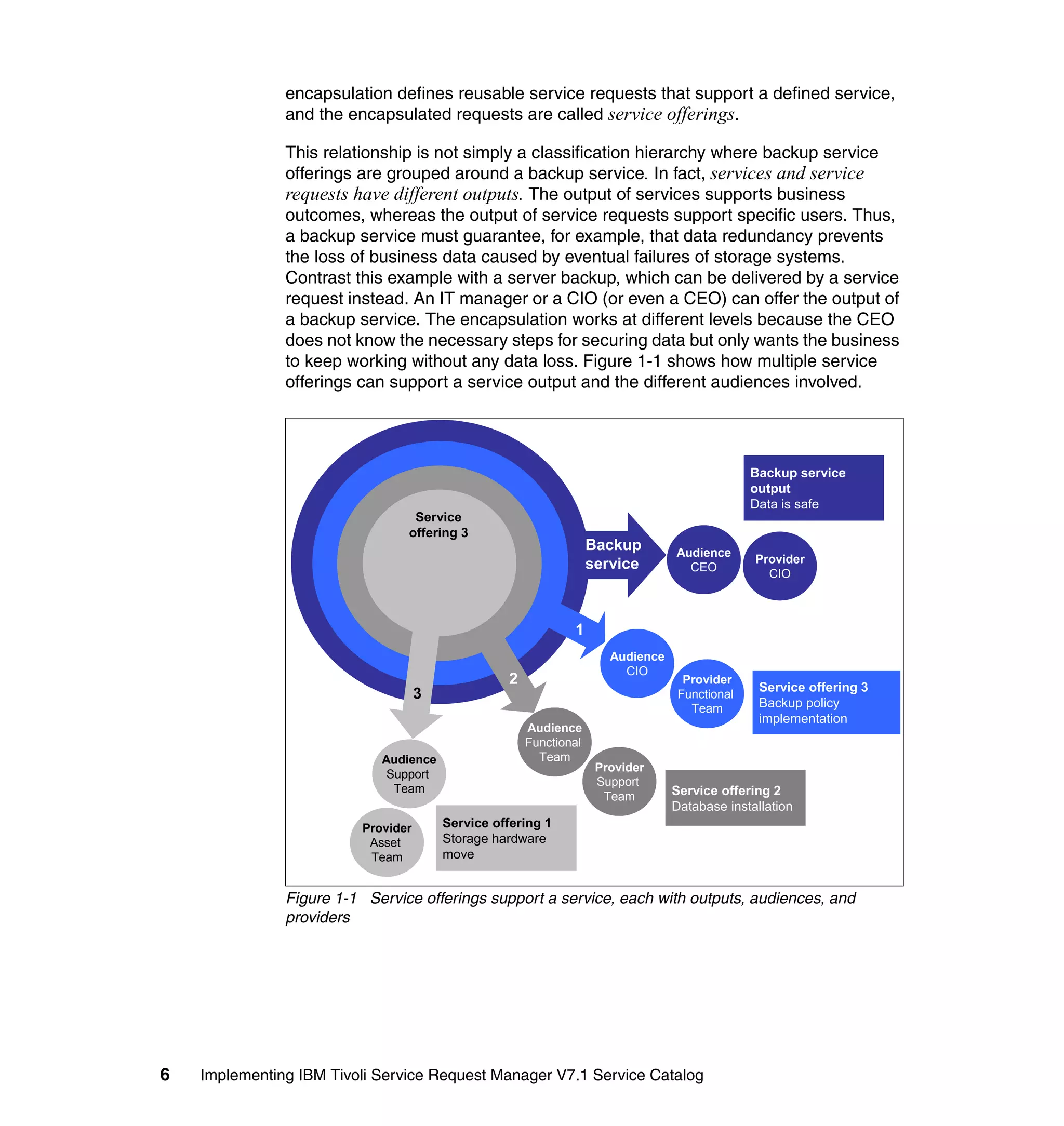
               to keep working without any data loss. Figure 1-1 shows how multiple service
               offerings can support a service output and the different audiences involved.


                                                                                               Backup service
                                                                                               output
                                                                                               Data is safe
                                 Service
                                offering 3
                                                                   Backup        Audience
                                                                   service                     Provider
                                                                                   CEO
                                                                                                 CIO


                                                              1
                                                                      Audience
                                                                        CIO
                                                  2                                Provider
                                                                                                Service offering 3
                                    3                                             Functional
                                                                                    Team        Backup policy
                                                                                                implementation
                                                      Audience
                                                      Functional
                            Audience                    Team
                                                                    Provider
                             Support
                                                                    Support
                              Team                                               Service offering 2
                                                                     Team
                                                                                 Database installation
                         Provider       Service offering 1
                          Asset         Storage hardware
                          Team          move


               Figure 1-1 Service offerings support a service, each with outputs, audiences, and
               providers


6   Implementing IBM Tivoli Service Request Manager V7.1 Service Catalog
In general, different simultaneous and sequential tasks are necessary to deliver
the rather complex output of securing data. Although the process of delivering
this offering may seem simple to clients who are aware of and receive the result,
in fact, a considerable number of steps are required, and different groups are
involved in achieving this output. Controlling the complexity of the “securing data”
mission can be challenging. Encapsulation defines boundaries for the required
elements that support this mission.

Every time an entity provides a means that facilitates the outcomes of another
business function, and risks or costs are transferred to the provider, a service is
being delivered. So why not define intelligently combined, reusable service
requests that ultimately support business outcomes? Or why not simply define
service requests that can be easily accessed by users so the requests can fulfill
their demands?

Reusable service offerings might have more controllable costs, more reliable
delivery, and higher quality standards due to best practice utilization. Moreover,
they encapsulate tasks, reducing complexity and transferring risks or costs to
“specialists.” When in charge of the “securing data” mission, CIOs can return to
the teams and request reusable service offerings rather than numerous and
poorly controlled tasks. These offerings are service requests with predefined
tasks and approval workflows, encapsulated to specific audiences such as
technical or nontechnical users or teams.

The IBM Tivoli Service Request Service Catalog module provides a foundation
for encapsulating services, linking them to specific SLAs, assets, tasks, and
service offerings. Each offering is also encapsulated by predefined workflows,
roles, approvals, and fulfillment methods. Key performance indicators (KPIs) and
reports, established at different levels of the organization, from execution
analysts to service managers, ensure the proper control and view of the
offerings, through user-specific interfaces.


                                      Chapter 1. Introduction to service concepts    7
Terminology and positioning: The Service Catalog module (covered in
                Chapter 2, “Introduction IBM Tivoli Service Catalog” on page 35) is part of IBM
                Tivoli Service Request Manager V7.1 and provides functionalities mainly
                related to ITIL Service Catalog Management, Service Level Management, and
                Request Fulfillment processes. However, the ITIL processes and the Service
                Catalog tool represent different entities and, in this book, the processes and
                the tool are differentiated by the spelling of the word catalog, using catalog
                whenever the reference is to the process and its related objects and using
                catalogue whenever the reference is to the tool.

                Defining this difference is significant because the Service Catalog is a
                framework for implementing processes and workflows that are described by
                the ITIL books. However, installing the Service Catalog does not mean ITIL
                processes are in place. ITIL is a set of best practices that must be
                implemented at different levels, from operational processes and managing to
                tools that can support the defined processes. In this chapter, we discuss best
                practices that are not executed in the tool, such as portfolio definitions. We
                recommend these best practices to better explore the Service Catalog
                functionalities as a service management instrument.


1.3 Service management
               Services, as value-driven entities, must be managed to ensure the fulfillment of
               client requirements. The set of organizational capabilities used to provide value
               to clients in the form of services is called service management.

               Service management is accomplished in concurrent interconnected levels, from
               enterprise strategy to the tracking of a single service offering. These levels work
               in analogous cycles of creation, design, implementation, operation, and
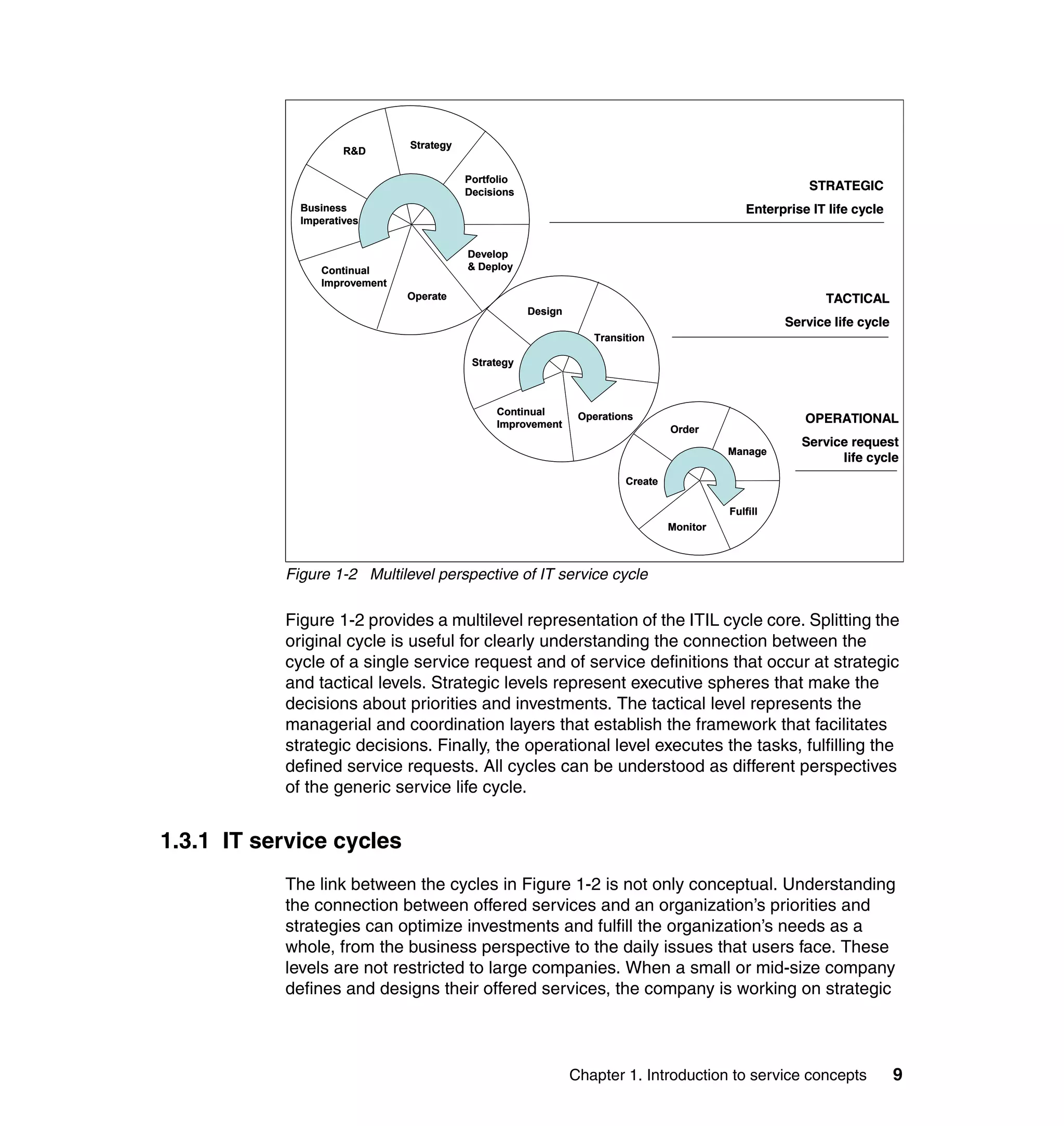
               monitoring (see Figure 1-2 on page 9).


8   Implementing IBM Tivoli Service Request Manager V7.1 Service Catalog
Strategy
                     R&D

                                         Portfolio
                                         Decisions
                                                                                                         STRATEGIC
             Business                                                                         Enterprise IT life cycle
             Imperatives


                                         Develop
                Continual                & Deploy
                Improvement
                              Operate                                                                      TACTICAL
                                                     Design
                                                                                                    Service life cycle
                                                                 Transition

                                          Strategy


                                              Continual        Operations
                                              Improvement                                               OPERATIONAL
                                                                                Order
                                                                                                       Service request
                                                                                          Manage
                                                                                                             life cycle
                                                                       Create

                                                                                          Fulfill
                                                                                Monitor


           Figure 1-2 Multilevel perspective of IT service cycle

           Figure 1-2 provides a multilevel representation of the ITIL cycle core. Splitting the
           original cycle is useful for clearly understanding the connection between the
           cycle of a single service request and of service definitions that occur at strategic
           and tactical levels. Strategic levels represent executive spheres that make the
           decisions about priorities and investments. The tactical level represents the
           managerial and coordination layers that establish the framework that facilitates
           strategic decisions. Finally, the operational level executes the tasks, fulfilling the
           defined service requests. All cycles can be understood as different perspectives
           of the generic service life cycle.


1.3.1 IT service cycles
           The link between the cycles in Figure 1-2 is not only conceptual. Understanding
           the connection between offered services and an organization’s priorities and
           strategies can optimize investments and fulfill the organization’s needs as a
           whole, from the business perspective to the daily issues that users face. These
           levels are not restricted to large companies. When a small or mid-size company
           defines and designs their offered services, the company is working on strategic


                                                              Chapter 1. Introduction to service concepts                9
and tactical levels. These services must be supported by service requests that
               carry out their own particular functional cycle when ordered by an user.

               For example, a company may decide to offer firewall support to its internal users,
               either due to high demand or to support a specific outcome such as protecting
               sensitive information. Offering firewall support to internal users does not involve a
               transaction but is a service that demands various transactional service offerings
               such as firewall rule modification or port configuration. From the decision to
               protect sensitive information to the fulfillment of a specific firewall rule
               modification request, a path connects the functional cycles. The path is
               composed of the continuous feeding of and feedback between specific
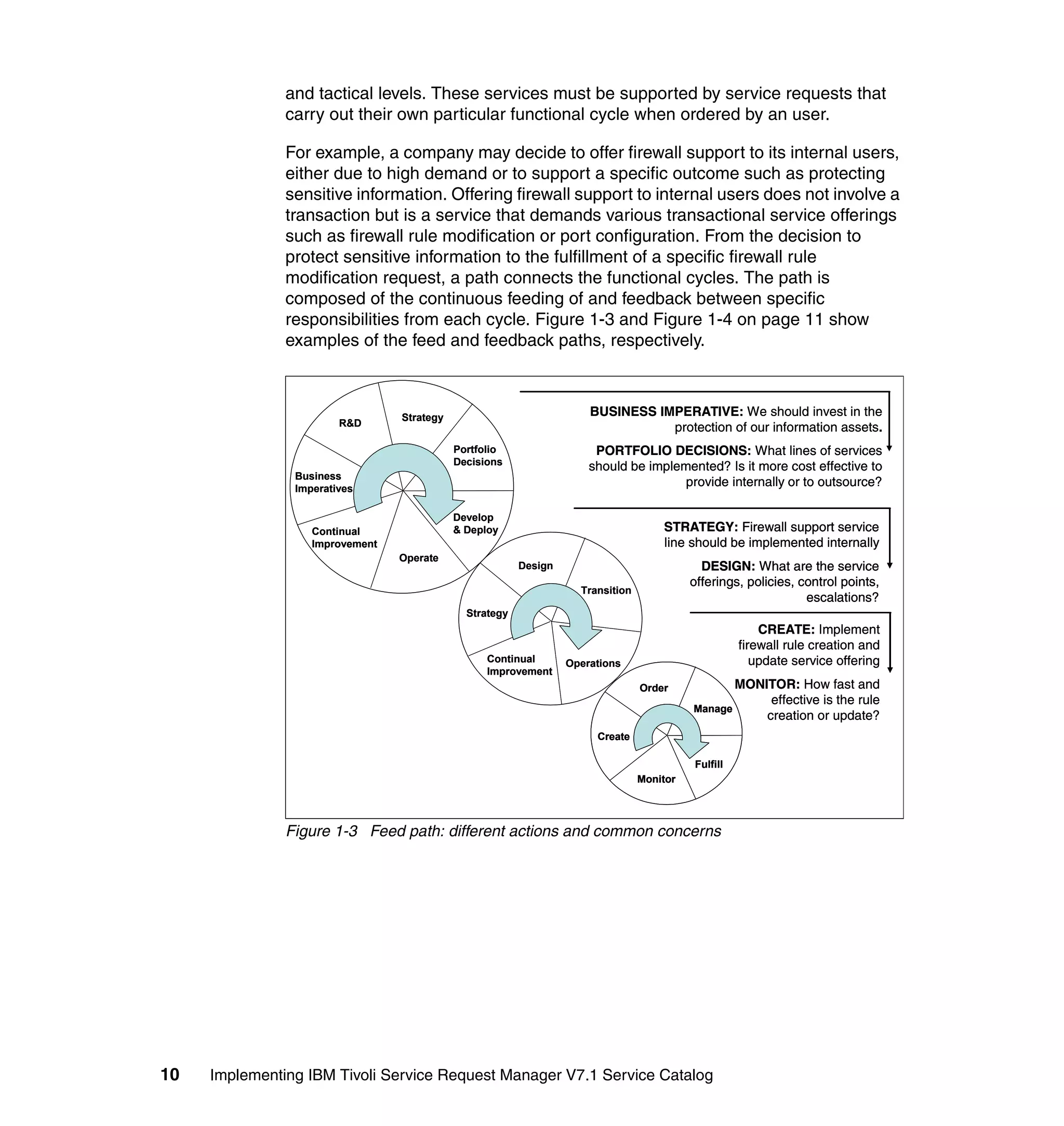
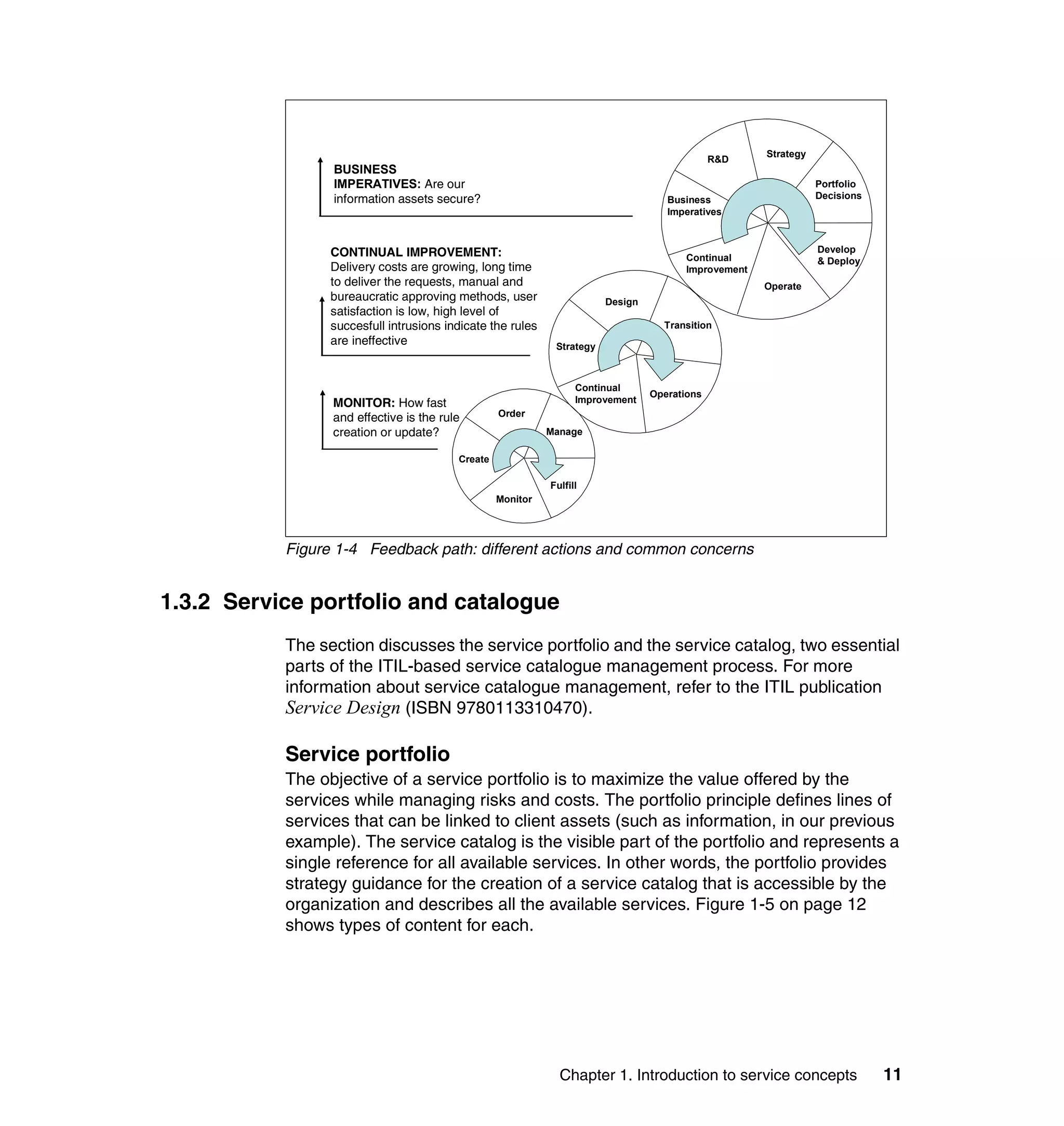
               responsibilities from each cycle. Figure 1-3 and Figure 1-4 on page 11 show
               examples of the feed and feedback paths, respectively.


                                 Strategy                             BUSINESS IMPERATIVE: We should invest in the
                        R&D                                                      protection of our information assets.
                                            Portfolio                  PORTFOLIO DECISIONS: What lines of services
                                            Decisions                 should be implemented? Is it more cost effective to
                Business
                Imperatives
                                                                                      provide internally or to outsource?

                                            Develop
                   Continual                & Deploy                                 STRATEGY: Firewall support service
                   Improvement                                                       line should be implemented internally
                                 Operate
                                                         Design                              DESIGN: What are the service
                                                                                           offerings, policies, control points,
                                                                    Transition
                                                                                                                 escalations?
                                              Strategy
                                                                                                         CREATE: Implement
                                                                                                     firewall rule creation and
                                                  Continual       Operations                            update service offering
                                                  Improvement
                                                                                 Order               MONITOR: How fast and
                                                                                                          effective is the rule
                                                                                           Manage
                                                                                                         creation or update?
                                                                       Create

                                                                                           Fulfill
                                                                                 Monitor


               Figure 1-3 Feed path: different actions and common concerns


10   Implementing IBM Tivoli Service Request Manager V7.1 Service Catalog
Strategy
                                                                                              R&D
                 BUSINESS
                 IMPERATIVES: Are our                                                                            Portfolio
                 information assets secure?                                         Business                     Decisions
                                                                                    Imperatives


                 CONTINUAL IMPROVEMENT:                                                                          Develop
                                                                                        Continual                & Deploy
                 Delivery costs are growing, long time                                  Improvement
                 to deliver the requests, manual and                                                  Operate
                 bureaucratic approving methods, user                   Design
                 satisfaction is low, high level of
                 succesfull intrusions indicate the rules                          Transition
                 are ineffective                             Strategy


                                                                  Continual
                                                                                 Operations
                 MONITOR: How fast                                Improvement
                 and effective is the rule        Order
                 creation or update?                        Manage

                                         Create

                                                            Fulfill
                                                  Monitor


           Figure 1-4 Feedback path: different actions and common concerns


1.3.2 Service portfolio and catalogue
           The section discusses the service portfolio and the service catalog, two essential
           parts of the ITIL-based service catalogue management process. For more
           information about service catalogue management, refer to the ITIL publication
           Service Design (ISBN 9780113310470).

           Service portfolio
           The objective of a service portfolio is to maximize the value offered by the
           services while managing risks and costs. The portfolio principle defines lines of
           services that can be linked to client assets (such as information, in our previous
           example). The service catalog is the visible part of the portfolio and represents a
           single reference for all available services. In other words, the portfolio provides
           strategy guidance for the creation of a service catalog that is accessible by the
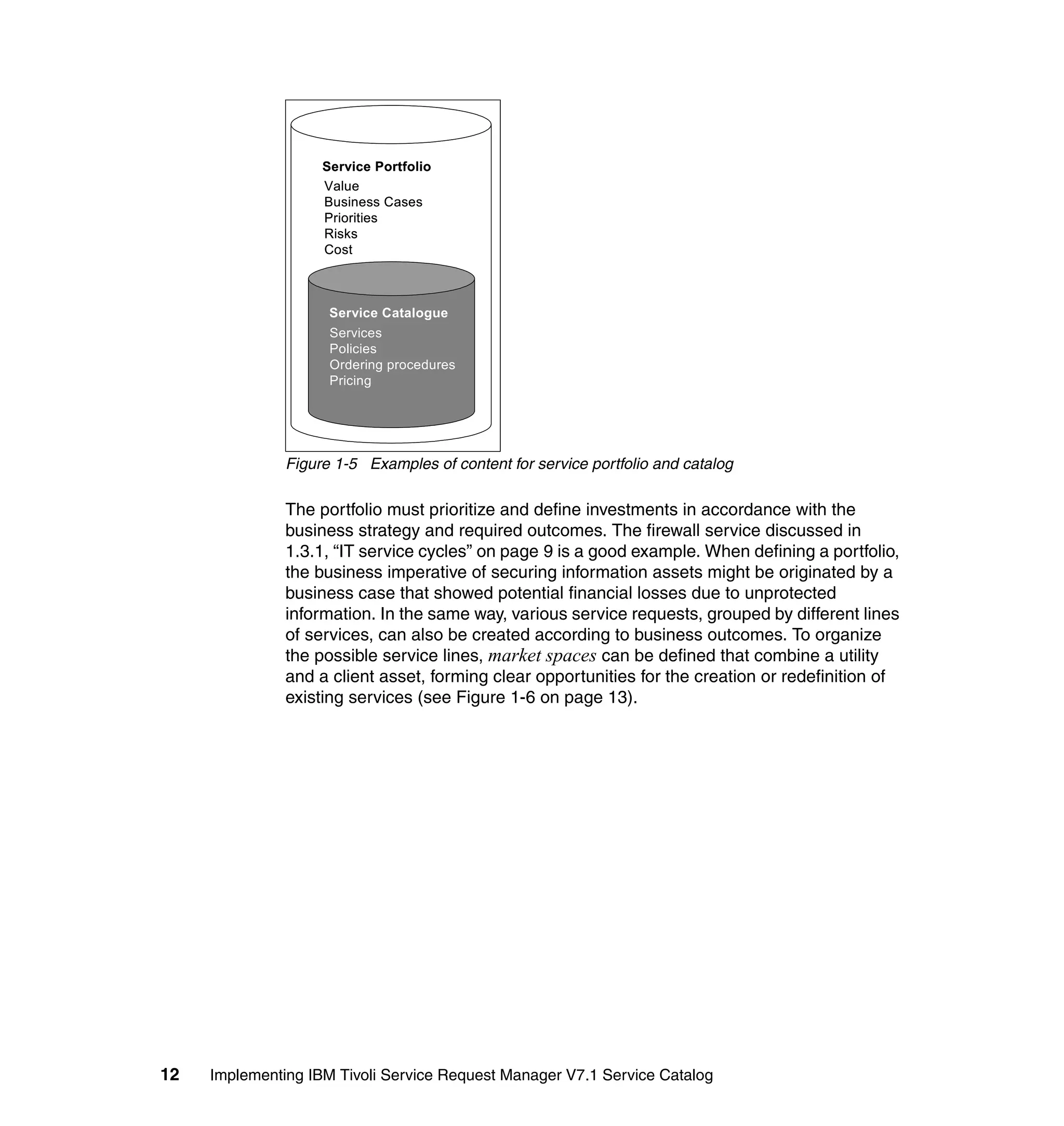
           organization and describes all the available services. Figure 1-5 on page 12
           shows types of content for each.


                                                              Chapter 1. Introduction to service concepts                    11
Service Portfolio
                    Value
                    Business Cases
                    Priorities
                    Risks
                    Cost


                     Service Catalogue
                     Services
                     Policies
                     Ordering procedures
                     Pricing


               Figure 1-5 Examples of content for service portfolio and catalog

               The portfolio must prioritize and define investments in accordance with the
               business strategy and required outcomes. The firewall service discussed in
               1.3.1, “IT service cycles” on page 9 is a good example. When defining a portfolio,
               the business imperative of securing information assets might be originated by a
               business case that showed potential financial losses due to unprotected
               information. In the same way, various service requests, grouped by different lines
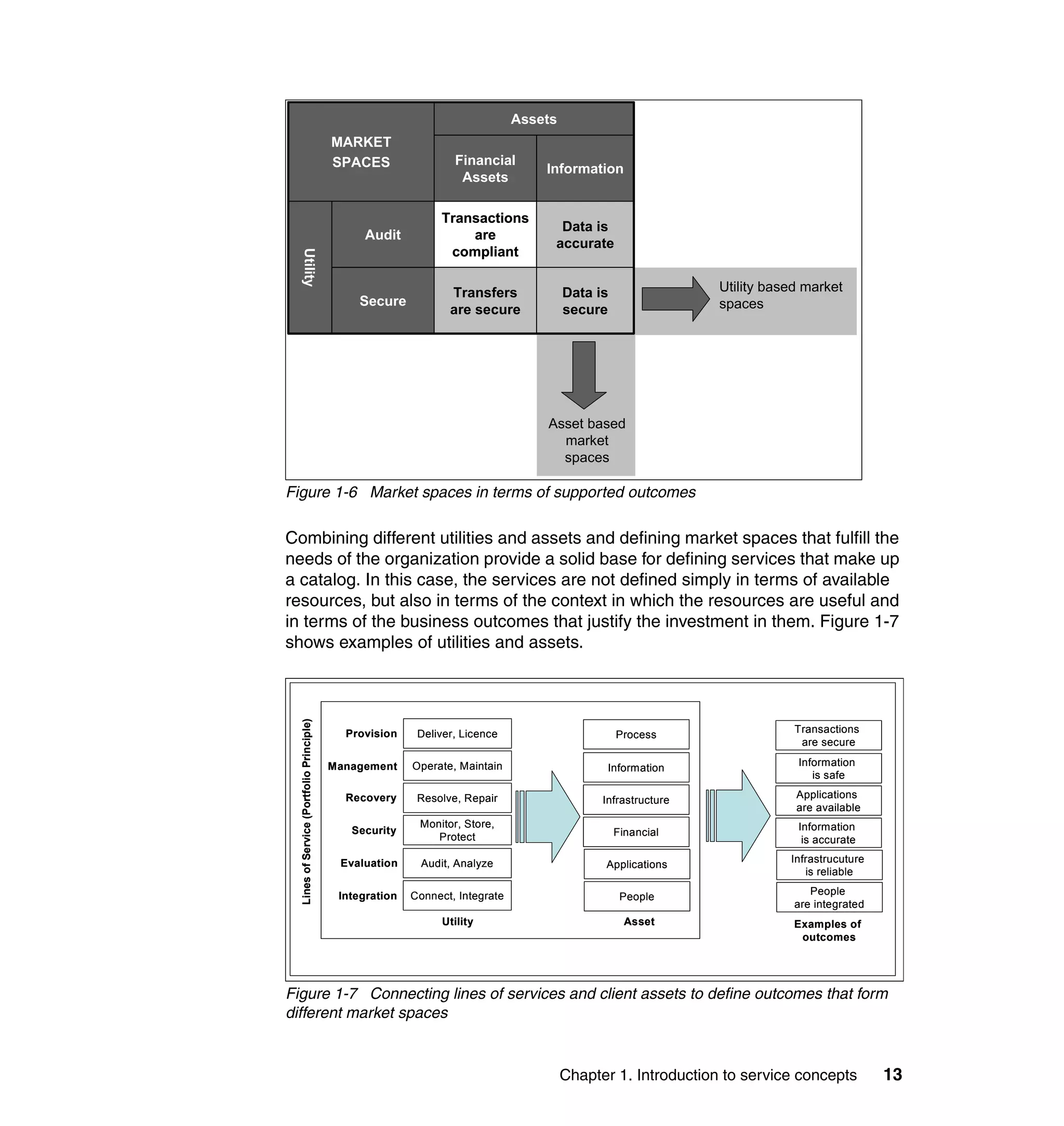
               of services, can also be created according to business outcomes. To organize
               the possible service lines, market spaces can be defined that combine a utility
               and a client asset, forming clear opportunities for the creation or redefinition of
               existing services (see Figure 1-6 on page 13).


12   Implementing IBM Tivoli Service Request Manager V7.1 Service Catalog
Assets
                                           MARKET
                                           SPACES                 Financial
                                                                                   Information
                                                                   Assets

                                                               Transactions
                                                                                     Data is
                                                Audit              are
                                                                                    accurate
                                                                compliant


      Utility
                                                                 Transfers              Data is                Utility based market
                                               Secure                                                          spaces
                                                                 are secure             secure


                                                                                   Asset based
                                                                                     market
                                                                                     spaces

Figure 1-6 Market spaces in terms of supported outcomes

Combining different utilities and assets and defining market spaces that fulfill the
needs of the organization provide a solid base for defining services that make up
a catalog. In this case, the services are not defined simply in terms of available
resources, but also in terms of the context in which the resources are useful and
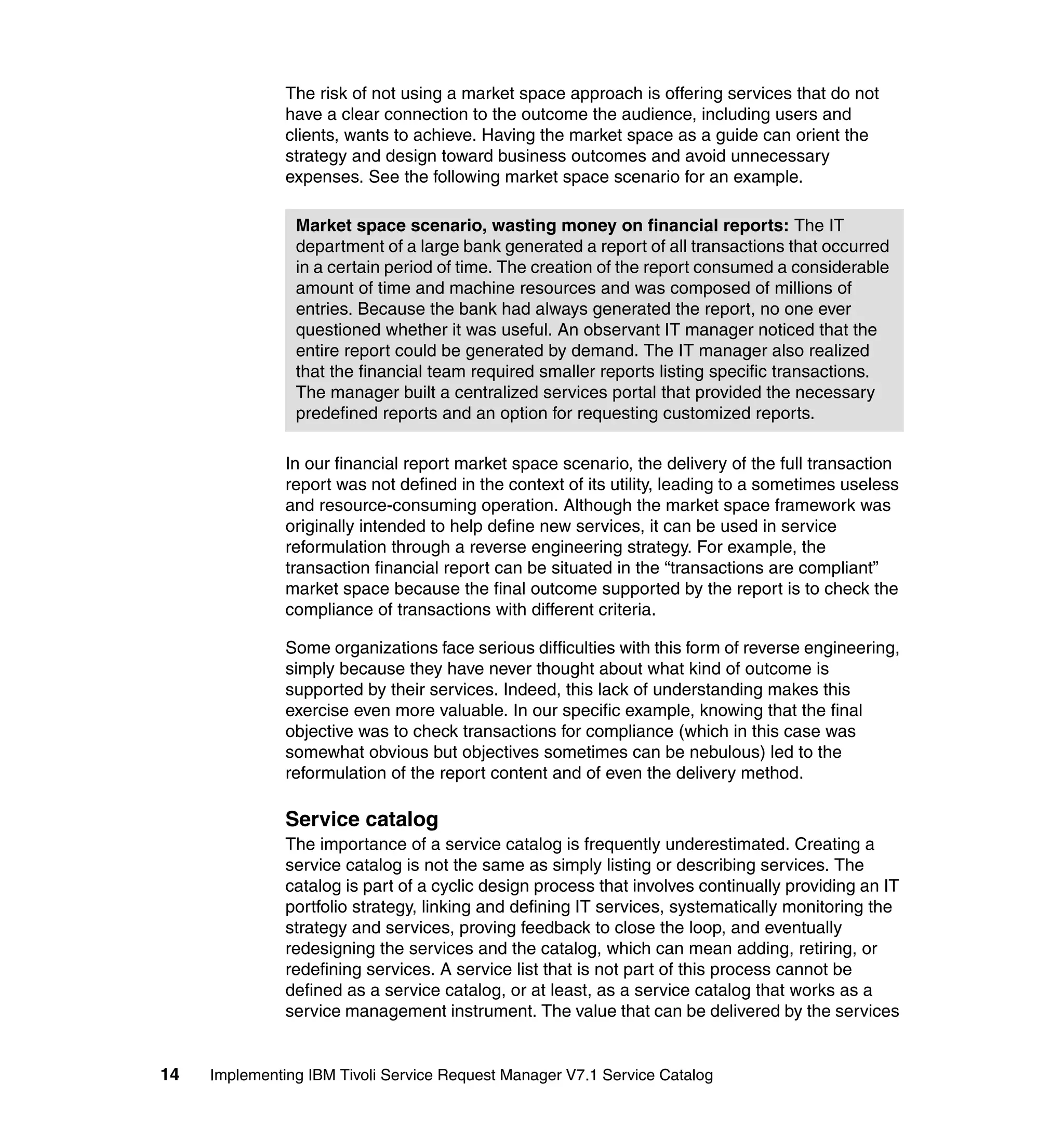
in terms of the business outcomes that justify the investment in them. Figure 1-7
shows examples of utilities and assets.
  Lines of Service (Portfolio Principle)


                                             Provision     Deliver, Licence                                                Transactions
                                                                                                  Process
                                                                                                                            are secure

                                           Management     Operate, Maintain                                                Information
                                                                                               Information
                                                                                                                              is safe

                                             Recovery      Resolve, Repair                                                 Applications
                                                                                              Infrastructure
                                                                                                                           are available
                                                           Monitor, Store,                                                 Information
                                              Security                                            Financial
                                                              Protect                                                       is accurate

                                            Evaluation      Audit, Analyze                                                Infrastrucuture
                                                                                              Applications
                                                                                                                             is reliable

                                            Integration   Connect, Integrate                                                  People
                                                                                                   People
                                                                                                                           are integrated
                                                                Utility                             Asset                  Examples of
                                                                                                                            outcomes


Figure 1-7 Connecting lines of services and client assets to define outcomes that form
different market spaces


                                                                                        Chapter 1. Introduction to service concepts         13
The risk of not using a market space approach is offering services that do not
               have a clear connection to the outcome the audience, including users and
               clients, wants to achieve. Having the market space as a guide can orient the
               strategy and design toward business outcomes and avoid unnecessary
               expenses. See the following market space scenario for an example.

                Market space scenario, wasting money on financial reports: The IT
                department of a large bank generated a report of all transactions that occurred
                in a certain period of time. The creation of the report consumed a considerable
                amount of time and machine resources and was composed of millions of
                entries. Because the bank had always generated the report, no one ever
                questioned whether it was useful. An observant IT manager noticed that the
                entire report could be generated by demand. The IT manager also realized
                that the financial team required smaller reports listing specific transactions.
                The manager built a centralized services portal that provided the necessary
                predefined reports and an option for requesting customized reports.

               In our financial report market space scenario, the delivery of the full transaction
               report was not defined in the context of its utility, leading to a sometimes useless
               and resource-consuming operation. Although the market space framework was
               originally intended to help define new services, it can be used in service
               reformulation through a reverse engineering strategy. For example, the
               transaction financial report can be situated in the “transactions are compliant”
               market space because the final outcome supported by the report is to check the
               compliance of transactions with different criteria.

               Some organizations face serious difficulties with this form of reverse engineering,
               simply because they have never thought about what kind of outcome is
               supported by their services. Indeed, this lack of understanding makes this
               exercise even more valuable. In our specific example, knowing that the final
               objective was to check transactions for compliance (which in this case was
               somewhat obvious but objectives sometimes can be nebulous) led to the
               reformulation of the report content and of even the delivery method.

               Service catalog
               The importance of a service catalog is frequently underestimated. Creating a
               service catalog is not the same as simply listing or describing services. The
               catalog is part of a cyclic design process that involves continually providing an IT
               portfolio strategy, linking and defining IT services, systematically monitoring the
               strategy and services, proving feedback to close the loop, and eventually
               redesigning the services and the catalog, which can mean adding, retiring, or
               redefining services. A service list that is not part of this process cannot be
               defined as a service catalog, or at least, as a service catalog that works as a
               service management instrument. The value that can be delivered by the services


14   Implementing IBM Tivoli Service Request Manager V7.1 Service Catalog
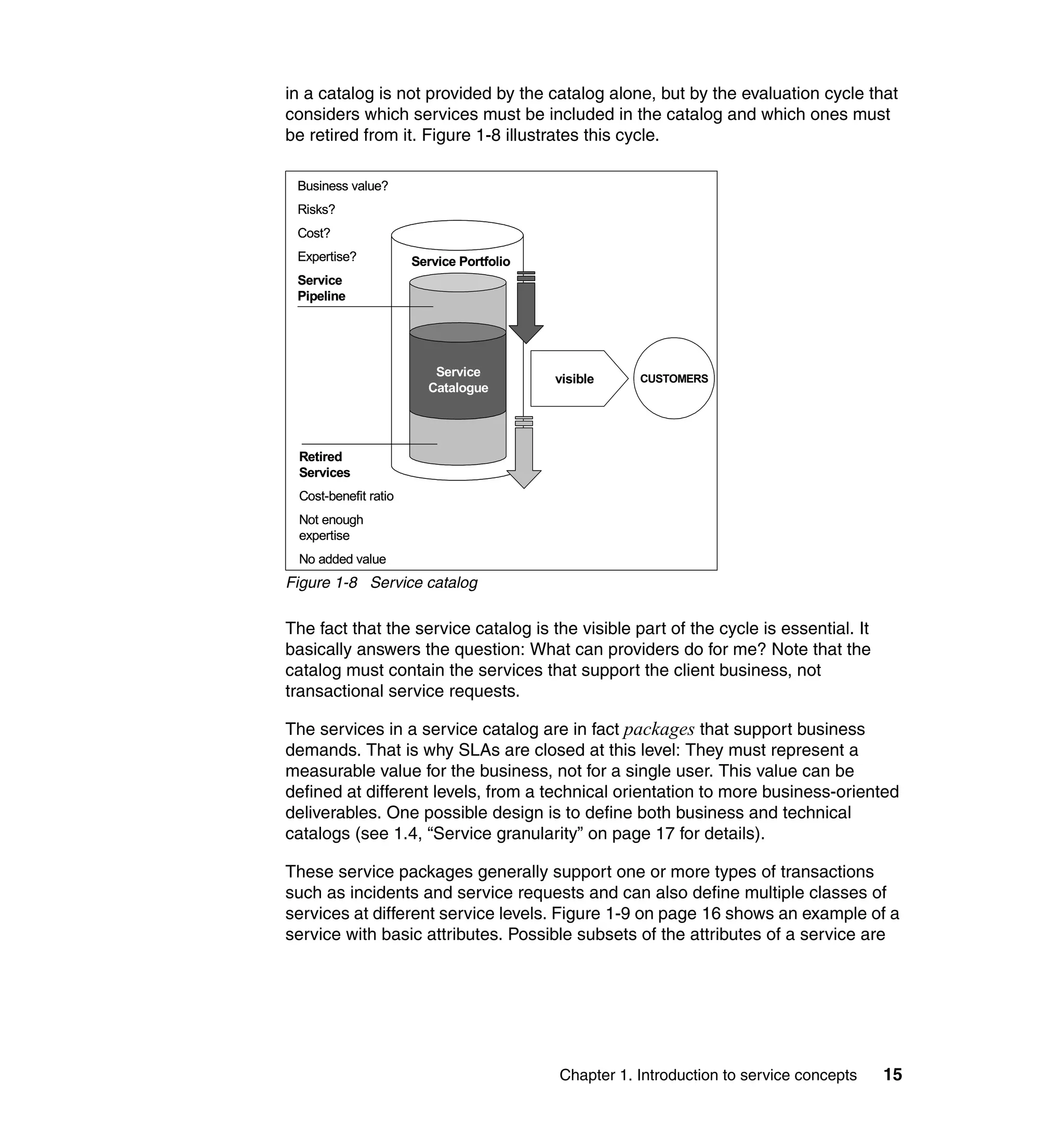
in a catalog is not provided by the catalog alone, but by the evaluation cycle that
considers which services must be included in the catalog and which ones must
be retired from it. Figure 1-8 illustrates this cycle.

 Business value?
 Risks?
 Cost?
 Expertise?           Service Portfolio
 Service
 Pipeline


                         Service
                                          visible    CUSTOMERS
                        Catalogue


 Retired
 Services
 Cost-benefit ratio
 Not enough
 expertise
 No added value
Figure 1-8 Service catalog

The fact that the service catalog is the visible part of the cycle is essential. It
basically answers the question: What can providers do for me? Note that the
catalog must contain the services that support the client business, not
transactional service requests.

The services in a service catalog are in fact packages that support business
demands. That is why SLAs are closed at this level: They must represent a
measurable value for the business, not for a single user. This value can be
defined at different levels, from a technical orientation to more business-oriented
deliverables. One possible design is to define both business and technical
catalogs (see 1.4, “Service granularity” on page 17 for details).

These service packages generally support one or more types of transactions
such as incidents and service requests and can also define multiple classes of
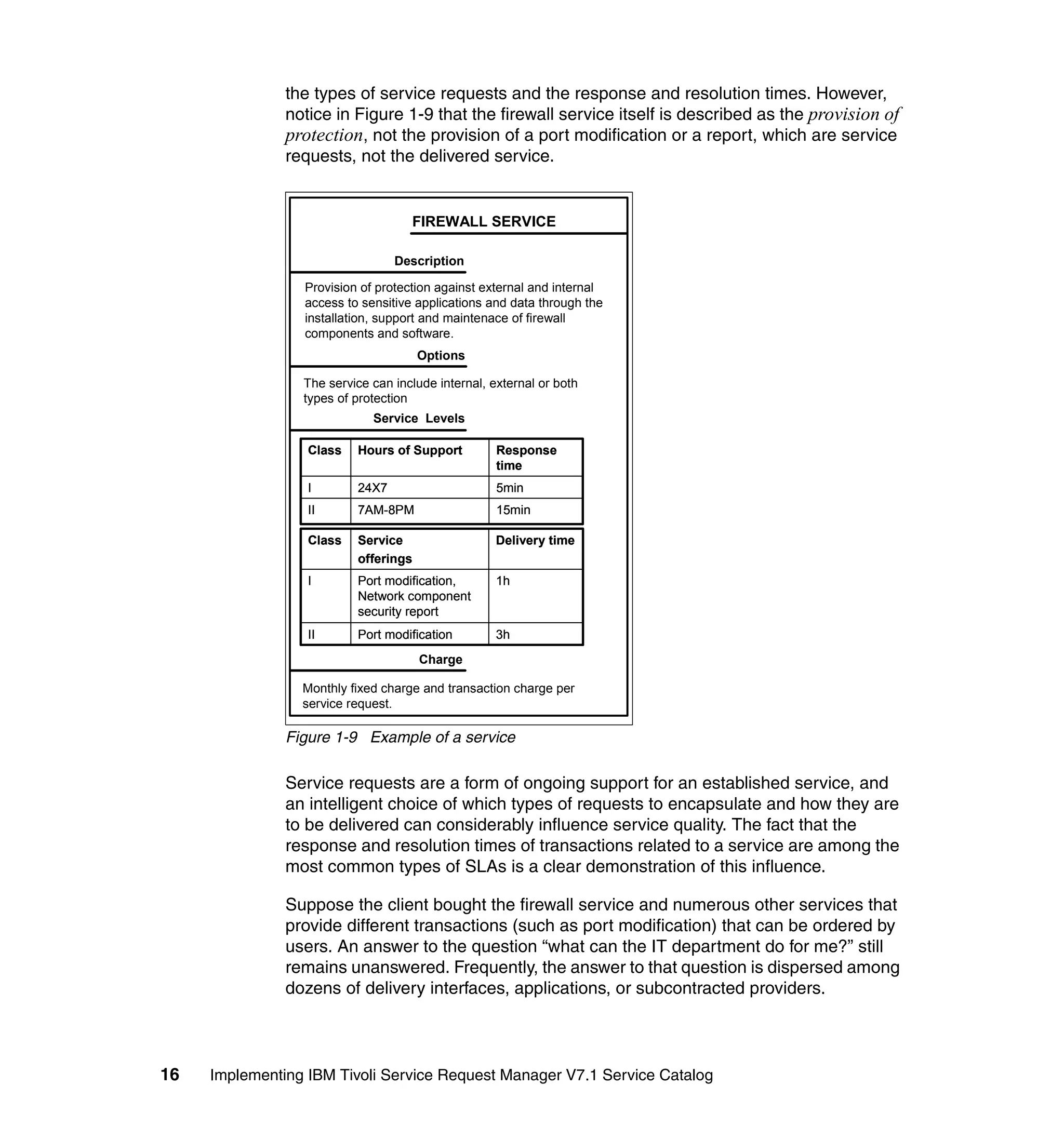
services at different service levels. Figure 1-9 on page 16 shows an example of a
service with basic attributes. Possible subsets of the attributes of a service are


                                          Chapter 1. Introduction to service concepts   15
the types of service requests and the response and resolution times. However,
               notice in Figure 1-9 that the firewall service itself is described as the provision of
               protection, not the provision of a port modification or a report, which are service
               requests, not the delivered service.


                                    FIREWALL SERVICE

                                 Description

                 Provision of protection against external and internal
                 access to sensitive applications and data through the
                 installation, support and maintenace of firewall
                 components and software.
                                      Options

                 The service can include internal, external or both
                 types of protection
                             Service Levels

                  Class   Hours of Support          Response
                                                    time
                  I       24X7                      5min
                  II      7AM-8PM                   15min

                  Class   Service                   Delivery time
                          offerings
                  I       Port modification,        1h
                          Network component
                          security report
                  II      Port modification         3h
                                      Charge

                 Monthly fixed charge and transaction charge per
                 service request.

               Figure 1-9 Example of a service

               Service requests are a form of ongoing support for an established service, and
               an intelligent choice of which types of requests to encapsulate and how they are
               to be delivered can considerably influence service quality. The fact that the
               response and resolution times of transactions related to a service are among the
               most common types of SLAs is a clear demonstration of this influence.

               Suppose the client bought the firewall service and numerous other services that
               provide different transactions (such as port modification) that can be ordered by
               users. An answer to the question “what can the IT department do for me?” still
               remains unanswered. Frequently, the answer to that question is dispersed among
               dozens of delivery interfaces, applications, or subcontracted providers.


16   Implementing IBM Tivoli Service Request Manager V7.1 Service Catalog
In some cases, even the provider does not know all the service requests that are
         being delivered. The latter case can easily lead to a point where it is impossible
         to control the delivery process of all requests or to understand why users are
         unsatisfied. In addition, the users do not know how to find the necessary services
         or what to expect from poorly defined (or encapsulated) service requests that are
         executed in different ways each time. The solution is to define a central service
         request catalog that is visible to the users and contains reusable, well-defined
         service offerings. Multiple-offering catalogs with specific offerings can also be
         defined for different audiences or user profiles.


1.4 Service granularity
         Service granularity specifies the element of the organization supported by the
         service. This specification is a guide to defining the necessary service offerings
         to support it, or if current offerings are already defined, the specification is a
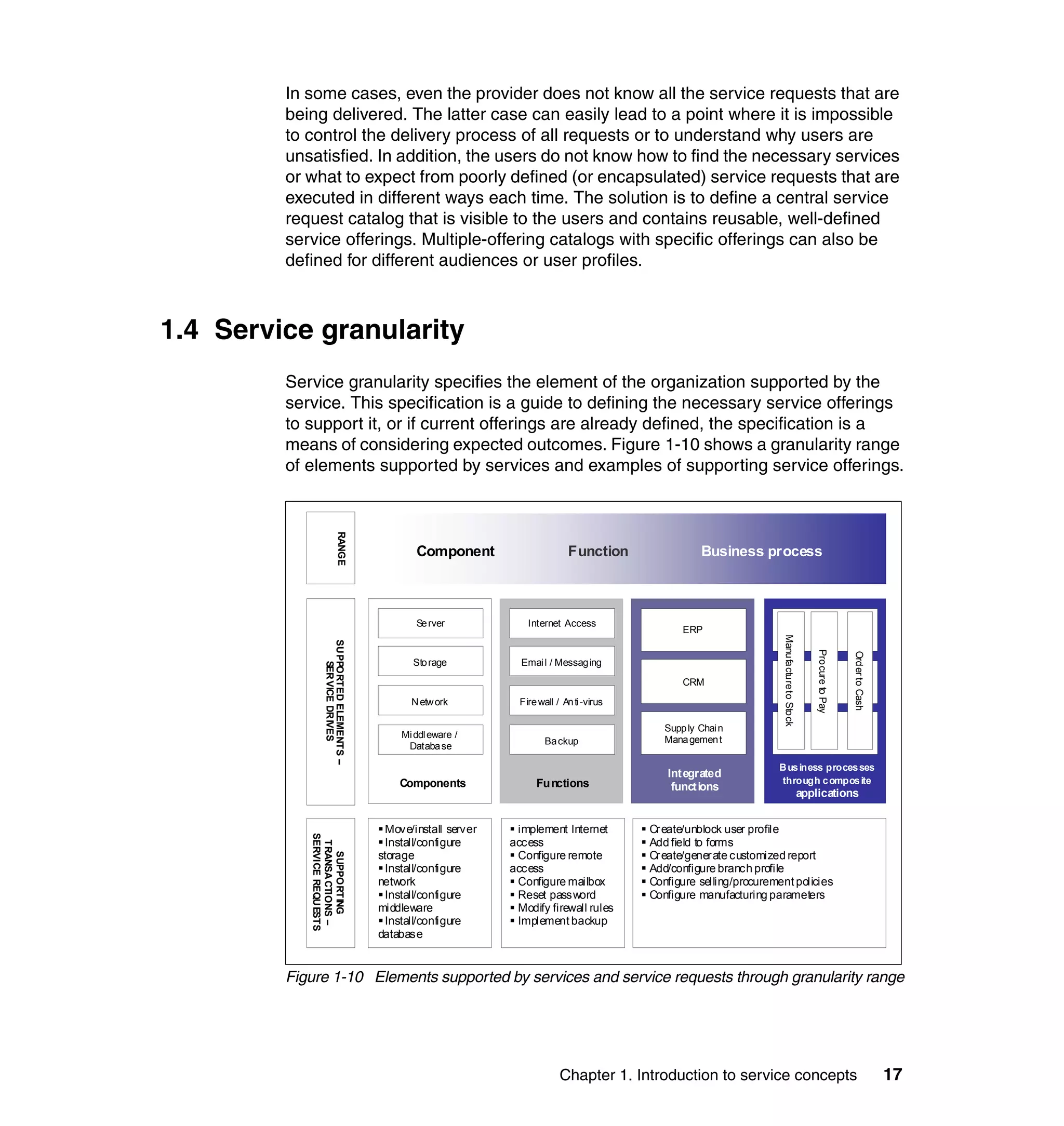
         means of considering expected outcomes. Figure 1-10 shows a granularity range
         of elements supported by services and examples of supporting service offerings.
                             RANGE


                                                 Component                      Function                 Business process


                                                 Se rver             Internet Access
                                                                                                     ERP


                                                                                                                         Manu fa ctu re to Sto ck
                  SU PPORTED ELEMENTS –


                                                                                                                                                        Pro cure to Pay


                                                                                                                                                                          Ord er to Cash
                                                 Sto rage          Emai l / Messag ing
                      SER VICE DR IVES


                                                                                                     CRM

                                                N etw ork          Fire wall / An ti -virus

                                                                                                 Supp ly Chai n
                                              Mi ddl eware /                                     Mana gemen t
                                               Databa se                  Ba ckup

                                                                                                                        B us iness proces ses
                                                                                                 Int egrated
                                              Components               Fu nctions                                       through c ompos ite
                                                                                                  funct ions
                                                                                                                                                    applications


                                           Move/install server    implement Internet          Cr eate/unblock user profile
            SERVICE REQU ESTS


                                           Install/configure     access                       Add field to forms
             TRANSA CTIONS –


                                          storage                 Configure remote            Cr eate/gener ate customized report
               SUPPORTING


                                           Install/configure     access                       Add/configure branch profile
                                          network                 Configure mailbox           Configure selling/procurement policies
                                           Install/configure      Reset password              Configure manufacturing parameters
                                          middleware              Modify firewall rules
                                           Install/configure      Implement backup
                                          database


         Figure 1-10 Elements supported by services and service requests through granularity range


                                                                              Chapter 1. Introduction to service concepts                                                                  17
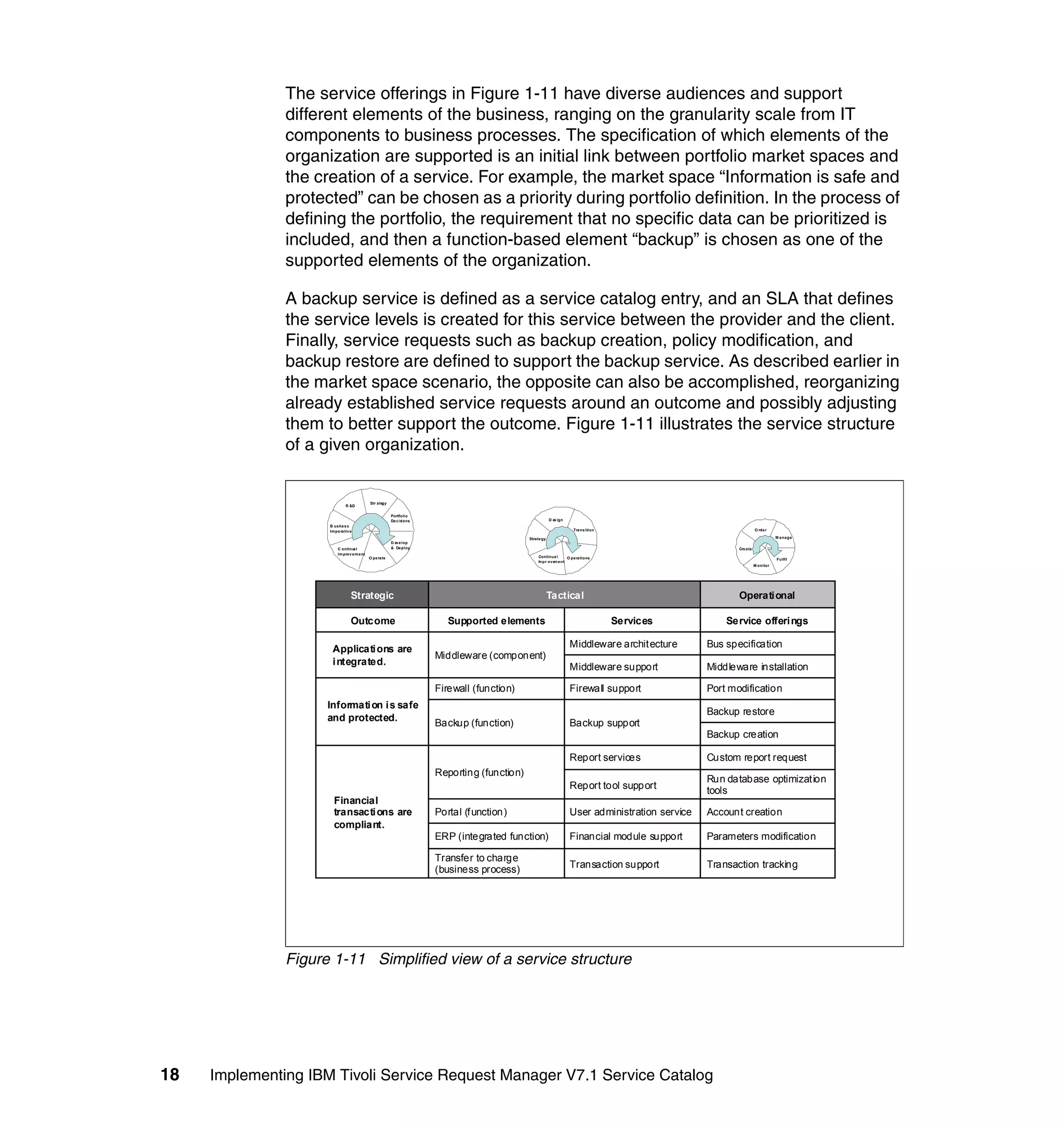
The service offerings in Figure 1-11 have diverse audiences and support
               different elements of the business, ranging on the granularity scale from IT
               components to business processes. The specification of which elements of the
               organization are supported is an initial link between portfolio market spaces and
               the creation of a service. For example, the market space “Information is safe and
               protected” can be chosen as a priority during portfolio definition. In the process of
               defining the portfolio, the requirement that no specific data can be prioritized is
               included, and then a function-based element “backup” is chosen as one of the
               supported elements of the organization.

               A backup service is defined as a service catalog entry, and an SLA that defines
               the service levels is created for this service between the provider and the client.
               Finally, service requests such as backup creation, policy modification, and
               backup restore are defined to support the backup service. As described earlier in
               the market space scenario, the opposite can also be accomplished, reorganizing
               already established service requests around an outcome and possibly adjusting
               them to better support the outcome. Figure 1-11 illustrates the service structure
               of a given organization.


                                             Str ategy
                               R &D

                                                          Portfolio
                                                          De cisions                                      D e ign
                                                                                                             s
                     B us i e s s
                          n
                     Im pe ra tiv e s                                                                                Tra ns ition                                  O rde r

                                                                                              Strate gy                                                                       M a na ge
                                                          D e lop
                                                             ve
                          C ontinu l
                                   a                      & De ploy                                                                                      Cre ate
                          Im prov e m e nt
                                             O pe ra te                                            Continua l    O pe ra tions                                                Fulfil
                                                                                                                                                                                   l
                                                                                                   m
                                                                                                   I pr ove e nt
                                                                                                           m
                                                                                                                                                                   M onitor


                                  Strategic                                                               Tactical                                       Operati onal

                                  Outcome                                 Supported elements                                        Services          Service offeri ngs

                                                                                                                    Middleware archit ecture      Bus specification
                      Applicati ons are
                                                                       Middleware (component)
                      i ntegrated.
                                                                                                                    Middleware support            Middleware installation

                                                                       Firewall (function)                          Firewall support              Port modification
                     Informati on i s safe
                                                                                                                                                  Backup restore
                     and protected.
                                                                       Backup (function)                            Backup support
                                                                                                                                                  Backup creation

                                                                                                                    Report services               Custom report request
                                                                       Reporting (function)
                                                                                                                                                  Run database optimizat ion
                                                                                                                    Report tool support           tools
                       Financial
                       transacti ons are                               Portal (f unction)                           User administration service   Account creation
                       compliant.
                                                                       ERP (integrated function)                    Financial module support      Parameters modification

                                                                       Transfer to charge
                                                                                                                    Transaction support           Transaction tracking
                                                                       (business process)


               Figure 1-11 Simplified view of a service structure


18   Implementing IBM Tivoli Service Request Manager V7.1 Service Catalog
Granularity is an essential part of the service definition because it structures how
the client views the IT department and everything it offers to the organization.
Defining a service based on an element that supports a component is, from the
client viewpoint, different from defining a service that supports a function or even
a business process. An ERP (enterprise resource planning) support service is
closer to the business compared to middleware or operational system support,
and the service design role is to balance the level on which the services can be
defined. In Figure 1-11 on page 18, the designer can choose to support a
“Reporting function” and group together technical offerings (such as “Run
database optimization tools”) and more business-oriented offerings (such as
fulfill “Custom report request”). Another possibility is that the designer can define
the report tool as a supported element and define technical services to support it.
The definition of the supported elements drives the nature of potential services
and ultimately the service offerings.

Granularity has serious implications for service management because it
determines the object, or service, on which SLAs are applied and managed for
continual improvement. For example, managing middleware support for continual
service improvement is a different matter than managing an Internet access
function, with different key performance indicators (KPIs) and client needs.
Service requests are also defined with the purpose of establishing the granularity
of the service, ranging from technical-oriented to business-oriented transactions.
Moreover, linking services and service requests is not a classification but a
relationship.

Classifications
A classification can be used to define a hierarchy for service offerings and
expose them to users in an offering catalog, but this hierarchy is usually only a
view or grouping, not a relationship for managing services. Managing demands a
link to services and client requirements. For example, the relationship between
service offerings and services does not have to follow the internal structure of the
IT department. If an Internet access service defines an SLA for the time to deliver
a user profile-creation service request, the Internet access service and the SLA
can be linked. They can be linked even if the department that provides the
infrastructure of the Internet access is not the same as the one that modifies user
profiles. This relationship controls how fast the user profile is created and how it
affects the SLAs of the Internet access service. A discussion of relationships is
provided in 1.5.1, “Designing services” on page 21.

Do not be tempted to create services or even service offerings based only on the
needs of a specific team. Services package what is considered of value to the
business, even if tasks from different teams are demanded. The encapsulation of
tasks in service offerings, the definition of workflows, and linkages to services
through relationships help advance this mission. Reusable technical service
requests can be an effective way to control the fulfillment process, making it more


                                     Chapter 1. Introduction to service concepts   19
agile or reliable through predefined job plans according to technical best
               practices. Alternatively, nontechnical service requests can automate approval
               workflows for common user demands or even critical business needs that are
               locked in bureaucratic bottlenecks.

               Best practices for designing a CMDB
               Relationships are an important instrument in any service management system.
               They are generally established between configuration items (CIs) and between
               CIs and other objects such as incidents, changes, service offerings, and
               problems. CIs are components that define infrastructure configurations that must
               be controlled and audited by the change management process. The relationships
               are used to evaluate impacts and retrieve information, keeping a record of
               infrastructure snapshots. You can use the IBM Tivoli Change and Configuration
               Management Database (CCMDB) V7.1 product to discover infrastructure
               components and their dependencies, create CIs and relationships, and control
               eventual changes through their change management module. This product is
               based on the same process foundation of Service Request Manager and can be
               seamlessly integrated.

               The IBM Tivoli Service Request Manager Service Catalog module provides
               predefined objects that can be related (such as services and service offerings)
               and also a configuration management foundation to define and establish
               relationships to and between CIs. Note, however, that the module is not capable
               of making discoveries, nor does it have a change management capability.
               Therefore, if the Service Catalog is implemented without CCMDB V7.1, you have
               to manually define CIs and assets, and they must be under the control of a
               change process that is executed outside the module, either by a system or by
               manual procedures.

               For environments that are not controlled by a configuration management tool,
               you can use the Service Catalog module to create initial CIs to define
               relationships between IT components or between IT components and
               specification documents, SLAs, and services. In scenarios that demand these
               controls, creating CIs can be an early step toward the design and further
               implementation of a CMDB (configuration management database). The
               backup-creation offering described in 1.5.1, “Designing services” on page 21 is a
               possible scenario. Remember, however, that the manual or external
               implementation of a change management process is still required and might be
               impracticable in environments that demand complex relationships and strict
               controls over defined CIs. For a structured and precisely maintained CMDB
               implementation, we recommend Tivoli CCMDB V7.1.

               See IBM Tivoli CCMDB Implementation Recommendations, SG24-7567, for
               details.


20   Implementing IBM Tivoli Service Request Manager V7.1 Service Catalog
1.5 Service complexity
           If granularity is the what, the complexity is the how. The complexity dimension
           deals directly with design, implementation, and tracking issues and is addressed
           in the step that follows the process of defining granularity. We can summarize the
           service encapsulation process as the attempt to meet the client’s needs and, at
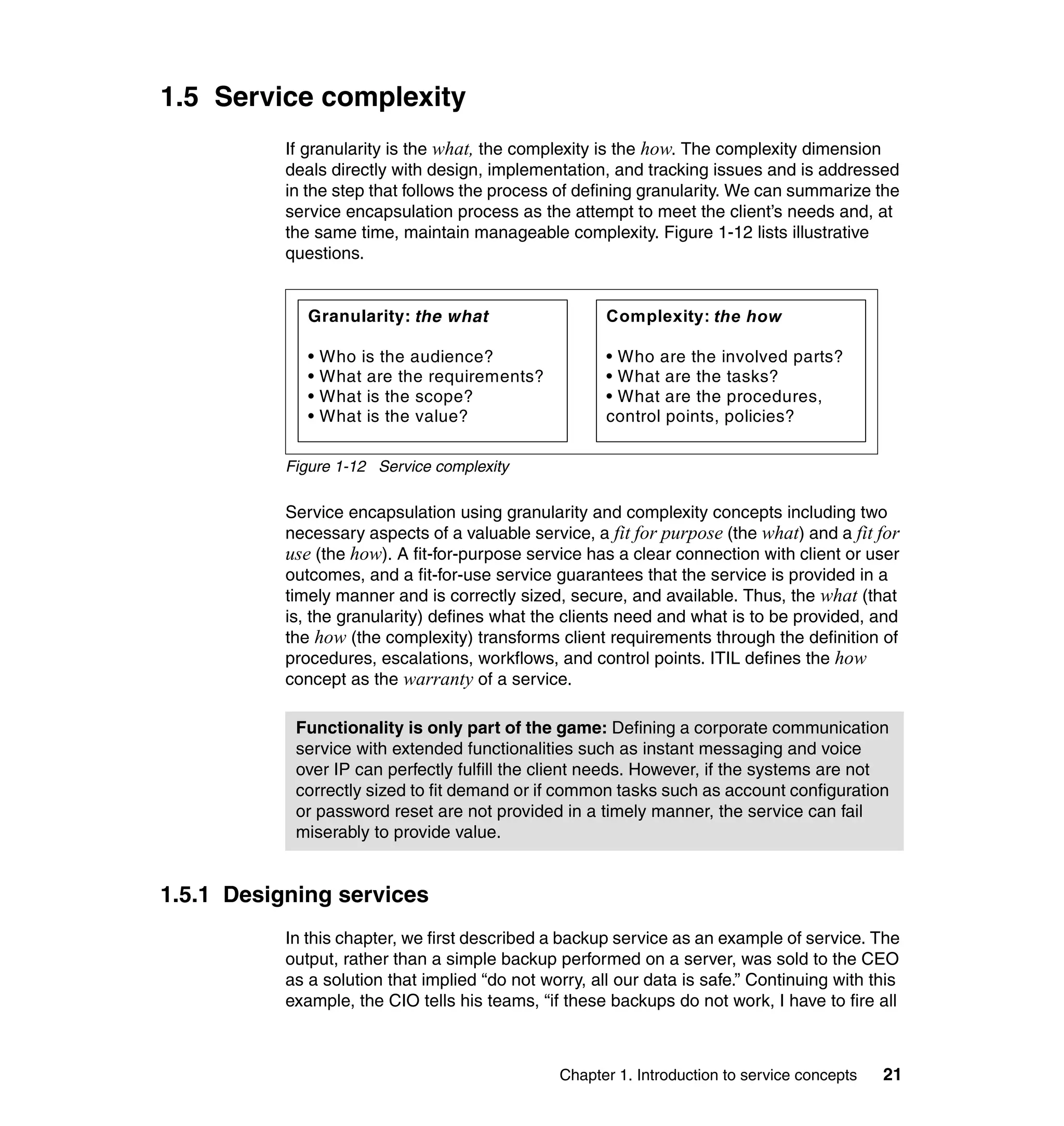
           the same time, maintain manageable complexity. Figure 1-12 lists illustrative
           questions.


              Granularity: the what                    Complexity: the how

              •   Who is the audience?                 • Who are the involved parts?
              •   What are the requirements?           • What are the tasks?
              •   What is the scope?                   • What are the procedures,
              •   What is the value?                   control points, policies?

           Figure 1-12 Service complexity

           Service encapsulation using granularity and complexity concepts including two
           necessary aspects of a valuable service, a fit for purpose (the what) and a fit for
           use (the how). A fit-for-purpose service has a clear connection with client or user
           outcomes, and a fit-for-use service guarantees that the service is provided in a
           timely manner and is correctly sized, secure, and available. Thus, the what (that
           is, the granularity) defines what the clients need and what is to be provided, and
           the how (the complexity) transforms client requirements through the definition of
           procedures, escalations, workflows, and control points. ITIL defines the how
           concept as the warranty of a service.

            Functionality is only part of the game: Defining a corporate communication
            service with extended functionalities such as instant messaging and voice
            over IP can perfectly fulfill the client needs. However, if the systems are not
            correctly sized to fit demand or if common tasks such as account configuration
            or password reset are not provided in a timely manner, the service can fail
            miserably to provide value.


1.5.1 Designing services
           In this chapter, we first described a backup service as an example of service. The
           output, rather than a simple backup performed on a server, was sold to the CEO
           as a solution that implied “do not worry, all our data is safe.” Continuing with this
           example, the CIO tells his teams, “if these backups do not work, I have to fire all


                                                Chapter 1. Introduction to service concepts   21
of you.” Before any one has to be fired, a smart Service Designer defines service
               offerings that support the backup service, making it reliable and fulfilling the
               business need of securing the data.

               Service definition
               Services must be defined in terms of value. Although value cannot be fully
               translated into numbers, defining SLAs is a good practice to set measurable
               targets for the service. The service conditions, constraints, and SLAs in a service
               catalog are usually a primary guide to defining the proper offerings that support
               it. These offerings encapsulate tasks providing specific outputs for external or
               internal users. However, additional controls and specific processes, systems, and
               resources are necessary to fulfilling a service to its full extent. The defined
               service offerings can serve as reusable components to deliver user demands, or
               the offerings can be combined to deliver macro-objectives, which are not the sole
               components of a service.

               It is important to ask ourselves, to whom are our offerings being provided and
               what offerings are we providing? Offerings are created to facilitate user access,
               to define delivery standards, and to track the fulfillment steps and quality of the
               delivery. The primary guide for answering our two questions is a supported
               service. SLAs, because of their tangible nature, are generally a direct source.
               Ultimately, service offerings are reusable ways to obtain the necessary
               components for providing the final output of an internal or external service (see
               Figure 1-1 on page 6).

               Sometimes, a clear link between an offering and a service is lacking, for
               example, an account creation offering. The service request itself seems to be
               simply an account creation, and no business value or business outcomes can be
               derived from it. However, if an offering, even a simple one, has no business value
               and no connection with any business outcome, then it simply should not exist. An
               account creation in fact supports a user administration service or an
               application-specific service that has to support the business in some way.

               Figure 1-8 on page 15 shows the portfolio and catalog cycle with a way in and a
               way out of the catalog. Both ways are the consequence of a constant evaluation
               of the kind of value provided by the services. If a service provides no value,
               keeping it in the catalog is a waste of resources. However, a service can be
               improved, and a significant part of an evaluation is to define how to improve it.
               The evaluation of the service offerings that are linked to a service must be part of
               this continual improvement cycle (see the example in Figure 1-4 on page 11).


22   Implementing IBM Tivoli Service Request Manager V7.1 Service Catalog
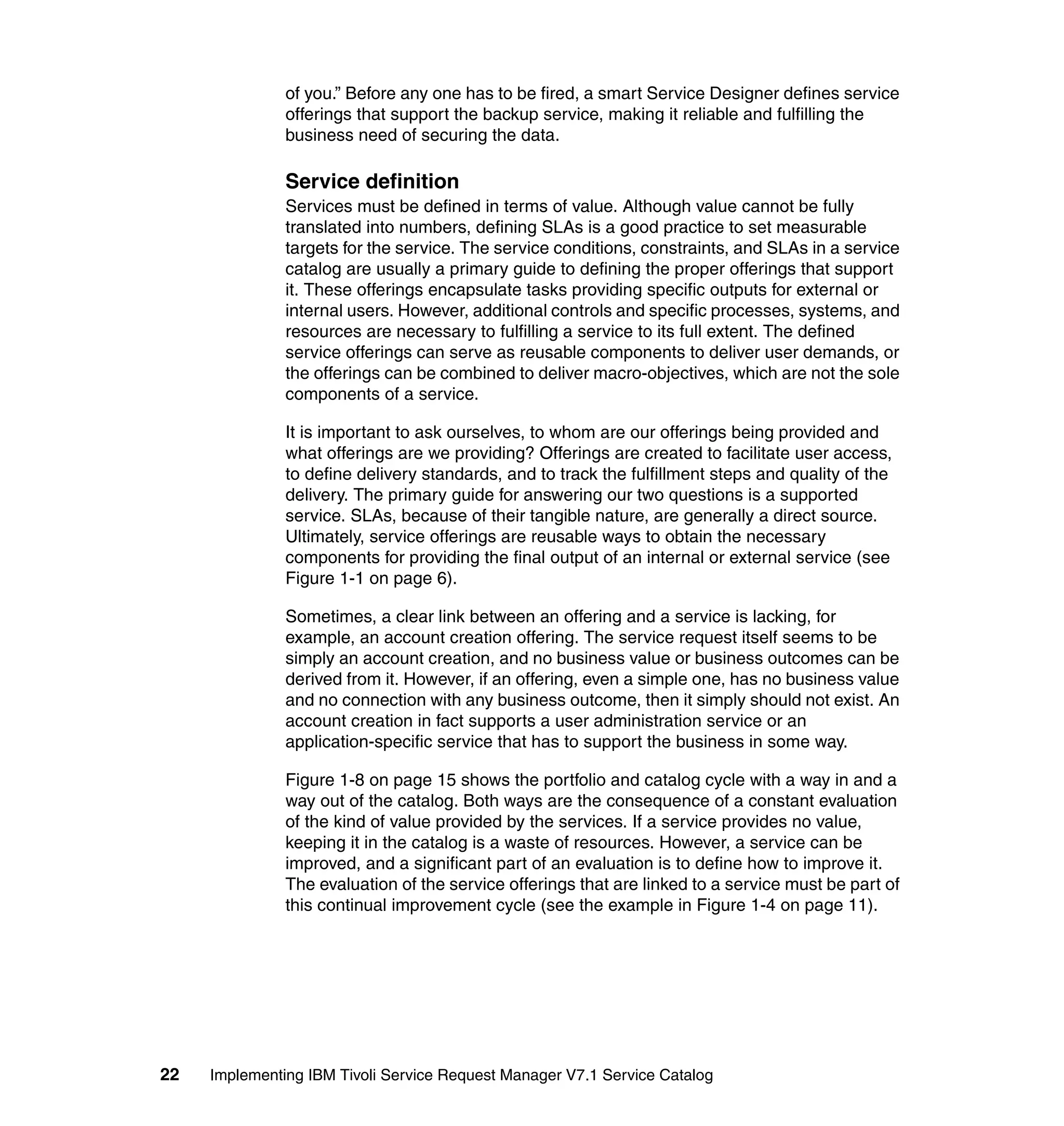
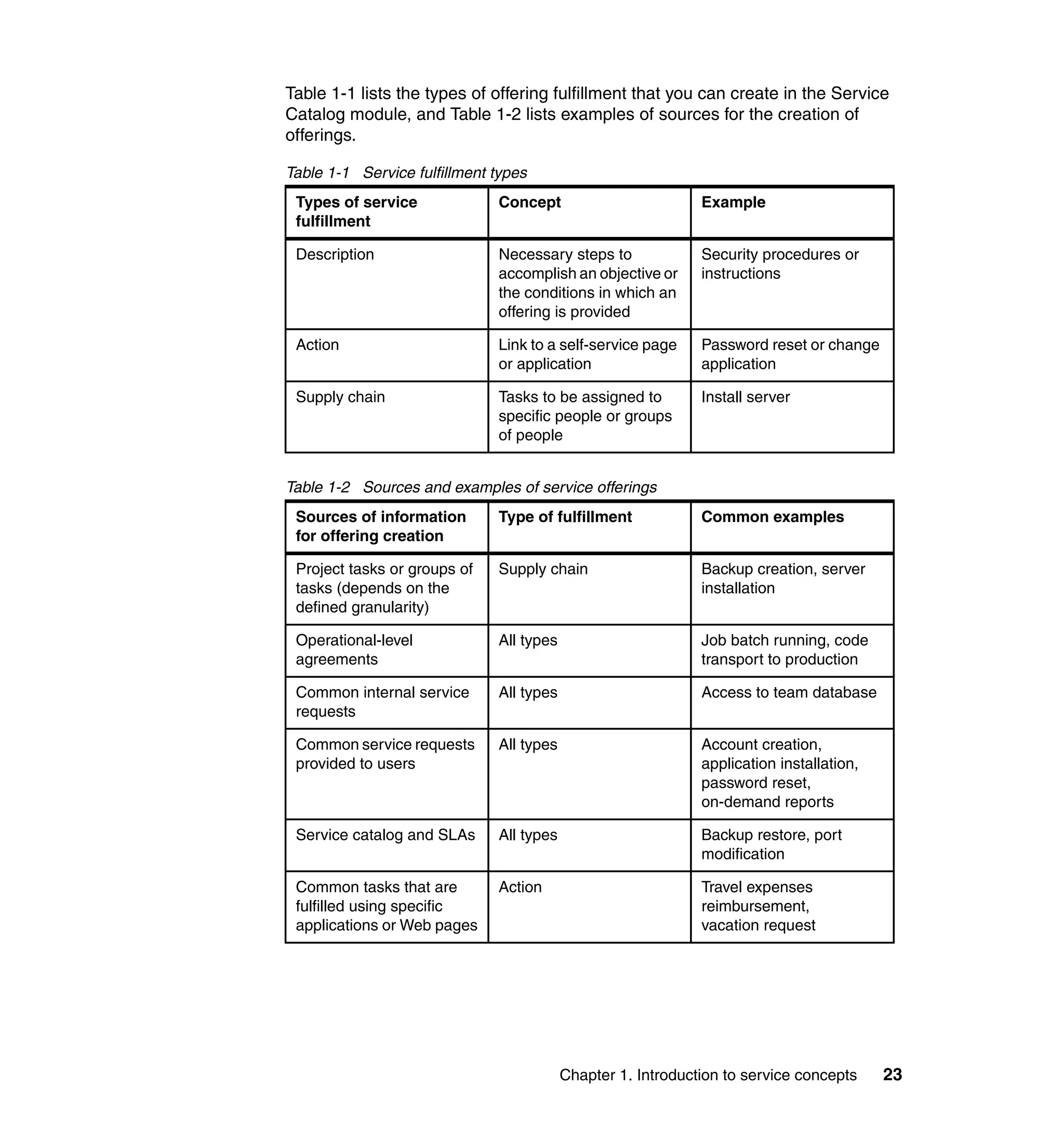
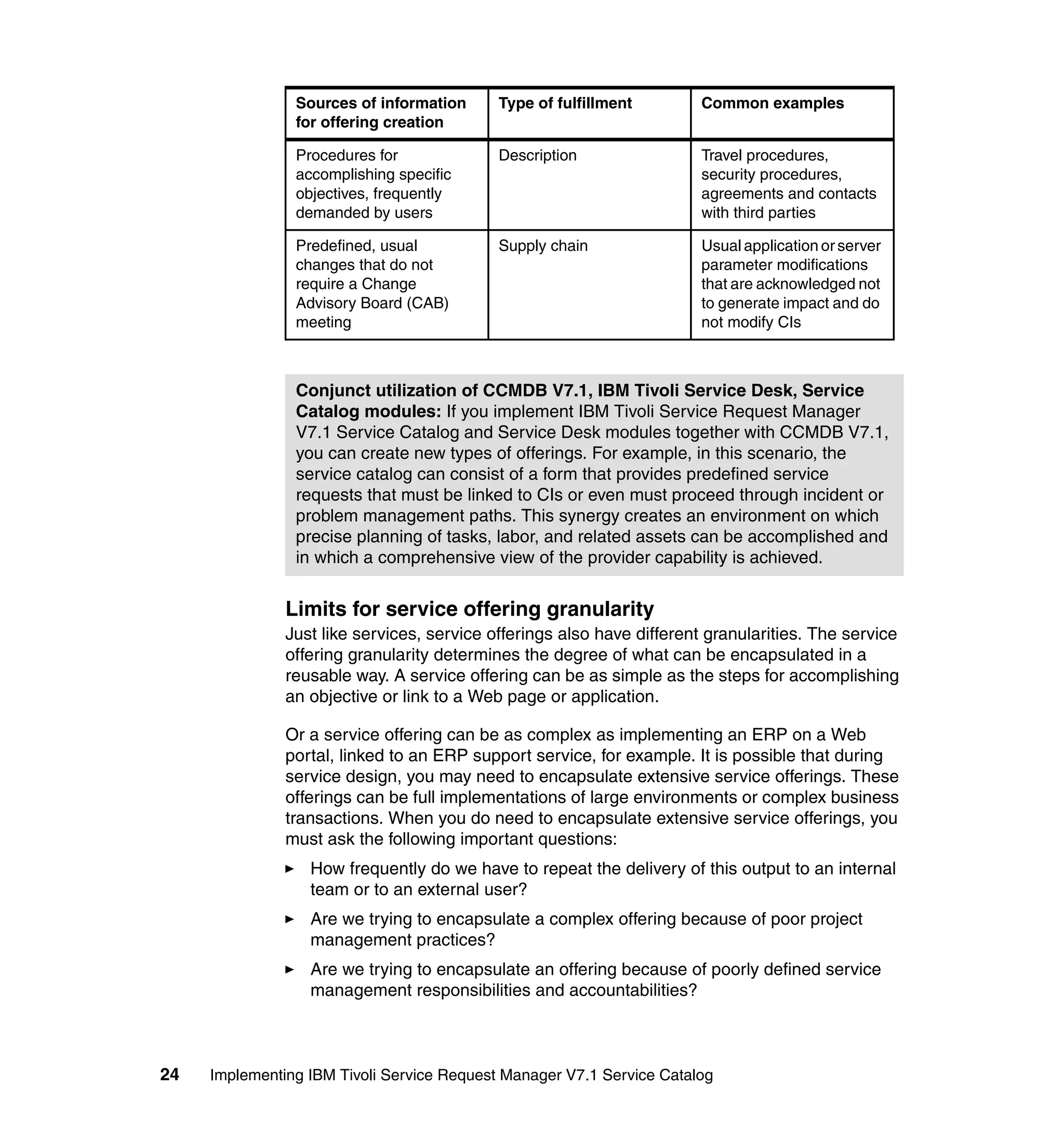
Table 1-1 lists the types of offering fulfillment that you can create in the Service
Catalog module, and Table 1-2 lists examples of sources for the creation of
offerings.

Table 1-1 Service fulfillment types
 Types of service             Concept                         Example
 fulfillment

 Description                  Necessary steps to              Security procedures or
                              accomplish an objective or      instructions
                              the conditions in which an
                              offering is provided

 Action                       Link to a self-service page     Password reset or change
                              or application                  application

 Supply chain                 Tasks to be assigned to         Install server
                              specific people or groups
                              of people


Table 1-2 Sources and examples of service offerings
 Sources of information       Type of fulfillment             Common examples
 for offering creation

 Project tasks or groups of   Supply chain                    Backup creation, server
 tasks (depends on the                                        installation
 defined granularity)

 Operational-level            All types                       Job batch running, code
 agreements                                                   transport to production

 Common internal service      All types                       Access to team database
 requests

 Common service requests      All types                       Account creation,
 provided to users                                            application installation,
                                                              password reset,
                                                              on-demand reports

 Service catalog and SLAs     All types                       Backup restore, port
                                                              modification

 Common tasks that are        Action                          Travel expenses
 fulfilled using specific                                     reimbursement,
 applications or Web pages                                    vacation request


                                          Chapter 1. Introduction to service concepts     23
Sources of information      Type of fulfillment        Common examples
                for offering creation

                Procedures for              Description                Travel procedures,
                accomplishing specific                                 security procedures,
                objectives, frequently                                 agreements and contacts
                demanded by users                                      with third parties

                Predefined, usual           Supply chain               Usual application or server
                changes that do not                                    parameter modifications
                require a Change                                       that are acknowledged not
                Advisory Board (CAB)                                   to generate impact and do
                meeting                                                not modify CIs


                Conjunct utilization of CCMDB V7.1, IBM Tivoli Service Desk, Service
                Catalog modules: If you implement IBM Tivoli Service Request Manager
                V7.1 Service Catalog and Service Desk modules together with CCMDB V7.1,
                you can create new types of offerings. For example, in this scenario, the
                service catalog can consist of a form that provides predefined service
                requests that must be linked to CIs or even must proceed through incident or
                problem management paths. This synergy creates an environment on which
                precise planning of tasks, labor, and related assets can be accomplished and
                in which a comprehensive view of the provider capability is achieved.


               Limits for service offering granularity
               Just like services, service offerings also have different granularities. The service
               offering granularity determines the degree of what can be encapsulated in a
               reusable way. A service offering can be as simple as the steps for accomplishing
               an objective or link to a Web page or application.

               Or a service offering can be as complex as implementing an ERP on a Web
               portal, linked to an ERP support service, for example. It is possible that during
               service design, you may need to encapsulate extensive service offerings. These
               offerings can be full implementations of large environments or complex business
               transactions. When you do need to encapsulate extensive service offerings, you
               must ask the following important questions:
                  How frequently do we have to repeat the delivery of this output to an internal
                  team or to an external user?
                  Are we trying to encapsulate a complex offering because of poor project
                  management practices?
                  Are we trying to encapsulate an offering because of poorly defined service
                  management responsibilities and accountabilities?


24   Implementing IBM Tivoli Service Request Manager V7.1 Service Catalog
If the demand frequency is low and project management practices are currently
poor, we recommend you not define an offering. Although you can track the tasks
for completion, time, and cost, a service offering catalog cannot be a substitute
for project management tools and is not a solution for tracking projects. The
offerings are reusable, meaning they are a grouping of recurring tasks that do not
require project management coordination. In addition, defining offerings is no
substitute for governance models that establish the responsibilities and
accountabilities for tracking and evaluating services.

In some cases, however, you can consider larger offerings. The service offering
granularity is in fact linked to the granularity of the supporting tasks on jobplans
or to the level of automation that can be provided. If an output is extensive, the
related tasks cannot be detailed with specific instructions but with more extensive
steps. You can nest more detailed steps in larger ones, and you can define the
entire path in more detail. However, we recommend this kind of encapsulation
only in the case of frequent delivery of larger outputs. In other words, if the
service offering is part of the daily life of an organization, the procedures are well
known and documented, and the creation of a project is not necessary, you might
consider a service offering encapsulation.

Composing services
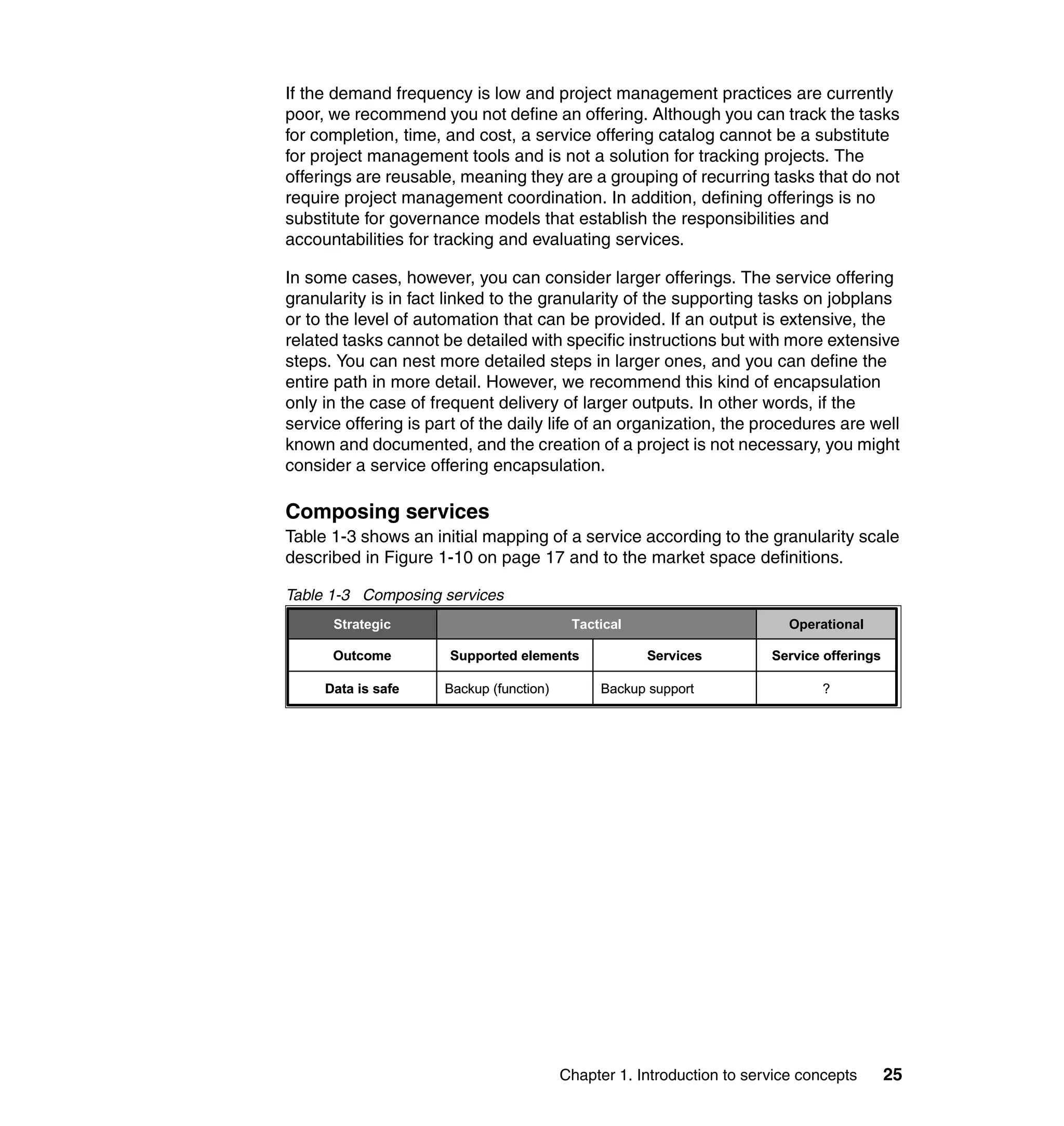
Table 1-3 shows an initial mapping of a service according to the granularity scale
described in Figure 1-10 on page 17 and to the market space definitions.

Table 1-3 Composing services
      Strategic                            Tactical                        Operational

      Outcome          Supported elements             Services          Service offerings

     Data is safe     Backup (function)        Backup support                   ?


                                          Chapter 1. Introduction to service concepts       25
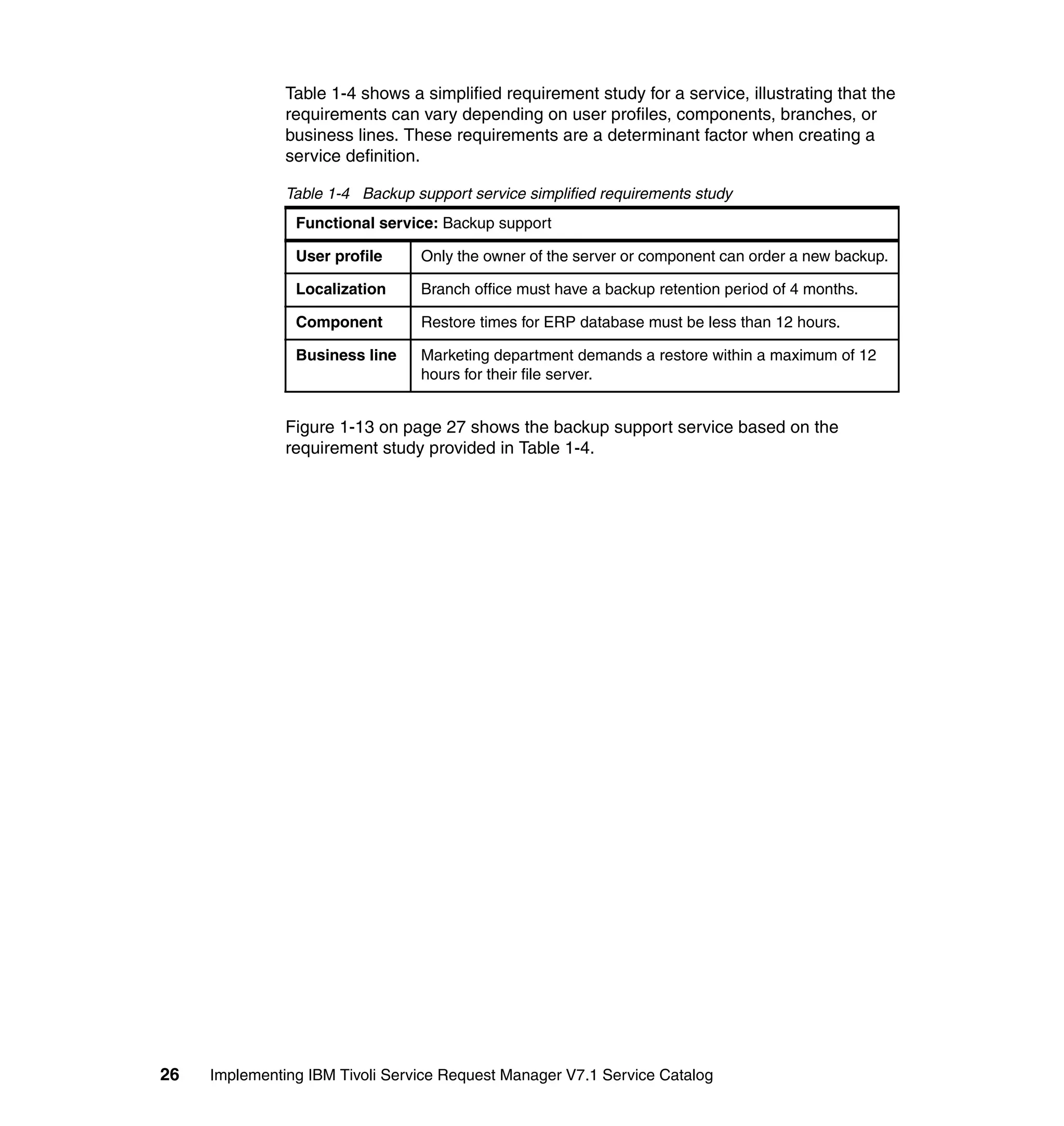
Table 1-4 shows a simplified requirement study for a service, illustrating that the
               requirements can vary depending on user profiles, components, branches, or
               business lines. These requirements are a determinant factor when creating a
               service definition.

               Table 1-4 Backup support service simplified requirements study
                Functional service: Backup support

                User profile     Only the owner of the server or component can order a new backup.

                Localization     Branch office must have a backup retention period of 4 months.

                Component        Restore times for ERP database must be less than 12 hours.

                Business line    Marketing department demands a restore within a maximum of 12
                                 hours for their file server.


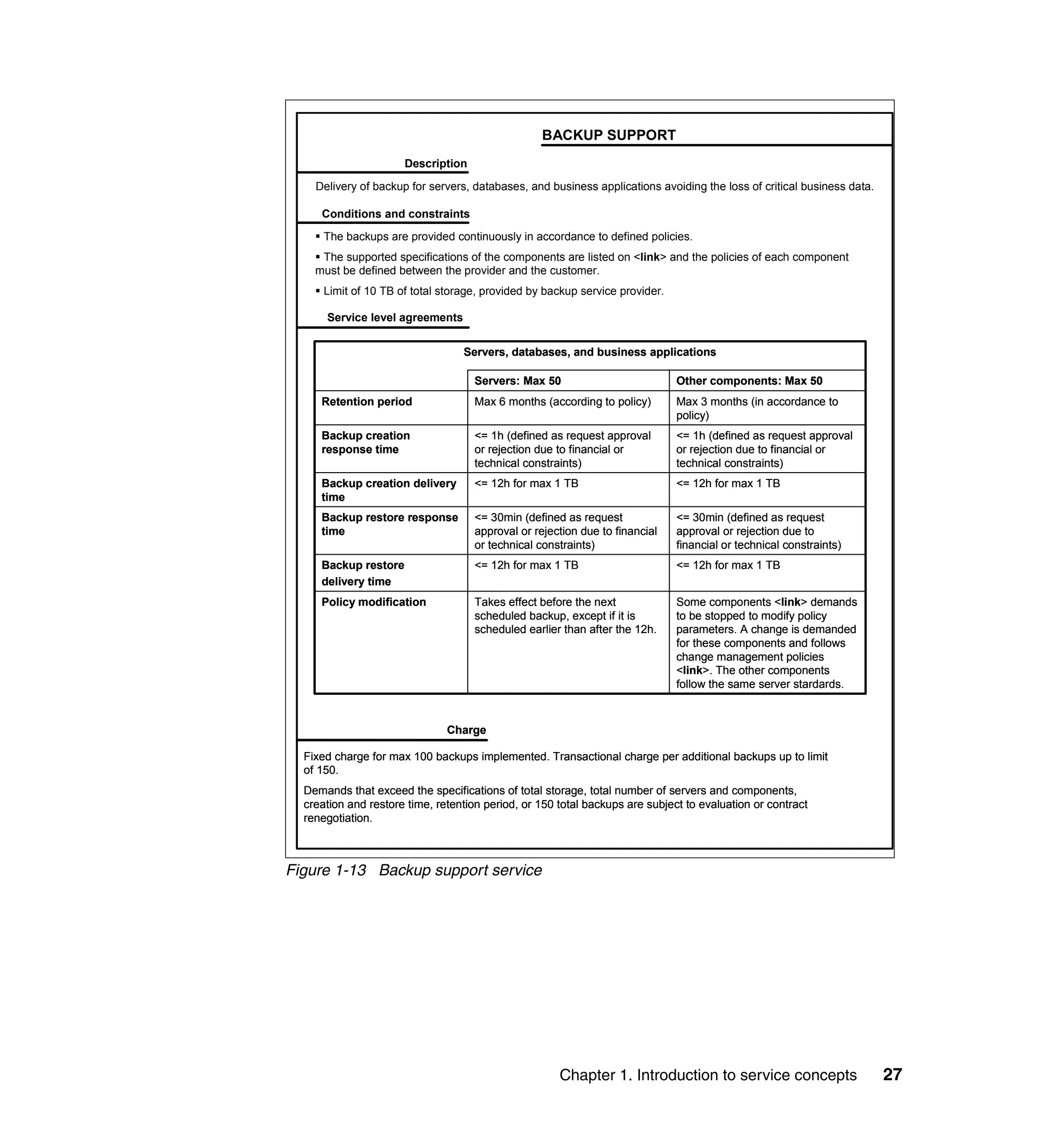
               Figure 1-13 on page 27 shows the backup support service based on the
               requirement study provided in Table 1-4.


26   Implementing IBM Tivoli Service Request Manager V7.1 Service Catalog
BACKUP SUPPORT
                      Description

    Delivery of backup for servers, databases, and business applications avoiding the loss of critical business data.

     Conditions and constraints
      The backups are provided continuously in accordance to defined policies.
     The supported specifications of the components are listed on <link> and the policies of each component
    must be defined between the provider and the customer.
      Limit of 10 TB of total storage, provided by backup service provider.

      Service level agreements


                                  Servers, databases, and business applications

                                    Servers: Max 50                           Other components: Max 50
     Retention period               Max 6 months (according to policy)        Max 3 months (in accordance to
                                                                              policy)
     Backup creation                <= 1h (defined as request approval        <= 1h (defined as request approval
     response time                  or rejection due to financial or          or rejection due to financial or
                                    technical constraints)                    technical constraints)
     Backup creation delivery       <= 12h for max 1 TB                       <= 12h for max 1 TB
     time
     Backup restore response        <= 30min (defined as request              <= 30min (defined as request
     time                           approval or rejection due to financial    approval or rejection due to
                                    or technical constraints)                 financial or technical constraints)
     Backup restore                 <= 12h for max 1 TB                       <= 12h for max 1 TB
     delivery time
     Policy modification            Takes effect before the next              Some components <link> demands
                                    scheduled backup, except if it is         to be stopped to modify policy
                                    scheduled earlier than after the 12h.     parameters. A change is demanded
                                                                              for these components and follows
                                                                              change management policies
                                                                              <link>. The other components
                                                                              follow the same server stardards.


                               Charge

  Fixed charge for max 100 backups implemented. Transactional charge per additional backups up to limit
  of 150.
  Demands that exceed the specifications of total storage, total number of servers and components,
  creation and restore time, retention period, or 150 total backups are subject to evaluation or contract
  renegotiation.


Figure 1-13 Backup support service


                                                      Chapter 1. Introduction to service concepts                       27
In the next section, we examine in more detail the service offerings required to
               support the backup support service. These service offerings include specifying
               different fulfillment methods, defining roles, and controlling SLAs and approvals.
               The Service Designer is responsible, when specifying both the requirements and
               service definition, to build the necessary steps to ensure that the service is fit for
               its purpose and use.

               Backup support service offerings
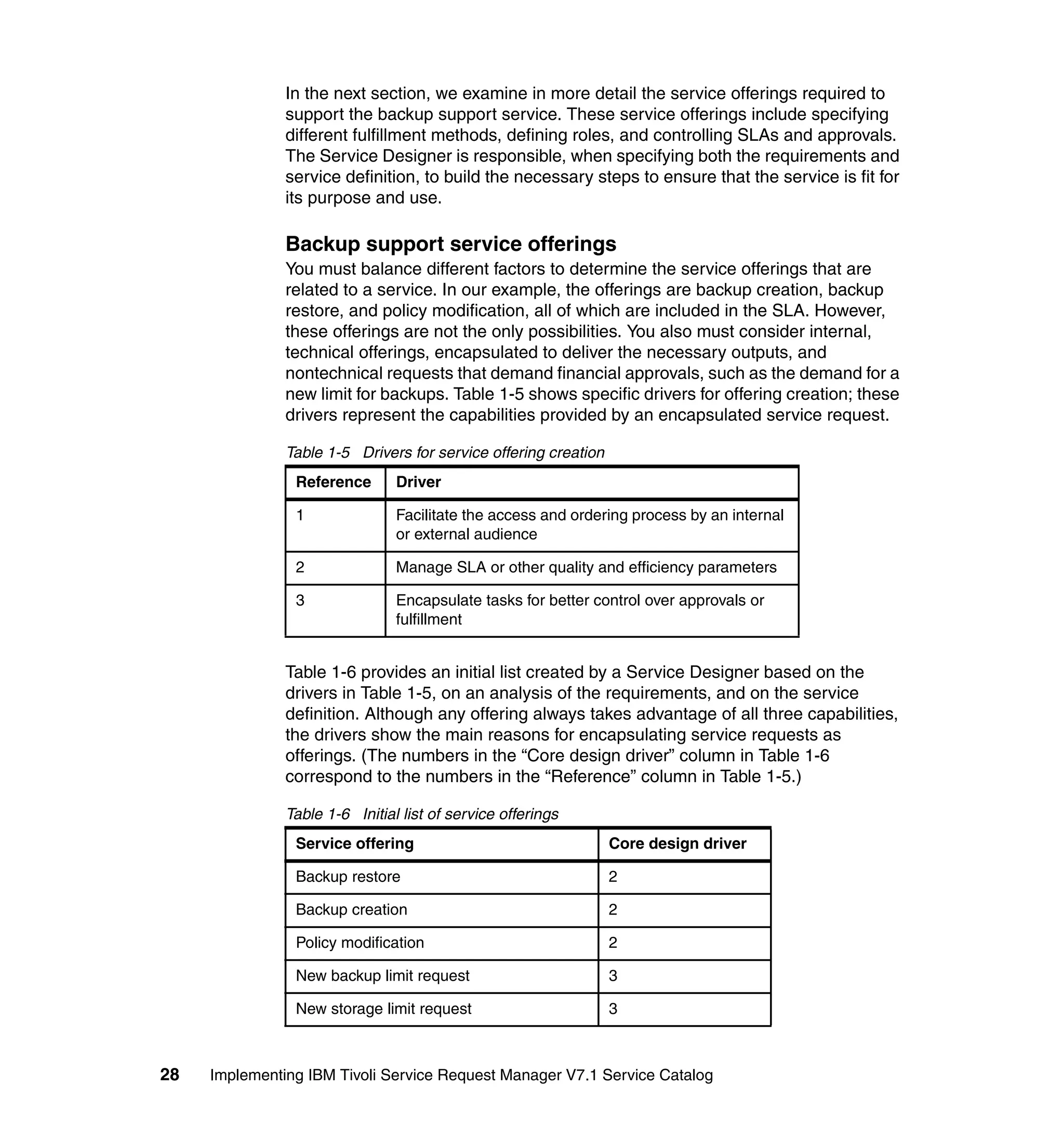
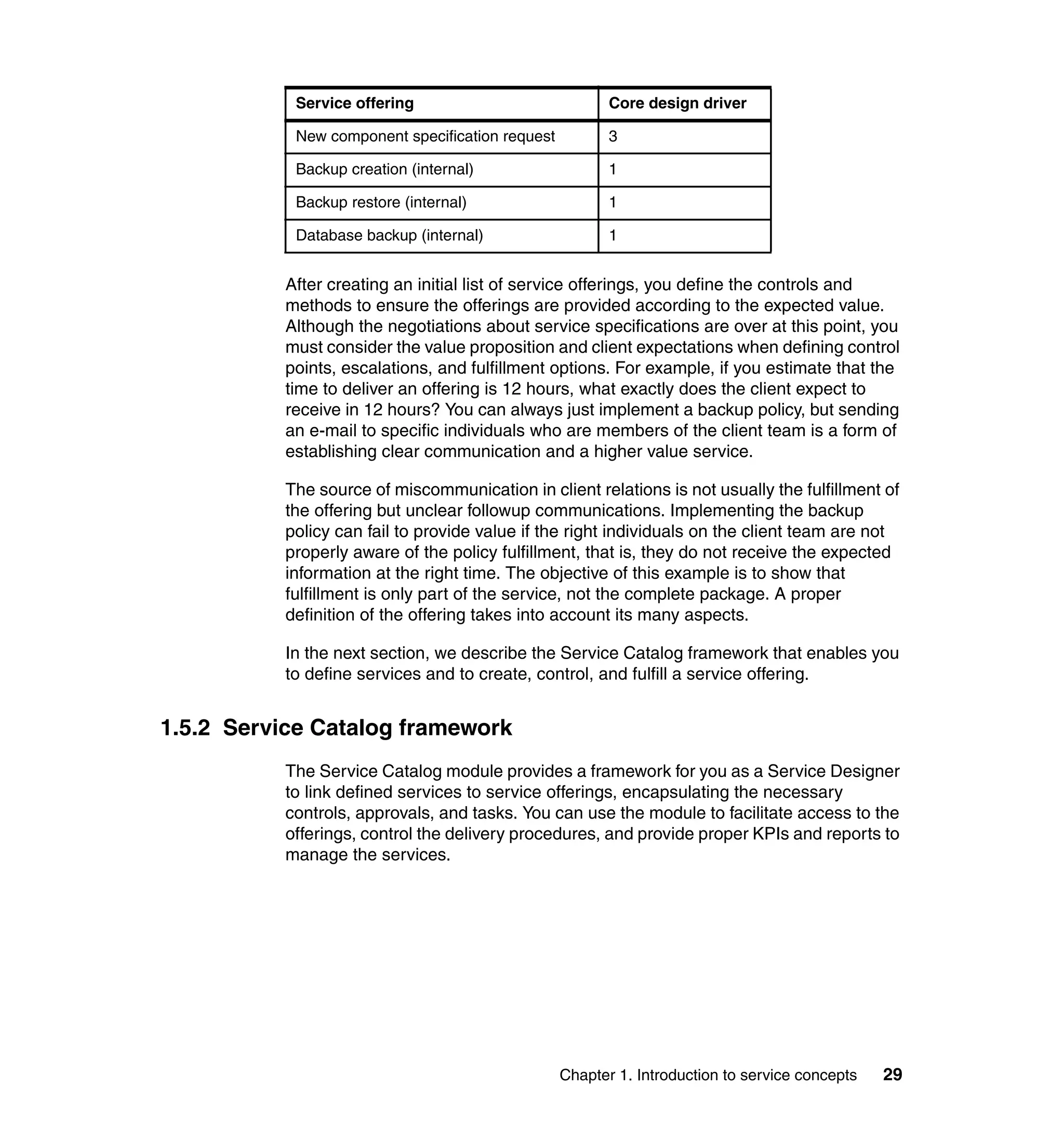
               You must balance different factors to determine the service offerings that are
               related to a service. In our example, the offerings are backup creation, backup
               restore, and policy modification, all of which are included in the SLA. However,
               these offerings are not the only possibilities. You also must consider internal,
               technical offerings, encapsulated to deliver the necessary outputs, and
               nontechnical requests that demand financial approvals, such as the demand for a
               new limit for backups. Table 1-5 shows specific drivers for offering creation; these
               drivers represent the capabilities provided by an encapsulated service request.

               Table 1-5 Drivers for service offering creation
                Reference       Driver

                1               Facilitate the access and ordering process by an internal
                                or external audience

                2               Manage SLA or other quality and efficiency parameters

                3               Encapsulate tasks for better control over approvals or
                                fulfillment


               Table 1-6 provides an initial list created by a Service Designer based on the
               drivers in Table 1-5, on an analysis of the requirements, and on the service
               definition. Although any offering always takes advantage of all three capabilities,
               the drivers show the main reasons for encapsulating service requests as
               offerings. (The numbers in the “Core design driver” column in Table 1-6
               correspond to the numbers in the “Reference” column in Table 1-5.)

               Table 1-6 Initial list of service offerings
                Service offering                                 Core design driver

                Backup restore                                   2

                Backup creation                                  2

                Policy modification                              2

                New backup limit request                         3

                New storage limit request                        3


28   Implementing IBM Tivoli Service Request Manager V7.1 Service Catalog
Service offering                             Core design driver

            New component specification request          3

            Backup creation (internal)                   1

            Backup restore (internal)                    1

            Database backup (internal)                   1


           After creating an initial list of service offerings, you define the controls and
           methods to ensure the offerings are provided according to the expected value.
           Although the negotiations about service specifications are over at this point, you
           must consider the value proposition and client expectations when defining control
           points, escalations, and fulfillment options. For example, if you estimate that the
           time to deliver an offering is 12 hours, what exactly does the client expect to
           receive in 12 hours? You can always just implement a backup policy, but sending
           an e-mail to specific individuals who are members of the client team is a form of
           establishing clear communication and a higher value service.

           The source of miscommunication in client relations is not usually the fulfillment of
           the offering but unclear followup communications. Implementing the backup
           policy can fail to provide value if the right individuals on the client team are not
           properly aware of the policy fulfillment, that is, they do not receive the expected
           information at the right time. The objective of this example is to show that
           fulfillment is only part of the service, not the complete package. A proper
           definition of the offering takes into account its many aspects.

           In the next section, we describe the Service Catalog framework that enables you
           to define services and to create, control, and fulfill a service offering.


1.5.2 Service Catalog framework
           The Service Catalog module provides a framework for you as a Service Designer
           to link defined services to service offerings, encapsulating the necessary
           controls, approvals, and tasks. You can use the module to facilitate access to the
           offerings, control the delivery procedures, and provide proper KPIs and reports to
           manage the services.


                                                  Chapter 1. Introduction to service concepts   29
Note: This section introduces the main system objects and applications that
                compose a framework for designing offerings and operations. Chapter 2,
                “Introduction IBM Tivoli Service Catalog” on page 35, describes the functions
                and how they are organized in the Tivoli Service Request Manager Service
                Catalog. Chapter 3, “Scenarios” on page 89, describes implementations of
                various scenarios, including the backup creation offering, and explains how to
                manage services through the Service Catalog KPI and reporting capabilities.

               Figure 1-14 shows the basic objects (shopping cart, purchase request, catalog
               order, and work order) that are used by the Service Catalog module when an
               offering is ordered, managed, and fulfilled. Because action and description
               offerings do not follow a procurement process, the figure illustrates a supply
               chain offering, which represents the most complete cycle.


                    Create              Order                           Manage                                    Fulfill                 Monitor

                Of fering design    Shopping for                     Analyze order                           Accomplish and             Analyze and
                and publishing        offerings                       and approve                             deliver offering            improve
                         objects
                         System


                                                          Purchase                   Catalog                      Work order
                                   Shopping cart
                                                          Request *                   O rder                   Service Request

                                                                                                             Additional process
                                                               Customer       Delivery
                                                                                                                   obj ects


                                   Shopping          Purchase request        Catal og order           Work order
                                   cart              The object              The object               The catalog order can
                                   The object        generat ed by an        generated by a           generate work orders with
                                   that              of fering in an         purchase request,        predefined jobplans for t he
                                   consolidates      shopping cart, used     used to evaluate the     fulfillment groups or service
                                   all requested     to evaluate to whom     delivery method          requests that can be fulfilled.
                                   offerings.        and in what             based on the agreed      The catalog order can
                                                     conditions t he         delivery conditions      generate other process
                                                     service should be       and the delivery         object s depending on the
                                                     provided                capability               installed modules (such as
                                                                                                      changes and releases, if
                                                                                                      CCMDB is installed or
                                                                                                      incidents, problems, and
                                                                                                      service requests, if service
                                                                                                      desk is inst alled).

                                   * After the order is placed, the customer can track it through a catalog request, which is a sub-
                                   set of the purchase request. The purchase request is t he object used by the system (t hrough
                                   workflows) or by a role to evaluat e the incoming request .

               Figure 1-14 Consider both client and delivery perspectives in the offering cycle


30   Implementing IBM Tivoli Service Request Manager V7.1 Service Catalog
Terminology: A purchase request is an example of a system object. When a
 specific purchase request is created, it is instantiated and a purchase request
 record is created, along with a specific record ID.


In the backup creation scenario, the user includes this offering in the shopping
cart and submits it for delivery. An intermediate control before the purchase
request can be established is to check, for example, whether the total amount of
the cart is compatible with the user profile. Each offering in the cart generates a
purchase request that an individual or an automated criteria checks to verify
against applicable SLAs or other agreed terms (such as a limit of 150 backups).
When the purchase request is verified, the delivery part of the flux begins,
generating a catalog order and checking the delivery options and, possibly,
internal SLAs. The process of checking the delivery option is usually performed
by a delivery role, which can be an individual or a workflow. If an assignment
must be made, a work order is created and job plans are assigned to individuals
or groups.


                                     Chapter 1. Introduction to service concepts   31
Figure 1-15 shows the basic framework through which the offering flows. At first,
               the flux does not occur automatically, and an individual or a defined workflow are
               required to execute actions using specific applications to generate object
               records, change the record status, evaluate conditions, apply SLAs, and assign
               tasks.


                  OBJECT RECORD
                                                                                                          WAPPR                                  8   1
                                         WAPPR                         WA PPR


                      STATUS
                                                                                                                   APPR                     7             2
                                                 APPR
                                                         flux*                  APPR
                                                                                        flux*     CLOSED
                                                                                                                              flux*
                                      CLOSED                     CLOSED                                           IN
                                                 IN                             IN                                                          6             3
                                                 PROGR                                                            PR OGR
                                                                                PROGR
                                                                                                          C ANC                                  5   4
                                         C ANC                          CANC


                                                                                                          Catalog                                Work
                        OBJECT


                                        Shopping                       Purchase
                                          cart                          Request                            Order                                Order**
                        APPLICATION


                                        Offering
                                                                   Catalog PR                           CO                                     WO
                                        Catalog
                                                                   application                       application                            application
                                       application
                                                            A ction                                       ns                         ns
                                                                   s               Ac
                                                                                     t io          t io                    A ct io
                                                                                            ns
                                                                                                 Ac
                                                                                                                                          Actions
                                                                                                                                          (examples):
                 POSSIBLE


                                                                                                                                          • Create object
                  AGENTS


                                                                                                                                          record
                                                                                                                                          • Change object
                                                                                                                                          record status
                                                                                                                                          • Apply SLA to object
                                                                         Person                                Workflow                   record
                                                                                                                                          • Set the value of a
                                                                                                                                          field

                 * The flux occurs only if a person or a workflow executes the actions. The Service Catalog module has prebuilt,
                 configurable options that can automate some of the actions required to build the flux. Details are provided in
                 Chapter 3.

                 ** Work orders have their own particular life cycle that includes additional status such as Waiting on material
                 and Completed. The Completed status is used when additional approvals are demanded to close a work order.

               Figure 1-15 Actions trigger flux through the system objects

               The applications shown in Figure 1-15 are used during the life cycle of an
               existing offering. To define the offering, you can use specific design applications
               that generate the configurations of the objects and the flux.


32   Implementing IBM Tivoli Service Request Manager V7.1 Service Catalog
Figure 1-16 shows the main applications used in the context of the complete
service offering lifecycle.


                                                                                                         ORDER,


OBJECT S
OBJECT S
OBJECT S
OBJECT S
OBJECT S
OBJECT S
OBJECT S
OBJECT S
OBJECT S
OBJECT S
WORKING
                              Catalog      Purchase     Catalog                                         MANAGE,
                                                                FLUX Workorder
                              Request FLUX Request FLUX Order                                            FULFILL
                                                                                                            AND
                                                                                                        MONITOR

 APPLICATIONS
   WORKING
                              Offering
                                            Catalog PR         CO                  WO
                              catalogs
                                            application     application         application
                             application


                                                                                                           CREATE
                        between them

                        records and the
                        records and the
                        records and the
                        records and the
                        records and the

                        configuration of
                        proper links

                        design object
                        design object
                        design object
                        design object
                        design object
                        define the flux


                        The
       DESIGN OBJECTS


                                                                                                                   The main links
                                                              Service           Fulfillment
                              Catalog
                              Catalog        Offering
                                             Offering        fulfillment         options


                                                                                                linked
                                                                                                linked
                                                                                                linked
                                                                                                linked
                                                                                                linked

                                                                                                generates object records
                                                                                                that can be configured and
                                                                                                that can be configured and
                                                                                                that can be configured and
                                                                                                that can be configured and
                                                                                                that can be configured and

                                                                                                Each application
                                                             Service            Fulfillment
                              Catalogs       Offerings      fulfillment           options
                             application    application
APPLICATIONS
APPLICATIONS
APPLICATIONS
APPLICATIONS
APPLICATIONS
APPLICATIONS
APPLICATIONS
APPLICATIONS
APPLICATIONS
APPLICATIONS


                                                            application         application
                                                                                application*
  DESIGN


                               Services /   Roles /
                                SLAs /      People /
                                                          Workflow /
                                                           Actions
                                                                           Jobplans /
                                                                           Assets / CIs
                                                                                          ...
                              Escalations   Groups

                                            Supporting applications


Figure 1-16 Service Request Manager main applications


                                                    Chapter 1. Introduction to service concepts                                     33
34   Implementing IBM Tivoli Service Request Manager V7.1 Service Catalog
2


    Chapter 2.   Introduction IBM Tivoli
                 Service Catalog
                 This chapter introduces the Tivoli Service Request Manager Service Catalog and
                 includes the following sections:
                     “Introduction” on page 36
                     “Terminology” on page 37
                     “Architecture overview” on page 40
                     “Service Catalog life cycle” on page 46


© Copyright IBM Corp. 2008. All rights reserved.                                            35
2.1 Introduction
               The IBM Tivoli Service Request Manager Service Catalog provides a complete
               end-to-end set of functions that enable you to define different types of requests
               for services. In addition, the Service Catalog provides a way to shop for those
               services and a structured process that manages the delivery of the services.
               Organizations can choose to utilize all or some of these functions.

               To name this set of functions, IBM Tivoli uses the term Service Catalog. The
               service catalog term is also often used to indicate a list or itemized display of IT
               services, including description, options, service levels, and costs. ITIL
               documentation and the IBM IT Process Community also use service catalog in
               this manner. We use the term service catalog to identify the service offerings that
               we build.

               The Tivoli Service Request Manager Service Catalog provides the functions and
               capabilities necessary to make services available to clients who wish to
               requisition those services. To this end, the Tivoli Service Request Manager
               Service Catalog supports the following types of capabilities:
                  Integrating service request management
                  Defining services and service providers
                  Managing service definitions
                  Shopping and browsing for services
                  Requisitioning and specifying service instances
                  Enabling service entitlement
                  Approving services
                  Planning service fulfillment
                  Delivering service fulfillment
                  Integrating and managing service providers
                  Monitoring service requisition and status and informing clients of these
                  functions
                  Logging and analyzing service requisition data


36   Implementing IBM Tivoli Service Request Manager V7.1 Service Catalog
2.2 Terminology
        We use the following terms in this chapter and subsequent chapters of this book:
            Basic Service
            A complete unit of service that can be rendered by one or more Service
            Delivery teams. Basic Services can be aggregated into composite services
            that can be ordered by service requestors.
            Capabilities definition
            The definition of information that describes a particular Basic Service, which
            can be performed by a particular Service Provider. A particular Basic Service
            can be performed by more than one Service Provider, and a particular
            Service Provider can perform multiple Basic Services. Different Service
            Providers can perform the same Basic Service in different manners.
            Catalog order
            Used by the delivery mechanism of the service catalog to identify the work
            (services) that has to be delivered.
            Catalog request
            An instance of a service offering that has been ordered by a service
            requestor. Catalog requests are fulfilled through the activities of the Service
            Catalog Supply Chain.
            Jobplan
            A detailed description of how a job is to be performed and the resources
            needed to complete it. A jobplan describes the tasks and resources
            necessary for a Service Provider to accomplish a Basic Service.
            Service
            Providing a service provides something of value to a customer that is not
            goods (that is, not physical items with material value). Examples of services
            include banking and legal support. Service is also used as a synonym for IT
            service.*
            Service catalog
            A document listing all IT services, with summary information about their SLAs
            and customers. The service catalog is created and maintained by the IT
            Service Provider and is used by all IT Service Management processes.*


        * Iqbal, Majid, Nieves, Michael, Service Strategy, London, Crown Publishing, 2007,
          ISBN 9780113310456.


                                            Chapter 2. Introduction IBM Tivoli Service Catalog   37
Service Catalog product
                   A complete end-to-end set of functions that enable the definition of services,
                   provide a way to shop for those services, and offer a structured process that
                   manages the manner in which each service is delivered. Organizations can
                   choose to utilize all or some of these functions. Service definitions are stored
                   in Service Definition Repositories (which some organizations might choose to
                   label as catalogs of services or service catalogs).
                   Service Catalog Supply Chain
                   The chain of Service Catalog product components that accomplishes the full
                   set of Service Delivery tasks. The chain starts with the ability of a service
                   requestor to search for and requisition a service from the Service Catalog.
                   The chain ends with the complete fulfillment of the service requisition.
                   Service Delivery
                   The core IT Service Management processes that have a tactical or strategic
                   focus. In ITIL publications, these processes are Service Level Management,
                   Capacity Management, IT Service Continuity Management, Availability
                   Management, and Financial Management for IT Services. Service Delivery is
                   also can mean the delivery of IT Services to customers.*
                   Service Delivery team
                   Same as an IT Service Provider but used throughout this document instead of
                   IT Service Provider to avoid confusion with the IBM Tivoli Maximo Service
                   Provider Industry Solution application. Designates a team that is responsible
                   for the fulfillment of a service element.
                   Service Desk
                   The Single Point of Contact between the Service Provider and the Users. A
                   typical Service Desk manages incidents and catalog requests. In addition, it
                   handles communication with the Users.*
                   Service element
                   See Basic Service.


               * Iqbal, Majid, Nieves, Michael, Service Strategy, London, Crown Publishing, 2007,
                 ISBN 9780113310456.


38   Implementing IBM Tivoli Service Request Manager V7.1 Service Catalog
Service Fulfillment component
    The component of the Service Catalog Supply Chain responsible for the
    execution of a set of work orders that correlate to a service requisition.
    Service Fulfillment Planning component
    The component of the Service Catalog Supply Chain responsible for
    converting a set of service orders (that correlate to a service requisition) into
    a set of work orders (that completely and correctly fulfill the service
    requisition).
    Service level
    Measured and reported achievement against one or more Service Level
    Targets. Service level is sometimes used as an informal term to mean Service
    Level Target.*
    Service Level Agreement (SLA)
    An agreement between an IT Service Provider and a customer. The Service
    Level Agreement describes the IT service, documents Service Level Targets,
    and specifies the responsibilities of the IT Service Provider and the customer.
    A single SLA might cover multiple IT Services or multiple customers.*
    Service Level Management (SLM)
    The Process responsible for negotiating Service Level Agreements, and
    ensuring that these are met or eventually improved. SLM is responsible for
    ensuring that all IT Service Management Processes, Operational Level
    Agreements, and Underpinning Contracts, are appropriate for the agreed
    Service Level Targets. SLM monitors and reports on Service Levels, and
    holds regular customer reviews.*
    Service Level Target (SLT)
    A commitment that is documented in a Service Level Agreement. Service
    Level Targets are based on Service Level Requirements, and are needed to
    ensure that the IT Service design is “fit for purpose”. Service Level Targets
    must be measurable, and are usually based on KPIs.*
    Service offering
    A service stored within a service catalog that can be ordered by a service
    requestor. A service offering references one service definition. The reference
    can be to a composite service, which is composed of a sequence of one or
    more Basic Services.


* Iqbal, Majid, Nieves, Michael, Service Strategy, London, Crown Publishing, 2007,
  ISBN 9780113310456.


                                    Chapter 2. Introduction IBM Tivoli Service Catalog   39
Service Order Planning component
                   The component of the Service Catalog Supply Chain that is responsible for
                   converting a service requisition into a set of service orders that correlate to
                   that service requisition.
                   Service Provider
                   An organization supplying Services to one or more customers. Service
                   Provider is often used as an abbreviation for IT Service Provider. A Service
                   Provider typically supplies its services in an opaque manner. There might be
                   multiple Service Providers that can render a particular service.*
                   Service request
                   Refers to the IBM Tivoli Maximo Service Request Maximo Business Object. It
                   is a subclass of the Ticket MBO. It is used to submit requests to the Service
                   Desk component and submit requests for the CCMDB Process Manager
                   Programs (PMPs).
                   Service Requisition Management Approver
                   Role responsible for the entitlement confirmation and management approval
                   of catalog requests.
                   Service Shopping component or Service Shopping environment
                   The set of applications, which are part of the Service Catalog Supply Chain,
                   that enable a service requestor to search for service offerings, fill out the
                   particulars of a service requisition, submit the service requisition, and then
                   monitor the status of the service requisition while it is being fulfilled.


2.3 Architecture overview
               Figure 2-1 on page 41 shows the main components of the Tivoli Service Request
               Manager Service Catalog product. The product contains the following three
               classes of components:
                   Administrative and Service Definition tool
                   Data Layer with Service Catalog related MBOs
                   Service Catalog Supply Chain application components


               * Iqbal, Majid, Nieves, Michael, Service Strategy, London, Crown Publishing,
                 2007,ISBN:9780113310456.


40   Implementing IBM Tivoli Service Request Manager V7.1 Service Catalog
Figure 2-1 General overview of Service Catalog

                 The Administrative and Service Definition tool is a collective set of applications
                 that manage the definition of the content necessary for the execution of the
                 supply chain flow. The Administrative and Service Definition tool includes, among
                 other applications, applications for defining services, offerings, and catalogs and
                 for identifying suppliers and providers of those services and their capabilities.

                 The Maximo Business Objects (MBO) or data layer (accessible from the
                 Products window) displays the main set of data objects (and associated business
                 logic) that supports the execution of the Service Catalog Supply Chain.

                 The Service Catalog Supply Chain application flow is a concept that represents
                 the complete service requisition fulfillment path, from service requisition
                 submission, all the way through to the complete fulfillment of the requisition. Four
                 generic components of the Service Catalog Supply Chain represent service
                 oriented architecture (SOA) components that interact with each other in a
                 well-defined manner. Clients can replace any of the four components with
                 custom implementations of their own.


                                                 Chapter 2. Introduction IBM Tivoli Service Catalog   41
We define the following four generic set of components within the supply chain:
                  Service Shopping environment
                  This component enables a user to locate and order a service item, specifying
                  all required input arguments for the service requisition. The component
                  handles tasks such as user entitlement and service requisition approval
                  processing. The output of a service requisition is in the form of a material
                  requisition (MR) MBO. The requisition includes a reference to a Service
                  Definition ID in a format that all the other supply chain components can
                  recognize.
                  Service Order Planning component (service requisition management)
                  This component accepts a service requisition in the form of an IBM Service
                  Management (ISM) material requisition and then transforms that requisition
                  into a set of related service orders in the form of catalog orders. The Service
                  Order Planning component also accepts a service requisition in the form of a
                  material requisition and then transforms that requisition into a set of related
                  service orders in the form of catalog orders.
                  Service Fulfillment Planning component (service order management)
                  Service Fulfillment Planning accepts a set of related catalog orders and then
                  generates a single (possibly hierarchical) work order that can be used to
                  accomplish the Basic Service steps necessary to fulfill the service requisition.
                  Service Fulfillment component
                  The Service Fulfillment component accepts a work order that defines all the
                  tasks that must be accomplished in order to fulfill a service requisition and
                  then oversees the execution of those tasks.

               The out-of-the-box version of the Service Catalog product includes an instance of
               each of these four supply chain components.

               At any point in the flow of the supply chain components, generating notifications
               of changes in key service fulfillment states must be possible, and all other
               components must be able to interpret these notifications. The notifications are
               generated by e-mail messages, using the e-mail listeners provided in the Tivoli
               process automation engine platform. The implementation in Tivoli Service
               Request Manager Service Catalog regards the Service Operation part (the ITIL
               Service Management phase) and is explained in the request fulfillment workflow
               (see Figure 2-2 on page 44).


42   Implementing IBM Tivoli Service Request Manager V7.1 Service Catalog
Tivoli process automation engine: The Tivoli process automation engine
 (which was formerly called base services or the Tivoli process automation) is a
 set of solutions from IBM. The solutions leverage a common process
 automation platform and combine asset management and service
 management in one environment with a federated configuration management
 system for data integration. Refer to Deployment Guide Series: IBM Tivoli
 CCMDB Overview and Deployment Planning, SG24-7565, for detailed
 information about the Tivoli Process Automation Engine.

The two main areas of the Service Catalog architecture are the operational
where we use the implemented services and the development area where the
designed services are implemented.

The main interface for users to access the Tivoli Service Request Manager
Service Catalog is the offering catalog. A user in the PMSCSRU security group
works with the Start Center window in Figure 2-3 on page 44.

In the Offering Catalog, all available and implemented services are listed. Users
choose a service and add it to the shopping cart. The following types of offerings
are available:
   Descriptive service
   A descriptive service fulfillment type stores information, documents,
   procedures, and direction for a provided service.
   Action service
   An action service fulfillment type is used to set up a link to an external
   function, a Web site, or external software.
   Supply chain service
   A supply chain service fulfillment type is used to define and operate a service
   in Tivoli Service Request Manager with all available functions, such as work
   orders and jobplans, of the Service Catalog application.

Depending on the fulfillment type, an action is started in the background for a
predefined service (see Figure 2-2 on page 44).


                              Chapter 2. Introduction IBM Tivoli Service Catalog   43
Figure 2-2 Simple Service Catalog function


Figure 2-3 Start Center window for Service Requisition User role


44     Implementing IBM Tivoli Service Request Manager V7.1 Service Catalog
In Figure 2-4, the user views a list of the descriptions for Enterprise Security
                 Management service offerings.


Figure 2-4 Select an offering


                                               Chapter 2. Introduction IBM Tivoli Service Catalog   45
The user can use the form shown in Figure 2-5 to request the creation of a
               Lotus® Notes® account.


               Figure 2-5 Example form for requesting a Lotus Notes Account Service


2.4 Service Catalog life cycle
               The high-level Service Catalog life cycle provides the following functions:
               1. Defining and publishing services using the Service Creation and Publishing
                  tools
               2. Shopping and requesting services using the Shopping Experience
               3. Fulfillment of service requests by optionally leveraging the supply chain
                  applications of the Service Order Management component


46   Implementing IBM Tivoli Service Request Manager V7.1 Service Catalog
The IBM Tivoli Service Request Manager Service Catalog is comprised of the
                 following three major parts:
                    Service Ordering - The user “shopping experience”
                    Service Order Management - The supply chain that is further broken down
                    into the service fulfillment and monitoring aspects of providing a service
                    Service Creation and Publishing - The application tool that designers use to
                    create services

                 Figure 2-6 shows basic objects (shopping cart, purchase requisition, catalog
                 order, and work order) that are used by the Service Catalog module when an
                 offering is ordered, managed, and fulfilled.


Figure 2-6 Service Catalog flow


                                              Chapter 2. Introduction IBM Tivoli Service Catalog   47
ITIL defines roles for service ordering, management, and fulfillment. Figure 2-7
               shows how these roles map to the Service Catalog applications.


                Service Catalog - Main Roles, Activities, and Tools
                                              Service Designer:                         Service Delivery Manager:
                                                 Define Services                          Determines delivery plan
                                                 Define Offerings and Catalogs            Determines providers

                                     Catalog Definition     Offering Definition     Service Definition      Capabilities
                  Administration        Application             Application            Application          Application


                                        IT User:
                                           Searches for services
                                           Submit requests
                                           Monitor status               Shopping UI              SRM Start center
                     Shopping

                                        IT Operations Analyst:                    IT Operations Specialist:
                                          Complete order planning                  Performs work items
                                          Work schedule assignment


                                           Service Order               Work Mgmnt                 ISM Integrations
                                            Application                Applications                (CCMDB, PMPs, OMPs)
                     Fulfillment
               Figure 2-7 Main roles, activities, and tools


48   Implementing IBM Tivoli Service Request Manager V7.1 Service Catalog
Figure 2-8 lists the tools and functions that are used in each phase of the
           service.


                       Service Request Manager – Service Catalog
                                                                  Shopping UIs
                                                                   Shopping Cart
                                                              Favorites / Recommended
                                                                       Search


                   Service Tooling
                        Extensibility                      Service Ordering
                  Catalog definition tooling                 “Shopping”
            Service & Offering definition tooling                             Service Order
                                                                                                   Order Fulfillment
            Fulfillment Option definition tooling                             Management
                                                                                                        Descriptive
                      Upgrade tooling
                                                                                                          Action
                                               Service Creation                                        Supply Chain
                                                & Publishing


                                                                          Service Fulfillment

                                                         Service Monitoring                     Best Practice Content
                                        Process Integration                                       Roles and Start Centers
                                                                                                Service Definition Templates
                                         Common Service Requests                                    Request Workflows
                                   Launch to Incident, Problem and Change                          KPIs and Thresholds
                                       CMDB Integration (CI selection)                              Queries and Reports
                                                                                                Escalations and Notifications

           Figure 2-8 Five cycles of the Service Catalog

           We describe these capabilities in the following sections.


2.4.1 Service tool
           In Tivoli Service Request Manager, open the Go To menu. The Service Request
           Manager Catalog menu contains the Service Inventory submenu, which includes
           the following options (see Figure 2-9 on page 50):
               Catalogs
               Service Fulfillment
               Offerings
               Fulfillment Options


                                                       Chapter 2. Introduction IBM Tivoli Service Catalog                   49
Figure 2-9 Menu navigation


                Catalog definition
                Figure 2-10 shows the Catalog window.


Figure 2-10 Catalog window


50    Implementing IBM Tivoli Service Request Manager V7.1 Service Catalog
The following four tabs are in the Catalog window:
                     List
                     Catalog
                     Offerings
                     Security Groups

                 The List tab lists the existing catalogs (see Figure 2-11).


Figure 2-11 Catalog list

                 The Catalog tab displays information about the chosen catalog, as shown in
                 Figure 2-12.


Figure 2-12 Catalog attributes


                                               Chapter 2. Introduction IBM Tivoli Service Catalog   51
The following fields are available in the Catalog tab (the numbers shown in
               Figure 2-12 on page 51 correspond to the following three list items):
               1. Name of the selected catalog
               2. Comment for the selected catalog
               3. Status of the selected catalog, which includes the following options:
                  – Active: The catalog is in use and cannot be changed.
                  – Pending: The catalog is not in use and can be changed.
                  – Pending obsolescence: The catalog is obsolete (no longer in use).
                  – Planning: The catalog is in development.

               Figure 2-13 displays the actions that can be selected from the catalog.


               Figure 2-13 Actions available from the catalog

               The following actions are available:
                  Change Status: Opens the change status window.
                  View Status History: Lists the status changes in the catalog.
                  Add/Modify Banner Image: Enables the user to access a window to change
                  the graphic shown with the catalog listing.
                  Duplicate a Service Catalog Definition: Creates a new catalog with the
                  definition of the selected one.
                  Add Multiple Offerings: Opens a window with offerings not included in the
                  catalog and provides the opportunity to add offerings to the selected catalog.


52   Implementing IBM Tivoli Service Request Manager V7.1 Service Catalog
In the Offerings tab of the Catalog window, the offerings connected with the
                  selected catalog are listed. It is possible to add and delete connected offerings
                  (see Figure 2-14).


Figure 2-14 Catalog offering list

                  When you select an offering entry, you obtain information about that specific
                  offering, such as Name, Description, Classification (connection to the offering
                  catalog definition), Status, Price, and Currency Code. You can edit this data in
                  the Offerings application by clicking the icon on the right side of the Offering field
                  (see Figure 2-15).


Figure 2-15 Offering definition


                                                 Chapter 2. Introduction IBM Tivoli Service Catalog   53
When you click the Security Groups tab, shown in Figure 2-16, you can find
                  information about the connected groups. You can add and remove a group to the
                  catalog. To create a new group or to edit a group, choose Go To → Security →
                  Security Groups.


Figure 2-16 Catalog Security Groups tab


                  Service fulfillment definition
                  Figure 2-17 shows the Service Fulfillment application.


Figure 2-17 Service Fulfillment list


54     Implementing IBM Tivoli Service Request Manager V7.1 Service Catalog
On the List tab of the Service Fulfillment application, the following information
                  about the service fulfillments are listed:
                     Name of the service fulfillment
                     Description
                     Fulfillment Type
                     Status

                  By clicking the icon on the far right of each row, you can add selected service
                  fulfillments to the bookmarks.

                  The Service Fulfillment tab, shown in Figure 2-18, displays details for the
                  selected service fulfillment.


Figure 2-18 Service Fulfillments attributes

                  The following fields are shown in the Service Fulfillment tab:
                     Service Fulfillment: Name and description of the service fulfillment.
                     Service Group: Team that supports the service.
                     Service: Defined service.


                                                 Chapter 2. Introduction IBM Tivoli Service Catalog   55
Fulfillment Type
                  The following options are available:
                  – Descriptive service
                  – Action service
                  – Supply chain service
                  Item Set: The information provided here is defined in the Organization
                  application and assigned to the service fulfillment.
                  Status: Status of the offering.
                  Classification: The classification code, such as ESECMGMTIDTYACC.
                  Classification Description: Description of the Classification, such as Server
                  Systems ManagementServer Management.
                  Attachments: Using the Attachments icon, the administrator who defines
                  these offerings can view and add files and URLs to the service fulfillment.
                  Doing so is helpful in providing information or documents to the user.
                  Image: Click the icon under Click image to enlarge to add a graphic to the
                  service fulfillment to enhance the description.

               The Supply Chain Fulfillment Information area on the Services Fulfillment tab
               provides the following fields:
                  Default Job Plan: You can add a list of sequenced tasks that must be
                  completed by the assigned service group.
                  Service Order Approval Workflow: Connects a standard approval workflow to
                  the offering.
                  Service Level Agreement: Connects to an SLA, which you can define by
                  choosing Go To → Service Level → Service Level Agreements.

               In the Offerings area, information about the related offering is provided.

               We describe fulfillment options in 2.4.3, “Order fulfillment” on page 63.


56   Implementing IBM Tivoli Service Request Manager V7.1 Service Catalog
The fields on the Specifications tab apply to the selected service fulfillment (see
                 Figure 2-19).


Figure 2-19 Service Fulfillment Specifications tab

                 The following fields are displayed in the Service Fulfillment Information area on
                 the Specifications tab:
                     Service Fulfillment
                     Classification
                     Classification Description

                 The following columns are displayed in the Specifications area on the
                 Specifications tab:
                     Attribute
                     Description
                     Data Type
                     Alphanumeric Values
                     Numeric Value
                     Unit of Measure


                                                     Chapter 2. Introduction IBM Tivoli Service Catalog   57
2.4.2 Shopping user interfaces
                 In this section, we discuss the shopping user interfaces.

                 Shopping cart and favorites
                 In the Start Center for the Service Requisition, choose Offering Catalog from
                 the My Favorite Applications panel (see Figure 2-20).


Figure 2-20 Start Center for the Service Requisition User

                 After selecting the catalog or by choosing the Catalog tab, you access the
                 Offering Catalog window (see Figure 2-21). This is the starting point where you
                 can shop for an available service. You can order offerings that you are authorized
                 to order by your administrator.


Figure 2-21 Offering Catalog window


58     Implementing IBM Tivoli Service Request Manager V7.1 Service Catalog
Figure 2-22 shows the Offering Catalog Find what you need window. We explain
                the possible actions in the following list of menu items.


Figure 2-22 Offering Catalog Find what you need window

                You can choose the following list of actions from the Offering Catalog Find what
                you need window (the numbers in Figure 2-22 correspond to the numbers of the
                list items):
                1. Offering catalog taxonomy: Grouping of service offerings.
                2. Favorite Offerings area: You can add favorite offerings for future use. Select
                   an offering in the Offerings area (number 4). On the Details page of the
                   offering, you can find the Add to Favorites button (see Figure 2-23 on
                   page 60).


                                              Chapter 2. Introduction IBM Tivoli Service Catalog   59
Figure 2-23 Offering form

                  In this list, you can store frequently used service offerings and easily add
                  them to your shopping cart.
               3. Shopping cart (see Figure 2-24)


               Figure 2-24 Shopping Cart area

                  The following three areas of the shopping cart are shown in Figure 2-24:
                  – Items in cart: Clicking the icon accesses a list of items in your shopping
                    cart.
                  – View Cart: Displays the number of added service offerings and can access
                    the list.
                  – View All Carts: Provides a list of items in all carts. You can use the search
                    function to manage the carts. Fill in the appropriate information in the
                    textbox, and click the Find button. Those carts that fit this criteria are
                    displayed.
                     Clicking the cart number accesses the Get the Cart Details page. Click the
                     Reset button to access a list of carts. Additional functions at the end of
                     each row in the View Shopping Carts window offer the choice of reading
                     and editing the details or deleting a cart. Only the unsubmitted carts are
                     displayed.


60   Implementing IBM Tivoli Service Request Manager V7.1 Service Catalog
Figure 2-25 shows a shopping cart list.


Figure 2-25 Shopping Cart list

                    – Start New Cart: This tab saves the selected service offerings in a cart and
                      creates a new cart.
                 4. Offerings depending on the selected offering catalog:
                    In this area you find the service offerings depending on the selected offering
                    catalog and the chosen taxonomy. The Tivoli Service Request Manager
                    functions for lists are available. Click the name of a service offering to access
                    the form shown in Figure 2-26 on page 62.


                                               Chapter 2. Introduction IBM Tivoli Service Catalog   61
Figure 2-26 Form of an offering

               The following information is available in the form shown in Figure 2-26 (the
               numbers in the list correspond to the numbers in the figure):
               1. This area displays information about the name, description, price, and
                  available attachments for the selected service offering.
               2. In this area, you provide the requested information about the selected service
                  offering. You define these fields by choosing Service Fulfillment
                  Application → Specification.
               3. Click the Add To Cart button to add this service offering to the cart. Click
                  Cancel to exit the form without adding a service offering to the cart.

               When you click the Add To Cart button, you access the Shopping Cart window
               (see Figure 2-27 on page 63), information about the cart, and further actions that
               you can perform. You can verify your input and select whether you want to return
               to the catalog (click Continue Shopping), submit the cart for execution (click
               Submit), save the cart and go back to the Start Center (click Save), or delete the
               form (click Cancel). After submitting the cart, it is executed according to your
               input.


62   Implementing IBM Tivoli Service Request Manager V7.1 Service Catalog
Figure 2-27 Detailed Shopping Cart view


                Search
                A search field is displayed on the Offering Catalog form. Enter the text you are
                searching for in the Find field and click the binoculars icon (see Figure 2-8 on
                page 49). All service offerings with this text in the description are listed. Clicking
                the list icon displays the list.


                Figure 2-28 Search functionality


2.4.3 Order fulfillment
                Order fulfillment is also referred to as service fulfillment. The three different types
                of services that a Service Designer can create are described in the following
                sections.

                Descriptive service
                You use a descriptive service when an organization wants to advertise an
                existing, unautomated service that requires a request path not integrated into the
                service catalog.For example, a descriptive service for “Add Toner” might include
                the following instructions in the service description: “To order toner for a printer,
                call our external office supplier at 512 555-1234.”


                                               Chapter 2. Introduction IBM Tivoli Service Catalog   63
When you select a descriptive service in the Offering Catalog application, an
               offering dialog is displayed; you can view the offering information in this dialog.
               You cannot submit requests for a descriptive service from the dialog.

               Action service
               An action service is used when an organization wants to integrate pre-existing
               service applications into the service catalog. For example, an action service for
               “Reset Intranet Password” might invoke a pre-existing URL for the organization
               that resets intranet passwords.

               When you select an action service in the Offering Catalog application, an offering
               dialog is displayed; you can view the offering information in this dialog. The
               offering dialog also enables you to input information required by the offering (as
               defined by the offering attributes) and to execute the offering.

               The service application associated with an action service can be one of the
               following several types:
                  An external URL: You can designate external URLs by Service Request
                  Manager Launch-in-Context entries.
                  Another Service Request Manager application: You can invoke alternate
                  Service Request Manager applications either through Service Request
                  Manager Launch-in-Context entries (using relative URL addressing) or
                  through Service Request Manager workflows.
                  A standalone executable: You can invoke standalone executables through
                  Service Request Manager workflows. Action services can pass information,
                  including attribute information, to a launched service.

               Supply chain service
               A supply chain service is used when you want to create a new service in the
               service catalog that utilizes the full service catalog fulfillment capabilities. For
               example, catalog purchase requisitions, catalog orders, jobplans, and work
               orders are Service Catalog fulfillment capabilities.

               When you select a supply chain service in the Offering Catalog application, an
               offering dialog is displayed; you can input information required by the offering (as
               defined by the offering attributes) and add the offering to a shopping cart.


64   Implementing IBM Tivoli Service Request Manager V7.1 Service Catalog
2.4.4 Best practice content
           In this section, we describe best practice content, beginning with roles and Start
           Centers defined in the IBM Tivoli Service Request Manager Service Catalog.

           Roles
           Defining roles is a way to ensure the right people are aware of the need for
           service fulfillment, make the necessary financial and technical evaluations to
           provide the output, and fulfill and evaluate the services. These actions are
           performed by roles that are linked to specific users or groups of users. The role
           mechanism ensures easier maintenance and provides a process-oriented (rather
           than department-oriented) framework, focusing on delivery of the service offering
           and not on departmental outputs or subproducts. Excessive delays in the
           authorization process can be remedied with escalations, and KPIs can verify the
           performance of the delivery of specific offerings or groups of offerings that
           support the entire service.

           Figure 2-29 on page 66 depicts the service offering cycle and illustrates how
           different roles act to deliver an offering. These roles represent only an initial
           service offering configuration and can be modified. A role does not represent a
           person on Service Catalog module, but rather a responsibility in the cycle that
           can be linked to one or more persons or even an application. The workflows are
           created around roles, not people; thus, carefully linking people or groups of
           people to their responsibilities in the process is important.


                                         Chapter 2. Introduction IBM Tivoli Service Catalog   65
Monitor

                                       Cre ate
                                                             Create                     Order                  Manage                    Fulfill           Monitor
               Fulfill
                                                        Offering desi gn           Shopping for             Analyze order         Accomplish and        Analyze and
                                       Order            and publishing            servi ce offerings         and approve          deliver offering        improve
                            Manage
                                                              All o bjects

                                                                                                                                                    Object that is
                                                        Servic e designe r                                                                          generally accessed by
                                                                                    Shopping Cart /
                         Link the requirements and SLAs to an of fer ing                                     CR          PR                         the role to o rder,
                                                                                   Catalog Request
                               type , tasks, approvals, controls and KPIs                                                                           analyze , control or
                                                                                                                                                    fullfill an offering
                                                                             Self Service User
                                                                                                             PR          CO
                                      Searches for and o rders offerings and consults the status                                                    CR: Catalog Request
                                                                                                                                                    PR : Purchase request
                                                                   Service Requ isit ion User Man ager                                              CO: Catalog order
                                                                                                                         WO
                           Serves as interface between incoming requests and deliver y, analysis, filtering                                         WO: Work order

                                                                                                       Operation s Analyst
                                                                                                                                     WO            CO
                                                 D ecides how to fulfill catalog orders accor ding to the delivery structure

                                                                                                                   Op erations Sp ecialist
                                                                                                                                                   WO
                                                                             Fulfills tasks; often specialized in a platform or application


                                                                                                              Servic e Execu tion Manag er
                                                                                                                                                          AL L
                           Analyzes work orders and cata log orde rs and verifies whether they are delivered according to internal standa rds

                                                                                                                            Service De livery Manag er
                                                                                                                                                                      AL L
                                       An alyze whether offerings are deliver ed according to the standards agreed upon with cu stomers (such as SLAs)


                                                                                                                                              Service Catalo gue Man ager
                                                                                                                                Administer s service catalogue applications


               Figure 2-29 Different roles involved in the service offering cycle


               Elements associated with system users
               In the Tivoli Service Request Manager Service Catalog, various elements are
               defined and associated with specific users, which restricts access to certain
               parts of the system or defines how a particular user can act according to the
               general service offering flow. Table 2-1 summarizes these definitions.

               Table 2-1 Common elements associated with system users
                 Element                                                               Definition

                 Role                                                                  A logical grouping of common tasks in the service
                                                                                       offering cycle that users can automate or execute

                 User                                                                  An entity that can log onto the system


66   Implementing IBM Tivoli Service Request Manager V7.1 Service Catalog
Element                         Definition

 Security Group                  A security definition associated with users that
                                 defines the level of access to application modules
                                 and functions

 Person                          An individual (usually an employee) who stores
                                 personal data

 Start Center                    Application templates associated with security
                                 groups


In the Tivoli Service Request Manager Service Catalog, security groups enable
administrative users to manage user authorizations and access rights to sites,
applications, storerooms, labor, and other aspects of the organization. In
addition, a Service Catalog Administrator security group that is authorized to
access all IBM Tivoli Process Automation Engine applications is created.


                            Chapter 2. Introduction IBM Tivoli Service Catalog        67
Security groups
               The section discusses the following typical security groups and their associated
               roles:
                   PMSCADM security group: Service Catalog Administrator
                   These users have rights to every action and application. Figure 2-30 shows
                   the Start Center for PMSCADM.

               .


               Figure 2-30 Start Center PMSCADM


68   Implementing IBM Tivoli Service Request Manager V7.1 Service Catalog
PMSCSDGN security group: Service Designer
   This role is a specialization of the IBM Tivoli Unified Process Service Level
   Manager or Service Level Administrator role. In IBM Tivoli Unified Process,
   the Service Level Manager is responsible for creating the service catalog and
   defining what the service is all about. Figure 2-31 shows the Start Center for
   PMSCSDGN.


Figure 2-31 Start Center PMSCSDGN


                             Chapter 2. Introduction IBM Tivoli Service Catalog   69
PMSCSDM security group: Service Delivery Manager
                  In the Service Catalog, this role is responsible for identifying how a service
                  defined by the Service Designer is fulfilled. Figure 2-32 shows the Start
                  Center for PMSCSDM.


               Figure 2-32 Start Center PMSCSDM


70   Implementing IBM Tivoli Service Request Manager V7.1 Service Catalog
PMSCSEM security group: Service Execution Manager
   This role is responsible for overseeing the fulfillment of the catalog requests in
   the service catalog. Figure 2-33 shows the Start Center for PMSCSEM.


Figure 2-33 Start Center PMSCSEM


                              Chapter 2. Introduction IBM Tivoli Service Catalog   71
PMSCOA security group: Operations Analyst
                  This role represents the fulfillment operations. A user in this role works under
                  supervision of the Service Execution Manager and is responsible for the
                  following tasks:
                  – Performing all operational processes and procedures involved with order
                    planning and fulfillment, thus ensuring that all IT services and
                    infrastructure meet operational targets.
                  – Runs and monitors infrastructure components.
                  Figure 2-34 shows the Start Center for PMSCOA.


               Figure 2-34 Start Center PMSCOA


72   Implementing IBM Tivoli Service Request Manager V7.1 Service Catalog
PMSCOS security group: Operations Specialist
   This role is responsible for performing all the activities described in work
   items. Operations Specialists often specialize by platform or application.
   Figure 2-35 shows the Start Center for PMSCOS.


Figure 2-35 Start Center PMSCOS


                              Chapter 2. Introduction IBM Tivoli Service Catalog   73
PMSCSRU security group: Service Requisition User
                  This role searches for and requisitions services from the service catalog,
                  consults regarding the status of the requisitioned services, and receives the
                  services performed by the IT organization.
                  Figure 2-36 shows the Start Center for PMSCRU.


               Figure 2-36 Start Center PMSCRU

                  User Contact Analyst
                  This role is an IBM Tivoli Unified Process-defined role that, in the context of
                  the Service Catalog, manages (analyzes, receives, and approves) the
                  Service Requisition (see Figure 2-37 on page 75), as part of the Service
                  Order Planning phase.


74   Implementing IBM Tivoli Service Request Manager V7.1 Service Catalog
Figure 2-37 Start Center, User Contact Analyst


Mapping security groups to applications
Tivoli Process Automation Engine enables an administrator to specify which
applications a security group can access. Table 2-2 on page 76, Table 2-3 on
page 77, and Table 2-4 on page 78 list the applications each of the previously
described security groups has access to and the type of access each group has.
In the tables, the letter R stands for Read, I means Insert, S means Save, and D
means Delete. The list of applications includes only those applications that
automatically are enabled during installation. Add-ons are not included.


                               Chapter 2. Introduction IBM Tivoli Service Catalog   75
Table 2-2 Security mappings* 1


* Self Service User and Service Requestor User are different names for the same security group.


76     Implementing IBM Tivoli Service Request Manager V7.1 Service Catalog
Table 2-3 Security mappings 2


                                Chapter 2. Introduction IBM Tivoli Service Catalog   77
Table 2-4 Security mappings 3


78    Implementing IBM Tivoli Service Request Manager V7.1 Service Catalog
Request workflows
The supply chain between the components of the service catalog is developed
with the IBM Tivoli Service Request Manager workflow tool. The workflows
shown in Figure 2-38 are used in new and standard service offerings The figure
depicts the supply chain workflow.


Figure 2-38 Service automation with workflows

To understand how workflows are implemented in Service Catalog, see the
Workflow Designer Canvas application, as shown in Figure 2-35 on page 73.
Figure 2-39 on page 80 shows the preconfigured workflows for Service Catalog.
These workflows are preconfigured so you do not need to create them from
scratch. You can also create new workflows by using these workflows as
templates.


                              Chapter 2. Introduction IBM Tivoli Service Catalog   79
Figure 2-39 List of preconfigured workflows for Service Catalog


                 Service Catalog and SLAs
                 Service Level Management (SLM) is the process of defining, agreeing upon,
                 documenting, and managing the levels of service that a service provider delivers
                 to clients (either internal or external), and services received from vendors.
                 Typically, SLM also includes monitoring and reporting functions that verify that
                 the agreed-upon service levels are maintained.


80     Implementing IBM Tivoli Service Request Manager V7.1 Service Catalog
You can use the Service Level Agreements application to define and document
agreements between the service provider and the client, that is, documenting the
agreed-upon service levels for the provided services. Information included on an
SLA record includes the type of commitment, how the commitment is measured,
and what escalations are in place to help the service organization meet the
commitments.

You can define escalations on an SLA or use the Administrative Escalations
application to define escalation criteria, and the actions and notifications that
occur when a record reaches or exceeds the criteria set on the escalation. You
can also create key performance indicator (KPI) reports for SLAs or apply KPIs
that you created in the KPI Manager application.

Service Catalog application
The Service Catalog application is used to create a high-level definition of the
categories of services that a company provides or procures. Service groups and
services can be used to categorize services associated with assets, asset types,
contracts, locations, SLAs, tickets, work orders, among other objects.

 Note: You can create, view, modify, or delete service type commodities only in
 the Service Catalog application.

Using the Service Catalog application, click the application link on the Start
Center or select Service Management → Service Catalog from the Go To
menu.

The Service Catalog application contains the following tabs:
   List: On the List tab, you can search for service catalog records.
   Service Group: On this tab, you can create, view, or modify service group
   records and delete services.

Service catalog and offering catalog
You can associate an SLA with a work order so that all work orders are measured
against this SLA. For the offering catalog, you can choose an SLA in the Service
Fulfillment module. When you insert an SLA in the offering catalog, a purchase
requisition is created and assigned to the SLA.


                              Chapter 2. Introduction IBM Tivoli Service Catalog   81
Figure 2-40 shows an SLA in the Service Fulfillment dialog.


Figure 2-40 SLA in Service Fulfillment tab


                 Reports
                 The Service Catalog application provides a number of reports that you can
                 access by selecting Reports → Service Request Manager Catalog. The report
                 categories are shown in Figure 2-41.


Figure 2-41 Accessing reports


82     Implementing IBM Tivoli Service Request Manager V7.1 Service Catalog
Figure 2-42 shows an example report.


Figure 2-42 Service Catalog reports

                 In addition, a number of Business Intelligence and Reporting Tools (BIRT)
                 reports are to be shipped through OPAL.

                  Note: BIRT is an Eclipse-based open source reporting system for Web
                  applications, especially those based on Java™ and J2EE™.


                                              Chapter 2. Introduction IBM Tivoli Service Catalog   83
Escalations and notifications
               An escalation is a process that monitors time-sensitive records and initiates
               actions and notifications when those records are not acted upon in a timely
               manner. You use escalations to ensure that the service provider complies with
               the commitments specified in the SLA. You can schedule escalations to
               automatically monitor and evaluate conditions and then trigger actions,
               ownership changes, and notifications based on those conditions. The IBM Tivoli
               Process Automation Engine includes a default escalation for the following
               commitment types:
                  Contact
                  Response
                  Resolution
                  Other

               You use the Escalation tab to modify default escalations, define new escalation
               points, and define the actions and notifications that must be performed and be
               issued, respectively, when those points are reached.

                Note: You can use the Escalations application in the Configuration module to
                define escalations.


2.4.5 Process integration
               The IBM Tivoli Release Process Manager, the IBM Tivoli Change and
               Configuration Management (CCMDB), and the Service Catalog are shipped
               together out of the box, providing tight integration between your Service Catalog
               and the Release Process Manager and Configuration and Change Management
               processes.

                Note: IBM Tivoli Release Process Manager and IBM Tivoli Change and
                Configuration Management Database (CCMDB) must be licensed separately.
                They are not included in the Tivoli Service Request Manager Service Catalog
                package.


               To apply formal change approval to a service catalog request or to coordinate
               service catalog request implementations through the release management
               process with other similar requests, you can open a process request directly from
               a catalog order or from a catalog work plan task. Use the Process Request
               application to create IT process requests for Tivoli Release Process Manager
               and IBM Tivoli Change and Configuration Management Database (CCMDB).


84   Implementing IBM Tivoli Service Request Manager V7.1 Service Catalog
Note: CCMDB must be licensed separately. It is not included in the Tivoli
 Service Request Manager Service Catalog product.

Figure 2-43 depicts a scenario of a Service Catalog user requesting a new
database.


                          1. Service Catalog user
                          requests new Database

                                         1a. Service Catalog User Manager
                                         approves request

                                                    2. Service Catalog Operations
                                                    Analyst assigns Change Fulfillment
                                                                                         4. Change Owner
                    Service                                                              accepts Process
                    Catalog                                                     est      Request
                                                                              qu
                                                                     s   Re
                                                            ro   ces
                                                         wP
                                                       Ne

                                       3. Service Catalog
                                       Operations Specialist
  6. Service Catalog                   implements Work Order                          CCMDB
  Operations Specialist
  completes Work order
                                       Chan
                                            ge Co
                                                  mple
                                                      te
                                                                                            5. Change Team
                                                                                            completes Change

                                                                                           Optional: Releas
                                                                                                            e Request


Figure 2-43 Integration with CCMDB

Similarly the Service Desk and Service Catalog components are tightly
integrated and increase the productivity of Service Desk personnel.


                                      Chapter 2. Introduction IBM Tivoli Service Catalog                         85
86   Implementing IBM Tivoli Service Request Manager V7.1 Service Catalog
Part 2


Part       2     Getting started
                 This part describes the initial use of the product. The information in this part
                 enables the reader to create a demonstration or proof-of-concept around core
                 product functions.


© Copyright IBM Corp. 2008. All rights reserved.                                                    87
88   Implementing IBM Tivoli Service Request Manager V7.1 Service Catalog
3


    Chapter 3.   Scenarios
                 In this chapter we cover several different usage scenarios for IBM Tivoli Service
                 Request Manager Service Catalog. These scenarios provide an understanding
                 of Service Catalog concepts, and they describe ways to implement and configure
                 Service Catalog functionalities and processes. You can use these scenarios for
                 your planning and deployment strategy. Remember that proper planning helps
                 ensure a successful implementation.

                 This chapter contains the following scenarios:
                     “Scenario 1: Searching for offerings” on page 91
                     “Scenario 2: Accessing external sources” on page 121
                     “Scenario 3: Creating workflows” on page 127


© Copyright IBM Corp. 2008. All rights reserved.                                               89
3.1 IBM Tivoli Service Request Manager Service Catalog
scenarios
               To better understand the service offering flux from ordering to fulfillment and to
               more deeply consider the issues that a Service Designer must take into account
               when configuring a service offering, this chapter discusses two service offerings
               from two perspectives, service offering design and the service offering ordering
               and fulfillment cycle. The former perspective describes the design process that
               you undertake when configuring service offerings. The latter perspective shows
               how the Tivoli Service Request Manager Service Catalog product actually works
               when you order and receive a predefined service offering. These two
               perspectives are integrated into the three scenarios that we present in this
               chapter.

               Our scenarios use the standard roles, security groups, and users, which are
               listed in Table 3-1. (Refer to “Roles” on page 65 in Chapter 2 for additional details
               on system users and security constraints.) We use the default password
               “maxadmin”. In the Service Catalog Administrator role, you can make changes to
               user passwords or to the security groups associated with each user by selecting
               Security → Users.

               Table 3-1 User profiles
                Role                                  Security Group           User

                Self Service User                     SRMSELFSERVICE           Sarah

                Self Service User                     SRMSELFSERVICE           Sharan

                Self Service User                     SRMSELFSERVICE           Kimberley

                Self Service User                     SRMSELFSERVICE           Will

                Service Requisition User Manager      PMSCSRU                  Manny

                Service Designer                      PMSCSDGN                 Desi

                Operations Analyst                    PMSCOA                   Oscar

                Operations Specialist                 PMSCOS                   Sally

                Service Catalog Administrator         PMSCADM                  Adam

                Service Delivery Manager              PMSCSDM                  Delvin

                Service Execution Manager             PMSCSEM                  Axel


90   Implementing IBM Tivoli Service Request Manager V7.1 Service Catalog
Role                                   Security Group            User

          Service Requisition User               PMSCSRU                   Roxy

          User Contact Analyst                   PMSCUCA                   Connie


          Note: These scenarios assume that you have installed the Tivoli Service
          Request Manager Service Catalog V7.1 application successfully in your
          environment. For installation instructions, you can refer to Implementing
          Implementing IBM Tivoli Service Request Manager V7.1 Service Desk,
          SG24-7579.

          At the time of writing, Tivoli Service Request Manager V7.1 was not generally
          available (GA), so we used an early version of the product. In the following
          scenarios you might see slight differences in the product panels compared
          with the GA version of the product.


3.2 Scenario 1: Searching for offerings
         In this first scenario we show you how to search for offerings in the context of a
         firewall change request ordering and fulfillment scenario.

         Sarah works for a network infrastructure company and frequently needs to
         modify firewall rules or router configurations. She makes her requests using
         dozens of different interfaces and using e-mail or the telephone. In many cases,
         she is unable to find the right person or the right channel to fulfill her requests. In
         other cases, she finds what she thinks might be the right channel, but getting a
         response seems to take forever and she cannot track the progress of her
         requests through various channels.

         Her company recently has implemented Tivoli Service Request Manager V7.1
         Service Catalog, and Sarah is ready to use the new system. She needs to open
         a port on a firewall, a task that she used to execute while trying to discover who
         was responsible for the firewall. Once she determined who was responsible, she
         sent an e-mail to this individual.


                                                                     Chapter 3. Scenarios    91
3.2.1 Service offering roles and flow
               The procedures in the following sections provide steps that illustrate the flow of
               the service offering and the roles involved when ordering and fulfilling the
               offering.

                Note: This scenario does not show how the service offering was implemented.
                3.2.2, “Firewall change request design” on page 106 presents the designer
                perspective and how the designer implements the offering. It also discusses
                design alternatives that can affect the flow and alternatives that implement
                different offerings.


               cron task setup
               A cron task defines frequently executed routine tasks, for example, updating the
               application server users to link to the objects they might want to search for. To
               use the search functionality shown in this scenario, complete the following tasks:
               1. Adam, the Service Catalog Administrator, logs on.
               2. Adam selects System Configuration → Platform Configuration → Cron Task
                  Setup.
               3. He then searches for “PmObjSearchCron”.
               4. In the Schedule field, Adam sets the frequency at which he wants to run the
                  cron task, for example, five minutes.


92   Implementing IBM Tivoli Service Request Manager V7.1 Service Catalog
Self Service User role perspective
                The following steps demonstrate requesting an offering from the Self Service
                User role perspective:
                1. Sarah signs on as the Self Service User.
                2. On the left menu of the Start Center, she clicks Service Request Manager
                   Search. Figure 3-1 shows the window that is displayed.


Figure 3-1 The Self User Start menu


                                                                      Chapter 3. Scenarios     93
3. Sarah then searches for “open firewall port”. The Tivoli Service Request
                    Manager Service Catalog tool conducts a comprehensive search, looking
                    through offerings, catalogs, and catalog requests. In Figure 3-2, Sarah
                    decides to narrow the search to look through the offerings only. She found a
                    Firewall Change Requests offering.


Figure 3-2 Searching for offerings

                     Figure 3-3 shows the Offering Catalog window. A user also can choose
                     Service Request Manager Catalog → Offering Catalog to access the same
                     catalog and search for the offering using the taxonomy on the left menu.
                     Sarah can click the List tab to check for additional catalogs, such as the
                     Human Resources Offering Catalog. On the Offerings tab, she can search for
                     offerings using the Search field, or she can click the View All Offerings link
                     next to the search icon to access the entire list.


                 Figure 3-3 Offering Catalog window

                 4. Sarah then clicks Firewall Change Requests.


94     Implementing IBM Tivoli Service Request Manager V7.1 Service Catalog
Note: If this kind of offering is not configured in your system, you can still
     test the search using other keywords.

5. She then clicks the Firewall Change Requests offering to access the form
   shown in Figure 3-4. As the requester, Sarah must fill in a number of fields.
   She fills in these fields according to the specifications of the offering and
   service fulfillment. At this point, Sarah can add the offering to the Favorites list
   or add it to the cart.

     Note: The specifications can require mandatory or optional fields to be
     filled in. They can also be used to display the fields to the requester or even
     define hidden data to be exchanged with certain roles during the offering
     flow. The fields can be text free or chosen among predefined domains. See
     3.2.2, “Firewall change request design” on page 106 for further details.

6. Sarah clicks Add To Cart (see Figure 3-4).


Figure 3-4 Offering description

   Figure 3-5 on page 96 shows the shopping cart. At this point, Sarah can
   change the quantity ordered, save the cart and order at a later time, continue
   shopping, or order the offering right away. She can also define a Required
   Date and change the way the offering is charged, choosing a different
   charging account (in the GL Debt Account field).


                                                            Chapter 3. Scenarios      95
Figure 3-5 Shopping cart

                 7. Sarah defines a Required Date and clicks Submit. In the View Catalog
                    Requests window (see Figure 3-6), Sarah clicks the Details tab to view the
                    details of the catalog request.


Figure 3-6 Tracking the catalog request


96    Implementing IBM Tivoli Service Request Manager V7.1 Service Catalog
Figure 3-6 on page 96 shows the following three tabs:
   The Details tab shows the items ordered and the shipping information.
   The History tab makes tracking easy because it shows the current status of
   the fulfillment process.
   The Log tab provides a way to register communications between the
   requester and the delivery organization.

Service Requisition User Manager perspective
Now that the order is complete, a business-level approval is required. This level
of approval checks, for example, whether the requester can order this kind of
offering or whether any kind of contractual constraints or charging policies might
apply to the offering. In this scenario, Manny, the Service Requisition User
Manager, completes the following steps:
1. Manny logs onto the system as the Service Requisition User Manager.
2. Manny selects Service Request Manager Catalog → View Catalog Requests.
3. Sarah’s request is designated WAPPR (Waiting for Approval). He clicks it.
4. Then Manny clicks Change Status and approves the request.

After approving the catalog request, a purchase requisition is generated, and
Sarah’s request is ready to go to the delivery organization.

Operations Analyst perspective
Oscar, the Operations Analyst, works at the delivery organization, and he
routinely checks for purchase requisitions, catalog orders, and work orders. After
Manny approves Sarah’s request, Oscar has to review the generated purchase
requisition.

In this scenario, we demonstrate the different levels of approvals that can be
selected, all of which can be automated by workflows. As Operations Analyst,
Oscar completes the following steps:
1. Logs on as the Operations Analyst.
2. Oscar checks for Catalog Purchase Requisitions Waiting for Approval. Each
   item of the catalog order generates a different purchase requisition.


                                                        Chapter 3. Scenarios     97
3. Oscar clicks the Catalog Purchase Requisition Line tab (see Figure 3-7 on
                    page 98) to review the details of the order, including pricing and the linked
                    catalog order.
                     Oscar can apply an SLA to the purchase requisition or even reject it if, for
                     some reason, the delivery organization is not able to fulfill it. He can add a
                     communication to the Log tab, alerting Manny that it is not possible to
                     complete the order. In this case, he approves the purchase requisition,
                     clicking the Change Status button.


Figure 3-7 Purchase requisition details

                     The approved purchase requisition generates a catalog order, which
                     generates work orders for the order fulfillers or initiates a change request, if
                     this path is included in the fulfillment options.
                 4. On the Start Center, Oscar checks for Catalog Orders Waiting for Approval.
                    He clicks the catalog order and checks the Catalog Order Line.


98     Implementing IBM Tivoli Service Request Manager V7.1 Service Catalog
5. He approves the catalog order by clicking the Change Status button. This
                    action generates a work order according to the Fulfillment Option defined in
                    the External Receipts section (see Figure 3-8).


Figure 3-8 Catalog order details

                     At this point, Oscar must approve the work order and decide who executes
                     the tasks involved in fulfilling the work order. The predefined jobplan can
                     include a default assignment of the tasks, but in this example, we define it as
                     a manual step.
                 6. Oscar returns to the Start Center and checks for the work orders pending for
                    approval. He selects the work order for Sarah’s Firewall Change Request.
                    Figure 3-9 on page 100 shows the work order.
                 7. Oscar can select an owner for each task or select one for the entire work
                    order. To select a single owner, he clicks the Select Owner button or uses the
                    Select Action menu (see Figure 3-9 on page 100). He looks for PMSC and
                    selects the Operations Specialist to execute the work order. Oscar can check
                    team availability using the Assignment Manager (by selecting Start Center →
                    Work Orders → Assignment Manager), apply SLAs, and define schedules
                    and dates for completion.
                 8. Oscar approves the work order by clicking Change Status.


                                                                          Chapter 3. Scenarios    99
Figure 3-9 Select owner


                Operations Specialist perspective
                In this section, we consider the procedure from the Operations Specialist
                perspective:
                1. As the Operations Specialist, Sally logs on.
                2. Sally checks for work orders that are waiting for approval and clicks the
                   Firewall Change Request work order to access the Workorder Tracking
                   application.
                3. Sally verifies the information and all the necessary tasks on the Plans tab. To
                   access the long descriptions available for some tasks, she clicks the Long
                   Description icon next to the task name.
                4. As she completes a work order, Sally sets the status to Completed.


100    Implementing IBM Tivoli Service Request Manager V7.1 Service Catalog
Offering completion
Oscar, the Operations Analyst, receives a notification indicating that the work
order is complete. He checks that all tasks were performed according to the
request. If he decides that the work was correctly executed, he closes the catalog
order linked to the work order. When Oscar does so, the purchase requisition and
the catalog request are automatically closed.

Delivery organization tracking offering cycle
How can you determine that offerings are being timely and correctly delivered to
requesters? The Tivoli Service Request Manager Service Catalog provides a
reporting functionality that you can use to track the delivery cycle and make the
necessary adjustments.

Axel is a Service Execution Manager who wants to ensure his employees are
doing their jobs. He signs onto the system and verifies the service offering
reports each day. Axel completes the following steps to verify the service offering
requests:
1. As the Service Execution Manager, Axel logs on.
2. He chooses Reports → Service Request Manager Catalog → Service Order
   Management → Catalog Orders to access the Reports window shown in
   Figure 3-10 on page 102. The window lists predefined reports.

 Keeping track of service delivery: We recommend keeping track of both
 work orders and catalog orders. Tracking work orders shows whether the
 delivery team is executing the tasks, and tracking the catalog orders shows
 whether the Operations Analyst has verified the work orders and has closed
 the related catalog orders. This tracking is specially useful when no workflow
 automatically closes the work orders when they are completed. When the
 work orders are completed and the catalog orders are not closed, the user has
 no feedback that completion has occurred, which can lead to service
 dissatisfaction. Alternatively, when the Operations Analyst simply closes the
 catalog order (or a workflow, for example) without checking the work
 performed, a poorly executed work order can result, which also leads to
 service dissatisfaction. The maturity of the delivery organization must be
 evaluated to define the level of control and automation that must be
 implemented.


                                                        Chapter 3. Scenarios   101
Figure 3-10 List of predefined reports for the catalog order object

              Figure 3-11 on page 103 shows the report accessed by clicking the Catalog
              Orders Delivery Performance link. The report can be configured so it is delivered
              to Axel by e-mail or so it is provided on demand. In reviewing the Catalog Orders
              Delivery Performance report, Axel notes that order 1032 took 110 days to
              complete, which is an item he wants to investigate.

              Other reports available include catalog orders in WAPPR (Waiting for Approval)
              or APPR (Approved) status. Catalog orders that are in APPR status for more
              than five days might indicate that the work orders are taking too long to be
              completed or that the Operations Analyst is not verifying them. Catalog orders
              that are left Waiting for Approval (WAPPR) might indicate that the organization is
              not capable of fulfilling them or that the Operations Analyst is a bottleneck to the
              flow of operations. In either case, users probably are anxiously waiting to
              determine the status of their requests. The Service Execution Manager must
              ensure the delivery organization does not forget them.


102   Implementing IBM Tivoli Service Request Manager V7.1 Service Catalog
Figure 3-11 Catalog Orders Delivery Performance report


                Service Delivery Manager tracking services
                As the Service Delivery Manager, Delvin has a broader mission than that of the
                Service Execution Manager. Delvin is responsible for the contracts and the
                quality parameters that the delivery organization establishes with other parties.
                He must check for SLA attainment and analyze whether the defined services that
                are supported by the service offerings are under control. SLAs can include not
                only the time at which service offerings must be delivered, but also other
                parameters such as asset availability or response time. In general, SLAs are
                tracked using KPI functionality (see “Key performance indicators and visual
                boards” on page 104 for details).

                Another useful source of information about services is the related records section
                of the Service Level application. Delvin accesses this information by completing
                the following steps:
                1. As Service Delivery Manager, Delvin signs on.
                2. He selects Service Level → Service Groups.
                3. Then Delvin selects the a service group he wants to obtain information about
                   and clicks Select Action.
                4. He clicks View Related Records.


                                                                       Chapter 3. Scenarios   103
Delvin accesses a comprehensive view of the service, including related work
              orders, assets, SLAs, contracts, offerings, configuration items, and service
              fulfillments. Refer to Chapter 1, “Introduction to service concepts” on page 3 for a
              discussion about the differences between and similarities of services and service
              requests.

              Key performance indicators and visual boards
              You can configure the Start Centers to automatically display certain types of
              data, either graphically or in lists. This feature can help the employees in charge
              of tracking the services or service offerings, alerting them of unexpected trends
              or events. Click Graphical View under the list you want to view as a graphic or Set
              Graph Options (see Figure 3-12) to configure an unconfigured list.


              Figure 3-12 Predefined content with the Set Graph Options link

              You can also configure Start Centers to automatically display KPIs (see
              Figure 3-13), which can provide an historical trend functionality for checking how
              the indicator evolved compared to other KPIs. You can define thresholds for
              specific KPIs.


              Figure 3-13 KPIs in the Start Center window


104   Implementing IBM Tivoli Service Request Manager V7.1 Service Catalog
As Service Delivery Manager, Delvin defines thresholds for KPIs by completing
the following steps:
1. As Service Delivery Manager, Delvin logs on.
2. Delvin selects Administration → Reporting → KPI Manager. Alternatively,
   Delvin can click the Create KPI button, which is a menu item available in most
   applications.
3. Delvin types “Work Orders” in the Description field. A list of predefined KPIs is
   displayed.
4. He then clicks Open Work Orders Waiting for Approval.
5. Delvin configures the Target, Caution, and Alert fields in the KPI Parameters
   section. The threshold colors vary depending on the configuration.
6. He marks the Is Public? option. By doing so, any user can run the KPI and
   add it to the user’s Start Center.
7. Delvin saves the record.

To add a KPI to his Start Center, Delvin completes the following steps:
1. He selects Start Center → Change Content / Layout.
2. Delvin then clicks Select Content, selects KPI Graph, and clicks Finish.
3. Returning to the Start Center, Delvin clicks the pencil icon next to the KPI
   area.
4. He then clicks Select KPIs and looks for KPI-4 or another KPI that he wants to
   add.
5. Finally, Delvin clicks Finish.


                                                        Chapter 3. Scenarios      105
3.2.2 Firewall change request design
              We described the cycle of ordering, fulfillment, and tracking processes in the
              previous section. In this section, we discuss how the Service Designer configures
              the offering described in the previous section. We also describe offering design
              options.

              Service Groups
              First, the Service Designer, Desi, configures the Service Groups by completing
              the following steps:
              1. As the Service Designer, Desi logs on.
              2. Desi selects Service Level → Service Groups.
                  The Service Catalog module includes two levels for the definition of services,
                  the service group and the service itself. In this example, Desi can define a
                  service group based on a target asset (data or information) of a market space
                  (see 1.3.2, “Service portfolio and catalogue” on page 11 for details). Because
                  all services that support the same asset can be grouped under this
                  classification, the structure facilitates a service catalog and portfolio linkage.
                  Although the Service Catalog module does not directly support portfolio
                  management and the content of a service portfolio cannot be inserted in the
                  system, service groups can be defined according to a portfolio grouping,
                  leveraging the value of the tool as an IT management system.


106   Implementing IBM Tivoli Service Request Manager V7.1 Service Catalog
If the Service Catalog module is not used exclusively for IT services, Desi can
   use another option, defining the service group as IT, which can also be part of
   the portfolio grouping of a given organization. The services then can be
   defined using a different granularity such as applications and
   network.Table 3-2 provides an example. The service group type determines
   whether a service is provided, procured, or both.
3. Desi configures the application according to the parameters listed in
   Table 3-2.
4. Then Desi saves the record.

Table 3-2 Service group application configuration
 Domain                           Attribute          Value

 Service group (main object)      Name               Data

                                  Long description   Services related to data assets

                                  Type               PROVIDE

 Service (tab)                    Name               Network Support

                                  Long description   Support of network
                                                     infrastructure


Figure 3-14 on page 108 shows the data service group in the Service Groups
window. The figure also shows the related records functionality (which is
accessible through the Select Action menu after selecting a service group). This
important function provides a comprehensive view of the objects that are related
to a service and also to a service group.


                                                         Chapter 3. Scenarios     107
Figure 3-14 Related records functionality


              Catalogs
              This section describes a catalog where the offering is displayed. As Service
              Designer, Desi can define multiple catalogs for specific audiences (see Table 3-3
              on page 109). These catalogs can contain completely different offerings or even
              variances of the same offering, with specific service levels. Alternatively, Desi
              can define catalogs for internal users and other catalogs for external users. The
              level of access is determined by the Tivoli Service Request Manager security
              group object.


108   Implementing IBM Tivoli Service Request Manager V7.1 Service Catalog
Table 3-3 Defining a catalog
 Domain                   Attribute          Value

 Catalogs (main object)   Name               Catalog1

                          Long description   IT Services

 Security Group (tab)     Group Name         SRMSELFSER (Service Requisition
                                             Manager Self Service)
                                             PMSCOA (Operations Analyst)
                                             PMSCOS (Operations Specialist)
                                             PMSCSDGN (Service Designer)
                                             PMSCSDM (Service Delivery Manager)
                                             PMSCSEM (Service Execution
                                             Manager)
                                             PMSCSRU (Service Requisition User)
                                             PMSCUCA (User Contact Analyst)
                                             PMSCADM (Service Catalog
                                             administrator)


Security groups are also objects of service catalogs, but the group record is
linked to a specific catalog. Whenever Desi adds or modifies an object (such as a
security group) inside a different application (such as a catalog) due to a linkage,
he can consider it an attribute of the current record (catalogs), see Figure 3-15.


Figure 3-15 System objects linked to the catalogs record


                                                           Chapter 3. Scenarios   109
Desi defines catalogs by completing the following steps:
              1. Desi selects Service Request Manager Catalog → Service Inventory →
                 Catalogs.
              2. He configures the application according to the parameters listed in Table 3-3
                 on page 109.
              3. He sets the status as Active.
              4. Desi saves the record.

              Service fulfillment
              The service fulfillment object is a core part of any service offering. It represents
              the capability of the provider, linking what is exposed as an offering to the
              delivery structure. It defines whether the offerings are descriptions or links or
              whether they are fulfilled through assigned tasks. See Table 1-1 on page 23 for a
              list of all types of service fulfillment objects. A service fulfillment object can also
              define the workflow for the catalog order, an SLA to the associated purchase
              request, and a default jobplan for executing the offering. Multiple fulfillment
              options can also be designed. Figure 3-16 on page 111 shows the main
              definitions that are created in the design of a fulfillment offering and a possible
              configuration for fulfillment options.


110   Implementing IBM Tivoli Service Request Manager V7.1 Service Catalog
Work
                                                                                            Orders


                                                                                            Work
                                                                                            Orders


                  Customer                                      Delivery                   Common
                                                                                           Request


                 Purchase                                        Catalog                    Work
   Catalog           Purchase
                  Request                                         Order                     Orders
   Request            Request
                                                                                                           ON-GOING

                                                                                                          Tasks will be
                                                                  Service                  Fulfillment
               Offering 1                                                                                 executed
                                                                 fulfillment                option 1
                                                                                                          internally
             Firewall change
              New backup
                 request                                      Backup creation
                                                              Firewall change              Internal WOs

                                                              1) Information fields                       Tasks must be

                                 Main definitions and links
               Offering 2                                     provided by delivery         Fulfillment
                                                                                                          assigned to
                                                              teams, enforced by            option 2
             External Firewall
               New backup                                                                                 local vendor
                                                              service specification
             change request
              for critical app                                                               Vendor
                                                              or defined by users
                                                              (specifications)
                                                                                                          Critical component
                                                              2) Capability type           Fulfillment
                                                                                                          or application that
                                                              (e.g. supply chain) action
                                                                           chain,           option 3
                                                                                                          demands a
                                                              or description)
                                                                                                          change
                                                              3) Classification            Change Mgmt
                                                                                             Change
                                                              (taxonomy to be
                                                              shown on offering                           WOs must be sent
                                                                                            Fulfillment
                                                              catalog)                                    to internal teams
                                                                                             option 4
                                                                                                          and external
                                                              4) Standard SLA for          Internal and
                                                                                                          vendor teams
                                                              catalog orders               external WOs
                                                              5) Standard workflow
                                                              for catalog orders
                                                              6) Standard jobplan
                                                              for workorders
                                                                                                                DESIGN
Figure 3-16 Service fulfillment object as link between offerings and fulfillment options

The Service Designer can link multiple offerings or fulfillment options to a single
service fulfillment, but the opposite is not possible. It is not possible, for example,
for an offering to be a simple description, and it cannot it be fulfilled through
tasks. Thus, the service fulfillment offering is truly a hub for the convergence
point of both offerings and fulfillment options.


                                                                                           Chapter 3. Scenarios             111
In the following steps, Desi, the Service Designer, configures the Service
              Fulfillment main object:
              1. Desi, the Service Designer, chooses Service Request Manager Catalog →
                 Service Inventory → Service Fulfillment.
              2. He then configures the Service Fulfillment main object.
              3. On the Specifications tab, Desi selects Service Fulfillment Information and
                 defines the classification as Data Network ServicesOperations, or he defines
                 it using any applicable classification.

                About classifications: The classification is an important attribute because it
                determines how the offering that is linked to the service fulfillment appears to
                the requester navigating the catalog. In other words, it defines the catalog
                hierarchy of offerings. In Tivoli Service Request Manager, the classifications
                you define depend on the objects that require them, which are generally based
                on reports or logical groupings that you must provide. The provided services
                can be an initial structure that can be gradually refined and shared among
                different kinds of objects (such as incidents, changes, and assets), controlling
                the level of the classification complexity.


              4. On the Specifications tab, Desi clicks Specifications. Figure 3-17 on page 113
                 shows examples of specifications.

                About specifications: Specifications define the kind of information that must
                be provided both by fulfillers and users or must be enforced by the
                agreed-upon service terms, either technical or contractual. The service
                fulfillment specifications are propagated to work orders, catalog requests, or
                common requests so that fulfillers are properly aware of these fields (if
                enforced) or fulfill them (when demanded). In 3.3, “Scenario 2: Accessing
                external sources” on page 121, we describe how to create the offerings, map
                offerings and service fulfillment specifications, and define the displaying
                characteristics (read-only, hidden, or mandatory).


              Desi must add an attribute for each specification. To add attributes, Desi
              completes the following steps:
              1. As Service Designer, Desi selects Add/Modify attribute from the Select Action
                 menu.
              2. Desi then clicks New Row to access the Details section. For each
                 specification in Table 3-4 on page 114, he must define an attribute, with a
                 value and an unit of measure.


112   Implementing IBM Tivoli Service Request Manager V7.1 Service Catalog
About attributes: Attributes define types of information that is stored
                          and linked to a particular object. These fields can be text free or can be
                          restricted to a particular domain, such as configuration items. In this
                          case, they must be linked to a system table. The data type can be
                          Numeric, Alphanumeric, or Table. In our scenario, Desi defines the
                          attributes as Alphanumeric. He selects the Table type and defines a
                          Domain to provide a list of options for each specification. Alternatively,
                          Desi can define the data type as Numeric. He can add domains by
                          selecting System Configuration → Platform Configuration → Domains.

                          About units of measure: If you cannot find the specified units of
                          measure, choose the Select action menu of Service Request
                          Manager Catalog → Service Order Management → Catalog
                          Purchase Requisition and find the Unit of Measure and conversion
                          option.

                  3. Desi adds the attributes that he defined in the previous step to the
                     Specification area of Service Fulfillment, clicking New Row (see Figure 3-17).


Figure 3-17 Specifications for the firewall change request

                  4. Desi then clicks the Change Status button and defines the status as Active.
                  5. He saves the Service Fulfillment record.

                  Offerings
                  An offering is a design object that defines how the purchase requisition and
                  catalog request works and how the service is displayed to the user. An offering
                  must not exist without a provider who provides the service, and that is why
                  defining an service fulfillment object is mandatory before creating an offering.


                                                                          Chapter 3. Scenarios   113
The Service Designer can define the offering directly from the Select Action
              menu of a given service fulfillment or go to the Offering window and link it. As
              Service Designer, Desi defines a service fulfillment offering by completing the
              following steps:
              1. Desi selects Service Request Manager Catalog → Service Inventory →
                 Offerings.
              2. He then configures the Offering main object according to the definitions listed
                 in Table 3-4.

              Table 3-4 Defining an offering
                Domain                   Attribute                Value

                Offering (main object)   Name                     PMSC_0017A.

                                         Description              Firewall Change Requests.

                                         Long Description         Submit this catalog request for a
                                                                  network engineering firewall
                                                                  change. Changes to a firewall
                                                                  relate to opening and closing
                                                                  ports to and from particular
                                                                  nodes.

                                         Service Fulfillment      PMSC_0017.

                                         Service Group            SGROUP1
                                                                  (defined when selecting a service
                                                                  fulfillment).

                                         Service                  SERVICE1
                                                                  (defined when selecting a service
                                                                  fulfillment).

                                         Offering Catalog         Data Network Services 
                                         Taxonomy                 Operations (defined when
                                                                  selecting a service fulfillment).

                                         Price                    295.

                                         Currency                 USD.

                                         Purchase Requisition     None.
                                         Approval workflow

                                         Requisition processing   None.


114   Implementing IBM Tivoli Service Request Manager V7.1 Service Catalog
Oscar, as Operations Analyst, had to manually approve the purchase requisition.
Optionally, Desi might have configured an automated workflow and linked it at the
offering level. He opted for the manual configuration because he wants Oscar to
manually check the purchase requisitions so that mistakes are not propagated
automatically to the catalog orders and work orders.

Table 3-5 explains the options for requisition processing.

Table 3-5 Actions automatically triggered by each requisition option
 Request processing           Triggered actions             What happens?
 type

 Catalog purchase             Create purchase request       After the offering is
 requisition waiting for                                    submitted by a user, a
 approval                                                   pending for approval
                                                            purchase requisition is
                                                            created.

 Catalog purchase             Create purchase request       After the offering is
 requisition approved         Approve purchase request      submitted by a user, an
                                                            approved purchase
                                                            requisition is created.

 Catalog order waiting for    Create purchase request       After the offering is
 approval                     Approve purchase request      submitted by a user, an
                              Create catalog order          approved purchase
                                                            requisition and a pending
                                                            for approval catalog order
                                                            are created.

 Catalog order approved       Create purchase request       After the offering is
                              Approve purchase request      submitted by a user, an
                              Create catalog order          approved purchase
                              Approve catalog order         requisition and catalog
                                                            order are created.


                                                           Chapter 3. Scenarios       115
In our scenario, the Service Requisition User Manager, Manny, creates the single
              approval workflow. In the other cases, the users had to click unapproved objects
              to change their status. In Manny’s case, an approval assignment reveals a
              workflow is working behind the scenes. This workflow is linked to the catalog
              request object and must be configured using the Workflow Designer. See
              Table 3-6 for an extensive list of the ways to trigger actions on the main system
              objects.

              Table 3-6 Triggering actions on the main objects of the service offering flux
                Object             Method for automatically          Applicable to all objects or
                                   triggering action                 to specific instances

                Catalog request    Create workflow using             All objects
                (PMSCMR)           Workflow Designer and link it
                                   to PMSCMR object.

                Purchase           Process offering requisition.     Offering instance, overriding
                requisition                                          organization-level
                (PRSCPR)                                             configuration

                                   Create workflow using             All objects under particular
                                   Workflow Designer and link it     organization
                                   to Organization attributes.

                                   Create workflow using             Offering instance, overriding
                                   Workflow Designer and link it     organization-level
                                   to offering attributes.           configuration

                                   Select Approved Catalog PRs       All objects under particular
                                   at organization level.            organization

                                   Create workflow using             All objects, overriding
                                   Workflow Designer and link it     organization-level
                                   to PRSCPR object.                 configuration


116   Implementing IBM Tivoli Service Request Manager V7.1 Service Catalog
Object            Method for automatically         Applicable to all objects or
                   triggering action                to specific instances

 Catalog order     Process offering requisition.    Offering instance, overriding
 (PMSCSO)                                           organization-level
                                                    configuration

                   Create workflow using            All objects under particular
                   Workflow Designer and link it    ORGANIZATION
                   to organization attributes.

                   Create workflow using            Service Fulfillment instance,
                   Workflow Designer and link it    overriding organization-level
                   to Service Fulfillment           configuration
                   attributes.

                   Create workflow using            All objects, overriding
                   Workflow Designer and link it    organization-level
                   to PMSCSO object.                configuration

                   Select Approved Catalog          All objects under particular
                   catalog orders at organization   ORGANIZATION
                   level.

 Work order (WO)   Create workflow using            All objects
                   Workflow Designer and link it
                   to Work Order object.

                   Create workflow using            All objects under particular
                   Workflow Designer and link it    organization
                   to Organization attributes.


 Linking workflows as object attributes: Objects such as offerings and
 service fulfillments have, under their configurations, the option to link a
 workflow to PRs and COs. For example, select Service Request Manager
 Catalog → Service Inventory → Offerings and list one of the offerings as an
 example. Under fullfilment information, you can define a Purchase Requisition
 Approval workflow. For the organizational-level configurations, select
 Administration → Organizations → Select Action menu → Service Catalog
 Options → Workflow options for Service Catalog to link workflows and Catalog
 Order options to define automatic approvals.


3. Desi saves the offering record.
4. He selects the Specifications tab → Specification. The offering also has its
   own specifications, and Figure 3-16 on page 111 provides an example of how
   they relate to the service fulfillment ones.


                                                          Chapter 3. Scenarios      117
5. Desi clicks New Row and adds the same Service Fulfillment attributes. He
                 does not have to define new attributes (through the Select Action menu) but
                 only add the ones that he created in the previous section. Some of the
                 defined values can be different though. The values can be enforced at the
                 offering or on the service fulfillment (the offering value overrides the service
                 fulfillment value if both are defined). If not enforced, the specifications can be
                 defined both by the user or fulfiller.
              6. Desi selects the Specifications tab → Attribute mapping and maps the
                 offering and service fulfillment attributes. This mapping defines the links
                 between the fields available to users and the fields propagated to the delivery
                 organization.
              7. Desi selects the Specifications tab → Presentation and specifies whether the
                 fields must be Mandatory, Hidden, or Read-only. If he wants to replicate the
                 scenario, he simply leaves the fields blank.
              8. Desi changes the offering status to Active.

              At this point, the Service Designer has to add the offering to a catalog. If he does
              so inside the Catalogs application, he can add multiple offerings using the Select
              Action menu. Because Desi is going to add the offering from inside the Offering
              application, he can add only one at a time. To add the offering to a catalog, Desi
              completes the following steps:
              1. Desi selects the Select Action menu (inside Offering Application → Add
                 Offering to Catalog). He adds the catalog that was previously created (that is,
                 Catalog1).
              2. Desi sets the status as Active.
              3. He saves the offering record.

              Jobplans
              Jobplans are an important tool when planning the steps to fulfill the service
              offering. With predefined jobplans, a Service Designer can define a time frame,
              labor, materials, and other components that are necessary to accomplish the
              offering. Depending on the task granularity, the Service Designer can even nest
              tasks under parent tasks, creating a detailed description of the fulfillment path. In
              this example, Desi creates a simple jobplan for the firewall change request by
              completing the following steps:
              1. Desi selects Planning → Job Plans.
              2. He clicks New Job Plan.
              3. He then configures the jobplan object according to the definitions in Table 3-7
                 on page 119.


118   Implementing IBM Tivoli Service Request Manager V7.1 Service Catalog
Table 3-7 Jobplan attributes
                  Domain                     Attribute                 Value

                  Jobplan (main object)      Name                      PMSC_0017A

                                             Long description          Firewall Change Requests

                                             Template type             Activity

                                             Duration                  0:00


                 4. Desi selects Job Plan tasks.
                 5. He clicks New Row and add tasks with specific durations. Figure 3-18 shows
                    examples of tasks.


Figure 3-18 Example of tasks for jobplans

                 6. Desi sets the status as Active.
                 7. Desi saves the record.

                 Fullfilment options
                 At this point the Service Designer defines a fulfillment option to execute the
                 offering. Multiple fulfillment options can follow different paths, which is a decision
                 made by Oscar, the Operations Analyst.


                                                                           Chapter 3. Scenarios    119
To define a fulfillment option, Oscar completes the following steps:
              1. Oscar selects Service Request Manager Catalog → Service Inventory →
                 Fulfillment Options.
              2. He configures two fulfillment options according to the definitions listed in
                 Table 3-8 and Table 3-9. Oscar can choose either of the two options when
                 deciding how to fulfill the firewall change request. Oscar can opt for the
                 change fulfillment only if CCMDB is installed.
              3. Oscar saves the record.

              Table 3-8 Fulfillment options
                Domain                    Attribute                Value

                Fulfillment options       Name                     PMSC_0017A
                (main object)
                                          Long description         Firewall Change Requests

                                          Service Fulfillment      PMSC_0017

                                          Modality                 Internal work order with jobplan

                                          Jobplan                  PMSC_0017A


              Table 3-9 Fulfillment options through change management
                Domain                    Attribute                Value

                Fulfillment options       Name                     PMSC_0017C
                (main object)
                                          Long description         Firewall Change Requests with
                                                                   Change Management

                                          Service fulfillment      PMSC_0017

                                          Modality                 Process Manager

                                          Process manager type     Change

                                          Classification           PMCHG

                                          Class description        Change


120   Implementing IBM Tivoli Service Request Manager V7.1 Service Catalog
3.3 Scenario 2: Accessing external sources
            In this scenario we define an action service that provides password reset
            functionality to users, in case they forget their passwords or the passwords are
            locked or expired. The offering is fulfilled through a Web link to a external system
            (https://w3.ibm.com/profile/update/password/en-us/index). In this case, the
            catalog is a central repository for the offerings.In this case, the service is called
            “Resetting a Password”.

            Sarah, the Self Service User, completes the following steps to begin the process
            of resetting her password:
            1. Sarah logs onto the Tivoli Service Request Manager tool.
            2. From the Start Center, she selects the Offering Catalog.
            3. From the Catalog tab, she enters “Keyword” as a reset password, clicks the
               Find button, and locates the Reset Password LIC offering.
            4. She selects the offering, which displays a dialog box that enables her to order
               the service for resetting the password.
            5. When she clicks Execute, she is redirected to the following URL where she
               can proceed further with the remaining steps for resetting the password:
               https://w3.ibm.com/profile/update/password/en-us/index


3.3.1 Service fulfillment
            The Service Designer, Desi, follows these steps to configure the Service
            Fulfillment application:
            1. As the Service Designer, Desi logs onto the Start Center.
            2. He opens the Service Fulfillment application.
            3. Then Desi selects New to create a new service fulfillment, which prompts him
               for input as shown in Figure 3-19 on page 122.


                                                                     Chapter 3. Scenarios    121
Figure 3-19 Service Fulfillment window

                 4. As you can see in Figure 3-19, Desi provides the name LNPWDRESET for
                    the service fulfillment.
                 5. He also provides a short (“Password Reset”) and long description (by clicking
                    the text icon next to Password Reset) of the fulfillment.

                 6. Desi selects Action Service as the Fulfillment Type.

                      Note: The Service Designer can also choose Descriptive or Supply Chain
                      for the Fulfillment Type field. Descriptive is used for informative services.
                      This service fulfillment type stores information, documents, procedures,
                      and general guidance about how to execute certain tasks.

                 7. He selects Launch-in-Context as the Action Type.
                 8. Then Desi selects RESETPWD as the Launch-in-Context.

                      Note: Action Type can be based on an Activity Workflow or a context. If the
                      Action Type is based on a workflow, the workflow must be designed using
                      Workflow Designer. If the Action Type redirects the action to a Web link, set
                      the Action Type as Launch-in-Context. (Launch-in-Context is used only for
                      Web links. To run external programs, you must use workflows.)

                    In this scenario Desi wants to redirect the service to a different Web page in
                    order to fulfill the service. Thus he has created a Launch-in-Context Action
                    Type and specified the target URL where the requester can access the
                    service.


122     Implementing IBM Tivoli Service Request Manager V7.1 Service Catalog
Desi created Launch-in-Context by selecting Go To → System
                    Configuration → Platform Configuration → Launch-in-Context. He has
                    created a Launch-in-Context as RESETPWD, and in the Launch entry, he
                    specified a Console URL where the user can reset a password when needed.
                    The Console URL is:
                    https://w3.ibm.com/profile/update/password/en-us/index.html
                 9. Desi clicks the Classification button.
                 10.He classifies this service as ESECMGMTIDTYACC, which is an Enterprise
                    Security ManagementIdentity and Access classification.
                 11.Finally, Desi saves the record.


3.3.2 Offering
                 In this section, we describe the process of defining an offering for the fulfillment
                 that Desi created in the previous section. To define an offering in the Tivoli
                 Service Request Manager tool, Desi completes the following steps:
                 1. From the Service Fulfillment window, Desi chooses Select Action → Create
                    an Offering, as shown in Figure 3-20.


Figure 3-20 Create an offering

                 2. In the next window, Desi selects New Offering, accessing the window shown
                    in Figure 3-21 on page 124, which prompts him for input.


                                                                          Chapter 3. Scenarios    123
Figure 3-21 New offering

                3. Desi defines an ID for the offering and then provides a long and short
                   description. Desi makes sure that the service fulfillment option he selects is
                   LNPWDRESET.
                4. Desi selects the taxonomy under which the offering must be mapped. In our
                   scenario, Desi selects the taxonomy ESECMGMT  IDTYACC: Enterprise
                   Security Management  Identity and Access.
                5. Desi specifies an agreed-upon price for the service.
                6. He enters the Currency Type as USD.
                7. Next, Desi checks Create and Close Requisition under service usage
                   tracking. He checks it only if he wants to track action services.
                8. Desi classifies the offering and the attributes that are required for this offering.
                   He clicks the Specification tab.
                9. Under the Specification section, Desi clicks Add New.


124    Implementing IBM Tivoli Service Request Manager V7.1 Service Catalog
10.Then he clicks the Attribute icon, which displays the panel shown in
                    Figure 3-22.


Figure 3-22 Attributes

                 11.Desi selects Employee Name, Employee E-Mail ID, and Current Office
                    Address.


                                                                       Chapter 3. Scenarios   125
12.Then he selects the Mandatory Option for the three attributes, as shown in
                   Figure 3-23.


Figure 3-23 Mandatory option


126    Implementing IBM Tivoli Service Request Manager V7.1 Service Catalog
13.Desi selects Select Option and then Add offering to Catalog, as shown in
                    Figure 3-24. Then he selects the applicable catalog.


Figure 3-24 Add offering to the catalog

                 14.Next Desi makes the offering active by selecting Change Status.
                 15.From the drop-down, he selects Active and then clicks OK.
                 16.Desi designates the Service Fulfillment option as Active by opening the Start
                    Center and selecting Service Fulfillment.
                 17.On the List tab, Desi selects the fulfillment as LNPWDRESET.
                 18.Then he selects the status as Active.
                 19.Finally, Desi checks Roll new Status To Organization and clicks the OK
                    button.


3.4 Scenario 3: Creating workflows
                 In this scenario, we describe the process of creating a workflow. The name of the
                 service is “Getting a new Laptop.” In this scenario, we use the supply chain
                 service, as we did in 3.2, “Scenario 1: Searching for offerings” on page 91.
                 However, in scenario 1 we manually completed all approvals and made no
                 assignments to users (that is, the users had to access the applications and
                 approve the objects). In this scenario, we use automatic assignments and
                 approvals.


                                                                       Chapter 3. Scenarios    127
Note: In this scenario, we show you only those details of the configuration
                steps that are essentially different from those used in scenario 1. In this
                scenario, for example, jobplans are configured in the same way as in scenario
                1, and instructions for configuring them are not repeated here (see “Jobplans”
                on page 118).

              Sarah, a Service Request Manager Self Service User, joins EAGLENA Ltd. and
              needs a new mobile computer. The following actions are taken when fulfilling
              Sarah’s request:
              1. The system must verify whether Sarah is a VIP. If not, the system must obtain
                 her manager’s approval.
              2. The catalog purchase requisition order must be approved by default, and a
                 catalog order is created automatically.
              3. The catalog order must be approved by the Service Catalog Manager. The
                 individual who is responsible for providing this approval is SC MANAGER.
              4. The work order is created automatically when the catalog order is approved.
              5. Then the jobplan associated with the catalog order must be invoked
                 automatically.
              6. The owner of the jobplan must approve the work order.
              7. The respective task owner specified in the jobplan must complete the tasks
                 and close the work order.
              8. When the work order is closed, Sarah must be notified of the work order
                 status so that she closes the catalog request.


128   Implementing IBM Tivoli Service Request Manager V7.1 Service Catalog
Sarah must complete the following steps to finish the transaction:
                 1. Sarah signs onto Tivoli Service Request Manager V7.1.
                 2. She opens the Offering Catalog application by selecting Service Request
                    Manager Catalog → Offering Catalog, as shown in Figure 3-25.


Figure 3-25 Offering Catalog application, Start Center


                                                                       Chapter 3. Scenarios   129
3. In the Offering Catalog application, Sarah enters the keywords “new laptop” in
                    the Find field, as shown in Figure 3-26.


Figure 3-26 Offering Catalog application, Find what you need window


130     Implementing IBM Tivoli Service Request Manager V7.1 Service Catalog
4. Sarah selects the Top Line Laptop link. The dialog shown in Figure 3-27 is
                    displayed.


Figure 3-27 Offering Catalog application, Catalog tab

                 5. Sarah clicks the Add To Cart button (see Figure 3-27).


                                                                      Chapter 3. Scenarios   131
6. Sarah clicks Submit to submit the catalog material request, as shown in
                    Figure 3-28.


Figure 3-28 Offering Catalog application, Shopping Cart

                    The dialog box shown in Figure 3-29 is displayed.


                 Figure 3-29 Submitted request


132     Implementing IBM Tivoli Service Request Manager V7.1 Service Catalog
7. She clicks Return to the Start Center.
                   After Sarah completes the steps, the request is submitted for catalog request
                   approval. The catalog request must be approved by the supervisor if the
                   requester is not a VIP. In our scenario, Sarah, is classified as a non-VIP user,
                   and as a result, her supervisor must approve the catalog request.

                Manny, Sarah’s supervisor and a Service Requisition User Manager, completes
                the following steps to review the catalog request and possibly approve it:
                1. Manny logs onto the IBM Tivoli Service Request Manager tool, and in the
                   Start Center he can see a pending assignment, as shown in Figure 3-30.


Figure 3-30 Catalog request (PMSCMR) is pending


                                                                       Chapter 3. Scenarios    133
2. Manny opens the catalog request and checks the description. He clicks Route
                    Workflow to approve the catalog request (see Figure 3-31).


Figure 3-31 Scenario 2, route workflow

                 Once the catalog request is approved, the system automatically creates a
                 purchase requisition. The purchase requisition is automatically approved, and
                 subsequently the catalog order is created.


134     Implementing IBM Tivoli Service Request Manager V7.1 Service Catalog
3. At this point, the catalog order must be approved by the Operations Analyst,
                   Oscar. He logs onto the IBM Tivoli Service Request Manager application, and
                   from his Start Center, he opens the assigned catalog order request.
                   Figure 3-32 shows the assignment.


Figure 3-32 Catalog order assignment

                4. Oscar clicks the Route Workflow icon and approves the request. The work
                   order is automatically created.


                                                                     Chapter 3. Scenarios   135
Sally, the Operations Specialist, approves the work order and reviews and
                executes the required tasks by completing the following tasks:
                1. Sally signs onto the IBM Tivoli Service Request Manager application.
                2. From her Start Center, she opens the work order, which is at the WAPPR
                   stage, as shown in Figure 3-33. This configuration differs from that in
                   scenario 1 because in this scenario, the Operations Specialist approves and
                   fulfills the work order. In scenario 1, Oscar approved the WO, and Sally
                   reviewed the tasks.


Figure 3-33 Assigned work order

                3. Sally clicks the Change Status button and approves the work order.
                4. After approving the work order, Sally reviews the tasks and executes them.
                   After executing them, she changes the status to COMP.


136    Implementing IBM Tivoli Service Request Manager V7.1 Service Catalog
Getting a new mobile computer design
Desi, our Service Designer, understands that designing an offering for a new
mobile computer is not simple. He writes an offering definition, a basic jobplan,
and an overview of the workflow before starting the configuration. Desi writes the
following information:
   Offering definition
   The IT department shall provide a new mobile computer with loaded OS and
   required software to users and optionally provide desk-side support for
   customization.
   Jobplan
   The jobplan includes the following steps:
   a. Obtain the mobile computer from internal inventory or from an external
      vendor. If the mobile computer has to be procured from an external
      vendor, the task must be performed by the procurement department.
   b. Install optional devices as listed in the specification sheet provided by the
      user and provide memory networking device.
   c. Install OS using the image and automated scripts.
   d. Install and customize bundled software.
   e. If desk-side support is required, schedule with user a delivery time and
      time for assisting user. Manual task: desk-side support.

 Note: If desk-side support is not required, deliver the mobile computer directly
 to the user.

   Approval flow for the workflow design
   Approval flow for the workflow design is shown in Figure 3-34 on page 138.


                                                        Chapter 3. Scenarios   137
Figure 3-34 Approval flow


              Developing services
              The Service Designer documents the following information to define the
              necessary attributes:
                  Information about the user, such as name, location, and department
                  Mobile computer model, memory size, disk size, and requested special
                  features
                  Networking characteristics (such as LAN, wireless, fixed IP address, DHCP)
                  Operating system and prepackaged bundle of software to be installed
                  Possible requirements for desk-side support for customization


138   Implementing IBM Tivoli Service Request Manager V7.1 Service Catalog
Based on the preceding specifications from the client, the following offerings can
be created:
   Offering1
   – Definition: Deliver a standard model of mobile computer to the employees
     who work in the engineering department.
   – Predefined information that the user requesting the item cannot change:
      •   Mobile computer model = IBM Thinkpad T42P
      •   Accessories: None
      •   Bundle of software: Standard office bundle
      •   Desk-side support: No
      •   Special considerations:
   – Information to be provided by the requesting user; choose the following
     items:
      •   Memory requirements: 256 MB, 512 MB, 1 GB
      •   Hard disk size: 60 GB, 100 GB, 160 GB, 200 GB,
      •   Operating system: Linux® or Microsoft® Windows® XP
      •   Networking: DHCP or fixed IP address
   Offering 2
   – Definition: A top-of-line mobile computer with high-speed configuration for
     an executive
   – Predefined information that the user requesting the item cannot change:
      •   Mobile computer model = IBM Thinkpad Tablet X61
      •   Accessories: Mobile broadband
      •   Operating system: Microsoft Windows Vista®
      •   Bundle of software: Standard office bundle
   – Information to be provided by the requesting user; choose the following
     items:
      •   Hard disk size: 60 GB, 100 GB, 160 GB, 200 GB
      •   Desk-side support: Yes/No
      •   Special considerations:


                                                       Chapter 3. Scenarios   139
Implementing services
              In this section, we discuss the objective of this phase of the design process,
              which is to define or create a new service listed as “Top Line Laptop” in the
              service catalog. The new service is listed as an offering in the Tivoli Service
              Request Manager default catalog, which users can subsequently choose from.
              The following items are defined:
                  Service fulfillment
                  – Service order approval workflow
                  – Jobplan
                  Offerings
                  Fulfillment options

              Service fulfillment
              The service fulfillment process requires completing the following steps:
              1. Desi, the Service Designer, signs onto the system.
              2. He selects Service Request Manager Catalog → Service Inventory →
                 Service Fulfillment.
              3. Desi provides an appropriate ID to the service fulfillment definition. In our
                 scenario, the ID is NEW LAPTOP.
              4. He links an appropriate service group. He creates DOC as the service group
                 for DesktopLaptop Support.
              5. Desi links a Service for the service fulfillment definition. Because this
                 installation is a new one, he has chosen IMAC.

                Note: IMAC stands for Installation, Move, Add, and Change. These services
                are typically performed for one user at a time, and the following services are
                included:
                   Installations of new equipment
                   Equipment moves
                   Additions to existing devices
                   Configuration changes

              6. Select the fulfillment type as Supply Chain.

                Note: The Service Designer must ensure that all the service and service
                groups are created and linked to the offerings. Because providing a new
                mobile computer to new users comes under the purview of the Desktop
                Operation Center, this service is mapped under DOC service group.


140   Implementing IBM Tivoli Service Request Manager V7.1 Service Catalog
Defining a process workflow
The objective of workflow in the supply chain is to provide the following services:
   Provide a solution that enables the Service Designer to customize the
   business process.
   Manage the defined process from start to finish in a supply chain service
   transaction.
   Deliver the appropriate notification message to the appropriate people at
   each stage.
   Provide access to the required application and functions at the right time and
   for the right people.

To build a workflow for the catalog request, Desi completes the following steps:
1. As Service Designer, Desi selects Workflow Designer, which opens a default
   canvas and input for a new process.
2. He enters a description in the Process Description field. To enter additional
   information, he clicks the Long Description button.
3. In the Object field, Desi enters a value, or he clicks the Select Value
   button.The purpose of entering a value is to define which application the
   process is associated with. Because the workflow in this scenario is required
   to be associated with a catalog request, Desi selects the value as PMSCMR.
4. Desi designs the process workflow as per requirements.
   The canvas opens, displaying default nodes and a start and an end node.
   Desi drags and drops the relevant nodes from the tools on the workflow
   canvas palette, as shown in Figure 3-35 on page 142.


                                                       Chapter 3. Scenarios    141
Figure 3-35 Workflow canvas palette

                5. The first node Desi configures is the IS VIP Condition Node, which requires
                   he complete the following steps:
                    a. He selects the node and clicks the Properties button in the tool palette.
                    b. Desi right-clicks the node and selects Properties.


142    Implementing IBM Tivoli Service Request Manager V7.1 Service Catalog
c. He specifies the title as IS VIP and provides a description in the
                       Description field.
                    d. In the Expression® field, Desi selects the SQL expression
                       :isrequestedby.vip=1 and then clicks OK to close the window, as shown in
                       Figure 3-36.


Figure 3-36 IS VIP condition node properties


                                                                        Chapter 3. Scenarios   143
6. This condition node has one Connection Nodes Property, which is configured
                    to perform a task to approve the material request. To do so, Desi completes
                    the following steps:
                    a. He highlights the node and clicks the Properties button in the tool palette.
                    b. Desi maps the action in the Action field as PMSCMR APP, which is
                       pre-created in the application as shown in Figure 3-37. Desi undertakes
                       this action to change the status of the catalog request to APPROVED.


Figure 3-37 Action properties

                    c. He terminates the workflow to a Stop node.

                         Note: The action properties of a node direct the user to a specific
                         action, such as approving the catalog request or canceling the catalog
                         request.


144     Implementing IBM Tivoli Service Request Manager V7.1 Service Catalog
The Negative Connection line terminates at another condition node with no
   task associated with it because it is required only to forward the flow to the
   next level.
7. Desi configures the next condition node in the work flow called HAS MGR. To
   do so, he completes the following steps:
   a. Desi selects the node and clicks the Properties button in the tool palette.
   b. He specifies the title as HAS MGR and provides a description for the title
      in the Description field.
   c. In the Expression field, Desi selects the SQL expression as
      requestedby.supervisor is not null, as shown in Figure 3-38 on page 146;
      then he clicks OK to close the window.
   – The Positive Connection line terminates at the task node for approval.
   – The Negative Connection Line connects the flow to an Interaction.


                                                       Chapter 3. Scenarios    145
Figure 3-38 HAS MGR condition node properties


                 Note: The Service Designer can also use the Expression Builder to help
                 create the SQL query.

                8. The next step is for the Service Designer to configure the task node, which is
                   created for catalog request approval. In addition, a Service Designer creates
                   a task node to assign the work to an incident administrator to configure the
                   mobile computer. To do so, Desi completes the following steps:
                   a. Desi selects the node and clicks the Properties button in the tool palette.
                   b. He specifies the title as MRMGRAPPR and provides a description for the
                      title in the Description field.
                   c. Desi selects the application as PMSCVIEW.


146    Implementing IBM Tivoli Service Request Manager V7.1 Service Catalog
d. He assigns the catalog request to the register’s manager for approval. In
                      the Assignment section, Desi selects the role ID as MRREQMGR.
                   e. In the Notification section, he selects the notification that is flashed to the
                      manager. He selects the PMSC_GAMR1 template as the communication
                      template (see Figure 3-39).

                        Note: The Action and Notification templates used in this scenario are
                        pre-created in the tool. However, the Service Designer also can create
                        and configure a customized task and communication template using the
                        tool.


Figure 3-39 Task Node properties


                                                                         Chapter 3. Scenarios     147
9. Next Desi, as Service Designer, defines the task to be performed by the
                 manager. The manager can either approve the request or reject it, which
                 means two connections run from the approval node to the stop node. To
                 configure these connections in the tool, Desi completes the following steps:
                  a. Desi selects the positive connection line MRMGRAPPR and clicks the
                     Properties button in the tool palette.
                  b. He clicks the Action button, and from the drop down, he selects PMSCMR
                     APPR. PMSCMR APPR is an action that is displayed from the installation
                     box; this action is meant to verify the material request approval.
                  c. Desi selects the communication template PMSC_GAMR1. This template
                     also is displayed from the installation and is meant to communicate to the
                     relevant parties the progress of the request. The Service Designer also
                     can customized or created this template as needed.
                  d. Click OK to close the window.
              10.Next Desi must validate the workflow process. To do so, he chooses Select
                 Action and clicks Validate process.
              11.After he validates the workflow process, Desi enables the process. He
                 chooses Select Action and clicks Enable Process.


148   Implementing IBM Tivoli Service Request Manager V7.1 Service Catalog
12.Then Desi activates the process by opening Select Action and clicking
                   Activate Process.
                   After Desi completes the previous steps, the workflow appears as shown in
                   Figure 3-40.


Figure 3-40 Completed workflow

                Table 3-10 shows how each object must be automated. Refer to Table 3-6 on
                page 116 to see all available automation methods.

                Table 3-10 Automation process for each object
                 Object                 Automation

                 Catalog request        Workflow linked to PMSCMR

                 Purchase requisition   Purchase requisitions automatically approved at
                                        organizational level


                                                                          Chapter 3. Scenarios   149
Object                Automation

                Catalog order         Workflow linked to service fulfillment

                Work order            None


150   Implementing IBM Tivoli Service Request Manager V7.1 Service Catalog
4


    Chapter 4.   Migration Manager
                 This chapter presents an overview of the Migration Manager, which provides an
                 easy way to migrate your IBM Tivoli Service Request Manager V7.1 configuration
                 from a source environment to a target environment.


© Copyright IBM Corp. 2008. All rights reserved.                                           151
4.1 Development cycle
              Many companies today face a problem related to the amount of time required to
              configure and customize applications. These companies probably have multiple
              IBM Tivoli Service Request Manager environments but use only one environment
              for development. A number of developers often operate within the same
              environment, working on different artifacts. This situation is a challenging one for
              building a consistent environment but even more challenging for migrating
              anything developed to actual production environments.

              So how can you manage configurations and customizations in your Tivoli Service
              Request Manager environment? To answer that question, you first have to
              understand the general concept of development.

              Software development is not just writing and compiling lines of code. Software
              development is often described as the translation of a user need or marketing
              goal into a software product. In most situations, a set of tools is used for different
              purposes, supporting each step of the development process. An example of a
              development environment is shown in Figure 4-1.


              Figure 4-1 Example development environment


                Note: In Figure 4-1, we refer to Rational® Application Developer and Apache
                Ant as examples of development and customization tools.


152   Implementing IBM Tivoli Service Request Manager V7.1 Service Catalog
In this discussion, we are more interested in the development process, which is a
structure imposed on the development of a software product. Synonyms for the
development process include software life cycle and software process. Several
models exist for such processes, each describing approaches to a variety of
tasks or activities that take place during the process.

Because our concern in this chapter is not with the development model, but more
so with the different stages of development, we further concentrate our
discussion on the development cycle.

The development cycle describes the process of effectively planning, executing,
recording, and reviewing development. A sample development cycle is shown in
Figure 4-2.


Figure 4-2 Development cycle

Some assumptions have been made depicting the cycle in Figure 4-2, for
example, the use of a central repository for versioning custom-developed source
code, such as the Concurrent Versioning System (CVS). A version control
system is an important component of Source Configuration Management (SCM).
We recommend you use a version control system.

Refer to the CVS Web site for more information about version control systems.
CVS is one of the most popular open source version control systems. You can
visit the CVS Web site at:
http://www.nongnu.org/cvs


                                              Chapter 4. Migration Manager   153
4.2 Integrated development cycle
              Once your development cycle is in place, you must make sure the code
              developed can be integrated with other sources. The integrated development
              cycle ensures this process. Figure 4-3 shows an example of an integrated
              development cycle.


              Figure 4-3 Integrated development cycle

              The integrated cycle consists of a number of steps, which must be executed in a
              specific order to ensure a consistent process. The following steps are the most
              common ones you complete:
              1. Develop custom code.
              2. Export custom code from the development environment.
              3. Import custom code back into the development environment for testing
                 purposes.
              4. Commit custom code to the central version control system, ensuring a single
                 source for all code.
              5. Schedule custom code for checkout each night.
              6. Build custom code in the automated build environment.


154   Implementing IBM Tivoli Service Request Manager V7.1 Service Catalog
7. Build installation and verification:
            a. Install custom code and build verification test.
            b. Build translation files.
         8. Generate build log and build verification report and send to an integrator.
            The integrator ensures the custom code is integrated and tested with the
            latest available sources.
         9. Package successful build into a PMP.
         10.Download PMP package to a test environment for user acceptance testing.
         11.Install PMP package.
         12.Test PMP package.

         Migration Manager also relies on this process, but it has no direct link to a version
         control system. It provides the tools to export and import database entries from
         any Tivoli Service Request Manager environment.

          Important: At the time of writing, the Migration Manager functionality was not
          available for the IBM Tivoli Service Request Manager Service Catalog product
          (specifically for migrating service and catalog definitions). However, this
          functionality is expected to be available in Tivoli Service Request Manager
          Service Catalog. In this section, we provide an example of migrating a
          workflow process definition (along with related objects, such as roles, actions,
          and notifications) from a source environment to a target environment. The
          mechanism for migrating the service and catalog definitions are very similar.


4.3 Migration Manager and the development life cycle
         In IBM Tivoli Maximo V6.2 it was rather difficult to migrate any type of
         development to new environments. The available options often produced the
         following results:
            Manually executed database scripts
            Manually executed exports and imports
            Sequencing errors
            Incomplete seeding (“I missed that configuration!”)

         The Maximo product has evolved over the years. Its evolution has resulted in a
         higher number of applications in each of the different versions that were added or
         changed to create and manage configurations.


                                                          Chapter 4. Migration Manager    155
These results provide flexibility to customers because fewer customizations
              (coding) are required and more and easier user acceptance testing can be
              performed. It also challenges any developer when migrating configuration data;
              this challenge is depicted in Figure 4-4. In the figure, you see the different
              applications that have been added or changed to contain configuration
              information for each version of Maximo and Tivoli Service Request Manager.


              Figure 4-4 Tivoli Service Request Manager configuration applications

              The need for an integrated migration tool significantly grew with each new
              version of Maximo. The result is a set of applications that enable you to define
              and create your own migration objects in source environments, with the means to
              distribute and deploy these migration objects in target environments.

              The purpose of Migration Manager is to seed new Tivoli Service Request
              Manager environments with all the configurations and customizations created for
              a particular rollout.


4.3.1 Migration Manager benefits
              Many companies want to adopt a phased rollout that includes development and
              test environments, but the tooling to support that process is often expensive,
              difficult to use, and requires customizing for each specific environment. Clients
              seek a repeatable rollout process that provides the following benefits:
                  Lowers IT costs
                  Increases ROI
                  Facilitates monitoring
                  Enables regulatory compliance


156   Implementing IBM Tivoli Service Request Manager V7.1 Service Catalog
Configuration migration is now facilitated by the migration process. The following
         migration steps are enabled through Migration Manager:
            Define
            Create
            Distribute
            Deploy

         To facilitate compliance with the many mandates and requirements, several
         tables are used to store historical information for a package. You can now trace
         the following items:
            Package status changes
            Package distributions

         An additional advantage of the Migration Manager migration process is that
         history information is always carried forward from source to target, which means
         you can track the entire chain by examining the historical information at the target
         systems. A target system always contains cumulative history information.

         The Migration Manager also facilitates governance and compliance through
         reports. The following two reports are delivered out of the box:
            Package definition: Facilitates review and approval
            Package life cycle: Assembles life cycle information about a physical package


4.3.2 Components
         The Migration Manager uses packages to transport configuration and
         customization data from one Tivoli Service Request Manager environment to
         another. A package is a container for Tivoli Service Request Manager
         configuration information. Each package has a life cycle that reflects the
         previously listed migration steps that make up the migration process (see
         Figure 4-5).


         Figure 4-5 Package life cycle


                                                         Chapter 4. Migration Manager    157
You can create the following two different types of packages:
                     Snapshot™
                     “As is” configuration information is collected for a package on demand. The
                     package is defined after the fact.
                     Change
                     Configuration information is collected over a period of time. Inserts, updates,
                     and deletes that have occurred since the package was activated become a
                     part of the package. In addition, configuration records created, modified, or
                     deleted by designated users are part of the package. You must define the
                     package before changes occur.

                 Each package you create has its own header. This header contains a unique
                 identifier, source environment information (versions, installed Process Managers,
                 and so on), information about the content of the package, and information
                 provided by the creator of the package. You always can identify the status of
                 each specific package and the content in that package, regardless of the
                 environment.

                 To facilitate the Migration Manager process, three applications are available.
                 These applications enable you to define, create, distribute, and deploy packages.
                 You access them in the System Configuration module of the Go To menu in the
                 migration object. These following applications are available:
                     Object Structures
                     In this application (see Figure 4-6), you manage migration objects, which
                     represent the MBOs you want to migrate.


Figure 4-6 Object Structures application


158     Implementing IBM Tivoli Service Request Manager V7.1 Service Catalog
An object structure is the common data layer that the integration framework
uses for all outbound and inbound application data processing. An object
structure consists of one or more subrecords that develop their XML content
from a particular object.
An object structure can have the same object more than once in its definition.
However, the objects must have a valid parent/child relationship, and you
cannot reference an object more than once in the same hierarchical structure.
You can use the Object Structures application to define the processing
sequence of an object. You also can use the Outbound Definition Class and
Inbound Processing Class fields to filter irrelevant data from any object
structure instance.
The object structure is the building block of the Integration Framework that
enables integration applications to perform the following functions:
– Publish and query application data
– Add, update, and delete application data
– Import and export application data
You can configure the object structure record to integrate with the following
applications:
– Integration Framework
– Deployment Manager
You can identify the integrated application in the Consumed By field, which
contains MIGRATIONMGR to indicate integration with the Migration Manager
application or INTEGRATION to indicate integration with the integration
application. Out of the box MIGRATIONMGR records start with DM (data
migration) in the object structure name, while INTEGRATION records start
with MX in the object structure name.
Migration Groups
The Migration Groups application enables you to group objects you want to
export and to create dependencies between migration groups. Figure 4-7 on
page 160 shows an example migration group, containing multiple migration
objects and dependencies with other migration groups.


                                            Chapter 4. Migration Manager   159
Figure 4-7 Migration Groups application

                    The Migration Groups application contains internal and external migration
                    objects. If a migration object is a user-defined object, it is an external
                    migration object and cannot be changed. Internal migration objects and
                    dependencies cannot be changed or deleted.
                    Migration Manager
                    In the Migration Manager application (see Figure 4-8 on page 161), you can
                    create, distribute, and deploy the packages you define. You can create
                    packages; define distribution types; execute creation, distribution and
                    deployment; and keep track of the history of each package.
                    The Migration Manager application also enables you to access messages
                    related to a package. Figure 4-8 on page 161 shows an example package,
                    which is being prepared to migrate.


160     Implementing IBM Tivoli Service Request Manager V7.1 Service Catalog
Figure 4-8 Migration Manager window


4.3.3 Prerequisites
                Some restrictions limit the use of the Migration Manager. You must comply with
                the following restrictions to be able to use the full functionality of the application:
                   Version numbers of the base product (Tivoli Service Request Manager) must
                   be the same (for example, Tivoli Service Request Manager V7.1 and
                   Migration Manager V7.1).
                   You always can distribute packages from the source environment, but you
                   need the same Tivoli Service Request Manager version to be able to import
                   and deploy packages. Migration Manager checks the Tivoli Service Request
                   Manager version used to create the package and the version of your target
                   environment when you try to deploy a package.
                   Database space or file system space in target system
                   Depending on your choice of distribution, you need sufficient space in the
                   target database (if you choose database distribution) or the shared file system
                   (if you choose file distribution).
                   Proper security settings
                   When you migrate data from the source environment to the target
                   environment, you must enable the proper security settings. You need access
                   to the applications described in 4.3.2, “Components” on page 157.


                                                                  Chapter 4. Migration Manager     161
Migration Manager must be enabled, installed, configured, and so on.
                  The Object Structures application is enabled in Tivoli Service Request
                  Manager by default only. You must ensure the Migration Groups and Migration
                  Manager applications are also enabled (see the following text).

              The following new deployment objects are expected to be available with Service
              Catalog support:
                  Service Catalog deployment groups
                  – Services
                  – Catalogs
                  Service Catalog deployment objects
                  –   Service definition
                  –   Service Catalog
                  –   Service offering
                  –   Capability
                  Service Catalog object structure
                  –   Service definition
                  –   Service Catalog
                  –   Service offering
                  –   Capability (INVVENDOR)
                  –   Item
                  Dependent object structures
                  – Classification
                  – Jobplans
                  – Integration modules, OMPs

              We predict that Migration Manager may used for Service Catalog purposes in the
              following two ways:
                  IBM Service Content Development Teams can deliver additional service
                  definitions and taxonomy using the IBM Tivoli Open Process Automation
                  Library (OPAL). You can migrate these service definitions to your environment
                  using the Migration Manager.
                  You can export your entire catalog of services or a group of selected services
                  from development to test and then from test to the production environment.


162   Implementing IBM Tivoli Service Request Manager V7.1 Service Catalog
4.4 Migration Manager process
        The Migration Manager process consists of four steps, each of which is
        described later in this chapter. These steps ensure that the data to be migrated is
        consistent and reusable in other Tivoli Service Request Manager environments.
        The Migration Manager process consists of the following four steps:
        1. Package definition
        2. Package creation
        3. Package distribution
        4. Package deployment

        Figure 4-9 depicts these steps and the instance that handles each step.


        Figure 4-9 Migration steps

        Each of these steps defines what occurs with the package in that step.
        Figure 4-10 represents the packages with physical data and depicts the process
        as though actual content is used in the migration steps.


        Figure 4-10 Physical migration steps


                                                       Chapter 4. Migration Manager    163
Figure 4-10 on page 163 also shows the two types of possible distributions, file
              distribution and database distribution, which we describe in a later section.


4.4.1 Package definition
              Package definition is the process of identifying the content of a package, which
              has to be migrated to any target environment, in a source environment (see
              Figure 4-11). The following several steps are necessary to create a package
              definition:
              1. Specify the type of package:
                  – Snapshot
                  – Change
              2. Specify migration groups, that is, content from the database you want to
                 migrate.
              3. Specify compiled sources:
                  – Content outside database
                  – Content uploaded during package creation


              Figure 4-11 Package definition process

              Each package definition has a status and must therefore be approved prior to
              activation. This process also enables you to route the definition through an
              approval workflow.


164   Implementing IBM Tivoli Service Request Manager V7.1 Service Catalog
The following two types of content are recognized:
   Content in database
   Content in a database is typically tables and records in the IBM Tivoli Service
   Request Manager schema or the IBM Tivoli Service Request Manager
   encapsulation of a table, a Maximo Business Object (MBO).
   Content outside database
   This content is comprised typically of files, such as property files, on a file
   system. These files must be built into an Enterprise Archive (EAR) and
   deployed to the application server.

Content in the database
Database content can consist of several out-of-the-box objects, as shown in
Figure 4-12.


Figure 4-12 OOTB migration objects

To support easy and fast migration, Tivoli Service Request Manager is delivered
with a set of migration groups out of the box; for example, Tivoli Service Request
Manager is delivered with the following migration groups:
   Data dictionary (objects, attributes, and so on)
   Applications (presentations, menus, and so on)
   Functional (organizations, sites, calendars, and so on)


                                                 Chapter 4. Migration Manager    165
Security (groups, users, sigoptions)
                  System (cron tasks, properties, and so on)
                  Integration (channels, external systems, and so on)
                  Business Process Management (workflow, escalations, and so on)
                  Document library
                  Reporting
                  Migration
                  Resources (person, person groups, and so on)

              You can find these groups in the Migration Groups application. If needed, these
              groups can be changed to meet your specific requirements. You can also
              duplicate the groups.

              Content outside the database
              The following three types of content exist outside the database:
                  Files that must be part of IBM Tivoli Maximo EAR and therefore deployed into
                  the application server. The following file types are examples of these files:
                  –   .class
                  –   .jar
                  –   .properties,
                  –   .xml
                  Content categorized as compiled sources.


4.4.2 Package creation
              While the package definition only defines the content, the actual configuration of
              the data collection occurs during package creation. Figure 4-13 on page 167
              provides a representation of a package definition.


166   Implementing IBM Tivoli Service Request Manager V7.1 Service Catalog
Figure 4-13 Package definition

You initiate package creation from the Migration Manager application. You can
create only one package at any given time. Figure 4-14 shows a representation
of package creation, where the different objects and sources are filled with
content.


Figure 4-14 Package creation

Collecting configuration information and compiled sources based on the package
definition is a user-driver task. Depending on the amount of information to be
collected, this task can be long running. Each package is created in the form of
records in a staging table in the source environment.


                                              Chapter 4. Migration Manager   167
Each package contains the following information:
                  Package header.
                  Source environment version information.
                  Types of content in package and record count for each deployment object.
                  Readme information entered in source environment by administrator. The
                  Readme information aids decision making and influences the controlling
                  deployment process in the target environment.


4.4.3 Package distribution
              Distribution of the packages is performed through the Migration Manager
              application. Package distribution to target environments is also a user-driven
              task. You can distribute your packages to the following sources:
                  Tivoli Service Request Manager source database
                  Tivoli Service Request Manager remote database representing your target
                  environment
                  File
                  A Migration Manager-generated file must be copied to a designated folder,
                  accessible from your source and target server. You then can export packages
                  from your source environment and import these packages into your target
                  environment.

              Figure 4-15 on page 169 provides an example infrastructure that might be used
              by the Migration Manager.


168   Implementing IBM Tivoli Service Request Manager V7.1 Service Catalog
Figure 4-15 Example infrastructure

Once a package is approved, you can redistribute the master or golden package
to your target production environment.

A typical redistribution takes place from your user-acceptance environment to
your production environment. The benefit of this redistribution is that it
encourages adherence to a more strict IT rollout/promotion. For example, a
migration from your development environment directly to your production
environment is not allowed.

Redistribution also ensures all content remains exactly the same. The package
status is always updated to reflect the actual situation, keeping you informed of
the status of the configurations and customizations in the different environments.

If you want to redistribute any package, the same rules apply as those for a
regular distribution. You can distribute or redistribute content to a file or database.
Redistribution is also executed through the Migration Manager application. A
package redistribution is depicted in Figure 4-16 on page 170.


                                                  Chapter 4. Migration Manager     169
Figure 4-16 Package redistribution scenario

              The following list provides the benefits of distribution and redistribution:
                  Single packages can be distributed in different ways to multiple targets.
                  Distribution is not tied to a package definition, meaning:
                  – It can be set up at later time.
                  – Package content is always available in the staging table.
                  Distribution to a database is useful in moving from development to test.
                  Distribution to a file is useful in moving from test to production.
                  Because Migration Manager does not provide a versioning tool, you must
                  manually transfer your package into a versioning tool.
                  Distribution to a file also is useful when source and target have different
                  RDBMS.
                  The Migration Manager does not support migration to different RDBMS
                  platforms directly.


170   Implementing IBM Tivoli Service Request Manager V7.1 Service Catalog
4.4.4 Package deployment and error handling
          Package deployment is a user-driven task. Using the Migration Manager
          application, you can process the contents of a package in a target environment.
          You can perform the following tasks:
             Process metadata that is associated with a package.
             Apply structural changes to Maximo tables, based on data dictionary
             metadata.
             Process compiled sources.
             Process other configuration data.

          As a prerequisite for deployment, you must back up a database before the actual
          deployment starts. The Migration Manager application warns you to create the
          backup and also prompts you to confirm a backup has been created. If you
          choose to continue, a log statement records the answer.

           Note: To preserve the integrity of structural changes, only one package can be
           deployed at a time.

          The Migration Manager has a robust exception-handling mechanism. Error
          messages are organized and displayed on the Message tab, where errors are
          persisted and grouped by package. You can view errors in the Migration Manager
          application at any time on the Message tab.

          To support error handling, error levels are specified for each error registered by
          the Migration Manager. This way you can create escalations to send notifications,
          based on error levels and error codes. This functionality enables you to schedule
          unattended migrations.


4.5 Using the Migration Manager
          In this section, we describe a scenario using the Migration Manager. In our
          scenario, we describe how you can create a new workflow process definition
          (along with related objects, such as roles, actions, and notifications) on a source
          environment and migrate the workflow and related objects to a target
          environment.


                                                         Chapter 4. Migration Manager    171
We also discuss how you can create and change a new workflow process
              package definition on the source environment, how you handle the process of
              distribution, and how you deploy and validate content on the target environment.

              To simplify our scenario, we duplicate and change an existing migration group so
              it migrates only the specific objects we specify. The environment we use for the
              scenario is shown in Figure 4-17.


              Figure 4-17 Package deployment scenario


4.5.1 Workflow example
              A workflow can consist of several different types of nodes, each with its specific
              functions and content. The workflow we want to migrate from source to target is a
              simple workflow for Service Requests, as shown in Figure 4-18.


              Figure 4-18 Example workflow


172   Implementing IBM Tivoli Service Request Manager V7.1 Service Catalog
The workflow contains two condition nodes and one task node and is created to
set the internal priority of a Service Request to 1, in case the request is created
with a high (external) priority. The first condition node checks whether the SR is
new; the second condition node checks whether the SR is marked as a
high-priority SR. The task node assigns and queues the SR to the Service Desk
Manager, while a positive action on the node sets the internal priority to 1 and
notifies the Service Desk Agent.

In this example, we define a task node with the SDMGR role to be used for the
assignment, as shown in Figure 4-19.


Figure 4-19 Example workflow role


                                                Chapter 4. Migration Manager   173
After receiving a positive result from the task node, we also define the MMACT
              action to set the SR property and notify the owner of the SR that the priority has
              been set. For this purpose, we use the SDAGENT role and the MMNOTIF
              communication template, as shown in Figure 4-20.


              Figure 4-20 Example workflow action, role, and notification

              To successfully migrate the workflow from source to target, we must migrate not
              only the workflow, but also the related roles, actions, and notifications used in the
              workflow.


174   Implementing IBM Tivoli Service Request Manager V7.1 Service Catalog
4.5.2 Package definition
           To migrate the example workflow using the Migration Manager, complete the
           following steps:
           1. From the GoTo menu, select System Configuration → Migration → Object
              Structures, as shown in Figure 4-21.


           Figure 4-21 Migration menu, Object Structures

           2. Search for and select the DMWFPROCESS object structure. The object is
              shown in Figure 4-22.


           Figure 4-22 DMWFPROCESS object structure


                                                           Chapter 4. Migration Manager   175
In the Object Structure application, find the source objects (MBOs) you want
                  to migrate. These objects have a parent/child relationship you can find in the
                  Object Order and Object Location Path columns. Because we use an
                  out-of-the-box object structure for the workflow, the User Defined? field for
                  each source object is not selected and is read only.
                  This example includes all workflow-related source objects and specifies an
                  inbound Processing class psdi.dm.procclass.DMWFProcess. This processing
                  class ensures the imported objects are processed through the appropriate
                  business logic, in case you deploy these objects.
                  Leave the object structure as it is and move onto the next step.
              3. From the GoTo menu, select System Configuration → Migration →
                 Migration Groups, as shown in Figure 4-23.


              Figure 4-23 Migration menu, Migration Groups


176   Implementing IBM Tivoli Service Request Manager V7.1 Service Catalog
4. Search and select the (out-of-the-box) BPM migration group. You can find the
   group as shown in Figure 4-24.


Figure 4-24 BPM migration group

   The BPM migration group contains all the migration objects you need to
   migrate, as identified earlier in this chapter. By default you can find action,
   role, communication template, escalation, workflow, and e-mail listener
   (inbound communication) objects in the BPM migration group.
   Looking at dependencies, several other migration groups have dependencies
   with the BPM migration group, such as Data Dictionary, Application, and
   Resources. You can find these migration groups with dependencies in the
   Dependency section of the Migration Groups application.


                                                 Chapter 4. Migration Manager    177
Figure 4-25 shows a representation of the migration group structure with the
                  migration objects and migration group dependencies in the form of a tree.


              Figure 4-25 BPM Migration Group Structure tab

              5. In this example, because you want to migrate only specific workflow artifacts
                 and not all dependent objects, you duplicate the existing BPM group. From
                 the Select Action menu, select Duplicate Migration Group.
              6. We call the new migration group MYBPM, so enter MYBPM in the Migration
                 Group field.
                  You have one workflow, one action, one notification, and two roles to migrate
                  and are not interested in any dependant objects and escalations.
              7. Remove the DMESCALATION migration object from the Migration Object list
                 by clicking the recycle bin icon to the right of the record. Remove all
                 Dependency records by clicking the recycle bin icon to the right of each
                 record.


178   Implementing IBM Tivoli Service Request Manager V7.1 Service Catalog
8. Save the new MYBPM Migration Group by clicking the Save icon (the disk
   icon in the toolbar). At this point, the MYBPM migration group looks like the
   group shown in Figure 4-26.


Figure 4-26 MYBPM migration group

You are ready to create the package definition and start the migration, which you
can do by completing the following steps:
1. From the GoTo menu, select System Configuration → Migration →
   Migration Manager, as shown in Figure 4-27.


Figure 4-27 Migration menu, Migration Manager


                                                Chapter 4. Migration Manager   179
2. Click the new record icon in the toolbar on the Migration Manager window, as
                 shown in Figure 4-28.


              Figure 4-28 New package definition

                  A window for creating a new package definition is displayed, as shown in
                  Figure 4-29.


              Figure 4-29 Package definition information

              3. Name the package SRWF and describe it as SR priority workflow to specify
                 that you want to migrate only the new SR priority workflow.
                  The Source field is an identifier from the source environment, which ensures
                  uniqueness of the package throughout the landscape. The Source field is
                  automatically generated and contains an identifier for the originating
                  application server host name (in this example, SS), DB system identifier (SID)
                  or instance name (in this example, MMHT), and schema name (MAXIMO),
                  separated by the underscore character. Each package created in the source
                  environment always contains the source identifier.
              4. You can use the Type field to select the type of package, SNAPSHOT or
                 CHANGE. In this example, use a SNAPSHOT package because you want to
                 migrate the entire workflow and related objects.


180   Implementing IBM Tivoli Service Request Manager V7.1 Service Catalog
5. The Batch field is used to limit the load on your application server. You can set
   the number of XML records exported at one time, limiting memory usage. Use
   the default of 100 records.
6. In the Migration Groups section, you can select the groups representing the
   database content you want to migrate in the package. Select the MYBPM
   group.
7. In the Compiled Sources section, you can also select content outside the
   database, such as Java classes or properties files. In this example, we do not
   use any compiled sources for migration, so leave this section empty.
8. After selecting the MYBPM migration group, you want to further specify which
   specific objects you want to migrate. You can do so by clicking the Where
   Clause icon to the right of the MYBPM migration group, as shown in
   Figure 4-30.


Figure 4-30 Package definition, Where Clause icon


                                                Chapter 4. Migration Manager    181
Figure 4-31 shows the Set Where Clause dialog box, displaying the migration
                  objects and related MBOs you can use.


              Figure 4-31 Package definition, Migration Groups Set Where Clause

                  In this example, we created a Where Clause for the following migration
                  objects to make sure only the example workflow and related objects are
                  migrated:
                  – DMACTION: The Where Clause action='MMACT' ensures only the
                    MMACT action used in the workflow is migrated as part of the package
                    being created.
                  – DMROLE: The Where Clause maxrole in ('SDMGR','SDAGNT') ensures
                    only the roles used in the workflow are migrated as part of the package
                    being created.
                  – DMCOMMTEMPLATE: The Where Clause templateid='MMNOTIF'
                    ensures only the MMNOTIF communication template used in the workflow
                    is migrated as part of the package being created.
                  – DMWFPROCESS: The Where Clause processname='MMSR' ensures
                    only the MMSR example workflow is migrated as part of the package
                    being created.


182   Implementing IBM Tivoli Service Request Manager V7.1 Service Catalog
To create a Where Clause for any object, without thorough knowledge of SQL
   and the database fields, you can use the SQL Expression Builder by clicking
   the rightmost button on the Object line. A SQL Expression Builder dialog box
   is displayed. In this dialog box, you can create the required SQL statement, as
   shown in Figure 4-32.


Figure 4-32 Package definition, SQL Expression Builder

   You can select attributes for the specific object (MBO) and use conditions and
   operators to limit or specify the content. To be sure the Where Clause you
   create is correct, you click the Test Expression button in the Miscellaneous
   section to verify the SQL statement.
   Click the OK button on the SQL Expression Builder dialog box to use the SQL
   expression you created for the object. Repeat this step for each of the objects
   you want to further specify, filter, or manipulate.
   Click the OK button in the Set Where Clause dialog box to use the Where
   Clauses created for all objects and continue.


                                                Chapter 4. Migration Manager   183
9. At this point, you save the new srwf package definition by clicking the Save
                 icon (the disk icon in the toolbar) as shown in Figure 4-33.


              Figure 4-33 Save package definition

                  At this point, you must approve the package definition to continue. You can
                  use this step to have a Change Manager, or other responsible role in the
                  organization, review the package definition and approve the content.
              10.Click the Change Status icon on the toolbar as shown in Figure 4-34. You
                 can also use the Change Status action from the Select Action menu.


              Figure 4-34 Change package definition status


184   Implementing IBM Tivoli Service Request Manager V7.1 Service Catalog
A dialog box is displayed, as shown in Figure 4-35, where you can select the
   approved status.


Figure 4-35 Package definition approved

11.Click the OK button to continue.
12.At this point, you must activate the package definition to create a package for
   distribution. From the Select Action menu, select Activate/Deactivate
   Package Definition to activate the package definition (see Figure 4-36).


Figure 4-36 Activate package definition


                                               Chapter 4. Migration Manager   185
The message Package Definition srwf has been activated is displayed in
                  the menu bar. The Active check box contains a check mark.
              13.On the Package Definition Structure tab, you can view the package definition
                 in a tree structure. This view shows all package definition information in a
                 parent/child relationship, as you can see in Figure 4-37.


              Figure 4-37 Package definition structure

              14.The last step in defining a package is specifying all possible targets for the
                 package. Click the Manage Targets icon in the toolbar, as shown in
                 Figure 4-38. You can also use the Manage Targets action from the Select
                 Action menu.


              Figure 4-38 Manage package definition targets


186   Implementing IBM Tivoli Service Request Manager V7.1 Service Catalog
A dialog box is displayed, as shown in Figure 4-39, where you can define all
   possible targets and distribution method for these targets.


Figure 4-39 Possible package definition targets

   In the example, we use the MXTGT target system, using a file distribution. We
   store the physical package (package file) on the local operating system, in the
   directory c:mxdevenv.
   Click the OK button to continue.
15.Select the distribution target by clicking the New Row button on the
   Distribution tab (see Figure 4-40).


Figure 4-40 Select distribution target


                                                  Chapter 4. Migration Manager   187
16.Choose MXTGT as the target name and save the package definition by
                 clicking the Save icon (the disk icon in the toolbar), as shown in Figure 4-41.


              Figure 4-41 Save package distribution target

                  At this point, the package definition process is complete.


188   Implementing IBM Tivoli Service Request Manager V7.1 Service Catalog
4.5.3 Package creation
           In this section, you create a package to actually distribute and deploy. In the
           Migration Manager application of the source environment, complete the following
           steps to create a package:
           1. Select the Package tab and click the Create button in the Packages section,
              as shown in Figure 4-42.


           Figure 4-42 Create package


                                                        Chapter 4. Migration Manager   189
2. Enter general information about the package in the Upload Compiled Sources
                 dialog box, as shown in Figure 4-43.


              Figure 4-43 Package creation information

                  This information becomes part of the package manifest and is migrated.
                  Therefore, it can be used by a Deployment Manager to identify useful
                  information about the package before actually deploying the package.
                  You also have the option to select compiled sources (content outside of the
                  database, which usually is a ZIP file containing the code and other files) in
                  this step, which we skip in this example.
              3. Click the Continue button in the dialog box to start package creation. A dialog
                 box is displayed, presenting the creation progress, as seen in Figure 4-44 on
                 page 191.


190   Implementing IBM Tivoli Service Request Manager V7.1 Service Catalog
Figure 4-44 Package creation in progress

   Once creation is completed, a new package is visible in the Package section,
   as shown in Figure 4-45.


Figure 4-45 Package creation complete


                                             Chapter 4. Migration Manager   191
Each package has a unique name, which in this example is
                  srwf_SS_MXHT_MAXIMO_20080219104735. The name is built using the
                  package definition name, the source identifier, and a creation time stamp.
                  The status field provides the status of each package, which can also depend
                  on the direction. In this example, the status is displayed as CREATED,
                  meaning a package is created in the source database.
                  The direction of the package specifies whether the package is exported from
                  (OUTBOUND) or imported into (INBOUND) the system you are logged onto.
                  In this example, the package is OUTBOUND.
                  The Manifest tab shows general package information in XML format, such as
                  the Readme you entered earlier, but also source system version information
                  and package content.
                  At this point the package is created, but, as we explained earlier, it is placed in
                  a staging table of the database on our source environment. You have to
                  distribute the package to actually import a physical file into the target
                  environment. We describe the distribution process in the next section.


192   Implementing IBM Tivoli Service Request Manager V7.1 Service Catalog
4.5.4 Package distribution
           At this point in the process, you must complete the following steps to distribute
           the package:
           1. Click the Distribute button to start package distribution, as shown in
              Figure 4-46.


           Figure 4-46 Package distribution


                                                          Chapter 4. Migration Manager    193
2. Select a target for distribution by clicking the appropriate check boxes, as
                 shown in Figure 4-47.


              Figure 4-47 Package distribution targets

                  During package definition, you created one possible target, exporting the
                  package as a file to a directory on the source application server. You can
                  select from more targets, each of a different type and with a different export
                  location. However, in this example, you need only the MXTGT target.


194   Implementing IBM Tivoli Service Request Manager V7.1 Service Catalog
3. Click the OK button to continue. In Figure 4-48, the dialog box shows
   distribution progress.


Figure 4-48 Package distribution in progress

   To ensure the physical package is indeed created and stored in the correct
   location, you can verify whether the file is actually in the c:mxdevenv
   directory on the source system. You can also download the file to use on the
   system you currently work on (it can be any system with a browser connection
   to the source environment). Downloading the file proves the physical file
   actually exists, but it also provides the means to store the file on a shared
   location for import.
4. Click the Download icon to the right of the package line, as shown in
   Figure 4-49 on page 196.
   A File Download dialog box is displayed where you can select to open the file,
   save the file, or cancel the download. The filename is the package name with
   a ZIP extension, which is also shown in the File Name field in the Package
   section.


                                               Chapter 4. Migration Manager   195
Figure 4-49 Package file download

              5. Save the file on a shared file server, as shown in Figure 4-50.


              Figure 4-50 Package file download location

              6. Once the file download is complete, click the Close button to continue.
                  The Messages tab of the Migration Manager application displays
                  informational or error messages (or both) for each of the packages created,
                  as you can see in Figure 4-51 on page 197.


196   Implementing IBM Tivoli Service Request Manager V7.1 Service Catalog
Figure 4-51 Package messages

             If you experience any problems during package creation or package
             distribution, consult the window shown in Figure 4-51, which displays the
             location where you can start troubleshooting. Each message provides
             information about a specific step in the process for each package, including a
             time stamp for the event.


4.5.5 Package deployment
          In this section, we describe the process of deploying the package. Complete the
          following steps to do so:
          1. Go to your target Tivoli Service Request Manager system and log on. From
             the GoTo menu, select System Configuration → Migration → Migration
             Manager.
          2. Click the Upload Package button, as shown in Figure 4-52.


          Figure 4-52 Upload package


                                                        Chapter 4. Migration Manager   197
3. In the dialog box that is displayed, select the file to upload from the location
                 used to download the package, as shown in Figure 4-53.


              Figure 4-53 Select file to upload

              4. Select the file srwf_SS_MXHT_MAXIMO_20080219104735.zip and click the
                 Open button on the dialog box to start the import. You see a message (the
                 red notification on the menu bar in Figure 4-54) Package file
                 srwf_SS_MXHT_MAXIMO_20080219104735.zip has been successfully
                 uploaded.


              Figure 4-54 Package upload successful

                  At this point the package you distributed has been stored in the staging table
                  of the target environment. You still need to deploy the package to complete
                  the migration and be able to use the workflow.


198   Implementing IBM Tivoli Service Request Manager V7.1 Service Catalog
5. Click the Deploy Package icon, as shown in Figure 4-55.


Figure 4-55 Deploy package

   The Deploy Package dialog box is displayed (see Figure 4-56). This dialog
   box lists all the packages available for deployment. You can select the package,
   which in this example is srwf_SS_MXHT_MAXIMO_20080219104735.


Figure 4-56 Select package to deploy

6. To view general information about the package prior to deployment, you can
   click the Package Information icon, as shown in Figure 4-57 on page 200.


                                               Chapter 4. Migration Manager    199
Figure 4-57 View selected package manifest

                  Clicking the Package Information icon accesses the package manifest,
                  providing information about the content and source environment (see
                  Figure 4-58).


              Figure 4-58 Package manifest

              7. Click the Close button on the View Manifest dialog box to continue.
                  For safety and regulation compliancy, a check box is provided in the Deploy
                  Package dialog box, prompting you to verify and register whether you have
                  made a recent backup (see Figure 4-59 on page 201). It is very important to
                  have a recent (and possibly validated) backup of the entire environment. At


200   Implementing IBM Tivoli Service Request Manager V7.1 Service Catalog
the least, a backup of all database content is required, but in case you also
   deploy compiled sources, a file backup of the target application server is also
   necessary. We do not expect the package deployment to fail, but in case
   problems occur, you have a valid backup of the target application to restore,
   and you can continue working on the target system. The answer to the
   question you provide in the check box in the Deploy Package dialog box (in
   Figure 4-59) is stored in the database once deployment is started.
8. Click the Deploy button to start package deployment (see Figure 4-59).


Figure 4-59 Predeployment backup

      A Electronic Signature Authorization dialog box (see Figure 4-60) is
      displayed, prompting you for the specified user’s password to continue.


Figure 4-60 Package deployment authentication


                                                Chapter 4. Migration Manager   201
9. Click the OK button to continue. The authentication is stored in the database.
              10.The next dialog box is displayed, showing package deployment progress. If
                 deployment is successful, the result is displayed as shown in Figure 4-61.


              Figure 4-61 Package deployment successful

              11.Click the OK button to continue.


202   Implementing IBM Tivoli Service Request Manager V7.1 Service Catalog
12.On the Package tab of the Migration Manager application, you can view the
   status of the deployed package. The Packages section displays the package
   and status DEPLOYED (see Figure 4-62). When you click the arrow to the left
   of the package name, more details are provided. You can view the Direction
   field, which shows INBOUND because the package was uploaded and
   deployed in this environment.


Figure 4-62 Package deployment status


                                             Chapter 4. Migration Manager   203
13.You can now validate that the workflow and related objects were migrated
                 successfully by validating the workflow. From the GoTo menu, select System
                 Configuration → Platform Configuration → Workflow Designer, as shown
                 in Figure 4-63.


              Figure 4-63 Workflow Designer

              14.On the List tab, you search for and select the MMSR workflow.


204   Implementing IBM Tivoli Service Request Manager V7.1 Service Catalog
15.From the Select Action menu, choose Validate Process. If the validation
   returns successful (see the red notification on the menu bar in Figure 4-64),
   the MMSR workflow and all related objects you selected (roles,
   communication template, and action) have been migrated successfully.


Figure 4-64 Object validation

You have successfully migrated configuration data from a source system to a
target system, using a safe, automated, traceable, and reusable mechanism.


                                              Chapter 4. Migration Manager   205
206   Implementing IBM Tivoli Service Request Manager V7.1 Service Catalog
Related publications

                 The publications listed in this section are considered particularly suitable for a
                 more detailed discussion of the topics covered in this book.


IBM Redbooks
                 For information about ordering these publications, see “How to get Redbooks” on
                 page 208. Note that some of the documents referenced here may be available in
                 softcopy only.
                     IBM Tivoli CCMDB Implementation Recommendations, SG24-7567
                     Deployment Guide Series: IBM Tivoli CCMDB Overview and Deployment
                     Planning, SG24-7565
                     Implementing IBM Tivoli Service Request Manager V7.1 Service Desk,
                     SG24-7579


Other publications
                 This publication is also relevant as a further information source:
                 Service Strategy, by Majid Iqbal, Michael Nieves, London, Crown Publishing,
                 2007, ISBN 9780113310456.


Online resources
                 The Tivoli Service Request Manager 7.1 documentation Web site is also a
                 further information source:
                 http://publib.boulder.ibm.com/infocenter/tivihelp/v10r1/index.jsp?topic
                 =/com.ibm.srm.doc_7.1/srm_welcome.htm


© Copyright IBM Corp. 2008. All rights reserved.                                                  207
How to get Redbooks
              You can search for, view, or download Redbooks, Redpapers, Technotes, draft
              publications and Additional materials, as well as order hardcopy Redbooks, at
              this Web site:
              ibm.com/redbooks


Help from IBM
              IBM Support and downloads
              ibm.com/support

              IBM Global Services
              ibm.com/services


208   Implementing IBM Tivoli Service Request Manager V7.1 Service Catalog
Index
                                                    business-level approval 97
A
access privileges, system users 66
action service 43, 64                               C
Action template 147                                 CAB (Change Advisory Board) 24
Activate Process, Select Action menu 149            capabilities definition 37
Activity Workflow 122                               catalog material request 132
Administrator role 69                               catalog order request 135
Apache Ant 152                                      catalog orders 37, 64, 128
application hosting 5                                   Service Catalog module 30
applications                                            service fulfillment objects 110
     Catalog 118                                    catalog request 37, 84
     Escalations 81, 84                                 management approval 40
     KPI Manager 81                                 Catalogs application 118
     mapping security groups to 75                  catalogs, firewall change request design 108
     Maximo Service Provider Industry Solution 38   CCMDB (IBM Tivoli Change and Configuration Man-
     Object Structures 159, 162                     agement Database) 84
     Offering 118                                       Version 7.1 20, 24
     Offering Catalog 129                           Change Advisory Board (CAB) 24
     Service Catalog 81–82                          charging account, shopping cart 95
     Service Level Agreements 81                    classifications
     Workflow Designer Canvas 79                        linking services and service requests 19
     Workorder Tracking 100                             service fulfillment objects 112
APPR (Approved) 102                                 clients versus users 5
approval workflow 140                               CMDB (configuration and management database),
     service granularity 20                         designing 20
approval, business-level 97                         communication template 147
architecture 40–46                                  Concurrent Versioning System (CVS) 153
     request workflows 79                           condition node 142
attributes, service fulfillment objects 113         configuration and management database (CMDB),
Availability Management 38                          designing 20
                                                    Configuration module 84
                                                    Connection Nodes tool 144
B                                                   creating workflows scenario 127–150
backup services 5, 18
                                                        implementing services 140–150
backup support service offerings 28
                                                    cron task setup 92
Basic Service 37
                                                    Currency Type 124
best practices 65–84
                                                    CVS (Concurrent Versioning System) 153
   reports 82
   request workflows 79
   roles 65–79                                      D
   Service Catalog 65–84                            delivery tracking offering cycle 101
   service catalogs 80                              descriptive service 43, 63
BIRT (Business Intelligence and Reporting Tools)    designing services 21–33
83                                                      backup support service offerings 28


© Copyright IBM Corp. 2008. All rights reserved.                                              209
Service Catalog framework 29                        Internet access function 19
   service offering granularity 24                     ISM (IBM Service Management) 42
Desktop Operation Center 140                           IT Service Continuity Management 38
development cycle, Migration Manager 152–162           IT service cycles 9
                                                       IT Service design 39
                                                       ITIL (Information Technology Infrastructure Library)
E                                                      4
EAR (Enterprise Archive) 165
                                                       ITIL processes 8
encapsulation 5, 7
Enterprise Archive (EAR) 165
ERP (enterprise resource planning) 19                  J
error handling, Migration Manager 171                  J2EE 83
escalations 84                                         Java 83
Escalations application 81                             jobplans 37, 64, 137
Expression® Builder 146                                   catalog order associated with 128
external sources scenario 121–127                         firewall change request design 118
    service fulfillment 121                               granularity 25
    service offerings 123–127                             predefined 118
                                                          service fulfillment and 110, 140
F
favorites 58–62                                        K
Find field 63                                          key performance indicators See KPIs
firewall change request design scenario 106–120        KPI Manager application 81
     catalogs 108                                      KPIs (key performance indicators) 7, 65, 81, 104
     fulfillment options 119
     jobplans 118
     offerings 113–118
                                                       L
                                                       Launch-in-Context 64, 122
     service fulfillment 110–113
                                                       life cycle
     service groups 106
                                                            Migration Manager development 155–162
firewall support 10
                                                            Service Catalog 46–85
flow of service offerings 92–105
                                                            service offerings 32
fulfillment options 140
                                                            services 8
     firewall change request design 119
                                                       Long Description button 100

G                                                      M
GL Debt Account field 95
                                                       mandatory fields, service offering specifications 95
granularity 17–20
                                                       material requisition (MR) 42
                                                       Maximo Business Objects (MBO) 41
I                                                      Maximo Service Provider Industry Solution applica-
IBM IT Process Community 36                            tion 38
IBM Service Management (ISM) 42                        Maximo Service Request MBO 40
IBM Tivoli Change and Configuration Management         MBO (Maximo Business Objects) 41
Database (CCMDB) 84                                    measure, units of 113
    Version 7.1 24                                     Migration Groups application 159, 166
IMAC (Installation, Move, Add and Change) 140              Dependency section 177
Information Technology Infrastructure Library (ITIL)   Migration Manager 151–205
4                                                          benefits 156
Installation, Move, Add and Change (IMAC) 140              components 157


210     Implementing IBM Tivoli Service Request Manager V7.1 Service Catalog
content in database 165                           process integration 84
  content outside database 166                      Process Manager Programs (PMPs) 40
  development cycle 152–162                         purchase requests 31
  error handling 171                                   Service Catalog module 30
  object structures 159                             purchase requisition order 128
  package creation 189–192                          purchase requisitions, creating 81
  package definition 164, 175–188
  package deployment 171, 197–205
  package distribution 168–170, 193–197
                                                    R
                                                    Rational Application Designer 152
  prerequisites 161
                                                    Redbooks Web site 208
  process 163–171
                                                    relationships, linking services and service requests
  workflow example 172–174
                                                    19
MR (material requisition) 42
                                                    reports, best practices 82
                                                    request workflows, best practices 79
N                                                   Reset Password LIC offering 121
Negative Connection line 145                        roles
Notification template 147                               best practices 65–79
notifications 147                                       security groups 68
    best practices 84                                   service offerings and 92–105
                                                        system users 66
                                                    Route Workflow icon 135
O
Object Structures application 159, 162
object structures, Migration Manager 159            S
Offering application 118                            scenarios 89–150
offering catalog 43, 81                                 Service Catalog 90
Offering Catalog application 129                    SCM (Source Configuration Management) 153
offering definition 137                             search field 63
offering status 118                                 Security Group object 108
offering taxonomy 94                                security groups 68
offerings, firewall change request design 113–118       best practices 66
Operations Analyst 97                                   mapping to applications 75
Operations Specialist 100                               Service Catalog Administrator 68
    Start Center 73                                     service catalog objects 109
order fulfillment 63                                    Service Delivery Manager 70
                                                        Service Designer 69
                                                        Service Execution Manager 71
P                                                   Security Groups tab 54
package creation, Migration Manager 189–192
                                                    security mappings 76–79
package definition, Migration Manager 164,
                                                    Self Service User 93
175–188
                                                    Service Catalog 36, 38
package deployment, Migration Manager 171,
                                                        activities of 48
197–205
                                                        best practices 65–84
package distribution, Migration Manager 168–170,
                                                        components of 40
193–197
                                                        cycles of 49
PMPs (Process Manager Programs) 40
                                                        defining 50–54, 109
policy modification 28
                                                        delivery mechanism 37
portfolio management, service groups and 106
                                                        life cycle 46–85
Positive Connection line 145
                                                        new service 64


                                                                                           Index    211
order fulfillment 63                                 catalog definition 109
   out-of-the-box version 42                            design scenario, mobile computer 137–150
   preconfigured workflows for 80                       firewall change request design 106–120
   pre-existing service applications 64                 order fulfillment 63
   process integration 84                               process workflows, defining 141
   roles 48                                             responsibilities 28
   selecting actions from 52                            service offerings, list of 28
   service portfolio, visible part of 11                Start Center 69
   shopping user interfaces 58–63                   Service Desk 38
   tools 48                                         service elements 38
service catalog 14–17, 37, 81                       Service Execution Manager 71, 101
   best practices 80                                service fulfillment 39, 43, 63, 140
   See also Service Catalog application, Service        accessing external sources scenario 121
   Catalog                                              adding files to 56
Service Catalog Administrator 68                        attributes 113
Service Catalog application 81–82                       defining 54–57
Service Catalog framework 29                            firewall change request design 110–113
Service Catalog Management 8                            object 110
Service Catalog Manager 128                             planning 39, 42
Service Catalog module 7, 20                            specifications 112
Service Catalog scenarios 90                            Specifications tab 57
   external sources, accessing 121–127                  type 122
   offerings, searching for 91–120                      value 118
   workflows, creating 127–150                      service fulfillment attributes 118
Service Catalog Supply Chain 39                     Service Fulfillment component 39, 42
service complexity 21                               Service Fulfillment dialog 82
   designing services 21–33                         Service Fulfillment module 81
service concepts 3                                  service fulfillment object, linking offerings and fulfill-
   business and IT, bridge between 4                ment options 111
   encapsulation 5–7                                service fulfillment options 124
   granularity 17–20                                Service Fulfillment Planning component 39
   service complexity 21–33                         Service Fulfillment tab 55
   service management 8–17                          Service Fulfillment window 55, 123
Service Definition Repository 38                    service granularity 17–21
service definition, granularity and 19              service groups 140
service definitions 4                                   Default Job Plan field 56
   backup support 5                                     firewall change request design 106
   creating, requirements for 26                        Operations Analyst 72
   ID 42                                                Operations Specialist 73
   ITIL 4                                               Service Requisition User 74
   service offering, referencing 39                 Service Groups window 107
   storage of 38                                    Service Inventory, Service Request Manager Cata-
service delivery 38                                 log menu 49
   tracking 101                                     service level 39
Service Delivery Manager 70                         Service Level Administrator role 69
   Start Center 70                                  Service Level Agreement field 56
   tracking services 103                            Service Level Agreements application 81
Service Delivery team 38                            service level agreements See SLAs
Service Designer 69, 140                            Service Level Management See SLM


212     Implementing IBM Tivoli Service Request Manager V7.1 Service Catalog
Service Level Manager, role specialization 69       linking 19
Service Level Targets See SLTs                      market space approach 14
service management 8–17                          shopping cart 43, 58–62
   IT service cycles 9–11                           charging accounts 95
   service catalog 14–17                            Service Catalog module 30
   service portfolio 11–14                       Shopping Cart window 62
service offerings 6, 39                          Shopping Experience 46
   accessing external sources scenario 123–127   shopping user interfaces 58–63
   completing 101                                Single Point of Contact, Service Provider and Users
   core part 110                                 38
   firewall change request design 106–120        SLAs (service level agreements) 39
   flow 92–105                                      best practices 80
   granularity 17                                   negotiating 39
   granularity, limits of 24                        offering creation source 23
   initial list 28                                  offerings included in 28
   life cycle 32                                    service fulfillment object 110
   roles 92–105                                     work orders, associating with 81
   searching for 91–120                          SLM (Service Level Management) 38
Service Order Planning component 40, 42             positioning 8
Service Order, Approval Workflow field 56        SLTs (Service Level Targets) 5, 39
service orders, management 42                    SOA (service oriented architecture) 41
service oriented architecture (SOA) 41           Source Configuration Management (SCM) 153
service portfolio 11–14                          Specifications tab 57
service providers 40                             specifications, service fulfillment objects 112
   Basic Services and 37                         SQL expressions 143
Service Request Manager Catalog menu, Service    Start Center 43
Inventory submenu 49                                KPIs in 104
service requests 5, 40                              Offering Catalog application 129
   defining catalogs 109                            Operations Specialist 73
   IT service cycles and 10                         Self Service User 93, 121
service requisition fulfillment path 41             Service Catalog Administrator 68
Service Requisition Management Approver 40          Service Delivery Manager 70
Service Requisition User Manager 97                 Service Designer 69, 121
Service Requisition user, Start Center 44, 58       Service Execution Manager 71
service requisitions 44                             Service Requisition user 44, 58
   executing work orders correlated to 39        supply chain 38
   management 42                                    components of 42
   required input arguments 42                      workflow 79
Service Shopping component 40                    supply chain service 43, 64, 141
Service Shopping environment 40, 42              system users, elements associated with 66
service type commodities 81
service value proposition 5
services 5, 37
                                                 T
                                                 task node 145, 147
   customers and users 5
                                                 templates 147
   designing 21–33
                                                 terminology 37–40
   designing, granularity 24
                                                 Tivoli process automation engine platform 42
   firewall example 16
                                                 Tivoli Release Process Manager 84
   implementing 140–150
                                                 Tivoli Service Request Manager workflow tool 79
   life cycle 8


                                                                                       Index    213
tool palette 142, 148


U
Underpinning Contracts 39
units of measure 113
URLs, adding to service fulfillment 56
usage scenarios 89–150
    Service Catalog 90
User Contact Analyst 74


W
WAPPR (Waiting for Approval) 102
work orders
   completing 100
   execution of 39
   Service Catalog module 30
   Service Fulfillment Planning component 42
   SLAs associated with 81
   tracking 101
workflow 141
Workflow canvas palette 142
Workflow Designer 122, 141
Workflow Designer Canvas application 79
Workflow example 172
workflow process 148
workflow tool 79
workflows
   creating 127–150
   defining 141
   Migration Manager example 172–174
   preconfigured, list of 80
   service granularity 19
Workorder Tracking application 100


214     Implementing IBM Tivoli Service Request Manager V7.1 Service Catalog
Implementing IBM Tivoli Service Request Manager V7.1 Service Catalog
                                                                          (0.2”spine)
                                                                        0.17”<->0.473”
                                                                       90<->249 pages
Back cover                                          ®


Implementing IBM Tivoli
Service Request Manager V7.1
Service Catalog                                                                                                   ®


Implement the         IBM Tivoli Service Request Manager Version 7.1 provides a
Service Catalog in    unified and integrated approach to dealing with all aspects of   INTERNATIONAL
your environment      service requests. This approach enables a “one-touch” IT         TECHNICAL
                      service experience, backed by an optimized delivery and          SUPPORT
Experiment with       support process. Tivoli Service Request Manager is a             ORGANIZATION
                      powerful solution that closely aligns IT operations and
Service Catalog
                      business operations, improving IT service support and
scenarios
                      delivery performance.
                                                                                       BUILDING TECHNICAL
Learn how to define   This IBM Redbooks publication provides information that can      INFORMATION BASED ON
new services          be used by clients, partners. and IBM field personnel who        PRACTICAL EXPERIENCE
                      want to implement ITIL based Service Catalog processes in
                      an enterprise environment. This book is a reference for IT
                      specialists who implement IBM Tivoli Service Request             IBM Redbooks are developed by
                                                                                       the IBM International Technical
                      Manager Service Catalog processes in client environments.        Support Organization. Experts
                      This book is divided into two parts: Part 1, “Concepts and       from IBM, Customers and
                      components” provides an overview of the IBM Tivoli Service       Partners from around the world
                                                                                       create timely technical
                      Request Manager Service Catalog functions and components         information based on realistic
                      as well as some of the standards that drive Service Catalog      scenarios. Specific
                      development. Part 2, “Getting started” describes the use of      recommendations are provided
                      the product to enable readers to create a demonstration or       to help you implement IT
                      proof-of-concept environment around core product                 solutions more effectively in
                                                                                       your environment.
                      functions.


                                                                                       For more information:
                                                                                       ibm.com/redbooks

                        SG24-7613-00                    ISBN 073843177X

Implementing ibm tivoli service request manager v7.1 service catalog sg247613

  • 1.
    Front cover Implementing IBMTivoli Service Request Manager V7.1 Service Catalog Implement the Service Catalog in your environment Experiment with Service Catalog scenarios Learn how to define new services Vasfi Gucer Bruno Caiado Paranhos Carneiro Dietmar Herrmann Satya N. Misra Richard Noppert ibm.com/redbooks
  • 3.
    International Technical SupportOrganization Implementing IBM Tivoli Service Request Manager V7.1 Service Catalog November 2008 SG24-7613-00
  • 4.
    Note: Before usingthis information and the product it supports, read the information in “Notices” on page v. First Edition (November 2008) This edition applies to IBM Tivoli Service Request Manager Version 7.1. © Copyright International Business Machines Corporation 2008. All rights reserved. Note to U.S. Government Users Restricted Rights -- Use, duplication or disclosure restricted by GSA ADP Schedule Contract with IBM Corp.
  • 5.
    Contents Notices . . . . . . . . . . . . . . . . . . . . . . . . . . . . . . . . . . . . . . . . . . . . . . . . . . . . . . . v Trademarks . . . . . . . . . . . . . . . . . . . . . . . . . . . . . . . . . . . . . . . . . . . . . . . . . . . . vi Preface . . . . . . . . . . . . . . . . . . . . . . . . . . . . . . . . . . . . . . . . . . . . . . . . . . . . . . vii The team that wrote this book . . . . . . . . . . . . . . . . . . . . . . . . . . . . . . . . . . . . . vii Become a published author . . . . . . . . . . . . . . . . . . . . . . . . . . . . . . . . . . . . . . . . ix Comments welcome. . . . . . . . . . . . . . . . . . . . . . . . . . . . . . . . . . . . . . . . . . . . . . ix Part 1. Concepts and components . . . . . . . . . . . . . . . . . . . . . . . . . . . . . . . . . . . . . . . . . . . . . 1 Chapter 1. Introduction to service concepts . . . . . . . . . . . . . . . . . . . . . . . . 3 1.1 Services, a lost bridge between business and IT . . . . . . . . . . . . . . . . . . . . 4 1.2 Service encapsulation . . . . . . . . . . . . . . . . . . . . . . . . . . . . . . . . . . . . . . . . . 5 1.3 Service management . . . . . . . . . . . . . . . . . . . . . . . . . . . . . . . . . . . . . . . . . 8 1.3.1 IT service cycles . . . . . . . . . . . . . . . . . . . . . . . . . . . . . . . . . . . . . . . . . 9 1.3.2 Service portfolio and catalogue . . . . . . . . . . . . . . . . . . . . . . . . . . . . . 11 1.4 Service granularity. . . . . . . . . . . . . . . . . . . . . . . . . . . . . . . . . . . . . . . . . . . 17 1.5 Service complexity . . . . . . . . . . . . . . . . . . . . . . . . . . . . . . . . . . . . . . . . . . 21 1.5.1 Designing services . . . . . . . . . . . . . . . . . . . . . . . . . . . . . . . . . . . . . . 21 1.5.2 Service Catalog framework . . . . . . . . . . . . . . . . . . . . . . . . . . . . . . . . 29 Chapter 2. Introduction IBM Tivoli Service Catalog . . . . . . . . . . . . . . . . . . 35 2.1 Introduction . . . . . . . . . . . . . . . . . . . . . . . . . . . . . . . . . . . . . . . . . . . . . . . . 36 2.2 Terminology. . . . . . . . . . . . . . . . . . . . . . . . . . . . . . . . . . . . . . . . . . . . . . . . 37 2.3 Architecture overview . . . . . . . . . . . . . . . . . . . . . . . . . . . . . . . . . . . . . . . . 40 2.4 Service Catalog life cycle . . . . . . . . . . . . . . . . . . . . . . . . . . . . . . . . . . . . . 46 2.4.1 Service tool . . . . . . . . . . . . . . . . . . . . . . . . . . . . . . . . . . . . . . . . . . . . 49 2.4.2 Shopping user interfaces . . . . . . . . . . . . . . . . . . . . . . . . . . . . . . . . . 58 2.4.3 Order fulfillment . . . . . . . . . . . . . . . . . . . . . . . . . . . . . . . . . . . . . . . . . 63 2.4.4 Best practice content. . . . . . . . . . . . . . . . . . . . . . . . . . . . . . . . . . . . . 65 2.4.5 Process integration . . . . . . . . . . . . . . . . . . . . . . . . . . . . . . . . . . . . . . 84 Part 2. Getting started . . . . . . . . . . . . . . . . . . . . . . . . . . . . . . . . . . . . . . . . . . . . . . . . . . . . . . 87 Chapter 3. Scenarios. . . . . . . . . . . . . . . . . . . . . . . . . . . . . . . . . . . . . . . . . . . 89 3.1 IBM Tivoli Service Request Manager Service Catalog scenarios . . . . . . . 90 3.2 Scenario 1: Searching for offerings . . . . . . . . . . . . . . . . . . . . . . . . . . . . . . 91 3.2.1 Service offering roles and flow . . . . . . . . . . . . . . . . . . . . . . . . . . . . . 92 3.2.2 Firewall change request design . . . . . . . . . . . . . . . . . . . . . . . . . . . 106 © Copyright IBM Corp. 2008. All rights reserved. iii
  • 6.
    3.3 Scenario 2:Accessing external sources . . . . . . . . . . . . . . . . . . . . . . . . . 121 3.3.1 Service fulfillment . . . . . . . . . . . . . . . . . . . . . . . . . . . . . . . . . . . . . . 121 3.3.2 Offering . . . . . . . . . . . . . . . . . . . . . . . . . . . . . . . . . . . . . . . . . . . . . . 123 3.4 Scenario 3: Creating workflows. . . . . . . . . . . . . . . . . . . . . . . . . . . . . . . . 127 Chapter 4. Migration Manager . . . . . . . . . . . . . . . . . . . . . . . . . . . . . . . . . . 151 4.1 Development cycle . . . . . . . . . . . . . . . . . . . . . . . . . . . . . . . . . . . . . . . . . 152 4.2 Integrated development cycle . . . . . . . . . . . . . . . . . . . . . . . . . . . . . . . . . 154 4.3 Migration Manager and the development life cycle . . . . . . . . . . . . . . . . . 155 4.3.1 Migration Manager benefits. . . . . . . . . . . . . . . . . . . . . . . . . . . . . . . 156 4.3.2 Components . . . . . . . . . . . . . . . . . . . . . . . . . . . . . . . . . . . . . . . . . . 157 4.3.3 Prerequisites . . . . . . . . . . . . . . . . . . . . . . . . . . . . . . . . . . . . . . . . . . 161 4.4 Migration Manager process. . . . . . . . . . . . . . . . . . . . . . . . . . . . . . . . . . . 163 4.4.1 Package definition . . . . . . . . . . . . . . . . . . . . . . . . . . . . . . . . . . . . . . 164 4.4.2 Package creation . . . . . . . . . . . . . . . . . . . . . . . . . . . . . . . . . . . . . . 166 4.4.3 Package distribution . . . . . . . . . . . . . . . . . . . . . . . . . . . . . . . . . . . . 168 4.4.4 Package deployment and error handling . . . . . . . . . . . . . . . . . . . . 171 4.5 Using the Migration Manager . . . . . . . . . . . . . . . . . . . . . . . . . . . . . . . . . 171 4.5.1 Workflow example . . . . . . . . . . . . . . . . . . . . . . . . . . . . . . . . . . . . . . 172 4.5.2 Package definition . . . . . . . . . . . . . . . . . . . . . . . . . . . . . . . . . . . . . . 175 4.5.3 Package creation . . . . . . . . . . . . . . . . . . . . . . . . . . . . . . . . . . . . . . 189 4.5.4 Package distribution . . . . . . . . . . . . . . . . . . . . . . . . . . . . . . . . . . . . 193 4.5.5 Package deployment. . . . . . . . . . . . . . . . . . . . . . . . . . . . . . . . . . . . 197 Related publications . . . . . . . . . . . . . . . . . . . . . . . . . . . . . . . . . . . . . . . . . . 207 IBM Redbooks . . . . . . . . . . . . . . . . . . . . . . . . . . . . . . . . . . . . . . . . . . . . . . . . 207 Other publications . . . . . . . . . . . . . . . . . . . . . . . . . . . . . . . . . . . . . . . . . . . . . 207 Online resources . . . . . . . . . . . . . . . . . . . . . . . . . . . . . . . . . . . . . . . . . . . . . . 207 How to get Redbooks . . . . . . . . . . . . . . . . . . . . . . . . . . . . . . . . . . . . . . . . . . . 208 Help from IBM . . . . . . . . . . . . . . . . . . . . . . . . . . . . . . . . . . . . . . . . . . . . . . . . 208 Index . . . . . . . . . . . . . . . . . . . . . . . . . . . . . . . . . . . . . . . . . . . . . . . . . . . . . . . 209 iv Implementing IBM Tivoli Service Request Manager V7.1 Service Catalog
  • 7.
    Notices This information wasdeveloped for products and services offered in the U.S.A. IBM may not offer the products, services, or features discussed in this document in other countries. Consult your local IBM representative for information on the products and services currently available in your area. Any reference to an IBM product, program, or service is not intended to state or imply that only that IBM product, program, or service may be used. Any functionally equivalent product, program, or service that does not infringe any IBM intellectual property right may be used instead. However, it is the user's responsibility to evaluate and verify the operation of any non-IBM product, program, or service. IBM may have patents or pending patent applications covering subject matter described in this document. The furnishing of this document does not give you any license to these patents. You can send license inquiries, in writing, to: IBM Director of Licensing, IBM Corporation, North Castle Drive, Armonk, NY 10504-1785 U.S.A. The following paragraph does not apply to the United Kingdom or any other country where such provisions are inconsistent with local law: INTERNATIONAL BUSINESS MACHINES CORPORATION PROVIDES THIS PUBLICATION "AS IS" WITHOUT WARRANTY OF ANY KIND, EITHER EXPRESS OR IMPLIED, INCLUDING, BUT NOT LIMITED TO, THE IMPLIED WARRANTIES OF NON-INFRINGEMENT, MERCHANTABILITY OR FITNESS FOR A PARTICULAR PURPOSE. Some states do not allow disclaimer of express or implied warranties in certain transactions, therefore, this statement may not apply to you. This information could include technical inaccuracies or typographical errors. Changes are periodically made to the information herein; these changes will be incorporated in new editions of the publication. IBM may make improvements and/or changes in the product(s) and/or the program(s) described in this publication at any time without notice. Any references in this information to non-IBM Web sites are provided for convenience only and do not in any manner serve as an endorsement of those Web sites. The materials at those Web sites are not part of the materials for this IBM product and use of those Web sites is at your own risk. IBM may use or distribute any of the information you supply in any way it believes appropriate without incurring any obligation to you. Information concerning non-IBM products was obtained from the suppliers of those products, their published announcements or other publicly available sources. IBM has not tested those products and cannot confirm the accuracy of performance, compatibility or any other claims related to non-IBM products. Questions on the capabilities of non-IBM products should be addressed to the suppliers of those products. This information contains examples of data and reports used in daily business operations. To illustrate them as completely as possible, the examples include the names of individuals, companies, brands, and products. All of these names are fictitious and any similarity to the names and addresses used by an actual business enterprise is entirely coincidental. COPYRIGHT LICENSE: This information contains sample application programs in source language, which illustrate programming techniques on various operating platforms. You may copy, modify, and distribute these sample programs in any form without payment to IBM, for the purposes of developing, using, marketing or distributing application programs conforming to the application programming interface for the operating platform for which the sample programs are written. These examples have not been thoroughly tested under all conditions. IBM, therefore, cannot guarantee or imply reliability, serviceability, or function of these programs. © Copyright IBM Corp. 2008. All rights reserved. v
  • 8.
    Trademarks IBM, the IBMlogo, and ibm.com are trademarks or registered trademarks of International Business Machines Corporation in the United States, other countries, or both. These and other IBM trademarked terms are marked on their first occurrence in this information with the appropriate symbol (® or ™), indicating US registered or common law trademarks owned by IBM at the time this information was published. Such trademarks may also be registered or common law trademarks in other countries. A current list of IBM trademarks is available on the Web at http://www.ibm.com/legal/copytrade.shtml The following terms are trademarks of the International Business Machines Corporation in the United States, other countries, or both: IBM® Maximo® Redbooks (logo) ® Lotus Notes® Rational® Tivoli® Lotus® Redbooks® The following terms are trademarks of other companies: ITIL is a registered trademark, and a registered community trademark of the Office of Government Commerce, and is registered in the U.S. Patent and Trademark Office. Snapshot, and the NetApp logo are trademarks or registered trademarks of NetApp, Inc. in the U.S. and other countries. J2EE, Java, and all Java-based trademarks are trademarks of Sun Microsystems, Inc. in the United States, other countries, or both. Expression, Microsoft, Windows Vista, Windows, and the Windows logo are trademarks of Microsoft Corporation in the United States, other countries, or both. Linux is a trademark of Linus Torvalds in the United States, other countries, or both. Other company, product, or service names may be trademarks or service marks of others. vi Implementing IBM Tivoli Service Request Manager V7.1 Service Catalog
  • 9.
    Preface IBM® Tivoli® Service Request Manager Version 7.1 provides a unified and integrated approach to dealing with all aspects of service requests. This approach enables a “one-touch” IT service experience, backed by an optimized delivery and support process. Tivoli Service Request Manager is a powerful solution that closely aligns IT operations and business operations, improving IT service support and delivery performance. This IBM Redbooks® publication provides information that can be used by clients, partners. and IBM field personnel who want to implement ITIL® based Service Catalog processes in an enterprise environment. This book is a reference for IT specialists who implement IBM Tivoli Service Request Manager Service Catalog processes in client environments. This book is divided into two parts: Part 1, “Concepts and components” provides an overview of the IBM Tivoli Service Request Manager Service Catalog functions and components as well as some of the standards that drive Service Catalog development. Part 2, “Getting started” describes the use of the product to enable readers to create a demonstration or proof-of-concept environment around core product functions. The team that wrote this book This book was produced by a team of specialists from around the world working at the International Technical Support Organization, Austin Center. Vasfi Gucer is an IBM Certified Consultant IT Specialist at the ITSO Austin Center. He started working for ITSO in January 1999 and has been writing Redbooks publications since then. He has more than 15 years of experience in teaching and implementing systems management, networking hardware, and distributed platform software. He has worked on various IBM Tivoli customer projects as a systems architect and consultant. Vasfi is also a Certified Tivoli Consultant. Bruno Caiado Paranhos Carneiro is a Process Architect for IBM Global Technology Services. His areas of specialization include service-level management, service evaluation frameworks, and IT governance. He currently develops governance mechanisms to ensure the delivery of valuable and standardized IT services to worldwide customers. © Copyright IBM Corp. 2008. All rights reserved. vii
  • 10.
    Dietmar Herrmann isa Project Manager at IBM IT Delivery in Germany. He holds a degree in computer science and has 15 years of experience in IT, focusing on server hosting, data center organization, project implementation, process development, and account transitions. He is an ITIL-Certified Service Manager and a Project Management Professional and Trainer for the ITIL Foundation in Germany. Currently he is involved in the implementation of IBM Tivoli Maximo® in IBM IT Delivery Germany. Satya N. Misra is working with IBM as Availability and Capacity Manager in the Service Management group for IBM India. He holds a master’s degree in computer science and has 8 years of experience in IT support and delivery. He has expertise in IT service management using standards such as ITIL, ISO 20K, and project management methods. Richard Noppert is a Solution Architect at MACS BV in the Netherlands. He holds a degree in computer science and has 14 years of experience in IT, focusing on system design, project implementation, and system management. He is a Certified Tivoli Consultant with expertise in service management, ITIL processes, and project management. He is currently engaged in several Tivoli Service Desk implementation projects in Europe. Thanks to the following people for their contributions to this project: Nancy Crumpton Arzu Gucer International Technical Support Organization, Austin Center Guenter Rieker IBM Switzerland Pandian Athirajan Lee Cook Brian Jeffrey Angie Jones Dave Harris Edson Manoel Gregg W. Miller Linda Riedle IBM USA The team would like to express special thanks to Barb Ballard and Arlindo Chiavegatto from the Service Catalog Team for their close support throughout the project. viii Implementing IBM Tivoli Service Request Manager V7.1 Service Catalog
  • 11.
    Become a publishedauthor Join us for a two- to six-week residency program! Help write a book dealing with specific products or solutions, while getting hands-on experience with leading-edge technologies. You will have the opportunity to team with IBM technical professionals, Business Partners, and Clients. Your efforts will help increase product acceptance and customer satisfaction. As a bonus, you will develop a network of contacts in IBM development labs, and increase your productivity and marketability. Find out more about the residency program, browse the residency index, and apply online at: ibm.com/redbooks/residencies.html Comments welcome Your comments are important to us! We want our books to be as helpful as possible. Send us your comments about this book or other IBM Redbooks in one of the following ways: Use the online Contact us review Redbooks form found at: ibm.com/redbooks Send your comments in an e-mail to: redbooks@us.ibm.com Mail your comments to: IBM Corporation, International Technical Support Organization Dept. HYTD Mail Station P099 2455 South Road Poughkeepsie, NY 12601-5400 Preface ix
  • 12.
    x Implementing IBM Tivoli Service Request Manager V7.1 Service Catalog
  • 13.
    Part 1 Part 1 Concepts and components In this part we provide an overview of the IBM Tivoli Service Request Manager Service Catalog product functions and some of the standards that drive its development. We also discuss the various components, logical and physical, that make up the product and the functions that they provide. © Copyright IBM Corp. 2008. All rights reserved. 1
  • 14.
    2 Implementing IBM Tivoli Service Request Manager V7.1 Service Catalog
  • 15.
    1 Chapter 1. Introduction to service concepts This chapter provides an overview of service and service management concepts based on ITIL definitions. This chapter contains the following sections: “Services, a lost bridge between business and IT” on page 4 “Service encapsulation” on page 5 “Service management” on page 8 “Service granularity” on page 17 “Service complexity” on page 21 © Copyright IBM Corp. 2008. All rights reserved. 3
  • 16.
    1.1 Services, alost bridge between business and IT Since the emergence of concepts connecting business with the IT, most notably with the publication of the first ITIL books in 1989, movement toward the use of IT as a strategic enabler has gained strength. This trend has been a natural consequence of the increasing presence of technology in the execution of various organizations’ strategic objectives. CEOs are inevitably asking CIOs and their IT services departments to help achieve their companies’ strategic goals. This trend follows a maturity path that originated with the technological approach of simply reducing costs and automating tasks to an approach in which IT is part of both strategic planning and execution. Some initiatives to increase the involvement of IT have failed, and a common reason for this failure can be summarized as a misunderstanding by or an inability of some IT environments to deliver value from the clients’ point of view. Moreover, the search for value is so deeply attached to service provisioning that services are even defined around the value concept. The following ITIL definition illustrates this statement:* Service definition: A service is a means of delivering value to clients by facilitating outcomes clients want to achieve without the ownership of specific costs and risks. The service definition proposed by ITIL is centered on two fundamental concepts: A service, by definition, must help clients achieve their desired objectives. Clients buy services to transfer costs and risks to an expert. Value is achieved when the expert seamlessly delivers a service that is a necessary and an acknowledged part of the client’s business goals. Defining and managing the necessary services to achieve specific business outcomes is a fundamental objective for any IT department that wants to be recognized as a business enabler, not solely as a commoditized technological function of the organization. * Iqbal, Majid, Nieves, Michael, Service Strategy, London, Crown Publishing, 2007, ISBN 9780113310456. 4 Implementing IBM Tivoli Service Request Manager V7.1 Service Catalog
  • 17.
    1.2 Service encapsulation Encapsulation is a means of grouping tasks in a controlled, value-driven way that meets clients’ needs. Providers are in control of the delivery process. The providers execute specific tasks and produce the result; thus, the providers themselves undertake the difficulties and risks of accomplishing the result. The client is, in fact, buying solely the result, not the process of producing it or the encapsulated process. Are clients also users?: ITIL differentiates a client (called customer in ITIL terminology) from a user by defining a client as the entity that buys the service and defines the service-level targets. Alternatively, ITIL defines a user as the entity that uses the service on a daily basis. The differentiation is relevant because not all clients use the services (and users may use a different service than those used by clients). At times, clients and users may have conflicting interests. A client invariably has to balance various factors to justify buying a service, while users are typically focused on their own needs. You must consider this differentiation when evaluating a service value proposition. The delivery of services can occur at different levels. From a business perspective, services are the continual delivery of a defined value. Services are supported by transactions to fulfill users’ demands, which are called service requests. The following definitions are relevant to this discussion: Service request Transactional delivery of value to fulfill a user demand. A service request is an atomic, one-off delivery of a predefined output that supports a user demand. For example, a password reset, server installation, mobile computer delivery, and an application installation fulfill service requests. Service Continual delivery of value to the business. A service is the delivery of continual support, during a specific period of time, that achieves a given client outcome. Service level agreements (SLAs) are made at this level. For example, providing application hosting, storage support, and backup services are all services. Service requests support service lines, providing a framework for service encapsulation. For example, a continual backup service can be supported by various service requests such as backup creation or backup restore. This relationship is a multilevel service definition, in which a service (a backup service, for example) meets a client-specific request. The request, alternatively, is supported by different transactional services that meet user demands. The Chapter 1. Introduction to service concepts 5
  • 18.
    encapsulation defines reusableservice requests that support a defined service, and the encapsulated requests are called service offerings. This relationship is not simply a classification hierarchy where backup service offerings are grouped around a backup service. In fact, services and service requests have different outputs. The output of services supports business outcomes, whereas the output of service requests support specific users. Thus, a backup service must guarantee, for example, that data redundancy prevents the loss of business data caused by eventual failures of storage systems. Contrast this example with a server backup, which can be delivered by a service request instead. An IT manager or a CIO (or even a CEO) can offer the output of a backup service. The encapsulation works at different levels because the CEO does not know the necessary steps for securing data but only wants the business to keep working without any data loss. Figure 1-1 shows how multiple service offerings can support a service output and the different audiences involved. Backup service output Data is safe Service offering 3 Backup Audience service Provider CEO CIO 1 Audience CIO 2 Provider Service offering 3 3 Functional Team Backup policy implementation Audience Functional Audience Team Provider Support Support Team Service offering 2 Team Database installation Provider Service offering 1 Asset Storage hardware Team move Figure 1-1 Service offerings support a service, each with outputs, audiences, and providers 6 Implementing IBM Tivoli Service Request Manager V7.1 Service Catalog
  • 19.
    In general, differentsimultaneous and sequential tasks are necessary to deliver the rather complex output of securing data. Although the process of delivering this offering may seem simple to clients who are aware of and receive the result, in fact, a considerable number of steps are required, and different groups are involved in achieving this output. Controlling the complexity of the “securing data” mission can be challenging. Encapsulation defines boundaries for the required elements that support this mission. Every time an entity provides a means that facilitates the outcomes of another business function, and risks or costs are transferred to the provider, a service is being delivered. So why not define intelligently combined, reusable service requests that ultimately support business outcomes? Or why not simply define service requests that can be easily accessed by users so the requests can fulfill their demands? Reusable service offerings might have more controllable costs, more reliable delivery, and higher quality standards due to best practice utilization. Moreover, they encapsulate tasks, reducing complexity and transferring risks or costs to “specialists.” When in charge of the “securing data” mission, CIOs can return to the teams and request reusable service offerings rather than numerous and poorly controlled tasks. These offerings are service requests with predefined tasks and approval workflows, encapsulated to specific audiences such as technical or nontechnical users or teams. The IBM Tivoli Service Request Service Catalog module provides a foundation for encapsulating services, linking them to specific SLAs, assets, tasks, and service offerings. Each offering is also encapsulated by predefined workflows, roles, approvals, and fulfillment methods. Key performance indicators (KPIs) and reports, established at different levels of the organization, from execution analysts to service managers, ensure the proper control and view of the offerings, through user-specific interfaces. Chapter 1. Introduction to service concepts 7
  • 20.
    Terminology and positioning:The Service Catalog module (covered in Chapter 2, “Introduction IBM Tivoli Service Catalog” on page 35) is part of IBM Tivoli Service Request Manager V7.1 and provides functionalities mainly related to ITIL Service Catalog Management, Service Level Management, and Request Fulfillment processes. However, the ITIL processes and the Service Catalog tool represent different entities and, in this book, the processes and the tool are differentiated by the spelling of the word catalog, using catalog whenever the reference is to the process and its related objects and using catalogue whenever the reference is to the tool. Defining this difference is significant because the Service Catalog is a framework for implementing processes and workflows that are described by the ITIL books. However, installing the Service Catalog does not mean ITIL processes are in place. ITIL is a set of best practices that must be implemented at different levels, from operational processes and managing to tools that can support the defined processes. In this chapter, we discuss best practices that are not executed in the tool, such as portfolio definitions. We recommend these best practices to better explore the Service Catalog functionalities as a service management instrument. 1.3 Service management Services, as value-driven entities, must be managed to ensure the fulfillment of client requirements. The set of organizational capabilities used to provide value to clients in the form of services is called service management. Service management is accomplished in concurrent interconnected levels, from enterprise strategy to the tracking of a single service offering. These levels work in analogous cycles of creation, design, implementation, operation, and monitoring (see Figure 1-2 on page 9). 8 Implementing IBM Tivoli Service Request Manager V7.1 Service Catalog
  • 21.
    Strategy R&D Portfolio Decisions STRATEGIC Business Enterprise IT life cycle Imperatives Develop Continual & Deploy Improvement Operate TACTICAL Design Service life cycle Transition Strategy Continual Operations Improvement OPERATIONAL Order Service request Manage life cycle Create Fulfill Monitor Figure 1-2 Multilevel perspective of IT service cycle Figure 1-2 provides a multilevel representation of the ITIL cycle core. Splitting the original cycle is useful for clearly understanding the connection between the cycle of a single service request and of service definitions that occur at strategic and tactical levels. Strategic levels represent executive spheres that make the decisions about priorities and investments. The tactical level represents the managerial and coordination layers that establish the framework that facilitates strategic decisions. Finally, the operational level executes the tasks, fulfilling the defined service requests. All cycles can be understood as different perspectives of the generic service life cycle. 1.3.1 IT service cycles The link between the cycles in Figure 1-2 is not only conceptual. Understanding the connection between offered services and an organization’s priorities and strategies can optimize investments and fulfill the organization’s needs as a whole, from the business perspective to the daily issues that users face. These levels are not restricted to large companies. When a small or mid-size company defines and designs their offered services, the company is working on strategic Chapter 1. Introduction to service concepts 9
  • 22.
    and tactical levels.These services must be supported by service requests that carry out their own particular functional cycle when ordered by an user. For example, a company may decide to offer firewall support to its internal users, either due to high demand or to support a specific outcome such as protecting sensitive information. Offering firewall support to internal users does not involve a transaction but is a service that demands various transactional service offerings such as firewall rule modification or port configuration. From the decision to protect sensitive information to the fulfillment of a specific firewall rule modification request, a path connects the functional cycles. The path is composed of the continuous feeding of and feedback between specific responsibilities from each cycle. Figure 1-3 and Figure 1-4 on page 11 show examples of the feed and feedback paths, respectively. Strategy BUSINESS IMPERATIVE: We should invest in the R&D protection of our information assets. Portfolio PORTFOLIO DECISIONS: What lines of services Decisions should be implemented? Is it more cost effective to Business Imperatives provide internally or to outsource? Develop Continual & Deploy STRATEGY: Firewall support service Improvement line should be implemented internally Operate Design DESIGN: What are the service offerings, policies, control points, Transition escalations? Strategy CREATE: Implement firewall rule creation and Continual Operations update service offering Improvement Order MONITOR: How fast and effective is the rule Manage creation or update? Create Fulfill Monitor Figure 1-3 Feed path: different actions and common concerns 10 Implementing IBM Tivoli Service Request Manager V7.1 Service Catalog
  • 23.
    Strategy R&D BUSINESS IMPERATIVES: Are our Portfolio information assets secure? Business Decisions Imperatives CONTINUAL IMPROVEMENT: Develop Continual & Deploy Delivery costs are growing, long time Improvement to deliver the requests, manual and Operate bureaucratic approving methods, user Design satisfaction is low, high level of succesfull intrusions indicate the rules Transition are ineffective Strategy Continual Operations MONITOR: How fast Improvement and effective is the rule Order creation or update? Manage Create Fulfill Monitor Figure 1-4 Feedback path: different actions and common concerns 1.3.2 Service portfolio and catalogue The section discusses the service portfolio and the service catalog, two essential parts of the ITIL-based service catalogue management process. For more information about service catalogue management, refer to the ITIL publication Service Design (ISBN 9780113310470). Service portfolio The objective of a service portfolio is to maximize the value offered by the services while managing risks and costs. The portfolio principle defines lines of services that can be linked to client assets (such as information, in our previous example). The service catalog is the visible part of the portfolio and represents a single reference for all available services. In other words, the portfolio provides strategy guidance for the creation of a service catalog that is accessible by the organization and describes all the available services. Figure 1-5 on page 12 shows types of content for each. Chapter 1. Introduction to service concepts 11
  • 24.
    Service Portfolio Value Business Cases Priorities Risks Cost Service Catalogue Services Policies Ordering procedures Pricing Figure 1-5 Examples of content for service portfolio and catalog The portfolio must prioritize and define investments in accordance with the business strategy and required outcomes. The firewall service discussed in 1.3.1, “IT service cycles” on page 9 is a good example. When defining a portfolio, the business imperative of securing information assets might be originated by a business case that showed potential financial losses due to unprotected information. In the same way, various service requests, grouped by different lines of services, can also be created according to business outcomes. To organize the possible service lines, market spaces can be defined that combine a utility and a client asset, forming clear opportunities for the creation or redefinition of existing services (see Figure 1-6 on page 13). 12 Implementing IBM Tivoli Service Request Manager V7.1 Service Catalog
  • 25.
    Assets MARKET SPACES Financial Information Assets Transactions Data is Audit are accurate compliant Utility Transfers Data is Utility based market Secure spaces are secure secure Asset based market spaces Figure 1-6 Market spaces in terms of supported outcomes Combining different utilities and assets and defining market spaces that fulfill the needs of the organization provide a solid base for defining services that make up a catalog. In this case, the services are not defined simply in terms of available resources, but also in terms of the context in which the resources are useful and in terms of the business outcomes that justify the investment in them. Figure 1-7 shows examples of utilities and assets. Lines of Service (Portfolio Principle) Provision Deliver, Licence Transactions Process are secure Management Operate, Maintain Information Information is safe Recovery Resolve, Repair Applications Infrastructure are available Monitor, Store, Information Security Financial Protect is accurate Evaluation Audit, Analyze Infrastrucuture Applications is reliable Integration Connect, Integrate People People are integrated Utility Asset Examples of outcomes Figure 1-7 Connecting lines of services and client assets to define outcomes that form different market spaces Chapter 1. Introduction to service concepts 13
  • 26.
    The risk ofnot using a market space approach is offering services that do not have a clear connection to the outcome the audience, including users and clients, wants to achieve. Having the market space as a guide can orient the strategy and design toward business outcomes and avoid unnecessary expenses. See the following market space scenario for an example. Market space scenario, wasting money on financial reports: The IT department of a large bank generated a report of all transactions that occurred in a certain period of time. The creation of the report consumed a considerable amount of time and machine resources and was composed of millions of entries. Because the bank had always generated the report, no one ever questioned whether it was useful. An observant IT manager noticed that the entire report could be generated by demand. The IT manager also realized that the financial team required smaller reports listing specific transactions. The manager built a centralized services portal that provided the necessary predefined reports and an option for requesting customized reports. In our financial report market space scenario, the delivery of the full transaction report was not defined in the context of its utility, leading to a sometimes useless and resource-consuming operation. Although the market space framework was originally intended to help define new services, it can be used in service reformulation through a reverse engineering strategy. For example, the transaction financial report can be situated in the “transactions are compliant” market space because the final outcome supported by the report is to check the compliance of transactions with different criteria. Some organizations face serious difficulties with this form of reverse engineering, simply because they have never thought about what kind of outcome is supported by their services. Indeed, this lack of understanding makes this exercise even more valuable. In our specific example, knowing that the final objective was to check transactions for compliance (which in this case was somewhat obvious but objectives sometimes can be nebulous) led to the reformulation of the report content and of even the delivery method. Service catalog The importance of a service catalog is frequently underestimated. Creating a service catalog is not the same as simply listing or describing services. The catalog is part of a cyclic design process that involves continually providing an IT portfolio strategy, linking and defining IT services, systematically monitoring the strategy and services, proving feedback to close the loop, and eventually redesigning the services and the catalog, which can mean adding, retiring, or redefining services. A service list that is not part of this process cannot be defined as a service catalog, or at least, as a service catalog that works as a service management instrument. The value that can be delivered by the services 14 Implementing IBM Tivoli Service Request Manager V7.1 Service Catalog
  • 27.
    in a catalogis not provided by the catalog alone, but by the evaluation cycle that considers which services must be included in the catalog and which ones must be retired from it. Figure 1-8 illustrates this cycle. Business value? Risks? Cost? Expertise? Service Portfolio Service Pipeline Service visible CUSTOMERS Catalogue Retired Services Cost-benefit ratio Not enough expertise No added value Figure 1-8 Service catalog The fact that the service catalog is the visible part of the cycle is essential. It basically answers the question: What can providers do for me? Note that the catalog must contain the services that support the client business, not transactional service requests. The services in a service catalog are in fact packages that support business demands. That is why SLAs are closed at this level: They must represent a measurable value for the business, not for a single user. This value can be defined at different levels, from a technical orientation to more business-oriented deliverables. One possible design is to define both business and technical catalogs (see 1.4, “Service granularity” on page 17 for details). These service packages generally support one or more types of transactions such as incidents and service requests and can also define multiple classes of services at different service levels. Figure 1-9 on page 16 shows an example of a service with basic attributes. Possible subsets of the attributes of a service are Chapter 1. Introduction to service concepts 15
  • 28.
    the types ofservice requests and the response and resolution times. However, notice in Figure 1-9 that the firewall service itself is described as the provision of protection, not the provision of a port modification or a report, which are service requests, not the delivered service. FIREWALL SERVICE Description Provision of protection against external and internal access to sensitive applications and data through the installation, support and maintenace of firewall components and software. Options The service can include internal, external or both types of protection Service Levels Class Hours of Support Response time I 24X7 5min II 7AM-8PM 15min Class Service Delivery time offerings I Port modification, 1h Network component security report II Port modification 3h Charge Monthly fixed charge and transaction charge per service request. Figure 1-9 Example of a service Service requests are a form of ongoing support for an established service, and an intelligent choice of which types of requests to encapsulate and how they are to be delivered can considerably influence service quality. The fact that the response and resolution times of transactions related to a service are among the most common types of SLAs is a clear demonstration of this influence. Suppose the client bought the firewall service and numerous other services that provide different transactions (such as port modification) that can be ordered by users. An answer to the question “what can the IT department do for me?” still remains unanswered. Frequently, the answer to that question is dispersed among dozens of delivery interfaces, applications, or subcontracted providers. 16 Implementing IBM Tivoli Service Request Manager V7.1 Service Catalog
  • 29.
    In some cases,even the provider does not know all the service requests that are being delivered. The latter case can easily lead to a point where it is impossible to control the delivery process of all requests or to understand why users are unsatisfied. In addition, the users do not know how to find the necessary services or what to expect from poorly defined (or encapsulated) service requests that are executed in different ways each time. The solution is to define a central service request catalog that is visible to the users and contains reusable, well-defined service offerings. Multiple-offering catalogs with specific offerings can also be defined for different audiences or user profiles. 1.4 Service granularity Service granularity specifies the element of the organization supported by the service. This specification is a guide to defining the necessary service offerings to support it, or if current offerings are already defined, the specification is a means of considering expected outcomes. Figure 1-10 shows a granularity range of elements supported by services and examples of supporting service offerings. RANGE Component Function Business process Se rver Internet Access ERP Manu fa ctu re to Sto ck SU PPORTED ELEMENTS – Pro cure to Pay Ord er to Cash Sto rage Emai l / Messag ing SER VICE DR IVES CRM N etw ork Fire wall / An ti -virus Supp ly Chai n Mi ddl eware / Mana gemen t Databa se Ba ckup B us iness proces ses Int egrated Components Fu nctions through c ompos ite funct ions applications Move/install server implement Internet Cr eate/unblock user profile SERVICE REQU ESTS Install/configure access Add field to forms TRANSA CTIONS – storage Configure remote Cr eate/gener ate customized report SUPPORTING Install/configure access Add/configure branch profile network Configure mailbox Configure selling/procurement policies Install/configure Reset password Configure manufacturing parameters middleware Modify firewall rules Install/configure Implement backup database Figure 1-10 Elements supported by services and service requests through granularity range Chapter 1. Introduction to service concepts 17
  • 30.
    The service offeringsin Figure 1-11 have diverse audiences and support different elements of the business, ranging on the granularity scale from IT components to business processes. The specification of which elements of the organization are supported is an initial link between portfolio market spaces and the creation of a service. For example, the market space “Information is safe and protected” can be chosen as a priority during portfolio definition. In the process of defining the portfolio, the requirement that no specific data can be prioritized is included, and then a function-based element “backup” is chosen as one of the supported elements of the organization. A backup service is defined as a service catalog entry, and an SLA that defines the service levels is created for this service between the provider and the client. Finally, service requests such as backup creation, policy modification, and backup restore are defined to support the backup service. As described earlier in the market space scenario, the opposite can also be accomplished, reorganizing already established service requests around an outcome and possibly adjusting them to better support the outcome. Figure 1-11 illustrates the service structure of a given organization. Str ategy R &D Portfolio De cisions D e ign s B us i e s s n Im pe ra tiv e s Tra ns ition O rde r Strate gy M a na ge D e lop ve C ontinu l a & De ploy Cre ate Im prov e m e nt O pe ra te Continua l O pe ra tions Fulfil l m I pr ove e nt m M onitor Strategic Tactical Operati onal Outcome Supported elements Services Service offeri ngs Middleware archit ecture Bus specification Applicati ons are Middleware (component) i ntegrated. Middleware support Middleware installation Firewall (function) Firewall support Port modification Informati on i s safe Backup restore and protected. Backup (function) Backup support Backup creation Report services Custom report request Reporting (function) Run database optimizat ion Report tool support tools Financial transacti ons are Portal (f unction) User administration service Account creation compliant. ERP (integrated function) Financial module support Parameters modification Transfer to charge Transaction support Transaction tracking (business process) Figure 1-11 Simplified view of a service structure 18 Implementing IBM Tivoli Service Request Manager V7.1 Service Catalog
  • 31.
    Granularity is anessential part of the service definition because it structures how the client views the IT department and everything it offers to the organization. Defining a service based on an element that supports a component is, from the client viewpoint, different from defining a service that supports a function or even a business process. An ERP (enterprise resource planning) support service is closer to the business compared to middleware or operational system support, and the service design role is to balance the level on which the services can be defined. In Figure 1-11 on page 18, the designer can choose to support a “Reporting function” and group together technical offerings (such as “Run database optimization tools”) and more business-oriented offerings (such as fulfill “Custom report request”). Another possibility is that the designer can define the report tool as a supported element and define technical services to support it. The definition of the supported elements drives the nature of potential services and ultimately the service offerings. Granularity has serious implications for service management because it determines the object, or service, on which SLAs are applied and managed for continual improvement. For example, managing middleware support for continual service improvement is a different matter than managing an Internet access function, with different key performance indicators (KPIs) and client needs. Service requests are also defined with the purpose of establishing the granularity of the service, ranging from technical-oriented to business-oriented transactions. Moreover, linking services and service requests is not a classification but a relationship. Classifications A classification can be used to define a hierarchy for service offerings and expose them to users in an offering catalog, but this hierarchy is usually only a view or grouping, not a relationship for managing services. Managing demands a link to services and client requirements. For example, the relationship between service offerings and services does not have to follow the internal structure of the IT department. If an Internet access service defines an SLA for the time to deliver a user profile-creation service request, the Internet access service and the SLA can be linked. They can be linked even if the department that provides the infrastructure of the Internet access is not the same as the one that modifies user profiles. This relationship controls how fast the user profile is created and how it affects the SLAs of the Internet access service. A discussion of relationships is provided in 1.5.1, “Designing services” on page 21. Do not be tempted to create services or even service offerings based only on the needs of a specific team. Services package what is considered of value to the business, even if tasks from different teams are demanded. The encapsulation of tasks in service offerings, the definition of workflows, and linkages to services through relationships help advance this mission. Reusable technical service requests can be an effective way to control the fulfillment process, making it more Chapter 1. Introduction to service concepts 19
  • 32.
    agile or reliablethrough predefined job plans according to technical best practices. Alternatively, nontechnical service requests can automate approval workflows for common user demands or even critical business needs that are locked in bureaucratic bottlenecks. Best practices for designing a CMDB Relationships are an important instrument in any service management system. They are generally established between configuration items (CIs) and between CIs and other objects such as incidents, changes, service offerings, and problems. CIs are components that define infrastructure configurations that must be controlled and audited by the change management process. The relationships are used to evaluate impacts and retrieve information, keeping a record of infrastructure snapshots. You can use the IBM Tivoli Change and Configuration Management Database (CCMDB) V7.1 product to discover infrastructure components and their dependencies, create CIs and relationships, and control eventual changes through their change management module. This product is based on the same process foundation of Service Request Manager and can be seamlessly integrated. The IBM Tivoli Service Request Manager Service Catalog module provides predefined objects that can be related (such as services and service offerings) and also a configuration management foundation to define and establish relationships to and between CIs. Note, however, that the module is not capable of making discoveries, nor does it have a change management capability. Therefore, if the Service Catalog is implemented without CCMDB V7.1, you have to manually define CIs and assets, and they must be under the control of a change process that is executed outside the module, either by a system or by manual procedures. For environments that are not controlled by a configuration management tool, you can use the Service Catalog module to create initial CIs to define relationships between IT components or between IT components and specification documents, SLAs, and services. In scenarios that demand these controls, creating CIs can be an early step toward the design and further implementation of a CMDB (configuration management database). The backup-creation offering described in 1.5.1, “Designing services” on page 21 is a possible scenario. Remember, however, that the manual or external implementation of a change management process is still required and might be impracticable in environments that demand complex relationships and strict controls over defined CIs. For a structured and precisely maintained CMDB implementation, we recommend Tivoli CCMDB V7.1. See IBM Tivoli CCMDB Implementation Recommendations, SG24-7567, for details. 20 Implementing IBM Tivoli Service Request Manager V7.1 Service Catalog
  • 33.
    1.5 Service complexity If granularity is the what, the complexity is the how. The complexity dimension deals directly with design, implementation, and tracking issues and is addressed in the step that follows the process of defining granularity. We can summarize the service encapsulation process as the attempt to meet the client’s needs and, at the same time, maintain manageable complexity. Figure 1-12 lists illustrative questions. Granularity: the what Complexity: the how • Who is the audience? • Who are the involved parts? • What are the requirements? • What are the tasks? • What is the scope? • What are the procedures, • What is the value? control points, policies? Figure 1-12 Service complexity Service encapsulation using granularity and complexity concepts including two necessary aspects of a valuable service, a fit for purpose (the what) and a fit for use (the how). A fit-for-purpose service has a clear connection with client or user outcomes, and a fit-for-use service guarantees that the service is provided in a timely manner and is correctly sized, secure, and available. Thus, the what (that is, the granularity) defines what the clients need and what is to be provided, and the how (the complexity) transforms client requirements through the definition of procedures, escalations, workflows, and control points. ITIL defines the how concept as the warranty of a service. Functionality is only part of the game: Defining a corporate communication service with extended functionalities such as instant messaging and voice over IP can perfectly fulfill the client needs. However, if the systems are not correctly sized to fit demand or if common tasks such as account configuration or password reset are not provided in a timely manner, the service can fail miserably to provide value. 1.5.1 Designing services In this chapter, we first described a backup service as an example of service. The output, rather than a simple backup performed on a server, was sold to the CEO as a solution that implied “do not worry, all our data is safe.” Continuing with this example, the CIO tells his teams, “if these backups do not work, I have to fire all Chapter 1. Introduction to service concepts 21
  • 34.
    of you.” Beforeany one has to be fired, a smart Service Designer defines service offerings that support the backup service, making it reliable and fulfilling the business need of securing the data. Service definition Services must be defined in terms of value. Although value cannot be fully translated into numbers, defining SLAs is a good practice to set measurable targets for the service. The service conditions, constraints, and SLAs in a service catalog are usually a primary guide to defining the proper offerings that support it. These offerings encapsulate tasks providing specific outputs for external or internal users. However, additional controls and specific processes, systems, and resources are necessary to fulfilling a service to its full extent. The defined service offerings can serve as reusable components to deliver user demands, or the offerings can be combined to deliver macro-objectives, which are not the sole components of a service. It is important to ask ourselves, to whom are our offerings being provided and what offerings are we providing? Offerings are created to facilitate user access, to define delivery standards, and to track the fulfillment steps and quality of the delivery. The primary guide for answering our two questions is a supported service. SLAs, because of their tangible nature, are generally a direct source. Ultimately, service offerings are reusable ways to obtain the necessary components for providing the final output of an internal or external service (see Figure 1-1 on page 6). Sometimes, a clear link between an offering and a service is lacking, for example, an account creation offering. The service request itself seems to be simply an account creation, and no business value or business outcomes can be derived from it. However, if an offering, even a simple one, has no business value and no connection with any business outcome, then it simply should not exist. An account creation in fact supports a user administration service or an application-specific service that has to support the business in some way. Figure 1-8 on page 15 shows the portfolio and catalog cycle with a way in and a way out of the catalog. Both ways are the consequence of a constant evaluation of the kind of value provided by the services. If a service provides no value, keeping it in the catalog is a waste of resources. However, a service can be improved, and a significant part of an evaluation is to define how to improve it. The evaluation of the service offerings that are linked to a service must be part of this continual improvement cycle (see the example in Figure 1-4 on page 11). 22 Implementing IBM Tivoli Service Request Manager V7.1 Service Catalog
  • 35.
    Table 1-1 liststhe types of offering fulfillment that you can create in the Service Catalog module, and Table 1-2 lists examples of sources for the creation of offerings. Table 1-1 Service fulfillment types Types of service Concept Example fulfillment Description Necessary steps to Security procedures or accomplish an objective or instructions the conditions in which an offering is provided Action Link to a self-service page Password reset or change or application application Supply chain Tasks to be assigned to Install server specific people or groups of people Table 1-2 Sources and examples of service offerings Sources of information Type of fulfillment Common examples for offering creation Project tasks or groups of Supply chain Backup creation, server tasks (depends on the installation defined granularity) Operational-level All types Job batch running, code agreements transport to production Common internal service All types Access to team database requests Common service requests All types Account creation, provided to users application installation, password reset, on-demand reports Service catalog and SLAs All types Backup restore, port modification Common tasks that are Action Travel expenses fulfilled using specific reimbursement, applications or Web pages vacation request Chapter 1. Introduction to service concepts 23
  • 36.
    Sources of information Type of fulfillment Common examples for offering creation Procedures for Description Travel procedures, accomplishing specific security procedures, objectives, frequently agreements and contacts demanded by users with third parties Predefined, usual Supply chain Usual application or server changes that do not parameter modifications require a Change that are acknowledged not Advisory Board (CAB) to generate impact and do meeting not modify CIs Conjunct utilization of CCMDB V7.1, IBM Tivoli Service Desk, Service Catalog modules: If you implement IBM Tivoli Service Request Manager V7.1 Service Catalog and Service Desk modules together with CCMDB V7.1, you can create new types of offerings. For example, in this scenario, the service catalog can consist of a form that provides predefined service requests that must be linked to CIs or even must proceed through incident or problem management paths. This synergy creates an environment on which precise planning of tasks, labor, and related assets can be accomplished and in which a comprehensive view of the provider capability is achieved. Limits for service offering granularity Just like services, service offerings also have different granularities. The service offering granularity determines the degree of what can be encapsulated in a reusable way. A service offering can be as simple as the steps for accomplishing an objective or link to a Web page or application. Or a service offering can be as complex as implementing an ERP on a Web portal, linked to an ERP support service, for example. It is possible that during service design, you may need to encapsulate extensive service offerings. These offerings can be full implementations of large environments or complex business transactions. When you do need to encapsulate extensive service offerings, you must ask the following important questions: How frequently do we have to repeat the delivery of this output to an internal team or to an external user? Are we trying to encapsulate a complex offering because of poor project management practices? Are we trying to encapsulate an offering because of poorly defined service management responsibilities and accountabilities? 24 Implementing IBM Tivoli Service Request Manager V7.1 Service Catalog
  • 37.
    If the demandfrequency is low and project management practices are currently poor, we recommend you not define an offering. Although you can track the tasks for completion, time, and cost, a service offering catalog cannot be a substitute for project management tools and is not a solution for tracking projects. The offerings are reusable, meaning they are a grouping of recurring tasks that do not require project management coordination. In addition, defining offerings is no substitute for governance models that establish the responsibilities and accountabilities for tracking and evaluating services. In some cases, however, you can consider larger offerings. The service offering granularity is in fact linked to the granularity of the supporting tasks on jobplans or to the level of automation that can be provided. If an output is extensive, the related tasks cannot be detailed with specific instructions but with more extensive steps. You can nest more detailed steps in larger ones, and you can define the entire path in more detail. However, we recommend this kind of encapsulation only in the case of frequent delivery of larger outputs. In other words, if the service offering is part of the daily life of an organization, the procedures are well known and documented, and the creation of a project is not necessary, you might consider a service offering encapsulation. Composing services Table 1-3 shows an initial mapping of a service according to the granularity scale described in Figure 1-10 on page 17 and to the market space definitions. Table 1-3 Composing services Strategic Tactical Operational Outcome Supported elements Services Service offerings Data is safe Backup (function) Backup support ? Chapter 1. Introduction to service concepts 25
  • 38.
    Table 1-4 showsa simplified requirement study for a service, illustrating that the requirements can vary depending on user profiles, components, branches, or business lines. These requirements are a determinant factor when creating a service definition. Table 1-4 Backup support service simplified requirements study Functional service: Backup support User profile Only the owner of the server or component can order a new backup. Localization Branch office must have a backup retention period of 4 months. Component Restore times for ERP database must be less than 12 hours. Business line Marketing department demands a restore within a maximum of 12 hours for their file server. Figure 1-13 on page 27 shows the backup support service based on the requirement study provided in Table 1-4. 26 Implementing IBM Tivoli Service Request Manager V7.1 Service Catalog
  • 39.
    BACKUP SUPPORT Description Delivery of backup for servers, databases, and business applications avoiding the loss of critical business data. Conditions and constraints The backups are provided continuously in accordance to defined policies. The supported specifications of the components are listed on <link> and the policies of each component must be defined between the provider and the customer. Limit of 10 TB of total storage, provided by backup service provider. Service level agreements Servers, databases, and business applications Servers: Max 50 Other components: Max 50 Retention period Max 6 months (according to policy) Max 3 months (in accordance to policy) Backup creation <= 1h (defined as request approval <= 1h (defined as request approval response time or rejection due to financial or or rejection due to financial or technical constraints) technical constraints) Backup creation delivery <= 12h for max 1 TB <= 12h for max 1 TB time Backup restore response <= 30min (defined as request <= 30min (defined as request time approval or rejection due to financial approval or rejection due to or technical constraints) financial or technical constraints) Backup restore <= 12h for max 1 TB <= 12h for max 1 TB delivery time Policy modification Takes effect before the next Some components <link> demands scheduled backup, except if it is to be stopped to modify policy scheduled earlier than after the 12h. parameters. A change is demanded for these components and follows change management policies <link>. The other components follow the same server stardards. Charge Fixed charge for max 100 backups implemented. Transactional charge per additional backups up to limit of 150. Demands that exceed the specifications of total storage, total number of servers and components, creation and restore time, retention period, or 150 total backups are subject to evaluation or contract renegotiation. Figure 1-13 Backup support service Chapter 1. Introduction to service concepts 27
  • 40.
    In the nextsection, we examine in more detail the service offerings required to support the backup support service. These service offerings include specifying different fulfillment methods, defining roles, and controlling SLAs and approvals. The Service Designer is responsible, when specifying both the requirements and service definition, to build the necessary steps to ensure that the service is fit for its purpose and use. Backup support service offerings You must balance different factors to determine the service offerings that are related to a service. In our example, the offerings are backup creation, backup restore, and policy modification, all of which are included in the SLA. However, these offerings are not the only possibilities. You also must consider internal, technical offerings, encapsulated to deliver the necessary outputs, and nontechnical requests that demand financial approvals, such as the demand for a new limit for backups. Table 1-5 shows specific drivers for offering creation; these drivers represent the capabilities provided by an encapsulated service request. Table 1-5 Drivers for service offering creation Reference Driver 1 Facilitate the access and ordering process by an internal or external audience 2 Manage SLA or other quality and efficiency parameters 3 Encapsulate tasks for better control over approvals or fulfillment Table 1-6 provides an initial list created by a Service Designer based on the drivers in Table 1-5, on an analysis of the requirements, and on the service definition. Although any offering always takes advantage of all three capabilities, the drivers show the main reasons for encapsulating service requests as offerings. (The numbers in the “Core design driver” column in Table 1-6 correspond to the numbers in the “Reference” column in Table 1-5.) Table 1-6 Initial list of service offerings Service offering Core design driver Backup restore 2 Backup creation 2 Policy modification 2 New backup limit request 3 New storage limit request 3 28 Implementing IBM Tivoli Service Request Manager V7.1 Service Catalog
  • 41.
    Service offering Core design driver New component specification request 3 Backup creation (internal) 1 Backup restore (internal) 1 Database backup (internal) 1 After creating an initial list of service offerings, you define the controls and methods to ensure the offerings are provided according to the expected value. Although the negotiations about service specifications are over at this point, you must consider the value proposition and client expectations when defining control points, escalations, and fulfillment options. For example, if you estimate that the time to deliver an offering is 12 hours, what exactly does the client expect to receive in 12 hours? You can always just implement a backup policy, but sending an e-mail to specific individuals who are members of the client team is a form of establishing clear communication and a higher value service. The source of miscommunication in client relations is not usually the fulfillment of the offering but unclear followup communications. Implementing the backup policy can fail to provide value if the right individuals on the client team are not properly aware of the policy fulfillment, that is, they do not receive the expected information at the right time. The objective of this example is to show that fulfillment is only part of the service, not the complete package. A proper definition of the offering takes into account its many aspects. In the next section, we describe the Service Catalog framework that enables you to define services and to create, control, and fulfill a service offering. 1.5.2 Service Catalog framework The Service Catalog module provides a framework for you as a Service Designer to link defined services to service offerings, encapsulating the necessary controls, approvals, and tasks. You can use the module to facilitate access to the offerings, control the delivery procedures, and provide proper KPIs and reports to manage the services. Chapter 1. Introduction to service concepts 29
  • 42.
    Note: This sectionintroduces the main system objects and applications that compose a framework for designing offerings and operations. Chapter 2, “Introduction IBM Tivoli Service Catalog” on page 35, describes the functions and how they are organized in the Tivoli Service Request Manager Service Catalog. Chapter 3, “Scenarios” on page 89, describes implementations of various scenarios, including the backup creation offering, and explains how to manage services through the Service Catalog KPI and reporting capabilities. Figure 1-14 shows the basic objects (shopping cart, purchase request, catalog order, and work order) that are used by the Service Catalog module when an offering is ordered, managed, and fulfilled. Because action and description offerings do not follow a procurement process, the figure illustrates a supply chain offering, which represents the most complete cycle. Create Order Manage Fulfill Monitor Of fering design Shopping for Analyze order Accomplish and Analyze and and publishing offerings and approve deliver offering improve objects System Purchase Catalog Work order Shopping cart Request * O rder Service Request Additional process Customer Delivery obj ects Shopping Purchase request Catal og order Work order cart The object The object The catalog order can The object generat ed by an generated by a generate work orders with that of fering in an purchase request, predefined jobplans for t he consolidates shopping cart, used used to evaluate the fulfillment groups or service all requested to evaluate to whom delivery method requests that can be fulfilled. offerings. and in what based on the agreed The catalog order can conditions t he delivery conditions generate other process service should be and the delivery object s depending on the provided capability installed modules (such as changes and releases, if CCMDB is installed or incidents, problems, and service requests, if service desk is inst alled). * After the order is placed, the customer can track it through a catalog request, which is a sub- set of the purchase request. The purchase request is t he object used by the system (t hrough workflows) or by a role to evaluat e the incoming request . Figure 1-14 Consider both client and delivery perspectives in the offering cycle 30 Implementing IBM Tivoli Service Request Manager V7.1 Service Catalog
  • 43.
    Terminology: A purchaserequest is an example of a system object. When a specific purchase request is created, it is instantiated and a purchase request record is created, along with a specific record ID. In the backup creation scenario, the user includes this offering in the shopping cart and submits it for delivery. An intermediate control before the purchase request can be established is to check, for example, whether the total amount of the cart is compatible with the user profile. Each offering in the cart generates a purchase request that an individual or an automated criteria checks to verify against applicable SLAs or other agreed terms (such as a limit of 150 backups). When the purchase request is verified, the delivery part of the flux begins, generating a catalog order and checking the delivery options and, possibly, internal SLAs. The process of checking the delivery option is usually performed by a delivery role, which can be an individual or a workflow. If an assignment must be made, a work order is created and job plans are assigned to individuals or groups. Chapter 1. Introduction to service concepts 31
  • 44.
    Figure 1-15 showsthe basic framework through which the offering flows. At first, the flux does not occur automatically, and an individual or a defined workflow are required to execute actions using specific applications to generate object records, change the record status, evaluate conditions, apply SLAs, and assign tasks. OBJECT RECORD WAPPR 8 1 WAPPR WA PPR STATUS APPR 7 2 APPR flux* APPR flux* CLOSED flux* CLOSED CLOSED IN IN IN 6 3 PROGR PR OGR PROGR C ANC 5 4 C ANC CANC Catalog Work OBJECT Shopping Purchase cart Request Order Order** APPLICATION Offering Catalog PR CO WO Catalog application application application application A ction ns ns s Ac t io t io A ct io ns Ac Actions (examples): POSSIBLE • Create object AGENTS record • Change object record status • Apply SLA to object Person Workflow record • Set the value of a field * The flux occurs only if a person or a workflow executes the actions. The Service Catalog module has prebuilt, configurable options that can automate some of the actions required to build the flux. Details are provided in Chapter 3. ** Work orders have their own particular life cycle that includes additional status such as Waiting on material and Completed. The Completed status is used when additional approvals are demanded to close a work order. Figure 1-15 Actions trigger flux through the system objects The applications shown in Figure 1-15 are used during the life cycle of an existing offering. To define the offering, you can use specific design applications that generate the configurations of the objects and the flux. 32 Implementing IBM Tivoli Service Request Manager V7.1 Service Catalog
  • 45.
    Figure 1-16 showsthe main applications used in the context of the complete service offering lifecycle. ORDER, OBJECT S OBJECT S OBJECT S OBJECT S OBJECT S OBJECT S OBJECT S OBJECT S OBJECT S OBJECT S WORKING Catalog Purchase Catalog MANAGE, FLUX Workorder Request FLUX Request FLUX Order FULFILL AND MONITOR APPLICATIONS WORKING Offering Catalog PR CO WO catalogs application application application application CREATE between them records and the records and the records and the records and the records and the configuration of proper links design object design object design object design object design object define the flux The DESIGN OBJECTS The main links Service Fulfillment Catalog Catalog Offering Offering fulfillment options linked linked linked linked linked generates object records that can be configured and that can be configured and that can be configured and that can be configured and that can be configured and Each application Service Fulfillment Catalogs Offerings fulfillment options application application APPLICATIONS APPLICATIONS APPLICATIONS APPLICATIONS APPLICATIONS APPLICATIONS APPLICATIONS APPLICATIONS APPLICATIONS APPLICATIONS application application application* DESIGN Services / Roles / SLAs / People / Workflow / Actions Jobplans / Assets / CIs ... Escalations Groups Supporting applications Figure 1-16 Service Request Manager main applications Chapter 1. Introduction to service concepts 33
  • 46.
    34 Implementing IBM Tivoli Service Request Manager V7.1 Service Catalog
  • 47.
    2 Chapter 2. Introduction IBM Tivoli Service Catalog This chapter introduces the Tivoli Service Request Manager Service Catalog and includes the following sections: “Introduction” on page 36 “Terminology” on page 37 “Architecture overview” on page 40 “Service Catalog life cycle” on page 46 © Copyright IBM Corp. 2008. All rights reserved. 35
  • 48.
    2.1 Introduction The IBM Tivoli Service Request Manager Service Catalog provides a complete end-to-end set of functions that enable you to define different types of requests for services. In addition, the Service Catalog provides a way to shop for those services and a structured process that manages the delivery of the services. Organizations can choose to utilize all or some of these functions. To name this set of functions, IBM Tivoli uses the term Service Catalog. The service catalog term is also often used to indicate a list or itemized display of IT services, including description, options, service levels, and costs. ITIL documentation and the IBM IT Process Community also use service catalog in this manner. We use the term service catalog to identify the service offerings that we build. The Tivoli Service Request Manager Service Catalog provides the functions and capabilities necessary to make services available to clients who wish to requisition those services. To this end, the Tivoli Service Request Manager Service Catalog supports the following types of capabilities: Integrating service request management Defining services and service providers Managing service definitions Shopping and browsing for services Requisitioning and specifying service instances Enabling service entitlement Approving services Planning service fulfillment Delivering service fulfillment Integrating and managing service providers Monitoring service requisition and status and informing clients of these functions Logging and analyzing service requisition data 36 Implementing IBM Tivoli Service Request Manager V7.1 Service Catalog
  • 49.
    2.2 Terminology We use the following terms in this chapter and subsequent chapters of this book: Basic Service A complete unit of service that can be rendered by one or more Service Delivery teams. Basic Services can be aggregated into composite services that can be ordered by service requestors. Capabilities definition The definition of information that describes a particular Basic Service, which can be performed by a particular Service Provider. A particular Basic Service can be performed by more than one Service Provider, and a particular Service Provider can perform multiple Basic Services. Different Service Providers can perform the same Basic Service in different manners. Catalog order Used by the delivery mechanism of the service catalog to identify the work (services) that has to be delivered. Catalog request An instance of a service offering that has been ordered by a service requestor. Catalog requests are fulfilled through the activities of the Service Catalog Supply Chain. Jobplan A detailed description of how a job is to be performed and the resources needed to complete it. A jobplan describes the tasks and resources necessary for a Service Provider to accomplish a Basic Service. Service Providing a service provides something of value to a customer that is not goods (that is, not physical items with material value). Examples of services include banking and legal support. Service is also used as a synonym for IT service.* Service catalog A document listing all IT services, with summary information about their SLAs and customers. The service catalog is created and maintained by the IT Service Provider and is used by all IT Service Management processes.* * Iqbal, Majid, Nieves, Michael, Service Strategy, London, Crown Publishing, 2007, ISBN 9780113310456. Chapter 2. Introduction IBM Tivoli Service Catalog 37
  • 50.
    Service Catalog product A complete end-to-end set of functions that enable the definition of services, provide a way to shop for those services, and offer a structured process that manages the manner in which each service is delivered. Organizations can choose to utilize all or some of these functions. Service definitions are stored in Service Definition Repositories (which some organizations might choose to label as catalogs of services or service catalogs). Service Catalog Supply Chain The chain of Service Catalog product components that accomplishes the full set of Service Delivery tasks. The chain starts with the ability of a service requestor to search for and requisition a service from the Service Catalog. The chain ends with the complete fulfillment of the service requisition. Service Delivery The core IT Service Management processes that have a tactical or strategic focus. In ITIL publications, these processes are Service Level Management, Capacity Management, IT Service Continuity Management, Availability Management, and Financial Management for IT Services. Service Delivery is also can mean the delivery of IT Services to customers.* Service Delivery team Same as an IT Service Provider but used throughout this document instead of IT Service Provider to avoid confusion with the IBM Tivoli Maximo Service Provider Industry Solution application. Designates a team that is responsible for the fulfillment of a service element. Service Desk The Single Point of Contact between the Service Provider and the Users. A typical Service Desk manages incidents and catalog requests. In addition, it handles communication with the Users.* Service element See Basic Service. * Iqbal, Majid, Nieves, Michael, Service Strategy, London, Crown Publishing, 2007, ISBN 9780113310456. 38 Implementing IBM Tivoli Service Request Manager V7.1 Service Catalog
  • 51.
    Service Fulfillment component The component of the Service Catalog Supply Chain responsible for the execution of a set of work orders that correlate to a service requisition. Service Fulfillment Planning component The component of the Service Catalog Supply Chain responsible for converting a set of service orders (that correlate to a service requisition) into a set of work orders (that completely and correctly fulfill the service requisition). Service level Measured and reported achievement against one or more Service Level Targets. Service level is sometimes used as an informal term to mean Service Level Target.* Service Level Agreement (SLA) An agreement between an IT Service Provider and a customer. The Service Level Agreement describes the IT service, documents Service Level Targets, and specifies the responsibilities of the IT Service Provider and the customer. A single SLA might cover multiple IT Services or multiple customers.* Service Level Management (SLM) The Process responsible for negotiating Service Level Agreements, and ensuring that these are met or eventually improved. SLM is responsible for ensuring that all IT Service Management Processes, Operational Level Agreements, and Underpinning Contracts, are appropriate for the agreed Service Level Targets. SLM monitors and reports on Service Levels, and holds regular customer reviews.* Service Level Target (SLT) A commitment that is documented in a Service Level Agreement. Service Level Targets are based on Service Level Requirements, and are needed to ensure that the IT Service design is “fit for purpose”. Service Level Targets must be measurable, and are usually based on KPIs.* Service offering A service stored within a service catalog that can be ordered by a service requestor. A service offering references one service definition. The reference can be to a composite service, which is composed of a sequence of one or more Basic Services. * Iqbal, Majid, Nieves, Michael, Service Strategy, London, Crown Publishing, 2007, ISBN 9780113310456. Chapter 2. Introduction IBM Tivoli Service Catalog 39
  • 52.
    Service Order Planningcomponent The component of the Service Catalog Supply Chain that is responsible for converting a service requisition into a set of service orders that correlate to that service requisition. Service Provider An organization supplying Services to one or more customers. Service Provider is often used as an abbreviation for IT Service Provider. A Service Provider typically supplies its services in an opaque manner. There might be multiple Service Providers that can render a particular service.* Service request Refers to the IBM Tivoli Maximo Service Request Maximo Business Object. It is a subclass of the Ticket MBO. It is used to submit requests to the Service Desk component and submit requests for the CCMDB Process Manager Programs (PMPs). Service Requisition Management Approver Role responsible for the entitlement confirmation and management approval of catalog requests. Service Shopping component or Service Shopping environment The set of applications, which are part of the Service Catalog Supply Chain, that enable a service requestor to search for service offerings, fill out the particulars of a service requisition, submit the service requisition, and then monitor the status of the service requisition while it is being fulfilled. 2.3 Architecture overview Figure 2-1 on page 41 shows the main components of the Tivoli Service Request Manager Service Catalog product. The product contains the following three classes of components: Administrative and Service Definition tool Data Layer with Service Catalog related MBOs Service Catalog Supply Chain application components * Iqbal, Majid, Nieves, Michael, Service Strategy, London, Crown Publishing, 2007,ISBN:9780113310456. 40 Implementing IBM Tivoli Service Request Manager V7.1 Service Catalog
  • 53.
    Figure 2-1 Generaloverview of Service Catalog The Administrative and Service Definition tool is a collective set of applications that manage the definition of the content necessary for the execution of the supply chain flow. The Administrative and Service Definition tool includes, among other applications, applications for defining services, offerings, and catalogs and for identifying suppliers and providers of those services and their capabilities. The Maximo Business Objects (MBO) or data layer (accessible from the Products window) displays the main set of data objects (and associated business logic) that supports the execution of the Service Catalog Supply Chain. The Service Catalog Supply Chain application flow is a concept that represents the complete service requisition fulfillment path, from service requisition submission, all the way through to the complete fulfillment of the requisition. Four generic components of the Service Catalog Supply Chain represent service oriented architecture (SOA) components that interact with each other in a well-defined manner. Clients can replace any of the four components with custom implementations of their own. Chapter 2. Introduction IBM Tivoli Service Catalog 41
  • 54.
    We define thefollowing four generic set of components within the supply chain: Service Shopping environment This component enables a user to locate and order a service item, specifying all required input arguments for the service requisition. The component handles tasks such as user entitlement and service requisition approval processing. The output of a service requisition is in the form of a material requisition (MR) MBO. The requisition includes a reference to a Service Definition ID in a format that all the other supply chain components can recognize. Service Order Planning component (service requisition management) This component accepts a service requisition in the form of an IBM Service Management (ISM) material requisition and then transforms that requisition into a set of related service orders in the form of catalog orders. The Service Order Planning component also accepts a service requisition in the form of a material requisition and then transforms that requisition into a set of related service orders in the form of catalog orders. Service Fulfillment Planning component (service order management) Service Fulfillment Planning accepts a set of related catalog orders and then generates a single (possibly hierarchical) work order that can be used to accomplish the Basic Service steps necessary to fulfill the service requisition. Service Fulfillment component The Service Fulfillment component accepts a work order that defines all the tasks that must be accomplished in order to fulfill a service requisition and then oversees the execution of those tasks. The out-of-the-box version of the Service Catalog product includes an instance of each of these four supply chain components. At any point in the flow of the supply chain components, generating notifications of changes in key service fulfillment states must be possible, and all other components must be able to interpret these notifications. The notifications are generated by e-mail messages, using the e-mail listeners provided in the Tivoli process automation engine platform. The implementation in Tivoli Service Request Manager Service Catalog regards the Service Operation part (the ITIL Service Management phase) and is explained in the request fulfillment workflow (see Figure 2-2 on page 44). 42 Implementing IBM Tivoli Service Request Manager V7.1 Service Catalog
  • 55.
    Tivoli process automationengine: The Tivoli process automation engine (which was formerly called base services or the Tivoli process automation) is a set of solutions from IBM. The solutions leverage a common process automation platform and combine asset management and service management in one environment with a federated configuration management system for data integration. Refer to Deployment Guide Series: IBM Tivoli CCMDB Overview and Deployment Planning, SG24-7565, for detailed information about the Tivoli Process Automation Engine. The two main areas of the Service Catalog architecture are the operational where we use the implemented services and the development area where the designed services are implemented. The main interface for users to access the Tivoli Service Request Manager Service Catalog is the offering catalog. A user in the PMSCSRU security group works with the Start Center window in Figure 2-3 on page 44. In the Offering Catalog, all available and implemented services are listed. Users choose a service and add it to the shopping cart. The following types of offerings are available: Descriptive service A descriptive service fulfillment type stores information, documents, procedures, and direction for a provided service. Action service An action service fulfillment type is used to set up a link to an external function, a Web site, or external software. Supply chain service A supply chain service fulfillment type is used to define and operate a service in Tivoli Service Request Manager with all available functions, such as work orders and jobplans, of the Service Catalog application. Depending on the fulfillment type, an action is started in the background for a predefined service (see Figure 2-2 on page 44). Chapter 2. Introduction IBM Tivoli Service Catalog 43
  • 56.
    Figure 2-2 SimpleService Catalog function Figure 2-3 Start Center window for Service Requisition User role 44 Implementing IBM Tivoli Service Request Manager V7.1 Service Catalog
  • 57.
    In Figure 2-4,the user views a list of the descriptions for Enterprise Security Management service offerings. Figure 2-4 Select an offering Chapter 2. Introduction IBM Tivoli Service Catalog 45
  • 58.
    The user canuse the form shown in Figure 2-5 to request the creation of a Lotus® Notes® account. Figure 2-5 Example form for requesting a Lotus Notes Account Service 2.4 Service Catalog life cycle The high-level Service Catalog life cycle provides the following functions: 1. Defining and publishing services using the Service Creation and Publishing tools 2. Shopping and requesting services using the Shopping Experience 3. Fulfillment of service requests by optionally leveraging the supply chain applications of the Service Order Management component 46 Implementing IBM Tivoli Service Request Manager V7.1 Service Catalog
  • 59.
    The IBM TivoliService Request Manager Service Catalog is comprised of the following three major parts: Service Ordering - The user “shopping experience” Service Order Management - The supply chain that is further broken down into the service fulfillment and monitoring aspects of providing a service Service Creation and Publishing - The application tool that designers use to create services Figure 2-6 shows basic objects (shopping cart, purchase requisition, catalog order, and work order) that are used by the Service Catalog module when an offering is ordered, managed, and fulfilled. Figure 2-6 Service Catalog flow Chapter 2. Introduction IBM Tivoli Service Catalog 47
  • 60.
    ITIL defines rolesfor service ordering, management, and fulfillment. Figure 2-7 shows how these roles map to the Service Catalog applications. Service Catalog - Main Roles, Activities, and Tools Service Designer: Service Delivery Manager: Define Services Determines delivery plan Define Offerings and Catalogs Determines providers Catalog Definition Offering Definition Service Definition Capabilities Administration Application Application Application Application IT User: Searches for services Submit requests Monitor status Shopping UI SRM Start center Shopping IT Operations Analyst: IT Operations Specialist: Complete order planning Performs work items Work schedule assignment Service Order Work Mgmnt ISM Integrations Application Applications (CCMDB, PMPs, OMPs) Fulfillment Figure 2-7 Main roles, activities, and tools 48 Implementing IBM Tivoli Service Request Manager V7.1 Service Catalog
  • 61.
    Figure 2-8 liststhe tools and functions that are used in each phase of the service. Service Request Manager – Service Catalog Shopping UIs Shopping Cart Favorites / Recommended Search Service Tooling Extensibility Service Ordering Catalog definition tooling “Shopping” Service & Offering definition tooling Service Order Order Fulfillment Fulfillment Option definition tooling Management Descriptive Upgrade tooling Action Service Creation Supply Chain & Publishing Service Fulfillment Service Monitoring Best Practice Content Process Integration Roles and Start Centers Service Definition Templates Common Service Requests Request Workflows Launch to Incident, Problem and Change KPIs and Thresholds CMDB Integration (CI selection) Queries and Reports Escalations and Notifications Figure 2-8 Five cycles of the Service Catalog We describe these capabilities in the following sections. 2.4.1 Service tool In Tivoli Service Request Manager, open the Go To menu. The Service Request Manager Catalog menu contains the Service Inventory submenu, which includes the following options (see Figure 2-9 on page 50): Catalogs Service Fulfillment Offerings Fulfillment Options Chapter 2. Introduction IBM Tivoli Service Catalog 49
  • 62.
    Figure 2-9 Menunavigation Catalog definition Figure 2-10 shows the Catalog window. Figure 2-10 Catalog window 50 Implementing IBM Tivoli Service Request Manager V7.1 Service Catalog
  • 63.
    The following fourtabs are in the Catalog window: List Catalog Offerings Security Groups The List tab lists the existing catalogs (see Figure 2-11). Figure 2-11 Catalog list The Catalog tab displays information about the chosen catalog, as shown in Figure 2-12. Figure 2-12 Catalog attributes Chapter 2. Introduction IBM Tivoli Service Catalog 51
  • 64.
    The following fieldsare available in the Catalog tab (the numbers shown in Figure 2-12 on page 51 correspond to the following three list items): 1. Name of the selected catalog 2. Comment for the selected catalog 3. Status of the selected catalog, which includes the following options: – Active: The catalog is in use and cannot be changed. – Pending: The catalog is not in use and can be changed. – Pending obsolescence: The catalog is obsolete (no longer in use). – Planning: The catalog is in development. Figure 2-13 displays the actions that can be selected from the catalog. Figure 2-13 Actions available from the catalog The following actions are available: Change Status: Opens the change status window. View Status History: Lists the status changes in the catalog. Add/Modify Banner Image: Enables the user to access a window to change the graphic shown with the catalog listing. Duplicate a Service Catalog Definition: Creates a new catalog with the definition of the selected one. Add Multiple Offerings: Opens a window with offerings not included in the catalog and provides the opportunity to add offerings to the selected catalog. 52 Implementing IBM Tivoli Service Request Manager V7.1 Service Catalog
  • 65.
    In the Offeringstab of the Catalog window, the offerings connected with the selected catalog are listed. It is possible to add and delete connected offerings (see Figure 2-14). Figure 2-14 Catalog offering list When you select an offering entry, you obtain information about that specific offering, such as Name, Description, Classification (connection to the offering catalog definition), Status, Price, and Currency Code. You can edit this data in the Offerings application by clicking the icon on the right side of the Offering field (see Figure 2-15). Figure 2-15 Offering definition Chapter 2. Introduction IBM Tivoli Service Catalog 53
  • 66.
    When you clickthe Security Groups tab, shown in Figure 2-16, you can find information about the connected groups. You can add and remove a group to the catalog. To create a new group or to edit a group, choose Go To → Security → Security Groups. Figure 2-16 Catalog Security Groups tab Service fulfillment definition Figure 2-17 shows the Service Fulfillment application. Figure 2-17 Service Fulfillment list 54 Implementing IBM Tivoli Service Request Manager V7.1 Service Catalog
  • 67.
    On the Listtab of the Service Fulfillment application, the following information about the service fulfillments are listed: Name of the service fulfillment Description Fulfillment Type Status By clicking the icon on the far right of each row, you can add selected service fulfillments to the bookmarks. The Service Fulfillment tab, shown in Figure 2-18, displays details for the selected service fulfillment. Figure 2-18 Service Fulfillments attributes The following fields are shown in the Service Fulfillment tab: Service Fulfillment: Name and description of the service fulfillment. Service Group: Team that supports the service. Service: Defined service. Chapter 2. Introduction IBM Tivoli Service Catalog 55
  • 68.
    Fulfillment Type The following options are available: – Descriptive service – Action service – Supply chain service Item Set: The information provided here is defined in the Organization application and assigned to the service fulfillment. Status: Status of the offering. Classification: The classification code, such as ESECMGMTIDTYACC. Classification Description: Description of the Classification, such as Server Systems ManagementServer Management. Attachments: Using the Attachments icon, the administrator who defines these offerings can view and add files and URLs to the service fulfillment. Doing so is helpful in providing information or documents to the user. Image: Click the icon under Click image to enlarge to add a graphic to the service fulfillment to enhance the description. The Supply Chain Fulfillment Information area on the Services Fulfillment tab provides the following fields: Default Job Plan: You can add a list of sequenced tasks that must be completed by the assigned service group. Service Order Approval Workflow: Connects a standard approval workflow to the offering. Service Level Agreement: Connects to an SLA, which you can define by choosing Go To → Service Level → Service Level Agreements. In the Offerings area, information about the related offering is provided. We describe fulfillment options in 2.4.3, “Order fulfillment” on page 63. 56 Implementing IBM Tivoli Service Request Manager V7.1 Service Catalog
  • 69.
    The fields onthe Specifications tab apply to the selected service fulfillment (see Figure 2-19). Figure 2-19 Service Fulfillment Specifications tab The following fields are displayed in the Service Fulfillment Information area on the Specifications tab: Service Fulfillment Classification Classification Description The following columns are displayed in the Specifications area on the Specifications tab: Attribute Description Data Type Alphanumeric Values Numeric Value Unit of Measure Chapter 2. Introduction IBM Tivoli Service Catalog 57
  • 70.
    2.4.2 Shopping userinterfaces In this section, we discuss the shopping user interfaces. Shopping cart and favorites In the Start Center for the Service Requisition, choose Offering Catalog from the My Favorite Applications panel (see Figure 2-20). Figure 2-20 Start Center for the Service Requisition User After selecting the catalog or by choosing the Catalog tab, you access the Offering Catalog window (see Figure 2-21). This is the starting point where you can shop for an available service. You can order offerings that you are authorized to order by your administrator. Figure 2-21 Offering Catalog window 58 Implementing IBM Tivoli Service Request Manager V7.1 Service Catalog
  • 71.
    Figure 2-22 showsthe Offering Catalog Find what you need window. We explain the possible actions in the following list of menu items. Figure 2-22 Offering Catalog Find what you need window You can choose the following list of actions from the Offering Catalog Find what you need window (the numbers in Figure 2-22 correspond to the numbers of the list items): 1. Offering catalog taxonomy: Grouping of service offerings. 2. Favorite Offerings area: You can add favorite offerings for future use. Select an offering in the Offerings area (number 4). On the Details page of the offering, you can find the Add to Favorites button (see Figure 2-23 on page 60). Chapter 2. Introduction IBM Tivoli Service Catalog 59
  • 72.
    Figure 2-23 Offeringform In this list, you can store frequently used service offerings and easily add them to your shopping cart. 3. Shopping cart (see Figure 2-24) Figure 2-24 Shopping Cart area The following three areas of the shopping cart are shown in Figure 2-24: – Items in cart: Clicking the icon accesses a list of items in your shopping cart. – View Cart: Displays the number of added service offerings and can access the list. – View All Carts: Provides a list of items in all carts. You can use the search function to manage the carts. Fill in the appropriate information in the textbox, and click the Find button. Those carts that fit this criteria are displayed. Clicking the cart number accesses the Get the Cart Details page. Click the Reset button to access a list of carts. Additional functions at the end of each row in the View Shopping Carts window offer the choice of reading and editing the details or deleting a cart. Only the unsubmitted carts are displayed. 60 Implementing IBM Tivoli Service Request Manager V7.1 Service Catalog
  • 73.
    Figure 2-25 showsa shopping cart list. Figure 2-25 Shopping Cart list – Start New Cart: This tab saves the selected service offerings in a cart and creates a new cart. 4. Offerings depending on the selected offering catalog: In this area you find the service offerings depending on the selected offering catalog and the chosen taxonomy. The Tivoli Service Request Manager functions for lists are available. Click the name of a service offering to access the form shown in Figure 2-26 on page 62. Chapter 2. Introduction IBM Tivoli Service Catalog 61
  • 74.
    Figure 2-26 Formof an offering The following information is available in the form shown in Figure 2-26 (the numbers in the list correspond to the numbers in the figure): 1. This area displays information about the name, description, price, and available attachments for the selected service offering. 2. In this area, you provide the requested information about the selected service offering. You define these fields by choosing Service Fulfillment Application → Specification. 3. Click the Add To Cart button to add this service offering to the cart. Click Cancel to exit the form without adding a service offering to the cart. When you click the Add To Cart button, you access the Shopping Cart window (see Figure 2-27 on page 63), information about the cart, and further actions that you can perform. You can verify your input and select whether you want to return to the catalog (click Continue Shopping), submit the cart for execution (click Submit), save the cart and go back to the Start Center (click Save), or delete the form (click Cancel). After submitting the cart, it is executed according to your input. 62 Implementing IBM Tivoli Service Request Manager V7.1 Service Catalog
  • 75.
    Figure 2-27 DetailedShopping Cart view Search A search field is displayed on the Offering Catalog form. Enter the text you are searching for in the Find field and click the binoculars icon (see Figure 2-8 on page 49). All service offerings with this text in the description are listed. Clicking the list icon displays the list. Figure 2-28 Search functionality 2.4.3 Order fulfillment Order fulfillment is also referred to as service fulfillment. The three different types of services that a Service Designer can create are described in the following sections. Descriptive service You use a descriptive service when an organization wants to advertise an existing, unautomated service that requires a request path not integrated into the service catalog.For example, a descriptive service for “Add Toner” might include the following instructions in the service description: “To order toner for a printer, call our external office supplier at 512 555-1234.” Chapter 2. Introduction IBM Tivoli Service Catalog 63
  • 76.
    When you selecta descriptive service in the Offering Catalog application, an offering dialog is displayed; you can view the offering information in this dialog. You cannot submit requests for a descriptive service from the dialog. Action service An action service is used when an organization wants to integrate pre-existing service applications into the service catalog. For example, an action service for “Reset Intranet Password” might invoke a pre-existing URL for the organization that resets intranet passwords. When you select an action service in the Offering Catalog application, an offering dialog is displayed; you can view the offering information in this dialog. The offering dialog also enables you to input information required by the offering (as defined by the offering attributes) and to execute the offering. The service application associated with an action service can be one of the following several types: An external URL: You can designate external URLs by Service Request Manager Launch-in-Context entries. Another Service Request Manager application: You can invoke alternate Service Request Manager applications either through Service Request Manager Launch-in-Context entries (using relative URL addressing) or through Service Request Manager workflows. A standalone executable: You can invoke standalone executables through Service Request Manager workflows. Action services can pass information, including attribute information, to a launched service. Supply chain service A supply chain service is used when you want to create a new service in the service catalog that utilizes the full service catalog fulfillment capabilities. For example, catalog purchase requisitions, catalog orders, jobplans, and work orders are Service Catalog fulfillment capabilities. When you select a supply chain service in the Offering Catalog application, an offering dialog is displayed; you can input information required by the offering (as defined by the offering attributes) and add the offering to a shopping cart. 64 Implementing IBM Tivoli Service Request Manager V7.1 Service Catalog
  • 77.
    2.4.4 Best practicecontent In this section, we describe best practice content, beginning with roles and Start Centers defined in the IBM Tivoli Service Request Manager Service Catalog. Roles Defining roles is a way to ensure the right people are aware of the need for service fulfillment, make the necessary financial and technical evaluations to provide the output, and fulfill and evaluate the services. These actions are performed by roles that are linked to specific users or groups of users. The role mechanism ensures easier maintenance and provides a process-oriented (rather than department-oriented) framework, focusing on delivery of the service offering and not on departmental outputs or subproducts. Excessive delays in the authorization process can be remedied with escalations, and KPIs can verify the performance of the delivery of specific offerings or groups of offerings that support the entire service. Figure 2-29 on page 66 depicts the service offering cycle and illustrates how different roles act to deliver an offering. These roles represent only an initial service offering configuration and can be modified. A role does not represent a person on Service Catalog module, but rather a responsibility in the cycle that can be linked to one or more persons or even an application. The workflows are created around roles, not people; thus, carefully linking people or groups of people to their responsibilities in the process is important. Chapter 2. Introduction IBM Tivoli Service Catalog 65
  • 78.
    Monitor Cre ate Create Order Manage Fulfill Monitor Fulfill Offering desi gn Shopping for Analyze order Accomplish and Analyze and Order and publishing servi ce offerings and approve deliver offering improve Manage All o bjects Object that is Servic e designe r generally accessed by Shopping Cart / Link the requirements and SLAs to an of fer ing CR PR the role to o rder, Catalog Request type , tasks, approvals, controls and KPIs analyze , control or fullfill an offering Self Service User PR CO Searches for and o rders offerings and consults the status CR: Catalog Request PR : Purchase request Service Requ isit ion User Man ager CO: Catalog order WO Serves as interface between incoming requests and deliver y, analysis, filtering WO: Work order Operation s Analyst WO CO D ecides how to fulfill catalog orders accor ding to the delivery structure Op erations Sp ecialist WO Fulfills tasks; often specialized in a platform or application Servic e Execu tion Manag er AL L Analyzes work orders and cata log orde rs and verifies whether they are delivered according to internal standa rds Service De livery Manag er AL L An alyze whether offerings are deliver ed according to the standards agreed upon with cu stomers (such as SLAs) Service Catalo gue Man ager Administer s service catalogue applications Figure 2-29 Different roles involved in the service offering cycle Elements associated with system users In the Tivoli Service Request Manager Service Catalog, various elements are defined and associated with specific users, which restricts access to certain parts of the system or defines how a particular user can act according to the general service offering flow. Table 2-1 summarizes these definitions. Table 2-1 Common elements associated with system users Element Definition Role A logical grouping of common tasks in the service offering cycle that users can automate or execute User An entity that can log onto the system 66 Implementing IBM Tivoli Service Request Manager V7.1 Service Catalog
  • 79.
    Element Definition Security Group A security definition associated with users that defines the level of access to application modules and functions Person An individual (usually an employee) who stores personal data Start Center Application templates associated with security groups In the Tivoli Service Request Manager Service Catalog, security groups enable administrative users to manage user authorizations and access rights to sites, applications, storerooms, labor, and other aspects of the organization. In addition, a Service Catalog Administrator security group that is authorized to access all IBM Tivoli Process Automation Engine applications is created. Chapter 2. Introduction IBM Tivoli Service Catalog 67
  • 80.
    Security groups The section discusses the following typical security groups and their associated roles: PMSCADM security group: Service Catalog Administrator These users have rights to every action and application. Figure 2-30 shows the Start Center for PMSCADM. . Figure 2-30 Start Center PMSCADM 68 Implementing IBM Tivoli Service Request Manager V7.1 Service Catalog
  • 81.
    PMSCSDGN security group:Service Designer This role is a specialization of the IBM Tivoli Unified Process Service Level Manager or Service Level Administrator role. In IBM Tivoli Unified Process, the Service Level Manager is responsible for creating the service catalog and defining what the service is all about. Figure 2-31 shows the Start Center for PMSCSDGN. Figure 2-31 Start Center PMSCSDGN Chapter 2. Introduction IBM Tivoli Service Catalog 69
  • 82.
    PMSCSDM security group:Service Delivery Manager In the Service Catalog, this role is responsible for identifying how a service defined by the Service Designer is fulfilled. Figure 2-32 shows the Start Center for PMSCSDM. Figure 2-32 Start Center PMSCSDM 70 Implementing IBM Tivoli Service Request Manager V7.1 Service Catalog
  • 83.
    PMSCSEM security group:Service Execution Manager This role is responsible for overseeing the fulfillment of the catalog requests in the service catalog. Figure 2-33 shows the Start Center for PMSCSEM. Figure 2-33 Start Center PMSCSEM Chapter 2. Introduction IBM Tivoli Service Catalog 71
  • 84.
    PMSCOA security group:Operations Analyst This role represents the fulfillment operations. A user in this role works under supervision of the Service Execution Manager and is responsible for the following tasks: – Performing all operational processes and procedures involved with order planning and fulfillment, thus ensuring that all IT services and infrastructure meet operational targets. – Runs and monitors infrastructure components. Figure 2-34 shows the Start Center for PMSCOA. Figure 2-34 Start Center PMSCOA 72 Implementing IBM Tivoli Service Request Manager V7.1 Service Catalog
  • 85.
    PMSCOS security group:Operations Specialist This role is responsible for performing all the activities described in work items. Operations Specialists often specialize by platform or application. Figure 2-35 shows the Start Center for PMSCOS. Figure 2-35 Start Center PMSCOS Chapter 2. Introduction IBM Tivoli Service Catalog 73
  • 86.
    PMSCSRU security group:Service Requisition User This role searches for and requisitions services from the service catalog, consults regarding the status of the requisitioned services, and receives the services performed by the IT organization. Figure 2-36 shows the Start Center for PMSCRU. Figure 2-36 Start Center PMSCRU User Contact Analyst This role is an IBM Tivoli Unified Process-defined role that, in the context of the Service Catalog, manages (analyzes, receives, and approves) the Service Requisition (see Figure 2-37 on page 75), as part of the Service Order Planning phase. 74 Implementing IBM Tivoli Service Request Manager V7.1 Service Catalog
  • 87.
    Figure 2-37 StartCenter, User Contact Analyst Mapping security groups to applications Tivoli Process Automation Engine enables an administrator to specify which applications a security group can access. Table 2-2 on page 76, Table 2-3 on page 77, and Table 2-4 on page 78 list the applications each of the previously described security groups has access to and the type of access each group has. In the tables, the letter R stands for Read, I means Insert, S means Save, and D means Delete. The list of applications includes only those applications that automatically are enabled during installation. Add-ons are not included. Chapter 2. Introduction IBM Tivoli Service Catalog 75
  • 88.
    Table 2-2 Securitymappings* 1 * Self Service User and Service Requestor User are different names for the same security group. 76 Implementing IBM Tivoli Service Request Manager V7.1 Service Catalog
  • 89.
    Table 2-3 Securitymappings 2 Chapter 2. Introduction IBM Tivoli Service Catalog 77
  • 90.
    Table 2-4 Securitymappings 3 78 Implementing IBM Tivoli Service Request Manager V7.1 Service Catalog
  • 91.
    Request workflows The supplychain between the components of the service catalog is developed with the IBM Tivoli Service Request Manager workflow tool. The workflows shown in Figure 2-38 are used in new and standard service offerings The figure depicts the supply chain workflow. Figure 2-38 Service automation with workflows To understand how workflows are implemented in Service Catalog, see the Workflow Designer Canvas application, as shown in Figure 2-35 on page 73. Figure 2-39 on page 80 shows the preconfigured workflows for Service Catalog. These workflows are preconfigured so you do not need to create them from scratch. You can also create new workflows by using these workflows as templates. Chapter 2. Introduction IBM Tivoli Service Catalog 79
  • 92.
    Figure 2-39 Listof preconfigured workflows for Service Catalog Service Catalog and SLAs Service Level Management (SLM) is the process of defining, agreeing upon, documenting, and managing the levels of service that a service provider delivers to clients (either internal or external), and services received from vendors. Typically, SLM also includes monitoring and reporting functions that verify that the agreed-upon service levels are maintained. 80 Implementing IBM Tivoli Service Request Manager V7.1 Service Catalog
  • 93.
    You can usethe Service Level Agreements application to define and document agreements between the service provider and the client, that is, documenting the agreed-upon service levels for the provided services. Information included on an SLA record includes the type of commitment, how the commitment is measured, and what escalations are in place to help the service organization meet the commitments. You can define escalations on an SLA or use the Administrative Escalations application to define escalation criteria, and the actions and notifications that occur when a record reaches or exceeds the criteria set on the escalation. You can also create key performance indicator (KPI) reports for SLAs or apply KPIs that you created in the KPI Manager application. Service Catalog application The Service Catalog application is used to create a high-level definition of the categories of services that a company provides or procures. Service groups and services can be used to categorize services associated with assets, asset types, contracts, locations, SLAs, tickets, work orders, among other objects. Note: You can create, view, modify, or delete service type commodities only in the Service Catalog application. Using the Service Catalog application, click the application link on the Start Center or select Service Management → Service Catalog from the Go To menu. The Service Catalog application contains the following tabs: List: On the List tab, you can search for service catalog records. Service Group: On this tab, you can create, view, or modify service group records and delete services. Service catalog and offering catalog You can associate an SLA with a work order so that all work orders are measured against this SLA. For the offering catalog, you can choose an SLA in the Service Fulfillment module. When you insert an SLA in the offering catalog, a purchase requisition is created and assigned to the SLA. Chapter 2. Introduction IBM Tivoli Service Catalog 81
  • 94.
    Figure 2-40 showsan SLA in the Service Fulfillment dialog. Figure 2-40 SLA in Service Fulfillment tab Reports The Service Catalog application provides a number of reports that you can access by selecting Reports → Service Request Manager Catalog. The report categories are shown in Figure 2-41. Figure 2-41 Accessing reports 82 Implementing IBM Tivoli Service Request Manager V7.1 Service Catalog
  • 95.
    Figure 2-42 showsan example report. Figure 2-42 Service Catalog reports In addition, a number of Business Intelligence and Reporting Tools (BIRT) reports are to be shipped through OPAL. Note: BIRT is an Eclipse-based open source reporting system for Web applications, especially those based on Java™ and J2EE™. Chapter 2. Introduction IBM Tivoli Service Catalog 83
  • 96.
    Escalations and notifications An escalation is a process that monitors time-sensitive records and initiates actions and notifications when those records are not acted upon in a timely manner. You use escalations to ensure that the service provider complies with the commitments specified in the SLA. You can schedule escalations to automatically monitor and evaluate conditions and then trigger actions, ownership changes, and notifications based on those conditions. The IBM Tivoli Process Automation Engine includes a default escalation for the following commitment types: Contact Response Resolution Other You use the Escalation tab to modify default escalations, define new escalation points, and define the actions and notifications that must be performed and be issued, respectively, when those points are reached. Note: You can use the Escalations application in the Configuration module to define escalations. 2.4.5 Process integration The IBM Tivoli Release Process Manager, the IBM Tivoli Change and Configuration Management (CCMDB), and the Service Catalog are shipped together out of the box, providing tight integration between your Service Catalog and the Release Process Manager and Configuration and Change Management processes. Note: IBM Tivoli Release Process Manager and IBM Tivoli Change and Configuration Management Database (CCMDB) must be licensed separately. They are not included in the Tivoli Service Request Manager Service Catalog package. To apply formal change approval to a service catalog request or to coordinate service catalog request implementations through the release management process with other similar requests, you can open a process request directly from a catalog order or from a catalog work plan task. Use the Process Request application to create IT process requests for Tivoli Release Process Manager and IBM Tivoli Change and Configuration Management Database (CCMDB). 84 Implementing IBM Tivoli Service Request Manager V7.1 Service Catalog
  • 97.
    Note: CCMDB mustbe licensed separately. It is not included in the Tivoli Service Request Manager Service Catalog product. Figure 2-43 depicts a scenario of a Service Catalog user requesting a new database. 1. Service Catalog user requests new Database 1a. Service Catalog User Manager approves request 2. Service Catalog Operations Analyst assigns Change Fulfillment 4. Change Owner Service accepts Process Catalog est Request qu s Re ro ces wP Ne 3. Service Catalog Operations Specialist 6. Service Catalog implements Work Order CCMDB Operations Specialist completes Work order Chan ge Co mple te 5. Change Team completes Change Optional: Releas e Request Figure 2-43 Integration with CCMDB Similarly the Service Desk and Service Catalog components are tightly integrated and increase the productivity of Service Desk personnel. Chapter 2. Introduction IBM Tivoli Service Catalog 85
  • 98.
    86 Implementing IBM Tivoli Service Request Manager V7.1 Service Catalog
  • 99.
    Part 2 Part 2 Getting started This part describes the initial use of the product. The information in this part enables the reader to create a demonstration or proof-of-concept around core product functions. © Copyright IBM Corp. 2008. All rights reserved. 87
  • 100.
    88 Implementing IBM Tivoli Service Request Manager V7.1 Service Catalog
  • 101.
    3 Chapter 3. Scenarios In this chapter we cover several different usage scenarios for IBM Tivoli Service Request Manager Service Catalog. These scenarios provide an understanding of Service Catalog concepts, and they describe ways to implement and configure Service Catalog functionalities and processes. You can use these scenarios for your planning and deployment strategy. Remember that proper planning helps ensure a successful implementation. This chapter contains the following scenarios: “Scenario 1: Searching for offerings” on page 91 “Scenario 2: Accessing external sources” on page 121 “Scenario 3: Creating workflows” on page 127 © Copyright IBM Corp. 2008. All rights reserved. 89
  • 102.
    3.1 IBM TivoliService Request Manager Service Catalog scenarios To better understand the service offering flux from ordering to fulfillment and to more deeply consider the issues that a Service Designer must take into account when configuring a service offering, this chapter discusses two service offerings from two perspectives, service offering design and the service offering ordering and fulfillment cycle. The former perspective describes the design process that you undertake when configuring service offerings. The latter perspective shows how the Tivoli Service Request Manager Service Catalog product actually works when you order and receive a predefined service offering. These two perspectives are integrated into the three scenarios that we present in this chapter. Our scenarios use the standard roles, security groups, and users, which are listed in Table 3-1. (Refer to “Roles” on page 65 in Chapter 2 for additional details on system users and security constraints.) We use the default password “maxadmin”. In the Service Catalog Administrator role, you can make changes to user passwords or to the security groups associated with each user by selecting Security → Users. Table 3-1 User profiles Role Security Group User Self Service User SRMSELFSERVICE Sarah Self Service User SRMSELFSERVICE Sharan Self Service User SRMSELFSERVICE Kimberley Self Service User SRMSELFSERVICE Will Service Requisition User Manager PMSCSRU Manny Service Designer PMSCSDGN Desi Operations Analyst PMSCOA Oscar Operations Specialist PMSCOS Sally Service Catalog Administrator PMSCADM Adam Service Delivery Manager PMSCSDM Delvin Service Execution Manager PMSCSEM Axel 90 Implementing IBM Tivoli Service Request Manager V7.1 Service Catalog
  • 103.
    Role Security Group User Service Requisition User PMSCSRU Roxy User Contact Analyst PMSCUCA Connie Note: These scenarios assume that you have installed the Tivoli Service Request Manager Service Catalog V7.1 application successfully in your environment. For installation instructions, you can refer to Implementing Implementing IBM Tivoli Service Request Manager V7.1 Service Desk, SG24-7579. At the time of writing, Tivoli Service Request Manager V7.1 was not generally available (GA), so we used an early version of the product. In the following scenarios you might see slight differences in the product panels compared with the GA version of the product. 3.2 Scenario 1: Searching for offerings In this first scenario we show you how to search for offerings in the context of a firewall change request ordering and fulfillment scenario. Sarah works for a network infrastructure company and frequently needs to modify firewall rules or router configurations. She makes her requests using dozens of different interfaces and using e-mail or the telephone. In many cases, she is unable to find the right person or the right channel to fulfill her requests. In other cases, she finds what she thinks might be the right channel, but getting a response seems to take forever and she cannot track the progress of her requests through various channels. Her company recently has implemented Tivoli Service Request Manager V7.1 Service Catalog, and Sarah is ready to use the new system. She needs to open a port on a firewall, a task that she used to execute while trying to discover who was responsible for the firewall. Once she determined who was responsible, she sent an e-mail to this individual. Chapter 3. Scenarios 91
  • 104.
    3.2.1 Service offeringroles and flow The procedures in the following sections provide steps that illustrate the flow of the service offering and the roles involved when ordering and fulfilling the offering. Note: This scenario does not show how the service offering was implemented. 3.2.2, “Firewall change request design” on page 106 presents the designer perspective and how the designer implements the offering. It also discusses design alternatives that can affect the flow and alternatives that implement different offerings. cron task setup A cron task defines frequently executed routine tasks, for example, updating the application server users to link to the objects they might want to search for. To use the search functionality shown in this scenario, complete the following tasks: 1. Adam, the Service Catalog Administrator, logs on. 2. Adam selects System Configuration → Platform Configuration → Cron Task Setup. 3. He then searches for “PmObjSearchCron”. 4. In the Schedule field, Adam sets the frequency at which he wants to run the cron task, for example, five minutes. 92 Implementing IBM Tivoli Service Request Manager V7.1 Service Catalog
  • 105.
    Self Service Userrole perspective The following steps demonstrate requesting an offering from the Self Service User role perspective: 1. Sarah signs on as the Self Service User. 2. On the left menu of the Start Center, she clicks Service Request Manager Search. Figure 3-1 shows the window that is displayed. Figure 3-1 The Self User Start menu Chapter 3. Scenarios 93
  • 106.
    3. Sarah thensearches for “open firewall port”. The Tivoli Service Request Manager Service Catalog tool conducts a comprehensive search, looking through offerings, catalogs, and catalog requests. In Figure 3-2, Sarah decides to narrow the search to look through the offerings only. She found a Firewall Change Requests offering. Figure 3-2 Searching for offerings Figure 3-3 shows the Offering Catalog window. A user also can choose Service Request Manager Catalog → Offering Catalog to access the same catalog and search for the offering using the taxonomy on the left menu. Sarah can click the List tab to check for additional catalogs, such as the Human Resources Offering Catalog. On the Offerings tab, she can search for offerings using the Search field, or she can click the View All Offerings link next to the search icon to access the entire list. Figure 3-3 Offering Catalog window 4. Sarah then clicks Firewall Change Requests. 94 Implementing IBM Tivoli Service Request Manager V7.1 Service Catalog
  • 107.
    Note: If thiskind of offering is not configured in your system, you can still test the search using other keywords. 5. She then clicks the Firewall Change Requests offering to access the form shown in Figure 3-4. As the requester, Sarah must fill in a number of fields. She fills in these fields according to the specifications of the offering and service fulfillment. At this point, Sarah can add the offering to the Favorites list or add it to the cart. Note: The specifications can require mandatory or optional fields to be filled in. They can also be used to display the fields to the requester or even define hidden data to be exchanged with certain roles during the offering flow. The fields can be text free or chosen among predefined domains. See 3.2.2, “Firewall change request design” on page 106 for further details. 6. Sarah clicks Add To Cart (see Figure 3-4). Figure 3-4 Offering description Figure 3-5 on page 96 shows the shopping cart. At this point, Sarah can change the quantity ordered, save the cart and order at a later time, continue shopping, or order the offering right away. She can also define a Required Date and change the way the offering is charged, choosing a different charging account (in the GL Debt Account field). Chapter 3. Scenarios 95
  • 108.
    Figure 3-5 Shoppingcart 7. Sarah defines a Required Date and clicks Submit. In the View Catalog Requests window (see Figure 3-6), Sarah clicks the Details tab to view the details of the catalog request. Figure 3-6 Tracking the catalog request 96 Implementing IBM Tivoli Service Request Manager V7.1 Service Catalog
  • 109.
    Figure 3-6 onpage 96 shows the following three tabs: The Details tab shows the items ordered and the shipping information. The History tab makes tracking easy because it shows the current status of the fulfillment process. The Log tab provides a way to register communications between the requester and the delivery organization. Service Requisition User Manager perspective Now that the order is complete, a business-level approval is required. This level of approval checks, for example, whether the requester can order this kind of offering or whether any kind of contractual constraints or charging policies might apply to the offering. In this scenario, Manny, the Service Requisition User Manager, completes the following steps: 1. Manny logs onto the system as the Service Requisition User Manager. 2. Manny selects Service Request Manager Catalog → View Catalog Requests. 3. Sarah’s request is designated WAPPR (Waiting for Approval). He clicks it. 4. Then Manny clicks Change Status and approves the request. After approving the catalog request, a purchase requisition is generated, and Sarah’s request is ready to go to the delivery organization. Operations Analyst perspective Oscar, the Operations Analyst, works at the delivery organization, and he routinely checks for purchase requisitions, catalog orders, and work orders. After Manny approves Sarah’s request, Oscar has to review the generated purchase requisition. In this scenario, we demonstrate the different levels of approvals that can be selected, all of which can be automated by workflows. As Operations Analyst, Oscar completes the following steps: 1. Logs on as the Operations Analyst. 2. Oscar checks for Catalog Purchase Requisitions Waiting for Approval. Each item of the catalog order generates a different purchase requisition. Chapter 3. Scenarios 97
  • 110.
    3. Oscar clicksthe Catalog Purchase Requisition Line tab (see Figure 3-7 on page 98) to review the details of the order, including pricing and the linked catalog order. Oscar can apply an SLA to the purchase requisition or even reject it if, for some reason, the delivery organization is not able to fulfill it. He can add a communication to the Log tab, alerting Manny that it is not possible to complete the order. In this case, he approves the purchase requisition, clicking the Change Status button. Figure 3-7 Purchase requisition details The approved purchase requisition generates a catalog order, which generates work orders for the order fulfillers or initiates a change request, if this path is included in the fulfillment options. 4. On the Start Center, Oscar checks for Catalog Orders Waiting for Approval. He clicks the catalog order and checks the Catalog Order Line. 98 Implementing IBM Tivoli Service Request Manager V7.1 Service Catalog
  • 111.
    5. He approvesthe catalog order by clicking the Change Status button. This action generates a work order according to the Fulfillment Option defined in the External Receipts section (see Figure 3-8). Figure 3-8 Catalog order details At this point, Oscar must approve the work order and decide who executes the tasks involved in fulfilling the work order. The predefined jobplan can include a default assignment of the tasks, but in this example, we define it as a manual step. 6. Oscar returns to the Start Center and checks for the work orders pending for approval. He selects the work order for Sarah’s Firewall Change Request. Figure 3-9 on page 100 shows the work order. 7. Oscar can select an owner for each task or select one for the entire work order. To select a single owner, he clicks the Select Owner button or uses the Select Action menu (see Figure 3-9 on page 100). He looks for PMSC and selects the Operations Specialist to execute the work order. Oscar can check team availability using the Assignment Manager (by selecting Start Center → Work Orders → Assignment Manager), apply SLAs, and define schedules and dates for completion. 8. Oscar approves the work order by clicking Change Status. Chapter 3. Scenarios 99
  • 112.
    Figure 3-9 Selectowner Operations Specialist perspective In this section, we consider the procedure from the Operations Specialist perspective: 1. As the Operations Specialist, Sally logs on. 2. Sally checks for work orders that are waiting for approval and clicks the Firewall Change Request work order to access the Workorder Tracking application. 3. Sally verifies the information and all the necessary tasks on the Plans tab. To access the long descriptions available for some tasks, she clicks the Long Description icon next to the task name. 4. As she completes a work order, Sally sets the status to Completed. 100 Implementing IBM Tivoli Service Request Manager V7.1 Service Catalog
  • 113.
    Offering completion Oscar, theOperations Analyst, receives a notification indicating that the work order is complete. He checks that all tasks were performed according to the request. If he decides that the work was correctly executed, he closes the catalog order linked to the work order. When Oscar does so, the purchase requisition and the catalog request are automatically closed. Delivery organization tracking offering cycle How can you determine that offerings are being timely and correctly delivered to requesters? The Tivoli Service Request Manager Service Catalog provides a reporting functionality that you can use to track the delivery cycle and make the necessary adjustments. Axel is a Service Execution Manager who wants to ensure his employees are doing their jobs. He signs onto the system and verifies the service offering reports each day. Axel completes the following steps to verify the service offering requests: 1. As the Service Execution Manager, Axel logs on. 2. He chooses Reports → Service Request Manager Catalog → Service Order Management → Catalog Orders to access the Reports window shown in Figure 3-10 on page 102. The window lists predefined reports. Keeping track of service delivery: We recommend keeping track of both work orders and catalog orders. Tracking work orders shows whether the delivery team is executing the tasks, and tracking the catalog orders shows whether the Operations Analyst has verified the work orders and has closed the related catalog orders. This tracking is specially useful when no workflow automatically closes the work orders when they are completed. When the work orders are completed and the catalog orders are not closed, the user has no feedback that completion has occurred, which can lead to service dissatisfaction. Alternatively, when the Operations Analyst simply closes the catalog order (or a workflow, for example) without checking the work performed, a poorly executed work order can result, which also leads to service dissatisfaction. The maturity of the delivery organization must be evaluated to define the level of control and automation that must be implemented. Chapter 3. Scenarios 101
  • 114.
    Figure 3-10 Listof predefined reports for the catalog order object Figure 3-11 on page 103 shows the report accessed by clicking the Catalog Orders Delivery Performance link. The report can be configured so it is delivered to Axel by e-mail or so it is provided on demand. In reviewing the Catalog Orders Delivery Performance report, Axel notes that order 1032 took 110 days to complete, which is an item he wants to investigate. Other reports available include catalog orders in WAPPR (Waiting for Approval) or APPR (Approved) status. Catalog orders that are in APPR status for more than five days might indicate that the work orders are taking too long to be completed or that the Operations Analyst is not verifying them. Catalog orders that are left Waiting for Approval (WAPPR) might indicate that the organization is not capable of fulfilling them or that the Operations Analyst is a bottleneck to the flow of operations. In either case, users probably are anxiously waiting to determine the status of their requests. The Service Execution Manager must ensure the delivery organization does not forget them. 102 Implementing IBM Tivoli Service Request Manager V7.1 Service Catalog
  • 115.
    Figure 3-11 CatalogOrders Delivery Performance report Service Delivery Manager tracking services As the Service Delivery Manager, Delvin has a broader mission than that of the Service Execution Manager. Delvin is responsible for the contracts and the quality parameters that the delivery organization establishes with other parties. He must check for SLA attainment and analyze whether the defined services that are supported by the service offerings are under control. SLAs can include not only the time at which service offerings must be delivered, but also other parameters such as asset availability or response time. In general, SLAs are tracked using KPI functionality (see “Key performance indicators and visual boards” on page 104 for details). Another useful source of information about services is the related records section of the Service Level application. Delvin accesses this information by completing the following steps: 1. As Service Delivery Manager, Delvin signs on. 2. He selects Service Level → Service Groups. 3. Then Delvin selects the a service group he wants to obtain information about and clicks Select Action. 4. He clicks View Related Records. Chapter 3. Scenarios 103
  • 116.
    Delvin accesses acomprehensive view of the service, including related work orders, assets, SLAs, contracts, offerings, configuration items, and service fulfillments. Refer to Chapter 1, “Introduction to service concepts” on page 3 for a discussion about the differences between and similarities of services and service requests. Key performance indicators and visual boards You can configure the Start Centers to automatically display certain types of data, either graphically or in lists. This feature can help the employees in charge of tracking the services or service offerings, alerting them of unexpected trends or events. Click Graphical View under the list you want to view as a graphic or Set Graph Options (see Figure 3-12) to configure an unconfigured list. Figure 3-12 Predefined content with the Set Graph Options link You can also configure Start Centers to automatically display KPIs (see Figure 3-13), which can provide an historical trend functionality for checking how the indicator evolved compared to other KPIs. You can define thresholds for specific KPIs. Figure 3-13 KPIs in the Start Center window 104 Implementing IBM Tivoli Service Request Manager V7.1 Service Catalog
  • 117.
    As Service DeliveryManager, Delvin defines thresholds for KPIs by completing the following steps: 1. As Service Delivery Manager, Delvin logs on. 2. Delvin selects Administration → Reporting → KPI Manager. Alternatively, Delvin can click the Create KPI button, which is a menu item available in most applications. 3. Delvin types “Work Orders” in the Description field. A list of predefined KPIs is displayed. 4. He then clicks Open Work Orders Waiting for Approval. 5. Delvin configures the Target, Caution, and Alert fields in the KPI Parameters section. The threshold colors vary depending on the configuration. 6. He marks the Is Public? option. By doing so, any user can run the KPI and add it to the user’s Start Center. 7. Delvin saves the record. To add a KPI to his Start Center, Delvin completes the following steps: 1. He selects Start Center → Change Content / Layout. 2. Delvin then clicks Select Content, selects KPI Graph, and clicks Finish. 3. Returning to the Start Center, Delvin clicks the pencil icon next to the KPI area. 4. He then clicks Select KPIs and looks for KPI-4 or another KPI that he wants to add. 5. Finally, Delvin clicks Finish. Chapter 3. Scenarios 105
  • 118.
    3.2.2 Firewall changerequest design We described the cycle of ordering, fulfillment, and tracking processes in the previous section. In this section, we discuss how the Service Designer configures the offering described in the previous section. We also describe offering design options. Service Groups First, the Service Designer, Desi, configures the Service Groups by completing the following steps: 1. As the Service Designer, Desi logs on. 2. Desi selects Service Level → Service Groups. The Service Catalog module includes two levels for the definition of services, the service group and the service itself. In this example, Desi can define a service group based on a target asset (data or information) of a market space (see 1.3.2, “Service portfolio and catalogue” on page 11 for details). Because all services that support the same asset can be grouped under this classification, the structure facilitates a service catalog and portfolio linkage. Although the Service Catalog module does not directly support portfolio management and the content of a service portfolio cannot be inserted in the system, service groups can be defined according to a portfolio grouping, leveraging the value of the tool as an IT management system. 106 Implementing IBM Tivoli Service Request Manager V7.1 Service Catalog
  • 119.
    If the ServiceCatalog module is not used exclusively for IT services, Desi can use another option, defining the service group as IT, which can also be part of the portfolio grouping of a given organization. The services then can be defined using a different granularity such as applications and network.Table 3-2 provides an example. The service group type determines whether a service is provided, procured, or both. 3. Desi configures the application according to the parameters listed in Table 3-2. 4. Then Desi saves the record. Table 3-2 Service group application configuration Domain Attribute Value Service group (main object) Name Data Long description Services related to data assets Type PROVIDE Service (tab) Name Network Support Long description Support of network infrastructure Figure 3-14 on page 108 shows the data service group in the Service Groups window. The figure also shows the related records functionality (which is accessible through the Select Action menu after selecting a service group). This important function provides a comprehensive view of the objects that are related to a service and also to a service group. Chapter 3. Scenarios 107
  • 120.
    Figure 3-14 Relatedrecords functionality Catalogs This section describes a catalog where the offering is displayed. As Service Designer, Desi can define multiple catalogs for specific audiences (see Table 3-3 on page 109). These catalogs can contain completely different offerings or even variances of the same offering, with specific service levels. Alternatively, Desi can define catalogs for internal users and other catalogs for external users. The level of access is determined by the Tivoli Service Request Manager security group object. 108 Implementing IBM Tivoli Service Request Manager V7.1 Service Catalog
  • 121.
    Table 3-3 Defininga catalog Domain Attribute Value Catalogs (main object) Name Catalog1 Long description IT Services Security Group (tab) Group Name SRMSELFSER (Service Requisition Manager Self Service) PMSCOA (Operations Analyst) PMSCOS (Operations Specialist) PMSCSDGN (Service Designer) PMSCSDM (Service Delivery Manager) PMSCSEM (Service Execution Manager) PMSCSRU (Service Requisition User) PMSCUCA (User Contact Analyst) PMSCADM (Service Catalog administrator) Security groups are also objects of service catalogs, but the group record is linked to a specific catalog. Whenever Desi adds or modifies an object (such as a security group) inside a different application (such as a catalog) due to a linkage, he can consider it an attribute of the current record (catalogs), see Figure 3-15. Figure 3-15 System objects linked to the catalogs record Chapter 3. Scenarios 109
  • 122.
    Desi defines catalogsby completing the following steps: 1. Desi selects Service Request Manager Catalog → Service Inventory → Catalogs. 2. He configures the application according to the parameters listed in Table 3-3 on page 109. 3. He sets the status as Active. 4. Desi saves the record. Service fulfillment The service fulfillment object is a core part of any service offering. It represents the capability of the provider, linking what is exposed as an offering to the delivery structure. It defines whether the offerings are descriptions or links or whether they are fulfilled through assigned tasks. See Table 1-1 on page 23 for a list of all types of service fulfillment objects. A service fulfillment object can also define the workflow for the catalog order, an SLA to the associated purchase request, and a default jobplan for executing the offering. Multiple fulfillment options can also be designed. Figure 3-16 on page 111 shows the main definitions that are created in the design of a fulfillment offering and a possible configuration for fulfillment options. 110 Implementing IBM Tivoli Service Request Manager V7.1 Service Catalog
  • 123.
    Work Orders Work Orders Customer Delivery Common Request Purchase Catalog Work Catalog Purchase Request Order Orders Request Request ON-GOING Tasks will be Service Fulfillment Offering 1 executed fulfillment option 1 internally Firewall change New backup request Backup creation Firewall change Internal WOs 1) Information fields Tasks must be Main definitions and links Offering 2 provided by delivery Fulfillment assigned to teams, enforced by option 2 External Firewall New backup local vendor service specification change request for critical app Vendor or defined by users (specifications) Critical component 2) Capability type Fulfillment or application that (e.g. supply chain) action chain, option 3 demands a or description) change 3) Classification Change Mgmt Change (taxonomy to be shown on offering WOs must be sent Fulfillment catalog) to internal teams option 4 and external 4) Standard SLA for Internal and vendor teams catalog orders external WOs 5) Standard workflow for catalog orders 6) Standard jobplan for workorders DESIGN Figure 3-16 Service fulfillment object as link between offerings and fulfillment options The Service Designer can link multiple offerings or fulfillment options to a single service fulfillment, but the opposite is not possible. It is not possible, for example, for an offering to be a simple description, and it cannot it be fulfilled through tasks. Thus, the service fulfillment offering is truly a hub for the convergence point of both offerings and fulfillment options. Chapter 3. Scenarios 111
  • 124.
    In the followingsteps, Desi, the Service Designer, configures the Service Fulfillment main object: 1. Desi, the Service Designer, chooses Service Request Manager Catalog → Service Inventory → Service Fulfillment. 2. He then configures the Service Fulfillment main object. 3. On the Specifications tab, Desi selects Service Fulfillment Information and defines the classification as Data Network ServicesOperations, or he defines it using any applicable classification. About classifications: The classification is an important attribute because it determines how the offering that is linked to the service fulfillment appears to the requester navigating the catalog. In other words, it defines the catalog hierarchy of offerings. In Tivoli Service Request Manager, the classifications you define depend on the objects that require them, which are generally based on reports or logical groupings that you must provide. The provided services can be an initial structure that can be gradually refined and shared among different kinds of objects (such as incidents, changes, and assets), controlling the level of the classification complexity. 4. On the Specifications tab, Desi clicks Specifications. Figure 3-17 on page 113 shows examples of specifications. About specifications: Specifications define the kind of information that must be provided both by fulfillers and users or must be enforced by the agreed-upon service terms, either technical or contractual. The service fulfillment specifications are propagated to work orders, catalog requests, or common requests so that fulfillers are properly aware of these fields (if enforced) or fulfill them (when demanded). In 3.3, “Scenario 2: Accessing external sources” on page 121, we describe how to create the offerings, map offerings and service fulfillment specifications, and define the displaying characteristics (read-only, hidden, or mandatory). Desi must add an attribute for each specification. To add attributes, Desi completes the following steps: 1. As Service Designer, Desi selects Add/Modify attribute from the Select Action menu. 2. Desi then clicks New Row to access the Details section. For each specification in Table 3-4 on page 114, he must define an attribute, with a value and an unit of measure. 112 Implementing IBM Tivoli Service Request Manager V7.1 Service Catalog
  • 125.
    About attributes: Attributesdefine types of information that is stored and linked to a particular object. These fields can be text free or can be restricted to a particular domain, such as configuration items. In this case, they must be linked to a system table. The data type can be Numeric, Alphanumeric, or Table. In our scenario, Desi defines the attributes as Alphanumeric. He selects the Table type and defines a Domain to provide a list of options for each specification. Alternatively, Desi can define the data type as Numeric. He can add domains by selecting System Configuration → Platform Configuration → Domains. About units of measure: If you cannot find the specified units of measure, choose the Select action menu of Service Request Manager Catalog → Service Order Management → Catalog Purchase Requisition and find the Unit of Measure and conversion option. 3. Desi adds the attributes that he defined in the previous step to the Specification area of Service Fulfillment, clicking New Row (see Figure 3-17). Figure 3-17 Specifications for the firewall change request 4. Desi then clicks the Change Status button and defines the status as Active. 5. He saves the Service Fulfillment record. Offerings An offering is a design object that defines how the purchase requisition and catalog request works and how the service is displayed to the user. An offering must not exist without a provider who provides the service, and that is why defining an service fulfillment object is mandatory before creating an offering. Chapter 3. Scenarios 113
  • 126.
    The Service Designercan define the offering directly from the Select Action menu of a given service fulfillment or go to the Offering window and link it. As Service Designer, Desi defines a service fulfillment offering by completing the following steps: 1. Desi selects Service Request Manager Catalog → Service Inventory → Offerings. 2. He then configures the Offering main object according to the definitions listed in Table 3-4. Table 3-4 Defining an offering Domain Attribute Value Offering (main object) Name PMSC_0017A. Description Firewall Change Requests. Long Description Submit this catalog request for a network engineering firewall change. Changes to a firewall relate to opening and closing ports to and from particular nodes. Service Fulfillment PMSC_0017. Service Group SGROUP1 (defined when selecting a service fulfillment). Service SERVICE1 (defined when selecting a service fulfillment). Offering Catalog Data Network Services Taxonomy Operations (defined when selecting a service fulfillment). Price 295. Currency USD. Purchase Requisition None. Approval workflow Requisition processing None. 114 Implementing IBM Tivoli Service Request Manager V7.1 Service Catalog
  • 127.
    Oscar, as OperationsAnalyst, had to manually approve the purchase requisition. Optionally, Desi might have configured an automated workflow and linked it at the offering level. He opted for the manual configuration because he wants Oscar to manually check the purchase requisitions so that mistakes are not propagated automatically to the catalog orders and work orders. Table 3-5 explains the options for requisition processing. Table 3-5 Actions automatically triggered by each requisition option Request processing Triggered actions What happens? type Catalog purchase Create purchase request After the offering is requisition waiting for submitted by a user, a approval pending for approval purchase requisition is created. Catalog purchase Create purchase request After the offering is requisition approved Approve purchase request submitted by a user, an approved purchase requisition is created. Catalog order waiting for Create purchase request After the offering is approval Approve purchase request submitted by a user, an Create catalog order approved purchase requisition and a pending for approval catalog order are created. Catalog order approved Create purchase request After the offering is Approve purchase request submitted by a user, an Create catalog order approved purchase Approve catalog order requisition and catalog order are created. Chapter 3. Scenarios 115
  • 128.
    In our scenario,the Service Requisition User Manager, Manny, creates the single approval workflow. In the other cases, the users had to click unapproved objects to change their status. In Manny’s case, an approval assignment reveals a workflow is working behind the scenes. This workflow is linked to the catalog request object and must be configured using the Workflow Designer. See Table 3-6 for an extensive list of the ways to trigger actions on the main system objects. Table 3-6 Triggering actions on the main objects of the service offering flux Object Method for automatically Applicable to all objects or triggering action to specific instances Catalog request Create workflow using All objects (PMSCMR) Workflow Designer and link it to PMSCMR object. Purchase Process offering requisition. Offering instance, overriding requisition organization-level (PRSCPR) configuration Create workflow using All objects under particular Workflow Designer and link it organization to Organization attributes. Create workflow using Offering instance, overriding Workflow Designer and link it organization-level to offering attributes. configuration Select Approved Catalog PRs All objects under particular at organization level. organization Create workflow using All objects, overriding Workflow Designer and link it organization-level to PRSCPR object. configuration 116 Implementing IBM Tivoli Service Request Manager V7.1 Service Catalog
  • 129.
    Object Method for automatically Applicable to all objects or triggering action to specific instances Catalog order Process offering requisition. Offering instance, overriding (PMSCSO) organization-level configuration Create workflow using All objects under particular Workflow Designer and link it ORGANIZATION to organization attributes. Create workflow using Service Fulfillment instance, Workflow Designer and link it overriding organization-level to Service Fulfillment configuration attributes. Create workflow using All objects, overriding Workflow Designer and link it organization-level to PMSCSO object. configuration Select Approved Catalog All objects under particular catalog orders at organization ORGANIZATION level. Work order (WO) Create workflow using All objects Workflow Designer and link it to Work Order object. Create workflow using All objects under particular Workflow Designer and link it organization to Organization attributes. Linking workflows as object attributes: Objects such as offerings and service fulfillments have, under their configurations, the option to link a workflow to PRs and COs. For example, select Service Request Manager Catalog → Service Inventory → Offerings and list one of the offerings as an example. Under fullfilment information, you can define a Purchase Requisition Approval workflow. For the organizational-level configurations, select Administration → Organizations → Select Action menu → Service Catalog Options → Workflow options for Service Catalog to link workflows and Catalog Order options to define automatic approvals. 3. Desi saves the offering record. 4. He selects the Specifications tab → Specification. The offering also has its own specifications, and Figure 3-16 on page 111 provides an example of how they relate to the service fulfillment ones. Chapter 3. Scenarios 117
  • 130.
    5. Desi clicksNew Row and adds the same Service Fulfillment attributes. He does not have to define new attributes (through the Select Action menu) but only add the ones that he created in the previous section. Some of the defined values can be different though. The values can be enforced at the offering or on the service fulfillment (the offering value overrides the service fulfillment value if both are defined). If not enforced, the specifications can be defined both by the user or fulfiller. 6. Desi selects the Specifications tab → Attribute mapping and maps the offering and service fulfillment attributes. This mapping defines the links between the fields available to users and the fields propagated to the delivery organization. 7. Desi selects the Specifications tab → Presentation and specifies whether the fields must be Mandatory, Hidden, or Read-only. If he wants to replicate the scenario, he simply leaves the fields blank. 8. Desi changes the offering status to Active. At this point, the Service Designer has to add the offering to a catalog. If he does so inside the Catalogs application, he can add multiple offerings using the Select Action menu. Because Desi is going to add the offering from inside the Offering application, he can add only one at a time. To add the offering to a catalog, Desi completes the following steps: 1. Desi selects the Select Action menu (inside Offering Application → Add Offering to Catalog). He adds the catalog that was previously created (that is, Catalog1). 2. Desi sets the status as Active. 3. He saves the offering record. Jobplans Jobplans are an important tool when planning the steps to fulfill the service offering. With predefined jobplans, a Service Designer can define a time frame, labor, materials, and other components that are necessary to accomplish the offering. Depending on the task granularity, the Service Designer can even nest tasks under parent tasks, creating a detailed description of the fulfillment path. In this example, Desi creates a simple jobplan for the firewall change request by completing the following steps: 1. Desi selects Planning → Job Plans. 2. He clicks New Job Plan. 3. He then configures the jobplan object according to the definitions in Table 3-7 on page 119. 118 Implementing IBM Tivoli Service Request Manager V7.1 Service Catalog
  • 131.
    Table 3-7 Jobplanattributes Domain Attribute Value Jobplan (main object) Name PMSC_0017A Long description Firewall Change Requests Template type Activity Duration 0:00 4. Desi selects Job Plan tasks. 5. He clicks New Row and add tasks with specific durations. Figure 3-18 shows examples of tasks. Figure 3-18 Example of tasks for jobplans 6. Desi sets the status as Active. 7. Desi saves the record. Fullfilment options At this point the Service Designer defines a fulfillment option to execute the offering. Multiple fulfillment options can follow different paths, which is a decision made by Oscar, the Operations Analyst. Chapter 3. Scenarios 119
  • 132.
    To define afulfillment option, Oscar completes the following steps: 1. Oscar selects Service Request Manager Catalog → Service Inventory → Fulfillment Options. 2. He configures two fulfillment options according to the definitions listed in Table 3-8 and Table 3-9. Oscar can choose either of the two options when deciding how to fulfill the firewall change request. Oscar can opt for the change fulfillment only if CCMDB is installed. 3. Oscar saves the record. Table 3-8 Fulfillment options Domain Attribute Value Fulfillment options Name PMSC_0017A (main object) Long description Firewall Change Requests Service Fulfillment PMSC_0017 Modality Internal work order with jobplan Jobplan PMSC_0017A Table 3-9 Fulfillment options through change management Domain Attribute Value Fulfillment options Name PMSC_0017C (main object) Long description Firewall Change Requests with Change Management Service fulfillment PMSC_0017 Modality Process Manager Process manager type Change Classification PMCHG Class description Change 120 Implementing IBM Tivoli Service Request Manager V7.1 Service Catalog
  • 133.
    3.3 Scenario 2:Accessing external sources In this scenario we define an action service that provides password reset functionality to users, in case they forget their passwords or the passwords are locked or expired. The offering is fulfilled through a Web link to a external system (https://w3.ibm.com/profile/update/password/en-us/index). In this case, the catalog is a central repository for the offerings.In this case, the service is called “Resetting a Password”. Sarah, the Self Service User, completes the following steps to begin the process of resetting her password: 1. Sarah logs onto the Tivoli Service Request Manager tool. 2. From the Start Center, she selects the Offering Catalog. 3. From the Catalog tab, she enters “Keyword” as a reset password, clicks the Find button, and locates the Reset Password LIC offering. 4. She selects the offering, which displays a dialog box that enables her to order the service for resetting the password. 5. When she clicks Execute, she is redirected to the following URL where she can proceed further with the remaining steps for resetting the password: https://w3.ibm.com/profile/update/password/en-us/index 3.3.1 Service fulfillment The Service Designer, Desi, follows these steps to configure the Service Fulfillment application: 1. As the Service Designer, Desi logs onto the Start Center. 2. He opens the Service Fulfillment application. 3. Then Desi selects New to create a new service fulfillment, which prompts him for input as shown in Figure 3-19 on page 122. Chapter 3. Scenarios 121
  • 134.
    Figure 3-19 ServiceFulfillment window 4. As you can see in Figure 3-19, Desi provides the name LNPWDRESET for the service fulfillment. 5. He also provides a short (“Password Reset”) and long description (by clicking the text icon next to Password Reset) of the fulfillment. 6. Desi selects Action Service as the Fulfillment Type. Note: The Service Designer can also choose Descriptive or Supply Chain for the Fulfillment Type field. Descriptive is used for informative services. This service fulfillment type stores information, documents, procedures, and general guidance about how to execute certain tasks. 7. He selects Launch-in-Context as the Action Type. 8. Then Desi selects RESETPWD as the Launch-in-Context. Note: Action Type can be based on an Activity Workflow or a context. If the Action Type is based on a workflow, the workflow must be designed using Workflow Designer. If the Action Type redirects the action to a Web link, set the Action Type as Launch-in-Context. (Launch-in-Context is used only for Web links. To run external programs, you must use workflows.) In this scenario Desi wants to redirect the service to a different Web page in order to fulfill the service. Thus he has created a Launch-in-Context Action Type and specified the target URL where the requester can access the service. 122 Implementing IBM Tivoli Service Request Manager V7.1 Service Catalog
  • 135.
    Desi created Launch-in-Contextby selecting Go To → System Configuration → Platform Configuration → Launch-in-Context. He has created a Launch-in-Context as RESETPWD, and in the Launch entry, he specified a Console URL where the user can reset a password when needed. The Console URL is: https://w3.ibm.com/profile/update/password/en-us/index.html 9. Desi clicks the Classification button. 10.He classifies this service as ESECMGMTIDTYACC, which is an Enterprise Security ManagementIdentity and Access classification. 11.Finally, Desi saves the record. 3.3.2 Offering In this section, we describe the process of defining an offering for the fulfillment that Desi created in the previous section. To define an offering in the Tivoli Service Request Manager tool, Desi completes the following steps: 1. From the Service Fulfillment window, Desi chooses Select Action → Create an Offering, as shown in Figure 3-20. Figure 3-20 Create an offering 2. In the next window, Desi selects New Offering, accessing the window shown in Figure 3-21 on page 124, which prompts him for input. Chapter 3. Scenarios 123
  • 136.
    Figure 3-21 Newoffering 3. Desi defines an ID for the offering and then provides a long and short description. Desi makes sure that the service fulfillment option he selects is LNPWDRESET. 4. Desi selects the taxonomy under which the offering must be mapped. In our scenario, Desi selects the taxonomy ESECMGMT IDTYACC: Enterprise Security Management Identity and Access. 5. Desi specifies an agreed-upon price for the service. 6. He enters the Currency Type as USD. 7. Next, Desi checks Create and Close Requisition under service usage tracking. He checks it only if he wants to track action services. 8. Desi classifies the offering and the attributes that are required for this offering. He clicks the Specification tab. 9. Under the Specification section, Desi clicks Add New. 124 Implementing IBM Tivoli Service Request Manager V7.1 Service Catalog
  • 137.
    10.Then he clicksthe Attribute icon, which displays the panel shown in Figure 3-22. Figure 3-22 Attributes 11.Desi selects Employee Name, Employee E-Mail ID, and Current Office Address. Chapter 3. Scenarios 125
  • 138.
    12.Then he selectsthe Mandatory Option for the three attributes, as shown in Figure 3-23. Figure 3-23 Mandatory option 126 Implementing IBM Tivoli Service Request Manager V7.1 Service Catalog
  • 139.
    13.Desi selects SelectOption and then Add offering to Catalog, as shown in Figure 3-24. Then he selects the applicable catalog. Figure 3-24 Add offering to the catalog 14.Next Desi makes the offering active by selecting Change Status. 15.From the drop-down, he selects Active and then clicks OK. 16.Desi designates the Service Fulfillment option as Active by opening the Start Center and selecting Service Fulfillment. 17.On the List tab, Desi selects the fulfillment as LNPWDRESET. 18.Then he selects the status as Active. 19.Finally, Desi checks Roll new Status To Organization and clicks the OK button. 3.4 Scenario 3: Creating workflows In this scenario, we describe the process of creating a workflow. The name of the service is “Getting a new Laptop.” In this scenario, we use the supply chain service, as we did in 3.2, “Scenario 1: Searching for offerings” on page 91. However, in scenario 1 we manually completed all approvals and made no assignments to users (that is, the users had to access the applications and approve the objects). In this scenario, we use automatic assignments and approvals. Chapter 3. Scenarios 127
  • 140.
    Note: In thisscenario, we show you only those details of the configuration steps that are essentially different from those used in scenario 1. In this scenario, for example, jobplans are configured in the same way as in scenario 1, and instructions for configuring them are not repeated here (see “Jobplans” on page 118). Sarah, a Service Request Manager Self Service User, joins EAGLENA Ltd. and needs a new mobile computer. The following actions are taken when fulfilling Sarah’s request: 1. The system must verify whether Sarah is a VIP. If not, the system must obtain her manager’s approval. 2. The catalog purchase requisition order must be approved by default, and a catalog order is created automatically. 3. The catalog order must be approved by the Service Catalog Manager. The individual who is responsible for providing this approval is SC MANAGER. 4. The work order is created automatically when the catalog order is approved. 5. Then the jobplan associated with the catalog order must be invoked automatically. 6. The owner of the jobplan must approve the work order. 7. The respective task owner specified in the jobplan must complete the tasks and close the work order. 8. When the work order is closed, Sarah must be notified of the work order status so that she closes the catalog request. 128 Implementing IBM Tivoli Service Request Manager V7.1 Service Catalog
  • 141.
    Sarah must completethe following steps to finish the transaction: 1. Sarah signs onto Tivoli Service Request Manager V7.1. 2. She opens the Offering Catalog application by selecting Service Request Manager Catalog → Offering Catalog, as shown in Figure 3-25. Figure 3-25 Offering Catalog application, Start Center Chapter 3. Scenarios 129
  • 142.
    3. In theOffering Catalog application, Sarah enters the keywords “new laptop” in the Find field, as shown in Figure 3-26. Figure 3-26 Offering Catalog application, Find what you need window 130 Implementing IBM Tivoli Service Request Manager V7.1 Service Catalog
  • 143.
    4. Sarah selectsthe Top Line Laptop link. The dialog shown in Figure 3-27 is displayed. Figure 3-27 Offering Catalog application, Catalog tab 5. Sarah clicks the Add To Cart button (see Figure 3-27). Chapter 3. Scenarios 131
  • 144.
    6. Sarah clicksSubmit to submit the catalog material request, as shown in Figure 3-28. Figure 3-28 Offering Catalog application, Shopping Cart The dialog box shown in Figure 3-29 is displayed. Figure 3-29 Submitted request 132 Implementing IBM Tivoli Service Request Manager V7.1 Service Catalog
  • 145.
    7. She clicksReturn to the Start Center. After Sarah completes the steps, the request is submitted for catalog request approval. The catalog request must be approved by the supervisor if the requester is not a VIP. In our scenario, Sarah, is classified as a non-VIP user, and as a result, her supervisor must approve the catalog request. Manny, Sarah’s supervisor and a Service Requisition User Manager, completes the following steps to review the catalog request and possibly approve it: 1. Manny logs onto the IBM Tivoli Service Request Manager tool, and in the Start Center he can see a pending assignment, as shown in Figure 3-30. Figure 3-30 Catalog request (PMSCMR) is pending Chapter 3. Scenarios 133
  • 146.
    2. Manny opensthe catalog request and checks the description. He clicks Route Workflow to approve the catalog request (see Figure 3-31). Figure 3-31 Scenario 2, route workflow Once the catalog request is approved, the system automatically creates a purchase requisition. The purchase requisition is automatically approved, and subsequently the catalog order is created. 134 Implementing IBM Tivoli Service Request Manager V7.1 Service Catalog
  • 147.
    3. At thispoint, the catalog order must be approved by the Operations Analyst, Oscar. He logs onto the IBM Tivoli Service Request Manager application, and from his Start Center, he opens the assigned catalog order request. Figure 3-32 shows the assignment. Figure 3-32 Catalog order assignment 4. Oscar clicks the Route Workflow icon and approves the request. The work order is automatically created. Chapter 3. Scenarios 135
  • 148.
    Sally, the OperationsSpecialist, approves the work order and reviews and executes the required tasks by completing the following tasks: 1. Sally signs onto the IBM Tivoli Service Request Manager application. 2. From her Start Center, she opens the work order, which is at the WAPPR stage, as shown in Figure 3-33. This configuration differs from that in scenario 1 because in this scenario, the Operations Specialist approves and fulfills the work order. In scenario 1, Oscar approved the WO, and Sally reviewed the tasks. Figure 3-33 Assigned work order 3. Sally clicks the Change Status button and approves the work order. 4. After approving the work order, Sally reviews the tasks and executes them. After executing them, she changes the status to COMP. 136 Implementing IBM Tivoli Service Request Manager V7.1 Service Catalog
  • 149.
    Getting a newmobile computer design Desi, our Service Designer, understands that designing an offering for a new mobile computer is not simple. He writes an offering definition, a basic jobplan, and an overview of the workflow before starting the configuration. Desi writes the following information: Offering definition The IT department shall provide a new mobile computer with loaded OS and required software to users and optionally provide desk-side support for customization. Jobplan The jobplan includes the following steps: a. Obtain the mobile computer from internal inventory or from an external vendor. If the mobile computer has to be procured from an external vendor, the task must be performed by the procurement department. b. Install optional devices as listed in the specification sheet provided by the user and provide memory networking device. c. Install OS using the image and automated scripts. d. Install and customize bundled software. e. If desk-side support is required, schedule with user a delivery time and time for assisting user. Manual task: desk-side support. Note: If desk-side support is not required, deliver the mobile computer directly to the user. Approval flow for the workflow design Approval flow for the workflow design is shown in Figure 3-34 on page 138. Chapter 3. Scenarios 137
  • 150.
    Figure 3-34 Approvalflow Developing services The Service Designer documents the following information to define the necessary attributes: Information about the user, such as name, location, and department Mobile computer model, memory size, disk size, and requested special features Networking characteristics (such as LAN, wireless, fixed IP address, DHCP) Operating system and prepackaged bundle of software to be installed Possible requirements for desk-side support for customization 138 Implementing IBM Tivoli Service Request Manager V7.1 Service Catalog
  • 151.
    Based on thepreceding specifications from the client, the following offerings can be created: Offering1 – Definition: Deliver a standard model of mobile computer to the employees who work in the engineering department. – Predefined information that the user requesting the item cannot change: • Mobile computer model = IBM Thinkpad T42P • Accessories: None • Bundle of software: Standard office bundle • Desk-side support: No • Special considerations: – Information to be provided by the requesting user; choose the following items: • Memory requirements: 256 MB, 512 MB, 1 GB • Hard disk size: 60 GB, 100 GB, 160 GB, 200 GB, • Operating system: Linux® or Microsoft® Windows® XP • Networking: DHCP or fixed IP address Offering 2 – Definition: A top-of-line mobile computer with high-speed configuration for an executive – Predefined information that the user requesting the item cannot change: • Mobile computer model = IBM Thinkpad Tablet X61 • Accessories: Mobile broadband • Operating system: Microsoft Windows Vista® • Bundle of software: Standard office bundle – Information to be provided by the requesting user; choose the following items: • Hard disk size: 60 GB, 100 GB, 160 GB, 200 GB • Desk-side support: Yes/No • Special considerations: Chapter 3. Scenarios 139
  • 152.
    Implementing services In this section, we discuss the objective of this phase of the design process, which is to define or create a new service listed as “Top Line Laptop” in the service catalog. The new service is listed as an offering in the Tivoli Service Request Manager default catalog, which users can subsequently choose from. The following items are defined: Service fulfillment – Service order approval workflow – Jobplan Offerings Fulfillment options Service fulfillment The service fulfillment process requires completing the following steps: 1. Desi, the Service Designer, signs onto the system. 2. He selects Service Request Manager Catalog → Service Inventory → Service Fulfillment. 3. Desi provides an appropriate ID to the service fulfillment definition. In our scenario, the ID is NEW LAPTOP. 4. He links an appropriate service group. He creates DOC as the service group for DesktopLaptop Support. 5. Desi links a Service for the service fulfillment definition. Because this installation is a new one, he has chosen IMAC. Note: IMAC stands for Installation, Move, Add, and Change. These services are typically performed for one user at a time, and the following services are included: Installations of new equipment Equipment moves Additions to existing devices Configuration changes 6. Select the fulfillment type as Supply Chain. Note: The Service Designer must ensure that all the service and service groups are created and linked to the offerings. Because providing a new mobile computer to new users comes under the purview of the Desktop Operation Center, this service is mapped under DOC service group. 140 Implementing IBM Tivoli Service Request Manager V7.1 Service Catalog
  • 153.
    Defining a processworkflow The objective of workflow in the supply chain is to provide the following services: Provide a solution that enables the Service Designer to customize the business process. Manage the defined process from start to finish in a supply chain service transaction. Deliver the appropriate notification message to the appropriate people at each stage. Provide access to the required application and functions at the right time and for the right people. To build a workflow for the catalog request, Desi completes the following steps: 1. As Service Designer, Desi selects Workflow Designer, which opens a default canvas and input for a new process. 2. He enters a description in the Process Description field. To enter additional information, he clicks the Long Description button. 3. In the Object field, Desi enters a value, or he clicks the Select Value button.The purpose of entering a value is to define which application the process is associated with. Because the workflow in this scenario is required to be associated with a catalog request, Desi selects the value as PMSCMR. 4. Desi designs the process workflow as per requirements. The canvas opens, displaying default nodes and a start and an end node. Desi drags and drops the relevant nodes from the tools on the workflow canvas palette, as shown in Figure 3-35 on page 142. Chapter 3. Scenarios 141
  • 154.
    Figure 3-35 Workflowcanvas palette 5. The first node Desi configures is the IS VIP Condition Node, which requires he complete the following steps: a. He selects the node and clicks the Properties button in the tool palette. b. Desi right-clicks the node and selects Properties. 142 Implementing IBM Tivoli Service Request Manager V7.1 Service Catalog
  • 155.
    c. He specifiesthe title as IS VIP and provides a description in the Description field. d. In the Expression® field, Desi selects the SQL expression :isrequestedby.vip=1 and then clicks OK to close the window, as shown in Figure 3-36. Figure 3-36 IS VIP condition node properties Chapter 3. Scenarios 143
  • 156.
    6. This conditionnode has one Connection Nodes Property, which is configured to perform a task to approve the material request. To do so, Desi completes the following steps: a. He highlights the node and clicks the Properties button in the tool palette. b. Desi maps the action in the Action field as PMSCMR APP, which is pre-created in the application as shown in Figure 3-37. Desi undertakes this action to change the status of the catalog request to APPROVED. Figure 3-37 Action properties c. He terminates the workflow to a Stop node. Note: The action properties of a node direct the user to a specific action, such as approving the catalog request or canceling the catalog request. 144 Implementing IBM Tivoli Service Request Manager V7.1 Service Catalog
  • 157.
    The Negative Connectionline terminates at another condition node with no task associated with it because it is required only to forward the flow to the next level. 7. Desi configures the next condition node in the work flow called HAS MGR. To do so, he completes the following steps: a. Desi selects the node and clicks the Properties button in the tool palette. b. He specifies the title as HAS MGR and provides a description for the title in the Description field. c. In the Expression field, Desi selects the SQL expression as requestedby.supervisor is not null, as shown in Figure 3-38 on page 146; then he clicks OK to close the window. – The Positive Connection line terminates at the task node for approval. – The Negative Connection Line connects the flow to an Interaction. Chapter 3. Scenarios 145
  • 158.
    Figure 3-38 HASMGR condition node properties Note: The Service Designer can also use the Expression Builder to help create the SQL query. 8. The next step is for the Service Designer to configure the task node, which is created for catalog request approval. In addition, a Service Designer creates a task node to assign the work to an incident administrator to configure the mobile computer. To do so, Desi completes the following steps: a. Desi selects the node and clicks the Properties button in the tool palette. b. He specifies the title as MRMGRAPPR and provides a description for the title in the Description field. c. Desi selects the application as PMSCVIEW. 146 Implementing IBM Tivoli Service Request Manager V7.1 Service Catalog
  • 159.
    d. He assignsthe catalog request to the register’s manager for approval. In the Assignment section, Desi selects the role ID as MRREQMGR. e. In the Notification section, he selects the notification that is flashed to the manager. He selects the PMSC_GAMR1 template as the communication template (see Figure 3-39). Note: The Action and Notification templates used in this scenario are pre-created in the tool. However, the Service Designer also can create and configure a customized task and communication template using the tool. Figure 3-39 Task Node properties Chapter 3. Scenarios 147
  • 160.
    9. Next Desi,as Service Designer, defines the task to be performed by the manager. The manager can either approve the request or reject it, which means two connections run from the approval node to the stop node. To configure these connections in the tool, Desi completes the following steps: a. Desi selects the positive connection line MRMGRAPPR and clicks the Properties button in the tool palette. b. He clicks the Action button, and from the drop down, he selects PMSCMR APPR. PMSCMR APPR is an action that is displayed from the installation box; this action is meant to verify the material request approval. c. Desi selects the communication template PMSC_GAMR1. This template also is displayed from the installation and is meant to communicate to the relevant parties the progress of the request. The Service Designer also can customized or created this template as needed. d. Click OK to close the window. 10.Next Desi must validate the workflow process. To do so, he chooses Select Action and clicks Validate process. 11.After he validates the workflow process, Desi enables the process. He chooses Select Action and clicks Enable Process. 148 Implementing IBM Tivoli Service Request Manager V7.1 Service Catalog
  • 161.
    12.Then Desi activatesthe process by opening Select Action and clicking Activate Process. After Desi completes the previous steps, the workflow appears as shown in Figure 3-40. Figure 3-40 Completed workflow Table 3-10 shows how each object must be automated. Refer to Table 3-6 on page 116 to see all available automation methods. Table 3-10 Automation process for each object Object Automation Catalog request Workflow linked to PMSCMR Purchase requisition Purchase requisitions automatically approved at organizational level Chapter 3. Scenarios 149
  • 162.
    Object Automation Catalog order Workflow linked to service fulfillment Work order None 150 Implementing IBM Tivoli Service Request Manager V7.1 Service Catalog
  • 163.
    4 Chapter 4. Migration Manager This chapter presents an overview of the Migration Manager, which provides an easy way to migrate your IBM Tivoli Service Request Manager V7.1 configuration from a source environment to a target environment. © Copyright IBM Corp. 2008. All rights reserved. 151
  • 164.
    4.1 Development cycle Many companies today face a problem related to the amount of time required to configure and customize applications. These companies probably have multiple IBM Tivoli Service Request Manager environments but use only one environment for development. A number of developers often operate within the same environment, working on different artifacts. This situation is a challenging one for building a consistent environment but even more challenging for migrating anything developed to actual production environments. So how can you manage configurations and customizations in your Tivoli Service Request Manager environment? To answer that question, you first have to understand the general concept of development. Software development is not just writing and compiling lines of code. Software development is often described as the translation of a user need or marketing goal into a software product. In most situations, a set of tools is used for different purposes, supporting each step of the development process. An example of a development environment is shown in Figure 4-1. Figure 4-1 Example development environment Note: In Figure 4-1, we refer to Rational® Application Developer and Apache Ant as examples of development and customization tools. 152 Implementing IBM Tivoli Service Request Manager V7.1 Service Catalog
  • 165.
    In this discussion,we are more interested in the development process, which is a structure imposed on the development of a software product. Synonyms for the development process include software life cycle and software process. Several models exist for such processes, each describing approaches to a variety of tasks or activities that take place during the process. Because our concern in this chapter is not with the development model, but more so with the different stages of development, we further concentrate our discussion on the development cycle. The development cycle describes the process of effectively planning, executing, recording, and reviewing development. A sample development cycle is shown in Figure 4-2. Figure 4-2 Development cycle Some assumptions have been made depicting the cycle in Figure 4-2, for example, the use of a central repository for versioning custom-developed source code, such as the Concurrent Versioning System (CVS). A version control system is an important component of Source Configuration Management (SCM). We recommend you use a version control system. Refer to the CVS Web site for more information about version control systems. CVS is one of the most popular open source version control systems. You can visit the CVS Web site at: http://www.nongnu.org/cvs Chapter 4. Migration Manager 153
  • 166.
    4.2 Integrated developmentcycle Once your development cycle is in place, you must make sure the code developed can be integrated with other sources. The integrated development cycle ensures this process. Figure 4-3 shows an example of an integrated development cycle. Figure 4-3 Integrated development cycle The integrated cycle consists of a number of steps, which must be executed in a specific order to ensure a consistent process. The following steps are the most common ones you complete: 1. Develop custom code. 2. Export custom code from the development environment. 3. Import custom code back into the development environment for testing purposes. 4. Commit custom code to the central version control system, ensuring a single source for all code. 5. Schedule custom code for checkout each night. 6. Build custom code in the automated build environment. 154 Implementing IBM Tivoli Service Request Manager V7.1 Service Catalog
  • 167.
    7. Build installationand verification: a. Install custom code and build verification test. b. Build translation files. 8. Generate build log and build verification report and send to an integrator. The integrator ensures the custom code is integrated and tested with the latest available sources. 9. Package successful build into a PMP. 10.Download PMP package to a test environment for user acceptance testing. 11.Install PMP package. 12.Test PMP package. Migration Manager also relies on this process, but it has no direct link to a version control system. It provides the tools to export and import database entries from any Tivoli Service Request Manager environment. Important: At the time of writing, the Migration Manager functionality was not available for the IBM Tivoli Service Request Manager Service Catalog product (specifically for migrating service and catalog definitions). However, this functionality is expected to be available in Tivoli Service Request Manager Service Catalog. In this section, we provide an example of migrating a workflow process definition (along with related objects, such as roles, actions, and notifications) from a source environment to a target environment. The mechanism for migrating the service and catalog definitions are very similar. 4.3 Migration Manager and the development life cycle In IBM Tivoli Maximo V6.2 it was rather difficult to migrate any type of development to new environments. The available options often produced the following results: Manually executed database scripts Manually executed exports and imports Sequencing errors Incomplete seeding (“I missed that configuration!”) The Maximo product has evolved over the years. Its evolution has resulted in a higher number of applications in each of the different versions that were added or changed to create and manage configurations. Chapter 4. Migration Manager 155
  • 168.
    These results provideflexibility to customers because fewer customizations (coding) are required and more and easier user acceptance testing can be performed. It also challenges any developer when migrating configuration data; this challenge is depicted in Figure 4-4. In the figure, you see the different applications that have been added or changed to contain configuration information for each version of Maximo and Tivoli Service Request Manager. Figure 4-4 Tivoli Service Request Manager configuration applications The need for an integrated migration tool significantly grew with each new version of Maximo. The result is a set of applications that enable you to define and create your own migration objects in source environments, with the means to distribute and deploy these migration objects in target environments. The purpose of Migration Manager is to seed new Tivoli Service Request Manager environments with all the configurations and customizations created for a particular rollout. 4.3.1 Migration Manager benefits Many companies want to adopt a phased rollout that includes development and test environments, but the tooling to support that process is often expensive, difficult to use, and requires customizing for each specific environment. Clients seek a repeatable rollout process that provides the following benefits: Lowers IT costs Increases ROI Facilitates monitoring Enables regulatory compliance 156 Implementing IBM Tivoli Service Request Manager V7.1 Service Catalog
  • 169.
    Configuration migration isnow facilitated by the migration process. The following migration steps are enabled through Migration Manager: Define Create Distribute Deploy To facilitate compliance with the many mandates and requirements, several tables are used to store historical information for a package. You can now trace the following items: Package status changes Package distributions An additional advantage of the Migration Manager migration process is that history information is always carried forward from source to target, which means you can track the entire chain by examining the historical information at the target systems. A target system always contains cumulative history information. The Migration Manager also facilitates governance and compliance through reports. The following two reports are delivered out of the box: Package definition: Facilitates review and approval Package life cycle: Assembles life cycle information about a physical package 4.3.2 Components The Migration Manager uses packages to transport configuration and customization data from one Tivoli Service Request Manager environment to another. A package is a container for Tivoli Service Request Manager configuration information. Each package has a life cycle that reflects the previously listed migration steps that make up the migration process (see Figure 4-5). Figure 4-5 Package life cycle Chapter 4. Migration Manager 157
  • 170.
    You can createthe following two different types of packages: Snapshot™ “As is” configuration information is collected for a package on demand. The package is defined after the fact. Change Configuration information is collected over a period of time. Inserts, updates, and deletes that have occurred since the package was activated become a part of the package. In addition, configuration records created, modified, or deleted by designated users are part of the package. You must define the package before changes occur. Each package you create has its own header. This header contains a unique identifier, source environment information (versions, installed Process Managers, and so on), information about the content of the package, and information provided by the creator of the package. You always can identify the status of each specific package and the content in that package, regardless of the environment. To facilitate the Migration Manager process, three applications are available. These applications enable you to define, create, distribute, and deploy packages. You access them in the System Configuration module of the Go To menu in the migration object. These following applications are available: Object Structures In this application (see Figure 4-6), you manage migration objects, which represent the MBOs you want to migrate. Figure 4-6 Object Structures application 158 Implementing IBM Tivoli Service Request Manager V7.1 Service Catalog
  • 171.
    An object structureis the common data layer that the integration framework uses for all outbound and inbound application data processing. An object structure consists of one or more subrecords that develop their XML content from a particular object. An object structure can have the same object more than once in its definition. However, the objects must have a valid parent/child relationship, and you cannot reference an object more than once in the same hierarchical structure. You can use the Object Structures application to define the processing sequence of an object. You also can use the Outbound Definition Class and Inbound Processing Class fields to filter irrelevant data from any object structure instance. The object structure is the building block of the Integration Framework that enables integration applications to perform the following functions: – Publish and query application data – Add, update, and delete application data – Import and export application data You can configure the object structure record to integrate with the following applications: – Integration Framework – Deployment Manager You can identify the integrated application in the Consumed By field, which contains MIGRATIONMGR to indicate integration with the Migration Manager application or INTEGRATION to indicate integration with the integration application. Out of the box MIGRATIONMGR records start with DM (data migration) in the object structure name, while INTEGRATION records start with MX in the object structure name. Migration Groups The Migration Groups application enables you to group objects you want to export and to create dependencies between migration groups. Figure 4-7 on page 160 shows an example migration group, containing multiple migration objects and dependencies with other migration groups. Chapter 4. Migration Manager 159
  • 172.
    Figure 4-7 MigrationGroups application The Migration Groups application contains internal and external migration objects. If a migration object is a user-defined object, it is an external migration object and cannot be changed. Internal migration objects and dependencies cannot be changed or deleted. Migration Manager In the Migration Manager application (see Figure 4-8 on page 161), you can create, distribute, and deploy the packages you define. You can create packages; define distribution types; execute creation, distribution and deployment; and keep track of the history of each package. The Migration Manager application also enables you to access messages related to a package. Figure 4-8 on page 161 shows an example package, which is being prepared to migrate. 160 Implementing IBM Tivoli Service Request Manager V7.1 Service Catalog
  • 173.
    Figure 4-8 MigrationManager window 4.3.3 Prerequisites Some restrictions limit the use of the Migration Manager. You must comply with the following restrictions to be able to use the full functionality of the application: Version numbers of the base product (Tivoli Service Request Manager) must be the same (for example, Tivoli Service Request Manager V7.1 and Migration Manager V7.1). You always can distribute packages from the source environment, but you need the same Tivoli Service Request Manager version to be able to import and deploy packages. Migration Manager checks the Tivoli Service Request Manager version used to create the package and the version of your target environment when you try to deploy a package. Database space or file system space in target system Depending on your choice of distribution, you need sufficient space in the target database (if you choose database distribution) or the shared file system (if you choose file distribution). Proper security settings When you migrate data from the source environment to the target environment, you must enable the proper security settings. You need access to the applications described in 4.3.2, “Components” on page 157. Chapter 4. Migration Manager 161
  • 174.
    Migration Manager mustbe enabled, installed, configured, and so on. The Object Structures application is enabled in Tivoli Service Request Manager by default only. You must ensure the Migration Groups and Migration Manager applications are also enabled (see the following text). The following new deployment objects are expected to be available with Service Catalog support: Service Catalog deployment groups – Services – Catalogs Service Catalog deployment objects – Service definition – Service Catalog – Service offering – Capability Service Catalog object structure – Service definition – Service Catalog – Service offering – Capability (INVVENDOR) – Item Dependent object structures – Classification – Jobplans – Integration modules, OMPs We predict that Migration Manager may used for Service Catalog purposes in the following two ways: IBM Service Content Development Teams can deliver additional service definitions and taxonomy using the IBM Tivoli Open Process Automation Library (OPAL). You can migrate these service definitions to your environment using the Migration Manager. You can export your entire catalog of services or a group of selected services from development to test and then from test to the production environment. 162 Implementing IBM Tivoli Service Request Manager V7.1 Service Catalog
  • 175.
    4.4 Migration Managerprocess The Migration Manager process consists of four steps, each of which is described later in this chapter. These steps ensure that the data to be migrated is consistent and reusable in other Tivoli Service Request Manager environments. The Migration Manager process consists of the following four steps: 1. Package definition 2. Package creation 3. Package distribution 4. Package deployment Figure 4-9 depicts these steps and the instance that handles each step. Figure 4-9 Migration steps Each of these steps defines what occurs with the package in that step. Figure 4-10 represents the packages with physical data and depicts the process as though actual content is used in the migration steps. Figure 4-10 Physical migration steps Chapter 4. Migration Manager 163
  • 176.
    Figure 4-10 onpage 163 also shows the two types of possible distributions, file distribution and database distribution, which we describe in a later section. 4.4.1 Package definition Package definition is the process of identifying the content of a package, which has to be migrated to any target environment, in a source environment (see Figure 4-11). The following several steps are necessary to create a package definition: 1. Specify the type of package: – Snapshot – Change 2. Specify migration groups, that is, content from the database you want to migrate. 3. Specify compiled sources: – Content outside database – Content uploaded during package creation Figure 4-11 Package definition process Each package definition has a status and must therefore be approved prior to activation. This process also enables you to route the definition through an approval workflow. 164 Implementing IBM Tivoli Service Request Manager V7.1 Service Catalog
  • 177.
    The following twotypes of content are recognized: Content in database Content in a database is typically tables and records in the IBM Tivoli Service Request Manager schema or the IBM Tivoli Service Request Manager encapsulation of a table, a Maximo Business Object (MBO). Content outside database This content is comprised typically of files, such as property files, on a file system. These files must be built into an Enterprise Archive (EAR) and deployed to the application server. Content in the database Database content can consist of several out-of-the-box objects, as shown in Figure 4-12. Figure 4-12 OOTB migration objects To support easy and fast migration, Tivoli Service Request Manager is delivered with a set of migration groups out of the box; for example, Tivoli Service Request Manager is delivered with the following migration groups: Data dictionary (objects, attributes, and so on) Applications (presentations, menus, and so on) Functional (organizations, sites, calendars, and so on) Chapter 4. Migration Manager 165
  • 178.
    Security (groups, users,sigoptions) System (cron tasks, properties, and so on) Integration (channels, external systems, and so on) Business Process Management (workflow, escalations, and so on) Document library Reporting Migration Resources (person, person groups, and so on) You can find these groups in the Migration Groups application. If needed, these groups can be changed to meet your specific requirements. You can also duplicate the groups. Content outside the database The following three types of content exist outside the database: Files that must be part of IBM Tivoli Maximo EAR and therefore deployed into the application server. The following file types are examples of these files: – .class – .jar – .properties, – .xml Content categorized as compiled sources. 4.4.2 Package creation While the package definition only defines the content, the actual configuration of the data collection occurs during package creation. Figure 4-13 on page 167 provides a representation of a package definition. 166 Implementing IBM Tivoli Service Request Manager V7.1 Service Catalog
  • 179.
    Figure 4-13 Packagedefinition You initiate package creation from the Migration Manager application. You can create only one package at any given time. Figure 4-14 shows a representation of package creation, where the different objects and sources are filled with content. Figure 4-14 Package creation Collecting configuration information and compiled sources based on the package definition is a user-driver task. Depending on the amount of information to be collected, this task can be long running. Each package is created in the form of records in a staging table in the source environment. Chapter 4. Migration Manager 167
  • 180.
    Each package containsthe following information: Package header. Source environment version information. Types of content in package and record count for each deployment object. Readme information entered in source environment by administrator. The Readme information aids decision making and influences the controlling deployment process in the target environment. 4.4.3 Package distribution Distribution of the packages is performed through the Migration Manager application. Package distribution to target environments is also a user-driven task. You can distribute your packages to the following sources: Tivoli Service Request Manager source database Tivoli Service Request Manager remote database representing your target environment File A Migration Manager-generated file must be copied to a designated folder, accessible from your source and target server. You then can export packages from your source environment and import these packages into your target environment. Figure 4-15 on page 169 provides an example infrastructure that might be used by the Migration Manager. 168 Implementing IBM Tivoli Service Request Manager V7.1 Service Catalog
  • 181.
    Figure 4-15 Exampleinfrastructure Once a package is approved, you can redistribute the master or golden package to your target production environment. A typical redistribution takes place from your user-acceptance environment to your production environment. The benefit of this redistribution is that it encourages adherence to a more strict IT rollout/promotion. For example, a migration from your development environment directly to your production environment is not allowed. Redistribution also ensures all content remains exactly the same. The package status is always updated to reflect the actual situation, keeping you informed of the status of the configurations and customizations in the different environments. If you want to redistribute any package, the same rules apply as those for a regular distribution. You can distribute or redistribute content to a file or database. Redistribution is also executed through the Migration Manager application. A package redistribution is depicted in Figure 4-16 on page 170. Chapter 4. Migration Manager 169
  • 182.
    Figure 4-16 Packageredistribution scenario The following list provides the benefits of distribution and redistribution: Single packages can be distributed in different ways to multiple targets. Distribution is not tied to a package definition, meaning: – It can be set up at later time. – Package content is always available in the staging table. Distribution to a database is useful in moving from development to test. Distribution to a file is useful in moving from test to production. Because Migration Manager does not provide a versioning tool, you must manually transfer your package into a versioning tool. Distribution to a file also is useful when source and target have different RDBMS. The Migration Manager does not support migration to different RDBMS platforms directly. 170 Implementing IBM Tivoli Service Request Manager V7.1 Service Catalog
  • 183.
    4.4.4 Package deploymentand error handling Package deployment is a user-driven task. Using the Migration Manager application, you can process the contents of a package in a target environment. You can perform the following tasks: Process metadata that is associated with a package. Apply structural changes to Maximo tables, based on data dictionary metadata. Process compiled sources. Process other configuration data. As a prerequisite for deployment, you must back up a database before the actual deployment starts. The Migration Manager application warns you to create the backup and also prompts you to confirm a backup has been created. If you choose to continue, a log statement records the answer. Note: To preserve the integrity of structural changes, only one package can be deployed at a time. The Migration Manager has a robust exception-handling mechanism. Error messages are organized and displayed on the Message tab, where errors are persisted and grouped by package. You can view errors in the Migration Manager application at any time on the Message tab. To support error handling, error levels are specified for each error registered by the Migration Manager. This way you can create escalations to send notifications, based on error levels and error codes. This functionality enables you to schedule unattended migrations. 4.5 Using the Migration Manager In this section, we describe a scenario using the Migration Manager. In our scenario, we describe how you can create a new workflow process definition (along with related objects, such as roles, actions, and notifications) on a source environment and migrate the workflow and related objects to a target environment. Chapter 4. Migration Manager 171
  • 184.
    We also discusshow you can create and change a new workflow process package definition on the source environment, how you handle the process of distribution, and how you deploy and validate content on the target environment. To simplify our scenario, we duplicate and change an existing migration group so it migrates only the specific objects we specify. The environment we use for the scenario is shown in Figure 4-17. Figure 4-17 Package deployment scenario 4.5.1 Workflow example A workflow can consist of several different types of nodes, each with its specific functions and content. The workflow we want to migrate from source to target is a simple workflow for Service Requests, as shown in Figure 4-18. Figure 4-18 Example workflow 172 Implementing IBM Tivoli Service Request Manager V7.1 Service Catalog
  • 185.
    The workflow containstwo condition nodes and one task node and is created to set the internal priority of a Service Request to 1, in case the request is created with a high (external) priority. The first condition node checks whether the SR is new; the second condition node checks whether the SR is marked as a high-priority SR. The task node assigns and queues the SR to the Service Desk Manager, while a positive action on the node sets the internal priority to 1 and notifies the Service Desk Agent. In this example, we define a task node with the SDMGR role to be used for the assignment, as shown in Figure 4-19. Figure 4-19 Example workflow role Chapter 4. Migration Manager 173
  • 186.
    After receiving apositive result from the task node, we also define the MMACT action to set the SR property and notify the owner of the SR that the priority has been set. For this purpose, we use the SDAGENT role and the MMNOTIF communication template, as shown in Figure 4-20. Figure 4-20 Example workflow action, role, and notification To successfully migrate the workflow from source to target, we must migrate not only the workflow, but also the related roles, actions, and notifications used in the workflow. 174 Implementing IBM Tivoli Service Request Manager V7.1 Service Catalog
  • 187.
    4.5.2 Package definition To migrate the example workflow using the Migration Manager, complete the following steps: 1. From the GoTo menu, select System Configuration → Migration → Object Structures, as shown in Figure 4-21. Figure 4-21 Migration menu, Object Structures 2. Search for and select the DMWFPROCESS object structure. The object is shown in Figure 4-22. Figure 4-22 DMWFPROCESS object structure Chapter 4. Migration Manager 175
  • 188.
    In the ObjectStructure application, find the source objects (MBOs) you want to migrate. These objects have a parent/child relationship you can find in the Object Order and Object Location Path columns. Because we use an out-of-the-box object structure for the workflow, the User Defined? field for each source object is not selected and is read only. This example includes all workflow-related source objects and specifies an inbound Processing class psdi.dm.procclass.DMWFProcess. This processing class ensures the imported objects are processed through the appropriate business logic, in case you deploy these objects. Leave the object structure as it is and move onto the next step. 3. From the GoTo menu, select System Configuration → Migration → Migration Groups, as shown in Figure 4-23. Figure 4-23 Migration menu, Migration Groups 176 Implementing IBM Tivoli Service Request Manager V7.1 Service Catalog
  • 189.
    4. Search andselect the (out-of-the-box) BPM migration group. You can find the group as shown in Figure 4-24. Figure 4-24 BPM migration group The BPM migration group contains all the migration objects you need to migrate, as identified earlier in this chapter. By default you can find action, role, communication template, escalation, workflow, and e-mail listener (inbound communication) objects in the BPM migration group. Looking at dependencies, several other migration groups have dependencies with the BPM migration group, such as Data Dictionary, Application, and Resources. You can find these migration groups with dependencies in the Dependency section of the Migration Groups application. Chapter 4. Migration Manager 177
  • 190.
    Figure 4-25 showsa representation of the migration group structure with the migration objects and migration group dependencies in the form of a tree. Figure 4-25 BPM Migration Group Structure tab 5. In this example, because you want to migrate only specific workflow artifacts and not all dependent objects, you duplicate the existing BPM group. From the Select Action menu, select Duplicate Migration Group. 6. We call the new migration group MYBPM, so enter MYBPM in the Migration Group field. You have one workflow, one action, one notification, and two roles to migrate and are not interested in any dependant objects and escalations. 7. Remove the DMESCALATION migration object from the Migration Object list by clicking the recycle bin icon to the right of the record. Remove all Dependency records by clicking the recycle bin icon to the right of each record. 178 Implementing IBM Tivoli Service Request Manager V7.1 Service Catalog
  • 191.
    8. Save thenew MYBPM Migration Group by clicking the Save icon (the disk icon in the toolbar). At this point, the MYBPM migration group looks like the group shown in Figure 4-26. Figure 4-26 MYBPM migration group You are ready to create the package definition and start the migration, which you can do by completing the following steps: 1. From the GoTo menu, select System Configuration → Migration → Migration Manager, as shown in Figure 4-27. Figure 4-27 Migration menu, Migration Manager Chapter 4. Migration Manager 179
  • 192.
    2. Click thenew record icon in the toolbar on the Migration Manager window, as shown in Figure 4-28. Figure 4-28 New package definition A window for creating a new package definition is displayed, as shown in Figure 4-29. Figure 4-29 Package definition information 3. Name the package SRWF and describe it as SR priority workflow to specify that you want to migrate only the new SR priority workflow. The Source field is an identifier from the source environment, which ensures uniqueness of the package throughout the landscape. The Source field is automatically generated and contains an identifier for the originating application server host name (in this example, SS), DB system identifier (SID) or instance name (in this example, MMHT), and schema name (MAXIMO), separated by the underscore character. Each package created in the source environment always contains the source identifier. 4. You can use the Type field to select the type of package, SNAPSHOT or CHANGE. In this example, use a SNAPSHOT package because you want to migrate the entire workflow and related objects. 180 Implementing IBM Tivoli Service Request Manager V7.1 Service Catalog
  • 193.
    5. The Batchfield is used to limit the load on your application server. You can set the number of XML records exported at one time, limiting memory usage. Use the default of 100 records. 6. In the Migration Groups section, you can select the groups representing the database content you want to migrate in the package. Select the MYBPM group. 7. In the Compiled Sources section, you can also select content outside the database, such as Java classes or properties files. In this example, we do not use any compiled sources for migration, so leave this section empty. 8. After selecting the MYBPM migration group, you want to further specify which specific objects you want to migrate. You can do so by clicking the Where Clause icon to the right of the MYBPM migration group, as shown in Figure 4-30. Figure 4-30 Package definition, Where Clause icon Chapter 4. Migration Manager 181
  • 194.
    Figure 4-31 showsthe Set Where Clause dialog box, displaying the migration objects and related MBOs you can use. Figure 4-31 Package definition, Migration Groups Set Where Clause In this example, we created a Where Clause for the following migration objects to make sure only the example workflow and related objects are migrated: – DMACTION: The Where Clause action='MMACT' ensures only the MMACT action used in the workflow is migrated as part of the package being created. – DMROLE: The Where Clause maxrole in ('SDMGR','SDAGNT') ensures only the roles used in the workflow are migrated as part of the package being created. – DMCOMMTEMPLATE: The Where Clause templateid='MMNOTIF' ensures only the MMNOTIF communication template used in the workflow is migrated as part of the package being created. – DMWFPROCESS: The Where Clause processname='MMSR' ensures only the MMSR example workflow is migrated as part of the package being created. 182 Implementing IBM Tivoli Service Request Manager V7.1 Service Catalog
  • 195.
    To create aWhere Clause for any object, without thorough knowledge of SQL and the database fields, you can use the SQL Expression Builder by clicking the rightmost button on the Object line. A SQL Expression Builder dialog box is displayed. In this dialog box, you can create the required SQL statement, as shown in Figure 4-32. Figure 4-32 Package definition, SQL Expression Builder You can select attributes for the specific object (MBO) and use conditions and operators to limit or specify the content. To be sure the Where Clause you create is correct, you click the Test Expression button in the Miscellaneous section to verify the SQL statement. Click the OK button on the SQL Expression Builder dialog box to use the SQL expression you created for the object. Repeat this step for each of the objects you want to further specify, filter, or manipulate. Click the OK button in the Set Where Clause dialog box to use the Where Clauses created for all objects and continue. Chapter 4. Migration Manager 183
  • 196.
    9. At thispoint, you save the new srwf package definition by clicking the Save icon (the disk icon in the toolbar) as shown in Figure 4-33. Figure 4-33 Save package definition At this point, you must approve the package definition to continue. You can use this step to have a Change Manager, or other responsible role in the organization, review the package definition and approve the content. 10.Click the Change Status icon on the toolbar as shown in Figure 4-34. You can also use the Change Status action from the Select Action menu. Figure 4-34 Change package definition status 184 Implementing IBM Tivoli Service Request Manager V7.1 Service Catalog
  • 197.
    A dialog boxis displayed, as shown in Figure 4-35, where you can select the approved status. Figure 4-35 Package definition approved 11.Click the OK button to continue. 12.At this point, you must activate the package definition to create a package for distribution. From the Select Action menu, select Activate/Deactivate Package Definition to activate the package definition (see Figure 4-36). Figure 4-36 Activate package definition Chapter 4. Migration Manager 185
  • 198.
    The message PackageDefinition srwf has been activated is displayed in the menu bar. The Active check box contains a check mark. 13.On the Package Definition Structure tab, you can view the package definition in a tree structure. This view shows all package definition information in a parent/child relationship, as you can see in Figure 4-37. Figure 4-37 Package definition structure 14.The last step in defining a package is specifying all possible targets for the package. Click the Manage Targets icon in the toolbar, as shown in Figure 4-38. You can also use the Manage Targets action from the Select Action menu. Figure 4-38 Manage package definition targets 186 Implementing IBM Tivoli Service Request Manager V7.1 Service Catalog
  • 199.
    A dialog boxis displayed, as shown in Figure 4-39, where you can define all possible targets and distribution method for these targets. Figure 4-39 Possible package definition targets In the example, we use the MXTGT target system, using a file distribution. We store the physical package (package file) on the local operating system, in the directory c:mxdevenv. Click the OK button to continue. 15.Select the distribution target by clicking the New Row button on the Distribution tab (see Figure 4-40). Figure 4-40 Select distribution target Chapter 4. Migration Manager 187
  • 200.
    16.Choose MXTGT asthe target name and save the package definition by clicking the Save icon (the disk icon in the toolbar), as shown in Figure 4-41. Figure 4-41 Save package distribution target At this point, the package definition process is complete. 188 Implementing IBM Tivoli Service Request Manager V7.1 Service Catalog
  • 201.
    4.5.3 Package creation In this section, you create a package to actually distribute and deploy. In the Migration Manager application of the source environment, complete the following steps to create a package: 1. Select the Package tab and click the Create button in the Packages section, as shown in Figure 4-42. Figure 4-42 Create package Chapter 4. Migration Manager 189
  • 202.
    2. Enter generalinformation about the package in the Upload Compiled Sources dialog box, as shown in Figure 4-43. Figure 4-43 Package creation information This information becomes part of the package manifest and is migrated. Therefore, it can be used by a Deployment Manager to identify useful information about the package before actually deploying the package. You also have the option to select compiled sources (content outside of the database, which usually is a ZIP file containing the code and other files) in this step, which we skip in this example. 3. Click the Continue button in the dialog box to start package creation. A dialog box is displayed, presenting the creation progress, as seen in Figure 4-44 on page 191. 190 Implementing IBM Tivoli Service Request Manager V7.1 Service Catalog
  • 203.
    Figure 4-44 Packagecreation in progress Once creation is completed, a new package is visible in the Package section, as shown in Figure 4-45. Figure 4-45 Package creation complete Chapter 4. Migration Manager 191
  • 204.
    Each package hasa unique name, which in this example is srwf_SS_MXHT_MAXIMO_20080219104735. The name is built using the package definition name, the source identifier, and a creation time stamp. The status field provides the status of each package, which can also depend on the direction. In this example, the status is displayed as CREATED, meaning a package is created in the source database. The direction of the package specifies whether the package is exported from (OUTBOUND) or imported into (INBOUND) the system you are logged onto. In this example, the package is OUTBOUND. The Manifest tab shows general package information in XML format, such as the Readme you entered earlier, but also source system version information and package content. At this point the package is created, but, as we explained earlier, it is placed in a staging table of the database on our source environment. You have to distribute the package to actually import a physical file into the target environment. We describe the distribution process in the next section. 192 Implementing IBM Tivoli Service Request Manager V7.1 Service Catalog
  • 205.
    4.5.4 Package distribution At this point in the process, you must complete the following steps to distribute the package: 1. Click the Distribute button to start package distribution, as shown in Figure 4-46. Figure 4-46 Package distribution Chapter 4. Migration Manager 193
  • 206.
    2. Select atarget for distribution by clicking the appropriate check boxes, as shown in Figure 4-47. Figure 4-47 Package distribution targets During package definition, you created one possible target, exporting the package as a file to a directory on the source application server. You can select from more targets, each of a different type and with a different export location. However, in this example, you need only the MXTGT target. 194 Implementing IBM Tivoli Service Request Manager V7.1 Service Catalog
  • 207.
    3. Click theOK button to continue. In Figure 4-48, the dialog box shows distribution progress. Figure 4-48 Package distribution in progress To ensure the physical package is indeed created and stored in the correct location, you can verify whether the file is actually in the c:mxdevenv directory on the source system. You can also download the file to use on the system you currently work on (it can be any system with a browser connection to the source environment). Downloading the file proves the physical file actually exists, but it also provides the means to store the file on a shared location for import. 4. Click the Download icon to the right of the package line, as shown in Figure 4-49 on page 196. A File Download dialog box is displayed where you can select to open the file, save the file, or cancel the download. The filename is the package name with a ZIP extension, which is also shown in the File Name field in the Package section. Chapter 4. Migration Manager 195
  • 208.
    Figure 4-49 Packagefile download 5. Save the file on a shared file server, as shown in Figure 4-50. Figure 4-50 Package file download location 6. Once the file download is complete, click the Close button to continue. The Messages tab of the Migration Manager application displays informational or error messages (or both) for each of the packages created, as you can see in Figure 4-51 on page 197. 196 Implementing IBM Tivoli Service Request Manager V7.1 Service Catalog
  • 209.
    Figure 4-51 Packagemessages If you experience any problems during package creation or package distribution, consult the window shown in Figure 4-51, which displays the location where you can start troubleshooting. Each message provides information about a specific step in the process for each package, including a time stamp for the event. 4.5.5 Package deployment In this section, we describe the process of deploying the package. Complete the following steps to do so: 1. Go to your target Tivoli Service Request Manager system and log on. From the GoTo menu, select System Configuration → Migration → Migration Manager. 2. Click the Upload Package button, as shown in Figure 4-52. Figure 4-52 Upload package Chapter 4. Migration Manager 197
  • 210.
    3. In thedialog box that is displayed, select the file to upload from the location used to download the package, as shown in Figure 4-53. Figure 4-53 Select file to upload 4. Select the file srwf_SS_MXHT_MAXIMO_20080219104735.zip and click the Open button on the dialog box to start the import. You see a message (the red notification on the menu bar in Figure 4-54) Package file srwf_SS_MXHT_MAXIMO_20080219104735.zip has been successfully uploaded. Figure 4-54 Package upload successful At this point the package you distributed has been stored in the staging table of the target environment. You still need to deploy the package to complete the migration and be able to use the workflow. 198 Implementing IBM Tivoli Service Request Manager V7.1 Service Catalog
  • 211.
    5. Click theDeploy Package icon, as shown in Figure 4-55. Figure 4-55 Deploy package The Deploy Package dialog box is displayed (see Figure 4-56). This dialog box lists all the packages available for deployment. You can select the package, which in this example is srwf_SS_MXHT_MAXIMO_20080219104735. Figure 4-56 Select package to deploy 6. To view general information about the package prior to deployment, you can click the Package Information icon, as shown in Figure 4-57 on page 200. Chapter 4. Migration Manager 199
  • 212.
    Figure 4-57 Viewselected package manifest Clicking the Package Information icon accesses the package manifest, providing information about the content and source environment (see Figure 4-58). Figure 4-58 Package manifest 7. Click the Close button on the View Manifest dialog box to continue. For safety and regulation compliancy, a check box is provided in the Deploy Package dialog box, prompting you to verify and register whether you have made a recent backup (see Figure 4-59 on page 201). It is very important to have a recent (and possibly validated) backup of the entire environment. At 200 Implementing IBM Tivoli Service Request Manager V7.1 Service Catalog
  • 213.
    the least, abackup of all database content is required, but in case you also deploy compiled sources, a file backup of the target application server is also necessary. We do not expect the package deployment to fail, but in case problems occur, you have a valid backup of the target application to restore, and you can continue working on the target system. The answer to the question you provide in the check box in the Deploy Package dialog box (in Figure 4-59) is stored in the database once deployment is started. 8. Click the Deploy button to start package deployment (see Figure 4-59). Figure 4-59 Predeployment backup A Electronic Signature Authorization dialog box (see Figure 4-60) is displayed, prompting you for the specified user’s password to continue. Figure 4-60 Package deployment authentication Chapter 4. Migration Manager 201
  • 214.
    9. Click theOK button to continue. The authentication is stored in the database. 10.The next dialog box is displayed, showing package deployment progress. If deployment is successful, the result is displayed as shown in Figure 4-61. Figure 4-61 Package deployment successful 11.Click the OK button to continue. 202 Implementing IBM Tivoli Service Request Manager V7.1 Service Catalog
  • 215.
    12.On the Packagetab of the Migration Manager application, you can view the status of the deployed package. The Packages section displays the package and status DEPLOYED (see Figure 4-62). When you click the arrow to the left of the package name, more details are provided. You can view the Direction field, which shows INBOUND because the package was uploaded and deployed in this environment. Figure 4-62 Package deployment status Chapter 4. Migration Manager 203
  • 216.
    13.You can nowvalidate that the workflow and related objects were migrated successfully by validating the workflow. From the GoTo menu, select System Configuration → Platform Configuration → Workflow Designer, as shown in Figure 4-63. Figure 4-63 Workflow Designer 14.On the List tab, you search for and select the MMSR workflow. 204 Implementing IBM Tivoli Service Request Manager V7.1 Service Catalog
  • 217.
    15.From the SelectAction menu, choose Validate Process. If the validation returns successful (see the red notification on the menu bar in Figure 4-64), the MMSR workflow and all related objects you selected (roles, communication template, and action) have been migrated successfully. Figure 4-64 Object validation You have successfully migrated configuration data from a source system to a target system, using a safe, automated, traceable, and reusable mechanism. Chapter 4. Migration Manager 205
  • 218.
    206 Implementing IBM Tivoli Service Request Manager V7.1 Service Catalog
  • 219.
    Related publications The publications listed in this section are considered particularly suitable for a more detailed discussion of the topics covered in this book. IBM Redbooks For information about ordering these publications, see “How to get Redbooks” on page 208. Note that some of the documents referenced here may be available in softcopy only. IBM Tivoli CCMDB Implementation Recommendations, SG24-7567 Deployment Guide Series: IBM Tivoli CCMDB Overview and Deployment Planning, SG24-7565 Implementing IBM Tivoli Service Request Manager V7.1 Service Desk, SG24-7579 Other publications This publication is also relevant as a further information source: Service Strategy, by Majid Iqbal, Michael Nieves, London, Crown Publishing, 2007, ISBN 9780113310456. Online resources The Tivoli Service Request Manager 7.1 documentation Web site is also a further information source: http://publib.boulder.ibm.com/infocenter/tivihelp/v10r1/index.jsp?topic =/com.ibm.srm.doc_7.1/srm_welcome.htm © Copyright IBM Corp. 2008. All rights reserved. 207
  • 220.
    How to getRedbooks You can search for, view, or download Redbooks, Redpapers, Technotes, draft publications and Additional materials, as well as order hardcopy Redbooks, at this Web site: ibm.com/redbooks Help from IBM IBM Support and downloads ibm.com/support IBM Global Services ibm.com/services 208 Implementing IBM Tivoli Service Request Manager V7.1 Service Catalog
  • 221.
    Index business-level approval 97 A access privileges, system users 66 action service 43, 64 C Action template 147 CAB (Change Advisory Board) 24 Activate Process, Select Action menu 149 capabilities definition 37 Activity Workflow 122 catalog material request 132 Administrator role 69 catalog order request 135 Apache Ant 152 catalog orders 37, 64, 128 application hosting 5 Service Catalog module 30 applications service fulfillment objects 110 Catalog 118 catalog request 37, 84 Escalations 81, 84 management approval 40 KPI Manager 81 Catalogs application 118 mapping security groups to 75 catalogs, firewall change request design 108 Maximo Service Provider Industry Solution 38 CCMDB (IBM Tivoli Change and Configuration Man- Object Structures 159, 162 agement Database) 84 Offering 118 Version 7.1 20, 24 Offering Catalog 129 Change Advisory Board (CAB) 24 Service Catalog 81–82 charging account, shopping cart 95 Service Level Agreements 81 classifications Workflow Designer Canvas 79 linking services and service requests 19 Workorder Tracking 100 service fulfillment objects 112 APPR (Approved) 102 clients versus users 5 approval workflow 140 CMDB (configuration and management database), service granularity 20 designing 20 approval, business-level 97 communication template 147 architecture 40–46 Concurrent Versioning System (CVS) 153 request workflows 79 condition node 142 attributes, service fulfillment objects 113 configuration and management database (CMDB), Availability Management 38 designing 20 Configuration module 84 Connection Nodes tool 144 B creating workflows scenario 127–150 backup services 5, 18 implementing services 140–150 backup support service offerings 28 cron task setup 92 Basic Service 37 Currency Type 124 best practices 65–84 CVS (Concurrent Versioning System) 153 reports 82 request workflows 79 roles 65–79 D Service Catalog 65–84 delivery tracking offering cycle 101 service catalogs 80 descriptive service 43, 63 BIRT (Business Intelligence and Reporting Tools) designing services 21–33 83 backup support service offerings 28 © Copyright IBM Corp. 2008. All rights reserved. 209
  • 222.
    Service Catalog framework29 Internet access function 19 service offering granularity 24 ISM (IBM Service Management) 42 Desktop Operation Center 140 IT Service Continuity Management 38 development cycle, Migration Manager 152–162 IT service cycles 9 IT Service design 39 ITIL (Information Technology Infrastructure Library) E 4 EAR (Enterprise Archive) 165 ITIL processes 8 encapsulation 5, 7 Enterprise Archive (EAR) 165 ERP (enterprise resource planning) 19 J error handling, Migration Manager 171 J2EE 83 escalations 84 Java 83 Escalations application 81 jobplans 37, 64, 137 Expression® Builder 146 catalog order associated with 128 external sources scenario 121–127 firewall change request design 118 service fulfillment 121 granularity 25 service offerings 123–127 predefined 118 service fulfillment and 110, 140 F favorites 58–62 K Find field 63 key performance indicators See KPIs firewall change request design scenario 106–120 KPI Manager application 81 catalogs 108 KPIs (key performance indicators) 7, 65, 81, 104 fulfillment options 119 jobplans 118 offerings 113–118 L Launch-in-Context 64, 122 service fulfillment 110–113 life cycle service groups 106 Migration Manager development 155–162 firewall support 10 Service Catalog 46–85 flow of service offerings 92–105 service offerings 32 fulfillment options 140 services 8 firewall change request design 119 Long Description button 100 G M GL Debt Account field 95 mandatory fields, service offering specifications 95 granularity 17–20 material requisition (MR) 42 Maximo Business Objects (MBO) 41 I Maximo Service Provider Industry Solution applica- IBM IT Process Community 36 tion 38 IBM Service Management (ISM) 42 Maximo Service Request MBO 40 IBM Tivoli Change and Configuration Management MBO (Maximo Business Objects) 41 Database (CCMDB) 84 measure, units of 113 Version 7.1 24 Migration Groups application 159, 166 IMAC (Installation, Move, Add and Change) 140 Dependency section 177 Information Technology Infrastructure Library (ITIL) Migration Manager 151–205 4 benefits 156 Installation, Move, Add and Change (IMAC) 140 components 157 210 Implementing IBM Tivoli Service Request Manager V7.1 Service Catalog
  • 223.
    content in database165 process integration 84 content outside database 166 Process Manager Programs (PMPs) 40 development cycle 152–162 purchase requests 31 error handling 171 Service Catalog module 30 object structures 159 purchase requisition order 128 package creation 189–192 purchase requisitions, creating 81 package definition 164, 175–188 package deployment 171, 197–205 package distribution 168–170, 193–197 R Rational Application Designer 152 prerequisites 161 Redbooks Web site 208 process 163–171 relationships, linking services and service requests workflow example 172–174 19 MR (material requisition) 42 reports, best practices 82 request workflows, best practices 79 N Reset Password LIC offering 121 Negative Connection line 145 roles Notification template 147 best practices 65–79 notifications 147 security groups 68 best practices 84 service offerings and 92–105 system users 66 Route Workflow icon 135 O Object Structures application 159, 162 object structures, Migration Manager 159 S Offering application 118 scenarios 89–150 offering catalog 43, 81 Service Catalog 90 Offering Catalog application 129 SCM (Source Configuration Management) 153 offering definition 137 search field 63 offering status 118 Security Group object 108 offering taxonomy 94 security groups 68 offerings, firewall change request design 113–118 best practices 66 Operations Analyst 97 mapping to applications 75 Operations Specialist 100 Service Catalog Administrator 68 Start Center 73 service catalog objects 109 order fulfillment 63 Service Delivery Manager 70 Service Designer 69 Service Execution Manager 71 P Security Groups tab 54 package creation, Migration Manager 189–192 security mappings 76–79 package definition, Migration Manager 164, Self Service User 93 175–188 Service Catalog 36, 38 package deployment, Migration Manager 171, activities of 48 197–205 best practices 65–84 package distribution, Migration Manager 168–170, components of 40 193–197 cycles of 49 PMPs (Process Manager Programs) 40 defining 50–54, 109 policy modification 28 delivery mechanism 37 portfolio management, service groups and 106 life cycle 46–85 Positive Connection line 145 new service 64 Index 211
  • 224.
    order fulfillment 63 catalog definition 109 out-of-the-box version 42 design scenario, mobile computer 137–150 preconfigured workflows for 80 firewall change request design 106–120 pre-existing service applications 64 order fulfillment 63 process integration 84 process workflows, defining 141 roles 48 responsibilities 28 selecting actions from 52 service offerings, list of 28 service portfolio, visible part of 11 Start Center 69 shopping user interfaces 58–63 Service Desk 38 tools 48 service elements 38 service catalog 14–17, 37, 81 Service Execution Manager 71, 101 best practices 80 service fulfillment 39, 43, 63, 140 See also Service Catalog application, Service accessing external sources scenario 121 Catalog adding files to 56 Service Catalog Administrator 68 attributes 113 Service Catalog application 81–82 defining 54–57 Service Catalog framework 29 firewall change request design 110–113 Service Catalog Management 8 object 110 Service Catalog Manager 128 planning 39, 42 Service Catalog module 7, 20 specifications 112 Service Catalog scenarios 90 Specifications tab 57 external sources, accessing 121–127 type 122 offerings, searching for 91–120 value 118 workflows, creating 127–150 service fulfillment attributes 118 Service Catalog Supply Chain 39 Service Fulfillment component 39, 42 service complexity 21 Service Fulfillment dialog 82 designing services 21–33 Service Fulfillment module 81 service concepts 3 service fulfillment object, linking offerings and fulfill- business and IT, bridge between 4 ment options 111 encapsulation 5–7 service fulfillment options 124 granularity 17–20 Service Fulfillment Planning component 39 service complexity 21–33 Service Fulfillment tab 55 service management 8–17 Service Fulfillment window 55, 123 Service Definition Repository 38 service granularity 17–21 service definition, granularity and 19 service groups 140 service definitions 4 Default Job Plan field 56 backup support 5 firewall change request design 106 creating, requirements for 26 Operations Analyst 72 ID 42 Operations Specialist 73 ITIL 4 Service Requisition User 74 service offering, referencing 39 Service Groups window 107 storage of 38 Service Inventory, Service Request Manager Cata- service delivery 38 log menu 49 tracking 101 service level 39 Service Delivery Manager 70 Service Level Administrator role 69 Start Center 70 Service Level Agreement field 56 tracking services 103 Service Level Agreements application 81 Service Delivery team 38 service level agreements See SLAs Service Designer 69, 140 Service Level Management See SLM 212 Implementing IBM Tivoli Service Request Manager V7.1 Service Catalog
  • 225.
    Service Level Manager,role specialization 69 linking 19 Service Level Targets See SLTs market space approach 14 service management 8–17 shopping cart 43, 58–62 IT service cycles 9–11 charging accounts 95 service catalog 14–17 Service Catalog module 30 service portfolio 11–14 Shopping Cart window 62 service offerings 6, 39 Shopping Experience 46 accessing external sources scenario 123–127 shopping user interfaces 58–63 completing 101 Single Point of Contact, Service Provider and Users core part 110 38 firewall change request design 106–120 SLAs (service level agreements) 39 flow 92–105 best practices 80 granularity 17 negotiating 39 granularity, limits of 24 offering creation source 23 initial list 28 offerings included in 28 life cycle 32 service fulfillment object 110 roles 92–105 work orders, associating with 81 searching for 91–120 SLM (Service Level Management) 38 Service Order Planning component 40, 42 positioning 8 Service Order, Approval Workflow field 56 SLTs (Service Level Targets) 5, 39 service orders, management 42 SOA (service oriented architecture) 41 service oriented architecture (SOA) 41 Source Configuration Management (SCM) 153 service portfolio 11–14 Specifications tab 57 service providers 40 specifications, service fulfillment objects 112 Basic Services and 37 SQL expressions 143 Service Request Manager Catalog menu, Service Start Center 43 Inventory submenu 49 KPIs in 104 service requests 5, 40 Offering Catalog application 129 defining catalogs 109 Operations Specialist 73 IT service cycles and 10 Self Service User 93, 121 service requisition fulfillment path 41 Service Catalog Administrator 68 Service Requisition Management Approver 40 Service Delivery Manager 70 Service Requisition User Manager 97 Service Designer 69, 121 Service Requisition user, Start Center 44, 58 Service Execution Manager 71 service requisitions 44 Service Requisition user 44, 58 executing work orders correlated to 39 supply chain 38 management 42 components of 42 required input arguments 42 workflow 79 Service Shopping component 40 supply chain service 43, 64, 141 Service Shopping environment 40, 42 system users, elements associated with 66 service type commodities 81 service value proposition 5 services 5, 37 T task node 145, 147 customers and users 5 templates 147 designing 21–33 terminology 37–40 designing, granularity 24 Tivoli process automation engine platform 42 firewall example 16 Tivoli Release Process Manager 84 implementing 140–150 Tivoli Service Request Manager workflow tool 79 life cycle 8 Index 213
  • 226.
    tool palette 142,148 U Underpinning Contracts 39 units of measure 113 URLs, adding to service fulfillment 56 usage scenarios 89–150 Service Catalog 90 User Contact Analyst 74 W WAPPR (Waiting for Approval) 102 work orders completing 100 execution of 39 Service Catalog module 30 Service Fulfillment Planning component 42 SLAs associated with 81 tracking 101 workflow 141 Workflow canvas palette 142 Workflow Designer 122, 141 Workflow Designer Canvas application 79 Workflow example 172 workflow process 148 workflow tool 79 workflows creating 127–150 defining 141 Migration Manager example 172–174 preconfigured, list of 80 service granularity 19 Workorder Tracking application 100 214 Implementing IBM Tivoli Service Request Manager V7.1 Service Catalog
  • 227.
    Implementing IBM TivoliService Request Manager V7.1 Service Catalog (0.2”spine) 0.17”<->0.473” 90<->249 pages
  • 230.
    Back cover ® Implementing IBM Tivoli Service Request Manager V7.1 Service Catalog ® Implement the IBM Tivoli Service Request Manager Version 7.1 provides a Service Catalog in unified and integrated approach to dealing with all aspects of INTERNATIONAL your environment service requests. This approach enables a “one-touch” IT TECHNICAL service experience, backed by an optimized delivery and SUPPORT Experiment with support process. Tivoli Service Request Manager is a ORGANIZATION powerful solution that closely aligns IT operations and Service Catalog business operations, improving IT service support and scenarios delivery performance. BUILDING TECHNICAL Learn how to define This IBM Redbooks publication provides information that can INFORMATION BASED ON new services be used by clients, partners. and IBM field personnel who PRACTICAL EXPERIENCE want to implement ITIL based Service Catalog processes in an enterprise environment. This book is a reference for IT specialists who implement IBM Tivoli Service Request IBM Redbooks are developed by the IBM International Technical Manager Service Catalog processes in client environments. Support Organization. Experts This book is divided into two parts: Part 1, “Concepts and from IBM, Customers and components” provides an overview of the IBM Tivoli Service Partners from around the world create timely technical Request Manager Service Catalog functions and components information based on realistic as well as some of the standards that drive Service Catalog scenarios. Specific development. Part 2, “Getting started” describes the use of recommendations are provided the product to enable readers to create a demonstration or to help you implement IT proof-of-concept environment around core product solutions more effectively in your environment. functions. For more information: ibm.com/redbooks SG24-7613-00 ISBN 073843177X