SET-UP COMPUTER
SERVERS
LESSON 6
01 Computer Servers
02 Set-up user access
03 Configuration network services
CONTENTS
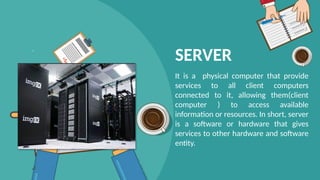
SERVER
It is a physical computer that provide
services to all client computers
connected to it, allowing them(client
computer ) to access available
information or resources. In short, server
is a software or hardware that gives
services to other hardware and software
entity.
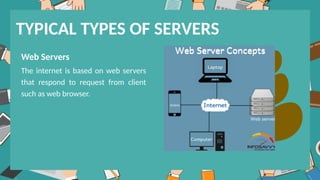
Web Servers
The internet is based on web servers
that respond to request from client
such as web browser.
TYPICAL TYPES OF SERVERS
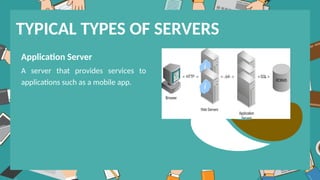
Application Server
A server that provides services to
applications such as a mobile app.
TYPICAL TYPES OF SERVERS
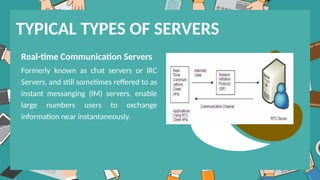
Real-time Communication Servers
Formerly known as chat servers or IRC
Servers, and still sometimes reffered to as
instant messanging (IM) servers, enable
large numbers users to exchange
information near instantaneously.
TYPICAL TYPES OF SERVERS
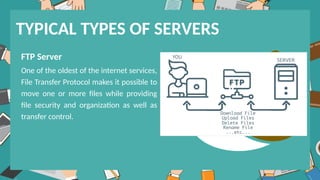
FTP Server
One of the oldest of the internet services,
File Transfer Protocol makes it possible to
move one or more files while providing
file security and organization as well as
transfer control.
TYPICAL TYPES OF SERVERS
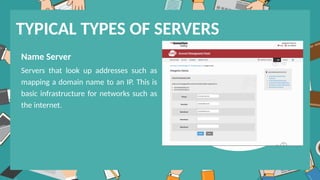
Name Server
Servers that look up addresses such as
mapping a domain name to an IP. This is
basic infrastructure for networks such as
the internet.
TYPICAL TYPES OF SERVERS
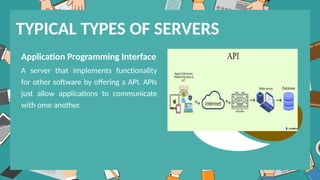
Application Programming Interface
A server that implements functionality
for other software by offering a API. APIs
just allow applications to communicate
with ome another.
TYPICAL TYPES OF SERVERS
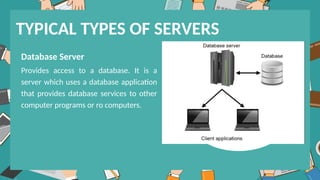
Database Server
Provides access to a database. It is a
server which uses a database application
that provides database services to other
computer programs or ro computers.
TYPICAL TYPES OF SERVERS
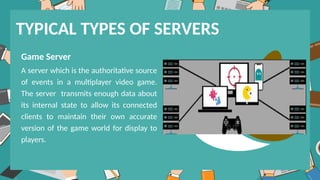
Game Server
A server which is the authoritative source
of events in a multiplayer video game.
The server transmits enough data about
its internal state to allow its connected
clients to maintain their own accurate
version of the game world for display to
players.
TYPICAL TYPES OF SERVERS
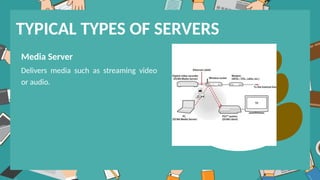
Media Server
Delivers media such as streaming video
or audio.
TYPICAL TYPES OF SERVERS
SET-UP USER ACCESS
Basic Introduction
• USER: In computer language user is one
who uses a computer.
• ACCOUNT: Collection of information
related to an individual is termed as account.
Definition of User Account
•A User account is an object that consists of
all the information that defines individual
user, which includes username, password,
and groups in which the user account has
membership.
User Account Types
• Administrator User (Provide the most control over a
computer).
•Standard Account (Used for everyday computing).
• Guest User (Intended primarily for people who need
temporary use of a computer).
• The Administrator account is the account you use when you use first set up file
computer. You use this account before you create an account for yourself.
• The Administrator account has full control of the server and can assign user rights
and access control permissions to users as necessary.
• This is a member of the Administrators group on the computer.
• This account can never be deleted or removed from the Administrators group, but
it can be renamed or disabled.
• Renaming or disabling this account will make it more difficukt for malicious users
to try and gain access to it.
ADMINISTRATOR ACCOUNT
• Standard account holders can access most of the computer, but they can’t mae any
big changes to it.
• They can’t run or install new programs, but they can run existing programs.
STANDARD ACCOUNT
• The Guest account is used by people who do not have an actual account on the
computer.
• The Guest account does not require a password.
• The Guest account is disabled by default, but you can enable it.
• You can set rights and permissions for the Guest account just like any user account.
• Additional rights, as well as any permissions, must be granted to the Guests group
by a member of the Administrators group.
GUEST ACCOUNT
CONFIGURATION NETWORK
ACCESS
Configuring network services on a server involves
setting up various components to ensure connectivity,
security, and efficient data transfer within the network.
Assigning IP Address: Start by assigning a static IP
address to your server. This can be done either through
the server's operating system or via your network's
DHCP server. Ensure the IP address is within the same
subnet as other devices in your network.
Configuring DNS: Set up DNS (Domain Name System) on
your server to translate domain names into IP addresses
and vice versa. You can install and configure a DNS server
software such as BIND (Berkeley Internet Name Domain) or
use a third-party DNS service.
Setting up DHCP: If your server will act as a DHCP (Dynamic
Host Configuration Protocol) server, configure DHCP
settings to assign IP addresses, subnet masks, default
gateways, and DNS server addresses to client devices
automatically.
Firewall Configuration: Configure a firewall on your server
to control incoming and outgoing traffic. Define firewall
rules to allow or deny traffic based on source and
destination IP addresses, ports, and protocols. Use tools
like iptables (Linux) or Windows Firewall (Windows Server)
for this purpose.
SSH (Secure Shell): If the server will be accessed remotely,
configure SSH for secure remote access. Disable password-
based authentication and use SSH keys for authentication
instead. This enhances security by preventing brute-force
Web Server Configuration: If your server will host websites
or web applications, install and configure a web server
software such as Apache HTTP Server or Nginx. Configure
virtual hosts to host multiple websites on the same server if
necessary.
Email Server Configuration: If your server will handle
email services, install and configure an email server
software such as Postfix (SMTP server) and Dovecot
(IMAP/POP3 server) on Linux or Microsoft Exchange Server
on Windows. Configure email accounts, domains, and mail
FTP (File Transfer Protocol) Server Configuration: If your
server will provide FTP services for file transfer, install and
configure an FTP server software such as vsftpd (Linux) or
FileZilla Server (Windows). Set up user accounts and
directory permissions for FTP access.
Monitoring and Management: Install and configure
monitoring tools to track the performance and health of
your server and network. Use tools like Nagios, Zabbix, or
Prometheus for monitoring, and configure SNMP for
network device monitoring.
Backup and Redundancy: Implement backup strategies to protect data
stored on the server. Set up regular backups to an external storage device
or cloud service. Implement RAID (Redundant Array of Independent Disks)
for disk redundancy if necessary.
Security Measures: Harden the server's security by applying security
updates regularly, configuring access controls, and implementing
intrusion detection/prevention systems (IDS/IPS) if needed. Regularly
review and update security policies to mitigate emerging threats.
Documentation: Document the server's network configuration, including
IP addresses, DNS settings, firewall rules, installed services, and their
configurations. This documentation will be helpful for troubleshooting and
future reference.
Setting-up-Computer-Server Powerpoint presentation

  • 1.
  • 2.
    01 Computer Servers 02Set-up user access 03 Configuration network services CONTENTS
  • 3.
    SERVER It is aphysical computer that provide services to all client computers connected to it, allowing them(client computer ) to access available information or resources. In short, server is a software or hardware that gives services to other hardware and software entity.
  • 4.
    Web Servers The internetis based on web servers that respond to request from client such as web browser. TYPICAL TYPES OF SERVERS
  • 5.
    Application Server A serverthat provides services to applications such as a mobile app. TYPICAL TYPES OF SERVERS
  • 6.
    Real-time Communication Servers Formerlyknown as chat servers or IRC Servers, and still sometimes reffered to as instant messanging (IM) servers, enable large numbers users to exchange information near instantaneously. TYPICAL TYPES OF SERVERS
  • 7.
    FTP Server One ofthe oldest of the internet services, File Transfer Protocol makes it possible to move one or more files while providing file security and organization as well as transfer control. TYPICAL TYPES OF SERVERS
  • 8.
    Name Server Servers thatlook up addresses such as mapping a domain name to an IP. This is basic infrastructure for networks such as the internet. TYPICAL TYPES OF SERVERS
  • 9.
    Application Programming Interface Aserver that implements functionality for other software by offering a API. APIs just allow applications to communicate with ome another. TYPICAL TYPES OF SERVERS
  • 10.
    Database Server Provides accessto a database. It is a server which uses a database application that provides database services to other computer programs or ro computers. TYPICAL TYPES OF SERVERS
  • 11.
    Game Server A serverwhich is the authoritative source of events in a multiplayer video game. The server transmits enough data about its internal state to allow its connected clients to maintain their own accurate version of the game world for display to players. TYPICAL TYPES OF SERVERS
  • 12.
    Media Server Delivers mediasuch as streaming video or audio. TYPICAL TYPES OF SERVERS
  • 13.
  • 14.
    Basic Introduction • USER:In computer language user is one who uses a computer. • ACCOUNT: Collection of information related to an individual is termed as account.
  • 15.
    Definition of UserAccount •A User account is an object that consists of all the information that defines individual user, which includes username, password, and groups in which the user account has membership.
  • 16.
    User Account Types •Administrator User (Provide the most control over a computer). •Standard Account (Used for everyday computing). • Guest User (Intended primarily for people who need temporary use of a computer).
  • 17.
    • The Administratoraccount is the account you use when you use first set up file computer. You use this account before you create an account for yourself. • The Administrator account has full control of the server and can assign user rights and access control permissions to users as necessary. • This is a member of the Administrators group on the computer. • This account can never be deleted or removed from the Administrators group, but it can be renamed or disabled. • Renaming or disabling this account will make it more difficukt for malicious users to try and gain access to it. ADMINISTRATOR ACCOUNT
  • 18.
    • Standard accountholders can access most of the computer, but they can’t mae any big changes to it. • They can’t run or install new programs, but they can run existing programs. STANDARD ACCOUNT
  • 19.
    • The Guestaccount is used by people who do not have an actual account on the computer. • The Guest account does not require a password. • The Guest account is disabled by default, but you can enable it. • You can set rights and permissions for the Guest account just like any user account. • Additional rights, as well as any permissions, must be granted to the Guests group by a member of the Administrators group. GUEST ACCOUNT
  • 20.
  • 21.
    Configuring network serviceson a server involves setting up various components to ensure connectivity, security, and efficient data transfer within the network. Assigning IP Address: Start by assigning a static IP address to your server. This can be done either through the server's operating system or via your network's DHCP server. Ensure the IP address is within the same subnet as other devices in your network.
  • 22.
    Configuring DNS: Setup DNS (Domain Name System) on your server to translate domain names into IP addresses and vice versa. You can install and configure a DNS server software such as BIND (Berkeley Internet Name Domain) or use a third-party DNS service. Setting up DHCP: If your server will act as a DHCP (Dynamic Host Configuration Protocol) server, configure DHCP settings to assign IP addresses, subnet masks, default gateways, and DNS server addresses to client devices automatically.
  • 23.
    Firewall Configuration: Configurea firewall on your server to control incoming and outgoing traffic. Define firewall rules to allow or deny traffic based on source and destination IP addresses, ports, and protocols. Use tools like iptables (Linux) or Windows Firewall (Windows Server) for this purpose. SSH (Secure Shell): If the server will be accessed remotely, configure SSH for secure remote access. Disable password- based authentication and use SSH keys for authentication instead. This enhances security by preventing brute-force
  • 24.
    Web Server Configuration:If your server will host websites or web applications, install and configure a web server software such as Apache HTTP Server or Nginx. Configure virtual hosts to host multiple websites on the same server if necessary. Email Server Configuration: If your server will handle email services, install and configure an email server software such as Postfix (SMTP server) and Dovecot (IMAP/POP3 server) on Linux or Microsoft Exchange Server on Windows. Configure email accounts, domains, and mail
  • 25.
    FTP (File TransferProtocol) Server Configuration: If your server will provide FTP services for file transfer, install and configure an FTP server software such as vsftpd (Linux) or FileZilla Server (Windows). Set up user accounts and directory permissions for FTP access. Monitoring and Management: Install and configure monitoring tools to track the performance and health of your server and network. Use tools like Nagios, Zabbix, or Prometheus for monitoring, and configure SNMP for network device monitoring.
  • 26.
    Backup and Redundancy:Implement backup strategies to protect data stored on the server. Set up regular backups to an external storage device or cloud service. Implement RAID (Redundant Array of Independent Disks) for disk redundancy if necessary. Security Measures: Harden the server's security by applying security updates regularly, configuring access controls, and implementing intrusion detection/prevention systems (IDS/IPS) if needed. Regularly review and update security policies to mitigate emerging threats. Documentation: Document the server's network configuration, including IP addresses, DNS settings, firewall rules, installed services, and their configurations. This documentation will be helpful for troubleshooting and future reference.