TYPES OF RACKS
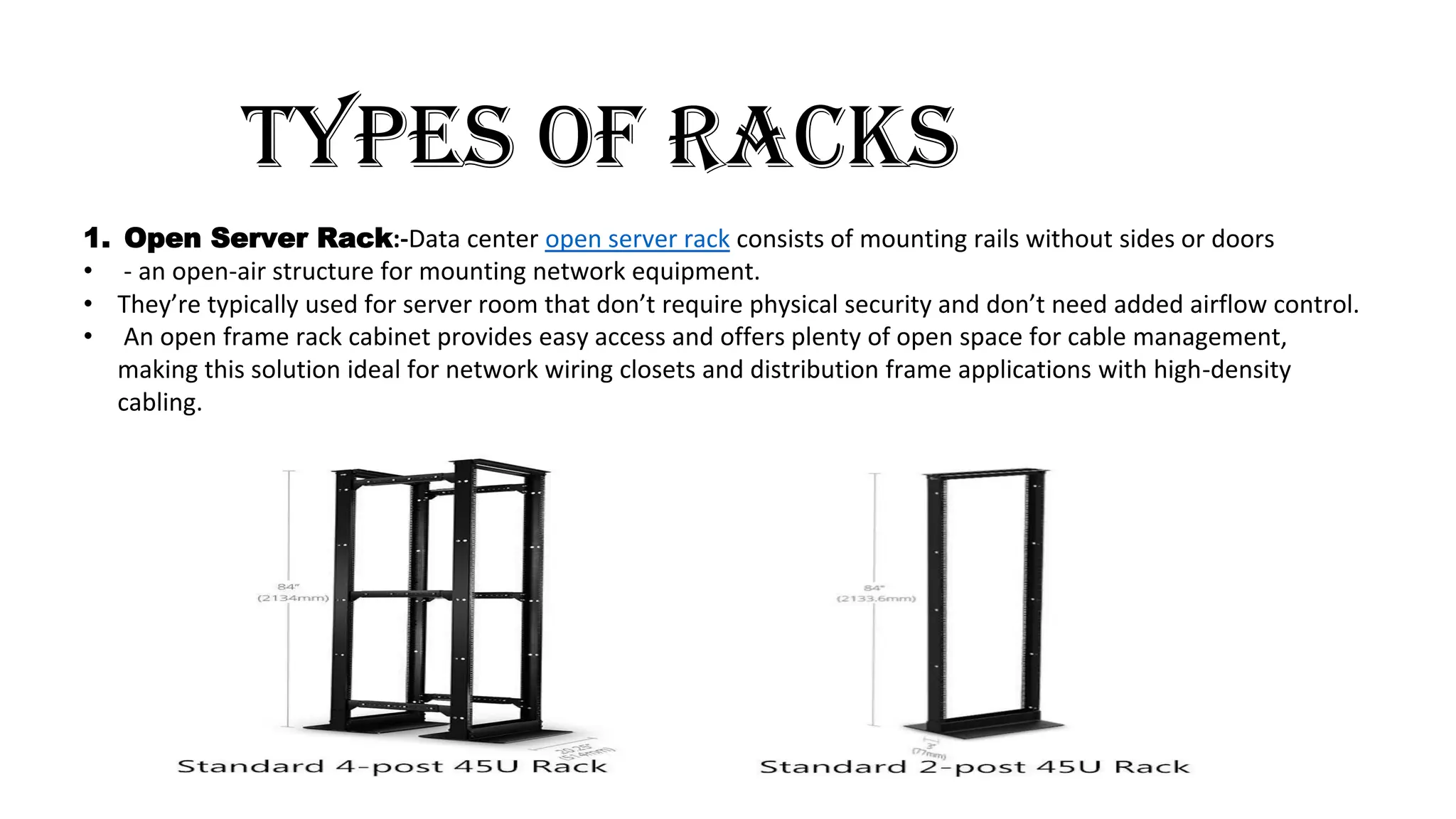
1.Open Server Rack:-Data center open server rack consists of mounting rails without sides or doors
• - an open-air structure for mounting network equipment.
• They’re typically used for server room that don’t require physical security and don’t need added airflow control.
• An open frame rack cabinet provides easy access and offers plenty of open space for cable management,
making this solution ideal for network wiring closets and distribution frame applications with high-density
cabling.
2.
2.SERVER CABINET:-
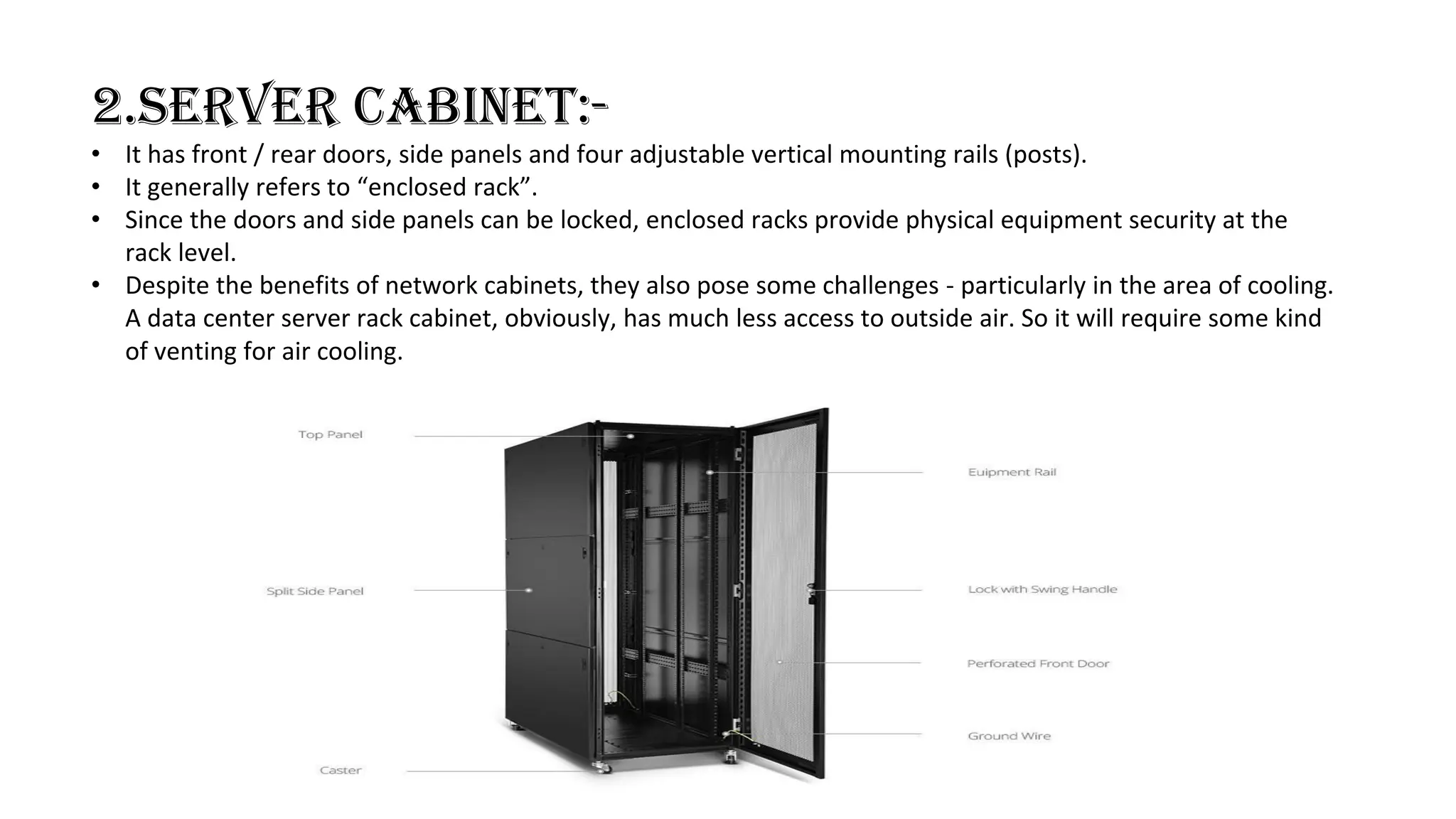
• Ithas front / rear doors, side panels and four adjustable vertical mounting rails (posts).
• It generally refers to “enclosed rack”.
• Since the doors and side panels can be locked, enclosed racks provide physical equipment security at the
rack level.
• Despite the benefits of network cabinets, they also pose some challenges - particularly in the area of cooling.
A data center server rack cabinet, obviously, has much less access to outside air. So it will require some kind
of venting for air cooling.
3.
3.Wall mount rack
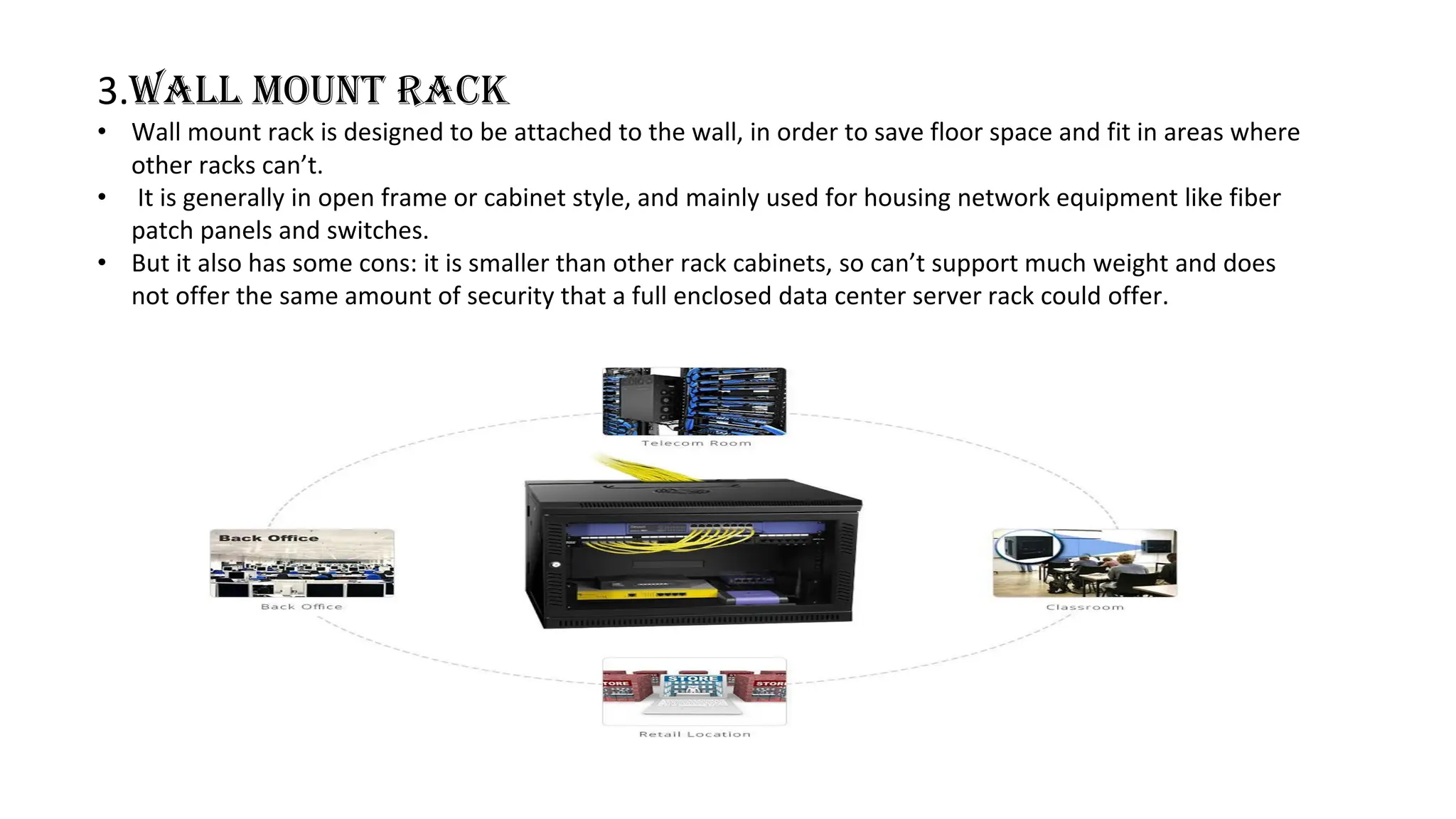
•Wall mount rack is designed to be attached to the wall, in order to save floor space and fit in areas where
other racks can’t.
• It is generally in open frame or cabinet style, and mainly used for housing network equipment like fiber
patch panels and switches.
• But it also has some cons: it is smaller than other rack cabinets, so can’t support much weight and does
not offer the same amount of security that a full enclosed data center server rack could offer.
4.
TYPES OF SERVER
Thereare many types of servers that all perform different functions. Many networks contain one or more of the common
server types:
1. File Server:-File servers store and distribute files.
Multiple clients or users may share files stored on a server.
File server hardware can be designed to maximize read and write speeds to improve performance.
2. Print Servers:-Print servers allow for the management and distribution of printing functionality.
Rather than attaching a printer to every workstation, a single print server can respond to printing
requests from numerous clients.
3. Application Servers:-Application servers run applications in lieu of client computers running applications
locally. Application servers often run resource-intensive applications that are shared by a large number of users.
Doing so removes the need for each client to have sufficient resources to run the applications.
It also removes the need to install and maintain software on many machines as opposed to only one.
4.Mail Server:-Mail servers are a very common type of application server.
Mail servers receive emails sent to a user and store them until requested by a client on behalf of said user.
Having an email server allows for a single machine to be properly configured and attached to the network at all times.
It is then ready to send and receive messages rather than requiring every client machine to have its own email
subsystem continuously running.
5.
5.Proxy Server:- Aproxy server acts as an intermediary between a client and a server.
Often used to isolate either the clients or servers for security purposes, a proxy server takes the request from the
client. Instead of responding to the client, it passes the request on to another server or process.
6. Web servers:- One of the most abundant types of servers in today’s market is a web server. A web server is a
special kind of application server that hosts programs and data requested by users across the Internet or an intranet.
Web servers respond to requests from browsers running on client computers for web pages, or other web-based
services. Common web servers include Apache web servers, Microsoft Internet Information Services (IIS) servers and
Nginx servers.
7. Virtual servers:-Virtual servers are taking the server world by storm. Unlike traditional servers that are
installed as an operating system on machine hardware, virtual servers exist only as defined within specialized software
called hypervisor. Each hypervisor can run hundreds, or even thousands, of virtual servers all at once. The hypervisor
presents virtual hardware to the server as if it were real physical hardware.
6.
COMPONENTS OF SERVER
1.Motherboard:-Themotherboard is the computer’s main electronic circuit board to which all the other
components of your computer are connected. More than any other component, the motherboard is the
computer. All other components attach to the motherboard.
2.CPU:-The processor, or CPU, is the brain of the computer. Although the processor isn’t the only
component that affects overall system performance, it is the one that most people think of first when deciding
what type of server to purchase.
3.Memory:-People rarely complain about servers having too much memory. Many different types of
memory are available, so you have to pick the right type of memory to match the memory supported by your
motherboard. The total memory capacity of the server depends on the motherboard. Most new servers can
support at least 12GB of memory, and some can handle up to 32GB.
4.Hard drives:-Most desktop computers use inexpensive hard drives called IDE drives (sometimes also
called ATA). These drives are adequate for individual users, but because performance is more important for
servers, another type of drive known as SCSI is usually used instead. For the best performance, use the SCSI
drives along with a high-performance SCSI controller card.
5.Network connection:-The network connection is one of the most important parts of any server.
Many servers have network adapters built into the motherboard. If your server isn’t equipped as such, you’ll
need to add a separate network adapter card.
6.Power supply:-Because a server usually has more devices than a typical desktop computer, it requires a
larger power supply (300 watts is typical). If the server houses a large number of hard drives, it may require an
even larger power supply.
IP
7.
WHAT IS COLOCATION
(Colocationis also known as colo) :- It is the practice of renting space for your servers and other computing
hardware at a third-party provider’s data center facility.
Typically, colocation services include the building in which everything is housed, as well as networking, physical
security, redundant power and redundant cooling components, which then support the servers and storage
provided by the customer.
Relying on a colocation data center allows you to eliminate the capital expenditures (CAPEX) of building and
maintaining your own facility while allowing you to retain ownership and complete control of your physical
servers. However, it still requires you to shoulder upfront hardware costs, and typically involves increased travel
costs for your engineers in the event that they need to manually access the equipment.
8.
Difference between colocationservers and dedicated servers
The difference between dedicated server hosting and colocation is that:-
Dedicated :- clients of dedicated hosting leases an entire server housed in an off-site datacenter that is
dedicated solely for their own use and without anyone sharing the facility with them .
Colocation :-while a clients for colocation chooses to lease a rack or a cabinet in an highly secured off-site
datacenter to house their server hardware and shares the use of the facility and its services with other
colocation subscribers.
While both of them are on lease, one has the whole datacenter to himself while the other shares the datacenter
with others.
Another major difference between them is that, with colocation, you own the hardware which gives you the
total control when it comes to the choice of hardware and OS you want to use while the service vendor owns
the hardware in dedicated hosting which means you need to pay for upgrades of your machines.
9.
Data center infrastructure
Datacenter infrastructure refers to the core physical or hardware-based resources and components –
including all IT infrastructure devices, equipment and technologies – that comprise a data center.
A data center infrastructure may include:
Servers
Computers
Networking equipment, such as routers or switches
Security, such as firewall or biometric security system
Storage, such as storage area network (SAN) or backup/tape storage
Data center management software/applications
It can also include non-computing resources, such as:
Power and cooling devices, such as air conditioners or generators
Physical server racks/chassis
Cables
Internet backbone
10.
WEB HOSTING:-Websites arehosted on servers, which are powerful pieces of hardware that house websites and
data related to those sites. Every component of your website is stored on a server and accessed through your web host.
This includes elements like files, text, images, videos — everything.
TYPE OF HOSTING
• Shared Hosting
• VPS(Virtual Private Server)
• Dedicated server
• Cloud hosting
How do you know which hosting option is best for your website?
1. The type of server you choose impacts elements like performance, security, scalability, and management level of
your website.
2. Your decision also depends on the type of website you have and the amount of traffic you get.
For example, a small personal blog with 5,000 monthly visitors have different hosting needs than a large ecommerce
site with 250,000 visits per month.
It’s also worth noting that different hosting options are offered at varying price points. So it’s important that you find an
option that falls within your budget as well.
11.
SHARED HOSTING
Shared hostingis the most basic type of web hosting. It’s cost-effective and the best choice for small or
entry-level websites.
As the name implies, websites using shared hosting will be sharing resources with other websites on a
singular server.
Forexample:-Think of it as renting an apartment with roommates. You have your own bedroom, but
you and your roommates will share resources like water, electricity, and common spaces throughout the
house.
Who is shared hosting for:
• Shared hosting is a great choice for beginners and smaller websites.
• It’s cost-effective and doesn’t require lots of technical knowledge to get started.
• Shared web hosting to websites that are on a tight budget.
• Like:-Bloggers and small business owners who have simple websites are great candidates for shared
hosting. Any website that doesn’t require too much on-site interaction or lots of resources will be fine
with this hosting type.
• If you’re not expecting more than 10,000 or 20,000 monthly visits to your website.
12.
Pros:-
• Most cost-effectivetype of web hosting.
• Easy to set up.
• No technical knowledge required.
• Great for beginners and small websites.
Cons:-
• Sharing server resources with other
websites.
• Performance issues are out of your control.
• Slower loading times and lower uptime
rates.
VPS HOSTING
• With a virtual private server, your website will still be sharing a single server with other websites.
• However, the number of websites you’ll be sharing it with is significantly lower.
• The main server is split into multiple virtual servers—hence the name. These virtual servers can be
customized by individual websites.
FOR EXAMPLE:-A virtual private server is like renting an apartment on your own. You won’t be sharing a
kitchen, bathroom, living room, or other common spaces with any roommates. This gives you much more
freedom and flexibility to do what you want with the space.
13.
Who is VPSHosting For?
VPS hosting is best for small or medium-sized businesses that can’t afford to have unexpected downtime on
their website. It’s a great option for website owners who have outgrown the resources of a shared hosting
plan.
Websites with large files like videos and images should consider a VPS. Interactive websites with complex files
will perform better on a VPS as opposed to a shared server.
PROS:-
• Dedicated server resources.
• Ability to make custom configurations to your
server.
• Higher uptime rates and faster loading speeds.
• More cost-effective than a dedicated server.
CONS:-
Sharing the main server with other
websites.
Not as easy to set up as a shared server.
Still has limitations in terms of what you
can control.
14.
DEDICATED HOSTING
• Dedicatedservers are the top of the line in web hosting.
• As the name implies, you’ll have a dedicated server that belongs to you, and you alone.
• This is the most expensive type of web hosting, but it comes with added benefits.
• Since you won’t be sharing resources or anything else with other websites, your site will operate at peak
performance.
• Websites being hosted on a dedicated server have complete technical control over the server settings. You
choose the software, configurations, and anything else you need.
Who is Dedicated Hosting For?
Dedicated hosting are typically reserved for enterprise-level websites. These servers are intended for websites that
have high volumes of traffic.
A dedicated server unless your site was getting upwards of 100,000 monthly visits.
Large ecommerce sites and enterprises should consider a dedicated hosting plan because they can have complete
control over the functions of their server. Sites that require the highest levels of security, such as websites that store
financial data or medical information would benefit from a dedicated server.
15.
PROS:-
Complete control overthe server.
Not sharing resources with any other
websites.
High security.
Fast load times, high uptimes, and optimal
performance.
CONS:-
Most expensive type of web hosting.
Requires technical knowledge.
You are responsible for everything.
CLOUD HOSTING
• Cloud hosting is a newer type of web hosting. It can best be described as a hybrid version of a VPS, but
more cost-effective.
• Cloud hosting plans come with multiple remote servers. Each server has different responsibilities. If one
of the servers is compromised or has a problem, the other servers on the network will take over those
responsibilities and pick up the slack.
16.
Who is CloudHosting For?
Cloud hosting is the best option for medium and large business websites that are growing at a rapid rate.
If your website traffic is unpredictable and you’re planning on it scaling at a steady rate in the coming months or years,
then you should consider a cloud hosting plan.
Any website with more than 50,000 monthly page visits could consider a cloud plan. Websites that have outgrown
their shared plan and need to upgrade could seek cloud hosting as an alternative option to a VPS.
Pros:-
High security.
Scale resources on demand.
Less unexpected downtime.
Cons:-
Pricing isn’t always fixed.
Unpredictable traffic can increase costs.
Limited customization.