STUDY GUIDE: Set-Up Computer Servers Page 1 of 6
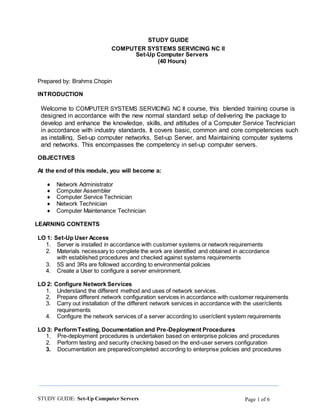
STUDY GUIDE
COMPUTER SYSTEMS SERVICING NC II
Set-Up Computer Servers
(40 Hours)
Prepared by: Brahms Chopin
INTRODUCTION
Welcome to COMPUTER SYSTEMS SERVICING NC II course, this blended training course is
designed in accordance with the new normal standard setup of delivering the package to
develop and enhance the knowledge, skills, and attitudes of a Computer Service Technician
in accordance with industry standards. It covers basic, common and core competencies such
as installing, Set-up computer networks, Set-up Server, and Maintaining computer systems
and networks. This encompasses the competency in set-up computer servers.
OBJECTIVES
At the end of this module, you will become a:
● Network Administrator
● Computer Assembler
● Computer Service Technician
● Network Technician
● Computer Maintenance Technician
LEARNING CONTENTS
LO 1: Set-Up User Access
1. Server is installed in accordance with customer systems or network requirements
2. Materials necessary to complete the work are identified and obtained in accordance
with established procedures and checked against systems requirements
3. 5S and 3Rs are followed according to environmental policies
4. Create a User to configure a server environment.
LO 2: Configure Network Services
1. Understand the different method and uses of network services.
2. Prepare different network configuration services in accordance with customer requirements
3. Carry out installation of the different network services in accordance with the user/clients
requirements
4. Configure the network services of a server according to user/client system requirements
LO 3: PerformTesting, Documentation and Pre-Deployment Procedures
1. Pre-deployment procedures is undertaken based on enterprise policies and procedures
2. Perform testing and security checking based on the end-user servers configuration
3. Documentation are prepared/completed according to enterprise policies and procedures
STUDY GUIDE: Set-Up Computer Servers Page 2 of 6
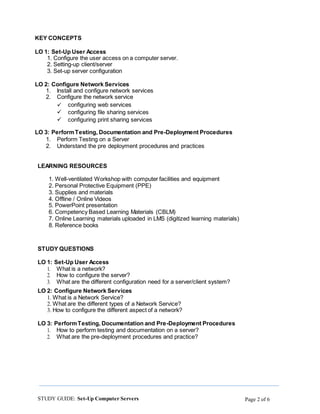
KEY CONCEPTS
LO 1: Set-Up User Access
1. Configure the user access on a computer server.
2. Setting-up client/server
3. Set-up server configuration
LO 2: Configure Network Services
1. Install and configure network services
2. Configure the network service
 configuring web services
 configuring file sharing services
 configuring print sharing services
LO 3: PerformTesting, Documentation and Pre-Deployment Procedures
1. Perform Testing on a Server
2. Understand the pre deployment procedures and practices
LEARNING RESOURCES
1. Well-ventilated Workshop with computer facilities and equipment
2. Personal Protective Equipment (PPE)
3. Supplies and materials
4. Offline / Online Videos
5. PowerPoint presentation
6. Competency Based Learning Materials (CBLM)
7. Online Learning materials uploaded in LMS (digitized learning materials)
8. Reference books
STUDY QUESTIONS
LO 1: Set-Up User Access
1. What is a network?
2. How to configure the server?
3. What are the different configuration need for a server/client system?
LO 2: Configure Network Services
1. What is a Network Service?
2. What are the different types of a Network Service?
3. How to configure the different aspect of a network?
LO 3: PerformTesting, Documentation and Pre-Deployment Procedures
1. How to perform testing and documentation on a server?
2. What are the pre-deployment procedures and practice?
STUDY GUIDE: Set-Up Computer Servers Page 3 of 6
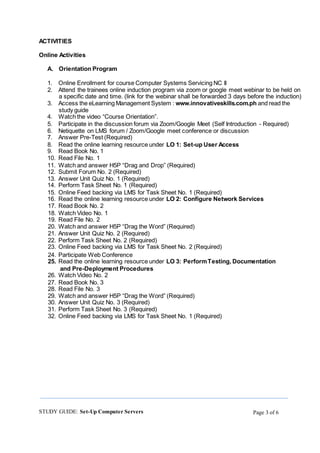
ACTIVITIES
Online Activities
A. Orientation Program
1. Online Enrollment for course Computer Systems Servicing NC II
2. Attend the trainees online induction program via zoom or google meet webinar to be held on
a specific date and time. (link for the webinar shall be forwarded 3 days before the induction)
3. Access the eLearning Management System : www.innovativeskills.com.ph and read the
study guide
4. Watch the video “Course Orientation”.
5. Participate in the discussion forum via Zoom/Google Meet (Self Introduction - Required)
6. Netiquette on LMS forum / Zoom/Google meet conference or discussion
7. Answer Pre-Test (Required)
8. Read the online learning resource under LO 1: Set-up User Access
9. Read Book No. 1
10. Read File No. 1
11. Watch and answer H5P “Drag and Drop” (Required)
12. Submit Forum No. 2 (Required)
13. Answer Unit Quiz No. 1 (Required)
14. Perform Task Sheet No. 1 (Required)
15. Online Feed backing via LMS for Task Sheet No. 1 (Required)
16. Read the online learning resource under LO 2: Configure Network Services
17. Read Book No. 2
18. Watch Video No. 1
19. Read File No. 2
20. Watch and answer H5P “Drag the Word” (Required)
21. Answer Unit Quiz No. 2 (Required)
22. Perform Task Sheet No. 2 (Required)
23. Online Feed backing via LMS for Task Sheet No. 2 (Required)
24. Participate Web Conference
25. Read the online learning resource under LO 3: PerformTesting, Documentation
and Pre-Deployment Procedures
26. Watch Video No. 2
27. Read Book No. 3
28. Read File No. 3
29. Watch and answer H5P “Drag the Word” (Required)
30. Answer Unit Quiz No. 3 (Required)
31. Perform Task Sheet No. 3 (Required)
32. Online Feed backing via LMS for Task Sheet No. 1 (Required)
STUDY GUIDE: Set-Up Computer Servers Page 4 of 6
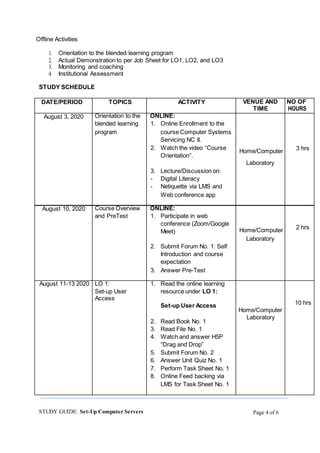
Offline Activities
1. Orientation to the blended learning program
2. Actual Demonstration to per Job Sheet for LO1, LO2, and LO3
3. Monitoring and coaching
4. Institutional Assessment
STUDY SCHEDULE
DATE/PERIOD TOPICS ACTIVITY VENUE AND NO OF
TIME HOURS
August 3, 2020 Orientation to the ONLINE:
3 hrs
blended learning 1. Online Enrollment to the
program course Computer Systems
Servicing NC II.
2. Watch the video “Course
Home/Computer
Orientation”.
Laboratory
3. Lecture/Discussion on:
- Digital Literacy
- Netiquette via LMS and
Web conference app
August 10, 2020 Course Overview ONLINE:
2 hrs
and PreTest 1. Participate in web
conference (Zoom/Google
Home/ComputerMeet)
Laboratory
2. Submit Forum No. 1: Self
Introduction and course
expectation
3. Answer Pre-Test
August 11-13 2020 LO 1: 1. Read the online learning
10 hrs
Set-up User
Access
resource under LO 1:
Set-up User Access
Home/Computer
2. Read Book No. 1
Laboratory
3. Read File No. 1
4. Watch and answer H5P
“Drag and Drop”
5. Submit Forum No. 2
6. Answer Unit Quiz No. 1
7. Perform Task Sheet No. 1
8. Online Feed backing via
LMS for Task Sheet No. 1
STUDY GUIDE: Set-Up Computer Servers Page 5 of 6
FACE TO FACE: Practical work 3 hrs.
1. Perform Job Sheet No. 3 area/shop.
2. Feed backing Training Center
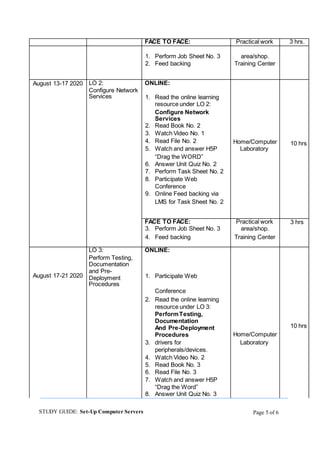
August 13-17 2020 LO 2: ONLINE:
10 hrs
Configure Network
Services 1. Read the online learning
resource under LO 2:
Configure Network
Services
2. Read Book No. 2
3. Watch Video No. 1
4. Read File No. 2 Home/Computer
5. Watch and answer H5P Laboratory
“Drag the WORD”
6. Answer Unit Quiz No. 2
7. Perform Task Sheet No. 2
8. Participate Web
Conference
9. Online Feed backing via
LMS for Task Sheet No. 2
FACE TO FACE: Practical work 3 hrs
3. Perform Job Sheet No. 3 area/shop.
4. Feed backing Training Center
August 17-21 2020
LO 3: ONLINE:
10 hrs
Perform Testing,
Documentation
and Pre-
Deployment
Procedures
1. Participate Web
Conference
2. Read the online learning
resource under LO 3:
PerformTesting,
Documentation
And Pre-Deployment
Procedures Home/Computer
3. drivers for Laboratory
peripherals/devices.
4. Watch Video No. 2
5. Read Book No. 3
6. Read File No. 3
7. Watch and answer H5P
“Drag the Word”
8. Answer Unit Quiz No. 3
STUDY GUIDE: Set-Up Computer Servers Page 6 of 6
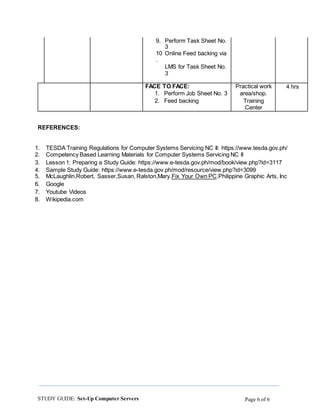
9. Perform Task Sheet No.
3
10
.
Online Feed backing via
LMS for Task Sheet No.
3
FACE TO FACE: Practical work 4 hrs
1. Perform Job Sheet No. 3 area/shop.
2. Feed backing Training
Center
REFERENCES:
1. TESDA Training Regulations for Computer Systems Servicing NC II: https://www.tesda.gov.ph/
2. Competency Based Learning Materials for Computer Systems Servicing NC II
3. Lesson 1: Preparing a Study Guide: https://www.e-tesda.gov.ph/mod/book/view.php?id=3117
4. Sample Study Guide: https://www.e-tesda.gov.ph/mod/resource/view.php?id=3099
5. McLaughlin,Robert, Sasser,Susan, Ralston,Mary.Fix Your Own PC.Philippine Graphic Arts, Inc
6. Google
7. Youtube Videos
8. Wikipedia.com

Computer systems servicing nc ii study guide by brahms

  • 1.
    STUDY GUIDE: Set-UpComputer Servers Page 1 of 6 STUDY GUIDE COMPUTER SYSTEMS SERVICING NC II Set-Up Computer Servers (40 Hours) Prepared by: Brahms Chopin INTRODUCTION Welcome to COMPUTER SYSTEMS SERVICING NC II course, this blended training course is designed in accordance with the new normal standard setup of delivering the package to develop and enhance the knowledge, skills, and attitudes of a Computer Service Technician in accordance with industry standards. It covers basic, common and core competencies such as installing, Set-up computer networks, Set-up Server, and Maintaining computer systems and networks. This encompasses the competency in set-up computer servers. OBJECTIVES At the end of this module, you will become a: ● Network Administrator ● Computer Assembler ● Computer Service Technician ● Network Technician ● Computer Maintenance Technician LEARNING CONTENTS LO 1: Set-Up User Access 1. Server is installed in accordance with customer systems or network requirements 2. Materials necessary to complete the work are identified and obtained in accordance with established procedures and checked against systems requirements 3. 5S and 3Rs are followed according to environmental policies 4. Create a User to configure a server environment. LO 2: Configure Network Services 1. Understand the different method and uses of network services. 2. Prepare different network configuration services in accordance with customer requirements 3. Carry out installation of the different network services in accordance with the user/clients requirements 4. Configure the network services of a server according to user/client system requirements LO 3: PerformTesting, Documentation and Pre-Deployment Procedures 1. Pre-deployment procedures is undertaken based on enterprise policies and procedures 2. Perform testing and security checking based on the end-user servers configuration 3. Documentation are prepared/completed according to enterprise policies and procedures
  • 2.
    STUDY GUIDE: Set-UpComputer Servers Page 2 of 6 KEY CONCEPTS LO 1: Set-Up User Access 1. Configure the user access on a computer server. 2. Setting-up client/server 3. Set-up server configuration LO 2: Configure Network Services 1. Install and configure network services 2. Configure the network service  configuring web services  configuring file sharing services  configuring print sharing services LO 3: PerformTesting, Documentation and Pre-Deployment Procedures 1. Perform Testing on a Server 2. Understand the pre deployment procedures and practices LEARNING RESOURCES 1. Well-ventilated Workshop with computer facilities and equipment 2. Personal Protective Equipment (PPE) 3. Supplies and materials 4. Offline / Online Videos 5. PowerPoint presentation 6. Competency Based Learning Materials (CBLM) 7. Online Learning materials uploaded in LMS (digitized learning materials) 8. Reference books STUDY QUESTIONS LO 1: Set-Up User Access 1. What is a network? 2. How to configure the server? 3. What are the different configuration need for a server/client system? LO 2: Configure Network Services 1. What is a Network Service? 2. What are the different types of a Network Service? 3. How to configure the different aspect of a network? LO 3: PerformTesting, Documentation and Pre-Deployment Procedures 1. How to perform testing and documentation on a server? 2. What are the pre-deployment procedures and practice?
  • 3.
    STUDY GUIDE: Set-UpComputer Servers Page 3 of 6 ACTIVITIES Online Activities A. Orientation Program 1. Online Enrollment for course Computer Systems Servicing NC II 2. Attend the trainees online induction program via zoom or google meet webinar to be held on a specific date and time. (link for the webinar shall be forwarded 3 days before the induction) 3. Access the eLearning Management System : www.innovativeskills.com.ph and read the study guide 4. Watch the video “Course Orientation”. 5. Participate in the discussion forum via Zoom/Google Meet (Self Introduction - Required) 6. Netiquette on LMS forum / Zoom/Google meet conference or discussion 7. Answer Pre-Test (Required) 8. Read the online learning resource under LO 1: Set-up User Access 9. Read Book No. 1 10. Read File No. 1 11. Watch and answer H5P “Drag and Drop” (Required) 12. Submit Forum No. 2 (Required) 13. Answer Unit Quiz No. 1 (Required) 14. Perform Task Sheet No. 1 (Required) 15. Online Feed backing via LMS for Task Sheet No. 1 (Required) 16. Read the online learning resource under LO 2: Configure Network Services 17. Read Book No. 2 18. Watch Video No. 1 19. Read File No. 2 20. Watch and answer H5P “Drag the Word” (Required) 21. Answer Unit Quiz No. 2 (Required) 22. Perform Task Sheet No. 2 (Required) 23. Online Feed backing via LMS for Task Sheet No. 2 (Required) 24. Participate Web Conference 25. Read the online learning resource under LO 3: PerformTesting, Documentation and Pre-Deployment Procedures 26. Watch Video No. 2 27. Read Book No. 3 28. Read File No. 3 29. Watch and answer H5P “Drag the Word” (Required) 30. Answer Unit Quiz No. 3 (Required) 31. Perform Task Sheet No. 3 (Required) 32. Online Feed backing via LMS for Task Sheet No. 1 (Required)
  • 4.
    STUDY GUIDE: Set-UpComputer Servers Page 4 of 6 Offline Activities 1. Orientation to the blended learning program 2. Actual Demonstration to per Job Sheet for LO1, LO2, and LO3 3. Monitoring and coaching 4. Institutional Assessment STUDY SCHEDULE DATE/PERIOD TOPICS ACTIVITY VENUE AND NO OF TIME HOURS August 3, 2020 Orientation to the ONLINE: 3 hrs blended learning 1. Online Enrollment to the program course Computer Systems Servicing NC II. 2. Watch the video “Course Home/Computer Orientation”. Laboratory 3. Lecture/Discussion on: - Digital Literacy - Netiquette via LMS and Web conference app August 10, 2020 Course Overview ONLINE: 2 hrs and PreTest 1. Participate in web conference (Zoom/Google Home/ComputerMeet) Laboratory 2. Submit Forum No. 1: Self Introduction and course expectation 3. Answer Pre-Test August 11-13 2020 LO 1: 1. Read the online learning 10 hrs Set-up User Access resource under LO 1: Set-up User Access Home/Computer 2. Read Book No. 1 Laboratory 3. Read File No. 1 4. Watch and answer H5P “Drag and Drop” 5. Submit Forum No. 2 6. Answer Unit Quiz No. 1 7. Perform Task Sheet No. 1 8. Online Feed backing via LMS for Task Sheet No. 1
  • 5.
    STUDY GUIDE: Set-UpComputer Servers Page 5 of 6 FACE TO FACE: Practical work 3 hrs. 1. Perform Job Sheet No. 3 area/shop. 2. Feed backing Training Center August 13-17 2020 LO 2: ONLINE: 10 hrs Configure Network Services 1. Read the online learning resource under LO 2: Configure Network Services 2. Read Book No. 2 3. Watch Video No. 1 4. Read File No. 2 Home/Computer 5. Watch and answer H5P Laboratory “Drag the WORD” 6. Answer Unit Quiz No. 2 7. Perform Task Sheet No. 2 8. Participate Web Conference 9. Online Feed backing via LMS for Task Sheet No. 2 FACE TO FACE: Practical work 3 hrs 3. Perform Job Sheet No. 3 area/shop. 4. Feed backing Training Center August 17-21 2020 LO 3: ONLINE: 10 hrs Perform Testing, Documentation and Pre- Deployment Procedures 1. Participate Web Conference 2. Read the online learning resource under LO 3: PerformTesting, Documentation And Pre-Deployment Procedures Home/Computer 3. drivers for Laboratory peripherals/devices. 4. Watch Video No. 2 5. Read Book No. 3 6. Read File No. 3 7. Watch and answer H5P “Drag the Word” 8. Answer Unit Quiz No. 3
  • 6.
    STUDY GUIDE: Set-UpComputer Servers Page 6 of 6 9. Perform Task Sheet No. 3 10 . Online Feed backing via LMS for Task Sheet No. 3 FACE TO FACE: Practical work 4 hrs 1. Perform Job Sheet No. 3 area/shop. 2. Feed backing Training Center REFERENCES: 1. TESDA Training Regulations for Computer Systems Servicing NC II: https://www.tesda.gov.ph/ 2. Competency Based Learning Materials for Computer Systems Servicing NC II 3. Lesson 1: Preparing a Study Guide: https://www.e-tesda.gov.ph/mod/book/view.php?id=3117 4. Sample Study Guide: https://www.e-tesda.gov.ph/mod/resource/view.php?id=3099 5. McLaughlin,Robert, Sasser,Susan, Ralston,Mary.Fix Your Own PC.Philippine Graphic Arts, Inc 6. Google 7. Youtube Videos 8. Wikipedia.com