Advanced Java Programming
Topic: Servlet

By
Ravi Kant Sahu
Asst. Professor, LPU
Introduction


Servlets are java programs that run on a Web or Application
server.



Servlets are used to process client requests or produce dynamic
Web pages.



Servlet are designed to work within a request/response
processing model.



It act as a middle layer between a request coming from a Web
browser or other HTTP client and databases on the HTTP server.

Ravi Kant Sahu, Asst. Professor @ Lovely Professional University, Punjab (India)
Web Pages

Ravi Kant Sahu, Asst. Professor @ Lovely Professional University, Punjab (India)
Static Web Contents


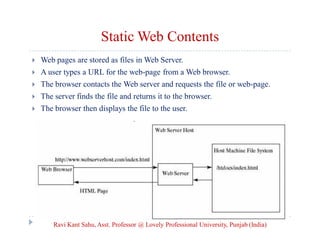
Web pages are stored as files in Web Server.



A user types a URL for the web-page from a Web browser.



The browser contacts the Web server and requests the file or web-page.



The server finds the file and returns it to the browser.



The browser then displays the file to the user.

Ravi Kant Sahu, Asst. Professor @ Lovely Professional University, Punjab (India)
Dynamic Web Contents


To view up-to-date information on the Web.



HTML pages for displaying recent information must be generated
dynamically.



Dynamic Web pages are generated by Web servers.



The Web server needs to run certain programs to process user
requests in order to produce a customized response.

Ravi Kant Sahu, Asst. Professor @ Lovely Professional University, Punjab (India)
Common Gateway Interface (CGI)


CGI was proposed to generate dynamic Web content.



CGI provides a standard framework for Web servers to interact
with external programs, known as CGI programs.



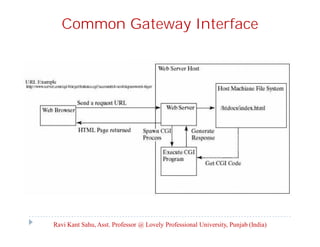
The Web server receives a request from a Web browser and passes
it to the CGI program.



The CGI program processes the request and generates a response
at runtime.



CGI programs are written in C, C++ or Perl (widely used).
Ravi Kant Sahu, Asst. Professor @ Lovely Professional University, Punjab (India)
Common Gateway Interface

Ravi Kant Sahu, Asst. Professor @ Lovely Professional University, Punjab (India)
GET and POST Methods


The two most common HTTP requests, also known as methods,
are GET and POST.



The Web browser issues a request using a URL or an HTML
form to trigger the Web server to execute a CGI program.



When issuing a CGI request directly from a URL, the GET
method is used. This URL is known as a query string.



Example:
http://www.webserverhost.com/cgi-bin/
getBalance.cgi?accountId=scott+smith&password=tiger
Ravi Kant Sahu, Asst. Professor @ Lovely Professional University, Punjab (India)
GET and POST Methods



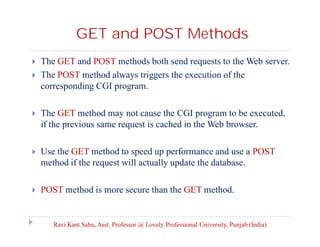
The GET and POST methods both send requests to the Web server.
The POST method always triggers the execution of the
corresponding CGI program.



The GET method may not cause the CGI program to be executed,
if the previous same request is cached in the Web browser.



Use the GET method to speed up performance and use a POST
method if the request will actually update the database.



POST method is more secure than the GET method.

Ravi Kant Sahu, Asst. Professor @ Lovely Professional University, Punjab (India)
Query String


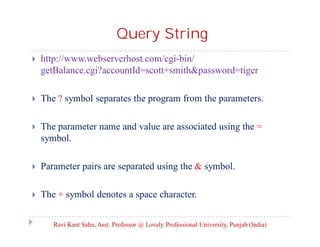
http://www.webserverhost.com/cgi-bin/
getBalance.cgi?accountId=scott+smith&password=tiger



The ? symbol separates the program from the parameters.



The parameter name and value are associated using the =
symbol.



Parameter pairs are separated using the & symbol.



The + symbol denotes a space character.
Ravi Kant Sahu, Asst. Professor @ Lovely Professional University, Punjab (India)
CGI Vs Servlets





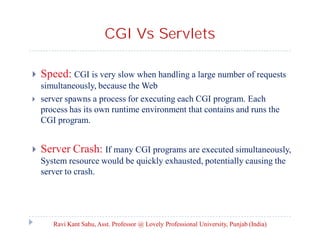
Speed: CGI is very slow when handling a large number of requests
simultaneously, because the Web
server spawns a process for executing each CGI program. Each
process has its own runtime environment that contains and runs the
CGI program.

Server Crash: If many CGI programs are executed simultaneously,
System resource would be quickly exhausted, potentially causing the
server to crash.

Ravi Kant Sahu, Asst. Professor @ Lovely Professional University, Punjab (India)
ServletS

Ravi Kant Sahu, Asst. Professor @ Lovely Professional University, Punjab (India)
Servlet Advantages


Performance is significantly better.



Servlets execute within the address space of a Web server.



Servlets are platform-independent.



Java security manager on the server enforces a set of restrictions
to protect the resources on a server machine.



The full functionality of the Java class libraries is available to a
servlet.
Ravi Kant Sahu, Asst. Professor @ Lovely Professional University, Punjab (India)
Servlet Container


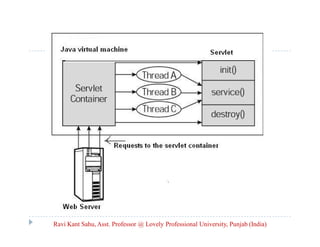
All servlets run inside a servlet container, also referred to as a
servlet server or a servlet engine.



A servlet container is a single process that runs in a Java Virtual
Machine.



The JVM creates a thread to handle each servlet.



Example:



Tomcat (developed by Apache, www.apache.org)
GlassFish(developed by Sun, glassfish.dev.java.net).
Ravi Kant Sahu, Asst. Professor @ Lovely Professional University, Punjab (India)
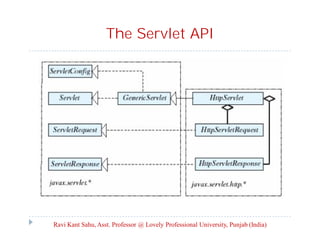
The Servlet API

Ravi Kant Sahu, Asst. Professor @ Lovely Professional University, Punjab (India)
The Servlet Interface


public void init() throws ServletException;



public void service(ServletRequest request, ServletResponse
Response) throws ServletException, IOException;



public void destroy();

Ravi Kant Sahu, Asst. Professor @ Lovely Professional University, Punjab (India)
Servlet Life Cycle


The init method is called when the servlet is first created.



The service method is invoked each time the server receives a
request for the servlet.



The destroy method is invoked after a timeout period has passed
or as the Web server is terminated.

Ravi Kant Sahu, Asst. Professor @ Lovely Professional University, Punjab (India)
ServletConfig interface


The ServletConfig interface allows a servlet to obtain
configuration data.



String getInitParameter(String name)



Enumeration getInitParameterNames()



ServletContext getServletContext()



String getServletName()

Ravi Kant Sahu, Asst. Professor @ Lovely Professional University, Punjab (India)
GenericServlet Class


GenericServlet is an abstract class that defines a generic,
protocol independent servlet.



It implements javax.servlet.Servlet and
javax.servlet.ServletConfig.



All the methods in Servlet and ServletConfig are implemented
in GenericServlet except service().

Ravi Kant Sahu, Asst. Professor @ Lovely Professional University, Punjab (India)
HttpServlet Class
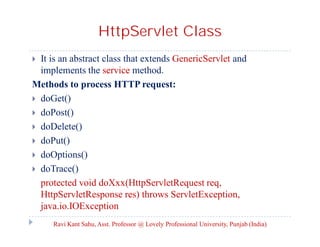
It is an abstract class that extends GenericServlet and
implements the service method.
Methods to process HTTP request:
 doGet()
 doPost()
 doDelete()
 doPut()
 doOptions()
 doTrace()
protected void doXxx(HttpServletRequest req,
HttpServletResponse res) throws ServletException,
java.io.IOException


Ravi Kant Sahu, Asst. Professor @ Lovely Professional University, Punjab (India)
ServletRequest Interface


String getParameter(String name)



String[] getParameterValues(String name)



String getRemoteAddr()



String getRemoteHost()

Ravi Kant Sahu, Asst. Professor @ Lovely Professional University, Punjab (India)
HttpServletRequest Interface




String getHeader(String name)
String getMethod()



String getQueryString()



javax.servlet.http.Cookies[] getCookies()



HttpSession getSession(boolean create)

Ravi Kant Sahu, Asst. Professor @ Lovely Professional University, Punjab (India)
ServletResponse Interface


java.io.PrintWriter getWriter()



void setContentType(type: String)

Ravi Kant Sahu, Asst. Professor @ Lovely Professional University, Punjab (India)
HttpServletResponse Interface


void addCookie(Cookie cookie)

Ravi Kant Sahu, Asst. Professor @ Lovely Professional University, Punjab (India)
Types of Servlet
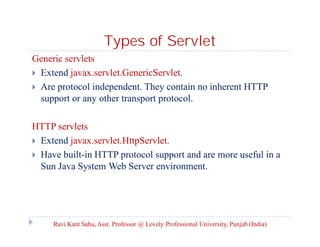
Generic servlets
 Extend javax.servlet.GenericServlet.
 Are protocol independent. They contain no inherent HTTP
support or any other transport protocol.
HTTP servlets
 Extend javax.servlet.HttpServlet.
 Have built-in HTTP protocol support and are more useful in a
Sun Java System Web Server environment.

Ravi Kant Sahu, Asst. Professor @ Lovely Professional University, Punjab (India)
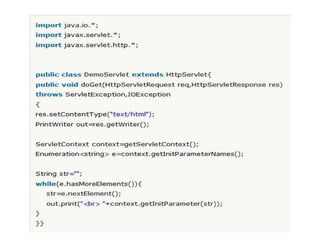
Servlet Context Interface


An object of ServletContext is created by the web-container at
the time of deploying the project.



This object is used to get configuration-information from
web.xml file.



There is only one ServletContext object for any web-application.



If any information is to be shared with many servlets, its better
to provide it in the web.xml file using <context-param> element.

Ravi Kant Sahu, Asst. Professor @ Lovely Professional University, Punjab (India)
HTML FORMs

Ravi Kant Sahu, Asst. Professor @ Lovely Professional University, Punjab (India)
HTML Forms


HTML forms enable us to submit data to the Web server.



It can contain text fields, text area, check boxes, combo boxes,
lists, radio buttons, and buttons.

Ravi Kant Sahu, Asst. Professor @ Lovely Professional University, Punjab (India)
HTML tags to create HTML Form


<form> ... </form> tag is used to define the body of a form.



The attributes for the <form> tag are action and method.



The action attribute specifies the server program to be executed
on the Web server when the form is submitted.



The method attribute is either get or post.



<label> ... </label> is used to define a label.
Ravi Kant Sahu, Asst. Professor @ Lovely Professional University, Punjab (India)
HTML tags to create HTML Form



<input> defines an input field.
Attributes for <input> are type, name, value, checked, size, and
maxlength.



The type attribute specifies the input type. Possible types are text
for a one-line text field, radio for a radio button, and checkbox
for a check box.



The name attribute gives a formal name for the attribute which is
used by the servlet program to retrieve its associated value.



The names of the radio buttons in a group must be identical.
Ravi Kant Sahu, Asst. Professor @ Lovely Professional University, Punjab (India)
HTML tags to create HTML Form


The value attribute specifies a default value for a text field and
text area.



The checked attribute indicates whether a radio button or a
checkbox is initially checked.



The size attribute specifies the size of a text field, and the
maxlength attribute specifies the maximum length of a text field.

Ravi Kant Sahu, Asst. Professor @ Lovely Professional University, Punjab (India)
HTML tags to create HTML Form


<select> ... </select> defines a combo box or a list.



The attributes for this tag are name, size, and multiple.



The size attribute specifies the number of rows visible in the list.



The multiple attribute specifies that multiple values can be
selected from a list.



Set size to 1 and do not use a multiple for a combo box.

Ravi Kant Sahu, Asst. Professor @ Lovely Professional University, Punjab (India)
HTML tags to create HTML Form










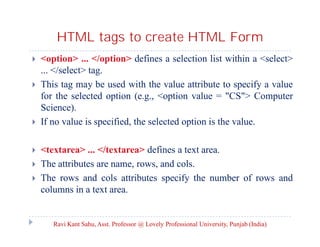
<option> ... </option> defines a selection list within a <select>
... </select> tag.
This tag may be used with the value attribute to specify a value
for the selected option (e.g., <option value = "CS"> Computer
Science).
If no value is specified, the selected option is the value.
<textarea> ... </textarea> defines a text area.
The attributes are name, rows, and cols.
The rows and cols attributes specify the number of rows and
columns in a text area.

Ravi Kant Sahu, Asst. Professor @ Lovely Professional University, Punjab (India)
Obtaining Parameter Values from
HTML Forms

Ravi Kant Sahu, Asst. Professor @ Lovely Professional University, Punjab (India)
Retrieving Parameter Values





Each GUI component in the form has a name attribute.
The servlet uses the name attribute in the following method to
obtain the parameter value as a string.
String getParameter(attributeName)
In case of a list with multiple values, use the following method to
return the parameter values in an array of strings:
String[] getParameterValues(attributeName)

NOTE: If an attribute doesn’t exist, the getParameter method returns null.


If an empty value of the parameter is passed to the servlet, the
getParameter method returns a string with an empty value.
Ravi Kant Sahu, Asst. Professor @ Lovely Professional University, Punjab (India)
Retrieving Parameter Values


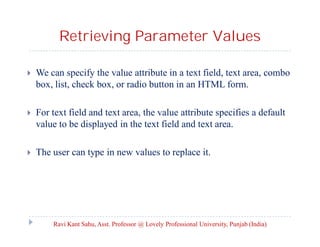
We can specify the value attribute in a text field, text area, combo
box, list, check box, or radio button in an HTML form.



For text field and text area, the value attribute specifies a default
value to be displayed in the text field and text area.



The user can type in new values to replace it.

Ravi Kant Sahu, Asst. Professor @ Lovely Professional University, Punjab (India)
Retrieving Parameter Values


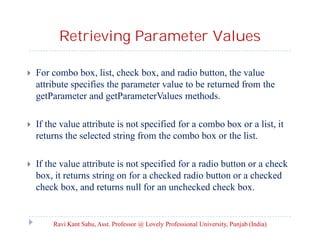
For combo box, list, check box, and radio button, the value
attribute specifies the parameter value to be returned from the
getParameter and getParameterValues methods.



If the value attribute is not specified for a combo box or a list, it
returns the selected string from the combo box or the list.



If the value attribute is not specified for a radio button or a check
box, it returns string on for a checked radio button or a checked
check box, and returns null for an unchecked check box.

Ravi Kant Sahu, Asst. Professor @ Lovely Professional University, Punjab (India)
Session Tracking

Ravi Kant Sahu, Asst. Professor @ Lovely Professional University, Punjab (India)
Session Tracking


A session can be defined as a series of related interactions
between a single client and the Web server over a period of time.



Tracking data among requests in a session is known as session
tracking.

Techniques for session tracking
 Session Tracking Using Hidden Values
 Session Tracking Using Cookies
 Session Tracking Using the Servlet API

Ravi Kant Sahu, Asst. Professor @ Lovely Professional University, Punjab (India)
Session Tracking Using Cookies


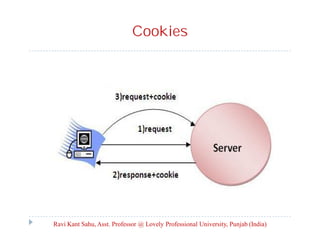
Cookies are small text files that store sets of name/value pairs on
the disk in the client’s computer.



Cookies are sent from the server through the instructions in the
header of the HTTP response.



The javax.servlet.http.Cookie is used to create and manipulate
cookies

Ravi Kant Sahu, Asst. Professor @ Lovely Professional University, Punjab (India)
Cookies

Ravi Kant Sahu, Asst. Professor @ Lovely Professional University, Punjab (India)
Session Tracking Using Cookies


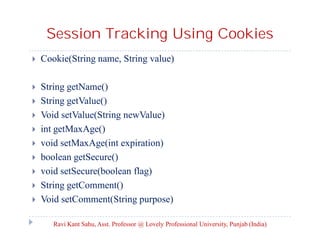
Cookie(String name, String value)



String getName()
String getValue()
Void setValue(String newValue)
int getMaxAge()
void setMaxAge(int expiration)
boolean getSecure()
void setSecure(boolean flag)
String getComment()
Void setComment(String purpose)










Ravi Kant Sahu, Asst. Professor @ Lovely Professional University, Punjab (India)
Using Cookies


Cookie stores a name/value pair and other information about the
cookie.



To send a cookie to the browser, use the addCookie() method in
the HttpServletResponse class.
response.addCookie(cookie);



To obtain cookies from a browser, use getCookie() method.
request.getCookies();



where request/response is an instance of HttpServletRequest/
HttpServletResponse.
Ravi Kant Sahu, Asst. Professor @ Lovely Professional University, Punjab (India)
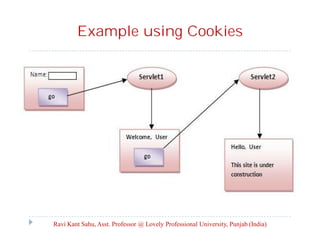
Example using Cookies

Ravi Kant Sahu, Asst. Professor @ Lovely Professional University, Punjab (India)
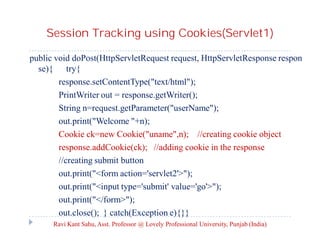
Session Tracking using Cookies(Servlet1)
public void doPost(HttpServletRequest request, HttpServletResponse respon
se){ try{
response.setContentType("text/html");
PrintWriter out = response.getWriter();
String n=request.getParameter("userName");
out.print("Welcome "+n);
Cookie ck=new Cookie("uname",n); //creating cookie object
response.addCookie(ck); //adding cookie in the response
//creating submit button
out.print("<form action='servlet2'>");
out.print("<input type='submit' value='go'>");
out.print("</form>");
out.close(); } catch(Exception e){}}
Ravi Kant Sahu, Asst. Professor @ Lovely Professional University, Punjab (India)
Session Tracking using Cookies (Servlet 2)
public void doPost(HttpServletRequest request, HttpServletRespon
se response)
{ try{
response.setContentType("text/html");
PrintWriter out = response.getWriter();
Cookie ck[]=request.getCookies();
out.print("Hello "+ck[0].getValue());
out.close();
}
catch(Exception e){System.out.println(e);}
}

Ravi Kant Sahu, Asst. Professor @ Lovely Professional University, Punjab (India)
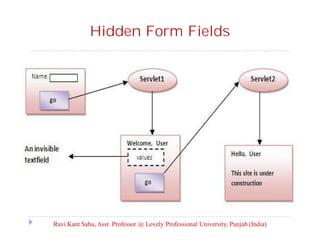
Session Tracking Using Hidden Values


We can track a session by passing data from the servlet to the
client as hidden values in a dynamically generated HTML form
by including a field like this one:
<input type= "hidden” name= “sessionid" value=“12345">



The next request will submit the data back to the servlet.



The servlet retrieves this hidden value just like any other
parameter value, using the getParameter method.

Ravi Kant Sahu, Asst. Professor @ Lovely Professional University, Punjab (India)
Hidden Form Fields

Ravi Kant Sahu, Asst. Professor @ Lovely Professional University, Punjab (India)
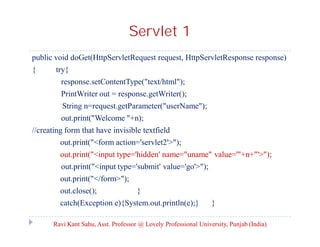
Servlet 1
public void doGet(HttpServletRequest request, HttpServletResponse response)
{

try{
response.setContentType("text/html");
PrintWriter out = response.getWriter();
String n=request.getParameter("userName");
out.print("Welcome "+n);

//creating form that have invisible textfield
out.print("<form action='servlet2'>");
out.print("<input type='hidden' name="uname" value='"+n+"'>");
out.print("<input type='submit' value='go'>");
out.print("</form>");
out.close();

}

catch(Exception e){System.out.println(e);}

}

Ravi Kant Sahu, Asst. Professor @ Lovely Professional University, Punjab (India)
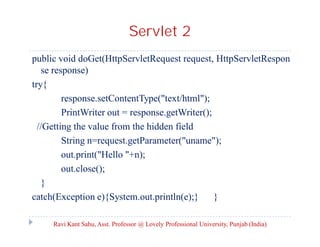
Servlet 2
public void doGet(HttpServletRequest request, HttpServletRespon
se response)
try{
response.setContentType("text/html");
PrintWriter out = response.getWriter();
//Getting the value from the hidden field
String n=request.getParameter("uname");
out.print("Hello "+n);
out.close();
}
catch(Exception e){System.out.println(e);}
}
Ravi Kant Sahu, Asst. Professor @ Lovely Professional University, Punjab (India)
Session Tracking using HTTP Session


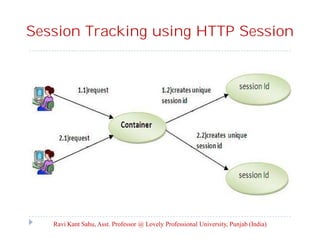
The Container creates a session id for each user.



The container uses this id to identify the particular user.



An object of HttpSession can be used to perform two tasks:
1. Bind objects
2. View and manipulate information about a session, such as the
session identifier, creation time, and last accessed time.

Ravi Kant Sahu, Asst. Professor @ Lovely Professional University, Punjab (India)
Session Tracking using HTTP Session

Ravi Kant Sahu, Asst. Professor @ Lovely Professional University, Punjab (India)
Creating Session Object


The HttpServletRequest interface provides two methods to get
the object of HttpSession:
public HttpSession getSession()
Returns the current session associated with this request, or if the
request does not have a session, creates one.
public HttpSession getSession(boolean create)
Returns the current HttpSession associated with this request or,
if there is no current session and create is true, returns a new
session.

Ravi Kant Sahu, Asst. Professor @ Lovely Professional University, Punjab (India)
Methods of HTTP Session Interface


public String getId():Returns a string containing the unique
identifier value.



public long getCreationTime():Returns the time when this
session was created, measured in milliseconds since midnight
January 1, 1970 GMT.



public long getLastAccessedTime():Returns the last time the
client sent a request associated with this session, as the number
of milliseconds since midnight January 1, 1970 GMT.



public void invalidate():Invalidates this session then unbinds any
objects bound to it.
Ravi Kant Sahu, Asst. Professor @ Lovely Professional University, Punjab (India)

Servlets

  • 1.
    Advanced Java Programming Topic:Servlet By Ravi Kant Sahu Asst. Professor, LPU
  • 2.
    Introduction  Servlets are javaprograms that run on a Web or Application server.  Servlets are used to process client requests or produce dynamic Web pages.  Servlet are designed to work within a request/response processing model.  It act as a middle layer between a request coming from a Web browser or other HTTP client and databases on the HTTP server. Ravi Kant Sahu, Asst. Professor @ Lovely Professional University, Punjab (India)
  • 3.
    Web Pages Ravi KantSahu, Asst. Professor @ Lovely Professional University, Punjab (India)
  • 4.
    Static Web Contents  Webpages are stored as files in Web Server.  A user types a URL for the web-page from a Web browser.  The browser contacts the Web server and requests the file or web-page.  The server finds the file and returns it to the browser.  The browser then displays the file to the user. Ravi Kant Sahu, Asst. Professor @ Lovely Professional University, Punjab (India)
  • 5.
    Dynamic Web Contents  Toview up-to-date information on the Web.  HTML pages for displaying recent information must be generated dynamically.  Dynamic Web pages are generated by Web servers.  The Web server needs to run certain programs to process user requests in order to produce a customized response. Ravi Kant Sahu, Asst. Professor @ Lovely Professional University, Punjab (India)
  • 6.
    Common Gateway Interface(CGI)  CGI was proposed to generate dynamic Web content.  CGI provides a standard framework for Web servers to interact with external programs, known as CGI programs.  The Web server receives a request from a Web browser and passes it to the CGI program.  The CGI program processes the request and generates a response at runtime.  CGI programs are written in C, C++ or Perl (widely used). Ravi Kant Sahu, Asst. Professor @ Lovely Professional University, Punjab (India)
  • 7.
    Common Gateway Interface RaviKant Sahu, Asst. Professor @ Lovely Professional University, Punjab (India)
  • 8.
    GET and POSTMethods  The two most common HTTP requests, also known as methods, are GET and POST.  The Web browser issues a request using a URL or an HTML form to trigger the Web server to execute a CGI program.  When issuing a CGI request directly from a URL, the GET method is used. This URL is known as a query string.  Example: http://www.webserverhost.com/cgi-bin/ getBalance.cgi?accountId=scott+smith&password=tiger Ravi Kant Sahu, Asst. Professor @ Lovely Professional University, Punjab (India)
  • 9.
    GET and POSTMethods   The GET and POST methods both send requests to the Web server. The POST method always triggers the execution of the corresponding CGI program.  The GET method may not cause the CGI program to be executed, if the previous same request is cached in the Web browser.  Use the GET method to speed up performance and use a POST method if the request will actually update the database.  POST method is more secure than the GET method. Ravi Kant Sahu, Asst. Professor @ Lovely Professional University, Punjab (India)
  • 10.
    Query String  http://www.webserverhost.com/cgi-bin/ getBalance.cgi?accountId=scott+smith&password=tiger  The ?symbol separates the program from the parameters.  The parameter name and value are associated using the = symbol.  Parameter pairs are separated using the & symbol.  The + symbol denotes a space character. Ravi Kant Sahu, Asst. Professor @ Lovely Professional University, Punjab (India)
  • 11.
    CGI Vs Servlets    Speed:CGI is very slow when handling a large number of requests simultaneously, because the Web server spawns a process for executing each CGI program. Each process has its own runtime environment that contains and runs the CGI program. Server Crash: If many CGI programs are executed simultaneously, System resource would be quickly exhausted, potentially causing the server to crash. Ravi Kant Sahu, Asst. Professor @ Lovely Professional University, Punjab (India)
  • 12.
    ServletS Ravi Kant Sahu,Asst. Professor @ Lovely Professional University, Punjab (India)
  • 13.
    Servlet Advantages  Performance issignificantly better.  Servlets execute within the address space of a Web server.  Servlets are platform-independent.  Java security manager on the server enforces a set of restrictions to protect the resources on a server machine.  The full functionality of the Java class libraries is available to a servlet. Ravi Kant Sahu, Asst. Professor @ Lovely Professional University, Punjab (India)
  • 14.
    Servlet Container  All servletsrun inside a servlet container, also referred to as a servlet server or a servlet engine.  A servlet container is a single process that runs in a Java Virtual Machine.  The JVM creates a thread to handle each servlet.  Example:   Tomcat (developed by Apache, www.apache.org) GlassFish(developed by Sun, glassfish.dev.java.net). Ravi Kant Sahu, Asst. Professor @ Lovely Professional University, Punjab (India)
  • 15.
    The Servlet API RaviKant Sahu, Asst. Professor @ Lovely Professional University, Punjab (India)
  • 16.
    The Servlet Interface  publicvoid init() throws ServletException;  public void service(ServletRequest request, ServletResponse Response) throws ServletException, IOException;  public void destroy(); Ravi Kant Sahu, Asst. Professor @ Lovely Professional University, Punjab (India)
  • 17.
    Servlet Life Cycle  Theinit method is called when the servlet is first created.  The service method is invoked each time the server receives a request for the servlet.  The destroy method is invoked after a timeout period has passed or as the Web server is terminated. Ravi Kant Sahu, Asst. Professor @ Lovely Professional University, Punjab (India)
  • 18.
    Ravi Kant Sahu,Asst. Professor @ Lovely Professional University, Punjab (India)
  • 19.
    ServletConfig interface  The ServletConfiginterface allows a servlet to obtain configuration data.  String getInitParameter(String name)  Enumeration getInitParameterNames()  ServletContext getServletContext()  String getServletName() Ravi Kant Sahu, Asst. Professor @ Lovely Professional University, Punjab (India)
  • 20.
    GenericServlet Class  GenericServlet isan abstract class that defines a generic, protocol independent servlet.  It implements javax.servlet.Servlet and javax.servlet.ServletConfig.  All the methods in Servlet and ServletConfig are implemented in GenericServlet except service(). Ravi Kant Sahu, Asst. Professor @ Lovely Professional University, Punjab (India)
  • 21.
    HttpServlet Class It isan abstract class that extends GenericServlet and implements the service method. Methods to process HTTP request:  doGet()  doPost()  doDelete()  doPut()  doOptions()  doTrace() protected void doXxx(HttpServletRequest req, HttpServletResponse res) throws ServletException, java.io.IOException  Ravi Kant Sahu, Asst. Professor @ Lovely Professional University, Punjab (India)
  • 22.
    ServletRequest Interface  String getParameter(Stringname)  String[] getParameterValues(String name)  String getRemoteAddr()  String getRemoteHost() Ravi Kant Sahu, Asst. Professor @ Lovely Professional University, Punjab (India)
  • 23.
    HttpServletRequest Interface   String getHeader(Stringname) String getMethod()  String getQueryString()  javax.servlet.http.Cookies[] getCookies()  HttpSession getSession(boolean create) Ravi Kant Sahu, Asst. Professor @ Lovely Professional University, Punjab (India)
  • 24.
    ServletResponse Interface  java.io.PrintWriter getWriter()  voidsetContentType(type: String) Ravi Kant Sahu, Asst. Professor @ Lovely Professional University, Punjab (India)
  • 25.
    HttpServletResponse Interface  void addCookie(Cookiecookie) Ravi Kant Sahu, Asst. Professor @ Lovely Professional University, Punjab (India)
  • 26.
    Types of Servlet Genericservlets  Extend javax.servlet.GenericServlet.  Are protocol independent. They contain no inherent HTTP support or any other transport protocol. HTTP servlets  Extend javax.servlet.HttpServlet.  Have built-in HTTP protocol support and are more useful in a Sun Java System Web Server environment. Ravi Kant Sahu, Asst. Professor @ Lovely Professional University, Punjab (India)
  • 27.
    Servlet Context Interface  Anobject of ServletContext is created by the web-container at the time of deploying the project.  This object is used to get configuration-information from web.xml file.  There is only one ServletContext object for any web-application.  If any information is to be shared with many servlets, its better to provide it in the web.xml file using <context-param> element. Ravi Kant Sahu, Asst. Professor @ Lovely Professional University, Punjab (India)
  • 29.
    HTML FORMs Ravi KantSahu, Asst. Professor @ Lovely Professional University, Punjab (India)
  • 30.
    HTML Forms  HTML formsenable us to submit data to the Web server.  It can contain text fields, text area, check boxes, combo boxes, lists, radio buttons, and buttons. Ravi Kant Sahu, Asst. Professor @ Lovely Professional University, Punjab (India)
  • 31.
    HTML tags tocreate HTML Form  <form> ... </form> tag is used to define the body of a form.  The attributes for the <form> tag are action and method.  The action attribute specifies the server program to be executed on the Web server when the form is submitted.  The method attribute is either get or post.  <label> ... </label> is used to define a label. Ravi Kant Sahu, Asst. Professor @ Lovely Professional University, Punjab (India)
  • 32.
    HTML tags tocreate HTML Form   <input> defines an input field. Attributes for <input> are type, name, value, checked, size, and maxlength.  The type attribute specifies the input type. Possible types are text for a one-line text field, radio for a radio button, and checkbox for a check box.  The name attribute gives a formal name for the attribute which is used by the servlet program to retrieve its associated value.  The names of the radio buttons in a group must be identical. Ravi Kant Sahu, Asst. Professor @ Lovely Professional University, Punjab (India)
  • 33.
    HTML tags tocreate HTML Form  The value attribute specifies a default value for a text field and text area.  The checked attribute indicates whether a radio button or a checkbox is initially checked.  The size attribute specifies the size of a text field, and the maxlength attribute specifies the maximum length of a text field. Ravi Kant Sahu, Asst. Professor @ Lovely Professional University, Punjab (India)
  • 34.
    HTML tags tocreate HTML Form  <select> ... </select> defines a combo box or a list.  The attributes for this tag are name, size, and multiple.  The size attribute specifies the number of rows visible in the list.  The multiple attribute specifies that multiple values can be selected from a list.  Set size to 1 and do not use a multiple for a combo box. Ravi Kant Sahu, Asst. Professor @ Lovely Professional University, Punjab (India)
  • 35.
    HTML tags tocreate HTML Form       <option> ... </option> defines a selection list within a <select> ... </select> tag. This tag may be used with the value attribute to specify a value for the selected option (e.g., <option value = "CS"> Computer Science). If no value is specified, the selected option is the value. <textarea> ... </textarea> defines a text area. The attributes are name, rows, and cols. The rows and cols attributes specify the number of rows and columns in a text area. Ravi Kant Sahu, Asst. Professor @ Lovely Professional University, Punjab (India)
  • 36.
    Obtaining Parameter Valuesfrom HTML Forms Ravi Kant Sahu, Asst. Professor @ Lovely Professional University, Punjab (India)
  • 37.
    Retrieving Parameter Values    EachGUI component in the form has a name attribute. The servlet uses the name attribute in the following method to obtain the parameter value as a string. String getParameter(attributeName) In case of a list with multiple values, use the following method to return the parameter values in an array of strings: String[] getParameterValues(attributeName) NOTE: If an attribute doesn’t exist, the getParameter method returns null.  If an empty value of the parameter is passed to the servlet, the getParameter method returns a string with an empty value. Ravi Kant Sahu, Asst. Professor @ Lovely Professional University, Punjab (India)
  • 38.
    Retrieving Parameter Values  Wecan specify the value attribute in a text field, text area, combo box, list, check box, or radio button in an HTML form.  For text field and text area, the value attribute specifies a default value to be displayed in the text field and text area.  The user can type in new values to replace it. Ravi Kant Sahu, Asst. Professor @ Lovely Professional University, Punjab (India)
  • 39.
    Retrieving Parameter Values  Forcombo box, list, check box, and radio button, the value attribute specifies the parameter value to be returned from the getParameter and getParameterValues methods.  If the value attribute is not specified for a combo box or a list, it returns the selected string from the combo box or the list.  If the value attribute is not specified for a radio button or a check box, it returns string on for a checked radio button or a checked check box, and returns null for an unchecked check box. Ravi Kant Sahu, Asst. Professor @ Lovely Professional University, Punjab (India)
  • 40.
    Session Tracking Ravi KantSahu, Asst. Professor @ Lovely Professional University, Punjab (India)
  • 41.
    Session Tracking  A sessioncan be defined as a series of related interactions between a single client and the Web server over a period of time.  Tracking data among requests in a session is known as session tracking. Techniques for session tracking  Session Tracking Using Hidden Values  Session Tracking Using Cookies  Session Tracking Using the Servlet API Ravi Kant Sahu, Asst. Professor @ Lovely Professional University, Punjab (India)
  • 42.
    Session Tracking UsingCookies  Cookies are small text files that store sets of name/value pairs on the disk in the client’s computer.  Cookies are sent from the server through the instructions in the header of the HTTP response.  The javax.servlet.http.Cookie is used to create and manipulate cookies Ravi Kant Sahu, Asst. Professor @ Lovely Professional University, Punjab (India)
  • 43.
    Cookies Ravi Kant Sahu,Asst. Professor @ Lovely Professional University, Punjab (India)
  • 44.
    Session Tracking UsingCookies  Cookie(String name, String value)  String getName() String getValue() Void setValue(String newValue) int getMaxAge() void setMaxAge(int expiration) boolean getSecure() void setSecure(boolean flag) String getComment() Void setComment(String purpose)         Ravi Kant Sahu, Asst. Professor @ Lovely Professional University, Punjab (India)
  • 45.
    Using Cookies  Cookie storesa name/value pair and other information about the cookie.  To send a cookie to the browser, use the addCookie() method in the HttpServletResponse class. response.addCookie(cookie);  To obtain cookies from a browser, use getCookie() method. request.getCookies();  where request/response is an instance of HttpServletRequest/ HttpServletResponse. Ravi Kant Sahu, Asst. Professor @ Lovely Professional University, Punjab (India)
  • 46.
    Example using Cookies RaviKant Sahu, Asst. Professor @ Lovely Professional University, Punjab (India)
  • 47.
    Session Tracking usingCookies(Servlet1) public void doPost(HttpServletRequest request, HttpServletResponse respon se){ try{ response.setContentType("text/html"); PrintWriter out = response.getWriter(); String n=request.getParameter("userName"); out.print("Welcome "+n); Cookie ck=new Cookie("uname",n); //creating cookie object response.addCookie(ck); //adding cookie in the response //creating submit button out.print("<form action='servlet2'>"); out.print("<input type='submit' value='go'>"); out.print("</form>"); out.close(); } catch(Exception e){}} Ravi Kant Sahu, Asst. Professor @ Lovely Professional University, Punjab (India)
  • 48.
    Session Tracking usingCookies (Servlet 2) public void doPost(HttpServletRequest request, HttpServletRespon se response) { try{ response.setContentType("text/html"); PrintWriter out = response.getWriter(); Cookie ck[]=request.getCookies(); out.print("Hello "+ck[0].getValue()); out.close(); } catch(Exception e){System.out.println(e);} } Ravi Kant Sahu, Asst. Professor @ Lovely Professional University, Punjab (India)
  • 49.
    Session Tracking UsingHidden Values  We can track a session by passing data from the servlet to the client as hidden values in a dynamically generated HTML form by including a field like this one: <input type= "hidden” name= “sessionid" value=“12345">  The next request will submit the data back to the servlet.  The servlet retrieves this hidden value just like any other parameter value, using the getParameter method. Ravi Kant Sahu, Asst. Professor @ Lovely Professional University, Punjab (India)
  • 50.
    Hidden Form Fields RaviKant Sahu, Asst. Professor @ Lovely Professional University, Punjab (India)
  • 51.
    Servlet 1 public voiddoGet(HttpServletRequest request, HttpServletResponse response) { try{ response.setContentType("text/html"); PrintWriter out = response.getWriter(); String n=request.getParameter("userName"); out.print("Welcome "+n); //creating form that have invisible textfield out.print("<form action='servlet2'>"); out.print("<input type='hidden' name="uname" value='"+n+"'>"); out.print("<input type='submit' value='go'>"); out.print("</form>"); out.close(); } catch(Exception e){System.out.println(e);} } Ravi Kant Sahu, Asst. Professor @ Lovely Professional University, Punjab (India)
  • 52.
    Servlet 2 public voiddoGet(HttpServletRequest request, HttpServletRespon se response) try{ response.setContentType("text/html"); PrintWriter out = response.getWriter(); //Getting the value from the hidden field String n=request.getParameter("uname"); out.print("Hello "+n); out.close(); } catch(Exception e){System.out.println(e);} } Ravi Kant Sahu, Asst. Professor @ Lovely Professional University, Punjab (India)
  • 53.
    Session Tracking usingHTTP Session  The Container creates a session id for each user.  The container uses this id to identify the particular user.  An object of HttpSession can be used to perform two tasks: 1. Bind objects 2. View and manipulate information about a session, such as the session identifier, creation time, and last accessed time. Ravi Kant Sahu, Asst. Professor @ Lovely Professional University, Punjab (India)
  • 54.
    Session Tracking usingHTTP Session Ravi Kant Sahu, Asst. Professor @ Lovely Professional University, Punjab (India)
  • 55.
    Creating Session Object  TheHttpServletRequest interface provides two methods to get the object of HttpSession: public HttpSession getSession() Returns the current session associated with this request, or if the request does not have a session, creates one. public HttpSession getSession(boolean create) Returns the current HttpSession associated with this request or, if there is no current session and create is true, returns a new session. Ravi Kant Sahu, Asst. Professor @ Lovely Professional University, Punjab (India)
  • 56.
    Methods of HTTPSession Interface  public String getId():Returns a string containing the unique identifier value.  public long getCreationTime():Returns the time when this session was created, measured in milliseconds since midnight January 1, 1970 GMT.  public long getLastAccessedTime():Returns the last time the client sent a request associated with this session, as the number of milliseconds since midnight January 1, 1970 GMT.  public void invalidate():Invalidates this session then unbinds any objects bound to it. Ravi Kant Sahu, Asst. Professor @ Lovely Professional University, Punjab (India)
  • 57.
    Ravi Kant Sahu,Asst. Professor @ Lovely Professional University, Punjab (India)