Programming in Java
Topic: Multi-threading
By
Ravi Kant Sahu
Asst. Professor

Lovely Professional University, Punjab
Agenda
•
•
•
•
•
•
•
•
•
•

Introduction
Process Vs Thread
Thread Life cycle
Runnable Interface
Thread class
Creating a Thread
Creating Multiple Threads
Synchronization of Threads
Inter-thread Communication
Suspending, Resuming and Stopping Threads
Ravi Kant Sahu, Asst. Professor @ Lovely Professional University, Punjab (India)
Introduction
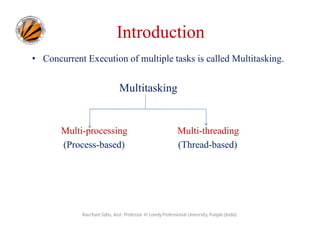
• Concurrent Execution of multiple tasks is called Multitasking.

Multitasking

Multi-processing
(Process-based)

Multi-threading
(Thread-based)

Ravi Kant Sahu, Asst. Professor @ Lovely Professional University, Punjab (India)
Introduction
• Multithreading is a specialized form of multitasking.
• A multithreaded program contains two or more parts (threads)
that can run concurrently.
• Each thread defines a separate path of execution.
• Java provides built-in support for multithreaded programming.

Ravi Kant Sahu, Asst. Professor @ Lovely Professional University, Punjab (India)
Process and Threads
• In concurrent programming, there are two basic units of execution:
processes and threads.

• Process: is an executable program loaded in memory
» has its own Variables & data structures (in memory)
» Communicate via operating system, files, network
» May contain multiple threads

Ravi Kant Sahu, Asst. Professor @ Lovely Professional University, Punjab (India)
Threads
• A thread is an independent module of an application that can be
concurrently executed with other threads.
• Also known as “lightweight process”.
• Threads exist within a process — every process has at least one.
• Multiple threads in process execute same program.
• Threads share the process's resources, including memory and
open files.
Ravi Kant Sahu, Asst. Professor @ Lovely Professional University, Punjab (India)
• A thread cannot exist on its own; it must be a part of a process.
• A process remains running until all of the non-daemon threads
are done executing.

Ravi Kant Sahu, Asst. Professor @ Lovely Professional University, Punjab (India)
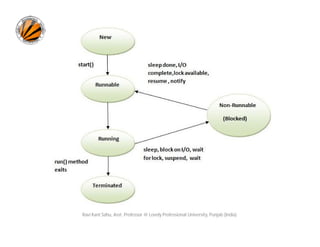
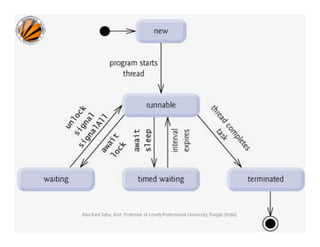
Life Cycle of a Thread
• New: The thread is in new state if you create an instance of
Thread class but before the invocation of start() method.
• Runnable: The thread is in runnable state after invocation of
start() method, but the thread scheduler has not selected it to
be the running thread.
• Running: The thread is in running state if the thread
scheduler has selected it.

Ravi Kant Sahu, Asst. Professor @ Lovely Professional University, Punjab (India)
• Waiting/Blocked: This is the state when the thread is still
alive, but is currently not eligible to run.
• Terminated: A thread is in terminated or dead state when its
run() method exits.

Ravi Kant Sahu, Asst. Professor @ Lovely Professional University, Punjab (India)
Multithreading in Java
• In order to achieve multithreading in java application,
java.lang.Runnable interface is provided.
• java.lang.Thread class is provided as part of core java library
which provides methods that are used to:
– start and suspend a thread
– obtain the state of a thread
– change the state of a thread

Ravi Kant Sahu, Asst. Professor @ Lovely Professional University, Punjab (India)
Runnable Interface
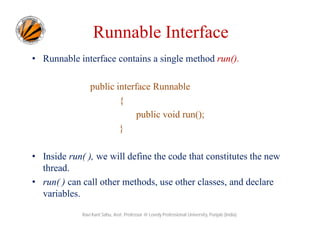
• Runnable interface contains a single method run().
public interface Runnable
{
public void run();
}
• Inside run( ), we will define the code that constitutes the new
thread.
• run( ) can call other methods, use other classes, and declare
variables.
Ravi Kant Sahu, Asst. Professor @ Lovely Professional University, Punjab (India)
Thread Class
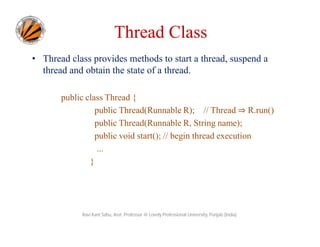
• Thread class provides methods to start a thread, suspend a
thread and obtain the state of a thread.
public class Thread {
public Thread(Runnable R); // Thread ⇒ R.run()
public Thread(Runnable R, String name);
public void start(); // begin thread execution
...
}

Ravi Kant Sahu, Asst. Professor @ Lovely Professional University, Punjab (India)
Methods of Thread class
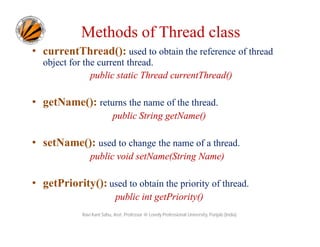
• currentThread(): used to obtain the reference of thread
object for the current thread.
public static Thread currentThread()

• getName(): returns the name of the thread.
public String getName()

• setName(): used to change the name of a thread.
public void setName(String Name)

• getPriority(): used to obtain the priority of thread.
public int getPriority()
Ravi Kant Sahu, Asst. Professor @ Lovely Professional University, Punjab (India)
Methods of Thread class
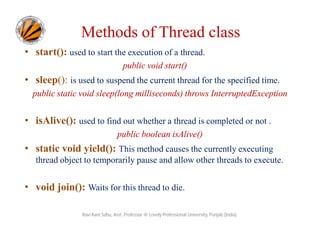
• start(): used to start the execution of a thread.
public void start()

• sleep(): is used to suspend the current thread for the specified time.
public static void sleep(long milliseconds) throws InterruptedException

• isAlive(): used to find out whether a thread is completed or not .
public boolean isAlive()

• static void yield(): This method causes the currently executing
thread object to temporarily pause and allow other threads to execute.

• void join(): Waits for this thread to die.
Ravi Kant Sahu, Asst. Professor @ Lovely Professional University, Punjab (India)
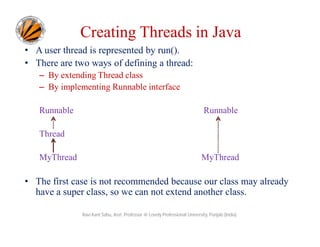
Creating Threads in Java
• A user thread is represented by run().
• There are two ways of defining a thread:
– By extending Thread class
– By implementing Runnable interface
Runnable

Runnable

Thread
MyThread

MyThread

• The first case is not recommended because our class may already
have a super class, so we can not extend another class.
Ravi Kant Sahu, Asst. Professor @ Lovely Professional University, Punjab (India)
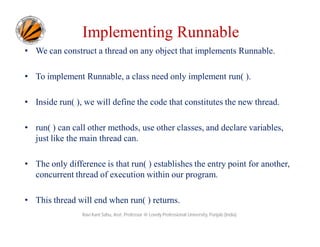
Implementing Runnable
• We can construct a thread on any object that implements Runnable.
• To implement Runnable, a class need only implement run( ).
• Inside run( ), we will define the code that constitutes the new thread.
• run( ) can call other methods, use other classes, and declare variables,
just like the main thread can.
• The only difference is that run( ) establishes the entry point for another,
concurrent thread of execution within our program.
• This thread will end when run( ) returns.
Ravi Kant Sahu, Asst. Professor @ Lovely Professional University, Punjab (India)
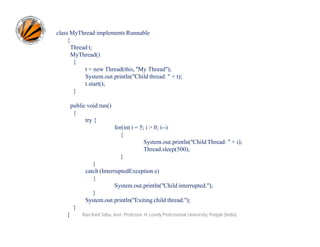
class MyThread implements Runnable
{
Thread t;
MyThread()
{
t = new Thread(this, "My Thread");
System.out.println("Child thread: " + t);
t.start();
}
public void run()
{
try {
for(int i = 5; i > 0; i--)
{
System.out.println("Child Thread: " + i);
Thread.sleep(500);
}
}
catch (InterruptedException e)
{
System.out.println("Child interrupted.");
}
System.out.println("Exiting child thread.");
}
}

Ravi Kant Sahu, Asst. Professor @ Lovely Professional University, Punjab (India)
class ThreadDemo1
{
public static void main(String args[])
{
new MyThread();
try {
for(int i = 5; i > 0; i--)
{
System.out.println("Main Thread: " + i);
Thread.sleep(1000);
}
}
catch (InterruptedException e)
{
System.out.println("Main thread interrupted.");
}
System.out.println("Main thread exiting.");
}
}
Ravi Kant Sahu, Asst. Professor @ Lovely Professional University, Punjab (India)
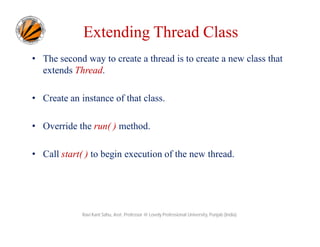
Extending Thread Class
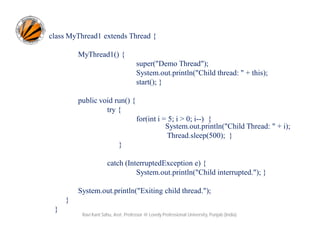
• The second way to create a thread is to create a new class that
extends Thread.
• Create an instance of that class.
• Override the run( ) method.
• Call start( ) to begin execution of the new thread.

Ravi Kant Sahu, Asst. Professor @ Lovely Professional University, Punjab (India)
class MyThread1 extends Thread {
MyThread1() {
super("Demo Thread");
System.out.println("Child thread: " + this);
start(); }
public void run() {
try {
for(int i = 5; i > 0; i--) {
System.out.println("Child Thread: " + i);
Thread.sleep(500); }
}
catch (InterruptedException e) {
System.out.println("Child interrupted."); }
System.out.println("Exiting child thread.");
}
}

Ravi Kant Sahu, Asst. Professor @ Lovely Professional University, Punjab (India)
class ExtendThread {
public static void main(String args[]) {
new MyThread1();
try {
for(int i = 5; i > 0; i--) {
System.out.println("Main Thread: " + i);
Thread.sleep(1000);
}
}
catch (InterruptedException e) {
System.out.println("Main thread interrupted.");
}
System.out.println("Main thread exiting.");
}
}
Ravi Kant Sahu, Asst. Professor @ Lovely Professional University, Punjab (India)
Creating Multiple Threads
class MultiThreadDemo
{
public static void main(String args[]) {
new MyThread2("One");
new MyThread2("Two");
new MyThread2("Three");
try {
Thread.sleep(10000);
}
catch (InterruptedException e) {
System.out.println("Main thread Interrupted");
}
System.out.println("Main thread exiting.");
}
}
Ravi Kant Sahu, Asst. Professor @ Lovely Professional University, Punjab (India)
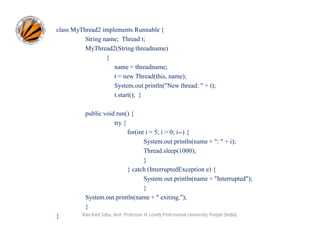
class MyThread2 implements Runnable {
String name; Thread t;
MyThread2(String threadname)
{
name = threadname;
t = new Thread(this, name);
System.out.println("New thread: " + t);
t.start(); }
public void run() {
try {
for(int i = 5; i > 0; i--) {
System.out.println(name + ": " + i);
Thread.sleep(1000);
}
} catch (InterruptedException e) {
System.out.println(name + "Interrupted");
}
System.out.println(name + " exiting.");
}
}

Ravi Kant Sahu, Asst. Professor @ Lovely Professional University, Punjab (India)
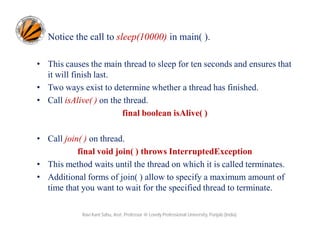
Notice the call to sleep(10000) in main( ).
• This causes the main thread to sleep for ten seconds and ensures that
it will finish last.
• Two ways exist to determine whether a thread has finished.
• Call isAlive( ) on the thread.
final boolean isAlive( )
• Call join( ) on thread.
final void join( ) throws InterruptedException
• This method waits until the thread on which it is called terminates.
• Additional forms of join( ) allow to specify a maximum amount of
time that you want to wait for the specified thread to terminate.
Ravi Kant Sahu, Asst. Professor @ Lovely Professional University, Punjab (India)
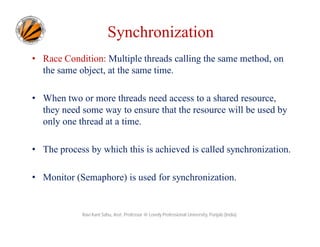
Synchronization
• Race Condition: Multiple threads calling the same method, on
the same object, at the same time.
• When two or more threads need access to a shared resource,
they need some way to ensure that the resource will be used by
only one thread at a time.
• The process by which this is achieved is called synchronization.
• Monitor (Semaphore) is used for synchronization.

Ravi Kant Sahu, Asst. Professor @ Lovely Professional University, Punjab (India)
Monitor
• A monitor is an object that is used as a mutually exclusive lock,
or mutex.
• Only one thread can own a monitor at a given time.
• When a thread acquires a lock, it is said to have entered the
monitor.
• All other threads attempting to enter the locked monitor will be
suspended until the first thread exits the monitor.
• These other threads are said to be waiting for the monitor.
Ravi Kant Sahu, Asst. Professor @ Lovely Professional University, Punjab (India)
Need of Synchronization: Example
class Callme
{
void call(String msg)
{
System.out.print("[" + msg);
try {
Thread.sleep(1000);
}
catch(InterruptedException e)
{
System.out.println("Interrupted");
}
System.out.println("]");
}
}
Ravi Kant Sahu, Asst. Professor @ Lovely Professional University, Punjab (India)
Example
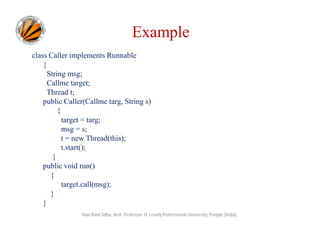
class Caller implements Runnable
{
String msg;
Callme target;
Thread t;
public Caller(Callme targ, String s)
{
target = targ;
msg = s;
t = new Thread(this);
t.start();
}
public void run()
{
target.call(msg);
}
}
Ravi Kant Sahu, Asst. Professor @ Lovely Professional University, Punjab (India)
Example
class Synch
{
public static void main(String args[])
{
Callme target = new Callme();
Caller ob1 = new Caller(target, "Hello");
Caller ob2 = new Caller(target, "Synchronized");
Caller ob3 = new Caller(target, "World");
// wait for threads to end
try {
ob1.t.join();
ob2.t.join();
ob3.t.join();
} catch(InterruptedException e)
{
System.out.println("Interrupted");
}
}
}
Ravi Kant Sahu, Asst. Professor @ Lovely Professional University, Punjab (India)
Using Synchronized Methods
• Methods qualified with synchronized keyword are called
Synchronized Methods.
• While a thread is inside a synchronized method, all other threads
that try to call it (or any other synchronized method) on the same
instance have to wait.
• To exit the monitor and relinquish control of the object to the
next waiting thread, the owner of the monitor simply returns
from the synchronized method.

Ravi Kant Sahu, Asst. Professor @ Lovely Professional University, Punjab (India)
Using Synchronized Methods
• A synchronized method can be executed by only one thread at a
time.
Example: Synch.java and Synch1.java

Ravi Kant Sahu, Asst. Professor @ Lovely Professional University, Punjab (India)
Synchronized Method: Example
class Callme
{
synchronized void call(String msg)
{
System.out.print("[" + msg);
try {
Thread.sleep(1000);
}
catch(InterruptedException e)
{
System.out.println("Interrupted");
}
System.out.println("]");
}
}
Ravi Kant Sahu, Asst. Professor @ Lovely Professional University, Punjab (India)
The synchronized Statement
• A synchronized block ensures that a call to a method occurs only
after the current thread has successfully entered object’s monitor.
• put calls to the methods defined by the class inside a
synchronized block.
synchronized(object)
{
// statements to be synchronized
}
• Here, object is a reference to the object being synchronized.
Ravi Kant Sahu, Asst. Professor @ Lovely Professional University, Punjab (India)
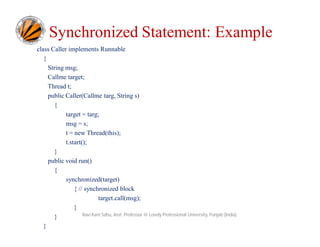
Synchronized Statement: Example
class Caller implements Runnable
{
String msg;
Callme target;
Thread t;
public Caller(Callme targ, String s)
{
target = targ;
msg = s;
t = new Thread(this);
t.start();
}
public void run()
{
synchronized(target)
{ // synchronized block
target.call(msg);
}
Ravi Kant Sahu, Asst. Professor @ Lovely Professional University, Punjab (India)
}
}
Suspending, Resuming, and Stopping Threads
• Execution of a thread can be suspended.
• Restarting the execution of a suspended thread is also possible.
• Prior to Java 2, suspend( ) and resume( ) methods (defined by
Thread), were used to pause and restart the execution of a thread.
final void suspend( )
final void resume( )
• The Thread class also defines a method called stop( ) that stops a thread.
final void stop( )
• Once a thread has been stopped, it cannot be restarted using resume( ).
Ravi Kant Sahu, Asst. Professor @ Lovely Professional University, Punjab (India)
• suspend( ), resume( ), and stop( ) methods defined by Thread were
deprecated by Java2.

Why???
• suspend( ) can sometimes cause serious system failures as in case
of locking.
• resume() is deprecated because it cannot be used without the
suspend( ).
• stop( ) can also cause serious system failures so it was also
deprecated.
Ravi Kant Sahu, Asst. Professor @ Lovely Professional University, Punjab (India)
Now how to
suspend, resume and stop
a thread?
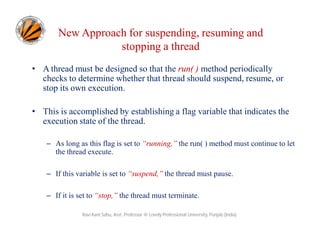
New Approach for suspending, resuming and
stopping a thread
• A thread must be designed so that the run( ) method periodically
checks to determine whether that thread should suspend, resume, or
stop its own execution.
• This is accomplished by establishing a flag variable that indicates the
execution state of the thread.
– As long as this flag is set to “running,” the run( ) method must continue to let
the thread execute.
– If this variable is set to “suspend,” the thread must pause.
– If it is set to “stop,” the thread must terminate.
Ravi Kant Sahu, Asst. Professor @ Lovely Professional University, Punjab (India)
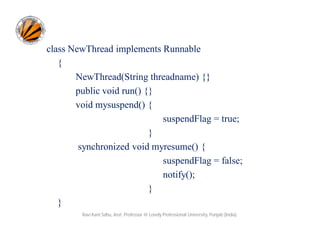
class NewThread implements Runnable
{
NewThread(String threadname) {}
public void run() {}
void mysuspend() {
suspendFlag = true;
}
synchronized void myresume() {
suspendFlag = false;
notify();
}
}
Ravi Kant Sahu, Asst. Professor @ Lovely Professional University, Punjab (India)
class SuspendResume
{
public static void main(String args[]) {
NewThread ob1 = new NewThread("One");
NewThread ob2 = new NewThread("Two");
try {
Thread.sleep(1000);
ob1.mysuspend();
System.out.println("Suspending thread One");
Thread.sleep(1000);
ob1.myresume();
System.out.println("Resuming thread One");
ob2.mysuspend();
System.out.println("Suspending thread Two");
Thread.sleep(1000);
ob2.myresume();
System.out.println("Resuming thread Two");
}
catch (InterruptedException e) {
System.out.println("Main thread Interrupted");
}
Ravi Kant Sahu, Asst. Professor @ Lovely Professional University, Punjab (India)
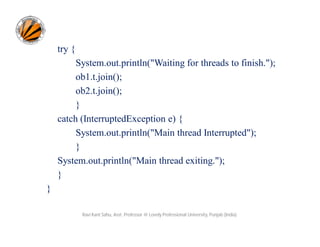
try {
System.out.println("Waiting for threads to finish.");
ob1.t.join();
ob2.t.join();
}
catch (InterruptedException e) {
System.out.println("Main thread Interrupted");
}
System.out.println("Main thread exiting.");
}
}
Ravi Kant Sahu, Asst. Professor @ Lovely Professional University, Punjab (India)
•

wait( ) and notify( ) methods are inherited from Object class can be used to
control the execution of a thread.

•

The NewThread class contains a boolean instance variable named
suspendFlag, which is used to control the execution of the thread.

•

It is initialized to false by the constructor.

•

The run( ) method contains a synchronized statement block that checks
suspendFlag.

•

If that variable is true, the wait( ) method is invoked to suspend the execution
of the thread.

•

The mysuspend( ) method sets suspendFlag to true.

•

The myresume( ) method sets suspendFlag to false and invokes notify( ) to
wake up the thread.

•

Finally, the main( ) method has been modified to invoke the mysuspend( )
and myresume( ) methods.
Ravi Kant Sahu, Asst. Professor @ Lovely Professional University, Punjab (India)
Inter-thread Communication
• wait( ), notify( ), and notifyAll( ) methods are used for
communication among threads.
• All three methods can be called only from within a synchronized
context.
• wait( ) tells the calling thread to give up the monitor and go to sleep
until some other thread enters the same monitor and calls notify( ).
• notify( ) wakes up a thread that called wait( ) on the same object.
• notifyAll( ) wakes up all the threads that called wait( ) on the same
object. One of the threads will be granted access.
Ravi Kant Sahu, Asst. Professor @ Lovely Professional University, Punjab (India)
Inter-thread Communication
• These methods are declared within Object, as shown here:
final void wait( ) throws InterruptedException
final void notify( )
final void notifyAll( )

Ravi Kant Sahu, Asst. Professor @ Lovely Professional University, Punjab (India)

Multi threading

  • 1.
    Programming in Java Topic:Multi-threading By Ravi Kant Sahu Asst. Professor Lovely Professional University, Punjab
  • 2.
    Agenda • • • • • • • • • • Introduction Process Vs Thread ThreadLife cycle Runnable Interface Thread class Creating a Thread Creating Multiple Threads Synchronization of Threads Inter-thread Communication Suspending, Resuming and Stopping Threads Ravi Kant Sahu, Asst. Professor @ Lovely Professional University, Punjab (India)
  • 3.
    Introduction • Concurrent Executionof multiple tasks is called Multitasking. Multitasking Multi-processing (Process-based) Multi-threading (Thread-based) Ravi Kant Sahu, Asst. Professor @ Lovely Professional University, Punjab (India)
  • 4.
    Introduction • Multithreading isa specialized form of multitasking. • A multithreaded program contains two or more parts (threads) that can run concurrently. • Each thread defines a separate path of execution. • Java provides built-in support for multithreaded programming. Ravi Kant Sahu, Asst. Professor @ Lovely Professional University, Punjab (India)
  • 5.
    Process and Threads •In concurrent programming, there are two basic units of execution: processes and threads. • Process: is an executable program loaded in memory » has its own Variables & data structures (in memory) » Communicate via operating system, files, network » May contain multiple threads Ravi Kant Sahu, Asst. Professor @ Lovely Professional University, Punjab (India)
  • 6.
    Threads • A threadis an independent module of an application that can be concurrently executed with other threads. • Also known as “lightweight process”. • Threads exist within a process — every process has at least one. • Multiple threads in process execute same program. • Threads share the process's resources, including memory and open files. Ravi Kant Sahu, Asst. Professor @ Lovely Professional University, Punjab (India)
  • 7.
    • A threadcannot exist on its own; it must be a part of a process. • A process remains running until all of the non-daemon threads are done executing. Ravi Kant Sahu, Asst. Professor @ Lovely Professional University, Punjab (India)
  • 8.
    Life Cycle ofa Thread • New: The thread is in new state if you create an instance of Thread class but before the invocation of start() method. • Runnable: The thread is in runnable state after invocation of start() method, but the thread scheduler has not selected it to be the running thread. • Running: The thread is in running state if the thread scheduler has selected it. Ravi Kant Sahu, Asst. Professor @ Lovely Professional University, Punjab (India)
  • 9.
    • Waiting/Blocked: Thisis the state when the thread is still alive, but is currently not eligible to run. • Terminated: A thread is in terminated or dead state when its run() method exits. Ravi Kant Sahu, Asst. Professor @ Lovely Professional University, Punjab (India)
  • 10.
    Ravi Kant Sahu,Asst. Professor @ Lovely Professional University, Punjab (India)
  • 11.
    Ravi Kant Sahu,Asst. Professor @ Lovely Professional University, Punjab (India)
  • 12.
    Multithreading in Java •In order to achieve multithreading in java application, java.lang.Runnable interface is provided. • java.lang.Thread class is provided as part of core java library which provides methods that are used to: – start and suspend a thread – obtain the state of a thread – change the state of a thread Ravi Kant Sahu, Asst. Professor @ Lovely Professional University, Punjab (India)
  • 13.
    Runnable Interface • Runnableinterface contains a single method run(). public interface Runnable { public void run(); } • Inside run( ), we will define the code that constitutes the new thread. • run( ) can call other methods, use other classes, and declare variables. Ravi Kant Sahu, Asst. Professor @ Lovely Professional University, Punjab (India)
  • 14.
    Thread Class • Threadclass provides methods to start a thread, suspend a thread and obtain the state of a thread. public class Thread { public Thread(Runnable R); // Thread ⇒ R.run() public Thread(Runnable R, String name); public void start(); // begin thread execution ... } Ravi Kant Sahu, Asst. Professor @ Lovely Professional University, Punjab (India)
  • 15.
    Methods of Threadclass • currentThread(): used to obtain the reference of thread object for the current thread. public static Thread currentThread() • getName(): returns the name of the thread. public String getName() • setName(): used to change the name of a thread. public void setName(String Name) • getPriority(): used to obtain the priority of thread. public int getPriority() Ravi Kant Sahu, Asst. Professor @ Lovely Professional University, Punjab (India)
  • 16.
    Methods of Threadclass • start(): used to start the execution of a thread. public void start() • sleep(): is used to suspend the current thread for the specified time. public static void sleep(long milliseconds) throws InterruptedException • isAlive(): used to find out whether a thread is completed or not . public boolean isAlive() • static void yield(): This method causes the currently executing thread object to temporarily pause and allow other threads to execute. • void join(): Waits for this thread to die. Ravi Kant Sahu, Asst. Professor @ Lovely Professional University, Punjab (India)
  • 17.
    Creating Threads inJava • A user thread is represented by run(). • There are two ways of defining a thread: – By extending Thread class – By implementing Runnable interface Runnable Runnable Thread MyThread MyThread • The first case is not recommended because our class may already have a super class, so we can not extend another class. Ravi Kant Sahu, Asst. Professor @ Lovely Professional University, Punjab (India)
  • 18.
    Implementing Runnable • Wecan construct a thread on any object that implements Runnable. • To implement Runnable, a class need only implement run( ). • Inside run( ), we will define the code that constitutes the new thread. • run( ) can call other methods, use other classes, and declare variables, just like the main thread can. • The only difference is that run( ) establishes the entry point for another, concurrent thread of execution within our program. • This thread will end when run( ) returns. Ravi Kant Sahu, Asst. Professor @ Lovely Professional University, Punjab (India)
  • 19.
    class MyThread implementsRunnable { Thread t; MyThread() { t = new Thread(this, "My Thread"); System.out.println("Child thread: " + t); t.start(); } public void run() { try { for(int i = 5; i > 0; i--) { System.out.println("Child Thread: " + i); Thread.sleep(500); } } catch (InterruptedException e) { System.out.println("Child interrupted."); } System.out.println("Exiting child thread."); } } Ravi Kant Sahu, Asst. Professor @ Lovely Professional University, Punjab (India)
  • 20.
    class ThreadDemo1 { public staticvoid main(String args[]) { new MyThread(); try { for(int i = 5; i > 0; i--) { System.out.println("Main Thread: " + i); Thread.sleep(1000); } } catch (InterruptedException e) { System.out.println("Main thread interrupted."); } System.out.println("Main thread exiting."); } } Ravi Kant Sahu, Asst. Professor @ Lovely Professional University, Punjab (India)
  • 21.
    Extending Thread Class •The second way to create a thread is to create a new class that extends Thread. • Create an instance of that class. • Override the run( ) method. • Call start( ) to begin execution of the new thread. Ravi Kant Sahu, Asst. Professor @ Lovely Professional University, Punjab (India)
  • 22.
    class MyThread1 extendsThread { MyThread1() { super("Demo Thread"); System.out.println("Child thread: " + this); start(); } public void run() { try { for(int i = 5; i > 0; i--) { System.out.println("Child Thread: " + i); Thread.sleep(500); } } catch (InterruptedException e) { System.out.println("Child interrupted."); } System.out.println("Exiting child thread."); } } Ravi Kant Sahu, Asst. Professor @ Lovely Professional University, Punjab (India)
  • 23.
    class ExtendThread { publicstatic void main(String args[]) { new MyThread1(); try { for(int i = 5; i > 0; i--) { System.out.println("Main Thread: " + i); Thread.sleep(1000); } } catch (InterruptedException e) { System.out.println("Main thread interrupted."); } System.out.println("Main thread exiting."); } } Ravi Kant Sahu, Asst. Professor @ Lovely Professional University, Punjab (India)
  • 24.
    Creating Multiple Threads classMultiThreadDemo { public static void main(String args[]) { new MyThread2("One"); new MyThread2("Two"); new MyThread2("Three"); try { Thread.sleep(10000); } catch (InterruptedException e) { System.out.println("Main thread Interrupted"); } System.out.println("Main thread exiting."); } } Ravi Kant Sahu, Asst. Professor @ Lovely Professional University, Punjab (India)
  • 25.
    class MyThread2 implementsRunnable { String name; Thread t; MyThread2(String threadname) { name = threadname; t = new Thread(this, name); System.out.println("New thread: " + t); t.start(); } public void run() { try { for(int i = 5; i > 0; i--) { System.out.println(name + ": " + i); Thread.sleep(1000); } } catch (InterruptedException e) { System.out.println(name + "Interrupted"); } System.out.println(name + " exiting."); } } Ravi Kant Sahu, Asst. Professor @ Lovely Professional University, Punjab (India)
  • 26.
    Notice the callto sleep(10000) in main( ). • This causes the main thread to sleep for ten seconds and ensures that it will finish last. • Two ways exist to determine whether a thread has finished. • Call isAlive( ) on the thread. final boolean isAlive( ) • Call join( ) on thread. final void join( ) throws InterruptedException • This method waits until the thread on which it is called terminates. • Additional forms of join( ) allow to specify a maximum amount of time that you want to wait for the specified thread to terminate. Ravi Kant Sahu, Asst. Professor @ Lovely Professional University, Punjab (India)
  • 27.
    Synchronization • Race Condition:Multiple threads calling the same method, on the same object, at the same time. • When two or more threads need access to a shared resource, they need some way to ensure that the resource will be used by only one thread at a time. • The process by which this is achieved is called synchronization. • Monitor (Semaphore) is used for synchronization. Ravi Kant Sahu, Asst. Professor @ Lovely Professional University, Punjab (India)
  • 28.
    Monitor • A monitoris an object that is used as a mutually exclusive lock, or mutex. • Only one thread can own a monitor at a given time. • When a thread acquires a lock, it is said to have entered the monitor. • All other threads attempting to enter the locked monitor will be suspended until the first thread exits the monitor. • These other threads are said to be waiting for the monitor. Ravi Kant Sahu, Asst. Professor @ Lovely Professional University, Punjab (India)
  • 29.
    Need of Synchronization:Example class Callme { void call(String msg) { System.out.print("[" + msg); try { Thread.sleep(1000); } catch(InterruptedException e) { System.out.println("Interrupted"); } System.out.println("]"); } } Ravi Kant Sahu, Asst. Professor @ Lovely Professional University, Punjab (India)
  • 30.
    Example class Caller implementsRunnable { String msg; Callme target; Thread t; public Caller(Callme targ, String s) { target = targ; msg = s; t = new Thread(this); t.start(); } public void run() { target.call(msg); } } Ravi Kant Sahu, Asst. Professor @ Lovely Professional University, Punjab (India)
  • 31.
    Example class Synch { public staticvoid main(String args[]) { Callme target = new Callme(); Caller ob1 = new Caller(target, "Hello"); Caller ob2 = new Caller(target, "Synchronized"); Caller ob3 = new Caller(target, "World"); // wait for threads to end try { ob1.t.join(); ob2.t.join(); ob3.t.join(); } catch(InterruptedException e) { System.out.println("Interrupted"); } } } Ravi Kant Sahu, Asst. Professor @ Lovely Professional University, Punjab (India)
  • 32.
    Using Synchronized Methods •Methods qualified with synchronized keyword are called Synchronized Methods. • While a thread is inside a synchronized method, all other threads that try to call it (or any other synchronized method) on the same instance have to wait. • To exit the monitor and relinquish control of the object to the next waiting thread, the owner of the monitor simply returns from the synchronized method. Ravi Kant Sahu, Asst. Professor @ Lovely Professional University, Punjab (India)
  • 33.
    Using Synchronized Methods •A synchronized method can be executed by only one thread at a time. Example: Synch.java and Synch1.java Ravi Kant Sahu, Asst. Professor @ Lovely Professional University, Punjab (India)
  • 34.
    Synchronized Method: Example classCallme { synchronized void call(String msg) { System.out.print("[" + msg); try { Thread.sleep(1000); } catch(InterruptedException e) { System.out.println("Interrupted"); } System.out.println("]"); } } Ravi Kant Sahu, Asst. Professor @ Lovely Professional University, Punjab (India)
  • 35.
    The synchronized Statement •A synchronized block ensures that a call to a method occurs only after the current thread has successfully entered object’s monitor. • put calls to the methods defined by the class inside a synchronized block. synchronized(object) { // statements to be synchronized } • Here, object is a reference to the object being synchronized. Ravi Kant Sahu, Asst. Professor @ Lovely Professional University, Punjab (India)
  • 36.
    Synchronized Statement: Example classCaller implements Runnable { String msg; Callme target; Thread t; public Caller(Callme targ, String s) { target = targ; msg = s; t = new Thread(this); t.start(); } public void run() { synchronized(target) { // synchronized block target.call(msg); } Ravi Kant Sahu, Asst. Professor @ Lovely Professional University, Punjab (India) } }
  • 37.
    Suspending, Resuming, andStopping Threads • Execution of a thread can be suspended. • Restarting the execution of a suspended thread is also possible. • Prior to Java 2, suspend( ) and resume( ) methods (defined by Thread), were used to pause and restart the execution of a thread. final void suspend( ) final void resume( ) • The Thread class also defines a method called stop( ) that stops a thread. final void stop( ) • Once a thread has been stopped, it cannot be restarted using resume( ). Ravi Kant Sahu, Asst. Professor @ Lovely Professional University, Punjab (India)
  • 38.
    • suspend( ),resume( ), and stop( ) methods defined by Thread were deprecated by Java2. Why??? • suspend( ) can sometimes cause serious system failures as in case of locking. • resume() is deprecated because it cannot be used without the suspend( ). • stop( ) can also cause serious system failures so it was also deprecated. Ravi Kant Sahu, Asst. Professor @ Lovely Professional University, Punjab (India)
  • 39.
    Now how to suspend,resume and stop a thread?
  • 40.
    New Approach forsuspending, resuming and stopping a thread • A thread must be designed so that the run( ) method periodically checks to determine whether that thread should suspend, resume, or stop its own execution. • This is accomplished by establishing a flag variable that indicates the execution state of the thread. – As long as this flag is set to “running,” the run( ) method must continue to let the thread execute. – If this variable is set to “suspend,” the thread must pause. – If it is set to “stop,” the thread must terminate. Ravi Kant Sahu, Asst. Professor @ Lovely Professional University, Punjab (India)
  • 41.
    class NewThread implementsRunnable { NewThread(String threadname) {} public void run() {} void mysuspend() { suspendFlag = true; } synchronized void myresume() { suspendFlag = false; notify(); } } Ravi Kant Sahu, Asst. Professor @ Lovely Professional University, Punjab (India)
  • 42.
    class SuspendResume { public staticvoid main(String args[]) { NewThread ob1 = new NewThread("One"); NewThread ob2 = new NewThread("Two"); try { Thread.sleep(1000); ob1.mysuspend(); System.out.println("Suspending thread One"); Thread.sleep(1000); ob1.myresume(); System.out.println("Resuming thread One"); ob2.mysuspend(); System.out.println("Suspending thread Two"); Thread.sleep(1000); ob2.myresume(); System.out.println("Resuming thread Two"); } catch (InterruptedException e) { System.out.println("Main thread Interrupted"); } Ravi Kant Sahu, Asst. Professor @ Lovely Professional University, Punjab (India)
  • 43.
    try { System.out.println("Waiting forthreads to finish."); ob1.t.join(); ob2.t.join(); } catch (InterruptedException e) { System.out.println("Main thread Interrupted"); } System.out.println("Main thread exiting."); } } Ravi Kant Sahu, Asst. Professor @ Lovely Professional University, Punjab (India)
  • 44.
    • wait( ) andnotify( ) methods are inherited from Object class can be used to control the execution of a thread. • The NewThread class contains a boolean instance variable named suspendFlag, which is used to control the execution of the thread. • It is initialized to false by the constructor. • The run( ) method contains a synchronized statement block that checks suspendFlag. • If that variable is true, the wait( ) method is invoked to suspend the execution of the thread. • The mysuspend( ) method sets suspendFlag to true. • The myresume( ) method sets suspendFlag to false and invokes notify( ) to wake up the thread. • Finally, the main( ) method has been modified to invoke the mysuspend( ) and myresume( ) methods. Ravi Kant Sahu, Asst. Professor @ Lovely Professional University, Punjab (India)
  • 45.
    Inter-thread Communication • wait(), notify( ), and notifyAll( ) methods are used for communication among threads. • All three methods can be called only from within a synchronized context. • wait( ) tells the calling thread to give up the monitor and go to sleep until some other thread enters the same monitor and calls notify( ). • notify( ) wakes up a thread that called wait( ) on the same object. • notifyAll( ) wakes up all the threads that called wait( ) on the same object. One of the threads will be granted access. Ravi Kant Sahu, Asst. Professor @ Lovely Professional University, Punjab (India)
  • 46.
    Inter-thread Communication • Thesemethods are declared within Object, as shown here: final void wait( ) throws InterruptedException final void notify( ) final void notifyAll( ) Ravi Kant Sahu, Asst. Professor @ Lovely Professional University, Punjab (India)