Advanced Java Programming
Topic: Networking

By
Ravi Kant Sahu
Asst. Professor, LPU
Contents







Network Basics
Client-Server Architecture
Sockets
Networking classes and Interfaces
Network Protocols
Java Mail API

Ravi Kant Sahu, Asst. Professor @ Lovely Professional University, Punjab (India)
Basics of NetworkiNg

Ravi Kant Sahu, Asst. Professor @ Lovely Professional University, Punjab (India)
Network basics


Transmission Control Protocol (TCP)
- Connection-Oriented
- Reliable
TCP is a connection-based protocol that provides a reliable flow of data
between two computers.



User Datagram Protocol (UDP)
- Connectionless
- Unreliable
UDP is a protocol that sends independent packets of data, called datagrams,
from one computer to another with no guarantees about arrival.

Ravi Kant Sahu, Asst. Professor @ Lovely Professional University, Punjab (India)
Network basics


Internet Protocol (IP)
IP is a low level protocol for delivering data from one computer
to another across the internet in packets.



IP address
uniquely identifies the computer on Internet.



DNS (Domain Name Server)
translates the host name into IP address.

Ravi Kant Sahu, Asst. Professor @ Lovely Professional University, Punjab (India)
Understanding Ports


Data transmitted over the Internet is accompanied by addressing
information that identifies the computer and the port for which it is
destined.



The computer is identified by its 32-bit IP address, which IP uses to
deliver data to the right computer on the network.



Ports are identified by a 16-bit number, which TCP and UDP use to
deliver the data to the right application.



Port number ranges from 0 to 65536 but 0 to 1024 are reserved.

Ravi Kant Sahu, Asst. Professor @ Lovely Professional University, Punjab (India)
Client-Server Architecture

Ravi Kant Sahu, Asst. Professor @ Lovely Professional University, Punjab (India)
Client-Server Architecture


Network Programming involves a Server and one or more
Clients.



Client attempts to establish a connection with the Server.



The server can accept or deny the connection.



Once the connection is established, Client sends requests to the
server and server responds.



The communication takes place through Sockets.
Ravi Kant Sahu, Asst. Professor @ Lovely Professional University, Punjab (India)
Sockets


Sockets are the endpoints of logical connection between
two hosts and used to send and receive data.



Used to implement reliable, bidirectional, persistent, pointto-point, stream-based connections between hosts on the
Internet.



There are two kinds of TCP sockets in Java.
- Socket
- ServerSocket

Ravi Kant Sahu, Asst. Professor @ Lovely Professional University, Punjab (India)
ServerSocket


ServerSocket is for servers.



To establish a server, we need to create a ServerSocket.



ServerSocket is attached to a port where the Server listens
for the connection.



accept() method is defined in ServerSocket class which is a
blocking call that will wait for a client to initiate.

Ravi Kant Sahu, Asst. Professor @ Lovely Professional University, Punjab (India)
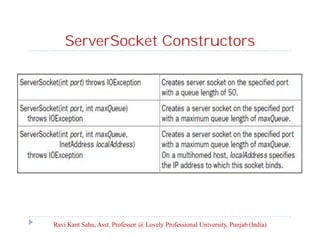
ServerSocket Constructors

Ravi Kant Sahu, Asst. Professor @ Lovely Professional University, Punjab (India)
Socket


The Socket class is for clients.



It is designed to connect to server sockets and initiate
protocol exchanges.
Socket(String hostName, int port)throws
UnknownHostException, IOException
Socket(InetAddress ipAddress, int port) throws
IOException

Ravi Kant Sahu, Asst. Professor @ Lovely Professional University, Punjab (India)
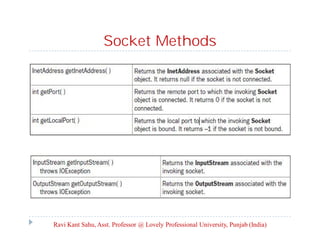
Socket Methods

Ravi Kant Sahu, Asst. Professor @ Lovely Professional University, Punjab (India)
Socket Methods


connect( ) allows us to specify a new connection



isConnected( ) returns true if the socket is connected to a
server



isClosed( ) returns true if the socket is closed.

Ravi Kant Sahu, Asst. Professor @ Lovely Professional University, Punjab (India)
InetAddress Class


InetAddress class is used to find the client’s host name and IP
address.

Example:
Socket s = new Socket(“172.19.2.250”, 8000);
Socket s = new Socket(“lpu.co.in”, 8000);
InetAddress ia = s.getInetAddress();
InetAddress ia = InetAddress.getByName(“lpu.co.in”);
Methods:
ia.getHostName();

ia.getHostAddress();

Ravi Kant Sahu, Asst. Professor @ Lovely Professional University, Punjab (India)
Serving Multiple ClientS

Ravi Kant Sahu, Asst. Professor @ Lovely Professional University, Punjab (India)
Multiple Clients


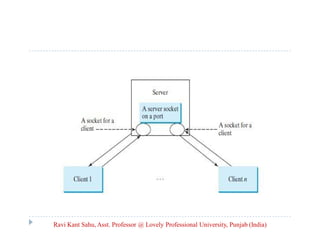
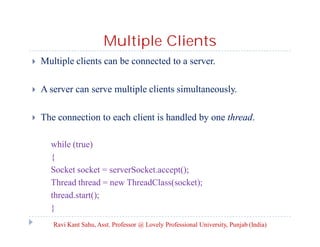
Multiple clients can be connected to a server.



A server can serve multiple clients simultaneously.



The connection to each client is handled by one thread.
while (true)
{
Socket socket = serverSocket.accept();
Thread thread = new ThreadClass(socket);
thread.start();
}
Ravi Kant Sahu, Asst. Professor @ Lovely Professional University, Punjab (India)
Applet Clients

Ravi Kant Sahu, Asst. Professor @ Lovely Professional University, Punjab (India)
Applet Clients


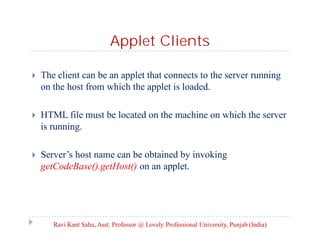
The client can be an applet that connects to the server running
on the host from which the applet is loaded.



HTML file must be located on the machine on which the server
is running.



Server’s host name can be obtained by invoking
getCodeBase().getHost() on an applet.

Ravi Kant Sahu, Asst. Professor @ Lovely Professional University, Punjab (India)
Sending and Receiving Objects


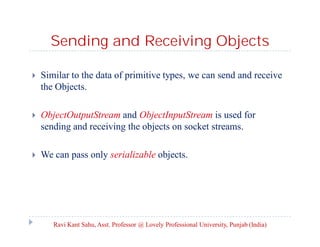
Similar to the data of primitive types, we can send and receive
the Objects.

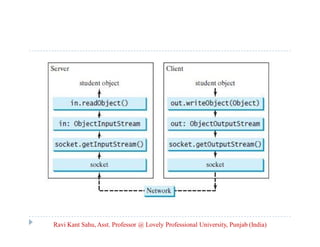


ObjectOutputStream and ObjectInputStream is used for
sending and receiving the objects on socket streams.



We can pass only serializable objects.

Ravi Kant Sahu, Asst. Professor @ Lovely Professional University, Punjab (India)
Java Mail API


JavaMail is an API that is used to compose, write and read
electronic messages.



The JavaMail API provides platform independent framework
for sending and receiving mails.



The javax.mail and javax.mail.activation packages contains the
core classes of JavaMail API.

Ravi Kant Sahu, Asst. Professor @ Lovely Professional University, Punjab (India)
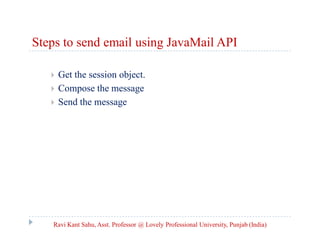
Steps to send email using JavaMail API




Get the session object.
Compose the message
Send the message

Ravi Kant Sahu, Asst. Professor @ Lovely Professional University, Punjab (India)
Steps to send email using JavaMail API
1. Get the session object
 The javax.mail.Session class provides two methods to get the
object of session
public static Session getDefaultInstance( Properties props)
public static Session getDefaultInstance( Properties props,
Authentication auth)
public static Session getInstance( Properties props)
public static Session getInstance( Properties props, Authentication
auth)
Ravi Kant Sahu, Asst. Professor @ Lovely Professional University, Punjab (India)
Steps to send email using JavaMail API
2. Compose the message
 The javax.mail.Message class provides methods to compose the
message.
 But it is an abstract class so its subclass
javax.mail.internet.MimeMessage class is mostly used.
public MimeMessage (Session s)
public void setFrom(Address address)
public void addRecipients(Message.RecipientType type,
String addresses)
public void setSubject( String sub)
public void setText( String msg)
Ravi Kant Sahu, Asst. Professor @ Lovely Professional University, Punjab (India)
Steps to send email using JavaMail API
3. Send the message


The javax.mail.Transport class provides method to send the
message.
public static void send(Message message)
public static void send(Message message, Address [] address)

Ravi Kant Sahu, Asst. Professor @ Lovely Professional University, Punjab (India)
Networking

Networking

  • 1.
    Advanced Java Programming Topic:Networking By Ravi Kant Sahu Asst. Professor, LPU
  • 2.
    Contents       Network Basics Client-Server Architecture Sockets Networkingclasses and Interfaces Network Protocols Java Mail API Ravi Kant Sahu, Asst. Professor @ Lovely Professional University, Punjab (India)
  • 3.
    Basics of NetworkiNg RaviKant Sahu, Asst. Professor @ Lovely Professional University, Punjab (India)
  • 4.
    Network basics  Transmission ControlProtocol (TCP) - Connection-Oriented - Reliable TCP is a connection-based protocol that provides a reliable flow of data between two computers.  User Datagram Protocol (UDP) - Connectionless - Unreliable UDP is a protocol that sends independent packets of data, called datagrams, from one computer to another with no guarantees about arrival. Ravi Kant Sahu, Asst. Professor @ Lovely Professional University, Punjab (India)
  • 5.
    Network basics  Internet Protocol(IP) IP is a low level protocol for delivering data from one computer to another across the internet in packets.  IP address uniquely identifies the computer on Internet.  DNS (Domain Name Server) translates the host name into IP address. Ravi Kant Sahu, Asst. Professor @ Lovely Professional University, Punjab (India)
  • 6.
    Understanding Ports  Data transmittedover the Internet is accompanied by addressing information that identifies the computer and the port for which it is destined.  The computer is identified by its 32-bit IP address, which IP uses to deliver data to the right computer on the network.  Ports are identified by a 16-bit number, which TCP and UDP use to deliver the data to the right application.  Port number ranges from 0 to 65536 but 0 to 1024 are reserved. Ravi Kant Sahu, Asst. Professor @ Lovely Professional University, Punjab (India)
  • 7.
    Client-Server Architecture Ravi KantSahu, Asst. Professor @ Lovely Professional University, Punjab (India)
  • 8.
    Client-Server Architecture  Network Programminginvolves a Server and one or more Clients.  Client attempts to establish a connection with the Server.  The server can accept or deny the connection.  Once the connection is established, Client sends requests to the server and server responds.  The communication takes place through Sockets. Ravi Kant Sahu, Asst. Professor @ Lovely Professional University, Punjab (India)
  • 9.
    Sockets  Sockets are theendpoints of logical connection between two hosts and used to send and receive data.  Used to implement reliable, bidirectional, persistent, pointto-point, stream-based connections between hosts on the Internet.  There are two kinds of TCP sockets in Java. - Socket - ServerSocket Ravi Kant Sahu, Asst. Professor @ Lovely Professional University, Punjab (India)
  • 10.
    ServerSocket  ServerSocket is forservers.  To establish a server, we need to create a ServerSocket.  ServerSocket is attached to a port where the Server listens for the connection.  accept() method is defined in ServerSocket class which is a blocking call that will wait for a client to initiate. Ravi Kant Sahu, Asst. Professor @ Lovely Professional University, Punjab (India)
  • 11.
    ServerSocket Constructors Ravi KantSahu, Asst. Professor @ Lovely Professional University, Punjab (India)
  • 12.
    Socket  The Socket classis for clients.  It is designed to connect to server sockets and initiate protocol exchanges. Socket(String hostName, int port)throws UnknownHostException, IOException Socket(InetAddress ipAddress, int port) throws IOException Ravi Kant Sahu, Asst. Professor @ Lovely Professional University, Punjab (India)
  • 13.
    Socket Methods Ravi KantSahu, Asst. Professor @ Lovely Professional University, Punjab (India)
  • 14.
    Socket Methods  connect( )allows us to specify a new connection  isConnected( ) returns true if the socket is connected to a server  isClosed( ) returns true if the socket is closed. Ravi Kant Sahu, Asst. Professor @ Lovely Professional University, Punjab (India)
  • 15.
    InetAddress Class  InetAddress classis used to find the client’s host name and IP address. Example: Socket s = new Socket(“172.19.2.250”, 8000); Socket s = new Socket(“lpu.co.in”, 8000); InetAddress ia = s.getInetAddress(); InetAddress ia = InetAddress.getByName(“lpu.co.in”); Methods: ia.getHostName(); ia.getHostAddress(); Ravi Kant Sahu, Asst. Professor @ Lovely Professional University, Punjab (India)
  • 16.
    Serving Multiple ClientS RaviKant Sahu, Asst. Professor @ Lovely Professional University, Punjab (India)
  • 17.
    Ravi Kant Sahu,Asst. Professor @ Lovely Professional University, Punjab (India)
  • 18.
    Multiple Clients  Multiple clientscan be connected to a server.  A server can serve multiple clients simultaneously.  The connection to each client is handled by one thread. while (true) { Socket socket = serverSocket.accept(); Thread thread = new ThreadClass(socket); thread.start(); } Ravi Kant Sahu, Asst. Professor @ Lovely Professional University, Punjab (India)
  • 19.
    Applet Clients Ravi KantSahu, Asst. Professor @ Lovely Professional University, Punjab (India)
  • 20.
    Applet Clients  The clientcan be an applet that connects to the server running on the host from which the applet is loaded.  HTML file must be located on the machine on which the server is running.  Server’s host name can be obtained by invoking getCodeBase().getHost() on an applet. Ravi Kant Sahu, Asst. Professor @ Lovely Professional University, Punjab (India)
  • 21.
    Sending and ReceivingObjects  Similar to the data of primitive types, we can send and receive the Objects.  ObjectOutputStream and ObjectInputStream is used for sending and receiving the objects on socket streams.  We can pass only serializable objects. Ravi Kant Sahu, Asst. Professor @ Lovely Professional University, Punjab (India)
  • 22.
    Ravi Kant Sahu,Asst. Professor @ Lovely Professional University, Punjab (India)
  • 23.
    Java Mail API  JavaMailis an API that is used to compose, write and read electronic messages.  The JavaMail API provides platform independent framework for sending and receiving mails.  The javax.mail and javax.mail.activation packages contains the core classes of JavaMail API. Ravi Kant Sahu, Asst. Professor @ Lovely Professional University, Punjab (India)
  • 24.
    Steps to sendemail using JavaMail API    Get the session object. Compose the message Send the message Ravi Kant Sahu, Asst. Professor @ Lovely Professional University, Punjab (India)
  • 25.
    Steps to sendemail using JavaMail API 1. Get the session object  The javax.mail.Session class provides two methods to get the object of session public static Session getDefaultInstance( Properties props) public static Session getDefaultInstance( Properties props, Authentication auth) public static Session getInstance( Properties props) public static Session getInstance( Properties props, Authentication auth) Ravi Kant Sahu, Asst. Professor @ Lovely Professional University, Punjab (India)
  • 26.
    Steps to sendemail using JavaMail API 2. Compose the message  The javax.mail.Message class provides methods to compose the message.  But it is an abstract class so its subclass javax.mail.internet.MimeMessage class is mostly used. public MimeMessage (Session s) public void setFrom(Address address) public void addRecipients(Message.RecipientType type, String addresses) public void setSubject( String sub) public void setText( String msg) Ravi Kant Sahu, Asst. Professor @ Lovely Professional University, Punjab (India)
  • 27.
    Steps to sendemail using JavaMail API 3. Send the message  The javax.mail.Transport class provides method to send the message. public static void send(Message message) public static void send(Message message, Address [] address) Ravi Kant Sahu, Asst. Professor @ Lovely Professional University, Punjab (India)