© 2009 SAP AG
Dietmar-Hopp-Allee 16
D-69190 Walldorf
SCM-EWM
Delivery Service Provider in SAP-EWM
Call Examples
November 17, 2009
Delivery Service Provider: Call Examples
© 2009 SAP AG
Dietmar-Hopp-Allee 16
D-69190 Walldorf
Title: <Title>
Version: 0.3
Date: 05-18-2007
Page 2 of 24
Contents
1 SAP – Important Disclaimers and Legal Information.................................3
2 Glossary ........................................................................................................7
3 Service Provider ...........................................................................................8
3.1 UI Service Providers.......................................................................................................9
3.2 Delivery Service Provider .............................................................................................10
4 Relation Between UI Service Provider and Delivery Service Provider...11
5 Aspects........................................................................................................12
5.1 Example........................................................................................................................12
6 Delivery Service Provider Interfaces.........................................................15
7 Examples of Service Provider Calls..........................................................17
7.1 Some Method Calls of the Service Provider.................................................................18
7.2 A Sample Program to Change a Customer Field .........................................................20
8 Alternative Ways to Access the Delivery Data .........................................24
Delivery Service Provider: Call Examples
© 2009 SAP AG
Dietmar-Hopp-Allee 16
D-69190 Walldorf
Title: <Title>
Version: 0.3
Date: 05-18-2007
Page 3 of 24
1 SAP – Important Disclaimers and Legal Information
General Disclaimer
SAP does not represent or endorse the accuracy or reliability of any of the information, content, or advertisements (collectively, the
"Materials") contained on, distributed through, or linked, downloaded, or accessed from any of the services contained on this Web site (the
"Service"), nor the quality of any products, information, or other materials displayed, purchased, or obtained by you as a result of an
advertisement or any other information or offer in or in connection with the Service (the "Products"). You hereby acknowledge that any
reliance upon any Materials shall be at your sole risk. SAP reserves the right, in its sole discretion and without any obligation, to make
improvements to, or correct any error or omissions in any portion of the Service or the Materials.
THE SERVICE AND THE MATERIALS ARE PROVIDED BY SAP ON AN "AS IS" BASIS, AND SAP EXPRESSLY DISCLAIMS ANY AND
ALL WARRANTIES, EXPRESS OR IMPLIED, INCLUDING WITHOUT LIMITATION WARRANTIES OF MERCHANTABILITY AND FITNESS
FOR A PARTICULAR PURPOSE, WITH RESPECT TO THE SERVICE OR ANY MATERIALS AND PRODUCTS. IN NO EVENT SHALL
SAP BE LIABLE FOR ANY DIRECT, INDIRECT, INCIDENTAL, PUNITIVE, OR CONSEQUENTIAL DAMAGES OF ANY KIND
WHATSOEVER WITH RESPECT TO THE SERVICE, THE MATERIALS, AND THE PRODUCTS.
SAP encourages you to exercise discretion while browsing the Internet using this site.
SAP makes no representations concerning any endeavor to review the content of sites linked to this site or any of the Materials, and so SAP
isn't responsible for the accuracy, copyright compliance, legality, or decency of material contained in sites listed in the directory or in the
Materials.
SAP respects the rights (including the intellectual property rights) of others, and we ask our users to do the same. SAP may, in appropriate
circumstances and in its sole discretion, terminate the accounts of users that infringe or otherwise violate such rights of others.
If you believe that your work has been copied in a way that constitutes copyright infringement, please follow the instructions at the top of this
page.
SAP – Guidelines for Using SAP Trademarks
Throughout the world, thousands of customers recognize and select SAP solutions on the basis of the company's trademarks and service
marks, which signify high-quality computer software products and services. Without these trademarks and service marks (collectively
referred to as "trademarks"), consumers would not be able to distinguish SAP solutions from those of other companies, nor would they be
able to readily identify the superior quality that SAP trademarks represent. Therefore, it is critically important that trademarks of SAP and its
subsidiaries are protected.
For guidelines on trademark usage, please see the following information:
SAP trademarks and SAP offering names
Proper use of trademarks
Additional trademark usage information for third parties
Trademark usage information for all print and online media.
If after reviewing the Guidelines for Using SAP Trademarks you still have a question about use, please direct your inquiry to
trademarks@sap.com. SAP will make reasonable efforts to respond to your request. However, based on volume of requests you should
allow several weeks for a response. In the absence of a response, the Guidelines for Using SAP Trademarks shall govern any and all uses.
Designing Marketing Material
If you are a developer, partner, customer, or other third party, always use your own proprietary design style when creating and producing a
marketing piece. You must not copy the SAP design style or borrow any SAP design elements.
Guidelines for Using SAP-Copyrighted Material
Delivery Service Provider: Call Examples
© 2009 SAP AG
Dietmar-Hopp-Allee 16
D-69190 Walldorf
Title: <Title>
Version: 0.3
Date: 05-18-2007
Page 4 of 24
The use of original texts, graphics, images, screen shots, and other materials from SAP sources must be approved by SAP. In addition,
when using such materials, you must include a copyright notice – either in an adjacent area or as a footnote – to indicate SAP's copyright.
The copyright should read as follows:
"© SAP AG <year>. All rights reserved."
Please note that SAP photography is only licensed for SAP use and must not be used by third parties in their communications.
SAP – Copyrights and Trademarks
ENGLISH – German version below
© Copyright 2009 SAP AG. All rights reserved.
No part of this publication may be reproduced or transmitted in any form or for any purpose without the express permission of SAP AG. The
information contained herein may be changed without prior notice.
Some software products marketed by SAP AG and its distributors contain proprietary software components of other software vendors.
Microsoft, Windows, Excel, Outlook, and PowerPoint are registered trademarks of Microsoft Corporation.
IBM, DB2, DB2 Universal Database, System i, System i5, System p, System p5, System x, System z, System z10, System z9, z10, z9,
iSeries, pSeries, xSeries, zSeries, eServer, z/VM, z/OS, i5/OS, S/390, OS/390, OS/400, AS/400, S/390 Parallel Enterprise Server,
PowerVM, Power Architecture, POWER6+, POWER6, POWER5+, POWER5, POWER, OpenPower, PowerPC, BatchPipes, BladeCenter,
System Storage, GPFS, HACMP, RETAIN, DB2 Connect, RACF, Redbooks, OS/2, Parallel Sysplex, MVS/ESA, AIX, Intelligent Miner,
WebSphere, Netfinity, Tivoli and Informix are trademarks or registered trademarks of IBM Corporation.
Linux is the registered trademark of Linus Torvalds in the U.S. and other countries.
Adobe, the Adobe logo, Acrobat, PostScript, and Reader are either trademarks or registered trademarks of Adobe Systems Incorporated in
the United States and/or other countries.
Oracle is a registered trademark of Oracle Corporation.
UNIX, X/Open, OSF/1, and Motif are registered trademarks of the Open Group.
Citrix, ICA, Program Neighborhood, MetaFrame, WinFrame, VideoFrame, and MultiWin are trademarks or registered trademarks of Citrix
Systems, Inc.
HTML, XML, XHTML and W3C are trademarks or registered trademarks of W3C®, World Wide Web Consortium, Massachusetts Institute of
Technology.
Java is a registered trademark of Sun Microsystems, Inc.
JavaScript is a registered trademark of Sun Microsystems, Inc., used under license for technology invented and implemented by Netscape.
SAP, R/3, SAP NetWeaver, Duet, PartnerEdge, ByDesign, SAP Business ByDesign, and other SAP products and services mentioned herein
as well as their respective logos are trademarks or registered trademarks of SAP AG in Germany and other countries.
Business Objects and the Business Objects logo, BusinessObjects, Crystal Reports, Crystal Decisions, Web Intelligence, Xcelsius, and other
Business Objects products and services mentioned herein as well as their respective logos are trademarks or registered trademarks of
Business Objects S.A. in the United States and in other countries. Business Objects is an SAP company.
All other product and service names mentioned are the trademarks of their respective companies. Data contained in this document serves
informational purposes only. National product specifications may vary.
Delivery Service Provider: Call Examples
© 2009 SAP AG
Dietmar-Hopp-Allee 16
D-69190 Walldorf
Title: <Title>
Version: 0.3
Date: 05-18-2007
Page 5 of 24
These materials are subject to change without notice. These materials are provided by SAP AG and its affiliated companies ("SAP Group")
for informational purposes only, without representation or warranty of any kind, and SAP Group shall not be liable for errors or omissions with
respect to the materials. The only warranties for SAP Group products and services are those that are set forth in the express warranty
statements accompanying such products and services, if any. Nothing herein should be construed as constituting an additional warranty.
GERMAN
© Copyright 2009 SAP AG. Alle Rechte vorbehalten.
Weitergabe und Vervielfältigung dieser Publikation oder von Teilen daraus sind, zu welchem Zweck und in welcher Form auch immer, ohne
die ausdrückliche schriftliche Genehmigung durch SAP AG nicht gestattet. In dieser Publikation enthaltene Informationen können ohne
vorherige Ankündigung geändert werden.
Die von SAP AG oder deren Vertriebsfirmen angebotenen Softwareprodukte können Softwarekomponenten auch anderer Softwarehersteller
enthalten.
Microsoft, Windows, Excel, Outlook und PowerPoint sind eingetragene Marken der Microsoft Corporation.
IBM, DB2, DB2 Universal Database, System i, System i5, System p, System p5, System x, System z, System z10, System z9, z10, z9,
iSeries, pSeries, xSeries, zSeries, eServer, z/VM, z/OS, i5/OS, S/390, OS/390, OS/400, AS/400, S/390 Parallel Enterprise Server,
PowerVM, Power Architecture, POWER6+, POWER6, POWER5+, POWER5, POWER, OpenPower, PowerPC, BatchPipes, BladeCenter,
System Storage, GPFS, HACMP, RETAIN, DB2 Connect, RACF, Redbooks, OS/2, Parallel Sysplex, MVS/ESA, AIX, Intelligent Miner,
WebSphere, Netfinity, Tivoli und Informix sind Marken oder eingetragene Marken der IBM Corporation.
Linux ist eine eingetragene Marke von Linus Torvalds in den USA und anderen Ländern.
Adobe, das Adobe Logo, Acrobat, PostScript und Reader sind Marken oder eingetragene Marken von Adobe Systems Inc. in den USA
und/oder anderen Ländern.
Oracle ist eine eingetragene Marke der Oracle Corporation.
UNIX, X/Open, OSF/1 und Motif sind eingetragene Marken der Open Group.
Citrix, ICA, Program Neighborhood, MetaFrame, WinFrame, VideoFrame und MultiWin sind Marken oder eingetragene Marken von Citrix
Systems, Inc.
HTML, XML, XHTML und W3C sind Marken oder eingetragene Marken des W3C®, World Wide Web Consortium, Massachusetts Institute of
Technology.
Java ist eine eingetragene Marke von Sun Microsystems, Inc.
JavaScript ist eine eingetragene Marke der Sun Microsystems, Inc., verwendet unter der Lizenz der von Netscape entwickelten und
implementierten Technologie.
SAP, R/3, SAP NetWeaver, Duet, PartnerEdge, ByDesign, SAP Business ByDesign und weitere im Text erwähnte SAP-Produkte und -
Dienstleistungen sowie die entsprechenden Logos sind Marken oder eingetragene Marken der SAP AG in Deutschland und anderen
Ländern.
Business Objects und das Business-Objects-Logo, BusinessObjects, Crystal Reports, Crystal Decisions, Web Intelligence, Xcelsius und
andere im Text erwähnte Business-Objects-Produkte und -Dienstleistungen sowie die entsprechenden Logos sind Marken oder
eingetragene Marken der Business Objects S. A. in den USA und anderen Ländern. Business Objects ist ein Unternehmen der SAP.
Alle anderen Namen von Produkten und Dienstleistungen sind Marken der jeweiligen Firmen. Die Angaben im Text sind unverbindlich und
dienen lediglich zu Informationszwecken. Produkte können länderspezifische Unterschiede aufweisen.
In dieser Publikation enthaltene Informationen können ohne vorherige Ankündigung geändert werden. Die vorliegenden Angaben werden
von SAP AG und ihren Konzernunternehmen ("SAP-Konzern") bereitgestellt und dienen ausschließlich Informationszwecken. Der SAP-
Konzern übernimmt keinerlei Haftung oder Garantie für Fehler oder Unvollständigkeiten in dieser Publikation. Der SAP-Konzern steht
Delivery Service Provider: Call Examples
© 2009 SAP AG
Dietmar-Hopp-Allee 16
D-69190 Walldorf
Title: <Title>
Version: 0.3
Date: 05-18-2007
Page 6 of 24
lediglich für Produkte und Dienstleistungen nach der Maßgabe ein, die in der Vereinbarung über die jeweiligen Produkte und
Dienstleistungen ausdrücklich geregelt ist. Aus den in dieser Publikation enthaltenen Informationen ergibt sich keine weiterführende Haftung.
Delivery Service Provider: Call Examples
© 2009 SAP AG
Dietmar-Hopp-Allee 16
D-69190 Walldorf
Title: <Title>
Version: 0.3
Date: 05-18-2007
Page 7 of 24
2 Glossary
Term Definition
ABAP OO Advanced Business Application Programming, Object-Oriented
BO Business object (here usually a delivery)
DR Delivery request
ESA Enterprise Service Architecture
ESF Enterprise Services Framework
FD Final delivery = outbound delivery
IDN Inbound Delivery Notification
OD Outbound delivery
ODO Outbound delivery order
ODP Object Data Pattern
OIP Object Identification Pattern
PRD Processing Delivery
SP Service provider
UI User Interface
UIC User Interface Controller
WDP Web Dynpro Pattern
Delivery Service Provider: Call Examples
© 2009 SAP AG
Dietmar-Hopp-Allee 16
D-69190 Walldorf
Title: <Title>
Version: 0.3
Date: 05-18-2007
Page 8 of 24
3 Service Provider
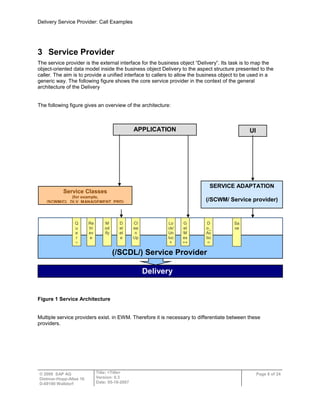
The service provider is the external interface for the business object “Delivery”. Its task is to map the
object-oriented data model inside the business object Delivery to the aspect structure presented to the
caller. The aim is to provide a unified interface to callers to allow the business object to be used in a
generic way. The following figure shows the core service provider in the context of the general
architecture of the Delivery
The following figure gives an overview of the architecture:
Figure 1 Service Architecture
Multiple service providers exist. in EWM. Therefore it is necessary to differentiate between these
providers.
Delivery
UI
Sa
ve
Re
tri
ev
e
M
od
ify
D
el
et
e
G
et
M
es
sa
ge
s
Cl
ea
n
Up
D
o_
Ac
tio
n
Lo
ck/
Un
loc
k
Q
u
e
r
y
(/SCDL/) Service Provider
APPLICATION
Service Classes
(for example,
/SCWM/CL_DLV_MANAGEMENT_PRD)
SERVICE ADAPTATION
(/SCWM/ Service provider)
Delivery Service Provider: Call Examples
© 2009 SAP AG
Dietmar-Hopp-Allee 16
D-69190 Walldorf
Title: <Title>
Version: 0.3
Date: 05-18-2007
Page 9 of 24
3.1 UI Service Providers
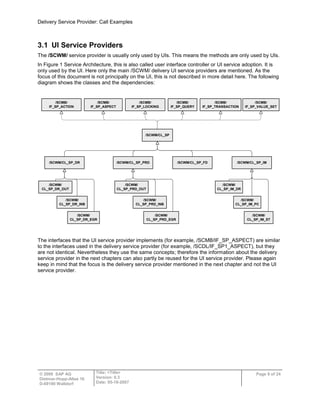
The /SCWM/ service provider is usually only used by UIs. This means the methods are only used by UIs.
In Figure 1 Service Architecture, this is also called user interface controller or UI service adoption. It is
only used by the UI. Here only the main /SCWM/ delivery UI service providers are mentioned. As the
focus of this document is not principally on the UI, this is not described in more detail here. The following
diagram shows the classes and the dependencies:
/SCWM/CL_SP
/SCMB/
IF_SP_ACTION
/SCMB/
IF_SP_ASPECT
/SCMB/
IF_SP_LOCKING
/SCMB/
IF_SP_QUERY
/SCMB/
IF_SP_TRANSACTION
/SCMB/
IF_SP_VALUE_SET
/SCWM/CL_SP_DR /SCWM/CL_SP_PRD /SCWM/CL_SP_FD /SCWM/CL_SP_IM
/SCWM/
CL_SP_DR_OUT
/SCWM/
CL_SP_DR_INB
/SCWM/
CL_SP_DR_EGR
/SCWM/
CL_SP_IM_DR
/SCWM/
CL_SP_IM_PC
/SCWM/
CL_SP_IM_ST
/SCWM/
CL_SP_PRD_OUT
/SCWM/
CL_SP_PRD_INB
/SCWM/
CL_SP_PRD_EGR
The interfaces that the UI service provider implements (for example, /SCMB/IF_SP_ASPECT) are similar
to the interfaces used in the delivery service provider (for example, /SCDL/IF_SP1_ASPECT), but they
are not identical. Nevertheless they use the same concepts; therefore the information about the delivery
service provider in the next chapters can also partly be reused for the UI service provider. Please again
keep in mind that the focus is the delivery service provider mentioned in the next chapter and not the UI
service provider.
Delivery Service Provider: Call Examples
© 2009 SAP AG
Dietmar-Hopp-Allee 16
D-69190 Walldorf
Title: <Title>
Version: 0.3
Date: 05-18-2007
Page 10 of 24
3.2 Delivery Service Provider
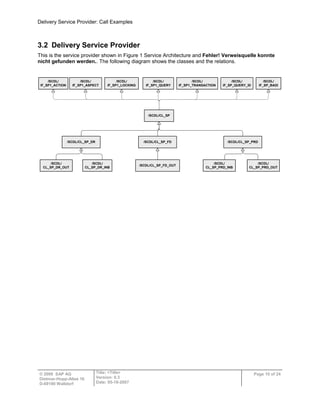
This is the service provider shown in Figure 1 Service Architecture and Fehler! Verweisquelle konnte
nicht gefunden werden.. The following diagram shows the classes and the relations.
/SCDL/CL_SP
/SCDL/
IF_SP1_ACTION
/SCDL/
IF_SP1_ASPECT
/SCDL/
IF_SP1_LOCKING
/SCDL/
IF_SP1_QUERY
/SCDL/
IF_SP1_TRANSACTION
/SCDL/
IF_SP_QUERY_ID
/SCDL/CL_SP_DR /SCDL/CL_SP_PRD
/SCDL/CL_SP_FD
/SCDL/
CL_SP_DR_OUT
/SCDL/
CL_SP_DR_INB
/SCDL/
CL_SP_PRD_OUT
/SCDL/
CL_SP_PRD_INB
/SCDL/
IF_SP_BADI
/SCDL/CL_SP_FD_OUT
Delivery Service Provider: Call Examples
© 2009 SAP AG
Dietmar-Hopp-Allee 16
D-69190 Walldorf
Title: <Title>
Version: 0.3
Date: 05-18-2007
Page 11 of 24
4 Relation Between UI Service Provider and Delivery Service
Provider
As described above, the service provider (SP) offers several methods to read, insert, update, and execute
actions, and so on, on a specific object (for example, outbound delivery order). Service providers exist for
all delivery objects (for example, inbound delivery order, outbound delivery). The service provider
instances contain the DOCCAT (for example, PDO, FDO, and so on). This means that if an outbound
delivery is to be changed, an instance of the service provider with DOCCAT=FDO has to be used, while
for an inbound delivery order, for example, a service provider instance with DOCCAT=PDI should be
used.
Both UI-specific and delivery-object-specific service providers exist for the delivery service. The reason
why there are “UI” and “delivery-object” service providers is the following:
In each delivery UI, the delivery may be structured differently (for example, fewer or more fields
compared to the data structure of the delivery).
In the UI, specific checks should be done or additional UI-specific code needs to be executed.
The relationship between UI SP and delivery SP is the following:
UI SP methods are only called from the UIs. Usually UI methods call delivery SP methods to
insert, update, and so on.
Delivery-SP methods can be called from multiple UIs and also from code that is independent of
UIs (for example, RFC functions, batch jobs, and so on)
The dependencies are described in more detail later on.
Delivery Service Provider: Call Examples
© 2009 SAP AG
Dietmar-Hopp-Allee 16
D-69190 Walldorf
Title: <Title>
Version: 0.3
Date: 05-18-2007
Page 12 of 24
5 Aspects
One main term for the service provider is the “aspect”. An aspect can be described as a specific part of
an existing business object. For example, there is the aspect for products, containing the product, product
ID, product batch, and so on, or there is the aspect for dates, containing the date fields for the delivery
item, for example.
In Enterprise Service Architecture, there are two types of aspects: key aspects and aspects.
Key aspects hold the semantic key of an aspect row, which is not necessarily the syntactical key in the
database. Therefore, each aspect must have one associated key aspect. A key aspect is its own key
aspect.
The usual naming convention for service providers is:
Table types
/SCDL/T_SP_K_* or /SCWM/T_SP_K_* Key aspect
/SCDL/T_SP_A_* or /SCWM/T_SP_A_* Aspect
Structure types
/SCDL/S_SP_K_* or /SCWM/S_SP_K_* Key aspect
/SCDL/S_SP_A_* or /SCWM/S_SP_A_* Aspect
/SCDL/S_SP_D_* or /SCWM/S_SP_D_* Text aspect data
/SCDL/S_SP_Q_* or /SCWM/S_SP_Q_* Query parameter
Constants
All constants defined to substitute the Enterprise Service Framework are defined in the interface
/SCDL/IF_SP_C and /SCWM/IF_SP_C.
Note that /SCWM/IF_SP_C contains the constants for the EWM UIs as well as the constants for the EWM
extension of SCDL.
5.1 Example
The data model for the outbound delivery order header contains a 1:n relation to dates (that means one
delivery header can have multiple dates like out-of-yard date, delivery date, and so on)
So the corresponding aspect would be
/SCDL/IF_SP_C=> SC_ASP_HEAD_DATE (fixed value „/SCDL/S_SP_A_HEAD_DATE')
The structure of the aspect would be /SCDL/S_SP_A_HEAD_DATE (as in the constant above)
And the table type (as 1:n relation) /SCDL/T_SP_A_HEAD_DATE
The aspect (structure) itself consists of the header date aspect key and the “data” fields. As the header
date aspect is an aspect of the header, it contains the header aspect key and the date keys. The header
aspect key identifies the delivery (header), while the date keys identify the date (showing, for example,
whether it is an out-of-yard date or a delivery date, and so on).
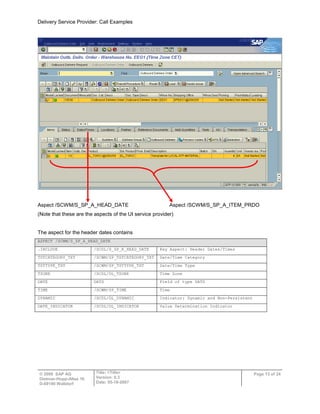
The following screenshot shows the outbound delivery order UI (transaction /SCWM/PRDO).
The following example shows the relation between the aspects of UI and SCDL.
Delivery Service Provider: Call Examples
© 2009 SAP AG
Dietmar-Hopp-Allee 16
D-69190 Walldorf
Title: <Title>
Version: 0.3
Date: 05-18-2007
Page 13 of 24
Aspect /SCWM/S_SP_A_HEAD_DATE Aspect /SCWM/S_SP_A_ITEM_PRDO
(Note that these are the aspects of the UI service provider)
The aspect for the header dates contains
ASPECT /SCWM/S_SP_A_HEAD_DATE
.INCLUDE /SCDL/S_SP_K_HEAD_DATE Key Aspect: Header Dates/Times
TSTCATEGORY_TXT /SCWM/SP_TSTCATEGORY_TXT Date/Time Category
TSTTYPE_TXT /SCWM/SP_TSTTYPE_TXT Date/Time Type
TZONE /SCDL/DL_TZONE Time Zone
DATE DATS Field of type DATS
TIME /SCWM/SP_TIME Time
DYNAMIC /SCDL/DL_DYNAMIC Indicator: Dynamic and Non-Persistent
DATE_INDICATOR /SCDL/DL_INDICATOR Value Determination Indicator
Delivery Service Provider: Call Examples
© 2009 SAP AG
Dietmar-Hopp-Allee 16
D-69190 Walldorf
Title: <Title>
Version: 0.3
Date: 05-18-2007
Page 14 of 24
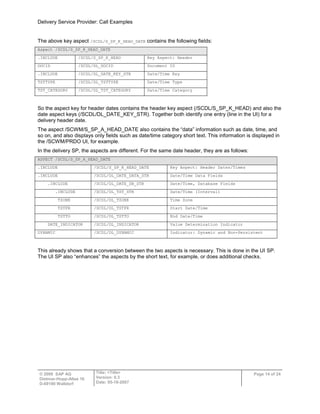
The above key aspect /SCDL/S_SP_K_HEAD_DATE contains the following fields:
Aspect /SCDL/S_SP_K_HEAD_DATE
.INCLUDE /SCDL/S_SP_K_HEAD Key Aspect: Header
DOCID /SCDL/DL_DOCID Document ID
.INCLUDE /SCDL/DL_DATE_KEY_STR Date/Time Key
TSTTYPE /SCDL/DL_TSTTYPE Date/Time Type
TST_CATEGORY /SCDL/DL_TST_CATEGORY Date/Time Category
So the aspect key for header dates contains the header key aspect (/SCDL/S_SP_K_HEAD) and also the
date aspect keys (/SCDL/DL_DATE_KEY_STR). Together both identify one entry (line in the UI) for a
delivery header date.
The aspect /SCWM/S_SP_A_HEAD_DATE also contains the “data” information such as date, time, and
so on, and also displays only fields such as date/time category short text. This information is displayed in
the /SCWM/PRDO UI, for example.
In the delivery SP, the aspects are different. For the same date header, they are as follows:
ASPECT /SCDL/S_SP_A_HEAD_DATE
.INCLUDE /SCDL/S_SP_K_HEAD_DATE Key Aspect: Header Dates/Times
.INCLUDE /SCDL/DL_DATE_DATA_STR Date/Time Data Fields
.INCLUDE /SCDL/DL_DATE_DB_STR Date/Time, Database Fields
.INCLUDE /SCDL/DL_TST_STR Date/Time (Interval)
TZONE /SCDL/DL_TZONE Time Zone
TSTFR /SCDL/DL_TSTFR Start Date/Time
TSTTO /SCDL/DL_TSTTO End Date/Time
DATE_INDICATOR /SCDL/DL_INDICATOR Value Determination Indicator
DYNAMIC /SCDL/DL_DYNAMIC Indicator: Dynamic and Non-Persistent
This already shows that a conversion between the two aspects is necessary. This is done in the UI SP.
The UI SP also “enhances” the aspects by the short text, for example, or does additional checks.
Delivery Service Provider: Call Examples
© 2009 SAP AG
Dietmar-Hopp-Allee 16
D-69190 Walldorf
Title: <Title>
Version: 0.3
Date: 05-18-2007
Page 15 of 24
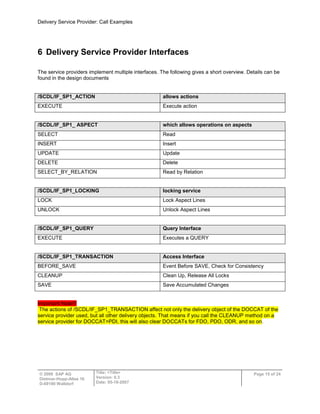
6 Delivery Service Provider Interfaces
The service providers implement multiple interfaces. The following gives a short overview. Details can be
found in the design documents
/SCDL/IF_SP1_ACTION allows actions
EXECUTE Execute action
/SCDL/IF_SP1_ ASPECT which allows operations on aspects
SELECT Read
INSERT Insert
UPDATE Update
DELETE Delete
SELECT_BY_RELATION Read by Relation
/SCDL/IF_SP1_LOCKING locking service
LOCK Lock Aspect Lines
UNLOCK Unlock Aspect Lines
/SCDL/IF_SP1_QUERY Query Interface
EXECUTE Executes a QUERY
/SCDL/IF_SP1_TRANSACTION Access Interface
BEFORE_SAVE Event Before SAVE, Check for Consistency
CLEANUP Clean Up, Release All Locks
SAVE Save Accumulated Changes
Important Note!!!
The actions of /SCDL/IF_SP1_TRANSACTION affect not only the delivery object of the DOCCAT of the
service provider used, but all other delivery objects. That means if you call the CLEANUP method on a
service provider for DOCCAT=PDI, this will also clear DOCCATs for FDO, PDO, ODR, and so on.
Delivery Service Provider: Call Examples
© 2009 SAP AG
Dietmar-Hopp-Allee 16
D-69190 Walldorf
Title: <Title>
Version: 0.3
Date: 05-18-2007
Page 16 of 24
/SCDL/IF_SP_QUERY_ID Query by IDs
QUERY_DOCID Search for Header (GUID)
QUERY_DOCNO Search for Header (Number)
QUERY_MAPKEY Key Allocation
QUERY_DOCFLOW Search for Document Flow
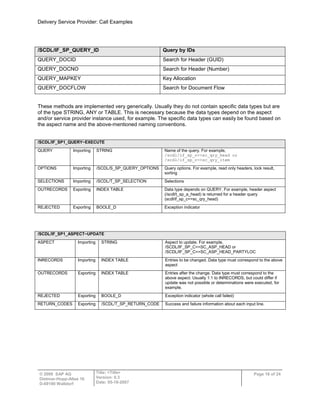
These methods are implemented very generically. Usually they do not contain specific data types but are
of the type STRING, ANY or TABLE. This is necessary because the data types depend on the aspect
and/or service provider instance used, for example. The specific data types can easily be found based on
the aspect name and the above-mentioned naming conventions.
/SCDL/IF_SP1_QUERY~EXECUTE
QUERY Importing STRING Name of the query. For example,
/scdl/if_sp_c=>sc_qry_head or
/scdl/if_sp_c=>sc_qry_item
OPTIONS Importing /SCDL/S_SP_QUERY_OPTIONS Query options. For example, read only headers, lock result,
sorting
SELECTIONS Importing /SCDL/T_SP_SELECTION Selections
OUTRECORDS Exporting INDEX TABLE Data type depends on QUERY. For example, header aspect
(/scdl/t_sp_a_head) is returned for a header query
(scdl/if_sp_c=>sc_qry_head)
REJECTED Exporting BOOLE_D Exception indicator
/SCDL/IF_SP1_ASPECT~UPDATE
ASPECT Importing STRING Aspect to update. For example,
/SCDL/IF_SP_C=>SC_ASP_HEAD or
/SCDL/IF_SP_C=>SC_ASP_HEAD_PARTYLOC
INRECORDS Importing INDEX TABLE Entries to be changed. Data type must correspond to the above
aspect
OUTRECORDS Exporting INDEX TABLE Entries after the change. Data type must correspond to the
above aspect. Usually 1:1 to INRECORDS, but could differ if
update was not possible or determinations were executed, for
example.
REJECTED Exporting BOOLE_D Exception indicator (whole call failed)
RETURN_CODES Exporting /SCDL/T_SP_RETURN_CODE Success and failure information about each input line.
Delivery Service Provider: Call Examples
© 2009 SAP AG
Dietmar-Hopp-Allee 16
D-69190 Walldorf
Title: <Title>
Version: 0.3
Date: 05-18-2007
Page 17 of 24
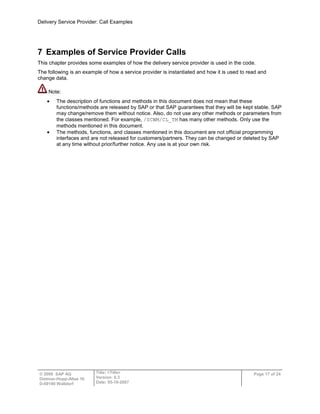
7 Examples of Service Provider Calls
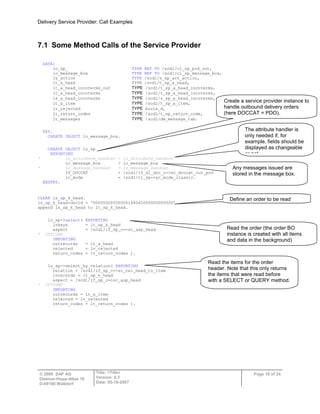
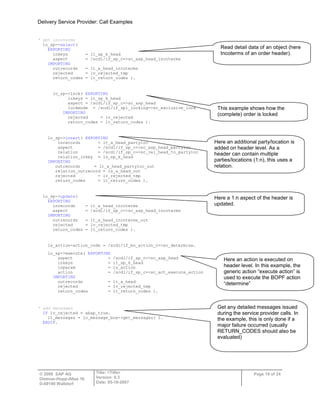
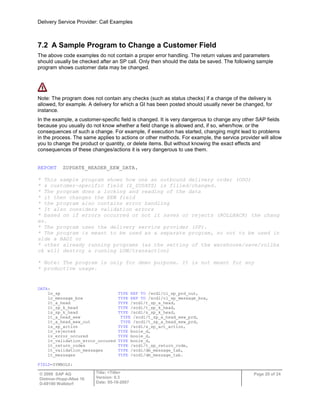
This chapter provides some examples of how the delivery service provider is used in the code.
The following is an example of how a service provider is instantiated and how it is used to read and
change data.
Note:
The description of functions and methods in this document does not mean that these
functions/methods are released by SAP or that SAP guarantees that they will be kept stable. SAP
may change/remove them without notice. Also, do not use any other methods or parameters from
the classes mentioned. For example, /SCWM/CL_TM has many other methods. Only use the
methods mentioned in this document.
The methods, functions, and classes mentioned in this document are not official programming
interfaces and are not released for customers/partners. They can be changed or deleted by SAP
at any time without prior/further notice. Any use is at your own risk.
Delivery Service Provider: Call Examples
© 2009 SAP AG
Dietmar-Hopp-Allee 16
D-69190 Walldorf
Title: <Title>
Version: 0.3
Date: 05-18-2007
Page 18 of 24
7.1 Some Method Calls of the Service Provider
DATA:
lo_sp_ TYPE REF TO /scdl/cl_sp_prd_out,
lo_message_box TYPE REF TO /scdl/cl_sp_message_box,
ls_action TYPE /scdl/s_sp_act_action,
lt_a_head TYPE /scdl/t_sp_a_head,
lt_a_head_incoterms_out TYPE /scdl/t_sp_a_head_incoterms,
lt_a_head_incoterms TYPE /scdl/t_sp_a_head_incoterms,
ls_a_head_incoterms TYPE /scdl/s_sp_a_head_incoterms,
lt_a_item TYPE /scdl/t_sp_a_item,
lv_rejected TYPE boole_d,
lt_return_codes TYPE /scdl/t_sp_return_code,
lt_messages TYPE /scdl/dm_message_tab.
TRY.
CREATE OBJECT lo_message_box.
CREATE OBJECT lo_sp
EXPORTING
* io_attribute_handler = lo_attribute_handler
io_message_box = lo_message_box
* io_message_handler = lo_message_handler
IV_DOCCAT = /scdl/if_dl_doc_c=>sc_doccat_out_prd
iv_mode = /scdl/cl_sp=>sc_mode_classic.
ENDTRY.
CLEAR ls_sp_k_head.
ls_sp_k_head-docid = ‘00000000000000168042000000000000’
append ls_sp_k_head to lt_sp_k_head.
lo_sp->select( EXPORTING
inkeys = lt_sp_k_head
aspect = /scdl/if_sp_c=>sc_asp_head
* OPTIONS
IMPORTING
outrecords = lt_a_head
rejected = lv_rejected
return_codes = lt_return_codes ).
lo_sp->select_by_relation( EXPORTING
relation = /scdl/if_sp_c=>sc_rel_head_to_item
inrecords = lt_sp_k_head
aspect = /scdl/if_sp_c=>sc_asp_head
* OPTIONS
IMPORTING
outrecords = lt_a_item
rejected = lv_rejected
return_codes = lt_return_codes ).
Create a service provider instance to
handle outbound delivery orders
(here DOCCAT = PDO).
Any messages issued are
stored in the message box.
The attribute handler is
only needed if, for
example, fields should be
displayed as changeable
or not
Define an order to be read
Read the order (the order BO
instance is created with all items
and data in the background)
Read the items for the order
header. Note that this only returns
the items that were read before
with a SELECT or QUERY method.
Delivery Service Provider: Call Examples
© 2009 SAP AG
Dietmar-Hopp-Allee 16
D-69190 Walldorf
Title: <Title>
Version: 0.3
Date: 05-18-2007
Page 19 of 24
* get incoterms
lo_sp->select(
EXPORTING
inkeys = it_sp_k_head
aspect = /scdl/if_sp_c=>sc_asp_head_incoterms
IMPORTING
outrecords = lt_a_head_incoterms
rejected = lv_rejected_tmp
return_codes = lt_return_codes ).
lo_sp->lock( EXPORTING
inkeys = lt_sp_k_head
aspect = /scdl/if_sp_c=>sc_asp_head
lockmode = /scdl/if_sp1_locking=>sc_exclusive_lock
IMPORTING
rejected = lv_rejected
return_codes = lt_return_codes ).
lo_sp->insert( EXPORTING
inrecords = lt_a_head_partyloc
aspect = /scdl/if_sp_c=>sc_asp_head_partyloc
relation = /scdl/if_sp_c=>sc_rel_head_to_partyloc
relation_inkey = ls_sp_k_head
IMPORTING
outrecords = lt_a_head_partyloc_out
relation_outrecord = ls_a_head_out
rejected = lv_rejected_tmp
return_codes = lt_return_codes ).
lo_sp->update(
EXPORTING
inrecords = lt_a_head_incoterms
aspect = /scdl/if_sp_c=>sc_asp_head_incoterms
IMPORTING
outrecords = lt_a_head_incoterms_out
rejected = lv_rejected_tmp
return_codes = lt_return_codes ).
ls_action-action_code = /scdl/if_bo_action_c=>sc_determine.
lo_sp->execute( EXPORTING
aspect = /scdl/if_sp_c=>sc_asp_head
inkeys = lt_sp_k_head
inparam = ls_action
action = /scdl/if_sp_c=>sc_act_execute_action
IMPORTING
outrecords = lt_a_head
rejected = lv_rejected_tmp
return_codes = lt_return_codes ).
* add messages
IF lv_rejected = abap_true.
lt_messages = lo_message_box->get_messages( ).
ENDIF.
Here an additional party/location is
added on header level. As a
header can contain multiple
parties/locations (1:n), this uses a
relation.
Read detail data of an object (here
Incoterms of an order header).
This example shows how the
(complete) order is locked
Here a 1:n aspect of the header is
updated.
Here an action is executed on
header level. In this example, the
generic action “execute action” is
used to execute the BOPF action
“determine”
Get any detailed messages issued
during the service provider calls. In
the example, this is only done if a
major failure occurred (usually
RETURN_CODES should also be
evaluated)
Delivery Service Provider: Call Examples
© 2009 SAP AG
Dietmar-Hopp-Allee 16
D-69190 Walldorf
Title: <Title>
Version: 0.3
Date: 05-18-2007
Page 20 of 24
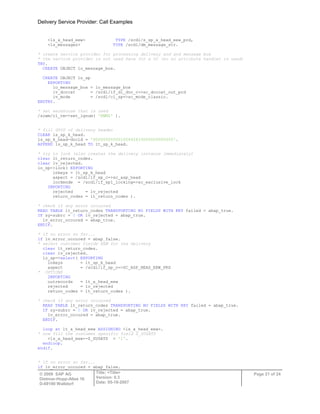
7.2 A Sample Program to Change a Customer Field
The above code examples do not contain a proper error handling. The return values and parameters
should usually be checked after an SP call. Only then should the data be saved. The following sample
program shows customer data may be changed.
Note: The program does not contain any checks (such as status checks) if a change of the delivery is
allowed, for example. A delivery for which a GI has been posted should usually never be changed, for
instance.
In the example, a customer-specific field is changed. It is very dangerous to change any other SAP fields
because you usually do not know whether a field change is allowed and, if so, when/how. or the
consequences of such a change. For example, if execution has started, changing might lead to problems
in the process. The same applies to actions or other methods. For example, the service provider will allow
you to change the product or quantity, or delete items. But without knowing the exact effects and
consequences of these changes/actions it is very dangerous to use them.
REPORT ZUPDATE_HEADER_EEW_DATA.
* This sample program shows how one an outbound delivery order (ODO)
* a customer-specific field (Z_ZUSATZ) is filled/changed.
* The program does a locking and reading of the data
* it then changes the EEW field
* the program also contains error handling
* It also considers validation errors
* based on if errors occurred or not it saves or rejects (ROLLBACK) the chang
es.
* The program uses the delivery service provider (SP).
* The program is meant to be used as a separate program, so not to be used in
side a BADI or
* other already running programs (as the setting of the warehouse/save/rollba
ck will destroy a running LUW/transaction)
* Note: The program is only for demo purpose. It is not meant for any
* productive usage.
DATA:
lo_sp TYPE REF TO /scdl/cl_sp_prd_out,
lo_message_box TYPE REF TO /scdl/cl_sp_message_box,
lt_a_head TYPE /scdl/t_sp_a_head,
lt_sp_k_head TYPE /scdl/t_sp_k_head,
ls_sp_k_head TYPE /scdl/s_sp_k_head,
lt_a_head_eew TYPE /scdl/t_sp_a_head_eew_prd,
lt_a_head_eew_out TYPE /scdl/t_sp_a_head_eew_prd,
ls_sp_action TYPE /scdl/s_sp_act_action,
lv_rejected TYPE boole_d,
lv_error_occured TYPE boole_d,
lv_validation_error_occured TYPE boole_d,
lt_return_codes TYPE /scdl/t_sp_return_code,
lt_validation_messages TYPE /scdl/dm_message_tab,
lt_messages TYPE /scdl/dm_message_tab.
FIELD-SYMBOLS:
Delivery Service Provider: Call Examples
© 2009 SAP AG
Dietmar-Hopp-Allee 16
D-69190 Walldorf
Title: <Title>
Version: 0.3
Date: 05-18-2007
Page 21 of 24
<ls_a_head_eew> TYPE /scdl/s_sp_a_head_eew_prd,
<ls_messages> TYPE /scdl/dm_message_str.
* create service provider for processing delivery and and message box
* the service provider is not used here for a UI (so no attribute handler is used)
TRY.
CREATE OBJECT lo_message_box.
CREATE OBJECT lo_sp
EXPORTING
io_message_box = lo_message_box
iv_doccat = /scdl/if_dl_doc_c=>sc_doccat_out_prd
iv_mode = /scdl/cl_sp=>sc_mode_classic.
ENDTRY.
* set warehouse that is used
/scwm/cl_tm=>set_lgnum( 'EWMZ' ).
* fill GUID of delivery header
CLEAR ls_sp_k_head.
ls_sp_k_head-docid = '00000000000100442833000000000000'.
APPEND ls_sp_k_head TO lt_sp_k_head.
* try to lock (also creates the delivery instance immediately)
clear lt_return_codes.
clear lv_rejected.
lo_sp->lock( EXPORTING
inkeys = lt_sp_k_head
aspect = /scdl/if_sp_c=>sc_asp_head
lockmode = /scdl/if_sp1_locking=>sc_exclusive_lock
IMPORTING
rejected = lv_rejected
return_codes = lt_return_codes ).
* check if any error occurred
READ TABLE lt_return_codes TRANSPORTING NO FIELDS WITH KEY failed = abap_true.
IF sy-subrc = 0 OR lv_rejected = abap_true.
lv_error_occured = abap_true.
ENDIF.
* if no error so far...
if lv_error_occured = abap_false.
* select customer fields EEW for the delivery
clear lt_return_codes.
clear lv_rejected.
lo_sp->select( EXPORTING
inkeys = lt_sp_k_head
aspect = /scdl/if_sp_c=>SC_ASP_HEAD_EEW_PRD
* OPTIONS
IMPORTING
outrecords = lt_a_head_eew
rejected = lv_rejected
return_codes = lt_return_codes ).
* check if any error occurred
READ TABLE lt_return_codes TRANSPORTING NO FIELDS WITH KEY failed = abap_true.
IF sy-subrc = 0 OR lv_rejected = abap_true.
lv_error_occured = abap_true.
ENDIF.
loop at lt_a_head_eew ASSIGNING <ls_a_head_eew>.
* now fill the customer specific field Z_ZUSATZ
<ls_a_head_eew>-Z_ZUSATZ = '1'.
endloop.
endif.
* if no error so far...
if lv_error_occured = abap_false.
Delivery Service Provider: Call Examples
© 2009 SAP AG
Dietmar-Hopp-Allee 16
D-69190 Walldorf
Title: <Title>
Version: 0.3
Date: 05-18-2007
Page 22 of 24
* update customer fields EEW for the delivery
clear lt_return_codes.
clear lv_rejected.
lo_sp->update( EXPORTING
inrecords = lt_a_head_eew
aspect = /scdl/if_sp_c=>SC_ASP_HEAD_EEW_PRD
* OPTIONS
IMPORTING
outrecords = lt_a_head_eew_out
rejected = lv_rejected
return_codes = lt_return_codes ).
* check if any error occurred
READ TABLE lt_return_codes TRANSPORTING NO FIELDS WITH KEY failed = abap_true.
IF sy-subrc = 0 OR lv_rejected = abap_true.
lv_error_occured = abap_true.
ENDIF.
endif.
* if no error so far...
if lv_error_occured = abap_false.
* validate the delivery (also triggers determinations)
* this is an optional step. It is assumed in this example that if validation errors occur
* the delivery should not get saved.
* If also deliveries with validation errors (blocked status) should get saved,
* the error handling has to distinguish between validation errors and other errors
* validation error messages are in the message box and are not returned as REJECTED or RETURN_COD
ES
ls_sp_action-action_code = /scdl/if_bo_action_c=>sc_validate.
clear lt_return_codes.
clear lv_rejected.
lo_sp->execute( EXPORTING
aspect = /scdl/if_sp_c=>sc_asp_head
inkeys = lt_sp_k_head
inparam = ls_sp_action
action = /scdl/if_sp_c=>sc_act_execute_action
IMPORTING
outrecords = lt_a_head
rejected = lv_rejected
return_codes = lt_return_codes ).
* check if any error occurred
READ TABLE lt_return_codes TRANSPORTING NO FIELDS WITH KEY failed = abap_true.
IF sy-subrc = 0 OR lv_rejected = abap_true.
lv_error_occured = abap_true.
ENDIF.
endif.
* get all messages that occurred. Get the always as validation messages
* are also of interest
lt_messages = lo_message_box->get_messages( ).
* build two tables, one with validation messages and one with "real" errors
loop at lt_messages ASSIGNING <ls_messages> where consistency_message = abap_true.
append <ls_messages> to lt_validation_messages.
delete lt_messages.
endloop.
loop at lt_messages TRANSPORTING no fields where msgty ca 'EAX'.
lv_error_occured = abap_true.
exit.
endloop.
loop at lt_validation_messages TRANSPORTING no fields where msgty ca 'EAX'.
lv_validation_error_occured = abap_true.
Delivery Service Provider: Call Examples
© 2009 SAP AG
Dietmar-Hopp-Allee 16
D-69190 Walldorf
Title: <Title>
Version: 0.3
Date: 05-18-2007
Page 23 of 24
exit.
endloop.
* now save delivery dependant on if error occurred or not.
* here validation errors are also considered. This depends on the business logic.
if lv_error_occured = abap_false and lv_validation_error_occured = abap_false.
clear lt_return_codes.
clear lv_rejected.
lo_sp->save( IMPORTING rejected = lv_rejected ).
* check if during save serious errors occurred.
IF lv_rejected = abap_true.
lv_error_occured = abap_true.
* if errors occurred then get the messages again
lt_messages = lo_message_box->get_messages( ).
ENDIF.
endif.
* now do a commit (here with wait) or rollback dependant on if errors occurred or not
if lv_error_occured = abap_false and lv_validation_error_occured = abap_false.
commit work and wait.
/scwm/cl_tm=>cleanup( ). "clear buffers and release locks
else.
rollback work.
/scwm/cl_tm=>cleanup( ). "clear buffers and release locks
endif.
* now for example, messages could be displayed
Delivery Service Provider: Call Examples
© 2009 SAP AG
Dietmar-Hopp-Allee 16
D-69190 Walldorf
Title: <Title>
Version: 0.3
Date: 05-18-2007
Page 24 of 24
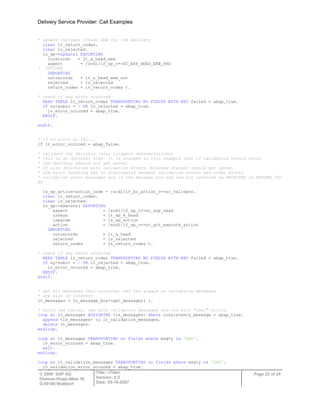
8 Alternative Ways to Access the Delivery Data
In some cases, an application might only want to read several different items of data from a delivery. In
this case, the use of the service provider might result in lengthy code because each aspect needs to be
read separately.
Therefore the class /SCWM/CL_DLV_MANAGEMENT_PRD offers a QUERY method which allows delivery
data to be read in a fast and also convenient way. Documentation of the QUERY method can be found in
the method documentation in the system (use transaction SE24, for example). The screenshot below
shows how to display the documentation.
Note that you must not use any of the other methods of this class! Neither must you use the parallel
processing option of the QUERY method.
Method documentation

Service provider call_example

  • 1.
    © 2009 SAPAG Dietmar-Hopp-Allee 16 D-69190 Walldorf SCM-EWM Delivery Service Provider in SAP-EWM Call Examples November 17, 2009
  • 2.
    Delivery Service Provider:Call Examples © 2009 SAP AG Dietmar-Hopp-Allee 16 D-69190 Walldorf Title: <Title> Version: 0.3 Date: 05-18-2007 Page 2 of 24 Contents 1 SAP – Important Disclaimers and Legal Information.................................3 2 Glossary ........................................................................................................7 3 Service Provider ...........................................................................................8 3.1 UI Service Providers.......................................................................................................9 3.2 Delivery Service Provider .............................................................................................10 4 Relation Between UI Service Provider and Delivery Service Provider...11 5 Aspects........................................................................................................12 5.1 Example........................................................................................................................12 6 Delivery Service Provider Interfaces.........................................................15 7 Examples of Service Provider Calls..........................................................17 7.1 Some Method Calls of the Service Provider.................................................................18 7.2 A Sample Program to Change a Customer Field .........................................................20 8 Alternative Ways to Access the Delivery Data .........................................24
  • 3.
    Delivery Service Provider:Call Examples © 2009 SAP AG Dietmar-Hopp-Allee 16 D-69190 Walldorf Title: <Title> Version: 0.3 Date: 05-18-2007 Page 3 of 24 1 SAP – Important Disclaimers and Legal Information General Disclaimer SAP does not represent or endorse the accuracy or reliability of any of the information, content, or advertisements (collectively, the "Materials") contained on, distributed through, or linked, downloaded, or accessed from any of the services contained on this Web site (the "Service"), nor the quality of any products, information, or other materials displayed, purchased, or obtained by you as a result of an advertisement or any other information or offer in or in connection with the Service (the "Products"). You hereby acknowledge that any reliance upon any Materials shall be at your sole risk. SAP reserves the right, in its sole discretion and without any obligation, to make improvements to, or correct any error or omissions in any portion of the Service or the Materials. THE SERVICE AND THE MATERIALS ARE PROVIDED BY SAP ON AN "AS IS" BASIS, AND SAP EXPRESSLY DISCLAIMS ANY AND ALL WARRANTIES, EXPRESS OR IMPLIED, INCLUDING WITHOUT LIMITATION WARRANTIES OF MERCHANTABILITY AND FITNESS FOR A PARTICULAR PURPOSE, WITH RESPECT TO THE SERVICE OR ANY MATERIALS AND PRODUCTS. IN NO EVENT SHALL SAP BE LIABLE FOR ANY DIRECT, INDIRECT, INCIDENTAL, PUNITIVE, OR CONSEQUENTIAL DAMAGES OF ANY KIND WHATSOEVER WITH RESPECT TO THE SERVICE, THE MATERIALS, AND THE PRODUCTS. SAP encourages you to exercise discretion while browsing the Internet using this site. SAP makes no representations concerning any endeavor to review the content of sites linked to this site or any of the Materials, and so SAP isn't responsible for the accuracy, copyright compliance, legality, or decency of material contained in sites listed in the directory or in the Materials. SAP respects the rights (including the intellectual property rights) of others, and we ask our users to do the same. SAP may, in appropriate circumstances and in its sole discretion, terminate the accounts of users that infringe or otherwise violate such rights of others. If you believe that your work has been copied in a way that constitutes copyright infringement, please follow the instructions at the top of this page. SAP – Guidelines for Using SAP Trademarks Throughout the world, thousands of customers recognize and select SAP solutions on the basis of the company's trademarks and service marks, which signify high-quality computer software products and services. Without these trademarks and service marks (collectively referred to as "trademarks"), consumers would not be able to distinguish SAP solutions from those of other companies, nor would they be able to readily identify the superior quality that SAP trademarks represent. Therefore, it is critically important that trademarks of SAP and its subsidiaries are protected. For guidelines on trademark usage, please see the following information: SAP trademarks and SAP offering names Proper use of trademarks Additional trademark usage information for third parties Trademark usage information for all print and online media. If after reviewing the Guidelines for Using SAP Trademarks you still have a question about use, please direct your inquiry to trademarks@sap.com. SAP will make reasonable efforts to respond to your request. However, based on volume of requests you should allow several weeks for a response. In the absence of a response, the Guidelines for Using SAP Trademarks shall govern any and all uses. Designing Marketing Material If you are a developer, partner, customer, or other third party, always use your own proprietary design style when creating and producing a marketing piece. You must not copy the SAP design style or borrow any SAP design elements. Guidelines for Using SAP-Copyrighted Material
  • 4.
    Delivery Service Provider:Call Examples © 2009 SAP AG Dietmar-Hopp-Allee 16 D-69190 Walldorf Title: <Title> Version: 0.3 Date: 05-18-2007 Page 4 of 24 The use of original texts, graphics, images, screen shots, and other materials from SAP sources must be approved by SAP. In addition, when using such materials, you must include a copyright notice – either in an adjacent area or as a footnote – to indicate SAP's copyright. The copyright should read as follows: "© SAP AG <year>. All rights reserved." Please note that SAP photography is only licensed for SAP use and must not be used by third parties in their communications. SAP – Copyrights and Trademarks ENGLISH – German version below © Copyright 2009 SAP AG. All rights reserved. No part of this publication may be reproduced or transmitted in any form or for any purpose without the express permission of SAP AG. The information contained herein may be changed without prior notice. Some software products marketed by SAP AG and its distributors contain proprietary software components of other software vendors. Microsoft, Windows, Excel, Outlook, and PowerPoint are registered trademarks of Microsoft Corporation. IBM, DB2, DB2 Universal Database, System i, System i5, System p, System p5, System x, System z, System z10, System z9, z10, z9, iSeries, pSeries, xSeries, zSeries, eServer, z/VM, z/OS, i5/OS, S/390, OS/390, OS/400, AS/400, S/390 Parallel Enterprise Server, PowerVM, Power Architecture, POWER6+, POWER6, POWER5+, POWER5, POWER, OpenPower, PowerPC, BatchPipes, BladeCenter, System Storage, GPFS, HACMP, RETAIN, DB2 Connect, RACF, Redbooks, OS/2, Parallel Sysplex, MVS/ESA, AIX, Intelligent Miner, WebSphere, Netfinity, Tivoli and Informix are trademarks or registered trademarks of IBM Corporation. Linux is the registered trademark of Linus Torvalds in the U.S. and other countries. Adobe, the Adobe logo, Acrobat, PostScript, and Reader are either trademarks or registered trademarks of Adobe Systems Incorporated in the United States and/or other countries. Oracle is a registered trademark of Oracle Corporation. UNIX, X/Open, OSF/1, and Motif are registered trademarks of the Open Group. Citrix, ICA, Program Neighborhood, MetaFrame, WinFrame, VideoFrame, and MultiWin are trademarks or registered trademarks of Citrix Systems, Inc. HTML, XML, XHTML and W3C are trademarks or registered trademarks of W3C®, World Wide Web Consortium, Massachusetts Institute of Technology. Java is a registered trademark of Sun Microsystems, Inc. JavaScript is a registered trademark of Sun Microsystems, Inc., used under license for technology invented and implemented by Netscape. SAP, R/3, SAP NetWeaver, Duet, PartnerEdge, ByDesign, SAP Business ByDesign, and other SAP products and services mentioned herein as well as their respective logos are trademarks or registered trademarks of SAP AG in Germany and other countries. Business Objects and the Business Objects logo, BusinessObjects, Crystal Reports, Crystal Decisions, Web Intelligence, Xcelsius, and other Business Objects products and services mentioned herein as well as their respective logos are trademarks or registered trademarks of Business Objects S.A. in the United States and in other countries. Business Objects is an SAP company. All other product and service names mentioned are the trademarks of their respective companies. Data contained in this document serves informational purposes only. National product specifications may vary.
  • 5.
    Delivery Service Provider:Call Examples © 2009 SAP AG Dietmar-Hopp-Allee 16 D-69190 Walldorf Title: <Title> Version: 0.3 Date: 05-18-2007 Page 5 of 24 These materials are subject to change without notice. These materials are provided by SAP AG and its affiliated companies ("SAP Group") for informational purposes only, without representation or warranty of any kind, and SAP Group shall not be liable for errors or omissions with respect to the materials. The only warranties for SAP Group products and services are those that are set forth in the express warranty statements accompanying such products and services, if any. Nothing herein should be construed as constituting an additional warranty. GERMAN © Copyright 2009 SAP AG. Alle Rechte vorbehalten. Weitergabe und Vervielfältigung dieser Publikation oder von Teilen daraus sind, zu welchem Zweck und in welcher Form auch immer, ohne die ausdrückliche schriftliche Genehmigung durch SAP AG nicht gestattet. In dieser Publikation enthaltene Informationen können ohne vorherige Ankündigung geändert werden. Die von SAP AG oder deren Vertriebsfirmen angebotenen Softwareprodukte können Softwarekomponenten auch anderer Softwarehersteller enthalten. Microsoft, Windows, Excel, Outlook und PowerPoint sind eingetragene Marken der Microsoft Corporation. IBM, DB2, DB2 Universal Database, System i, System i5, System p, System p5, System x, System z, System z10, System z9, z10, z9, iSeries, pSeries, xSeries, zSeries, eServer, z/VM, z/OS, i5/OS, S/390, OS/390, OS/400, AS/400, S/390 Parallel Enterprise Server, PowerVM, Power Architecture, POWER6+, POWER6, POWER5+, POWER5, POWER, OpenPower, PowerPC, BatchPipes, BladeCenter, System Storage, GPFS, HACMP, RETAIN, DB2 Connect, RACF, Redbooks, OS/2, Parallel Sysplex, MVS/ESA, AIX, Intelligent Miner, WebSphere, Netfinity, Tivoli und Informix sind Marken oder eingetragene Marken der IBM Corporation. Linux ist eine eingetragene Marke von Linus Torvalds in den USA und anderen Ländern. Adobe, das Adobe Logo, Acrobat, PostScript und Reader sind Marken oder eingetragene Marken von Adobe Systems Inc. in den USA und/oder anderen Ländern. Oracle ist eine eingetragene Marke der Oracle Corporation. UNIX, X/Open, OSF/1 und Motif sind eingetragene Marken der Open Group. Citrix, ICA, Program Neighborhood, MetaFrame, WinFrame, VideoFrame und MultiWin sind Marken oder eingetragene Marken von Citrix Systems, Inc. HTML, XML, XHTML und W3C sind Marken oder eingetragene Marken des W3C®, World Wide Web Consortium, Massachusetts Institute of Technology. Java ist eine eingetragene Marke von Sun Microsystems, Inc. JavaScript ist eine eingetragene Marke der Sun Microsystems, Inc., verwendet unter der Lizenz der von Netscape entwickelten und implementierten Technologie. SAP, R/3, SAP NetWeaver, Duet, PartnerEdge, ByDesign, SAP Business ByDesign und weitere im Text erwähnte SAP-Produkte und - Dienstleistungen sowie die entsprechenden Logos sind Marken oder eingetragene Marken der SAP AG in Deutschland und anderen Ländern. Business Objects und das Business-Objects-Logo, BusinessObjects, Crystal Reports, Crystal Decisions, Web Intelligence, Xcelsius und andere im Text erwähnte Business-Objects-Produkte und -Dienstleistungen sowie die entsprechenden Logos sind Marken oder eingetragene Marken der Business Objects S. A. in den USA und anderen Ländern. Business Objects ist ein Unternehmen der SAP. Alle anderen Namen von Produkten und Dienstleistungen sind Marken der jeweiligen Firmen. Die Angaben im Text sind unverbindlich und dienen lediglich zu Informationszwecken. Produkte können länderspezifische Unterschiede aufweisen. In dieser Publikation enthaltene Informationen können ohne vorherige Ankündigung geändert werden. Die vorliegenden Angaben werden von SAP AG und ihren Konzernunternehmen ("SAP-Konzern") bereitgestellt und dienen ausschließlich Informationszwecken. Der SAP- Konzern übernimmt keinerlei Haftung oder Garantie für Fehler oder Unvollständigkeiten in dieser Publikation. Der SAP-Konzern steht
  • 6.
    Delivery Service Provider:Call Examples © 2009 SAP AG Dietmar-Hopp-Allee 16 D-69190 Walldorf Title: <Title> Version: 0.3 Date: 05-18-2007 Page 6 of 24 lediglich für Produkte und Dienstleistungen nach der Maßgabe ein, die in der Vereinbarung über die jeweiligen Produkte und Dienstleistungen ausdrücklich geregelt ist. Aus den in dieser Publikation enthaltenen Informationen ergibt sich keine weiterführende Haftung.
  • 7.
    Delivery Service Provider:Call Examples © 2009 SAP AG Dietmar-Hopp-Allee 16 D-69190 Walldorf Title: <Title> Version: 0.3 Date: 05-18-2007 Page 7 of 24 2 Glossary Term Definition ABAP OO Advanced Business Application Programming, Object-Oriented BO Business object (here usually a delivery) DR Delivery request ESA Enterprise Service Architecture ESF Enterprise Services Framework FD Final delivery = outbound delivery IDN Inbound Delivery Notification OD Outbound delivery ODO Outbound delivery order ODP Object Data Pattern OIP Object Identification Pattern PRD Processing Delivery SP Service provider UI User Interface UIC User Interface Controller WDP Web Dynpro Pattern
  • 8.
    Delivery Service Provider:Call Examples © 2009 SAP AG Dietmar-Hopp-Allee 16 D-69190 Walldorf Title: <Title> Version: 0.3 Date: 05-18-2007 Page 8 of 24 3 Service Provider The service provider is the external interface for the business object “Delivery”. Its task is to map the object-oriented data model inside the business object Delivery to the aspect structure presented to the caller. The aim is to provide a unified interface to callers to allow the business object to be used in a generic way. The following figure shows the core service provider in the context of the general architecture of the Delivery The following figure gives an overview of the architecture: Figure 1 Service Architecture Multiple service providers exist. in EWM. Therefore it is necessary to differentiate between these providers. Delivery UI Sa ve Re tri ev e M od ify D el et e G et M es sa ge s Cl ea n Up D o_ Ac tio n Lo ck/ Un loc k Q u e r y (/SCDL/) Service Provider APPLICATION Service Classes (for example, /SCWM/CL_DLV_MANAGEMENT_PRD) SERVICE ADAPTATION (/SCWM/ Service provider)
  • 9.
    Delivery Service Provider:Call Examples © 2009 SAP AG Dietmar-Hopp-Allee 16 D-69190 Walldorf Title: <Title> Version: 0.3 Date: 05-18-2007 Page 9 of 24 3.1 UI Service Providers The /SCWM/ service provider is usually only used by UIs. This means the methods are only used by UIs. In Figure 1 Service Architecture, this is also called user interface controller or UI service adoption. It is only used by the UI. Here only the main /SCWM/ delivery UI service providers are mentioned. As the focus of this document is not principally on the UI, this is not described in more detail here. The following diagram shows the classes and the dependencies: /SCWM/CL_SP /SCMB/ IF_SP_ACTION /SCMB/ IF_SP_ASPECT /SCMB/ IF_SP_LOCKING /SCMB/ IF_SP_QUERY /SCMB/ IF_SP_TRANSACTION /SCMB/ IF_SP_VALUE_SET /SCWM/CL_SP_DR /SCWM/CL_SP_PRD /SCWM/CL_SP_FD /SCWM/CL_SP_IM /SCWM/ CL_SP_DR_OUT /SCWM/ CL_SP_DR_INB /SCWM/ CL_SP_DR_EGR /SCWM/ CL_SP_IM_DR /SCWM/ CL_SP_IM_PC /SCWM/ CL_SP_IM_ST /SCWM/ CL_SP_PRD_OUT /SCWM/ CL_SP_PRD_INB /SCWM/ CL_SP_PRD_EGR The interfaces that the UI service provider implements (for example, /SCMB/IF_SP_ASPECT) are similar to the interfaces used in the delivery service provider (for example, /SCDL/IF_SP1_ASPECT), but they are not identical. Nevertheless they use the same concepts; therefore the information about the delivery service provider in the next chapters can also partly be reused for the UI service provider. Please again keep in mind that the focus is the delivery service provider mentioned in the next chapter and not the UI service provider.
  • 10.
    Delivery Service Provider:Call Examples © 2009 SAP AG Dietmar-Hopp-Allee 16 D-69190 Walldorf Title: <Title> Version: 0.3 Date: 05-18-2007 Page 10 of 24 3.2 Delivery Service Provider This is the service provider shown in Figure 1 Service Architecture and Fehler! Verweisquelle konnte nicht gefunden werden.. The following diagram shows the classes and the relations. /SCDL/CL_SP /SCDL/ IF_SP1_ACTION /SCDL/ IF_SP1_ASPECT /SCDL/ IF_SP1_LOCKING /SCDL/ IF_SP1_QUERY /SCDL/ IF_SP1_TRANSACTION /SCDL/ IF_SP_QUERY_ID /SCDL/CL_SP_DR /SCDL/CL_SP_PRD /SCDL/CL_SP_FD /SCDL/ CL_SP_DR_OUT /SCDL/ CL_SP_DR_INB /SCDL/ CL_SP_PRD_OUT /SCDL/ CL_SP_PRD_INB /SCDL/ IF_SP_BADI /SCDL/CL_SP_FD_OUT
  • 11.
    Delivery Service Provider:Call Examples © 2009 SAP AG Dietmar-Hopp-Allee 16 D-69190 Walldorf Title: <Title> Version: 0.3 Date: 05-18-2007 Page 11 of 24 4 Relation Between UI Service Provider and Delivery Service Provider As described above, the service provider (SP) offers several methods to read, insert, update, and execute actions, and so on, on a specific object (for example, outbound delivery order). Service providers exist for all delivery objects (for example, inbound delivery order, outbound delivery). The service provider instances contain the DOCCAT (for example, PDO, FDO, and so on). This means that if an outbound delivery is to be changed, an instance of the service provider with DOCCAT=FDO has to be used, while for an inbound delivery order, for example, a service provider instance with DOCCAT=PDI should be used. Both UI-specific and delivery-object-specific service providers exist for the delivery service. The reason why there are “UI” and “delivery-object” service providers is the following: In each delivery UI, the delivery may be structured differently (for example, fewer or more fields compared to the data structure of the delivery). In the UI, specific checks should be done or additional UI-specific code needs to be executed. The relationship between UI SP and delivery SP is the following: UI SP methods are only called from the UIs. Usually UI methods call delivery SP methods to insert, update, and so on. Delivery-SP methods can be called from multiple UIs and also from code that is independent of UIs (for example, RFC functions, batch jobs, and so on) The dependencies are described in more detail later on.
  • 12.
    Delivery Service Provider:Call Examples © 2009 SAP AG Dietmar-Hopp-Allee 16 D-69190 Walldorf Title: <Title> Version: 0.3 Date: 05-18-2007 Page 12 of 24 5 Aspects One main term for the service provider is the “aspect”. An aspect can be described as a specific part of an existing business object. For example, there is the aspect for products, containing the product, product ID, product batch, and so on, or there is the aspect for dates, containing the date fields for the delivery item, for example. In Enterprise Service Architecture, there are two types of aspects: key aspects and aspects. Key aspects hold the semantic key of an aspect row, which is not necessarily the syntactical key in the database. Therefore, each aspect must have one associated key aspect. A key aspect is its own key aspect. The usual naming convention for service providers is: Table types /SCDL/T_SP_K_* or /SCWM/T_SP_K_* Key aspect /SCDL/T_SP_A_* or /SCWM/T_SP_A_* Aspect Structure types /SCDL/S_SP_K_* or /SCWM/S_SP_K_* Key aspect /SCDL/S_SP_A_* or /SCWM/S_SP_A_* Aspect /SCDL/S_SP_D_* or /SCWM/S_SP_D_* Text aspect data /SCDL/S_SP_Q_* or /SCWM/S_SP_Q_* Query parameter Constants All constants defined to substitute the Enterprise Service Framework are defined in the interface /SCDL/IF_SP_C and /SCWM/IF_SP_C. Note that /SCWM/IF_SP_C contains the constants for the EWM UIs as well as the constants for the EWM extension of SCDL. 5.1 Example The data model for the outbound delivery order header contains a 1:n relation to dates (that means one delivery header can have multiple dates like out-of-yard date, delivery date, and so on) So the corresponding aspect would be /SCDL/IF_SP_C=> SC_ASP_HEAD_DATE (fixed value „/SCDL/S_SP_A_HEAD_DATE') The structure of the aspect would be /SCDL/S_SP_A_HEAD_DATE (as in the constant above) And the table type (as 1:n relation) /SCDL/T_SP_A_HEAD_DATE The aspect (structure) itself consists of the header date aspect key and the “data” fields. As the header date aspect is an aspect of the header, it contains the header aspect key and the date keys. The header aspect key identifies the delivery (header), while the date keys identify the date (showing, for example, whether it is an out-of-yard date or a delivery date, and so on). The following screenshot shows the outbound delivery order UI (transaction /SCWM/PRDO). The following example shows the relation between the aspects of UI and SCDL.
  • 13.
    Delivery Service Provider:Call Examples © 2009 SAP AG Dietmar-Hopp-Allee 16 D-69190 Walldorf Title: <Title> Version: 0.3 Date: 05-18-2007 Page 13 of 24 Aspect /SCWM/S_SP_A_HEAD_DATE Aspect /SCWM/S_SP_A_ITEM_PRDO (Note that these are the aspects of the UI service provider) The aspect for the header dates contains ASPECT /SCWM/S_SP_A_HEAD_DATE .INCLUDE /SCDL/S_SP_K_HEAD_DATE Key Aspect: Header Dates/Times TSTCATEGORY_TXT /SCWM/SP_TSTCATEGORY_TXT Date/Time Category TSTTYPE_TXT /SCWM/SP_TSTTYPE_TXT Date/Time Type TZONE /SCDL/DL_TZONE Time Zone DATE DATS Field of type DATS TIME /SCWM/SP_TIME Time DYNAMIC /SCDL/DL_DYNAMIC Indicator: Dynamic and Non-Persistent DATE_INDICATOR /SCDL/DL_INDICATOR Value Determination Indicator
  • 14.
    Delivery Service Provider:Call Examples © 2009 SAP AG Dietmar-Hopp-Allee 16 D-69190 Walldorf Title: <Title> Version: 0.3 Date: 05-18-2007 Page 14 of 24 The above key aspect /SCDL/S_SP_K_HEAD_DATE contains the following fields: Aspect /SCDL/S_SP_K_HEAD_DATE .INCLUDE /SCDL/S_SP_K_HEAD Key Aspect: Header DOCID /SCDL/DL_DOCID Document ID .INCLUDE /SCDL/DL_DATE_KEY_STR Date/Time Key TSTTYPE /SCDL/DL_TSTTYPE Date/Time Type TST_CATEGORY /SCDL/DL_TST_CATEGORY Date/Time Category So the aspect key for header dates contains the header key aspect (/SCDL/S_SP_K_HEAD) and also the date aspect keys (/SCDL/DL_DATE_KEY_STR). Together both identify one entry (line in the UI) for a delivery header date. The aspect /SCWM/S_SP_A_HEAD_DATE also contains the “data” information such as date, time, and so on, and also displays only fields such as date/time category short text. This information is displayed in the /SCWM/PRDO UI, for example. In the delivery SP, the aspects are different. For the same date header, they are as follows: ASPECT /SCDL/S_SP_A_HEAD_DATE .INCLUDE /SCDL/S_SP_K_HEAD_DATE Key Aspect: Header Dates/Times .INCLUDE /SCDL/DL_DATE_DATA_STR Date/Time Data Fields .INCLUDE /SCDL/DL_DATE_DB_STR Date/Time, Database Fields .INCLUDE /SCDL/DL_TST_STR Date/Time (Interval) TZONE /SCDL/DL_TZONE Time Zone TSTFR /SCDL/DL_TSTFR Start Date/Time TSTTO /SCDL/DL_TSTTO End Date/Time DATE_INDICATOR /SCDL/DL_INDICATOR Value Determination Indicator DYNAMIC /SCDL/DL_DYNAMIC Indicator: Dynamic and Non-Persistent This already shows that a conversion between the two aspects is necessary. This is done in the UI SP. The UI SP also “enhances” the aspects by the short text, for example, or does additional checks.
  • 15.
    Delivery Service Provider:Call Examples © 2009 SAP AG Dietmar-Hopp-Allee 16 D-69190 Walldorf Title: <Title> Version: 0.3 Date: 05-18-2007 Page 15 of 24 6 Delivery Service Provider Interfaces The service providers implement multiple interfaces. The following gives a short overview. Details can be found in the design documents /SCDL/IF_SP1_ACTION allows actions EXECUTE Execute action /SCDL/IF_SP1_ ASPECT which allows operations on aspects SELECT Read INSERT Insert UPDATE Update DELETE Delete SELECT_BY_RELATION Read by Relation /SCDL/IF_SP1_LOCKING locking service LOCK Lock Aspect Lines UNLOCK Unlock Aspect Lines /SCDL/IF_SP1_QUERY Query Interface EXECUTE Executes a QUERY /SCDL/IF_SP1_TRANSACTION Access Interface BEFORE_SAVE Event Before SAVE, Check for Consistency CLEANUP Clean Up, Release All Locks SAVE Save Accumulated Changes Important Note!!! The actions of /SCDL/IF_SP1_TRANSACTION affect not only the delivery object of the DOCCAT of the service provider used, but all other delivery objects. That means if you call the CLEANUP method on a service provider for DOCCAT=PDI, this will also clear DOCCATs for FDO, PDO, ODR, and so on.
  • 16.
    Delivery Service Provider:Call Examples © 2009 SAP AG Dietmar-Hopp-Allee 16 D-69190 Walldorf Title: <Title> Version: 0.3 Date: 05-18-2007 Page 16 of 24 /SCDL/IF_SP_QUERY_ID Query by IDs QUERY_DOCID Search for Header (GUID) QUERY_DOCNO Search for Header (Number) QUERY_MAPKEY Key Allocation QUERY_DOCFLOW Search for Document Flow These methods are implemented very generically. Usually they do not contain specific data types but are of the type STRING, ANY or TABLE. This is necessary because the data types depend on the aspect and/or service provider instance used, for example. The specific data types can easily be found based on the aspect name and the above-mentioned naming conventions. /SCDL/IF_SP1_QUERY~EXECUTE QUERY Importing STRING Name of the query. For example, /scdl/if_sp_c=>sc_qry_head or /scdl/if_sp_c=>sc_qry_item OPTIONS Importing /SCDL/S_SP_QUERY_OPTIONS Query options. For example, read only headers, lock result, sorting SELECTIONS Importing /SCDL/T_SP_SELECTION Selections OUTRECORDS Exporting INDEX TABLE Data type depends on QUERY. For example, header aspect (/scdl/t_sp_a_head) is returned for a header query (scdl/if_sp_c=>sc_qry_head) REJECTED Exporting BOOLE_D Exception indicator /SCDL/IF_SP1_ASPECT~UPDATE ASPECT Importing STRING Aspect to update. For example, /SCDL/IF_SP_C=>SC_ASP_HEAD or /SCDL/IF_SP_C=>SC_ASP_HEAD_PARTYLOC INRECORDS Importing INDEX TABLE Entries to be changed. Data type must correspond to the above aspect OUTRECORDS Exporting INDEX TABLE Entries after the change. Data type must correspond to the above aspect. Usually 1:1 to INRECORDS, but could differ if update was not possible or determinations were executed, for example. REJECTED Exporting BOOLE_D Exception indicator (whole call failed) RETURN_CODES Exporting /SCDL/T_SP_RETURN_CODE Success and failure information about each input line.
  • 17.
    Delivery Service Provider:Call Examples © 2009 SAP AG Dietmar-Hopp-Allee 16 D-69190 Walldorf Title: <Title> Version: 0.3 Date: 05-18-2007 Page 17 of 24 7 Examples of Service Provider Calls This chapter provides some examples of how the delivery service provider is used in the code. The following is an example of how a service provider is instantiated and how it is used to read and change data. Note: The description of functions and methods in this document does not mean that these functions/methods are released by SAP or that SAP guarantees that they will be kept stable. SAP may change/remove them without notice. Also, do not use any other methods or parameters from the classes mentioned. For example, /SCWM/CL_TM has many other methods. Only use the methods mentioned in this document. The methods, functions, and classes mentioned in this document are not official programming interfaces and are not released for customers/partners. They can be changed or deleted by SAP at any time without prior/further notice. Any use is at your own risk.
  • 18.
    Delivery Service Provider:Call Examples © 2009 SAP AG Dietmar-Hopp-Allee 16 D-69190 Walldorf Title: <Title> Version: 0.3 Date: 05-18-2007 Page 18 of 24 7.1 Some Method Calls of the Service Provider DATA: lo_sp_ TYPE REF TO /scdl/cl_sp_prd_out, lo_message_box TYPE REF TO /scdl/cl_sp_message_box, ls_action TYPE /scdl/s_sp_act_action, lt_a_head TYPE /scdl/t_sp_a_head, lt_a_head_incoterms_out TYPE /scdl/t_sp_a_head_incoterms, lt_a_head_incoterms TYPE /scdl/t_sp_a_head_incoterms, ls_a_head_incoterms TYPE /scdl/s_sp_a_head_incoterms, lt_a_item TYPE /scdl/t_sp_a_item, lv_rejected TYPE boole_d, lt_return_codes TYPE /scdl/t_sp_return_code, lt_messages TYPE /scdl/dm_message_tab. TRY. CREATE OBJECT lo_message_box. CREATE OBJECT lo_sp EXPORTING * io_attribute_handler = lo_attribute_handler io_message_box = lo_message_box * io_message_handler = lo_message_handler IV_DOCCAT = /scdl/if_dl_doc_c=>sc_doccat_out_prd iv_mode = /scdl/cl_sp=>sc_mode_classic. ENDTRY. CLEAR ls_sp_k_head. ls_sp_k_head-docid = ‘00000000000000168042000000000000’ append ls_sp_k_head to lt_sp_k_head. lo_sp->select( EXPORTING inkeys = lt_sp_k_head aspect = /scdl/if_sp_c=>sc_asp_head * OPTIONS IMPORTING outrecords = lt_a_head rejected = lv_rejected return_codes = lt_return_codes ). lo_sp->select_by_relation( EXPORTING relation = /scdl/if_sp_c=>sc_rel_head_to_item inrecords = lt_sp_k_head aspect = /scdl/if_sp_c=>sc_asp_head * OPTIONS IMPORTING outrecords = lt_a_item rejected = lv_rejected return_codes = lt_return_codes ). Create a service provider instance to handle outbound delivery orders (here DOCCAT = PDO). Any messages issued are stored in the message box. The attribute handler is only needed if, for example, fields should be displayed as changeable or not Define an order to be read Read the order (the order BO instance is created with all items and data in the background) Read the items for the order header. Note that this only returns the items that were read before with a SELECT or QUERY method.
  • 19.
    Delivery Service Provider:Call Examples © 2009 SAP AG Dietmar-Hopp-Allee 16 D-69190 Walldorf Title: <Title> Version: 0.3 Date: 05-18-2007 Page 19 of 24 * get incoterms lo_sp->select( EXPORTING inkeys = it_sp_k_head aspect = /scdl/if_sp_c=>sc_asp_head_incoterms IMPORTING outrecords = lt_a_head_incoterms rejected = lv_rejected_tmp return_codes = lt_return_codes ). lo_sp->lock( EXPORTING inkeys = lt_sp_k_head aspect = /scdl/if_sp_c=>sc_asp_head lockmode = /scdl/if_sp1_locking=>sc_exclusive_lock IMPORTING rejected = lv_rejected return_codes = lt_return_codes ). lo_sp->insert( EXPORTING inrecords = lt_a_head_partyloc aspect = /scdl/if_sp_c=>sc_asp_head_partyloc relation = /scdl/if_sp_c=>sc_rel_head_to_partyloc relation_inkey = ls_sp_k_head IMPORTING outrecords = lt_a_head_partyloc_out relation_outrecord = ls_a_head_out rejected = lv_rejected_tmp return_codes = lt_return_codes ). lo_sp->update( EXPORTING inrecords = lt_a_head_incoterms aspect = /scdl/if_sp_c=>sc_asp_head_incoterms IMPORTING outrecords = lt_a_head_incoterms_out rejected = lv_rejected_tmp return_codes = lt_return_codes ). ls_action-action_code = /scdl/if_bo_action_c=>sc_determine. lo_sp->execute( EXPORTING aspect = /scdl/if_sp_c=>sc_asp_head inkeys = lt_sp_k_head inparam = ls_action action = /scdl/if_sp_c=>sc_act_execute_action IMPORTING outrecords = lt_a_head rejected = lv_rejected_tmp return_codes = lt_return_codes ). * add messages IF lv_rejected = abap_true. lt_messages = lo_message_box->get_messages( ). ENDIF. Here an additional party/location is added on header level. As a header can contain multiple parties/locations (1:n), this uses a relation. Read detail data of an object (here Incoterms of an order header). This example shows how the (complete) order is locked Here a 1:n aspect of the header is updated. Here an action is executed on header level. In this example, the generic action “execute action” is used to execute the BOPF action “determine” Get any detailed messages issued during the service provider calls. In the example, this is only done if a major failure occurred (usually RETURN_CODES should also be evaluated)
  • 20.
    Delivery Service Provider:Call Examples © 2009 SAP AG Dietmar-Hopp-Allee 16 D-69190 Walldorf Title: <Title> Version: 0.3 Date: 05-18-2007 Page 20 of 24 7.2 A Sample Program to Change a Customer Field The above code examples do not contain a proper error handling. The return values and parameters should usually be checked after an SP call. Only then should the data be saved. The following sample program shows customer data may be changed. Note: The program does not contain any checks (such as status checks) if a change of the delivery is allowed, for example. A delivery for which a GI has been posted should usually never be changed, for instance. In the example, a customer-specific field is changed. It is very dangerous to change any other SAP fields because you usually do not know whether a field change is allowed and, if so, when/how. or the consequences of such a change. For example, if execution has started, changing might lead to problems in the process. The same applies to actions or other methods. For example, the service provider will allow you to change the product or quantity, or delete items. But without knowing the exact effects and consequences of these changes/actions it is very dangerous to use them. REPORT ZUPDATE_HEADER_EEW_DATA. * This sample program shows how one an outbound delivery order (ODO) * a customer-specific field (Z_ZUSATZ) is filled/changed. * The program does a locking and reading of the data * it then changes the EEW field * the program also contains error handling * It also considers validation errors * based on if errors occurred or not it saves or rejects (ROLLBACK) the chang es. * The program uses the delivery service provider (SP). * The program is meant to be used as a separate program, so not to be used in side a BADI or * other already running programs (as the setting of the warehouse/save/rollba ck will destroy a running LUW/transaction) * Note: The program is only for demo purpose. It is not meant for any * productive usage. DATA: lo_sp TYPE REF TO /scdl/cl_sp_prd_out, lo_message_box TYPE REF TO /scdl/cl_sp_message_box, lt_a_head TYPE /scdl/t_sp_a_head, lt_sp_k_head TYPE /scdl/t_sp_k_head, ls_sp_k_head TYPE /scdl/s_sp_k_head, lt_a_head_eew TYPE /scdl/t_sp_a_head_eew_prd, lt_a_head_eew_out TYPE /scdl/t_sp_a_head_eew_prd, ls_sp_action TYPE /scdl/s_sp_act_action, lv_rejected TYPE boole_d, lv_error_occured TYPE boole_d, lv_validation_error_occured TYPE boole_d, lt_return_codes TYPE /scdl/t_sp_return_code, lt_validation_messages TYPE /scdl/dm_message_tab, lt_messages TYPE /scdl/dm_message_tab. FIELD-SYMBOLS:
  • 21.
    Delivery Service Provider:Call Examples © 2009 SAP AG Dietmar-Hopp-Allee 16 D-69190 Walldorf Title: <Title> Version: 0.3 Date: 05-18-2007 Page 21 of 24 <ls_a_head_eew> TYPE /scdl/s_sp_a_head_eew_prd, <ls_messages> TYPE /scdl/dm_message_str. * create service provider for processing delivery and and message box * the service provider is not used here for a UI (so no attribute handler is used) TRY. CREATE OBJECT lo_message_box. CREATE OBJECT lo_sp EXPORTING io_message_box = lo_message_box iv_doccat = /scdl/if_dl_doc_c=>sc_doccat_out_prd iv_mode = /scdl/cl_sp=>sc_mode_classic. ENDTRY. * set warehouse that is used /scwm/cl_tm=>set_lgnum( 'EWMZ' ). * fill GUID of delivery header CLEAR ls_sp_k_head. ls_sp_k_head-docid = '00000000000100442833000000000000'. APPEND ls_sp_k_head TO lt_sp_k_head. * try to lock (also creates the delivery instance immediately) clear lt_return_codes. clear lv_rejected. lo_sp->lock( EXPORTING inkeys = lt_sp_k_head aspect = /scdl/if_sp_c=>sc_asp_head lockmode = /scdl/if_sp1_locking=>sc_exclusive_lock IMPORTING rejected = lv_rejected return_codes = lt_return_codes ). * check if any error occurred READ TABLE lt_return_codes TRANSPORTING NO FIELDS WITH KEY failed = abap_true. IF sy-subrc = 0 OR lv_rejected = abap_true. lv_error_occured = abap_true. ENDIF. * if no error so far... if lv_error_occured = abap_false. * select customer fields EEW for the delivery clear lt_return_codes. clear lv_rejected. lo_sp->select( EXPORTING inkeys = lt_sp_k_head aspect = /scdl/if_sp_c=>SC_ASP_HEAD_EEW_PRD * OPTIONS IMPORTING outrecords = lt_a_head_eew rejected = lv_rejected return_codes = lt_return_codes ). * check if any error occurred READ TABLE lt_return_codes TRANSPORTING NO FIELDS WITH KEY failed = abap_true. IF sy-subrc = 0 OR lv_rejected = abap_true. lv_error_occured = abap_true. ENDIF. loop at lt_a_head_eew ASSIGNING <ls_a_head_eew>. * now fill the customer specific field Z_ZUSATZ <ls_a_head_eew>-Z_ZUSATZ = '1'. endloop. endif. * if no error so far... if lv_error_occured = abap_false.
  • 22.
    Delivery Service Provider:Call Examples © 2009 SAP AG Dietmar-Hopp-Allee 16 D-69190 Walldorf Title: <Title> Version: 0.3 Date: 05-18-2007 Page 22 of 24 * update customer fields EEW for the delivery clear lt_return_codes. clear lv_rejected. lo_sp->update( EXPORTING inrecords = lt_a_head_eew aspect = /scdl/if_sp_c=>SC_ASP_HEAD_EEW_PRD * OPTIONS IMPORTING outrecords = lt_a_head_eew_out rejected = lv_rejected return_codes = lt_return_codes ). * check if any error occurred READ TABLE lt_return_codes TRANSPORTING NO FIELDS WITH KEY failed = abap_true. IF sy-subrc = 0 OR lv_rejected = abap_true. lv_error_occured = abap_true. ENDIF. endif. * if no error so far... if lv_error_occured = abap_false. * validate the delivery (also triggers determinations) * this is an optional step. It is assumed in this example that if validation errors occur * the delivery should not get saved. * If also deliveries with validation errors (blocked status) should get saved, * the error handling has to distinguish between validation errors and other errors * validation error messages are in the message box and are not returned as REJECTED or RETURN_COD ES ls_sp_action-action_code = /scdl/if_bo_action_c=>sc_validate. clear lt_return_codes. clear lv_rejected. lo_sp->execute( EXPORTING aspect = /scdl/if_sp_c=>sc_asp_head inkeys = lt_sp_k_head inparam = ls_sp_action action = /scdl/if_sp_c=>sc_act_execute_action IMPORTING outrecords = lt_a_head rejected = lv_rejected return_codes = lt_return_codes ). * check if any error occurred READ TABLE lt_return_codes TRANSPORTING NO FIELDS WITH KEY failed = abap_true. IF sy-subrc = 0 OR lv_rejected = abap_true. lv_error_occured = abap_true. ENDIF. endif. * get all messages that occurred. Get the always as validation messages * are also of interest lt_messages = lo_message_box->get_messages( ). * build two tables, one with validation messages and one with "real" errors loop at lt_messages ASSIGNING <ls_messages> where consistency_message = abap_true. append <ls_messages> to lt_validation_messages. delete lt_messages. endloop. loop at lt_messages TRANSPORTING no fields where msgty ca 'EAX'. lv_error_occured = abap_true. exit. endloop. loop at lt_validation_messages TRANSPORTING no fields where msgty ca 'EAX'. lv_validation_error_occured = abap_true.
  • 23.
    Delivery Service Provider:Call Examples © 2009 SAP AG Dietmar-Hopp-Allee 16 D-69190 Walldorf Title: <Title> Version: 0.3 Date: 05-18-2007 Page 23 of 24 exit. endloop. * now save delivery dependant on if error occurred or not. * here validation errors are also considered. This depends on the business logic. if lv_error_occured = abap_false and lv_validation_error_occured = abap_false. clear lt_return_codes. clear lv_rejected. lo_sp->save( IMPORTING rejected = lv_rejected ). * check if during save serious errors occurred. IF lv_rejected = abap_true. lv_error_occured = abap_true. * if errors occurred then get the messages again lt_messages = lo_message_box->get_messages( ). ENDIF. endif. * now do a commit (here with wait) or rollback dependant on if errors occurred or not if lv_error_occured = abap_false and lv_validation_error_occured = abap_false. commit work and wait. /scwm/cl_tm=>cleanup( ). "clear buffers and release locks else. rollback work. /scwm/cl_tm=>cleanup( ). "clear buffers and release locks endif. * now for example, messages could be displayed
  • 24.
    Delivery Service Provider:Call Examples © 2009 SAP AG Dietmar-Hopp-Allee 16 D-69190 Walldorf Title: <Title> Version: 0.3 Date: 05-18-2007 Page 24 of 24 8 Alternative Ways to Access the Delivery Data In some cases, an application might only want to read several different items of data from a delivery. In this case, the use of the service provider might result in lengthy code because each aspect needs to be read separately. Therefore the class /SCWM/CL_DLV_MANAGEMENT_PRD offers a QUERY method which allows delivery data to be read in a fast and also convenient way. Documentation of the QUERY method can be found in the method documentation in the system (use transaction SE24, for example). The screenshot below shows how to display the documentation. Note that you must not use any of the other methods of this class! Neither must you use the parallel processing option of the QUERY method. Method documentation