EXTERNAL
Build and Run an SQL Data Warehouse on SAP
HANA
2EXTERNAL© 2017 SAP SE or an SAP affiliate company. All rights reserved. ǀ
The information in this presentation is confidential and proprietary to SAP and may not be disclosed without the permission of SAP.
Except for your obligation to protect confidential information, this presentation is not subject to your license agreement or any other service
or subscription agreement with SAP. SAP has no obligation to pursue any course of business outlined in this presentation or any related
document, or to develop or release any functionality mentioned therein.
This presentation, or any related document and SAP's strategy and possible future developments, products and or platforms directions and
functionality are all subject to change and may be changed by SAP at any time for any reason without notice. The information in this
presentation is not a commitment, promise or legal obligation to deliver any material, code or functionality. This presentation is provided
without a warranty of any kind, either express or implied, including but not limited to, the implied warranties of merchantability, fitness for a
particular purpose, or non-infringement. This presentation is for informational purposes and may not be incorporated into a contract. SAP
assumes no responsibility for errors or omissions in this presentation, except if such damages were caused by SAP’s intentional or gross
negligence.
All forward-looking statements are subject to various risks and uncertainties that could cause actual results to differ materially from
expectations. Readers are cautioned not to place undue reliance on these forward-looking statements, which speak only as of their dates,
and they should not be relied upon in making purchasing decisions.
Disclaimer
3EXTERNAL© 2017 SAP SE or an SAP affiliate company. All rights reserved. ǀ
SAP HANA Platform for Data Warehousing
SAP HANA SQL DW toolset
▪ Model the SAP HANA SQL DW
▪ Develop the SAP HANA SQL DW
▪ Deploy the SAP HANA SQL DW
▪ Run the SAP HANA SQL DW
Summary
Agenda
SAP HANA Platform for Data Warehousing
5EXTERNAL© 2017 SAP SE or an SAP affiliate company. All rights reserved. ǀ
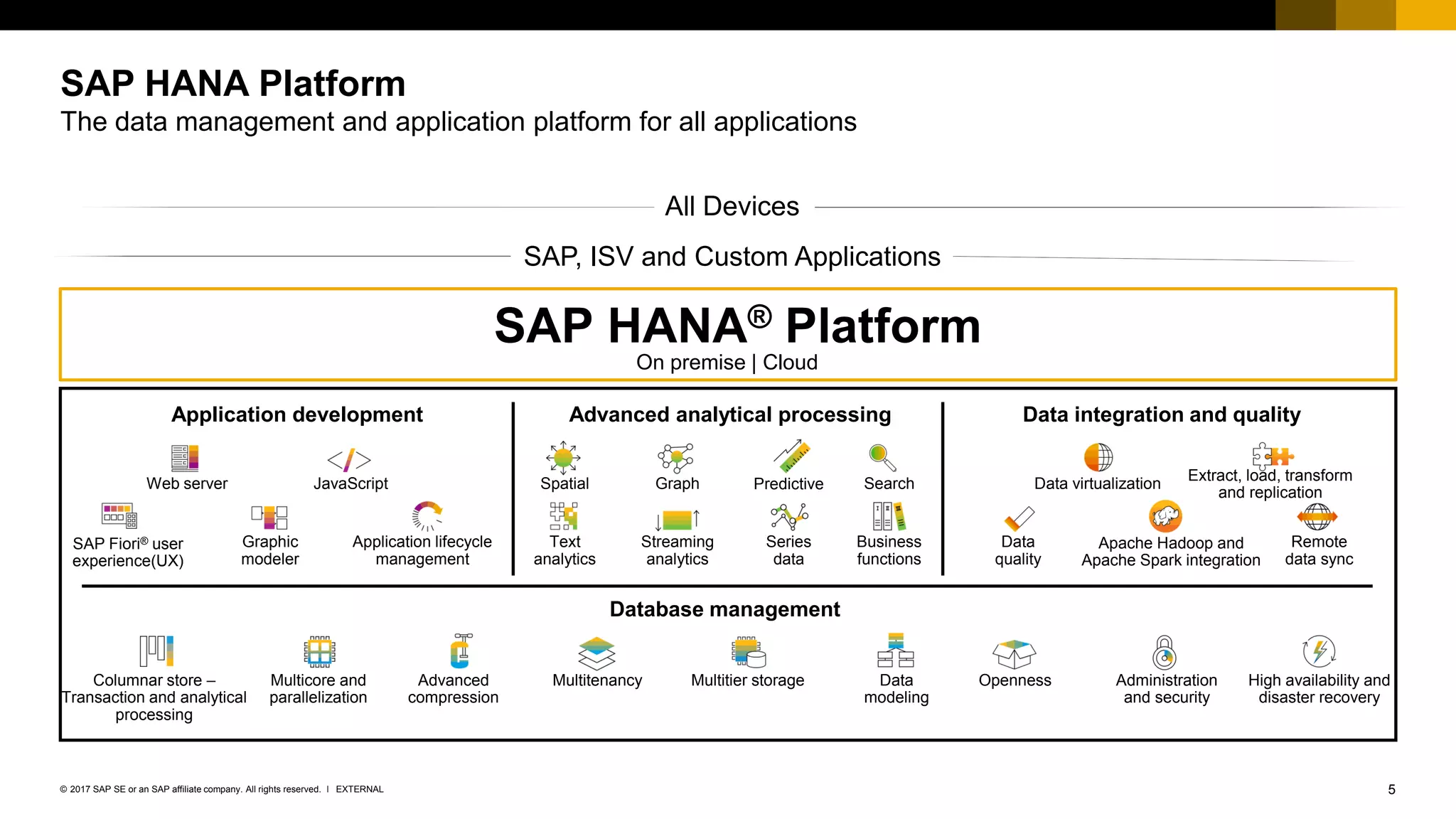
SAP HANA Platform
The data management and application platform for all applications
SAP, ISV and Custom Applications
All Devices
Database management
Web server JavaScript
Graphic
modeler
Data virtualization
Extract, load, transform
and replication
Columnar store –
Transaction and analytical
processing
Multicore and
parallelization
Advanced
compression
Multitenancy Multitier storage
Graph Predictive Search
Series
data
Business
functions
Apache Hadoop and
Apache Spark integration
Streaming
analytics
Application lifecycle
management
High availability and
disaster recovery
OpennessData
modeling
Administration
and security
Spatial
Text
analytics
SAP Fiori® user
experience(UX)
Application development Data integration and qualityAdvanced analytical processing
SAP HANA® Platform
On premise | Cloud
Data
quality
Remote
data sync
6EXTERNAL© 2017 SAP SE or an SAP affiliate company. All rights reserved. ǀ
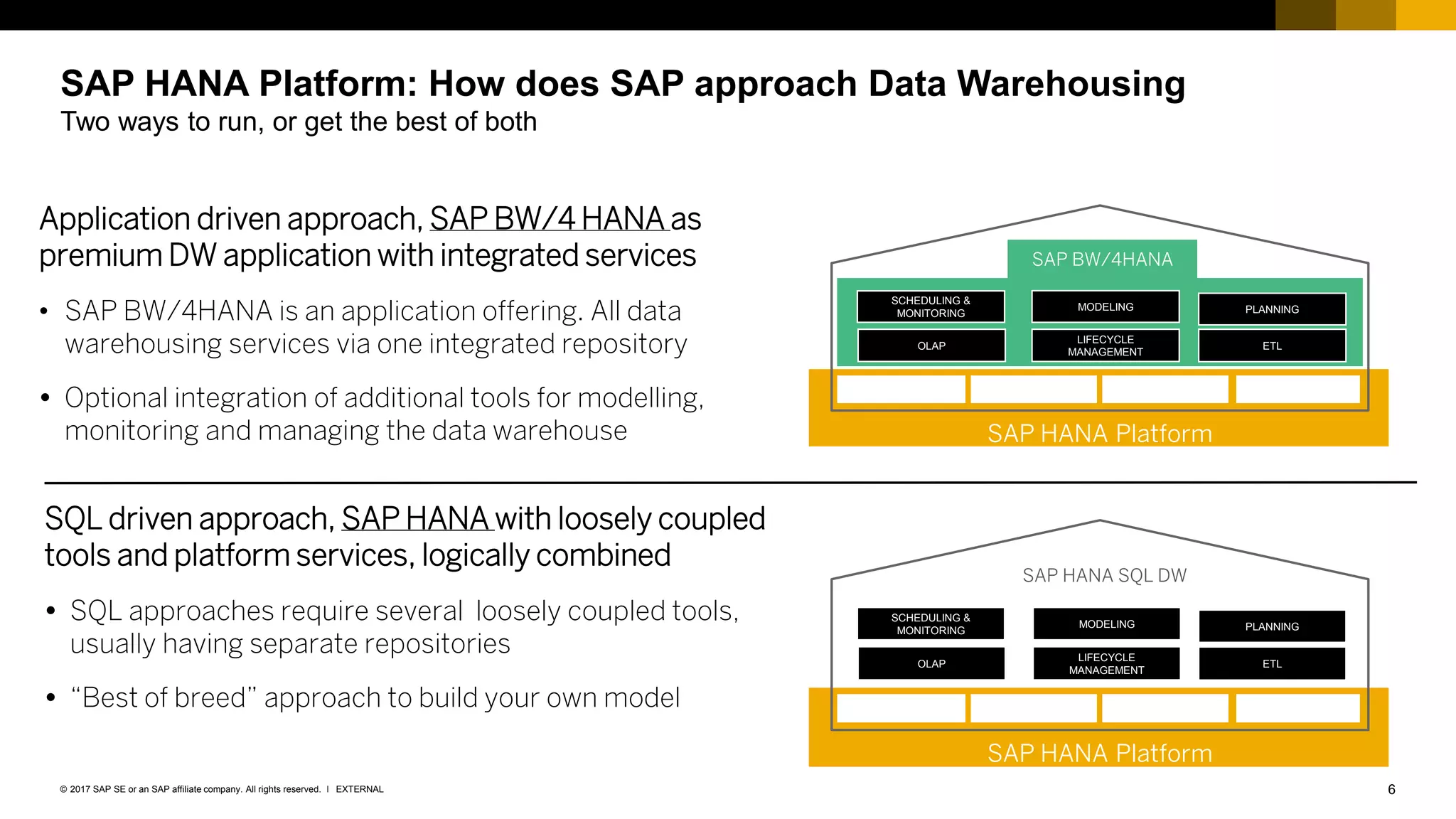
Application driven approach, SAP BW/4 HANA as
premium DW application with integrated services
• SAP BW/4HANA is an application offering. All data
warehousing services via one integrated repository
 Optional integration of additional tools for modelling,
monitoring and managing the data warehouse
SQL driven approach, SAP HANA with loosely coupled
tools and platform services, logically combined
 SQL approaches require several loosely coupled tools,
usually having separate repositories
 “Best of breed” approach to build your own model
SAP HANA Platform: How does SAP approach Data Warehousing
Two ways to run, or get the best of both
SAP HANA Platform
SCHEDULING &
MONITORING
MODELING PLANNING
OLAP
LIFECYCLE
MANAGEMENT
ETL
SAP BW/4HANA
SAP HANA Platform
SCHEDULING &
MONITORING
MODELING PLANNING
OLAP
LIFECYCLE
MANAGEMENT
ETL
SAP HANA SQL DW
7EXTERNAL© 2017 SAP SE or an SAP affiliate company. All rights reserved. ǀ
SAP HANA Platform: How does SAP approach Data Warehousing
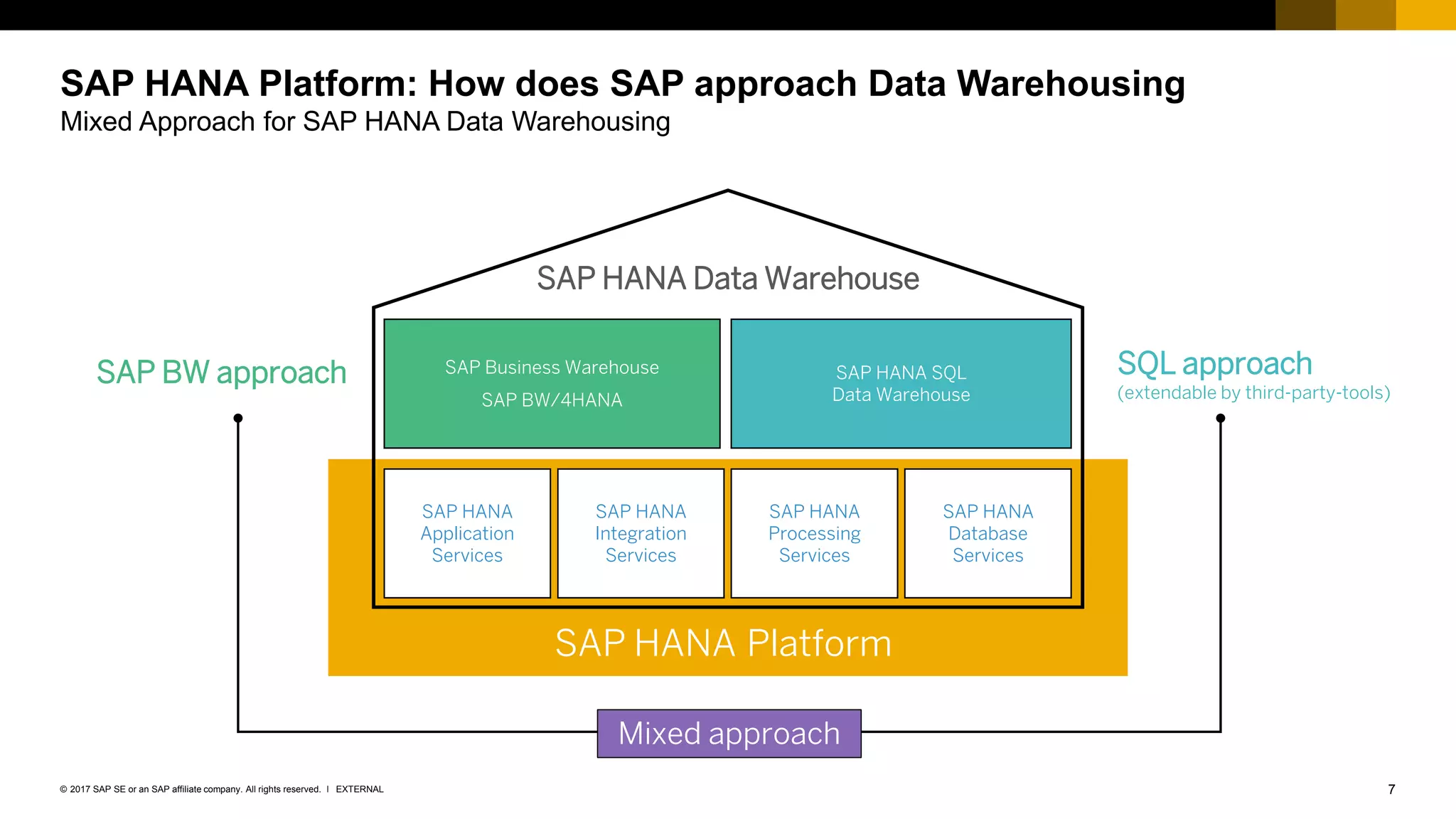
Mixed Approach for SAP HANA Data Warehousing
SAP HANA Platform
SAP BW approach SQL approach
(extendable by third-party-tools)
Mixed approach
SAP HANA Data Warehouse
SAP HANA
Application
Services
SAP HANA
Integration
Services
SAP HANA
Processing
Services
SAP HANA
Database
Services
SAP Business Warehouse
SAP BW/4HANA
SAP HANA SQL
Data Warehouse
8EXTERNAL© 2017 SAP SE or an SAP affiliate company. All rights reserved. ǀ
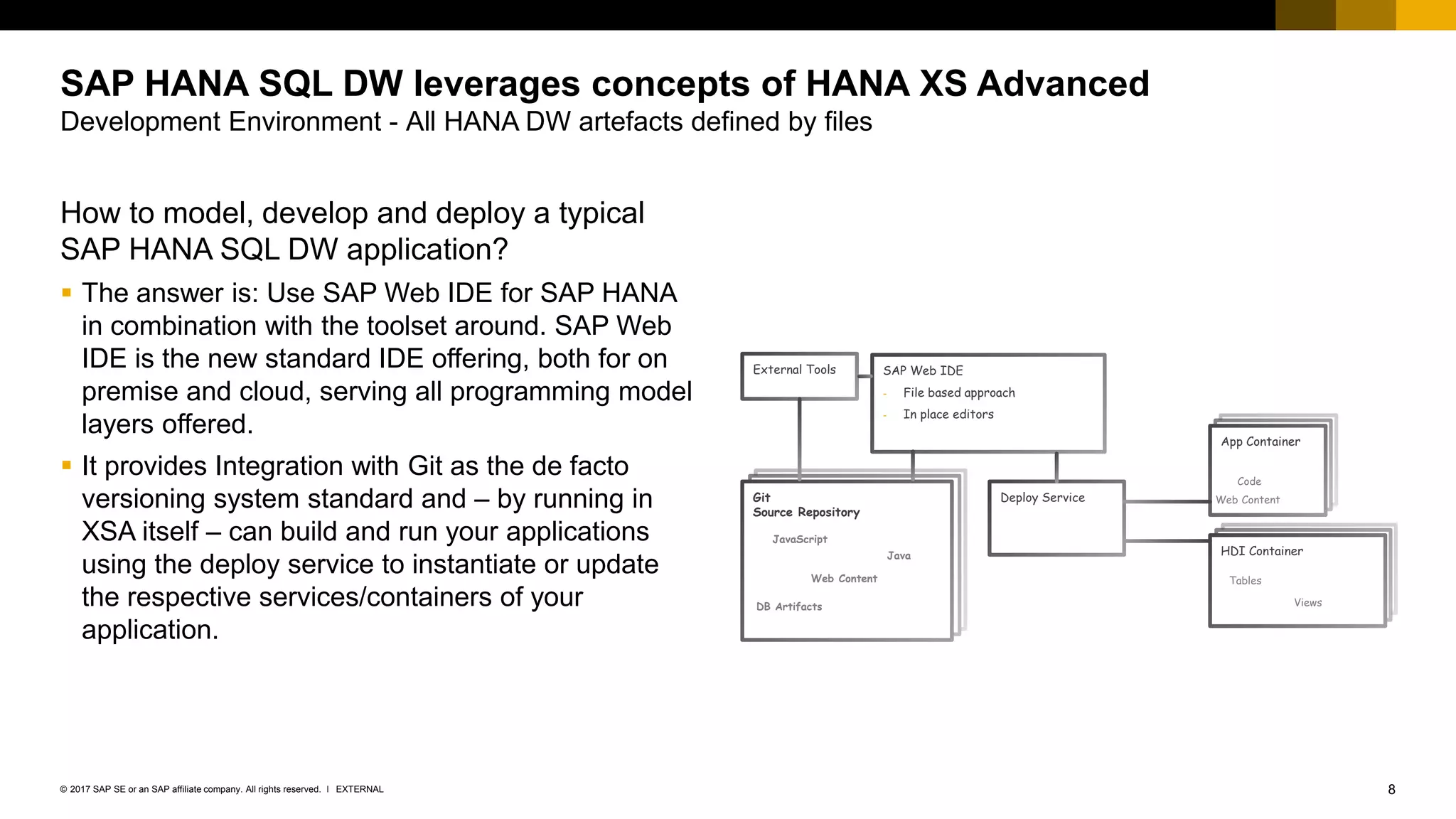
How to model, develop and deploy a typical
SAP HANA SQL DW application?
▪ The answer is: Use SAP Web IDE for SAP HANA
in combination with the toolset around. SAP Web
IDE is the new standard IDE offering, both for on
premise and cloud, serving all programming model
layers offered.
▪ It provides Integration with Git as the de facto
versioning system standard and – by running in
XSA itself – can build and run your applications
using the deploy service to instantiate or update
the respective services/containers of your
application.
SAP HANA SQL DW leverages concepts of HANA XS Advanced
Development Environment - All HANA DW artefacts defined by files
Deploy ServiceGit
Source Repository
External Tools SAP Web IDE
- File based approach
- In place editors
Web Content
DB Artifacts
JavaScript
Java HDI Container
Tables
Views
App Container
Web Content
Code
SAP HANA SQL DW toolset
10EXTERNAL© 2017 SAP SE or an SAP affiliate company. All rights reserved. ǀ
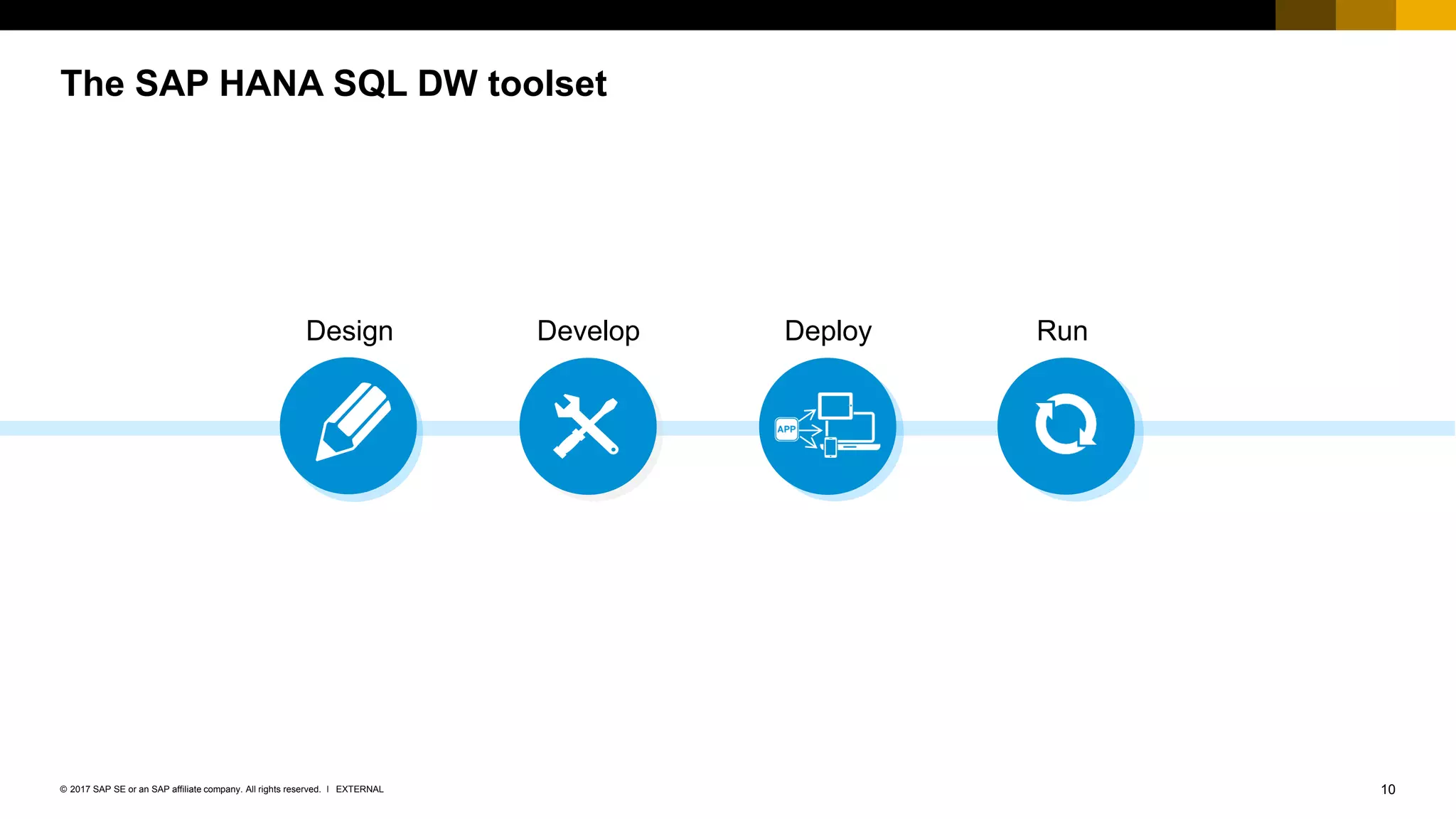
The SAP HANA SQL DW toolset
Design Develop RunDeploy
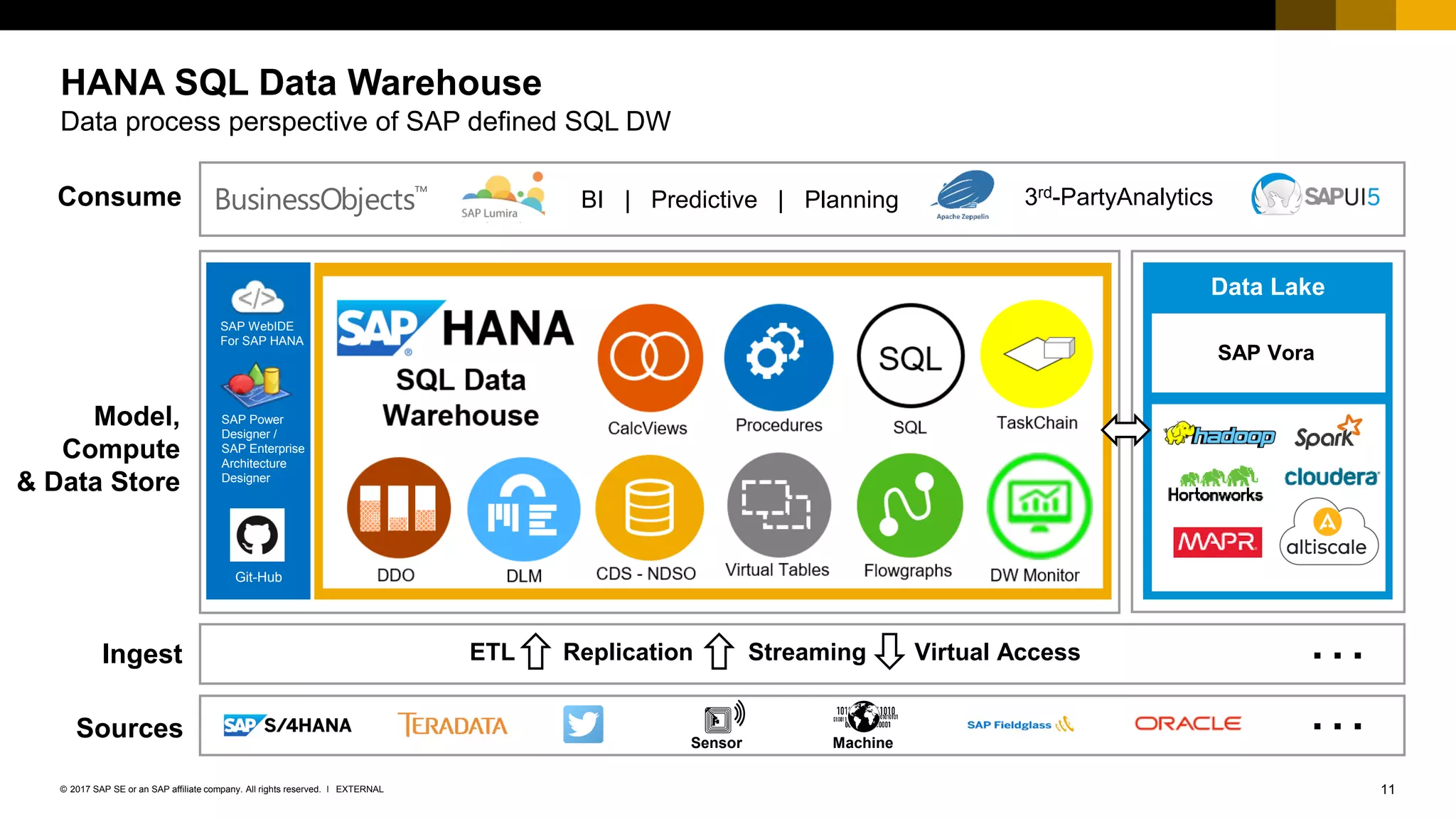
11EXTERNAL© 2017 SAP SE or an SAP affiliate company. All rights reserved. ǀ
Model,
Compute
& Data Store
Ingest
Sources
Consume
Data Lake
ETL Replication Streaming Virtual Access …
3rd-PartyAnalytics
Sensor Machine
…
SAP Vora
BI | Predictive | PlanningBusinessObjects™
SAP WebIDE
For SAP HANA
SAP Power
Designer /
SAP Enterprise
Architecture
Designer
Git-Hub
HANA SQL Data Warehouse
Data process perspective of SAP defined SQL DW
12EXTERNAL© 2017 SAP SE or an SAP affiliate company. All rights reserved. ǀ
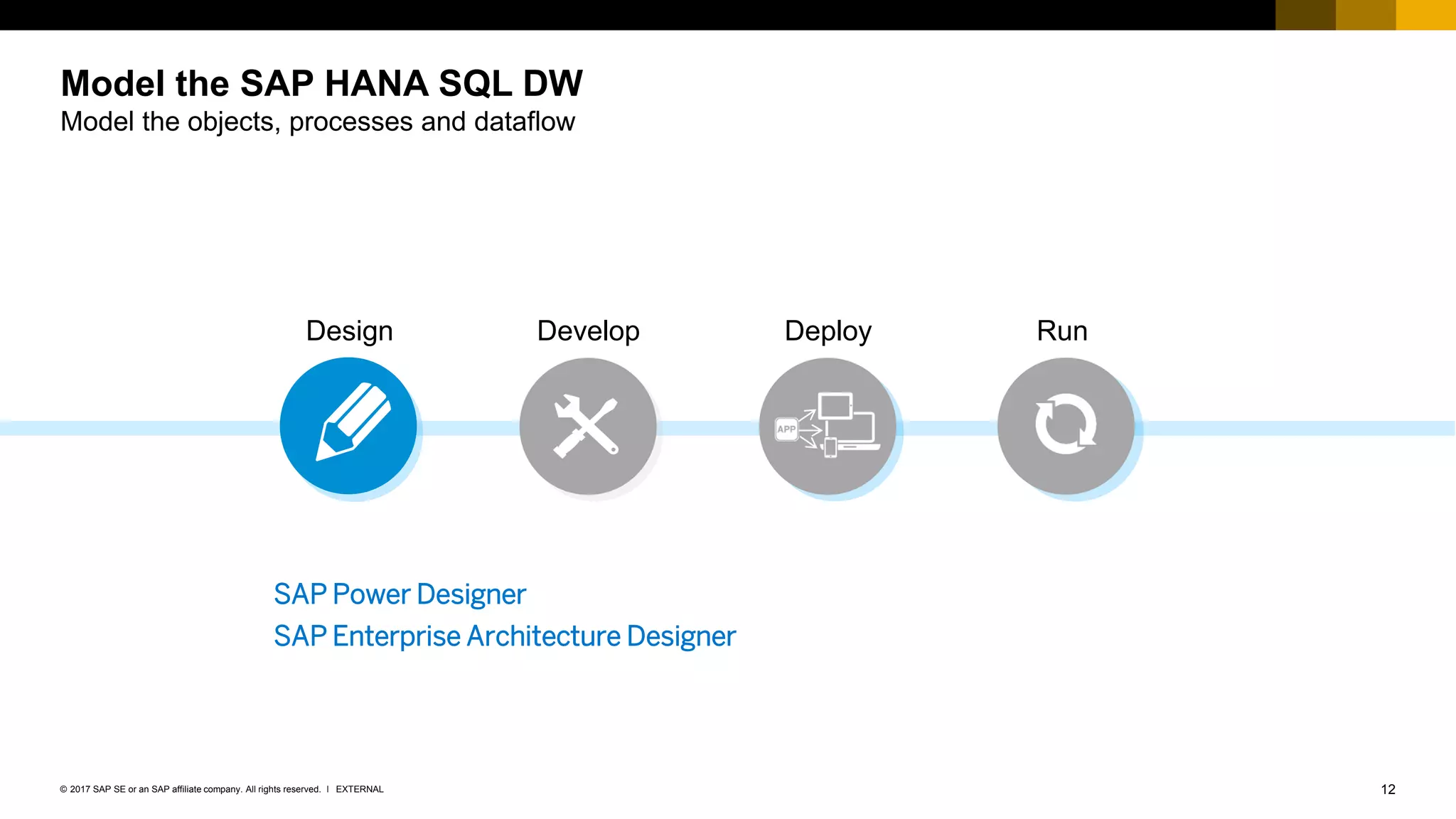
Model the SAP HANA SQL DW
Model the objects, processes and dataflow
Design Develop RunDeploy
SAP Power Designer
SAP Enterprise Architecture Designer
13EXTERNAL© 2017 SAP SE or an SAP affiliate company. All rights reserved. ǀ
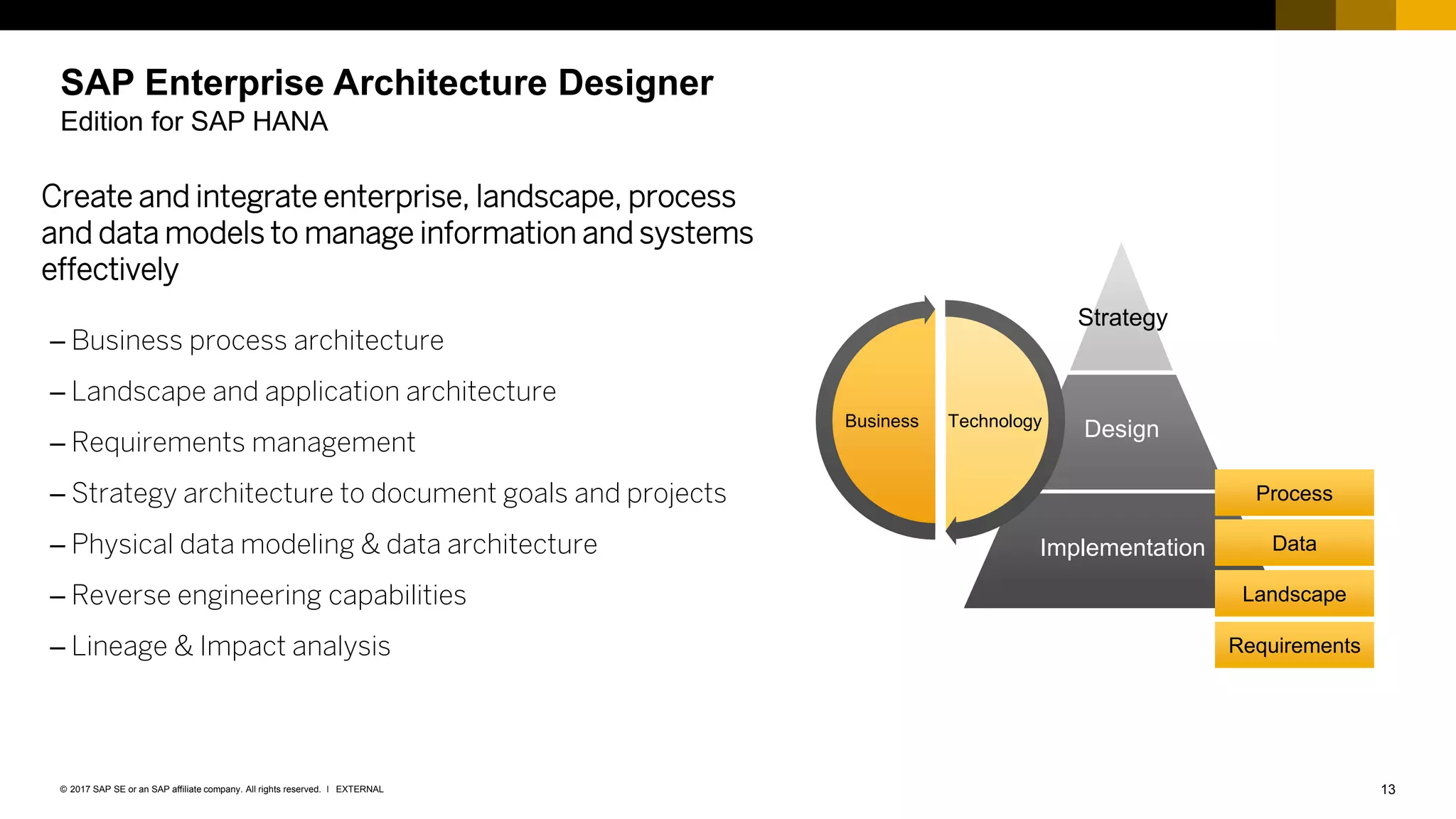
SAP Enterprise Architecture Designer
Edition for SAP HANA
Create and integrate enterprise, landscape, process
and data models to manage information and systems
effectively
– Business process architecture
– Landscape and application architecture
– Requirements management
– Strategy architecture to document goals and projects
– Physical data modeling & data architecture
– Reverse engineering capabilities
– Lineage & Impact analysis
Design
Implementation
Strategy
TechnologyBusiness
Process
Data
Landscape
Requirements
14EXTERNAL© 2017 SAP SE or an SAP affiliate company. All rights reserved. ǀ
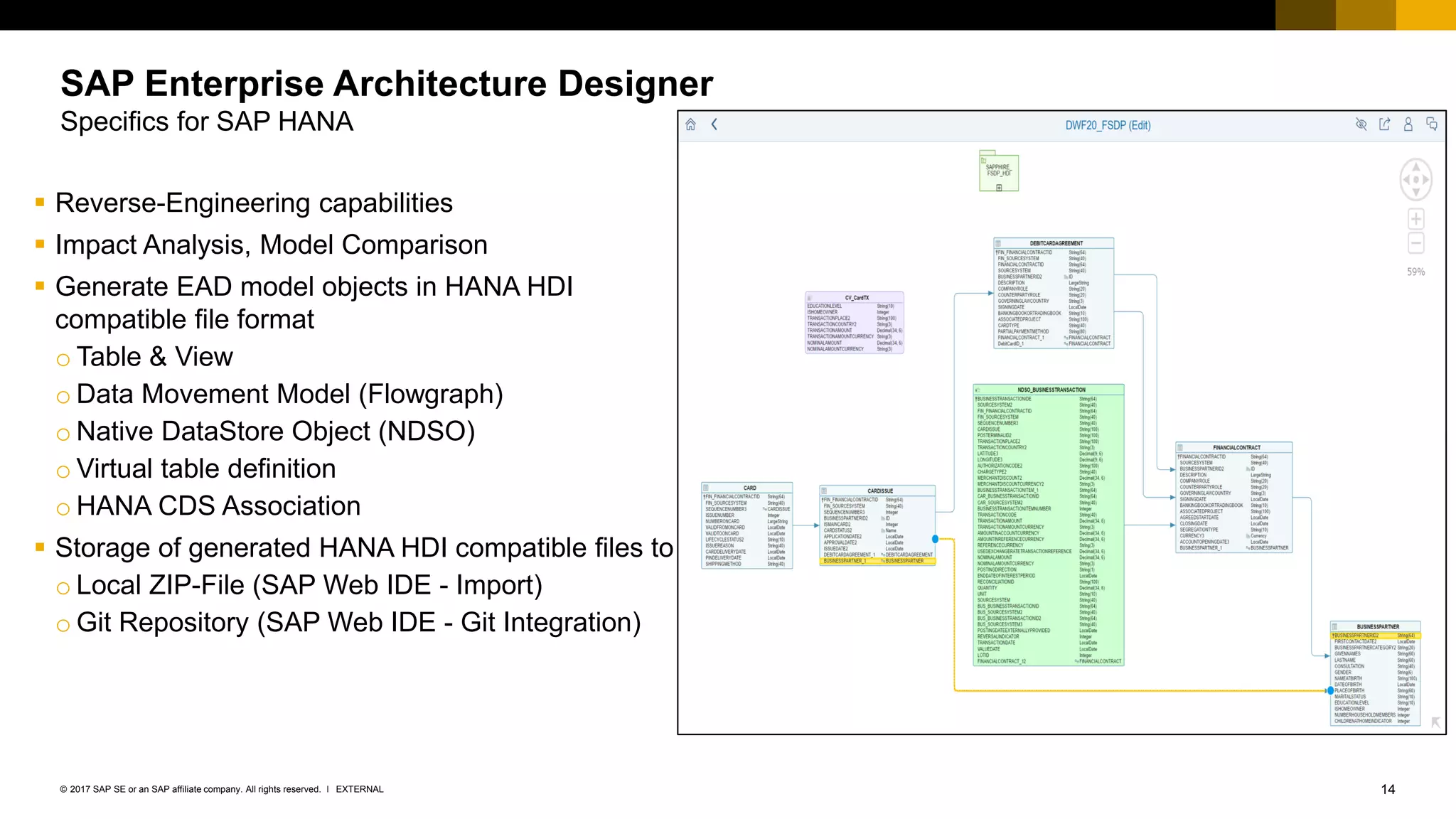
▪ Reverse-Engineering capabilities
▪ Impact Analysis, Model Comparison
▪ Generate EAD model objects in HANA HDI
compatible file format
o Table & View
o Data Movement Model (Flowgraph)
o Native DataStore Object (NDSO)
o Virtual table definition
o HANA CDS Association
▪ Storage of generated HANA HDI compatible files to
o Local ZIP-File (SAP Web IDE - Import)
o Git Repository (SAP Web IDE - Git Integration)
SAP Enterprise Architecture Designer
Specifics for SAP HANA
15EXTERNAL© 2017 SAP SE or an SAP affiliate company. All rights reserved. ǀ
Demo
Modeling the Data Warehouse with SAP Enterprise Architecture Designer (EAD)
16EXTERNAL© 2017 SAP SE or an SAP affiliate company. All rights reserved. ǀ
17EXTERNAL© 2017 SAP SE or an SAP affiliate company. All rights reserved. ǀ
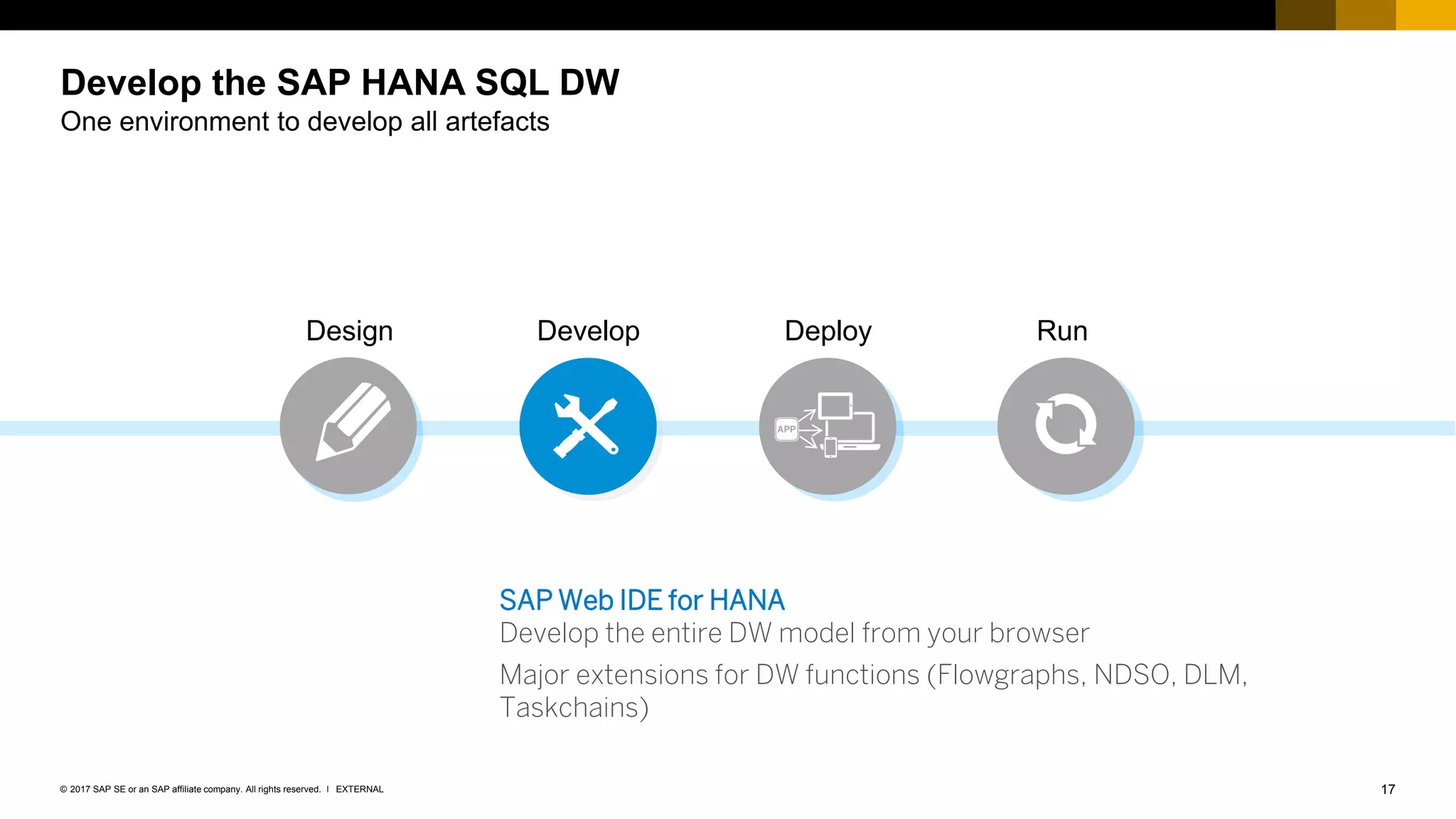
Develop the SAP HANA SQL DW
One environment to develop all artefacts
Design Develop RunDeploy
SAP Web IDE for HANA
Develop the entire DW model from your browser
Major extensions for DW functions (Flowgraphs, NDSO, DLM,
Taskchains)
18EXTERNAL© 2017 SAP SE or an SAP affiliate company. All rights reserved. ǀ
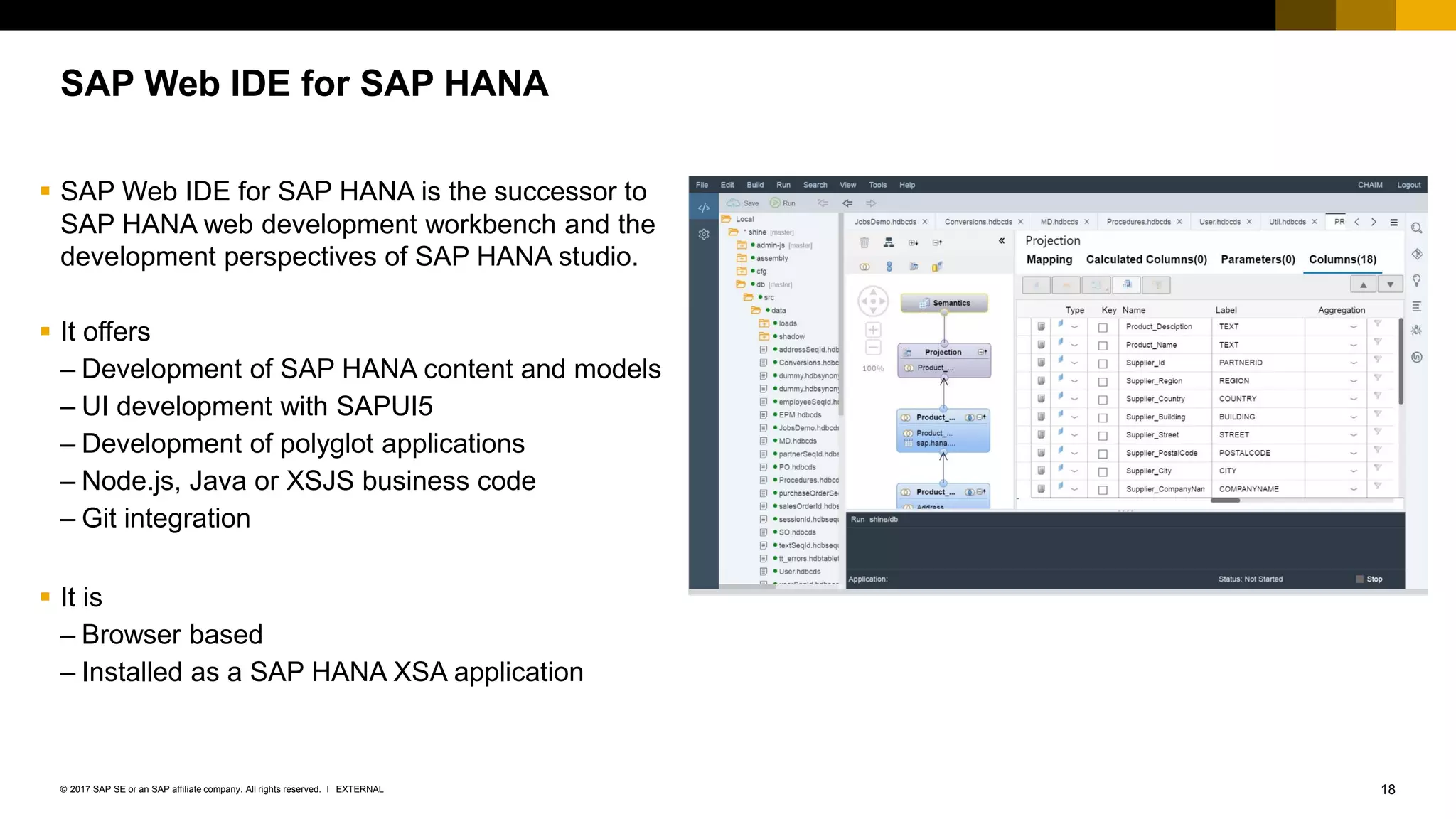
SAP Web IDE for SAP HANA
▪ SAP Web IDE for SAP HANA is the successor to
SAP HANA web development workbench and the
development perspectives of SAP HANA studio.
▪ It offers
– Development of SAP HANA content and models
– UI development with SAPUI5
– Development of polyglot applications
– Node.js, Java or XSJS business code
– Git integration
▪ It is
– Browser based
– Installed as a SAP HANA XSA application
19EXTERNAL© 2017 SAP SE or an SAP affiliate company. All rights reserved. ǀ
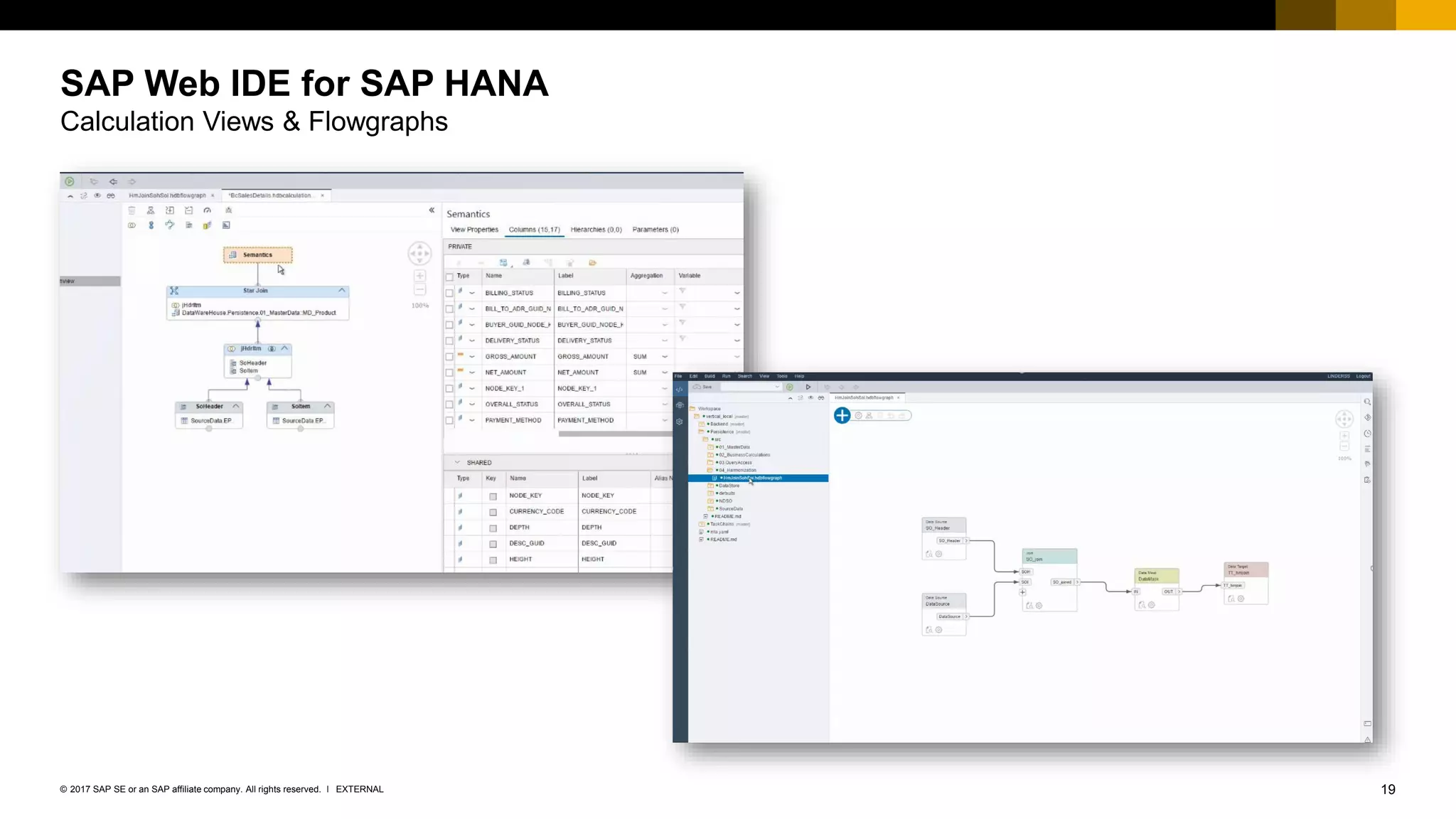
SAP Web IDE for SAP HANA
Calculation Views & Flowgraphs
20EXTERNAL© 2017 SAP SE or an SAP affiliate company. All rights reserved. ǀ
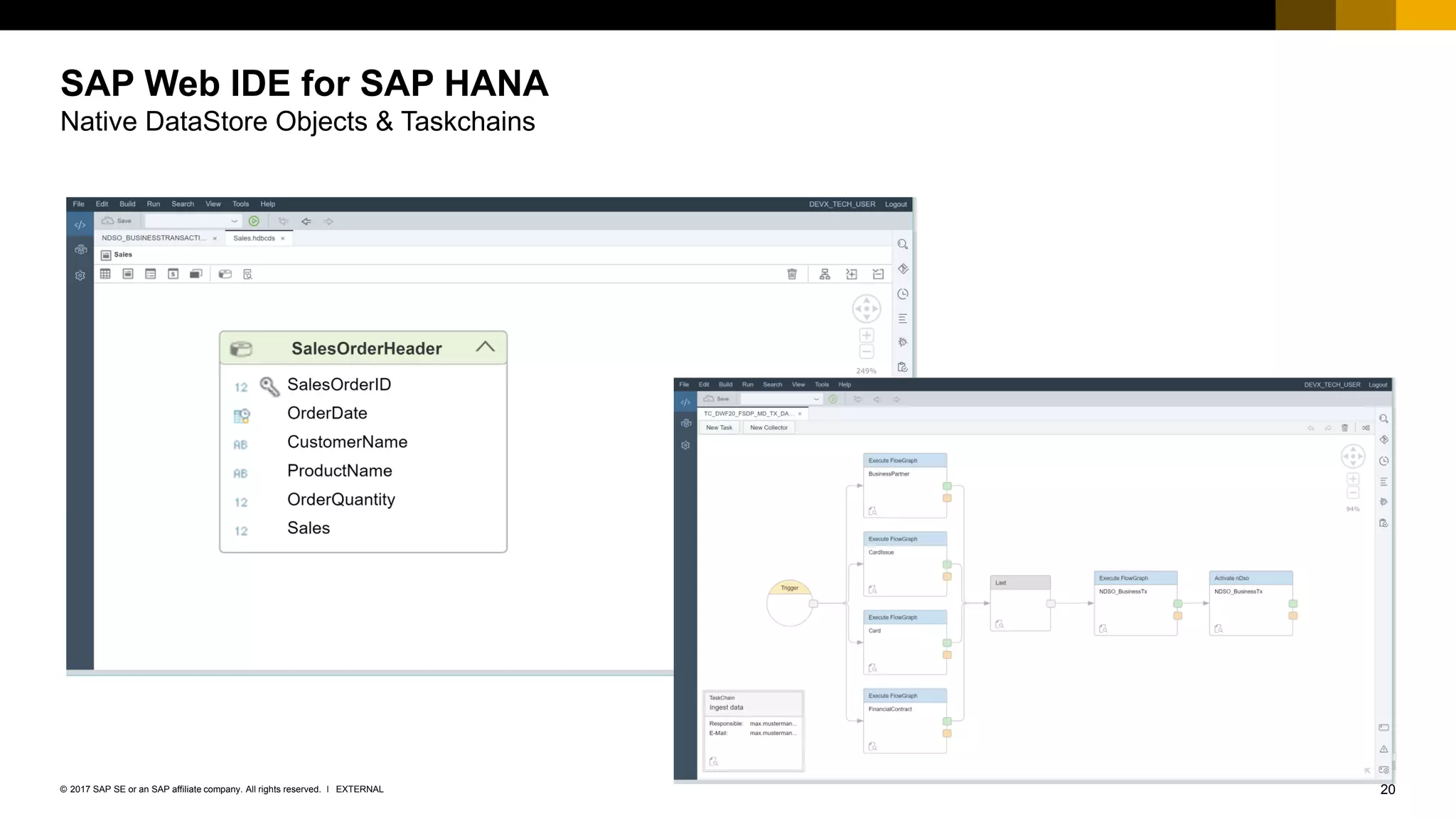
SAP Web IDE for SAP HANA
Native DataStore Objects & Taskchains
21EXTERNAL© 2017 SAP SE or an SAP affiliate company. All rights reserved. ǀ
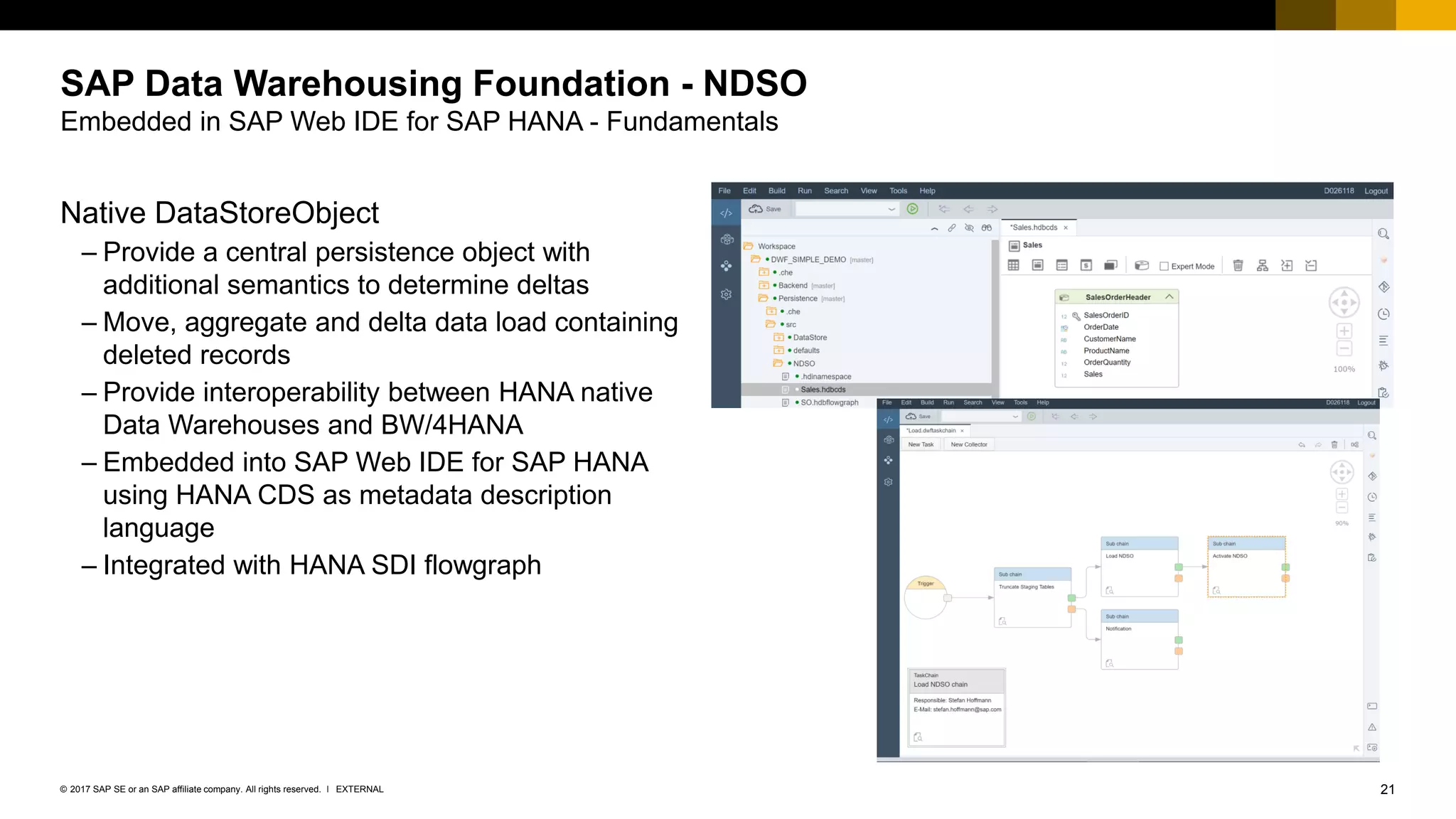
SAP Data Warehousing Foundation - NDSO
Embedded in SAP Web IDE for SAP HANA - Fundamentals
Native DataStoreObject
– Provide a central persistence object with
additional semantics to determine deltas
– Move, aggregate and delta data load containing
deleted records
– Provide interoperability between HANA native
Data Warehouses and BW/4HANA
– Embedded into SAP Web IDE for SAP HANA
using HANA CDS as metadata description
language
– Integrated with HANA SDI flowgraph
22EXTERNAL© 2017 SAP SE or an SAP affiliate company. All rights reserved. ǀ
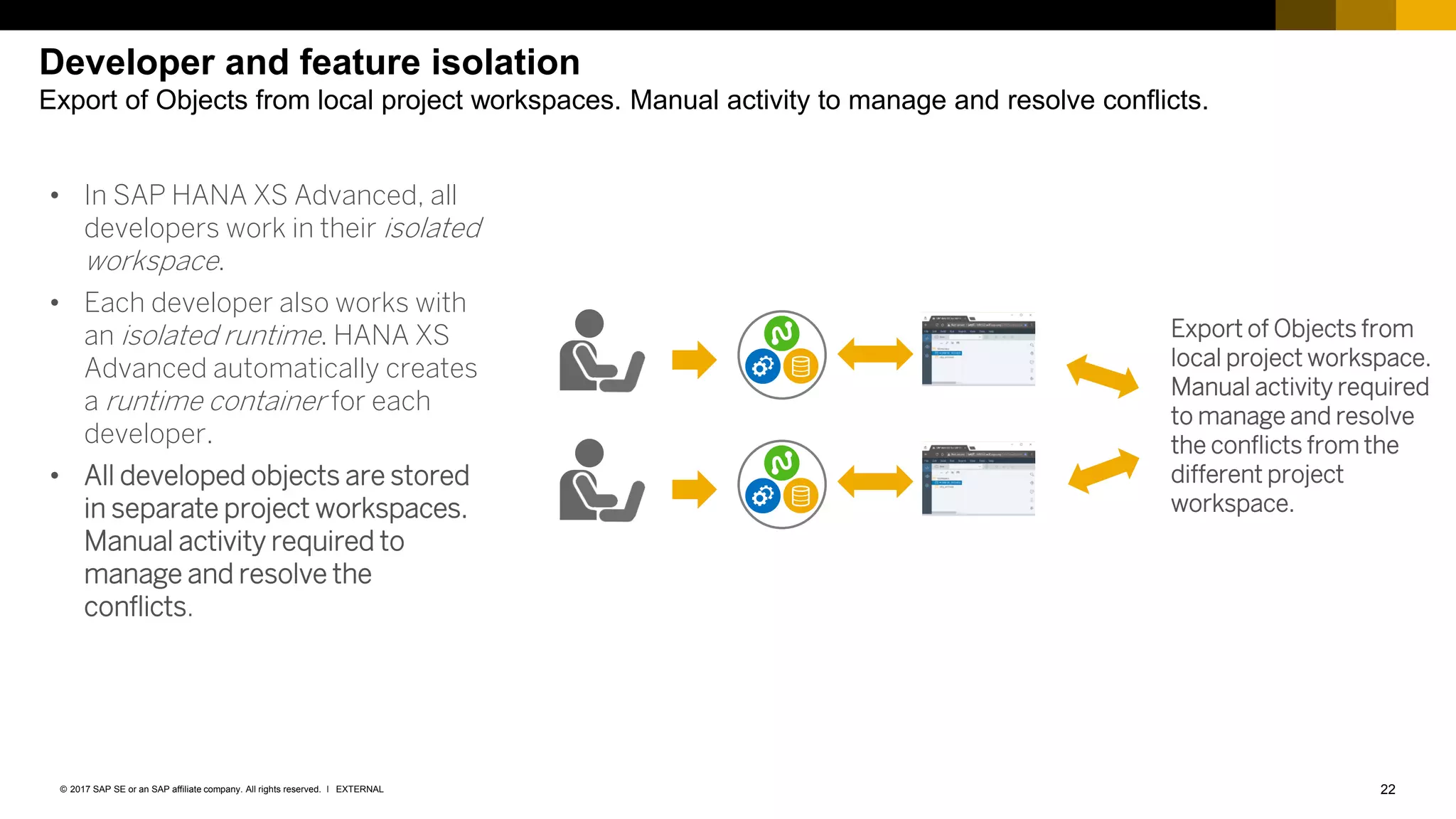
Developer and feature isolation
Export of Objects from local project workspaces. Manual activity to manage and resolve conflicts.
• In SAP HANA XS Advanced, all
developers work in their isolated
workspace.
• Each developer also works with
an isolated runtime. HANA XS
Advanced automatically creates
a runtime container for each
developer.
• All developed objects are stored
in separate project workspaces.
Manual activity required to
manage and resolve the
conflicts.
Export of Objects from
local project workspace.
Manual activity required
to manage and resolve
the conflicts from the
different project
workspace.
23EXTERNAL© 2017 SAP SE or an SAP affiliate company. All rights reserved. ǀ
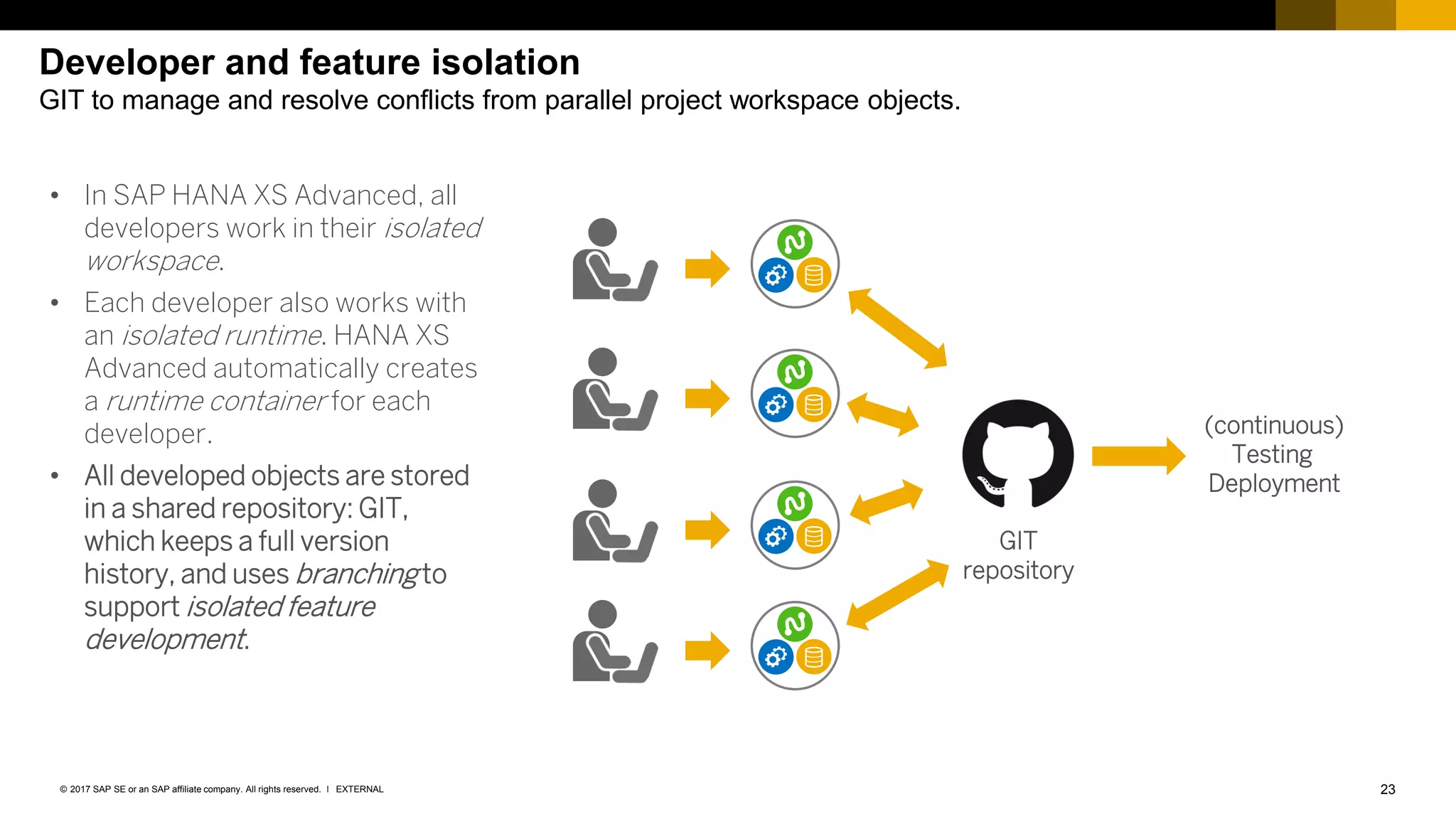
Developer and feature isolation
GIT to manage and resolve conflicts from parallel project workspace objects.
• In SAP HANA XS Advanced, all
developers work in their isolated
workspace.
• Each developer also works with
an isolated runtime. HANA XS
Advanced automatically creates
a runtime container for each
developer.
• All developed objects are stored
in a shared repository: GIT,
which keeps a full version
history, and uses branching to
support isolated feature
development.
GIT
repository
(continuous)
Testing
Deployment
24EXTERNAL© 2017 SAP SE or an SAP affiliate company. All rights reserved. ǀ
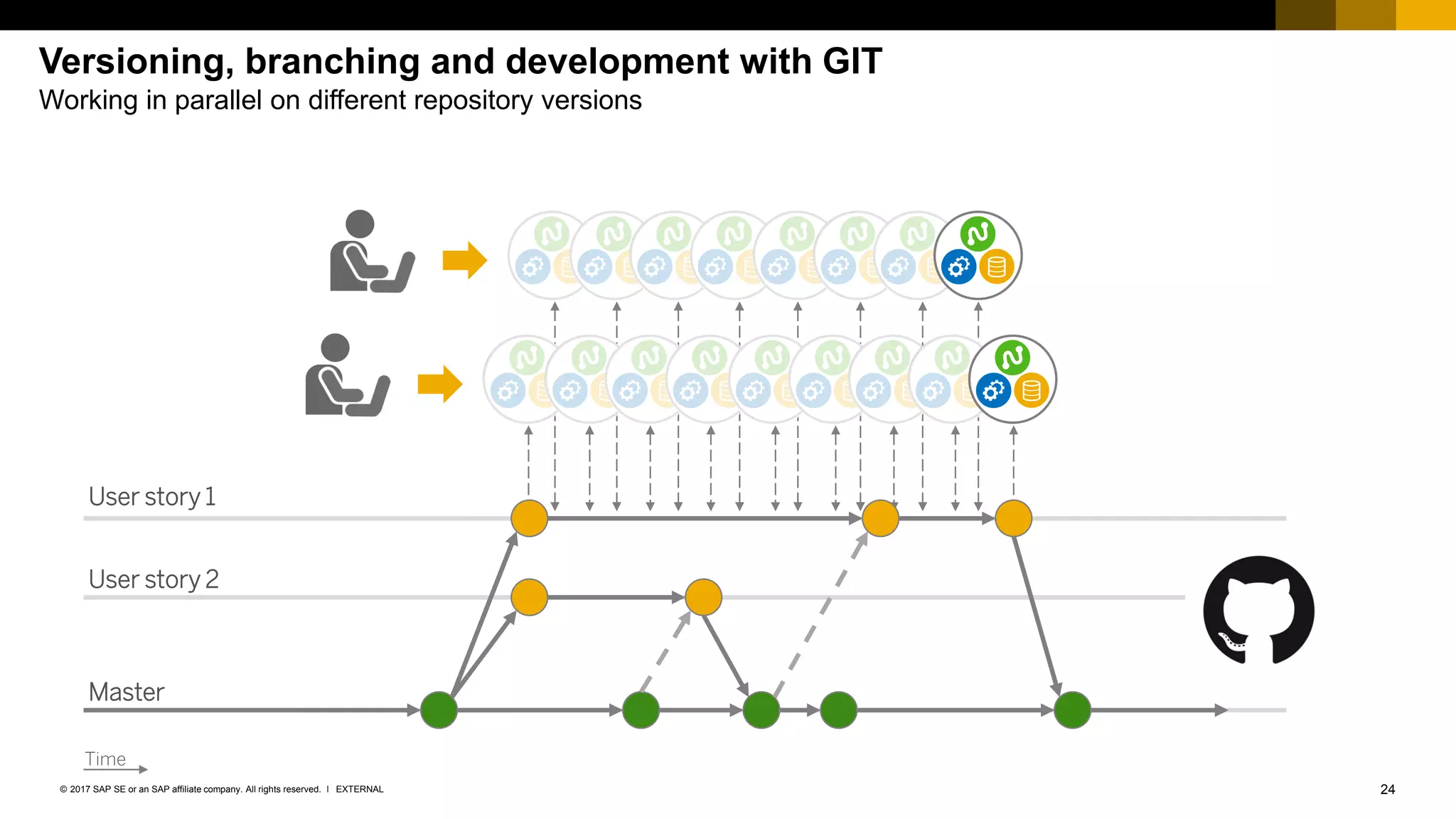
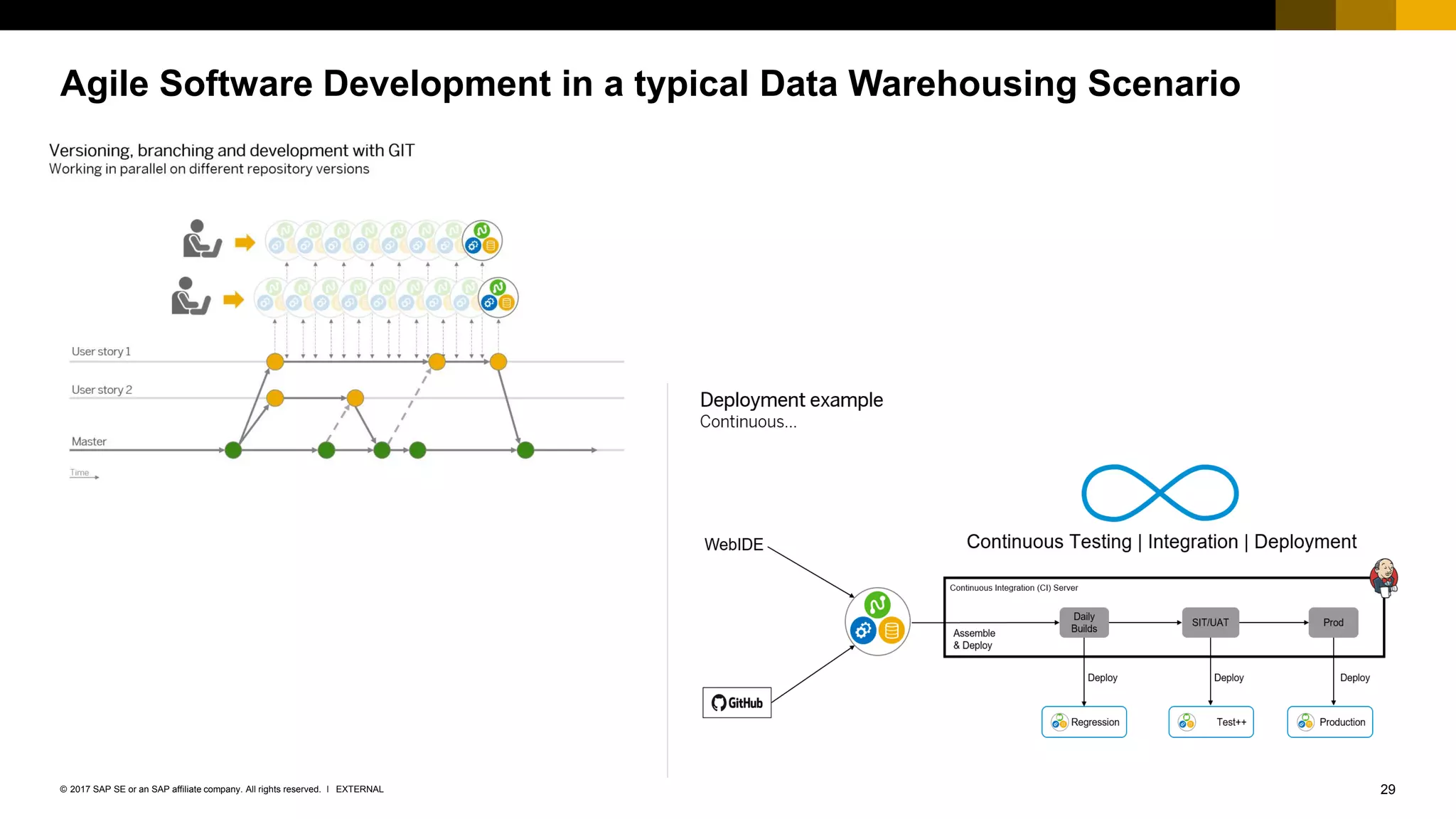
Versioning, branching and development with GIT
Working in parallel on different repository versions
User story 1
User story 2
Master
Time
25EXTERNAL© 2017 SAP SE or an SAP affiliate company. All rights reserved. ǀ
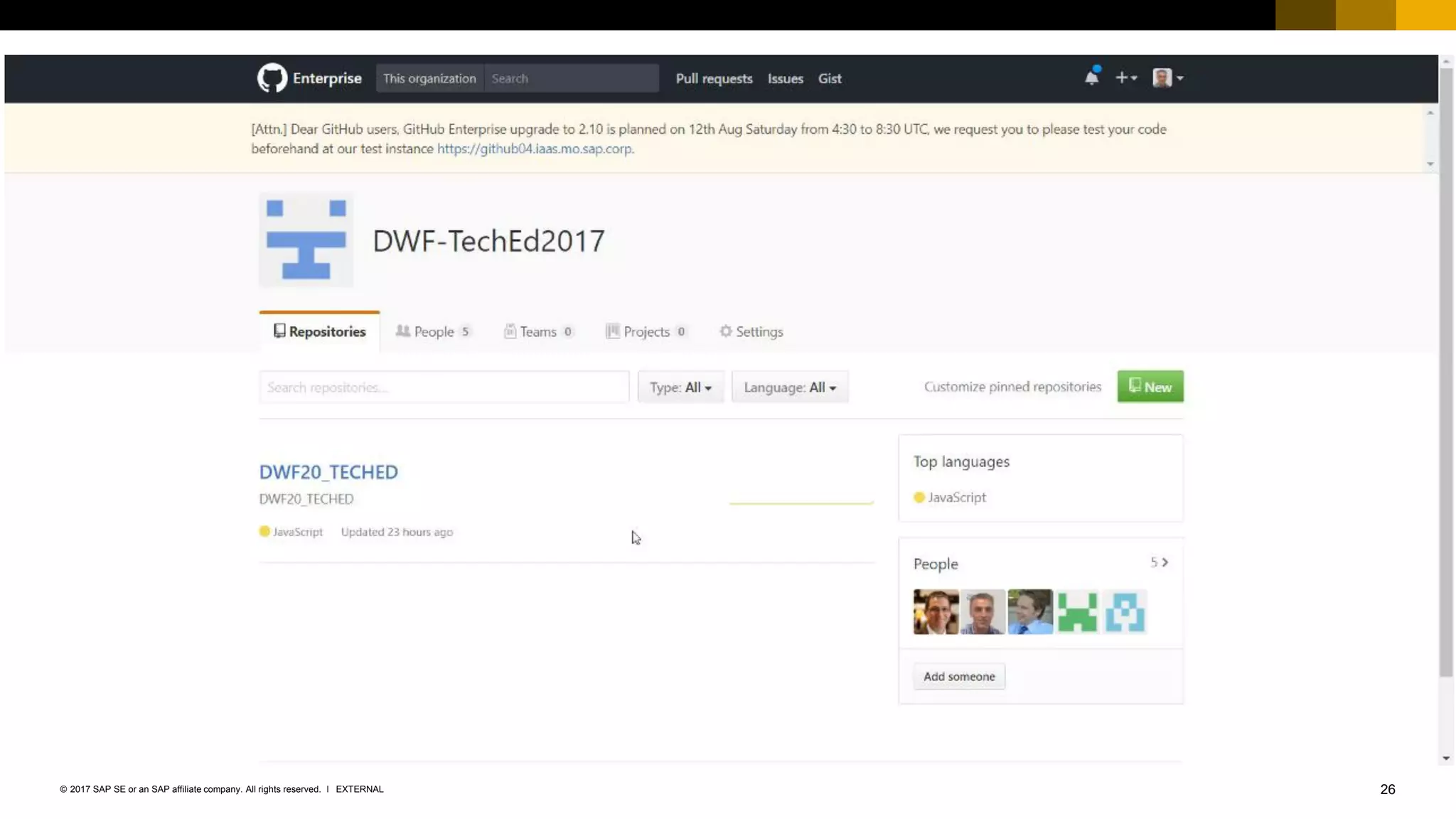
Demo
Clone, Edit and Build the Data Warehouse Artefacts using SAP Web IDE for SAP HANA
26EXTERNAL© 2017 SAP SE or an SAP affiliate company. All rights reserved. ǀ
27EXTERNAL© 2017 SAP SE or an SAP affiliate company. All rights reserved. ǀ
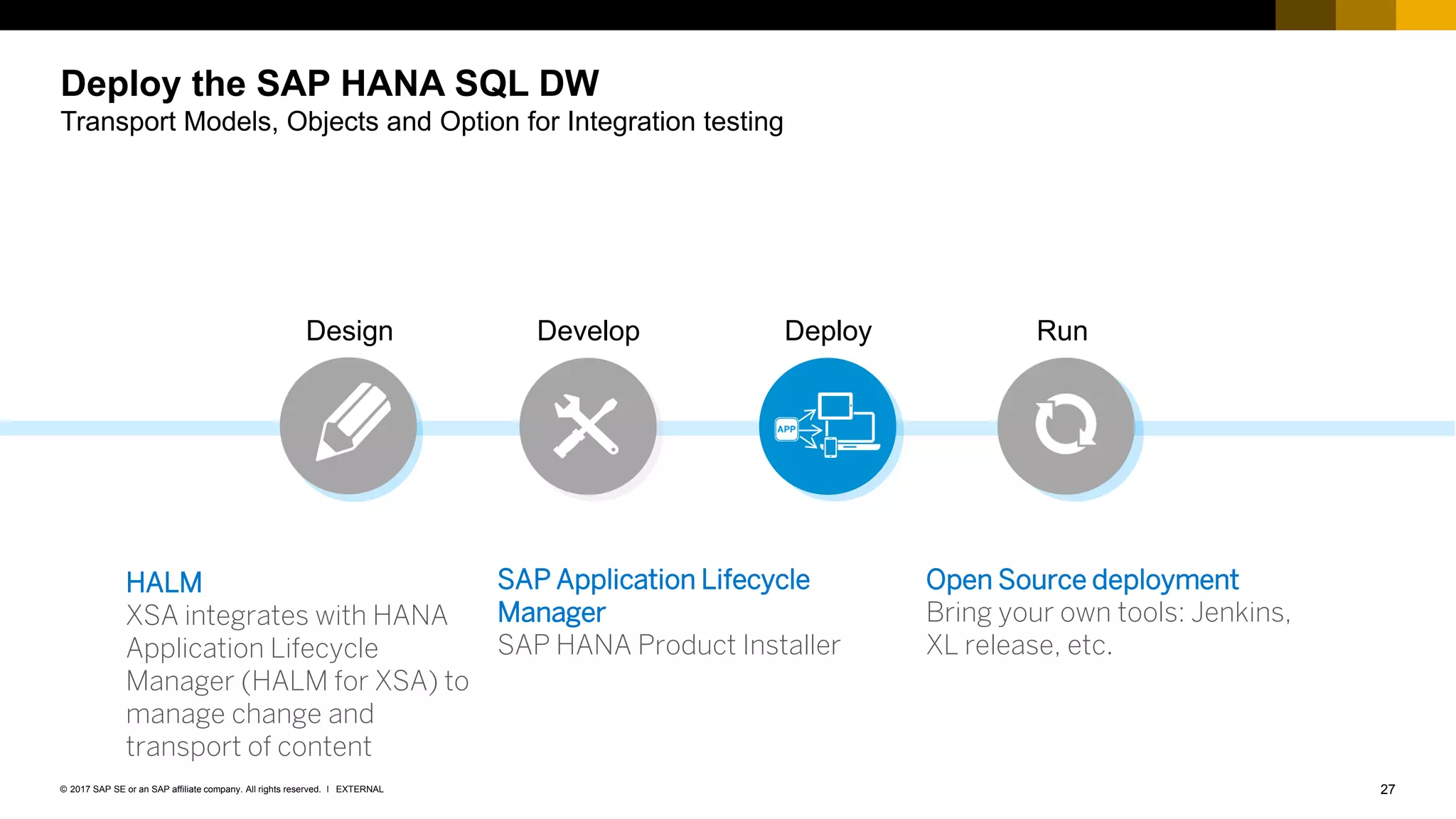
Deploy the SAP HANA SQL DW
Transport Models, Objects and Option for Integration testing
Design Develop RunDeploy
Open Source deployment
Bring your own tools: Jenkins,
XL release, etc.
SAP Application Lifecycle
Manager
SAP HANA Product Installer
HALM
XSA integrates with HANA
Application Lifecycle
Manager (HALM for XSA) to
manage change and
transport of content
28EXTERNAL© 2017 SAP SE or an SAP affiliate company. All rights reserved. ǀ
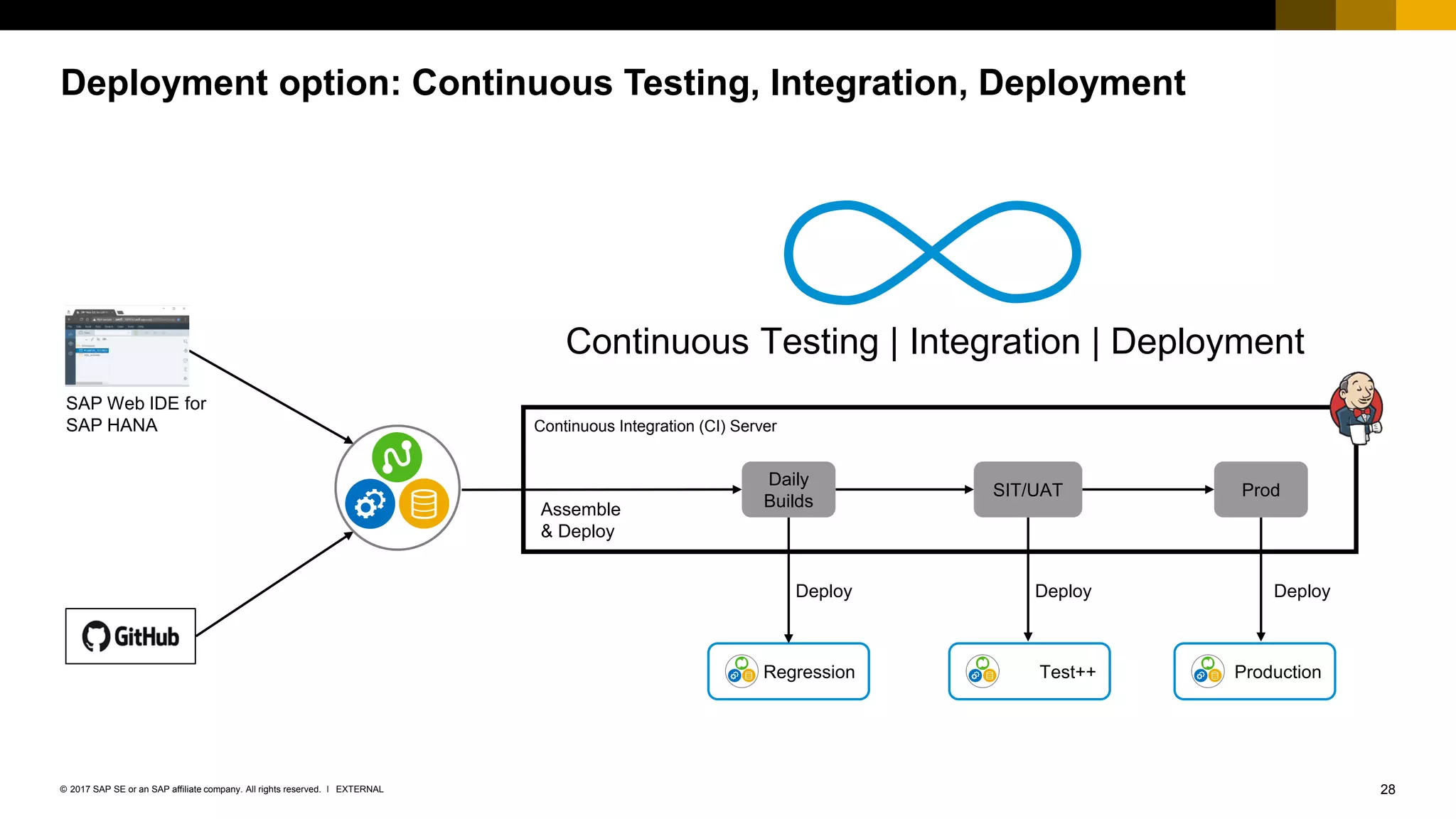
Deployment option: Continuous Testing, Integration, Deployment
Continuous Integration (CI) Server
Daily
Builds
SIT/UAT Prod
DeployDeploy
Assemble
& Deploy
Regression
Deploy
Test++ Production
Continuous Testing | Integration | Deployment
SAP Web IDE for
SAP HANA
29EXTERNAL© 2017 SAP SE or an SAP affiliate company. All rights reserved. ǀ
Agile Software Development in a typical Data Warehousing Scenario
30EXTERNAL© 2017 SAP SE or an SAP affiliate company. All rights reserved. ǀ
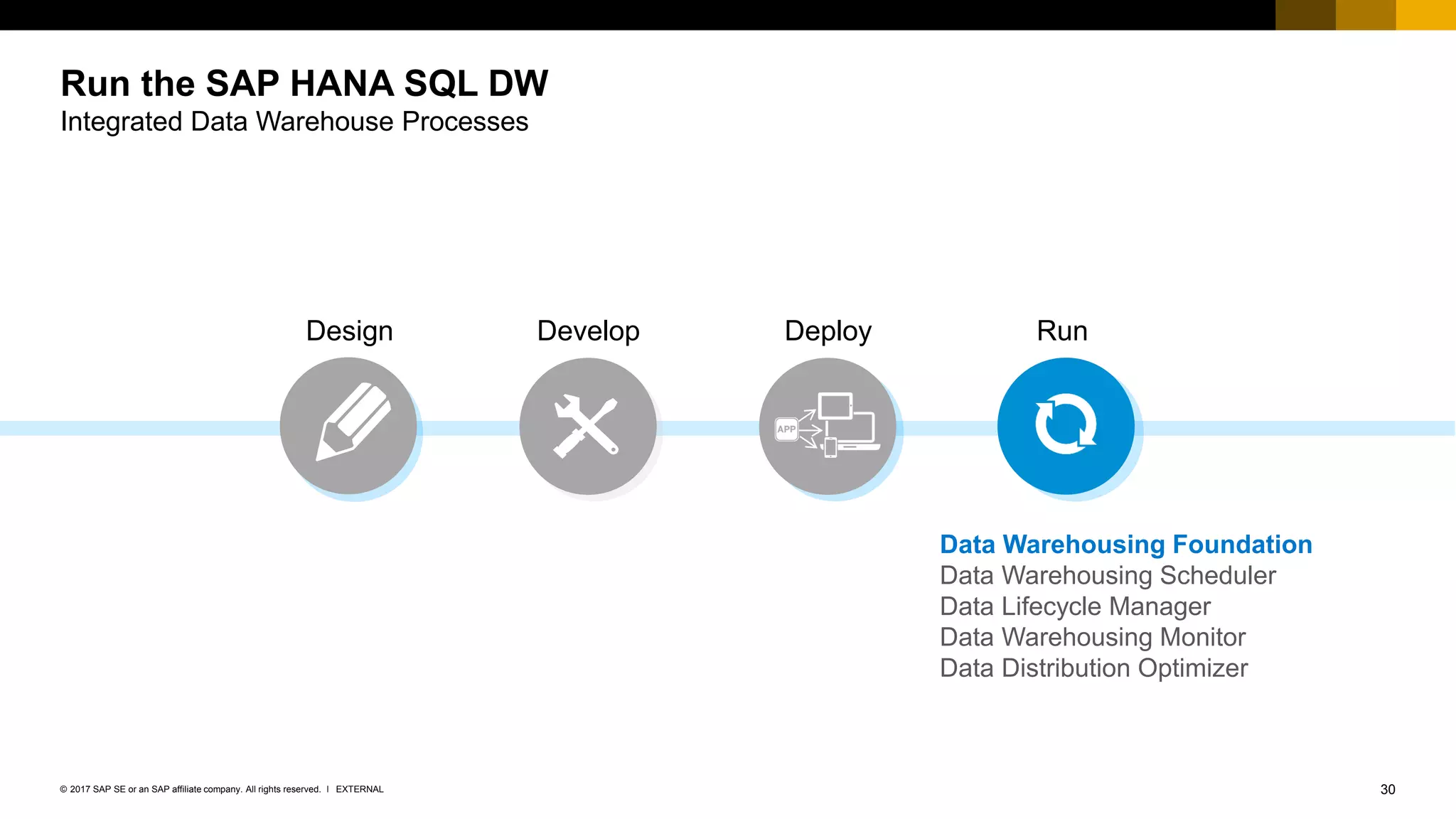
Run the SAP HANA SQL DW
Integrated Data Warehouse Processes
Design Develop RunDeploy
Data Warehousing Foundation
Data Warehousing Scheduler
Data Lifecycle Manager
Data Warehousing Monitor
Data Distribution Optimizer
31EXTERNAL© 2017 SAP SE or an SAP affiliate company. All rights reserved. ǀ
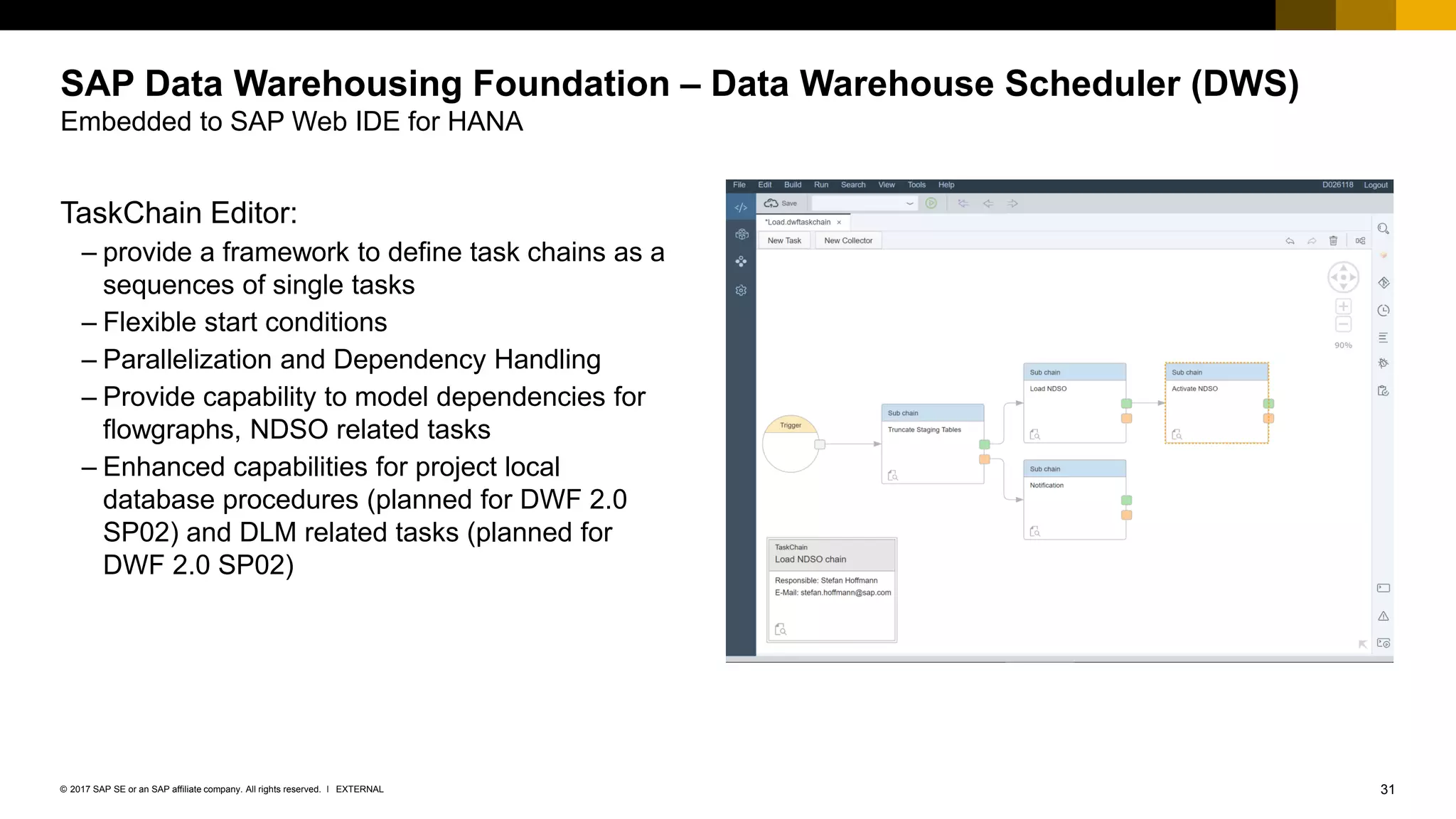
SAP Data Warehousing Foundation – Data Warehouse Scheduler (DWS)
Embedded to SAP Web IDE for HANA
TaskChain Editor:
– provide a framework to define task chains as a
sequences of single tasks
– Flexible start conditions
– Parallelization and Dependency Handling
– Provide capability to model dependencies for
flowgraphs, NDSO related tasks
– Enhanced capabilities for project local
database procedures (planned for DWF 2.0
SP02) and DLM related tasks (planned for
DWF 2.0 SP02)
32EXTERNAL© 2017 SAP SE or an SAP affiliate company. All rights reserved. ǀ
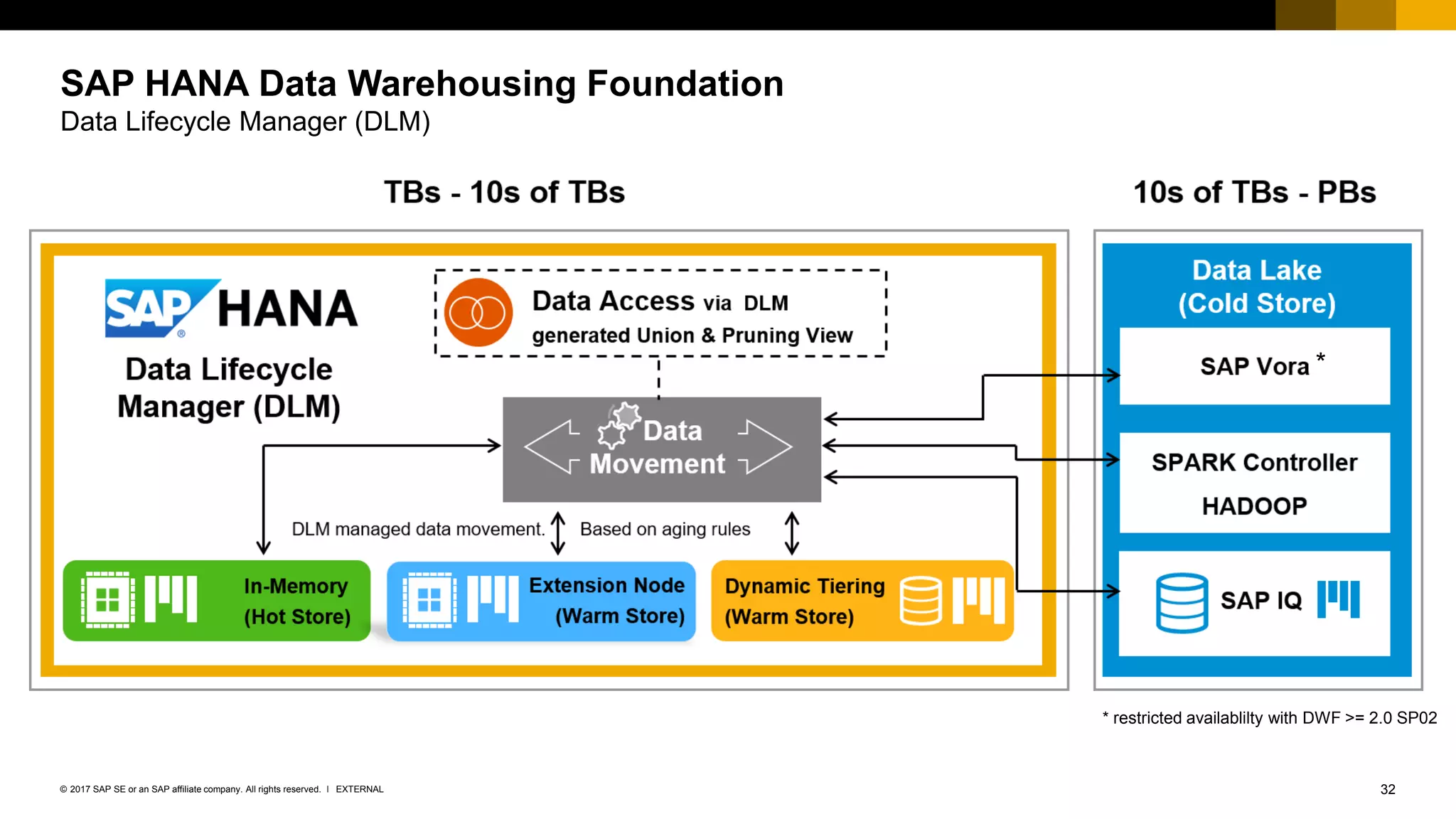
SAP HANA Data Warehousing Foundation
Data Lifecycle Manager (DLM)
*
* restricted availablilty with DWF >= 2.0 SP02
33EXTERNAL© 2017 SAP SE or an SAP affiliate company. All rights reserved. ǀ
SAP Data Warehousing Foundation – Data Lifecycle Manager 2.0 SP2
Embedded to SAP Web IDE for HANA (planned DWF 2.0 SP2, Q3’ 2017)
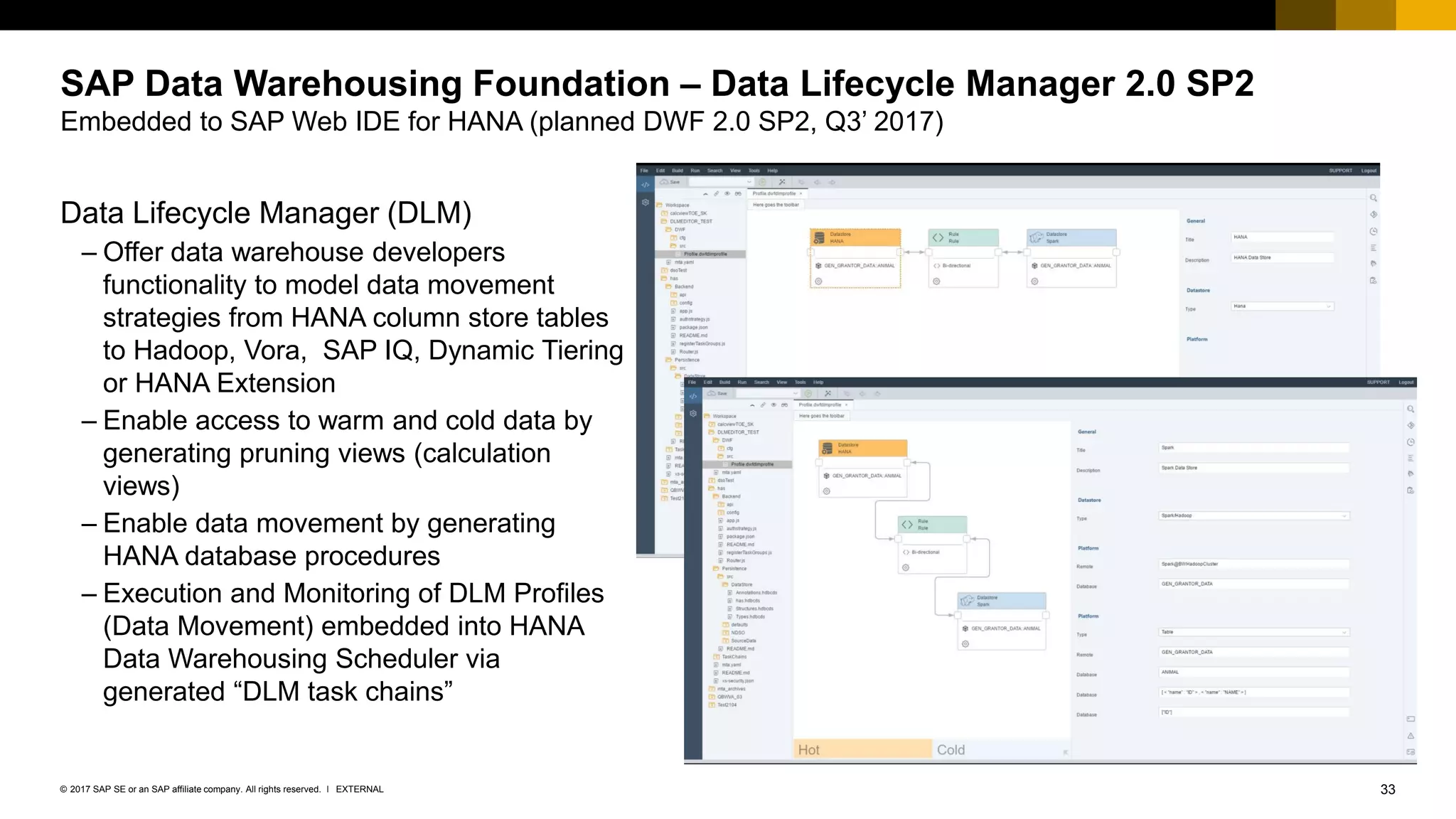
Data Lifecycle Manager (DLM)
– Offer data warehouse developers
functionality to model data movement
strategies from HANA column store tables
to Hadoop, Vora, SAP IQ, Dynamic Tiering
or HANA Extension
– Enable access to warm and cold data by
generating pruning views (calculation
views)
– Enable data movement by generating
HANA database procedures
– Execution and Monitoring of DLM Profiles
(Data Movement) embedded into HANA
Data Warehousing Scheduler via
generated “DLM task chains”
34EXTERNAL© 2017 SAP SE or an SAP affiliate company. All rights reserved. ǀ
SAP Data Warehousing Foundation – Data Warehouse Monitor (DWM)
Fiori Style Application
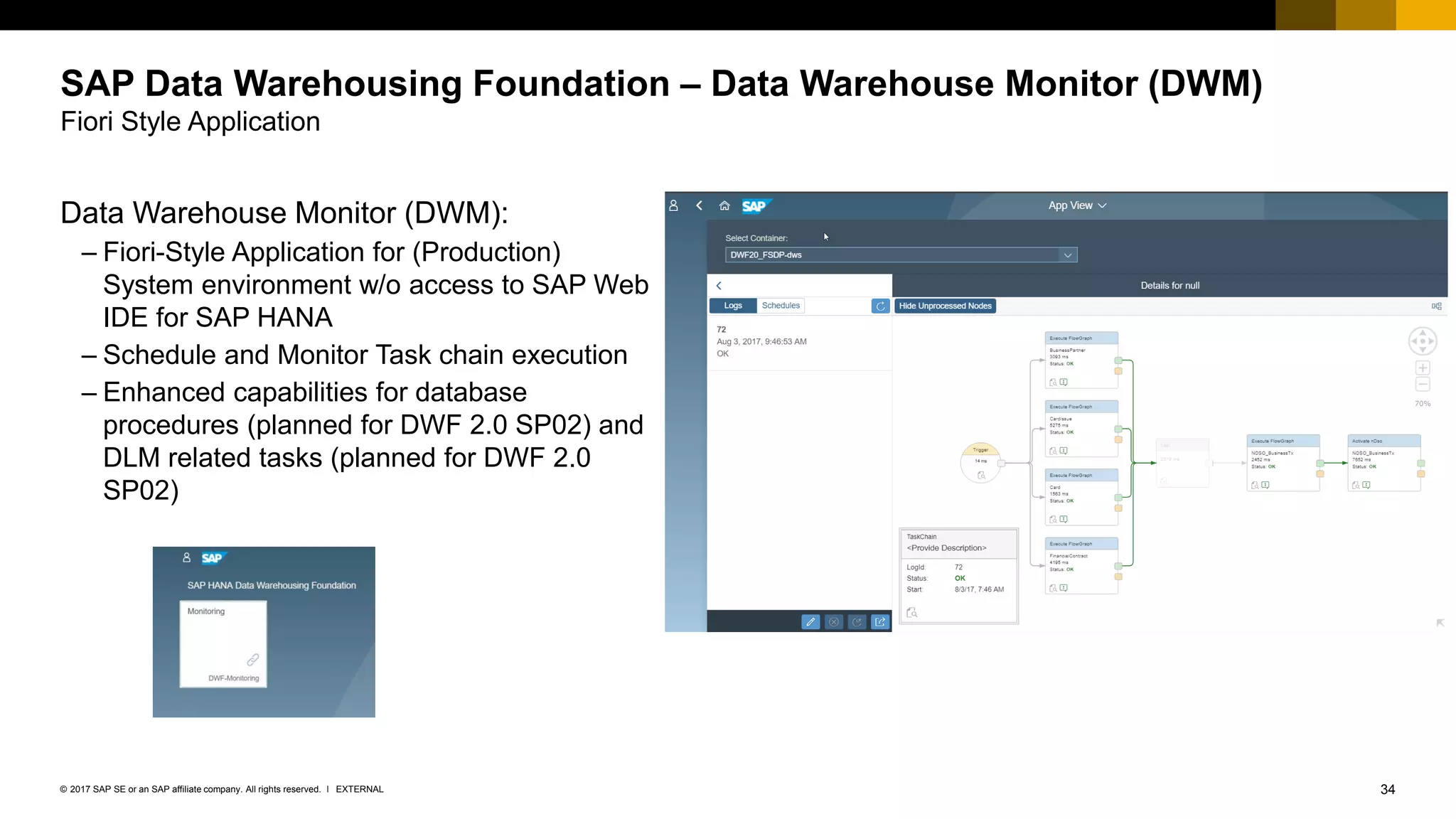
Data Warehouse Monitor (DWM):
– Fiori-Style Application for (Production)
System environment w/o access to SAP Web
IDE for SAP HANA
– Schedule and Monitor Task chain execution
– Enhanced capabilities for database
procedures (planned for DWF 2.0 SP02) and
DLM related tasks (planned for DWF 2.0
SP02)
35EXTERNAL© 2017 SAP SE or an SAP affiliate company. All rights reserved. ǀ
SAP Data Warehousing Foundation – Data Distribution Optimizer (DDO)
SAP UI5 Style Application
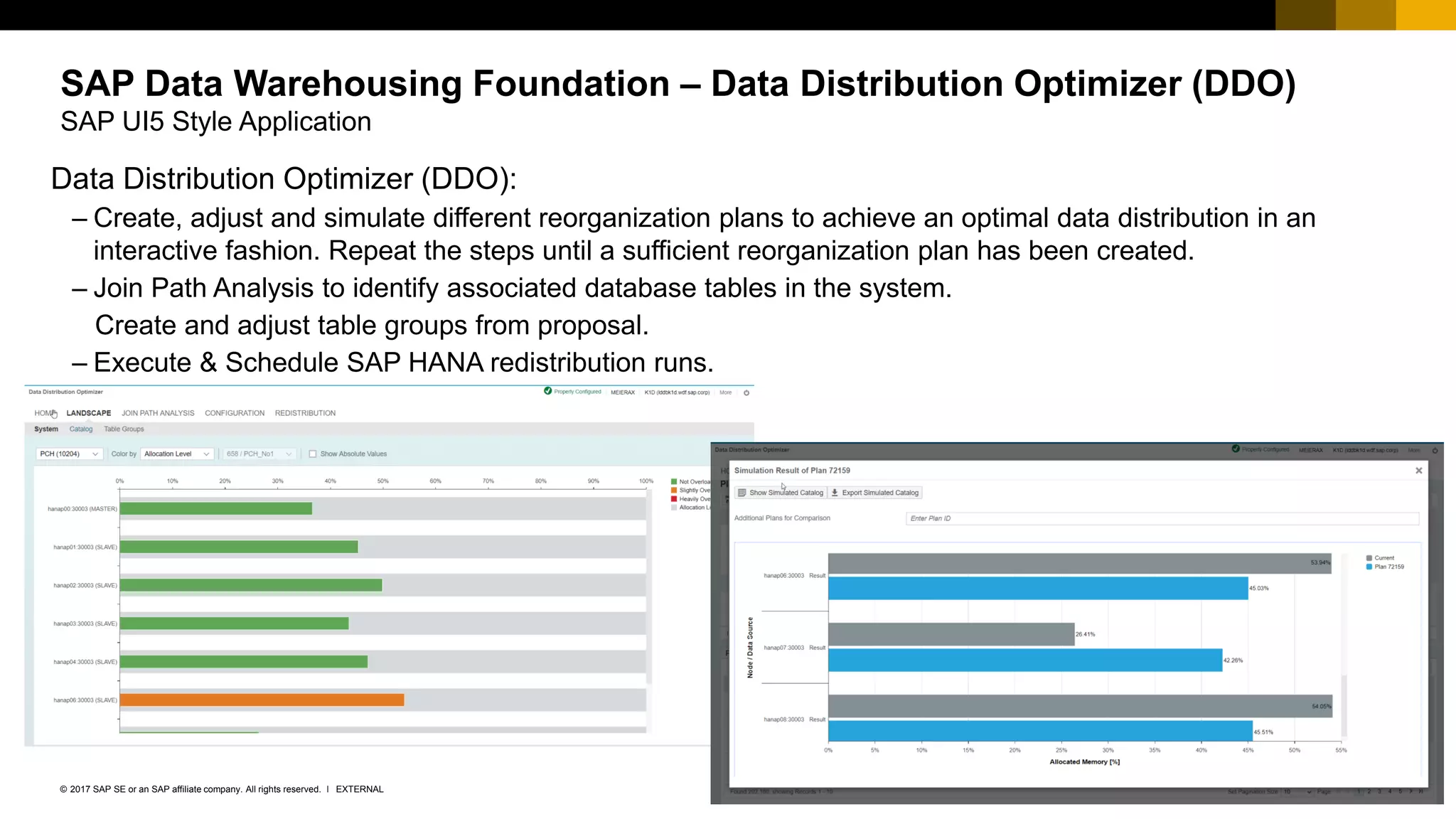
Data Distribution Optimizer (DDO):
– Create, adjust and simulate different reorganization plans to achieve an optimal data distribution in an
interactive fashion. Repeat the steps until a sufficient reorganization plan has been created.
– Join Path Analysis to identify associated database tables in the system.
Create and adjust table groups from proposal.
– Execute & Schedule SAP HANA redistribution runs.
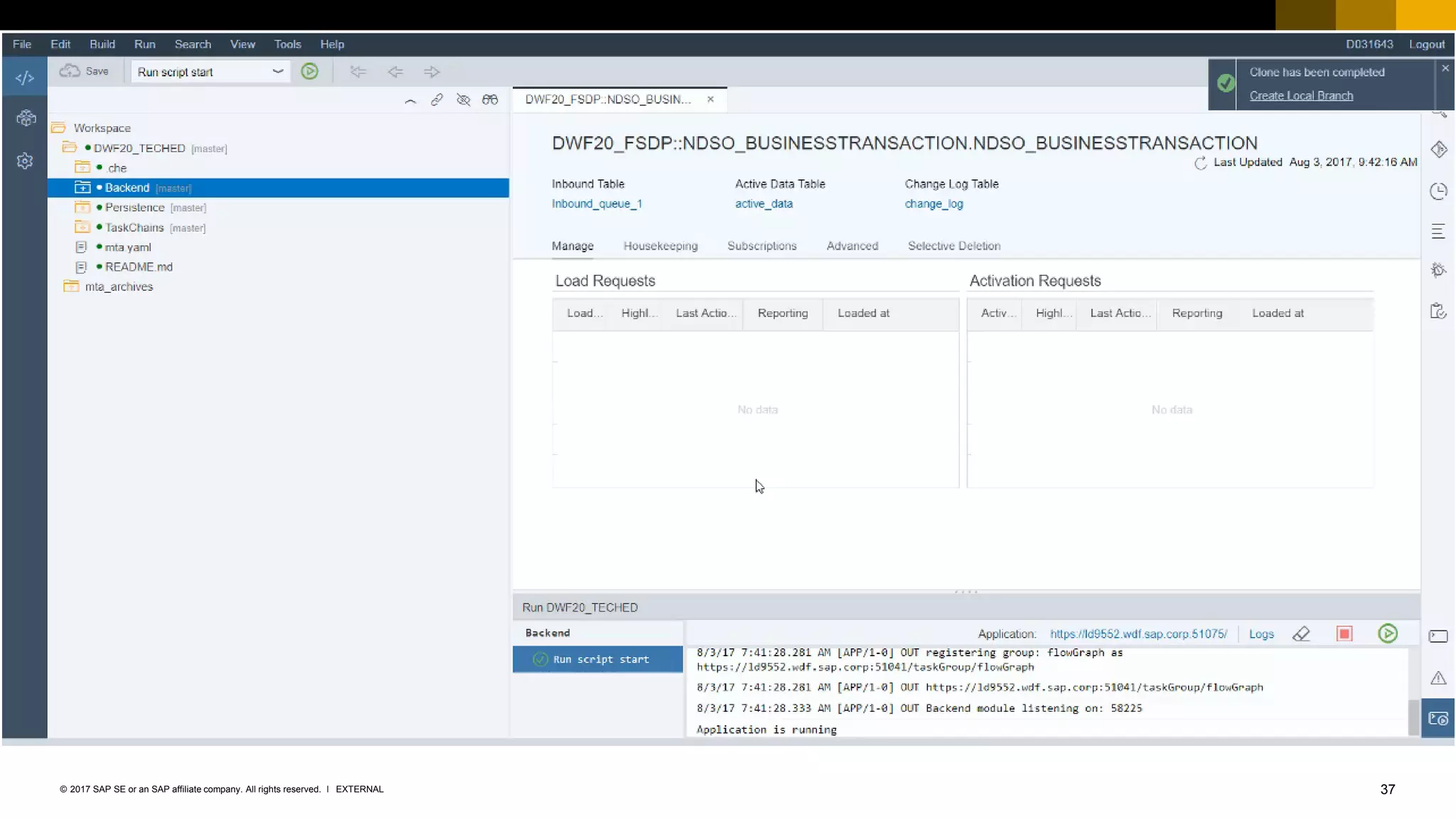
36EXTERNAL© 2017 SAP SE or an SAP affiliate company. All rights reserved. ǀ
Demo
Leverage the Data Warehousing Monitor to execute an monitor the Task Chain
37EXTERNAL© 2017 SAP SE or an SAP affiliate company. All rights reserved. ǀ
Summary
39EXTERNAL© 2017 SAP SE or an SAP affiliate company. All rights reserved. ǀ
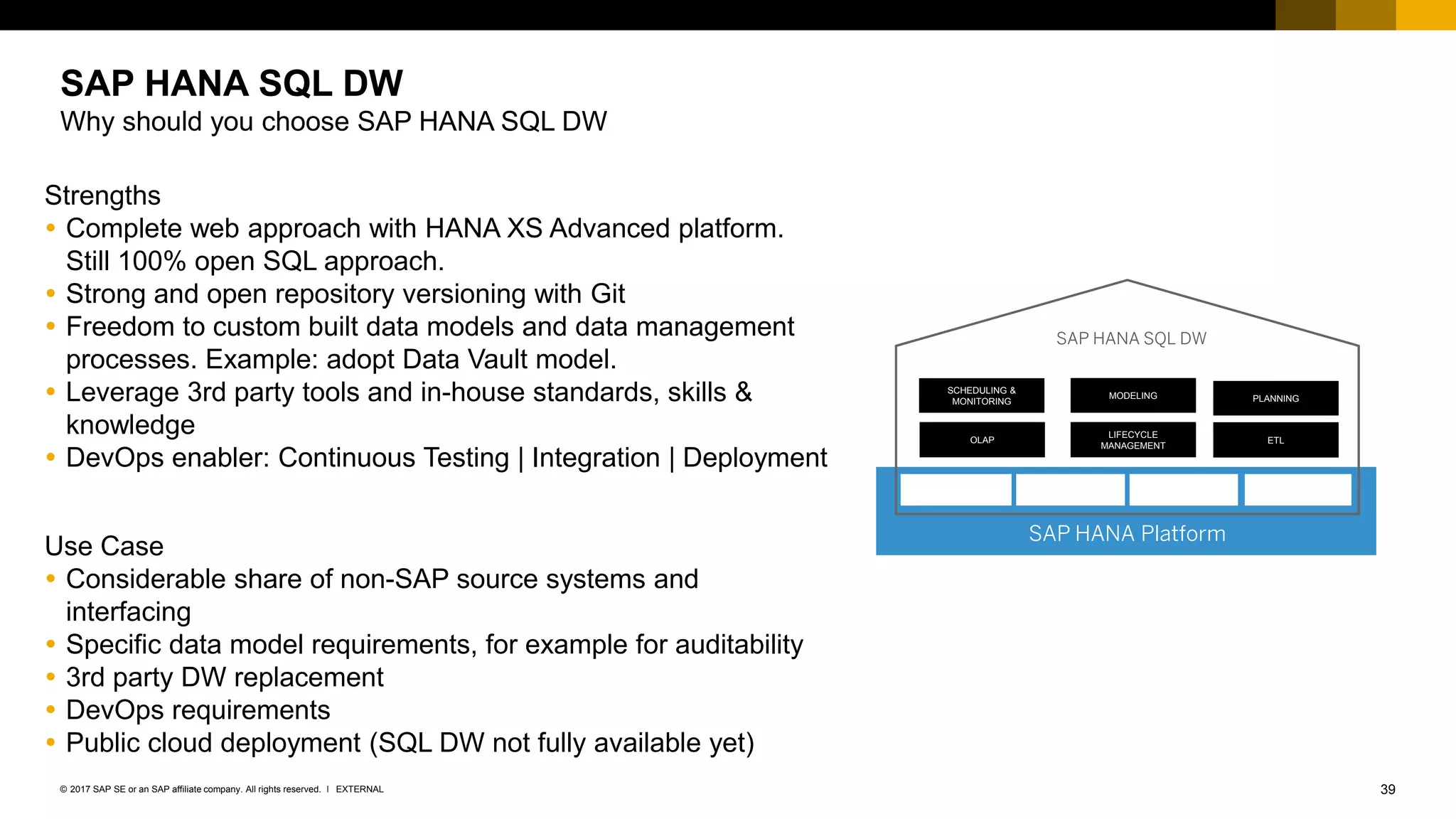
Strengths
 Complete web approach with HANA XS Advanced platform.
Still 100% open SQL approach.
 Strong and open repository versioning with Git
 Freedom to custom built data models and data management
processes. Example: adopt Data Vault model.
 Leverage 3rd party tools and in-house standards, skills &
knowledge
 DevOps enabler: Continuous Testing | Integration | Deployment
Use Case
 Considerable share of non-SAP source systems and
interfacing
 Specific data model requirements, for example for auditability
 3rd party DW replacement
 DevOps requirements
 Public cloud deployment (SQL DW not fully available yet)
SAP HANA SQL DW
Why should you choose SAP HANA SQL DW
SAP HANA Platform
SCHEDULING &
MONITORING
MODELING PLANNING
OLAP
LIFECYCLE
MANAGEMENT
ETL
SAP HANA SQL DW
Thank you.
Contact information:
Axel Meier
HANA SQL Data Warehouse Expert
ax.meier@sap.com
No part of this publication may be reproduced or transmitted in any form or for any purpose without the express permission of SAP SE or an SAP affiliate company.
The information contained herein may be changed without prior notice. Some software products marketed by SAP SE and its distributors contain proprietary software components
of other software vendors. National product specifications may vary.
These materials are provided by SAP SE or an SAP affiliate company for informational purposes only, without representation or warranty of any kind, and SAP or its affiliated
companies shall not be liable for errors or omissions with respect to the materials. The only warranties for SAP or SAP affiliate company products and services are those that are
set forth in the express warranty statements accompanying such products and services, if any. Nothing herein should be construed as constituting an additional warranty.
In particular, SAP SE or its affiliated companies have no obligation to pursue any course of business outlined in this document or any related presentation, or to develop or release
any functionality mentioned therein. This document, or any related presentation, and SAP SE’s or its affiliated companies’ strategy and possible future developments, products,
and/or platform directions and functionality are all subject to change and may be changed by SAP SE or its affiliated companies at any time for any reason without notice. The
information in this document is not a commitment, promise, or legal obligation to deliver any material, code, or functionality. All forward-looking statements are subject to various
risks and uncertainties that could cause actual results to differ materially from expectations. Readers are cautioned not to place undue reliance on these forward-looking statements,
and they should not be relied upon in making purchasing decisions.
SAP and other SAP products and services mentioned herein as well as their respective logos are trademarks or registered trademarks of SAP SE (or an SAP affiliate company)
in Germany and other countries. All other product and service names mentioned are the trademarks of their respective companies.
See http://global.sap.com/corporate-en/legal/copyright/index.epx for additional trademark information and notices.
© 2017 SAP SE or an SAP affiliate company. All rights reserved.

Build and run an sql data warehouse on sap hana

  • 1.
    EXTERNAL Build and Runan SQL Data Warehouse on SAP HANA
  • 2.
    2EXTERNAL© 2017 SAPSE or an SAP affiliate company. All rights reserved. ǀ The information in this presentation is confidential and proprietary to SAP and may not be disclosed without the permission of SAP. Except for your obligation to protect confidential information, this presentation is not subject to your license agreement or any other service or subscription agreement with SAP. SAP has no obligation to pursue any course of business outlined in this presentation or any related document, or to develop or release any functionality mentioned therein. This presentation, or any related document and SAP's strategy and possible future developments, products and or platforms directions and functionality are all subject to change and may be changed by SAP at any time for any reason without notice. The information in this presentation is not a commitment, promise or legal obligation to deliver any material, code or functionality. This presentation is provided without a warranty of any kind, either express or implied, including but not limited to, the implied warranties of merchantability, fitness for a particular purpose, or non-infringement. This presentation is for informational purposes and may not be incorporated into a contract. SAP assumes no responsibility for errors or omissions in this presentation, except if such damages were caused by SAP’s intentional or gross negligence. All forward-looking statements are subject to various risks and uncertainties that could cause actual results to differ materially from expectations. Readers are cautioned not to place undue reliance on these forward-looking statements, which speak only as of their dates, and they should not be relied upon in making purchasing decisions. Disclaimer
  • 3.
    3EXTERNAL© 2017 SAPSE or an SAP affiliate company. All rights reserved. ǀ SAP HANA Platform for Data Warehousing SAP HANA SQL DW toolset ▪ Model the SAP HANA SQL DW ▪ Develop the SAP HANA SQL DW ▪ Deploy the SAP HANA SQL DW ▪ Run the SAP HANA SQL DW Summary Agenda
  • 4.
    SAP HANA Platformfor Data Warehousing
  • 5.
    5EXTERNAL© 2017 SAPSE or an SAP affiliate company. All rights reserved. ǀ SAP HANA Platform The data management and application platform for all applications SAP, ISV and Custom Applications All Devices Database management Web server JavaScript Graphic modeler Data virtualization Extract, load, transform and replication Columnar store – Transaction and analytical processing Multicore and parallelization Advanced compression Multitenancy Multitier storage Graph Predictive Search Series data Business functions Apache Hadoop and Apache Spark integration Streaming analytics Application lifecycle management High availability and disaster recovery OpennessData modeling Administration and security Spatial Text analytics SAP Fiori® user experience(UX) Application development Data integration and qualityAdvanced analytical processing SAP HANA® Platform On premise | Cloud Data quality Remote data sync
  • 6.
    6EXTERNAL© 2017 SAPSE or an SAP affiliate company. All rights reserved. ǀ Application driven approach, SAP BW/4 HANA as premium DW application with integrated services • SAP BW/4HANA is an application offering. All data warehousing services via one integrated repository  Optional integration of additional tools for modelling, monitoring and managing the data warehouse SQL driven approach, SAP HANA with loosely coupled tools and platform services, logically combined  SQL approaches require several loosely coupled tools, usually having separate repositories  “Best of breed” approach to build your own model SAP HANA Platform: How does SAP approach Data Warehousing Two ways to run, or get the best of both SAP HANA Platform SCHEDULING & MONITORING MODELING PLANNING OLAP LIFECYCLE MANAGEMENT ETL SAP BW/4HANA SAP HANA Platform SCHEDULING & MONITORING MODELING PLANNING OLAP LIFECYCLE MANAGEMENT ETL SAP HANA SQL DW
  • 7.
    7EXTERNAL© 2017 SAPSE or an SAP affiliate company. All rights reserved. ǀ SAP HANA Platform: How does SAP approach Data Warehousing Mixed Approach for SAP HANA Data Warehousing SAP HANA Platform SAP BW approach SQL approach (extendable by third-party-tools) Mixed approach SAP HANA Data Warehouse SAP HANA Application Services SAP HANA Integration Services SAP HANA Processing Services SAP HANA Database Services SAP Business Warehouse SAP BW/4HANA SAP HANA SQL Data Warehouse
  • 8.
    8EXTERNAL© 2017 SAPSE or an SAP affiliate company. All rights reserved. ǀ How to model, develop and deploy a typical SAP HANA SQL DW application? ▪ The answer is: Use SAP Web IDE for SAP HANA in combination with the toolset around. SAP Web IDE is the new standard IDE offering, both for on premise and cloud, serving all programming model layers offered. ▪ It provides Integration with Git as the de facto versioning system standard and – by running in XSA itself – can build and run your applications using the deploy service to instantiate or update the respective services/containers of your application. SAP HANA SQL DW leverages concepts of HANA XS Advanced Development Environment - All HANA DW artefacts defined by files Deploy ServiceGit Source Repository External Tools SAP Web IDE - File based approach - In place editors Web Content DB Artifacts JavaScript Java HDI Container Tables Views App Container Web Content Code
  • 9.
    SAP HANA SQLDW toolset
  • 10.
    10EXTERNAL© 2017 SAPSE or an SAP affiliate company. All rights reserved. ǀ The SAP HANA SQL DW toolset Design Develop RunDeploy
  • 11.
    11EXTERNAL© 2017 SAPSE or an SAP affiliate company. All rights reserved. ǀ Model, Compute & Data Store Ingest Sources Consume Data Lake ETL Replication Streaming Virtual Access … 3rd-PartyAnalytics Sensor Machine … SAP Vora BI | Predictive | PlanningBusinessObjects™ SAP WebIDE For SAP HANA SAP Power Designer / SAP Enterprise Architecture Designer Git-Hub HANA SQL Data Warehouse Data process perspective of SAP defined SQL DW
  • 12.
    12EXTERNAL© 2017 SAPSE or an SAP affiliate company. All rights reserved. ǀ Model the SAP HANA SQL DW Model the objects, processes and dataflow Design Develop RunDeploy SAP Power Designer SAP Enterprise Architecture Designer
  • 13.
    13EXTERNAL© 2017 SAPSE or an SAP affiliate company. All rights reserved. ǀ SAP Enterprise Architecture Designer Edition for SAP HANA Create and integrate enterprise, landscape, process and data models to manage information and systems effectively – Business process architecture – Landscape and application architecture – Requirements management – Strategy architecture to document goals and projects – Physical data modeling & data architecture – Reverse engineering capabilities – Lineage & Impact analysis Design Implementation Strategy TechnologyBusiness Process Data Landscape Requirements
  • 14.
    14EXTERNAL© 2017 SAPSE or an SAP affiliate company. All rights reserved. ǀ ▪ Reverse-Engineering capabilities ▪ Impact Analysis, Model Comparison ▪ Generate EAD model objects in HANA HDI compatible file format o Table & View o Data Movement Model (Flowgraph) o Native DataStore Object (NDSO) o Virtual table definition o HANA CDS Association ▪ Storage of generated HANA HDI compatible files to o Local ZIP-File (SAP Web IDE - Import) o Git Repository (SAP Web IDE - Git Integration) SAP Enterprise Architecture Designer Specifics for SAP HANA
  • 15.
    15EXTERNAL© 2017 SAPSE or an SAP affiliate company. All rights reserved. ǀ Demo Modeling the Data Warehouse with SAP Enterprise Architecture Designer (EAD)
  • 16.
    16EXTERNAL© 2017 SAPSE or an SAP affiliate company. All rights reserved. ǀ
  • 17.
    17EXTERNAL© 2017 SAPSE or an SAP affiliate company. All rights reserved. ǀ Develop the SAP HANA SQL DW One environment to develop all artefacts Design Develop RunDeploy SAP Web IDE for HANA Develop the entire DW model from your browser Major extensions for DW functions (Flowgraphs, NDSO, DLM, Taskchains)
  • 18.
    18EXTERNAL© 2017 SAPSE or an SAP affiliate company. All rights reserved. ǀ SAP Web IDE for SAP HANA ▪ SAP Web IDE for SAP HANA is the successor to SAP HANA web development workbench and the development perspectives of SAP HANA studio. ▪ It offers – Development of SAP HANA content and models – UI development with SAPUI5 – Development of polyglot applications – Node.js, Java or XSJS business code – Git integration ▪ It is – Browser based – Installed as a SAP HANA XSA application
  • 19.
    19EXTERNAL© 2017 SAPSE or an SAP affiliate company. All rights reserved. ǀ SAP Web IDE for SAP HANA Calculation Views & Flowgraphs
  • 20.
    20EXTERNAL© 2017 SAPSE or an SAP affiliate company. All rights reserved. ǀ SAP Web IDE for SAP HANA Native DataStore Objects & Taskchains
  • 21.
    21EXTERNAL© 2017 SAPSE or an SAP affiliate company. All rights reserved. ǀ SAP Data Warehousing Foundation - NDSO Embedded in SAP Web IDE for SAP HANA - Fundamentals Native DataStoreObject – Provide a central persistence object with additional semantics to determine deltas – Move, aggregate and delta data load containing deleted records – Provide interoperability between HANA native Data Warehouses and BW/4HANA – Embedded into SAP Web IDE for SAP HANA using HANA CDS as metadata description language – Integrated with HANA SDI flowgraph
  • 22.
    22EXTERNAL© 2017 SAPSE or an SAP affiliate company. All rights reserved. ǀ Developer and feature isolation Export of Objects from local project workspaces. Manual activity to manage and resolve conflicts. • In SAP HANA XS Advanced, all developers work in their isolated workspace. • Each developer also works with an isolated runtime. HANA XS Advanced automatically creates a runtime container for each developer. • All developed objects are stored in separate project workspaces. Manual activity required to manage and resolve the conflicts. Export of Objects from local project workspace. Manual activity required to manage and resolve the conflicts from the different project workspace.
  • 23.
    23EXTERNAL© 2017 SAPSE or an SAP affiliate company. All rights reserved. ǀ Developer and feature isolation GIT to manage and resolve conflicts from parallel project workspace objects. • In SAP HANA XS Advanced, all developers work in their isolated workspace. • Each developer also works with an isolated runtime. HANA XS Advanced automatically creates a runtime container for each developer. • All developed objects are stored in a shared repository: GIT, which keeps a full version history, and uses branching to support isolated feature development. GIT repository (continuous) Testing Deployment
  • 24.
    24EXTERNAL© 2017 SAPSE or an SAP affiliate company. All rights reserved. ǀ Versioning, branching and development with GIT Working in parallel on different repository versions User story 1 User story 2 Master Time
  • 25.
    25EXTERNAL© 2017 SAPSE or an SAP affiliate company. All rights reserved. ǀ Demo Clone, Edit and Build the Data Warehouse Artefacts using SAP Web IDE for SAP HANA
  • 26.
    26EXTERNAL© 2017 SAPSE or an SAP affiliate company. All rights reserved. ǀ
  • 27.
    27EXTERNAL© 2017 SAPSE or an SAP affiliate company. All rights reserved. ǀ Deploy the SAP HANA SQL DW Transport Models, Objects and Option for Integration testing Design Develop RunDeploy Open Source deployment Bring your own tools: Jenkins, XL release, etc. SAP Application Lifecycle Manager SAP HANA Product Installer HALM XSA integrates with HANA Application Lifecycle Manager (HALM for XSA) to manage change and transport of content
  • 28.
    28EXTERNAL© 2017 SAPSE or an SAP affiliate company. All rights reserved. ǀ Deployment option: Continuous Testing, Integration, Deployment Continuous Integration (CI) Server Daily Builds SIT/UAT Prod DeployDeploy Assemble & Deploy Regression Deploy Test++ Production Continuous Testing | Integration | Deployment SAP Web IDE for SAP HANA
  • 29.
    29EXTERNAL© 2017 SAPSE or an SAP affiliate company. All rights reserved. ǀ Agile Software Development in a typical Data Warehousing Scenario
  • 30.
    30EXTERNAL© 2017 SAPSE or an SAP affiliate company. All rights reserved. ǀ Run the SAP HANA SQL DW Integrated Data Warehouse Processes Design Develop RunDeploy Data Warehousing Foundation Data Warehousing Scheduler Data Lifecycle Manager Data Warehousing Monitor Data Distribution Optimizer
  • 31.
    31EXTERNAL© 2017 SAPSE or an SAP affiliate company. All rights reserved. ǀ SAP Data Warehousing Foundation – Data Warehouse Scheduler (DWS) Embedded to SAP Web IDE for HANA TaskChain Editor: – provide a framework to define task chains as a sequences of single tasks – Flexible start conditions – Parallelization and Dependency Handling – Provide capability to model dependencies for flowgraphs, NDSO related tasks – Enhanced capabilities for project local database procedures (planned for DWF 2.0 SP02) and DLM related tasks (planned for DWF 2.0 SP02)
  • 32.
    32EXTERNAL© 2017 SAPSE or an SAP affiliate company. All rights reserved. ǀ SAP HANA Data Warehousing Foundation Data Lifecycle Manager (DLM) * * restricted availablilty with DWF >= 2.0 SP02
  • 33.
    33EXTERNAL© 2017 SAPSE or an SAP affiliate company. All rights reserved. ǀ SAP Data Warehousing Foundation – Data Lifecycle Manager 2.0 SP2 Embedded to SAP Web IDE for HANA (planned DWF 2.0 SP2, Q3’ 2017) Data Lifecycle Manager (DLM) – Offer data warehouse developers functionality to model data movement strategies from HANA column store tables to Hadoop, Vora, SAP IQ, Dynamic Tiering or HANA Extension – Enable access to warm and cold data by generating pruning views (calculation views) – Enable data movement by generating HANA database procedures – Execution and Monitoring of DLM Profiles (Data Movement) embedded into HANA Data Warehousing Scheduler via generated “DLM task chains”
  • 34.
    34EXTERNAL© 2017 SAPSE or an SAP affiliate company. All rights reserved. ǀ SAP Data Warehousing Foundation – Data Warehouse Monitor (DWM) Fiori Style Application Data Warehouse Monitor (DWM): – Fiori-Style Application for (Production) System environment w/o access to SAP Web IDE for SAP HANA – Schedule and Monitor Task chain execution – Enhanced capabilities for database procedures (planned for DWF 2.0 SP02) and DLM related tasks (planned for DWF 2.0 SP02)
  • 35.
    35EXTERNAL© 2017 SAPSE or an SAP affiliate company. All rights reserved. ǀ SAP Data Warehousing Foundation – Data Distribution Optimizer (DDO) SAP UI5 Style Application Data Distribution Optimizer (DDO): – Create, adjust and simulate different reorganization plans to achieve an optimal data distribution in an interactive fashion. Repeat the steps until a sufficient reorganization plan has been created. – Join Path Analysis to identify associated database tables in the system. Create and adjust table groups from proposal. – Execute & Schedule SAP HANA redistribution runs.
  • 36.
    36EXTERNAL© 2017 SAPSE or an SAP affiliate company. All rights reserved. ǀ Demo Leverage the Data Warehousing Monitor to execute an monitor the Task Chain
  • 37.
    37EXTERNAL© 2017 SAPSE or an SAP affiliate company. All rights reserved. ǀ
  • 38.
  • 39.
    39EXTERNAL© 2017 SAPSE or an SAP affiliate company. All rights reserved. ǀ Strengths  Complete web approach with HANA XS Advanced platform. Still 100% open SQL approach.  Strong and open repository versioning with Git  Freedom to custom built data models and data management processes. Example: adopt Data Vault model.  Leverage 3rd party tools and in-house standards, skills & knowledge  DevOps enabler: Continuous Testing | Integration | Deployment Use Case  Considerable share of non-SAP source systems and interfacing  Specific data model requirements, for example for auditability  3rd party DW replacement  DevOps requirements  Public cloud deployment (SQL DW not fully available yet) SAP HANA SQL DW Why should you choose SAP HANA SQL DW SAP HANA Platform SCHEDULING & MONITORING MODELING PLANNING OLAP LIFECYCLE MANAGEMENT ETL SAP HANA SQL DW
  • 40.
    Thank you. Contact information: AxelMeier HANA SQL Data Warehouse Expert ax.meier@sap.com
  • 41.
    No part ofthis publication may be reproduced or transmitted in any form or for any purpose without the express permission of SAP SE or an SAP affiliate company. The information contained herein may be changed without prior notice. Some software products marketed by SAP SE and its distributors contain proprietary software components of other software vendors. National product specifications may vary. These materials are provided by SAP SE or an SAP affiliate company for informational purposes only, without representation or warranty of any kind, and SAP or its affiliated companies shall not be liable for errors or omissions with respect to the materials. The only warranties for SAP or SAP affiliate company products and services are those that are set forth in the express warranty statements accompanying such products and services, if any. Nothing herein should be construed as constituting an additional warranty. In particular, SAP SE or its affiliated companies have no obligation to pursue any course of business outlined in this document or any related presentation, or to develop or release any functionality mentioned therein. This document, or any related presentation, and SAP SE’s or its affiliated companies’ strategy and possible future developments, products, and/or platform directions and functionality are all subject to change and may be changed by SAP SE or its affiliated companies at any time for any reason without notice. The information in this document is not a commitment, promise, or legal obligation to deliver any material, code, or functionality. All forward-looking statements are subject to various risks and uncertainties that could cause actual results to differ materially from expectations. Readers are cautioned not to place undue reliance on these forward-looking statements, and they should not be relied upon in making purchasing decisions. SAP and other SAP products and services mentioned herein as well as their respective logos are trademarks or registered trademarks of SAP SE (or an SAP affiliate company) in Germany and other countries. All other product and service names mentioned are the trademarks of their respective companies. See http://global.sap.com/corporate-en/legal/copyright/index.epx for additional trademark information and notices. © 2017 SAP SE or an SAP affiliate company. All rights reserved.