OSS Meetup
11 Feb 2020
Tools for Data Scientists
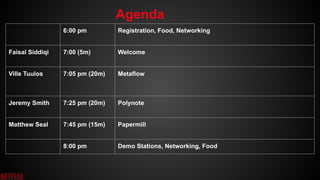
6:00 pm Registration, Food, Networking
Faisal Siddiqi 7:00 (5m) Welcome
Ville Tuulos 7:05 pm (20m) Metaflow
Jeremy Smith 7:25 pm (20m) Polynote
Matthew Seal 7:45 pm (15m) Papermill
8:00 pm Demo Stations, Networking, Food
Agenda
data scientist
productivity
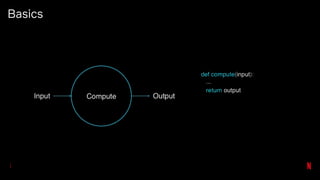
Basics
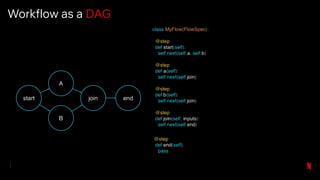
Workflow as a DAG
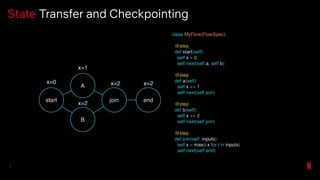
State Transfer and Checkpointing
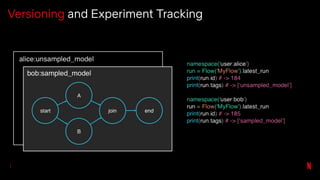
Versioning and Experiment Tracking
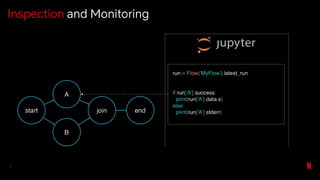
Inspection and Monitoring
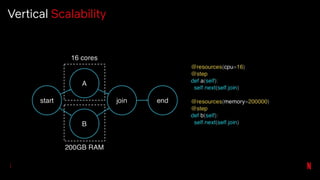
Vertical Scalability
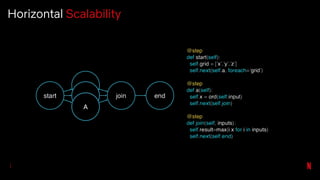
Horizontal Scalability
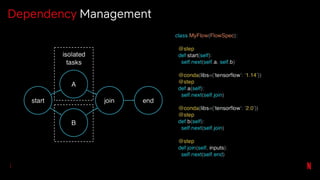
Dependency Management
...and much more!
See metaflow.org for details
Metaflow @
Google
polynote.org
Polynote is a polyglot notebook environment,
built from scratch.
Polynote is a polyglot notebook environment,
built from scratch.
It supports mixing Scala, Python, SQL, and
Vega in a single notebook.
Polynote is a polyglot notebook environment,
built from scratch.
It supports mixing Scala, Python, SQL, and
Vega in a single notebook.
Data is shared seamlessly* between
languages.
Why did we build it?
Scientists were avoiding Scala notebooks for
experimentation.
Why did we build it?
Scientists were avoiding Scala notebooks for
experimentation.
It was just a pain to use Scala and Spark in a
notebook.
Scala + Spark pain points
● Interactive autocomplete is practically a
necessity
● Difficult to find compiler errors
● Dependencies are many and varied
● Spark clashes with dependencies –
constantly building shaded JARs
What's different about
Polynote?
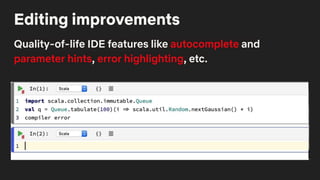
Editing improvements
Quality-of-life IDE features like autocomplete and
parameter hints, error highlighting, etc.
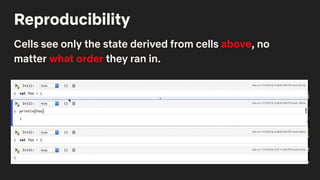
Reproducibility
Cells see only the state derived from cells above, no
matter what order they ran in.
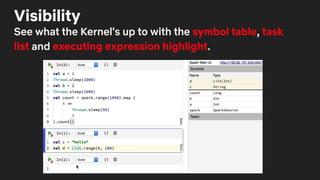
Visibility
See what the Kernel's up to with the symbol table, task
list and executing expression highlight.
Data Visualization
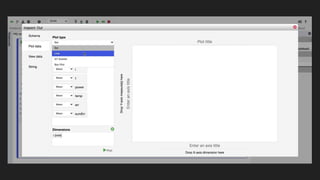
Use the built-in Data Inspector to browse tabular data
and inspect schema. Plot data with the plot editor, or use
Vega or matplotlib directly.
Polyglot
Scala cells and Python cells together in one notebook.
Variables from each language are available to the other.
Polyglot
Scala cells and Python cells together in one notebook.
Variables from each language are available to the other.
Example use case: data prep in Scala+Spark, model
training in Python with TensorFlow/PyTorch/etc
Questions?
(stop by our demo station!)
Papermill
(2.0!)
Matthew Seal
Backend Engineer on the Big Data Platform
Orchestration Team @ Netflix
@codeseal
Speaker Details
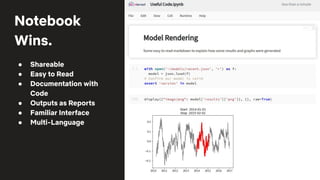
Notebook
Wins.
● Shareable
● Easy to Read
● Documentation with
Code
● Outputs as Reports
● Familiar Interface
● Multi-Language
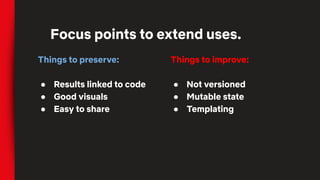
Things to preserve:
● Results linked to code
● Good visuals
● Easy to share
Focus points to extend uses.
Things to improve:
● Not versioned
● Mutable state
● Templating
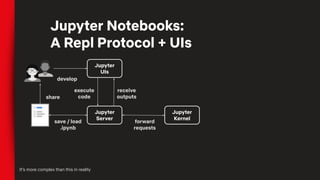
Jupyter Notebooks:
A Repl Protocol + UIs
Jupyter
UIs
Jupyter
Server
Jupyter
Kernel
execute
code
receive
outputs
forward
requests
save / load
.ipynb
It’s more complex than this in reality
develop
share
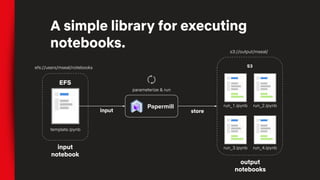
A simple library for executing
notebooks.
EFS
S3
Papermill
template.ipynb
run_1.ipynb
run_3.ipynb
output
notebooks
parameterize & run
run_2.ipynb
run_4.ipynbinput
notebook
input store
s3://output/mseal/
efs://users/mseal/notebooks
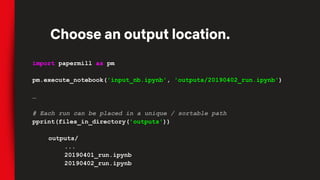
import papermill as pm
pm.execute_notebook('input_nb.ipynb', 'outputs/20190402_run.ipynb')
…
# Each run can be placed in a unique / sortable path
pprint(files_in_directory('outputs'))
outputs/
...
20190401_run.ipynb
20190402_run.ipynb
Choose an output location.
# Pass template parameters to notebook execution
pm.execute_notebook('input_nb.ipynb', 'outputs/20190402_run.ipynb',
{'region': 'ca', 'devices': ['phone', 'tablet']})
…
[2] # Default values for our potential input parameters
region = 'us'
devices = ['pc']
date_since = datetime.now() - timedelta(days=30)
[3] # Parameters
region = 'ca'
devices = ['phone', 'tablet']
Add Parameters
# Same example as last slide
pm.execute_notebook('input_nb.ipynb', 'outputs/20190402_run.ipynb',
{'region': 'ca', 'devices': ['phone', 'tablet']})
…
# Bash version of that input
papermill input_nb.ipynb outputs/20190402_run.ipynb -p region ca -y
'{"devices": ["phone", "tablet"]}'
Also Available as a CLI
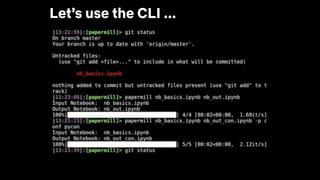
Let’s use the CLI ...
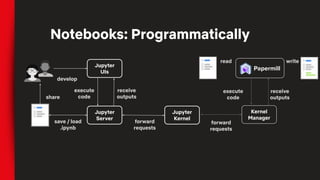
Notebooks: Programmatically
Jupyter
UIs
Jupyter
Server
Jupyter
Kernel
execute
code
receive
outputs
forward
requests
save / load
.ipynb
develop
share
Papermill
receive
outputs
Kernel
Manager
forward
requests
read write
execute
code
# To add SFTP support you’d add this class
class SFTPHandler():
def read(self, file_path):
...
def write(self, file_contents, file_path):
…
# Then add an entry_point for the handler
from setuptools import setup, find_packages
setup(
# all the usual setup arguments ...
entry_points={'papermill.io':
['sftp://=papermill_sftp:SFTPHandler']})
# Use the new prefix to read/write from that location
pm.execute_notebook('sftp://my_ftp_server.co.uk/input.ipynb',
'sftp://my_ftp_server.co.uk/output.ipynb')
Entire Library is Component Based
Failed Notebooks
A better way to review outcomes
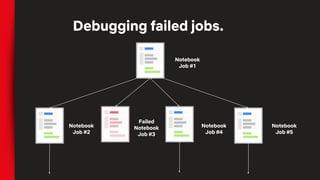
Debugging failed jobs.
Notebook
Job #1
Notebook
Job #2
Failed
Notebook
Job #3
Notebook
Job #4
Notebook
Job #5
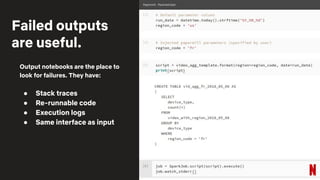
Output notebooks are the place to
look for failures. They have:
● Stack traces
● Re-runnable code
● Execution logs
● Same interface as input
Failed outputs
are useful.
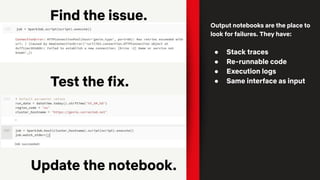
Find the issue.
Test the fix.
Update the notebook.
Output notebooks are the place to
look for failures. They have:
● Stack traces
● Re-runnable code
● Execution logs
● Same interface as input
Adds notebook isolation
● Immutable inputs
● Immutable outputs
● Parameterization of notebook runs
● Configurable sourcing / sinking
and gives better control of notebook flows via library calls.
Changes to the notebook experience.
● Platform Scheduler uses Jupyter
Notebooks for all Templates
● Notebooks used to run integration tests,
monitor systems, execute ETL, and wrap
ML flows.
Jupyter Notebooks @Netflix
Questions?
https://slack.nteract.io/
https://discourse.jupyter.org/

Season 7 Episode 1 - Tools for Data Scientists

  • 1.
    OSS Meetup 11 Feb2020 Tools for Data Scientists
  • 2.
    6:00 pm Registration,Food, Networking Faisal Siddiqi 7:00 (5m) Welcome Ville Tuulos 7:05 pm (20m) Metaflow Jeremy Smith 7:25 pm (20m) Polynote Matthew Seal 7:45 pm (15m) Papermill 8:00 pm Demo Stations, Networking, Food Agenda
  • 16.
  • 20.
  • 21.
  • 22.
    State Transfer andCheckpointing
  • 23.
  • 24.
  • 25.
  • 26.
  • 27.
  • 28.
    ...and much more! Seemetaflow.org for details
  • 29.
  • 30.
  • 31.
    Polynote is apolyglot notebook environment, built from scratch.
  • 32.
    Polynote is apolyglot notebook environment, built from scratch. It supports mixing Scala, Python, SQL, and Vega in a single notebook.
  • 33.
    Polynote is apolyglot notebook environment, built from scratch. It supports mixing Scala, Python, SQL, and Vega in a single notebook. Data is shared seamlessly* between languages.
  • 34.
    Why did webuild it? Scientists were avoiding Scala notebooks for experimentation.
  • 35.
    Why did webuild it? Scientists were avoiding Scala notebooks for experimentation. It was just a pain to use Scala and Spark in a notebook.
  • 36.
    Scala + Sparkpain points ● Interactive autocomplete is practically a necessity ● Difficult to find compiler errors ● Dependencies are many and varied ● Spark clashes with dependencies – constantly building shaded JARs
  • 37.
  • 38.
    Editing improvements Quality-of-life IDEfeatures like autocomplete and parameter hints, error highlighting, etc.
  • 39.
    Reproducibility Cells see onlythe state derived from cells above, no matter what order they ran in.
  • 40.
    Visibility See what theKernel's up to with the symbol table, task list and executing expression highlight.
  • 41.
    Data Visualization Use thebuilt-in Data Inspector to browse tabular data and inspect schema. Plot data with the plot editor, or use Vega or matplotlib directly.
  • 43.
    Polyglot Scala cells andPython cells together in one notebook. Variables from each language are available to the other.
  • 44.
    Polyglot Scala cells andPython cells together in one notebook. Variables from each language are available to the other. Example use case: data prep in Scala+Spark, model training in Python with TensorFlow/PyTorch/etc
  • 45.
  • 46.
  • 47.
    Matthew Seal Backend Engineeron the Big Data Platform Orchestration Team @ Netflix @codeseal Speaker Details
  • 48.
    Notebook Wins. ● Shareable ● Easyto Read ● Documentation with Code ● Outputs as Reports ● Familiar Interface ● Multi-Language
  • 49.
    Things to preserve: ●Results linked to code ● Good visuals ● Easy to share Focus points to extend uses. Things to improve: ● Not versioned ● Mutable state ● Templating
  • 50.
    Jupyter Notebooks: A ReplProtocol + UIs Jupyter UIs Jupyter Server Jupyter Kernel execute code receive outputs forward requests save / load .ipynb It’s more complex than this in reality develop share
  • 51.
    A simple libraryfor executing notebooks. EFS S3 Papermill template.ipynb run_1.ipynb run_3.ipynb output notebooks parameterize & run run_2.ipynb run_4.ipynbinput notebook input store s3://output/mseal/ efs://users/mseal/notebooks
  • 52.
    import papermill aspm pm.execute_notebook('input_nb.ipynb', 'outputs/20190402_run.ipynb') … # Each run can be placed in a unique / sortable path pprint(files_in_directory('outputs')) outputs/ ... 20190401_run.ipynb 20190402_run.ipynb Choose an output location.
  • 53.
    # Pass templateparameters to notebook execution pm.execute_notebook('input_nb.ipynb', 'outputs/20190402_run.ipynb', {'region': 'ca', 'devices': ['phone', 'tablet']}) … [2] # Default values for our potential input parameters region = 'us' devices = ['pc'] date_since = datetime.now() - timedelta(days=30) [3] # Parameters region = 'ca' devices = ['phone', 'tablet'] Add Parameters
  • 54.
    # Same exampleas last slide pm.execute_notebook('input_nb.ipynb', 'outputs/20190402_run.ipynb', {'region': 'ca', 'devices': ['phone', 'tablet']}) … # Bash version of that input papermill input_nb.ipynb outputs/20190402_run.ipynb -p region ca -y '{"devices": ["phone", "tablet"]}' Also Available as a CLI
  • 55.
  • 56.
    Notebooks: Programmatically Jupyter UIs Jupyter Server Jupyter Kernel execute code receive outputs forward requests save /load .ipynb develop share Papermill receive outputs Kernel Manager forward requests read write execute code
  • 57.
    # To addSFTP support you’d add this class class SFTPHandler(): def read(self, file_path): ... def write(self, file_contents, file_path): … # Then add an entry_point for the handler from setuptools import setup, find_packages setup( # all the usual setup arguments ... entry_points={'papermill.io': ['sftp://=papermill_sftp:SFTPHandler']}) # Use the new prefix to read/write from that location pm.execute_notebook('sftp://my_ftp_server.co.uk/input.ipynb', 'sftp://my_ftp_server.co.uk/output.ipynb') Entire Library is Component Based
  • 58.
    Failed Notebooks A betterway to review outcomes
  • 59.
    Debugging failed jobs. Notebook Job#1 Notebook Job #2 Failed Notebook Job #3 Notebook Job #4 Notebook Job #5
  • 60.
    Output notebooks arethe place to look for failures. They have: ● Stack traces ● Re-runnable code ● Execution logs ● Same interface as input Failed outputs are useful.
  • 61.
    Find the issue. Testthe fix. Update the notebook. Output notebooks are the place to look for failures. They have: ● Stack traces ● Re-runnable code ● Execution logs ● Same interface as input
  • 62.
    Adds notebook isolation ●Immutable inputs ● Immutable outputs ● Parameterization of notebook runs ● Configurable sourcing / sinking and gives better control of notebook flows via library calls. Changes to the notebook experience.
  • 63.
    ● Platform Scheduleruses Jupyter Notebooks for all Templates ● Notebooks used to run integration tests, monitor systems, execute ETL, and wrap ML flows. Jupyter Notebooks @Netflix
  • 64.