Adrien BLIND
Aurélien GABET
Arnaud MAZIN
© OCTO 2013

50, avenue des Champs-Elysées
75008 Paris - FRANCE

Tél : +33 (0)1 58 56 10 00
Fax : +33 (0)1 58 56 10 01
www.octo.com

1
Agenda

1

SOFTWARE MANAGEMENT IN ENTERPRISE

2

DOCKER IMPACTS

3

WORKSTATION SIDE

4

SERVER SIDE

5

TAKE AWAY

2
Software Management in enterprise IT

3
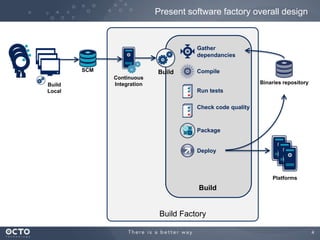
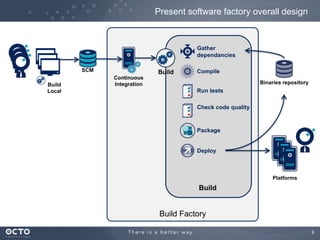
Present software factory overall design

Gather
dependancies
SCM
Build
Local

Build

Compile

Continuous
Integration

Binaries repository

Run tests
Check code quality

Package

Deploy

Platforms

Build

Build Factory
4
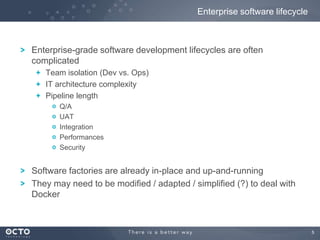
Enterprise software lifecycle

Enterprise-grade software development lifecycles are often
complicated
Team isolation (Dev vs. Ops)
IT architecture complexity
Pipeline length
Q/A
UAT
Integration
Performances
Security

Software factories are already in-place and up-and-running
They may need to be modified / adapted / simplified (?) to deal with
Docker

5
Docker impacts

6
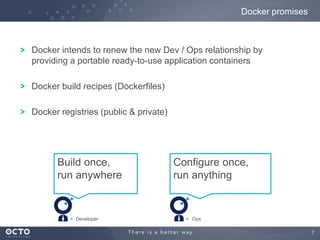
Docker promises

Docker intends to renew the new Dev / Ops relationship by
providing a portable ready-to-use application containers

Docker build recipes (Dockerfiles)
Docker registries (public & private)

Build once,
run anywhere

Developer

Configure once,
run anything

Ops
7
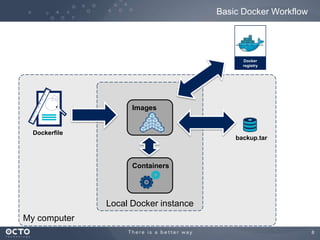
Basic Docker Workflow

Docker
registry

Images

Dockerfile

backup.tar

Containers

Local Docker instance
My computer
8
Present software factory overall design

Gather
dependancies
SCM
Build
Local

Build

Compile

Continuous
Integration

Binaries repository

Run tests
Check code quality

Package

Deploy

Platforms

Build

Build Factory
9
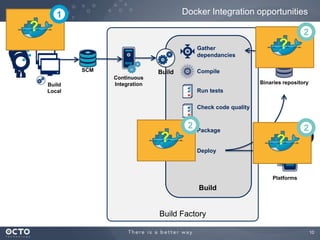
Docker Integration opportunities

1

?

2
Gather
dependancies
SCM
Build
Local

?

Compile

Build
Continuous
Integration

Binaries repository

Run tests
Check code quality

2

?

2

Package

?
Deploy

Platforms

Build

Build Factory
10
1

On the dev workstation side

11
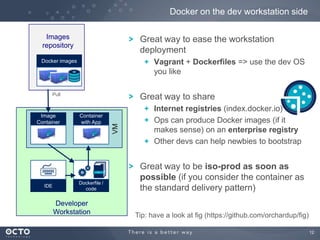
Docker on the dev workstation side
Images
repository

Great way to ease the workstation
deployment
Vagrant + Dockerfiles => use the dev OS
you like

Docker images

Pull

IDE

Container
with App

Dockerfile /
code

Developer
Workstation

VM

Image
Container

Great way to share
Internet registries (index.docker.io)
Ops can produce Docker images (if it
makes sense) on an enterprise registry
Other devs can help newbies to bootstrap

Great way to be iso-prod as soon as
possible (if you consider the container as
the standard delivery pattern)
Tip: have a look at fig (https://github.com/orchardup/fig)
12
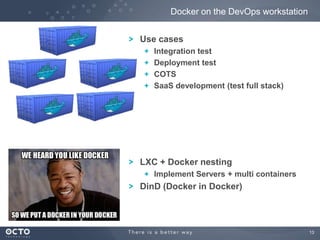
Docker on the DevOps workstation
Use cases
Integration test
Deployment test
COTS
SaaS development (test full stack)

LXC + Docker nesting
Implement Servers + multi containers

DinD (Docker in Docker)

13
2

On the server side

14
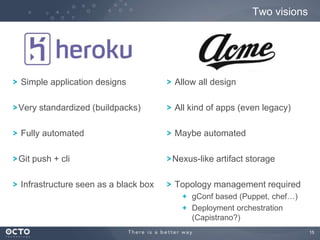
Two visions

Simple application designs

Allow all design

Very standardized (buildpacks)

All kind of apps (even legacy)

Fully automated

Maybe automated

Git push + cli

Nexus-like artifact storage

Infrastructure seen as a black box

Topology management required
gConf based (Puppet, chef…)
Deployment orchestration
(Capistrano?)
15
Heroku-like Docker implementation

16
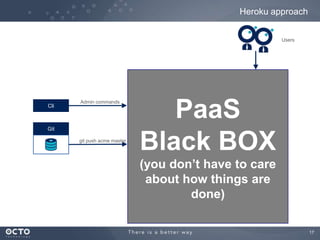
Heroku approach
Users

Cli

Admin commands

Git
git push acme master

PaaS
Black BOX
(you don’t have to care
about how things are
done)
17
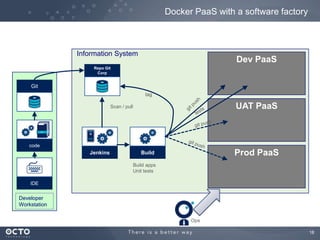
Docker PaaS with a software factory

Information System

Dev PaaS

Repo Git
Corp

Git
tag

UAT PaaS

Scan / pull

code

Jenkins

Prod PaaS

Build
Build apps
Unit tests

IDE

Developer
Workstation
Ops
18
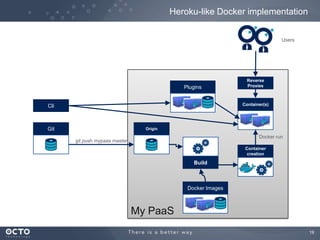
Heroku-like Docker implementation
Users

Plugins

Reverse
Proxies

Container(s)

Cli

Git

Origin

Docker run

git push mypaas master

Container
creation

Build

Docker Images

My PaaS
19
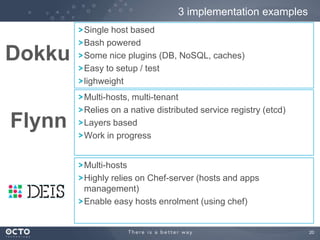
3 implementation examples

Dokku
Flynn

Single host based
Bash powered
Some nice plugins (DB, NoSQL, caches)
Easy to setup / test
lighweight
Multi-hosts, multi-tenant
Relies on a native distributed service registry (etcd)
Layers based
Work in progress
Multi-hosts
Highly relies on Chef-server (hosts and apps
management)
Enable easy hosts enrolment (using chef)

20
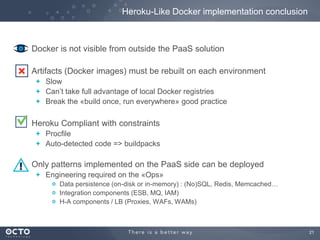
Heroku-Like Docker implementation conclusion

Docker is not visible from outside the PaaS solution
Artifacts (Docker images) must be rebuilt on each environment
Slow
Can’t take full advantage of local Docker registries
Break the «build once, run everywhere» good practice

Heroku Compliant with constraints
Procfile
Auto-detected code => buildpacks

Only patterns implemented on the PaaS side can be deployed
Engineering required on the «Ops»
Data persistence (on-disk or in-memory) : (No)SQL, Redis, Memcached…
Integration components (ESB, MQ, IAM)
H-A components / LB (Proxies, WAFs, WAMs)

21
Ad-Hoc design

22
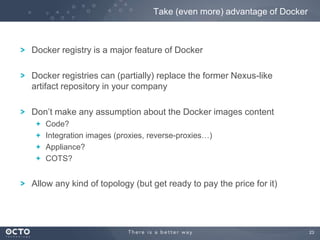
Take (even more) advantage of Docker

Docker registry is a major feature of Docker
Docker registries can (partially) replace the former Nexus-like
artifact repository in your company
Don’t make any assumption about the Docker images content
Code?
Integration images (proxies, reverse-proxies…)
Appliance?
COTS?

Allow any kind of topology (but get ready to pay the price for it)

23
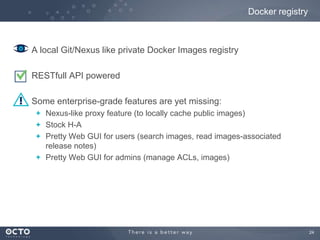
Docker registry

A local Git/Nexus like private Docker Images registry
RESTfull API powered
Some enterprise-grade features are yet missing:
Nexus-like proxy feature (to locally cache public images)
Stock H-A
Pretty Web GUI for users (search images, read images-associated
release notes)
Pretty Web GUI for admins (manage ACLs, images)

24
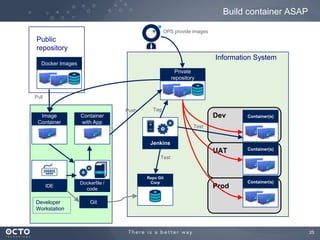
Build container ASAP
OPS provide images

Public
repository
Information System
Docker Images
Private
repository

Pull
Push

Tag

Dev

Container
with App

Container(s)

UAT

Image
Container

Container(s)

Test

Jenkins
Test

IDE

Developer
Workstation

Dockerfile /
code

Repo Git
Corp

Prod

Container(s)

Git

25
Build container ASAP - Pros / cons

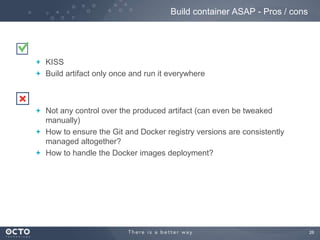
KISS
Build artifact only once and run it everywhere

Not any control over the produced artifact (can even be tweaked
manually)
How to ensure the Git and Docker registry versions are consistently
managed altogether?
How to handle the Docker images deployment?

26
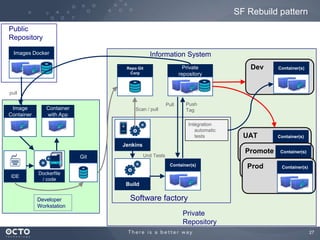
SF Rebuild pattern
Public
Repository
Images Docker

Information System
Private
repository

Repo Git
Corp

Dev

Container(s)

pull

Image
Container

Pull

Container
with App

Scan / pull

Push
Tag
Intégration
automatic
tests

UAT

Container(s)

Jenkins

Promote

Unit Tests

Git

Container(s)

IDE

Prod

Container(s)

Container(s)

Dockerfile
/ code

Build
Developer
Workstation

Software factory
Private
Repository
27
SF Rebuild pattern - pros / cons

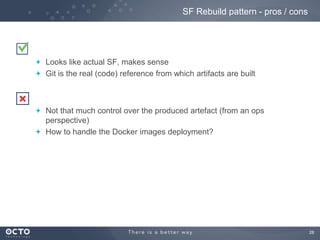
Looks like actual SF, makes sense
Git is the real (code) reference from which artifacts are built

Not that much control over the produced artefact (from an ops
perspective)
How to handle the Docker images deployment?

28
Take away

29
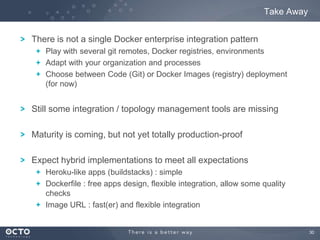
Take Away
There is not a single Docker enterprise integration pattern
Play with several git remotes, Docker registries, environments
Adapt with your organization and processes
Choose between Code (Git) or Docker Images (registry) deployment
(for now)

Still some integration / topology management tools are missing
Maturity is coming, but not yet totally production-proof
Expect hybrid implementations to meet all expectations
Heroku-like apps (buildstacks) : simple
Dockerfile : free apps design, flexible integration, allow some quality
checks
Image URL : fast(er) and flexible integration

30
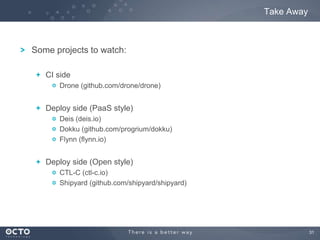
Take Away

Some projects to watch:
CI side
Drone (github.com/drone/drone)

Deploy side (PaaS style)
Deis (deis.io)
Dokku (github.com/progrium/dokku)
Flynn (flynn.io)

Deploy side (Open style)
CTL-C (ctl-c.io)
Shipyard (github.com/shipyard/shipyard)

31
32
Appendices

33
Docker Config management

34
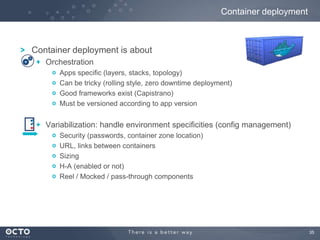
Container deployment

Container deployment is about
Orchestration
Apps specific (layers, stacks, topology)
Can be tricky (rolling style, zero downtime deployment)
Good frameworks exist (Capistrano)
Must be versioned according to app version

Variabilization: handle environment specificities (config management)
Security (passwords, container zone location)
URL, links between containers
Sizing
H-A (enabled or not)
Reel / Mocked / pass-through components

35
Config Management

Several main ways
Use of Puppet / Chef / ansible / salt (within a Docker container) can
make sense
Both at build and startup time
Watchout complexity
Agent installation
Server / master dependencies (enrolment, role assignment)
Split cookbooks between setup and run times.

Most standard way: env variables (Heroku style)
Must tweak startup scripts
some applications are not very envvar-aware

Use a service directory (zookeeper, etcd)
Must tweak startup script, in a two-phase approach
Query the directory to find dependencies
Publish the offered services once started
36
Shipyard

37
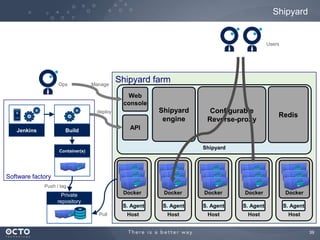
Shipyard

Simple Agent / Server Web router + console to aggregate multi-hosts view
Can handle central or local registries to get images, even Dockerfile upload

Provide a global incoming flow routing (hipache redis-based reverse-proxy), simply
point a *.acme.com DNS record to the incoming front router
Can start new containers with all needed parameters
Env variables
Links between containers
LXC limitations (CPU shares, memory)

Very young
Some stability issues
ACL / security management
H-A ?

API available (not tested yet)
Available as a Docker container (of course!)

38
Shipyard

Users

Ops

Manage

Shipyard farm
Web
console

Shipyard
engine

deploy

Jenkins

Configurable
Reverse-proxy

Redis

API

Build

Shipyard

Container(s)

Software factory
Push / tag

Docker

Pull

Docker

Docker

Docker

Docker

S. Agent

Private
repository

S. Agent

S. Agent

S. Agent

S. Agent

Host

Host

Host

Host

Host

39

Docker Meetup Paris: enterprise Docker

  • 1.
    Adrien BLIND Aurélien GABET ArnaudMAZIN © OCTO 2013 50, avenue des Champs-Elysées 75008 Paris - FRANCE Tél : +33 (0)1 58 56 10 00 Fax : +33 (0)1 58 56 10 01 www.octo.com 1
  • 2.
    Agenda 1 SOFTWARE MANAGEMENT INENTERPRISE 2 DOCKER IMPACTS 3 WORKSTATION SIDE 4 SERVER SIDE 5 TAKE AWAY 2
  • 3.
    Software Management inenterprise IT 3
  • 4.
    Present software factoryoverall design Gather dependancies SCM Build Local Build Compile Continuous Integration Binaries repository Run tests Check code quality Package Deploy Platforms Build Build Factory 4
  • 5.
    Enterprise software lifecycle Enterprise-gradesoftware development lifecycles are often complicated Team isolation (Dev vs. Ops) IT architecture complexity Pipeline length Q/A UAT Integration Performances Security Software factories are already in-place and up-and-running They may need to be modified / adapted / simplified (?) to deal with Docker 5
  • 6.
  • 7.
    Docker promises Docker intendsto renew the new Dev / Ops relationship by providing a portable ready-to-use application containers Docker build recipes (Dockerfiles) Docker registries (public & private) Build once, run anywhere Developer Configure once, run anything Ops 7
  • 8.
  • 9.
    Present software factoryoverall design Gather dependancies SCM Build Local Build Compile Continuous Integration Binaries repository Run tests Check code quality Package Deploy Platforms Build Build Factory 9
  • 10.
    Docker Integration opportunities 1 ? 2 Gather dependancies SCM Build Local ? Compile Build Continuous Integration Binariesrepository Run tests Check code quality 2 ? 2 Package ? Deploy Platforms Build Build Factory 10
  • 11.
    1 On the devworkstation side 11
  • 12.
    Docker on thedev workstation side Images repository Great way to ease the workstation deployment Vagrant + Dockerfiles => use the dev OS you like Docker images Pull IDE Container with App Dockerfile / code Developer Workstation VM Image Container Great way to share Internet registries (index.docker.io) Ops can produce Docker images (if it makes sense) on an enterprise registry Other devs can help newbies to bootstrap Great way to be iso-prod as soon as possible (if you consider the container as the standard delivery pattern) Tip: have a look at fig (https://github.com/orchardup/fig) 12
  • 13.
    Docker on theDevOps workstation Use cases Integration test Deployment test COTS SaaS development (test full stack) LXC + Docker nesting Implement Servers + multi containers DinD (Docker in Docker) 13
  • 14.
  • 15.
    Two visions Simple applicationdesigns Allow all design Very standardized (buildpacks) All kind of apps (even legacy) Fully automated Maybe automated Git push + cli Nexus-like artifact storage Infrastructure seen as a black box Topology management required gConf based (Puppet, chef…) Deployment orchestration (Capistrano?) 15
  • 16.
  • 17.
    Heroku approach Users Cli Admin commands Git gitpush acme master PaaS Black BOX (you don’t have to care about how things are done) 17
  • 18.
    Docker PaaS witha software factory Information System Dev PaaS Repo Git Corp Git tag UAT PaaS Scan / pull code Jenkins Prod PaaS Build Build apps Unit tests IDE Developer Workstation Ops 18
  • 19.
    Heroku-like Docker implementation Users Plugins Reverse Proxies Container(s) Cli Git Origin Dockerrun git push mypaas master Container creation Build Docker Images My PaaS 19
  • 20.
    3 implementation examples Dokku Flynn Singlehost based Bash powered Some nice plugins (DB, NoSQL, caches) Easy to setup / test lighweight Multi-hosts, multi-tenant Relies on a native distributed service registry (etcd) Layers based Work in progress Multi-hosts Highly relies on Chef-server (hosts and apps management) Enable easy hosts enrolment (using chef) 20
  • 21.
    Heroku-Like Docker implementationconclusion Docker is not visible from outside the PaaS solution Artifacts (Docker images) must be rebuilt on each environment Slow Can’t take full advantage of local Docker registries Break the «build once, run everywhere» good practice Heroku Compliant with constraints Procfile Auto-detected code => buildpacks Only patterns implemented on the PaaS side can be deployed Engineering required on the «Ops» Data persistence (on-disk or in-memory) : (No)SQL, Redis, Memcached… Integration components (ESB, MQ, IAM) H-A components / LB (Proxies, WAFs, WAMs) 21
  • 22.
  • 23.
    Take (even more)advantage of Docker Docker registry is a major feature of Docker Docker registries can (partially) replace the former Nexus-like artifact repository in your company Don’t make any assumption about the Docker images content Code? Integration images (proxies, reverse-proxies…) Appliance? COTS? Allow any kind of topology (but get ready to pay the price for it) 23
  • 24.
    Docker registry A localGit/Nexus like private Docker Images registry RESTfull API powered Some enterprise-grade features are yet missing: Nexus-like proxy feature (to locally cache public images) Stock H-A Pretty Web GUI for users (search images, read images-associated release notes) Pretty Web GUI for admins (manage ACLs, images) 24
  • 25.
    Build container ASAP OPSprovide images Public repository Information System Docker Images Private repository Pull Push Tag Dev Container with App Container(s) UAT Image Container Container(s) Test Jenkins Test IDE Developer Workstation Dockerfile / code Repo Git Corp Prod Container(s) Git 25
  • 26.
    Build container ASAP- Pros / cons KISS Build artifact only once and run it everywhere Not any control over the produced artifact (can even be tweaked manually) How to ensure the Git and Docker registry versions are consistently managed altogether? How to handle the Docker images deployment? 26
  • 27.
    SF Rebuild pattern Public Repository ImagesDocker Information System Private repository Repo Git Corp Dev Container(s) pull Image Container Pull Container with App Scan / pull Push Tag Intégration automatic tests UAT Container(s) Jenkins Promote Unit Tests Git Container(s) IDE Prod Container(s) Container(s) Dockerfile / code Build Developer Workstation Software factory Private Repository 27
  • 28.
    SF Rebuild pattern- pros / cons Looks like actual SF, makes sense Git is the real (code) reference from which artifacts are built Not that much control over the produced artefact (from an ops perspective) How to handle the Docker images deployment? 28
  • 29.
  • 30.
    Take Away There isnot a single Docker enterprise integration pattern Play with several git remotes, Docker registries, environments Adapt with your organization and processes Choose between Code (Git) or Docker Images (registry) deployment (for now) Still some integration / topology management tools are missing Maturity is coming, but not yet totally production-proof Expect hybrid implementations to meet all expectations Heroku-like apps (buildstacks) : simple Dockerfile : free apps design, flexible integration, allow some quality checks Image URL : fast(er) and flexible integration 30
  • 31.
    Take Away Some projectsto watch: CI side Drone (github.com/drone/drone) Deploy side (PaaS style) Deis (deis.io) Dokku (github.com/progrium/dokku) Flynn (flynn.io) Deploy side (Open style) CTL-C (ctl-c.io) Shipyard (github.com/shipyard/shipyard) 31
  • 32.
  • 33.
  • 34.
  • 35.
    Container deployment Container deploymentis about Orchestration Apps specific (layers, stacks, topology) Can be tricky (rolling style, zero downtime deployment) Good frameworks exist (Capistrano) Must be versioned according to app version Variabilization: handle environment specificities (config management) Security (passwords, container zone location) URL, links between containers Sizing H-A (enabled or not) Reel / Mocked / pass-through components 35
  • 36.
    Config Management Several mainways Use of Puppet / Chef / ansible / salt (within a Docker container) can make sense Both at build and startup time Watchout complexity Agent installation Server / master dependencies (enrolment, role assignment) Split cookbooks between setup and run times. Most standard way: env variables (Heroku style) Must tweak startup scripts some applications are not very envvar-aware Use a service directory (zookeeper, etcd) Must tweak startup script, in a two-phase approach Query the directory to find dependencies Publish the offered services once started 36
  • 37.
  • 38.
    Shipyard Simple Agent /Server Web router + console to aggregate multi-hosts view Can handle central or local registries to get images, even Dockerfile upload Provide a global incoming flow routing (hipache redis-based reverse-proxy), simply point a *.acme.com DNS record to the incoming front router Can start new containers with all needed parameters Env variables Links between containers LXC limitations (CPU shares, memory) Very young Some stability issues ACL / security management H-A ? API available (not tested yet) Available as a Docker container (of course!) 38
  • 39.
    Shipyard Users Ops Manage Shipyard farm Web console Shipyard engine deploy Jenkins Configurable Reverse-proxy Redis API Build Shipyard Container(s) Software factory Push/ tag Docker Pull Docker Docker Docker Docker S. Agent Private repository S. Agent S. Agent S. Agent S. Agent Host Host Host Host Host 39