Gatling
Load / Stress Test Tool
Ruchi Agarwal
Knoldus Software LLP
Introduction:
- Gatling is a project that can be used as a load testing tool for analyzing and measuring the
performance of a variety of services, with a focus on web applications
- It is Scala-based, high performance load and stress test tool
- Generates graphical reports with pretty graphs to analyze test report
- Concepts behind Gatling that make it really efficient and easy-to-use:
● Asynchronous concurrency - Actor model
● Asynchronous IOs - Async HTTP Client with Netty
● Scenarios written as DSL - Scala code
Asynchronous concurrency - Actor model:
- Opposed to the "One Thread = One User" model
- Actor model consists in small entities named actors communicating via messages
(asynchronous concurrency).
- Actors are composed of:
● a Mailbox which stores all the messages received
● a Computation Unit which executes a predefined action for each received message
- This allows the Gatling engine to be more efficient and reduces drastically the number of
threads needed to run lots of users (~50 threads for 2000 users in Gatling's case).
- To use actors, Gatling rely on the Akka actor library, which is much efficient and part of the
Typesafe Stack.
Asynchronous IOs - Async HTTP Client with Netty:
- To benefit fully from the actor model, Gatling also used asynchronous IOs
- This allows actors to send a request to the tested application, and pass to the next message
they received instead of waiting for a response. This saves a lot of time.
- To send these asynchronous requests, used the Async HTTP Client library with Netty as the
underlying HTTP library
- Async HTTP Client, purpose is to easily execute HTTP requests and asynchronously
process the HTTP responses
- Netty, is an asynchronous event-driven network application framework for rapid
development of maintainable high performance protocol servers & clients
Scenarios written as DSL - Scala code:
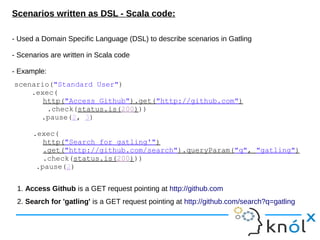
- Used a Domain Specific Language (DSL) to describe scenarios in Gatling
- Scenarios are written in Scala code
- Example:
scenario("Standard User")
.exec(
http("Access Github").get("http://github.com")
.check(status.is(200)))
.pause(2, 3)
.exec(
http("Search for gatling'")
.get("http://github.com/search").queryParam("q", "gatling")
.check(status.is(200)))
.pause(2)
1. Access Github is a GET request pointing at http://github.com
2. Search for 'gatling' is a GET request pointing at http://github.com/search?q=gatling
Simulations:
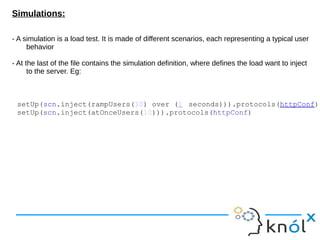
- A simulation is a load test. It is made of different scenarios, each representing a typical user
behavior
- At the last of the file contains the simulation definition, where defines the load want to inject
to the server. Eg:
setUp(scn.inject(rampUsers(10) over (1 seconds))).protocols(httpConf)
setUp(scn.inject(atOnceUsers(10))).protocols(httpConf)
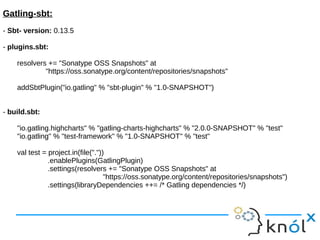
Gatling-sbt:
- Sbt- version: 0.13.5
- plugins.sbt:
resolvers += "Sonatype OSS Snapshots" at
"https://oss.sonatype.org/content/repositories/snapshots"
addSbtPlugin("io.gatling" % "sbt-plugin" % "1.0-SNAPSHOT")
- build.sbt:
"io.gatling.highcharts" % "gatling-charts-highcharts" % "2.0.0-SNAPSHOT" % "test"
"io.gatling" % "test-framework" % "1.0-SNAPSHOT" % "test"
val test = project.in(file("."))
.enablePlugins(GatlingPlugin)
.settings(resolvers += "Sonatype OSS Snapshots" at
"https://oss.sonatype.org/content/repositories/snapshots")
.settings(libraryDependencies ++= /* Gatling dependencies */)
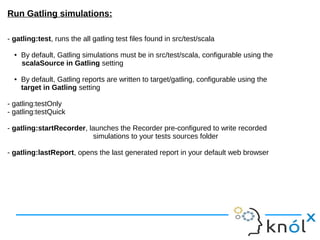
Run Gatling simulations:
- gatling:test, runs the all gatling test files found in src/test/scala
● By default, Gatling simulations must be in src/test/scala, configurable using the
scalaSource in Gatling setting
● By default, Gatling reports are written to target/gatling, configurable using the
target in Gatling setting
- gatling:testOnly
- gatling:testQuick
- gatling:startRecorder, launches the Recorder pre-configured to write recorded
simulations to your tests sources folder
- gatling:lastReport, opens the last generated report in your default web browser
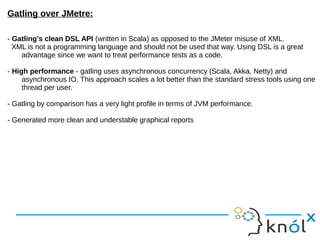
Gatling over JMetre:
- Gatling’s clean DSL API (written in Scala) as opposed to the JMeter misuse of XML.
XML is not a programming language and should not be used that way. Using DSL is a great
advantage since we want to treat performance tests as a code.
- High performance - gatling uses asynchronous concurrency (Scala, Akka, Netty) and
asynchronous IO. This approach scales a lot better than the standard stress tools using one
thread per user.
- Gatling by comparison has a very light profile in terms of JVM performance.
- Generated more clean and understable graphical reports
References:
● http://gatling-tool.org/
● https://github.com/excilys/gatling/wiki/Concepts
● https://github.com/gatling/gatling-sbt
● http://de.slideshare.net/slandelle/gatling-j-duchess-20121017-14830793
● https://github.com/excilys/gatling/wiki/First-Steps-with-Gatling
● https://blog.bluepyth.fr/gatling-stress-tool-made-efficient.html
Gatling - Stress test tool

Gatling - Stress test tool

  • 1.
    Gatling Load / StressTest Tool Ruchi Agarwal Knoldus Software LLP
  • 2.
    Introduction: - Gatling isa project that can be used as a load testing tool for analyzing and measuring the performance of a variety of services, with a focus on web applications - It is Scala-based, high performance load and stress test tool - Generates graphical reports with pretty graphs to analyze test report - Concepts behind Gatling that make it really efficient and easy-to-use: ● Asynchronous concurrency - Actor model ● Asynchronous IOs - Async HTTP Client with Netty ● Scenarios written as DSL - Scala code
  • 3.
    Asynchronous concurrency -Actor model: - Opposed to the "One Thread = One User" model - Actor model consists in small entities named actors communicating via messages (asynchronous concurrency). - Actors are composed of: ● a Mailbox which stores all the messages received ● a Computation Unit which executes a predefined action for each received message - This allows the Gatling engine to be more efficient and reduces drastically the number of threads needed to run lots of users (~50 threads for 2000 users in Gatling's case). - To use actors, Gatling rely on the Akka actor library, which is much efficient and part of the Typesafe Stack.
  • 4.
    Asynchronous IOs -Async HTTP Client with Netty: - To benefit fully from the actor model, Gatling also used asynchronous IOs - This allows actors to send a request to the tested application, and pass to the next message they received instead of waiting for a response. This saves a lot of time. - To send these asynchronous requests, used the Async HTTP Client library with Netty as the underlying HTTP library - Async HTTP Client, purpose is to easily execute HTTP requests and asynchronously process the HTTP responses - Netty, is an asynchronous event-driven network application framework for rapid development of maintainable high performance protocol servers & clients
  • 5.
    Scenarios written asDSL - Scala code: - Used a Domain Specific Language (DSL) to describe scenarios in Gatling - Scenarios are written in Scala code - Example: scenario("Standard User") .exec( http("Access Github").get("http://github.com") .check(status.is(200))) .pause(2, 3) .exec( http("Search for gatling'") .get("http://github.com/search").queryParam("q", "gatling") .check(status.is(200))) .pause(2) 1. Access Github is a GET request pointing at http://github.com 2. Search for 'gatling' is a GET request pointing at http://github.com/search?q=gatling
  • 6.
    Simulations: - A simulationis a load test. It is made of different scenarios, each representing a typical user behavior - At the last of the file contains the simulation definition, where defines the load want to inject to the server. Eg: setUp(scn.inject(rampUsers(10) over (1 seconds))).protocols(httpConf) setUp(scn.inject(atOnceUsers(10))).protocols(httpConf)
  • 7.
    Gatling-sbt: - Sbt- version:0.13.5 - plugins.sbt: resolvers += "Sonatype OSS Snapshots" at "https://oss.sonatype.org/content/repositories/snapshots" addSbtPlugin("io.gatling" % "sbt-plugin" % "1.0-SNAPSHOT") - build.sbt: "io.gatling.highcharts" % "gatling-charts-highcharts" % "2.0.0-SNAPSHOT" % "test" "io.gatling" % "test-framework" % "1.0-SNAPSHOT" % "test" val test = project.in(file(".")) .enablePlugins(GatlingPlugin) .settings(resolvers += "Sonatype OSS Snapshots" at "https://oss.sonatype.org/content/repositories/snapshots") .settings(libraryDependencies ++= /* Gatling dependencies */)
  • 8.
    Run Gatling simulations: -gatling:test, runs the all gatling test files found in src/test/scala ● By default, Gatling simulations must be in src/test/scala, configurable using the scalaSource in Gatling setting ● By default, Gatling reports are written to target/gatling, configurable using the target in Gatling setting - gatling:testOnly - gatling:testQuick - gatling:startRecorder, launches the Recorder pre-configured to write recorded simulations to your tests sources folder - gatling:lastReport, opens the last generated report in your default web browser
  • 9.
    Gatling over JMetre: -Gatling’s clean DSL API (written in Scala) as opposed to the JMeter misuse of XML. XML is not a programming language and should not be used that way. Using DSL is a great advantage since we want to treat performance tests as a code. - High performance - gatling uses asynchronous concurrency (Scala, Akka, Netty) and asynchronous IO. This approach scales a lot better than the standard stress tools using one thread per user. - Gatling by comparison has a very light profile in terms of JVM performance. - Generated more clean and understable graphical reports
  • 10.
    References: ● http://gatling-tool.org/ ● https://github.com/excilys/gatling/wiki/Concepts ●https://github.com/gatling/gatling-sbt ● http://de.slideshare.net/slandelle/gatling-j-duchess-20121017-14830793 ● https://github.com/excilys/gatling/wiki/First-Steps-with-Gatling ● https://blog.bluepyth.fr/gatling-stress-tool-made-efficient.html