Angular (Session - 2)
Nitin Bhojwani nbhojwani@vmware.com
Saket Singh sakets@vmware.com
Nikhil Gupta guptanikhil@vmware.com
Agenda
• Recap of the last talk
“Angular Workshop – 1 (Getting started with Angular)”
• Angular Component Lifecycle
• Modularizing Angular application – How to do and benefits of it
• Angular Routing – Routing in UI
• Hands On
• Essential Code guidelines from Angular Style Guide
Recap
Recap - Angular
• Angular helps you build modern applications for the web, mobile, or
desktop.
• Reusability
• Components( a small patch of screen) are reusable – build once use
everywhere.
• Develop Across all platforms – Desktop, Mobile and others
• Speed and Performance
• Build features quickly with simple, declarative templates
• https://angular.io/guide/architecture
Recap - Why Angular?
Single Page Application
• SPA is fast as most of the resources(HTML, CSS, JS) are only loaded
once throughout the lifespan of application.
• Data is loaded independently using REST apis
• Routing is handled in UI
• Simplified and streamlined
• More Control in UI – Less server involvement
Recap - Why Angular?
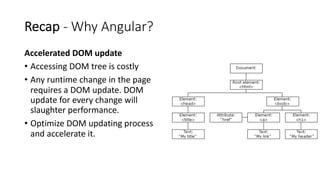
Accelerated DOM update
• Accessing DOM tree is costly
• Any runtime change in the page
requires a DOM update. DOM
update for every change will
slaughter performance.
• Optimize DOM updating process
and accelerate it.
Recap - Typescript
• .ts file extension
• JavaScript is Dynamically typed language
• Problematic in bigger projects
• TS provides static typing helps in development and preventing usual
bugs
• Superset of JavaScript
• Even JavaScript code works on Typescript.
• Object Oriented Programming
Recap - Angular Building Blocks
Component
• A component controls a patch of screen called a view.
• Presentation Logic goes here, can invoke based on user actions
• Define:
@Component({
selector: 'app-hero-list’,
templateUrl: './hero-list.component.html’,
providers: [ HeroService ] })
• Use:
<app-hero-list></app-hero-list>
• https://angular.io/guide/architecture-components
Recap - Angular Building Blocks
Service
• Includes any value, function, or feature that an app needs.
• A service is typically a class with a narrow, well-defined purpose.
• Should do something specific and do it well.
• Backend for view(Component)
• Handles functionality
Recap - Clarity Design System
• Open sourced by VMware
• UX guidelines,
HTML/CSS framework, and
Angular components
• Don’t work on view from scratch
• Reuse components provided by Clarity
• https://clarity.design/
Angular Component Lifecycle
• A component has a lifecycle managed by Angular.
• Creation
• Rendering
• Changes
• Destruction
• Makes it possible to execute code at different lifecycle events.
Lifecycle Hooks
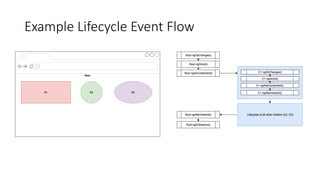
ngOnChanges():
• Called before ngOnInit() and whenever one or more data-bound
input properties change.
• Code to react on input changes goes here.
ngOnInit():
• Called once, after the first ngOnChanges()
• Code to initialize component data, set initial values goes here.
ngAfterContentInit():
• Called after Angular projects external content into the component's view. (Stuff that
goes inside "ng-content" tags)
• Pieces of HTML that can be passed from parent and projected in a child component.
Lifecycle Hooks
ngAfterViewInit():
• Triggered after the child components have been instantiated.
• Allows for interaction between parent and child components. (ViewChild is assigned a
valued here)
ngOnDestroy():
• Triggered before a component is disposed.
• Should handle closing streams and disposing off everything active.
Example Lifecycle Event Flow
Modularizing Angular Applications
Modules... What? Who?
• Logical separation of a single monolithic codebase into distinct redistributable packages.
• NgModules can contain components, service providers, and other code files.
• It can import functionality that is exported from other NgModules, and export
selected functionality for use by other NgModules.
• It is independent of the rest of the project.
• Angular has its own modularity system called NgModules.
Modularizing Angular Applications
Why Modules?
• Clean code with proper separation of concern. Each module has a set functional
responsibility.
• Easier to work with since it inherently avoids spaghetti.
• Well defined inter module interaction. Module interfaces generally remain unchanged.
• Reusable across multiple projects.
• Allows for lazy loading of code within the app.
• Each module compiles to a different JS file.
• Few parts of code might not be required at all. No reason to fetch it all at once.
• Greatly reduces the time it takes to initially load the app.
Angular Routing (Demo)
Hands On
(Hands On) Refactoring from last hands-on
• https://github.com/tech-talky/wwc-weather
• After the last hands-on, some refactoring is done:
• weather-status – new feature module
• migrate app.component.html and app.component.ts content to another
component in the new module weather-status
• Basic routing
(Hands On) Bring Code Locally
• Clone the repo and start locally
• git clone https://github.com/tech-talky/wwc-weather
• cd wwc-weather
• npm install
• ng serve –port 5000
• Let’s go through the code
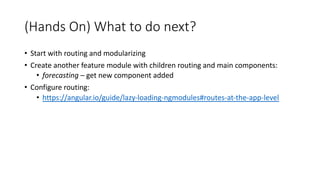
(Hands On) What to do next?
• Start with routing and modularizing
• Create another feature module with children routing and main components:
• forecasting – get new component added
• Configure routing:
• https://angular.io/guide/lazy-loading-ngmodules#routes-at-the-app-level
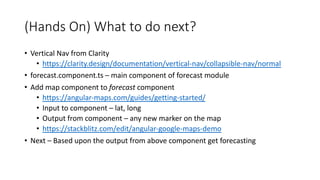
(Hands On) What to do next?
• Vertical Nav from Clarity
• https://clarity.design/documentation/vertical-nav/collapsible-nav/normal
• forecast.component.ts – main component of forecast module
• Add map component to forecast component
• https://angular-maps.com/guides/getting-started/
• Input to component – lat, long
• Output from component – any new marker on the map
• https://stackblitz.com/edit/angular-google-maps-demo
• Next – Based upon the output from above component get forecasting
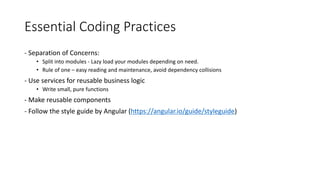
Essential Coding Practices
- Separation of Concerns:
• Split into modules - Lazy load your modules depending on need.
• Rule of one – easy reading and maintenance, avoid dependency collisions
- Use services for reusable business logic
• Write small, pure functions
- Make reusable components
- Follow the style guide by Angular (https://angular.io/guide/styleguide)

Angular meetup 2 2019-08-29

  • 1.
    Angular (Session -2) Nitin Bhojwani nbhojwani@vmware.com Saket Singh sakets@vmware.com Nikhil Gupta guptanikhil@vmware.com
  • 2.
    Agenda • Recap ofthe last talk “Angular Workshop – 1 (Getting started with Angular)” • Angular Component Lifecycle • Modularizing Angular application – How to do and benefits of it • Angular Routing – Routing in UI • Hands On • Essential Code guidelines from Angular Style Guide
  • 3.
  • 4.
    Recap - Angular •Angular helps you build modern applications for the web, mobile, or desktop. • Reusability • Components( a small patch of screen) are reusable – build once use everywhere. • Develop Across all platforms – Desktop, Mobile and others • Speed and Performance • Build features quickly with simple, declarative templates • https://angular.io/guide/architecture
  • 5.
    Recap - WhyAngular? Single Page Application • SPA is fast as most of the resources(HTML, CSS, JS) are only loaded once throughout the lifespan of application. • Data is loaded independently using REST apis • Routing is handled in UI • Simplified and streamlined • More Control in UI – Less server involvement
  • 6.
    Recap - WhyAngular? Accelerated DOM update • Accessing DOM tree is costly • Any runtime change in the page requires a DOM update. DOM update for every change will slaughter performance. • Optimize DOM updating process and accelerate it.
  • 7.
    Recap - Typescript •.ts file extension • JavaScript is Dynamically typed language • Problematic in bigger projects • TS provides static typing helps in development and preventing usual bugs • Superset of JavaScript • Even JavaScript code works on Typescript. • Object Oriented Programming
  • 8.
    Recap - AngularBuilding Blocks Component • A component controls a patch of screen called a view. • Presentation Logic goes here, can invoke based on user actions • Define: @Component({ selector: 'app-hero-list’, templateUrl: './hero-list.component.html’, providers: [ HeroService ] }) • Use: <app-hero-list></app-hero-list> • https://angular.io/guide/architecture-components
  • 9.
    Recap - AngularBuilding Blocks Service • Includes any value, function, or feature that an app needs. • A service is typically a class with a narrow, well-defined purpose. • Should do something specific and do it well. • Backend for view(Component) • Handles functionality
  • 10.
    Recap - ClarityDesign System • Open sourced by VMware • UX guidelines, HTML/CSS framework, and Angular components • Don’t work on view from scratch • Reuse components provided by Clarity • https://clarity.design/
  • 11.
  • 12.
    Angular Component Lifecycle •A component has a lifecycle managed by Angular. • Creation • Rendering • Changes • Destruction • Makes it possible to execute code at different lifecycle events.
  • 13.
    Lifecycle Hooks ngOnChanges(): • Calledbefore ngOnInit() and whenever one or more data-bound input properties change. • Code to react on input changes goes here. ngOnInit(): • Called once, after the first ngOnChanges() • Code to initialize component data, set initial values goes here. ngAfterContentInit(): • Called after Angular projects external content into the component's view. (Stuff that goes inside "ng-content" tags) • Pieces of HTML that can be passed from parent and projected in a child component.
  • 14.
    Lifecycle Hooks ngAfterViewInit(): • Triggeredafter the child components have been instantiated. • Allows for interaction between parent and child components. (ViewChild is assigned a valued here) ngOnDestroy(): • Triggered before a component is disposed. • Should handle closing streams and disposing off everything active.
  • 15.
  • 16.
    Modularizing Angular Applications Modules...What? Who? • Logical separation of a single monolithic codebase into distinct redistributable packages. • NgModules can contain components, service providers, and other code files. • It can import functionality that is exported from other NgModules, and export selected functionality for use by other NgModules. • It is independent of the rest of the project. • Angular has its own modularity system called NgModules.
  • 17.
    Modularizing Angular Applications WhyModules? • Clean code with proper separation of concern. Each module has a set functional responsibility. • Easier to work with since it inherently avoids spaghetti. • Well defined inter module interaction. Module interfaces generally remain unchanged. • Reusable across multiple projects. • Allows for lazy loading of code within the app. • Each module compiles to a different JS file. • Few parts of code might not be required at all. No reason to fetch it all at once. • Greatly reduces the time it takes to initially load the app.
  • 18.
  • 19.
  • 20.
    (Hands On) Refactoringfrom last hands-on • https://github.com/tech-talky/wwc-weather • After the last hands-on, some refactoring is done: • weather-status – new feature module • migrate app.component.html and app.component.ts content to another component in the new module weather-status • Basic routing
  • 21.
    (Hands On) BringCode Locally • Clone the repo and start locally • git clone https://github.com/tech-talky/wwc-weather • cd wwc-weather • npm install • ng serve –port 5000 • Let’s go through the code
  • 22.
    (Hands On) Whatto do next? • Start with routing and modularizing • Create another feature module with children routing and main components: • forecasting – get new component added • Configure routing: • https://angular.io/guide/lazy-loading-ngmodules#routes-at-the-app-level
  • 23.
    (Hands On) Whatto do next? • Vertical Nav from Clarity • https://clarity.design/documentation/vertical-nav/collapsible-nav/normal • forecast.component.ts – main component of forecast module • Add map component to forecast component • https://angular-maps.com/guides/getting-started/ • Input to component – lat, long • Output from component – any new marker on the map • https://stackblitz.com/edit/angular-google-maps-demo • Next – Based upon the output from above component get forecasting
  • 24.
    Essential Coding Practices -Separation of Concerns: • Split into modules - Lazy load your modules depending on need. • Rule of one – easy reading and maintenance, avoid dependency collisions - Use services for reusable business logic • Write small, pure functions - Make reusable components - Follow the style guide by Angular (https://angular.io/guide/styleguide)