1
Boost your productivity
with Scala tooling!
Meriam Lachkar
@meriamLachkar
Meriam Lachkar
@meriamLachkar
Software engineer @Scala center
Worked on:
- Scalafix
- Scala3-migrate
- Metals
- Scaladex
Open source
Education
- Metals
- Scalafix
- Scaladex
- Scala 3 migration guide
- Scala debugger
- Scala.js
- Scala native
- ...
- Functional Programming Principles in Scala
- Functional Program in Scala
- Parallel Programming
- Programming Reactive Systems
- Big data analysis with Scala and Spark
- Functional Programming in Scala Capstone
- Effective Programming in Scala
Scala
2/3
Scala
2
Scala
3
I - Tools to rewrite and lint the code
II - Tools to collaborate within the team
III - Tools to maintain code
IV - Tools to explore the ecosystem
Table of contents
Scalafmt
Rewrite and linting
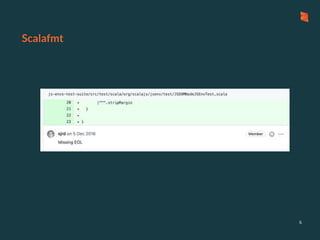
Scalafmt
6
Scalafmt: Installation
Download the script using coursier
7
> coursier bootstrap scalafmt -o scalamfmt
> bin/scalafmt
Reformatting...
100.0% [##########] 170 source files formatted
> bin/scalafmt --test
All files are formatted with scalafmt :)
Run and test Scalafmt
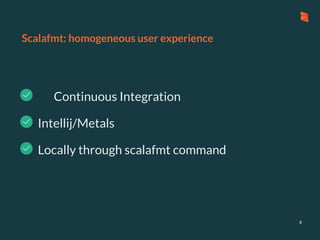
Scalafmt: homogeneous user experience
- Continuous Integration
8
- Locally through scalafmt command
- Intellij/Metals
Scalafmt: Configuration
9
//.scalafmt.conf
version = "3.0.6"
maxColumn = 120
project.git = true
10
//.scalafmt.conf
align.preset = none/some/more/most
fileOverride {
"glob:**/*.sbt" {
align.preset = most
}
}
Scalafmt: Configuration (2)
Scalafmt: Configuration - rules
11
//.scalafmt.conf
rewrite.rules = [RedundantBraces, AvoidInfix]
Scalafmt: Configuration - rules
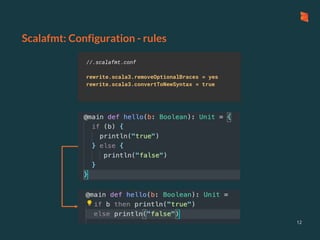
12
//.scalafmt.conf
rewrite.scala3.removeOptionalBraces = yes
rewrite.scala3.convertToNewSyntax = true
Scalafmt: Configuration
13
//.scalafmt.conf
version = "3.0.6"
maxColumn = 120
project.git = true
align.preset = none/some/more/most
fileOverride {
"glob:**/*.sbt" {
align.preset = most
}
}
rewrite.rules = [RedundantBraces, AvoidInfix]
// in scala 3
rewrite.scala3.convertToNewSyntax = true
rewrite.scala3.removeOptionalBraces = yes
Scalafix
Rewrite and linting
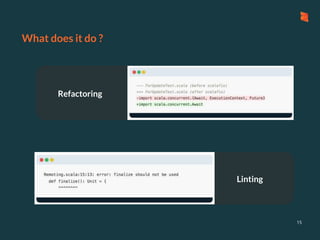
Linting
Refactoring
What does it do ?
15
Scalafix: Installation
16
// project/plugins.sbt
addSbtPlugin("ch.epfl.scala" % "sbt-scalafix" % "0.9.31")
//build.sbt
semanticdbEnabled := true, // enable SemanticDB
Install Scalafix
Run Scalafix
sbt:main> ScalafixAll
[info] Running scalafix on 1 Scala sources
[success] Total time: 0 s, completed 22 Oct 2021, 15:39:50
sbt:main> ScalafixAll --check
[info] Running scalafix on 1 Scala sources
[success] Total time: 0 s, completed 22 Oct 2021, 15:39:50
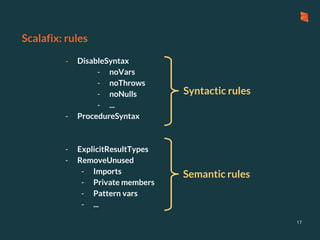
Scalafix: rules
17
- DisableSyntax
- noVars
- noThrows
- noNulls
- ...
- ProcedureSyntax
- ExplicitResultTypes
- RemoveUnused
- Imports
- Private members
- Pattern vars
- ...
Syntactic rules
Semantic rules
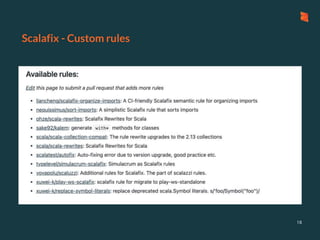
Scalafix - Custom rules
18
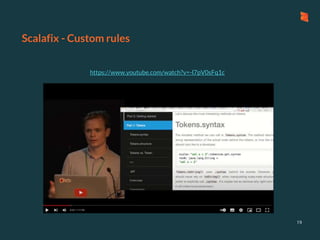
Scalafix - Custom rules
https://www.youtube.com/watch?v=-l7pV0sFq1c
19
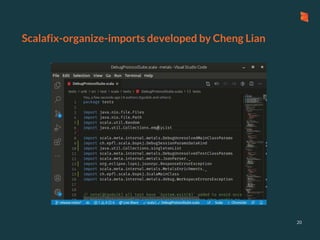
Scalafix-organize-imports developed by Cheng Lian
20
Github actions
Collaborations tools
Github actions
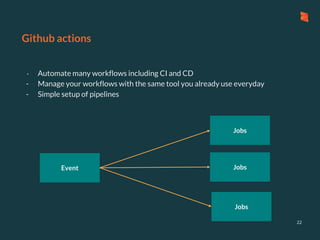
- Automate many workflows including CI and CD
- Manage your workflows with the same tool you already use everyday
- Simple setup of pipelines
22
Event
Jobs
Jobs
Jobs
Github actions: CI
23
jdk11:
name: test on jdk11
runs-on: ubuntu-latest
steps:
- uses: actions/checkout@v2
- uses: olafurpg/setup-scala@v10
with:
java-version: adopt@1.11
- run: sbt test
on:
push:
branches:
- main
Pull_request:
checks:
name: Scalafmt and Scalafix
runs-on: ubuntu-latest
steps:
- uses: actions/checkout@v2
- uses: olafurpg/setup-scala@v10
- run: sbt "scalafix --check"
- run: ./scalafmt --test
Event
Jobs
Publish a regular release when a git tag is created
Github actions: sbt-ci-release
24
Publish a snapshot version for each push on `main`
1
2
Github actions: Releases
25
name: Release
on:
push:
branches: [main]
tags: ["*"]
Event
jobs:
publish:
runs-on: ubuntu-latest
steps:
- uses: actions/checkout@v2
- uses: olafurpg/setup-scala@v13
- name: Publish ${{ github.ref }}
run: sbt ci-release
env:
PGP_PASSPHRASE: ${{secrets.PGP_PASSPHRASE}}
PGP_SECRET: ${{secrets.PGP_SECRET}}
SONATYPE_PASSWORD: ${{secrets.SONATYPE_PASSWORD}}
SONATYPE_USERNAME: ${{secrets.SONATYPE_USERNAME}}
Job
> git tag -af "v$VERSION" $COMMIT_HASH -m "v$VERSION" &&
git push -f origin v$VERSION
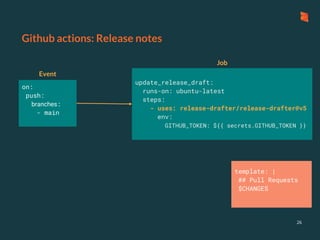
Github actions: Release notes
26
on:
push:
branches:
- main
update_release_draft:
runs-on: ubuntu-latest
steps:
- uses: release-drafter/release-drafter@v5
env:
GITHUB_TOKEN: ${{ secrets.GITHUB_TOKEN }}
template: |
## Pull Requests
$CHANGES
Event
Job
Github actions: Release notes 2
27
categories:
- title: '🚀 Features'
labels:
- 'feature'
- title: '🐛 Bug Fixes'
labels:
- 'bug'
- title: ' Maintenance'
label: 'chore'
default: patch
template: |
## What’s Changed
$CHANGES
sbt templates
Collaboration tools
sbt templates
29
> sbt new scala/scala3.g8
A template to demonstrate a minimal Scala 3 application
name [Scala 3 Project Template]: MyScalaProject
Template applied in /Users/meriamlachkar/scalacenter/myscalaproject
> coursier install giter8
> g8 scala/scala3.g8
Alternative way to use templates
sbt templates
30
> g8 scalacenter/scalafix.g8
repo [scalafix-my-rules]: scalafix-scala3-rules
scalafix_version [0.9.31]:
Template applied in /Users/meriamlachkar/scalacenter/.
> rules/main/scala/fix/YourRule.scala// simple rule
> input/ // the
input file before scalafix has run
> output/ // expected
file after scalafix has run
> tests // test
suite to launch
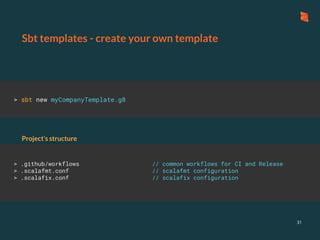
Project’s structure
Sbt templates - create your own template
31
> sbt new myCompanyTemplate.g8
> .github/workflows // common workflows for CI and Release
> .scalafmt.conf // scalafmt configuration
> .scalafix.conf // scalafix configuration
Project’s structure
Scala steward
Maintenance tools
Scala steward
33
https://github.com/scala-steward-org/scala-steward/blob/master/docs/running.md
// .scala-steward.conf
pullRequests.frequency = "0 0 1,15 * ?"
Scala steward
34
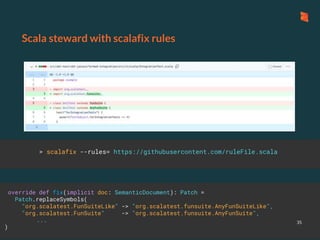
Scala steward with scalafix rules
35
override def fix(implicit doc: SemanticDocument): Patch =
Patch.replaceSymbols(
"org.scalatest.FunSuiteLike" -> "org.scalatest.funsuite.AnyFunSuiteLike",
"org.scalatest.FunSuite" -> "org.scalatest.funsuite.AnyFunSuite",
...
)
> scalafix --rules= https://githubusercontent.com/ruleFile.scala
mdoc
Maintenance tools
extensible
no dead links
Mdoc
37
Mdoc
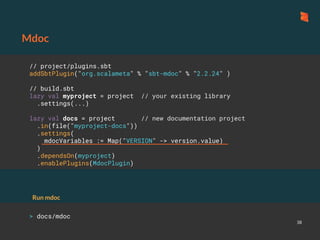
38
// project/plugins.sbt
addSbtPlugin("org.scalameta" % "sbt-mdoc" % "2.2.24" )
// build.sbt
lazy val myproject = project // your existing library
.settings(...)
lazy val docs = project // new documentation project
.in(file("myproject-docs"))
.settings(
mdocVariables := Map("VERSION" -> version.value)
)
.dependsOn(myproject)
.enablePlugins(MdocPlugin)
> docs/mdoc
Run mdoc
Mdoc: custom modifiers
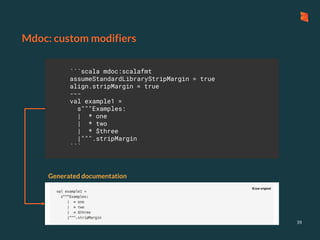
39
```scala mdoc:scalafmt
assumeStandardLibraryStripMargin = true
align.stripMargin = true
---
val example1 =
s"""Examples:
| * one
| * two
| * $three
|""".stripMargin
```
Generated documentation
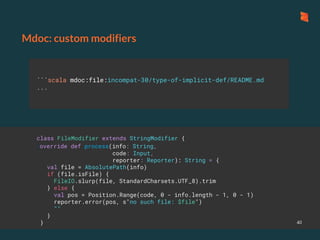
```scala mdoc:file:incompat-30/type-of-implicit-def/README.md
```
Mdoc: custom modifiers
40
class FileModifier extends StringModifier {
override def process(info: String,
code: Input,
reporter: Reporter): String = {
val file = AbsolutePath(info)
if (file.isFile) {
FileIO.slurp(file, StandardCharsets.UTF_8).trim
} else {
val pos = Position.Range(code, 0 - info.length - 1, 0 - 1)
reporter.error(pos, s"no such file: $file")
""
}
}
Mdoc: docusaurus
41
mdoc: deploy-website
42
on:
push:
branches: [main]
tags: ["*"]
Event jobs:
publish:
runs-on: ubuntu-latest
steps:
- uses: actions/checkout@v1
- uses: olafurpg/setup-scala@v13
- name: Publish ${{ github.ref }}
run: sbt docs/docusaurusPublishGhpages
env:
GITHUB_DEPLOY_KEY: ${{ secrets.DOC }}
Job
Scaladex
Explore the ecosystem
Scaladex
44
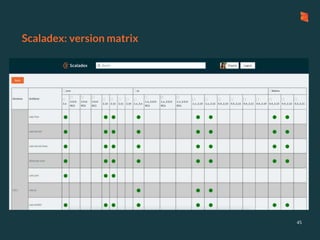
Scaladex: version matrix
45
Other tools
Other tools
- Sbt server (youtube video)
- Coursier install
- Sbt-explicit-dependencies
- Scastie
- sbt-scoverage
47
Special thanks to all maintainers
48
Thank you!

Boost your productivity with Scala tooling!

Editor's Notes

  • #6 I will present you my favourites tools in Scala. The first one is Scalafmt.
  • #7  It formats the code for you so you don’t need to think about it anymoreCode avant => code apres .. peut etre petite video ? Scalaformat provides many options that help you define your own coding style. The default configuration is already good, but if you add it to an existing project you may want to keep some the style you have already in your project. What is my configuration default ?
  • #11 But you can also use it directly in metals , qui propose de t’ajouter une configuration pour toi Intellij peut aussi utiliser scalafmt si tu as un fichier de configuration dans ton project
  • #12 But you can also use it directly in metals , qui propose de t’ajouter une configuration pour toi Intellij peut aussi utiliser scalafmt si tu as un fichier de configuration dans ton project
  • #13 But you can also use it directly in metals , qui propose de t’ajouter une configuration pour toi Intellij peut aussi utiliser scalafmt si tu as un fichier de configuration dans ton project
  • #14 But you can also use it directly in metals , qui propose de t’ajouter une configuration pour toi Intellij peut aussi utiliser scalafmt si tu as un fichier de configuration dans ton project
  • #15 I will present you my favourites tools in Scala. The first one is Scalafmt.
  • #22 I will present you my favourites tools in Scala. The first one is Scalafmt.
  • #29 I will present you my favourites tools in Scala. The first one is Scalafmt.
  • #33 I will present you my favourites tools in Scala. The first one is Scalafmt.
  • #37 I will present you my favourites tools in Scala. The first one is Scalafmt.
  • #44 I will present you my favourites tools in Scala. The first one is Scalafmt.
  • #47 I will present you my favourites tools in Scala. The first one is Scalafmt.