LoopBack4 and OASGraph
GraphQL in minutes!
By Mario Estrada
marioestradarosa@gmail.com
What is OASGraph?
Turns APIs described by OpenAPI specifications (OAS) into GraphQL
interfaces.


https://github.com/strongloop/oasgraph
What is LoopBack 4?
LoopBack 4 makes it easy to build modern applications that require
complex integrations.
• Fast, small, powerful, extensible core
• Generate real APIs with a single command
• Define your data and endpoints with OpenAPI
https://github.com/strongloop/loopback-next
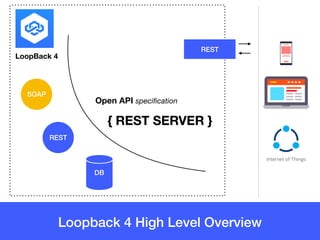
Loopback 4 High Level Overview
LoopBack 4
DB
SOAP
REST
Open API specification
{ REST SERVER }
REST
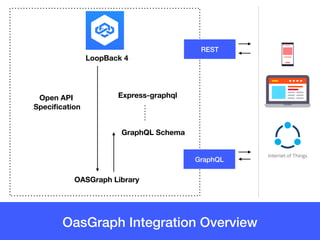
OasGraph Integration Overview
LoopBack 4
OASGraph Library
Open API

Specification
GraphQL Schema
Express-graphql
REST
GraphQL
Let’s code !
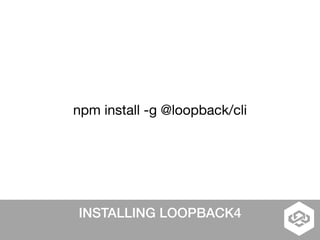
INSTALLING LOOPBACK4
npm install -g @loopback/cli
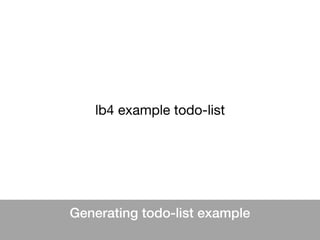
Generating todo-list example
lb4 example todo-list
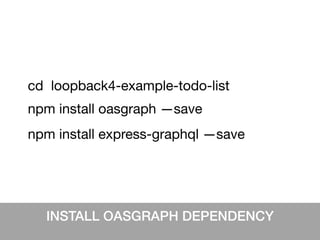
INSTALL OASGRAPH DEPENDENCY
npm install oasgraph —save
cd loopback4-example-todo-list
npm install express-graphql —save
Modify src/application.ts
options = Object.assign({}, {
rest: {
openApiSpec: {
servers: [{url:'http://localhost:3000'}],
}
}
});
Add the following code before the super(options); 

This will help OASGraph determine the URL for the resolver(s).
At runtime the OpenApi Spec parameter
OpenAPI Spec
options = Object.assign({}, {
rest: {
openApiSpec: {
servers: [{url:'http://
localhost:3000'}],
}
}
});
GraphQL Schema
"servers": [
{
"url": "http://localhost:3000/"
}
],
Resolver URL
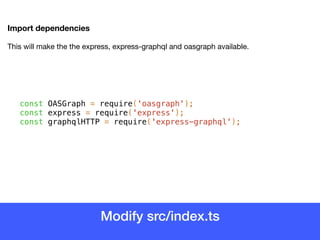
Modify src/index.ts
Import dependencies
This will make the the express, express-graphql and oasgraph available.
const OASGraph = require('oasgraph');
const express = require('express');
const graphqlHTTP = require('express-graphql');
Modify src/index.ts
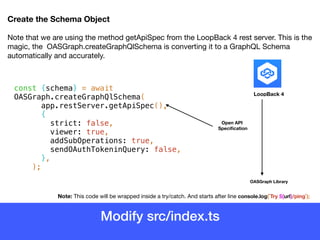
Create the Schema Object
Note that we are using the method getApiSpec from the LoopBack 4 rest server. This is the
magic, the OASGraph.createGraphQlSchema is converting it to a GraphQL Schema
automatically and accurately.
const {schema} = await
OASGraph.createGraphQlSchema(
app.restServer.getApiSpec(),
{
strict: false,
viewer: true,
addSubOperations: true,
sendOAuthTokeninQuery: false,
},
);
Note: This code will be wrapped inside a try/catch. And starts after line console.log(`Try ${url}/ping`);
LoopBack 4
OASGraph Library
Open API

Specification
Modify src/index.ts
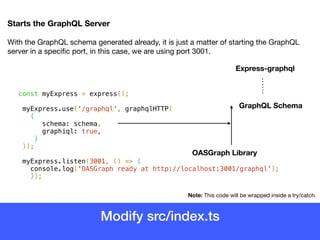
Starts the GraphQL Server
With the GraphQL schema generated already, it is just a matter of starting the GraphQL
server in a specific port, in this case, we are using port 3001.
const myExpress = express();
myExpress.use('/graphql', graphqlHTTP(
{
schema: schema,
graphiql: true,
}
));
myExpress.listen(3001, () => {
console.log('OASGraph ready at http://localhost:3001/graphql');
});
Note: This code will be wrapped inside a try/catch.
OASGraph Library
GraphQL Schema
Express-graphql
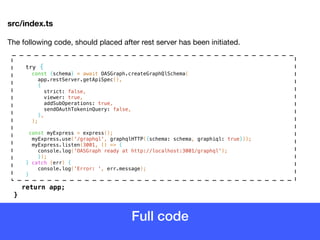
Full code
src/index.ts
The following code, should placed after rest server has been initiated.

try {
const {schema} = await OASGraph.createGraphQlSchema(
app.restServer.getApiSpec(),
{
strict: false,
viewer: true,
addSubOperations: true,
sendOAuthTokeninQuery: false,
},
);
const myExpress = express();
myExpress.use('/graphql', graphqlHTTP({schema: schema, graphiql: true}));
myExpress.listen(3001, () => {
console.log('OASGraph ready at http://localhost:3001/graphql');
});
} catch (err) {
console.log('Error: ', err.message);
}
return app;

}
Now run the application
npm start
> node .
Server is running at http://[::1]:3000
OASGraph ready at http://localhost:3001/graphql
End point for GraphQL Server
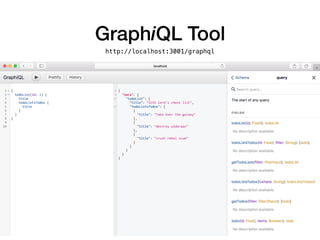
Use GraphiQL tool
Open in browser at http://localhost:3001/graphql
GraphiQL Tool
http://localhost:3001/graphql
Thank you !
Visit http://v4.loopback.io

OASGraph LoopBack 4 Integration

  • 1.
    LoopBack4 and OASGraph GraphQLin minutes! By Mario Estrada marioestradarosa@gmail.com
  • 2.
    What is OASGraph? TurnsAPIs described by OpenAPI specifications (OAS) into GraphQL interfaces.
 
 https://github.com/strongloop/oasgraph What is LoopBack 4? LoopBack 4 makes it easy to build modern applications that require complex integrations. • Fast, small, powerful, extensible core • Generate real APIs with a single command • Define your data and endpoints with OpenAPI https://github.com/strongloop/loopback-next
  • 3.
    Loopback 4 HighLevel Overview LoopBack 4 DB SOAP REST Open API specification { REST SERVER } REST
  • 4.
    OasGraph Integration Overview LoopBack4 OASGraph Library Open API
 Specification GraphQL Schema Express-graphql REST GraphQL
  • 5.
  • 6.
  • 7.
  • 8.
    INSTALL OASGRAPH DEPENDENCY npminstall oasgraph —save cd loopback4-example-todo-list npm install express-graphql —save
  • 9.
    Modify src/application.ts options =Object.assign({}, { rest: { openApiSpec: { servers: [{url:'http://localhost:3000'}], } } }); Add the following code before the super(options); This will help OASGraph determine the URL for the resolver(s).
  • 10.
    At runtime theOpenApi Spec parameter OpenAPI Spec options = Object.assign({}, { rest: { openApiSpec: { servers: [{url:'http:// localhost:3000'}], } } }); GraphQL Schema "servers": [ { "url": "http://localhost:3000/" } ], Resolver URL
  • 11.
    Modify src/index.ts Import dependencies Thiswill make the the express, express-graphql and oasgraph available. const OASGraph = require('oasgraph'); const express = require('express'); const graphqlHTTP = require('express-graphql');
  • 12.
    Modify src/index.ts Create theSchema Object Note that we are using the method getApiSpec from the LoopBack 4 rest server. This is the magic, the OASGraph.createGraphQlSchema is converting it to a GraphQL Schema automatically and accurately. const {schema} = await OASGraph.createGraphQlSchema( app.restServer.getApiSpec(), { strict: false, viewer: true, addSubOperations: true, sendOAuthTokeninQuery: false, }, ); Note: This code will be wrapped inside a try/catch. And starts after line console.log(`Try ${url}/ping`); LoopBack 4 OASGraph Library Open API
 Specification
  • 13.
    Modify src/index.ts Starts theGraphQL Server With the GraphQL schema generated already, it is just a matter of starting the GraphQL server in a specific port, in this case, we are using port 3001. const myExpress = express(); myExpress.use('/graphql', graphqlHTTP( { schema: schema, graphiql: true, } )); myExpress.listen(3001, () => { console.log('OASGraph ready at http://localhost:3001/graphql'); }); Note: This code will be wrapped inside a try/catch. OASGraph Library GraphQL Schema Express-graphql
  • 14.
    Full code src/index.ts The followingcode, should placed after rest server has been initiated. try { const {schema} = await OASGraph.createGraphQlSchema( app.restServer.getApiSpec(), { strict: false, viewer: true, addSubOperations: true, sendOAuthTokeninQuery: false, }, ); const myExpress = express(); myExpress.use('/graphql', graphqlHTTP({schema: schema, graphiql: true})); myExpress.listen(3001, () => { console.log('OASGraph ready at http://localhost:3001/graphql'); }); } catch (err) { console.log('Error: ', err.message); } return app;
 }
  • 15.
    Now run theapplication npm start > node . Server is running at http://[::1]:3000 OASGraph ready at http://localhost:3001/graphql End point for GraphQL Server
  • 16.
    Use GraphiQL tool Openin browser at http://localhost:3001/graphql
  • 17.
  • 18.
    Thank you ! Visithttp://v4.loopback.io