Content Marketing for Search
          May 3, 2012
Introduction
• About Me
   –   Director of Marketing and Product Development for GWI
   –   Telecom marketer since 1997
   –   Born in Bangor, grew up in Glenburn (BHS Class of ‘89)
   –   @trevorjones71
   –   linkedIn.com/in/trevordjones
   –   Passions: Outdoors, technology, social media, music
• About GWI
   –   Maine based since 1994, based in Biddeford
   –   Internet access, phone service, cloud computing for home and business
   –   Serving 60 communities statewide
   –   www.gwi.net
   –   @gwimaine
   –   youtube.com/gwimaine
   –   facebook.com/GWIInc

                                                                               2
Agenda

• SEO Overview
  – Emphasis on content
Keyword Research
  – How to choose keywords
  – Free and paid tools
• Taking advantage of “blended search”
  – Leveraging social media, video, and photos
Search Engine Optimization

• Activities to make your site more visible in search
• On-page
   – Meta tags, page construction
   – Keyword optimized content
       • Headers, text and photos
   – Internal linking
   – Site maps
• Off-page
   – Link-building
   – Social sharing
“Content is King, Links are Queen, Likes are the New Links”
Keywords
• What your customer types into Google to find you
• Short tail
   –   Generic, 1-2 words
   –   Generate the most traffic
   –   Highly competitive, hard to rank for
   –   Tend to be research oriented and have low conversion rates
• Long tail
   –   More specific, 3+ words
   –   Flavors, brands, features, price points, colors
   –   Geo-targeted
   –   In many cases, less competitive
   –   Generate less traffic, but higher conversion rates
   –   Usually easier to rank for
Keyword Research
• The process of identifying the keywords you want to
  optimize for
• Key factors
   – Daily searches
   – Competition
   – Conversions
• Build a Keyword List
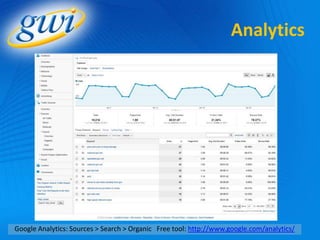
   – Analytics – where do you get traffic from today?
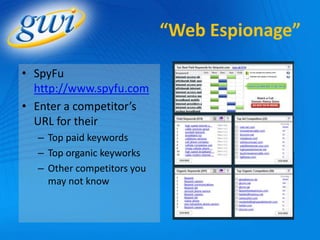
   – Espionage – where do your competitors get traffic from today?
   – Brainstorming – how many different ways can you describe
     what you sell?
   – Ad words – what are you paying money for that you could get
     free?
Analytics


Google Analytics: Sources > Search > Organic Free tool: http://www.google.com/analytics/
“Web Espionage”

• SpyFu
  http://www.spyfu.com
• Enter a competitor’s
  URL for their
  – Top paid keywords
  – Top organic keyworks
  – Other competitors you
    may not know
Brainstorm & Raid PPC
• Add every keyword
  combination you can
  think of to your list.
   – Ask friends.
   – Use a Thesaurus
• What are you paying for
  with AdWords?
   – Savings opportunities.
   – Better results.
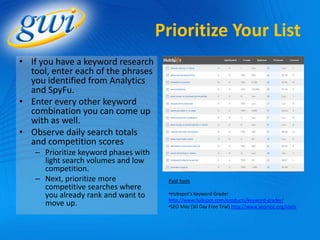
Prioritize Your List
• If you have a keyword research
  tool, enter each of the phrases
  you identified from Analytics
  and SpyFu.
• Enter every other keyword
  combination you can come up
  with as well.
• Observe daily search totals
  and competition scores
   – Prioritize keyword phases with
     light search volumes and low
     competition.
   – Next, prioritize more             Paid Tools
     competitive searches where
     you already rank and want to      •Hubspot’s Keyword Grader
                                       http://www.hubspot.com/products/keyword-grader/
     move up.                          •SEO Moz (30 Day Free Trial) http://www.seomoz.org/tools
Prioritizing Without
                            Keyword Research Tools
•   Log out of Google + Clear your cookies
•   Search for each phrase you found
•   Note your position and that of your competitors
•   If you are in the SERP, but not in the top 3, consider
    generating content around those phrases
        • Easier to move up than to get ranked
• If you are not in the SERP
    – Use a free keyword research tool to determine search volumes
        • Keyword Discovery - http://www.keyworddiscovery.com/search.html
        • Word Tracker - http://freekeywords.wordtracker.com/
    – Generate content for the phrases, focusing first on the long tail
      phrases with light search volumes.
Time to start
                                       creating content!
• More pages = Better
   – Vital Tools in the SEO Toolkit
       • Blogs
       • Press Releases
• Variety is Better
   – Videos are fast growing and high visibility
   – Photos
   – Social channels
• The top three organic results in Google get 58% of Clicks
• Create stuff that’s worthwhile, meaningful, that people will
  want to read
   – Remarkable content attracts links
Keyword Optimization
                                   Rules of Thumb
• Cardinal Rule – Write for humans first, search engines
  second!
   – 0.5% to 1.5% keyword density on a page is usually sufficient –
     don’t exceed 2.5%
   – At least 250 words per page. If more than 1200 words, consider
     breaking it up.
• On Pages, include your primary keyword in:
   –   Page file name (url)
   –   Title Tag
   –   H1 Header
   –   First Paragraph
   –   Last Paragraph
   –   Links (Anchor Text)
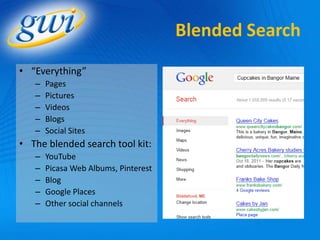
Blended Search
• “Everything”
   –   Pages
   –   Pictures
   –   Videos
   –   Blogs
   –   Social Sites
• The blended search tool kit:
   –   YouTube
   –   Picasa Web Albums, Pinterest
   –   Blog
   –   Google Places
   –   Other social channels
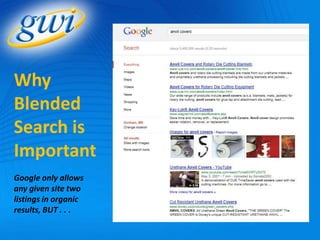
Why
Blended
Search is
Important
Google only allows
any given site two
listings in organic
results, BUT . . .
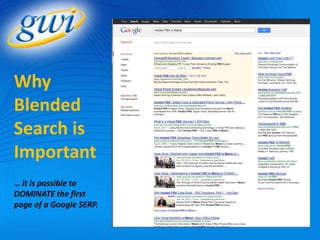
Why
Blended
Search is
Important
… it is possible to
DOMINATE the first
page of a Google SERP.
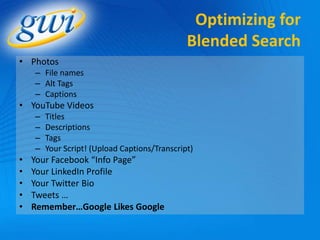
Optimizing for
                                               Blended Search
• Photos
    – File names
    – Alt Tags
    – Captions
• YouTube Videos
    –   Titles
    –   Descriptions
    –   Tags
    –   Your Script! (Upload Captions/Transcript)
•   Your Facebook “Info Page”
•   Your LinkedIn Profile
•   Your Twitter Bio
•   Tweets …
•   Remember…Google Likes Google
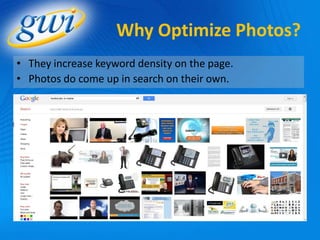
Why Optimize Photos?
• They increase keyword density on the page.
• Photos do come up in search on their own.
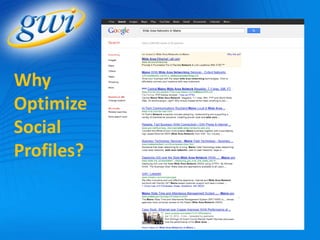
Why
Optimize
Social
Profiles?
Thank You!
    Don’t forget to follow!
@trevorjones71      @gwimaine
    Facebook.com/GWIInc

Content Marketing for Search

  • 1.
    Content Marketing forSearch May 3, 2012
  • 2.
    Introduction • About Me – Director of Marketing and Product Development for GWI – Telecom marketer since 1997 – Born in Bangor, grew up in Glenburn (BHS Class of ‘89) – @trevorjones71 – linkedIn.com/in/trevordjones – Passions: Outdoors, technology, social media, music • About GWI – Maine based since 1994, based in Biddeford – Internet access, phone service, cloud computing for home and business – Serving 60 communities statewide – www.gwi.net – @gwimaine – youtube.com/gwimaine – facebook.com/GWIInc 2
  • 3.
    Agenda • SEO Overview – Emphasis on content Keyword Research – How to choose keywords – Free and paid tools • Taking advantage of “blended search” – Leveraging social media, video, and photos
  • 4.
    Search Engine Optimization •Activities to make your site more visible in search • On-page – Meta tags, page construction – Keyword optimized content • Headers, text and photos – Internal linking – Site maps • Off-page – Link-building – Social sharing “Content is King, Links are Queen, Likes are the New Links”
  • 5.
    Keywords • What yourcustomer types into Google to find you • Short tail – Generic, 1-2 words – Generate the most traffic – Highly competitive, hard to rank for – Tend to be research oriented and have low conversion rates • Long tail – More specific, 3+ words – Flavors, brands, features, price points, colors – Geo-targeted – In many cases, less competitive – Generate less traffic, but higher conversion rates – Usually easier to rank for
  • 6.
    Keyword Research • Theprocess of identifying the keywords you want to optimize for • Key factors – Daily searches – Competition – Conversions • Build a Keyword List – Analytics – where do you get traffic from today? – Espionage – where do your competitors get traffic from today? – Brainstorming – how many different ways can you describe what you sell? – Ad words – what are you paying money for that you could get free?
  • 7.
    Analytics Google Analytics: Sources> Search > Organic Free tool: http://www.google.com/analytics/
  • 8.
    “Web Espionage” • SpyFu http://www.spyfu.com • Enter a competitor’s URL for their – Top paid keywords – Top organic keyworks – Other competitors you may not know
  • 9.
    Brainstorm & RaidPPC • Add every keyword combination you can think of to your list. – Ask friends. – Use a Thesaurus • What are you paying for with AdWords? – Savings opportunities. – Better results.
  • 10.
    Prioritize Your List •If you have a keyword research tool, enter each of the phrases you identified from Analytics and SpyFu. • Enter every other keyword combination you can come up with as well. • Observe daily search totals and competition scores – Prioritize keyword phases with light search volumes and low competition. – Next, prioritize more Paid Tools competitive searches where you already rank and want to •Hubspot’s Keyword Grader http://www.hubspot.com/products/keyword-grader/ move up. •SEO Moz (30 Day Free Trial) http://www.seomoz.org/tools
  • 11.
    Prioritizing Without Keyword Research Tools • Log out of Google + Clear your cookies • Search for each phrase you found • Note your position and that of your competitors • If you are in the SERP, but not in the top 3, consider generating content around those phrases • Easier to move up than to get ranked • If you are not in the SERP – Use a free keyword research tool to determine search volumes • Keyword Discovery - http://www.keyworddiscovery.com/search.html • Word Tracker - http://freekeywords.wordtracker.com/ – Generate content for the phrases, focusing first on the long tail phrases with light search volumes.
  • 12.
    Time to start creating content! • More pages = Better – Vital Tools in the SEO Toolkit • Blogs • Press Releases • Variety is Better – Videos are fast growing and high visibility – Photos – Social channels • The top three organic results in Google get 58% of Clicks • Create stuff that’s worthwhile, meaningful, that people will want to read – Remarkable content attracts links
  • 13.
    Keyword Optimization Rules of Thumb • Cardinal Rule – Write for humans first, search engines second! – 0.5% to 1.5% keyword density on a page is usually sufficient – don’t exceed 2.5% – At least 250 words per page. If more than 1200 words, consider breaking it up. • On Pages, include your primary keyword in: – Page file name (url) – Title Tag – H1 Header – First Paragraph – Last Paragraph – Links (Anchor Text)
  • 14.
    Blended Search • “Everything” – Pages – Pictures – Videos – Blogs – Social Sites • The blended search tool kit: – YouTube – Picasa Web Albums, Pinterest – Blog – Google Places – Other social channels
  • 15.
    Why Blended Search is Important Google onlyallows any given site two listings in organic results, BUT . . .
  • 16.
    Why Blended Search is Important … itis possible to DOMINATE the first page of a Google SERP.
  • 17.
    Optimizing for Blended Search • Photos – File names – Alt Tags – Captions • YouTube Videos – Titles – Descriptions – Tags – Your Script! (Upload Captions/Transcript) • Your Facebook “Info Page” • Your LinkedIn Profile • Your Twitter Bio • Tweets … • Remember…Google Likes Google
  • 18.
    Why Optimize Photos? •They increase keyword density on the page. • Photos do come up in search on their own.
  • 19.
  • 20.
    Thank You! Don’t forget to follow! @trevorjones71 @gwimaine Facebook.com/GWIInc