#Innovate151
SELF-SERVICEAUTOMATION DEEP DIVE
Brett Moffett, Solution Architect, Cireson
Mat Barnier, Director, Systemology
#Innovate152
YOUR PRESENTERS
Mat has been in IT for 25 years and gained experience from a
range of areas, including pure Engineering to Management.
Mat established one of Australia's largest ITSM practices with
over 150 staff operating in over eight offices in three countries
across Asia Pacific.
He is recognised in the Service Management industry as the
‘father’ of ITSM and highly respected by his peers in the
industry.
Systemology is Australia's ONLY premium level partner.
Brett is responsible for technical customer and partner
enablement in Australia.
Beginning his career in service desk environments, he comes to
Cireson with over 20 years in the IT industry.
Given his experience, Brett is all too aware of the many
challenges with IT Support and associated ITSM tools.
Nowadays Brett’s passion lies in promoting the System Center
platform as the leading solution for on premise, service provider
and Microsoft Azure environments.
@Moff25 Brett.Moffett@Cireson.com
#Innovate153
AGENDA
• Benefits of Automation
• Automation beyond IT: Facilities, Telecom, HR and Finance
• Understanding Automation Return on Investment
• Tools: SMA Connector, Orchestrator, Native SCSM, Cireson
• Automating Service Catalog Security
• Automating Reporting
#Innovate154
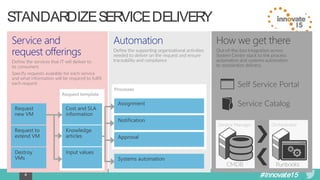
STANDARDIZE SERVICE DELIVERY
#Innovate155
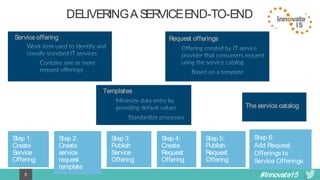
DELIVERINGA SERVICE END-TO-END
Request offeringsService offering
Templates
The service catalog
Step 1:
Create
Service
Offering
Step 4:
Create
Request
Offering
Step 2:
Create
service
request
template
Step 5:
Publish
Request
Offering
Step 3:
Publish
Service
Offering
Step 6:
Add Request
Offerings to
Service Offerings
#Innovate156
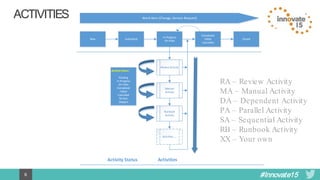
ACTIVITIES
Review Activity
In Progress
On-Hold
Manual
Activity
Runbook
Activity
Completed
Failed
Cancelled
SubmittedNew
Activity Status
Pending
In Progress
On Hold
Completed
Failed
Cancelled
Re-Run
Skipped
Activities ..
Work Item (Change, Service Request)
Closed
Activity Status Activities
RA – Review Activity
MA – Manual Activity
DA – Dependent Activity
PA – Parallel Activity
SA – Sequential Activity
RB – Runbook Activity
XX – Your own
#Innovate157
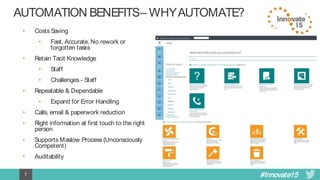
AUTOMATIONBENEFITS– WHY AUTOMATE?
• Costs Saving
• Fast, Accurate, No rework or
forgotten tasks
• Retain Tacit Knowledge
• Staff
• Challenges - Staff
• Repeatable & Dependable
• Expand for Error Handling
• Calls, email & paperwork reduction
• Right information at first touch to the right
person
• Supports Maslow Process (Unconsciously
Competent)
• Auditability
#Innovate158
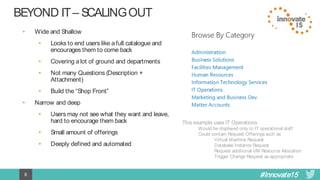
BEYONDIT – SCALINGOUT
• Wide and Shallow
• Looks to end users like a full catalogue and
encourages them to come back
• Covering a lot of ground and departments
• Not many Questions (Description +
Attachment)
• Build the “Shop Front”
• Narrow and deep
• Users may not see what they want and leave,
hard to encourage them back
• Small amount of offerings
• Deeply defined and automated
This example uses IT Operations
Would be displayed only to IT operational staff
Could contain Request Offerings such as
Virtual Machine Request
Database Instance Request
Request additional VM Resource Allocation
Trigger Change Request as appropriate
#Innovate159
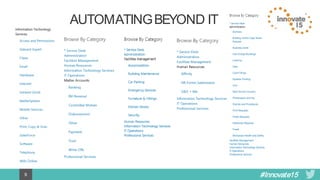
AUTOMATINGBEYOND IT
#Innovate1510
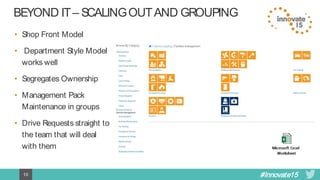
BEYONDIT – SCALINGOUTAND GROUPING
• Shop Front Model
• Department Style Model
works well
• Segregates Ownership
• Management Pack
Maintenance in groups
• Drive Requests straight to
the team that will deal
with them
#Innovate1511
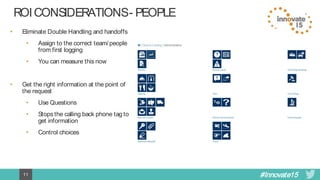
ROICONSIDERATIONS- PEOPLE
• Eliminate Double Handling and handoffs
• Assign to the correct team/people
from first logging
• You can measure this now
• Get the right information at the point of
the request
• Use Questions
• Stops the calling back phone tag to
get information
• Control choices
#Innovate1512
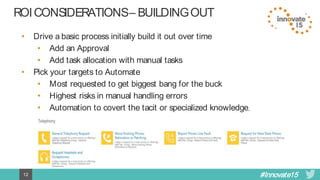
ROICONSIDERATIONS– BUILDINGOUT
• Drive a basic process initially build it out over time
• Add an Approval
• Add task allocation with manual tasks
• Pick your targets to Automate
• Most requested to get biggest bang for the buck
• Highest risks in manual handling errors
• Automation to covert the tacit or specialized knowledge,
#Innovate1513
ROICONSIDERATIONS– CONSISTENCY& BUILD
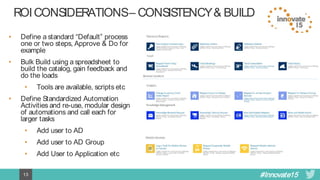
• Define a standard “Default” process
one or two steps, Approve & Do for
example
• Bulk Build using a spreadsheet to
build the catalog, gain feedback and
do the loads
• Tools are available, scripts etc
• Define Standardized Automation
Activities and re-use, modular design
of automations and call each for
larger tasks
• Add user to AD
• Add user to AD Group
• Add User to Application etc
#Innovate1514
AUTOMATE - LATERALTHINKING
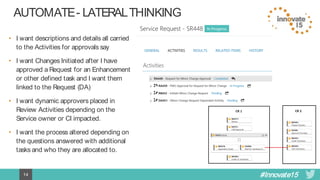
• I want descriptions and details all carried
to the Activities for approvals say
• I want Changes Initiated after I have
approved a Request for an Enhancement
or other defined task and I want them
linked to the Request (DA)
• I want dynamic approvers placed in
Review Activities depending on the
Service owner or CI impacted.
• I want the process altered depending on
the questions answered with additional
tasks and who they are allocated to.
#Innovate1516
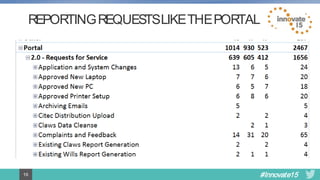
REPORTING REQUESTS LIKE THE PORTAL
#Innovate1517
TOOLS
 Brett will talk about the tools but to cheat we can use a common Orchestration calling a
PowerShell and pass it the script name.
– Orchestrator add in (Charles Joy) that supports 64 Bit PowerShell
– SMLets Service manager Commandlets Library
– We can then bulk build our catalog with Script placements creating Templates
– Develop the scripts at our leisure to replace the default script
– Simplified SCSM Templates and common design, immensely scalable with ready to go
placeholders
– There is nothing you cant do in PowerShell – learn it
#Innovate1518
ASSUMPTIONS
This is a Deep Dive session.
• Familiar with SCSM & Cireson Products
• Familiar with Orchestrator and PowerShell
Deep Dive
#Innovate1519
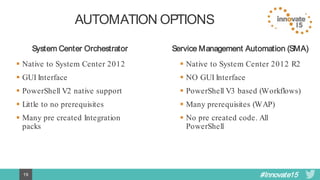
AUTOMATION OPTIONS
System Center Orchestrator Service Management Automation (SMA)
 Native to System Center 2012
 GUI Interface
 PowerShell V2 native support
 Little to no prerequisites
 Many pre created Integration
packs
 Native to System Center 2012 R2
 NO GUI Interface
 PowerShell V3 based (Workflows)
 Many prerequisites (WAP)
 No pre created code. All
PowerShell
#Innovate1520
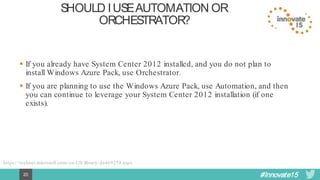
SHOULDI USE AUTOMATIONOR
ORCHESTRATOR?
 If you already have System Center 2012 installed, and you do not plan to
install Windows Azure Pack, use Orchestrator.
 If you are planning to use the Windows Azure Pack, use Automation, and then
you can continue to leverage your System Center 2012 installation (if one
exists).
https://technet.microsoft.com/en-US/library/dn469258.aspx
#Innovate1522
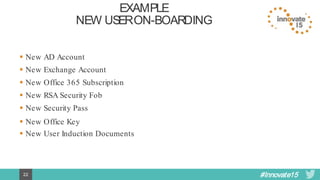
EXAMPLE
NEWUSERON-BOARDING
 New AD Account
 New Exchange Account
 New Office 365 Subscription
 New Security Pass
 New Office Key
 New RSA Security Fob
 New User Induction Documents
#Innovate152323
DEMO
Dynamic Service Provisioning – “Corporate Application Access”
#Innovate1524
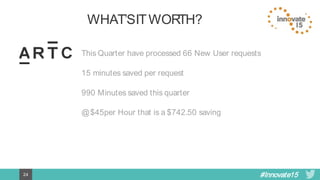
WHAT’S IT WORTH?
This Quarter have processed 66 New User requests
15 minutes saved per request
990 Minutes saved this quarter
@ $45per Hour that is a $742.50 saving
#Innovate1525
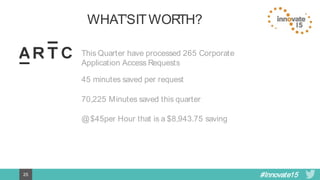
WHAT’S IT WORTH?
This Quarter have processed 265 Corporate
Application Access Requests
45 minutes saved per request
70,225 Minutes saved this quarter
@ $45per Hour that is a $8,943.75 saving
#Innovate1526
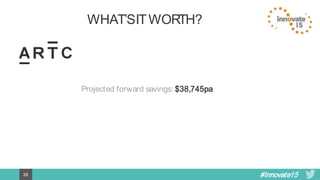
WHAT’S IT WORTH?
Projected forward savings: $38,745pa
#Innovate1527
INNOVATE 15
BROUGHT TO YOU BY

Self-Service Automation Deep Dive

  • 1.
    #Innovate151 SELF-SERVICEAUTOMATION DEEP DIVE BrettMoffett, Solution Architect, Cireson Mat Barnier, Director, Systemology
  • 2.
    #Innovate152 YOUR PRESENTERS Mat hasbeen in IT for 25 years and gained experience from a range of areas, including pure Engineering to Management. Mat established one of Australia's largest ITSM practices with over 150 staff operating in over eight offices in three countries across Asia Pacific. He is recognised in the Service Management industry as the ‘father’ of ITSM and highly respected by his peers in the industry. Systemology is Australia's ONLY premium level partner. Brett is responsible for technical customer and partner enablement in Australia. Beginning his career in service desk environments, he comes to Cireson with over 20 years in the IT industry. Given his experience, Brett is all too aware of the many challenges with IT Support and associated ITSM tools. Nowadays Brett’s passion lies in promoting the System Center platform as the leading solution for on premise, service provider and Microsoft Azure environments. @Moff25 Brett.Moffett@Cireson.com
  • 3.
    #Innovate153 AGENDA • Benefits ofAutomation • Automation beyond IT: Facilities, Telecom, HR and Finance • Understanding Automation Return on Investment • Tools: SMA Connector, Orchestrator, Native SCSM, Cireson • Automating Service Catalog Security • Automating Reporting
  • 4.
  • 5.
    #Innovate155 DELIVERINGA SERVICE END-TO-END RequestofferingsService offering Templates The service catalog Step 1: Create Service Offering Step 4: Create Request Offering Step 2: Create service request template Step 5: Publish Request Offering Step 3: Publish Service Offering Step 6: Add Request Offerings to Service Offerings
  • 6.
    #Innovate156 ACTIVITIES Review Activity In Progress On-Hold Manual Activity Runbook Activity Completed Failed Cancelled SubmittedNew ActivityStatus Pending In Progress On Hold Completed Failed Cancelled Re-Run Skipped Activities .. Work Item (Change, Service Request) Closed Activity Status Activities RA – Review Activity MA – Manual Activity DA – Dependent Activity PA – Parallel Activity SA – Sequential Activity RB – Runbook Activity XX – Your own
  • 7.
    #Innovate157 AUTOMATIONBENEFITS– WHY AUTOMATE? •Costs Saving • Fast, Accurate, No rework or forgotten tasks • Retain Tacit Knowledge • Staff • Challenges - Staff • Repeatable & Dependable • Expand for Error Handling • Calls, email & paperwork reduction • Right information at first touch to the right person • Supports Maslow Process (Unconsciously Competent) • Auditability
  • 8.
    #Innovate158 BEYONDIT – SCALINGOUT •Wide and Shallow • Looks to end users like a full catalogue and encourages them to come back • Covering a lot of ground and departments • Not many Questions (Description + Attachment) • Build the “Shop Front” • Narrow and deep • Users may not see what they want and leave, hard to encourage them back • Small amount of offerings • Deeply defined and automated This example uses IT Operations Would be displayed only to IT operational staff Could contain Request Offerings such as Virtual Machine Request Database Instance Request Request additional VM Resource Allocation Trigger Change Request as appropriate
  • 9.
  • 10.
    #Innovate1510 BEYONDIT – SCALINGOUTANDGROUPING • Shop Front Model • Department Style Model works well • Segregates Ownership • Management Pack Maintenance in groups • Drive Requests straight to the team that will deal with them
  • 11.
    #Innovate1511 ROICONSIDERATIONS- PEOPLE • EliminateDouble Handling and handoffs • Assign to the correct team/people from first logging • You can measure this now • Get the right information at the point of the request • Use Questions • Stops the calling back phone tag to get information • Control choices
  • 12.
    #Innovate1512 ROICONSIDERATIONS– BUILDINGOUT • Drivea basic process initially build it out over time • Add an Approval • Add task allocation with manual tasks • Pick your targets to Automate • Most requested to get biggest bang for the buck • Highest risks in manual handling errors • Automation to covert the tacit or specialized knowledge,
  • 13.
    #Innovate1513 ROICONSIDERATIONS– CONSISTENCY& BUILD •Define a standard “Default” process one or two steps, Approve & Do for example • Bulk Build using a spreadsheet to build the catalog, gain feedback and do the loads • Tools are available, scripts etc • Define Standardized Automation Activities and re-use, modular design of automations and call each for larger tasks • Add user to AD • Add user to AD Group • Add User to Application etc
  • 14.
    #Innovate1514 AUTOMATE - LATERALTHINKING •I want descriptions and details all carried to the Activities for approvals say • I want Changes Initiated after I have approved a Request for an Enhancement or other defined task and I want them linked to the Request (DA) • I want dynamic approvers placed in Review Activities depending on the Service owner or CI impacted. • I want the process altered depending on the questions answered with additional tasks and who they are allocated to.
  • 15.
  • 16.
    #Innovate1517 TOOLS  Brett willtalk about the tools but to cheat we can use a common Orchestration calling a PowerShell and pass it the script name. – Orchestrator add in (Charles Joy) that supports 64 Bit PowerShell – SMLets Service manager Commandlets Library – We can then bulk build our catalog with Script placements creating Templates – Develop the scripts at our leisure to replace the default script – Simplified SCSM Templates and common design, immensely scalable with ready to go placeholders – There is nothing you cant do in PowerShell – learn it
  • 17.
    #Innovate1518 ASSUMPTIONS This is aDeep Dive session. • Familiar with SCSM & Cireson Products • Familiar with Orchestrator and PowerShell Deep Dive
  • 18.
    #Innovate1519 AUTOMATION OPTIONS System CenterOrchestrator Service Management Automation (SMA)  Native to System Center 2012  GUI Interface  PowerShell V2 native support  Little to no prerequisites  Many pre created Integration packs  Native to System Center 2012 R2  NO GUI Interface  PowerShell V3 based (Workflows)  Many prerequisites (WAP)  No pre created code. All PowerShell
  • 19.
    #Innovate1520 SHOULDI USE AUTOMATIONOR ORCHESTRATOR? If you already have System Center 2012 installed, and you do not plan to install Windows Azure Pack, use Orchestrator.  If you are planning to use the Windows Azure Pack, use Automation, and then you can continue to leverage your System Center 2012 installation (if one exists). https://technet.microsoft.com/en-US/library/dn469258.aspx
  • 20.
    #Innovate1522 EXAMPLE NEWUSERON-BOARDING  New ADAccount  New Exchange Account  New Office 365 Subscription  New Security Pass  New Office Key  New RSA Security Fob  New User Induction Documents
  • 21.
    #Innovate152323 DEMO Dynamic Service Provisioning– “Corporate Application Access”
  • 22.
    #Innovate1524 WHAT’S IT WORTH? ThisQuarter have processed 66 New User requests 15 minutes saved per request 990 Minutes saved this quarter @ $45per Hour that is a $742.50 saving
  • 23.
    #Innovate1525 WHAT’S IT WORTH? ThisQuarter have processed 265 Corporate Application Access Requests 45 minutes saved per request 70,225 Minutes saved this quarter @ $45per Hour that is a $8,943.75 saving
  • 24.
  • 25.

Editor's Notes

  • #5 10/14/2015
  • #6 10/14/2015
  • #20 SMA was introduced with Orchestrator 2012 R2 SMA is based on PowerShell Workflows As the Windows Azure Pack transitions to the Microsoft Azure Stack the future of SMA is unclear. What is clear is the PowerShell is the core to everything that Microsoft is moving forwards with.
  • #21 Whether it is Orchestrator or SMA, PowerShell will future proof your code or investments in automation.
  • #22 There are several Innovate 2015 sessions that cover great places to get “Quick Wins” with automation “Expanding Service Manager – Going Beyond IT” “Automating Asset Management” “Automating Identity and Asset Management” So if you are looking for specifics on what to automate and how they would look, then I recommend each of these sessions and hopefully some very useful tips <Click> Small cost but often. All those small costs add up. <Click> Reducing expensive (Time and cost) tasks is simple ROI <Click> Tasks that take multiple steps and you have to train people in or update steps on a regular basis (OSD is a great example) <Click> Tasks that there is one person who is the one person who knows how it’s done. (Business Risk!!) <Click> Tasks you CAN’T get wrong. (Patch management, backup processes etc)
  • #23 While we will not go in to too much depth with this example as other Innovate session will cover off similar examples, what we can do is look at how we would automate some of the items that we would not traditionally think of automating. Office 365 can be fully automated via PowerShell so there is no need to be manually provisioning user via Office 365 taking out the overhead and administration effort required. Why not automating things like printing security passes? A standard service request could gather the location, role or specific access required and forward a request for a photo to a staff member to take or supply a photo. That photo, if named correctly and saved in to a known location (SharePoint, Network share, E-mail etc.) could then use either PowerShell or macros in Word to copy the Photo in to a document ready for printing. Why not customising Induction documents required by the new user based on their Location, Access, Role etc. Having each of the sections ready to go, then assembled by code when they need to be delivered. 
  • #27 If we project forward these numbers per quarter we can see a ROI in the first year of $38,745 JUST FOR THIS ONE PROCESS! Each process added only INCREASES this number