… to be precise: “PHP in real world”
 Introduction
 A look at PHP
 What is Enterprise
 Development Lifecycle
 Enterprise Techniques
 Take-Aways
 Open Discussion
Who is here?
 How many of us here are:

  • Management / Decision makers

  • Project Managers

  • Developers – PHP

  • Developers – Other (.NET/RoR/Python/Java/…)

  • Student / Hobbyist
Past and Present
 Made for the web
 Low learning curve
 Short time-to-market
 Huge active community
 Platform independent (Linux, windows, …)
 Open source
 Versatile
 Backed by Zend, Microsoft, IBM, etc.
 “PHP is for hobbyists”
  • Low learning curve
  • Proper software engineering => proper quality

 “PHP is insecure”
  • PHP is a language; it’s the programmer that implements
    security

 “PHP is not a real language”
  • It’s a dynamic scripting language; but a powerful one
 “PHP does not scale”
  • Most often PHP is not the bottleneck, DB is
  • Language does not scale, architecture does

 “PHP is not ready for Enterprise”
  • Already running in mission-critical enterprises
  • More on this later
When to consider something enterprise, and why
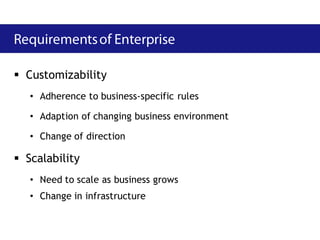
 Customizability
   • Adherence to business-specific rules

   • Adaption of changing business environment

   • Change of direction

 Scalability
   • Need to scale as business grows
   • Change in infrastructure
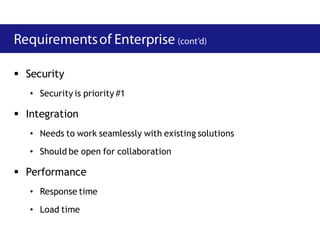
 Security
   • Security is priority #1

 Integration
   • Needs to work seamlessly with existing solutions

   • Should be open for collaboration

 Performance
   • Response time

   • Load time
How we do it in real life
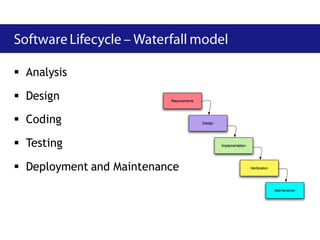
 Analysis

 Design
 Coding

 Testing

 Deployment and Maintenance
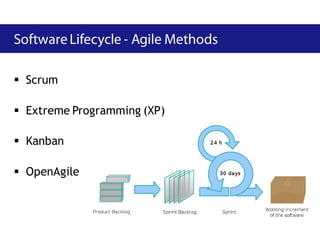
 Scrum

 Extreme Programming (XP)

 Kanban

 OpenAgile
 Working software is delivered frequently

 Working software is the principal measure of progress

 Even late changes in requirements are welcomed

 Regular adaptation to changing circumstances

 Customer is a part of the team
How to get ready for the enterprise
 Simple code     Caching

 DRY             Debugging

 Code quality    Deployment

 Security        Performance

 Testing         Refactoring
 This is easier said than done

 Do the simplest thing that could possibly work.
 Do not run for complexity, complexity kills!
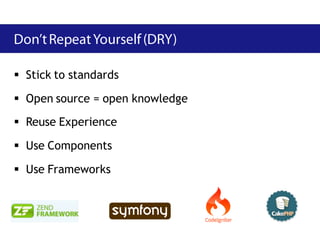
 Stick to standards

 Open source = open knowledge
 Reuse Experience

 Use Components

 Use Frameworks
 Static Code Analysis
   • Lint (php -l)
   • PHP_CodeSniffer

 Software Metrics
   • PHPUnit
   • PHP_Depend

 Output validation
   • Tidy
   • HTML/CSS validation
 Security is not an afterthought, it should be built within
  the system
 Trust no one
 Handle common issues:
   • XSS,
   • SQL/Code injection,
   • Session fixation,
   • Session hijacking,
   • CSRF
 Unit Tests

 Integration Tests
 Acceptance Tests

 Testing Tools:
   • PHPUnit (http://www.phpunit.de)

   • Selenium (http://seleniumhq.org)
 Use a compiler cache (Zend, APC, etc)

 Cache generated content:
  • Whole pages or fragments (disk, squid, memcache)

  • Database query results (query cache, memcache)

  • External data (memcache, disk)
 Create a test to expose each bug

 Keep the test, and run it often
 Tool:
   • xdebug (http://www.xdebug.org)

   • Tracing

   • Remote Debugging
 Always automate deployment
 Use 3 Systems
   • Development
   • Integration/Staging
   • Live
 Consider virtual machines / cloud hosting
 Do not guess where to start

 Profile your code
   • how often are functions called

   • how long does execution take

 Look for all possible execution path

 Tool:
   • xdebug (http://www.xdebug.org)
 Improve the design of software without changing its
  behavior

 Not adding new features

 “Cleaning up” code
 Keep refactoring your code constantly

 Use unit tests to ensure you don't break anything
 The Negatives
   • PHP does not always have all of the functionality needed

   • Java development/implementation is more difficult than many
     situations require

 The Positives
   • PHP will do most of what you need to do, easier.

   • Java can fill almost any feature void in PHP for a web-based
     deployment
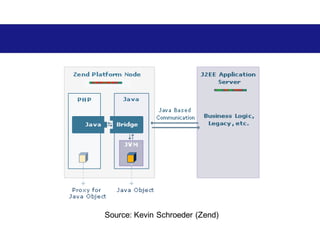
Source: Kevin Schroeder (Zend)
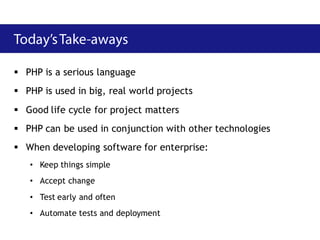
 PHP is a serious language
 PHP is used in big, real world projects
 Good life cycle for project matters
 PHP can be used in conjunction with other technologies
 When developing software for enterprise:
   • Keep things simple
   • Accept change
   • Test early and often
   • Automate tests and deployment
Questions ??

Enterprise PHP

  • 1.
    … to beprecise: “PHP in real world”
  • 2.
     Introduction  Alook at PHP  What is Enterprise  Development Lifecycle  Enterprise Techniques  Take-Aways  Open Discussion
  • 3.
  • 5.
     How manyof us here are: • Management / Decision makers • Project Managers • Developers – PHP • Developers – Other (.NET/RoR/Python/Java/…) • Student / Hobbyist
  • 6.
  • 10.
     Made forthe web  Low learning curve  Short time-to-market  Huge active community  Platform independent (Linux, windows, …)  Open source  Versatile  Backed by Zend, Microsoft, IBM, etc.
  • 12.
     “PHP isfor hobbyists” • Low learning curve • Proper software engineering => proper quality  “PHP is insecure” • PHP is a language; it’s the programmer that implements security  “PHP is not a real language” • It’s a dynamic scripting language; but a powerful one
  • 13.
     “PHP doesnot scale” • Most often PHP is not the bottleneck, DB is • Language does not scale, architecture does  “PHP is not ready for Enterprise” • Already running in mission-critical enterprises • More on this later
  • 14.
    When to considersomething enterprise, and why
  • 15.
     Customizability • Adherence to business-specific rules • Adaption of changing business environment • Change of direction  Scalability • Need to scale as business grows • Change in infrastructure
  • 16.
     Security • Security is priority #1  Integration • Needs to work seamlessly with existing solutions • Should be open for collaboration  Performance • Response time • Load time
  • 17.
    How we doit in real life
  • 18.
     Analysis  Design Coding  Testing  Deployment and Maintenance
  • 19.
     Scrum  ExtremeProgramming (XP)  Kanban  OpenAgile
  • 20.
     Working softwareis delivered frequently  Working software is the principal measure of progress  Even late changes in requirements are welcomed  Regular adaptation to changing circumstances  Customer is a part of the team
  • 21.
    How to getready for the enterprise
  • 22.
     Simple code  Caching  DRY  Debugging  Code quality  Deployment  Security  Performance  Testing  Refactoring
  • 23.
     This iseasier said than done  Do the simplest thing that could possibly work.  Do not run for complexity, complexity kills!
  • 24.
     Stick tostandards  Open source = open knowledge  Reuse Experience  Use Components  Use Frameworks
  • 25.
     Static CodeAnalysis • Lint (php -l) • PHP_CodeSniffer  Software Metrics • PHPUnit • PHP_Depend  Output validation • Tidy • HTML/CSS validation
  • 26.
     Security isnot an afterthought, it should be built within the system  Trust no one  Handle common issues: • XSS, • SQL/Code injection, • Session fixation, • Session hijacking, • CSRF
  • 27.
     Unit Tests Integration Tests  Acceptance Tests  Testing Tools: • PHPUnit (http://www.phpunit.de) • Selenium (http://seleniumhq.org)
  • 28.
     Use acompiler cache (Zend, APC, etc)  Cache generated content: • Whole pages or fragments (disk, squid, memcache) • Database query results (query cache, memcache) • External data (memcache, disk)
  • 29.
     Create atest to expose each bug  Keep the test, and run it often  Tool: • xdebug (http://www.xdebug.org) • Tracing • Remote Debugging
  • 30.
     Always automatedeployment  Use 3 Systems • Development • Integration/Staging • Live  Consider virtual machines / cloud hosting
  • 31.
     Do notguess where to start  Profile your code • how often are functions called • how long does execution take  Look for all possible execution path  Tool: • xdebug (http://www.xdebug.org)
  • 32.
     Improve thedesign of software without changing its behavior  Not adding new features  “Cleaning up” code  Keep refactoring your code constantly  Use unit tests to ensure you don't break anything
  • 33.
     The Negatives • PHP does not always have all of the functionality needed • Java development/implementation is more difficult than many situations require  The Positives • PHP will do most of what you need to do, easier. • Java can fill almost any feature void in PHP for a web-based deployment
  • 34.
  • 36.
     PHP isa serious language  PHP is used in big, real world projects  Good life cycle for project matters  PHP can be used in conjunction with other technologies  When developing software for enterprise: • Keep things simple • Accept change • Test early and often • Automate tests and deployment
  • 37.