© 2017 IBM Corporation© 2017 IBM Corporation
Application Discovery and
Delivery Intelligence to
drive agility and digital
transformations
A showcase example of
using ADDI to identify API
candidates
© 2017 IBM Corporation
2
DevOps
Continuous
Customer Feedback
& Optimization
Collaborative
Development
Continuous
Monitoring
Continuous Business Planning
Continuous
Testing
Operate Develop/
Test
Deploy
Steer
DevOps
Continuous
Feedback
Culture
Foundational
values and
principles
Think
Conceptualization
refinement,and
prioritization of
capabilities Code
Generation,
enhancement,
optimization and
testingof
features
Deliver
Automated
production and
delivery of offerings
Run
Services, options,
and capabilities
requiredto run in
the Cloud
Manage
Ongoing
monitoring,
support, and
recovery of
offerings
Learn
Continuously learn
based on
outcomes from
experiments
Continuous Release& Deployment
Accelerate
software delivery –
for faster time to value
Balance speed, cost,
quality and risk –
for increased capacity to
innovate
Reduce time to customer
feedback – for improved
customer experience
Process
Culture
Technology
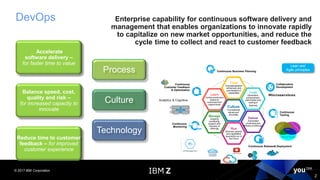
Enterprise capability for continuous software delivery and
management that enables organizations to innovate rapidly
to capitalize on new market opportunities, and reduce the
cycle time to collect and react to customer feedback
Lean and
Agile principles
Analytics & Cognitive
© 2017 IBM Corporation
3
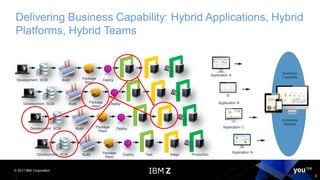
Delivering Business Capability: Hybrid Applications, Hybrid
Platforms, Hybrid Teams
Development SCM Build Package
Repo
Deploy
Development SCM Build Package
Repo
Deploy
Development SCM Build Package
Repo
Deploy
Development SCM Build Package
Repo
Deploy Test Stage Production
Application N
Application C
Application B
Application A
Enterprise
Release
Business
Capability
© 2017 IBM Corporation
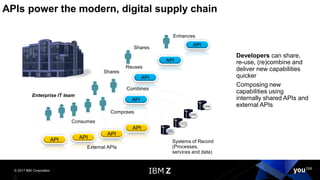
APIs power the modern, digital supply chain
Developers can share,
re-use, (re)combine and
deliver new capabilities
quicker
Composing new
capabilities using
internally shared APIs and
external APIs
API
API
API
Enterprise IT team
Systems of Record
(Processes,
services and data)
Reuses
Shares
API
Combines
Shares
Composes
API
Enhances
External APIs
API
Consumes
API
API
© 2017 IBM Corporation
5
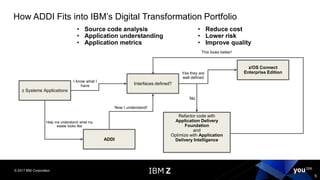
• Source code analysis
• Application understanding
• Application metrics
• Reduce cost
• Lower risk
• Improve quality
z Systems Applications
Interfaces defined?
I know what I
have
z/OS Connect
Enterprise EditionYes they are
well defined
ADDI
Help me understand what my
estate looks like
Now I understand!
Refactor code with
Application Delivery
Foundation
and
Optimize with Application
Delivery Intelligence
No
This looks better!
How ADDI Fits into IBM’s Digital Transformation Portfolio
© 2017 IBM Corporation
6
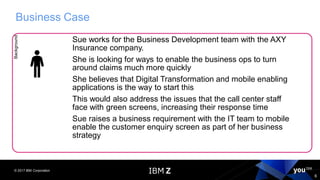
Business CaseBackground
Sue works for the Business Development team with the AXY
Insurance company.
She is looking for ways to enable the business ops to turn
around claims much more quickly
She believes that Digital Transformation and mobile enabling
applications is the way to start this
This would also address the issues that the call center staff
face with green screens, increasing their response time
Sue raises a business requirement with the IT team to mobile
enable the customer enquiry screen as part of her business
strategy
© 2017 IBM Corporation
7
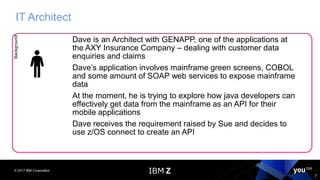
IT ArchitectBackground
Dave is an Architect with GENAPP, one of the applications at
the AXY Insurance Company – dealing with customer data
enquiries and claims
Dave’s application involves mainframe green screens, COBOL
and some amount of SOAP web services to expose mainframe
data
At the moment, he is trying to explore how java developers can
effectively get data from the mainframe as an API for their
mobile applications
Dave receives the requirement raised by Sue and decides to
use z/OS connect to create an API
© 2017 IBM Corporation
8
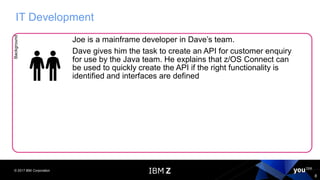
IT DevelopmentBackground
Joe is a mainframe developer in Dave’s team.
Dave gives him the task to create an API for customer enquiry
for use by the Java team. He explains that z/OS Connect can
be used to quickly create the API if the right functionality is
identified and interfaces are defined
© 2017 IBM Corporation
9
IT DevelopmentBackground
Joe now has the following objectives as part of the first task
• Identify the customer screen
• Understand the transaction flow
• Identify, from a gamut of COBOL programs, the candidate
that can be invoked via an API
• Identify the interface structure/copybook so that he can use it
to create an API
© 2017 IBM Corporation
10
We have identified our target program
▪ To make a RESTful interface to this program – z/OS Connect EE can
be used
© 2017 IBM Corporation
11
WHAT IF..
▪ The program is monolithic
▪ I need to find out all programs invoked by my map layer which could be
potential API candidates
▪ I need to find out programs based on functionality
© 2016 IBM Corporation
12
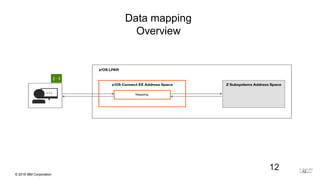
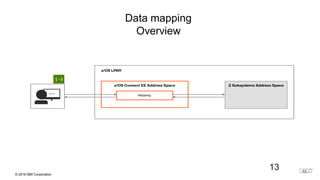
Data mapping
Overview
12 © 2016 IBM
Corporation
© 2016 IBM Corporation
13
Data mapping
Overview
13 © 2016 IBM
Corporation
© 2016 IBM Corporation
14
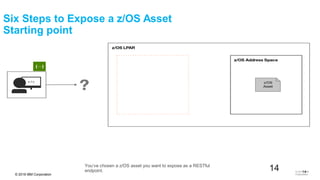
You’ve chosen a z/OS asset you want to expose as a RESTful
endpoint.
Six Steps to Expose a z/OS Asset
Starting point
© 2016 IBM
Corporation
14
© 2016 IBM Corporation
15
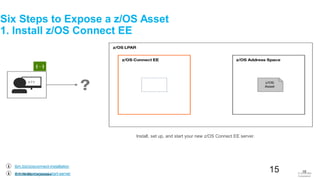
Install, set up, and start your new z/OS Connect EE server.
ibm.biz/zosconnect-start-server
ibm.biz/zosconnect-installation
Six Steps to Expose a z/OS Asset
1. Install z/OS Connect EE
© 2016 IBM
Corporation
15
© 2016 IBM Corporation
16
ibm.biz/zosconnect-cics-service-definition-utility
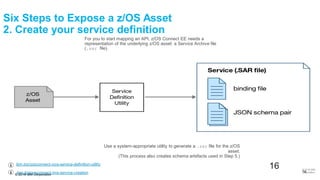
Use a system-appropriate utility to generate a .sar file for the z/OS
asset.
(This process also creates schema artefacts used in Step 5.)
ibm.biz/zosconnect-ims-service-creation
For you to start mapping an API, z/OS Connect EE needs a
representation of the underlying z/OS asset: a Service Archive file
(.sar file).
Six Steps to Expose a z/OS Asset
2. Create your service definition
© 2016 IBM
Corporation
16
© 2016 IBM Corporation
17
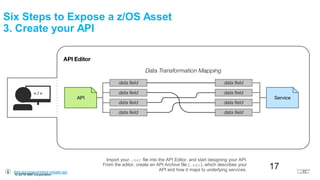
Import your .sar file into the API Editor, and start designing your API.
From the editor, create an API Archive file (.aar), which describes your
API and how it maps to underlying services.ibm.biz/zosconnect-create-api
Six Steps to Expose a z/OS Asset
3. Create your API
© 2016 IBM
Corporation
17
© 2016 IBM Corporation
18
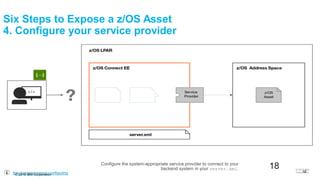
Configure the system-appropriate service provider to connect to your
backend system in your server.xml.
ibm.biz/zosconnect-configuring
Six Steps to Expose a z/OS Asset
4. Configure your service provider
© 2016 IBM
Corporation
18
© 2016 IBM Corporation
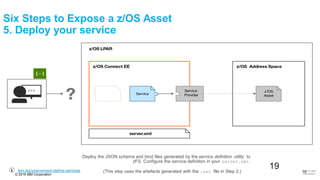
19(This step uses the artefacts generated with the .sar file in Step 2.)
Deploy the JSON schema and bind files generated by the service definition utility to
zFS. Configure the service definition in your server.xml.
ibm.biz/zosconnect-define-services
Six Steps to Expose a z/OS Asset
5. Deploy your service
© 2016 IBM
Corporation
19
© 2016 IBM Corporation
20
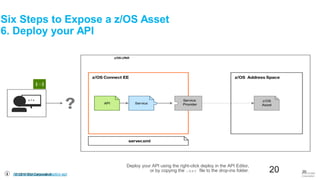
Deploy your API using the right-click deploy in the API Editor,
or by copying the .aar file to the drop-ins folder.
ibm.biz/zosconnect-deploy-api
Six Steps to Expose a z/OS Asset
6. Deploy your API
© 2016 IBM
Corporation
20
© 2016 IBM Corporation
21
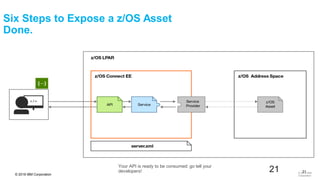
Your API is ready to be consumed: go tell your
developers!
Six Steps to Expose a z/OS Asset
Done.
© 2016 IBM
Corporation
21
© 2017 IBM Corporation
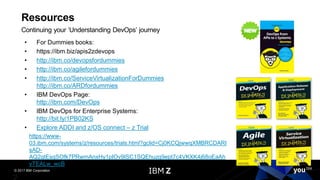
• For Dummies books:
• https://ibm.biz/apis2zdevops
• http://ibm.co/devopsfordummies
• http://ibm.co/agilefordummies
• http://ibm.co/ServiceVirtualizationForDummies
http://ibm.co/ARDfordummies
• IBM DevOps Page:
http://ibm.com/DevOps
• IBM DevOps for Enterprise Systems:
http://bit.ly/1PB02KS
• Explore ADDI and z/OS connect – z Trial
https://www-
03.ibm.com/systems/z/resources/trials.html?gclid=Cj0KCQjwwqXMBRCDARI
sAD-
AQ2gtEsgSOfk7PRwmAnxHy1pIOv9ISC1SQEhuzg9ept7c4VKXK4j68oEaAh
vTEALw_wcB
Resources
Continuing your ‘Understanding DevOps’ journey
© 2017 IBM Corporation
Thank You

Application Discovery! The Gift That Keeps on Giving

  • 1.
    © 2017 IBMCorporation© 2017 IBM Corporation Application Discovery and Delivery Intelligence to drive agility and digital transformations A showcase example of using ADDI to identify API candidates
  • 2.
    © 2017 IBMCorporation 2 DevOps Continuous Customer Feedback & Optimization Collaborative Development Continuous Monitoring Continuous Business Planning Continuous Testing Operate Develop/ Test Deploy Steer DevOps Continuous Feedback Culture Foundational values and principles Think Conceptualization refinement,and prioritization of capabilities Code Generation, enhancement, optimization and testingof features Deliver Automated production and delivery of offerings Run Services, options, and capabilities requiredto run in the Cloud Manage Ongoing monitoring, support, and recovery of offerings Learn Continuously learn based on outcomes from experiments Continuous Release& Deployment Accelerate software delivery – for faster time to value Balance speed, cost, quality and risk – for increased capacity to innovate Reduce time to customer feedback – for improved customer experience Process Culture Technology Enterprise capability for continuous software delivery and management that enables organizations to innovate rapidly to capitalize on new market opportunities, and reduce the cycle time to collect and react to customer feedback Lean and Agile principles Analytics & Cognitive
  • 3.
    © 2017 IBMCorporation 3 Delivering Business Capability: Hybrid Applications, Hybrid Platforms, Hybrid Teams Development SCM Build Package Repo Deploy Development SCM Build Package Repo Deploy Development SCM Build Package Repo Deploy Development SCM Build Package Repo Deploy Test Stage Production Application N Application C Application B Application A Enterprise Release Business Capability
  • 4.
    © 2017 IBMCorporation APIs power the modern, digital supply chain Developers can share, re-use, (re)combine and deliver new capabilities quicker Composing new capabilities using internally shared APIs and external APIs API API API Enterprise IT team Systems of Record (Processes, services and data) Reuses Shares API Combines Shares Composes API Enhances External APIs API Consumes API API
  • 5.
    © 2017 IBMCorporation 5 • Source code analysis • Application understanding • Application metrics • Reduce cost • Lower risk • Improve quality z Systems Applications Interfaces defined? I know what I have z/OS Connect Enterprise EditionYes they are well defined ADDI Help me understand what my estate looks like Now I understand! Refactor code with Application Delivery Foundation and Optimize with Application Delivery Intelligence No This looks better! How ADDI Fits into IBM’s Digital Transformation Portfolio
  • 6.
    © 2017 IBMCorporation 6 Business CaseBackground Sue works for the Business Development team with the AXY Insurance company. She is looking for ways to enable the business ops to turn around claims much more quickly She believes that Digital Transformation and mobile enabling applications is the way to start this This would also address the issues that the call center staff face with green screens, increasing their response time Sue raises a business requirement with the IT team to mobile enable the customer enquiry screen as part of her business strategy
  • 7.
    © 2017 IBMCorporation 7 IT ArchitectBackground Dave is an Architect with GENAPP, one of the applications at the AXY Insurance Company – dealing with customer data enquiries and claims Dave’s application involves mainframe green screens, COBOL and some amount of SOAP web services to expose mainframe data At the moment, he is trying to explore how java developers can effectively get data from the mainframe as an API for their mobile applications Dave receives the requirement raised by Sue and decides to use z/OS connect to create an API
  • 8.
    © 2017 IBMCorporation 8 IT DevelopmentBackground Joe is a mainframe developer in Dave’s team. Dave gives him the task to create an API for customer enquiry for use by the Java team. He explains that z/OS Connect can be used to quickly create the API if the right functionality is identified and interfaces are defined
  • 9.
    © 2017 IBMCorporation 9 IT DevelopmentBackground Joe now has the following objectives as part of the first task • Identify the customer screen • Understand the transaction flow • Identify, from a gamut of COBOL programs, the candidate that can be invoked via an API • Identify the interface structure/copybook so that he can use it to create an API
  • 10.
    © 2017 IBMCorporation 10 We have identified our target program ▪ To make a RESTful interface to this program – z/OS Connect EE can be used
  • 11.
    © 2017 IBMCorporation 11 WHAT IF.. ▪ The program is monolithic ▪ I need to find out all programs invoked by my map layer which could be potential API candidates ▪ I need to find out programs based on functionality
  • 12.
    © 2016 IBMCorporation 12 Data mapping Overview 12 © 2016 IBM Corporation
  • 13.
    © 2016 IBMCorporation 13 Data mapping Overview 13 © 2016 IBM Corporation
  • 14.
    © 2016 IBMCorporation 14 You’ve chosen a z/OS asset you want to expose as a RESTful endpoint. Six Steps to Expose a z/OS Asset Starting point © 2016 IBM Corporation 14
  • 15.
    © 2016 IBMCorporation 15 Install, set up, and start your new z/OS Connect EE server. ibm.biz/zosconnect-start-server ibm.biz/zosconnect-installation Six Steps to Expose a z/OS Asset 1. Install z/OS Connect EE © 2016 IBM Corporation 15
  • 16.
    © 2016 IBMCorporation 16 ibm.biz/zosconnect-cics-service-definition-utility Use a system-appropriate utility to generate a .sar file for the z/OS asset. (This process also creates schema artefacts used in Step 5.) ibm.biz/zosconnect-ims-service-creation For you to start mapping an API, z/OS Connect EE needs a representation of the underlying z/OS asset: a Service Archive file (.sar file). Six Steps to Expose a z/OS Asset 2. Create your service definition © 2016 IBM Corporation 16
  • 17.
    © 2016 IBMCorporation 17 Import your .sar file into the API Editor, and start designing your API. From the editor, create an API Archive file (.aar), which describes your API and how it maps to underlying services.ibm.biz/zosconnect-create-api Six Steps to Expose a z/OS Asset 3. Create your API © 2016 IBM Corporation 17
  • 18.
    © 2016 IBMCorporation 18 Configure the system-appropriate service provider to connect to your backend system in your server.xml. ibm.biz/zosconnect-configuring Six Steps to Expose a z/OS Asset 4. Configure your service provider © 2016 IBM Corporation 18
  • 19.
    © 2016 IBMCorporation 19(This step uses the artefacts generated with the .sar file in Step 2.) Deploy the JSON schema and bind files generated by the service definition utility to zFS. Configure the service definition in your server.xml. ibm.biz/zosconnect-define-services Six Steps to Expose a z/OS Asset 5. Deploy your service © 2016 IBM Corporation 19
  • 20.
    © 2016 IBMCorporation 20 Deploy your API using the right-click deploy in the API Editor, or by copying the .aar file to the drop-ins folder. ibm.biz/zosconnect-deploy-api Six Steps to Expose a z/OS Asset 6. Deploy your API © 2016 IBM Corporation 20
  • 21.
    © 2016 IBMCorporation 21 Your API is ready to be consumed: go tell your developers! Six Steps to Expose a z/OS Asset Done. © 2016 IBM Corporation 21
  • 22.
    © 2017 IBMCorporation • For Dummies books: • https://ibm.biz/apis2zdevops • http://ibm.co/devopsfordummies • http://ibm.co/agilefordummies • http://ibm.co/ServiceVirtualizationForDummies http://ibm.co/ARDfordummies • IBM DevOps Page: http://ibm.com/DevOps • IBM DevOps for Enterprise Systems: http://bit.ly/1PB02KS • Explore ADDI and z/OS connect – z Trial https://www- 03.ibm.com/systems/z/resources/trials.html?gclid=Cj0KCQjwwqXMBRCDARI sAD- AQ2gtEsgSOfk7PRwmAnxHy1pIOv9ISC1SQEhuzg9ept7c4VKXK4j68oEaAh vTEALw_wcB Resources Continuing your ‘Understanding DevOps’ journey
  • 23.
    © 2017 IBMCorporation © 2017 IBM Corporation Thank You