AMIRA M. GALAL https://www.linkedin.com/in/amira-mohamed-galal-5446b7183
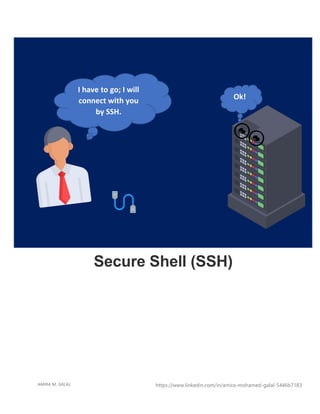
Ok!
Secure Shell (SSH)
I have to go; I will
connect with you
by SSH.
AMIRA M. GALAL https://www.linkedin.com/in/amira-mohamed-galal-5446b7183
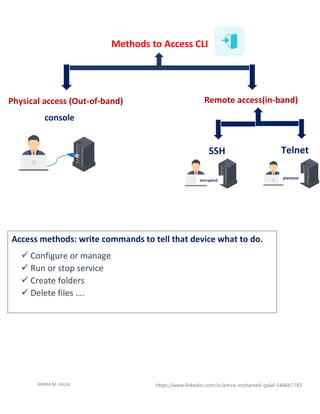
Methods to Access CLI
Physical access (Out-of-band)
console
Remote access(in-band)
Telnet
SSH
Access methods: write commands to tell that device what to do.
✓ Configure or manage
✓ Run or stop service
✓ Create folders
✓ Delete files ….
plaintext
encrypted
AMIRA M. GALAL https://www.linkedin.com/in/amira-mohamed-galal-5446b7183
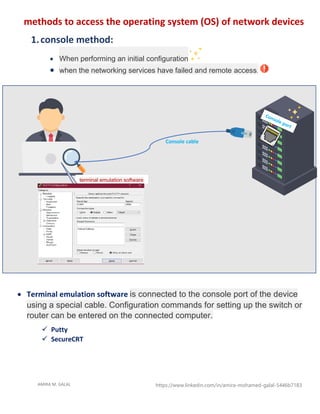
methods to access the operating system (OS) of network devices
1.console method:
• When performing an initial configuration
• when the networking services have failed and remote access.
Console cable
terminal emulation software
• Terminal emulation software is connected to the console port of the device
using a special cable. Configuration commands for setting up the switch or
router can be entered on the connected computer.
✓ Putty
✓ SecureCRT
AMIRA M. GALAL https://www.linkedin.com/in/amira-mohamed-galal-5446b7183
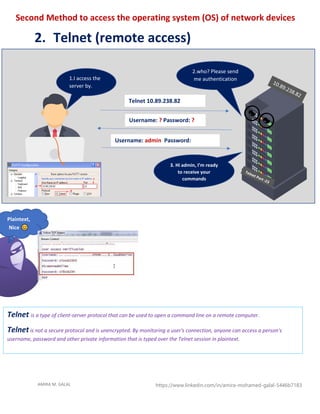
Second Method to access the operating system (OS) of network devices
2. Telnet (remote access)
Telnet 10.89.238.82
Username: ? Password: ?
Username: admin Password:
cisco1234
Plaintext,
Nice
1.I access the
server by.
telnet
2.who? Please send
me authentication
3. Hi admin, I’m ready
to receive your
commands
Telnet is a type of client-server protocol that can be used to open a command line on a remote computer.
Telnet is not a secure protocol and is unencrypted. By monitoring a user's connection, anyone can access a person's
username, password and other private information that is typed over the Telnet session in plaintext.
AMIRA M. GALAL https://www.linkedin.com/in/amira-mohamed-galal-5446b7183
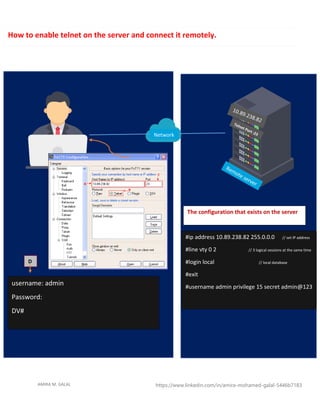
Network
#ip address 10.89.238.82 255.0.0.0 // set IP address
#line vty 0 2 // 3 logical sessions at the same time
#login local // local database
#exit
#username admin privilege 15 secret admin@123
The configuration that exists on the server
username: admin
Password:
DV#
D
How to enable telnet on the server and connect it remotely.
AMIRA M. GALAL https://www.linkedin.com/in/amira-mohamed-galal-5446b7183
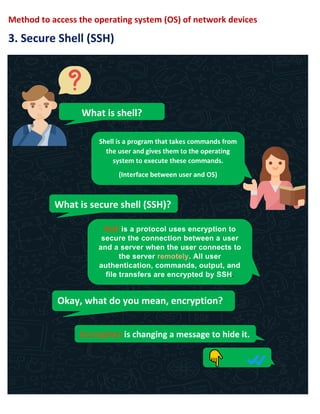
Method to access the operating system (OS) of network devices
3. Secure Shell (SSH)
What is shell?
Shell is a program that takes commands from
the user and gives them to the operating
system to execute these commands.
(Interface between user and OS)
What is secure shell (SSH)?
SSH is a protocol uses encryption to
secure the connection between a user
and a server when the user connects to
the server remotely. All user
authentication, commands, output, and
file transfers are encrypted by SSH.
Okay, what do you mean, encryption?
Encryption is changing a message to hide it.
AMIRA M. GALAL https://www.linkedin.com/in/amira-mohamed-galal-5446b7183
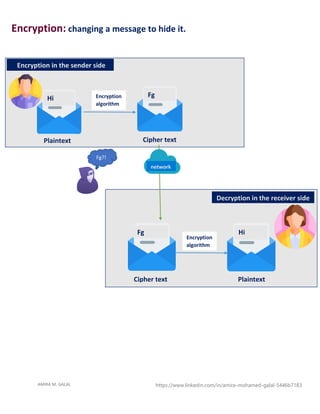
Encryption: changing a message to hide it.
Fg
Fg
Hi
Hi
Encryption
algorithm
Encryption
algorithm
Encryption in the sender side
Decryption in the receiver side
Cipher text
Plaintext
Cipher text Plaintext
network
Fg?!
AMIRA M. GALAL https://www.linkedin.com/in/amira-mohamed-galal-5446b7183
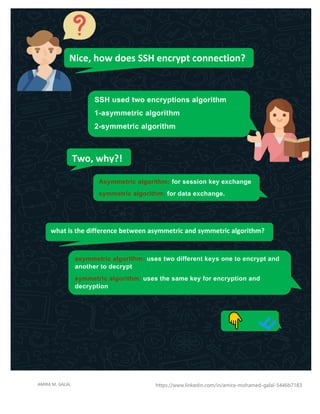
Nice, how does SSH encrypt connection?
SSH used two encryptions algorithm
1-asymmetric algorithm
2-symmetric algorithm
Two, why?!
Asymmetric algorithm: for session key exchange
symmetric algorithm: for data exchange.
what is the difference between asymmetric and symmetric algorithm?
asymmetric algorithm: uses two different keys one to encrypt and
another to decrypt
symmetric algorithm: uses the same key for encryption and
decryption
AMIRA M. GALAL https://www.linkedin.com/in/amira-mohamed-galal-5446b7183
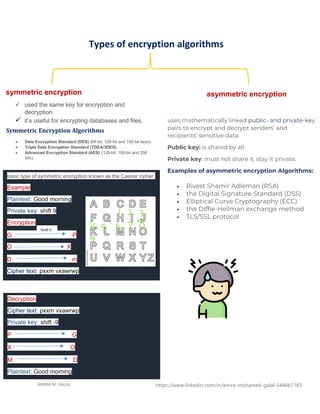
Types of encryption algorithms
symmetric encryption
✓ used the same key for encryption and
decryption.
✓ it’s useful for encrypting databases and files.
asymmetric encryption
basic type of symmetric encryption known as the Caesar cipher.
Example
Plaintext: Good morning
Private key: shift 9
Encryption
G P
O X
D m
Cipher text: pxxm vxawrwp
Shift 9
Decryption
Cipher text: pxxm vxawrwp
Private key: shift -9
P G
X O
M D
Plaintext: Good morning
Symmetric Encryption Algorithms
• Data Encryption Standard (DES) (64-bit, 128-bit and 192-bit keys).
• Triple Data Encryption Standard (TDEA/3DES)
• Advanced Encryption Standard (AES) (128-bit, 192-bit and 256
bits).
uses mathematically linked public- and private-key
pairs to encrypt and decrypt senders’ and
recipients’ sensitive data.
Public key: is shared by all
Private key: must not share it, stay it private.
Examples of asymmetric encryption Algorithms:
• Rivest Shamir Adleman (RSA)
• the Digital Signature Standard (DSS)
• Elliptical Curve Cryptography (ECC)
• the Diffie-Hellman exchange method
• TLS/SSL protocol
AMIRA M. GALAL https://www.linkedin.com/in/amira-mohamed-galal-5446b7183
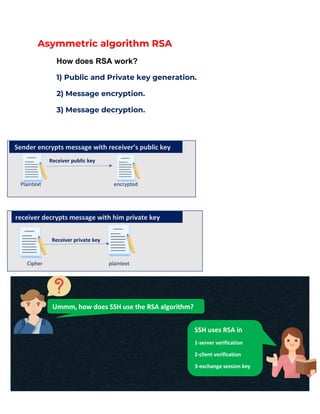
Asymmetric algorithm RSA
How does RSA work?
1) Public and Private key generation.
2) Message encryption.
3) Message decryption.
Receiver public key
Plaintext encrypted
Receiver private key
Cipher plaintext
Sender encrypts message with receiver’s public key
receiver decrypts message with him private key
Ummm, how does SSH use the RSA algorithm?
SSH uses RSA in
1-server verification
2-client verification
3-exchange session key
AMIRA M. GALAL https://www.linkedin.com/in/amira-mohamed-galal-5446b7183
SYN
SYN, ACK
ACK
Server public key
Client public key
Encrypted message
Decrypted message
Encrypted session key
Encrypted /decrypted data by the same key (session key)
FIN, ACK
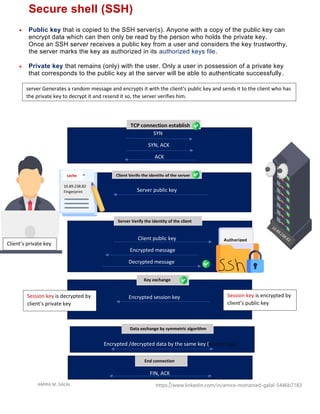
Secure shell (SSH)
• Public key that is copied to the SSH server(s). Anyone with a copy of the public key can
encrypt data which can then only be read by the person who holds the private key.
Once an SSH server receives a public key from a user and considers the key trustworthy,
the server marks the key as authorized in its authorized keys file.
• Private key that remains (only) with the user. Only a user in possession of a private key
that corresponds to the public key at the server will be able to authenticate successfully.
Client’s private key
TCP connection establish
Authorized
_keys
10.89.238.82
Fingerprint
cache Client Verify the identity of the server
Server Verify the identity of the client
Key exchange
Session key is encrypted by
client’s public key
Session key is decrypted by
client’s private key
Data exchange by symmetric algorithm
End connection
server Generates a random message and encrypts it with the client's public key and sends it to the client who has
the private key to decrypt it and resend it so, the server verifies him.
AMIRA M. GALAL https://www.linkedin.com/in/amira-mohamed-galal-5446b7183
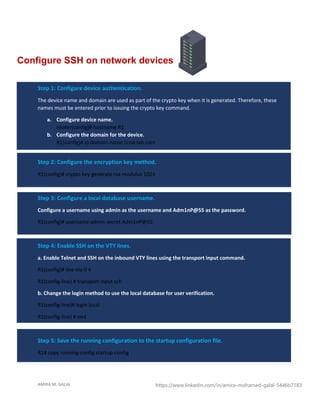
Step 1: Configure device authentication.
The device name and domain are used as part of the crypto key when it is generated. Therefore, these
names must be entered prior to issuing the crypto key command.
a. Configure device name.
router(config)# hostname R1
b. Configure the domain for the device.
R1(config)# ip domain-name ccna-lab.com
Step 2: Configure the encryption key method.
R1(config)# crypto key generate rsa modulus 1024
Step 3: Configure a local database username.
Configure a username using admin as the username and Adm1nP@55 as the password.
R1(config)# username admin secret Adm1nP@55
Step 4: Enable SSH on the VTY lines.
a. Enable Telnet and SSH on the inbound VTY lines using the transport input command.
R1(config)# line vty 0 4
R1(config-line) # transport input ssh
b. Change the login method to use the local database for user verification.
R1(config-line)# login local
R1(config-line) # end
Step 5: Save the running configuration to the startup configuration file.
R1# copy running-config startup-config
Configure SSH on network devices
AMIRA M. GALAL https://www.linkedin.com/in/amira-mohamed-galal-5446b7183
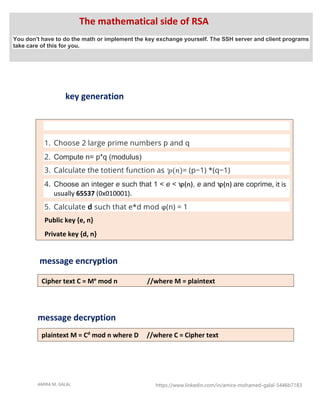
key generation
message encryption
message decryption
1. Choose 2 large prime numbers p and q
2. Compute n= p*q (modulus)
3. Calculate the totient function as ꝕ(𝑛)= (p−1) *(q−1)
4. Choose an integer e such that 1 < e < ꝕ(n), e and ꝕ(n) are coprime, it is
usually 65537 (0x010001).
5. Calculate d such that e*d mod ϕ(n) = 1
Public key {e, n}
Private key {d, n}
Cipher text C = Me
mod n //where M = plaintext
plaintext M = Cd
mod n where D //where C = Cipher text
The mathematical side of RSA
You don't have to do the math or implement the key exchange yourself. The SSH server and client programs
take care of this for you.
AMIRA M. GALAL https://www.linkedin.com/in/amira-mohamed-galal-5446b7183
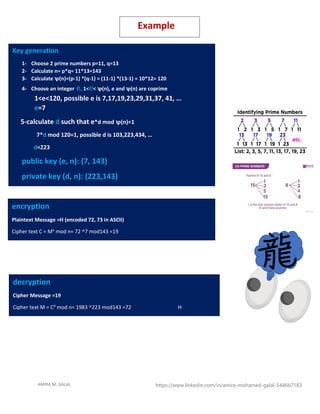
Key generation
1- Choose 2 prime numbers p=11, q=13
2- Calculate n= p*q= 11*13=143
3- Calculate ꝕ(n)=(p-1) *(q-1) = (11-1) *(13-1) = 10*12= 120
4- Choose an integer e, 1<e< ꝕ(n), e and ꝕ(n) are coprime
1<e<120, possible e is 7,17,19,23,29,31,37, 41, …
e=7
5-calculate d such that e*d mod ꝕ(n)=1
7*d mod 120=1, possible d is 103,223,434, …
d=223
public key (e, n): (7, 143)
private key (d, n): (223,143)
encryption
Plaintext Message =H (encoded 72, 73 in ASCII)
Cipher text C = Me
mod n= 72 ^7 mod143 =19
decryption
Cipher Message =19
Cipher text M = Cd
mod n= 1983 ^223 mod143 =72 H
H
Example
AMIRA M. GALAL https://www.linkedin.com/in/amira-mohamed-galal-5446b7183
https://www.ssh.com/academy/ssh/protocol
https://www.youtube.com/watch?v=zlv9dI-9g1U
https://www.youtube.com/watch?v=y2SWzw9D4RA
https://www.geeksforgeeks.org/rsa-algorithm-cryptography/
https://www.digitalocean.com/community/tutorials/ssh-essentials-working-with-ssh-servers-clients-
and-keys
https://serverpilot.io/docs/how-to-use-ssh-public-key-authentication/

Secure shell(ssh) AND telnet AND CONSOLE

  • 1.
    AMIRA M. GALALhttps://www.linkedin.com/in/amira-mohamed-galal-5446b7183 Ok! Secure Shell (SSH) I have to go; I will connect with you by SSH.
  • 2.
    AMIRA M. GALALhttps://www.linkedin.com/in/amira-mohamed-galal-5446b7183 Methods to Access CLI Physical access (Out-of-band) console Remote access(in-band) Telnet SSH Access methods: write commands to tell that device what to do. ✓ Configure or manage ✓ Run or stop service ✓ Create folders ✓ Delete files …. plaintext encrypted
  • 3.
    AMIRA M. GALALhttps://www.linkedin.com/in/amira-mohamed-galal-5446b7183 methods to access the operating system (OS) of network devices 1.console method: • When performing an initial configuration • when the networking services have failed and remote access. Console cable terminal emulation software • Terminal emulation software is connected to the console port of the device using a special cable. Configuration commands for setting up the switch or router can be entered on the connected computer. ✓ Putty ✓ SecureCRT
  • 4.
    AMIRA M. GALALhttps://www.linkedin.com/in/amira-mohamed-galal-5446b7183 Second Method to access the operating system (OS) of network devices 2. Telnet (remote access) Telnet 10.89.238.82 Username: ? Password: ? Username: admin Password: cisco1234 Plaintext, Nice 1.I access the server by. telnet 2.who? Please send me authentication 3. Hi admin, I’m ready to receive your commands Telnet is a type of client-server protocol that can be used to open a command line on a remote computer. Telnet is not a secure protocol and is unencrypted. By monitoring a user's connection, anyone can access a person's username, password and other private information that is typed over the Telnet session in plaintext.
  • 5.
    AMIRA M. GALALhttps://www.linkedin.com/in/amira-mohamed-galal-5446b7183 Network #ip address 10.89.238.82 255.0.0.0 // set IP address #line vty 0 2 // 3 logical sessions at the same time #login local // local database #exit #username admin privilege 15 secret admin@123 The configuration that exists on the server username: admin Password: DV# D How to enable telnet on the server and connect it remotely.
  • 6.
    AMIRA M. GALALhttps://www.linkedin.com/in/amira-mohamed-galal-5446b7183 Method to access the operating system (OS) of network devices 3. Secure Shell (SSH) What is shell? Shell is a program that takes commands from the user and gives them to the operating system to execute these commands. (Interface between user and OS) What is secure shell (SSH)? SSH is a protocol uses encryption to secure the connection between a user and a server when the user connects to the server remotely. All user authentication, commands, output, and file transfers are encrypted by SSH. Okay, what do you mean, encryption? Encryption is changing a message to hide it.
  • 7.
    AMIRA M. GALALhttps://www.linkedin.com/in/amira-mohamed-galal-5446b7183 Encryption: changing a message to hide it. Fg Fg Hi Hi Encryption algorithm Encryption algorithm Encryption in the sender side Decryption in the receiver side Cipher text Plaintext Cipher text Plaintext network Fg?!
  • 8.
    AMIRA M. GALALhttps://www.linkedin.com/in/amira-mohamed-galal-5446b7183 Nice, how does SSH encrypt connection? SSH used two encryptions algorithm 1-asymmetric algorithm 2-symmetric algorithm Two, why?! Asymmetric algorithm: for session key exchange symmetric algorithm: for data exchange. what is the difference between asymmetric and symmetric algorithm? asymmetric algorithm: uses two different keys one to encrypt and another to decrypt symmetric algorithm: uses the same key for encryption and decryption
  • 9.
    AMIRA M. GALALhttps://www.linkedin.com/in/amira-mohamed-galal-5446b7183 Types of encryption algorithms symmetric encryption ✓ used the same key for encryption and decryption. ✓ it’s useful for encrypting databases and files. asymmetric encryption basic type of symmetric encryption known as the Caesar cipher. Example Plaintext: Good morning Private key: shift 9 Encryption G P O X D m Cipher text: pxxm vxawrwp Shift 9 Decryption Cipher text: pxxm vxawrwp Private key: shift -9 P G X O M D Plaintext: Good morning Symmetric Encryption Algorithms • Data Encryption Standard (DES) (64-bit, 128-bit and 192-bit keys). • Triple Data Encryption Standard (TDEA/3DES) • Advanced Encryption Standard (AES) (128-bit, 192-bit and 256 bits). uses mathematically linked public- and private-key pairs to encrypt and decrypt senders’ and recipients’ sensitive data. Public key: is shared by all Private key: must not share it, stay it private. Examples of asymmetric encryption Algorithms: • Rivest Shamir Adleman (RSA) • the Digital Signature Standard (DSS) • Elliptical Curve Cryptography (ECC) • the Diffie-Hellman exchange method • TLS/SSL protocol
  • 10.
    AMIRA M. GALALhttps://www.linkedin.com/in/amira-mohamed-galal-5446b7183 Asymmetric algorithm RSA How does RSA work? 1) Public and Private key generation. 2) Message encryption. 3) Message decryption. Receiver public key Plaintext encrypted Receiver private key Cipher plaintext Sender encrypts message with receiver’s public key receiver decrypts message with him private key Ummm, how does SSH use the RSA algorithm? SSH uses RSA in 1-server verification 2-client verification 3-exchange session key
  • 11.
    AMIRA M. GALALhttps://www.linkedin.com/in/amira-mohamed-galal-5446b7183 SYN SYN, ACK ACK Server public key Client public key Encrypted message Decrypted message Encrypted session key Encrypted /decrypted data by the same key (session key) FIN, ACK Secure shell (SSH) • Public key that is copied to the SSH server(s). Anyone with a copy of the public key can encrypt data which can then only be read by the person who holds the private key. Once an SSH server receives a public key from a user and considers the key trustworthy, the server marks the key as authorized in its authorized keys file. • Private key that remains (only) with the user. Only a user in possession of a private key that corresponds to the public key at the server will be able to authenticate successfully. Client’s private key TCP connection establish Authorized _keys 10.89.238.82 Fingerprint cache Client Verify the identity of the server Server Verify the identity of the client Key exchange Session key is encrypted by client’s public key Session key is decrypted by client’s private key Data exchange by symmetric algorithm End connection server Generates a random message and encrypts it with the client's public key and sends it to the client who has the private key to decrypt it and resend it so, the server verifies him.
  • 12.
    AMIRA M. GALALhttps://www.linkedin.com/in/amira-mohamed-galal-5446b7183 Step 1: Configure device authentication. The device name and domain are used as part of the crypto key when it is generated. Therefore, these names must be entered prior to issuing the crypto key command. a. Configure device name. router(config)# hostname R1 b. Configure the domain for the device. R1(config)# ip domain-name ccna-lab.com Step 2: Configure the encryption key method. R1(config)# crypto key generate rsa modulus 1024 Step 3: Configure a local database username. Configure a username using admin as the username and Adm1nP@55 as the password. R1(config)# username admin secret Adm1nP@55 Step 4: Enable SSH on the VTY lines. a. Enable Telnet and SSH on the inbound VTY lines using the transport input command. R1(config)# line vty 0 4 R1(config-line) # transport input ssh b. Change the login method to use the local database for user verification. R1(config-line)# login local R1(config-line) # end Step 5: Save the running configuration to the startup configuration file. R1# copy running-config startup-config Configure SSH on network devices
  • 13.
    AMIRA M. GALALhttps://www.linkedin.com/in/amira-mohamed-galal-5446b7183 key generation message encryption message decryption 1. Choose 2 large prime numbers p and q 2. Compute n= p*q (modulus) 3. Calculate the totient function as ꝕ(𝑛)= (p−1) *(q−1) 4. Choose an integer e such that 1 < e < ꝕ(n), e and ꝕ(n) are coprime, it is usually 65537 (0x010001). 5. Calculate d such that e*d mod ϕ(n) = 1 Public key {e, n} Private key {d, n} Cipher text C = Me mod n //where M = plaintext plaintext M = Cd mod n where D //where C = Cipher text The mathematical side of RSA You don't have to do the math or implement the key exchange yourself. The SSH server and client programs take care of this for you.
  • 14.
    AMIRA M. GALALhttps://www.linkedin.com/in/amira-mohamed-galal-5446b7183 Key generation 1- Choose 2 prime numbers p=11, q=13 2- Calculate n= p*q= 11*13=143 3- Calculate ꝕ(n)=(p-1) *(q-1) = (11-1) *(13-1) = 10*12= 120 4- Choose an integer e, 1<e< ꝕ(n), e and ꝕ(n) are coprime 1<e<120, possible e is 7,17,19,23,29,31,37, 41, … e=7 5-calculate d such that e*d mod ꝕ(n)=1 7*d mod 120=1, possible d is 103,223,434, … d=223 public key (e, n): (7, 143) private key (d, n): (223,143) encryption Plaintext Message =H (encoded 72, 73 in ASCII) Cipher text C = Me mod n= 72 ^7 mod143 =19 decryption Cipher Message =19 Cipher text M = Cd mod n= 1983 ^223 mod143 =72 H H Example
  • 15.
    AMIRA M. GALALhttps://www.linkedin.com/in/amira-mohamed-galal-5446b7183 https://www.ssh.com/academy/ssh/protocol https://www.youtube.com/watch?v=zlv9dI-9g1U https://www.youtube.com/watch?v=y2SWzw9D4RA https://www.geeksforgeeks.org/rsa-algorithm-cryptography/ https://www.digitalocean.com/community/tutorials/ssh-essentials-working-with-ssh-servers-clients- and-keys https://serverpilot.io/docs/how-to-use-ssh-public-key-authentication/