ENCRYPTION
PRIMER
SSL/TLS
WHY?
▸To ensure the client is talking to the right server
▸To ensure server is talking to the right client (optional)
▸All the communication between client and server is encrypted
SSL/TLS
HOW?
▸Client sends hello message to server. This message includes information like various cyphers supported and TLS version
▸Server sends hello message which cypher and TLS version to be used for communication. The cypher and TLS version is
selected based on client capabilities
▸Client checks the server certificate and ensures that it is signed by one one of the certificate authorities. The certificate
authenticity is verified by public key of certificate authority (CA). CA public key is retrieved from installed certificate on local
machine or browser)
▸Client sends its own certificate to server (optional)
▸Client sends its public key to server
▸Client generates a random key to be used for symmetric algorithm, encrypts it with server public key (retrieved from
certificate) and sends over to server. Server decrypts the symmetric key with its own private key
▸All the data communication is now encrypted using the exchanged symmetry key
ENCRYPTION
TYPES
▸Simple Encoding
▸Symmetric Encryption
▸Asymmetric Encryption
ENCRYPTION
SIMPLE ENCODING
▸Base64 is used to encode text or binary data that can be transmitted over network
▸Not secured encryption but widely used to covert binary data to plain text suitable for
exchange over HTTP
▸Encode data
openssl enc -base64 -in input.txt
dGhpcyBpcyBhIHRlc3QgZmlsZS4K
▸Decode data
openssl enc -d -base64 -in encoded_text.base64
SYMMETRIC ENCRYPTION
SYMMETRIC
ENCRYPTION
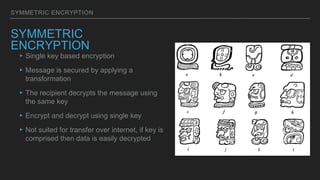
▸Single key based encryption
▸Message is secured by applying a
transformation
▸The recipient decrypts the message using
the same key
▸Encrypt and decrypt using single key
▸Not suited for transfer over internet, if key is
comprised then data is easily decrypted
SYMMETRIC ENCRYPTION
ALGORITHMS
▸Stream Ciphers
▸Convert one symbol of plain text to a symbol of cipher text
▸RC4
▸ChaCha
▸Block Ciphers
▸Convert group of symbols of plain text to block of cipher text
▸Triple DES
▸Advanced Encryption Standard (AES)
SYMMETRIC ENCRYPTION
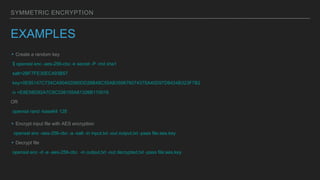
EXAMPLES
▸Create a random key
$ openssl enc -aes-256-cbc -k secret -P -md sha1
salt=2BF7FE35EC493B57
key=0E95147C734CA90402060DD28B48C55AB359676074375A40D97D8424B323F7B2
iv =E8E58D92A7C9C338155A81326B110016
OR
openssl rand -base64 128
▸Encrypt input file with AES encryption
openssl enc -aes-256-cbc -a -salt -in input.txt -out output.txt -pass file:aes.key
▸Decrypt file
openssl enc -d -a -aes-256-cbc -in output.txt -out decrypted.txt -pass file:aes.key
ASYMMETRIC ENCRYPTION
ASYMMETRIC
ENCRYPTION
▸Key pair based encryption (public and
private keys)
▸Message is encrypted by using public
key
▸Message is decrypted by using private
key
▸Suitable for internet data transfer
ASYMMETRIC ENCRYPTION
ALGORITHMS
▸RSA
▸Diffie–Hellman
ASYMMETRIC ENCRYPTION
EXAMPLES
▸Generate a private key without password
openssl genrsa -out secret.key 2048
▸Generate a private key with password, key is encrypted with DES-3 symmetric
algorithm
openssl genrsa -des3 -out secret.key 2048
▸ Generate public key from private key
openssl rsa -in secret.key -out public.key -outform PEM -pubout
ASYMMETRIC ENCRYPTION
EXAMPLES
▸Encrypt with public key
openssl rsautl -encrypt -inkey public.key -pubin -in input.txt -out encrypted.txt
▸Decrypt with private key
openssl rsautl -decrypt -inkey secret.key -in encrypted.txt -out decrypted_rsa.txt
ASYMMETRIC ENCRYPTION
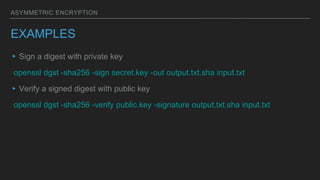
EXAMPLES
▸Sign a digest with private key
openssl dgst -sha256 -sign secret.key -out output.txt.sha input.txt
▸Verify a signed digest with public key
openssl dgst -sha256 -verify public.key -signature output.txt.sha input.txt
DIGEST
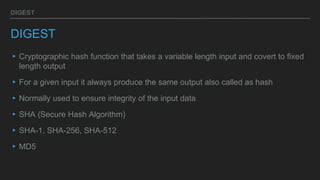
DIGEST
▸Cryptographic hash function that takes a variable length input and covert to fixed
length output
▸For a given input it always produce the same output also called as hash
▸Normally used to ensure integrity of the input data
▸SHA (Secure Hash Algorithm)
▸SHA-1, SHA-256, SHA-512
▸MD5
DIGEST
EXAMPLES
▸Calculate MD5 hash
openssl dgst -md5 input.txt
MD5(input.txt)= 42b127ebd5d6d6b2af4fb77a3eb63d74
▸Calculate SHA-256 hash
openssl dgst -sha256 input.txt
SHA256(input.txt)=
127d9d61e33a0ff8cced55bb91d2794bf307adc5aa304106588c02d929ec6494
CERTIFICATE AUTHORITY
CERTIFICATION AUTHORITY
▸Gatekeepers of public and private key
▸Trusted third parties that issue certificates (identity and key pair)
DIGITAL CERTIFICATE
DIGITAL CERTIFICATE
▸ Digital certificates are issued by certifying
authority (CA)
▸ Contains organization name to which certificate
is issued, who issued certificate and public key
▸ Certificate is used to validate the identity of user
or organization
DIGITAL CERTIFICATE
SELF SIGNED CERTIFICATE
▸Create a certificate, contains private key and certificate
▸Certificate is valid for a given host name (supplied as Common Name during certification creation)
openssl req -x509 -nodes -days 365 -sha256 -newkey rsa:2048 -keyout mykey.pem -out mycert.pem
▸Display certificate
openssl x509 -text -noout -in mycert.pem
▸Self signed certificate encryption works the same way as CA issued certificate but user visiting
website will see warning about the certificate as not trusted
▸Self signed certificates are good for internal testing but not for production
DIGITAL CERTIFICATE
CERTIFICATE SIGNING REQUEST
▸Create certificate signing request with fresh private key
openssl req -newkey rsa:2048 -nodes -keyout mykey.key -out mycert.csr
▸Create certificate signing request with existing private key
openssl req -key mykey.pem -new -out mycert.csr
‣ Created certificate signing request (CSR) is submitted to CA for certificate issue
WE NEED TO THINK ABOUT
ENCRYPTION NOT AS THIS SORT
OF ARCANE, BLACK ART. IT’S
BASIC PROTECTION.
Edward Snowden
ENCRYPTION

SSL Primer

  • 1.
  • 2.
    SSL/TLS WHY? ▸To ensure theclient is talking to the right server ▸To ensure server is talking to the right client (optional) ▸All the communication between client and server is encrypted
  • 3.
    SSL/TLS HOW? ▸Client sends hellomessage to server. This message includes information like various cyphers supported and TLS version ▸Server sends hello message which cypher and TLS version to be used for communication. The cypher and TLS version is selected based on client capabilities ▸Client checks the server certificate and ensures that it is signed by one one of the certificate authorities. The certificate authenticity is verified by public key of certificate authority (CA). CA public key is retrieved from installed certificate on local machine or browser) ▸Client sends its own certificate to server (optional) ▸Client sends its public key to server ▸Client generates a random key to be used for symmetric algorithm, encrypts it with server public key (retrieved from certificate) and sends over to server. Server decrypts the symmetric key with its own private key ▸All the data communication is now encrypted using the exchanged symmetry key
  • 4.
  • 5.
    ENCRYPTION SIMPLE ENCODING ▸Base64 isused to encode text or binary data that can be transmitted over network ▸Not secured encryption but widely used to covert binary data to plain text suitable for exchange over HTTP ▸Encode data openssl enc -base64 -in input.txt dGhpcyBpcyBhIHRlc3QgZmlsZS4K ▸Decode data openssl enc -d -base64 -in encoded_text.base64
  • 6.
    SYMMETRIC ENCRYPTION SYMMETRIC ENCRYPTION ▸Single keybased encryption ▸Message is secured by applying a transformation ▸The recipient decrypts the message using the same key ▸Encrypt and decrypt using single key ▸Not suited for transfer over internet, if key is comprised then data is easily decrypted
  • 7.
    SYMMETRIC ENCRYPTION ALGORITHMS ▸Stream Ciphers ▸Convertone symbol of plain text to a symbol of cipher text ▸RC4 ▸ChaCha ▸Block Ciphers ▸Convert group of symbols of plain text to block of cipher text ▸Triple DES ▸Advanced Encryption Standard (AES)
  • 8.
    SYMMETRIC ENCRYPTION EXAMPLES ▸Create arandom key $ openssl enc -aes-256-cbc -k secret -P -md sha1 salt=2BF7FE35EC493B57 key=0E95147C734CA90402060DD28B48C55AB359676074375A40D97D8424B323F7B2 iv =E8E58D92A7C9C338155A81326B110016 OR openssl rand -base64 128 ▸Encrypt input file with AES encryption openssl enc -aes-256-cbc -a -salt -in input.txt -out output.txt -pass file:aes.key ▸Decrypt file openssl enc -d -a -aes-256-cbc -in output.txt -out decrypted.txt -pass file:aes.key
  • 9.
    ASYMMETRIC ENCRYPTION ASYMMETRIC ENCRYPTION ▸Key pairbased encryption (public and private keys) ▸Message is encrypted by using public key ▸Message is decrypted by using private key ▸Suitable for internet data transfer
  • 10.
  • 11.
    ASYMMETRIC ENCRYPTION EXAMPLES ▸Generate aprivate key without password openssl genrsa -out secret.key 2048 ▸Generate a private key with password, key is encrypted with DES-3 symmetric algorithm openssl genrsa -des3 -out secret.key 2048 ▸ Generate public key from private key openssl rsa -in secret.key -out public.key -outform PEM -pubout
  • 12.
    ASYMMETRIC ENCRYPTION EXAMPLES ▸Encrypt withpublic key openssl rsautl -encrypt -inkey public.key -pubin -in input.txt -out encrypted.txt ▸Decrypt with private key openssl rsautl -decrypt -inkey secret.key -in encrypted.txt -out decrypted_rsa.txt
  • 13.
    ASYMMETRIC ENCRYPTION EXAMPLES ▸Sign adigest with private key openssl dgst -sha256 -sign secret.key -out output.txt.sha input.txt ▸Verify a signed digest with public key openssl dgst -sha256 -verify public.key -signature output.txt.sha input.txt
  • 14.
    DIGEST DIGEST ▸Cryptographic hash functionthat takes a variable length input and covert to fixed length output ▸For a given input it always produce the same output also called as hash ▸Normally used to ensure integrity of the input data ▸SHA (Secure Hash Algorithm) ▸SHA-1, SHA-256, SHA-512 ▸MD5
  • 15.
    DIGEST EXAMPLES ▸Calculate MD5 hash openssldgst -md5 input.txt MD5(input.txt)= 42b127ebd5d6d6b2af4fb77a3eb63d74 ▸Calculate SHA-256 hash openssl dgst -sha256 input.txt SHA256(input.txt)= 127d9d61e33a0ff8cced55bb91d2794bf307adc5aa304106588c02d929ec6494
  • 16.
    CERTIFICATE AUTHORITY CERTIFICATION AUTHORITY ▸Gatekeepersof public and private key ▸Trusted third parties that issue certificates (identity and key pair)
  • 17.
    DIGITAL CERTIFICATE DIGITAL CERTIFICATE ▸Digital certificates are issued by certifying authority (CA) ▸ Contains organization name to which certificate is issued, who issued certificate and public key ▸ Certificate is used to validate the identity of user or organization
  • 18.
    DIGITAL CERTIFICATE SELF SIGNEDCERTIFICATE ▸Create a certificate, contains private key and certificate ▸Certificate is valid for a given host name (supplied as Common Name during certification creation) openssl req -x509 -nodes -days 365 -sha256 -newkey rsa:2048 -keyout mykey.pem -out mycert.pem ▸Display certificate openssl x509 -text -noout -in mycert.pem ▸Self signed certificate encryption works the same way as CA issued certificate but user visiting website will see warning about the certificate as not trusted ▸Self signed certificates are good for internal testing but not for production
  • 19.
    DIGITAL CERTIFICATE CERTIFICATE SIGNINGREQUEST ▸Create certificate signing request with fresh private key openssl req -newkey rsa:2048 -nodes -keyout mykey.key -out mycert.csr ▸Create certificate signing request with existing private key openssl req -key mykey.pem -new -out mycert.csr ‣ Created certificate signing request (CSR) is submitted to CA for certificate issue
  • 20.
    WE NEED TOTHINK ABOUT ENCRYPTION NOT AS THIS SORT OF ARCANE, BLACK ART. IT’S BASIC PROTECTION. Edward Snowden ENCRYPTION