Secure Data Workflow 
CEO & Founder 
Benny Czarny 
2014
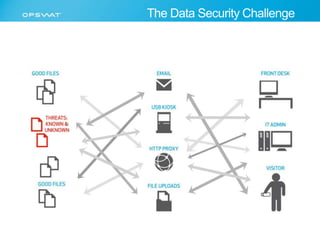
The Data Security Challenge
Agenda 
• The data security challenge 
• The data sources configuration challenge 
• The user permission challenge 
• Secure data workflow 
• Q&A
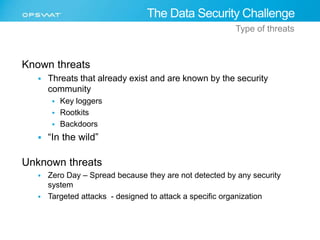
Known threats 
The Data Security Challenge 
Type of threats 
 Threats that already exist and are known by the security 
community 
 Key loggers 
 Rootkits 
 Backdoors 
 “In the wild” 
Unknown threats 
 Zero Day – Spread because they are not detected by any security 
system 
 Targeted attacks - designed to attack a specific organization
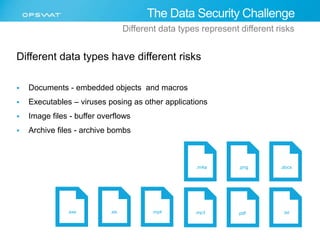
Different data types have different risks 
 Documents - embedded objects and macros 
 Executables – viruses posing as other applications 
 Image files - buffer overflows 
 Archive files - archive bombs 
The Data Security Challenge 
Different data types represent different risks 
.m4a .png .docx 
.exe .xls .mp4 .mp3 .pdf .txt
The Data Source Configuration Challenge 
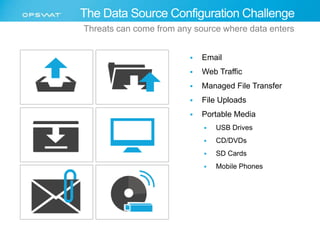
Threats can come from any source where data enters 
 Email 
 Web Traffic 
 Managed File Transfer 
 File Uploads 
 Portable Media 
 USB Drives 
 CD/DVDs 
 SD Cards 
 Mobile Phones
The Data Source Configuration Challenge 
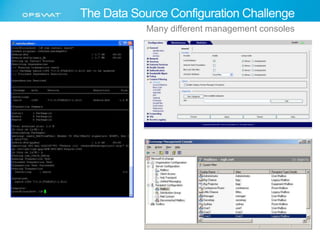
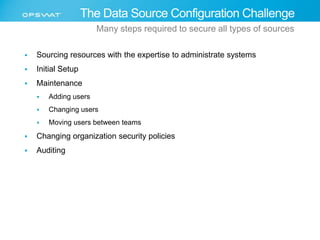
Many different management consoles
 Sourcing resources with the expertise to administrate systems 
 Initial Setup 
 Maintenance 
 Adding users 
 Changing users 
 Moving users between teams 
 Changing organization security policies 
 Auditing 
The Data Source Configuration Challenge 
Many steps required to secure all types of sources
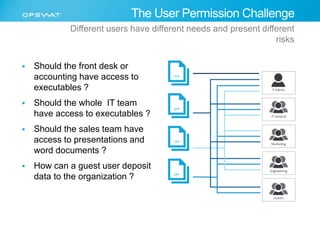
Different users have different needs and present different 
 Should the front desk or 
The User Permission Challenge 
accounting have access to 
executables ? 
 Should the whole IT team 
have access to executables ? 
 Should the sales team have 
access to presentations and 
word documents ? 
 How can a guest user deposit 
data to the organization ? 
risks
Secure Data Workflow
Known threats 
Secure Data Workflow 
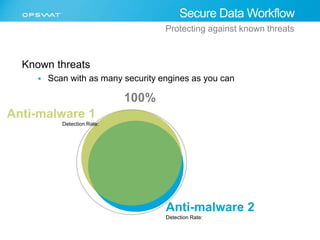
Protecting against known threats 
 Scan with as many security engines as you can 
100% 
Anti-malware 2 
Detection Rate: 
Detection Rate:
Secure Data Workflow 
Protecting Against Unknown Threats 
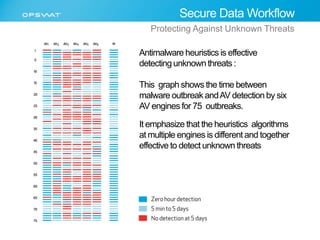
Antimalware heuristics is effective 
detecting unknown threats : 
This graph shows the time between 
malware outbreak and AV detection by six 
AV engines for 75 outbreaks. 
It emphasize that the heuristics algorithms 
at multiple engines is different and together 
effective to detect unknown threats
Secure Data Workflow 
Protecting Against Unknown Threats 
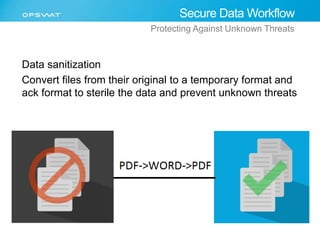
Data sanitization 
Convert files from their original to a temporary format and 
ack format to sterile the data and prevent unknown threats
 Blacklisting/whitelisting 
 File type filtering 
 Data sanitization 
Secure Data Workflow 
Protecting Against Unknown Threats 
Micro Workflow Elements 
 Remove embedded objects and macros from document files 
 Convert images to another format 
 Digital signatures 
 Validate all executables are digitally signed by a trusted source 
 Digitally sign all files after scanning to verify they have not been changed 
after scanning 
 Static analysis 
 Scanning with multiple antivirus engines 
 Checking PE headers 
 Periodic re-scanning 
 Dynamic analysis 
 Sandbox solutions such as FireEye, Bluecoat, ThreatTrack, others
Secure Data Workflow 
Addressing the user permission challenge 
Create multiple groups and assign different data security policies for 
each group 
 IT 
 Can receive executable files 
 Every executable needs to be scanned by 20 anti-malware engines 
 Accounting 
 Can’t receive executable files 
 Every document needs to be sanitized and scanned by 20 anti-malware engines
Secure Data Workflow 
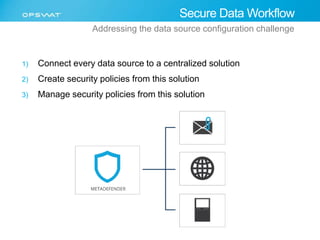
Addressing the data source configuration challenge 
1) Connect every data source to a centralized solution 
2) Create security policies from this solution 
3) Manage security policies from this solution
Data Security Challenge
Thank you! 
Benny Czarny 
CEO and Founder 
OPSWAT 
www.opswat.com 
Thank you

Secure Data Workflow

  • 1.
    Secure Data Workflow CEO & Founder Benny Czarny 2014
  • 2.
  • 3.
    Agenda • Thedata security challenge • The data sources configuration challenge • The user permission challenge • Secure data workflow • Q&A
  • 4.
    Known threats TheData Security Challenge Type of threats  Threats that already exist and are known by the security community  Key loggers  Rootkits  Backdoors  “In the wild” Unknown threats  Zero Day – Spread because they are not detected by any security system  Targeted attacks - designed to attack a specific organization
  • 5.
    Different data typeshave different risks  Documents - embedded objects and macros  Executables – viruses posing as other applications  Image files - buffer overflows  Archive files - archive bombs The Data Security Challenge Different data types represent different risks .m4a .png .docx .exe .xls .mp4 .mp3 .pdf .txt
  • 6.
    The Data SourceConfiguration Challenge Threats can come from any source where data enters  Email  Web Traffic  Managed File Transfer  File Uploads  Portable Media  USB Drives  CD/DVDs  SD Cards  Mobile Phones
  • 7.
    The Data SourceConfiguration Challenge Many different management consoles
  • 8.
     Sourcing resourceswith the expertise to administrate systems  Initial Setup  Maintenance  Adding users  Changing users  Moving users between teams  Changing organization security policies  Auditing The Data Source Configuration Challenge Many steps required to secure all types of sources
  • 9.
    Different users havedifferent needs and present different  Should the front desk or The User Permission Challenge accounting have access to executables ?  Should the whole IT team have access to executables ?  Should the sales team have access to presentations and word documents ?  How can a guest user deposit data to the organization ? risks
  • 10.
  • 11.
    Known threats SecureData Workflow Protecting against known threats  Scan with as many security engines as you can 100% Anti-malware 2 Detection Rate: Detection Rate:
  • 12.
    Secure Data Workflow Protecting Against Unknown Threats Antimalware heuristics is effective detecting unknown threats : This graph shows the time between malware outbreak and AV detection by six AV engines for 75 outbreaks. It emphasize that the heuristics algorithms at multiple engines is different and together effective to detect unknown threats
  • 13.
    Secure Data Workflow Protecting Against Unknown Threats Data sanitization Convert files from their original to a temporary format and ack format to sterile the data and prevent unknown threats
  • 14.
     Blacklisting/whitelisting File type filtering  Data sanitization Secure Data Workflow Protecting Against Unknown Threats Micro Workflow Elements  Remove embedded objects and macros from document files  Convert images to another format  Digital signatures  Validate all executables are digitally signed by a trusted source  Digitally sign all files after scanning to verify they have not been changed after scanning  Static analysis  Scanning with multiple antivirus engines  Checking PE headers  Periodic re-scanning  Dynamic analysis  Sandbox solutions such as FireEye, Bluecoat, ThreatTrack, others
  • 15.
    Secure Data Workflow Addressing the user permission challenge Create multiple groups and assign different data security policies for each group  IT  Can receive executable files  Every executable needs to be scanned by 20 anti-malware engines  Accounting  Can’t receive executable files  Every document needs to be sanitized and scanned by 20 anti-malware engines
  • 16.
    Secure Data Workflow Addressing the data source configuration challenge 1) Connect every data source to a centralized solution 2) Create security policies from this solution 3) Manage security policies from this solution
  • 17.
  • 18.
    Thank you! BennyCzarny CEO and Founder OPSWAT www.opswat.com Thank you

Editor's Notes

  • #2 Hello Everybody, my name is Benny Czarny and I am the CEO of OPSWAT, manufacturer of Metascan, Metadefender, OESIS and GEARS. Thank you ITpro EXPO 2014 team for the opportunity to sponsor the event together with NextIT and Toshio sun put into making this presentation happen   Today, I am going to talk about challenges we have to protecting data flow to an from organizations , ways and concepts to solve this challenges To elaborate what I am talking about I put togather a diagram
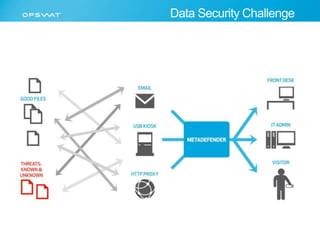
  • #3 To help identify the challenges In this diagram you see common data workflow So lets go left to right and start with the data – we have challenge to detect what is good and what is or bad data Then we go to the data entry points , first there are many and they need to be configure , set them up And finally we need to connect the users to the data we confront challenges linking related to creating different data security policies to different users types So what we’ll go over is
  • #4 So What I will cover in this presentation are: The data security challenge – what are the challenges to determining if the file or data is good or bad to my organization and inspire how to create a good security policy The data sources configuration – what are challenge, to configure multiple data sources t The user permission challenge, - what are tha challenges to connect data to users with their rolls and inspire how to create a good security policy Then I’ll talk about how to create an effective secure data workflows policy an to address any question you may have so lets start with the data security challenge
  • #5 When we try to create a data security policy - one way we can look in to this is creating a policy for known threat and a policy of unknown threat Known threats are threats that are known to the industry – there are many , millions and are still a very difficult to detect effectively and here we can differentiate between known threats to a specific security solution known threats and shared among security vendors e.g “in the wild “ Unknown threats – these could be extremely difficult as threats they are unknown because they are either Still hidden and spread out e.g 0 day attack specifically targeted to your organization so you can trust only your security solutions to detect it and should not
  • #6 Another thing we need to consider creating a data security policy is the type of data as different data types bring different threats Different file types introduce different risks for example Documents may contain embedded objects or macro scripts Executables are one of the most risker file formants we may want to detect and may be completely prevent image files introduce buffer overflow and other risks And archives has their own issues such as archive bombs and other risks related to archive
  • #7 When we need to go a head and enforce the Data security and the user security policy we will most likely face another challenge Which is how to effectively enforce this across many systems Files can be attached to e-mail Employees can download files from the Internet Files can be uploaded through a Managed File Transfer server or other file upload systems Files can also be brought in on guest devices or on physical media that employees or guests are bringing into a facility
  • #8 How can we effectively configure different policies in multiple sources to have the same data security policy for a give users weather it is an exchange , proxy , and usb security What you see here are multiple management consoles w e need to configure in order to effectively track and manage security policies To do it right how many security certification we’ll need our staff to pass
  • #9 Some of the difficulties in correctly configuring all of these sources are that there are many steps in setting up the correct policies, which means there are many potential points of failure. Some of these steps are Initial setup of the system Ongoing maintenance of the system, including adding and remove users, moving users between teams Changing configuration to match changes in the organization’s security policy Regular audits of the system to review exceptions and ensure compliance
  • #10 Creating a user permission policy is another big challenge as it differ between organization and here we need to ask our self What is the function of the user and what is the best security policy we can get to these users without compromising their productivity Should the front desk or accounting have access to executables ? Should the whole IT team have access to executables or security patches ? How can we balance between security and productivity how can we still enable productivity while we are managing security ?
  • #11 So lets talk about effective ways to create a secure data workflow
  • #12 One way to To address the risk of known threats, the best approach is to scan files with as many different security engines as possible. This is a simple diagram that shows how using multiple anti-malware engines increases the overall detection rate, even when there is a large overlap between the engines.
  • #13 In this test we tested 75 outbreaks against 6 different antimalware application and the detection ended up decent
  • #14 Another way to prevent unknow threats is Data Sanitization where
  • #15 The most comprehensive approach is to combine multiple protection methods into a single data security policy, which greatly reduces the likelihood that any threat will make it past all of the different protection methods. Some of the different layers that can be used are the following Blacklist known threats and whitelist known trusted files Filter files based on their type to eliminate any file types that are too risky to allow into the organization Use data sanitization to remove embedded objects from files that are otherwise not detected by antivirus engines Validate all digital signatures, and optionally digitally sign files so that they can be verified as clean when they are checked later Use static analysis to examine files, including scanning with multiple antivirus engines Periodically rescan files that were previously identified as clean, so that any threats that are identified after initially scanned can be remediated Use dynamic analysis tools, such as sandboxes, that use different methods to identify threats
  • #16 To address the user permission challenge, it is best to create multiple user groups and then assign the appropriate security policy to each group. For example: Anyone in the IT group is allowed to bring in executables, however those executables are required to be scanned by 20 different anti-malware engines Anyone in Accounting, on the other hand, would not be allowed to bring in executables, and any documents they bring in must be sanitized and scanned by 20 different anti-malware engines
  • #17 The data source configuration challenge is best addressed by managing data security policies from a central location. By making sure that all data entering an organization, whether through e-mail, a web proxy, or by physical media, is handled by the appropriate security policy, the number of potential points of failure is greatly reduced. All management and definition of the security policies can then be handled from a single location, so there is less chance that inconsistencies introduce vulnerabilities. This is never perfect htough
  • #18 To come back to the diagram we covered earlier in the presentation, having a centralized solution like Metadefender, where multi-layer security policies can be centrally defined and managed, helps organizations to protect themselves against potential threats, regardless of the source of the file and who is both bringing the file into and using the file within the organization. This is the vision of OPSWAT – today we cover elements of this secure data workflow what covers kiosk , proxy and email either via metascan metadefender or via a technology partner We are the leader in the space and have Next IT that represent us in Japan for deployment opportunities
  • #19 Thank you for your time. If you would like to find out more about designing secure data workflows and how OPSWAT can help you protect your organization from threats you can visit our website, at www.opswat.com.