Integrating ECM with your Enterprise:
                           5 Techniques to Try,
                             5 Traps to Avoid!


Monday, October 17, 2011
Agenda

         • Intro
         • Top 10 reasons ECM projects fail
               • AIIM Survey
         • Tips and traps in 5 areas:
               •   Metadata
               •   Contribution
               •   Consumption
               •   Security
               •   Integrations


Monday, October 17, 2011
Intro

         • You installed WebCenter CONTENT (UCM/Stellent)

         • Now what???

         • What “big things” do you need to do right?

         • What “big things” should you avoid?


Monday, October 17, 2011
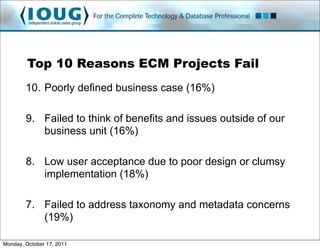
Top 10 Reasons ECM Projects Fail
        10. Poorly defined business case (16%)

        9. Failed to think of benefits and issues outside of our
           business unit (16%)

        8. Low user acceptance due to poor design or clumsy
           implementation (18%)

        7. Failed to address taxonomy and metadata concerns
           (19%)

Monday, October 17, 2011
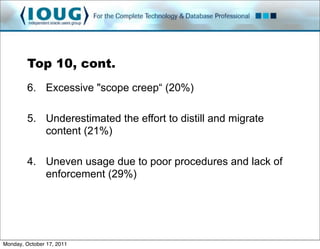
Top 10, cont.
         6. Excessive "scope creep“ (20%)

         5. Underestimated the effort to distill and migrate
            content (21%)

         4. Uneven usage due to poor procedures and lack of
            enforcement (29%)


Monday, October 17, 2011
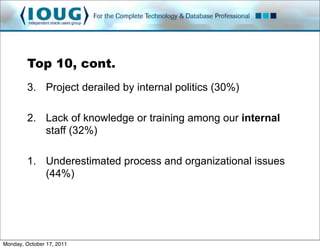
Top 10, cont.
         3. Project derailed by internal politics (30%)

         2. Lack of knowledge or training among our internal
            staff (32%)

         1. Underestimated process and organizational issues
            (44%)


Monday, October 17, 2011
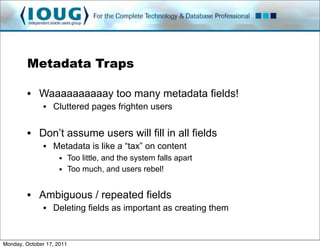
Metadata Traps

         • Waaaaaaaaaay too many metadata fields!
               • Cluttered pages frighten users


         • Don’t assume users will fill in all fields
               • Metadata is like a “tax” on content
                     • Too little, and the system falls apart
                     • Too much, and users rebel!


         • Ambiguous / repeated fields
               • Deleting fields as important as creating them


Monday, October 17, 2011
Metadata Tips

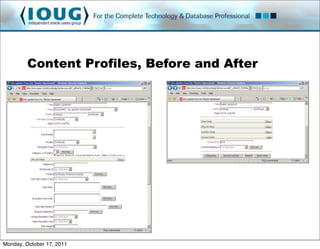
         • Content Profiles simplify the metadata model
               • You may require 100 metadata fields to describe all content
               • But... any one type may only need 10 fields
               • Profiles allows you to minimize the “clutter”

         • Can do much more than organize
               •   Create “default” values on pages to minimize data entry
               •   Minimize the number of values in drop-down lists
               •   Block certain users from selecting certain values
               •   Create “derived” values to store based on what they entered


Monday, October 17, 2011
Content Profiles, Before and After


Monday, October 17, 2011
Metadata Tips

         • Use “Simple Profiles”

         • Add only fields that have proven value

         • Make a “growable” taxonomy
               • Better than a “complete” taxonomy

         • Get to know UCM tools
               • Archiver for batch metadata updates
               • Custom DB reports to find unused / repeated fields


Monday, October 17, 2011
Contribution Traps

         • Folders!
               • Tough to scale a folders-based model enterprise-wide
               • Organizational structure is highly subjective

         • Fearing customizations
               • Everybody uses CONTENT differently
               • A custom UI can aid user adoption


Monday, October 17, 2011
Contribution Tips

         • Framework Folders
               • Preview available in Patch Set 4
               • Desktop integrated version available in Patch Set 5

         • Faceted searches
               • Built-in to Oracle Text 11g, customizable metadata fields

         • Use Content Tracker
               • Keep stats on “most popular authors”
               • Nothing like a little competition to aid adoption!


Monday, October 17, 2011
Contribution Tips, cont.

         • Check-Out-And-Open
               • One-click editing from the web browser
               • Some issues with HTTPS and IE, but fixable

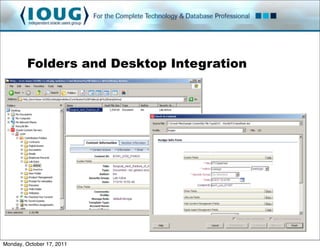
         • Desktop Integration Suite
               •   Drag-and-drop into folders
               •   Folders have default metadata
               •   Metadata pop-ups to fill in critical metadata
               •   Some issues with Folder saturation
                     • Fixes promised in Patch Set 5


Monday, October 17, 2011
Folders and Desktop Integration


Monday, October 17, 2011
Consumption Traps

         • “If you build it, they will come!”

         • Spent a million bucks on a CMS, and the item with
           the most hits is the cafeteria menu...

         • Assuming it will work like Google
               • People spend big bucks on internet SEO
               • Very few think about intranet SEO
               • Content must be findable to be reusable


Monday, October 17, 2011
Consumption Tips

         • Have an actual editor / publisher
               • Somebody needs to care that content is reusable
               • Software enables people: it doesn’t replace them!
               • If everybody cares, great! If not, put somebody in charge!

         • Create targeted Site Studio pages
               • Department portals, quick contribution, what’s new lists, etc.


         • Focus on how your audience looks for information
               • Search? Browse? Call? Email?
               • Make it easy for them, with a bit of training

Monday, October 17, 2011
Security Traps

         • Access Control Lists
               • Popular, easy, but sloooooow
               • Use sparingly, or run Exalogic!

         • Security should not be used to organize!
               • Do you really need that other security group???
               • Do you really need highly granular security???
               • Or are you just mapping your org chart?


Monday, October 17, 2011
Security Traps, cont.

         • Windows!
               • Active Directory integrations tricky with 11g
               • LDAP works fairly well
               • Single Sign On does not


Monday, October 17, 2011
Security Tips

         • Two dimensional group/account model
               •   Groups for classification: Public, Internal, Secure
               •   Accounts for department: Accounting, Sales, HR
               •   VP of Sales can read Secure documents in Sales account...
               •   ... but cannot read Secure documents in HR account!


         • Complex security models can affect performance
               • Reduce ACL usage, focus on groups/accounts blend
               • Minimize the number of “buckets” to maximize performance


Monday, October 17, 2011
Security Tips, cont.

         • Loosen up contribution access
               • Use workflows to control important docs
               • Place in highly secure group only when absolutely required

         • Content Tracker
               • “Trust, but verify” security

         • Use proven single sign on solutions
               • NetTegrity
               • Oracle Access Manager
                     • Some issues with applets

Monday, October 17, 2011
Integration Traps

         • Standards!!!
               • CMIS, WebDAV, JSR170, etc.
               • Very narrow pipe: you always replace them!

         • Treating it like a shared drive

         • Performance
               • Load test, get metrics, use caches

         • Security
               • Make sure other system understands CONTENT security!!!
Monday, October 17, 2011
Integration Tips

         • RIDC
               • Lightweight Java connector
               • May need to set IntradocServerPort on 11g
         • SOAP / SOA
               • 11g standard, great for ESBs
         • Site Studio for External Applications
         • IFRAMEs
               • Cheap and cheesy, but frequently enough!


Monday, October 17, 2011
Integration Tips, cont.

         • Mashups (WebCenter Interaction)
         • Distributed Document Capture
               • URL to trigger a scan, and check it in!
         • Application specific connectors
               • E-Business Suite, Siebel, Peoplesoft
               • Secure Enterprise Search
               • BPEL, SOA Suite for “orchestration”
         • Information Rights Management
               • Encrypt documents, and embed their security level
               • Security travels with doc, wherever it travels


Monday, October 17, 2011
Integration Tips, cont.

         • jQuery and Web-Oriented Architecture
               • Put IsJson=1 into any URL
               • Use jQuery, ExtJS, YUI to render with 100% JavaScript
               • http://bezzotech.com/library.html

         • Sometimes need to “trick” browsers with AJAX
               • Single-Origin AJAX policy
               • Use mod_proxy with Apache to bypass it


Monday, October 17, 2011
Misc. Tips

         • Go to Collaborate!!!
               • For the price of a steak dinner, get invaluable war stories
               • Which add-ons are best for you?
               • Tips/Traps for your specific industry

         • Camtasia Studio
               • Quick and easy video documentation for end-users


Monday, October 17, 2011
MARK YOUR CALENDARS!

                             COLLABORATE 12
                              April 22-26, 2012
                       Mandalay Bay Convention Center
                             Las Vegas, Nevada

                       http://events.ioug.org/p/cm/ld/fid=15


Monday, October 17, 2011

Integrating ECM (WebCenter Content) with your Enterprise! 5 Tips to Try, 5 Traps to Avoid

  • 1.
    Integrating ECM withyour Enterprise: 5 Techniques to Try, 5 Traps to Avoid! Monday, October 17, 2011
  • 2.
    Agenda • Intro • Top 10 reasons ECM projects fail • AIIM Survey • Tips and traps in 5 areas: • Metadata • Contribution • Consumption • Security • Integrations Monday, October 17, 2011
  • 3.
    Intro • You installed WebCenter CONTENT (UCM/Stellent) • Now what??? • What “big things” do you need to do right? • What “big things” should you avoid? Monday, October 17, 2011
  • 4.
    Top 10 ReasonsECM Projects Fail 10. Poorly defined business case (16%) 9. Failed to think of benefits and issues outside of our business unit (16%) 8. Low user acceptance due to poor design or clumsy implementation (18%) 7. Failed to address taxonomy and metadata concerns (19%) Monday, October 17, 2011
  • 5.
    Top 10, cont. 6. Excessive "scope creep“ (20%) 5. Underestimated the effort to distill and migrate content (21%) 4. Uneven usage due to poor procedures and lack of enforcement (29%) Monday, October 17, 2011
  • 6.
    Top 10, cont. 3. Project derailed by internal politics (30%) 2. Lack of knowledge or training among our internal staff (32%) 1. Underestimated process and organizational issues (44%) Monday, October 17, 2011
  • 7.
    Metadata Traps • Waaaaaaaaaay too many metadata fields! • Cluttered pages frighten users • Don’t assume users will fill in all fields • Metadata is like a “tax” on content • Too little, and the system falls apart • Too much, and users rebel! • Ambiguous / repeated fields • Deleting fields as important as creating them Monday, October 17, 2011
  • 8.
    Metadata Tips • Content Profiles simplify the metadata model • You may require 100 metadata fields to describe all content • But... any one type may only need 10 fields • Profiles allows you to minimize the “clutter” • Can do much more than organize • Create “default” values on pages to minimize data entry • Minimize the number of values in drop-down lists • Block certain users from selecting certain values • Create “derived” values to store based on what they entered Monday, October 17, 2011
  • 9.
    Content Profiles, Beforeand After Monday, October 17, 2011
  • 10.
    Metadata Tips • Use “Simple Profiles” • Add only fields that have proven value • Make a “growable” taxonomy • Better than a “complete” taxonomy • Get to know UCM tools • Archiver for batch metadata updates • Custom DB reports to find unused / repeated fields Monday, October 17, 2011
  • 11.
    Contribution Traps • Folders! • Tough to scale a folders-based model enterprise-wide • Organizational structure is highly subjective • Fearing customizations • Everybody uses CONTENT differently • A custom UI can aid user adoption Monday, October 17, 2011
  • 12.
    Contribution Tips • Framework Folders • Preview available in Patch Set 4 • Desktop integrated version available in Patch Set 5 • Faceted searches • Built-in to Oracle Text 11g, customizable metadata fields • Use Content Tracker • Keep stats on “most popular authors” • Nothing like a little competition to aid adoption! Monday, October 17, 2011
  • 13.
    Contribution Tips, cont. • Check-Out-And-Open • One-click editing from the web browser • Some issues with HTTPS and IE, but fixable • Desktop Integration Suite • Drag-and-drop into folders • Folders have default metadata • Metadata pop-ups to fill in critical metadata • Some issues with Folder saturation • Fixes promised in Patch Set 5 Monday, October 17, 2011
  • 14.
    Folders and DesktopIntegration Monday, October 17, 2011
  • 15.
    Consumption Traps • “If you build it, they will come!” • Spent a million bucks on a CMS, and the item with the most hits is the cafeteria menu... • Assuming it will work like Google • People spend big bucks on internet SEO • Very few think about intranet SEO • Content must be findable to be reusable Monday, October 17, 2011
  • 16.
    Consumption Tips • Have an actual editor / publisher • Somebody needs to care that content is reusable • Software enables people: it doesn’t replace them! • If everybody cares, great! If not, put somebody in charge! • Create targeted Site Studio pages • Department portals, quick contribution, what’s new lists, etc. • Focus on how your audience looks for information • Search? Browse? Call? Email? • Make it easy for them, with a bit of training Monday, October 17, 2011
  • 17.
    Security Traps • Access Control Lists • Popular, easy, but sloooooow • Use sparingly, or run Exalogic! • Security should not be used to organize! • Do you really need that other security group??? • Do you really need highly granular security??? • Or are you just mapping your org chart? Monday, October 17, 2011
  • 18.
    Security Traps, cont. • Windows! • Active Directory integrations tricky with 11g • LDAP works fairly well • Single Sign On does not Monday, October 17, 2011
  • 19.
    Security Tips • Two dimensional group/account model • Groups for classification: Public, Internal, Secure • Accounts for department: Accounting, Sales, HR • VP of Sales can read Secure documents in Sales account... • ... but cannot read Secure documents in HR account! • Complex security models can affect performance • Reduce ACL usage, focus on groups/accounts blend • Minimize the number of “buckets” to maximize performance Monday, October 17, 2011
  • 20.
    Security Tips, cont. • Loosen up contribution access • Use workflows to control important docs • Place in highly secure group only when absolutely required • Content Tracker • “Trust, but verify” security • Use proven single sign on solutions • NetTegrity • Oracle Access Manager • Some issues with applets Monday, October 17, 2011
  • 21.
    Integration Traps • Standards!!! • CMIS, WebDAV, JSR170, etc. • Very narrow pipe: you always replace them! • Treating it like a shared drive • Performance • Load test, get metrics, use caches • Security • Make sure other system understands CONTENT security!!! Monday, October 17, 2011
  • 22.
    Integration Tips • RIDC • Lightweight Java connector • May need to set IntradocServerPort on 11g • SOAP / SOA • 11g standard, great for ESBs • Site Studio for External Applications • IFRAMEs • Cheap and cheesy, but frequently enough! Monday, October 17, 2011
  • 23.
    Integration Tips, cont. • Mashups (WebCenter Interaction) • Distributed Document Capture • URL to trigger a scan, and check it in! • Application specific connectors • E-Business Suite, Siebel, Peoplesoft • Secure Enterprise Search • BPEL, SOA Suite for “orchestration” • Information Rights Management • Encrypt documents, and embed their security level • Security travels with doc, wherever it travels Monday, October 17, 2011
  • 24.
    Integration Tips, cont. • jQuery and Web-Oriented Architecture • Put IsJson=1 into any URL • Use jQuery, ExtJS, YUI to render with 100% JavaScript • http://bezzotech.com/library.html • Sometimes need to “trick” browsers with AJAX • Single-Origin AJAX policy • Use mod_proxy with Apache to bypass it Monday, October 17, 2011
  • 25.
    Misc. Tips • Go to Collaborate!!! • For the price of a steak dinner, get invaluable war stories • Which add-ons are best for you? • Tips/Traps for your specific industry • Camtasia Studio • Quick and easy video documentation for end-users Monday, October 17, 2011
  • 26.
    MARK YOUR CALENDARS! COLLABORATE 12 April 22-26, 2012 Mandalay Bay Convention Center Las Vegas, Nevada http://events.ioug.org/p/cm/ld/fid=15 Monday, October 17, 2011