



Stop Those Prying Eyes Getting to Your Data
Liam Cleary
Solution Architect | SharePoint MVP
About Me
•   Solution Architect @ SusQtech (Winchester, VA)
•   SharePoint MVP since 2007
•   Working with SharePoint since 2002
•   Worked on all kinds of projects
    •   Internet
    •   Intranet
    •   Extranet
    •   Anything SharePoint Really
• Involved in Architecture, Deployment, Customization and
  Development of SharePoint
“The only real security that a man can have
in this world is a reserve of knowledge,
experience and ability.”
Henry Ford

“We spend our time searching for security
and hate it when we get it.”
John Steinbeck
Agenda
• SharePoint Security in General
• SharePoint Topologies
  • Secure Topologies
• Protecting SharePoint
  •   Authentication and Authorization
  •   Firewall
  •   DRM
  •   Data Encryption
• Guidelines for Protecting SharePoint
SharePoint Security in General
Terminologies
• Permission: They are the unit of access that represents the individual task that can be
  performed on a securable object.
• Permission Level: Predefined sets of permissions that are given to users.
• User: Is the smallest object that access can be granted. User could be Active Directory
  account.
• User Groups: Is set of users that are grouped for common properties and ease of
  managing.
• Securable Object: Web (Site), List, Library and Item.
• Inheritance: When a securable object is created, it inherits user access of it`s parent
  object.
• Site Groups: When a new site is created group
  of sites are created automatically for the user.
SharePoint Security in General
• Logical Approach
   •   Item
   •   List or Library
   •   Site
   •   Site Collection
   •   Web Application
   •   Farm
• Service Applications
   • Farm
   • Cross Farm
• SharePoint performs Authorization
   •   Valid Authentication Token
   •   Role
   •   Security Group
   •   Claim Attribute
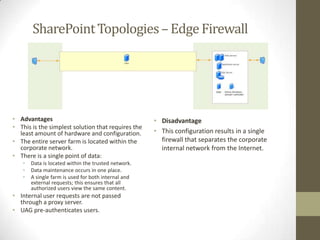
SharePoint Topologies – Edge Firewall


• Advantages                                         • Disadvantage
• This is the simplest solution that requires the
  least amount of hardware and configuration.        • This configuration results in a single
• The entire server farm is located within the         firewall that separates the corporate
  corporate network.                                   internal network from the Internet.
• There is a single point of data:
   •   Data is located within the trusted network.
   •   Data maintenance occurs in one place.
   •   A single farm is used for both internal and
       external requests; this ensures that all
       authorized users view the same content.
• Internal user requests are not passed
  through a proxy server.
• UAG pre-authenticates users.
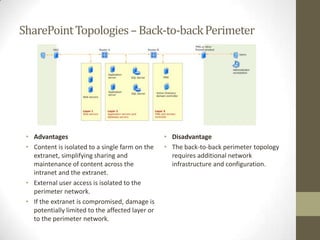
SharePoint Topologies – Back-to-back Perimeter


 • Advantages                                     • Disadvantage
 • Content is isolated to a single farm on the    • The back-to-back perimeter topology
   extranet, simplifying sharing and                requires additional network
   maintenance of content across the                infrastructure and configuration.
   intranet and the extranet.
 • External user access is isolated to the
   perimeter network.
 • If the extranet is compromised, damage is
   potentially limited to the affected layer or
   to the perimeter network.
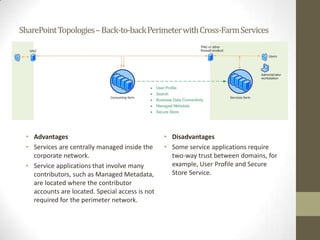
SharePoint Topologies – Back-to-back Perimeter with Cross-Farm Services


 • Advantages                                    • Disadvantages
 • Services are centrally managed inside the     • Some service applications require
   corporate network.                              two-way trust between domains, for
 • Service applications that involve many          example, User Profile and Secure
   contributors, such as Managed Metadata,         Store Service.
   are located where the contributor
   accounts are located. Special access is not
   required for the perimeter network.
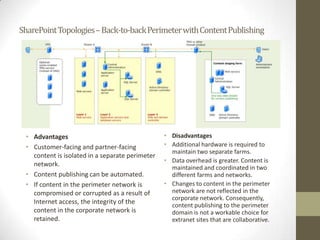
SharePoint Topologies – Back-to-back Perimeter with Content Publishing


 • Advantages                                    • Disadvantages
 • Customer-facing and partner-facing            • Additional hardware is required to
                                                   maintain two separate farms.
   content is isolated in a separate perimeter
                                                 • Data overhead is greater. Content is
   network.                                        maintained and coordinated in two
 • Content publishing can be automated.            different farms and networks.
 • If content in the perimeter network is        • Changes to content in the perimeter
   compromised or corrupted as a result of         network are not reflected in the
                                                   corporate network. Consequently,
   Internet access, the integrity of the           content publishing to the perimeter
   content in the corporate network is             domain is not a workable choice for
   retained.                                       extranet sites that are collaborative.
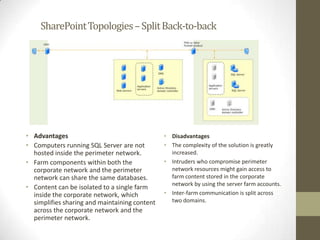
SharePoint Topologies – Split Back-to-back


• Advantages                                   • Disadvantages
• Computers running SQL Server are not         • The complexity of the solution is greatly
  hosted inside the perimeter network.           increased.
• Farm components within both the              • Intruders who compromise perimeter
  corporate network and the perimeter            network resources might gain access to
  network can share the same databases.          farm content stored in the corporate
                                                 network by using the server farm accounts.
• Content can be isolated to a single farm
  inside the corporate network, which          • Inter-farm communication is split across
  simplifies sharing and maintaining content     two domains.
  across the corporate network and the
  perimeter network.
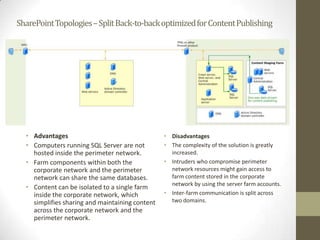
SharePoint Topologies – Split Back-to-back optimized for Content Publishing


  • Advantages                                   • Disadvantages
  • Computers running SQL Server are not         • The complexity of the solution is greatly
    hosted inside the perimeter network.           increased.
  • Farm components within both the              • Intruders who compromise perimeter
    corporate network and the perimeter            network resources might gain access to
    network can share the same databases.          farm content stored in the corporate
                                                   network by using the server farm accounts.
  • Content can be isolated to a single farm
    inside the corporate network, which          • Inter-farm communication is split across
    simplifies sharing and maintaining content     two domains.
    across the corporate network and the
    perimeter network.
Protecting SharePoint - Authentication and Authorization

 • Windows
   •   NTLM
   •   Kerberos
   •   Basic
   •   Anonymous
   •   Digest
 • Forms-based Authentication
   • Lightweight Directory Access Protocol (LDAP)
   • Microsoft SQL Server
   • ASP.NET Membership and Role Providers
 • SAML Token-based Authentication
   • Active Directory Federated Services
   • 3rd Party Identity Provider
   • Lightweight Directory Access Protocol (LDAP)
Protecting SharePoint - Authentication and Authorization

 Claims Authentication?
   • Wide Support
   • Standards Based
        • WS-Federation 1.1
        • WS-Trust 1.4
        • SAML Token 1.1 AuthN
   • Single Sign On
   • Federation
        • Already many providers, Live, Google, Facebook etc.
   •   Microsoft standard approach
   •   Fed up custom coding everything, every time
   •   Gets round (some) Office Integration problems
   •   Easy to configure with little effort
        • Multiple Web Config changes, Web Application Changes and then of
          course the actual configuration of your identity provider
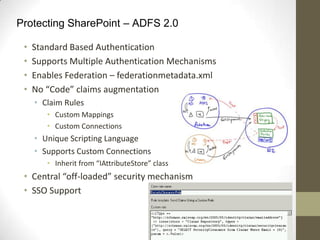
Protecting SharePoint – ADFS 2.0

 •   Standard Based Authentication
 •   Supports Multiple Authentication Mechanisms
 •   Enables Federation – federationmetadata.xml
 •   No “Code” claims augmentation
     • Claim Rules
        • Custom Mappings
        • Custom Connections
     • Unique Scripting Language
     • Supports Custom Connections
        • Inherit from “IAttributeStore” class
 • Central “off-loaded” security mechanism
 • SSO Support
ADFS
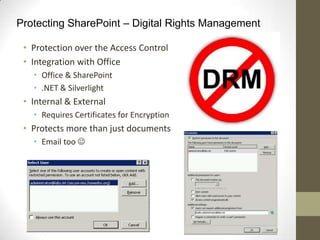
Protecting SharePoint – Digital Rights Management

 • Protection over the Access Control
 • Integration with Office
   • Office & SharePoint
   • .NET & Silverlight
 • Internal & External
   • Requires Certificates for Encryption
 • Protects more than just documents
   • Email too 
RIGHTS MANAGEMENT
Protecting SharePoint – Data Encryption

 • Various Options
   • Cell Level – Encrypts Cells in Databases
       • Not Usable with SharePoint
   • File Level (Bit Locker, EFS)
       • Could be used with SharePoint
   • RMS
       • Could be used with SharePoint
 • Transparent Data Encryption
   • SQL Level
   • Content Database Level
       •   Specifically set
       •   Backups cannot be restored to other servers without the “Private Key”
       •   Does not protect data in memory – potential security risk
       •   Prescribed Approach:
           http://www.slideshare.net/michaeltnoel/transparent-data-encryption-
           for-sharepoint-content-databases
SHOW ME THE MONEY
Protecting SharePoint – Server Guidelines

 • Block the standard SQL Server ports
 • Configure SQL Server database instances to listen on a nonstandard
   port
 • Configure SQL client aliases
   • Bypass the actual server name
 • Implement Windows Firewall / IPsec Policies
   • Custom Rules as needed
 • Utilize Group Policies
 • Utilize Claim Attributes
   •   Implement ADFS when using Claims Authentication
   •   Add Attribute Store
   •   Add Custom Attribute Rules
   •   Secure Communication with SSL
 • Follow server hardening plan
   • http://technet.microsoft.com/en-us/library/cc262849.aspx
Protecting SharePoint – General Guidelines

 • Make it Clear What Content Is Permissible
     • Security and Permission
     • Rights Management Services
 •   Educate Employees
 •   Use Classification to Guide Behavior
 •   Don't Forget to Enforce the Policies
 •   Utilize Claim Attributes
     • Augmentation using ADFS
 • Use out of the box configuration
     •   Users or Active Directory Groups
     •   Provider Roles
     •   SharePoint Site Groups
     •   Permission Groups assigned to SharePoint Site Groups
Thank You


www.cloudshare.com                 www.susqtech.com


      •   Personal Email: liamcleary@msn.com
      •   Work: http://www.susqtech.com
      •   Twitter: @helloitsliam
      •   Blog: www.helloitsliam.com

Stop Those Prying Eyes Getting To Your Data SPTechCon

  • 1.
    Stop Those PryingEyes Getting to Your Data Liam Cleary Solution Architect | SharePoint MVP
  • 2.
    About Me • Solution Architect @ SusQtech (Winchester, VA) • SharePoint MVP since 2007 • Working with SharePoint since 2002 • Worked on all kinds of projects • Internet • Intranet • Extranet • Anything SharePoint Really • Involved in Architecture, Deployment, Customization and Development of SharePoint
  • 3.
    “The only realsecurity that a man can have in this world is a reserve of knowledge, experience and ability.” Henry Ford “We spend our time searching for security and hate it when we get it.” John Steinbeck
  • 4.
    Agenda • SharePoint Securityin General • SharePoint Topologies • Secure Topologies • Protecting SharePoint • Authentication and Authorization • Firewall • DRM • Data Encryption • Guidelines for Protecting SharePoint
  • 5.
    SharePoint Security inGeneral Terminologies • Permission: They are the unit of access that represents the individual task that can be performed on a securable object. • Permission Level: Predefined sets of permissions that are given to users. • User: Is the smallest object that access can be granted. User could be Active Directory account. • User Groups: Is set of users that are grouped for common properties and ease of managing. • Securable Object: Web (Site), List, Library and Item. • Inheritance: When a securable object is created, it inherits user access of it`s parent object. • Site Groups: When a new site is created group of sites are created automatically for the user.
  • 6.
    SharePoint Security inGeneral • Logical Approach • Item • List or Library • Site • Site Collection • Web Application • Farm • Service Applications • Farm • Cross Farm • SharePoint performs Authorization • Valid Authentication Token • Role • Security Group • Claim Attribute
  • 7.
    SharePoint Topologies –Edge Firewall • Advantages • Disadvantage • This is the simplest solution that requires the least amount of hardware and configuration. • This configuration results in a single • The entire server farm is located within the firewall that separates the corporate corporate network. internal network from the Internet. • There is a single point of data: • Data is located within the trusted network. • Data maintenance occurs in one place. • A single farm is used for both internal and external requests; this ensures that all authorized users view the same content. • Internal user requests are not passed through a proxy server. • UAG pre-authenticates users.
  • 8.
    SharePoint Topologies –Back-to-back Perimeter • Advantages • Disadvantage • Content is isolated to a single farm on the • The back-to-back perimeter topology extranet, simplifying sharing and requires additional network maintenance of content across the infrastructure and configuration. intranet and the extranet. • External user access is isolated to the perimeter network. • If the extranet is compromised, damage is potentially limited to the affected layer or to the perimeter network.
  • 9.
    SharePoint Topologies –Back-to-back Perimeter with Cross-Farm Services • Advantages • Disadvantages • Services are centrally managed inside the • Some service applications require corporate network. two-way trust between domains, for • Service applications that involve many example, User Profile and Secure contributors, such as Managed Metadata, Store Service. are located where the contributor accounts are located. Special access is not required for the perimeter network.
  • 10.
    SharePoint Topologies –Back-to-back Perimeter with Content Publishing • Advantages • Disadvantages • Customer-facing and partner-facing • Additional hardware is required to maintain two separate farms. content is isolated in a separate perimeter • Data overhead is greater. Content is network. maintained and coordinated in two • Content publishing can be automated. different farms and networks. • If content in the perimeter network is • Changes to content in the perimeter compromised or corrupted as a result of network are not reflected in the corporate network. Consequently, Internet access, the integrity of the content publishing to the perimeter content in the corporate network is domain is not a workable choice for retained. extranet sites that are collaborative.
  • 11.
    SharePoint Topologies –Split Back-to-back • Advantages • Disadvantages • Computers running SQL Server are not • The complexity of the solution is greatly hosted inside the perimeter network. increased. • Farm components within both the • Intruders who compromise perimeter corporate network and the perimeter network resources might gain access to network can share the same databases. farm content stored in the corporate network by using the server farm accounts. • Content can be isolated to a single farm inside the corporate network, which • Inter-farm communication is split across simplifies sharing and maintaining content two domains. across the corporate network and the perimeter network.
  • 12.
    SharePoint Topologies –Split Back-to-back optimized for Content Publishing • Advantages • Disadvantages • Computers running SQL Server are not • The complexity of the solution is greatly hosted inside the perimeter network. increased. • Farm components within both the • Intruders who compromise perimeter corporate network and the perimeter network resources might gain access to network can share the same databases. farm content stored in the corporate network by using the server farm accounts. • Content can be isolated to a single farm inside the corporate network, which • Inter-farm communication is split across simplifies sharing and maintaining content two domains. across the corporate network and the perimeter network.
  • 13.
    Protecting SharePoint -Authentication and Authorization • Windows • NTLM • Kerberos • Basic • Anonymous • Digest • Forms-based Authentication • Lightweight Directory Access Protocol (LDAP) • Microsoft SQL Server • ASP.NET Membership and Role Providers • SAML Token-based Authentication • Active Directory Federated Services • 3rd Party Identity Provider • Lightweight Directory Access Protocol (LDAP)
  • 14.
    Protecting SharePoint -Authentication and Authorization Claims Authentication? • Wide Support • Standards Based • WS-Federation 1.1 • WS-Trust 1.4 • SAML Token 1.1 AuthN • Single Sign On • Federation • Already many providers, Live, Google, Facebook etc. • Microsoft standard approach • Fed up custom coding everything, every time • Gets round (some) Office Integration problems • Easy to configure with little effort • Multiple Web Config changes, Web Application Changes and then of course the actual configuration of your identity provider
  • 15.
    Protecting SharePoint –ADFS 2.0 • Standard Based Authentication • Supports Multiple Authentication Mechanisms • Enables Federation – federationmetadata.xml • No “Code” claims augmentation • Claim Rules • Custom Mappings • Custom Connections • Unique Scripting Language • Supports Custom Connections • Inherit from “IAttributeStore” class • Central “off-loaded” security mechanism • SSO Support
  • 16.
  • 17.
    Protecting SharePoint –Digital Rights Management • Protection over the Access Control • Integration with Office • Office & SharePoint • .NET & Silverlight • Internal & External • Requires Certificates for Encryption • Protects more than just documents • Email too 
  • 18.
  • 19.
    Protecting SharePoint –Data Encryption • Various Options • Cell Level – Encrypts Cells in Databases • Not Usable with SharePoint • File Level (Bit Locker, EFS) • Could be used with SharePoint • RMS • Could be used with SharePoint • Transparent Data Encryption • SQL Level • Content Database Level • Specifically set • Backups cannot be restored to other servers without the “Private Key” • Does not protect data in memory – potential security risk • Prescribed Approach: http://www.slideshare.net/michaeltnoel/transparent-data-encryption- for-sharepoint-content-databases
  • 20.
  • 21.
    Protecting SharePoint –Server Guidelines • Block the standard SQL Server ports • Configure SQL Server database instances to listen on a nonstandard port • Configure SQL client aliases • Bypass the actual server name • Implement Windows Firewall / IPsec Policies • Custom Rules as needed • Utilize Group Policies • Utilize Claim Attributes • Implement ADFS when using Claims Authentication • Add Attribute Store • Add Custom Attribute Rules • Secure Communication with SSL • Follow server hardening plan • http://technet.microsoft.com/en-us/library/cc262849.aspx
  • 22.
    Protecting SharePoint –General Guidelines • Make it Clear What Content Is Permissible • Security and Permission • Rights Management Services • Educate Employees • Use Classification to Guide Behavior • Don't Forget to Enforce the Policies • Utilize Claim Attributes • Augmentation using ADFS • Use out of the box configuration • Users or Active Directory Groups • Provider Roles • SharePoint Site Groups • Permission Groups assigned to SharePoint Site Groups
  • 23.
    Thank You www.cloudshare.com www.susqtech.com • Personal Email: liamcleary@msn.com • Work: http://www.susqtech.com • Twitter: @helloitsliam • Blog: www.helloitsliam.com

Editor's Notes

  • #2 [twitter] Starting @ 11:30: Stop Those Prying Eyes Getting to Your Data[/twitter]
  • #3 [twitter]Protect #SharePoint Wondering what session to visit come and see me in Plaza Room A - Stop Those Prying Eyes Getting to Your Data[/twitter]
  • #4 [twitter] We spend our time searching for security and hate it when we get it. [/twitter]
  • #8 [twitter]Which Firewall topology? Edge, Back-to-Back, Back-to-Back + Perimeter or Split-Back-to-Back – chatting now[/twitter]
  • #16 [twitter]ADFS 2.0 – Custom Claims Mappings without Code [/twitter]
  • #18 [twitter]Rights Management Services – great solution for securing collaboration in #SharePoint[/twitter]
  • #20 [twitter]Transport Data Encryption can be used in SQL for securing #SharePoint content[/twitter]
  • #22 [twitter]Protect #SharePoint, Block ports, IPSec and Firewall, Group Policies, custom Claim Attributes and harden those servers[/twitter]
  • #23 [twitter]Protect #SharePoint Security Guidelines: Clearly Define what content is permissible, Use Classification, Use Claim Attributes and use out of the box Security as it is defined [/twitter]
  • #24 [twitter]Thanks to #CloudShare for hosting my Environment[/twitter]