Rajkiya Engineering College, Azamgarh
Integrating Servlets and JSP
(The MVC Architecture)
Guided by:
Durgasoft Software Solutions Pvt. Limited,
Hyderabad
Submitted by: Amit Ranjan
Contents
1. Introduction to MVC
2. Advantages of MVC
3. MVC for Servlets
4. Web Applications
5. Deployment descriptor
(web.xml to servlet)
6. Servlets to JSP
7. Attributes
1. Introduction to MVC
• The Model-View-Controller (MVC) is an architectural pattern that separates an application into
three main logical components:
1. Model
2. View
3. Controller
• Each of these components are built to handle specific development aspects of an application
• MVC is one of the most frequently used industry-standard web development framework to create
scalable and extensible projects
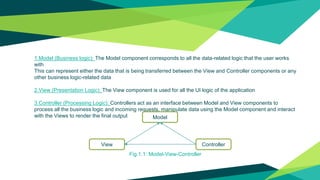
1.Model (Business logic): The Model component corresponds to all the data-related logic that the user works
with
This can represent either the data that is being transferred between the View and Controller components or any
other business logic-related data
2.View (Presentation Logic): The View component is used for all the UI logic of the application
3.Controller (Processing Logic): Controllers act as an interface between Model and View components to
process all the business logic and incoming requests, manipulate data using the Model component and interact
with the Views to render the final output Model
ControllerView
Fig.1.1: Model-View-Controller
2. Advantages of MVC
1. Separation of concerns
• Computation is not intermixed with I/O
• Consequently, code is cleaner and easier to understand
2. Flexibility
• The GUI (if one is used) can be completely revamped without touching the model in any way
3. Reusability
• The same model used for a servlet can equally well be used for an application or an applet
• (or by another process).
3. MVC is widely used and recommended
3. MVC for Servlets
• The model, as usual, does all the computational work, and no I/O
The model can consist of multiple classes
• The servlet class (the one that extends HttpServlet) acts as the controller
The servlet gives any relevant information from the user request to the model
The servlet takes the results and passes them on to the view
• The view—that is, the HTML page that is returned to the user—is frequently created by JSP
4. Web Application
• A web application typically consists of:
Some (Java) class, acting as the controller, that extends HttpServlet
The model code (also Java)
The view code (ultimately Java, but we write it as JSP)
Plus, of course, the web.xml file
• All these parts need to communicate with one another
5. Deployment Descriptor (web.xml)
Servlet life-cycle methods:
1. public void init()
Called after the servlet is constructed but before the servlet is placed into service
As the name implies, a good place to do initializations
2. public void service(ServletRequest request, ServletResponse response)
Called when a servlet request is made
The HttpServlet service method will dispatch the request to doGet, doPost, or one of the other
service method
3. public void destroy()
Called when a servlet is terminated
Can be used to clean up any resources (files, databases, threads, etc.)
Servlet Config:
• We can override public void init()
Servlet has these methods:
public ServletConfig getServletConfig()
It could be used if we override init()
public String getServletInfo()
By default, returns an empty string; override to make it useful
• The main purpose of ServletConfig is to provide initialization information to the servlet
ServletConfig has these methods:
public java.lang.String getServletName()
public ServletContext getServletContext()
public Enumeration getInitParameterNames()
public String getInitParameter(String name)
• Our interest will be in getting initialization parameters
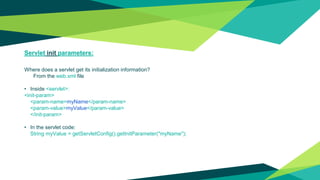
Servlet init parameters:
Where does a servlet get its initialization information?
From the web.xml file
• Inside <servlet>:
<init-param>
<param-name>myName</param-name>
<param-value>myValue</param-value>
</init-param>
• In the servlet code:
String myValue = getServletConfig().getInitParameter("myName");
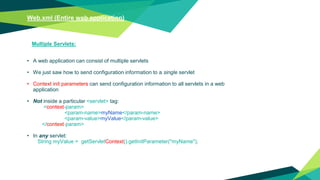
Web.xml (Entire web application)
Multiple Servlets:
• A web application can consist of multiple servlets
• We just saw how to send configuration information to a single servlet
• Context init parameters can send configuration information to all servlets in a web
application
• Not inside a particular <servlet> tag:
<context-param>
<param-name>myName</param-name>
<param-value>myValue</param-value>
</context-param>
• In any servlet:
String myValue = getServletContext().getInitParameter("myName");
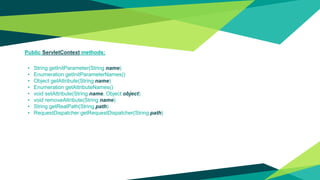
Public ServletContext methods:
• String getInitParameter(String name)
• Enumeration getInitParameterNames()
• Object getAttribute(String name)
• Enumeration getAttributeNames()
• void setAttribute(String name, Object object)
• void removeAttribute(String name)
• String getRealPath(String path)
• RequestDispatcher getRequestDispatcher(String path)
Servlet to JSP:
The ServletRequest Object:
You’ve seen these methods of the ServletRequest object:
• public Enumeration getParameterNames()
• public String getParameter(String name)
• public String[] getParameterValues(String name)
•
• ServletRequest also has these methods:
• public Enumeration getAttributeNames()
• public Object getAttribute(String name)
• public void setAttribute(String name, Object object)
You can use attributes to send information to the JSP
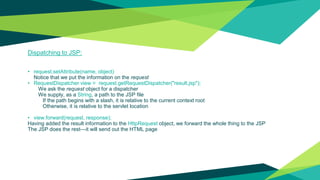
Dispatching to JSP:
• request.setAttribute(name, object)
Notice that we put the information on the request
• RequestDispatcher view = request.getRequestDispatcher("result.jsp");
We ask the request object for a dispatcher
We supply, as a String, a path to the JSP file
If the path begins with a slash, it is relative to the current context root
Otherwise, it is relative to the servlet location
• view.forward(request, response);
Having added the result information to the HttpRequest object, we forward the whole thing to the JSP
The JSP does the rest—it will send out the HTML page
Aside: redirect vs. forward:
• The previous slide showed how a servlet could forward a request to JSP (or to
another servlet)
This is all done on the server side
• response.sendRedirect(URL) sends a response back to the browser that says,
in effect, “I can’t handle this request; you should go to this URL instead.”
You cannot use this method if you have already written something to the response
The URL can be relative to the location of this servlet
7. Attributes
Parametres are not attributes:
• You can get parameters from the Deployment Descriptor:
getServletConfig().getInitParameter(name);
getServletContext().getInitParameter(name);
• You cannot set these parameters
• You can get request parameters
request.getParameter(String name)
• Parameter values are always Strings
• Attribute values are always Objects
When you get an attribute, you have to cast it to the type you want
Attribute scopes:
• You can get parameters from the Deployment Descriptor:
getServletConfig().getInitParameter(name);
getServletContext().getInitParameter(name);
• You cannot set these parameters
• You can get request parameters
request.getParameter(String name)
• Parameter values are always Strings
• Attribute values are always Objects
When you get an attribute, you have to cast it to the type you want
Attribute methods:
• ServletContext objects, ServletRequest objects, and HttpSession objects all have
the following methods:
• Object getAttribute(String name)
• void setAttribute(String name, Object object)
• void removeAttribute(String name)
• Enumeration getAttributeNames()
Thread Safety:
• Thread problems can occur when:
One Thread is writing to (modifying) an object at the same time another Thread is reading it
Two (or more) Threads are trying to write to the same object at the same time
• Thread problems cannot (in general) be detected by the Java runtime system
Instead, thread problems cause random, mysterious, non-replicable corruption of data
• There are simple steps that you can take to avoid many threading problems
However, threading is very error-prone and can be extremely difficult to ensure that you
have it right
Thread Safety in Servlets:
• Tomcat starts a new Thread for every new request
• Each request, and therefore each Thread, has its own request and response objects
Therefore, these are inherently Thread-safe
Local variables (including parameters) of your service methods are also thread-safe
Instance variables are not thread-safe
You don’t have multiple servlet objects—you have multiple Threads using the same servlet
object
• Application (context) scope is shared by all servlets
Therefore, context attributes are inherently Thread-unsafe
• Session attributes are not completely Thread-safe
It is possible to have multiple simultaneous requests from the same session
Getting init parameters in JSP:
You can get servlet and context init parameters in your JSP
Step 1: Specify in your DD that you want them:
<servlet>
<servlet-name>SomeServletName</servlet-name>
<jsp-file>/UseServletInit.jsp</jsp-file>
<init-param> ... </init-param>
...
</servlet>
Step 2: Override jspInit() (must be done in a JSP declaration):
<%!
public void jspInit() {
// use getServletConfig() and getServletContext() as usual
}
%>
Page Context:
• In JSP, pageContext is an implicit object (like request and response) of type PageContext
• PageContext has these methods (among others):
Object getAttribute(String name) // uses page scope
Object getAttribute(String name, int scope)
Enumeration getAttributeNamesInScope(int scope)
Object findAttribute(String name)
Searches in the order: page context, request scope, session scope, application scope
void setAttribute(String name, Object value)
void setAttribute(String name, Object value, int scope)
• Where scope can be one of PageContext.APPLICATION_SCOPE, PageContext.PAGE_SCOPE,
PageContext.REQUEST_SCOPE, or PageContext.SESSION_SCOPE
So you can access a lot of information from a PageContext object!
Thanks!
Any questions?

Integrating Servlets and JSP (The MVC Architecture)

  • 1.
    Rajkiya Engineering College,Azamgarh Integrating Servlets and JSP (The MVC Architecture) Guided by: Durgasoft Software Solutions Pvt. Limited, Hyderabad Submitted by: Amit Ranjan
  • 2.
    Contents 1. Introduction toMVC 2. Advantages of MVC 3. MVC for Servlets 4. Web Applications 5. Deployment descriptor (web.xml to servlet) 6. Servlets to JSP 7. Attributes
  • 3.
    1. Introduction toMVC • The Model-View-Controller (MVC) is an architectural pattern that separates an application into three main logical components: 1. Model 2. View 3. Controller • Each of these components are built to handle specific development aspects of an application • MVC is one of the most frequently used industry-standard web development framework to create scalable and extensible projects
  • 4.
    1.Model (Business logic):The Model component corresponds to all the data-related logic that the user works with This can represent either the data that is being transferred between the View and Controller components or any other business logic-related data 2.View (Presentation Logic): The View component is used for all the UI logic of the application 3.Controller (Processing Logic): Controllers act as an interface between Model and View components to process all the business logic and incoming requests, manipulate data using the Model component and interact with the Views to render the final output Model ControllerView Fig.1.1: Model-View-Controller
  • 5.
    2. Advantages ofMVC 1. Separation of concerns • Computation is not intermixed with I/O • Consequently, code is cleaner and easier to understand 2. Flexibility • The GUI (if one is used) can be completely revamped without touching the model in any way 3. Reusability • The same model used for a servlet can equally well be used for an application or an applet • (or by another process). 3. MVC is widely used and recommended
  • 6.
    3. MVC forServlets • The model, as usual, does all the computational work, and no I/O The model can consist of multiple classes • The servlet class (the one that extends HttpServlet) acts as the controller The servlet gives any relevant information from the user request to the model The servlet takes the results and passes them on to the view • The view—that is, the HTML page that is returned to the user—is frequently created by JSP
  • 7.
    4. Web Application •A web application typically consists of: Some (Java) class, acting as the controller, that extends HttpServlet The model code (also Java) The view code (ultimately Java, but we write it as JSP) Plus, of course, the web.xml file • All these parts need to communicate with one another
  • 8.
    5. Deployment Descriptor(web.xml) Servlet life-cycle methods: 1. public void init() Called after the servlet is constructed but before the servlet is placed into service As the name implies, a good place to do initializations 2. public void service(ServletRequest request, ServletResponse response) Called when a servlet request is made The HttpServlet service method will dispatch the request to doGet, doPost, or one of the other service method 3. public void destroy() Called when a servlet is terminated Can be used to clean up any resources (files, databases, threads, etc.)
  • 9.
    Servlet Config: • Wecan override public void init() Servlet has these methods: public ServletConfig getServletConfig() It could be used if we override init() public String getServletInfo() By default, returns an empty string; override to make it useful • The main purpose of ServletConfig is to provide initialization information to the servlet ServletConfig has these methods: public java.lang.String getServletName() public ServletContext getServletContext() public Enumeration getInitParameterNames() public String getInitParameter(String name) • Our interest will be in getting initialization parameters
  • 10.
    Servlet init parameters: Wheredoes a servlet get its initialization information? From the web.xml file • Inside <servlet>: <init-param> <param-name>myName</param-name> <param-value>myValue</param-value> </init-param> • In the servlet code: String myValue = getServletConfig().getInitParameter("myName");
  • 11.
    Web.xml (Entire webapplication) Multiple Servlets: • A web application can consist of multiple servlets • We just saw how to send configuration information to a single servlet • Context init parameters can send configuration information to all servlets in a web application • Not inside a particular <servlet> tag: <context-param> <param-name>myName</param-name> <param-value>myValue</param-value> </context-param> • In any servlet: String myValue = getServletContext().getInitParameter("myName");
  • 12.
    Public ServletContext methods: •String getInitParameter(String name) • Enumeration getInitParameterNames() • Object getAttribute(String name) • Enumeration getAttributeNames() • void setAttribute(String name, Object object) • void removeAttribute(String name) • String getRealPath(String path) • RequestDispatcher getRequestDispatcher(String path)
  • 13.
    Servlet to JSP: TheServletRequest Object: You’ve seen these methods of the ServletRequest object: • public Enumeration getParameterNames() • public String getParameter(String name) • public String[] getParameterValues(String name) • • ServletRequest also has these methods: • public Enumeration getAttributeNames() • public Object getAttribute(String name) • public void setAttribute(String name, Object object) You can use attributes to send information to the JSP
  • 14.
    Dispatching to JSP: •request.setAttribute(name, object) Notice that we put the information on the request • RequestDispatcher view = request.getRequestDispatcher("result.jsp"); We ask the request object for a dispatcher We supply, as a String, a path to the JSP file If the path begins with a slash, it is relative to the current context root Otherwise, it is relative to the servlet location • view.forward(request, response); Having added the result information to the HttpRequest object, we forward the whole thing to the JSP The JSP does the rest—it will send out the HTML page
  • 15.
    Aside: redirect vs.forward: • The previous slide showed how a servlet could forward a request to JSP (or to another servlet) This is all done on the server side • response.sendRedirect(URL) sends a response back to the browser that says, in effect, “I can’t handle this request; you should go to this URL instead.” You cannot use this method if you have already written something to the response The URL can be relative to the location of this servlet
  • 16.
    7. Attributes Parametres arenot attributes: • You can get parameters from the Deployment Descriptor: getServletConfig().getInitParameter(name); getServletContext().getInitParameter(name); • You cannot set these parameters • You can get request parameters request.getParameter(String name) • Parameter values are always Strings • Attribute values are always Objects When you get an attribute, you have to cast it to the type you want
  • 17.
    Attribute scopes: • Youcan get parameters from the Deployment Descriptor: getServletConfig().getInitParameter(name); getServletContext().getInitParameter(name); • You cannot set these parameters • You can get request parameters request.getParameter(String name) • Parameter values are always Strings • Attribute values are always Objects When you get an attribute, you have to cast it to the type you want
  • 18.
    Attribute methods: • ServletContextobjects, ServletRequest objects, and HttpSession objects all have the following methods: • Object getAttribute(String name) • void setAttribute(String name, Object object) • void removeAttribute(String name) • Enumeration getAttributeNames()
  • 19.
    Thread Safety: • Threadproblems can occur when: One Thread is writing to (modifying) an object at the same time another Thread is reading it Two (or more) Threads are trying to write to the same object at the same time • Thread problems cannot (in general) be detected by the Java runtime system Instead, thread problems cause random, mysterious, non-replicable corruption of data • There are simple steps that you can take to avoid many threading problems However, threading is very error-prone and can be extremely difficult to ensure that you have it right
  • 20.
    Thread Safety inServlets: • Tomcat starts a new Thread for every new request • Each request, and therefore each Thread, has its own request and response objects Therefore, these are inherently Thread-safe Local variables (including parameters) of your service methods are also thread-safe Instance variables are not thread-safe You don’t have multiple servlet objects—you have multiple Threads using the same servlet object • Application (context) scope is shared by all servlets Therefore, context attributes are inherently Thread-unsafe • Session attributes are not completely Thread-safe It is possible to have multiple simultaneous requests from the same session
  • 21.
    Getting init parametersin JSP: You can get servlet and context init parameters in your JSP Step 1: Specify in your DD that you want them: <servlet> <servlet-name>SomeServletName</servlet-name> <jsp-file>/UseServletInit.jsp</jsp-file> <init-param> ... </init-param> <init-param> ... </init-param> ... </servlet> Step 2: Override jspInit() (must be done in a JSP declaration): <%! public void jspInit() { // use getServletConfig() and getServletContext() as usual } %>
  • 22.
    Page Context: • InJSP, pageContext is an implicit object (like request and response) of type PageContext • PageContext has these methods (among others): Object getAttribute(String name) // uses page scope Object getAttribute(String name, int scope) Enumeration getAttributeNamesInScope(int scope) Object findAttribute(String name) Searches in the order: page context, request scope, session scope, application scope void setAttribute(String name, Object value) void setAttribute(String name, Object value, int scope) • Where scope can be one of PageContext.APPLICATION_SCOPE, PageContext.PAGE_SCOPE, PageContext.REQUEST_SCOPE, or PageContext.SESSION_SCOPE So you can access a lot of information from a PageContext object!
  • 23.