TUGA IT 2016
LISBON, PORTUGAL
Radi Atanassov
MCM, MVP
OneBit Software
Developing Apps with Azure AD
C:usersradi>whoami
Radi Atanassov
Microsoft Certified Master:
SharePoint 2010
Microsoft Certified Solutions
Master
Microsoft MVP - SharePoint
Microsoft Certified Trainer
Owner/Founder: OneBit Software
Web Platform User Group Lead
Certified Scrum Master
Microsoft OfficeDev PnP Core Team
Agenda
• Azure AD Overview
• Graph API Introduction
• Review with Graph Explorer
• Active Directory Authentication Library for .NET
• Securing web applications with Azure AD
• Angular and TypeScript Overview
• ASP.NET Core 1.0 RC1 Overview
• Active Directory Authentication Library for .JS
Things you will need
• VS2015 with Update 1
• Node.JS tools for VS
• An Office 365 Tenant and an Azure Subscription
Things I used:
• Some slides from the OfficeDev training course O3563 located here:
https://github.com/OfficeDev/TrainingContent/tree/master/O3653/O3
653-
1%20Deep%20Dive%20into%20Azure%20AD%20with%20the%20Office
%20365%20APIs
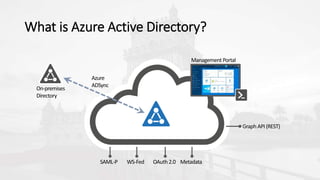
What is Azure Active Directory?
On-premises
Directory
SAML-P
Management Portal
Azure
ADSync
WS-Fed OAuth 2.0 Metadata
Graph API(REST)
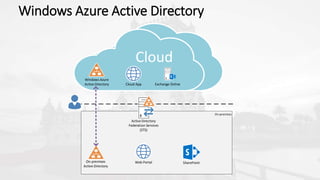
Windows Azure Active Directory
Cloud
On-premises
Cloud App
Web Portal
Exchange Online
SharePointOn-premises
Active Directory
Windows Azure
Active Directory
Active Directory
Federation Services
(STS)
Azure AD in the Enterprise
 Synced with on-premises users
 Enable SSO between many applications
 Can be used with any development platform
 Can be used instead of ASP.NET Identity
Azure AD and Office 365
 Every Office 365 tenant has Azure AD
 SharePoint Online Add-ins (AppRegNew.aspx) are enrolled in
Azure AD
 In Azure AD we can authorize web applications to access other
tenant data
 Azure AD has much more user data than SP profiles
 The Microsoft Graph API
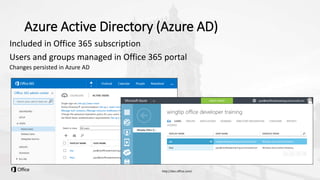
Azure Active Directory (Azure AD)
Included in Office 365 subscription
Users and groups managed in Office 365 portal
Changes persisted in Azure AD
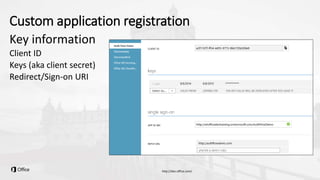
Custom application registration
Key information
Client ID
Keys (aka client secret)
Redirect/Sign-on URI
Office 365 Apps vs SharePoint Apps
Office 365
• Registered in Azure AD
• Consumes O365 API’s
• Can be added to App Launcher
• Login through Azure AD
• Web Deploy Tooling
SharePoint Provider-Hosted
• Deployed through App Catalog
• Can consume O365 API’s
• Authenticated through
SharePoint
• Accessed through SharePoint
• Office Dev Tooling
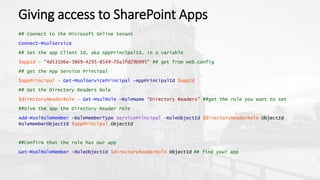
Giving access to SharePoint Apps
## Connect to the Microsoft Online tenant
Connect-MsolService
## Set the app Client Id, aka AppPrincipalId, in a variable
$appId = "4d53106e-3869-4295-8549-70a3fd29b995" ## get from web.config
## get the App Service Principal
$appPrincipal = Get-MsolServicePrincipal -AppPrincipalId $appId
## Get the Directory Readers Role
$directoryReaderRole = Get-MsolRole -RoleName "Directory Readers" ##get the role you want to set
##Give the app the Directory Reader role
Add-MsolRoleMember -RoleMemberType ServicePrincipal -RoleObjectId $directoryReaderRole.ObjectId
RoleMemberObjectId $appPrincipal.ObjectId
##Confirm that the role has our app
Get-MsolRoleMember -RoleObjectId $directoryReaderRole.ObjectId ## find your app
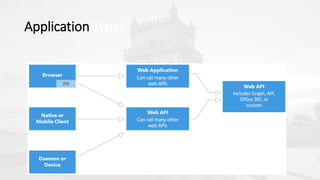
Application Types
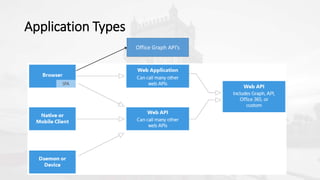
Application Types
Office Graph API’s
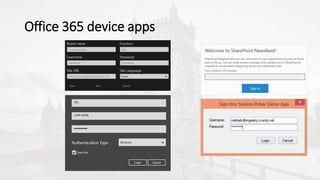
Office 365 device apps
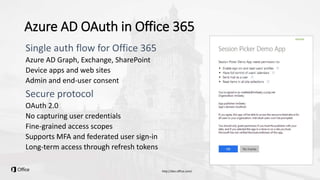
Azure AD OAuth in Office 365
Azure AD Graph, Exchange, SharePoint
Device apps and web sites
Admin and end-user consent
OAuth 2.0
No capturing user credentials
Fine-grained access scopes
Supports MFA and federated user sign-in
Long-term access through refresh tokens
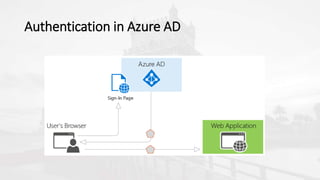
Authentication in Azure AD
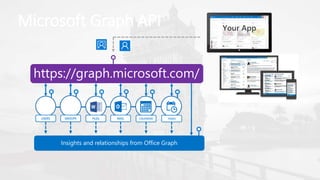
Microsoft Graph API
https://graph.microsoft.com/
USERS FILES MAIL CALENDARGROUPS
Insights and relationships from Office Graph
TASKS
What is the Graph API?
• A new RESTful interface to Azure AD
• Support HTTP/REST-based protocol for accessing all directory
information
• Support HTTP response codes and Return directory objects in
JSON/XML
• Compatible with OData V3 for more complex queries & metadata
(www.odata.org)
• Leverage OAuth 2.0 for Authentication
Navigating the API
/{version}/{tenant} /{entity-set} /{id}/{property}
Libraries
• Microsoft.Azure.ActiveDirectory
.GraphClient
• Microsoft.Graph
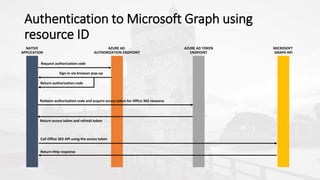
Authentication to Microsoft Graph using
resource ID
User provides app username & password
App authenticates as the user
Enables: user + app authentication
Scenarios: native applications with interactive session
Spec: https://tools.ietf.org/html/rfc6749-section-1.3.3
Resource Owner Password Credentials Flow
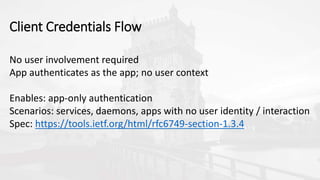
No user involvement required
App authenticates as the app; no user context
Enables: app-only authentication
Scenarios: services, daemons, apps with no user identity / interaction
Spec: https://tools.ietf.org/html/rfc6749-section-1.3.4
Client Credentials Flow
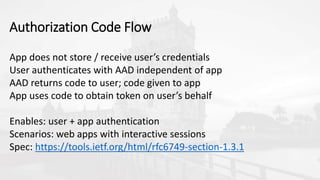
App does not store / receive user’s credentials
User authenticates with AAD independent of app
AAD returns code to user; code given to app
App uses code to obtain token on user’s behalf
Enables: user + app authentication
Scenarios: web apps with interactive sessions
Spec: https://tools.ietf.org/html/rfc6749-section-1.3.1
Authorization Code Flow
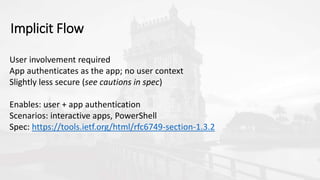
User involvement required
App authenticates as the app; no user context
Slightly less secure (see cautions in spec)
Enables: user + app authentication
Scenarios: interactive apps, PowerShell
Spec: https://tools.ietf.org/html/rfc6749-section-1.3.2
Implicit Flow
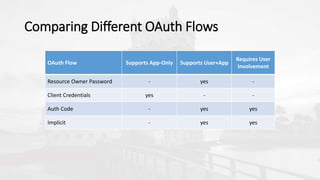
Comparing Different OAuth Flows
OAuth Flow Supports App-Only Supports User+App
Requires User
Involvement
Resource Owner Password - yes -
Client Credentials yes - -
Auth Code - yes yes
Implicit - yes yes
Introducing ADAL for developers
• Cloud or on-premises authentication with AD
• Important for growth of Microsoft cloud services
• Libraries for every platform:
• JavaScript
• .NET – Windows Store, Windows Phone, any .NET client
• OSX & iOS
• Android
• Node.JS
• Java, Xamarin, Cordova, Ruby, you name it!
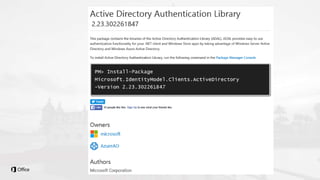
Introducing ADAL for developers
• Open-source: https://github.com/azuread
• Supports open protocols:
• WS-Fed, OAuth, OpenID Connect, SAML, WIA with ADFS
• Nice async patterns
Getting a client:
public static ActiveDirectoryClient GetActiveDirectoryClientAsApplication()
{
Uri servicePointUri = new Uri(”https://graph.windows.net”);
Uri serviceRoot = new Uri(servicePointUri, ”contoso.com”);
ActiveDirectoryClient activeDirectoryClient = new
ActiveDirectoryClient(serviceRoot, async () => await
AcquireTokenAsyncForApplication());
return activeDirectoryClient;
}
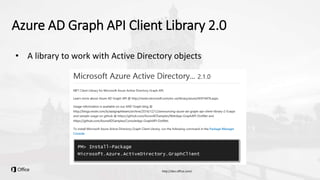
Azure AD Graph API Client Library 2.0
• A library to work with Active Directory objects
Consistent Async Pattern:
AzureActiveDirectoryClient activeDirectoryClient;
Task<IPagedCollection<{Entity}>> getGraphObjectsTask =
activeDirectoryClient.{Entity}.ExecuteAsync();
IPagedCollection<{Entity}> graphObjects = await getGraphObjectsTask;
Good LINQ support:
List<IUser> users = activeDirectoryClient.Users.Where(user =>
user.UserPrincipalName.Equals(“radi@sharepoint.bg”))
.ExecuteAsync()
.Result
.CurrentPage
.ToList();
IUser user =
activeDirectoryClient.Users.GetByObjectId(uObjectId).ExecuteAsync().Result;
Introducing ADAL.JS
JavaScript library specifically for SPAs
Uses OAuth2 Implicit Flow
Supports signing users into AAD
Because SPAs can’t safely keep Client Secrets!
Supports consuming Web APIs secured by AAD
The Web API must validate the token
Built with Angular in mind
adal.js, adal-angular.js
Implicit Flow
Retrieve configuration information
This information is set up in the initialization code for the app
Create request URL for an ID token
Sends only the Client ID and asks to authenticate the user
User signs in
May also need to consent
Access token is returned
Returned as a # fragment for security
Access token is cached in web storage
Web API Access
ADAL.JS intercepts ajax call
ADAL JS is constantly listening for outbound ajax calls
Access token is attached to call
Attached as standard bearer token
Web API validates token
Note that client never validates token
Response returns from Web API
Web API must support CORS and browser must support CORS
This is limited today to Files API, SharePoint API, and Google Chrome
 A very popular SPA framework
 It can organize your code
 It can be fast
 Rich in features
Angular JS 101
 Strongly Typed
 classes, interfaces, generics and plenty of other stuff
 Scalable and maintainable
 Faster
 Compiles to JavaScript, aka superset
TypeScript 101
 Mobile and cloud
 Microsoft: devices and services
 Office 365 and Azure
 New development models for cross-boundry/cross-domain
scenarios
 Other SPA trends
Why are they important to us?
 Scalable framework for SPA’s
 Testability
 Reusability
 Optimized development experience
 Automation and CI
 Guidance, documentation and community
Developers need:
 Automation
 Client-side improvements fast
 Gulp & Grunt
 Bower & NPM
Developers want more to do more…
Summary
• Azure AD – fantastic opportunities
• Graph Client Library and Microsoft Graph – keep an eye on these!
• ADAL
• AngularJS and TypeScript
Github
• https://github.com/Azure-Samples
• https://github.com/azuread/
• https://github.com/officedev/pnp
THANK YOU TO OUR
TEAM
ANDRÉ BATISTA ANDRÉ MELANCIA ANDRÉ VALA ANTÓNIO LOURENÇO BRUNO LOPES
CLÁUDIO SILVA
RUI BASTOS
NIKO NEUGEBAUER
RUI REISRICARDO CABRAL
NUNO CANCELO PAULO MATOS PEDRO SIMÕES
SANDRA MORGADO SANDRO PEREIRA
THANK YOU TO OUR
SPONSORS

Developing Apps with Azure AD

  • 1.
    TUGA IT 2016 LISBON,PORTUGAL Radi Atanassov MCM, MVP OneBit Software Developing Apps with Azure AD
  • 2.
    C:usersradi>whoami Radi Atanassov Microsoft CertifiedMaster: SharePoint 2010 Microsoft Certified Solutions Master Microsoft MVP - SharePoint Microsoft Certified Trainer Owner/Founder: OneBit Software Web Platform User Group Lead Certified Scrum Master Microsoft OfficeDev PnP Core Team
  • 3.
    Agenda • Azure ADOverview • Graph API Introduction • Review with Graph Explorer • Active Directory Authentication Library for .NET • Securing web applications with Azure AD • Angular and TypeScript Overview • ASP.NET Core 1.0 RC1 Overview • Active Directory Authentication Library for .JS
  • 4.
    Things you willneed • VS2015 with Update 1 • Node.JS tools for VS • An Office 365 Tenant and an Azure Subscription Things I used: • Some slides from the OfficeDev training course O3563 located here: https://github.com/OfficeDev/TrainingContent/tree/master/O3653/O3 653- 1%20Deep%20Dive%20into%20Azure%20AD%20with%20the%20Office %20365%20APIs
  • 6.
    What is AzureActive Directory? On-premises Directory SAML-P Management Portal Azure ADSync WS-Fed OAuth 2.0 Metadata Graph API(REST)
  • 7.
    Windows Azure ActiveDirectory Cloud On-premises Cloud App Web Portal Exchange Online SharePointOn-premises Active Directory Windows Azure Active Directory Active Directory Federation Services (STS)
  • 8.
    Azure AD inthe Enterprise  Synced with on-premises users  Enable SSO between many applications  Can be used with any development platform  Can be used instead of ASP.NET Identity
  • 9.
    Azure AD andOffice 365  Every Office 365 tenant has Azure AD  SharePoint Online Add-ins (AppRegNew.aspx) are enrolled in Azure AD  In Azure AD we can authorize web applications to access other tenant data  Azure AD has much more user data than SP profiles  The Microsoft Graph API
  • 10.
    Azure Active Directory(Azure AD) Included in Office 365 subscription Users and groups managed in Office 365 portal Changes persisted in Azure AD
  • 11.
    Custom application registration Keyinformation Client ID Keys (aka client secret) Redirect/Sign-on URI
  • 12.
    Office 365 Appsvs SharePoint Apps Office 365 • Registered in Azure AD • Consumes O365 API’s • Can be added to App Launcher • Login through Azure AD • Web Deploy Tooling SharePoint Provider-Hosted • Deployed through App Catalog • Can consume O365 API’s • Authenticated through SharePoint • Accessed through SharePoint • Office Dev Tooling
  • 13.
    Giving access toSharePoint Apps ## Connect to the Microsoft Online tenant Connect-MsolService ## Set the app Client Id, aka AppPrincipalId, in a variable $appId = "4d53106e-3869-4295-8549-70a3fd29b995" ## get from web.config ## get the App Service Principal $appPrincipal = Get-MsolServicePrincipal -AppPrincipalId $appId ## Get the Directory Readers Role $directoryReaderRole = Get-MsolRole -RoleName "Directory Readers" ##get the role you want to set ##Give the app the Directory Reader role Add-MsolRoleMember -RoleMemberType ServicePrincipal -RoleObjectId $directoryReaderRole.ObjectId RoleMemberObjectId $appPrincipal.ObjectId ##Confirm that the role has our app Get-MsolRoleMember -RoleObjectId $directoryReaderRole.ObjectId ## find your app
  • 14.
  • 15.
  • 16.
  • 17.
    Azure AD OAuthin Office 365 Azure AD Graph, Exchange, SharePoint Device apps and web sites Admin and end-user consent OAuth 2.0 No capturing user credentials Fine-grained access scopes Supports MFA and federated user sign-in Long-term access through refresh tokens
  • 18.
  • 20.
    Microsoft Graph API https://graph.microsoft.com/ USERSFILES MAIL CALENDARGROUPS Insights and relationships from Office Graph TASKS
  • 21.
    What is theGraph API? • A new RESTful interface to Azure AD • Support HTTP/REST-based protocol for accessing all directory information • Support HTTP response codes and Return directory objects in JSON/XML • Compatible with OData V3 for more complex queries & metadata (www.odata.org) • Leverage OAuth 2.0 for Authentication
  • 22.
    Navigating the API /{version}/{tenant}/{entity-set} /{id}/{property}
  • 23.
  • 26.
    Authentication to MicrosoftGraph using resource ID
  • 27.
    User provides appusername & password App authenticates as the user Enables: user + app authentication Scenarios: native applications with interactive session Spec: https://tools.ietf.org/html/rfc6749-section-1.3.3 Resource Owner Password Credentials Flow
  • 28.
    No user involvementrequired App authenticates as the app; no user context Enables: app-only authentication Scenarios: services, daemons, apps with no user identity / interaction Spec: https://tools.ietf.org/html/rfc6749-section-1.3.4 Client Credentials Flow
  • 29.
    App does notstore / receive user’s credentials User authenticates with AAD independent of app AAD returns code to user; code given to app App uses code to obtain token on user’s behalf Enables: user + app authentication Scenarios: web apps with interactive sessions Spec: https://tools.ietf.org/html/rfc6749-section-1.3.1 Authorization Code Flow
  • 30.
    User involvement required Appauthenticates as the app; no user context Slightly less secure (see cautions in spec) Enables: user + app authentication Scenarios: interactive apps, PowerShell Spec: https://tools.ietf.org/html/rfc6749-section-1.3.2 Implicit Flow
  • 31.
    Comparing Different OAuthFlows OAuth Flow Supports App-Only Supports User+App Requires User Involvement Resource Owner Password - yes - Client Credentials yes - - Auth Code - yes yes Implicit - yes yes
  • 34.
    Introducing ADAL fordevelopers • Cloud or on-premises authentication with AD • Important for growth of Microsoft cloud services • Libraries for every platform: • JavaScript • .NET – Windows Store, Windows Phone, any .NET client • OSX & iOS • Android • Node.JS • Java, Xamarin, Cordova, Ruby, you name it!
  • 35.
    Introducing ADAL fordevelopers • Open-source: https://github.com/azuread • Supports open protocols: • WS-Fed, OAuth, OpenID Connect, SAML, WIA with ADFS • Nice async patterns
  • 36.
    Getting a client: publicstatic ActiveDirectoryClient GetActiveDirectoryClientAsApplication() { Uri servicePointUri = new Uri(”https://graph.windows.net”); Uri serviceRoot = new Uri(servicePointUri, ”contoso.com”); ActiveDirectoryClient activeDirectoryClient = new ActiveDirectoryClient(serviceRoot, async () => await AcquireTokenAsyncForApplication()); return activeDirectoryClient; }
  • 38.
    Azure AD GraphAPI Client Library 2.0 • A library to work with Active Directory objects
  • 39.
    Consistent Async Pattern: AzureActiveDirectoryClientactiveDirectoryClient; Task<IPagedCollection<{Entity}>> getGraphObjectsTask = activeDirectoryClient.{Entity}.ExecuteAsync(); IPagedCollection<{Entity}> graphObjects = await getGraphObjectsTask;
  • 40.
    Good LINQ support: List<IUser>users = activeDirectoryClient.Users.Where(user => user.UserPrincipalName.Equals(“radi@sharepoint.bg”)) .ExecuteAsync() .Result .CurrentPage .ToList(); IUser user = activeDirectoryClient.Users.GetByObjectId(uObjectId).ExecuteAsync().Result;
  • 43.
    Introducing ADAL.JS JavaScript libraryspecifically for SPAs Uses OAuth2 Implicit Flow Supports signing users into AAD Because SPAs can’t safely keep Client Secrets! Supports consuming Web APIs secured by AAD The Web API must validate the token Built with Angular in mind adal.js, adal-angular.js
  • 44.
    Implicit Flow Retrieve configurationinformation This information is set up in the initialization code for the app Create request URL for an ID token Sends only the Client ID and asks to authenticate the user User signs in May also need to consent Access token is returned Returned as a # fragment for security Access token is cached in web storage
  • 45.
    Web API Access ADAL.JSintercepts ajax call ADAL JS is constantly listening for outbound ajax calls Access token is attached to call Attached as standard bearer token Web API validates token Note that client never validates token Response returns from Web API Web API must support CORS and browser must support CORS This is limited today to Files API, SharePoint API, and Google Chrome
  • 46.
     A verypopular SPA framework  It can organize your code  It can be fast  Rich in features Angular JS 101
  • 47.
     Strongly Typed classes, interfaces, generics and plenty of other stuff  Scalable and maintainable  Faster  Compiles to JavaScript, aka superset TypeScript 101
  • 48.
     Mobile andcloud  Microsoft: devices and services  Office 365 and Azure  New development models for cross-boundry/cross-domain scenarios  Other SPA trends Why are they important to us?
  • 49.
     Scalable frameworkfor SPA’s  Testability  Reusability  Optimized development experience  Automation and CI  Guidance, documentation and community Developers need:
  • 50.
     Automation  Client-sideimprovements fast  Gulp & Grunt  Bower & NPM Developers want more to do more…
  • 52.
    Summary • Azure AD– fantastic opportunities • Graph Client Library and Microsoft Graph – keep an eye on these! • ADAL • AngularJS and TypeScript
  • 53.
  • 54.
    THANK YOU TOOUR TEAM ANDRÉ BATISTA ANDRÉ MELANCIA ANDRÉ VALA ANTÓNIO LOURENÇO BRUNO LOPES CLÁUDIO SILVA RUI BASTOS NIKO NEUGEBAUER RUI REISRICARDO CABRAL NUNO CANCELO PAULO MATOS PEDRO SIMÕES SANDRA MORGADO SANDRO PEREIRA
  • 55.
    THANK YOU TOOUR SPONSORS

Editor's Notes

  • #11 Although an Azure AD is included with Office 365, accessing it via the Azure Management Portal requires a “sign-up.” However, there are no charges from Azure for using AD. (Charges will occur if other services are used.)
  • #27 ** This slide has animations ** To facilitate the issuance of tokens for multiple resources, a different approach is required. Instead of requesting an access token from the Authorization Endpoint, an authorization code is requested. The Resource Id for which a token is desired in included in the call to the Authorization Endpoint. The Authorization Endpoint will ensure the user is logged in, and will present the Common Consent dialog that lists the permissions requested by the application. The authorization code is redeemed at the new Token Endpoint, which returns an access token and a refresh token. The token is issued for the resource identified in the authorization code request. The access token is used to access the resource. The access token represents the user’s permissions to the resource. The application permission is granted during common consent.
  • #33 Using the browser and Fiddler, the authentication and token issuance flow can be demonstrated without writing code. Exercise 2 in the lab has detailed steps. (Exercise 1 is a pre-requisite.)