

(Azure+O365)
Identity
Kris Wagner MVP + Sean Lawerence
@SharePointKris @SeanmLawrence
Microsoft Azure
Agenda
• Why our cloud
• Authentication 101, getting things done
• How to use Office 365 and Azure on your app
(+ with access control)
A story about two organizations...
Video
A better cloud
From private
or hybrid and IaaS
to full PaaS/SaaS
Azure + o365
• Fully flexible: Private, on premises, hybrid or cloud
• The power of o365: Leverage Office, SharePoint and
Exchange Online as your application building blocks
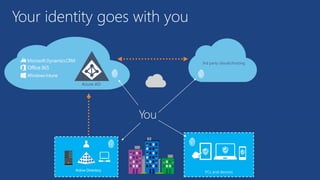
• Identity is the glue that makes all of that possible
Your identity goes with you
3rd party clouds/hosting
Azure AD
You
How do we make all of that work?
• Enabling modern authentication protocols
• Using great building blocks on your apps
Enabling modern authentication protocols
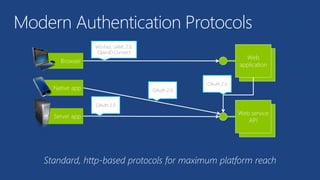
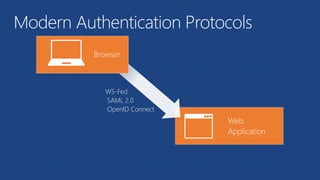
Modern Authentication Protocols
OAuth 2.0
OAuth 2.0
WS-Fed, SAML 2.0,
OpenID Connect
OAuth 2.0
Web
Application
Browser
WS-Fed
SAML 2.0
OpenID Connect
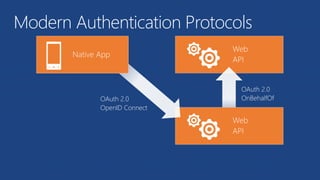
Modern Authentication Protocols
Web
API
Web
API
Native App
OAuth 2.0
OpenID Connect
OAuth 2.0
OnBehalfOf
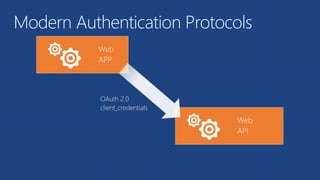
Modern Authentication Protocols
Web
APP
Web
API
OAuth 2.0
client_credentials
Modern Authentication Protocols
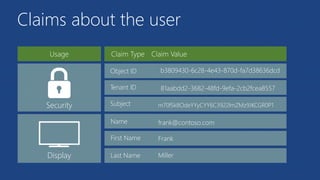
Claims about the user
Object ID b3809430-6c28-4e43-870d-fa7d38636dcd
Tenant ID 81aabdd2-3682-48fd-9efa-2cb2fcea8557
Security
Display
Subject
Name
First Name
Last Name
frank@contoso.com
Frank
Miller
m70fSk8OdeYYyCYY6C3922lmZMz9JKCGR0P1
• Good news: You don’t need to know these things in details
• Libraries such as Azure Active Directory Authentication
Library do all the plumbing for you
Authentication libraries
Enabling great building blocks
• Provides identity and access management for the cloud
• Users, groups, applications and permissions
Building blocks: Azure Active Directory
• REST API for Azure Active Directory
• Allows programmatic access to users, groups, applications
and permissions
Example: Nick creates a PowerShell script that provisions the
required permissions for his application to an Azure tenant
Building blocks: Graph API
• The best Office productivity tools, available online
• Includes REST APIs you can use from your applications
• Seamless integration with Azure Active Directory
Example: An application can automatically scan e-mails
from Exchange online and generate a Word document with
a summary, saving it on SharePoint online
Building blocks: Office 365
So how do we build it?
For a typical Web Application
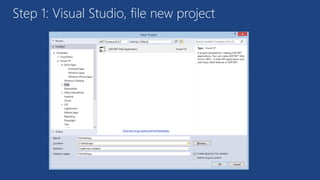
Step 1: Visual Studio, file new project
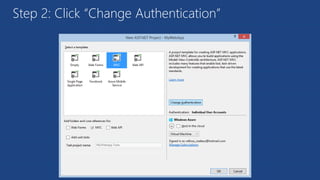
Step 2: Click “Change Authentication”
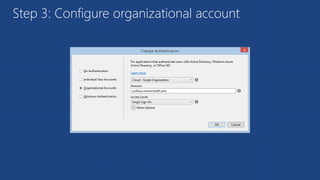
Step 3: Configure organizational account
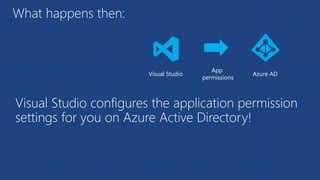
What happens then:
Visual Studio configures the application permission
settings for you on Azure Active Directory!
Visual Studio
App
permissions
Azure AD
More complex scenario:
Mobile app -> mobile service -> O365
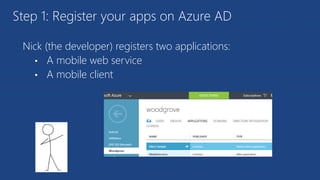
Nick (the developer) registers two applications:
• A mobile web service
• A mobile client
Step 1: Register your apps on Azure AD
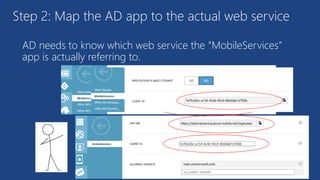
AD needs to know which web service the “MobileServices”
app is actually referring to.
Step 2: Map the AD app to the actual web service
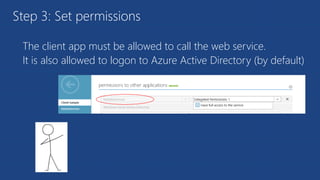
The client app must be allowed to call the web service.
It is also allowed to logon to Azure Active Directory (by default)
Step 3: Set permissions
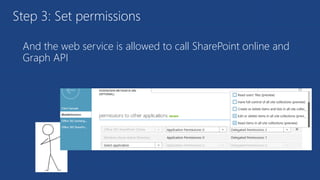
And the web service is allowed to call SharePoint online and
Graph API
Step 3: Set permissions
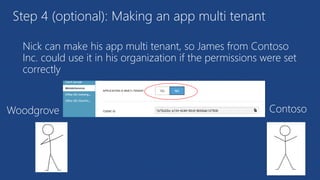
Nick can make his app multi tenant, so James from Contoso
Inc. could use it in his organization if the permissions were set
correctly
Step 4 (optional): Making an app multi tenant
Woodgrove Contoso
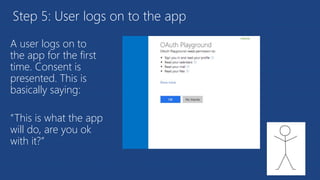
Step 5: User logs on to the app
A user logs on to
the app for the first
time. Consent is
presented. This is
basically saying:
“This is what the app
will do, are you ok
with it?”
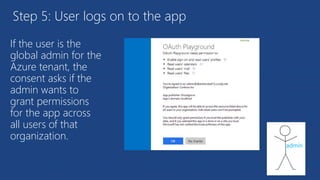
Step 5: User logs on to the app
If the user is the
global admin for the
Azure tenant, the
consent asks if the
admin wants to
grant permissions
for the app across
all users of that
organization.
admin
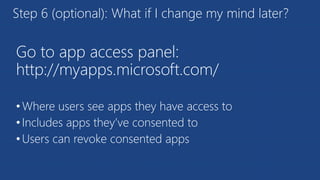
Go to app access panel:
http://myapps.microsoft.com/
•Where users see apps they have access to
•Includes apps they’ve consented to
•Users can revoke consented apps
Step 6 (optional): What if I change my mind later?
Implementation details
Let’s dive deeper into the Rabbit’s hole
Active Directory Authentication Library (ADAL)
string clientId = "[Enter client ID as obtained from Azure Portal]";
string authority = "https://login.windows.net/[your tenant name]";
string myURI = "[Enter App ID URI of your service]";
AuthenticationContext authContext = new AuthenticationContext(authority);
AuthenticationResult result = await authContext.AcquireTokenAsync(myURI, clientId);
Graph API
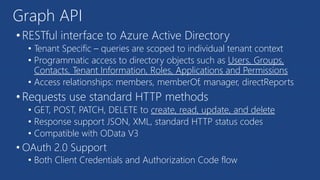
• RESTful interface to Azure Active Directory
• Tenant Specific – queries are scoped to individual tenant context
• Programmatic access to directory objects such as Users, Groups,
Contacts, Tenant Information, Roles, Applications and Permissions
• Access relationships: members, memberOf, manager, directReports
• Requests use standard HTTP methods
• GET, POST, PATCH, DELETE to create, read, update, and delete
• Response support JSON, XML, standard HTTP status codes
• Compatible with OData V3
• OAuth 2.0 Support
• Both Client Credentials and Authorization Code flow
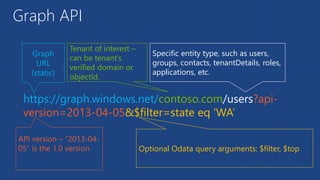
https://graph.windows.net/contoso.com/users?api-
version=2013-04-05&$filter=state eq ‘WA’
Graph
URL
(static)
Specific entity type, such as users,
groups, contacts, tenantDetails, roles,
applications, etc.
Tenant of interest –
can be tenant’s
verified domain or
objectId.
Optional Odata query arguments: $filter, $top
API version – “2013-04-
05” is the 1.0 version
Graph API
Office 365 REST APIs
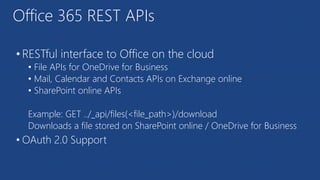
• RESTful interface to Office on the cloud
• File APIs for OneDrive for Business
• Mail, Calendar and Contacts APIs on Exchange online
• SharePoint online APIs
Example: GET ../_api/files(<file_path>)/download
Downloads a file stored on SharePoint online / OneDrive for Business
• OAuth 2.0 Support
Demo: Facilities app
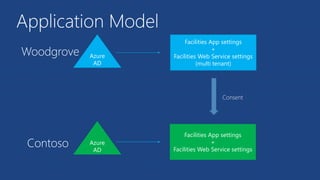
Application Model
Consent
Contoso
Azure
AD
Facilities App settings
+
Facilities Web Service settings
(multi tenant)
Azure
AD
Woodgrove
Facilities App settings
+
Facilities Web Service settings
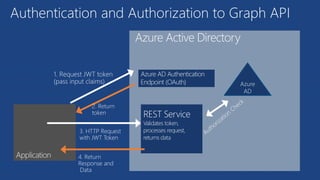
Authentication and Authorization to Graph API
2. Return
token
1. Request JWT token
(pass input claims)
3. HTTP Request
with JWT Token
Azure Active Directory
4. Return
Response and
Data
Azure
AD
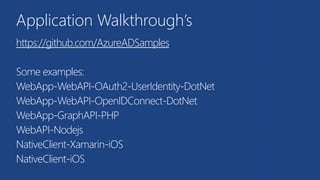
Application Walkthrough’s
https://github.com/AzureADSamples
Some examples:
WebApp-WebAPI-OAuth2-UserIdentity-DotNet
WebApp-WebAPI-OpenIDConnect-DotNet
WebApp-GraphAPI-PHP
WebAPI-Nodejs
NativeClient-Xamarin-iOS
NativeClient-iOS
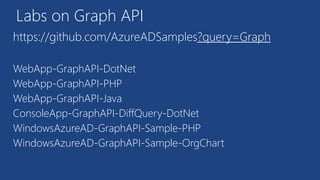
Labs on Graph API
https://github.com/AzureADSamples?query=Graph
WebApp-GraphAPI-DotNet
WebApp-GraphAPI-PHP
WebApp-GraphAPI-Java
ConsoleApp-GraphAPI-DiffQuery-DotNet
WindowsAzureAD-GraphAPI-Sample-PHP
WindowsAzureAD-GraphAPI-Sample-OrgChart
Microsoft Azure Identity and O365

Microsoft Azure Identity and O365

  • 1.
    (Azure+O365) Identity Kris Wagner MVP+ Sean Lawerence @SharePointKris @SeanmLawrence Microsoft Azure
  • 2.
    Agenda • Why ourcloud • Authentication 101, getting things done • How to use Office 365 and Azure on your app (+ with access control)
  • 3.
    A story abouttwo organizations...
  • 4.
  • 5.
    A better cloud Fromprivate or hybrid and IaaS to full PaaS/SaaS
  • 6.
    Azure + o365 •Fully flexible: Private, on premises, hybrid or cloud • The power of o365: Leverage Office, SharePoint and Exchange Online as your application building blocks • Identity is the glue that makes all of that possible
  • 7.
    Your identity goeswith you 3rd party clouds/hosting Azure AD You
  • 8.
    How do wemake all of that work? • Enabling modern authentication protocols • Using great building blocks on your apps
  • 9.
  • 10.
    Modern Authentication Protocols OAuth2.0 OAuth 2.0 WS-Fed, SAML 2.0, OpenID Connect OAuth 2.0
  • 11.
  • 12.
    Web API Web API Native App OAuth 2.0 OpenIDConnect OAuth 2.0 OnBehalfOf Modern Authentication Protocols
  • 13.
  • 14.
    Claims about theuser Object ID b3809430-6c28-4e43-870d-fa7d38636dcd Tenant ID 81aabdd2-3682-48fd-9efa-2cb2fcea8557 Security Display Subject Name First Name Last Name frank@contoso.com Frank Miller m70fSk8OdeYYyCYY6C3922lmZMz9JKCGR0P1
  • 15.
    • Good news:You don’t need to know these things in details • Libraries such as Azure Active Directory Authentication Library do all the plumbing for you Authentication libraries
  • 16.
  • 17.
    • Provides identityand access management for the cloud • Users, groups, applications and permissions Building blocks: Azure Active Directory
  • 18.
    • REST APIfor Azure Active Directory • Allows programmatic access to users, groups, applications and permissions Example: Nick creates a PowerShell script that provisions the required permissions for his application to an Azure tenant Building blocks: Graph API
  • 19.
    • The bestOffice productivity tools, available online • Includes REST APIs you can use from your applications • Seamless integration with Azure Active Directory Example: An application can automatically scan e-mails from Exchange online and generate a Word document with a summary, saving it on SharePoint online Building blocks: Office 365
  • 20.
    So how dowe build it?
  • 21.
    For a typicalWeb Application
  • 22.
    Step 1: VisualStudio, file new project
  • 23.
    Step 2: Click“Change Authentication”
  • 24.
    Step 3: Configureorganizational account
  • 25.
    What happens then: VisualStudio configures the application permission settings for you on Azure Active Directory! Visual Studio App permissions Azure AD
  • 26.
    More complex scenario: Mobileapp -> mobile service -> O365
  • 27.
    Nick (the developer)registers two applications: • A mobile web service • A mobile client Step 1: Register your apps on Azure AD
  • 28.
    AD needs toknow which web service the “MobileServices” app is actually referring to. Step 2: Map the AD app to the actual web service
  • 29.
    The client appmust be allowed to call the web service. It is also allowed to logon to Azure Active Directory (by default) Step 3: Set permissions
  • 30.
    And the webservice is allowed to call SharePoint online and Graph API Step 3: Set permissions
  • 31.
    Nick can makehis app multi tenant, so James from Contoso Inc. could use it in his organization if the permissions were set correctly Step 4 (optional): Making an app multi tenant Woodgrove Contoso
  • 32.
    Step 5: Userlogs on to the app A user logs on to the app for the first time. Consent is presented. This is basically saying: “This is what the app will do, are you ok with it?”
  • 33.
    Step 5: Userlogs on to the app If the user is the global admin for the Azure tenant, the consent asks if the admin wants to grant permissions for the app across all users of that organization. admin
  • 34.
    Go to appaccess panel: http://myapps.microsoft.com/ •Where users see apps they have access to •Includes apps they’ve consented to •Users can revoke consented apps Step 6 (optional): What if I change my mind later?
  • 35.
    Implementation details Let’s divedeeper into the Rabbit’s hole
  • 36.
    Active Directory AuthenticationLibrary (ADAL) string clientId = "[Enter client ID as obtained from Azure Portal]"; string authority = "https://login.windows.net/[your tenant name]"; string myURI = "[Enter App ID URI of your service]"; AuthenticationContext authContext = new AuthenticationContext(authority); AuthenticationResult result = await authContext.AcquireTokenAsync(myURI, clientId);
  • 37.
    Graph API • RESTfulinterface to Azure Active Directory • Tenant Specific – queries are scoped to individual tenant context • Programmatic access to directory objects such as Users, Groups, Contacts, Tenant Information, Roles, Applications and Permissions • Access relationships: members, memberOf, manager, directReports • Requests use standard HTTP methods • GET, POST, PATCH, DELETE to create, read, update, and delete • Response support JSON, XML, standard HTTP status codes • Compatible with OData V3 • OAuth 2.0 Support • Both Client Credentials and Authorization Code flow
  • 38.
    https://graph.windows.net/contoso.com/users?api- version=2013-04-05&$filter=state eq ‘WA’ Graph URL (static) Specificentity type, such as users, groups, contacts, tenantDetails, roles, applications, etc. Tenant of interest – can be tenant’s verified domain or objectId. Optional Odata query arguments: $filter, $top API version – “2013-04- 05” is the 1.0 version Graph API
  • 39.
    Office 365 RESTAPIs • RESTful interface to Office on the cloud • File APIs for OneDrive for Business • Mail, Calendar and Contacts APIs on Exchange online • SharePoint online APIs Example: GET ../_api/files(<file_path>)/download Downloads a file stored on SharePoint online / OneDrive for Business • OAuth 2.0 Support
  • 40.
  • 41.
    Application Model Consent Contoso Azure AD Facilities Appsettings + Facilities Web Service settings (multi tenant) Azure AD Woodgrove Facilities App settings + Facilities Web Service settings
  • 42.
    Authentication and Authorizationto Graph API 2. Return token 1. Request JWT token (pass input claims) 3. HTTP Request with JWT Token Azure Active Directory 4. Return Response and Data Azure AD
  • 43.
  • 44.
    Labs on GraphAPI https://github.com/AzureADSamples?query=Graph WebApp-GraphAPI-DotNet WebApp-GraphAPI-PHP WebApp-GraphAPI-Java ConsoleApp-GraphAPI-DiffQuery-DotNet WindowsAzureAD-GraphAPI-Sample-PHP WindowsAzureAD-GraphAPI-Sample-OrgChart

Editor's Notes

  • #2 Speaker note: Azure with Office 365 working together with the power of identity and access control
  • #23 Speaker note: The goal is not doing a deep dive on authentication protocols but present options and a high level view of what to use when
  • #53 https://github.com/Azure-Readiness/MicrosoftAzureTrainingKit/tree/master/Demos/Demo-MobileServices