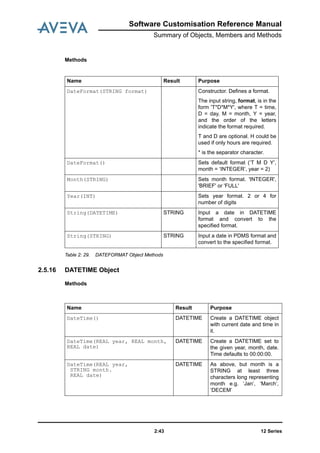
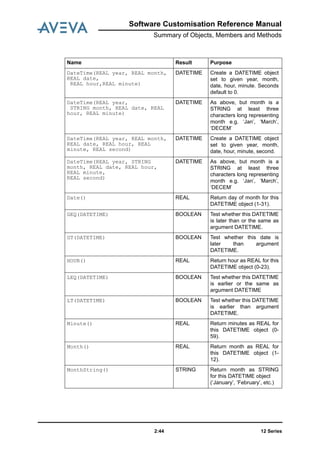
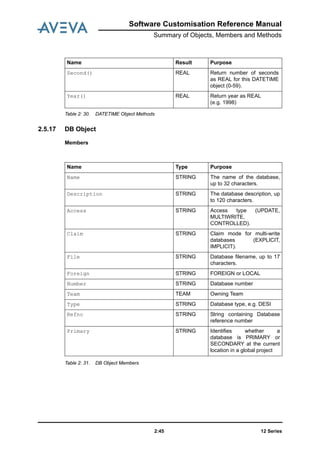
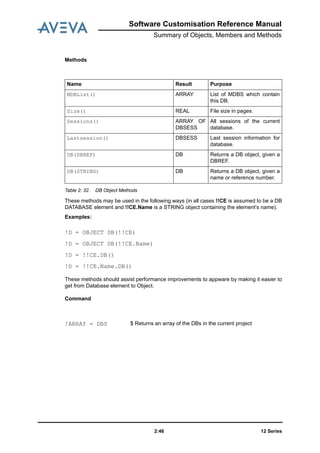
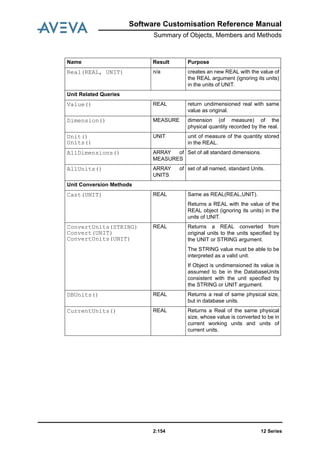
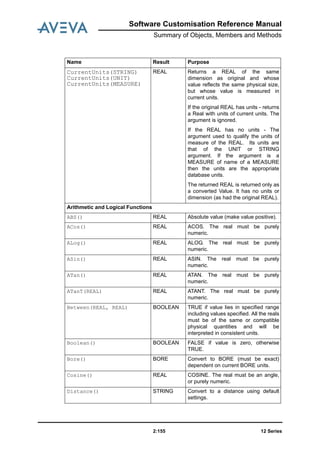
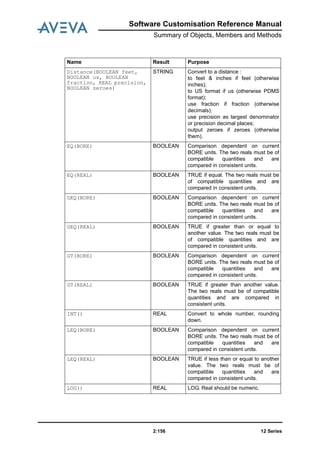
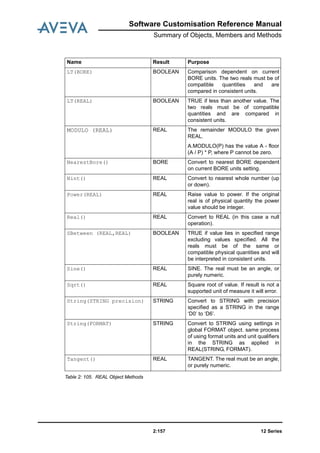
Software Customisation
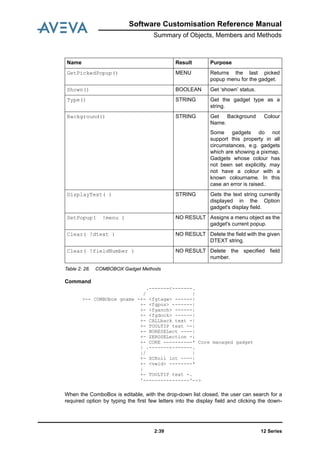
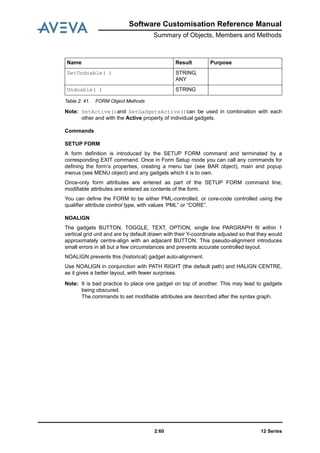
Reference Manual
PML Disclaimer
1.1 AVEVA does not warrant that the use of the AVEVA software will be uninterrupted, error-free or free from
viruses.
1.2 AVEVA shall not be liable for: loss of profits; loss of business; depletion of goodwill and/or similar losses; loss of
anticipated savings; loss of goods; loss of contract; loss of use; loss or corruption of data or information; any
special, indirect, consequential or pure economic loss, costs, damages, charges or expenses which may be
suffered by the user, including any loss suffered by the user resulting from the inaccuracy or invalidity of any data
created by the AVEVA software, irrespective of whether such losses are suffered directly or indirectly, or arise in
contract, tort (including negligence) or otherwise.
1.3 AVEVA shall have no liability in contract, tort (including negligence), or otherwise, arising in connection with the
performance of the AVEVA software where the faulty performance of the AVEVA software results from a user's
modification of the AVEVA software. User's rights to modify the AVEVA software are strictly limited to those set out
in the Customisation Manual.
1.4 AVEVA shall not be liable for any breach or infringement of a third party's intellectual property rights where such
breach results from a user's modification of the AVEVA software or associated documentation.
1.5 AVEVA's total liability in contract, tort (including negligence), or otherwise, arising in connection with the
performance of the AVEVA software shall be limited to 100% of the licence fees paid in the year in which the user's
claim is brought.
1.6 Clauses 1.1 to 1.5 shall apply to the fullest extent permissible at law.
1.7. In the event of any conflict between the above clauses and the analogous clauses in the software licence
under which the AVEVA software was purchased, the clauses in the software licence shall take precedence.
PML Copyright
Copyright and all other intellectual property rights in this manual and the associated software, and every part of it
(including source code, object code, any data contained in it, the manual and any other documentation supplied
with it) belongs to, or is validly licensed by, AVEVA Solutions Limited or its subsidiaries.
All rights are reserved to AVEVA Solutions Limited and its subsidiaries. The information contained in this document
is commercially sensitive, and shall not be copied, reproduced, stored in a retrieval system, or transmitted without
the prior written permission of AVEVA Solutions Limited. Where such permission is granted, it expressly requires
that this copyright notice, and the above disclaimer, is prominently displayed at the beginning of every copy that is
made.
The manual and associated documentation may not be adapted, reproduced, or copied, in any material or
electronic form, without the prior written permission of AVEVA Solutions Limited. Subject to the user's rights, as set
out in the customisation manuals to amend PML software files contained in the PDMSUI and PMLLIB folders and
any configuration files, the user may not reverse engineer, decompile, copy, or adapt the software. Neither the
whole, nor part of the software described in this publication may be incorporated into any third-party software,
product, machine, or system without the prior written permission of AVEVA Solutions Limited, save as permitted by
law. Any such unauthorised action is strictly prohibited, and may give rise to civil liabilities and criminal prosecution.
The AVEVA software described in this guide is to be installed and operated strictly in accordance with the terms
and conditions of the respective software licences, and in accordance with the relevant User Documentation.
Unauthorised or unlicensed use of the software is strictly prohibited.
Copyright 1974 to current year. AVEVA Solutions Limited and its subsidiaries. All rights reserved. AVEVA shall not
be liable for any breach or infringement of a third party's intellectual property rights where such breach results from
a user's modification of the AVEVA software or associated documentation.
AVEVA Solutions Limited, High Cross, Madingley Road, Cambridge, CB3 0HB, United Kingdom.
PML Trademark
AVEVA and Tribon are registered trademarks of AVEVA Solutions Limited or its subsidiaries. Unauthorised use of
the AVEVA or Tribon trademarks is strictly forbidden.
AVEVA product/software names are trademarks or registered trademarks of AVEVA Solutions Limited or its
subsidiaries, registered in the UK, Europe and other countries (worldwide).
The copyright, trademark rights, or other intellectual property rights in any other product or software, its name or
logo belongs to its respective owner.
AVEVA Solutions Limited
Revision Sheet
Date Version Comments / Remarks
September 2011 12.1.1 Event Driven Graphics added.
Software Customisation Reference Manual
Contents Page
12 Seriesi
Software Customisation Reference Manual
Reference Manual
Introduction . . . . . . . . . . . . . . . . . . . . . . . . . . . . . . . . . . . . . . . . . . . . . 1:1
Summary of Objects, Members and Methods . . . . . . . . . . . . . . . . . 2:1
Object Classification . . . . . . . . . . . . . . . . . . . . . . . . . . . . . . . . . . . . . . . . . . . . . . . 2:1
Methods Available to All Objects . . . . . . . . . . . . . . . . . . . . . . . . . . . . . . . . . . . . . 2:3
Forms and Menus Objects . . . . . . . . . . . . . . . . . . . . . . . . . . . . . . . . . . . . . . . . . . 2:4
Members Contained by All Gadgets. . . . . . . . . . . . . . . . . . . . . . . . . . . . . . . . . . . . . . . . . . . 2:4
Summary of Gadget-Specific Methods. . . . . . . . . . . . . . . . . . . . . . . . . . . . . . . . . . . . . . . . . 2:5
Gadget Syntax Graphs . . . . . . . . . . . . . . . . . . . . . . . . . . . . . . . . . . . . . . . . . . . . . 2:6
Rules for Presenting and Using Syntax Graphs. . . . . . . . . . . . . . . . . . . . . . . . . . . . . . . . . . 2:6
Setting Up Gadget Anchoring: <fganch> . . . . . . . . . . . . . . . . . . . . . . . . . . . . . . . . . . . . . . . 2:7
Setting Up Gadget Docking: <fgdock>. . . . . . . . . . . . . . . . . . . . . . . . . . . . . . . . . . . . . . . . . 2:7
Setting-Up the Gadget’s Position: <fgpos> and <fgprl>. . . . . . . . . . . . . . . . . . . . . . . . . . . . 2:8
Setting Up the Gadget’s Width and Height: <vshap>. . . . . . . . . . . . . . . . . . . . . . . . . . . . . . 2:9
Setting Up the Gadget’s Tagwidth (TEXT, TOGGLE and OPTION): <fgtagw> . . . . . . . . . 2:10
Setting Up the Gadget’s 2D Screen Position: <xypos> . . . . . . . . . . . . . . . . . . . . . . . . . . . 2:10
Object Type Details . . . . . . . . . . . . . . . . . . . . . . . . . . . . . . . . . . . . . . . . . . . . . . . 2:11
ALERT Object . . . . . . . . . . . . . . . . . . . . . . . . . . . . . . . . . . . . . . . . . . . . . . . . . . . . . . . . . . 2:11
ARC Object . . . . . . . . . . . . . . . . . . . . . . . . . . . . . . . . . . . . . . . . . . . . . . . . . . . . . . . . . . . . 2:12
ARRAY Object . . . . . . . . . . . . . . . . . . . . . . . . . . . . . . . . . . . . . . . . . . . . . . . . . . . . . . . . . . 2:20
BANNER Object. . . . . . . . . . . . . . . . . . . . . . . . . . . . . . . . . . . . . . . . . . . . . . . . . . . . . . . . . 2:24
BAR Gadget . . . . . . . . . . . . . . . . . . . . . . . . . . . . . . . . . . . . . . . . . . . . . . . . . . . . . . . . . . . . 2:25
BLOCK Object . . . . . . . . . . . . . . . . . . . . . . . . . . . . . . . . . . . . . . . . . . . . . . . . . . . . . . . . . . 2:27
BOOLEAN Object. . . . . . . . . . . . . . . . . . . . . . . . . . . . . . . . . . . . . . . . . . . . . . . . . . . . . . . . 2:27
12 Seriesii
Software Customisation Reference Manual
BORE Object . . . . . . . . . . . . . . . . . . . . . . . . . . . . . . . . . . . . . . . . . . . . . . . . . . . . . . . . . . . 2:28
BUTTON Gadget . . . . . . . . . . . . . . . . . . . . . . . . . . . . . . . . . . . . . . . . . . . . . . . . . . . . . . . . 2:29
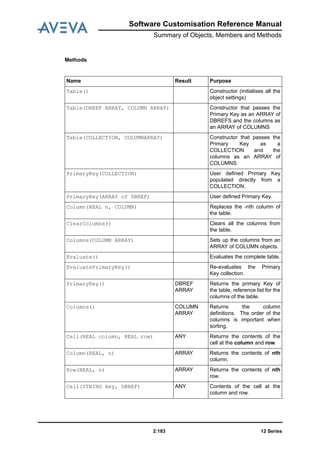
COLLECTION Object. . . . . . . . . . . . . . . . . . . . . . . . . . . . . . . . . . . . . . . . . . . . . . . . . . . . . 2:33
COLUMN Object . . . . . . . . . . . . . . . . . . . . . . . . . . . . . . . . . . . . . . . . . . . . . . . . . . . . . . . . 2:34
COLUMNFORMAT. . . . . . . . . . . . . . . . . . . . . . . . . . . . . . . . . . . . . . . . . . . . . . . . . . . . . . . 2:35
COMBOBOX Gadget . . . . . . . . . . . . . . . . . . . . . . . . . . . . . . . . . . . . . . . . . . . . . . . . . . . . . 2:37
CONTAINER Gadget . . . . . . . . . . . . . . . . . . . . . . . . . . . . . . . . . . . . . . . . . . . . . . . . . . . . . 2:41
DATEFORMAT Object . . . . . . . . . . . . . . . . . . . . . . . . . . . . . . . . . . . . . . . . . . . . . . . . . . . . 2:42
DATETIME Object . . . . . . . . . . . . . . . . . . . . . . . . . . . . . . . . . . . . . . . . . . . . . . . . . . . . . . . 2:43
DB Object . . . . . . . . . . . . . . . . . . . . . . . . . . . . . . . . . . . . . . . . . . . . . . . . . . . . . . . . . . . . . 2:45
DBREF Object . . . . . . . . . . . . . . . . . . . . . . . . . . . . . . . . . . . . . . . . . . . . . . . . . . . . . . . . . . 2:47
DBSESS Object . . . . . . . . . . . . . . . . . . . . . . . . . . . . . . . . . . . . . . . . . . . . . . . . . . . . . . . . . 2:48
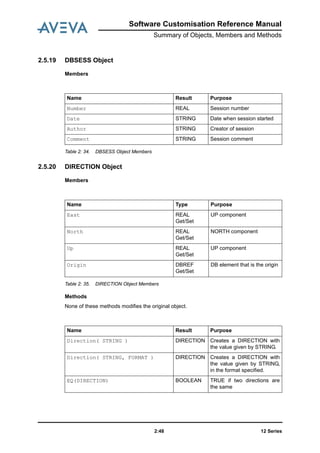
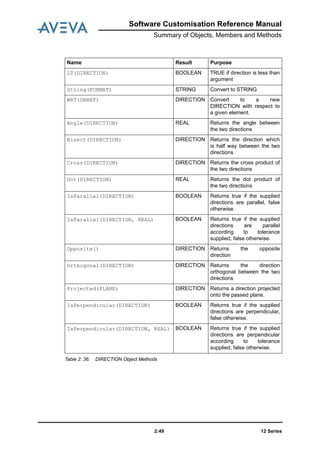
DIRECTION Object . . . . . . . . . . . . . . . . . . . . . . . . . . . . . . . . . . . . . . . . . . . . . . . . . . . . . . 2:48
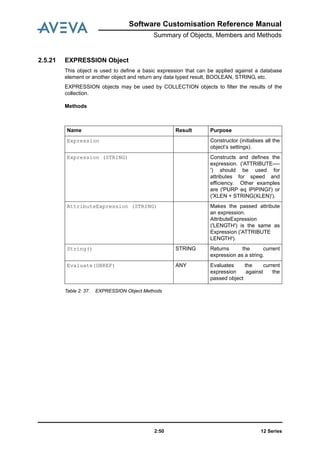
EXPRESSION Object. . . . . . . . . . . . . . . . . . . . . . . . . . . . . . . . . . . . . . . . . . . . . . . . . . . . . 2:50
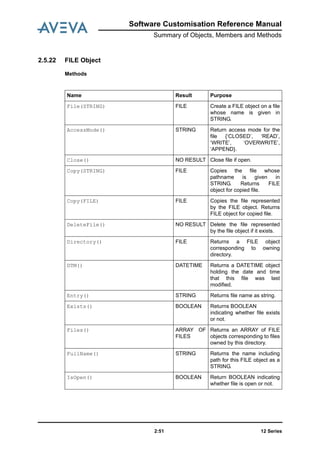
FILE Object . . . . . . . . . . . . . . . . . . . . . . . . . . . . . . . . . . . . . . . . . . . . . . . . . . . . . . . . . . . . 2:51
FMSYS Object . . . . . . . . . . . . . . . . . . . . . . . . . . . . . . . . . . . . . . . . . . . . . . . . . . . . . . . . . . 2:53
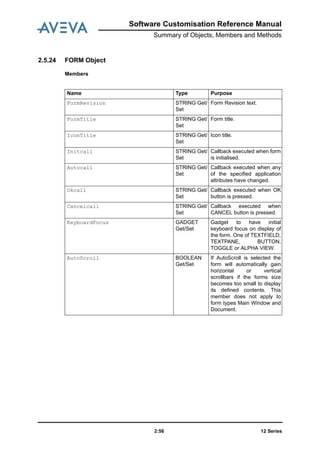
FORM Object . . . . . . . . . . . . . . . . . . . . . . . . . . . . . . . . . . . . . . . . . . . . . . . . . . . . . . . . . . . 2:56
FORMAT Object. . . . . . . . . . . . . . . . . . . . . . . . . . . . . . . . . . . . . . . . . . . . . . . . . . . . . . . . . 2:65
FRAME Gadget . . . . . . . . . . . . . . . . . . . . . . . . . . . . . . . . . . . . . . . . . . . . . . . . . . . . . . . . . 2:68
Graphical Selection . . . . . . . . . . . . . . . . . . . . . . . . . . . . . . . . . . . . . . . . . . . . . . . . . . . . . . 2:72
IDList . . . . . . . . . . . . . . . . . . . . . . . . . . . . . . . . . . . . . . . . . . . . . . . . . . . . . . . . . . . . . 2:74
LINE Gadget. . . . . . . . . . . . . . . . . . . . . . . . . . . . . . . . . . . . . . . . . . . . . . . . . . . . . . . . . . . . 2:76
LINE Object . . . . . . . . . . . . . . . . . . . . . . . . . . . . . . . . . . . . . . . . . . . . . . . . . . . . . . . . . . . . 2:77
LINEARGRID Object . . . . . . . . . . . . . . . . . . . . . . . . . . . . . . . . . . . . . . . . . . . . . . . . . . . . . 2:86
LIST Gadget. . . . . . . . . . . . . . . . . . . . . . . . . . . . . . . . . . . . . . . . . . . . . . . . . . . . . . . . . . . . 2:88
LOCATION Object . . . . . . . . . . . . . . . . . . . . . . . . . . . . . . . . . . . . . . . . . . . . . . . . . . . . . . . 2:93
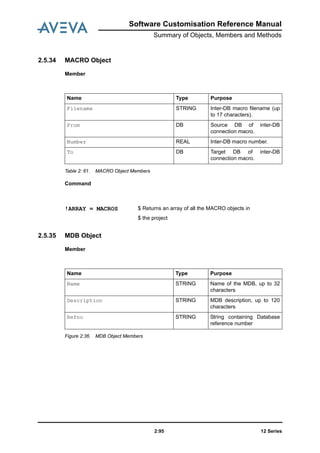
MACRO Object. . . . . . . . . . . . . . . . . . . . . . . . . . . . . . . . . . . . . . . . . . . . . . . . . . . . . . . . . . 2:95
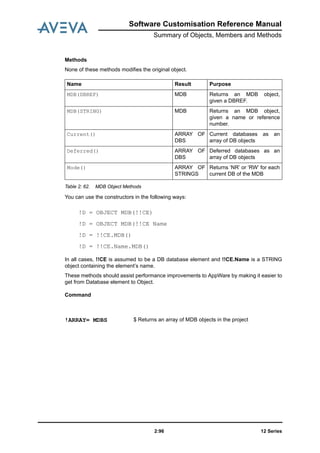
MDB Object . . . . . . . . . . . . . . . . . . . . . . . . . . . . . . . . . . . . . . . . . . . . . . . . . . . . . . . . . . . . 2:95
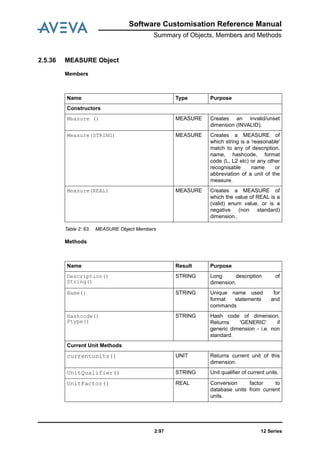
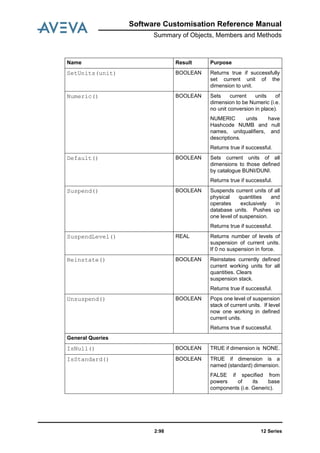
MEASURE Object . . . . . . . . . . . . . . . . . . . . . . . . . . . . . . . . . . . . . . . . . . . . . . . . . . . . . . . 2:97
MENU Object . . . . . . . . . . . . . . . . . . . . . . . . . . . . . . . . . . . . . . . . . . . . . . . . . . . . . . . . . . . 2:99
Multi Discipline Route Manager . . . . . . . . . . . . . . . . . . . . . . . . . . . . . . . . . . . . . . . . . . . . 2:106
NUMERICINPUT Object . . . . . . . . . . . . . . . . . . . . . . . . . . . . . . . . . . . . . . . . . . . . . . . . . 2:111
OBJECT . . . . . . . . . . . . . . . . . . . . . . . . . . . . . . . . . . . . . . . . . . . . . . . . . . . . . . . . . . . . 2:113
OPTION Gadget. . . . . . . . . . . . . . . . . . . . . . . . . . . . . . . . . . . . . . . . . . . . . . . . . . . . . . . . 2:113
ORIENTATION Object . . . . . . . . . . . . . . . . . . . . . . . . . . . . . . . . . . . . . . . . . . . . . . . . . . . 2:117
PARAGRAPH Gadget . . . . . . . . . . . . . . . . . . . . . . . . . . . . . . . . . . . . . . . . . . . . . . . . . . . 2:118
PLANE Object . . . . . . . . . . . . . . . . . . . . . . . . . . . . . . . . . . . . . . . . . . . . . . . . . . . . . . . . . 2:120
PLANTGRID Object . . . . . . . . . . . . . . . . . . . . . . . . . . . . . . . . . . . . . . . . . . . . . . . . . . . . . 2:124
PLATFORMGRID. . . . . . . . . . . . . . . . . . . . . . . . . . . . . . . . . . . . . . . . . . . . . . . . . . . . . . . 2:125
PMLReport Object . . . . . . . . . . . . . . . . . . . . . . . . . . . . . . . . . . . . . . . . . . . . . . . . . . . . . . 2:128
12 Series
Software Customisation Reference Manual
iii
PMLSECURELOGIN . . . . . . . . . . . . . . . . . . . . . . . . . . . . . . . . . . . . . . . . . . . . . . . . . . . . 2:130
PMLUSERLOGIN. . . . . . . . . . . . . . . . . . . . . . . . . . . . . . . . . . . . . . . . . . . . . . . . . . . . . . . 2:131
POINTVECTOR Object . . . . . . . . . . . . . . . . . . . . . . . . . . . . . . . . . . . . . . . . . . . . . . . . . . 2:131
POSITION Object. . . . . . . . . . . . . . . . . . . . . . . . . . . . . . . . . . . . . . . . . . . . . . . . . . . . . . . 2:134
POSTEVENTS Object . . . . . . . . . . . . . . . . . . . . . . . . . . . . . . . . . . . . . . . . . . . . . . . . . . . 2:139
PROJECT Object . . . . . . . . . . . . . . . . . . . . . . . . . . . . . . . . . . . . . . . . . . . . . . . . . . . . . . . 2:140
PROFILE Object. . . . . . . . . . . . . . . . . . . . . . . . . . . . . . . . . . . . . . . . . . . . . . . . . . . . . . . . 2:141
RADIALGRID Object . . . . . . . . . . . . . . . . . . . . . . . . . . . . . . . . . . . . . . . . . . . . . . . . . . . . 2:151
REAL Object. . . . . . . . . . . . . . . . . . . . . . . . . . . . . . . . . . . . . . . . . . . . . . . . . . . . . . . . . . . 2:153
REPORT Object. . . . . . . . . . . . . . . . . . . . . . . . . . . . . . . . . . . . . . . . . . . . . . . . . . . . . . . . 2:158
RTOGGLE Gadget. . . . . . . . . . . . . . . . . . . . . . . . . . . . . . . . . . . . . . . . . . . . . . . . . . . . . . 2:161
Section Plane . . . . . . . . . . . . . . . . . . . . . . . . . . . . . . . . . . . . . . . . . . . . . . . . . . . . . . . . . . 2:163
Section Plane Manager . . . . . . . . . . . . . . . . . . . . . . . . . . . . . . . . . . . . . . . . . . . . . . . . . . 2:165
SELECTOR Gadget . . . . . . . . . . . . . . . . . . . . . . . . . . . . . . . . . . . . . . . . . . . . . . . . . . . . . 2:168
SESSION Object . . . . . . . . . . . . . . . . . . . . . . . . . . . . . . . . . . . . . . . . . . . . . . . . . . . . . . . 2:171
SLIDER Gadget . . . . . . . . . . . . . . . . . . . . . . . . . . . . . . . . . . . . . . . . . . . . . . . . . . . . . . . . 2:173
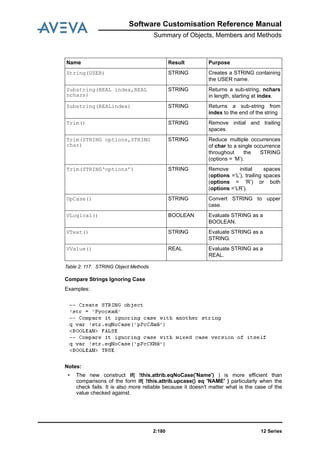
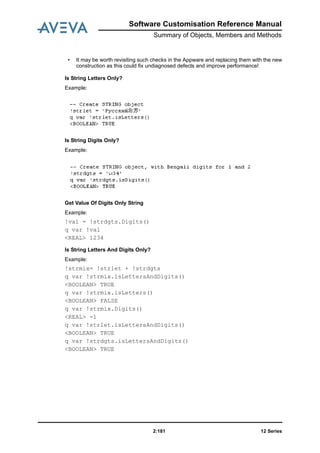
STRING Object . . . . . . . . . . . . . . . . . . . . . . . . . . . . . . . . . . . . . . . . . . . . . . . . . . . . . . . . 2:175
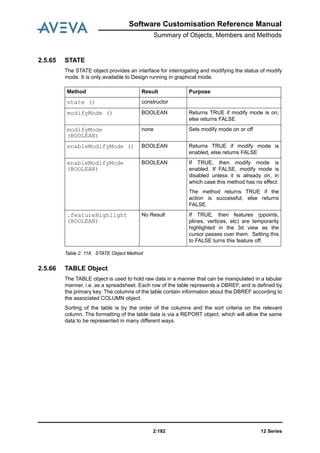
STATE . . . . . . . . . . . . . . . . . . . . . . . . . . . . . . . . . . . . . . . . . . . . . . . . . . . . . . . . . . . . 2:182
TABLE Object. . . . . . . . . . . . . . . . . . . . . . . . . . . . . . . . . . . . . . . . . . . . . . . . . . . . . . . . . . 2:182
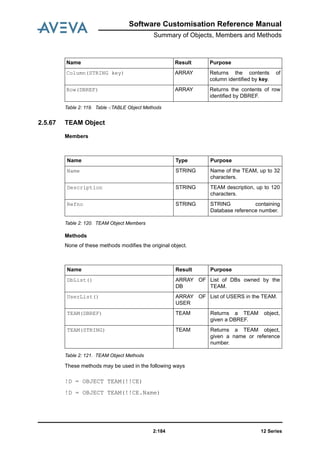
TEAM Object . . . . . . . . . . . . . . . . . . . . . . . . . . . . . . . . . . . . . . . . . . . . . . . . . . . . . . . . . . 2:184
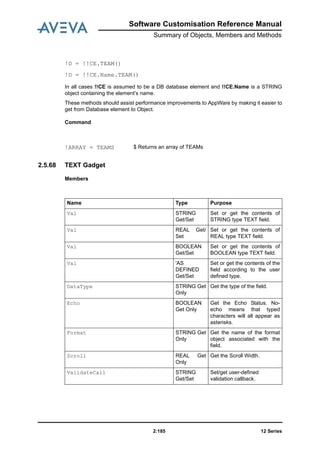
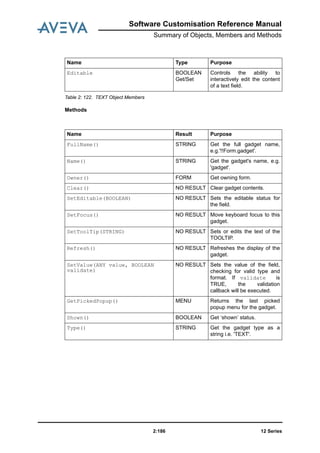
TEXT Gadget . . . . . . . . . . . . . . . . . . . . . . . . . . . . . . . . . . . . . . . . . . . . . . . . . . . . . . . . . . 2:185
TEXTPANE Gadget . . . . . . . . . . . . . . . . . . . . . . . . . . . . . . . . . . . . . . . . . . . . . . . . . . . . . 2:188
TOGGLE Gadget . . . . . . . . . . . . . . . . . . . . . . . . . . . . . . . . . . . . . . . . . . . . . . . . . . . . . . . 2:190
UNDOABLE Object . . . . . . . . . . . . . . . . . . . . . . . . . . . . . . . . . . . . . . . . . . . . . . . . . . . . . 2:192
UNIT Object . . . . . . . . . . . . . . . . . . . . . . . . . . . . . . . . . . . . . . . . . . . . . . . . . . . . . . . . . . . 2:193
USER Object . . . . . . . . . . . . . . . . . . . . . . . . . . . . . . . . . . . . . . . . . . . . . . . . . . . . . . . . . . 2:195
VERIFY . . . . . . . . . . . . . . . . . . . . . . . . . . . . . . . . . . . . . . . . . . . . . . . . . . . . . . . . . . . . 2:196
ViewFinder . . . . . . . . . . . . . . . . . . . . . . . . . . . . . . . . . . . . . . . . . . . . . . . . . . . . . . . . . . . . 2:196
VIEW Gadget: ALPHA Views. . . . . . . . . . . . . . . . . . . . . . . . . . . . . . . . . . . . . . . . . . . . . . 2:198
VIEW Gadget: AREA View. . . . . . . . . . . . . . . . . . . . . . . . . . . . . . . . . . . . . . . . . . . . . . . . 2:199
VIEW Gadget: PLOT View . . . . . . . . . . . . . . . . . . . . . . . . . . . . . . . . . . . . . . . . . . . . . . . . 2:201
VIEW Gadget: VOLUME Views . . . . . . . . . . . . . . . . . . . . . . . . . . . . . . . . . . . . . . . . . . . . 2:203
XYPosition Object . . . . . . . . . . . . . . . . . . . . . . . . . . . . . . . . . . . . . . . . . . . . . . . . . . . . . . 2:206
Event Driven Graphics . . . . . . . . . . . . . . . . . . . . . . . . . . . . . . . . . . . . 3:1
Overview . . . . . . . . . . . . . . . . . . . . . . . . . . . . . . . . . . . . . . . . . . . . . . . . . . . . . . . . 3:1
Purpose . . . . . . . . . . . . . . . . . . . . . . . . . . . . . . . . . . . . . . . . . . . . . . . . . . . . . . . . 3:1
Scope . . . . . . . . . . . . . . . . . . . . . . . . . . . . . . . . . . . . . . . . . . . . . . . . . . . . . . . . 3:2
Definitions. . . . . . . . . . . . . . . . . . . . . . . . . . . . . . . . . . . . . . . . . . . . . . . . . . . . . . . . 3:2
12 Seriesiv
Software Customisation Reference Manual
Target Users . . . . . . . . . . . . . . . . . . . . . . . . . . . . . . . . . . . . . . . . . . . . . . . . . . . . . . 3:2
Superseded Functionality . . . . . . . . . . . . . . . . . . . . . . . . . . . . . . . . . . . . . . . . . . . 3:2
Components . . . . . . . . . . . . . . . . . . . . . . . . . . . . . . . . . . . . . . . . . . . . . . . . . . . . . . 3:3
Main Components . . . . . . . . . . . . . . . . . . . . . . . . . . . . . . . . . . . . . . . . . . . . . . . . . . . . . . . . 3:3
Secondary Components. . . . . . . . . . . . . . . . . . . . . . . . . . . . . . . . . . . . . . . . . . . . . . . . . . . . 3:3
Concepts . . . . . . . . . . . . . . . . . . . . . . . . . . . . . . . . . . . . . . . . . . . . . . . . . . . . . . . . 3:4
Event Driven Graphics . . . . . . . . . . . . . . . . . . . . . . . . . . . . . . . . . . . . . . . . . . . . . . . . . . . . . 3:4
Picking . . . . . . . . . . . . . . . . . . . . . . . . . . . . . . . . . . . . . . . . . . . . . . . . . . . . . . . . . . . . . . 3:4
Pick Sequence . . . . . . . . . . . . . . . . . . . . . . . . . . . . . . . . . . . . . . . . . . . . . . . . . . . . . . . . . . . 3:5
Event Packet . . . . . . . . . . . . . . . . . . . . . . . . . . . . . . . . . . . . . . . . . . . . . . . . . . . . . . . . . . . . 3:5
Event Flow . . . . . . . . . . . . . . . . . . . . . . . . . . . . . . . . . . . . . . . . . . . . . . . . . . . . . . . . . . . . . . 3:5
Event Control System (edgCntrl) . . . . . . . . . . . . . . . . . . . . . . . . . . . . . . . . . . . . . 3:6
Published Interface. . . . . . . . . . . . . . . . . . . . . . . . . . . . . . . . . . . . . . . . . . . . . . . . . . . . . . . . 3:7
Add Packet. . . . . . . . . . . . . . . . . . . . . . . . . . . . . . . . . . . . . . . . . . . . . . . . . . . . . . . . . . . . . . 3:8
Remove Packet . . . . . . . . . . . . . . . . . . . . . . . . . . . . . . . . . . . . . . . . . . . . . . . . . . . . . . . . . . 3:9
Change Prompts . . . . . . . . . . . . . . . . . . . . . . . . . . . . . . . . . . . . . . . . . . . . . . . . . . . . . . . . . 3:9
View the Stack . . . . . . . . . . . . . . . . . . . . . . . . . . . . . . . . . . . . . . . . . . . . . . . . . . . . . . . . . . 3:10
Limitations and Restrictions . . . . . . . . . . . . . . . . . . . . . . . . . . . . . . . . . . . . . . . . . . . . . . . . 3:11
Event Packet (edgPacket) . . . . . . . . . . . . . . . . . . . . . . . . . . . . . . . . . . . . . . . . . . 3:11
Published Interface. . . . . . . . . . . . . . . . . . . . . . . . . . . . . . . . . . . . . . . . . . . . . . . . . . . . . . . 3:15
Examples . . . . . . . . . . . . . . . . . . . . . . . . . . . . . . . . . . . . . . . . . . . . . . . . . . . . . . . . . . . . . 3:23
Limitations and Restrictions . . . . . . . . . . . . . . . . . . . . . . . . . . . . . . . . . . . . . . . . . . . . . . . . 3:29
Pick Packet (edgPickPacket) . . . . . . . . . . . . . . . . . . . . . . . . . . . . . . . . . . . . . . . 3:30
Published Interface. . . . . . . . . . . . . . . . . . . . . . . . . . . . . . . . . . . . . . . . . . . . . . . . . . . . . . . 3:31
Examples (Defining Pick Sequences) . . . . . . . . . . . . . . . . . . . . . . . . . . . . . . . . . . . . . . . . 3:52
Examples (Using Pick Packets) . . . . . . . . . . . . . . . . . . . . . . . . . . . . . . . . . . . . . . . . . . . . . 3:54
Limitations and Restrictions . . . . . . . . . . . . . . . . . . . . . . . . . . . . . . . . . . . . . . . . . . . . . . . . 3:56
Pick Type (edgPickType). . . . . . . . . . . . . . . . . . . . . . . . . . . . . . . . . . . . . . . . . . . 3:56
Published Interface. . . . . . . . . . . . . . . . . . . . . . . . . . . . . . . . . . . . . . . . . . . . . . . . . . . . . . . 3:57
Examples . . . . . . . . . . . . . . . . . . . . . . . . . . . . . . . . . . . . . . . . . . . . . . . . . . . . . . . . . . . . . 3:59
Limitations and Restrictions . . . . . . . . . . . . . . . . . . . . . . . . . . . . . . . . . . . . . . . . . . . . . . . . 3:59
Pick (edgPick). . . . . . . . . . . . . . . . . . . . . . . . . . . . . . . . . . . . . . . . . . . . . . . . . . . . 3:59
Pick Filtering. . . . . . . . . . . . . . . . . . . . . . . . . . . . . . . . . . . . . . . . . . . . . . . . . . . . . . . . . . . . 3:59
Rule Combination. . . . . . . . . . . . . . . . . . . . . . . . . . . . . . . . . . . . . . . . . . . . . . . . . . . . . . . . 3:60
Published Interface. . . . . . . . . . . . . . . . . . . . . . . . . . . . . . . . . . . . . . . . . . . . . . . . . . . . . . . 3:61
Examples . . . . . . . . . . . . . . . . . . . . . . . . . . . . . . . . . . . . . . . . . . . . . . . . . . . . . . . . . . . . . 3:61
Limitations and Restrictions . . . . . . . . . . . . . . . . . . . . . . . . . . . . . . . . . . . . . . . . . . . . . . . . 3:63
Pick Data (edgPickData) . . . . . . . . . . . . . . . . . . . . . . . . . . . . . . . . . . . . . . . . . . . 3:63
12 Series
Software Customisation Reference Manual
v
Published Interface. . . . . . . . . . . . . . . . . . . . . . . . . . . . . . . . . . . . . . . . . . . . . . . . . . . . . . . 3:63
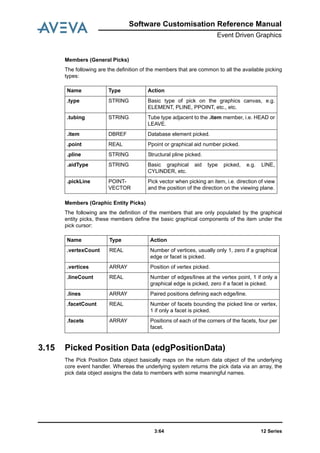
Picked Position Data (edgPositionData) . . . . . . . . . . . . . . . . . . . . . . . . . . . . . . 3:64
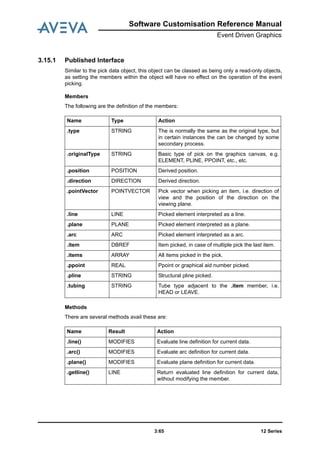
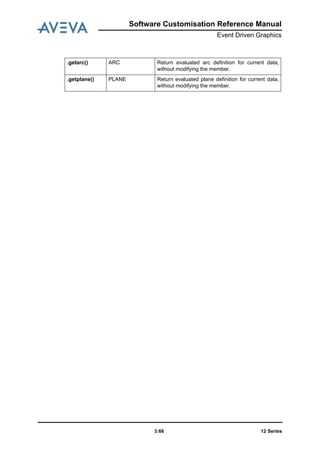
Published Interface. . . . . . . . . . . . . . . . . . . . . . . . . . . . . . . . . . . . . . . . . . . . . . . . . . . . . . . 3:65
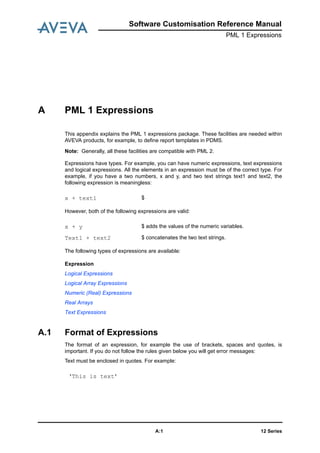
PML 1 Expressions . . . . . . . . . . . . . . . . . . . . . . . . . . . . . . . . . . . . . . .A:1
Format of Expressions . . . . . . . . . . . . . . . . . . . . . . . . . . . . . . . . . . . . . . . . . . . . .A:1
Operator Precedence. . . . . . . . . . . . . . . . . . . . . . . . . . . . . . . . . . . . . . . . . . . . . . . . . . . . . . A:2
Nesting Expressions. . . . . . . . . . . . . . . . . . . . . . . . . . . . . . . . . . . . . . . . . . . . . . . . . . . . . . . A:2
Logical Expressions . . . . . . . . . . . . . . . . . . . . . . . . . . . . . . . . . . . . . . . . . . . . . . .A:2
Logical Operators. . . . . . . . . . . . . . . . . . . . . . . . . . . . . . . . . . . . . . . . . . . . . . . . . . . . . . . . . A:3
Logical Functions . . . . . . . . . . . . . . . . . . . . . . . . . . . . . . . . . . . . . . . . . . . . . . . . . . . . . . . . . A:6
Logical Array Expressions . . . . . . . . . . . . . . . . . . . . . . . . . . . . . . . . . . . . . . . . . . . . . . . . . A:11
Numeric (Real) Expressions . . . . . . . . . . . . . . . . . . . . . . . . . . . . . . . . . . . . . . . .A:12
Real Physical Quantities with Units . . . . . . . . . . . . . . . . . . . . . . . . . . . . . . . . . . . . . . . . . . A:12
Numeric (Real) Operators . . . . . . . . . . . . . . . . . . . . . . . . . . . . . . . . . . . . . . . . . . . . . . . . . A:13
ADD and SUBTRACT (+ and -) . . . . . . . . . . . . . . . . . . . . . . . . . . . . . . . . . . . . . . . . . . . . . A:13
MULTIPLY and DIVIDE (* and /) . . . . . . . . . . . . . . . . . . . . . . . . . . . . . . . . . . . . . . . . . . . . A:13
Numeric (Real) Functions. . . . . . . . . . . . . . . . . . . . . . . . . . . . . . . . . . . . . . . . . . . . . . . . . . A:14
Real Arrays. . . . . . . . . . . . . . . . . . . . . . . . . . . . . . . . . . . . . . . . . . . . . . . . . . . . . . . . . . . . . A:22
Using IDs in Expressions . . . . . . . . . . . . . . . . . . . . . . . . . . . . . . . . . . . . . . . . . .A:22
Positions, Directions and Orientations in Expressions (PDMS only) . . . . . . .A:23
Using Positions in Expressions . . . . . . . . . . . . . . . . . . . . . . . . . . . . . . . . . . . . . . . . . . . . . A:23
WRT (PDMS Only). . . . . . . . . . . . . . . . . . . . . . . . . . . . . . . . . . . . . . . . . . . . . . . . . . . . . . . A:23
FROM . . . . . . . . . . . . . . . . . . . . . . . . . . . . . . . . . . . . . . . . . . . . . . . . . . . . . . . . . . . . . A:25
Comparing Positions . . . . . . . . . . . . . . . . . . . . . . . . . . . . . . . . . . . . . . . . . . . . . . . . . . . . . A:27
POLAR . . . . . . . . . . . . . . . . . . . . . . . . . . . . . . . . . . . . . . . . . . . . . . . . . . . . . . . . . . . . . A:28
Direction . . . . . . . . . . . . . . . . . . . . . . . . . . . . . . . . . . . . . . . . . . . . . . . . . . . . . . . . . . . . . A:29
Orientations . . . . . . . . . . . . . . . . . . . . . . . . . . . . . . . . . . . . . . . . . . . . . . . . . . . . . . . . . . . . A:30
Text Expressions . . . . . . . . . . . . . . . . . . . . . . . . . . . . . . . . . . . . . . . . . . . . . . . . .A:31
Text Operator . . . . . . . . . . . . . . . . . . . . . . . . . . . . . . . . . . . . . . . . . . . . . . . . . . . . . . . . . . . A:31
Text Functions . . . . . . . . . . . . . . . . . . . . . . . . . . . . . . . . . . . . . . . . . . . . . . . . . . . . . . . . . . A:32
Late Evaluation of Variables in Expressions. . . . . . . . . . . . . . . . . . . . . . . . . . .A:40
Attributes in Expressions . . . . . . . . . . . . . . . . . . . . . . . . . . . . . . . . . . . . . . . . . .A:41
Querying Expressions . . . . . . . . . . . . . . . . . . . . . . . . . . . . . . . . . . . . . . . . . . . . .A:41
Units in Expressions . . . . . . . . . . . . . . . . . . . . . . . . . . . . . . . . . . . . . . . . . . . . . .A:41
Precision of Comparisons. . . . . . . . . . . . . . . . . . . . . . . . . . . . . . . . . . . . . . . . . .A:42
Undefined Values . . . . . . . . . . . . . . . . . . . . . . . . . . . . . . . . . . . . . . . . . . . . . . . . .A:42
12 Seriesvi
Software Customisation Reference Manual
Unset Values. . . . . . . . . . . . . . . . . . . . . . . . . . . . . . . . . . . . . . . . . . . . . . . . . . . . .A:43
Software Customisation Reference Manual
Introduction
12 Series1:1
1 Introduction
This manual is the Reference Manual for the AVEVA Programming Language, PML.
It is intended for users who are already familiar with PML. Users who are starting to use
PML should refer to the Software Customisation Guide, which should be used together with
this manual.
There are two versions of PML, the older one, known as PML 1, and the newer one, known
as PML 2. PML 2 has been written specifically for creating and customising the AVEVA GUI,
and this manual is mainly concerned with PML 2.
However, PML 2 has not completely replaced PML 1, and there are some tasks which are
carried out more efficiently using PML 1 facilities. In particular, this manual describes the
PML 1 expressions package, which is used within PDMS; for example, for writing rules and
defining report templates. You should also refer to the Database Management Reference
Manual.
This manual contains:
• A list of PML 2 Objects, Members and Methods. For the Forms and Menus objects, the
command syntax relating to the objects is included.
Note: Many properties of Forms and Gadgets that were previously set using commands
should now be set using the Form or Gadget methods. In general, the only
commands described are those which have not been replaced by methods. If you
are maintaining old code, you may need to refer to the edition of the AVEVA Software
Customisation Guide dated October 1995, which describes the old syntax in detail.
• Information about using PML in Review.
• A description of the PML 1 expressions package.
12 Series1:2
Software Customisation Reference Manual
Introduction
Software Customisation Reference Manual
Summary of Objects, Members and Methods
12 Series2:1
2 Summary of Objects, Members and Methods
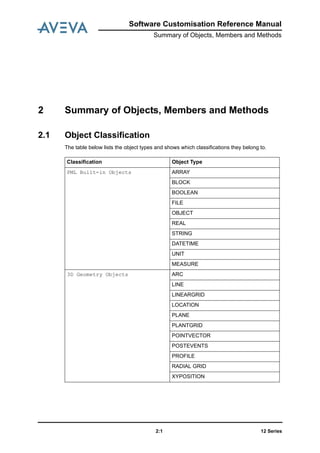
2.1 Object Classification
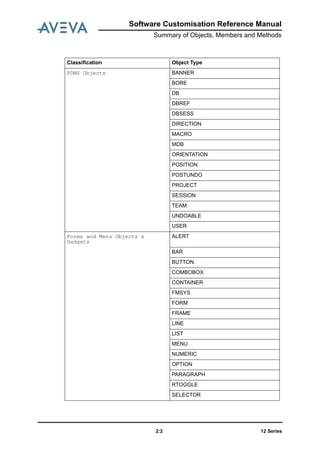
The table below lists the object types and shows which classifications they belong to.
Classification Object Type
PML Built-in Objects ARRAY
BLOCK
BOOLEAN
FILE
OBJECT
REAL
STRING
DATETIME
UNIT
MEASURE
3D Geometry Objects ARC
LINE
LINEARGRID
LOCATION
PLANE
PLANTGRID
POINTVECTOR
POSTEVENTS
PROFILE
RADIAL GRID
XYPOSITION
12 Series2:2
Software Customisation Reference Manual
Summary of Objects, Members and Methods
PDMS Objects BANNER
BORE
DB
DBREF
DBSESS
DIRECTION
MACRO
MDB
ORIENTATION
POSITION
POSTUNDO
PROJECT
SESSION
TEAM
UNDOABLE
USER
Forms and Menu Objects &
Gadgets
ALERT
BAR
BUTTON
COMBOBOX
CONTAINER
FMSYS
FORM
FRAME
LINE
LIST
MENU
NUMERIC
OPTION
PARAGRAPH
RTOGGLE
SELECTOR
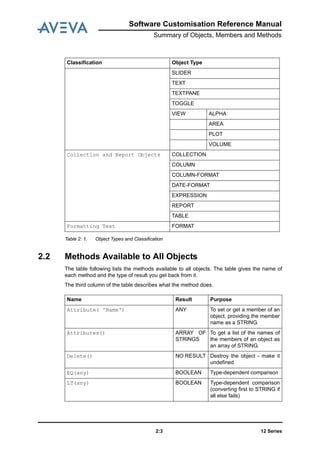
Classification Object Type
Software Customisation Reference Manual
Summary of Objects, Members and Methods
12 Series2:3
Table 2: 1. Object Types and Classification
2.2 Methods Available to All Objects
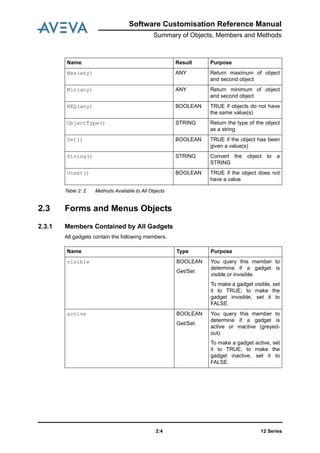
The table following lists the methods available to all objects. The table gives the name of
each method and the type of result you get back from it.
The third column of the table describes what the method does.
SLIDER
TEXT
TEXTPANE
TOGGLE
VIEW ALPHA
AREA
PLOT
VOLUME
Collection and Report Objects COLLECTION
COLUMN
COLUMN-FORMAT
DATE-FORMAT
EXPRESSION
REPORT
TABLE
Formatting Text FORMAT
Classification Object Type
Name Result Purpose
Attribute( 'Name') ANY To set or get a member of an
object, providing the member
name as a STRING.
Attributes() ARRAY OF
STRINGS
To get a list of the names of
the members of an object as
an array of STRING.
Delete() NO RESULT Destroy the object - make it
undefined
EQ(any) BOOLEAN Type-dependent comparison
LT(any) BOOLEAN Type-dependent comparison
(converting first to STRING if
all else fails)
12 Series2:4
Software Customisation Reference Manual
Summary of Objects, Members and Methods
Table 2: 2. Methods Available to All Objects
2.3 Forms and Menus Objects
2.3.1 Members Contained by All Gadgets
All gadgets contain the following members.
Max(any) ANY Return maximum of object
and second object
Min(any) ANY Return minimum of object
and second object
NEQ(any) BOOLEAN TRUE if objects do not have
the same value(s)
ObjectType() STRING Return the type of the object
as a string
Set() BOOLEAN TRUE if the object has been
given a value(s)
String() STRING Convert the object to a
STRING
Unset() BOOLEAN TRUE if the object does not
have a value
Name Result Purpose
Name Type Purpose
visible BOOLEAN
Get/Set
You query this member to
determine if a gadget is
visible or invisible.
To make a gadget visible, set
it to TRUE; to make the
gadget invisible, set it to
FALSE.
active BOOLEAN
Get/Set
You query this member to
determine if a gadget is
active or inactive (greyed-
out).
To make a gadget active, set
it to TRUE; to make the
gadget inactive, set it to
FALSE.
Software Customisation Reference Manual
Summary of Objects, Members and Methods
12 Series2:5
Table 2: 3. Members Contained by All Gadgets
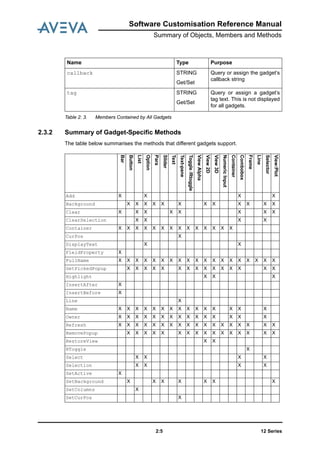
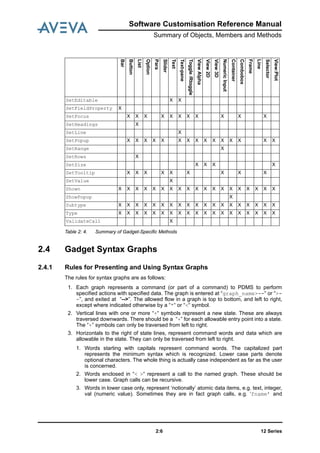
2.3.2 Summary of Gadget-Specific Methods
The table below summarises the methods that different gadgets support.
callback STRING
Get/Set
Query or assign the gadget’s
callback string
tag STRING
Get/Set
Query or assign a gadget’s
tag text. This is not displayed
for all gadgets.
Name Type Purpose
Bar
Button
List
Option
Para
Slider
Text
Text-pane
Toggle/Rtoggle
ViewAlpha
View2D
View3D
NumericInput
Container
Combobox
Frame
Line
Selector
View:Plot
Add X X X X
Background X X X X X X X X X X X X
Clear X X X X X X X X
ClearSelection X X X X
Container X X X X X X X X X X X X X X
CurPos X
DisplayText X X
FieldProperty X
FullName X X X X X X X X X X X X X X X X X X X
GetPickedPopup X X X X X X X X X X X X X X X
Highlight X X X
InsertAfter X
InsertBefore X
Line X
Name X X X X X X X X X X X X X X X
Owner X X X X X X X X X X X X X X X
Refresh X X X X X X X X X X X X X X X X X X
RemovePopup X X X X X X X X X X X X X X X X
RestoreView X X
RToggle X
Select X X X X
Selection X X X X
SetActive X
SetBackground X X X X X X X
SetColumns X
SetCurPos X
12 Series2:6
Software Customisation Reference Manual
Summary of Objects, Members and Methods
Table 2: 4. Summary of Gadget-Specific Methods
2.4 Gadget Syntax Graphs
2.4.1 Rules for Presenting and Using Syntax Graphs
The rules for syntax graphs are as follows:
1. Each graph represents a command (or part of a command) to PDMS to perform
specified actions with specified data. The graph is entered at “graph_name>--“ or “>-
-”, and exited at “-->”. The allowed flow in a graph is top to bottom, and left to right,
except where indicated otherwise by a “*“ or “<“ symbol.
2. Vertical lines with one or more “+“ symbols represent a new state. These are always
traversed downwards. There should be a “+” for each allowable entry point into a state.
The “+” symbols can only be traversed from left to right.
3. Horizontals to the right of state lines, represent command words and data which are
allowable in the state. They can only be traversed from left to right.
1. Words starting with capitals represent command words. The capitalized part
represents the minimum syntax which is recognized. Lower case parts denote
optional characters. The whole thing is actually case independent as far as the user
is concerned.
2. Words enclosed in “< >“ represent a call to the named graph. These should be
lower case. Graph calls can be recursive.
3. Words in lower case only, represent ‘notionally’ atomic data items, e.g. text, integer,
val (numeric value). Sometimes they are in fact graph calls, e.g. ‘fname’ and
SetEditable X X
SetFieldProperty X
SetFocus X X X X X X X X X X X
SetHeadings X
SetLine X
SetPopup X X X X X X X X X X X X X X X
SetRange X
SetRows X
SetSize X X X X
SetTooltip X X X X X X X X X
SetValue X
Shown X X X X X X X X X X X X X X X X X X X
ShowPopup X
Subtype X X X X X X X X X X X X X X X X X X X
Type X X X X X X X X X X X X X X X X X X X
ValidateCall X
Bar
Button
List
Option
Para
Slider
Text
Text-pane
Toggle/Rtoggle
ViewAlpha
View2D
View3D
NumericInput
Container
Combobox
Frame
Line
Selector
View:Plot
Software Customisation Reference Manual
Summary of Objects, Members and Methods
12 Series2:7
‘gname’. Sometimes they are fictitious e.g. ‘tagtext’, but more helpful than just
“text” and easier to understand than a reference to, say, <fgtag>.
4. Continuous vertical and horizontal lines without a “ + “ symbol represent flow lines of
the graph.
1. The presence of a “*“ symbol in a vertical line indicates that the allowed direction of
traverse is upwards.
2. The presence of a “<“ symbol on a horizontal indicates that the allowed direction of
traverse is backwards.
3. The symbols “.“, “/“, “ ‘ “ are just cosmetic to help the graph to look better.
2.4.2 Setting Up Gadget Anchoring: <fganch>
The ANCHOR attribute allows you to control the position of an edge of the gadget relative to
the corresponding edge of its container.
For example ANCHOR RIGHT specifies that the right hand edge of the gadget will maintain
a fixed distance from the right hand edge of its owning container.
Figure 2:1. Syntax Graph -: Gadget Anchoring
2.4.3 Setting Up Gadget Docking: <fgdock>
The DOCK attribute allows you to dock a gadget to the left, right, top, or bottom edge of its
container, typically a form or a frame; or you can cause the gadget to dock to all edges, or to
no edges.
Figure 2:2. Syntax Graph - Gadget Docking
Note: The DOCK and ANCHOR attributes are mutually exclusive.
Setting the DOCK attribute resets the ANCHOR to the default; setting the ANCHOR
attribute resets DOCK to none.
You can set these attributes only when you define the gadget: you cannot change it
after the exit from form setup. Thus you are not allowed to the resize behaviour at
run-time.
.---<-------------.
/ |
>-- <fganch> -----------+-- ANCHOR --+--+- Left ----. |
| +- Right ---| |
| +- Top -----| |
| ‘- Bottom --+---+---*
| |
+---- None ----|
‘---- All------’-->
>-- <fgdock> -----------+-- DOCK ----+-----Left ----.
+---- Right ---|
+---- Top -----|
+---- Bottom --|
+---- None ----|
‘---- Fill ----’-->
12 Series2:8
Software Customisation Reference Manual
Summary of Objects, Members and Methods
2.4.4 Setting-Up the Gadget’s Position: <fgpos> and <fgprl>
You can use the AT syntax, shown below on the <fgpos> graph, to define the position of a
gadget’s origin within a form.
You can specify the position absolutely (in form layout grid units) or relative to the
extremities of existing gadgets, or relative to the size of the form and the gadget.
Figure 2:3. Syntax Graph - Absolute Positioning
The subgraph <fgprl>, shown below, sets the gadget position relative to another gadget or
the form’s extent. For example, you can use it to position a gadget halfway across the width
of a form.
Figure 2:4. Syntax Graph -: Relative Positioning
Examples of Using the AT Syntax
>-- <fgpos> -- AT --+- val val -------------------------------.
+- X val ------------. |
+- XMIN -. | |
+- XCEN -| | |
+- XMAX -+- <fgprl> -| |
‘--------‘-----------+- Y val ------------|
+- YMIN -. |
+- YCEN -| |
+- YMAX -‘- <fgprl> -|
‘--------------------‘-->
>-- <fgprl> --+- <gname> -.
+-- FORM ---|
‘-----------+- * val -----.
| |
+- + val --. |
+- - val --‘--+- + val * SIZE ---.
| +- - val * SIZE ---|
| +- + SIZE ---------|
| +- - SIZE ---------|
| ‘------------------|
+- + SIZE -----------------------|
+- - SIZE -----------------------|
‘--------------------------------‘-->
AT 5 7.5 Puts gadget origin at form grid coordinates (5, 7.5).
AT X 5.5 Puts gadget origin at form grid coordinates (5.5, y) where
y is calculated automatically from the y extremity of the
last placed gadget and the current VDISTANCE setting.
AT YMAX+1 Positions new gadget at (x, y) where x is calculated
automatically from the x extremity of the last placed
gadget and the current HDISTANCE setting. y is at
YMAX+1 of the last gadget.
Software Customisation Reference Manual
Summary of Objects, Members and Methods
12 Series2:9
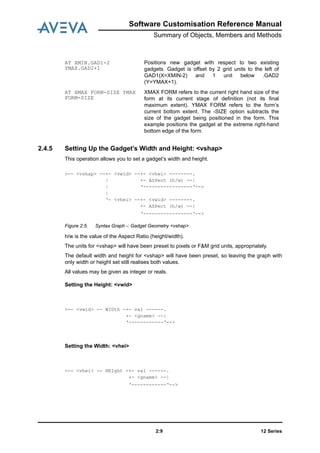
2.4.5 Setting Up the Gadget’s Width and Height: <vshap>
This operation allows you to set a gadget’s width and height.
Figure 2:5. Syntax Graph -: Gadget Geometry <vshap>
h/w is the value of the Aspect Ratio (height/width).
The units for <vshap> will have been preset to pixels or F&M grid units, appropriately.
The default width and height for <vshap> will have been preset, so leaving the graph with
only width or height set still realises both values.
All values may be given as integer or reals.
Setting the Height: <vwid>
Setting the Width: <vhei>
AT XMIN.GAD1-2
YMAX.GAD2+1
Positions new gadget with respect to two existing
gadgets. Gadget is offset by 2 grid units to the left of
GAD1(X=XMIN-2) and 1 unit below .GAD2
(Y=YMAX+1).
AT XMAX FORM-SIZE YMAX
FORM-SIZE
XMAX FORM refers to the current right hand size of the
form at its current stage of definition (not its final
maximum extent). YMAX FORM refers to the form’s
current bottom extent. The -SIZE option subtracts the
size of the gadget being positioned in the form. This
example positions the gadget at the extreme right-hand
bottom edge of the form.
>-- <vshap> --+- <vwid> --+- <vhei> --------.
| +- ASPect (h/w) --|
| ‘-----------------‘-->
|
‘- <vhei> --+- <vwid> --------.
+- ASPect (h/w) --|
‘-----------------‘-->
>-- <vwid> -- WIDth -+- val ------.
+- <gname> --|
‘------------‘-->
>-- <vhei> -- HEIght -+- val ------.
+- <gname> --|
‘------------‘-->
12 Series2:10
Software Customisation Reference Manual
Summary of Objects, Members and Methods
2.4.6 Setting Up the Gadget’s Tagwidth (TEXT, TOGGLE and OPTION):
<fgtagw>
The TAGWIDTH specifies the size of the gadget’s tag field in grid width units including any
padding space, regardless of the actual tag string. Tagwidth is not needed for gadgets with
an explicit area specification (width and height, lines or length). FRAME, LIST, SELECTOR,
TEXTPANE and PARAGRAPH can always force an explicit width.
The syntax graph <fgtagw> defines the Tag specification
Figure 2:6. Syntax Graph -: Gadget Tagwidth
The <fgtagw> graph supports both the simple ‘tagtext’ setting and/or the specification of the
maximum width of any tag.
If the tag width is not explicitly given then it is assumed to be the number of characters in the
‘tagtext’ string multiplied by the horizontal grid size (the notional character width for the font).
You can specify the tag width without specifying any tagtext at definition time; this can be
added at run time
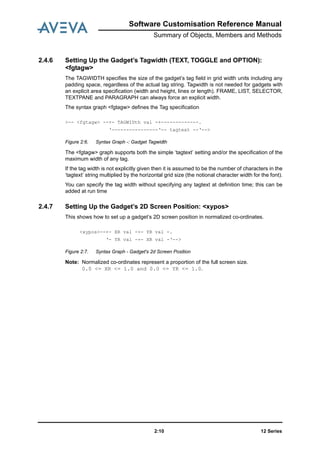
2.4.7 Setting Up the Gadget’s 2D Screen Position: <xypos>
This shows how to set up a gadget’s 2D screen position in normalized co-ordinates.
Figure 2:7. Syntax Graph - Gadget's 2d Screen Position
Note: Normalized co-ordinates represent a proportion of the full screen size.
0.0 <= XR <= 1.0 and 0.0 <= YR <= 1.0.
>-- <fgtagw> --+- TAGWIDth val -+-------------.
‘----------------‘-- tagtext --‘-->
<xypos>--+- XR val -+- YR val -.
‘- YR val -+- XR val -‘-->
Software Customisation Reference Manual
Summary of Objects, Members and Methods
12 Series2:11
2.5 Object Type Details
This section contains details of the object types listed in Table 2: 1.: Object Types and
Classification.
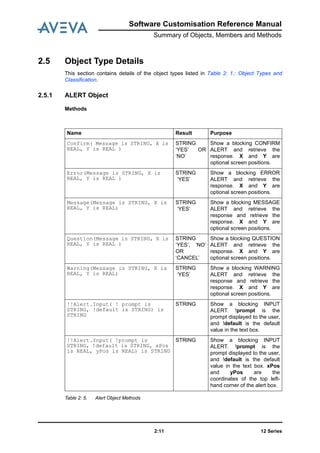
2.5.1 ALERT Object
Methods
Table 2: 5. Alert Object Methods
Name Result Purpose
Confirm( Message is STRING, X is
REAL, Y is REAL )
STRING
‘YES’ OR
‘NO’
Show a blocking CONFIRM
ALERT and retrieve the
response. X and Y are
optional screen positions.
Error(Message is STRING, X is
REAL, Y is REAL )
STRING
‘YES’
Show a blocking ERROR
ALERT and retrieve the
response. X and Y are
optional screen positions.
Message(Message is STRING, X is
REAL, Y is REAL)
STRING
‘YES’
Show a blocking MESSAGE
ALERT and retrieve the
response and retrieve the
response. X and Y are
optional screen positions.
Question(Message is STRING, X is
REAL, Y is REAL )
STRING
‘YES’, ‘NO’
OR
‘CANCEL’
Show a blocking QUESTION
ALERT and retrieve the
response. X and Y are
optional screen positions.
Warning(Message is STRING, X is
REAL, Y is REAL)
STRING
‘YES’
Show a blocking WARNING
ALERT and retrieve the
response and retrieve the
response. X and Y are
optional screen positions.
!!Alert.Input( ! prompt is
STRING, !default is STRING) is
STRING
STRING Show a blocking INPUT
ALERT. !prompt is the
prompt displayed to the user,
and !default is the default
value in the text box.
!!Alert.Input( !prompt is
STRING, !default is STRING, xPos
is REAL, yPos is REAL) is STRING
STRING Show a blocking INPUT
ALERT. !prompt is the
prompt displayed to the user,
and !default is the default
value in the text box. xPos
and yPos are the
coordinates of the top left-
hand corner of the alert box.
12 Series2:12
Software Customisation Reference Manual
Summary of Objects, Members and Methods
2.5.2 ARC Object
Basic ARC Definition: Members
Table 2: 6. Basic ARC Definition Members
Basic ARC Definition: Methods
These methods do not modify the original object.
Table 2: 7. Basic ARC Definition Methods
Name Type Purpose
Orientation ORIENTATI
ON
Get/Set
Orientation of the arc.
Position POSITION
Get/Set
Origin/Centre of the arc.
Radius REAL
Get/Set
Radius of the arc
StartAngle REAL
Get/Set
Angle from X axes to start of
the arc.
EndAngle REAL
Get/Set
Angle from X axes to end of
the arc.
Sense BOOLEAN
Get/Set
Arc sense:
·0 for clockwise
·1 for anti-clockwise
Name Result Purpose
Arc( POSITION, ORIENTATION,
REAL, REAL, REAL,BOOLEAN)
ARC Creates an arc with the given
Position, Orientation, Start
Angle, End Angle, Radius. If
the last argument is TRUE,
the arc is clockwise.
String() STRING Returns the arc as a string
Software Customisation Reference Manual
Summary of Objects, Members and Methods
12 Series2:13
ARC Methods that Return ARCs
None of these methods modifies the original object.
Table 2: 8. ARC Methods that Return ARCs
Name Result Purpose
StartPosition(POSITION) ARC Returns a new arc, based on
the original, where the start
angle, if defined as the angle
from the centre of the arc
through the passed position
mapped onto the arc plane,
forms the X axis.
EndPosition(POSITION) ARC As StartPosition, but for
the EndAngle.
Through(POSITION) ARC Returns a new arc, where the
radius (of the full circle)
passes through the passed
position when mapped onto
the arc plane.
ChordHeight(REAL) ARC Returns a new arc, based on
the original, where the
EndAngle is in such a
position to produce the
passed chord height.
Chord height > Radius or
Chord height < 0 return unset
objects.
New arc should not produce
subtended angle > 180.
Chord(REAL) ARC Returns a new arc,
maintaining the original
StartAngle, so the
EndAngle is at the specified
distance from the Start
Chord length > Radius * 2 or
< 0 return an unset object.
Circle() ARC Returns a full circle definition
of the arc.
Circle(BOOLEAN) ARC Returns a full circle definition
of the arc. If True, the arc is
anti-clock-wise
Complement() ARC Returns the complementary
arc of the arc definition (the
remainder of the circle)
12 Series2:14
Software Customisation Reference Manual
Summary of Objects, Members and Methods
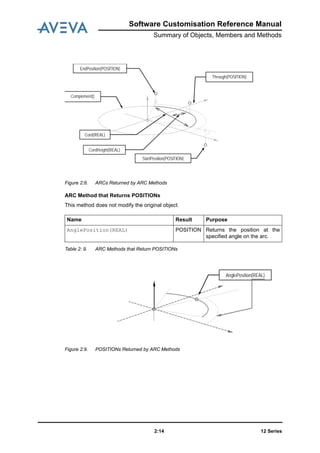
Figure 2:8. ARCs Returned by ARC Methods
ARC Method that Returns POSITIONs
This method does not modify the original object.
Table 2: 9. ARC Methods that Return POSITIONs
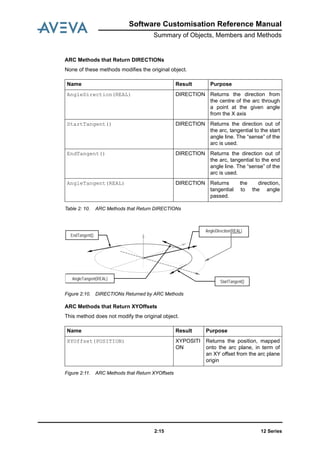
Figure 2:9. POSITIONs Returned by ARC Methods
Name Result Purpose
AnglePosition(REAL) POSITION Returns the position at the
specified angle on the arc.
StartPosition(POSITION)
EndPosition(POSITION)
Through(POSITION)
Complement()
Cord(REAL)
CordHeight(REAL)
AnglePosition(REAL)
Software Customisation Reference Manual
Summary of Objects, Members and Methods
12 Series2:15
ARC Methods that Return DIRECTIONs
None of these methods modifies the original object.
Table 2: 10. ARC Methods that Return DIRECTIONs
Figure 2:10. DIRECTIONs Returned by ARC Methods
ARC Methods that Return XYOffsets
This method does not modify the original object.
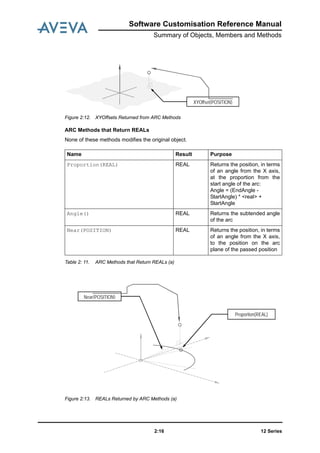
Figure 2:11. ARC Methods that Return XYOffsets
Name Result Purpose
AngleDirection(REAL) DIRECTION Returns the direction from
the centre of the arc through
a point at the given angle
from the X axis
StartTangent() DIRECTION Returns the direction out of
the arc, tangential to the start
angle line. The “sense” of the
arc is used.
EndTangent() DIRECTION Returns the direction out of
the arc, tangential to the end
angle line. The “sense” of the
arc is used.
AngleTangent(REAL) DIRECTION Returns the direction,
tangential to the angle
passed.
Name Result Purpose
XYOffset(POSITION) XYPOSITI
ON
Returns the position, mapped
onto the arc plane, in term of
an XY offset from the arc plane
origin
AngleDirection(REAL)
StartTangent()
EndTangent()
AngleTangent(REAL)
12 Series2:16
Software Customisation Reference Manual
Summary of Objects, Members and Methods
Figure 2:12. XYOffsets Returned from ARC Methods
ARC Methods that Return REALs
None of these methods modifies the original object.
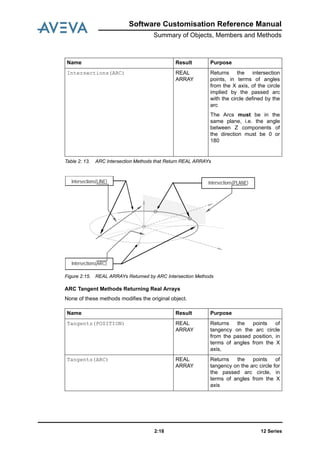
Table 2: 11. ARC Methods that Return REALs (a)
Figure 2:13. REALs Returned by ARC Methods (a)
Name Result Purpose
Proportion(REAL) REAL Returns the position, in terms
of an angle from the X axis,
at the proportion from the
start angle of the arc:
Angle = (EndAngle -
StartAngle) * <real> +
StartAngle
Angle() REAL Returns the subtended angle
of the arc
Near(POSITION) REAL Returns the position, in terms
of an angle from the X axis,
to the position on the arc
plane of the passed position
XYOffset(POSITION)
Proportion(REAL)
Near(POSITION)
Software Customisation Reference Manual
Summary of Objects, Members and Methods
12 Series2:17
Table 2: 12. ARC Methods that Return REALs (b)
Figure 2:14. REALs Returned by ARC Methods (b)
ARC Intersection Methods that Return REAL ARRAYs
None of these methods modifies the original object.
Name Result Purpose
Chord() REAL Returns the chord length
between the start and end of
the arc definition
Length() REAL Returns the true length of the
arc line
ChordHeight() REAL Returns the chord height of
the arc line
Chord()
Length()
ChordHeight()
Name Result Purpose
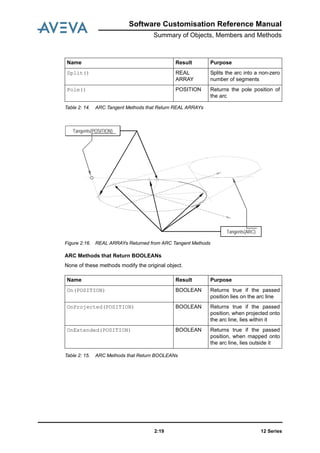
Intersections(LINE) REAL
ARRAY
Returns the intersection
points, in terms of angles
from the X axis, of the
passed line (mapped onto
arc plane) with the circle
defined by the arc
Intersections(PLANE) REAL
ARRAY
Returns the intersection
points, in terms of angles
from the X axis, of the
passed plane with the circle
defined by the arc
12 Series2:18
Software Customisation Reference Manual
Summary of Objects, Members and Methods
Table 2: 13. ARC Intersection Methods that Return REAL ARRAYs
Figure 2:15. REAL ARRAYs Returned by ARC Intersection Methods
ARC Tangent Methods Returning Real Arrays
None of these methods modifies the original object.
Intersections(ARC) REAL
ARRAY
Returns the intersection
points, in terms of angles
from the X axis, of the circle
implied by the passed arc
with the circle defined by the
arc
The Arcs must be in the
same plane, i.e. the angle
between Z components of
the direction must be 0 or
180
Name Result Purpose
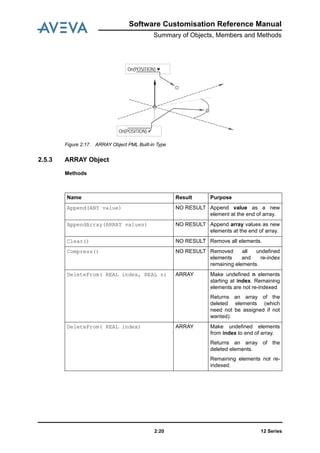
Tangents(POSITION) REAL
ARRAY
Returns the points of
tangency on the arc circle
from the passed position, in
terms of angles from the X
axis,
Tangents(ARC) REAL
ARRAY
Returns the points of
tangency on the arc circle for
the passed arc circle, in
terms of angles from the X
axis
Name Result Purpose
Intersections(LINE) Intersections(PLANE)
Intersections(ARC)
Software Customisation Reference Manual
Summary of Objects, Members and Methods
12 Series2:19
Table 2: 14. ARC Tangent Methods that Return REAL ARRAYs
Figure 2:16. REAL ARRAYs Returned from ARC Tangent Methods
ARC Methods that Return BOOLEANs
None of these methods modify the original object.
Table 2: 15. ARC Methods that Return BOOLEANs
Split() REAL
ARRAY
Splits the arc into a non-zero
number of segments
Pole() POSITION Returns the pole position of
the arc
Name Result Purpose
Tangents(POSITION)
Tangents(ARC)
Name Result Purpose
On(POSITION) BOOLEAN Returns true if the passed
position lies on the arc line
OnProjected(POSITION) BOOLEAN Returns true if the passed
position, when projected onto
the arc line, lies within it
OnExtended(POSITION) BOOLEAN Returns true if the passed
position, when mapped onto
the arc line, lies outside it
12 Series2:20
Software Customisation Reference Manual
Summary of Objects, Members and Methods
Figure 2:17. ARRAY Object PML Built-in Type
2.5.3 ARRAY Object
Methods
On(POSITION)
On(POSITION)
Name Result Purpose
Append(ANY value) NO RESULT Append value as a new
element at the end of array.
AppendArray(ARRAY values) NO RESULT Append array values as new
elements at the end of array.
Clear() NO RESULT Remove all elements.
Compress() NO RESULT Removed all undefined
elements and re-index
remaining elements.
DeleteFrom( REAL index, REAL n) ARRAY Make undefined n elements
starting at index. Remaining
elements are not re-indexed
Returns an array of the
deleted elements (which
need not be assigned if not
wanted).
DeleteFrom( REAL index) ARRAY Make undefined elements
from index to end of array.
Returns an array of the
deleted elements.
Remaining elements not re-
indexed.
Software Customisation Reference Manual
Summary of Objects, Members and Methods
12 Series2:21
DeleteTo(REAL index, REAL n) ARRAY Make undefined n elements
up to index Returns an array
of the deleted elements
Remaining elements not re-
indexed.
DeleteTo(REAL index) ARRAY Make undefined elements
from start to index Returns
an array of the deleted
elements Remaining
elements not re-indexed.
Difference(ARRAY two) ARRAY Return an array of those
elements in the original array
not present in array two.
Duplicates will appear only
once
Empty() BOOLEAN TRUE if array is empty
Evaluate(BLOCK command) NEW
ARRAY
Evaluate code in command
at each element.
Find(ANY value) NEW
ARRAY
Search original array for
value and return an array of
index positions at which it
was found.
FindFirst(ANY value) REAL Return index of first
occurrence of value. Returns
UNSET if not found.
First() ANY Return value of first defined
element
From(REAL index, REAL n) ARRAY Copy sub array of n
elements starting at index.
From(REAL index) ARRAY Copy sub array starting at
index to end of array.
GetIndexed(REAL index) ANY Implements ARRAY[index]
(this is an internal method).
Indices() NEW
ARRAY
Returns an array containing
the indices of the target array
that have a value.
Insert(REAL index, ANY value) NO RESULT Insert value as a new
element at index.
Later elements are re-
indexed
Name Result Purpose
12 Series2:22
Software Customisation Reference Manual
Summary of Objects, Members and Methods
InsertArray(REAL index, ARRAY
ANY values)
NO RESULT Insert values as new
elements with the first at
index.
Later elements are re-
indexed
Intersect(ARRAY two) NEW
ARRAY
Return array of elements
present in both arrays.
Duplicates will appear only
once.
Invert() NEW
ARRAY
Returns an inverted copy of
the array.
Last() ANY Return last element value.
MaxIndex() REAL Subscript of last defined
(non-empty) element.
MinIndex() REAL Subscript of first defined
(non-empty) element.
Overlay(REAL index, ARRAY two) NEW
ARRAY
Replace array elements at
index with elements from the
array two. Returns an array
of the elements which were
overwritten (which need not
be assigned if not required).
ReIndex(REAL ARRAY indices) NO RESULT Apply result of
SORTEDINDICES to re-
order array elements into
positions specified by
indices.
Remove(REAL nth) ANY Remove and Return nth
element (which need not be
assigned if not required).
Remaining elements are re-
indexed.
RemoveFirst() ANY Remove and Return first
element (which need not be
assigned if not required).
Remaining elements are re-
indexed.
RemoveFrom(REAL index, REAL n) NEW
ARRAY
Remove and Return new
array of n elements starting
with index (which need not
be assigned if not required).
Remaining elements are re-
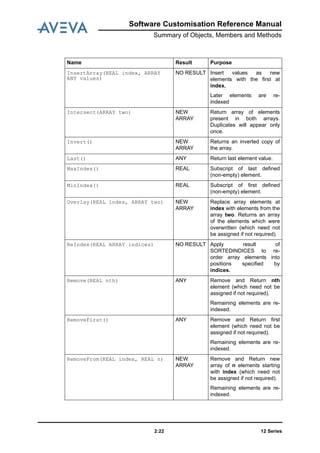
indexed.
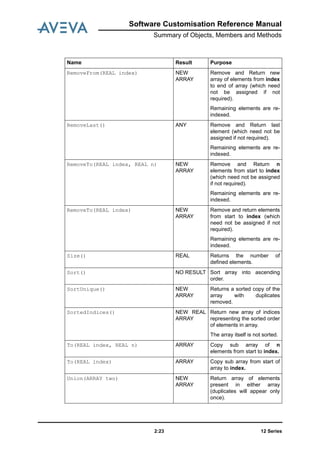
Name Result Purpose
Software Customisation Reference Manual
Summary of Objects, Members and Methods
12 Series2:23
RemoveFrom(REAL index) NEW
ARRAY
Remove and Return new
array of elements from index
to end of array (which need
not be assigned if not
required).
Remaining elements are re-
indexed.
RemoveLast() ANY Remove and Return last
element (which need not be
assigned if not required).
Remaining elements are re-
indexed.
RemoveTo(REAL index, REAL n) NEW
ARRAY
Remove and Return n
elements from start to index
(which need not be assigned
if not required).
Remaining elements are re-
indexed.
RemoveTo(REAL index) NEW
ARRAY
Remove and return elements
from start to index (which
need not be assigned if not
required).
Remaining elements are re-
indexed.
Size() REAL Returns the number of
defined elements.
Sort() NO RESULT Sort array into ascending
order.
SortUnique() NEW
ARRAY
Returns a sorted copy of the
array with duplicates
removed.
SortedIndices() NEW REAL
ARRAY
Return new array of indices
representing the sorted order
of elements in array.
The array itself is not sorted.
To(REAL index, REAL n) ARRAY Copy sub array of n
elements from start to index.
To(REAL index) ARRAY Copy sub array from start of
array to index.
Union(ARRAY two) NEW
ARRAY
Return array of elements
present in either array
(duplicates will appear only
once).
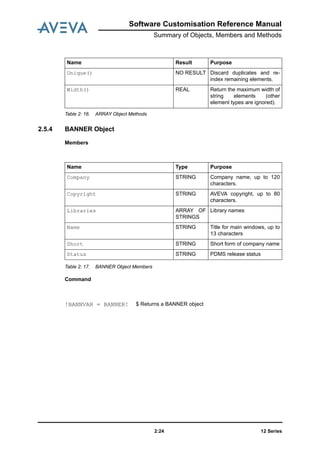
Name Result Purpose
12 Series2:24
Software Customisation Reference Manual
Summary of Objects, Members and Methods
Table 2: 16. ARRAY Object Methods
2.5.4 BANNER Object
Members
Table 2: 17. BANNER Object Members
Command
Unique() NO RESULT Discard duplicates and re-
index remaining elements.
Width() REAL Return the maximum width of
string elements (other
element types are ignored).
Name Result Purpose
Name Type Purpose
Company STRING Company name, up to 120
characters.
Copyright STRING AVEVA copyright, up to 80
characters.
Libraries ARRAY OF
STRINGS
Library names
Name STRING Title for main windows, up to
13 characters
Short STRING Short form of company name
Status STRING PDMS release status
!BANNVAR = BANNER! $ Returns a BANNER object
Software Customisation Reference Manual
Summary of Objects, Members and Methods
12 Series2:25
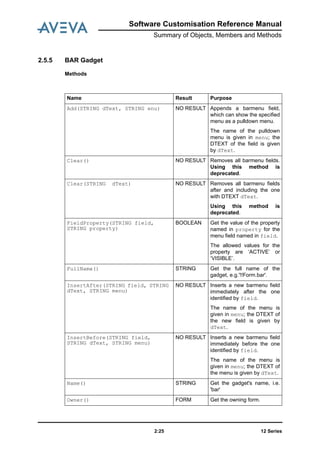
2.5.5 BAR Gadget
Methods
Name Result Purpose
Add(STRING dText, STRING enu) NO RESULT Appends a barmenu field,
which can show the specified
menu as a pulldown menu.
The name of the pulldown
menu is given in menu; the
DTEXT of the field is given
by dText.
Clear() NO RESULT Removes all barmenu fields.
Using this method is
deprecated.
Clear(STRING dText) NO RESULT Removes all barmenu fields
after and including the one
with DTEXT dText.
Using this method is
deprecated.
FieldProperty(STRING field,
STRING property)
BOOLEAN Get the value of the property
named in property for the
menu field named in field.
The allowed values for the
property are ‘ACTIVE’ or
‘VISIBLE’.
FullName() STRING Get the full name of the
gadget, e.g.'!!Form.bar'.
InsertAfter(STRING field, STRING
dText, STRING menu)
NO RESULT Inserts a new barmenu field
immediately after the one
identified by field.
The name of the menu is
given in menu; the DTEXT of
the new field is given by
dText.
InsertBefore(STRING field,
STRING dText, STRING menu)
NO RESULT Inserts a new barmenu field
immediately before the one
identified by field.
The name of the menu is
given in menu; the DTEXT of
the menu is given by dText.
Name() STRING Get the gadget's name, i.e.
'bar'
Owner() FORM Get the owning form.
12 Series2:26
Software Customisation Reference Manual
Summary of Objects, Members and Methods
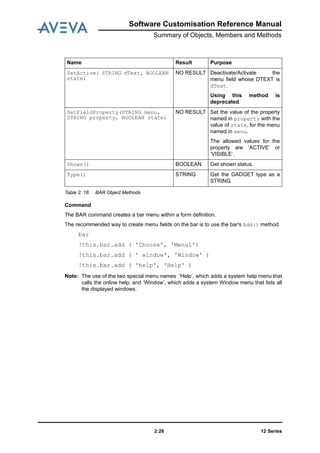
Table 2: 18. BAR Object Methods
Command
The BAR command creates a bar menu within a form definition.
The recommended way to create menu fields on the bar is to use the bar's Add() method.
bar
!this.bar.add ( 'Choose', 'Menu1')
!this.bar.add ( ' window', 'Window' )
!this.bar.add ( 'help', 'Help' )
Note: The use of the two special menu names ’Help’, which adds a system help menu that
calls the online help; and ‘Window’, which adds a system Window menu that lists all
the displayed windows.
SetActive( STRING dText, BOOLEAN
state)
NO RESULT Deactivate/Activate the
menu field whose DTEXT is
dText.
Using this method is
deprecated.
SetFieldProperty(STRING menu,
STRING property, BOOLEAN state)
NO RESULT Set the value of the property
named in property with the
value of state, for the menu
named in menu.
The allowed values for the
property are ‘ACTIVE’ or
‘VISIBLE’.
Shown() BOOLEAN Get shown status.
Type() STRING Get the GADGET type as a
STRING.
Name Result Purpose
Software Customisation Reference Manual
Summary of Objects, Members and Methods
12 Series2:27
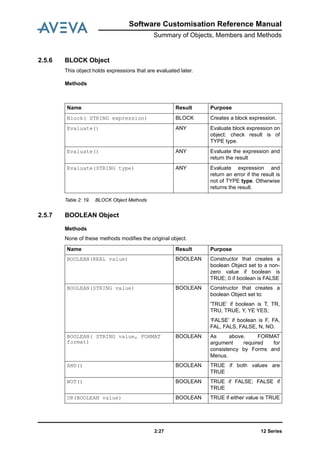
2.5.6 BLOCK Object
This object holds expressions that are evaluated later.
Methods
Table 2: 19. BLOCK Object Methods
2.5.7 BOOLEAN Object
Methods
None of these methods modifies the original object.
Name Result Purpose
Block( STRING expression) BLOCK Creates a block expression.
Evaluate() ANY Evaluate block expression on
object: check result is of
TYPE type.
Evaluate() ANY Evaluate the expression and
return the result
Evaluate(STRING type) ANY Evaluate expression and
return an error if the result is
not of TYPE type. Otherwise
returns the result.
Name Result Purpose
BOOLEAN(REAL value) BOOLEAN Constructor that creates a
boolean Object set to a non-
zero value if boolean is
TRUE; 0 if boolean is FALSE
BOOLEAN(STRING value) BOOLEAN Constructor that creates a
boolean Object set to:
'TRUE’ if boolean is T, TR,
TRU, TRUE, Y, YE YES;
‘FALSE’ if boolean is F, FA,
FAL, FALS, FALSE, N, NO.
BOOLEAN( STRING value, FORMAT
format)
BOOLEAN As above. FORMAT
argument required for
consistency by Forms and
Menus.
AND() BOOLEAN TRUE if both values are
TRUE
NOT() BOOLEAN TRUE if FALSE; FALSE if
TRUE
OR(BOOLEAN value) BOOLEAN TRUE if either value is TRUE
12 Series2:28
Software Customisation Reference Manual
Summary of Objects, Members and Methods
Table 2: 20. BOOLEAN Object Methods
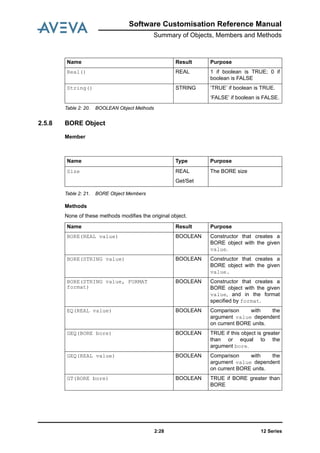
2.5.8 BORE Object
Member
Table 2: 21. BORE Object Members
Methods
None of these methods modifies the original object.
Real() REAL 1 if boolean is TRUE; 0 if
boolean is FALSE
String() STRING ‘TRUE’ if boolean is TRUE.
‘FALSE’ if boolean is FALSE.
Name Result Purpose
Name Type Purpose
Size REAL
Get/Set
The BORE size
Name Result Purpose
BORE(REAL value) BOOLEAN Constructor that creates a
BORE object with the given
value.
BORE(STRING value) BOOLEAN Constructor that creates a
BORE object with the given
value.
BORE(STRING value, FORMAT
format)
BOOLEAN Constructor that creates a
BORE object with the given
value, and in the format
specified by format.
EQ(REAL value) BOOLEAN Comparison with the
argument value dependent
on current BORE units.
GEQ(BORE bore) BOOLEAN TRUE if this object is greater
than or equal to the
argument bore.
GEQ(REAL value) BOOLEAN Comparison with the
argument value dependent
on current BORE units.
GT(BORE bore) BOOLEAN TRUE if BORE greater than
BORE
Software Customisation Reference Manual
Summary of Objects, Members and Methods
12 Series2:29
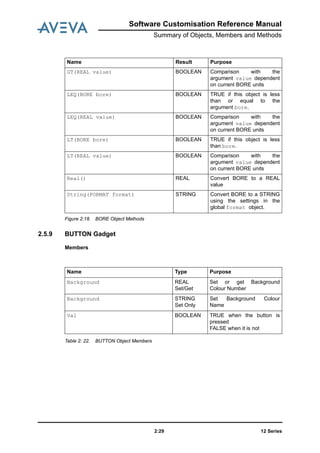
Figure 2:18. BORE Object Methods
2.5.9 BUTTON Gadget
Members
Table 2: 22. BUTTON Object Members
GT(REAL value) BOOLEAN Comparison with the
argument value dependent
on current BORE units
LEQ(BORE bore) BOOLEAN TRUE if this object is less
than or equal to the
argument bore.
LEQ(REAL value) BOOLEAN Comparison with the
argument value dependent
on current BORE units
LT(BORE bore) BOOLEAN TRUE if this object is less
than bore.
LT(REAL value) BOOLEAN Comparison with the
argument value dependent
on current BORE units
Real() REAL Convert BORE to a REAL
value
String(FORMAT format) STRING Convert BORE to a STRING
using the settings in the
global format object.
Name Result Purpose
Name Type Purpose
Background REAL
Set/Get
Set or get Background
Colour Number
Background STRING
Set Only
Set Background Colour
Name
Val BOOLEAN TRUE when the button is
pressed
FALSE when it is not
12 Series2:30
Software Customisation Reference Manual
Summary of Objects, Members and Methods
Methods
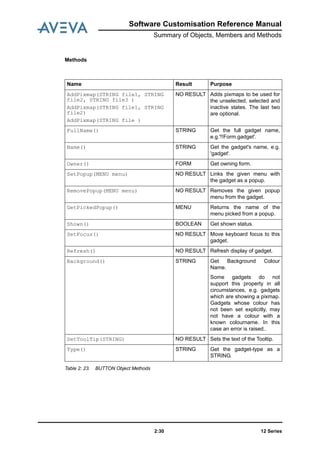
Table 2: 23. BUTTON Object Methods
Name Result Purpose
AddPixmap(STRING file1, STRING
file2, STRING file3 )
AddPixmap(STRING file1, STRING
file2)
AddPixmap(STRING file )
NO RESULT Adds pixmaps to be used for
the unselected, selected and
inactive states. The last two
are optional.
FullName() STRING Get the full gadget name,
e.g.'!!Form.gadget'.
Name() STRING Get the gadget's name, e.g.
'gadget'.
Owner() FORM Get owning form.
SetPopup(MENU menu) NO RESULT Links the given menu with
the gadget as a popup.
RemovePopup(MENU menu) NO RESULT Removes the given popup
menu from the gadget.
GetPickedPopup() MENU Returns the name of the
menu picked from a popup.
Shown() BOOLEAN Get shown status.
SetFocus() NO RESULT Move keyboard focus to this
gadget.
Refresh() NO RESULT Refresh display of gadget.
Background() STRING Get Background Colour
Name.
Some gadgets do not
support this property in all
circumstances, e.g. gadgets
which are showing a pixmap.
Gadgets whose colour has
not been set explicitly, may
not have a colour with a
known colourname. In this
case an error is raised..
SetToolTip(STRING) NO RESULT Sets the text of the Tooltip.
Type() STRING Get the gadget-type as a
STRING.
Software Customisation Reference Manual
Summary of Objects, Members and Methods
12 Series2:31
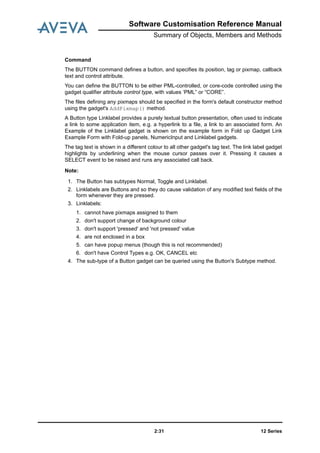
Command
The BUTTON command defines a button, and specifies its position, tag or pixmap, callback
text and control attribute.
You can define the BUTTON to be either PML-controlled, or core-code controlled using the
gadget qualifier attribute control type, with values ‘PML” or “CORE”.
The files defining any pixmaps should be specified in the form's default constructor method
using the gadget's AddPixmap() method.
A Button type Linklabel provides a purely textual button presentation, often used to indicate
a link to some application item, e.g. a hyperlink to a file, a link to an associated form. An
Example of the Linklabel gadget is shown on the example form in Fold up Gadget Link
Example Form with Fold-up panels, NumericInput and Linklabel gadgets.
The tag text is shown in a different colour to all other gadget's tag text. The link label gadget
highlights by underlining when the mouse cursor passes over it. Pressing it causes a
SELECT event to be raised and runs any associated call back.
Note:
1. The Button has subtypes Normal, Toggle and Linklabel.
2. Linklabels are Buttons and so they do cause validation of any modified text fields of the
form whenever they are pressed.
3. Linklabels:
1. cannot have pixmaps assigned to them
2. don't support change of background colour
3. don't support 'pressed' and 'not pressed' value
4. are not enclosed in a box
5. can have popup menus (though this is not recommended)
6. don't have Control Types e.g. OK, CANCEL etc
4. The sub-type of a Button gadget can be queried using the Button's Subtype method.
12 Series2:32
Software Customisation Reference Manual
Summary of Objects, Members and Methods
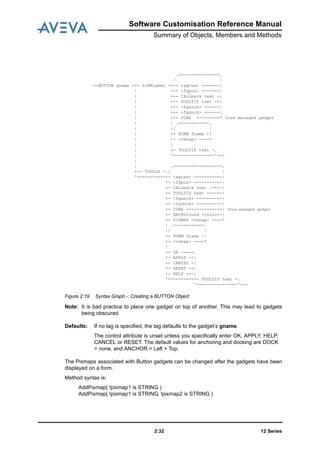
Figure 2:19. Syntax Graph -: Creating a BUTTON Object
Note: It is bad practice to place one gadget on top of another. This may lead to gadgets
being obscured.
The Pixmaps associated with Button gadgets can be changed after the gadgets have been
displayed on a form.
Method syntax is:
AddPixmap( !pixmap1 is STRING )
AddPixmap( !pixmap1 is STRING, !pixmap2 is STRING )
.--------<-------.
/ |
>-BUTTON gname -+- LINKLabel -+-- tagtext -------|
| +-- <fgpos> -------|
| +-- CALLback text -|
| +-- TOOLTIP text --|
| +-- <fganch> ------|
| +-- <fgdock> ------|
| +-- CORE ---------* Core managed gadget
| | .------<-----.
| |/ |
| +- FORM fname -|
| +- <vshap> ----*
| |
| +- TOOLTIP text -.
| '----------------'-->
|
| .--------<----------.
+-- TOGGLE -./ |
'-----------+- tagtext -----------|
+- <fgpos> -----------|
+- CALLback text -----|
+- TOOLTIP text ------|
+- <fganch> ----------|
+- <fgdock> ----------|
+- CORE --------------| Core managed gadget
+- BACKGround <colno>-|
+- PIXMAP <vshap> ----*
| .------<-----.
|/ |
+- FORM fname -|
+- <vshap> ----*
|
+- OK -----.
+- APPLY --|
+- CANCEL -|
+- RESET --|
+- HELP ---|
'----------+- TOOLTIP text -.
'----------------'-->
Defaults: If no tag is specified, the tag defaults to the gadget’s gname.
The control attribute is unset unless you specifically enter OK, APPLY, HELP,
CANCEL or RESET. The default values for anchoring and docking are DOCK
= none, and ANCHOR = Left + Top.
Software Customisation Reference Manual
Summary of Objects, Members and Methods
12 Series2:33
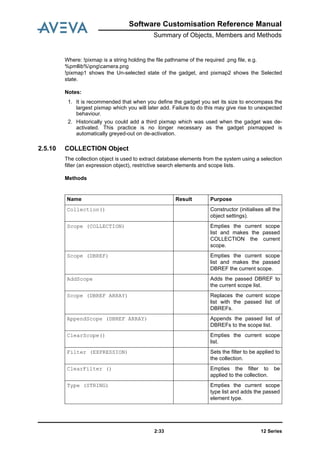
Where: !pixmap is a string holding the file pathname of the required .png file, e.g.
%pmllib%pngcamera.png
!pixmap1 shows the Un-selected state of the gadget, and pixmap2 shows the Selected
state.
Notes:
1. It is recommended that when you define the gadget you set its size to encompass the
largest pixmap which you will later add. Failure to do this may give rise to unexpected
behaviour.
2. Historically you could add a third pixmap which was used when the gadget was de-
activated. This practice is no longer necessary as the gadget pixmapped is
automatically greyed-out on de-activation.
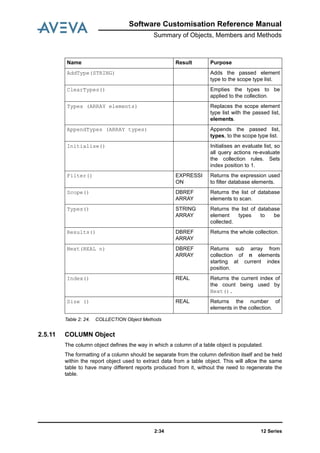
2.5.10 COLLECTION Object
The collection object is used to extract database elements from the system using a selection
filter (an expression object), restrictive search elements and scope lists.
Methods
Name Result Purpose
Collection() Constructor (initialises all the
object settings).
Scope (COLLECTION) Empties the current scope
list and makes the passed
COLLECTION the current
scope.
Scope (DBREF) Empties the current scope
list and makes the passed
DBREF the current scope.
AddScope Adds the passed DBREF to
the current scope list.
Scope (DBREF ARRAY) Replaces the current scope
list with the passed list of
DBREFs.
AppendScope (DBREF ARRAY) Appends the passed list of
DBREFs to the scope list.
ClearScope() Empties the current scope
list.
Filter (EXPRESSION) Sets the filter to be applied to
the collection.
ClearFilter () Empties the filter to be
applied to the collection.
Type (STRING) Empties the current scope
type list and adds the passed
element type.
12 Series2:34
Software Customisation Reference Manual
Summary of Objects, Members and Methods
Table 2: 24. COLLECTION Object Methods
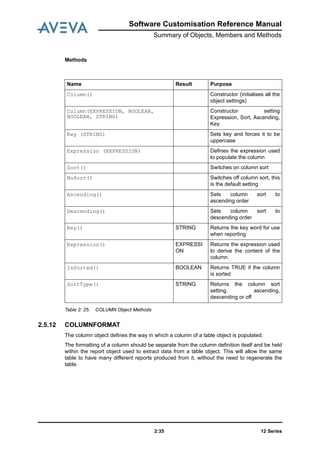
2.5.11 COLUMN Object
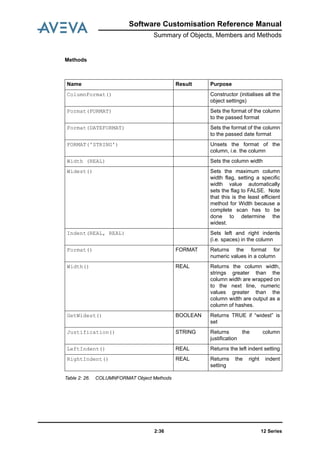
The column object defines the way in which a column of a table object is populated.
The formatting of a column should be separate from the column definition itself and be held
within the report object used to extract data from a table object. This will allow the same
table to have many different reports produced from it, without the need to regenerate the
table.
AddType(STRING) Adds the passed element
type to the scope type list.
ClearTypes() Empties the types to be
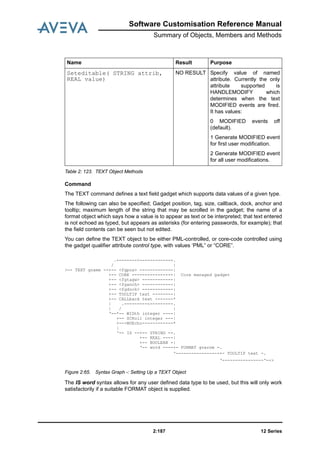
applied to the collection.
Types (ARRAY elements) Replaces the scope element
type list with the passed list,
elements.
AppendTypes (ARRAY types) Appends the passed list,
types, to the scope type list.
Initialise() Initialises an evaluate list, so
all query actions re-evaluate
the collection rules. Sets
index position to 1.
Filter() EXPRESSI
ON
Returns the expression used
to filter database elements.
Scope() DBREF
ARRAY
Returns the list of database
elements to scan.
Types() STRING
ARRAY
Returns the list of database
element types to be
collected.
Results() DBREF
ARRAY
Returns the whole collection.
Next(REAL n) DBREF
ARRAY
Returns sub array from
collection of n elements
starting at current index
position.
Index() REAL Returns the current index of
the count being used by
Next().
Size () REAL Returns the number of
elements in the collection.
Name Result Purpose
Software Customisation Reference Manual
Summary of Objects, Members and Methods
12 Series2:35
Methods
Table 2: 25. COLUMN Object Methods
2.5.12 COLUMNFORMAT
The column object defines the way in which a column of a table object is populated.
The formatting of a column should be separate from the column definition itself and be held
within the report object used to extract data from a table object. This will allow the same
table to have many different reports produced from it, without the need to regenerate the
table.
Name Result Purpose
Column() Constructor (initialises all the
object settings)
Column(EXPRESSION, BOOLEAN,
BOOLEAN, STRING)
Constructor setting
Expression, Sort, Ascending,
Key
Key (STRING) Sets key and forces it to be
uppercase
Expression (EXPRESSION) Defines the expression used
to populate the column
Sort() Switches on column sort
NoSort() Switches off column sort, this
is the default setting
Ascending() Sets column sort to
ascending order
Descending() Sets column sort to
descending order
Key() STRING Returns the key word for use
when reporting
Expression() EXPRESSI
ON
Returns the expression used
to derive the content of the
column
IsSorted() BOOLEAN Returns TRUE if the column
is sorted
SortType() STRING Returns the column sort
setting, ascending,
descending or off
12 Series2:36
Software Customisation Reference Manual
Summary of Objects, Members and Methods
Methods
Table 2: 26. COLUMNFORMAT Object Methods
Name Result Purpose
ColumnFormat() Constructor (initialises all the
object settings)
Format(FORMAT) Sets the format of the column
to the passed format
Format(DATEFORMAT) Sets the format of the column
to the passed date format
FORMAT('STRING') Unsets the format of the
column, i.e. the column
Width (REAL) Sets the column width
Widest() Sets the maximum column
width flag, setting a specific
width value automatically
sets the flag to FALSE. Note
that this is the least efficient
method for Width because a
complete scan has to be
done to determine the
widest.
Indent(REAL, REAL) Sets left and right indents
(i.e. spaces) in the column
Format() FORMAT Returns the format for
numeric values in a column
Width() REAL Returns the column width,
strings greater than the
column width are wrapped on
to the next line, numeric
values greater than the
column width are output as a
column of hashes.
GetWidest() BOOLEAN Returns TRUE if “widest” is
set
Justification() STRING Returns the column
justification
LeftIndent() REAL Returns the left indent setting
RightIndent() REAL Returns the right indent
setting
Software Customisation Reference Manual
Summary of Objects, Members and Methods
12 Series2:37
2.5.13 COMBOBOX Gadget
Members
Table 2: 27. COMBOBOX Gadget Members
Name Type Purpose
Val REAL Get/
Set
Selected option number.
DText ARRAY OF
STRING
Get/Set
Set or get the entire list of
display texts.
DText[n] STRING Get
Only
Get the display text of the
n'th option.
RText ARRAY OF
STRING
Get/Set
Set or get the list of
replacement texts.
RText[n] STRING Get
Only
Get the replacement text of
the n'th option.
Editable BOOLEAN
Get/Set
Controls editable status of
the text display field
(ComboBox only)
Scroll INTEGER
Get/Set
Controls the maximum length
of a text string which can be
held and scrolled in the
display text field (ComboBox
only)
Count REAL
Get only
Get count of number of fields
in the list.
Val REAL
Get/Set
Selected field as integer.
Zero implies no selection.
Setting val to zero will cause
an error if ZeroSel is not
specified.
12 Series2:38
Software Customisation Reference Manual
Summary of Objects, Members and Methods
Methods
Name Result Purpose
Add(STRING Dtext) NO RESULT Append an entry to the drop
down list, where Dtext is the
text to display in the option
list.
Add(STRING Dtext, STRING Rtext)) NO RESULT Append and entry to the drop
down list, where Dtext is the
text to display in the option
list, and Rtext is the
replacement text for the new
field. If Rtext isn’t specified, it
will be set to Dtext by
default.
Clear() NO RESULT Clear gadget’s contents.
ClearSelection() NO RESULT Clears selection and returns
to default of first in list.
FullName() STRING Get the full gadget name,
e.g.'!!Form.gadget'
Name() STRING Get the gadget's name, e.g.
'gadget'
Owner() FORM Get owning form.
Select(STRING text, STRING value
)
NO RESULT Select specified item in a list:
text must be ‘Rtext’ or
‘Dtext’, and value is the item
to be selected.
Selection() STRING Get current selection’s
RTEXT.
Selection(STRING text ) STRING Get RTEXT or DTEXT of
current selection; text must
be ‘Rtext’ or ‘Dtext’.
SetDisplayText( STRING text ) NO RESULT Set the display text field
value, if the gadget is
editable.
SetPopup(MENU menu) NO RESULT Links menu with the gadget
as a popup.
Refresh() NOT
RESULT
Refreshes the display of the
gadget.
SetFocus() NO RESULT Move keyboard focus to this
gadget.
RemovePopup(MENU menu) NO RESULT Removes (popup) menu
from the gadget.
Software Customisation Reference Manual
Summary of Objects, Members and Methods
12 Series2:39
Table 2: 28. COMBOBOX Gadget Methods
Command
.-------<-------.
/ |
>-- COMBObox gname -+- <fgtagw> ------|
+- <fgpos> -------|
+- <fganch> ------|
+- <fgdock> ------|
+- CALLback text -|
+- TOOLTIP text --|
+- NORESELect ----|
+- ZEROSELection -|
+- CORE ----------* Core managed gadget
| .-------<-------.
|/ |
+- SCRoll int ----|
+- <vwid> --------*
|
+- TOOLTIP text -.
'----------------'-->
When the ComboBox is editable, with the drop-down list closed, the user can search for a
required option by typing the first few letters into the display field and clicking the down-
GetPickedPopup() MENU Returns the last picked
popup menu for the gadget.
Shown() BOOLEAN Get ‘shown’ status.
Type() STRING Get the gadget type as a
string.
Background() STRING Get Background Colour
Name.
Some gadgets do not
support this property in all
circumstances, e.g. gadgets
which are showing a pixmap.
Gadgets whose colour has
not been set explicitly, may
not have a colour with a
known colourname. In this
case an error is raised..
DisplayText( ) STRING Gets the text string currently
displayed in the Option
gadget's display field.
SetPopup( !menu ) NO RESULT Assigns a menu object as the
gadget's current popup.
Clear( !dtext ) NO RESULT Delete the field with the given
DTEXT string.
Clear( !fieldNumber ) NO RESULT Delete the specified field
number.
Name Result Purpose
12 Series2:40
Software Customisation Reference Manual
Summary of Objects, Members and Methods
arrow. The list will open with the first matching option highlighted. This is useful for large
lists.
Behaviour
The COMBOBOX command is a combination of an option list and an editable text display
field similar to a windows combobox. It shares most of the properties and methods of the
Option gadget.
Combo gadget has editable display text field (default) and so supports scroll width.
Combobox does not support display of pixmaps.
Note: It is bad practice to place one gadget on top of another. This may lead to gadgets
being obscured.
Unselected Events
Option gadgets support UNSELECT events. Typically when a field in the dropdown list is
selected, an UNSELECT event is raised for the previously selected field (if any) and then a
SELECT event is raised for the new field.
Notes:
1. UNSELECT events are not notified to PML unless an open callback has been specified
(so that SELECT and UNSELECT events can be differentiated).
2. Typically the UNSELECT action allows Appware to manage consequences of
deselection for any dependent gadgets or forms.
3. We recommend that you do not change the option gadget's selection programmatically
in an UNSELECT event.
Text Entry and Editing
When the editable property is set (default), the display field is accessible to the user, who
can edit the contents by typing at the keyboard or pasting text into the field. If the user
presses the ENTER key while the gadget's text field has focus and contains some
characters, a VALIDATE event is raised. You can trap this event by assigning a PML Open
callback to the gadget. This callback allows you to give meaning to the action of typing text
into the display field.
The Open callback is necessary to differentiate the VALIDATE event from the SELECT and
UNSELECT events.
On receipt of the VALIDATE event, your callback method can retrieve the displayed text by
means of the DisplayText method and decide what action is associated.
Additionally you can assign a popup menu to the gadget, which gives the user the choice of
several actions.
Software Customisation Reference Manual
Summary of Objects, Members and Methods
12 Series2:41
2.5.14 CONTAINER Gadget
Members
Methods
Command
The Container gadget allows the hosting of an external Control, e.g. a PMLNet, control
inside a PML defined form. It allows the user to add an external .Net control, which may
raise events that can be handled by PML. In order to customise the context menus of the
.Net control, the Container may have a PML popup menu assigned to it. This is shown when
the .Net control raises a 'popup' event.
.--<-----.
/ |
>---- CONTAINER gname -+- NOBOX ---|
+- INDENT --*
|
'- PMLNET/CONTROL -+- handle -.
'----------|
.----<------------------------*
|
| .----<-----------------.
|/ |
+-- tagtext -------------|
+-- <fgpos> -------------|
+-- <fganch> ------------|
+-- <fgdock> ------------*
|
Member Name Type Purpose
type STRING Get/Set Gadget type as string 'Container'.
control REAL Get/Set Integer handle of external control.
popup MENU Get/Set Popup menu associated with the control.
Method Name Result Purpose
ShowPopup(!x is
REAL, !y is REAL )
NO RESULT Show the associated popup at the specified
position. Position is the integer pixel position
within the enclosed control.
FullName( ) STRING Get the full gadget name, i.e. !!Form.gadget.
Name( ) STRING Get the gadget's name
Owner( ) FORM Get owning form
GetPickedPopup( ) MENU Returns the last picked popup menu for the
gadget.
Shown( ) BOOLEAN Get 'shown' status.
12 Series2:42
Software Customisation Reference Manual
Summary of Objects, Members and Methods
+-- <vshape> -.
'-------------'-->
Notes:
1. By default the Container will be enclosed in a box, but you can select NOBOX or
INDENT.
2. Only PMLNet controls are supported.
3. 'handle' is the integer token identifying the control.
4. Positioning must be specified before size (<vshape>).
5. Dock and Anchor are supported to allow intelligent resize behaviour. The enclosed
control must support resizing and is usually set as Dock fill, so that it follows size
changes of the Container.
2.5.15 DATEFORMAT Object
The DATEFORMAT object is used to allow date attributes to be sorted in date order.
Examples:
!format = object DATEFORMAT(T D/M/Y’)
!format.month(‘INTEGER’)
!format.year(2) $ 12:10 05/01/01
!format = object DATEFORMAT(‘T D M Y’)
!format .month(‘BRIEF’) $ 12:10 05 Nov 01
!format = object DATEFORMAT (‘D M’)
!format.year(4)
!format.month(‘FULL) $ 5 November 2001
Software Customisation Reference Manual
Summary of Objects, Members and Methods
12 Series2:43
Methods
Table 2: 29. DATEFORMAT Object Methods
2.5.16 DATETIME Object
Methods
Name Result Purpose
DateFormat(STRING format) Constructor. Defines a format.
The input string, format, is in the
form 'T*D*M*Y', where T = time,
D = day, M = month, Y = year,
and the order of the letters
indicate the format required.
T and D are optional. H could be
used if only hours are required.
* is the separator character.
DateFormat() Sets default format (‘T M D Y’,
month = ‘INTEGER’, year = 2)
Month(STRING) Sets month format. 'INTEGER',
'BRIEF' or 'FULL'
Year(INT) Sets year format. 2 or 4 for
number of digits
String(DATETIME) STRING Input a date in DATETIME
format and convert to the
specified format.
String(STRING) STRING Input a date in PDMS format and
convert to the specified format.
Name Result Purpose
DateTime() DATETIME Create a DATETIME object
with current date and time in
it.
DateTime(REAL year, REAL month,
REAL date)
DATETIME Create a DATETIME set to
the given year, month, date.
Time defaults to 00:00:00.
DateTime(REAL year,
STRING month.
REAL date)
DATETIME As above, but month is a
STRING at least three
characters long representing
month e.g. ‘Jan’, ‘March’,
‘DECEM’
12 Series2:44
Software Customisation Reference Manual
Summary of Objects, Members and Methods
DateTime(REAL year, REAL month,
REAL date,
REAL hour,REAL minute)
DATETIME Create a DATETIME object
set to given year, month,
date, hour, minute. Seconds
default to 0.
DateTime(REAL year,
STRING month, REAL date, REAL
hour, REAL minute)
DATETIME As above, but month is a
STRING at least three
characters long representing
month e.g. ‘Jan’, ‘March’,
‘DECEM’
DateTime(REAL year, REAL month,
REAL date, REAL hour, REAL
minute, REAL second)
DATETIME Create a DATETIME object
set to given year, month,
date, hour, minute, second.
DateTime(REAL year, STRING
month, REAL date, REAL hour,
REAL minute,
REAL second)
DATETIME As above, but month is a
STRING at least three
characters long representing
month e.g. ‘Jan’, ‘March’,
‘DECEM’
Date() REAL Return day of month for this
DATETIME object (1-31).
GEQ(DATETIME) BOOLEAN Test whether this DATETIME
is later than or the same as
argument DATETIME.
GT(DATETIME) BOOLEAN Test whether this date is
later than argument
DATETIME.
HOUR() REAL Return hour as REAL for this
DATETIME object (0-23).
LEQ(DATETIME) BOOLEAN Test whether this DATETIME
is earlier or the same as
argument DATETIME
LT(DATETIME) BOOLEAN Test whether this DATETIME
is earlier than argument
DATETIME.
Minute() REAL Return minutes as REAL for
this DATETIME object (0-
59).
Month() REAL Return month as REAL for
this DATETIME object (1-
12).
MonthString() STRING Return month as STRING
for this DATETIME object
(‘January’, ’February’, etc.)
Name Result Purpose
Software Customisation Reference Manual
Summary of Objects, Members and Methods
12 Series2:45
Table 2: 30. DATETIME Object Methods
2.5.17 DB Object
Members
Table 2: 31. DB Object Members
Second() REAL Return number of seconds
as REAL for this DATETIME
object (0-59).
Year() REAL Return year as REAL
(e.g. 1998)
Name Result Purpose
Name Type Purpose
Name STRING The name of the database,
up to 32 characters.
Description STRING The database description, up
to 120 characters.
Access STRING Access type (UPDATE,
MULTIWRITE,
CONTROLLED).
Claim STRING Claim mode for multi-write
databases (EXPLICIT,
IMPLICIT).
File STRING Database filename, up to 17
characters.
Foreign STRING FOREIGN or LOCAL
Number STRING Database number
Team TEAM Owning Team
Type STRING Database type, e.g. DESI
Refno STRING String containing Database
reference number
Primary STRING Identifies whether a
database is PRIMARY or
SECONDARY at the current
location in a global project
12 Series2:46
Software Customisation Reference Manual
Summary of Objects, Members and Methods
Methods
Table 2: 32. DB Object Methods
These methods may be used in the following ways (in all cases !!CE is assumed to be a DB
DATABASE element and !!CE.Name is a STRING object containing the element’s name).
Examples:
These methods should assist performance improvements to appware by making it easier to
get from Database element to Object.
Command
Name Result Purpose
MDBList() ARRAY List of MDBS which contain
this DB.
Size() REAL File size in pages.
Sessions() ARRAY OF
DBSESS
All sessions of the current
database.
Lastsession() DBSESS Last session information for
database.
DB(DBREF) DB Returns a DB object, given a
DBREF.
DB(STRING) DB Returns a DB object, given a
name or reference number.
!D = OBJECT DB(!!CE)
!D = OBJECT DB(!!CE.Name)
!D = !!CE.DB()
!D = !!CE.Name.DB()
!ARRAY = DBS $ Returns an array of the DBs in the current project
Software Customisation Reference Manual
Summary of Objects, Members and Methods
12 Series2:47
2.5.18 DBREF Object
Methods
Table 2: 33. DB Object Methods
Name Result Purpose
Dbref( STRING ) DBREF Creates a DBREF object with
value set to the given
STRING.
Dbref( STRING, FORMAT ) DBREF As above. FORMAT
argument required for
consistency by Forms and
Menus.
Attribute(STRING Name) ANY Return the value of the
named Attribute
Attributes() ARRAY OF
STRING
A DBREF appears to have
the attributes of whatever DB
elements it is pointing to
BadRef() BOOLEAN TRUE if DBREF is not valid
(cannot navigate to it)
Delete() NO RESULT Deletes the PML DBREF
(not the database element it
is pointing to)
MCount() REAL Count of number of members
of element referenced
MCount(STRING type) REAL Count of number of members
of element referenced of type
specified
String(FORMAT) STRING Convert to STRING using
settings in global FORMAT
object
Line([CUT/UNCUT]) LINE Returns the cut/uncut pline of
a SCTN/GENSEC element
as a bounded line
PPosition(REAL) POSITION Returns the position of the
specified Ppoint of a
database element.
PDirection(REAL) DIRECTION Returns the direction of the
specified Ppoint of a
database element.
12 Series2:48
Software Customisation Reference Manual
Summary of Objects, Members and Methods
2.5.19 DBSESS Object
Members
Table 2: 34. DBSESS Object Members
2.5.20 DIRECTION Object
Members
Table 2: 35. DIRECTION Object Members
Methods
None of these methods modifies the original object.
Name Result Purpose
Number REAL Session number
Date STRING Date when session started
Author STRING Creator of session
Comment STRING Session comment
Name Type Purpose
East REAL
Get/Set
UP component
North REAL
Get/Set
NORTH component
Up REAL
Get/Set
UP component
Origin DBREF
Get/Set
DB element that is the origin
Name Result Purpose
Direction( STRING ) DIRECTION Creates a DIRECTION with
the value given by STRING.
Direction( STRING, FORMAT ) DIRECTION Creates a DIRECTION with
the value given by STRING,
in the format specified.
EQ(DIRECTION) BOOLEAN TRUE if two directions are
the same
Software Customisation Reference Manual
Summary of Objects, Members and Methods
12 Series2:49
Table 2: 36. DIRECTION Object Methods
LT(DIRECTION) BOOLEAN TRUE if direction is less than
argument
String(FORMAT) STRING Convert to STRING
WRT(DBREF) DIRECTION Convert to a new
DIRECTION with respect to
a given element.
Angle(DIRECTION) REAL Returns the angle between
the two directions
Bisect(DIRECTION) DIRECTION Returns the direction which
is half way between the two
directions
Cross(DIRECTION) DIRECTION Returns the cross product of
the two directions
Dot(DIRECTION) REAL Returns the dot product of
the two directions
IsParallel(DIRECTION) BOOLEAN Returns true if the supplied
directions are parallel, false
otherwise.
IsParallel(DIRECTION, REAL) BOOLEAN Returns true if the supplied
directions are parallel
according to tolerance
supplied, false otherwise.
Opposite() DIRECTION Returns the opposite
direction
Orthogonal(DIRECTION) DIRECTION Returns the direction
orthogonal between the two
directions
Projected(PLANE) DIRECTION Returns a direction projected
onto the passed plane.
IsPerpendicular(DIRECTION) BOOLEAN Returns true if the supplied
directions are perpendicular,
false otherwise.
IsPerpendicular(DIRECTION, REAL) BOOLEAN Returns true if the supplied
directions are perpendicular
according to tolerance
supplied, false otherwise.
Name Result Purpose
12 Series2:50
Software Customisation Reference Manual
Summary of Objects, Members and Methods
2.5.21 EXPRESSION Object
This object is used to define a basic expression that can be applied against a database
element or another object and return any data typed result, BOOLEAN, STRING, etc.
EXPRESSION objects may be used by COLLECTION objects to filter the results of the
collection.
Methods
Table 2: 37. EXPRESSION Object Methods
Name Result Purpose
Expression Constructor (initialises all the
object’s settings).
Expression (STRING) Constructs and defines the
expression. ('ATTRIBUTE----
') should be used for
attributes for speed and
efficiency. Other examples
are ('PURP eq IPIPINGI') or
('XLEN + STRING(XLEN)').
AttributeExpression (STRING) Makes the passed attribute
an expression.
AttributeExpression
('LENGTH') is the same as
Expression ('ATTRIBUTE
LENGTH').
String() STRING Returns the current
expression as a string.
Evaluate(DBREF) ANY Evaluates the current
expression against the
passed object
Software Customisation Reference Manual
Summary of Objects, Members and Methods
12 Series2:51
2.5.22 FILE Object
Methods
Name Result Purpose
File(STRING) FILE Create a FILE object on a file
whose name is given in
STRING.
AccessMode() STRING Return access mode for the
file {‘CLOSED’, ‘READ’,
‘WRITE’, ‘OVERWRITE’,
‘APPEND}.
Close() NO RESULT Close file if open.
Copy(STRING) FILE Copies the file whose
pathname is given in
STRING. Returns FILE
object for copied file.
Copy(FILE) FILE Copies the file represented
by the FILE object. Returns
FILE object for copied file.
DeleteFile() NO RESULT Delete the file represented
by the file object if it exists.
Directory() FILE Returns a FILE object
corresponding to owning
directory.
DTM() DATETIME Returns a DATETIME object
holding the date and time
that this file was last
modified.
Entry() STRING Returns file name as string.
Exists() BOOLEAN Returns BOOLEAN
indicating whether file exists
or not.
Files() ARRAY OF
FILES
Returns an ARRAY of FILE
objects corresponding to files
owned by this directory.
FullName() STRING Returns the name including
path for this FILE object as a
STRING.
IsOpen() BOOLEAN Return BOOLEAN indicating
whether file is open or not.
12 Series2:52
Software Customisation Reference Manual
Summary of Objects, Members and Methods
LineNumber() REAL Return line number of line
about to be written.
Move(STRING) FILE Move this file to location
given in STRING. Return
FILE object for moved file.
Move(FILE) FILE Move this file to location
represented by FILE object.
Name() STRING Return name of this FILE
object as STRING.
Open(STRING) NO RESULT Opens this file in the mode
given by STRING
{‘READ’,’WRITE’,’OVERWRI
TE’, ‘APPEND’}
Owner() STRING Returns the ID of this FILES
owner a STRING.
Path() ARRAY OF
FILES
Returns an ARRAY of FILEs
corresponding to the owning
directories of this FILE
object.
PathName() STRING Returns owning path as a
STRING.
ReadFile() ARRAY OF
STRING
Open, read contents and
close file. Data returned as
an ARRAY of STRINGs
corresponding to the lines in
the file.
ReadFile(REAL) ARRAY OF
STRING
As above, but ensures that
file is no longer than number
of lines given in REAL.
ReadRecord() STRING Reads a line from an open
file and returns it in a
STRING. Returns an UNSET
STRING if end of file is
detected.
Set() BOOLEAN Returns a BOOLEAN
indicating whether this FILE
object has a name set or not.
Size() REAL Returns size of file in bytes.
SubDirs() ARRAY OF
FILE
Returns an ARRAY of FILE
objects corresponding to
directories owned by this
directory.
Name Result Purpose
Software Customisation Reference Manual
Summary of Objects, Members and Methods
12 Series2:53
Table 2: 38. FILE Object Methods
2.5.23 FMSYS Object
Methods
None of these methods modifies the original object.
Type() STRING Returns a STRING indicating
whether this object
represents a ‘FILE’ or a
‘DIRECTORY’.
WriteFile(STRING, ARRAY OF
STRING)
NO RESULT Opens file in mode given in
string {‘WRITE’,
’OVERWRITE’, ’APPEND’},
writes STRINGs in ARRAY
and closes file.
WriteRecord(STRING) NO RESULT Writes STRING to this FILE
which must already be open.
Name Result Purpose
Name Result Purpose
Checkrefs BOOLEAN By default, all references in a
Form definition are checked
when a form is displayed.
Checking can be switched
off, which may be
recommended if
performance problems are
experienced.
CurrentDocument() FORM This method returns the
current Document of the
application framework as a
FORM object. If there is no
current document then the
returned form has value
Unset.
12 Series2:54
Software Customisation Reference Manual
Summary of Objects, Members and Methods
DefaultFormat() FORMAT Query the system default
format object for use by
typed text gadgets. If none
defined then returns an
Unset local variable.
The returned format object is
a copy, so changing it will not
affect the system default
format. However the user
can apply it to variables e.g
!text=!myVar.String(!!fmsys.d
efaultFormat())
DefaultFormLayout( ) STRING query the current default
form layout mode
DocsAtMaxScreen(BOOLEAN) NO RESULT Sets default placement
position for document forms
to be towards the maximum
(rightmost) of the screen.
Useful for wide screen ad
twin screen devices.
FMINFO() ARRAY OF
STRINGS
Returns array of all FMINFO
strings.
HelpFileAlias() STRING returns the current help file’s
alias.
Interrupt() BOOLEAN Set to TRUE if the interrupt
gadget has been selected.
LoadForm(STRING formname) FORM Allows force loading of a
form definition and/or the
ability to get a reference to a
form object by name.
If the form exists then a
reference to the form object
is returned. If it doesn’t exist,
then an attempt is made to
force load its definition. If this
fails then an unset form
reference is returned.
Main() FORM Query the current main form
OKCurfnView(!viewtype is STRING) BOOLEAN Queries whether graphical
views of the specified view
type are displayed. Graphical
view types supported are:
‘G2D’; ‘G3D’; ‘ANY’ and any
view subtype is implied.
Name Result Purpose
Software Customisation Reference Manual
Summary of Objects, Members and Methods
12 Series2:55
Table 2: 39. FMSYS Object Methods
OKCurfnView(!viewtype is STRING,
subtype is STRING )
BOOLEAN Queries whether graphical
views of the specified view
type and subtype are
displayed. Graphical view
types supported are: ‘G2D’;
‘G3D’; ‘ANY’. View subtypes
supported are: ‘ANY’ and for
G2D: ‘NORMAL’ (Draft);
‘PLOT’; ‘ISOSPOOL’
G3D: ‘NORMAL’ (Design)
Progress( ) REAL Get the current Integer value
in percent shown by the
progress bar, in the range 0
to 100. Zero means the bars
is invisible
Refresh() NO RESULT Refresh all VIEW gadgets
SetDefaultFormat(!!fmt is
FORMAT)
NO RESULT Provide a default global
format object to be used if no
specific format is defined for
any typed text field. Once
only call, users cannot
change it. !!fmt must be a
global variable.
SetDefaultFormLayout ( STRING
)
NONE Set the default form layout
mode to 'VARCHARS' or
'FIXCHARS'.
SetHelpFileAlias (alias is
string)
NONE establishes the application
help file from its alias.
SetInterrupt(GADGET) NO RESULT Sets the Gadget which will
interrupt macro or function
processing.
SetMain(FORM) FORM Sets the main form for an
Application.
SetProgress( !percent) NO RESULT Set the Integer value in
percent to be displayed in the
progress bar. Values will be
forced into the range 0 to
100. Resultant value of 0 will
cause the bar to become
invisible.
Splashscreen(BOOLEAN) NO RESULT Removes the display of a
splash screen after an
abnormal exit.
Name Result Purpose
12 Series2:56
Software Customisation Reference Manual
Summary of Objects, Members and Methods
2.5.24 FORM Object
Members
Name Type Purpose
FormRevision STRING Get/
Set
Form Revision text.
FormTitle STRING Get/
Set
Form title.
IconTitle STRING Get/
Set
Icon title.
Initcall STRING Get/
Set
Callback executed when form
is initialised.
Autocall STRING Get/
Set
Callback executed when any
of the specified application
attributes have changed.
Okcall STRING Get/
Set
Callback executed when OK
button is pressed.
Cancelcall STRING Get/
Set
Callback executed when
CANCEL button is pressed.
KeyboardFocus GADGET
Get/Set
Gadget to have initial
keyboard focus on display of
the form. One of TEXTFIELD,
TEXTPANE, BUTTON,
TOGGLE or ALPHA VIEW.
AutoScroll BOOLEAN
Get/Set
If AutoScroll is selected the
form will automatically gain
horizontal or vertical
scrollbars if the forms size
becomes too small to display
its defined contents. This
member does not apply to
form types Main Window and
Document.
Software Customisation Reference Manual
Summary of Objects, Members and Methods
12 Series2:57
Quitcall STRING Get/
Set
Callback executed whenever
the user presses the Quit/
Close icon (X) on the title bar
of forms and the main
application window.
For forms of type MAIN, the
QUITCALL callback is
executed, if present. This
permits the user to terminate
the application, and so the
associated PML callback
should prompt the user for
confirmation.
For all other form types, the
QUITCALL callback is
executed, if present, and then
the form and its children are
hidden unless the PML
callback returns an error.
When the form nest is hidden
the CANCELCALL callback for
each form of the nest is
executed (in reverse display
order).
Maximised BOOLEAN
Get/Set
Get/set form’s maximised
status (on screen).
Active BOOLEAN
Get Only
Gives form's active/inactive
status.
Popup MENU
Get/Set
Get/set form’s current popup
menu.
HelpContextID STRING Read/Write STRING
Property:!!myform.HelpConte
xtID = STRING - sets the
context Id within the help file
for this form.
STRING=!!myform.HelpCont
extID - gets the current
context Id for this form.
Name Type Purpose
12 Series2:58
Software Customisation Reference Manual
Summary of Objects, Members and Methods
Table 2: 40. FORM Object Members
Methods
Killingcall STRING
Get/Set
Notify the form that it is being
destroyed and allow the
assigned callback method to
destroy any associated
resources, e.g. global PML
objects which would
otherwise not be destroyed
(see Killing callback).
FirstShowncall STRING
Get/Set
Allow the user to carry out
any form actions which can
only be completed when the
form is actually displayed for
the first time (see FirstShown
callback).
Name Result Purpose
Name() STRING Get name.
FullName() STRING Get the full form name
(Including !!).
NewMenu(STRING menuname) MENU Adds a new named menu to
the form.
NewMenu(STRING menuname, STRING
type)
MENU Adds a new named and
typed menu to the form. The
first argument is the name of
the new menu; the second
argument is the type of the
menu, and must be either
‘POPUP’ or ‘MAIN’.
SetActive(BOOLEAN) NO RESULT SetActive(FALSE) greys-
out all gadgets on the form,
but doesn’t set their Active
status, so that
SetActive(TRUE) restores
the form to the precise state
it was in before greying out,
i.e. any inactive gadgets will
still be inactive.
Name Type Purpose
Software Customisation Reference Manual
Summary of Objects, Members and Methods
12 Series2:59
SetGadgetsActive(BOOLEAN) NO RESULT SetGadgetsActive(FALS
E) greys out all gadgets on
the form and sets their Active
status to ‘inactive’, i.e. their
previous active state is lost.
Similarly
SetGadgetsActive(TRUE)
greys-in all gadgets and sets
their Active status to ‘active’.
SetPopup(MENU) NO RESULT Specifies the pop-up to be
displayed when the right-
hand mouse button is
released over the form
background.
RemovePopup(MENU) NO RESULT Removes a pop-up
associated with a form.
GetPickedPopup() MENU Returns the last picked
popup menu for the form.
Show('FREE') NO RESULT Show the form on the screen
as a FREE form.
Show('AT', REAL X, REAL Y) NO RESULT Show the form as a FREE
form with the origin at the
X,Y relative screen position.
Show('CEN', REAL X, REAL Y) NO RESULT Show the form as a FREE
form with its centre at the X,Y
relative screen position.
Shown() BOOLEAN Get 'shown' status
Hide() NO RESULT Hides the form (removes it
from the screen)
Owner() FORM Returns the form's parent
form, or unset variable if the
form is free-standing
SetOpacity( REAL PERCENT ) NONE Set the percentage
opaqueness of the form as
an integer in the range 10
(nearly transparent) to 100
(opaque - default). This is
only valid for non-docking
Dialog and BlockingDialog
form types.
Subtype( ) STRING Gets the form's subtype, one
of 'DIALOG',
'BLOCKINGDIALOG',
'MAIN', 'DOCUMENT'
Name Result Purpose
12 Series2:60
Software Customisation Reference Manual
Summary of Objects, Members and Methods
Table 2: 41. FORM Object Methods
Note: SetActive()and SetGadgetsActive()can be used in combination with each
other and with the Active property of individual gadgets.
Commands
SETUP FORM
A form definition is introduced by the SETUP FORM command and terminated by a
corresponding EXIT command. Once in Form Setup mode you can call any commands for
defining the form’s properties, creating a menu bar (see BAR object), main and popup
menus (see MENU object) and any gadgets which it is to own.
Once-only form attributes are entered as part of the SETUP FORM command line;
modifiable attributes are entered as contents of the form.
You can define the FORM to be either PML-controlled, or core-code controlled using the
qualifier attribute control type, with values ‘PML” or “CORE”.
NOALIGN
The gadgets BUTTON, TOGGLE, TEXT, OPTION, single line PARGRAPH fit within 1
vertical grid unit and are by default drawn with their Y-coordinate adjusted so that they would
approximately centre-align with an adjacent BUTTON. This pseudo-alignment introduces
small errors in all but a few circumstances and prevents accurate controlled layout.
NOALIGN prevents this (historical) gadget auto-alignment.
Use NOALIGN in conjunction with PATH RIGHT (the default path) and HALIGN CENTRE,
as it gives a better layout, with fewer surprises.
Note: It is bad practice to place one gadget on top of another. This may lead to gadgets
being obscured.
The commands to set modifiable attributes are described after the syntax graph.
SetUndoable( ) STRING,
ANY
Undoable( ) STRING
Name Result Purpose
Software Customisation Reference Manual
Summary of Objects, Members and Methods
12 Series2:61
CANCELCALL
This command defines the callback string which is executed whenever the form is
dismissed from the screen via the CANCEL button or the QUIT/CLOSE control on the
window title bar.
Note: This command overrides the callback string on the CANCEL button.
CURSORTYPE
When a screen cursor enters a view, the view gadget determines what cursor type should
be displayed initially, and what type will be displayed during different types of graphical
interaction. You can specify the initial setting for the cursor type using this command.
Note: You cannot specify an initial cursor type for VOLUME views.
.---------------<---------------------------.
/ |
>--SETUP FORM fname --+-- MAIN -----+-------------------------------|
+-- DOCUMENT -+- FLOAT -----------------------|
| ‘-------------------------------|
+-- DIALOG ---+- DOCKing -+-------------------|
| |- Left ---. |
| | |- Right --| |
| | |- Top ----| |
| | ‘- Bottom -‘--------|
| |- RESIzeable ------------------|
| ‘-------------------------------|
+-- BLOCKingdialog -+- RESIzeable ------------|
| ‘-------------------------|
+-- AT <xypos> -------------------------------|
+-- SIZE val val -----------------------------|
+-- NOQUIT -----------------------------------|
+-- NOALIGN ----------------------------------|
+-- CORE -------------------------------------*
| .---<------.
|/ |
+-- <form> --* form contents
‘—EXIT -->
Default: Dialog, non-resizeable; size adjusted automatically to fit contents.
>-- CANCELcall text -->
12 Series2:62
Software Customisation Reference Manual
Summary of Objects, Members and Methods
Note: There are other cursor types that are for AVEVA’s use only.
HALIGN
Works in conjunction with PATH and HDISTANCE. Defines how a newly added gadget
should be aligned horizontally with the preceding gadget.
HDISTANCE
Works in conjunction with PATH and HALIGN. Defines how a newly added gadget should be
spaced horizontally with respect to the preceding gadget.
ICONTITLE
Defines the title for the icon when the form is minimised.
INITCALL
Defines the callback string that is executed each time the form is displayed. This callback is
usually run to check the validity of showing the form and to initialise gadget values.
OKCALL
Defines the OK callback string for a form. It is executed whenever the form is dismissed
from the screen via its OK button or that of an ancestor.
Note: This command overrides the callback string on the OK button.
>-- CURSortype --+-- POINTER ----.
+-- NOCURSOR ---|
+-- PICK -------|
+-- PICKPLUS ---|
‘-- CROSSHAIR --‘-->
>-- HAlign --+-- Left ---.
‘-- Right --‘-->
>-- HDistance value -->
>-- ICONTItle text -->
>-- INITcall text -->
>-- OKcall text -->
Software Customisation Reference Manual
Summary of Objects, Members and Methods
12 Series2:63
PATH
Defines the direction in which a sequence of new gadgets is to be added to a form. The path
setting remains until you give another PATH command. Used with HALIGN, HDISTANCE,
VALIGN, VDISTANCE.
TITLE
Defines the form title.
VALIGN
Use in conjunction with PATH and VDISTANCE. Defines how a newly added gadget should
be aligned vertically with the preceding gadget.
VDISTANCE
Works in conjunction with PATH and VALIGN. Defines how a newly added gadget should be
spaced vertically with respect to the preceding gadget.
FirstShown and Killing Events
The following actions determine the life of a form:
>-- PATH --+-- Up ------.
+-- Down ----|
+-- Left ----|
‘-- Right ---‘-->
Default: Path Right.
>-- TITLe text -->
>-- VAlign --+-- Top -----.
‘-- Bottom --‘-->
>-- VDistance value -->
Define the form, its gadgets, methods and layout are specified (usually in a
'.pmlfrm' file)
Load the form definition is read by PML and the form's constructor method is
run
Show the form's INITialisation event is raised, and the display process is begun
Activate the form and its contents is created by the window management system
and is activated (actually displayed) and the FIRSTSHOWN event is
raised
12 Series2:64
Software Customisation Reference Manual
Summary of Objects, Members and Methods
Notes:
1. Load, Activate and Kill only happen once in the life of a form
2. Show and Hide may happen repeatedly
3. The form's Constructor is run once only
4. The FirstShown event only happens once
5. INIT is raised for every Show
The PML user can define callbacks to service any or all of the above events. These will
typically be open callbacks supported by form methods. They can be assigned within the
form's Constructor method (recommended), or within the form's Setup Form . . . Exit block.
FIRSTSHOWN callback
Typically assigned in the Constructor by
!this.FirstShownCall = '!this.<form_method>'
The purpose is to allow the user to carry out any form actions which can only be completed
when the form is actually displayed. There are a variety of circumstances where this arises
and it is often difficult to find a reliable solution. A couple of examples are given below.
Commands which manipulate form, menu or gadget visual properties, executed from a PML
macro, function or callback may not happen until control is returned to the window
manager's event loop. For example, in the application's start-up macro the command
sequence show !!myForm … hide !!myform will result in the form not being displayed, but
also not becoming known at all to the window manager. Attempts to communicate with this
form via the External callback mechanism (possibly from another process) will not work.
This can be rectified by doing the '!this.hide()' within the FIRSTSHOWN callback, because
the form will be guaranteed to be actually displayed (and hence known to the window
manager), before it is hidden.
It is sometimes difficult to achieve the correct gadget background colour setting the first time
the form is displayed. This can be resolved by setting the required colour in the
FIRSTSHOWN callback.
KILLING callback
Typically assigned in the Constructor by
!this.KillingCall = '!this.<form_method>'
The purpose is to notify the form that it is being destroyed and allow the assigned callback
method to destroy any associated resources, e.g. global PML objects which would
otherwise not be destroyed. This may be necessary because PML global objects will survive
an application module switch, but may not be valid in the new module.
Notes:
1. The callback method MUST NOT carry out any modifications to the Gadgets belonging
to the form or to the Form itself (e.g. don't show or hide the form). Attempts to edit the
form or its gadgets may cause unwanted side effects or possible system errors.
Hide the form is hidden and its OK or CANCEL event is raised
Kill the form's KILLING event is raised and then the form is destroyed. It is no
longer known to PML
Software Customisation Reference Manual
Summary of Objects, Members and Methods
12 Series2:65
2. Form callbacks designed for other Form events (e.g. CANCEL, INIT) are rarely suitable
as killing callbacks.
3. Restrict form and gadget operations to querying.
2.5.25 FORMAT Object
The format object is used to format the output of real objects and especially real physical
objects such as distances. It controls precision, units, conversions and unit qualifiers.
Format objects are also used to control conversions of strings to reals by providing guidance
on dimensions and units. This occurs for text boxes in the user interface, and also for real to
string and string to real conversion methods.
Members
Name Type Purpose
CompSeparator STRING | | Separator used for multi-
component data types such as
POSITIONS (Default SPACE).
Denominator REAL 32 Largest denominator for Imperial
fractions
(Default 32)
Dimension STRING
‘NONE’
L
L2
L3
Number is un-dimensioned
(Default)
Number is a LENGTH
Number is an AREA
Number is a VOLUME
The TYPE string can be any
existing values (L L2 L3 NONE) or
any standard dimension (i.e.
Measure), or any standard unit
(which indirectly defines a
dimension) either in full name
(e.g. metre), or description or
shortname (unitqualifier), or
compound unit qualifier (e.g. lb/
m4) form. No validation is actually
performed until the format is used.
DP REAL 2 Number of decimal places for
decimal fractions (Default 2)
ENU BOOLEAN
TRUE
FALSE
Use ENU format when outputting
POSITIONS (Default)
Use XYZ format when outputting
POSITIONS
12 Series2:66
Software Customisation Reference Manual
Summary of Objects, Members and Methods
Fraction BOOLEAN
FALSE
TRUE
Fractional part output as decimal
(Default)
Fractional part output as fraction
FtLabel STRING |’| Label used for feet
e.g. ' or FT or ft or feet
(Default ‘ )
InchSeparator STRING |.| Separator between inches and
fractions
(Default . )
Label STRING
|mm|
General distance label
e.g. mm or m or " or IN
(Default is no label)
The label (and similarly the foot
label and the inch separator can
be any string (within normal and
reasonable unit limitations!). They
are primarily supplied to allow
physical values to be formatted in
any reasonable way on reports, in
files and in text fields etc.
However it is often necessary for
such values to be re-interpreted
by the system (especially as they
are validated after entry in the text
field. In these case, if normal
value and unit parsing fails to
interpret the values then the string
is reinterpreted with the Label,
ftlabel and inch separators
substituted by normal standard
unit qualifiers and separators
enabling the values and units to
be successfully interpreted when
correct and consistent with the
format object.
If the label is set to UNITS then
the standard unit qualifier will be
output by the system, consistent
with the dimension of the format.
PadFractions BOOLEAN
FALSE
TRUE
Do not pad Fractions (Default)
Pad Fractions with trailing spaces
Name Type Purpose
Software Customisation Reference Manual
Summary of Objects, Members and Methods
12 Series2:67
Table 2: 42. FORMAT Object Members
TrailZeros BOOLEAN Trailing zeros are included up the
required number of decimal
places (as set by the DP member)
if TrailZeros is unset, or if it is
TRUE.
If TrailZeros is FALSE trailing
zeros will be removed up to and
including a trailing decimal point
Units STRING
MM
M
FINCH
INCH
Output number in millimetres
(Default)
Output number in metres.
Output number in feet and inches
Output number in inches
The TYPE string can be any
standard form of unit, or a
compound unit. If dimension is
unset the unit often defines what
the unit is when the format is
used. No validation is performed
on this string until the format is
used when the values will be
converted to units specified.
OriginExp BLOCK
||
|/*|
|CE|
With respect to World (Default)
With respect to World
With respect to Current Element
Zeros BOOLEAN
TRUE
FALSE
Leading zeroes are displayed for
Imperial units (Default).
Leading zeroes are not displayed
for Imperial units
Name Type Purpose
12 Series2:68
Software Customisation Reference Manual
Summary of Objects, Members and Methods
2.5.26 FRAME Gadget
Members
Table 2: 43. FRAME Gadget Members
Methods
Table 2: 44. FRAME Gadget Methods
Command
The FRAME command defines a frame gadget.
A frame is a container which owns and manages any gadgets defined within its scope,
including other frames.
Name Type Purpose
Tag STRING
Get/Set
Text to appear as title on the
frame.
Val REAL Get/
Set
Selected radio button index
as integer.
RGroupCount REAL Get
only
Count of radio buttons
(RTOGGLES) within the
FRAME’s radio group.
Returns zero if the FRAME is
not a radio group.
Callback STRING
Get/Set
Radio group select callback
string.
Expanded BOOLEAN
Get/Set
FoldUpPanel’s expanded
status
Name Result Purpose
Rtoggle( !index is REAL ) GADGET Returns the RTOGGLE
gadget with index !index.
Background() STRING Get Background Colour
Name.
Some gadgets do not
support this property in all
circumstances, e.g. gadgets
which are showing a pixmap.
Gadgets whose colour has
not been set explicitly, may
not have a colour with a
known colourname. In this
case an error is raised..
Software Customisation Reference Manual
Summary of Objects, Members and Methods
12 Series2:69
The frame gadget properties visible and active will automatically apply to all of its children,
but will not overwrite their corresponding property values.
There are five types of FRAME: NORMAL, TABSET, TOOLBAR, PANEL and FOLDUP
PANEL.
• A NORMAL frame can contain any type of gadget, including other frames. It also
behaves as a radio group, with radio buttons defined by the set of RTOGGLE gadgets
that it directly contains. See the entry RTOGGLE Object for more about the RTOGGLE
gadget.
• A TABSET frame can contain only tabbed page FRAMEs; you cannot nest them and
they are not named.
• A TOOLBAR frame can contain only a subset of gadget types: BUTTON, TOGGLE,
OPTION, and TEXT. It must have a name and can appear only on main forms.
where the sub-graphs <toolbar>, <tabset> and <formc> define the allowable gadgets
and layout commands available within the specific container type.
Note: The graph <formc> defines the normal content of a form, all gadget types (except
BAR) are allowed. There are restrictions on frame gadget types as defined below.
Setting Up a TOOLBAR Frame
The toolbar frame allows you to define formal toolbars that contain all the gadgets in the
frame’s scope. You can define a toolbar frame only for a main form, and a main form can
contain only toolbar frames.
.---<-------.
/ |
>--FRAME gname -+- TOOLBAR -+- tagtext -+- <toolbar> -* toolbar contents
| ‘—- EXIT -->
| .---<--------.
| / |
+- TABSET -+-- <fgpos> ---|
| +-- <fganch> --|
| +-- <fgdock> --|
| +-- <vshap> ---*
| | .---<--------.
| |/ |
| +-- <tabset> --| tabbed frame contents
| +-- NL --------*
| ‘-- EXIT -->
+- PANEL --+----------.
| ‘--INDENT--|
+- FOLDUPpanel -------| .---<--------.
|/ |
+-- tagtext ---|
+-- <fgpos> ---|
+-- <fganch> --|
+-- <fgdock> --|
+-- <vshap> ---*
| .---<--------.
|/ |
+-- <formc> ---* form contents
‘-- EXIT -->
12 Series2:70
Software Customisation Reference Manual
Summary of Objects, Members and Methods
The graph below defines the allowable content of a toolbar frame:
Setting Up a TABSET Frame
A TABSET frame defines a container for a set of tabbed page frames. It has no visible
border and no name.
The graph below defines allowable contents of a TABSET frame:
Note: Frame gadgets defined anywhere within the TABSET frame can only be of type
NORMAL, not TOOLBAR or TABSET frames.
NORMAL frames defined directly within the TABSET frame, will appear as tabbed
pages within it.
Setting up a Panel Frame
The panel is a rectangular region within a form which can contain the normal form gadgets,
but doesn't have to be enclosed in a solid-line box.
Notes:
1. After choosing frame type Panel, the contents is defined in the usual manner.
2. Tagtext can be specified, but it is never displayed.
3. The panel has no visible enclosing box, unless the INDENT option is specified when it
will have a 3D indented appearance.
4. Panel supports all the attributes of a Normal Frame including the notion of a radio
button group.
Setting up in Fold Up Panel
This is a rectangular panel with a visible title bar, and border. The following form in this
section below shows examples of fold-up panel frame gadgets.
Notes:
1. After choosing frame type FoldUpPanel, the contents is defined in the usual manner.
The panel can contain the usual PML gadgets except another FoldUpPanel.
2. Separate events are raised after expanding or collapsing the panel.
>-- toolbar -+-- <fbutn> ----. Button gadget
+-- <ftext> ----| text gadget
+-- <ftogl> ----| toggle gadget
+-- <foptio> ---| option gadget
+-- <fvar> -----| form variable definition
+-- <pml> ------| general PML
+-- <nxasgn> ---| PML expressions
‘-- <varset> ---‘----> variable setting VARº
>-- tabset >-+-- <fframe> ---. frame gadget
+-- <fvar> -----| form variable definition
+-- <pml> ------| general PML
+-- <nxasgn> ---| PML expressions
‘-- <varset> ---‘----> variable setting VARº
Software Customisation Reference Manual
Summary of Objects, Members and Methods
12 Series2:71
3. The default state is 'expanded'.
4. When the panel expands or collapses, any gadgets which lie below the panel and
between (or partially between) the panel's horizontal limits will be moved down or up
the form.
5. If the form's AutoScroll attribute is selected, then a scroll bar will automatically appear
whenever gadgets have been moved off the bottom of the form, so that all of the form is
still accessible.
6. The FoldUpPanel supports all the attributes of a Normal Frame including the notion of a
radio button group
The form shown below is a docking dialog which has four fold-up panels, the first two are
collapsed (hidden) and the second two are expanded (shown). Each one has a title bar
which displays the panel's tag text, and an icon which allows the panel to fold-up or fold-
down when it is pressed. Note the use of the form's AutoScroll attribute and the resulting
scroll bar.
The PML code for this example form is given in the file textbug.pmlfrm.
For frames which are FoldUpPanels, 'HIDDEN' and 'SHOWN' events are raised whenever
the user interactively folds or unfolds the panel. These events are only fired if a PML open
callback is defined.
This ensures that the SELECT event, used to signal selection of a radio button within a fold-
up panel can still be handled by simple (non-Open) callbacks.
To manage FoldUpPanels which are also radio groups, then you must supply an open
callback so that you can differentiate the panel's SELECT, HIDDEN and SHOWN events.
12 Series2:72
Software Customisation Reference Manual
Summary of Objects, Members and Methods
Tabbed Page Frame Visible Property and 'Hidden' event
The VISIBLE property allows a tabbed page to be selected and given focus, e.g.
!this.TabbedPage.visible = true
When a tabbed page frame's tab is interactively selected, there is now a HIDDEN event
raised when the currently shown page is hidden, followed by a SHOWN event when the
newly selected page is shown. These events are only raised if a PML open callback has
been assigned.
2.5.27 Graphical Selection
The Selection object allows the PML user to interact with the graphical selections set. It is
not reliant on PDMS being in graphical mode - the selection set can be created and
manipulated in TTY mode, and thus can be used in regression tests.
Only significant elements can be in selection sets. The definition of what is significant varies
between graphical interaction modes:
• in Design navigate mode, all database elements are significant
• in Model Editor mode, then only those database elements defined in the Model Editor
definition are significant, and some non-database elements.
• In Draft mode, only drawlist elements are significant.
Most methods look for the 'highest significant element' - they climb up the ownership tree
looking for significant elements, until the value of 'scope' is reached - the nearest significant
element below this ceiling is used.
Set-up Methods
Methods that Modify Object
Note that this object is manipulating the graphical selection set itself. As elements are added
or removed, they will be highlighted in the graphics view at the same time (if in graphics
mode).
Name Purpose
.selection() Creates an empty selection object .
Name Result Purpose
.scope(DBREF) BOOLEAN Defines the scope of the
selection, i.e. defines the top
element that the selected
elements must exist beneath.
Default is WORLD.
.add(DBREF) DBREF Adds the highest significant
parent of passed element to
selection
Software Customisation Reference Manual
Summary of Objects, Members and Methods
12 Series2:73
.addConnected(DBREF) ARRAY Simulates "Select connected" for
piping components:
Adds the given component and
the connected network relative to
the component
.addBranchLeg(DBREF) ARRAY Simulates "Select leg" for piping
components:
Adds the given component and
adjacent components within the
branch which are in the same leg
as the passed component
.addAttached(DBREF) ARRAY Simulates "Select attached" for
sections:
Adds the given section and all
sections attached into the
selection
.addOffspring(DBREF) ARRAY Adds the highest significant sub-
elements of given element to
selection. This action as if
DBREF were ancestor for select
.remove(DBREF) No Result Remove highest significant
parent of passed element from
selection
.clear() No Result Empty the selection
.getCurrent() No Result Set the contents of the selection
to the contents of the current
graphical selection set
.getAll() No Result Set the selection set to contain
the entire drawlist
.setCurrent() No Result Set the current graphical
selection set to be the same as
the contents of the selection set
12 Series2:74
Software Customisation Reference Manual
Summary of Objects, Members and Methods
Query Methods
Table 2: 45. Graphical Selection Object Methods
2.5.28 IDList
The IDList object provides features for the accessing and manipulation of elements in an
IDLIST database element.
Elements in the IDlist object must be significant elements, in the following sense. The
database element reference supplied to the constructor is examined to see if it either:
• Owns a valid design drawlist element; in which case the supplied element is added to
the idlist object.
• Is owned by a drawlist element, in which case the significant owner is added to the
idlist.
Elements below the level of the design drawlist element cannot be manipulated via this
object.
Name Result Purpose
.isValid() BOOLEAN Is the selection valid. (This is
a standard method, and
should not normally need to
be called)
.selected(DBREF) DBREF Returns highest significant
parent of given element, i.e.
the element which will be
included in the selection
.isSelectable(DBREF) BOOLEAN Returns true if the given
element is in itself selectable
within the scope of the
selection
.isModifiable(DBREF) BOOLEAN Returns true if the highest
significant parent of the given
element is modifiable
.inSelection(DBREF) BOOLEAN Returns true if the given
element exists in the selection
.ancestors(DBREF) ARRAY of
DBREFs
Returns list of permissible
ancestors for given element,
within the current scope
.getSelection() ARRAY of
DBREFs
Returns all elements in the
selection
Software Customisation Reference Manual
Summary of Objects, Members and Methods
12 Series2:75
Set-up Methods
Before adding an ADDE, the object will check whether there is an 'active' ADDE in the list -
this is an ADDE for the identical element, without an intervening REME for the same object.
If so, it will not add it again. Similarly for REMEs.
When removing ADDEs or REMEs, the system will start from the bottom of the list and work
backwards removing the requested entry.
Access Methods
Table 2: 46. IDlist Object Methods
Name Purpose
.idlist(DBREF) Creates an PML IDlist object from the given DBREF of an
IDLIST. Searches up the ownership hierarchy until a
significant element is found, and adds this to the Idlist.
Name Result Purpose
.add (DBREF) No Result Adds a ADDE to the IDLIST. If there is
already an ADDE of either the same
element or one of its ancestors (without
an intervening REME) then nothing will
be done. If there is an intervening
identical REME, then the REME is
removed.
.add (SELECTION) No Result Adds ADDEs for the entire selection set
to the IDList at this point, in the same
way as for individual DBREFs.
.remove (DBREF) No Result If there exists an ADDE for this element
in the list, then it is removed. If there
exists an ADDE for an ancestor for this
element, then a REME is inserted.
.remove (SELECTION) No Result Removes all ADDEs defined in the
selection set, using the same rules as in
removing a single element.
.copy(IDLIST other) BOOLEAN Clears the idlist, and adds all the entries
from idlist other. Returns TRUE if copy
successful.
.clear() No Result Remove all elements from idlist
.query() ARRAY of
STRINGS
Returns an array of strings of the form:
ADDE element
or
REME element
itemising all the elements in the idlist.
12 Series2:76
Software Customisation Reference Manual
Summary of Objects, Members and Methods
2.5.29 LINE Gadget
Members and Methods
The LINE gadget supports the standard default gadget members and methods only.
Command
The Line gadget gives the ability to display horizontal or vertical lines to separate groups of
gadgets on a form, for increased clarity of intent. The line's presentation reflects the colour
of the current Windows scheme.
.-------<---------------.
/ |
>--- LINE gname -+- tagtext ---------------|
+- <fgpos> ---------------|
+- <fganch> --------------|
+- <fgdock> --------------*
|
+- VERTical ---.
| |
'- HORIZontal -'- <vshap> -->
Example: The form 'Nested Frames' above shows a vertical LINE and a horizontal LINE.
The code snippet below shows the construction of the innermost frame f3.
frame .f3 'f3'
vdist 0.2
hdist 0.5
toggle .t1 'Toggle 1' at x 2
line .horiz 'H-Line' Horiz wid.f3 hei.t1
toggle .t2 'Toggle 2'
line .vert at xmin.f3 ymin.f3+0.5 Vert wid 2 hei.f3
Software Customisation Reference Manual
Summary of Objects, Members and Methods
12 Series2:77
exit
Notes:
1. The tag text is never displayed.
2. Line does not apply to toolbars.
3. The graph <vshap> allows the line's width and height to be set either specifically or in
terms of other gadgets on the form.
4. Setting the height for a Horizontal separator or the width for a Vertical separator causes
the line to be drawn across the middle of the implied area. This allows for equal spacing
on each side of the separator line. Otherwise a default width or height is assumed.
5. The Dock and Anchor attributes allow the Lines to be dynamic and respond to
interactive changes in form size.
6. The gadget is not interactive and has no associated value.
2.5.30 LINE Object
See also the POINTVECTOR object.
Members
Table 2: 47. LINE Object Members
Definition Methods
None of these methods modifies the original object.
Table 2: 48. LINE Object Definition Methods
Name Type Purpose
StartPosition POSITION
Get/Set
Start position of line.
EndPosition POSITION
Get/Set
End position of line.
Name Result Purpose
Line( POSITION first, POSITION
second)
LINE Creates a LINE between the
given positions, first and
second.
String() STRING Returns the line as a
STRING.
Direction() DIRECTION Returns a DIRECTION
representing the direction of
the line.
Direction(DIRECTION way) LINE Creates a new line with the
same start position and
length but in the direction
given by way.
12 Series2:78
Software Customisation Reference Manual
Summary of Objects, Members and Methods
Figure 2:20. : Basic LINE Definition
LINE Object Methods that Return BOOLEANs
None of these methods modifies the original object.
Figure 2:21. LINE Object Methods that Return BOOLEANs
Figure 2:22. BOOLEANs Returned by LINE Object Methods
EndPosition
StartPosition
Direction(DIRECTION)
Name Result Purpose
On(POSITION where) BOOLEAN Returns TRUE if where lies
on the unbounded line.
On(POSITION where, BOOLEAN
bounded)
BOOLEAN Returns TRUE if where lies
on the line, bounded
indicates if the point is also
checked to be on the
bounded line segment.
OnProjected(POSITION where) BOOLEAN Returns TRUE if where,
when projected onto the line,
lies within the bounded line.
OnProjected(POSITION)
On (POSITION)
Software Customisation Reference Manual
Summary of Objects, Members and Methods
12 Series2:79
LINE Object Methods that Return POSITIONs
None of these methods modifies the original object.
Table 2: 49. LINE Object Methods that Return POSITIONs
Figure 2:23. POSITIONs Returned by LINE Object Methods
Name Result Purpose
Intersection(LINE other) POSITION Returns the intersection point
of the passed LINE on the
line definition
Intersection(POINT point,
VECTOR vector)
POSITION Returns the intersection point
of the passed
POINTVECTOR on the line
definition.
Intersection(PLANE plane) LINE Returns the intersection line
of plane on the line
definition.
Intersections(ARC arc) ARRAY OF
POSITIONS
Returns the intersection
points of arc on the line
definition.
Near(POSITION position) POSITION Returns the nearest position
on the line definition to
position.
Proportion(REAL proportion) POSITION Returns the position at
proportion along the
“bounded” line from the
StartPosition.
Values > 1 will give positions
off the end of the line.
Values < 0 will give positions
off the start of the line.
Intersection(LINE)
Proportion(REAL)
Near(POSITION)
12 Series2:80
Software Customisation Reference Manual
Summary of Objects, Members and Methods
LINE Object Methods that Return REALs
None of these methods modifies the original object.
Figure 2:24. Table -48: LINE Object Methods that Return REALs
Figure 2:25. REALs Returned by LINE Object Methods
LINE Object: Miscellaneous Methods
None of these methods modifies the original object.
Figure 2:26. LINE Object Miscellaneous Methods
Name Result Purpose
Length() REAL Returns the length of the line.
Distance(LINE other) REAL Returns the minimum
distance between the line
definition and other.
Distance(POSITION position) REAL Returns the minimum
distance between the line
definition and position.
Name Result Purpose
Plane() PLANE Returns a plane object, using
the StartPosition and
Direction of line object
Pointvector() POINTVEC
TOR
Returns a POINTVECTOR
object, using the
StartPosition and Direction
of line object
Distance(LINE)
Distance(POSITION)
Length()
Software Customisation Reference Manual
Summary of Objects, Members and Methods
12 Series2:81
LINE Object Methods that Return LINEs (a)
None of these methods modifies the original object.
Table 2: 50. LINE Object Methods that Return LINEs (a)
Name Result Purpose
SetLengthStart(REAL length) LINE Returns a new line,
maintaining the original
StartPosition and direction,
with an EndPosition to
match length.
SetLengthEnd(REAL length) LINE Returns a new line,
maintaining the original
EndPosition and direction,
with a StartPosition to
match length.
Towards(POSITION position) LINE Returns a new line object
with the same StartPosition
and the same relative
EndPosition (Length) of the
original line, but the direction
is from the start position to
position.
From(POSITION position) LINE Returns a line, where the
StartPosition is set
position, maintaining the
original EndPosition.
To(POSITION position) LINE Returns a line, where the
EndPosition is set to
position, maintaining the
original StartPosition
ExtendStart(REAL distance) LINE Returns a new LINE, where
the StartPosition has been
extended in the opposite
direction of line by distance.
ExtendEnd(REAL distance) LINE Returns a new LINE, where
the EndPosition has been
extended in the direction of
the line by distance.
12 Series2:82
Software Customisation Reference Manual
Summary of Objects, Members and Methods
Figure 2:27. LINEs Returned by LINE Object Methods (a)
LINE Object Methods that Return Lines (b)
Figure 2:28. LINE Object Methods that Return LINEs (b)
SetLengthStart(REAL)
From(POSITION)
Towards(POSITION)
To(POSITION)
ExtendEnd(REAL)
ExtendStart(REAL)
SetLengthEnd(REAL)
Name Result Purpose
ExtendStart(PLANE plane) LINE Returns a new LINE, where
the StartPosition has been
extended to plane.
ExtendEnd(PLANE plane) LINE Returns a new LINE, where
the EndPosition has been
extended to plane.
ReverseSense() LINE Returns a line, where the
StartPosition and
EndPosition have been
transposed.
Projected(PLANE plane) LINE Returns a LINE definition
normalised onto plane. See
picture.
Parallel(POSITION position) LINE Returns a parallel to the line
definition of the line object,
through position. All other
members are copied. See
picture.
Offset(DIRECTION direction, REAL
offset)
LINE Returns a parallel line to the
LINE object, offset by offset
from the original in the given
direction. See picture.
Software Customisation Reference Manual
Summary of Objects, Members and Methods
12 Series2:83
Figure 2:29. LINEs Returned by LINE Object Methods (b)
LINE Object Methods that Return Lines (c)
Table 2: 51. LINE Object Methods that Return LINEs (c)
Figure 2:30. LINEs Returned by LINE Object Methods (c)
Name Result Purpose
Overlap(LINE other) LINE Returns the overlapping line
of two parallel lines. All
positions are return projected
onto the original object. See
picture.
Union(LINE other) LINE Returns the union of LINE
and other. The two are
parallel lines, all positions
are return projected onto the
original object. See picture.
Offset(DIRECTION, REAL)
Parallel(POSITION)
Projected(PLANE)
Overlap(Line)
Union(Line)
12 Series2:84
Software Customisation Reference Manual
Summary of Objects, Members and Methods
LINEARGRID Object Construction Aids
Members
Table 2: 52. LINEARGRID Object Members
Definition Methods
These methods do not modify the original object.
Table 2: 53. LINEARGRID Object: Basic Members
Figure 2:31. LINEARGRID Basic Definition
Name Type Purpose
Position POSITION
Get/Set
Origin of the grid
Orientation ORIENTATI
ON Get/Set
Orientation of the grid
XSpacing REAL
Get/Set
Spacing in the X direction
YSpacing REAL
Get/Set
Spacing in the Y direction
Name Result Purpose
Lineargrid( POSITION,
ORIENTATION, REAL, REAL)
LINEARGRI
D
Creates a grid with the given
POSITION, ORIENTATION,
and X and Y spacing.
String() STRING Returns the grid as a string
X
YZ
Orientation
XSpacing
YSpacing
Position
Software Customisation Reference Manual
Summary of Objects, Members and Methods
12 Series2:85
LINEARGRID Object Methods that Return POSITIONs
None of these methods modifies the original object.
Table 2: 54. LINEARGRID Object Methods that Return POSITIONs
Name Result Purpose
GridPoint(REAL, REAL) POSITION Returns the position at the
intersection of the passed X
and Y lines from the origin of
the grid. Values can be +ve
or -ve depending on the side
of the origin
Snap(POSITION) POSITION Returns the nearest
intersection point to the
passed position, when
mapped onto the grid plane
Snap(LINE) POSITION Returns the nearest
intersection point to the
intersection of the passed
line and the grid plane
Snap(POINTVECTOR) POSITION Returns the nearest
intersection point to the
intersection of the passed
point vector and the grid
plane
SnaptoCentre(POSITION) POSITION Returns the nearest mesh
cell centre point to the
passed position, when
mapped onto the grid plane
SnaptoCentre(LINE) POSITION Returns the nearest mesh
cell centre point to the
intersection of the passed
line and the grid plane
SnaptoCentre(POINTVECTOR) POSITION Returns the nearest mesh
cell centre point to the
intersection of the passed
point vector and the grid
plane
12 Series2:86
Software Customisation Reference Manual
Summary of Objects, Members and Methods
Figure 2:32. POSITIONs Returned by LINEARGRID Methods
2.5.31 LINEARGRID Object
This method does not modify the original object.
Table 2: 55. Miscellaneous LINEARGRID Object Methods
Figure 2:33. Miscellaneous Return Values from LINEARGRID Methods
Snap(POSITION)
Snap(LINE)
GridPoint(REAL, REAL)
Name Result Purpose
Plane() PLANE Returns the grid as plane
object
Plane()
Within(POSITION)
Within(POSITION)
Software Customisation Reference Manual
Summary of Objects, Members and Methods
12 Series2:87
LINEARGRID Object Methods that Return XYOffsets
This method does not modify the original object.
Table 2: 56. LINEARGRID Object Methods that Return XYOffsets
Figure 2:34. XYOffsets Returned by LINEARGRID Object Methods
Name Result Purpose
XYOffset(POSITION) XYPOSITIO
N
Returns the position,
mapped onto the grid plane,
in terms of an XY offset from
the grid plane origin
XYOffset(POSITION)
12 Series2:88
Software Customisation Reference Manual
Summary of Objects, Members and Methods
2.5.32 LIST Gadget
Members
Table 2: 57. LIST Object Members
Name Type Purpose
Val REAL Get/
Set
Selected field-number of a
single-choice list.
Val REAL
ARRAY Get/
Set
Selected field numbers of a
multiple-choice list.
DText STRING
ARRAY Get/
Set
Set or get the entire list of
display texts.
DText[n] STRING Get
Only
Get the display text of the
n'th field.
PickedField REAL Get
Only
Last picked list field number.
RText STRING
ARRAY Get/
Set
Set or get the list of
replacement texts.
RText[n] STRING et
Only
Get the replacement text of
the n'th field.
Count REAL
Get only
Get count of number of fields
in the list
val REAL
Get/Set
Selected field as integer.
Zero implies no selection.
Setting val to zero will cause
an error for mandatory
selection lists.
Software Customisation Reference Manual
Summary of Objects, Members and Methods
12 Series2:89
Methods
Name Result Purpose
Add(STRING Dtext) NO RESULT Append an entry to the list,
where Dtext is the text to
display in the option list.
Add(STRING Dtext, STRING Rtext)) NO RESULT Append and entry to the list,
where Dtext is the text to
display in the option list, and
Rtext is the replacement text
for the new field. If Rtext isn’t
specified, it will be set to
Dtext by default.
FullName() STRING Get the full name of the
gadget, e.g..'!!Form.gadget'
Name() STRING Get the gadget's name, e.g.
'gadget'
Owner() FORM Get owning form.
Select(STRING text, STRING
value)
NO RESULT Select specified item in a list.
text must be ‘Rtext’ or
‘Dtext’. value is the RTEXT
or DTEXT of the item to be
selected.
Select(STRING text, ARRAY of
STRING values)
NO RESULT Select multiple choice list
items. text must be 'Rtext' or
'Dtext'. values contains the
RTEXT or DTEXT values to
be selected.
Selection( ) STRING
ARRAY OF
STRING
Get selected RTEXT
Array of RTEXT for multi-
choice list.
Selection(STRING text) STRING
ARRAY OF
STRING
Get selected RTEXT or
DTEXT
Array of texts for multi-choice
list.
text must be 'Rtext' or 'Dtext'.
Clear() NO RESULT Clear list contents and
selections.
ClearSelection() NO RESULT Clear list selections.
SetPopup(MENU menu) NO RESULT Links menu with the gadget
as a popup.
12 Series2:90
Software Customisation Reference Manual
Summary of Objects, Members and Methods
RemovePopup(MENU menu) NO RESULT Removes popup menu from
the gadget.
GetPickedPopup() MENU Returns the last picked
popup menu for the gadget.
Refresh() NO RESULT Refreshes the display of the
gadget.
Shown() BOOLEAN Get ‘shown’ status.
Type() STRING Get the gadget type as a
STRING.
SetToolTip(STRING) NO RESULT Allows a TOOLTIP to be
edited.
SetFocus() NO RESULT Move keyboard focus to this
gadget.
SetHeadings(!Dtexts is STRING) NONE Specifies the number of
columns and sets the list's
column headings. Dtexts
contains a set of TAB
separated sub-strings.
SetHeadings(!Dtexts is ARRAY) NONE Specifies the number of
columns and sets the list's
column headings. Dtexts is
an array of strings.
Clear( !dtext ) NO RESULT Delete the field with the given
DTEXT string.
Clear( !fieldNumber ) NO RESULT Delete the specified field
number.
SetRows(Array of (Array of
STRING))
NO RESULT This sets the display text for
all the data fields of the list
gadget by row. If the list
gadget is already populated
then it replaces all the
current rows by the new
ones. Array is an array of
‘row arrays’, and its size
determines the number of
rows in the list. Each entry is
a row array of strings, which
supplies the displayed text
for each column of the row.
The size of each row array
must be less than or equal to
the number of columns of the
list. The columns are filled
sequentially until the array is
exhausted.
Name Result Purpose
Software Customisation Reference Manual
Summary of Objects, Members and Methods
12 Series2:91
Table 2: 58. LIST Object Methods
Column Headings
The number of columns is deduced from the List's data. If the user specifies a set of (1 or
more) column headings before the list is populated, then this will determine the number of
columns. If no headings are pre-specified then the number of columns is deduced from the
display text (Dtext) of the List's first data field. This provides upwards compatibility for
existing Appware using single column lists.
A List gadget's headings can be replaced after the list has been populated. If the new
headings specify the same number of columns then the headings are replaced but the List's
data fields and selection remain unchanged. If the number of columns is different, then the
list is replaced by an empty list with the new headings.
Invoking the Clear() method will clear the list's data fields and rebuild the current headings.
There are two methods for defining a List's column headings:
SetColumns(Array of (Array of
STRING))
NO RESULT This sets the display text for
all the data fields of the list
gadget by column. If the list
gadget is already populated
then it replaces all the
current rows by the new
ones. Array is an array of
‘column arrays’, and its size
must match the number of
columns of the list. The size
of each all column arrays
must be the same and
determines the no of rows in
the list.
Select(REAL column, STRING
dtext)
NO RESULT This selects the first list row
whose column column has
the display text dtext. If the
field is not found then the list
selection is unaltered. If the
list is a multi-choice list then
repeated use of this method
will add selections to the list.
Background() STRING Get Background Colour
Name.
Some gadgets do not
support this property in all
circumstances, e.g. gadgets
which are showing a pixmap.
Gadgets whose colour has
not been set explicitly, may
not have a colour with a
known colourname. In this
case an error is raised..
Name Result Purpose
12 Series2:92
Software Customisation Reference Manual
Summary of Objects, Members and Methods
The data fields can be set using the List's DTEXT member or its Add methods, where a
row's Dtext string can be a set of TAB separated column sub-strings for populating multiple
columns. Alternatively you can use the SetRows or SetColumns methods.
Single choice lists
Reselection of the Selected Field can be Disallowed
For Single choice lists there is a keyword NORESELECT which disables UnSelect and
Select events when the currently selected field is clicked with the mouse, for example:
list .l1 |List gadget| zeroSel noReselect width 15 length 5 tooltip 'single choice list'
De-selection of the selected field for ZeroSelection lists
For ZeroSelection lists it is possible to interactively deselect the selected field by clicking in
unused rows or after the last column.
The val member now allows programmatic de-selection of the current field.
Unselect Events
Single choice List gadgets support UNSELECT events. Typically when a field is selected, an
UNSELECT event is raised for the previously selected field (if any) and then a SELECT
event is raised for the new field. An UNSELECT event is raised whenever a selected field is
interactively deselected.
Notes:
1. UNSELECT events are not notified to PML unless an open callback has been specified
(so that SELECT and UNSELECT events can be differentiated).
2. Typically the UNSELECT action allows Appware to manage consequences of
deselection for any dependent gadgets or forms.
3. We recommend that you do not change the List's selection programmatically in an
UNSELECT event.
Command
The LIST command defines a single-choice or multiple-choice list gadget, and specifies its
position, tag, number of columns and callback text. Also defines the area (width and height)
in which the displayed part of the list will appear.
The arrays defining the display texts and replacement texts for the list options are usually
set in the form's default constructor method.
Software Customisation Reference Manual
Summary of Objects, Members and Methods
12 Series2:93
Figure 2:35. Syntax Graph -: Setting-up a LIST Object
Note: The TOOLTIP keyword can be given at two different places in the syntax.
2.5.33 LOCATION Object
Members
Table 2: 59. LOCATION Object members
.-------<--------.
/ |
>- <flist> - LIST gname -+- <fgtagw> ------|
+- <fgpos> -------|
+- <fganch> ------|
+- <fgdock> ------|
+- CALLback text -|
+- TOOLTIP text --|
+- CORE ----------* Core managed gadget
|
+- MULTiple --------.
| .-------<-------. |
|/ | |
+- NORESELect ----| |
+- ZEROSELection -* |
‘-------------------‘- <vshap> +- TOOLTIP text -.
‘----------------‘->
Default: A single choice, mandatory selection list.
Name Type Purpose
Name STRING Location name.
Description STRING Description, up to 120
characters.
Locid STRING Location identifier.
Refno STRING STRING containing
Database reference no.
IsCurrent BOOLEAN True for the current Location.
12 Series2:94
Software Customisation Reference Manual
Summary of Objects, Members and Methods
Methods
Table 2: 60. LOCATION Object Methods
Note: The Sessions() method provides information required for remote expunging. This
method will cause daemon activity for locations other than the current location.
You can use the constructors in the following ways:
!D = OBJECT LOCATION(!!CE)
!D = OBJECT LOCATION(!!CE.Name)
!D = !!CE.LOCATION()!D = !!CE.Name.LOCATION()
In all cases, !!CE is assumed to be a DB database element and !!CE.Name is a STRING
object containing the element’s name.
These methods should assist performance improvements to AppWare by making it easier to
get from Database element to Object.
Name Result Purpose
LOCATION(DBREF) LOCATION Returns a LOCATION object,
given a DBREF.
LOCATION(STRING) LOCATION Returns a LOCATION object,
given a name or reference
number (Global projects
only).
Dblist() ARRAY OF
DB
Array of DB objects for
Allocated DBs. This method
does not modify the original
object.
Sessions() ARRAY OF
SESSIONS
Return array of all Sessions
extracted from COMMs db at
the Location. This method
does not modify the original
object.
String() STRING STRING containing Location
name. This method does not
modify the original object.
Software Customisation Reference Manual
Summary of Objects, Members and Methods
12 Series2:95
2.5.34 MACRO Object
Member
Table 2: 61. MACRO Object Members
Command
2.5.35 MDB Object
Member
Figure 2:36. MDB Object Members
Name Type Purpose
Filename STRING Inter-DB macro filename (up
to 17 characters).
From DB Source DB of inter-DB
connection macro.
Number REAL Inter-DB macro number.
To DB Target DB of inter-DB
connection macro.
!ARRAY = MACROS $ Returns an array of all the MACRO objects in
$ the project
Name Type Purpose
Name STRING Name of the MDB, up to 32
characters
Description STRING MDB description, up to 120
characters
Refno STRING String containing Database
reference number
12 Series2:96
Software Customisation Reference Manual
Summary of Objects, Members and Methods
Methods
None of these methods modifies the original object.
Table 2: 62. MDB Object Methods
You can use the constructors in the following ways:
In all cases, !!CE is assumed to be a DB database element and !!CE.Name is a STRING
object containing the element’s name.
These methods should assist performance improvements to AppWare by making it easier to
get from Database element to Object.
Command
Name Result Purpose
MDB(DBREF) MDB Returns an MDB object,
given a DBREF.
MDB(STRING) MDB Returns an MDB object,
given a name or reference
number.
Current() ARRAY OF
DBS
Current databases as an
array of DB objects
Deferred() ARRAY OF
DBS
Deferred databases as an
array of DB objects
Mode() ARRAY OF
STRINGS
Returns ‘NR’ or ‘RW’ for each
current DB of the MDB
!D = OBJECT MDB(!!CE)
!D = OBJECT MDB(!!CE Name
!D = !!CE.MDB()
!D = !!CE.Name.MDB()
!ARRAY= MDBS $ Returns an array of MDB objects in the project
Software Customisation Reference Manual
Summary of Objects, Members and Methods
12 Series2:97
2.5.36 MEASURE Object
Members
Table 2: 63. MEASURE Object Members
Methods
Name Type Purpose
Constructors
Measure () MEASURE Creates an invalid/unset
dimension (INVALID).
Measure(STRING) MEASURE Creates a MEASURE of
which string is a 'reasonable'
match to any of description,
name, hashcode, format
code (L, L2 etc) or any other
recognisable name or
abbreviation of a unit of the
measure.
Measure(REAL) MEASURE Creates a MEASURE of
which the value of REAL is a
(valid) enum value, or is a
negative (non standard)
dimension..
Name Result Purpose
Description()
String()
STRING Long description of
dimension.
Name() STRING Unique name used for
format statements and
commands
Hashcode()
Ptype()
STRING Hash code of dimension.
Returns 'GENERIC' if
generic dimension - i.e. non
standard.
Current Unit Methods
currentunits() UNIT Returns current unit of this
dimension.
UnitQualifier() STRING Unit qualifier of current units.
UnitFactor() REAL Conversion factor to
database units from current
units.
12 Series2:98
Software Customisation Reference Manual
Summary of Objects, Members and Methods
SetUnits(unit) BOOLEAN Returns true if successfully
set current unit of the
dimension to unit.
Numeric() BOOLEAN Sets current units of
dimension to be Numeric (i.e.
no unit conversion in place).
NUMERIC units have
Hashcode NUMB and null
names, unitqualifiers, and
descriptions.
Returns true if successful.
Default() BOOLEAN Sets current units of all
dimensions to those defined
by catalogue BUNI/DUNI.
Returns true if successful.
Suspend() BOOLEAN Suspends current units of all
physical quantities and
operates exclusively in
database units. Pushes up
one level of suspension.
Returns true if successful.
SuspendLevel() REAL Returns number of levels of
suspension of current units.
If 0 no suspension in force.
Reinstate() BOOLEAN Reinstates currently defined
current working units for all
quantities. Clears
suspension stack.
Returns true if successful.
Unsuspend() BOOLEAN Pops one level of suspension
stack of current units. If level
now one working in defined
current units.
Returns true if successful.
General Queries
IsNull() BOOLEAN TRUE if dimension is NONE.
IsStandard() BOOLEAN TRUE if dimension is a
named (standard) dimension.
FALSE if specified from
powers of its base
components (i.e. Generic).
Name Result Purpose
Software Customisation Reference Manual
Summary of Objects, Members and Methods
12 Series2:99
2.5.37 MENU Object
Members
Table 2: 64. MENU Object Members
DBUnits()
DBUnit()
UNIT Database unit for this
dimension.
UnitsOf() ARRAY of
UNITs
Set of standard units of this
dimension.
AllDimensions() ARRAY of
MEASUREs
Set of all standard
dimensions.
AllUnits() ARRAY of
UNITs
Set of all named Units
Enum() REAL Unique integer ID for this
Dimension.
Positive if standard
dimension (packed Hash
Value)
Negative if generic
dimension coded from
component base
dimensions.
Name Result Purpose
Name Type Purpose
Callback STRING
Get/Set
Sets/gets the callback on the
menu.
PickedField STRING
Get Only
Returns the DTEXT of the
last picked menu field.
Using this member is now
deprecated. Use the
PickedFieldName property
instead.
PickedFieldName STRING
Get Only
Returns the field name of the
last-picked TOGGLE or
CALLBACK field.
12 Series2:100
Software Customisation Reference Manual
Summary of Objects, Members and Methods
Methods
Name Result Purpose
Add('SEPARATOR', {STRING
fieldName})
NO RESULT Append a SEPARATOR field,
with an optional STRING
argument, fieldName, that if
present denotes the unique
field-name in the menu.
Add('CALLBACK', STRING Dtext,
STRING callback, {STRING
fieldName})
NO RESULT Append a CALLBACK field
with Dtext, which may
contain multi-byte
characters, but which cannot
be NULL or blank.
The argument callback
gives the callback command.
There is also an optional
fieldName argument that, if
present, denotes the unique
field name in the menu.
Add('FORM', STRING Dtext, STRING
formName, {STRING fieldName})
NO RESULT Append a FORM display field
with Dtext, which may
contain multi-byte
characters, but which cannot
be NULL or blank.
The argument formName,
gives the name of the form to
be displayed, which may be
NULL but may not be blank.
There is also an optional
fieldName argument that, if
present, denotes the unique
field name in the menu
Add('MENU', STRING DText, STRING
menuName, {STRING fieldName})
NO RESULT Append a MENU (pullright)
field with Dtext, which may
contain multi-byte
characters, but which cannot
be NULL or blank.
menuName gives the pullright
menu name, which may be
NULL but may not be blank.
There is also an optional
fieldName argument that, if
present, denotes the unique
field name in the menu.
Software Customisation Reference Manual
Summary of Objects, Members and Methods
12 Series2:101
Add('TOGGLE', STRING Dtext,
STRING callback, {STRING
fieldName})
NO RESULT Append a TOGGLE field with
Dtext, which may contain
multi-byte characters, but
which cannot be NULL or
blank.
The argument callback
gives the callback command,
which must be an open PML
function.
There is also an optional
fieldName argument that, if
present, denotes the unique
field name in the menu.
Clear() NO RESULT Removes all menu fields
from the menu.
Using this method is
deprecated.
Clear(STRING Dtext) NO RESULT Removes menu fields
starting with the one that
matches Dtext onwards.
Using this method is
deprecated
FieldProperty(STRING menuField,
STRING property)
BOOLEAN Get the value of the property
named in property for the
menu field named in
menuField.
The allowed values for
property are ‘ACTIVE’,
‘VISIBLE’, or ‘SELECTED’.
FullName() STRING Returns menu object's full
name, for example:
‘!!Form.Menu’.
InsertAfter(STRING menuField,
‘CALLBACK’, STRING Dtext, STRING
callback, {STRING fieldName})
NO RESULT Insert a CALLBACK field with
Dtext, which may contain
multi-byte characters, but
which cannot be NULL or
blank, immediately after the
menu field identified by
menuField.
The argument callback
gives the callback command.
There is also an optional
fieldName argument that, if
present, denotes the unique
field name in the menu.
Name Result Purpose
12 Series2:102
Software Customisation Reference Manual
Summary of Objects, Members and Methods
InsertAfter(STRING menuField,
‘FORM’, STRING Dtext, STRING
formName, {STRING fieldName})
NO RESULT Insert a FORM display field
with Dtext, which may
contain multi-byte
characters, but which cannot
be NULL or blank,
immediately after the menu
field identified by menuField.
The argument formName
gives the name of the form.
There is also an optional
fieldName argument that, if
present, denotes the unique
field name in the menu.
InsertAfter(STRING menuField,
‘MENU’, STRING Dtext, STRING
menuName, {STRING fieldName})
NO RESULT Insert a MENU (pullright)
field with Dtext, which may
contain multi-byte
characters, but which cannot
be NULL or blank,
immediately after the menu
field identified by menuField.
The argument menuName
gives the name of the form.
There is also an optional
fieldName argument that, if
present, denotes the unique
field name in the menu.
InsertAfter(STRING menuField,
‘TOGGLE’, STRING Dtext, STRING
menuName, {STRING fieldName})
NO RESULT Append TOGGLE field with
Dtext, which may contain
multi-byte characters, but
which cannot be NULL or
blank, immediately after the
menu field identified by
menuField.
The argument callback
gives the callback command,
which must be an open PML
function.
There is also an optional
fieldName argument that, if
present, denotes the unique
field name in the menu.
Name Result Purpose
Software Customisation Reference Manual
Summary of Objects, Members and Methods
12 Series2:103
InsertAfter(STRING menuField,
‘SEPARATOR’, {STRING fieldName})
NO RESULT Append a SEPARATOR field
immediately after the menu
field identified by menuField.
There is also an optional
fieldName argument that, if
present, denotes the unique
field name in the menu.
InsertBefore(STRING menuField,
‘CALLBACK’, STRING Dtext, STRING
callback, {STRING fieldName})
NO RESULT Insert a CALLBACK field with
Dtext, which may contain
multi-byte characters, but
which cannot be NULL or
blank, immediately before
the menu field identified by
menuField.
The argument callback
gives the callback command.
There is also an optional
fieldName argument that, if
present, denotes the unique
field name in the menu.
InsertBefore(STRING menuField,
‘FORM’, STRING Dtext, STRING
formName, {STRING fieldName})
NO RESULT Insert a FORM display field
with Dtext, which may
contain multi-byte
characters, but which cannot
be NULL or blank,
immediately before the menu
field identified by menuField.
The argument formName
gives the name of the form.
There is also an optional
fieldName argument that, if
present, denotes the unique
field name in the menu.
InsertBefore(STRING menuField,
‘MENU’, STRING Dtext, STRING
menuName, {STRING fieldName})
NO RESULT Insert a MENU (pullright)
field with Dtext, which may
contain multi-byte
characters, but which cannot
be NULL or blank,
immediately before the menu
field identified by menuField.
The argument menuName
gives the name of the form.
There is also an optional
fieldName argument that, if
present, denotes the unique
field name in the menu.
Name Result Purpose
12 Series2:104
Software Customisation Reference Manual
Summary of Objects, Members and Methods
InsertBefore(STRING menuField,
‘TOGGLE’, STRING Dtext, STRING
menuName, {STRING fieldName})
NO RESULT Append TOGGLE field with
Dtext, which may contain
multi-byte characters, but
which cannot be NULL or
blank, immediately before
the menu field identified by
menuField.
The argument callback
gives the callback command,
which must be an open PML
function.
There is also an optional
fieldName argument that, if
present, denotes the unique
field name in the menu.
InsertBefore(STRING menField,
‘SEPARATOR’, {STRING fieldName})
NO RESULT Append a SEPARATOR field
immediately before the menu
field identified by menuField.
There is also an optional
fieldName argument that, if
present, denotes the unique
field name in the menu.
Name() STRING Returns menu object's
simple name, for example:
'Menu'.
Owner() FORM Returns reference to owning
form.
PopupGadget() GADGET Returns the name of the
gadget that popped up the
menu. The value is unset if
the menu was not popped up
by a gadget.
Refresh() NO RESULT Refreshes the display of the
gadget.
Select(STRING Dtext, BOOLEAN
status)
NORESULT Set the selected status of
TOGGLE field identified by
Dtext to the value of status.
Using this method is
deprecated.
Selected( STRING Dtext ) BOOLEAN Get selected status of the
TOGGLE field identified by
Dtext.
Using this method is
deprecated.
Name Result Purpose
Software Customisation Reference Manual
Summary of Objects, Members and Methods
12 Series2:105
Table 2: 65. MENU Object Methods
Note: Setting the Active and Visible properties of a SEPARATOR field will affect the
implied group of fields comprising the SEPARATOR field and all subsequent fields up
to but not including the next SEPARATOR field.
For each of the Add() methods above, you can use a special field-type to indicate
that the field is managed by core-code i.e. CORESEPARATOR, CORECALLBACK,
COREFORM, COREMENU, and CORETOGGLE.
You do not need to specify callback functions for core-managed fields.
Command
MENU objects are owned by FORM objects, and can be created within form setup mode. It
is also possible to add a new menu to an existing form - usually for context sensitive popup
menus.
The recommended way to create a menu and its fields, typically within form setup mode, is:
!menu = !this.newmenu( ‘Menu1’, ‘MAIN’ )
!menu.add( ‘CALLBACK’, ‘save’, ‘<callback>’, ‘field1’ )
!menu.add( ‘FORM’, ‘save asº’, ‘saveForm’, ‘field2’ )
Note:
• Each menu is either part of the Main menu system or part of the Popup menu system,
but cannot belong to both.
• If you specify neither POPUP nor MAIN at setup time, then the menu’s usage is initially
unknown. The system will attempt to deduce the usage type from the first action that
references the menu.
• Menus in the Main system can only appear once. That is, a main system menu cannot
be a sub-menu of several menus.
• Menus in the Popup system may appear only once in a given popup tree, but may be
used in any number of popup trees.
• A menu cannot reference itself, either directly as a pullright of one of its own fields or be
a pullright of another menu in its own menu tree.
SetActive(STRING Dtext, BOOLEAN
active)
NO RESULT Set the active status of the
menu field identified by
Dtext.
Using this method is
deprecated.
SetFieldProperty(STRING
menuField , STRING property,
BOOLEAN value)
NO RESULT Set the value of property
with value, for the menu field
identified by menuField.
The allowed values for
property are ‘ACTIVE’,
‘VISIBLE’, or ‘SELECTED’.
But see the note below for
special cases when you use
a SEPARATOR field.
Name Result Purpose
12 Series2:106
Software Customisation Reference Manual
Summary of Objects, Members and Methods
• You can add menu fields with an optional field-name. If you do not specify a field-
name, then you will not be able to refer to it later.
• You can use a special field-type to indicate that the field is managed by core-code i.e.
CORESEPARATOR, CORECALLBACK, COREFORM, COREMENU, and
CORETOGGLE.
You do not need to specify callback functions for core-managed fields.
An alternative is to use the MENU command, followed by the menu’s ADD commands and
terminated by the EXIT command. The full syntax is shown below:
Figure 2:37. Syntax Graph -: Defining a Menu
Figure 2:38. Syntax Graph -: Using Menu,Add()
2.5.38 Multi Discipline Route Manager
mdrRoutePoint
>-- MENU -- gname -+- POPUP --. .--------<-------.
+- MAIN --| / |
‘----------‘-+- NL -+- <fmenu> -|
+- PML -----*
+- EXIT ----.
‘-----------‘-->
.-----<-----.
/ |
fmenu>-+- ADD -+- fieldname -|
+- CORE ------*
+- SEParator -------------------------------.
‘- dtext -+- rtext -------------------------|
+- MENU -- gname -----------------|
+- FORM -- fname -----------------|
+- CALLback -+- rtext ------------|
| ‘--------------------|
‘- TOGgle -+- rtext -. |
‘---------+- SELected -|
‘------------‘-->
Name Returns Arguments Description Remarks
OwningDbBranch DBREF Returns owner
branch element of
this route point.
OwningRoute mdrRoute Returns owning
mdrRoute
Redundant? - could be
constructed easily from
OwningDbBranch
IsEqual bool mdrRoutePoint Returns true if
objects are equal
Checks first if the
objects could be
compared by under lying
DB element. If not the
position On is used
Software Customisation Reference Manual
Summary of Objects, Members and Methods
12 Series2:107
ExpandToRoute mdrRoute Expands external
geometry to
mdrRoute object.
IsExternalGeometry bool Returns true if its
an external
geometry object.
EndingRoutePoint mdrRoutePoint Sets end external
geometry ending
route point.
Valid only if this is a
external geometry type
route point
EndingRoutePoint mdrRoute
Point
Gets end external
geometry ending
route point.
Valid only if this is a
external geometry type
route point
StartingRoutePoint mdrRoutePoint Sets end external
geometry starting
route point.
Valid only if this is a
external geometry type
route point
StartingRoutePoint mdrRoute
Point
Gets end external
geometry starting
route point.
Valid only if this is a
external geometry type
route point
Position Position Gets position of the
route point in world
coordinates.
Valid only if this isn't an
external geometry type
route point. If there is
DB element owned then
gets the world position,
otherwise its stored as
world position inside an
object
Position Position Sets position of the
route point in world
coordinates.
Valid only if this isn't an
external geometry type
route point. If there is
DB element owned then
sets the local position,
converting it before from
world coordinates,
otherwise sets the world
position inside an object
Radius Real Get the fillet radius
of route point
Radius Real Set the fillet radius
of route point
Valid only if this isn't an
external geometry type
route point. If there is
DB element owned then
sets the filet radius,
otherwise sets the
radius inside the object
Clone mdrRoute
Point
Returns cloned
object
Clones all the attributes
taken from object which
from this method is
invoked (besides
underlying DB element,
and name)
12 Series2:108
Software Customisation Reference Manual
Summary of Objects, Members and Methods
mdrRoute
Name String Gets the name of
named route point
Is That String type Returns true if the
named types
match
Compares if the type is
the same with passed as
argument.
Type String Gets the type of
route point object
Type String type Sets the type of
route point object
behaviour not specified
DbElement DBREF Gets the underlying
DB element.
IsEnabled bool Check if element is
enables.
IsNamed Checks if element
is named
IsOn true if route point
are on the same
position
true if route point are on
the same position
DbElement DBREF Sets owned DB
element.
Enable bool enabled Enables or
disables route
point.
enable true if we want to
enable route point
otherwise false
Name Returns Arguments Description Remarks
dbWrite bool DBREF Writes to DB
hierarchy.
Argument specify
where to method
should write to.
Returns true if write
was successful
dbUpdate bool Updates DB
hierarchy.
Returns true if write
was successful
clone mdrRoute Returns cloned
object
Clones all the attributes
taken from object which
from this method is
invoked (besides
underlying DB element,
and name)
DbElement DBREF Gets the underlying
DB element.
DbElement DBREF Sets the underlying
element.
Method changes
ownership
Construct DBREF Constructs route
point from DB
Software Customisation Reference Manual
Summary of Objects, Members and Methods
12 Series2:109
Equals Bool Checks for equality
of elements
HeadRoutePoint mdrRoute
Point
Gets head route
point
TailRoutePoint mdrRoute
Point
Gets tail route point
HeadRoutePoint mdrRoutePoint Sets head route
point
TailRoutePoint mdrRoutePoint Sets tail route point
InsertRoutePointAt
Head
mdrRoutePoint Inserts route point
at head
InsertRoutePointAtT
ail
mdrRoutePoint Inserts route point
at tail
InsertRoutePoint mdrRoutePoint Insert route points
at chosen index
RemoveRoutePoint mdrRoutePoint Remove route
point from route
FindRoutePoint mdrRoutePoint Gets route index of
route point (0
based)
RoutePoints Array of
mdrRoutePoint
Gets route points
InsertRouteAtHead mdrRoute Merge two routes
on head
InsertRouteAtTail mdrRoute Appends route at
end
insert Route mdrRoute,
mdrRoutePoint
Inserts route at
route point
ExpandToRoute Expands all the ext
geom. into route
ExpandRoutePoint mdrRoute mdrRoutePoint In place expand of
ext geom.
size real number of route
points in route
at mdrRoute
Point
real Route Point at
SubRoute mdrRoute mdrRoutePoint,
mdrRoutePoint
Cuts the route
between two route
points
HeadSubRoute mdrRoute mdrRoutePoint Creates sub route
from head to route
point
TailSubroute mdrRoute mdrRoutePoint Creates sub route
from route point to
tail
12 Series2:110
Software Customisation Reference Manual
Summary of Objects, Members and Methods
mdrBaseManager
mdrConnectionManager
Transform Orientation Transforms route
Length Real Calculates route
length
Length Real mdrRoutePoint,
mdrRoutePoint
Length between
two route points
Length From Real Length from route
point
Name Returns Arguments Description Remarks
CreateRoutePoint mdrRoute
Point
Position Route point from
pos
CreateRoutePoint mdrRoute
Point
DBREF Route Point from
dbref
CreateRoutePoint DBREF Route from dbref
FindRoute Array of
mdrConec
tionPoint
mdrConnection
Graph,
mdrRoutePoint,
mdrRoutePoint
For given
connection graph,
and two
RoutePoints, find
the best path
between these
route points
BeginInteractiveRo
utePointsEditing
mdrRoute Enter Route point
model editor for
given route
BeginInteractiveQui
ckRouting
mdrRoute Enter Quick
Routing model
editor for given
route
Name Returns Arguments Description Remarks
CreateRouteFrom
ConnectionPoints
mdrRoute Array of
mdrConnection
Points
For given path
described by
connection points
array create route
CreateConnection
GraphFromOwner
mdrConnect
ionGraph
DBREF For given owner,
create connection
graph
CreateConnection
GraphFromBranc
hes
mdrRoute Array of
DBREF
For given array of
dbrefs, create a
connection graph
Software Customisation Reference Manual
Summary of Objects, Members and Methods
12 Series2:111
mdrConnectionGraph
mdrConnectionPoint
2.5.39 NUMERICINPUT Object
Members
CreateConnection
ByGeometryFrom
branches
Array of
DBREF
Connect list of
branches base on
their positions
CreateConnection
sByGeometryFro
mOwner
DBRF Connect owning
branches element
based on their pos
GetConnectedAtt
asToAtta
ARRAY of
DBREF
DBREF Connected attas
from atta
Name Returns Arguments Description Remarks
GetConnectionPoint mdrConnect
ionPoint
mdrRoutePoint For given route
point return
connection point
GetAllConnectionPo
ints
Array of
mdrConnect
ionPoints
Get connection
point list
Name Returns Arguments Description Remarks
getRoutePoint mdrRoute
Point
Get route point
getConnectedRoute
Point
mdrRoute
Point
Get connected
route point
getFirstConnection
Type
Real 0- head, 1- tail, 2-
mid, 3- free, 4-
none
getSecondConnecti
onType
Real 0- head, 1- tail, 2-
mid, 3- free, 4-
none
Member Type Purpose
val REALGet/Set Value of the numeric input. Gets adjusted to
the nearest value in the range.
range REAL ARRAYGet/Set Range: Start, End and Step(>0) as reals.
12 Series2:112
Software Customisation Reference Manual
Summary of Objects, Members and Methods
Table 2: 66. NUMERICINPUT Object Members
Methods
Table 2: 67. NUMERICINPUT Object Methods
Command
The NumericInput gadget allows numeric input within a specified range, with given
granularity.
The Up/Down arrows control incrementing and decrementing the displayed value by the
specified increment, within the range. Additionally it is possible to type in the required value.
The number of decimal places can also be specified.
.-------<-------------------.
/ |
-- NUMERICinput gname -+- <fgtagw> ------------------|
+- <fgpos> -------------------|
+- <fganch> ------------------|
+- <fgdock> ------------------|
+- CALLback text -------------|
+- TOOLTIP text --------------|
+- CORE ----------------------* Core managed gadget
| .-------<-------------------.
|/ |
+- RANGE val val -------------|
+- STEP val ------------------|
+- NDP int -------------------*
|
+- VALUE val -.
'-------------'- <vwid> -+- TOOLTIP text -.
'--------------'-->
Notes:
1. The tag text is displayed.
2. Default initial value is the minimum value of the range.
3. The range maximum is adjusted to be an integral number of steps.
4. NDP is the number of decimal places. If NDP is zero then all values will be integer.
5. Typed in values will be adjusted to the nearest valid value in the range.
ndp REALReadonly Integer number of decimal places to be
displayed. 0 means integer values.
modifiedEvents BOOLEANGet/Set Enable/disable modified events.
editable BOOLEANGet/Set Enable/disable editing of the displayed
value.
Method Name Result Purpose
setRange( !range, !ndp ) NO RESULT Set the range and number of decimal
places. !range is an array of REAL,
defining the min, max and step (>0)
values. !NDP<0 leaves the current
value unchanged.
Member Type Purpose
Software Customisation Reference Manual
Summary of Objects, Members and Methods
12 Series2:113
6. The graph <vwid> allows the gadget width to be set specifically or in terms of other
gadgets on the form.
7. It is not possible to provide user formatting of the values displayed by the gadget.
Events and Callbacks
The Numeric input gadget supports SELECT and MODIFIED events, and users may
provide a callback method to service these events. Note that often no callback is required,
and the numeric input value is merely read and used by other gadgets of the form.
A SELECT event is raised whenever the user presses the ENTER key while the numeric
input display field has focus. Typically this happens after the user has typed in a required
value, but will also apply if the user enters the field after modifying the values using the up/
down arrows. The callback can be a simple or an open callback.
A MODIFIED event is raised for each modification of the displayed value using the up/down
arrows. Modified events are only reported if they are enabled and the user has provided a
PML open callback, as this allows differentiation from the SELECT events. The default state
is modified events disabled.
2.5.40 OBJECT
Method
Table 2: 68. PML Object Methods
2.5.41 OPTION Gadget
Members
Name Result Purpose
GetPathName() STRING Extracts the pathname for a
file in the PMLLIB
searchpath.
Name Type Purpose
DText ARRAY OF
STRING
Get/Set
Set or get the entire list of
display texts.
DText[n] STRING
Get Only
Get the display text of the
n'th option.
RText ARRAY OF
STRING
Get/Set
Set or get the list of
replacement texts.
RText[n] STRING
Get Only
Get the replacement text of
the n'th option.
12 Series2:114
Software Customisation Reference Manual
Summary of Objects, Members and Methods
Table 2: 69. OPTION Gadget Members
Methods
Count REAL
Get only
Get count of number of fields
in the list.
Val REAL
Get/Set
Selected field as integer.
Zero implies no selection.
Setting val to zero will cause
an error if ZeroSel is not
specified.
Name Result Purpose
Add(STRING Dtext) NO RESULT Append an entry to the drop
down list, where Dtext is the
text to display in the option
list.
Add(STRING Dtext, STRING Rtext)) NO RESULT Append and entry to the drop
down list, where Dtext is the
text to display in the option
list, and Rtext is the
replacement text for the new
field. If Rtext isn’t specified, it
will be set to Dtext by
default.
Clear() NO RESULT Clear gadget’s contents.
ClearSelection() NO RESULT Clears selection and returns
to default of first in list.
FullName() STRING Get the full gadget name,
e.g.'!!Form.gadget'
Name() STRING Get the gadget's name, e.g.
'gadget'
Owner() FORM Get owning form.
Select(STRING text, STRING value
)
NO RESULT Select specified item in a list:
text must be ‘Rtext’ or
‘Dtext’, and value is the item
to be selected.
Selection() STRING Get current selection’s
RTEXT.
Selection(STRING text ) STRING Get RTEXT or DTEXT of
current selection; text must
be ‘Rtext’ or ‘Dtext’.
Name Type Purpose
Software Customisation Reference Manual
Summary of Objects, Members and Methods
12 Series2:115
Table 2: 70. OPTION Gadget Methods
Command
The OPTION command defines an option gadget and specifies the position, tag or pixmap,
and callback text of the option (or list button) gadget. Also sets the width allowed for
displaying the list options when the gadget is selected.
The arrays defining the display texts and replacement texts for the gadget should be set in
the form's default constructor method.
SetPopup(MENU menu) NO RESULT Links menu with the gadget
as a popup.
Refresh() NOT
RESULT
Refreshes the display of the
gadget.
SetFocus() NO RESULT Move keyboard focus to this
gadget.
RemovePopup(MENU menu) NO RESULT Removes (popup) menu
from the gadget.
GetPickedPopup() MENU Returns the last picked
popup menu for the gadget.
Shown() BOOLEAN Get ‘shown’ status.
Type() STRING Get the gadget type as a
string.
Background() STRING Get Background Colour
Name.
Some gadgets do not
support this property in all
circumstances, e.g. gadgets
which are showing a pixmap.
Gadgets whose colour has
not been set explicitly, may
not have a colour with a
known colourname. In this
case an error is raised..
DisplayText( ) STRING Gets the text string currently
displayed in the Option
gadget's display field.
SetPopup( !menu ) NO RESULT Assigns a menu object as the
gadget's current popup.
Clear( !dtext ) NO RESULT Delete the field with the given
DTEXT string.
Clear( !fieldNumber ) NO RESULT Delete the specified field
number.
Name Result Purpose
12 Series2:116
Software Customisation Reference Manual
Summary of Objects, Members and Methods
Notes:
1. Option gadget's display text field is non editable, so doesn't need scroll width (syntax is
in fact in place for backwards compatibility).
Figure 2:39. Syntax Graph -: Setting Up an OPTION Gadget
Reselection of the Selected Field can be Disallowed
There is a new keyword NORESELECT which disables UNSELECT and SELECT events
when the currently selected field is re-clicked with the mouse, for example:
option .o1 tagwid $!w |Choose| noResel width 5 tooltip 'select option'
ZeroSelection Property
Option gadgets have a ZeroSelection keyword (similar to that of single choice lists), which
allows it to support the notion of no current selection (previously a selection was
mandatory).
The syntax has been extended with the optional 'ZEROSELection' keyword, e.g.
option .choose tagWid 3 |Cars| . . . zeroSel noResel width 25 length 10
Behaviour
Note: It is bad practice to place one gadget on top of another. This may lead to gadgets
being obscured.
Unselected Events
Option gadgets support UNSELECT events. Typically when a field in the dropdown list is
selected, an UNSELECT event is raised for the previously selected field (if any) and then a
SELECT event is raised for the new field.
Notes:
1. UNSELECT events are not notified to PML unless an open callback has been specified
(so that SELECT and UNSELECT events can be differentiated).
2. Typically the UNSELECT action allows Appware to manage consequences of
deselection for any dependent gadgets or forms.
3. We recommend that you do not change the option gadget's selection programmatically
in an UNSELECT event.
.-------<-------.
/ |
>------ OPTion gname -+- <fgtagw> ------|
+- <fgpos> -------|
+- <fganch> ------|
+- <fgdock> ------|
+- CALLback text -|
+- TOOLTIP text --|
+- NORESELect ----|
+- ZEROSELection -|
+- CORE ----------* Core managed gadget
|
+- PIXmap <vshap> -.
'- <vwid> ---------+- TOOLTIP text -.
'----------------'-->
Software Customisation Reference Manual
Summary of Objects, Members and Methods
12 Series2:117
2.5.42 ORIENTATION Object
Members
Table 2: 71. ORIENTATION Object Members
Methods
None of these methods modifies the original object.
Table 2: 72. ORIENTATION Object Methods
Name Type Purpose
Alpha REAL
Get/Set
The Alpha component.
Beta REAL
Get/Set
The Beta component.
Gamma REAL
Get/Set
The Gamma component.
Origin DBREF
Get/Set
The DB element which is the
origin.
Name Result Purpose
Orientation( STRING) ORIENTATION Creates an ORIENTATION
from the values given.
Orientation( STRING, FORMAT ) ORIENTATION Creates an ORIENTATION
from the values given, in the
specified FORMAT.
EQ(ORIENTATION) BOOLEAN TRUE if ORIENTATIONS are
equal.
LT(ORIENTATION) BOOLEAN TRUE if ORIENTATION is
less than argument.
String(FORMAT) STRING Convert ORIENTATION to a
STRING.
WRT(DBREF) ORIENTATION Convert to a new
ORIENTATION with respect
to given DB element.
XDir() DIRECTION Return X component as a
DIRECTION.
YDir() DIRECTION Return Y component as a
DIRECTION.
ZDir() DIRECTION Return Z component as a
DIRECTION
12 Series2:118
Software Customisation Reference Manual
Summary of Objects, Members and Methods
2.5.43 PARAGRAPH Gadget
Members
Table 2: 73. PARAGPRAPH Object Members
Methods
Name Type Purpose
Val STRING
Get/Set
The paragraph's textual
content as a string.
If it has a pixmap then the
value will be the pathname of
the pixmap file as a string.
Background REAL
Get/Set
Set or get Background
Colour Number.
Background STRING
Get/Set
Set Background Colour
Name.
Name Result Purpose
AddPixmap(STRING)
AddPixmap(STRING, STRING)
AddPixmap(STRING, STRING,
STRING)
NO RESULT Adds pixmaps to be used for
the unselected, selected and
inactive states.
FullName() STRING Get the full gadget name,
e.g.'!!Form.gadget'.
Name() STRING Get the gadget's name, e.g.
'gadget'.
Owner() FORM Get owning form.
SetPopup (MENU) NO RESULT Links the given menu with
the gadget as a popup.
RemovePopup(MENU) NO RESULT Removes the given popup
menu from the gadget.
GetPickedPopup() MENU Returns the last picked
popup menu for the gadget.
Shown() BOOLEAN Get ‘shown’ status.
Software Customisation Reference Manual
Summary of Objects, Members and Methods
12 Series2:119
Table 2: 74. PARAGPRAPH Object Methods
Command
The PARAGRAPH command defines a paragraph and specifies its position, dimensions (in
units of character widths and line heights), and, optionally tag text or a pixmap. Note that a
paragraph gadget is passive so it ’s callback is never used. A paragraph gadget can have a
tag, but it is not displayed.
You can define the PARAGRAPH to be either PML-controlled, or core-code controlled using
the gadget qualifier attribute control type, with values ‘PML” or “CORE”.
Figure 2:40. Syntax Graph -: Setting Up a PARAGRAPH Object
Note:
• If a paragraph is to contain text, then its shape will be specified in grid units. The height
is the number of lines of text and the width is typically thought of as the number
characters required. This may be less that the actual string length, because the grid
width is the size of the font notional character width, which is typically smaller than the
largest characters in the font. You may need to specify a few extra grid units to
guarantee to fit variable strings.
• If a paragraph contains text, and no dimensions are specified, the result is a single line
of width (in grid units) equal to the number of text characters. This may not be long
enough to guarantee to fit the specific string, so you may nee to pad out with extra
spaces to avoid truncation.
Type() STRING Get the GADGET type as a
string.
Background() STRING Get Background Colour
Name.
Some gadgets do not
support this property in all
circumstances, e.g. gadgets
which are showing a pixmap.
Gadgets whose colour has
not been set explicitly, may
not have a colour with a
known colourname. In this
case an error is raised..
.--------------------<------------.
/ |
>-- PARAgraph gname -+-- <fgpos> ------------------------|
+-- BACKGround <colno> -------------|
+-- <fganch> -----------------------|
+-- <fgdock> -----------------------|
+-- CORE ---------------------------
* Core managed gadget
+- PIXMAP -+- filename -.
| ‘------------‘-<vshap>-->
‘- TEXT text -+-<vshap>-.
‘---------‘-->
Name Result Purpose
12 Series2:120
Software Customisation Reference Manual
Summary of Objects, Members and Methods
• If your paragraph is to contain more than one line of text, you must specify a suitable
shape. The text, which can contain newline characters, will be justified in the area
given.
• If a pixmap is specified, the shape of the gadget must be defined and will be in pixels.
Remember to define the pixmap using the paragraph's AddPixmap() method or its
.Val member.
• If the paragraph is to have its contents modified then the text or pixmap file would
normally be specified in the form's default constructor method, rather than in the
gadget definition.
It is bad practice to place one gadget on top of another. This may lead to gadgets being
obscured.
2.5.44 PLANE Object
Members
Table 2: 75. PLANE Object Members
Definition Methods
None of these methods modifies the original object.
Table 2: 76. PLANE Object Definition Methods
Name Type Purpose
Orientation ORIENTATI
ON Get/Set
Orientation of plane.
Position POSITION
Get/Set
Origin of plane.
Name Result Purpose
Plane(POSITION, ORIENTATION) PLANE Creates a PLANE with the
given POSITION and
ORIENTATION.
String() STRING Returns the plane as a string.
Direction(DIRECTION) DIRECTION Z component of the
orientation uses standard
PDMS method of maintaining
X and Y components of the
orientation.
Towards(POSITION) NO RESULT Modifies the direction (Z
component of the orientation)
member of the plane so it is
directed to the position.
Software Customisation Reference Manual
Summary of Objects, Members and Methods
12 Series2:121
Figure 2:41. PLANE Object Definition
PLANE Object: Methods that Return POSITIONs
Table 2: 77. PLANE Object Methods that Return POSITIONs
Name Result Purpose
Intersection(LINE) POSITION Returns the intersection point
of the passed infinite line on
the plane definition.
Intersection(POINT
VECTOR)
POSITION Returns the intersection point
of the passed point vector on
the plane definition.
Intersections(ARC) ARRAY OF
POSITIONS
Returns the intersection point
of the passed arc on the
plane definition.
Intersection(PLANE, PLANE) POSITION Returns intersection position
of the three planes.
PointVector() POINT-
VECTOR
Returns a point vector at the
origin of the plane with a
direction equal to the normal
of the plane.
ThreeDPosition(XYPOSITION) POSITION Returns 3D position of the
XYPOSITION offset from the
plane origin.
Near(POSITION) POSITION Returns the nearest position
on the plane definition of the
passed position.
Position
Direction(DIRECTION)
Towards(POSITION)
X
Y
Z
Orientation
12 Series2:122
Software Customisation Reference Manual
Summary of Objects, Members and Methods
Figure 2:42. POSITIONs returned by PLANE Object Methods
PLANE Object: Methods that Return LINEs
Table 2: 78. PLANE Object Methods that Return LINEs
Name Result Purpose
Line(REAL) LINE Returns a line of the given
length in the direction of the
plane normal.
Intersection(PLANE) LINE Returns the intersection line
of the passed plane on the
plane definition. The start
position of the line is the
origin of the plane definition
projected onto the passed
plane. The direction of the
line is from the start to the
position of the passed plane
projected onto the reference
plane. If the start and end
points are coincident, a line
of length 1000mm is returned
with the start position being
defined as described above.
Intersection(LINE) Intersection(PLANE, PLANE)
Near(POSITION)
ThreeDPosition(XYPOSITION)
Software Customisation Reference Manual
Summary of Objects, Members and Methods
12 Series2:123
Figure 2:43. LINEs Returned from PLANE Object Methods
PLANE Object: Methods that Return XYOffsets
Figure 2:44. PLANE Object Methods that Return XYOffsets
Figure 2:45. XYPositions Returned from PLANE Object Methods
Name Result Purpose
XYOffset(Position) XYPOSITIO
N
Returns the position,
mapped onto the plane, in
term of an XY offset from the
plane origin.
Intersection(PLANE)
XYOffset(POSITION)
12 Series2:124
Software Customisation Reference Manual
Summary of Objects, Members and Methods
2.5.45 PLANTGRID Object
Members
Table 2: 79. PLANTGRID Object Members
Methods
None of these methods modifies the original object.
Table 2: 80. PLANTGRID Object Methods
Name Type Purpose
Position POSITION
Get/Set
Origin of the grid.
Orientation ORIENTATION
Get/Set
Orientation of the grid.
XSpacings REAL ARRAY
Get/Set
Array of spaces in the X
direction, each space is
relative to the previous.
YSpacings REAL ARRAY
Get/Set
Array of spaces in the Y
direction, each space is
relative to the previous.
Name Result Purpose
Plantgrid(POSITION,
ORIENTATION, ARRAY, ARRAY )
PLANTGRID Creates a grid with the given
POSITION and
ORIENTATION, and the X
and Y spacings specified in
the arrays.
Xsize() REAL Maximum size in the X
direction.
Ysize() REAL Maximum size in the Y
direction.
OutofBounds(POSITION) BOOLEAN Returns whether point lies
within the grid boundaries.
Software Customisation Reference Manual
Summary of Objects, Members and Methods
12 Series2:125
Figure 2:46. Return Values from PLANTGRID Object Methods
2.5.46 PLATFORMGRID
PLATFORMGRID object is used for filling PLTFRM element with certain grid pattern.
Ysize()
X
Y
Z
Orientation
Xsize()XSpacing
YSpacing
Position
Name Result Purpose
ASSIGN(PLATFORMGRID) NO RESULT Copies content of a
PLATFORMGRID object
into current instance
GRIDANGLE() REAL Returns the used grid
angle value
GRIDANGLE(REAL) NO RESULT Sets grid angle value
GRIDPOINT(REAL1, REAL2) NO RESULT Returns position of the
intersection of gridlines: X
(identified by given index -
REAL1) and Y (identified
by given index -REAL2)
GRIDPOSITION() POSITION Returns the grid's origin
GRIDXSPACINGS() ARRAY Returns the grid's spacing
pattern along X axe
GRIDXSPACINGS(ARRAY) NO RESULT Sets the grid's spacing
pattern along X axe
GRIDXYPOSITION() XYPOSITION Returns position of grid's
origin
GRIDXYPOSITION(XYPOSITION) NO RESULT Sets the position of grid
GRIDXYSIZE() REAL ARRAY Returns the size of
rectangle which contains
the grid
GRIDYSPACINGS() REAL ARRAY Returns the grid's spacing
pattern along Y axe
12 Series2:126
Software Customisation Reference Manual
Summary of Objects, Members and Methods
Methods that are performing operations on grid boundaries
GRIDYSPACINGS(ARRAY) NO RESULT Sets the grid's spacing
pattern along Y axe
GROSSAREA() REAL Returns the gross area of
the grid
NETAREA() REAL Returns the net area of the
grid
ORIENTATION() ORIENTATION Returns the platform's
orientation
ORIENTATION(ORIENTATION) NO RESULT Sets the platform's
orientation for given value
PLANE() PLANE Return the plane definition
of platform grid. This is
equivalent of PLANE
method on PROFILE
object
PLATFORMGRID() PLATFORMGRID Create a platformgrid
object.
PLATFORMGRID(DBREF) PLATFORMGRID Creates a platformgrid from
DBREF. DBREF must be
PLTGRD or INTFRM
element. The outer
boundary is created from
owning PLTFRM routing
path (RPATH). Inner
boundaries are created
from PLOPEN elements
POSITION() POSITION Returns position of the
platform
POSITION(POSITION) NO RESULT Sets the grid's position
XYSIZE() ARRAY Returns the size of
rectangle (limits) which
contains the grid in platform
coordinate system
Name Result Purpose
ADDINNERBOUNDARY(PROFILE) NO RESULT Adds new inner boundary to
the grid
CLEARINNERBOUNDARY() NO RESULT Deletes all inner boundaries
INNERBOUNDARIES() PROFILE ARRAY Returns array of inner
boundaries profiles
Software Customisation Reference Manual
Summary of Objects, Members and Methods
12 Series2:127
Methods that return information about grids cells
Each cell is identified by index of two REAL.
INNERBOUNDARIES(ARRAY) NO RESULT Replaces the inner
boundaries
INNERBOUNDARY(REAL) PROFILE Returns the profile of the
inner boundary
NUMBEROFINNERBOUNDARIES() REAL Returns the number of
grid's inner boundaries
OUTERBOUNDARY() PROFILE Returns the outer boundary
profile
Name Result Purpose
CELLORIENTATION(REAL1,
REAL2)
ORIENTATION Returns an orientation of
cell identified by given
index.
CELLPOSITION(REAL1, REAL2) POSITION Returns a position of cell
identified by given index
CELLPROFILE(REAL1, REAL2) PROFILE Returns a profile of cell
identified by given index
CELLSIZE(REAL1, REAL2) REAL ARRAY Returns the size of cell
identified by given index
(before trimming)
CELLXYPOSITION(REAL1,
REAL2)
POSITION Returns position of the cell
identified by given index
ISCELLTRIMMED(REAL1,
REAL2)
BOOL Returns true if cell is
trimmed
ISCELLUNTRIMMED(REAL1,
REAL2)
BOOL Returns true if cell is
untrimmed
ISCELLWITHIN(REAL1, REAL2) BOOL Returns true if cell is within
grid
LISTOFTRIMMEDCELLS() ARRAY Returns indices of all
trimmed cells
LISTOFTRIMMEDCELLS(REAL) ARRAY Returns indices of all
trimmed cells which area is
greater than given REAL
value
LISTOFUNTRIMMEDCELLS() ARRAY Returns indices of all
untrimmed cells
12 Series2:128
Software Customisation Reference Manual
Summary of Objects, Members and Methods
Methods that return information of gridlines
Lines are returned as ARRAY which first element is REAL representing line number and the
second is array of LINE objects.
2.5.47 PMLReport Object
This object is used to run new reports created by the designer in batch. The interface is
available on the .NET ReportingAddin assembly which may be imported and used as
follows:
import 'ReportingAddin'
handle (1000,0)
endhandle
using namespace 'Aveva.Pdms.Reporting'
!!report = object PMLReport()
For example, to add parameters to a parameterised report
!argNames = object array()
!argNames[1] = 'param1'
!argValues = object array()
!argValues[1] = 'value1'
!!report.addParameters(!argNames, !argValues)
To add scope to a report for limiting the data to be displayed, overriding existing scope
defined in the report
! ancestorElements = '/ATEST,/BTEST'
!elements = ''
!!report.AddScope(!ancestorElements, !elements)
TOTALNUMBEROFCELLS() REAL Returns a number of cells
inside grid
TRIMMEDCELLSIZE(REAL1,
REAL2)
ARRAY Returns the size of
rectangle which contains
the cell identified by given
index
Name Result Purpose
XGRIDLINES() ARRAY Returns array of grid's x-lines
XGRIDLINES(REAL) ARRAY Returns array of grid's x-lines
of given index
YGRIDLINES() ARRAY Returns array of grid's y-lines
YGRIDLINES(REAL) ARRAY Returns array of grid's y-lines
of given index
Software Customisation Reference Manual
Summary of Objects, Members and Methods
12 Series2:129
And to export report as csv file
!rep1 = object file('C:rep1.repv')
!csv1 = object file('C:rep1.csv')
!!report.exportAsCsv(!rep1.fullname(), !csv1.fullname())
Errors loading the report data may be logged by adding a handler to the response event.
The interface has the following methods:
Methods
Name Result Purpose
AddParameters(ARRAY
argNames, ARRAY
argValues)
No Result Adds parameters to report as 2
arrays of argument names and
values, which will be used to
generate a parameterised report.
AddScope(STRING
ancestorElements, STRING
elements)
No Result Specify scope value to filter the data
given by comma separated list of
ancestor elements and comma
separated list of elements.
AddScope(STRING
ancestorElements, STRING
elements,
BOOLEAN fully,
REAL minX,
REAL minY,
REAL minZ,
REAL maxX,
REAL maxY,
REAL maxZ)
No result Specify scope value to filter the data
given by comma separated list of
ancestor elements, comma
separated list of elements, if limit
box is specified then whether it
should be considered fully or
partially, to construct limit box minX,
minY, minZ, maxX, maxY, maxZ.
ExportAsCsv(STRING
reportFileName, STRING
destinationFilename)
No Result Export report to csv file
ExportAsPdf(STRING
reportFileName, STRING
destinationFilename)
No Result Export report to pdf file
ExportAsXlsx(STRING
reportFileName, STRING
destinationFilename)
No Result Export report to Xlsx file
ExportAsXls(STRING
reportFileName, STRING
destinationFilename)
No Result Export report to Xls file
InitializePrinterSetting
()
No Result Initialise the printer settings
OpenReportManager No result Opens report manager
Print(STRING
reportFileName)
No result Print report with system defined
printer settings passing name of
report definition file
12 Series2:130
Software Customisation Reference Manual
Summary of Objects, Members and Methods
2.5.48 PMLSECURELOGIN
PMLSECURELOGIN object is used to control the encrypted command script generation
functionality.
Methods
Table 2: 81. PMLSECURELOGIN Object Method
PrintDirect(STRING
reportFileName)
No Result Print report with user defined printer
settings
PublishToAVEVANET(STRING
reportFileName, STRING
pdfFilename)
No Result Publishes report to AVEVA NET in
form of pdf file
RemoveParameters() No Result Removes the parameters applied to
report
RemoveScope() No Result Removes the scope applied to
report
Name Result Purpose
PMLSecureLogin( ) PMLSECUR
ELOGIN
Construct an instance of this object
EmbedMacro(BOOLEAN) NO RESULT Embed the specified macro
HasLicenceToEmbedMacro(
)
BOOLEAN Returns TRUE if EmbedMacro
functionality is available.
Macro(STRING) NO RESULT Set the macro to run where
STRING specifies the full path of
the macro
MDB(STRING) NO RESULT Sets the login MDB
Password(STRING) NO RESULT Sets the login password
Project(STRING) NO RESULT Sets the login project
SaveToFile(STRING) NO RESULT Encrypt and save to specified path
User(STRING) NO RESULT Sets the login user
VerifyAfter(DATETIME) NO RESULT Verify after specified date
VerifyBefore(DATETIME) NO RESULT Verify before specified date
VerifyHostnames(ARRAY) NO RESULT Verify a number of host names
specified as an array of strings
VerifyWinusers(ARRAY) NO RESULT Verify a number of windows users
specified as an array of strings
Software Customisation Reference Manual
Summary of Objects, Members and Methods
12 Series2:131
2.5.49 PMLUSERLOGIN
PMLUSERLOGIN object allows generation of a project entry script only for the currently
logged-in user which means that it does not require entry of username and password.
Methods
Table 2: 82. PMLUSERLOGIN Object Methods
2.5.50 POINTVECTOR Object
Members
Table 2: 83. POINTVECTOR Object Members
Definition Methods
Figure 2:47. POINTVECTOR Object Methods
Name Result Purpose
PMLUserLogin( ) PMLUSERLO
GIN
Construct an instance of this
object
Macro(STRING) NO RESULT Set the macro to run where
STRING specifies the full path of
the macro
MDB(STRING) NO RESULT Sets the login MDB
Project(STRING) NO RESULT Sets the login project
SaveToFile(STRING) NO RESULT Encrypt and save to specified path
VerifyNonInteractive(BOO
LEAN)
NO RESULT If TRUE is passed, verify that no
user interaction occurs after
execution of the generated macro
Name Type Purpose
Direction DIRECTION
Get/Set
Direction of point
Position POSITION
Get/Set
Origin of point
Name Result Purpose
Pointvector( POSITION,
DIRECTION)
POINTVECTOR Creates a POINTVECTOR
with the given POSITION
and DIRECTION
String() STRING Returns a POINTVECTOR
as a string.
12 Series2:132
Software Customisation Reference Manual
Summary of Objects, Members and Methods
Figure 2:48. POINTVECTOR Object Definition
Methods that Return POINTVECTORs
Table 2: 84. POINTVECTOR Object Methods that Return POINTVECTORs
Figure 2:49. POINTVECTORs Returned from POINTVECTOR Object Methods
Position
Direction
Name Result Purpose
Offset(REAL) POINTVECTOR Returns the point vector
offset in its direction by the
passed distance
Towards(POSITION) POINTVECTOR Returns the point vector
with the original position
and the direction
constructed from the
position directed to the
passed position
Through(POSITION) POINTVECTOR Returns the point vector at
the intersection of the point
line with a plane normal to
the point line through the
passed position
Through(POSITION)
Offset(REAL)
Towards(POSITION)
Software Customisation Reference Manual
Summary of Objects, Members and Methods
12 Series2:133
Methods that Return POSITIONs
Table 2: 85. POINTVECTOR Object Methods that Return POSITIONs
Figure 2:50. POINTVECTOR Intersection with a PLANE
Miscellaneous Methods
Table 2: 86. POINTVECTOR Object Miscellaneous Methods
Name Result Purpose
Intersection(POINTVECTOR) POSITION Returns the intersection
position of the point vectors.
Intersection(LINE) POSITION Returns the intersection
position of the point vector
with the supplied line.
Intersection(PLANE) POSITION Returns the position at the
intersection of the point
vector with the supplied plane
Name Result Purpose
Intersections(ARC) ARRAY OF
POSITIONS
Returns the positions at the
intersection of the point vector with
the supplied arc.
Plane() PLANE Returns a plane with an origin
equal to the position of the point
vector and a normal direction equal
to the point vector direction.
Line(REAL) LINE Returns a line with a start position
equal to the position of the point
vector, a direction equal to the
direction of the point vector and a
length equal to the supplied length.
Intersection(PLANE)
12 Series2:134
Software Customisation Reference Manual
Summary of Objects, Members and Methods
2.5.51 POSITION Object
Members
Table 2: 87. POSITION Object Members
Methods
Name Type Purpose
East REAL
Get/Set
The East component
North REAL
Get/Set
The North component
Up REAL
Get/Set
The Up component
Origin DBREF
Get/Set
The DB element that is the origin
Name Result Purpose
Position(STRING ) POSITION Creates a POSITION at the
coordinates given in STRING.
Position(STRING, FORMAT) POSITION Creates a POSITION at the
coordinates given in STRING,
with the specified FORMAT.
Component(DIRECTION) REAL Magnitude of component in
specified DIRECTION.
EQ(POSITION) BOOLEAN TRUE if POSITIONS are the
same.
LT(POSITION) BOOLEAN TRUE if POSITION is less
than argument.
String(FORMAT) STRING Convert POSITION to a
STRING.
WRT(DBREF) POSITION Convert to a new POSITION
with respect to given DB
element.
Angle (POSITION, POSITION) REAL Returns the angle between
the passed two points about
the position object.
Software Customisation Reference Manual
Summary of Objects, Members and Methods
12 Series2:135
Table 2: 88. POSITION Object Methods (a)
Figure 2:51. !Arc = !posX.ArcFillet(!posA,!posB,!dir,!radius)
ArcCentre(POSITION, POSITION,
POSITION, DIRECTION, REAL )
ARC Returns an arc using arc
centre technique. The
direction is the ‘normal
viewing’ direction.
ArcCentre(POSITION, POSITION,
POSITION, DIRECTION, REAL)
ARC Returns an arc using arc
centre technique. The
direction is the ‘normal
viewing’ direction. Please see
diagram for full explanation.
Name Result Purpose
POSITION B
POSITION X
POSITION A
RADIUS
12 Series2:136
Software Customisation Reference Manual
Summary of Objects, Members and Methods
Table 2: 89. POSITION Object Methods (b)
Figure 2:52. !Arc = !posX.ArcRadius(!posA,!posB,!dir,radius,!major)
Table 2: 90. POSITION Object Methods (c)
Name Result Purpose
ArcFillet( POSITION, POSITION,
DIRECTION, REAL )
ARC Returns an arc using arc
centre technique. The
direction is the ‘normal
viewing’ direction. Please see
diagram for full explanation.
ArcRadius( POSITION, POSITION,
DIRECTION, REAL, BOOLEAN )
ARC Returns an arc using arc
radius technique. The
direction is the ‘normal
viewing’ direction. The
boolean selects the minor
(FALSE) or major(TRUE) arc.
Please see diagram for full
explanation.
RADIUS
POSITION B
POSITION A
POSITION X
MAJOR = FALSE
Name Result Purpose
ArcThru( POSITION, POSITION,
DIRECTION )
ARC Returns an arc using arc
through 3 points technique.
The direction is the ‘normal
viewing’ direction. Please
see diagram for full
explanation.
Software Customisation Reference Manual
Summary of Objects, Members and Methods
12 Series2:137
Figure 2:53. !Arc = !posX.ArcThru(!posA,!posB,!dir)
Table 2: 91. POSITION Object Methods (d)
Figure 2:54. !Arc = !posX.ArcThru(!posA,!posB,!dir,!radius)
POSITION X
POSITION A
POSITION B
Name Result Purpose
ArcThru( POSITION, POSITION,
DIRECTION, REAL )
ARC Returns an arc using arc
through 3 points and radius
technique. The direction is
the ‘normal viewing’
direction. Please see
diagram for full explanation.
POSITION X
POSITION A
POSITION B
POSITION X
RADIUS
12 Series2:138
Software Customisation Reference Manual
Summary of Objects, Members and Methods
Name Result Purpose
Arc3Lines( LINE, LINE, LINE,
DIRECTION )
ARC Returns a circle through the 3
line tangent points. The 'this'
position refers to the zone in
which the circle lies.
Direction(POSITION) BOOLEAN Returns the direction
between the position and the
supplied position
Distance(ARC) REAL Returns the distance between
the position and the nearest
point on the arc line of the
passed arc definition
MidPoint(POSITION) POSITION Returns the mid point
between the two positions
Near(POSITION, REAL) BOOLEAN Returns true if the passed
position is within the passed
distance from the position
object
Offset(DIRECTION, REAL) POSITION Returns a position offset by
the supplied length in the
supplied direction
Plane(POSITION, POSITION) PLANE Returns a plane in which
each of the supplied points
lie.
Distance(LINE) REAL Returns the distance between
the position and the nearest
point on the passed infinite
line definition
Distance(PLANE) REAL Returns the distance between
the position and the nearest
point on the passed plane
definition
Distance(POSITION) REAL Returns the distance between
the two positions
Line(POSITION) LINE Returns a line between the
two positions, starting at the
position object
MidPoint(POSITION) POSITION Returns the mid point
between the two positions
Near(POSITION, REAL) BOOLEAN Returns true if the passed
position is within the passed
distance from the position
object
Software Customisation Reference Manual
Summary of Objects, Members and Methods
12 Series2:139
Table 2: 92. POSITION Object Methods (e)
2.5.52 POSTEVENTS Object
The user may provide a PostEvents object, which should provide the methods described
below.
To use this feature, you must create a global object of this type and call it !!postEvents.
The method !!postEvents.postMark will be called every time an undoable is created,
after the undoable has been added to the undo stack.
This refers to all undoables, whether created by a MARKDB command, an undoable object
or within core functionality.
Similarly, the method postUndo will be called after an UNDO has occurred, and so on.
Each method will be passed a STRING object containing the name of the mark with which
the mark, undo, or redo is associated.
Methods
Table 2: 93. PML PostEvents Object Methods
Offset(DIRECTION,
REAL)
POSITION Returns a position offset by
the supplied length in the
supplied direction
Plane(POSITION, POSITION) PLANE Returns a plane in which
each of the supplied points
lie.
Name Result Purpose
Name Result Purpose
postMark(STRING) NO RESULT Called after an undoable has
been added to the undo
stack. STRING is the
description text associated
with the undoable object.
postUndo (STRING) NO RESULT Called after an undo has
occurred. STRING is the
description text associated
with the undoable object.
postRedo(STRING) NO RESULT Called after a redo has
occurred. STRING is the
description text associated
with the undoable object.
postClearMark() NO RESULT Called after a clearMark
has occurred
postClearAll() NO RESULT Called after a clearAll has
occurred.
12 Series2:140
Software Customisation Reference Manual
Summary of Objects, Members and Methods
2.5.53 PROJECT Object
Members
Table 2: 94. PROJECT Object Members
Methods
Name Type Purpose
Name STRING The name of the Project, up
to 120 characters.
Evar STRING Project environment variable,
e.g. SAM000
Name Result Purpose
Active() REAL Number of active users of the
project
Code() STRING Project code, three
characters, e.g. SAM
Description() STRING Project description, up to 120
characters.
Mbcharset() STRING Multibyte character set
number
Message() STRING Project message (information
about the project), up to 120
characters.
Name() STRING Project name
Number() STRING Project number, up to 17
characters.
Isglobal() BOOLEAN Whether project is a global
project.
Locations() ARRAY OF
LOCATION
Return array of all Locations
in Project
CurrentLocation() LOCATION Return true current location
Sessions() ARRAY OF
SESSIONS
Return array of all Sessions
(at the current location)
CurrentSession() SESSION Return current Session (at
the current location)
Dblist() ARRAY OF
DB
OBJECTS
List of databases in the
project.
Software Customisation Reference Manual
Summary of Objects, Members and Methods
12 Series2:141
Table 2: 95. PROJECT Object Methods
Commands
2.5.54 PROFILE Object
Members
Table 2: 96. PROFILE Object Members
MDBList() ARRAY OF
MDBS
Return array of all MDBs in
Project at current location.
UserList() ARRAY OF
USERS
Return array of all USERs in
Project at current location.
Macros() ARRAY OF
MACROS
Return array of all Inter-db
macros in MISC db in Project
at current location.
Messages() ARRAY OF
STRINGS
Return array of all messages
in MISC db at current
location.
!ARRAY = PROJECTS $ Returns an array of all PROJECT objects
$ which have project environment variables
set.
!PROJECTVAR = CURRENT PROJECT $ Returns the current project object.
Name Result Purpose
Name Type Purpose
Position POSITION
Get/Set
Origin of profile
Orientation ORIENTATION
Get/Set
Orientation of profile plane
Pointer POINTER
Get Only
Definition of profile
12 Series2:142
Software Customisation Reference Manual
Summary of Objects, Members and Methods
Methods
Name Result Purpose
Profile(POSITION, ORIENTATION,
ARRAY)
PROFILE Creates a profile object. The
input ARRAY is an array of
LINEs, ARCs and
POSITIONs. Other array
member types will be
ignored. Array member must
be initialised correctly,
otherwise it will be ignored.
Profile(DBREF) PROFILE Creates a profile object from
a LOOP, PLOO, PALJ or
SPINE. Approximately from a
POGO, BOUN, DRAW.
3D linear geometry
(SPINE,BOUN, DRAW,PALJ)
should be in a single plane. If
not it is projected onto a
plane defined by the first few
points of the element.
Profile(DBREF1,DBREF2) PROFILE Creates a profile object from
SPRO or SLOO at DBREF1.
DBREF2 is the design
element referencing the
catalogue element containing
the catalogue primitive thus
providing its parameters.
Profile(PROFILE) PROFILE Creates a profile object which
is a copy of the given profile
Plane() PLANE Returns the PLANE definition
of the profile. This is
equivalent to the PLANE
method on LINEARGRID
object
IsClosed() BOOLEAN Return true if closed
IsValidClosed () BOOLEAN Returns true if the profile is
valid and could be drawn
correctly using GML, e.g.
there are no self-intersecting
edges
Sense() BOOLEAN True if anti-clockwise (on its
plane). Returns error if profile
is not closed
Software Customisation Reference Manual
Summary of Objects, Members and Methods
12 Series2:143
Table 2: 97. PROFILE Object Methods
Figure 2:55. Finding the Length of the PROFILE Object
PROFILE Object Decomposition and Display Methods
Area() REAL Internal area of profile.
Returns error if profile is not
closed
Length() REAL Returns the complete length
of the profile.
IsCircle() BOOLEAN Returns true if profile is a full
circle.
IsFillet(REAL) BOOLEAN Returns true if edge specified
by REAL argument is a fillet.
A fillet must be an arc with a
significant angle that is
tangentially continuous with
its adjacent edges that are
lines, or arcs of larger radius.
Name Result Purpose
Name Result Purpose
edges() ARRAY Returns array of lines and arcs
that define the profile. The
direction and sense of the lines
and arcs are important.
If the profile is a full circle only a
single full circle arc is returned
regardless of the composition
of the profile.
numberEdges() REAL Returns the number of edges
within the profile (= vertices-1)
12 Series2:144
Software Customisation Reference Manual
Summary of Objects, Members and Methods
Table 2: 98. PROFILE Object Decomposition and Display Methods
edge(REAL) LINE/ARC Returns the profile element at
the passed index of the edges
array
dbWrite(DBREF) PROFILE Populates DBREF with
contents of the profile. If any
geometry already exists it is
replaced with the profile
geometry. The geometry
stored is that which is
appropriate to the database
element. The DBREF must be
one of LOOP, PLOO, PALJ,
SPINE, BOUN, DRAW, POGO.
Returns itself unmodified.
The owner of a LOOP or
PLOOP is repositioned to fit
with the profile. Other
geometry is positioned
correctly in the frame of
reference of its owner or
positioned ancestor.
Population of catalogue
geometry is not supported
draw(REAL1, REAL2, REAL3) PROFILE Draws the profile as a set of aid
lines and arcs. REAL1 is the
Segment number to draw to.
REAL2 sets the style of the
segment. REAL3 sets the
colour of the segment.. The
drawn graphics can be queried
and manipulated using AID
geometry functions.
LINE and ARC objects also
have the .draw method
implemented
Name Result Purpose
Software Customisation Reference Manual
Summary of Objects, Members and Methods
12 Series2:145
PROFILE Object Transformations and Modification Methods
These methods return a modified version of the profile definition:
Name Result Purpose
mirror(LINE) PROFILE Mirrors the boundary definition
about the passed line, when
mapped onto the boundary
plane
translate(REAL1,REAL2) PROFILE Offsets the boundary definition
in the XY of the boundary
plane with a shift of x of REAL1
and y of REAL2
rotate(REAL, POSITION) PROFILE Rotates the boundary definition
about the POSITION by the
given angle. Angle are anti-
clock-wise about the Z axes of
the boundary plane
close() PROFILE Closes the profile with an
additional edge (if necessary).
If ends are within a tolerance
the end point is adjusted
reverse() PROFILE Reverses the sense of the
profile and the order of the
edges
mergearcs(REAL1, REAL2) PROFILE Merge concentric contiguous
arcs into one up to a maximum
arc angle of REAL1 degrees
according to tolerance REAL2
Mergearcs() will remove
concentric back tracks in the
profile as well.
mergearcs() PROFILE Merge concentric contiguous
arcs into one.
mergelines(REAL) PROFILE Merge colinear contiguous
lines into one according to
tolerance supplied.
Mergelines() will remove
colinear backtracks in the
profile as well.
mergelines() PROFILE Merge colinear contiguous
lines into one.
mergepoints(REAL) PROFILE Remove coincident
consecutive points according
to tolerance supplied
mergepoints() PROFILE Remove coincident
consecutive points
12 Series2:146
Software Customisation Reference Manual
Summary of Objects, Members and Methods
Table 2: 99. PROFILE Object Transformations and Modification Methods
Figure 2:56. Transformations and Modifications by PROFILE Object Methods
PROFILE Object Methods that Query Position Relationships
These methods map the passed positions onto the profile plane, then use the resulting
position to determine the result returned:
polyline(REAL) PROFILE Replace arcs with a chordal
approximation to the tolerance
supplied
polyline() PROFILE Replace arcs with a chordal
approximation
projectArcs(REAL) PROFILE Removes all the arcs from the
definition, only leaving the
straight-line edges. Arcs with
angle less than the supplied
argument are ignored. Arcs
that are removed are replaced
by projected tangents meeting
at the polar position of the arc.
Arcs with angles approaching
180 degrees are split in half
Name Result Purpose
Software Customisation Reference Manual
Summary of Objects, Members and Methods
12 Series2:147
Table 2: 100. Profile Object Methods that Query Position Relationships
Name Result Purpose
Near(POSITION) POSITION Returns the nearest position
on the profile, to the given
position projected onto the
profile plane.
Near(REAL,POSITION) POSITION The REAL argument is an
index to an edge in the
Profile. Returns the nearest
point on this edge to the
POSITION supplied. This is
the same as .near
(POSITION) but restricted to
a single edge.
NearEdges(POSITION) ARRAY Returns array of edge indices
of the nearest edges to the
given POSITION. The
returned edges may be any in
the profile. Edges will be
consecutive if nearest point is
a vertex.
IsWithin(POSITION) BOOLEAN Returns TRUE if the position
when mapped on to the
profile plane lies inside the
profile. The profile must be
closed.
IsWithout(POSITION) BOOLEAN Returns TRUE if the position
when mapped on to the
profile plane lies outside the
profile. The profile must be
closed.
OnProfile(POSITION) BOOLEAN Returns TRUE if the position
(mapped onto the profile
plane) lies on the profile
geometry.
12 Series2:148
Software Customisation Reference Manual
Summary of Objects, Members and Methods
Figure 2:57. POSITION Relationships for PROFILE Objects
PROFILE Object Methods that Query Profile to Profile Relationships
These methods are used to check the relationship between PROFILEs.
Table 2: 101. PROFILE Object Methods that Query Profile to Profile Relationships
Name Result Purpose
IsWithin(PROFILE) BOOLEAN True if the supplied profile
lies wholly within the profile
the object. Both profiles must
be closed.
IsWithout(PROFILE) BOOLEAN True if the supplied profile
lies completely outside the
profile object. Both profiles
must be closed.
IsIntersecting(PROFILE) BOOLEAN True if the supplied profile
intersects the profile object.
Both profiles must be closed
Software Customisation Reference Manual
Summary of Objects, Members and Methods
12 Series2:149
PROFILE Object Intersection Methods
These methods return an array of results that define the intersection between an object and
the profile. Note that if an intersection point occurs exactly at the junction of two spans of the
profile, then two identical intersection points will occur in the array.
Table 2: 102. PROFILE Intersection Methods
Figure 2:58. Intersections of PROFILE Objects
Name Result Purpose
intersections(LINE) ARRAY OF
POINTS
Returns an array of points
that are positions where the
line (or the projection of the
line into the plane of the
profile) intersects the profile.
All points on the extended
infinite line are returned.
intersections(ARC) ARRAY OF
POINTS
Returns an array of points
that are positions where the
arc (or the projection of the
arc into the plane of the
profile) intersects the profile.
The plane of the arc must be
parallel with the plane of the
profile otherwise an error will
occur. The points are
anywhere on the circle of the
arc (and not limited to be
between start and end)
intersections(PROFILE) ARRAY OF
POINTS
Returns an array of points
which are positions where the
two profiles intersect.. The
two profiles must be parallel
(or anti-parallel) to each other
12 Series2:150
Software Customisation Reference Manual
Summary of Objects, Members and Methods
PROFILE Object Methods that Return New PROFILEs
These methods each return an array of new profiles. The new profiles are all created in he
same sense as the profile object, except that ‘holes’ are in the opposite sense. The profiles
must lie on the same plane in space, but not necessarily having identical positions and
orientations.
Table 2: 103. PROFILE Object Methods that Return New PROFILEs
Name Result Purpose
intersect(PROFILE) ARRAY OF
PROFILES
Returns array of the resultant
intersection profiles
union(PROFILE) ARRAY OF
PROFILES
Returns the union of the two
profiles. Holes are returned
as separate profiles (in
reverse direction)
difference(PROFILE) ARRAY OF
PROFILES
Returns the difference of the
passed profile against the
profile definition
split(LINE) ARRAY OF
PROFILES
Returns the resultant profiles
from projecting the passed
line onto the profile and
splitting about that line
split(PLANE, BOOLEAN) ARRAY OF
PROFILES
Returns the resultant
boundaries from splitting the
profile on the line at the
intersection of the passed
plane and the profile plane.
The side is specified by the
supplied BOOLEAN. If it is
TRUE then only profiles in
the direction of the normal to
the passed plane are
created; if side is FALSE,
only those in the direction of
the anti-normal.
Software Customisation Reference Manual
Summary of Objects, Members and Methods
12 Series2:151
Figure 2:59. PROFILEs Returned from PROFILE Object Methods
2.5.55 RADIALGRID Object
RADIAL GRID Object Members
Figure 2:60. RADIALGRID Object Members
Name Type Purpose
Position POSITION
Get/Set
Origin of the grid.
Orientation ORIENTATION
Get/Set
Orientation of the grid.
Radii REAL ARRAY
Get/Set
Radii of the grid.
Angles REAL ARRAY
Get/Set
Angular spacing, from X axes
(zero).
12 Series2:152
Software Customisation Reference Manual
Summary of Objects, Members and Methods
RADIALGRID Object Definition Methods
Table 2: 104. RADIALGRID Object Definition Methods
Figure 2:61. RADIALGRID Object definition (a)
Figure 2:62. RADIALGRID Object Definition (b)
Name Result Purpose
Radialgrid( POSITION,
ORIENTATION, ARRAY, ARRAY)
RADIALGRID Creates a grid with the given
position and orientation, and
the angles and radii specified
in the arrays.
Position
X
Y
Z
Orientation
Radii
Angles
Snap(POSITION)
GridPoint(REAL, REAL)
Snap(LINE)
RadialPosition(REAL, REAL)
Angle[1]
Radius[1]
Radius[2]
Radius[3]
Software Customisation Reference Manual
Summary of Objects, Members and Methods
12 Series2:153
2.5.56 REAL Object
The Real Object is a number with integer and decimal (fractional) parts. It also can
represent a physical quantity so in addition to a value it can also have units, and the units
will be of that physical quantity (or Measure, or dimension). Reals with physical quantity
preserve this in all their functions, when used as arguments to other objects, and in
arithmetic expressions. The units have to be compatible with the operation being performed
(for example trignometrical functions will expect to operate on ANGLEs. In the following
methods comments are made about constraints and expectations regarding the dimensions
of the real values.
When a real is created it is normally, (but not always e.g. the convert units functions) created
in current working units of the quantity.
Methods
Name Result Purpose
Constructors
Real(BOOLEAN) REAL Creates a REAL from the given
BOOLEAN: TRUE = 1, FALSE = 0.
Real(BORE) REAL Creates a REAL from the given
BORE.
Real(STRING) REAL Creates a REAL from the given
STRING.
The String must include a number to
give value to the REAL If the STRING
also a unit qualifier appended to the
number the REAL is given the
dimension of the physical quantity and
its value will be converted to current
working units of that dimension. It will
also interpret an extended range of
feet and inch formats.
Real( STRING, FORMAT ) REAL Creates a REAL from the given
STRING in the specified format.
If the string contains no unit qualifier
the format defines the type of physical
quantity and the units of the number.
(or current units if format units not set).
The resulting REAL has current units
regardless of the format or input units.
If the conversion fails then the Format
object is used to provide alternative
unit qualifiers for the dimension (unit of
measure) and these are used to try
and interpret the value. This is similar
to the matching string functions.
12 Series2:154
Software Customisation Reference Manual
Summary of Objects, Members and Methods
Real(REAL, UNIT) n/a creates an new REAL with the value of
the REAL argument (ignoring its units)
in the units of UNIT.
Unit Related Queries
Value() REAL return undimensioned real with same
value as original.
Dimension() MEASURE dimension (of measure) of the
physical quantity recorded by the real.
Unit()
Units()
UNIT unit of measure of the quantity stored
in the REAL.
AllDimensions() ARRAY of
MEASURES
Set of all standard dimensions.
AllUnits() ARRAY of
UNITS
set of all named, standard Units.
Unit Conversion Methods
Cast(UNIT) REAL Same as REAL(REAL,UNIT).
Returns a REAL with the value of the
REAL object (ignoring its units) in the
units of UNIT.
ConvertUnits(STRING)
Convert(UNIT)
ConvertUnits(UNIT)
REAL Returns a REAL converted from
original units to the units specified by
the UNIT or STRING argument.
The STRING value must be able to be
interpreted as a valid unit.
If Object is undimensioned its value is
assumed to be in the DatabaseUnits
consistent with the unit specified by
the STRING or UNIT argument.
DBUnits() REAL Returns a real of same physical size,
but in database units.
CurrentUnits() REAL Returns a Real of the same physical
size, whose value is converted to be in
current working units and units of
current units.
Name Result Purpose
Software Customisation Reference Manual
Summary of Objects, Members and Methods
12 Series2:155
CurrentUnits(STRING)
CurrentUnits(UNIT)
CurrentUnits(MEASURE)
REAL Returns a REAL of the same
dimension as original and whose
value reflects the same physical size,
but whose value is measured in
current units.
If the original REAL has units - returns
a Real with units of current units. The
argument is ignored.
If the REAL has no units - The
argument used to qualify the units of
measure of the REAL. Its units are
that of the UNIT or STRING
argument. If the argument is a
MEASURE of name of a MEASURE
then the units are the appropriate
database units.
The returned REAL is returned only as
a converted Value. It has no units or
dimension (as had the original REAL).
Arithmetic and Logical Functions
ABS() REAL Absolute value (make value positive).
ACos() REAL ACOS. The real must be purely
numeric.
ALog() REAL ALOG. The real must be purely
numeric.
ASin() REAL ASIN. The real must be purely
numeric.
ATan() REAL ATAN. The real must be purely
numeric.
ATanT(REAL) REAL ATANT. The real must be purely
numeric.
Between(REAL, REAL) BOOLEAN TRUE if value lies in specified range
including values specified. All the reals
must be of the same or compatible
physical quantities and will be
interpreted in consistent units.
Boolean() BOOLEAN FALSE if value is zero, otherwise
TRUE.
Bore() BORE Convert to BORE (must be exact)
dependent on current BORE units.
Cosine() REAL COSINE. The real must be an angle,
or purely numeric.
Distance() STRING Convert to a distance using default
settings.
Name Result Purpose
12 Series2:156
Software Customisation Reference Manual
Summary of Objects, Members and Methods
Distance(BOOLEAN feet,
BOOLEAN us, BOOLEAN
fraction, REAL precision,
BOOLEAN zeroes)
STRING Convert to a distance :
to feet & inches if feet (otherwise
inches);
to US format if us (otherwise PDMS
format);
use fraction if fraction (otherwise
decimals);
use precision as largest denominator
or precision decimal places;
output zeroes if zeroes (otherwise
them).
EQ(BORE) BOOLEAN Comparison dependent on current
BORE units. The two reals must be of
compatible quantities and are
compared in consistent units.
EQ(REAL) BOOLEAN TRUE if equal. The two reals must be
of compatible quantities and are
compared in consistent units.
GEQ(BORE) BOOLEAN Comparison dependent on current
BORE units. The two reals must be of
compatible quantities and are
compared in consistent units.
GEQ(REAL) BOOLEAN TRUE if greater than or equal to
another value. The two reals must be
of compatible quantities and are
compared in consistent units.
GT(BORE) BOOLEAN Comparison dependent on current
BORE units. The two reals must be of
compatible quantities and are
compared in consistent units.
GT(REAL) BOOLEAN TRUE if greater than another value.
The two reals must be of compatible
quantities and are compared in
consistent units.
INT() REAL Convert to whole number, rounding
down.
LEQ(BORE) BOOLEAN Comparison dependent on current
BORE units. The two reals must be of
compatible quantities and are
compared in consistent units.
LEQ(REAL) BOOLEAN TRUE if less than or equal to another
value. The two reals must be of
compatible quantities and are
compared in consistent units.
LOG() REAL LOG. Real should be numeric.
Name Result Purpose
Software Customisation Reference Manual
Summary of Objects, Members and Methods
12 Series2:157
Table 2: 105. REAL Object Methods
LT(BORE) BOOLEAN Comparison dependent on current
BORE units. The two reals must be of
compatible quantities and are
compared in consistent units.
LT(REAL) BOOLEAN TRUE if less than another value. The
two reals must be of compatible
quantities and are compared in
consistent units.
MODULO (REAL) REAL The remainder MODULO the given
REAL.
A.MODULO(P) has the value A - floor
(A / P) * P, where P cannot be zero.
NearestBore() BORE Convert to nearest BORE dependent
on current BORE units setting.
Nint() REAL Convert to nearest whole number (up
or down).
Power(REAL) REAL Raise value to power. If the original
real is of physical quantity the power
value should be integer.
Real() REAL Convert to REAL (in this case a null
operation).
SBetween (REAL,REAL) BOOLEAN TRUE if value lies in specified range
excluding values specified. All the
reals must be of the same or
compatible physical quantities and will
be interpreted in consistent units.
Sine() REAL SINE. The real must be an angle, or
purely numeric.
Sqrt() REAL Square root of value. If result is not a
supported unit of measure it will error.
String(STRING precision) STRING Convert to STRING with precision
specified as a STRING in the range
‘D0’ to ‘D6’.
String(FORMAT) STRING Convert to STRING using settings in
global FORMAT object. same process
of using format units and unit qualifiers
in the STRING as applied in
REAL(STRING, FORMAT).
Tangent() REAL TANGENT. The real must be an angle,
or purely numeric.
Name Result Purpose
12 Series2:158
Software Customisation Reference Manual
Summary of Objects, Members and Methods
2.5.57 REPORT Object
The report object is used to format the table object data for displaying the contents of a table
to the screen, forms or to file. Separating the formatting and extraction of the data from a
table allows different reports to be generated from the same basic table.
The report extracts the data from a TABLE and formats each of the columns according to
the associated COLUMNFORMAT object. You may optionally specify that only rows which
contain a specified MATCH string (which may or may not be case-dependent) should be
included it the report output.
The results may be extracted:
• all at once, using the Results() methods;
• a specified number of entries at a time, using the NextEntries()methods. Each
entry will consist of one or more lines;
• a specified number of lines at a time, using the NextLines()methods. This may
cause a partial entry to be returned at the end, but the next call to nextLines will fetch
the remainder of the entry.
The first ARRAY argument provided to these methods will contain a set of STRINGs, each
of which holds a Dtext row of data. If there is a second array argument, then this will contain
the corresponding Rtext, which will be the name of the DBREF object associated with that
row. For multi-line entries, the same Rtext value will be provided for each line.
Methods
Name Result Purpose
Report() Constructor.
Report(TABLE) Constructor that also sets the
table and column formats.
Table(TABLE) Sets the table to be used for
the report.
AddColumn(STRING key,
COLUMNFORMAT, STRING heading)
Adds the column with the
specified key to the report,
with the passed column
format. The argument
heading is the column
heading.
NextEntriesIndex(REAL position) Sets the position in the result
array to be used for the next
evaluation.
NextEntriesIndex(REAL n, STRING) Sets the position in the
matched result array to be
used for the next evaluation.
SetCaseMatch(BOOLEAN) Used in conjunction with the
'…MATCH' methods, defines
whether matching is case
sensitive.
Software Customisation Reference Manual
Summary of Objects, Members and Methods
12 Series2:159
Initialise() Re-initialises the next
counter.
EvaluateTable() Re-evaluates on the table
primary key and re-sorts.
Keys() STRING
ARRAY
Returns an ARRAY of
STRINGS that are the
column keys used on this
report.
ColumnFormat(STRING key) COLUMN
FORMAT
Returns the column format of
the passed column key
ColumnHeading (STRING key) STRING Returns the heading of the
column identified by key.
Table() TABLE Returns the table used in this
report.
CaseMatch() BOOLEAN Queries whether the MATCH
STRING is case sensitive.
Set using CaseMatch
(BOOLEAN).
Results(ARRAY Dtext, ARRAY
Rtext)
BOOLEAN Evaluates the report using all
entries of the table (there
may be more than 1 line per
entry. If column formats
cause a wrap-around Rtext
will be repeated). The return
is TRUE if there are entries
to evaluate, FALSE if there
are no entries.
Both Rtext and Dtext must
exist; they will be updated
with the values.
Results(ARRAY) BOOLEAN As above but only Dtext is
evaluated.
ResultsMatch(STRING, ARRAY,
ARRAY)
BOOLEAN Similar to Results() but
only values matching the
string are put into the two
arrays.
ResultsMatch(STRING, ARRAY) BOOLEAN As above but only Dtext is
evaluated.
Name Result Purpose
12 Series2:160
Software Customisation Reference Manual
Summary of Objects, Members and Methods
Table 2: 106. REPORT Object Methods
NextEntries(REAL n, ARRAY Dtext,
ARRAY Rtext)
BOOLEAN Evaluates the report using
the next n entries of the table
(there may be more than 1
line per entry, if column
formats cause a wrap-around
the Rtext will be repeated).
The return is TRUE if there
are entries to evaluate,
FALSE if there are no
entries.
Both Rtext and Dtext must
exist; they will be updated
with the next n values.
NextEntries(REAL n, ARRAY) BOOLEAN As above but only Dtext is
evaluated.
NextLines(REAL n, ARRAY Dtext,
ARRAY Rtext)
BOOLEAN Evaluates the report with the
next n lines of the table, if
column formats cause a
wrap-around the Rtext will
be repeated. The return is
BOOLEAN to indicate if there
are lines to evaluate.
Both Rtext and Dtext must
exist; they will be updated
with the next n values.
NextLines(REAL n, ARRAY) BOOLEAN As above but only Dtext is
evaluated.
NextEntriesMatch (REAL n, STRING
value, ARRAY Dtext, ARRAY Rtext)
BOOLEAN Similar to NextEntries() but
only values matching value
are put into the two arrays.
NextEntriesMatch(REAL n, STRING
value, ARRAY Dtext)
BOOLEAN As above but only Dtext is
evaluated.
NextEntriesIndex() REAL Returns the current position
in the array of entries.
NextLinesIndex() REAL Returns the current position
in the array of entries.
NextEntriesIndex (STRING) REAL Returns the current count of
the matched values array.
STRING is a key word
'MATCH'.
Name Result Purpose
Software Customisation Reference Manual
Summary of Objects, Members and Methods
12 Series2:161
2.5.58 RTOGGLE Gadget
Members
Table 2: 107. RTOGGLE Object Members
Name Result Purpose
val BOOLEAN
Get/Set
Current value true or false.
index REAL Get
Only
Index of radio button within
the group.
onVal STRING
Get/Set
Associated selected value.
offVal STRING
Get/Set
Associated unselected value.
visible BOOLEAN
Get/Set
Visibility.
active BOOLEAN
Get/Set
Active (greyed-in) status.
callback STRING
Get/Set
Callback string.
tag STRING
Get/Set
Tag text.
12 Series2:162
Software Customisation Reference Manual
Summary of Objects, Members and Methods
Methods
Table 2: 108. RTOGGLE Object Methods
Command
The RTOGGLE gadget (which is very similar to the TOGGLE gadget) is allowed only within
FRAMES. You can added them to a FRAME with the usual positioning and layout
commands. The RTOGGLE gadgets are implicitly numbered 1,2,3… as they are added.
The FRAME gadget can have an assigned callback, which is executed when the radio
group selection is changed, i.e. whenever the user selects an unselected radio-toggle. As
there is only a SELECT action supported, it can be either a simple callback or an open
callback.
Name Result Purpose
FullName( ) STRING Get the full gadget name,
e.g.'!!Form.gadget'.
Name( ) STRING Get the gadget's name, e.g.
'gadget'.
Owner( ) FORM Get owning form.
SetPopup( MENU ) NO RESULT Links the given menu with
the gadget as a popup.
RemovePopup( MENU ) NO RESULT Removes the given popup
menu from the gadget.
GetPickedPopup( ) MENU Returns the last picked
popup menu for the gadget.
Refresh( ) NO RESULT Refreshes the display of the
gadget.
Shown( ) BOOLEAN Get ‘shown’ status.
SetToolTip( STRING ) NO RESULT Sets or edits the text of the
TOOLTIP.
Type( ) STRING Get the gadget type as a
string.
Background() STRING Get Background Colour
Name.
Some gadgets do not
support this property in all
circumstances, e.g. gadgets
which are showing a pixmap.
Gadgets whose colour has
not been set explicitly, may
not have a colour with a
known colourname. In this
case an error is raised..
Software Customisation Reference Manual
Summary of Objects, Members and Methods
12 Series2:163
Note: offval and onval are string values associated with the radio button states unselected
or selected.
Default values are onval = ‘ON’, offval = ‘OFF’.
In order to simplify the task of replacing the use of the (now removed) RADIO gadget by the
radio group Frame gadget, the RTOGGLE gadget’s UNSELECT events are raised only if a
PML open callback has been defined. This allows the simple replacement of TOGGLE
gadgets by RTOGGLE gadgets without the need to modify their callbacks.
2.5.59 Section Plane
The Section Plane object provides an interface for interrogating and modifying a Section
Plane in the 3D View in Draft. It can be used in conjunction with the
PMLSectionPlaneManager PML Object. In order to add a PMLSectionPlane to the 3D View,
the PMLSectionPlaneManager must be used.
Set-up Methods
.-------<------------.
/ |
>- RTOGgle gname -+- tagtext ------------|
+- CALLback text —-----|
+- <fgpos> ------------|
+- <fganch> -----------|
+- <fgdock> -----------|
+- TOOLTIP text -------|
+- CORE ---------------* Core managed gadget
|
+- STATES offval onval --
.
‘------------------------+- TOOLTIP text -.
‘----------------‘--->
Method Result Purpose
sectionPlane (DBREF) constructor Creates the Section Plane Object
with the given DBREF, which
must represent a SPLA, PPLA or
FPLA element
12 Series2:164
Software Customisation Reference Manual
Summary of Objects, Members and Methods
Display Methods
Query Methods
Name Result Purpose
Redraw () No Result Redraw the plane in the 3D View.
A plane is infinite in two directions,
but is drawn with it's infinite edges
clipped to the edges of the current
drawlist. Therefore, if the plane is
moved, or if the drawlist changes,
the plane may need to be redrawn.
Highlight () No Result Temporarily highlight the Section
Plane in the 3D View.
Show (BOOLEAN) No Result Show/hide a plane in the 3D View.
setClipping (BOOLEAN,
DBREF)
No Result Set/unset the clipping status of the
section plane within the VIEW.
DBREF is the reference of the
VIEW element
switchClipside (DBREF) No Result Switch between standard and
reverse for which side of the
section plane the model will be
clipped. . DBREF is the reference
of the VIEW element
showClipItems
(BOOLEAN, DBREF)
No Result Highlight the items in the 3d view
that are in the clip list for this
section plane. DBREF is the
reference of the VIEW element
redefinePoints
(DIRECTION)
No Result Clear the points defining the
section plane, and start a user
interaction to redefine them.
DIRECTION specifies the
direction in which the lines
between the points are to be
extruded.
Colour (REAL) No Result Set the colour of the Section Plane
(Real must be a colour.code())
Translucency (REAL) No Result Set the translucency of the
Section Plane.
99 = transparent, 1 = opaque
Name Result Purpose
isValid () BOOLEAN Checks if the section plane object
is valid.
queryDbref () DBREF Returns the actual database
element.
Software Customisation Reference Manual
Summary of Objects, Members and Methods
12 Series2:165
Table 2: 109. Selection Plane Object Methods
2.5.60 Section Plane Manager
The Graphical Section Plane Manager object provides an interface for interrogating and
modifying Section Planes in the 3D View in Draft. It maintains a list of all PML SectionPlane
objects that have been added to the 3D View.
Set-up Methods
Display Methods
queryShow () BOOLEAN Get the show of the Section Plane
queryClip () BOOLEAN Get the clipped value of the
Section Plane
queryType () STRING Get the types of the Section Plane.
(SPLA, FPLA, PPLA)
queryColour () INTEGER Get the colour of the Section
Plane
queryTranslucency () INTEGER Get the translucency of the
Section Plane.
Method Result Purpose
SectionPlaneManager () constructor Creates the Section Plane
Manager Object
Name Result Purpose
initialise (BOOLEAN) No Result True - Initialises Section plane mode.
False - Uninitialise Section Plane
mode.
add (DBREF) No Result If DBREF is a view then Add all
Section Planes from a 2D View (Draft
VIEW element) to the 3D View.
If DBREF is a PLLB Add all Section
Planes from a 2D Library to the 3D
View. This includes all elements of the
following types:
• SPLA, PPLA, FPLA
If DBREF is a SPLA, PPLA, or FPLA,
then it will be added to the 3D View.
A SECTIONPLANE object for each
section plane added will be created
and added to the list.
add (SECTIONPLANE) No Result Adds the SECTIONPLANE object to
the 3D View.
12 Series2:166
Software Customisation Reference Manual
Summary of Objects, Members and Methods
add (STRING) No Result Creates a SECTIONPLANE object
from the element with the given name
and adds it to the 3D view.
remove (DBREF) No Result If DBREF is a SPLA, PPLA, or FPLA,
then it will be removed from the 3D
View. If the corresponding
SECTIONPLANE object is in the list, it
will be removed..
remove (SECTIONPLANE) No Result Removes the SECTIONPLANE object
from the 3D View and the list.
clear () No Result Clears all Section Planes from the 3D
View .
highlight (DBREF) No Result Temporarily highlights the Section
Plane with DBREF.
redraw (DBREF) No Result Redraw all planes in the 3D View. A
plane is infinite in two directions, but is
drawn with it's infinite edges clipped to
the edges of the current drawlist.
Therefore, if the plane is moved, or if
the drawlist changes, the plane may
need to be redrawn.
DBREF is the reference of the VIEW
element.
clip (BOOLEAN) No Result Clip/Unclip the 3D model (within the
3D View) with all the planes displayed
in the 3D View. SPLA items will not be
clipped.
show (BOOLEAN) No Result Show/hide all planes in the 3D View.
showClipping
(BOOLEAN)
No Result Show/hide the side of each section
plane that will be clipped
colour (REAL) No Result Set the colour of All Section Planes
(Real must be a colour.code())
translucency (REAL) No Result Set the transparency of All Section
Planes.
createPoints
(STRING1,STRING2,
DIRECTION)
No Result Creates an SPLA with the given name
STRING1 in the PLLB named
STRING2, extruded in the given
DIRECTION.
endCreatePoints No Result Finish collecting points for the SPLA
Software Customisation Reference Manual
Summary of Objects, Members and Methods
12 Series2:167
Query Methods
Create Methods
Table 2: 110. Selection Plane Manager Object Methods
Name Result Purpose
query () ARRAY of
SECTIONPLANEs
Get all Section Planes in the 3D view
querySelected () DBREF Return the DBREF of the selected
Section Plane.
Name Result Purpose
createSpla (name,
library name, first
point, second
point, extrusion
direction)
SECTIONPLANE Creates a new SPLA element with a
specified name, which resides in a
specific library. The first and second
points represent the locations of the
first two WPOS elements. (These
will be created automatically by the
system with default names). The
extrusion direction must also be set.
The new SPLA will be drawn in the
3D view.
createFpla (name,
library name,
point, normal
direction)
SECTIONPLANE. Creates a new FPLA element with a
specified name, which resides in a
specific library. The position and
normal directions must be set. The
new FPLA will be drawn in the 3D
view.
createPpla (name,
library name,
point)
SECTIONPLANE. Creates a new PPLA element with a
specified name , which resides in a
specific library. The position must be
set. The new PPLA will be drawn in
the 3D view.
12 Series2:168
Software Customisation Reference Manual
Summary of Objects, Members and Methods
2.5.61 SELECTOR Gadget
Members
Table 2: 111. SELECTOR Object Members
Methods
Name Type Purpose
Add(STRING Dtext) NO RESULT Append an entry to the list,
where Dtext is the text to
display in the option list.
Add(STRING Dtext, STRING Rtext)) NO RESULT Append and entry to the list,
where Dtext is the text to
display in the option list, and
Rtext is the replacement text
for the new field. If Rtext isn’t
specified, it will be set to
Dtext by default.
Val REAL
Get/Set
Selected field number of a
single choice list. (1,2,…)
Val ARRAY OF
REAL
Get/Set
Selected field numbers of a
multiple choice list. (1,2,…)
DText STRING
ARRAY
Get/Set
Set or get the entire list of
display texts.
DText[n] STRING
Get Only
Get the display text of the
n'th field.
PickedField REAL
Get Only
Last picked list field number.
Name Result Purpose
FullName() STRING Get the full gadget name,
e.g.'!!Form.gadget'.
Name() STRING Get the gadget's name, e.g.
'gadget'.
Owner() FORM Get the owning form.
Shown() BOOLEAN Get ‘shown’ status.
Type() STRING Get the GADGET type as a
string.
Software Customisation Reference Manual
Summary of Objects, Members and Methods
12 Series2:169
Table 2: 112. SELECTOR Object Methods
Select(STRING text, STRING
value)
NO RESULT Select specified item in a
selector. text must be
‘Rtext’ or ‘Dtext’. value is
the field RTEXT or DTEXT to
be selected.
Select(STRING text, Array
values)
NO RESULT Select multiple choice
selector fields by value:
text must be ‘Rtext’ or
‘Dtext’. The values array
contains the RTEXT or
DTEXT of the fields to be
selected.
Selection(STRING text) STRING
ARRAY OF
STRING
Get current selection: text
must be ‘Rtext’ or ‘Dtext’.
The value of Selection is
the RTEXT or DTEXT of the
selected field or fields.
SetPopup(MENU) NO RESULT Links the given menu with
the gadget as a popup.
SetFocus() NO RESULT Move keyboard focus to this
gadget.
SetToolTip(STRING) NO RESULT Sets or edits the text of the
TOOLTIP.
Refresh() NO RESULT Refreshes the display of the
gadget.
RemovePopup(MENU) NO RESULT Removes the given popup
menu from the gadget.
GetPickedPopup() MENU Returns the last picked
popup menu for the gadget.
Clear() NO RESULT Clear selector contents.
ClearSelection() NO RESULT Clear selections only.
Background() STRING Get Background Colour
Name.
Some gadgets do not
support this property in all
circumstances, e.g. gadgets
which are showing a pixmap.
Gadgets whose colour has
not been set explicitly, may
not have a colour with a
known colourname. In this
case an error is raised..
Name Result Purpose
12 Series2:170
Software Customisation Reference Manual
Summary of Objects, Members and Methods
Command
The SELECTOR command defines a database element selector gadget and specifies its
position, tag, and callback text. Also specifies whether the selector allows a single choice
only or multiple choices and defines the area (width and height) in which the displayed part
of the list will appear. It also allows you to specify which parts of the hierarchy are shown
and whether or not these are updated automatically during database navigation.
Figure 2:63. Syntax Graph -: Setting up a SELECTOR Object
.-------<---------.
/ |
>- SELector gname -+-- <fgpos> --------|
+-- tagtext --------|
+-- <fganch> -------|
+-- <fgdock> -------|
+-- TOOLTIP text ---|
+-- CALLback text --*
+-- SINGle -.
+-----------‘- <vshap> DATAbase -+- MEMbers -.
| +- OWNers --|
| ‘-----------+-AUTO-.
| ‘------|
‘- MULTiple <vshap> DATAbase ---+- MEMbers ---------|
|- OWNers ----------|
‘-------------------|
|
.-------<-----------*
|
+-- TOOLTIP text --.
‘------------------‘->
Default: Single choice. If DATABASE is not qualified, default is Members
plus Owners. Auto update off.
Software Customisation Reference Manual
Summary of Objects, Members and Methods
12 Series2:171
2.5.62 SESSION Object
Members
Table 2: 113. SESSION Object Members
Methods
Name Type Purpose
UniqueID STRING
Get/Set
Internal ID
Name STRING
Get/Set
Session Name
Login STRING
Get/Set
User’s login ID
Host STRING
Get/Set
ID of the Machine running
the session
Entered STRING
Get/Set
Time of entering the session
LocationName STRING
Get/Set
Name of Location for
Session
IsRemote STRING
Get/Set
True for Sessions at Remote
locations
IsCurrent BOOLEAN
Get/Set
TRUE for User’s own
SESSION object
Name Result Purpose
SESSION (STRING) SESSION Returns a SESSION object,
given a string containing a
session's Unique-id.
ConfirmID (STRING) BOOLEAN Returns TRUE if the
password specified by the
STRING is correct for the
currently logged-in user. (The
STRING value must include
the leading ‘/’ character).
Current() ARRAY OF
DB
List of Current DBs in the
MDB of the SESSION object.
Deferred() ARRAY OF
DB
List Deferred DB’s in the
MDB of the SESSION object.
12 Series2:172
Software Customisation Reference Manual
Summary of Objects, Members and Methods
Table 2: 114. SESSION Object Methods
Note:
• The LocationName member and Location() method imply the location to which the
Session applies. This is normally the current location, except when Sessions at remote
locations have been requested. In a non-Global project, these members and methods
may be unavailable or unset.
• Some ADMIN Sessions in a Global project may apply to another location's system
database. This will be returned as part of the string returned by the Module() method,
if relevant. Other ADMIN Sessions may actually be Global Daemon Sessions. This is
returned as part of the string for the name member.
• Some SESSION object methods have only restricted availability:
• The Modified() method only applies to the current Session at the current
location.
• The Current(), Deferred(), Mode() and Status() methods will not be
implemented for remote Sessions and will return an error.
• The Location(), MDB(), User() and Module() methods are valid for remote
Sessions.
The last three methods will cause Daemon activity for Sessions at remote locations.
• It should be should be observed in using the MDB and USER objects returned by the
MDB() and User() methods for a remote Session. Methods on these objects will
access the currently open system database. Thus the appropriate location's system
database should be opened (using the ADMINISTER SYSTEM command) before
invoking methods on these remotely generated MDB and USER objects.
Location() LOCATION Return LOCATION to which
the Session applies. In a
non-Global project, returns
NULL or error.
MDB() MDB The current MDB of the
SESSION.
Mode() ARRAY OF
STRING
List of potential access
modes as ‘R’ , ‘RW’ or ‘N’ for
each of the current DBs.
Modified() BOOLEAN TRUE if database has been
modified.
Module() STRING Name of the current module.
Status() ARRAY OF
STRINGS
List of current access modes
as ‘R’ , ‘RW’ or ‘N’ for each
of the current DBs.
User() USER The user of this SESSION
object.
Name Result Purpose
Software Customisation Reference Manual
Summary of Objects, Members and Methods
12 Series2:173
Command
2.5.63 SLIDER Gadget
Members
Table 2: 115. SLIDER Object Members
Note:
• The Val member represents the current value of the slider as a PML REAL (in fact
always an integer).
• The Range member allows the slider range and optionally the step value to be set or
queried. The granularity of the slider movement is determined by the specified step
increment, i.e. a move event is generated at each step increment within the slider’s
range. The range limits must each be an integral multiple of the step size (else an error
is flagged
The RESET action of a form (from reset, CANCEL or QUIT actions) will only reset the
!SESSION = CURRENT SESSION $ Returns the current session object.
Name Type Purpose
visible BOOLEAN
Get/Set
Visibility.
active BOOLEAN
Get/Set
Active (greyed-in) status.
callback STRING
Get/Set
Callback string.
tag STRING
Get/Set
Tag text - not displayed for
this gadget.
val REAL
Get/Set
Current value as integer.
background REAL
Get/Set
Background Colour Number.
background STRING Set
only
Background Colour Name.
range REAL
ARRAY
Get/Set
Range Start, End and
optional Step(>0) as integers.
The start value may be less
than the end value. Array
size must be 2 or more.
tickstyle REAL
Get/Set
Tick style as integer.
0 - none, 1 - right or bottom, 2
top or left, 3 - both 1 and 2
12 Series2:174
Software Customisation Reference Manual
Summary of Objects, Members and Methods
slider current value not other slider properties. So if you redefine the range while a form
is displayed, and press the RESET button, the range will not revert to the previous
settings. You will have to do this from reset button’s callback and/or the form’s
CANCELCALL callback.
• Tick marks, if present, occur at every step value in the range.
Methods
Table 2: 116. SLIDER Object Methods
Name Result Purpose
FullName() STRING Get the full gadget name,
e.g.'!!Form.gadget'.
Name() STRING Get the gadget's name, e.g.
'gadget'.
Owner() FORM Get owning form.
SetToolTip(STRING) NO RESULT Sets or edits the text of the
Tooltip.
Shown() BOOLEAN Get ‘shown’ status.
Type() STRING Get the gadget type as a
string i.e. 'SLIDER'.
Refresh() NO RESULT Refresh gadget image.
Background() STRING Get Background Colour
Name.
Some gadgets do not
support this property in all
circumstances, e.g. gadgets
which are showing a pixmap.
Gadgets whose colour has
not been set explicitly, may
not have a colour with a
known colourname. In this
case an error is raised..
SetFocus() NO RESULT Set keyboard focus to
gadget. Allows arrow keys to
drive slider.
Software Customisation Reference Manual
Summary of Objects, Members and Methods
12 Series2:175
Command
Figure 2:64. Syntax Graph -: Creating a SLIDER Object
Note: The user can specify the range as start, end and optional step and value integer
values.
The <vshap> graph allows the specification of the WIDTH and/or HEIGHT for sliders,
in grid units. The width must be specified for a horizontal slider, and the height must
be specified for a vertical slider. If the other dimension is not specified then a default
size will be assumed.
The tag text is not displayed for a slider gadget.
2.5.64 STRING Object
String.real() will convert the string to a number in the same way as REAL(string) does
including an extended set of feet and inch formats that can be interpreted. The resultant real
will be in current units consistent with the units in the string.
Methods
.-------<-------------------.
/ |
>-- SLIDER gname -+- tagtext -------------------|
+- <fgpos> -------------------|
+- CORE ----------------------| Core managed gadget
+- <fganch> ------------------|
+- <fgdock> ------------------|
+- BACKGround <colno> --------|
+- CALLback text -------------|
+- TOOLTIP text --------------|
+- VERTical ------------------|
+- HORIZontal ----------------*
|
| .-------<-------------------.
|/ |
+- RANGE int int -------------|
+- STEP int ------------------|
+- VALue int -----------------*
|
‘- <vshap> -+- TOOLTIP text -.
‘----------------‘-->
Name Result Purpose
After(STRING two) STRING Return sub-string following
leftmost occurrence of sub-
string two.
Before(STRING two) STRING Return sub-string before
leftmost occurrence of sub-
string two.
Block() BLOCK Make STRING into a BLOCK
for evaluation.
12 Series2:176
Software Customisation Reference Manual
Summary of Objects, Members and Methods
Boolean() BOOLEAN TRUE if STRING is ‘TRUE’,
‘T’, ‘YES’ or ‘Y’;
FALSE if STRING is ‘FALSE’,
‘F’, ‘NO’,or ‘N’.
Bore() BORE Convert STRING to a BORE
(exact conversion - see also
NEARESTBORE).
Bore(FORMAT) BORE Convert STRING to a BORE
using the settings in the global
FORMAT object.
DBRef() DBREF Convert STRING to a DBREF.
DBRef(FORMAT) DBREF Convert STRING to a DBREF
using the settings in the global
format object.
Digits() REAL If String contains decimal
digits only, then return the
positive value represented,
else return value -1.0. This
handles the digit characters
from any Unicode supported
language.
Direction() DIRECTION Convert STRING to a
DIRECTION.
Direction(FORMAT) DIRECTION Convert STRING to a
DIRECTION using the
settings in the global format
object.
Empty() BOOLEAN TRUE for empty zero-length
string.
EQNoCase( STRING ) BOOLEAN Compare equal ignoring case,
with given string.
isDigits() BOOLEAN String is a contiguous string of
decimal digits only. This
includes the digit characters
from any Unicode supported
language.
isLetters( ) BOOLEAN String is a contiguous string of
letters only. This includes the
letter characters from any
Unicode supported language.
Name Result Purpose
Software Customisation Reference Manual
Summary of Objects, Members and Methods
12 Series2:177
isLettersAndDigits( ) BOOLEAN String is a contiguous string of
letters and decimal digits only.
This includes the letters and
digits characters from any
Unicode supported language.
Length() REAL Number of characters in
string.
LowCase() STRING Convert string to lower case.
LT(STRING) BOOLEAN Comparison using ASCII
collating sequence.
Match(STRING two) REAL Location of start of sub-string
two within first string - zero
returned if not found.
MatchWild(STRING two) BOOLEAN TRUE if strings are the same.
STRING two may contain
wildcard characters:
·* for any number of
characters
·? for any single character.
MatchWild(STRING two, STRING
multiple)
BOOLEAN TRUE if strings are the same
as above but multiple
redefines the wildcard for any
number of characters.
MatchWild(STRING two, STRING
multiple,STRING single)
BOOLEAN TRUE if strings are the same
as above but multiple
redefines the wildcard for any
number of characters and
single also redefines that for
a single character.
Occurs(STRING) REAL Returns the number of
occurrences of the given
string.
Orientation() ORIENTATION Convert STRING to an
ORIENTATION.
Orientation(FORMAT !!format) ORIENTATION Convert STRING to an
ORIENTATION using the
settings in the global !!format.
Part(REAL nth) STRING Extract nth field from string
where fields are delimited by
space, tab or newline.
Part(REAL nth,STRING delim) STRING Extract nth field from string
where fields are delimited by
delim.
Name Result Purpose
12 Series2:178
Software Customisation Reference Manual
Summary of Objects, Members and Methods
Position() POSITION Convert STRING to a
POSITION.
Position(FORMAT !!format) POSITION Convert STRING to a
POSITION using the settings
in the global !!format object.
REAL() REAL Convert to a number.
Replace(STRING two,STRING
three)
STRING Replace all occurrences of
sub-string two with sub-string
three.
Replace(STRING two,STRING
three,REAL nth)
STRING Replace all occurrences of
sub-string two with sub-string
three starting at the nth
occurrence (or -nth
occurrence from the end).
Replace(STRING wo,STRINGt
hree,REAL nth,REAL count)
STRING Replace count occurrences
of sub-string two with sub-
string three starting at the nth
occurrence (or -nth
occurrence from the end).
Split() ARRAY Split string into an ARRAY of
STRINGS at space (multiple
spaces compressed).
Split(STRING elim) ARRAY Split string into an ARRAY of
STRINGS at delim (multiples
of delim not compressed).
String(BLOCK) STRING Creates a STRING from a
BLOCK expression.
String(BOOLEAN) STRING Creates a STRING equal to
TRUE or FALSE.
String(BOOLEAN,FORMAT) STRING Creates a STRING from a
BOOLEAN, as specified in the
FORMAT object.
String(BORE) STRING Creates a STRING from a
BORE.
String(BORE,FORMAT) STRING Creates a STRING from a
BORE, as specified in the
FORMAT object.
String(DB) STRING Creates a STRING containing
the DB name.
Name Result Purpose
Software Customisation Reference Manual
Summary of Objects, Members and Methods
12 Series2:179
String(DB,FORMAT) STRING Creates a STRING containing
the DB name. The FORMAT
argument is required for
consistency by Forms and
Menus.
String(DIRECTION) STRING Creates a STRING from a
DIRECTION.
String(DIRECTION,FORMAT) STRING Creates a STRING from a
Direction, as specified in the
FORMAT object.
String(FORMAT) STRING Convert STRING to a
STRING using the settings in
the global FORMAT object.
String(MDB) STRING Creates a STRING containing
the MDB name.
String(ORIENTATION) STRING Creates a STRING from an
Orientation.
String(ORIENTATION,FORMAT) STRING Creates a STRING from an
Orientation, as specified in the
FORMAT object.
String(POSITION) STRING Creates a STRING from a
POSITION.
String(POSITION,FORMAT) STRING Creates a STRING from a
POSITION, as specified in the
FORMAT object.
String(PROJECT) STRING Creates a STRING containing
the PROJECT code.
String(REAL) STRING Creates a STRING from a
REAL.
String(REAL,FORMAT) STRING Creates a STRING from a
REAL, as specified in the
FORMAT object.
String(REAL,STRING) STRING Creates a STRING from a
REAL. The STRING
argument is present for
converting the number of
decimal places when given in
the obsolete format Dn.
String(SESSION) STRING Creates a STRING containing
the SESSION number.
String(TEAM) STRING Creates a STRING containing
the TEAM name.
Name Result Purpose
12 Series2:180
Software Customisation Reference Manual
Summary of Objects, Members and Methods
Table 2: 117. STRING Object Methods
Compare Strings Ignoring Case
Examples:
Notes:
• The new construct if( !this.attrib.eqNoCase('Name') ) is more efficient than
comparisons of the form if( !this.attrib.upcase() eq 'NAME' ) particularly when the
check fails. It is also more reliable because it doesn't matter what is the case of the
value checked against.
String(USER) STRING Creates a STRING containing
the USER name.
Substring(REAL index,REAL
nchars)
STRING Returns a sub-string, nchars
in length, starting at index.
Substring(REALindex) STRING Returns a sub-string from
index to the end of the string
Trim() STRING Remove initial and trailing
spaces.
Trim(STRING options,STRING
char)
STRING Reduce multiple occurrences
of char to a single occurrence
throughout the STRING
(options = ‘M’).
Trim(STRING‘options’) STRING Remove initial spaces
(options =‘L’), trailing spaces
(options = ‘R’) or both
(options =’LR’).
UpCase() STRING Convert STRING to upper
case.
VLogical() BOOLEAN Evaluate STRING as a
BOOLEAN.
VText() STRING Evaluate STRING as a
STRING.
VValue() REAL Evaluate STRING as a
REAL.
Name Result Purpose
Software Customisation Reference Manual
Summary of Objects, Members and Methods
12 Series2:181
• It may be worth revisiting such checks in the Appware and replacing them with the new
construction as this could fix undiagnosed defects and improve performance!
Is String Letters Only?
Example:
Is String Digits Only?
Example:
Get Value Of Digits Only String
Example:
!val = !strdgts.Digits()
q var !val
<REAL> 1234
Is String Letters And Digits Only?
Example:
!strmix= !strlet + !strdgts
q var !strmix.isLettersAndDigits()
<BOOLEAN> TRUE
q var !strmix.isLetters()
<BOOLEAN> FALSE
q var !strmix.Digits()
<REAL> -1
q var !strlet.isLettersAndDigits()
<BOOLEAN> TRUE
q var !strdgts.isLettersAndDigits()
<BOOLEAN> TRUE
12 Series2:182
Software Customisation Reference Manual
Summary of Objects, Members and Methods
2.5.65 STATE
The STATE object provides an interface for interrogating and modifying the status of modify
mode. It is only available to Design running in graphical mode.
Table 2: 118. STATE Object Method
2.5.66 TABLE Object
The TABLE object is used to hold raw data in a manner that can be manipulated in a tabular
manner, i.e. as a spreadsheet. Each row of the table represents a DBREF, and is defined by
the primary key. The columns of the table contain information about the DBREF according to
the associated COLUMN object.
Sorting of the table is by the order of the columns and the sort criteria on the relevant
column. The formatting of the table data is via a REPORT object, which will allow the same
data to be represented in many different ways.
Method Result Purpose
state () constructor
modifyMode () BOOLEAN Returns TRUE if modify mode is on;
else returns FALSE
modifyMode
(BOOLEAN)
none Sets modify mode on or off
enableModifyMode () BOOLEAN Returns TRUE if modify mode is
enabled, else returns FALSE
enableModifyMode
(BOOLEAN)
BOOLEAN If TRUE, then modify mode is
enabled. If FALSE, modify mode is
disabled unless it is already on, in
which case this method has no effect.
The method returns TRUE if the
action is successful, else returns
FALSE.
.featureHighlight
(BOOLEAN)
No Result If TRUE, then features (ppoints,
plines, vertices, etc) are temporarily
highlighted in the 3d view as the
cursor passes over them. Setting this
to FALSE turns this feature off.
Software Customisation Reference Manual
Summary of Objects, Members and Methods
12 Series2:183
Methods
Name Result Purpose
Table() Constructor (initialises all the
object settings)
Table(DBREF ARRAY, COLUMN ARRAY) Constructor that passes the
Primary Key as an ARRAY of
DBREFS and the columns as
an ARRAY of COLUMNS
Table(COLLECTION, COLUMNARRAY) Constructor that passes the
Primary Key as a
COLLECTION and the
columns as an ARRAY of
COLUMNS.
PrimaryKey(COLLECTION) User defined Primary Key
populated directly from a
COLLECTION.
PrimaryKey(ARRAY of DBREF) User defined Primary Key.
Column(REAL n, COLUMN) Replaces the -nth column of
the table.
ClearColumns() Clears all the columns from
the table.
Columns(COLUMN ARRAY) Sets up the columns from an
ARRAY of COLUMN objects.
Evaluate() Evaluates the complete table.
EvaluatePrimaryKey() Re-evaluates the Primary
Key collection.
PrimaryKey() DBREF
ARRAY
Returns the primary Key of
the table, reference list for the
columns of the table.
Columns() COLUMN
ARRAY
Returns the column
definitions. The order of the
columns is important when
sorting.
Cell(REAL column, REAL row) ANY Returns the contents of the
cell at the column and row.
Column(REAL, n) ARRAY Returns the contents of nth
column.
Row(REAL, n) ARRAY Returns the contents of nth
row.
Cell(STRING key, DBREF) ANY Contents of the cell at the
column and row.
12 Series2:184
Software Customisation Reference Manual
Summary of Objects, Members and Methods
Table 2: 119. Table -:TABLE Object Methods
2.5.67 TEAM Object
Members
Table 2: 120. TEAM Object Members
Methods
None of these methods modifies the original object.
Table 2: 121. TEAM Object Methods
These methods may be used in the following ways
Column(STRING key) ARRAY Returns the contents of
column identified by key.
Row(DBREF) ARRAY Returns the contents of row
identified by DBREF.
Name Result Purpose
Name Type Purpose
Name STRING Name of the TEAM, up to 32
characters.
Description STRING TEAM description, up to 120
characters.
Refno STRING STRING containing
Database reference number.
Name Result Purpose
DbList() ARRAY OF
DB
List of DBs owned by the
TEAM.
UserList() ARRAY OF
USER
List of USERS in the TEAM.
TEAM(DBREF) TEAM Returns a TEAM object,
given a DBREF.
TEAM(STRING) TEAM Returns a TEAM object,
given a name or reference
number.
!D = OBJECT TEAM(!!CE)
!D = OBJECT TEAM(!!CE.Name)
Software Customisation Reference Manual
Summary of Objects, Members and Methods
12 Series2:185
In all cases !!CE is assumed to be a DB database element and !!CE.Name is a STRING
object containing the element’s name.
These methods should assist performance improvements to AppWare by making it easier to
get from Database element to Object.
Command
2.5.68 TEXT Gadget
Members
!D = !!CE.TEAM()
!D = !!CE.Name.TEAM()
!ARRAY = TEAMS $ Returns an array of TEAMs
Name Type Purpose
Val STRING
Get/Set
Set or get the contents of
STRING type TEXT field.
Val REAL Get/
Set
Set or get the contents of
REAL type TEXT field.
Val BOOLEAN
Get/Set
Set or get the contents of
BOOLEAN type TEXT field.
Val 'AS
DEFINED
Get/Set
Set or get the contents of the
field according to the user
defined type.
DataType STRING Get
Only
Get the type of the field.
Echo BOOLEAN
Get Only
Get the Echo Status. No-
echo means that typed
characters will all appear as
asterisks.
Format STRING Get
Only
Get the name of the format
object associated with the
field.
Scroll REAL Get
Only
Get the Scroll Width.
ValidateCall STRING
Get/Set
Set/get user-defined
validation callback.
12 Series2:186
Software Customisation Reference Manual
Summary of Objects, Members and Methods
Table 2: 122. TEXT Object Members
Methods
Editable BOOLEAN
Get/Set
Controls the ability to
interactively edit the content
of a text field.
Name Result Purpose
FullName() STRING Get the full gadget name,
e.g.'!!Form.gadget'.
Name() STRING Get the gadget's name, e.g.
'gadget'.
Owner() FORM Get owning form.
Clear() NO RESULT Clear gadget contents.
SetEditable(BOOLEAN) NO RESULT Sets the editable status for
the field.
SetFocus() NO RESULT Move keyboard focus to this
gadget.
SetToolTip(STRING) NO RESULT Sets or edits the text of the
TOOLTIP.
Refresh() NO RESULT Refreshes the display of the
gadget.
SetValue(ANY value, BOOLEAN
validate)
NO RESULT Sets the value of the field,
checking for valid type and
format. If validate is
TRUE, the validation
callback will be executed.
GetPickedPopup() MENU Returns the last picked
popup menu for the gadget.
Shown() BOOLEAN Get ‘shown’ status.
Type() STRING Get the gadget type as a
string i.e. 'TEXT'.
Name Type Purpose
Software Customisation Reference Manual
Summary of Objects, Members and Methods
12 Series2:187
Table 2: 123. TEXT Object Methods
Command
The TEXT command defines a text field gadget which supports data values of a given type.
The following can also be specified; Gadget position, tag, size, callback, dock, anchor and
tooltip; maximum length of the string that may be scrolled in the gadget; the name of a
format object which says how a value is to appear as text or be interpreted; that text entered
is not echoed as typed, but appears as asterisks (for entering passwords, for example); that
the field contents can be seen but not edited.
You can define the TEXT object to be either PML-controlled, or core-code controlled using
the gadget qualifier attribute control type, with values ‘PML” or “CORE”.
Figure 2:65. Syntax Graph -: Setting Up a TEXT Object
The IS word syntax allows for any user defined data type to be used, but this will only work
satisfactorily if a suitable FORMAT object is supplied.
Seteditable( STRING attrib,
REAL value)
NO RESULT Specify value of named
attribute. Currently the only
attribute supported is
HANDLEMODIFY which
determines when the text
MODIFIED events are fired.
It has values:
0 MODIFIED events off
(default).
1 Generate MODIFIED event
for first user modification.
2 Generate MODIFIED event
for all user modifications.
.--------<-------------.
/ |
>-- TEXT gname --+-- <fgpos> -------------|
+-- CORE ----------------| Core managed gadget
+-- <fgtagw> ------------|
+-- <fganch> ------------|
+-- <fgdock> ------------|
+-- TOOLTIP text --------|
+-- CALLback text -------*
| .---------<---------.
| / |
‘--*-- WIDth integer ----|
+-- SCRoll integer ---|
+---NOEcho------------*
|
‘-- IS --+-- STRING --.
+-- REAL ----|
+-- BOOLEAN -|
‘-- word ----+- FORMAT gvarnm -.
‘-----------------+- TOOLTIP text -.
‘----------------‘-->
Name Result Purpose
12 Series2:188
Software Customisation Reference Manual
Summary of Objects, Members and Methods
Note: The maximum string length (SCROLL integer) is 256 characters, and the default if
you do not specify a length is 132.
It is bad practice to place one gadget on top of another. This may lead to gadgets
being obscured.
2.5.69 TEXTPANE Gadget
Members
Table 2: 124. TEXTPANE Gadget Members
Methods
Name Type Purpose
Val ARRAY OF
STRING
Get/Set
Get or set the contents of the
text pane.
Count REAL Get
Only
Get the number of lines of
text in the gadget.
Name Result Purpose
FullName() STRING Get the full gadget name,
e.g.'!!Form.gadget'.
Name() STRING Get the gadget's name, e.g.
'gadget'.
Owner() FORM Get owning form.
Clear() NO RESULT Clear all lines from the gadget
Line(REAL ) STRING Get the text of given line
SetLine(REAL, STRING) NO RESULT Replace specified line number by
STRING.
CurPos() ARRAY[2]
OF REAL
Get cursor position (line,
character).
SetCurPos(REAL[2]) NO RESULT Set cursor position (line,
character).
SetCurPos(REAL, REAL) NO RESULT Set cursor position (line,
character).
SetEditable(BOOLEAN) NO RESULT Set edit status.
SetPopup(MENU) NO RESULT Links the given menu with the
gadget as a popup.
RemovePopup(MENU) NO RESULT Removes the given popup menu
from the gadget.
Software Customisation Reference Manual
Summary of Objects, Members and Methods
12 Series2:189
Table 2: 125. TXTPANE Gadget Methods
Command
The TEXTPANE command defines a text pane gadget and specifies its position and tag.
This is a multi-line text input field, allowing the user to enter a number of lines of text (either
directly or using cut and paste). Note that no callback string is allowed with this gadget, as
there is no way of knowing when a user has finished entering text.
The value of a TEXTPANE is its contents, held as an array of strings, where each line is an
element of the array.
You can define the TEXTPANE to be either PML-controlled, or core-code controlled using
the gadget qualifier attribute control type, with values ‘PML” or “CORE”.
The Textpane gadget definition has a new keyword 'FixChars' to force the use of a fixed
width font. This allows the text pane to be used to show simple reports laid out using the
space character.
The chosen font is Courier New (TrueType), because it has a reasonable selection of
character glyphs (nowhere near as extensive as the default variable width font Arial
Unicode MS).
GetPickedPopup() MENU Returns the last picked popup
menu for the gadget.
SetToolTip(STRING) NO RESULT Sets or edits the text of the
TOOLTIP.
Refresh() NO RESULT Refreshes the display of the
gadget.
Shown() BOOLEAN Get ‘shown’ status.
Type() STRING Get the gadget type as a string.
Background() STRING Get Background Colour Name.
Some gadgets do not support this
property in all circumstances, e.g.
gadgets which are showing a
pixmap. Gadgets whose colour
has not been set explicitly, may
not have a colour with a known
colourname. In this case an error
is raised..
Name Result Purpose
12 Series2:190
Software Customisation Reference Manual
Summary of Objects, Members and Methods
Figure 2:66. Syntax Graph -: Setting Up a TEXTPANE Object
Note: It is bad practice to place one gadget on top of another. This may lead to gadgets
being obscured.
2.5.70 TOGGLE Gadget
Member
Methods
.--------<--------.
/ |
>-- TEXTPane gname --+-- tagtext---------|
+-- <fganch> -------|
+-- <fgdock> -------|
+-- <fgpos> --------|
+-- FIXCHARS -------|
+-- CORE -----------* Core managed gadget
‘-- <vshap> --->
Name Type Purpose
Val BOOLEAN
Get/Set
Toggles value between
TRUE and FALSE.
Name Result Purpose
AddPixmap(STRING file1, STRING
file2, STRING file3 )
AddPixmap(STRING file1, STRING
file2)
AddPixmap(STRING file )
NO RESULT Adds pixmaps to be used for
the unselected, selected and
inactive states. The last two
are optional.
FullName() STRING Get the full gadget name,
e.g.'!!Form.gadget'.
Name() STRING Get the gadget's name, e.g.
'gadget'.
Owner() FORM Get owning form.
SetFocus() NO RESULT Moves keyboard focus to this
gadget.
SetPopup(MENU) NO RESULT Links the given menu with
the gadget as a popup.
RemovePopup(MENU) NO RESULT Removes the given popup
menu from the gadget.
Software Customisation Reference Manual
Summary of Objects, Members and Methods
12 Series2:191
Table 2: 126. TOGGLE Object Methods
Command
The TOGGLE command defines a toggle gadget, and specifies its position, tag, and
callback text. Also allows you to specify different text strings for the default ON and OFF
states.
You can define the TOGGLE to be either PML-controlled, or core-code controlled using the
gadget qualifier attribute control type, with values ‘PML” or “CORE”.
Figure 2:67. Syntax Graph -: Setting Up a TOGGLE Object
where text1 corresponds to the OFF setting and text2 corresponds to the ON setting.
GetPickedPopup() MENU Returns the last picked
popup menu for the gadget.
Refresh() NO RESULT Refreshes the display of the
gadget.
Shown() BOOLEAN Get ‘shown’ status.
SetToolTip STRING Sets or edits the text of the
TOOLTIP.
Type() STRING Get the gadget type as a
string.
Background() STRING Get Background Colour
Name.
Some gadgets do not
support this property in all
circumstances, e.g. gadgets
which are showing a pixmap.
Gadgets whose colour has
not been set explicitly, may
not have a colour with a
known colourname. In this
case an error is raised..
.-------<------------.
/ |
>- TOGGLE gname -+- <fgtagw> -----------|
+- PIXMAP <vshap> -----|
+- CALLback text —-----|
+- <fgpos> ------------|
+- <fganch> -----------|
+- <fgdock> -----------|
+- TOOLTIP text -------|
+- CORE ---------------* Core managed gadget
+- STATES text1 text2 -.
‘----------------------+- TOOLTIP text -.
‘----------------‘--->
Name Result Purpose
12 Series2:192
Software Customisation Reference Manual
Summary of Objects, Members and Methods
Note: It is bad practice to place one gadget on top of another. This may lead to gadgets
being obscured.
Pixmaps associated with Toggle gadgets can be changed after the gadgets have been
displayed on a form.
Method syntax:
AddPixmap( !pixmap1 is STRING )
AddPixmap( !pixmap1 is STRING, !pixmap2 is STRING )
Where: !pixmap is a string holding the file pathname of the required .png file, e.g.
%pmllib%pngcamera.png
!pixmap1 shows the Un-selected state of the gadget, and pixmap2 shows the Selected
state.
Notes:
1. It is recommended that when you define the gadget you set its size to encompass the
largest pixmap which you will later add. Failure to do this may give rise to unexpected
behaviour.
2. Historically you could add a third pixmap which was used when the gadget was de-
activated. This practice is no longer necessary as the gadget pixmapped is
automatically greyed-out on de-activation.
2.5.71 UNDOABLE Object
This object allows you to add functionality to the undo and redo stacks.
Methods
Default: Default text strings for the two toggle settings are ‘OFF’ and ‘ON’.
Default state when a toggle is first defined is ‘OFF’; i.e. button
raised.
Name Result Purpose
description(STRING) NO RESULT Adds description text to the
undoable
add() NO RESULT Marks the database with the
description text and adds this
undoable to the undo stack
endundoable() NO RESULT Marks the database again at the
end of the change.
undoAction (STRING) NO RESULT Specify a command to be
executed when this undoable is
taken off the undo stack
Software Customisation Reference Manual
Summary of Objects, Members and Methods
12 Series2:193
Table 2: 127. PMLUndoable Object Methods
Command
To use this object, first create an undoable object, and define the undoAction(),
redoAction() and clearAction() methods to define the execution strings.
Call the method add() to mark the database and add the undoable object to the undo
stack.
Make the set of changes that you may wish to undo, then call the method endundoable()
to mark the end of the changes.
2.5.72 UNIT Object
Member
Table 2: 128. UNIT Object Members
Methods
redoAction(STRING) NO RESULT Specify a command to execute
when this undoable is taken off
the redo stack.
clearAction(STRING) NO RESULT Specify a command to execute
when this undoable is cleared
without any associated undo/
redo being performed.
Name Result Purpose
Name Result Purpose
Constructors
Unit()
Unit(REAL) UNIT Creates a UNIT of which the
value of REAL is a (valid) enum
value, or is a negative
(compound) unit.
Unit(STRING) UNIT Creates a UNIT with String
equivalent to (in order)
Description, Name,
ComponentName, or Hashcode.
Name Result Purpose
Name String Methods
Description()
String()
STRING Long description of unit, very often
same as Name()
12 Series2:194
Software Customisation Reference Manual
Summary of Objects, Members and Methods
Note: Derived units (which are units derived from current units of component dimensions
such as area units derived from current distance) and numeric units (no conversion
or unit qualifiers) have empty strings for name, description and qualifier. However
their hash codes are DRVD and NUMB so they can be created using a form as
object unit ('DRVD'). Current units can be set to this using measure.setUnits.
Additionally numeric current units can be set using measure.numeric().
Name() STRING Unit name used as qualifier for
solitary units
ShortName() STRING Short name used as qualifier for
component units. Very often same
as Name()
Hashcode()
Ptype()
STRING Hash code of unit. If a compound
unit returns 'COMPOUND', if
derived from component standard
units (e.g. Area units are Distance
squared) returns 'DRVD'.
General Queries
Enum() REAL Unique integer ID for this unit.
Positive if standard unit.
Negative if compound unit.
Factor() REAL Conversion factor to database
units.
UnitQualifier() STRING Unit qualifier of current units.
Dimension() MEASURE Dimension of unit.
IsStandard() BOOLEAN TRUE if a standard, single, unit.
FALSE if a compound unit (e.g.
kg/m3, m2)
IsNull() BOOLEAN TRUE if units are NONE.
AllDimensions() ARRAY of
MEASURES
Set of all standard dimensions.
AllUnits() ARRAY of
UNITS
Set of all named, standard Units.
IsImperial() BOOLEAN TRUE if an exclusively imperial
unit (e.g. inch, lb) or a non specific
unit (e.g. second, ohm, degree).
IsMetric() BOOLEAN TRUE if an exclusively metric unit
(e.g. mm, kg) or a non specific unit
used in metric situations.
Name Result Purpose
Software Customisation Reference Manual
Summary of Objects, Members and Methods
12 Series2:195
2.5.73 USER Object
Member
Table 2: 129. USER Object Members
Method
Table 2: 130. USER Object Methods
These methods may be used in the following ways:
In all cases !!CE is assumed to be a DB database element and !!CE.Name is a STRING
object containing the element’s name.
Name Result Purpose
Name STRING The name of the User, up to
32 characters.
Description STRING User’s description, up to 120
characters.
Access STRING User’s access rights (FREE,
GENERAL, RESTRICTED).
Refno STRING STRING containing
Database reference number.
Name Result Purpose
TeamList() ARRAY OF
USERS
List of TEAMs including this
USER.
WorkingList() ARRAY OF
DB
OBJECTS
List of working extract DBS
owned by a User.
Password() STRING No value.
USER(DBREF) USER Returns a USER object,
given a DBREF.
USER(STRING) USER Returns a USER object,
given a name or reference
number.
!D = OBJECT USER(!!CE)
!D = OBJECT USER(!!CE.Name)
!D = !!CE.USER()
!D = !!CE.Name.USER()
12 Series2:196
Software Customisation Reference Manual
Summary of Objects, Members and Methods
These methods should assist performance improvements to AppWare by making it easier to
get from Database element to Object.
Command
2.5.74 VERIFY
VERIFY object is used directly to verify that the executing user is on a list of approved users
and is running on an approved host computer, and is running within a given time period. If
the condition is not met the command script terminates immediately with a "Verification
error".
Methods
Table 2: 131. VERIFY Object Method
2.5.75 ViewFinder
The ViewFinder object is to allow the Draft PML user to create a frame in the 3d view which
represents the view frame in the 2d view. Once drawn, the frame can be moved, rotated,
change its representation (but not its size). By manipulating the frame in the 3d view, the
user can modify the view parameters in the current drawing.
!ARRAY = USERS $ Returns an array of USER objects in current project.
Name Result Purpose
Verify( ) PMLUSERLOGIN Construct an instance of this
object
After(DATETIME) NO RESULT Verify after the specified date
Before(DATETIME) NO RESULT Verify before the specified date
Hostname(STRING) NO RESULT Verify current computer
hostname matches single
hostname passed as STRING
Hostname(ARRAY) NO RESULT Verify current computer
hostname matches one of a set
of hostnames passed as ARRAY
of STRING
WinUser(STRING) NO RESULT Verify current Windows user
matches single username
passed as STRING
WinUser(ARRAY) NO RESULT Verify current Windows user
matches one of a set of
usernames passed as ARRAY of
STRING
Software Customisation Reference Manual
Summary of Objects, Members and Methods
12 Series2:197
Set-up Methods
Methods
Query Methods
Name Purpose
.viewFinder(DBREF) Creates a viewfinder object based on the parameters of the
Draft View. The input argument must be the dbref of a valid
View .
.view(DBREF) Sets the associated View object using the DBREF which
must be a valid view
Name Result Purpose
.redraw() No Result Redraws the box using current state
of View parameters
.update3d() No Result Regenerates frame and 3d model
view from the 2d view
.colour ( REAL) No Result Changes colour to the PDMS colour
number specified
.translucency(BOOLEAN) No Result Switches translucency on or off
.align() No Result Aligns the viewfinder frame with the
3d view direction
.lock(BOOLEAN) No Result Locks/unlocks the frame so it
cannot be moved
.dynamic(BOOLEAN) No Result If true, update design will
automatically occur whenever the
frame is moved
.hide() No Result Makes the frame invisible
.show() No Result Makes the frame visible. Also
expands the clipping planes to make
sure they include the frame.
Name Result Purpose
.valid() BOOLEAN Is the viewfinder valid. This will be
true if it was created with a valid
View, otherwise false
.view() DBREF Returns the dbref of the associated
view object
.position() POSITION Returns the position of the centre of
the viewfinder frame.
.direction() DIRECTION Returns the direction of the View
associated with the viewfinder
12 Series2:198
Software Customisation Reference Manual
Summary of Objects, Members and Methods
Table 2: 132. ViewFinder Object Methods
2.5.76 VIEW Gadget: ALPHA Views
Members
Table 2: 133. VIEW ALPHA Object Members
Methods
Table 2: 134. VIEW ALPHA Object Methods
.size() ARRAY of
REAL
Returns the size of the viewfinder
frame ( as Xnnn Ynnn)
.dynamic() BOOLEAN Returns true if in dynamic mode
Name Type Purpose
Channel STRING
Get/Set
Get or set the assigned
channel.
Name Result Purpose
Clear() NO RESULT Clear all lines from the Alpha
TTY window.
Refresh NO RESULT Refreshes the display of the
gadget.
SetFocus() NO RESULT Set the keyboard focus
immediately to this Alpha
gadget.
removeRequests() NO RESULT Deletes the ‘requests’ channel
from the alpha view gadget,
and dissociates it from the
current Requests IO-channel if
necessary.
Background() STRING Get Background Colour Name.
Some gadgets do not support
this property in all
circumstances, e.g. gadgets
which are showing a pixmap.
Gadgets whose colour has not
been set explicitly, may not
have a colour with a known
colourname. In this case an
error is raised..
Software Customisation Reference Manual
Summary of Objects, Members and Methods
12 Series2:199
Command
The VIEW ... ALPHA command puts you into View Setup mode. You remain in View Setup
mode until you use the EXIT command.
Figure 2:68. Syntax Graph -22: Setting Up an ALPHA VIEW Object
2.5.77 VIEW Gadget: AREA View
Members
Table 2: 135. VIEW AREA Object Methods
.-------------------------<-------------------------.
/ |
(ALPha)--+- <vshap> -----------------------------------. |
+- CHANNEL -+- COMMANDS -----------------------| |
| ‘- REQUESTS -----------------------‘- NL -*
‘-- EXIT -->
Name Type Purpose
Limits REAL
ARRAY[4]
Get/Set
Get or set limits box
[x1,y1,x2,y2].
Borders BOOLEAN
Get/Set
Get or set borders ON (TRUE)
or OFF (FALSE).
Background REAL Get/
Set
Get or set background Colour
Number
Background STRING Set
Only
Set background Colour Name.
Contents REAL
ARRAY[2]
Get/Set
Get or set User contents ID.
Defcall STRING
Get/Set
Get or set default interaction
callback.
Height REAL Get
Only
Get view height.
Highlight REAL Get/
Set
Get or set highlight Colour
Number.
Highlight STRING Set
Only
Set highlight Colour Name
Prompt GADGET
Get/Set
Get or set User Prompt
PARAGRAPH gadget.
Subtype STRING Get
Only
Get subtype of graphic view.
Width REAL Get
Only
Get view width.
12 Series2:200
Software Customisation Reference Manual
Summary of Objects, Members and Methods
Methods
Table 2: 136. VIEW AREA Object Methods
Command
The VIEW ... AREA command puts you into View Setup mode. You remain in View Setup
mode until you use the EXIT command.
Figure 2:69. Syntax Graph -: Setting Up an AREA VIEW Object
DRAFT where <sgid> is either CE (current element) or the name of a 2D graphical element
(e.g., a DRAFT SHEET, VIEW, LIBRARY, etc.) and <colno> is any valid DRAFT colour
definition.
Name Result Purpose
Background() STRING Returns the highlight colour
as a name string.
Clear() NO RESULT Clear VIEW contents
Highlight() STRING Returns the highlight colour
as a name string.
Refresh() NO RESULT Refreshes the display of the
gadget
RestoreView(REAL storeNumber) NO RESULT Restores the saved VIEW
with the given store number.
SaveView(REAL storeNumber) NO RESULT Saves the current VIEW. The
number must be in the range
1 to 4.
SetSize(REAL width, REAL height) NO RESULT Set VIEW size.
.-------------------------<------------------------.
/ |
(AREa) --+- <vshap> -----------------------------------. |
+- PUT - <sgid> ------------------------------| |
+- LIMits <uval> <uval> - TO - <uval> <uval> -| |
+- SETColour - <colno> -----------------------| |
+- SETHighlight - <colno> --------------------‘- NL -|
+- <cursor> -----------------------------------------|
+- <border> -----------------------------------------|
+-- <pml> -------------------------------------------*
‘-- EXIT -->
Software Customisation Reference Manual
Summary of Objects, Members and Methods
12 Series2:201
And <cursor> is the syntax for selecting the cursor type, as follows:
Figure 2:70. Syntax Graph -: Setting Up the Cursor Type
<border> allows control of zooming and panning:
Figure 2:71. Syntax Graph -: Setting Up the Border
2.5.78 VIEW Gadget: PLOT View
Members
Table 2: 137. VIEW PLOT Object Members
>-- CURSortype ---+-- POINTER ----.
+-- NOCURSOR ---|
+-- PICK -------|
+-- PICKPLUS ---|
‘-- CROSSHAIR --‘-->
>--- BORDers --+-- ON --.
‘-- OFF -‘--->
Name Type Purpose
Background REAL Get/
Set
Get or set background
Colour Number.
Background STRING Set
Only
Set background Colour
Name.
Borders BOOLEAN
Get/Set
Get or set borders ON
(TRUE) or OFF (FALSE).
Contents REAL
ARRAY[2]
Get/Set
Get or set User Contents ID.
Defcall STRING
Get/Set
Get or set default interaction
callback.
Height REAL Get
Only
Get view height.
Highlight REAL Get/
Set
Get or set highlight Colour
Number.
Highlight STRING Set
Only
Set highlight Colour Name.
Prompt GADGET
Get/Set
Get or set User Prompt
PARAGRAPH gadget.
Subtype STRING Get
Only
Get subtype of graphic view.
Width REAL Get
Only
Get view width.
12 Series2:202
Software Customisation Reference Manual
Summary of Objects, Members and Methods
Methods
Table 2: 138. VIEW PLOT Object Methods
Command
The VIEW ... PLOT command puts you into View Setup mode. You remain in View Setup
mode until you use the EXIT command.
Figure 2:72. Syntax Graph -: Setting Up a PLOT VIEW Object
where:
<colno> is any valid PDMS colour definition.
<cursor> is the syntax for selecting the cursor type, as in 2-19
<border> allows control of zooming and panning as in 2-20
Name Result Purpose
Add(STRING) NO RESULT Add plot file with name given
by STRING. Replaces given
plot file if any.
Background() STRING Returns the background
colour as a name STRING.
Clear() NO RESULT Clear gadget contents
Highlight() STRING Returns the highlight colour
as a name STRING.
Refresh() NO RESULT Refreshes the display of the
gadget
SetSize(REAL width, REAL height) NO RESULT Set view size.
.-------------------------<------------------------.
/ |
(PLOT) --+- <vshap> -----------------------------------. |
+- ADD - plot_filename -----------------------| |
+- CLear -------------------------------------| |
+- SETColour - <colno> -----------------------| |
+- SETHighlight - <colno> --------------------‘- NL -|
+- <cursor> -----------------------------------------|
+- <border> -----------------------------------------|
+-- <pml> -------------------------------------------*
‘-- EXIT -->
Software Customisation Reference Manual
Summary of Objects, Members and Methods
12 Series2:203
2.5.79 VIEW Gadget: VOLUME Views
Members
Name Type Purpose
Background REAL Get/
Set
Get or set Background
Colour Number
Background STRING Set
Only
Set Background Colour
Name.
Contents REAL
ARRAY[2]
Get/Set
Get or set User Contents ID.
Defcall STRING
Get/Set
Get or set default interaction
callback.
Height REAL Get
Only
Get View Height.
Highlight REAL Get/
Set
Get or set Highlight Colour
Number.
Highlight STRING Set
Only
Set Highlight Colour Name.
Prompt GADGET
Get/Set
Get or Set User Prompt
paragraph gadget.
Subtype STRING Get
Only
Get Subtype of graphic view.
Width REAL Get
Only
Get View Width.
Borders BOOLEAN
Get/Set
Get or set Borders ON
(TRUE) or OFF (FALSE).
Direction REAL
ARRAY[3]
Get/Set
Direction vector [dE,dN,dU].
EyeMode BOOLEAN
Get/Set
TRUE for Eyemode FALSE
for Modelmode.
Limits REAL
ARRAY[6]
Get/Set
Limits box
[E1,E2,N1,N2,U1,U2].
Mousemode STRING
Get/Set
'ZOOM', 'PAN', 'ROTATE',
WALK'.
Projection STRING
Get/Set
‘PERSPECTIVE’ or
‘PARALLEL’.
12 Series2:204
Software Customisation Reference Manual
Summary of Objects, Members and Methods
Table 2: 139. VIEW VOLUME Members
Methods
Table 2: 140. VOLUME VIEW Object Methods
Radius REAL Get/
Set
View Radius distance >0.
Range REAL Get/
Set
Range distance >0.
Refresh NO RESULT Refreshes the display of the
gadget.
RestoreView REAL Get/
Set
Restores view saved as
given view number.
SaveView REAL Get/
Set
Saves view as given view
number, in the range 1 to 4.
Shaded BOOLEAN
Get/Set
TRUE for shaded FALSE for
wireline.
Step REAL Get/
Set
Step size >0.
Through REAL
ARRAY[3]
Get/Set
Through point [E,N,U].
WalkThrough BOOLEAN
Get/Set
TRUE for Walkthrough
(equivalent to Eyemode).
LabelStyle STRING
Get/Set
Set by specifying ‘ENU’ or
‘XYZ’. Default is ‘ENU’.
Name Result Purpose
Background() STRING Returns the BACKGROUND
colour as a name string.
Highlight() STRING Returns the HIGHLIGHT
colour as a name string.
SetSize(REAL width, REAL height) NO RESULT Set view size.
RestoreView(REAL storeNumber) NO RESULT Restores view saved as
given view number.
SaveView(REAL storeNumber) NO RESULT Saves view as given view
number.
Name Type Purpose
Software Customisation Reference Manual
Summary of Objects, Members and Methods
12 Series2:205
Command
The VIEW ... VOLUME command puts you into View Setup mode. You remain in View Setup
mode until you use the EXIT command.
Figure 2:73. Syntax Graph -: Setting Up a VOLUME VIEW Object
Where:
<colno> is any valid DESIGN colour definition; either a colour description or a colour
number
<cursor> is the syntax for selecting the cursor type, as in 2-19
<border> allows control of zooming and panning as in 2-20
(VOLume)--+-- LOok --+-- <dir> ---------------------.
| |-- THRough---. |
| |-- FROM -----| |
| ‘-- TOWards --+-- <pos> ----. |
| |-- <gid> ----| |
| ‘-- ID @ NL --‘--|
+-- ISOmetric --+-- value --. |
| ‘-----------‘-------------|
+-- PLAN ---------------------------------|
+-- ELEVation -- (one of N/S/E/W/X/Y) ----|
+-- CLIPping -----+-- ON --. |
| ‘-- OFF -‘--------------|
+-- CAPping ------+-- ON --. |
| ‘-- OFF -‘--------------|
+-- PERSPective --+-- ON --. |
| ‘-- OFF -‘--------------|
+-- WALKthrough --+-- ON --. |
| ‘-- OFF -‘--------------|
+--RADius --- value ----------------------|
+--STEP ----- value ----------------------|
‘--RANGE ---- value ----------------------‘--->
Default: Borders:ON; Shading OFF.
View direction:PLAN or LOOK DOWN.
Limits: AUTO (set to current view limits).
12 Series2:206
Software Customisation Reference Manual
Summary of Objects, Members and Methods
2.5.80 XYPosition Object
Members
Table 2: 141. XYPOSITION Object Members
Methods
Table 2: 142. XYPOSITION Object Methods
Name Type Purpose
X REAL
Get/Set
X component of 2D POSITION.
Y REAL
Get/Set
Y component of 2D POSITION.
Name Result Purpose
XYposition() XYPOSITION Creates an XYPOSITION at
the given coordinates.
String() STRING Returns a XYPOSITION as a
STRING.
Software Customisation Reference Manual
Event Driven Graphics
12 Series3:1
3 Event Driven Graphics
Event Driven Graphics (EDG) describes the AppWare implemented EDG interface, which is
used as the interface between most applications/utilities requiring graphics interaction and
the graphic canvas.
It describes the Public methods and members of the objects used within the system and
how they interact with each other. Also it describes how the AppWare developer can use the
system, write their own handlers, etc. etc.
The EDG interface has been developed to allow a common interface for the AppWare
developer to setup the graphic canvas in an EDG mode, which is relatively simple and
easily extendible. This will allow the developer to concentrate on the development of their
own application without the need to know the underlying mechanism (core implementation)
of the EDG interaction handlers and system.
The system handles all the underlying maintenance of the current events stacked e.g.
associated forms, initialisation sequences, close sequences, etc.
The current implementation of the system has mainly been developed for interaction with
the 3D graphic views in the DESIGN module. However, the interface can be used with any
of the modules that use the same executable and the standard 3D graphic views.
Note: EDG does not form part of the formal definition of PDMS and is subject to change.
There is no AVEVA commitment to keep or maintain this interface in subsequent
versions of PDMS.
3.1 Overview
The EDG interface has been developed using the basic core functionality available in the
Forms and Menus system.
Even though the underlying core commands are very powerful allowing the developer great
flexibility and control of graphical picking, they only relate to a single view gadget, and so
would require the developer to write their own code to encapsulate the commands and
maintain the graphical views the event is to be applied to.
3.2 Purpose
What the EDG system does, is to control the event handlers in a more global sense, so that
the same pick sequence is applied to all current graphical design views.
It also handles the stacking of EDG events, allowing the user to temporary suspend one
event with another, then return to the previous, without the lost of data, etc.
12 Series3:2
Software Customisation Reference Manual
Event Driven Graphics
3.3 Scope
The current implementation has been developed mainly for the DESIGN module using the
standard 3D Graphical Design views. The system can be used in any of the modules using
the "des" executable and the standard 3D Graphical Design views, e.g. IsoSpool,
PARAGON, etc. The current implementation it is not available in DRAFT.
Only the interfaces described can be classed as being supported in any form or manner.
3.4 Definitions
The following are abbreviations, acronyms and "buzz words" that may be used within this
document:
• EDG - Event Driven Graphics, this allow the application writer supply their own method
for interpreting the pick from the view gadget.
• Event Handlers - these are core defined handler that are used define the interaction
with the view gadget.
• Geometry Calculator - set of core functions, objects or methods used to derive
positional, angular, linear or directional data.
• GUI - Graphical User Interface, the forms and menus the user interacts with.
• Super Applications - these are applications/utilities, that are used for creating
elements, (sections, panels, etc.) or moving items, etc.
• Sub Applications - these are applications/utilities, used to derived data that may be
required when using the positioning tool kit, measure, construction aids, etc.
• edgCntrl - this is the global control object for the EDG system, the global variable for
the system within PDMS is !!edgCntrl.
• Packet - this is an object that defines a complete definition of an application/utility that
is to be placed into the event system.
• PickPacket - this is a definition of the pick sequence and types that are used by an
application packet.
• PickType - this is a definition of how an actual pick is interpreted, e.g. if a database
element is picked, is it decomposed into a basic graphical entity, point, line, arc or
plane or is it returned as a pointer to the database element.
• Pick - this is the definition of the pick on the graphical canvas, it is a stylised version of
the core event handlers.
• Public Members & Methods - these are the members and the methods that the
AppWare developer should use when defining objects within the system.
3.5 Target Users
EDG is intended for any user who wishes to write an application/utility that requires
interaction with the graphics design canvas (as supplied with the standard product).
It is assumed that the user wanting to use the EDG interface is familiar with both the
concepts of an Object Orientated language and PML II.
3.6 Superseded Functionality
The concept of event driven graphics is intended to replace the old suspend macro and pick
commands, i.e. the @ operator used with ID, IDP and IDPL and VAR <varid> PICK used to
Software Customisation Reference Manual
Event Driven Graphics
12 Series3:3
return the picked element and pick vector. Bring the PML language up to date with other OO
languages and GUI tool kits.
However, the old suspend macro command are still available, but should not be used for
any new development, as it is intended to deprecate these commands at some later version.
3.7 Components
There are several components that the EDG system uses; each component of the system
usually has an equivalent object definition. Its members and methods, defining the data
required and actions that are pertinent to that component.
Several of components within the system can be loosely defined as being a type of object
factory; these allow new components to be added into the system, without the need to
modify the base EDG system objects.
There are two main types of components that the system uses, these are:
3.7.1 Main Components
Main components are used to define and control the actual EDG system and should only be
used in conjunction with the system.
The following table lists the main component names and gives a basic description of their
function within the system:
There are several other components that the system uses. However, these are to be
classed as being private to the EDG system, therefore the AppWare developer should never
access the directory.
3.7.2 Secondary Components
Secondary components are used by the EDG system to derive information and in many
cases can be used independently of the system.
Object Description
edgCntrl Controls and contains all currently active events that are
registered in the system.
edgPacket Defines a application/utility that requires graphical picks.
edgPickPacket Defines the pick sequences and types of pick a packet
requires.
edgPickType Defines how a pick is to be interpreted.
edgPick Defines the basic graphic pick, cursor style, filter, etc.
edgPosCntrl Object for controlling all graphical position picks settings and
active working planes/grids.
12 Series3:4
Software Customisation Reference Manual
Event Driven Graphics
The following table lists the secondary components and object that are used by the system:
The system access many more components, either directly or indirectly, the above shows
only those that are extensively used in the interpretation of data.
3.8 Concepts
There are several concepts that need to be understood by the AppWare developer, to
understand why the system is written the way it has and how best to use the system.
3.8.1 Event Driven Graphics
Unlike the old style of graphical picking used by PDMS, which suspended the running of a
macro until a graphical element had been picked. EDG is a state in which the graphical view
gadget is put into, which defines criteria about how and what can be picked and how the
picked item is interpreted. When an item is picked, an action is carried out, i.e. a macro,
function or method is executed, similar to the callback on other gadgets types. What does
not happen, as with the old macro suspended mechanism, is that all other forms and
gadgets within the application, are still active.
What this means to the AppWare developer is that when writing a utility that uses the EDG
system, the action carried out when a pick happens, can only be completed once all the pick
information has been ascertained. Therefore, where an action requires two or more picks or
the picked information was incorrect, the action routine must either cache the information
until it has all the required pick information or it must instigate another event that setups the
system for the subsequent picks.
The AppWare developer should now consider the graphic view gadget as any other gadget,
i.e. on left-mouse-button up, the callback of the gadget will be actions.
What EDG allows from the user point of view, is that they can have the graphics view in a
EDG state, but they can still interact with any other form before they have completed the
actual pick task. Whereas, pre-EDG they would have to complete all the picks for a utility,
before anything else could be done.
3.8.2 Picking
Previous to the implementation of the EDG functionality, picking within the graphics view
had a limited scope, in that it was a means to navigate to an element in the database or a
Object Description
edgTypes Object factory for defined "edg" database type object, the
interpreting how a database element is decomposed into
their basic geometrical type, point, line, arc or plane.
appMathLib Object factory for graphical application mathematical objects,
used to derive information about basic geometrical objects,
i.e. proportion, distance, etc.
edgPickData Return data from a graphical pick.
edgPositionData A processed version of the edgPickData object that is used
to extract position and basic geometrical data from a picked
element.
Software Customisation Reference Manual
Event Driven Graphics
12 Series3:5
way of identifying and returning some key features on an item in the graphics, i.e. ppoints or
plines.
What EDG allows now is a richer set of functions that allow the user to specify the type of
pick the user can perform, which can have predefined criteria applied to them and richer set
of return information that the user can use without having to derive the information within
their own application code.
3.8.3 Pick Sequence
When picking information from the canvas, a single pick cannot always describe what the
developer requires. Many instances require a standard and predictable sequence of picks to
define some sensible interaction. A simple example of this is a line created between two
points in space.
A more complex, but still a predefined sequence of picks, could involve different types of
picks, e.g. where a pick sequence requires a user to identify an item then pick a new
position where that item is to be positioned.
In some instances, what could be perceived as being a simple single pick sequence can
actually require several. The most obvious of these is a positioning picks, a simple position
at the origin of an item is only one pick, but a position at an intersection could be either two
or three picks depending on the items picked. In these cases, the numbers of picks are
handled from within the edgPickType object.
3.8.4 Event Packet
One of the underlying principles of the system is the event packet, this is a packet of
information that is used to define an operation in its entirety. These packets are self
contained, holding all the information about associated forms, operation criteria, actions
carried out on picking, etc. etc.
Once a packet has been defined and submitted to the system, then there should be no
requirement from external sources required for that packet to complete its task. Where
packets required run time data, the method for ascertaining this information should defined
within the packet. As event packets are run autonomously, all expected exceptions (errors)
must be handled internally.
3.8.5 Event Flow
The event system works such that at each level within the system, it is possible for an action
to be performed on the returned data. This data is automatically passed from the lower
routines up through the system, carrying out any predefined action on the data, then
passing it up to the next level. Only when all picks and actions are carried out is the data
passed to the user action routines within the event packet.
12 Series3:6
Software Customisation Reference Manual
Event Driven Graphics
3.9 Event Control System (edgCntrl)
The control system is managed by the edgCntrl object; this contains and controls all the
data pertaining to the AppWare implementation of the EDG system. There are three main
components to the control system, these are:
• Active event - this is the currently active event that is applied to all the Design graphic
views the system knows about.
• Stacked events - these are all the events that are currently inactive but the system
knows about. Once the currently active event is completed or removed, the last event
to be added onto the stack will be made current.
• Design Graphic views - this is a register of all the graphic views that have been
registered for being maintained by the EDG system. Each time an event is added or
changed, all the view in the stack will be updated with the same data.
There is a single global instance of the edgCntrl object !!edgCntrl, this controls and
contains all data for the standard DESIGN applications.
Software Customisation Reference Manual
Event Driven Graphics
12 Series3:7
3.9.1 Published Interface
The main components to the event control system that are available to the AppWare
developer can be split into three main sections:
Adding/Removing Events
Methods for adding and removing event packets to and from the event system:
Modifying Active/Stacked Events
Methods used to modify event packets within the event system:
Name Result Action
.add(EDGPACKET) BOOLEAN Add the passed event packet to the system,
making it active.
.remove(STRING) Removes the first event packets with the
passed event packet description from the
system.
Name Result Action
.setPrompt(STRING) Sets the primary prompt of the currently
active event.
.setPrompt(STRING,
STRING)
Sets the primary and secondary prompt of
the currently active event.
setStackPrompt(STRIN
G, STRING)
Sets the primary prompt of the stacked event
with the passed description.
12 Series3:8
Software Customisation Reference Manual
Event Driven Graphics
Viewing Stack Contents
Methods used to view the current contents for the event system:
All members and methods NOT defined within the table should be classed as being private
to the control object. Therefore, AppWare developer should never use them when writing
applications.
3.9.2 Add Packet
Before an event can be used, the event packet must be defined in its entirety. When an
event is added to the system, several tasks are performed:
• Remove equivalent packets from the system (prompts on major packets)
• Makes previous event packet's forms inactive
• Move currently active event packet onto the stack
• Applies currently defined picking filters to picks (where applicable)
• Applies new packet event handlers to all registered graphical views
If an event fails for any reason when it is added to the system, the .add method will return
false.
The AppWare developer should handle failures and inform the user why the event was not
added to the system. Where a packet does fail, the developer should pass any error
messages that they wish to use back via the public_error object !!error.
The following example is a simple adding of an event packet object edgPacket into the
event system:
Any code in the macro, function or method which is after the event has been added into the
system, will be completed before the event is available to the user.
Note: Code after the .add method, SHOULD NOT modify any element of the packet
definition, i.e. forms, global variable, etc. as it will only modify the local definition, not
the one that has been added on the EDG system.
Name Result Action
.viewStack() Displays the currently active and stacked
event in the system.
.viewStack(REAL) Display the event at the specified stack
position, zero will display the currently active
event.
-- Define Event Packet
!packet = object EDGPACKET()
!packet….
-- Add Packet to event system
if(!!edgCntrl.add(!packet).not()) then
!!alert.warning('Failed loading event packet (' & !!error.text
& ').')
endif
-- End
return
Software Customisation Reference Manual
Event Driven Graphics
12 Series3:9
3.9.3 Remove Packet
The .remove method will remove the first event in the EDG system that has the passed
description. Where a utility has more than one event, then a remove must be used for each
event added into the system.
An event can be removed from the system in one of two ways, either forcibly by using the
.remove method, giving the event packet description or automatically as defined in the
event packet definition (see below).
When an event is removed from to the system, several tasks are performed:
• The .close method of event packet is executed
• Removes any associated forms declared against the packet's definition
• Reinstates the event from the top of the stack, making it the active event
If the event description passed to the remove methods does not exist in the event control
system, no error is produced.
The following is a closing method for a form that uses an event packet to perform some form
of picking from the graphic view:
Note: Where there is a form associated with an event packet, the form will automatically be
removed by the event system, when the packet is removed from the system.
3.9.4 Change Prompts
In several instances it may be necessary to change the prompt of an event, which is already
within the event system.
There are two methods available to change the currently active event prompt(s). These can
be used to change either only the primary prompt or the primary and secondary prompts of
the event (see below for definition of primary and secondary prompts).
The modifying of prompts should only be necessary where an event packet is recursive, i.e.
it reinstates itself into the system, and subsequent picks require a different prompt from the
first pick.
A typical example of this type of use is the creation of a SCTN (section), the first pick is the
"start" of the section, the second is the "end". After the first pick, the event pick data is
cached, on completion of the second pick, the section if created.
The following is an example of where a packet's action (a method on a controlling form)
requires the subsequent prompts to be indexed until 4 picks have been made:
-- Define Close Method
define method .close()
-- Remove event
!edgCntrl.remove('<packet description>')
-- Hide the form
!this.hide()
-- End
endmethod
12 Series3:10
Software Customisation Reference Manual
Event Driven Graphics
Note: Several of the predefined event packets, maintain the prompts in a more direct
manner, these mechanisms MUST NOT be copied by the developer, as they are
maintained by the standard product and could potentially change without notification.
A third method of the event system, allows a stacked events primary prompt to be changed.
This will mean that when the event is reinstated as the active event, the prompt will be
different, than when it was added to the stack.
This is basically the same as the setting of the primary prompt of the currently active event,
but changes the event by description. This is regardless of whether the event is active or
stacked.
3.9.5 View the Stack
There are two methods available to view the current state of the stack. These are only
intended for use whilst developing AppWare and should only be used via the command line.
The outputs are directly written to the command request window, and look something like:
-- Check if there are less than 4 elements in the cache
if(!this.cache.size() lt 4) then
-- Increment the prompt of the next pick
!!edgCntrl.setPrompt('Primary prompt',
!this.cache.size().string())
-- If there are 4 pick, process the data
else
-- Process the pick data
!this.processData()
-- Initialise Data
!this.cache.clear()
-- Redefine first prompt
!!edgCntrl.setPrompt('Primary prompt', 'pick first point')
endif
Software Customisation Reference Manual
Event Driven Graphics
12 Series3:11
3.9.6 Limitations and Restrictions
AppWare developers MUST always access the control object by only Published Interface
methods. All members and methods of the object not within this document are classed as
being private and MUST NOT be used by developer writing applications.
3.10 Event Packet (edgPacket)
The main controlling component of the event system, is the Event Packet. The Event Packet
is used to define an event in its entirety, from the actions carried out when the object is
added to the stack to the action carried out when it is removed from the stack.
The Packet should be considered as being the complete definition of the utility that requires
a sequence of picks, when fully defined it can then be added to the event control system.
Once the Packet is in the system, as the active event, it will then run autonomously until it
has completed the pick sequence or removed from the system, forcible.
The Event Packet object can be broken down into several components, these basically are:
• Administration data
• Actions
!!edgCntrl.viewStack()
Currently Active EDG Packet
Description
Key
Type
Priority
Initialisation
Action
Form
Remove
Input Data
:
:
:
:
:
:
:
:
:
Define a linear dimension
editDimension
measure
1
None
!!gphMeasure.setMeasure(!this.return[1])
GPHMEASURE
false
None
Pick Packet
Description : Standard Distance Measure
EDG Packet - Stack position [1]
Description
Key
Type
Priority
Initialisation
Action
Form
Remove
Input Data
:
:
:
:
:
:
:
:
:
Standard Navigate
stdNavigate
navi
10
None
!this.moveToDBRef()
None
false
None
Pick Packet
Description Standard Element Pick:
12 Series3:12
Software Customisation Reference Manual
Event Driven Graphics
• Pick sequence definition
• Input Data
• Output Data
Currently the main interface into the object is via members, however, there are several
methods available for defining the most common pick sequences.
Administration Data
There are several administration members available within the event object.
Currently the only members that have any relevance and are used by the system are:
.description Description of the event packet which is used when adding or
removing the packet into/from the edg system.
All packets relating to the same utility should have the same
description. This makes the removing and maintenance of the
system a lot simpler.
.priority Defines the priority within in the edg system of the packet, with
respects to other packets of the same description.
The priority is a real number, zero being the highest priority. Where
a primary packet (priority = 0) is added to the system and there is
already another primary packet in the system. The user will be
prompted to whether they want to replace the one currently in the
system with the one being added.
Only major utilities should be flagged as being primary packets, e.g.
creating a section, element, etc. Subsequent packets relating to the
same utility (having the same description) should have a lower
priority.
Note: Only packets of the same priority are removed from the
system, lower priorities DO NOT get removed when a higher
one is added.
.remove Defines whether the event packet is automatically removed from
the system when all the picks within the pick sequences and
actions of the packet have been executed.
The member is a Boolean, true if the packet is to be removed false
if the packet is to be reinstated into the system.
Note: Where a packet fails, it will be removed from the system if
true, the system DOES NOT return to the beginning of the
event pick sequence.
.form Contains a pointer to the form that is to be shown when the event is
added into the system.
As the member is of "form" data type, the form MUST exist before it
is assigned.
Software Customisation Reference Manual
Event Driven Graphics
12 Series3:13
Actions
All actions within the event packet object are defined as strings, however, they MUST
represent either a standard command, PML function or PML object/form method. Old style
macros MUST NOT be used within the actions of the object.
The main actions that a packet can have are:
When the event packet is added to the system, the form will
automatically be shown and any initialisation for the form will be run
as normal. The form will be shown at the right hand side of the
screen, slightly offset from the top. This allows any low level
controlling forms (especially the positioning control form) to be
positioned above the form.
When the event packet is removed from the system, the form will
automatically be removed from the system and any low level control
forms that the packet may require.
When another event is placed on the stack, the form will still be
active, however, the event picks will relate to the event packet at the
top of the stack. Any low-level forms that are not required by the
new event packet, will be left on the screen, but made inactive. This
shows that they are still required be a currently stacked event, but
does not allow the modification of the event packet until the event
has been reinstated at the top of the stack.
.initialisation The action that is carried out when the event packet is initially
added to the edg system.
When an event packet is reinstated into the system (this is where
the .remove members is false). The action will NOT be executed.
.action An action which is carried out when all the picks within the pick
sequence object (edgPickPacket) have been successfully
completed.
All data derived from picking in the sequence object are returned
through the system via the local variable !this.return (refer to
Output Data).
.close An action which is carried out just prior to the event packet being
removed from the edg system, whether after a successful
completion of the .action, forcibly by another action of the same
priority/type or using the escape key, when in the graphics canvas.
The action is carried out within the event packet object, therefore,
arguments that refer to !this relate to the members of the event
packet object itself.
Where a packet has a form associated with the packet (using the
.form member) then the close action should not attempt to hide the
form, as the system will automatically remove the form.
12 Series3:14
Software Customisation Reference Manual
Event Driven Graphics
Pick Definition
The Pick Definition defines the number and types of picks required for the event packet
(refer to Pick Packet (edgPickPacket).
There are several predefined methods that allow the most commonly used event pick
sequences to be declared without the need to define them explicitly. Where a predefined
pick sequence does not exactly give the required picks, they can be used as a basis, then
modified to suite the requirements.
Where there is no event packet method defined that gives the required pick sequences and
pick types, then the developer will have to define the pick packet from first principles.
However, it is hoped that the currently available methods for defining the pick sequences
are adequate for most.
See below for a full list of the available methods (refer to Pick Sequence Methods).
Input Data
Where data is to be passed to an event packet, that is used either on initialisation or whilst it
is running, the data has to be stored in the objects .input member. This means the event
packet can run autonomously without the need to access data from external variables or
forms.
The input member is an ARRAY type, allowing any variable data type to be passed to the
system. Setting the input data is the same as defining any other array element:
When using the input data, the developer MUST make sure that they know the positions
and data type of the element of the array they are using.
.continue An action which is carried out after the event packet has been
removed from the edg system, whether after a successful
completion of the .action or forcibly by another action of the same
priority.
As the action is carried out external to the event packet object, it is
not possible to access any data from the event packet, unless this
has been stored via other means, i.e. a global variable or form.
Note: This action member is NOT run if the event packet is
removed using the <esc> key on the Design graphics
canvas is used.
.escape An action which works the same as the .continue member,
however it is only carried out if the event has been removed from
the using the <esc> key, from the Design graphic canvas.
-- Define input data for packet
!packet[1] = 'String'
!packet[2] = 20
!packet[3] = !!ce.position
!packet.append(10)
!packet.insert(1, !!ce)
.
.
Software Customisation Reference Manual
Event Driven Graphics
12 Series3:15
As input member can only be accessed directly from within the system by the action
routines associated with the action members of the event object. The input variable must be
refereed to thus !this.input:
Note: Variables are passed by reference, therefore, changing the variable associated to the
input variable, will change the input variable.
Where a pick sequence requires multiple picked and the lower objects do not process the
pick data, then the return array will contain multiple entries, one for each pick.
Output Data
All the objects within the event picking mechanism have a .return members, this is used to
pass the data between the objects within the system. All the objects are of an ARRAY type,
as this allows any data type to be assigned to the elements.
When a pick sequence has completed, all the derived data ascertained from the picking, will
be returned into the .return member of the pick event object. Therefore, all .action routines
requiring the pick data MUST use the variable.
Similar to the input variable, the return variable can only be accessed directly from within the
system, and therefore must be declared in the argument list of the actions as !this.return.
In most instances, only the first element of the return array will be populated. This could be
either with another array or a specific object type. In these cases, the developer may want
only to pass the relevant element to the action routine:
Note: Variables are passed by reference, therefore, changing the variable associated to the
return variable, will change the input variable.
3.10.1 Published Interface
The main components of the object that the developer can use, can be broken into two
sections:
-- Initialisation Action (using first element of input)
!packet.initialisation = '!!form.eventInit(!this.input[1])
-- Action routine (using all input array and return pick data)
!packet.action = '!!form.eventAction(!this.input, !this.return)
-- Close action (using first element of input)
!packet.close = '!!form.eventClose(!this.input[1])
-- Action routine
_!packet.action = '!!form.eventAction(!this.return)
-- Action routine
_!packet.action = '!!form.eventAction(!this.return[1])
12 Series3:16
Software Customisation Reference Manual
Event Driven Graphics
Members
These are the published members for the object that the developer can used to define the
event packet object:
Pick Sequence Methods
There are several methods that define standard pick sequences, the following are the ones
currently supported:
Name Type Action
.description STRING Description of the event packet.
.priority REAL Priority of event within the event packets of the
same description.
.initialisation STRING Action carried out when event packet is initially
added to the event system.
.close STRING Action carried out just before the event packet
is removed from the event system.
.action STRING Action carried out when all picks within the pick
sequence has been completed.
.continue STRING Action carried out after the event packet has
been removed from the event system.
.escape STRING Action carried out when the event packet is
removed from the system using the <esc> key
in the design graphic canvas.
.form FORM Form to be show when event packet is added
to the event system.
.pickPacket EDGPICKPACKET Definition of pick sequence and types required
for the event packet.
.remove BOOLEAN True if event is automatically removed when
the pick sequence has been completed.
False if event is to be reinstated, without the
.initialisation action being carried out.
.input ARRAY Contains information to be held local to the
event packet, which can be used during its
execution.
Name Action
.navigate() Standard navigate pick.
.elementPick(<prompt>) Standard database element pick.
.plinePick(<prompt>) Standard pline pick.
.anyPick(<prompt>) Standard "any" pick.
.aidPick(<prompt>) Standard graphical aid pick.
Software Customisation Reference Manual
Event Driven Graphics
12 Series3:17
The following are the standard available pick sequence methods and the event packet
settings that can be modified by the developer. Members not shown in the list, but which are
available for the developer, should be left as defined by the method, so that the pick
sequence works correctly:
.definePosition(<prompt>) Define basic positioning pick packet.
.defineCircle(<option>) Define circle definition pick packet.
.definePoint(<option>) Define point definition pick packet.
.defineLine(<option>) Define line definition pick packet.
.definePlane(<option>) Define plane definition pick packet.
.defineMeasure(<option>) Define a pick sequence for performing a measure.
Method Name Description
.navigate() Standard navigation pick, this will reposition the user at the
element picked.
Arguments Description
Packet Members Settings
.description Standard Navigate.
.priority 10.
.remove True.
.input
Return Array Description
None None.
Method Name Description
.elementPick(<prompt>) Standard element pick, allows a database element to be
picked from the design canvas.
Arguments Description
<prompt> Primary display prompt shown in the views information field.
Packet Members Settings
.description Standard Element Pick.
.priority 0.
.remove False.
.input
12 Series3:18
Software Customisation Reference Manual
Event Driven Graphics
Return Array Description
[1] edgPickData Standard event pick return object.
Method Name Description
.plinePick(<prompt>) Standard structural element pline pick.
Arguments Description
<prompt> Primary display prompt shown in the views information field.
Packet Members Settings
.description Standard Pline Pick.
.priority 0.
.remove False.
.input
Return Array Description
[1] edgPickData Standard event pick return object.
Method Name Description
.anyPick(<prompt>) Standard "any" pick, allows element, pline, ppoint or
graphical aid to be picked.
Arguments Description
<prompt> Primary display prompt shown in the views information field.
Packet Members Settings.
.description Standard ANy Pick.
.priority 0.
.remove False.
.input
Return Array Description
[1] edgPickData Standard event pick return object.
Method Name Description
.aidPick(<prompt>) Standard graphical aid element pick.
Arguments Description
<prompt> Primary display prompt shown in the views information field.
Software Customisation Reference Manual
Event Driven Graphics
12 Series3:19
Packet Members Settings
.description Standard Aid Pick.
.priority 0.
.remove False.
.input
Return Array Description
[1] edgPickData Standard event pick return object.
Method Name Description
.definePosition(<prompt>) Standard position pick, display position control form used to
define pick type selection and derive position filter.
Arguments Description
<prompt> Primary display prompt shown in the views information field.
Packet Members Settings
.description Basic Position.
.priority 0.
.remove False.
.input
Return Array Description
[1] edgPositionData Event picked position return object, contains all pick data and
derived position from the pick.
Method Name Description
.defineCircle(<option>) Method for defining a pick sequence to define a arc object
using the graphics.
Argument (Option) Description
3pnt Derives an arc passing through 3 position picks.
diameter3D Derives an arc whose diameter and X axes is through the
first two positional picks. The third positional pick defines the
relative Y axes of the arc definition.
radius3D Derives an arc which is centred about the first positional pick,
the second positional pick defines the radius and X-axes.
The third positional pick defines the relative Y axes of the arc
definition.
12 Series3:20
Software Customisation Reference Manual
Event Driven Graphics
fixedRadius3D Defines an arc centred on the first position pick, where the
second and third positional pick defines the X and Y axes
respectively. Radius is specified via the automatically
displays input form.
fixedDiameter3D Defines an arc centred on the first position pick, where the
second and third positional pick defines the X and Y axes
respectively. Diameter is specified via the automatically
displays input form.
diameter2D Derives an arc lying on the active working plane, where the
diameter and X axes is through the two positional picks.
radius2D Derives an arc lying on the active working plane, centred
about the first positional pick, the second positional pick
defines the radius and X-axes.
fixedRadius2D Defines an arc lying on the active working plane, centred
about the positional pick. Radius is specified via the
automatically displays input form.
fixedDiameter2D Defines an arc lying on the active working plane, centred
about the positional pick. Diameter is specified via the
automatically displays input form.
fillet Defines an arc of radius specified via the automatically
displays input form, that lies tangentially to the two picked
lines.
tanTan Defines an arc of radius specified via the automatically
displays input form, that is tangential to the two picked arc
elements. The third pick (positional) define the centre side of
the arc.
pntTan Defines an arc centred on the first pick (positional) which is
tangential to the second pick (curved element).
fixedRadiusPntTan Defines an arc with radius supplied by the automatically
displayed input form, which lies on the line between the first
pick (positional) and the picked curved element.
fixedRadiusPntPnt Defines an arc centred on the first positional pick which is
tangential to the second pick on a curved element.
derive Derives an arc from the picked element.
tan3Lines Derives an arc which fits between the three lines picked.
Packet Members Settings
.description Defined by option.
.priority 0.
.remove True.
.input
Return Array Description
[1] arc Standard arc object.
Software Customisation Reference Manual
Event Driven Graphics
12 Series3:21
Method Name Description
.definePoint(<option>) Method for defining a pick sequence to define a pure position
object definition.
Argument (Option) Description
pnt Derives an position at the derived positional.
Packet Members Settings
.description Defined by option.
.priority 0.
.remove True.
.input
Return Array Description
[1] position Standard position object.
Method Name Description
.defineLine(<option>) Method for defining a pick sequence to define a line object
definition.
Argument (Option) Description
pntPnt Defines a line between the two positional picks.
angle Defines a line based on the first pick (line element), which
angled by value supplied via the input form the line towards
the second pick (positional). The third pick (positional)
defines the start of the line definition.
derive Defines a line derived from the picked element.
pntTan Defines a line from the first pick (positional) to the nearest
tangent point of the second pick (curve element).
tanTan Defines a line to the nearest tangent points on the two curves
picked.
bisect Defines a line that bisect the two lines picked, line is based
on the first line picked.
twoPlanes Defines a line that is at the intersection of the two picked
plane elements.
shortest Defies a line that is between the two closest points of the
graphical entities picked. Where the two items are parallel,
then the line is from the first picked position onto the second.
Where two items converge and the line is zero length, then
an unset line is returned.
12 Series3:22
Software Customisation Reference Manual
Event Driven Graphics
Packet Members Settings
.description Defined by option.
.priority 0.
.remove True.
.input
Return Array Description
[1] line Standard line object.
Method Name Description
.definePlane(<option>) Method for defining a pick sequence to define a plane object
definition.
Argument (Option) Description
3pnt Derives a plane passing through the three positional picks.
The first two define the centre and the X-axes, the third
defines the relative Y-axes.
Packet Members Settings
.description Defined by option.
.priority 0.
.remove True.
.input
Return Array Description
[1] plane Standard plane object.
Method Name Description
.defineMeasure(<option>) Method for defining a pick sequence to derive a
measurement.
Argument (Option) Description
distance Defines a line object that equates to the distance between
the two positional picks.
shortest Defines a line object that equates to the shortest distance
between the to graphical entities picked.
angle Defines an arc that represents the angle between the three
positional picks. The first pick defines the point about which
the angle is, the second and third, the points through which
the start and end of the angle passes.
Software Customisation Reference Manual
Event Driven Graphics
12 Series3:23
Note: When defining event packets using the above methods, the method should be
applied to the object before any other member is set, as the methods will overwrite
several of the event packet members.
3.10.2 Examples
The following are several examples and descriptions for setting up some basic packets
using the standard pick sequence methods.
Single Element Pick
The Single Element Pick defines an event packet that is totally self contained, it uses no
controlling form or action macros in its definition.
The packet definition is defined so that it remembers the element the user is at when the
packet is placed in the event system. For each pick of an element in the graphics view, the
user will be navigated to the picked element, when packet is removed from the event
system (using <esc> or being forced from the system by another event) the user will be
returned to the original element:
lineAngle Defines a real that relates to the angle between the two
linear items picked.
Packet Members Settings
.description Defined by option.
.priority 0.
.remove True.
.input
Return Array Description
[1] line (distance) Standard line object.
[1] line (shortest) Standard line object.
[1] arc (angle) Standard arc object (radius is unit length of 1000mm).
[1] real (lineAngle) Real.
12 Series3:24
Software Customisation Reference Manual
Event Driven Graphics
Repeat Element Pick
The Repeat Element Pick defines an event packet that will keep picking elements, storing
the picked element in the input member of the packet. Then, when <esc> button is pressed,
the closing action will display all the elements in the input array.
Again, this packet does not use other objects, functions or forms in its running. However, it
could be adapted to use objects, functions or forms when running. This could allow the
elements picked twice to be removed from the list, then some special action carried out on
all elements selected on the close of the packet.
-- Define event packet
!packet = object EDGPACKET()
-- Define standard element pick
!packet.elementPick('Pick Element')
-- Remember the element when the packet was first place in the
-- event system
!packet.initialisation = '!this.input[1] = !!ce'
-- Move to the element picked
!packet.action = '!!ce = !this.return[1].item'
-- Set the close sequence, so that the user returns to the original
-- element
!packet.close = '!!ce = !this.input[1]
-- Add event packet to the system
!!edgCntrl.add(!packet)
-- Define event packet
!packet = object EDGPACKET()
-- Define standard element pick
!packet.elementPick('Pick Element <esc> to finish')
-- Retain the element picked in the input member
!packet.action = '!this.input.append(!this.return[1].item)'
-- Display the selected element on <esc>
!packet.close = 'q var !this.input'
-- Add event packet to the system
!!edgCntrl.add(!packet)
Software Customisation Reference Manual
Event Driven Graphics
12 Series3:25
The following is an example of a packet definition that will run functions that store the picked
element (in a global variable), then on completion, enhance all the elements selected.
When the event is placed into the event system, it will automatically initialise the global
variable that is used to store the picked elements:
Event Packet Definition
The following is the function definition that stores the picked element in a global variable,
enhancing the picked element. If the same element is picked twice, then it will be removed
from the list and un-enhance it:
-- Define event packet
!packet = object EDGPACKET()
-- Define standard element pick
!packet.elementPick('Pick Element <esc> to finish')
-- Initialise the global store
!packet.initialisation = '!!xxxGlobalStore = ARRAY()'
-- Retain the element picked in the input member
!packet.action = '!!xxxStoreElement(!this.return[1].item)'
-- Tag the selected element on <esc> with their names
!packet.close = '!!xxxTagElements(|NAME|)'
-- Add event packet to the system
!!edgCntrl.add(!packet)
12 Series3:26
Software Customisation Reference Manual
Event Driven Graphics
Store Element Function
The following functions definition is used to tag "MARK" all the elements that are in the
global variable:
Store Element Function
-- Function Definition
define function !!xxxStoreElement(!element is DBREF)
-- Check if element exist in the global variable
!index = !!xxxGlobalStore.findFirst(!element)
-- Element already is in the store
if(!index.set()) then
-- Remove element from the list and un-enhance
!!xxxGlobalStore.remove(!index)
UNENHANCE $!<element>
-- Add element to the list and enhance
else
!!xxxGlobalStore.append(!element)
ENHANCE $!<element> COLOUR RED
endif
-- End of definition
endfunction
-- Function Definition
define function !!xxxTagElements()
-- Loop through elements
do !i indices !!xxxGlobalStore
-- Tag Item
MARK $!!<xxxGlobalStore[$!<i>]>
-- Unenhance element
UNENHANCE $!!<xxxGlobalStore[$!<i>]>
enddo
-- End of definition
endfunction
Software Customisation Reference Manual
Event Driven Graphics
12 Series3:27
Simple Standard Position Pick (using only position data)
The Simple Standard Position Pick defines an event packet that uses the standard
positioning pick sequence. In this example, the packet definition has a controlling form (the
detail of the form is irrelevant) that the derived picked position writes it data to after each
pick.
When associating a form with an event packet, the developer MUST ALWAYS make sure
that the form has been build. This is because the form is passed by reference.
When the event packet is added to the edg system, the form will automatically be shown in
the top right hand corner of the screen (there is no control over this). In the case of the
positioning pick sequence, the positioning control form will also be displayed above the
event packets form.
It should be noted that there are several ways in which the event packet form can be closed:
• Form gadget, OK/Cancel/Dismiss button or Close on pull-down
• Close from the forms pull-down, top-left-hand corner of the form
• Using the <esc> key when in a design graphics canvas
When closing the event from the from (one of the first two methods) then the event packet
MUST be removed using the event systems .remove method, supplying the same
description that event packet was placed onto the system with:
!!edgCntrl.remove(<event packet description>)
When using the <esc> in the design canvas, then only the relevant tidy-up sequence of the
form should to be used. The developer MUST NOT use a method that has the event
systems .remove method in, this could cause problems.
-- Define event packet
!packet = object EDGPACKET()
-- Define standard element pick
!packet.definePosition('Pick Position')
-- Retain the element picked in the input member
!packet.action = '!!xxxForm.position(!this.return[1].position)'
-- Build form if required
if(undefined(!!xxxForm)) then
pml reload form !!xxxForm
endif
-- Associate form
!packet.form = !!xxxForm
-- Execute the forms tidy method on completion
!packet.close = '!!xxxForm.tidy()'
-- Add event packet to the system
!!edgCntrl.add(!packet)
12 Series3:28
Software Customisation Reference Manual
Event Driven Graphics
Equivalents to "VAR !<id> PICK" commands
The following are examples of the old style PML 1 commands used to suspend the currently
active macro with a pick from the graphics canvas:
The following example equates to the old style "pick an element":
VAR !<varid> PICK
The following example equates to the old style "pick a pline of a section":
VAR !<varid> PICK PLINE
The following example equates to the old style "pick a ppoint of an element":
-- Define event packet
!packet = object EDGPACKET()
-- Define standard element pick
-- Equates to old PROMPT OFF
-- PROMPT LOAD ESCAPE '<prompt>'
!packet.elementPick ('Identify element')
-- Defines action on completion of the pick, passing complete
-- pick data
!packet.action ='!action(!this.return[1])'
-- Add event packet to the system
-- Equate to old VAR !varID PICK
!!edgCntrl.add(!packet)
-- Define event packet
!packet = object EDGPACKET()
-- Define standard element pick
-- Equates to old PROMPT OFF
-- PROMPT LOAD ESCAPE '<prompt>'
!packet. plinePick ('Identify pline of section)
-- Defines action on completion of the pick, passing complete
-- pick data
!packet.action ='!action(!this.return[1])'
-- Add event packet to the system
-- Equate to old VAR !varID PICK PLINE
!!edgCntrl.add(!packet)
Software Customisation Reference Manual
Event Driven Graphics
12 Series3:29
VAR !<varid> PICK PLINE
Notes:
1. With the EDG system, it is not possible to instigate an event and suspend the currently
active macro then return to the same point in the macro, once the pick is completed. If
the developer wants to simulate the suspension of a macro, i.e. wait for the pick on the
graphics canvas. Then, the invocation of the event packet MUST be the last command
within the file and the action to be carried out after the pick, MUST be in the function/
method defined in the .action member.
Command defined after the invocation of an event packet within the same macro,
MUST NOT rely on the pick data of the event. Also it should be noted that any changes
to the packet definition WILL NOT have any effect on the event packet that has been
added to the system.
2. All of the above will automatically use the standard filters set via the filter utility within
the application. If an event packet is required that has a specific type of pick filter and
the standard filters are to be ignored, see below.
3.10.3 Limitations and Restrictions
Currently there are no methods on the event packet object for passing data down into the
lower level objects used by the system. This means that if there are requirement for a pick
sequence, pick type or actual pick to act differently than those defined by the currently
available pick sequence methods, the developer will have to define their own object
definition for the event packet in full.
It should also be noted that once an event is placed on the event stack, modifying the packet
that was originally passed to the system WILL NOT change the packet that is held within the
event system.
It is not possible to define an event packet, which comprises of a single specific type of pick,
followed by an unspecified one of the same type of pick.
It is not possible to define an event packet that triggers a subsequent event packet off, on
the completion of another, i.e. don't have an !!edgCntrl.add(<edgPacket>) within the
.close action of the first packet. As adding a new packet in the close sequence, will actually
-- Define event packet
!packet = object EDGPACKET()
-- Define standard element pick
-- Equates to old PROMPT OFF
-- PROMPT LOAD ESCAPE '<prompt>'
!packet. plinePick ('Identify element ppoint)
-- Defines action on completion of the pick, passing complete
-- pick data
!packet.action ='!action(!this.return[1])'
-- Add event packet to the system
-- Equate to old VAR !varID PICK POINT
!!edgCntrl.add(!packet)
12 Series3:30
Software Customisation Reference Manual
Event Driven Graphics
stack the packet that is running, only removing it from the system, once the subsequent
packet has finished.
3.11 Pick Packet (edgPickPacket)
Whereas the event packet edgPacket defines what happens before and after a pick or
picks have been performed, the pick packet defines the actual pick sequence and types of
pick that are to be performed before the action of the event packet is executed.
A pick packet can be defined simple as a single basic pick, pick element, pline, ppoint, etc.
etc. Or it can be used to define several consecutive picks, either of the same time or of
different types.
Only when all picks within a pick packet have been performed, will the system return control
to the owning event packet. This allows the developer to define a standard set of picks
required for an interaction, without the need to handle every graphic canvas pick in the utility
they are writing.
Similar to the event packet, the pick packet object can be broken down into several
components, these are:
• Administration data
• Actions
• Pick sequence definitions
• Input Data
• Output Data
Currently the main interface into the object is via members, however, there are several
methods available for defining the most common pick types.
Administration Data
Unlike the administrative members of the event object, these members of this object are
only for interrogation by the developer and do not perform or define any characteristics of
the pick packet, they are only for information.
Actions
There is only one action member of the pick packet object .action this defines the action
that is carried out once all the picks within the pick packet definition have been completed.
Where a developer wish to define an action that is triggered on the completion of all picks,
then refer to the event packet action section, as the same principles apply to the definition of
the pick packet action.
Pick Sequence Definitions
For each pick required by the pick packet, the sequence definition array .picks, must
contain one or more pick type objects edgPickType, which define the pick to be carried out
by the system. This means that where a pick packet requires two pick, then the sequence
definition array .picks will contain two entries.
There are several predefined methods available to the object that allows commonly required
pick sequences to be defined. The defined methods describe the pick packet object in their
entirety and should not require any modification.
Software Customisation Reference Manual
Event Driven Graphics
12 Series3:31
In most instances the predefined methods within the object can be used via a method on the
event packet object edgPacket (refer to Pick Sequence Methods). Therefore, in most cases
the use of the pick packet predefined methods should not be required.
Input Data
The input data mechanism is identical to that of the event packet input mechanism, i.e. if
data is to be passed about within the pick packet definition, then it should be via the .input
array (refer to Input Data).
Even though the input member has been included in the system, it currently has not been
used within any of the EDG developed so far. Therefore, even though the mechanism is
available it has not been extensively tested.
Output Data
The output data mechanism is identical to that of the event packet object (refer to Output
Data).
3.11.1 Published Interface
There are two main components to the pick packet object, these are the member and
methods.
Members
The following are published member interface into the object, members not defined within
this table are internal to the object and should never be set by the developer.
Methods
There are several methods that can be used to define a standard pick packet, the following
are the ones currently supported:
Name Type Action
.description STRING Description of the event packet.
.key STRING Single word identifier.
.prompt STRING Primary prompt (shown at the beginning of the prompt
status line.
.picks ARRAY Picks types edgPickType defining the pick sequence.
.action STRING Action carried out after all the picks within the pick
sequence have been completed.
.input ARRAY Contains information to be held local to the pick packet,
which can be used during it execution.
Name Action
.stdGphWindow(<prompt>) Standard graphical window pick (only screen position
used).
.stdScreen(<prompt>) Standard screen pick.
.stdView(<prompt>) Standard screen pick.
12 Series3:32
Software Customisation Reference Manual
Event Driven Graphics
.stdElement(<prompt>) Standard element pick.
.stdAny(<prompt>) Standard element pick.
.stdPpoint(<prompt>) Standard ppoint pick.
.stdPline(<prompt>) Standard pline pick.
.stdAid(<prompt>) Standard aid element pick.
.stdGraphic(<prompt>) Standard graphical pick.
.direction(<prompt>) Standard derive direction pick.
.measureDistance() Standard distance measure.
.measureAngle() Standard angle measure between three point.
.measureLineAngle() Standard angle measure between two lines.
.stdPosition(<prompt>) Standard 3D single position pick.
.circle3pnts() Circle through 3 points.
.circleDia3d() Circle through 2 Positions (diameter defined) 3D.
.circleRad3D() Circle define centre and radius + control point 3D.
.circleFixRad3D(<any>) Circle centred of defined radius 3D.
.circleFixDia3D(<any>) Circle centred of defined diameter 3D.
.circleDia2D(<any>) Circle through 2 Positions (diameter defined) 2D.
.circleRad2D(<any>) Circle define centre and radius + control point 2D.
.circleFixRad2D(<any>,
<any>)
Circle define centre and radius + control point 2D.
.circleFixDia2D(<any>,
<any>)
Circle centred of defined diameter 2D.
.circleFillet(<any>) Fillet circle of defined radius.
.circleTan3Lines() Circle tangential to 3 lines.
.circleTanTan(<any>) Circle tangential to two other circles.
.circlePntTan() Circle, centred and tangential to another circles.
.circleFRadPntTan(<any>) Circle, centred and tangential to another circles of fixed
radius.
.circleFRadPntPnt(<any>) Circle going through two points + polar control point.
.circleDerive() Derive a circle from a DB element.
.pointPnt() Define working point in 3D space.
.linePntPnt() Define a line.
.lineAngle(<any>) Line offset by an angle from the picked line, towards the
second pick.
.lineDerive() Derive a line from a db element.
Software Customisation Reference Manual
Event Driven Graphics
12 Series3:33
Note: Where pick packet definitions are supplied with arguments with a specific data type,
then these values have to be supplied before the event packet is placed in the event
system. However, where pick packets have an <any> argument type, the can be
supplied as a pointer (expression) that evaluates into the correct data type when the
action of the pick is evaluated.
The following are the standard available methods and their default settings that can be
modified or used by the developer. Members not shown in the list, but which are available
for the developer, should be left as defined by the method.
.linePntTan() Line between point an tangent of arc.
.lineTanTan() Line between tangent points of two arcs.
.lineBisect() Line bisecting two other lines (smallest angle side).
.lineTwoPlanes() Line at intersection of two planes.
.lineShortest() Shortest Line between to picked items.
.plane3pnts() Define a plane through 3 Positions.
.plane2pnts(<position>) Define a plane through 3 Positions.
.planeDerive() Derive a plane from a db element.
Method Name Description
.stdGphWindow(<prompt>) Standard graphical window pick.
Arguments Description
<prompt> Primary display prompt.
Picks Types Description.
[1] stdScreen Pick a position on the graphics canvas (First point).
[2] stdScreen Pick a position on the graphics canvas (Second point).
Pick Packet Members Settings
.description Standard Graphical window pick.
.key StdGphWindow.
.input
Return Array Description
[1] ARC Arc defining the plane of view and extremities of the pick.
Method Name Description
.stdScreen(<prompt>) Standard graphical canvas pick, used to derive position in
the selected view.
Arguments Description
<prompt> Primary display prompt.
12 Series3:34
Software Customisation Reference Manual
Event Driven Graphics
Picks Types Description.
[1] stdScreen Pick a point on the graphical canvas.
Pick Packet Members Settings
.description Standard Screen Pick.
.key StdScreen.
.input
Return Array Description
[1] POINTVECTOR Contains direction of the view picked and the position on the
view plane (normal to direction of view, through the centre of
view limits).
Method Name Description
.stdView(<prompt>) Standard view pick, used to determine graphic view picked.
Arguments Description
<prompt> Primary display prompt.
Picks Types Description
[1] stdView Pick view gadget.
Pick Packet Members Settings
.description Standard View Pick.
.key stdView.
.input
Return Array Description
[1] GADGET Pointer to view gadget picked.
Method Name Description
.stdElement(<prompt>) Standard element pick, picks database element form
graphical view.
Arguments Description
<prompt> Primary display prompt.
Picks Types Description.
[1] stdElement Pick database element.
Pick Packet Members Settings
.description Standard Element Pick.
Software Customisation Reference Manual
Event Driven Graphics
12 Series3:35
.key stdElement.
.input
Return Array Description
[1] edgPickData Standard event pick return object.
Method Name Description
.stdAny(<prompt>) Pick any element displayed in the graphical view.
Arguments Description
<prompt> Primary display prompt.
Picks Types Description
[1] stdAny Pick any graphical element type.
Pick Packet Members Settings
.description Standard Any Pick.
.key stdAny.
.input
Return Array Description
[1] edgPickData Standard event pick return object.
Method Name Description
.stdPpoint(<prompt>) Pick a ppoint of an element in the graphical view.
Arguments Description
<prompt> Primary display prompt.
Picks Types Description
[1] stdPpoint Pick a ppoint.
Pick Packet Members Settings
.description Standard Ppoint Pick.
.key stdPpoint.
.input
Return Array Description
[1] edgPickData Standard event pick return object.
12 Series3:36
Software Customisation Reference Manual
Event Driven Graphics
Method Name Description
.stdPline(<prompt>) Pick a pline of an element in the graphical view.
Arguments Description
<prompt> Primary display prompt.
Picks Types Description
[1] stdPline Pick a structural pline.
Pick Packet Members Settings
.description Standard pline Pick.
.key stdPline.
.input
Return Array Description
[1] edgPickData Standard event pick return object.
Method Name Description
.stdAid(<prompt>) Pick a registered graphical aid element from the graphical
view.
Arguments Description
<prompt> Primary display prompt.
Picks Types Description
[1] stdAid Pick graphical aid.
Pick Packet Members Settings
.description Standard Aid Element Pick.
.key stdAid.
.input
Return Array Description
[1] edgPickData Standard event pick return object.
Method Name Description
.stdGraphic(<prompt>) Pick graphical component of any element in the graphical
view, i.e. point, line or plane.
Arguments Description
<prompt> Primary display prompt.
Software Customisation Reference Manual
Event Driven Graphics
12 Series3:37
Picks Types Description
[1] stdGraphics Pick graphical entity.
Pick Packet Members Settings
.description Standard Graphic Pick.
.key stdGraphic.
.input
Return Array Description
[1] edgPickData Standard event pick return object.
Method Name Description
.direction(<prompt>) Derive direction from graphical entity picked in the view.
Arguments Description
<prompt> Primary display prompt.
Picks Types Description.
[1] stdGraphics Pick graphical entity.
Pick Packet Members Settings
.description Standard Derive Direction Pick.
.key direction.
.input
Return Array Description
[1] DIRECTION Standard direction object containing the direction of graphical
item picked.
Method Name Description
.measureDistance() Standard linear measure of to derived positions.
Picks Types Description
[1] stdPosition Positional pick, start of measure.
[2] stdPosition Positional pick, end of measure.
Pick Packet Members Settings
.description Standard Distance Measure.
.key measureDistance.
.prompt Measure distance.
.input
12 Series3:38
Software Customisation Reference Manual
Event Driven Graphics
Return Array Description
[1] LINE Standard line object, contains the start point and end point.
To extract the distance .length() is used on the element.
Method Name Description
.measureAngle() Standard measure of an angle between three position in
space.
Picks Types Description
[1] stdPosition Positional pick, root of angle.
[2] stdPosition Positional pick, first point.
[3] stdPosition Positional pick, second pick.
Pick Packet Members Settings
.description Standard Angle Measure.
.key measureAngle.
.prompt Measure angle.
.input
Return Array Description
[1] ARC Standard arc object, centred on the root of the angle. To
extract the angle .angle() is used on the element.
Method Name Description
.measureLineAngle() Standard measure of an angle between two graphical line.
Picks Types Description
[1] stdGraphics Pick graphical line entity, first line.
[2] stdGraphics Pick graphical line entity, second line.
Pick Packet Members Settings
.description Standard Line Angle Measure.
.key measureLineAngle.
.prompt Measure angle between lines.
.input
Return Array Description
[1] REAL Angle between the two picked lines.
Software Customisation Reference Manual
Event Driven Graphics
12 Series3:39
Method Name Description
.stdPosition(<prompt>) Standard derive position from graphical pick.
Arguments Description
<prompt> Primary display prompt.
Picks Types Description
[1] stdPosition Positional pick.
Pick Packet Members Settings
.description Standard single position Pick.
.key stdPosition.
.input
Return Array Description
[1] edgPositionData Event picked position return object, contains all pick data and
derived position from the pick.
Method Name Description
.circle3Pnts() Define a circle (arc) through point in 3D space
Picks Types Description
[1] stdPosition Positional pick, first point (start of arc).
[2] stdPosition Positional pick, second point (point on circumference).
[3] stdPosition Positional pick, third point (end of arc).
Pick Packet Members Settings
.description Circle through 3 Points.
.key circle3Pnts.
.prompt Circle (three points).
.input
Return Array Description
[1] ARC Standard arc object.
Method Name Description
.circleDia3D() Define a circle (arc) of diameter between two picks in a plane
defined by a third.
Picks Types Description
12 Series3:40
Software Customisation Reference Manual
Event Driven Graphics
[1] stdPosition Positional pick, first point (start of arc).
[2] stdPosition Positional pick, second point (diameter).
[3] stdPosition Positional pick, control point (Y).
Pick Packet Members Settings
.description Circle derive diameter.
.key circleDia3D.
.prompt Circle (derive diameter).
.input
Return Array Description
[1] ARC Standard arc object.
Method Name Description
.circleRad3D() Define a circle (arc) of radius between two picks in a plane
defined by a third.
Picks Types Description
[1] stdPosition Positional pick, centre.
[2] stdPosition Positional pick, radius through point (X axes).
[3] stdPosition Positional pick, control point (Y).
Pick Packet Members Settings
.description Circle centred, derived radius.
.key circleRad3D.
.prompt Circle (derive radius).
.input
Return Array Description
[1] ARC Standard arc object.
Method Name Description
.circleFixRad3D(<any>) Define a circle (arc) with supplied radius centred on the first
point, orientated by the second and third points.
Arguments Description
<any> Any data type that must equate to a real value (radius).
Picks Types Description
[1] stdPosition Positional pick, centre.
Software Customisation Reference Manual
Event Driven Graphics
12 Series3:41
[2] stdPosition Positional pick, first control point (X).
[3] stdPosition Positional pick, second control point (Y).
Pick Packet Members Settings
.description Circle Centre, defined radius.
.key circleFixRad3D.
.prompt Circle (defined radius).
.input
Return Array Description
[1] ARC Standard arc object.
Method Name Description
.circleFixDia3D(<any>) Define a circle (arc) with supplied diameter centred on the
first point, orientated by the second and third points.
Arguments Description
<any> Any data type that must equate to a real value (diameter).
Picks Types Description
[1] stdPosition Positional pick, centre.
[2] stdPosition Positional pick, first control point (X).
[3] stdPosition Positional pick, second control point (Y).
Pick Packet Members Settings
.description Circle Centre, defined diameter.
.key circleFixDia3D.
.prompt Circle (defined diameter).
.input
Return Array Description
[1] ARC Standard arc object.
Method Name Description
.circleDia2D(<any>) Define a circle (arc) with diameter between the two picked
positions, mapped onto the passed plane.
Arguments Description
<any> Any data type that must equate to a plane object.
Picks Types Description.
12 Series3:42
Software Customisation Reference Manual
Event Driven Graphics
[1] stdPosition Positional pick, first point (start & X axes).
[2] stdPosition Positional pick, second point (diameter).
Pick Packet Members Settings
.description Circle derived diameter.
.key circleDia2D.
.prompt Circle (derived diameter).
.input
Return Array Description
[1] ARC Standard arc object.
Method Name Description
.circleRad2D(<any>) Derive a circle (arc) with radius between the two picked
positions, mapped onto the passed plane.
Arguments Description
<any> Any data type that must equate to a plane object.
Picks Types Description
[1] stdPosition Positional pick, centre.
[2] stdPosition Positional pick, radius through point (X axes).
Pick Packet Members Settings
.description Circle centred, derived radius.
.key circleRad2D.
.prompt Circle (derived radius).
.input
Return Array Description
[1] ARC Standard arc object.
Method Name Description
.circleFixRad2D(<any>,<a
ny>)
Derive a circle (arc) with specified radius centred on the
picked positions, mapped onto the passed plane.
Arguments Description
<any> Any data type that must equate to a plane object.
<any> Any data type that must equate to a real (radius).
Picks Types Description
Software Customisation Reference Manual
Event Driven Graphics
12 Series3:43
[1] stdPosition Positional pick, centre.
Pick Packet Members Settings
.description Circle Centre, defined radius.
.key circleFixRad2D.
.prompt Circle (defined radius).
.input
Return Array Description
[1] ARC Standard arc object.
Method Name Description
.circleFixDia2D(<any>,<an
y>)
Derive a circle (arc) with specified diameter centred on the
picked positions, mapped onto the passed plane.
Arguments Description
<any> Any data type that must equate to a plane object.
<any> Any data type that must equate to a real (diameter).
Picks Types Description
[1] stdPosition Positional pick, centre.
Pick Packet Members Settings
.description Circle Centre, defined diameter.
.key circleFixDia2D.
.prompt Circle (defined diameter).
.input
Return Array Description
[1] ARC Standard arc object.
Method Name Description
.circleFillet(<any>) Derive a circle (arc) of supplied radius between two picked
lines.
Arguments Description
<any> Any data type that must equate to a real (diameter).
Picks Types Description
[1] positionLinear Pick linear items and position on it, first line.
[2] positionLinear Pick linear items and position on it, second line
12 Series3:44
Software Customisation Reference Manual
Event Driven Graphics
Pick Packet Members Settings
.description Fillet Circle of defined radius.
.key circleFillet.
.prompt Circle (Fillet).
.input
Return Array Description
[1] ARC Standard arc object.
Method Name Description
.circleTan3Lines() Derive a circle (arc) which is tangential to the three picked
graphical lines.
Picks Types Description
[1] positionLinear Pick linear items and position on it, first line.
[2] positionLinear Pick linear items and position on it, second line.
[3] positionLinear Pick linear items and position on it, third line.
Pick Packet Members Settings
.description Circle tangential to 3 lines.
.key circleTan3Lines.
.prompt Circle (Tan. To 3 lines).
.input
Return Array Description
[1] ARC Standard arc object.
Method Name Description
.circleTanTan(<any>) Derive a circle (arc) of supplied radius which is tangential to
the two circular elements picked, with centre towards the
third positional pick.
Arguments Description
<any> Any data type that must equate to a real (radius).
Picks Types Description
[1] positionArc Pick arc items and position on it, first circle.
[2] positionArc Pick arc items and position on it, second circle.
[3] stdPosition Position pick, centre side.
Software Customisation Reference Manual
Event Driven Graphics
12 Series3:45
Pick Packet Members Settings
.description Circle tangential to two other circles.
.key circleTanTan.
.prompt Circle (tangential).
.input
Return Array Description
[1] ARC Standard arc object.
Method Name Description
.circlePntTan() Derive a circle (arc) with radius from first positional pick to
nearest tangent on picked circular element.
Picks Types Description
[1] stdPosition Position pick, centre.
[2] positionArc Pick arc items and position on it, circle.
Pick Packet Members Settings
.description Circle, centred and tangential to another circle.
.key circlePntTan.
.prompt Circle (point - tangent).
.input
Return Array Description
[1] ARC Standard arc object.
Method Name Description
.circleFRadPntTan(<any>) Derive a circle (arc) of specified radius which lies on the line
from the first positional pick to the centre of arc of the second
pick.
Arguments Description
<any> Any data type that must equate to a real (radius).
Picks Types Description
[1] stdPosition Position pick, control point.
[2] positionArc Pick arc items and position on it, circle.
Pick Packet Members Settings
.description Circle, centred and tangential to another circle of fixed
radius.
12 Series3:46
Software Customisation Reference Manual
Event Driven Graphics
.key circleFRadPntTan.
.prompt Circle (point - tangent).
.input
Return Array Description
[1] ARC Standard arc object.
Method Name Description
.circleFRadPntPnt(<any>) Derive a circle (arc) of specified radius that passes through
the first two positional picks, the third defines the direction of
the "bulge".
Arguments Description
<any> Any data type that must equate to a real (radius).
Picks Types Description
[1] stdPosition Position pick, start point.
[2] stdPosition Position pick, end point.
[3] stdPosition Position pick, polar control point.
Pick Packet Members Settings
.description Circle, through 2 points + polar control point.
.key circleFRadPntPnt.
.prompt Circle (through 2 points).
.input
Return Array Description
[1] ARC Standard arc object.
Method Name Description
.circleDerive() Derive a circle (arc) from the picked database element.
Picks Types Description
[1] dbCircle Pick database element that can be interpreted as an arc.
Pick Packet Members Settings
.description Derive a Circle from a db Element.
.key circleDerive.
.prompt Circle (derived).
.input
Software Customisation Reference Manual
Event Driven Graphics
12 Series3:47
Return Array Description
[1] ARC Standard arc object.
Method Name Description
.pointPnt() Derive a point in space.
Picks Types Description
[1] stdPosition Position pick.
Pick Packet Members Settings
.description Define Working Point.
.key pointPnt.
.prompt Working Point (position).
.input
Return Array Description
[1] POSITION Standard position object.
Method Name Description
.linePntPnt() Derive a line between two points in space.
Picks Types Description
[1] stdPosition Position pick, start.
[2] stdPosition Position pick, end.
Pick Packet Members Settings
.description Line between two points.
.key linePntPnt.
.prompt Line.
.input
Return Array Description
[1] LINE Standard line object.
Method Name Description
.lineAngle(<any>) Derive a line offset by the supplied angle (towards the first
positional pick) starting at the second positional pick.
Arguments Description
12 Series3:48
Software Customisation Reference Manual
Event Driven Graphics
<any> Any data type that must equate to a real (angle).
Picks Types Description
[1] positionLinear Pick linear items and position on it, line to be copied.
[2] stdPosition Position pick, position angle is towards (wrt to original).
[2] stdPosition Position pick, start position (copied line).
Pick Packet Members Settings
.description Line offset by angle from another.
.key lineAngle.
.prompt Line (offset angle).
.input
Return Array Description
[1] LINE Standard line object.
Method Name Description
.lineDerive() Derive a line from the picked database element.
Picks Types Description
[1] dbLine Pick database element that can be interpreted as an line.
Pick Packet Members Settings
.description Derive a line from a db element.
.key lineDerive.
.prompt Line (derive).
.input
Return Array Description
[1] LINE Standard line object.
Method Name Description
.linePntTan() Derive a line between a point and the nearest tangent point
on a picked arc.
Picks Types Description
[1] stdPosition Position pick, start.
[2] positionArc Pick arc items and position on it, circle/arc.
Pick Packet Members Settings
.description Line between point and tangent of arc.
Software Customisation Reference Manual
Event Driven Graphics
12 Series3:49
.key linePntTan.
.prompt Line (point - tangent).
.input
Return Array Description
[1] LINE Standard line object.
Method Name Description
.lineTanTan() Derive a line between the nearest tangent points on the arcs
pick.
Picks Types Description
[1] positionArc Pick arc items and position on it, first circle/arc.
[2] positionArc Pick arc items and position on it, second circle/arc.
Pick Packet Members Settings
.description Line between tangents of two arcs.
.key .lineTanTan.
.prompt Line (tangent - tangent).
.input
Return Array Description
[1] LINE Standard line object.
Method Name Description
.lineBisect() Derive a line that bisects the two lines picked.
Picks Types Description
[1] positionLinear Pick linear items and position on it, first line.
[2] positionLinear Pick linear items and position on it, second line.
Pick Packet Members Settings
.description Line bisection two lines.
.key .lineBisect.
.prompt Line (bisect).
.input
Return Array Description
[1] LINE Standard line object.
12 Series3:50
Software Customisation Reference Manual
Event Driven Graphics
Method Name Description
.lineTwoPlanes() Derive a line at the intersection of the two picked plane.
Picks Types Description
[1] positionPlane Pick planar items and position on it, first plane.
[2] positionPlane Pick planar items and position on it, second plane.
Pick Packet Members Settings
.description Line at intersection of 2 planes.
.key lineTwoPlanes.
.prompt Line (2 planes).
.input
Return Array Description
[1] LINE Standard line object.
Method Name Description
.lineShortest() Derive the shortest line between two graphical entities,
parallel items will start at the position of the first pick.
Picks Types Description
[1] stdGraphics Pick graphical entity, from.
[2] stdGraphics Pick graphical entity, to.
Pick Packet Members Settings
.description Standard Parallel Distance Measure.
.key .lineShortest.
.prompt Measure distance.
.input
Return Array Description
[1] LINE Standard line object.
Method Name Description
.plane3Pnts() Derive a plane that passes through the three positions
picked.
Picks Types Description
[1] stdPosition Position pick, first point (centre of the plane).
Software Customisation Reference Manual
Event Driven Graphics
12 Series3:51
[2 stdPosition Position pick, second point (X axes).
[3 stdPosition Position pick, third point (Y axes).
Pick Packet Members Settings
.description Plane through 3 Positions.
.key plane3Pnts.
.prompt Plane (three points).
.input
Return Array Description
[1] PLANE Standard plane object.
Method Name Description
.plane2Pnts(<position>) Derive a plane that is centred on the passed position and
orientated to the two positional picks.
Arguments Description
<position> Position of plane origin.
Picks Types Description.
[1] stdPosition Position pick, X through point.
[2] stdPosition Position pick, Y through point.
Pick Packet Members Settings
.description Plane through 2 Positions (supplied position is centre).
.key plane2Pnts.
.prompt Plane (two points).
.input
Return Array Description
[1] PLANE Standard plane object.
Method Name Description
.planeDerive() Derive a plane from the picked database element.
Picks Types Description
[1] dbPlane Pick database element that can be interpreted as an plane.
Pick Packet Members Settings
.description Derive a plane from a db element.
.key derivePlane.
12 Series3:52
Software Customisation Reference Manual
Event Driven Graphics
Note: When defining pick packets using the above methods, the method should be applied
to the object before any of the other members are set, as the methods will overwrite
several of the pick packet members.
3.11.2 Examples (Defining Pick Sequences)
The following are some examples and description of using some of the basic pick packet
methods and defining event pick sequences that are not catered for by the standard
methods.
Note: The definitions of the event packets that the pick packet is to be applied to are not
shown. See below for how the pick packet can be defined with respect to an event
packet (refer to Examples (Using Pick Packets).
Standard Element Method
The Standard Element Method example shows how to use the standard element pick
sequence, the same sequence can be applied to any of the other standard events.
Standard Line between two point Method
The Standard Line between two point Method example shows how to define a pick that
derive a line between two points within 3D space, the resultant line can then be used for any
linear based item, SCTN, line, distance measurement. In this example we've change the
prompt so that we are asking to defined a linear measurement, this is basically the same as
the standard .measureDistance() method is defined.
.prompt Derive plane.
.input
Return Array Description
[1] PLANE Standard plane object.
-- Define pick packet
!pickPacket = object EDGPICKPACKET()
-- Define line between two points
!pickPacket. stdElement ('Pick element')
-- Define pick packet
!pickPacket = object EDGPICKPACKET()
-- Define line between two points
!pickPacket.linePntPnt()
-- Modify the prompt
!this.prompt = 'Measure distance'
Software Customisation Reference Manual
Event Driven Graphics
12 Series3:53
Element-Position Picking
The Element-Position Picking example shows how the developer can define a pick
sequence that firstly asks for an element to be picked, then for a derived position to be
picked.
This type of pick sequence can be used to identify an element, then reposition it in a new
place.
Note: No action is carried out within the pick packet, therefore, all the data will be returned
from each of the pick and will be passed back up the event system to the event
packet unmodified.
Defining Fixed Radius Circle
The Defining Fixed Radius Circle example shows how a fixed radius circle can be defined
so that the radius can be defined via an input gadget of a form, even after the event packet
has been placed on the event system.
-- Define pick packet
!pickPacket = object EDGPICKPACKET()
-- Define information
!pickPacket.key = 'element-position'
!pickPacket.description = 'Pick an element then a positions'
-- Define primary prompt
!pickPacket.prompt = 'Move element'
-- Declare first pick (element)
!pickPacket.picks[1] = object EDGPICKTYPE()
!pickPacket.picks[1].stdElement('(Pick element to move)')
-- Declare second pick (position)
!pickPacket.picks[2] = object EDGPICKTYPE()
!pickPacket.picks[2].stdPosition('(New position)')
-- Check to make sure controlling form has been defined
if(undefined(!!xxxRadius)) then
pml reload form !!xxxRadius
endif
-- Define pick packet, passing pointer to value of the text
-- input gadget of the controlling form
!packet.pickPacket.circleFixRad3d('!!xxxRadius.radius.val')
12 Series3:54
Software Customisation Reference Manual
Event Driven Graphics
Note: If the pointer to the gadget was unquoted, i.e. passed as a REAL value. The current
value of the form gadget would be used and changing the value on the form would
have no effect when the pick packet action is executed.
Whereas, passing the pointer to the form gadget as a string, take the string and
evaluate it at the action time.
3.11.3 Examples (Using Pick Packets)
The following examples show how a pick packet can be either defined directly to an event
packet (edgPacket) or defined as a method against an object or form to be applied to an
event packet within a utility.
Applied to an Event Packet
The Applied to an Event Packet example shows how a standard pick packet can be defined
while defining an event packet.
The pick packet definition can be either done using a standard method on the object (as
above) or defined fully, where there is no standard method.
Method Definition
The Method Definition example is where an object/form has a method(s) that defines a pick
packet sequence that can be applied to a standard event packet within the object/form.
The following is the definition of the method that defines the pick packet:
Method Definition
-- Define event packet
!packet = object EDGPACKET()
-- Set Members
!packet.description = 'Test Packet'
!packet.key = 'testPacket'
!packet.priority = 1
-- Defines action on completion of the pick
!packet.action ='!action(!this.return[1])'
-- Define pick sequence
!packet.pickPacket.stdElement('Pick Element')
-- Add event packet to the system
!!edgCntrl.add(!packet)
Software Customisation Reference Manual
Event Driven Graphics
12 Series3:55
The following is an extract on how the above method would be used within the owning
object/form:
-- Define Method
define method .elementMove() is EDGPICKPACKET
-- Define pick packet
!pickPacket = object EDGPICKPACKET()
-- Define information
!pickPacket.key = 'element-position'
!pickPacket.description = 'Pick an element then a positions'
-- Define primary prompt
!pickPacket.prompt = 'Move element'
-- Declare first pick (element)
!pickPacket.picks[1] = object EDGPICKTYPE()
!pickPacket.picks[1].stdElement('(Pick element to move)')
-- Declare second pick (position)
!pickPacket.picks[2] = object EDGPICKTYPE()
!pickPacket.picks[2].stdPosition('(New position)')
-- Return
return !pickPacket
-- End method definition
endmethod
12 Series3:56
Software Customisation Reference Manual
Event Driven Graphics
3.11.4 Limitations and Restrictions
The current event packet object only contains a basic set of pick sequence definitions, but it
is thought that these should allow the developer a broad set that they can use with little or
no modification
Currently many of the utilities within the standard AppWare use these methods in their
interaction with, e.g. 3D Construction Aids, Measurement utilities, etc.
Similar to the event packet, modifying the original definition of a pick packet WILL NOT
update the definition, once it has been placed on the event stack.
3.12 Pick Type (edgPickType)
The pick type object defines the basic types of picks that can be performed by the system.
Whereas the pick packet defines how many and what types of pick are required for a pick
sequence.
There are two main objects the pick type object returns to the calling objects, these are:
• edgPickData this object contains all the information about the pick on the graphical
canvas, without the data being post processed to derive a position, etc.
• edgPositionData this object is basically the same data as the edgPickData but the
data has been processed either by the edg positioning control object, to determine the
derived position of the picked item or the position picked on the items has been derived
using some basic rules.
In some instances, certain pick type methods return only a basic object, e.g.
POINTVECTOR, etc.
This section of the document DOES NOT give a detailed explanation of the members and
principles of this object. As in most cases, changing any of the members will seriously affect
the workings of the object.
-- Define Packet
!packet = object EDGPACKET()
.
.
.
-- Test for method
if(!option eq 'MOVE") then
!packet.pickPacket = !this.elementMove()
else
!packet.pickPacket = !this.elementBY()
endif
-- Add event to the system
!!edgCntrl.add(!packet)
-
Software Customisation Reference Manual
Event Driven Graphics
12 Series3:57
3.12.1 Published Interface
The following are the main basic types of method interface into the pick type object.
All "<prompts>" are secondary prompts, these are displayed on the prompt line of the
graphic views after the primary prompt which is defined in the pick packet object. These are
used to signify which prompt within the prompt sequence the user is up to.
Position Picking
The following methods are used to define a specific type of filtered pick which returns an
edgPositionData object, the position member of the return object is populated:
General Item Picking
The following methods are used to define a specific type of filtered pick which returns an
edgPickData object.
Name Action
stdPosition(<prompt>) Standard positioning pick type, derives the position from
the graphical pick (pick type and method are controlled by
the positioning control form).
The initial position derived, will then be mapped against the
active working plane (when set) then the currently defined
offset method will be applied to the position.
positionLinear(<prompt>) Positioning pick for linear elements, converts picked item
into a linear element, then derives the position on the linear
item.
positionArc(<prompt>) Positioning pick for arc elements, converts the picked item
into an arc, then derives the position on the arc.
positionPlane(<prompt>) Positioning pick for plane elements, converts the picked
item into a plane, then derives the position onto the plane.
Name Action
stdElement(<prompt>) Standard element pick type, this will only pick database
element in the graphic views.
By default the standard element filters will be applied to the
pick, only allowing those elements that conform to the define
rule for the filter.
stdAny(<prompt>) Standard any pick type, this will allow elements, plines,
ppoints and graphical aids to be in the graphic views.
By default all the standard filters will be applied to the pick.
stdPpoint(<prompt>) Standard element pick type, this will only allow elements
containing ppoints or design points to be picked in the
graphic views.
By default the standard ppoint filters will be applied to the
pick.
12 Series3:58
Software Customisation Reference Manual
Event Driven Graphics
Database Element Interpretation
The following methods are used to define a specific type of filtered pick which returns an
edgPositionData object, however, the position member of the return object is NOT
populated:
Miscellaneous
The following methods are used to define a specific type of filtered pick which returns an
edgPositionData object, however, the position member of the return object is NOT
populated:
stdPline(<prompt>) Standard element pline type, this will allow only elements that
have plines to be picked from in the graphic views.
By default the standard pline rules will be applied.
stdAid(<prompt>) Standard Aid element pick type, this will allow all graphical
aids to be picked from the graphical views. However, graphic
aids not registered within the "Construction Aid" utility will
return an error.
stdScreen(<prompt>) Standard screen pick, this will allow a pick anywhere within
the graphical view to be performed. This can considered as a
2D pick within the 3D view.
stdGraphics(<prompt>) Standard graphics pick, this will allow any graphical entity to
be picked within the graphics view, i.e. database element,
graphical aid, ppoint or pline. All elements, will be
decomposed into one of three basic types:
vertex single point at the convergence of edges
edge boundary between facets
facet planar surface of an item
Name Action
dbLine(STRING) Setup for picking a linear db item, this will always try and
convert the picked database element into a line. The method
will try and populate the .line member of the return object.
dbCircle(STRING) Setup for picking a circular db item, this will always try and
convert the picked database element into an arc. The
method will try and populate the .arc member of the return
object.
dbPlane(STRING) Setup for picking a plane db item, this will always try and
convert the picked database element into a plane. The
method will try and populate the .plane member of the return
object.
Name Action
stdView(STRING) Standard view pick, this returns the view gadget the pick is
performed in.
Software Customisation Reference Manual
Event Driven Graphics
12 Series3:59
3.12.2 Examples
As there is not member that should be defined by the developer, the example for the
definition of pick packets will suffice as on how to use the pick type methods. Refer to
Examples (Defining Pick Sequences).
3.12.3 Limitations and Restrictions
The current pick type object contains only the basic pick types. Other pick types of more
complexity will be required for better interaction, however, this will only be possible with
enhancements to the underlying core facilities.
3.13 Pick (edgPick)
The event pick is the lowest component of the event system, this object maps directly onto
the underlying core event handlers.
The majority of the members and methods are private to the object and the event system,
and should never need to modify by the developer. However, there are two members that
the developer may wish to change for special types of picking, these are to control the
filtering of the picks.
3.13.1 Pick Filtering
There are two members that are used to control the pick filtering:
.input This is an array member, containing the qualifiers used to define the
filtering when picking from the graphics view. Each element of the
array relate to a specific type of item, which can be picked, these
are:
[1] Pline, filter applied to display only plines of structural elements
that conform to the defined rule.
[2] Ppoint, filter applied to display only ppoint of elements that
conform to the defined rule.
[3] Element, filter applied to only allow elements that conform to the
defined rule to be picked.
[4] Design Aid, filter applied to only allow design aids that conform
to the defined rule to be picked.
[5] Tubing, filter applied to only allow implied tubing conforming to
the defined rule to be picked.
[6] Graphical Entity, allow only the graphical entities defined in the
member to be pick, these are, VERTEX, EDGE or FACET. If no
entry is defined, then all graphical entities are pickable.
Note: The filtering rules are evaluated as the cursor passed the
item in the graphic view.
12 Series3:60
Software Customisation Reference Manual
Event Driven Graphics
3.13.2 Rule Combination
The following table show the rules can be used together:
Even though some combination of rules are permissible, the actual usefulness of the
combination is limited.
Note: Dependent on the underlying pick method used, some of the rules will have no effect,
e.g. setting a graphic pick filter when using the pick elements handler, has not
meaning.
Rules for design elements and tubing are evaluated on only the
design element that can be picked, primitive, piping component,
SCTN, etc. Whereas the rules for ppoints and plines are evaluated
at the point of definition, i.e. on the catalogue definition of them, this
means that information pertaining to the ppoint or pline when in the
design space CAN NOT BE USED.
Element rules are always evaluated before the ppoint and pline
rules, therefore, if an element rule excludes anything that has a
pline, e.g. TYPE eq 'BOX', then the user will not be able to select a
element to pick.
.modifiable If this member is set to true this applies the standard filter to the pick
when the pick becomes active. When false, the currently defined
local rules within the .input member are used.
Note: If you have defined some input rule, this member MUST BE
set to false, otherwise the rules defined within the standard
filtering utility will over-ride the settings when the pick
becomes active.
Pline Ppoint Element Aid Tubing Graphics
Pline yes yes
Ppoint yes yes
Element yes yes yes yes
Aid yes
Tubing yes yes
Graphics yes yes yes yes yes
Software Customisation Reference Manual
Event Driven Graphics
12 Series3:61
3.13.3 Published Interface
The following are the two members of the pick object used to control the pick filtering:
3.13.4 Examples
The following are examples show how to set the pick filter, the first example shows how the
filter is set from the event packet level. All subsequent examples show what filter rules that
can be applied.
Setting Filter from Event Packet
The Setting Filter from Event Packet example shows how the element filter can be set, so
that only element beneath an equipment or sub-equipment can be picked.
Note: As only certain element types can be actually picked from the graphic canvases, e.g.
primitives, tubing, etc. Then the rule MUST in this case check whether the parent of
the element is either an equipment or sub-equipment.
Name Type Action
.input ARRAY Picking qualifiers to restrict the data that can be
graphically picked.
.modifiable BOOLEAN True if the standard filtering utilities are to be
applied to the pick when it is active or added
onto the pick stack.
-- Define event packet
!packet = object EDGPACKET()
-- Define standard element pick
!packet.elementPick('Pick Element')
-- Define Rule
!rule = 'TYPE of OWNER inset (|EQUI|,|SUBE|)'
-- Set the pick filter for element to only equip and subequip
!packet.pickPacket.picks[1].pick.input[3] = !rule
-- Set the modifiable flag, so that the rule is used
!packet.pickPacket.picks[1].pick.modifiable = false
-- Add event packet to the system
!!edgCntrl.add(!packet)
12 Series3:62
Software Customisation Reference Manual
Event Driven Graphics
Filter Plines for Structural Beams
The following example shows how a pick filter can be setup, so that only certain plines of
structural sections (SCTN and GENSEC) flagged as a BEAM are allowed to be picked.
The example could be used to pick only the plines on beam section that are on the outer
faces of flange or wed.
Note: The pline rule relates to the attribute that is on the catalogue definition of the section
profile.
Filter Tubing for Branches
The following example show how a pick filter can be defined to allow only vertical legs in a
pipe branch which are have a tube length greater than a specific value.
This example might be used when trying to insert a check valve, of a given length, in the
vertical leg of a pipe, which includes a clearance on either side of the valve.
-- Define Element Rule
!element = 'TYPE of OWNER inset (|SCTN|,|GENSEC|) and $
GTYPE eq |BEAM|'
-- Define Pline Rule
!pline = 'PKEY inset (|TOS|,|BOS|,|NAR|,|NAL|)'
-- Set the pick filter for element to only equip and subequip
!packet.pickPacket.picks[1].pick.input[1] = !pline
!packet.pickPacket.picks[1].pick.input[3] = !element
-- Set the modifiable flag, so that the rule is used
!packet.pickPacket.picks[1].pick.modifiable = false
Software Customisation Reference Manual
Event Driven Graphics
12 Series3:63
Note: The rule (expression) must always be defined as a string.
3.13.5 Limitations and Restrictions
Currently there is no interface to set the filter rules from any other level within the system,
e.g. from event packet, pick packet or pick type objects. The filter has to be set using all the
variable parentage.
3.14 Pick Data (edgPickData)
The pick data object basically maps on the return data object of the underlying core event
handler. Whereas the underlying system returns the pick data via an array, the pick data
object assigns the data to members with some meaningful names.
3.14.1 Published Interface
The pick data object can be classed as being only a read-only objects, as setting the
members within the object will have no effect on the operation of the event picking.
Method
The pick data object only has one method, this returns the pick data object as a picked
position object.
-- Define Element Rule
!element = 'TYPE eq |TUBING|'
-- Element Length + Clearance
!length = !valveLength + !clearance * 2
-- Define Tubing Rule
!tubing = 'GRADIENT eq 100000 and ITLENGTH gt ' & !length
-- Set pick filters
!packet.pickPacket.picks[1].pick.input[3] = !element
!packet.pickPacket.picks[1].pick.input[5] = !tubing
-- Set the modifiable flag, so that the rule is used
!packet.pickPacket.picks[1].pick.modifiable = false
Name Result Action
.positionData() edgPositionData Converts the pick data into a standard event
position data object.
12 Series3:64
Software Customisation Reference Manual
Event Driven Graphics
Members (General Picks)
The following are the definition of the members that are common to all the available picking
types:
Members (Graphic Entity Picks)
The following are the definition of the members that are only populated by the graphical
entity picks, these members define the basic graphical components of the item under the
pick cursor:
3.15 Picked Position Data (edgPositionData)
The Pick Position Data object basically maps on the return data object of the underlying
core event handler. Whereas the underlying system returns the pick data via an array, the
pick data object assigns the data to members with some meaningful names.
Name Type Action
.type STRING Basic type of pick on the graphics canvas, e.g.
ELEMENT, PLINE, PPOINT, etc., etc.
.tubing STRING Tube type adjacent to the .item member, i.e. HEAD or
LEAVE.
.item DBREF Database element picked.
.point REAL Ppoint or graphical aid number picked.
.pline STRING Structural pline picked.
.aidType STRING Basic graphical aid type picked, e.g. LINE,
CYLINDER, etc.
.pickLine POINT-
VECTOR
Pick vector when picking an item, i.e. direction of view
and the position of the direction on the viewing plane.
Name Type Action
.vertexCount REAL Number of vertices, usually only 1, zero if a graphical
edge or facet is picked.
.vertices ARRAY Position of vertex picked.
.lineCount REAL Number of edges/lines at the vertex point, 1 if only a
graphical edge is picked, zero if a facet is picked.
.lines ARRAY Paired positions defining each edge/line.
.facetCount REAL Number of facets bounding the picked line or vertex,
1 if only a facet is picked.
.facets ARRAY Positions of each of the corners of the facets, four per
facet.
Software Customisation Reference Manual
Event Driven Graphics
12 Series3:65
3.15.1 Published Interface
Similar to the pick data object, this object can be classed as being only a read-only objects,
as setting the members within the object will have no effect on the operation of the event
picking.
Members
The following are the definition of the members:
Methods
There are several methods avail these are:
Name Type Action
.type STRING The is normally the same as the original type, but
in certain instances the can be changed by some
secondary process.
.originalType STRING Basic type of pick on the graphics canvas, e.g.
ELEMENT, PLINE, PPOINT, etc., etc.
.position POSITION Derived position.
.direction DIRECTION Derived direction.
.pointVector POINTVECTOR Pick vector when picking an item, i.e. direction of
view and the position of the direction on the
viewing plane.
.line LINE Picked element interpreted as a line.
.plane PLANE Picked element interpreted as a plane.
.arc ARC Picked element interpreted as a arc.
.item DBREF Item picked, in case of multiple pick the last item.
.items ARRAY All items picked in the pick.
.ppoint REAL Ppoint or graphical aid number picked.
.pline STRING Structural pline picked.
.tubing STRING Tube type adjacent to the .item member, i.e.
HEAD or LEAVE.
Name Result Action
.line() MODIFIES Evaluate line definition for current data.
.arc() MODIFIES Evaluate arc definition for current data.
.plane() MODIFIES Evaluate plane definition for current data.
.getline() LINE Return evaluated line definition for current data,
without modifying the member.
12 Series3:66
Software Customisation Reference Manual
Event Driven Graphics
.getarc() ARC Return evaluated arc definition for current data,
without modifying the member.
.getplane() PLANE Return evaluated plane definition for current data,
without modifying the member.
Software Customisation Reference Manual
PML 1 Expressions
12 SeriesA:1
A PML 1 Expressions
This appendix explains the PML 1 expressions package. These facilities are needed within
AVEVA products, for example, to define report templates in PDMS.
Note: Generally, all these facilities are compatible with PML 2.
Expressions have types. For example, you can have numeric expressions, text expressions
and logical expressions. All the elements in an expression must be of the correct type. For
example, if you have a two numbers, x and y, and two text strings text1 and text2, the
following expression is meaningless:
However, both of the following expressions are valid:
The following types of expressions are available:
Expression
Logical Expressions
Logical Array Expressions
Numeric (Real) Expressions
Real Arrays
Text Expressions
A.1 Format of Expressions
The format of an expression, for example the use of brackets, spaces and quotes, is
important. If you do not follow the rules given below you will get error messages:
Text must be enclosed in quotes. For example:
x + text1 $
x + y $ adds the values of the numeric variables.
Text1 + text2 $ concatenates the two text strings.
‘This is text’
12 SeriesA:2
Software Customisation Reference Manual
PML 1 Expressions
There must be a space between each operator and operand. For example:
Use round brackets to control the order of evaluation of expressions and to enclose the
argument of a function. For example:
In general, you do not need spaces before or after brackets, except when a name is
followed by a bracket. If there is no space, the bracket will be read as part of the name. For
example:
A.1.1 Operator Precedence
Operators are evaluated in the order of the following list: the ones at the top of the list are
evaluated first.
A.1.2 Nesting Expressions
Expressions can be nested using brackets. For example:
A.2 Logical Expressions
Logical expressions can contain:
• Attributes of type logical e.g. BUILT.
• Logical constants. The constants available are: TRUE, ON, YES for true, and FALSE,
OFF, NO for false.
x + y
SIN(30)
(NAME EQ /VESS1 )
Operator Comments
BRACKETS Brackets can be used to control the order in which
operators are evaluated, in the same way as in
normal arithmetic
FUNCTIONS
* /
+ -
EQ, NEQ, LT, LE, GE, GT
NOT
AND
OR
( (SIN(!angleA) * 2) / SIN(!angleB) )
Software Customisation Reference Manual
PML 1 Expressions
12 SeriesA:3
• Logical operators.
• Logical functions.
A.2.1 Logical Operators
The logical operators available are:
Note: The operators EQ, NE, LT, GT, LE and GE are sometimes referred to as comparator
or relational operators; NOT, AND and OR are sometimes referred to as Boolean
operators. See also Section C.11, Precisions of Comparisons for tolerances in
comparing numbers.
AND
Operator Comments
AND
EQ, NE The operators EQ and NE may be applied to any pair
of values of the same type.
GT, GE, LE, LT The operators GE, LE, GT and LT may only be used
with numbers and positions. For more information,
see Section C.5, Using Positions, Directions and
Orientations in Expressions.
NOT
OR
Synopsis log1 AND log2 -> logical
Description Perform the logical AND between two logical values. Treats
unset values as FALSE.
Side Effects If one of the values is undefined and the other one is FALSE,
the result is FALSE.
Example TRUE and FALSE -> FALSE
12 SeriesA:4
Software Customisation Reference Manual
PML 1 Expressions
EQ and NE
Synopsis ( number1 EQual number2) -> logical
( text1 EQual text2 ) -> logical
( log1 EQual log2 ) -> logical
( id1 EQual id2 ) -> logical
( pos1 EQual pos2 ) -> logical
( dir1 EQual dir2 ) -> logical
( ori1 EQual ori2 ) -> logical
( pp1 EQual pp2 ) -> logical
( number1 NEqual number2 ) -> logical
( text1 NEqual text2 ) -> logical
( log1 NEqual log2 ) -> logical
( id1 NEqual id2 ) -> logical
( pos1 NEqual pos2 ) -> logical
( dir1 NEqual dir2 ) -> logical
( ori1 NEqual ori2 ) -> logical
( pp1 NEqual pp2 ) -> logical
Description Compare two values. A special feature is used for the
positions, only the coordinates specified are compared. See
Section C.5.4 for more information. Unset values result in
FALSE across EQ, TRUE across NE.
Side Effects If two positions have no common coordinate, for example,
’N 10 ne U 10’, the result is undefined. Units are
consolidated across comparisons.
Example ( 1.0 eq 2.0) -> FALSE
Errors None.
Software Customisation Reference Manual
PML 1 Expressions
12 SeriesA:5
GT, GE, LE and LT
NOT
Synopsis ( number1 GT number2 ) > logical
( pos1 GT pos2 ) > logical
( number1 GE number2 ) > logical
( pos1 GE pos2 ) > logical
( number1 LE number2 ) > logical
( pos1 LE pos2 ) > logical
( number1 LT number2 ) > logical
( pos1 LT pos2 ) > logical
Description Compare two values. A special feature is used for positions:
only the coordinates specified are compared. See Section
C.5.4 for more information. For positions, since comparisons
may be performed on more than one value, LT (GT) is not
the inverse of GE (LE). Unset values result in false
Side Effects If two positions have no common coordinate, the result is
undefined. For example, ’N 10 gt U 10’.
Units are consolidated across comparisons.
Example ( 1.0 LT 2.0) -> TRUE
( N 0 E 10 GT N 10 E 0 ) -> FALSE
( N 0 E 10 GT N 10 E 0 ) -FALSE
Errors None.
Synopsis NOT log1 -> logical
Description Perform the logical NOT on a logical value.
Side Effects None.
Example not TRUE -> FALSE
Errors None.
12 SeriesA:6
Software Customisation Reference Manual
PML 1 Expressions
OR
A.2.2 Logical Functions
The logical functions available are:
BADREF
Synopsis OR log2 -> logical
Description Perform the logical inclusive OR between two logical values.
(The exclusive OR is defined by using NE.)
Allows numbers instead of logical values.
Side Effects If one of the values is undefined and the other one is TRUE,
the result is TRUE.
Example TRUE or FALSE -> TRUE
Errors None.
Function Comments
BADREF
DEFINED,UNDEFINED
CREATED
DELETED
EMPTY
MATCHWILD
MODIFIED
UNSET
VLOGICAL
Synopsis BADREF (id) -> logical
Description TRUE if id is invalid, else FALSE.
Side Effects None
Example BADREF(TREF) -> ’true’ if TREF=nulref
Errors None.
Software Customisation Reference Manual
PML 1 Expressions
12 SeriesA:7
DEFINED and UNDEFINED
CREATED
Synopsis DEFined (variable_name) -> logical
DEFined
(variable_name,number)
-> logical
UNDEFined (variable_name) -> logical
UNDEFined (variable_name ,
number)
-> logical
Description With one argument, DEFINED is true only if the scalar
variable, the array variable or the array variable element
exists.
With two arguments, DEFINED is true only if the first
argument is an array variable which has a value for the index
denoted by the second argument.
UNDEFINED( !foo ) is equivalent to NOT
DEFINED( !foo ).
Side Effects None.
Example DEFINED ( !var ) -> TRUE
DEFINED ( !array ) -> TRUE
DEFINED ( !array[1] )) -> TRUE
DEFINED ( !array , 1 ) -> TRUE
DEFINED ( !var) -> FALSE
UNDEFINED ( !array) -> TRUE
DEFINED ( !array , 3 ) -> FALSE
Errors None.
Synopsis CREATED -> logical
Description Returns TRUE if the element has been created since the set
date.
Side Effects None.
Example CREATED -> TRUE
Errors None.
12 SeriesA:8
Software Customisation Reference Manual
PML 1 Expressions
DELETED
EMPTY
MATCHWILD
Synopsis DELETED -> logical
Description Returns TRUE if the element has been deleted since the set
date.
Side Effects None.
Example DELETED -> TRUE
Errors None.
Synopsis EMPTY(text) -> logical
Description Returns TRUE if text is a zero length string, else FALSE
Side Effects None.
Example EMPTY(‘’) -> TRUE
EMPTY(‘not empty’) -> FALSE
Errors None.
Synopsis MATCHW/ILD( text1, text2) -> logical
MATCHW/ILD( text1, text2,
text3)
-> logical
MATCHW/ILD( text1, text2,
text3, text4)
-> logical
Description Matches string text2 to string text1. If they are the same then
returns TRUE, else FALSE. text2 may contain wildcard
characters.
The defaults for wildcards are ‘*’ for any number of characters,
and ‘?’ for a single character.
With three arguments, the multiple wildcard character ‘*’ may
be redefined by text3.
With four arguments the single wildcard character ‘?’ may be
redefined by text4.
Side Effects None
Software Customisation Reference Manual
PML 1 Expressions
12 SeriesA:9
MODIFIED
Example MATCHW/ILD(’A big bottle of
beer’,’*big*’) -> TRUE
MATCHW/ILD(’A big bottle of
beer’,’??big*’) -> TRUE
MATCHW/ILD(’A big bottle of
beer’,’???*big*’) -> FALSE
MATCHW/ILD(’A big bottle of
beer’,’*big*beer’) -> TRUE
MATCHW/ILD(’** text’,’**!’,’!’) -> TRUE
Errors None.
Synopsis
.-----------------------------------.
/ |
>- MODIFIED-(-+- attname -------*- DESCENDANTS --+-+-comma +-attname -’
| | | |
|- DESCENDANTS -. |- SIGNIFICANT --| |
| | | | |
|- SIGNIFICANT--| |- PRIMARY ----- | |
| | | | |
|- PRIMARY -----| |- OFFSPRING-----| |
| | | | |
|- OFFSPRING ---| ‘----------------’ |
| | |
| | |
| | |
‘---------------+--------------------+--+-- ) - OF - id
|
‘-
Description For sophisticated queries relating to modifications. Returns
TRUE if a modification has taken place.
Each attribute name may be followed by the following qualifying
keywords:
OFFSPRING, to check this element and members
SIGNIF, to check all elements for which this element
represents the significant one;
PRIMARY, check all elements for which this element
represents the primary one;
DESCENDANTS, this element and everything below
(descendants).
The ‘OF’ syntax may be used as for attributes.
The MODIFIED function or the GEOM, CATTEXT and
CATMOD pseudo-attributes can be used instead of the
AFTERDATE function. Refer to the Data Model Reference
Manual.
12 SeriesA:10
Software Customisation Reference Manual
PML 1 Expressions
The MODIFIED, DELETED and CREATED functions are not implemented within PML2
expressions.
UNSET
The MODIFIED, DELETED and CREATED functions may go
anywhere within a PML1 expression. i.e. after Q/VAR and
within collections
Side Effects None
Example Q MODIFIED() Returns TRUE if element has
changed at all since the
comparison date.
It will also return TRUE if the
element has been created
since the comparison date.
Q MODIFIED(POS,ORI) Returns TRUE if POS or ORI
modified since the comparison
date.
Q MODIFIED(P1 POS) Returns TRUE if the position of
P1 has changed.
Q MODIFIED(GEOM
DESCENDANTS
Returns TRUE if any geometry
for item or any descendants
has changed
Q MODIFIED(PRIMARY) Returns TRUE if any element
for which this element is
primary, has changed.
Q MODIFIED() OF /
PIPE1
Returns TRUE if /PIPE1 has
been modified since the
comparison date.
Q (BUIL OR
MODIFIED()OR ELECREC
OF NEXT )
Errors None.
Synopsis UNSET(value) -> logical
Description Returns TRUE if value is unset, else FALSE. The value can
be of any data type including ARRAYS. Normally it will be a
attribute.
Side Effects None.
Software Customisation Reference Manual
PML 1 Expressions
12 SeriesA:11
VLOGICAL
VLOGICAL is used for the late evaluation of variables.
A.2.3 Logical Array Expressions
Logical array expressions can contain:
• PDMS attributes of type logical array. For example, LOGARR where LOGARR is a
UDA of type logical.
• Logical constants. The constants available are: TRUE, ON, YES for true; and FALSE,
OFF, NO for false.
Example UNSET( DESC ) TRUE where DESC is an unset text
attribute
UNSET(CRFA) FALSE where CRFA contains unset
reference attributes
Errors None.
Synopsis VLOGICAL ( variable_name )) -> logical
VLOGICAL ( variable_name ,
number)
-> logical
Description With one argument, return the value of the scalar variable or
the value of the array variable element as a logical.
With two arguments, return the value of the element
corresponding to the index number as a logical.
The rules of conversion are:
TRUE for the strings ’T’, ’TR’, ’TRU’ or ’TRUE’ (case
insensitive) or any numeric value not equal to zero;
FALSE for the strings ’F’, ’FA’, ’FAL’, ’FALS’ or ’FALSE’ (case
insensitive) or a numeric value equal to zero.
Scalar variables may not be indexed. For example,
VTEXT(!var[1]) will return an error.
Array variables must have an index. For example, VTEXT
(!array) will return an error.
The value cannot be translated into a logical.
See also VTEXT, used for late evaluation when a text result
is required; and VVALUE, used for late evaluation when a
numeric result is required.
Side Effects If the scalar variable, the array variable, or the array variable
element does not exist, the result is undefined.
Example VLOG ( !array[1] ) -> TRUE
VLOG ( !array , 2 ) -> FALSE
Errors None.
12 SeriesA:12
Software Customisation Reference Manual
PML 1 Expressions
• Logical operators. See Logical Operators.
• Logical functions. See Logical Functions.
A.3 Numeric (Real) Expressions
In expressions, integers are treated as reals; they are fully interchangeable. Numeric
expressions can contain:
• Numbers, for example: 32, 10.1.
• Numbers can be given as as integer exponents, for example: 10 exp 5, and 5 E 6.
• Numbers be qualified by unit names.
• Attributes of type number, for example: XLEN.
• Position, direction and orientation attributes which have a subscript to indicate which
part of the array is required. For example, POS[2] means the second element of the
POSITION attribute; that is, the northing. Note that position, direction and orientation
attributes without subscripts can only be used in number array expressions.
• The keyword PI (3.142).
• Numeric operators.
• Numeric functions.
A.3.1 Real Physical Quantities with Units
Numbers can be qualified by an appended unit string. Most common are the standard MM,
M/etres, IN/ches, FT. However any of the standard units supported by the system (refer to
Database Management Reference Manual) can be used together with most combinations of
them in compound unit strings. Feet and inches can also be shown as in 10'6.
Such values are always internally converted to internal database units so that any
processing, comparison etc., done with these values is always done consistently and in the
same units.
Function arguments if not purely numeric must be consistent with each other and the
function itself. For example trigonometric functions (SIN, COS etc.) must have arguments
defined in angle units (in any at all). General functions like MIN, MAX must have all
arguments which have units consistent with the same physical quantity (e.g. units of length).
Arithmetic expressions must add and subtract unit consistent quantities.
Multiplication and division will generate reals of the same physical quantity (but scaled) if
only one value has units, or a real of a new physical quantities if both have. For example
there is a difference between (5 * 10inch) and (5mm * 10inch) which are 50inch and 1.9685
square inches respectively.
When numbers have units that are not consistent with each other, or the function or
expression they are being used then warnings, and sometimes (for serious problems) errors
are raised.
Software Customisation Reference Manual
PML 1 Expressions
12 SeriesA:13
A.3.2 Numeric (Real) Operators
The numeric operators available are:
A.3.3 ADD and SUBTRACT (+ and -)
A.3.4 MULTIPLY and DIVIDE (* and /)
Operator Comments
+ Addition.
- Subtraction.
* Multiplication.
/ Division.
Synopsis number + number -> number
number - number -> number
+ number -> number
- number -> number
Description Add or subtract two numbers. They can also be used as
unary operators at the beginning of a parenthesised sub-
expression.
Side Effects Units are consolidated across add and subtract.
Example 1 + 2 -> 3.0
1 - 2 -> 1.0
+ 1 -> 1.0
- 1 -> -1.0
Errors Floating point underflow.
Synopsis number * number -> number
number / number -> number
Description Multiply or divide two numbers. They can also be used as
unary operators at the beginning of a parenthesised sub-
expression. Numeric underflow is not considered to be an
error and neither is it flagged as a warning. The result returned
is zero.
12 SeriesA:14
Software Customisation Reference Manual
PML 1 Expressions
A.3.5 Numeric (Real) Functions
The numeric functions available are:
Side Effects Units are consolidated across Multiply and Divide. The
dimension of the result of the expression is determined from
the combination of all the values being combined. For
example 1kg / (1m * 1m *1m ) will give a density of 1kg/m3.
Example 2 * 3 -> 6.0
2 / 3 -> 0.666666666
Errors Divide by zero.
Function Comments
ABS ( number1 ) Gives the absolute value of a number
ACOS ( number1 ) Gives the arc cosine of a number, in degrees.
ASIN ( number1 ) Gives the arc sine of a number, in degrees.
ATAN ( number1 ) Gives the arc tangent of a number, in degrees.
ATANT ( number1, number2 ) Gives the arc tangent of number1/number2, in
degrees, with the appropriate sign.
ALOG ( number1 ) Gives the exponential function (natural anti-log)
of a number.
ARRAY(pos or dir or ori) Converts a position, direction or orientation
value or attribute into three numbers.
ARRAYSIZE ( variable-name
)
Gives the size of an array variable.
ARRAYWIDTH( variable-name
)
Gives the largest display width of any string in
array variable-name.
COMPONENT dir OF pos2 Gives the magnitude of a vector drawn from E0
N0 U0 to pos2, projected in the direction dir1.
INT ( number1 ) Gives the truncated integer value of a number.
SIN ( number1 ) Gives the sine, cosine or tangent value of a
number (considered to be in degrees).
COS ( number1 ) Gives the sine, cosine or tangent value of a
number (considered to be in degrees).
TAN ( number1 ) Gives the sine, cosine or tangent value of a
number (considered to be in degrees).
LENGTH ( text1 ) Gives the length of text1.
LOG ( number1 ) Gives the natural logarithm of a number.
MATCH ( text1, text2 ) Gives the position of the beginning of the
leftmost occurrence of text2 in text1. If text2
does not occur in text1, 0 is returned.
Software Customisation Reference Manual
PML 1 Expressions
12 SeriesA:15
ABS
ACOS, ASIN, ATAN and ATANT
MAX ( number1, number2[ ,
number3 [. . .]]) )
Gives the maximum value of the arguments.
MIN ( number1, number2[ ,
number3 [. . .]]) )
Gives the minimum value of the arguments.
NEGATE Multiply a number by -1.0.
NINT ( number1 ) Gives the nearest integer to a real. NINT(N+0.5)
is equal to N+1 if N is positive or equal to zero,
to N if N is negative.
OCCUR ( text1, text2 ) Gives the number of times string text2 occurs in
string text1.
REAL ( text1 ) Try to read a number at the beginning of text1.
POWER ( number1, number2 ) Gives the value of number1 raised to the power
number2.
SQRT ( number1 ) Gives the square root of a number.
VVALUE ( variable-name ) Used for late evaluation of variables. Gives a
real value.
Synopsis ABS ( number1 ) -> number
Description Returns the absolute value of a real.
Side Effects None.
Example ABS ( -3.2 ) -> 3.2
Errors None.
Synopsis ASIN ( number1 ) -> number
ACOS ( number1 ) -> number
ATAN ( number1 ) -> number
ATANT ( number1, number2 ) -> number
Function Comments
12 SeriesA:16
Software Customisation Reference Manual
PML 1 Expressions
ALOG
ARRAY
ARRAYSIZE
Description Return the arc-cosine, arc-sine or arc-tangent of a number, in
degrees.
ATANT returns the arc-tangent of number1/number2 with
the appropriate sign. ATANT is useful where the second value
is near or equal to zero.
For example, (6 0 ATANT) will give the correct result of 90
degrees, but (6 0 D ATAN) will indicate an error when trying to
divide by zero.
Side Effects None.
Example ACOS ( 0.8660254 ) -> 30
Errors Argument of ACOS or ASIN out of range [-1.0,+1.0]
ATANT (0.0,0.0) is undefined.
Synopsis ALOG ( number1 ) -> number
Description Return the exponential function (natural anti-log) of a number.
Side Effects Numeric underflow causes the result to be set to zero.
Example ALOG( -0.7 ) -> 0.4965853
Errors Floating point overflow.
Synopsis ARRAY(pos or dir or ori) -> number
Description Converts a position, direction or orientation value or attribute into
three numbers.
Side Effects None
Example ARRAY(e100 ) -> 100 0 0
Errors None.
Synopsis ARRAYSize ( variable-name ) -> number
Description Give the size of an array variable.
Side Effects If the array variable does not exist, the result is undefined.
Software Customisation Reference Manual
PML 1 Expressions
12 SeriesA:17
ARRAYWIDTH
COMPONENT ... OF ...
Example ARRAYSIZE(!array) -> 2.0
Errors The variable is a scalar variable and not an array variable.
The variable is an array variable element and not an array
variable.
Synopsis ARRAYWIDTH ( variable-name ) -> number
Description Give the largest display with of any string in array variable_name.
Side Effects None.
Example If an array contains the following values:
!ARRAY[1] ’Bread’
!ARRAY[2] ’is’
!ARRAY[3] ’for’
!ARRAY[4] ’life,’
!ARRAY[5] ’not’
!ARRAY[6] ’just’
!ARRAY[7] ’for’
!ARRAY[8] ’breakfast’
Then
ARRAYWIDTH(!ARRAY -> 9
i.e. the length of ’breakfast’.
Errors The variable is a scalar variable and not an array variable.
The variable is an array variable element and not an array variable.
Synopsis COMPonent dir1 OF pos2 -> text
Description Returns the magnitude of a vector drawn from E0 N0 U0 to pos2,
projected in the direction dir1.
Side Effects None.
Example COMP E 45 N of N 0 E 100 U 50 -> 70.710
Errors None.
12 SeriesA:18
Software Customisation Reference Manual
PML 1 Expressions
SINE, COSINE and TANGENT
INT
LENGTH
ALOG
Synopsis SINe ( number1 ) -> number
COSine ( number1 ) -> number
TANgent ( number1 ) -> number
Description Return the sine, cosine or tangent value of a number (considered
to be in degrees).
Side Effects None.
Example COS ( 0.0 ) -> 1.0
TAN ( 45.0 ) -> 1.0
Errors Division by zero for TAN if the sine is (nearly) equal to zero.
Synopsis INT ( number1 ) -> number
Description Return the truncated integer value of a number.
Side Effects None.
Example INT ( 1.6 ) -> 1.0
INT ( -23.7 ) -> -23.0
Errors Integer overflow.
Synopsis LENgth ( text1 ) -> number
Description Return the length of text1.
Side Effects None.
Example LENGTH ( ’abcdef’ ) -> 6.0
LENGTH ( ’’ ) -> 0.0
Errors None.
Synopsis LOG ( number1 ) -> number
Description Return the natural logarithm of a number..
Software Customisation Reference Manual
PML 1 Expressions
12 SeriesA:19
MATCH
MAX and MIN
NEGATE
Side Effects None.
Example LOG( 3 ) -> 1 0986123
Errors Negative arguments.
Synopsis MATch ( text1 , text2) -> number
Description Return the position of the beginning of the leftmost occurrence
of text2 in text1. If text2 does not occur in text1, 0 is returned
Side Effects None.
Example MATCH ( ’abcdef’ , ’cd’ ) -> 3.0
MATCH ( ’abcdef’ , ’x’ ) -> 0.0
MATCH ( ’abcdef’ , ’’ ) -> 1.0
Errors None.
Synopsis MAX ( number1 , number2 [ ,
number3 [ ... ] ] )
-> number
MIN ( number1 , number2 [ ,
number3 [ ... ] ] )
-> number
Description Return the maximum or minimum value of the arguments.
Side Effects None.
Example MAX ( 1 , 3.4 ) -> 3.4
MIN ( 7.6 , -12.33 , 2.3 ) -> -12.33
Errors None.
Synopsis NEGate ( number1 ) -> number
Description Multiply a real by -1.0.
Side Effects None.
Example NEG ( 1 ) -> -1.0
Errors None.
12 SeriesA:20
Software Customisation Reference Manual
PML 1 Expressions
NINT
OCCUR
REAL
Synopsis NINT ( number1 ) -> number
Description Return the nearest integer to a real. NINT(N+0.5) is equal to
N+1 if N is positive or equal to zero, to N if N is negative.
Side Effects None.
Example NINT ( 1.1 ) -> 1.0
NINT ( -23.7 ) -> -24.0
NINT ( 1.5 ) -> 2.0
NINT ( -11.5 ) -> -12.0
Errors Integer overflow.
Synopsis OCCUR(text1, text2) -> integer
Description Counts the number of times string text2 occurs in string text1
Side Effects None.
Example OCCUR (’ABBACCBBBBBAB’, ’BB’) -> 3
OCCUR(’ZZZZZZZZZZZ’, ’A’) -> 0
Errors None..
Synopsis REAL ( text1 ) -> number
Description Try to read a real number at the beginning of text1.
Note that if text is in the form of an exponent, (-12E-1 in the
third example), there must be no spaces in it.
Note: this function was formerly called NUMBER.
Side Effects Numeric underflow causes the result to be set to zero.
Example REAL ( ’12.34’) -> 12.34
REAL ( ’ 7.23 E 3 meters’ ) -> 7.23
REAL ( ’ -12E-1 meters ’ ) -> -1.2
Errors Unable to convert the text into a real number.
Software Customisation Reference Manual
PML 1 Expressions
12 SeriesA:21
POWER
SQRT
VVALUE
REAL(string) and VVAL(!stringvar) functions:
These will return the value of the number in the string IGNORING any unit qualifier.
The unit qualifier must still be a valid unit qualifier. This is done so that output from $! and
VAR ! combinations of commands can still be accepted by the REAL function and other
functions with or without unit qualifiers appended
VVALUE is used for the late evaluation of variables.
Synopsis POWer ( number1 , number2 ) -> real
Description Return the value of number1 raised to the power number2.
Side Effects Units are consolidated across POWER. The dimension of the
result of the function is determined from the input quantities.
Example POWER (2inch, 3) = 8cubic inch or 8in3
Errors Floating point overflow.
Zero first argument and non-positive second argument
(effectively divide by zero).
Negative first argument and non-integer second argument.
Synopsis SQrt ( number1 ) -> number
Description Return the square root of a real.
Side Effects Units are consolidated across SQRT. The dimension of the
result of the function is determined from the input quantities.
Example SQRT (16METRE2) = 4Metre
Errors Negative argument.
Synopsis VVALue( variable_name ) -> number
VVALue( variable_name ,
number )
-> number
12 SeriesA:22
Software Customisation Reference Manual
PML 1 Expressions
A.3.6 Real Arrays
Real array expressions can contain attributes of type real array, for example: DESP.
A.4 Using IDs in Expressions
IDs can be used in expressions. IDs can be any of the following:
• Element name, for example: /VESS1.
• Refno, for example: =23/456.
• Element type further up the hierarchy, for example: SITE.
• Number within member list, for example: 3.
• Type and number within member list, for example: BOX 3.
• NEXT, PREV for next, previous within current list. Optionally with a count and/or
element type, for example: NEXT 2 BOX, LAST CYL.
• NEXT, PREV MEMBER for next, previous within member list. Optionally with a count
and/or element type.
• If the element type given is only valid as a member then MEMBER is assumed. For
example, NEXT BOX at an EQUIPMENT will assume MEMBER.
• FIRST, LAST for first and last in current list. Optionally with a count and/or element
type.
• FIRST, LAST MEMBER for first and last in member list. If the element type given is only
valid as a member then MEMBER is assumed.
• END to navigate up from current list.
• END is similar to owner but not quite the same. For example, if the current element is a
GROUP MEMBER, and it has been reached from the GROUP then END will return to
the group but OWNE will go to the true owner.
• Attribute of type ref, for example: CREF
Description With one argument, returns value of the scalar variable or
value of the array variable element as a number.
With two arguments, returns value of the element
corresponding to the index number as a number.
See also VLOGICAL, used for late evaluation when a logical
result is required, and VTEXT, used for late evaluation when a
text result is required.
Side Effects If the scalar variable, the array variable or the array variable
element does not exist, the result is undefined.
Example VVAL ( !array[1] ) -> 1.0
VVAL ( !array , 2 ) -> 0.0
Errors Scalar variable may not be indexed. For example, VTEXT
(!var[1]) ) will return an error.
Array variable must have an index. For example, VTEXT
( !array ) ) will return an error.
The string can not be converted to a number.
Software Customisation Reference Manual
PML 1 Expressions
12 SeriesA:23
• SAME to mean last current element
• NULREF to mean =0/0
• CE for the current element
• ’OF’ may be used to nest the options indefinitely. For example:
SPEC OF SPREF OF FLAN 1 OF NEXT BRAN.
• This denotes the SPEC element owing the SELE element pointed to by the SPREF
attribute on the first FLANGE of the next BRANCH. ILEAVE TUBE, IARRIV TUBE,
HEAD TUBE, TAIL TUBE can be added to denote tube. For example:
HEAD TUBE OF /BRAN1.
• An error will occur if there is no implied tube for the element concerned.
ID arrays can also be used in expressions. For example, CRFA.
Note: Some of the ID syntax clashes with other types. To allow for this, an id expression
may always be preceded with the keyword ID. For example, ID 3 will mean the third
member of the current list rather than a number of value 3.
A.5 Positions, Directions and Orientations in
Expressions (PDMS only)
A.5.1 Using Positions in Expressions
The basic ways of defining a position are:
• Position attribute plus optional WRT. For example:
POS OF /VESS1 WRT /* or P1 POS OF /CYL2
• Cartesian position. For example:
N 45 W 20000 U 1000
• Cartesian position from an element. For example:
N 1000 FROM /ATEST.
• Cartesian position from a ppoint. For example:
N 1000 FROM P1 OF /BOX2.
• Cartesian position from an attribute. For example:
N 1000 FROM POSS OF /SCTN1
• Any numeric value within a position may itself be an expression. For example: the
following is a valid position expression
N (DESP[1] + 10) E
The Cartesian position may optionally be followed by WRT to specify the axis system. See
WRT (PDMS Only).
A.5.2 WRT (PDMS Only)
The WRT keyword is used to toggle between absolute and relative units.
When we specify an element (or attribute of an element) we are specifying an absolute point
in world space. The point can be given in world space or some other axis. Normally the
12 SeriesA:24
Software Customisation Reference Manual
PML 1 Expressions
answer is required relative to the owner axis system and this is taken as the default. For
example:
If we require the result in some other axis system then the WRT keyword is used. For
example:
When we specify a Cartesian coordinate we are dealing with a relative position.
For example, ’N 10’ is meaningless until we specify the axis system, or default to an axis
system.
Again we use WRT to do this, although it is important to note that in this case we are going
from a relative position to an absolute position (in the previous example WRT was used to
go from an absolute position to a relative one).
For example:
The default is that Cartesian coordinates are in the owning element’s axis system. This
absolute position can be expressed in different coordinate systems: the default is again the
owner’s axis system.
Note: The CONSTRUCT syntax uses the world as the default axis
Example
Q POS $ will return the position of the current element
$ relatively to its owner.
Q POS OF /EQUIP1 $ will return the position of EQUIP1 relative to its
$ owner.
Q POS WRT /* $.for the position in world coordinates.
N 100 WRT /BOX1 $ specifies an absolute position in world space
$ which is N100 of /BOX1.
Item Comments
A SITE at (0,0,0) With default (World) orientation
A ZONE at (100,0,0) With default (World) orientation
An EQUIPMENT at (100,0,0) With orientation ’N IS E
A BOX at (-100,0,0) With default (World) orientation
Software Customisation Reference Manual
PML 1 Expressions
12 SeriesA:25
Figure A:1. Results of WRT
The result of Q (N 100 WRT /BOX1), shown as ⊗ in , will depend on the current element.
WRT can be further qualified by FROM.
A.5.3 FROM
In some cases we require an offset from a fixed point, other than the position of an item. For
example, a point or attribute.
The FROM syntax is used for this. We may still use WRT in combination with FROM, but in
this case the WRT is only used to determine the axis direction and not the offset, since the
offset is specified by the FROM part.
Location Result
World (300,100,0), in World coordinates.
Site (300,100,0) in World coordinates because the World
is the owner of the current element.
Zone (300,100,0) in World coordinates, because the Site is
the owner of the current element, and the Site
coordinates are the same as the World coordinates.
Equipment (200,100,0), which is the position relative to its
owner, the Zone.
Box (100,100,0) which is the position relative to its owner,
the Equipment.
12 SeriesA:26
Software Customisation Reference Manual
PML 1 Expressions
Consider the following:
Figure A:2. The Effect of FROM
The result of Q (N 100 WRT /* FROM /BOX1), shown as ⊗ in , will depend on the
current element.
Item Comments
A SITE at (0,0,0) With default (World) orientation
A ZONE at (100,0,0) With default (World) orientation
An EQUIPMENT at (100,0,0) With orientation ’N IS E
A BOX at (-100,0,0) With default (World) orientation
Location Result
World, Site, and Zone (200,200,0) since the offset of N100 is applied in
world axis rather than /BOX1 axis.
Equipment (100,200,0).
Note: The default axis for the result is the Zone.
Box (200,0,0), because the default axis for the result is
the Equipment.
Software Customisation Reference Manual
PML 1 Expressions
12 SeriesA:27
The result of ’Q (N 100 WRT /BOX1 FROM /* ) is different:
The result of ’Q (N 100 FROM /* )’ is different yet again.
For this we cannot mark an absolute point on the diagram since the default WRT will vary
with the current element. In fact for the SITE, ZONE, EQUI the point ⊗ is marked in , and for
the BOX the point coincides with the ZONE.
Figure A:3. Varying WRT
A.5.4 Comparing Positions
Two positions can be compared with EQ, NE, GT, LT, GE or LE. The pairs of coordinates are
only compared in the coordinate axes for which the two positions are defined. A position
attribute always has all three coordinates defined.
Location Result
Site and Zone (100,0,0)
Equipment (0,0,0)
Box (0, -100, 0), because the axis for the result is the
Equipment.
Location Result
Site and Zone (0,100,0)
Equipment (-100,100,0), because the default result axis is the
Zone.
Box (0, -100, 0), because the axis for the result is the
Equipment.
12 SeriesA:28
Software Customisation Reference Manual
PML 1 Expressions
For positions entered by the user, only those coordinates which are given by the user are
defined. For example:
For the EQ operator, all the pairs of defined coordinates should be equal. For NE, only one
pair of defined coordinates need be different. For GT (LT,GE,LE), all the defined coordinates
of the first position should be greater than (less than, greater than or equal to, less than or
equal to) the defined coordinates of the second position. This means that GE is not the
opposite of LT and LE is not the opposite of GT.
If no coordinate of the two positions are defined for a common axis (e.g. ’N10’ and ’W4D7’),
the result of the comparison is undefined.
Examples
See also Precision of Comparisons, for tolerances in comparing numbers.
A.5.5 POLAR
The POLAR keyword allows positions to be defined in terms of a distance in a particular
direction from a point.
’N10U3’ $ only the Y and Z coordinates are defined,
$ while the X coordinate remains undefined
’POS EQ W1S2D3’ $ This evaluates to true only if POS of the current $
element is (-1,-2,-3).
’POS GT N10’ or ’N10 LE
POS’
$ Only the second coordinate of POS is compared;
$ if it is greater than 10, then the result is true.
’E10N10 GT E0N0’ $ Is true because the inequality is verified for the X
$ and Y axis (both coordinates are undefined for
$ the Z axis, so it is ignored).
’E10N0 GT E0N0’ $ Is false because the Y components are different $
axes.
’E10N0 GT E0U100’ $ Is true. Although no comparison can be
$ performed n either the Y or the Z axis, because
$ the components are not present in both position
$ constants, the comparison is true in the X
$ component.
’N10 EQ W4D7’ $ Is undefined (no comparison is possible).
Software Customisation Reference Manual
PML 1 Expressions
12 SeriesA:29
The syntax is:
If FROM is not specified the default is the origin of the owner.
For example:
A.5.6 Direction
The basic ways of defining a direction are:
• Direction attribute plus optional WRT. For example,
HDIR OF /PIPE1 WRT /*
• Cartesian direction. For example,
N 45 W
• Cartesian direction WRT to an element.
• All Cartesian directions are returned in the axis of the owner of the current element. For
example:
(U WRT CE )
• will return the Z axis of the current element relative to its owner.
Q ( Z WRT /SCTN )
• will return the Z axis direction of /SCTN relative to the owner of the current element. For
example, if the result is required in world coordinates the current element must be the
World or a Site.
• FROM pos2 TO pos2. For example
FROM N 50 WRT CE TO N 100
• Keyword AXES followed by a p-point or pline.
POLAR dir DISTance expr -+- FROM -+- pos -----.
| | |
| ‘- point ---|
| |
‘--------------------+--->
POLAR N 45 E DIST 20M FROM U 10 M
POLAR AXES PL OF PREV DIST ( ABORE * 10 ) FROM PL OF PRE V
12 SeriesA:30
Software Customisation Reference Manual
PML 1 Expressions
• The CLOSEST keyword, which will find the closest element in a particular direction.
The syntax is:
• In the above graph the keywords are:
• EXTENT, which is how far to search in the direction specified, default 10M
• AFTER, or the distance along vector after which to start search, default 0M
• FROM, which specifies an alternative start point other than current element. This is of
particular use for a branch where you might want to specify the HPOS or TPOS.
• Examples are:
CLOSEST DIR E
CLOSEST BOX WITH ( PURP EQ ’FLOO’ ) DIR D WRT /
* EXTENT 20M
CLOSEST VALVE DIR N 45 U FROM E100 N200 U300
CLOSEST BRAN HANG AFTER 2M
A.5.7 Orientations
The basic ways of defining an orientation are:
• Orientation attribute plus optional WRT. For example:
ORI OF /BOX1 WRT /*
• Cartesian orientation. For example:
dir IS dir AND dir IS dir
• For example to set an orientation of an element to that of a section, rotated by 90
degrees use:
(E IS U WRT /SCTN1 AND N IS E WRT /SCTN1)
• The AXES keyword, which will allow you to use P-points to specify orientations.
>- CLOSEST type -+- WITH exp -.
| |
‘------------+- DIRECTION dir -+- EXTENT val -.
| |
‘--------------+--> cont
continued >-+- AFTER val -.
| |
‘-------------+- FROM ? -.
| |
‘----------+-->
Software Customisation Reference Manual
PML 1 Expressions
12 SeriesA:31
• The syntax is:
• An example is:
( AXES PLEAVE IS AXES PLEAVE OF PREV AND AXES P3 IS UP )
• This will orient a branch component, such as a valve, so that it is aligned with the
previous component and its P3 is up.
See also Comparing Positions.
A.6 Text Expressions
Text expressions can contain the following:
• A text string, which must be enclosed in quotes. For example: ’FRED’.
• A PDMS attribute of type text or word. For example: FUNC
• A single element of a word array attribute. For example: ELEL[2].
• Text operators
• Text functions
A.6.1 Text Operator
The text operator available is +, used for concatenation.
----<---------.
/ |
>-- AXES --*--- PArrive ---|
| |
|--- PLeave ----|
| |
|--- PTail -----|
| |
|--- HHead -----|
| |
|--- HTail -----|
| |
‘--- PPOINT n --+-- OF - <gid> ---->
Synopsis text1 + text2 -> text -> text
Description Return the concatenation of two text strings.
Side Effects None.
Example ’no’ + ’space’ -> ’nospace’
Errors Text result too long.
12 SeriesA:32
Software Customisation Reference Manual
PML 1 Expressions
A.6.2 Text Functions
The text functions available are:
AFTER
BEFORE
Function Comments
AFTER
BEFORE
DISTANCE
LOWCASE, UPCASE
PART
REPLACE
STRING
SUBS, DSUBS
TRIM
VTEXT
Synopsis AFTER ( text1 , text2 ) -> text
Description Return the substring of text1 which is after the leftmost
occurrence of text2 in text1.
If text2 does not occur in text1, the null string is returned.
Side Effects None.
Example AFTER ( ’abcdef’ , ’cd’ ) ->’ef’
AFTER ( ’abcdef’ , ’x’ ) -> ’’
AFTER ( ’abcdef’ , ’’ ) -> ’abcdef’
Errors None.
Synopsis BEFORE ( text1 , text2 ) -> text
Description Return the substring of text1 which is before the leftmost
occurrence of text2 in text1. If text2 does not occur in text1,
text1 is returned.
Side Effects None.
Example BEFORE ( ’abcdef’ , ’cd’ ) -> ’ab’
BEFORE ( ’abcdef’ , ’x’ ) -> ’’
BEFORE ( ’abcdef’ , ’’ ) -> ‘’
Errors None.
Software Customisation Reference Manual
PML 1 Expressions
12 SeriesA:33
DISTANCE
Synopsis DISTance ( number1 )
DISTance( number1, logical1,
logical2, logical3, number2,
logical4)
-> text
-> text
Description For the one-argument form, if the current distance units are
FINCH, text is the conversion of the decimal inches value
number1 into the format ’aa’bb.cc/dd’. Otherwise, text is the
STRING conversion of number1.
The six-argument form is more complex. The format is:
DIST/ANCE (distance, feet, usformat,
fraction, denom_or_dp, zeros)
where:
• distance is the numeric distance in inches that is to be
formatted.
• feet is a logical flag set to true if output is to be in feet and
inches and to false if output is to be in inches.
• usformat is a logical set to true if US format is to be used
or false if PDMS format is to be used.
• fraction is a logical set to true if the fractional component
is to be output as a fraction or false if to be output as a
decimal denom_or_dp is a number representing the
largest denominator if fraction is TRUE or representing
the number of decimal places if it is FALSE.
• zeros is a logical set to true if zeros are to be shown
when that component of the output has no value
PDMS
For both US and PDMS formats the following rules are
observed:
• If distance is negative, the first symbol is a minus sign.
• If feet is true and the distance is at least a foot, then the
number of feet is output next, followed by a single quote
(’). Only if zeros is true will the number of feet be output
as 0 for distances less than a foot. Otherwise the feet will
be omitted.
• If feet have been output, the inches will be at least two
characters wide. Numbers less than ten will be preceded
by a space if US format is being used or a zero if PDMS
format is used. A zero will be output if there are no whole
inches.
• If no feet have been output and the distance is at least an
inch, then the number of inches is displayed but without
any preceding spaces. Only if zeros is true will a 0 be
output for distances of less than an inch.
• If inches have been output and fraction is true, these will
be followed by a decimal point (.).
12 SeriesA:34
Software Customisation Reference Manual
PML 1 Expressions
• If fraction is TRUE and the number has a fractional
component, then the numerator and the denominator are
shown separated by a slash (/). This is then blank padded
up to the width that the largest numerator and
denominator would take.
• If fraction is FALSE and the number of decimal places is
greater than zero, then the decimal point (.) is displayed
followed by the remainder up to the appropriate number
of decimal places. If the number of decimal places is 0
then the decimal point is not shown either.
• If US format has been selected then the following
additional rules are observed on output:
• The (’) after the number of feet is followed by a dash
(-).
• The decimal point separating the inches from the fraction
is replaced by a space.
• The inches and fraction of inches are followed by a
double quote(”).
Side Effects None.
Example If the current distance units are FINCH:
DISTANCE ( 17.5 ) -> ’1’5.1/2’
Some examples, where the current distance units are feet and
inches:
DIST(34.5,TRUE,TRUE,TRUE,100,TRUE) -> 2’-10.1/2.
DIST(34.5,FALSE,TRUE,FALSE,1,TRUE) -> 34.5”
DIST(34.5,FALSE,TRUE,TRUE,4,FALSE) -> 34 1/2”
DIST(128.5,TRUE,FALSE,TRUE,2,TRUE) -> 10’08.1/2”
The following table shows sets of options that could have been
chosen and the format of the output produced for different
numbers. Blanks output by the system are represented by
underscores(_).
Errors The value is too big to be converted.
Distance Feet & Inch
US
Fraction
Denom 100
Zeros
Feet & Inch
US
Fraction
Denom 32
No Zeros
Inches
US
Decimal
DP 1
Zeros
Inches
US
Fraction
Denom 4
No Zeros
Feet & Inch
PDMS
Fraction
Denom 2
Zeros
128.5 10’-_8_1/2”___ 10’-_8_1/2”__ 128.5” 128_1/2” 10’08.1/2
120.0 10’-_0”_______ 10’-_0”______ 120.0” 120”____ 10’00____
11.5 0’-11_1/2”___ 11_1/2”__ 11.5” 11_1/2” 0’11.1/2
0.75 0’-_0_3/4”___ 3/4”__ 0.8” 3/4” 0’01____
0.0 0’-_0”_______ ______ 0.0” ____ 0’00____
-10.0 -0’-10”_______ -10”______ -10.0” -10”____ -0’10____
Software Customisation Reference Manual
PML 1 Expressions
12 SeriesA:35
LOWCASE and UPCASE
PART
REPLACE
Synopsis UPCase ( text1 ) -> text
LOWCase ( text1 ) -> text
Description Return an upper or lower case version of text1.
Side Effects None.
Example UPCASE ( ’False’) -> ’FALSE’
LOWCASE ( ’False’) -> ’false’
Errors None.
Synopsis PART(text1, number1) -> text
PART(text1, number1 ,
text2)
-> text
Description With two arguments, returns the number1 component of
text1 assuming that text1 is split on any whitespace
characters. If number1 is negative, counting of components
starts from the right.
With three arguments, as above, but use text2 as the
separator on which splitting takes place.
If the user gives a part number higher than the number of
components in the string, the function returns an empty string.
Side Effects None.
Example PART (’x-y-z’, 1, ’-’ -> ’x’
PART (’a b c d e’, 4-> ’d’
PART (’/PIPE45/B9’, -1, ’/’) -> ’B9’
PART(’aa bb cc’, 2) -> ’bb’
PART(’aa-bb-cc’,3,’-’) -> ’cc’
Errors None.
Synopsis REPLace (text1,text2,text3)
REPLace(text1,text2,text3,i
nt1)
REPLace(text1,text2,text2,i
nt1,int2)
-> text
-> text
-> text
12 SeriesA:36
Software Customisation Reference Manual
PML 1 Expressions
Description Replace search string text2 in input string text1 with
replacement string text3.
If int1 is given this specifies the first occurrence of text2 at
which to start replacement.
If int2 is given this specifies the number of replacements to
make. int1 and/or int2 may be negative to indicate that the
direction is backwards.
Side Effects None.
Example Three arguments:
REPLACE (’cat dog cat cat dog ’, ’cat’,
’dog’ ) -> ’dog dog dog dog dog’
All occurrences of ’cat’ are replaced with ’dog’.
Four arguments: start occurrence given:
REPLACE (’cat dog cat cat cat dog’, ’cat’,
’dog’, 2) -> ’cat dog dog dog dog dog
All occurrence of ’cat’ from the second occurrence onwards
are replaced with ’dog’
REPLACE(’cat dog cat cat dog’ ,’cat’,
dog’, -2 -> ’dog dog dog cat dog’
All occurrences starting at the second occurrence from the
end of the string and moving backwards are replaced Note
that a negative fourth argument without a fifth argument
implies backwards mode.
Five arguments: start occurrence and number of
replacements given. Replace two occurrences of ’cat’ starting
at second occurrence:
REPLACE (’cat dog cat cat cat,
’cat’,’dog’, 2,2) -> ’cat dog dog dog cat’
Replace two occurrences in backwards direction starting at
the second occurrence:
REPLACE (’cat dog cat cat cat’, ,’cat’,
’dog’, 2, -2) -> ’dog dog dog cat cat ’
Replace two occurrences in forwards direction starting at
second occurrence from the end of the string:
REPLACE (’cat cat cat cat dog’, ’cat’,
’dog’,-2,2) -> ’cat cat dog dog dog’
Replace two occurrences in backwards direction starting at
second occurrence from the end of the string.
REPLACE (’cat cat cat cat dog’,’cat’,
’dog’, -2, -2) -> ’cat dog dog cat dog’
Software Customisation Reference Manual
PML 1 Expressions
12 SeriesA:37
The following examples all give the same result:
REPLACE(’cat1 cat2 cat3 cat4 cat5 cat6 cat7 cat8
cat9 cat10’, ’cat’, ’dog’, 4, 2)
REPLACE(’cat1 cat2 cat3 cat4 cat5 cat6 cat7 cat8
cat9 cat10’, ’cat’, ’dog’, 5, -2)
REPLACE(’cat1 cat2 cat3 cat4 cat5 cat6 cat7 cat8
cat9 cat10’, ’cat’, ’dog’,-6, -2)
REPLACE(’cat1 cat2 cat3 cat4 cat5 cat6 cat7 cat8
cat9 cat10’, ’cat’, ’dog’, -7, 2)
in each case, the output string is
’cat1 cat2 cat3 dog4 dog5 cat6 cat7 cat8 cat9
cat10’
If the replacement string text3 is a null string the required
number of occurrences of the search string text2 are
removed. For example:
REPLACE (’AAABBABZ’, ’B’, ’’) -> ’AAAAZ’
REPLACE (’AAABBABZ’, ’B’, ’’, -1, -1) ->
’AAABBAZ’
Errors If the input string text1 is a null string or an unset text attribute,
the input string text1 is returned unchanged. For example:
REPLACE (’’, ’A’,’B’) -> ’’
If the search string text2 is longer than the input string text1,
the input string text1 is returned unchanged. For example:
REPLACE(’AA’, ’AAAAA’ , ’B’) -> ’AA’
If no occurrence of the search string text2 is found, the input
string text1 is returned unchanged. For example:
REPLACE( ’AAAAAA’,’B’,’C’) ->
’AAAAAA
If required occurrence int1 is not found the input string text1 is
returned unchanged. For example:
REPLACE(’AAAAAA’, ’A’, ’B’, 10 ) ->
’AAAAAA’
If the number of replacements required int2 is greater than the
actual number of occurrence from the specified start
occurrence, replacements are made up to the end of the string
( or beginning in backwards mode). For example:
REPLACE(’AAAAAA’, ’A’, ’B’, 2, 8) ->
’ABBBBB’
REPLACE (’AAAAAA’, ’A’, ’B’, -3, 8) ->
’BBBBAA’
12 SeriesA:38
Software Customisation Reference Manual
PML 1 Expressions
STRING
Synopsis STRing ( any scalar type ) -> text
STRing ( number , text1 ) -> text
STRing ( pos , text1 ) -> text
Description Turns a value into a text string.
With a single argument the STRING function can be applied to
the following scalar data types:
• Numeric
• Logical
• Id
• Position
• Direction
• Orientation
With only one argument, decimal places are output to give a
maximum of six significant figures. Trailing zeros are always
removed in this case.
With two arguments the data type may be either numeric
(scalar) or position or direction. With two arguments, convert a
number or position into a text string using the format
described by text1, which may take any of the values between
’D0’ and ’D6’ (or ’d0’ and ’d6’), where the number indicates the
number of decimal places.
For numbers, STRING always outputs values as millimetres. If
unit conversion is needed then the DIST function should be
used. For positions, the current distance units are used.
Side Effects None.
Example STRING ( 1 ) -> ’1’
STRING ( 1 , ’D3’ ) -> ’1.000’
STRING ( 1.23456789 ) -> ’1.23457’
STRING(1.1230000) ->’1.123’
STRING ( 1.23456789 , ’D3’ ) -> ’1.235’
STRING (9*9 LT 100) -> ’TRUE’
STRING (OWN OF CE) -> ’/PIPE1’
STRING(POS) -> ’W1000 N20000 U18000’
STRING(POS, ’D4’ ) -> ’W10000.1234 N20000.1234
U18000.1234’
STRING(HDIR OF /PIPE1-1) -> ’D’
STRING(E 22.0125 N, ’D2’) -> ’E 22.01 N’
STRING (ORI OF NEXT) -> ’Y IS D AND Z IS U’
Errors
Software Customisation Reference Manual
PML 1 Expressions
12 SeriesA:39
SUBSTRING
TRIM
Synopsis SUBString ( text1 , number1 ) -> text
SUBString ( text1 , number1 ,
number2 )
-> text
Description With two arguments, return the substring of text1 beginning at
the position number1 to the end of text1.
With three arguments, return the substring of text1 beginning
at the position number1 and of length number2. If number1
is negative, then counting of characters starts from the RHS of
the input string. If number2 is negative, then characters up to
and including the start position are returned.
Side Effects None.
Example SUBSTRING ( ’abcdef’ , 3 ) -> ’cdef’
SUBSTRING ( ’abcdef’ ,-3 ) -> ’abcd’
SUBSTRING ( ’abcdef’ , 3 , 2 ) -> ’cd’
SUBSTRING ( ’abcdef’ , -3, 2 ) -> ’de’
SUBSTRING ( ’abcdef’ , 3 , -2 ) -> ’bc’
SUBSTRING ( ’abcdef’ , 10 ) -> ’’
SUBSTRING ( ’abcdef’ , -10 , 2 ) -> ’ab’
Errors None.
Synopsis TRIM ( text1 ) -> text
TRIM ( text1, text2 ) -> text
TRIM ( text1, text2, text3 ) -> text
Description When only one argument is supplied, TRIM removes all
spaces to the left (leading) and right (trailing) of text1 and
returns the answer in text.
When two arguments are supplied, text2 specifies where the
spaces should be removed from: either ’L’ or ’l’ for left, ’R’ or ’r’
for right, and ’M’ or ’m’ for multiple (where multiple
occurrences of blanks are squeezed to a single spaces) or
any combination of the three key letters. So the default is ’LR’
when this field is omitted.
When the third argument text3 is also supplied, this should
only be a single character which overrides the space
character as the character being trimmed.
Side Effects None.
12 SeriesA:40
Software Customisation Reference Manual
PML 1 Expressions
VTEXT
VTEXT is used for the late evaluation of variables.
A.7 Late Evaluation of Variables in Expressions
The functions VVALUE, VLOGICAL and VTEXT are used for late evaluation of PML
variables, that is, they enable you to specify PML variables in expressions which will not be
evaluated until the expression is evaluated. For example, when you are creating a report
template, you are actually creating a macro which will run when a report is generated. All
variables in a report template must therefore be preceded by a suitable late evaluation
operator; otherwise the system will try to substitute a value for the variable when it is
entered on the form. The difference between the operators is the type of output. VVALUE is
used to output a numeric value, VLOGICAL to output a logical variable and VTEXT to output
a text variable.
Example TRIM ( ’ How now, brown cow ’, ’LRM’ ) ->
’How now, brown cow’
TRIM ( ’10.3000’, ’R’, ’0’ ) -> ’10.3’
Errors None.
Synopsis VTEXT ( variable-name ) -> text
VTEXT ( variable-name ,
number )
-> text
Description With one argument, it gets the value of the scalar variable or
the value of the array variable element.
With two arguments, it gets the value of the element
corresponding to the index number.
The value is returned as a text string.
See also VLOGICAL used for late evaluation when a logical
result is required, and VVALUE used for late evaluation
when a numeric result is required.
Side Effects If the scalar variable, the array variable or the array variable
element does not exist, the result is undefined.
Example VTEXT ( !var ) -> ’hello’
VTEXT ( !array[1] ) -> ’1.00’
VTEXT ( !array , 2 ) -> ’0.00’
Errors Errors Scalar variable may not be indexed (e.g. VTEXT
(!var[1]) ).
Array variable must have an index (e.g. VTEXT ( !array ) ).
Software Customisation Reference Manual
PML 1 Expressions
12 SeriesA:41
A.8 Attributes in Expressions
All attributes and pseudo-attributes may be recognised within expressions. Optionally they
may be followed by ’OF’ to denote a different element to the current one; e.g. POS OF /
VESS1. Brackets may be used to denote an element of an array, for example DESP[8 +
1] for the ninth value of DESP. Since syntax clashes are possible, the keyword ATTRIB
may be used to denote that an attribute follows. For example, ATTRIB E will denote the
pseudo-attribute EAST as opposed to the start of a position or direction. Attributes are
described in the Data Model Reference Manual.
A.9 Querying Expressions
All expressions may be queried. Arrays are always concatenated into a single variable.
Imperial values are always output as inch to variables. This preserves maximum accuracy.
To output in FINCH, then the DISTANCE function must be used. In general expression do
not have to be enclosed in brackets, but to be sure that other queries are not picked up by
mistake then it is advisable to do so.
Particular queries that could lead to confusion are those available both outside and inside
expressions. These are:
• Q PPOINT n
• Q POS or cartesian position
• Q ORI or cartesian orientation
The functionality may vary between outside and inside expression queries. For example, ’Q
N 100 FROM /POSS’ is not valid. It must be entered as Q N 100 FROM /POSS ).
A.10 Units in Expressions
When a user enters a literal value then the units are not necessarily known. The units for
PML variables may not be known if not input initially. Where units are known, then all
internal values are set to database units (mm for distances). The value is then converted to
the target (local) units on assignment to a variable or on output.
To cope with ’unknown’ units each value remembers its original units internally. An attempt
is then made to allow for ’unknown’ units across operators.
The internal settings for units are as follows:
On comparison, addition or subtraction of two values the following assumptions are made. If
one of the units is unknown and the other is anything other than UNKN, then the unknown
Setting Comments
NONE No units. e.g. attribute OBS.
UNKN Unknown units. e.g. 10.
MM Dist/bore attribute if units are MM, or literal e.g. 10 mm.
INCH Dist/bore attribute if units are INCH/FINCH, or literal e.g. 10’.
SQIN Multiply two INCH values together, or literal e.g. 10 sq in.
CUIN Multiply SQIN by INCH, or literal e.g. 10 cu in.
12 SeriesA:42
Software Customisation Reference Manual
PML 1 Expressions
value is assumed to have the same units as the known units. A suitable conversion is then
done if the known units is INCH or SQIN or CUIN.
For example:
(XLEN GT 10).
If we are working in distance units of inches, it is known that XLEN is a distance value.
Internally the value is held in mm, but the units are held as INCH. The units for ’10’ are held
as unknown. On doing the comparison, the ’10’ is assumed to be inches and thus multiplied
by 25.4 to ensure that the comparison works as expected.
Special action is also taken to preserve the correct units across multiplication, division,
POWER and SQRT, in particular the maintenance of SQIN and CUIN. In these situations,
units of %UNKN are treated as none. For example, (10 * XLEN) is assumed to result in
INCH rather than SQIN. An exception is made when a reciprocal would result from division.
For example: for (10 / XLEN) we assume that the 10 is in inches rather than none.
A.11 Precision of Comparisons
To allow for small losses of accuracy, the following tolerances are used.
A.12 Undefined Values
In order to permit expressions like ((DIAM GT 200.0) OR (TYPE EQ ’BOX’)),
expressions must be able to cope with undefined values. Generally, applying an operator to
one or more undefined arguments has an undefined result.
Two exceptions are: the use of the AND operator with a false argument, will result in FALSE,
regardless of whether or not the remainder of the arguments are defined; and OR which
returns TRUE if any of its arguments is TRUE. For example, consider applying the above
expression when the current element is a box. DIAM is undefined; therefore (DIAM GT
200.0) is also undefined. However, (TYPE EQ ’BOX’) is certainly true and so the final
result of the whole expression evaluates to TRUE.
An undefined result occurs when:
• One of the operands or arguments of a function (except some cases of AND and OR) is
undefined.
• An attribute is unavailable for the corresponding element (e.g.’DIAM OF OWNER’
when the current element is a box).
Object Tolerance
Number Tolerance factor of 0.000001.
In other words, if the difference between two reals is not
greater than 0.000001* (maximum of the two values) then
the values are considered to be equal. e.g.
• (1.000001 GT 1) is FALSE as it considers 1.000001;
and 1 to be equal;
• (1.000002 GT 1) is TRUE.
Position Considered to be equal if within 0.5 mm of one another.
Direction or Orientation Considered to be equal if values are within 0.005.
Software Customisation Reference Manual
PML 1 Expressions
12 SeriesA:43
• An element is undefined (e.g. ’OWNER’ when the current element is the WORLD).
• An attribute is unset (e.g. text attribute or UDA of length 0).
• A variable is undefined (e.g. ’VVAL(!ARC6)’ where !ARC6 has never been
initialised).
• Two position constants are compared with GT, GE, LT or LE and they have no common
coordinates (e.g. ’N10 EQ E5’).
• If the result of the whole expression is undefined, an error occurs.
A.13 Unset Values
A particular class of undefined values are unset values. The concept exists for attributes
which are valid for a given element, but for which no value has been assigned. Typically
these may be elements of an array, or ’word’ attributes. References of value =0/0 are also
treated as unset.
Unset values are propagated as for undefined values (except for Boolean operations- see
below). Undefined values take precedence over unset. There is a specific logical function
UNSET to test if a values is unset.
Across comparisons, unset values are not propagated, but are treated as follows:
For example, if DESP(2) and LVAL(3) are unset then:
(DESP(2) GT 99) -> False
(DESP(2) NE 33) -> True
(:LVAL(3) AND TRUE) -> False
Operator When Applied to an UNSET
EQ, GT, GE, LT, LE Results in FALSE.
NE Results in TRUE.
OR , AND Values are treated as FALSE.
12 SeriesA:44
Software Customisation Reference Manual
PML 1 Expressions
Index
12 SeriesIndex page i
Software Customisation Reference Manual
A
ABS . . . . . . . . . . . . . . . . . . . . . . . . . . . .A:15
ACOS . . . . . . . . . . . . . . . . . . . . . . . . . .A:15
ADD . . . . . . . . . . . . . . . . . . . . . . . . . . .A:13
AFTER . . . . . . . . . . . . . . . . . . . . . . . . .A:32
ALOG . . . . . . . . . . . . . . . . . . . . . A:16, A:18
AND . . . . . . . . . . . . . . . . . . . . . . . . . . . .A:3
AREA command ( Design and ) . . . . . 2:200
Area view gadget . . . . . . . . . . . . . . . . 2:200
Area view setup mode . . . . . . . . . . . . 2:200
ARRAY . . . . . . . . . . . . . . . . . . . . . . . . .A:16
ARRAYSIZE . . . . . . . . . . . . . . . . . . . . .A:16
ARRAYWIDTH . . . . . . . . . . . . . . . . . . .A:17
ASIN . . . . . . . . . . . . . . . . . . . . . . . . . . .A:15
ATAN . . . . . . . . . . . . . . . . . . . . . . . . . .A:15
ATANT . . . . . . . . . . . . . . . . . . . . . . . . .A:15
Attributes
in expressions . . . . . . . . . . . . . . . .A:41
B
BADREF . . . . . . . . . . . . . . . . . . . . . . . . .A:6
BEFORE . . . . . . . . . . . . . . . . . . . . . . . .A:32
Boolean operators . . . . . . . . . . . . . . . . . .A:3
C
COLUMNFORMAT . . . . . . . . . . . . . . . . 2:35
Comparator operators . . . . . . . . . . . . . . .A:3
Comparison precision
in expressions . . . . . . . . . . . . . . . .A:42
Components . . . . . . . . . . . . . . . . . . . . . . 3:3
Main . . . . . . . . . . . . . . . . . . . . . . . . . 3:3
Secondary . . . . . . . . . . . . . . . . . . . . 3:3
COSINE . . . . . . . . . . . . . . . . . . . . . . . . A:18
CREATED . . . . . . . . . . . . . . . . . . . . . . . A:7
D
DEFINED . . . . . . . . . . . . . . . . . . . . . . . . A:7
DELETED . . . . . . . . . . . . . . . . . . . . . . . . A:8
DISTANCE . . . . . . . . . . . . . . . . . . . . . . A:33
format . . . . . . . . . . . . . . . . . . . . . . . A:33
US format . . . . . . . . . . . . . . . . . . . . A:33
DIVIDE . . . . . . . . . . . . . . . . . . . . . . . . . A:13
E
EMPTY . . . . . . . . . . . . . . . . . . . . . . . . . . A:8
EQUAL . . . . . . . . . . . . . . . . . . . . . . . . . . A:4
Event
Control System . . . . . . . . . . . . . . . . 3:6
Flow . . . . . . . . . . . . . . . . . . . . . . . . . 3:5
Packet . . . . . . . . . . . . . . . . . . . . . . . 3:5
Event Driven Graphics . . . . . . . . . . . . . . 3:1
Event Packet . . . . . . . . . . . . . . . . . . . . 3:11
Example
Defining Pick Sequences . . . . . . . . 3:52
Repeat Element Pick . . . . . . . . . . . 3:24
Single Element Pick . . . . . . . . . . . . 3:23
Using Pick Packets . . . . . . . . . . . . 3:54
Expressions
directions in . . . . . . . . .A:28, A:29, A:31
format . . . . . . . . . . . . . . . . . . . . A:1, A:2
IDS in . . . . . . . . . . . . . . . . . . . . . . . A:22
logical . . . . . . . . . . . . . . . . . . . . . . . . A:2
logical array . . . . . . . . . . . . . . . . . . A:11
nesting . . . . . . . . . . . . . . . . . . . . . . . A:2
numeric . . . . . . . . . . . . . . . . . . . . . A:12
Software Customisation Reference Manual
12 SeriesIndex page ii
PML . . . . . . . . . . . . . . . . . . . . . . . . .A:1
positions in . . . . . . . . . . . . . . . . . . .A:23
precision of comparisons . . . . . . . .A:42
real . . . . . . . . . . . . . . . . . . . . . . . . .A:12
real array . . . . . . . . . . . . . . . . . . . .A:22
types . . . . . . . . . . . . . . . . . . . . . . . . .A:1
F
format distances . . . . . . . . . . . . . . . . . .A:33
FROM . . . . . . . . . . . . . . . . . . . . . . . . . .A:25
Functions
logical . . . . . . . . . . . . . . . . . . . . . . . .A:6
numeric . . . . . . . . . . . . . . . . . . . . . .A:14
real . . . . . . . . . . . . . . . . . . . . . . . . .A:14
G
Gadget
2D Screen Position . . . . . . . . . . . . . 2:10
Anchoring . . . . . . . . . . . . . . . . . . . . . 2:7
BAR . . . . . . . . . . . . . . . . . . . . . . . . 2:25
BUTTON . . . . . . . . . . . . . . . . . . . . . 2:29
COMBOBOX . . . . . . . . . . . . . . . . . 2:37
CONTAINER . . . . . . . . . . . . . . . . . 2:41
Docking . . . . . . . . . . . . . . . . . . . . . . 2:7
FRAME . . . . . . . . . . . . . . . . . . . . . . 2:68
LINE . . . . . . . . . . . . . . . . . . . . . . . . 2:76
LIST . . . . . . . . . . . . . . . . . . . . . . . . 2:88
OPTION . . . . . . . . . . . . . . . . . . . . 2:113
PARAGRAPH . . . . . . . . . . . . . . . . 2:118
Positioning . . . . . . . . . . . . . . . . . . . . 2:8
RTOGGLE . . . . . . . . . . . . . . . . . . 2:161
SELECTOR . . . . . . . . . . . . . . . . . 2:168
SLIDER . . . . . . . . . . . . . . . . . . . . 2:173
Syntax Graphs . . . . . . . . . . . . . . . . . 2:6
Tagwidth . . . . . . . . . . . . . . . . . . . . . 2:10
TEXTPANE . . . . . . . . . . . . . . . . . 2:188
TOGGLE . . . . . . . . . . . . . . . . . . . 2:190
Width and Height . . . . . . . . . . . . . . . 2:9
GE . . . . . . . . . . . . . . . . . . . . . . . . . . . . . .A:5
Graphical Selection . . . . . . . . . . . . . . . . 2:72
GT . . . . . . . . . . . . . . . . . . . . . . . . . . . . . .A:5
I
IDList . . . . . . . . . . . . . . . . . . . . . . . . . . . 2:74
IDs in expressions . . . . . . . . . . . . . . . . .A:22
INT . . . . . . . . . . . . . . . . . . . . . . . . . . . .A:18
L
Late evaluation of expressions . . A:21, A:40
Late evaluation of variables . . . . . . . . .A:40
LE . . . . . . . . . . . . . . . . . . . . . . . . . . . . . . A:5
LENGTH . . . . . . . . . . . . . . . . . . . . . . . . A:18
Logical functions . . . . . . . . . . . . . . . . . . A:6
LOWCASE . . . . . . . . . . . . . . . . . . . . . . A:35
LT . . . . . . . . . . . . . . . . . . . . . . . . . . . . . . A:5
M
MATCH . . . . . . . . . . . . . . . . . . . . . . . . A:19
MATCHWILD . . . . . . . . . . . . . . . . . . . . . A:8
MAX . . . . . . . . . . . . . . . . . . . . . . . . . . . A:19
MIN . . . . . . . . . . . . . . . . . . . . . . . . . . . . A:19
MODIFIED . . . . . . . . . . . . . . . . . . . . . . . A:9
Multi Discipline Route Manager . . . . . 2:106
MULTIPLY . . . . . . . . . . . . . . . . . . . . . . A:13
N
NEGATE . . . . . . . . . . . . . . . . . . . . . . . A:19
NEQUAL . . . . . . . . . . . . . . . . . . . . . . . . A:4
NINT . . . . . . . . . . . . . . . . . . . . . . . . . . . A:20
NOT . . . . . . . . . . . . . . . . . . . . . . . . . . . . A:5
NUMBER (REAL) . . . . . . . . . . . . . . . . . A:20
Numeric expressions . . . . . . . . . . . . . . A:12
Numeric operators . . . . . . . . . . . . . . . . A:13
O
OBJECT . . . . . . . . . . . . . . . . . . . . . . . 2:113
Object
ALERT . . . . . . . . . . . . . . . . . . . . . . 2:11
ARC . . . . . . . . . . . . . . . . . . . . . . . . 2:12
ARRAY . . . . . . . . . . . . . . . . . . . . . 2:20
BANNER . . . . . . . . . . . . . . . . . . . . 2:24
BLOCK . . . . . . . . . . . . . . . . . . . . . . 2:27
BOOLEAN . . . . . . . . . . . . . . . . . . . 2:27
BORE . . . . . . . . . . . . . . . . . . . . . . . 2:28
Classification . . . . . . . . . . . . . . . . . . 2:1
COLLECTION . . . . . . . . . . . . . . . . 2:33
COLUMN . . . . . . . . . . . . . . . . . . . . 2:34
DATEFORMAT . . . . . . . . . . . . . . . 2:42
DATETIME . . . . . . . . . . . . . . . . . . . 2:43
DB . . . . . . . . . . . . . . . . . . . . . . . . . 2:45
DBREF . . . . . . . . . . . . . . . . . . . . . . 2:47
DBSESS . . . . . . . . . . . . . . . . . . . . 2:48
DIRECTION . . . . . . . . . . . . . . . . . . 2:48
EXPRESSION . . . . . . . . . . . . . . . . 2:50
FILE . . . . . . . . . . . . . . . . . . . . . . . . 2:51
FMSYS . . . . . . . . . . . . . . . . . . . . . 2:53
FORM . . . . . . . . . . . . . . . . . . . . . . 2:56
FORMAT . . . . . . . . . . . . . . . . . . . . 2:65
LINE . . . . . . . . . . . . . . . . . . . . . . . . 2:77
LINEARGRID . . . . . . . . . . . . . . . . . 2:86
LOCATION . . . . . . . . . . . . . . . . . . 2:93
Software Customisation Reference Manual
12 SeriesIndex page iii
MACRO . . . . . . . . . . . . . . . . . . . . . 2:95
MDB . . . . . . . . . . . . . . . . . . . . . . . . 2:95
MEASURE . . . . . . . . . . . . . . . . . . . 2:97
MENU . . . . . . . . . . . . . . . . . . . . . . . 2:99
NUMERICINPUT . . . . . . . . . . . . . 2:111
ORIENTATION . . . . . . . . . . . . . . . 2:117
PLANE . . . . . . . . . . . . . . . . . . . . . 2:120
PLANTGRID . . . . . . . . . . . . . . . . . 2:124
POINTVECTOR . . . . . . . . . . . . . . 2:131
POSITION . . . . . . . . . . . . . . . . . . 2:134
POSTEVENTS . . . . . . . . . . . . . . . 2:139
PROFILE . . . . . . . . . . . . . . . . . . . 2:141
PROJECT . . . . . . . . . . . . . . . . . . . 2:140
RADIALGRID . . . . . . . . . . . . . . . . 2:151
REAL . . . . . . . . . . . . . . . . . . . . . . 2:153
REPORT . . . . . . . . . . . . . . . . . . . 2:158
SESSION . . . . . . . . . . . . . . . . . . . 2:171
STRING . . . . . . . . . . . . . . . . . . . . 2:175
TABLE . . . . . . . . . . . . . . . . . . . . . 2:182
TEAM . . . . . . . . . . . . . . . . . . . . . . 2:184
Type Details . . . . . . . . . . . . . . . . . . 2:11
UNDOABLE . . . . . . . . . . . . . . . . . 2:192
UNIT . . . . . . . . . . . . . . . . . . . . . . . 2:193
USER . . . . . . . . . . . . . . . . . . . . . . 2:195
XYPosition . . . . . . . . . . . . . . . . . . 2:206
Objects
Forms and Menus . . . . . . . . . . . . . . 2:4
Methods Available . . . . . . . . . . . . . . 2:3
OCCUR . . . . . . . . . . . . . . . . . . . . . . . . .A:20
Operators
logical . . . . . . . . . . . . . . . . . . . . . . . .A:3
numeric . . . . . . . . . . . . . . . . . . . . . .A:13
text . . . . . . . . . . . . . . . . . . . . . . . . .A:31
OR . . . . . . . . . . . . . . . . . . . . . . . . . . . . . .A:6
P
Packet
Add . . . . . . . . . . . . . . . . . . . . . . . . . . 3:8
Remove . . . . . . . . . . . . . . . . . . . . . . 3:9
PART . . . . . . . . . . . . . . . . . . . . . . . . . .A:35
Pick . . . . . . . . . . . . . . . . . . . . . . . . . . . . 3:59
Filtering . . . . . . . . . . . . . . . . . . . . . . 3:59
Pick Data . . . . . . . . . . . . . . . . . . . . . . . . 3:63
Pick Packet . . . . . . . . . . . . . . . . . . . . . . 3:30
Pick Sequence . . . . . . . . . . . . . . . . . . . . 3:5
Pick Type . . . . . . . . . . . . . . . . . . . . . . . 3:56
Picked Position Data . . . . . . . . . . . . . . . 3:64
PLATFORMGRID . . . . . . . . . . . . . . . . 2:125
PMLSECURELOGIN . . . . . . . . . . . . . 2:130
PMLUSERLOGIN . . . . . . . . . . . . . . . . 2:131
Positions
comparing . . . . . . . . . . . . . . . . . . . .A:27
POWER . . . . . . . . . . . . . . . . . . . . . . . .A:21
Prompts
Change . . . . . . . . . . . . . . . . . . . . . . 3:9
Published Interface . . . . . . . . . . . . . . . 3:15
Q
Querying
variables and expressions . . . . . . . A:41
R
REAL . . . . . . . . . . . . . . . . . . . . . . . . . . A:20
Real arrays in expressions . . . . . . . . . . A:22
Real expressions . . . . . . . . . . . . . . . . . A:12
Relational operators . . . . . . . . . . . . . . . . A:3
REPLACE . . . . . . . . . . . . . . . . . . . . . . A:35
Rule Combination . . . . . . . . . . . . . . . . . 3:60
S
Section Plane . . . . . . . . . . . . . . . . . . . 2:163
Manager . . . . . . . . . . . . . . . . . . . . 2:165
SINE . . . . . . . . . . . . . . . . . . . . . . . . . . . A:18
SQRT . . . . . . . . . . . . . . . . . . . . . . . . . . A:21
STATE . . . . . . . . . . . . . . . . . . . . . . . . 2:182
STRING . . . . . . . . . . . . . . . . . . . . . . . . A:38
SUBSTRING . . . . . . . . . . . . . . . . . . . . A:39
SUBTRACT . . . . . . . . . . . . . . . . . . . . . A:13
T
TANGENT . . . . . . . . . . . . . . . . . . . . . . A:18
Text functions . . . . . . . . . . . . . . . . . . . . A:32
Text operator . . . . . . . . . . . . . . . . . . . . A:31
TRIM . . . . . . . . . . . . . . . . . . . . . . . . . . A:39
U
UNDEFINED . . . . . . . . . . . . . . . . . . . . . A:7
Undefined values
in expressions . . . . . . . . . . . . . . . . A:42
Units
in expressions . . . . . . . . . . . . . . . . A:41
UNSET . . . . . . . . . . . . . . . . . . . . . . . . . A:10
Unset values
in expressions . . . . . . . . . . . . . . . . A:43
US format distances . . . . . . . . . . . . . . . A:33
V
VERIFY . . . . . . . . . . . . . . . . . . . . . . . 2:196
View
the Stack . . . . . . . . . . . . . . . . . . . . 3:10
VIEW Gadget
Software Customisation Reference Manual
12 SeriesIndex page iv
AREA View . . . . . . . . . . . . . . . . . . 2:199
PLOT View . . . . . . . . . . . . . . . . . . 2:201
VOLUME Views . . . . . . . . . . . . . . 2:203
View Gadget
ALPHA Views . . . . . . . . . . . . . . . . 2:198
ViewFinder . . . . . . . . . . . . . . . . . . . . . 2:196
VLOGICAL . . . . . . . . . . . . . . . . . . . . . .A:11
VTEXT . . . . . . . . . . . . . . . . . . . . . . . . .A:40
VVALUE . . . . . . . . . . . . . . . . . . . . . . . .A:21
W
WRT . . . . . . . . . . . . . . . . . . . . . . . . . . .A:23

SCRM[1]

  • 1.
  • 2.
    PML Disclaimer 1.1 AVEVAdoes not warrant that the use of the AVEVA software will be uninterrupted, error-free or free from viruses. 1.2 AVEVA shall not be liable for: loss of profits; loss of business; depletion of goodwill and/or similar losses; loss of anticipated savings; loss of goods; loss of contract; loss of use; loss or corruption of data or information; any special, indirect, consequential or pure economic loss, costs, damages, charges or expenses which may be suffered by the user, including any loss suffered by the user resulting from the inaccuracy or invalidity of any data created by the AVEVA software, irrespective of whether such losses are suffered directly or indirectly, or arise in contract, tort (including negligence) or otherwise. 1.3 AVEVA shall have no liability in contract, tort (including negligence), or otherwise, arising in connection with the performance of the AVEVA software where the faulty performance of the AVEVA software results from a user's modification of the AVEVA software. User's rights to modify the AVEVA software are strictly limited to those set out in the Customisation Manual. 1.4 AVEVA shall not be liable for any breach or infringement of a third party's intellectual property rights where such breach results from a user's modification of the AVEVA software or associated documentation. 1.5 AVEVA's total liability in contract, tort (including negligence), or otherwise, arising in connection with the performance of the AVEVA software shall be limited to 100% of the licence fees paid in the year in which the user's claim is brought. 1.6 Clauses 1.1 to 1.5 shall apply to the fullest extent permissible at law. 1.7. In the event of any conflict between the above clauses and the analogous clauses in the software licence under which the AVEVA software was purchased, the clauses in the software licence shall take precedence. PML Copyright Copyright and all other intellectual property rights in this manual and the associated software, and every part of it (including source code, object code, any data contained in it, the manual and any other documentation supplied with it) belongs to, or is validly licensed by, AVEVA Solutions Limited or its subsidiaries. All rights are reserved to AVEVA Solutions Limited and its subsidiaries. The information contained in this document is commercially sensitive, and shall not be copied, reproduced, stored in a retrieval system, or transmitted without the prior written permission of AVEVA Solutions Limited. Where such permission is granted, it expressly requires that this copyright notice, and the above disclaimer, is prominently displayed at the beginning of every copy that is made. The manual and associated documentation may not be adapted, reproduced, or copied, in any material or electronic form, without the prior written permission of AVEVA Solutions Limited. Subject to the user's rights, as set out in the customisation manuals to amend PML software files contained in the PDMSUI and PMLLIB folders and any configuration files, the user may not reverse engineer, decompile, copy, or adapt the software. Neither the whole, nor part of the software described in this publication may be incorporated into any third-party software, product, machine, or system without the prior written permission of AVEVA Solutions Limited, save as permitted by law. Any such unauthorised action is strictly prohibited, and may give rise to civil liabilities and criminal prosecution. The AVEVA software described in this guide is to be installed and operated strictly in accordance with the terms and conditions of the respective software licences, and in accordance with the relevant User Documentation. Unauthorised or unlicensed use of the software is strictly prohibited. Copyright 1974 to current year. AVEVA Solutions Limited and its subsidiaries. All rights reserved. AVEVA shall not be liable for any breach or infringement of a third party's intellectual property rights where such breach results from a user's modification of the AVEVA software or associated documentation. AVEVA Solutions Limited, High Cross, Madingley Road, Cambridge, CB3 0HB, United Kingdom. PML Trademark AVEVA and Tribon are registered trademarks of AVEVA Solutions Limited or its subsidiaries. Unauthorised use of the AVEVA or Tribon trademarks is strictly forbidden. AVEVA product/software names are trademarks or registered trademarks of AVEVA Solutions Limited or its subsidiaries, registered in the UK, Europe and other countries (worldwide). The copyright, trademark rights, or other intellectual property rights in any other product or software, its name or logo belongs to its respective owner. AVEVA Solutions Limited
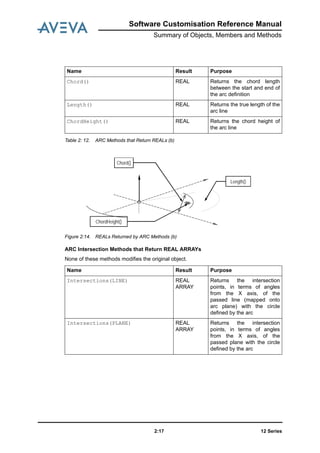
  • 3.
    Revision Sheet Date VersionComments / Remarks September 2011 12.1.1 Event Driven Graphics added. Software Customisation Reference Manual
  • 4.
  • 5.
    Software Customisation ReferenceManual Contents Page 12 Seriesi Software Customisation Reference Manual Reference Manual Introduction . . . . . . . . . . . . . . . . . . . . . . . . . . . . . . . . . . . . . . . . . . . . . 1:1 Summary of Objects, Members and Methods . . . . . . . . . . . . . . . . . 2:1 Object Classification . . . . . . . . . . . . . . . . . . . . . . . . . . . . . . . . . . . . . . . . . . . . . . . 2:1 Methods Available to All Objects . . . . . . . . . . . . . . . . . . . . . . . . . . . . . . . . . . . . . 2:3 Forms and Menus Objects . . . . . . . . . . . . . . . . . . . . . . . . . . . . . . . . . . . . . . . . . . 2:4 Members Contained by All Gadgets. . . . . . . . . . . . . . . . . . . . . . . . . . . . . . . . . . . . . . . . . . . 2:4 Summary of Gadget-Specific Methods. . . . . . . . . . . . . . . . . . . . . . . . . . . . . . . . . . . . . . . . . 2:5 Gadget Syntax Graphs . . . . . . . . . . . . . . . . . . . . . . . . . . . . . . . . . . . . . . . . . . . . . 2:6 Rules for Presenting and Using Syntax Graphs. . . . . . . . . . . . . . . . . . . . . . . . . . . . . . . . . . 2:6 Setting Up Gadget Anchoring: <fganch> . . . . . . . . . . . . . . . . . . . . . . . . . . . . . . . . . . . . . . . 2:7 Setting Up Gadget Docking: <fgdock>. . . . . . . . . . . . . . . . . . . . . . . . . . . . . . . . . . . . . . . . . 2:7 Setting-Up the Gadget’s Position: <fgpos> and <fgprl>. . . . . . . . . . . . . . . . . . . . . . . . . . . . 2:8 Setting Up the Gadget’s Width and Height: <vshap>. . . . . . . . . . . . . . . . . . . . . . . . . . . . . . 2:9 Setting Up the Gadget’s Tagwidth (TEXT, TOGGLE and OPTION): <fgtagw> . . . . . . . . . 2:10 Setting Up the Gadget’s 2D Screen Position: <xypos> . . . . . . . . . . . . . . . . . . . . . . . . . . . 2:10 Object Type Details . . . . . . . . . . . . . . . . . . . . . . . . . . . . . . . . . . . . . . . . . . . . . . . 2:11 ALERT Object . . . . . . . . . . . . . . . . . . . . . . . . . . . . . . . . . . . . . . . . . . . . . . . . . . . . . . . . . . 2:11 ARC Object . . . . . . . . . . . . . . . . . . . . . . . . . . . . . . . . . . . . . . . . . . . . . . . . . . . . . . . . . . . . 2:12 ARRAY Object . . . . . . . . . . . . . . . . . . . . . . . . . . . . . . . . . . . . . . . . . . . . . . . . . . . . . . . . . . 2:20 BANNER Object. . . . . . . . . . . . . . . . . . . . . . . . . . . . . . . . . . . . . . . . . . . . . . . . . . . . . . . . . 2:24 BAR Gadget . . . . . . . . . . . . . . . . . . . . . . . . . . . . . . . . . . . . . . . . . . . . . . . . . . . . . . . . . . . . 2:25 BLOCK Object . . . . . . . . . . . . . . . . . . . . . . . . . . . . . . . . . . . . . . . . . . . . . . . . . . . . . . . . . . 2:27 BOOLEAN Object. . . . . . . . . . . . . . . . . . . . . . . . . . . . . . . . . . . . . . . . . . . . . . . . . . . . . . . . 2:27
  • 6.
    12 Seriesii Software CustomisationReference Manual BORE Object . . . . . . . . . . . . . . . . . . . . . . . . . . . . . . . . . . . . . . . . . . . . . . . . . . . . . . . . . . . 2:28 BUTTON Gadget . . . . . . . . . . . . . . . . . . . . . . . . . . . . . . . . . . . . . . . . . . . . . . . . . . . . . . . . 2:29 COLLECTION Object. . . . . . . . . . . . . . . . . . . . . . . . . . . . . . . . . . . . . . . . . . . . . . . . . . . . . 2:33 COLUMN Object . . . . . . . . . . . . . . . . . . . . . . . . . . . . . . . . . . . . . . . . . . . . . . . . . . . . . . . . 2:34 COLUMNFORMAT. . . . . . . . . . . . . . . . . . . . . . . . . . . . . . . . . . . . . . . . . . . . . . . . . . . . . . . 2:35 COMBOBOX Gadget . . . . . . . . . . . . . . . . . . . . . . . . . . . . . . . . . . . . . . . . . . . . . . . . . . . . . 2:37 CONTAINER Gadget . . . . . . . . . . . . . . . . . . . . . . . . . . . . . . . . . . . . . . . . . . . . . . . . . . . . . 2:41 DATEFORMAT Object . . . . . . . . . . . . . . . . . . . . . . . . . . . . . . . . . . . . . . . . . . . . . . . . . . . . 2:42 DATETIME Object . . . . . . . . . . . . . . . . . . . . . . . . . . . . . . . . . . . . . . . . . . . . . . . . . . . . . . . 2:43 DB Object . . . . . . . . . . . . . . . . . . . . . . . . . . . . . . . . . . . . . . . . . . . . . . . . . . . . . . . . . . . . . 2:45 DBREF Object . . . . . . . . . . . . . . . . . . . . . . . . . . . . . . . . . . . . . . . . . . . . . . . . . . . . . . . . . . 2:47 DBSESS Object . . . . . . . . . . . . . . . . . . . . . . . . . . . . . . . . . . . . . . . . . . . . . . . . . . . . . . . . . 2:48 DIRECTION Object . . . . . . . . . . . . . . . . . . . . . . . . . . . . . . . . . . . . . . . . . . . . . . . . . . . . . . 2:48 EXPRESSION Object. . . . . . . . . . . . . . . . . . . . . . . . . . . . . . . . . . . . . . . . . . . . . . . . . . . . . 2:50 FILE Object . . . . . . . . . . . . . . . . . . . . . . . . . . . . . . . . . . . . . . . . . . . . . . . . . . . . . . . . . . . . 2:51 FMSYS Object . . . . . . . . . . . . . . . . . . . . . . . . . . . . . . . . . . . . . . . . . . . . . . . . . . . . . . . . . . 2:53 FORM Object . . . . . . . . . . . . . . . . . . . . . . . . . . . . . . . . . . . . . . . . . . . . . . . . . . . . . . . . . . . 2:56 FORMAT Object. . . . . . . . . . . . . . . . . . . . . . . . . . . . . . . . . . . . . . . . . . . . . . . . . . . . . . . . . 2:65 FRAME Gadget . . . . . . . . . . . . . . . . . . . . . . . . . . . . . . . . . . . . . . . . . . . . . . . . . . . . . . . . . 2:68 Graphical Selection . . . . . . . . . . . . . . . . . . . . . . . . . . . . . . . . . . . . . . . . . . . . . . . . . . . . . . 2:72 IDList . . . . . . . . . . . . . . . . . . . . . . . . . . . . . . . . . . . . . . . . . . . . . . . . . . . . . . . . . . . . . 2:74 LINE Gadget. . . . . . . . . . . . . . . . . . . . . . . . . . . . . . . . . . . . . . . . . . . . . . . . . . . . . . . . . . . . 2:76 LINE Object . . . . . . . . . . . . . . . . . . . . . . . . . . . . . . . . . . . . . . . . . . . . . . . . . . . . . . . . . . . . 2:77 LINEARGRID Object . . . . . . . . . . . . . . . . . . . . . . . . . . . . . . . . . . . . . . . . . . . . . . . . . . . . . 2:86 LIST Gadget. . . . . . . . . . . . . . . . . . . . . . . . . . . . . . . . . . . . . . . . . . . . . . . . . . . . . . . . . . . . 2:88 LOCATION Object . . . . . . . . . . . . . . . . . . . . . . . . . . . . . . . . . . . . . . . . . . . . . . . . . . . . . . . 2:93 MACRO Object. . . . . . . . . . . . . . . . . . . . . . . . . . . . . . . . . . . . . . . . . . . . . . . . . . . . . . . . . . 2:95 MDB Object . . . . . . . . . . . . . . . . . . . . . . . . . . . . . . . . . . . . . . . . . . . . . . . . . . . . . . . . . . . . 2:95 MEASURE Object . . . . . . . . . . . . . . . . . . . . . . . . . . . . . . . . . . . . . . . . . . . . . . . . . . . . . . . 2:97 MENU Object . . . . . . . . . . . . . . . . . . . . . . . . . . . . . . . . . . . . . . . . . . . . . . . . . . . . . . . . . . . 2:99 Multi Discipline Route Manager . . . . . . . . . . . . . . . . . . . . . . . . . . . . . . . . . . . . . . . . . . . . 2:106 NUMERICINPUT Object . . . . . . . . . . . . . . . . . . . . . . . . . . . . . . . . . . . . . . . . . . . . . . . . . 2:111 OBJECT . . . . . . . . . . . . . . . . . . . . . . . . . . . . . . . . . . . . . . . . . . . . . . . . . . . . . . . . . . . . 2:113 OPTION Gadget. . . . . . . . . . . . . . . . . . . . . . . . . . . . . . . . . . . . . . . . . . . . . . . . . . . . . . . . 2:113 ORIENTATION Object . . . . . . . . . . . . . . . . . . . . . . . . . . . . . . . . . . . . . . . . . . . . . . . . . . . 2:117 PARAGRAPH Gadget . . . . . . . . . . . . . . . . . . . . . . . . . . . . . . . . . . . . . . . . . . . . . . . . . . . 2:118 PLANE Object . . . . . . . . . . . . . . . . . . . . . . . . . . . . . . . . . . . . . . . . . . . . . . . . . . . . . . . . . 2:120 PLANTGRID Object . . . . . . . . . . . . . . . . . . . . . . . . . . . . . . . . . . . . . . . . . . . . . . . . . . . . . 2:124 PLATFORMGRID. . . . . . . . . . . . . . . . . . . . . . . . . . . . . . . . . . . . . . . . . . . . . . . . . . . . . . . 2:125 PMLReport Object . . . . . . . . . . . . . . . . . . . . . . . . . . . . . . . . . . . . . . . . . . . . . . . . . . . . . . 2:128
  • 7.
    12 Series Software CustomisationReference Manual iii PMLSECURELOGIN . . . . . . . . . . . . . . . . . . . . . . . . . . . . . . . . . . . . . . . . . . . . . . . . . . . . 2:130 PMLUSERLOGIN. . . . . . . . . . . . . . . . . . . . . . . . . . . . . . . . . . . . . . . . . . . . . . . . . . . . . . . 2:131 POINTVECTOR Object . . . . . . . . . . . . . . . . . . . . . . . . . . . . . . . . . . . . . . . . . . . . . . . . . . 2:131 POSITION Object. . . . . . . . . . . . . . . . . . . . . . . . . . . . . . . . . . . . . . . . . . . . . . . . . . . . . . . 2:134 POSTEVENTS Object . . . . . . . . . . . . . . . . . . . . . . . . . . . . . . . . . . . . . . . . . . . . . . . . . . . 2:139 PROJECT Object . . . . . . . . . . . . . . . . . . . . . . . . . . . . . . . . . . . . . . . . . . . . . . . . . . . . . . . 2:140 PROFILE Object. . . . . . . . . . . . . . . . . . . . . . . . . . . . . . . . . . . . . . . . . . . . . . . . . . . . . . . . 2:141 RADIALGRID Object . . . . . . . . . . . . . . . . . . . . . . . . . . . . . . . . . . . . . . . . . . . . . . . . . . . . 2:151 REAL Object. . . . . . . . . . . . . . . . . . . . . . . . . . . . . . . . . . . . . . . . . . . . . . . . . . . . . . . . . . . 2:153 REPORT Object. . . . . . . . . . . . . . . . . . . . . . . . . . . . . . . . . . . . . . . . . . . . . . . . . . . . . . . . 2:158 RTOGGLE Gadget. . . . . . . . . . . . . . . . . . . . . . . . . . . . . . . . . . . . . . . . . . . . . . . . . . . . . . 2:161 Section Plane . . . . . . . . . . . . . . . . . . . . . . . . . . . . . . . . . . . . . . . . . . . . . . . . . . . . . . . . . . 2:163 Section Plane Manager . . . . . . . . . . . . . . . . . . . . . . . . . . . . . . . . . . . . . . . . . . . . . . . . . . 2:165 SELECTOR Gadget . . . . . . . . . . . . . . . . . . . . . . . . . . . . . . . . . . . . . . . . . . . . . . . . . . . . . 2:168 SESSION Object . . . . . . . . . . . . . . . . . . . . . . . . . . . . . . . . . . . . . . . . . . . . . . . . . . . . . . . 2:171 SLIDER Gadget . . . . . . . . . . . . . . . . . . . . . . . . . . . . . . . . . . . . . . . . . . . . . . . . . . . . . . . . 2:173 STRING Object . . . . . . . . . . . . . . . . . . . . . . . . . . . . . . . . . . . . . . . . . . . . . . . . . . . . . . . . 2:175 STATE . . . . . . . . . . . . . . . . . . . . . . . . . . . . . . . . . . . . . . . . . . . . . . . . . . . . . . . . . . . . 2:182 TABLE Object. . . . . . . . . . . . . . . . . . . . . . . . . . . . . . . . . . . . . . . . . . . . . . . . . . . . . . . . . . 2:182 TEAM Object . . . . . . . . . . . . . . . . . . . . . . . . . . . . . . . . . . . . . . . . . . . . . . . . . . . . . . . . . . 2:184 TEXT Gadget . . . . . . . . . . . . . . . . . . . . . . . . . . . . . . . . . . . . . . . . . . . . . . . . . . . . . . . . . . 2:185 TEXTPANE Gadget . . . . . . . . . . . . . . . . . . . . . . . . . . . . . . . . . . . . . . . . . . . . . . . . . . . . . 2:188 TOGGLE Gadget . . . . . . . . . . . . . . . . . . . . . . . . . . . . . . . . . . . . . . . . . . . . . . . . . . . . . . . 2:190 UNDOABLE Object . . . . . . . . . . . . . . . . . . . . . . . . . . . . . . . . . . . . . . . . . . . . . . . . . . . . . 2:192 UNIT Object . . . . . . . . . . . . . . . . . . . . . . . . . . . . . . . . . . . . . . . . . . . . . . . . . . . . . . . . . . . 2:193 USER Object . . . . . . . . . . . . . . . . . . . . . . . . . . . . . . . . . . . . . . . . . . . . . . . . . . . . . . . . . . 2:195 VERIFY . . . . . . . . . . . . . . . . . . . . . . . . . . . . . . . . . . . . . . . . . . . . . . . . . . . . . . . . . . . . 2:196 ViewFinder . . . . . . . . . . . . . . . . . . . . . . . . . . . . . . . . . . . . . . . . . . . . . . . . . . . . . . . . . . . . 2:196 VIEW Gadget: ALPHA Views. . . . . . . . . . . . . . . . . . . . . . . . . . . . . . . . . . . . . . . . . . . . . . 2:198 VIEW Gadget: AREA View. . . . . . . . . . . . . . . . . . . . . . . . . . . . . . . . . . . . . . . . . . . . . . . . 2:199 VIEW Gadget: PLOT View . . . . . . . . . . . . . . . . . . . . . . . . . . . . . . . . . . . . . . . . . . . . . . . . 2:201 VIEW Gadget: VOLUME Views . . . . . . . . . . . . . . . . . . . . . . . . . . . . . . . . . . . . . . . . . . . . 2:203 XYPosition Object . . . . . . . . . . . . . . . . . . . . . . . . . . . . . . . . . . . . . . . . . . . . . . . . . . . . . . 2:206 Event Driven Graphics . . . . . . . . . . . . . . . . . . . . . . . . . . . . . . . . . . . . 3:1 Overview . . . . . . . . . . . . . . . . . . . . . . . . . . . . . . . . . . . . . . . . . . . . . . . . . . . . . . . . 3:1 Purpose . . . . . . . . . . . . . . . . . . . . . . . . . . . . . . . . . . . . . . . . . . . . . . . . . . . . . . . . 3:1 Scope . . . . . . . . . . . . . . . . . . . . . . . . . . . . . . . . . . . . . . . . . . . . . . . . . . . . . . . . 3:2 Definitions. . . . . . . . . . . . . . . . . . . . . . . . . . . . . . . . . . . . . . . . . . . . . . . . . . . . . . . . 3:2
  • 8.
    12 Seriesiv Software CustomisationReference Manual Target Users . . . . . . . . . . . . . . . . . . . . . . . . . . . . . . . . . . . . . . . . . . . . . . . . . . . . . . 3:2 Superseded Functionality . . . . . . . . . . . . . . . . . . . . . . . . . . . . . . . . . . . . . . . . . . . 3:2 Components . . . . . . . . . . . . . . . . . . . . . . . . . . . . . . . . . . . . . . . . . . . . . . . . . . . . . . 3:3 Main Components . . . . . . . . . . . . . . . . . . . . . . . . . . . . . . . . . . . . . . . . . . . . . . . . . . . . . . . . 3:3 Secondary Components. . . . . . . . . . . . . . . . . . . . . . . . . . . . . . . . . . . . . . . . . . . . . . . . . . . . 3:3 Concepts . . . . . . . . . . . . . . . . . . . . . . . . . . . . . . . . . . . . . . . . . . . . . . . . . . . . . . . . 3:4 Event Driven Graphics . . . . . . . . . . . . . . . . . . . . . . . . . . . . . . . . . . . . . . . . . . . . . . . . . . . . . 3:4 Picking . . . . . . . . . . . . . . . . . . . . . . . . . . . . . . . . . . . . . . . . . . . . . . . . . . . . . . . . . . . . . . 3:4 Pick Sequence . . . . . . . . . . . . . . . . . . . . . . . . . . . . . . . . . . . . . . . . . . . . . . . . . . . . . . . . . . . 3:5 Event Packet . . . . . . . . . . . . . . . . . . . . . . . . . . . . . . . . . . . . . . . . . . . . . . . . . . . . . . . . . . . . 3:5 Event Flow . . . . . . . . . . . . . . . . . . . . . . . . . . . . . . . . . . . . . . . . . . . . . . . . . . . . . . . . . . . . . . 3:5 Event Control System (edgCntrl) . . . . . . . . . . . . . . . . . . . . . . . . . . . . . . . . . . . . . 3:6 Published Interface. . . . . . . . . . . . . . . . . . . . . . . . . . . . . . . . . . . . . . . . . . . . . . . . . . . . . . . . 3:7 Add Packet. . . . . . . . . . . . . . . . . . . . . . . . . . . . . . . . . . . . . . . . . . . . . . . . . . . . . . . . . . . . . . 3:8 Remove Packet . . . . . . . . . . . . . . . . . . . . . . . . . . . . . . . . . . . . . . . . . . . . . . . . . . . . . . . . . . 3:9 Change Prompts . . . . . . . . . . . . . . . . . . . . . . . . . . . . . . . . . . . . . . . . . . . . . . . . . . . . . . . . . 3:9 View the Stack . . . . . . . . . . . . . . . . . . . . . . . . . . . . . . . . . . . . . . . . . . . . . . . . . . . . . . . . . . 3:10 Limitations and Restrictions . . . . . . . . . . . . . . . . . . . . . . . . . . . . . . . . . . . . . . . . . . . . . . . . 3:11 Event Packet (edgPacket) . . . . . . . . . . . . . . . . . . . . . . . . . . . . . . . . . . . . . . . . . . 3:11 Published Interface. . . . . . . . . . . . . . . . . . . . . . . . . . . . . . . . . . . . . . . . . . . . . . . . . . . . . . . 3:15 Examples . . . . . . . . . . . . . . . . . . . . . . . . . . . . . . . . . . . . . . . . . . . . . . . . . . . . . . . . . . . . . 3:23 Limitations and Restrictions . . . . . . . . . . . . . . . . . . . . . . . . . . . . . . . . . . . . . . . . . . . . . . . . 3:29 Pick Packet (edgPickPacket) . . . . . . . . . . . . . . . . . . . . . . . . . . . . . . . . . . . . . . . 3:30 Published Interface. . . . . . . . . . . . . . . . . . . . . . . . . . . . . . . . . . . . . . . . . . . . . . . . . . . . . . . 3:31 Examples (Defining Pick Sequences) . . . . . . . . . . . . . . . . . . . . . . . . . . . . . . . . . . . . . . . . 3:52 Examples (Using Pick Packets) . . . . . . . . . . . . . . . . . . . . . . . . . . . . . . . . . . . . . . . . . . . . . 3:54 Limitations and Restrictions . . . . . . . . . . . . . . . . . . . . . . . . . . . . . . . . . . . . . . . . . . . . . . . . 3:56 Pick Type (edgPickType). . . . . . . . . . . . . . . . . . . . . . . . . . . . . . . . . . . . . . . . . . . 3:56 Published Interface. . . . . . . . . . . . . . . . . . . . . . . . . . . . . . . . . . . . . . . . . . . . . . . . . . . . . . . 3:57 Examples . . . . . . . . . . . . . . . . . . . . . . . . . . . . . . . . . . . . . . . . . . . . . . . . . . . . . . . . . . . . . 3:59 Limitations and Restrictions . . . . . . . . . . . . . . . . . . . . . . . . . . . . . . . . . . . . . . . . . . . . . . . . 3:59 Pick (edgPick). . . . . . . . . . . . . . . . . . . . . . . . . . . . . . . . . . . . . . . . . . . . . . . . . . . . 3:59 Pick Filtering. . . . . . . . . . . . . . . . . . . . . . . . . . . . . . . . . . . . . . . . . . . . . . . . . . . . . . . . . . . . 3:59 Rule Combination. . . . . . . . . . . . . . . . . . . . . . . . . . . . . . . . . . . . . . . . . . . . . . . . . . . . . . . . 3:60 Published Interface. . . . . . . . . . . . . . . . . . . . . . . . . . . . . . . . . . . . . . . . . . . . . . . . . . . . . . . 3:61 Examples . . . . . . . . . . . . . . . . . . . . . . . . . . . . . . . . . . . . . . . . . . . . . . . . . . . . . . . . . . . . . 3:61 Limitations and Restrictions . . . . . . . . . . . . . . . . . . . . . . . . . . . . . . . . . . . . . . . . . . . . . . . . 3:63 Pick Data (edgPickData) . . . . . . . . . . . . . . . . . . . . . . . . . . . . . . . . . . . . . . . . . . . 3:63
  • 9.
    12 Series Software CustomisationReference Manual v Published Interface. . . . . . . . . . . . . . . . . . . . . . . . . . . . . . . . . . . . . . . . . . . . . . . . . . . . . . . 3:63 Picked Position Data (edgPositionData) . . . . . . . . . . . . . . . . . . . . . . . . . . . . . . 3:64 Published Interface. . . . . . . . . . . . . . . . . . . . . . . . . . . . . . . . . . . . . . . . . . . . . . . . . . . . . . . 3:65 PML 1 Expressions . . . . . . . . . . . . . . . . . . . . . . . . . . . . . . . . . . . . . . .A:1 Format of Expressions . . . . . . . . . . . . . . . . . . . . . . . . . . . . . . . . . . . . . . . . . . . . .A:1 Operator Precedence. . . . . . . . . . . . . . . . . . . . . . . . . . . . . . . . . . . . . . . . . . . . . . . . . . . . . . A:2 Nesting Expressions. . . . . . . . . . . . . . . . . . . . . . . . . . . . . . . . . . . . . . . . . . . . . . . . . . . . . . . A:2 Logical Expressions . . . . . . . . . . . . . . . . . . . . . . . . . . . . . . . . . . . . . . . . . . . . . . .A:2 Logical Operators. . . . . . . . . . . . . . . . . . . . . . . . . . . . . . . . . . . . . . . . . . . . . . . . . . . . . . . . . A:3 Logical Functions . . . . . . . . . . . . . . . . . . . . . . . . . . . . . . . . . . . . . . . . . . . . . . . . . . . . . . . . . A:6 Logical Array Expressions . . . . . . . . . . . . . . . . . . . . . . . . . . . . . . . . . . . . . . . . . . . . . . . . . A:11 Numeric (Real) Expressions . . . . . . . . . . . . . . . . . . . . . . . . . . . . . . . . . . . . . . . .A:12 Real Physical Quantities with Units . . . . . . . . . . . . . . . . . . . . . . . . . . . . . . . . . . . . . . . . . . A:12 Numeric (Real) Operators . . . . . . . . . . . . . . . . . . . . . . . . . . . . . . . . . . . . . . . . . . . . . . . . . A:13 ADD and SUBTRACT (+ and -) . . . . . . . . . . . . . . . . . . . . . . . . . . . . . . . . . . . . . . . . . . . . . A:13 MULTIPLY and DIVIDE (* and /) . . . . . . . . . . . . . . . . . . . . . . . . . . . . . . . . . . . . . . . . . . . . A:13 Numeric (Real) Functions. . . . . . . . . . . . . . . . . . . . . . . . . . . . . . . . . . . . . . . . . . . . . . . . . . A:14 Real Arrays. . . . . . . . . . . . . . . . . . . . . . . . . . . . . . . . . . . . . . . . . . . . . . . . . . . . . . . . . . . . . A:22 Using IDs in Expressions . . . . . . . . . . . . . . . . . . . . . . . . . . . . . . . . . . . . . . . . . .A:22 Positions, Directions and Orientations in Expressions (PDMS only) . . . . . . .A:23 Using Positions in Expressions . . . . . . . . . . . . . . . . . . . . . . . . . . . . . . . . . . . . . . . . . . . . . A:23 WRT (PDMS Only). . . . . . . . . . . . . . . . . . . . . . . . . . . . . . . . . . . . . . . . . . . . . . . . . . . . . . . A:23 FROM . . . . . . . . . . . . . . . . . . . . . . . . . . . . . . . . . . . . . . . . . . . . . . . . . . . . . . . . . . . . . A:25 Comparing Positions . . . . . . . . . . . . . . . . . . . . . . . . . . . . . . . . . . . . . . . . . . . . . . . . . . . . . A:27 POLAR . . . . . . . . . . . . . . . . . . . . . . . . . . . . . . . . . . . . . . . . . . . . . . . . . . . . . . . . . . . . . A:28 Direction . . . . . . . . . . . . . . . . . . . . . . . . . . . . . . . . . . . . . . . . . . . . . . . . . . . . . . . . . . . . . A:29 Orientations . . . . . . . . . . . . . . . . . . . . . . . . . . . . . . . . . . . . . . . . . . . . . . . . . . . . . . . . . . . . A:30 Text Expressions . . . . . . . . . . . . . . . . . . . . . . . . . . . . . . . . . . . . . . . . . . . . . . . . .A:31 Text Operator . . . . . . . . . . . . . . . . . . . . . . . . . . . . . . . . . . . . . . . . . . . . . . . . . . . . . . . . . . . A:31 Text Functions . . . . . . . . . . . . . . . . . . . . . . . . . . . . . . . . . . . . . . . . . . . . . . . . . . . . . . . . . . A:32 Late Evaluation of Variables in Expressions. . . . . . . . . . . . . . . . . . . . . . . . . . .A:40 Attributes in Expressions . . . . . . . . . . . . . . . . . . . . . . . . . . . . . . . . . . . . . . . . . .A:41 Querying Expressions . . . . . . . . . . . . . . . . . . . . . . . . . . . . . . . . . . . . . . . . . . . . .A:41 Units in Expressions . . . . . . . . . . . . . . . . . . . . . . . . . . . . . . . . . . . . . . . . . . . . . .A:41 Precision of Comparisons. . . . . . . . . . . . . . . . . . . . . . . . . . . . . . . . . . . . . . . . . .A:42 Undefined Values . . . . . . . . . . . . . . . . . . . . . . . . . . . . . . . . . . . . . . . . . . . . . . . . .A:42
  • 10.
    12 Seriesvi Software CustomisationReference Manual Unset Values. . . . . . . . . . . . . . . . . . . . . . . . . . . . . . . . . . . . . . . . . . . . . . . . . . . . .A:43
  • 11.
    Software Customisation ReferenceManual Introduction 12 Series1:1 1 Introduction This manual is the Reference Manual for the AVEVA Programming Language, PML. It is intended for users who are already familiar with PML. Users who are starting to use PML should refer to the Software Customisation Guide, which should be used together with this manual. There are two versions of PML, the older one, known as PML 1, and the newer one, known as PML 2. PML 2 has been written specifically for creating and customising the AVEVA GUI, and this manual is mainly concerned with PML 2. However, PML 2 has not completely replaced PML 1, and there are some tasks which are carried out more efficiently using PML 1 facilities. In particular, this manual describes the PML 1 expressions package, which is used within PDMS; for example, for writing rules and defining report templates. You should also refer to the Database Management Reference Manual. This manual contains: • A list of PML 2 Objects, Members and Methods. For the Forms and Menus objects, the command syntax relating to the objects is included. Note: Many properties of Forms and Gadgets that were previously set using commands should now be set using the Form or Gadget methods. In general, the only commands described are those which have not been replaced by methods. If you are maintaining old code, you may need to refer to the edition of the AVEVA Software Customisation Guide dated October 1995, which describes the old syntax in detail. • Information about using PML in Review. • A description of the PML 1 expressions package.
  • 12.
    12 Series1:2 Software CustomisationReference Manual Introduction
  • 13.
    Software Customisation ReferenceManual Summary of Objects, Members and Methods 12 Series2:1 2 Summary of Objects, Members and Methods 2.1 Object Classification The table below lists the object types and shows which classifications they belong to. Classification Object Type PML Built-in Objects ARRAY BLOCK BOOLEAN FILE OBJECT REAL STRING DATETIME UNIT MEASURE 3D Geometry Objects ARC LINE LINEARGRID LOCATION PLANE PLANTGRID POINTVECTOR POSTEVENTS PROFILE RADIAL GRID XYPOSITION
  • 14.
    12 Series2:2 Software CustomisationReference Manual Summary of Objects, Members and Methods PDMS Objects BANNER BORE DB DBREF DBSESS DIRECTION MACRO MDB ORIENTATION POSITION POSTUNDO PROJECT SESSION TEAM UNDOABLE USER Forms and Menu Objects & Gadgets ALERT BAR BUTTON COMBOBOX CONTAINER FMSYS FORM FRAME LINE LIST MENU NUMERIC OPTION PARAGRAPH RTOGGLE SELECTOR Classification Object Type
  • 15.
    Software Customisation ReferenceManual Summary of Objects, Members and Methods 12 Series2:3 Table 2: 1. Object Types and Classification 2.2 Methods Available to All Objects The table following lists the methods available to all objects. The table gives the name of each method and the type of result you get back from it. The third column of the table describes what the method does. SLIDER TEXT TEXTPANE TOGGLE VIEW ALPHA AREA PLOT VOLUME Collection and Report Objects COLLECTION COLUMN COLUMN-FORMAT DATE-FORMAT EXPRESSION REPORT TABLE Formatting Text FORMAT Classification Object Type Name Result Purpose Attribute( 'Name') ANY To set or get a member of an object, providing the member name as a STRING. Attributes() ARRAY OF STRINGS To get a list of the names of the members of an object as an array of STRING. Delete() NO RESULT Destroy the object - make it undefined EQ(any) BOOLEAN Type-dependent comparison LT(any) BOOLEAN Type-dependent comparison (converting first to STRING if all else fails)
  • 16.
    12 Series2:4 Software CustomisationReference Manual Summary of Objects, Members and Methods Table 2: 2. Methods Available to All Objects 2.3 Forms and Menus Objects 2.3.1 Members Contained by All Gadgets All gadgets contain the following members. Max(any) ANY Return maximum of object and second object Min(any) ANY Return minimum of object and second object NEQ(any) BOOLEAN TRUE if objects do not have the same value(s) ObjectType() STRING Return the type of the object as a string Set() BOOLEAN TRUE if the object has been given a value(s) String() STRING Convert the object to a STRING Unset() BOOLEAN TRUE if the object does not have a value Name Result Purpose Name Type Purpose visible BOOLEAN Get/Set You query this member to determine if a gadget is visible or invisible. To make a gadget visible, set it to TRUE; to make the gadget invisible, set it to FALSE. active BOOLEAN Get/Set You query this member to determine if a gadget is active or inactive (greyed- out). To make a gadget active, set it to TRUE; to make the gadget inactive, set it to FALSE.
  • 17.
    Software Customisation ReferenceManual Summary of Objects, Members and Methods 12 Series2:5 Table 2: 3. Members Contained by All Gadgets 2.3.2 Summary of Gadget-Specific Methods The table below summarises the methods that different gadgets support. callback STRING Get/Set Query or assign the gadget’s callback string tag STRING Get/Set Query or assign a gadget’s tag text. This is not displayed for all gadgets. Name Type Purpose Bar Button List Option Para Slider Text Text-pane Toggle/Rtoggle ViewAlpha View2D View3D NumericInput Container Combobox Frame Line Selector View:Plot Add X X X X Background X X X X X X X X X X X X Clear X X X X X X X X ClearSelection X X X X Container X X X X X X X X X X X X X X CurPos X DisplayText X X FieldProperty X FullName X X X X X X X X X X X X X X X X X X X GetPickedPopup X X X X X X X X X X X X X X X Highlight X X X InsertAfter X InsertBefore X Line X Name X X X X X X X X X X X X X X X Owner X X X X X X X X X X X X X X X Refresh X X X X X X X X X X X X X X X X X X RemovePopup X X X X X X X X X X X X X X X X RestoreView X X RToggle X Select X X X X Selection X X X X SetActive X SetBackground X X X X X X X SetColumns X SetCurPos X
  • 18.
    12 Series2:6 Software CustomisationReference Manual Summary of Objects, Members and Methods Table 2: 4. Summary of Gadget-Specific Methods 2.4 Gadget Syntax Graphs 2.4.1 Rules for Presenting and Using Syntax Graphs The rules for syntax graphs are as follows: 1. Each graph represents a command (or part of a command) to PDMS to perform specified actions with specified data. The graph is entered at “graph_name>--“ or “>- -”, and exited at “-->”. The allowed flow in a graph is top to bottom, and left to right, except where indicated otherwise by a “*“ or “<“ symbol. 2. Vertical lines with one or more “+“ symbols represent a new state. These are always traversed downwards. There should be a “+” for each allowable entry point into a state. The “+” symbols can only be traversed from left to right. 3. Horizontals to the right of state lines, represent command words and data which are allowable in the state. They can only be traversed from left to right. 1. Words starting with capitals represent command words. The capitalized part represents the minimum syntax which is recognized. Lower case parts denote optional characters. The whole thing is actually case independent as far as the user is concerned. 2. Words enclosed in “< >“ represent a call to the named graph. These should be lower case. Graph calls can be recursive. 3. Words in lower case only, represent ‘notionally’ atomic data items, e.g. text, integer, val (numeric value). Sometimes they are in fact graph calls, e.g. ‘fname’ and SetEditable X X SetFieldProperty X SetFocus X X X X X X X X X X X SetHeadings X SetLine X SetPopup X X X X X X X X X X X X X X X SetRange X SetRows X SetSize X X X X SetTooltip X X X X X X X X X SetValue X Shown X X X X X X X X X X X X X X X X X X X ShowPopup X Subtype X X X X X X X X X X X X X X X X X X X Type X X X X X X X X X X X X X X X X X X X ValidateCall X Bar Button List Option Para Slider Text Text-pane Toggle/Rtoggle ViewAlpha View2D View3D NumericInput Container Combobox Frame Line Selector View:Plot
  • 19.
    Software Customisation ReferenceManual Summary of Objects, Members and Methods 12 Series2:7 ‘gname’. Sometimes they are fictitious e.g. ‘tagtext’, but more helpful than just “text” and easier to understand than a reference to, say, <fgtag>. 4. Continuous vertical and horizontal lines without a “ + “ symbol represent flow lines of the graph. 1. The presence of a “*“ symbol in a vertical line indicates that the allowed direction of traverse is upwards. 2. The presence of a “<“ symbol on a horizontal indicates that the allowed direction of traverse is backwards. 3. The symbols “.“, “/“, “ ‘ “ are just cosmetic to help the graph to look better. 2.4.2 Setting Up Gadget Anchoring: <fganch> The ANCHOR attribute allows you to control the position of an edge of the gadget relative to the corresponding edge of its container. For example ANCHOR RIGHT specifies that the right hand edge of the gadget will maintain a fixed distance from the right hand edge of its owning container. Figure 2:1. Syntax Graph -: Gadget Anchoring 2.4.3 Setting Up Gadget Docking: <fgdock> The DOCK attribute allows you to dock a gadget to the left, right, top, or bottom edge of its container, typically a form or a frame; or you can cause the gadget to dock to all edges, or to no edges. Figure 2:2. Syntax Graph - Gadget Docking Note: The DOCK and ANCHOR attributes are mutually exclusive. Setting the DOCK attribute resets the ANCHOR to the default; setting the ANCHOR attribute resets DOCK to none. You can set these attributes only when you define the gadget: you cannot change it after the exit from form setup. Thus you are not allowed to the resize behaviour at run-time. .---<-------------. / | >-- <fganch> -----------+-- ANCHOR --+--+- Left ----. | | +- Right ---| | | +- Top -----| | | ‘- Bottom --+---+---* | | +---- None ----| ‘---- All------’--> >-- <fgdock> -----------+-- DOCK ----+-----Left ----. +---- Right ---| +---- Top -----| +---- Bottom --| +---- None ----| ‘---- Fill ----’-->
  • 20.
    12 Series2:8 Software CustomisationReference Manual Summary of Objects, Members and Methods 2.4.4 Setting-Up the Gadget’s Position: <fgpos> and <fgprl> You can use the AT syntax, shown below on the <fgpos> graph, to define the position of a gadget’s origin within a form. You can specify the position absolutely (in form layout grid units) or relative to the extremities of existing gadgets, or relative to the size of the form and the gadget. Figure 2:3. Syntax Graph - Absolute Positioning The subgraph <fgprl>, shown below, sets the gadget position relative to another gadget or the form’s extent. For example, you can use it to position a gadget halfway across the width of a form. Figure 2:4. Syntax Graph -: Relative Positioning Examples of Using the AT Syntax >-- <fgpos> -- AT --+- val val -------------------------------. +- X val ------------. | +- XMIN -. | | +- XCEN -| | | +- XMAX -+- <fgprl> -| | ‘--------‘-----------+- Y val ------------| +- YMIN -. | +- YCEN -| | +- YMAX -‘- <fgprl> -| ‘--------------------‘--> >-- <fgprl> --+- <gname> -. +-- FORM ---| ‘-----------+- * val -----. | | +- + val --. | +- - val --‘--+- + val * SIZE ---. | +- - val * SIZE ---| | +- + SIZE ---------| | +- - SIZE ---------| | ‘------------------| +- + SIZE -----------------------| +- - SIZE -----------------------| ‘--------------------------------‘--> AT 5 7.5 Puts gadget origin at form grid coordinates (5, 7.5). AT X 5.5 Puts gadget origin at form grid coordinates (5.5, y) where y is calculated automatically from the y extremity of the last placed gadget and the current VDISTANCE setting. AT YMAX+1 Positions new gadget at (x, y) where x is calculated automatically from the x extremity of the last placed gadget and the current HDISTANCE setting. y is at YMAX+1 of the last gadget.
  • 21.
    Software Customisation ReferenceManual Summary of Objects, Members and Methods 12 Series2:9 2.4.5 Setting Up the Gadget’s Width and Height: <vshap> This operation allows you to set a gadget’s width and height. Figure 2:5. Syntax Graph -: Gadget Geometry <vshap> h/w is the value of the Aspect Ratio (height/width). The units for <vshap> will have been preset to pixels or F&M grid units, appropriately. The default width and height for <vshap> will have been preset, so leaving the graph with only width or height set still realises both values. All values may be given as integer or reals. Setting the Height: <vwid> Setting the Width: <vhei> AT XMIN.GAD1-2 YMAX.GAD2+1 Positions new gadget with respect to two existing gadgets. Gadget is offset by 2 grid units to the left of GAD1(X=XMIN-2) and 1 unit below .GAD2 (Y=YMAX+1). AT XMAX FORM-SIZE YMAX FORM-SIZE XMAX FORM refers to the current right hand size of the form at its current stage of definition (not its final maximum extent). YMAX FORM refers to the form’s current bottom extent. The -SIZE option subtracts the size of the gadget being positioned in the form. This example positions the gadget at the extreme right-hand bottom edge of the form. >-- <vshap> --+- <vwid> --+- <vhei> --------. | +- ASPect (h/w) --| | ‘-----------------‘--> | ‘- <vhei> --+- <vwid> --------. +- ASPect (h/w) --| ‘-----------------‘--> >-- <vwid> -- WIDth -+- val ------. +- <gname> --| ‘------------‘--> >-- <vhei> -- HEIght -+- val ------. +- <gname> --| ‘------------‘-->
  • 22.
    12 Series2:10 Software CustomisationReference Manual Summary of Objects, Members and Methods 2.4.6 Setting Up the Gadget’s Tagwidth (TEXT, TOGGLE and OPTION): <fgtagw> The TAGWIDTH specifies the size of the gadget’s tag field in grid width units including any padding space, regardless of the actual tag string. Tagwidth is not needed for gadgets with an explicit area specification (width and height, lines or length). FRAME, LIST, SELECTOR, TEXTPANE and PARAGRAPH can always force an explicit width. The syntax graph <fgtagw> defines the Tag specification Figure 2:6. Syntax Graph -: Gadget Tagwidth The <fgtagw> graph supports both the simple ‘tagtext’ setting and/or the specification of the maximum width of any tag. If the tag width is not explicitly given then it is assumed to be the number of characters in the ‘tagtext’ string multiplied by the horizontal grid size (the notional character width for the font). You can specify the tag width without specifying any tagtext at definition time; this can be added at run time 2.4.7 Setting Up the Gadget’s 2D Screen Position: <xypos> This shows how to set up a gadget’s 2D screen position in normalized co-ordinates. Figure 2:7. Syntax Graph - Gadget's 2d Screen Position Note: Normalized co-ordinates represent a proportion of the full screen size. 0.0 <= XR <= 1.0 and 0.0 <= YR <= 1.0. >-- <fgtagw> --+- TAGWIDth val -+-------------. ‘----------------‘-- tagtext --‘--> <xypos>--+- XR val -+- YR val -. ‘- YR val -+- XR val -‘-->
  • 23.
    Software Customisation ReferenceManual Summary of Objects, Members and Methods 12 Series2:11 2.5 Object Type Details This section contains details of the object types listed in Table 2: 1.: Object Types and Classification. 2.5.1 ALERT Object Methods Table 2: 5. Alert Object Methods Name Result Purpose Confirm( Message is STRING, X is REAL, Y is REAL ) STRING ‘YES’ OR ‘NO’ Show a blocking CONFIRM ALERT and retrieve the response. X and Y are optional screen positions. Error(Message is STRING, X is REAL, Y is REAL ) STRING ‘YES’ Show a blocking ERROR ALERT and retrieve the response. X and Y are optional screen positions. Message(Message is STRING, X is REAL, Y is REAL) STRING ‘YES’ Show a blocking MESSAGE ALERT and retrieve the response and retrieve the response. X and Y are optional screen positions. Question(Message is STRING, X is REAL, Y is REAL ) STRING ‘YES’, ‘NO’ OR ‘CANCEL’ Show a blocking QUESTION ALERT and retrieve the response. X and Y are optional screen positions. Warning(Message is STRING, X is REAL, Y is REAL) STRING ‘YES’ Show a blocking WARNING ALERT and retrieve the response and retrieve the response. X and Y are optional screen positions. !!Alert.Input( ! prompt is STRING, !default is STRING) is STRING STRING Show a blocking INPUT ALERT. !prompt is the prompt displayed to the user, and !default is the default value in the text box. !!Alert.Input( !prompt is STRING, !default is STRING, xPos is REAL, yPos is REAL) is STRING STRING Show a blocking INPUT ALERT. !prompt is the prompt displayed to the user, and !default is the default value in the text box. xPos and yPos are the coordinates of the top left- hand corner of the alert box.
  • 24.
    12 Series2:12 Software CustomisationReference Manual Summary of Objects, Members and Methods 2.5.2 ARC Object Basic ARC Definition: Members Table 2: 6. Basic ARC Definition Members Basic ARC Definition: Methods These methods do not modify the original object. Table 2: 7. Basic ARC Definition Methods Name Type Purpose Orientation ORIENTATI ON Get/Set Orientation of the arc. Position POSITION Get/Set Origin/Centre of the arc. Radius REAL Get/Set Radius of the arc StartAngle REAL Get/Set Angle from X axes to start of the arc. EndAngle REAL Get/Set Angle from X axes to end of the arc. Sense BOOLEAN Get/Set Arc sense: ·0 for clockwise ·1 for anti-clockwise Name Result Purpose Arc( POSITION, ORIENTATION, REAL, REAL, REAL,BOOLEAN) ARC Creates an arc with the given Position, Orientation, Start Angle, End Angle, Radius. If the last argument is TRUE, the arc is clockwise. String() STRING Returns the arc as a string
  • 25.
    Software Customisation ReferenceManual Summary of Objects, Members and Methods 12 Series2:13 ARC Methods that Return ARCs None of these methods modifies the original object. Table 2: 8. ARC Methods that Return ARCs Name Result Purpose StartPosition(POSITION) ARC Returns a new arc, based on the original, where the start angle, if defined as the angle from the centre of the arc through the passed position mapped onto the arc plane, forms the X axis. EndPosition(POSITION) ARC As StartPosition, but for the EndAngle. Through(POSITION) ARC Returns a new arc, where the radius (of the full circle) passes through the passed position when mapped onto the arc plane. ChordHeight(REAL) ARC Returns a new arc, based on the original, where the EndAngle is in such a position to produce the passed chord height. Chord height > Radius or Chord height < 0 return unset objects. New arc should not produce subtended angle > 180. Chord(REAL) ARC Returns a new arc, maintaining the original StartAngle, so the EndAngle is at the specified distance from the Start Chord length > Radius * 2 or < 0 return an unset object. Circle() ARC Returns a full circle definition of the arc. Circle(BOOLEAN) ARC Returns a full circle definition of the arc. If True, the arc is anti-clock-wise Complement() ARC Returns the complementary arc of the arc definition (the remainder of the circle)
  • 26.
    12 Series2:14 Software CustomisationReference Manual Summary of Objects, Members and Methods Figure 2:8. ARCs Returned by ARC Methods ARC Method that Returns POSITIONs This method does not modify the original object. Table 2: 9. ARC Methods that Return POSITIONs Figure 2:9. POSITIONs Returned by ARC Methods Name Result Purpose AnglePosition(REAL) POSITION Returns the position at the specified angle on the arc. StartPosition(POSITION) EndPosition(POSITION) Through(POSITION) Complement() Cord(REAL) CordHeight(REAL) AnglePosition(REAL)
  • 27.
    Software Customisation ReferenceManual Summary of Objects, Members and Methods 12 Series2:15 ARC Methods that Return DIRECTIONs None of these methods modifies the original object. Table 2: 10. ARC Methods that Return DIRECTIONs Figure 2:10. DIRECTIONs Returned by ARC Methods ARC Methods that Return XYOffsets This method does not modify the original object. Figure 2:11. ARC Methods that Return XYOffsets Name Result Purpose AngleDirection(REAL) DIRECTION Returns the direction from the centre of the arc through a point at the given angle from the X axis StartTangent() DIRECTION Returns the direction out of the arc, tangential to the start angle line. The “sense” of the arc is used. EndTangent() DIRECTION Returns the direction out of the arc, tangential to the end angle line. The “sense” of the arc is used. AngleTangent(REAL) DIRECTION Returns the direction, tangential to the angle passed. Name Result Purpose XYOffset(POSITION) XYPOSITI ON Returns the position, mapped onto the arc plane, in term of an XY offset from the arc plane origin AngleDirection(REAL) StartTangent() EndTangent() AngleTangent(REAL)
  • 28.
    12 Series2:16 Software CustomisationReference Manual Summary of Objects, Members and Methods Figure 2:12. XYOffsets Returned from ARC Methods ARC Methods that Return REALs None of these methods modifies the original object. Table 2: 11. ARC Methods that Return REALs (a) Figure 2:13. REALs Returned by ARC Methods (a) Name Result Purpose Proportion(REAL) REAL Returns the position, in terms of an angle from the X axis, at the proportion from the start angle of the arc: Angle = (EndAngle - StartAngle) * <real> + StartAngle Angle() REAL Returns the subtended angle of the arc Near(POSITION) REAL Returns the position, in terms of an angle from the X axis, to the position on the arc plane of the passed position XYOffset(POSITION) Proportion(REAL) Near(POSITION)
  • 29.
    Software Customisation ReferenceManual Summary of Objects, Members and Methods 12 Series2:17 Table 2: 12. ARC Methods that Return REALs (b) Figure 2:14. REALs Returned by ARC Methods (b) ARC Intersection Methods that Return REAL ARRAYs None of these methods modifies the original object. Name Result Purpose Chord() REAL Returns the chord length between the start and end of the arc definition Length() REAL Returns the true length of the arc line ChordHeight() REAL Returns the chord height of the arc line Chord() Length() ChordHeight() Name Result Purpose Intersections(LINE) REAL ARRAY Returns the intersection points, in terms of angles from the X axis, of the passed line (mapped onto arc plane) with the circle defined by the arc Intersections(PLANE) REAL ARRAY Returns the intersection points, in terms of angles from the X axis, of the passed plane with the circle defined by the arc
  • 30.
    12 Series2:18 Software CustomisationReference Manual Summary of Objects, Members and Methods Table 2: 13. ARC Intersection Methods that Return REAL ARRAYs Figure 2:15. REAL ARRAYs Returned by ARC Intersection Methods ARC Tangent Methods Returning Real Arrays None of these methods modifies the original object. Intersections(ARC) REAL ARRAY Returns the intersection points, in terms of angles from the X axis, of the circle implied by the passed arc with the circle defined by the arc The Arcs must be in the same plane, i.e. the angle between Z components of the direction must be 0 or 180 Name Result Purpose Tangents(POSITION) REAL ARRAY Returns the points of tangency on the arc circle from the passed position, in terms of angles from the X axis, Tangents(ARC) REAL ARRAY Returns the points of tangency on the arc circle for the passed arc circle, in terms of angles from the X axis Name Result Purpose Intersections(LINE) Intersections(PLANE) Intersections(ARC)
  • 31.
    Software Customisation ReferenceManual Summary of Objects, Members and Methods 12 Series2:19 Table 2: 14. ARC Tangent Methods that Return REAL ARRAYs Figure 2:16. REAL ARRAYs Returned from ARC Tangent Methods ARC Methods that Return BOOLEANs None of these methods modify the original object. Table 2: 15. ARC Methods that Return BOOLEANs Split() REAL ARRAY Splits the arc into a non-zero number of segments Pole() POSITION Returns the pole position of the arc Name Result Purpose Tangents(POSITION) Tangents(ARC) Name Result Purpose On(POSITION) BOOLEAN Returns true if the passed position lies on the arc line OnProjected(POSITION) BOOLEAN Returns true if the passed position, when projected onto the arc line, lies within it OnExtended(POSITION) BOOLEAN Returns true if the passed position, when mapped onto the arc line, lies outside it
  • 32.
    12 Series2:20 Software CustomisationReference Manual Summary of Objects, Members and Methods Figure 2:17. ARRAY Object PML Built-in Type 2.5.3 ARRAY Object Methods On(POSITION) On(POSITION) Name Result Purpose Append(ANY value) NO RESULT Append value as a new element at the end of array. AppendArray(ARRAY values) NO RESULT Append array values as new elements at the end of array. Clear() NO RESULT Remove all elements. Compress() NO RESULT Removed all undefined elements and re-index remaining elements. DeleteFrom( REAL index, REAL n) ARRAY Make undefined n elements starting at index. Remaining elements are not re-indexed Returns an array of the deleted elements (which need not be assigned if not wanted). DeleteFrom( REAL index) ARRAY Make undefined elements from index to end of array. Returns an array of the deleted elements. Remaining elements not re- indexed.
  • 33.
    Software Customisation ReferenceManual Summary of Objects, Members and Methods 12 Series2:21 DeleteTo(REAL index, REAL n) ARRAY Make undefined n elements up to index Returns an array of the deleted elements Remaining elements not re- indexed. DeleteTo(REAL index) ARRAY Make undefined elements from start to index Returns an array of the deleted elements Remaining elements not re-indexed. Difference(ARRAY two) ARRAY Return an array of those elements in the original array not present in array two. Duplicates will appear only once Empty() BOOLEAN TRUE if array is empty Evaluate(BLOCK command) NEW ARRAY Evaluate code in command at each element. Find(ANY value) NEW ARRAY Search original array for value and return an array of index positions at which it was found. FindFirst(ANY value) REAL Return index of first occurrence of value. Returns UNSET if not found. First() ANY Return value of first defined element From(REAL index, REAL n) ARRAY Copy sub array of n elements starting at index. From(REAL index) ARRAY Copy sub array starting at index to end of array. GetIndexed(REAL index) ANY Implements ARRAY[index] (this is an internal method). Indices() NEW ARRAY Returns an array containing the indices of the target array that have a value. Insert(REAL index, ANY value) NO RESULT Insert value as a new element at index. Later elements are re- indexed Name Result Purpose
  • 34.
    12 Series2:22 Software CustomisationReference Manual Summary of Objects, Members and Methods InsertArray(REAL index, ARRAY ANY values) NO RESULT Insert values as new elements with the first at index. Later elements are re- indexed Intersect(ARRAY two) NEW ARRAY Return array of elements present in both arrays. Duplicates will appear only once. Invert() NEW ARRAY Returns an inverted copy of the array. Last() ANY Return last element value. MaxIndex() REAL Subscript of last defined (non-empty) element. MinIndex() REAL Subscript of first defined (non-empty) element. Overlay(REAL index, ARRAY two) NEW ARRAY Replace array elements at index with elements from the array two. Returns an array of the elements which were overwritten (which need not be assigned if not required). ReIndex(REAL ARRAY indices) NO RESULT Apply result of SORTEDINDICES to re- order array elements into positions specified by indices. Remove(REAL nth) ANY Remove and Return nth element (which need not be assigned if not required). Remaining elements are re- indexed. RemoveFirst() ANY Remove and Return first element (which need not be assigned if not required). Remaining elements are re- indexed. RemoveFrom(REAL index, REAL n) NEW ARRAY Remove and Return new array of n elements starting with index (which need not be assigned if not required). Remaining elements are re- indexed. Name Result Purpose
  • 35.
    Software Customisation ReferenceManual Summary of Objects, Members and Methods 12 Series2:23 RemoveFrom(REAL index) NEW ARRAY Remove and Return new array of elements from index to end of array (which need not be assigned if not required). Remaining elements are re- indexed. RemoveLast() ANY Remove and Return last element (which need not be assigned if not required). Remaining elements are re- indexed. RemoveTo(REAL index, REAL n) NEW ARRAY Remove and Return n elements from start to index (which need not be assigned if not required). Remaining elements are re- indexed. RemoveTo(REAL index) NEW ARRAY Remove and return elements from start to index (which need not be assigned if not required). Remaining elements are re- indexed. Size() REAL Returns the number of defined elements. Sort() NO RESULT Sort array into ascending order. SortUnique() NEW ARRAY Returns a sorted copy of the array with duplicates removed. SortedIndices() NEW REAL ARRAY Return new array of indices representing the sorted order of elements in array. The array itself is not sorted. To(REAL index, REAL n) ARRAY Copy sub array of n elements from start to index. To(REAL index) ARRAY Copy sub array from start of array to index. Union(ARRAY two) NEW ARRAY Return array of elements present in either array (duplicates will appear only once). Name Result Purpose
  • 36.
    12 Series2:24 Software CustomisationReference Manual Summary of Objects, Members and Methods Table 2: 16. ARRAY Object Methods 2.5.4 BANNER Object Members Table 2: 17. BANNER Object Members Command Unique() NO RESULT Discard duplicates and re- index remaining elements. Width() REAL Return the maximum width of string elements (other element types are ignored). Name Result Purpose Name Type Purpose Company STRING Company name, up to 120 characters. Copyright STRING AVEVA copyright, up to 80 characters. Libraries ARRAY OF STRINGS Library names Name STRING Title for main windows, up to 13 characters Short STRING Short form of company name Status STRING PDMS release status !BANNVAR = BANNER! $ Returns a BANNER object
  • 37.
    Software Customisation ReferenceManual Summary of Objects, Members and Methods 12 Series2:25 2.5.5 BAR Gadget Methods Name Result Purpose Add(STRING dText, STRING enu) NO RESULT Appends a barmenu field, which can show the specified menu as a pulldown menu. The name of the pulldown menu is given in menu; the DTEXT of the field is given by dText. Clear() NO RESULT Removes all barmenu fields. Using this method is deprecated. Clear(STRING dText) NO RESULT Removes all barmenu fields after and including the one with DTEXT dText. Using this method is deprecated. FieldProperty(STRING field, STRING property) BOOLEAN Get the value of the property named in property for the menu field named in field. The allowed values for the property are ‘ACTIVE’ or ‘VISIBLE’. FullName() STRING Get the full name of the gadget, e.g.'!!Form.bar'. InsertAfter(STRING field, STRING dText, STRING menu) NO RESULT Inserts a new barmenu field immediately after the one identified by field. The name of the menu is given in menu; the DTEXT of the new field is given by dText. InsertBefore(STRING field, STRING dText, STRING menu) NO RESULT Inserts a new barmenu field immediately before the one identified by field. The name of the menu is given in menu; the DTEXT of the menu is given by dText. Name() STRING Get the gadget's name, i.e. 'bar' Owner() FORM Get the owning form.
  • 38.
    12 Series2:26 Software CustomisationReference Manual Summary of Objects, Members and Methods Table 2: 18. BAR Object Methods Command The BAR command creates a bar menu within a form definition. The recommended way to create menu fields on the bar is to use the bar's Add() method. bar !this.bar.add ( 'Choose', 'Menu1') !this.bar.add ( ' window', 'Window' ) !this.bar.add ( 'help', 'Help' ) Note: The use of the two special menu names ’Help’, which adds a system help menu that calls the online help; and ‘Window’, which adds a system Window menu that lists all the displayed windows. SetActive( STRING dText, BOOLEAN state) NO RESULT Deactivate/Activate the menu field whose DTEXT is dText. Using this method is deprecated. SetFieldProperty(STRING menu, STRING property, BOOLEAN state) NO RESULT Set the value of the property named in property with the value of state, for the menu named in menu. The allowed values for the property are ‘ACTIVE’ or ‘VISIBLE’. Shown() BOOLEAN Get shown status. Type() STRING Get the GADGET type as a STRING. Name Result Purpose
  • 39.
    Software Customisation ReferenceManual Summary of Objects, Members and Methods 12 Series2:27 2.5.6 BLOCK Object This object holds expressions that are evaluated later. Methods Table 2: 19. BLOCK Object Methods 2.5.7 BOOLEAN Object Methods None of these methods modifies the original object. Name Result Purpose Block( STRING expression) BLOCK Creates a block expression. Evaluate() ANY Evaluate block expression on object: check result is of TYPE type. Evaluate() ANY Evaluate the expression and return the result Evaluate(STRING type) ANY Evaluate expression and return an error if the result is not of TYPE type. Otherwise returns the result. Name Result Purpose BOOLEAN(REAL value) BOOLEAN Constructor that creates a boolean Object set to a non- zero value if boolean is TRUE; 0 if boolean is FALSE BOOLEAN(STRING value) BOOLEAN Constructor that creates a boolean Object set to: 'TRUE’ if boolean is T, TR, TRU, TRUE, Y, YE YES; ‘FALSE’ if boolean is F, FA, FAL, FALS, FALSE, N, NO. BOOLEAN( STRING value, FORMAT format) BOOLEAN As above. FORMAT argument required for consistency by Forms and Menus. AND() BOOLEAN TRUE if both values are TRUE NOT() BOOLEAN TRUE if FALSE; FALSE if TRUE OR(BOOLEAN value) BOOLEAN TRUE if either value is TRUE
  • 40.
    12 Series2:28 Software CustomisationReference Manual Summary of Objects, Members and Methods Table 2: 20. BOOLEAN Object Methods 2.5.8 BORE Object Member Table 2: 21. BORE Object Members Methods None of these methods modifies the original object. Real() REAL 1 if boolean is TRUE; 0 if boolean is FALSE String() STRING ‘TRUE’ if boolean is TRUE. ‘FALSE’ if boolean is FALSE. Name Result Purpose Name Type Purpose Size REAL Get/Set The BORE size Name Result Purpose BORE(REAL value) BOOLEAN Constructor that creates a BORE object with the given value. BORE(STRING value) BOOLEAN Constructor that creates a BORE object with the given value. BORE(STRING value, FORMAT format) BOOLEAN Constructor that creates a BORE object with the given value, and in the format specified by format. EQ(REAL value) BOOLEAN Comparison with the argument value dependent on current BORE units. GEQ(BORE bore) BOOLEAN TRUE if this object is greater than or equal to the argument bore. GEQ(REAL value) BOOLEAN Comparison with the argument value dependent on current BORE units. GT(BORE bore) BOOLEAN TRUE if BORE greater than BORE
  • 41.
    Software Customisation ReferenceManual Summary of Objects, Members and Methods 12 Series2:29 Figure 2:18. BORE Object Methods 2.5.9 BUTTON Gadget Members Table 2: 22. BUTTON Object Members GT(REAL value) BOOLEAN Comparison with the argument value dependent on current BORE units LEQ(BORE bore) BOOLEAN TRUE if this object is less than or equal to the argument bore. LEQ(REAL value) BOOLEAN Comparison with the argument value dependent on current BORE units LT(BORE bore) BOOLEAN TRUE if this object is less than bore. LT(REAL value) BOOLEAN Comparison with the argument value dependent on current BORE units Real() REAL Convert BORE to a REAL value String(FORMAT format) STRING Convert BORE to a STRING using the settings in the global format object. Name Result Purpose Name Type Purpose Background REAL Set/Get Set or get Background Colour Number Background STRING Set Only Set Background Colour Name Val BOOLEAN TRUE when the button is pressed FALSE when it is not
  • 42.
    12 Series2:30 Software CustomisationReference Manual Summary of Objects, Members and Methods Methods Table 2: 23. BUTTON Object Methods Name Result Purpose AddPixmap(STRING file1, STRING file2, STRING file3 ) AddPixmap(STRING file1, STRING file2) AddPixmap(STRING file ) NO RESULT Adds pixmaps to be used for the unselected, selected and inactive states. The last two are optional. FullName() STRING Get the full gadget name, e.g.'!!Form.gadget'. Name() STRING Get the gadget's name, e.g. 'gadget'. Owner() FORM Get owning form. SetPopup(MENU menu) NO RESULT Links the given menu with the gadget as a popup. RemovePopup(MENU menu) NO RESULT Removes the given popup menu from the gadget. GetPickedPopup() MENU Returns the name of the menu picked from a popup. Shown() BOOLEAN Get shown status. SetFocus() NO RESULT Move keyboard focus to this gadget. Refresh() NO RESULT Refresh display of gadget. Background() STRING Get Background Colour Name. Some gadgets do not support this property in all circumstances, e.g. gadgets which are showing a pixmap. Gadgets whose colour has not been set explicitly, may not have a colour with a known colourname. In this case an error is raised.. SetToolTip(STRING) NO RESULT Sets the text of the Tooltip. Type() STRING Get the gadget-type as a STRING.
  • 43.
    Software Customisation ReferenceManual Summary of Objects, Members and Methods 12 Series2:31 Command The BUTTON command defines a button, and specifies its position, tag or pixmap, callback text and control attribute. You can define the BUTTON to be either PML-controlled, or core-code controlled using the gadget qualifier attribute control type, with values ‘PML” or “CORE”. The files defining any pixmaps should be specified in the form's default constructor method using the gadget's AddPixmap() method. A Button type Linklabel provides a purely textual button presentation, often used to indicate a link to some application item, e.g. a hyperlink to a file, a link to an associated form. An Example of the Linklabel gadget is shown on the example form in Fold up Gadget Link Example Form with Fold-up panels, NumericInput and Linklabel gadgets. The tag text is shown in a different colour to all other gadget's tag text. The link label gadget highlights by underlining when the mouse cursor passes over it. Pressing it causes a SELECT event to be raised and runs any associated call back. Note: 1. The Button has subtypes Normal, Toggle and Linklabel. 2. Linklabels are Buttons and so they do cause validation of any modified text fields of the form whenever they are pressed. 3. Linklabels: 1. cannot have pixmaps assigned to them 2. don't support change of background colour 3. don't support 'pressed' and 'not pressed' value 4. are not enclosed in a box 5. can have popup menus (though this is not recommended) 6. don't have Control Types e.g. OK, CANCEL etc 4. The sub-type of a Button gadget can be queried using the Button's Subtype method.
  • 44.
    12 Series2:32 Software CustomisationReference Manual Summary of Objects, Members and Methods Figure 2:19. Syntax Graph -: Creating a BUTTON Object Note: It is bad practice to place one gadget on top of another. This may lead to gadgets being obscured. The Pixmaps associated with Button gadgets can be changed after the gadgets have been displayed on a form. Method syntax is: AddPixmap( !pixmap1 is STRING ) AddPixmap( !pixmap1 is STRING, !pixmap2 is STRING ) .--------<-------. / | >-BUTTON gname -+- LINKLabel -+-- tagtext -------| | +-- <fgpos> -------| | +-- CALLback text -| | +-- TOOLTIP text --| | +-- <fganch> ------| | +-- <fgdock> ------| | +-- CORE ---------* Core managed gadget | | .------<-----. | |/ | | +- FORM fname -| | +- <vshap> ----* | | | +- TOOLTIP text -. | '----------------'--> | | .--------<----------. +-- TOGGLE -./ | '-----------+- tagtext -----------| +- <fgpos> -----------| +- CALLback text -----| +- TOOLTIP text ------| +- <fganch> ----------| +- <fgdock> ----------| +- CORE --------------| Core managed gadget +- BACKGround <colno>-| +- PIXMAP <vshap> ----* | .------<-----. |/ | +- FORM fname -| +- <vshap> ----* | +- OK -----. +- APPLY --| +- CANCEL -| +- RESET --| +- HELP ---| '----------+- TOOLTIP text -. '----------------'--> Defaults: If no tag is specified, the tag defaults to the gadget’s gname. The control attribute is unset unless you specifically enter OK, APPLY, HELP, CANCEL or RESET. The default values for anchoring and docking are DOCK = none, and ANCHOR = Left + Top.
  • 45.
    Software Customisation ReferenceManual Summary of Objects, Members and Methods 12 Series2:33 Where: !pixmap is a string holding the file pathname of the required .png file, e.g. %pmllib%pngcamera.png !pixmap1 shows the Un-selected state of the gadget, and pixmap2 shows the Selected state. Notes: 1. It is recommended that when you define the gadget you set its size to encompass the largest pixmap which you will later add. Failure to do this may give rise to unexpected behaviour. 2. Historically you could add a third pixmap which was used when the gadget was de- activated. This practice is no longer necessary as the gadget pixmapped is automatically greyed-out on de-activation. 2.5.10 COLLECTION Object The collection object is used to extract database elements from the system using a selection filter (an expression object), restrictive search elements and scope lists. Methods Name Result Purpose Collection() Constructor (initialises all the object settings). Scope (COLLECTION) Empties the current scope list and makes the passed COLLECTION the current scope. Scope (DBREF) Empties the current scope list and makes the passed DBREF the current scope. AddScope Adds the passed DBREF to the current scope list. Scope (DBREF ARRAY) Replaces the current scope list with the passed list of DBREFs. AppendScope (DBREF ARRAY) Appends the passed list of DBREFs to the scope list. ClearScope() Empties the current scope list. Filter (EXPRESSION) Sets the filter to be applied to the collection. ClearFilter () Empties the filter to be applied to the collection. Type (STRING) Empties the current scope type list and adds the passed element type.
  • 46.
    12 Series2:34 Software CustomisationReference Manual Summary of Objects, Members and Methods Table 2: 24. COLLECTION Object Methods 2.5.11 COLUMN Object The column object defines the way in which a column of a table object is populated. The formatting of a column should be separate from the column definition itself and be held within the report object used to extract data from a table object. This will allow the same table to have many different reports produced from it, without the need to regenerate the table. AddType(STRING) Adds the passed element type to the scope type list. ClearTypes() Empties the types to be applied to the collection. Types (ARRAY elements) Replaces the scope element type list with the passed list, elements. AppendTypes (ARRAY types) Appends the passed list, types, to the scope type list. Initialise() Initialises an evaluate list, so all query actions re-evaluate the collection rules. Sets index position to 1. Filter() EXPRESSI ON Returns the expression used to filter database elements. Scope() DBREF ARRAY Returns the list of database elements to scan. Types() STRING ARRAY Returns the list of database element types to be collected. Results() DBREF ARRAY Returns the whole collection. Next(REAL n) DBREF ARRAY Returns sub array from collection of n elements starting at current index position. Index() REAL Returns the current index of the count being used by Next(). Size () REAL Returns the number of elements in the collection. Name Result Purpose
  • 47.
    Software Customisation ReferenceManual Summary of Objects, Members and Methods 12 Series2:35 Methods Table 2: 25. COLUMN Object Methods 2.5.12 COLUMNFORMAT The column object defines the way in which a column of a table object is populated. The formatting of a column should be separate from the column definition itself and be held within the report object used to extract data from a table object. This will allow the same table to have many different reports produced from it, without the need to regenerate the table. Name Result Purpose Column() Constructor (initialises all the object settings) Column(EXPRESSION, BOOLEAN, BOOLEAN, STRING) Constructor setting Expression, Sort, Ascending, Key Key (STRING) Sets key and forces it to be uppercase Expression (EXPRESSION) Defines the expression used to populate the column Sort() Switches on column sort NoSort() Switches off column sort, this is the default setting Ascending() Sets column sort to ascending order Descending() Sets column sort to descending order Key() STRING Returns the key word for use when reporting Expression() EXPRESSI ON Returns the expression used to derive the content of the column IsSorted() BOOLEAN Returns TRUE if the column is sorted SortType() STRING Returns the column sort setting, ascending, descending or off
  • 48.
    12 Series2:36 Software CustomisationReference Manual Summary of Objects, Members and Methods Methods Table 2: 26. COLUMNFORMAT Object Methods Name Result Purpose ColumnFormat() Constructor (initialises all the object settings) Format(FORMAT) Sets the format of the column to the passed format Format(DATEFORMAT) Sets the format of the column to the passed date format FORMAT('STRING') Unsets the format of the column, i.e. the column Width (REAL) Sets the column width Widest() Sets the maximum column width flag, setting a specific width value automatically sets the flag to FALSE. Note that this is the least efficient method for Width because a complete scan has to be done to determine the widest. Indent(REAL, REAL) Sets left and right indents (i.e. spaces) in the column Format() FORMAT Returns the format for numeric values in a column Width() REAL Returns the column width, strings greater than the column width are wrapped on to the next line, numeric values greater than the column width are output as a column of hashes. GetWidest() BOOLEAN Returns TRUE if “widest” is set Justification() STRING Returns the column justification LeftIndent() REAL Returns the left indent setting RightIndent() REAL Returns the right indent setting
  • 49.
    Software Customisation ReferenceManual Summary of Objects, Members and Methods 12 Series2:37 2.5.13 COMBOBOX Gadget Members Table 2: 27. COMBOBOX Gadget Members Name Type Purpose Val REAL Get/ Set Selected option number. DText ARRAY OF STRING Get/Set Set or get the entire list of display texts. DText[n] STRING Get Only Get the display text of the n'th option. RText ARRAY OF STRING Get/Set Set or get the list of replacement texts. RText[n] STRING Get Only Get the replacement text of the n'th option. Editable BOOLEAN Get/Set Controls editable status of the text display field (ComboBox only) Scroll INTEGER Get/Set Controls the maximum length of a text string which can be held and scrolled in the display text field (ComboBox only) Count REAL Get only Get count of number of fields in the list. Val REAL Get/Set Selected field as integer. Zero implies no selection. Setting val to zero will cause an error if ZeroSel is not specified.
  • 50.
    12 Series2:38 Software CustomisationReference Manual Summary of Objects, Members and Methods Methods Name Result Purpose Add(STRING Dtext) NO RESULT Append an entry to the drop down list, where Dtext is the text to display in the option list. Add(STRING Dtext, STRING Rtext)) NO RESULT Append and entry to the drop down list, where Dtext is the text to display in the option list, and Rtext is the replacement text for the new field. If Rtext isn’t specified, it will be set to Dtext by default. Clear() NO RESULT Clear gadget’s contents. ClearSelection() NO RESULT Clears selection and returns to default of first in list. FullName() STRING Get the full gadget name, e.g.'!!Form.gadget' Name() STRING Get the gadget's name, e.g. 'gadget' Owner() FORM Get owning form. Select(STRING text, STRING value ) NO RESULT Select specified item in a list: text must be ‘Rtext’ or ‘Dtext’, and value is the item to be selected. Selection() STRING Get current selection’s RTEXT. Selection(STRING text ) STRING Get RTEXT or DTEXT of current selection; text must be ‘Rtext’ or ‘Dtext’. SetDisplayText( STRING text ) NO RESULT Set the display text field value, if the gadget is editable. SetPopup(MENU menu) NO RESULT Links menu with the gadget as a popup. Refresh() NOT RESULT Refreshes the display of the gadget. SetFocus() NO RESULT Move keyboard focus to this gadget. RemovePopup(MENU menu) NO RESULT Removes (popup) menu from the gadget.
  • 51.
    Software Customisation ReferenceManual Summary of Objects, Members and Methods 12 Series2:39 Table 2: 28. COMBOBOX Gadget Methods Command .-------<-------. / | >-- COMBObox gname -+- <fgtagw> ------| +- <fgpos> -------| +- <fganch> ------| +- <fgdock> ------| +- CALLback text -| +- TOOLTIP text --| +- NORESELect ----| +- ZEROSELection -| +- CORE ----------* Core managed gadget | .-------<-------. |/ | +- SCRoll int ----| +- <vwid> --------* | +- TOOLTIP text -. '----------------'--> When the ComboBox is editable, with the drop-down list closed, the user can search for a required option by typing the first few letters into the display field and clicking the down- GetPickedPopup() MENU Returns the last picked popup menu for the gadget. Shown() BOOLEAN Get ‘shown’ status. Type() STRING Get the gadget type as a string. Background() STRING Get Background Colour Name. Some gadgets do not support this property in all circumstances, e.g. gadgets which are showing a pixmap. Gadgets whose colour has not been set explicitly, may not have a colour with a known colourname. In this case an error is raised.. DisplayText( ) STRING Gets the text string currently displayed in the Option gadget's display field. SetPopup( !menu ) NO RESULT Assigns a menu object as the gadget's current popup. Clear( !dtext ) NO RESULT Delete the field with the given DTEXT string. Clear( !fieldNumber ) NO RESULT Delete the specified field number. Name Result Purpose
  • 52.
    12 Series2:40 Software CustomisationReference Manual Summary of Objects, Members and Methods arrow. The list will open with the first matching option highlighted. This is useful for large lists. Behaviour The COMBOBOX command is a combination of an option list and an editable text display field similar to a windows combobox. It shares most of the properties and methods of the Option gadget. Combo gadget has editable display text field (default) and so supports scroll width. Combobox does not support display of pixmaps. Note: It is bad practice to place one gadget on top of another. This may lead to gadgets being obscured. Unselected Events Option gadgets support UNSELECT events. Typically when a field in the dropdown list is selected, an UNSELECT event is raised for the previously selected field (if any) and then a SELECT event is raised for the new field. Notes: 1. UNSELECT events are not notified to PML unless an open callback has been specified (so that SELECT and UNSELECT events can be differentiated). 2. Typically the UNSELECT action allows Appware to manage consequences of deselection for any dependent gadgets or forms. 3. We recommend that you do not change the option gadget's selection programmatically in an UNSELECT event. Text Entry and Editing When the editable property is set (default), the display field is accessible to the user, who can edit the contents by typing at the keyboard or pasting text into the field. If the user presses the ENTER key while the gadget's text field has focus and contains some characters, a VALIDATE event is raised. You can trap this event by assigning a PML Open callback to the gadget. This callback allows you to give meaning to the action of typing text into the display field. The Open callback is necessary to differentiate the VALIDATE event from the SELECT and UNSELECT events. On receipt of the VALIDATE event, your callback method can retrieve the displayed text by means of the DisplayText method and decide what action is associated. Additionally you can assign a popup menu to the gadget, which gives the user the choice of several actions.
  • 53.
    Software Customisation ReferenceManual Summary of Objects, Members and Methods 12 Series2:41 2.5.14 CONTAINER Gadget Members Methods Command The Container gadget allows the hosting of an external Control, e.g. a PMLNet, control inside a PML defined form. It allows the user to add an external .Net control, which may raise events that can be handled by PML. In order to customise the context menus of the .Net control, the Container may have a PML popup menu assigned to it. This is shown when the .Net control raises a 'popup' event. .--<-----. / | >---- CONTAINER gname -+- NOBOX ---| +- INDENT --* | '- PMLNET/CONTROL -+- handle -. '----------| .----<------------------------* | | .----<-----------------. |/ | +-- tagtext -------------| +-- <fgpos> -------------| +-- <fganch> ------------| +-- <fgdock> ------------* | Member Name Type Purpose type STRING Get/Set Gadget type as string 'Container'. control REAL Get/Set Integer handle of external control. popup MENU Get/Set Popup menu associated with the control. Method Name Result Purpose ShowPopup(!x is REAL, !y is REAL ) NO RESULT Show the associated popup at the specified position. Position is the integer pixel position within the enclosed control. FullName( ) STRING Get the full gadget name, i.e. !!Form.gadget. Name( ) STRING Get the gadget's name Owner( ) FORM Get owning form GetPickedPopup( ) MENU Returns the last picked popup menu for the gadget. Shown( ) BOOLEAN Get 'shown' status.
  • 54.
    12 Series2:42 Software CustomisationReference Manual Summary of Objects, Members and Methods +-- <vshape> -. '-------------'--> Notes: 1. By default the Container will be enclosed in a box, but you can select NOBOX or INDENT. 2. Only PMLNet controls are supported. 3. 'handle' is the integer token identifying the control. 4. Positioning must be specified before size (<vshape>). 5. Dock and Anchor are supported to allow intelligent resize behaviour. The enclosed control must support resizing and is usually set as Dock fill, so that it follows size changes of the Container. 2.5.15 DATEFORMAT Object The DATEFORMAT object is used to allow date attributes to be sorted in date order. Examples: !format = object DATEFORMAT(T D/M/Y’) !format.month(‘INTEGER’) !format.year(2) $ 12:10 05/01/01 !format = object DATEFORMAT(‘T D M Y’) !format .month(‘BRIEF’) $ 12:10 05 Nov 01 !format = object DATEFORMAT (‘D M’) !format.year(4) !format.month(‘FULL) $ 5 November 2001
  • 55.
    Software Customisation ReferenceManual Summary of Objects, Members and Methods 12 Series2:43 Methods Table 2: 29. DATEFORMAT Object Methods 2.5.16 DATETIME Object Methods Name Result Purpose DateFormat(STRING format) Constructor. Defines a format. The input string, format, is in the form 'T*D*M*Y', where T = time, D = day, M = month, Y = year, and the order of the letters indicate the format required. T and D are optional. H could be used if only hours are required. * is the separator character. DateFormat() Sets default format (‘T M D Y’, month = ‘INTEGER’, year = 2) Month(STRING) Sets month format. 'INTEGER', 'BRIEF' or 'FULL' Year(INT) Sets year format. 2 or 4 for number of digits String(DATETIME) STRING Input a date in DATETIME format and convert to the specified format. String(STRING) STRING Input a date in PDMS format and convert to the specified format. Name Result Purpose DateTime() DATETIME Create a DATETIME object with current date and time in it. DateTime(REAL year, REAL month, REAL date) DATETIME Create a DATETIME set to the given year, month, date. Time defaults to 00:00:00. DateTime(REAL year, STRING month. REAL date) DATETIME As above, but month is a STRING at least three characters long representing month e.g. ‘Jan’, ‘March’, ‘DECEM’
  • 56.
    12 Series2:44 Software CustomisationReference Manual Summary of Objects, Members and Methods DateTime(REAL year, REAL month, REAL date, REAL hour,REAL minute) DATETIME Create a DATETIME object set to given year, month, date, hour, minute. Seconds default to 0. DateTime(REAL year, STRING month, REAL date, REAL hour, REAL minute) DATETIME As above, but month is a STRING at least three characters long representing month e.g. ‘Jan’, ‘March’, ‘DECEM’ DateTime(REAL year, REAL month, REAL date, REAL hour, REAL minute, REAL second) DATETIME Create a DATETIME object set to given year, month, date, hour, minute, second. DateTime(REAL year, STRING month, REAL date, REAL hour, REAL minute, REAL second) DATETIME As above, but month is a STRING at least three characters long representing month e.g. ‘Jan’, ‘March’, ‘DECEM’ Date() REAL Return day of month for this DATETIME object (1-31). GEQ(DATETIME) BOOLEAN Test whether this DATETIME is later than or the same as argument DATETIME. GT(DATETIME) BOOLEAN Test whether this date is later than argument DATETIME. HOUR() REAL Return hour as REAL for this DATETIME object (0-23). LEQ(DATETIME) BOOLEAN Test whether this DATETIME is earlier or the same as argument DATETIME LT(DATETIME) BOOLEAN Test whether this DATETIME is earlier than argument DATETIME. Minute() REAL Return minutes as REAL for this DATETIME object (0- 59). Month() REAL Return month as REAL for this DATETIME object (1- 12). MonthString() STRING Return month as STRING for this DATETIME object (‘January’, ’February’, etc.) Name Result Purpose
  • 57.
    Software Customisation ReferenceManual Summary of Objects, Members and Methods 12 Series2:45 Table 2: 30. DATETIME Object Methods 2.5.17 DB Object Members Table 2: 31. DB Object Members Second() REAL Return number of seconds as REAL for this DATETIME object (0-59). Year() REAL Return year as REAL (e.g. 1998) Name Result Purpose Name Type Purpose Name STRING The name of the database, up to 32 characters. Description STRING The database description, up to 120 characters. Access STRING Access type (UPDATE, MULTIWRITE, CONTROLLED). Claim STRING Claim mode for multi-write databases (EXPLICIT, IMPLICIT). File STRING Database filename, up to 17 characters. Foreign STRING FOREIGN or LOCAL Number STRING Database number Team TEAM Owning Team Type STRING Database type, e.g. DESI Refno STRING String containing Database reference number Primary STRING Identifies whether a database is PRIMARY or SECONDARY at the current location in a global project
  • 58.
    12 Series2:46 Software CustomisationReference Manual Summary of Objects, Members and Methods Methods Table 2: 32. DB Object Methods These methods may be used in the following ways (in all cases !!CE is assumed to be a DB DATABASE element and !!CE.Name is a STRING object containing the element’s name). Examples: These methods should assist performance improvements to appware by making it easier to get from Database element to Object. Command Name Result Purpose MDBList() ARRAY List of MDBS which contain this DB. Size() REAL File size in pages. Sessions() ARRAY OF DBSESS All sessions of the current database. Lastsession() DBSESS Last session information for database. DB(DBREF) DB Returns a DB object, given a DBREF. DB(STRING) DB Returns a DB object, given a name or reference number. !D = OBJECT DB(!!CE) !D = OBJECT DB(!!CE.Name) !D = !!CE.DB() !D = !!CE.Name.DB() !ARRAY = DBS $ Returns an array of the DBs in the current project
  • 59.
    Software Customisation ReferenceManual Summary of Objects, Members and Methods 12 Series2:47 2.5.18 DBREF Object Methods Table 2: 33. DB Object Methods Name Result Purpose Dbref( STRING ) DBREF Creates a DBREF object with value set to the given STRING. Dbref( STRING, FORMAT ) DBREF As above. FORMAT argument required for consistency by Forms and Menus. Attribute(STRING Name) ANY Return the value of the named Attribute Attributes() ARRAY OF STRING A DBREF appears to have the attributes of whatever DB elements it is pointing to BadRef() BOOLEAN TRUE if DBREF is not valid (cannot navigate to it) Delete() NO RESULT Deletes the PML DBREF (not the database element it is pointing to) MCount() REAL Count of number of members of element referenced MCount(STRING type) REAL Count of number of members of element referenced of type specified String(FORMAT) STRING Convert to STRING using settings in global FORMAT object Line([CUT/UNCUT]) LINE Returns the cut/uncut pline of a SCTN/GENSEC element as a bounded line PPosition(REAL) POSITION Returns the position of the specified Ppoint of a database element. PDirection(REAL) DIRECTION Returns the direction of the specified Ppoint of a database element.
  • 60.
    12 Series2:48 Software CustomisationReference Manual Summary of Objects, Members and Methods 2.5.19 DBSESS Object Members Table 2: 34. DBSESS Object Members 2.5.20 DIRECTION Object Members Table 2: 35. DIRECTION Object Members Methods None of these methods modifies the original object. Name Result Purpose Number REAL Session number Date STRING Date when session started Author STRING Creator of session Comment STRING Session comment Name Type Purpose East REAL Get/Set UP component North REAL Get/Set NORTH component Up REAL Get/Set UP component Origin DBREF Get/Set DB element that is the origin Name Result Purpose Direction( STRING ) DIRECTION Creates a DIRECTION with the value given by STRING. Direction( STRING, FORMAT ) DIRECTION Creates a DIRECTION with the value given by STRING, in the format specified. EQ(DIRECTION) BOOLEAN TRUE if two directions are the same
  • 61.
    Software Customisation ReferenceManual Summary of Objects, Members and Methods 12 Series2:49 Table 2: 36. DIRECTION Object Methods LT(DIRECTION) BOOLEAN TRUE if direction is less than argument String(FORMAT) STRING Convert to STRING WRT(DBREF) DIRECTION Convert to a new DIRECTION with respect to a given element. Angle(DIRECTION) REAL Returns the angle between the two directions Bisect(DIRECTION) DIRECTION Returns the direction which is half way between the two directions Cross(DIRECTION) DIRECTION Returns the cross product of the two directions Dot(DIRECTION) REAL Returns the dot product of the two directions IsParallel(DIRECTION) BOOLEAN Returns true if the supplied directions are parallel, false otherwise. IsParallel(DIRECTION, REAL) BOOLEAN Returns true if the supplied directions are parallel according to tolerance supplied, false otherwise. Opposite() DIRECTION Returns the opposite direction Orthogonal(DIRECTION) DIRECTION Returns the direction orthogonal between the two directions Projected(PLANE) DIRECTION Returns a direction projected onto the passed plane. IsPerpendicular(DIRECTION) BOOLEAN Returns true if the supplied directions are perpendicular, false otherwise. IsPerpendicular(DIRECTION, REAL) BOOLEAN Returns true if the supplied directions are perpendicular according to tolerance supplied, false otherwise. Name Result Purpose
  • 62.
    12 Series2:50 Software CustomisationReference Manual Summary of Objects, Members and Methods 2.5.21 EXPRESSION Object This object is used to define a basic expression that can be applied against a database element or another object and return any data typed result, BOOLEAN, STRING, etc. EXPRESSION objects may be used by COLLECTION objects to filter the results of the collection. Methods Table 2: 37. EXPRESSION Object Methods Name Result Purpose Expression Constructor (initialises all the object’s settings). Expression (STRING) Constructs and defines the expression. ('ATTRIBUTE---- ') should be used for attributes for speed and efficiency. Other examples are ('PURP eq IPIPINGI') or ('XLEN + STRING(XLEN)'). AttributeExpression (STRING) Makes the passed attribute an expression. AttributeExpression ('LENGTH') is the same as Expression ('ATTRIBUTE LENGTH'). String() STRING Returns the current expression as a string. Evaluate(DBREF) ANY Evaluates the current expression against the passed object
  • 63.
    Software Customisation ReferenceManual Summary of Objects, Members and Methods 12 Series2:51 2.5.22 FILE Object Methods Name Result Purpose File(STRING) FILE Create a FILE object on a file whose name is given in STRING. AccessMode() STRING Return access mode for the file {‘CLOSED’, ‘READ’, ‘WRITE’, ‘OVERWRITE’, ‘APPEND}. Close() NO RESULT Close file if open. Copy(STRING) FILE Copies the file whose pathname is given in STRING. Returns FILE object for copied file. Copy(FILE) FILE Copies the file represented by the FILE object. Returns FILE object for copied file. DeleteFile() NO RESULT Delete the file represented by the file object if it exists. Directory() FILE Returns a FILE object corresponding to owning directory. DTM() DATETIME Returns a DATETIME object holding the date and time that this file was last modified. Entry() STRING Returns file name as string. Exists() BOOLEAN Returns BOOLEAN indicating whether file exists or not. Files() ARRAY OF FILES Returns an ARRAY of FILE objects corresponding to files owned by this directory. FullName() STRING Returns the name including path for this FILE object as a STRING. IsOpen() BOOLEAN Return BOOLEAN indicating whether file is open or not.
  • 64.
    12 Series2:52 Software CustomisationReference Manual Summary of Objects, Members and Methods LineNumber() REAL Return line number of line about to be written. Move(STRING) FILE Move this file to location given in STRING. Return FILE object for moved file. Move(FILE) FILE Move this file to location represented by FILE object. Name() STRING Return name of this FILE object as STRING. Open(STRING) NO RESULT Opens this file in the mode given by STRING {‘READ’,’WRITE’,’OVERWRI TE’, ‘APPEND’} Owner() STRING Returns the ID of this FILES owner a STRING. Path() ARRAY OF FILES Returns an ARRAY of FILEs corresponding to the owning directories of this FILE object. PathName() STRING Returns owning path as a STRING. ReadFile() ARRAY OF STRING Open, read contents and close file. Data returned as an ARRAY of STRINGs corresponding to the lines in the file. ReadFile(REAL) ARRAY OF STRING As above, but ensures that file is no longer than number of lines given in REAL. ReadRecord() STRING Reads a line from an open file and returns it in a STRING. Returns an UNSET STRING if end of file is detected. Set() BOOLEAN Returns a BOOLEAN indicating whether this FILE object has a name set or not. Size() REAL Returns size of file in bytes. SubDirs() ARRAY OF FILE Returns an ARRAY of FILE objects corresponding to directories owned by this directory. Name Result Purpose
  • 65.
    Software Customisation ReferenceManual Summary of Objects, Members and Methods 12 Series2:53 Table 2: 38. FILE Object Methods 2.5.23 FMSYS Object Methods None of these methods modifies the original object. Type() STRING Returns a STRING indicating whether this object represents a ‘FILE’ or a ‘DIRECTORY’. WriteFile(STRING, ARRAY OF STRING) NO RESULT Opens file in mode given in string {‘WRITE’, ’OVERWRITE’, ’APPEND’}, writes STRINGs in ARRAY and closes file. WriteRecord(STRING) NO RESULT Writes STRING to this FILE which must already be open. Name Result Purpose Name Result Purpose Checkrefs BOOLEAN By default, all references in a Form definition are checked when a form is displayed. Checking can be switched off, which may be recommended if performance problems are experienced. CurrentDocument() FORM This method returns the current Document of the application framework as a FORM object. If there is no current document then the returned form has value Unset.
  • 66.
    12 Series2:54 Software CustomisationReference Manual Summary of Objects, Members and Methods DefaultFormat() FORMAT Query the system default format object for use by typed text gadgets. If none defined then returns an Unset local variable. The returned format object is a copy, so changing it will not affect the system default format. However the user can apply it to variables e.g !text=!myVar.String(!!fmsys.d efaultFormat()) DefaultFormLayout( ) STRING query the current default form layout mode DocsAtMaxScreen(BOOLEAN) NO RESULT Sets default placement position for document forms to be towards the maximum (rightmost) of the screen. Useful for wide screen ad twin screen devices. FMINFO() ARRAY OF STRINGS Returns array of all FMINFO strings. HelpFileAlias() STRING returns the current help file’s alias. Interrupt() BOOLEAN Set to TRUE if the interrupt gadget has been selected. LoadForm(STRING formname) FORM Allows force loading of a form definition and/or the ability to get a reference to a form object by name. If the form exists then a reference to the form object is returned. If it doesn’t exist, then an attempt is made to force load its definition. If this fails then an unset form reference is returned. Main() FORM Query the current main form OKCurfnView(!viewtype is STRING) BOOLEAN Queries whether graphical views of the specified view type are displayed. Graphical view types supported are: ‘G2D’; ‘G3D’; ‘ANY’ and any view subtype is implied. Name Result Purpose
  • 67.
    Software Customisation ReferenceManual Summary of Objects, Members and Methods 12 Series2:55 Table 2: 39. FMSYS Object Methods OKCurfnView(!viewtype is STRING, subtype is STRING ) BOOLEAN Queries whether graphical views of the specified view type and subtype are displayed. Graphical view types supported are: ‘G2D’; ‘G3D’; ‘ANY’. View subtypes supported are: ‘ANY’ and for G2D: ‘NORMAL’ (Draft); ‘PLOT’; ‘ISOSPOOL’ G3D: ‘NORMAL’ (Design) Progress( ) REAL Get the current Integer value in percent shown by the progress bar, in the range 0 to 100. Zero means the bars is invisible Refresh() NO RESULT Refresh all VIEW gadgets SetDefaultFormat(!!fmt is FORMAT) NO RESULT Provide a default global format object to be used if no specific format is defined for any typed text field. Once only call, users cannot change it. !!fmt must be a global variable. SetDefaultFormLayout ( STRING ) NONE Set the default form layout mode to 'VARCHARS' or 'FIXCHARS'. SetHelpFileAlias (alias is string) NONE establishes the application help file from its alias. SetInterrupt(GADGET) NO RESULT Sets the Gadget which will interrupt macro or function processing. SetMain(FORM) FORM Sets the main form for an Application. SetProgress( !percent) NO RESULT Set the Integer value in percent to be displayed in the progress bar. Values will be forced into the range 0 to 100. Resultant value of 0 will cause the bar to become invisible. Splashscreen(BOOLEAN) NO RESULT Removes the display of a splash screen after an abnormal exit. Name Result Purpose
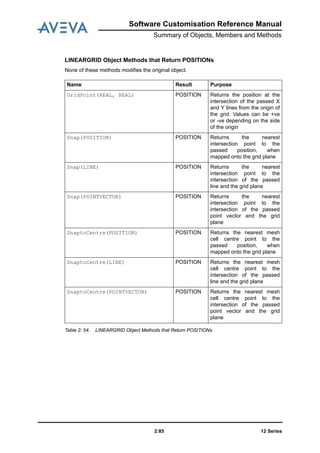
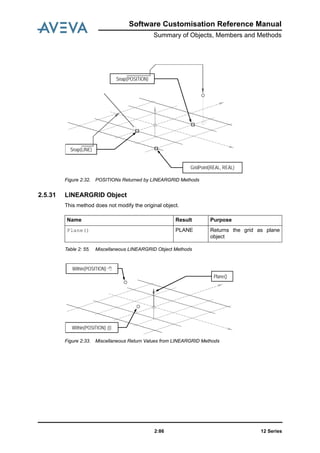
  • 68.
    12 Series2:56 Software CustomisationReference Manual Summary of Objects, Members and Methods 2.5.24 FORM Object Members Name Type Purpose FormRevision STRING Get/ Set Form Revision text. FormTitle STRING Get/ Set Form title. IconTitle STRING Get/ Set Icon title. Initcall STRING Get/ Set Callback executed when form is initialised. Autocall STRING Get/ Set Callback executed when any of the specified application attributes have changed. Okcall STRING Get/ Set Callback executed when OK button is pressed. Cancelcall STRING Get/ Set Callback executed when CANCEL button is pressed. KeyboardFocus GADGET Get/Set Gadget to have initial keyboard focus on display of the form. One of TEXTFIELD, TEXTPANE, BUTTON, TOGGLE or ALPHA VIEW. AutoScroll BOOLEAN Get/Set If AutoScroll is selected the form will automatically gain horizontal or vertical scrollbars if the forms size becomes too small to display its defined contents. This member does not apply to form types Main Window and Document.
  • 69.
    Software Customisation ReferenceManual Summary of Objects, Members and Methods 12 Series2:57 Quitcall STRING Get/ Set Callback executed whenever the user presses the Quit/ Close icon (X) on the title bar of forms and the main application window. For forms of type MAIN, the QUITCALL callback is executed, if present. This permits the user to terminate the application, and so the associated PML callback should prompt the user for confirmation. For all other form types, the QUITCALL callback is executed, if present, and then the form and its children are hidden unless the PML callback returns an error. When the form nest is hidden the CANCELCALL callback for each form of the nest is executed (in reverse display order). Maximised BOOLEAN Get/Set Get/set form’s maximised status (on screen). Active BOOLEAN Get Only Gives form's active/inactive status. Popup MENU Get/Set Get/set form’s current popup menu. HelpContextID STRING Read/Write STRING Property:!!myform.HelpConte xtID = STRING - sets the context Id within the help file for this form. STRING=!!myform.HelpCont extID - gets the current context Id for this form. Name Type Purpose
  • 70.
    12 Series2:58 Software CustomisationReference Manual Summary of Objects, Members and Methods Table 2: 40. FORM Object Members Methods Killingcall STRING Get/Set Notify the form that it is being destroyed and allow the assigned callback method to destroy any associated resources, e.g. global PML objects which would otherwise not be destroyed (see Killing callback). FirstShowncall STRING Get/Set Allow the user to carry out any form actions which can only be completed when the form is actually displayed for the first time (see FirstShown callback). Name Result Purpose Name() STRING Get name. FullName() STRING Get the full form name (Including !!). NewMenu(STRING menuname) MENU Adds a new named menu to the form. NewMenu(STRING menuname, STRING type) MENU Adds a new named and typed menu to the form. The first argument is the name of the new menu; the second argument is the type of the menu, and must be either ‘POPUP’ or ‘MAIN’. SetActive(BOOLEAN) NO RESULT SetActive(FALSE) greys- out all gadgets on the form, but doesn’t set their Active status, so that SetActive(TRUE) restores the form to the precise state it was in before greying out, i.e. any inactive gadgets will still be inactive. Name Type Purpose
  • 71.
    Software Customisation ReferenceManual Summary of Objects, Members and Methods 12 Series2:59 SetGadgetsActive(BOOLEAN) NO RESULT SetGadgetsActive(FALS E) greys out all gadgets on the form and sets their Active status to ‘inactive’, i.e. their previous active state is lost. Similarly SetGadgetsActive(TRUE) greys-in all gadgets and sets their Active status to ‘active’. SetPopup(MENU) NO RESULT Specifies the pop-up to be displayed when the right- hand mouse button is released over the form background. RemovePopup(MENU) NO RESULT Removes a pop-up associated with a form. GetPickedPopup() MENU Returns the last picked popup menu for the form. Show('FREE') NO RESULT Show the form on the screen as a FREE form. Show('AT', REAL X, REAL Y) NO RESULT Show the form as a FREE form with the origin at the X,Y relative screen position. Show('CEN', REAL X, REAL Y) NO RESULT Show the form as a FREE form with its centre at the X,Y relative screen position. Shown() BOOLEAN Get 'shown' status Hide() NO RESULT Hides the form (removes it from the screen) Owner() FORM Returns the form's parent form, or unset variable if the form is free-standing SetOpacity( REAL PERCENT ) NONE Set the percentage opaqueness of the form as an integer in the range 10 (nearly transparent) to 100 (opaque - default). This is only valid for non-docking Dialog and BlockingDialog form types. Subtype( ) STRING Gets the form's subtype, one of 'DIALOG', 'BLOCKINGDIALOG', 'MAIN', 'DOCUMENT' Name Result Purpose
  • 72.
    12 Series2:60 Software CustomisationReference Manual Summary of Objects, Members and Methods Table 2: 41. FORM Object Methods Note: SetActive()and SetGadgetsActive()can be used in combination with each other and with the Active property of individual gadgets. Commands SETUP FORM A form definition is introduced by the SETUP FORM command and terminated by a corresponding EXIT command. Once in Form Setup mode you can call any commands for defining the form’s properties, creating a menu bar (see BAR object), main and popup menus (see MENU object) and any gadgets which it is to own. Once-only form attributes are entered as part of the SETUP FORM command line; modifiable attributes are entered as contents of the form. You can define the FORM to be either PML-controlled, or core-code controlled using the qualifier attribute control type, with values ‘PML” or “CORE”. NOALIGN The gadgets BUTTON, TOGGLE, TEXT, OPTION, single line PARGRAPH fit within 1 vertical grid unit and are by default drawn with their Y-coordinate adjusted so that they would approximately centre-align with an adjacent BUTTON. This pseudo-alignment introduces small errors in all but a few circumstances and prevents accurate controlled layout. NOALIGN prevents this (historical) gadget auto-alignment. Use NOALIGN in conjunction with PATH RIGHT (the default path) and HALIGN CENTRE, as it gives a better layout, with fewer surprises. Note: It is bad practice to place one gadget on top of another. This may lead to gadgets being obscured. The commands to set modifiable attributes are described after the syntax graph. SetUndoable( ) STRING, ANY Undoable( ) STRING Name Result Purpose
  • 73.
    Software Customisation ReferenceManual Summary of Objects, Members and Methods 12 Series2:61 CANCELCALL This command defines the callback string which is executed whenever the form is dismissed from the screen via the CANCEL button or the QUIT/CLOSE control on the window title bar. Note: This command overrides the callback string on the CANCEL button. CURSORTYPE When a screen cursor enters a view, the view gadget determines what cursor type should be displayed initially, and what type will be displayed during different types of graphical interaction. You can specify the initial setting for the cursor type using this command. Note: You cannot specify an initial cursor type for VOLUME views. .---------------<---------------------------. / | >--SETUP FORM fname --+-- MAIN -----+-------------------------------| +-- DOCUMENT -+- FLOAT -----------------------| | ‘-------------------------------| +-- DIALOG ---+- DOCKing -+-------------------| | |- Left ---. | | | |- Right --| | | | |- Top ----| | | | ‘- Bottom -‘--------| | |- RESIzeable ------------------| | ‘-------------------------------| +-- BLOCKingdialog -+- RESIzeable ------------| | ‘-------------------------| +-- AT <xypos> -------------------------------| +-- SIZE val val -----------------------------| +-- NOQUIT -----------------------------------| +-- NOALIGN ----------------------------------| +-- CORE -------------------------------------* | .---<------. |/ | +-- <form> --* form contents ‘—EXIT --> Default: Dialog, non-resizeable; size adjusted automatically to fit contents. >-- CANCELcall text -->
  • 74.
    12 Series2:62 Software CustomisationReference Manual Summary of Objects, Members and Methods Note: There are other cursor types that are for AVEVA’s use only. HALIGN Works in conjunction with PATH and HDISTANCE. Defines how a newly added gadget should be aligned horizontally with the preceding gadget. HDISTANCE Works in conjunction with PATH and HALIGN. Defines how a newly added gadget should be spaced horizontally with respect to the preceding gadget. ICONTITLE Defines the title for the icon when the form is minimised. INITCALL Defines the callback string that is executed each time the form is displayed. This callback is usually run to check the validity of showing the form and to initialise gadget values. OKCALL Defines the OK callback string for a form. It is executed whenever the form is dismissed from the screen via its OK button or that of an ancestor. Note: This command overrides the callback string on the OK button. >-- CURSortype --+-- POINTER ----. +-- NOCURSOR ---| +-- PICK -------| +-- PICKPLUS ---| ‘-- CROSSHAIR --‘--> >-- HAlign --+-- Left ---. ‘-- Right --‘--> >-- HDistance value --> >-- ICONTItle text --> >-- INITcall text --> >-- OKcall text -->
  • 75.
    Software Customisation ReferenceManual Summary of Objects, Members and Methods 12 Series2:63 PATH Defines the direction in which a sequence of new gadgets is to be added to a form. The path setting remains until you give another PATH command. Used with HALIGN, HDISTANCE, VALIGN, VDISTANCE. TITLE Defines the form title. VALIGN Use in conjunction with PATH and VDISTANCE. Defines how a newly added gadget should be aligned vertically with the preceding gadget. VDISTANCE Works in conjunction with PATH and VALIGN. Defines how a newly added gadget should be spaced vertically with respect to the preceding gadget. FirstShown and Killing Events The following actions determine the life of a form: >-- PATH --+-- Up ------. +-- Down ----| +-- Left ----| ‘-- Right ---‘--> Default: Path Right. >-- TITLe text --> >-- VAlign --+-- Top -----. ‘-- Bottom --‘--> >-- VDistance value --> Define the form, its gadgets, methods and layout are specified (usually in a '.pmlfrm' file) Load the form definition is read by PML and the form's constructor method is run Show the form's INITialisation event is raised, and the display process is begun Activate the form and its contents is created by the window management system and is activated (actually displayed) and the FIRSTSHOWN event is raised
  • 76.
    12 Series2:64 Software CustomisationReference Manual Summary of Objects, Members and Methods Notes: 1. Load, Activate and Kill only happen once in the life of a form 2. Show and Hide may happen repeatedly 3. The form's Constructor is run once only 4. The FirstShown event only happens once 5. INIT is raised for every Show The PML user can define callbacks to service any or all of the above events. These will typically be open callbacks supported by form methods. They can be assigned within the form's Constructor method (recommended), or within the form's Setup Form . . . Exit block. FIRSTSHOWN callback Typically assigned in the Constructor by !this.FirstShownCall = '!this.<form_method>' The purpose is to allow the user to carry out any form actions which can only be completed when the form is actually displayed. There are a variety of circumstances where this arises and it is often difficult to find a reliable solution. A couple of examples are given below. Commands which manipulate form, menu or gadget visual properties, executed from a PML macro, function or callback may not happen until control is returned to the window manager's event loop. For example, in the application's start-up macro the command sequence show !!myForm … hide !!myform will result in the form not being displayed, but also not becoming known at all to the window manager. Attempts to communicate with this form via the External callback mechanism (possibly from another process) will not work. This can be rectified by doing the '!this.hide()' within the FIRSTSHOWN callback, because the form will be guaranteed to be actually displayed (and hence known to the window manager), before it is hidden. It is sometimes difficult to achieve the correct gadget background colour setting the first time the form is displayed. This can be resolved by setting the required colour in the FIRSTSHOWN callback. KILLING callback Typically assigned in the Constructor by !this.KillingCall = '!this.<form_method>' The purpose is to notify the form that it is being destroyed and allow the assigned callback method to destroy any associated resources, e.g. global PML objects which would otherwise not be destroyed. This may be necessary because PML global objects will survive an application module switch, but may not be valid in the new module. Notes: 1. The callback method MUST NOT carry out any modifications to the Gadgets belonging to the form or to the Form itself (e.g. don't show or hide the form). Attempts to edit the form or its gadgets may cause unwanted side effects or possible system errors. Hide the form is hidden and its OK or CANCEL event is raised Kill the form's KILLING event is raised and then the form is destroyed. It is no longer known to PML
  • 77.
    Software Customisation ReferenceManual Summary of Objects, Members and Methods 12 Series2:65 2. Form callbacks designed for other Form events (e.g. CANCEL, INIT) are rarely suitable as killing callbacks. 3. Restrict form and gadget operations to querying. 2.5.25 FORMAT Object The format object is used to format the output of real objects and especially real physical objects such as distances. It controls precision, units, conversions and unit qualifiers. Format objects are also used to control conversions of strings to reals by providing guidance on dimensions and units. This occurs for text boxes in the user interface, and also for real to string and string to real conversion methods. Members Name Type Purpose CompSeparator STRING | | Separator used for multi- component data types such as POSITIONS (Default SPACE). Denominator REAL 32 Largest denominator for Imperial fractions (Default 32) Dimension STRING ‘NONE’ L L2 L3 Number is un-dimensioned (Default) Number is a LENGTH Number is an AREA Number is a VOLUME The TYPE string can be any existing values (L L2 L3 NONE) or any standard dimension (i.e. Measure), or any standard unit (which indirectly defines a dimension) either in full name (e.g. metre), or description or shortname (unitqualifier), or compound unit qualifier (e.g. lb/ m4) form. No validation is actually performed until the format is used. DP REAL 2 Number of decimal places for decimal fractions (Default 2) ENU BOOLEAN TRUE FALSE Use ENU format when outputting POSITIONS (Default) Use XYZ format when outputting POSITIONS
  • 78.
    12 Series2:66 Software CustomisationReference Manual Summary of Objects, Members and Methods Fraction BOOLEAN FALSE TRUE Fractional part output as decimal (Default) Fractional part output as fraction FtLabel STRING |’| Label used for feet e.g. ' or FT or ft or feet (Default ‘ ) InchSeparator STRING |.| Separator between inches and fractions (Default . ) Label STRING |mm| General distance label e.g. mm or m or " or IN (Default is no label) The label (and similarly the foot label and the inch separator can be any string (within normal and reasonable unit limitations!). They are primarily supplied to allow physical values to be formatted in any reasonable way on reports, in files and in text fields etc. However it is often necessary for such values to be re-interpreted by the system (especially as they are validated after entry in the text field. In these case, if normal value and unit parsing fails to interpret the values then the string is reinterpreted with the Label, ftlabel and inch separators substituted by normal standard unit qualifiers and separators enabling the values and units to be successfully interpreted when correct and consistent with the format object. If the label is set to UNITS then the standard unit qualifier will be output by the system, consistent with the dimension of the format. PadFractions BOOLEAN FALSE TRUE Do not pad Fractions (Default) Pad Fractions with trailing spaces Name Type Purpose
  • 79.
    Software Customisation ReferenceManual Summary of Objects, Members and Methods 12 Series2:67 Table 2: 42. FORMAT Object Members TrailZeros BOOLEAN Trailing zeros are included up the required number of decimal places (as set by the DP member) if TrailZeros is unset, or if it is TRUE. If TrailZeros is FALSE trailing zeros will be removed up to and including a trailing decimal point Units STRING MM M FINCH INCH Output number in millimetres (Default) Output number in metres. Output number in feet and inches Output number in inches The TYPE string can be any standard form of unit, or a compound unit. If dimension is unset the unit often defines what the unit is when the format is used. No validation is performed on this string until the format is used when the values will be converted to units specified. OriginExp BLOCK || |/*| |CE| With respect to World (Default) With respect to World With respect to Current Element Zeros BOOLEAN TRUE FALSE Leading zeroes are displayed for Imperial units (Default). Leading zeroes are not displayed for Imperial units Name Type Purpose
  • 80.
    12 Series2:68 Software CustomisationReference Manual Summary of Objects, Members and Methods 2.5.26 FRAME Gadget Members Table 2: 43. FRAME Gadget Members Methods Table 2: 44. FRAME Gadget Methods Command The FRAME command defines a frame gadget. A frame is a container which owns and manages any gadgets defined within its scope, including other frames. Name Type Purpose Tag STRING Get/Set Text to appear as title on the frame. Val REAL Get/ Set Selected radio button index as integer. RGroupCount REAL Get only Count of radio buttons (RTOGGLES) within the FRAME’s radio group. Returns zero if the FRAME is not a radio group. Callback STRING Get/Set Radio group select callback string. Expanded BOOLEAN Get/Set FoldUpPanel’s expanded status Name Result Purpose Rtoggle( !index is REAL ) GADGET Returns the RTOGGLE gadget with index !index. Background() STRING Get Background Colour Name. Some gadgets do not support this property in all circumstances, e.g. gadgets which are showing a pixmap. Gadgets whose colour has not been set explicitly, may not have a colour with a known colourname. In this case an error is raised..
  • 81.
    Software Customisation ReferenceManual Summary of Objects, Members and Methods 12 Series2:69 The frame gadget properties visible and active will automatically apply to all of its children, but will not overwrite their corresponding property values. There are five types of FRAME: NORMAL, TABSET, TOOLBAR, PANEL and FOLDUP PANEL. • A NORMAL frame can contain any type of gadget, including other frames. It also behaves as a radio group, with radio buttons defined by the set of RTOGGLE gadgets that it directly contains. See the entry RTOGGLE Object for more about the RTOGGLE gadget. • A TABSET frame can contain only tabbed page FRAMEs; you cannot nest them and they are not named. • A TOOLBAR frame can contain only a subset of gadget types: BUTTON, TOGGLE, OPTION, and TEXT. It must have a name and can appear only on main forms. where the sub-graphs <toolbar>, <tabset> and <formc> define the allowable gadgets and layout commands available within the specific container type. Note: The graph <formc> defines the normal content of a form, all gadget types (except BAR) are allowed. There are restrictions on frame gadget types as defined below. Setting Up a TOOLBAR Frame The toolbar frame allows you to define formal toolbars that contain all the gadgets in the frame’s scope. You can define a toolbar frame only for a main form, and a main form can contain only toolbar frames. .---<-------. / | >--FRAME gname -+- TOOLBAR -+- tagtext -+- <toolbar> -* toolbar contents | ‘—- EXIT --> | .---<--------. | / | +- TABSET -+-- <fgpos> ---| | +-- <fganch> --| | +-- <fgdock> --| | +-- <vshap> ---* | | .---<--------. | |/ | | +-- <tabset> --| tabbed frame contents | +-- NL --------* | ‘-- EXIT --> +- PANEL --+----------. | ‘--INDENT--| +- FOLDUPpanel -------| .---<--------. |/ | +-- tagtext ---| +-- <fgpos> ---| +-- <fganch> --| +-- <fgdock> --| +-- <vshap> ---* | .---<--------. |/ | +-- <formc> ---* form contents ‘-- EXIT -->
  • 82.
    12 Series2:70 Software CustomisationReference Manual Summary of Objects, Members and Methods The graph below defines the allowable content of a toolbar frame: Setting Up a TABSET Frame A TABSET frame defines a container for a set of tabbed page frames. It has no visible border and no name. The graph below defines allowable contents of a TABSET frame: Note: Frame gadgets defined anywhere within the TABSET frame can only be of type NORMAL, not TOOLBAR or TABSET frames. NORMAL frames defined directly within the TABSET frame, will appear as tabbed pages within it. Setting up a Panel Frame The panel is a rectangular region within a form which can contain the normal form gadgets, but doesn't have to be enclosed in a solid-line box. Notes: 1. After choosing frame type Panel, the contents is defined in the usual manner. 2. Tagtext can be specified, but it is never displayed. 3. The panel has no visible enclosing box, unless the INDENT option is specified when it will have a 3D indented appearance. 4. Panel supports all the attributes of a Normal Frame including the notion of a radio button group. Setting up in Fold Up Panel This is a rectangular panel with a visible title bar, and border. The following form in this section below shows examples of fold-up panel frame gadgets. Notes: 1. After choosing frame type FoldUpPanel, the contents is defined in the usual manner. The panel can contain the usual PML gadgets except another FoldUpPanel. 2. Separate events are raised after expanding or collapsing the panel. >-- toolbar -+-- <fbutn> ----. Button gadget +-- <ftext> ----| text gadget +-- <ftogl> ----| toggle gadget +-- <foptio> ---| option gadget +-- <fvar> -----| form variable definition +-- <pml> ------| general PML +-- <nxasgn> ---| PML expressions ‘-- <varset> ---‘----> variable setting VARº >-- tabset >-+-- <fframe> ---. frame gadget +-- <fvar> -----| form variable definition +-- <pml> ------| general PML +-- <nxasgn> ---| PML expressions ‘-- <varset> ---‘----> variable setting VARº
  • 83.
    Software Customisation ReferenceManual Summary of Objects, Members and Methods 12 Series2:71 3. The default state is 'expanded'. 4. When the panel expands or collapses, any gadgets which lie below the panel and between (or partially between) the panel's horizontal limits will be moved down or up the form. 5. If the form's AutoScroll attribute is selected, then a scroll bar will automatically appear whenever gadgets have been moved off the bottom of the form, so that all of the form is still accessible. 6. The FoldUpPanel supports all the attributes of a Normal Frame including the notion of a radio button group The form shown below is a docking dialog which has four fold-up panels, the first two are collapsed (hidden) and the second two are expanded (shown). Each one has a title bar which displays the panel's tag text, and an icon which allows the panel to fold-up or fold- down when it is pressed. Note the use of the form's AutoScroll attribute and the resulting scroll bar. The PML code for this example form is given in the file textbug.pmlfrm. For frames which are FoldUpPanels, 'HIDDEN' and 'SHOWN' events are raised whenever the user interactively folds or unfolds the panel. These events are only fired if a PML open callback is defined. This ensures that the SELECT event, used to signal selection of a radio button within a fold- up panel can still be handled by simple (non-Open) callbacks. To manage FoldUpPanels which are also radio groups, then you must supply an open callback so that you can differentiate the panel's SELECT, HIDDEN and SHOWN events.
  • 84.
    12 Series2:72 Software CustomisationReference Manual Summary of Objects, Members and Methods Tabbed Page Frame Visible Property and 'Hidden' event The VISIBLE property allows a tabbed page to be selected and given focus, e.g. !this.TabbedPage.visible = true When a tabbed page frame's tab is interactively selected, there is now a HIDDEN event raised when the currently shown page is hidden, followed by a SHOWN event when the newly selected page is shown. These events are only raised if a PML open callback has been assigned. 2.5.27 Graphical Selection The Selection object allows the PML user to interact with the graphical selections set. It is not reliant on PDMS being in graphical mode - the selection set can be created and manipulated in TTY mode, and thus can be used in regression tests. Only significant elements can be in selection sets. The definition of what is significant varies between graphical interaction modes: • in Design navigate mode, all database elements are significant • in Model Editor mode, then only those database elements defined in the Model Editor definition are significant, and some non-database elements. • In Draft mode, only drawlist elements are significant. Most methods look for the 'highest significant element' - they climb up the ownership tree looking for significant elements, until the value of 'scope' is reached - the nearest significant element below this ceiling is used. Set-up Methods Methods that Modify Object Note that this object is manipulating the graphical selection set itself. As elements are added or removed, they will be highlighted in the graphics view at the same time (if in graphics mode). Name Purpose .selection() Creates an empty selection object . Name Result Purpose .scope(DBREF) BOOLEAN Defines the scope of the selection, i.e. defines the top element that the selected elements must exist beneath. Default is WORLD. .add(DBREF) DBREF Adds the highest significant parent of passed element to selection
  • 85.
    Software Customisation ReferenceManual Summary of Objects, Members and Methods 12 Series2:73 .addConnected(DBREF) ARRAY Simulates "Select connected" for piping components: Adds the given component and the connected network relative to the component .addBranchLeg(DBREF) ARRAY Simulates "Select leg" for piping components: Adds the given component and adjacent components within the branch which are in the same leg as the passed component .addAttached(DBREF) ARRAY Simulates "Select attached" for sections: Adds the given section and all sections attached into the selection .addOffspring(DBREF) ARRAY Adds the highest significant sub- elements of given element to selection. This action as if DBREF were ancestor for select .remove(DBREF) No Result Remove highest significant parent of passed element from selection .clear() No Result Empty the selection .getCurrent() No Result Set the contents of the selection to the contents of the current graphical selection set .getAll() No Result Set the selection set to contain the entire drawlist .setCurrent() No Result Set the current graphical selection set to be the same as the contents of the selection set
  • 86.
    12 Series2:74 Software CustomisationReference Manual Summary of Objects, Members and Methods Query Methods Table 2: 45. Graphical Selection Object Methods 2.5.28 IDList The IDList object provides features for the accessing and manipulation of elements in an IDLIST database element. Elements in the IDlist object must be significant elements, in the following sense. The database element reference supplied to the constructor is examined to see if it either: • Owns a valid design drawlist element; in which case the supplied element is added to the idlist object. • Is owned by a drawlist element, in which case the significant owner is added to the idlist. Elements below the level of the design drawlist element cannot be manipulated via this object. Name Result Purpose .isValid() BOOLEAN Is the selection valid. (This is a standard method, and should not normally need to be called) .selected(DBREF) DBREF Returns highest significant parent of given element, i.e. the element which will be included in the selection .isSelectable(DBREF) BOOLEAN Returns true if the given element is in itself selectable within the scope of the selection .isModifiable(DBREF) BOOLEAN Returns true if the highest significant parent of the given element is modifiable .inSelection(DBREF) BOOLEAN Returns true if the given element exists in the selection .ancestors(DBREF) ARRAY of DBREFs Returns list of permissible ancestors for given element, within the current scope .getSelection() ARRAY of DBREFs Returns all elements in the selection
  • 87.
    Software Customisation ReferenceManual Summary of Objects, Members and Methods 12 Series2:75 Set-up Methods Before adding an ADDE, the object will check whether there is an 'active' ADDE in the list - this is an ADDE for the identical element, without an intervening REME for the same object. If so, it will not add it again. Similarly for REMEs. When removing ADDEs or REMEs, the system will start from the bottom of the list and work backwards removing the requested entry. Access Methods Table 2: 46. IDlist Object Methods Name Purpose .idlist(DBREF) Creates an PML IDlist object from the given DBREF of an IDLIST. Searches up the ownership hierarchy until a significant element is found, and adds this to the Idlist. Name Result Purpose .add (DBREF) No Result Adds a ADDE to the IDLIST. If there is already an ADDE of either the same element or one of its ancestors (without an intervening REME) then nothing will be done. If there is an intervening identical REME, then the REME is removed. .add (SELECTION) No Result Adds ADDEs for the entire selection set to the IDList at this point, in the same way as for individual DBREFs. .remove (DBREF) No Result If there exists an ADDE for this element in the list, then it is removed. If there exists an ADDE for an ancestor for this element, then a REME is inserted. .remove (SELECTION) No Result Removes all ADDEs defined in the selection set, using the same rules as in removing a single element. .copy(IDLIST other) BOOLEAN Clears the idlist, and adds all the entries from idlist other. Returns TRUE if copy successful. .clear() No Result Remove all elements from idlist .query() ARRAY of STRINGS Returns an array of strings of the form: ADDE element or REME element itemising all the elements in the idlist.
  • 88.
    12 Series2:76 Software CustomisationReference Manual Summary of Objects, Members and Methods 2.5.29 LINE Gadget Members and Methods The LINE gadget supports the standard default gadget members and methods only. Command The Line gadget gives the ability to display horizontal or vertical lines to separate groups of gadgets on a form, for increased clarity of intent. The line's presentation reflects the colour of the current Windows scheme. .-------<---------------. / | >--- LINE gname -+- tagtext ---------------| +- <fgpos> ---------------| +- <fganch> --------------| +- <fgdock> --------------* | +- VERTical ---. | | '- HORIZontal -'- <vshap> --> Example: The form 'Nested Frames' above shows a vertical LINE and a horizontal LINE. The code snippet below shows the construction of the innermost frame f3. frame .f3 'f3' vdist 0.2 hdist 0.5 toggle .t1 'Toggle 1' at x 2 line .horiz 'H-Line' Horiz wid.f3 hei.t1 toggle .t2 'Toggle 2' line .vert at xmin.f3 ymin.f3+0.5 Vert wid 2 hei.f3
  • 89.
    Software Customisation ReferenceManual Summary of Objects, Members and Methods 12 Series2:77 exit Notes: 1. The tag text is never displayed. 2. Line does not apply to toolbars. 3. The graph <vshap> allows the line's width and height to be set either specifically or in terms of other gadgets on the form. 4. Setting the height for a Horizontal separator or the width for a Vertical separator causes the line to be drawn across the middle of the implied area. This allows for equal spacing on each side of the separator line. Otherwise a default width or height is assumed. 5. The Dock and Anchor attributes allow the Lines to be dynamic and respond to interactive changes in form size. 6. The gadget is not interactive and has no associated value. 2.5.30 LINE Object See also the POINTVECTOR object. Members Table 2: 47. LINE Object Members Definition Methods None of these methods modifies the original object. Table 2: 48. LINE Object Definition Methods Name Type Purpose StartPosition POSITION Get/Set Start position of line. EndPosition POSITION Get/Set End position of line. Name Result Purpose Line( POSITION first, POSITION second) LINE Creates a LINE between the given positions, first and second. String() STRING Returns the line as a STRING. Direction() DIRECTION Returns a DIRECTION representing the direction of the line. Direction(DIRECTION way) LINE Creates a new line with the same start position and length but in the direction given by way.
  • 90.
    12 Series2:78 Software CustomisationReference Manual Summary of Objects, Members and Methods Figure 2:20. : Basic LINE Definition LINE Object Methods that Return BOOLEANs None of these methods modifies the original object. Figure 2:21. LINE Object Methods that Return BOOLEANs Figure 2:22. BOOLEANs Returned by LINE Object Methods EndPosition StartPosition Direction(DIRECTION) Name Result Purpose On(POSITION where) BOOLEAN Returns TRUE if where lies on the unbounded line. On(POSITION where, BOOLEAN bounded) BOOLEAN Returns TRUE if where lies on the line, bounded indicates if the point is also checked to be on the bounded line segment. OnProjected(POSITION where) BOOLEAN Returns TRUE if where, when projected onto the line, lies within the bounded line. OnProjected(POSITION) On (POSITION)
  • 91.
    Software Customisation ReferenceManual Summary of Objects, Members and Methods 12 Series2:79 LINE Object Methods that Return POSITIONs None of these methods modifies the original object. Table 2: 49. LINE Object Methods that Return POSITIONs Figure 2:23. POSITIONs Returned by LINE Object Methods Name Result Purpose Intersection(LINE other) POSITION Returns the intersection point of the passed LINE on the line definition Intersection(POINT point, VECTOR vector) POSITION Returns the intersection point of the passed POINTVECTOR on the line definition. Intersection(PLANE plane) LINE Returns the intersection line of plane on the line definition. Intersections(ARC arc) ARRAY OF POSITIONS Returns the intersection points of arc on the line definition. Near(POSITION position) POSITION Returns the nearest position on the line definition to position. Proportion(REAL proportion) POSITION Returns the position at proportion along the “bounded” line from the StartPosition. Values > 1 will give positions off the end of the line. Values < 0 will give positions off the start of the line. Intersection(LINE) Proportion(REAL) Near(POSITION)
  • 92.
    12 Series2:80 Software CustomisationReference Manual Summary of Objects, Members and Methods LINE Object Methods that Return REALs None of these methods modifies the original object. Figure 2:24. Table -48: LINE Object Methods that Return REALs Figure 2:25. REALs Returned by LINE Object Methods LINE Object: Miscellaneous Methods None of these methods modifies the original object. Figure 2:26. LINE Object Miscellaneous Methods Name Result Purpose Length() REAL Returns the length of the line. Distance(LINE other) REAL Returns the minimum distance between the line definition and other. Distance(POSITION position) REAL Returns the minimum distance between the line definition and position. Name Result Purpose Plane() PLANE Returns a plane object, using the StartPosition and Direction of line object Pointvector() POINTVEC TOR Returns a POINTVECTOR object, using the StartPosition and Direction of line object Distance(LINE) Distance(POSITION) Length()
  • 93.
    Software Customisation ReferenceManual Summary of Objects, Members and Methods 12 Series2:81 LINE Object Methods that Return LINEs (a) None of these methods modifies the original object. Table 2: 50. LINE Object Methods that Return LINEs (a) Name Result Purpose SetLengthStart(REAL length) LINE Returns a new line, maintaining the original StartPosition and direction, with an EndPosition to match length. SetLengthEnd(REAL length) LINE Returns a new line, maintaining the original EndPosition and direction, with a StartPosition to match length. Towards(POSITION position) LINE Returns a new line object with the same StartPosition and the same relative EndPosition (Length) of the original line, but the direction is from the start position to position. From(POSITION position) LINE Returns a line, where the StartPosition is set position, maintaining the original EndPosition. To(POSITION position) LINE Returns a line, where the EndPosition is set to position, maintaining the original StartPosition ExtendStart(REAL distance) LINE Returns a new LINE, where the StartPosition has been extended in the opposite direction of line by distance. ExtendEnd(REAL distance) LINE Returns a new LINE, where the EndPosition has been extended in the direction of the line by distance.
  • 94.
    12 Series2:82 Software CustomisationReference Manual Summary of Objects, Members and Methods Figure 2:27. LINEs Returned by LINE Object Methods (a) LINE Object Methods that Return Lines (b) Figure 2:28. LINE Object Methods that Return LINEs (b) SetLengthStart(REAL) From(POSITION) Towards(POSITION) To(POSITION) ExtendEnd(REAL) ExtendStart(REAL) SetLengthEnd(REAL) Name Result Purpose ExtendStart(PLANE plane) LINE Returns a new LINE, where the StartPosition has been extended to plane. ExtendEnd(PLANE plane) LINE Returns a new LINE, where the EndPosition has been extended to plane. ReverseSense() LINE Returns a line, where the StartPosition and EndPosition have been transposed. Projected(PLANE plane) LINE Returns a LINE definition normalised onto plane. See picture. Parallel(POSITION position) LINE Returns a parallel to the line definition of the line object, through position. All other members are copied. See picture. Offset(DIRECTION direction, REAL offset) LINE Returns a parallel line to the LINE object, offset by offset from the original in the given direction. See picture.
  • 95.
    Software Customisation ReferenceManual Summary of Objects, Members and Methods 12 Series2:83 Figure 2:29. LINEs Returned by LINE Object Methods (b) LINE Object Methods that Return Lines (c) Table 2: 51. LINE Object Methods that Return LINEs (c) Figure 2:30. LINEs Returned by LINE Object Methods (c) Name Result Purpose Overlap(LINE other) LINE Returns the overlapping line of two parallel lines. All positions are return projected onto the original object. See picture. Union(LINE other) LINE Returns the union of LINE and other. The two are parallel lines, all positions are return projected onto the original object. See picture. Offset(DIRECTION, REAL) Parallel(POSITION) Projected(PLANE) Overlap(Line) Union(Line)
  • 96.
    12 Series2:84 Software CustomisationReference Manual Summary of Objects, Members and Methods LINEARGRID Object Construction Aids Members Table 2: 52. LINEARGRID Object Members Definition Methods These methods do not modify the original object. Table 2: 53. LINEARGRID Object: Basic Members Figure 2:31. LINEARGRID Basic Definition Name Type Purpose Position POSITION Get/Set Origin of the grid Orientation ORIENTATI ON Get/Set Orientation of the grid XSpacing REAL Get/Set Spacing in the X direction YSpacing REAL Get/Set Spacing in the Y direction Name Result Purpose Lineargrid( POSITION, ORIENTATION, REAL, REAL) LINEARGRI D Creates a grid with the given POSITION, ORIENTATION, and X and Y spacing. String() STRING Returns the grid as a string X YZ Orientation XSpacing YSpacing Position
  • 97.
    Software Customisation ReferenceManual Summary of Objects, Members and Methods 12 Series2:85 LINEARGRID Object Methods that Return POSITIONs None of these methods modifies the original object. Table 2: 54. LINEARGRID Object Methods that Return POSITIONs Name Result Purpose GridPoint(REAL, REAL) POSITION Returns the position at the intersection of the passed X and Y lines from the origin of the grid. Values can be +ve or -ve depending on the side of the origin Snap(POSITION) POSITION Returns the nearest intersection point to the passed position, when mapped onto the grid plane Snap(LINE) POSITION Returns the nearest intersection point to the intersection of the passed line and the grid plane Snap(POINTVECTOR) POSITION Returns the nearest intersection point to the intersection of the passed point vector and the grid plane SnaptoCentre(POSITION) POSITION Returns the nearest mesh cell centre point to the passed position, when mapped onto the grid plane SnaptoCentre(LINE) POSITION Returns the nearest mesh cell centre point to the intersection of the passed line and the grid plane SnaptoCentre(POINTVECTOR) POSITION Returns the nearest mesh cell centre point to the intersection of the passed point vector and the grid plane
  • 98.
    12 Series2:86 Software CustomisationReference Manual Summary of Objects, Members and Methods Figure 2:32. POSITIONs Returned by LINEARGRID Methods 2.5.31 LINEARGRID Object This method does not modify the original object. Table 2: 55. Miscellaneous LINEARGRID Object Methods Figure 2:33. Miscellaneous Return Values from LINEARGRID Methods Snap(POSITION) Snap(LINE) GridPoint(REAL, REAL) Name Result Purpose Plane() PLANE Returns the grid as plane object Plane() Within(POSITION) Within(POSITION)
  • 99.
    Software Customisation ReferenceManual Summary of Objects, Members and Methods 12 Series2:87 LINEARGRID Object Methods that Return XYOffsets This method does not modify the original object. Table 2: 56. LINEARGRID Object Methods that Return XYOffsets Figure 2:34. XYOffsets Returned by LINEARGRID Object Methods Name Result Purpose XYOffset(POSITION) XYPOSITIO N Returns the position, mapped onto the grid plane, in terms of an XY offset from the grid plane origin XYOffset(POSITION)
  • 100.
    12 Series2:88 Software CustomisationReference Manual Summary of Objects, Members and Methods 2.5.32 LIST Gadget Members Table 2: 57. LIST Object Members Name Type Purpose Val REAL Get/ Set Selected field-number of a single-choice list. Val REAL ARRAY Get/ Set Selected field numbers of a multiple-choice list. DText STRING ARRAY Get/ Set Set or get the entire list of display texts. DText[n] STRING Get Only Get the display text of the n'th field. PickedField REAL Get Only Last picked list field number. RText STRING ARRAY Get/ Set Set or get the list of replacement texts. RText[n] STRING et Only Get the replacement text of the n'th field. Count REAL Get only Get count of number of fields in the list val REAL Get/Set Selected field as integer. Zero implies no selection. Setting val to zero will cause an error for mandatory selection lists.
  • 101.
    Software Customisation ReferenceManual Summary of Objects, Members and Methods 12 Series2:89 Methods Name Result Purpose Add(STRING Dtext) NO RESULT Append an entry to the list, where Dtext is the text to display in the option list. Add(STRING Dtext, STRING Rtext)) NO RESULT Append and entry to the list, where Dtext is the text to display in the option list, and Rtext is the replacement text for the new field. If Rtext isn’t specified, it will be set to Dtext by default. FullName() STRING Get the full name of the gadget, e.g..'!!Form.gadget' Name() STRING Get the gadget's name, e.g. 'gadget' Owner() FORM Get owning form. Select(STRING text, STRING value) NO RESULT Select specified item in a list. text must be ‘Rtext’ or ‘Dtext’. value is the RTEXT or DTEXT of the item to be selected. Select(STRING text, ARRAY of STRING values) NO RESULT Select multiple choice list items. text must be 'Rtext' or 'Dtext'. values contains the RTEXT or DTEXT values to be selected. Selection( ) STRING ARRAY OF STRING Get selected RTEXT Array of RTEXT for multi- choice list. Selection(STRING text) STRING ARRAY OF STRING Get selected RTEXT or DTEXT Array of texts for multi-choice list. text must be 'Rtext' or 'Dtext'. Clear() NO RESULT Clear list contents and selections. ClearSelection() NO RESULT Clear list selections. SetPopup(MENU menu) NO RESULT Links menu with the gadget as a popup.
  • 102.
    12 Series2:90 Software CustomisationReference Manual Summary of Objects, Members and Methods RemovePopup(MENU menu) NO RESULT Removes popup menu from the gadget. GetPickedPopup() MENU Returns the last picked popup menu for the gadget. Refresh() NO RESULT Refreshes the display of the gadget. Shown() BOOLEAN Get ‘shown’ status. Type() STRING Get the gadget type as a STRING. SetToolTip(STRING) NO RESULT Allows a TOOLTIP to be edited. SetFocus() NO RESULT Move keyboard focus to this gadget. SetHeadings(!Dtexts is STRING) NONE Specifies the number of columns and sets the list's column headings. Dtexts contains a set of TAB separated sub-strings. SetHeadings(!Dtexts is ARRAY) NONE Specifies the number of columns and sets the list's column headings. Dtexts is an array of strings. Clear( !dtext ) NO RESULT Delete the field with the given DTEXT string. Clear( !fieldNumber ) NO RESULT Delete the specified field number. SetRows(Array of (Array of STRING)) NO RESULT This sets the display text for all the data fields of the list gadget by row. If the list gadget is already populated then it replaces all the current rows by the new ones. Array is an array of ‘row arrays’, and its size determines the number of rows in the list. Each entry is a row array of strings, which supplies the displayed text for each column of the row. The size of each row array must be less than or equal to the number of columns of the list. The columns are filled sequentially until the array is exhausted. Name Result Purpose
  • 103.
    Software Customisation ReferenceManual Summary of Objects, Members and Methods 12 Series2:91 Table 2: 58. LIST Object Methods Column Headings The number of columns is deduced from the List's data. If the user specifies a set of (1 or more) column headings before the list is populated, then this will determine the number of columns. If no headings are pre-specified then the number of columns is deduced from the display text (Dtext) of the List's first data field. This provides upwards compatibility for existing Appware using single column lists. A List gadget's headings can be replaced after the list has been populated. If the new headings specify the same number of columns then the headings are replaced but the List's data fields and selection remain unchanged. If the number of columns is different, then the list is replaced by an empty list with the new headings. Invoking the Clear() method will clear the list's data fields and rebuild the current headings. There are two methods for defining a List's column headings: SetColumns(Array of (Array of STRING)) NO RESULT This sets the display text for all the data fields of the list gadget by column. If the list gadget is already populated then it replaces all the current rows by the new ones. Array is an array of ‘column arrays’, and its size must match the number of columns of the list. The size of each all column arrays must be the same and determines the no of rows in the list. Select(REAL column, STRING dtext) NO RESULT This selects the first list row whose column column has the display text dtext. If the field is not found then the list selection is unaltered. If the list is a multi-choice list then repeated use of this method will add selections to the list. Background() STRING Get Background Colour Name. Some gadgets do not support this property in all circumstances, e.g. gadgets which are showing a pixmap. Gadgets whose colour has not been set explicitly, may not have a colour with a known colourname. In this case an error is raised.. Name Result Purpose
  • 104.
    12 Series2:92 Software CustomisationReference Manual Summary of Objects, Members and Methods The data fields can be set using the List's DTEXT member or its Add methods, where a row's Dtext string can be a set of TAB separated column sub-strings for populating multiple columns. Alternatively you can use the SetRows or SetColumns methods. Single choice lists Reselection of the Selected Field can be Disallowed For Single choice lists there is a keyword NORESELECT which disables UnSelect and Select events when the currently selected field is clicked with the mouse, for example: list .l1 |List gadget| zeroSel noReselect width 15 length 5 tooltip 'single choice list' De-selection of the selected field for ZeroSelection lists For ZeroSelection lists it is possible to interactively deselect the selected field by clicking in unused rows or after the last column. The val member now allows programmatic de-selection of the current field. Unselect Events Single choice List gadgets support UNSELECT events. Typically when a field is selected, an UNSELECT event is raised for the previously selected field (if any) and then a SELECT event is raised for the new field. An UNSELECT event is raised whenever a selected field is interactively deselected. Notes: 1. UNSELECT events are not notified to PML unless an open callback has been specified (so that SELECT and UNSELECT events can be differentiated). 2. Typically the UNSELECT action allows Appware to manage consequences of deselection for any dependent gadgets or forms. 3. We recommend that you do not change the List's selection programmatically in an UNSELECT event. Command The LIST command defines a single-choice or multiple-choice list gadget, and specifies its position, tag, number of columns and callback text. Also defines the area (width and height) in which the displayed part of the list will appear. The arrays defining the display texts and replacement texts for the list options are usually set in the form's default constructor method.
  • 105.
    Software Customisation ReferenceManual Summary of Objects, Members and Methods 12 Series2:93 Figure 2:35. Syntax Graph -: Setting-up a LIST Object Note: The TOOLTIP keyword can be given at two different places in the syntax. 2.5.33 LOCATION Object Members Table 2: 59. LOCATION Object members .-------<--------. / | >- <flist> - LIST gname -+- <fgtagw> ------| +- <fgpos> -------| +- <fganch> ------| +- <fgdock> ------| +- CALLback text -| +- TOOLTIP text --| +- CORE ----------* Core managed gadget | +- MULTiple --------. | .-------<-------. | |/ | | +- NORESELect ----| | +- ZEROSELection -* | ‘-------------------‘- <vshap> +- TOOLTIP text -. ‘----------------‘-> Default: A single choice, mandatory selection list. Name Type Purpose Name STRING Location name. Description STRING Description, up to 120 characters. Locid STRING Location identifier. Refno STRING STRING containing Database reference no. IsCurrent BOOLEAN True for the current Location.
  • 106.
    12 Series2:94 Software CustomisationReference Manual Summary of Objects, Members and Methods Methods Table 2: 60. LOCATION Object Methods Note: The Sessions() method provides information required for remote expunging. This method will cause daemon activity for locations other than the current location. You can use the constructors in the following ways: !D = OBJECT LOCATION(!!CE) !D = OBJECT LOCATION(!!CE.Name) !D = !!CE.LOCATION()!D = !!CE.Name.LOCATION() In all cases, !!CE is assumed to be a DB database element and !!CE.Name is a STRING object containing the element’s name. These methods should assist performance improvements to AppWare by making it easier to get from Database element to Object. Name Result Purpose LOCATION(DBREF) LOCATION Returns a LOCATION object, given a DBREF. LOCATION(STRING) LOCATION Returns a LOCATION object, given a name or reference number (Global projects only). Dblist() ARRAY OF DB Array of DB objects for Allocated DBs. This method does not modify the original object. Sessions() ARRAY OF SESSIONS Return array of all Sessions extracted from COMMs db at the Location. This method does not modify the original object. String() STRING STRING containing Location name. This method does not modify the original object.
  • 107.
    Software Customisation ReferenceManual Summary of Objects, Members and Methods 12 Series2:95 2.5.34 MACRO Object Member Table 2: 61. MACRO Object Members Command 2.5.35 MDB Object Member Figure 2:36. MDB Object Members Name Type Purpose Filename STRING Inter-DB macro filename (up to 17 characters). From DB Source DB of inter-DB connection macro. Number REAL Inter-DB macro number. To DB Target DB of inter-DB connection macro. !ARRAY = MACROS $ Returns an array of all the MACRO objects in $ the project Name Type Purpose Name STRING Name of the MDB, up to 32 characters Description STRING MDB description, up to 120 characters Refno STRING String containing Database reference number
  • 108.
    12 Series2:96 Software CustomisationReference Manual Summary of Objects, Members and Methods Methods None of these methods modifies the original object. Table 2: 62. MDB Object Methods You can use the constructors in the following ways: In all cases, !!CE is assumed to be a DB database element and !!CE.Name is a STRING object containing the element’s name. These methods should assist performance improvements to AppWare by making it easier to get from Database element to Object. Command Name Result Purpose MDB(DBREF) MDB Returns an MDB object, given a DBREF. MDB(STRING) MDB Returns an MDB object, given a name or reference number. Current() ARRAY OF DBS Current databases as an array of DB objects Deferred() ARRAY OF DBS Deferred databases as an array of DB objects Mode() ARRAY OF STRINGS Returns ‘NR’ or ‘RW’ for each current DB of the MDB !D = OBJECT MDB(!!CE) !D = OBJECT MDB(!!CE Name !D = !!CE.MDB() !D = !!CE.Name.MDB() !ARRAY= MDBS $ Returns an array of MDB objects in the project
  • 109.
    Software Customisation ReferenceManual Summary of Objects, Members and Methods 12 Series2:97 2.5.36 MEASURE Object Members Table 2: 63. MEASURE Object Members Methods Name Type Purpose Constructors Measure () MEASURE Creates an invalid/unset dimension (INVALID). Measure(STRING) MEASURE Creates a MEASURE of which string is a 'reasonable' match to any of description, name, hashcode, format code (L, L2 etc) or any other recognisable name or abbreviation of a unit of the measure. Measure(REAL) MEASURE Creates a MEASURE of which the value of REAL is a (valid) enum value, or is a negative (non standard) dimension.. Name Result Purpose Description() String() STRING Long description of dimension. Name() STRING Unique name used for format statements and commands Hashcode() Ptype() STRING Hash code of dimension. Returns 'GENERIC' if generic dimension - i.e. non standard. Current Unit Methods currentunits() UNIT Returns current unit of this dimension. UnitQualifier() STRING Unit qualifier of current units. UnitFactor() REAL Conversion factor to database units from current units.
  • 110.
    12 Series2:98 Software CustomisationReference Manual Summary of Objects, Members and Methods SetUnits(unit) BOOLEAN Returns true if successfully set current unit of the dimension to unit. Numeric() BOOLEAN Sets current units of dimension to be Numeric (i.e. no unit conversion in place). NUMERIC units have Hashcode NUMB and null names, unitqualifiers, and descriptions. Returns true if successful. Default() BOOLEAN Sets current units of all dimensions to those defined by catalogue BUNI/DUNI. Returns true if successful. Suspend() BOOLEAN Suspends current units of all physical quantities and operates exclusively in database units. Pushes up one level of suspension. Returns true if successful. SuspendLevel() REAL Returns number of levels of suspension of current units. If 0 no suspension in force. Reinstate() BOOLEAN Reinstates currently defined current working units for all quantities. Clears suspension stack. Returns true if successful. Unsuspend() BOOLEAN Pops one level of suspension stack of current units. If level now one working in defined current units. Returns true if successful. General Queries IsNull() BOOLEAN TRUE if dimension is NONE. IsStandard() BOOLEAN TRUE if dimension is a named (standard) dimension. FALSE if specified from powers of its base components (i.e. Generic). Name Result Purpose
  • 111.
    Software Customisation ReferenceManual Summary of Objects, Members and Methods 12 Series2:99 2.5.37 MENU Object Members Table 2: 64. MENU Object Members DBUnits() DBUnit() UNIT Database unit for this dimension. UnitsOf() ARRAY of UNITs Set of standard units of this dimension. AllDimensions() ARRAY of MEASUREs Set of all standard dimensions. AllUnits() ARRAY of UNITs Set of all named Units Enum() REAL Unique integer ID for this Dimension. Positive if standard dimension (packed Hash Value) Negative if generic dimension coded from component base dimensions. Name Result Purpose Name Type Purpose Callback STRING Get/Set Sets/gets the callback on the menu. PickedField STRING Get Only Returns the DTEXT of the last picked menu field. Using this member is now deprecated. Use the PickedFieldName property instead. PickedFieldName STRING Get Only Returns the field name of the last-picked TOGGLE or CALLBACK field.
  • 112.
    12 Series2:100 Software CustomisationReference Manual Summary of Objects, Members and Methods Methods Name Result Purpose Add('SEPARATOR', {STRING fieldName}) NO RESULT Append a SEPARATOR field, with an optional STRING argument, fieldName, that if present denotes the unique field-name in the menu. Add('CALLBACK', STRING Dtext, STRING callback, {STRING fieldName}) NO RESULT Append a CALLBACK field with Dtext, which may contain multi-byte characters, but which cannot be NULL or blank. The argument callback gives the callback command. There is also an optional fieldName argument that, if present, denotes the unique field name in the menu. Add('FORM', STRING Dtext, STRING formName, {STRING fieldName}) NO RESULT Append a FORM display field with Dtext, which may contain multi-byte characters, but which cannot be NULL or blank. The argument formName, gives the name of the form to be displayed, which may be NULL but may not be blank. There is also an optional fieldName argument that, if present, denotes the unique field name in the menu Add('MENU', STRING DText, STRING menuName, {STRING fieldName}) NO RESULT Append a MENU (pullright) field with Dtext, which may contain multi-byte characters, but which cannot be NULL or blank. menuName gives the pullright menu name, which may be NULL but may not be blank. There is also an optional fieldName argument that, if present, denotes the unique field name in the menu.
  • 113.
    Software Customisation ReferenceManual Summary of Objects, Members and Methods 12 Series2:101 Add('TOGGLE', STRING Dtext, STRING callback, {STRING fieldName}) NO RESULT Append a TOGGLE field with Dtext, which may contain multi-byte characters, but which cannot be NULL or blank. The argument callback gives the callback command, which must be an open PML function. There is also an optional fieldName argument that, if present, denotes the unique field name in the menu. Clear() NO RESULT Removes all menu fields from the menu. Using this method is deprecated. Clear(STRING Dtext) NO RESULT Removes menu fields starting with the one that matches Dtext onwards. Using this method is deprecated FieldProperty(STRING menuField, STRING property) BOOLEAN Get the value of the property named in property for the menu field named in menuField. The allowed values for property are ‘ACTIVE’, ‘VISIBLE’, or ‘SELECTED’. FullName() STRING Returns menu object's full name, for example: ‘!!Form.Menu’. InsertAfter(STRING menuField, ‘CALLBACK’, STRING Dtext, STRING callback, {STRING fieldName}) NO RESULT Insert a CALLBACK field with Dtext, which may contain multi-byte characters, but which cannot be NULL or blank, immediately after the menu field identified by menuField. The argument callback gives the callback command. There is also an optional fieldName argument that, if present, denotes the unique field name in the menu. Name Result Purpose
  • 114.
    12 Series2:102 Software CustomisationReference Manual Summary of Objects, Members and Methods InsertAfter(STRING menuField, ‘FORM’, STRING Dtext, STRING formName, {STRING fieldName}) NO RESULT Insert a FORM display field with Dtext, which may contain multi-byte characters, but which cannot be NULL or blank, immediately after the menu field identified by menuField. The argument formName gives the name of the form. There is also an optional fieldName argument that, if present, denotes the unique field name in the menu. InsertAfter(STRING menuField, ‘MENU’, STRING Dtext, STRING menuName, {STRING fieldName}) NO RESULT Insert a MENU (pullright) field with Dtext, which may contain multi-byte characters, but which cannot be NULL or blank, immediately after the menu field identified by menuField. The argument menuName gives the name of the form. There is also an optional fieldName argument that, if present, denotes the unique field name in the menu. InsertAfter(STRING menuField, ‘TOGGLE’, STRING Dtext, STRING menuName, {STRING fieldName}) NO RESULT Append TOGGLE field with Dtext, which may contain multi-byte characters, but which cannot be NULL or blank, immediately after the menu field identified by menuField. The argument callback gives the callback command, which must be an open PML function. There is also an optional fieldName argument that, if present, denotes the unique field name in the menu. Name Result Purpose
  • 115.
    Software Customisation ReferenceManual Summary of Objects, Members and Methods 12 Series2:103 InsertAfter(STRING menuField, ‘SEPARATOR’, {STRING fieldName}) NO RESULT Append a SEPARATOR field immediately after the menu field identified by menuField. There is also an optional fieldName argument that, if present, denotes the unique field name in the menu. InsertBefore(STRING menuField, ‘CALLBACK’, STRING Dtext, STRING callback, {STRING fieldName}) NO RESULT Insert a CALLBACK field with Dtext, which may contain multi-byte characters, but which cannot be NULL or blank, immediately before the menu field identified by menuField. The argument callback gives the callback command. There is also an optional fieldName argument that, if present, denotes the unique field name in the menu. InsertBefore(STRING menuField, ‘FORM’, STRING Dtext, STRING formName, {STRING fieldName}) NO RESULT Insert a FORM display field with Dtext, which may contain multi-byte characters, but which cannot be NULL or blank, immediately before the menu field identified by menuField. The argument formName gives the name of the form. There is also an optional fieldName argument that, if present, denotes the unique field name in the menu. InsertBefore(STRING menuField, ‘MENU’, STRING Dtext, STRING menuName, {STRING fieldName}) NO RESULT Insert a MENU (pullright) field with Dtext, which may contain multi-byte characters, but which cannot be NULL or blank, immediately before the menu field identified by menuField. The argument menuName gives the name of the form. There is also an optional fieldName argument that, if present, denotes the unique field name in the menu. Name Result Purpose
  • 116.
    12 Series2:104 Software CustomisationReference Manual Summary of Objects, Members and Methods InsertBefore(STRING menuField, ‘TOGGLE’, STRING Dtext, STRING menuName, {STRING fieldName}) NO RESULT Append TOGGLE field with Dtext, which may contain multi-byte characters, but which cannot be NULL or blank, immediately before the menu field identified by menuField. The argument callback gives the callback command, which must be an open PML function. There is also an optional fieldName argument that, if present, denotes the unique field name in the menu. InsertBefore(STRING menField, ‘SEPARATOR’, {STRING fieldName}) NO RESULT Append a SEPARATOR field immediately before the menu field identified by menuField. There is also an optional fieldName argument that, if present, denotes the unique field name in the menu. Name() STRING Returns menu object's simple name, for example: 'Menu'. Owner() FORM Returns reference to owning form. PopupGadget() GADGET Returns the name of the gadget that popped up the menu. The value is unset if the menu was not popped up by a gadget. Refresh() NO RESULT Refreshes the display of the gadget. Select(STRING Dtext, BOOLEAN status) NORESULT Set the selected status of TOGGLE field identified by Dtext to the value of status. Using this method is deprecated. Selected( STRING Dtext ) BOOLEAN Get selected status of the TOGGLE field identified by Dtext. Using this method is deprecated. Name Result Purpose
  • 117.
    Software Customisation ReferenceManual Summary of Objects, Members and Methods 12 Series2:105 Table 2: 65. MENU Object Methods Note: Setting the Active and Visible properties of a SEPARATOR field will affect the implied group of fields comprising the SEPARATOR field and all subsequent fields up to but not including the next SEPARATOR field. For each of the Add() methods above, you can use a special field-type to indicate that the field is managed by core-code i.e. CORESEPARATOR, CORECALLBACK, COREFORM, COREMENU, and CORETOGGLE. You do not need to specify callback functions for core-managed fields. Command MENU objects are owned by FORM objects, and can be created within form setup mode. It is also possible to add a new menu to an existing form - usually for context sensitive popup menus. The recommended way to create a menu and its fields, typically within form setup mode, is: !menu = !this.newmenu( ‘Menu1’, ‘MAIN’ ) !menu.add( ‘CALLBACK’, ‘save’, ‘<callback>’, ‘field1’ ) !menu.add( ‘FORM’, ‘save asº’, ‘saveForm’, ‘field2’ ) Note: • Each menu is either part of the Main menu system or part of the Popup menu system, but cannot belong to both. • If you specify neither POPUP nor MAIN at setup time, then the menu’s usage is initially unknown. The system will attempt to deduce the usage type from the first action that references the menu. • Menus in the Main system can only appear once. That is, a main system menu cannot be a sub-menu of several menus. • Menus in the Popup system may appear only once in a given popup tree, but may be used in any number of popup trees. • A menu cannot reference itself, either directly as a pullright of one of its own fields or be a pullright of another menu in its own menu tree. SetActive(STRING Dtext, BOOLEAN active) NO RESULT Set the active status of the menu field identified by Dtext. Using this method is deprecated. SetFieldProperty(STRING menuField , STRING property, BOOLEAN value) NO RESULT Set the value of property with value, for the menu field identified by menuField. The allowed values for property are ‘ACTIVE’, ‘VISIBLE’, or ‘SELECTED’. But see the note below for special cases when you use a SEPARATOR field. Name Result Purpose
  • 118.
    12 Series2:106 Software CustomisationReference Manual Summary of Objects, Members and Methods • You can add menu fields with an optional field-name. If you do not specify a field- name, then you will not be able to refer to it later. • You can use a special field-type to indicate that the field is managed by core-code i.e. CORESEPARATOR, CORECALLBACK, COREFORM, COREMENU, and CORETOGGLE. You do not need to specify callback functions for core-managed fields. An alternative is to use the MENU command, followed by the menu’s ADD commands and terminated by the EXIT command. The full syntax is shown below: Figure 2:37. Syntax Graph -: Defining a Menu Figure 2:38. Syntax Graph -: Using Menu,Add() 2.5.38 Multi Discipline Route Manager mdrRoutePoint >-- MENU -- gname -+- POPUP --. .--------<-------. +- MAIN --| / | ‘----------‘-+- NL -+- <fmenu> -| +- PML -----* +- EXIT ----. ‘-----------‘--> .-----<-----. / | fmenu>-+- ADD -+- fieldname -| +- CORE ------* +- SEParator -------------------------------. ‘- dtext -+- rtext -------------------------| +- MENU -- gname -----------------| +- FORM -- fname -----------------| +- CALLback -+- rtext ------------| | ‘--------------------| ‘- TOGgle -+- rtext -. | ‘---------+- SELected -| ‘------------‘--> Name Returns Arguments Description Remarks OwningDbBranch DBREF Returns owner branch element of this route point. OwningRoute mdrRoute Returns owning mdrRoute Redundant? - could be constructed easily from OwningDbBranch IsEqual bool mdrRoutePoint Returns true if objects are equal Checks first if the objects could be compared by under lying DB element. If not the position On is used
  • 119.
    Software Customisation ReferenceManual Summary of Objects, Members and Methods 12 Series2:107 ExpandToRoute mdrRoute Expands external geometry to mdrRoute object. IsExternalGeometry bool Returns true if its an external geometry object. EndingRoutePoint mdrRoutePoint Sets end external geometry ending route point. Valid only if this is a external geometry type route point EndingRoutePoint mdrRoute Point Gets end external geometry ending route point. Valid only if this is a external geometry type route point StartingRoutePoint mdrRoutePoint Sets end external geometry starting route point. Valid only if this is a external geometry type route point StartingRoutePoint mdrRoute Point Gets end external geometry starting route point. Valid only if this is a external geometry type route point Position Position Gets position of the route point in world coordinates. Valid only if this isn't an external geometry type route point. If there is DB element owned then gets the world position, otherwise its stored as world position inside an object Position Position Sets position of the route point in world coordinates. Valid only if this isn't an external geometry type route point. If there is DB element owned then sets the local position, converting it before from world coordinates, otherwise sets the world position inside an object Radius Real Get the fillet radius of route point Radius Real Set the fillet radius of route point Valid only if this isn't an external geometry type route point. If there is DB element owned then sets the filet radius, otherwise sets the radius inside the object Clone mdrRoute Point Returns cloned object Clones all the attributes taken from object which from this method is invoked (besides underlying DB element, and name)
  • 120.
    12 Series2:108 Software CustomisationReference Manual Summary of Objects, Members and Methods mdrRoute Name String Gets the name of named route point Is That String type Returns true if the named types match Compares if the type is the same with passed as argument. Type String Gets the type of route point object Type String type Sets the type of route point object behaviour not specified DbElement DBREF Gets the underlying DB element. IsEnabled bool Check if element is enables. IsNamed Checks if element is named IsOn true if route point are on the same position true if route point are on the same position DbElement DBREF Sets owned DB element. Enable bool enabled Enables or disables route point. enable true if we want to enable route point otherwise false Name Returns Arguments Description Remarks dbWrite bool DBREF Writes to DB hierarchy. Argument specify where to method should write to. Returns true if write was successful dbUpdate bool Updates DB hierarchy. Returns true if write was successful clone mdrRoute Returns cloned object Clones all the attributes taken from object which from this method is invoked (besides underlying DB element, and name) DbElement DBREF Gets the underlying DB element. DbElement DBREF Sets the underlying element. Method changes ownership Construct DBREF Constructs route point from DB
  • 121.
    Software Customisation ReferenceManual Summary of Objects, Members and Methods 12 Series2:109 Equals Bool Checks for equality of elements HeadRoutePoint mdrRoute Point Gets head route point TailRoutePoint mdrRoute Point Gets tail route point HeadRoutePoint mdrRoutePoint Sets head route point TailRoutePoint mdrRoutePoint Sets tail route point InsertRoutePointAt Head mdrRoutePoint Inserts route point at head InsertRoutePointAtT ail mdrRoutePoint Inserts route point at tail InsertRoutePoint mdrRoutePoint Insert route points at chosen index RemoveRoutePoint mdrRoutePoint Remove route point from route FindRoutePoint mdrRoutePoint Gets route index of route point (0 based) RoutePoints Array of mdrRoutePoint Gets route points InsertRouteAtHead mdrRoute Merge two routes on head InsertRouteAtTail mdrRoute Appends route at end insert Route mdrRoute, mdrRoutePoint Inserts route at route point ExpandToRoute Expands all the ext geom. into route ExpandRoutePoint mdrRoute mdrRoutePoint In place expand of ext geom. size real number of route points in route at mdrRoute Point real Route Point at SubRoute mdrRoute mdrRoutePoint, mdrRoutePoint Cuts the route between two route points HeadSubRoute mdrRoute mdrRoutePoint Creates sub route from head to route point TailSubroute mdrRoute mdrRoutePoint Creates sub route from route point to tail
  • 122.
    12 Series2:110 Software CustomisationReference Manual Summary of Objects, Members and Methods mdrBaseManager mdrConnectionManager Transform Orientation Transforms route Length Real Calculates route length Length Real mdrRoutePoint, mdrRoutePoint Length between two route points Length From Real Length from route point Name Returns Arguments Description Remarks CreateRoutePoint mdrRoute Point Position Route point from pos CreateRoutePoint mdrRoute Point DBREF Route Point from dbref CreateRoutePoint DBREF Route from dbref FindRoute Array of mdrConec tionPoint mdrConnection Graph, mdrRoutePoint, mdrRoutePoint For given connection graph, and two RoutePoints, find the best path between these route points BeginInteractiveRo utePointsEditing mdrRoute Enter Route point model editor for given route BeginInteractiveQui ckRouting mdrRoute Enter Quick Routing model editor for given route Name Returns Arguments Description Remarks CreateRouteFrom ConnectionPoints mdrRoute Array of mdrConnection Points For given path described by connection points array create route CreateConnection GraphFromOwner mdrConnect ionGraph DBREF For given owner, create connection graph CreateConnection GraphFromBranc hes mdrRoute Array of DBREF For given array of dbrefs, create a connection graph
  • 123.
    Software Customisation ReferenceManual Summary of Objects, Members and Methods 12 Series2:111 mdrConnectionGraph mdrConnectionPoint 2.5.39 NUMERICINPUT Object Members CreateConnection ByGeometryFrom branches Array of DBREF Connect list of branches base on their positions CreateConnection sByGeometryFro mOwner DBRF Connect owning branches element based on their pos GetConnectedAtt asToAtta ARRAY of DBREF DBREF Connected attas from atta Name Returns Arguments Description Remarks GetConnectionPoint mdrConnect ionPoint mdrRoutePoint For given route point return connection point GetAllConnectionPo ints Array of mdrConnect ionPoints Get connection point list Name Returns Arguments Description Remarks getRoutePoint mdrRoute Point Get route point getConnectedRoute Point mdrRoute Point Get connected route point getFirstConnection Type Real 0- head, 1- tail, 2- mid, 3- free, 4- none getSecondConnecti onType Real 0- head, 1- tail, 2- mid, 3- free, 4- none Member Type Purpose val REALGet/Set Value of the numeric input. Gets adjusted to the nearest value in the range. range REAL ARRAYGet/Set Range: Start, End and Step(>0) as reals.
  • 124.
    12 Series2:112 Software CustomisationReference Manual Summary of Objects, Members and Methods Table 2: 66. NUMERICINPUT Object Members Methods Table 2: 67. NUMERICINPUT Object Methods Command The NumericInput gadget allows numeric input within a specified range, with given granularity. The Up/Down arrows control incrementing and decrementing the displayed value by the specified increment, within the range. Additionally it is possible to type in the required value. The number of decimal places can also be specified. .-------<-------------------. / | -- NUMERICinput gname -+- <fgtagw> ------------------| +- <fgpos> -------------------| +- <fganch> ------------------| +- <fgdock> ------------------| +- CALLback text -------------| +- TOOLTIP text --------------| +- CORE ----------------------* Core managed gadget | .-------<-------------------. |/ | +- RANGE val val -------------| +- STEP val ------------------| +- NDP int -------------------* | +- VALUE val -. '-------------'- <vwid> -+- TOOLTIP text -. '--------------'--> Notes: 1. The tag text is displayed. 2. Default initial value is the minimum value of the range. 3. The range maximum is adjusted to be an integral number of steps. 4. NDP is the number of decimal places. If NDP is zero then all values will be integer. 5. Typed in values will be adjusted to the nearest valid value in the range. ndp REALReadonly Integer number of decimal places to be displayed. 0 means integer values. modifiedEvents BOOLEANGet/Set Enable/disable modified events. editable BOOLEANGet/Set Enable/disable editing of the displayed value. Method Name Result Purpose setRange( !range, !ndp ) NO RESULT Set the range and number of decimal places. !range is an array of REAL, defining the min, max and step (>0) values. !NDP<0 leaves the current value unchanged. Member Type Purpose
  • 125.
    Software Customisation ReferenceManual Summary of Objects, Members and Methods 12 Series2:113 6. The graph <vwid> allows the gadget width to be set specifically or in terms of other gadgets on the form. 7. It is not possible to provide user formatting of the values displayed by the gadget. Events and Callbacks The Numeric input gadget supports SELECT and MODIFIED events, and users may provide a callback method to service these events. Note that often no callback is required, and the numeric input value is merely read and used by other gadgets of the form. A SELECT event is raised whenever the user presses the ENTER key while the numeric input display field has focus. Typically this happens after the user has typed in a required value, but will also apply if the user enters the field after modifying the values using the up/ down arrows. The callback can be a simple or an open callback. A MODIFIED event is raised for each modification of the displayed value using the up/down arrows. Modified events are only reported if they are enabled and the user has provided a PML open callback, as this allows differentiation from the SELECT events. The default state is modified events disabled. 2.5.40 OBJECT Method Table 2: 68. PML Object Methods 2.5.41 OPTION Gadget Members Name Result Purpose GetPathName() STRING Extracts the pathname for a file in the PMLLIB searchpath. Name Type Purpose DText ARRAY OF STRING Get/Set Set or get the entire list of display texts. DText[n] STRING Get Only Get the display text of the n'th option. RText ARRAY OF STRING Get/Set Set or get the list of replacement texts. RText[n] STRING Get Only Get the replacement text of the n'th option.
  • 126.
    12 Series2:114 Software CustomisationReference Manual Summary of Objects, Members and Methods Table 2: 69. OPTION Gadget Members Methods Count REAL Get only Get count of number of fields in the list. Val REAL Get/Set Selected field as integer. Zero implies no selection. Setting val to zero will cause an error if ZeroSel is not specified. Name Result Purpose Add(STRING Dtext) NO RESULT Append an entry to the drop down list, where Dtext is the text to display in the option list. Add(STRING Dtext, STRING Rtext)) NO RESULT Append and entry to the drop down list, where Dtext is the text to display in the option list, and Rtext is the replacement text for the new field. If Rtext isn’t specified, it will be set to Dtext by default. Clear() NO RESULT Clear gadget’s contents. ClearSelection() NO RESULT Clears selection and returns to default of first in list. FullName() STRING Get the full gadget name, e.g.'!!Form.gadget' Name() STRING Get the gadget's name, e.g. 'gadget' Owner() FORM Get owning form. Select(STRING text, STRING value ) NO RESULT Select specified item in a list: text must be ‘Rtext’ or ‘Dtext’, and value is the item to be selected. Selection() STRING Get current selection’s RTEXT. Selection(STRING text ) STRING Get RTEXT or DTEXT of current selection; text must be ‘Rtext’ or ‘Dtext’. Name Type Purpose
  • 127.
    Software Customisation ReferenceManual Summary of Objects, Members and Methods 12 Series2:115 Table 2: 70. OPTION Gadget Methods Command The OPTION command defines an option gadget and specifies the position, tag or pixmap, and callback text of the option (or list button) gadget. Also sets the width allowed for displaying the list options when the gadget is selected. The arrays defining the display texts and replacement texts for the gadget should be set in the form's default constructor method. SetPopup(MENU menu) NO RESULT Links menu with the gadget as a popup. Refresh() NOT RESULT Refreshes the display of the gadget. SetFocus() NO RESULT Move keyboard focus to this gadget. RemovePopup(MENU menu) NO RESULT Removes (popup) menu from the gadget. GetPickedPopup() MENU Returns the last picked popup menu for the gadget. Shown() BOOLEAN Get ‘shown’ status. Type() STRING Get the gadget type as a string. Background() STRING Get Background Colour Name. Some gadgets do not support this property in all circumstances, e.g. gadgets which are showing a pixmap. Gadgets whose colour has not been set explicitly, may not have a colour with a known colourname. In this case an error is raised.. DisplayText( ) STRING Gets the text string currently displayed in the Option gadget's display field. SetPopup( !menu ) NO RESULT Assigns a menu object as the gadget's current popup. Clear( !dtext ) NO RESULT Delete the field with the given DTEXT string. Clear( !fieldNumber ) NO RESULT Delete the specified field number. Name Result Purpose
  • 128.
    12 Series2:116 Software CustomisationReference Manual Summary of Objects, Members and Methods Notes: 1. Option gadget's display text field is non editable, so doesn't need scroll width (syntax is in fact in place for backwards compatibility). Figure 2:39. Syntax Graph -: Setting Up an OPTION Gadget Reselection of the Selected Field can be Disallowed There is a new keyword NORESELECT which disables UNSELECT and SELECT events when the currently selected field is re-clicked with the mouse, for example: option .o1 tagwid $!w |Choose| noResel width 5 tooltip 'select option' ZeroSelection Property Option gadgets have a ZeroSelection keyword (similar to that of single choice lists), which allows it to support the notion of no current selection (previously a selection was mandatory). The syntax has been extended with the optional 'ZEROSELection' keyword, e.g. option .choose tagWid 3 |Cars| . . . zeroSel noResel width 25 length 10 Behaviour Note: It is bad practice to place one gadget on top of another. This may lead to gadgets being obscured. Unselected Events Option gadgets support UNSELECT events. Typically when a field in the dropdown list is selected, an UNSELECT event is raised for the previously selected field (if any) and then a SELECT event is raised for the new field. Notes: 1. UNSELECT events are not notified to PML unless an open callback has been specified (so that SELECT and UNSELECT events can be differentiated). 2. Typically the UNSELECT action allows Appware to manage consequences of deselection for any dependent gadgets or forms. 3. We recommend that you do not change the option gadget's selection programmatically in an UNSELECT event. .-------<-------. / | >------ OPTion gname -+- <fgtagw> ------| +- <fgpos> -------| +- <fganch> ------| +- <fgdock> ------| +- CALLback text -| +- TOOLTIP text --| +- NORESELect ----| +- ZEROSELection -| +- CORE ----------* Core managed gadget | +- PIXmap <vshap> -. '- <vwid> ---------+- TOOLTIP text -. '----------------'-->
  • 129.
    Software Customisation ReferenceManual Summary of Objects, Members and Methods 12 Series2:117 2.5.42 ORIENTATION Object Members Table 2: 71. ORIENTATION Object Members Methods None of these methods modifies the original object. Table 2: 72. ORIENTATION Object Methods Name Type Purpose Alpha REAL Get/Set The Alpha component. Beta REAL Get/Set The Beta component. Gamma REAL Get/Set The Gamma component. Origin DBREF Get/Set The DB element which is the origin. Name Result Purpose Orientation( STRING) ORIENTATION Creates an ORIENTATION from the values given. Orientation( STRING, FORMAT ) ORIENTATION Creates an ORIENTATION from the values given, in the specified FORMAT. EQ(ORIENTATION) BOOLEAN TRUE if ORIENTATIONS are equal. LT(ORIENTATION) BOOLEAN TRUE if ORIENTATION is less than argument. String(FORMAT) STRING Convert ORIENTATION to a STRING. WRT(DBREF) ORIENTATION Convert to a new ORIENTATION with respect to given DB element. XDir() DIRECTION Return X component as a DIRECTION. YDir() DIRECTION Return Y component as a DIRECTION. ZDir() DIRECTION Return Z component as a DIRECTION
  • 130.
    12 Series2:118 Software CustomisationReference Manual Summary of Objects, Members and Methods 2.5.43 PARAGRAPH Gadget Members Table 2: 73. PARAGPRAPH Object Members Methods Name Type Purpose Val STRING Get/Set The paragraph's textual content as a string. If it has a pixmap then the value will be the pathname of the pixmap file as a string. Background REAL Get/Set Set or get Background Colour Number. Background STRING Get/Set Set Background Colour Name. Name Result Purpose AddPixmap(STRING) AddPixmap(STRING, STRING) AddPixmap(STRING, STRING, STRING) NO RESULT Adds pixmaps to be used for the unselected, selected and inactive states. FullName() STRING Get the full gadget name, e.g.'!!Form.gadget'. Name() STRING Get the gadget's name, e.g. 'gadget'. Owner() FORM Get owning form. SetPopup (MENU) NO RESULT Links the given menu with the gadget as a popup. RemovePopup(MENU) NO RESULT Removes the given popup menu from the gadget. GetPickedPopup() MENU Returns the last picked popup menu for the gadget. Shown() BOOLEAN Get ‘shown’ status.
  • 131.
    Software Customisation ReferenceManual Summary of Objects, Members and Methods 12 Series2:119 Table 2: 74. PARAGPRAPH Object Methods Command The PARAGRAPH command defines a paragraph and specifies its position, dimensions (in units of character widths and line heights), and, optionally tag text or a pixmap. Note that a paragraph gadget is passive so it ’s callback is never used. A paragraph gadget can have a tag, but it is not displayed. You can define the PARAGRAPH to be either PML-controlled, or core-code controlled using the gadget qualifier attribute control type, with values ‘PML” or “CORE”. Figure 2:40. Syntax Graph -: Setting Up a PARAGRAPH Object Note: • If a paragraph is to contain text, then its shape will be specified in grid units. The height is the number of lines of text and the width is typically thought of as the number characters required. This may be less that the actual string length, because the grid width is the size of the font notional character width, which is typically smaller than the largest characters in the font. You may need to specify a few extra grid units to guarantee to fit variable strings. • If a paragraph contains text, and no dimensions are specified, the result is a single line of width (in grid units) equal to the number of text characters. This may not be long enough to guarantee to fit the specific string, so you may nee to pad out with extra spaces to avoid truncation. Type() STRING Get the GADGET type as a string. Background() STRING Get Background Colour Name. Some gadgets do not support this property in all circumstances, e.g. gadgets which are showing a pixmap. Gadgets whose colour has not been set explicitly, may not have a colour with a known colourname. In this case an error is raised.. .--------------------<------------. / | >-- PARAgraph gname -+-- <fgpos> ------------------------| +-- BACKGround <colno> -------------| +-- <fganch> -----------------------| +-- <fgdock> -----------------------| +-- CORE --------------------------- * Core managed gadget +- PIXMAP -+- filename -. | ‘------------‘-<vshap>--> ‘- TEXT text -+-<vshap>-. ‘---------‘--> Name Result Purpose
  • 132.
    12 Series2:120 Software CustomisationReference Manual Summary of Objects, Members and Methods • If your paragraph is to contain more than one line of text, you must specify a suitable shape. The text, which can contain newline characters, will be justified in the area given. • If a pixmap is specified, the shape of the gadget must be defined and will be in pixels. Remember to define the pixmap using the paragraph's AddPixmap() method or its .Val member. • If the paragraph is to have its contents modified then the text or pixmap file would normally be specified in the form's default constructor method, rather than in the gadget definition. It is bad practice to place one gadget on top of another. This may lead to gadgets being obscured. 2.5.44 PLANE Object Members Table 2: 75. PLANE Object Members Definition Methods None of these methods modifies the original object. Table 2: 76. PLANE Object Definition Methods Name Type Purpose Orientation ORIENTATI ON Get/Set Orientation of plane. Position POSITION Get/Set Origin of plane. Name Result Purpose Plane(POSITION, ORIENTATION) PLANE Creates a PLANE with the given POSITION and ORIENTATION. String() STRING Returns the plane as a string. Direction(DIRECTION) DIRECTION Z component of the orientation uses standard PDMS method of maintaining X and Y components of the orientation. Towards(POSITION) NO RESULT Modifies the direction (Z component of the orientation) member of the plane so it is directed to the position.
  • 133.
    Software Customisation ReferenceManual Summary of Objects, Members and Methods 12 Series2:121 Figure 2:41. PLANE Object Definition PLANE Object: Methods that Return POSITIONs Table 2: 77. PLANE Object Methods that Return POSITIONs Name Result Purpose Intersection(LINE) POSITION Returns the intersection point of the passed infinite line on the plane definition. Intersection(POINT VECTOR) POSITION Returns the intersection point of the passed point vector on the plane definition. Intersections(ARC) ARRAY OF POSITIONS Returns the intersection point of the passed arc on the plane definition. Intersection(PLANE, PLANE) POSITION Returns intersection position of the three planes. PointVector() POINT- VECTOR Returns a point vector at the origin of the plane with a direction equal to the normal of the plane. ThreeDPosition(XYPOSITION) POSITION Returns 3D position of the XYPOSITION offset from the plane origin. Near(POSITION) POSITION Returns the nearest position on the plane definition of the passed position. Position Direction(DIRECTION) Towards(POSITION) X Y Z Orientation
  • 134.
    12 Series2:122 Software CustomisationReference Manual Summary of Objects, Members and Methods Figure 2:42. POSITIONs returned by PLANE Object Methods PLANE Object: Methods that Return LINEs Table 2: 78. PLANE Object Methods that Return LINEs Name Result Purpose Line(REAL) LINE Returns a line of the given length in the direction of the plane normal. Intersection(PLANE) LINE Returns the intersection line of the passed plane on the plane definition. The start position of the line is the origin of the plane definition projected onto the passed plane. The direction of the line is from the start to the position of the passed plane projected onto the reference plane. If the start and end points are coincident, a line of length 1000mm is returned with the start position being defined as described above. Intersection(LINE) Intersection(PLANE, PLANE) Near(POSITION) ThreeDPosition(XYPOSITION)
  • 135.
    Software Customisation ReferenceManual Summary of Objects, Members and Methods 12 Series2:123 Figure 2:43. LINEs Returned from PLANE Object Methods PLANE Object: Methods that Return XYOffsets Figure 2:44. PLANE Object Methods that Return XYOffsets Figure 2:45. XYPositions Returned from PLANE Object Methods Name Result Purpose XYOffset(Position) XYPOSITIO N Returns the position, mapped onto the plane, in term of an XY offset from the plane origin. Intersection(PLANE) XYOffset(POSITION)
  • 136.
    12 Series2:124 Software CustomisationReference Manual Summary of Objects, Members and Methods 2.5.45 PLANTGRID Object Members Table 2: 79. PLANTGRID Object Members Methods None of these methods modifies the original object. Table 2: 80. PLANTGRID Object Methods Name Type Purpose Position POSITION Get/Set Origin of the grid. Orientation ORIENTATION Get/Set Orientation of the grid. XSpacings REAL ARRAY Get/Set Array of spaces in the X direction, each space is relative to the previous. YSpacings REAL ARRAY Get/Set Array of spaces in the Y direction, each space is relative to the previous. Name Result Purpose Plantgrid(POSITION, ORIENTATION, ARRAY, ARRAY ) PLANTGRID Creates a grid with the given POSITION and ORIENTATION, and the X and Y spacings specified in the arrays. Xsize() REAL Maximum size in the X direction. Ysize() REAL Maximum size in the Y direction. OutofBounds(POSITION) BOOLEAN Returns whether point lies within the grid boundaries.
  • 137.
    Software Customisation ReferenceManual Summary of Objects, Members and Methods 12 Series2:125 Figure 2:46. Return Values from PLANTGRID Object Methods 2.5.46 PLATFORMGRID PLATFORMGRID object is used for filling PLTFRM element with certain grid pattern. Ysize() X Y Z Orientation Xsize()XSpacing YSpacing Position Name Result Purpose ASSIGN(PLATFORMGRID) NO RESULT Copies content of a PLATFORMGRID object into current instance GRIDANGLE() REAL Returns the used grid angle value GRIDANGLE(REAL) NO RESULT Sets grid angle value GRIDPOINT(REAL1, REAL2) NO RESULT Returns position of the intersection of gridlines: X (identified by given index - REAL1) and Y (identified by given index -REAL2) GRIDPOSITION() POSITION Returns the grid's origin GRIDXSPACINGS() ARRAY Returns the grid's spacing pattern along X axe GRIDXSPACINGS(ARRAY) NO RESULT Sets the grid's spacing pattern along X axe GRIDXYPOSITION() XYPOSITION Returns position of grid's origin GRIDXYPOSITION(XYPOSITION) NO RESULT Sets the position of grid GRIDXYSIZE() REAL ARRAY Returns the size of rectangle which contains the grid GRIDYSPACINGS() REAL ARRAY Returns the grid's spacing pattern along Y axe
  • 138.
    12 Series2:126 Software CustomisationReference Manual Summary of Objects, Members and Methods Methods that are performing operations on grid boundaries GRIDYSPACINGS(ARRAY) NO RESULT Sets the grid's spacing pattern along Y axe GROSSAREA() REAL Returns the gross area of the grid NETAREA() REAL Returns the net area of the grid ORIENTATION() ORIENTATION Returns the platform's orientation ORIENTATION(ORIENTATION) NO RESULT Sets the platform's orientation for given value PLANE() PLANE Return the plane definition of platform grid. This is equivalent of PLANE method on PROFILE object PLATFORMGRID() PLATFORMGRID Create a platformgrid object. PLATFORMGRID(DBREF) PLATFORMGRID Creates a platformgrid from DBREF. DBREF must be PLTGRD or INTFRM element. The outer boundary is created from owning PLTFRM routing path (RPATH). Inner boundaries are created from PLOPEN elements POSITION() POSITION Returns position of the platform POSITION(POSITION) NO RESULT Sets the grid's position XYSIZE() ARRAY Returns the size of rectangle (limits) which contains the grid in platform coordinate system Name Result Purpose ADDINNERBOUNDARY(PROFILE) NO RESULT Adds new inner boundary to the grid CLEARINNERBOUNDARY() NO RESULT Deletes all inner boundaries INNERBOUNDARIES() PROFILE ARRAY Returns array of inner boundaries profiles
  • 139.
    Software Customisation ReferenceManual Summary of Objects, Members and Methods 12 Series2:127 Methods that return information about grids cells Each cell is identified by index of two REAL. INNERBOUNDARIES(ARRAY) NO RESULT Replaces the inner boundaries INNERBOUNDARY(REAL) PROFILE Returns the profile of the inner boundary NUMBEROFINNERBOUNDARIES() REAL Returns the number of grid's inner boundaries OUTERBOUNDARY() PROFILE Returns the outer boundary profile Name Result Purpose CELLORIENTATION(REAL1, REAL2) ORIENTATION Returns an orientation of cell identified by given index. CELLPOSITION(REAL1, REAL2) POSITION Returns a position of cell identified by given index CELLPROFILE(REAL1, REAL2) PROFILE Returns a profile of cell identified by given index CELLSIZE(REAL1, REAL2) REAL ARRAY Returns the size of cell identified by given index (before trimming) CELLXYPOSITION(REAL1, REAL2) POSITION Returns position of the cell identified by given index ISCELLTRIMMED(REAL1, REAL2) BOOL Returns true if cell is trimmed ISCELLUNTRIMMED(REAL1, REAL2) BOOL Returns true if cell is untrimmed ISCELLWITHIN(REAL1, REAL2) BOOL Returns true if cell is within grid LISTOFTRIMMEDCELLS() ARRAY Returns indices of all trimmed cells LISTOFTRIMMEDCELLS(REAL) ARRAY Returns indices of all trimmed cells which area is greater than given REAL value LISTOFUNTRIMMEDCELLS() ARRAY Returns indices of all untrimmed cells
  • 140.
    12 Series2:128 Software CustomisationReference Manual Summary of Objects, Members and Methods Methods that return information of gridlines Lines are returned as ARRAY which first element is REAL representing line number and the second is array of LINE objects. 2.5.47 PMLReport Object This object is used to run new reports created by the designer in batch. The interface is available on the .NET ReportingAddin assembly which may be imported and used as follows: import 'ReportingAddin' handle (1000,0) endhandle using namespace 'Aveva.Pdms.Reporting' !!report = object PMLReport() For example, to add parameters to a parameterised report !argNames = object array() !argNames[1] = 'param1' !argValues = object array() !argValues[1] = 'value1' !!report.addParameters(!argNames, !argValues) To add scope to a report for limiting the data to be displayed, overriding existing scope defined in the report ! ancestorElements = '/ATEST,/BTEST' !elements = '' !!report.AddScope(!ancestorElements, !elements) TOTALNUMBEROFCELLS() REAL Returns a number of cells inside grid TRIMMEDCELLSIZE(REAL1, REAL2) ARRAY Returns the size of rectangle which contains the cell identified by given index Name Result Purpose XGRIDLINES() ARRAY Returns array of grid's x-lines XGRIDLINES(REAL) ARRAY Returns array of grid's x-lines of given index YGRIDLINES() ARRAY Returns array of grid's y-lines YGRIDLINES(REAL) ARRAY Returns array of grid's y-lines of given index
  • 141.
    Software Customisation ReferenceManual Summary of Objects, Members and Methods 12 Series2:129 And to export report as csv file !rep1 = object file('C:rep1.repv') !csv1 = object file('C:rep1.csv') !!report.exportAsCsv(!rep1.fullname(), !csv1.fullname()) Errors loading the report data may be logged by adding a handler to the response event. The interface has the following methods: Methods Name Result Purpose AddParameters(ARRAY argNames, ARRAY argValues) No Result Adds parameters to report as 2 arrays of argument names and values, which will be used to generate a parameterised report. AddScope(STRING ancestorElements, STRING elements) No Result Specify scope value to filter the data given by comma separated list of ancestor elements and comma separated list of elements. AddScope(STRING ancestorElements, STRING elements, BOOLEAN fully, REAL minX, REAL minY, REAL minZ, REAL maxX, REAL maxY, REAL maxZ) No result Specify scope value to filter the data given by comma separated list of ancestor elements, comma separated list of elements, if limit box is specified then whether it should be considered fully or partially, to construct limit box minX, minY, minZ, maxX, maxY, maxZ. ExportAsCsv(STRING reportFileName, STRING destinationFilename) No Result Export report to csv file ExportAsPdf(STRING reportFileName, STRING destinationFilename) No Result Export report to pdf file ExportAsXlsx(STRING reportFileName, STRING destinationFilename) No Result Export report to Xlsx file ExportAsXls(STRING reportFileName, STRING destinationFilename) No Result Export report to Xls file InitializePrinterSetting () No Result Initialise the printer settings OpenReportManager No result Opens report manager Print(STRING reportFileName) No result Print report with system defined printer settings passing name of report definition file
  • 142.
    12 Series2:130 Software CustomisationReference Manual Summary of Objects, Members and Methods 2.5.48 PMLSECURELOGIN PMLSECURELOGIN object is used to control the encrypted command script generation functionality. Methods Table 2: 81. PMLSECURELOGIN Object Method PrintDirect(STRING reportFileName) No Result Print report with user defined printer settings PublishToAVEVANET(STRING reportFileName, STRING pdfFilename) No Result Publishes report to AVEVA NET in form of pdf file RemoveParameters() No Result Removes the parameters applied to report RemoveScope() No Result Removes the scope applied to report Name Result Purpose PMLSecureLogin( ) PMLSECUR ELOGIN Construct an instance of this object EmbedMacro(BOOLEAN) NO RESULT Embed the specified macro HasLicenceToEmbedMacro( ) BOOLEAN Returns TRUE if EmbedMacro functionality is available. Macro(STRING) NO RESULT Set the macro to run where STRING specifies the full path of the macro MDB(STRING) NO RESULT Sets the login MDB Password(STRING) NO RESULT Sets the login password Project(STRING) NO RESULT Sets the login project SaveToFile(STRING) NO RESULT Encrypt and save to specified path User(STRING) NO RESULT Sets the login user VerifyAfter(DATETIME) NO RESULT Verify after specified date VerifyBefore(DATETIME) NO RESULT Verify before specified date VerifyHostnames(ARRAY) NO RESULT Verify a number of host names specified as an array of strings VerifyWinusers(ARRAY) NO RESULT Verify a number of windows users specified as an array of strings
  • 143.
    Software Customisation ReferenceManual Summary of Objects, Members and Methods 12 Series2:131 2.5.49 PMLUSERLOGIN PMLUSERLOGIN object allows generation of a project entry script only for the currently logged-in user which means that it does not require entry of username and password. Methods Table 2: 82. PMLUSERLOGIN Object Methods 2.5.50 POINTVECTOR Object Members Table 2: 83. POINTVECTOR Object Members Definition Methods Figure 2:47. POINTVECTOR Object Methods Name Result Purpose PMLUserLogin( ) PMLUSERLO GIN Construct an instance of this object Macro(STRING) NO RESULT Set the macro to run where STRING specifies the full path of the macro MDB(STRING) NO RESULT Sets the login MDB Project(STRING) NO RESULT Sets the login project SaveToFile(STRING) NO RESULT Encrypt and save to specified path VerifyNonInteractive(BOO LEAN) NO RESULT If TRUE is passed, verify that no user interaction occurs after execution of the generated macro Name Type Purpose Direction DIRECTION Get/Set Direction of point Position POSITION Get/Set Origin of point Name Result Purpose Pointvector( POSITION, DIRECTION) POINTVECTOR Creates a POINTVECTOR with the given POSITION and DIRECTION String() STRING Returns a POINTVECTOR as a string.
  • 144.
    12 Series2:132 Software CustomisationReference Manual Summary of Objects, Members and Methods Figure 2:48. POINTVECTOR Object Definition Methods that Return POINTVECTORs Table 2: 84. POINTVECTOR Object Methods that Return POINTVECTORs Figure 2:49. POINTVECTORs Returned from POINTVECTOR Object Methods Position Direction Name Result Purpose Offset(REAL) POINTVECTOR Returns the point vector offset in its direction by the passed distance Towards(POSITION) POINTVECTOR Returns the point vector with the original position and the direction constructed from the position directed to the passed position Through(POSITION) POINTVECTOR Returns the point vector at the intersection of the point line with a plane normal to the point line through the passed position Through(POSITION) Offset(REAL) Towards(POSITION)
  • 145.
    Software Customisation ReferenceManual Summary of Objects, Members and Methods 12 Series2:133 Methods that Return POSITIONs Table 2: 85. POINTVECTOR Object Methods that Return POSITIONs Figure 2:50. POINTVECTOR Intersection with a PLANE Miscellaneous Methods Table 2: 86. POINTVECTOR Object Miscellaneous Methods Name Result Purpose Intersection(POINTVECTOR) POSITION Returns the intersection position of the point vectors. Intersection(LINE) POSITION Returns the intersection position of the point vector with the supplied line. Intersection(PLANE) POSITION Returns the position at the intersection of the point vector with the supplied plane Name Result Purpose Intersections(ARC) ARRAY OF POSITIONS Returns the positions at the intersection of the point vector with the supplied arc. Plane() PLANE Returns a plane with an origin equal to the position of the point vector and a normal direction equal to the point vector direction. Line(REAL) LINE Returns a line with a start position equal to the position of the point vector, a direction equal to the direction of the point vector and a length equal to the supplied length. Intersection(PLANE)
  • 146.
    12 Series2:134 Software CustomisationReference Manual Summary of Objects, Members and Methods 2.5.51 POSITION Object Members Table 2: 87. POSITION Object Members Methods Name Type Purpose East REAL Get/Set The East component North REAL Get/Set The North component Up REAL Get/Set The Up component Origin DBREF Get/Set The DB element that is the origin Name Result Purpose Position(STRING ) POSITION Creates a POSITION at the coordinates given in STRING. Position(STRING, FORMAT) POSITION Creates a POSITION at the coordinates given in STRING, with the specified FORMAT. Component(DIRECTION) REAL Magnitude of component in specified DIRECTION. EQ(POSITION) BOOLEAN TRUE if POSITIONS are the same. LT(POSITION) BOOLEAN TRUE if POSITION is less than argument. String(FORMAT) STRING Convert POSITION to a STRING. WRT(DBREF) POSITION Convert to a new POSITION with respect to given DB element. Angle (POSITION, POSITION) REAL Returns the angle between the passed two points about the position object.
  • 147.
    Software Customisation ReferenceManual Summary of Objects, Members and Methods 12 Series2:135 Table 2: 88. POSITION Object Methods (a) Figure 2:51. !Arc = !posX.ArcFillet(!posA,!posB,!dir,!radius) ArcCentre(POSITION, POSITION, POSITION, DIRECTION, REAL ) ARC Returns an arc using arc centre technique. The direction is the ‘normal viewing’ direction. ArcCentre(POSITION, POSITION, POSITION, DIRECTION, REAL) ARC Returns an arc using arc centre technique. The direction is the ‘normal viewing’ direction. Please see diagram for full explanation. Name Result Purpose POSITION B POSITION X POSITION A RADIUS
  • 148.
    12 Series2:136 Software CustomisationReference Manual Summary of Objects, Members and Methods Table 2: 89. POSITION Object Methods (b) Figure 2:52. !Arc = !posX.ArcRadius(!posA,!posB,!dir,radius,!major) Table 2: 90. POSITION Object Methods (c) Name Result Purpose ArcFillet( POSITION, POSITION, DIRECTION, REAL ) ARC Returns an arc using arc centre technique. The direction is the ‘normal viewing’ direction. Please see diagram for full explanation. ArcRadius( POSITION, POSITION, DIRECTION, REAL, BOOLEAN ) ARC Returns an arc using arc radius technique. The direction is the ‘normal viewing’ direction. The boolean selects the minor (FALSE) or major(TRUE) arc. Please see diagram for full explanation. RADIUS POSITION B POSITION A POSITION X MAJOR = FALSE Name Result Purpose ArcThru( POSITION, POSITION, DIRECTION ) ARC Returns an arc using arc through 3 points technique. The direction is the ‘normal viewing’ direction. Please see diagram for full explanation.
  • 149.
    Software Customisation ReferenceManual Summary of Objects, Members and Methods 12 Series2:137 Figure 2:53. !Arc = !posX.ArcThru(!posA,!posB,!dir) Table 2: 91. POSITION Object Methods (d) Figure 2:54. !Arc = !posX.ArcThru(!posA,!posB,!dir,!radius) POSITION X POSITION A POSITION B Name Result Purpose ArcThru( POSITION, POSITION, DIRECTION, REAL ) ARC Returns an arc using arc through 3 points and radius technique. The direction is the ‘normal viewing’ direction. Please see diagram for full explanation. POSITION X POSITION A POSITION B POSITION X RADIUS
  • 150.
    12 Series2:138 Software CustomisationReference Manual Summary of Objects, Members and Methods Name Result Purpose Arc3Lines( LINE, LINE, LINE, DIRECTION ) ARC Returns a circle through the 3 line tangent points. The 'this' position refers to the zone in which the circle lies. Direction(POSITION) BOOLEAN Returns the direction between the position and the supplied position Distance(ARC) REAL Returns the distance between the position and the nearest point on the arc line of the passed arc definition MidPoint(POSITION) POSITION Returns the mid point between the two positions Near(POSITION, REAL) BOOLEAN Returns true if the passed position is within the passed distance from the position object Offset(DIRECTION, REAL) POSITION Returns a position offset by the supplied length in the supplied direction Plane(POSITION, POSITION) PLANE Returns a plane in which each of the supplied points lie. Distance(LINE) REAL Returns the distance between the position and the nearest point on the passed infinite line definition Distance(PLANE) REAL Returns the distance between the position and the nearest point on the passed plane definition Distance(POSITION) REAL Returns the distance between the two positions Line(POSITION) LINE Returns a line between the two positions, starting at the position object MidPoint(POSITION) POSITION Returns the mid point between the two positions Near(POSITION, REAL) BOOLEAN Returns true if the passed position is within the passed distance from the position object
  • 151.
    Software Customisation ReferenceManual Summary of Objects, Members and Methods 12 Series2:139 Table 2: 92. POSITION Object Methods (e) 2.5.52 POSTEVENTS Object The user may provide a PostEvents object, which should provide the methods described below. To use this feature, you must create a global object of this type and call it !!postEvents. The method !!postEvents.postMark will be called every time an undoable is created, after the undoable has been added to the undo stack. This refers to all undoables, whether created by a MARKDB command, an undoable object or within core functionality. Similarly, the method postUndo will be called after an UNDO has occurred, and so on. Each method will be passed a STRING object containing the name of the mark with which the mark, undo, or redo is associated. Methods Table 2: 93. PML PostEvents Object Methods Offset(DIRECTION, REAL) POSITION Returns a position offset by the supplied length in the supplied direction Plane(POSITION, POSITION) PLANE Returns a plane in which each of the supplied points lie. Name Result Purpose Name Result Purpose postMark(STRING) NO RESULT Called after an undoable has been added to the undo stack. STRING is the description text associated with the undoable object. postUndo (STRING) NO RESULT Called after an undo has occurred. STRING is the description text associated with the undoable object. postRedo(STRING) NO RESULT Called after a redo has occurred. STRING is the description text associated with the undoable object. postClearMark() NO RESULT Called after a clearMark has occurred postClearAll() NO RESULT Called after a clearAll has occurred.
  • 152.
    12 Series2:140 Software CustomisationReference Manual Summary of Objects, Members and Methods 2.5.53 PROJECT Object Members Table 2: 94. PROJECT Object Members Methods Name Type Purpose Name STRING The name of the Project, up to 120 characters. Evar STRING Project environment variable, e.g. SAM000 Name Result Purpose Active() REAL Number of active users of the project Code() STRING Project code, three characters, e.g. SAM Description() STRING Project description, up to 120 characters. Mbcharset() STRING Multibyte character set number Message() STRING Project message (information about the project), up to 120 characters. Name() STRING Project name Number() STRING Project number, up to 17 characters. Isglobal() BOOLEAN Whether project is a global project. Locations() ARRAY OF LOCATION Return array of all Locations in Project CurrentLocation() LOCATION Return true current location Sessions() ARRAY OF SESSIONS Return array of all Sessions (at the current location) CurrentSession() SESSION Return current Session (at the current location) Dblist() ARRAY OF DB OBJECTS List of databases in the project.
  • 153.
    Software Customisation ReferenceManual Summary of Objects, Members and Methods 12 Series2:141 Table 2: 95. PROJECT Object Methods Commands 2.5.54 PROFILE Object Members Table 2: 96. PROFILE Object Members MDBList() ARRAY OF MDBS Return array of all MDBs in Project at current location. UserList() ARRAY OF USERS Return array of all USERs in Project at current location. Macros() ARRAY OF MACROS Return array of all Inter-db macros in MISC db in Project at current location. Messages() ARRAY OF STRINGS Return array of all messages in MISC db at current location. !ARRAY = PROJECTS $ Returns an array of all PROJECT objects $ which have project environment variables set. !PROJECTVAR = CURRENT PROJECT $ Returns the current project object. Name Result Purpose Name Type Purpose Position POSITION Get/Set Origin of profile Orientation ORIENTATION Get/Set Orientation of profile plane Pointer POINTER Get Only Definition of profile
  • 154.
    12 Series2:142 Software CustomisationReference Manual Summary of Objects, Members and Methods Methods Name Result Purpose Profile(POSITION, ORIENTATION, ARRAY) PROFILE Creates a profile object. The input ARRAY is an array of LINEs, ARCs and POSITIONs. Other array member types will be ignored. Array member must be initialised correctly, otherwise it will be ignored. Profile(DBREF) PROFILE Creates a profile object from a LOOP, PLOO, PALJ or SPINE. Approximately from a POGO, BOUN, DRAW. 3D linear geometry (SPINE,BOUN, DRAW,PALJ) should be in a single plane. If not it is projected onto a plane defined by the first few points of the element. Profile(DBREF1,DBREF2) PROFILE Creates a profile object from SPRO or SLOO at DBREF1. DBREF2 is the design element referencing the catalogue element containing the catalogue primitive thus providing its parameters. Profile(PROFILE) PROFILE Creates a profile object which is a copy of the given profile Plane() PLANE Returns the PLANE definition of the profile. This is equivalent to the PLANE method on LINEARGRID object IsClosed() BOOLEAN Return true if closed IsValidClosed () BOOLEAN Returns true if the profile is valid and could be drawn correctly using GML, e.g. there are no self-intersecting edges Sense() BOOLEAN True if anti-clockwise (on its plane). Returns error if profile is not closed
  • 155.
    Software Customisation ReferenceManual Summary of Objects, Members and Methods 12 Series2:143 Table 2: 97. PROFILE Object Methods Figure 2:55. Finding the Length of the PROFILE Object PROFILE Object Decomposition and Display Methods Area() REAL Internal area of profile. Returns error if profile is not closed Length() REAL Returns the complete length of the profile. IsCircle() BOOLEAN Returns true if profile is a full circle. IsFillet(REAL) BOOLEAN Returns true if edge specified by REAL argument is a fillet. A fillet must be an arc with a significant angle that is tangentially continuous with its adjacent edges that are lines, or arcs of larger radius. Name Result Purpose Name Result Purpose edges() ARRAY Returns array of lines and arcs that define the profile. The direction and sense of the lines and arcs are important. If the profile is a full circle only a single full circle arc is returned regardless of the composition of the profile. numberEdges() REAL Returns the number of edges within the profile (= vertices-1)
  • 156.
    12 Series2:144 Software CustomisationReference Manual Summary of Objects, Members and Methods Table 2: 98. PROFILE Object Decomposition and Display Methods edge(REAL) LINE/ARC Returns the profile element at the passed index of the edges array dbWrite(DBREF) PROFILE Populates DBREF with contents of the profile. If any geometry already exists it is replaced with the profile geometry. The geometry stored is that which is appropriate to the database element. The DBREF must be one of LOOP, PLOO, PALJ, SPINE, BOUN, DRAW, POGO. Returns itself unmodified. The owner of a LOOP or PLOOP is repositioned to fit with the profile. Other geometry is positioned correctly in the frame of reference of its owner or positioned ancestor. Population of catalogue geometry is not supported draw(REAL1, REAL2, REAL3) PROFILE Draws the profile as a set of aid lines and arcs. REAL1 is the Segment number to draw to. REAL2 sets the style of the segment. REAL3 sets the colour of the segment.. The drawn graphics can be queried and manipulated using AID geometry functions. LINE and ARC objects also have the .draw method implemented Name Result Purpose
  • 157.
    Software Customisation ReferenceManual Summary of Objects, Members and Methods 12 Series2:145 PROFILE Object Transformations and Modification Methods These methods return a modified version of the profile definition: Name Result Purpose mirror(LINE) PROFILE Mirrors the boundary definition about the passed line, when mapped onto the boundary plane translate(REAL1,REAL2) PROFILE Offsets the boundary definition in the XY of the boundary plane with a shift of x of REAL1 and y of REAL2 rotate(REAL, POSITION) PROFILE Rotates the boundary definition about the POSITION by the given angle. Angle are anti- clock-wise about the Z axes of the boundary plane close() PROFILE Closes the profile with an additional edge (if necessary). If ends are within a tolerance the end point is adjusted reverse() PROFILE Reverses the sense of the profile and the order of the edges mergearcs(REAL1, REAL2) PROFILE Merge concentric contiguous arcs into one up to a maximum arc angle of REAL1 degrees according to tolerance REAL2 Mergearcs() will remove concentric back tracks in the profile as well. mergearcs() PROFILE Merge concentric contiguous arcs into one. mergelines(REAL) PROFILE Merge colinear contiguous lines into one according to tolerance supplied. Mergelines() will remove colinear backtracks in the profile as well. mergelines() PROFILE Merge colinear contiguous lines into one. mergepoints(REAL) PROFILE Remove coincident consecutive points according to tolerance supplied mergepoints() PROFILE Remove coincident consecutive points
  • 158.
    12 Series2:146 Software CustomisationReference Manual Summary of Objects, Members and Methods Table 2: 99. PROFILE Object Transformations and Modification Methods Figure 2:56. Transformations and Modifications by PROFILE Object Methods PROFILE Object Methods that Query Position Relationships These methods map the passed positions onto the profile plane, then use the resulting position to determine the result returned: polyline(REAL) PROFILE Replace arcs with a chordal approximation to the tolerance supplied polyline() PROFILE Replace arcs with a chordal approximation projectArcs(REAL) PROFILE Removes all the arcs from the definition, only leaving the straight-line edges. Arcs with angle less than the supplied argument are ignored. Arcs that are removed are replaced by projected tangents meeting at the polar position of the arc. Arcs with angles approaching 180 degrees are split in half Name Result Purpose
  • 159.
    Software Customisation ReferenceManual Summary of Objects, Members and Methods 12 Series2:147 Table 2: 100. Profile Object Methods that Query Position Relationships Name Result Purpose Near(POSITION) POSITION Returns the nearest position on the profile, to the given position projected onto the profile plane. Near(REAL,POSITION) POSITION The REAL argument is an index to an edge in the Profile. Returns the nearest point on this edge to the POSITION supplied. This is the same as .near (POSITION) but restricted to a single edge. NearEdges(POSITION) ARRAY Returns array of edge indices of the nearest edges to the given POSITION. The returned edges may be any in the profile. Edges will be consecutive if nearest point is a vertex. IsWithin(POSITION) BOOLEAN Returns TRUE if the position when mapped on to the profile plane lies inside the profile. The profile must be closed. IsWithout(POSITION) BOOLEAN Returns TRUE if the position when mapped on to the profile plane lies outside the profile. The profile must be closed. OnProfile(POSITION) BOOLEAN Returns TRUE if the position (mapped onto the profile plane) lies on the profile geometry.
  • 160.
    12 Series2:148 Software CustomisationReference Manual Summary of Objects, Members and Methods Figure 2:57. POSITION Relationships for PROFILE Objects PROFILE Object Methods that Query Profile to Profile Relationships These methods are used to check the relationship between PROFILEs. Table 2: 101. PROFILE Object Methods that Query Profile to Profile Relationships Name Result Purpose IsWithin(PROFILE) BOOLEAN True if the supplied profile lies wholly within the profile the object. Both profiles must be closed. IsWithout(PROFILE) BOOLEAN True if the supplied profile lies completely outside the profile object. Both profiles must be closed. IsIntersecting(PROFILE) BOOLEAN True if the supplied profile intersects the profile object. Both profiles must be closed
  • 161.
    Software Customisation ReferenceManual Summary of Objects, Members and Methods 12 Series2:149 PROFILE Object Intersection Methods These methods return an array of results that define the intersection between an object and the profile. Note that if an intersection point occurs exactly at the junction of two spans of the profile, then two identical intersection points will occur in the array. Table 2: 102. PROFILE Intersection Methods Figure 2:58. Intersections of PROFILE Objects Name Result Purpose intersections(LINE) ARRAY OF POINTS Returns an array of points that are positions where the line (or the projection of the line into the plane of the profile) intersects the profile. All points on the extended infinite line are returned. intersections(ARC) ARRAY OF POINTS Returns an array of points that are positions where the arc (or the projection of the arc into the plane of the profile) intersects the profile. The plane of the arc must be parallel with the plane of the profile otherwise an error will occur. The points are anywhere on the circle of the arc (and not limited to be between start and end) intersections(PROFILE) ARRAY OF POINTS Returns an array of points which are positions where the two profiles intersect.. The two profiles must be parallel (or anti-parallel) to each other
  • 162.
    12 Series2:150 Software CustomisationReference Manual Summary of Objects, Members and Methods PROFILE Object Methods that Return New PROFILEs These methods each return an array of new profiles. The new profiles are all created in he same sense as the profile object, except that ‘holes’ are in the opposite sense. The profiles must lie on the same plane in space, but not necessarily having identical positions and orientations. Table 2: 103. PROFILE Object Methods that Return New PROFILEs Name Result Purpose intersect(PROFILE) ARRAY OF PROFILES Returns array of the resultant intersection profiles union(PROFILE) ARRAY OF PROFILES Returns the union of the two profiles. Holes are returned as separate profiles (in reverse direction) difference(PROFILE) ARRAY OF PROFILES Returns the difference of the passed profile against the profile definition split(LINE) ARRAY OF PROFILES Returns the resultant profiles from projecting the passed line onto the profile and splitting about that line split(PLANE, BOOLEAN) ARRAY OF PROFILES Returns the resultant boundaries from splitting the profile on the line at the intersection of the passed plane and the profile plane. The side is specified by the supplied BOOLEAN. If it is TRUE then only profiles in the direction of the normal to the passed plane are created; if side is FALSE, only those in the direction of the anti-normal.
  • 163.
    Software Customisation ReferenceManual Summary of Objects, Members and Methods 12 Series2:151 Figure 2:59. PROFILEs Returned from PROFILE Object Methods 2.5.55 RADIALGRID Object RADIAL GRID Object Members Figure 2:60. RADIALGRID Object Members Name Type Purpose Position POSITION Get/Set Origin of the grid. Orientation ORIENTATION Get/Set Orientation of the grid. Radii REAL ARRAY Get/Set Radii of the grid. Angles REAL ARRAY Get/Set Angular spacing, from X axes (zero).
  • 164.
    12 Series2:152 Software CustomisationReference Manual Summary of Objects, Members and Methods RADIALGRID Object Definition Methods Table 2: 104. RADIALGRID Object Definition Methods Figure 2:61. RADIALGRID Object definition (a) Figure 2:62. RADIALGRID Object Definition (b) Name Result Purpose Radialgrid( POSITION, ORIENTATION, ARRAY, ARRAY) RADIALGRID Creates a grid with the given position and orientation, and the angles and radii specified in the arrays. Position X Y Z Orientation Radii Angles Snap(POSITION) GridPoint(REAL, REAL) Snap(LINE) RadialPosition(REAL, REAL) Angle[1] Radius[1] Radius[2] Radius[3]
  • 165.
    Software Customisation ReferenceManual Summary of Objects, Members and Methods 12 Series2:153 2.5.56 REAL Object The Real Object is a number with integer and decimal (fractional) parts. It also can represent a physical quantity so in addition to a value it can also have units, and the units will be of that physical quantity (or Measure, or dimension). Reals with physical quantity preserve this in all their functions, when used as arguments to other objects, and in arithmetic expressions. The units have to be compatible with the operation being performed (for example trignometrical functions will expect to operate on ANGLEs. In the following methods comments are made about constraints and expectations regarding the dimensions of the real values. When a real is created it is normally, (but not always e.g. the convert units functions) created in current working units of the quantity. Methods Name Result Purpose Constructors Real(BOOLEAN) REAL Creates a REAL from the given BOOLEAN: TRUE = 1, FALSE = 0. Real(BORE) REAL Creates a REAL from the given BORE. Real(STRING) REAL Creates a REAL from the given STRING. The String must include a number to give value to the REAL If the STRING also a unit qualifier appended to the number the REAL is given the dimension of the physical quantity and its value will be converted to current working units of that dimension. It will also interpret an extended range of feet and inch formats. Real( STRING, FORMAT ) REAL Creates a REAL from the given STRING in the specified format. If the string contains no unit qualifier the format defines the type of physical quantity and the units of the number. (or current units if format units not set). The resulting REAL has current units regardless of the format or input units. If the conversion fails then the Format object is used to provide alternative unit qualifiers for the dimension (unit of measure) and these are used to try and interpret the value. This is similar to the matching string functions.
  • 166.
    12 Series2:154 Software CustomisationReference Manual Summary of Objects, Members and Methods Real(REAL, UNIT) n/a creates an new REAL with the value of the REAL argument (ignoring its units) in the units of UNIT. Unit Related Queries Value() REAL return undimensioned real with same value as original. Dimension() MEASURE dimension (of measure) of the physical quantity recorded by the real. Unit() Units() UNIT unit of measure of the quantity stored in the REAL. AllDimensions() ARRAY of MEASURES Set of all standard dimensions. AllUnits() ARRAY of UNITS set of all named, standard Units. Unit Conversion Methods Cast(UNIT) REAL Same as REAL(REAL,UNIT). Returns a REAL with the value of the REAL object (ignoring its units) in the units of UNIT. ConvertUnits(STRING) Convert(UNIT) ConvertUnits(UNIT) REAL Returns a REAL converted from original units to the units specified by the UNIT or STRING argument. The STRING value must be able to be interpreted as a valid unit. If Object is undimensioned its value is assumed to be in the DatabaseUnits consistent with the unit specified by the STRING or UNIT argument. DBUnits() REAL Returns a real of same physical size, but in database units. CurrentUnits() REAL Returns a Real of the same physical size, whose value is converted to be in current working units and units of current units. Name Result Purpose
  • 167.
    Software Customisation ReferenceManual Summary of Objects, Members and Methods 12 Series2:155 CurrentUnits(STRING) CurrentUnits(UNIT) CurrentUnits(MEASURE) REAL Returns a REAL of the same dimension as original and whose value reflects the same physical size, but whose value is measured in current units. If the original REAL has units - returns a Real with units of current units. The argument is ignored. If the REAL has no units - The argument used to qualify the units of measure of the REAL. Its units are that of the UNIT or STRING argument. If the argument is a MEASURE of name of a MEASURE then the units are the appropriate database units. The returned REAL is returned only as a converted Value. It has no units or dimension (as had the original REAL). Arithmetic and Logical Functions ABS() REAL Absolute value (make value positive). ACos() REAL ACOS. The real must be purely numeric. ALog() REAL ALOG. The real must be purely numeric. ASin() REAL ASIN. The real must be purely numeric. ATan() REAL ATAN. The real must be purely numeric. ATanT(REAL) REAL ATANT. The real must be purely numeric. Between(REAL, REAL) BOOLEAN TRUE if value lies in specified range including values specified. All the reals must be of the same or compatible physical quantities and will be interpreted in consistent units. Boolean() BOOLEAN FALSE if value is zero, otherwise TRUE. Bore() BORE Convert to BORE (must be exact) dependent on current BORE units. Cosine() REAL COSINE. The real must be an angle, or purely numeric. Distance() STRING Convert to a distance using default settings. Name Result Purpose
  • 168.
    12 Series2:156 Software CustomisationReference Manual Summary of Objects, Members and Methods Distance(BOOLEAN feet, BOOLEAN us, BOOLEAN fraction, REAL precision, BOOLEAN zeroes) STRING Convert to a distance : to feet & inches if feet (otherwise inches); to US format if us (otherwise PDMS format); use fraction if fraction (otherwise decimals); use precision as largest denominator or precision decimal places; output zeroes if zeroes (otherwise them). EQ(BORE) BOOLEAN Comparison dependent on current BORE units. The two reals must be of compatible quantities and are compared in consistent units. EQ(REAL) BOOLEAN TRUE if equal. The two reals must be of compatible quantities and are compared in consistent units. GEQ(BORE) BOOLEAN Comparison dependent on current BORE units. The two reals must be of compatible quantities and are compared in consistent units. GEQ(REAL) BOOLEAN TRUE if greater than or equal to another value. The two reals must be of compatible quantities and are compared in consistent units. GT(BORE) BOOLEAN Comparison dependent on current BORE units. The two reals must be of compatible quantities and are compared in consistent units. GT(REAL) BOOLEAN TRUE if greater than another value. The two reals must be of compatible quantities and are compared in consistent units. INT() REAL Convert to whole number, rounding down. LEQ(BORE) BOOLEAN Comparison dependent on current BORE units. The two reals must be of compatible quantities and are compared in consistent units. LEQ(REAL) BOOLEAN TRUE if less than or equal to another value. The two reals must be of compatible quantities and are compared in consistent units. LOG() REAL LOG. Real should be numeric. Name Result Purpose
  • 169.
    Software Customisation ReferenceManual Summary of Objects, Members and Methods 12 Series2:157 Table 2: 105. REAL Object Methods LT(BORE) BOOLEAN Comparison dependent on current BORE units. The two reals must be of compatible quantities and are compared in consistent units. LT(REAL) BOOLEAN TRUE if less than another value. The two reals must be of compatible quantities and are compared in consistent units. MODULO (REAL) REAL The remainder MODULO the given REAL. A.MODULO(P) has the value A - floor (A / P) * P, where P cannot be zero. NearestBore() BORE Convert to nearest BORE dependent on current BORE units setting. Nint() REAL Convert to nearest whole number (up or down). Power(REAL) REAL Raise value to power. If the original real is of physical quantity the power value should be integer. Real() REAL Convert to REAL (in this case a null operation). SBetween (REAL,REAL) BOOLEAN TRUE if value lies in specified range excluding values specified. All the reals must be of the same or compatible physical quantities and will be interpreted in consistent units. Sine() REAL SINE. The real must be an angle, or purely numeric. Sqrt() REAL Square root of value. If result is not a supported unit of measure it will error. String(STRING precision) STRING Convert to STRING with precision specified as a STRING in the range ‘D0’ to ‘D6’. String(FORMAT) STRING Convert to STRING using settings in global FORMAT object. same process of using format units and unit qualifiers in the STRING as applied in REAL(STRING, FORMAT). Tangent() REAL TANGENT. The real must be an angle, or purely numeric. Name Result Purpose
  • 170.
    12 Series2:158 Software CustomisationReference Manual Summary of Objects, Members and Methods 2.5.57 REPORT Object The report object is used to format the table object data for displaying the contents of a table to the screen, forms or to file. Separating the formatting and extraction of the data from a table allows different reports to be generated from the same basic table. The report extracts the data from a TABLE and formats each of the columns according to the associated COLUMNFORMAT object. You may optionally specify that only rows which contain a specified MATCH string (which may or may not be case-dependent) should be included it the report output. The results may be extracted: • all at once, using the Results() methods; • a specified number of entries at a time, using the NextEntries()methods. Each entry will consist of one or more lines; • a specified number of lines at a time, using the NextLines()methods. This may cause a partial entry to be returned at the end, but the next call to nextLines will fetch the remainder of the entry. The first ARRAY argument provided to these methods will contain a set of STRINGs, each of which holds a Dtext row of data. If there is a second array argument, then this will contain the corresponding Rtext, which will be the name of the DBREF object associated with that row. For multi-line entries, the same Rtext value will be provided for each line. Methods Name Result Purpose Report() Constructor. Report(TABLE) Constructor that also sets the table and column formats. Table(TABLE) Sets the table to be used for the report. AddColumn(STRING key, COLUMNFORMAT, STRING heading) Adds the column with the specified key to the report, with the passed column format. The argument heading is the column heading. NextEntriesIndex(REAL position) Sets the position in the result array to be used for the next evaluation. NextEntriesIndex(REAL n, STRING) Sets the position in the matched result array to be used for the next evaluation. SetCaseMatch(BOOLEAN) Used in conjunction with the '…MATCH' methods, defines whether matching is case sensitive.
  • 171.
    Software Customisation ReferenceManual Summary of Objects, Members and Methods 12 Series2:159 Initialise() Re-initialises the next counter. EvaluateTable() Re-evaluates on the table primary key and re-sorts. Keys() STRING ARRAY Returns an ARRAY of STRINGS that are the column keys used on this report. ColumnFormat(STRING key) COLUMN FORMAT Returns the column format of the passed column key ColumnHeading (STRING key) STRING Returns the heading of the column identified by key. Table() TABLE Returns the table used in this report. CaseMatch() BOOLEAN Queries whether the MATCH STRING is case sensitive. Set using CaseMatch (BOOLEAN). Results(ARRAY Dtext, ARRAY Rtext) BOOLEAN Evaluates the report using all entries of the table (there may be more than 1 line per entry. If column formats cause a wrap-around Rtext will be repeated). The return is TRUE if there are entries to evaluate, FALSE if there are no entries. Both Rtext and Dtext must exist; they will be updated with the values. Results(ARRAY) BOOLEAN As above but only Dtext is evaluated. ResultsMatch(STRING, ARRAY, ARRAY) BOOLEAN Similar to Results() but only values matching the string are put into the two arrays. ResultsMatch(STRING, ARRAY) BOOLEAN As above but only Dtext is evaluated. Name Result Purpose
  • 172.
    12 Series2:160 Software CustomisationReference Manual Summary of Objects, Members and Methods Table 2: 106. REPORT Object Methods NextEntries(REAL n, ARRAY Dtext, ARRAY Rtext) BOOLEAN Evaluates the report using the next n entries of the table (there may be more than 1 line per entry, if column formats cause a wrap-around the Rtext will be repeated). The return is TRUE if there are entries to evaluate, FALSE if there are no entries. Both Rtext and Dtext must exist; they will be updated with the next n values. NextEntries(REAL n, ARRAY) BOOLEAN As above but only Dtext is evaluated. NextLines(REAL n, ARRAY Dtext, ARRAY Rtext) BOOLEAN Evaluates the report with the next n lines of the table, if column formats cause a wrap-around the Rtext will be repeated. The return is BOOLEAN to indicate if there are lines to evaluate. Both Rtext and Dtext must exist; they will be updated with the next n values. NextLines(REAL n, ARRAY) BOOLEAN As above but only Dtext is evaluated. NextEntriesMatch (REAL n, STRING value, ARRAY Dtext, ARRAY Rtext) BOOLEAN Similar to NextEntries() but only values matching value are put into the two arrays. NextEntriesMatch(REAL n, STRING value, ARRAY Dtext) BOOLEAN As above but only Dtext is evaluated. NextEntriesIndex() REAL Returns the current position in the array of entries. NextLinesIndex() REAL Returns the current position in the array of entries. NextEntriesIndex (STRING) REAL Returns the current count of the matched values array. STRING is a key word 'MATCH'. Name Result Purpose
  • 173.
    Software Customisation ReferenceManual Summary of Objects, Members and Methods 12 Series2:161 2.5.58 RTOGGLE Gadget Members Table 2: 107. RTOGGLE Object Members Name Result Purpose val BOOLEAN Get/Set Current value true or false. index REAL Get Only Index of radio button within the group. onVal STRING Get/Set Associated selected value. offVal STRING Get/Set Associated unselected value. visible BOOLEAN Get/Set Visibility. active BOOLEAN Get/Set Active (greyed-in) status. callback STRING Get/Set Callback string. tag STRING Get/Set Tag text.
  • 174.
    12 Series2:162 Software CustomisationReference Manual Summary of Objects, Members and Methods Methods Table 2: 108. RTOGGLE Object Methods Command The RTOGGLE gadget (which is very similar to the TOGGLE gadget) is allowed only within FRAMES. You can added them to a FRAME with the usual positioning and layout commands. The RTOGGLE gadgets are implicitly numbered 1,2,3… as they are added. The FRAME gadget can have an assigned callback, which is executed when the radio group selection is changed, i.e. whenever the user selects an unselected radio-toggle. As there is only a SELECT action supported, it can be either a simple callback or an open callback. Name Result Purpose FullName( ) STRING Get the full gadget name, e.g.'!!Form.gadget'. Name( ) STRING Get the gadget's name, e.g. 'gadget'. Owner( ) FORM Get owning form. SetPopup( MENU ) NO RESULT Links the given menu with the gadget as a popup. RemovePopup( MENU ) NO RESULT Removes the given popup menu from the gadget. GetPickedPopup( ) MENU Returns the last picked popup menu for the gadget. Refresh( ) NO RESULT Refreshes the display of the gadget. Shown( ) BOOLEAN Get ‘shown’ status. SetToolTip( STRING ) NO RESULT Sets or edits the text of the TOOLTIP. Type( ) STRING Get the gadget type as a string. Background() STRING Get Background Colour Name. Some gadgets do not support this property in all circumstances, e.g. gadgets which are showing a pixmap. Gadgets whose colour has not been set explicitly, may not have a colour with a known colourname. In this case an error is raised..
  • 175.
    Software Customisation ReferenceManual Summary of Objects, Members and Methods 12 Series2:163 Note: offval and onval are string values associated with the radio button states unselected or selected. Default values are onval = ‘ON’, offval = ‘OFF’. In order to simplify the task of replacing the use of the (now removed) RADIO gadget by the radio group Frame gadget, the RTOGGLE gadget’s UNSELECT events are raised only if a PML open callback has been defined. This allows the simple replacement of TOGGLE gadgets by RTOGGLE gadgets without the need to modify their callbacks. 2.5.59 Section Plane The Section Plane object provides an interface for interrogating and modifying a Section Plane in the 3D View in Draft. It can be used in conjunction with the PMLSectionPlaneManager PML Object. In order to add a PMLSectionPlane to the 3D View, the PMLSectionPlaneManager must be used. Set-up Methods .-------<------------. / | >- RTOGgle gname -+- tagtext ------------| +- CALLback text —-----| +- <fgpos> ------------| +- <fganch> -----------| +- <fgdock> -----------| +- TOOLTIP text -------| +- CORE ---------------* Core managed gadget | +- STATES offval onval -- . ‘------------------------+- TOOLTIP text -. ‘----------------‘---> Method Result Purpose sectionPlane (DBREF) constructor Creates the Section Plane Object with the given DBREF, which must represent a SPLA, PPLA or FPLA element
  • 176.
    12 Series2:164 Software CustomisationReference Manual Summary of Objects, Members and Methods Display Methods Query Methods Name Result Purpose Redraw () No Result Redraw the plane in the 3D View. A plane is infinite in two directions, but is drawn with it's infinite edges clipped to the edges of the current drawlist. Therefore, if the plane is moved, or if the drawlist changes, the plane may need to be redrawn. Highlight () No Result Temporarily highlight the Section Plane in the 3D View. Show (BOOLEAN) No Result Show/hide a plane in the 3D View. setClipping (BOOLEAN, DBREF) No Result Set/unset the clipping status of the section plane within the VIEW. DBREF is the reference of the VIEW element switchClipside (DBREF) No Result Switch between standard and reverse for which side of the section plane the model will be clipped. . DBREF is the reference of the VIEW element showClipItems (BOOLEAN, DBREF) No Result Highlight the items in the 3d view that are in the clip list for this section plane. DBREF is the reference of the VIEW element redefinePoints (DIRECTION) No Result Clear the points defining the section plane, and start a user interaction to redefine them. DIRECTION specifies the direction in which the lines between the points are to be extruded. Colour (REAL) No Result Set the colour of the Section Plane (Real must be a colour.code()) Translucency (REAL) No Result Set the translucency of the Section Plane. 99 = transparent, 1 = opaque Name Result Purpose isValid () BOOLEAN Checks if the section plane object is valid. queryDbref () DBREF Returns the actual database element.
  • 177.
    Software Customisation ReferenceManual Summary of Objects, Members and Methods 12 Series2:165 Table 2: 109. Selection Plane Object Methods 2.5.60 Section Plane Manager The Graphical Section Plane Manager object provides an interface for interrogating and modifying Section Planes in the 3D View in Draft. It maintains a list of all PML SectionPlane objects that have been added to the 3D View. Set-up Methods Display Methods queryShow () BOOLEAN Get the show of the Section Plane queryClip () BOOLEAN Get the clipped value of the Section Plane queryType () STRING Get the types of the Section Plane. (SPLA, FPLA, PPLA) queryColour () INTEGER Get the colour of the Section Plane queryTranslucency () INTEGER Get the translucency of the Section Plane. Method Result Purpose SectionPlaneManager () constructor Creates the Section Plane Manager Object Name Result Purpose initialise (BOOLEAN) No Result True - Initialises Section plane mode. False - Uninitialise Section Plane mode. add (DBREF) No Result If DBREF is a view then Add all Section Planes from a 2D View (Draft VIEW element) to the 3D View. If DBREF is a PLLB Add all Section Planes from a 2D Library to the 3D View. This includes all elements of the following types: • SPLA, PPLA, FPLA If DBREF is a SPLA, PPLA, or FPLA, then it will be added to the 3D View. A SECTIONPLANE object for each section plane added will be created and added to the list. add (SECTIONPLANE) No Result Adds the SECTIONPLANE object to the 3D View.
  • 178.
    12 Series2:166 Software CustomisationReference Manual Summary of Objects, Members and Methods add (STRING) No Result Creates a SECTIONPLANE object from the element with the given name and adds it to the 3D view. remove (DBREF) No Result If DBREF is a SPLA, PPLA, or FPLA, then it will be removed from the 3D View. If the corresponding SECTIONPLANE object is in the list, it will be removed.. remove (SECTIONPLANE) No Result Removes the SECTIONPLANE object from the 3D View and the list. clear () No Result Clears all Section Planes from the 3D View . highlight (DBREF) No Result Temporarily highlights the Section Plane with DBREF. redraw (DBREF) No Result Redraw all planes in the 3D View. A plane is infinite in two directions, but is drawn with it's infinite edges clipped to the edges of the current drawlist. Therefore, if the plane is moved, or if the drawlist changes, the plane may need to be redrawn. DBREF is the reference of the VIEW element. clip (BOOLEAN) No Result Clip/Unclip the 3D model (within the 3D View) with all the planes displayed in the 3D View. SPLA items will not be clipped. show (BOOLEAN) No Result Show/hide all planes in the 3D View. showClipping (BOOLEAN) No Result Show/hide the side of each section plane that will be clipped colour (REAL) No Result Set the colour of All Section Planes (Real must be a colour.code()) translucency (REAL) No Result Set the transparency of All Section Planes. createPoints (STRING1,STRING2, DIRECTION) No Result Creates an SPLA with the given name STRING1 in the PLLB named STRING2, extruded in the given DIRECTION. endCreatePoints No Result Finish collecting points for the SPLA
  • 179.
    Software Customisation ReferenceManual Summary of Objects, Members and Methods 12 Series2:167 Query Methods Create Methods Table 2: 110. Selection Plane Manager Object Methods Name Result Purpose query () ARRAY of SECTIONPLANEs Get all Section Planes in the 3D view querySelected () DBREF Return the DBREF of the selected Section Plane. Name Result Purpose createSpla (name, library name, first point, second point, extrusion direction) SECTIONPLANE Creates a new SPLA element with a specified name, which resides in a specific library. The first and second points represent the locations of the first two WPOS elements. (These will be created automatically by the system with default names). The extrusion direction must also be set. The new SPLA will be drawn in the 3D view. createFpla (name, library name, point, normal direction) SECTIONPLANE. Creates a new FPLA element with a specified name, which resides in a specific library. The position and normal directions must be set. The new FPLA will be drawn in the 3D view. createPpla (name, library name, point) SECTIONPLANE. Creates a new PPLA element with a specified name , which resides in a specific library. The position must be set. The new PPLA will be drawn in the 3D view.
  • 180.
    12 Series2:168 Software CustomisationReference Manual Summary of Objects, Members and Methods 2.5.61 SELECTOR Gadget Members Table 2: 111. SELECTOR Object Members Methods Name Type Purpose Add(STRING Dtext) NO RESULT Append an entry to the list, where Dtext is the text to display in the option list. Add(STRING Dtext, STRING Rtext)) NO RESULT Append and entry to the list, where Dtext is the text to display in the option list, and Rtext is the replacement text for the new field. If Rtext isn’t specified, it will be set to Dtext by default. Val REAL Get/Set Selected field number of a single choice list. (1,2,…) Val ARRAY OF REAL Get/Set Selected field numbers of a multiple choice list. (1,2,…) DText STRING ARRAY Get/Set Set or get the entire list of display texts. DText[n] STRING Get Only Get the display text of the n'th field. PickedField REAL Get Only Last picked list field number. Name Result Purpose FullName() STRING Get the full gadget name, e.g.'!!Form.gadget'. Name() STRING Get the gadget's name, e.g. 'gadget'. Owner() FORM Get the owning form. Shown() BOOLEAN Get ‘shown’ status. Type() STRING Get the GADGET type as a string.
  • 181.
    Software Customisation ReferenceManual Summary of Objects, Members and Methods 12 Series2:169 Table 2: 112. SELECTOR Object Methods Select(STRING text, STRING value) NO RESULT Select specified item in a selector. text must be ‘Rtext’ or ‘Dtext’. value is the field RTEXT or DTEXT to be selected. Select(STRING text, Array values) NO RESULT Select multiple choice selector fields by value: text must be ‘Rtext’ or ‘Dtext’. The values array contains the RTEXT or DTEXT of the fields to be selected. Selection(STRING text) STRING ARRAY OF STRING Get current selection: text must be ‘Rtext’ or ‘Dtext’. The value of Selection is the RTEXT or DTEXT of the selected field or fields. SetPopup(MENU) NO RESULT Links the given menu with the gadget as a popup. SetFocus() NO RESULT Move keyboard focus to this gadget. SetToolTip(STRING) NO RESULT Sets or edits the text of the TOOLTIP. Refresh() NO RESULT Refreshes the display of the gadget. RemovePopup(MENU) NO RESULT Removes the given popup menu from the gadget. GetPickedPopup() MENU Returns the last picked popup menu for the gadget. Clear() NO RESULT Clear selector contents. ClearSelection() NO RESULT Clear selections only. Background() STRING Get Background Colour Name. Some gadgets do not support this property in all circumstances, e.g. gadgets which are showing a pixmap. Gadgets whose colour has not been set explicitly, may not have a colour with a known colourname. In this case an error is raised.. Name Result Purpose
  • 182.
    12 Series2:170 Software CustomisationReference Manual Summary of Objects, Members and Methods Command The SELECTOR command defines a database element selector gadget and specifies its position, tag, and callback text. Also specifies whether the selector allows a single choice only or multiple choices and defines the area (width and height) in which the displayed part of the list will appear. It also allows you to specify which parts of the hierarchy are shown and whether or not these are updated automatically during database navigation. Figure 2:63. Syntax Graph -: Setting up a SELECTOR Object .-------<---------. / | >- SELector gname -+-- <fgpos> --------| +-- tagtext --------| +-- <fganch> -------| +-- <fgdock> -------| +-- TOOLTIP text ---| +-- CALLback text --* +-- SINGle -. +-----------‘- <vshap> DATAbase -+- MEMbers -. | +- OWNers --| | ‘-----------+-AUTO-. | ‘------| ‘- MULTiple <vshap> DATAbase ---+- MEMbers ---------| |- OWNers ----------| ‘-------------------| | .-------<-----------* | +-- TOOLTIP text --. ‘------------------‘-> Default: Single choice. If DATABASE is not qualified, default is Members plus Owners. Auto update off.
  • 183.
    Software Customisation ReferenceManual Summary of Objects, Members and Methods 12 Series2:171 2.5.62 SESSION Object Members Table 2: 113. SESSION Object Members Methods Name Type Purpose UniqueID STRING Get/Set Internal ID Name STRING Get/Set Session Name Login STRING Get/Set User’s login ID Host STRING Get/Set ID of the Machine running the session Entered STRING Get/Set Time of entering the session LocationName STRING Get/Set Name of Location for Session IsRemote STRING Get/Set True for Sessions at Remote locations IsCurrent BOOLEAN Get/Set TRUE for User’s own SESSION object Name Result Purpose SESSION (STRING) SESSION Returns a SESSION object, given a string containing a session's Unique-id. ConfirmID (STRING) BOOLEAN Returns TRUE if the password specified by the STRING is correct for the currently logged-in user. (The STRING value must include the leading ‘/’ character). Current() ARRAY OF DB List of Current DBs in the MDB of the SESSION object. Deferred() ARRAY OF DB List Deferred DB’s in the MDB of the SESSION object.
  • 184.
    12 Series2:172 Software CustomisationReference Manual Summary of Objects, Members and Methods Table 2: 114. SESSION Object Methods Note: • The LocationName member and Location() method imply the location to which the Session applies. This is normally the current location, except when Sessions at remote locations have been requested. In a non-Global project, these members and methods may be unavailable or unset. • Some ADMIN Sessions in a Global project may apply to another location's system database. This will be returned as part of the string returned by the Module() method, if relevant. Other ADMIN Sessions may actually be Global Daemon Sessions. This is returned as part of the string for the name member. • Some SESSION object methods have only restricted availability: • The Modified() method only applies to the current Session at the current location. • The Current(), Deferred(), Mode() and Status() methods will not be implemented for remote Sessions and will return an error. • The Location(), MDB(), User() and Module() methods are valid for remote Sessions. The last three methods will cause Daemon activity for Sessions at remote locations. • It should be should be observed in using the MDB and USER objects returned by the MDB() and User() methods for a remote Session. Methods on these objects will access the currently open system database. Thus the appropriate location's system database should be opened (using the ADMINISTER SYSTEM command) before invoking methods on these remotely generated MDB and USER objects. Location() LOCATION Return LOCATION to which the Session applies. In a non-Global project, returns NULL or error. MDB() MDB The current MDB of the SESSION. Mode() ARRAY OF STRING List of potential access modes as ‘R’ , ‘RW’ or ‘N’ for each of the current DBs. Modified() BOOLEAN TRUE if database has been modified. Module() STRING Name of the current module. Status() ARRAY OF STRINGS List of current access modes as ‘R’ , ‘RW’ or ‘N’ for each of the current DBs. User() USER The user of this SESSION object. Name Result Purpose
  • 185.
    Software Customisation ReferenceManual Summary of Objects, Members and Methods 12 Series2:173 Command 2.5.63 SLIDER Gadget Members Table 2: 115. SLIDER Object Members Note: • The Val member represents the current value of the slider as a PML REAL (in fact always an integer). • The Range member allows the slider range and optionally the step value to be set or queried. The granularity of the slider movement is determined by the specified step increment, i.e. a move event is generated at each step increment within the slider’s range. The range limits must each be an integral multiple of the step size (else an error is flagged The RESET action of a form (from reset, CANCEL or QUIT actions) will only reset the !SESSION = CURRENT SESSION $ Returns the current session object. Name Type Purpose visible BOOLEAN Get/Set Visibility. active BOOLEAN Get/Set Active (greyed-in) status. callback STRING Get/Set Callback string. tag STRING Get/Set Tag text - not displayed for this gadget. val REAL Get/Set Current value as integer. background REAL Get/Set Background Colour Number. background STRING Set only Background Colour Name. range REAL ARRAY Get/Set Range Start, End and optional Step(>0) as integers. The start value may be less than the end value. Array size must be 2 or more. tickstyle REAL Get/Set Tick style as integer. 0 - none, 1 - right or bottom, 2 top or left, 3 - both 1 and 2
  • 186.
    12 Series2:174 Software CustomisationReference Manual Summary of Objects, Members and Methods slider current value not other slider properties. So if you redefine the range while a form is displayed, and press the RESET button, the range will not revert to the previous settings. You will have to do this from reset button’s callback and/or the form’s CANCELCALL callback. • Tick marks, if present, occur at every step value in the range. Methods Table 2: 116. SLIDER Object Methods Name Result Purpose FullName() STRING Get the full gadget name, e.g.'!!Form.gadget'. Name() STRING Get the gadget's name, e.g. 'gadget'. Owner() FORM Get owning form. SetToolTip(STRING) NO RESULT Sets or edits the text of the Tooltip. Shown() BOOLEAN Get ‘shown’ status. Type() STRING Get the gadget type as a string i.e. 'SLIDER'. Refresh() NO RESULT Refresh gadget image. Background() STRING Get Background Colour Name. Some gadgets do not support this property in all circumstances, e.g. gadgets which are showing a pixmap. Gadgets whose colour has not been set explicitly, may not have a colour with a known colourname. In this case an error is raised.. SetFocus() NO RESULT Set keyboard focus to gadget. Allows arrow keys to drive slider.
  • 187.
    Software Customisation ReferenceManual Summary of Objects, Members and Methods 12 Series2:175 Command Figure 2:64. Syntax Graph -: Creating a SLIDER Object Note: The user can specify the range as start, end and optional step and value integer values. The <vshap> graph allows the specification of the WIDTH and/or HEIGHT for sliders, in grid units. The width must be specified for a horizontal slider, and the height must be specified for a vertical slider. If the other dimension is not specified then a default size will be assumed. The tag text is not displayed for a slider gadget. 2.5.64 STRING Object String.real() will convert the string to a number in the same way as REAL(string) does including an extended set of feet and inch formats that can be interpreted. The resultant real will be in current units consistent with the units in the string. Methods .-------<-------------------. / | >-- SLIDER gname -+- tagtext -------------------| +- <fgpos> -------------------| +- CORE ----------------------| Core managed gadget +- <fganch> ------------------| +- <fgdock> ------------------| +- BACKGround <colno> --------| +- CALLback text -------------| +- TOOLTIP text --------------| +- VERTical ------------------| +- HORIZontal ----------------* | | .-------<-------------------. |/ | +- RANGE int int -------------| +- STEP int ------------------| +- VALue int -----------------* | ‘- <vshap> -+- TOOLTIP text -. ‘----------------‘--> Name Result Purpose After(STRING two) STRING Return sub-string following leftmost occurrence of sub- string two. Before(STRING two) STRING Return sub-string before leftmost occurrence of sub- string two. Block() BLOCK Make STRING into a BLOCK for evaluation.
  • 188.
    12 Series2:176 Software CustomisationReference Manual Summary of Objects, Members and Methods Boolean() BOOLEAN TRUE if STRING is ‘TRUE’, ‘T’, ‘YES’ or ‘Y’; FALSE if STRING is ‘FALSE’, ‘F’, ‘NO’,or ‘N’. Bore() BORE Convert STRING to a BORE (exact conversion - see also NEARESTBORE). Bore(FORMAT) BORE Convert STRING to a BORE using the settings in the global FORMAT object. DBRef() DBREF Convert STRING to a DBREF. DBRef(FORMAT) DBREF Convert STRING to a DBREF using the settings in the global format object. Digits() REAL If String contains decimal digits only, then return the positive value represented, else return value -1.0. This handles the digit characters from any Unicode supported language. Direction() DIRECTION Convert STRING to a DIRECTION. Direction(FORMAT) DIRECTION Convert STRING to a DIRECTION using the settings in the global format object. Empty() BOOLEAN TRUE for empty zero-length string. EQNoCase( STRING ) BOOLEAN Compare equal ignoring case, with given string. isDigits() BOOLEAN String is a contiguous string of decimal digits only. This includes the digit characters from any Unicode supported language. isLetters( ) BOOLEAN String is a contiguous string of letters only. This includes the letter characters from any Unicode supported language. Name Result Purpose
  • 189.
    Software Customisation ReferenceManual Summary of Objects, Members and Methods 12 Series2:177 isLettersAndDigits( ) BOOLEAN String is a contiguous string of letters and decimal digits only. This includes the letters and digits characters from any Unicode supported language. Length() REAL Number of characters in string. LowCase() STRING Convert string to lower case. LT(STRING) BOOLEAN Comparison using ASCII collating sequence. Match(STRING two) REAL Location of start of sub-string two within first string - zero returned if not found. MatchWild(STRING two) BOOLEAN TRUE if strings are the same. STRING two may contain wildcard characters: ·* for any number of characters ·? for any single character. MatchWild(STRING two, STRING multiple) BOOLEAN TRUE if strings are the same as above but multiple redefines the wildcard for any number of characters. MatchWild(STRING two, STRING multiple,STRING single) BOOLEAN TRUE if strings are the same as above but multiple redefines the wildcard for any number of characters and single also redefines that for a single character. Occurs(STRING) REAL Returns the number of occurrences of the given string. Orientation() ORIENTATION Convert STRING to an ORIENTATION. Orientation(FORMAT !!format) ORIENTATION Convert STRING to an ORIENTATION using the settings in the global !!format. Part(REAL nth) STRING Extract nth field from string where fields are delimited by space, tab or newline. Part(REAL nth,STRING delim) STRING Extract nth field from string where fields are delimited by delim. Name Result Purpose
  • 190.
    12 Series2:178 Software CustomisationReference Manual Summary of Objects, Members and Methods Position() POSITION Convert STRING to a POSITION. Position(FORMAT !!format) POSITION Convert STRING to a POSITION using the settings in the global !!format object. REAL() REAL Convert to a number. Replace(STRING two,STRING three) STRING Replace all occurrences of sub-string two with sub-string three. Replace(STRING two,STRING three,REAL nth) STRING Replace all occurrences of sub-string two with sub-string three starting at the nth occurrence (or -nth occurrence from the end). Replace(STRING wo,STRINGt hree,REAL nth,REAL count) STRING Replace count occurrences of sub-string two with sub- string three starting at the nth occurrence (or -nth occurrence from the end). Split() ARRAY Split string into an ARRAY of STRINGS at space (multiple spaces compressed). Split(STRING elim) ARRAY Split string into an ARRAY of STRINGS at delim (multiples of delim not compressed). String(BLOCK) STRING Creates a STRING from a BLOCK expression. String(BOOLEAN) STRING Creates a STRING equal to TRUE or FALSE. String(BOOLEAN,FORMAT) STRING Creates a STRING from a BOOLEAN, as specified in the FORMAT object. String(BORE) STRING Creates a STRING from a BORE. String(BORE,FORMAT) STRING Creates a STRING from a BORE, as specified in the FORMAT object. String(DB) STRING Creates a STRING containing the DB name. Name Result Purpose
  • 191.
    Software Customisation ReferenceManual Summary of Objects, Members and Methods 12 Series2:179 String(DB,FORMAT) STRING Creates a STRING containing the DB name. The FORMAT argument is required for consistency by Forms and Menus. String(DIRECTION) STRING Creates a STRING from a DIRECTION. String(DIRECTION,FORMAT) STRING Creates a STRING from a Direction, as specified in the FORMAT object. String(FORMAT) STRING Convert STRING to a STRING using the settings in the global FORMAT object. String(MDB) STRING Creates a STRING containing the MDB name. String(ORIENTATION) STRING Creates a STRING from an Orientation. String(ORIENTATION,FORMAT) STRING Creates a STRING from an Orientation, as specified in the FORMAT object. String(POSITION) STRING Creates a STRING from a POSITION. String(POSITION,FORMAT) STRING Creates a STRING from a POSITION, as specified in the FORMAT object. String(PROJECT) STRING Creates a STRING containing the PROJECT code. String(REAL) STRING Creates a STRING from a REAL. String(REAL,FORMAT) STRING Creates a STRING from a REAL, as specified in the FORMAT object. String(REAL,STRING) STRING Creates a STRING from a REAL. The STRING argument is present for converting the number of decimal places when given in the obsolete format Dn. String(SESSION) STRING Creates a STRING containing the SESSION number. String(TEAM) STRING Creates a STRING containing the TEAM name. Name Result Purpose
  • 192.
    12 Series2:180 Software CustomisationReference Manual Summary of Objects, Members and Methods Table 2: 117. STRING Object Methods Compare Strings Ignoring Case Examples: Notes: • The new construct if( !this.attrib.eqNoCase('Name') ) is more efficient than comparisons of the form if( !this.attrib.upcase() eq 'NAME' ) particularly when the check fails. It is also more reliable because it doesn't matter what is the case of the value checked against. String(USER) STRING Creates a STRING containing the USER name. Substring(REAL index,REAL nchars) STRING Returns a sub-string, nchars in length, starting at index. Substring(REALindex) STRING Returns a sub-string from index to the end of the string Trim() STRING Remove initial and trailing spaces. Trim(STRING options,STRING char) STRING Reduce multiple occurrences of char to a single occurrence throughout the STRING (options = ‘M’). Trim(STRING‘options’) STRING Remove initial spaces (options =‘L’), trailing spaces (options = ‘R’) or both (options =’LR’). UpCase() STRING Convert STRING to upper case. VLogical() BOOLEAN Evaluate STRING as a BOOLEAN. VText() STRING Evaluate STRING as a STRING. VValue() REAL Evaluate STRING as a REAL. Name Result Purpose
  • 193.
    Software Customisation ReferenceManual Summary of Objects, Members and Methods 12 Series2:181 • It may be worth revisiting such checks in the Appware and replacing them with the new construction as this could fix undiagnosed defects and improve performance! Is String Letters Only? Example: Is String Digits Only? Example: Get Value Of Digits Only String Example: !val = !strdgts.Digits() q var !val <REAL> 1234 Is String Letters And Digits Only? Example: !strmix= !strlet + !strdgts q var !strmix.isLettersAndDigits() <BOOLEAN> TRUE q var !strmix.isLetters() <BOOLEAN> FALSE q var !strmix.Digits() <REAL> -1 q var !strlet.isLettersAndDigits() <BOOLEAN> TRUE q var !strdgts.isLettersAndDigits() <BOOLEAN> TRUE
  • 194.
    12 Series2:182 Software CustomisationReference Manual Summary of Objects, Members and Methods 2.5.65 STATE The STATE object provides an interface for interrogating and modifying the status of modify mode. It is only available to Design running in graphical mode. Table 2: 118. STATE Object Method 2.5.66 TABLE Object The TABLE object is used to hold raw data in a manner that can be manipulated in a tabular manner, i.e. as a spreadsheet. Each row of the table represents a DBREF, and is defined by the primary key. The columns of the table contain information about the DBREF according to the associated COLUMN object. Sorting of the table is by the order of the columns and the sort criteria on the relevant column. The formatting of the table data is via a REPORT object, which will allow the same data to be represented in many different ways. Method Result Purpose state () constructor modifyMode () BOOLEAN Returns TRUE if modify mode is on; else returns FALSE modifyMode (BOOLEAN) none Sets modify mode on or off enableModifyMode () BOOLEAN Returns TRUE if modify mode is enabled, else returns FALSE enableModifyMode (BOOLEAN) BOOLEAN If TRUE, then modify mode is enabled. If FALSE, modify mode is disabled unless it is already on, in which case this method has no effect. The method returns TRUE if the action is successful, else returns FALSE. .featureHighlight (BOOLEAN) No Result If TRUE, then features (ppoints, plines, vertices, etc) are temporarily highlighted in the 3d view as the cursor passes over them. Setting this to FALSE turns this feature off.
  • 195.
    Software Customisation ReferenceManual Summary of Objects, Members and Methods 12 Series2:183 Methods Name Result Purpose Table() Constructor (initialises all the object settings) Table(DBREF ARRAY, COLUMN ARRAY) Constructor that passes the Primary Key as an ARRAY of DBREFS and the columns as an ARRAY of COLUMNS Table(COLLECTION, COLUMNARRAY) Constructor that passes the Primary Key as a COLLECTION and the columns as an ARRAY of COLUMNS. PrimaryKey(COLLECTION) User defined Primary Key populated directly from a COLLECTION. PrimaryKey(ARRAY of DBREF) User defined Primary Key. Column(REAL n, COLUMN) Replaces the -nth column of the table. ClearColumns() Clears all the columns from the table. Columns(COLUMN ARRAY) Sets up the columns from an ARRAY of COLUMN objects. Evaluate() Evaluates the complete table. EvaluatePrimaryKey() Re-evaluates the Primary Key collection. PrimaryKey() DBREF ARRAY Returns the primary Key of the table, reference list for the columns of the table. Columns() COLUMN ARRAY Returns the column definitions. The order of the columns is important when sorting. Cell(REAL column, REAL row) ANY Returns the contents of the cell at the column and row. Column(REAL, n) ARRAY Returns the contents of nth column. Row(REAL, n) ARRAY Returns the contents of nth row. Cell(STRING key, DBREF) ANY Contents of the cell at the column and row.
  • 196.
    12 Series2:184 Software CustomisationReference Manual Summary of Objects, Members and Methods Table 2: 119. Table -:TABLE Object Methods 2.5.67 TEAM Object Members Table 2: 120. TEAM Object Members Methods None of these methods modifies the original object. Table 2: 121. TEAM Object Methods These methods may be used in the following ways Column(STRING key) ARRAY Returns the contents of column identified by key. Row(DBREF) ARRAY Returns the contents of row identified by DBREF. Name Result Purpose Name Type Purpose Name STRING Name of the TEAM, up to 32 characters. Description STRING TEAM description, up to 120 characters. Refno STRING STRING containing Database reference number. Name Result Purpose DbList() ARRAY OF DB List of DBs owned by the TEAM. UserList() ARRAY OF USER List of USERS in the TEAM. TEAM(DBREF) TEAM Returns a TEAM object, given a DBREF. TEAM(STRING) TEAM Returns a TEAM object, given a name or reference number. !D = OBJECT TEAM(!!CE) !D = OBJECT TEAM(!!CE.Name)
  • 197.
    Software Customisation ReferenceManual Summary of Objects, Members and Methods 12 Series2:185 In all cases !!CE is assumed to be a DB database element and !!CE.Name is a STRING object containing the element’s name. These methods should assist performance improvements to AppWare by making it easier to get from Database element to Object. Command 2.5.68 TEXT Gadget Members !D = !!CE.TEAM() !D = !!CE.Name.TEAM() !ARRAY = TEAMS $ Returns an array of TEAMs Name Type Purpose Val STRING Get/Set Set or get the contents of STRING type TEXT field. Val REAL Get/ Set Set or get the contents of REAL type TEXT field. Val BOOLEAN Get/Set Set or get the contents of BOOLEAN type TEXT field. Val 'AS DEFINED Get/Set Set or get the contents of the field according to the user defined type. DataType STRING Get Only Get the type of the field. Echo BOOLEAN Get Only Get the Echo Status. No- echo means that typed characters will all appear as asterisks. Format STRING Get Only Get the name of the format object associated with the field. Scroll REAL Get Only Get the Scroll Width. ValidateCall STRING Get/Set Set/get user-defined validation callback.
  • 198.
    12 Series2:186 Software CustomisationReference Manual Summary of Objects, Members and Methods Table 2: 122. TEXT Object Members Methods Editable BOOLEAN Get/Set Controls the ability to interactively edit the content of a text field. Name Result Purpose FullName() STRING Get the full gadget name, e.g.'!!Form.gadget'. Name() STRING Get the gadget's name, e.g. 'gadget'. Owner() FORM Get owning form. Clear() NO RESULT Clear gadget contents. SetEditable(BOOLEAN) NO RESULT Sets the editable status for the field. SetFocus() NO RESULT Move keyboard focus to this gadget. SetToolTip(STRING) NO RESULT Sets or edits the text of the TOOLTIP. Refresh() NO RESULT Refreshes the display of the gadget. SetValue(ANY value, BOOLEAN validate) NO RESULT Sets the value of the field, checking for valid type and format. If validate is TRUE, the validation callback will be executed. GetPickedPopup() MENU Returns the last picked popup menu for the gadget. Shown() BOOLEAN Get ‘shown’ status. Type() STRING Get the gadget type as a string i.e. 'TEXT'. Name Type Purpose
  • 199.
    Software Customisation ReferenceManual Summary of Objects, Members and Methods 12 Series2:187 Table 2: 123. TEXT Object Methods Command The TEXT command defines a text field gadget which supports data values of a given type. The following can also be specified; Gadget position, tag, size, callback, dock, anchor and tooltip; maximum length of the string that may be scrolled in the gadget; the name of a format object which says how a value is to appear as text or be interpreted; that text entered is not echoed as typed, but appears as asterisks (for entering passwords, for example); that the field contents can be seen but not edited. You can define the TEXT object to be either PML-controlled, or core-code controlled using the gadget qualifier attribute control type, with values ‘PML” or “CORE”. Figure 2:65. Syntax Graph -: Setting Up a TEXT Object The IS word syntax allows for any user defined data type to be used, but this will only work satisfactorily if a suitable FORMAT object is supplied. Seteditable( STRING attrib, REAL value) NO RESULT Specify value of named attribute. Currently the only attribute supported is HANDLEMODIFY which determines when the text MODIFIED events are fired. It has values: 0 MODIFIED events off (default). 1 Generate MODIFIED event for first user modification. 2 Generate MODIFIED event for all user modifications. .--------<-------------. / | >-- TEXT gname --+-- <fgpos> -------------| +-- CORE ----------------| Core managed gadget +-- <fgtagw> ------------| +-- <fganch> ------------| +-- <fgdock> ------------| +-- TOOLTIP text --------| +-- CALLback text -------* | .---------<---------. | / | ‘--*-- WIDth integer ----| +-- SCRoll integer ---| +---NOEcho------------* | ‘-- IS --+-- STRING --. +-- REAL ----| +-- BOOLEAN -| ‘-- word ----+- FORMAT gvarnm -. ‘-----------------+- TOOLTIP text -. ‘----------------‘--> Name Result Purpose
  • 200.
    12 Series2:188 Software CustomisationReference Manual Summary of Objects, Members and Methods Note: The maximum string length (SCROLL integer) is 256 characters, and the default if you do not specify a length is 132. It is bad practice to place one gadget on top of another. This may lead to gadgets being obscured. 2.5.69 TEXTPANE Gadget Members Table 2: 124. TEXTPANE Gadget Members Methods Name Type Purpose Val ARRAY OF STRING Get/Set Get or set the contents of the text pane. Count REAL Get Only Get the number of lines of text in the gadget. Name Result Purpose FullName() STRING Get the full gadget name, e.g.'!!Form.gadget'. Name() STRING Get the gadget's name, e.g. 'gadget'. Owner() FORM Get owning form. Clear() NO RESULT Clear all lines from the gadget Line(REAL ) STRING Get the text of given line SetLine(REAL, STRING) NO RESULT Replace specified line number by STRING. CurPos() ARRAY[2] OF REAL Get cursor position (line, character). SetCurPos(REAL[2]) NO RESULT Set cursor position (line, character). SetCurPos(REAL, REAL) NO RESULT Set cursor position (line, character). SetEditable(BOOLEAN) NO RESULT Set edit status. SetPopup(MENU) NO RESULT Links the given menu with the gadget as a popup. RemovePopup(MENU) NO RESULT Removes the given popup menu from the gadget.
  • 201.
    Software Customisation ReferenceManual Summary of Objects, Members and Methods 12 Series2:189 Table 2: 125. TXTPANE Gadget Methods Command The TEXTPANE command defines a text pane gadget and specifies its position and tag. This is a multi-line text input field, allowing the user to enter a number of lines of text (either directly or using cut and paste). Note that no callback string is allowed with this gadget, as there is no way of knowing when a user has finished entering text. The value of a TEXTPANE is its contents, held as an array of strings, where each line is an element of the array. You can define the TEXTPANE to be either PML-controlled, or core-code controlled using the gadget qualifier attribute control type, with values ‘PML” or “CORE”. The Textpane gadget definition has a new keyword 'FixChars' to force the use of a fixed width font. This allows the text pane to be used to show simple reports laid out using the space character. The chosen font is Courier New (TrueType), because it has a reasonable selection of character glyphs (nowhere near as extensive as the default variable width font Arial Unicode MS). GetPickedPopup() MENU Returns the last picked popup menu for the gadget. SetToolTip(STRING) NO RESULT Sets or edits the text of the TOOLTIP. Refresh() NO RESULT Refreshes the display of the gadget. Shown() BOOLEAN Get ‘shown’ status. Type() STRING Get the gadget type as a string. Background() STRING Get Background Colour Name. Some gadgets do not support this property in all circumstances, e.g. gadgets which are showing a pixmap. Gadgets whose colour has not been set explicitly, may not have a colour with a known colourname. In this case an error is raised.. Name Result Purpose
  • 202.
    12 Series2:190 Software CustomisationReference Manual Summary of Objects, Members and Methods Figure 2:66. Syntax Graph -: Setting Up a TEXTPANE Object Note: It is bad practice to place one gadget on top of another. This may lead to gadgets being obscured. 2.5.70 TOGGLE Gadget Member Methods .--------<--------. / | >-- TEXTPane gname --+-- tagtext---------| +-- <fganch> -------| +-- <fgdock> -------| +-- <fgpos> --------| +-- FIXCHARS -------| +-- CORE -----------* Core managed gadget ‘-- <vshap> ---> Name Type Purpose Val BOOLEAN Get/Set Toggles value between TRUE and FALSE. Name Result Purpose AddPixmap(STRING file1, STRING file2, STRING file3 ) AddPixmap(STRING file1, STRING file2) AddPixmap(STRING file ) NO RESULT Adds pixmaps to be used for the unselected, selected and inactive states. The last two are optional. FullName() STRING Get the full gadget name, e.g.'!!Form.gadget'. Name() STRING Get the gadget's name, e.g. 'gadget'. Owner() FORM Get owning form. SetFocus() NO RESULT Moves keyboard focus to this gadget. SetPopup(MENU) NO RESULT Links the given menu with the gadget as a popup. RemovePopup(MENU) NO RESULT Removes the given popup menu from the gadget.
  • 203.
    Software Customisation ReferenceManual Summary of Objects, Members and Methods 12 Series2:191 Table 2: 126. TOGGLE Object Methods Command The TOGGLE command defines a toggle gadget, and specifies its position, tag, and callback text. Also allows you to specify different text strings for the default ON and OFF states. You can define the TOGGLE to be either PML-controlled, or core-code controlled using the gadget qualifier attribute control type, with values ‘PML” or “CORE”. Figure 2:67. Syntax Graph -: Setting Up a TOGGLE Object where text1 corresponds to the OFF setting and text2 corresponds to the ON setting. GetPickedPopup() MENU Returns the last picked popup menu for the gadget. Refresh() NO RESULT Refreshes the display of the gadget. Shown() BOOLEAN Get ‘shown’ status. SetToolTip STRING Sets or edits the text of the TOOLTIP. Type() STRING Get the gadget type as a string. Background() STRING Get Background Colour Name. Some gadgets do not support this property in all circumstances, e.g. gadgets which are showing a pixmap. Gadgets whose colour has not been set explicitly, may not have a colour with a known colourname. In this case an error is raised.. .-------<------------. / | >- TOGGLE gname -+- <fgtagw> -----------| +- PIXMAP <vshap> -----| +- CALLback text —-----| +- <fgpos> ------------| +- <fganch> -----------| +- <fgdock> -----------| +- TOOLTIP text -------| +- CORE ---------------* Core managed gadget +- STATES text1 text2 -. ‘----------------------+- TOOLTIP text -. ‘----------------‘---> Name Result Purpose
  • 204.
    12 Series2:192 Software CustomisationReference Manual Summary of Objects, Members and Methods Note: It is bad practice to place one gadget on top of another. This may lead to gadgets being obscured. Pixmaps associated with Toggle gadgets can be changed after the gadgets have been displayed on a form. Method syntax: AddPixmap( !pixmap1 is STRING ) AddPixmap( !pixmap1 is STRING, !pixmap2 is STRING ) Where: !pixmap is a string holding the file pathname of the required .png file, e.g. %pmllib%pngcamera.png !pixmap1 shows the Un-selected state of the gadget, and pixmap2 shows the Selected state. Notes: 1. It is recommended that when you define the gadget you set its size to encompass the largest pixmap which you will later add. Failure to do this may give rise to unexpected behaviour. 2. Historically you could add a third pixmap which was used when the gadget was de- activated. This practice is no longer necessary as the gadget pixmapped is automatically greyed-out on de-activation. 2.5.71 UNDOABLE Object This object allows you to add functionality to the undo and redo stacks. Methods Default: Default text strings for the two toggle settings are ‘OFF’ and ‘ON’. Default state when a toggle is first defined is ‘OFF’; i.e. button raised. Name Result Purpose description(STRING) NO RESULT Adds description text to the undoable add() NO RESULT Marks the database with the description text and adds this undoable to the undo stack endundoable() NO RESULT Marks the database again at the end of the change. undoAction (STRING) NO RESULT Specify a command to be executed when this undoable is taken off the undo stack
  • 205.
    Software Customisation ReferenceManual Summary of Objects, Members and Methods 12 Series2:193 Table 2: 127. PMLUndoable Object Methods Command To use this object, first create an undoable object, and define the undoAction(), redoAction() and clearAction() methods to define the execution strings. Call the method add() to mark the database and add the undoable object to the undo stack. Make the set of changes that you may wish to undo, then call the method endundoable() to mark the end of the changes. 2.5.72 UNIT Object Member Table 2: 128. UNIT Object Members Methods redoAction(STRING) NO RESULT Specify a command to execute when this undoable is taken off the redo stack. clearAction(STRING) NO RESULT Specify a command to execute when this undoable is cleared without any associated undo/ redo being performed. Name Result Purpose Name Result Purpose Constructors Unit() Unit(REAL) UNIT Creates a UNIT of which the value of REAL is a (valid) enum value, or is a negative (compound) unit. Unit(STRING) UNIT Creates a UNIT with String equivalent to (in order) Description, Name, ComponentName, or Hashcode. Name Result Purpose Name String Methods Description() String() STRING Long description of unit, very often same as Name()
  • 206.
    12 Series2:194 Software CustomisationReference Manual Summary of Objects, Members and Methods Note: Derived units (which are units derived from current units of component dimensions such as area units derived from current distance) and numeric units (no conversion or unit qualifiers) have empty strings for name, description and qualifier. However their hash codes are DRVD and NUMB so they can be created using a form as object unit ('DRVD'). Current units can be set to this using measure.setUnits. Additionally numeric current units can be set using measure.numeric(). Name() STRING Unit name used as qualifier for solitary units ShortName() STRING Short name used as qualifier for component units. Very often same as Name() Hashcode() Ptype() STRING Hash code of unit. If a compound unit returns 'COMPOUND', if derived from component standard units (e.g. Area units are Distance squared) returns 'DRVD'. General Queries Enum() REAL Unique integer ID for this unit. Positive if standard unit. Negative if compound unit. Factor() REAL Conversion factor to database units. UnitQualifier() STRING Unit qualifier of current units. Dimension() MEASURE Dimension of unit. IsStandard() BOOLEAN TRUE if a standard, single, unit. FALSE if a compound unit (e.g. kg/m3, m2) IsNull() BOOLEAN TRUE if units are NONE. AllDimensions() ARRAY of MEASURES Set of all standard dimensions. AllUnits() ARRAY of UNITS Set of all named, standard Units. IsImperial() BOOLEAN TRUE if an exclusively imperial unit (e.g. inch, lb) or a non specific unit (e.g. second, ohm, degree). IsMetric() BOOLEAN TRUE if an exclusively metric unit (e.g. mm, kg) or a non specific unit used in metric situations. Name Result Purpose
  • 207.
    Software Customisation ReferenceManual Summary of Objects, Members and Methods 12 Series2:195 2.5.73 USER Object Member Table 2: 129. USER Object Members Method Table 2: 130. USER Object Methods These methods may be used in the following ways: In all cases !!CE is assumed to be a DB database element and !!CE.Name is a STRING object containing the element’s name. Name Result Purpose Name STRING The name of the User, up to 32 characters. Description STRING User’s description, up to 120 characters. Access STRING User’s access rights (FREE, GENERAL, RESTRICTED). Refno STRING STRING containing Database reference number. Name Result Purpose TeamList() ARRAY OF USERS List of TEAMs including this USER. WorkingList() ARRAY OF DB OBJECTS List of working extract DBS owned by a User. Password() STRING No value. USER(DBREF) USER Returns a USER object, given a DBREF. USER(STRING) USER Returns a USER object, given a name or reference number. !D = OBJECT USER(!!CE) !D = OBJECT USER(!!CE.Name) !D = !!CE.USER() !D = !!CE.Name.USER()
  • 208.
    12 Series2:196 Software CustomisationReference Manual Summary of Objects, Members and Methods These methods should assist performance improvements to AppWare by making it easier to get from Database element to Object. Command 2.5.74 VERIFY VERIFY object is used directly to verify that the executing user is on a list of approved users and is running on an approved host computer, and is running within a given time period. If the condition is not met the command script terminates immediately with a "Verification error". Methods Table 2: 131. VERIFY Object Method 2.5.75 ViewFinder The ViewFinder object is to allow the Draft PML user to create a frame in the 3d view which represents the view frame in the 2d view. Once drawn, the frame can be moved, rotated, change its representation (but not its size). By manipulating the frame in the 3d view, the user can modify the view parameters in the current drawing. !ARRAY = USERS $ Returns an array of USER objects in current project. Name Result Purpose Verify( ) PMLUSERLOGIN Construct an instance of this object After(DATETIME) NO RESULT Verify after the specified date Before(DATETIME) NO RESULT Verify before the specified date Hostname(STRING) NO RESULT Verify current computer hostname matches single hostname passed as STRING Hostname(ARRAY) NO RESULT Verify current computer hostname matches one of a set of hostnames passed as ARRAY of STRING WinUser(STRING) NO RESULT Verify current Windows user matches single username passed as STRING WinUser(ARRAY) NO RESULT Verify current Windows user matches one of a set of usernames passed as ARRAY of STRING
  • 209.
    Software Customisation ReferenceManual Summary of Objects, Members and Methods 12 Series2:197 Set-up Methods Methods Query Methods Name Purpose .viewFinder(DBREF) Creates a viewfinder object based on the parameters of the Draft View. The input argument must be the dbref of a valid View . .view(DBREF) Sets the associated View object using the DBREF which must be a valid view Name Result Purpose .redraw() No Result Redraws the box using current state of View parameters .update3d() No Result Regenerates frame and 3d model view from the 2d view .colour ( REAL) No Result Changes colour to the PDMS colour number specified .translucency(BOOLEAN) No Result Switches translucency on or off .align() No Result Aligns the viewfinder frame with the 3d view direction .lock(BOOLEAN) No Result Locks/unlocks the frame so it cannot be moved .dynamic(BOOLEAN) No Result If true, update design will automatically occur whenever the frame is moved .hide() No Result Makes the frame invisible .show() No Result Makes the frame visible. Also expands the clipping planes to make sure they include the frame. Name Result Purpose .valid() BOOLEAN Is the viewfinder valid. This will be true if it was created with a valid View, otherwise false .view() DBREF Returns the dbref of the associated view object .position() POSITION Returns the position of the centre of the viewfinder frame. .direction() DIRECTION Returns the direction of the View associated with the viewfinder
  • 210.
    12 Series2:198 Software CustomisationReference Manual Summary of Objects, Members and Methods Table 2: 132. ViewFinder Object Methods 2.5.76 VIEW Gadget: ALPHA Views Members Table 2: 133. VIEW ALPHA Object Members Methods Table 2: 134. VIEW ALPHA Object Methods .size() ARRAY of REAL Returns the size of the viewfinder frame ( as Xnnn Ynnn) .dynamic() BOOLEAN Returns true if in dynamic mode Name Type Purpose Channel STRING Get/Set Get or set the assigned channel. Name Result Purpose Clear() NO RESULT Clear all lines from the Alpha TTY window. Refresh NO RESULT Refreshes the display of the gadget. SetFocus() NO RESULT Set the keyboard focus immediately to this Alpha gadget. removeRequests() NO RESULT Deletes the ‘requests’ channel from the alpha view gadget, and dissociates it from the current Requests IO-channel if necessary. Background() STRING Get Background Colour Name. Some gadgets do not support this property in all circumstances, e.g. gadgets which are showing a pixmap. Gadgets whose colour has not been set explicitly, may not have a colour with a known colourname. In this case an error is raised..
  • 211.
    Software Customisation ReferenceManual Summary of Objects, Members and Methods 12 Series2:199 Command The VIEW ... ALPHA command puts you into View Setup mode. You remain in View Setup mode until you use the EXIT command. Figure 2:68. Syntax Graph -22: Setting Up an ALPHA VIEW Object 2.5.77 VIEW Gadget: AREA View Members Table 2: 135. VIEW AREA Object Methods .-------------------------<-------------------------. / | (ALPha)--+- <vshap> -----------------------------------. | +- CHANNEL -+- COMMANDS -----------------------| | | ‘- REQUESTS -----------------------‘- NL -* ‘-- EXIT --> Name Type Purpose Limits REAL ARRAY[4] Get/Set Get or set limits box [x1,y1,x2,y2]. Borders BOOLEAN Get/Set Get or set borders ON (TRUE) or OFF (FALSE). Background REAL Get/ Set Get or set background Colour Number Background STRING Set Only Set background Colour Name. Contents REAL ARRAY[2] Get/Set Get or set User contents ID. Defcall STRING Get/Set Get or set default interaction callback. Height REAL Get Only Get view height. Highlight REAL Get/ Set Get or set highlight Colour Number. Highlight STRING Set Only Set highlight Colour Name Prompt GADGET Get/Set Get or set User Prompt PARAGRAPH gadget. Subtype STRING Get Only Get subtype of graphic view. Width REAL Get Only Get view width.
  • 212.
    12 Series2:200 Software CustomisationReference Manual Summary of Objects, Members and Methods Methods Table 2: 136. VIEW AREA Object Methods Command The VIEW ... AREA command puts you into View Setup mode. You remain in View Setup mode until you use the EXIT command. Figure 2:69. Syntax Graph -: Setting Up an AREA VIEW Object DRAFT where <sgid> is either CE (current element) or the name of a 2D graphical element (e.g., a DRAFT SHEET, VIEW, LIBRARY, etc.) and <colno> is any valid DRAFT colour definition. Name Result Purpose Background() STRING Returns the highlight colour as a name string. Clear() NO RESULT Clear VIEW contents Highlight() STRING Returns the highlight colour as a name string. Refresh() NO RESULT Refreshes the display of the gadget RestoreView(REAL storeNumber) NO RESULT Restores the saved VIEW with the given store number. SaveView(REAL storeNumber) NO RESULT Saves the current VIEW. The number must be in the range 1 to 4. SetSize(REAL width, REAL height) NO RESULT Set VIEW size. .-------------------------<------------------------. / | (AREa) --+- <vshap> -----------------------------------. | +- PUT - <sgid> ------------------------------| | +- LIMits <uval> <uval> - TO - <uval> <uval> -| | +- SETColour - <colno> -----------------------| | +- SETHighlight - <colno> --------------------‘- NL -| +- <cursor> -----------------------------------------| +- <border> -----------------------------------------| +-- <pml> -------------------------------------------* ‘-- EXIT -->
  • 213.
    Software Customisation ReferenceManual Summary of Objects, Members and Methods 12 Series2:201 And <cursor> is the syntax for selecting the cursor type, as follows: Figure 2:70. Syntax Graph -: Setting Up the Cursor Type <border> allows control of zooming and panning: Figure 2:71. Syntax Graph -: Setting Up the Border 2.5.78 VIEW Gadget: PLOT View Members Table 2: 137. VIEW PLOT Object Members >-- CURSortype ---+-- POINTER ----. +-- NOCURSOR ---| +-- PICK -------| +-- PICKPLUS ---| ‘-- CROSSHAIR --‘--> >--- BORDers --+-- ON --. ‘-- OFF -‘---> Name Type Purpose Background REAL Get/ Set Get or set background Colour Number. Background STRING Set Only Set background Colour Name. Borders BOOLEAN Get/Set Get or set borders ON (TRUE) or OFF (FALSE). Contents REAL ARRAY[2] Get/Set Get or set User Contents ID. Defcall STRING Get/Set Get or set default interaction callback. Height REAL Get Only Get view height. Highlight REAL Get/ Set Get or set highlight Colour Number. Highlight STRING Set Only Set highlight Colour Name. Prompt GADGET Get/Set Get or set User Prompt PARAGRAPH gadget. Subtype STRING Get Only Get subtype of graphic view. Width REAL Get Only Get view width.
  • 214.
    12 Series2:202 Software CustomisationReference Manual Summary of Objects, Members and Methods Methods Table 2: 138. VIEW PLOT Object Methods Command The VIEW ... PLOT command puts you into View Setup mode. You remain in View Setup mode until you use the EXIT command. Figure 2:72. Syntax Graph -: Setting Up a PLOT VIEW Object where: <colno> is any valid PDMS colour definition. <cursor> is the syntax for selecting the cursor type, as in 2-19 <border> allows control of zooming and panning as in 2-20 Name Result Purpose Add(STRING) NO RESULT Add plot file with name given by STRING. Replaces given plot file if any. Background() STRING Returns the background colour as a name STRING. Clear() NO RESULT Clear gadget contents Highlight() STRING Returns the highlight colour as a name STRING. Refresh() NO RESULT Refreshes the display of the gadget SetSize(REAL width, REAL height) NO RESULT Set view size. .-------------------------<------------------------. / | (PLOT) --+- <vshap> -----------------------------------. | +- ADD - plot_filename -----------------------| | +- CLear -------------------------------------| | +- SETColour - <colno> -----------------------| | +- SETHighlight - <colno> --------------------‘- NL -| +- <cursor> -----------------------------------------| +- <border> -----------------------------------------| +-- <pml> -------------------------------------------* ‘-- EXIT -->
  • 215.
    Software Customisation ReferenceManual Summary of Objects, Members and Methods 12 Series2:203 2.5.79 VIEW Gadget: VOLUME Views Members Name Type Purpose Background REAL Get/ Set Get or set Background Colour Number Background STRING Set Only Set Background Colour Name. Contents REAL ARRAY[2] Get/Set Get or set User Contents ID. Defcall STRING Get/Set Get or set default interaction callback. Height REAL Get Only Get View Height. Highlight REAL Get/ Set Get or set Highlight Colour Number. Highlight STRING Set Only Set Highlight Colour Name. Prompt GADGET Get/Set Get or Set User Prompt paragraph gadget. Subtype STRING Get Only Get Subtype of graphic view. Width REAL Get Only Get View Width. Borders BOOLEAN Get/Set Get or set Borders ON (TRUE) or OFF (FALSE). Direction REAL ARRAY[3] Get/Set Direction vector [dE,dN,dU]. EyeMode BOOLEAN Get/Set TRUE for Eyemode FALSE for Modelmode. Limits REAL ARRAY[6] Get/Set Limits box [E1,E2,N1,N2,U1,U2]. Mousemode STRING Get/Set 'ZOOM', 'PAN', 'ROTATE', WALK'. Projection STRING Get/Set ‘PERSPECTIVE’ or ‘PARALLEL’.
  • 216.
    12 Series2:204 Software CustomisationReference Manual Summary of Objects, Members and Methods Table 2: 139. VIEW VOLUME Members Methods Table 2: 140. VOLUME VIEW Object Methods Radius REAL Get/ Set View Radius distance >0. Range REAL Get/ Set Range distance >0. Refresh NO RESULT Refreshes the display of the gadget. RestoreView REAL Get/ Set Restores view saved as given view number. SaveView REAL Get/ Set Saves view as given view number, in the range 1 to 4. Shaded BOOLEAN Get/Set TRUE for shaded FALSE for wireline. Step REAL Get/ Set Step size >0. Through REAL ARRAY[3] Get/Set Through point [E,N,U]. WalkThrough BOOLEAN Get/Set TRUE for Walkthrough (equivalent to Eyemode). LabelStyle STRING Get/Set Set by specifying ‘ENU’ or ‘XYZ’. Default is ‘ENU’. Name Result Purpose Background() STRING Returns the BACKGROUND colour as a name string. Highlight() STRING Returns the HIGHLIGHT colour as a name string. SetSize(REAL width, REAL height) NO RESULT Set view size. RestoreView(REAL storeNumber) NO RESULT Restores view saved as given view number. SaveView(REAL storeNumber) NO RESULT Saves view as given view number. Name Type Purpose
  • 217.
    Software Customisation ReferenceManual Summary of Objects, Members and Methods 12 Series2:205 Command The VIEW ... VOLUME command puts you into View Setup mode. You remain in View Setup mode until you use the EXIT command. Figure 2:73. Syntax Graph -: Setting Up a VOLUME VIEW Object Where: <colno> is any valid DESIGN colour definition; either a colour description or a colour number <cursor> is the syntax for selecting the cursor type, as in 2-19 <border> allows control of zooming and panning as in 2-20 (VOLume)--+-- LOok --+-- <dir> ---------------------. | |-- THRough---. | | |-- FROM -----| | | ‘-- TOWards --+-- <pos> ----. | | |-- <gid> ----| | | ‘-- ID @ NL --‘--| +-- ISOmetric --+-- value --. | | ‘-----------‘-------------| +-- PLAN ---------------------------------| +-- ELEVation -- (one of N/S/E/W/X/Y) ----| +-- CLIPping -----+-- ON --. | | ‘-- OFF -‘--------------| +-- CAPping ------+-- ON --. | | ‘-- OFF -‘--------------| +-- PERSPective --+-- ON --. | | ‘-- OFF -‘--------------| +-- WALKthrough --+-- ON --. | | ‘-- OFF -‘--------------| +--RADius --- value ----------------------| +--STEP ----- value ----------------------| ‘--RANGE ---- value ----------------------‘---> Default: Borders:ON; Shading OFF. View direction:PLAN or LOOK DOWN. Limits: AUTO (set to current view limits).
  • 218.
    12 Series2:206 Software CustomisationReference Manual Summary of Objects, Members and Methods 2.5.80 XYPosition Object Members Table 2: 141. XYPOSITION Object Members Methods Table 2: 142. XYPOSITION Object Methods Name Type Purpose X REAL Get/Set X component of 2D POSITION. Y REAL Get/Set Y component of 2D POSITION. Name Result Purpose XYposition() XYPOSITION Creates an XYPOSITION at the given coordinates. String() STRING Returns a XYPOSITION as a STRING.
  • 219.
    Software Customisation ReferenceManual Event Driven Graphics 12 Series3:1 3 Event Driven Graphics Event Driven Graphics (EDG) describes the AppWare implemented EDG interface, which is used as the interface between most applications/utilities requiring graphics interaction and the graphic canvas. It describes the Public methods and members of the objects used within the system and how they interact with each other. Also it describes how the AppWare developer can use the system, write their own handlers, etc. etc. The EDG interface has been developed to allow a common interface for the AppWare developer to setup the graphic canvas in an EDG mode, which is relatively simple and easily extendible. This will allow the developer to concentrate on the development of their own application without the need to know the underlying mechanism (core implementation) of the EDG interaction handlers and system. The system handles all the underlying maintenance of the current events stacked e.g. associated forms, initialisation sequences, close sequences, etc. The current implementation of the system has mainly been developed for interaction with the 3D graphic views in the DESIGN module. However, the interface can be used with any of the modules that use the same executable and the standard 3D graphic views. Note: EDG does not form part of the formal definition of PDMS and is subject to change. There is no AVEVA commitment to keep or maintain this interface in subsequent versions of PDMS. 3.1 Overview The EDG interface has been developed using the basic core functionality available in the Forms and Menus system. Even though the underlying core commands are very powerful allowing the developer great flexibility and control of graphical picking, they only relate to a single view gadget, and so would require the developer to write their own code to encapsulate the commands and maintain the graphical views the event is to be applied to. 3.2 Purpose What the EDG system does, is to control the event handlers in a more global sense, so that the same pick sequence is applied to all current graphical design views. It also handles the stacking of EDG events, allowing the user to temporary suspend one event with another, then return to the previous, without the lost of data, etc.
  • 220.
    12 Series3:2 Software CustomisationReference Manual Event Driven Graphics 3.3 Scope The current implementation has been developed mainly for the DESIGN module using the standard 3D Graphical Design views. The system can be used in any of the modules using the "des" executable and the standard 3D Graphical Design views, e.g. IsoSpool, PARAGON, etc. The current implementation it is not available in DRAFT. Only the interfaces described can be classed as being supported in any form or manner. 3.4 Definitions The following are abbreviations, acronyms and "buzz words" that may be used within this document: • EDG - Event Driven Graphics, this allow the application writer supply their own method for interpreting the pick from the view gadget. • Event Handlers - these are core defined handler that are used define the interaction with the view gadget. • Geometry Calculator - set of core functions, objects or methods used to derive positional, angular, linear or directional data. • GUI - Graphical User Interface, the forms and menus the user interacts with. • Super Applications - these are applications/utilities, that are used for creating elements, (sections, panels, etc.) or moving items, etc. • Sub Applications - these are applications/utilities, used to derived data that may be required when using the positioning tool kit, measure, construction aids, etc. • edgCntrl - this is the global control object for the EDG system, the global variable for the system within PDMS is !!edgCntrl. • Packet - this is an object that defines a complete definition of an application/utility that is to be placed into the event system. • PickPacket - this is a definition of the pick sequence and types that are used by an application packet. • PickType - this is a definition of how an actual pick is interpreted, e.g. if a database element is picked, is it decomposed into a basic graphical entity, point, line, arc or plane or is it returned as a pointer to the database element. • Pick - this is the definition of the pick on the graphical canvas, it is a stylised version of the core event handlers. • Public Members & Methods - these are the members and the methods that the AppWare developer should use when defining objects within the system. 3.5 Target Users EDG is intended for any user who wishes to write an application/utility that requires interaction with the graphics design canvas (as supplied with the standard product). It is assumed that the user wanting to use the EDG interface is familiar with both the concepts of an Object Orientated language and PML II. 3.6 Superseded Functionality The concept of event driven graphics is intended to replace the old suspend macro and pick commands, i.e. the @ operator used with ID, IDP and IDPL and VAR <varid> PICK used to
  • 221.
    Software Customisation ReferenceManual Event Driven Graphics 12 Series3:3 return the picked element and pick vector. Bring the PML language up to date with other OO languages and GUI tool kits. However, the old suspend macro command are still available, but should not be used for any new development, as it is intended to deprecate these commands at some later version. 3.7 Components There are several components that the EDG system uses; each component of the system usually has an equivalent object definition. Its members and methods, defining the data required and actions that are pertinent to that component. Several of components within the system can be loosely defined as being a type of object factory; these allow new components to be added into the system, without the need to modify the base EDG system objects. There are two main types of components that the system uses, these are: 3.7.1 Main Components Main components are used to define and control the actual EDG system and should only be used in conjunction with the system. The following table lists the main component names and gives a basic description of their function within the system: There are several other components that the system uses. However, these are to be classed as being private to the EDG system, therefore the AppWare developer should never access the directory. 3.7.2 Secondary Components Secondary components are used by the EDG system to derive information and in many cases can be used independently of the system. Object Description edgCntrl Controls and contains all currently active events that are registered in the system. edgPacket Defines a application/utility that requires graphical picks. edgPickPacket Defines the pick sequences and types of pick a packet requires. edgPickType Defines how a pick is to be interpreted. edgPick Defines the basic graphic pick, cursor style, filter, etc. edgPosCntrl Object for controlling all graphical position picks settings and active working planes/grids.
  • 222.
    12 Series3:4 Software CustomisationReference Manual Event Driven Graphics The following table lists the secondary components and object that are used by the system: The system access many more components, either directly or indirectly, the above shows only those that are extensively used in the interpretation of data. 3.8 Concepts There are several concepts that need to be understood by the AppWare developer, to understand why the system is written the way it has and how best to use the system. 3.8.1 Event Driven Graphics Unlike the old style of graphical picking used by PDMS, which suspended the running of a macro until a graphical element had been picked. EDG is a state in which the graphical view gadget is put into, which defines criteria about how and what can be picked and how the picked item is interpreted. When an item is picked, an action is carried out, i.e. a macro, function or method is executed, similar to the callback on other gadgets types. What does not happen, as with the old macro suspended mechanism, is that all other forms and gadgets within the application, are still active. What this means to the AppWare developer is that when writing a utility that uses the EDG system, the action carried out when a pick happens, can only be completed once all the pick information has been ascertained. Therefore, where an action requires two or more picks or the picked information was incorrect, the action routine must either cache the information until it has all the required pick information or it must instigate another event that setups the system for the subsequent picks. The AppWare developer should now consider the graphic view gadget as any other gadget, i.e. on left-mouse-button up, the callback of the gadget will be actions. What EDG allows from the user point of view, is that they can have the graphics view in a EDG state, but they can still interact with any other form before they have completed the actual pick task. Whereas, pre-EDG they would have to complete all the picks for a utility, before anything else could be done. 3.8.2 Picking Previous to the implementation of the EDG functionality, picking within the graphics view had a limited scope, in that it was a means to navigate to an element in the database or a Object Description edgTypes Object factory for defined "edg" database type object, the interpreting how a database element is decomposed into their basic geometrical type, point, line, arc or plane. appMathLib Object factory for graphical application mathematical objects, used to derive information about basic geometrical objects, i.e. proportion, distance, etc. edgPickData Return data from a graphical pick. edgPositionData A processed version of the edgPickData object that is used to extract position and basic geometrical data from a picked element.
  • 223.
    Software Customisation ReferenceManual Event Driven Graphics 12 Series3:5 way of identifying and returning some key features on an item in the graphics, i.e. ppoints or plines. What EDG allows now is a richer set of functions that allow the user to specify the type of pick the user can perform, which can have predefined criteria applied to them and richer set of return information that the user can use without having to derive the information within their own application code. 3.8.3 Pick Sequence When picking information from the canvas, a single pick cannot always describe what the developer requires. Many instances require a standard and predictable sequence of picks to define some sensible interaction. A simple example of this is a line created between two points in space. A more complex, but still a predefined sequence of picks, could involve different types of picks, e.g. where a pick sequence requires a user to identify an item then pick a new position where that item is to be positioned. In some instances, what could be perceived as being a simple single pick sequence can actually require several. The most obvious of these is a positioning picks, a simple position at the origin of an item is only one pick, but a position at an intersection could be either two or three picks depending on the items picked. In these cases, the numbers of picks are handled from within the edgPickType object. 3.8.4 Event Packet One of the underlying principles of the system is the event packet, this is a packet of information that is used to define an operation in its entirety. These packets are self contained, holding all the information about associated forms, operation criteria, actions carried out on picking, etc. etc. Once a packet has been defined and submitted to the system, then there should be no requirement from external sources required for that packet to complete its task. Where packets required run time data, the method for ascertaining this information should defined within the packet. As event packets are run autonomously, all expected exceptions (errors) must be handled internally. 3.8.5 Event Flow The event system works such that at each level within the system, it is possible for an action to be performed on the returned data. This data is automatically passed from the lower routines up through the system, carrying out any predefined action on the data, then passing it up to the next level. Only when all picks and actions are carried out is the data passed to the user action routines within the event packet.
  • 224.
    12 Series3:6 Software CustomisationReference Manual Event Driven Graphics 3.9 Event Control System (edgCntrl) The control system is managed by the edgCntrl object; this contains and controls all the data pertaining to the AppWare implementation of the EDG system. There are three main components to the control system, these are: • Active event - this is the currently active event that is applied to all the Design graphic views the system knows about. • Stacked events - these are all the events that are currently inactive but the system knows about. Once the currently active event is completed or removed, the last event to be added onto the stack will be made current. • Design Graphic views - this is a register of all the graphic views that have been registered for being maintained by the EDG system. Each time an event is added or changed, all the view in the stack will be updated with the same data. There is a single global instance of the edgCntrl object !!edgCntrl, this controls and contains all data for the standard DESIGN applications.
  • 225.
    Software Customisation ReferenceManual Event Driven Graphics 12 Series3:7 3.9.1 Published Interface The main components to the event control system that are available to the AppWare developer can be split into three main sections: Adding/Removing Events Methods for adding and removing event packets to and from the event system: Modifying Active/Stacked Events Methods used to modify event packets within the event system: Name Result Action .add(EDGPACKET) BOOLEAN Add the passed event packet to the system, making it active. .remove(STRING) Removes the first event packets with the passed event packet description from the system. Name Result Action .setPrompt(STRING) Sets the primary prompt of the currently active event. .setPrompt(STRING, STRING) Sets the primary and secondary prompt of the currently active event. setStackPrompt(STRIN G, STRING) Sets the primary prompt of the stacked event with the passed description.
  • 226.
    12 Series3:8 Software CustomisationReference Manual Event Driven Graphics Viewing Stack Contents Methods used to view the current contents for the event system: All members and methods NOT defined within the table should be classed as being private to the control object. Therefore, AppWare developer should never use them when writing applications. 3.9.2 Add Packet Before an event can be used, the event packet must be defined in its entirety. When an event is added to the system, several tasks are performed: • Remove equivalent packets from the system (prompts on major packets) • Makes previous event packet's forms inactive • Move currently active event packet onto the stack • Applies currently defined picking filters to picks (where applicable) • Applies new packet event handlers to all registered graphical views If an event fails for any reason when it is added to the system, the .add method will return false. The AppWare developer should handle failures and inform the user why the event was not added to the system. Where a packet does fail, the developer should pass any error messages that they wish to use back via the public_error object !!error. The following example is a simple adding of an event packet object edgPacket into the event system: Any code in the macro, function or method which is after the event has been added into the system, will be completed before the event is available to the user. Note: Code after the .add method, SHOULD NOT modify any element of the packet definition, i.e. forms, global variable, etc. as it will only modify the local definition, not the one that has been added on the EDG system. Name Result Action .viewStack() Displays the currently active and stacked event in the system. .viewStack(REAL) Display the event at the specified stack position, zero will display the currently active event. -- Define Event Packet !packet = object EDGPACKET() !packet…. -- Add Packet to event system if(!!edgCntrl.add(!packet).not()) then !!alert.warning('Failed loading event packet (' & !!error.text & ').') endif -- End return
  • 227.
    Software Customisation ReferenceManual Event Driven Graphics 12 Series3:9 3.9.3 Remove Packet The .remove method will remove the first event in the EDG system that has the passed description. Where a utility has more than one event, then a remove must be used for each event added into the system. An event can be removed from the system in one of two ways, either forcibly by using the .remove method, giving the event packet description or automatically as defined in the event packet definition (see below). When an event is removed from to the system, several tasks are performed: • The .close method of event packet is executed • Removes any associated forms declared against the packet's definition • Reinstates the event from the top of the stack, making it the active event If the event description passed to the remove methods does not exist in the event control system, no error is produced. The following is a closing method for a form that uses an event packet to perform some form of picking from the graphic view: Note: Where there is a form associated with an event packet, the form will automatically be removed by the event system, when the packet is removed from the system. 3.9.4 Change Prompts In several instances it may be necessary to change the prompt of an event, which is already within the event system. There are two methods available to change the currently active event prompt(s). These can be used to change either only the primary prompt or the primary and secondary prompts of the event (see below for definition of primary and secondary prompts). The modifying of prompts should only be necessary where an event packet is recursive, i.e. it reinstates itself into the system, and subsequent picks require a different prompt from the first pick. A typical example of this type of use is the creation of a SCTN (section), the first pick is the "start" of the section, the second is the "end". After the first pick, the event pick data is cached, on completion of the second pick, the section if created. The following is an example of where a packet's action (a method on a controlling form) requires the subsequent prompts to be indexed until 4 picks have been made: -- Define Close Method define method .close() -- Remove event !edgCntrl.remove('<packet description>') -- Hide the form !this.hide() -- End endmethod
  • 228.
    12 Series3:10 Software CustomisationReference Manual Event Driven Graphics Note: Several of the predefined event packets, maintain the prompts in a more direct manner, these mechanisms MUST NOT be copied by the developer, as they are maintained by the standard product and could potentially change without notification. A third method of the event system, allows a stacked events primary prompt to be changed. This will mean that when the event is reinstated as the active event, the prompt will be different, than when it was added to the stack. This is basically the same as the setting of the primary prompt of the currently active event, but changes the event by description. This is regardless of whether the event is active or stacked. 3.9.5 View the Stack There are two methods available to view the current state of the stack. These are only intended for use whilst developing AppWare and should only be used via the command line. The outputs are directly written to the command request window, and look something like: -- Check if there are less than 4 elements in the cache if(!this.cache.size() lt 4) then -- Increment the prompt of the next pick !!edgCntrl.setPrompt('Primary prompt', !this.cache.size().string()) -- If there are 4 pick, process the data else -- Process the pick data !this.processData() -- Initialise Data !this.cache.clear() -- Redefine first prompt !!edgCntrl.setPrompt('Primary prompt', 'pick first point') endif
  • 229.
    Software Customisation ReferenceManual Event Driven Graphics 12 Series3:11 3.9.6 Limitations and Restrictions AppWare developers MUST always access the control object by only Published Interface methods. All members and methods of the object not within this document are classed as being private and MUST NOT be used by developer writing applications. 3.10 Event Packet (edgPacket) The main controlling component of the event system, is the Event Packet. The Event Packet is used to define an event in its entirety, from the actions carried out when the object is added to the stack to the action carried out when it is removed from the stack. The Packet should be considered as being the complete definition of the utility that requires a sequence of picks, when fully defined it can then be added to the event control system. Once the Packet is in the system, as the active event, it will then run autonomously until it has completed the pick sequence or removed from the system, forcible. The Event Packet object can be broken down into several components, these basically are: • Administration data • Actions !!edgCntrl.viewStack() Currently Active EDG Packet Description Key Type Priority Initialisation Action Form Remove Input Data : : : : : : : : : Define a linear dimension editDimension measure 1 None !!gphMeasure.setMeasure(!this.return[1]) GPHMEASURE false None Pick Packet Description : Standard Distance Measure EDG Packet - Stack position [1] Description Key Type Priority Initialisation Action Form Remove Input Data : : : : : : : : : Standard Navigate stdNavigate navi 10 None !this.moveToDBRef() None false None Pick Packet Description Standard Element Pick:
  • 230.
    12 Series3:12 Software CustomisationReference Manual Event Driven Graphics • Pick sequence definition • Input Data • Output Data Currently the main interface into the object is via members, however, there are several methods available for defining the most common pick sequences. Administration Data There are several administration members available within the event object. Currently the only members that have any relevance and are used by the system are: .description Description of the event packet which is used when adding or removing the packet into/from the edg system. All packets relating to the same utility should have the same description. This makes the removing and maintenance of the system a lot simpler. .priority Defines the priority within in the edg system of the packet, with respects to other packets of the same description. The priority is a real number, zero being the highest priority. Where a primary packet (priority = 0) is added to the system and there is already another primary packet in the system. The user will be prompted to whether they want to replace the one currently in the system with the one being added. Only major utilities should be flagged as being primary packets, e.g. creating a section, element, etc. Subsequent packets relating to the same utility (having the same description) should have a lower priority. Note: Only packets of the same priority are removed from the system, lower priorities DO NOT get removed when a higher one is added. .remove Defines whether the event packet is automatically removed from the system when all the picks within the pick sequences and actions of the packet have been executed. The member is a Boolean, true if the packet is to be removed false if the packet is to be reinstated into the system. Note: Where a packet fails, it will be removed from the system if true, the system DOES NOT return to the beginning of the event pick sequence. .form Contains a pointer to the form that is to be shown when the event is added into the system. As the member is of "form" data type, the form MUST exist before it is assigned.
  • 231.
    Software Customisation ReferenceManual Event Driven Graphics 12 Series3:13 Actions All actions within the event packet object are defined as strings, however, they MUST represent either a standard command, PML function or PML object/form method. Old style macros MUST NOT be used within the actions of the object. The main actions that a packet can have are: When the event packet is added to the system, the form will automatically be shown and any initialisation for the form will be run as normal. The form will be shown at the right hand side of the screen, slightly offset from the top. This allows any low level controlling forms (especially the positioning control form) to be positioned above the form. When the event packet is removed from the system, the form will automatically be removed from the system and any low level control forms that the packet may require. When another event is placed on the stack, the form will still be active, however, the event picks will relate to the event packet at the top of the stack. Any low-level forms that are not required by the new event packet, will be left on the screen, but made inactive. This shows that they are still required be a currently stacked event, but does not allow the modification of the event packet until the event has been reinstated at the top of the stack. .initialisation The action that is carried out when the event packet is initially added to the edg system. When an event packet is reinstated into the system (this is where the .remove members is false). The action will NOT be executed. .action An action which is carried out when all the picks within the pick sequence object (edgPickPacket) have been successfully completed. All data derived from picking in the sequence object are returned through the system via the local variable !this.return (refer to Output Data). .close An action which is carried out just prior to the event packet being removed from the edg system, whether after a successful completion of the .action, forcibly by another action of the same priority/type or using the escape key, when in the graphics canvas. The action is carried out within the event packet object, therefore, arguments that refer to !this relate to the members of the event packet object itself. Where a packet has a form associated with the packet (using the .form member) then the close action should not attempt to hide the form, as the system will automatically remove the form.
  • 232.
    12 Series3:14 Software CustomisationReference Manual Event Driven Graphics Pick Definition The Pick Definition defines the number and types of picks required for the event packet (refer to Pick Packet (edgPickPacket). There are several predefined methods that allow the most commonly used event pick sequences to be declared without the need to define them explicitly. Where a predefined pick sequence does not exactly give the required picks, they can be used as a basis, then modified to suite the requirements. Where there is no event packet method defined that gives the required pick sequences and pick types, then the developer will have to define the pick packet from first principles. However, it is hoped that the currently available methods for defining the pick sequences are adequate for most. See below for a full list of the available methods (refer to Pick Sequence Methods). Input Data Where data is to be passed to an event packet, that is used either on initialisation or whilst it is running, the data has to be stored in the objects .input member. This means the event packet can run autonomously without the need to access data from external variables or forms. The input member is an ARRAY type, allowing any variable data type to be passed to the system. Setting the input data is the same as defining any other array element: When using the input data, the developer MUST make sure that they know the positions and data type of the element of the array they are using. .continue An action which is carried out after the event packet has been removed from the edg system, whether after a successful completion of the .action or forcibly by another action of the same priority. As the action is carried out external to the event packet object, it is not possible to access any data from the event packet, unless this has been stored via other means, i.e. a global variable or form. Note: This action member is NOT run if the event packet is removed using the <esc> key on the Design graphics canvas is used. .escape An action which works the same as the .continue member, however it is only carried out if the event has been removed from the using the <esc> key, from the Design graphic canvas. -- Define input data for packet !packet[1] = 'String' !packet[2] = 20 !packet[3] = !!ce.position !packet.append(10) !packet.insert(1, !!ce) . .
  • 233.
    Software Customisation ReferenceManual Event Driven Graphics 12 Series3:15 As input member can only be accessed directly from within the system by the action routines associated with the action members of the event object. The input variable must be refereed to thus !this.input: Note: Variables are passed by reference, therefore, changing the variable associated to the input variable, will change the input variable. Where a pick sequence requires multiple picked and the lower objects do not process the pick data, then the return array will contain multiple entries, one for each pick. Output Data All the objects within the event picking mechanism have a .return members, this is used to pass the data between the objects within the system. All the objects are of an ARRAY type, as this allows any data type to be assigned to the elements. When a pick sequence has completed, all the derived data ascertained from the picking, will be returned into the .return member of the pick event object. Therefore, all .action routines requiring the pick data MUST use the variable. Similar to the input variable, the return variable can only be accessed directly from within the system, and therefore must be declared in the argument list of the actions as !this.return. In most instances, only the first element of the return array will be populated. This could be either with another array or a specific object type. In these cases, the developer may want only to pass the relevant element to the action routine: Note: Variables are passed by reference, therefore, changing the variable associated to the return variable, will change the input variable. 3.10.1 Published Interface The main components of the object that the developer can use, can be broken into two sections: -- Initialisation Action (using first element of input) !packet.initialisation = '!!form.eventInit(!this.input[1]) -- Action routine (using all input array and return pick data) !packet.action = '!!form.eventAction(!this.input, !this.return) -- Close action (using first element of input) !packet.close = '!!form.eventClose(!this.input[1]) -- Action routine _!packet.action = '!!form.eventAction(!this.return) -- Action routine _!packet.action = '!!form.eventAction(!this.return[1])
  • 234.
    12 Series3:16 Software CustomisationReference Manual Event Driven Graphics Members These are the published members for the object that the developer can used to define the event packet object: Pick Sequence Methods There are several methods that define standard pick sequences, the following are the ones currently supported: Name Type Action .description STRING Description of the event packet. .priority REAL Priority of event within the event packets of the same description. .initialisation STRING Action carried out when event packet is initially added to the event system. .close STRING Action carried out just before the event packet is removed from the event system. .action STRING Action carried out when all picks within the pick sequence has been completed. .continue STRING Action carried out after the event packet has been removed from the event system. .escape STRING Action carried out when the event packet is removed from the system using the <esc> key in the design graphic canvas. .form FORM Form to be show when event packet is added to the event system. .pickPacket EDGPICKPACKET Definition of pick sequence and types required for the event packet. .remove BOOLEAN True if event is automatically removed when the pick sequence has been completed. False if event is to be reinstated, without the .initialisation action being carried out. .input ARRAY Contains information to be held local to the event packet, which can be used during its execution. Name Action .navigate() Standard navigate pick. .elementPick(<prompt>) Standard database element pick. .plinePick(<prompt>) Standard pline pick. .anyPick(<prompt>) Standard "any" pick. .aidPick(<prompt>) Standard graphical aid pick.
  • 235.
    Software Customisation ReferenceManual Event Driven Graphics 12 Series3:17 The following are the standard available pick sequence methods and the event packet settings that can be modified by the developer. Members not shown in the list, but which are available for the developer, should be left as defined by the method, so that the pick sequence works correctly: .definePosition(<prompt>) Define basic positioning pick packet. .defineCircle(<option>) Define circle definition pick packet. .definePoint(<option>) Define point definition pick packet. .defineLine(<option>) Define line definition pick packet. .definePlane(<option>) Define plane definition pick packet. .defineMeasure(<option>) Define a pick sequence for performing a measure. Method Name Description .navigate() Standard navigation pick, this will reposition the user at the element picked. Arguments Description Packet Members Settings .description Standard Navigate. .priority 10. .remove True. .input Return Array Description None None. Method Name Description .elementPick(<prompt>) Standard element pick, allows a database element to be picked from the design canvas. Arguments Description <prompt> Primary display prompt shown in the views information field. Packet Members Settings .description Standard Element Pick. .priority 0. .remove False. .input
  • 236.
    12 Series3:18 Software CustomisationReference Manual Event Driven Graphics Return Array Description [1] edgPickData Standard event pick return object. Method Name Description .plinePick(<prompt>) Standard structural element pline pick. Arguments Description <prompt> Primary display prompt shown in the views information field. Packet Members Settings .description Standard Pline Pick. .priority 0. .remove False. .input Return Array Description [1] edgPickData Standard event pick return object. Method Name Description .anyPick(<prompt>) Standard "any" pick, allows element, pline, ppoint or graphical aid to be picked. Arguments Description <prompt> Primary display prompt shown in the views information field. Packet Members Settings. .description Standard ANy Pick. .priority 0. .remove False. .input Return Array Description [1] edgPickData Standard event pick return object. Method Name Description .aidPick(<prompt>) Standard graphical aid element pick. Arguments Description <prompt> Primary display prompt shown in the views information field.
  • 237.
    Software Customisation ReferenceManual Event Driven Graphics 12 Series3:19 Packet Members Settings .description Standard Aid Pick. .priority 0. .remove False. .input Return Array Description [1] edgPickData Standard event pick return object. Method Name Description .definePosition(<prompt>) Standard position pick, display position control form used to define pick type selection and derive position filter. Arguments Description <prompt> Primary display prompt shown in the views information field. Packet Members Settings .description Basic Position. .priority 0. .remove False. .input Return Array Description [1] edgPositionData Event picked position return object, contains all pick data and derived position from the pick. Method Name Description .defineCircle(<option>) Method for defining a pick sequence to define a arc object using the graphics. Argument (Option) Description 3pnt Derives an arc passing through 3 position picks. diameter3D Derives an arc whose diameter and X axes is through the first two positional picks. The third positional pick defines the relative Y axes of the arc definition. radius3D Derives an arc which is centred about the first positional pick, the second positional pick defines the radius and X-axes. The third positional pick defines the relative Y axes of the arc definition.
  • 238.
    12 Series3:20 Software CustomisationReference Manual Event Driven Graphics fixedRadius3D Defines an arc centred on the first position pick, where the second and third positional pick defines the X and Y axes respectively. Radius is specified via the automatically displays input form. fixedDiameter3D Defines an arc centred on the first position pick, where the second and third positional pick defines the X and Y axes respectively. Diameter is specified via the automatically displays input form. diameter2D Derives an arc lying on the active working plane, where the diameter and X axes is through the two positional picks. radius2D Derives an arc lying on the active working plane, centred about the first positional pick, the second positional pick defines the radius and X-axes. fixedRadius2D Defines an arc lying on the active working plane, centred about the positional pick. Radius is specified via the automatically displays input form. fixedDiameter2D Defines an arc lying on the active working plane, centred about the positional pick. Diameter is specified via the automatically displays input form. fillet Defines an arc of radius specified via the automatically displays input form, that lies tangentially to the two picked lines. tanTan Defines an arc of radius specified via the automatically displays input form, that is tangential to the two picked arc elements. The third pick (positional) define the centre side of the arc. pntTan Defines an arc centred on the first pick (positional) which is tangential to the second pick (curved element). fixedRadiusPntTan Defines an arc with radius supplied by the automatically displayed input form, which lies on the line between the first pick (positional) and the picked curved element. fixedRadiusPntPnt Defines an arc centred on the first positional pick which is tangential to the second pick on a curved element. derive Derives an arc from the picked element. tan3Lines Derives an arc which fits between the three lines picked. Packet Members Settings .description Defined by option. .priority 0. .remove True. .input Return Array Description [1] arc Standard arc object.
  • 239.
    Software Customisation ReferenceManual Event Driven Graphics 12 Series3:21 Method Name Description .definePoint(<option>) Method for defining a pick sequence to define a pure position object definition. Argument (Option) Description pnt Derives an position at the derived positional. Packet Members Settings .description Defined by option. .priority 0. .remove True. .input Return Array Description [1] position Standard position object. Method Name Description .defineLine(<option>) Method for defining a pick sequence to define a line object definition. Argument (Option) Description pntPnt Defines a line between the two positional picks. angle Defines a line based on the first pick (line element), which angled by value supplied via the input form the line towards the second pick (positional). The third pick (positional) defines the start of the line definition. derive Defines a line derived from the picked element. pntTan Defines a line from the first pick (positional) to the nearest tangent point of the second pick (curve element). tanTan Defines a line to the nearest tangent points on the two curves picked. bisect Defines a line that bisect the two lines picked, line is based on the first line picked. twoPlanes Defines a line that is at the intersection of the two picked plane elements. shortest Defies a line that is between the two closest points of the graphical entities picked. Where the two items are parallel, then the line is from the first picked position onto the second. Where two items converge and the line is zero length, then an unset line is returned.
  • 240.
    12 Series3:22 Software CustomisationReference Manual Event Driven Graphics Packet Members Settings .description Defined by option. .priority 0. .remove True. .input Return Array Description [1] line Standard line object. Method Name Description .definePlane(<option>) Method for defining a pick sequence to define a plane object definition. Argument (Option) Description 3pnt Derives a plane passing through the three positional picks. The first two define the centre and the X-axes, the third defines the relative Y-axes. Packet Members Settings .description Defined by option. .priority 0. .remove True. .input Return Array Description [1] plane Standard plane object. Method Name Description .defineMeasure(<option>) Method for defining a pick sequence to derive a measurement. Argument (Option) Description distance Defines a line object that equates to the distance between the two positional picks. shortest Defines a line object that equates to the shortest distance between the to graphical entities picked. angle Defines an arc that represents the angle between the three positional picks. The first pick defines the point about which the angle is, the second and third, the points through which the start and end of the angle passes.
  • 241.
    Software Customisation ReferenceManual Event Driven Graphics 12 Series3:23 Note: When defining event packets using the above methods, the method should be applied to the object before any other member is set, as the methods will overwrite several of the event packet members. 3.10.2 Examples The following are several examples and descriptions for setting up some basic packets using the standard pick sequence methods. Single Element Pick The Single Element Pick defines an event packet that is totally self contained, it uses no controlling form or action macros in its definition. The packet definition is defined so that it remembers the element the user is at when the packet is placed in the event system. For each pick of an element in the graphics view, the user will be navigated to the picked element, when packet is removed from the event system (using <esc> or being forced from the system by another event) the user will be returned to the original element: lineAngle Defines a real that relates to the angle between the two linear items picked. Packet Members Settings .description Defined by option. .priority 0. .remove True. .input Return Array Description [1] line (distance) Standard line object. [1] line (shortest) Standard line object. [1] arc (angle) Standard arc object (radius is unit length of 1000mm). [1] real (lineAngle) Real.
  • 242.
    12 Series3:24 Software CustomisationReference Manual Event Driven Graphics Repeat Element Pick The Repeat Element Pick defines an event packet that will keep picking elements, storing the picked element in the input member of the packet. Then, when <esc> button is pressed, the closing action will display all the elements in the input array. Again, this packet does not use other objects, functions or forms in its running. However, it could be adapted to use objects, functions or forms when running. This could allow the elements picked twice to be removed from the list, then some special action carried out on all elements selected on the close of the packet. -- Define event packet !packet = object EDGPACKET() -- Define standard element pick !packet.elementPick('Pick Element') -- Remember the element when the packet was first place in the -- event system !packet.initialisation = '!this.input[1] = !!ce' -- Move to the element picked !packet.action = '!!ce = !this.return[1].item' -- Set the close sequence, so that the user returns to the original -- element !packet.close = '!!ce = !this.input[1] -- Add event packet to the system !!edgCntrl.add(!packet) -- Define event packet !packet = object EDGPACKET() -- Define standard element pick !packet.elementPick('Pick Element <esc> to finish') -- Retain the element picked in the input member !packet.action = '!this.input.append(!this.return[1].item)' -- Display the selected element on <esc> !packet.close = 'q var !this.input' -- Add event packet to the system !!edgCntrl.add(!packet)
  • 243.
    Software Customisation ReferenceManual Event Driven Graphics 12 Series3:25 The following is an example of a packet definition that will run functions that store the picked element (in a global variable), then on completion, enhance all the elements selected. When the event is placed into the event system, it will automatically initialise the global variable that is used to store the picked elements: Event Packet Definition The following is the function definition that stores the picked element in a global variable, enhancing the picked element. If the same element is picked twice, then it will be removed from the list and un-enhance it: -- Define event packet !packet = object EDGPACKET() -- Define standard element pick !packet.elementPick('Pick Element <esc> to finish') -- Initialise the global store !packet.initialisation = '!!xxxGlobalStore = ARRAY()' -- Retain the element picked in the input member !packet.action = '!!xxxStoreElement(!this.return[1].item)' -- Tag the selected element on <esc> with their names !packet.close = '!!xxxTagElements(|NAME|)' -- Add event packet to the system !!edgCntrl.add(!packet)
  • 244.
    12 Series3:26 Software CustomisationReference Manual Event Driven Graphics Store Element Function The following functions definition is used to tag "MARK" all the elements that are in the global variable: Store Element Function -- Function Definition define function !!xxxStoreElement(!element is DBREF) -- Check if element exist in the global variable !index = !!xxxGlobalStore.findFirst(!element) -- Element already is in the store if(!index.set()) then -- Remove element from the list and un-enhance !!xxxGlobalStore.remove(!index) UNENHANCE $!<element> -- Add element to the list and enhance else !!xxxGlobalStore.append(!element) ENHANCE $!<element> COLOUR RED endif -- End of definition endfunction -- Function Definition define function !!xxxTagElements() -- Loop through elements do !i indices !!xxxGlobalStore -- Tag Item MARK $!!<xxxGlobalStore[$!<i>]> -- Unenhance element UNENHANCE $!!<xxxGlobalStore[$!<i>]> enddo -- End of definition endfunction
  • 245.
    Software Customisation ReferenceManual Event Driven Graphics 12 Series3:27 Simple Standard Position Pick (using only position data) The Simple Standard Position Pick defines an event packet that uses the standard positioning pick sequence. In this example, the packet definition has a controlling form (the detail of the form is irrelevant) that the derived picked position writes it data to after each pick. When associating a form with an event packet, the developer MUST ALWAYS make sure that the form has been build. This is because the form is passed by reference. When the event packet is added to the edg system, the form will automatically be shown in the top right hand corner of the screen (there is no control over this). In the case of the positioning pick sequence, the positioning control form will also be displayed above the event packets form. It should be noted that there are several ways in which the event packet form can be closed: • Form gadget, OK/Cancel/Dismiss button or Close on pull-down • Close from the forms pull-down, top-left-hand corner of the form • Using the <esc> key when in a design graphics canvas When closing the event from the from (one of the first two methods) then the event packet MUST be removed using the event systems .remove method, supplying the same description that event packet was placed onto the system with: !!edgCntrl.remove(<event packet description>) When using the <esc> in the design canvas, then only the relevant tidy-up sequence of the form should to be used. The developer MUST NOT use a method that has the event systems .remove method in, this could cause problems. -- Define event packet !packet = object EDGPACKET() -- Define standard element pick !packet.definePosition('Pick Position') -- Retain the element picked in the input member !packet.action = '!!xxxForm.position(!this.return[1].position)' -- Build form if required if(undefined(!!xxxForm)) then pml reload form !!xxxForm endif -- Associate form !packet.form = !!xxxForm -- Execute the forms tidy method on completion !packet.close = '!!xxxForm.tidy()' -- Add event packet to the system !!edgCntrl.add(!packet)
  • 246.
    12 Series3:28 Software CustomisationReference Manual Event Driven Graphics Equivalents to "VAR !<id> PICK" commands The following are examples of the old style PML 1 commands used to suspend the currently active macro with a pick from the graphics canvas: The following example equates to the old style "pick an element": VAR !<varid> PICK The following example equates to the old style "pick a pline of a section": VAR !<varid> PICK PLINE The following example equates to the old style "pick a ppoint of an element": -- Define event packet !packet = object EDGPACKET() -- Define standard element pick -- Equates to old PROMPT OFF -- PROMPT LOAD ESCAPE '<prompt>' !packet.elementPick ('Identify element') -- Defines action on completion of the pick, passing complete -- pick data !packet.action ='!action(!this.return[1])' -- Add event packet to the system -- Equate to old VAR !varID PICK !!edgCntrl.add(!packet) -- Define event packet !packet = object EDGPACKET() -- Define standard element pick -- Equates to old PROMPT OFF -- PROMPT LOAD ESCAPE '<prompt>' !packet. plinePick ('Identify pline of section) -- Defines action on completion of the pick, passing complete -- pick data !packet.action ='!action(!this.return[1])' -- Add event packet to the system -- Equate to old VAR !varID PICK PLINE !!edgCntrl.add(!packet)
  • 247.
    Software Customisation ReferenceManual Event Driven Graphics 12 Series3:29 VAR !<varid> PICK PLINE Notes: 1. With the EDG system, it is not possible to instigate an event and suspend the currently active macro then return to the same point in the macro, once the pick is completed. If the developer wants to simulate the suspension of a macro, i.e. wait for the pick on the graphics canvas. Then, the invocation of the event packet MUST be the last command within the file and the action to be carried out after the pick, MUST be in the function/ method defined in the .action member. Command defined after the invocation of an event packet within the same macro, MUST NOT rely on the pick data of the event. Also it should be noted that any changes to the packet definition WILL NOT have any effect on the event packet that has been added to the system. 2. All of the above will automatically use the standard filters set via the filter utility within the application. If an event packet is required that has a specific type of pick filter and the standard filters are to be ignored, see below. 3.10.3 Limitations and Restrictions Currently there are no methods on the event packet object for passing data down into the lower level objects used by the system. This means that if there are requirement for a pick sequence, pick type or actual pick to act differently than those defined by the currently available pick sequence methods, the developer will have to define their own object definition for the event packet in full. It should also be noted that once an event is placed on the event stack, modifying the packet that was originally passed to the system WILL NOT change the packet that is held within the event system. It is not possible to define an event packet, which comprises of a single specific type of pick, followed by an unspecified one of the same type of pick. It is not possible to define an event packet that triggers a subsequent event packet off, on the completion of another, i.e. don't have an !!edgCntrl.add(<edgPacket>) within the .close action of the first packet. As adding a new packet in the close sequence, will actually -- Define event packet !packet = object EDGPACKET() -- Define standard element pick -- Equates to old PROMPT OFF -- PROMPT LOAD ESCAPE '<prompt>' !packet. plinePick ('Identify element ppoint) -- Defines action on completion of the pick, passing complete -- pick data !packet.action ='!action(!this.return[1])' -- Add event packet to the system -- Equate to old VAR !varID PICK POINT !!edgCntrl.add(!packet)
  • 248.
    12 Series3:30 Software CustomisationReference Manual Event Driven Graphics stack the packet that is running, only removing it from the system, once the subsequent packet has finished. 3.11 Pick Packet (edgPickPacket) Whereas the event packet edgPacket defines what happens before and after a pick or picks have been performed, the pick packet defines the actual pick sequence and types of pick that are to be performed before the action of the event packet is executed. A pick packet can be defined simple as a single basic pick, pick element, pline, ppoint, etc. etc. Or it can be used to define several consecutive picks, either of the same time or of different types. Only when all picks within a pick packet have been performed, will the system return control to the owning event packet. This allows the developer to define a standard set of picks required for an interaction, without the need to handle every graphic canvas pick in the utility they are writing. Similar to the event packet, the pick packet object can be broken down into several components, these are: • Administration data • Actions • Pick sequence definitions • Input Data • Output Data Currently the main interface into the object is via members, however, there are several methods available for defining the most common pick types. Administration Data Unlike the administrative members of the event object, these members of this object are only for interrogation by the developer and do not perform or define any characteristics of the pick packet, they are only for information. Actions There is only one action member of the pick packet object .action this defines the action that is carried out once all the picks within the pick packet definition have been completed. Where a developer wish to define an action that is triggered on the completion of all picks, then refer to the event packet action section, as the same principles apply to the definition of the pick packet action. Pick Sequence Definitions For each pick required by the pick packet, the sequence definition array .picks, must contain one or more pick type objects edgPickType, which define the pick to be carried out by the system. This means that where a pick packet requires two pick, then the sequence definition array .picks will contain two entries. There are several predefined methods available to the object that allows commonly required pick sequences to be defined. The defined methods describe the pick packet object in their entirety and should not require any modification.
  • 249.
    Software Customisation ReferenceManual Event Driven Graphics 12 Series3:31 In most instances the predefined methods within the object can be used via a method on the event packet object edgPacket (refer to Pick Sequence Methods). Therefore, in most cases the use of the pick packet predefined methods should not be required. Input Data The input data mechanism is identical to that of the event packet input mechanism, i.e. if data is to be passed about within the pick packet definition, then it should be via the .input array (refer to Input Data). Even though the input member has been included in the system, it currently has not been used within any of the EDG developed so far. Therefore, even though the mechanism is available it has not been extensively tested. Output Data The output data mechanism is identical to that of the event packet object (refer to Output Data). 3.11.1 Published Interface There are two main components to the pick packet object, these are the member and methods. Members The following are published member interface into the object, members not defined within this table are internal to the object and should never be set by the developer. Methods There are several methods that can be used to define a standard pick packet, the following are the ones currently supported: Name Type Action .description STRING Description of the event packet. .key STRING Single word identifier. .prompt STRING Primary prompt (shown at the beginning of the prompt status line. .picks ARRAY Picks types edgPickType defining the pick sequence. .action STRING Action carried out after all the picks within the pick sequence have been completed. .input ARRAY Contains information to be held local to the pick packet, which can be used during it execution. Name Action .stdGphWindow(<prompt>) Standard graphical window pick (only screen position used). .stdScreen(<prompt>) Standard screen pick. .stdView(<prompt>) Standard screen pick.
  • 250.
    12 Series3:32 Software CustomisationReference Manual Event Driven Graphics .stdElement(<prompt>) Standard element pick. .stdAny(<prompt>) Standard element pick. .stdPpoint(<prompt>) Standard ppoint pick. .stdPline(<prompt>) Standard pline pick. .stdAid(<prompt>) Standard aid element pick. .stdGraphic(<prompt>) Standard graphical pick. .direction(<prompt>) Standard derive direction pick. .measureDistance() Standard distance measure. .measureAngle() Standard angle measure between three point. .measureLineAngle() Standard angle measure between two lines. .stdPosition(<prompt>) Standard 3D single position pick. .circle3pnts() Circle through 3 points. .circleDia3d() Circle through 2 Positions (diameter defined) 3D. .circleRad3D() Circle define centre and radius + control point 3D. .circleFixRad3D(<any>) Circle centred of defined radius 3D. .circleFixDia3D(<any>) Circle centred of defined diameter 3D. .circleDia2D(<any>) Circle through 2 Positions (diameter defined) 2D. .circleRad2D(<any>) Circle define centre and radius + control point 2D. .circleFixRad2D(<any>, <any>) Circle define centre and radius + control point 2D. .circleFixDia2D(<any>, <any>) Circle centred of defined diameter 2D. .circleFillet(<any>) Fillet circle of defined radius. .circleTan3Lines() Circle tangential to 3 lines. .circleTanTan(<any>) Circle tangential to two other circles. .circlePntTan() Circle, centred and tangential to another circles. .circleFRadPntTan(<any>) Circle, centred and tangential to another circles of fixed radius. .circleFRadPntPnt(<any>) Circle going through two points + polar control point. .circleDerive() Derive a circle from a DB element. .pointPnt() Define working point in 3D space. .linePntPnt() Define a line. .lineAngle(<any>) Line offset by an angle from the picked line, towards the second pick. .lineDerive() Derive a line from a db element.
  • 251.
    Software Customisation ReferenceManual Event Driven Graphics 12 Series3:33 Note: Where pick packet definitions are supplied with arguments with a specific data type, then these values have to be supplied before the event packet is placed in the event system. However, where pick packets have an <any> argument type, the can be supplied as a pointer (expression) that evaluates into the correct data type when the action of the pick is evaluated. The following are the standard available methods and their default settings that can be modified or used by the developer. Members not shown in the list, but which are available for the developer, should be left as defined by the method. .linePntTan() Line between point an tangent of arc. .lineTanTan() Line between tangent points of two arcs. .lineBisect() Line bisecting two other lines (smallest angle side). .lineTwoPlanes() Line at intersection of two planes. .lineShortest() Shortest Line between to picked items. .plane3pnts() Define a plane through 3 Positions. .plane2pnts(<position>) Define a plane through 3 Positions. .planeDerive() Derive a plane from a db element. Method Name Description .stdGphWindow(<prompt>) Standard graphical window pick. Arguments Description <prompt> Primary display prompt. Picks Types Description. [1] stdScreen Pick a position on the graphics canvas (First point). [2] stdScreen Pick a position on the graphics canvas (Second point). Pick Packet Members Settings .description Standard Graphical window pick. .key StdGphWindow. .input Return Array Description [1] ARC Arc defining the plane of view and extremities of the pick. Method Name Description .stdScreen(<prompt>) Standard graphical canvas pick, used to derive position in the selected view. Arguments Description <prompt> Primary display prompt.
  • 252.
    12 Series3:34 Software CustomisationReference Manual Event Driven Graphics Picks Types Description. [1] stdScreen Pick a point on the graphical canvas. Pick Packet Members Settings .description Standard Screen Pick. .key StdScreen. .input Return Array Description [1] POINTVECTOR Contains direction of the view picked and the position on the view plane (normal to direction of view, through the centre of view limits). Method Name Description .stdView(<prompt>) Standard view pick, used to determine graphic view picked. Arguments Description <prompt> Primary display prompt. Picks Types Description [1] stdView Pick view gadget. Pick Packet Members Settings .description Standard View Pick. .key stdView. .input Return Array Description [1] GADGET Pointer to view gadget picked. Method Name Description .stdElement(<prompt>) Standard element pick, picks database element form graphical view. Arguments Description <prompt> Primary display prompt. Picks Types Description. [1] stdElement Pick database element. Pick Packet Members Settings .description Standard Element Pick.
  • 253.
    Software Customisation ReferenceManual Event Driven Graphics 12 Series3:35 .key stdElement. .input Return Array Description [1] edgPickData Standard event pick return object. Method Name Description .stdAny(<prompt>) Pick any element displayed in the graphical view. Arguments Description <prompt> Primary display prompt. Picks Types Description [1] stdAny Pick any graphical element type. Pick Packet Members Settings .description Standard Any Pick. .key stdAny. .input Return Array Description [1] edgPickData Standard event pick return object. Method Name Description .stdPpoint(<prompt>) Pick a ppoint of an element in the graphical view. Arguments Description <prompt> Primary display prompt. Picks Types Description [1] stdPpoint Pick a ppoint. Pick Packet Members Settings .description Standard Ppoint Pick. .key stdPpoint. .input Return Array Description [1] edgPickData Standard event pick return object.
  • 254.
    12 Series3:36 Software CustomisationReference Manual Event Driven Graphics Method Name Description .stdPline(<prompt>) Pick a pline of an element in the graphical view. Arguments Description <prompt> Primary display prompt. Picks Types Description [1] stdPline Pick a structural pline. Pick Packet Members Settings .description Standard pline Pick. .key stdPline. .input Return Array Description [1] edgPickData Standard event pick return object. Method Name Description .stdAid(<prompt>) Pick a registered graphical aid element from the graphical view. Arguments Description <prompt> Primary display prompt. Picks Types Description [1] stdAid Pick graphical aid. Pick Packet Members Settings .description Standard Aid Element Pick. .key stdAid. .input Return Array Description [1] edgPickData Standard event pick return object. Method Name Description .stdGraphic(<prompt>) Pick graphical component of any element in the graphical view, i.e. point, line or plane. Arguments Description <prompt> Primary display prompt.
  • 255.
    Software Customisation ReferenceManual Event Driven Graphics 12 Series3:37 Picks Types Description [1] stdGraphics Pick graphical entity. Pick Packet Members Settings .description Standard Graphic Pick. .key stdGraphic. .input Return Array Description [1] edgPickData Standard event pick return object. Method Name Description .direction(<prompt>) Derive direction from graphical entity picked in the view. Arguments Description <prompt> Primary display prompt. Picks Types Description. [1] stdGraphics Pick graphical entity. Pick Packet Members Settings .description Standard Derive Direction Pick. .key direction. .input Return Array Description [1] DIRECTION Standard direction object containing the direction of graphical item picked. Method Name Description .measureDistance() Standard linear measure of to derived positions. Picks Types Description [1] stdPosition Positional pick, start of measure. [2] stdPosition Positional pick, end of measure. Pick Packet Members Settings .description Standard Distance Measure. .key measureDistance. .prompt Measure distance. .input
  • 256.
    12 Series3:38 Software CustomisationReference Manual Event Driven Graphics Return Array Description [1] LINE Standard line object, contains the start point and end point. To extract the distance .length() is used on the element. Method Name Description .measureAngle() Standard measure of an angle between three position in space. Picks Types Description [1] stdPosition Positional pick, root of angle. [2] stdPosition Positional pick, first point. [3] stdPosition Positional pick, second pick. Pick Packet Members Settings .description Standard Angle Measure. .key measureAngle. .prompt Measure angle. .input Return Array Description [1] ARC Standard arc object, centred on the root of the angle. To extract the angle .angle() is used on the element. Method Name Description .measureLineAngle() Standard measure of an angle between two graphical line. Picks Types Description [1] stdGraphics Pick graphical line entity, first line. [2] stdGraphics Pick graphical line entity, second line. Pick Packet Members Settings .description Standard Line Angle Measure. .key measureLineAngle. .prompt Measure angle between lines. .input Return Array Description [1] REAL Angle between the two picked lines.
  • 257.
    Software Customisation ReferenceManual Event Driven Graphics 12 Series3:39 Method Name Description .stdPosition(<prompt>) Standard derive position from graphical pick. Arguments Description <prompt> Primary display prompt. Picks Types Description [1] stdPosition Positional pick. Pick Packet Members Settings .description Standard single position Pick. .key stdPosition. .input Return Array Description [1] edgPositionData Event picked position return object, contains all pick data and derived position from the pick. Method Name Description .circle3Pnts() Define a circle (arc) through point in 3D space Picks Types Description [1] stdPosition Positional pick, first point (start of arc). [2] stdPosition Positional pick, second point (point on circumference). [3] stdPosition Positional pick, third point (end of arc). Pick Packet Members Settings .description Circle through 3 Points. .key circle3Pnts. .prompt Circle (three points). .input Return Array Description [1] ARC Standard arc object. Method Name Description .circleDia3D() Define a circle (arc) of diameter between two picks in a plane defined by a third. Picks Types Description
  • 258.
    12 Series3:40 Software CustomisationReference Manual Event Driven Graphics [1] stdPosition Positional pick, first point (start of arc). [2] stdPosition Positional pick, second point (diameter). [3] stdPosition Positional pick, control point (Y). Pick Packet Members Settings .description Circle derive diameter. .key circleDia3D. .prompt Circle (derive diameter). .input Return Array Description [1] ARC Standard arc object. Method Name Description .circleRad3D() Define a circle (arc) of radius between two picks in a plane defined by a third. Picks Types Description [1] stdPosition Positional pick, centre. [2] stdPosition Positional pick, radius through point (X axes). [3] stdPosition Positional pick, control point (Y). Pick Packet Members Settings .description Circle centred, derived radius. .key circleRad3D. .prompt Circle (derive radius). .input Return Array Description [1] ARC Standard arc object. Method Name Description .circleFixRad3D(<any>) Define a circle (arc) with supplied radius centred on the first point, orientated by the second and third points. Arguments Description <any> Any data type that must equate to a real value (radius). Picks Types Description [1] stdPosition Positional pick, centre.
  • 259.
    Software Customisation ReferenceManual Event Driven Graphics 12 Series3:41 [2] stdPosition Positional pick, first control point (X). [3] stdPosition Positional pick, second control point (Y). Pick Packet Members Settings .description Circle Centre, defined radius. .key circleFixRad3D. .prompt Circle (defined radius). .input Return Array Description [1] ARC Standard arc object. Method Name Description .circleFixDia3D(<any>) Define a circle (arc) with supplied diameter centred on the first point, orientated by the second and third points. Arguments Description <any> Any data type that must equate to a real value (diameter). Picks Types Description [1] stdPosition Positional pick, centre. [2] stdPosition Positional pick, first control point (X). [3] stdPosition Positional pick, second control point (Y). Pick Packet Members Settings .description Circle Centre, defined diameter. .key circleFixDia3D. .prompt Circle (defined diameter). .input Return Array Description [1] ARC Standard arc object. Method Name Description .circleDia2D(<any>) Define a circle (arc) with diameter between the two picked positions, mapped onto the passed plane. Arguments Description <any> Any data type that must equate to a plane object. Picks Types Description.
  • 260.
    12 Series3:42 Software CustomisationReference Manual Event Driven Graphics [1] stdPosition Positional pick, first point (start & X axes). [2] stdPosition Positional pick, second point (diameter). Pick Packet Members Settings .description Circle derived diameter. .key circleDia2D. .prompt Circle (derived diameter). .input Return Array Description [1] ARC Standard arc object. Method Name Description .circleRad2D(<any>) Derive a circle (arc) with radius between the two picked positions, mapped onto the passed plane. Arguments Description <any> Any data type that must equate to a plane object. Picks Types Description [1] stdPosition Positional pick, centre. [2] stdPosition Positional pick, radius through point (X axes). Pick Packet Members Settings .description Circle centred, derived radius. .key circleRad2D. .prompt Circle (derived radius). .input Return Array Description [1] ARC Standard arc object. Method Name Description .circleFixRad2D(<any>,<a ny>) Derive a circle (arc) with specified radius centred on the picked positions, mapped onto the passed plane. Arguments Description <any> Any data type that must equate to a plane object. <any> Any data type that must equate to a real (radius). Picks Types Description
  • 261.
    Software Customisation ReferenceManual Event Driven Graphics 12 Series3:43 [1] stdPosition Positional pick, centre. Pick Packet Members Settings .description Circle Centre, defined radius. .key circleFixRad2D. .prompt Circle (defined radius). .input Return Array Description [1] ARC Standard arc object. Method Name Description .circleFixDia2D(<any>,<an y>) Derive a circle (arc) with specified diameter centred on the picked positions, mapped onto the passed plane. Arguments Description <any> Any data type that must equate to a plane object. <any> Any data type that must equate to a real (diameter). Picks Types Description [1] stdPosition Positional pick, centre. Pick Packet Members Settings .description Circle Centre, defined diameter. .key circleFixDia2D. .prompt Circle (defined diameter). .input Return Array Description [1] ARC Standard arc object. Method Name Description .circleFillet(<any>) Derive a circle (arc) of supplied radius between two picked lines. Arguments Description <any> Any data type that must equate to a real (diameter). Picks Types Description [1] positionLinear Pick linear items and position on it, first line. [2] positionLinear Pick linear items and position on it, second line
  • 262.
    12 Series3:44 Software CustomisationReference Manual Event Driven Graphics Pick Packet Members Settings .description Fillet Circle of defined radius. .key circleFillet. .prompt Circle (Fillet). .input Return Array Description [1] ARC Standard arc object. Method Name Description .circleTan3Lines() Derive a circle (arc) which is tangential to the three picked graphical lines. Picks Types Description [1] positionLinear Pick linear items and position on it, first line. [2] positionLinear Pick linear items and position on it, second line. [3] positionLinear Pick linear items and position on it, third line. Pick Packet Members Settings .description Circle tangential to 3 lines. .key circleTan3Lines. .prompt Circle (Tan. To 3 lines). .input Return Array Description [1] ARC Standard arc object. Method Name Description .circleTanTan(<any>) Derive a circle (arc) of supplied radius which is tangential to the two circular elements picked, with centre towards the third positional pick. Arguments Description <any> Any data type that must equate to a real (radius). Picks Types Description [1] positionArc Pick arc items and position on it, first circle. [2] positionArc Pick arc items and position on it, second circle. [3] stdPosition Position pick, centre side.
  • 263.
    Software Customisation ReferenceManual Event Driven Graphics 12 Series3:45 Pick Packet Members Settings .description Circle tangential to two other circles. .key circleTanTan. .prompt Circle (tangential). .input Return Array Description [1] ARC Standard arc object. Method Name Description .circlePntTan() Derive a circle (arc) with radius from first positional pick to nearest tangent on picked circular element. Picks Types Description [1] stdPosition Position pick, centre. [2] positionArc Pick arc items and position on it, circle. Pick Packet Members Settings .description Circle, centred and tangential to another circle. .key circlePntTan. .prompt Circle (point - tangent). .input Return Array Description [1] ARC Standard arc object. Method Name Description .circleFRadPntTan(<any>) Derive a circle (arc) of specified radius which lies on the line from the first positional pick to the centre of arc of the second pick. Arguments Description <any> Any data type that must equate to a real (radius). Picks Types Description [1] stdPosition Position pick, control point. [2] positionArc Pick arc items and position on it, circle. Pick Packet Members Settings .description Circle, centred and tangential to another circle of fixed radius.
  • 264.
    12 Series3:46 Software CustomisationReference Manual Event Driven Graphics .key circleFRadPntTan. .prompt Circle (point - tangent). .input Return Array Description [1] ARC Standard arc object. Method Name Description .circleFRadPntPnt(<any>) Derive a circle (arc) of specified radius that passes through the first two positional picks, the third defines the direction of the "bulge". Arguments Description <any> Any data type that must equate to a real (radius). Picks Types Description [1] stdPosition Position pick, start point. [2] stdPosition Position pick, end point. [3] stdPosition Position pick, polar control point. Pick Packet Members Settings .description Circle, through 2 points + polar control point. .key circleFRadPntPnt. .prompt Circle (through 2 points). .input Return Array Description [1] ARC Standard arc object. Method Name Description .circleDerive() Derive a circle (arc) from the picked database element. Picks Types Description [1] dbCircle Pick database element that can be interpreted as an arc. Pick Packet Members Settings .description Derive a Circle from a db Element. .key circleDerive. .prompt Circle (derived). .input
  • 265.
    Software Customisation ReferenceManual Event Driven Graphics 12 Series3:47 Return Array Description [1] ARC Standard arc object. Method Name Description .pointPnt() Derive a point in space. Picks Types Description [1] stdPosition Position pick. Pick Packet Members Settings .description Define Working Point. .key pointPnt. .prompt Working Point (position). .input Return Array Description [1] POSITION Standard position object. Method Name Description .linePntPnt() Derive a line between two points in space. Picks Types Description [1] stdPosition Position pick, start. [2] stdPosition Position pick, end. Pick Packet Members Settings .description Line between two points. .key linePntPnt. .prompt Line. .input Return Array Description [1] LINE Standard line object. Method Name Description .lineAngle(<any>) Derive a line offset by the supplied angle (towards the first positional pick) starting at the second positional pick. Arguments Description
  • 266.
    12 Series3:48 Software CustomisationReference Manual Event Driven Graphics <any> Any data type that must equate to a real (angle). Picks Types Description [1] positionLinear Pick linear items and position on it, line to be copied. [2] stdPosition Position pick, position angle is towards (wrt to original). [2] stdPosition Position pick, start position (copied line). Pick Packet Members Settings .description Line offset by angle from another. .key lineAngle. .prompt Line (offset angle). .input Return Array Description [1] LINE Standard line object. Method Name Description .lineDerive() Derive a line from the picked database element. Picks Types Description [1] dbLine Pick database element that can be interpreted as an line. Pick Packet Members Settings .description Derive a line from a db element. .key lineDerive. .prompt Line (derive). .input Return Array Description [1] LINE Standard line object. Method Name Description .linePntTan() Derive a line between a point and the nearest tangent point on a picked arc. Picks Types Description [1] stdPosition Position pick, start. [2] positionArc Pick arc items and position on it, circle/arc. Pick Packet Members Settings .description Line between point and tangent of arc.
  • 267.
    Software Customisation ReferenceManual Event Driven Graphics 12 Series3:49 .key linePntTan. .prompt Line (point - tangent). .input Return Array Description [1] LINE Standard line object. Method Name Description .lineTanTan() Derive a line between the nearest tangent points on the arcs pick. Picks Types Description [1] positionArc Pick arc items and position on it, first circle/arc. [2] positionArc Pick arc items and position on it, second circle/arc. Pick Packet Members Settings .description Line between tangents of two arcs. .key .lineTanTan. .prompt Line (tangent - tangent). .input Return Array Description [1] LINE Standard line object. Method Name Description .lineBisect() Derive a line that bisects the two lines picked. Picks Types Description [1] positionLinear Pick linear items and position on it, first line. [2] positionLinear Pick linear items and position on it, second line. Pick Packet Members Settings .description Line bisection two lines. .key .lineBisect. .prompt Line (bisect). .input Return Array Description [1] LINE Standard line object.
  • 268.
    12 Series3:50 Software CustomisationReference Manual Event Driven Graphics Method Name Description .lineTwoPlanes() Derive a line at the intersection of the two picked plane. Picks Types Description [1] positionPlane Pick planar items and position on it, first plane. [2] positionPlane Pick planar items and position on it, second plane. Pick Packet Members Settings .description Line at intersection of 2 planes. .key lineTwoPlanes. .prompt Line (2 planes). .input Return Array Description [1] LINE Standard line object. Method Name Description .lineShortest() Derive the shortest line between two graphical entities, parallel items will start at the position of the first pick. Picks Types Description [1] stdGraphics Pick graphical entity, from. [2] stdGraphics Pick graphical entity, to. Pick Packet Members Settings .description Standard Parallel Distance Measure. .key .lineShortest. .prompt Measure distance. .input Return Array Description [1] LINE Standard line object. Method Name Description .plane3Pnts() Derive a plane that passes through the three positions picked. Picks Types Description [1] stdPosition Position pick, first point (centre of the plane).
  • 269.
    Software Customisation ReferenceManual Event Driven Graphics 12 Series3:51 [2 stdPosition Position pick, second point (X axes). [3 stdPosition Position pick, third point (Y axes). Pick Packet Members Settings .description Plane through 3 Positions. .key plane3Pnts. .prompt Plane (three points). .input Return Array Description [1] PLANE Standard plane object. Method Name Description .plane2Pnts(<position>) Derive a plane that is centred on the passed position and orientated to the two positional picks. Arguments Description <position> Position of plane origin. Picks Types Description. [1] stdPosition Position pick, X through point. [2] stdPosition Position pick, Y through point. Pick Packet Members Settings .description Plane through 2 Positions (supplied position is centre). .key plane2Pnts. .prompt Plane (two points). .input Return Array Description [1] PLANE Standard plane object. Method Name Description .planeDerive() Derive a plane from the picked database element. Picks Types Description [1] dbPlane Pick database element that can be interpreted as an plane. Pick Packet Members Settings .description Derive a plane from a db element. .key derivePlane.
  • 270.
    12 Series3:52 Software CustomisationReference Manual Event Driven Graphics Note: When defining pick packets using the above methods, the method should be applied to the object before any of the other members are set, as the methods will overwrite several of the pick packet members. 3.11.2 Examples (Defining Pick Sequences) The following are some examples and description of using some of the basic pick packet methods and defining event pick sequences that are not catered for by the standard methods. Note: The definitions of the event packets that the pick packet is to be applied to are not shown. See below for how the pick packet can be defined with respect to an event packet (refer to Examples (Using Pick Packets). Standard Element Method The Standard Element Method example shows how to use the standard element pick sequence, the same sequence can be applied to any of the other standard events. Standard Line between two point Method The Standard Line between two point Method example shows how to define a pick that derive a line between two points within 3D space, the resultant line can then be used for any linear based item, SCTN, line, distance measurement. In this example we've change the prompt so that we are asking to defined a linear measurement, this is basically the same as the standard .measureDistance() method is defined. .prompt Derive plane. .input Return Array Description [1] PLANE Standard plane object. -- Define pick packet !pickPacket = object EDGPICKPACKET() -- Define line between two points !pickPacket. stdElement ('Pick element') -- Define pick packet !pickPacket = object EDGPICKPACKET() -- Define line between two points !pickPacket.linePntPnt() -- Modify the prompt !this.prompt = 'Measure distance'
  • 271.
    Software Customisation ReferenceManual Event Driven Graphics 12 Series3:53 Element-Position Picking The Element-Position Picking example shows how the developer can define a pick sequence that firstly asks for an element to be picked, then for a derived position to be picked. This type of pick sequence can be used to identify an element, then reposition it in a new place. Note: No action is carried out within the pick packet, therefore, all the data will be returned from each of the pick and will be passed back up the event system to the event packet unmodified. Defining Fixed Radius Circle The Defining Fixed Radius Circle example shows how a fixed radius circle can be defined so that the radius can be defined via an input gadget of a form, even after the event packet has been placed on the event system. -- Define pick packet !pickPacket = object EDGPICKPACKET() -- Define information !pickPacket.key = 'element-position' !pickPacket.description = 'Pick an element then a positions' -- Define primary prompt !pickPacket.prompt = 'Move element' -- Declare first pick (element) !pickPacket.picks[1] = object EDGPICKTYPE() !pickPacket.picks[1].stdElement('(Pick element to move)') -- Declare second pick (position) !pickPacket.picks[2] = object EDGPICKTYPE() !pickPacket.picks[2].stdPosition('(New position)') -- Check to make sure controlling form has been defined if(undefined(!!xxxRadius)) then pml reload form !!xxxRadius endif -- Define pick packet, passing pointer to value of the text -- input gadget of the controlling form !packet.pickPacket.circleFixRad3d('!!xxxRadius.radius.val')
  • 272.
    12 Series3:54 Software CustomisationReference Manual Event Driven Graphics Note: If the pointer to the gadget was unquoted, i.e. passed as a REAL value. The current value of the form gadget would be used and changing the value on the form would have no effect when the pick packet action is executed. Whereas, passing the pointer to the form gadget as a string, take the string and evaluate it at the action time. 3.11.3 Examples (Using Pick Packets) The following examples show how a pick packet can be either defined directly to an event packet (edgPacket) or defined as a method against an object or form to be applied to an event packet within a utility. Applied to an Event Packet The Applied to an Event Packet example shows how a standard pick packet can be defined while defining an event packet. The pick packet definition can be either done using a standard method on the object (as above) or defined fully, where there is no standard method. Method Definition The Method Definition example is where an object/form has a method(s) that defines a pick packet sequence that can be applied to a standard event packet within the object/form. The following is the definition of the method that defines the pick packet: Method Definition -- Define event packet !packet = object EDGPACKET() -- Set Members !packet.description = 'Test Packet' !packet.key = 'testPacket' !packet.priority = 1 -- Defines action on completion of the pick !packet.action ='!action(!this.return[1])' -- Define pick sequence !packet.pickPacket.stdElement('Pick Element') -- Add event packet to the system !!edgCntrl.add(!packet)
  • 273.
    Software Customisation ReferenceManual Event Driven Graphics 12 Series3:55 The following is an extract on how the above method would be used within the owning object/form: -- Define Method define method .elementMove() is EDGPICKPACKET -- Define pick packet !pickPacket = object EDGPICKPACKET() -- Define information !pickPacket.key = 'element-position' !pickPacket.description = 'Pick an element then a positions' -- Define primary prompt !pickPacket.prompt = 'Move element' -- Declare first pick (element) !pickPacket.picks[1] = object EDGPICKTYPE() !pickPacket.picks[1].stdElement('(Pick element to move)') -- Declare second pick (position) !pickPacket.picks[2] = object EDGPICKTYPE() !pickPacket.picks[2].stdPosition('(New position)') -- Return return !pickPacket -- End method definition endmethod
  • 274.
    12 Series3:56 Software CustomisationReference Manual Event Driven Graphics 3.11.4 Limitations and Restrictions The current event packet object only contains a basic set of pick sequence definitions, but it is thought that these should allow the developer a broad set that they can use with little or no modification Currently many of the utilities within the standard AppWare use these methods in their interaction with, e.g. 3D Construction Aids, Measurement utilities, etc. Similar to the event packet, modifying the original definition of a pick packet WILL NOT update the definition, once it has been placed on the event stack. 3.12 Pick Type (edgPickType) The pick type object defines the basic types of picks that can be performed by the system. Whereas the pick packet defines how many and what types of pick are required for a pick sequence. There are two main objects the pick type object returns to the calling objects, these are: • edgPickData this object contains all the information about the pick on the graphical canvas, without the data being post processed to derive a position, etc. • edgPositionData this object is basically the same data as the edgPickData but the data has been processed either by the edg positioning control object, to determine the derived position of the picked item or the position picked on the items has been derived using some basic rules. In some instances, certain pick type methods return only a basic object, e.g. POINTVECTOR, etc. This section of the document DOES NOT give a detailed explanation of the members and principles of this object. As in most cases, changing any of the members will seriously affect the workings of the object. -- Define Packet !packet = object EDGPACKET() . . . -- Test for method if(!option eq 'MOVE") then !packet.pickPacket = !this.elementMove() else !packet.pickPacket = !this.elementBY() endif -- Add event to the system !!edgCntrl.add(!packet) -
  • 275.
    Software Customisation ReferenceManual Event Driven Graphics 12 Series3:57 3.12.1 Published Interface The following are the main basic types of method interface into the pick type object. All "<prompts>" are secondary prompts, these are displayed on the prompt line of the graphic views after the primary prompt which is defined in the pick packet object. These are used to signify which prompt within the prompt sequence the user is up to. Position Picking The following methods are used to define a specific type of filtered pick which returns an edgPositionData object, the position member of the return object is populated: General Item Picking The following methods are used to define a specific type of filtered pick which returns an edgPickData object. Name Action stdPosition(<prompt>) Standard positioning pick type, derives the position from the graphical pick (pick type and method are controlled by the positioning control form). The initial position derived, will then be mapped against the active working plane (when set) then the currently defined offset method will be applied to the position. positionLinear(<prompt>) Positioning pick for linear elements, converts picked item into a linear element, then derives the position on the linear item. positionArc(<prompt>) Positioning pick for arc elements, converts the picked item into an arc, then derives the position on the arc. positionPlane(<prompt>) Positioning pick for plane elements, converts the picked item into a plane, then derives the position onto the plane. Name Action stdElement(<prompt>) Standard element pick type, this will only pick database element in the graphic views. By default the standard element filters will be applied to the pick, only allowing those elements that conform to the define rule for the filter. stdAny(<prompt>) Standard any pick type, this will allow elements, plines, ppoints and graphical aids to be in the graphic views. By default all the standard filters will be applied to the pick. stdPpoint(<prompt>) Standard element pick type, this will only allow elements containing ppoints or design points to be picked in the graphic views. By default the standard ppoint filters will be applied to the pick.
  • 276.
    12 Series3:58 Software CustomisationReference Manual Event Driven Graphics Database Element Interpretation The following methods are used to define a specific type of filtered pick which returns an edgPositionData object, however, the position member of the return object is NOT populated: Miscellaneous The following methods are used to define a specific type of filtered pick which returns an edgPositionData object, however, the position member of the return object is NOT populated: stdPline(<prompt>) Standard element pline type, this will allow only elements that have plines to be picked from in the graphic views. By default the standard pline rules will be applied. stdAid(<prompt>) Standard Aid element pick type, this will allow all graphical aids to be picked from the graphical views. However, graphic aids not registered within the "Construction Aid" utility will return an error. stdScreen(<prompt>) Standard screen pick, this will allow a pick anywhere within the graphical view to be performed. This can considered as a 2D pick within the 3D view. stdGraphics(<prompt>) Standard graphics pick, this will allow any graphical entity to be picked within the graphics view, i.e. database element, graphical aid, ppoint or pline. All elements, will be decomposed into one of three basic types: vertex single point at the convergence of edges edge boundary between facets facet planar surface of an item Name Action dbLine(STRING) Setup for picking a linear db item, this will always try and convert the picked database element into a line. The method will try and populate the .line member of the return object. dbCircle(STRING) Setup for picking a circular db item, this will always try and convert the picked database element into an arc. The method will try and populate the .arc member of the return object. dbPlane(STRING) Setup for picking a plane db item, this will always try and convert the picked database element into a plane. The method will try and populate the .plane member of the return object. Name Action stdView(STRING) Standard view pick, this returns the view gadget the pick is performed in.
  • 277.
    Software Customisation ReferenceManual Event Driven Graphics 12 Series3:59 3.12.2 Examples As there is not member that should be defined by the developer, the example for the definition of pick packets will suffice as on how to use the pick type methods. Refer to Examples (Defining Pick Sequences). 3.12.3 Limitations and Restrictions The current pick type object contains only the basic pick types. Other pick types of more complexity will be required for better interaction, however, this will only be possible with enhancements to the underlying core facilities. 3.13 Pick (edgPick) The event pick is the lowest component of the event system, this object maps directly onto the underlying core event handlers. The majority of the members and methods are private to the object and the event system, and should never need to modify by the developer. However, there are two members that the developer may wish to change for special types of picking, these are to control the filtering of the picks. 3.13.1 Pick Filtering There are two members that are used to control the pick filtering: .input This is an array member, containing the qualifiers used to define the filtering when picking from the graphics view. Each element of the array relate to a specific type of item, which can be picked, these are: [1] Pline, filter applied to display only plines of structural elements that conform to the defined rule. [2] Ppoint, filter applied to display only ppoint of elements that conform to the defined rule. [3] Element, filter applied to only allow elements that conform to the defined rule to be picked. [4] Design Aid, filter applied to only allow design aids that conform to the defined rule to be picked. [5] Tubing, filter applied to only allow implied tubing conforming to the defined rule to be picked. [6] Graphical Entity, allow only the graphical entities defined in the member to be pick, these are, VERTEX, EDGE or FACET. If no entry is defined, then all graphical entities are pickable. Note: The filtering rules are evaluated as the cursor passed the item in the graphic view.
  • 278.
    12 Series3:60 Software CustomisationReference Manual Event Driven Graphics 3.13.2 Rule Combination The following table show the rules can be used together: Even though some combination of rules are permissible, the actual usefulness of the combination is limited. Note: Dependent on the underlying pick method used, some of the rules will have no effect, e.g. setting a graphic pick filter when using the pick elements handler, has not meaning. Rules for design elements and tubing are evaluated on only the design element that can be picked, primitive, piping component, SCTN, etc. Whereas the rules for ppoints and plines are evaluated at the point of definition, i.e. on the catalogue definition of them, this means that information pertaining to the ppoint or pline when in the design space CAN NOT BE USED. Element rules are always evaluated before the ppoint and pline rules, therefore, if an element rule excludes anything that has a pline, e.g. TYPE eq 'BOX', then the user will not be able to select a element to pick. .modifiable If this member is set to true this applies the standard filter to the pick when the pick becomes active. When false, the currently defined local rules within the .input member are used. Note: If you have defined some input rule, this member MUST BE set to false, otherwise the rules defined within the standard filtering utility will over-ride the settings when the pick becomes active. Pline Ppoint Element Aid Tubing Graphics Pline yes yes Ppoint yes yes Element yes yes yes yes Aid yes Tubing yes yes Graphics yes yes yes yes yes
  • 279.
    Software Customisation ReferenceManual Event Driven Graphics 12 Series3:61 3.13.3 Published Interface The following are the two members of the pick object used to control the pick filtering: 3.13.4 Examples The following are examples show how to set the pick filter, the first example shows how the filter is set from the event packet level. All subsequent examples show what filter rules that can be applied. Setting Filter from Event Packet The Setting Filter from Event Packet example shows how the element filter can be set, so that only element beneath an equipment or sub-equipment can be picked. Note: As only certain element types can be actually picked from the graphic canvases, e.g. primitives, tubing, etc. Then the rule MUST in this case check whether the parent of the element is either an equipment or sub-equipment. Name Type Action .input ARRAY Picking qualifiers to restrict the data that can be graphically picked. .modifiable BOOLEAN True if the standard filtering utilities are to be applied to the pick when it is active or added onto the pick stack. -- Define event packet !packet = object EDGPACKET() -- Define standard element pick !packet.elementPick('Pick Element') -- Define Rule !rule = 'TYPE of OWNER inset (|EQUI|,|SUBE|)' -- Set the pick filter for element to only equip and subequip !packet.pickPacket.picks[1].pick.input[3] = !rule -- Set the modifiable flag, so that the rule is used !packet.pickPacket.picks[1].pick.modifiable = false -- Add event packet to the system !!edgCntrl.add(!packet)
  • 280.
    12 Series3:62 Software CustomisationReference Manual Event Driven Graphics Filter Plines for Structural Beams The following example shows how a pick filter can be setup, so that only certain plines of structural sections (SCTN and GENSEC) flagged as a BEAM are allowed to be picked. The example could be used to pick only the plines on beam section that are on the outer faces of flange or wed. Note: The pline rule relates to the attribute that is on the catalogue definition of the section profile. Filter Tubing for Branches The following example show how a pick filter can be defined to allow only vertical legs in a pipe branch which are have a tube length greater than a specific value. This example might be used when trying to insert a check valve, of a given length, in the vertical leg of a pipe, which includes a clearance on either side of the valve. -- Define Element Rule !element = 'TYPE of OWNER inset (|SCTN|,|GENSEC|) and $ GTYPE eq |BEAM|' -- Define Pline Rule !pline = 'PKEY inset (|TOS|,|BOS|,|NAR|,|NAL|)' -- Set the pick filter for element to only equip and subequip !packet.pickPacket.picks[1].pick.input[1] = !pline !packet.pickPacket.picks[1].pick.input[3] = !element -- Set the modifiable flag, so that the rule is used !packet.pickPacket.picks[1].pick.modifiable = false
  • 281.
    Software Customisation ReferenceManual Event Driven Graphics 12 Series3:63 Note: The rule (expression) must always be defined as a string. 3.13.5 Limitations and Restrictions Currently there is no interface to set the filter rules from any other level within the system, e.g. from event packet, pick packet or pick type objects. The filter has to be set using all the variable parentage. 3.14 Pick Data (edgPickData) The pick data object basically maps on the return data object of the underlying core event handler. Whereas the underlying system returns the pick data via an array, the pick data object assigns the data to members with some meaningful names. 3.14.1 Published Interface The pick data object can be classed as being only a read-only objects, as setting the members within the object will have no effect on the operation of the event picking. Method The pick data object only has one method, this returns the pick data object as a picked position object. -- Define Element Rule !element = 'TYPE eq |TUBING|' -- Element Length + Clearance !length = !valveLength + !clearance * 2 -- Define Tubing Rule !tubing = 'GRADIENT eq 100000 and ITLENGTH gt ' & !length -- Set pick filters !packet.pickPacket.picks[1].pick.input[3] = !element !packet.pickPacket.picks[1].pick.input[5] = !tubing -- Set the modifiable flag, so that the rule is used !packet.pickPacket.picks[1].pick.modifiable = false Name Result Action .positionData() edgPositionData Converts the pick data into a standard event position data object.
  • 282.
    12 Series3:64 Software CustomisationReference Manual Event Driven Graphics Members (General Picks) The following are the definition of the members that are common to all the available picking types: Members (Graphic Entity Picks) The following are the definition of the members that are only populated by the graphical entity picks, these members define the basic graphical components of the item under the pick cursor: 3.15 Picked Position Data (edgPositionData) The Pick Position Data object basically maps on the return data object of the underlying core event handler. Whereas the underlying system returns the pick data via an array, the pick data object assigns the data to members with some meaningful names. Name Type Action .type STRING Basic type of pick on the graphics canvas, e.g. ELEMENT, PLINE, PPOINT, etc., etc. .tubing STRING Tube type adjacent to the .item member, i.e. HEAD or LEAVE. .item DBREF Database element picked. .point REAL Ppoint or graphical aid number picked. .pline STRING Structural pline picked. .aidType STRING Basic graphical aid type picked, e.g. LINE, CYLINDER, etc. .pickLine POINT- VECTOR Pick vector when picking an item, i.e. direction of view and the position of the direction on the viewing plane. Name Type Action .vertexCount REAL Number of vertices, usually only 1, zero if a graphical edge or facet is picked. .vertices ARRAY Position of vertex picked. .lineCount REAL Number of edges/lines at the vertex point, 1 if only a graphical edge is picked, zero if a facet is picked. .lines ARRAY Paired positions defining each edge/line. .facetCount REAL Number of facets bounding the picked line or vertex, 1 if only a facet is picked. .facets ARRAY Positions of each of the corners of the facets, four per facet.
  • 283.
    Software Customisation ReferenceManual Event Driven Graphics 12 Series3:65 3.15.1 Published Interface Similar to the pick data object, this object can be classed as being only a read-only objects, as setting the members within the object will have no effect on the operation of the event picking. Members The following are the definition of the members: Methods There are several methods avail these are: Name Type Action .type STRING The is normally the same as the original type, but in certain instances the can be changed by some secondary process. .originalType STRING Basic type of pick on the graphics canvas, e.g. ELEMENT, PLINE, PPOINT, etc., etc. .position POSITION Derived position. .direction DIRECTION Derived direction. .pointVector POINTVECTOR Pick vector when picking an item, i.e. direction of view and the position of the direction on the viewing plane. .line LINE Picked element interpreted as a line. .plane PLANE Picked element interpreted as a plane. .arc ARC Picked element interpreted as a arc. .item DBREF Item picked, in case of multiple pick the last item. .items ARRAY All items picked in the pick. .ppoint REAL Ppoint or graphical aid number picked. .pline STRING Structural pline picked. .tubing STRING Tube type adjacent to the .item member, i.e. HEAD or LEAVE. Name Result Action .line() MODIFIES Evaluate line definition for current data. .arc() MODIFIES Evaluate arc definition for current data. .plane() MODIFIES Evaluate plane definition for current data. .getline() LINE Return evaluated line definition for current data, without modifying the member.
  • 284.
    12 Series3:66 Software CustomisationReference Manual Event Driven Graphics .getarc() ARC Return evaluated arc definition for current data, without modifying the member. .getplane() PLANE Return evaluated plane definition for current data, without modifying the member.
  • 285.
    Software Customisation ReferenceManual PML 1 Expressions 12 SeriesA:1 A PML 1 Expressions This appendix explains the PML 1 expressions package. These facilities are needed within AVEVA products, for example, to define report templates in PDMS. Note: Generally, all these facilities are compatible with PML 2. Expressions have types. For example, you can have numeric expressions, text expressions and logical expressions. All the elements in an expression must be of the correct type. For example, if you have a two numbers, x and y, and two text strings text1 and text2, the following expression is meaningless: However, both of the following expressions are valid: The following types of expressions are available: Expression Logical Expressions Logical Array Expressions Numeric (Real) Expressions Real Arrays Text Expressions A.1 Format of Expressions The format of an expression, for example the use of brackets, spaces and quotes, is important. If you do not follow the rules given below you will get error messages: Text must be enclosed in quotes. For example: x + text1 $ x + y $ adds the values of the numeric variables. Text1 + text2 $ concatenates the two text strings. ‘This is text’
  • 286.
    12 SeriesA:2 Software CustomisationReference Manual PML 1 Expressions There must be a space between each operator and operand. For example: Use round brackets to control the order of evaluation of expressions and to enclose the argument of a function. For example: In general, you do not need spaces before or after brackets, except when a name is followed by a bracket. If there is no space, the bracket will be read as part of the name. For example: A.1.1 Operator Precedence Operators are evaluated in the order of the following list: the ones at the top of the list are evaluated first. A.1.2 Nesting Expressions Expressions can be nested using brackets. For example: A.2 Logical Expressions Logical expressions can contain: • Attributes of type logical e.g. BUILT. • Logical constants. The constants available are: TRUE, ON, YES for true, and FALSE, OFF, NO for false. x + y SIN(30) (NAME EQ /VESS1 ) Operator Comments BRACKETS Brackets can be used to control the order in which operators are evaluated, in the same way as in normal arithmetic FUNCTIONS * / + - EQ, NEQ, LT, LE, GE, GT NOT AND OR ( (SIN(!angleA) * 2) / SIN(!angleB) )
  • 287.
    Software Customisation ReferenceManual PML 1 Expressions 12 SeriesA:3 • Logical operators. • Logical functions. A.2.1 Logical Operators The logical operators available are: Note: The operators EQ, NE, LT, GT, LE and GE are sometimes referred to as comparator or relational operators; NOT, AND and OR are sometimes referred to as Boolean operators. See also Section C.11, Precisions of Comparisons for tolerances in comparing numbers. AND Operator Comments AND EQ, NE The operators EQ and NE may be applied to any pair of values of the same type. GT, GE, LE, LT The operators GE, LE, GT and LT may only be used with numbers and positions. For more information, see Section C.5, Using Positions, Directions and Orientations in Expressions. NOT OR Synopsis log1 AND log2 -> logical Description Perform the logical AND between two logical values. Treats unset values as FALSE. Side Effects If one of the values is undefined and the other one is FALSE, the result is FALSE. Example TRUE and FALSE -> FALSE
  • 288.
    12 SeriesA:4 Software CustomisationReference Manual PML 1 Expressions EQ and NE Synopsis ( number1 EQual number2) -> logical ( text1 EQual text2 ) -> logical ( log1 EQual log2 ) -> logical ( id1 EQual id2 ) -> logical ( pos1 EQual pos2 ) -> logical ( dir1 EQual dir2 ) -> logical ( ori1 EQual ori2 ) -> logical ( pp1 EQual pp2 ) -> logical ( number1 NEqual number2 ) -> logical ( text1 NEqual text2 ) -> logical ( log1 NEqual log2 ) -> logical ( id1 NEqual id2 ) -> logical ( pos1 NEqual pos2 ) -> logical ( dir1 NEqual dir2 ) -> logical ( ori1 NEqual ori2 ) -> logical ( pp1 NEqual pp2 ) -> logical Description Compare two values. A special feature is used for the positions, only the coordinates specified are compared. See Section C.5.4 for more information. Unset values result in FALSE across EQ, TRUE across NE. Side Effects If two positions have no common coordinate, for example, ’N 10 ne U 10’, the result is undefined. Units are consolidated across comparisons. Example ( 1.0 eq 2.0) -> FALSE Errors None.
  • 289.
    Software Customisation ReferenceManual PML 1 Expressions 12 SeriesA:5 GT, GE, LE and LT NOT Synopsis ( number1 GT number2 ) > logical ( pos1 GT pos2 ) > logical ( number1 GE number2 ) > logical ( pos1 GE pos2 ) > logical ( number1 LE number2 ) > logical ( pos1 LE pos2 ) > logical ( number1 LT number2 ) > logical ( pos1 LT pos2 ) > logical Description Compare two values. A special feature is used for positions: only the coordinates specified are compared. See Section C.5.4 for more information. For positions, since comparisons may be performed on more than one value, LT (GT) is not the inverse of GE (LE). Unset values result in false Side Effects If two positions have no common coordinate, the result is undefined. For example, ’N 10 gt U 10’. Units are consolidated across comparisons. Example ( 1.0 LT 2.0) -> TRUE ( N 0 E 10 GT N 10 E 0 ) -> FALSE ( N 0 E 10 GT N 10 E 0 ) -FALSE Errors None. Synopsis NOT log1 -> logical Description Perform the logical NOT on a logical value. Side Effects None. Example not TRUE -> FALSE Errors None.
  • 290.
    12 SeriesA:6 Software CustomisationReference Manual PML 1 Expressions OR A.2.2 Logical Functions The logical functions available are: BADREF Synopsis OR log2 -> logical Description Perform the logical inclusive OR between two logical values. (The exclusive OR is defined by using NE.) Allows numbers instead of logical values. Side Effects If one of the values is undefined and the other one is TRUE, the result is TRUE. Example TRUE or FALSE -> TRUE Errors None. Function Comments BADREF DEFINED,UNDEFINED CREATED DELETED EMPTY MATCHWILD MODIFIED UNSET VLOGICAL Synopsis BADREF (id) -> logical Description TRUE if id is invalid, else FALSE. Side Effects None Example BADREF(TREF) -> ’true’ if TREF=nulref Errors None.
  • 291.
    Software Customisation ReferenceManual PML 1 Expressions 12 SeriesA:7 DEFINED and UNDEFINED CREATED Synopsis DEFined (variable_name) -> logical DEFined (variable_name,number) -> logical UNDEFined (variable_name) -> logical UNDEFined (variable_name , number) -> logical Description With one argument, DEFINED is true only if the scalar variable, the array variable or the array variable element exists. With two arguments, DEFINED is true only if the first argument is an array variable which has a value for the index denoted by the second argument. UNDEFINED( !foo ) is equivalent to NOT DEFINED( !foo ). Side Effects None. Example DEFINED ( !var ) -> TRUE DEFINED ( !array ) -> TRUE DEFINED ( !array[1] )) -> TRUE DEFINED ( !array , 1 ) -> TRUE DEFINED ( !var) -> FALSE UNDEFINED ( !array) -> TRUE DEFINED ( !array , 3 ) -> FALSE Errors None. Synopsis CREATED -> logical Description Returns TRUE if the element has been created since the set date. Side Effects None. Example CREATED -> TRUE Errors None.
  • 292.
    12 SeriesA:8 Software CustomisationReference Manual PML 1 Expressions DELETED EMPTY MATCHWILD Synopsis DELETED -> logical Description Returns TRUE if the element has been deleted since the set date. Side Effects None. Example DELETED -> TRUE Errors None. Synopsis EMPTY(text) -> logical Description Returns TRUE if text is a zero length string, else FALSE Side Effects None. Example EMPTY(‘’) -> TRUE EMPTY(‘not empty’) -> FALSE Errors None. Synopsis MATCHW/ILD( text1, text2) -> logical MATCHW/ILD( text1, text2, text3) -> logical MATCHW/ILD( text1, text2, text3, text4) -> logical Description Matches string text2 to string text1. If they are the same then returns TRUE, else FALSE. text2 may contain wildcard characters. The defaults for wildcards are ‘*’ for any number of characters, and ‘?’ for a single character. With three arguments, the multiple wildcard character ‘*’ may be redefined by text3. With four arguments the single wildcard character ‘?’ may be redefined by text4. Side Effects None
  • 293.
    Software Customisation ReferenceManual PML 1 Expressions 12 SeriesA:9 MODIFIED Example MATCHW/ILD(’A big bottle of beer’,’*big*’) -> TRUE MATCHW/ILD(’A big bottle of beer’,’??big*’) -> TRUE MATCHW/ILD(’A big bottle of beer’,’???*big*’) -> FALSE MATCHW/ILD(’A big bottle of beer’,’*big*beer’) -> TRUE MATCHW/ILD(’** text’,’**!’,’!’) -> TRUE Errors None. Synopsis .-----------------------------------. / | >- MODIFIED-(-+- attname -------*- DESCENDANTS --+-+-comma +-attname -’ | | | | |- DESCENDANTS -. |- SIGNIFICANT --| | | | | | | |- SIGNIFICANT--| |- PRIMARY ----- | | | | | | | |- PRIMARY -----| |- OFFSPRING-----| | | | | | | |- OFFSPRING ---| ‘----------------’ | | | | | | | | | | ‘---------------+--------------------+--+-- ) - OF - id | ‘- Description For sophisticated queries relating to modifications. Returns TRUE if a modification has taken place. Each attribute name may be followed by the following qualifying keywords: OFFSPRING, to check this element and members SIGNIF, to check all elements for which this element represents the significant one; PRIMARY, check all elements for which this element represents the primary one; DESCENDANTS, this element and everything below (descendants). The ‘OF’ syntax may be used as for attributes. The MODIFIED function or the GEOM, CATTEXT and CATMOD pseudo-attributes can be used instead of the AFTERDATE function. Refer to the Data Model Reference Manual.
  • 294.
    12 SeriesA:10 Software CustomisationReference Manual PML 1 Expressions The MODIFIED, DELETED and CREATED functions are not implemented within PML2 expressions. UNSET The MODIFIED, DELETED and CREATED functions may go anywhere within a PML1 expression. i.e. after Q/VAR and within collections Side Effects None Example Q MODIFIED() Returns TRUE if element has changed at all since the comparison date. It will also return TRUE if the element has been created since the comparison date. Q MODIFIED(POS,ORI) Returns TRUE if POS or ORI modified since the comparison date. Q MODIFIED(P1 POS) Returns TRUE if the position of P1 has changed. Q MODIFIED(GEOM DESCENDANTS Returns TRUE if any geometry for item or any descendants has changed Q MODIFIED(PRIMARY) Returns TRUE if any element for which this element is primary, has changed. Q MODIFIED() OF / PIPE1 Returns TRUE if /PIPE1 has been modified since the comparison date. Q (BUIL OR MODIFIED()OR ELECREC OF NEXT ) Errors None. Synopsis UNSET(value) -> logical Description Returns TRUE if value is unset, else FALSE. The value can be of any data type including ARRAYS. Normally it will be a attribute. Side Effects None.
  • 295.
    Software Customisation ReferenceManual PML 1 Expressions 12 SeriesA:11 VLOGICAL VLOGICAL is used for the late evaluation of variables. A.2.3 Logical Array Expressions Logical array expressions can contain: • PDMS attributes of type logical array. For example, LOGARR where LOGARR is a UDA of type logical. • Logical constants. The constants available are: TRUE, ON, YES for true; and FALSE, OFF, NO for false. Example UNSET( DESC ) TRUE where DESC is an unset text attribute UNSET(CRFA) FALSE where CRFA contains unset reference attributes Errors None. Synopsis VLOGICAL ( variable_name )) -> logical VLOGICAL ( variable_name , number) -> logical Description With one argument, return the value of the scalar variable or the value of the array variable element as a logical. With two arguments, return the value of the element corresponding to the index number as a logical. The rules of conversion are: TRUE for the strings ’T’, ’TR’, ’TRU’ or ’TRUE’ (case insensitive) or any numeric value not equal to zero; FALSE for the strings ’F’, ’FA’, ’FAL’, ’FALS’ or ’FALSE’ (case insensitive) or a numeric value equal to zero. Scalar variables may not be indexed. For example, VTEXT(!var[1]) will return an error. Array variables must have an index. For example, VTEXT (!array) will return an error. The value cannot be translated into a logical. See also VTEXT, used for late evaluation when a text result is required; and VVALUE, used for late evaluation when a numeric result is required. Side Effects If the scalar variable, the array variable, or the array variable element does not exist, the result is undefined. Example VLOG ( !array[1] ) -> TRUE VLOG ( !array , 2 ) -> FALSE Errors None.
  • 296.
    12 SeriesA:12 Software CustomisationReference Manual PML 1 Expressions • Logical operators. See Logical Operators. • Logical functions. See Logical Functions. A.3 Numeric (Real) Expressions In expressions, integers are treated as reals; they are fully interchangeable. Numeric expressions can contain: • Numbers, for example: 32, 10.1. • Numbers can be given as as integer exponents, for example: 10 exp 5, and 5 E 6. • Numbers be qualified by unit names. • Attributes of type number, for example: XLEN. • Position, direction and orientation attributes which have a subscript to indicate which part of the array is required. For example, POS[2] means the second element of the POSITION attribute; that is, the northing. Note that position, direction and orientation attributes without subscripts can only be used in number array expressions. • The keyword PI (3.142). • Numeric operators. • Numeric functions. A.3.1 Real Physical Quantities with Units Numbers can be qualified by an appended unit string. Most common are the standard MM, M/etres, IN/ches, FT. However any of the standard units supported by the system (refer to Database Management Reference Manual) can be used together with most combinations of them in compound unit strings. Feet and inches can also be shown as in 10'6. Such values are always internally converted to internal database units so that any processing, comparison etc., done with these values is always done consistently and in the same units. Function arguments if not purely numeric must be consistent with each other and the function itself. For example trigonometric functions (SIN, COS etc.) must have arguments defined in angle units (in any at all). General functions like MIN, MAX must have all arguments which have units consistent with the same physical quantity (e.g. units of length). Arithmetic expressions must add and subtract unit consistent quantities. Multiplication and division will generate reals of the same physical quantity (but scaled) if only one value has units, or a real of a new physical quantities if both have. For example there is a difference between (5 * 10inch) and (5mm * 10inch) which are 50inch and 1.9685 square inches respectively. When numbers have units that are not consistent with each other, or the function or expression they are being used then warnings, and sometimes (for serious problems) errors are raised.
  • 297.
    Software Customisation ReferenceManual PML 1 Expressions 12 SeriesA:13 A.3.2 Numeric (Real) Operators The numeric operators available are: A.3.3 ADD and SUBTRACT (+ and -) A.3.4 MULTIPLY and DIVIDE (* and /) Operator Comments + Addition. - Subtraction. * Multiplication. / Division. Synopsis number + number -> number number - number -> number + number -> number - number -> number Description Add or subtract two numbers. They can also be used as unary operators at the beginning of a parenthesised sub- expression. Side Effects Units are consolidated across add and subtract. Example 1 + 2 -> 3.0 1 - 2 -> 1.0 + 1 -> 1.0 - 1 -> -1.0 Errors Floating point underflow. Synopsis number * number -> number number / number -> number Description Multiply or divide two numbers. They can also be used as unary operators at the beginning of a parenthesised sub- expression. Numeric underflow is not considered to be an error and neither is it flagged as a warning. The result returned is zero.
  • 298.
    12 SeriesA:14 Software CustomisationReference Manual PML 1 Expressions A.3.5 Numeric (Real) Functions The numeric functions available are: Side Effects Units are consolidated across Multiply and Divide. The dimension of the result of the expression is determined from the combination of all the values being combined. For example 1kg / (1m * 1m *1m ) will give a density of 1kg/m3. Example 2 * 3 -> 6.0 2 / 3 -> 0.666666666 Errors Divide by zero. Function Comments ABS ( number1 ) Gives the absolute value of a number ACOS ( number1 ) Gives the arc cosine of a number, in degrees. ASIN ( number1 ) Gives the arc sine of a number, in degrees. ATAN ( number1 ) Gives the arc tangent of a number, in degrees. ATANT ( number1, number2 ) Gives the arc tangent of number1/number2, in degrees, with the appropriate sign. ALOG ( number1 ) Gives the exponential function (natural anti-log) of a number. ARRAY(pos or dir or ori) Converts a position, direction or orientation value or attribute into three numbers. ARRAYSIZE ( variable-name ) Gives the size of an array variable. ARRAYWIDTH( variable-name ) Gives the largest display width of any string in array variable-name. COMPONENT dir OF pos2 Gives the magnitude of a vector drawn from E0 N0 U0 to pos2, projected in the direction dir1. INT ( number1 ) Gives the truncated integer value of a number. SIN ( number1 ) Gives the sine, cosine or tangent value of a number (considered to be in degrees). COS ( number1 ) Gives the sine, cosine or tangent value of a number (considered to be in degrees). TAN ( number1 ) Gives the sine, cosine or tangent value of a number (considered to be in degrees). LENGTH ( text1 ) Gives the length of text1. LOG ( number1 ) Gives the natural logarithm of a number. MATCH ( text1, text2 ) Gives the position of the beginning of the leftmost occurrence of text2 in text1. If text2 does not occur in text1, 0 is returned.
  • 299.
    Software Customisation ReferenceManual PML 1 Expressions 12 SeriesA:15 ABS ACOS, ASIN, ATAN and ATANT MAX ( number1, number2[ , number3 [. . .]]) ) Gives the maximum value of the arguments. MIN ( number1, number2[ , number3 [. . .]]) ) Gives the minimum value of the arguments. NEGATE Multiply a number by -1.0. NINT ( number1 ) Gives the nearest integer to a real. NINT(N+0.5) is equal to N+1 if N is positive or equal to zero, to N if N is negative. OCCUR ( text1, text2 ) Gives the number of times string text2 occurs in string text1. REAL ( text1 ) Try to read a number at the beginning of text1. POWER ( number1, number2 ) Gives the value of number1 raised to the power number2. SQRT ( number1 ) Gives the square root of a number. VVALUE ( variable-name ) Used for late evaluation of variables. Gives a real value. Synopsis ABS ( number1 ) -> number Description Returns the absolute value of a real. Side Effects None. Example ABS ( -3.2 ) -> 3.2 Errors None. Synopsis ASIN ( number1 ) -> number ACOS ( number1 ) -> number ATAN ( number1 ) -> number ATANT ( number1, number2 ) -> number Function Comments
  • 300.
    12 SeriesA:16 Software CustomisationReference Manual PML 1 Expressions ALOG ARRAY ARRAYSIZE Description Return the arc-cosine, arc-sine or arc-tangent of a number, in degrees. ATANT returns the arc-tangent of number1/number2 with the appropriate sign. ATANT is useful where the second value is near or equal to zero. For example, (6 0 ATANT) will give the correct result of 90 degrees, but (6 0 D ATAN) will indicate an error when trying to divide by zero. Side Effects None. Example ACOS ( 0.8660254 ) -> 30 Errors Argument of ACOS or ASIN out of range [-1.0,+1.0] ATANT (0.0,0.0) is undefined. Synopsis ALOG ( number1 ) -> number Description Return the exponential function (natural anti-log) of a number. Side Effects Numeric underflow causes the result to be set to zero. Example ALOG( -0.7 ) -> 0.4965853 Errors Floating point overflow. Synopsis ARRAY(pos or dir or ori) -> number Description Converts a position, direction or orientation value or attribute into three numbers. Side Effects None Example ARRAY(e100 ) -> 100 0 0 Errors None. Synopsis ARRAYSize ( variable-name ) -> number Description Give the size of an array variable. Side Effects If the array variable does not exist, the result is undefined.
  • 301.
    Software Customisation ReferenceManual PML 1 Expressions 12 SeriesA:17 ARRAYWIDTH COMPONENT ... OF ... Example ARRAYSIZE(!array) -> 2.0 Errors The variable is a scalar variable and not an array variable. The variable is an array variable element and not an array variable. Synopsis ARRAYWIDTH ( variable-name ) -> number Description Give the largest display with of any string in array variable_name. Side Effects None. Example If an array contains the following values: !ARRAY[1] ’Bread’ !ARRAY[2] ’is’ !ARRAY[3] ’for’ !ARRAY[4] ’life,’ !ARRAY[5] ’not’ !ARRAY[6] ’just’ !ARRAY[7] ’for’ !ARRAY[8] ’breakfast’ Then ARRAYWIDTH(!ARRAY -> 9 i.e. the length of ’breakfast’. Errors The variable is a scalar variable and not an array variable. The variable is an array variable element and not an array variable. Synopsis COMPonent dir1 OF pos2 -> text Description Returns the magnitude of a vector drawn from E0 N0 U0 to pos2, projected in the direction dir1. Side Effects None. Example COMP E 45 N of N 0 E 100 U 50 -> 70.710 Errors None.
  • 302.
    12 SeriesA:18 Software CustomisationReference Manual PML 1 Expressions SINE, COSINE and TANGENT INT LENGTH ALOG Synopsis SINe ( number1 ) -> number COSine ( number1 ) -> number TANgent ( number1 ) -> number Description Return the sine, cosine or tangent value of a number (considered to be in degrees). Side Effects None. Example COS ( 0.0 ) -> 1.0 TAN ( 45.0 ) -> 1.0 Errors Division by zero for TAN if the sine is (nearly) equal to zero. Synopsis INT ( number1 ) -> number Description Return the truncated integer value of a number. Side Effects None. Example INT ( 1.6 ) -> 1.0 INT ( -23.7 ) -> -23.0 Errors Integer overflow. Synopsis LENgth ( text1 ) -> number Description Return the length of text1. Side Effects None. Example LENGTH ( ’abcdef’ ) -> 6.0 LENGTH ( ’’ ) -> 0.0 Errors None. Synopsis LOG ( number1 ) -> number Description Return the natural logarithm of a number..
  • 303.
    Software Customisation ReferenceManual PML 1 Expressions 12 SeriesA:19 MATCH MAX and MIN NEGATE Side Effects None. Example LOG( 3 ) -> 1 0986123 Errors Negative arguments. Synopsis MATch ( text1 , text2) -> number Description Return the position of the beginning of the leftmost occurrence of text2 in text1. If text2 does not occur in text1, 0 is returned Side Effects None. Example MATCH ( ’abcdef’ , ’cd’ ) -> 3.0 MATCH ( ’abcdef’ , ’x’ ) -> 0.0 MATCH ( ’abcdef’ , ’’ ) -> 1.0 Errors None. Synopsis MAX ( number1 , number2 [ , number3 [ ... ] ] ) -> number MIN ( number1 , number2 [ , number3 [ ... ] ] ) -> number Description Return the maximum or minimum value of the arguments. Side Effects None. Example MAX ( 1 , 3.4 ) -> 3.4 MIN ( 7.6 , -12.33 , 2.3 ) -> -12.33 Errors None. Synopsis NEGate ( number1 ) -> number Description Multiply a real by -1.0. Side Effects None. Example NEG ( 1 ) -> -1.0 Errors None.
  • 304.
    12 SeriesA:20 Software CustomisationReference Manual PML 1 Expressions NINT OCCUR REAL Synopsis NINT ( number1 ) -> number Description Return the nearest integer to a real. NINT(N+0.5) is equal to N+1 if N is positive or equal to zero, to N if N is negative. Side Effects None. Example NINT ( 1.1 ) -> 1.0 NINT ( -23.7 ) -> -24.0 NINT ( 1.5 ) -> 2.0 NINT ( -11.5 ) -> -12.0 Errors Integer overflow. Synopsis OCCUR(text1, text2) -> integer Description Counts the number of times string text2 occurs in string text1 Side Effects None. Example OCCUR (’ABBACCBBBBBAB’, ’BB’) -> 3 OCCUR(’ZZZZZZZZZZZ’, ’A’) -> 0 Errors None.. Synopsis REAL ( text1 ) -> number Description Try to read a real number at the beginning of text1. Note that if text is in the form of an exponent, (-12E-1 in the third example), there must be no spaces in it. Note: this function was formerly called NUMBER. Side Effects Numeric underflow causes the result to be set to zero. Example REAL ( ’12.34’) -> 12.34 REAL ( ’ 7.23 E 3 meters’ ) -> 7.23 REAL ( ’ -12E-1 meters ’ ) -> -1.2 Errors Unable to convert the text into a real number.
  • 305.
    Software Customisation ReferenceManual PML 1 Expressions 12 SeriesA:21 POWER SQRT VVALUE REAL(string) and VVAL(!stringvar) functions: These will return the value of the number in the string IGNORING any unit qualifier. The unit qualifier must still be a valid unit qualifier. This is done so that output from $! and VAR ! combinations of commands can still be accepted by the REAL function and other functions with or without unit qualifiers appended VVALUE is used for the late evaluation of variables. Synopsis POWer ( number1 , number2 ) -> real Description Return the value of number1 raised to the power number2. Side Effects Units are consolidated across POWER. The dimension of the result of the function is determined from the input quantities. Example POWER (2inch, 3) = 8cubic inch or 8in3 Errors Floating point overflow. Zero first argument and non-positive second argument (effectively divide by zero). Negative first argument and non-integer second argument. Synopsis SQrt ( number1 ) -> number Description Return the square root of a real. Side Effects Units are consolidated across SQRT. The dimension of the result of the function is determined from the input quantities. Example SQRT (16METRE2) = 4Metre Errors Negative argument. Synopsis VVALue( variable_name ) -> number VVALue( variable_name , number ) -> number
  • 306.
    12 SeriesA:22 Software CustomisationReference Manual PML 1 Expressions A.3.6 Real Arrays Real array expressions can contain attributes of type real array, for example: DESP. A.4 Using IDs in Expressions IDs can be used in expressions. IDs can be any of the following: • Element name, for example: /VESS1. • Refno, for example: =23/456. • Element type further up the hierarchy, for example: SITE. • Number within member list, for example: 3. • Type and number within member list, for example: BOX 3. • NEXT, PREV for next, previous within current list. Optionally with a count and/or element type, for example: NEXT 2 BOX, LAST CYL. • NEXT, PREV MEMBER for next, previous within member list. Optionally with a count and/or element type. • If the element type given is only valid as a member then MEMBER is assumed. For example, NEXT BOX at an EQUIPMENT will assume MEMBER. • FIRST, LAST for first and last in current list. Optionally with a count and/or element type. • FIRST, LAST MEMBER for first and last in member list. If the element type given is only valid as a member then MEMBER is assumed. • END to navigate up from current list. • END is similar to owner but not quite the same. For example, if the current element is a GROUP MEMBER, and it has been reached from the GROUP then END will return to the group but OWNE will go to the true owner. • Attribute of type ref, for example: CREF Description With one argument, returns value of the scalar variable or value of the array variable element as a number. With two arguments, returns value of the element corresponding to the index number as a number. See also VLOGICAL, used for late evaluation when a logical result is required, and VTEXT, used for late evaluation when a text result is required. Side Effects If the scalar variable, the array variable or the array variable element does not exist, the result is undefined. Example VVAL ( !array[1] ) -> 1.0 VVAL ( !array , 2 ) -> 0.0 Errors Scalar variable may not be indexed. For example, VTEXT (!var[1]) ) will return an error. Array variable must have an index. For example, VTEXT ( !array ) ) will return an error. The string can not be converted to a number.
  • 307.
    Software Customisation ReferenceManual PML 1 Expressions 12 SeriesA:23 • SAME to mean last current element • NULREF to mean =0/0 • CE for the current element • ’OF’ may be used to nest the options indefinitely. For example: SPEC OF SPREF OF FLAN 1 OF NEXT BRAN. • This denotes the SPEC element owing the SELE element pointed to by the SPREF attribute on the first FLANGE of the next BRANCH. ILEAVE TUBE, IARRIV TUBE, HEAD TUBE, TAIL TUBE can be added to denote tube. For example: HEAD TUBE OF /BRAN1. • An error will occur if there is no implied tube for the element concerned. ID arrays can also be used in expressions. For example, CRFA. Note: Some of the ID syntax clashes with other types. To allow for this, an id expression may always be preceded with the keyword ID. For example, ID 3 will mean the third member of the current list rather than a number of value 3. A.5 Positions, Directions and Orientations in Expressions (PDMS only) A.5.1 Using Positions in Expressions The basic ways of defining a position are: • Position attribute plus optional WRT. For example: POS OF /VESS1 WRT /* or P1 POS OF /CYL2 • Cartesian position. For example: N 45 W 20000 U 1000 • Cartesian position from an element. For example: N 1000 FROM /ATEST. • Cartesian position from a ppoint. For example: N 1000 FROM P1 OF /BOX2. • Cartesian position from an attribute. For example: N 1000 FROM POSS OF /SCTN1 • Any numeric value within a position may itself be an expression. For example: the following is a valid position expression N (DESP[1] + 10) E The Cartesian position may optionally be followed by WRT to specify the axis system. See WRT (PDMS Only). A.5.2 WRT (PDMS Only) The WRT keyword is used to toggle between absolute and relative units. When we specify an element (or attribute of an element) we are specifying an absolute point in world space. The point can be given in world space or some other axis. Normally the
  • 308.
    12 SeriesA:24 Software CustomisationReference Manual PML 1 Expressions answer is required relative to the owner axis system and this is taken as the default. For example: If we require the result in some other axis system then the WRT keyword is used. For example: When we specify a Cartesian coordinate we are dealing with a relative position. For example, ’N 10’ is meaningless until we specify the axis system, or default to an axis system. Again we use WRT to do this, although it is important to note that in this case we are going from a relative position to an absolute position (in the previous example WRT was used to go from an absolute position to a relative one). For example: The default is that Cartesian coordinates are in the owning element’s axis system. This absolute position can be expressed in different coordinate systems: the default is again the owner’s axis system. Note: The CONSTRUCT syntax uses the world as the default axis Example Q POS $ will return the position of the current element $ relatively to its owner. Q POS OF /EQUIP1 $ will return the position of EQUIP1 relative to its $ owner. Q POS WRT /* $.for the position in world coordinates. N 100 WRT /BOX1 $ specifies an absolute position in world space $ which is N100 of /BOX1. Item Comments A SITE at (0,0,0) With default (World) orientation A ZONE at (100,0,0) With default (World) orientation An EQUIPMENT at (100,0,0) With orientation ’N IS E A BOX at (-100,0,0) With default (World) orientation
  • 309.
    Software Customisation ReferenceManual PML 1 Expressions 12 SeriesA:25 Figure A:1. Results of WRT The result of Q (N 100 WRT /BOX1), shown as ⊗ in , will depend on the current element. WRT can be further qualified by FROM. A.5.3 FROM In some cases we require an offset from a fixed point, other than the position of an item. For example, a point or attribute. The FROM syntax is used for this. We may still use WRT in combination with FROM, but in this case the WRT is only used to determine the axis direction and not the offset, since the offset is specified by the FROM part. Location Result World (300,100,0), in World coordinates. Site (300,100,0) in World coordinates because the World is the owner of the current element. Zone (300,100,0) in World coordinates, because the Site is the owner of the current element, and the Site coordinates are the same as the World coordinates. Equipment (200,100,0), which is the position relative to its owner, the Zone. Box (100,100,0) which is the position relative to its owner, the Equipment.
  • 310.
    12 SeriesA:26 Software CustomisationReference Manual PML 1 Expressions Consider the following: Figure A:2. The Effect of FROM The result of Q (N 100 WRT /* FROM /BOX1), shown as ⊗ in , will depend on the current element. Item Comments A SITE at (0,0,0) With default (World) orientation A ZONE at (100,0,0) With default (World) orientation An EQUIPMENT at (100,0,0) With orientation ’N IS E A BOX at (-100,0,0) With default (World) orientation Location Result World, Site, and Zone (200,200,0) since the offset of N100 is applied in world axis rather than /BOX1 axis. Equipment (100,200,0). Note: The default axis for the result is the Zone. Box (200,0,0), because the default axis for the result is the Equipment.
  • 311.
    Software Customisation ReferenceManual PML 1 Expressions 12 SeriesA:27 The result of ’Q (N 100 WRT /BOX1 FROM /* ) is different: The result of ’Q (N 100 FROM /* )’ is different yet again. For this we cannot mark an absolute point on the diagram since the default WRT will vary with the current element. In fact for the SITE, ZONE, EQUI the point ⊗ is marked in , and for the BOX the point coincides with the ZONE. Figure A:3. Varying WRT A.5.4 Comparing Positions Two positions can be compared with EQ, NE, GT, LT, GE or LE. The pairs of coordinates are only compared in the coordinate axes for which the two positions are defined. A position attribute always has all three coordinates defined. Location Result Site and Zone (100,0,0) Equipment (0,0,0) Box (0, -100, 0), because the axis for the result is the Equipment. Location Result Site and Zone (0,100,0) Equipment (-100,100,0), because the default result axis is the Zone. Box (0, -100, 0), because the axis for the result is the Equipment.
  • 312.
    12 SeriesA:28 Software CustomisationReference Manual PML 1 Expressions For positions entered by the user, only those coordinates which are given by the user are defined. For example: For the EQ operator, all the pairs of defined coordinates should be equal. For NE, only one pair of defined coordinates need be different. For GT (LT,GE,LE), all the defined coordinates of the first position should be greater than (less than, greater than or equal to, less than or equal to) the defined coordinates of the second position. This means that GE is not the opposite of LT and LE is not the opposite of GT. If no coordinate of the two positions are defined for a common axis (e.g. ’N10’ and ’W4D7’), the result of the comparison is undefined. Examples See also Precision of Comparisons, for tolerances in comparing numbers. A.5.5 POLAR The POLAR keyword allows positions to be defined in terms of a distance in a particular direction from a point. ’N10U3’ $ only the Y and Z coordinates are defined, $ while the X coordinate remains undefined ’POS EQ W1S2D3’ $ This evaluates to true only if POS of the current $ element is (-1,-2,-3). ’POS GT N10’ or ’N10 LE POS’ $ Only the second coordinate of POS is compared; $ if it is greater than 10, then the result is true. ’E10N10 GT E0N0’ $ Is true because the inequality is verified for the X $ and Y axis (both coordinates are undefined for $ the Z axis, so it is ignored). ’E10N0 GT E0N0’ $ Is false because the Y components are different $ axes. ’E10N0 GT E0U100’ $ Is true. Although no comparison can be $ performed n either the Y or the Z axis, because $ the components are not present in both position $ constants, the comparison is true in the X $ component. ’N10 EQ W4D7’ $ Is undefined (no comparison is possible).
  • 313.
    Software Customisation ReferenceManual PML 1 Expressions 12 SeriesA:29 The syntax is: If FROM is not specified the default is the origin of the owner. For example: A.5.6 Direction The basic ways of defining a direction are: • Direction attribute plus optional WRT. For example, HDIR OF /PIPE1 WRT /* • Cartesian direction. For example, N 45 W • Cartesian direction WRT to an element. • All Cartesian directions are returned in the axis of the owner of the current element. For example: (U WRT CE ) • will return the Z axis of the current element relative to its owner. Q ( Z WRT /SCTN ) • will return the Z axis direction of /SCTN relative to the owner of the current element. For example, if the result is required in world coordinates the current element must be the World or a Site. • FROM pos2 TO pos2. For example FROM N 50 WRT CE TO N 100 • Keyword AXES followed by a p-point or pline. POLAR dir DISTance expr -+- FROM -+- pos -----. | | | | ‘- point ---| | | ‘--------------------+---> POLAR N 45 E DIST 20M FROM U 10 M POLAR AXES PL OF PREV DIST ( ABORE * 10 ) FROM PL OF PRE V
  • 314.
    12 SeriesA:30 Software CustomisationReference Manual PML 1 Expressions • The CLOSEST keyword, which will find the closest element in a particular direction. The syntax is: • In the above graph the keywords are: • EXTENT, which is how far to search in the direction specified, default 10M • AFTER, or the distance along vector after which to start search, default 0M • FROM, which specifies an alternative start point other than current element. This is of particular use for a branch where you might want to specify the HPOS or TPOS. • Examples are: CLOSEST DIR E CLOSEST BOX WITH ( PURP EQ ’FLOO’ ) DIR D WRT / * EXTENT 20M CLOSEST VALVE DIR N 45 U FROM E100 N200 U300 CLOSEST BRAN HANG AFTER 2M A.5.7 Orientations The basic ways of defining an orientation are: • Orientation attribute plus optional WRT. For example: ORI OF /BOX1 WRT /* • Cartesian orientation. For example: dir IS dir AND dir IS dir • For example to set an orientation of an element to that of a section, rotated by 90 degrees use: (E IS U WRT /SCTN1 AND N IS E WRT /SCTN1) • The AXES keyword, which will allow you to use P-points to specify orientations. >- CLOSEST type -+- WITH exp -. | | ‘------------+- DIRECTION dir -+- EXTENT val -. | | ‘--------------+--> cont continued >-+- AFTER val -. | | ‘-------------+- FROM ? -. | | ‘----------+-->
  • 315.
    Software Customisation ReferenceManual PML 1 Expressions 12 SeriesA:31 • The syntax is: • An example is: ( AXES PLEAVE IS AXES PLEAVE OF PREV AND AXES P3 IS UP ) • This will orient a branch component, such as a valve, so that it is aligned with the previous component and its P3 is up. See also Comparing Positions. A.6 Text Expressions Text expressions can contain the following: • A text string, which must be enclosed in quotes. For example: ’FRED’. • A PDMS attribute of type text or word. For example: FUNC • A single element of a word array attribute. For example: ELEL[2]. • Text operators • Text functions A.6.1 Text Operator The text operator available is +, used for concatenation. ----<---------. / | >-- AXES --*--- PArrive ---| | | |--- PLeave ----| | | |--- PTail -----| | | |--- HHead -----| | | |--- HTail -----| | | ‘--- PPOINT n --+-- OF - <gid> ----> Synopsis text1 + text2 -> text -> text Description Return the concatenation of two text strings. Side Effects None. Example ’no’ + ’space’ -> ’nospace’ Errors Text result too long.
  • 316.
    12 SeriesA:32 Software CustomisationReference Manual PML 1 Expressions A.6.2 Text Functions The text functions available are: AFTER BEFORE Function Comments AFTER BEFORE DISTANCE LOWCASE, UPCASE PART REPLACE STRING SUBS, DSUBS TRIM VTEXT Synopsis AFTER ( text1 , text2 ) -> text Description Return the substring of text1 which is after the leftmost occurrence of text2 in text1. If text2 does not occur in text1, the null string is returned. Side Effects None. Example AFTER ( ’abcdef’ , ’cd’ ) ->’ef’ AFTER ( ’abcdef’ , ’x’ ) -> ’’ AFTER ( ’abcdef’ , ’’ ) -> ’abcdef’ Errors None. Synopsis BEFORE ( text1 , text2 ) -> text Description Return the substring of text1 which is before the leftmost occurrence of text2 in text1. If text2 does not occur in text1, text1 is returned. Side Effects None. Example BEFORE ( ’abcdef’ , ’cd’ ) -> ’ab’ BEFORE ( ’abcdef’ , ’x’ ) -> ’’ BEFORE ( ’abcdef’ , ’’ ) -> ‘’ Errors None.
  • 317.
    Software Customisation ReferenceManual PML 1 Expressions 12 SeriesA:33 DISTANCE Synopsis DISTance ( number1 ) DISTance( number1, logical1, logical2, logical3, number2, logical4) -> text -> text Description For the one-argument form, if the current distance units are FINCH, text is the conversion of the decimal inches value number1 into the format ’aa’bb.cc/dd’. Otherwise, text is the STRING conversion of number1. The six-argument form is more complex. The format is: DIST/ANCE (distance, feet, usformat, fraction, denom_or_dp, zeros) where: • distance is the numeric distance in inches that is to be formatted. • feet is a logical flag set to true if output is to be in feet and inches and to false if output is to be in inches. • usformat is a logical set to true if US format is to be used or false if PDMS format is to be used. • fraction is a logical set to true if the fractional component is to be output as a fraction or false if to be output as a decimal denom_or_dp is a number representing the largest denominator if fraction is TRUE or representing the number of decimal places if it is FALSE. • zeros is a logical set to true if zeros are to be shown when that component of the output has no value PDMS For both US and PDMS formats the following rules are observed: • If distance is negative, the first symbol is a minus sign. • If feet is true and the distance is at least a foot, then the number of feet is output next, followed by a single quote (’). Only if zeros is true will the number of feet be output as 0 for distances less than a foot. Otherwise the feet will be omitted. • If feet have been output, the inches will be at least two characters wide. Numbers less than ten will be preceded by a space if US format is being used or a zero if PDMS format is used. A zero will be output if there are no whole inches. • If no feet have been output and the distance is at least an inch, then the number of inches is displayed but without any preceding spaces. Only if zeros is true will a 0 be output for distances of less than an inch. • If inches have been output and fraction is true, these will be followed by a decimal point (.).
  • 318.
    12 SeriesA:34 Software CustomisationReference Manual PML 1 Expressions • If fraction is TRUE and the number has a fractional component, then the numerator and the denominator are shown separated by a slash (/). This is then blank padded up to the width that the largest numerator and denominator would take. • If fraction is FALSE and the number of decimal places is greater than zero, then the decimal point (.) is displayed followed by the remainder up to the appropriate number of decimal places. If the number of decimal places is 0 then the decimal point is not shown either. • If US format has been selected then the following additional rules are observed on output: • The (’) after the number of feet is followed by a dash (-). • The decimal point separating the inches from the fraction is replaced by a space. • The inches and fraction of inches are followed by a double quote(”). Side Effects None. Example If the current distance units are FINCH: DISTANCE ( 17.5 ) -> ’1’5.1/2’ Some examples, where the current distance units are feet and inches: DIST(34.5,TRUE,TRUE,TRUE,100,TRUE) -> 2’-10.1/2. DIST(34.5,FALSE,TRUE,FALSE,1,TRUE) -> 34.5” DIST(34.5,FALSE,TRUE,TRUE,4,FALSE) -> 34 1/2” DIST(128.5,TRUE,FALSE,TRUE,2,TRUE) -> 10’08.1/2” The following table shows sets of options that could have been chosen and the format of the output produced for different numbers. Blanks output by the system are represented by underscores(_). Errors The value is too big to be converted. Distance Feet & Inch US Fraction Denom 100 Zeros Feet & Inch US Fraction Denom 32 No Zeros Inches US Decimal DP 1 Zeros Inches US Fraction Denom 4 No Zeros Feet & Inch PDMS Fraction Denom 2 Zeros 128.5 10’-_8_1/2”___ 10’-_8_1/2”__ 128.5” 128_1/2” 10’08.1/2 120.0 10’-_0”_______ 10’-_0”______ 120.0” 120”____ 10’00____ 11.5 0’-11_1/2”___ 11_1/2”__ 11.5” 11_1/2” 0’11.1/2 0.75 0’-_0_3/4”___ 3/4”__ 0.8” 3/4” 0’01____ 0.0 0’-_0”_______ ______ 0.0” ____ 0’00____ -10.0 -0’-10”_______ -10”______ -10.0” -10”____ -0’10____
  • 319.
    Software Customisation ReferenceManual PML 1 Expressions 12 SeriesA:35 LOWCASE and UPCASE PART REPLACE Synopsis UPCase ( text1 ) -> text LOWCase ( text1 ) -> text Description Return an upper or lower case version of text1. Side Effects None. Example UPCASE ( ’False’) -> ’FALSE’ LOWCASE ( ’False’) -> ’false’ Errors None. Synopsis PART(text1, number1) -> text PART(text1, number1 , text2) -> text Description With two arguments, returns the number1 component of text1 assuming that text1 is split on any whitespace characters. If number1 is negative, counting of components starts from the right. With three arguments, as above, but use text2 as the separator on which splitting takes place. If the user gives a part number higher than the number of components in the string, the function returns an empty string. Side Effects None. Example PART (’x-y-z’, 1, ’-’ -> ’x’ PART (’a b c d e’, 4-> ’d’ PART (’/PIPE45/B9’, -1, ’/’) -> ’B9’ PART(’aa bb cc’, 2) -> ’bb’ PART(’aa-bb-cc’,3,’-’) -> ’cc’ Errors None. Synopsis REPLace (text1,text2,text3) REPLace(text1,text2,text3,i nt1) REPLace(text1,text2,text2,i nt1,int2) -> text -> text -> text
  • 320.
    12 SeriesA:36 Software CustomisationReference Manual PML 1 Expressions Description Replace search string text2 in input string text1 with replacement string text3. If int1 is given this specifies the first occurrence of text2 at which to start replacement. If int2 is given this specifies the number of replacements to make. int1 and/or int2 may be negative to indicate that the direction is backwards. Side Effects None. Example Three arguments: REPLACE (’cat dog cat cat dog ’, ’cat’, ’dog’ ) -> ’dog dog dog dog dog’ All occurrences of ’cat’ are replaced with ’dog’. Four arguments: start occurrence given: REPLACE (’cat dog cat cat cat dog’, ’cat’, ’dog’, 2) -> ’cat dog dog dog dog dog All occurrence of ’cat’ from the second occurrence onwards are replaced with ’dog’ REPLACE(’cat dog cat cat dog’ ,’cat’, dog’, -2 -> ’dog dog dog cat dog’ All occurrences starting at the second occurrence from the end of the string and moving backwards are replaced Note that a negative fourth argument without a fifth argument implies backwards mode. Five arguments: start occurrence and number of replacements given. Replace two occurrences of ’cat’ starting at second occurrence: REPLACE (’cat dog cat cat cat, ’cat’,’dog’, 2,2) -> ’cat dog dog dog cat’ Replace two occurrences in backwards direction starting at the second occurrence: REPLACE (’cat dog cat cat cat’, ,’cat’, ’dog’, 2, -2) -> ’dog dog dog cat cat ’ Replace two occurrences in forwards direction starting at second occurrence from the end of the string: REPLACE (’cat cat cat cat dog’, ’cat’, ’dog’,-2,2) -> ’cat cat dog dog dog’ Replace two occurrences in backwards direction starting at second occurrence from the end of the string. REPLACE (’cat cat cat cat dog’,’cat’, ’dog’, -2, -2) -> ’cat dog dog cat dog’
  • 321.
    Software Customisation ReferenceManual PML 1 Expressions 12 SeriesA:37 The following examples all give the same result: REPLACE(’cat1 cat2 cat3 cat4 cat5 cat6 cat7 cat8 cat9 cat10’, ’cat’, ’dog’, 4, 2) REPLACE(’cat1 cat2 cat3 cat4 cat5 cat6 cat7 cat8 cat9 cat10’, ’cat’, ’dog’, 5, -2) REPLACE(’cat1 cat2 cat3 cat4 cat5 cat6 cat7 cat8 cat9 cat10’, ’cat’, ’dog’,-6, -2) REPLACE(’cat1 cat2 cat3 cat4 cat5 cat6 cat7 cat8 cat9 cat10’, ’cat’, ’dog’, -7, 2) in each case, the output string is ’cat1 cat2 cat3 dog4 dog5 cat6 cat7 cat8 cat9 cat10’ If the replacement string text3 is a null string the required number of occurrences of the search string text2 are removed. For example: REPLACE (’AAABBABZ’, ’B’, ’’) -> ’AAAAZ’ REPLACE (’AAABBABZ’, ’B’, ’’, -1, -1) -> ’AAABBAZ’ Errors If the input string text1 is a null string or an unset text attribute, the input string text1 is returned unchanged. For example: REPLACE (’’, ’A’,’B’) -> ’’ If the search string text2 is longer than the input string text1, the input string text1 is returned unchanged. For example: REPLACE(’AA’, ’AAAAA’ , ’B’) -> ’AA’ If no occurrence of the search string text2 is found, the input string text1 is returned unchanged. For example: REPLACE( ’AAAAAA’,’B’,’C’) -> ’AAAAAA If required occurrence int1 is not found the input string text1 is returned unchanged. For example: REPLACE(’AAAAAA’, ’A’, ’B’, 10 ) -> ’AAAAAA’ If the number of replacements required int2 is greater than the actual number of occurrence from the specified start occurrence, replacements are made up to the end of the string ( or beginning in backwards mode). For example: REPLACE(’AAAAAA’, ’A’, ’B’, 2, 8) -> ’ABBBBB’ REPLACE (’AAAAAA’, ’A’, ’B’, -3, 8) -> ’BBBBAA’
  • 322.
    12 SeriesA:38 Software CustomisationReference Manual PML 1 Expressions STRING Synopsis STRing ( any scalar type ) -> text STRing ( number , text1 ) -> text STRing ( pos , text1 ) -> text Description Turns a value into a text string. With a single argument the STRING function can be applied to the following scalar data types: • Numeric • Logical • Id • Position • Direction • Orientation With only one argument, decimal places are output to give a maximum of six significant figures. Trailing zeros are always removed in this case. With two arguments the data type may be either numeric (scalar) or position or direction. With two arguments, convert a number or position into a text string using the format described by text1, which may take any of the values between ’D0’ and ’D6’ (or ’d0’ and ’d6’), where the number indicates the number of decimal places. For numbers, STRING always outputs values as millimetres. If unit conversion is needed then the DIST function should be used. For positions, the current distance units are used. Side Effects None. Example STRING ( 1 ) -> ’1’ STRING ( 1 , ’D3’ ) -> ’1.000’ STRING ( 1.23456789 ) -> ’1.23457’ STRING(1.1230000) ->’1.123’ STRING ( 1.23456789 , ’D3’ ) -> ’1.235’ STRING (9*9 LT 100) -> ’TRUE’ STRING (OWN OF CE) -> ’/PIPE1’ STRING(POS) -> ’W1000 N20000 U18000’ STRING(POS, ’D4’ ) -> ’W10000.1234 N20000.1234 U18000.1234’ STRING(HDIR OF /PIPE1-1) -> ’D’ STRING(E 22.0125 N, ’D2’) -> ’E 22.01 N’ STRING (ORI OF NEXT) -> ’Y IS D AND Z IS U’ Errors
  • 323.
    Software Customisation ReferenceManual PML 1 Expressions 12 SeriesA:39 SUBSTRING TRIM Synopsis SUBString ( text1 , number1 ) -> text SUBString ( text1 , number1 , number2 ) -> text Description With two arguments, return the substring of text1 beginning at the position number1 to the end of text1. With three arguments, return the substring of text1 beginning at the position number1 and of length number2. If number1 is negative, then counting of characters starts from the RHS of the input string. If number2 is negative, then characters up to and including the start position are returned. Side Effects None. Example SUBSTRING ( ’abcdef’ , 3 ) -> ’cdef’ SUBSTRING ( ’abcdef’ ,-3 ) -> ’abcd’ SUBSTRING ( ’abcdef’ , 3 , 2 ) -> ’cd’ SUBSTRING ( ’abcdef’ , -3, 2 ) -> ’de’ SUBSTRING ( ’abcdef’ , 3 , -2 ) -> ’bc’ SUBSTRING ( ’abcdef’ , 10 ) -> ’’ SUBSTRING ( ’abcdef’ , -10 , 2 ) -> ’ab’ Errors None. Synopsis TRIM ( text1 ) -> text TRIM ( text1, text2 ) -> text TRIM ( text1, text2, text3 ) -> text Description When only one argument is supplied, TRIM removes all spaces to the left (leading) and right (trailing) of text1 and returns the answer in text. When two arguments are supplied, text2 specifies where the spaces should be removed from: either ’L’ or ’l’ for left, ’R’ or ’r’ for right, and ’M’ or ’m’ for multiple (where multiple occurrences of blanks are squeezed to a single spaces) or any combination of the three key letters. So the default is ’LR’ when this field is omitted. When the third argument text3 is also supplied, this should only be a single character which overrides the space character as the character being trimmed. Side Effects None.
  • 324.
    12 SeriesA:40 Software CustomisationReference Manual PML 1 Expressions VTEXT VTEXT is used for the late evaluation of variables. A.7 Late Evaluation of Variables in Expressions The functions VVALUE, VLOGICAL and VTEXT are used for late evaluation of PML variables, that is, they enable you to specify PML variables in expressions which will not be evaluated until the expression is evaluated. For example, when you are creating a report template, you are actually creating a macro which will run when a report is generated. All variables in a report template must therefore be preceded by a suitable late evaluation operator; otherwise the system will try to substitute a value for the variable when it is entered on the form. The difference between the operators is the type of output. VVALUE is used to output a numeric value, VLOGICAL to output a logical variable and VTEXT to output a text variable. Example TRIM ( ’ How now, brown cow ’, ’LRM’ ) -> ’How now, brown cow’ TRIM ( ’10.3000’, ’R’, ’0’ ) -> ’10.3’ Errors None. Synopsis VTEXT ( variable-name ) -> text VTEXT ( variable-name , number ) -> text Description With one argument, it gets the value of the scalar variable or the value of the array variable element. With two arguments, it gets the value of the element corresponding to the index number. The value is returned as a text string. See also VLOGICAL used for late evaluation when a logical result is required, and VVALUE used for late evaluation when a numeric result is required. Side Effects If the scalar variable, the array variable or the array variable element does not exist, the result is undefined. Example VTEXT ( !var ) -> ’hello’ VTEXT ( !array[1] ) -> ’1.00’ VTEXT ( !array , 2 ) -> ’0.00’ Errors Errors Scalar variable may not be indexed (e.g. VTEXT (!var[1]) ). Array variable must have an index (e.g. VTEXT ( !array ) ).
  • 325.
    Software Customisation ReferenceManual PML 1 Expressions 12 SeriesA:41 A.8 Attributes in Expressions All attributes and pseudo-attributes may be recognised within expressions. Optionally they may be followed by ’OF’ to denote a different element to the current one; e.g. POS OF / VESS1. Brackets may be used to denote an element of an array, for example DESP[8 + 1] for the ninth value of DESP. Since syntax clashes are possible, the keyword ATTRIB may be used to denote that an attribute follows. For example, ATTRIB E will denote the pseudo-attribute EAST as opposed to the start of a position or direction. Attributes are described in the Data Model Reference Manual. A.9 Querying Expressions All expressions may be queried. Arrays are always concatenated into a single variable. Imperial values are always output as inch to variables. This preserves maximum accuracy. To output in FINCH, then the DISTANCE function must be used. In general expression do not have to be enclosed in brackets, but to be sure that other queries are not picked up by mistake then it is advisable to do so. Particular queries that could lead to confusion are those available both outside and inside expressions. These are: • Q PPOINT n • Q POS or cartesian position • Q ORI or cartesian orientation The functionality may vary between outside and inside expression queries. For example, ’Q N 100 FROM /POSS’ is not valid. It must be entered as Q N 100 FROM /POSS ). A.10 Units in Expressions When a user enters a literal value then the units are not necessarily known. The units for PML variables may not be known if not input initially. Where units are known, then all internal values are set to database units (mm for distances). The value is then converted to the target (local) units on assignment to a variable or on output. To cope with ’unknown’ units each value remembers its original units internally. An attempt is then made to allow for ’unknown’ units across operators. The internal settings for units are as follows: On comparison, addition or subtraction of two values the following assumptions are made. If one of the units is unknown and the other is anything other than UNKN, then the unknown Setting Comments NONE No units. e.g. attribute OBS. UNKN Unknown units. e.g. 10. MM Dist/bore attribute if units are MM, or literal e.g. 10 mm. INCH Dist/bore attribute if units are INCH/FINCH, or literal e.g. 10’. SQIN Multiply two INCH values together, or literal e.g. 10 sq in. CUIN Multiply SQIN by INCH, or literal e.g. 10 cu in.
  • 326.
    12 SeriesA:42 Software CustomisationReference Manual PML 1 Expressions value is assumed to have the same units as the known units. A suitable conversion is then done if the known units is INCH or SQIN or CUIN. For example: (XLEN GT 10). If we are working in distance units of inches, it is known that XLEN is a distance value. Internally the value is held in mm, but the units are held as INCH. The units for ’10’ are held as unknown. On doing the comparison, the ’10’ is assumed to be inches and thus multiplied by 25.4 to ensure that the comparison works as expected. Special action is also taken to preserve the correct units across multiplication, division, POWER and SQRT, in particular the maintenance of SQIN and CUIN. In these situations, units of %UNKN are treated as none. For example, (10 * XLEN) is assumed to result in INCH rather than SQIN. An exception is made when a reciprocal would result from division. For example: for (10 / XLEN) we assume that the 10 is in inches rather than none. A.11 Precision of Comparisons To allow for small losses of accuracy, the following tolerances are used. A.12 Undefined Values In order to permit expressions like ((DIAM GT 200.0) OR (TYPE EQ ’BOX’)), expressions must be able to cope with undefined values. Generally, applying an operator to one or more undefined arguments has an undefined result. Two exceptions are: the use of the AND operator with a false argument, will result in FALSE, regardless of whether or not the remainder of the arguments are defined; and OR which returns TRUE if any of its arguments is TRUE. For example, consider applying the above expression when the current element is a box. DIAM is undefined; therefore (DIAM GT 200.0) is also undefined. However, (TYPE EQ ’BOX’) is certainly true and so the final result of the whole expression evaluates to TRUE. An undefined result occurs when: • One of the operands or arguments of a function (except some cases of AND and OR) is undefined. • An attribute is unavailable for the corresponding element (e.g.’DIAM OF OWNER’ when the current element is a box). Object Tolerance Number Tolerance factor of 0.000001. In other words, if the difference between two reals is not greater than 0.000001* (maximum of the two values) then the values are considered to be equal. e.g. • (1.000001 GT 1) is FALSE as it considers 1.000001; and 1 to be equal; • (1.000002 GT 1) is TRUE. Position Considered to be equal if within 0.5 mm of one another. Direction or Orientation Considered to be equal if values are within 0.005.
  • 327.
    Software Customisation ReferenceManual PML 1 Expressions 12 SeriesA:43 • An element is undefined (e.g. ’OWNER’ when the current element is the WORLD). • An attribute is unset (e.g. text attribute or UDA of length 0). • A variable is undefined (e.g. ’VVAL(!ARC6)’ where !ARC6 has never been initialised). • Two position constants are compared with GT, GE, LT or LE and they have no common coordinates (e.g. ’N10 EQ E5’). • If the result of the whole expression is undefined, an error occurs. A.13 Unset Values A particular class of undefined values are unset values. The concept exists for attributes which are valid for a given element, but for which no value has been assigned. Typically these may be elements of an array, or ’word’ attributes. References of value =0/0 are also treated as unset. Unset values are propagated as for undefined values (except for Boolean operations- see below). Undefined values take precedence over unset. There is a specific logical function UNSET to test if a values is unset. Across comparisons, unset values are not propagated, but are treated as follows: For example, if DESP(2) and LVAL(3) are unset then: (DESP(2) GT 99) -> False (DESP(2) NE 33) -> True (:LVAL(3) AND TRUE) -> False Operator When Applied to an UNSET EQ, GT, GE, LT, LE Results in FALSE. NE Results in TRUE. OR , AND Values are treated as FALSE.
  • 328.
    12 SeriesA:44 Software CustomisationReference Manual PML 1 Expressions
  • 329.
    Index 12 SeriesIndex pagei Software Customisation Reference Manual A ABS . . . . . . . . . . . . . . . . . . . . . . . . . . . .A:15 ACOS . . . . . . . . . . . . . . . . . . . . . . . . . .A:15 ADD . . . . . . . . . . . . . . . . . . . . . . . . . . .A:13 AFTER . . . . . . . . . . . . . . . . . . . . . . . . .A:32 ALOG . . . . . . . . . . . . . . . . . . . . . A:16, A:18 AND . . . . . . . . . . . . . . . . . . . . . . . . . . . .A:3 AREA command ( Design and ) . . . . . 2:200 Area view gadget . . . . . . . . . . . . . . . . 2:200 Area view setup mode . . . . . . . . . . . . 2:200 ARRAY . . . . . . . . . . . . . . . . . . . . . . . . .A:16 ARRAYSIZE . . . . . . . . . . . . . . . . . . . . .A:16 ARRAYWIDTH . . . . . . . . . . . . . . . . . . .A:17 ASIN . . . . . . . . . . . . . . . . . . . . . . . . . . .A:15 ATAN . . . . . . . . . . . . . . . . . . . . . . . . . .A:15 ATANT . . . . . . . . . . . . . . . . . . . . . . . . .A:15 Attributes in expressions . . . . . . . . . . . . . . . .A:41 B BADREF . . . . . . . . . . . . . . . . . . . . . . . . .A:6 BEFORE . . . . . . . . . . . . . . . . . . . . . . . .A:32 Boolean operators . . . . . . . . . . . . . . . . . .A:3 C COLUMNFORMAT . . . . . . . . . . . . . . . . 2:35 Comparator operators . . . . . . . . . . . . . . .A:3 Comparison precision in expressions . . . . . . . . . . . . . . . .A:42 Components . . . . . . . . . . . . . . . . . . . . . . 3:3 Main . . . . . . . . . . . . . . . . . . . . . . . . . 3:3 Secondary . . . . . . . . . . . . . . . . . . . . 3:3 COSINE . . . . . . . . . . . . . . . . . . . . . . . . A:18 CREATED . . . . . . . . . . . . . . . . . . . . . . . A:7 D DEFINED . . . . . . . . . . . . . . . . . . . . . . . . A:7 DELETED . . . . . . . . . . . . . . . . . . . . . . . . A:8 DISTANCE . . . . . . . . . . . . . . . . . . . . . . A:33 format . . . . . . . . . . . . . . . . . . . . . . . A:33 US format . . . . . . . . . . . . . . . . . . . . A:33 DIVIDE . . . . . . . . . . . . . . . . . . . . . . . . . A:13 E EMPTY . . . . . . . . . . . . . . . . . . . . . . . . . . A:8 EQUAL . . . . . . . . . . . . . . . . . . . . . . . . . . A:4 Event Control System . . . . . . . . . . . . . . . . 3:6 Flow . . . . . . . . . . . . . . . . . . . . . . . . . 3:5 Packet . . . . . . . . . . . . . . . . . . . . . . . 3:5 Event Driven Graphics . . . . . . . . . . . . . . 3:1 Event Packet . . . . . . . . . . . . . . . . . . . . 3:11 Example Defining Pick Sequences . . . . . . . . 3:52 Repeat Element Pick . . . . . . . . . . . 3:24 Single Element Pick . . . . . . . . . . . . 3:23 Using Pick Packets . . . . . . . . . . . . 3:54 Expressions directions in . . . . . . . . .A:28, A:29, A:31 format . . . . . . . . . . . . . . . . . . . . A:1, A:2 IDS in . . . . . . . . . . . . . . . . . . . . . . . A:22 logical . . . . . . . . . . . . . . . . . . . . . . . . A:2 logical array . . . . . . . . . . . . . . . . . . A:11 nesting . . . . . . . . . . . . . . . . . . . . . . . A:2 numeric . . . . . . . . . . . . . . . . . . . . . A:12
  • 330.
    Software Customisation ReferenceManual 12 SeriesIndex page ii PML . . . . . . . . . . . . . . . . . . . . . . . . .A:1 positions in . . . . . . . . . . . . . . . . . . .A:23 precision of comparisons . . . . . . . .A:42 real . . . . . . . . . . . . . . . . . . . . . . . . .A:12 real array . . . . . . . . . . . . . . . . . . . .A:22 types . . . . . . . . . . . . . . . . . . . . . . . . .A:1 F format distances . . . . . . . . . . . . . . . . . .A:33 FROM . . . . . . . . . . . . . . . . . . . . . . . . . .A:25 Functions logical . . . . . . . . . . . . . . . . . . . . . . . .A:6 numeric . . . . . . . . . . . . . . . . . . . . . .A:14 real . . . . . . . . . . . . . . . . . . . . . . . . .A:14 G Gadget 2D Screen Position . . . . . . . . . . . . . 2:10 Anchoring . . . . . . . . . . . . . . . . . . . . . 2:7 BAR . . . . . . . . . . . . . . . . . . . . . . . . 2:25 BUTTON . . . . . . . . . . . . . . . . . . . . . 2:29 COMBOBOX . . . . . . . . . . . . . . . . . 2:37 CONTAINER . . . . . . . . . . . . . . . . . 2:41 Docking . . . . . . . . . . . . . . . . . . . . . . 2:7 FRAME . . . . . . . . . . . . . . . . . . . . . . 2:68 LINE . . . . . . . . . . . . . . . . . . . . . . . . 2:76 LIST . . . . . . . . . . . . . . . . . . . . . . . . 2:88 OPTION . . . . . . . . . . . . . . . . . . . . 2:113 PARAGRAPH . . . . . . . . . . . . . . . . 2:118 Positioning . . . . . . . . . . . . . . . . . . . . 2:8 RTOGGLE . . . . . . . . . . . . . . . . . . 2:161 SELECTOR . . . . . . . . . . . . . . . . . 2:168 SLIDER . . . . . . . . . . . . . . . . . . . . 2:173 Syntax Graphs . . . . . . . . . . . . . . . . . 2:6 Tagwidth . . . . . . . . . . . . . . . . . . . . . 2:10 TEXTPANE . . . . . . . . . . . . . . . . . 2:188 TOGGLE . . . . . . . . . . . . . . . . . . . 2:190 Width and Height . . . . . . . . . . . . . . . 2:9 GE . . . . . . . . . . . . . . . . . . . . . . . . . . . . . .A:5 Graphical Selection . . . . . . . . . . . . . . . . 2:72 GT . . . . . . . . . . . . . . . . . . . . . . . . . . . . . .A:5 I IDList . . . . . . . . . . . . . . . . . . . . . . . . . . . 2:74 IDs in expressions . . . . . . . . . . . . . . . . .A:22 INT . . . . . . . . . . . . . . . . . . . . . . . . . . . .A:18 L Late evaluation of expressions . . A:21, A:40 Late evaluation of variables . . . . . . . . .A:40 LE . . . . . . . . . . . . . . . . . . . . . . . . . . . . . . A:5 LENGTH . . . . . . . . . . . . . . . . . . . . . . . . A:18 Logical functions . . . . . . . . . . . . . . . . . . A:6 LOWCASE . . . . . . . . . . . . . . . . . . . . . . A:35 LT . . . . . . . . . . . . . . . . . . . . . . . . . . . . . . A:5 M MATCH . . . . . . . . . . . . . . . . . . . . . . . . A:19 MATCHWILD . . . . . . . . . . . . . . . . . . . . . A:8 MAX . . . . . . . . . . . . . . . . . . . . . . . . . . . A:19 MIN . . . . . . . . . . . . . . . . . . . . . . . . . . . . A:19 MODIFIED . . . . . . . . . . . . . . . . . . . . . . . A:9 Multi Discipline Route Manager . . . . . 2:106 MULTIPLY . . . . . . . . . . . . . . . . . . . . . . A:13 N NEGATE . . . . . . . . . . . . . . . . . . . . . . . A:19 NEQUAL . . . . . . . . . . . . . . . . . . . . . . . . A:4 NINT . . . . . . . . . . . . . . . . . . . . . . . . . . . A:20 NOT . . . . . . . . . . . . . . . . . . . . . . . . . . . . A:5 NUMBER (REAL) . . . . . . . . . . . . . . . . . A:20 Numeric expressions . . . . . . . . . . . . . . A:12 Numeric operators . . . . . . . . . . . . . . . . A:13 O OBJECT . . . . . . . . . . . . . . . . . . . . . . . 2:113 Object ALERT . . . . . . . . . . . . . . . . . . . . . . 2:11 ARC . . . . . . . . . . . . . . . . . . . . . . . . 2:12 ARRAY . . . . . . . . . . . . . . . . . . . . . 2:20 BANNER . . . . . . . . . . . . . . . . . . . . 2:24 BLOCK . . . . . . . . . . . . . . . . . . . . . . 2:27 BOOLEAN . . . . . . . . . . . . . . . . . . . 2:27 BORE . . . . . . . . . . . . . . . . . . . . . . . 2:28 Classification . . . . . . . . . . . . . . . . . . 2:1 COLLECTION . . . . . . . . . . . . . . . . 2:33 COLUMN . . . . . . . . . . . . . . . . . . . . 2:34 DATEFORMAT . . . . . . . . . . . . . . . 2:42 DATETIME . . . . . . . . . . . . . . . . . . . 2:43 DB . . . . . . . . . . . . . . . . . . . . . . . . . 2:45 DBREF . . . . . . . . . . . . . . . . . . . . . . 2:47 DBSESS . . . . . . . . . . . . . . . . . . . . 2:48 DIRECTION . . . . . . . . . . . . . . . . . . 2:48 EXPRESSION . . . . . . . . . . . . . . . . 2:50 FILE . . . . . . . . . . . . . . . . . . . . . . . . 2:51 FMSYS . . . . . . . . . . . . . . . . . . . . . 2:53 FORM . . . . . . . . . . . . . . . . . . . . . . 2:56 FORMAT . . . . . . . . . . . . . . . . . . . . 2:65 LINE . . . . . . . . . . . . . . . . . . . . . . . . 2:77 LINEARGRID . . . . . . . . . . . . . . . . . 2:86 LOCATION . . . . . . . . . . . . . . . . . . 2:93
  • 331.
    Software Customisation ReferenceManual 12 SeriesIndex page iii MACRO . . . . . . . . . . . . . . . . . . . . . 2:95 MDB . . . . . . . . . . . . . . . . . . . . . . . . 2:95 MEASURE . . . . . . . . . . . . . . . . . . . 2:97 MENU . . . . . . . . . . . . . . . . . . . . . . . 2:99 NUMERICINPUT . . . . . . . . . . . . . 2:111 ORIENTATION . . . . . . . . . . . . . . . 2:117 PLANE . . . . . . . . . . . . . . . . . . . . . 2:120 PLANTGRID . . . . . . . . . . . . . . . . . 2:124 POINTVECTOR . . . . . . . . . . . . . . 2:131 POSITION . . . . . . . . . . . . . . . . . . 2:134 POSTEVENTS . . . . . . . . . . . . . . . 2:139 PROFILE . . . . . . . . . . . . . . . . . . . 2:141 PROJECT . . . . . . . . . . . . . . . . . . . 2:140 RADIALGRID . . . . . . . . . . . . . . . . 2:151 REAL . . . . . . . . . . . . . . . . . . . . . . 2:153 REPORT . . . . . . . . . . . . . . . . . . . 2:158 SESSION . . . . . . . . . . . . . . . . . . . 2:171 STRING . . . . . . . . . . . . . . . . . . . . 2:175 TABLE . . . . . . . . . . . . . . . . . . . . . 2:182 TEAM . . . . . . . . . . . . . . . . . . . . . . 2:184 Type Details . . . . . . . . . . . . . . . . . . 2:11 UNDOABLE . . . . . . . . . . . . . . . . . 2:192 UNIT . . . . . . . . . . . . . . . . . . . . . . . 2:193 USER . . . . . . . . . . . . . . . . . . . . . . 2:195 XYPosition . . . . . . . . . . . . . . . . . . 2:206 Objects Forms and Menus . . . . . . . . . . . . . . 2:4 Methods Available . . . . . . . . . . . . . . 2:3 OCCUR . . . . . . . . . . . . . . . . . . . . . . . . .A:20 Operators logical . . . . . . . . . . . . . . . . . . . . . . . .A:3 numeric . . . . . . . . . . . . . . . . . . . . . .A:13 text . . . . . . . . . . . . . . . . . . . . . . . . .A:31 OR . . . . . . . . . . . . . . . . . . . . . . . . . . . . . .A:6 P Packet Add . . . . . . . . . . . . . . . . . . . . . . . . . . 3:8 Remove . . . . . . . . . . . . . . . . . . . . . . 3:9 PART . . . . . . . . . . . . . . . . . . . . . . . . . .A:35 Pick . . . . . . . . . . . . . . . . . . . . . . . . . . . . 3:59 Filtering . . . . . . . . . . . . . . . . . . . . . . 3:59 Pick Data . . . . . . . . . . . . . . . . . . . . . . . . 3:63 Pick Packet . . . . . . . . . . . . . . . . . . . . . . 3:30 Pick Sequence . . . . . . . . . . . . . . . . . . . . 3:5 Pick Type . . . . . . . . . . . . . . . . . . . . . . . 3:56 Picked Position Data . . . . . . . . . . . . . . . 3:64 PLATFORMGRID . . . . . . . . . . . . . . . . 2:125 PMLSECURELOGIN . . . . . . . . . . . . . 2:130 PMLUSERLOGIN . . . . . . . . . . . . . . . . 2:131 Positions comparing . . . . . . . . . . . . . . . . . . . .A:27 POWER . . . . . . . . . . . . . . . . . . . . . . . .A:21 Prompts Change . . . . . . . . . . . . . . . . . . . . . . 3:9 Published Interface . . . . . . . . . . . . . . . 3:15 Q Querying variables and expressions . . . . . . . A:41 R REAL . . . . . . . . . . . . . . . . . . . . . . . . . . A:20 Real arrays in expressions . . . . . . . . . . A:22 Real expressions . . . . . . . . . . . . . . . . . A:12 Relational operators . . . . . . . . . . . . . . . . A:3 REPLACE . . . . . . . . . . . . . . . . . . . . . . A:35 Rule Combination . . . . . . . . . . . . . . . . . 3:60 S Section Plane . . . . . . . . . . . . . . . . . . . 2:163 Manager . . . . . . . . . . . . . . . . . . . . 2:165 SINE . . . . . . . . . . . . . . . . . . . . . . . . . . . A:18 SQRT . . . . . . . . . . . . . . . . . . . . . . . . . . A:21 STATE . . . . . . . . . . . . . . . . . . . . . . . . 2:182 STRING . . . . . . . . . . . . . . . . . . . . . . . . A:38 SUBSTRING . . . . . . . . . . . . . . . . . . . . A:39 SUBTRACT . . . . . . . . . . . . . . . . . . . . . A:13 T TANGENT . . . . . . . . . . . . . . . . . . . . . . A:18 Text functions . . . . . . . . . . . . . . . . . . . . A:32 Text operator . . . . . . . . . . . . . . . . . . . . A:31 TRIM . . . . . . . . . . . . . . . . . . . . . . . . . . A:39 U UNDEFINED . . . . . . . . . . . . . . . . . . . . . A:7 Undefined values in expressions . . . . . . . . . . . . . . . . A:42 Units in expressions . . . . . . . . . . . . . . . . A:41 UNSET . . . . . . . . . . . . . . . . . . . . . . . . . A:10 Unset values in expressions . . . . . . . . . . . . . . . . A:43 US format distances . . . . . . . . . . . . . . . A:33 V VERIFY . . . . . . . . . . . . . . . . . . . . . . . 2:196 View the Stack . . . . . . . . . . . . . . . . . . . . 3:10 VIEW Gadget
  • 332.
    Software Customisation ReferenceManual 12 SeriesIndex page iv AREA View . . . . . . . . . . . . . . . . . . 2:199 PLOT View . . . . . . . . . . . . . . . . . . 2:201 VOLUME Views . . . . . . . . . . . . . . 2:203 View Gadget ALPHA Views . . . . . . . . . . . . . . . . 2:198 ViewFinder . . . . . . . . . . . . . . . . . . . . . 2:196 VLOGICAL . . . . . . . . . . . . . . . . . . . . . .A:11 VTEXT . . . . . . . . . . . . . . . . . . . . . . . . .A:40 VVALUE . . . . . . . . . . . . . . . . . . . . . . . .A:21 W WRT . . . . . . . . . . . . . . . . . . . . . . . . . . .A:23