Script it!
Make professional DBA tools out of nothing
Giuseppe Maxia
Continuent, Inc
1
1Wednesday, April 24, 13
Why not using Puppet or Chef?
Why scripting?
‣ Not all companies use it
‣ Some tasks don't fit the pattern
‣ If you want to do testing on-the-fly, knowing how to
script will save time
2
2Wednesday, April 24, 13
Why not {Perl|Python|Ruby|PHP|Lua} ?
Why shell scripts?
‣ Shell is available everywhere
• (unless you run Windows, but in this case you are in the
wrong room)
‣ Shell scripting is powerful
‣ It is fast to write, and reasonably easy to read
3
3Wednesday, April 24, 13
If you know where you want to go, you can easily list what you
need to do to get there
Define the objectives of your scripts
‣ We want:
• Install a master
• Install and provision one or more slaves
• Check if replication is working
4
4Wednesday, April 24, 13
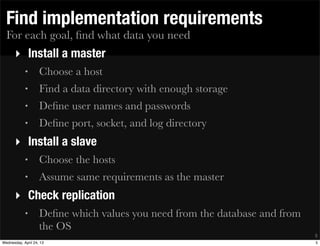
For each goal, find what data you need
Find implementation requirements
‣ Install a master
• Choose a host
• Find a data directory with enough storage
• Define user names and passwords
• Define port, socket, and log directory
‣ Install a slave
• Choose the hosts
• Assume same requirements as the master
‣ Check replication
• Define which values you need from the database and from
the OS
5
5Wednesday, April 24, 13
The installation should be reversible
Install clean
‣ Objectives:
• Do not confuse the installation scripts with their target;
• Do not mix installation scripts and the product of the
installation;
• Allow a clean removal of what you installed;
6
6Wednesday, April 24, 13
The code is committed to a public repository
CODE FOR THIS SESSION
‣ https://code.google.com/p/tungsten-toolbox
‣ Go to "source"
‣ Browse the code
‣ Look for "deploy samples"
‣ You may also need MySQL Sandbox
• (http://mysqlsandbox.net)
7
7Wednesday, April 24, 13
8
8Wednesday, April 24, 13
Make your scripts easily changeable
Tips - 1 - use a config file
‣ Do not write host names, ports, paths, user names and
passwords in scripts
‣ Use a configuration file
‣ Load that file before each script
‣ Make different config files for each scenario, and link to
it
9
9Wednesday, April 24, 13
Simplify remote commands
Tips - 2 - Use a remote messenger
‣ Do not write a series of "ssh ..." commands
‣ Getting the return values correctly and quotes is messy
‣ instead:
1. create a script with the instructions for a given node
2. transfer the file to the node
3. run the file remotely
10
10Wednesday, April 24, 13
Help your memory, avoid conflicts
Tips - 3 - Write a banner
‣ When the installation task is finished, write a file
containing
• what you have installed
• where dis you install from
‣ Check for that file, to avoid overwriting an installation
‣ Remove the file when uninstalling
11
11Wednesday, April 24, 13
Type once, type less
Tips - 4 - Write customized shortcuts
‣ Your installation may depend on variable components
(e.g. the path of your tools)
‣ As part of the installation, write a shortcut file
‣ example:
12
$ cat client
#!/bin/bash
$HOME/opt/mysql/5.5.31/bin/mysql $@
12Wednesday, April 24, 13
Keep them all busy
Tips - 5 - Run operations in parallel
‣ If your operation takes long, and you have to operate it in
many servers:
1. Start all of them at once, in background
2. Send the output to a different file for each task
3. wait for the tasks to finish
4. display the contents of the output files
13
13Wednesday, April 24, 13
If they look alike, put them together
Tips - 6 - Use convenience arrays
‣ Use arrays to group together items that you want to use:
‣ e.g.:
• slaves=($NODE2 $NODE3)
• all_nodes=($NODE1 $NODE2 $NODE3)
• tools=(mysql mysqldump mysqladmin)
‣ use loops
• for NODE in ${all_nodes[*]} ; do .... ; done
14
14Wednesday, April 24, 13
Remember your goals, and put the data together
Getting started : the config file
‣ Should contain:
• list of your nodes
• database path
• software path
• user names
• convenience arrays (see tip #6)
15
15Wednesday, April 24, 13
Default Config file (1)
$ cat CONFIG_default.sh
#!/bin/bash
export NODE1=host1
export NODE2=host2
export NODE3=host3
#export NODE4=host4
## ==================
export BANNER=$HOME/current_replication.txt
export DB_PORT=3306
export DATADIR=/var/lib/mysql
export BASEDIR=/usr
...
16
16Wednesday, April 24, 13
Default Config file (2)
...
export DB_USER=powerful
export DB_PASSWORD=can_do_all
export REPL_USER=slave_user
export REPL_PASSWORD=can_do_little
## ==================
export ALL_NODES=($NODE1 $NODE2 $NODE3 $NODE4)
export MASTERS=($NODE1)
export SLAVES=($NODE2 $NODE3 $NODE4)
export
DASH_LINE='-------------------------------------------
----------------'
17
17Wednesday, April 24, 13
Customized Config file (1)
$ cat CONFIG_sb_5_5_31.sh
#!/bin/bash
...
export DB_PORT=15531
export SBDIR=$HOME/sandboxes/mysql_5_5_31
export DATADIR=$SBDIR/data
export BASEDIR=$HOME/opt/mysql/5.5.31
export DB_USER=msandbox
export DB_PASSWORD=msandbox
export REPL_USER=rsandbox
export REPL_PASSWORD=rsandbox
...
18
18Wednesday, April 24, 13
Use only one:
$ ln -s CONFIG_default.sh CONFIG.sh
$ ls -l CONFIG*
-rwxr-xr-x 1 x.x CONFIG_default.sh
-rwxr-xr-x 1 x.x CONFIG_sb_5_1_69.sh
-rwxr-xr-x 1 x.x CONFIG_sb_5_5_31.sh
-rwxr-xr-x 1 x.x CONFIG_sb_5_6_11.sh
lrwxrwxrwx 1 x.x CONFIG.sh -> CONFIG_sb_5_5_31.sh
19
19Wednesday, April 24, 13
This should always be the first operation
Check and load for your config in every script
$ head install_replication.sh
#!/bin/bash
if [ ! -f ./CONFIG.sh ]
then
echo "Configuration file CONFIG.sh not found"
exit 1
fi
. ./CONFIG.sh
20
20Wednesday, April 24, 13
Make sure you can do what you want to do
Code defensively
for NODE in ${MASTERS[*]}
do
RUNNING=$($MYSQL_SLAVE -BN --host=$NODE -e 'select 1')
if [ -z "$RUNNING" ]
then
echo "# WARNING:"
echo " mysql not reachable "
echo " by user $REPL_USER in node $NODE"
exit 1
fi
done
21
21Wednesday, April 24, 13
Filter and cut
Get precise values (1)
$ mysql -e 'show master statusG'
************* 1. row ************
File: mysql-bin.000001
Position: 107
Binlog_Do_DB:
Binlog_Ignore_DB:
$ mysql -e 'show master statusG' | grep File
File: mysql-bin.000001
$ mysql -e 'show master statusG' | grep File |awk
'{print $2}'
mysql-bin.000001
22
22Wednesday, April 24, 13
Filter and cut
Get precise values (2)
$ mysql -e 'show master statusG'
************* 1. row ************
File: mysql-bin.000001
Position: 107
Binlog_Do_DB:
Binlog_Ignore_DB:
$ mysql -e 'show master statusG' | grep Position
Position: 107
$ mysql -e 'show master statusG' | grep Position |awk
'{print $2}'
107
23
23Wednesday, April 24, 13
Filter and cut
Get precise values (3)
$ BINLOG_POS=$(mysql -e 'show master statusG' | grep
Position |awk '{print $2}')
$ BINLOG_FILE=$(mysql -e 'show master statusG' | grep
File |awk '{print $2}')
$ echo $BINLOG_FILE
mysql-bin.000001
$ echo $BINLOG_POS
107
24
24Wednesday, April 24, 13
Using the precise values, set the slave status
Set replication
for NODE in ${SLAVES[*]}
do
$MYSQL --host=$NODE -e 'stop slave'
$MYSQL --host=$NODE -e "CHANGE MASTER TO
master_host='$MASTER', master_port=$DB_PORT,
master_user='$REPL_USER',
master_password='$REPL_PASSWORD',
master_log_file='$BINLOG_FILE', master_log_pos=
$BINLOG_POS "
$MYSQL --host=$NODE -e 'start slave'
done
25
25Wednesday, April 24, 13
Save yourself some typing
Create and use shortcuts
# write utility scripts
for script in mysql mysqldump mysqladmin
do
echo '#!/bin/bash' > $script
echo "$BASEDIR/bin/$script --user=$DB_USER --port=
$DB_PORT $@" >> $script
chmod +x $script
done
######
$ ./mysql -p
26
26Wednesday, April 24, 13
sample installation run
$ ./install_replication.sh
# Making sure MySQL is running
# MASTER host1: ok
# Node host1: ok
# Node host2: ok
# Node host3: ok
# node host1 - server_id: 10
# node host1 - log_bin: 1
# node host2 - server_id: 20
# node host2 - log_bin: 1
# node host3 - server_id: 30
# node host3 - log_bin: 1
27
27Wednesday, April 24, 13
Improved from the one published in
http://datacharmer/blogspot.com
Check replication
‣ read the master status
‣ read the slave status
‣ compare values
‣ scream if they don't match
28
28Wednesday, April 24, 13
sample check run
SLAVE host2 : Replication OK
file: mysql-bin.000001 at 106
SLAVE host3 : Replication OK
file: mysql-bin.000001 at 106
SLAVE host4 : Replication OK
file: mysql-bin.000001 at 106
29
29Wednesday, April 24, 13
Run a test
‣ Create a table in the master
‣ insert some records
‣ Wait 1 second
‣ Count the records in all servers
30
30Wednesday, April 24, 13
Sample test run
$ ./test_replication.sh
node host1 - 0
node host2 - 0
node host3 - 0
node host4 - 0
node host1 - 3
node host2 - 3
node host3 - 3
node host4 - 3
31
31Wednesday, April 24, 13
Remove replication
MYSQL="$MYSQL --user=$DB_USER --password=$DB_PASSWORD
--port=$DB_PORT"
for NODE in ${SLAVES[*]}
do
$MYSQL -BN --host=$NODE -e 'stop slave'
$MYSQL -BN --host=$NODE -e 'reset slave'
done
### Remove banners and shortcuts
32
32Wednesday, April 24, 13
This method works fine from MySQL 5.0 up to 5.5
Install using a different version
$ rm CONFIG.sh
$ ln -s CONFIG_sb_5_5_31.sh CONFIG.sh
$ ./install_replication.sh
33
33Wednesday, April 24, 13
Looks like it's the same, but ...
Install using a MySQL 5.6
./install_replication.sh
# Making sure MySQL is running
Warning: Using a password on the command line
interface can be insecure.
# MASTER host1: ok
Warning: Using a password on the command line
interface can be insecure.
# Node host1: ok
Warning: Using a password on the command line
interface can be insecure.
# Node host2: ok
Warning: Using a password on the command line
interface can be insecure.
# Node host3: ok
34
34Wednesday, April 24, 13
Instead of a password in the command line, we generate an
options file dynamically
Changing approach
export user_cnf=user$$.cnf
echo "[client]" > $user_cnf
echo "user=$DB_USER" >> $user_cnf
echo "password=$DB_PASSWORD" >> $user_cnf
export MYSQL="$MYSQL --defaults-file=$PWD/user$$.cnf
--port=$DB_PORT"
35
35Wednesday, April 24, 13
No nasty messages
sample run with new installer and MySQL 5.6
$ ./install_replication.sh
# Making sure MySQL is running
# MASTER host1: ok
# Node host1: ok
# Node host2: ok
# Node host3: ok
# node host1 - server_id: 10
# node host1 - log_bin: 1
# node host2 - server_id: 20
# node host2 - log_bin: 1
# node host3 - server_id: 30
# node host3 - log_bin: 1
36
36Wednesday, April 24, 13
Serial restore operations
$ time ./provision_slaves.sh
taking backup
restoring on slaves
Wed Apr 24 09:10:55 EDT 2013
restore started in node host2
restore done
restore started in node host3
restore done
restore started in node host4
restore done
Wed Apr 24 09:11:03 EDT 2013
real 0m8.539s
user 0m0.323s
sys 0m0.442s
37
37Wednesday, April 24, 13
parallel restore operations
$ time ./provision_slaves_parallel.sh
taking backup
restoring on slaves
Wed Apr 24 09:12:59 EDT 2013
restore started in node host2
restore started in node host3
restore started in node host4
restore done
restore done
restore done
Wed Apr 24 09:13:03 EDT 2013
real 0m4.330s
user 0m0.404s
sys 0m0.542s
38
38Wednesday, April 24, 13
Serial restore operations (bigger database)
$ time ./provision_slaves.sh
taking backup
restoring on slaves
Wed Apr 24 09:20:11 EDT 2013
restore started in node host2
restore done
restore started in node host3
restore done
restore started in node host4
restore done
Wed Apr 24 09:23:53 EDT 2013
real 3m53.504s
user 0m11.401s
sys 0m4.698s
39
39Wednesday, April 24, 13
Parallel restore operations (bigger database)
$ time ./provision_slaves_parallel.sh
taking backup
restoring on slaves
Wed Apr 24 09:26:11 EDT 2013
restore started in node host2
restore started in node host3
restore started in node host4
restore done
restore done
restore done
Wed Apr 24 09:28:00 EDT 2013
real 1m59.583s
user 0m16.505s
sys 0m6.983s
40
40Wednesday, April 24, 13
Thanks for your attention
‣ Blog: http://datacharmer.blogspot.com
‣ Twitter: @datacharmer
41
41Wednesday, April 24, 13

Script it

  • 1.
    Script it! Make professionalDBA tools out of nothing Giuseppe Maxia Continuent, Inc 1 1Wednesday, April 24, 13
  • 2.
    Why not usingPuppet or Chef? Why scripting? ‣ Not all companies use it ‣ Some tasks don't fit the pattern ‣ If you want to do testing on-the-fly, knowing how to script will save time 2 2Wednesday, April 24, 13
  • 3.
    Why not {Perl|Python|Ruby|PHP|Lua}? Why shell scripts? ‣ Shell is available everywhere • (unless you run Windows, but in this case you are in the wrong room) ‣ Shell scripting is powerful ‣ It is fast to write, and reasonably easy to read 3 3Wednesday, April 24, 13
  • 4.
    If you knowwhere you want to go, you can easily list what you need to do to get there Define the objectives of your scripts ‣ We want: • Install a master • Install and provision one or more slaves • Check if replication is working 4 4Wednesday, April 24, 13
  • 5.
    For each goal,find what data you need Find implementation requirements ‣ Install a master • Choose a host • Find a data directory with enough storage • Define user names and passwords • Define port, socket, and log directory ‣ Install a slave • Choose the hosts • Assume same requirements as the master ‣ Check replication • Define which values you need from the database and from the OS 5 5Wednesday, April 24, 13
  • 6.
    The installation shouldbe reversible Install clean ‣ Objectives: • Do not confuse the installation scripts with their target; • Do not mix installation scripts and the product of the installation; • Allow a clean removal of what you installed; 6 6Wednesday, April 24, 13
  • 7.
    The code iscommitted to a public repository CODE FOR THIS SESSION ‣ https://code.google.com/p/tungsten-toolbox ‣ Go to "source" ‣ Browse the code ‣ Look for "deploy samples" ‣ You may also need MySQL Sandbox • (http://mysqlsandbox.net) 7 7Wednesday, April 24, 13
  • 8.
  • 9.
    Make your scriptseasily changeable Tips - 1 - use a config file ‣ Do not write host names, ports, paths, user names and passwords in scripts ‣ Use a configuration file ‣ Load that file before each script ‣ Make different config files for each scenario, and link to it 9 9Wednesday, April 24, 13
  • 10.
    Simplify remote commands Tips- 2 - Use a remote messenger ‣ Do not write a series of "ssh ..." commands ‣ Getting the return values correctly and quotes is messy ‣ instead: 1. create a script with the instructions for a given node 2. transfer the file to the node 3. run the file remotely 10 10Wednesday, April 24, 13
  • 11.
    Help your memory,avoid conflicts Tips - 3 - Write a banner ‣ When the installation task is finished, write a file containing • what you have installed • where dis you install from ‣ Check for that file, to avoid overwriting an installation ‣ Remove the file when uninstalling 11 11Wednesday, April 24, 13
  • 12.
    Type once, typeless Tips - 4 - Write customized shortcuts ‣ Your installation may depend on variable components (e.g. the path of your tools) ‣ As part of the installation, write a shortcut file ‣ example: 12 $ cat client #!/bin/bash $HOME/opt/mysql/5.5.31/bin/mysql $@ 12Wednesday, April 24, 13
  • 13.
    Keep them allbusy Tips - 5 - Run operations in parallel ‣ If your operation takes long, and you have to operate it in many servers: 1. Start all of them at once, in background 2. Send the output to a different file for each task 3. wait for the tasks to finish 4. display the contents of the output files 13 13Wednesday, April 24, 13
  • 14.
    If they lookalike, put them together Tips - 6 - Use convenience arrays ‣ Use arrays to group together items that you want to use: ‣ e.g.: • slaves=($NODE2 $NODE3) • all_nodes=($NODE1 $NODE2 $NODE3) • tools=(mysql mysqldump mysqladmin) ‣ use loops • for NODE in ${all_nodes[*]} ; do .... ; done 14 14Wednesday, April 24, 13
  • 15.
    Remember your goals,and put the data together Getting started : the config file ‣ Should contain: • list of your nodes • database path • software path • user names • convenience arrays (see tip #6) 15 15Wednesday, April 24, 13
  • 16.
    Default Config file(1) $ cat CONFIG_default.sh #!/bin/bash export NODE1=host1 export NODE2=host2 export NODE3=host3 #export NODE4=host4 ## ================== export BANNER=$HOME/current_replication.txt export DB_PORT=3306 export DATADIR=/var/lib/mysql export BASEDIR=/usr ... 16 16Wednesday, April 24, 13
  • 17.
    Default Config file(2) ... export DB_USER=powerful export DB_PASSWORD=can_do_all export REPL_USER=slave_user export REPL_PASSWORD=can_do_little ## ================== export ALL_NODES=($NODE1 $NODE2 $NODE3 $NODE4) export MASTERS=($NODE1) export SLAVES=($NODE2 $NODE3 $NODE4) export DASH_LINE='------------------------------------------- ----------------' 17 17Wednesday, April 24, 13
  • 18.
    Customized Config file(1) $ cat CONFIG_sb_5_5_31.sh #!/bin/bash ... export DB_PORT=15531 export SBDIR=$HOME/sandboxes/mysql_5_5_31 export DATADIR=$SBDIR/data export BASEDIR=$HOME/opt/mysql/5.5.31 export DB_USER=msandbox export DB_PASSWORD=msandbox export REPL_USER=rsandbox export REPL_PASSWORD=rsandbox ... 18 18Wednesday, April 24, 13
  • 19.
    Use only one: $ln -s CONFIG_default.sh CONFIG.sh $ ls -l CONFIG* -rwxr-xr-x 1 x.x CONFIG_default.sh -rwxr-xr-x 1 x.x CONFIG_sb_5_1_69.sh -rwxr-xr-x 1 x.x CONFIG_sb_5_5_31.sh -rwxr-xr-x 1 x.x CONFIG_sb_5_6_11.sh lrwxrwxrwx 1 x.x CONFIG.sh -> CONFIG_sb_5_5_31.sh 19 19Wednesday, April 24, 13
  • 20.
    This should alwaysbe the first operation Check and load for your config in every script $ head install_replication.sh #!/bin/bash if [ ! -f ./CONFIG.sh ] then echo "Configuration file CONFIG.sh not found" exit 1 fi . ./CONFIG.sh 20 20Wednesday, April 24, 13
  • 21.
    Make sure youcan do what you want to do Code defensively for NODE in ${MASTERS[*]} do RUNNING=$($MYSQL_SLAVE -BN --host=$NODE -e 'select 1') if [ -z "$RUNNING" ] then echo "# WARNING:" echo " mysql not reachable " echo " by user $REPL_USER in node $NODE" exit 1 fi done 21 21Wednesday, April 24, 13
  • 22.
    Filter and cut Getprecise values (1) $ mysql -e 'show master statusG' ************* 1. row ************ File: mysql-bin.000001 Position: 107 Binlog_Do_DB: Binlog_Ignore_DB: $ mysql -e 'show master statusG' | grep File File: mysql-bin.000001 $ mysql -e 'show master statusG' | grep File |awk '{print $2}' mysql-bin.000001 22 22Wednesday, April 24, 13
  • 23.
    Filter and cut Getprecise values (2) $ mysql -e 'show master statusG' ************* 1. row ************ File: mysql-bin.000001 Position: 107 Binlog_Do_DB: Binlog_Ignore_DB: $ mysql -e 'show master statusG' | grep Position Position: 107 $ mysql -e 'show master statusG' | grep Position |awk '{print $2}' 107 23 23Wednesday, April 24, 13
  • 24.
    Filter and cut Getprecise values (3) $ BINLOG_POS=$(mysql -e 'show master statusG' | grep Position |awk '{print $2}') $ BINLOG_FILE=$(mysql -e 'show master statusG' | grep File |awk '{print $2}') $ echo $BINLOG_FILE mysql-bin.000001 $ echo $BINLOG_POS 107 24 24Wednesday, April 24, 13
  • 25.
    Using the precisevalues, set the slave status Set replication for NODE in ${SLAVES[*]} do $MYSQL --host=$NODE -e 'stop slave' $MYSQL --host=$NODE -e "CHANGE MASTER TO master_host='$MASTER', master_port=$DB_PORT, master_user='$REPL_USER', master_password='$REPL_PASSWORD', master_log_file='$BINLOG_FILE', master_log_pos= $BINLOG_POS " $MYSQL --host=$NODE -e 'start slave' done 25 25Wednesday, April 24, 13
  • 26.
    Save yourself sometyping Create and use shortcuts # write utility scripts for script in mysql mysqldump mysqladmin do echo '#!/bin/bash' > $script echo "$BASEDIR/bin/$script --user=$DB_USER --port= $DB_PORT $@" >> $script chmod +x $script done ###### $ ./mysql -p 26 26Wednesday, April 24, 13
  • 27.
    sample installation run $./install_replication.sh # Making sure MySQL is running # MASTER host1: ok # Node host1: ok # Node host2: ok # Node host3: ok # node host1 - server_id: 10 # node host1 - log_bin: 1 # node host2 - server_id: 20 # node host2 - log_bin: 1 # node host3 - server_id: 30 # node host3 - log_bin: 1 27 27Wednesday, April 24, 13
  • 28.
    Improved from theone published in http://datacharmer/blogspot.com Check replication ‣ read the master status ‣ read the slave status ‣ compare values ‣ scream if they don't match 28 28Wednesday, April 24, 13
  • 29.
    sample check run SLAVEhost2 : Replication OK file: mysql-bin.000001 at 106 SLAVE host3 : Replication OK file: mysql-bin.000001 at 106 SLAVE host4 : Replication OK file: mysql-bin.000001 at 106 29 29Wednesday, April 24, 13
  • 30.
    Run a test ‣Create a table in the master ‣ insert some records ‣ Wait 1 second ‣ Count the records in all servers 30 30Wednesday, April 24, 13
  • 31.
    Sample test run $./test_replication.sh node host1 - 0 node host2 - 0 node host3 - 0 node host4 - 0 node host1 - 3 node host2 - 3 node host3 - 3 node host4 - 3 31 31Wednesday, April 24, 13
  • 32.
    Remove replication MYSQL="$MYSQL --user=$DB_USER--password=$DB_PASSWORD --port=$DB_PORT" for NODE in ${SLAVES[*]} do $MYSQL -BN --host=$NODE -e 'stop slave' $MYSQL -BN --host=$NODE -e 'reset slave' done ### Remove banners and shortcuts 32 32Wednesday, April 24, 13
  • 33.
    This method worksfine from MySQL 5.0 up to 5.5 Install using a different version $ rm CONFIG.sh $ ln -s CONFIG_sb_5_5_31.sh CONFIG.sh $ ./install_replication.sh 33 33Wednesday, April 24, 13
  • 34.
    Looks like it'sthe same, but ... Install using a MySQL 5.6 ./install_replication.sh # Making sure MySQL is running Warning: Using a password on the command line interface can be insecure. # MASTER host1: ok Warning: Using a password on the command line interface can be insecure. # Node host1: ok Warning: Using a password on the command line interface can be insecure. # Node host2: ok Warning: Using a password on the command line interface can be insecure. # Node host3: ok 34 34Wednesday, April 24, 13
  • 35.
    Instead of apassword in the command line, we generate an options file dynamically Changing approach export user_cnf=user$$.cnf echo "[client]" > $user_cnf echo "user=$DB_USER" >> $user_cnf echo "password=$DB_PASSWORD" >> $user_cnf export MYSQL="$MYSQL --defaults-file=$PWD/user$$.cnf --port=$DB_PORT" 35 35Wednesday, April 24, 13
  • 36.
    No nasty messages samplerun with new installer and MySQL 5.6 $ ./install_replication.sh # Making sure MySQL is running # MASTER host1: ok # Node host1: ok # Node host2: ok # Node host3: ok # node host1 - server_id: 10 # node host1 - log_bin: 1 # node host2 - server_id: 20 # node host2 - log_bin: 1 # node host3 - server_id: 30 # node host3 - log_bin: 1 36 36Wednesday, April 24, 13
  • 37.
    Serial restore operations $time ./provision_slaves.sh taking backup restoring on slaves Wed Apr 24 09:10:55 EDT 2013 restore started in node host2 restore done restore started in node host3 restore done restore started in node host4 restore done Wed Apr 24 09:11:03 EDT 2013 real 0m8.539s user 0m0.323s sys 0m0.442s 37 37Wednesday, April 24, 13
  • 38.
    parallel restore operations $time ./provision_slaves_parallel.sh taking backup restoring on slaves Wed Apr 24 09:12:59 EDT 2013 restore started in node host2 restore started in node host3 restore started in node host4 restore done restore done restore done Wed Apr 24 09:13:03 EDT 2013 real 0m4.330s user 0m0.404s sys 0m0.542s 38 38Wednesday, April 24, 13
  • 39.
    Serial restore operations(bigger database) $ time ./provision_slaves.sh taking backup restoring on slaves Wed Apr 24 09:20:11 EDT 2013 restore started in node host2 restore done restore started in node host3 restore done restore started in node host4 restore done Wed Apr 24 09:23:53 EDT 2013 real 3m53.504s user 0m11.401s sys 0m4.698s 39 39Wednesday, April 24, 13
  • 40.
    Parallel restore operations(bigger database) $ time ./provision_slaves_parallel.sh taking backup restoring on slaves Wed Apr 24 09:26:11 EDT 2013 restore started in node host2 restore started in node host3 restore started in node host4 restore done restore done restore done Wed Apr 24 09:28:00 EDT 2013 real 1m59.583s user 0m16.505s sys 0m6.983s 40 40Wednesday, April 24, 13
  • 41.
    Thanks for yourattention ‣ Blog: http://datacharmer.blogspot.com ‣ Twitter: @datacharmer 41 41Wednesday, April 24, 13