MySQL HA
with PaceMaker
   Kris Buytaert
Kris Buytaert
●   CTO and Open Source Consultant @inuits.eu
●   „Infrastructure Architect“
●   I don't remember when I started using MySQL
●   Specializing in Automated , Large Scale
    Deployments , Highly Available infrastructures,
    since 2008 also known as “the Cloud”
                    th
●   Surviving the 10 floor test
●   Cofounded devopsdays.org
In this presentation
●   High Availability ?
●   MySQL HA Solutions
●   MySQL Replication
●   Linux HA / Pacemaker
What is HA Clustering ?

●   One service goes down
=> others take over its work
●   IP address takeover, service takeover,
●   Not designed for high-performance
●   Not designed for high troughput (load
    balancing)
Does it Matter ?

●   Downtime is expensive
●   You mis out on $$$
●   Your boss complains
●   New users don't return
Lies, Damn Lies, and
Statistics
         Counting nines
            (slide by Alan R)


 99.9999%                        30 sec
 99.999%                          5 min
 99.99%                          52 min
 99.9%                            9 hr
 99%                            3.5 day
The Rules of HA

●   Keep it Simple
●   Keep it Simple
●   Prepare for Failure
●   Complexity is the enemy of reliability
●   Test your HA setup
You care about ?
●   Your data ?
•Consistent
•Realitime
•Eventual Consistent
●   Your Connection
•Always
•Most of the time
Eliminating the SPOF
●   Find out what Will Fail
•Disks
•Fans
•Power (Supplies)
●   Find out what Can Fail
•Network
•Going Out Of Memory
Split Brain
●   Communications failures can lead to separated
    partitions of the cluster
●   If those partitions each try and take control of
    the cluster, then it's called a split-brain
    condition
●   If this happens, then bad things will happen
•http://linux-ha.org/BadThingsWillHappen
Historical MySQL HA
●   Replication
•1 read write node
•Multiple read only nodes
•Application needed to be modified
Solutions Today
●   BYO
●   DRBD
●   MySQL Cluster NDBD
●   Multi Master Replication
●   MySQL Proxy
●   MMM / Flipper
●   Galera
●   Percona XtraDB Cluster
Data vs Connection
●   DATA :
•Replication
•DRBD
●   Connection
•LVS
•Proxy
•Heartbeat / Pacemaker
Shared Storage
●   1 MySQL instance
●   Monitor MySQL node
●   Stonith
●   $$$              1+1 <> 2
●   Storage = SPOF
●   Split Brain :(
DRBD
●   Distributed Replicated Block Device
●   In the Linux Kernel (as of very recent)
●   Usually only 1 mount
•Multi mount as of 8.X
•Requires GFS / OCFS2
●   Regular FS ext3 ...
●   Only 1 MySQL instance Active accessing data
●   Upon Failover MySQL needs to be started on
    other node
DRBD(2)
●   What happens when you pull the plug of a
    Physical machine ?
•Minimal Timeout
•Why did the crash happen ?
•Is my data still correct ?
•Innodb Consistency Checks ?
•Lengthy ?
•Check your BinLog size
MySQL Cluster NDBD
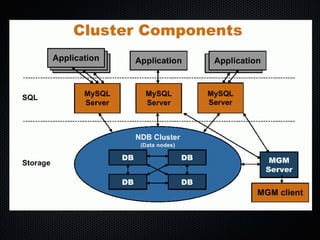
●   Shared-nothing architecture
●   Automatic partitioning
●   Synchronous replication
●   Fast automatic fail-over of data nodes
●   In-memory indexes
●   Not suitable for all query patterns (multi-table
    JOINs, range scans)
Title
– Data
MySQL Cluster NDBD
●   All indexed data needs to be in memory
●   Good and bad experiences
•Better experiences when using the API
•Bad when using the MySQL Server
●   Test before you deploy
●   Does not fit for all apps
How replication works
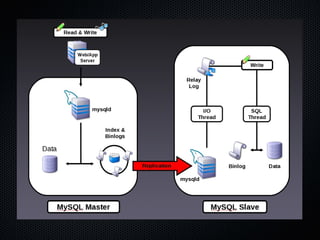
● Master server keeps track of all updates in the
  Binary Log
•Slave requests to read the binary update log
•Master acts in a passive role, not keeping track
of what slave has read what data

●  Upon connecting the slaves do the following:
•The slave informs the master of where it left off
•It catches up on the updates
•It waits for the master to notify it of new
updates
Two Slave Threads
● How does it work?
•The I/O thread connects to the master and asks for
the updates in the master’s binary log
•The I/O thread copies the statements to the relay
log
•The SQL thread implements the statements in the
relay log
Advantages
•Long running SQL statements don’t block log
downloading
•Allows the slave to keep up with the master better
•In case of master crash the slave is more likely to
have all statements
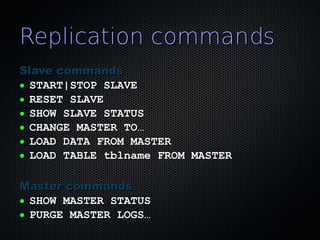
Replication commands
Slave commands
● START|STOP SLAVE

● RESET SLAVE

● SHOW SLAVE STATUS

● CHANGE MASTER TO…

● LOAD DATA FROM MASTER

● LOAD TABLE tblname FROM MASTER


Master commands
● SHOW MASTER STATUS

● PURGE MASTER LOGS…
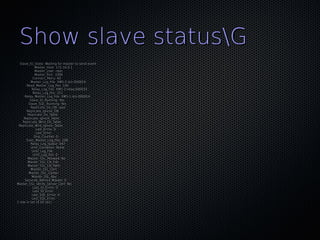
Show slave statusG
  Slave_IO_State: Waiting for master to send event
             Master_Host: 172.16.0.1
             Master_User: repli
             Master_Port: 3306
           Connect_Retry: 60
         Master_Log_File: XMS-1-bin.000014
      Read_Master_Log_Pos: 106
          Relay_Log_File: XMS-2-relay.000033
           Relay_Log_Pos: 251
     Relay_Master_Log_File: XMS-1-bin.000014
         Slave_IO_Running: Yes
        Slave_SQL_Running: Yes
         Replicate_Do_DB: xpol
      Replicate_Ignore_DB:
       Replicate_Do_Table:
     Replicate_Ignore_Table:
    Replicate_Wild_Do_Table:
 Replicate_Wild_Ignore_Table:
             Last_Errno: 0
             Last_Error:
            Skip_Counter: 0
      Exec_Master_Log_Pos: 106
         Relay_Log_Space: 547
         Until_Condition: None
          Until_Log_File:
           Until_Log_Pos: 0
       Master_SSL_Allowed: No
       Master_SSL_CA_File:
       Master_SSL_CA_Path:
         Master_SSL_Cert:
        Master_SSL_Cipher:
          Master_SSL_Key:
     Seconds_Behind_Master: 0
Master_SSL_Verify_Server_Cert: No
           Last_IO_Errno: 0
           Last_IO_Error:
          Last_SQL_Errno: 0
          Last_SQL_Error:
1 row in set (0.00 sec)
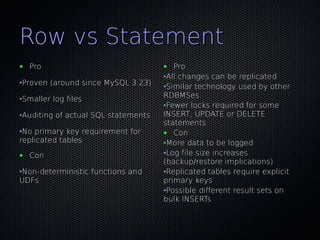
Row vs Statement
●   Pro                              ●  Pro
                                     •All changes can be replicated
•Proven (around since MySQL 3.23)
                                     •Similar technology used by other
•Smaller log files                   RDBMSes
                                     •Fewer locks required for some
•Auditing of actual SQL statements   INSERT, UPDATE or DELETE
                                     statements
•No primary key requirement for      ● Con
replicated tables                    •More data to be logged
●   Con                              •Log file size increases
                                     (backup/restore implications)
•Non-deterministic functions and     •Replicated tables require explicit
UDFs                                 primary keys
                                     •Possible different result sets on
                                     bulk INSERTs
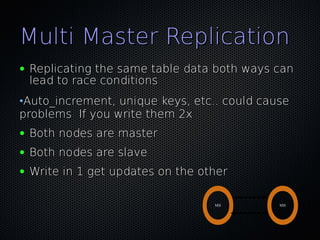
Multi Master Replication
●   Replicating the same table data both ways can
    lead to race conditions
•Auto_increment, unique keys, etc.. could cause
problems If you write them 2x
●   Both nodes are master
●   Both nodes are slave
●   Write in 1 get updates on the other

                                    M|S       M|S
MySQL Proxy
●   Man in the middle
●   Decides where to connect to
•LUA
●   Write rules to
•Redirect traffic
•
Master Slave & Proxy
●   Split Read and Write Actions
●   No Application change required
●   Sends specific queries to a specific node
●   Based on
•Customer
•User
•Table
•Availability
MySQL Proxy
●   Your new SPOF
●   Make your Proxy HA too !
•Heartbeat OCF Resource
Breaking Replication
●   If the master and slave gets out of sync
●   Updates on slave with identical index id
•Check error log for disconnections and issues
with replication
Monitor your Setup
●   Not just connectivity
●   Also functional
•Query data
•Check resultset is correct
●   Check replication
•MaatKit
•OpenARK
Pulling Traffic
●   Eg. for Cluster, MultiMaster setups
•DNS
•Advanced Routing
•LVS


•Flipper / MMM
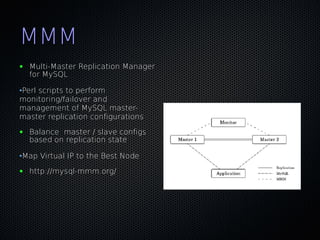
MMM
●   Multi-Master Replication Manager
    for MySQL

•Perl scripts to perform
monitoring/failover and
management of MySQL master-
master replication configurations
●   Balance master / slave configs
    based on replication state

•Map Virtual IP to the Best Node
●   http://mysql-mmm.org/
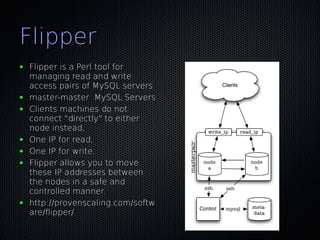
Flipper
●   Flipper is a Perl tool for
    managing read and write
    access pairs of MySQL servers
●   master-master MySQL Servers
●   Clients machines do not
    connect "directly" to either
    node instead,
●   One IP for read,
●   One IP for write.
●   Flipper allows you to move
    these IP addresses between
    the nodes in a safe and
    controlled manner.
●   http://provenscaling.com/softw
    are/flipper/
Linux-HA PaceMaker
●   Plays well with others
●   Manages more than MySQL
●

●   ...v3 .. don't even think about the rest anymore
●

●   http://clusterlabs.org/
Heartbeat
●   Heartbeat v1
•Max 2 nodes
•No finegrained resources
•Monitoring using “mon”
●   Heartbeat v2
•XML usage was a consulting opportunity
•Stability issues
•Forking ?
Pacemaker Architecture
            ●   Stonithd : The Heartbeat fencing subsystem.
            ●   Lrmd : Local Resource Management Daemon.
                Interacts directly with resource agents (scripts).
            ●   pengine Policy Engine. Computes the next state of the
                cluster based on the current state and the configuration.
            ●   cib Cluster Information Base. Contains definitions of all
                cluster options, nodes, resources, their relationships to
                one another and current status. Synchronizes updates to
                all cluster nodes.
            ●   crmd Cluster Resource Management Daemon. Largely
                a message broker for the PEngine and LRM, it also
                elects a leader to co-ordinate the activities of the cluster.
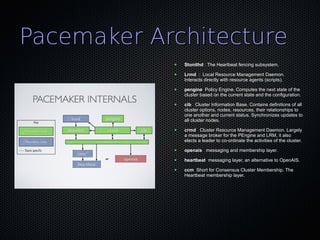
            ●   openais messaging and membership layer.
            ●   heartbeat messaging layer, an alternative to OpenAIS.
            ●   ccm Short for Consensus Cluster Membership. The
                Heartbeat membership layer.
Pacemaker ?
●   Not a fork
●   Only CRM Code taken out of Heartbeat
●   As of Heartbeat 2.1.3
•Support for both OpenAIS / HeartBeat
•Different Release Cycles as Heartbeat
Heartbeat, OpenAis ?
●   Both Messaging Layers
●   Initially only Heartbeat
●   OpenAIS
●   Heartbeat got unmaintained
●   OpenAIS has heisenbugs :(
●   Heartbeat maintenance taken over by LinBit
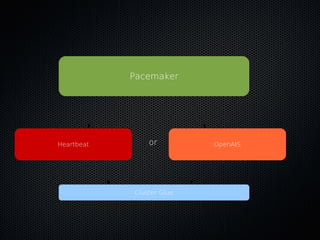
●   CRM Detects which layer
Pacemaker


Heartbeat       or         OpenAIS


            Cluster Glue
Configuring Heartbeat
●   /etc/ha.d/ha.cf
Use crm = yes


●   /etc/ha.d/authkeys
Configuring Heartbeat
heartbeat::hacf {"clustername":

         hosts => ["host-a","host-b"],

         hb_nic => ["bond0"],

         hostip1 => ["10.0.128.11"],

         hostip2 => ["10.0.128.12"],

         ping => ["10.0.128.4"],

    }

heartbeat::authkeys {"ClusterName":

         password => “ClusterName ",

    }

http://github.com/jtimberman/puppet/tree/master/heartbeat/
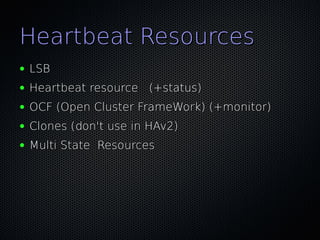
Heartbeat Resources
●   LSB
●   Heartbeat resource (+status)
●   OCF (Open Cluster FrameWork) (+monitor)
●   Clones (don't use in HAv2)
●   Multi State Resources
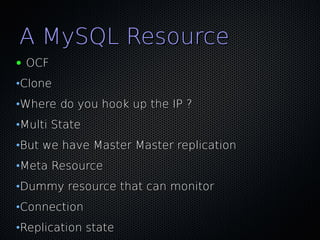
A MySQL Resource
●   OCF
•Clone
•Where do you hook up the IP ?
•Multi State
•But we have Master Master replication
•Meta Resource
•Dummy resource that can monitor
•Connection
•Replication state
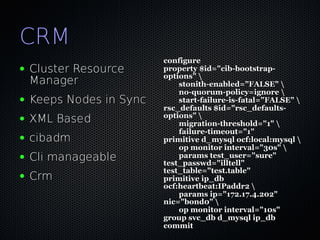
CRM
                          configure
●   Cluster Resource      property $id="cib-bootstrap-
                          options" 
    Manager                   stonith-enabled="FALSE" 
                              no-quorum-policy=ignore 
●   Keeps Nodes in Sync       start-failure-is-fatal="FALSE" 
                          rsc_defaults $id="rsc_defaults-
                          options" 
●   XML Based                 migration-threshold="1" 
                              failure-timeout="1"
●   cibadm                primitive d_mysql ocf:local:mysql 
                              op monitor interval="30s" 
●   Cli manageable            params test_user="sure"
                          test_passwd="illtell"
                          test_table="test.table"
●   Crm                   primitive ip_db
                          ocf:heartbeat:IPaddr2 
                              params ip="172.17.4.202"
                          nic="bond0" 
                              op monitor interval="10s"
                          group svc_db d_mysql ip_db
                          commit
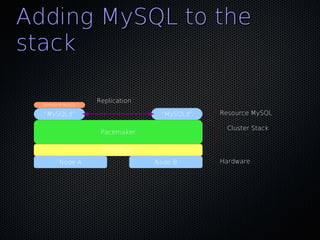
Adding MySQL to the
stack

                     Replication
  Service IP MySQL

  “MySQLd”                          “MySQLd”   Resource MySQL

                                                Cluster Stack
                      Pacemaker

                      HeartBeat
         Node A                    Node B      Hardware
Pitfalls & Solutions
●   Monitor,
•Replication state
•Replication Lag


●   MaatKit
●   OpenARK
Conclusion
●   Plenty of Alternatives
●   Think about your Data
●   Think about getting Queries to that Data
●   Complexity is the enemy of reliability
●   Keep it Simple
●   Monitor inside the DB
Contact
Kris Buytaert
Kris.Buytaert@inuits.be

Further Reading
@krisbuytaert
http://www.krisbuytaert.be/blog/
http://www.inuits.be/
                      •Or the upcoming slides


                             Inuits
                             't Hemeltje
                             Duboistraat 50
                             2060 Antwerpen
                             Belgium
                             891.514.231

                             +32 475 961221

Buytaert kris my_sql-pacemaker

  • 1.
  • 2.
    Kris Buytaert ● CTO and Open Source Consultant @inuits.eu ● „Infrastructure Architect“ ● I don't remember when I started using MySQL ● Specializing in Automated , Large Scale Deployments , Highly Available infrastructures, since 2008 also known as “the Cloud” th ● Surviving the 10 floor test ● Cofounded devopsdays.org
  • 3.
    In this presentation ● High Availability ? ● MySQL HA Solutions ● MySQL Replication ● Linux HA / Pacemaker
  • 4.
    What is HAClustering ? ● One service goes down => others take over its work ● IP address takeover, service takeover, ● Not designed for high-performance ● Not designed for high troughput (load balancing)
  • 5.
    Does it Matter? ● Downtime is expensive ● You mis out on $$$ ● Your boss complains ● New users don't return
  • 6.
    Lies, Damn Lies,and Statistics Counting nines (slide by Alan R) 99.9999% 30 sec 99.999% 5 min 99.99% 52 min 99.9% 9 hr 99% 3.5 day
  • 7.
    The Rules ofHA ● Keep it Simple ● Keep it Simple ● Prepare for Failure ● Complexity is the enemy of reliability ● Test your HA setup
  • 8.
    You care about? ● Your data ? •Consistent •Realitime •Eventual Consistent ● Your Connection •Always •Most of the time
  • 9.
    Eliminating the SPOF ● Find out what Will Fail •Disks •Fans •Power (Supplies) ● Find out what Can Fail •Network •Going Out Of Memory
  • 10.
    Split Brain ● Communications failures can lead to separated partitions of the cluster ● If those partitions each try and take control of the cluster, then it's called a split-brain condition ● If this happens, then bad things will happen •http://linux-ha.org/BadThingsWillHappen
  • 11.
    Historical MySQL HA ● Replication •1 read write node •Multiple read only nodes •Application needed to be modified
  • 12.
    Solutions Today ● BYO ● DRBD ● MySQL Cluster NDBD ● Multi Master Replication ● MySQL Proxy ● MMM / Flipper ● Galera ● Percona XtraDB Cluster
  • 13.
    Data vs Connection ● DATA : •Replication •DRBD ● Connection •LVS •Proxy •Heartbeat / Pacemaker
  • 14.
    Shared Storage ● 1 MySQL instance ● Monitor MySQL node ● Stonith ● $$$ 1+1 <> 2 ● Storage = SPOF ● Split Brain :(
  • 15.
    DRBD ● Distributed Replicated Block Device ● In the Linux Kernel (as of very recent) ● Usually only 1 mount •Multi mount as of 8.X •Requires GFS / OCFS2 ● Regular FS ext3 ... ● Only 1 MySQL instance Active accessing data ● Upon Failover MySQL needs to be started on other node
  • 16.
    DRBD(2) ● What happens when you pull the plug of a Physical machine ? •Minimal Timeout •Why did the crash happen ? •Is my data still correct ? •Innodb Consistency Checks ? •Lengthy ? •Check your BinLog size
  • 17.
    MySQL Cluster NDBD ● Shared-nothing architecture ● Automatic partitioning ● Synchronous replication ● Fast automatic fail-over of data nodes ● In-memory indexes ● Not suitable for all query patterns (multi-table JOINs, range scans)
  • 18.
  • 19.
    MySQL Cluster NDBD ● All indexed data needs to be in memory ● Good and bad experiences •Better experiences when using the API •Bad when using the MySQL Server ● Test before you deploy ● Does not fit for all apps
  • 20.
    How replication works ●Master server keeps track of all updates in the Binary Log •Slave requests to read the binary update log •Master acts in a passive role, not keeping track of what slave has read what data ● Upon connecting the slaves do the following: •The slave informs the master of where it left off •It catches up on the updates •It waits for the master to notify it of new updates
  • 22.
    Two Slave Threads ●How does it work? •The I/O thread connects to the master and asks for the updates in the master’s binary log •The I/O thread copies the statements to the relay log •The SQL thread implements the statements in the relay log Advantages •Long running SQL statements don’t block log downloading •Allows the slave to keep up with the master better •In case of master crash the slave is more likely to have all statements
  • 23.
    Replication commands Slave commands ●START|STOP SLAVE ● RESET SLAVE ● SHOW SLAVE STATUS ● CHANGE MASTER TO… ● LOAD DATA FROM MASTER ● LOAD TABLE tblname FROM MASTER Master commands ● SHOW MASTER STATUS ● PURGE MASTER LOGS…
  • 24.
    Show slave statusG Slave_IO_State: Waiting for master to send event Master_Host: 172.16.0.1 Master_User: repli Master_Port: 3306 Connect_Retry: 60 Master_Log_File: XMS-1-bin.000014 Read_Master_Log_Pos: 106 Relay_Log_File: XMS-2-relay.000033 Relay_Log_Pos: 251 Relay_Master_Log_File: XMS-1-bin.000014 Slave_IO_Running: Yes Slave_SQL_Running: Yes Replicate_Do_DB: xpol Replicate_Ignore_DB: Replicate_Do_Table: Replicate_Ignore_Table: Replicate_Wild_Do_Table: Replicate_Wild_Ignore_Table: Last_Errno: 0 Last_Error: Skip_Counter: 0 Exec_Master_Log_Pos: 106 Relay_Log_Space: 547 Until_Condition: None Until_Log_File: Until_Log_Pos: 0 Master_SSL_Allowed: No Master_SSL_CA_File: Master_SSL_CA_Path: Master_SSL_Cert: Master_SSL_Cipher: Master_SSL_Key: Seconds_Behind_Master: 0 Master_SSL_Verify_Server_Cert: No Last_IO_Errno: 0 Last_IO_Error: Last_SQL_Errno: 0 Last_SQL_Error: 1 row in set (0.00 sec)
  • 25.
    Row vs Statement ● Pro ● Pro •All changes can be replicated •Proven (around since MySQL 3.23) •Similar technology used by other •Smaller log files RDBMSes •Fewer locks required for some •Auditing of actual SQL statements INSERT, UPDATE or DELETE statements •No primary key requirement for ● Con replicated tables •More data to be logged ● Con •Log file size increases (backup/restore implications) •Non-deterministic functions and •Replicated tables require explicit UDFs primary keys •Possible different result sets on bulk INSERTs
  • 26.
    Multi Master Replication ● Replicating the same table data both ways can lead to race conditions •Auto_increment, unique keys, etc.. could cause problems If you write them 2x ● Both nodes are master ● Both nodes are slave ● Write in 1 get updates on the other M|S M|S
  • 27.
    MySQL Proxy ● Man in the middle ● Decides where to connect to •LUA ● Write rules to •Redirect traffic •
  • 28.
    Master Slave &Proxy ● Split Read and Write Actions ● No Application change required ● Sends specific queries to a specific node ● Based on •Customer •User •Table •Availability
  • 29.
    MySQL Proxy ● Your new SPOF ● Make your Proxy HA too ! •Heartbeat OCF Resource
  • 30.
    Breaking Replication ● If the master and slave gets out of sync ● Updates on slave with identical index id •Check error log for disconnections and issues with replication
  • 31.
    Monitor your Setup ● Not just connectivity ● Also functional •Query data •Check resultset is correct ● Check replication •MaatKit •OpenARK
  • 32.
    Pulling Traffic ● Eg. for Cluster, MultiMaster setups •DNS •Advanced Routing •LVS •Flipper / MMM
  • 33.
    MMM ● Multi-Master Replication Manager for MySQL •Perl scripts to perform monitoring/failover and management of MySQL master- master replication configurations ● Balance master / slave configs based on replication state •Map Virtual IP to the Best Node ● http://mysql-mmm.org/
  • 34.
    Flipper ● Flipper is a Perl tool for managing read and write access pairs of MySQL servers ● master-master MySQL Servers ● Clients machines do not connect "directly" to either node instead, ● One IP for read, ● One IP for write. ● Flipper allows you to move these IP addresses between the nodes in a safe and controlled manner. ● http://provenscaling.com/softw are/flipper/
  • 35.
    Linux-HA PaceMaker ● Plays well with others ● Manages more than MySQL ● ● ...v3 .. don't even think about the rest anymore ● ● http://clusterlabs.org/
  • 36.
    Heartbeat ● Heartbeat v1 •Max 2 nodes •No finegrained resources •Monitoring using “mon” ● Heartbeat v2 •XML usage was a consulting opportunity •Stability issues •Forking ?
  • 37.
    Pacemaker Architecture ● Stonithd : The Heartbeat fencing subsystem. ● Lrmd : Local Resource Management Daemon. Interacts directly with resource agents (scripts). ● pengine Policy Engine. Computes the next state of the cluster based on the current state and the configuration. ● cib Cluster Information Base. Contains definitions of all cluster options, nodes, resources, their relationships to one another and current status. Synchronizes updates to all cluster nodes. ● crmd Cluster Resource Management Daemon. Largely a message broker for the PEngine and LRM, it also elects a leader to co-ordinate the activities of the cluster. ● openais messaging and membership layer. ● heartbeat messaging layer, an alternative to OpenAIS. ● ccm Short for Consensus Cluster Membership. The Heartbeat membership layer.
  • 38.
    Pacemaker ? ● Not a fork ● Only CRM Code taken out of Heartbeat ● As of Heartbeat 2.1.3 •Support for both OpenAIS / HeartBeat •Different Release Cycles as Heartbeat
  • 39.
    Heartbeat, OpenAis ? ● Both Messaging Layers ● Initially only Heartbeat ● OpenAIS ● Heartbeat got unmaintained ● OpenAIS has heisenbugs :( ● Heartbeat maintenance taken over by LinBit ● CRM Detects which layer
  • 40.
    Pacemaker Heartbeat or OpenAIS Cluster Glue
  • 41.
    Configuring Heartbeat ● /etc/ha.d/ha.cf Use crm = yes ● /etc/ha.d/authkeys
  • 42.
    Configuring Heartbeat heartbeat::hacf {"clustername": hosts => ["host-a","host-b"], hb_nic => ["bond0"], hostip1 => ["10.0.128.11"], hostip2 => ["10.0.128.12"], ping => ["10.0.128.4"], } heartbeat::authkeys {"ClusterName": password => “ClusterName ", } http://github.com/jtimberman/puppet/tree/master/heartbeat/
  • 43.
    Heartbeat Resources ● LSB ● Heartbeat resource (+status) ● OCF (Open Cluster FrameWork) (+monitor) ● Clones (don't use in HAv2) ● Multi State Resources
  • 44.
    A MySQL Resource ● OCF •Clone •Where do you hook up the IP ? •Multi State •But we have Master Master replication •Meta Resource •Dummy resource that can monitor •Connection •Replication state
  • 45.
    CRM configure ● Cluster Resource property $id="cib-bootstrap- options" Manager stonith-enabled="FALSE" no-quorum-policy=ignore ● Keeps Nodes in Sync start-failure-is-fatal="FALSE" rsc_defaults $id="rsc_defaults- options" ● XML Based migration-threshold="1" failure-timeout="1" ● cibadm primitive d_mysql ocf:local:mysql op monitor interval="30s" ● Cli manageable params test_user="sure" test_passwd="illtell" test_table="test.table" ● Crm primitive ip_db ocf:heartbeat:IPaddr2 params ip="172.17.4.202" nic="bond0" op monitor interval="10s" group svc_db d_mysql ip_db commit
  • 46.
    Adding MySQL tothe stack Replication Service IP MySQL “MySQLd” “MySQLd” Resource MySQL Cluster Stack Pacemaker HeartBeat Node A Node B Hardware
  • 47.
    Pitfalls & Solutions ● Monitor, •Replication state •Replication Lag ● MaatKit ● OpenARK
  • 48.
    Conclusion ● Plenty of Alternatives ● Think about your Data ● Think about getting Queries to that Data ● Complexity is the enemy of reliability ● Keep it Simple ● Monitor inside the DB
  • 49.
    Contact Kris Buytaert Kris.Buytaert@inuits.be Further Reading @krisbuytaert http://www.krisbuytaert.be/blog/ http://www.inuits.be/ •Or the upcoming slides Inuits 't Hemeltje Duboistraat 50 2060 Antwerpen Belgium 891.514.231 +32 475 961221