Scilab
The Free Numerical Computation
Software
Dr. Claude Gomez
Scilab Enterprises CEO
Scilab Week, MMU, Melaka, 9 June 2014
Malaysia Scilab Users Seminar, UPM, 10 June 2014
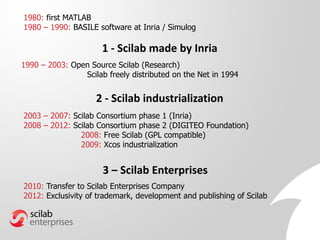
History
1 - Scilab made by Inria
2003 – 2007: Scilab Consortium phase 1 (Inria)
2008 – 2012: Scilab Consortium phase 2 (DIGITEO Foundation)
2008: Free Scilab (GPL compatible)
2009: Xcos industrialization
1980: first MATLAB
1980 – 1990: BASILE software at Inria / Simulog
2010: Transfer to Scilab Enterprises Company
2012: Exclusivity of trademark, development and publishing of Scilab
1990 – 2003: Open Source Scilab (Research)
Scilab freely distributed on the Net in 1994
2 - Scilab industrialization
3 – Scilab Enterprises
Scilab Software
Scilab Distribution
 Scilab
Powerful Computation Engine
 Xcos
Dynamic Systems Modeling and Simulation
 ATOMS
(AuTomatic mOdules Management for Scilab)
Modules Management
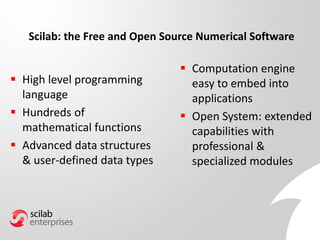
Scilab: the Free and Open Source Numerical Software
 High level programming
language
 Hundreds of
mathematical functions
 Advanced data structures
& user-defined data types
 Computation engine
easy to embed into
applications
 Open System: extended
capabilities with
professional &
specialized modules
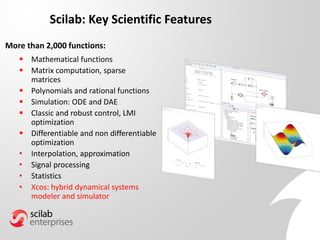
Scilab: Key Scientific Features
 Mathematical functions
 Matrix computation, sparse
matrices
 Polynomials and rational functions
 Simulation: ODE and DAE
 Classic and robust control, LMI
optimization
 Differentiable and non differentiable
optimization
• Interpolation, approximation
• Signal processing
• Statistics
• Xcos: hybrid dynamical systems
modeler and simulator
More than 2,000 functions:
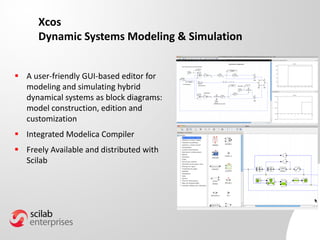
Xcos
Dynamic Systems Modeling & Simulation
 A user-friendly GUI-based editor for
modeling and simulating hybrid
dynamical systems as block diagrams:
model construction, edition and
customization
 Integrated Modelica Compiler
 Freely Available and distributed with
Scilab
Xcos main features
• Graphically model, compile, and simulate dynamical systems
• Combine continuous and discrete-time behaviors in the same model
• Select model elements from Palettes of standard blocks
• Program new blocks in C, Fortran, or Scilab language
• HDF5 standard which has been chosen to guarantee data exchanges between Scilab
and Xcos Editor
• Free Modelica compiler which enables the simulation of implicit diagrams
• Graphical user interface based on JGraphX
Coselica external module for multiphysics simulation
200 acausal blocks (in Modelica language):
• Analogical electrical systems.
• Mechanical systems: 1-D (translations, rotations) and 2-D planar.
• Thermic exchanges 0-D/1-D.
User-friendly Environment: easy to program
Variable BrowserFile Browser
Command History
Console
2-D/3-D VisualizationEditor
Embedded Help
External Modules
Manager
Variable Editor
Graphical User Interfaces
 Great number of functionalities
to create Graphical User
Interfaces
 Accessible from Scilab
 Interaction between GUI and
plots
 Fully integrated in OS
environment
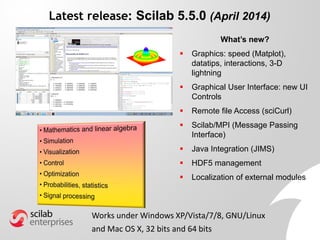
Latest release: Scilab 5.5.0 (April 2014)
What’s new?
 Graphics: speed (Matplot),
datatips, interactions, 3-D
lightning
 Graphical User Interface: new UI
Controls
 Remote file Access (sciCurl)
 Scilab/MPI (Message Passing
Interface)
 Java Integration (JIMS)
 HDF5 management
 Localization of external modules
Works under Windows XP/Vista/7/8, GNU/Linux
and Mac OS X, 32 bits and 64 bits
Links with other language and software
 Management of C, C++, Fortran, Java, Python, .net...
from Scilab: JIMS module for Java
 Available as a computing engine with C, C++, Java,
Python, .net API...
 Links with:
– Excel®, COM/DCOM® (Microsoft),
– Labview® (National Instruments),
– Isight® (Dassault Systèmes),
– Alternova® (Eurodecision),
– modeFRONTIER® (ESTECO),
– etc.
Scilab Future
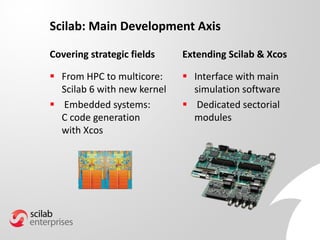
Scilab: Main Development Axis
Covering strategic fields
 From HPC to multicore:
Scilab 6 with new kernel
 Embedded systems:
C code generation
with Xcos
Extending Scilab & Xcos
 Interface with main
simulation software
 Dedicated sectorial
modules
New kernel ready for:
• HPC: multithreading, parallelism
detection,…
• Code generation
• Debugging
Scilab for the Future: Scilab 6
Language: ascendant compatibility ensured
 Memory:
• Scilab memory is only limited by hardware
• Dynamic memory allocation
 New parser:
• Native multi dimensional types and lists
• Error management
Scilab Community
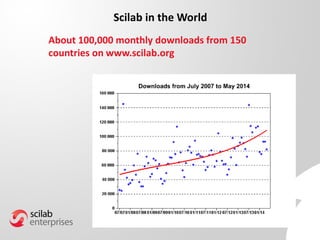
Scilab in the World
About 100,000 monthly downloads from 150
countries on www.scilab.org
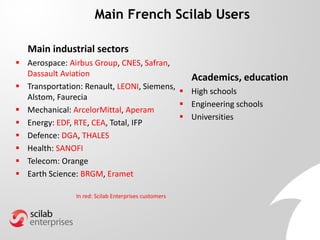
Main French Scilab Users
Main industrial sectors
 Aerospace: Airbus Group, CNES, Safran,
Dassault Aviation
 Transportation: Renault, LEONI, Siemens,
Alstom, Faurecia
 Mechanical: ArcelorMittal, Aperam
 Energy: EDF, RTE, CEA, Total, IFP
 Defence: DGA, THALES
 Health: SANOFI
 Telecom: Orange
 Earth Science: BRGM, Eramet
Academics, education
 High schools
 Engineering schools
 Universities
In red: Scilab Enterprises customers
Organization
 Company created in June 2010 from Inria
 The official structure resulting of the Scilab
Consortium which had developed Scilab since
2003
Jacques Dhellemmes
President
Claude Gomez
CEO
Christian Saguez
Vice President
Denis Ranque
Board Administrator
 A high level team who has extensive knowledge of Scilab
software and its environment and benefits directly from the
Scilab developers expertise.
 Scilab Enterprises relies on the historical and technical
knowledge of the Scilab Consortium which develops Scilab
software since 2003.
Scilab Enterprises
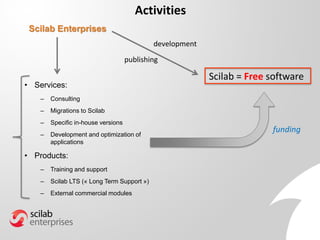
Activities
Scilab = Free software
funding
Scilab Enterprises
• Services:
– Consulting
– Migrations to Scilab
– Specific in-house versions
– Development and optimization of
applications
• Products:
– Training and support
– Scilab LTS (« Long Term Support »)
– External commercial modules
development
publishing
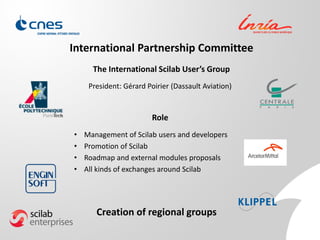
International Partnership Committee
President: Gérard Poirier (Dassault Aviation)
The International Scilab User’s Group
Role
• Management of Scilab users and developers
• Promotion of Scilab
• Roadmap and external modules proposals
• All kinds of exchanges around Scilab
Creation of regional groups
Extending Scilab
What does “free” means
Scilab Enterprises Commitment
Mission given by Inria
The Scilab distribution is and will
remain Free and Open Source
The Scilab distribution = what is
downloaded from “www.scilab.org”
• Mathematical functions
• Language
• Graphics, GUI
• Xcos
• ATOMS
Scilab license: CeCILL, GPL compatible
Scilab includes GPL code
=
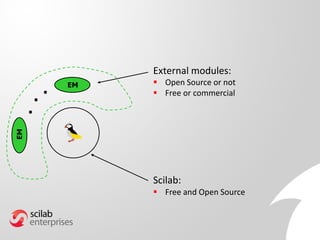
External modules:
 Open Source or not
 Free or commercial
EM
EM
Scilab:
 Free and Open Source
...
Graphics
GUI
Fortran and C code
(800,000 lines)
Scilab code
(150,000 lines)
Computation libraries
Parser
Interpreter
API
Documentation
Scilab internals
User
External Module
External Module
External
Module
700 functions
1300 functions
XML
JAVA
External
Module
Make a complete application using the good language
Fortran, C, C++
Scilab Code
(including UI
Control)
Java
Scilab API:create a C
gateway
JIMS = Java Interaction
Mechanism in Scilab
You can use your own existing code
without modifying it
External modules
EM
EM
Scilab
ATOMS
system
ATOMS: the external module manager
Advantages of ATOMS modules:
 Independent of Scilab releases issues:
easy update
 Works on all architectures (Fortran, C or
C++ code compiled on Windows, Mac OS X,
Linux)
 Handling of dependencies between
modules
...
User implementation
 Organize the Scilab module according to instructions:
http://atoms.scilab.org
 The module can include:
Scilab, Fortran, C, C++, Fortran code, XML help files
Upload source of Scilab
module to ATOMS Scilab
site
Module available from Scilab
“ATOMIZATION” by
Scilab Enterprises
For Companies: an internal ATOMS server can be installed
Fast deployment and easy maintenance
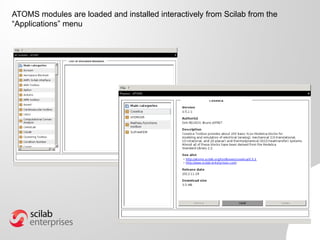
ATOMS modules are loaded and installed interactively from Scilab from the
“Applications” menu
Why Using Scilab?
Scilab Advantages
Scilab is free software
– Easy to install everywhere
– Large community of users
But freedom is not enough
A friendly software with a lot of functionalities
– Included toolboxes for most of applied mathematics
– Own dedicated OpenGL graphics
– Xcos comparable to Simulink
– Easy to add interactively external module
A comprehensive organization takes care of Scilab
– Scilab developed professionally by Scilab Enterprises
– Supports and services
– IPC Scilab Users Group with important Companies
How Using Scilab?
Scilab as a Powerful Graphical Calculator
 Matrix computations:
A=rand(1000,1000); b=rand(1000,1);
x=Ab; norm(A*x-b)
vp=spec(A);
 2D plots:
plot(real(vp),imag(vp),"*r");
x=linspace(-%pi,%pi,1000);
clf; plot(x,sin(x),"r",x,cos(x),"g");
 3D curve:
k=tan(%pi/27);t=linspace(-40,40,1000);
x=cos(t)./cosh(k*t); y=sin(t)./cosh(k*t); z=tanh(k*t);
clf; param3d(x,y,z);
 3D beautiful surface: 90,000 points
function z=f(x,y) // function defining the surface
z=exp(exp(-x^2-y^2)*(exp(cos(x^2+y^2)^20)+..
8*sin(x^2+y^2)^20+2*sin(2*(x^2+y^2))^8));
endfunction
x=linspace(-1.5,1.5,300); y=linspace(-1.5,1.5,300); z=feval(x,y,f);
f=scf(0); f.color_map=rainbowcolormap(32);
surf(x,y,z); // plot the surface
e=gce(); e.color_mode=-1;
a=gca(); a.box="off";
a.axes_visible=["off","off","off"];
a.x_label.visible="off";
a.y_label.visible="off";
a.z_label.visible="off";
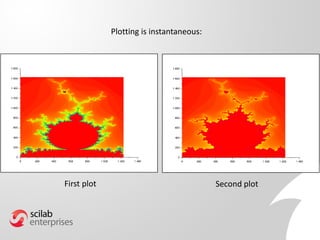
Example: we want to plot data in 2D with color according to the value of the
points, modify data and plot again
Data are given in text file mandel.txt (2 million points, 19 Mb).
1. Put data into Scilab matrix M:
M=fscanfMat("mandel.txt");
2. Open graphics window, choose beautiful colormap and plot points
according to its value:
f=scf(1); f.color_map = rainbowcolormap(256);
Matplot(M);
3. Discard points with value between 50 and 210 and plot in another
window:
M(find(50<M & M<210))=1;
f=scf(2); f.color_map = rainbowcolormap(256);
Matplot(M);
A very usual use: 1. Get data. 2. Plot Data. 3. Modify data and plot again.
First plot Second plot
Plotting is instantaneous:
To read text file takes time:
M=fscanfMat("mandel.txt"); // 5 seconds
1. Save matrix into binary SOD (Scilab Open Data) based on HDF5 standard:
save("mandel.sod","M"); // 0.04 second
2. Loading into Scilab is now very fast:
load("mandel.sod"); // 0.1 second
Programming in Scilab
 Friendly editor, powerful mathematical language close to
natural language:
function u=Newton(f,fprim,u0,eps)
u=u0;
while abs(f(u))>eps then
fp=fprim(u);
if abs(fp)<=%eps then
error("singularity")
end
u=u-f(u)/fp
end
endfunction
 About 1,300 Scilab functions are written in Scilab
function x=Gauss(A,b,eps)
n=size(b,"*"); x=b;
for k=1:n-1
// when the diagonal term is close to 0
// searching for a non zero element in the column
if abs(A(k,k))<eps then
kk=find(abs(A(k:n,k))>eps);
if kk==[] then
disp(“Non invertible Matrix");
return;
end
// exchanging lines k and kk in A and in b
kk=kk(1);
lignek=A(k,:); A(k,:)=A(kk,:); A(kk,:)=lignek;
lignek=b(k); b(k)=b(kk); b(kk)=lignek;
end
// Gauss algorithm
for l=k+1:n
p=A(l,k)/A(k,k);
for m=k:n
A(l,m)=A(l,m)-A(k,m)*p;
end
x(l)=x(l)-x(k)*p;
end
end
if abs(A(n,n))<eps then
disp("Non invertible Matrix ");
return;
end
// compute x
x(n)=x(n)/A(n,n);
for i=n-1:-1:1
s=0;
for j=i+1:n
s=s+A(i,j)*x(j);
end
x(i)=(x(i)-s)/A(i,i);
end
endfunction
Gaussian elimination with partial
pivoting:
Scilab vectorized syntax
Save and load GUI as XML files :
 Save GUI with:
saveGui(f,"mygui.xml");
 Load GUI with:
f=loadGui("mygui.xml");
Making easy Scilab GUI with Scilab 5.5.0
New components, speed, default look and feel of the OS
 Migration from Matlab to Scilab: fast ROI
 Migration from Excel to Scilab: GUI, faster computations, easy
deployment and maintenance, easy evolution
 BRGM Example 1
 Scilab as a computation engine for other software: LabVIEW, iSight,
ModFRONTIER,…
 Make complete application as Scilab modules:
– Used on site for production: ARCELORMITTAL, SANOFI, SNECMA,…
– For internal use: AIRBUS GROUP, BRGM, CNES, DASSAULT AVIATION, EDF…
– For scientific domains:
• Space mechanics: CelestLab by CNES Example 2
• Optimization platform: SOP with DASSAULT AVIATION Example 3
For Industry
Example 1: from Excel to Scilab, BRGM
Example 2: CelestLab
ATOMS module for space mechanics and
flight dynamics made by CNES
 Freely available and Open Source
 Used by CNES and ESA for mission analysis
 Library of Scilab code: functions easily re-used for
making new programs
CelestLab: A free and open source Scilab library for flight dynamics
CelestLab topics
Topics Contents
Coordinates and Frames - Change of coordinates
- Dates manipulation
- Change of reference frames
- Orbital element transformations
- Rotations and quaternions
Geometry and Events - Orbital events computation
- Orbital geometry
Interplanetary - Interplanetary transfer
- Three body analysis
Models Earth motion, density models
Orbit properties - Keplerian formulas
- Orbit characteristics (sun synchronism, repeat orbits, frozen orbits)
Relative motion Chlohessy-Wiltshire formalism
Trajectory and manoeuvres - Orbit propagation (analytical)
- Manoeuvre computation
- Dispersion analysis
Utilities - Various support functions including graphics
CelestLab: A free and open source Scilab library for flight dynamics 49
CelestLab and mission analysis practices
■Coding Scilab scripts using CelestLab is easy. This
encourages people to develop their own scripts.
■CelestLab is developed by people in charge of mission
analysis. It is a shared product.
■When an analysis is completed, there is an assessment on
whether a part can be incorporated in CelestLab.
■CelestLab demos are a efficient solution for answering
recurrent questions and can easily modified if needed.
■CelestLab is well documented and is more and more used as a
source of information on a laptop.
CelestLab: A free and open source Scilab library for flight dynamics 50
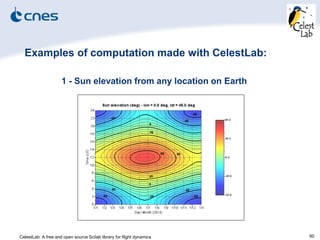
Examples of computation made with CelestLab:
1 - Sun elevation from any location on Earth
CelestLab: A free and open source Scilab library for flight dynamics 51
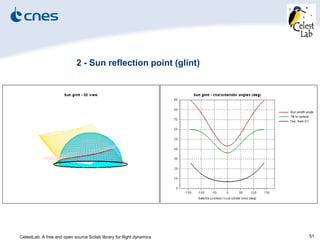
2 - Sun reflection point (glint)
CelestLab: A free and open source Scilab library for flight dynamics 52
3 - Ground stations visibility
Example 3: SOP
Optimization platform made with DASSAULT AVIATION
OMD2 and CSDL French funded R & D projects
 Open Source and freely available: ATOMS module in the
future
 Comprehensive application with GUI
 Library of C and Scilab code
Typical example of a complete Scilab industrial application:
– Friendly interactive user interface masking the complexity to the final user
– Possibility to try various algorithms, to make comparisons
– Possibility to add its own functions and algorithms
– Visualization and interaction with graphics
Interactive Graphics User Interface
Three modules:
 Data management
 Modeling
 Optimization
Project management:
 Saving and loading
Visualization and graphical interaction at each level
Data management
 Load and generate existing DOE (iSight,…) :
possibility to add its own DOE generator
 Response simulation using external tools
(openFOAM, CATIA, CCM+,…) or Scilab functions
 2D visualization of factors
and responses
Modeling
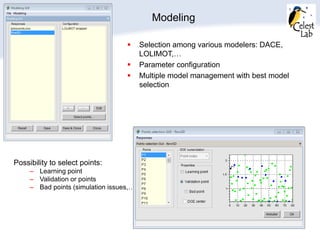
 Selection among various modelers: DACE,
LOLIMOT,…
 Parameter configuration
 Multiple model management with best model
selection
Possibility to select points:
– Learning point
– Validation or points
– Bad points (simulation issues,…)
Modeling: execution and 2D visualization
 Response: all factors, two factors
 Correlation
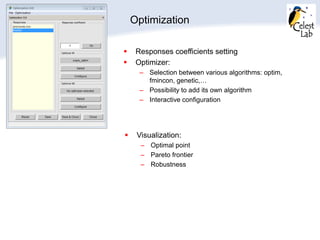
Optimization
 Responses coefficients setting
 Optimizer:
– Selection between various algorithms: optim,
fmincon, genetic,…
– Possibility to add its own algorithm
– Interactive configuration
 Visualization:
– Optimal point
– Pareto frontier
– Robustness
Conclusion
Scilab
is
The Professional Free
Software for Numerical Computation
Industry, Education and Research
Scilab-by-dr-gomez-june2014

Scilab-by-dr-gomez-june2014

  • 1.
    Scilab The Free NumericalComputation Software Dr. Claude Gomez Scilab Enterprises CEO Scilab Week, MMU, Melaka, 9 June 2014 Malaysia Scilab Users Seminar, UPM, 10 June 2014
  • 2.
  • 3.
    1 - Scilabmade by Inria 2003 – 2007: Scilab Consortium phase 1 (Inria) 2008 – 2012: Scilab Consortium phase 2 (DIGITEO Foundation) 2008: Free Scilab (GPL compatible) 2009: Xcos industrialization 1980: first MATLAB 1980 – 1990: BASILE software at Inria / Simulog 2010: Transfer to Scilab Enterprises Company 2012: Exclusivity of trademark, development and publishing of Scilab 1990 – 2003: Open Source Scilab (Research) Scilab freely distributed on the Net in 1994 2 - Scilab industrialization 3 – Scilab Enterprises
  • 4.
  • 5.
    Scilab Distribution  Scilab PowerfulComputation Engine  Xcos Dynamic Systems Modeling and Simulation  ATOMS (AuTomatic mOdules Management for Scilab) Modules Management
  • 6.
    Scilab: the Freeand Open Source Numerical Software  High level programming language  Hundreds of mathematical functions  Advanced data structures & user-defined data types  Computation engine easy to embed into applications  Open System: extended capabilities with professional & specialized modules
  • 7.
    Scilab: Key ScientificFeatures  Mathematical functions  Matrix computation, sparse matrices  Polynomials and rational functions  Simulation: ODE and DAE  Classic and robust control, LMI optimization  Differentiable and non differentiable optimization • Interpolation, approximation • Signal processing • Statistics • Xcos: hybrid dynamical systems modeler and simulator More than 2,000 functions:
  • 8.
    Xcos Dynamic Systems Modeling& Simulation  A user-friendly GUI-based editor for modeling and simulating hybrid dynamical systems as block diagrams: model construction, edition and customization  Integrated Modelica Compiler  Freely Available and distributed with Scilab
  • 9.
    Xcos main features •Graphically model, compile, and simulate dynamical systems • Combine continuous and discrete-time behaviors in the same model • Select model elements from Palettes of standard blocks • Program new blocks in C, Fortran, or Scilab language • HDF5 standard which has been chosen to guarantee data exchanges between Scilab and Xcos Editor • Free Modelica compiler which enables the simulation of implicit diagrams • Graphical user interface based on JGraphX
  • 10.
    Coselica external modulefor multiphysics simulation 200 acausal blocks (in Modelica language): • Analogical electrical systems. • Mechanical systems: 1-D (translations, rotations) and 2-D planar. • Thermic exchanges 0-D/1-D.
  • 11.
    User-friendly Environment: easyto program Variable BrowserFile Browser Command History Console
  • 12.
  • 13.
    Graphical User Interfaces Great number of functionalities to create Graphical User Interfaces  Accessible from Scilab  Interaction between GUI and plots  Fully integrated in OS environment
  • 14.
    Latest release: Scilab5.5.0 (April 2014) What’s new?  Graphics: speed (Matplot), datatips, interactions, 3-D lightning  Graphical User Interface: new UI Controls  Remote file Access (sciCurl)  Scilab/MPI (Message Passing Interface)  Java Integration (JIMS)  HDF5 management  Localization of external modules Works under Windows XP/Vista/7/8, GNU/Linux and Mac OS X, 32 bits and 64 bits
  • 15.
    Links with otherlanguage and software  Management of C, C++, Fortran, Java, Python, .net... from Scilab: JIMS module for Java  Available as a computing engine with C, C++, Java, Python, .net API...  Links with: – Excel®, COM/DCOM® (Microsoft), – Labview® (National Instruments), – Isight® (Dassault Systèmes), – Alternova® (Eurodecision), – modeFRONTIER® (ESTECO), – etc.
  • 16.
  • 17.
    Scilab: Main DevelopmentAxis Covering strategic fields  From HPC to multicore: Scilab 6 with new kernel  Embedded systems: C code generation with Xcos Extending Scilab & Xcos  Interface with main simulation software  Dedicated sectorial modules
  • 18.
    New kernel readyfor: • HPC: multithreading, parallelism detection,… • Code generation • Debugging Scilab for the Future: Scilab 6 Language: ascendant compatibility ensured  Memory: • Scilab memory is only limited by hardware • Dynamic memory allocation  New parser: • Native multi dimensional types and lists • Error management
  • 19.
  • 20.
    Scilab in theWorld About 100,000 monthly downloads from 150 countries on www.scilab.org
  • 21.
    Main French ScilabUsers Main industrial sectors  Aerospace: Airbus Group, CNES, Safran, Dassault Aviation  Transportation: Renault, LEONI, Siemens, Alstom, Faurecia  Mechanical: ArcelorMittal, Aperam  Energy: EDF, RTE, CEA, Total, IFP  Defence: DGA, THALES  Health: SANOFI  Telecom: Orange  Earth Science: BRGM, Eramet Academics, education  High schools  Engineering schools  Universities In red: Scilab Enterprises customers
  • 22.
  • 23.
     Company createdin June 2010 from Inria  The official structure resulting of the Scilab Consortium which had developed Scilab since 2003 Jacques Dhellemmes President Claude Gomez CEO Christian Saguez Vice President Denis Ranque Board Administrator  A high level team who has extensive knowledge of Scilab software and its environment and benefits directly from the Scilab developers expertise.  Scilab Enterprises relies on the historical and technical knowledge of the Scilab Consortium which develops Scilab software since 2003. Scilab Enterprises
  • 24.
    Activities Scilab = Freesoftware funding Scilab Enterprises • Services: – Consulting – Migrations to Scilab – Specific in-house versions – Development and optimization of applications • Products: – Training and support – Scilab LTS (« Long Term Support ») – External commercial modules development publishing
  • 25.
    International Partnership Committee President:Gérard Poirier (Dassault Aviation) The International Scilab User’s Group Role • Management of Scilab users and developers • Promotion of Scilab • Roadmap and external modules proposals • All kinds of exchanges around Scilab Creation of regional groups
  • 26.
  • 27.
    What does “free”means Scilab Enterprises Commitment Mission given by Inria The Scilab distribution is and will remain Free and Open Source The Scilab distribution = what is downloaded from “www.scilab.org” • Mathematical functions • Language • Graphics, GUI • Xcos • ATOMS Scilab license: CeCILL, GPL compatible Scilab includes GPL code =
  • 28.
    External modules:  OpenSource or not  Free or commercial EM EM Scilab:  Free and Open Source ...
  • 29.
    Graphics GUI Fortran and Ccode (800,000 lines) Scilab code (150,000 lines) Computation libraries Parser Interpreter API Documentation Scilab internals User External Module External Module External Module 700 functions 1300 functions XML JAVA External Module
  • 30.
    Make a completeapplication using the good language Fortran, C, C++ Scilab Code (including UI Control) Java Scilab API:create a C gateway JIMS = Java Interaction Mechanism in Scilab You can use your own existing code without modifying it
  • 31.
    External modules EM EM Scilab ATOMS system ATOMS: theexternal module manager Advantages of ATOMS modules:  Independent of Scilab releases issues: easy update  Works on all architectures (Fortran, C or C++ code compiled on Windows, Mac OS X, Linux)  Handling of dependencies between modules ...
  • 32.
    User implementation  Organizethe Scilab module according to instructions: http://atoms.scilab.org  The module can include: Scilab, Fortran, C, C++, Fortran code, XML help files Upload source of Scilab module to ATOMS Scilab site Module available from Scilab “ATOMIZATION” by Scilab Enterprises For Companies: an internal ATOMS server can be installed Fast deployment and easy maintenance
  • 33.
    ATOMS modules areloaded and installed interactively from Scilab from the “Applications” menu
  • 34.
  • 35.
    Scilab Advantages Scilab isfree software – Easy to install everywhere – Large community of users But freedom is not enough A friendly software with a lot of functionalities – Included toolboxes for most of applied mathematics – Own dedicated OpenGL graphics – Xcos comparable to Simulink – Easy to add interactively external module A comprehensive organization takes care of Scilab – Scilab developed professionally by Scilab Enterprises – Supports and services – IPC Scilab Users Group with important Companies
  • 36.
  • 37.
    Scilab as aPowerful Graphical Calculator  Matrix computations: A=rand(1000,1000); b=rand(1000,1); x=Ab; norm(A*x-b) vp=spec(A);  2D plots: plot(real(vp),imag(vp),"*r"); x=linspace(-%pi,%pi,1000); clf; plot(x,sin(x),"r",x,cos(x),"g");  3D curve: k=tan(%pi/27);t=linspace(-40,40,1000); x=cos(t)./cosh(k*t); y=sin(t)./cosh(k*t); z=tanh(k*t); clf; param3d(x,y,z);
  • 38.
     3D beautifulsurface: 90,000 points function z=f(x,y) // function defining the surface z=exp(exp(-x^2-y^2)*(exp(cos(x^2+y^2)^20)+.. 8*sin(x^2+y^2)^20+2*sin(2*(x^2+y^2))^8)); endfunction x=linspace(-1.5,1.5,300); y=linspace(-1.5,1.5,300); z=feval(x,y,f); f=scf(0); f.color_map=rainbowcolormap(32); surf(x,y,z); // plot the surface e=gce(); e.color_mode=-1; a=gca(); a.box="off"; a.axes_visible=["off","off","off"]; a.x_label.visible="off"; a.y_label.visible="off"; a.z_label.visible="off";
  • 39.
    Example: we wantto plot data in 2D with color according to the value of the points, modify data and plot again Data are given in text file mandel.txt (2 million points, 19 Mb). 1. Put data into Scilab matrix M: M=fscanfMat("mandel.txt"); 2. Open graphics window, choose beautiful colormap and plot points according to its value: f=scf(1); f.color_map = rainbowcolormap(256); Matplot(M); 3. Discard points with value between 50 and 210 and plot in another window: M(find(50<M & M<210))=1; f=scf(2); f.color_map = rainbowcolormap(256); Matplot(M); A very usual use: 1. Get data. 2. Plot Data. 3. Modify data and plot again.
  • 40.
    First plot Secondplot Plotting is instantaneous:
  • 41.
    To read textfile takes time: M=fscanfMat("mandel.txt"); // 5 seconds 1. Save matrix into binary SOD (Scilab Open Data) based on HDF5 standard: save("mandel.sod","M"); // 0.04 second 2. Loading into Scilab is now very fast: load("mandel.sod"); // 0.1 second
  • 42.
    Programming in Scilab Friendly editor, powerful mathematical language close to natural language: function u=Newton(f,fprim,u0,eps) u=u0; while abs(f(u))>eps then fp=fprim(u); if abs(fp)<=%eps then error("singularity") end u=u-f(u)/fp end endfunction  About 1,300 Scilab functions are written in Scilab
  • 43.
    function x=Gauss(A,b,eps) n=size(b,"*"); x=b; fork=1:n-1 // when the diagonal term is close to 0 // searching for a non zero element in the column if abs(A(k,k))<eps then kk=find(abs(A(k:n,k))>eps); if kk==[] then disp(“Non invertible Matrix"); return; end // exchanging lines k and kk in A and in b kk=kk(1); lignek=A(k,:); A(k,:)=A(kk,:); A(kk,:)=lignek; lignek=b(k); b(k)=b(kk); b(kk)=lignek; end // Gauss algorithm for l=k+1:n p=A(l,k)/A(k,k); for m=k:n A(l,m)=A(l,m)-A(k,m)*p; end x(l)=x(l)-x(k)*p; end end if abs(A(n,n))<eps then disp("Non invertible Matrix "); return; end // compute x x(n)=x(n)/A(n,n); for i=n-1:-1:1 s=0; for j=i+1:n s=s+A(i,j)*x(j); end x(i)=(x(i)-s)/A(i,i); end endfunction Gaussian elimination with partial pivoting: Scilab vectorized syntax
  • 44.
    Save and loadGUI as XML files :  Save GUI with: saveGui(f,"mygui.xml");  Load GUI with: f=loadGui("mygui.xml"); Making easy Scilab GUI with Scilab 5.5.0 New components, speed, default look and feel of the OS
  • 45.
     Migration fromMatlab to Scilab: fast ROI  Migration from Excel to Scilab: GUI, faster computations, easy deployment and maintenance, easy evolution  BRGM Example 1  Scilab as a computation engine for other software: LabVIEW, iSight, ModFRONTIER,…  Make complete application as Scilab modules: – Used on site for production: ARCELORMITTAL, SANOFI, SNECMA,… – For internal use: AIRBUS GROUP, BRGM, CNES, DASSAULT AVIATION, EDF… – For scientific domains: • Space mechanics: CelestLab by CNES Example 2 • Optimization platform: SOP with DASSAULT AVIATION Example 3 For Industry
  • 46.
    Example 1: fromExcel to Scilab, BRGM
  • 47.
    Example 2: CelestLab ATOMSmodule for space mechanics and flight dynamics made by CNES  Freely available and Open Source  Used by CNES and ESA for mission analysis  Library of Scilab code: functions easily re-used for making new programs
  • 48.
    CelestLab: A freeand open source Scilab library for flight dynamics CelestLab topics Topics Contents Coordinates and Frames - Change of coordinates - Dates manipulation - Change of reference frames - Orbital element transformations - Rotations and quaternions Geometry and Events - Orbital events computation - Orbital geometry Interplanetary - Interplanetary transfer - Three body analysis Models Earth motion, density models Orbit properties - Keplerian formulas - Orbit characteristics (sun synchronism, repeat orbits, frozen orbits) Relative motion Chlohessy-Wiltshire formalism Trajectory and manoeuvres - Orbit propagation (analytical) - Manoeuvre computation - Dispersion analysis Utilities - Various support functions including graphics
  • 49.
    CelestLab: A freeand open source Scilab library for flight dynamics 49 CelestLab and mission analysis practices ■Coding Scilab scripts using CelestLab is easy. This encourages people to develop their own scripts. ■CelestLab is developed by people in charge of mission analysis. It is a shared product. ■When an analysis is completed, there is an assessment on whether a part can be incorporated in CelestLab. ■CelestLab demos are a efficient solution for answering recurrent questions and can easily modified if needed. ■CelestLab is well documented and is more and more used as a source of information on a laptop.
  • 50.
    CelestLab: A freeand open source Scilab library for flight dynamics 50 Examples of computation made with CelestLab: 1 - Sun elevation from any location on Earth
  • 51.
    CelestLab: A freeand open source Scilab library for flight dynamics 51 2 - Sun reflection point (glint)
  • 52.
    CelestLab: A freeand open source Scilab library for flight dynamics 52 3 - Ground stations visibility
  • 53.
    Example 3: SOP Optimizationplatform made with DASSAULT AVIATION OMD2 and CSDL French funded R & D projects  Open Source and freely available: ATOMS module in the future  Comprehensive application with GUI  Library of C and Scilab code Typical example of a complete Scilab industrial application: – Friendly interactive user interface masking the complexity to the final user – Possibility to try various algorithms, to make comparisons – Possibility to add its own functions and algorithms – Visualization and interaction with graphics
  • 54.
    Interactive Graphics UserInterface Three modules:  Data management  Modeling  Optimization Project management:  Saving and loading Visualization and graphical interaction at each level
  • 55.
    Data management  Loadand generate existing DOE (iSight,…) : possibility to add its own DOE generator  Response simulation using external tools (openFOAM, CATIA, CCM+,…) or Scilab functions  2D visualization of factors and responses
  • 56.
    Modeling  Selection amongvarious modelers: DACE, LOLIMOT,…  Parameter configuration  Multiple model management with best model selection Possibility to select points: – Learning point – Validation or points – Bad points (simulation issues,…)
  • 57.
    Modeling: execution and2D visualization  Response: all factors, two factors  Correlation
  • 58.
    Optimization  Responses coefficientssetting  Optimizer: – Selection between various algorithms: optim, fmincon, genetic,… – Possibility to add its own algorithm – Interactive configuration  Visualization: – Optimal point – Pareto frontier – Robustness
  • 59.
  • 60.
    Scilab is The Professional Free Softwarefor Numerical Computation Industry, Education and Research