How do I...use PiCloud for cloud computing?
         Ken Elkabany • February 5, 2010
January 5, 2010 release


• Python 2.6
• 75+ libraries SciPy, NumPy, matplotlib, IPython, Mayavi...
• NumPy 1.4 faster (20-30%) import times, better handling of
  special floating point types

• 64-bit available on all platforms in addition to 32-bit
• PiCloud’s cloud library for cloud computing
Ken Elkabany
Co-Founder & CEO, PiCloud

                 • UC Berkeley

                 • Founded PiCloud in 2008
Presented by
                                           Ken Elkabany, CEO
                                           ken@picloud.com

Feb. 5, 2010   EPD Presentation: How do I use PiCloud?
Who are we?
2


       PiCloud, Inc.
       Founded in 2009, and based in Sunnyvale, CA
       Our mission: Simplify cloud computing
       The PiCloud Cloud-Computing Platform
         Integrated  into the Python programming language
         Partnership with Enthought, Inc. to include our cloud
          library in EPD (Enthought Python Distribution)
         Beta-release


                                                   © Copyright 2010 by PiCloud, Inc.
What is cloud computing?
3


       Cloud computing is a style of computing in which
        dynamically scalable and often virtualized
        resources are provided as a service over the
        Internet.


                                             © Copyright 2010 by PiCloud, Inc.
What does a cloud look like?
4


       Low upfront costs
         Serversare not purchased, only rented (utility
          computing)
       Multi-tenant
         Centralization of infrastructure geographically
         High-levels of utilization and efficiency

       Scalable and Agile
         On-demand    provisioning of resources
       Secure, Reliable, Sustainable

                                                   © Copyright 2010 by PiCloud, Inc.
Cloud Computing Ecosystem
5


       Cloud infrastructures
         Allow  for the provisioning of
          virtualized resources
           Compute:  Boot up and log into
            a Linux or Windows server
           Storage: Specialized services
            like S3
       The PiCloud platform sits on
        top of infrastructure,
        abstracting its details away

                                             © Copyright 2010 by PiCloud, Inc.
The PiCloud Abstraction
6


              Input Output
                              Input      Output


                                  © Copyright 2010 by PiCloud, Inc.
Our motivation
7


                AutoTagger
                  Facebook photo-tagging assistant
                  PiCloud’s First Customer


                          Basic Functionality
                             Detect and extract faces from
                               a single photo
                          Repeatedly apply face detection
                           to all photos in an album


                                           © Copyright 2010 by PiCloud, Inc.
Our motivation
8


    Functional view: I need to detect faces in   Server view: I need 20 high performance virtual servers to
    these photos for the user                    detect faces in these photos in parallel


                                                  Design Objectives:
                                                  •Load balancing
                                                  •Auto-Scaling
                                                  •Performance Monitoring, introspection
                  PiCloud                         •Error detection, reporting, and handling.
                                                                           © Copyright 2010 by PiCloud, Inc.
Roadmap
9


       Brief tour of the website
       Example 1: First steps with PiCloud
         Using   the web and console interface
       Example 2: Monte Carlo PI
       Example 3: Basic twitter analyzer
       Conclusion


                                                  © Copyright 2010 by PiCloud, Inc.
Example 1: First steps
10


        Run a simple function on the cloud
     >>> def func():                             # define the function
     >>>      return 3*3
     >>>
     >>> import cloud                            # import our library
     >>> cloud.setkey(API_KEY, API_SECRET_KEY)   # set your key (can do in cfgs)
     >>> jid = cloud.call(func)                  # returns job id
     >>> cloud.status(jid)                       # returns job status 
     ‘processing’
     >>> cloud.status(jid)                       # returns job status 
     ‘done’
     >>> jid = cloud.result(jid)                 # returns the result
     9


                                                             © Copyright 2010 by PiCloud, Inc.
Example 1: First steps
11


        3 Simple Steps
          Import our library
          Set your api key (this is how we identify you)

          Pass your function into cloud.call

        That’s all you need to run any function on the cloud!
        Your function can do anything that Python allows
         you to do. (except open listening sockets)


                                                    © Copyright 2010 by PiCloud, Inc.
If you’re trying to following along…
12


        But you don’t have an API Key yet, try this:
             import cloud
             cloud.start_simulator()
             # do not call cloud.setkey


                                                © Copyright 2010 by PiCloud, Inc.
Web interface
13


        http://www.picloud.com/accounts/
        Manage API Keys
        View functions/jobs
          Status(queued, processing, done)
          Resource usage (profiling)

        Track compute usage with analytics
        Python C-extensions support
        Documentation


                                              © Copyright 2010 by PiCloud, Inc.
Example 1: First steps
14


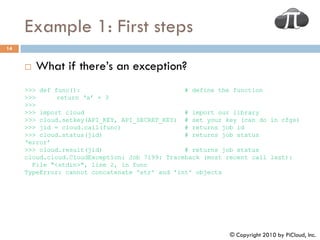
        What if there’s an exception?
     >>> def func():                            # define the function
     >>>      return ‘a’ + 3
     >>>
     >>> import cloud                           # import our library
     >>> cloud.setkey(API_KEY, API_SECRET_KEY) # set your key (can do in cfgs)
     >>> jid = cloud.call(func)                 # returns job id
     >>> cloud.status(jid)                      # returns job status 
     ‘error’
     >>> cloud.result(jid)                      # returns job status 
     cloud.cloud.CloudException: Job 7199: Traceback (most recent call last):
       File "<stdin>", line 2, in func
     TypeError: cannot concatenate 'str' and 'int' objects


                                                           © Copyright 2010 by PiCloud, Inc.
Under the hood
 15


Application                                      Load                   Workers
Using PiCloud                                 balancers,                (compute
                                              schedulers                 servers)


        Cloud Library             PiCloud
 Identifies and Transmits data   Interface
     and source dependencies


                                             Distributed               Distributed
                                             Database                  File System,
  Monitoring                                                               DHT
Analyze workload


                           You
                                                           © Copyright 2010 by PiCloud, Inc.
Under the hood
16


        How does our advanced system translate over to
         tangible benefits for you?
          Robust

          Scalable

          Secure

          Multi-tenant
            Higher   utilization -> cheaper
          Optimized

          Easy   maintenance


                                               © Copyright 2010 by PiCloud, Inc.
Using the simulator
17


        Motivation
          Copying the state of your Python interpreter to PiCloud
           can be costly, and should be optimized to a minimum
            We’ll    warn you automatically if you are sending over 1MB
                of information
          Inmany cases, faster to test things locally (and there
           are no charges!)
        How do I use it?
                cloud.start_simulator()


                                                        © Copyright 2010 by PiCloud, Inc.
Example 2: Monte Carlo π
18


         Estimate PI using the Monte Carlo method
           Randomly             throw darts at the board below

                4 * (num _ darts _ landing _ in _ circle )
         PI 
                         total _ darts _ thrown


            Derived           from
                                       r 2 
            P (dart _ in _ circle )           
                                      (2 r ) 2
                                                 4


                                                             © Copyright 2010 by PiCloud, Inc.
Example 2: Monte Carlo PI
19


         Map a function across a series of data points
     def monteCarlo(num_test):
       """
       Throw num_test darts at a 1x1 rectangle
       Return how many appear within the quarter circle
       """  
       numInCircle = 0
       y = random.random()

         for _ in xrange(num_test):
           x = random.random()
           y = random.random()
           if x*x + y*y < 1.0:
             numInCircle += 1

         return numInCircle


                                                          © Copyright 2010 by PiCloud, Inc.
Example 2: Monte Carlo PI
20


         1 line modification to run this on the cloud
 import random
 import cloud

 numMaps = 6
 numTests = 10000000

 def calcPi():

     """Send off numMaps monteCarlo simulations in parallel"""
     jids = cloud.map(monteCarlo, [numTests for _ in range(numMaps)], _high_cpu=True)
     numInCircleResults = cloud.result(jids)
     numInCircle = sum(numInCircleResults)  

     pi = (4 * numInCircle) / float(numTests* numMaps)
     return pi

 if __name__ == '__main__':
   pi = calcPi()

     print 'Pi determined to be %s' % pi
                                                             © Copyright 2010 by PiCloud, Inc.
Example 2: Monte Carlo PI
21


        How much did this cost?
          Use cloud.info to get cpu time used (runtime)
          Cost = (cpu time) * rate

          Cost = 60 seconds * 0.0013 per minute = $0.0013


                                               © Copyright 2010 by PiCloud, Inc.
Example 2: Monte Carlo PI
22


        What was the _high_cpu attribute for?
     jids = cloud.map(monteCarlo, [numTests for _ in range(numMaps)], _high_cpu=True)


        Automatically run your code with more CPU power
        Default is 1 CPU unit (1-1.2ghz Xeon processor)
        _high_cpu is 2.5 CPU units


                                                                  © Copyright 2010 by PiCloud, Inc.
Example 3: Twitter Analyzer
23


        Determine relationships between followers, #
         following, and statuses using linear regression
        We use cloud.map to scrape twitter for user data
        Run linear regressions in parallel using
         cloud.call
        Graph statuses/followers with pylab
        NOTE: To use this example, you will need to modify
         the posted file to use your own Twitter account
         information.

                                              © Copyright 2010 by PiCloud, Inc.
Conclusion
24


        You can now leverage the compute power of a
         cluster of servers with only a couple lines of code!
        We’ve given you a taste of the features PiCloud has
         to offer, but there are many more!
        If you have not already, register at www.picloud.com
        Questions? ken@picloud.com


                                              © Copyright 2010 by PiCloud, Inc.

February EPD Webinar: How do I...use PiCloud for cloud computing?

  • 1.
    How do I...usePiCloud for cloud computing? Ken Elkabany • February 5, 2010
  • 2.
    January 5, 2010release • Python 2.6 • 75+ libraries SciPy, NumPy, matplotlib, IPython, Mayavi... • NumPy 1.4 faster (20-30%) import times, better handling of special floating point types • 64-bit available on all platforms in addition to 32-bit • PiCloud’s cloud library for cloud computing
  • 3.
    Ken Elkabany Co-Founder &CEO, PiCloud • UC Berkeley • Founded PiCloud in 2008
  • 4.
    Presented by Ken Elkabany, CEO ken@picloud.com Feb. 5, 2010 EPD Presentation: How do I use PiCloud?
  • 5.
    Who are we? 2  PiCloud, Inc.  Founded in 2009, and based in Sunnyvale, CA  Our mission: Simplify cloud computing  The PiCloud Cloud-Computing Platform  Integrated into the Python programming language  Partnership with Enthought, Inc. to include our cloud library in EPD (Enthought Python Distribution)  Beta-release © Copyright 2010 by PiCloud, Inc.
  • 6.
    What is cloudcomputing? 3  Cloud computing is a style of computing in which dynamically scalable and often virtualized resources are provided as a service over the Internet. © Copyright 2010 by PiCloud, Inc.
  • 7.
    What does acloud look like? 4  Low upfront costs  Serversare not purchased, only rented (utility computing)  Multi-tenant  Centralization of infrastructure geographically  High-levels of utilization and efficiency  Scalable and Agile  On-demand provisioning of resources  Secure, Reliable, Sustainable © Copyright 2010 by PiCloud, Inc.
  • 8.
    Cloud Computing Ecosystem 5  Cloud infrastructures  Allow for the provisioning of virtualized resources  Compute: Boot up and log into a Linux or Windows server  Storage: Specialized services like S3  The PiCloud platform sits on top of infrastructure, abstracting its details away © Copyright 2010 by PiCloud, Inc.
  • 9.
    The PiCloud Abstraction 6 Input Output Input Output © Copyright 2010 by PiCloud, Inc.
  • 10.
    Our motivation 7  AutoTagger  Facebook photo-tagging assistant  PiCloud’s First Customer  Basic Functionality  Detect and extract faces from a single photo  Repeatedly apply face detection to all photos in an album © Copyright 2010 by PiCloud, Inc.
  • 11.
    Our motivation 8 Functional view: I need to detect faces in Server view: I need 20 high performance virtual servers to these photos for the user detect faces in these photos in parallel Design Objectives: •Load balancing •Auto-Scaling •Performance Monitoring, introspection PiCloud •Error detection, reporting, and handling. © Copyright 2010 by PiCloud, Inc.
  • 12.
    Roadmap 9  Brief tour of the website  Example 1: First steps with PiCloud  Using the web and console interface  Example 2: Monte Carlo PI  Example 3: Basic twitter analyzer  Conclusion © Copyright 2010 by PiCloud, Inc.
  • 13.
    Example 1: Firststeps 10  Run a simple function on the cloud >>> def func(): # define the function >>>  return 3*3 >>> >>> import cloud # import our library >>> cloud.setkey(API_KEY, API_SECRET_KEY) # set your key (can do in cfgs) >>> jid = cloud.call(func) # returns job id >>> cloud.status(jid) # returns job status  ‘processing’ >>> cloud.status(jid) # returns job status  ‘done’ >>> jid = cloud.result(jid) # returns the result 9 © Copyright 2010 by PiCloud, Inc.
  • 14.
    Example 1: Firststeps 11  3 Simple Steps  Import our library  Set your api key (this is how we identify you)  Pass your function into cloud.call  That’s all you need to run any function on the cloud!  Your function can do anything that Python allows you to do. (except open listening sockets) © Copyright 2010 by PiCloud, Inc.
  • 15.
    If you’re tryingto following along… 12  But you don’t have an API Key yet, try this: import cloud cloud.start_simulator() # do not call cloud.setkey © Copyright 2010 by PiCloud, Inc.
  • 16.
    Web interface 13  http://www.picloud.com/accounts/  Manage API Keys  View functions/jobs  Status(queued, processing, done)  Resource usage (profiling)  Track compute usage with analytics  Python C-extensions support  Documentation © Copyright 2010 by PiCloud, Inc.
  • 17.
    Example 1: Firststeps 14  What if there’s an exception? >>> def func(): # define the function >>>  return ‘a’ + 3 >>> >>> import cloud # import our library >>> cloud.setkey(API_KEY, API_SECRET_KEY) # set your key (can do in cfgs) >>> jid = cloud.call(func) # returns job id >>> cloud.status(jid) # returns job status  ‘error’ >>> cloud.result(jid) # returns job status  cloud.cloud.CloudException: Job 7199: Traceback (most recent call last): File "<stdin>", line 2, in func TypeError: cannot concatenate 'str' and 'int' objects © Copyright 2010 by PiCloud, Inc.
  • 18.
    Under the hood 15 Application Load Workers Using PiCloud balancers, (compute schedulers servers) Cloud Library PiCloud Identifies and Transmits data Interface and source dependencies Distributed Distributed Database File System, Monitoring DHT Analyze workload You © Copyright 2010 by PiCloud, Inc.
  • 19.
    Under the hood 16  How does our advanced system translate over to tangible benefits for you?  Robust  Scalable  Secure  Multi-tenant  Higher utilization -> cheaper  Optimized  Easy maintenance © Copyright 2010 by PiCloud, Inc.
  • 20.
    Using the simulator 17  Motivation  Copying the state of your Python interpreter to PiCloud can be costly, and should be optimized to a minimum  We’ll warn you automatically if you are sending over 1MB of information  Inmany cases, faster to test things locally (and there are no charges!)  How do I use it? cloud.start_simulator() © Copyright 2010 by PiCloud, Inc.
  • 21.
    Example 2: MonteCarlo π 18  Estimate PI using the Monte Carlo method  Randomly throw darts at the board below 4 * (num _ darts _ landing _ in _ circle ) PI  total _ darts _ thrown  Derived from r 2  P (dart _ in _ circle )   (2 r ) 2 4 © Copyright 2010 by PiCloud, Inc.
  • 22.
    Example 2: MonteCarlo PI 19  Map a function across a series of data points def monteCarlo(num_test): """ Throw num_test darts at a 1x1 rectangle Return how many appear within the quarter circle """   numInCircle = 0 y = random.random() for _ in xrange(num_test): x = random.random() y = random.random() if x*x + y*y < 1.0: numInCircle += 1 return numInCircle © Copyright 2010 by PiCloud, Inc.
  • 23.
    Example 2: MonteCarlo PI 20  1 line modification to run this on the cloud import random import cloud numMaps = 6 numTests = 10000000 def calcPi(): """Send off numMaps monteCarlo simulations in parallel""" jids = cloud.map(monteCarlo, [numTests for _ in range(numMaps)], _high_cpu=True) numInCircleResults = cloud.result(jids) numInCircle = sum(numInCircleResults)   pi = (4 * numInCircle) / float(numTests* numMaps) return pi if __name__ == '__main__': pi = calcPi() print 'Pi determined to be %s' % pi © Copyright 2010 by PiCloud, Inc.
  • 24.
    Example 2: MonteCarlo PI 21  How much did this cost?  Use cloud.info to get cpu time used (runtime)  Cost = (cpu time) * rate  Cost = 60 seconds * 0.0013 per minute = $0.0013 © Copyright 2010 by PiCloud, Inc.
  • 25.
    Example 2: MonteCarlo PI 22  What was the _high_cpu attribute for? jids = cloud.map(monteCarlo, [numTests for _ in range(numMaps)], _high_cpu=True)  Automatically run your code with more CPU power  Default is 1 CPU unit (1-1.2ghz Xeon processor)  _high_cpu is 2.5 CPU units © Copyright 2010 by PiCloud, Inc.
  • 26.
    Example 3: TwitterAnalyzer 23  Determine relationships between followers, # following, and statuses using linear regression  We use cloud.map to scrape twitter for user data  Run linear regressions in parallel using cloud.call  Graph statuses/followers with pylab  NOTE: To use this example, you will need to modify the posted file to use your own Twitter account information. © Copyright 2010 by PiCloud, Inc.
  • 27.
    Conclusion 24  You can now leverage the compute power of a cluster of servers with only a couple lines of code!  We’ve given you a taste of the features PiCloud has to offer, but there are many more!  If you have not already, register at www.picloud.com  Questions? ken@picloud.com © Copyright 2010 by PiCloud, Inc.