How do I...
Use Traits?


October 16, 2009
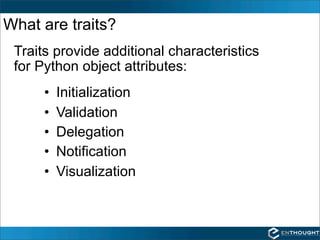
What are traits?
 Traits provide additional characteristics
 for Python object attributes:
      •   Initialization
      •   Validation
      •   Delegation
      •   Notification
      •   Visualization
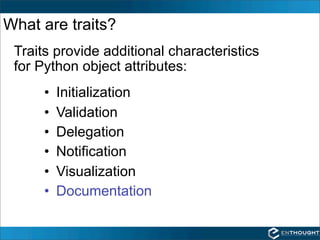
What are traits?
 Traits provide additional characteristics
 for Python object attributes:
      •   Initialization
      •   Validation
      •   Delegation
      •   Notification
      •   Visualization
      •   Documentation
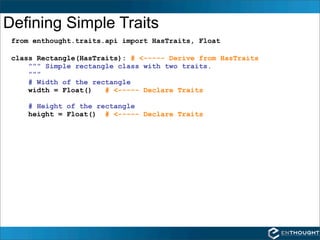
Defining Simple Traits
 from enthought.traits.api import HasTraits, Float

 class Rectangle(HasTraits): # <----- Derive from HasTraits
     """ Simple rectangle class with two traits.
     """
     # Width of the rectangle
     width = Float()   # <----- Declare Traits

    # Height of the rectangle
    height = Float() # <----- Declare Traits
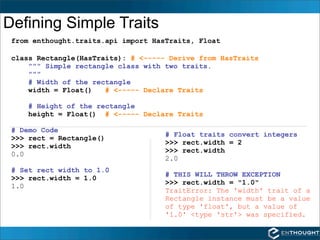
Defining Simple Traits
 from enthought.traits.api import HasTraits, Float

 class Rectangle(HasTraits): # <----- Derive from HasTraits
     """ Simple rectangle class with two traits.
     """
     # Width of the rectangle
     width = Float()   # <----- Declare Traits

     # Height of the rectangle
     height = Float() # <----- Declare Traits

 # Demo Code
                                     # Float traits convert integers
 >>> rect = Rectangle()
                                     >>> rect.width = 2
 >>> rect.width
                                     >>> rect.width
 0.0
                                     2.0
 # Set rect width to 1.0
                                     # THIS WILL THROW EXCEPTION
 >>> rect.width = 1.0
                                     >>> rect.width = "1.0"
 1.0
                                     TraitError: The 'width' trait of a
                                     Rectangle instance must be a value
                                     of type 'float', but a value of
                                     '1.0' <type 'str'> was specified.
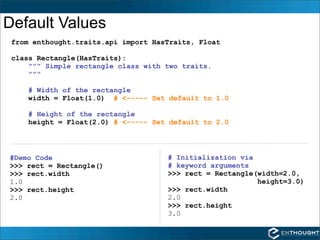
Default Values
 from enthought.traits.api import HasTraits, Float

 class Rectangle(HasTraits):
     """ Simple rectangle class with two traits.
     """

    # Width of the rectangle
    width = Float(1.0) # <----- Set default to 1.0

    # Height of the rectangle
    height = Float(2.0) # <----- Set default to 2.0


#Demo Code                           # Initialization via
>>> rect = Rectangle()               # keyword arguments
>>> rect.width                       >>> rect = Rectangle(width=2.0,
1.0                                                       height=3.0)
>>> rect.height                      >>> rect.width
2.0                                  2.0
                                     >>> rect.height
                                     3.0
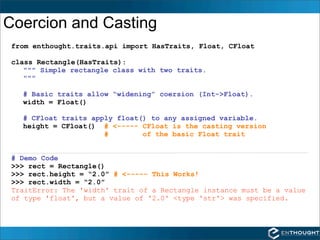
Coercion and Casting
 from enthought.traits.api import HasTraits, Float, CFloat

 class Rectangle(HasTraits):
    """ Simple rectangle class with two traits.
    """

   # Basic traits allow “widening” coersion (Int->Float).
   width = Float()

   # CFloat traits apply float() to any assigned variable.
   height = CFloat() # <----- CFloat is the casting version
                      #        of the basic Float trait


 # Demo Code
 >>> rect = Rectangle()
 >>> rect.height = “2.0” # <----- This Works!
 >>> rect.width = “2.0”
 TraitError: The 'width' trait of a Rectangle instance must be a value
 of type 'float', but a value of '2.0' <type 'str'> was specified.
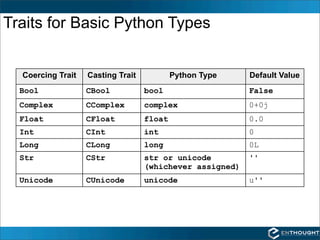
Traits for Basic Python Types


  Coercing Trait   Casting Trait           Python Type    Default Value
  Bool             CBool           bool                   False
  Complex          CComplex        complex                0+0j
  Float            CFloat          float                  0.0
  Int              CInt            int                    0
  Long             CLong           long                   0L
  Str              CStr            str or unicode         ''
                                   (whichever assigned)
  Unicode          CUnicode        unicode                u''
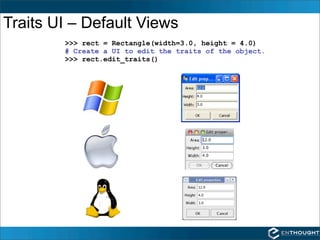
Traits UI – Default Views
        >>> rect = Rectangle(width=3.0, height = 4.0)
        # Create a UI to edit the traits of the object.
        >>> rect.edit_traits()
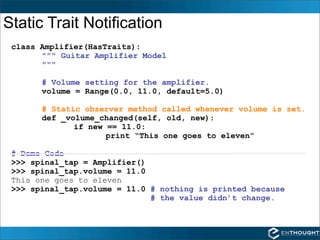
Static Trait Notification
 class Amplifier(HasTraits):
       """ Guitar Amplifier Model
       """

       # Volume setting for the amplifier.
       volume = Range(0.0, 11.0, default=5.0)

       # Static observer method called whenever volume is set.
       def _volume_changed(self, old, new):
              if new == 11.0:
                     print “This one goes to eleven”

 # Demo Code
 >>> spinal_tap = Amplifier()
 >>> spinal_tap.volume = 11.0
 This one goes to eleven
 >>> spinal_tap.volume = 11.0 # nothing is printed because
                              # the value didn’t change.
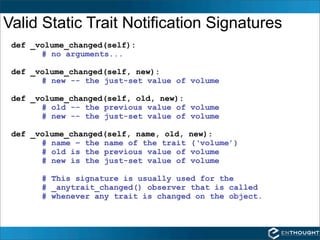
Valid Static Trait Notification Signatures
 def _volume_changed(self):
       # no arguments...

 def _volume_changed(self, new):
       # new -- the just-set value of volume

 def _volume_changed(self, old, new):
       # old -- the previous value of volume
       # new -- the just-set value of volume

 def _volume_changed(self, name, old,   new):
       # name – the name of the trait   (‘volume’)
       # old is the previous value of   volume
       # new is the just-set value of   volume

       # This signature is usually used for the
       # _anytrait_changed() observer that is called
       # whenever any trait is changed on the object.
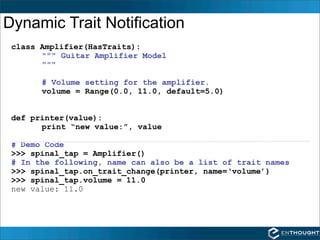
Dynamic Trait Notification
 class Amplifier(HasTraits):
       """ Guitar Amplifier Model
       """

       # Volume setting for the amplifier.
       volume = Range(0.0, 11.0, default=5.0)


 def printer(value):
       print “new value:”, value

 # Demo Code
 >>> spinal_tap = Amplifier()
 # In the following, name can also be a list of trait names
 >>> spinal_tap.on_trait_change(printer, name=‘volume’)
 >>> spinal_tap.volume = 11.0
 new value: 11.0
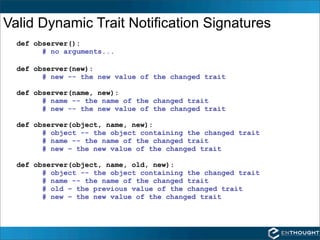
Valid Dynamic Trait Notification Signatures
  def observer():
        # no arguments...

  def observer(new):
        # new -- the new value of the changed trait

  def observer(name, new):
        # name -- the name of the changed trait
        # new -- the new value of the changed trait

  def observer(object, name, new):
        # object -- the object containing the changed trait
        # name -- the name of the changed trait
        # new – the new value of the changed trait

  def observer(object, name, old, new):
        # object -- the object containing the changed trait
        # name -- the name of the changed trait
        # old – the previous value of the changed trait
        # new – the new value of the changed trait
EPD
http://www.enthought.com/products/epd.php


Webinars
http://www.enthought.com/training/webinars.php


Enthought Training:
http://www.enthought.com/training/

Scientific Computing with Python Webinar: Traits

  • 1.
    How do I... UseTraits? October 16, 2009
  • 2.
    What are traits? Traits provide additional characteristics for Python object attributes: • Initialization • Validation • Delegation • Notification • Visualization
  • 3.
    What are traits? Traits provide additional characteristics for Python object attributes: • Initialization • Validation • Delegation • Notification • Visualization • Documentation
  • 4.
    Defining Simple Traits from enthought.traits.api import HasTraits, Float class Rectangle(HasTraits): # <----- Derive from HasTraits """ Simple rectangle class with two traits. """ # Width of the rectangle width = Float() # <----- Declare Traits # Height of the rectangle height = Float() # <----- Declare Traits
  • 5.
    Defining Simple Traits from enthought.traits.api import HasTraits, Float class Rectangle(HasTraits): # <----- Derive from HasTraits """ Simple rectangle class with two traits. """ # Width of the rectangle width = Float() # <----- Declare Traits # Height of the rectangle height = Float() # <----- Declare Traits # Demo Code # Float traits convert integers >>> rect = Rectangle() >>> rect.width = 2 >>> rect.width >>> rect.width 0.0 2.0 # Set rect width to 1.0 # THIS WILL THROW EXCEPTION >>> rect.width = 1.0 >>> rect.width = "1.0" 1.0 TraitError: The 'width' trait of a Rectangle instance must be a value of type 'float', but a value of '1.0' <type 'str'> was specified.
  • 6.
    Default Values fromenthought.traits.api import HasTraits, Float class Rectangle(HasTraits): """ Simple rectangle class with two traits. """ # Width of the rectangle width = Float(1.0) # <----- Set default to 1.0 # Height of the rectangle height = Float(2.0) # <----- Set default to 2.0 #Demo Code # Initialization via >>> rect = Rectangle() # keyword arguments >>> rect.width >>> rect = Rectangle(width=2.0, 1.0 height=3.0) >>> rect.height >>> rect.width 2.0 2.0 >>> rect.height 3.0
  • 7.
    Coercion and Casting from enthought.traits.api import HasTraits, Float, CFloat class Rectangle(HasTraits): """ Simple rectangle class with two traits. """ # Basic traits allow “widening” coersion (Int->Float). width = Float() # CFloat traits apply float() to any assigned variable. height = CFloat() # <----- CFloat is the casting version # of the basic Float trait # Demo Code >>> rect = Rectangle() >>> rect.height = “2.0” # <----- This Works! >>> rect.width = “2.0” TraitError: The 'width' trait of a Rectangle instance must be a value of type 'float', but a value of '2.0' <type 'str'> was specified.
  • 8.
    Traits for BasicPython Types Coercing Trait Casting Trait Python Type Default Value Bool CBool bool False Complex CComplex complex 0+0j Float CFloat float 0.0 Int CInt int 0 Long CLong long 0L Str CStr str or unicode '' (whichever assigned) Unicode CUnicode unicode u''
  • 9.
    Traits UI –Default Views >>> rect = Rectangle(width=3.0, height = 4.0) # Create a UI to edit the traits of the object. >>> rect.edit_traits()
  • 10.
    Static Trait Notification class Amplifier(HasTraits): """ Guitar Amplifier Model """ # Volume setting for the amplifier. volume = Range(0.0, 11.0, default=5.0) # Static observer method called whenever volume is set. def _volume_changed(self, old, new): if new == 11.0: print “This one goes to eleven” # Demo Code >>> spinal_tap = Amplifier() >>> spinal_tap.volume = 11.0 This one goes to eleven >>> spinal_tap.volume = 11.0 # nothing is printed because # the value didn’t change.
  • 11.
    Valid Static TraitNotification Signatures def _volume_changed(self): # no arguments... def _volume_changed(self, new): # new -- the just-set value of volume def _volume_changed(self, old, new): # old -- the previous value of volume # new -- the just-set value of volume def _volume_changed(self, name, old, new): # name – the name of the trait (‘volume’) # old is the previous value of volume # new is the just-set value of volume # This signature is usually used for the # _anytrait_changed() observer that is called # whenever any trait is changed on the object.
  • 12.
    Dynamic Trait Notification class Amplifier(HasTraits): """ Guitar Amplifier Model """ # Volume setting for the amplifier. volume = Range(0.0, 11.0, default=5.0) def printer(value): print “new value:”, value # Demo Code >>> spinal_tap = Amplifier() # In the following, name can also be a list of trait names >>> spinal_tap.on_trait_change(printer, name=‘volume’) >>> spinal_tap.volume = 11.0 new value: 11.0
  • 13.
    Valid Dynamic TraitNotification Signatures def observer(): # no arguments... def observer(new): # new -- the new value of the changed trait def observer(name, new): # name -- the name of the changed trait # new -- the new value of the changed trait def observer(object, name, new): # object -- the object containing the changed trait # name -- the name of the changed trait # new – the new value of the changed trait def observer(object, name, old, new): # object -- the object containing the changed trait # name -- the name of the changed trait # old – the previous value of the changed trait # new – the new value of the changed trait
  • 14.