NumPy MemoryMapped Arrays May 22, 2009
A word from our sponsor…
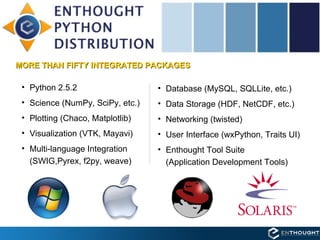
Enthought Python Distribution (EPD) MORE THAN FIFTY INTEGRATED PACKAGES Python 2.5.2 Science (NumPy, SciPy, etc.) Plotting (Chaco, Matplotlib) Visualization (VTK, Mayavi) Multi-language Integration  (SWIG,Pyrex, f2py, weave) Database (MySQL, SQLLite, etc.) Data Storage (HDF, NetCDF, etc.) Networking (twisted) User Interface (wxPython, Traits UI) Enthought Tool Suite  (Application Development Tools)
Enthought Python Distribution (EPD) Explanations, demonstrations, and tips  For subscribers to Enthought Python Distribution (EPD) and their guests.  Presenters and Panelists will include Enthought experts and other leading community members.
Enthought Training Courses Python Basics, NumPy, SciPy, Matplotlib, Traits, TraitsUI, Chaco…
Upcoming Training Classes June 15 - 19, 2009 Introduction to Scientific Computing with Python  Austin, Texas July, 2009 TBA August, 2009 TBA September 21 to 25, 2009 Introduction to Scientific Computing with Python  Austin, Texas http://www.enthought.com/training/
Enthought Consulting Process Built with Python by a team of scientists, EPD provides a versatile and coherent platform for analysis and visualization .
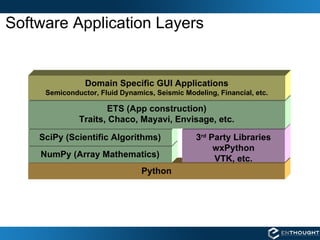
Software Application Layers Python NumPy (Array Mathematics) SciPy (Scientific Algorithms) 3 rd  Party Libraries wxPython VTK, etc. ETS (App construction) Traits, Chaco, Mayavi, Envisage, etc. Domain Specific GUI Applications Semiconductor, Fluid Dynamics, Seismic Modeling, Financial, etc.
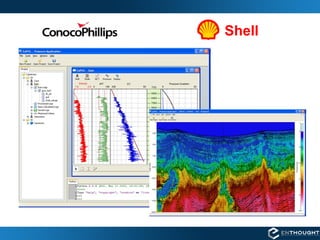
Shell
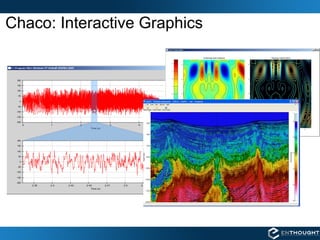
Chaco: Interactive Graphics
Design Drawings Computational Fluid Dynamics Parallel Simulation Data Visualization VMS – Virtual Mixing System
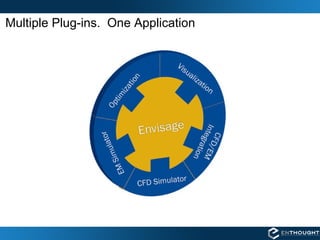
Multiple Plug-ins.  One Application
 
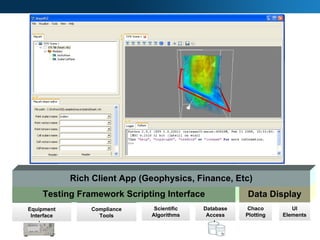
Database Access Compliance Tools Equipment Interface Scientific Algorithms UI Elements Testing Framework Scripting Interface Chaco Plotting Data Display Rich Client App (Geophysics, Finance, Etc)
NumPy
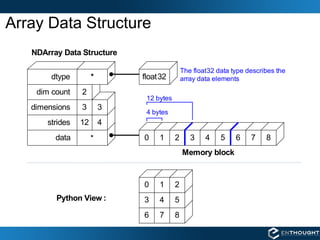
Array Data Structure
“Structured” Arrays name char[10] age  int weight double Elements of an array can be any fixed-size data structure! EXAMPLE >>> from numpy import dtype, empty # structured data format >>> fmt = dtype([('name', 'S10'), ('age', int),  ('weight', float) ]) >>> a = empty((3,4), dtype=fmt)   >>> a.itemsize 22 >>> a['name'] = [['Brad',  ,'Jill']] >>> a['age'] = [[33,  ,54]] >>> a['weight'] = [[135,  ,145]] >>> print a [[('Brad', 33, 135.0) ('Jill', 54, 145.0)]] 27 32 61 29 145.0 88.0 135.0 188.0 54 18 33 19 Jill Jennifer Susan Ron 187.0 137.0 202.0 154.0 Amy Brian George Henry 140.0 225.0 105.0 135.0 54 47 25 33 Fred John Jane Brad
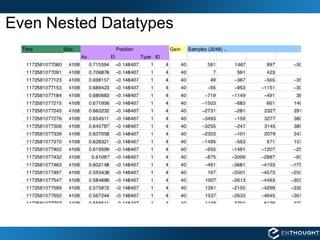
Even Nested Datatypes
Nested Datatype dt = dtype([('time', np.uint64), ('size', np.uint32), ('position', [('az', np.float32), ('el', np.float32), ('region_type', np.uint8), ('region_ID', np.uint16)]), ('gain', np.uint8), ('samples', (np.int16,2048))]) data = np.fromfile(f, dtype=dt)  If you only wanted to access a part of the file  use a memory map
Virtual Memory http://en.wikipedia.org/wiki/Virtual_memory Memory mapped files are like  intentional disk-based virutal memory
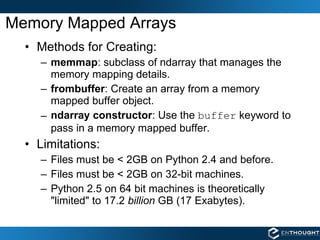
Memory Mapped Arrays Methods for Creating: memmap : subclass of ndarray that manages the memory mapping details. frombuffer : Create an array from a memory mapped buffer object. ndarray constructor : Use the  buffer  keyword to pass in a memory mapped buffer. Limitations: Files must be < 2GB on Python 2.4 and before. Files must be < 2GB on 32-bit machines. Python 2.5 on 64 bit machines is theoretically &quot;limited&quot; to 17.2  billion  GB (17 Exabytes).
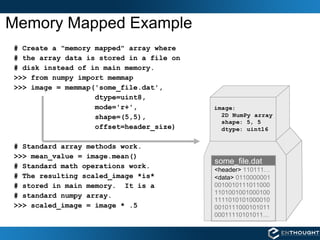
Memory Mapped Example # Create a &quot;memory mapped&quot; array where  # the array data is stored in a file on  # disk instead of in main memory. >>> from numpy import memmap >>> image = memmap('some_file.dat',  dtype=uint8,  mode='r+', shape=(5,5), offset=header_size) # Standard array methods work.  >>> mean_value = image.mean() # Standard math operations work. # The resulting scaled_image *is* # stored in main memory.  It is a # standard numpy array. >>> scaled_image = image * .5 some_file.dat <header>  110111… <data>  0110000001 0010010111011000 1101001001000100 1111010101000010 0010111000101011 00011110101011…
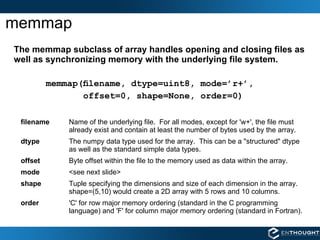
memmap The memmap subclass of array handles opening and closing files as well as synchronizing memory with the underlying file system. memmap(filename, dtype=uint8, mode=’r+’,  offset=0, shape=None, order=0) filename   Name of the underlying file.  For all modes, except for 'w+', the file must already exist and contain at least the number of bytes used by the array. dtype The numpy data type used for the array.  This can be a &quot;structured&quot; dtype as well as the standard simple data types. offset Byte offset within the file to the memory used as data within the array. mode <see next slide> shape Tuple specifying the dimensions and size of each dimension in the array.  shape=(5,10) would create a 2D array with 5 rows and 10 columns. order 'C' for row major memory ordering (standard in the C programming language) and 'F' for column major memory ordering (standard in Fortran).
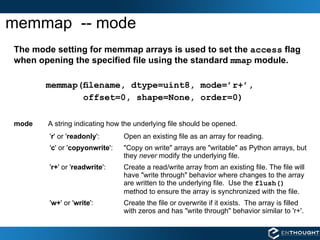
memmap  -- mode The mode setting for memmap arrays is used to set the  access  flag when opening the specified file using the standard  mmap  module. memmap(filename, dtype=uint8, mode=’r+’,  offset=0, shape=None, order=0) mode A string indicating how the underlying file should be opened. ' r ' or ' readonly ':  Open an existing file as an array for reading. ' c ' or ' copyonwrite ':  &quot;Copy on write&quot; arrays are &quot;writable&quot; as Python arrays, but they  never  modify the underlying file. ' r+ ' or ' readwrite ':  Create a read/write array from an existing file. The file will have &quot;write through&quot; behavior where changes to the array are written to the underlying file.  Use the  flush()   method to ensure the array is synchronized with the file. ' w+ ' or ' write ':  Create the file or overwrite if it exists.  The array is filled with zeros and has &quot;write through&quot; behavior similar to 'r+'.
memmap -- write through behavior # Create a memory mapped &quot;write through&quot; file, overwriting it if it exists. In [66]: q=memmap('new_file.dat',mode='w+',shape=(2,5)) In [67]: q memmap([[0, 0, 0, 0, 0], [0, 0, 0, 0, 0]], dtype=uint8) # Print out the contents of the underlying file.  Note: It # doesn't print because 0 isn't a printable ascii character. In [68]: !cat new_file.dat # Now write the ascii value for 'A' (65) into our array. In [69]: q[:] = ord('A') In [70]: q memmap([[65, 65, 65, 65, 65], [65, 65, 65, 65, 65]], dtype=uint8) # Ensure the OS has written the data to the file, and examine # the underlying file. It is full of 'A's as we hope. In [71]: q.flush() In [72]: !cat new_file.dat AAAAAAAAAA
memmap -- copy on write behavior # Create a copy-on-write memory map where the underlying file is never # modified.  The file must already exist. # This is a memory efficient way of working with data on disk as arrays but  # ensuring you never modify it. In [73]: q=memmap('new_file.dat',mode='c',shape=(2,5)) In [74]: q memmap([[65, 65, 65, 65, 65], [65, 65, 65, 65, 65]], dtype=uint8) # Set values in array to something new. In [75]: q[1] = ord('B') In [76]: q memmap([[65, 65, 65, 65, 65], [66, 66, 66, 66, 66]], dtype=uint8) # Even after calling flush(), the underlying file is  not  updated. In [77]: q.flush() In [78]: !cat new_file.dat AAAAAAAAAA
Using Offsets # Create a memory mapped array with 10 elements. In [1]: q=memmap('new_file.dat',mode='w+', dtype=uint8, shape=(10,)) In [2]: q[:] = arange(0,100,10) memmap([ 0, 10, 20, 30, 40, 50, 60, 70, 80, 90], dtype=uint8) # Now, create a new memory mapped array (read only) with an offset into # the previously created file. In [3]: q=memmap('new_file.dat',mode='r', dtype=uint8, shape=6, offset=4) In [4]: q memmap([40, 50, 60, 70, 80, 90], dtype=uint8) # The number of bytes required by the array must be equal or less than # the number of bytes available in the file. In [3]: q=memmap('new_file.dat',mode='r', dtype=uint8, shape= 7 , offset=4) ValueError: mmap length is greater than file size new_file.dat new_file.dat
Working with file headers 64 bit floating point data… # Create a dtype to represent the header. header_dtype = dtype([('rows', int32), ('cols', int32)]) # Create a memory mapped array using this dtype.  Note the shape is empty. header = memmap(file_name, mode='r', dtype=header_dtype, shape=()) # Read the row and column sizes from using this structured array. rows = header['rows'] cols = header['cols'] # Create a memory map to the data segment, using rows, cols for shape # information and the header size to determine the correct offset.   data = memmap(file_name, mode='r+', dtype=float64,  shape=(rows, cols), offset=header_dtype.itemsize) rows (int32) data header File Format: cols (int32)
Accessing Legacy Files header harr data darr dtype objects NumPy arrays binary file format = harr['format'] time = harr['time'] Explore in Python as NumPy Arrays a = darr['image'][:30,:40]
Strategy for creating new files!
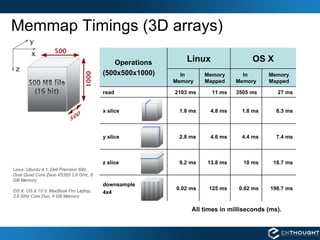
Memmap Timings (3D arrays) All times in milliseconds (ms). Linux: Ubuntu 4.1, Dell Precision 690, Dual Quad Core Zeon X5355 2.6 GHz, 8 GB Memory OS X: OS X 10.5, MacBook Pro Laptop, 2.6 GHz Core Duo, 4 GB Memory 27 ms 3505 ms  11 ms 2103 ms read 7.4 ms 4.4 ms 4.6 ms 2.8 ms y slice 8.3 ms 1.8 ms 4.8 ms 1.8 ms x slice 0.02 ms 9.2 ms In  Memory Linux downsample 4x4 z slice Operations (500x500x1000) 198.7 ms 0.02 ms 125 ms 18.7 ms 10 ms 13.8 ms Memory Mapped In  Memory Memory Mapped OS X
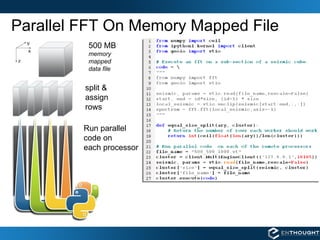
Parallel FFT On Memory Mapped File 500 MB   memory  mapped data file split &  assign  rows Run parallel code on  each processor
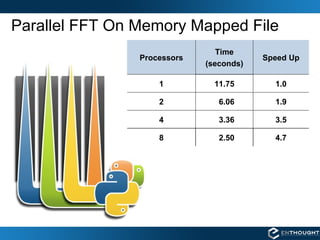
Parallel FFT On Memory Mapped File 1.0 11.75 1 3.5 3.36 4 1.9 6.06 2 2.50 Time (seconds) 8 Processors 4.7 Speed Up
 
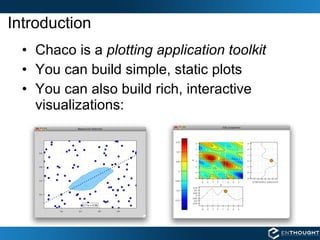
Introduction Chaco is a  plotting application toolkit You can build simple, static plots You can also build rich, interactive visualizations:
EPD & EPD Webinars: http://www. enthought . com/products/epd . php Enthought Training: http://www. enthought .com/training/

Scientific Computing with Python Webinar --- May 22, 2009

  • 1.
  • 2.
    A word fromour sponsor…
  • 3.
    Enthought Python Distribution(EPD) MORE THAN FIFTY INTEGRATED PACKAGES Python 2.5.2 Science (NumPy, SciPy, etc.) Plotting (Chaco, Matplotlib) Visualization (VTK, Mayavi) Multi-language Integration (SWIG,Pyrex, f2py, weave) Database (MySQL, SQLLite, etc.) Data Storage (HDF, NetCDF, etc.) Networking (twisted) User Interface (wxPython, Traits UI) Enthought Tool Suite (Application Development Tools)
  • 4.
    Enthought Python Distribution(EPD) Explanations, demonstrations, and tips For subscribers to Enthought Python Distribution (EPD) and their guests. Presenters and Panelists will include Enthought experts and other leading community members.
  • 5.
    Enthought Training CoursesPython Basics, NumPy, SciPy, Matplotlib, Traits, TraitsUI, Chaco…
  • 6.
    Upcoming Training ClassesJune 15 - 19, 2009 Introduction to Scientific Computing with Python Austin, Texas July, 2009 TBA August, 2009 TBA September 21 to 25, 2009 Introduction to Scientific Computing with Python Austin, Texas http://www.enthought.com/training/
  • 7.
    Enthought Consulting ProcessBuilt with Python by a team of scientists, EPD provides a versatile and coherent platform for analysis and visualization .
  • 8.
    Software Application LayersPython NumPy (Array Mathematics) SciPy (Scientific Algorithms) 3 rd Party Libraries wxPython VTK, etc. ETS (App construction) Traits, Chaco, Mayavi, Envisage, etc. Domain Specific GUI Applications Semiconductor, Fluid Dynamics, Seismic Modeling, Financial, etc.
  • 9.
  • 10.
  • 11.
    Design Drawings ComputationalFluid Dynamics Parallel Simulation Data Visualization VMS – Virtual Mixing System
  • 12.
    Multiple Plug-ins. One Application
  • 13.
  • 14.
    Database Access ComplianceTools Equipment Interface Scientific Algorithms UI Elements Testing Framework Scripting Interface Chaco Plotting Data Display Rich Client App (Geophysics, Finance, Etc)
  • 15.
  • 16.
  • 17.
    “Structured” Arrays namechar[10] age int weight double Elements of an array can be any fixed-size data structure! EXAMPLE >>> from numpy import dtype, empty # structured data format >>> fmt = dtype([('name', 'S10'), ('age', int), ('weight', float) ]) >>> a = empty((3,4), dtype=fmt) >>> a.itemsize 22 >>> a['name'] = [['Brad', ,'Jill']] >>> a['age'] = [[33, ,54]] >>> a['weight'] = [[135, ,145]] >>> print a [[('Brad', 33, 135.0) ('Jill', 54, 145.0)]] 27 32 61 29 145.0 88.0 135.0 188.0 54 18 33 19 Jill Jennifer Susan Ron 187.0 137.0 202.0 154.0 Amy Brian George Henry 140.0 225.0 105.0 135.0 54 47 25 33 Fred John Jane Brad
  • 18.
  • 19.
    Nested Datatype dt= dtype([('time', np.uint64), ('size', np.uint32), ('position', [('az', np.float32), ('el', np.float32), ('region_type', np.uint8), ('region_ID', np.uint16)]), ('gain', np.uint8), ('samples', (np.int16,2048))]) data = np.fromfile(f, dtype=dt) If you only wanted to access a part of the file use a memory map
  • 20.
    Virtual Memory http://en.wikipedia.org/wiki/Virtual_memoryMemory mapped files are like intentional disk-based virutal memory
  • 21.
    Memory Mapped ArraysMethods for Creating: memmap : subclass of ndarray that manages the memory mapping details. frombuffer : Create an array from a memory mapped buffer object. ndarray constructor : Use the buffer keyword to pass in a memory mapped buffer. Limitations: Files must be < 2GB on Python 2.4 and before. Files must be < 2GB on 32-bit machines. Python 2.5 on 64 bit machines is theoretically &quot;limited&quot; to 17.2 billion GB (17 Exabytes).
  • 22.
    Memory Mapped Example# Create a &quot;memory mapped&quot; array where # the array data is stored in a file on # disk instead of in main memory. >>> from numpy import memmap >>> image = memmap('some_file.dat', dtype=uint8, mode='r+', shape=(5,5), offset=header_size) # Standard array methods work. >>> mean_value = image.mean() # Standard math operations work. # The resulting scaled_image *is* # stored in main memory. It is a # standard numpy array. >>> scaled_image = image * .5 some_file.dat <header> 110111… <data> 0110000001 0010010111011000 1101001001000100 1111010101000010 0010111000101011 00011110101011…
  • 23.
    memmap The memmapsubclass of array handles opening and closing files as well as synchronizing memory with the underlying file system. memmap(filename, dtype=uint8, mode=’r+’, offset=0, shape=None, order=0) filename Name of the underlying file. For all modes, except for 'w+', the file must already exist and contain at least the number of bytes used by the array. dtype The numpy data type used for the array. This can be a &quot;structured&quot; dtype as well as the standard simple data types. offset Byte offset within the file to the memory used as data within the array. mode <see next slide> shape Tuple specifying the dimensions and size of each dimension in the array. shape=(5,10) would create a 2D array with 5 rows and 10 columns. order 'C' for row major memory ordering (standard in the C programming language) and 'F' for column major memory ordering (standard in Fortran).
  • 24.
    memmap --mode The mode setting for memmap arrays is used to set the access flag when opening the specified file using the standard mmap module. memmap(filename, dtype=uint8, mode=’r+’, offset=0, shape=None, order=0) mode A string indicating how the underlying file should be opened. ' r ' or ' readonly ': Open an existing file as an array for reading. ' c ' or ' copyonwrite ': &quot;Copy on write&quot; arrays are &quot;writable&quot; as Python arrays, but they never modify the underlying file. ' r+ ' or ' readwrite ': Create a read/write array from an existing file. The file will have &quot;write through&quot; behavior where changes to the array are written to the underlying file. Use the flush() method to ensure the array is synchronized with the file. ' w+ ' or ' write ': Create the file or overwrite if it exists. The array is filled with zeros and has &quot;write through&quot; behavior similar to 'r+'.
  • 25.
    memmap -- writethrough behavior # Create a memory mapped &quot;write through&quot; file, overwriting it if it exists. In [66]: q=memmap('new_file.dat',mode='w+',shape=(2,5)) In [67]: q memmap([[0, 0, 0, 0, 0], [0, 0, 0, 0, 0]], dtype=uint8) # Print out the contents of the underlying file. Note: It # doesn't print because 0 isn't a printable ascii character. In [68]: !cat new_file.dat # Now write the ascii value for 'A' (65) into our array. In [69]: q[:] = ord('A') In [70]: q memmap([[65, 65, 65, 65, 65], [65, 65, 65, 65, 65]], dtype=uint8) # Ensure the OS has written the data to the file, and examine # the underlying file. It is full of 'A's as we hope. In [71]: q.flush() In [72]: !cat new_file.dat AAAAAAAAAA
  • 26.
    memmap -- copyon write behavior # Create a copy-on-write memory map where the underlying file is never # modified. The file must already exist. # This is a memory efficient way of working with data on disk as arrays but # ensuring you never modify it. In [73]: q=memmap('new_file.dat',mode='c',shape=(2,5)) In [74]: q memmap([[65, 65, 65, 65, 65], [65, 65, 65, 65, 65]], dtype=uint8) # Set values in array to something new. In [75]: q[1] = ord('B') In [76]: q memmap([[65, 65, 65, 65, 65], [66, 66, 66, 66, 66]], dtype=uint8) # Even after calling flush(), the underlying file is not updated. In [77]: q.flush() In [78]: !cat new_file.dat AAAAAAAAAA
  • 27.
    Using Offsets #Create a memory mapped array with 10 elements. In [1]: q=memmap('new_file.dat',mode='w+', dtype=uint8, shape=(10,)) In [2]: q[:] = arange(0,100,10) memmap([ 0, 10, 20, 30, 40, 50, 60, 70, 80, 90], dtype=uint8) # Now, create a new memory mapped array (read only) with an offset into # the previously created file. In [3]: q=memmap('new_file.dat',mode='r', dtype=uint8, shape=6, offset=4) In [4]: q memmap([40, 50, 60, 70, 80, 90], dtype=uint8) # The number of bytes required by the array must be equal or less than # the number of bytes available in the file. In [3]: q=memmap('new_file.dat',mode='r', dtype=uint8, shape= 7 , offset=4) ValueError: mmap length is greater than file size new_file.dat new_file.dat
  • 28.
    Working with fileheaders 64 bit floating point data… # Create a dtype to represent the header. header_dtype = dtype([('rows', int32), ('cols', int32)]) # Create a memory mapped array using this dtype. Note the shape is empty. header = memmap(file_name, mode='r', dtype=header_dtype, shape=()) # Read the row and column sizes from using this structured array. rows = header['rows'] cols = header['cols'] # Create a memory map to the data segment, using rows, cols for shape # information and the header size to determine the correct offset. data = memmap(file_name, mode='r+', dtype=float64, shape=(rows, cols), offset=header_dtype.itemsize) rows (int32) data header File Format: cols (int32)
  • 29.
    Accessing Legacy Filesheader harr data darr dtype objects NumPy arrays binary file format = harr['format'] time = harr['time'] Explore in Python as NumPy Arrays a = darr['image'][:30,:40]
  • 30.
  • 31.
    Memmap Timings (3Darrays) All times in milliseconds (ms). Linux: Ubuntu 4.1, Dell Precision 690, Dual Quad Core Zeon X5355 2.6 GHz, 8 GB Memory OS X: OS X 10.5, MacBook Pro Laptop, 2.6 GHz Core Duo, 4 GB Memory 27 ms 3505 ms 11 ms 2103 ms read 7.4 ms 4.4 ms 4.6 ms 2.8 ms y slice 8.3 ms 1.8 ms 4.8 ms 1.8 ms x slice 0.02 ms 9.2 ms In Memory Linux downsample 4x4 z slice Operations (500x500x1000) 198.7 ms 0.02 ms 125 ms 18.7 ms 10 ms 13.8 ms Memory Mapped In Memory Memory Mapped OS X
  • 32.
    Parallel FFT OnMemory Mapped File 500 MB memory mapped data file split & assign rows Run parallel code on each processor
  • 33.
    Parallel FFT OnMemory Mapped File 1.0 11.75 1 3.5 3.36 4 1.9 6.06 2 2.50 Time (seconds) 8 Processors 4.7 Speed Up
  • 34.
  • 35.
    Introduction Chaco isa plotting application toolkit You can build simple, static plots You can also build rich, interactive visualizations:
  • 36.
    EPD & EPDWebinars: http://www. enthought . com/products/epd . php Enthought Training: http://www. enthought .com/training/