SAX(Simple API for XML)
• SAX (the Simple API for XML) is an event-based parser for xml
documents.
• Unlike a DOM parser, a SAX parser creates no parse tree.
• SAX is a streaming interface for XML, which means that
applications using SAX receive event notifications about the
XML document being processed an element, and attribute, at
a time in sequential order starting at the top of the
document, and ending with the closing of the ROOT element.
• The application program provides an "event" handler that
must be registered with the parser
• As the tokens are identified, callback methods in the handler
are invoked with the relevant information
SAX Interfaces
• void startDocument() - Called at the beginning of a
document.
• void endDocument() - Called at the end of a document.
• void startElement(String uri, String localName, String
qName, Attributes atts) - Called at the beginning of an
element.
• void endElement(String uri, String localName,String
qName) - Called at the end of an element.
• void characters(char[] ch, int start, int length) - Called when
character data is encountered.
• void ignorableWhitespace( char[] ch, int start, int length) -
Called when a DTD is present and ignorable whitespace is
encountered.
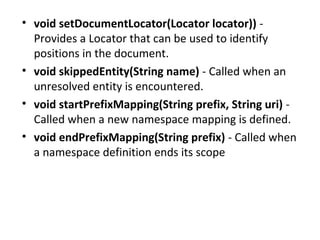
• void setDocumentLocator(Locator locator)) -
Provides a Locator that can be used to identify
positions in the document.
• void skippedEntity(String name) - Called when an
unresolved entity is encountered.
• void startPrefixMapping(String prefix, String uri) -
Called when a new namespace mapping is defined.
• void endPrefixMapping(String prefix) - Called when
a namespace definition ends its scope
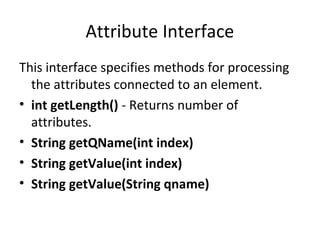
Attribute Interface
This interface specifies methods for processing
the attributes connected to an element.
• int getLength() - Returns number of
attributes.
• String getQName(int index)
• String getValue(int index)
• String getValue(String qname)
How to print the xml
elements(nodes) as ordered list
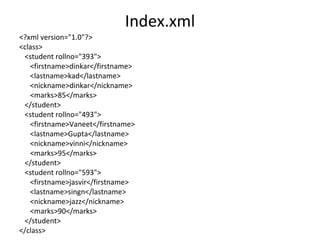
Index.xml
<?xml version="1.0"?>
<class>
<student rollno="393">
<firstname>dinkar</firstname>
<lastname>kad</lastname>
<nickname>dinkar</nickname>
<marks>85</marks>
</student>
<student rollno="493">
<firstname>Vaneet</firstname>
<lastname>Gupta</lastname>
<nickname>vinni</nickname>
<marks>95</marks>
</student>
<student rollno="593">
<firstname>jasvir</firstname>
<lastname>singn</lastname>
<nickname>jazz</nickname>
<marks>90</marks>
</student>
</class>
SaxParserDemo.java
import java.io.File;
import javax.xml.parsers.SAXParser;
import javax.xml.parsers.SAXParserFactory;
import org.xml.sax.Attributes;
import org.xml.sax.SAXException;
import org.xml.sax.helpers.DefaultHandler;
public class SAXParserDemo
{
public static void main(String[] args)
{
try {
File inputFile = new File("index.txt");
SAXParserFactory factory = SAXParserFactory.newInstance();
SAXParser saxParser = factory.newSAXParser();
UserHandler userhandler = new UserHandler();
saxParser.parse(inputFile, userhandler);
}
catch (Exception e)
{
e.printStackTrace();
}
}
}
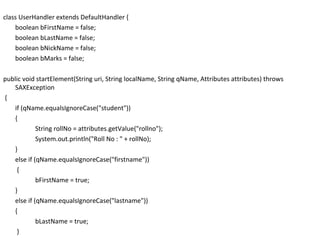
class UserHandler extends DefaultHandler {
boolean bFirstName = false;
boolean bLastName = false;
boolean bNickName = false;
boolean bMarks = false;
public void startElement(String uri, String localName, String qName, Attributes attributes) throws
SAXException
{
if (qName.equalsIgnoreCase("student"))
{
String rollNo = attributes.getValue("rollno");
System.out.println("Roll No : " + rollNo);
}
else if (qName.equalsIgnoreCase("firstname"))
{
bFirstName = true;
}
else if (qName.equalsIgnoreCase("lastname"))
{
bLastName = true;
}
else if (qName.equalsIgnoreCase("nickname"))
{
bNickName = true;
}
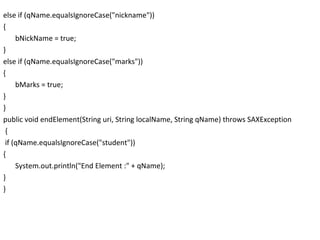
else if (qName.equalsIgnoreCase("marks"))
{
bMarks = true;
}
}
public void endElement(String uri, String localName, String qName) throws SAXException
{
if (qName.equalsIgnoreCase("student"))
{
System.out.println("End Element :" + qName);
}
}
public void characters(char ch[], int start, int length) throws SAXException
{
if (bFirstName)
{
System.out.println("First Name: " + new String(ch, start, length));
bFirstName = false;
}
else if (bLastName)
{
System.out.println("Last Name: " + new String(ch, start, length));
bLastName = false;
}
else if (bNickName)
{
System.out.println("Nick Name: " + new String(ch, start, length));
bNickName = false;
}
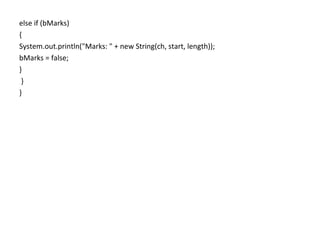
else if (bMarks)
{
System.out.println("Marks: " + new String(ch, start, length));
bMarks = false;
}
}
}
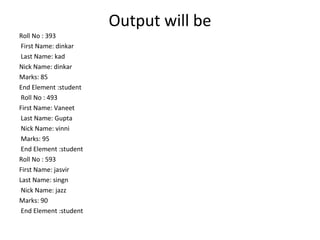
Output will be
Roll No : 393
First Name: dinkar
Last Name: kad
Nick Name: dinkar
Marks: 85
End Element :student
Roll No : 493
First Name: Vaneet
Last Name: Gupta
Nick Name: vinni
Marks: 95
End Element :student
Roll No : 593
First Name: jasvir
Last Name: singn
Nick Name: jazz
Marks: 90
End Element :student
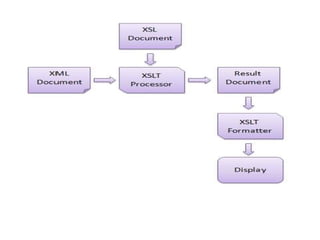
XSLT
• In order to understand and style an XML
document, World Wide Web Consortium
(W3C) developed XSL which can act as XML
based Stylesheet Language. An XSL document
specifies how a browser should render an XML
document.
• XSLT − used to transform XML document into
various other types of document.
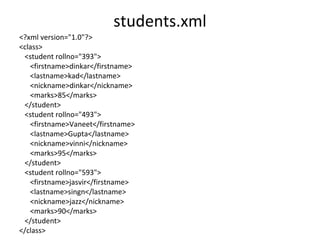
students.xml
<?xml version="1.0"?>
<class>
<student rollno="393">
<firstname>dinkar</firstname>
<lastname>kad</lastname>
<nickname>dinkar</nickname>
<marks>85</marks>
</student>
<student rollno="493">
<firstname>Vaneet</firstname>
<lastname>Gupta</lastname>
<nickname>vinni</nickname>
<marks>95</marks>
</student>
<student rollno="593">
<firstname>jasvir</firstname>
<lastname>singn</lastname>
<nickname>jazz</nickname>
<marks>90</marks>
</student>
</class>
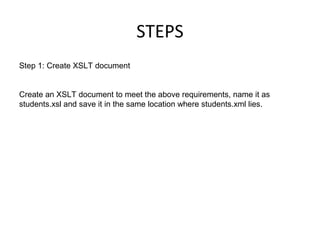
STEPS
Step 1: Create XSLT document
Create an XSLT document to meet the above requirements, name it as
students.xsl and save it in the same location where students.xml lies.
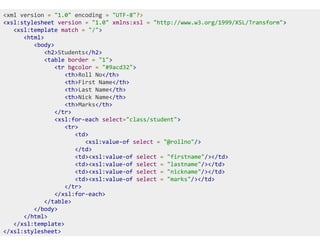
<xml version = "1.0" encoding = "UTF-8"?>
<xsl:stylesheet version = "1.0" xmlns:xsl = "http://www.w3.org/1999/XSL/Transform">
<xsl:template match = "/">
<html>
<body>
<h2>Students</h2>
<table border = "1">
<tr bgcolor = "#9acd32">
<th>Roll No</th>
<th>First Name</th>
<th>Last Name</th>
<th>Nick Name</th>
<th>Marks</th>
</tr>
<xsl:for-each select="class/student">
<tr>
<td>
<xsl:value-of select = "@rollno"/>
</td>
<td><xsl:value-of select = "firstname"/></td>
<td><xsl:value-of select = "lastname"/></td>
<td><xsl:value-of select = "nickname"/></td>
<td><xsl:value-of select = "marks"/></td>
</tr>
</xsl:for-each>
</table>
</body>
</html>
</xsl:template>
</xsl:stylesheet>
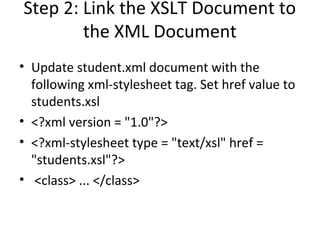
Step 2: Link the XSLT Document to
the XML Document
• Update student.xml document with the
following xml-stylesheet tag. Set href value to
students.xsl
• <?xml version = "1.0"?>
• <?xml-stylesheet type = "text/xsl" href =
"students.xsl"?>
• <class> ... </class>
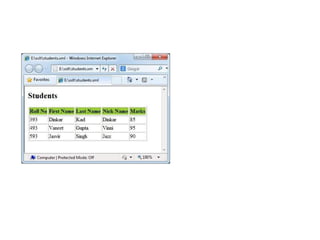
Step 3: View the XML Document in Internet
Explorer
<?xml version="1.0"?>
<?xml-stylesheet type = "text/xsl" href = "students.xsl"?>
<class>
<student rollno="393">
<firstname>dinkar</firstname>
<lastname>kad</lastname>
<nickname>dinkar</nickname>
<marks>85</marks>
</student>
<student rollno="493">
<firstname>Vaneet</firstname>
<lastname>Gupta</lastname>
<nickname>vinni</nickname>
<marks>95</marks>
</student>
<student rollno="593">
<firstname>jasvir</firstname>
<lastname>singn</lastname>
<nickname>jazz</nickname>
<marks>90</marks>
</student>
</class>
SAX PARSER

SAX PARSER

  • 1.
  • 2.
    • SAX (theSimple API for XML) is an event-based parser for xml documents. • Unlike a DOM parser, a SAX parser creates no parse tree. • SAX is a streaming interface for XML, which means that applications using SAX receive event notifications about the XML document being processed an element, and attribute, at a time in sequential order starting at the top of the document, and ending with the closing of the ROOT element. • The application program provides an "event" handler that must be registered with the parser • As the tokens are identified, callback methods in the handler are invoked with the relevant information
  • 3.
    SAX Interfaces • voidstartDocument() - Called at the beginning of a document. • void endDocument() - Called at the end of a document. • void startElement(String uri, String localName, String qName, Attributes atts) - Called at the beginning of an element. • void endElement(String uri, String localName,String qName) - Called at the end of an element. • void characters(char[] ch, int start, int length) - Called when character data is encountered. • void ignorableWhitespace( char[] ch, int start, int length) - Called when a DTD is present and ignorable whitespace is encountered.
  • 4.
    • void setDocumentLocator(Locatorlocator)) - Provides a Locator that can be used to identify positions in the document. • void skippedEntity(String name) - Called when an unresolved entity is encountered. • void startPrefixMapping(String prefix, String uri) - Called when a new namespace mapping is defined. • void endPrefixMapping(String prefix) - Called when a namespace definition ends its scope
  • 5.
    Attribute Interface This interfacespecifies methods for processing the attributes connected to an element. • int getLength() - Returns number of attributes. • String getQName(int index) • String getValue(int index) • String getValue(String qname)
  • 6.
    How to printthe xml elements(nodes) as ordered list
  • 7.
    Index.xml <?xml version="1.0"?> <class> <student rollno="393"> <firstname>dinkar</firstname> <lastname>kad</lastname> <nickname>dinkar</nickname> <marks>85</marks> </student> <studentrollno="493"> <firstname>Vaneet</firstname> <lastname>Gupta</lastname> <nickname>vinni</nickname> <marks>95</marks> </student> <student rollno="593"> <firstname>jasvir</firstname> <lastname>singn</lastname> <nickname>jazz</nickname> <marks>90</marks> </student> </class>
  • 8.
    SaxParserDemo.java import java.io.File; import javax.xml.parsers.SAXParser; importjavax.xml.parsers.SAXParserFactory; import org.xml.sax.Attributes; import org.xml.sax.SAXException; import org.xml.sax.helpers.DefaultHandler; public class SAXParserDemo { public static void main(String[] args) { try { File inputFile = new File("index.txt"); SAXParserFactory factory = SAXParserFactory.newInstance(); SAXParser saxParser = factory.newSAXParser(); UserHandler userhandler = new UserHandler(); saxParser.parse(inputFile, userhandler); } catch (Exception e) { e.printStackTrace(); } } }
  • 9.
    class UserHandler extendsDefaultHandler { boolean bFirstName = false; boolean bLastName = false; boolean bNickName = false; boolean bMarks = false; public void startElement(String uri, String localName, String qName, Attributes attributes) throws SAXException { if (qName.equalsIgnoreCase("student")) { String rollNo = attributes.getValue("rollno"); System.out.println("Roll No : " + rollNo); } else if (qName.equalsIgnoreCase("firstname")) { bFirstName = true; } else if (qName.equalsIgnoreCase("lastname")) { bLastName = true; }
  • 10.
    else if (qName.equalsIgnoreCase("nickname")) { bNickName= true; } else if (qName.equalsIgnoreCase("marks")) { bMarks = true; } } public void endElement(String uri, String localName, String qName) throws SAXException { if (qName.equalsIgnoreCase("student")) { System.out.println("End Element :" + qName); } }
  • 11.
    public void characters(charch[], int start, int length) throws SAXException { if (bFirstName) { System.out.println("First Name: " + new String(ch, start, length)); bFirstName = false; } else if (bLastName) { System.out.println("Last Name: " + new String(ch, start, length)); bLastName = false; } else if (bNickName) { System.out.println("Nick Name: " + new String(ch, start, length)); bNickName = false; }
  • 12.
    else if (bMarks) { System.out.println("Marks:" + new String(ch, start, length)); bMarks = false; } } }
  • 13.
    Output will be RollNo : 393 First Name: dinkar Last Name: kad Nick Name: dinkar Marks: 85 End Element :student Roll No : 493 First Name: Vaneet Last Name: Gupta Nick Name: vinni Marks: 95 End Element :student Roll No : 593 First Name: jasvir Last Name: singn Nick Name: jazz Marks: 90 End Element :student
  • 14.
    XSLT • In orderto understand and style an XML document, World Wide Web Consortium (W3C) developed XSL which can act as XML based Stylesheet Language. An XSL document specifies how a browser should render an XML document. • XSLT − used to transform XML document into various other types of document.
  • 16.
    students.xml <?xml version="1.0"?> <class> <student rollno="393"> <firstname>dinkar</firstname> <lastname>kad</lastname> <nickname>dinkar</nickname> <marks>85</marks> </student> <studentrollno="493"> <firstname>Vaneet</firstname> <lastname>Gupta</lastname> <nickname>vinni</nickname> <marks>95</marks> </student> <student rollno="593"> <firstname>jasvir</firstname> <lastname>singn</lastname> <nickname>jazz</nickname> <marks>90</marks> </student> </class>
  • 17.
    STEPS Step 1: CreateXSLT document Create an XSLT document to meet the above requirements, name it as students.xsl and save it in the same location where students.xml lies.
  • 18.
    <xml version ="1.0" encoding = "UTF-8"?> <xsl:stylesheet version = "1.0" xmlns:xsl = "http://www.w3.org/1999/XSL/Transform"> <xsl:template match = "/"> <html> <body> <h2>Students</h2> <table border = "1"> <tr bgcolor = "#9acd32"> <th>Roll No</th> <th>First Name</th> <th>Last Name</th> <th>Nick Name</th> <th>Marks</th> </tr> <xsl:for-each select="class/student"> <tr> <td> <xsl:value-of select = "@rollno"/> </td> <td><xsl:value-of select = "firstname"/></td> <td><xsl:value-of select = "lastname"/></td> <td><xsl:value-of select = "nickname"/></td> <td><xsl:value-of select = "marks"/></td> </tr> </xsl:for-each> </table> </body> </html> </xsl:template> </xsl:stylesheet>
  • 19.
    Step 2: Linkthe XSLT Document to the XML Document • Update student.xml document with the following xml-stylesheet tag. Set href value to students.xsl • <?xml version = "1.0"?> • <?xml-stylesheet type = "text/xsl" href = "students.xsl"?> • <class> ... </class>
  • 20.
    Step 3: Viewthe XML Document in Internet Explorer
  • 21.
    <?xml version="1.0"?> <?xml-stylesheet type= "text/xsl" href = "students.xsl"?> <class> <student rollno="393"> <firstname>dinkar</firstname> <lastname>kad</lastname> <nickname>dinkar</nickname> <marks>85</marks> </student> <student rollno="493"> <firstname>Vaneet</firstname> <lastname>Gupta</lastname> <nickname>vinni</nickname> <marks>95</marks> </student> <student rollno="593"> <firstname>jasvir</firstname> <lastname>singn</lastname> <nickname>jazz</nickname> <marks>90</marks> </student> </class>