Surveon Control Center SCC 2.5

Sales & Marketing Department
Surveon Technology 2013
Surveon Enterprise VMS Solutions Overview

San Watch

POS Integration

Storage Pool

SMR8000U

3U RAID NVR

Local Client

3U RAID NVR

SMR5000
Control Box
Remote Client

SCC Client

iPhoneAndroid Tablet
VMS
SMR8000

2
3

Surveon Control Center Overview
• What is SCC?
A software package add on to Surveon Enterprise VMS/NVR for
the advanced surveillance features.

• When to use SCC?
Project need the features like TV-Matrix or Centralize Alarm.

• What is included in SCC?
SCC server AP, SCC client AP, Matrix Wall Client
4

Solutions Mapping for NVR and SCC
No. of Cameras

Multiple
Site

Single
Site

Surveon VMS Enterprise
+ VMS Built in CMS features

Surveon VMS Enterprise +
Surveon Control Center

Unlimited CH, Full Function, VI

TV-Wall, Centralize Alarm, IO

Surveon VMS Professional

Surveon VMS Enterprise

Max. 32 CH, Local view, Surveon
Camera Only, Limited Features

Unlimited CH, Full Function, VI

Simple

Complexity
5

Standard VMS (Multi NVR) overview
NVR
Server (Master)
NVR
Server
(Master)

NVR
Server
NVR
Server

VMS Client

VMS Client

Easy scalable for number of channel client live view, playback and
management.
6

Surveon SCC + NVR Structure Overview

SCC
Server

Matrix Wall Client

SCC Client

SCC Client

Easy scalable for number of channel client live view, playback and management.
7

When to use Surveon SCC Solutions?
8

When for Surveon SCC Solutions?

TV – Wall, Centralize Management, Centerline Alarm, 200+ Channels
9

Topology Comparison
Items

All in One
NVR

Multiple
NVR

Multiple NVR +
Control Center

Additional Server
for SCC Server

No (Built in NVR)

No (Built in master NVR)

Yes

Local Client

Yes

Yes

Yes

Remote Client

Same VMS Client

Same VMS Client

SCC Client

Virtual Matrix

NA

Yes

Yes

Central/Remote Mgt.

Yes

Yes

Yes

Centre Alarm

NA

Yes (Simple)

Yes (Advanced)

TV-Wall Mgt.

NO

NO

Yes
10

Surveon VMS Modules Mapping
Module Name

Main Functions

Single
NVR

Multiple
NVR

Multiple NVR
+ SCC

Recording Server

Recording / VI / DB

V

V

V

Domain Server

Management

V

V (Master)

Local Client

Local UI

V

V

Remote Client

Remote UI

V

V

SCC Server

Centre
Management

V

TV Wall Client

TV Wall Decoding

V

SCC Client

Remote UI

V

V
11

Scenario A: All in one Solutions
12

Scenario B: Master – Slave for Multiple NVR

Master NVR (Domain)
13

Scenario C: Centralized alarm and TV-Wall

SCC Server (Domain)
14

SCC Comparison Table
Items

SCC Solution

Milestone
Enterprise

Milestone
Corporate

Geovision
CMS

NUUO CMS

Support MultiNVR

Yes

Yes

Yes

Yes

Yes

License Pricing

By # of NVR

By Channels

By Channels

800+ USD

By channels (29
/ CH)

Centralize
Domain

Yes

Yes

Yes

Yes

Yes

Client

Unlimited

Unlimited

Unlimited

One Client

Several Clients

Web/Mobile

Yes

Yes

Yes

NA

NA

Virtual Matrix

Yes

Yes

Yes

Yes

Yes

Central/Remote
Mgt.

Yes

Yes

Yes

Yes

Yes

Central Alarm

Yes (Advanced)

NO

Yes (Advanced)

NA
(GV-VSM)

Yes

TV-Wall Mgt.

Yes

NO

Yes

Max. 200

Yes

Advanced
Alarm I/O

Yes

Yes

Yes

Yes

Yes
15

Surveon SCC Key Features
16

Surveon SCC Key Features
• Unlimited Servers & Clients
• Centralize Domain/Account Management
• Centralize Alarm Monitoring
• Centralize Alarm Panel
• Centralize, I/O Management
• TV-Wall (Unlimited Multi TV-Wall Mgt.)
• Enterprise VMS Features
17

Unlimited Servers & Clients
18

Centralize Domain/Account Management - 1
19

Centralize Domain/Account Management - 2

Hotel security
monitoring center

Area1 security
monitor
Area2 security
monitor
Recreation area
Counter
Navigation
Registration
Prescriptions

Hotel surroundings

…
Local
monitor A

Parking lot
Entrance
Guest
parking Lane
Local monitor
…..

B

All the security has it’s own authority through an centre single log on
20

Centralize Alarm Monitoring

• All the NVR, IO, Camera Alarm Monitoring
• Priority Change, Check for all events

• Flag and color the Alarm Panel
• Alarm Pop Up on Specific Display
SCC: Advanced I/O Management

21
22

Scalable, Simple & Powerful TV Wall Solutions
Easy to scalable from 16 to 500+ CH Project
Add on NVR
1. Auto Scan NVR
2. NVR List on the same LAN

4. All NVR and camera
shall on the Virtual Matrix
ready for view control

3. Add the NVR to the domain

23
24

Easy Manage for Matrix Monitoring

Follow the same flow from VMS client
Built with Enterprise VMS Features - 1

Execution

Time

25
Built with Enterprise VMS Features - 2

26

Unified UI in remote
/ local client, and
central mgt.

Log in via the browser
on the computer
Remotely.

Log in via IOS
and Android
smart phones.

Matrix Wall Alarm
27

Questions & Answers
28

Appendix
29

Traditional TV-Matrix vs. Surveon IP TV-Wall
Analogue TV Wall

Surveon IP TV Wall

Support monitor

Composite monitor only

VGA, HDMI, DVI

Monitor resolution

D1 / VGA

1920x1080 per monitor

HD camera decoding
support

8 (Using Core i7)

Unlimited (Cascade
multiple station)

Maximum video to
display

20 but with limited
resolution

Unlimited

Price

Expensive

Economic
30

SCC Feature Comparison
Surveon
SCC

Milestone
Enterprise

Milestone
Corporate

Geovision
CMS

NUUO
CMS

Camera
Bundle
VMS

Centralize
Domain

Yes

Yes

Yes

Yes

Yes

NA

Number of
Camera

Unlimited

Unlimited

Unlimited

Unlimited

Unlimited

64

Client

Unlimited

Unlimited

Unlimited

One

Several
Clients

NA

Centralized
Management

Yes

Yes

Yes

Yes

Yes

NO

Alarm & Event
Management

Yes

NA

Yes

NA
(GV-VSM)

Yes

NO

Unlimited
Storage

Yes

NA

Yes

NA

NA

NA

TV-Wall
Numbers

Unlimited

Don’t
Support

Unlimited

200

Unlimited

Don’t
support
31

Surveon SCC Pricing Model

Part Number

Description

MSRP

ZCD5H-0010

SCC with 5 Host License

1500 USD

ZCD10H-0010

SCC with 10 Host License

2400 USD

ZCD20H-0010

SCC with 20 Host License

4500 USD

ZCDULT-0010

SCC with Unlimited Host License

7200 USD
32

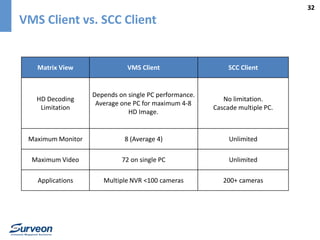
VMS Client vs. SCC Client

Matrix View

VMS Client

SCC Client

HD Decoding
Limitation

Depends on single PC performance.
Average one PC for maximum 4-8
HD Image.

No limitation.
Cascade multiple PC.

Maximum Monitor

8 (Average 4)

Unlimited

Maximum Video

72 on single PC

Unlimited

Applications

Multiple NVR <100 cameras

200+ cameras

Surveon Control Center Solution Overview

  • 1.
    Surveon Control CenterSCC 2.5 Sales & Marketing Department Surveon Technology 2013
  • 2.
    Surveon Enterprise VMSSolutions Overview San Watch POS Integration Storage Pool SMR8000U 3U RAID NVR Local Client 3U RAID NVR SMR5000 Control Box Remote Client SCC Client iPhoneAndroid Tablet VMS SMR8000 2
  • 3.
    3 Surveon Control CenterOverview • What is SCC? A software package add on to Surveon Enterprise VMS/NVR for the advanced surveillance features. • When to use SCC? Project need the features like TV-Matrix or Centralize Alarm. • What is included in SCC? SCC server AP, SCC client AP, Matrix Wall Client
  • 4.
    4 Solutions Mapping forNVR and SCC No. of Cameras Multiple Site Single Site Surveon VMS Enterprise + VMS Built in CMS features Surveon VMS Enterprise + Surveon Control Center Unlimited CH, Full Function, VI TV-Wall, Centralize Alarm, IO Surveon VMS Professional Surveon VMS Enterprise Max. 32 CH, Local view, Surveon Camera Only, Limited Features Unlimited CH, Full Function, VI Simple Complexity
  • 5.
    5 Standard VMS (MultiNVR) overview NVR Server (Master) NVR Server (Master) NVR Server NVR Server VMS Client VMS Client Easy scalable for number of channel client live view, playback and management.
  • 6.
    6 Surveon SCC +NVR Structure Overview SCC Server Matrix Wall Client SCC Client SCC Client Easy scalable for number of channel client live view, playback and management.
  • 7.
    7 When to useSurveon SCC Solutions?
  • 8.
    8 When for SurveonSCC Solutions? TV – Wall, Centralize Management, Centerline Alarm, 200+ Channels
  • 9.
    9 Topology Comparison Items All inOne NVR Multiple NVR Multiple NVR + Control Center Additional Server for SCC Server No (Built in NVR) No (Built in master NVR) Yes Local Client Yes Yes Yes Remote Client Same VMS Client Same VMS Client SCC Client Virtual Matrix NA Yes Yes Central/Remote Mgt. Yes Yes Yes Centre Alarm NA Yes (Simple) Yes (Advanced) TV-Wall Mgt. NO NO Yes
  • 10.
    10 Surveon VMS ModulesMapping Module Name Main Functions Single NVR Multiple NVR Multiple NVR + SCC Recording Server Recording / VI / DB V V V Domain Server Management V V (Master) Local Client Local UI V V Remote Client Remote UI V V SCC Server Centre Management V TV Wall Client TV Wall Decoding V SCC Client Remote UI V V
  • 11.
    11 Scenario A: Allin one Solutions
  • 12.
    12 Scenario B: Master– Slave for Multiple NVR Master NVR (Domain)
  • 13.
    13 Scenario C: Centralizedalarm and TV-Wall SCC Server (Domain)
  • 14.
    14 SCC Comparison Table Items SCCSolution Milestone Enterprise Milestone Corporate Geovision CMS NUUO CMS Support MultiNVR Yes Yes Yes Yes Yes License Pricing By # of NVR By Channels By Channels 800+ USD By channels (29 / CH) Centralize Domain Yes Yes Yes Yes Yes Client Unlimited Unlimited Unlimited One Client Several Clients Web/Mobile Yes Yes Yes NA NA Virtual Matrix Yes Yes Yes Yes Yes Central/Remote Mgt. Yes Yes Yes Yes Yes Central Alarm Yes (Advanced) NO Yes (Advanced) NA (GV-VSM) Yes TV-Wall Mgt. Yes NO Yes Max. 200 Yes Advanced Alarm I/O Yes Yes Yes Yes Yes
  • 15.
  • 16.
    16 Surveon SCC KeyFeatures • Unlimited Servers & Clients • Centralize Domain/Account Management • Centralize Alarm Monitoring • Centralize Alarm Panel • Centralize, I/O Management • TV-Wall (Unlimited Multi TV-Wall Mgt.) • Enterprise VMS Features
  • 17.
  • 18.
  • 19.
    19 Centralize Domain/Account Management- 2 Hotel security monitoring center Area1 security monitor Area2 security monitor Recreation area Counter Navigation Registration Prescriptions Hotel surroundings … Local monitor A Parking lot Entrance Guest parking Lane Local monitor ….. B All the security has it’s own authority through an centre single log on
  • 20.
    20 Centralize Alarm Monitoring •All the NVR, IO, Camera Alarm Monitoring • Priority Change, Check for all events • Flag and color the Alarm Panel • Alarm Pop Up on Specific Display
  • 21.
    SCC: Advanced I/OManagement 21
  • 22.
    22 Scalable, Simple &Powerful TV Wall Solutions
  • 23.
    Easy to scalablefrom 16 to 500+ CH Project Add on NVR 1. Auto Scan NVR 2. NVR List on the same LAN 4. All NVR and camera shall on the Virtual Matrix ready for view control 3. Add the NVR to the domain 23
  • 24.
    24 Easy Manage forMatrix Monitoring Follow the same flow from VMS client
  • 25.
    Built with EnterpriseVMS Features - 1 Execution Time 25
  • 26.
    Built with EnterpriseVMS Features - 2 26 Unified UI in remote / local client, and central mgt. Log in via the browser on the computer Remotely. Log in via IOS and Android smart phones. Matrix Wall Alarm
  • 27.
  • 28.
  • 29.
    29 Traditional TV-Matrix vs.Surveon IP TV-Wall Analogue TV Wall Surveon IP TV Wall Support monitor Composite monitor only VGA, HDMI, DVI Monitor resolution D1 / VGA 1920x1080 per monitor HD camera decoding support 8 (Using Core i7) Unlimited (Cascade multiple station) Maximum video to display 20 but with limited resolution Unlimited Price Expensive Economic
  • 30.
    30 SCC Feature Comparison Surveon SCC Milestone Enterprise Milestone Corporate Geovision CMS NUUO CMS Camera Bundle VMS Centralize Domain Yes Yes Yes Yes Yes NA Numberof Camera Unlimited Unlimited Unlimited Unlimited Unlimited 64 Client Unlimited Unlimited Unlimited One Several Clients NA Centralized Management Yes Yes Yes Yes Yes NO Alarm & Event Management Yes NA Yes NA (GV-VSM) Yes NO Unlimited Storage Yes NA Yes NA NA NA TV-Wall Numbers Unlimited Don’t Support Unlimited 200 Unlimited Don’t support
  • 31.
    31 Surveon SCC PricingModel Part Number Description MSRP ZCD5H-0010 SCC with 5 Host License 1500 USD ZCD10H-0010 SCC with 10 Host License 2400 USD ZCD20H-0010 SCC with 20 Host License 4500 USD ZCDULT-0010 SCC with Unlimited Host License 7200 USD
  • 32.
    32 VMS Client vs.SCC Client Matrix View VMS Client SCC Client HD Decoding Limitation Depends on single PC performance. Average one PC for maximum 4-8 HD Image. No limitation. Cascade multiple PC. Maximum Monitor 8 (Average 4) Unlimited Maximum Video 72 on single PC Unlimited Applications Multiple NVR <100 cameras 200+ cameras